It's game over for fans of discontinued video games after the EU admitted defeat Tuesday and said it cannot stop publishers from making them unplayable.
For many, including European Union policy makers, increased use of open source software is a key part of the answer, offering an alternative to proprietary platforms from a handful of large US vendors.
That’s the view of Frank Karlitschek, CEO of Nextcloud, the German software vendor that bills itself as an open-source alternative to software suites from the likes of Microsoft and Google.
Nextcloud CEO Frank Karlitschek speaking at the German software company’s Nextcloud Summit 2026.
Nextcloud
Karlitschek founded the company in 2016, forking OwnCloud’s open-source file-sharing software. Since then, Nextcloud has expanded its products to include a range of productivity and collaboration tools that organizations can install and run on their own servers or access via cloud providers.
More recently, Nextcloud helped develop the Euro-Office application suite, which launched last week as an open source alternative to Microsoft Office and others, and continues to build out its Nextcloud Hub with AI assistant and agent features. The company now says revenues are growing at between 50% to 100% year over year.
Computerworld spoke to Karlitschek at Nextcloud Summit about momentum around digital sovereignty, the European Commission’s Tech Sovereignty Package proposals, and how Nextcloud hopes to evolve in the coming years.
The following interview was edited for length and clarity.
When Nextcloud launched, there was a big push in Europe away from on-premise software towards US cloud providers. How have attitudes towards open source and awareness of alternatives providers changed since then? “I’ve been doing open source since the ‘90s; at the time it was mostly for a nerdy audience — a very small group of people who really care about software and being in control. The sovereignty part was always there. It’s the core idea behind open source that you can understand what the software is doing, you can deploy it wherever you want, you can study it and change it, and so on.
“At the time, it was very niche, and since then it’s really growing and growing. There are certain points in time that really accelerated the growth; something like the Snowden revelations, for example, or the whole discussion about GDPR and certain legislation. And then, of course, the current geopolitical situation.
“I personally find it interesting that it grew from something that is just interesting for software developers, and now it’s on the geopolitical stage. I have meetings with big politicians who really care about it now, and I personally find it interesting that it’s increasingly understood by — I wouldn’t say the mainstream, but more and more people.
“At the beginning of Nextcloud, we mostly talked with IT managers looking for a solution; they care about how it works, the price and other things. But now we are also talking with the C-level people. It’s part of an overall strategy of a company, to say, ‘Hey, we need to look into the dependencies, we want to have a solution that fits into the strategy of the company.’
“In the past, it was like a commodity – it’s just some software, who cares? Now, it’s really part of the company strategy. That’s really interesting.”
There’s been a lot of interest around digital sovereignty over the past couple of years. To what degree is this translating into action, with organizations migrating away from US cloud providers? “The interest is gigantic. Everybody’s talking about it, we have so many contacts and people coming to us. Not everybody is doing it — a lot of people are just exploring and seeing what the options are.
“Obviously, we hope that this will translate into actions in a few months. At the moment, it’s a lot of talking and exploring the options. As a company, we are also growing a lot in customer base. But the interest in this space is even bigger; we see it as the beginning of a funnel.
‘In defense we see a lot of interest, then also everything around education is very important for us, then other regulated markets like the healthcare, for example. Finance is an interesting one.”
A lot of the conversations around digital sovereignty are tied to the current geopolitical situation and even the US administration. Do you see demand for sovereign technology as a structural change or are some organizations holding back to see how the situation improves in the future? “I see it as a long-term trend. If you look at the IT budgets and projects in the ‘90s, it was some something unimportant. It was, of course, important that the printer works and the fax machine works, but it was not definitely not strategic for the company.
“And then in 2000, the whole cloud trend came up, and there was the big hope that this will save money. It was always the narrative with cloud computing that you can just outsource it and save money and it’s great.
“Nowadays, people realize that it’s not something that you can just ignore. I wouldn’t say that everything comes back on premise, but people care about it now. They understand it’s not just a commodity, like water, or electricity that comes out of the wall and you don’t care what’s behind it. People realize that it’s something that has an impact on the future of an organization, from a vendor lock-in perspective, from a cost perspective, from an industry espionage perspective, and competitiveness. With open source, you’re more flexible. So, I think the trend that this is all more strategic and important for the future, this will go on.”
The European Commission recently published its Tech Sovereignty Package, including its open source strategy. Are these proposals sufficient to address the concern around digital sovereignty and support the open source ecosystem in Europe?
“It’s great, I really like it. I was actually surprised they listened so well. But now the real challenge is to actually do it; this still needs to happen. The description of the problem and a possible solution, this is all very good. I’m surprised, I’m happy about it, but to put this into actually binding law, this still needs happen.”
Would you like to see any changes to the current proposals before they’re gets passed into legislation? “At the moment, they have these four different risk levels, and the most critical one — No. 4 — is one where they accept only open source and European solutions. This is the highest risk level, but this is only for 1% of the market. I hope that it’s better understood that more than 1% should care about this more.
“If you have something which is completely not critical, maybe doesn’t possess any personal data at all — sure, it’s totally fine [to use non-EU suppliers]. But if you have GDPR requirements, espionage protection, no vendor lock-in, and so on, then there should be more of that [the highest requirement level].”
US firms have attempted to address European customers’ concerns in different ways, with sovereign marketed cloud services and joint ventures with European providers. Microsoft 365 Local is designed to run on premise. Where do you draw the line between what’s actually a sovereign solution and what some call ‘sovereignty washing? “Sovereignty has different dimensions, of course. But if you look at the problem of the CLOUD Act alone, which gives foreign agencies full access to the data here, then the whole idea that it’s enough to have European data centers — that’s not enough. It’s clearly written in the CLOUD Act, that even with [European] data centers, or subsidiaries, it still applies.
“Microsoft tries to find a solution there with its Delos idea; a company that is owned by SAP — a German company — and Microsoft delivers only the software. But even then, you have this dependency, because software needs updates and software security updates. And if they’re not available, or if someone puts a backdoor into the software, which is possible, then you still have a problem.
“So, they’re trying really, really hard to find a way around the problem, but it’s not easy for them.”
To look ahead a bit in terms of the product strategy, there were announcements for Nextcloud Hub this week around AI agents, and the program to work with independent software vendors. What do these say about Nextcloud’s future? “The overall product strategy will not change so much; it’s about having state-of-the-art collaboration software — but with a lot more control, security and safety — that’s open source and independent where you host it. So this will always stay, but of course, there’s some additional factors that come into play now, like the AI impact that we see and want to leverage with our agent strategy.
“We’ve had this for one and a half years already, but we are expanding that. In the future, you might still use an interface in a classic way that you open documents and type in text and so on. But there are also a lot of operations that can be automated in the future with AI. And this is something we really invest a lot into.
“Another aspect of AI is how easy it is to build custom software around it. The coding models are getting better all the time, which means there will be more and more custom business software. This is what we want to capture with our ISV program. Software development will become easier, but you don’t want to deploy just random software in your company, you want to have something that is tested, certified and secured, and that somebody’s accountable for it. This can be something we can provide at Nextcloud.”
Editor’s note: NextCloud paid for Matthew Finnegan’s travel and hotel costs for NextCloud Summit 2026, but had no editorial role in the creation of this story.
Long before Taco Tuesday became part of the pop-culture vernacular, Tuesdays were synonymous with security — and for anyone in the tech world, they still are. Patch Tuesday, as you most likely know, refers to the day each month when Microsoft releases security updates and patches for its software products — everything from Windows to Office to SQL Server, developer tools to browsers.
The practice, which happens on the second Tuesday of the month, was initiated to streamline the patch distribution process and make it easier for users and IT system administrators to manage updates. Like tacos, Patch Tuesday is here to stay.
In a blog post celebrating the 20th anniversary of Patch Tuesday, the Microsoft Security Response Center wrote: “The concept of Patch Tuesday was conceived and implemented in 2003. Before this unified approach, our security updates were sporadic, posing significant challenges for IT professionals and organizations in deploying critical patches in a timely manner.”
Patch Tuesday will continue to be an “important part of our strategy to keep users secure,” Microsoft said, adding that it’s now an important part of the cybersecurity industry. As a case in point, Adobe, among others, follows a similar patch cadence.
Patch Tuesday coverage has also long been a staple of Computerworld’s commitment to provide critical information to the IT industry. That’s why we’ve gathered together this collection of recent patches, a rolling list we’ll keep updated each month.
In case you missed a recent Patch Tuesday announcement, here are the latest six months of updates.
For June, Patch Tuesday means an IT scramble
Microsoft this month released 206 updates affecting Windows, Office, Exchange Server, and its developer tools — including three Windows vulnerabilities already publicly disclosed. That trio includes an elevation of privilege in the Collaborative Translation Framework (CVE-2026-45586), a denial of service in HTTP.sys (CVE-2026-49160), and a BitLocker security feature bypass (CVE-2026-50507). At the moment, none appear to be under active exploitation, but all three are rated “Exploitation More Likely.”
Even without an exploited zero-day, the June 2026 Patch Tuesday release requires Patch Now recommendations for Windows, Office, and Exchange. The latter is back in the patch picture with a consolidated security update that Microsoft recommends installing “as soon as possible.”
For May, Patch Tuesday means 139 updates — but no zero-days
Microsoft this month released 139 updates affecting Windows, Office, .NET, and SQL Server (though there were no updates for Microsoft Exchange Server). Despite the absence of zero-days, the May Patch Tuesday update still requires Patch Now recommendations for Windows and Office.
The combination of three unauthenticated network RCEs (Netlogon, DNS Client, and SSO Plugin for Jira and Confluence), four Word Preview Pane RCEs, the large TCP/IP vulnerability cluster, and the carry-over BitLocker recovery condition (still active on Windows 10 and Windows Server) warrants an accelerated deployment release schedule.
Microsoft’s Patch Tuesday release for April is a whopper
Windows admins are going to be busy this month, dealing with the largest Patch Tuesday cycle in memory. The April release involves 165 updates and roughly 340 unique CVEs from Microsoft — including two zero-days, one of which is already being actively exploited in the wild.
The Readiness team recommends “Patch Now” schedules for nearly every major product family: Windows, Office (with a zero-day), Microsoft Edge (Chromium), SQL Server, and Microsoft Developer Tools (.NET). April also brings Phase 2 of Microsoft’s Kerberos RC4 hardening with full enforcement set for July. There is a lot to cover, so here’s a useful infographic mapping the deployment risk for each platform.
For March, Patch Tuesday delivers fixes for 83 vulnerabilities
Microsoft’s March Patch Tuesday release addresses 83 vulnerabilities across Windows, Office, SQL Server, Azure, and .NET — with two publicly disclosed zero-days affecting SQL Server and .NET (though neither is being actively exploited in the wild.) Six additional vulnerabilities spanning the Windows Kernel, Graphics Component, SMB Server, Accessibility Infrastructure, and Winlogon are flagged as “Exploitation More Likely.”
February’s Patch Tuesday release fixes 59 flaws, including 6 being exploited
The company’s Patch Tuesday release for February addresses 59 CVEs across the company’s product family — roughly half the volume of January’s 159 patches. Six vulnerabilities, affecting Windows Shell, MSHTML, Desktop Window Manager, Remote Desktop, Remote Access, and Microsoft Word, are already being actively exploited. (All five Critical-rated CVEs target Azureservices rather than Windows, however.)
The first Patch Tuesday release of 2026 addresses 112 CVEs across Microsoft’s product portfolio, including eight rated critical and three zero-day vulnerabilities. One zero-day (CVE-2026-20805), an information disclosure flaw in the Desktop Window Manager, is already under active exploitation, prompting CISA to add it to the Known Exploited Vulnerabilities catalog with a remediation deadline of Feb. 3, 2026. (Note: 95 of the vulnerabilities affect Windows.) More info on Microsoft Security updates for January 2026.
Smart weather-monitoring device vendor AcuRite has delayed plans to force users onto a new companion app. The transition from My AcuRite to AcuRite NOW, which AcuRite previously set for May 30, “has raised serious questions and concerns among many long-time users,” AcuRite’s VP of product development, Jeff Bovee, told Ars Technica.
AcuRite, whose devices include weather stations, rain gauges, and indoor thermometers, told customers that it would shut down My AcuRite at the end of May. Devices owners would have to use AcuRite NOW, an iOS and Android app launched in June 2025, to control their gadgets instead.
Some long-time users lamented being forced to new software when the current software worked fine, if not better, than the new app. When Ars first reported on AcuRite in May, AcuRite NOW lacked some features of My AcuRite, including the ability to rename multiple temperature sensors, report temperatures in non-integers, as well as an online dashboard option. Users have also highlighted problems uploading data to weather sites and a poor layout with wasted space.
Microsoft 365 (and Office 365) subscribers get more frequent software updates than those who have purchased Office without a subscription, which means subscribers have access to the latest features, security patches, and bug fixes. But it can be hard to keep track of the changes in each update and know when they’re available. We’re doing this for you, so you don’t have to.
Following are summaries of the updates to Microsoft 365/Office 365 for Windows over the past year, with the latest releases shown first. We’ll add info about new updates as they’re rolled out.
Note: This story covers updates released to the Current Channel for Microsoft 365/Office 365 subscriptions. If you’re a member of Microsoft’s Office Insider preview program or want to get a sneak peek at upcoming features, see the Microsoft 365 Insider blog.
Version 2605 (Build 20026.20168)
Release date: June 9, 2026
This build offers “various fixes to functionality and performance,” according to Microsoft.
This build fixes several bugs, including one in which Excel or PowerPoint closed unexpectedly in rare cases while the user was actively co-authoring, particularly when opening a document for the first time.
What IT needs to know: Because this is a security update, it should be applied relatively soon. Over the next few weeks, check for reports about problematic issues, and if all seems well, apply the update.
In this build, Copilot can now edit your PowerPoint documents. Copilot can start a new presentation or build on an existing one, generate slides, update content, improve layouts, and polish design, while preserving formatting, structure, and branding.
What IT needs to know: Because this is a security update, it should be applied relatively soon. Over the next few weeks, check for reports about problematic issues, and if all seems well, apply the update.
This build fixes several bugs, including one in Outlook in which users could not close the Copilot chat pane using a keyboard. Users can now close the pane by navigating to the Close button using a keyboard or by using the assigned keyboard shortcut.
This build fixes an Outlook bug in which updating a single instance of a recurring meeting in a Microsoft 365 group calendar updated the entire series.
This build introduces agent mode in Word, which adds a conversational chat experience that helps create, edit, and refine document content as you work. In addition, the build fixes a bug that impacted the rendering of extended characters in calendar items, causing certain characters to appear as question marks.
What IT needs to know: Because this is a security update, it should be applied relatively soon. Over the next few weeks, check for reports about problematic issues, and if all seems well, apply the update.
What IT needs to know: Because this is a security update, it should be applied relatively soon. Over the next few weeks, check for reports about problematic issues, and if all seems well, apply the update.
In this build, OneNote applies your chosen proofing language more consistently, so you don’t have to reset it for every paragraph when writing in multiple languages. In addition, the build fixes several bugs, including one that caused Office applications to become unresponsive when profile card-related activities were performed.
This build fixes a number of bugs, including one that caused Excel, PowerPoint, and Word to become unresponsive when profile card-related activities were performed.
What IT needs to know: Because this is a security update, it should be applied relatively soon. Over the next few weeks, check for reports about problematic issues, and if all seems well, apply the update.
This Patch Tuesday build offers, in Microsoft’s words, “Various fixes to functionality and performance.” The build also has a variety of security updates (see details).
What IT needs to know: Because this is a security update, it should be applied relatively soon. Over the next few weeks, check for reports about problematic issues, and if all seems well, apply the update.
This Patch Tuesday build fixes a bug in Outlook that caused some recipients to be unable to access OneDrive links shared with them via email. The build also has a variety of security updates (see details).
What IT needs to know: Because this is a security update, it should be applied relatively soon. Over the next few weeks, check for reports about problematic issues, and if all seems well, apply the update.
This build has a variety of security updates (see details), along with various fixes to functionality and performance.
What IT needs to know: Because this is a security update, it should be applied relatively soon. Over the next few weeks, check for reports about problematic issues, and if all seems well, apply the update.
This build fixes two bugs, one in Excel in which ribbon controls were not rendered when rejoining Office sessions in a virtual machine, Azure Virtual Desktop, or remote desktop environment, and another that caused Outlook to terminate unexpectedly when starting.
This build has multiple security updates (see details), along with various fixes to functionality and performance.
What IT needs to know: Because this is a security update, it should be applied relatively soon. Over the next few weeks, check for reports about problematic issues, and if all seems well, apply the update.
This build fixes a bug that caused Outlook to terminate unexpectedly when sending a meeting invite with an encryption label. It also adds support for pixelated rendering of embedded images in SVG assets for the entire Office suite.
This build fixes a bug which required users to restart Outlook to open a .msg file after initially accessing it once. The build also includes a variety of security updates (see details).
What IT needs to know: Because this is a security update, it should be applied relatively soon. Over the next few weeks, check for reports about problematic issues, and if all seems well, apply the update.
This build fixes a wide variety of bugs, including in which Outlook closed unexpectedly shortly after launch, and another in Word in which the word count sometimes displayed incorrectly.
This build fixes two bugs, one that caused the Copilot Command Center to continue to be visible after disabling the Copilot user interface, and another in which when creating handouts in PowerPoint, certain characters (full-width numbers) couldn’t be properly transferred to the handout.
This build fixes two bugs, one that caused Visio 32-bit to close unexpectedly when using the Drawing control, particularly in setups involving COM components or .NET integrations, and another in Word in which copying and pasting content between documents sometimes changed the applied style unexpectedly.
This Patch Tuesday build fixes several bugs in Outlook, PowerPoint, Word, and the whole Office suite, including one that caused the Copilot icon to unexpectedly display in Outlook when Copilot had been disabled by the admin in government cloud.
The release also includes a variety of security updates (see details).
What IT needs to know: Because this is a security update, it should be applied relatively soon. Over the next few weeks, check for reports about problematic issues, and if all seems well, apply the update.
This build introduces several new features, including one in Excel in which the PivotTables dialog box interface has been replaced by a redesigned panel, making it easier to view all of your options and simpler to change your data selection before inserting a recommended PivotTable.
This build fixes several bugs, including one for the entire Office suite in which a Save As attempt on an existing file didn’t complete successfully, and subsequent attempts continued to encounter issues when trying to save to a file that no longer existed.
This Patch Tuesday release also includes a variety of security updates: see details.
What IT needs to know: Because this is a security update, it should be applied relatively soon. Over the next few weeks, check for reports about problematic issues, and if all seems well, apply the update.
This build introduces a new PowerPoint feature: Notification emails for mentions, tasks, comments, and replies will now contain context previews even when the source document is encrypted, and the email will inherit the document’s security policies.
This build fixes a bug in which users were seeing high CPU usage when typing in Outlook. It also includes a variety of security updates: see details.
What IT needs to know: Because this is a security update, it should be applied relatively soon. Over the next few weeks, check for reports about problematic issues, and if all seems well, apply the update.
This build fixes a wide variety of bugs, including one in which PowerPoint was unable to open a file from a network mapped drive from File Explore, another in which Word closed unexpectedly when opening .doc files, and another for the entire Office suite in which large 3D files couldn’t be inserted.
This build fixes a single bug in Word in which users may have encountered an issue with saving, seeing the message “saving…” in the title bar. It also includes a variety of security updates. Go here for details.
What IT needs to know: Because this is a security update, it should be applied relatively soon. Over the next few weeks, check for reports about problematic issues, and if all seems well, apply the update.
This build lets you use Dark Mode in Excel, which darkens your entire sheet, including cells, and may reduce eye strain. It also fixes several bugs, including one in Word in which opening specific files that contain many tracked changes and comments resulted in poor performance, and one in PowerPoint in which the app was not displaying the icon for an inserted PDF object.
This build fixes several bugs, including one in which some Word files with numerous tracked changes and comments were slow. It also includes a variety of security updates: see details.
What IT needs to know: Because this is a security update, it should be applied relatively soon. Over the next few weeks, check for reports about problematic issues, and if all seems well, apply the update.
This build fixes a wide variety of bugs, including one in Word in which the default font size may not be 12pt as expected, and another in which PowerPoint automatically closed when the system went into hibernate or sleep mode.
This build removes the option to display Track Changes balloons in left margin in Word. It also includes a variety of security updates. See “Release notes for Microsoft Office security updates” for details.
What IT needs to know: Because this is a security update, it should be applied relatively soon. Over the next few weeks, check for reports about problematic issues, and if all seems well, apply the update.
How do software developers respond when they come across code they do not intuitively understand? Neuropsychologists have now explored this question by recording brain activity alongside eye movements. A team of psycholinguists then compared the findings with established patterns from natural language processing and identified some surprising parallels. The interdisciplinary team from Saarland University and Chemnitz University of Technology has now published its study in Scientific Reports.
For the past few days, I’ve been immersed in Google’s latest vision of the future — an AI-infused dashboard that taps into info from all of your Google app activity and then uses that data to cook up a series of daily “stories” designed to “connect you with what matters.”
And — believe me, I don’t say this lightly — the experience of interacting with this system has me longing more than ever for the past.
I won’t beat around the bush: Using the app really has been an eye-opening, enlightening experience for me. Just not in the way that Google had presumably wanted.
[Get level-headed knowledge in your inbox with my free Android Intelligence newsletter. Something new and useful every Friday — from my keyboard to your email.]
Google Dreambeans and the next phase of AI
In many ways, Dreambeans feels like the ultimate example of everything Google’s been gunning for — and AI in general has been building up to — over the past several years.
With your permission, the app accesses your ongoing activity data from Google Workspace (including such services as Gmail, Google Calendar, and Google Drive) along with Google Search, Google Photos, and YouTube to create an evolving profile of your life and interests. That means everything from who you email to what’s on your agenda, what you’re writing or saving files about, and what sorts of subjects you’re searching for, videos you’re watching, and activities you and your friends, family, and other associates are appearing in throughout photos (and even how you all look in those photos) gets constantly analyzed and processed and used as fodder for a personalized feed that updates a few times a day.
On the surface, it sounds a little like Google Now — the excellent and all-too-short-lived proactive intelligence feature Google added into Android for a while back around 2012.
In practice, though, lemme tell ya: It feels dramatically different. Whereas Google Now felt almost magical in its ability to anticipate what you needed before you ever asked for it — with proactive cards on things like flight statuses based on itineraries in your inbox or flight-related searches you’d performed, traffic alerts based on your typical daily routes or appointments in your agenda, and links to maps for businesses you’d been researching — Dreambeans takes those same basic concepts to a whole other level that ends up feeling creepy and invasive, both in the info it’s offering and in the way it’s presenting it.
And, more broadly, it feels indicative of the way AI is heading in general — not just with this one app or with Google but across the industry and in a style that I think most people are increasingly finding off-putting and will only find ever more intrusive in time.
Now, let’s be clear: I’m no technophobe. Far from it: I love clever tech creations and thoughtful new touches that make our lives easier. Heck, I’ve spent much of my life searching for and writing about such feats. And that’s precisely why my reaction to Dreambeans strikes me as so significant: If I’m this put off by this concept, how will average tech users — most of whom are far less tuned into tech trends and intrigued by interesting new options then I am — react?
I’ll tell you more about what I’ve heard so far in a second. First, let me show you exactly what I’ve been seeing, so you can assess this thing for yourself and see how it comes across to your spidey senses.
Here’s a handful of the Dreambeans “story” suggestions that appeared in the app upon its first day working for me, with a few names and personal details blurred for privacy purposes:
Some of Dreambeans’ custom “stories” throughout my first day with the app.
JR Raphael, Foundry
I’m honestly not even sure where all of these suggestions came from, but what jumped at me right away were the (occasionally flattering) caricatures of me and my wife and the general sense of invasion from all the slightly too personal stuff and too familiar integration of family members’ names and interests integrated into the material.
For the record: I had been looking into speaker stuff at some point in the not-too-distant past; I’ve never once typed, uttered, or even considered the phrase “hand-loomed textiles” until just now; we had been looking at the arts festival it mentioned; I’ve never specifically searched for or expressed any interest in Scary Movie 6; and I am not into the band Genesis — though, to be fair, I can’t dance.
I showed all this same material to my wife as well as to several other friends and family members I’d categorize more as typical tech users — not tech professionals or card-carrying geeks but just regular people who own and use a variety of devices, as we all do, and rely on ’em for both personal and professional purposes with varying levels of dread, excitement, and/or indifference. Without exception and without any prompting or personal opinions presented to sway them, every single one of ’em responded the same basic way: “Oh. That’s creepy.” And: “I do not like that.” Without fail.
It doesn’t get much better from here, either. Most of the app’s subsequent suggestions have continued to veer just a touch too far onto the “ick” side of the spectrum, as well as occasionally being off-base in some pretty perplexing ways. For instance:
Nice AirPods, Mr. Apple fan!
JR Raphael, Foundry
For the record on this set: I do love the show Seinfeld — SERENITY NOW! more than ever — though it’s been some time since I’ve actively watched it; I somewhat famously am allergic to Apple products and avoid ’em whenever possible (notice the name of this column, anyone?); I don’t live in the same city as my brother but do find it creepy to have him pictured in ghoulish caricature form and brought randomly into a discussion about Plex (something he wouldn’t even remotely be interested in hearing from me about); and my various editorial newsletters are all powered by a service called Kit — not Beehiiv — which is mentioned in plenty of places both on my websites and throughout my emails.
Also, while my hairline may not be what it once was, I’m (ahem) not that bald yet — thankyouverymuch, Dreambeans.
Another example that I won’t show here was an item that pictured me in overalls working on installing some “coated stainless steel wire for [my] gallery canvases” — a reference to a community art gallery (with all sorts of details wrong and in some cases flat-out fabricated) connected to my mother’s recent passing. It casually mentioned her by name, too, alongside that eerie illustration of me performing a skill I definitely don’t have in my nonexistent home workshop. I don’t think I have to elaborate on how unsettling, unappreciated, and — again — invasive it felt to have that pop up in this feed.
More than anything, what I’ve been feeling while seeing all of this is a combination of (a) egad, it knows too much — especially when it casually name-drops and caricature-pics my wife, kids, and other family members — and (b) at the same time, the info it’s giving me isn’t especially helpful or insightful. It’s mostly just flat, generic, and — well, more or less exactly what you’d expect from something AI-generated.
Seeing caricatures and personal details about my kids is odd — and, at the same time, neither of my kids actually plays or has any interest whatsoever in soccer.
JR Raphael, Foundry
More than anything, in other words, it’s a combination of creepy and not particularly useful.
Some of what I’ve seen when opening Dreambeans’ personal “stories.” Yay?
JR Raphael, Foundry
And it’s the “creepy” part that really sticks with me the most.
The fine line Google forgot to avoid crossing
Maybe if the info I’m being served up here were exceptionally useful, this could be a tradeoff I’d be at least a little more likely to accept. Maybe. But in this scenario, it just feels odd and a little too invasive — which I’ve come to realize is a common theme surrounding much of what seems to be the next level of our forced-upon-us AI future.
Take Google’s Gemini Spark, for instance — the “agentic” AI assistant announced at Google I/O that’s meant to be a “proactive” helper tackling tasks on your behalf. David Pierce from The Verge got an early look at the tool in action and called it “the most impressive and terrifying AI experience” he’s had to date, also bringing that “creepy” word into the equation:
I can’t shake the deeply creepy feeling I get from the whole thing. What Spark did feels sort of magical, and very invasive. It’s weird that Spark is so casually telling me the names and ages of my children, reminding me that it knows where I live, and finding information I know for a fact I’ve never volunteered to Google. Intellectually, I know that Google knows an incredible amount about me — add up my emails, my calendar, my photos, and my search history, and you’ve pretty much got me pegged. But seeing Spark treat all that data not as something to be protected, but as something to be mined, just feels bad.
And that, I think, mirrors the exact reaction I’ve been experiencing with Dreambeans. We’ve all always known that Google knows a lot about us, but we’ve also — at least intellectually — understood how all of that data is and isn’t being used. And it’s never been rubbed in our faces just how much the company can figure out about us by putting all the various pieces together and creating an awkward sense of robotic intimacy.
I remember years ago, being in a Google press briefing where someone from the company talked about how much more their systems and services could accomplish but how they deliberately held back on going that far and overdoing the personalization — ’cause even though they had all that info and could make all those connections, they knew (at the time) that people wouldn’t respond well to seeing all their personal activity put together in such shocking ways. They knew (at the time) that most of us weren’t looking for an artificial BFF who knew too much about us. They knew (at the time) that giving us that sensation would cross the line into being creepy.
Well, this just in: That line’s officially been decimated. We’re in AI’s creepy era. And seemingly no one is worrying anymore if it’s actually something any of us want or will appreciate.
It kinda feels now like tech companies are actively rubbing in our faces how much they know about us — and even if there’s nothing truly nefarious going on with what they’re doing, it sure doesn’t feel good. It feels creepy. And at a time when trust in tech titans is shockingly low and most folks outside of the Silicon Valley bubble are feeling more and more frustrated with AI and all of the effects it’s foisting upon us, that isn’t a great look to be giving off.
Put those sensations alongside the sigh-inducing explosion of AI “content creators,” the proliferation of lifeless AI-generated “writing” (been on LinkedIn much lately?), and the troublingly blurry line between photorealistic AI-generated images and actual real-world photographs — not to mention the maddening experience of interacting with an AI bot support agent or encountering the ever-expanding array of AI-powered scams and security threats and AI-generated job cuts, just to name a few other problematic consequences this movement is imposing — and it’s hard not to question if all this purported progress is ultimately more helpful or harmful for us, as living, breathing humans in the real world.
A few months ago, at the three-year mark of Gemini’s launch, I posed the question: Did anyone actually ask for this? And, more pressingly: Is this the future we wanted? As we’re moving now into yet another era of AI innovation and seeing how it’s affecting our lives, it gets tougher every day to imagine many folks outside of the tech industry who’d answer with an emphatic yes.
And, unfortunately, you don’t need any fancy-schmancy AI chatbots to tell you that things are only gonna get more extreme — and, yes, more creepy — from here.
Find the tips and tools that’ll *actually* help you with my free Android Intelligence newsletter. No hype, no nonsense — just useful new stuff in your inbox every Friday, from one (alleged) human to another.
Anthropic has begun rolling out a new model called "Fable," which is based on the same underlying model as Mythos, its most powerful AI model class. [...]
MUNICH — Nextcloud has integrated Euro-Office into its workplace application suite, one of several updates to Nextcloud Hub unveiled on Tuesday that include a new compliance app for large organizations and a program to support developers building for its platform.
Euro-Office, announced in March, is billed as an open source, sovereign alternative to Microsoft Office for European organizations keen to reduce their reliance on US tech providers. It consists of four browser-based applications: a document editor, spreadsheet program, presentation tool, and a PDF editor — each enabling collaborative editing. Euro-Office documents can also be opened directly from the Nextcloud Files mobile app.
Nextcloud is one of several European companies that support Euro-Office, which is built on the open-source code base of OnlyOffice and distributed under the GNU Affero General Public License v3 (AGPL v3).
The integraton means Nextcloud users can now choose between two options in Nextcloud Office: Euro-Office and the existing Collabora integration.
“Euro-Office uses a different architectural approach that can result in a better performance in the browser, a different user experience…, so it’s important that this option is available,” Jos Poortvliet, Nextcloud co-founder and vice president of communications, said at the Tuesday event.
Other changes in the Nextcloud Hub 26 Spring release include updates to Nextcloud‘s Talk video and voice meeting app, including AI noise suppression and the ability to start a call from any Nextcloud Hub app – an addition that will make collaborative editing easier, said Poortvliet.
For Nextcloud Assistant, there are new AI agent capabilities. In addition to existing capabilities such as managing calendars and tasks, AI agents can now create cards in Nextcloud’s Deck task management app and update information in the Forms app.
There are also improvements to the AI assistant’s interface, which can be moved around to avoid blocking other applications and allow users to copy and paste text more easily without opening another tab. To meet EU AI Act requirements, Nextcloud will make it easier to see which provider supplies the large language model (LLM) the Assistant runs on.
Nextcloud will also integrate the AI assistant directly into its Nextcloud Office suites via a sidebar chat interface, allowing users to address problems such as errors in the spreadsheet app.
NextCloud’s AI chat assistant is integrated into the company’s Office suites.
NextCloud
There’s also a new Governance app that helps large organizations — particularly governments and highly regulated industries — meet regulatory requirements with compliance tools to manage data held in Nextcloud Hub. It contains several features, including sensitivity labels to control access rights; data retention and archive capabilities; and a legal hold option that preserves documents for legal purposes such as a court case.
The Governance app includes a Compliance Manager that provides a compliance score based on an organization’s regulatory requirements, and measures progress towards certain targets. Admins can also search and review documents shared by employees and generate audit reports for compliance. The Governance app is available to Nextcloud Enterprise customers.
Nextcloud also launched a program to support independent software providers interested in building apps on its platform.
With AI making it easier for developers to build software that integrates with its platform, Nextcloud expects a 10-fold increase in the number of available apps — from 600 now to 6,000 over the next 12 months, according to Nextcloud CEO Frank Karlitschek.
Nextcloud promised to promote apps developed by partners in its App Store and sell subscriptions as part of the ISV program, as well as provide documentation and technical help to customers. In return, developers would provide guarantees to customers around security processes and long-term support.
“We can strengthen our ecosystem, the developers also make some money — because obviously we do a revenue share here — and we leverage the dynamics that we expect from AI coming very soon,” said Karlitschek.
Editor’s note: NextCloud paid for Matthew Finnegan’s travel and hotel costs for NextCloud Summit 2026, but had no editorial role in the creation of this story.
Microsoft has released Windows 11 KB5094126 and KB5093998 cumulative updates for versions 25H2/24H2 and 23H2 to fix security vulnerabilities, bugs, and add new features. [...]
Firmware configuration is more than just enabling features — it can quietly reshape execution or fundamentally alter system behavior, as revealed through an analysis of EDK2 firmware.
Cloud software security firm Minimus today expanded its product portfolio with the general availability of Minimus Supply Chain Protection and minicli. The tools introduce a unified approach to managing third-party software risks and container image configurations.
The release of Supply Chain Protection directly targets vulnerabilities found within the application package universe, where interwoven dependencies are frequently maintained by isolated third parties. Operating seamlessly as a pull-through proxy for NPM and PyPI, the solution evaluates public packages based on popularity, commit data, and cooling-off periods before they reach CI/CD pipelines. Platform teams can deploy multiple configurations tailored to the risk tolerances of different development environments.
In tandem, Minimus has launched minicli, a public command-line tool downloadable for macOS and Linux (AMD and ARM). The utility allows developers to inspect custom image structures—including internal file bundles and environment variables—and manage private images directly from the terminal. By converting image recipes into YAML files, teams can easily integrate change controls and automation into their existing technology stacks.
Together with Minimus Images, which eliminate up to 98% of standard container base image vulnerabilities, these updates offer an end-to-end strategy for securing both OS packages and application dependencies.
About Minimus
Minimus delivers a modern foundation for secure container software, open-source dependency management, and software supply chain security. The company was founded in October 2022 by container security pioneers Ben Bernstein, Dima Stopel, and John Morello (co-authors of NIST SP 800-190 and founders of Twistlock) to solve the ongoing operational burden of cloud vulnerability remediation. By engineering high-security container images directly from upstream project sources with only the absolute minimum software required to run, Minimus completely neutralizes 98% of typical cloud software vulnerabilities. Minimus offers a highly scalable, developer-friendly solution that deploys instantly via standard tools, and is backed by a $51M seed investment from YL Ventures and Mayfield.
Microsoft has created an open-source fork of Windows Terminal called "Intelligent Terminal," and it allows you to use AI directly inside Terminal without interfering with the regular session. [...]
Editor’s Note: For the remainder of 2025, we’ll be looking at a few selections that we haven’t yet discussed on AAS Nova from among the most-downloaded articles published in AAS journals this year. The usual posting schedule will resume January 2nd.
ImageMM: Joint Multi-Frame Image Restoration and Super-Resolution
Published September 2025
Main takeaway:
A team led by Yashil Sukurdeep (Johns Hopkins University) developed a new method for processing and combining ground-based astronomical images. The authors’ algorithm, called ImageMM because it leverages a method called majorization–minimization, yielded greater detail in bright sources and distinguished more faint sources from the background than existing methods.
Why it’s interesting:
As ground-based telescopes grow larger and their cameras grow more sensitive, they must still contend with one unfortunate fact: they are trapped beneath Earth’s atmosphere, which blurs fine details in astronomical images. To extract as much information as possible from beneath Earth’s blurry, ever-shifting atmosphere, researchers have developed numerous strategies for cleaning, combining, and sharpening astronomical images. From simple averaging of multiple exposures to complex statistical techniques, each of these methods has unique strengths and weaknesses. ImageMM succeeds in quieting background noise and sharpening images of both extended and point-like sources while avoiding many of the pitfalls of statistical methods.
How they tested the new method:
An example of satellite-trail removal by ImageMM. Click to enlarge. [Adapted from Sukurdeep et al. 2025]
Sukurdeep and collaborators tested ImageMM on data from the Hyper Suprime-Cam on the 8.2-meter Subaru Telescope as well as on simulated images. These tests demonstrated not only that ImageMM can enhance the scientific value of noisy datasets, it can also handle interlopers like satellite trails and cosmic rays — and it processes data nearly in real time as it comes down the pipeline. This ability to rapidly and faithfully process high-resolution astronomical images will be critical for upcoming surveys, like the Vera C. Rubin Observatory’s 10-year Legacy Survey of Space and Time, which will generate immense amounts of data ready for processing.
Exoplanet transit observations are now sensitive enough to detect when a planet is flattened slightly by its rotation. Using a new code tailor-made for the purpose, researchers have placed constraints on the rotation period of a cold, puffy exoplanet.
(Don’t) Assume a Spherical Planet
Though countless astronomy problem sets have asked students to consider planets to be spheres, not all planets are so perfect. Rapid rotation turns gaseous planets into slightly squished, or oblate, spheroids. Measurements of this subtle departure from a perfect sphere have the potential to reveal the rotation rates of distant exoplanets and the amount of angular momentum they carry, helping to disentangle how these planetary systems formed.
However, measuring this subtle signal is hard, and so far oblateness has been measured for only a handful of planets. Transiting planets can reveal themselves to be slightly squished only when crossing in front of the edge of their host star, requiring sensitive, high-time-cadence observations — and the right software to analyze the signal.
greenlantern Lights the Way
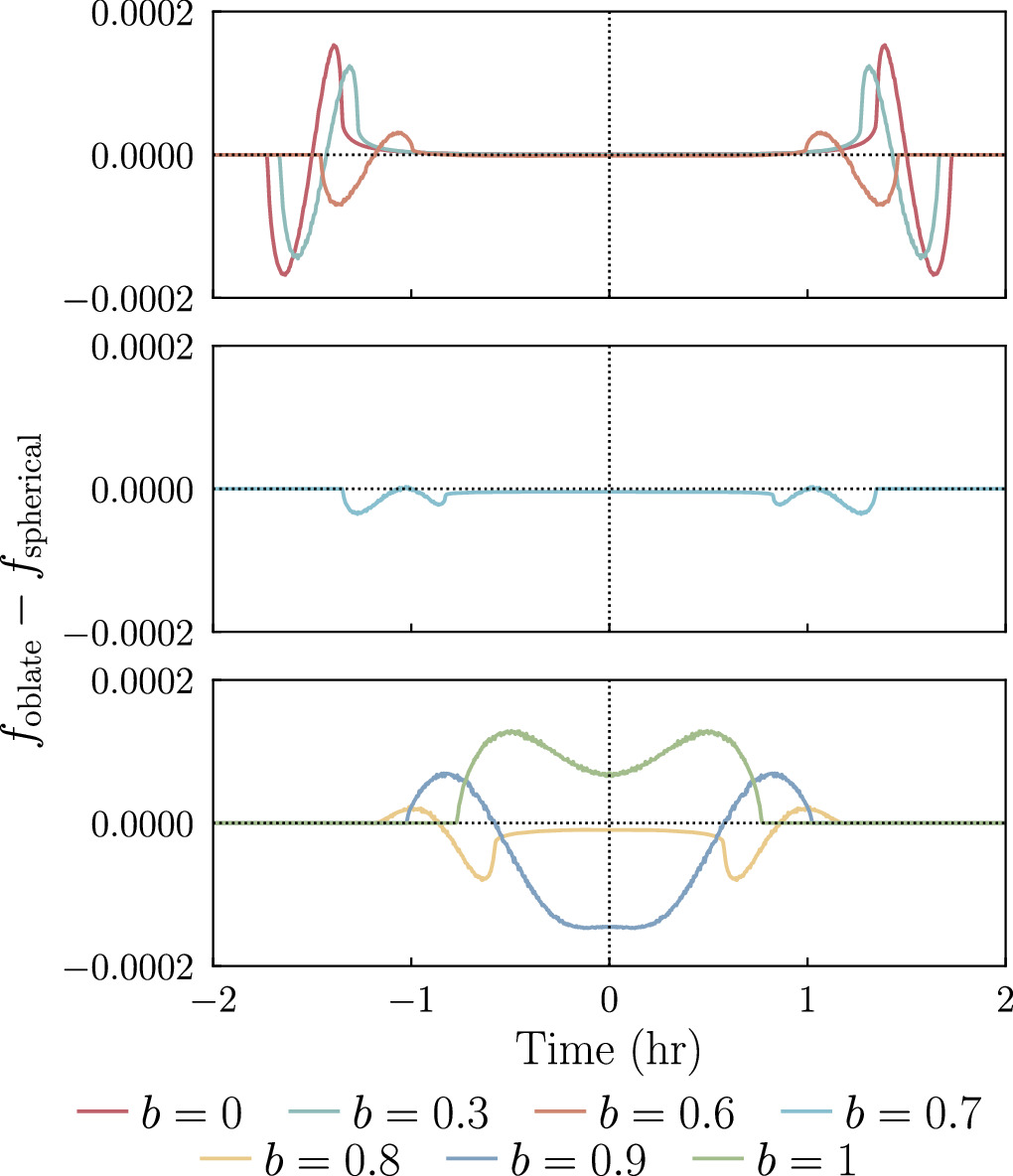
Examples of how the flux during a planetary transit differs between an oblate planet model and a spherical planet model. For all of the examples plotted, the oblate planet and its comparison spherical planet cover the same area of their host star mid-transit. The line color signifies the impact parameter. [Price et al. 2025]
Recently, Ellen Price (University of Chicago) and collaborators introduced new software that models the light curves of oblate planets transiting their host stars. The software, named greenlantern, isn’t the first or only code to tackle the problem of modeling transits of oblate planets. greenlantern‘s advantage comes in its efficiency, which minimizes its computational cost, and its public availability. (You can check it out here!)
After walking through the technical aspects of the model, Price’s team introduced their test subject, the sub-Neptune exoplanet HIP 41378f. HIP 41378f is notable for being the outermost of five known planets in its star system, for having an extremely low bulk density of just 0.09 gram per cubic centimeter, and for having a long, chilly, 542-day orbit around its host star.
Price’s team used their code to fit Kepler space telescope data of HIP 41378f and constrain the planet’s oblateness and, by extension, its rotation rate. They determined that the planet’s rotation period is at minimum 15.3 hours, making it a slower rotator than either Jupiter (10 hours) or Saturn (10.5 hours).
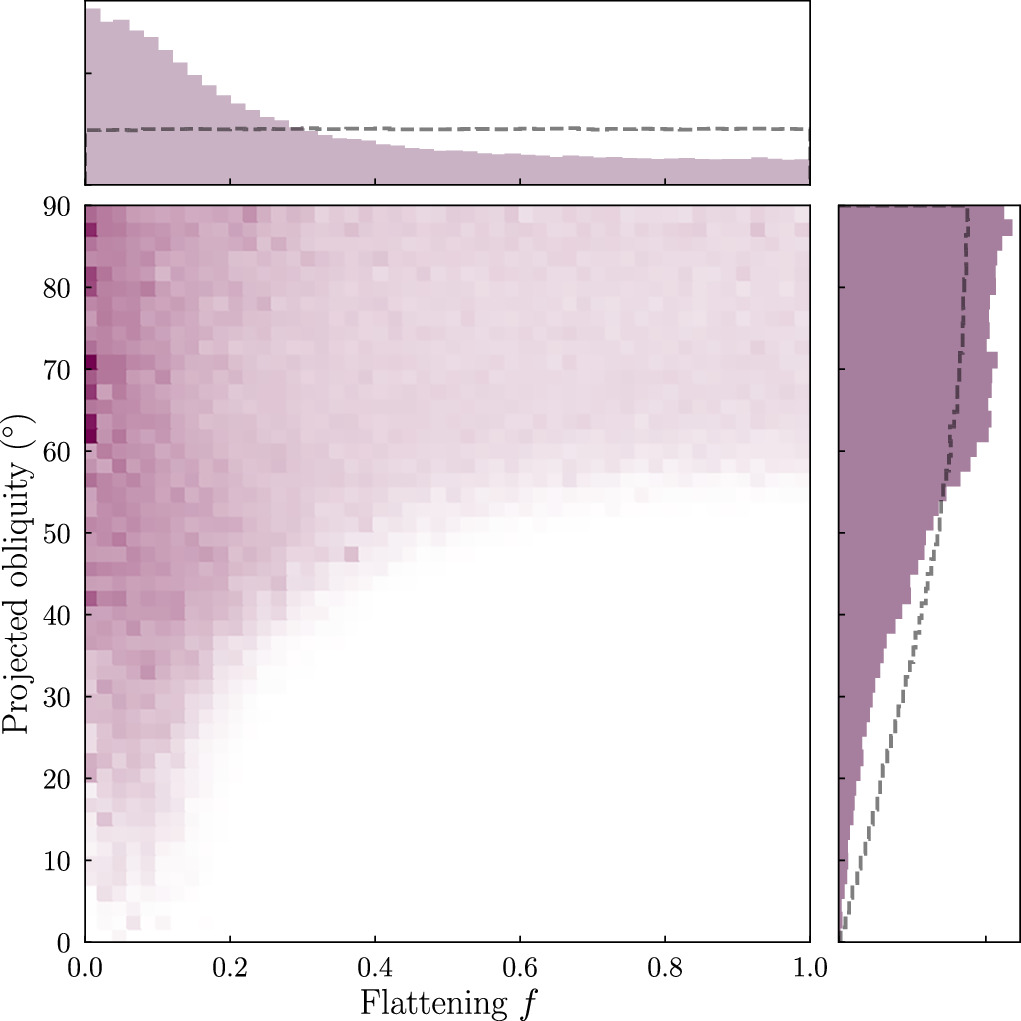
Joint probability distribution for the flattening and projected obliquity (axial tilt) of HIP 41378f. [Price et al. 2025]
Rotating Through the Possibilities
In addition to constraining the rotation rate, this work also showed that current observations of HIP 41378f are consistent with a broad range of axial tilts. What does this mean for how HIP 41378f formed? Given the planet’s mass — 12 Earth masses, give or take a few — a large axial tilt could arise in a variety of ways, including gravitational interactions between the planets in the system. However, with HIP 41378f orbiting quite far from its siblings, it’s not clear why it would be so tilted, and more data are needed to pin down HIP 41378f’s axial tilt.
Finally, Price’s team interpreted the results in the context of HIP 41378f’s possible ring system. Given the planet’s extremely low bulk density, it’s possible that a system of rings has artificially inflated the planet’s apparent radius. In this case, the measured oblateness would reflect the influence of the ring system and could not be used to constrain the planet’s rotation rate.
Citation
“A Long Spin Period for a Sub-Neptune-Mass Exoplanet,” Ellen M. Price et al 2025 ApJL981 L7. doi:10.3847/2041-8213/adb42b
Brave has announced the public release of Brave Origin, a paid minimalist version of its browser that strips out cryptocurrency, AI, rewards, and other monetization-focused features. [...]
The Windows version of the Hola Browser has been compromised in a supply chain attack that delivered an undeclared executable identified by researchers as a cryptocurrency miner. [...]
Asana has launched an AI personal assistant that can track various data sources to alerts users when a work project runs into problems and recommends next actions.
Asana Dash is described as an “AI chief of staff” that can help users stay up to date on work projects by accessing information in Asana as well as across email, calendar and team messaging apps, said Arnab Bose, Asana’s chief product officer. “Keeping people in their ‘zone of genius’ and hooking up all of these unstructured signals to the structure of Asana — that’s what Dash does best,” said Bose.
The AI assistant can access the same Asana project information as the user, and can flag when problems occur that could push a project off-track. Asana Dash can then act to address problems, such as posting messages within Asana on behalf of the user or directing an AI teammate to take action. (Asana Dash will ask the user before making any changes.)
“Asana is building on recent acquisitions, and earlier investment in a graph database focused on human connections — the Asana Work Graph — and its position within a well-integrated flow of work to deliver to each worker an executive assistant rooted in the context of their job,” said Wayne Kurtzman, IDC research vice president.
The Asana Dash personal assistant is enabled by an expanded Asana work graph — the data model related to work carried out by teams in the application. Asana has in the past been more focused on tasks, projects, portfolios, and goals, said Bose, but the work graph now includes new sources of data, linking to employee calendars and accessing meeting transcripts, for instance, alongside other documents and databases.
There are also updates to the AI teammates feature — collaborative AI agents that multiple human coworkers can interact with — which are now more powerful, said Bose. This includes additional skills and integrations with third-party apps such as Gmail, Slack, Outlook, Figma, and Canva.
As for the StackAI acquisition, Bose said it allows Asana to extend the reach of AI agents into a variety of business apps more easily and reliably, building ] on Asana’s “system of action” function. The latter tracks work carried out across an organization, he said, and can automate the complex processes that make up many enterprise workflows.
“If you look at StackAI’s website, the thing that they are really, really great at is building these complex, multi-step processes,” said Bose. The aim is to combine StackAI’s agent builder with integration expertise agents already available in Asana.
“So, the idea is when an AI teammate or Dash recommends the next best action, they will be able to choose downstream actions based on the portfolio of approved workflows that you’ve built out in StackAI.”
Overall, the announcements help Asana provide a platform that combines agents and workflow automation with AI assistance that aids humans to work more effectively, said Bose.
“Our terminology for this is a ‘human-agent operating system,’ because automation, I feel, is a little reductive in the sense that there are some things that are fully automated, but a lot that you’d want a human being and an AI agent to coordinate on and align on,” he said.
Asana did not immediately respond to a request for pricing and availability details for Asana Dash.
Microsoft 365 (and Office 365) subscribers get more frequent software updates than those who have purchased Office without a subscription, which means subscribers have access to the latest features, security patches, and bug fixes. But it can be hard to keep track of the changes in each update and know when they’re available. We’re doing this for you, so you don’t have to.
Following are summaries of the updates to Microsoft 365/Office 365 for Windows over the past year, with the latest releases shown first. We’ll add info about new updates as they’re rolled out.
Note: This story covers updates released to the Current Channel for Microsoft 365/Office 365 subscriptions. If you’re a member of Microsoft’s Office Insider preview program or want to get a sneak peek at upcoming features, see the Microsoft 365 Insider blog.
Version 2605 (Build 20026.20140)
Release date: June 3, 2026
This build fixes a single bug, in which images didn’t display when using top and bottom text wrapping in classic Outlook.
This build fixes several bugs, including one in which Excel or PowerPoint closed unexpectedly in rare cases while the user was actively co-authoring, particularly when opening a document for the first time.
What IT needs to know: Because this is a security update, it should be applied relatively soon. Over the next few weeks, check for reports about problematic issues, and if all seems well, apply the update.
In this build, Copilot can now edit your PowerPoint documents. Copilot can start a new presentation or build on an existing one, generate slides, update content, improve layouts, and polish design, while preserving formatting, structure, and branding.
What IT needs to know: Because this is a security update, it should be applied relatively soon. Over the next few weeks, check for reports about problematic issues, and if all seems well, apply the update.
This build fixes several bugs, including one in Outlook in which users could not close the Copilot chat pane using a keyboard. Users can now close the pane by navigating to the Close button using a keyboard or by using the assigned keyboard shortcut.
This build fixes an Outlook bug in which updating a single instance of a recurring meeting in a Microsoft 365 group calendar updated the entire series.
This build introduces agent mode in Word, which adds a conversational chat experience that helps create, edit, and refine document content as you work. In addition, the build fixes a bug that impacted the rendering of extended characters in calendar items, causing certain characters to appear as question marks.
What IT needs to know: Because this is a security update, it should be applied relatively soon. Over the next few weeks, check for reports about problematic issues, and if all seems well, apply the update.
What IT needs to know: Because this is a security update, it should be applied relatively soon. Over the next few weeks, check for reports about problematic issues, and if all seems well, apply the update.
In this build, OneNote applies your chosen proofing language more consistently, so you don’t have to reset it for every paragraph when writing in multiple languages. In addition, the build fixes several bugs, including one that caused Office applications to become unresponsive when profile card-related activities were performed.
This build fixes a number of bugs, including one that caused Excel, PowerPoint, and Word to become unresponsive when profile card-related activities were performed.
What IT needs to know: Because this is a security update, it should be applied relatively soon. Over the next few weeks, check for reports about problematic issues, and if all seems well, apply the update.
This Patch Tuesday build offers, in Microsoft’s words, “Various fixes to functionality and performance.” The build also has a variety of security updates (see details).
What IT needs to know: Because this is a security update, it should be applied relatively soon. Over the next few weeks, check for reports about problematic issues, and if all seems well, apply the update.
This Patch Tuesday build fixes a bug in Outlook that caused some recipients to be unable to access OneDrive links shared with them via email. The build also has a variety of security updates (see details).
What IT needs to know: Because this is a security update, it should be applied relatively soon. Over the next few weeks, check for reports about problematic issues, and if all seems well, apply the update.
This build has a variety of security updates (see details), along with various fixes to functionality and performance.
What IT needs to know: Because this is a security update, it should be applied relatively soon. Over the next few weeks, check for reports about problematic issues, and if all seems well, apply the update.
This build fixes two bugs, one in Excel in which ribbon controls were not rendered when rejoining Office sessions in a virtual machine, Azure Virtual Desktop, or remote desktop environment, and another that caused Outlook to terminate unexpectedly when starting.
This build has multiple security updates (see details), along with various fixes to functionality and performance.
What IT needs to know: Because this is a security update, it should be applied relatively soon. Over the next few weeks, check for reports about problematic issues, and if all seems well, apply the update.
This build fixes a bug that caused Outlook to terminate unexpectedly when sending a meeting invite with an encryption label. It also adds support for pixelated rendering of embedded images in SVG assets for the entire Office suite.
This build fixes a bug which required users to restart Outlook to open a .msg file after initially accessing it once. The build also includes a variety of security updates (see details).
What IT needs to know: Because this is a security update, it should be applied relatively soon. Over the next few weeks, check for reports about problematic issues, and if all seems well, apply the update.
This build fixes a wide variety of bugs, including in which Outlook closed unexpectedly shortly after launch, and another in Word in which the word count sometimes displayed incorrectly.
This build fixes two bugs, one that caused the Copilot Command Center to continue to be visible after disabling the Copilot user interface, and another in which when creating handouts in PowerPoint, certain characters (full-width numbers) couldn’t be properly transferred to the handout.
This build fixes two bugs, one that caused Visio 32-bit to close unexpectedly when using the Drawing control, particularly in setups involving COM components or .NET integrations, and another in Word in which copying and pasting content between documents sometimes changed the applied style unexpectedly.
This Patch Tuesday build fixes several bugs in Outlook, PowerPoint, Word, and the whole Office suite, including one that caused the Copilot icon to unexpectedly display in Outlook when Copilot had been disabled by the admin in government cloud.
The release also includes a variety of security updates (see details).
What IT needs to know: Because this is a security update, it should be applied relatively soon. Over the next few weeks, check for reports about problematic issues, and if all seems well, apply the update.
This build introduces several new features, including one in Excel in which the PivotTables dialog box interface has been replaced by a redesigned panel, making it easier to view all of your options and simpler to change your data selection before inserting a recommended PivotTable.
This build fixes several bugs, including one for the entire Office suite in which a Save As attempt on an existing file didn’t complete successfully, and subsequent attempts continued to encounter issues when trying to save to a file that no longer existed.
This Patch Tuesday release also includes a variety of security updates: see details.
What IT needs to know: Because this is a security update, it should be applied relatively soon. Over the next few weeks, check for reports about problematic issues, and if all seems well, apply the update.
This build introduces a new PowerPoint feature: Notification emails for mentions, tasks, comments, and replies will now contain context previews even when the source document is encrypted, and the email will inherit the document’s security policies.
This build fixes a bug in which users were seeing high CPU usage when typing in Outlook. It also includes a variety of security updates: see details.
What IT needs to know: Because this is a security update, it should be applied relatively soon. Over the next few weeks, check for reports about problematic issues, and if all seems well, apply the update.
This build fixes a wide variety of bugs, including one in which PowerPoint was unable to open a file from a network mapped drive from File Explore, another in which Word closed unexpectedly when opening .doc files, and another for the entire Office suite in which large 3D files couldn’t be inserted.
This build fixes a single bug in Word in which users may have encountered an issue with saving, seeing the message “saving…” in the title bar. It also includes a variety of security updates. Go here for details.
What IT needs to know: Because this is a security update, it should be applied relatively soon. Over the next few weeks, check for reports about problematic issues, and if all seems well, apply the update.
This build lets you use Dark Mode in Excel, which darkens your entire sheet, including cells, and may reduce eye strain. It also fixes several bugs, including one in Word in which opening specific files that contain many tracked changes and comments resulted in poor performance, and one in PowerPoint in which the app was not displaying the icon for an inserted PDF object.
This build fixes several bugs, including one in which some Word files with numerous tracked changes and comments were slow. It also includes a variety of security updates: see details.
What IT needs to know: Because this is a security update, it should be applied relatively soon. Over the next few weeks, check for reports about problematic issues, and if all seems well, apply the update.
This build fixes a wide variety of bugs, including one in Word in which the default font size may not be 12pt as expected, and another in which PowerPoint automatically closed when the system went into hibernate or sleep mode.
This build removes the option to display Track Changes balloons in left margin in Word. It also includes a variety of security updates. See “Release notes for Microsoft Office security updates” for details.
What IT needs to know: Because this is a security update, it should be applied relatively soon. Over the next few weeks, check for reports about problematic issues, and if all seems well, apply the update.
 Login
Login