 Login
LoginLeaks on Space Station Lead Astronauts Briefly to Seek Shelter in Spacecraft
6 June 2026 at 02:45
Russian astronauts prepared to make repairs on Friday morning, but after an hour and a half, officials decided no urgent action was needed.



Axiom Space announced June 4 that it added more than $175 million to its latest funding round, with Japan’s largest bank joining the company’s investors.
The post Axiom Space adds more than $175 million to funding round appeared first on SpaceNews.
The age-old IT defense when compliance violations are investigated by regulators is to try and keep a low profile — and hope no one looks too closely. But with enhanced SEC interest in all data breaches encouraging regulators around the globe to take those closer looks at IT, data breach disclosure rules are becoming more strict.
While that might be unsettling for cybersecurity executives, it is also disturbing news for IT admins, who could find themselves under a remarkably uncomfortable spotlight.
Consider this recent move by the New York State Department of Financial Services against the Delta Dental Insurance Company. State officials hit the insurance company for improper and inconsistent enforcement of its own data retention policies; improper incident response plan protocols; and improper notification of the security incident itself.
The company was fined more than $2 million.
The data retention violations are perhaps the most problematic. Had that policy been enforced properly, much of the stolen data would have been destroyed long before the attackers could have accessed it.
It’s not simply a matter of whether the IT rules for retention were sufficiently strict. Some regulators — and especially the US Federal Trade Commission (FTC) — focus extensively on companies who don’t do what they say publicly. If a corporate website promises something to customers, the FTC will hold companies to their word.
Think about that the next time you assign a summer intern to handle your website’s copy.
Inconsistent implementation of data retention policies can deliver other legal headaches. Having a good policy approved by the general counsel is fine, but it means nothing if all of your people do not follow it strictly.
Let’s say one of your business units is being sued for having done something naughty. Opposing counsel subpoenas your business records, including emails from a few years ago. Your attorney responds that those email records no longer exist; they were deleted last year in accordance with corporate policy on data retention that says everything of a certain nature has to be deleted after one year.
Fair enough. But what if opposing counsel in a deposition asks,“Really? Does that policy apply to all records of that nature?” You say that it does.
“It might interest you to know that we have sworn testimony from four other employees who showed us emails of the same nature that were more than five years old. So why did you adhere to your policy regarding emails that might prove the fraud but somehow you did not delete others? Sounds a little selective, no? I think the judge would agree.”
In the dental case, the company had a strict policy on retention rules. But corporate software was programmed with “the ability to shorten, extend, or disable MOVEit Transfer’s default retention settings on a folder-by-folder or file-by-file basis.”
The regulators then swooped in because the insurance company “had no written policy or procedure for requesting, reviewing, or approving such changes to folder retention settings.”
The best retention policy would, in theory, have no exemptions. But if you’re going to allow exemptions, you need a precise policy documenting how and when they can occur. There should be a required form so that a manager can write out the reasons for this specific exemption.
The New York state document is an important one to carefully review; it provides an excellent roadmap to how compliance can go wrong — and useful information on how to keep something similar from happening to your company.
© Evelyn Hockstein/Reuters
© The New York Times
Brown rot is a common fungal disease in the Southeastern United States that affects stone fruits like peaches, cherries, and plums. Monilinia fructicola is a tan, fuzzy fungus that grows on tree flowers, twigs, and fruit, and is the most common cause of brown rot. Once brown rot infects a tree, the damage is irreversible, causing significant crop losses in commercial orchards. Farmers try to control the spread of M. fructicola by applying chemical sprays, called fungicides, to fruit trees in the spring.
In M. fructicola, a biosynthesis gene named MfCYP51 encodes a major protein critical to the fungi’s survival. Certain fungicides, called demethylation inhibitor (DMI) fungicides, stop M. fructicola from growing by targeting this protein. Over the last 20 years, DMI fungicides have become less effective against brown rot as M. fructicola becomes more resistant.
Living microorganisms and their metabolites can control fungal diseases as an alternative to chemical fungicides, known as biofungicides. Many bacteria produce compounds like hydrogen cyanide and pyrrolnitrin that damage fungal cells. However, scientists have not found a biofungicide suitable for commercial production. A group of researchers at Clemson University in the USA and Huazhong Agricultural University in China set out to test whether the soil bacteria Pseudomonas chlororaphis and Bacillus subtilis could be effective biofungicides against brown rot.
The researchers performed an incubation experiment to analyze how the fungal cells make their critical protein from the MfCYP51 gene, a process called gene expression, under different fungicide treatments. They used 3 M. fructicola strains sensitive to traditional DMI fungicides and 3 resistant strains. They tested these with 5 different fungicide treatments: a DMI fungicide, a mixture of P. chlororaphis metabolites, a mixture of living B. subtilis cells, a DMI fungicide + P. chlororaphis metabolites, and a DMI fungicide + B. subtilis cells. They also set up a control treatment with sterile water instead of fungicide.
After 6 hours, the researchers extracted the molecule that measures gene expression, called RNA, from the fungi. They found that both the P. chlororaphis treatment and the DMI fungicide + P. chlororaphis treatment substantially reduced MfCYP51 expression in both the sensitive and resistant isolates compared to the controls. In contrast, the DMI fungicide, B. subtilis, and DMI fungicide + B. subtilis treatments increased MfCYP51 expression in the resistant isolates. The researchers concluded that P. chlororaphis has a unique ability to reduce gene expression, unlike other biofungicides.
To further investigate how the biofungicide treatments work, the team tested whether P. chlororaphis and B. subtilis produced the anti-fungal metabolite pyrrolnitrin. They added 1 milliliter of each treatment to a machine that separates and identifies liquid compounds using high pressure, called a high-performance liquid chromatograph. They found that the P. chlororaphis treatment contained pyrrolnitrin, so they hypothesized that it was responsible for reducing gene expression.
Additionally, the researchers tested their 5 treatments on brown rot in fruit. For each treatment, they took 10 Gala apples, washed and sterilized their surfaces, and sprayed them with the fungicides. After 24 hours, they poked holes in the apples with toothpicks and added 20 microliters of liquid containing M. fructicola cells to the poked holes. They placed the apples in a humid chamber for 5 days and measured the number and size of brown rot spots that developed on their surfaces.
Despite decreasing MfCYP51 expression, the researchers found that P. chlororaphis treatment alone didn’t reduce brown rot disease compared to the control, but the DMI fungicide and B. subtilis treatments did. The mixed treatments of DMI fungicide + P. chlororaphis and DMI fungicide + B. subtilis both reduced brown rot disease compared to the control, but only the DMI fungicide + P. chlororaphis treatment prevented it.
The researchers concluded that although biofungicides may not be fully effective on their own, commercializing them could allow farmers to use less DMI fungicide. They explained that scaling back the use of DMI fungicides would slow M. fructicola resistance. Finally, they proposed that future researchers test biofungicide mixtures containing pyrrolnitrin in the field to observe real-world effects on stone fruit trees.
The post Using bacteria to fight fungal brown rot appeared first on Sciworthy.
Microsoft 365 (and Office 365) subscribers get more frequent software updates than those who have purchased Office without a subscription, which means subscribers have access to the latest features, security patches, and bug fixes. But it can be hard to keep track of the changes in each update and know when they’re available. We’re doing this for you, so you don’t have to.
Following are summaries of the updates to Microsoft 365/Office 365 for Windows over the past year, with the latest releases shown first. We’ll add info about new updates as they’re rolled out.
Note: This story covers updates released to the Current Channel for Microsoft 365/Office 365 subscriptions. If you’re a member of Microsoft’s Office Insider preview program or want to get a sneak peek at upcoming features, see the Microsoft 365 Insider blog.
Release date: June 3, 2026
This build fixes a single bug, in which images didn’t display when using top and bottom text wrapping in classic Outlook.
Get more info about Version 2605 (Build 20026.20140).
Release date: May 26, 2026
This build offers “various fixes to functionality and performance,” according to Microsoft.
Get more info about Version 2605 (Build 20026.20112).
Release date: May 20, 2026
This build fixes several bugs, including one in which Excel or PowerPoint closed unexpectedly in rare cases while the user was actively co-authoring, particularly when opening a document for the first time.
Get more info about Version 2605 (Build 20026.20076).
Release date: May 14, 2026
This build fixes a bug in Outlook in which sending mail failed when multiple Exchange accounts were configured.
Get more info about Version 2604 (Build 19929.20172).
Release date: May 12, 2026
The build plugs a number of security holes. For details, see Release notes for Microsoft Office security updates.
What IT needs to know: Because this is a security update, it should be applied relatively soon. Over the next few weeks, check for reports about problematic issues, and if all seems well, apply the update.
Get more info about Version 2604 (Build 19929.20164).
Release date: May 5, 2026
This build fixes a bug in which Outlook closed unexpectedly after replying to a mail item with labels.
Get more info about Version 2604 (Build 19929.20136).
Release date: April 29, 2026
This build includes “various fixes to functionality and performance,” according to Microsoft.
Get more info about Version 2604 (Build 19929.20106).
Release date: April 21, 2026
This build includes “various fixes to functionality and performance,” according to Microsoft.
Get more info about Version 2604 (Build 19929.20090).
Release date: April 14, 2026
In this build, Copilot can now edit your PowerPoint documents. Copilot can start a new presentation or build on an existing one, generate slides, update content, improve layouts, and polish design, while preserving formatting, structure, and branding.
The build also plugs a number of security holes. For details, see Release notes for Microsoft Office security updates.
What IT needs to know: Because this is a security update, it should be applied relatively soon. Over the next few weeks, check for reports about problematic issues, and if all seems well, apply the update.
Get more info about Version 2603 (Build 19822.20182).
Release date: April 9, 2026
This build fixes several bugs, including one in Outlook in which users could not close the Copilot chat pane using a keyboard. Users can now close the pane by navigating to the Close button using a keyboard or by using the assigned keyboard shortcut.
Get more info about Version 2603 (Build 19822.20168).
Release date: March 31, 2026
This build includes “various fixes to functionality and performance,” according to Microsoft.
Get more info about Version 2603 (Build 19822.20142).
Release date: March 24, 2026
This build fixes a single bug in which PowerPoint sometimes closed unexpectedly when opening a newly created empty file from the OneDrive folder.
Get more info about Version 2603 (Build 19822.20114).
Release date: March 18, 2026
This build fixes an Outlook bug in which updating a single instance of a recurring meeting in a Microsoft 365 group calendar updated the entire series.
Get more info about Version 2602 (Build 19725.20190).
Release date: March 10, 2026
This build introduces agent mode in Word, which adds a conversational chat experience that helps create, edit, and refine document content as you work. In addition, the build fixes a bug that impacted the rendering of extended characters in calendar items, causing certain characters to appear as question marks.
The build also plugs a number of security holes. For details, see Release notes for Microsoft Office security updates.
What IT needs to know: Because this is a security update, it should be applied relatively soon. Over the next few weeks, check for reports about problematic issues, and if all seems well, apply the update.
Get more info about Version 2602 (Build 19725.20172).
Release date: March 3, 2026
This build fixes a bug in which closing a document sometimes remained in progress indefinitely after the Office app resumed from sleep or hibernation.
Get more info about Version 2602 (Build 19725.20152).
Release date: February 24, 2025
This build fixes several bugs, including one that caused OneNote to close unexpectedly upon startup.
Get more info about Version 2602 (Build 19725.20126).
Release date: February 17, 2025
This build includes, in Microsoft’s words, “various fixes to functionality and performance.”
Get more info about Version 2601 (Build 19628.20214).
Release date: February 10, 2026
This build fixes a bug that sometimes prevented users from opening emails with the Encrypt Only label in Outlook.
It also plugs a number of security holes. For details, see Release notes for Microsoft Office security updates.
What IT needs to know: Because this is a security update, it should be applied relatively soon. Over the next few weeks, check for reports about problematic issues, and if all seems well, apply the update.
Get more info about Version 2601 (Build 19628.20204).
Release date: February 3, 2026
This build includes, in Microsoft’s words, “various fixes to functionality and performance.”
Get more info about Version 2601 (Build 19628.20166).
Release date: January 27, 2025
In this build, OneNote applies your chosen proofing language more consistently, so you don’t have to reset it for every paragraph when writing in multiple languages. In addition, the build fixes several bugs, including one that caused Office applications to become unresponsive when profile card-related activities were performed.
Get more info about Version 2601 (Build 19628.20150).
Release date: January 21, 2025
This build includes, in Microsoft’s words, “Various fixes to functionality and performance.”
Get more info about Version 2512 (Build 19530.20184).
Release date: January 13, 2026
This build fixes a number of bugs, including one that caused Excel, PowerPoint, and Word to become unresponsive when profile card-related activities were performed.
It also plugs a number of security holes. For details, see Release notes for Microsoft Office security updates.
What IT needs to know: Because this is a security update, it should be applied relatively soon. Over the next few weeks, check for reports about problematic issues, and if all seems well, apply the update.
Get more info about Version 2512 (Build 19530.20144).
Release date: January 8, 2025
This build offers, in Microsoft’s words, “Various fixes to functionality and performance.”
Get more info about Version 2512 (Build 19530.20138).
Release date: December 16, 2025
This build offers, in Microsoft’s words, “Various fixes to functionality and performance.”
Get more info about Version 2511 (Build 19426.20218).
Release date: December 9, 2025
This Patch Tuesday build offers, in Microsoft’s words, “Various fixes to functionality and performance.” The build also has a variety of security updates (see details).
What IT needs to know: Because this is a security update, it should be applied relatively soon. Over the next few weeks, check for reports about problematic issues, and if all seems well, apply the update.
Get more info about Version 2511 (Build 19426.20186).
Release date: December 3, 2025
This build includes, in Microsoft’s words, “Various fixes to functionality and performance.”
Get more info about Version 2511 (Build 19426.20170).
Release date: November 20, 2025
This build fixes a bug in Outlook that caused users to see “Contacting the server for information” repeatedly when loading some emails.
Get more info about Version 2510 (Build 19328.20244).
Release date: November 18, 2025
This build includes, in the words of Microsoft, “various fixes to functionality and performance.”
Get more info about Version 2510 (Build 19328.20232).
Release date: November 11, 2025
This Patch Tuesday build fixes a bug in Outlook that caused some recipients to be unable to access OneDrive links shared with them via email. The build also has a variety of security updates (see details).
What IT needs to know: Because this is a security update, it should be applied relatively soon. Over the next few weeks, check for reports about problematic issues, and if all seems well, apply the update.
Get more info about Version 2510 (Build 19328.20190).
Release date: November 4, 2025
This build fixes a single bug, in which @mention searches produced no results in Office apps.
Get more info about Version 2510 (Build 19328.20178).
Release date: October 30, 2025
This build introduces a new Get Data dialog in Windows that simplifies finding and using external data, and adds Analyze Data to the Data tab.
The build also fixed an bug in Outlook that prevented users from downloading web add-ins in some virtualized environments.
Get more info about Version 2510 (Build 19328.20158).
Release date: October 21, 2025
This build has, in Microsoft’s words, “various fixes to functionality and performance.”
Get more info about Version 2509 (Build 19231.20216).
Release date: October 14, 2025
This build has a variety of security updates (see details), along with various fixes to functionality and performance.
What IT needs to know: Because this is a security update, it should be applied relatively soon. Over the next few weeks, check for reports about problematic issues, and if all seems well, apply the update.
Get more info about Version 2509 (Build 19231.20194).
Release date: October 7, 2025
This build has, in Microsoft’s words, “various fixes to functionality and performance.”
Get more info about Version 2509 (Build 19231.20172).
Release date: October 1, 2025
This build fixes two bugs, one in Excel in which ribbon controls were not rendered when rejoining Office sessions in a virtual machine, Azure Virtual Desktop, or remote desktop environment, and another that caused Outlook to terminate unexpectedly when starting.
Get more info about Version 2509 (Build 19231.20156).
Release date: September 23, 2025
This build has, in Microsoft’s words, “various fixes to functionality and performance.”
Get more info about Version 2508 (Build 19127.20264).
Release date: September 16, 2025
This build has, in Microsoft’s words, “various fixes to functionality and performance.”
Get more info about Version 2508 (Build 19127.20240).
Release date: September 9, 2025
This build has multiple security updates (see details), along with various fixes to functionality and performance.
What IT needs to know: Because this is a security update, it should be applied relatively soon. Over the next few weeks, check for reports about problematic issues, and if all seems well, apply the update.
Get more info about Version 2508 (Build 19127.20222).
Release date: September 3, 2025
This build fixes a bug in which some Outlook add-ins were getting “Office.auth.getAccessToken is not a function” errors.
Get more info about Version 2508 (Build 19127.20192).
Release date: August 26, 2025
This build fixes a bug that caused Outlook to terminate unexpectedly when sending a meeting invite with an encryption label. It also adds support for pixelated rendering of embedded images in SVG assets for the entire Office suite.
Get more info about Version 2508 (Build 19127.20154).
Release date: August 19, 2025
This build fixes a variety of bugs.
Get more info about Version 2507 (Build 19029.20208).
Release date: August 12, 2025
This build fixes a bug which required users to restart Outlook to open a .msg file after initially accessing it once. The build also includes a variety of security updates (see details).
What IT needs to know: Because this is a security update, it should be applied relatively soon. Over the next few weeks, check for reports about problematic issues, and if all seems well, apply the update.
Get more info about Version 2507 (Build 19029.20184).
Release date: August 5, 2025
This build fixes a single bug, in which users had to restart Outlook to open a .msg file after initially accessing it once.
Get more info about Version 2507 (Build 19029.20156).
Release date: July 30, 2025
This build fixes a wide variety of bugs, including in which Outlook closed unexpectedly shortly after launch, and another in Word in which the word count sometimes displayed incorrectly.
Get more info about Version 2507 (Build 19029.20136).
Release date: July 22, 2025
This build fixes two bugs, one that caused the Copilot Command Center to continue to be visible after disabling the Copilot user interface, and another in which when creating handouts in PowerPoint, certain characters (full-width numbers) couldn’t be properly transferred to the handout.
Get more info about Version 2506 (Build 18925.20184).
Release date: July 15, 2025
This build fixes two bugs, one that caused Visio 32-bit to close unexpectedly when using the Drawing control, particularly in setups involving COM components or .NET integrations, and another in Word in which copying and pasting content between documents sometimes changed the applied style unexpectedly.
Get more info about Version 2506 (Build 18925.20168).
Release date: July 8, 2025
This Patch Tuesday build fixes several bugs in Outlook, PowerPoint, Word, and the whole Office suite, including one that caused the Copilot icon to unexpectedly display in Outlook when Copilot had been disabled by the admin in government cloud.
The release also includes a variety of security updates (see details).
What IT needs to know: Because this is a security update, it should be applied relatively soon. Over the next few weeks, check for reports about problematic issues, and if all seems well, apply the update.
Get more info about Version 2506 (Build 18925.20158).
Release date: July 1, 2025
This build fixes a wide variety of bugs, including one in Word in which print preview sometimes stopped working when printing long emails.
Get more info about Version 2506 (Build 18827.20176).
Release date: June 26, 2025
This build introduces several new features, including one in Excel in which the PivotTables dialog box interface has been replaced by a redesigned panel, making it easier to view all of your options and simpler to change your data selection before inserting a recommended PivotTable.
Get more info about Version 2505 (Build 18827.20176).
Release date: June 17, 2025
This build fixes a bug that caused the “Try the new Outlook” toggle to be enabled when working in Classic Outlook side by side with the new Outlook.
Get more info about Version 2505 (Build 18827.20164).
Release date: June 10, 2025
This build fixes several bugs, including one for the entire Office suite in which a Save As attempt on an existing file didn’t complete successfully, and subsequent attempts continued to encounter issues when trying to save to a file that no longer existed.
This Patch Tuesday release also includes a variety of security updates: see details.
What IT needs to know: Because this is a security update, it should be applied relatively soon. Over the next few weeks, check for reports about problematic issues, and if all seems well, apply the update.
Get more info about Version 2505 (Build 18827.20150).
Release date: June 3, 2025
This build offers a variety of bug and performance fixes.
Read about Version 2505 (Build 18827.20140).
Release date: May 20, 2025
This build introduces a new PowerPoint feature: Notification emails for mentions, tasks, comments, and replies will now contain context previews even when the source document is encrypted, and the email will inherit the document’s security policies.
Get more info about Version 2504 (Build 18730.20186).
Release date: May 13, 2025
This build fixes a bug in which users were seeing high CPU usage when typing in Outlook. It also includes a variety of security updates: see details.
What IT needs to know: Because this is a security update, it should be applied relatively soon. Over the next few weeks, check for reports about problematic issues, and if all seems well, apply the update.
Get more info about Version 2504 (Build 18730.20168).
Release date: May 6, 2025
This build includes various bug and performance fixes.
Get more info about Version 2504 (Build 18730.20142).
Release date: April 29, 2025
This build fixes a wide variety of bugs, including one in which PowerPoint was unable to open a file from a network mapped drive from File Explore, another in which Word closed unexpectedly when opening .doc files, and another for the entire Office suite in which large 3D files couldn’t be inserted.
Get more info about Version 2504 (Build 18730.20122).
Release date: April 17, 2025
This build fixes a bug that could cause Excel to stop responding.
Get more info about Version 2503 (Build 18623.20208).
Release date: April 8, 2025
This build fixes a single bug in Word in which users may have encountered an issue with saving, seeing the message “saving…” in the title bar. It also includes a variety of security updates. Go here for details.
What IT needs to know: Because this is a security update, it should be applied relatively soon. Over the next few weeks, check for reports about problematic issues, and if all seems well, apply the update.
Get more info about Version 2503 (Build 18623.20178).
Release date: April 2, 2025
This build lets you use Dark Mode in Excel, which darkens your entire sheet, including cells, and may reduce eye strain. It also fixes several bugs, including one in Word in which opening specific files that contain many tracked changes and comments resulted in poor performance, and one in PowerPoint in which the app was not displaying the icon for an inserted PDF object.
Get more info about Version 2503 (Build 18623.20156).
Release date: March 11, 2025
This build fixes several bugs, including one in which some Word files with numerous tracked changes and comments were slow. It also includes a variety of security updates: see details.
What IT needs to know: Because this is a security update, it should be applied relatively soon. Over the next few weeks, check for reports about problematic issues, and if all seems well, apply the update.
Get more info about Version 2502 (Build 18526.20168).
Release date: March 5, 2025
This build fixes a wide variety of bugs, including one in Word in which the default font size may not be 12pt as expected, and another in which PowerPoint automatically closed when the system went into hibernate or sleep mode.
Get more info about Version 2502 (Build 18526.20144).
Release date: February 11, 2025
This build removes the option to display Track Changes balloons in left margin in Word. It also includes a variety of security updates. See “Release notes for Microsoft Office security updates” for details.
What IT needs to know: Because this is a security update, it should be applied relatively soon. Over the next few weeks, check for reports about problematic issues, and if all seems well, apply the update.
Get more info about Version 2501 (Build 18429.20158).
The European Union has now published a set of measures aimed at boosting Europe’s tech industry to help reduce reliance on US and Chinese suppliers for AI, cloud, and semiconductors. The proposals include rules to restrict the use of US hyperscalers for certain public sector procurement purposes, but stop short of banning them outright.
“Technological sovereignty does not mean protectionism. Europe remains grounded in openness, partnership, and fair competition,” Henna Virkkunen, executive vice president for Tech Sovereignty, Security and Democracy, said in a statement Wednesday. “At the same time, Europe wants to be in the position to make its own choices, avoiding dependence on single dominant suppliers, especially from non-like-minded countries.”
The European Technological Sovereignty Package — released after several delays — includes two legislative proposals: the Cloud and AI Development Act and Chips Act (CAIDA) 2.0 and the Open Source Strategy and Strategic Roadmap for Digitalization and AI in Energy.
CAIDA aims to triple data center capacity in the next five to seven years by easing restrictions for deployments across the EU. It also includes rules that, if enacted, would require EU public bodies to meet certain sovereignty criteria for cloud service procurement related to certain sensitive workloads.
Amid ongoing trans-Atlantic tensions and a long-time deep reliance on US tech providers, European organizations have become increasingly wary of a “kill switch” that would cut off access to digital services. There are also concerns that US hyperscalers could be compelled to share data with US government under the CLOUD Act and Foreign Intelligence Services Act (FISA), even when data centers are located in Europe.
The CAIDA proposals include four levels of criteria for suppliers; the most basic includes data center infrastructure located and operated in the region – something many US cloud suppliers already provide – with stricter rules around supplier ownership, full control over the software stack, and more stringent cybersecurity certification.
The majority of existing EU public sector workloads (70%) fall under the first level, with 20% at level 2, and 9% at level 3. Only a small proportion (1%) of the most sensitive workloads would require level 4.
Other proposals include the Chips Act 2.0, a follow-up to the 2023 legislation that sought to improve semiconductor production capabilities; the updated version now aims to boost research and spur demand for domestically produced processors.
The legislative proposals must be negotiated by the European Parliament and Council of the European Union before adoption.
When students first learn quantum field theory, the mathematical language the underpins the behavior of elementary particles, they start with the simplest possible interaction you can write down : a particle with no spin and no charge scattering off another copy of itself. One then eventually moves on to the more complicated interactions that describe the behavior of fundamental particles of the Standard Model. They may quickly forget this simplified interaction as a unrealistic toy example, greatly simplified compared to the complexity the real world. Though most interactions that underpin particle physics are indeed quite a bit more complicated, nature does hold a special place for simplicity. This barebones interaction is predicted to occur in exactly one scenario : a Higgs boson scattering off itself. And one of the next big targets for particle physics is to try and observe it.

The Higgs is the only particle without spin in the Standard Model, and the only one that doesn’t carry any type of charge. So even though particles such as gluons can interact with other gluons, its never two of the same kind of gluons (the two interacting gluons will always carry different color charges). The Higgs is the only one that can have this ‘simplest’ form of self-interaction. Prominent theorist Nima Arkani-Hamed has said that the thought of observing this “simplest possible interaction in nature gives [him] goosebumps“.
But more than being interesting for its simplicity, this self-interaction of the Higgs underlies a crucial piece of the Standard Model: the story of how particles got their mass. The Standard Model tells us that the reason all fundamental particles have mass is their interaction with the Higgs field. Every particle’s mass is proportional to the strength of the Higgs field. The fact that particles have any mass at all is tied to the fact that the lowest energy state of the Higgs field is at a non-zero value. According to the Standard Model, early in the universe’s history when the temperature were much higher, the Higgs potential had a different shape, with its lowest energy state at field value of zero. At this point all the particles we know about were massless. As the universe cooled the shape of the Higgs potential morphed into a ‘wine bottle’ shape, and the Higgs field moved into the new minimum at non-zero value where it sits today. The symmetry of the initial state, in which the Higgs was at the center of its potential, was ‘spontaneously broken’ as its new minimum, at a location away from the center, breaks the rotation symmetry of the potential. Spontaneous symmetry breaking is a very deep theoretical idea that shows up not just in particle physics but in exotic phases of matter as well (eg superconductors).
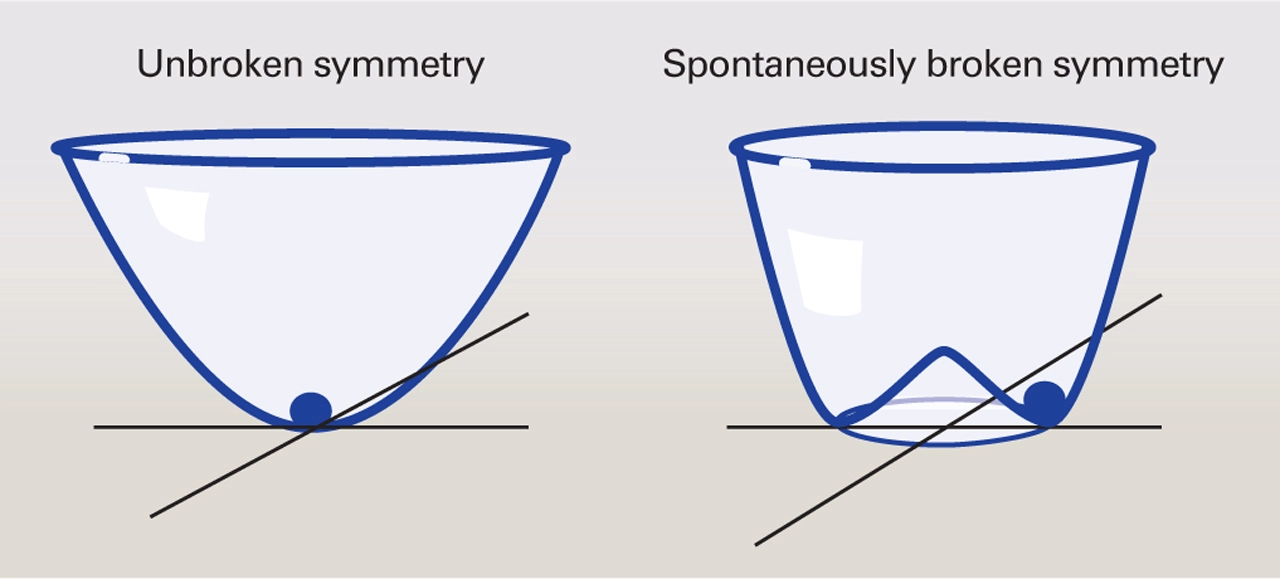
This fantastical story of how particle’s gained their masses, one of the crown jewels of the Standard Model, has not yet been confirmed experimentally. So far we have studied the Higgs’s interactions with other particles, and started to confirm the story that it couples to particles in proportion to their mass. But to confirm this story of symmetry breaking we will to need to study the shape of the Higgs’s potential, which we can probe only through its self-interactions. Many theories of physics beyond the Standard Model, particularly those that attempt explain how the universe ended up with so much matter and very little anti-matter, predict modifications to the shape of this potential, further strengthening the importance of this measurement.
Unfortunately observing the Higgs interacting with itself and thus measuring the shape of its potential will be no easy feat. The key way to observe the Higgs’s self-interaction is to look for a single Higgs boson splitting into two. Unfortunately in the Standard Model additional processes that can produce two Higgs bosons quantum mechanically interfere with the Higgs self interaction process which produces two Higgs bosons, leading to a reduced production rate. It is expected that a Higgs boson scattering off itself occurs around 1000 times less often than the already rare processes which produce a single Higgs boson. A few years ago it was projected that by the end of the LHC’s run (with 20 times more data collected than is available today), we may barely be able to observe the Higgs’s self-interaction by combining data from both the major experiments at the LHC (ATLAS and CMS).
Fortunately, thanks to sophisticated new data analysis techniques, LHC experimentalists are currently significantly outpacing the projected sensitivity. In particular, powerful new machine learning methods have allowed physicists to cut away background events mimicking the di-Higgs signal much more than was previously thought possible. Because each of the two Higgs bosons can decay in a variety of ways, the best sensitivity will be obtained by combining multiple different ‘channels’ targeting different decay modes. It is therefore going to take a village of experimentalists each working hard to improve the sensitivity in various different channels to produce the final measurement. However with the current data set, the sensitivity is still a factor of a few away from the Standard Model prediction. Any signs of this process are only expected to come after the LHC gets an upgrade to its collision rate a few years from now.

While experimentalists will work as hard as they can to study this process at the LHC, to perform a precision measurement of it, and really confirm the ‘wine bottle’ shape of the potential, its likely a new collider will be needed. Studying this process in detail is one of the main motivations to build a new high energy collider, with the current leading candidates being an even bigger proton-proton collider to succeed the LHC or a new type of high energy muon collider.

The quest to study nature’s simplest interaction will likely span several decades. But this long journey gives particle physicists a roadmap for the future, and a treasure worth traveling great lengths for.
Read More:
CERN Courier Interview with Nima Arkani-Hamed on the future of Particle Physics on the importance of the Higgs’s self-coupling
Wikipedia Article and Lecture Notes on Spontaneous symmetry breaking
Recent ATLAS Measurements of the Higgs Self Coupling
A new study finds pollution from satellite megaconstellations could account for 42% of the space sector’s climate impact by 2029.Cloud computing has reached a crossroads. The high cost and data sensitivity of AI workloads are raising the appeal of private clouds, even as neoclouds and sovereign clouds shake up the cloud provider landscape. New cyberthreats, shifting compute requirements, and management complexity are adding to cloud complications.
Download the June 2026 issue of the Enterprise Spotlight from the editors of CIO, Computerworld, CSO, InfoWorld, and Network World, and learn how to navigate the latest cloud strategy developments.
