At one point in time, it was the fastest PCIe Gen 4 drive you could buy. Now, the next generation of PCIe 5.0 drives is available, but the 4TB Samsung 990 Pro still offers extremely fast performance and whopping amounts of capacity in a single-sided M.2 2280 form factor. The main issue at the moment is price. Thanks to the AI boom driving up the prices of memory and storage, SSDs have reached insane highs, so to be able to take advantage of a large 27% discount in these times is nothing to be sniffed at. The 4TB Samsung 990 Pro has fallen from $1,099 to this new price of $799.90, a saving of over $300. This works out as roughly 20 cents per Gigabyte of storage capacity.
Having reviewed the Samsung 990 Pro 4TB when it was released, we found it to be one of the best 4TB SSDs on the market and among the best SSDs overall. The 990 Pro boasts maximum sequential reads of 7,450 MB/s and sequential writes of 6,900 MB/s, with random reads/writes coming in at 1.6 million and 1.55 million IOPS, respectively, while endurance is rated for 2,400 TBW.
990 Pro 4TB SSD: was $1099.99 now $799.90 The Samsung 990 Pro 4TB is among the fastest Gen 4 SSDs available thanks to read and write speeds of up to 7450/6900 MB/s, almost maxing out the Gen 4 bandwidth. This M.2 NVMe drive comes in the 2280 form factor and holds enough capacity to store a large selection of your favorite games or files.
Random reads/writes come in at 1.6 million and 1.55 million IOPS, respectively, while endurance is rated for a respectable 2,400 TBW.View Deal
Samsung uses 236-layer TLC V-NAND to achieve its 4TB capacity, while also using a single-sided design, making the 990 Pro ideal for use in computers where space is a finite resource. When we tested the Samsung 990 Pro 4TB, we found it scored above the competition on almost every test. On 3DMark's storage test, it had the lowest latency result, a big plus for responsive load times in gaming.
(Image credit: Tom's Hardware)
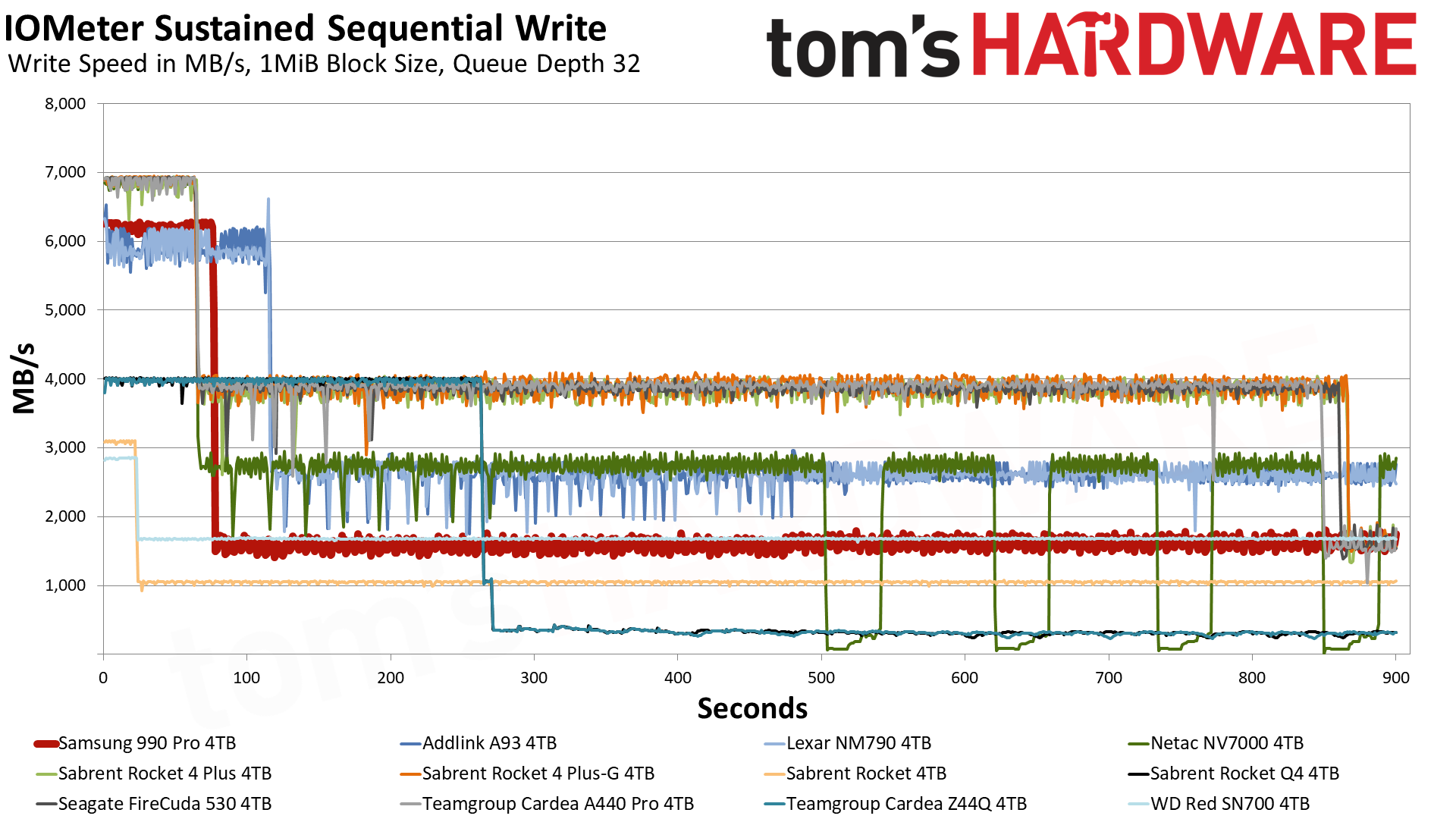
The Samsung 990 Pro is also excellent at sustaining strong write performance. In our IOMeter sustained sequential write tests, the 4TB 990 Pro was able to maintain a speed of 6.2 GB/s for 75 seconds thanks to its generous 10GB of pSLC cache. Once the data spills over into the TLC, it operates at 1.6 GB/s. The Samsung 990 Pro is also a leader in power efficiency, delivering 421.1 MB/s per watt. That number puts it ahead of all competitors but the Addlink A93 4TB and Lexar NM790 4TB.
(Image credit: Tom's Hardware)
The Samsung 990 Pro is certainly nowhere near the all-time low prices of years gone by, and I'm not sure at the moment when, if at all, we'll ever see those low prices again on storage, certainly not for some considerable time. If you want 4TB of storage now, then the Samsung 990 Pro is a formidable choice; just try to grab it when there's as much of a discount as possible.
En quelques heures, la Haute-Corse a subi l’équivalent d’une année entière de précipitations parisiennes. Les ruisseaux et les chaussées se sont transformés en torrents destructeurs. AU moins un mort est à déplorer. Et derrière ce déluge hors norme se cache une mécanique redoutable alimentée par...
SSD controller designer FADU’s new File-Semantic SSD (FS-SSD) was announced at the 2026 OCP Global Summit. The new device promises to move the file system into the SSD itself. As detailed in a white paper, this enables GPUs, DPUs, and NICs to open and read files with “no host filesystem, no block layer, and no storage-server CPU in the path.” FADU told Tom’s Hardware Premium it expects partner samples by Q3 2027.
FADU is a Seoul, South Korea-based fabless SSD controller designer. Its FS-SSD technology is designed to handle and improve the control path, as the data path side moved to accelerators years ago. FADU’s measurements show that the file system, plus block layers, can consume about 30% of CPU cycles in a GPUDirect Storage (GDS) random-read workload. It notes that bypass options give up the files, and the company claims its solution promises the best of both worlds.
In FADU’s own preliminary Network File System (NFS) over NVMe test, on a drive built on its FC6161 Gen6 controller in a PCIe 5.0 host, remote file throughput held steady as the server downshifted from what FADU labels 16 cores to just one, maintaining about 460,000 ops/s.
The NFSv3 operations are carried inside standard NVMe commands, and the drive handles path lookup, access control, and file-to-flash mapping. FS-SSD’s performance is remarkable when compared to Linux NFS-over-RDMA, which achieved a third of the ops/s with 16 cores and only 40K ops/s with one core. The technology remains “under active development,” and FADU told Tom’s Hardware Premium it expects Gen6-host results by Q1 2027, with partner samples in Q3 2027.
FS-SSD holds about 460,000 ops/s from 16 server cores down to one, while NFS over RDMA falls from approximately 150,000 to 40,000 ops/s (Image credit: FADU)
FADU chooses to use NFSv3 because it’s “small (21 operations), OS- and filesystem-agnostic, and stateless” with low firmware overhead. FS-SSD supports PCIe today, with NVMe-oF over RDMA and TCP working without any new transport needed. Reusing an existing protocol is a smart move, in our view. Under the hood, the file system and flash translation layer are merged with a file layer derived from F2FS. Node and data blocks are aligned with the natural flash pages, sections at corresponding erase units, so that the F2FS node table becomes a “File Map” pointing the node IDs at physical flash addresses.
One big advantage is that the DRAM mapping metadata overhead is considerably smaller: it uses the same amount of DRAM as a standard SSD, ~0.1% of NAND capacity (about 1 GB per TB), which a standard SSD fills almost entirely with its mapping table. Here, most of that DRAM, ~95%, can act as a hot-path node cache.
One garbage collector also replaces two, avoiding what FADU calls the “double GC” of host F2FS, where file-system cleanup and the drive’s own garbage collection amplify each other. Write amplification is also 63% lower versus a host F2FS solution on a mixed sequential and random workload with FADU’s research prototype, the company said. FADU told Tom's Hardware Premium that the prototype runs synthetic fio workloads on NVMeVirt, an open-source software SSD emulator from Seoul National University, so it is not a hardware result.
Most importantly for this method, it ensures host-free access. The GPU builds NFS-over-NVMe commands in queues in its own memory, which could include HBM. Alternatively, a remote SmartNIC or DPU with NVMe-oF target offload can drop commands in the drive’s submission queue. The data goes from SSD to NIC via PCIe peer-to-peer DMA, coming out as RDMA writes. FADU’s explicitly named use cases for this include GPU file reads and checkpoints, DPU-served HTTP content delivery, and a JBoF (just a bunch of flash) file server.
FADU’s numbers for its internal test come from a client and server Intel Core i5-13600K, a CPU with 20 threads that clocks up to 5.1 GHz with 128GB of DDR5, and a Mellanox ConnectX-6 100 Gbps NIC. Synthetic testing is compared using fio with the baseline F2FS and Ext4 on block firmware versus the FS-SSD via a kernel client and an SPDK user-space client. The sequential test is 1 thread, queue depth (QD) 128, with 128KB blocks, while random is at 4 threads, the same QD128, but with 4KB blocks.
These block sizes are typical for client workloads in our experience, so they are a fair measure, with detailed preliminary results in the table below. Against SPDK on the raw drive, figures FADU provided to us, FS-SSD’s SPDK client keeps about 93% on 4K random read and 53% on 4K random write, via fio, with around a 7% and 47% cost for the in-drive file layer. Though the raw drive’s 13,240 MB/s random write is above the ~12 GB/s FADU gives as the NAND’s program bandwidth, those runs likely weren’t at steady state. The Filebench result is particularly interesting, as the SPDK random gains apply to a plain block device too.
This should be the workload most favorable for the technology, as the Filebench file server is metadata-heavy with relatively high host overhead: FADU says it uses 10,000 files in a multi-level tree, mean directory width 20, and a mean file size of 128KB with 50 client threads.
FADU’s preliminary fio results: Gen6 controller in a PCIe 5.0 host, direct I/O
Setup
Sequential read (MB/s)
Sequential write (MB/s)
4KB random read (MB/s)
4KB random write (MB/s)
F2FS
14,120
4,510
7,850
3,980
Ext4
14,130
7,050
9,120
4,560
FS-SSD (kernel client)
14,140
11,940
8,070
4,320
FS-SSD (SPDK client)
Not reported
Not reported
13,000
7,030
Raw block (SPDK)
Not reported
Not reported
13,990
13,240
One important thing to recall is that although this test is on a Gen6 drive, the test results are on a PCIe 5.0 host. Therefore, every sequential read config tops out at around 14.1 GB/s, which is roughly the link limit. The testbed also uses a consumer-class desktop CPU, while the one-core NFS server is a showcase example. The kernel client ends up 11.5% behind Ext4 on random read and 5.3% behind on random write, again by our math.
One example of a tough question more generally is: how do concurrent GPU, DPU, and host writers coordinate? How does a kernel mount’s page cache stay coherent with GPU access? NFSv3 storage devices, by the pNFS Flexible File Layout spec (RFC 8435), are “always treated as loosely coupled,” which means “Mandatory byte-range locking cannot be supported.”
Credentials riding in the NVMe command may also face security issues, as loosely coupled devices get only “a level of security equivalent to AUTH_SYS,” NFS’s basic scheme, in which the server trusts whatever user and group IDs the client sends. FADU’s published material also does not describe features such as snapshots, encryption handling, quotas, ACLs, crash handling, and so forth, related to this. Statelessness is what makes it work, but it doesn’t solve all problems, so the trust factor moves elsewhere.
In reply to our questioning, FADU said that there is no cross-host locking, as NFS’s lock manager isn’t implemented. The drive applies each write whole, in order. If two writes hit the same spot, the second one wins; this is “last-writer-wins.” Coordination depends on the clients: kernel-mounted ones get the usual advisory locks among themselves, GPU and SPDK clients coordinate in the application, and at scale a pNFS metadata server handles the coordination. Caching is also handled like ordinary NFS, with kernel clients, or is not done at all, for GPU and SPDK clients. This is stock NFSv3 behavior.
The drive has to check user/group IDs against the file permissions itself. Because those IDs ride inside the command, a client could fake them, but FADU says it closes that issue with capability-based authentication. Each command carries a capability issued by an outside authentication server, plus a code computed with a key shared only between that server and the drive. This is not detailed in its published material. FADU adds that support for the Kerberos authentication protocol is planned. For networked drives, the standard NVMe-oF protections are used, with only pre-approved hosts admitted. A drive trusts a single host’s kernel like any NVMe drive.
However, as FADU described to us, ACLs and other features are missing in the current release, aside from encryption, which in this case is handled by the FC6161’s standard TCG Opal self-encrypting drive support. Power loss is also typically handled with capacitors flushing metadata, the write buffer, and a log of in-flight operations. On restart, the drive replays the unfinished operations, and every write is durable if the drive acknowledges it.
FADU’s longer sights are on producing a JBoF storage solution with no server in front: FS-SSDs, a PCIe switch, and a DPU or NIC for handling NVMe-oF in hardware. FADU’s model puts this at about 42% lower power, about 57% lower cost per 16-drive server, and higher rack density with significantly lower five-year total cost of ownership. The drives would slot in behind existing pNFS metadata servers and could scale. FADU’s controllers already ship with drives such as the SN861, which Western Digital launched and SanDisk now sells, but this would expand the options and solutions it can provide.
FADU’s FS-SSD roadmap
Milestone
Timing (per FADU)
Details
Gen6-host results
By Q1 2027
FS-SSD tested in a PCIe 6.0 host; hardware write-amplification figures to come with them
Partner samples
Q3 2027
OEM/ODM talks are at an early stage; active collaboration expected once samples ship
Hostless JBoF
By end of 2027
Reference design built on Xsight Labs E1 DPUs, delivered to OEM/ODM partners
GPU access
Now, via GPUDirect Storage
Works with GDS through the kernel client; FADU intends to join the Accelerated IO SIG (xio-sig), where Nvidia open-sourced cuFile; no direct engagement with Nvidia
Standards
Nothing submitted yet
FADU plans to start a file-semantic command set discussion at NVM Express and OCP Storage; samples and client code come first
Next year should bring real numbers and samples, with the JBoF reference design also expected. There may be an NVM Express or OCP Storage proposal down the line for a file-semantic command set to further cement and mature the approach. FADU has a good idea, is building it on an existing framework, and has a testbed with results and a hardware path forward on its Gen6 controller, with a trust model in mind. A Gen6-host run is now needed to support the company’s claims.
Elle a arpenté les pôles, les grands espaces américains, s'est spécialisée dans la météo extrême et décrypte la météo depuis 17 ans. À partir du 30 octobre, Karine Durand vous écrit chaque semaine. Une première pour Futura : une newsletter incarnée, entièrement consacrée à la météo et au climat....
The risks and rewards of removing Apple Intelligence to reclaim storage storage space space are debated, along with some experiences of performance problems following macOS upgrades. They investigate reports of iPhone 18 Pro Max failures on AT&T, debating whether hardware, software, or carrier networks are responsible. The conversation concludes with new, expanded iCloud+ email alias options, custom domains, and the advantages of owning a personal domain.
Two MacVoices Live! panel members provide a look inside the most recent Ecamm Creator Cam. They highlight its focus on creators, entrepreneurship, community, and upcoming features such as live transcription and translation. The panel also examines how many apps can be removed from iPhone as compared to other smart phones, and slower storage in base […]
A five-stop concert tour in Quebec ran entirely on two Chevrolet Silverado EVs and a 150 kWh mobile power plant this summer. No diesel generator, and no hookup to the grid.
I went to the final show, held in a grocery store parking lot in Montreal’s Saint-Henri neighborhood, and everything from the speakers to the stage lights to the kitchen was running off batteries.
Siri AI is a completely reimagined version of Siri that is more personal and powerful. With detailed responses and rich, natural conversations, Siri AI helps users get more done than ever before.
Built on Apple Intelligence, this new version of Siri draws on personal context understanding to help users find what they need in the moment across messages, emails, photos, and more. And with even more systemwide app actions, Siri AI can help users with tasks such as drafting an email from scratch or editing and sharing a set of photos.
[…]
Siri AI already works seamlessly with apps from Apple’s vast ecosystem of developers. Users can continue to take action in the apps they already use with Siri, like texting a friend in WhatsApp or playing a book on Audible. And soon, users will be able to ask Siri AI to draft an email in Microsoft Outlook, search for a homework assignment in Notability, or add a restaurant recommendation to Tripsy.
With onscreen awareness, Siri AI can answer questions or take actions related to the content on a user’s screen. For example, while viewing their favorite sports team’s website, a user can ask Siri to find all the upcoming home games and add them directly to their calendar. And Siri AI can also use broad world knowledge to get up-to-date information on virtually any topic.
And these advantages sum up why I struggled to understand Siri AI at first. Is Siri AI only passable because it has an unfair advantage due to proprietary integrations that other AI models can’t use? Can it stand on its own as a good implementation of AI for most people? Does it fundamentally reinvent how we use our devices, or is it just a lot of hype for a slightly better Siri?
[…]
I find Siri AI’s underlying models to be subpar compared to the competition: for anything beyond a simple knowledge query, I can’t see Siri AI replacing ChatGPT and its superior reasoning modes combined with web search. For simpler queries – the kind that a Google AI overview could also capably answer – the balance of speed and terse formatting is optimal in Siri AI. If I’m watching a movie and want to know how old an actor is, or if I want to know the meaning of a word, Siri AI is perfect for it and I no longer need to reach for ChatGPT or my personal agent in Open Minis. As we’ll see later, I find the Siri app to be extremely barebones and representative of the state of the art for chatbot design…two years ago.
The lack of an “agent mode” for Siri AI stings, and it’s why I can’t replace my beloved Codex or Hermes Agent setups with it.
However, Siri AI eventually clicked for me for the opposite reason: it can do things in and with apps that no other third-party agent can. Yes, they are simpler actions, and, no, results aren’t always perfect; but if you love the Apple app ecosystem and prefer using excellent native apps to cross-platform web ones, Siri AI is a breath of fresh air in the AI landscape right now.
[…]
By and large, what Apple has built works, and as a user of Apple devices and the new Siri AI, you will never see any of its underlying complexity.
For years, I barely used Siri for anything beyond menial tasks like setting timers or alarms. That has changed with iOS 27, as I now repeatedly use Siri for complex requests and to make sense of on-screen context.
Apple may be the last company to embrace AI. But wow, was it worth the wait.
The new AI Siri came out this week as part of OS 27 for iPhone, iPad, Apple Watch, and Mac, and it’s a life changer. A phone changer. It replaces most Google searches, most ChatGPT or Claude interactions, and cumulative hours of fumbling and searching and dragging and copying and finding and tapping and pasting.
[…]
Now that the final version is out, I wanted to see how often it gets things right. It is AI, after all. So I ran it through 125 tests.
By default, Siri uses the Apple models described above, primarily the AFM 3 Cloud model (you can tell the local models can’t do much here because most Siri queries fail if you switch off your Internet connection). ChatGPT is still available in System Settings as an extension, with an option to make it speak using a different voice than Siri’s.
While Apple Intelligence as a whole can’t be turned off, users can opt out of the Siri AI beta at this point if they’d like. If you do this, you’ll be given the option to turn Siri off entirely or to use what Apple now dubs “Siri Classic.” In either mode, the UI for Spotlight reverts to its previous style.
The new Siri experience is so much like Copilot or the AI answers in Google Search that it barely seems worth remarking upon, which is both a comment about how “behind” its rivals Apple is in the AI race and how “caught up” Apple feels now that it has shipped something usable.
[…]
The Siri app isn’t much to look at, but I actually like that about it—I’ve lost track of the number of completely different Copilot apps Microsoft has shipped with Windows 11 and what the capabilities of those versions have been. Compared to that, it’s kind of nice to have a simple, clean, Mac-native app that just presents a chronological list of every question or conversation you’ve had with Siri.
So far the biggest single objection to Golden Gate has been the storage space required to support this. As I’ve shown in my own figures, this could be as low as 10 GB, but is more likely to be around 30 GB. Add to that the 28 GB or so required for the system itself, and that’s a substantial burden on your Mac’s internal SSD.
MacRumors ran an article this morning about this today, and what’s interesting is how different people report different storage sizes for the same devices. Why are some people, running the same operating system, seeing different storage sizes? And why isn’t the size the same on all Macs, at least those running the same processor? My M4 iMac reports 32.22 GB; not that big a difference, but still about 1.6 GB less than my laptop.
I do not think Apple should not have local models. But as it is surely the single largest system component now, consuming about the same space as an entire Sonoma installation, I think it is stingy of Apple to ship 256 GB base storage even on its lowest-priced computers.
I installed Golden Gate a week ago. Since then, I have been noticing an expected battery drain (Siri AI (useless for me), new OS, indexing) that has increased in comparison to Tahoe. This is expected, I know. The thing is that this does not stop, even after more than a week. It has gotten so much worse that the MacBook’s battery is being depleted even while sleeping to zero within hours. It is so bad that it even struggles to get beyond the point of being able to boot when connected to a charger. Eventually, it works, but it is a struggle.
According to pdfu, HomePod Software 27 includes the system behind Siri AI, called “Linwood,” along with new status lights in the Siri AI colors. […] Since HomePod Software 27 is out and Siri AI isn’t available on existing HomePods, it’s possible support will be limited to new HomePod models.
But there’s also a Siri app (on iPhone, iPad, Mac) whose primary function is keeping a running log of your requests. Today, I thought maybe I’d share mine, so you can see what Siri is like in practice.
I’ve deliberately picked a hectic 24-hour period from last week so that you can see the potential. The takeaway is that I’ve largely stopped opening apps. When I need something, I hold in the side button, ask my question, get the answer, and put the phone away. Often, people who witness it can’t believe what they’ve just seen.
I feel like Siri AI has gotten worse since iOS 27.0 was officially released. It feels a bit slower and I seem to get worse answers, sometimes. I asked it for a word today, using it as an interactive thesaurus, and it simply told me it couldn’t. It never did that over the summer.
I’m excited about the new Siri AI. However I’m not feeling the love yet. I’m finding that approximately a quarter to a third of my requests on both my Mac and iPhone produce a spinning white circle as it churns through a list of searches that it’s doing internally, followed by “Sorry, something went wrong. Please try again later.” This happens for simple requests, for complex requests, and too many requests in between. When it works I feel the magic but boy, I really can’t count on it in all the ways that people are gushing about.
[…]
[If] all processing is supposed to happen on device, does anybody know why we need an internet connection for Siri AI to work for things like “tell me what’s on my calendar tomorrow” or “can you pull up the email with my theater tickets”?
There’s nothing like havin an iPhone in your pocket, an AWU at your wrist, headphones on and telling Siri to call someone, calling, talking, hanging up and then asking Siri to call another person [only] to hear “You need to unlock your phone first!”.
Australia just switched on its longest-duration grid battery, and it runs on 144 Tesla Megapacks.
RWE’s Limondale battery in New South Wales can discharge for a full eight hours — four times longer than the two-hour batteries that dominate the Australian grid. It’s the first project of its kind in the country.
In March 2023, Southern California experienced heavy storms after almost 20 years of drought. Sixteen of these came from long, narrow regions of concentrated water vapor moving through the air, known as atmospheric rivers. During droughts, groundwater supplies up to 60% of the total water to the Greater Los Angeles area, so researchers think that stormwater from the 2023 events could have recharged groundwater reserves for future use. However, scientists lack adequate tools to assess how much groundwater is in the subsurface.
To overcome this challenge, researchers from California and Texas developed a new method to study deep groundwater. California gets a large number of earthquakes, so it has over 450 stations around the state to monitor the associated vibrations, referred to as seismic waves. To study how much the 2023 storm recharged the groundwater in the Greater Los Angeles area, the team used a tool called seismic-DI, which employs these seismic waves to estimate how much groundwater is stored at different depths.
Seismic-DI works by measuring how fast seismic waves move through the Earth, known as their seismic velocity. The researchers explained that the Greater Los Angeles area is a very crowded city, so it produces an abundance of seismic waves. They measured changes in the seismic velocities of these underground waves to see where the groundwater is full of water, or saturated, versus partially full, or unsaturated. They used 20 years of these data to produce graphs that record changes in groundwater storage at different depths, known as hydrographs.
To validate the accuracy of seismic-DI, the researchers also compared their seismic hydrographs with groundwater thickness data from a NASA mission known as the Gravity Recovery and Climate Experiment, or GRACE. GRACE consists of 2 satellites that measure changes in Earth’s gravity, which reflect surface water and groundwater storage. Both their seismic hydrographs and the GRACE groundwater data demonstrated that the Greater Los Angeles region experienced an increase in groundwater storage from stormwater in the winter, and a reduction in groundwater storage during the dry summer.
The team’s hydrographs showed that the 2023 storms saturated the Greater Los Angeles area groundwater down to 35 meters (114 feet), but it was abnormally dry at 200 meters (656 feet), and at a severe drought at 450 meters (1,476 feet). The GRACE data similarly demonstrated that the subsurface is in severe drought. Combined, these data indicated the 2023 storms helped the Greater Los Angeles area recover up to 90% of its groundwater at depths of 50 meters (164 feet) since the 2006-2022 drought. However, it recovered only about 40% at 75 meters (246 feet) and 20% to 30% at 100 meters (328 feet).
They concluded that the 2023 atmospheric river events recharged only shallow groundwater reserves in the Los Angeles area. As a result, they suggested future researchers consider deep groundwater reserves for a more complete assessment of total regional water deficits. While this study demonstrated that seismic-DI can successfully reveal spatial changes in groundwater and drought at depth, the team acknowledged that contributing factors like the amount, rate, and spatial variability of groundwater reserves remain targets of future work.
Apple’s record stock performance leads into a discussion of Vision Pro and John Ternus’ explanation of its long-term potential. The MacVoices Live! panel considers spatial computing’s growing role in medicine, productivity, and professional workflows, along with whether the technology is ready for broader adoption. They also examine iPhone battery shipping limits, SoftRAID 9's support of RAID 6, and local versus cloud storage.
Des chercheurs chinois ont publié une étonnante étude sur une solution radicale pour protéger la Terre d'un astéroïde géant : l'enfouissement d'une bombe nucléaire dans le rocher spatial. Ce n'est pas de la fiction, rien que de la physique, des simulations et des calculs. La menace est réelle,...
With its built-in USB / HDMI hub and a small fan to keep temperatures in check, Sharge's Disk Pro SSD is one of the more interesting (and generally useful) external storage drives in recent memory, easily earning a spot on our Best External SSD list. And the company is following that success up with a more DIY-focused Disk Pro 2, which lets you install your own M.2 drive (supporting 2230, 2242, and 2280 sizes and capacities up to 8TB), while adding greater fan flexibility, media card slots, and an HDMI port that's capable of more bandwidth – depending on the model you choose.
Sharge is offering the Disk Pro 2 in two varieties. There's the Lite model, with HDMI 2.0 (4K@60 Hz) and a 5W minimum operating power, and the Disk Pro Ultra (which we have in for testing) with HDMI 2.1 (4K@144 Hz or 8K@30 Hz), a lower 1.5W minimum power draw, and a faster card reader. Below is the full list of differences, according to the product page. The company even lists the internal chips, some of which you can see through its transparent top.
Disk Pro Ultra
Disk Pro Lite
HDMI
HDMI 2.1, 4K@144 Hz, 8K@30 Hz
HDMI 2.0, 4K@60 Hz
Minimum Operating power
1.5W
5W
Chips
VL822, VL605, RTL9210, SM2705
GVS2201S, VL822, GL3231, RTL9201
SD speed
Read 180 MB/s, Write 120 MB/s
Read 100 MB/s, Write 90 MB/s
(Image credit: Tom's Hardware)
The Ultra model is likely to appeal more to professionals and gamers, offering faster card transfers and higher monitor refresh rates. But the main limitation here is the overall bandwidth, as both models are capped at a 10 Gbps interface, just like the original Disk Pro. That makes either model better as kind of a travel-friendly Swiss Army hub than something you'd want to use as your primary hub / dock all the time. Because any modern M.2 drive can saturate all available throughput by itself, before you connect any video or USB devices. But there's no denying the utility of carrying around a pocket-friendly SSD that also lets you connect to a monitor or TV, plug in a couple extra peripherals, and empty your SD cards without an extra hub, adapters, or cables.
(Image credit: Tom's Hardware)
At 3.65 x 2.33 x 0.531 inches (92.6 × 59.2 × 13.5 mm) without the cable, the Disk Pro 2 is slightly thicker and longer than the original Disk Pro, but still smaller than some standalone drives. Again, with its size and transparent top, it reminds me of an old-school cassette tape.
(Image credit: Tom's Hardware)
One thing that has definitely improved over the original Disk Pro is that Sharge has made the USB-C cable removable. This is good in part because you don't have to worry about the cable breaking over years of use. But also, particularly if you're going to use the drive's hub capabilities, you might want something longer than the included cable's sub-nine-inch length. And when necessary, you might want to plug the drive into a USB-A port. So having the option of using different cables is a big plus.
The cable is also designed to function as a lanyard, which can be handy. But it's held in place solely by the USB-C connection, so I wouldn't trust it for much more than hanging the hub up somewhere at home, so you know where it is when you need it.
(Image credit: Tom's Hardware)
In terms of ports, starting from the bottom edge, you get the main USB-C port, capable of passing through up to 80W of power, a full-size HDMI port (2.1 on the Ultra model we're testing or 2.0 on the lite model), a USB 3.0 Type-A port, and a 10 Gbps USB-C port that can handle up to 100W of power input (and pass through up to 80W for charging a laptop or other device). The previous Disk Pro included a second USB-A 2.0 port here as well, but it's been ditched in favor of the removable USB-C cable, which I think is well worth the sacrifice.
(Image credit: Tom's Hardware)
On the opposite (top) edge, Sharge has added an SD card slot and a microSD card slot. These are capabilities the original Disk Pro didn't have, which make the newer model a lot more versatile for content creators. Just remember the Ultra model offers up faster read and write speeds for the card slots.
(Image credit: Tom's Hardware)
Around back, there's not a lot to see save for the fan intake, but the back is also magnetic, letting you snap the drive onto smartphones that support MagSafe devices or Qi2 magnetic peripherals — it's just a physical mount, though, not receiving power. I've also found this feature handy for sticking the drive to a refrigerator or other iron surface so I always know where it is when I need it.
(Image credit: Tom's Hardware)
It's also worth pointing out that the fan in the Disk Pro 2 is smaller than on the Disk Pro. But there are larger cutouts for air intake on the sides for when the hub is lying on a table or desk, and the Pro offers a three-mode switch (off, on, and turbo), whereas the original's switch had two settings (auto and on). I appreciate the active cooling, and it will certainly be helpful if you're using most of the hub's ports and the SSD at the same time. But if you're mostly using the Disk Pro 2 solely for basic, bursty storage tasks, the 10 Gbps interface and an efficient SSD aren't likely to get warm enough to require active cooling. Of course, that will heavily depend on which drive you install in the enclosure, as well.
Testing with Lexar's 710 SSD
Sharge sent along its Disk Pro 2 Ultra with a Lexar 710 M.2 SSD (a PCIe 4.0 drive that's capable of about 5x the bandwidth of the hub itself), and installing it is about as straightforward as you'd expect. Use the small included screwdriver to remove a tiny screw on the side, and the SSD cover lifts off. Loosen the drive anchor post, install the SSD, tighten the post, put the cover back on, and reinstall the cover anchor screw on the side.
You can, of course, install your SSD of choice, and below the 10 Gbps interface cap, your performance will vary by drive. Still, since the company sent along the Lexar drive, we ran a couple of our external storage benchmarks, and the Disk Pro 2 Ultra performed well for an SSD in this class, just like the original Disk Pro.
Trace Testing - PCMark 10 Storage Benchmark
PCMark 10 is a trace-based benchmark that uses a wide-ranging set of real-world traces from popular applications and everyday tasks to measure the performance of storage devices.
(Image credit: Tom's Hardware)
The Sharge Disk Pro 2 Ultra does exceptionally well here, beating everything save for Corsair's USB4-based EX400U. Impressively, the 10 Gbps drive even beat the 10 Gbps X10 Pro on this test, proving available bandwidth isn't everything when it comes to drive responsiveness.
(Image credit: Tom's Hardware)
In this real-world bulk transfer test, Sharge's Disk Pro 2 Ultra lands in a comfortable fourth place, behind 40 Gbps and 20 Gbps drives, and one spot behind the 10 Gbps Crucial X9 Pro drive on reads. But on writes, Sharge's enclosure, running the Lexar SSD, again beats everything in this chart save for Corsair's USB4 drive.
Synthetic Testing CrystalDiskMark
CrystalDiskMark (CDM) is a free and easy-to-run storage benchmarking tool that SSD companies commonly use to assign product performance specifications. It gives us insight into how each device handles different file sizes. We run this test at its default settings
(Image credit: Tom's Hardware)
Lastly, in this best-case-scenario synthetic test, the Disk Pro 2 lands in fifth place when it comes to reads, but fourth place on writes.
Again, the Disk Pro 2's performance on benchmarks will depend largely on what drive you put inside it. But it's clear that the SSD enclosure is capable of performing well, despite its 10 Gbps bandwidth limitations.
Pricing and Bottom Line
(Image credit: Tom's Hardware)
If all you really care about is dropping in a drive and moving some files around, there are plenty of cheap 10 Gbps enclosures, often on sale for $20 or less. But if you travel a lot with tech and like the idea of a drive enclosure that includes a data and video hub with PD power passthrough, the Disk Pro 2 offers a lot to like, with the Ultra version we tested capable of handling video output bandwidth as high as 8K at 30 Hz (or 4K at 144 Hz). And the inclusion of card reader slots makes the enclosure even more useful for creators on the go.
It's far from cheap, at $109 for the Ultra version we tested or $79 for the Lite version, which is still capable of 4K video at 60 Hz, but won't play as well with phones, due to a higher minimum power draw. But Sharge's devices often go on sale, and when this was written, the Late model was selling for $66.51 and $80.91, directly from the company. This is technically a pre-order price, as the enclosures are expected to start shipping on October 15th.
There are also enclosure / hub combos on Amazon and Newegg that promise similar functionality for less. But the ones I saw have generally poor reviews, are larger than the Disk Pro 2, and none of them look as pleasing or are as feature-packed as Sharge's design, with its transparent cover, active cooling, and MagSafe-compatible back. For those looking for portable connectivity and up to 8TB of storage in one device on the go, the Sharge Disk Pro 2 is in a class of its own, and easily earns a spot on our best SSD and hard drive enclosure list.
Beneath every step we take, soils hold one of the planet’s largest reservoirs of carbon, a vast, slow-moving bank of organic matter that quietly regulates how much of the world’s carbon stays locked away and how much escapes into the atmosphere as greenhouse gas. Now a sweeping new review warns that climate-driven extremes, droughts, floods, and wildfires, are rewriting the rules of that subterranean economy in ways that conventional models and land-management practices have not yet caught up with. The analysis, led by environmental scientist Nanthi Bolan of the University of Western Australia and colleagues, including a corresponding authorship by Bolan himself, synthesizes a substantial body of global evidence on how extreme weather reshapes carbon inputs to soil, microbial processing, erosion, and the sequestration of carbon that underpins soil health, water retention, nutrient cycling, and agricultural productivity.
The work, published in the journal Carbon Research, is notable for the scale of its underlying evidence base. On 14 January 2026, the authors searched Google Scholar, PubMed, and Web of Science using terms spanning climate change, extreme weather, soil carbon, microbial activity, decomposition, erosion, dissolved organic matter, and leaching. The initial sweep returned 14,218 records; after removing duplicates and screening for eligibility, 3,754 articles remained for bibliometric and qualitative analysis. From those, 187 publications were selected for detailed synthesis based on relevance, methodological rigor, and the substantive quality of their findings. Keyword co-occurrence patterns were mapped with VOSviewer, a bibliometric tool that reveals the intellectual architecture of a research field. The result is a critical review grounded in structured literature screening rather than new experimental data, but its synthesis offers one of the most comprehensive maps yet of how extremes rearrange the soil carbon cycle.
The review’s central finding is that no two extremes act alike. Drought, the most widespread disturbance, operates largely through the plant side of the equation. When rainfall fails, photosynthesis slows, plant biomass production falls, and the total flux of carbon entering soils through roots, residues, and litter declines. There is a nuance here: under moderate water stress, plants may temporarily shift a greater proportion of their fixed carbon belowground, investing in roots to chase moisture. But prolonged drought overwhelms that compensatory response. Microbial biomass shrinks, litter decomposition stalls, and the living engine of the soil carbon cycle idles. Then comes the deceptive twist: when rain finally returns, rewetting triggers a rapid pulse of carbon dioxide as starved soil microbes seize upon the accumulated substrates left behind by months of suspended activity. That post-drought CO₂ flush, the review emphasizes, can erase much of the apparent “savings” that accumulated during the dry period. Across the assembled evidence, repeated and multi-year drought was consistently associated with declining soil organic carbon, with grasslands and arable croplands showing particularly pronounced losses, ecosystems that happen to anchor much of the world’s food production.
Flooding tells the opposite story, but it ends in many of the same places. Water saturation chokes off oxygen diffusion through soil pores, forcing microbial metabolism into anaerobic pathways. That shift changes everything downstream. Prolonged waterlogging can drive the chemical reduction of iron oxyhydroxides, minerals that in oxygenated conditions act as microscopic glues binding organic carbon to soil particles. When those minerals dissolve, the carbon they held is released as dissolved organic carbon, which can then be stripped away by erosion and leaching and exported to rivers, lakes, and ultimately the ocean. The review stresses, however, that flooding is not unambiguously a carbon loss story. Wetlands and other periodically inundated ecosystems can accumulate and retain enormous carbon stocks precisely because water constrains decomposition. Whether a flood event releases carbon or banks it depends on the interplay between plant inputs, oxygen availability, and hydrological transport, a delicate balance that shifting rainfall regimes are actively destabilizing.
Wildfire is the most dramatic and immediately visible of the three forces, and its effects cascade on multiple timescales. Combustion directly strips vegetation, litter, and soil organic matter, transferring carbon to the atmosphere in hours. But fire also rearranges the physical and biological landscape of the soil in subtler ways: it can increase erosion by removing protective ground cover, alter soil wettability in ways that change hydrological behavior, restructure microbial communities, and expose previously protected carbon, once shielded inside aggregates or mineral associations, to fresh decomposition. There is a paradoxical bright spot. Pyrogenic carbon, the charcoal-like residue of incomplete combustion, is chemically recalcitrant and can persist in soils for centuries or millennia, functioning as a long-term carbon sink. Whether a fire leaves a landscape as a net carbon source or stabilizes some of its carbon in pyrogenic form depends on fire severity, soil moisture, fuel load, ecosystem type, and the trajectory of post-fire recovery. The review is clear that this balance cannot be predicted from fire alone; it is contingent, site by site, on conditions that vary widely across the globe.
Perhaps the most consequential theme running through the synthesis is that carbon responses cannot be inferred from the type of extreme event alone. Land use, soil mineralogy, hydrology, salinity, vegetation composition, microbial community makeup, and the timing of events within a season all determine whether carbon ends up stored, mobilized, or released. Iron and aluminum oxyhydroxides and clay minerals, for instance, provide mineral protection that can shield organic matter even under stress, while sandy or low-clay soils offer little such refuge. Managed croplands respond differently from native grasslands; saline coastal soils behave differently from acidic forest soils. And compound events, drought followed by wildfire, or alternating drought and flooding in rapid succession, may produce effects that are qualitatively different from those of isolated disturbances, as when a dried landscape burns more intensely, or when post-fire soils, stripped of vegetation, wash away in the first heavy rain. The review argues that the climate science and soil science communities have largely studied these disturbances one at a time, while the real world increasingly delivers them in combination.
The implications for climate mitigation and adaptation are substantial. Soil organic carbon is frequently invoked in national climate pledges and voluntary carbon markets as a bankable sink, yet the review suggests that the security of that bank depends heavily on how often and how severely extremes strike. If multi-year droughts steadily drain carbon from grasslands and croplands, or if fires repeatedly reset accumulation cycles, the effective permanence of soil carbon storage becomes far more fragile than many accounting frameworks assume. Conversely, protecting and rebuilding soil carbon delivers benefits well beyond climate: it improves water retention in drought-prone regions, supports nutrient cycling, stabilizes soil structure against erosion, and sustains the microbial diversity on which fertility depends. Carbon stewardship, in other words, is not separable from food security or ecosystem resilience; it is the same problem viewed from different angles.
The authors are candid about the limits of the current evidence base. The article does not report newly generated datasets and does not present a dedicated limitations section, and its conclusions rest on a qualitative synthesis of selected publications. Consequently, they call for improved and more consistent evidence across soil types, land uses, and both terrestrial and aquatic environments, and across multiple temporal scales, from the instantaneous CO₂ pulse after rewetting to the multi-decadal trajectory of carbon storage. Standardizing measurements of carbon pools, microbial functions, and event intensity, they argue, would make results comparable across ecosystems and enable more confident generalization, something the field currently struggles to achieve given heterogeneous methods and site-specific reporting.
Looking forward, the review sketches a research agenda that is as technologically ambitious as it is mechanistically focused. The authors recommend integrating high-resolution remote sensing with ground observations, advanced spectroscopy, molecular analyses, and integrated modeling to track carbon as it moves through soils and into waterways. They single out several priorities: characterizing microbial genomic and functional diversity as it responds to stress, quantifying carbon stoichiometry, probing the interactions between organic matter and iron and aluminum oxyhydroxides, understanding clay-mineral protection mechanisms, tracking long-term storage outcomes, and systematically studying the sequencing of compound extreme events. Each of these threads addresses a gap in the mechanistic chain that links a weather event in the atmosphere to a molecule of carbon, stabilized or released, in the soil.
What emerges from the review is a picture of the soil carbon cycle not as a stable background process but as a dynamic, contested system whose behavior under climate extremes is far less predictable than once assumed. The same storm that floods a rice paddy and exports carbon to a river delta may, a few hundred kilometers away, end a drought and briefly green a grassland, with opposite consequences for the atmosphere. As extremes grow more frequent and more compound, the review makes the case that understanding, and safeguarding, the carbon held beneath our feet will require science that is as interconnected and as restless as the weather itself.
Subject of Research: Impacts of climate change-induced extreme weather events (drought, flooding, wildfire) on carbon dynamics in soil
Article Title: Impacts of climate change-induced extreme weather events on carbon dynamics in soil
Article References: Bolan, N., Messiga, A. J., Sharma, S., Mukherjee, S., Bolan, S., Salehin, S. M. U., Rupngam, T., Rajan, N., Zhang, T., Yang, Y., Jagadesh, M., & Siddique, K. H. M. (2026). Impacts of climate change-induced extreme weather events on carbon dynamics in soil. Carbon Research, 5(1), Article 58. https://doi.org/10.1007/s44246-026-00300-5
Keywords: adaptation of land management practices to climate extremes, challenges to conventional soil carbon models, Climate change impacts on soil carbon storage, effects of droughts and floods on soil microbial activity, global evidence on soil carbon dynamics, implications for greenhouse gas emissions, influence of extreme weather on nutrient cycling and water retention, resilience of soil carbon reservoirs to climate, review of climate-driven soil carbon processes, soil erosion and carbon loss due to extreme weather, soil health and agricultural productivity under climate stress, wildfire influence on soil organic matter
Apple has published three performance claims for iOS 27, each with the device it was tested on. It has published nothing about what the update does to battery life, nothing about how large the download is, and nothing about how much free space it needs. Those are the three things people actually search for on […]
Genuine death threats against politicians are no joke. But that doesn't mean every joke – such as threatening to turn someone into a sausage roll – should be taken as an actual death threat, says Steven Tucker.
The Goodram PX700 is a budget PCIe 4.0 drive that delivers everything you need: good performance, great power efficiency, and all in a single-sided package that runs cool. Sometimes it really is as simple as picking one drive to meet whatever your storage needs are at the moment. It’s not the first model that comes to mind for this segment, but in our testing it performed better than expected as a good drive that may otherwise run under the radar.
Goodram is not a new or no-name company, even if the “good RAM” moniker seems a little too on the nose. Instead, it’s a memory assembler in the EU with quite some history. This, in fact, makes it more approachable in comparison to a lot of the new names we have seen on AliExpress and increasingly on Amazon. We expect reliability or at least good support from the company, and the TBW on this one seems to reflect that this isn’t an ultra-budget drive.
On the contrary, performance was not just what we expected – considering we’ve reviewed many drives in this segment, many with the same or comparable hardware – but above. Sometimes only by a small amount, but the gaps are real. Anywhere performance mattered, it delivered. One expects trade-offs for that, but in fact the PX700 is very power-efficient, and the drive provides an excellent storage experience. The only downsides are sustained write performance – which is of little importance in most cases – and, unfortunately, the price. At the right price point, this would be a great pick for any device.
The Goodram PX700 covers the most popular capacities of 1TB, 2TB, and 4TB. Smaller drives can be popular for upgrades and basic boot usage, especially with how prices are now, but modern flash scales best at 1TB and up. 8TB drives are great as a larger storage solution but require a significant investment. The PX700 sticks to what will sell, predominantly 1TB and 2TB. At the time of review, these are priced at $346 and $418, respectively. These prices are high and probably point to a lack of stock more than anything else. While the 1TB price is double what it should be, at 2TB a drive of this type should be closer to $300. Naturally, one has to take into account the pricing volatility in an SSD market besieged by a NAND shortage, but we recommend looking in that range for this drive or one comparable to it with similar or the same hardware.
The drive is full-fledged Gen 4 with performance up to 7,400 / 6,500 MB/s for sequential reads and writes and up to 1 million random read and write IOPS at 4TB with only 820K write at 1TB/2TB. This is standard for the class and is more than enough performance for everyday tasks, gaming, productivity workflows, and more. The drive has the standard five-year warranty with up to 600TB of writes for every TB. The last part of that is worth a second glance because it indicates this drive can come with TLC rather than QLC flash, since TLC, aside from being faster, has better endurance than QLC. However, we have reasons to believe our sample has QLC, which we will point out where the evidence supports that reasoning. We want to emphasize that you should not assume what flash a drive uses based on TBW alone.
Goodram PX700 Software and Accessories
Goodram does not offer any specialized or custom software for its SSDs. You will have to rely on third-party solutions. Software for SSDs essentially falls into three categories: health management, performance, and data backup. SSD toolbox applications from manufacturers will usually cover the first two, with, typically, an OEM version of Acronis True Image for the last. For free alternatives, we recommend CrystalDiskInfo for health information, CrystalDiskMark for basic benchmarking, and MultiDrive for data backup and imaging. MultiDrive is made for Windows and has a bootable WinPE image, so for other operating systems you can opt to use Clonezilla instead.
Goodram PX700: A Closer Look
Tom's HardwareTom's Hardware
The PX700 is a single-sided drive at all capacity points. This makes it compatible with a wider range of systems and, if you need to cool the drive, it’s easier to tackle just one side of components. As it turns out, the drive runs cool enough that you probably don’t have to worry about this – check the Power Consumption and Temperature section below – but it’s still worth pointing out. The data on the rear label is standard, but we do want to say a little bit more about the listed manufacturer.
Wilk Elektronik is a Poland-based memory company, which makes this interesting, as that means the PX700 is a European-assembled SSD. Goodram covers the mainstream parts and IRDM enthusiast, although this is the first SSD from them that we’ve reviewed. As we are going to dig into the hardware in this section, we will say that the drive's silicon is sourced from Asia, as with virtually every SSD. If we say a drive is made in Poland, this means the drive is assembled, tested, and covered by warranty in Poland with an EU anchor. For some, that might be a positive factor in any purchasing decision.
Tom's HardwareTom's HardwareTom's Hardware
Identifying the hardware here is half simple and half challenging. The controller is clearly the Maxio MAP1602, a four-channel, DRAM-less part that’s been a budget champion for quite some time. There is not much mystery there aside from maybe this being a later revision, typically used for higher capacities.
The flash is more difficult. We can ascertain that these are 512GB NAND flash packages from the “512G” – given modern flash is 1Tb or 128GB, four dies per package for a total of sixteen dies. That’s perfect for maximizing performance out of this controller. The “W2533” is likely the manufacture date of week 33, year 2025. All this indicates is that this is, at least, not older flash, although we already know it has to be 2,400 MT/s at a minimum to hit the specified performance.
It makes a lot of sense for the PX700 to use TLC flash, though, given the TBW and the fact that we’ve been seeing this controller with 232-Layer Micron TLC more frequently lately. The Biwin Black Opal NV7400 comes to mind. However, Goodram has access to YMTC flash, and that includes QLC. YMTC rather than Micron QLC is more likely, given the latter is in high demand in enterprise. Normally, you could use certain utilities to identify the flash, but firmware for this controller is often encrypted to avoid revealing the flash ID. It’s still possible to get around this with leaked MP tools, but otherwise the best way to identify it is simply to look at the performance. We’ll be doing that in this review with comparison drives to help back up the investigation.
The Goodram PX700 is in a tight spot with ample competition in today’s market. This has been true for some years now, but some more recent releases have turned up the heat. These would include the Sandisk WD Blue SN5100 with its fantastic random read latency, the Crucial P310 with surprisingly good all-around performance, and even the Samsung 990, which was a very late arrival. Existing drives with comparable hardware to the PX700 include the Acer FA200 with QLC flash plus the Biwin Black Opal NV7400, Addlink A93, and Inland TN470 with TLC. The last of these also uses a Phison controller rather than the more common Maxio MAP1602. Lastly, we have the budget-minded Kingston NV3, which is always looming in the background.
Trace Testing — 3DMark Storage Benchmark
Built for gamers, 3DMark’s Storage Benchmark focuses on real-world gaming performance. Each round in this benchmark stresses storage based on gaming activities including loading games, saving progress, installing game files, and recording gameplay video streams. Future gaming benchmarks will be DirectStorage-inclusive and an evaluation for future-proofing is included where applicable.
Tom's HardwareTom's HardwareTom's Hardware
The PX700’s 3DMark results are spot-on for a drive of this caliber, hanging out at around 40µs for latency with bandwidth over 700 MB/s. This level of performance is excellent for gaming, and the only drive that wouldn’t fall into that category is the NV3. The NV3 is still fast enough for a games drive and remains a good budget choice, but there are faster options like the PX700. We want to emphasize that the PX700 is better than it looks in this lineup because it’s effectively within range of all drives but one, the WD Blue SN5100.
Among the QLC-based drives, the WD Blue SN5100, 990, and P310 all notably score near the top. The BiCS flash in the first drive is known for its responsiveness and, yes, it will give you a small edge with game load times. However, the 990 is right up there with the P310, which means there is no shortage of viable options. Most slower drives, from a gamer’s perspective, will be last-generation or slower PCIe 4.0, which means it’s not hard to find drives that are very fast for games. This means that the deciding factor might lie outside of 3DMark performance, such as drive reliability.
Trace Testing — PCMark 10 Storage Benchmark
PCMark 10 is an industry standard trace-based benchmark that uses a wide-ranging set of real-world traces from popular applications and everyday tasks to measure the performance of storage devices. The results are particularly useful when analyzing drives for their use as primary/boot storage devices and in work environments.
Tom's HardwareTom's HardwareTom's Hardware
While the PX700 is merely mediocre against the competition in 3DMark – its absolute performance is quite good, though – its showing in PCMark 10 is better. This is again a scenario where the drives with TLC flash, including the TN470 with Phison’s controller, are underwhelming. This can be confusing to buyers who have relied on the mantra that TLC is better than QLC. There are reasons for the surprise here, although the general idea that benchmarking is often looking at ideal scenarios is perhaps the easiest answer.
These drives, whether TLC or QLC, rely on pSLC cache as much as possible to give you the best performance. This pSLC mode is not equivalent to native pSLC and is generally the same speed regardless of the flash type. QLC, however, tends to lead TLC in some ways and follow it in others. For example, QLC gets larger benefits from optimizations, so it may see advanced techniques first. This includes improvements to 4K latency. On the other hand, QLC has four planes when TLC has advanced to six. As we’ve seen with BiCS flash, which is four-plane against six-plane TLC from Micron and YMTC, fewer planes can lead to lower effective latency. The advantage of a higher plane count is in bandwidth but does not come without costs and drawbacks.
The PX700 is also faster than a QLC-based drive with the same controller, like the FA200. In that case, the FA200 uses twice as many dies – thirty-two – which puts more load on the controller. This can increase latency. In general, the idea has been that bigger drives are faster, which is certainly true in many cases. Larger drives will have more bandwidth and can reach higher IOPS due to improved parallelization. However, past four dies for each channel – this is where the PX700 falls, and the FA200 exceeds – you are increasing power consumption and overhead. So, the PX700 is in a sweet spot for how this benchmark tests.
We would go on to say that the P310, WD Blue SN5100, and 990 all beat the PX700. These are all QLC-based drives with a range of controllers. We’ve already explained the BiCS factor. Samsung’s newer QLC is also very good. The P310 has always been a bit of an outlier, as on paper its hardware shouldn’t perform as well as it does. Considering Crucial used to rely at least partially on proprietary controllers, we think this is a situation where they did a lot of optimization. WD and Sandisk also did this with the Black SN8100/Optimus Pro GX 8100 so there’s some “special sauce” at play. The PX700 being the best of the rest is a point in its favor, as those are the drives it’s competing with in the real market.
Console Testing — PlayStation 5 Transfers
The PlayStation 5 is capable of taking one additional PCIe 4.0 or faster SSD for extra game storage. While any 4.0 drive will technically work, Sony recommends drives that can deliver at least 5,500 MB/s of sequential read bandwidth for optimal performance. Based on our extensive testing, PCIe 5.0 SSDs don’t bring much to the table and generally shouldn’t be used in the PS5, especially as they may require additional cooling. Check our Best PS5 SSDs article for more information.
Our testing utilizes the PS5’s internal storage test and manual read/write tests with over 192GB of data both from and to the internal storage. Throttling is prevented where possible to see how each drive operates under ideal conditions. While game load times should not deviate much from drive to drive, our results can indicate which drives may be more responsive in long-term use.
Tom's HardwareTom's HardwareTom's Hardware
For the PS5, we can recommend almost any drive if it meets the PS5’s minimum requirements in any real way. The PX700 significantly exceeds that, so the question is more about value. What does this drive offer that others don’t? For this category, this often means leaning towards drives with heatsinks and/or higher reliability. Reliability is a difficult quality to measure, although a warranty gives some peace of mind. As for heatsinks, you can always add your own. So drawing lines here becomes more difficult.
We would point to our Power Consumption and Temperature section below for some additional support. The PX700, as we will see, runs coolly, which is a big positive for the PS5. Performance-wise, it’s right up there with the other drives and only really behind the Blue SN5100. You don’t have to go with a big brand to get good results here, and the PX700 will serve you well.
Transfer Rates — DiskBench
We use the DiskBench storage benchmarking tool to test file transfer performance with a custom 50GB dataset. We write 31,227 files of various types, such as pictures, PDFs, and videos to the test drive, then make a copy of that data to a new folder, and follow up with a reading test of a newly written 6.5GB zip file. This is a real-world type workload that fits into the cache of most drives.
Tom's HardwareTom's HardwareTom's Hardware
The PX700 does very well here, and we wanted to give some background on this test and what it means to put that into perspective. Whether you’re copying between drives or copying to and from the same drive, there are some universal principles. One is that there will be a bottleneck, and usually this will be on the write side of things, as drives write slower than they read. Flash memory, in particular, has to erase cells before they can be written again, which leads to some curious behavior under certain workloads. More generally, though, a write has higher latency – with flash again, this is due to the technology and how multi-bit cells usually need multiple write passes – and writes must be acknowledged, while reads just come from usually static media.
If you have drives that are of different classes – NVMe and SATA, or PCIe 4.0 and PCIe 3.0 – then you would expect the slower class of drive to be the bottleneck even if it’s on the read side. This is also universal, going back to the days when HDDs got faster as they got bigger. SSDs also generally get faster with capacity, but flash is so fast that these rules are no longer absolute. This is complicated by other facets of the technology like pSLC caching and TLC versus QLC flash, where with sustained writes you can have dramatic changes in performance. This is a problem because many people buy drives thinking mostly about transfer performance, and when they hit a low that’s nowhere near the box-rated speed, they panic.
Our DiskBench testing takes all of this into account as it’s closer to a real-world workload, including using different file sizes. Transferring a bunch of large files is fast. Copying lots of small files – and any veteran of hard drives will know this from backing up Windows or documents manually – can be very slow, even on SSDs. So we do a mix. Moreover, we’re doing an on-drive copy, which helps rule out external factors. Much of what you do on your system can be cached in system memory, which can give misleading metrics depending on what you’re doing.
What we’re leading up to here is that the PX700 is the fastest drive on the list for reads and not far off first place for copying. Considering it’s up against some of the best budget drives out there, that’s no mean feat. This is, again, a real-world workload and probably more meaningful than something like 3DMark is for game load times.
Yes, the difference between the best and the worst drive for reads is under 10%, but nobody wants to buy a drive and feel bad about how fast it feels. The PX700 feels like a premium drive – the weaker write performance here is real, but most of what you’re doing will be read-heavy – and if you’re building a PC for someone with it over, say, the Samsung 990, they won’t know the difference. That is a common refrain regardless, but it helps underline the value of reliability. People buy Samsung and WD/Sandisk for a reason. Given Goodram’s European basis, there is some reason to celebrate the performance here while also acknowledging it’s not a no-name brand from AliExpress.
Synthetic Testing — ATTO / CrystalDiskMark
ATTO and CrystalDiskMark (CDM) are free and easy-to-use storage benchmarking tools that SSD vendors commonly use to assign performance specifications to their products. Both of these tools give us insight into how each device handles different file sizes and at different queue depths for both sequential and random workloads.
The PX700 has very steady performance in ATTO. We have no real complaints there. If we turn to sequential performance in CDM, we see more of the same. We would mostly look at QD1 reads for that, being a real-world metric, and it’s roughly on par with the NV7400 there. If we turn to random 4KB read performance at QD1, it’s a little bit further down the list but still hangs with excellent drives like the P310. Anything below about 45µs here is solid in our book. This drive should be quite responsive. If we were forced to be critical, we would point out that high QD 4KB write performance is low. Luckily, this is not a real-world workload for a drive of this type.
Sustained Write Performance and Cache Recovery
Official write specifications are only part of the performance picture. Most SSDs implement a write cache, which is a fast area of pseudo-SLC (single-bit) programmed flash that absorbs incoming data. Sustained write speeds can suffer tremendously once the workload spills outside of the cache and into the "native" TLC (three-bit) or QLC (four-bit) flash. Performance can suffer even more if the drive is forced to fold, the process of migrating data out of the cache in order to free up space for further incoming data.
We use Iometer to hammer the SSD with sequential writes for 15 minutes to measure both the size of the write cache and performance after the cache is saturated. We also monitor cache recovery via multiple idle rounds. This process shows the performance of the drive in various states, including the steady-state write performance.
Tom's HardwareTom's HardwareTom's Hardware
The PX700 starts off in the pSLC cache mode, writing at 5.8 GB/s for over 86 seconds. Speeds are slightly higher for the first two seconds, something we have seen before with this controller, but ultimately we’re looking at a 500GB cache. This is Exhibit A of why we would identify the flash as QLC. 4-bit QLC flash operating in a 1-bit pSLC mode is trading four times the capacity for performance, which means a 2TB drive will generally have a 500GB cache at most. A 3-bit TLC drive could have a larger cache, although there is nothing precluding it from having 500GB, even if this seems hard to be coincidental.
A TLC drive with a smaller-than-maximum-sized cache would probably be able to maintain some speed, though. The PX700 immediately falls into a folding mode – it’s waiting for data to be moved from pSLC to the native flash – with an average speed of 163 MB/s. TLC flash can at times be this slow, but it’s less likely, and especially less likely if it has space to spare. Even the FA200, with the same hardware, is faster. The FA200 does have twice the flash, of course, but the controller is essentially saturated. Rather, the FA200’s cache speed of 5.54 GB/s is slower than the PX700’s – and this could be from having more flash – which means the post-cache speed will be higher. This reinforces the position that the drive is using QLC. Of course, we could have thrown the 2TB HP FX700 into the mix to further prove this point, but we think comparing a 4TB drive is a more valuable approach.
It goes without saying that this is the first real failing of the PX700 in our review. However, it’s expected of a QLC SSD with a massive cache. We don’t consider it disqualifying. You are not buying a budget SSD to hammer it with writes. On the other hand, the 600TBW per TB warranty makes you assume you could do that to some extent. Also, the lower performance here could creep up in a fuller-drive experience. We also can’t exclude the fact that some PX700s come with TLC flash. Which means, taken as a whole, you should assume QLC will perform like the TLC competition 99% of the time.
Power Consumption and Temperature
We use the Quarch HD Programmable Power Module to gain a deeper understanding of power characteristics. Idle power consumption is an important aspect to consider, especially if you're looking for a laptop upgrade as even the best ultrabooks can have mediocre stock storage in terms of capacity and performance. Desktops are often more performance-oriented with less support for power-saving features so we show the worst-case for idle.
Some SSDs can consume watts of power at idle while better-suited ones sip just milliwatts. Average workload power consumption and max consumption are two other aspects of power consumption but performance-per-watt, or efficiency, is more important. A drive might consume more power during any given workload but accomplishing a task faster allows the drive to drop into an idle state more quickly, ultimately saving energy.
For temperature recording we currently poll the drive’s primary composite sensor during testing with a ~22°C ambient. Our testing is rigorous enough to heat the drive to a realistic ceiling temperature but real-world temperatures will vary due to the environment and workload factors.
The PX700 comes back into our good graces with very good results in our power testing. It’s essentially tied for second with the FA200, which is hardly surprising given the hardware similarity. Only the BiCS8-based WD Blue SN5100 pulls away from the pack. We would consider every drive on this list to be sufficiently power-efficient for laptop use, although the 990 is closer to the lower end of that range. Certainly 550 MB/s per watt or higher is an excellent result and indicates a drive that can be run without a heatsink most comfortably. As for idle pull – we test under desktop conditions, which can also match poorly-optimized power settings – the PX700 is not unusually power-hungry and, in fact, better than the WD Blue SN5100. That’s a bonus.
Temperature-wise, we have good news. Goodram touts the graphene label on this drive, which, in our experience, does actually help with cooling, especially on a drive with four flash packages. The PX700 in our testing peaked at 61°C, nearly 30°C below the initial throttling point, well beyond the 20°C of headroom we like to see. The MAP1602 does tend to be a hotspot more than alternatives like the Phison E27T on the P310 and TN470, but a heat-spreading label does help. In our estimation, this is a cool-running drive that would be great anywhere.
We use an Alder Lake platform with most background applications such as indexing, Windows updates, and antivirus disabled in the OS to reduce run-to-run variability. Each SSD is prefilled to 50% capacity and tested as a secondary device. Unless noted, we use active cooling for all SSDs.
Goodram PX700 Bottom Line
The Goodram PX700 is a model budget PCIe 4.0 SSD. It matches or exceeds all of the expected performance points; it's power-efficient, and it uses a simple single-sided design without a heatsink. The only problem is that a “budget” drive has to be affordable. Current prices in the U.S. for this drive leave something to be desired. However, if it can match or beat the prices of other drives in this class, it’s probably one of the better choices available. In part, this is because we’d be liable to trust Goodram over non-names – the TBW alone shows it means business – and, on the other hand, the drive actually outperformed our expectations. Aside from the sustained write performance, this drive really feels premium. You don’t need a Samsung, WD, Sandisk, or even Crucial drive to feel like you have next-gen storage.
(Image credit: Tom's Hardware)
Let’s look at what we mean by that for your use. Game and app loading times are heavily reliant on random and sequential reads at low QD. The PX700 does well there. You also may be transferring files a lot, and the DiskBench results are mighty. For your laptop or HTPC, you might want something that’s power-efficient and, if space is a concern, something that stays cool without a heatsink, and this applies to PS5 use as well. The PX700 ran cool in our test with just the graphene label and was very efficient. You’re not getting a shorter warranty with lower TBW, as with Samsung’s 990 or some QLC-based drives, and we know where this drive is assembled. It’s hard to look at this combination and not feel like it’s a stellar drive if you can find it at a normal price.
Aside from price, our only complaint would be sustained write performance. It’s pretty dissapointing, although we should point out that it’s also expected. The drive also has trade-offs here. Namely, its standard pSLC write performance is better than the 4TB FA200, and in the 2TB HP FX700’s ballpark, so you’re not getting nothing for that later drop. The PX700, in fact, is faster folding than the FX700, too. In the grand scheme of things, this isn’t a big deal, as you should never hit that state – this drive should effectively be fast enough for a 1GbE network, if that’s a bottleneck – and having a bit faster peak performance does translate to better marks on some of our benchmarks. The drive could take a hit in some cases, such as when it's very full, in which case getting a drive with DRAM and guaranteed TLC flash could assuage your fears.
For most use cases, though, the PX700 is more than good enough and, in fact, punches above its weight in our opinion. It would be a good option for just about any type of machine. PS5, laptop, HTPC, desktop, you name it. Primary or secondary drive, just fine. You don’t even need a heatsink. The capacity range is solid – you’re not going to find 8TB on a drive like this – and you can bring your own software. Performance is good enough to overlook any QLC flash use, so our main problem remains the price. Get it down to the same ballpark as the other drives in our list, and you have a contender. We hesitate to put an exact dollar amount for that because SSD prices are volatile, to say the least, so compare it to comparable drives such as the ones we matched it against today.
We've seen huge price rises this year for PC hardware, but RAM and SSDs have been especially affected. The global DRAM shortage, mostly caused by AI data center demands hoovering up all of the available stock, has caused prices to skyrocket. That's why this 4TB Crucial T705 SSD, down to $502.51, is a good deal in the current market, especially given its high capacity.
Looking at Camelcamelcamel's price data, we can see that this drive was hitting almost $700 just a few weeks ago. Several price drops since have meant that the 4TB Crucial T705 is now almost below $500 for the first time in February. Along with a decent price drop, this Crucial drive is now the cheapest Gen 5 SSD you can pick up, with the next-cheapest model, the Samsung 990 Evo Plus, $60 more expensive at the moment.
It's not even a fair comparison, too, as the entry-level 990 Evo Plus only supports PCIe 5.0 over two lanes, not four, meaning you're only getting Gen 4-equivalent speeds. The Crucial T705 is a high-performance drive that's much faster, and right now, much cheaper.
This Crucial T705 4TB SSD is the cheapest Gen 5 SSD on the market right now. It offers read and write speeds of up to 14,500 MB/s and 12,700 MB/s apiece.View Deal
SSDs that offer Gen 5 speeds are a real step up over their slower Gen 4 counterparts. The T705 will offer you sequential read and write speeds of 14,500 MB/s and 12,700 MB/s, which is significantly faster than the fastest Gen 4 SSD on the market, the Samsung 990 Pro, which taps out at 7,450 MB/s. The T705 ships with 232-Layer Micro TLC memory modules and uses the Phison E26 controller.
It's also one of the fastest you can buy, period, rivalling the WD_Black SN8100, which hits speeds of 15,000 MB/s. That drive will set you back $659.99 right now, too, a significant increase compared to the deal on offer here. The Crucial T705 drive scored an Editor's Choice award for its sustained read/write performance at high speed, along with 4.5 stars in our review.
While we wished that SSD prices were back down to what we saw 18 months ago, it's good to see that high-performance drives like this one can still drop in price. The $502.51 sale price for this Crucial T705 4TB SSD is a seriously good one in the current market, and you won't be able to beat it for speed or price. Grab it at this price while you can.
Auf YouTube findest du die angesagtesten Videos und Tracks. Außerdem kannst du eigene Inhalte hochladen und mit Freunden oder gleich der ganzen Welt teilen.

 Login
Login