The legendary studio behind series like Mass Effect, Dragon Age, Neverwinter Nights, and Star Wars: Knights of the Old Republic is no more. BioWare announced via social media Wednesday afternoon that "after more than three decades of shared adventures, BioWare is closing and early development on the next Mass Effect project is ending."
The official announcement was posted mere minutes after a Bloomberg report detailed 400 job cuts across BioWare parent company Electronic Arts, including 50 at BioWare, based on reports from "a person familiar with the company's plans."
"Across our portfolio, we’re making deliberate choices to align talent and investments where we see the greatest opportunities for players and long-term growth," EA executives wrote in a message to staff, according to Bloomberg.
At one point in time, it was the fastest PCIe Gen 4 drive you could buy. Now, the next generation of PCIe 5.0 drives is available, but the 4TB Samsung 990 Pro still offers extremely fast performance and whopping amounts of capacity in a single-sided M.2 2280 form factor. The main issue at the moment is price. Thanks to the AI boom driving up the prices of memory and storage, SSDs have reached insane highs, so to be able to take advantage of a large 27% discount in these times is nothing to be sniffed at. The 4TB Samsung 990 Pro has fallen from $1,099 to this new price of $799.90, a saving of over $300. This works out as roughly 20 cents per Gigabyte of storage capacity.
Having reviewed the Samsung 990 Pro 4TB when it was released, we found it to be one of the best 4TB SSDs on the market and among the best SSDs overall. The 990 Pro boasts maximum sequential reads of 7,450 MB/s and sequential writes of 6,900 MB/s, with random reads/writes coming in at 1.6 million and 1.55 million IOPS, respectively, while endurance is rated for 2,400 TBW.
990 Pro 4TB SSD: was $1099.99 now $799.90 The Samsung 990 Pro 4TB is among the fastest Gen 4 SSDs available thanks to read and write speeds of up to 7450/6900 MB/s, almost maxing out the Gen 4 bandwidth. This M.2 NVMe drive comes in the 2280 form factor and holds enough capacity to store a large selection of your favorite games or files.
Random reads/writes come in at 1.6 million and 1.55 million IOPS, respectively, while endurance is rated for a respectable 2,400 TBW.View Deal
Samsung uses 236-layer TLC V-NAND to achieve its 4TB capacity, while also using a single-sided design, making the 990 Pro ideal for use in computers where space is a finite resource. When we tested the Samsung 990 Pro 4TB, we found it scored above the competition on almost every test. On 3DMark's storage test, it had the lowest latency result, a big plus for responsive load times in gaming.
(Image credit: Tom's Hardware)
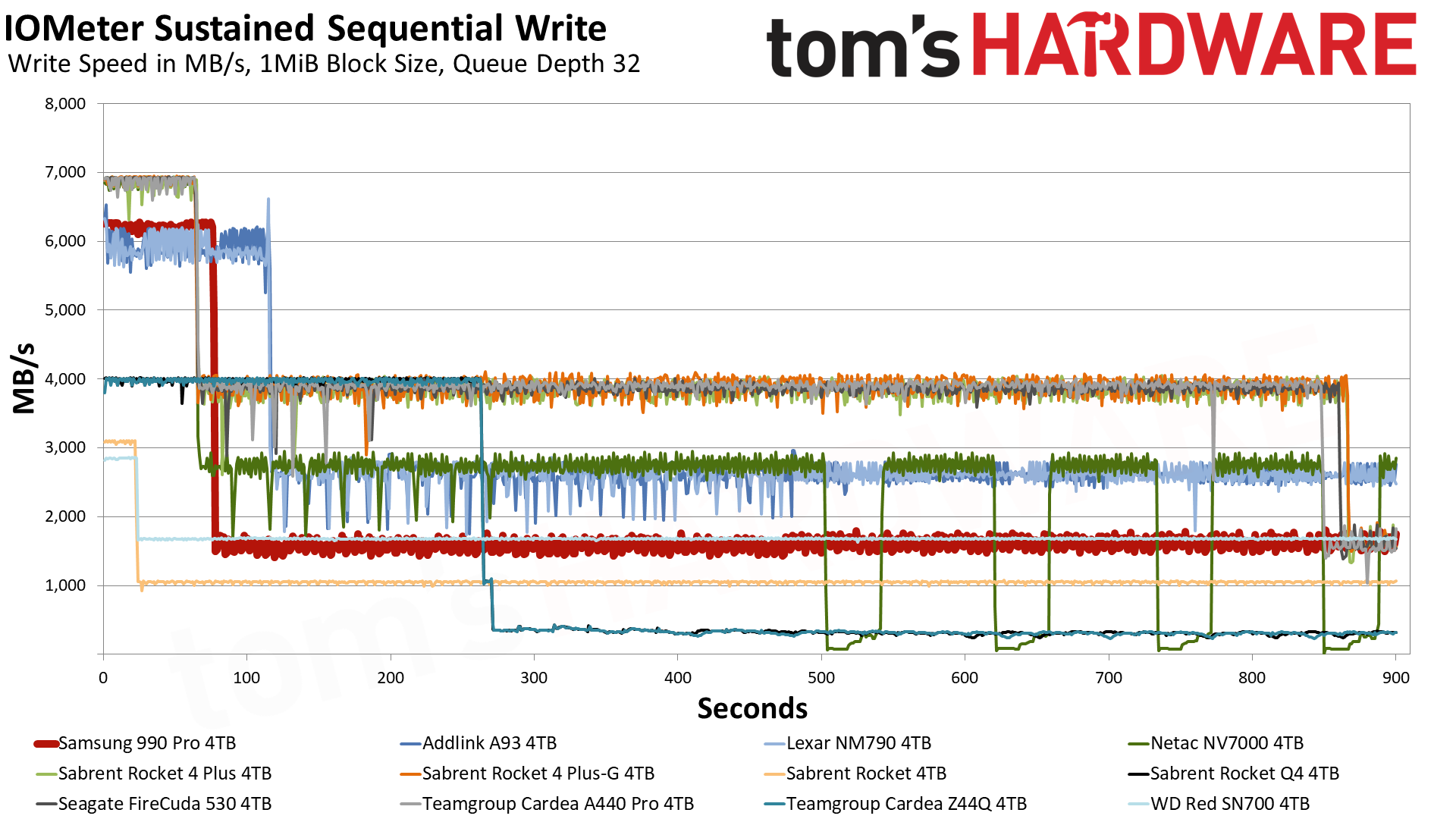
The Samsung 990 Pro is also excellent at sustaining strong write performance. In our IOMeter sustained sequential write tests, the 4TB 990 Pro was able to maintain a speed of 6.2 GB/s for 75 seconds thanks to its generous 10GB of pSLC cache. Once the data spills over into the TLC, it operates at 1.6 GB/s. The Samsung 990 Pro is also a leader in power efficiency, delivering 421.1 MB/s per watt. That number puts it ahead of all competitors but the Addlink A93 4TB and Lexar NM790 4TB.
(Image credit: Tom's Hardware)
The Samsung 990 Pro is certainly nowhere near the all-time low prices of years gone by, and I'm not sure at the moment when, if at all, we'll ever see those low prices again on storage, certainly not for some considerable time. If you want 4TB of storage now, then the Samsung 990 Pro is a formidable choice; just try to grab it when there's as much of a discount as possible.
Une plante aux feuilles brunies par la chaleur n'est pas forcément perdue : ses racines peuvent encore être vivantes. Quand la terre est devenue trop sèche pour absorber un arrosage classique, plonger la motte dans l'eau permet de la réhydrater en profondeur. Le résultat dépend toutefois de...
En quelques heures, la Haute-Corse a subi l’équivalent d’une année entière de précipitations parisiennes. Les ruisseaux et les chaussées se sont transformés en torrents destructeurs. AU moins un mort est à déplorer. Et derrière ce déluge hors norme se cache une mécanique redoutable alimentée par...
SSD controller designer FADU’s new File-Semantic SSD (FS-SSD) was announced at the 2026 OCP Global Summit. The new device promises to move the file system into the SSD itself. As detailed in a white paper, this enables GPUs, DPUs, and NICs to open and read files with “no host filesystem, no block layer, and no storage-server CPU in the path.” FADU told Tom’s Hardware Premium it expects partner samples by Q3 2027.
FADU is a Seoul, South Korea-based fabless SSD controller designer. Its FS-SSD technology is designed to handle and improve the control path, as the data path side moved to accelerators years ago. FADU’s measurements show that the file system, plus block layers, can consume about 30% of CPU cycles in a GPUDirect Storage (GDS) random-read workload. It notes that bypass options give up the files, and the company claims its solution promises the best of both worlds.
In FADU’s own preliminary Network File System (NFS) over NVMe test, on a drive built on its FC6161 Gen6 controller in a PCIe 5.0 host, remote file throughput held steady as the server downshifted from what FADU labels 16 cores to just one, maintaining about 460,000 ops/s.
The NFSv3 operations are carried inside standard NVMe commands, and the drive handles path lookup, access control, and file-to-flash mapping. FS-SSD’s performance is remarkable when compared to Linux NFS-over-RDMA, which achieved a third of the ops/s with 16 cores and only 40K ops/s with one core. The technology remains “under active development,” and FADU told Tom’s Hardware Premium it expects Gen6-host results by Q1 2027, with partner samples in Q3 2027.
FS-SSD holds about 460,000 ops/s from 16 server cores down to one, while NFS over RDMA falls from approximately 150,000 to 40,000 ops/s (Image credit: FADU)
FADU chooses to use NFSv3 because it’s “small (21 operations), OS- and filesystem-agnostic, and stateless” with low firmware overhead. FS-SSD supports PCIe today, with NVMe-oF over RDMA and TCP working without any new transport needed. Reusing an existing protocol is a smart move, in our view. Under the hood, the file system and flash translation layer are merged with a file layer derived from F2FS. Node and data blocks are aligned with the natural flash pages, sections at corresponding erase units, so that the F2FS node table becomes a “File Map” pointing the node IDs at physical flash addresses.
One big advantage is that the DRAM mapping metadata overhead is considerably smaller: it uses the same amount of DRAM as a standard SSD, ~0.1% of NAND capacity (about 1 GB per TB), which a standard SSD fills almost entirely with its mapping table. Here, most of that DRAM, ~95%, can act as a hot-path node cache.
One garbage collector also replaces two, avoiding what FADU calls the “double GC” of host F2FS, where file-system cleanup and the drive’s own garbage collection amplify each other. Write amplification is also 63% lower versus a host F2FS solution on a mixed sequential and random workload with FADU’s research prototype, the company said. FADU told Tom's Hardware Premium that the prototype runs synthetic fio workloads on NVMeVirt, an open-source software SSD emulator from Seoul National University, so it is not a hardware result.
Most importantly for this method, it ensures host-free access. The GPU builds NFS-over-NVMe commands in queues in its own memory, which could include HBM. Alternatively, a remote SmartNIC or DPU with NVMe-oF target offload can drop commands in the drive’s submission queue. The data goes from SSD to NIC via PCIe peer-to-peer DMA, coming out as RDMA writes. FADU’s explicitly named use cases for this include GPU file reads and checkpoints, DPU-served HTTP content delivery, and a JBoF (just a bunch of flash) file server.
FADU’s numbers for its internal test come from a client and server Intel Core i5-13600K, a CPU with 20 threads that clocks up to 5.1 GHz with 128GB of DDR5, and a Mellanox ConnectX-6 100 Gbps NIC. Synthetic testing is compared using fio with the baseline F2FS and Ext4 on block firmware versus the FS-SSD via a kernel client and an SPDK user-space client. The sequential test is 1 thread, queue depth (QD) 128, with 128KB blocks, while random is at 4 threads, the same QD128, but with 4KB blocks.
These block sizes are typical for client workloads in our experience, so they are a fair measure, with detailed preliminary results in the table below. Against SPDK on the raw drive, figures FADU provided to us, FS-SSD’s SPDK client keeps about 93% on 4K random read and 53% on 4K random write, via fio, with around a 7% and 47% cost for the in-drive file layer. Though the raw drive’s 13,240 MB/s random write is above the ~12 GB/s FADU gives as the NAND’s program bandwidth, those runs likely weren’t at steady state. The Filebench result is particularly interesting, as the SPDK random gains apply to a plain block device too.
This should be the workload most favorable for the technology, as the Filebench file server is metadata-heavy with relatively high host overhead: FADU says it uses 10,000 files in a multi-level tree, mean directory width 20, and a mean file size of 128KB with 50 client threads.
FADU’s preliminary fio results: Gen6 controller in a PCIe 5.0 host, direct I/O
Setup
Sequential read (MB/s)
Sequential write (MB/s)
4KB random read (MB/s)
4KB random write (MB/s)
F2FS
14,120
4,510
7,850
3,980
Ext4
14,130
7,050
9,120
4,560
FS-SSD (kernel client)
14,140
11,940
8,070
4,320
FS-SSD (SPDK client)
Not reported
Not reported
13,000
7,030
Raw block (SPDK)
Not reported
Not reported
13,990
13,240
One important thing to recall is that although this test is on a Gen6 drive, the test results are on a PCIe 5.0 host. Therefore, every sequential read config tops out at around 14.1 GB/s, which is roughly the link limit. The testbed also uses a consumer-class desktop CPU, while the one-core NFS server is a showcase example. The kernel client ends up 11.5% behind Ext4 on random read and 5.3% behind on random write, again by our math.
One example of a tough question more generally is: how do concurrent GPU, DPU, and host writers coordinate? How does a kernel mount’s page cache stay coherent with GPU access? NFSv3 storage devices, by the pNFS Flexible File Layout spec (RFC 8435), are “always treated as loosely coupled,” which means “Mandatory byte-range locking cannot be supported.”
Credentials riding in the NVMe command may also face security issues, as loosely coupled devices get only “a level of security equivalent to AUTH_SYS,” NFS’s basic scheme, in which the server trusts whatever user and group IDs the client sends. FADU’s published material also does not describe features such as snapshots, encryption handling, quotas, ACLs, crash handling, and so forth, related to this. Statelessness is what makes it work, but it doesn’t solve all problems, so the trust factor moves elsewhere.
In reply to our questioning, FADU said that there is no cross-host locking, as NFS’s lock manager isn’t implemented. The drive applies each write whole, in order. If two writes hit the same spot, the second one wins; this is “last-writer-wins.” Coordination depends on the clients: kernel-mounted ones get the usual advisory locks among themselves, GPU and SPDK clients coordinate in the application, and at scale a pNFS metadata server handles the coordination. Caching is also handled like ordinary NFS, with kernel clients, or is not done at all, for GPU and SPDK clients. This is stock NFSv3 behavior.
The drive has to check user/group IDs against the file permissions itself. Because those IDs ride inside the command, a client could fake them, but FADU says it closes that issue with capability-based authentication. Each command carries a capability issued by an outside authentication server, plus a code computed with a key shared only between that server and the drive. This is not detailed in its published material. FADU adds that support for the Kerberos authentication protocol is planned. For networked drives, the standard NVMe-oF protections are used, with only pre-approved hosts admitted. A drive trusts a single host’s kernel like any NVMe drive.
However, as FADU described to us, ACLs and other features are missing in the current release, aside from encryption, which in this case is handled by the FC6161’s standard TCG Opal self-encrypting drive support. Power loss is also typically handled with capacitors flushing metadata, the write buffer, and a log of in-flight operations. On restart, the drive replays the unfinished operations, and every write is durable if the drive acknowledges it.
FADU’s longer sights are on producing a JBoF storage solution with no server in front: FS-SSDs, a PCIe switch, and a DPU or NIC for handling NVMe-oF in hardware. FADU’s model puts this at about 42% lower power, about 57% lower cost per 16-drive server, and higher rack density with significantly lower five-year total cost of ownership. The drives would slot in behind existing pNFS metadata servers and could scale. FADU’s controllers already ship with drives such as the SN861, which Western Digital launched and SanDisk now sells, but this would expand the options and solutions it can provide.
FADU’s FS-SSD roadmap
Milestone
Timing (per FADU)
Details
Gen6-host results
By Q1 2027
FS-SSD tested in a PCIe 6.0 host; hardware write-amplification figures to come with them
Partner samples
Q3 2027
OEM/ODM talks are at an early stage; active collaboration expected once samples ship
Hostless JBoF
By end of 2027
Reference design built on Xsight Labs E1 DPUs, delivered to OEM/ODM partners
GPU access
Now, via GPUDirect Storage
Works with GDS through the kernel client; FADU intends to join the Accelerated IO SIG (xio-sig), where Nvidia open-sourced cuFile; no direct engagement with Nvidia
Standards
Nothing submitted yet
FADU plans to start a file-semantic command set discussion at NVM Express and OCP Storage; samples and client code come first
Next year should bring real numbers and samples, with the JBoF reference design also expected. There may be an NVM Express or OCP Storage proposal down the line for a file-semantic command set to further cement and mature the approach. FADU has a good idea, is building it on an existing framework, and has a testbed with results and a hardware path forward on its Gen6 controller, with a trust model in mind. A Gen6-host run is now needed to support the company’s claims.
… which simply returns tool, because the URL returned is relative to a base URL.
[…]
I’ve always found it not-completely-obvious to newcomers how to get a standard file path string from a file URL and this only makes it more confusing.
There are at least three issues here:
url.path returns an absolute path, but url.path(percentEncoded: false) returned a relative path as of his writing. I tested this on macOS 26, and now it returns an absolute path. The documentation now says, “This function will resolve against the base URL.” It seems the behavior of the method changed without it being documented when, so be careful if you’re deploying to a mix of OS versions.
percentEncoded has a default value of true, whereas path did not return an encoded string. In other words, url.path() and url.path are completely different. So this is another case where Apple updated the API but flipped the default—a good way to introduce bugs.
It’s not obvious how to get the full file system path out of a URL. With NSURL, url.path was natural and did the right thing. Now, the URL equivalent is deprecated.
The natural replacement, url.path(), is wrong. So is Xcode’s recommendation of url.(percentEncoded: false).
url.absoluteURL.path(percentEncoded: false) is correct but verbose.
url.absoluteURL.standardizedFileURL.path(percentEncoded: false) is possibly better but even more verbose.
FilePath(url)?.string uses a newer API but gives you an optional, even though for a file URL it should never fail.
This seems like such basic functionality, but there’s no API that’s the obvious right choice, concise, and ergonomic.
WhatsApp is working on a simpler way to find out where your friends are. Right now, if you want someone to share their address or pinpoint where they are on a map, you have to type out a message and wait. A new update spotted in early testing shows the popular chat app is building […]
Le mur sert d'appui et de repère : il stabilise le bassin et permet de solliciter les muscles profonds de la ceinture abdominale sans matériel. Ces exercices renforcent le gainage et soutiennent le dos. Ils ne font en revanche pas disparaître la graisse abdominale, et deux situations imposent de...
Elle a arpenté les pôles, les grands espaces américains, s'est spécialisée dans la météo extrême et décrypte la météo depuis 17 ans. À partir du 30 octobre, Karine Durand vous écrit chaque semaine. Une première pour Futura : une newsletter incarnée, entièrement consacrée à la météo et au climat....
Saudi officials paid for his wife and son to fly out of the U.S. and offered to cover his bail, according to court filings. A judge ordered the engineer to remain in custody.
DropDMG 3.7.2 is a maintenance update of my app for disk images and archives.
It still works back to macOS 10.13, but this will probably be the last such release. There’s no reason the code can’t continue to run there, but soon I will be switching to Xcode 27, which deploys back to macOS 12.
From some reason, this build was hard to submit to the Mac App Store. altool kept retrying, or something, right at the end of the upload. There’s usually a delay before a build shows up in App Store Connect, but this time I saw it there before altool had finished running.
I also ran into trouble submitting the app for review. It kept showing a spinner or reporting errors when I tried to save the build, and also when adding it for review.
The actual review was pretty quick by modern standards—three days including a weekend. It warned me ahead of time that review “can take up to 48 hours.”
When I was approving the build for release, it asked if I was “enjoying” App Store Connect and wanted me to rate the app.
The odds of this change in standards causing a security breach and your messages being exposed seem unlikely, at least right now. But after scrolling through conversations and seeing what’s going on, I feel Apple has omitted important signals for users when iMessage suddenly stops being used during a conversation.
[…]
The impact of that hit me while revising my book: when iMessage isn’t available, Apple tells you only inline. Despite all the information Messages displays about iMessage being encrypted, the inverse state is faint. This kind of negative knowledge, or information about something not happening, can often be as important as something that does happen. A warning about a fuel tank approaching empty is the kind of information every driver (or pilot) needs, for instance. If you think end-to-end encryption—or Apple-based encryption—is critical for you, then a pop-up message or other warning is what you would expect.
[…]
If you’d like to prevent Messages from downgrading security, you have options, although they may not be fully desirable. All of these are managed on an iPhone at Settings: Apps: Messages. You can’t control these message settings from an iPad or Mac.
This recently happened to my mother, and it was very confusing for her. For unknown reasons, while at home on Wi-Fi, she got signed out of iMessage. But it was not clear to her that this had happened or that she should try to sign back in. She was not aware that the Messages app supports multiple protocols or what the different bubble colors mean. All she noticed was that certain messages (e.g. ones sharing files) would no longer send and that she was not receiving some of the messages that people were sending to her. She saw the inline warning about encryption and interpreted it as that the sender was using a newer form of encryption that her phone didn’t support, so maybe she needed to upgrade.
I went over to take a look and quickly figured out that she was signed out of iMessage, but I couldn’t fix it. I kept getting errors that iMessage couldn’t be activated, even after rebooting the phone. Eventually, much later and again for unknown reasons, activation succeeded.
My concern is that the Retry as Text Message toggle no longer exist. Just a couple of weeks ago my sister sent me an iMessage while I was flying. I was not reachable. Later she told me that messages turned from blue to green.
In a dramatic turn of events, the Chromium team has reversed its Obsolete tag, and has decided to support the format in Blink (the engine behind Chrome/Chromium/Edge). Given Chrome’s position in the browser market share, I predict the format will become a de factor standard for images in the near future.
[…]
I’ve been following JPEG XL since its experimental support in Blink. What started as a promising feature was quickly axed by the team in a bizarre and ridiculous manner. First, they asked the community for feedback on the format. Then, the community responded very positively. And I don’t only mean a couple of guys in their basement. Meta, Intel, Cloudinary, Adobe, ffmpeg, libvips, Krita, and many more. After that came the infamous comment[…]
[…]
To top it off, a couple of weeks ago, the PDF Association announced their intent to adopt JPEG XL as a preferred image format in their PDF specification.
JPEG-XL image support is back in the very latest Google Chrome/Chromium codebase. Back in December they merged jxl-rs as a pure Rust-based JPEG-XL image decoder from the official libjxl organization. At the end of December they did more JPEG-XL plumbing with the enums and build flags for the support.
We’re excited to announce that Chrome is shipping decoding support for the JPEG
XL (.jxl) image format starting from Chrome 155. JPEG XL is a next-generation
image format designed to meet the needs of modern web developers and
photographers. It offers 30-50% better compression than JPEG, lossless
compression, built-in HDR support, lossless JPEG transcoding, and more.
In general, we recommend trying both AVIF and JPEG XL to get the best results.
We expect that JPEG XL is most helpful for high-fidelity or lossless
compression, especially of photographic images or in cases in which fine-grained
progressive decoding is preferred.
The risks and rewards of removing Apple Intelligence to reclaim storage storage space space are debated, along with some experiences of performance problems following macOS upgrades. They investigate reports of iPhone 18 Pro Max failures on AT&T, debating whether hardware, software, or carrier networks are responsible. The conversation concludes with new, expanded iCloud+ email alias options, custom domains, and the advantages of owning a personal domain.
The type systems provided by mainstream languages have grown vastly more sophisticated, but how much value does that complexity actually provide programmers in practice? I would like to make the case that it is somewhat less than one might think. While at times convenient, invariants can be captured in the type system using a small set of simple tools applied in principled fashion, and while fancy type systems may be convenient, they have misled many programmers by obscuring what is possible to model without built-in type system support. This talk aims to provide a simple shift in perspective, plus a set of concrete design principles, to make modeling invariants in types feel accessible to the working programmer without fancy language support.
Apple introduced iMessage within Messages in 2011 as its house-brand, end-to-end encrypted messaging product. The promise of iMessage is that posts are always encrypted, using servers and technology developed by Apple and controlled by it. The encryption keys reside on your device, stored so Apple can’t access them, and no third party should ever have the leverage to retrieve them. (There’s a big proviso there, which I’ll explain at the end of this article.)
Despite exploits uncovered over the many years since iMessage first appeared, the core protocol has never been breached, only device exploits or iCloud-backup extractions that allowed access to stored messages. That’s a strong track record. Apple has continued to tinker with improving iMessage encryption, while also adding an optional method of ensuring conversation integrity, Contact Key Verification.1
But in researching the update for Take Control of FaceTime and Messages, a lengthy ebook that covers those two apps plus the Phone app 2, I discovered you could be lulled into a false sense of security based on what you assumed iMessage was and was not.
The odds of this change in standards causing a security breach and your messages being exposed seem unlikely, at least right now. But after scrolling through conversations and seeing what’s going on, I feel Apple has omitted important signals for users when iMessage suddenly stops being used during a conversation.
When is an iMessage not an iMessage?
Messages supports four kinds of communications, each with its own encryption standards and limitations, except for iMessage:
iMessage: iMessage is always encrypted, but you may not always be using iMessage in an iMessage conversation, which is a confusing thing to say—bear with me.
RCS: The Android-standard RCS is encrypted only if every non-Apple device in the conversation has a recent-enough version of RCS that supports encryption and its carrier also allows it.3
SMS/MMS: SMS and MMS are never encrypted. (SMS allows text only; MMS supports rich media and group messaging. RCS is intended as the ultimate replacement for MMS.)
Apple sensibly organizes messages into conversations: a series of messages with another person or in the same group of people. However, that presentation method intentionally hides most of the details about how different communications protocols may be used within a single conversation. Apple likes to keep things simple.
As you start a conversation, Messages offers all sorts of visual signals that let you know when you’re using iMessage, as reassurance and branding:
The person’s email address or phone number appears in blue.
At the very start of the conversation, iMessage appears on a line by itself and a lock icon plus Encrypted appears on the next line. (You can always scroll way back to the start of a conversation and find this.)
In the conversation, your messages are shown in blue.
Click or tap the conversation profile image or images, and in the Info pane, at the very bottom, a message in gray in small type notes “All iMessage conversations are securely encrypted end-to-end, so they can’t be read while they’re sent between devices.”
That feels like a lot of reinforcement of the point! And, when you’re using iMessage, you probably expect you’re always using it throughout a conversation. But within an iMessage conversation, things can go wrong, and the system downgrades to the next commonly available option.
The hierarchy of Messages standards ranks, from most to least desirable:
iMessage
RCS with encryption
RCS
MMS
SMS
The impact of that hit me while revising my book: when iMessage isn’t available, Apple tells you only inline. Despite all the information Messages displays about iMessage being encrypted, the inverse state is faint. This kind of negative knowledge, or information about something not happening, can often be as important as something that does happen. A warning about a fuel tank approaching empty is the kind of information every driver (or pilot) needs, for instance. If you think end-to-end encryption—or Apple-based encryption—is critical for you, then a pop-up message or other warning is what you would expect.
Some hiccup degraded iMessage to RCS and then back to iMessage.
Look through the images in this story to see real-world examples I encountered this summer. In one, my wife and I are texting in a conversation that goes back almost two decades. For unknown reasons, Messages couldn’t perform a secure interchange—no security warning appeared, but something prevented iMessage from doing its usual handshake dance. So it defaulted without an alert to RCS, and noted that inline (see the figure’s top).
Because Messages supports RCS encryption, it can use it with other iCloud users, too, allowing encryption to continue even though it’s not iMessage encryption. Then, equally oddly, it went right back to iMessage (see near bottom).
If a conversation switches to an unencrypted communications method, there’s no warning; only, as you can see in another example, the gray inline message in a group chat of iMessage users (encrypted) shifted to unencrypted RCS when I added someone whose device didn’t support iMessage or encrypted RCS.
Adding someone to a group chat can downgrade encryption with only an inline warning.
So how can you be sure what’s in use without scrolling around for sure? At any given time, the Info pane always shows the current state of encryption. This figure below shows two RCS conversations: on the left, an unencrypted one; on the right, an end-to-end encrypted session.
The Info pane reveals in small type at the bottom whether a conversation is not encrypted end-to-end (left), or encrypted end-to-end (right).
Because it’s RCS, Apple won’t vouch for the integrity of the session on the right! The Messages label reads “Apple can’t verify the software used on receiving devices,” and provides a link with more technical information and disclaimers. This is fair: Apple is relying on an infrastructure it doesn’t control.
With the above scenarios, I don’t believe Apple is putting us in jeopardy, nor do I think you should be particularly worried about it, unless you’re someone already in a high-risk category, like a political figure, human-rights advocate, or journalist. However, I keep thinking about how what we don’t know can still hurt us.
If you’d like to prevent Messages from downgrading security, you have options, although they may not be fully desirable. All of these are managed on an iPhone at Settings: Apps: Messages. You can’t control these message settings from an iPad or Mac.
Disable downgrading to SMS: Turn off Retry as Text Message. This may mean some messages you send won’t get through. Also, this doesn’t prevent other people in an iMessage (or encrypted RCS conversation) from sending you SMS or MMS messages if they can’t transmit via iMessage.
Disable RCS Messaging: In RCS Messaging, disable RCS Messaging. You can’t disable only non-encrypted RCS, which is a shame, as that would be my suggestion as the next best thing. Instead, you have to disable it entirely to prevent iMessage from downgrading to either unencrypted or encrypted RCS.
Disable MMS Messaging: Messages may try to send MMS even when it doesn’t try to use SMS, so disabling MMS Messaging will prevent that as well.
This set of options and Messages’ presentation of encryption feels overdue for an overhaul.
Protecting Messages in iCloud
I mentioned at the outset there was a proviso about accessing stored messages. The one exception to the end-to-end encryption rule is if you have iCloud for Messages enabled. In certain configurations, someone who manages to gain access to your Apple Account could retrieve an iPhone or iPad backup, retrieve that backup, and use an encryption key stored in it to decrypt messages and extract your data. That someone could be a law-enforcement agency, not just a hacker.
Because the Messages in iCloud encryption key is stored in the clear in the backup, this is the one scenario in which Apple can be compelled to provide information under the right legal framework that would allow a government-connected agent to examine your iCloud-synced messages. This is also an exploit that a criminal or other party could take advantage of.
You can avoid this end-to-end encryption loophole in one of two ways:
Enable Advanced Data Protection for iCloud. This option adds end-to-end encryption on top of nearly all your data (excluding email, calendar entries, and contacts) stored in iCloud. This is a good move generally, though there are drawbacks: you may lose full data recovery if all your devices are stolen, lost, or destroyed. See the complete list. (ADP is not available in the United Kingdom.)
Disable iCloud Backups. Without backups, the Messages data isn’t archived via a restorable backup to iCloud, and thus the Messages in iCloud encryption key isn’t uploaded into that backup. Backing up to your Mac (or a Windows machine) requires more effort, though most of what you want to retain is likely synced via iCloud! Read this support document for the difference between iCloud Backup and backing up to a computer.
I suggest picking one. While, again, it’s unlikely your privacy would be breached, most of modern life feels like it’s about finding out how your privacy was, in fact, breached. Why not take action before that happens, however much we trust Apple’s infrastructure and integrity?
Contact Key Verification may be overkill for most people, but it’s still good that Apple made it universally available. I explained how it works in 2023 for TidBITS. ↩
The update to this book is due out in the next week or so, covering the version 27 operating systems. However, you can purchase the current version now and receive a free update. ↩
Google says the latest version of Google Messages is required, but doesn’t list a version number. On the Apple side, your device needs a version 26.5 or later release, and you have to be on a supported carrier. Most carriers support encrypted RCS, but not all! ↩
Two MacVoices Live! panel members provide a look inside the most recent Ecamm Creator Cam. They highlight its focus on creators, entrepreneurship, community, and upcoming features such as live transcription and translation. The panel also examines how many apps can be removed from iPhone as compared to other smart phones, and slower storage in base […]
I can improve the process of removing backwards compatibility shims by using conditional compilation to remind me when they’re no longer necessary!
[…]
This does mean that the first time we change our deployment target, we’ll get a bunch of compilation errors. But given the nature of how Backport is implemented, this should be a relatively quick process to move past. (And of course, you’re welcome to use #warning instead of #error).
SwiftUIBackports mirrors Apple’s SwiftUI API names, shapes, behavior, documentation, and availability where practical. This keeps app code familiar today, and easy to migrate away from once your deployment target reaches the native API.
Backports are discovered through .backport, the Backport namespace, or backport-prefixed environment values.
Usually, we don’t see many new APIs in intermediate releases like 27.1, but this time is different. Apple introduced several new iPhone Duo-related APIs in the 27.1 release. This week, we will learn how to use all of these new APIs without bumping your project’s target version.
[…]
Here we introduced the toolbarVerticalBehavior function on the Backport type that handles availability checks and calls the new APIs if available or returns a plain view when it is not available.

 Login
Login