Normal view

Perdido entre ideias, notas e tarefas? Blurto ajuda a organizar tudo o que tem em mente

30 May 2026 at 23:37

Em vez de abrir o bloco de notas e adicionar tarefas ou marcar um lembrete na agenda, basta dizer à Blurto o que tem em mente. A partir daí, a app trata de organizar a informação: de ideias e tarefas a listas e eventos.

The post Perdido entre ideias, notas e tarefas? Blurto ajuda a organizar tudo o que tem em mente appeared first on Tek Notícias.

Chrome no Android já deixa escolher entre localização precisa e aproximada. Saiba quando usar cada uma

29 May 2026 at 18:40

Uma nova funcionalidade do Google Chrome para Android permite-lhe partilhar apenas a zona aproximada em vez da sua posição GPS exata. Explicamos como funciona, por que importa para a sua privacidade e como mudar a definição conforme o que precisa.

The post Chrome no Android já deixa escolher entre localização precisa e aproximada. Saiba quando usar cada uma appeared first on Tek Notícias.

Apple atualiza valores do programa Trade In. O seu iPhone 16, iPad e MacBook passou a valer mais numa retoma

29 May 2026 at 10:51

Durante a semana, a Apple realizou uma atualização silenciosa dos valores propostos pelo seu programa Trade In. Todos os modelos iPhone 16 e iPad atuais passaram a valer mais enquanto retoma a novos equipamentos. Mas os smartphones Android desvalorizaram.

The post Apple atualiza valores do programa Trade In. O seu iPhone 16, iPad e MacBook passou a valer mais numa retoma appeared first on Tek Notícias.

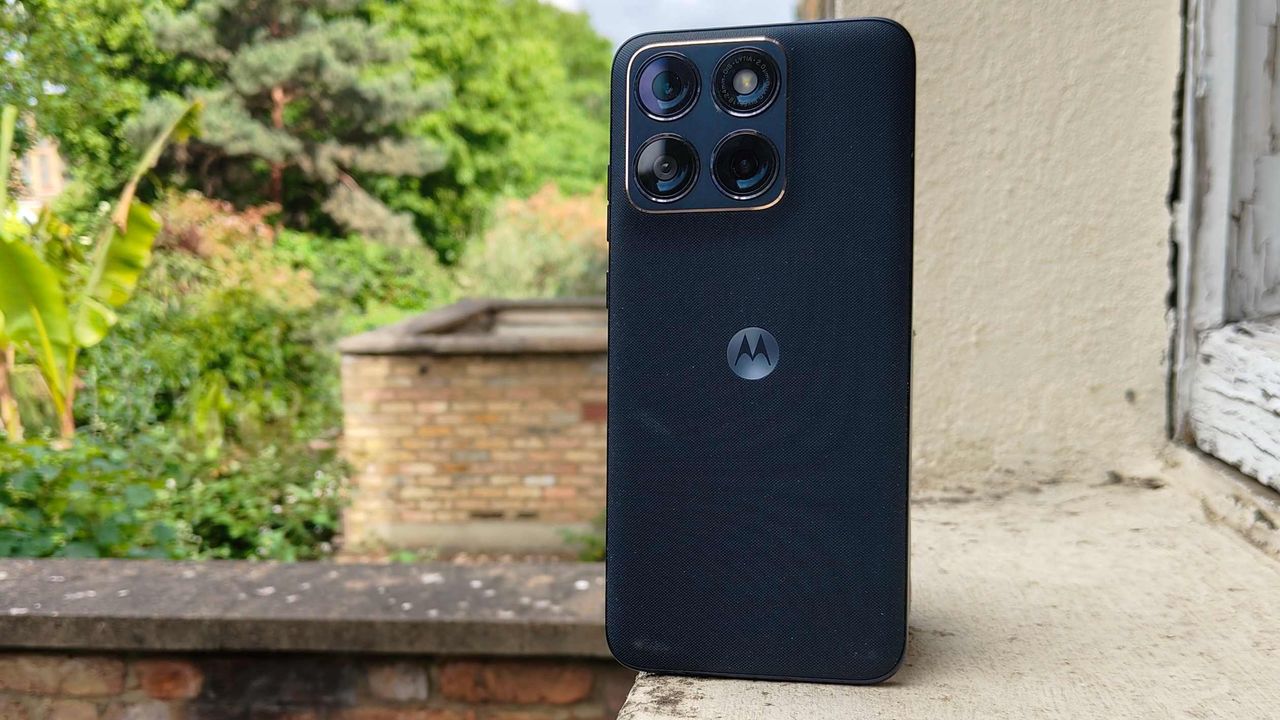
Stop buying Motorola Android phones

Over the past decade, there’s something I’ve hinted at, mentioned in passing as a part of broader discussions, and told more people than I can count privately via email and other one-on-one conversations.

And now, as the writer of the internet’s longest-standing Android column and newsletter — a fancy way of saying someone who is apparently now old as molasses — I feel like I’d be doing a disservice if I didn’t just come out and say it as prominently and plainly as possible:

There is no valid reason anyone should be buying Motorola Android devices in 2026. None.

It’s a shame, too, ’cause Motorola has a heck of a history within Android and the mobile realm in general. And, to its credit, the company does still make some impressive-looking and at times quite interesting hardware.

But the compromises that come with that package are just too serious and consequential to be forgiven. That’s been the case for some time now, truth be told — but with yet another facepalm-inducing infraction being added onto the list now, it’s time to say it loud and clear:

Please stop buying Motorola Android phones. And please join me in telling everyone you know the same thing. 

Trust me: You’ll be doing them a major favor. And here, with no punches pulled and absolutely no sugarcoating, is exactly why.

[Get level-headed knowledge in your inbox with my free Android Intelligence newsletter — three new things to try every Friday and tons of other tasty treats.]

The Motorola Android compromise: Part I

I won’t beat around the bush: The most pressing reason Motorola Android phones are completely inadvisable to buy is the reason that’s been present for the longest — and that’s the company’s complete and utter disregard for even minimally acceptable post-sales software support.

It’s something I’ve noted in my data-based Android Upgrade Report Cards for more years than I can even remember at this point, and it’s almost comically consistent: Year after year, upgrade cycle after upgrade cycle, Motorola simply does not give a damn about investing the time or the money to bring current Android versions to its existing customers in anything close to a timely manner. Once you’ve forked over your phone and put away your wallet, good luck: You’ll be lucky if you get a single software update from Motorola after that, half a year to a year after the fact — and you almost certainly won’t hear a single peep from the company about the progress (or lack thereof) at any point along the way.

Motorola has managed to score an almost impressive number of back-to-back “F” scores on my annual analyses; no other Android device maker even comes close to that record. And lest you think this is purely about pokiness in providing polish and surface-level progress, remember that practically every Android software update is packed with critically important changes around privacy, security, and performance — and the way apps are able to interact with both your data and your hardware.

Running outdated software isn’t just dangerous — it’s downright irresponsible, especially if you’re a professional using your phone for business purposes but even if you’re just a regular ol’ schmoe focused purely on personal stuff. No one who understands a thing about security would ever recommend that, and that’s exactly what you’re signing up for anytime you buy a Motorola-made device.

So that’s part one, and that’s the biggest problem with Motorola’s Android products. But it isn’t the end of this tale nor the reason I was finally moved to write this missive, with the hopes that it’d eventually reach any Android-interested phone-buyers with Motorola on their minds.

Motorola’s more recent Android offenses

All update-related issues aside, the problem with Motorola’s Android products is that they make all sorts of compromises that are all about lining Motorola’s pockets at the expense of your experience.

The most recent example and the straw that broke the Android columnist’s (increasingly creaky) back is the new discovery that Motorola had seemingly been indirectly hijacking the Amazon app on its devices and sneakily injecting an affiliate code into links. The end result of such actions, according to observations published this week, is generating unearned revenue from your day-to-day purchases.

That’s an underhanded and shady-seeming practice, to say the very least. It just feels icky and ethically reckless. And clearly, what was demonstrated was intended to go unnoticed, which is always a pretty apparent sign in my mind that someone’s doing something shifty.

Following the discovery and subsequent outcry, Moto released a statement saying that the behavior was “unintended” and the result of its partnership with a company called Device Native. According to Moto, it had teamed up with that organization to develop “an app search and suggestion experience for the Moto App Launcher.” You can choose to interpret that how you will, but the reality is that Device Native is a company that exists to inject personalized, native-seeming ads directly into the core Android software experience, as its website plainly establishes — with “no user opt-in required,” allowing for easier “scale” of “monetization globally.”

Motorola Android - Device Native
A screenshot from the Device Native website.
Device Native / JR Raphael, Foundry

On some level, at least, Motorola evidently decided to work with this company and integrate its ad technology into the Android experience on its phones. Regardless of whether the Amazon code injection was truly deliberate, which organization caused it to happen, and who was or wasn’t aware of the actions, Motorola opted to place this ad-serving system into the phones it was selling and to allow the company behind it to exert this kind of control over its customers’ experiences — as well as, one would imagine, likely leaning on it for other forms of invasive system-level ad integration.

And sure, maybe Moto will back down from this practice and perhaps even distance itself from the partnership entirely if the outrage grows loud enough. But does someone stopping a shady-seeming practice simply because they got caught and people complained make for the kind of company you want to trust in general?

It’s similar to the way Moto lards up its devices with so much preinstalled bloatware that you actually have to fight to get through it or — Goog forbid — remove it and reclaim the product you paid hundreds of dollars to purchase. Heck, even the company’s top-of-the-line, nearly $2,000 folding Razr Fold phone is guilty of this sin, and that’s just embarrassing for a device of that price and caliber.

Even with Motorola’s lower-level phones, though, we’re talking about devices that often cost $500 or close to that. These aren’t bottom-of-the-barrel, heavily subsidized garbage gadgets. You could get one of Google’s Pixel 10a phones for that same price or often even less — without any of the bloatware, the link-hijacking and potential ad-injecting shenanigans, or the unforgivable software support failures. You’d get a full seven years of guaranteed timely and reliable software updates, from major Android versions to monthly security patches and the quarterly feature drops that accompany those. And that’s to say nothing of the superior camera experience and other assorted advantages.

You could go with one of Samsung’s midrange models, too, imperfect as those are in their own ways, and it’d still be a massive step up from the Motorola madness.

We’ve reached a point where there really is just no comparison — and, again, no reason why anyone should be buying a Motorola phone anymore. The issue, unfortunately, is that most of the people who are buying Moto devices are the same people who aren’t reading columns like these. They’re the people who waltz into a carrier store, see whatever model is featured on the shelf or pushed by a commission-earning, partnership-promoting salesperson, and walk out with whatever caught their eye or had the best promotional pricing on that particular day.

Make no mistake about it: These types of devices give Android a bad name and propagate the myth of the entire platform being a second-rate dumping ground for “folks who can’t afford iPhones.” Android is so much more and so much better than that. You deserve so much better than that.

Plain and simple, this isn’t the Motorola of yesterday. At this point, there’s no excuse — and no reason to keep setting yourself up for failure when so many better options exist.

Say goodbye, Moto. And make sure everyone you know who won’t be reading this column knows why they should do the same.

Get unmatched Android insight in your inbox with my free Android Intelligence newsletter — three new things to try and zero punches pulled every Friday.

Total Android recall: Never lose an important notification again

Google’s shiny new Android 17 update may be on the brink of making its way out into world, but one of the most consequential Android notification upgrades I’ve seen in ages is actually available for anyone, on any device, this instant.

It’s one of those things you don’t even realize is missing — and awkwardly has been, all this time — until you have it in front of you and see just how helpful and at times even invaluable it is.

And that’s the ability to have any or all of your notifications saved and restored whenever you restart whatever Android device you’re using — so that nothing important gets awkwardly tossed aside, lost, and forgotten, likely without your ever even noticing or being aware of what you’ve missed.

How many potentially important pending alerts have you lost as a result of that reboot trash chute? I couldn’t even begin to count, myself, and am slightly terrified to think of the answer. But with this easy new improvement in place, it’ll never happen again.

And best of all? It’ll take you roughly two minutes, once, to set up and then forget about and just know it’s working on your behalf from that moment forward.

Lemme show ya how.

[Keep the off-the-beaten-path knowledge coming with my free Android Intelligence newsletter — three new things to try every Friday and my Android Notification Power-Pack as a special welcome bonus!]   

Your new Android notification safety net

The secret sauce that makes this sorcery possible comes not from Google itself but from a crafty independent developer who’s been expanding our Android notification smarts for many a moon now.

His app is called BuzzKill. You’ve probably heard me rave about it before, with other noteworthy features and additions it’s introduced over time.

Whether you already have BuzzKill on your device or this is your first time encountering it, though, it’s well worth your while to take note of this new capability that snuck into the app not long ago.

First, a quick primer/refresher on what BuzzKill is, in case you aren’t already familiar: BuzzKill is essentially a way to create Gmail-like filters for your Android notifications. You use it to create simple custom rules for what happens when different types of notifications arrive — in an intuitive “if this, then that”-style form — with all kinds of interesting and advanced options for making your alerts more effective.

The latest addition to the app is an experimental option called, appropriately enough, “Restore after reboot.” And it does exactly what you’d expect: Anytime your device restarts, it automatically swoops in to save any active notifications that fit the parameters you select and then instantly restores ’em back into active status once your phone is back up and running.

Without such a system in place, any notifications that you either hadn’t yet looked at or maybe had glanced at and left pending as a reminder to deal with later would more often than not just vanish entirely — and you’d have no easily visible record of their presence or any real indication that they’d been there at all. That’s a dangerous recipe for forgetting something important, whether it’s an email you intended to engage with, a Slack message you needed to acknowledge, or even a task of some sort that had popped up for you to ponder.

The beauty of the BuzzKill approach to fixing this is that it really is a “set it and forget it” sort of system: You just create whatever rule you want now, get it up and running, and then rest easy knowing it’ll always find and restore any active notifications anytime your device restarts — as Android itself should but for whatever reason does not.

2 minutes to auto-restored Android notifications

All right — here are the specific steps to getting your new notification safety net in place:

  • First, go download BuzzKill from the Play Store, if you don’t already have it.
    • The app costs four bucks as a one-time purchase, which — believe me — is nothing compared to the ongoing value it’ll give you with this and its many other notification-enhancing possibilities.
    • It doesn’t require any unusual permissions, doesn’t collect any form of data from your phone, and doesn’t have any manner of access to the internet — meaning it’d have no way of sharing your information even if it wanted to. 
  • Once you’ve gone through the app’s initial setup and made your way to its main screen, tap on the circular button in the lower-right corner of the screen to create a new rule.
  • On the screen that comes up next, consider which specific sorts of notifications you want to have restored whenever your device restarts.
    • You could always start with any and all notifications and then go back in to refine and limit the rule more once you see how it works. You might eventually want to ask it to avoid restoring alerts from certain low-priority apps — like, say, Google Photos — so that it doesn’t bother bringing back stuff that you don’t actually need.
    • If/when you want to create any such restrictions, tap the text that says “any app” to change which apps will be included and/or tap the text that says “contains anything” if you want to restrict based on what specific text a notification does or doesn’t include.
    • If you don’t want to create any limitations and just want all of your active notifications to be restored, at least to start, leave those lines alone and mosey on down to our next step.
Android notification restore: BuzzKill rule
BuzzKill’s simple “if this, then that” formatting gives you lots of flexibility with how and when your rule works.

JR Raphael, Foundry

  • Tap the line that says “do nothing” and scroll down to find the “Restore after reboot” option. It’ll be toward the bottom of the list, within the “System actions” section.
Android notification restore: BuzzKill rule active
The “Restore after reboot” action is described as experimental, but it seems to work quite well in my experience so far.

JR Raphael, Foundry

  • Tap that, then tap “Pick action” to confirm.
  • And last but not least, tap “Save rule” to, y’know, save your rule and set it into action.
Android notification restore: BuzzKill rule complete
The BuzzKill notification restoration equation, in its simplest possible form.

JR Raphael, Foundry

You should then see the rule showing up as active and running on the main BuzzKill screen.

Android notification restore: BuzzKill action
Notification restoration — active and ready to spring into action whenever your phone restarts.

JR Raphael, Foundry

And that really is all there is to it: Whenever your phone next restarts, any notifications that were visible and active at the time of the restart should just show back up via BuzzKill as soon as things boot back up. If you want to get fancy, you could even make certain especially important notifications “sticky” in general, so that if you inadvertently swipe ’em away while your phone is running normally, they’ll automatically come right back even in that scenario.

It’s not the flashiest feature you’ll see this year, and it doesn’t have any whizbang AI shenanigans to make it seem headline-worthy by current-day standards. But it will work and quite possibly be one of the most practical, actually helpful additions you make to your phone all year — even if and arguably especially if you only think about it once in a great while, when you notice it working its magic and saving you from losing something significant.

Discover even more life-enhancing Android treasures with my free Android Intelligence newsletter — three new things to try every Friday and my free Android Notification Power-Pack today.

❌