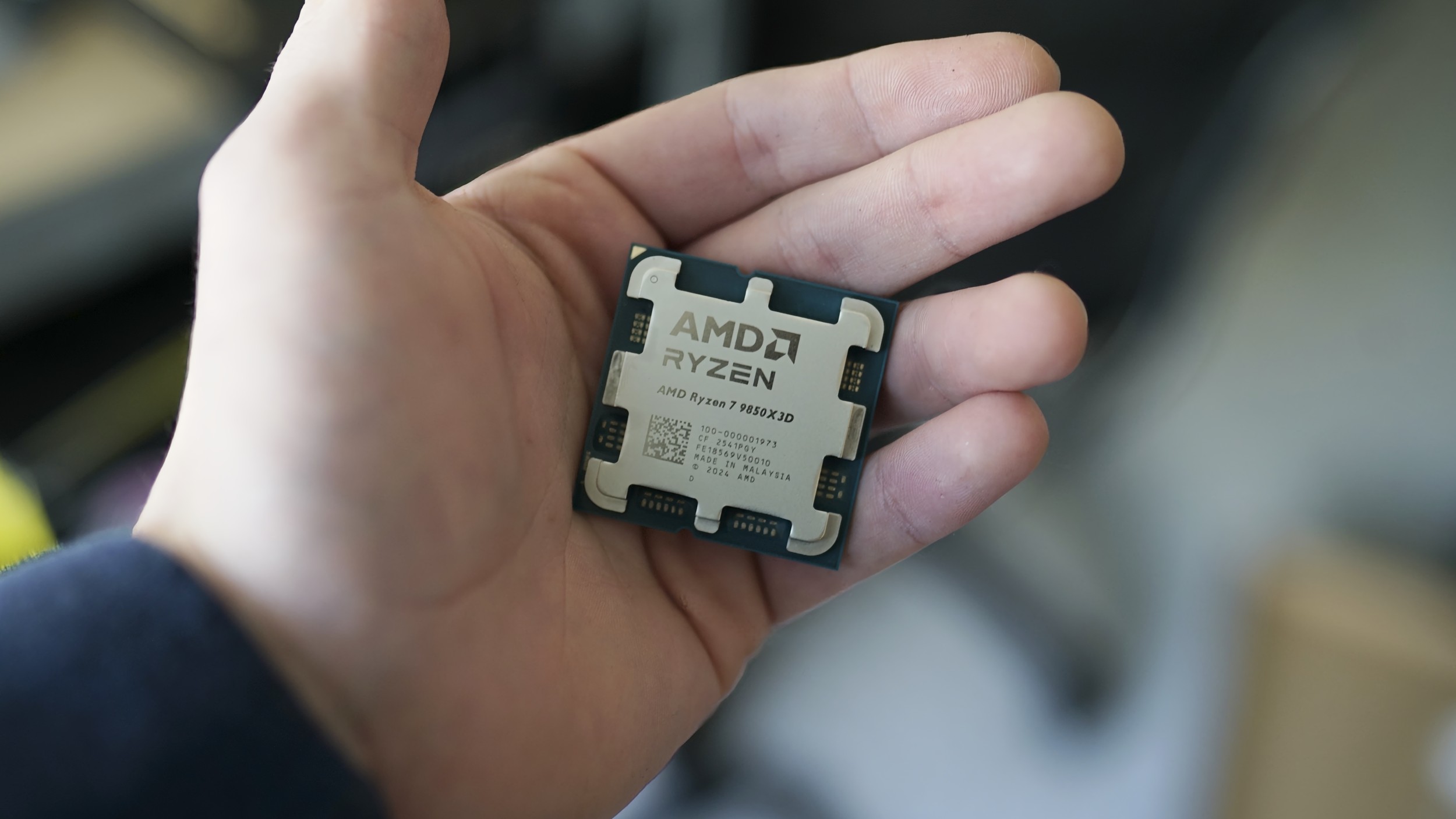
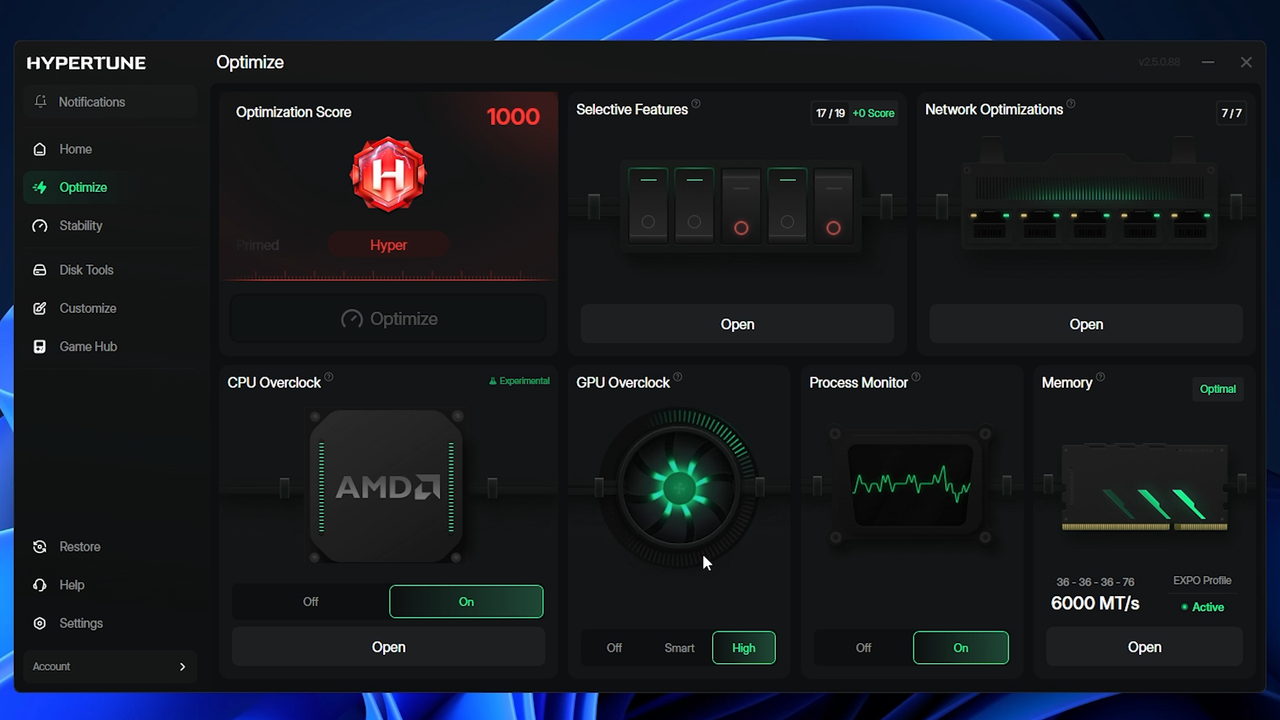
Following an early access period that included over 60,000 participants, auto-overclocking tool Hypertune has released its Gaming Performance Engineering platform, which is built on top of Intel's Extreme Tuning Utility (XTU) SDK and developed in partnership with Intel. The company claims the utility can boost frame rates by up to 60%, though you shouldn't expect that as the norm. The tool includes automated CPU and GPU overclocking, as well as customizable Windows features, network optimization, and game-specific optimizations.
Hypertune partnered with Intel to build the tool, which the company says "evaluates each supported system individually" before optimizing rather than relying on generalized profiles. In its press release, Hypertune says it collaborated with famed overclocker SkatterBencher (Pieter Plaisier) to refine the software. We've reached out to Plaisier to confirm their involvement.
Automated tuning programs usually don't work as well as advertised, and we haven't had the chance to test Hypertune ourselves yet. Especially on more recent hardware, expect performance gains to be minor. Hypertune shared some of its internal benchmarks to back up the claim, showcasing the actual test systems it used, the numbers it gathered, and what each step of Hypertune contributed to the performance increase.
(Image credit: Hypertune)
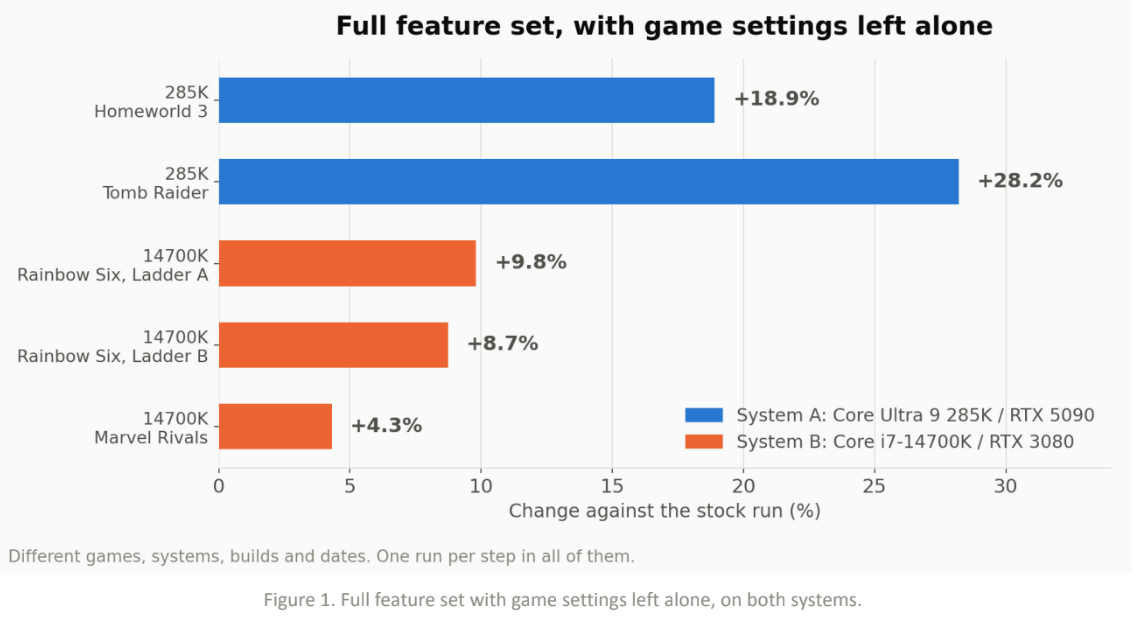
Hypertune tested two systems: one with a Core Ultra 9 285K and an RTX 5090, and another with a Core i7-14700K and an RTX 3080. For the 285K system, the team saw an 18.9% improvement in Homeworld 3 and a 28.2% improvement in Tomb Raider. For the 14700K system, the boost was up to 9.8% in Rainbow Six Siege and 4.3% in Marvel Rivals.
Notably, these results are with Hypertune's Game Hub disabled. Game Hub automatically applies a graphics settings profile to select games, leading to massive increases in performance. Naturally, tweaking your own graphics settings in the same way leads to the same result.
(Image credit: Hypertune)
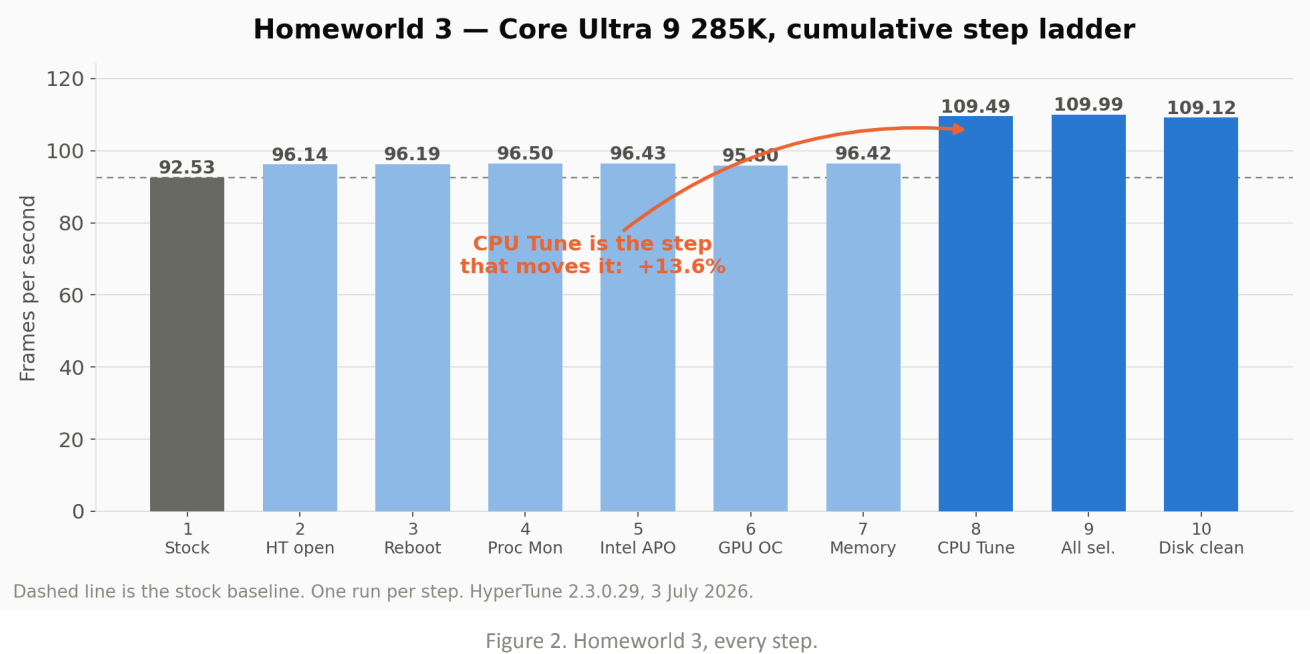
In Homeworld 3, you can see how each step in the process impacted performance, with CPU tunning contributing the single biggest increase in performance. As shown by Marvel Rivals in Hypertune's data, some games will see little to no benefit from Hypertune, though select titles with certain hardware may see a significant performance increase. In this case, the Core Ultra 9 285K has plenty of room for overclocking, and Homeworld 3 is particularly sensitive to the CPU, so the uplift makes sense.
(Image credit: Hypertune)
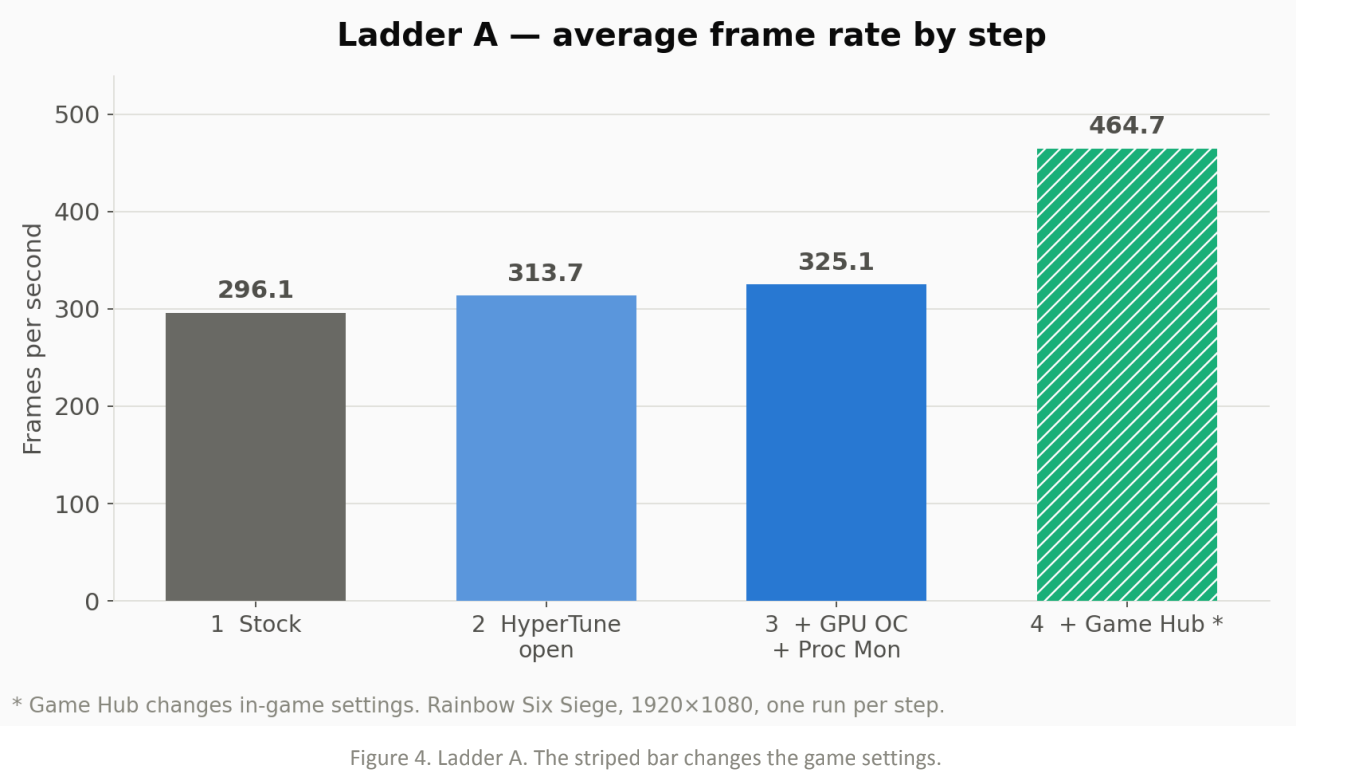
Elsewhere, the gains aren't as pronounced. In Rainbow Six Siege, you can see that Hypertune contributed about a 9.8% jump in performance, though the vast majority of the improvement comes through Game Hub, where Hypertune changes in-game settings.
In a press release, Hypertune founder Austin Copeland wrote that the team was "not trying to build a tool for overclockers," suggesting it's aimed toward users who may not know about specific settings (i.e., the Balanced power plan on dual-CCD X3D CPUs, or HAGS for DLSS Frame Generation). Copeland was previously a coach for eSports organization TSM, coaching Valorant teams under the name "Apex."
(Image credit: Hypertune)
Hypertune works through Intel's XTU SDK, and the company says its optimizations are non-destructive and fully reversible. The software is mainly targeted toward competitive titles (naturally, given Copeland's background), but it can apply optimizations globally across the system. Hypertune says it's safe to use with anti-cheat software, including Riot Vanguard, Easy Anti-Cheat, and BattlEye.
Although there are plenty of free tools that claim to optimize your system, Hypertune isn't among them. It's a subscription service, available for either $9.99 per month or $59.99 per year. In addition to software, Hypertune offers its "expert tuning" service for $80, where a technician will remote into your machine and manually tune it. On the subscription front, Hypertune offers a 7-day free trial.
Hypertune looks like one of the more robust automated overclocking tools we've seen, but it's worth highlighting that, in most cases, these tools don't do anything you can't accomplish yourself. If you're looking for a starting point, make sure to read our guides on how to overclock your graphics card and how to overclock your CPU.
Whether you are into content creation, 3D animation or modeling, or visual effects creation, you need the right tools to succeed. Autodesk's software is second to none in these fields of work, and for a limited time, you can save up to 40% on the company's Media and Entertainment Collection. This is a great opportunity to save hundreds of dollars on software vital to your work.
The Autodesk Media and Entertainment Collection is a comprehensive software bundle that includes industry-standard programs, such as Maya and 3ds Max. Professionals and aspiring students aiming to thrive in the 3D animation or 3D modeling industry are likely already familiar with this software and understand how significant the investment in their subscriptions can be.
While Autodesk offers individual subscriptions for its vast portfolio of software, the Media and Entertainment Collection bundle is a far smarter investment for most users. By picking up the bundle, you can save up to 40% compared to purchasing each piece of software separately. It is more affordable for professionals and students and offers the convenience of having all the necessary software in one package.
Autodesk presently offers the Media and Entertainment Collection in four unique variants that target different industries. There are software options for modeling, motion capture, animation, and rendering. Pricing remains the same across all four packages, as does the 40% discount. You are not just receiving an excellent piece of software at a great price, but you also have access to Autodesk's 24/7 online support and resources.
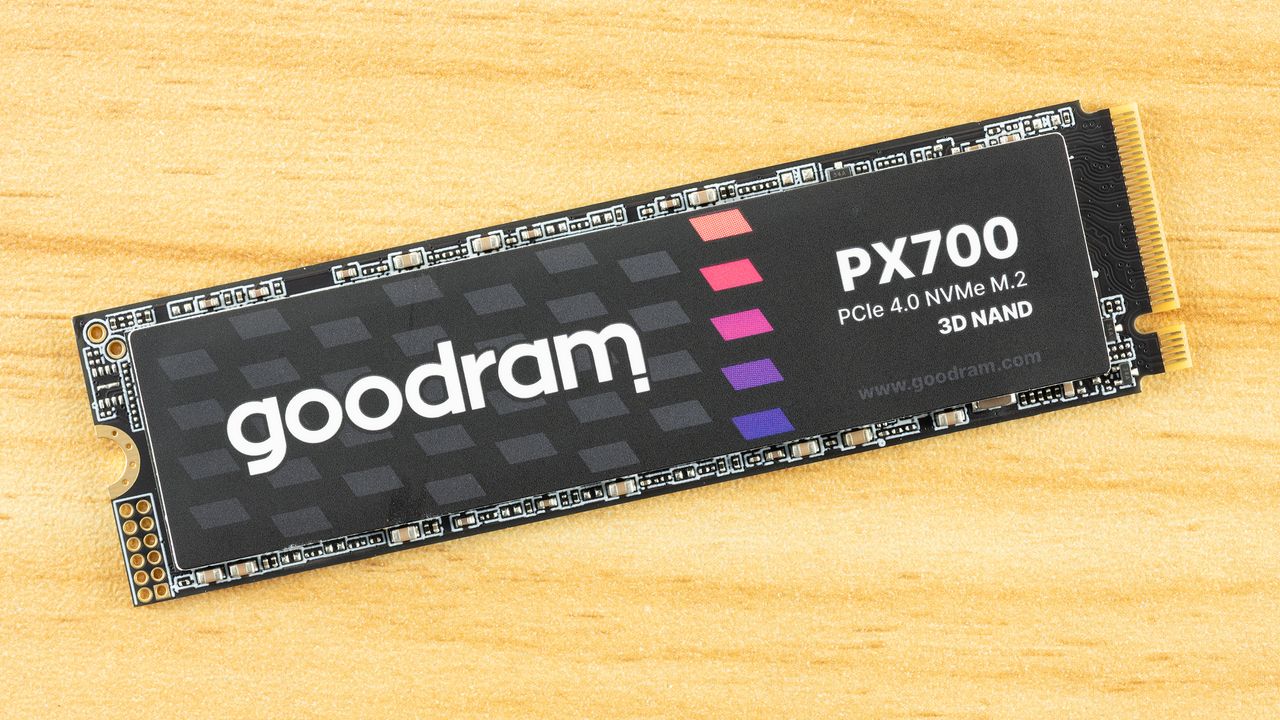
The Goodram PX700 is a budget PCIe 4.0 drive that delivers everything you need: good performance, great power efficiency, and all in a single-sided package that runs cool. Sometimes it really is as simple as picking one drive to meet whatever your storage needs are at the moment. It’s not the first model that comes to mind for this segment, but in our testing it performed better than expected as a good drive that may otherwise run under the radar.
Goodram is not a new or no-name company, even if the “good RAM” moniker seems a little too on the nose. Instead, it’s a memory assembler in the EU with quite some history. This, in fact, makes it more approachable in comparison to a lot of the new names we have seen on AliExpress and increasingly on Amazon. We expect reliability or at least good support from the company, and the TBW on this one seems to reflect that this isn’t an ultra-budget drive.
On the contrary, performance was not just what we expected – considering we’ve reviewed many drives in this segment, many with the same or comparable hardware – but above. Sometimes only by a small amount, but the gaps are real. Anywhere performance mattered, it delivered. One expects trade-offs for that, but in fact the PX700 is very power-efficient, and the drive provides an excellent storage experience. The only downsides are sustained write performance – which is of little importance in most cases – and, unfortunately, the price. At the right price point, this would be a great pick for any device.
The Goodram PX700 covers the most popular capacities of 1TB, 2TB, and 4TB. Smaller drives can be popular for upgrades and basic boot usage, especially with how prices are now, but modern flash scales best at 1TB and up. 8TB drives are great as a larger storage solution but require a significant investment. The PX700 sticks to what will sell, predominantly 1TB and 2TB. At the time of review, these are priced at $346 and $418, respectively. These prices are high and probably point to a lack of stock more than anything else. While the 1TB price is double what it should be, at 2TB a drive of this type should be closer to $300. Naturally, one has to take into account the pricing volatility in an SSD market besieged by a NAND shortage, but we recommend looking in that range for this drive or one comparable to it with similar or the same hardware.
The drive is full-fledged Gen 4 with performance up to 7,400 / 6,500 MB/s for sequential reads and writes and up to 1 million random read and write IOPS at 4TB with only 820K write at 1TB/2TB. This is standard for the class and is more than enough performance for everyday tasks, gaming, productivity workflows, and more. The drive has the standard five-year warranty with up to 600TB of writes for every TB. The last part of that is worth a second glance because it indicates this drive can come with TLC rather than QLC flash, since TLC, aside from being faster, has better endurance than QLC. However, we have reasons to believe our sample has QLC, which we will point out where the evidence supports that reasoning. We want to emphasize that you should not assume what flash a drive uses based on TBW alone.
Goodram PX700 Software and Accessories
Goodram does not offer any specialized or custom software for its SSDs. You will have to rely on third-party solutions. Software for SSDs essentially falls into three categories: health management, performance, and data backup. SSD toolbox applications from manufacturers will usually cover the first two, with, typically, an OEM version of Acronis True Image for the last. For free alternatives, we recommend CrystalDiskInfo for health information, CrystalDiskMark for basic benchmarking, and MultiDrive for data backup and imaging. MultiDrive is made for Windows and has a bootable WinPE image, so for other operating systems you can opt to use Clonezilla instead.
Goodram PX700: A Closer Look
Tom's HardwareTom's Hardware
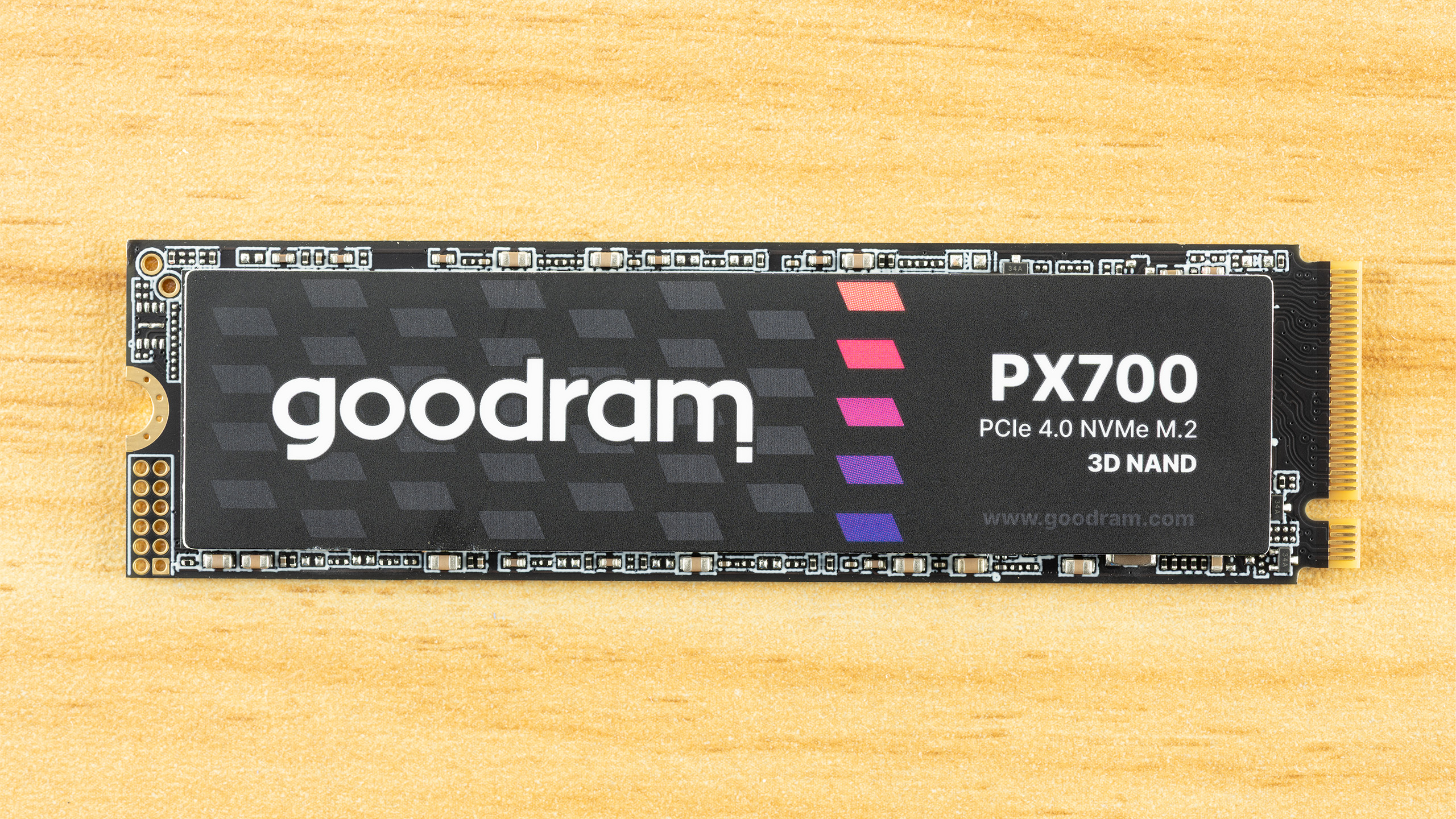
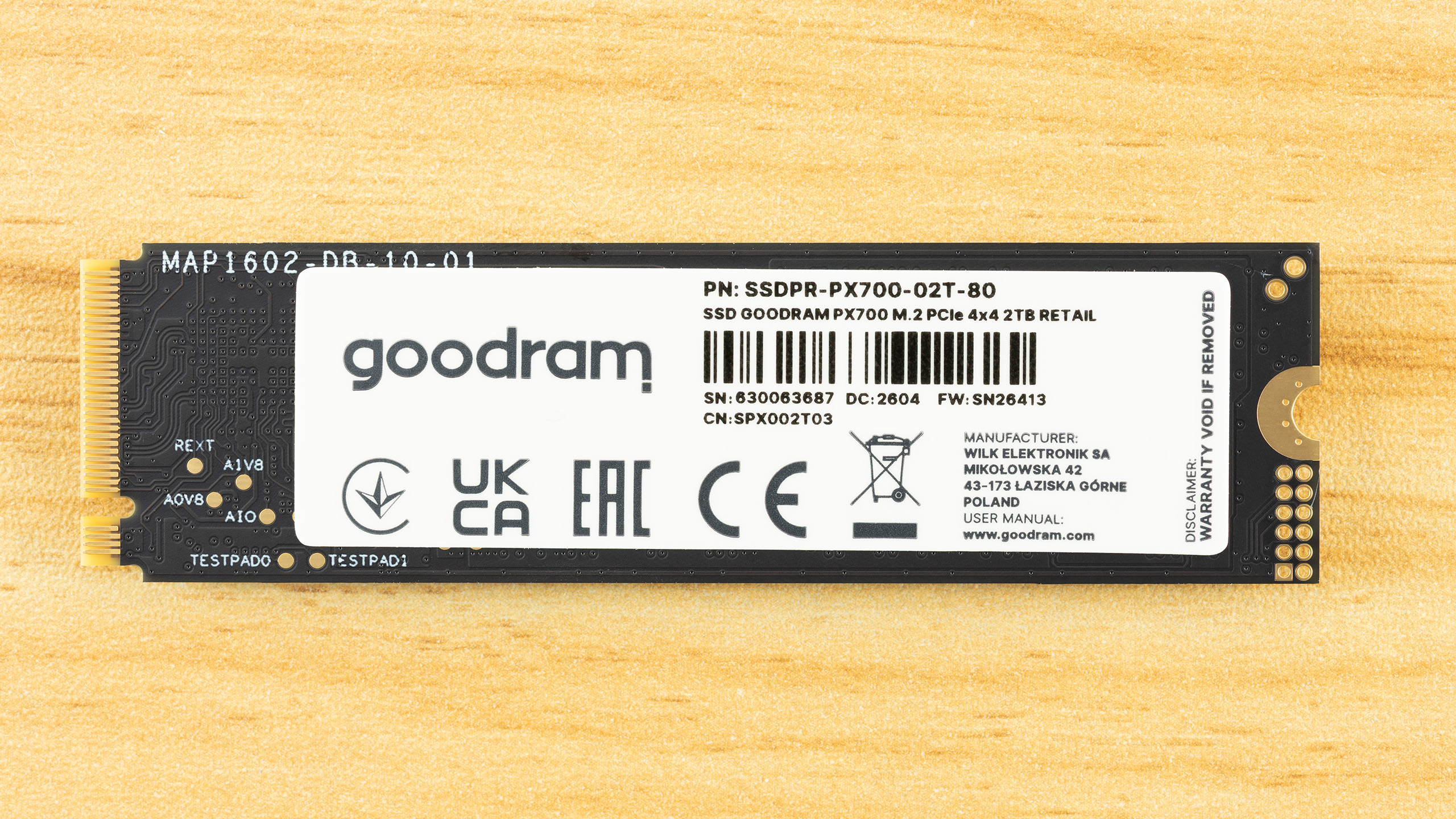
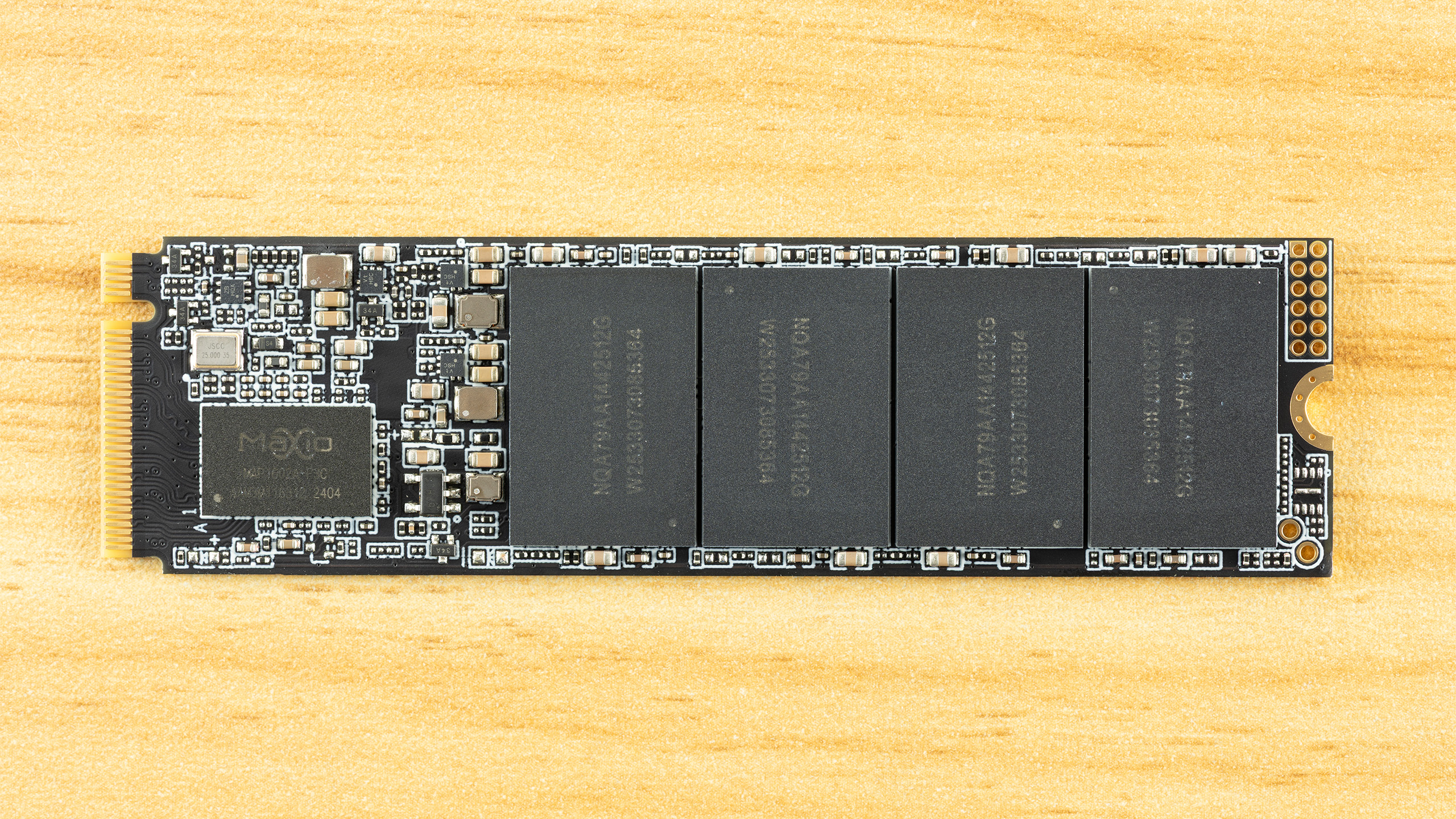
The PX700 is a single-sided drive at all capacity points. This makes it compatible with a wider range of systems and, if you need to cool the drive, it’s easier to tackle just one side of components. As it turns out, the drive runs cool enough that you probably don’t have to worry about this – check the Power Consumption and Temperature section below – but it’s still worth pointing out. The data on the rear label is standard, but we do want to say a little bit more about the listed manufacturer.
Wilk Elektronik is a Poland-based memory company, which makes this interesting, as that means the PX700 is a European-assembled SSD. Goodram covers the mainstream parts and IRDM enthusiast, although this is the first SSD from them that we’ve reviewed. As we are going to dig into the hardware in this section, we will say that the drive's silicon is sourced from Asia, as with virtually every SSD. If we say a drive is made in Poland, this means the drive is assembled, tested, and covered by warranty in Poland with an EU anchor. For some, that might be a positive factor in any purchasing decision.
Tom's HardwareTom's HardwareTom's Hardware
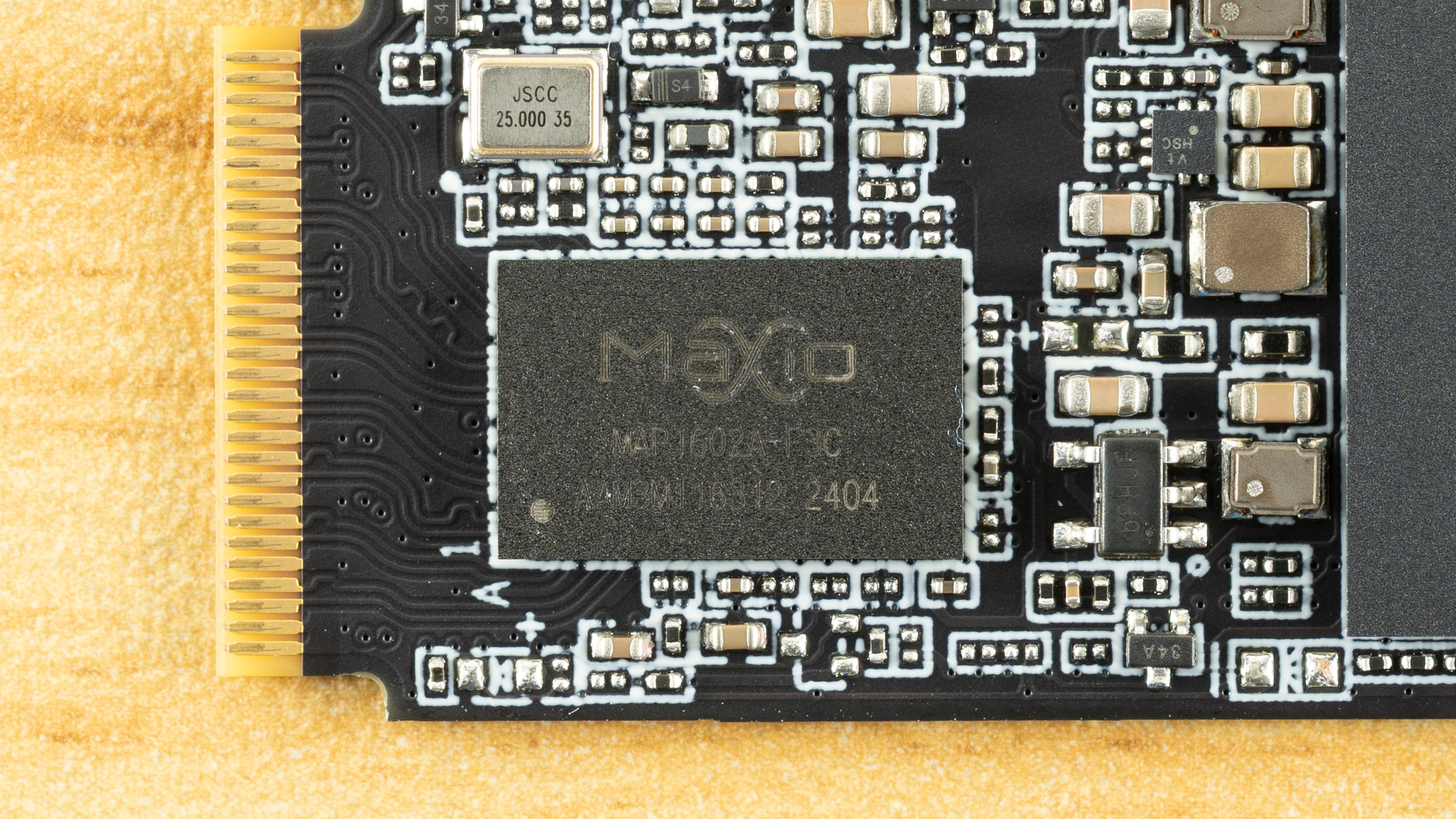
Identifying the hardware here is half simple and half challenging. The controller is clearly the Maxio MAP1602, a four-channel, DRAM-less part that’s been a budget champion for quite some time. There is not much mystery there aside from maybe this being a later revision, typically used for higher capacities.
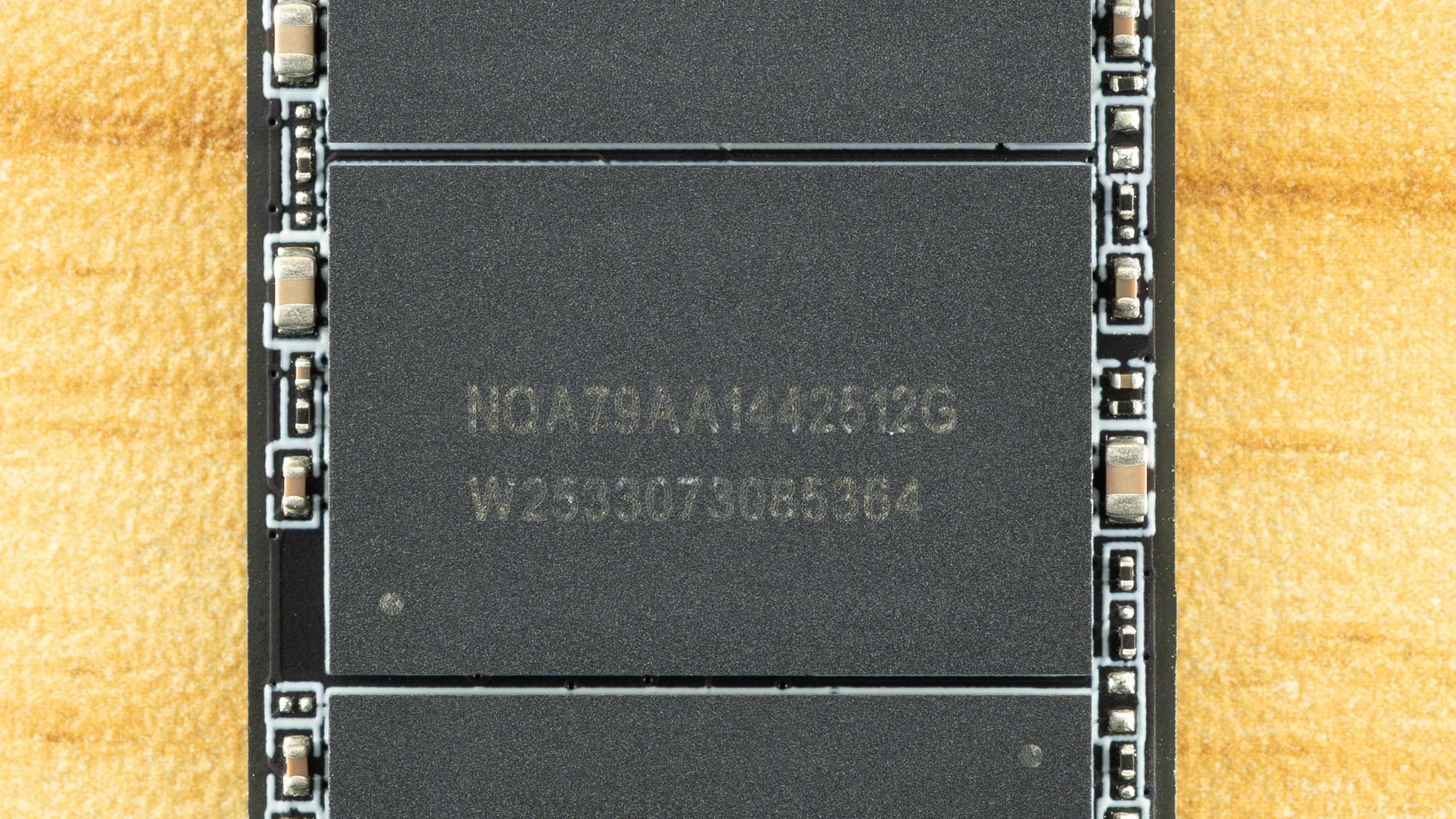
The flash is more difficult. We can ascertain that these are 512GB NAND flash packages from the “512G” – given modern flash is 1Tb or 128GB, four dies per package for a total of sixteen dies. That’s perfect for maximizing performance out of this controller. The “W2533” is likely the manufacture date of week 33, year 2025. All this indicates is that this is, at least, not older flash, although we already know it has to be 2,400 MT/s at a minimum to hit the specified performance.
It makes a lot of sense for the PX700 to use TLC flash, though, given the TBW and the fact that we’ve been seeing this controller with 232-Layer Micron TLC more frequently lately. The Biwin Black Opal NV7400 comes to mind. However, Goodram has access to YMTC flash, and that includes QLC. YMTC rather than Micron QLC is more likely, given the latter is in high demand in enterprise. Normally, you could use certain utilities to identify the flash, but firmware for this controller is often encrypted to avoid revealing the flash ID. It’s still possible to get around this with leaked MP tools, but otherwise the best way to identify it is simply to look at the performance. We’ll be doing that in this review with comparison drives to help back up the investigation.
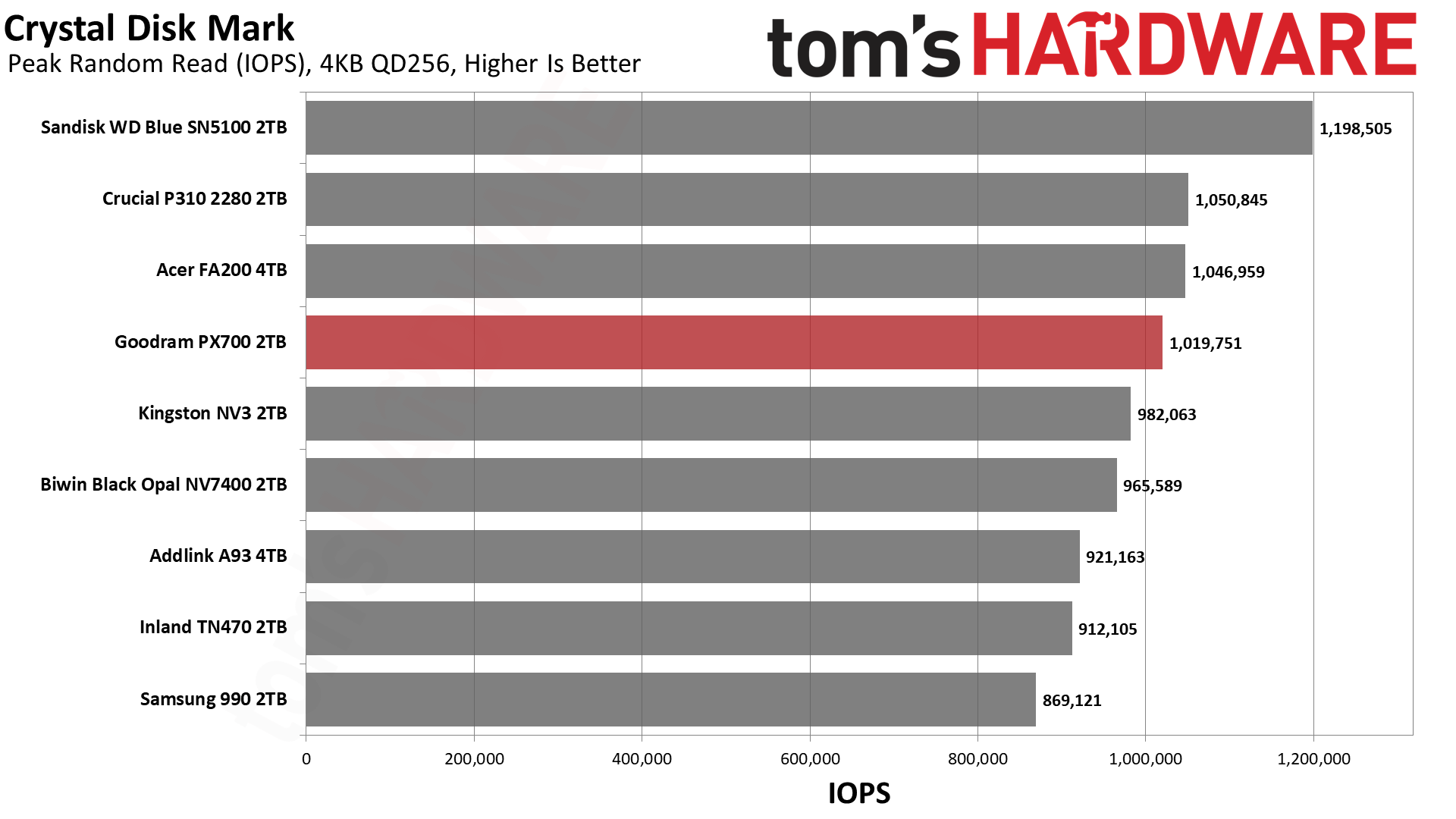
The Goodram PX700 is in a tight spot with ample competition in today’s market. This has been true for some years now, but some more recent releases have turned up the heat. These would include the Sandisk WD Blue SN5100 with its fantastic random read latency, the Crucial P310 with surprisingly good all-around performance, and even the Samsung 990, which was a very late arrival. Existing drives with comparable hardware to the PX700 include the Acer FA200 with QLC flash plus the Biwin Black Opal NV7400, Addlink A93, and Inland TN470 with TLC. The last of these also uses a Phison controller rather than the more common Maxio MAP1602. Lastly, we have the budget-minded Kingston NV3, which is always looming in the background.
Trace Testing — 3DMark Storage Benchmark
Built for gamers, 3DMark’s Storage Benchmark focuses on real-world gaming performance. Each round in this benchmark stresses storage based on gaming activities including loading games, saving progress, installing game files, and recording gameplay video streams. Future gaming benchmarks will be DirectStorage-inclusive and an evaluation for future-proofing is included where applicable.
Tom's HardwareTom's HardwareTom's Hardware
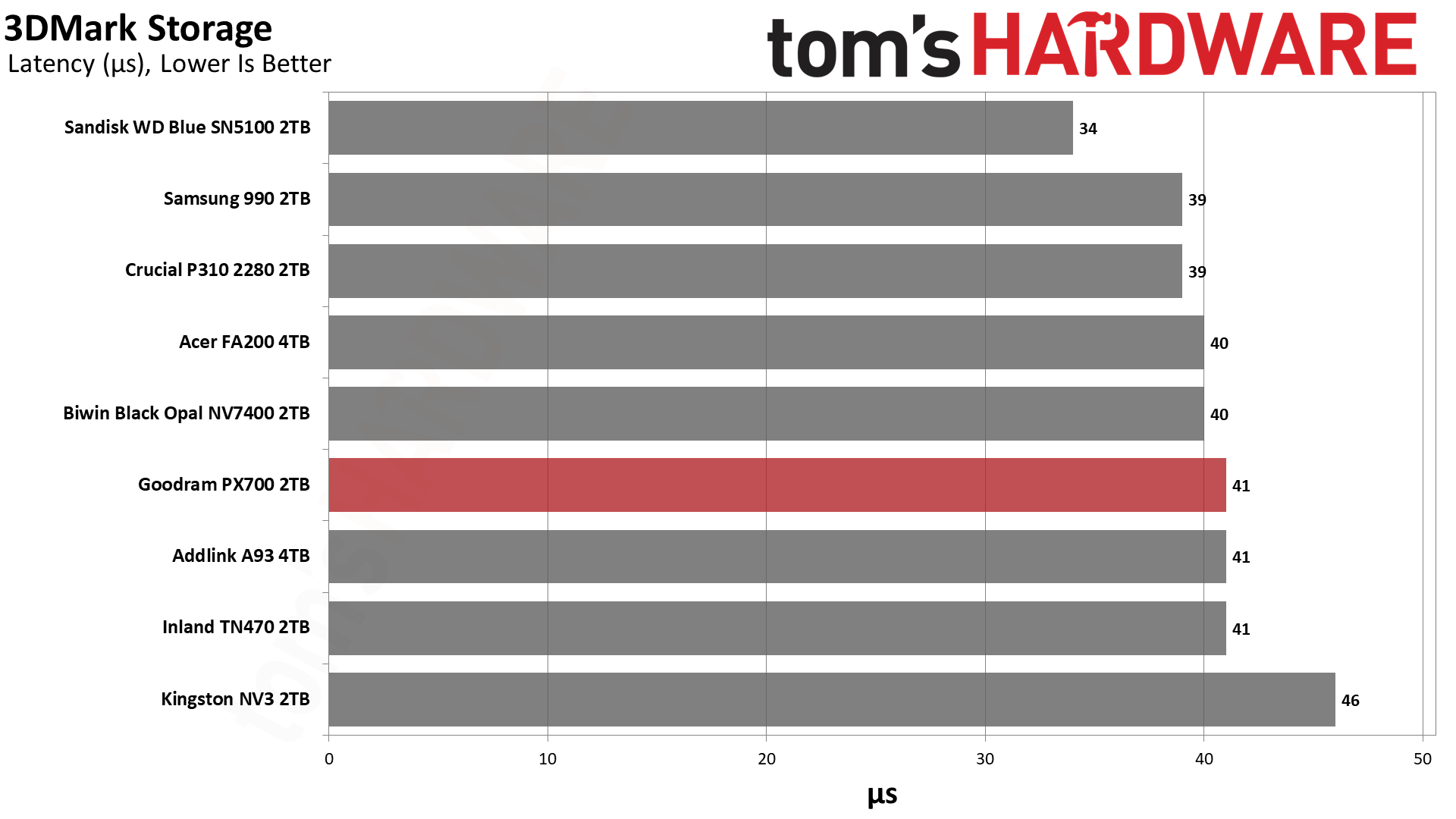
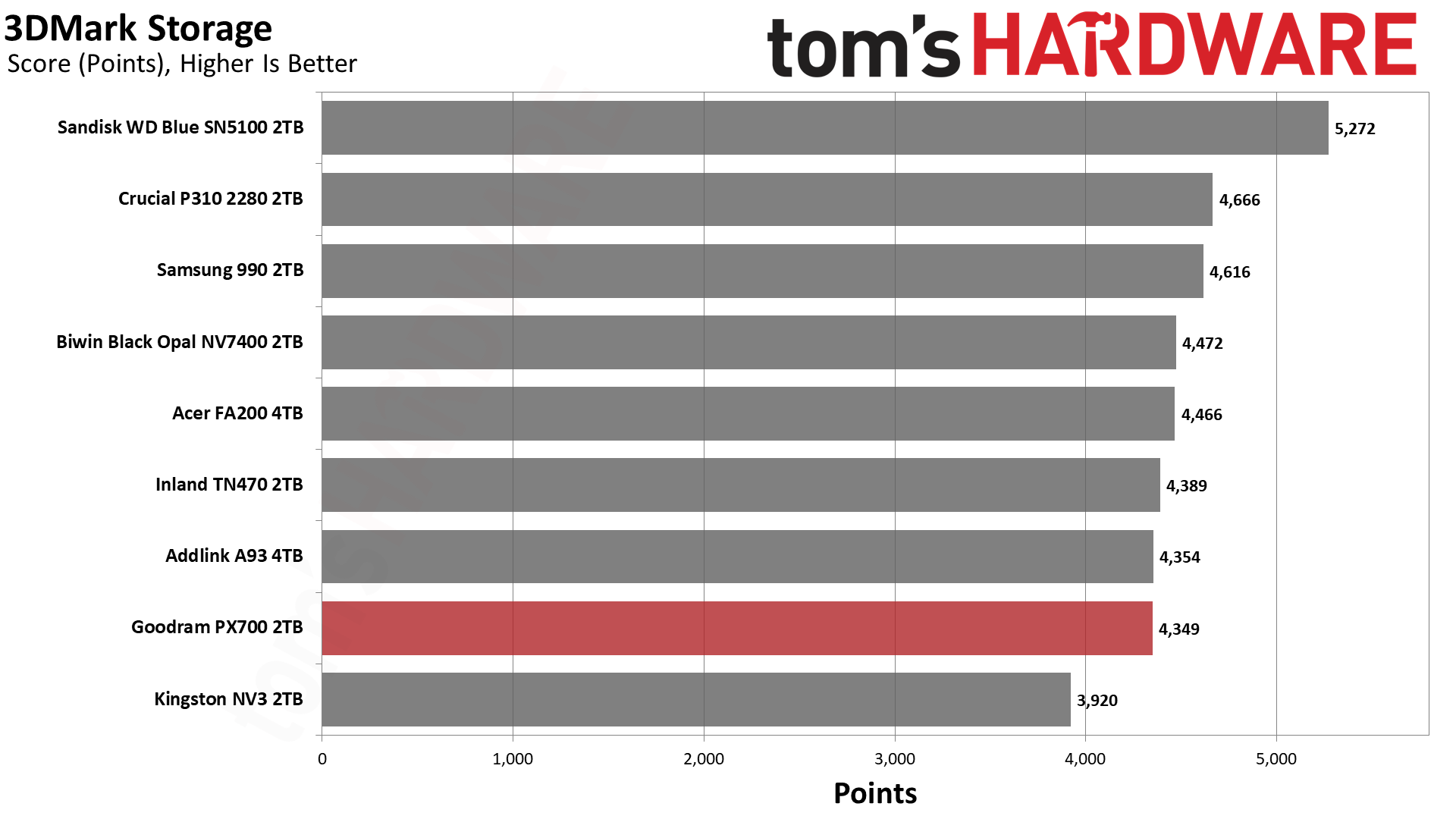
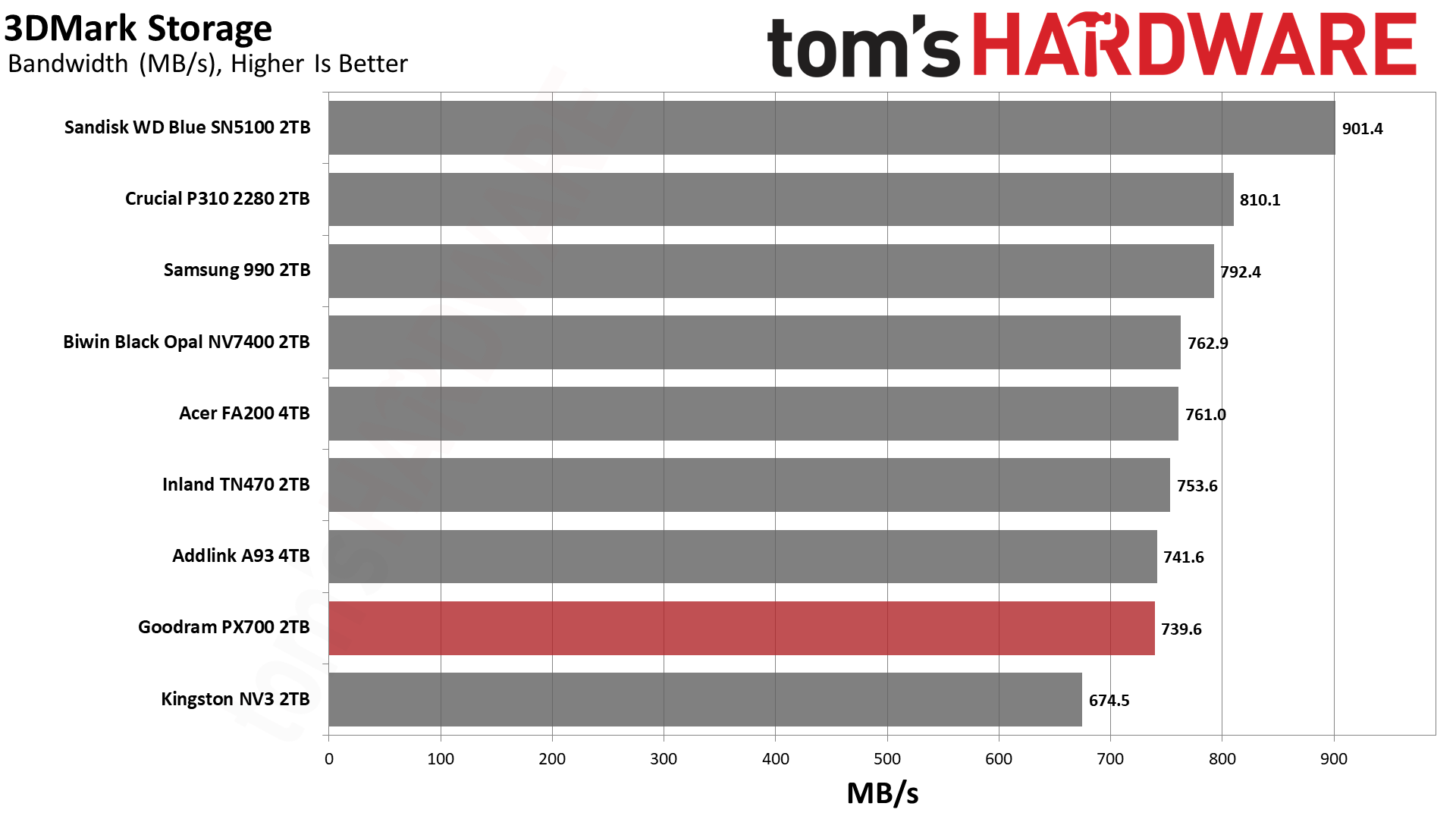
The PX700’s 3DMark results are spot-on for a drive of this caliber, hanging out at around 40µs for latency with bandwidth over 700 MB/s. This level of performance is excellent for gaming, and the only drive that wouldn’t fall into that category is the NV3. The NV3 is still fast enough for a games drive and remains a good budget choice, but there are faster options like the PX700. We want to emphasize that the PX700 is better than it looks in this lineup because it’s effectively within range of all drives but one, the WD Blue SN5100.
Among the QLC-based drives, the WD Blue SN5100, 990, and P310 all notably score near the top. The BiCS flash in the first drive is known for its responsiveness and, yes, it will give you a small edge with game load times. However, the 990 is right up there with the P310, which means there is no shortage of viable options. Most slower drives, from a gamer’s perspective, will be last-generation or slower PCIe 4.0, which means it’s not hard to find drives that are very fast for games. This means that the deciding factor might lie outside of 3DMark performance, such as drive reliability.
Trace Testing — PCMark 10 Storage Benchmark
PCMark 10 is an industry standard trace-based benchmark that uses a wide-ranging set of real-world traces from popular applications and everyday tasks to measure the performance of storage devices. The results are particularly useful when analyzing drives for their use as primary/boot storage devices and in work environments.
Tom's HardwareTom's HardwareTom's Hardware
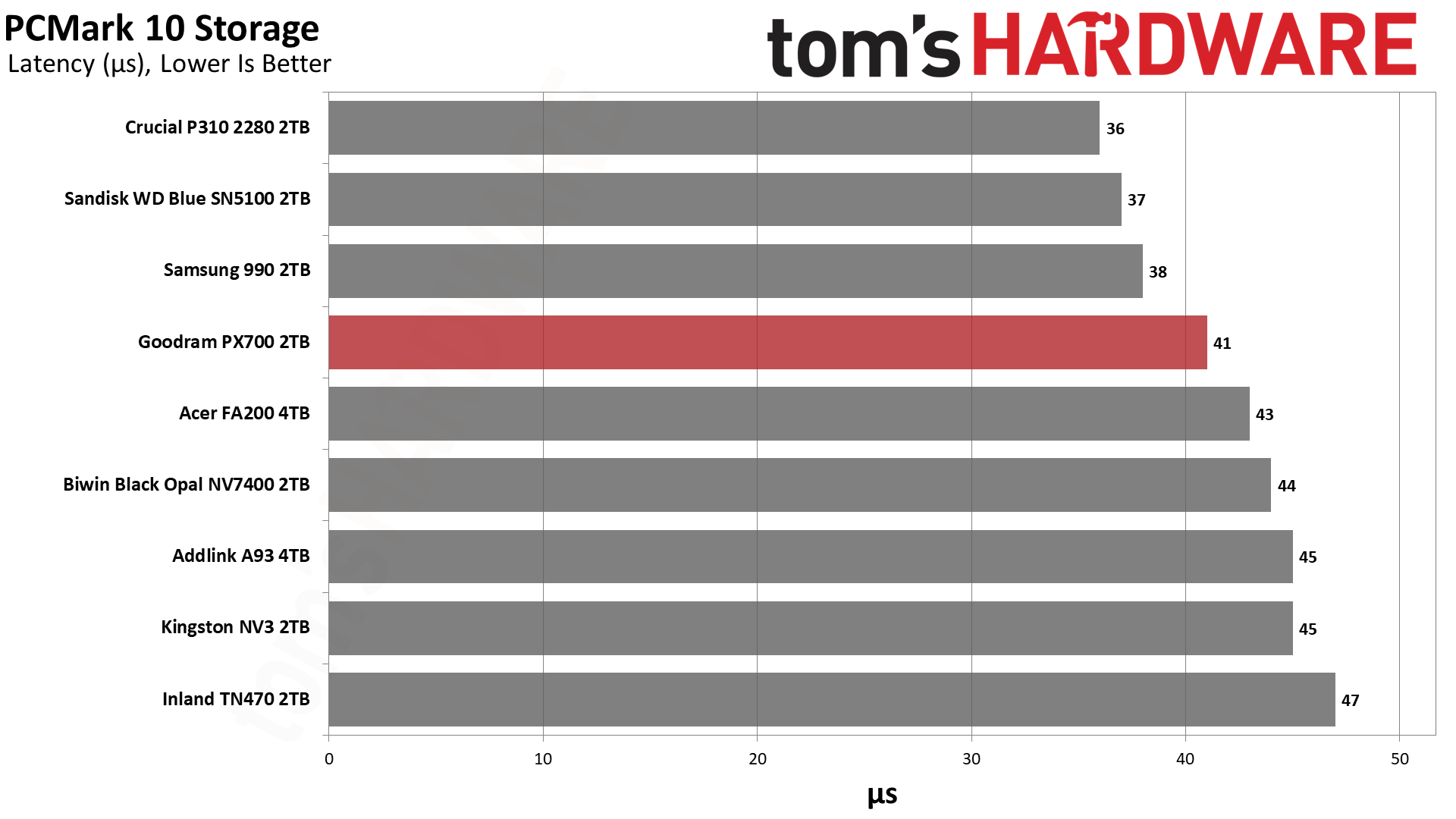
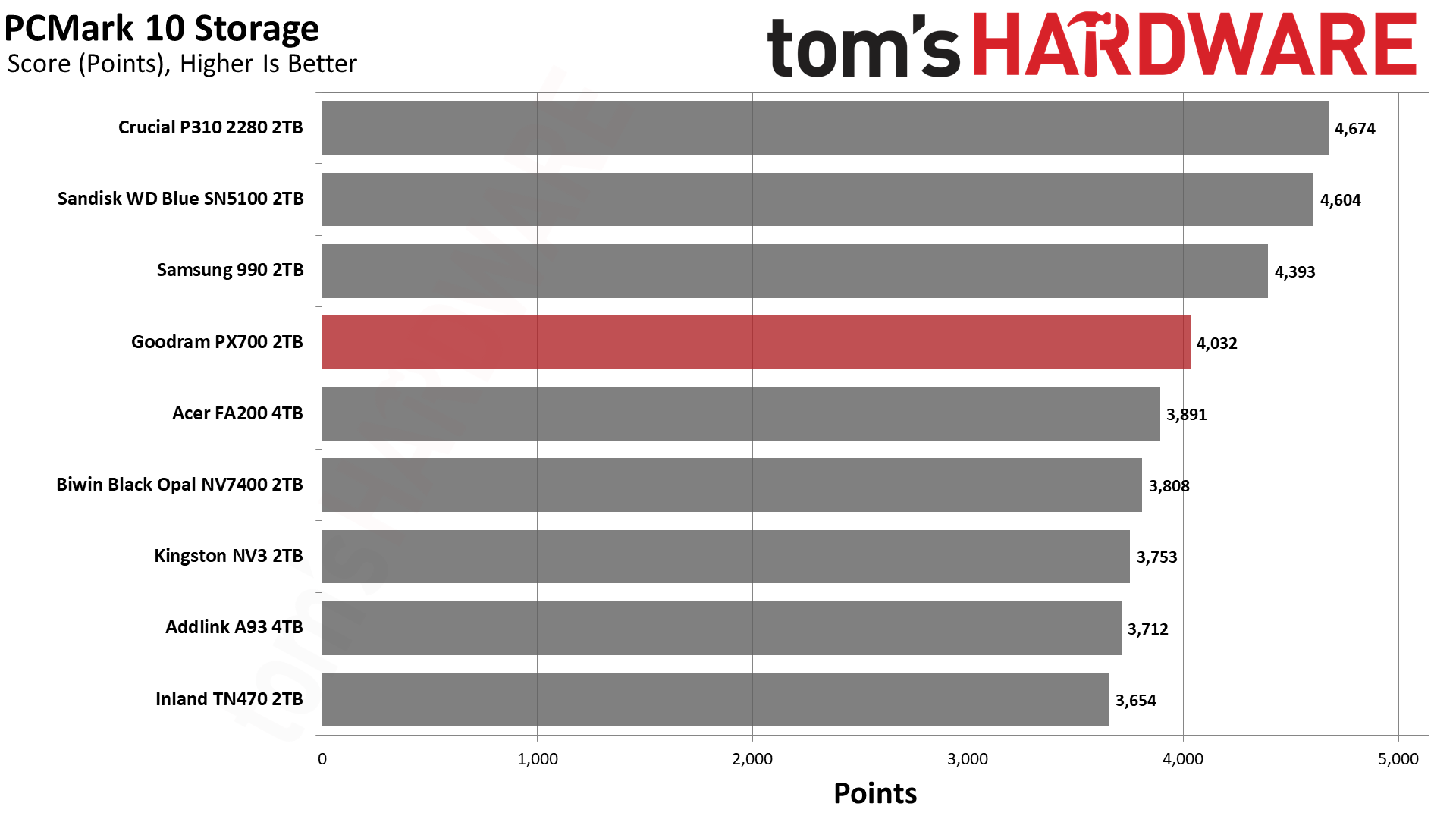
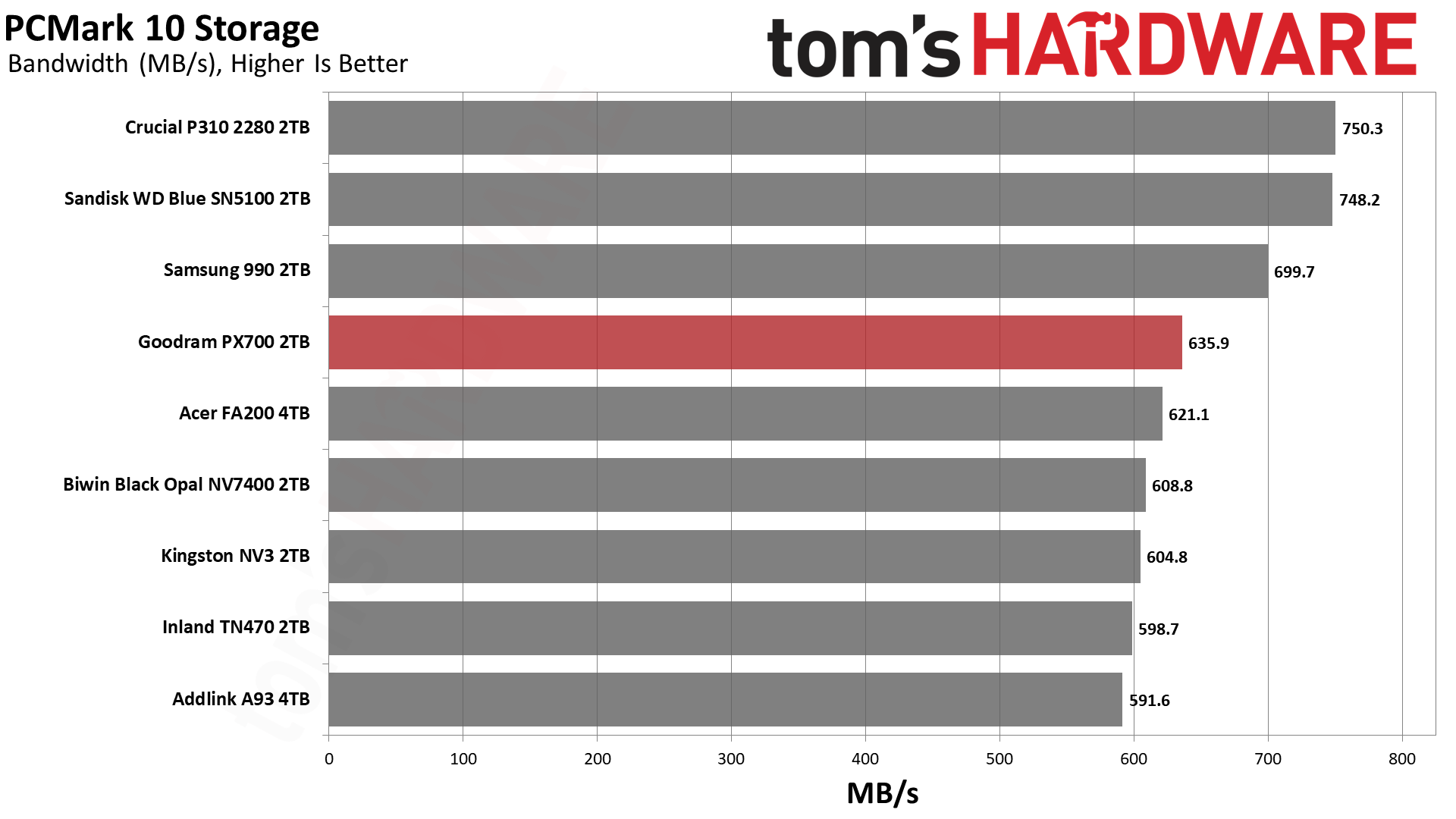
While the PX700 is merely mediocre against the competition in 3DMark – its absolute performance is quite good, though – its showing in PCMark 10 is better. This is again a scenario where the drives with TLC flash, including the TN470 with Phison’s controller, are underwhelming. This can be confusing to buyers who have relied on the mantra that TLC is better than QLC. There are reasons for the surprise here, although the general idea that benchmarking is often looking at ideal scenarios is perhaps the easiest answer.
These drives, whether TLC or QLC, rely on pSLC cache as much as possible to give you the best performance. This pSLC mode is not equivalent to native pSLC and is generally the same speed regardless of the flash type. QLC, however, tends to lead TLC in some ways and follow it in others. For example, QLC gets larger benefits from optimizations, so it may see advanced techniques first. This includes improvements to 4K latency. On the other hand, QLC has four planes when TLC has advanced to six. As we’ve seen with BiCS flash, which is four-plane against six-plane TLC from Micron and YMTC, fewer planes can lead to lower effective latency. The advantage of a higher plane count is in bandwidth but does not come without costs and drawbacks.
The PX700 is also faster than a QLC-based drive with the same controller, like the FA200. In that case, the FA200 uses twice as many dies – thirty-two – which puts more load on the controller. This can increase latency. In general, the idea has been that bigger drives are faster, which is certainly true in many cases. Larger drives will have more bandwidth and can reach higher IOPS due to improved parallelization. However, past four dies for each channel – this is where the PX700 falls, and the FA200 exceeds – you are increasing power consumption and overhead. So, the PX700 is in a sweet spot for how this benchmark tests.
We would go on to say that the P310, WD Blue SN5100, and 990 all beat the PX700. These are all QLC-based drives with a range of controllers. We’ve already explained the BiCS factor. Samsung’s newer QLC is also very good. The P310 has always been a bit of an outlier, as on paper its hardware shouldn’t perform as well as it does. Considering Crucial used to rely at least partially on proprietary controllers, we think this is a situation where they did a lot of optimization. WD and Sandisk also did this with the Black SN8100/Optimus Pro GX 8100 so there’s some “special sauce” at play. The PX700 being the best of the rest is a point in its favor, as those are the drives it’s competing with in the real market.
Console Testing — PlayStation 5 Transfers
The PlayStation 5 is capable of taking one additional PCIe 4.0 or faster SSD for extra game storage. While any 4.0 drive will technically work, Sony recommends drives that can deliver at least 5,500 MB/s of sequential read bandwidth for optimal performance. Based on our extensive testing, PCIe 5.0 SSDs don’t bring much to the table and generally shouldn’t be used in the PS5, especially as they may require additional cooling. Check our Best PS5 SSDs article for more information.
Our testing utilizes the PS5’s internal storage test and manual read/write tests with over 192GB of data both from and to the internal storage. Throttling is prevented where possible to see how each drive operates under ideal conditions. While game load times should not deviate much from drive to drive, our results can indicate which drives may be more responsive in long-term use.
Tom's HardwareTom's HardwareTom's Hardware
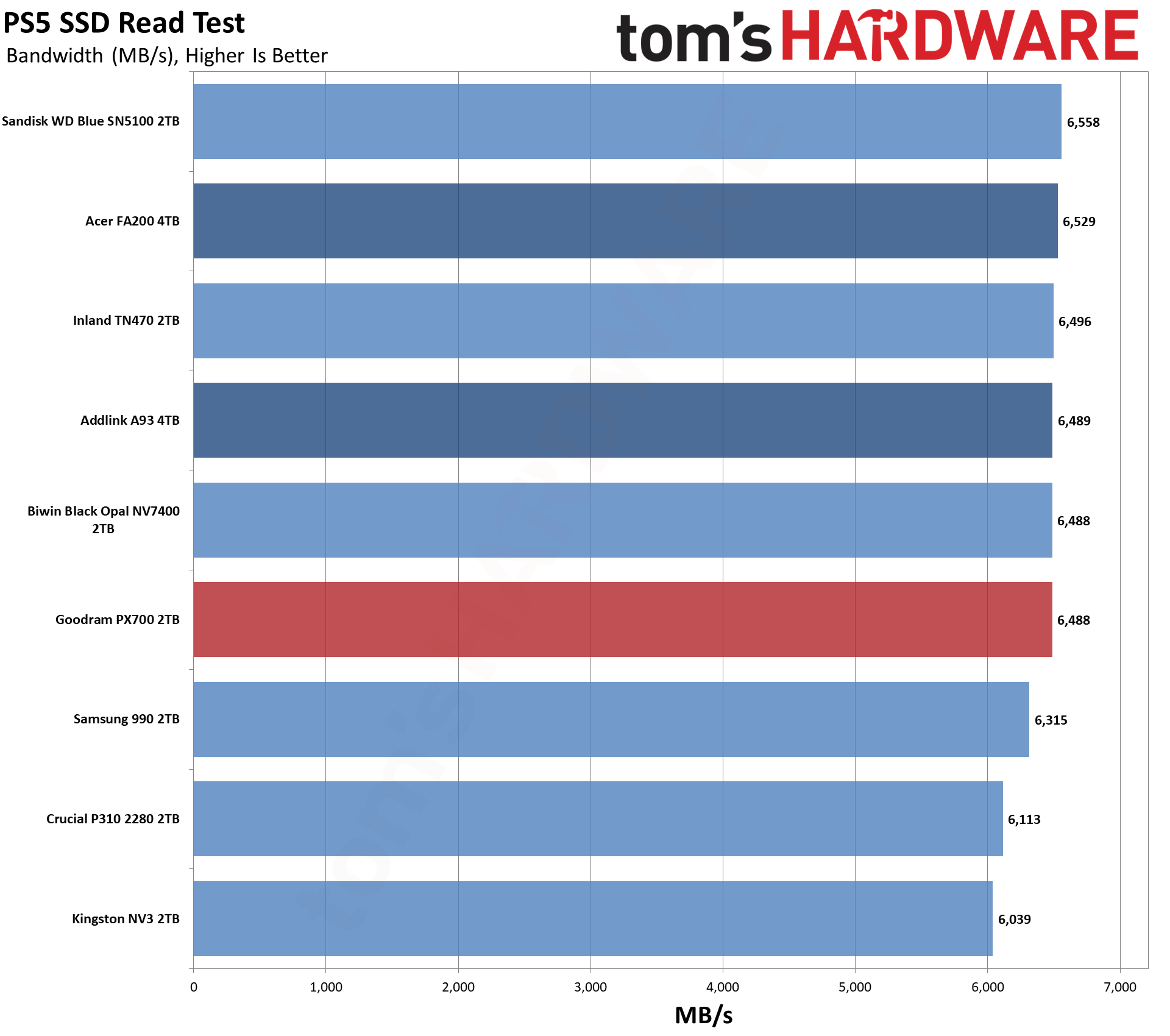
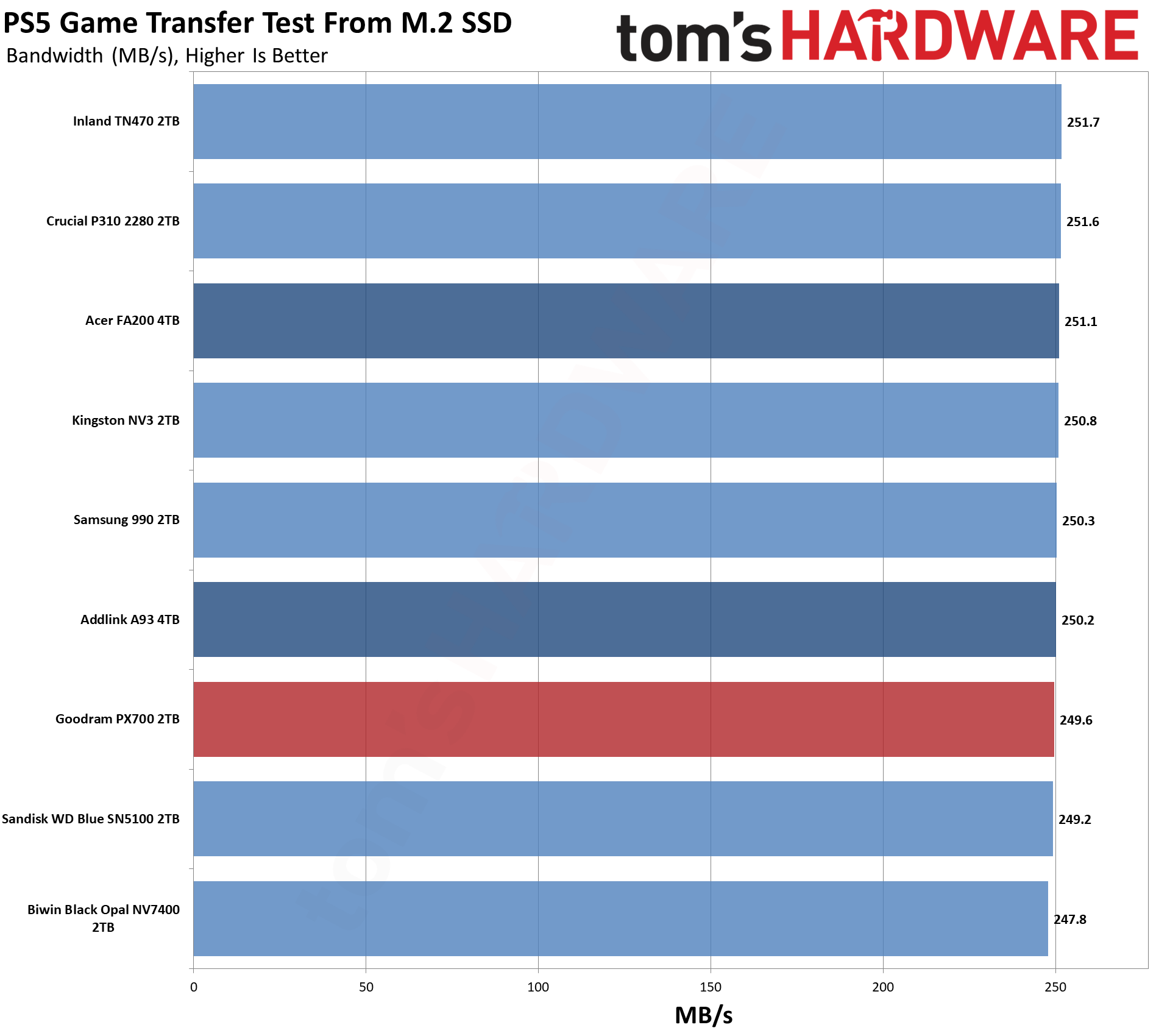
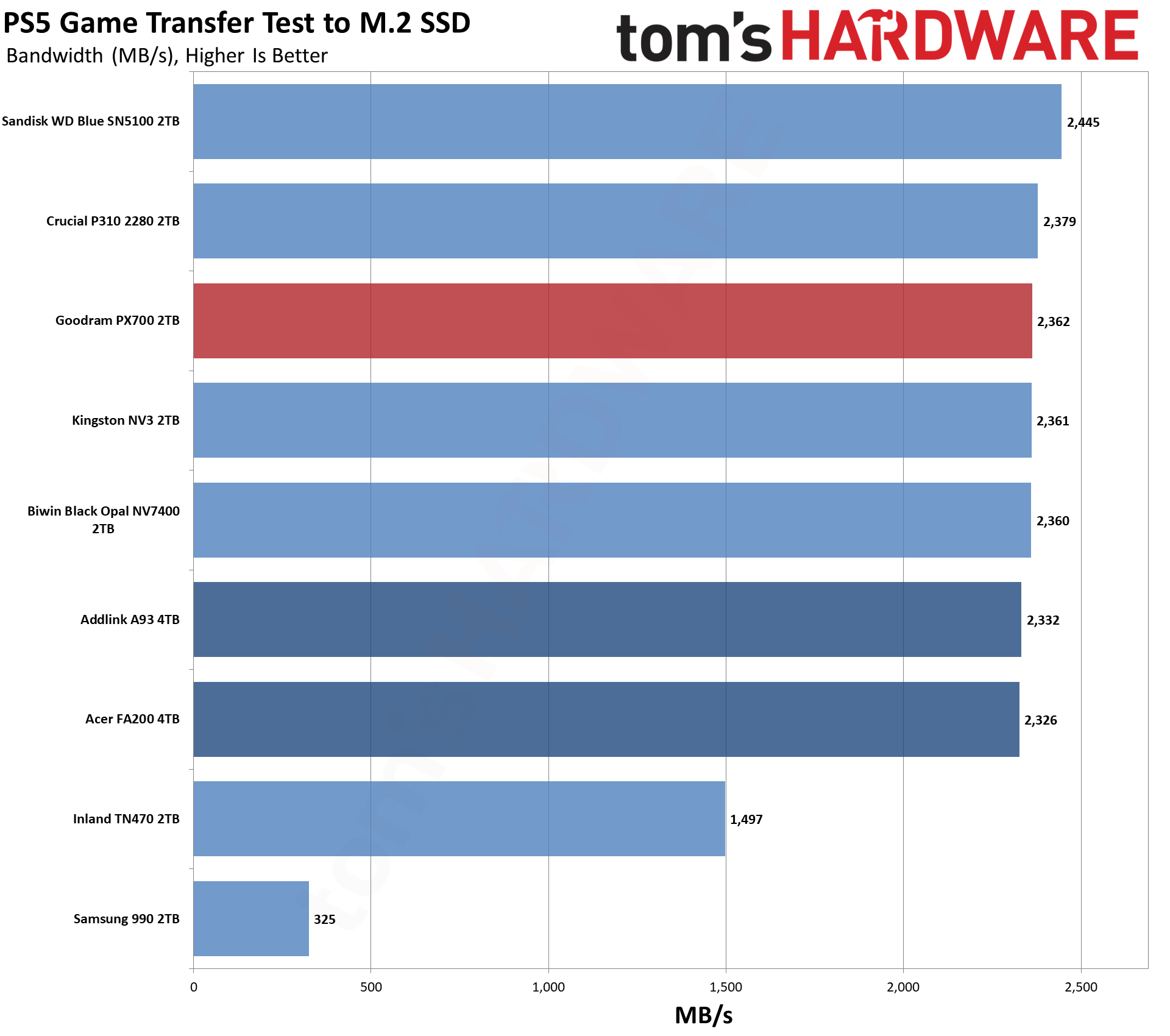
For the PS5, we can recommend almost any drive if it meets the PS5’s minimum requirements in any real way. The PX700 significantly exceeds that, so the question is more about value. What does this drive offer that others don’t? For this category, this often means leaning towards drives with heatsinks and/or higher reliability. Reliability is a difficult quality to measure, although a warranty gives some peace of mind. As for heatsinks, you can always add your own. So drawing lines here becomes more difficult.
We would point to our Power Consumption and Temperature section below for some additional support. The PX700, as we will see, runs coolly, which is a big positive for the PS5. Performance-wise, it’s right up there with the other drives and only really behind the Blue SN5100. You don’t have to go with a big brand to get good results here, and the PX700 will serve you well.
Transfer Rates — DiskBench
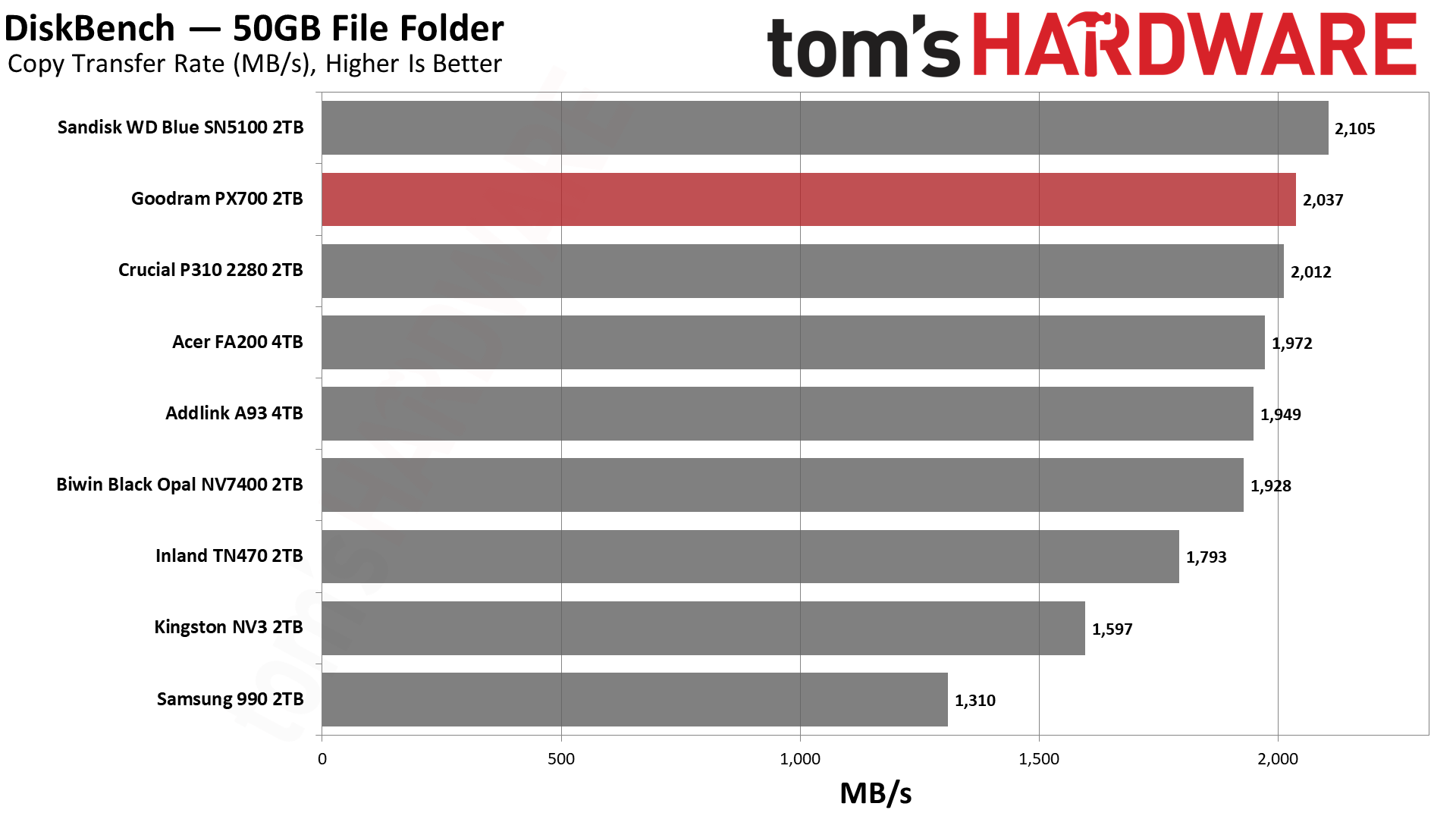
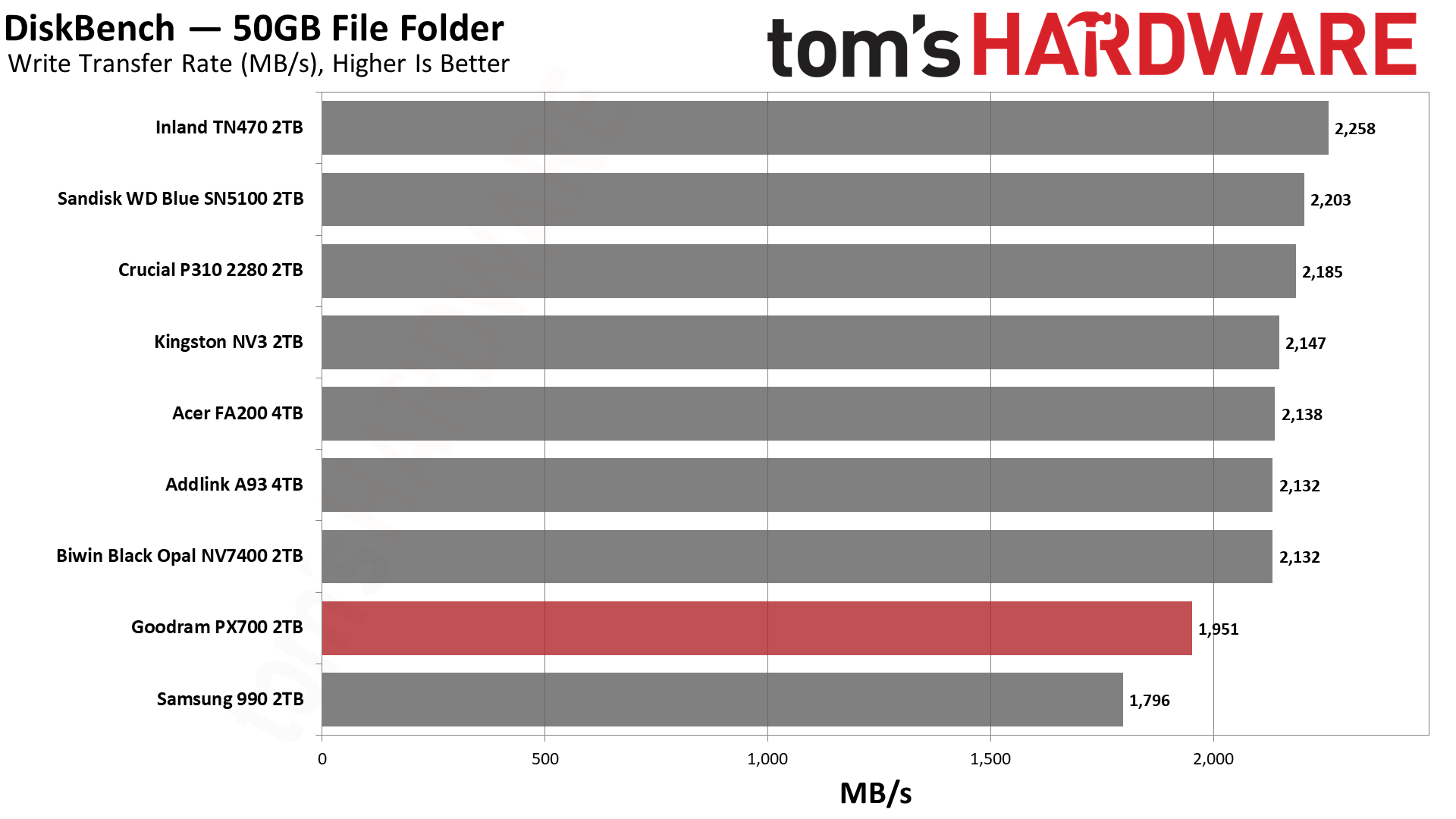
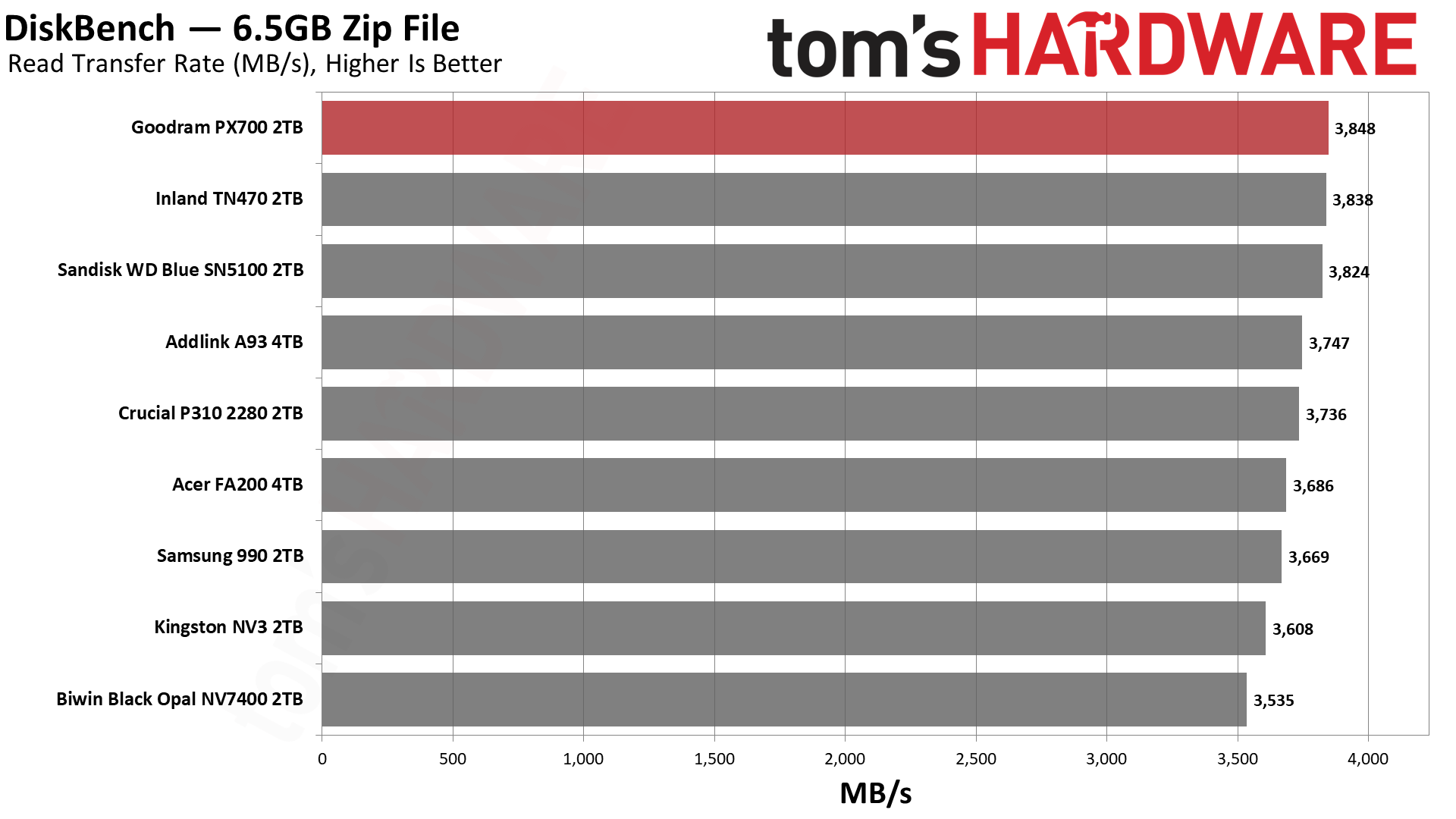
We use the DiskBench storage benchmarking tool to test file transfer performance with a custom 50GB dataset. We write 31,227 files of various types, such as pictures, PDFs, and videos to the test drive, then make a copy of that data to a new folder, and follow up with a reading test of a newly written 6.5GB zip file. This is a real-world type workload that fits into the cache of most drives.
Tom's HardwareTom's HardwareTom's Hardware
The PX700 does very well here, and we wanted to give some background on this test and what it means to put that into perspective. Whether you’re copying between drives or copying to and from the same drive, there are some universal principles. One is that there will be a bottleneck, and usually this will be on the write side of things, as drives write slower than they read. Flash memory, in particular, has to erase cells before they can be written again, which leads to some curious behavior under certain workloads. More generally, though, a write has higher latency – with flash again, this is due to the technology and how multi-bit cells usually need multiple write passes – and writes must be acknowledged, while reads just come from usually static media.
If you have drives that are of different classes – NVMe and SATA, or PCIe 4.0 and PCIe 3.0 – then you would expect the slower class of drive to be the bottleneck even if it’s on the read side. This is also universal, going back to the days when HDDs got faster as they got bigger. SSDs also generally get faster with capacity, but flash is so fast that these rules are no longer absolute. This is complicated by other facets of the technology like pSLC caching and TLC versus QLC flash, where with sustained writes you can have dramatic changes in performance. This is a problem because many people buy drives thinking mostly about transfer performance, and when they hit a low that’s nowhere near the box-rated speed, they panic.
Our DiskBench testing takes all of this into account as it’s closer to a real-world workload, including using different file sizes. Transferring a bunch of large files is fast. Copying lots of small files – and any veteran of hard drives will know this from backing up Windows or documents manually – can be very slow, even on SSDs. So we do a mix. Moreover, we’re doing an on-drive copy, which helps rule out external factors. Much of what you do on your system can be cached in system memory, which can give misleading metrics depending on what you’re doing.
What we’re leading up to here is that the PX700 is the fastest drive on the list for reads and not far off first place for copying. Considering it’s up against some of the best budget drives out there, that’s no mean feat. This is, again, a real-world workload and probably more meaningful than something like 3DMark is for game load times.
Yes, the difference between the best and the worst drive for reads is under 10%, but nobody wants to buy a drive and feel bad about how fast it feels. The PX700 feels like a premium drive – the weaker write performance here is real, but most of what you’re doing will be read-heavy – and if you’re building a PC for someone with it over, say, the Samsung 990, they won’t know the difference. That is a common refrain regardless, but it helps underline the value of reliability. People buy Samsung and WD/Sandisk for a reason. Given Goodram’s European basis, there is some reason to celebrate the performance here while also acknowledging it’s not a no-name brand from AliExpress.
Synthetic Testing — ATTO / CrystalDiskMark
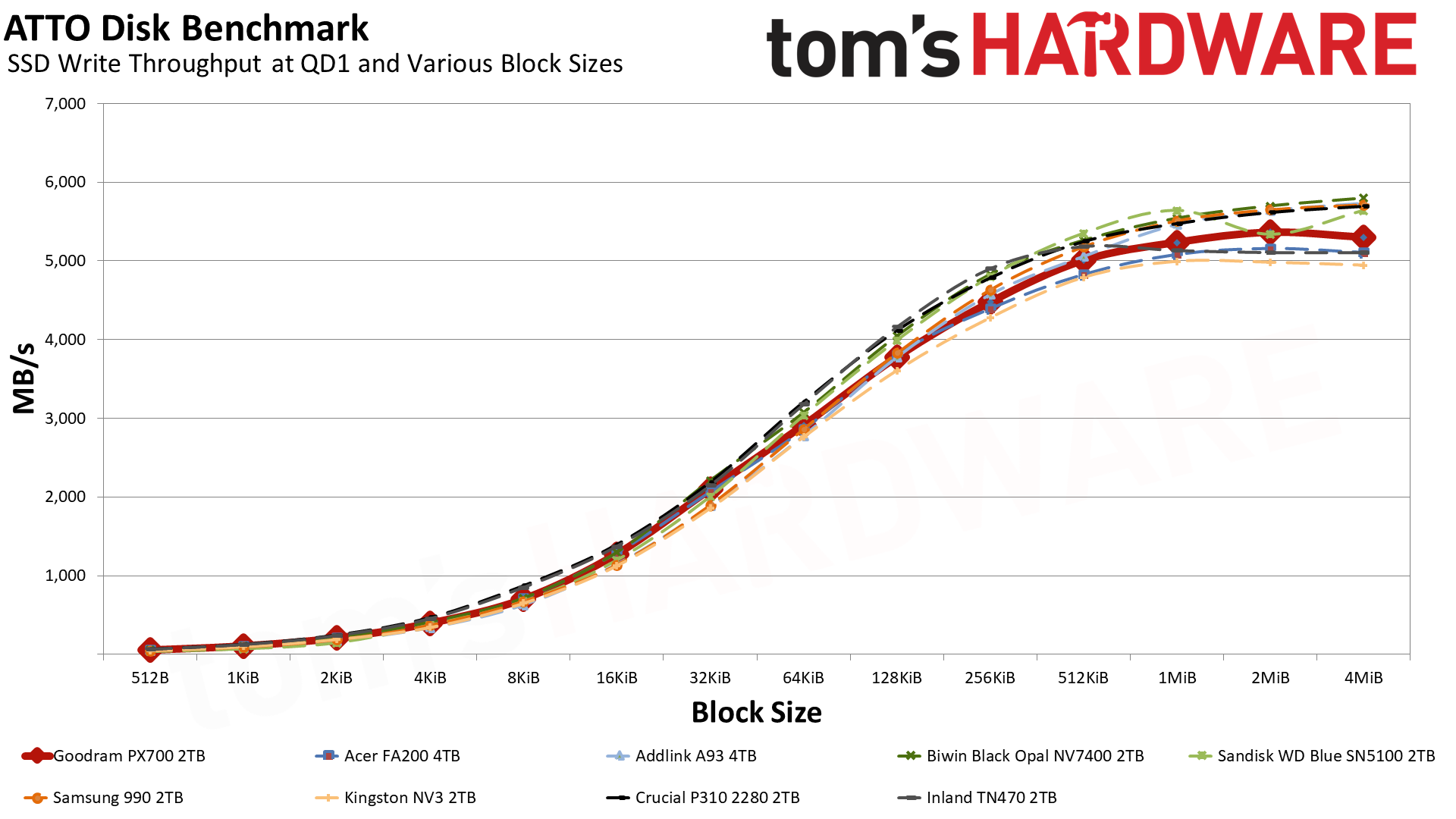
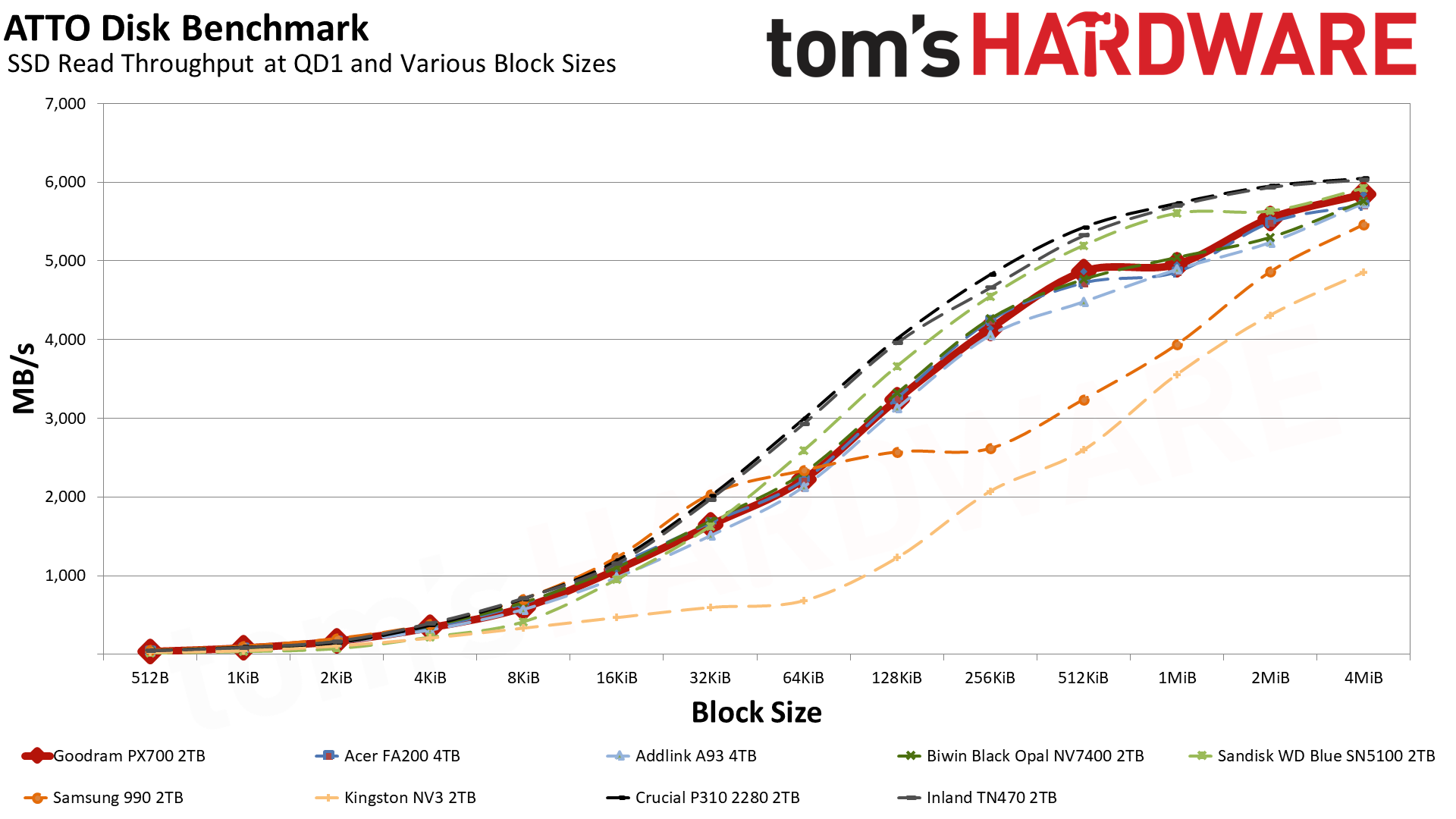
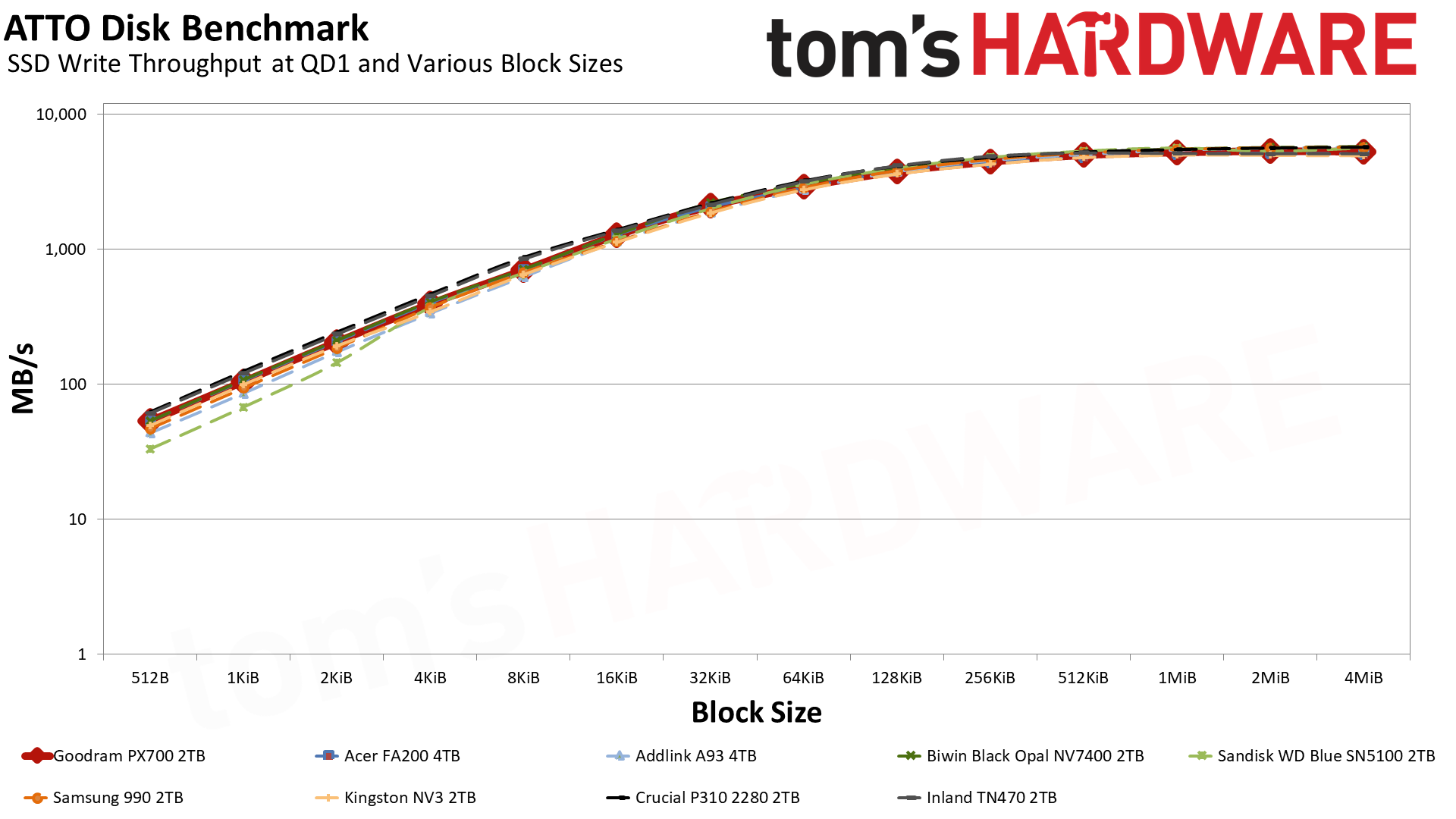
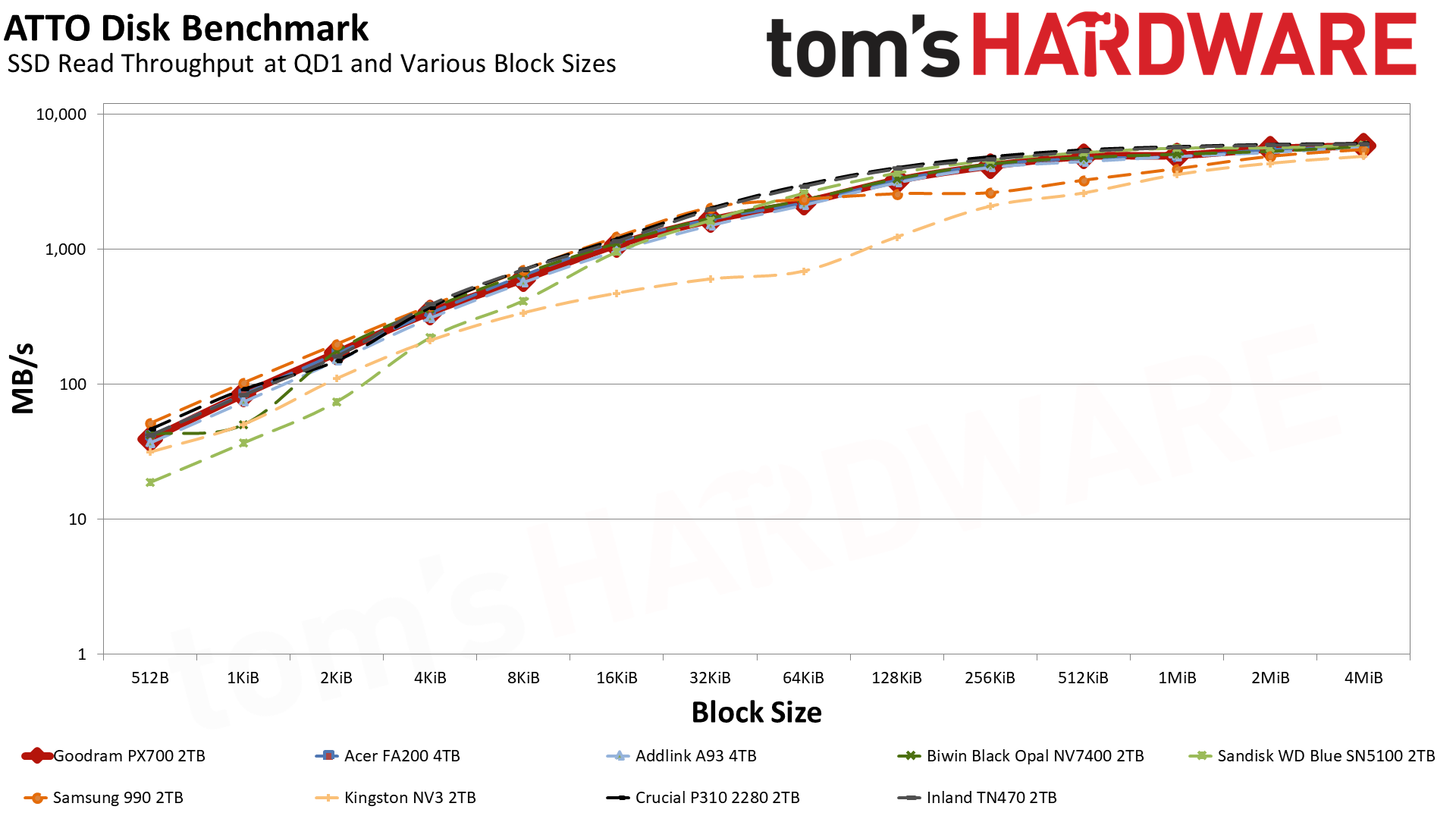
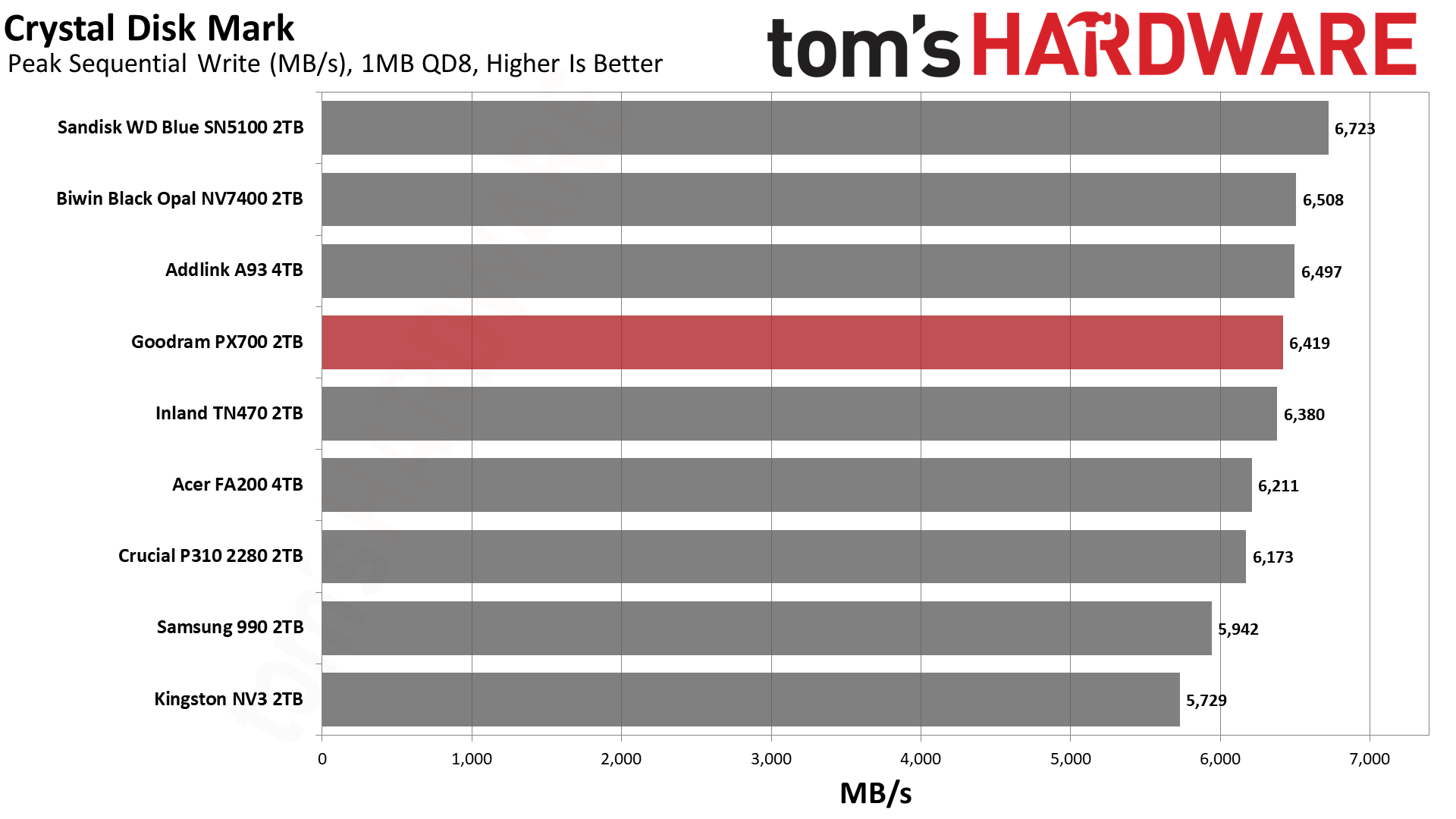
ATTO and CrystalDiskMark (CDM) are free and easy-to-use storage benchmarking tools that SSD vendors commonly use to assign performance specifications to their products. Both of these tools give us insight into how each device handles different file sizes and at different queue depths for both sequential and random workloads.
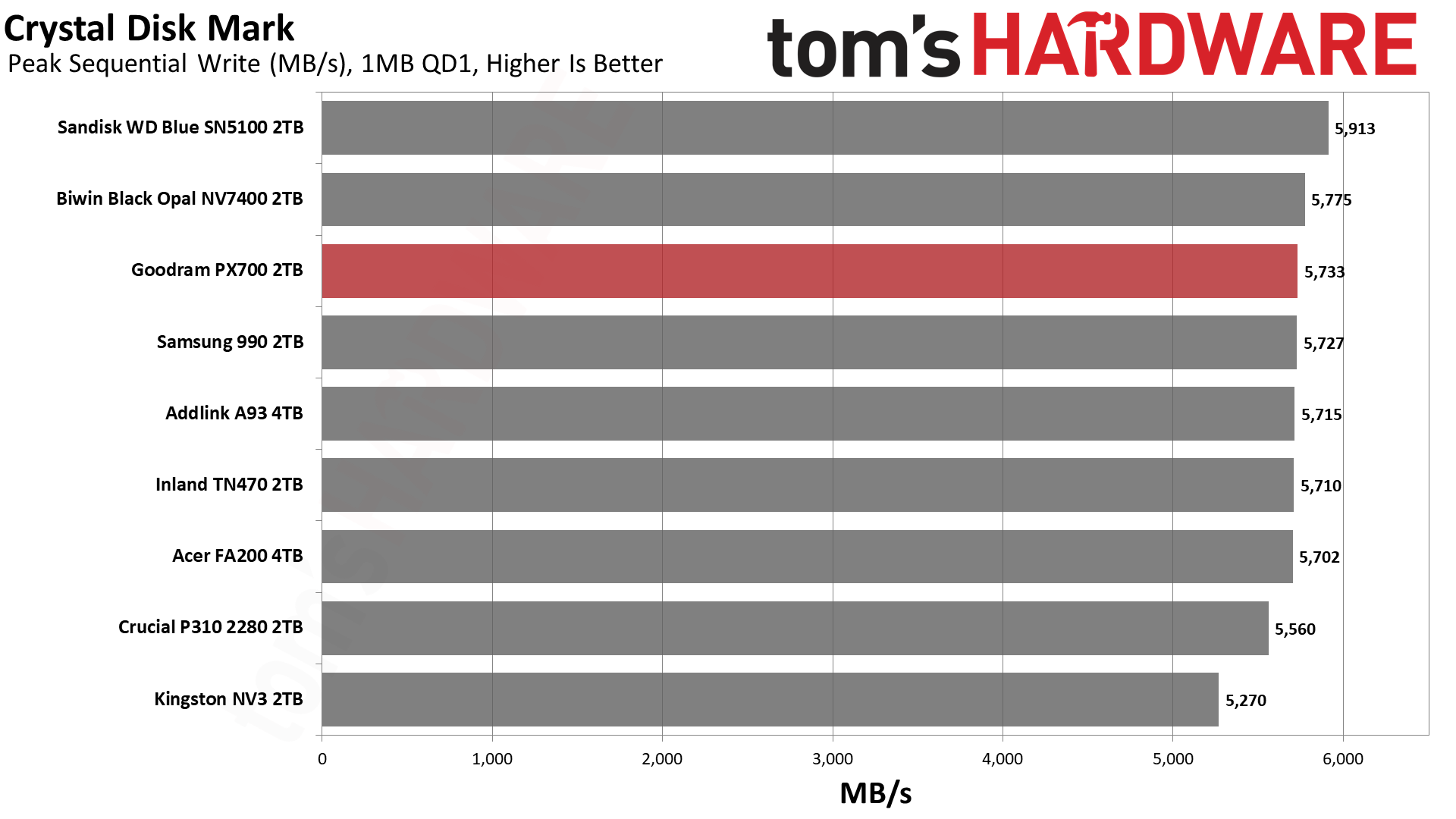
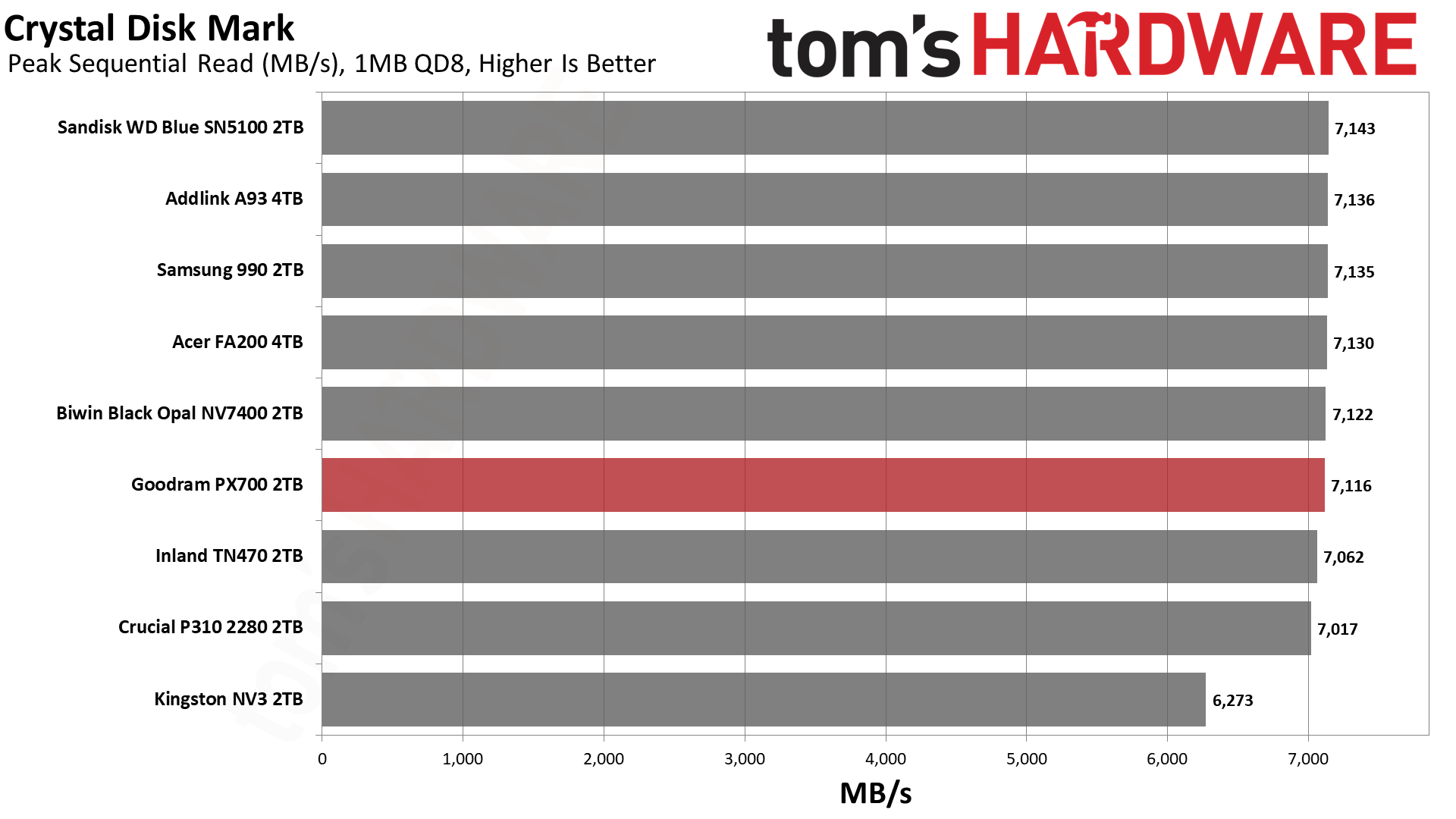
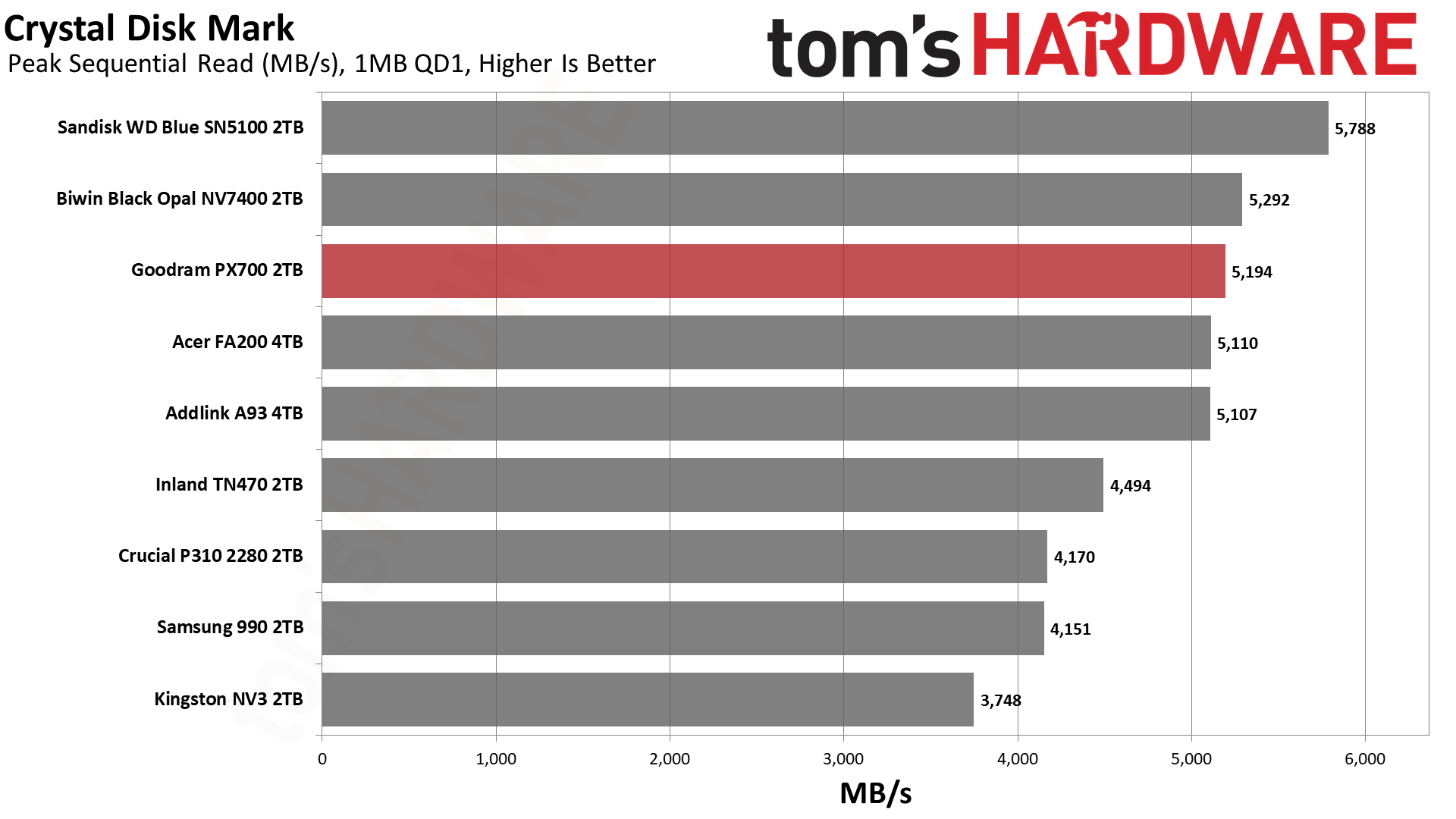
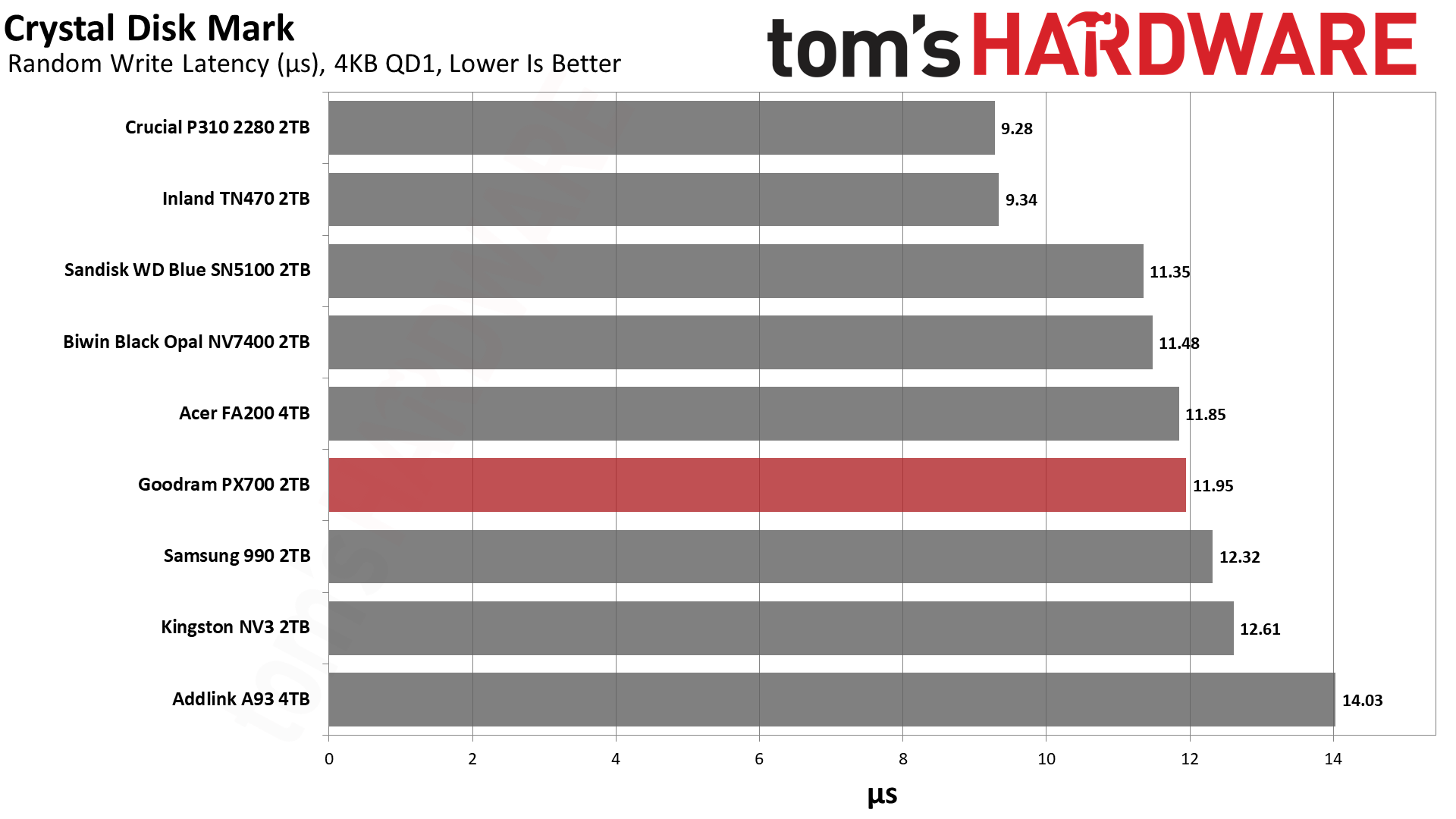
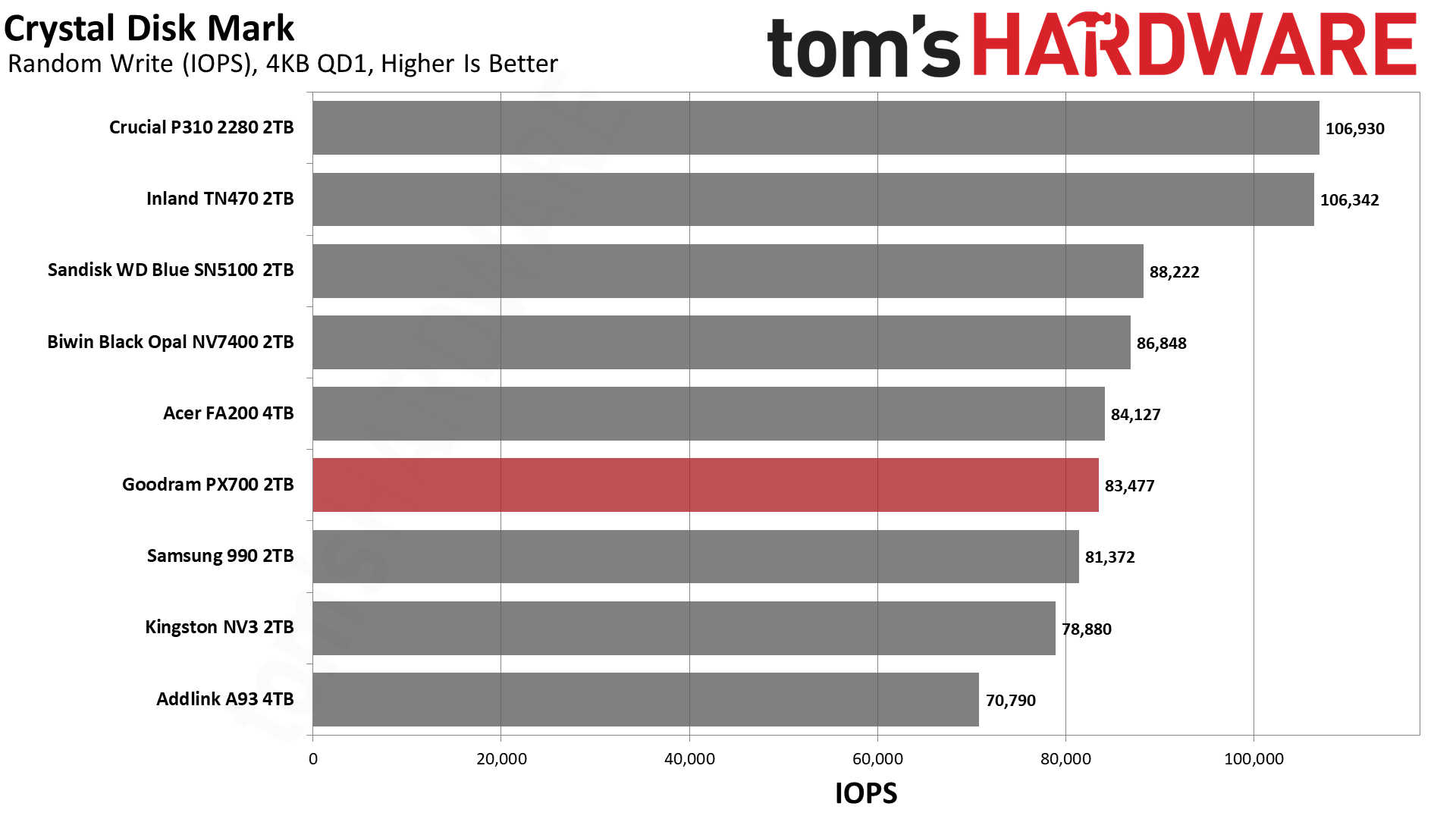
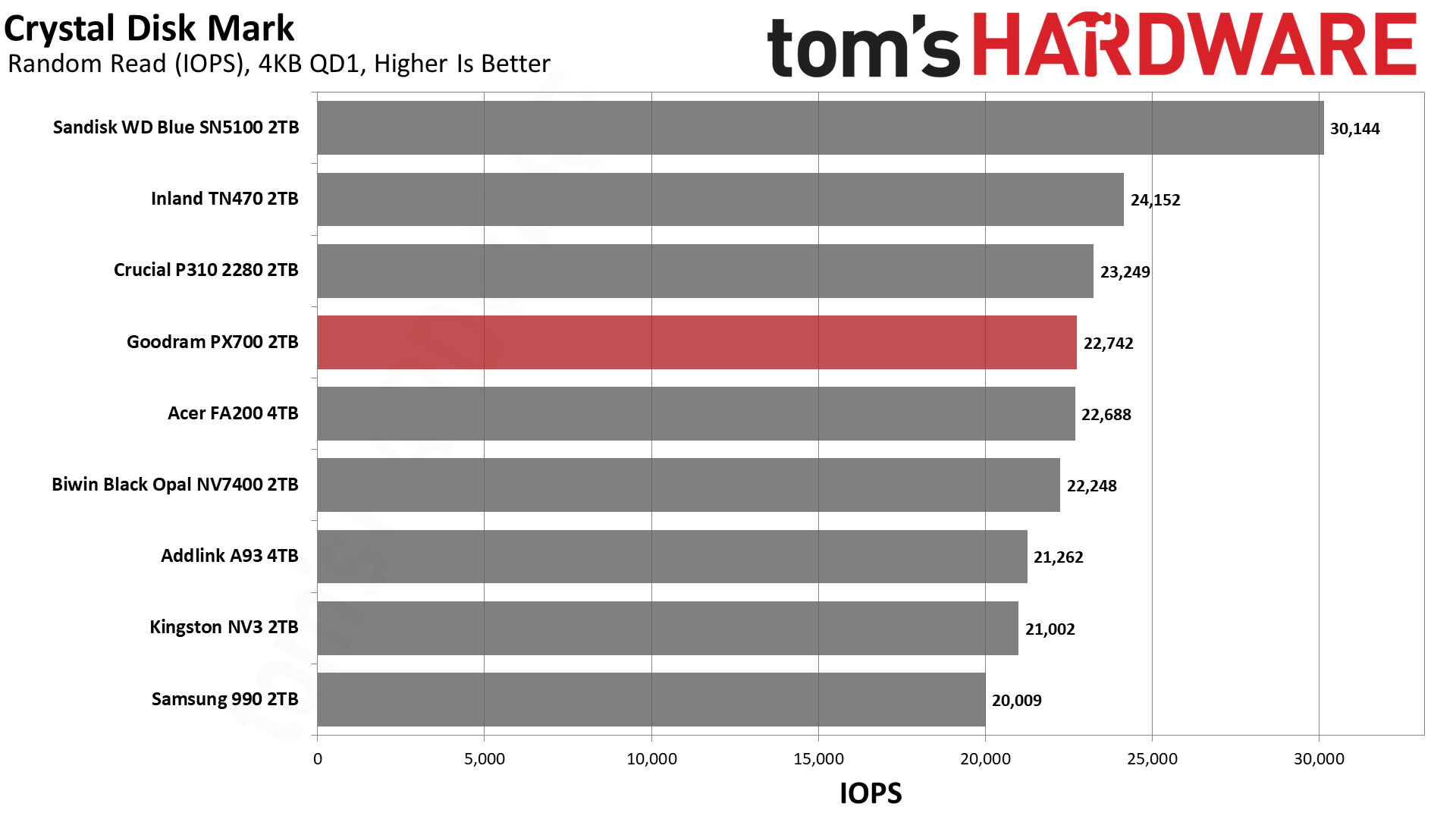
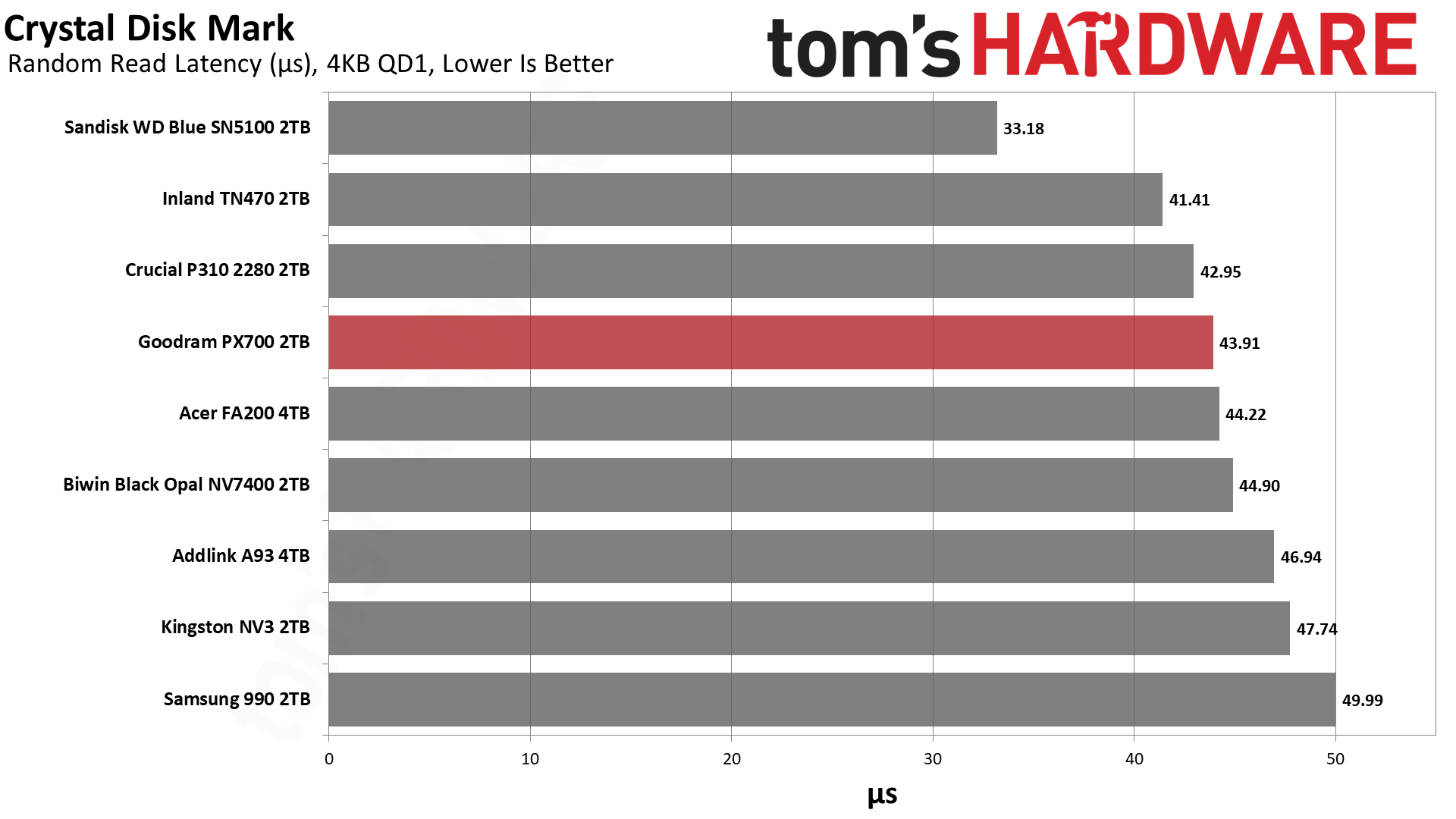
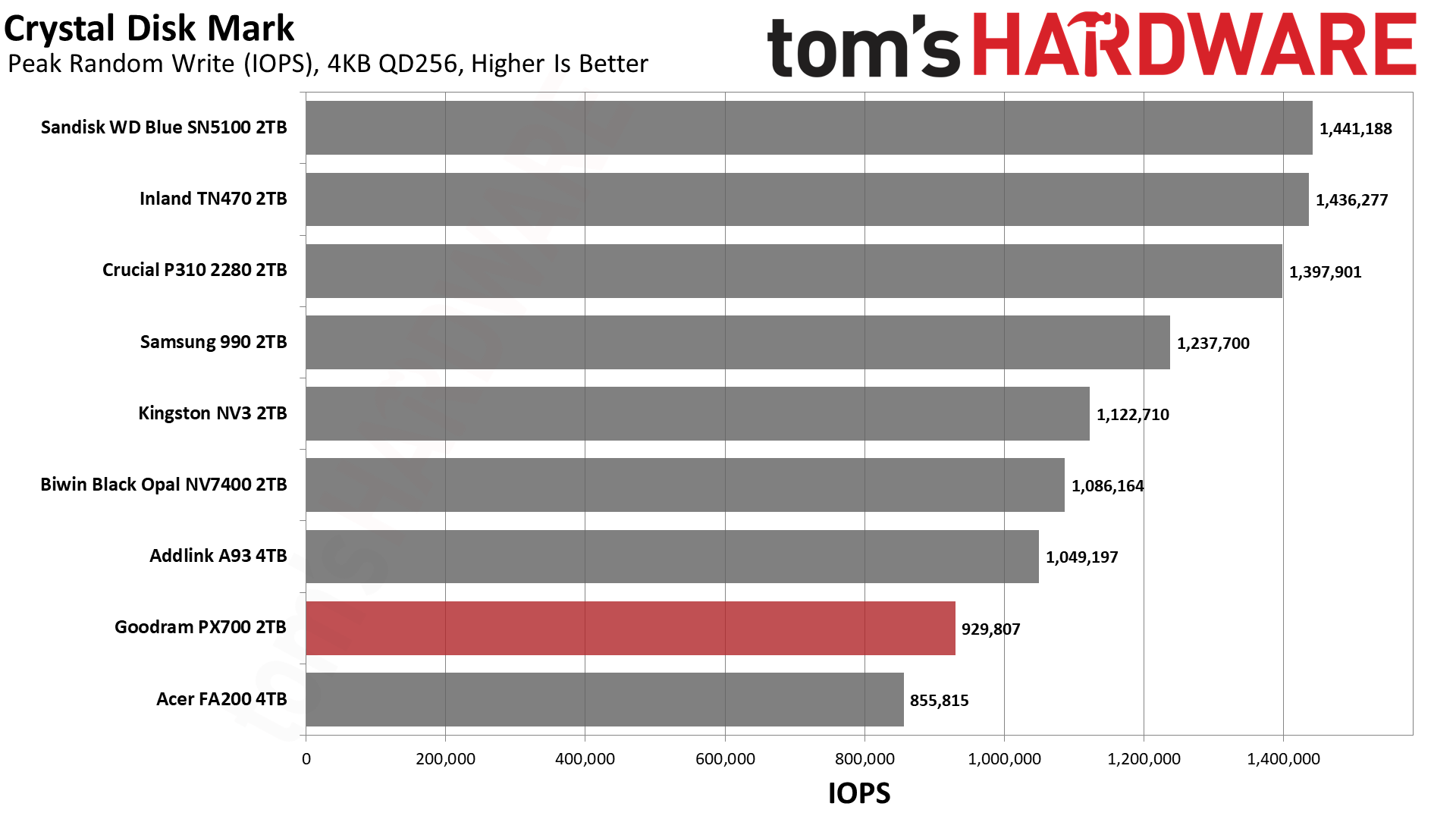
The PX700 has very steady performance in ATTO. We have no real complaints there. If we turn to sequential performance in CDM, we see more of the same. We would mostly look at QD1 reads for that, being a real-world metric, and it’s roughly on par with the NV7400 there. If we turn to random 4KB read performance at QD1, it’s a little bit further down the list but still hangs with excellent drives like the P310. Anything below about 45µs here is solid in our book. This drive should be quite responsive. If we were forced to be critical, we would point out that high QD 4KB write performance is low. Luckily, this is not a real-world workload for a drive of this type.
Sustained Write Performance and Cache Recovery
Official write specifications are only part of the performance picture. Most SSDs implement a write cache, which is a fast area of pseudo-SLC (single-bit) programmed flash that absorbs incoming data. Sustained write speeds can suffer tremendously once the workload spills outside of the cache and into the "native" TLC (three-bit) or QLC (four-bit) flash. Performance can suffer even more if the drive is forced to fold, the process of migrating data out of the cache in order to free up space for further incoming data.
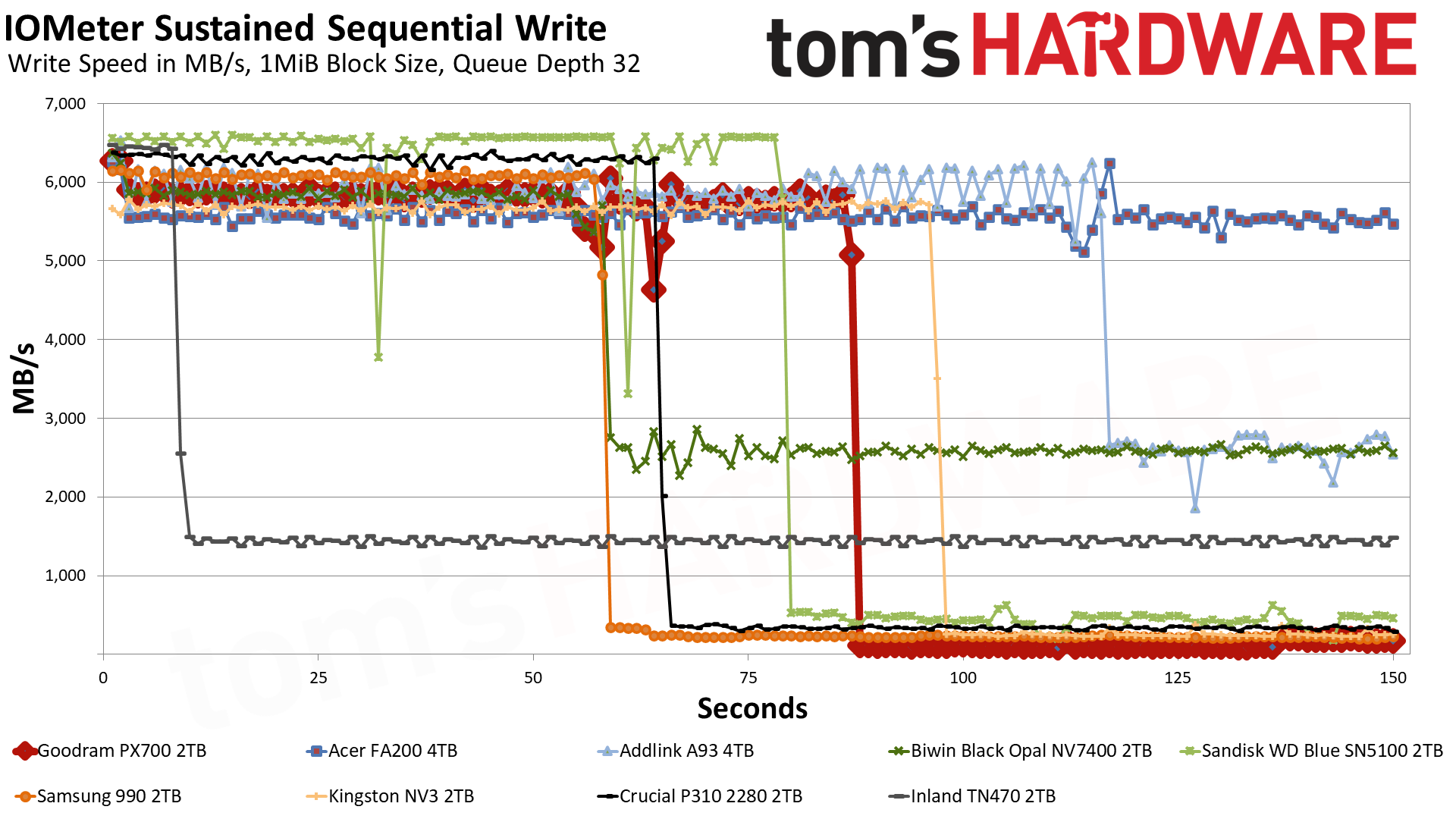
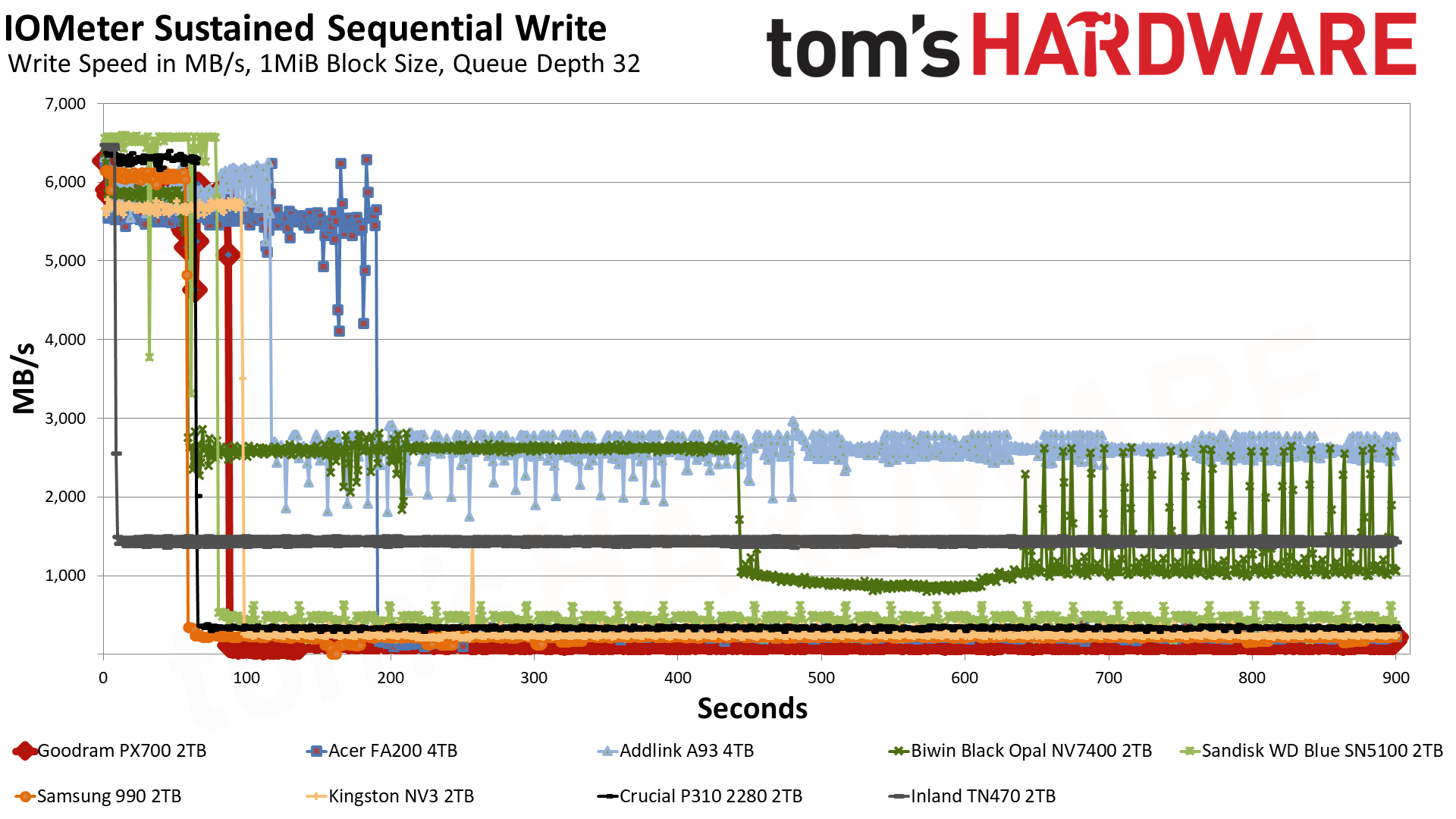
We use Iometer to hammer the SSD with sequential writes for 15 minutes to measure both the size of the write cache and performance after the cache is saturated. We also monitor cache recovery via multiple idle rounds. This process shows the performance of the drive in various states, including the steady-state write performance.
Tom's HardwareTom's HardwareTom's Hardware
The PX700 starts off in the pSLC cache mode, writing at 5.8 GB/s for over 86 seconds. Speeds are slightly higher for the first two seconds, something we have seen before with this controller, but ultimately we’re looking at a 500GB cache. This is Exhibit A of why we would identify the flash as QLC. 4-bit QLC flash operating in a 1-bit pSLC mode is trading four times the capacity for performance, which means a 2TB drive will generally have a 500GB cache at most. A 3-bit TLC drive could have a larger cache, although there is nothing precluding it from having 500GB, even if this seems hard to be coincidental.
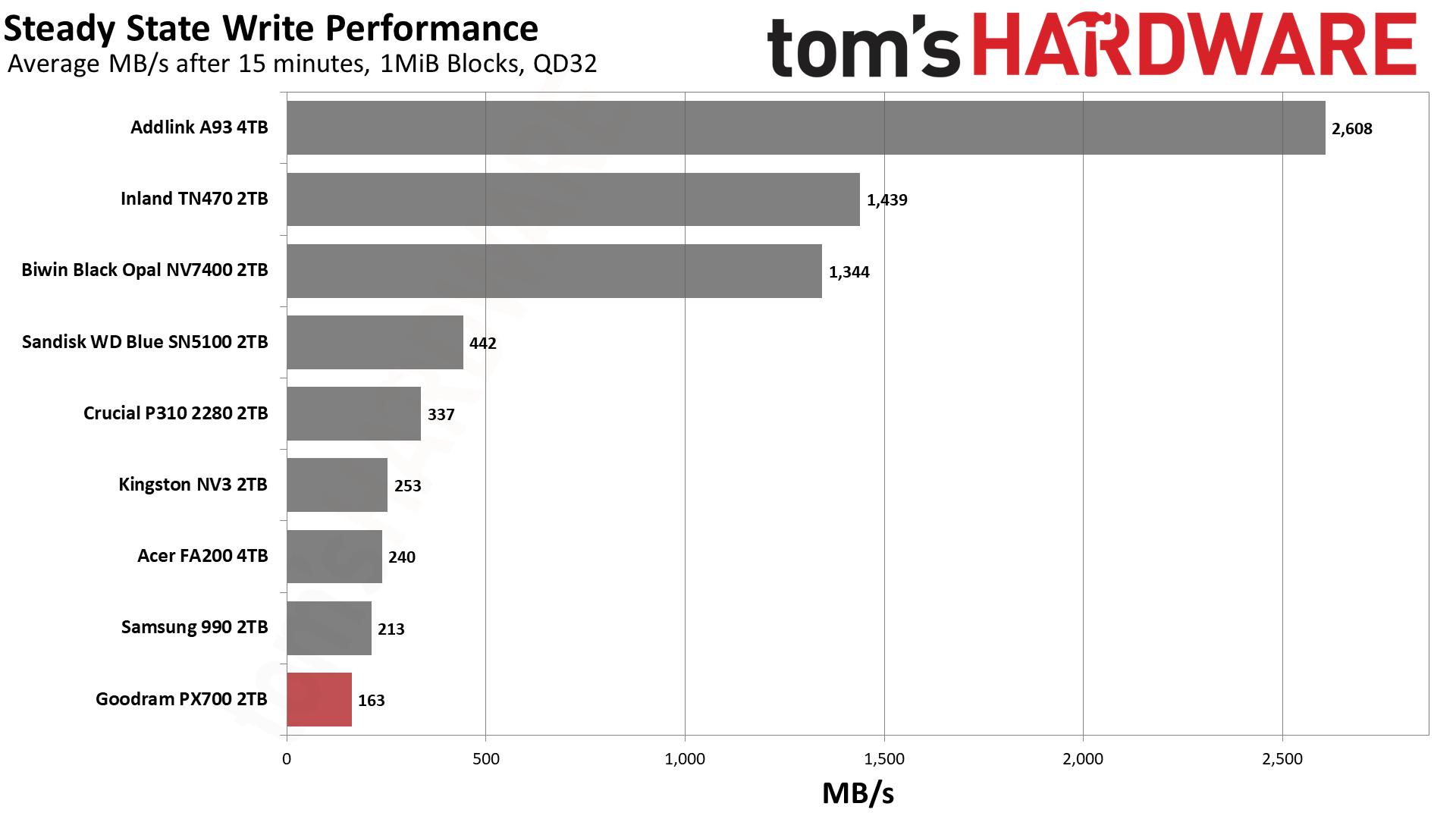
A TLC drive with a smaller-than-maximum-sized cache would probably be able to maintain some speed, though. The PX700 immediately falls into a folding mode – it’s waiting for data to be moved from pSLC to the native flash – with an average speed of 163 MB/s. TLC flash can at times be this slow, but it’s less likely, and especially less likely if it has space to spare. Even the FA200, with the same hardware, is faster. The FA200 does have twice the flash, of course, but the controller is essentially saturated. Rather, the FA200’s cache speed of 5.54 GB/s is slower than the PX700’s – and this could be from having more flash – which means the post-cache speed will be higher. This reinforces the position that the drive is using QLC. Of course, we could have thrown the 2TB HP FX700 into the mix to further prove this point, but we think comparing a 4TB drive is a more valuable approach.
It goes without saying that this is the first real failing of the PX700 in our review. However, it’s expected of a QLC SSD with a massive cache. We don’t consider it disqualifying. You are not buying a budget SSD to hammer it with writes. On the other hand, the 600TBW per TB warranty makes you assume you could do that to some extent. Also, the lower performance here could creep up in a fuller-drive experience. We also can’t exclude the fact that some PX700s come with TLC flash. Which means, taken as a whole, you should assume QLC will perform like the TLC competition 99% of the time.
Power Consumption and Temperature
We use the Quarch HD Programmable Power Module to gain a deeper understanding of power characteristics. Idle power consumption is an important aspect to consider, especially if you're looking for a laptop upgrade as even the best ultrabooks can have mediocre stock storage in terms of capacity and performance. Desktops are often more performance-oriented with less support for power-saving features so we show the worst-case for idle.
Some SSDs can consume watts of power at idle while better-suited ones sip just milliwatts. Average workload power consumption and max consumption are two other aspects of power consumption but performance-per-watt, or efficiency, is more important. A drive might consume more power during any given workload but accomplishing a task faster allows the drive to drop into an idle state more quickly, ultimately saving energy.
For temperature recording we currently poll the drive’s primary composite sensor during testing with a ~22°C ambient. Our testing is rigorous enough to heat the drive to a realistic ceiling temperature but real-world temperatures will vary due to the environment and workload factors.
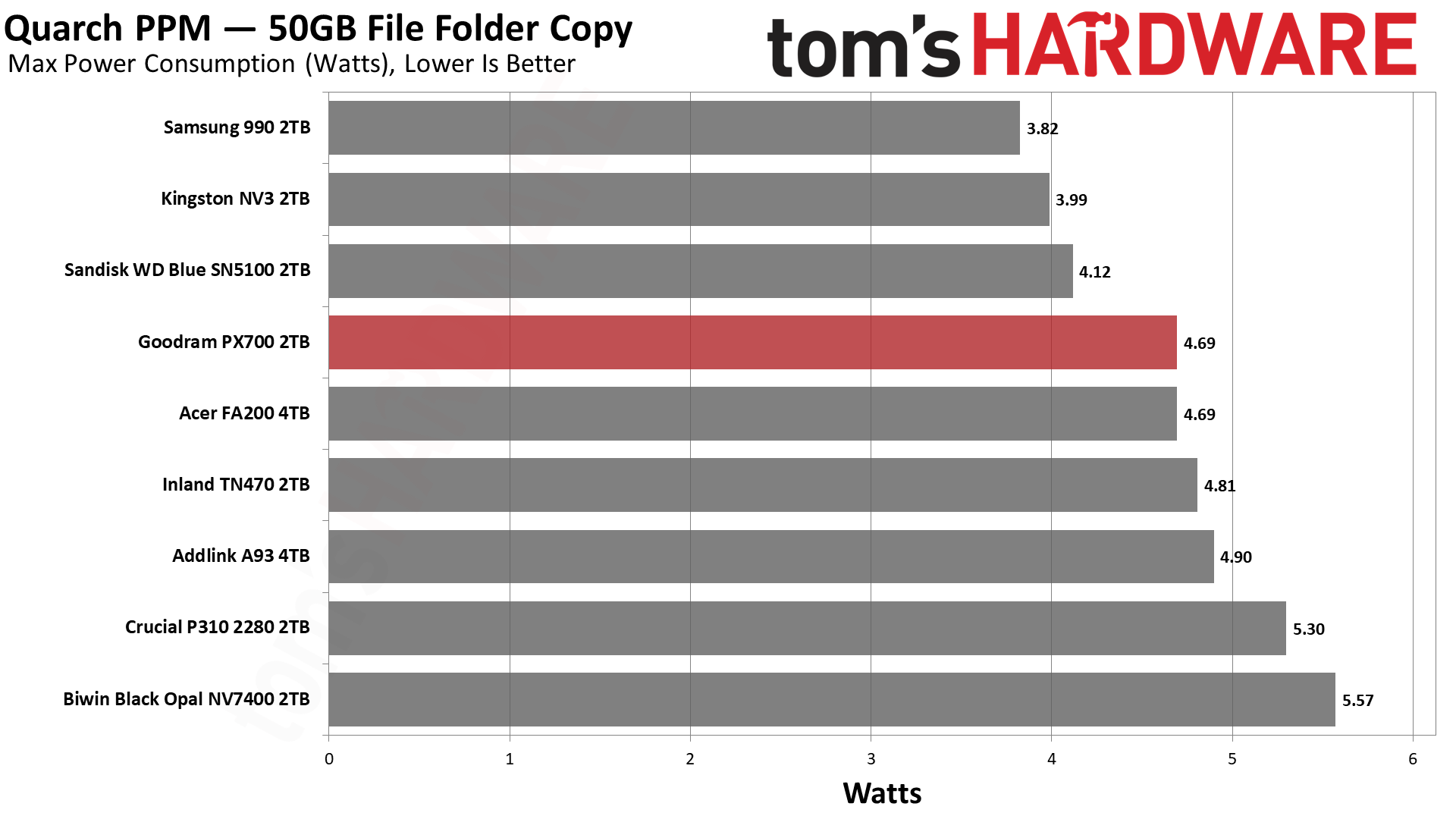
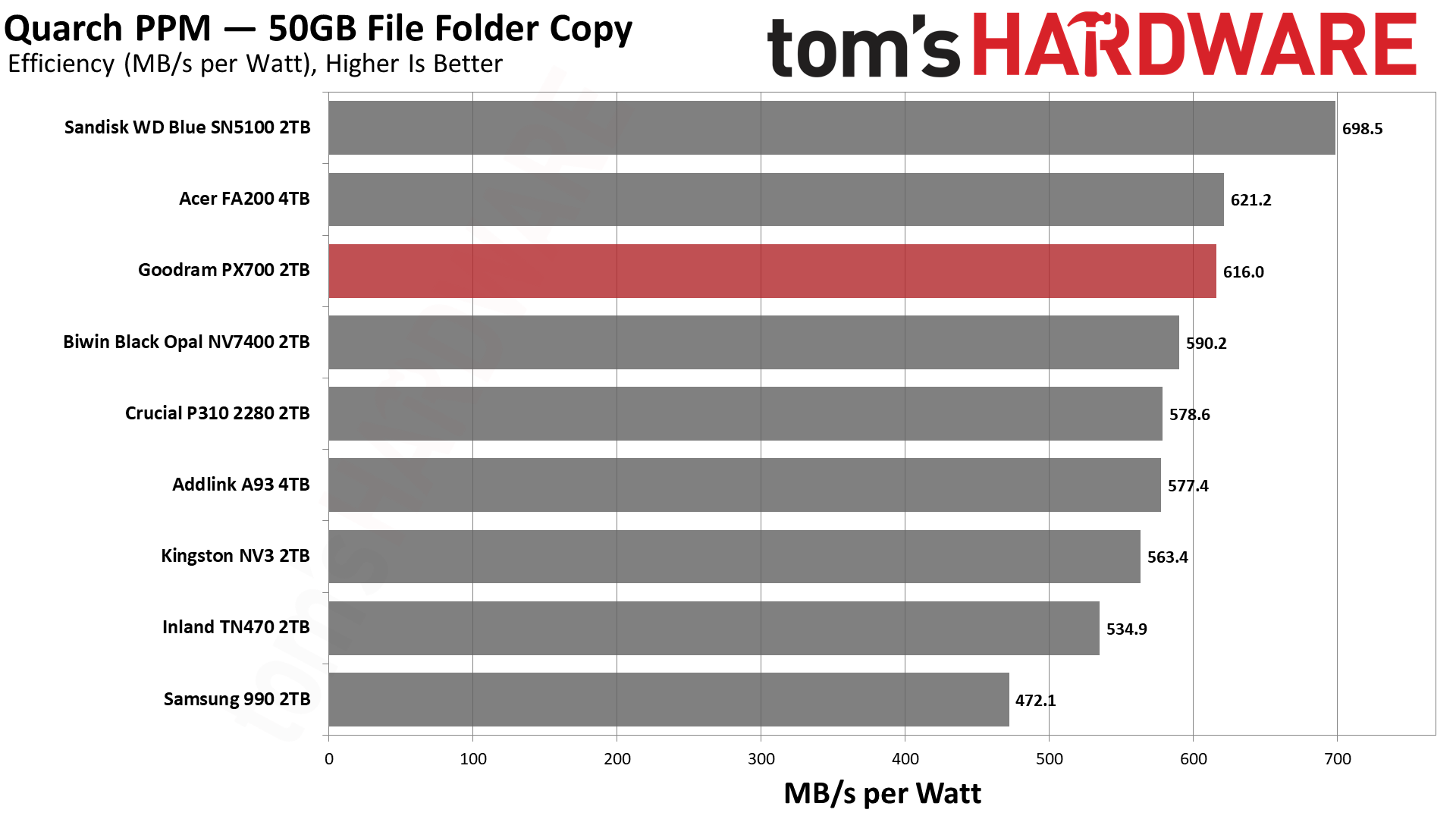
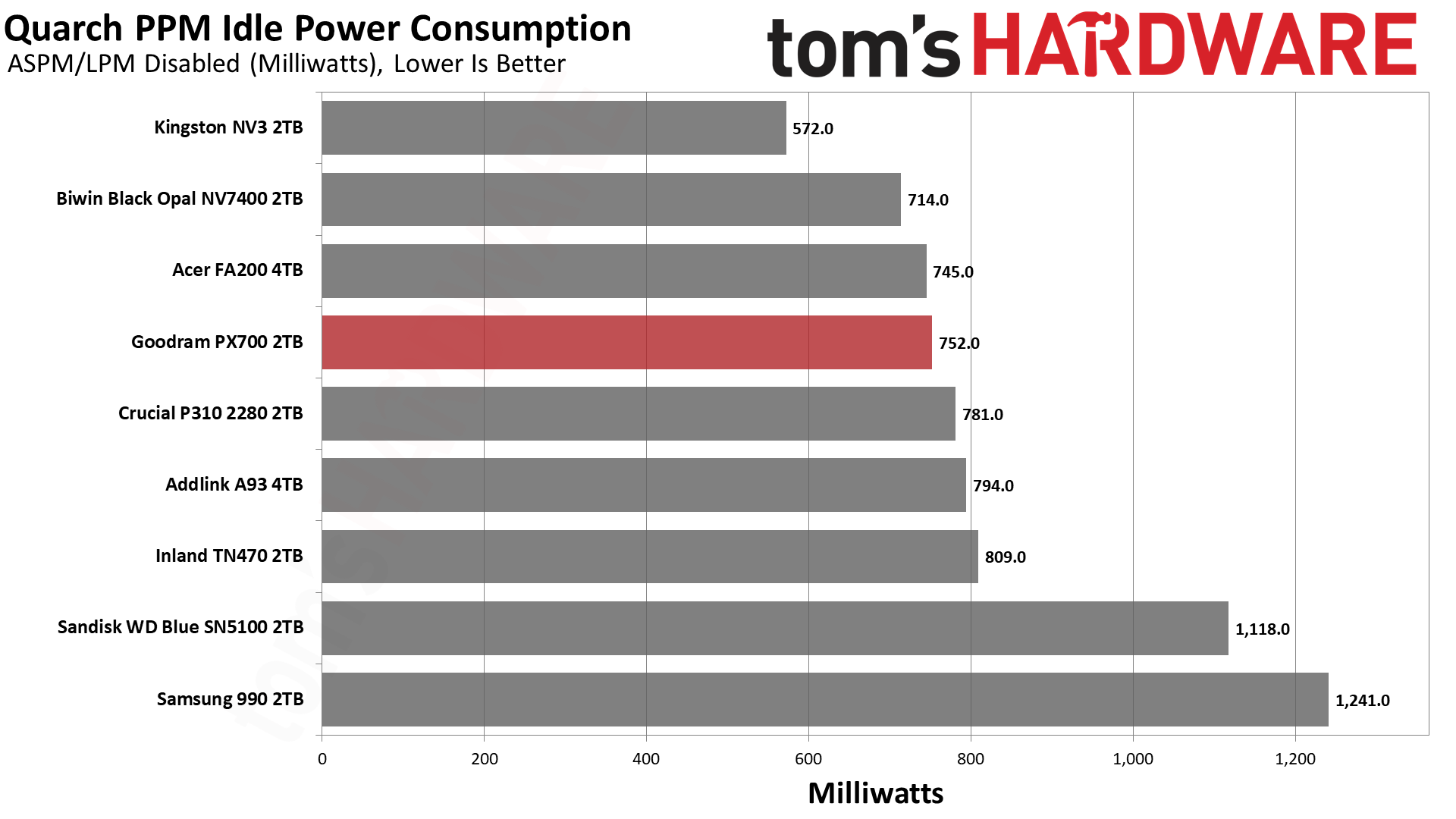
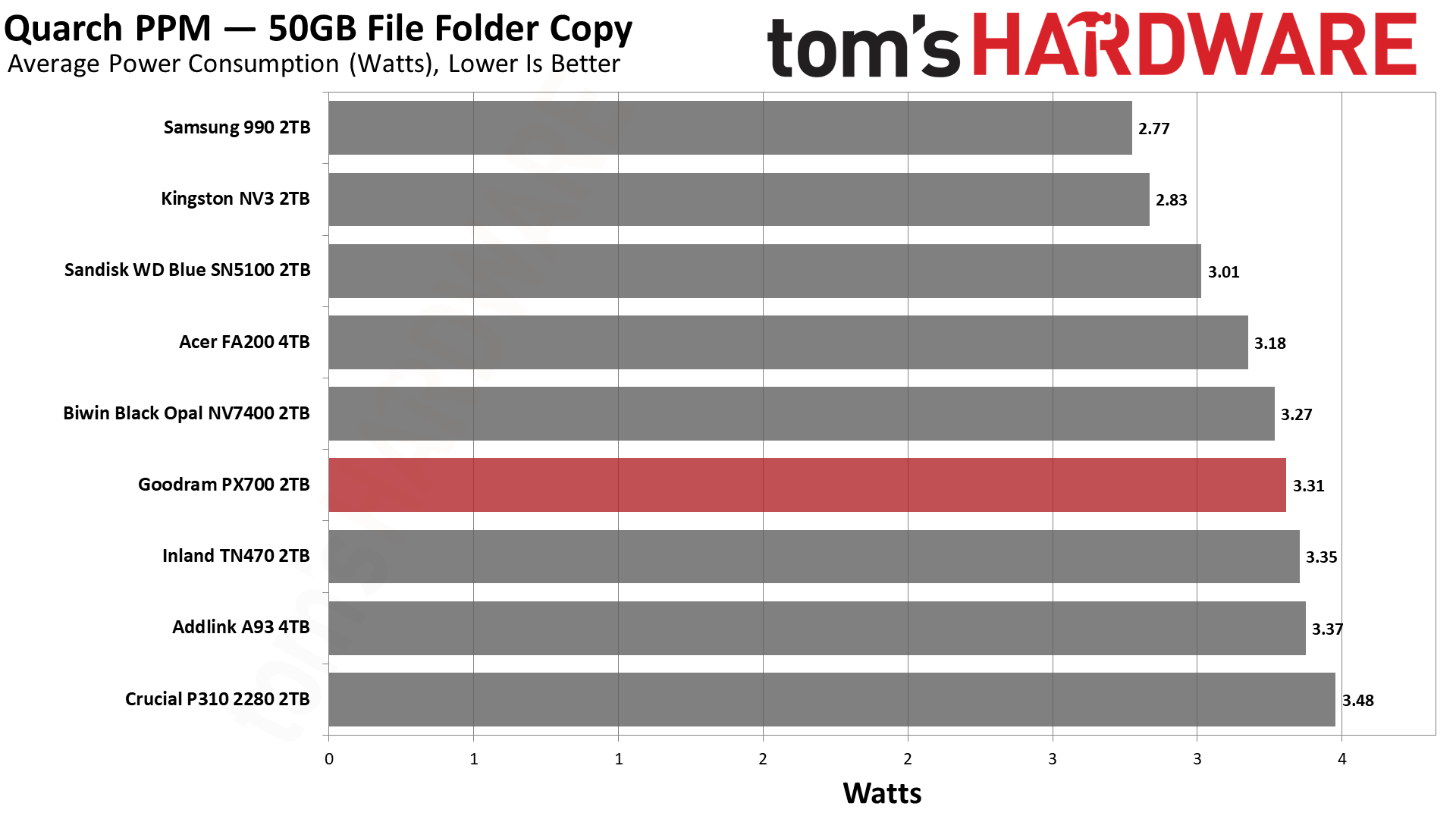
The PX700 comes back into our good graces with very good results in our power testing. It’s essentially tied for second with the FA200, which is hardly surprising given the hardware similarity. Only the BiCS8-based WD Blue SN5100 pulls away from the pack. We would consider every drive on this list to be sufficiently power-efficient for laptop use, although the 990 is closer to the lower end of that range. Certainly 550 MB/s per watt or higher is an excellent result and indicates a drive that can be run without a heatsink most comfortably. As for idle pull – we test under desktop conditions, which can also match poorly-optimized power settings – the PX700 is not unusually power-hungry and, in fact, better than the WD Blue SN5100. That’s a bonus.
Temperature-wise, we have good news. Goodram touts the graphene label on this drive, which, in our experience, does actually help with cooling, especially on a drive with four flash packages. The PX700 in our testing peaked at 61°C, nearly 30°C below the initial throttling point, well beyond the 20°C of headroom we like to see. The MAP1602 does tend to be a hotspot more than alternatives like the Phison E27T on the P310 and TN470, but a heat-spreading label does help. In our estimation, this is a cool-running drive that would be great anywhere.
We use an Alder Lake platform with most background applications such as indexing, Windows updates, and antivirus disabled in the OS to reduce run-to-run variability. Each SSD is prefilled to 50% capacity and tested as a secondary device. Unless noted, we use active cooling for all SSDs.
Goodram PX700 Bottom Line
The Goodram PX700 is a model budget PCIe 4.0 SSD. It matches or exceeds all of the expected performance points; it's power-efficient, and it uses a simple single-sided design without a heatsink. The only problem is that a “budget” drive has to be affordable. Current prices in the U.S. for this drive leave something to be desired. However, if it can match or beat the prices of other drives in this class, it’s probably one of the better choices available. In part, this is because we’d be liable to trust Goodram over non-names – the TBW alone shows it means business – and, on the other hand, the drive actually outperformed our expectations. Aside from the sustained write performance, this drive really feels premium. You don’t need a Samsung, WD, Sandisk, or even Crucial drive to feel like you have next-gen storage.
(Image credit: Tom's Hardware)
Let’s look at what we mean by that for your use. Game and app loading times are heavily reliant on random and sequential reads at low QD. The PX700 does well there. You also may be transferring files a lot, and the DiskBench results are mighty. For your laptop or HTPC, you might want something that’s power-efficient and, if space is a concern, something that stays cool without a heatsink, and this applies to PS5 use as well. The PX700 ran cool in our test with just the graphene label and was very efficient. You’re not getting a shorter warranty with lower TBW, as with Samsung’s 990 or some QLC-based drives, and we know where this drive is assembled. It’s hard to look at this combination and not feel like it’s a stellar drive if you can find it at a normal price.
Aside from price, our only complaint would be sustained write performance. It’s pretty dissapointing, although we should point out that it’s also expected. The drive also has trade-offs here. Namely, its standard pSLC write performance is better than the 4TB FA200, and in the 2TB HP FX700’s ballpark, so you’re not getting nothing for that later drop. The PX700, in fact, is faster folding than the FX700, too. In the grand scheme of things, this isn’t a big deal, as you should never hit that state – this drive should effectively be fast enough for a 1GbE network, if that’s a bottleneck – and having a bit faster peak performance does translate to better marks on some of our benchmarks. The drive could take a hit in some cases, such as when it's very full, in which case getting a drive with DRAM and guaranteed TLC flash could assuage your fears.
For most use cases, though, the PX700 is more than good enough and, in fact, punches above its weight in our opinion. It would be a good option for just about any type of machine. PS5, laptop, HTPC, desktop, you name it. Primary or secondary drive, just fine. You don’t even need a heatsink. The capacity range is solid – you’re not going to find 8TB on a drive like this – and you can bring your own software. Performance is good enough to overlook any QLC flash use, so our main problem remains the price. Get it down to the same ballpark as the other drives in our list, and you have a contender. We hesitate to put an exact dollar amount for that because SSD prices are volatile, to say the least, so compare it to comparable drives such as the ones we matched it against today.
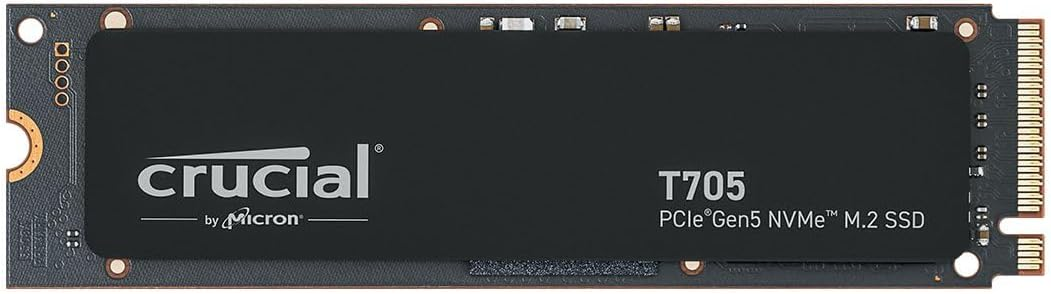
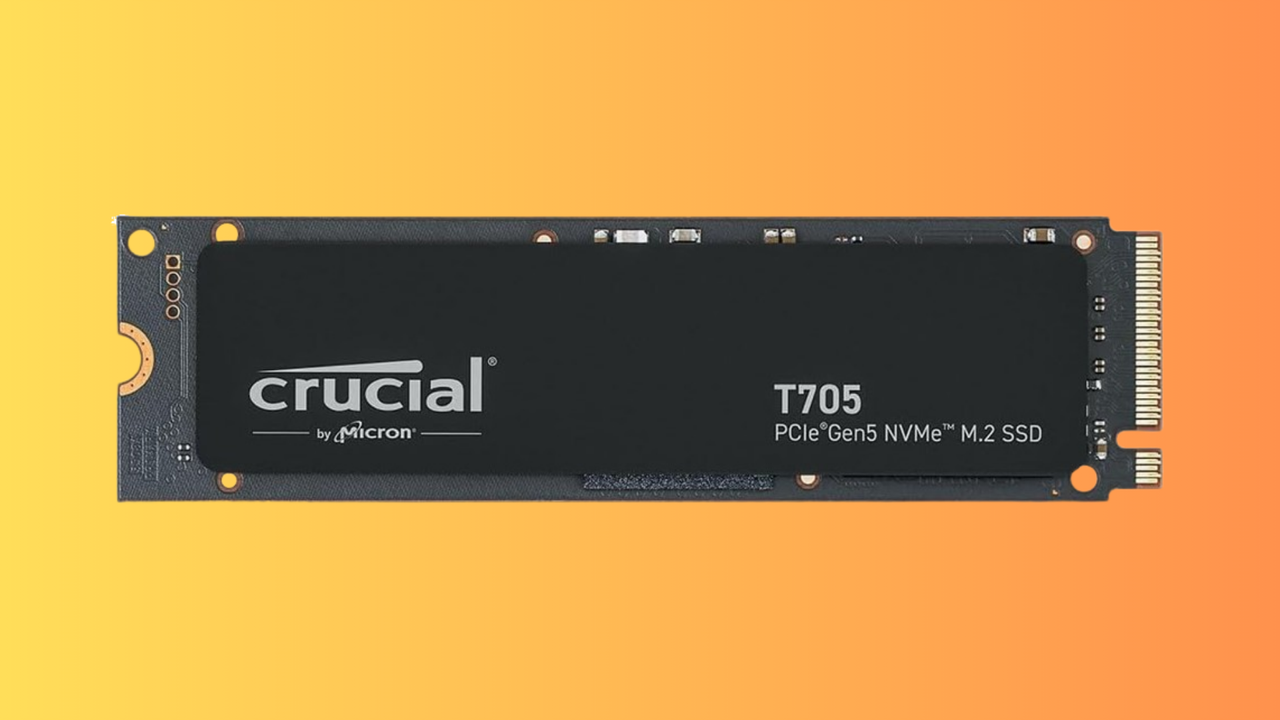
We've seen huge price rises this year for PC hardware, but RAM and SSDs have been especially affected. The global DRAM shortage, mostly caused by AI data center demands hoovering up all of the available stock, has caused prices to skyrocket. That's why this 4TB Crucial T705 SSD, down to $502.51, is a good deal in the current market, especially given its high capacity.
Looking at Camelcamelcamel's price data, we can see that this drive was hitting almost $700 just a few weeks ago. Several price drops since have meant that the 4TB Crucial T705 is now almost below $500 for the first time in February. Along with a decent price drop, this Crucial drive is now the cheapest Gen 5 SSD you can pick up, with the next-cheapest model, the Samsung 990 Evo Plus, $60 more expensive at the moment.
It's not even a fair comparison, too, as the entry-level 990 Evo Plus only supports PCIe 5.0 over two lanes, not four, meaning you're only getting Gen 4-equivalent speeds. The Crucial T705 is a high-performance drive that's much faster, and right now, much cheaper.
This Crucial T705 4TB SSD is the cheapest Gen 5 SSD on the market right now. It offers read and write speeds of up to 14,500 MB/s and 12,700 MB/s apiece.View Deal
SSDs that offer Gen 5 speeds are a real step up over their slower Gen 4 counterparts. The T705 will offer you sequential read and write speeds of 14,500 MB/s and 12,700 MB/s, which is significantly faster than the fastest Gen 4 SSD on the market, the Samsung 990 Pro, which taps out at 7,450 MB/s. The T705 ships with 232-Layer Micro TLC memory modules and uses the Phison E26 controller.
It's also one of the fastest you can buy, period, rivalling the WD_Black SN8100, which hits speeds of 15,000 MB/s. That drive will set you back $659.99 right now, too, a significant increase compared to the deal on offer here. The Crucial T705 drive scored an Editor's Choice award for its sustained read/write performance at high speed, along with 4.5 stars in our review.
While we wished that SSD prices were back down to what we saw 18 months ago, it's good to see that high-performance drives like this one can still drop in price. The $502.51 sale price for this Crucial T705 4TB SSD is a seriously good one in the current market, and you won't be able to beat it for speed or price. Grab it at this price while you can.
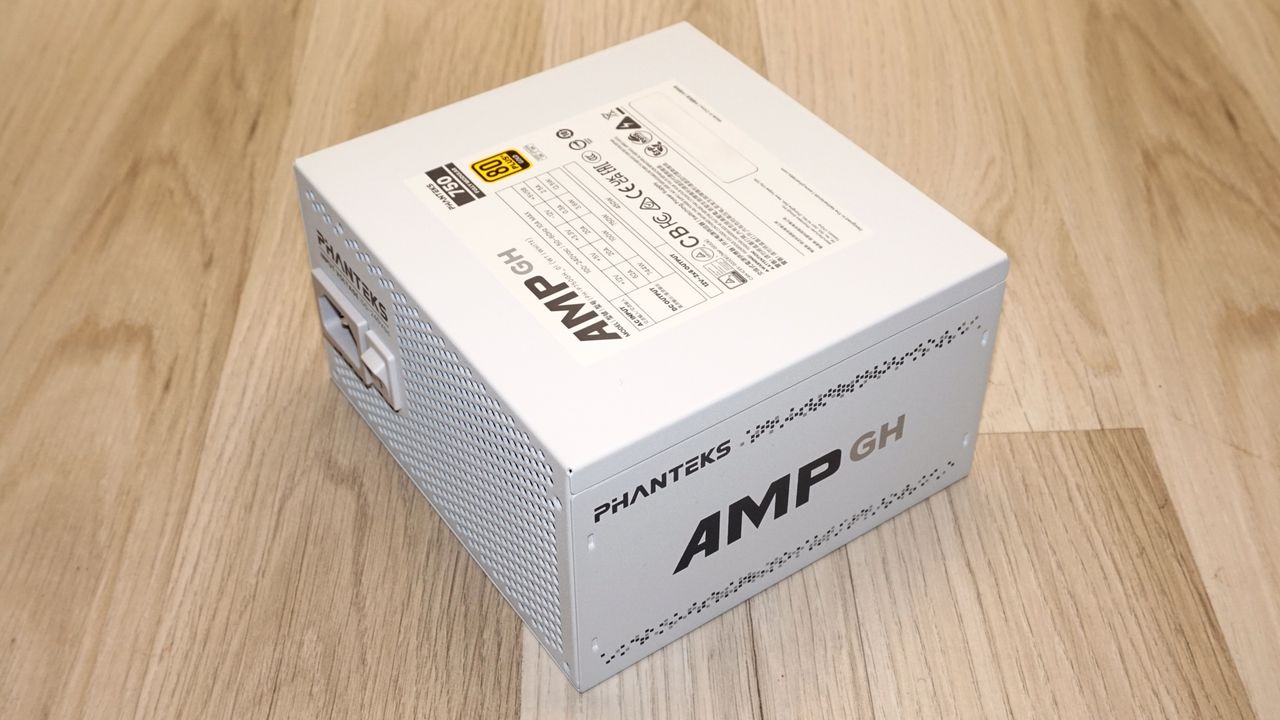
Phanteks is a Dutch company, founded in 2007 and best known for enclosures, alongside air coolers, AIOs, and a steadily expanding catalog of accessories. Power supplies came later, and they have always been commissioned work. As with most such companies, Phanteks does not own a factory, and the identity of the power supply inside a Phanteks box has changed more than once. For example, the original AMP series from 2020 was a Seasonic Focus derivative, a genuinely strong platform that earned the AMP series a significant reputation. The AMP GH is the current mainstream range, and it is a different animal.
The platform of the AMP GH 750W that we are reviewing today comes from Helly Technology, the Guangzhou outfit founded in 2008 that has spent the last few years building the mid- and upper-tier units. Young by the standards of this industry, but no longer an unknown quantity. The series spans 650W to 1200W across Gold and Platinum tiers, in black or white. We take a closer look at the AMP GH 750W to see how it ranks against our best power supplies list. Everything in it is ATX 3.1 and PCIe 5.1 compliant, fully modular, and cooled by a single 120 mm fan that stops entirely at low load. The 750W model reviewed here is the volume seller of the range, aiming squarely at the mid-range gaming build.
Specifications and Design
Phanteks AMP GH 750W Power specifications ( Rated @ 40 °C )
RAIL
+3.3V
+5V
+12V
+5Vsb
-12V
MAX OUTPUT
20A
20A
62A
2.5A
0.3A
100W
100W
744W
12.5W
3.6W
TOTAL
750W
AC INPUT
100 - 240 VAC, 50 - 60 Hz
MSRP
$110
In the Box
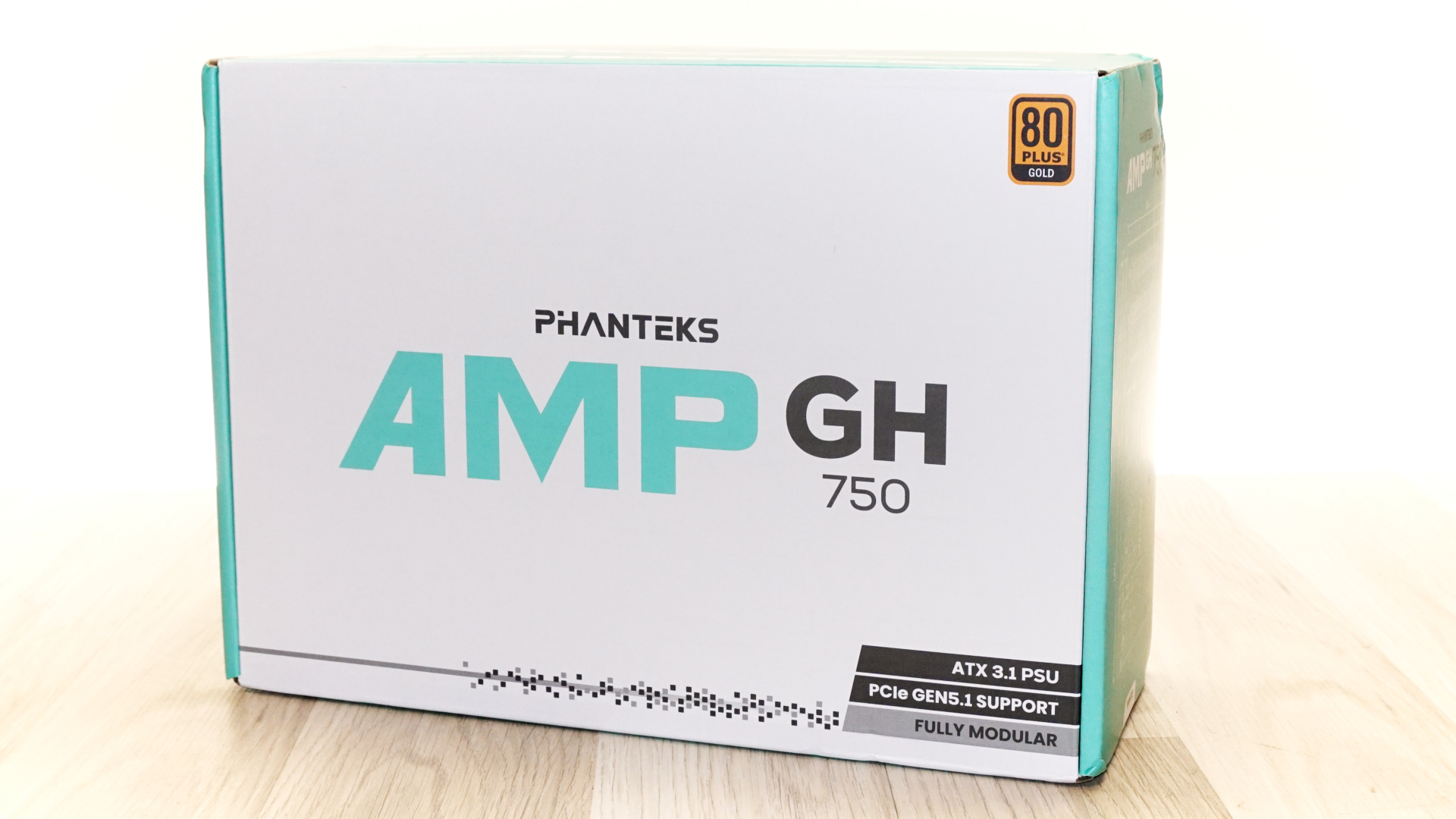
The AMP GH 750 arrives in a white cardboard box with mint-green edges and sides, the product name in large type across the front, and the 80 PLUS Gold badge in the top corner. Three black-and-grey strips along the bottom edge carry the three main headline claims: ATX 3.1 PSU, PCIe Gen5.1 support, fully modular. That is about the extent of the marketing. It is a restrained, we dare say almost clinical presentation next to what most of this segment ships in.
(Image credit: Tom's Hardware)
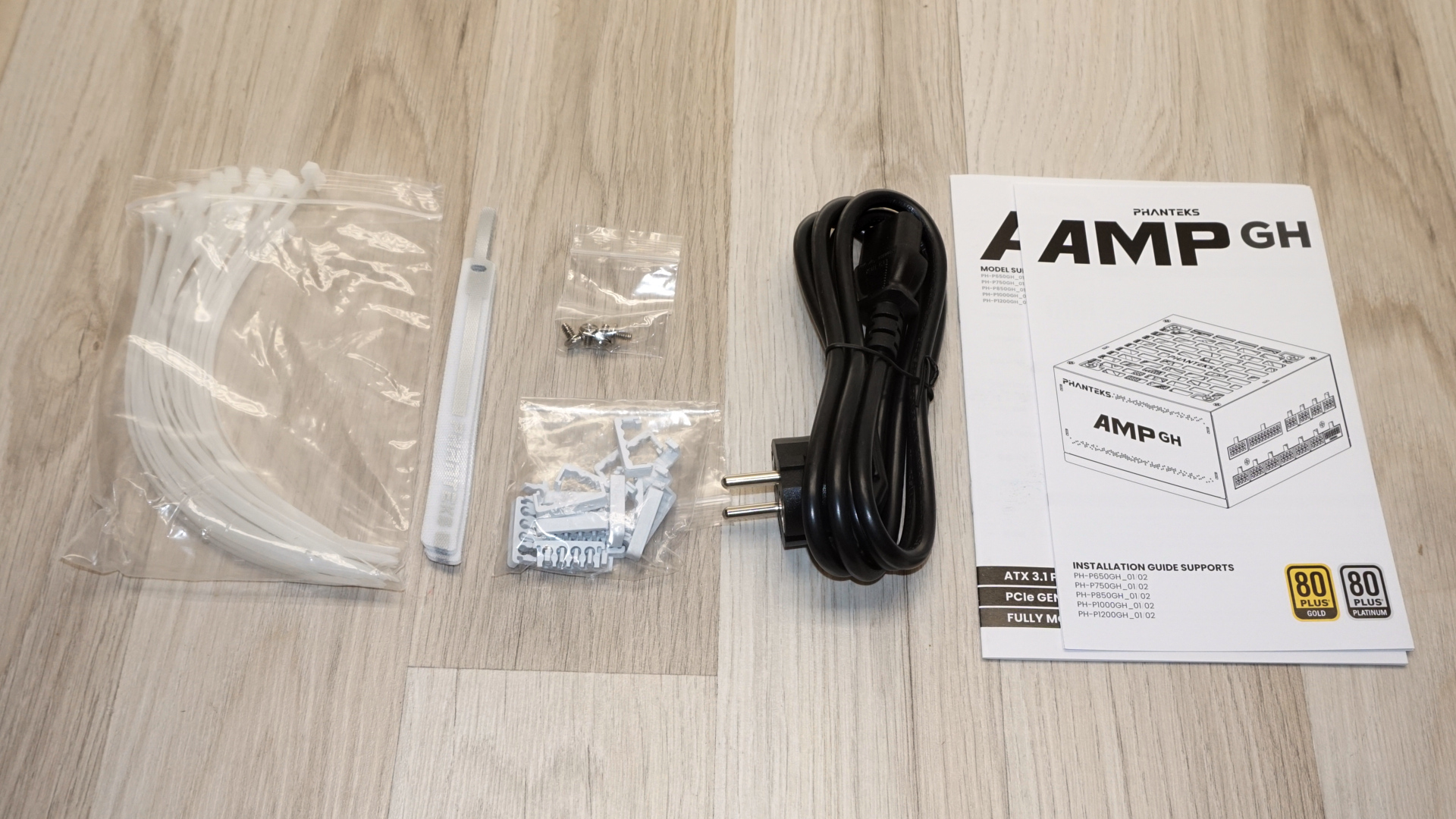
Inside, the power supply sits between molded protective inserts, with the cables bagged separately. The bundle is far better than the price suggests and one of the most complete we have seen this year. It comprises of the AC cable, four chrome mounting screws, a very generous bunch of white zip ties, a few black and white Velcro straps, and a bag of white cable combs. There is also an installation guide and manual that are shared across the whole series.
(Image credit: Tom's Hardware)
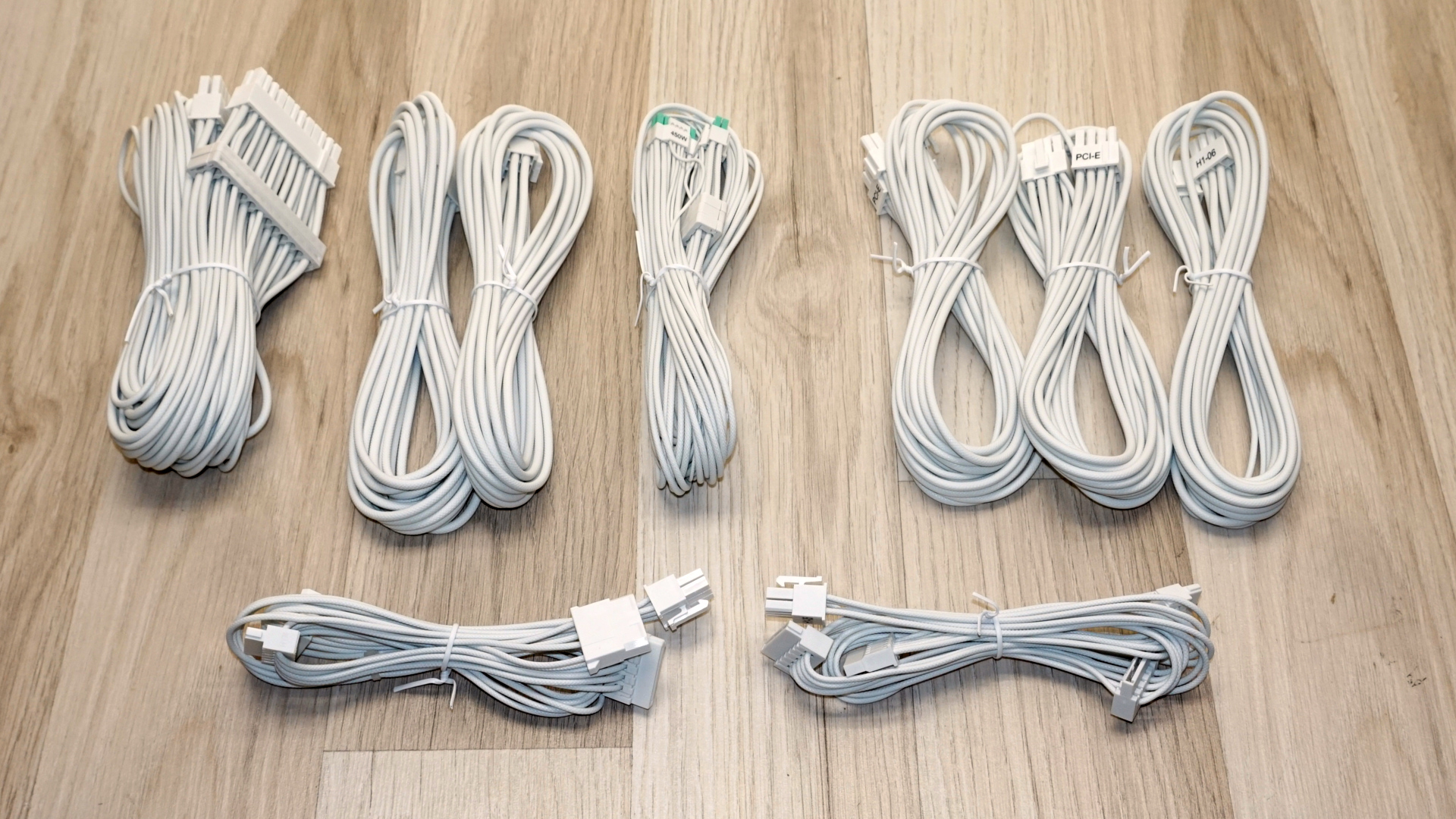
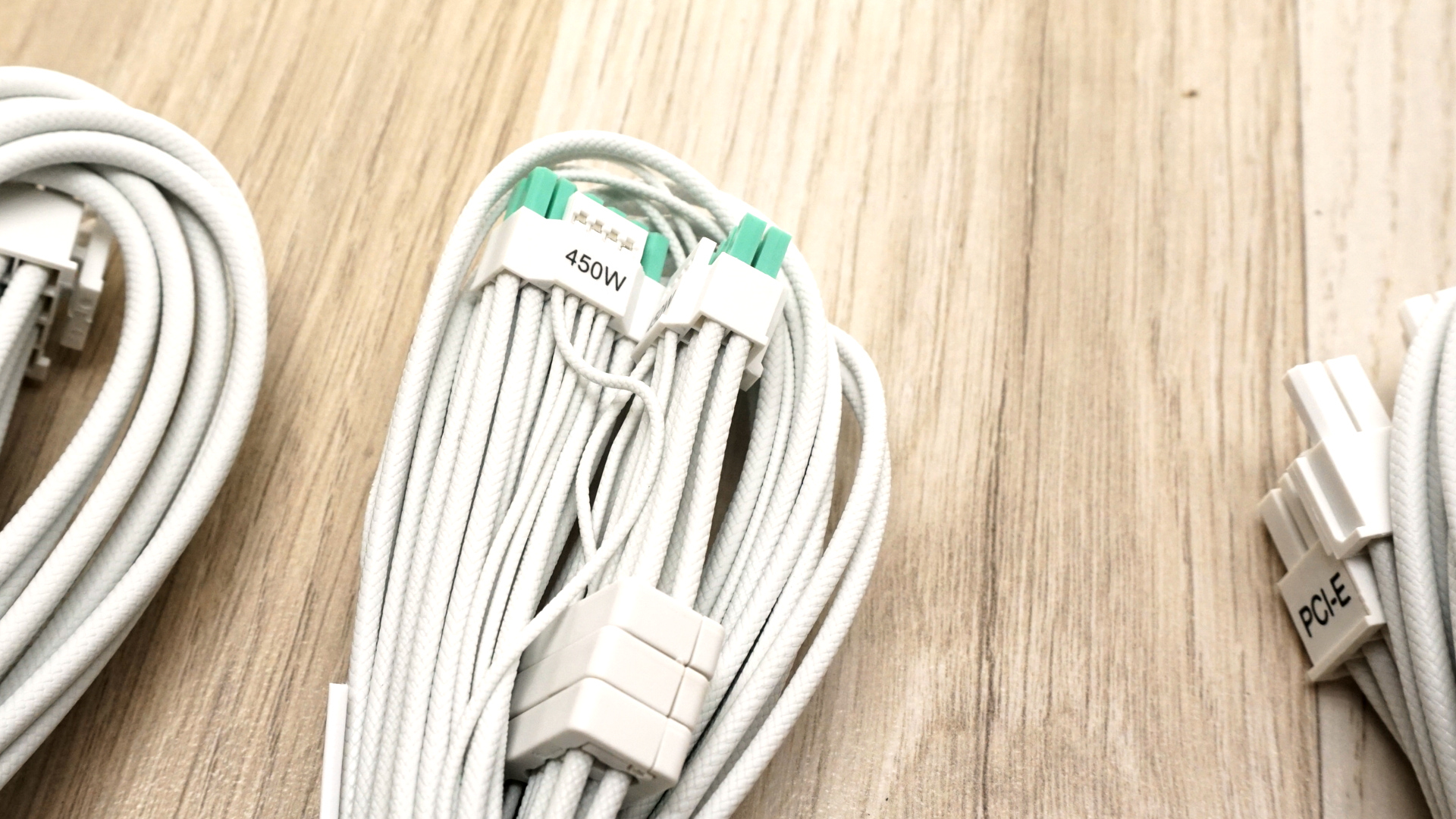
The cables themselves are the highlight. Every wire is individually sleeved in white braid rather than the flat ribbon type this class usually gets, and they stay flexible enough to be easily routed. Even the 12V-2x6 signal wires are, creating a very high-quality aesthetic result. They do take up a little bit more room behind a motherboard tray than flat cables would, but we are certain that this is a sacrifice builders are willing to make. The 12V-2x6 cable is marked 450W on the connector housing and uses mint-green latch tabs, which do double duty as a seating indicator (if you can still see green, the plug is incorrectly seated). The 12V-2x6 and ATX 24-pin cables have cable combs pre-installed.
Tom's HardwareTom's Hardware
Phanteks AMP GH 750W
Connector type
Hardwired
Modular
ATX 24 Pin
-
1
EPS 4+4 Pin
-
2
PCI-E 5.1
-
1
PCI-E 8 Pin
-
3
SATA
-
6
Molex
-
2
Floppy
-
-
External Appearance
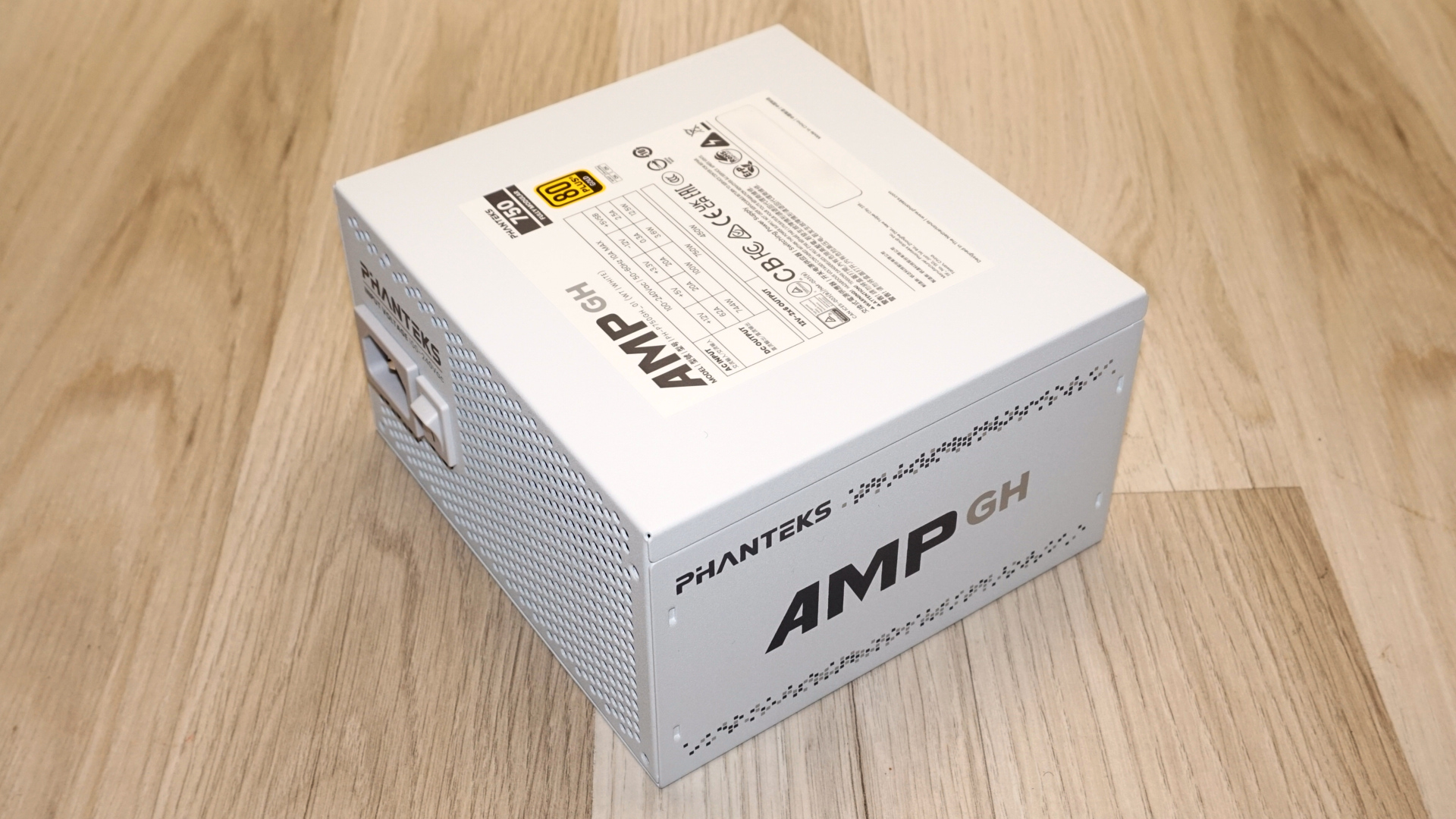
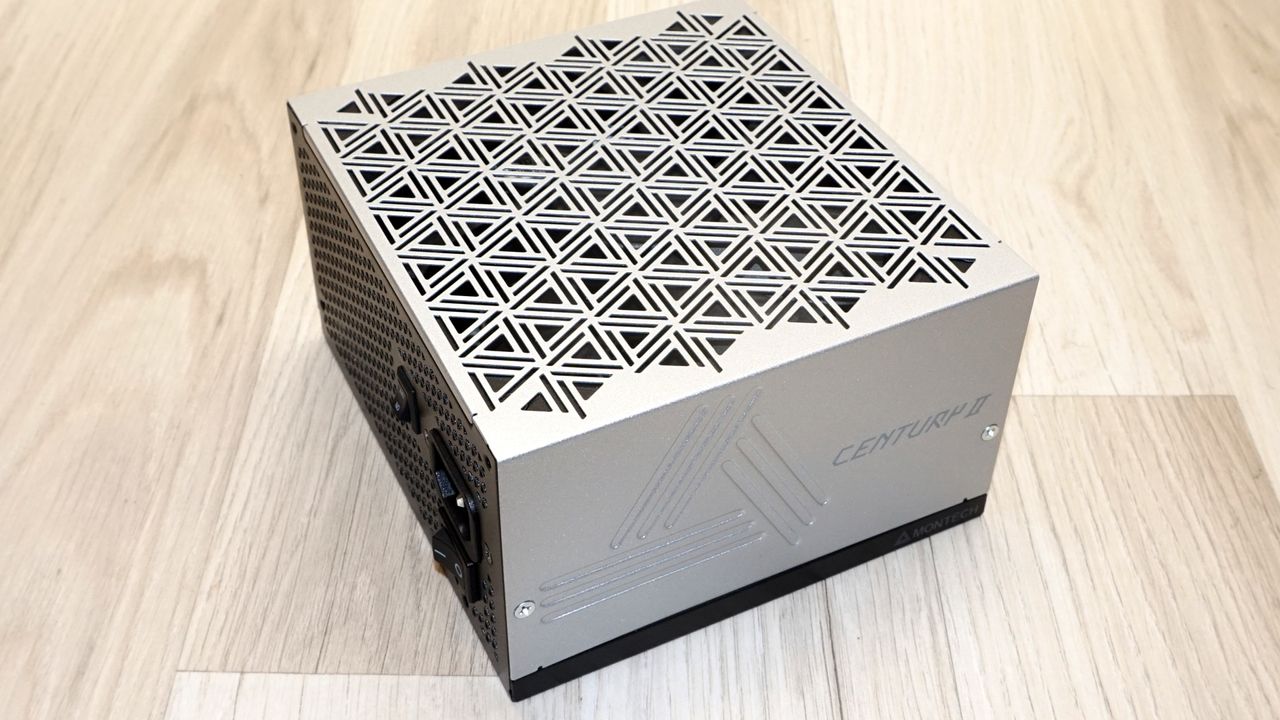
At 140 x 150 x 86 mm, the AMP GH 750 is about as short as a modern ATX unit gets, which means it will fit anything that takes a standard supply and leave room for cable slack in front of it. Our sample obviously is the white version, and the finish is the first thing worth commenting on. It is a clean, even satin snow white with an exceptional finish. This is not a given with white units, as they can easily look a little grey next to a truly white item/case. This one does not. Phanteks also sells the unit in black, and at MSRP, the black version is $10 cheaper.
(Image credit: Tom's Hardware)
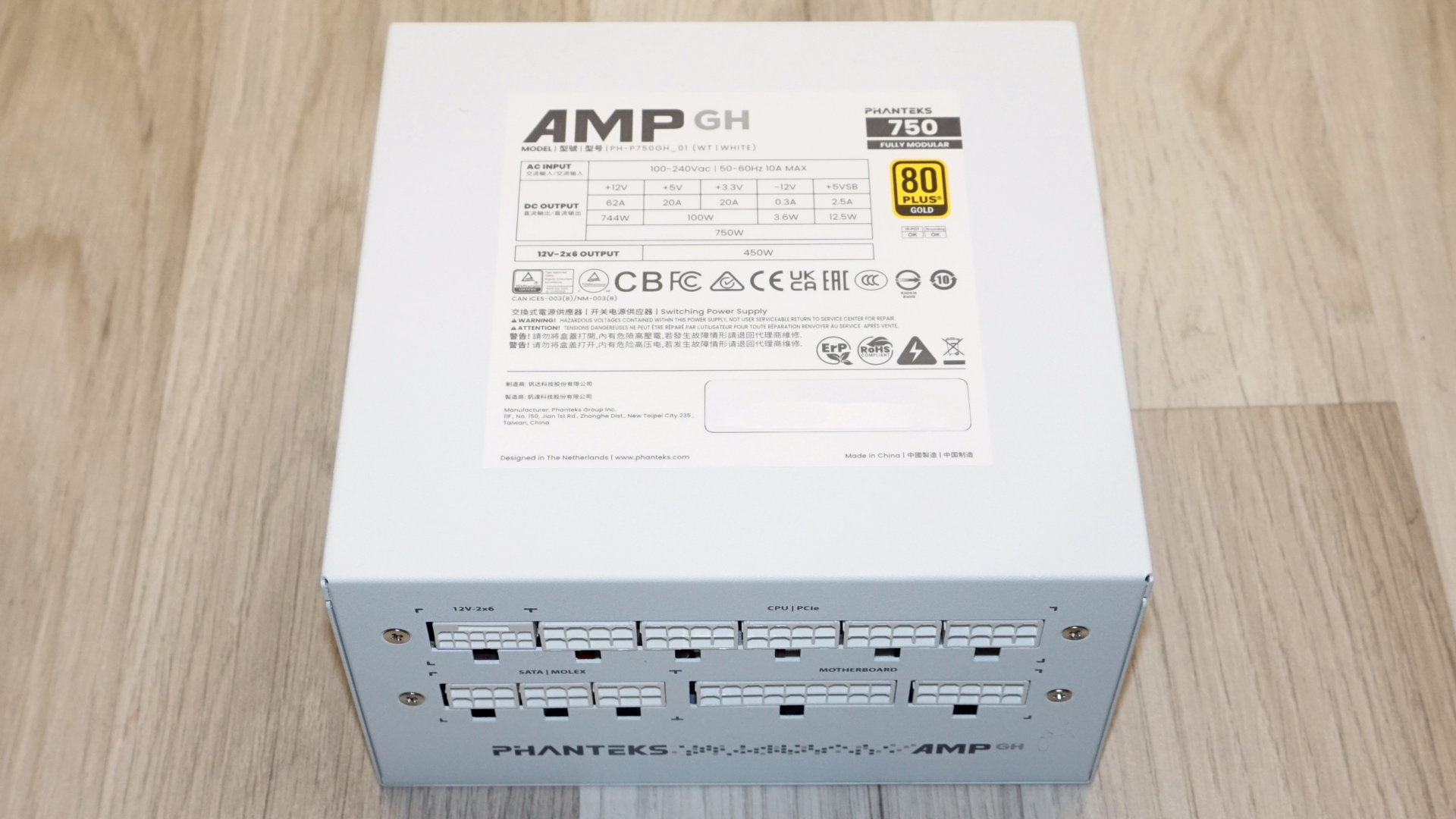
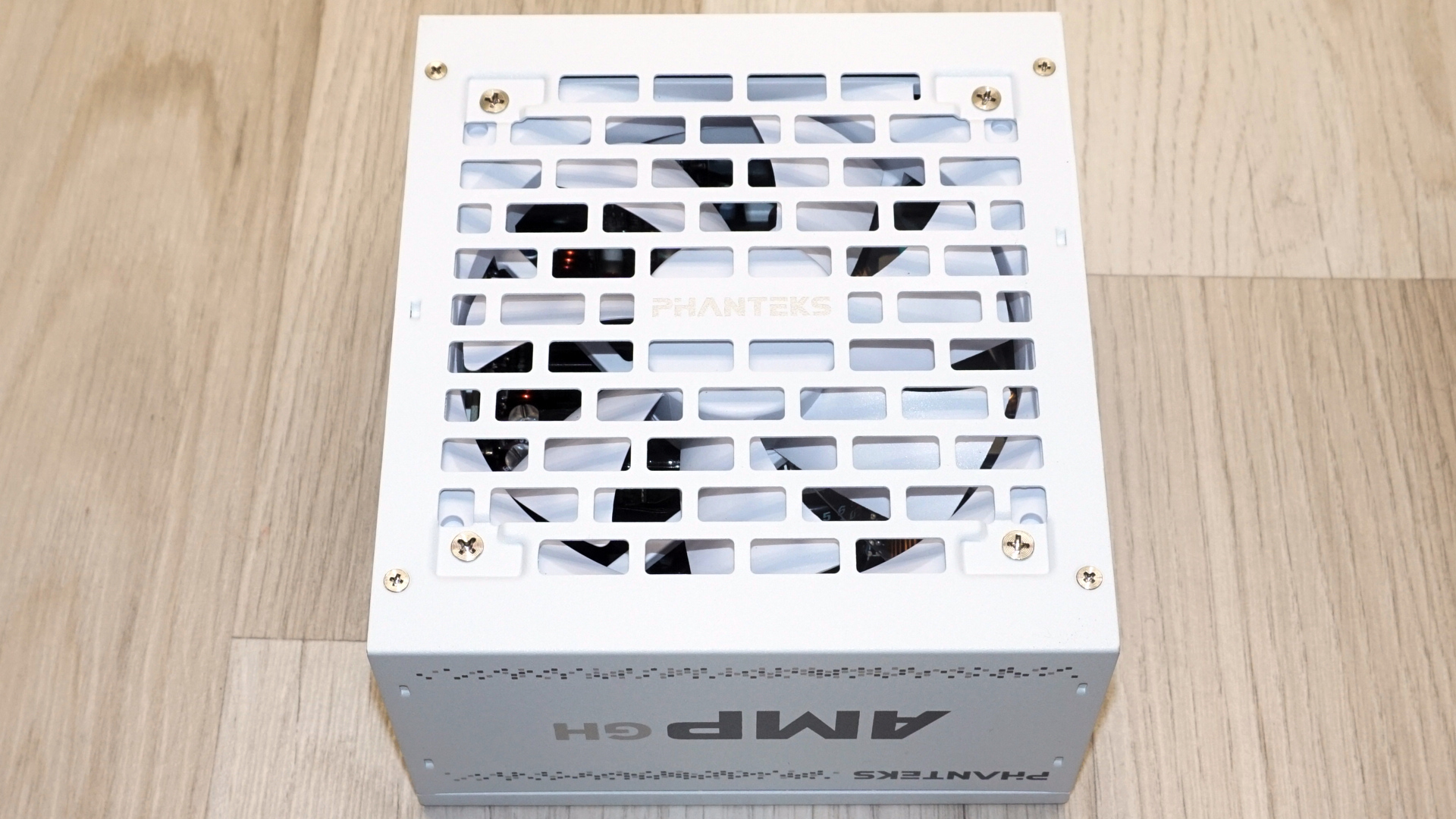
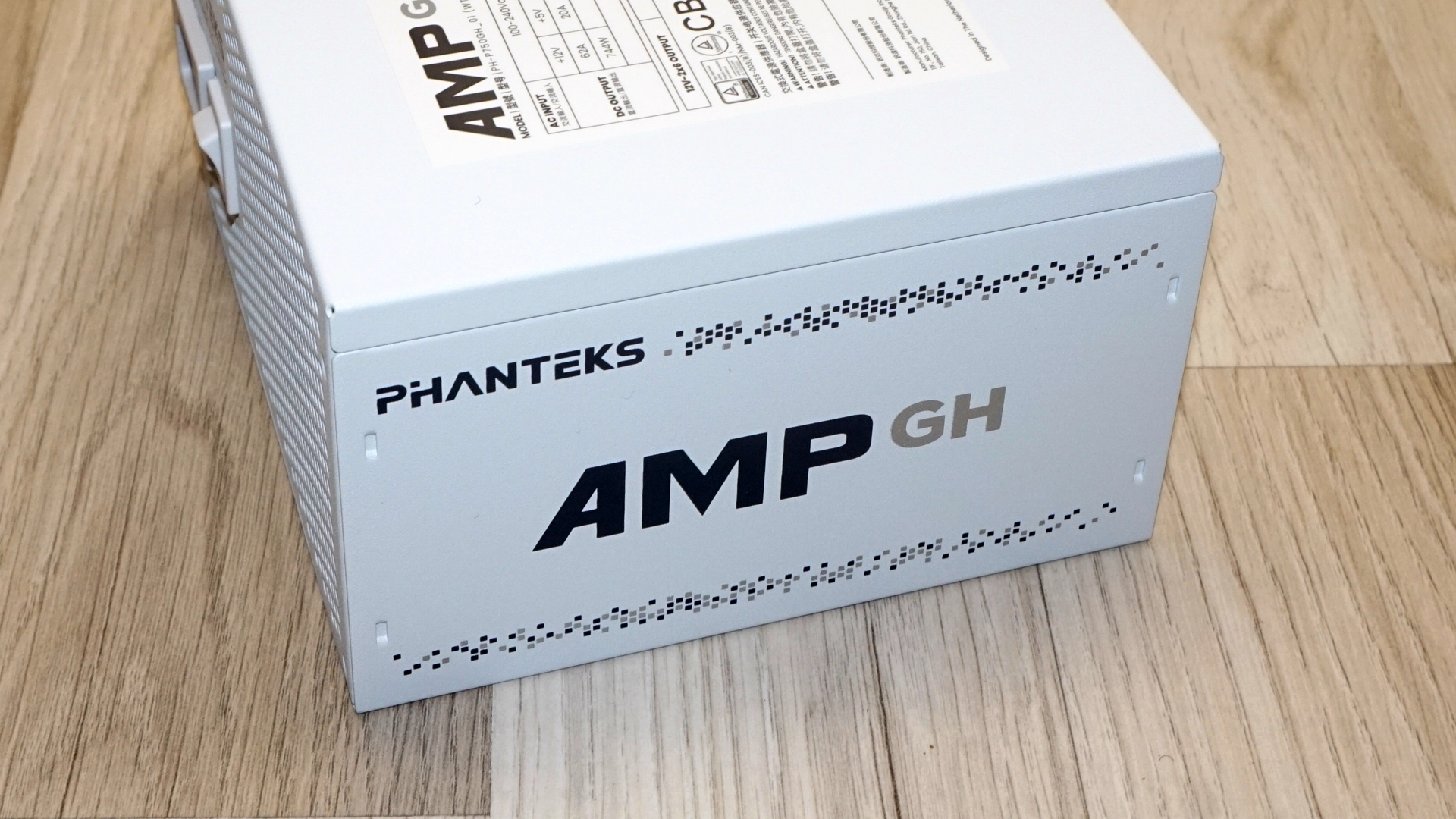
The bottom carries a fan grille cut as a field of staggered rectangles rather than the usual honeycomb, with the company logo embossed across the middle and four polished exposed screws at the corners. The side panels get the company and series logo, as well as a scattered pixel-dot pattern in grey. The specification label is found at the top. The specification label deserves a read before purchase: 62A on the 12V rail for 744W, 100W combined on the minor rails, and a separate line stating 450W for the 12V-2x6 output. That is a hard limit on what you can hang off the single native Gen5 connector, and it is printed on the unit and on the connector rather than buried in a datasheet, which is at least honest.
Tom's HardwareTom's Hardware
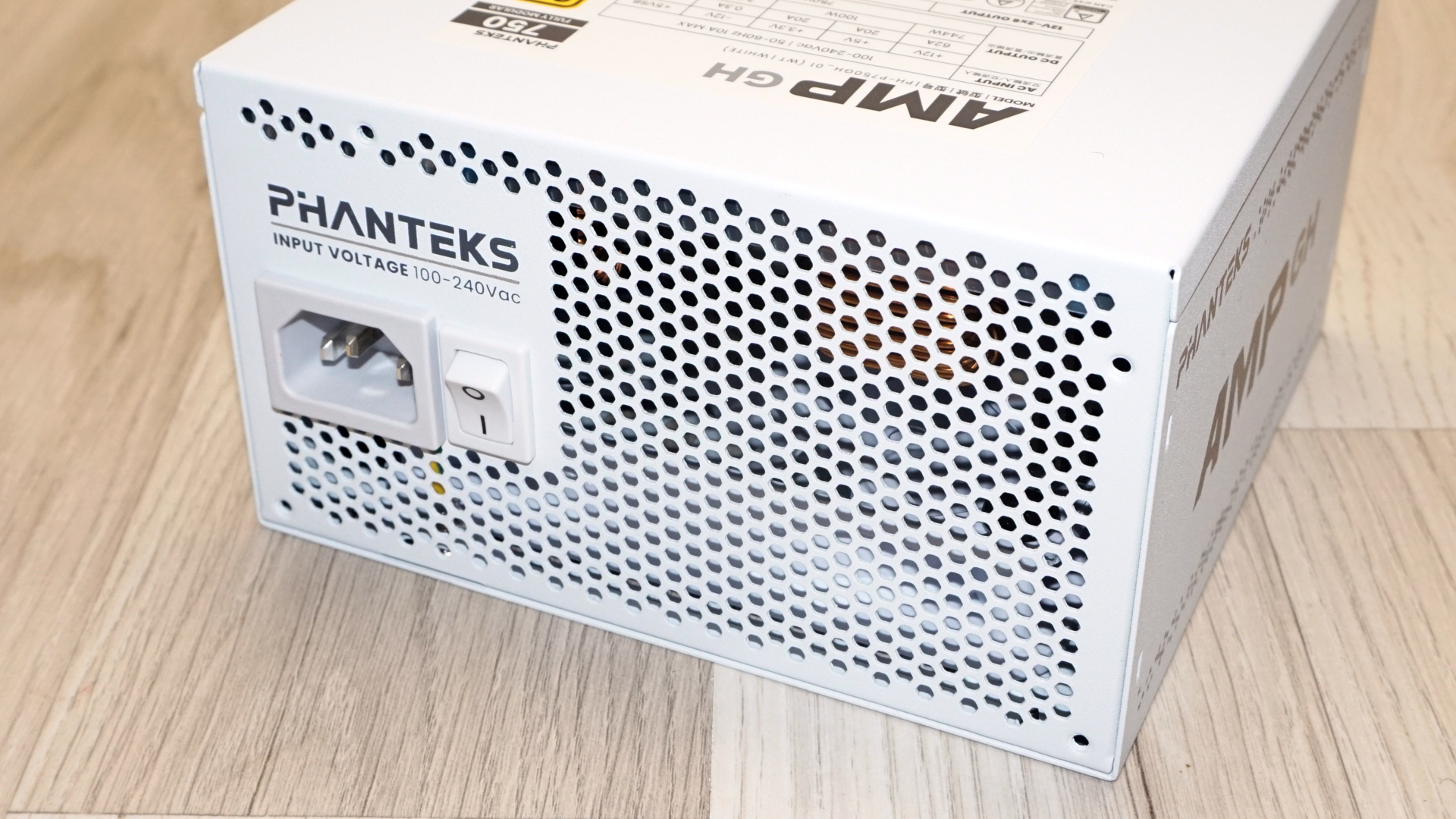
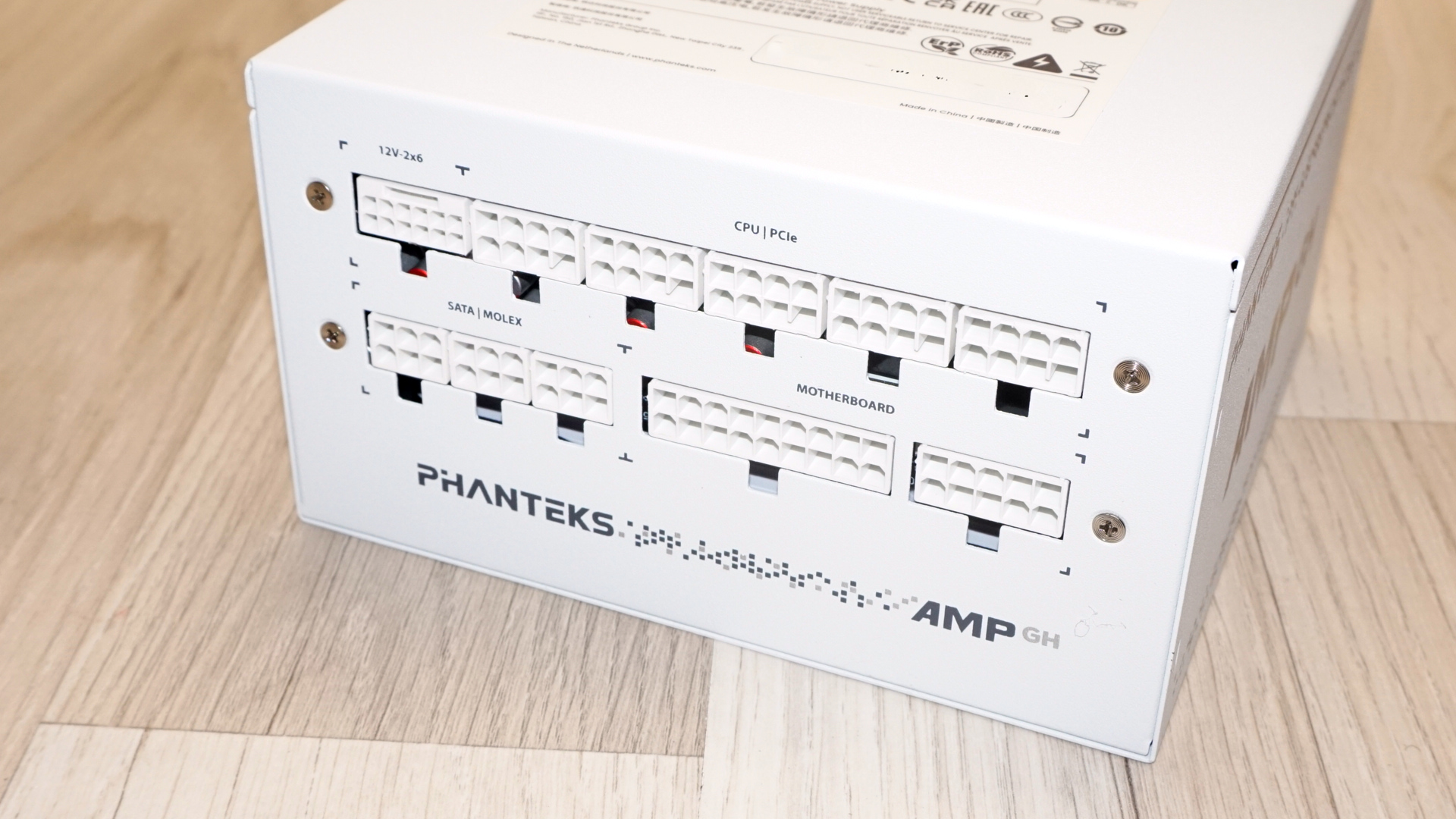
The rear face is somewhat straightforward, with an AC receptacle and a rocker switch, with the only difference being that these are all white. Even though one is pictured in the manufacturer’s website, there is no switch for the semi-passive mode, so the fanless mode is automatic and not something you can override in either direction. The front of the unit hosts the connectors for the modular cables. The top row starts with the dedicated 12V-2x6 socket and continues with five shared 8-pin sockets marked CPU and PCIe. The bottom row has three sockets for the SATA and Molex cables, then two for the motherboard cable.
Tom's HardwareTom's Hardware
Internal Design
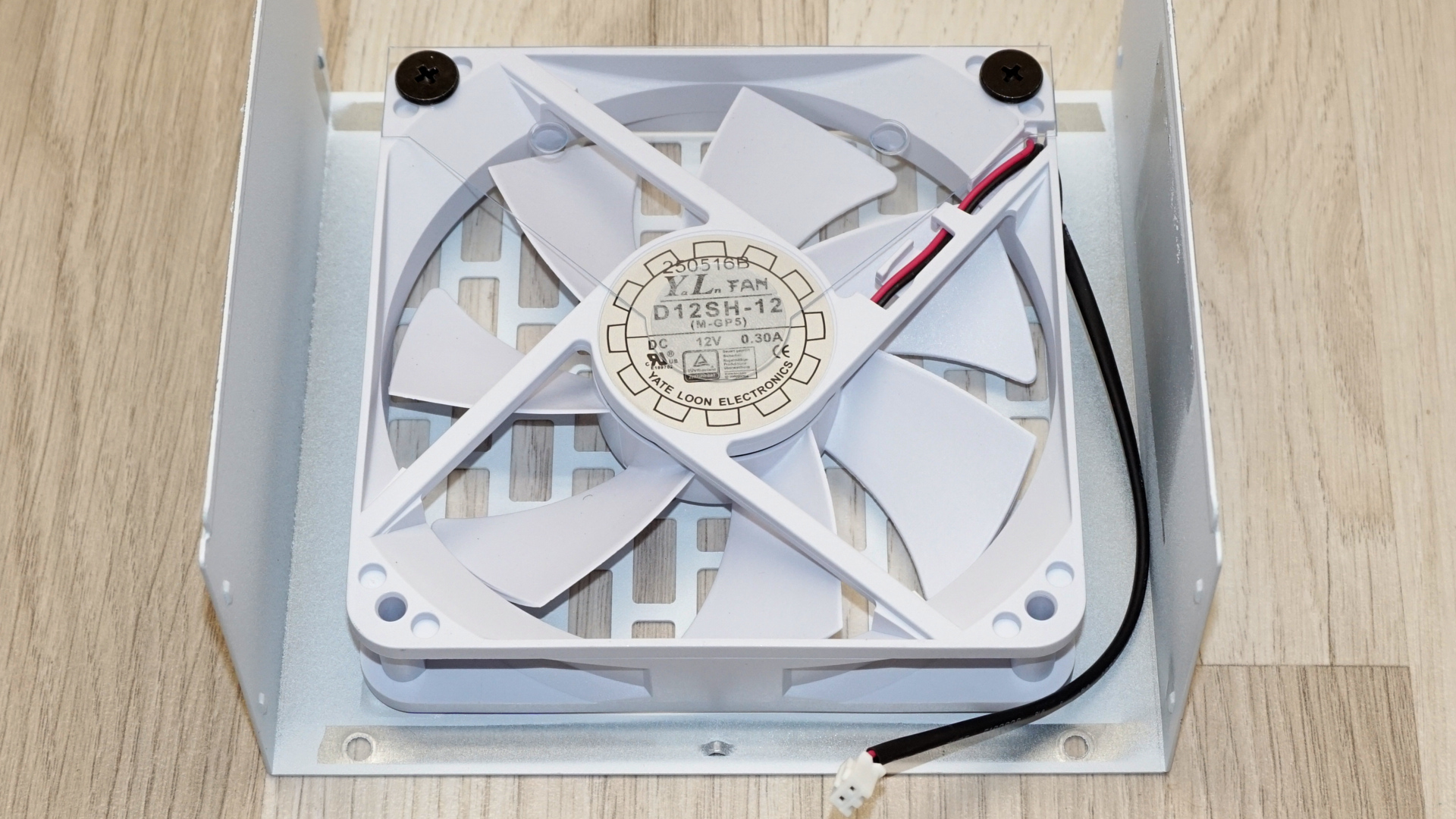
Cooling comes from a 120 mm Yate Loon D12SH-12, a 12V/0.3A sleeve-bearing fan rated for 2200 RPM in Yate Loon's catalog. Yate Loon is a long-standing name, and the D12SH has been turning up in power supplies for years, but a sleeve bearing is a sleeve bearing - it is the cheapest part of an otherwise decent bill of materials. The fan is white to match the chassis rather than the usual black part hidden behind a grille.
(Image credit: Tom's Hardware)
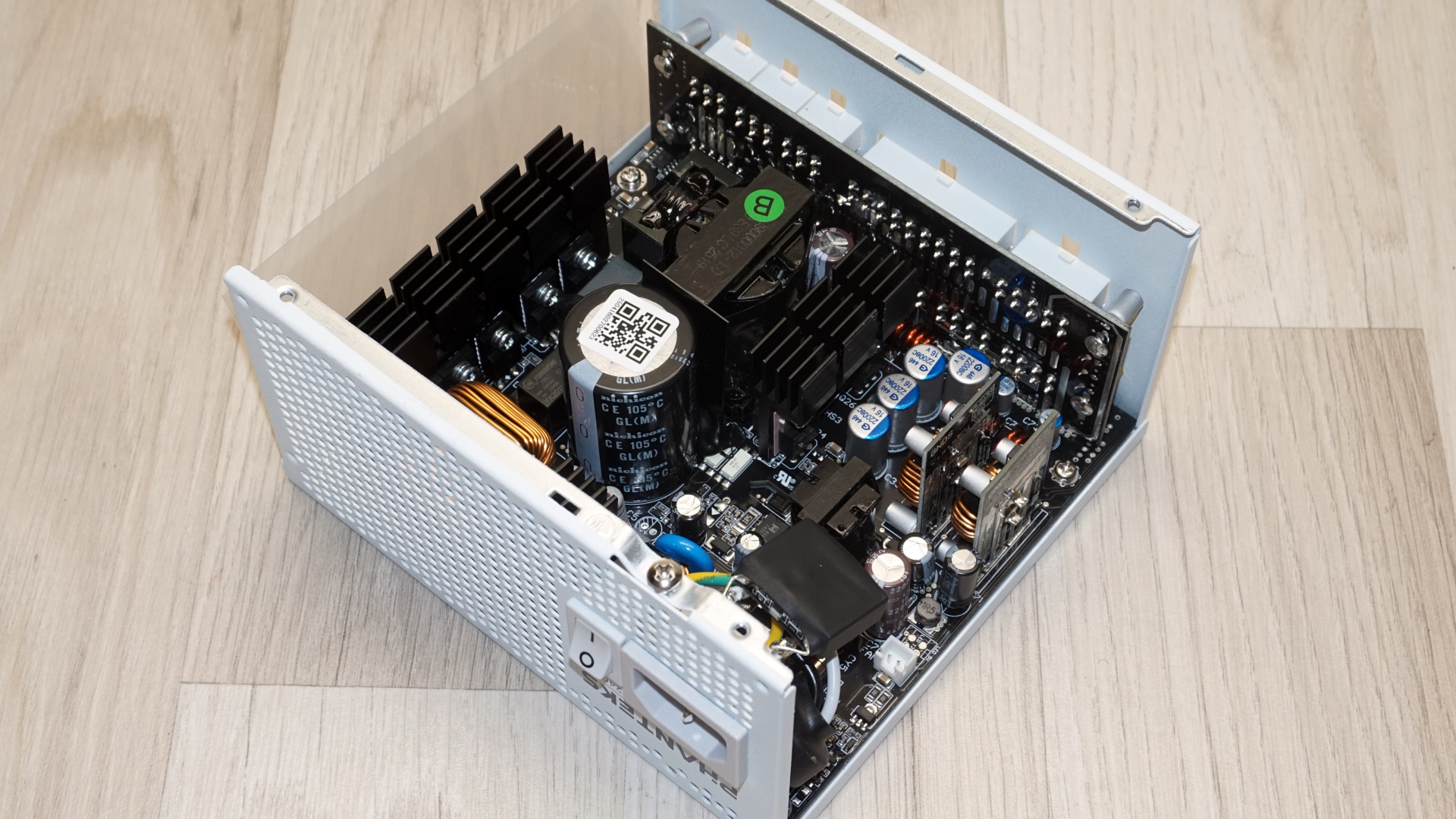
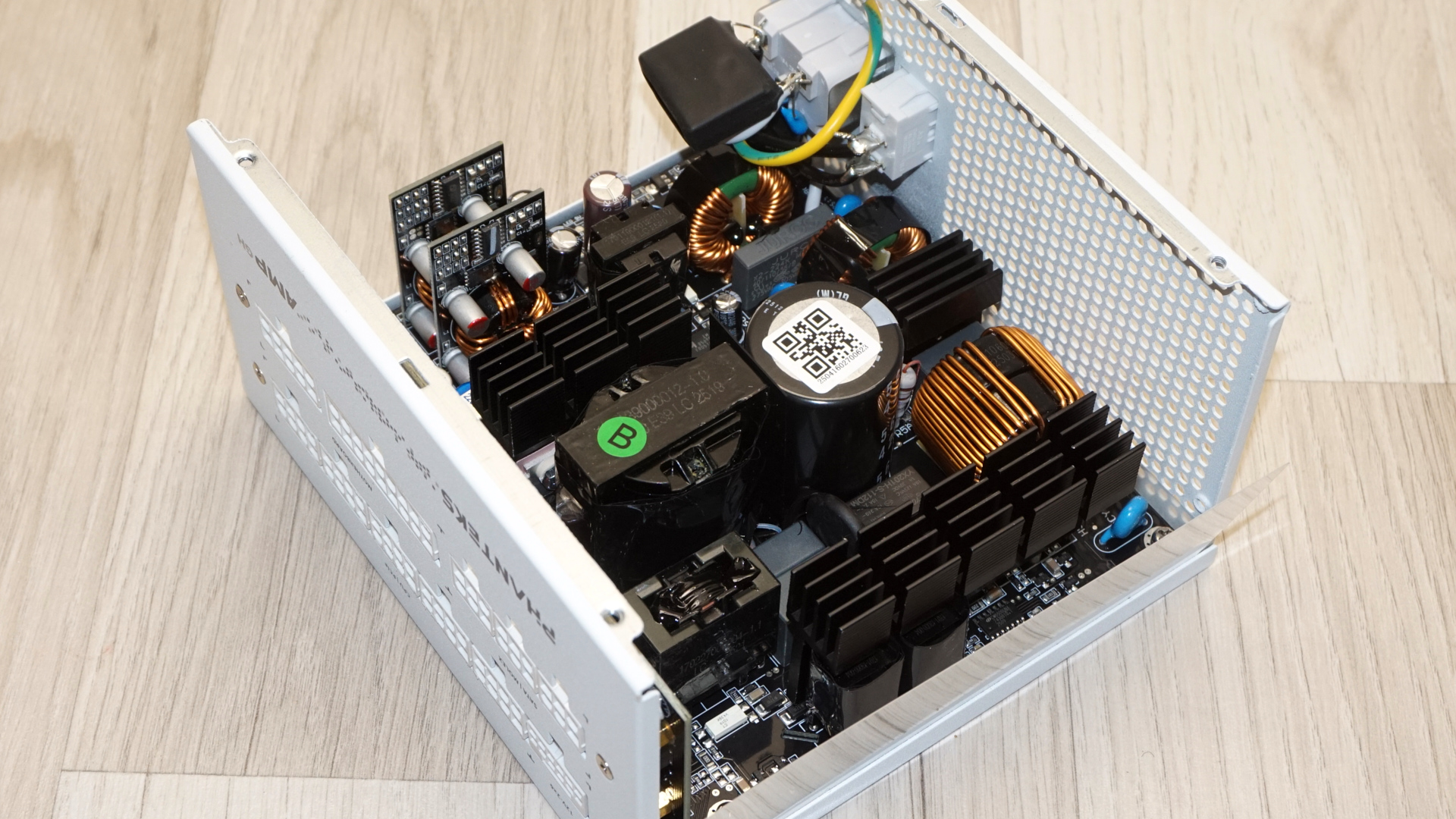
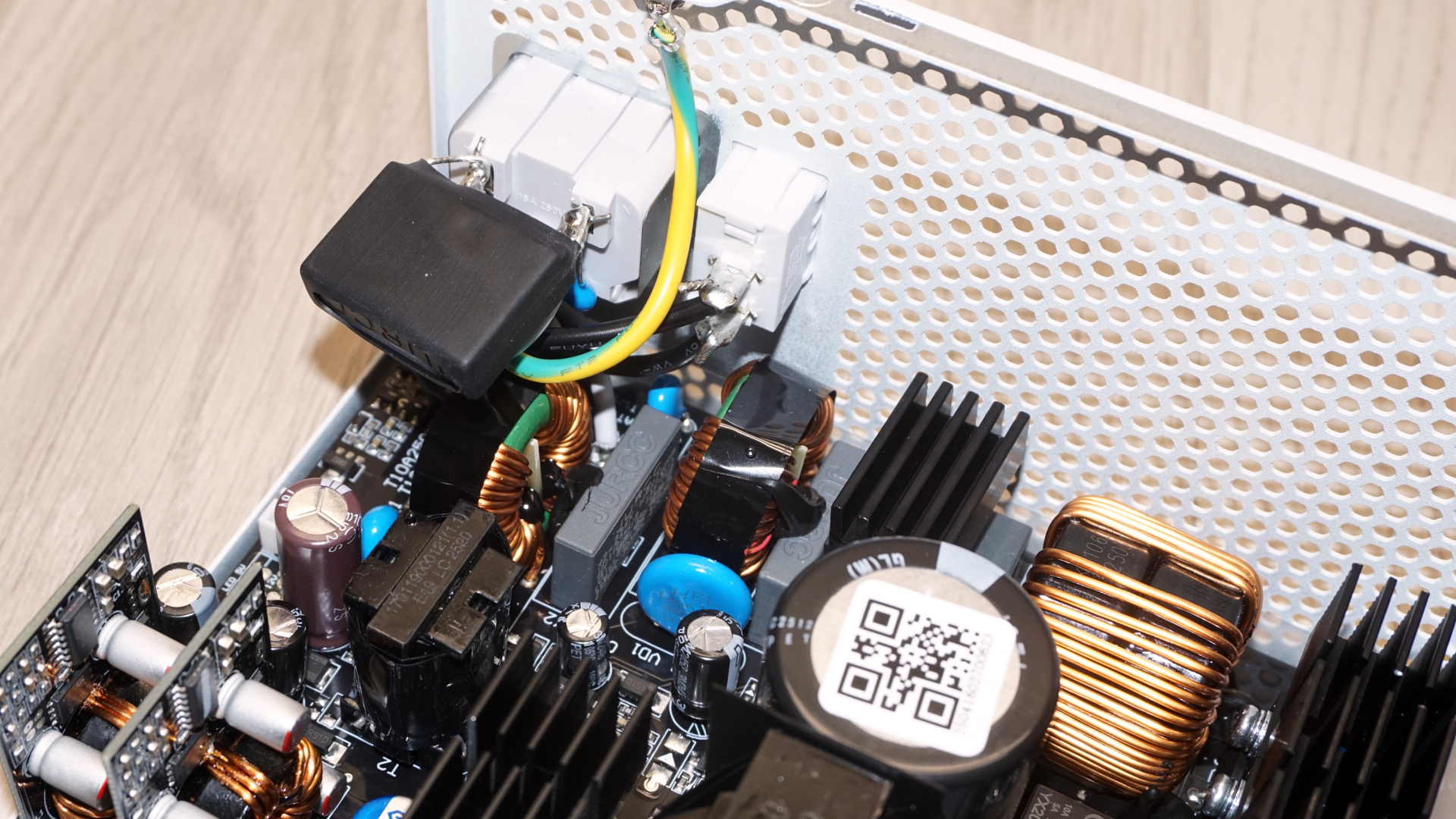
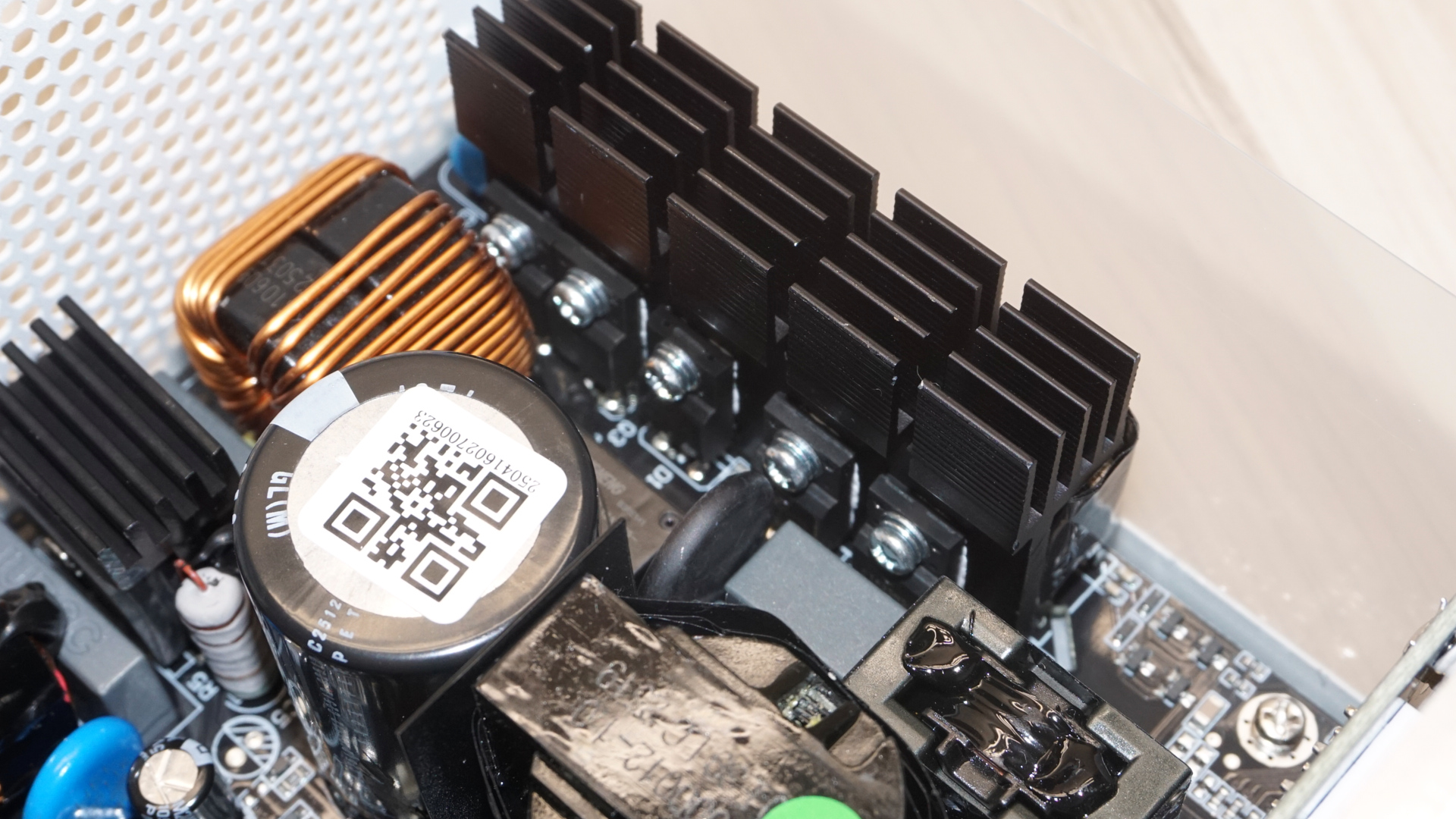
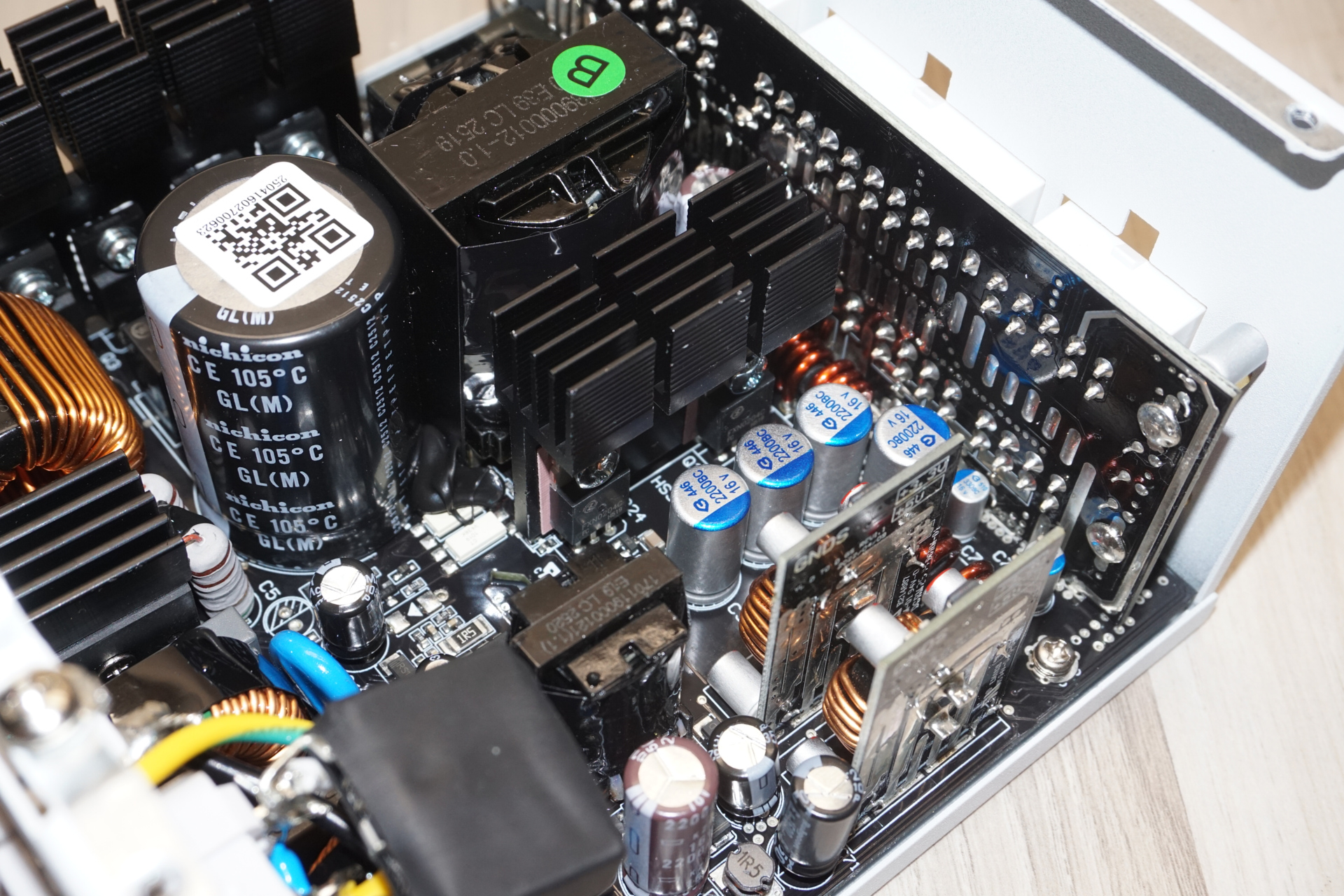
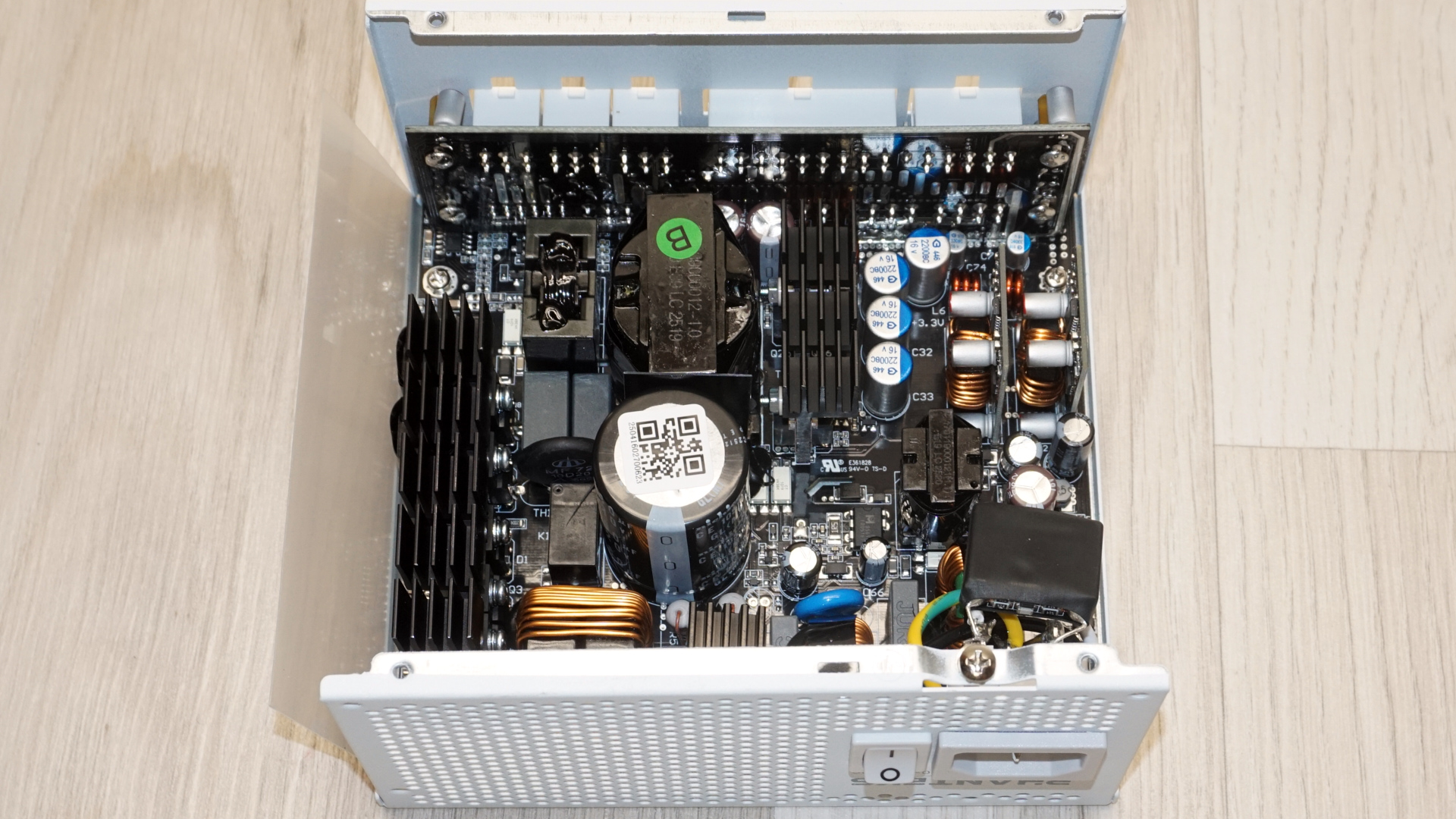
The platform is Helly's, and the layout is tidy. We have proper heatsinks rather than basic aluminum plates, sensible component spacing, and a restrained amount of glue holding the taller parts down. Transient filtering begins at the AC receptacle and continues on the main board, totaling three X capacitors, four Y capacitors, and two filtering inductors. Two bridge rectifiers sit on their own dedicated heatsink, which is more than this class usually gets.
Tom's HardwareTom's Hardware
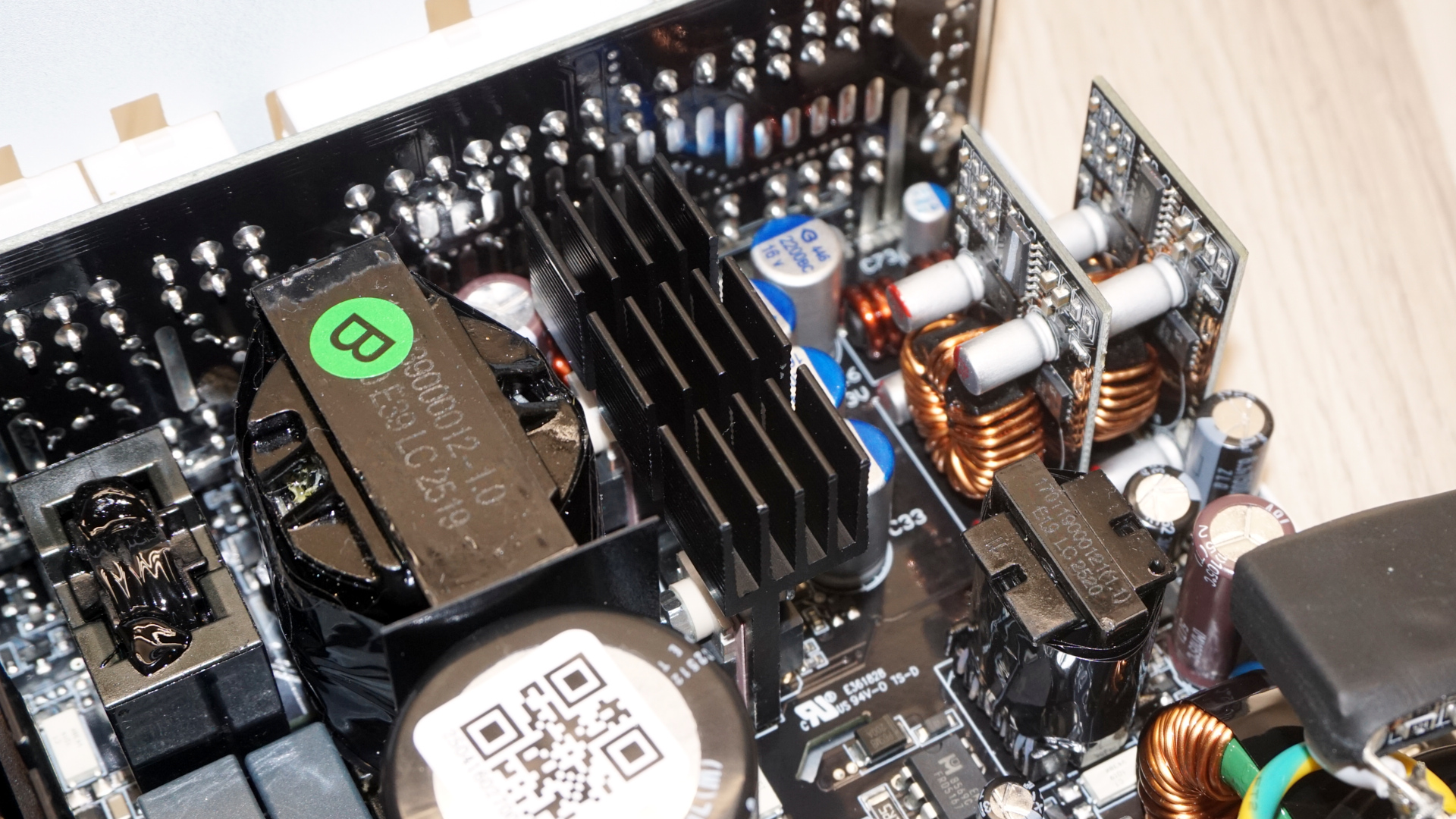
The APFC stage uses a pair of Oriental Semiconductor OSG55R190F MOSFETs, sharing the long heatsink with the primary side inversion switchers. This is a common cost-and-space-saving arrangement but hardly matters when the heatsink is large enough. The bulk capacitor is a Nichicon rated 560 μF at 420V and 105°C and the choke beside it is on the small side and unshielded. Primary inversion is a half-bridge LLC resonant arrangement driving two PIP PTA25N50 MOSFETs, which is the standard and entirely sensible topology for a 750W Gold unit.
Tom's HardwareTom's Hardware
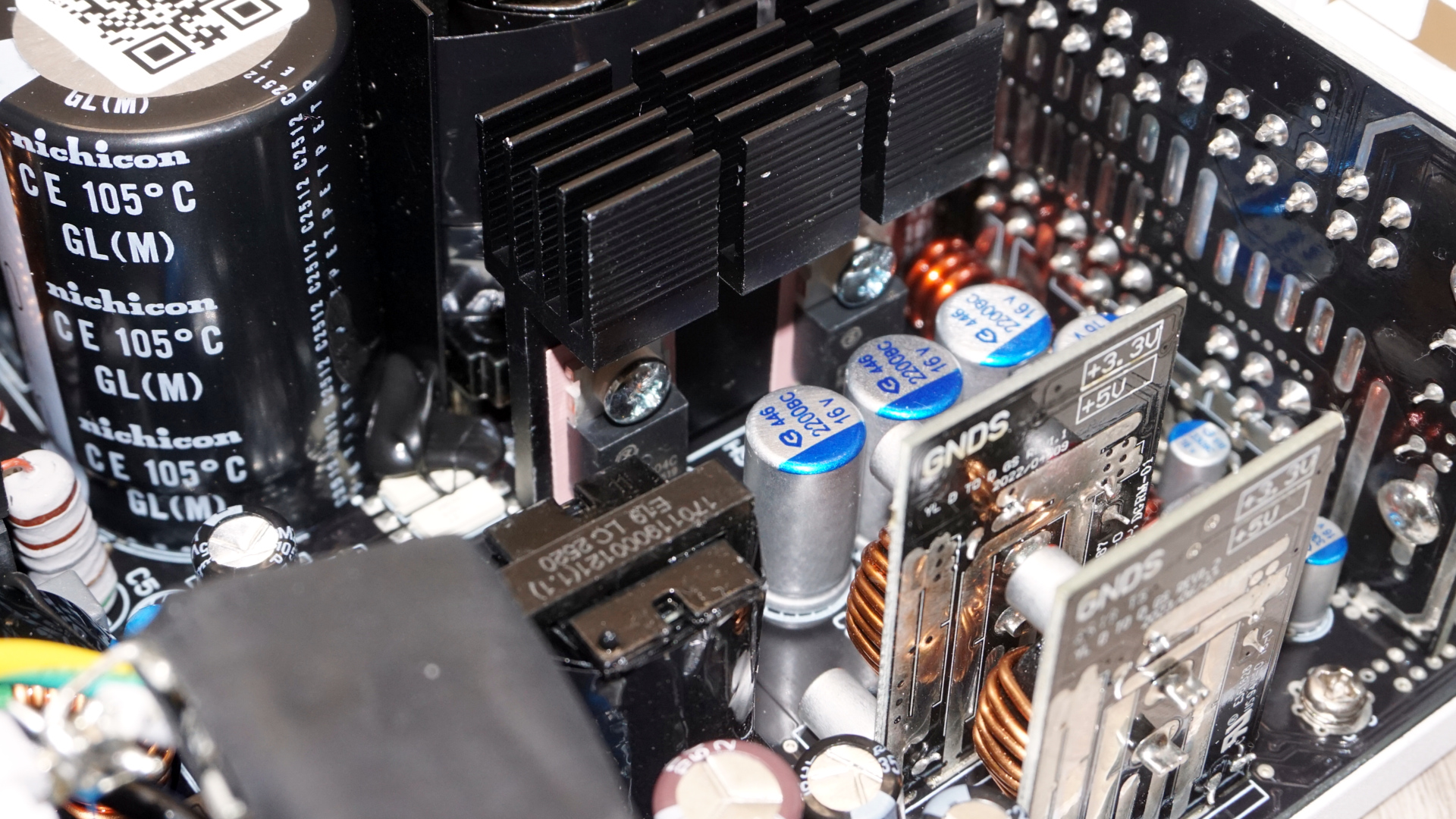
On the secondary side, four Fuxin FXN0204C MOSFETs generate the 12V rail through synchronous rectification, and the 3.3V and 5V rails come off two vertical DC-DC daughterboards standing near the modular connector board. Capacitor sourcing is the pleasant surprise, with the secondary electrolytics coming from Rubycon and Nippon Chemi-Con and APAQ polymers filling the rest. That is a fully Japanese set of capacitors on a unit that sells for under $90, and it is the single strongest argument that the 8-year warranty is more than a marketing number.
Tom's HardwareTom's Hardware
Cold Test Results (25°C Ambient)
Cold Test Results (25°C Ambient)
For the testing of PSUs, we are using high-precision electronic loads with a maximum power draw of 2700 Watts, a Rigol DS5042M 40 MHz oscilloscope, an Extech 380803 power analyzer, two high-precision UNI-T UT-325 digital thermometers, an Extech HD600 SPL meter, a self-designed hotbox, and various other bits and parts.
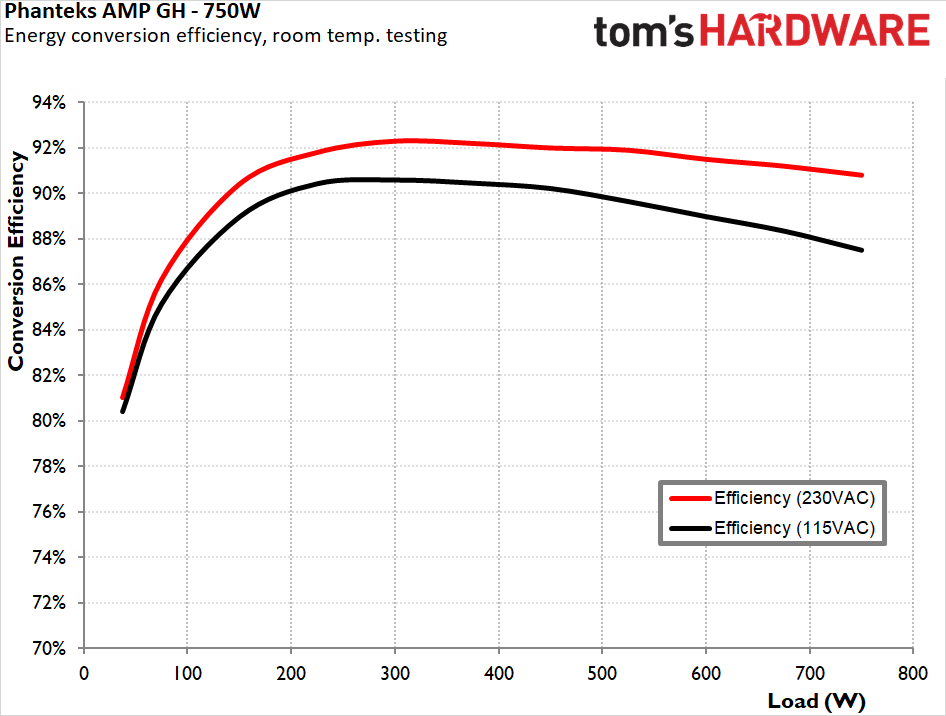
At 25°C ambient, the AMP GH 750 averaged 91.0% at 230 VAC and 89.0% at 115 VAC across the full load range, peaking at 92.3% (230 VAC) at around 300W and holding 90.8% at a sustained 750W. The curve is well shaped. It climbs fast, is stable between 250W and 450W, and loses very little ground at the top end, which is exactly the profile you want from a PSU that will spend its life between 30% and 70% load. At 115 VAC, the equivalent figures are 90.6% at peak and 87.5% at full load. The 80 PLUS Gold asks for 87% at 100% load on 115V, so the margin is half a point. It is a pass, but our numbers land roughly one point below the CLEAResult published certification report, which is dated 4/8/22 and lists the same PH-P750GH_01 model code. That certificate predates the ATX 3.1 revision of this unit by some margin, so it is describing an earlier configuration sharing the model number.
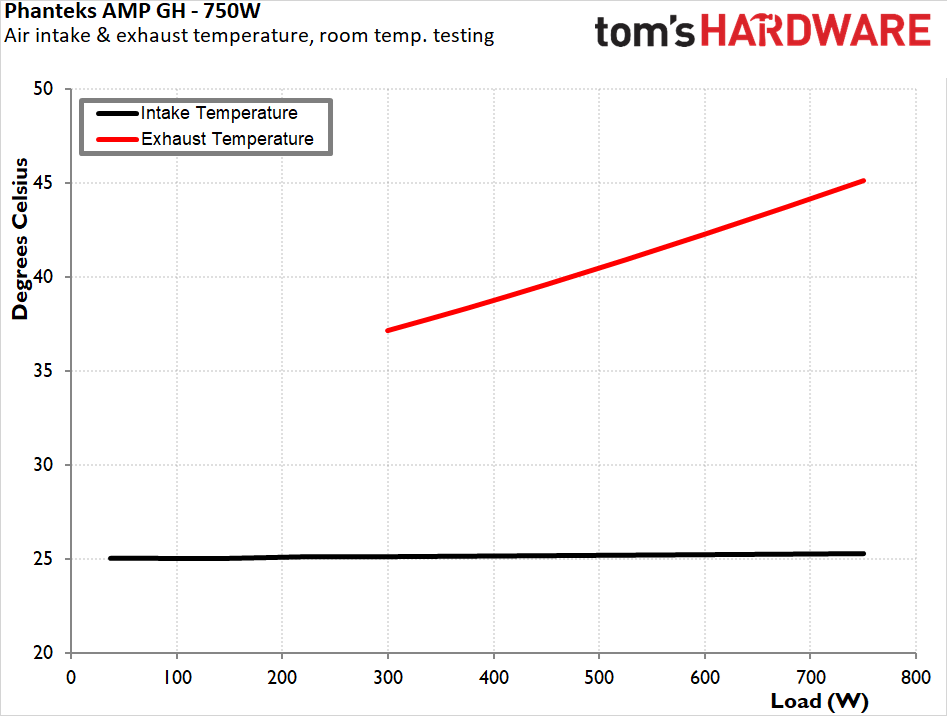
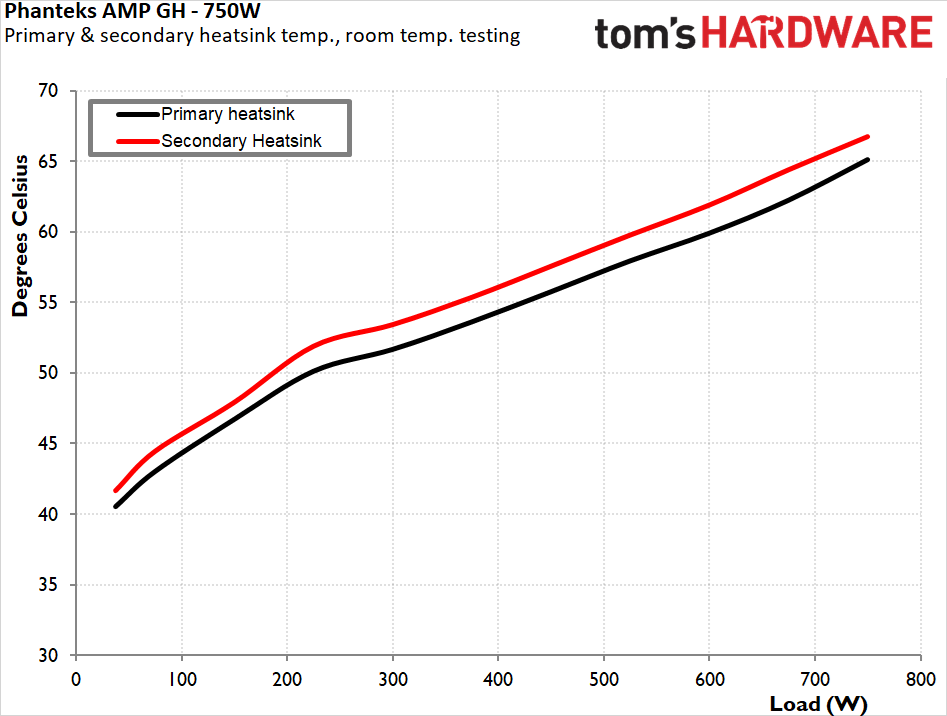
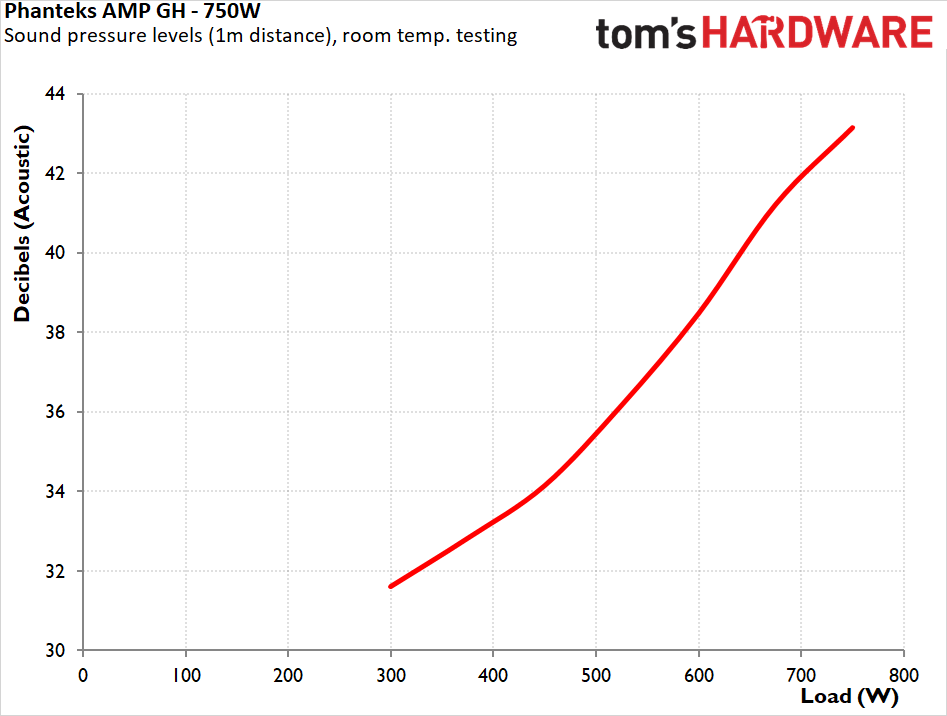
Acoustically, the cold run is the unit's best showing. The fan stays completely stopped up to nearly 300W, which is almost 40% of its maximum rating, comfortably wider than the 30% Phanteks claims. It will easily cover any system idling and even performing medium-power tasks as well. It comes on at 31.6 dB(A) and climbs gently, crossing 38 dB(A) only past 590W and topping out at 43.2 dB(A) at a sustained 750W. That is audible in a quiet room but not intrusive, and you have to be pushing a 750W load through a 750W supply to get there. Thermals are unremarkable but in a good way, with both the exhaust and internal temperatures well within the acceptable margins while the fan is largely idling. Nothing here is working hard.
Hot Test Results (~45°C Ambient)
Hot Test Results (~45°C Ambient)
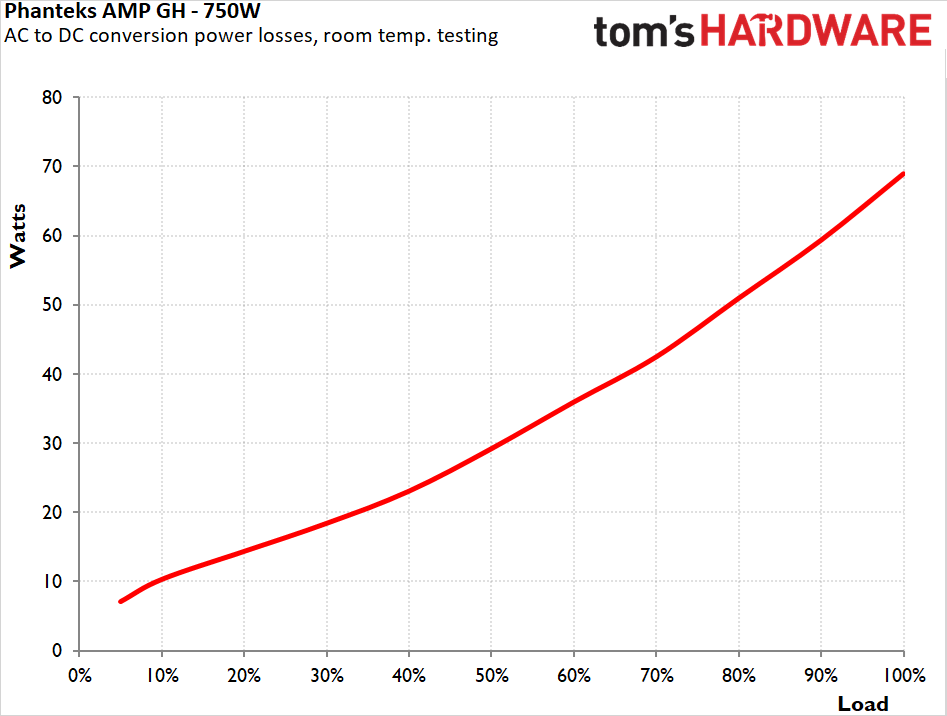
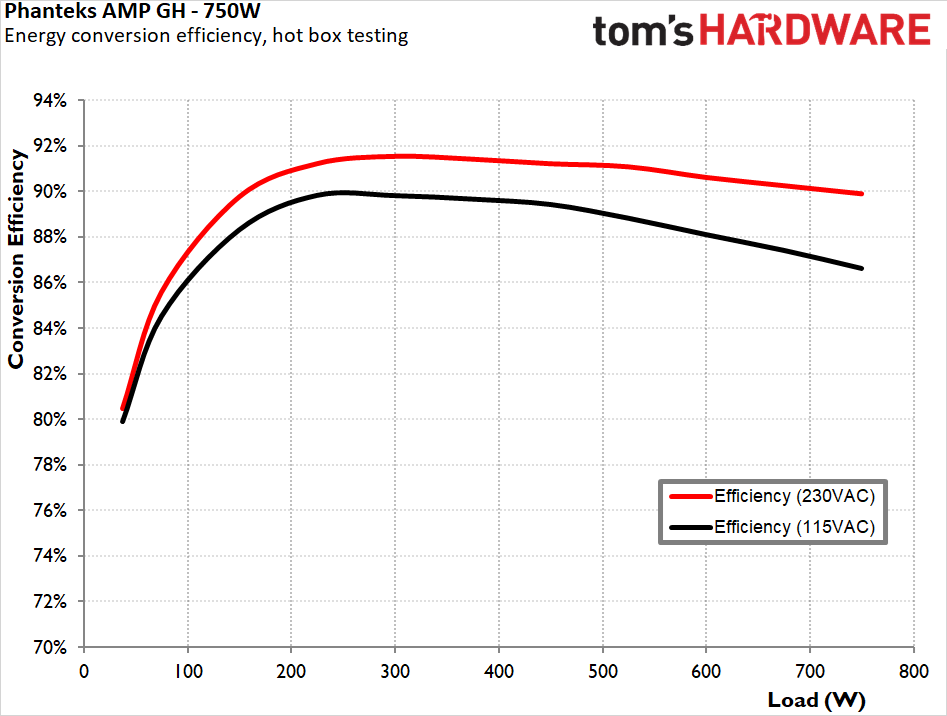
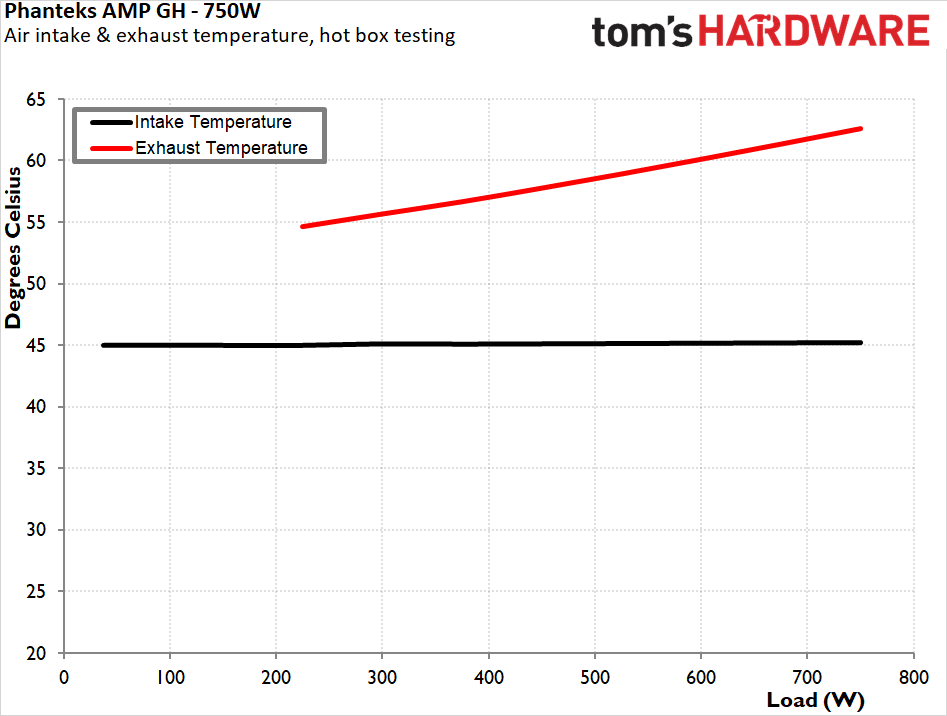
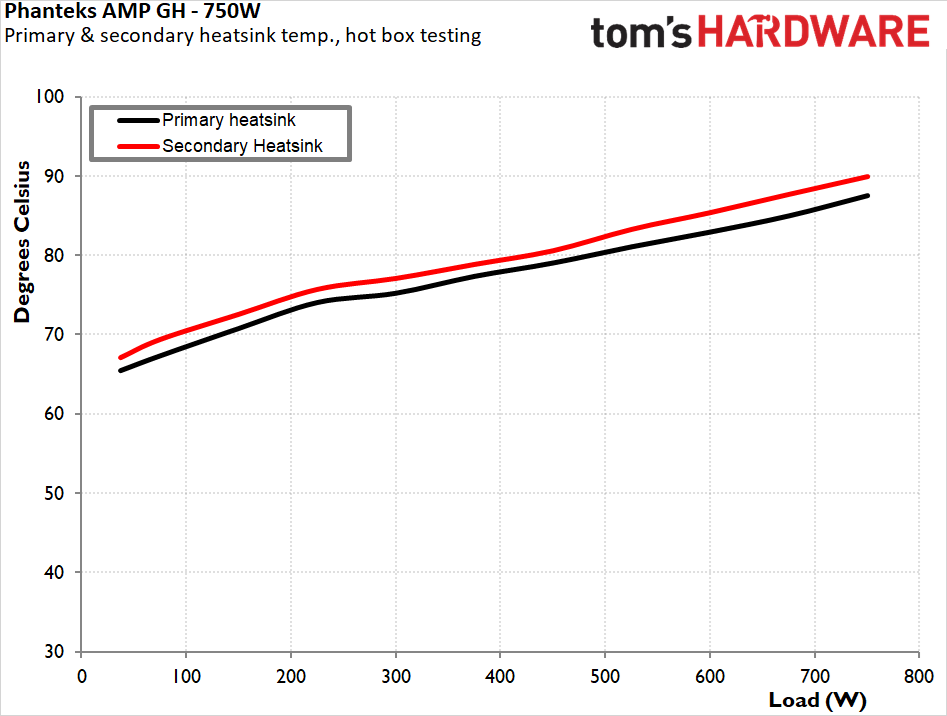
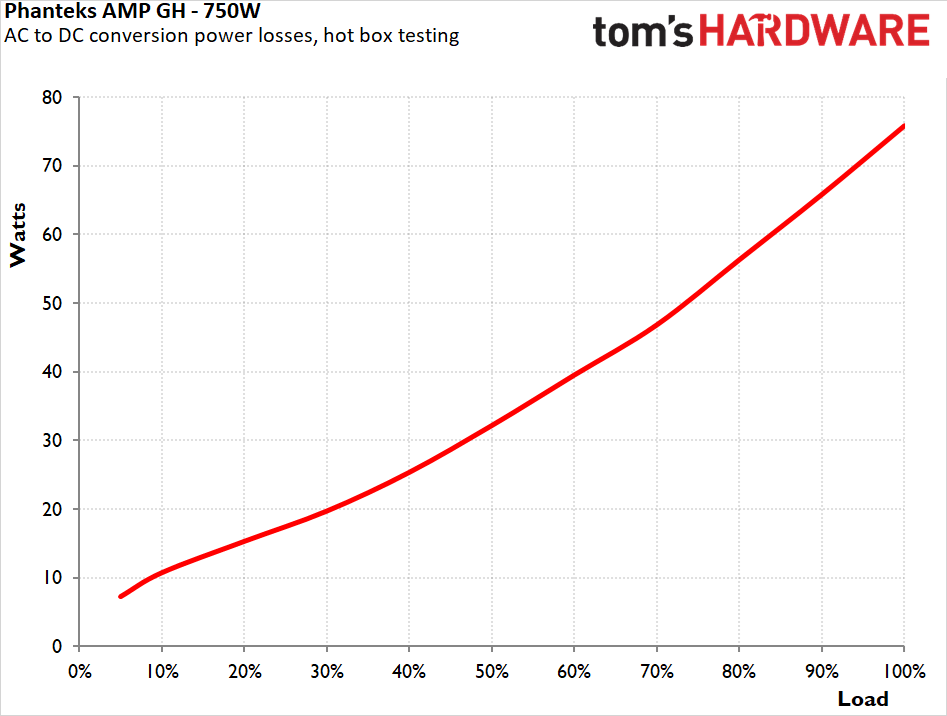
Inside the hotbox at roughly 45°C (five degrees past the unit's own 40°C rating), efficiency degraded far less than we expected. The 230 VAC average fell from 91.0% to 90.3% and the full-load figure from 90.8% to 89.8%, a single point for a twenty-degree increase in ambient. At 115 VAC, the average went from 89.0% to 88.3%, with full load dropping to 86.5%, which does slip under the 80 PLUS Gold threshold. That threshold is defined at 23°C ambient, so what we have here is a note rather than a failure. Full-load losses rose from 69W to 76W. This is a better hotbox result than most mainstream Gold units manage, and it says something reassuring about the heatsink sizing and choice of components.
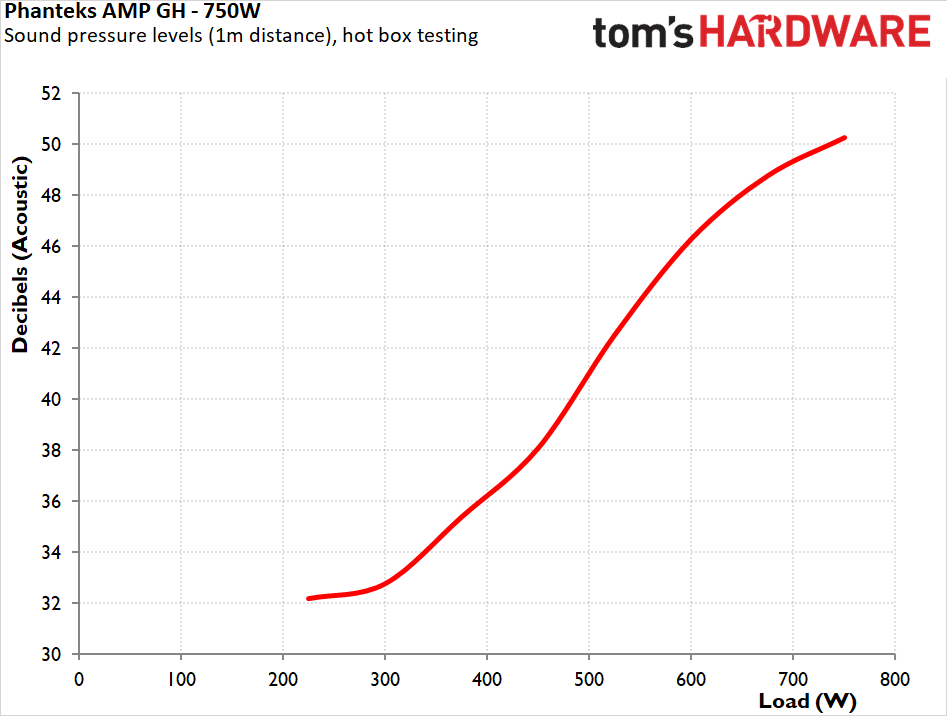
Heat makes little impact on the unit’s electrical performance, but noise is where it makes itself felt. The fanless window narrows from about 300W to roughly 220W, and from there the ramp is much steeper than it was at room temperature: 38 dB(A) at 450W, 46 dB(A) at 600W, and 50.2 dB(A) at a sustained 750W. That is loud, and the sleeve-bearing Yate Loon is working hard. The trade-off is that internal temperatures stay very well controlled, so the fan is doing real work rather than spinning for the sake of it, with the designer obviously favoring reliability over acoustics when ambient conditions are tense. Even though sustained full output in a 45°C environment is outside this unit's specifications, it handled it without complaint and without shutting down.
PSU Quality and Bottom Line
Power Supply Quality
Voltage regulation is the standout result of the whole test. Across the 20% to 100% load span, the 12V rail moved by just 0.4%, an enthusiast-tier tightness on a sub-$90 unit and better than several platforms costing twice as much. The 3.3V and 5V rails came in at 1.2% each, which is ordinary but perfectly fine given DC-DC conversion and the negligible loads modern systems put on them. There is no sign of the minor rails dragging the 12V line around under uneven loading.
Ripple suppression is equally comfortable. The 12V rail peaked at 38 mV under full load against the 120 mV ATX limit, leaving nearly 70% headroom, while the 3.3V and 5V rails topped out at 24 mV against their 50 mV limits. Nothing in this data set gets anywhere near a limit, with the Japanese capacitors on the secondary clearly backing their reputation.
During our thorough assessment, we evaluate the essential protection features of every power supply unit we review, including Over Current Protection (OCP), Over Voltage Protection (OVP), Over Power Protection (OPP), and Short Circuit Protection (SCP).
All protection mechanisms were verified and triggered correctly during testing. With the unit hot, OCP tripped at 150% on the 3.3V rail, 148% on the 5V rail, and 138% on the 12V rail. OPP shut the unit down at approximately 1050W, or 140% of rated output. Those are loose thresholds and generous enough that a genuine fault has room to develop before anything intervenes. However, these are not unusual for the ATX 3.1 class, and every protection engaged cleanly when it should have.
Main Output
Load (Watts)
150.89 W
376.35 W
563.58 W
750.68 W
Load (Percent)
20.12%
50.18%
75.14%
100.09%
Amperes
Volts
Amperes
Volts
Amperes
Volts
Amperes
Volts
3.3 V
1.81
3.40
4.53
3.38
6.80
3.37
9.07
3.36
5 V
1.81
5.07
4.53
5.05
6.80
5.03
9.07
5.01
12 V
11.25
12.05
28.11
12.03
42.17
12.01
56.23
12.00
Line
Regulation
Voltage Ripple (mV)
(20% to 100% load)
20% Load
50% Load
75% Load
100% Load
CL1 12V
CL2 3.3V + 5V
3.3V
1.2%
18
16
18
24
18
22
5V
1.2%
18
18
18
24
18
24
12V
0.4%
26
26
26
38
38
24
Bottom Line
The AMP GH 750 is a better PSU than its price implies at the time of this review, but the reasons are not the ones Phanteks leads with. Phanteks spent considerable effort and resources on the aesthetics of the unit, leading their marketing campaign with the appearance and quality of the wires. It is undeniable that the cables of this unit have been exceptionally well designed and made, with extreme attention to quality and detail. The same is true about the unit itself, the construction and appearance of which are immaculate and attractive.
(Image credit: Tom's Hardware)
While unquestionably important, aesthetics can only take you so far when we are talking about any tech equipment. What makes the AMP GH 750 really worth buying is the bill of materials and the electrical results. Japanese capacitors throughout, amazing regulation on the 12V rail, and ripple that never gets within two-thirds of the ATX limit. Helly is not a famous name amongst enthusiast cycles, but this is a well-executed platform, and the 8-year warranty behind it looks like a considered commitment rather than a gamble.
(Image credit: Tom's Hardware)
The measurements may look indifferent, but the results are honest. Efficiency clears 80 PLUS Gold at both input voltages and holds its curve well, but that level of performance is hardly stellar by today’s standards. Our numbers sit about one percentage point below the CLEAResult certification report on file for this model code, a report dated 2022, which predates the ATX 3.1 revision the unit ships as today. There are no Cybenetics or PLPP certifications at the time of this review. We feel that two things hold the AMP GH 750 back. The first is the 12V-2x6 connector's 450W rating. On a 750W unit, that is not fatal; anything you would sensibly pair with 750W stays under it, but anyone planning to move a heavier card into this system later will be facing a limit. The second is the fan. The Yate Loon D12SH-12 is a sleeve-bearing part that does not match the eight-year warranty's ambition.
(Image credit: Tom's Hardware)
At $109.99 MSRP for the white unit and $99.99 for the black, and at the time of writing, $84.99 and $89.99 respectively at Newegg, both landing at $74.99 after Phanteks' mail-in rebate, the value case is straightforward. Under $80 buys you Japanese capacitors, near-flat 12V regulation, a 300W fanless window, and 8 years of warranty. The compromises are a connector limit you should check against your GPU plans, and a fan that will remind you it exists in a warm case. For a mid-range build that lives between 200W and 500W most of the time, which is exactly what a 750W supply is for, that is an easy recommendation.
A few years ago, Nvidia was expected to release the RTX 3070 Ti with as much as 16GB of VRAM instead of the 8GB we actually ended up getting. Only database listings ultimately indicated its existence until a physical prototype showed up, but we never really got to see it working. Fast forward to today, however, and Brazilian YouTuber fmklab, aka Fabian, has recreated the card on his own. Using an RTX 3070 PCB with a transplanted 3070 Ti core and GDDR6 chips from Samsung, fmklab broughall those parts together to achieve a 16GB memory pool.
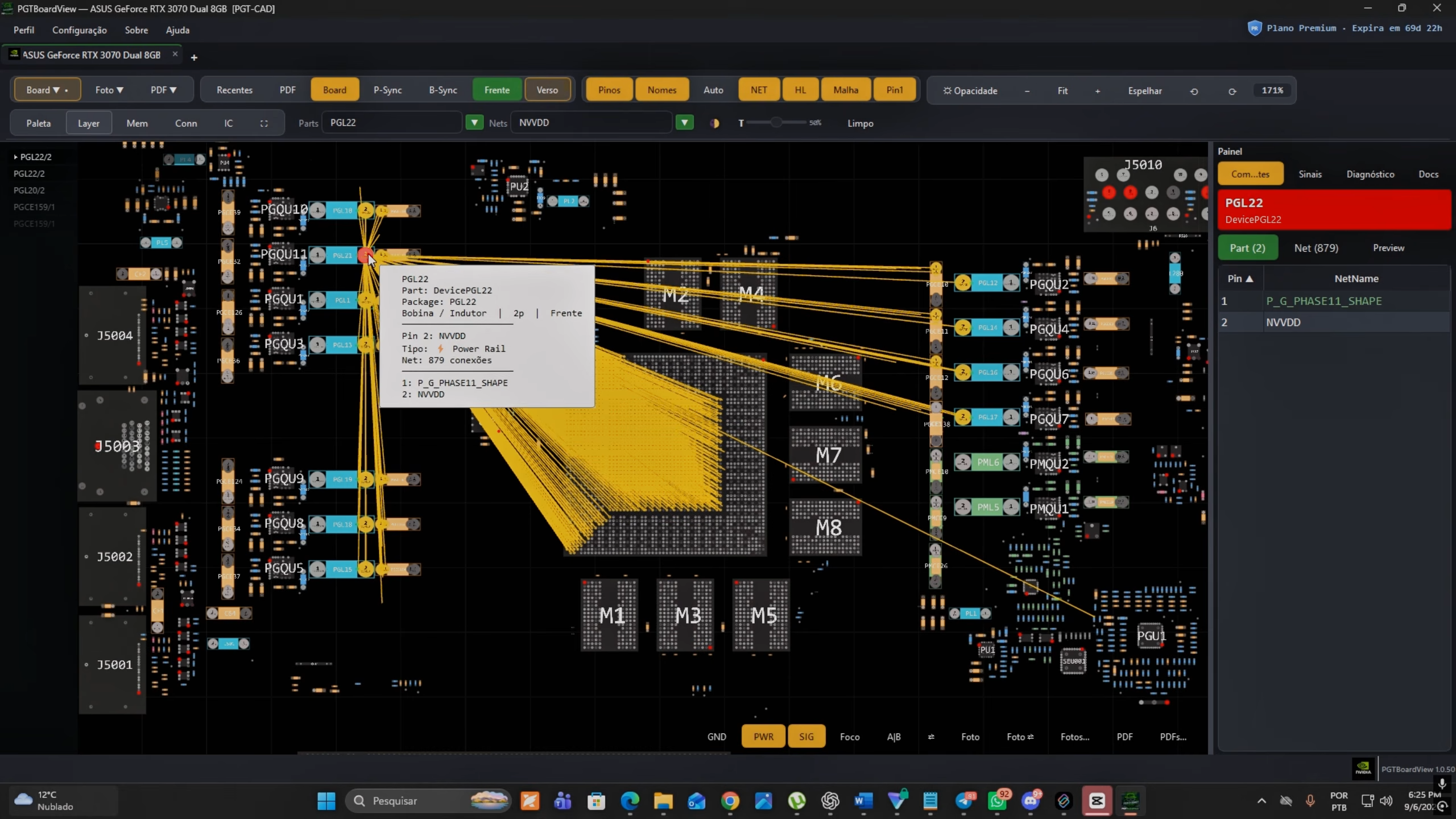
The card was stripped down to its PCB, and the RTX 3070 GPU was removed and replaced with a 3070 Ti chip. The reason for the swap is that the RTX 3070 uses GDDR6 instead of the GDDR6X the retail version of the RTX 3070 Ti is equipped with, which presented an interesting challenge.
(Image credit: Fabian - @fmklab on YouTube)
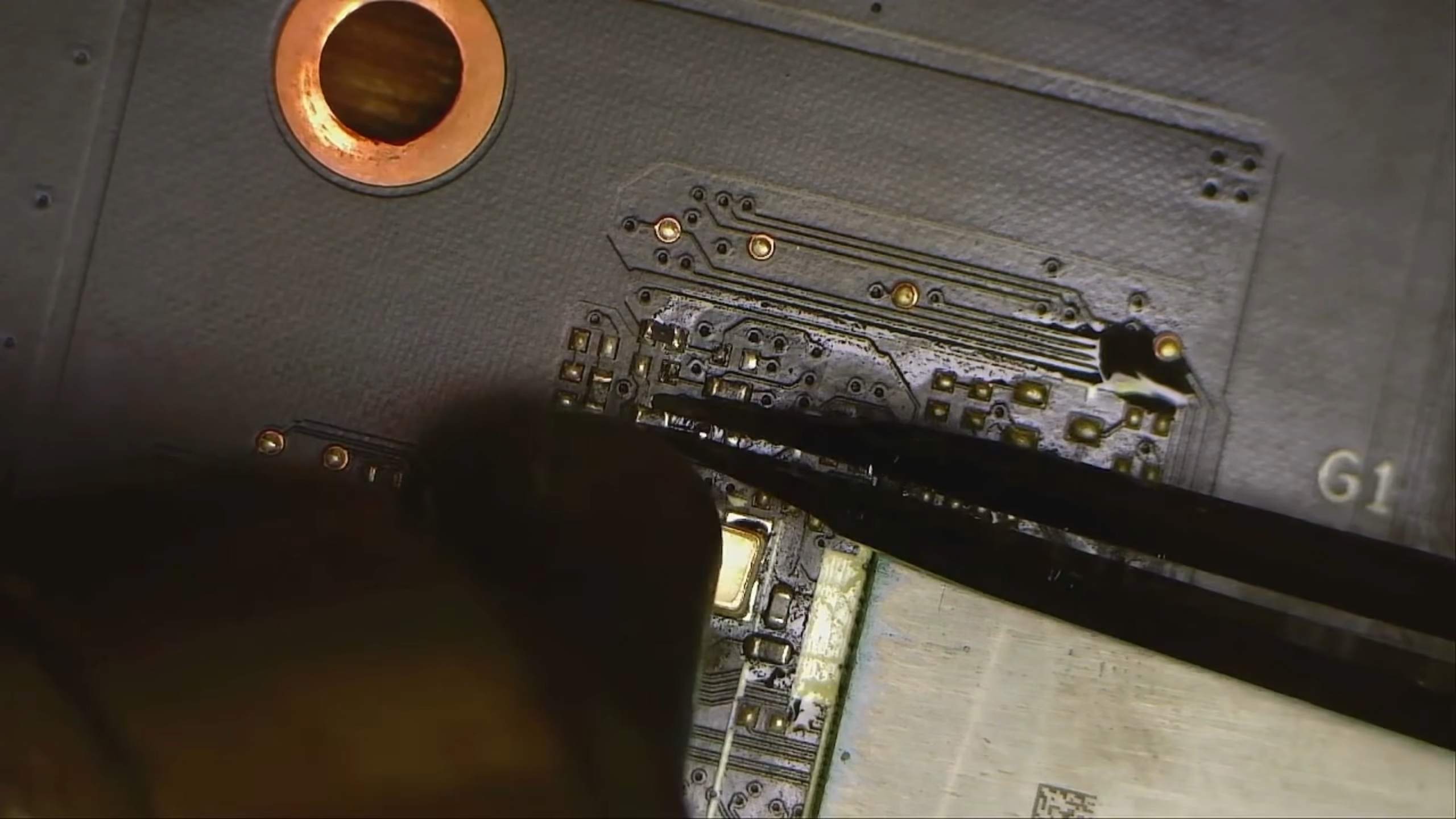
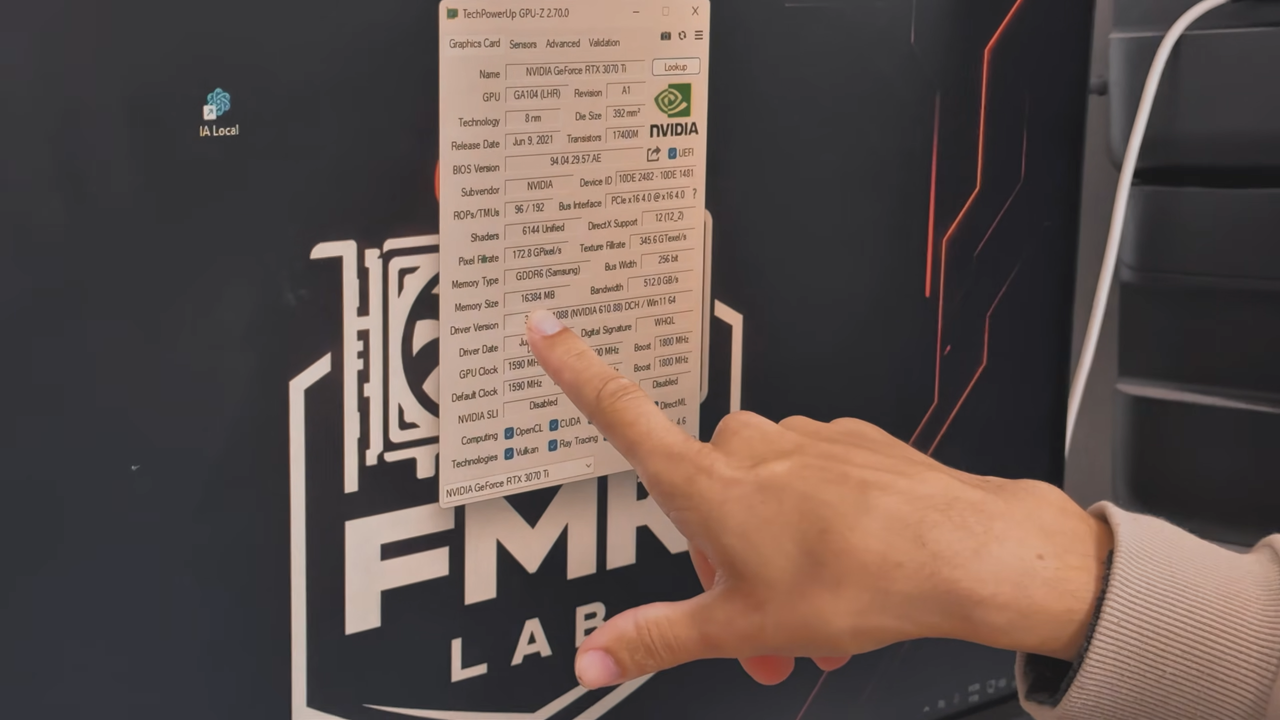
Fabian could've put all 16GB of GDDR6X memory on a 3070 Ti card, but it would've been far too expensive, so he swapped the Samsung-made HC14 (8Gb) GDDR6 chips that were already on the board with HC16 (16Gb) chips. That changed the VRAM capacity from 8GB to 16GB, but when the card booted, GPU-Z only recognized 8GB. The PCB's memory straps needed to be reconfigured in order for it to use the entire memory pool.
(Image credit: Fabian - @fmklab on YouTube)
Using the Nvidia BIOS Reader tool, Fabian figured out exactly what straps to adjust and went ahead with the soldering process. Afterward, MATS properly recognized the full 16GB VRAM capacity with no errors. GPU-Z also showed the RTX 3070 Ti equipped with 16GB of GDDR6 memory, similar to the prototype that popped up years ago. But verifying that the card recognized the additional VRAM was just the first step.
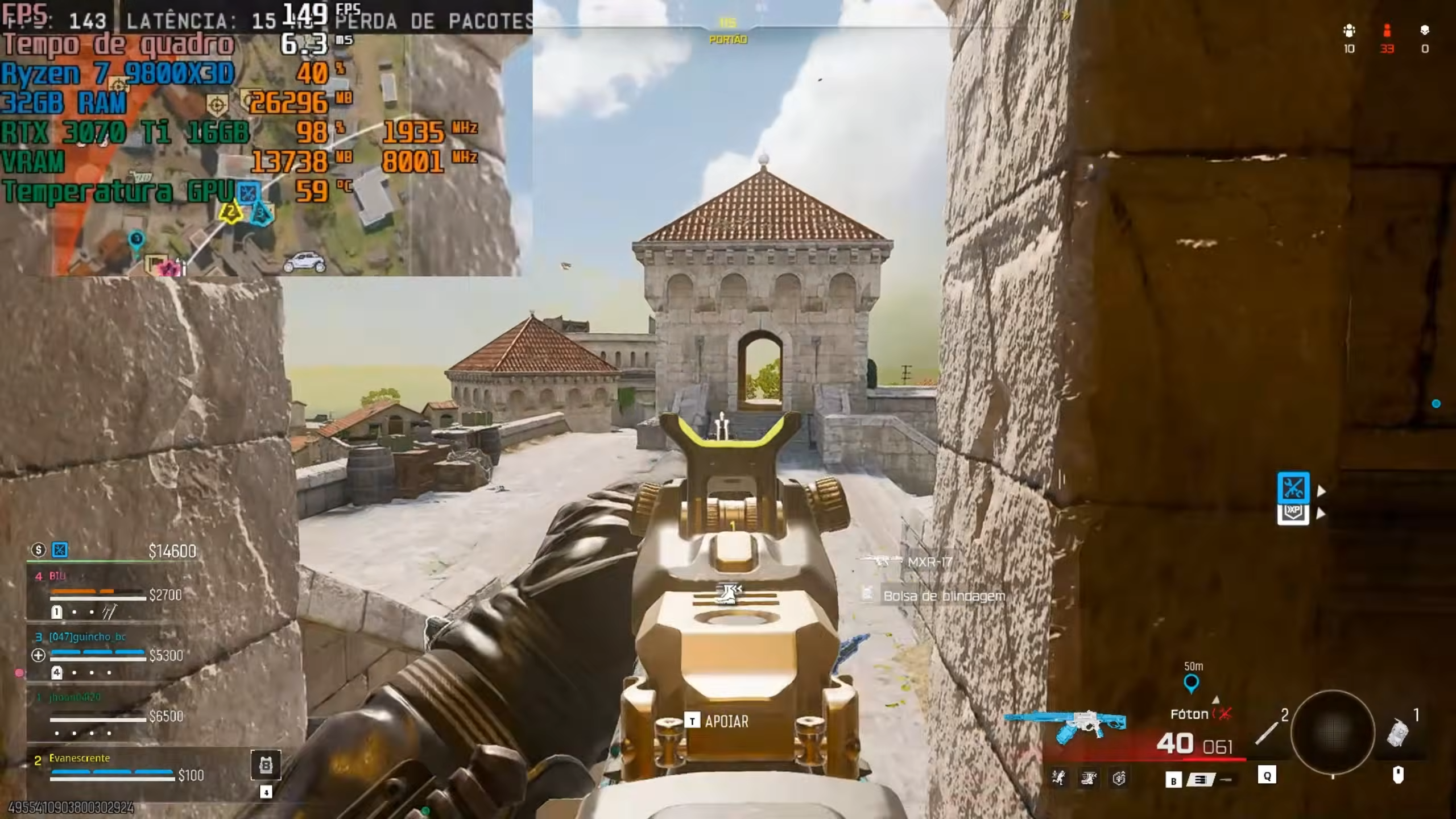
To actually test his creation's performance, Fabian ran a local LLM on the GPU to see if it would allocate more than 8GB and found that it used nearly the entire 16GB pool. Call of Duty: Warzone ate more than 13GB of VRAM while paired with a Ryzen 7 9800X3D, exhibiting no signs of instability.
Fabian even linked a Unigine Superposition benchmark in the video's description as proof of the card's existence, where he scored 5,367 points, which is actually lower than most real 3070 Ti runs. That's probably because of the decreased memory bandwidth of GDDR6 versus that chip's stock GDDR6X, which is the biggest tradeoff for the higher capacity.
(Image credit: Fabian - @fmklab on YouTube)
Overall, this was a successful experiment and possibly the only working 3070 Ti 16GB in the world, but there comes a point of diminishing returns. A 3070 Ti is still a powerful card, but it gets smoked by current-gen Blackwell options even with less memory. It would be much more reasonable to buy, say, an RTX 5060 Ti 16GB if you actually need better performance with some future proofing today, not to mention the superior efficiency, feature set, and after-sales support you'd get from a new Blackwell card.
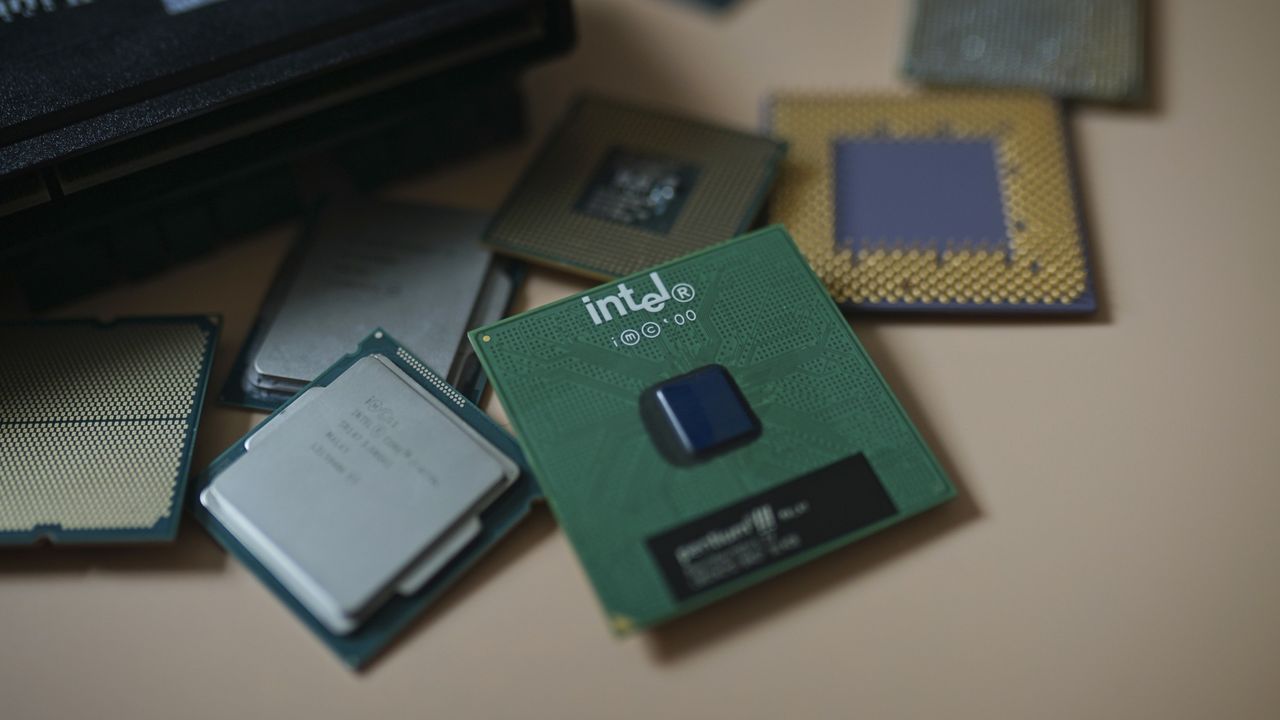
Intel is reportedly set to hike CPU prices by 10%, according to a new Digitimes report. Citing supply chain sources, the outlet says the increase follows two others, one in the first quarter of 2026 and another in July, among some server and client CPUs. Notably, the sources didn't say which products the price increase applies to, though presumably, the increases would come through Intel's mobile and server businesses before desktop client. Citing industry sources, DigiTimes also reports that Intel is set to launch "major annual products" in March 2027, with AMD following up with launches of its own between June and July.
The increases come on the back of Intel seeking higher gross margins for its products as the PC market shrinks. This is a story we've heard directly from Intel in the past. In its most recent earnings call in July, Intel chief financial officer David Zinsner attributed a 13% YoY increase in Intel's client revenue to higher average selling price, not a higher volume of sales.
Although the Digitimes report doesn't clarify which products will see a price increase, server and mobile seem like the most likely candidates. Intel's most recent Panther Lake calls for high-speed LPDDR5X-7467 memory as a minimum, and last-gen Lunar Lake CPUs have on-package memory. Naturally, higher memory prices put more pressure on fully built systems like laptops more so than socketed, standalone desktop processors.
On the server end, there's been an unprecedented increase in demand for server CPUs on the back of agentic AI workloads. That demand led to several consecutive records for Intel's share price, even without any major product announcements. Earlier in the year, Wall Street estimated the server CPU market would rise to around $120 billion by 2030 (currently around $30 billion). Now, those projections go up to as high as $220 billion.
According to the report, Intel is set to launch a major new annual product in March 2027, followed by AMD between June and July. Last week, a leaked Intel roadmap showed the company's next-gen Nova Lake desktop CPUs entering mass production in Q4 2026 with a release in Q1 2027, lining up with DigiTimes' report.
Although the timelines line up, the rumor mill has suggested an early Q1 launch for Nova Lake. It's worth noting that the DigiTimes report doesn't make mention of which product Intel will launch in March. This year, for instance, Intel launched its Xeon 600 CPUs for HEDT in March.
Perhaps more interesting is the AMD timeline. We already know of one major AMD product launch in the second half of 2027, which is Venice-X. Those are Zen 6 server CPUs with AMD's 3D V-Cache, packing up to 1,152 MB of L3 cache on the chip. Otherwise, that timeframe seems to point to AMD's next-gen desktop CPUs with the Zen 6 architecture, codenamed Olympic Ridge.
AMD launched its Venice server CPUs earlier this year, the first sporting the Zen 6 architecture. We haven't heard anything official about Zen 6 in the desktop yet. That's strange given AMD's last several releases. There was about a two-year gap between Zen 3 and Zen 4, as well as Zen 4 and Zen 5, on desktop. We've just crossed the two-year mark for Zen 5, so assuming AMD keeps a similar launch cadence, we'd expect to hear something sooner than June or July or next year.
That same explosive demand in server CPUs could have changed AMD's launch plans, however. Given that we haven't heard anything official about Olympic Ridge at this point, a launch in June or July isn't out of the question.
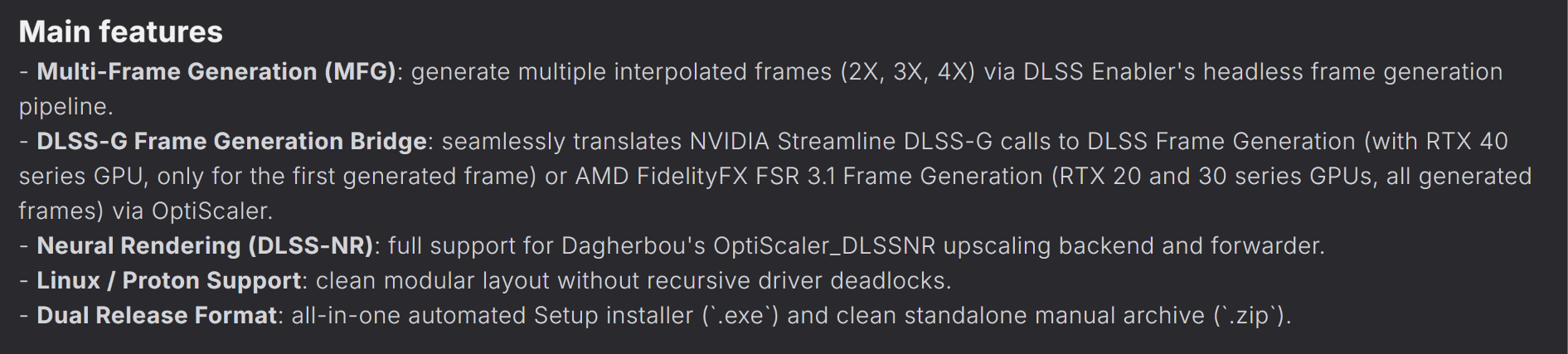
There are now several mods enabling DLSS 5 on older Nvidia GPUs, along with even AMD's RDNA 4 cards. Similarly, Nvidia's multi-frame gen has also been ported to prior generations. It can get a bit confusing to keep track of all these developments, and that's where "DLSS Unlocked" comes in. It's a new mod from ShyVox that combines OptiScaler_DLSSNR with DLSS Enabler to bring DLSS 5 and DLSS MFG to all RTX GPUs: Turning, Ampere, and Ada.
NVIDIA says your GPU is too old to run DLSS 5?Today, I prove that's not exactly the truth.DLSS Unlocked is my mod based on DLSS Enabler and OptiScaler_DLSSNR that allows every RTX GPU (20, 30 and 40 series) to combine DLSS 5 with MFG technology.https://t.co/WYbLVUJnBvSeptember 4, 2026
DLSS Unlocked serves as a sort of all-in-one package for owners of RTX 20-, RTX 30-, and RTX 40-series looking to enjoy the latest Nvidia goodies on both Windows and Linux. It takes two separate mods developed by other community members and organizes them into one seamless, unified release. You download the executable from GitHub or Nexus Mods and just select the root directory of the game you want to try it on.
As for the requirements, the game must use the DirectX 12 API and already support both DLSS upscaling and frame generation natively. You need to provide your own patched DLSS 5 DLL as well, for legal reasons. The two mods comprising DLSS Unlocked also have their own peculiarities. OptiScaler_DLSSNR is simple; it just uses OptiScaler to add neural rendering on top, but DLSS Enabler works in a more complicated manner.
On RTX 20- and RTX 30-series GPUs, you'll be using AMD's FSR 3.1 to interpolate all of the frames instead of using Nvidia's pipeline. On RTX 40-series, the second frame is generated through DLSS-G (regular frame-gen), but the rest of the frames are handled by FSR 3.1 to get you up to 6X MFG. That handoff is itself possible thanks to another mod called DLSSG to FSR3. See how this web of tweaks can get a bit confusing?
(Image credit: Future)
You also need to keep in mind that this is a different approach compared to DLSS 5 Swapper, which enables DLSS 5 inside any game through ReShade (using RenoDX). For DLSS Unlocked, the game must already support DLSS 2/3 upscaling for it to be patched into DLSS 5 and unlock MFG. That's how OptiScaler_DLSSNR works, which DLSS Unlocked relies on.
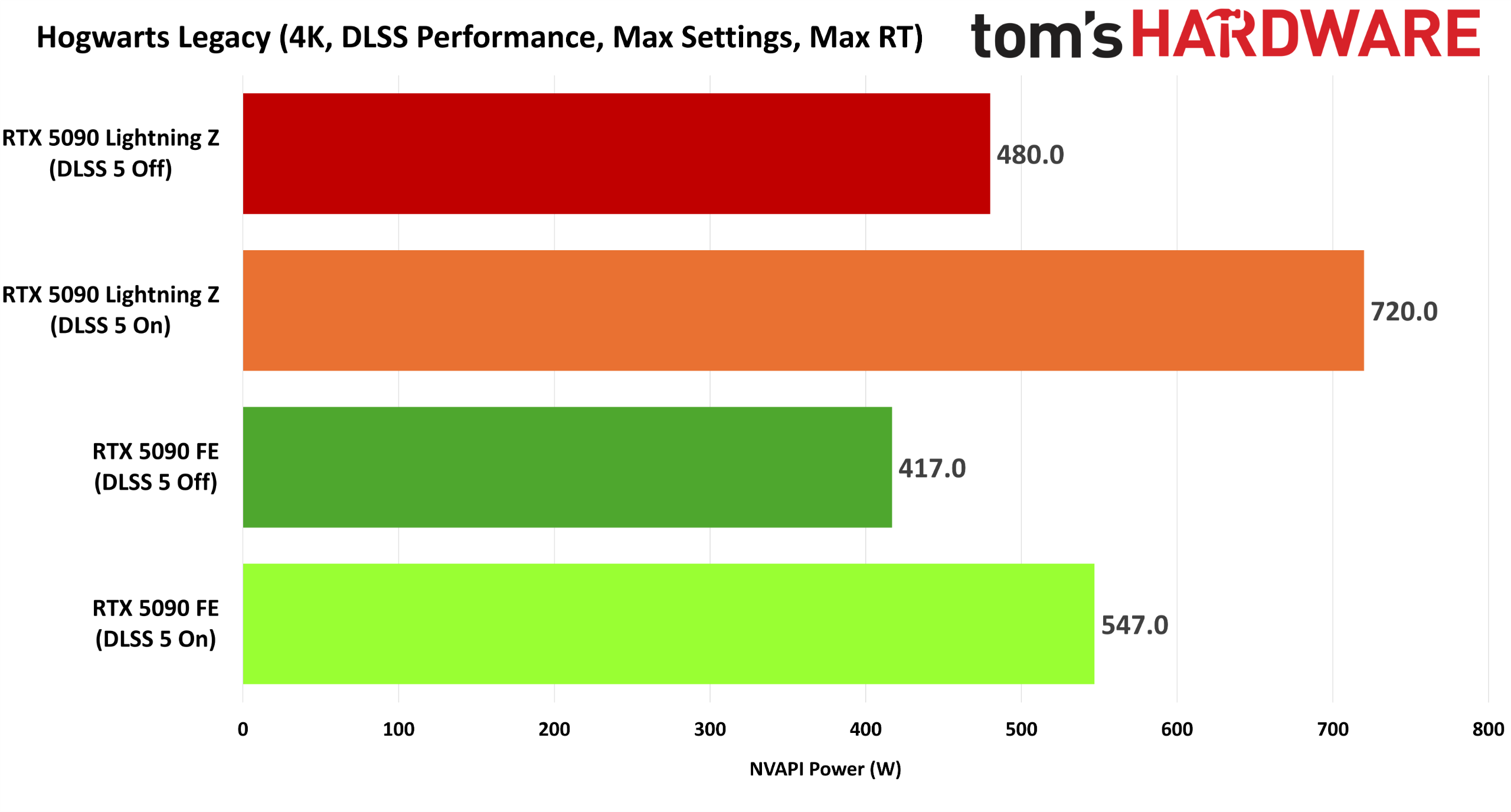
None of these mods should be used with multiplayer games because the anti-cheat software can detect them as threats and potentially ban you. Ultimately, when you have DLSS Unlocked installed, a DLSS-compatible game should now have DLSS 5 neural rendering while having its frames interpolated up to 4x. You definitely need that, considering DLSS 5 comes with a massive compute cost that can purportedly even melt RTX 5090s.
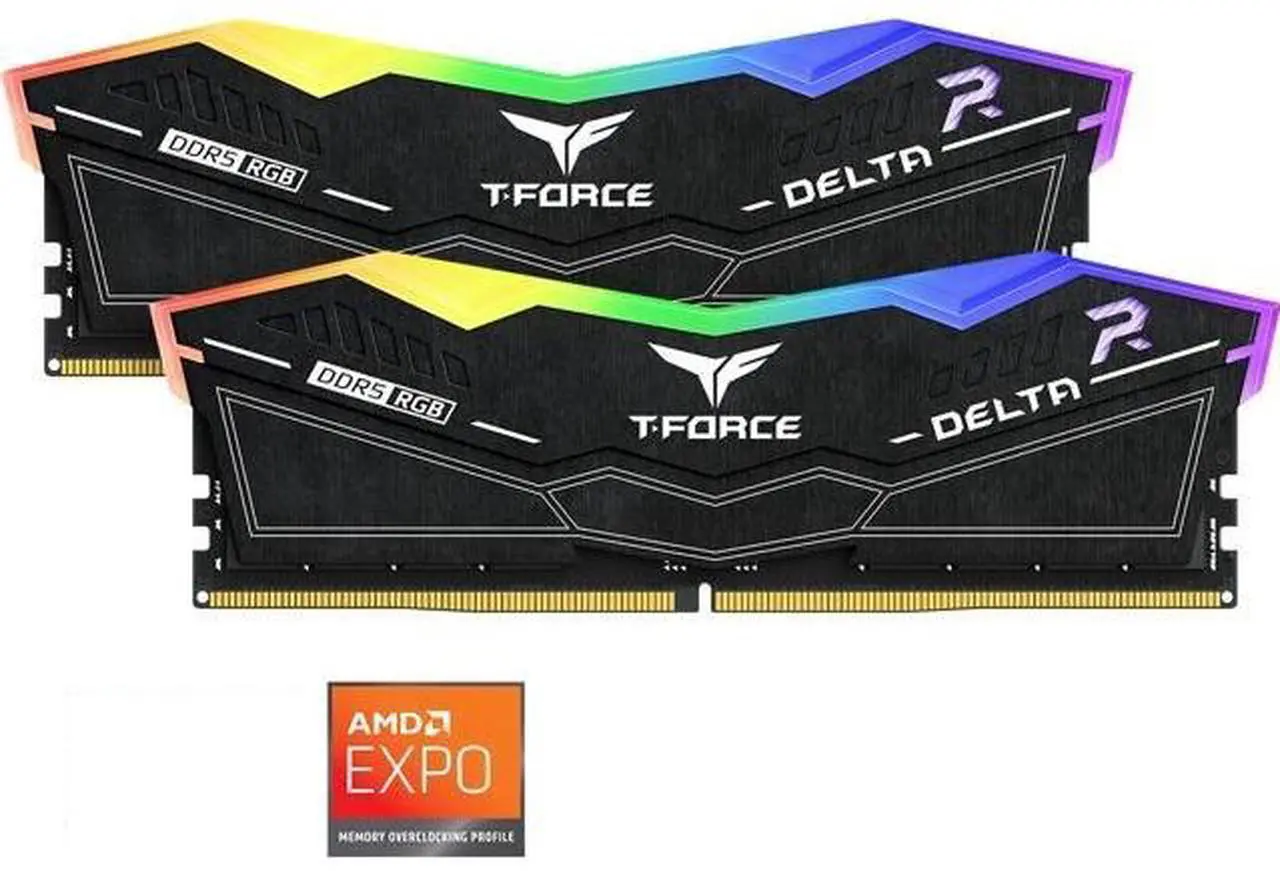
We're seeing 32GB DDR5 RAM prices regularly push above $400 now. That's just where the market is, and as unfair as it might seem, the world is still turning, and people still need memory for their PC upgrades. Luckily, this TeamGroup T-Force Delta RAM deal drops the price to $389.99 at Newegg, as long as you use the coupon code LUYRF228 at checkout.
Deals like this continue to be the best way to pick up new RAM as the ongoing global DRAM shortage, caused by the AI boom, rolls on. We're not going to see lower prices for RAM or SSDs any time soon. Deals like this aren't ground-breaking, and we're nowhere near record lows, but they're the best prices in a difficult market. Sans a time machine, or going second-hand, you won't find better pricing today than this.
As for this particular RAM kit, it's a good option for a mid-tier build. It's DDR5-5200, meaning speeds of 5,200 MT/s. That isn't the fastest RAM on the market, by any means, but it's certainly an upgrade over older DDR4 modules, which would usually see speeds of around 3,600 MT/s at best.
use coupon code LUYRF228 for $40 off
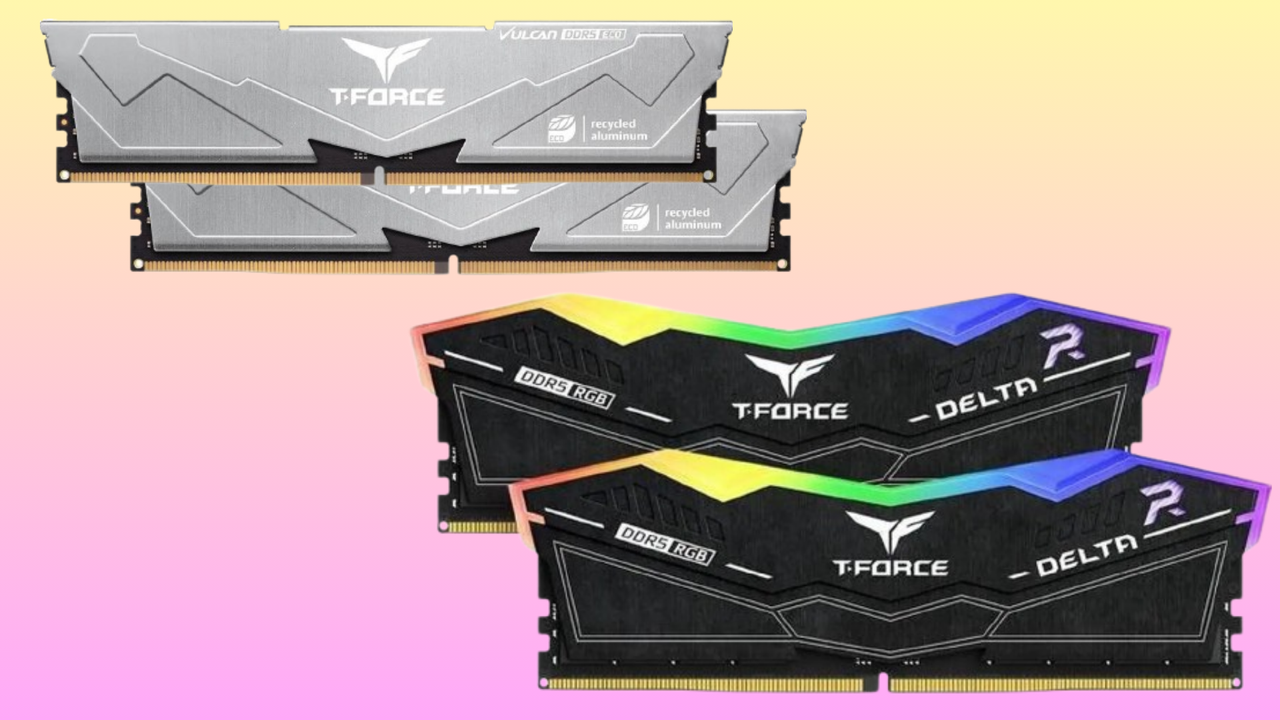
T-Force Delta RGB 32GB (2 x 16GB) DDR5-5200: was $429.99 now $389.99 This RGB kit from Team Group unlocks 32GB of DDR5 memory for your gaming PC or workstation rig. CAS and memory timings of 40-40-40-76, with speeds of 5,200 MT/s, mean this isn't the fastest memory out there, but it's currently the cheapest 32GB DDR5 kit you can buy.View Deal
You're getting two 16GB DDR5 modules here, with CAS and memory timings of 40-40-40-76. This is perfectly fine memory for workstation and gaming use, with built-in RGB lighting to spice up your build. Yes, it won't be the fastest you've used. If you need to max out a build with the best speeds and lowest latency, you'll need to look for higher-end DDR5 memory instead.
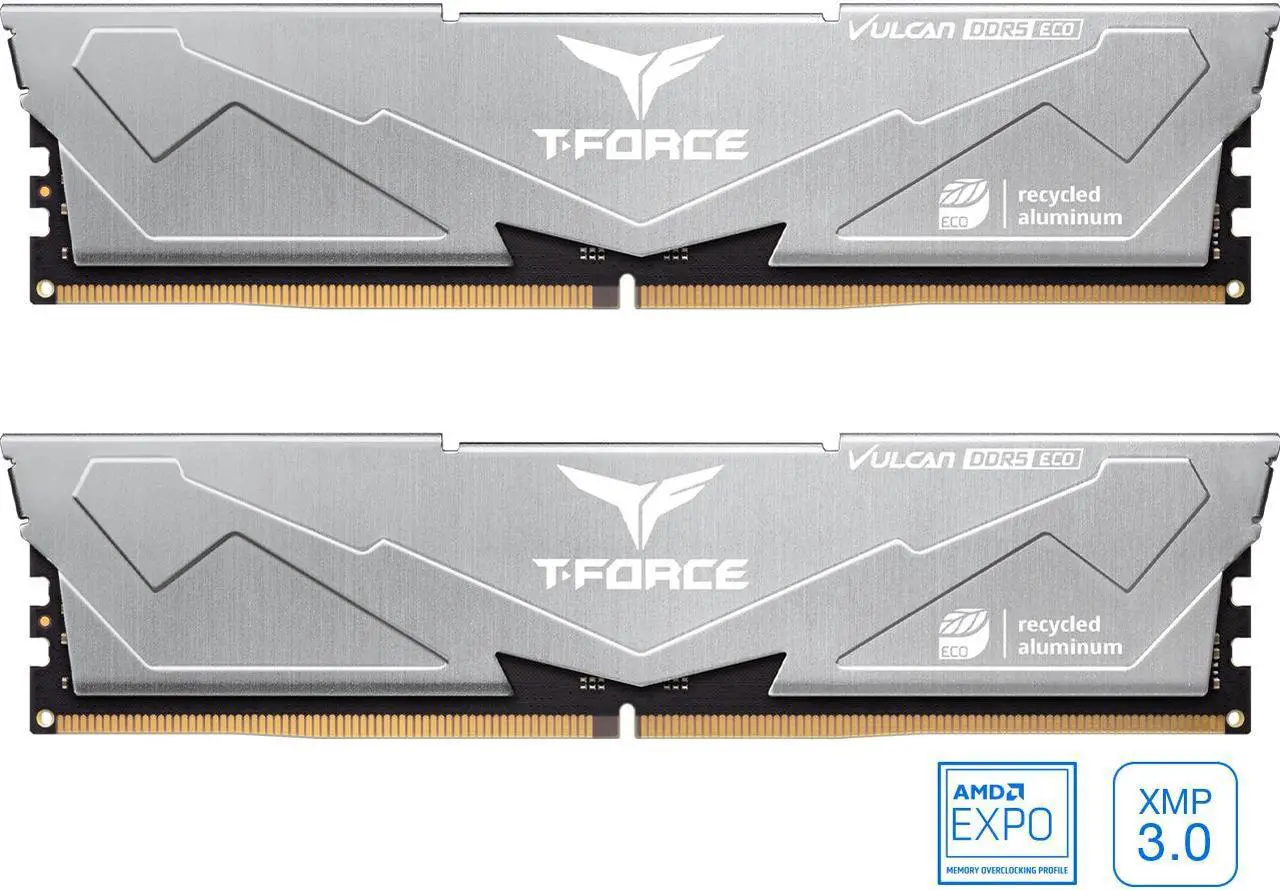
Luckily, you have options there. The next best option with faster speeds is this alternative kit, also from Team Group, for $415.99. The Team Group T-Force Vulcan has CAS and memory timings of 38-46-46-84, with speeds of 6,400 MT/s. Much faster, so ideal for a higher-end rig, but it lacks the RGB lighting. That might be a trade-off you're willing to accept if you've got the extra $27.
T-Force Vulcan Eco 32GB (2 x 16GB) DDR5-6400: $415.99 The next, best 32GB DDR5 RAM kit, also from Team Group, with much faster speeds of 6,400 MT/s. CAS and memory timings are 38-46-46-84. Probably the better option, if your budget can stretch to get it.View Deal
Honestly? The best option here, if you do have the extra cash, is the T-Force Vulcan for $415.99. It's faster, only slightly more expensive, and it's still a bargain compared to rival kits that can go as high as $600 or $700 at the moment. That said, a new PC build or upgrade on a budget requires a few compromises, and unless you're pushing your PC to its limits, the Team Group T-Force Delta RAM kit for $389.99 is a solid option.
Either choice is a deal worth considering in this awfully expensive market that PC builders face at the moment. AI isn't going anywhere, and we're probably going to see prices this high, if not higher, for some time. Deals like these, even if they aren't world-beating, are still the best way to get RAM at the moment.
Nvidia's GeForce RTX 50-series (codenamed Blackwell) graphics cards continue to rank among the best graphics cards available today. As a result, these highly sought-after Blackwell graphics cards have become prime targets for criminals seeking to scam unsuspecting buyers. Although scams involving hollow graphics cards are not new, their growing frequency and spread are cause for concern. The latest reports from Germany have revealed at least two buyers who fell prey to the same scam, reportedly from the same seller.
Hollow or phantom graphics cards may not be colloquial terms you hear every day. They basically refer to graphics cards that lack the silicon and memory chips. Criminals remove these components and sell non-functional graphics cards to their prey. Logically, you have no way of knowing these components are not present until you disassemble the graphics card, something that the average consumer does not do. Swindlers have run similar scams with fake memory modules without integrated circuits, or SSDs with microSD cards inside.
The first report, as recounted by respected hardware enthusiast Roman “der8auer” Hartung, uncovers a poor victim who bought a second-hand Palit GeForce RTX 5090 GameRock OC for around $2,090 (1,800 euros). The seller’s asking price was suspicious since a brand-new one starts at around $5,805 (4,999 euros) in Germany. Even for a used one, the dramatic price difference indicates a potential scam.
Many of these scams happen through online transactions. So the buyer went so far as to meet the seller in person, hoping a face-to-face interaction would ensure the graphics card was legit. It did not make a difference, though, because the buyer did not have a system to test the graphics card on the spot. In the end, it was a matter of taking the seller's word for it, and that turned out horribly.
A second report has emerged from a member of the Hardwareluxx forums, who reportedly fell victim to the same deceptive seller. Tragically, this individual ended up paying close to $2,613 (2,250 euros) for the phantom graphics card.
In both cases, the scammer put on a friendly facade and provided what seemed like legitimate paperwork to bolster the buyers' trust. For the first victim, the seller shared an invoice showing the purchase of two graphics cards, claiming to sell one because they no longer needed it. Similarly, in the second case, the scammer furnished an invoice to convince the buyer of the transaction’s legitimacy.
The use of realistic invoices is a growing trend among fraudsters. The first buyer uncovered that the serial number printed on the graphics card itself did not match the serial number listed on the packaging. The second buyer discovered that the serial numbers on the invoice and the packaging matched, but the seller deliberately scratched off the serial number on the graphics card.
The AI gold rush will not be over anytime soon, so we do not expect graphics card pricing to improve. This gives scammers more motivation to prey on buyers' desire for a graphics card and lure them in with prices that seem too good to be true. The two incidents serve as a cautionary tale for anyone trying to procure a graphics card, especially from second-hand sources.
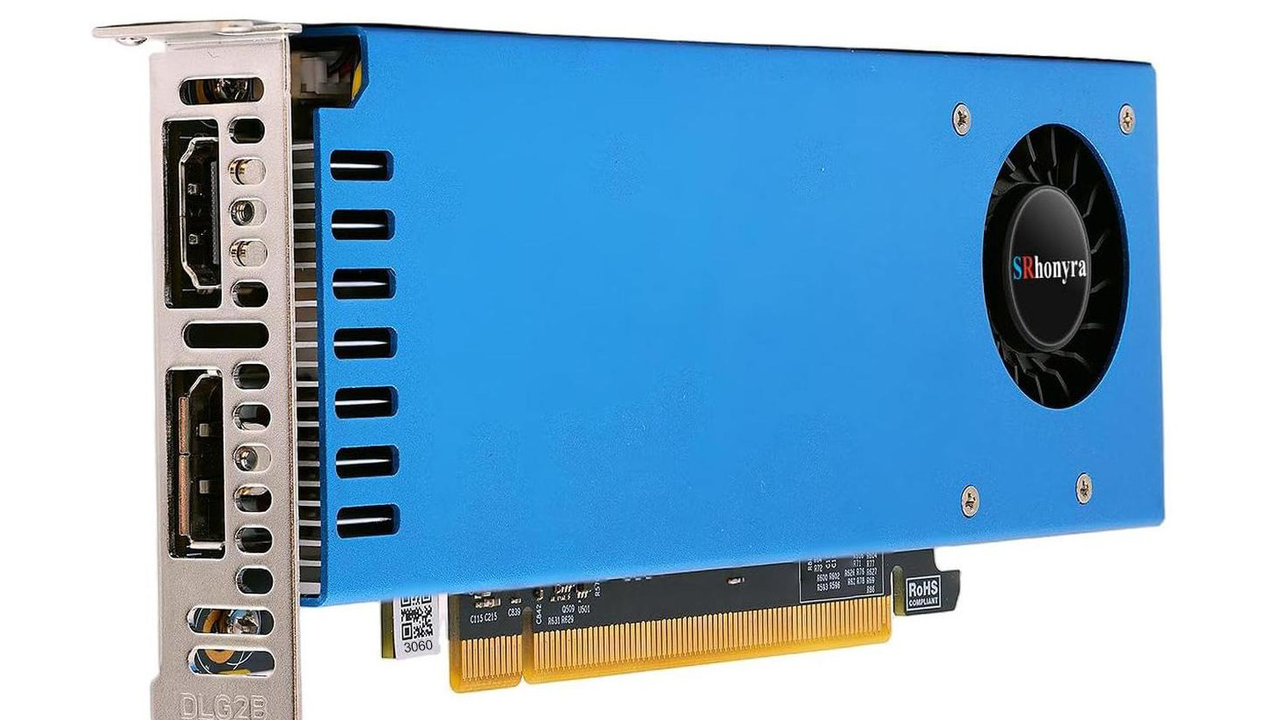
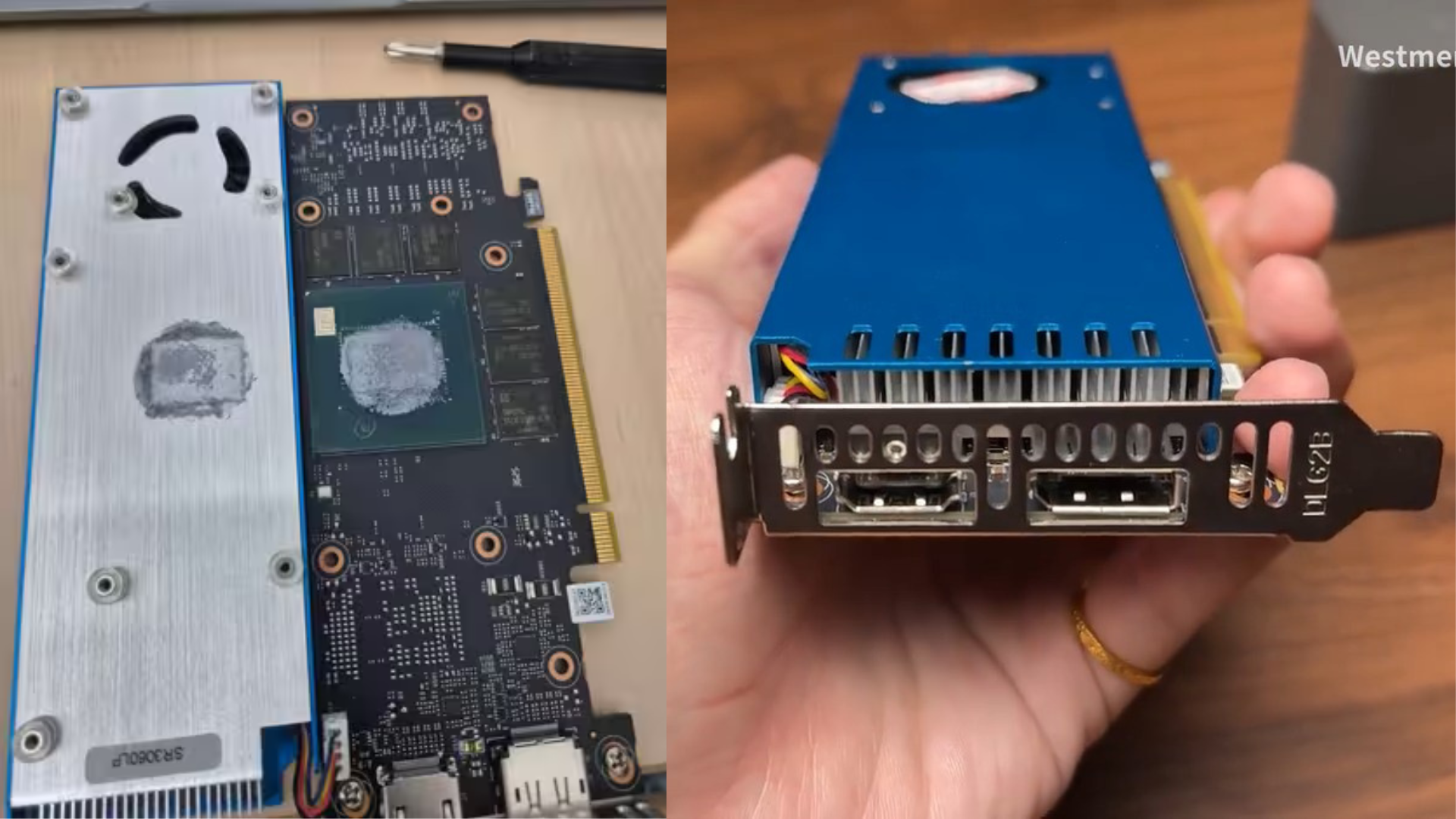
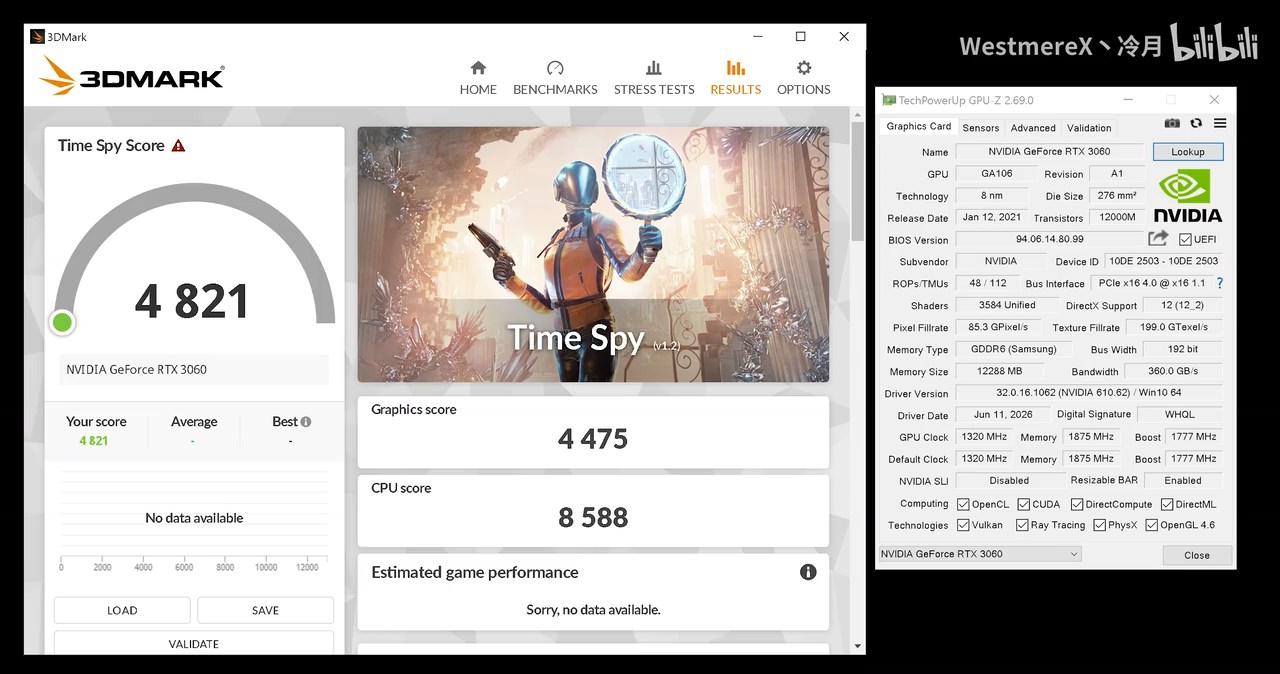
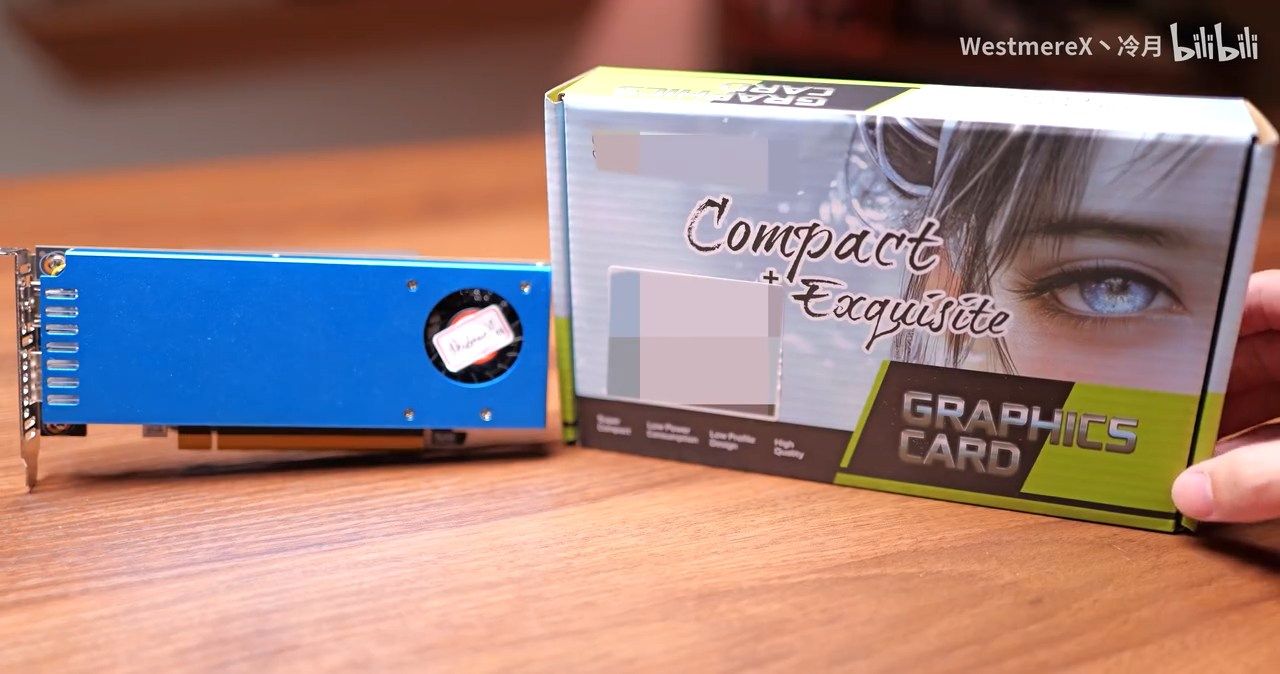
Not that long ago, we reported that Nvidia was dusting off the blueprints for the RTX 3060, in its 12 GB form. At the time, we'd spotted it in stores for about $339.99, but just like with ever-climbing memory, hard drive, and SSD prices, two months passed is an eternity. The same cards are now selling for $489 new, and one particular specimen is the SRhonyra RTX 3060 12 GB Low Profile card, for $495.59.
This card and its price may raise more than a few eyebrows, but there are reasons why it exists. First off, it's a one-slot model, making it easy to put many of them to work in the same machine with relatively little concern for airflow. They have no power inputs and rely on 70 W delivered by the PCIe slot alone, eschewing the need for a high-end PSU and lots of cables. Third, the low-profile form factor makes it possible to place them in potent puny personal computers.
Attentive readers might surmise that one (or more) of these would be good candidates for an entry-level local LLM rig. That's precisely how SRhonyra is pitching the card, calling it "capable of local AI" and "running 7B [to] 13B LLMs." A standard-dimensioned, fully powered RTX 3060 is capable of drawing a maximum of 175 W, so it's fair to assume the performance of the diminutive variant will sit below that of its full-sized brethren, given it ought to only draw 70 W of juice from the PCIe slot.
Even then, it's likely that people interested in these cards are looking to use them either as secondary GPUs, or use more than one in the same box to be able to virtually pool their VRAM and use larger models than you'd otherwise be able to. The low power draw also means they're a simple, thoughtless drop-in to an existing system, whereas larger, more power-hungry cards require careful consideration with physical spacing (or lack thereof), power supply sizing, and ever-annoying cables.
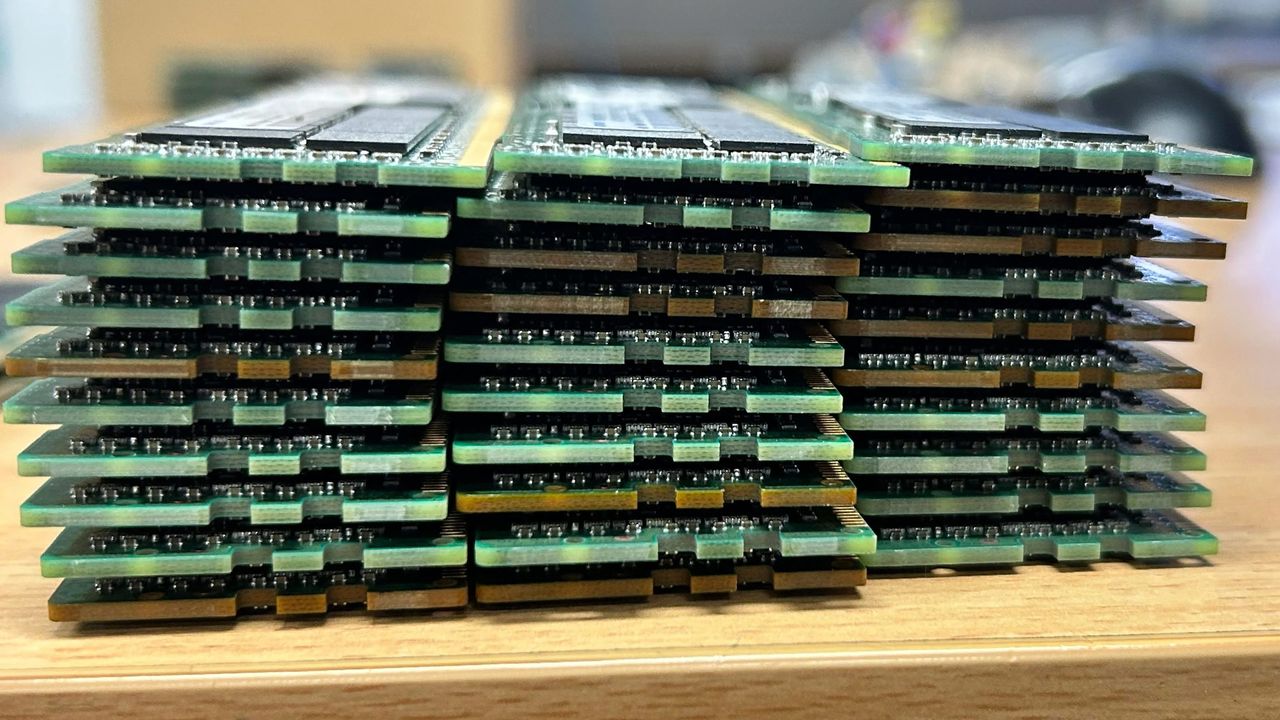
A computing enthusiast has shared images of a fat stack of DDR4 RAM sticks that they found at home. VastOption8705 told other tech fans on Reddit that they “found 10k worth of RAM sitting in my garage.” We count 30 sticks of DDR4-2666, and three sticks shown separately are all 64GB modules. If they are all 64GB modules, that number of sticks would add up to 1,920GB of RAM…
How did this huge amount of RAM end up in VastOption8705’s garage? The story goes that the Redditor was allowed to keep an old server from their workplace. Such 'generosity' isn’t unheard of, and it might have actually saved the company some recycling fees.
Is server DDR4 useful?
Numerous comments on the Reddit post jokingly pitch for RAM stick donations. But they might be barking up the wrong tree. Looking more closely at the sticks, where the labels are clearly readable, reveals that they are Samsung 64GB DDR4 ECC registered DIMMs (RDIMMs).
These kinds of RAM sticks are commonly used in servers built around Intel Xeon, AMD Epyc, or AMD Threadripper platforms. Sadly for their market value and the folks on Reddit hoping for some spare RAM, they aren’t consumer PC friendly. Even if you have a DDR4-supporting motherboard, these ECC RDIMMs will be both physically and electrically incompatible with your home creator/gaming PC.
Pricing and the Australia question
A quick poke around eBay U.S. listings shows that a single 64GB DDR4-2666 stick like those shown can be bought for between $350 and $425. So, we could roughly value the 30 sticks at $12,000 if a price of $400 per stick were achieved. The OP’s touted $10K valuation wasn’t far off. But if VastOption8705 lives in Australia, as they seem to, and guesstimated the value in Australian dollars, AU$10,000 currently equates to ~US$7,200 – quite low.
If you have spare RAM in your garage, don't share your address on public forums. The best I could find is a pair of 8GB DDR4 SO-DIMMs in my drawer. I also had some 30-pin SIMMs, SDRAM, PowerMac ROMs, and DDR3 modules probably worth just pennies, despite the RAMpocalypse.
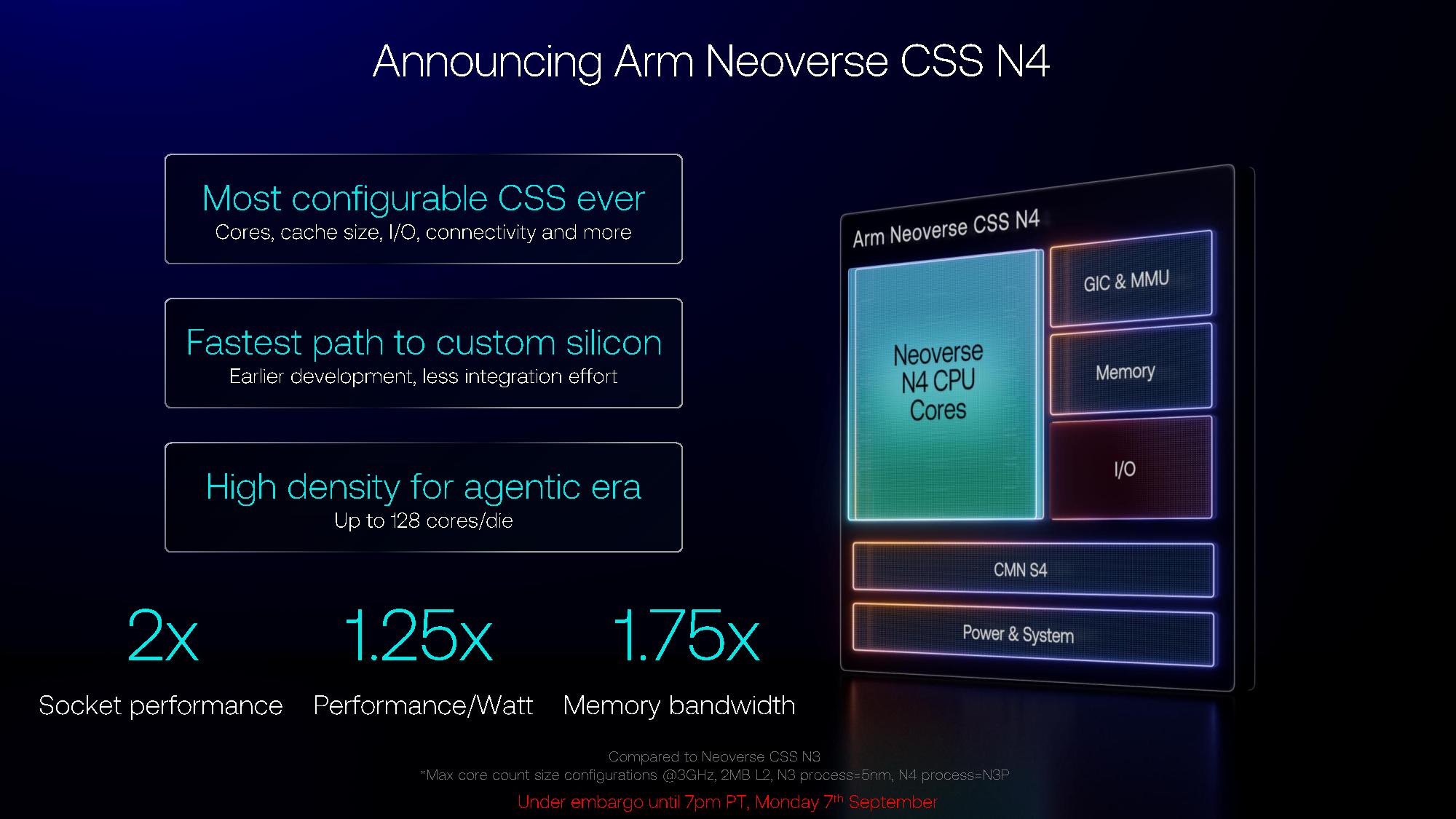
Arm is bringing its next-gen Neoverse CSS N4 platforms to the cloud, sporting up to 128 cores per die, built on TSMC’s N3P process. Arm’s Compute Subsystem, or CSS, is a semi-custom program that allows customers to design a chip based on Arm’s IP, configuring components like core count, cache size, I/O, and connectivity to fit their specific needs. It’s the same platform we’ve seen at work everywhere from CPUs at Azure and Google Cloud to DPUs at Nvidia and Intel.
Arm says Neoverse CSS N4 supports between eight and 128 Neoverse N4 cores, running up to 3.8 GHz. Presumably, the clocks drop as the core count rises; Arm didn’t clarify the maximum clocks for each possible configuration. At a system level, Neoverse CSS N4 can scale beyond 128 cores, with support for multi-chiplet and multi-socket designs, and with support for UCIe through chip-to-chip interconnects, as well as “partner-specific PNYs.”
The platform supports either DDR5 or LPDDR6, and features up to 256 MB of L3 cache per die. For local cache, Arm includes up to 2 MB of L2 per core, as well as 64 KB of L1 instruction cache and 64 KB of L1 data cache per core. For I/O, Arm supports up to 128 lanes of PCIe 7/6 and CXL 4.0.
It’s a significant upgrade over the Neoverse CSS N2 platform, which topped out at just 64 cores, 1 MB of L2 cache per core, and 64 MB of L3 cache, paired with either DDR5 or LPDDR5 and 64 PCIe 5.0/CXL lanes.
(Image credit: Arm)
With 128 cores running at 3GHz and 2MB of L2 cache per core, Arm says Neoverse CSS N4 delivers twice the socket performance of Neoverse N3, 1.25x performance per watt, and 1.75x the memory bandwidth.
Arm’s N-series cores are optimized for performance per watt, while its V-series cores are targeting maximum performance. For instance, Arm used the Neoverse CSS V3 building blocks for its own AGI CPU, and Nvidia used Neoverse V2 for its last-gen Grace CPU (the Vera CPU uses a custom core). AWS has also used Neoverse V-series cores for its own Graviton chips, as does Google Cloud for Axion.
N-series cores aren’t usually deployed in high-performance CPUs. Rather, they fit into less-performant accelerators, such as Intel’s IPU Adapter E2100, which is built on Neoverse N1 cores. We’ve also seen it deployed in less-demanding, cloud-based workloads, such as through Microsoft’s Azure Cobalt 100, which is built on Neoverse N2. Cobalt 200 moved onto Neoverse V3.
We don’t know much about the Neoverse N4 cores, codenamed Dionysus. Arm’s 2024 roadmap indicated we’ll see Arm Neoverse CSS V4, as well, codenamed Vega.
Unlike a traditional announcement from Intel, AMD, or the various partners that build on Arm, we won’t see Neoverse N4 cores in the wild for a while. The announcement Arm is making is for those who are building on the CSS platform, leveraging Arm’s validated building blocks to create semi-custom silicon quickly. Arm has yet to announce any partners, though traditionally, only a few large CSS contracts are needed.
Additional Arm AGI CPU deployments
(Image credit: Arm)
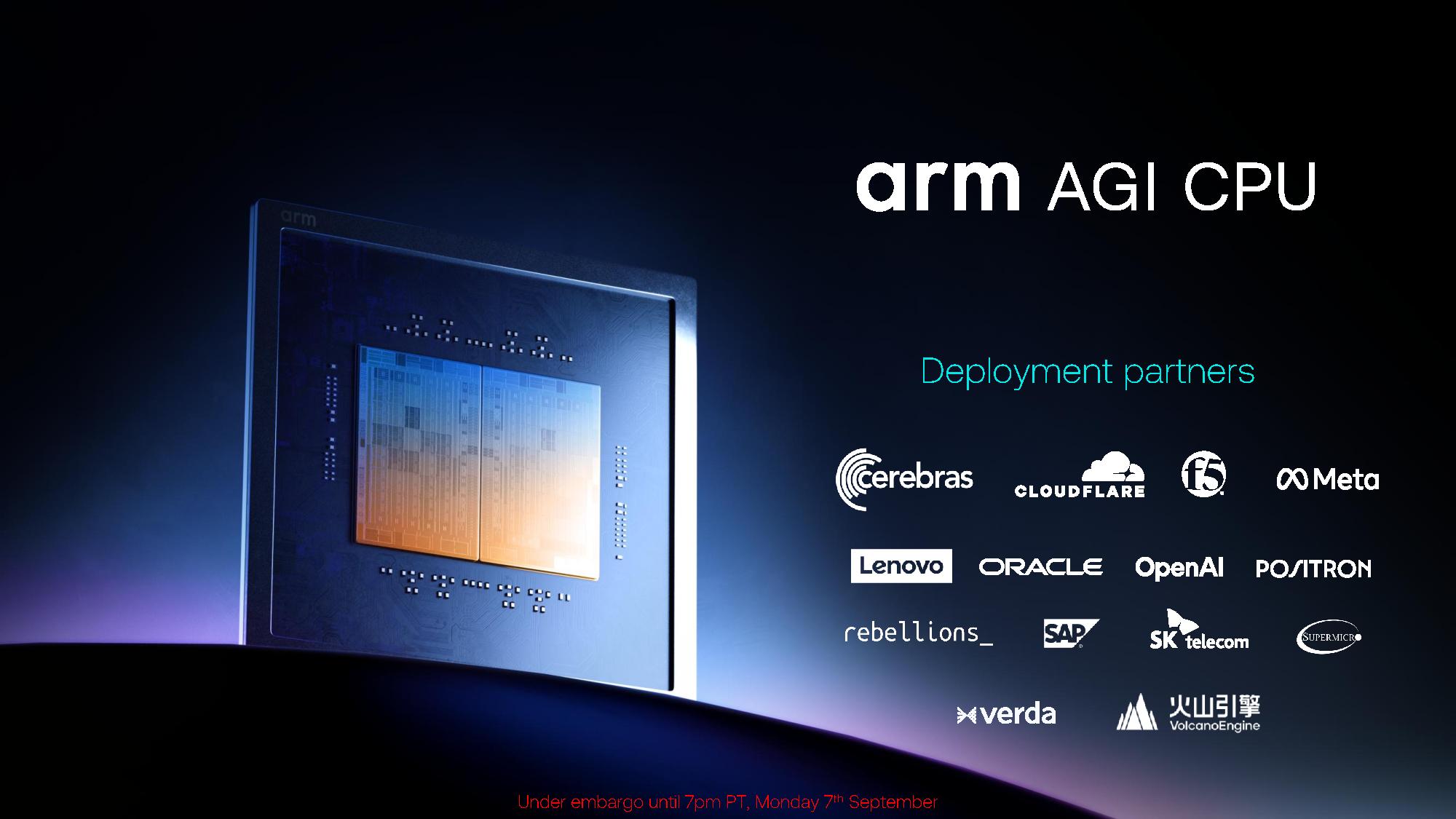
Alongside the announcement of Arm Neoverse CSS N4, the company revealed additional deployments of its own AGI chip, which is built with Neoverse V3 cores. The company revealed that Oracle and ByteDance will deploy AGI chips, alongside previously announced deployments at Meta, Lenovo, SAP, OpenAI, Cloudflare, and others.
Although Arm has talked a lot about AGI, including a deep dive into the chip’s architecture at Hot Chips, we’ve yet to see real-world performance numbers. That’s not uncommon, especially among more recent Arm-based chips. For instance, we only have gen-on-gen comparisons for Microsoft’s Azure Cobalt 200 and AWS’ Graviton5. Arm has vaguely referenced performance by saying AGI offers “more than 2x the performance per rack compared to the latest x86 systems,” though those claims are based on internal estimates, not real benchmarks.
AGI is a dual-die CPU with up to 136 Neoverse V3 cores and up to 272 MB of L3 cache that can clock up to 3.7 GHz. It has the specs to match any high-end x86 design currently on the market, built on a 3nm node and packing up to 6TB of memory capacity per chip, running at up to DDR5-8800. Perhaps the biggest difference compared to AMD and Intel was Arm’s decision to include the memory and I/O on the same die as compute, which it says leads to sub-100ns memory latency.
It’s Arm’s first attempt at its own production silicon, though it’s also been positioned so far as a vehicle for the broader applications of Arm in the data center. Microsoft, Nvidia, Meta, Google Cloud, and others build custom chips based on Arm IP, which still seems to be the primary goal, even with AGI in the mix.
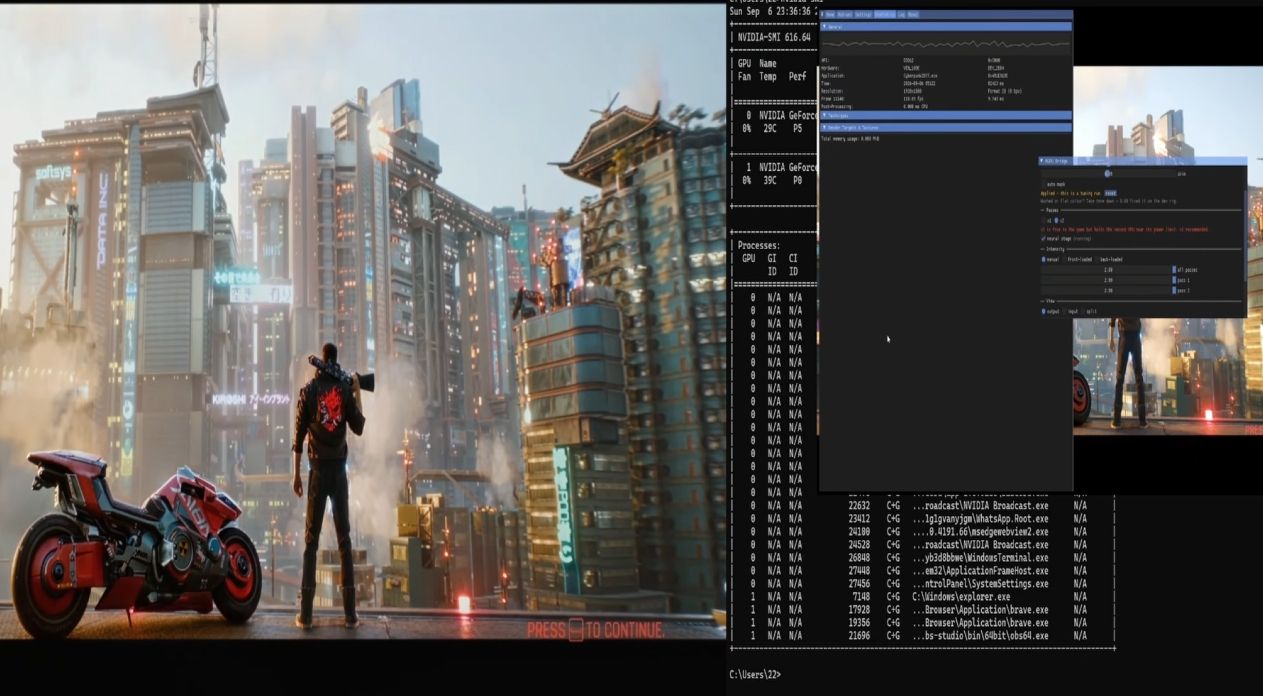
Nvidia's DLSS 5 Neural Rendering technology has taken the PC gaming world by storm since its recent leak and then official rollout in recent days. In what might be one of the most impressive technical applications and mods of the feature yet, one developer has showcased DLSS 5 running on a second GPU to share the processing load, rendering the game on the first GPU before applying Neural rendering at the end of the frame, thus boosting the performance of neural-rendered frames.
Marcelo Guibout shared the demonstration online, with videos showing the process running on a cinematic video from The Blood of Dawnwalker, as well as Cyberpunk 2077. Guibout was quick to clarify that the videos are technical showcases, not benchmarks. However, they did share some performance figures. More exciting still, you can download the project from GitHub and try it for yourself. However, the technique does require a second display and doubles the display latency.
The above demonstration features a Ryzen 7 7800X3D, 32GB DDR5 setup with two Nvidia RTX 5060 Ti 16GB GPUs, with both cards using PCIe 5.0 x8, and a display attached to each card. The ReShade add-on, dubbed MGPU Bridge, reads each finished frame before applying Nvidia's Neural rendering. "Neural rendering happens at the end of the frame: it takes a finished frame and hands a finished frame back," they explain. "That is what makes it possible to pick it up and run it somewhere else. The add-on creates its own D3D12 device on your second GPU, sends each finished frame across to it, runs DLSS-NR there, and displays the result on that card's own monitor — so nothing has to come back. The render GPU does no neural work at all and runs cooler for the same reason."
In the TBOD demo at 1080p, they shared the following performance numbers:
DLSS mode
DLSS 5 off
DLSS 5 on the render card
DLSS 5 on the second card
DLAA
67-70
44
67-70
Quality
98-99
54-55
91
Performance
127-131
59
106-107
Ultra Performance
172
69-71
157
Guibout clarified that DLSS super-resolution is running in every column of the test, with the rows showing each mode tested. The game rendered at the same internal resolution in all three columns, with the first column giving figures with DLSS 5's neural rendering switched off, representing the ceiling for performance. As you can see, running DLSS 5 on the second card in this dual-GPU setup drastically increases performance in every mode.
"The frame rates are not the finding. The slope is: what you gain by going from DLAA down to Ultra Performance, and how much of that available gain each arm keeps," Guibout explains. "Neural post-processing saturates whatever device it runs on, and it always runs at output resolution. Its cost barely falls as you drop the DLSS mode, while the render work collapses. On the render card it therefore eats a larger and larger share of every frame, and upscaling stops paying for itself: you keep about a third of what the machine actually had to give. Move it to the second card and you keep 86% of it."
Other benefits include temperature reductions on the rendering card, with the first GPU running 21 degrees cooler without the neural load.
Guibout is cautious to note this isn't a return to Nvidia's SLI technology, which would split the workload of frame rendering between two GPUs. They also noted plainly this is not Nvidia's vision for DLSS 5 and lacks the native integration of official DLSS 5 support.
You can see the original demo for TBOD below:
As commenters online have noted, the method seems more akin to using Nvidia's dedicated PhysX cards, with plenty of potential for gamers who have the capacity to run a dual GPU setup. The second demo features a Ryzen 5 5600 on a DDR4 system, so top-of-the-line hardware isn't required to make it happen.
Montech is one of those brands that, despite a relatively recent international profile, traces its lineage back through the Taiwanese components industry to engineers with three-plus decades of experience. The company formally took shape in 2016 and entered Western retail channels around 2019, initially building its name on aggressively priced PC cases. From that beachhead, Montech expanded methodically into air and liquid coolers, fans, mechanical input devices, and, most relevant for this review, power supplies.
The original Century line positioned Montech at the value-conscious end of the PSU market. At the same time, the more recent Titan series advanced to premium territory by relying on Seasonic and CWT for its underlying platforms. The Century II line, refreshed for ATX 3.1 and PCIe 5.1 with native 12V-2x6 connectivity, sits between those bookends. It is meant to deliver modern-spec compliance and Gold-level efficiency at a price point that undercuts the established premium players by a meaningful margin. The 850W model is the entry point of the family, and today we examine whether it belongs among our list of best power supplies on the market.
Specifications and Design
Montech Century II Gold 850W ATX 3.1 Power specifications (Rated @ 40 °C)
RAIL
+3.3V
+5V
+12V
+5Vsb
-12V
MAX OUTPUT
20A
20A
70.8A
3A
0.3A
100W
100W
849.6W
15W
3.6W
TOTAL
850W
AC INPUT
100 - 240 VAC, 50 - 60 Hz
MSRP
$90
In the Box
The Century II 850W ships in a tidy cardboard box dressed in a charcoal/silver color scheme that attempts to mirror the unit's own finish. Montech leans hard on the dual certification story up front, with the 80Plus Gold and Cybenetics Platinum badges both printed prominently on the box face, alongside the ten-year warranty claim and references to the ATX 3.1 and PCIe 5.1 standards. Foam inserts protect the PSU itself.
(Image credit: Tom's Hardware)
Bundled accessories are beyond modest, especially for the price range of the unit. We found the AC power cable, a sleeve of mounting screws, a few reusable Velcro-style cable straps, a few cable ties, and a small user manual. At this price point, that is an unexpectedly good unboxing experience.
(Image credit: Tom's Hardware)
The cable bundle itself is all-black and entirely flat-ribbon in construction. The native 12V-2x6 cable is the highlight, rated at the full 600W of the connector standard. Buyers get two 6+2-pin PCIe cables carrying four connectors total, two EPS 8-pin runs for CPU power, two SATA chains with four connectors apiece, and a single Molex chain. The total connector count covers every realistic single-GPU configuration this PSU should be paired with, including current-generation cards with multiple PCIe inputs.
(Image credit: Tom's Hardware)
Montech Century II Gold 850W ATX 3.1
Connector type
Hardwired
Modular
ATX 24 Pin
-
1
EPS 4+4 Pin
-
-
EPS 8 Pin
-
2
PCI-E 5.1 (12V-2x6)
-
1
PCI-E 6+2 Pin
-
4
SATA
-
8
Molex
-
4
Floppy
-
-
External Appearance
At 160mm in length, the Century II 850W is a touch longer than the ATX guideline 140mm reference, though well within what any modern mid-tower will accept without complaint. Compact-case builders should double-check clearances before committing.
(Image credit: Tom's Hardware)
Visually, this is one of the most distinctive units in its class. Where the vast majority of competitors stick to plain black sheet metal, Montech has gone with a two-tone treatment: a matte silver top panel cut with a geometric triangular grille that looks like an architectural detail more than a fan vent, paired with a black chassis body. Both side panels carry a subtle, debossed angular pattern and the Century II wordmark, while a discrete "Montech" logo is along the bottom edge. The finish is clean, and the panel gaps are tight.
Tom's HardwareTom's Hardware
The rear face holds the AC receptacle and the primary on/off switch, plus a smaller secondary toggle that lets the user disable the hybrid mode and run the fan continuously if they prefer. That second switch is something Montech could easily have buried, and it is a small feature but one we are glad to see. At the front, we can only see the modular connectors with their silkscreened labels that clearly identify each socket. Connector keying makes mis-insertion practically impossible anyhow.
Tom's HardwareTom's Hardware
Internal Design
Cooling falls to a 135mm Hong Hua HA13525M12SF-Z fan, which uses a fluid-dynamic bearing engine. The model designation indicates a medium-speed variant rather than the higher-rated H-series spindle some premium Hong Hua models employ, but the maximum speed of 2000 RPM is very high. In practice, fluid-dynamic bearings are the right choice for a unit pitched for long service life, and the fan curve of this unit is calibrated conservatively enough.
(Image credit: Tom's Hardware)
The OEM is Shenzhen Xinweiye Technology Co., typically referred to as XWY. XWY is not as familiar a name as Seasonic, CWT, or Great Wall, but the company has been quietly supplying Montech's Century II family and a handful of other brands' mainstream ATX 3.x designs.
Tom's HardwareTom's Hardware
Filtering on the AC inlet PCB consists of four Y capacitors, two X capacitors, and two filtering inductors – a good, complete configuration for a unit at this wattage. The two bridge rectifiers sit on the large heatsink across the unit’s edge, sharing it with the APFC stage components. The APFC stage uses a typical inductor paired with two bulk capacitors mounted side by side, one from Rubycon and one from Nippon Chemi-Con, both branded for 105°C operation. These are two of the most reputable Japanese manufacturers, in line with Montech's marketing claim of 100% Japanese capacitors, although the products themselves are extremely unlikely to have been made in Japan nowadays.
(Image credit: Tom's Hardware)
The primary inversion stage topology is a half-bridge LLC with two PIP Semiconductor SPTA65R130FDD MOSFETs, entirely appropriate for the price point and well-proven at this output rating. The main transformer sits centrally on the board with gold tape insulation, dividing primary from secondary. The rectification stage on the secondary side is handled by six SPTJ04R014E MOSFETs operating in synchronous-rectifier mode. 3.3V and 5V is generated through typical DC-to-DC conversion, but unlike the commonly found vertical daughterboard, all components are on the main PCB.
(Image credit: Tom's Hardware)
Secondary-side electrolytics are predominantly TK-branded, which corresponds to the Japanese manufacturer Toshin Kogyo. TK is genuinely Japanese, which validates Montech's marketing copy, but enthusiasts should be aware that Toshin Kogyo is widely regarded as a second-tier domestic capacitor brand rather than a peer of Nippon Chemi-Con, Rubycon, or Nichicon. Then again, TK’s reputation is solidly higher than that of the manufacturers supplying the silicon of this unit. In practical terms, the unit should age perfectly well, but it is a tier below what the higher-end competition uses (and that is reflected in the price).
(Image credit: Tom's Hardware)
Cold Test Results (25°C Ambient)
Cold Test Results (25°C Ambient)
For the testing of PSUs, we are using high-precision electronic loads with a maximum power draw of 2700 Watts, a Rigol DS5042M 40 MHz oscilloscope, an Extech 380803 power analyzer, two high-precision UNI-T UT-325 digital thermometers, an Extech HD600 SPL meter, a self-designed hotbox, and various other bits and parts.
At 115 VAC, the Century II 850W averaged 90.5% efficiency across the 10-100% load range during cold testing. At 230 VAC, the figure rose to 92.5%. Both numbers comfortably exceed the Cybenetics Gold threshold, with Cybenetics independently certifying the unit as Platinum across both input voltages. The unit holds 80Plus Gold certification under the 115V input voltage because it does not meet the 100% load efficiency requirement for the 80Plus Platinum badge, which is why Montech labels it Gold rather than Platinum on that scheme. The Cybenetics methodology, which considers the average efficiency rather than the four-point 80Plus protocol, reflects the platform's strengths more accurately. The efficiency curve peaks just below the 50% load mark and stays largely flat from there through the upper end of the range.
Fan behavior under cold conditions is adequately good. The smart fan mode keeps the rotor stationary at the lowest load points, and even after the fan begins spinning, the noise floor stays well under the threshold of audibility in a typical desktop environment. There is a ramp toward maximum output, but the fan does not approach anything resembling a high RPM during room-temperature testing. Internal temperatures climb predictably with load but remain well within the comfort zone of the components throughout.
Hot Test Results (~45°C Ambient)
Hot Test Results (~45°C Ambient)
Inside the hot box, the average efficiency at 115 VAC fell to 89.2%, while 230 VAC operation averaged 91.1%. The roughly 1.3-1.4 percentage-point degradation is not small but is in the expected range for a Gold-tier 850W design under sustained elevated ambient conditions. The unit shrugged off the thermal stress impressively, better than we thought it would after checking its parts.
The fan ramp under hot conditions is, as expected, much steeper than under cold testing. The fanless operation threshold moves down, and the speed curve becomes more aggressive. The fan reached its maximum rated speed at maximum load. The heatsink temperatures we measured are fair, suggesting that the platform has a cooling margin but largely depends on its massive fan for cooling.
PSU Quality and Bottom Line
Power Supply Quality
Electrical performance is solid across the board. Voltage regulation sat at 0.4% on the 12V rail, 0.5% on the 5V rail, and 0.4% on the 3.3V rail across the 20-100% load range. Those numbers are well below the ATX specification recommendations and demonstrate that the unit is extremely well-tuned. They do not match the absolute best units we have tested, but they are firmly in exceptional territory for a Gold-class design.
Ripple suppression follows a similar pattern. At 100% load, the 12V rail peaked at 30 mV, the 5V at 24 mV, and the 3.3V at 22 mV. All of these figures sit well inside ATX limits (120 mV on 12V, 50 mV on the minor rails). They are not the cleanest numbers we have ever seen, but they are clean enough that system components will see a stable, quality power supply.
During our thorough assessment, we evaluate the essential protection features of every power supply unit we review, including Over Current Protection (OCP), Over Voltage Protection (OVP), Over Power Protection (OPP), and Short Circuit Protection (SCP).
All four protection mechanisms triggered correctly during our hot-box stress runs. OCP on the 3.3V and 5V rails sat at 154% and 150%, respectively, with the 12V triggering around 126% of its nominal rating. OPP triggered at approximately 124% of the 850W output during hot testing, which translates to roughly 1,050W of sustained delivery before the unit pulled the plug. That is a substantial cushion. The minor rails in particular carry far more headroom than the nameplate implies, and even the 12V rail tolerates well over its rated current before tripping.
Main Output
Load (Watts)
171.92 W
429.38 W
643.02 W
855.86 W
Load (Percent)
20.23%
50.52%
75.65%
100.69%
Amperes
Volts
Amperes
Volts
Amperes
Volts
Amperes
Volts
3.3 V
1.82
3.40
4.56
3.40
6.84
3.39
9.11
3.39
5 V
1.82
5.09
4.56
5.09
6.84
5.07
9.11
5.06
12 V
12.91
12.12
32.26
12.11
48.40
12.09
64.53
12.07
Line
Regulation
Voltage Ripple (mV)
(20% to 100% load)
20% Load
50% Load
75% Load
100% Load
CL1 12V
CL2 3.3V + 5V
3.3V
0.4%
14
16
20
22
16
22
5V
0.5%
16
16
22
24
16
22
12V
0.4%
12
20
26
30
28
20
Bottom Line
At its $90 pricing at the time of this review, the Century II 850W is one of the most aggressively priced ATX 3.1 units with a native 12V-2x6 connector and Cybenetics Platinum-equivalent efficiency on the market. Competition at that price point exists but is genuinely thin once you start filtering for fully modular, all-Japanese capacitor designs with a decade of warranty coverage. Especially at the $80 sale price that it reaches periodically, it becomes a borderline default recommendation for mid-range 5070-tier and 9070-tier builds.
(Image credit: Tom's Hardware)
The performance picture is a study in restraint. Voltage regulation and ripple suppression are not class-leading, but they surely are exceptional. Efficiency comfortably exceeds the Gold thresholds across almost all of the load range, easily granting the platform a Platinum certification badge when the average efficiency is the primary factor. Fan management is quiet, and the Smart Zero mode behaves the way the marketing claims.
Where the unit shows its budget positioning most clearly is in the platform and silicon. XWY is a less established OEM than Seasonic or CWT, much of the silicon comes from relatively unknown Chinese manufacturers, and TK secondary capacitors - while genuinely Japanese - are not Nippon Chemi-Con. None of these are problems per se but simply the cost-engineering decisions that make the $90 price possible. The 10-year warranty is the strongest signal that Montech itself expects the platform to age gracefully, and that warranty length is a meaningful feature, not marketing decoration.
(Image credit: Tom's Hardware)
Taken on its own terms, the Century II 850W ATX 3.1 unit is exactly the unit Montech intended to build: a no-nonsense, modern-spec, Gold-tier 850W power supply that does not try to compete with the premium tier on engineering pedigree, but does compete, and very effectively so, on overall value. It is the sort of PSU we expect to see in a lot of mainstream builds over the next few years, and there are worse fates than that for any product.
Storage has gotten exponentially more expensive in the past year thanks to the ongoing component crisis. During times like these, scoring a deal feels extra special, especially when it's as bountiful as what @whateversunnyfinds (Sunny) stumbled upon in a local flea market. He hunted down a seemingly menial PCIe expansion card from Asus for $30, only to open it and find three Samsung 980 Pro 2TB SSDs already slotted inside.
Each of those drives is worth at least $400 today, if not more. We found the 980 Pro 2TB listed for $444 on Amazon and $499 on Newegg, which makes three of them worth between $1,300 and $1,500 together. The expansion card holding them is an Asus Hyper M.2 x16 Gen 4 that retails for $79, so even if there were no SSDs inside, this would be a solid find. The card looks worn down but not quite beat up, while the drives honestly appear mint.
An expansion card like this allows you to install extra M.2 drives in your system by using an x16 slot usually meant for GPUs. Just three of the four slots on the card were populated, so there's a chance someone took out one SSD and threw this thing in the trash. If the original owner only ever installed three, they could've forgotten to check since the heatsink covers the drives underneath.
As for the thrifter, Sunny is from Kuwait City, and he frequents the largest flea market in the region called "Souq-al-Juma" — Arabic for "Friday Market." These open-air buildouts are common in Asian and Middle Eastern countries, but not all of them carry electronics. You usually have to visit the biggest venue on a designated day, since multiple flea markets are often propped up on the same day, to get the best, most relevant deals possible.
If you're lucky enough to score something similar, the NANDpocalypse might just feel a little less crushing. We don't know the exact internal condition or health of these 980 Pros, but 6TB for $30 is such an incredible find that you wouldn't even mind if they were roughed up. It's also the exact same capacity as another person found last year while dumpster diving, so technically they got a better deal, but those were 850 Pro SATA SSDs.
The RTX 5090 is no stranger to controversy thanks to the incendiary nature of its 16-pin connector. When you add something as taxing as DLSS 5, which comes with a heavy increase in power draw, to an already dangerous mix, you're just cooking up a recipe for disaster. And it seems like this recipe has likely claimed its first victim. HardOCP forum memberErek claimed their RTX 5090 fell prey to the woes of the 16-pin connector yesterday, as it melted while testing DLSS 5 in NBA 2K27.
The irony is not lost on us that NBA 2K27 is the only game that officially supports DLSS 5 right now — everything else is modded — yet it still reportedly killed the user's MSI RTX 5090 Gaming Trio OC, which carries a 575W TDP. However, during testing, erek reported his GPU going past 600W, with GPU-Z showing it hovering above 610W consistently, not just as a spike. Before this, the card only consumed around 450W while gaming, implying that DLSS 5 added more than 150W to the power draw.
(Image credit: erek on HardOCP Forums)
While the 16-pin connector is capable of carrying up to 600W of power, the PCIe x16 slot the card is plugged into also provides 75W on its own. So, the connector wasn't necessarily drawing over 600W alone. Tragedy struck right after as Erek's RTX 5090 started exhibiting signs of instability and eventually stopped working entirely. The owner smelled something burning and, sure enough, found the 16-pin connector pulling an age-old classic: melting.
The plastic on the connector had melted enough to bond with the cable, making it very difficult to separate the two. Once they did come undone, the damage was clearly visible, with at least five pins on the 16-pin cable scorched; one pin's housing had completely melted away. This was a yellow-tipped cable, too, meant to ensure it was plugged all the way in. Despite the fact that we only got a blurry picture of the connector on the GPU, the little yellow dot of melted plastic almost comically stands out amidst a sea of black and grey.
erek on HardOCP Forumserek on HardOCP Forums
We can't confirm whether DLSS 5 was actually responsible for burning Erek's card. After all, an RTX 5090 meeting its maker is a monthly tradition at this point, and the cause is usually tied to a loose fit between the connector and the cable. However, our own testing does align with how the enthusiast came up with their DLSS 5 hypothesis. We saw the MSI Lightning Z variant of the 5090, which has 2x 16-pin connectors and a 1,000W XOC BIOS, pull 800W in Control with DLSS 5 enabled. Without DLSS 5, the same GPU pulled just 691W.
That wasn't even the most egregious difference; in Hogwarts Legacy, we went from 480W without DLSS 5 to a whopping 720W with it enabled. That's a 50% increase in power draw for just one feature. The same game made the Founder's Edition of the 5090 pull 417W without the neural rendering tech involved, and 547W with it toggled on. So even in the standard version of the GPU with a single 16-pin connector, there's a 31% jump in power consumption because of DLSS 5.
(Image credit: Future)
Considering Erek's 5090 model lands somewhere between those two, and given his own testing showing a severe power budget imbalance, it's not unreasonable to assume DLSS 5 was the culprit. Had the user's GPU been acting weird before they tried the new feature, we might be having a different conversation. But it's clear that Nvidia has a lot of work to do before DLSS 5 makes its way onto the RTX 40-series down the line. Performance improvements aside, the safety concerns stemming from poor efficiency also need to be addressed.
Nvidia launched the GeForce RTX 3060 (12GB) in early 2021 as an affordable mainstream gaming GPU with a 170W TDP, before re-releasing two months ago to offer relief during the ongoing component crisis. Throughout this time, not one person thought that the 3060 consumed too much power... except someone in China who decided to make a 75W version of the card. This blower-style variant has no 6- or 8-pin power connectors and runs entirely off the PCIe slot it'll be connected to, resulting in some expectedly underwhelming performance.
you may wonder why someone would need to set the power limit lower than what nvidia allows. someone in china makes a cableless 3060 that requires no external power connection. an 3060 runs at 170w stock, but it can go as low as 100w.a bilibili channel (WestmereX丶冷月) recently… https://t.co/Hn9PPrRHRY pic.twitter.com/pRuuRthwNcSeptember 4, 2026
The RTX 3060 takes very well to undervolting and, therefore, can already be taken all the way down to just 100W at the cost of modestly reduced performance. A single PCIe x16 slot can provide up to 75W of power, so forcing a 3060 down to that number requires a shunt mod. This practice is usually associated with unlocking power limits on a GPU to chase overclocking feats where you decrease resistance, but in this case, you'd be increasing it.
This is a single-slot, low-profile card with a blower-style cooler about the size of a modern smartphone. You get just 1x HDMI and 1x DisplayPort in terms of connectivity. There is no fin stack present either, the PCB lacks a backplate, and the shroud is a thin metal sheet responsible for all the heat dissipation with a rudimentary heatsink in the middle.
A teardown of the GPU on BiliBili shows it's under-equipped from the inside, too. The memory chips have no thermal pads or paste on them. Instead, the metal shroud just touches the core directly to keep the entire thing cool. Remember that there's just one fan at the far end to blow hot air; there is no intake or proper airflow with positive pressure. So far, everything about this card, except its compact size, is looking subpar.
(Image credit: WestmereX on BiliBili)
Once we get to testing, any skepticism is validated as the 75W RTX 3060 GPU is barely able to edge past 900 MHz, despite being rated for 1,770 MHz boost clocks. This results in a Time Spy score of just 4,821 points whereas a regular RTX 3060 easily scores upwards of 9,000 points in the same benchmark. Even older budget GPUs like AMD's iconic RX 580 and Nvidia's equally-popular GTX 1060 score more.
(Image credit: WestmereX on BiliBili)
During the Time Spy run, the GPU hotspot also went past 90 degrees Celsius, proving that the cooler is barely performing if it's struggling to tame even a 75W card. Clearly, this GPU was suffering from severe thermal throttling on top of already having its power budget more than halved. One could make an argument that it's still an Ampere GPU, so it could make sense in low-power, compact systems. But there are now mini PCs with similarly performing or far more potent integrated graphics in 2026.

 Login
Login