Beth Tschida, who became Jamf CEO in May after serving as CTO and as interim CEO, is the first woman to lead the company in its near 25-year history. I spoke with her this week at the London Jamf Nation event, where the company introduced its new AI Governance solution.
How the transition to CEO is going
“It’s been a great privilege and an adjustment,” she said. “Jamf has always been a company deeply focused on culture, which is exactly why I love being here. Having the ability to influence and improve that culture from this role is something I feel very supported in doing.”
The last few years have seen a variety of changes at Jamf, which was briefly a public company. “We’ve come through a period of change, not all of it easy,” Tschida said. “But we now have a great partnership with Francisco Partners. We’re private, we’re focused on solving customer problems, and we’re finding ways to lean into what we’re good at.”
Women in tech and mentorship
Tschida is a good choice to lead a software engineering company, as she’s an engineer herself. She originally joined Jamf as vice president for software engineering in 2018, moving up to CTO in 2022. She’s also one of the few women in leadership positions in tech. (To Jamf’s credit, the company also has CIO Linh Lam on its team.)
“I think it’s important for women to stay deep in the tech, build their skills and find their voice confidently,” Tschida said. “You’ll never know all the technology out there. Nobody does. What matters is the ability to keep adapting and evolving.”
Tschida stressed the importance of mentorship. “I feel very honored to have a chance to be a role model for other women,” she said. “I had women who forged a path for me, including a female CIO early in my career who I asked to mentor me and learned an enormous amount from. I’m certainly not the first woman in tech, but I do want to play my part in helping others grow in their careers.
“Ultimately, I want to be respected for what I do, not for my gender. That’s how everyone should be judged.”
AI Governance
Tschida’s product focus means she knows what matters to Jamf. “If you focus on the problems customers have and how your product can help fix them, that’ll take you to where you want to go.”
For many in the enterprise, both in and beyond the Apple space, the next big problem is AI — how to deploy it, how to manage it, and how to regulate it.
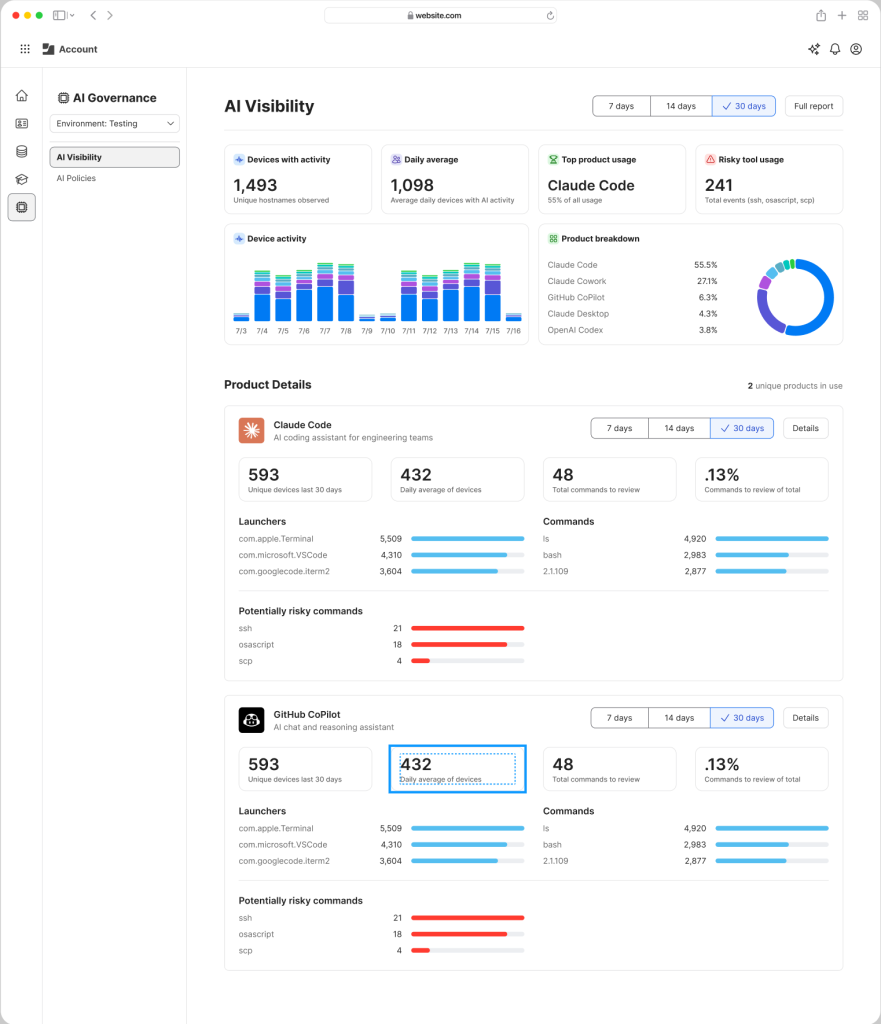
AI Governance is a new Jamf solution that has been developed in response to those pain points. Countless surveys, including Jamf’s own data, show that AI is being widely used across every company, but IT lacks visibility into its use. It’s hard to know what data is being shared with AI tools, which services are being used, and how to report on that use effectively — particularly in regulated industries.
AI Governance is designed to make it possible for anyone managing an Apple fleet to get granular insight into AI use across their Mac, iPhone, and iPad devices. It uses telemetrics to shed light on that use, offers governance and management tools to help IT gain better oversight and control over it, and provides highly comprehensive reporting tools suitable for internal or regulatory review.
“AI is happening whether organizations know it or not,” said Tschida. “That’s the problem. You can try to block it, but that’s very hard to do well. It’s far better to build visibility and governance around it.”
The offering makes it possible for companies to enable the AI use they already know is taking place while protecting corporate interests and enabling fast and accurate reporting. You can find out more details here.
Jamf’s approach is focused on endpoint management. AI Governance means IT can see what’s running on a device, categorize it, and understand what AI tools and models are in use. “If you know how people are running AI on your fleet, you can open it up safely. Then all of your customers and employees can find their way to figure out how AI is going to optimize their workforce,” she said.
What does that look like in practice? Think of it as an orchestration layer. IT can define different AI configurations for different teams: HR might use one set of models, engineers another. And admins can apply opinionated postures per group: what models are permitted, what cloud services they connect to, what’s visible to IT versus the CISO versus the CFO. “It’s an extension of what Jamf has always done, it just now applies to AI endpoints too.”
What about regulatory complexity across geographies? “A lot of governance controls are shared across regulations; a good base set is a healthy way to run regardless. But each regulation has its own twists. Our mission is to make sure customers operating in different markets can expand on that base and fit the specific models and regulations they need, getting the right configurations to the right devices.”
Managers must prepare for AI cost challenges
There’s a second dimension beyond management — cost. The industry is developing quickly, with new AI models appearing almost every week. Yesterday’s leading LLM is tomorrow’s fading star, even while the cost of AI infrastructure goes through the roof. As that churn slows, investors will want to start seeing returns on their bets, which is why token costs — the price of running AI services, at least in the cloud — are climbing fast.
As costs become more realistic, that’s going to change the nature of AI deployment from the laissez-faire, anything goes approach to a more strategic management of such use. “Models keep dropping fast, but token costs are only going to go up,” said Tschida.
“Organizations will need to decide: just because you can build something with AI, should you? What’s the right model for what work? We’re helping customers move from, ‘We’ll just block it’ or ‘We’ll turn it on and hope for the best,’ toward a place where they have a real viewpoint and can manage and change that viewpoint over time.”
The ever-changing AI world is also prompting Jamf to make more of its APIs externally available. “We’re used across every industry and every geography, at every scale,” said Tschida. “There’s no way we can build every workflow every customer needs, we’d never get to all of them.”
Embracing openness also helps build future foundations. “Thinking about where we’re heading next — agentic endpoint management — having platform APIs allows our customers to build things they can imagine, that we can learn from, in a way that solves their specific problems.”
Apple, WWDC, and the enterprise
Tschida’s comments come shortly after WWDC 2026, where Apple introduced a raft of AI advances that formed a strong foundation for its future, improvements that matter to Jamf. “When Apple innovates, Jamf celebrates,” she said.
“Apple is doing great things in their AI ecosystem, revamping Siri, expanding their AI capabilities, making Apple the platform people want to run AI on because those machines simply perform better. Our job is to take what Apple builds and bring it into the enterprise in the way that enterprises actually need it.”
Most of the industry recognizes that Apple’s enterprise story has changed dramatically as its products see accelerating use, and momentum is not slowing. Tschida reflected on how just a few years ago, Apple in the enterprise was an option in employee choice programs. “Now it’s becoming the clear choice,” she said. “We expect that trend to continue. And the more Apple invests in AI running natively on device, the stronger that argument gets.”
Where is Jamf going?
AI Governance is a unique answer to an increasingly important set of questions that are now beginning to affect the IT management of Apple’s platforms. (It’s not clear whether anything as sophisticated exists for other platforms at al, but as the need to manage AI grows, demand for such solutions will grow.)
Ultimately, the company’s latest move reflects Jamf’s inherent strategy under its new CEO. “Focus on customers, listen to them, solve their problems, and don’t throw tech at it. Ask: what’s the problem? Can we solve it? That focus is what takes you where you need to go.
“We’re on a good trajectory, customers stay with us, and the culture has always underpinned us. Now we’re finding ways to lean into it even further,” she said.
Microsoft unveiled Copilot Cowork in March, pitching it as an AI agent that’s capable of independently performing long-running, multi-step tasks — even when a user’s computer is off.
It’s built on the same technology that underpins Anthropic’s Claude Cowork. Unlike Claude Cowork, which can interact directly with files and applications on a user’s computer, Copilot Cowork runs in Microsoft’s cloud environment and acts on documents held in a customer’s Microsoft 365 tenant.
On Tuesday, Microsoft unveiled pricing details for Copilot Cowork, which involves usage-based billing in addition to a Microsoft 365 Copilot license ($30 per user each month for large enterprises before discounts, and $20 for Microsoft 365 Copilot for Business).
The usage-based pricing is calculated from four components, according to Microsoft: “model use, context retrieval, tool calls, and runtime.”
In practice, this means more intensive tasks that draw on multiple sources, use “deep reasoning” and generate two or more outputs will lead to higher costs — denoted in Copilot Credits.
There are two payment options: pay as you go — priced at 1 cent per credit — and P3, where customers commit to usage volume in advance and receive a discount.
Cowork is turned off by default; IT admins can decide when to make it available and which employees get access. Admins can also impose spending limits at the tenant, group, and user level, and receive notifications when spending reaches a certain level.
Users will also be able to see how much each tasks costs in credits (available “soon after” the general availability launch, Microsoft said).
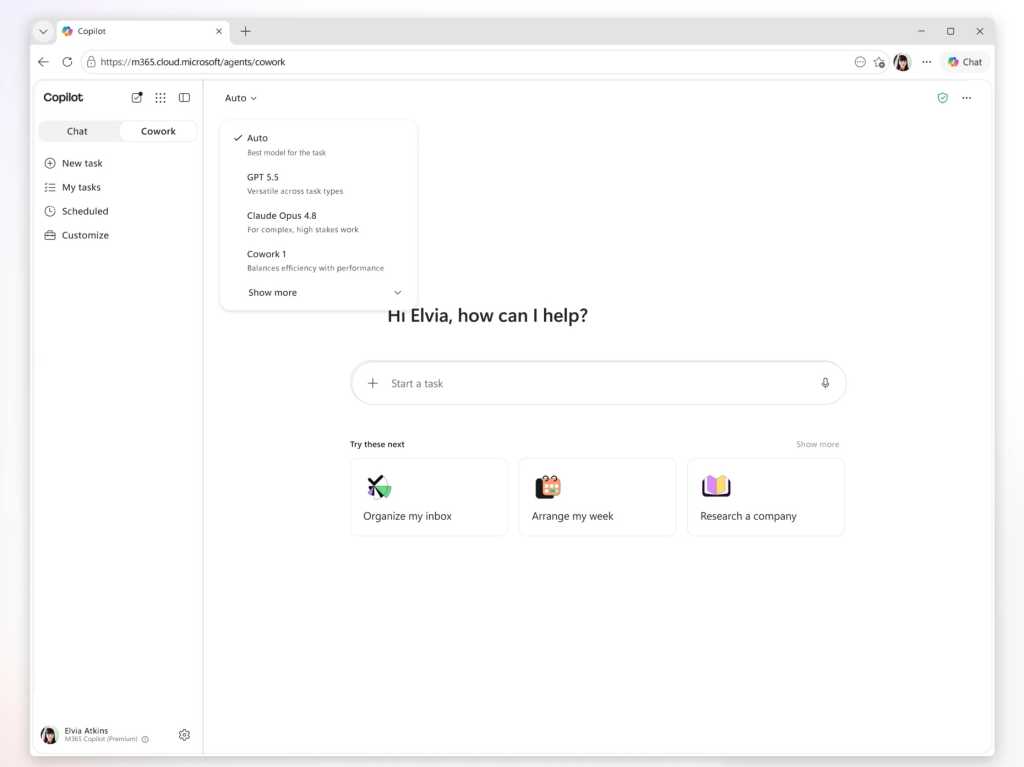
Copilot Cowork customers can select from multiple AI models, including Anthropic’s Opus 4.8 and Sonnet 4.6, while those enrolled on the Frontier program can access OpenAI’s GPT 5.5 and Microsoft’s own Cowork 1 model.
Microsoft is considering hosting a version of DeepSeek’s open source models. “We are actively exploring a range of options that meet those requirements, and DeepSeek is one of several models under consideration. We’ll share more specifics on the underlying model closer to release,” said a Microsoft spokesperson.
Microsoft also announced new integrations with third-party apps such as Miro and Monday.com, with more — such as Adobe, Box, and Canva — coming soon.
This article was updated on June 19 to add Microsoft’s comment on DeepSeek.
Well, hey, how ’bout that? Here we are, on a random quiet-seeming week in June, and a new Android version is officially making its way into the wild and onto our favorite Googley gizmos.
Yes, indeed: Google announced the launch of Android 17 this week, and the rollout is getting underway as we speak. As usual, the software will show up for current, still-supported Pixel devices right away, over the next few to several days. (As for everyone else — well, you know the drill by now, right? It’s up to each individual Android device-maker to process and send out its software updates, and outside of Pixels, that support is exasperatingly unreliable. But odds are, if you aren’t palming a Pixel, you’ll be waiting for a while — maybe even a long while, if you have a phone by a certain manufacturer whose name rhymes with Boatorola.)
As always, some of Android 17’s most important elements are the under-the-hood privacy, security, and performance enhancements that you won’t explicitly see but that will make a critical difference in your device’s ability to operate efficiently and advisably. But this latest Android release also packs an impressive punch of interesting surface-level touches that’ll bring an instant boost to your day-to-day productivity and all-around Android-enjoying experience.
As is often the case, many of the most useful elements are things you might not ever even notice or think to tap into if you don’t know where to look.
Here are the four Android 17 features I’ve found most noteworthy so far and how you can start putting ’em to use this second.
[Psst: Don’t let the learning stop here. Check out my free Pixel Academy e-course to discover all sorts of advanced intelligence lurking within whatever Pixel you’re using!]
Our first Android 17 addition on its way to Pixel owners this week is something that’s been in the works for many a moon now — and that’s a handy new multitasking mode known as Bubbles.
Bubbles first came into the Android picture way back in 2019, but at that point, it was limited mostly to messaging and never came close to reaching its full promised potential. At long last, now, Bubbles are back, baby, and becoming everything we’d always wanted them to be.
The simplest way to think about Bubbles is as a way to turn any app you’re using into a floating, collapsible window — so you can pull it up on demand when you want it, then minimize it back down into a small icon (a “bubble” — get it?!) to get it out of your hair but keep it nearby for easy ongoing access.
It’s an interesting way to multitask without having to commit to a full-fledged split-screen setup. It can be quite useful for keeping things like lists, documents, emails, chats, or anything else you’re coming back to regularly at your fingertips — so you can pop into it as needed, without any real effort, but also without having it in your face all the time.
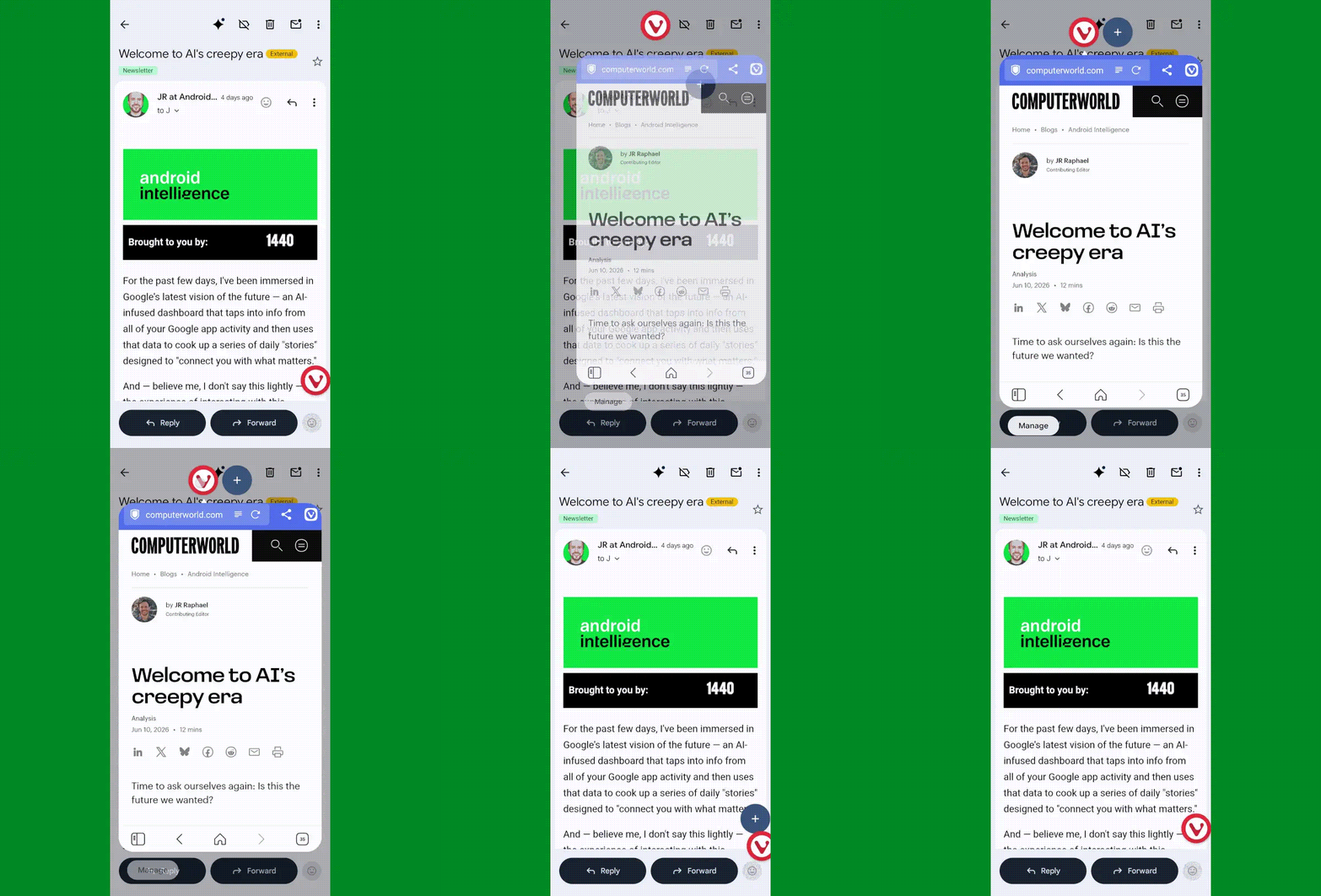
Android 17’s Bubbles system in action.
JR Raphael, Foundry
In Android 17, Bubbles is easy to launch with any app in front of you. The only catch is that as of now, at least, it can be triggered only from the standard stock Pixel Launcher — nota custom Android launcher like Smart Launcher or Niagara.
Provided you’re using the standard Android home screen setup, though, all you’ve gotta do is:
Press and hold any app’s icon on your home screen or in your app drawer.
In the menu that pops up, tap the option that says “Bubble.”
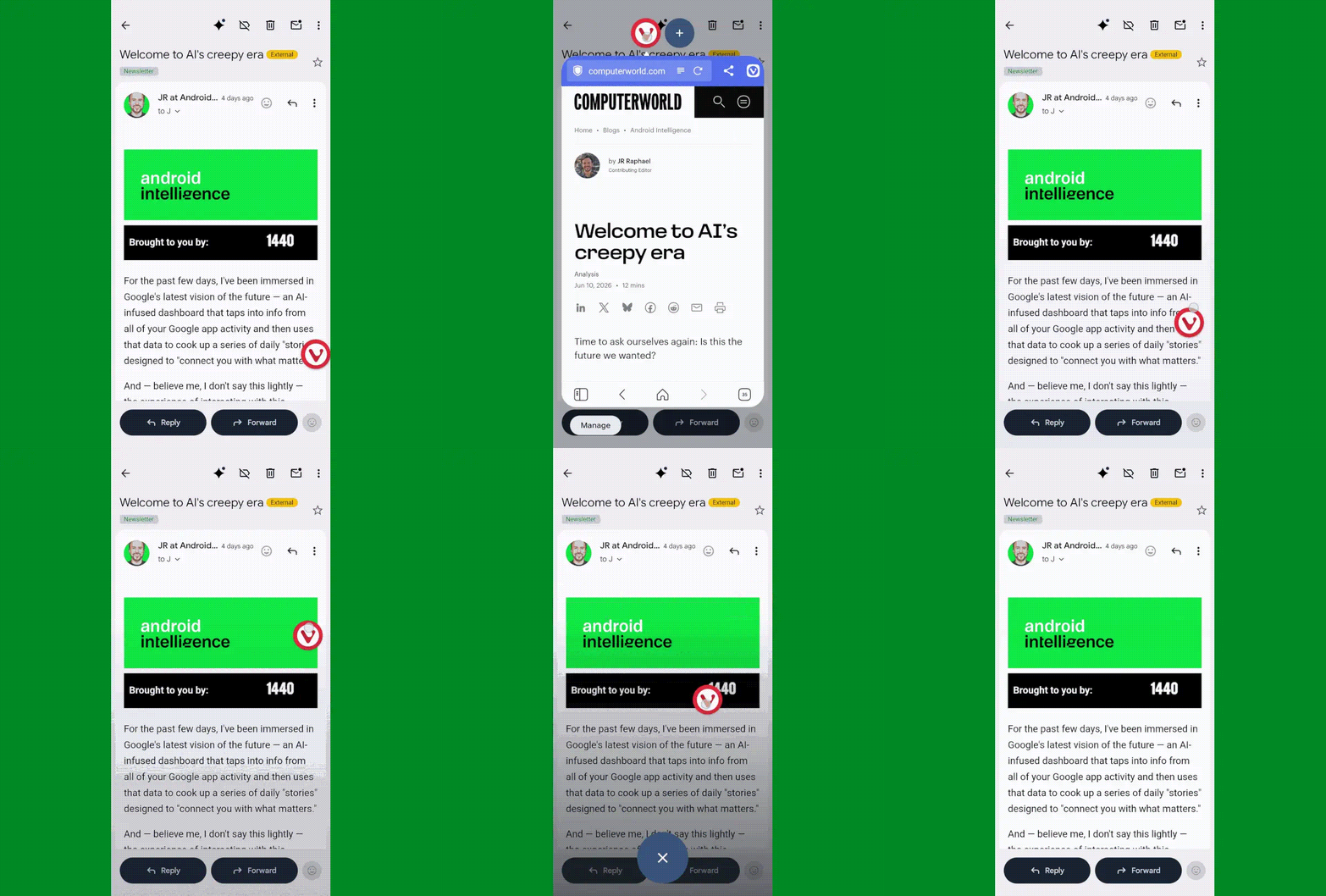
Then tap the bubbled app icon to expand or minimize the app, or press and hold it to move it around to any position on your screen or dismiss it.
You can move a bubble anywhere on your screen or dismiss it easily.
JR Raphael, Foundry
You can also add additional bubbled apps into that same view via the plus icon next to the first app’s icon when a bubble is open. Pretty nifty, wouldn’t ya say?
Allowing apps access to your location inevitably requires a certain amount of compromise when it comes to the ever-prickly subject of privacy — and it demands a certain level of trust that the apps in question won’t abuse the privilege or use it for reasons beyond their intended purposes.
Android 17 makes it meaningfully easier to accept that bargain and rest easy knowing your info isn’t being misused, thanks to a pair of related new privacy protection measures:
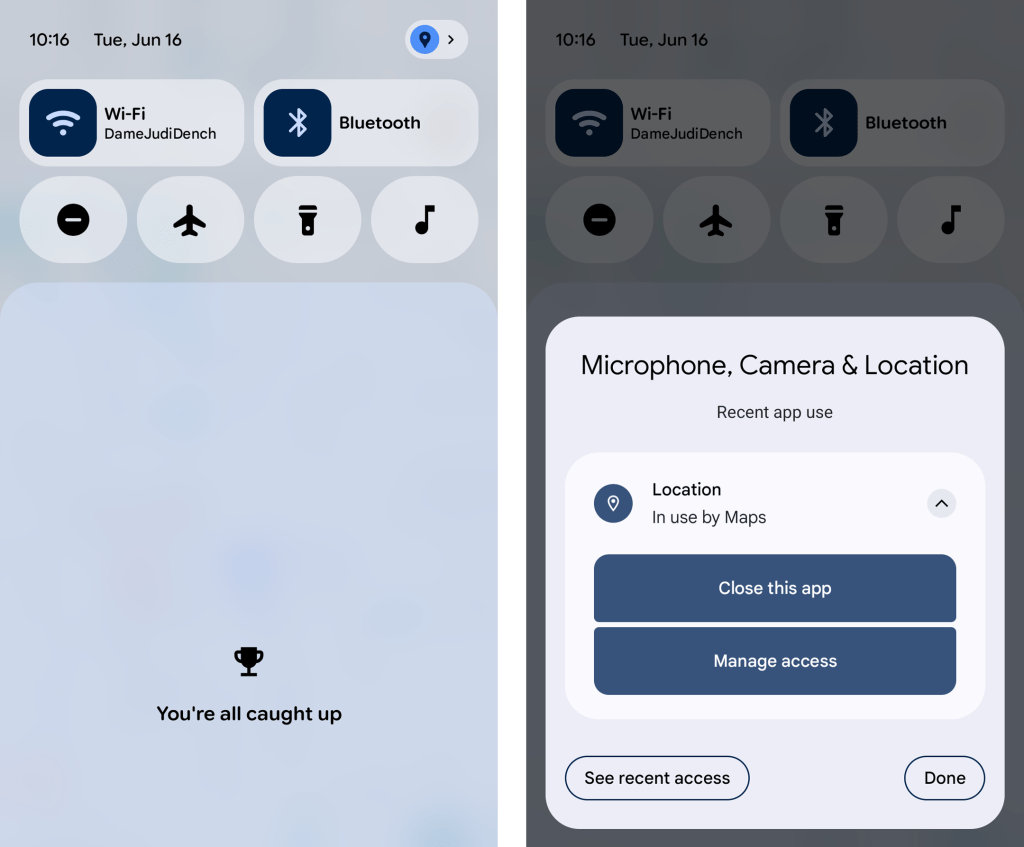
First, whenever any app is accessing your location, you’ll now see a blue dot appear in the upper-right corner of your screen — and if you swipe down once from the top of your screen to open your notification panel, you can actually tap on the location icon that appears in its place to get detailed info about exactly which app or apps are involved. With another tap from there, you can opt to force-close the app in question, view all of its recent location access attempts, and manage its location access ability, too, in case anything ever seems amiss.
Android 17 offers some welcome added nuance and power around app location access.
JR Raphael, Foundry
And second, when an app asks to access your precise location, Android 17 adds in the option to allow such access only temporarily — for that one brief moment and purpose — without giving the app the permanent permission for ongoing use.
Android 17 Pixel feature #3: More dynamic dark mode
Dark mode may be one of the more divisive interface adjustments of our modern mobile moment, but if you’re a fan of the dimmer, less glary view across your Android experience, you’re bound to appreciate the added option Android 17 affords you in that area.
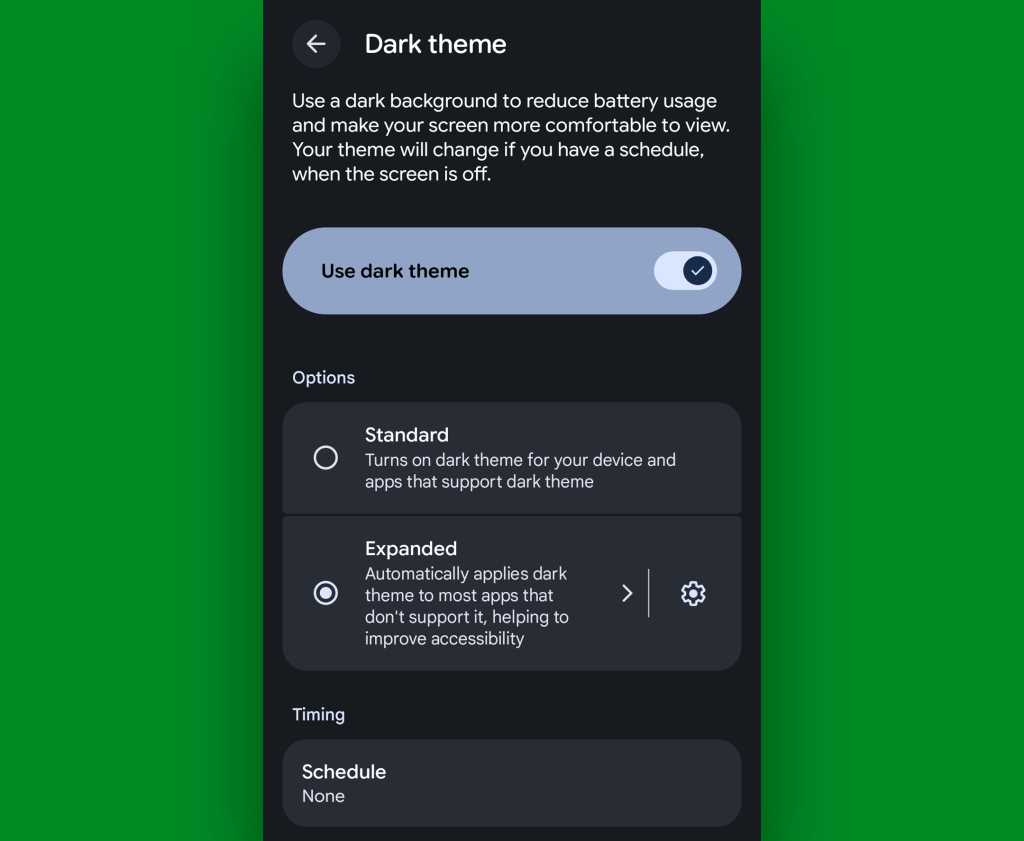
It’s a simple one-tap checkbox that forces apps to adjust and comply with your dark mode preference, when it’s active — even if they don’t natively support such a setting. That means those pesky apps that’d typically maintain the same standard light interface even when you activate dark mode will now turn dark along with the rest of your setup whenever Android’s dark mode is on.
All it takes it quite literally one tap on the freshly added Android 17 option:
Head into the Display section of your Pixel system settings.
Tap “Dark theme” — the actual words, not the toggle alongside ’em.
And change the setting from “Standard” to “Expanded.”
Android 17’s “expanded” dark mode setting brings the darkness you crave everywhere.
JR Raphael, Foundry
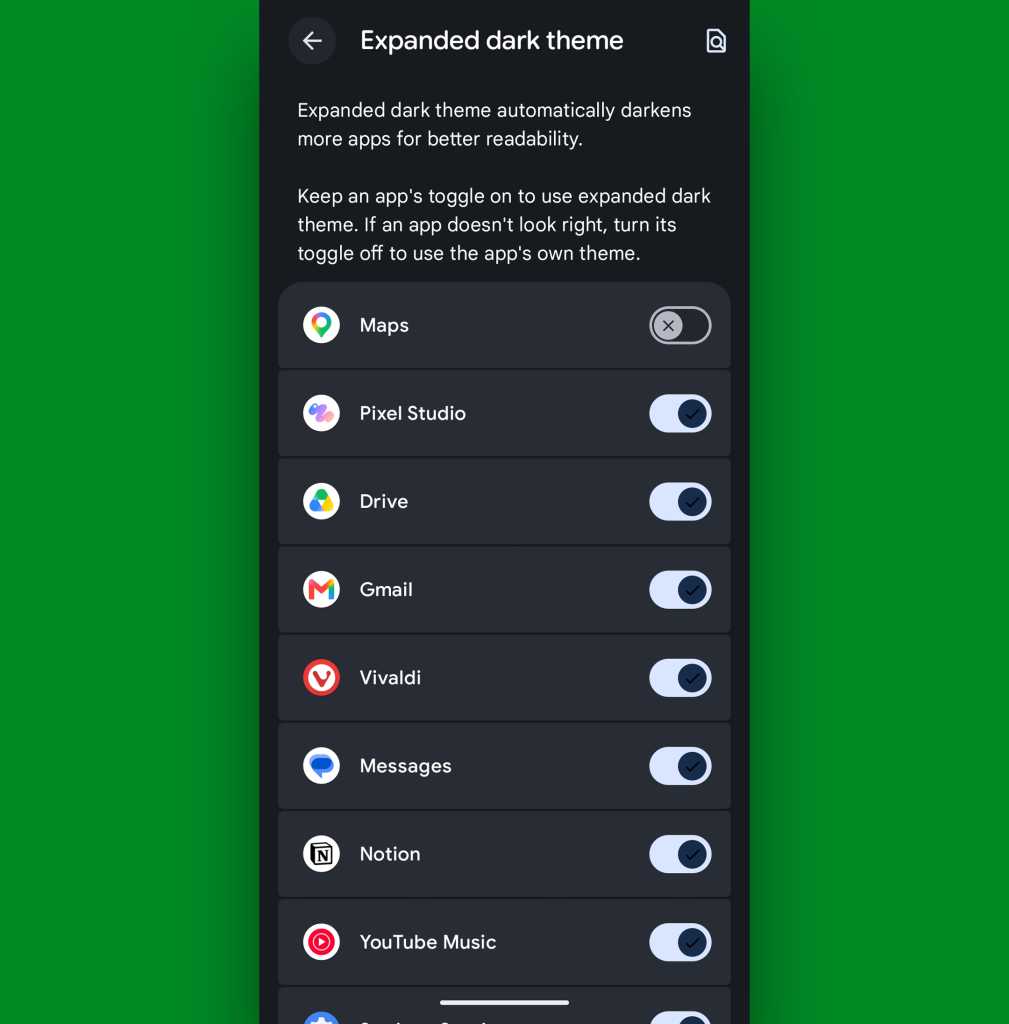
Now, one note: By forcing apps to adapt to dark mode even if they aren’t designed for it, it’s possible some programs may end up lookin’ a little funky. If that ever happens and you aren’t thrilled with an app’s adaptation, go back to that same settings screen we were just starin’ at and tap the gear-shaped icon alongside the “Expanded dark theme” option. That’ll let you create exceptions and select specific apps that don’t get dark mode automatically applied.
You can create specific exceptions to Android 17’s expanded dark mode approach.
JR Raphael, Foundry
But everything else will now be in the dark when you want it — just like your dark, brooding heart desires.
Android 17 Pixel feature #4: A more comfy all-around view
Whether you’re a prince/princess/dutchess/middle-manager of darkness or not, Android 17’s new Comfort View may be just the thing for you.
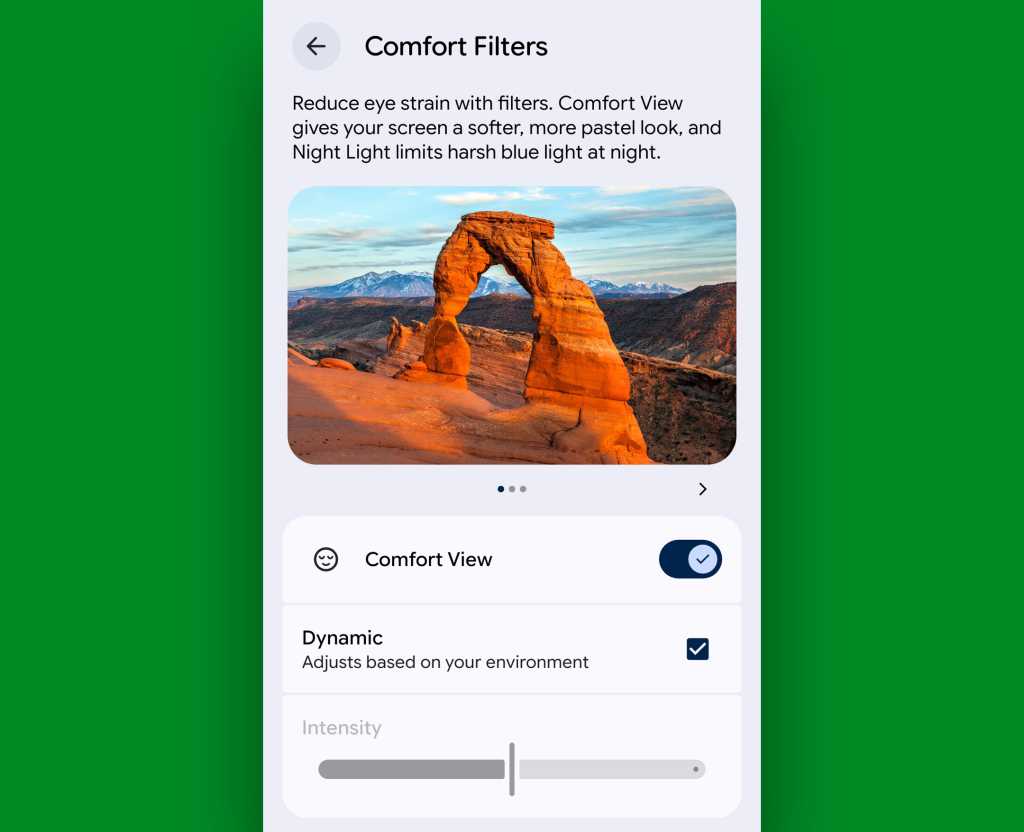
Comfort View is an off-by-default addition to your Pixel that applies a softer, more pastel-oriented filter to the display with automatic adjustments based on your current viewing environment — in other words, how bright it is around you at any given moment. Ooh, ahh, etc.
To try it out, march your way back into those Display settings, and this time, tap the line labeled “Comfort Filters.” Flip the switch next to “Comfort View,” make sure the “Dynamic” checkbox is active, and see how you feel about your newly optimized screen-color view as you move throughout your day.
Android 17’s Comfort View — ahh….comforting.
JR Raphael, Foundry
If you find the filtering to be too extreme or not enough to make a difference, you can also try disabling the “Dynamic” option there and then manually adjusting the “Intensity” slider to suit your specific peeper preferences. But I suspect if you give it enough time, you’ll find the automatic adjustments to be one of those things that just works for you and makes your device a little easier on the eyes, relative to each and every viewing environment — without being something you actively think about or pay much mind.
That, if you ask me, is the sign of an effective feature. And it’s a welcome addition to Android and the ever-evolving Pixel experience.
Most generative AI tools know less about R than languages like JavaScript and Python, thanks to how much training data is available for each. However, with a little extra setup, you can give a large language model (LLM) the knowledge it needs to improve its R skills.
Here are 10 ways to help generative AI write R code like a pro.
Use a coding agent
AI coding agents have more power, flexibility, and coding-focused tools than general-purpose chatbots.
Anthropic’s Claude Code and OpenAI’s Codex agents have versions that run in a terminal, IDE extensions, desktop and mobile apps, and other integrations.
R users may also be interested in Posit’s Posit Assistant, which is designed for data analysis in both R and Python. It needs less setup for R than general-purpose coding agents, and it has more built-in knowledge about data science, R package development, and Shiny apps. Plus, it can read objects in your R and Python environments by default, which can be useful in some situations (although perhaps not if you’re working with sensitive data). There are versions of Posit Assistant for RStudio, the Positron IDE, and the terminal. Setup info is here.
Note: Posit Assistant is not the same as the older Positron Assistant that was demo’d at last year’s posit::conf(). The older assistant will eventually be superceded by Posit Assistant. Posit Assistant comes pre-installed with RStudio but not pre-activated, so you don’t need to use it unless you want to.
Google’s original entry in this space, Gemini CLI, is being retired in favor of a new “Antigravity CLI” starting June 18.
There are other IDE platforms with built-in agents, including Cursor and Windsurf, and terminal + subscription coding agents such as Warp, which was open-sourced in April. However, I won’t be covering those here.
You may be limited at work by what your employer allows you to use, but you can still experiment on your own with public data — and then lobby for a new agent if a different one better meets your needs. Whatever you choose, though, moving to one of these from a web-based chatbot should produce better code.
“The shift from chatbot to agent is the most important change in how people use AI since ChatGPT launched,” says Ethan Mollick, co-director of the Wharton School’s Generative AI Labs at the University of Pennsylvania.
Set up CLAUDE.md, AGENTS.md, or GEMINI.md knowledge files
All the major coding agents look for knowledge files to load each time you start a session, and you can easily edit those files. The files can include things like your proficiency in various languages and how you like to document projects. For example, I tell my LLMs that I’d like a README.md in every project with info on how to use the project and technical info on how the project was coded.
Most coding tools let you have both an overarching main file that’s loaded into every session, and an additional file per project.
If you’re adding Claude or Codex to an existing code base, the /init slash command will create one of those .md project files after scanning and analyzing the code. You can also ask an LLM to interview you to create or add to one of those files.
Claude Code looks for a user-level main CLAUDE.md file at ~/.claude/CLAUDE.md and then a project-level file at ./CLAUDE.md or ./.claude/CLAUDE.md. The /memory slash command shows where those files are located. Codex uses AGENTS.md files. Antigravity docs say it looks for a main GEMINI.md file plus GEMINI.md and/or AGENTS.md files in your working directory.
Positron Assistant is set up to read AGENT.md, AGENTS.md, POSITRON.md, CLAUDE.md, GEMINI.md, and LLMS.txt in a workspace root directory, according to the docs. See the Positron docs for more on custom instructions.
Use agent skills
Agent skills can turn an LLM with questionable R knowledge into an expert that understand how you want it to write code. You can develop your own skills, work with your LLM to create skills, or download skills written by others. Claude even has a skill to help you build skills. This is one of the best ways to stop having to repeat the same instructions over and over. Instead, the LLM will “remember” what’s in your skills files by loading them when they’re needed.
What’s the difference between the knowledge .md files mentioned above and a skill? I like to think of CLAUDE.md or AGENTS.md files as important background info that’s always available, while skills are more specific instructions that are useful at certain times. Or, as Claude Opus 4.7 put it: “Skills are for triggered workflows (‘when user asks X, do Y’). A standing rule that applies to every project isn’t trigger-based; it’s a directive I should always follow.” Standing rules should go in CLAUDE.md.
“Create a skill when you keep pasting the same instructions, checklist, or multi-step procedure into chat, or when a section of CLAUDE.md has grown into a procedure rather than a fact,” according to Anthropic’s Claude Code docs. “Unlike CLAUDE.md content, a skill’s body loads only when it’s used, so long reference material costs almost nothing until you need it.” Only skill descriptions are loaded at the start of each session, so the LLM knows what skills are available.
Anthropic originally created skills for Claude in October 2025 and then published the concept as an open standard a couple of months later. Most coding agents now use them.
Anthropic has an easy-to-folllow guide to creating custom skills here if you want to try your hand at building your own.
Posit Assistant comes with several R-related skills built in and allows users to add more. You’ll find them here.
If you’re not using Posit Assistant, you can add Posit-developed skills to another coding agent. Posit published a GitHub repository with skills for creating R packages, Shiny apps, and Quarto documents; for creating and resolving GitHub pull requests; for open-source R and Python package releases; for code reviews (R, Python, JavaScript/TypeScript, SQL); and for creating architectural documentation for a codebase. Browse them all here.
Read and edit the skills you download
Skills are just a folder with one or more markdown text files that have a structured YAML header. That folder can include optional resources and scripts, too. Skill instruction files are easy to read and edit, so you can make sure they do what you want. Tweak them as desired.
For example, Claude helped me write my own customized R skill. Claude leans toward tidyverse packages, but there are other packages I like a lot, too, such data.table. I made sure the R skill knows my package preferences, and under what circumstances I prefer each.
If one of your preferred procedures changes, remember to update the associated skills. Or, ask an LLM to update it for you. Keeping skills up to date will make your coding agent more useful.
Keep your CLAUDE.md or AGENTS.md files updated, too. Maybe you started off with a CLAUDE.md file that said you’re an experienced Python programmer who is just learning R. Three months from now, you might want to update your R skill level. Or, perhaps you told an AGENTS.md file that you like thoroughly documented code, but now you’d prefer a lighter touch. You may want to have your coding agent go over those files with you from time to time and ask you about the main points and whether they need updating.
Use the btw R package and its MCP server
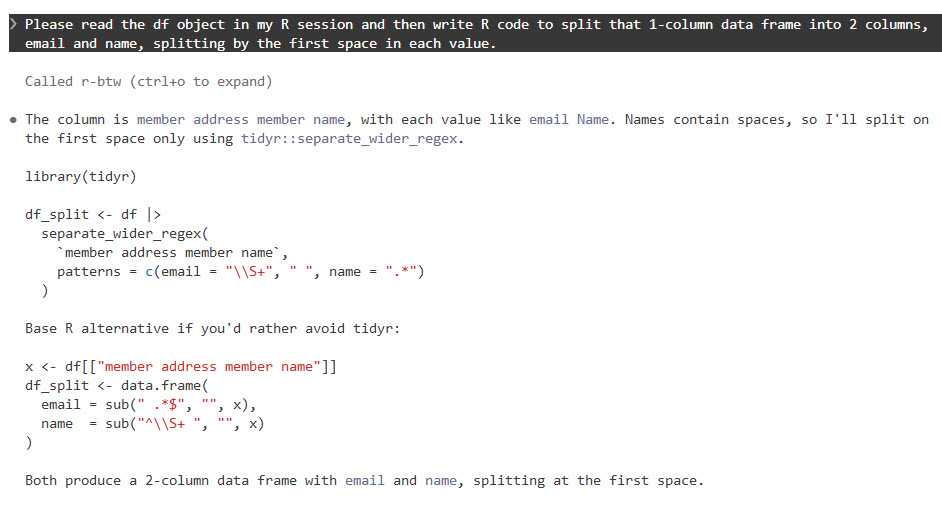
It’s frustrating when an LLM writes code based on an ancient R package version in its training data, or when it doesn’t know about a relatively recent package at all. btw solves this problem by letting your coding agent access info about all the R packages installed on your system. That means it can write code based on your specific R environment. Plus, btw lets an LLM access variables in your current R environment via a Model Context Protocol (MCP) server.
MCP servers are a standardized way for LLMs to access external data — in this case, your running R session (external doesn’t have to mean cloud). Like skills, MCP was created by Anthropic as an open standard and has since been adopted by most major AI platforms. The btw R package includes an MCP server, which you can install for Claude Code by running the following code in a terminal window (not R console).
claude mcp add -s "user" r-btw -- Rscript -e "btw::btw_mcp_server()"
btw comes with a lot of tools. It’s not a great idea to overload your LLM with tools it may never use. If you just want to register btw tools for accessing your R session and looking up package documentation, you can run a command like this instead:
To connect Claude Code to your open R session, you also need to run btw::btw_mcp_session()in every new R session. (I sometimes forget this part until I’m puzzled why Claude can’t read my R variables or even see what packages I have installed.)
You can see a demo of btw in this Posit video that compares Claude Code and Posit Assistant.
The btw R package lets Claude Code and other agents read objects in your R session.
Foundry
You don’t need to do this setup for Posit Assistant, since tools for accessing your R session and variables are built in.
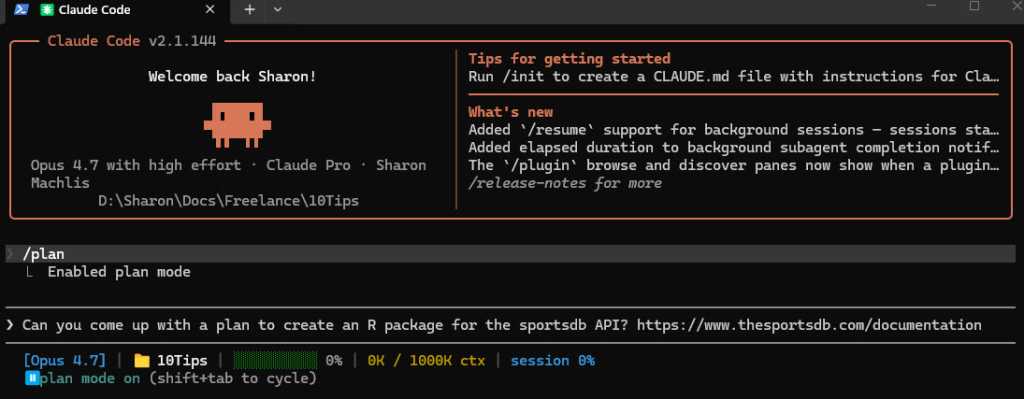
Use plan mode for your projects
I cannot stress this enough. Just as humans benefit from having a plan before starting to implement a project, LLMs benefit from working through a plan before beginning to generate code. Plus, it can be useful at times to “brainstorm” with an LLM about structures and features, ask it for alternatives, or even have another LLM review a plan before implementing it.
Anthropic advises starting with plan mode. “Letting Claude jump straight to coding can produce code that solves the wrong problem. Use plan mode to separate exploration from execution,” they wrote in a best practices doc.
Claude, Codex, Gemini, and Posit Assistant all have a plan mode in their CLI versions that can be activated with the /plan slash command.
Foundry
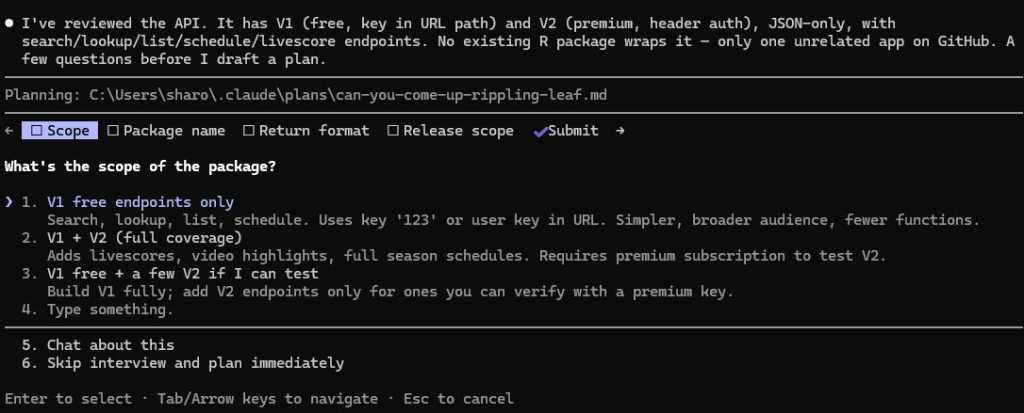
When in plan mode activated with /plan, Claude will often ask questions before coming up with its plan.
Foundry
Make sure your coding agent learns from its mistakes
This is one of the best tips I read first from Joe Amditis, associate director of operations at the Center for Cooperative Media at Montclair State University: If your coding agent makes a mistake and you work together to fix it, make sure to save that memory so it doesn’t make the same error again.
Your agent may have an auto memory system that’s supposed to do some of this (I’ve used Claude Code’s), but you can instruct any coding agent to keep a separate lessons learned file for each project, too, or ask it what’s the best way to ensure it doesn’t make the same error again. This isn’t a guarantee, any more than you can be assured an LLM will follow all the rules in a CLAUDE.md or AGENTS.md file or all the steps in a skill. But it has definitely cut down on my agents making the same errors over and over.
Have your agent write tests and do code reviews
Tests and code reviews done by a coding agent aren’t a substitute for a human checking that software works. Review an LLM’s results yourself any time a task is important! However, agent-generated tests are still a good way to head off some problems and cut down the time you spend as your LLM’s debugging partner. If you don’t know where to start to help your agent know how to test and review code, see Posit’s testing-r-packages and critical-code-reviewer skills. Your agent may also have built-in code review skills, such as Claude Code’s /code-review slash command.
Code review skills are available from many sources. For example, Sentry has a code review skill in its repository. Aimed specifically at its project’s needs, it can be a useful sample for similar skills. And superpowers is a popular set of general-purpose programming skills that’s billed as “a complete software development methodology for your coding agents, built on top of a set of composable skills and some initial instructions that make sure your agent uses them.” I don’t use superpowers, but a lot of other people clearly do given its more than 227,000 GitHub stars and 20,000 forks.
Another tip: Several experts suggest using a different LLM — maybe even from a different provider — to conduct a code review, since each model has its own strengths and weaknesses.
Don’t forget general prompting good habits
Whatever programming language you’re using, being clear will improve your outputs. Keep your requests targeted, and don’t expect the LLM to read your mind.
“Codex handles complex work better when you break it into smaller, focused steps,” OpenAI says in its developer docs. “Smaller tasks are easier for Codex to test and for you to review. If you’re not sure how to split a task up, ask Codex to propose a plan.”
“Take time to make your prompts as relevant as possible, just as you would when helping a new teammate scope a task,” Google advises in its Five Best Practices for Using AI Coding Assistants. “Consider what details you need to share for a person to succeed, and provide all those details to your AI tool.”
And, don’t load up your context window to the LLM’s published limit. Performance often degrades as you get close to the maximum token limit.
Take advantage of open LLMs, particularly if you have budget and token limits
Open-weight models — especially ones small enough to run on a desktop computer — may never rival frontier LLMs like Claude, GPT, or Gemini. But for a lot of R coding, they don’t need to.
To see how well an LLM can write R code, it should have the same kind of harness that Claude Code, Codex, or Posit Assistant gives larger LLMs. “The harness is the product,” argues Mallory Mejias at Sidecar, an AI education company. “The model is the engine inside it — important, but increasingly interchangeable.” I wouldn’t go that far, since I still find the LLM to be a critical piece of this equation, and models differ. But the same LLM will perform differently depending on the tools and context it has.
Posit recently added Google’s open-source Gemma 4 26B to Assistant’s existing options of larger, closed-source LLMs. “Up until this point, models of this size — small enough to run comfortably on high-end consumer laptops — were on our radar but not yet capable enough to drive an agent harness like Posit Assistant,” Posit senior software engineer Simon Couch wrote on the Posit blog. “This has changed in the last few months with releases like Gemma 4.” However, to use it in Posit Assistant in RStudio, you still need to run it through a Posit AI subscription, not locally. It uses 1/10 the budget that the same session with Claude Sonnet would consume.
Several projects can use Claude Code to run local LLMs. Ollama, open-source software for running LLMs locally, does this with the terminal command ollama launch claude --model , such as:
ollama launch claude --model gemma4:26b
The makers of Unsloth, an open-source framework for running and training models, say running local LLMs inside Claude Code can be very slow due to a cache invalidation issue. They say this can be fixed by adding "CLAUDE_CODE_ATTRIBUTION_HEADER" : "0" to ~/.claude/settings.json under “env”.
Unsloth can also use Claude Code to run local models, but it’s somewhat more involved to install and set up than Ollama. See this Unsloth tutorial.
Open-source coding agent Open Code runs LLMs from OpenAI, Anthropic, Google, Kimi, Alibaba’s Qwen, and others. I haven’t warmed up to it yet compared with commercially backed CLI tools I’ve tried, but it has 174,000 GitHub stars so clearly a lot of fans.
AI consultant Thomas Wiegold, who switched from Claude to Open Code, said “OpenCode covers everything I need for my daily workflow. It’s fast, the provider flexibility is genuinely useful rather than theoretical, and the TUI is better for extended sessions…. That said, I’m not going to pretend it’s all smooth sailing.” He noted some stability issues and a remote code execution vulnerability earlier this year.
Large language models remain imperfect and unpredictable tools, but they’re improving rapidly — as are the harnesses around them. Even frontier LLMs in commercial coding agents can ignore instructions at times and otherwise behave in unpleasantly surprising ways. However, you’ll vastly improve your chances of generating quality code if you use coding agents, take time to set them up with quality instructions, and remember good prompting techniques. Good luck!
—
Coding agent info
Claude Code – Anthropic’s coding agent is available in the terminal and as an IDE extension, a desktop app, mobile apps, Slack app, and a cloud version that can work directly in your repos on GitHub. Arguably the first breakthrough coding agent, it now includes an elegant remote-control option where you can start a session on your desktop and then continue it on a phone or tablet. While designed for Claude LLMs, you can use it to run local LLMs via tools like Ollama or Unsloth Studio. When using Claude models, it tends to offer less usage than other vendors’ options. Anthropic has posted the terminal version’s code on GitHub, with usage governed by Anthropic’s commercial terms of service. You can use Claude Code via API pay per use or as part of a Claude subscription.
Codex – OpenAI’s answer to Claude Code is available via terminal, app, IDE extension, or cloud, with integrations for GitHub, Slack, and Linear. The CLI tool is open source under an Apache license, available on GitHub, and works via API pay per use or as part of a ChatGPT subscription.
Posit Assistant – The Posit (formerly RStudio) coding agent is designed for data work in R and Python, although Posit senior software engineer Simon Couch told me it would do fine for programming work for other uses and in other languages. It is available for the RStudio IDE (via a Posit AI subscription in RStudio), Positron IDE, and as a stand-alone CLI terminal app, although the CLI tool currently doesn’t feel as full-featured as the IDE integrations (that may change). As of this writing, you can also use API keys from Anthropic, OpenAI, and Snowflake Cortex and a GitHub Copilot account in Positron. Posit Assistant is being updated quite frequenty, Couch told me. If you tested it a month or two ago, it has more capabilities now.
Antigravity CLI – Google’s terminal-based tool will be replacing the Gemini CLI for unpaid and Google One users this month. There’s also an Antigravity IDE, SDK, and platform for orchestrating multiple agents. One advantage of Antigravity: Google offers a free plan with access to Gemini 3.5 Flash, Gemini 3.1 Pro, Gemini 3 Flash, Claude Sonnet 4.6, Claude Opus 4.6, and gpt-oss-120b, and what it describes as “generous” but undefined weekly rate limits based on “the degree we have capacity.”
I was blessed with a terrific high school English teacher. Ms. Jewel was funny, kind, interesting, and tough on us. I can still spell “ecstasy” on the first try because of her. One of the more memorable lessons she taught was a “Hemingway and Fitzgerald” module.
I loved the short stories of both, but Hemingway’s work always stuck out for me. It’s cliché to say that Hemingway was terse, but we only say it because it is true. He could pack more into a page than most writers. He didn’t waste a syllable.
Software developers are soon going to have to take a lesson from Hemingway.
It’s not hard to be concise in code. You have to be, by design. The compiler won’t put up with any throat-clearing and jibber-jabber. You can’t meander. You have to use a very strict set of words and symbols, and you have to use them in a defined way.
Let me explain. Claude Code, Codex, Copilot, and the rest all love to be “spoken” to in Markdown. We used to define our code with unit tests and specifications written for humans. Now, it’s all about the spec. And the spec needs to be both complete and concise.
It needs to be complete in the sense that if you leave something out or forget to define something, the agent will very likely fill in the gaps for you. Forget a feature or requirement, and the agent will go off confidently and almost certainly in the wrong direction.
At the same time, you need to be concise. Because if you are too effusive, you may give the agent ideas that you don’t want it to have. If you write like Fitzgerald — lush and expansive — the agent will be off and running in a direction you can’t be sure about.
Our compilers will stop cold if we aren’t precise and concise. Our agents? They will proceed with confidence, diligently producing a result that looks great but isn’t what we want.
So we need to learn to write like Hemingway and pack as much meaning into as few words as possible. Or, as Paul Graham said:
Foundry
Let’s be clear
For years, we’ve been writing semi-vague Jira tickets and expecting our fellow humans to fill in the gaps and “get the gist” of what we were trying to do. We don’t have that luxury anymore. Developers who aren’t able to move on from “Jira-speak” to “Agent-speak” are going to struggle. If we don’t follow Graham’s advice in writing those specs, who knows what we’ll get.
Maybe someday agents will know the ins and outs of our business well enough to “know what we mean,” but they can’t today. The time we used to spend coding now needs to be spent perfecting our new craft of writing precise specifications for our agents to execute.
Every listicle ever written on “How to be a Great Developer” says you need to be a great communicator — but that was communication with other humans.
Ms. Jewel always taught us that our writing is only as clear as our thinking. Our compilers forced us to write clearly. Our coding agents won’t do that. I’m sure there are many developers out there now who wish they had listened more closely to their high school English teacher.

 Login
Login