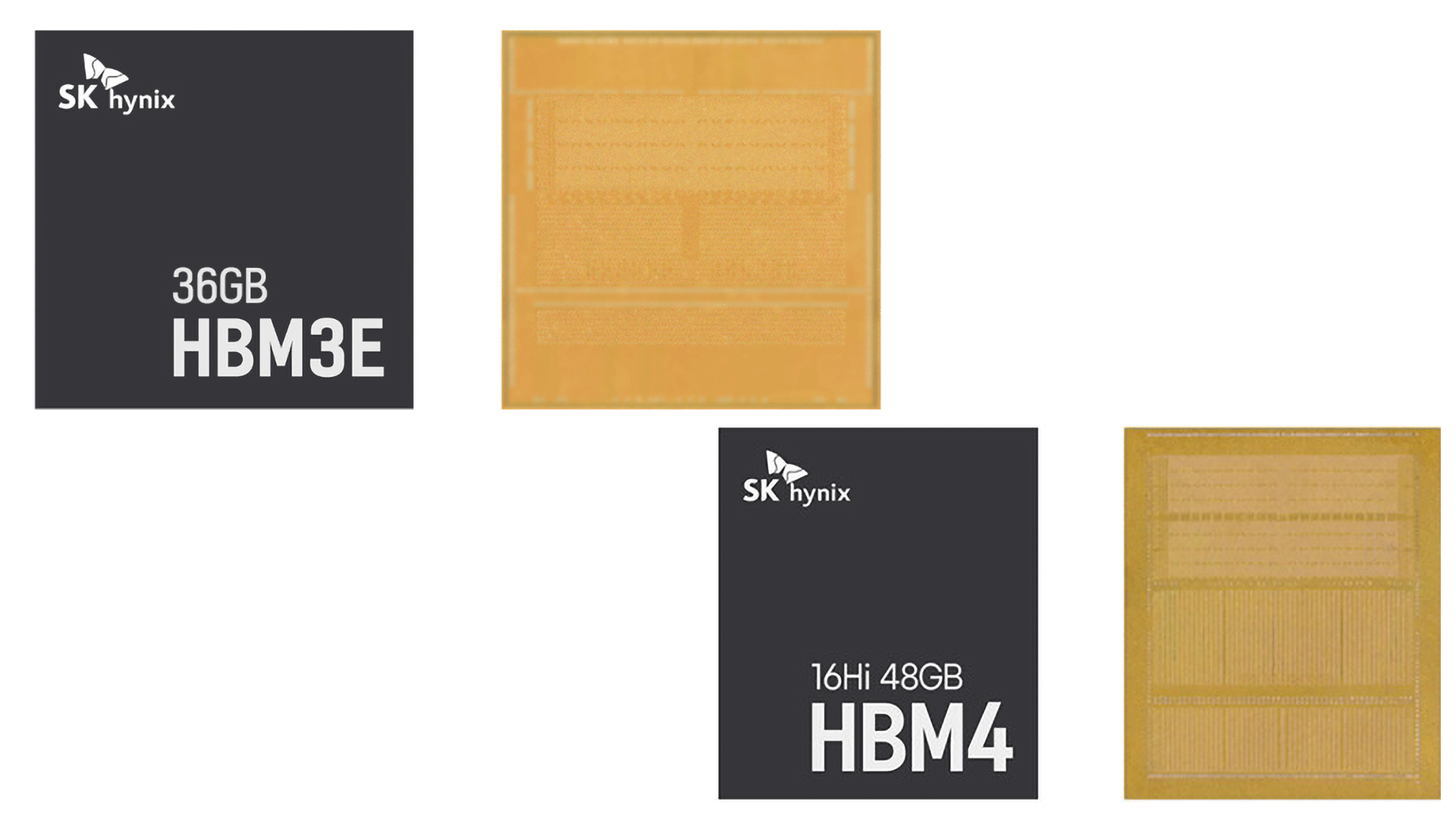
With the ongoing memory shortage, smaller smartphone and laptop manufacturers are reportedly looking at new ways to tackle the problem. While some are changing how they design their products, others are placing orders months in advance and are even forced to test incoming memory chips to make sure they are not fake. A Reuters report suggests that more than the price, availability has become a bigger problem, with manufacturers struggling to secure enough chips in the first place. Still, device makers like Fairphone say that memory now makes up nearly 60% of a device's bill of materials.
Back in July, memory maker SK Hynix’s CEO Kwak Noh-jung said that 2027 will be the "worst year" for the ongoing memory shortage and expects the memory crunch to last until 2030. For smaller manufacturers, however, simply paying more for memory isn't always enough. The situation is particularly difficult for budget-oriented phones and laptops, where memory makes up a much larger portion of the overall product cost.
According to Raymond van Eck, CEO of repairable-phone maker Fairphone, memory can account for almost 60% of the bill of materials in phones costing around $400. That itself is worrying, as a recent Counterpoint Research report expects global smartphone shipments to fall 13.9% this year to 1.08 billion units, marking the largest annual decline on record.
Finnish phone maker Jolla has designed two motherboard versions, allowing it to switch between combined packages for discrete chips depending on availability. The company is also testing samples from every batch it receives to ensure new memory isn't being sold as refurbished hardware.
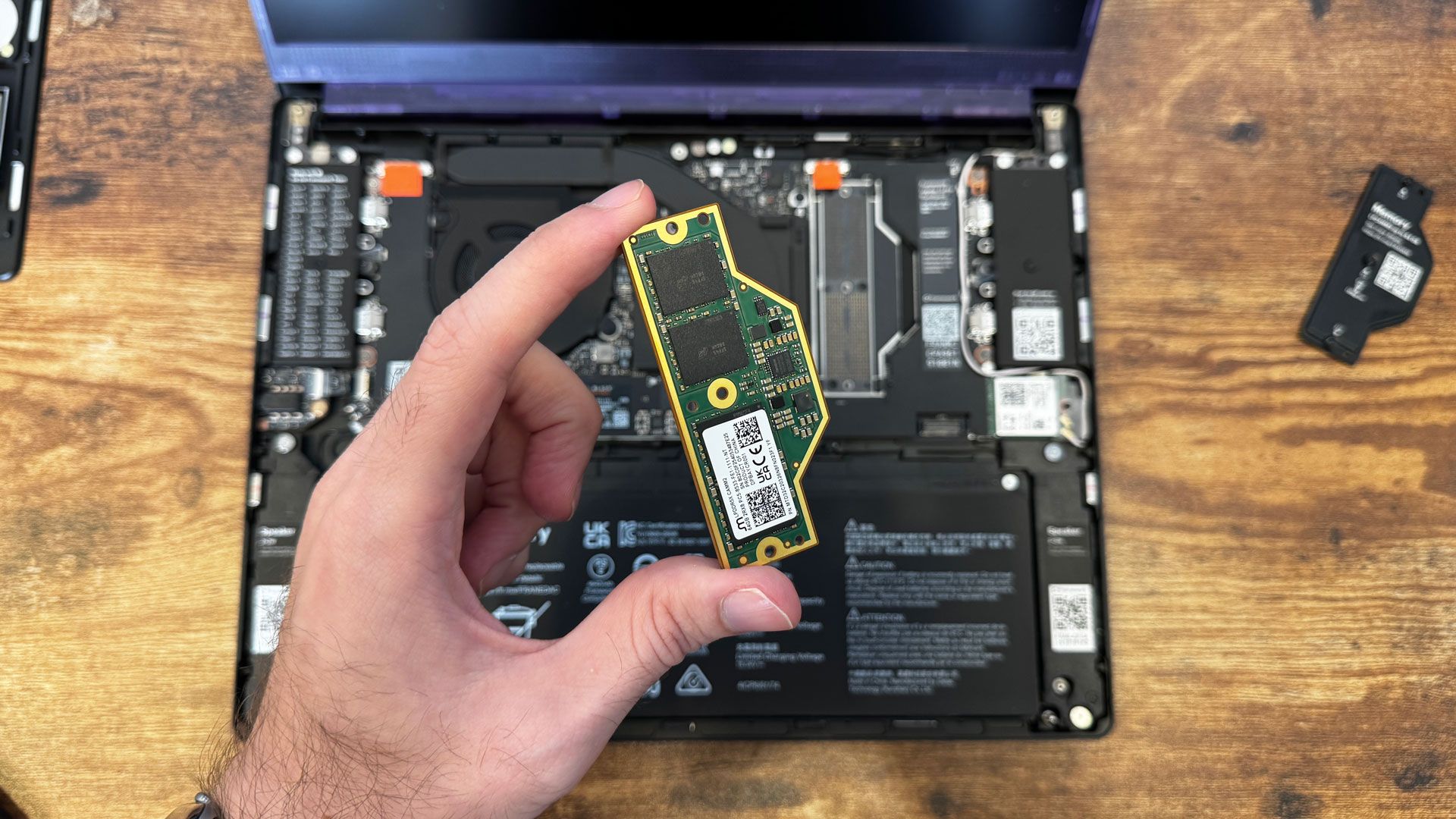
Similarly, laptop manufacturer Framework has been able to rely on its highly modular approach where customers can install memory salvaged from older laptops or opt for second-hand units, giving the company and its users another way to deal with limited supply. The company is also placing non-cancellable orders well in advance, even when it doesn't know the final price or exact delivery volume.
Back in July, it nearly doubled memory pricing for 32GB and 64GB variants of the Framework Laptop 13 Pro after receiving a cost update from its LPCAMM2 supplier. However, after sourcing new inventory at a reduced cost, the company recently announced a price drop for the same, including retroactive orders that have already shipped.
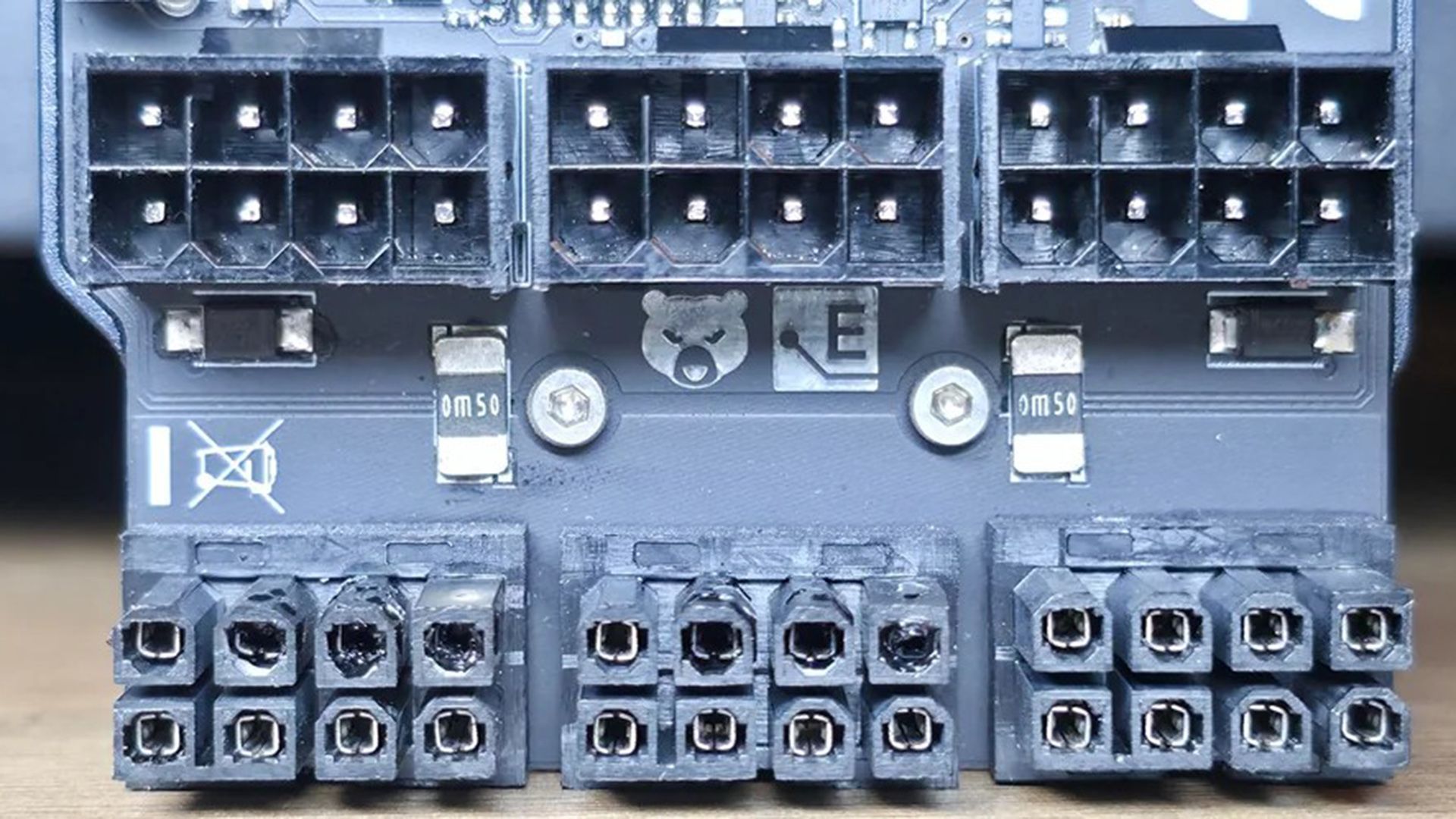
If you believe that the 8-pin PCIe power connector is entirely immune to the problems that have plagued the newer 16-pin connector, think again. A recent incident suggests that even the humble 8-pin is not entirely immune to failure. According to a Radeon RX 7900 XTX owner on Reddit, the 8-pin connectors on a Thermal Grizzly WireView monitoring device suffered overheating damage while connected to the graphics card.
The user said that they experienced frequent freezes and black screens before discovering the damage. The affected connectors were the 8-pin connectors on the GPU side of the monitoring device, with visible signs of burning and melted plastic. The user also confirmed that the connectors were fully inserted, although the exact cause of the failure is still unknown.
WireView is essentially an adapter that sits between a graphics card and the power cables, allowing users to monitor various values like power consumption, voltages, current in amperes, minimum and maximum power consumption, and more. Rather than connecting the PSU cables directly to the GPU, the power passes through the monitoring device, thus adding another set of connectors and electrical contacts to the power delivery path. A poor electrical connection, increased contact resistance, a damaged connector, or an issue with the adapter itself could have caused the overheating damage.
Thermal Grizzly previously pointed to improper seating, backplate interference, or incorrectly aligned or soldered contacts as possible causes of connector damage, although the company is yet to identify the cause of this particular incident. The company has reportedly contacted the affected user and asked them to get in touch with its support team so the company can investigate the damaged WireView adapter. The investigation could potentially help determine whether the failure originated from the adapter, the connectors, the GPU, or a combination of factors.
While we are on the subject of 8-pin power connectors, just days ago we saw a heavily modified RTX 5090 successfully running on traditional 8-pin connectors. The modders replaced the card's original 16-pin connectors with three 8-pin connectors soldered directly to the PCB, using heavy-gauge cables and modified sense pins. The card reportedly pulled as much as 900W and reached 3,400 MHz, demonstrating how capable 8-pin connectors can be when properly implemented. However, this was an extreme hardware modification, not a stock configuration.
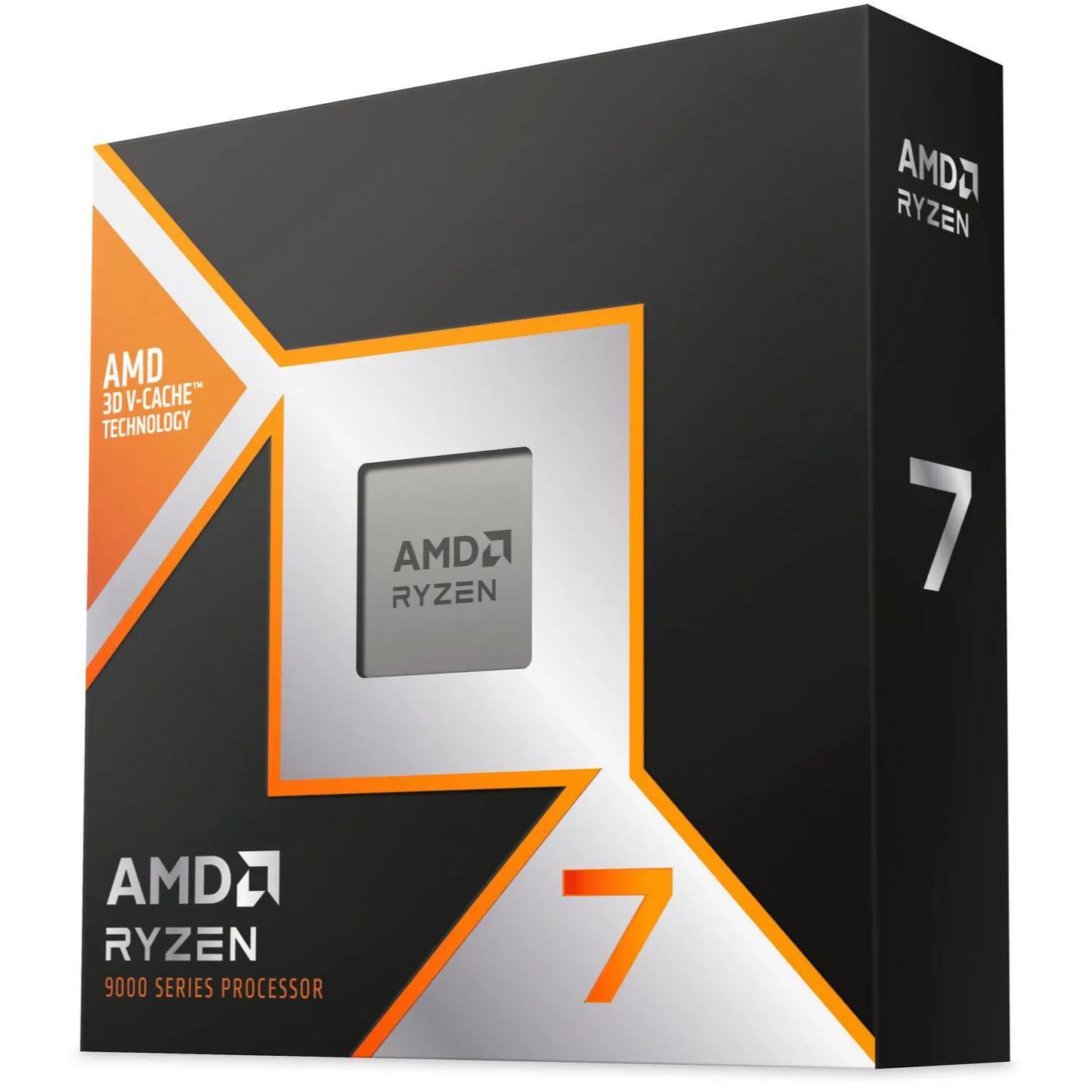
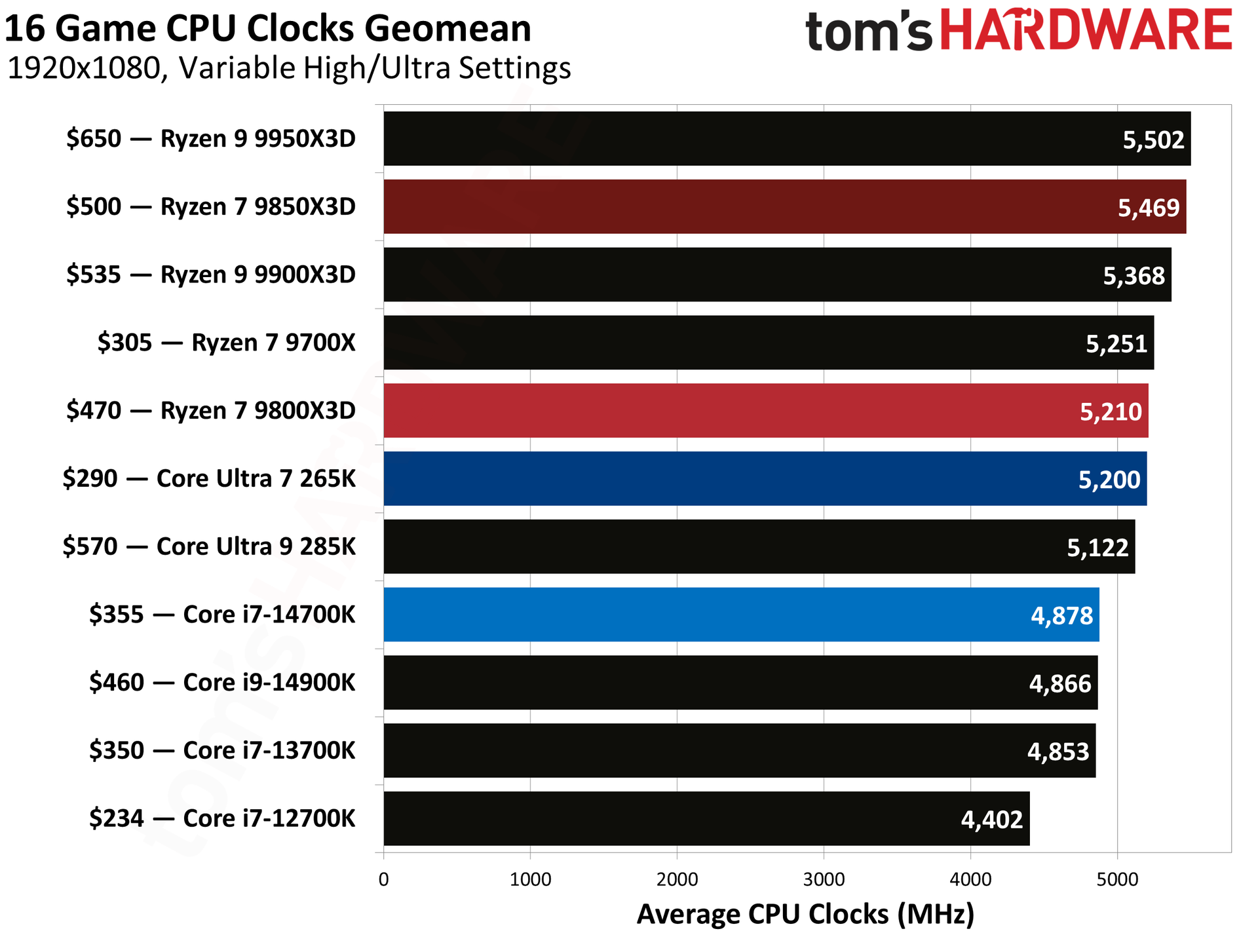
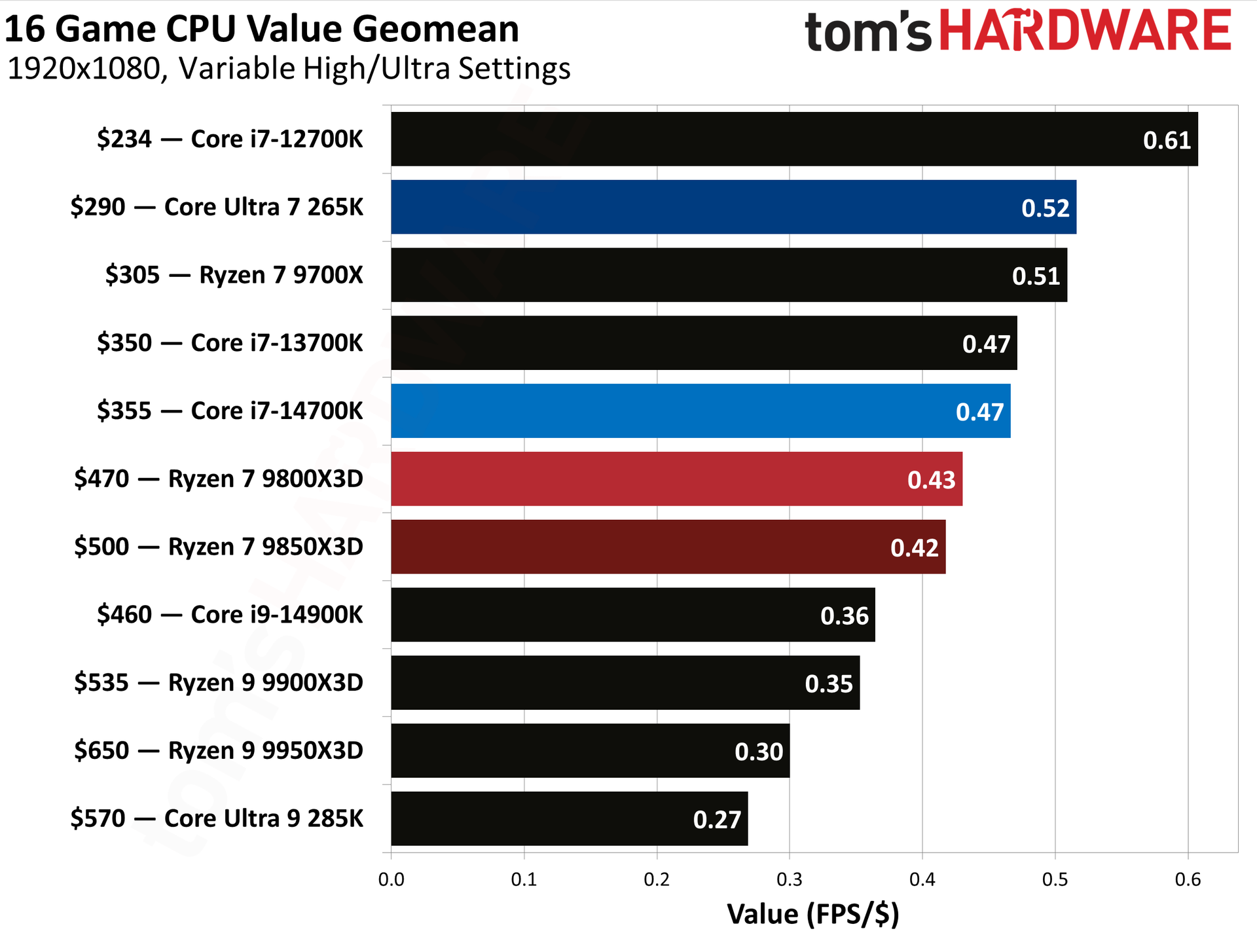
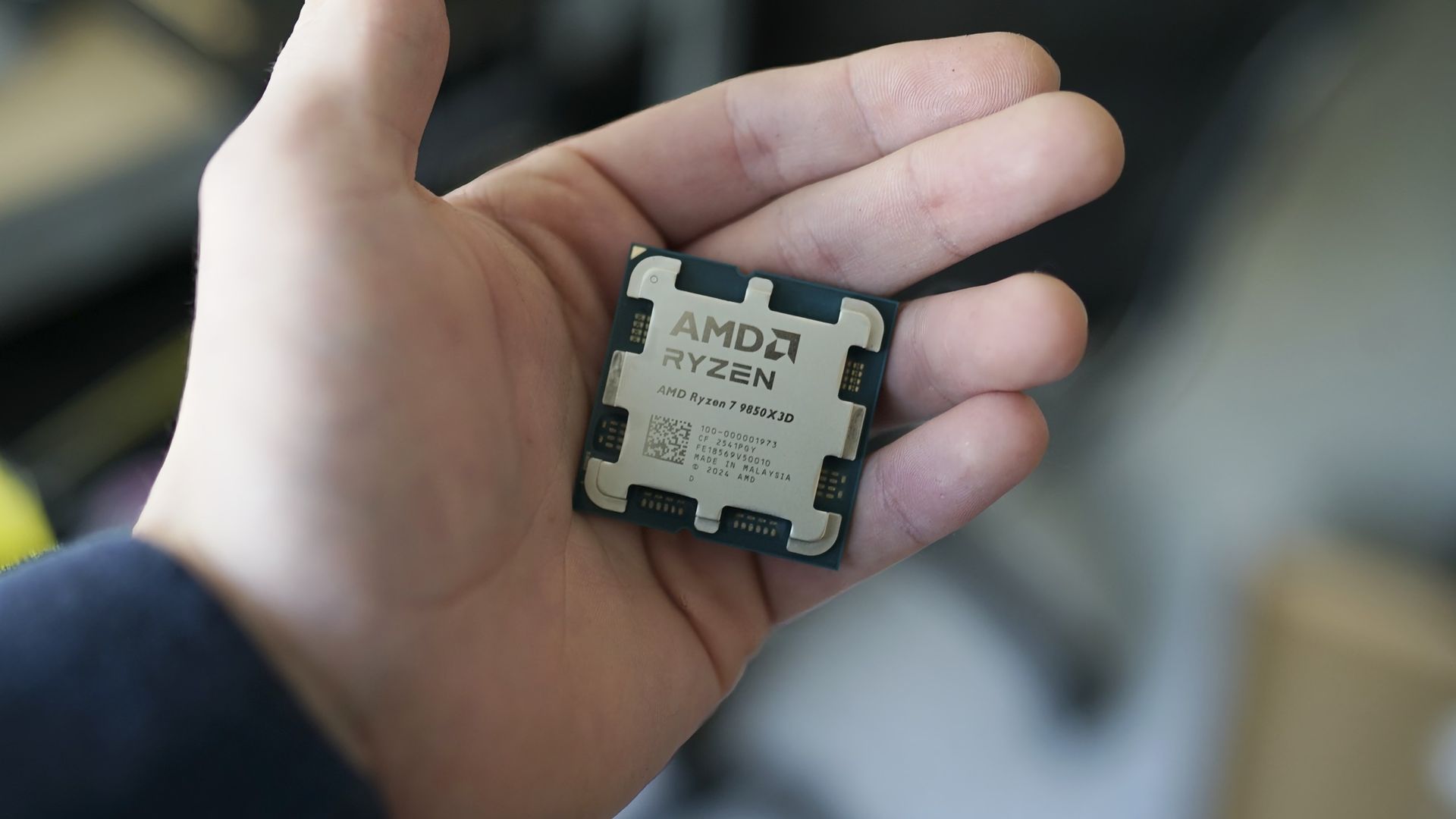
For those seeking the highest performance for gaming, AMD’s Ryzen 7 9850X3D is currently the best CPU money can buy. If you’re planning to upgrade or build a new PC, now might be a good time to pick one up, as Newegg is selling the 9850X3D for $484, around $15 less than its launch price. The deal also includes a 240mm Cooler Master AIO liquid cooler, valued at $79.99, along with a copy of Onimusha: Way of the Sword worth $69.99, both included as free gifts.
Announced at CES 2026, the Ryzen 7 9850X3D is essentially a higher-binned version of the Ryzen 7 9800X3D. It retains the same 8-core, 16-thread configuration and 4.2 GHz base clock as its predecessor, but gets a higher 5.6 GHz boost clock. The chip comes with the same 104MB of total cache, including 96MB of 3D V-Cache, which is the key ingredient behind its strong gaming performance. It also shares the same 120W default TDP and uses the AM5 platform with DDR5 memory support, making it compatible with a wide range of existing 800- and 600-series AMD motherboards.
Built on AMD’s Zen 5 architecture, the Ryzen 7 9850X3D combines 8 cores and 16 threads with a 5.6GHz boost clock and 96MB of 3D V-Cache.View Deal
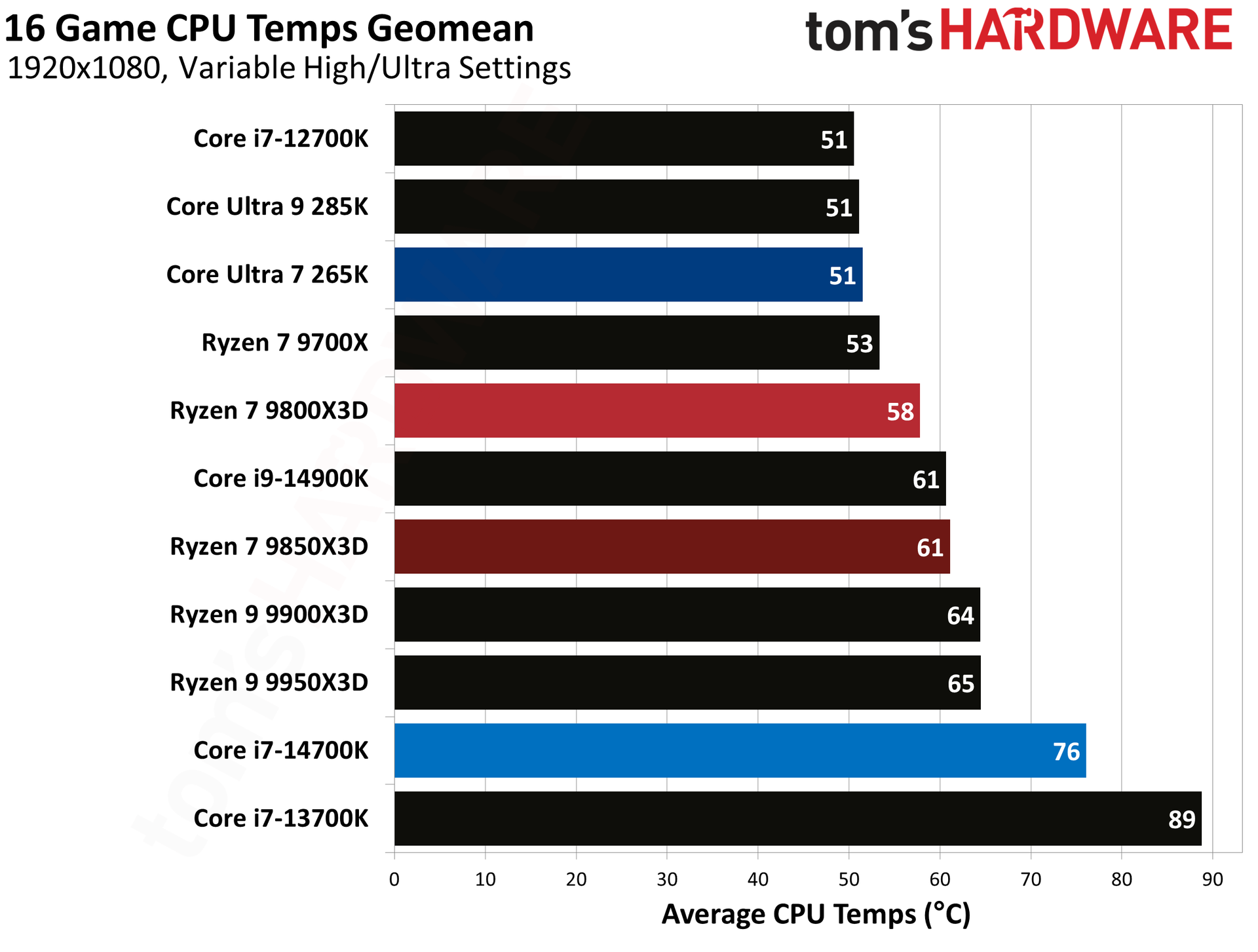
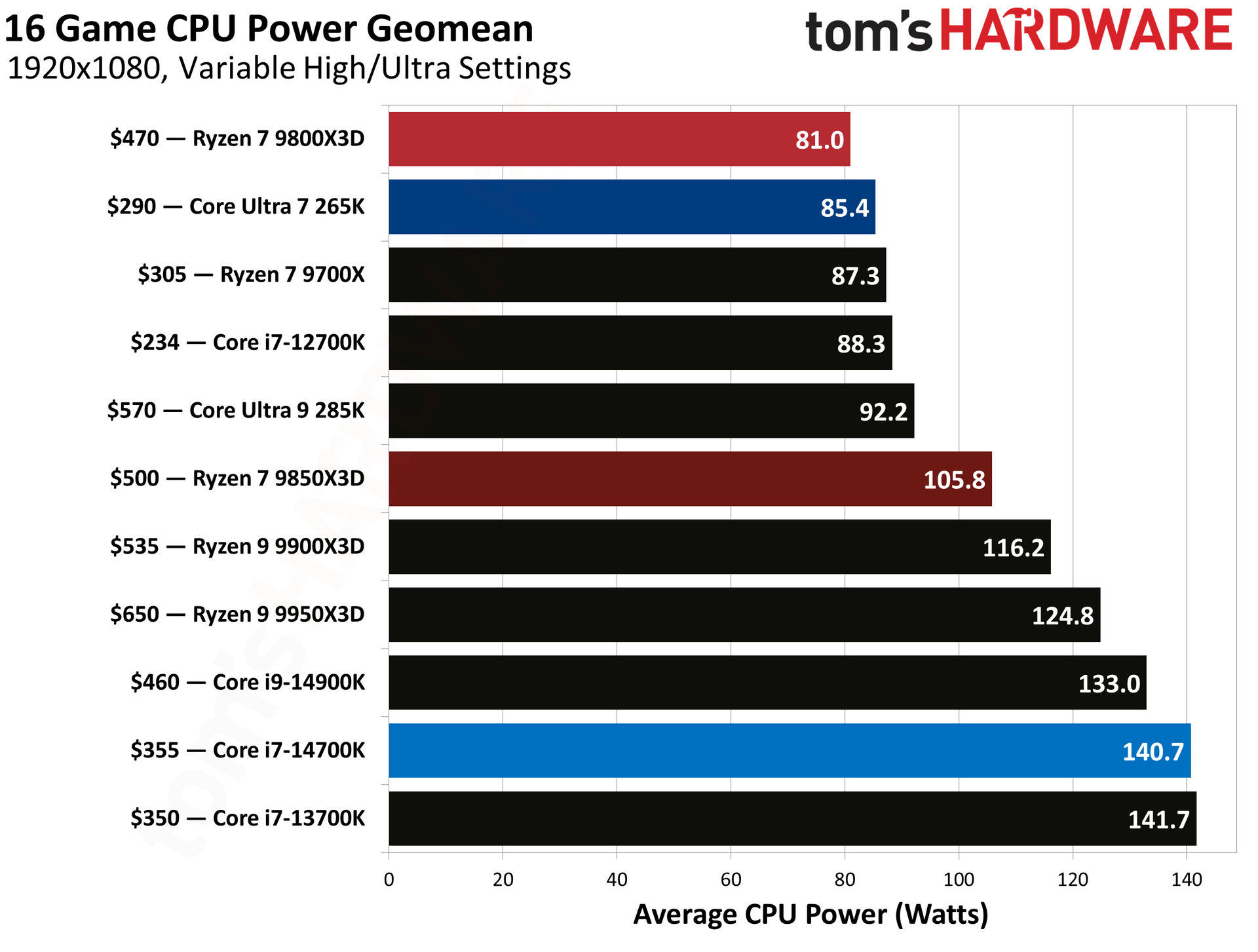
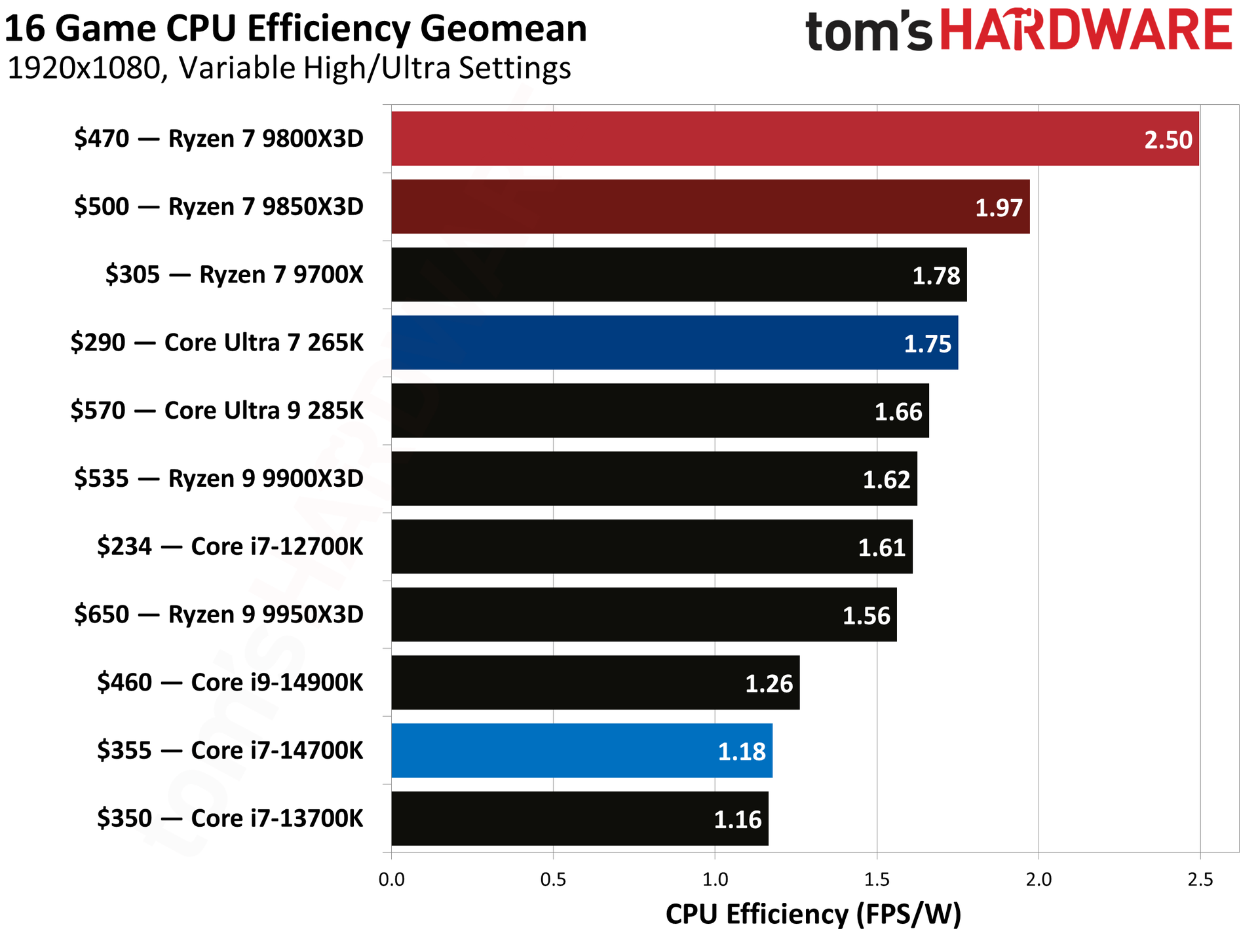
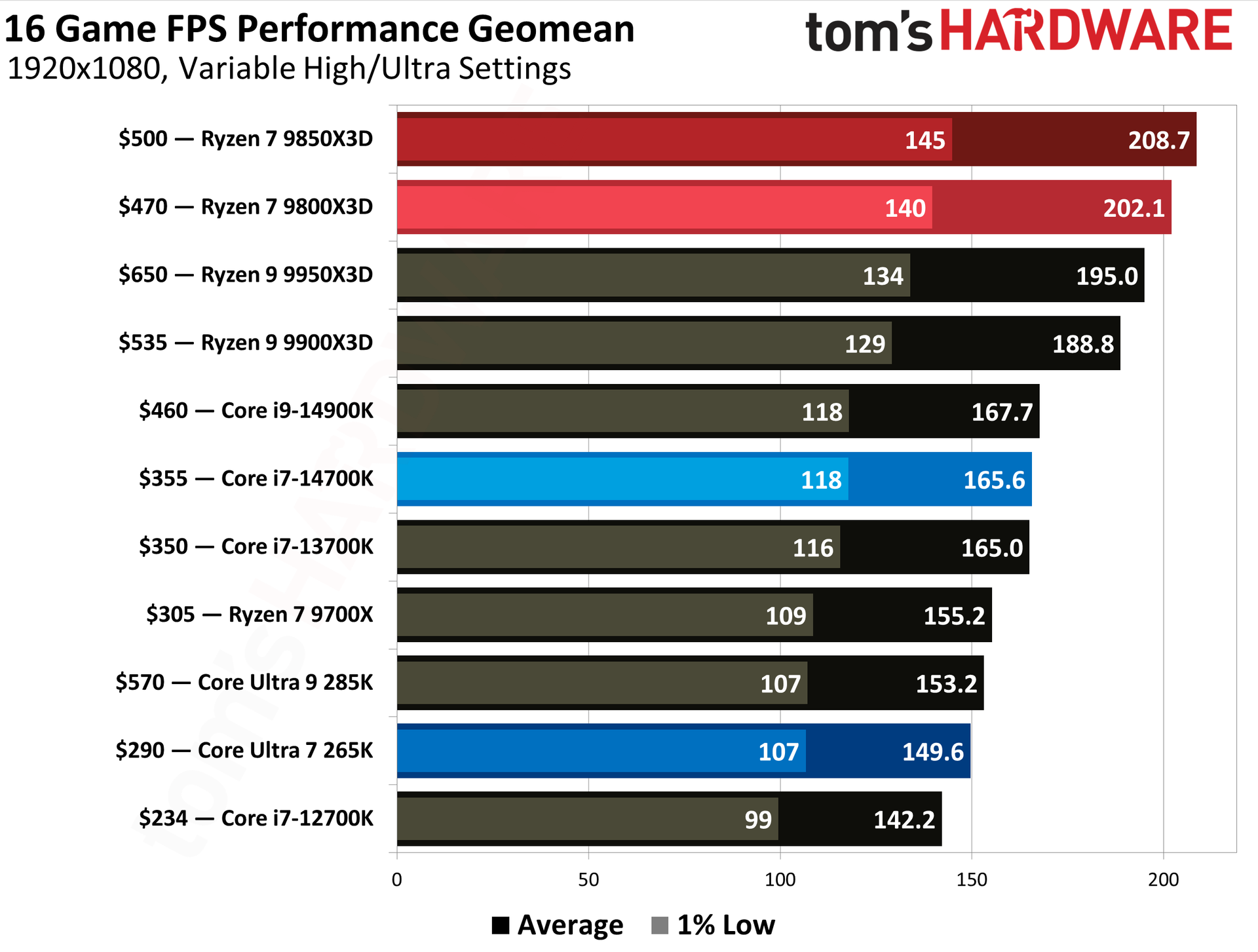
In our in-depth testing of the Ryzen 7 9850X3D, we found that it was only 3.3% faster than the Ryzen 7 9800X3D. But a win is a win, and that performance edge puts the CPU at the top of our 16-game 1080p FPS performance geomean, beating the more expensive Ryzen 9 9900X3D and 9950X3D. Although it loses out to Intel in some productivity workloads, the less complex 8-core configuration packed into a single CCD results in lower power draw. As you can see from our results, the peak power consumption is around 170W, making it much easier to cool.
With the included 240mm AIO liquid cooler, you should be able to keep the Ryzen 7 9850X3D well under control during gaming and moderate workloads, although it may run warmer under heavy multi-core workloads. At its sale price of $484, you’re paying less than its actual launch price while getting two useful extras at no additional cost. That makes this a worthwhile deal for anyone looking to build a high-end gaming PC around AMD’s gaming-focused platform.
Intel has reversed its decision to shelve its open-source font project designed specifically with developers in mind. The font’s GitHub repository was archived earlier this week, only for the company to reportedly restore the project and potentially continue to maintain it. The cancellation came amid a wider reduction in Intel’s open-source efforts. According to Phoronix, Intel has been closing down projects where development has slowed, or the employees responsible for them have exited the company.
Introduced back in 2023, One Mono is a monospace font where each character occupies the same horizontal width. Intel carried out the development in collaboration with type design studio Frere-Jones Type and marketing agency VMLY&R. Working with low-vision and legally blind developers during the design process, live testing sessions were conducted to identify characters that could be difficult to distinguish when reading code.
“Identifying the typographically underserved low-vision developer audience, we designed the Intel One Mono typeface for maximum legibility to address developers' fatigue and eyestrain and reduce coding errors,” said Intel in its introduction.
The font was designed with several features to improve legibility, including distinctions between similar-looking letters and coding characters. For example, characters such as the lowercase “e” and uppercase “G” were given more distinctive shapes to make them easier to identify. The difference in height between uppercase and lowercase letters was also increased, along with longer ascenders and descenders to make blocks of code easier to read. Additionally, the font supports more than 200 languages using the Latin script and is available in Light, Regular, Medium, and Bold weights, along with matching italics.
As mentioned, One Mono is available under an open-source license; thus, developers are free to use and modify it. Unfortunately, the font has not witnessed any significant updates since 2024, with activity during 2025 reportedly limited to Readme updates. Thus, its archival seemed pretty obvious, especially with Intel shutting down projects that were no longer seeing active development. For now, the font has managed to avoid becoming a casualty of Intel’s open-source cleanup. While the project remains silent, its revival means the developer-focused font is not being abandoned after all.
Microsoft has finally solved one of the biggest pain points of Windows with the rollout of Cloud Rebuild. The new recovery feature can reinstall Windows 11 even when an existing Windows installation is corrupt or refuses to boot. Available as a beta through the newly released Windows 11 Insider Beta Preview Build 26220.9343, the feature is essentially a hassle-free alternative to creating a Windows installation USB drive when a PC needs to be recovered.
According to Microsoft, Cloud Rebuild is designed to restore a Windows 11 PC to a “clean, known-good state” by downloading a fresh image of Windows along with the required drivers directly through Windows Update. Unlike the existing Reset this PC functionality, it does not depend on the health of your existing Windows installation, nor does it require users to have a USB drive or custom recovery image available.
(Image credit: Microsoft)
Available via the Windows Recovery Environment (WinRE), users can access it by selecting Troubleshoot > Recovery and uninstall > Cloud rebuild from WinRE. Speaking of which, Microsoft has also improved networking support in WinRE. The recovery environment can now reuse eligible Wi-Fi profiles saved within an existing Windows installation, allowing a PC to connect during recovery without requiring administrators to separately configure Wi-Fi credentials in WinRE. Once the PC is connected, Cloud Rebuild checks Windows Update for the target Windows build and downloads the required files. Users can then confirm the Windows edition, language, and build before starting the reinstall.
The only catch here is that Cloud Rebuild completely wipes the system drive, meaning that the process removes all data stored in your main installation or C: drive, including locally stored files, accounts, applications, and settings, before reinstalling Windows. Thus, it is recommended to back up all your important files either locally or using a cloud-based service before starting the process. Once the installation is complete, the PC boots into the Windows out-of-box experience, similar to a fresh installation of Windows. For admin-managed PCs using Windows Autopilot and Microsoft Intune, the system can automatically reconnect to the organization's management infrastructure and restore assigned applications, policies, and backed-up settings.
Cloud Rebuild could particularly be useful when Windows becomes too corrupted to boot normally. Instead of finding another PC, creating installation media, and manually reinstalling Windows, users can potentially perform the entire recovery process directly from WinRE. The feature is still in preview; however, we can expect a wider release later this year.
Modders at the YouTube channel TecLab have created what is being called the world’s first RTX 5090 powered by traditional 8-pin PCIe connectors. Not only were the modders able to successfully power up the graphics card, but they also proved that the older connector is still quite capable of handling the extreme power demands of a modern high-end GPU.
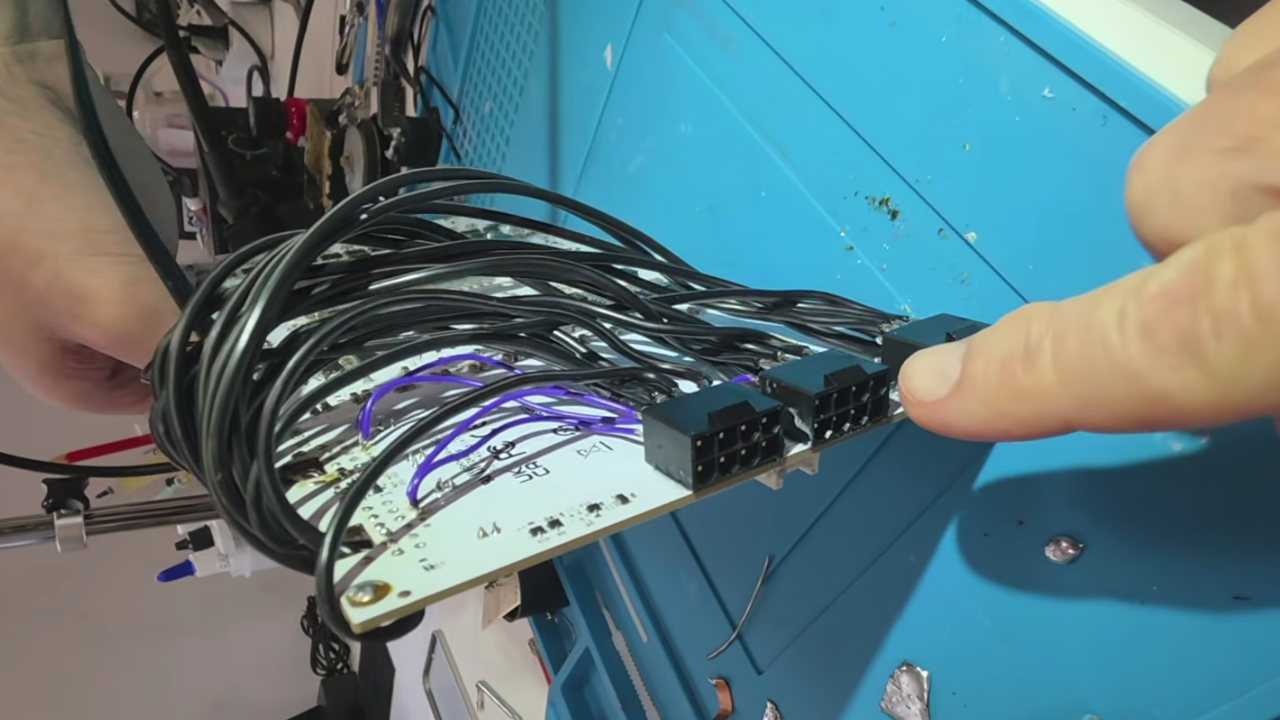
The card chosen for the experiment was a Galax GeForce RTX 5090D HOF OC LAB XOC, which is a top-of-the-line model that features a beefy cooler as well as dual 16-pin power connectors. The modders essentially dismantled the entire graphics card along with the dual 16-pin power connectors, stripping it down to just the bare PCB. Next, three 8-pin power connectors were installed at the rear, with each connector soldered directly to the power regulators on the PCB using heavy-gauge cables. Additionally, the sense pins had to be rewired to ensure that the card could reach its maximum power load without any restrictions. To keep the temperatures in check, they used a liquid cooling system with a GPU block.
An 8-pin PCIe power connector is officially rated for 150W, although its actual maximum capacity is much higher. During the one-hour livestream, the modders tested the GPU by gradually increasing the power draw, starting at 400W and going all the way up to 900W using three 8-pin power cables. At its peak, the modified RTX 5090 pulled more than 120A, with clock speeds reaching as high as 3,400 MHz. Notably, the mod was limited to only the hardware level, with no software or BIOS tweaks performed.
To further test the capability of the 8-pin connectors, the modders tested the modified RTX 5090 with just two cables. The overall power draw dropped to 66A, while clock speeds remained at a respectable 3,200 MHz. Going a step further, the card was tested with just one cable, which surprisingly only dropped the figures down to 65A and 3,100 MHz.
Despite the PCI-SIG (PCI Special Interest Group) revising the 16-pin power connector (12V-2x6) to improve reliability, reports of melting GPU connectors continue to haunt gamers. The issue is particularly more common among high-performance models, though not limited to Nvidia RTX 50 and RTX 40 series, as certain AMD Radeon graphics with the 16-pin connector are also at risk. TecLab's experiment shows that GPU manufacturers may want to reconsider the tried-and-tested 8-pin connector and explore whether it could still be a viable option in high-end graphics cards.
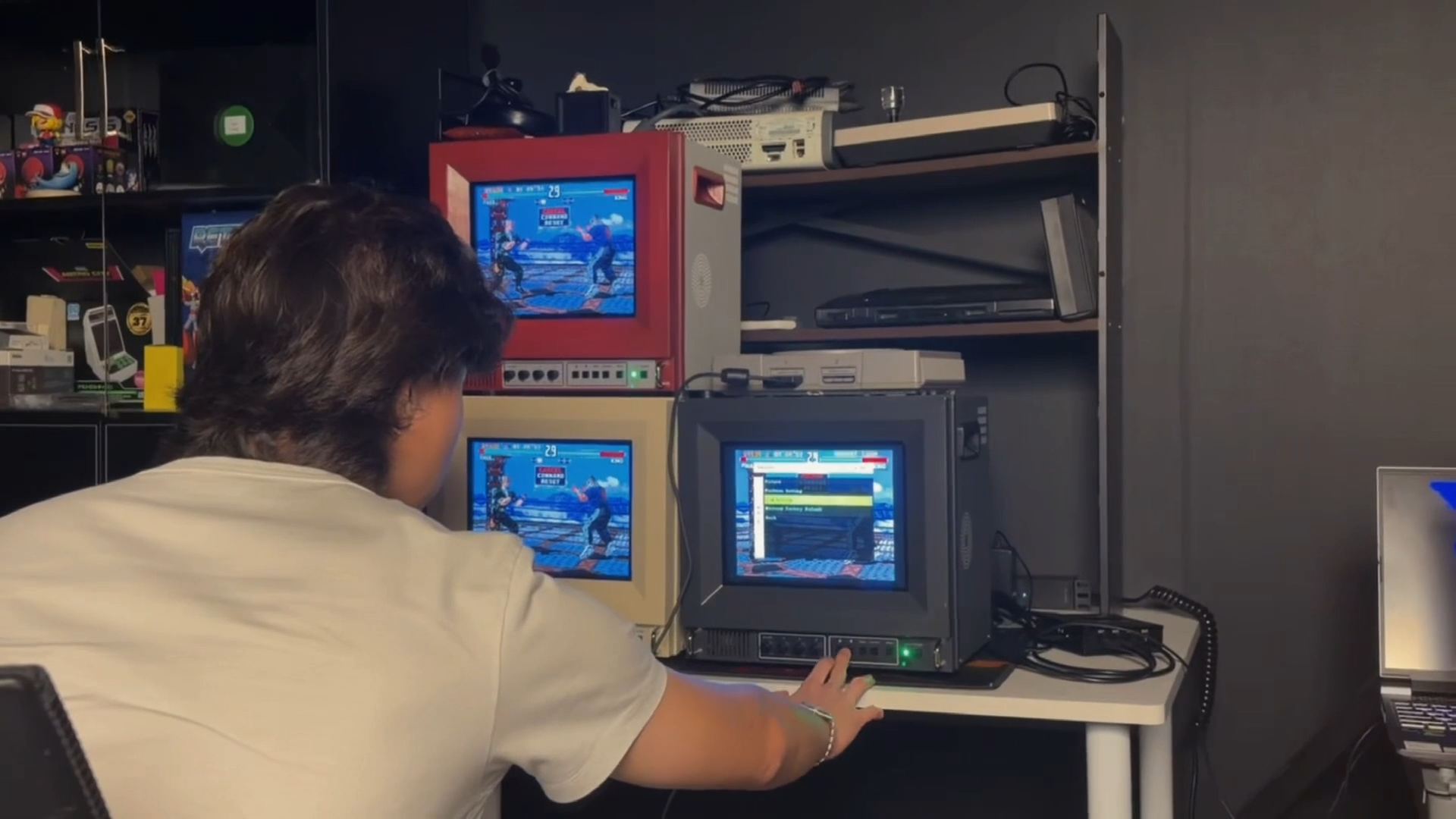
Getting a retro game console to look right on a modern TV can be a challenge, as legacy video signals need to be scaled or de-interlaced, while latency and aspect-ratio issues can further make retro games look or feel different from the original experience. In an attempt to recreate the nostalgic experience, retro gaming hardware manufacturer Unico has introduced the Traveller ULW10, a CRT-inspired 10-inch TV.
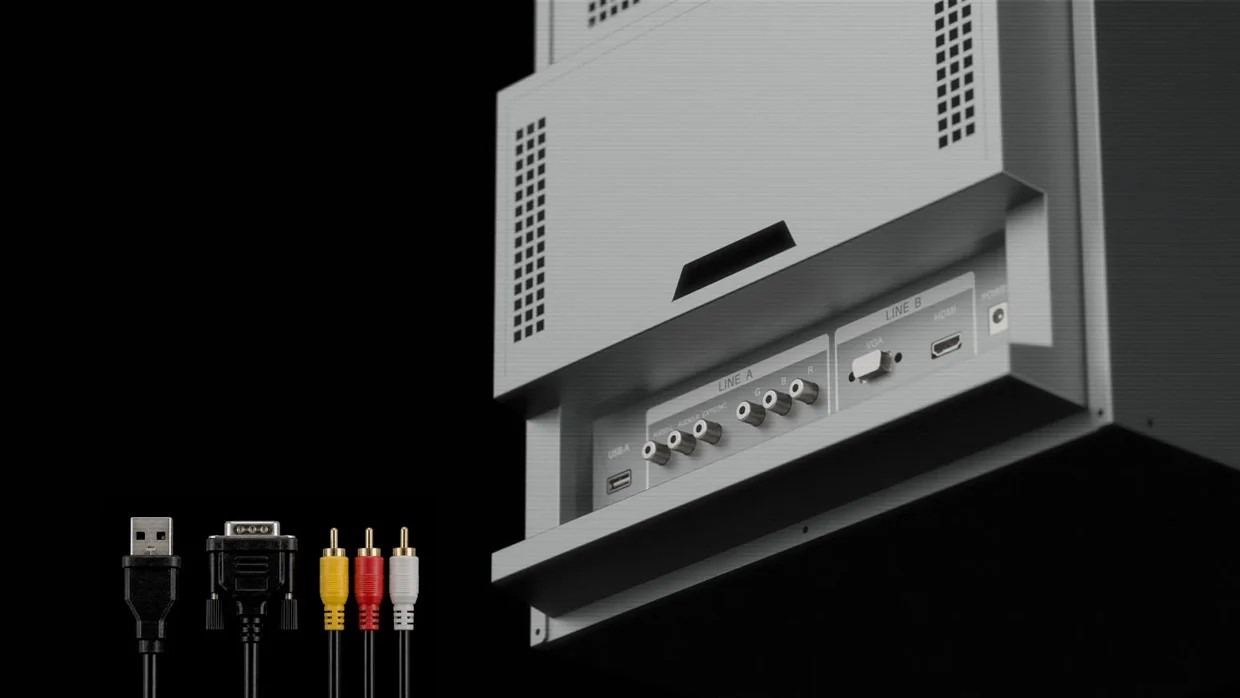
According to the company, the ULW10 is a PVM (Professional Video Monitor) with a vibrant 4:3 panel that “combines the character of a classic display format with the reliability of modern technology.” In terms of connectivity, the monitor comes with RGB, VGA, and HDMI video inputs, offering support for a wide variety of consoles. There is also a USB Type-A port, while the rear compartment provides storage for compatible consoles that can be tucked behind the display. It also includes knobs and physical buttons for various settings, similar to those found on old-school televisions.
UnicoUnicoUnico
Unfortunately, the ULW10 does not include a composite video input, and Unico says the decision ultimately came down to the limited space inside its compact chassis. With room needed for the signal board and other components, the company had to choose which video inputs to include. HDMI and VGA were retained for modern devices, PCs, and video converters, while RGB SCART was selected as the analog option because it offered the best balance between compatibility and image quality. It is also worth mentioning that the ULW10 is not a CRT monitor, but it can simulate the CRT or pixel-art style of old games.
The monitor will be offered in three color options: red and white, cream white, and studio gray. The casing includes built-in carrying handles as well as speaker vents, although the monitor itself does not include any speakers. The Traveller ULW10 will be available via Kickstarter, and while pricing information has not yet been confirmed, you can reserve a ‘Founder Spot’ for $5 and receive $30 back when you back the monitor on Kickstarter.
Reducing (or completely eliminating) the charge time for drones has been a continual area of research, with some advancements, such as quantum batteries showcased earlier this year, showing a lot of promise. Researchers at the Civil Aviation University of China have made a major breakthrough in laser-based OTA (Over The Air) charging that can convert energy at 38.94% efficiency.
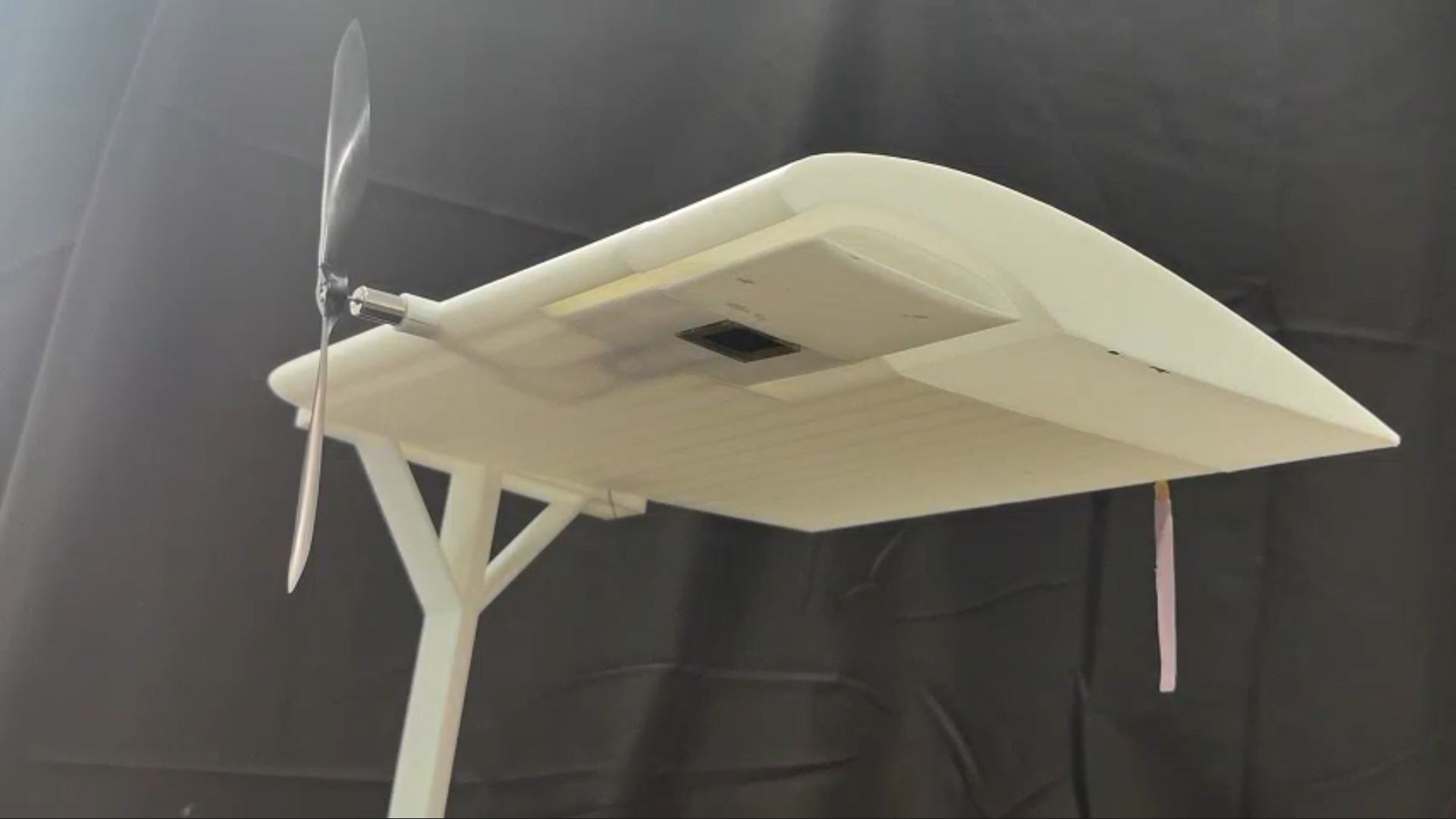
According to a study published in Matter & Light, scientists from the Civil Aviation University of China are testing a lightweight receiver that can harvest energy from a laser beam sent from the ground. The system uses a perovskite laser cell-thermoelectric (PLC-TE) tandem device, which combines two methods of generating electricity. The perovskite layer converts laser energy into electricity, while the thermoelectric layer recovers some of the resulting heat and turns it into additional power. Its output increases as the temperature difference between the laser-facing side and the cooler side grows.
(Image credit: Matter & light)
The major challenge with this setup is that intense laser beams heat up the receivers to a blistering 80 to 90 degrees Celsius, degrading efficiency and causing damage to the aircraft itself. “That was much higher than we expected and made us realize that heat buildup was a far more serious problem than we had imagined,” explained Jianhua Han, the study's senior author.
To overcome this challenge, Han's team added special nanocrystals to the receiver. As the nanocrystals are poor heat conductors, it allows them to act as a thermal barrier and protect the perovskite and thermoelectric layers. The team also added air channels to the drone's wings. As the propellers spin, airflow passes through these channels and carries excess heat away, helping to keep the system cool. The combination of nanomaterials and aerodynamic cooling resulted in a respectable 38.49% energy conversion efficiency during testing, which is one of the highest reported for this class of technology.
While the system is yet to undergo outdoor flight tests, this breakthrough alone is a significant step toward practical continuous flight for drones. As Han noted, going from 1 to 100 will require solving complex tracking and safety challenges, but this research establishes an important starting point for the future of drones and UAVs.
In one of the most unique DIY projects, Reddit user PickentCode has created what can be described as a completely off-the-grid "heat engine computing device." Instead of relying on solar panels or a battery pack, the creator went in a completely different direction, building a custom steampunk-inspired microcomputer which features a miniature Stirling engine to power the hand-crafted wooden console.
Originally patented in 1816 by the Scottish minister and inventor Robert Stirling, a Stirling engine converts heat directly into mechanical energy. By applying a flame to one end of a sealed cylinder, the temperature difference forces the air inside to expand and contract. This cycle pushes a piston that spins the flywheel, which can be used to power a simple generator that converts the mechanical rotation into usable electricity.
"The entire project took about a month to design, build, and program," PickentCode told Tom's Hardware. They first conceptualized a 3D layout using Blender before constructing the physical case out of wood. They even went ahead and utilized a DIY laser engraver to etch a portrait of Robert Stirling and his original 1816 engine patent sketch directly onto the wooden side panels. For the smaller structural elements, the electronic housings and the keycaps were custom 3D printed, while the decorative pipes winding across the frame were made from old shower tubing and some gold paint.
PickentCode on RedditPickentCode on RedditPickentCode on Reddit
The brains of the system are an ESP32 C3 microcontroller paired with a 2.42-inch monochrome OLED display with a 128x64 resolution, alongside a 16-key keypad. The electrical output of the generator is stabilized using small capacitors wired into the circuit. One can also actively monitor the voltage output using the analog voltmeter, which is wired in parallel, and the two toggle switches mounted on the front panel can be used to turn on the main circuit and the voltmeter.
Running an electronic device, in this case a microcomputer, purely on fire comes with obvious energy limitations. The model Stirling engine can produce only 150 milliwatts of power, and to stay within this tiny power budget, the creator implemented certain hardware and software optimizations. For instance, Wi-Fi and Bluetooth were completely disabled, and the screen brightness was kept low to conserve every milliwatt. PickentCode also tuned the ESP32's CPU frequency, reducing it down to just 80 MHz when updating the screen or interpreting opcodes, going all the way down to just 10 MHz while sitting idle in the main loop.
Despite the limitations, the computer is fully functional. It runs a custom CHIP-8 virtual machine preloaded with classic gaming ROMs like Tetris, Snake, and Pong. Impressively, it also features a built-in code editor, allowing users to type in CHIP-8 opcodes directly to write and execute their own custom programs on the fly.
Stirling engines are not exactly new to the world of computing. Earlier this year, we covered a project by Windows development guru Dave Plummer who showcased a cooling solution that used a small Stirling engine to convert waste heat from an AMD Threadripper system into mechanical energy, which was used to spin the engine's flywheel. While it isn’t an actual solution to an overheating chipset, it is claimed that the flywheel can spin up to about 200 RPM in a 20C/68F environment.
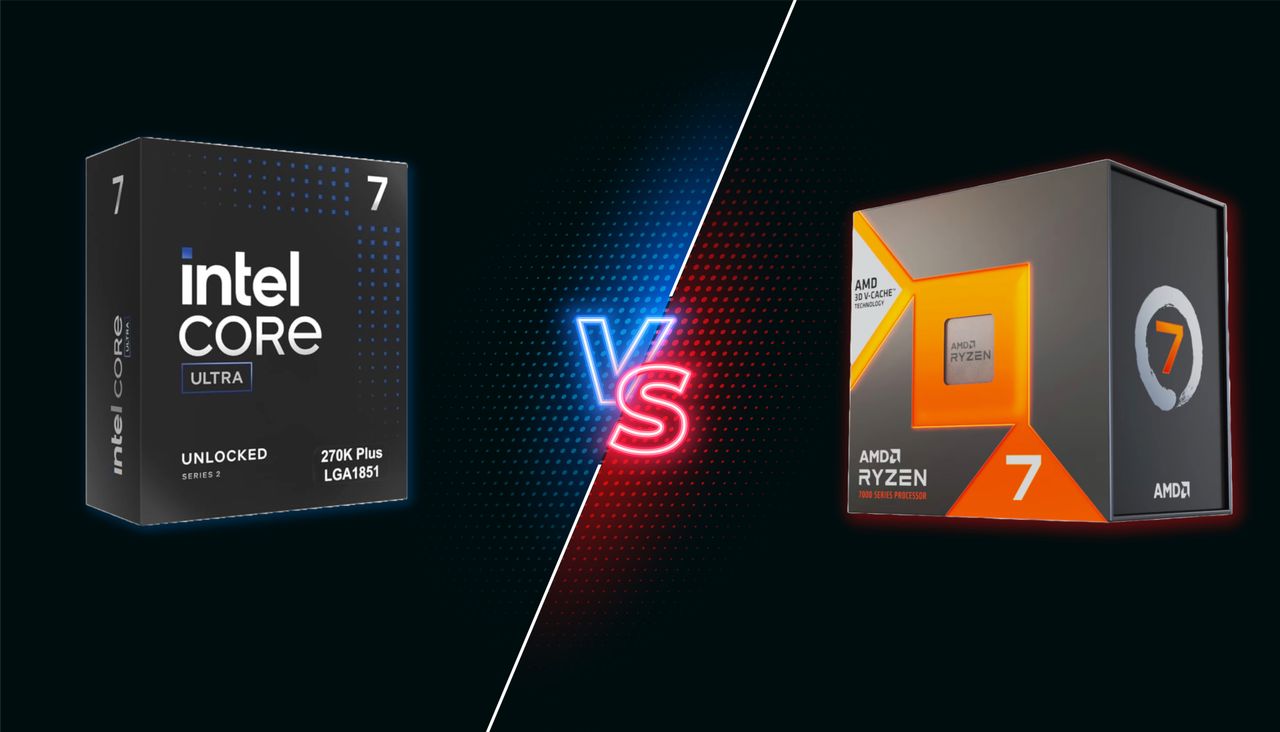
The mid-range CPU segment has become more competitive than ever, with both Intel and AMD refreshing their lineups and pushing aggressive pricing. In one corner, we have the Intel Core Ultra 7 270K Plus, an important reset for Intel that prioritizes class-leading productivity performance over efficiency, while also offering solid value. In the other corner is AMD's newly launched Ryzen 7 7700X3D, a more affordable, slightly lower-clocked alternative to the 7800X3D.
This faceoff is particularly interesting because the two chips take very different approaches despite costing about the same price. The Core Ultra 7 270K Plus packs 24 cores and excels in productivity workloads, while also delivering Intel's strongest gaming performance in years. The Ryzen 7 7700X3D, meanwhile, relies on AMD's proven 3D V-Cache technology to deliver gaming performance within 5% of the 7800X3D, although it trails significantly in single- and multi-threaded workloads.
While the Ryzen 7 7700X3D is aimed at gamers looking for X3D performance at a lower price, it faces stiff competition from Intel's aggressively -priced Core Ultra 7 270K Plus, as well as its own sibling, the Ryzen 7 7800X3D, which is often available for only a little more.
So, is AMD's gaming-focused approach enough to beat Intel's well-rounded Arrow Lake Refresh processor, or has Intel finally found the right balance of price and performance to reclaim the mid-range crown? In this six-round faceoff, we compare these two sub-$350 CPUs to find out which one comes out on top.
Features and Specifications: Intel Core Ultra 7 270K Plus vs AMD Ryzen 7 7700X3D
Intel Core Ultra 7 270K Plus vs AMD Ryzen 7 7700X3D — Pricing and Specifications
CPU
Street (MSRP)
Arch
Cores / Threads (P+E)
P-Core Base / Boost Clock (GHz)
E-Core Base / Boost Clock (GHz)
Cache (L2/L3)
TDP / PBP or MTP
Memory
Core Ultra 7 270K Plus
$320 ($300)
Arrow Lake Refresh
24 / 24 (8+16)
3.7 / 5.4
3.2 / 4.7
76MB (40+36)
125W / 250W
DDR5-7200
Ryzen 7 7700X3D
$330
Zen 4
8 / 16
4.0 / 4.5
N/A
104MB (8+96)
120W / 161W
DDR5-5200
Taking a look at the technical specifications, it's clear that each chip adopts a distinct strategy for the mid-range market. While Intel has optimized its architecture for a higher core and thread count along with improved interconnect speeds, AMD continues to leverage its stacked cache to maintain gaming dominance on a long-lived platform.
The Intel Core Ultra 7 270K Plus is based on the original Arrow Lake-S family, utilizing the same microarchitecture that we saw on the 265K, built using TSMC’s 3nm process. It matches the flagship 285K with a 24-core configuration (8 Lion Cove P-cores and 16 Skymont E-cores) and operates with a 125W TDP. The chip can scale to a 250W Maximum Turbo Power (MTP), which is the maximum power limit that this CPU can consume for short periods when running at maximum turbo boost frequencies
Intel has also standardized several enthusiast-level performance tweaks for Arrow Lake Refresh, most notably a 900 MHz increase in die-to-die frequency and a 400 MHz fabric speed boost. It also officially supports faster DDR5-7200, along with 20 lanes of PCIe Gen 5 and 76MB of total cache. Possibly the only major concern with the Core Ultra 7 270K Plus is the LGA 1851 platform. With Intel's next-generation Nova Lake processors expected to launch later this year, the current platform will have a relatively short lifespan, restricting any future upgrade options.
The AMD Ryzen 7 7700X3D serves as a more affordable, lower-clocked variant of the 7800X3D, featuring the same eight Zen 4 cores with a peak boost clock of 4.5 GHz. Its primary architectural strength is its 104MB of total cache including 64MB of vertically stacked L3, which is specifically tuned to eliminate memory latency bottlenecks.
The chip is rated at a 120W TDP with a 162W Package Power Tracking (PPT) limit, though it frequently operates well below these levels during gaming. A major selling point for Team Red is motherboard flexibility as the 7700X3D can be used with existing AM5 motherboards (600 and 800-series chipsets), and AMD has committed to supporting the socket through at least 2029.
⭐ Winner: Intel Core Ultra 7 270K Plus
While AMD offers a more stable platform and superior gaming efficiency thanks to its large cache size, Intel’s hardware package is more comprehensive for the price. The 270K Plus offers triple the core count, significantly higher frequencies, and faster memory support.
Gaming Benchmarks and Performance: Intel Core Ultra 7 270K Plus vs Ryzen 7 9700X
To evaluate the gaming performance of these two chips, we conducted our testing at 1080p resolution using an Nvidia GeForce RTX 5090. We used this setup to prevent the GPU from becoming the bottleneck, allowing each CPU's gaming performance to shine through. By removing the graphics card as a limiting factor, we can see exactly how the 7700X3D’s 3D V-Cache stacks up against the higher core count and clock speeds of the 270K Plus.
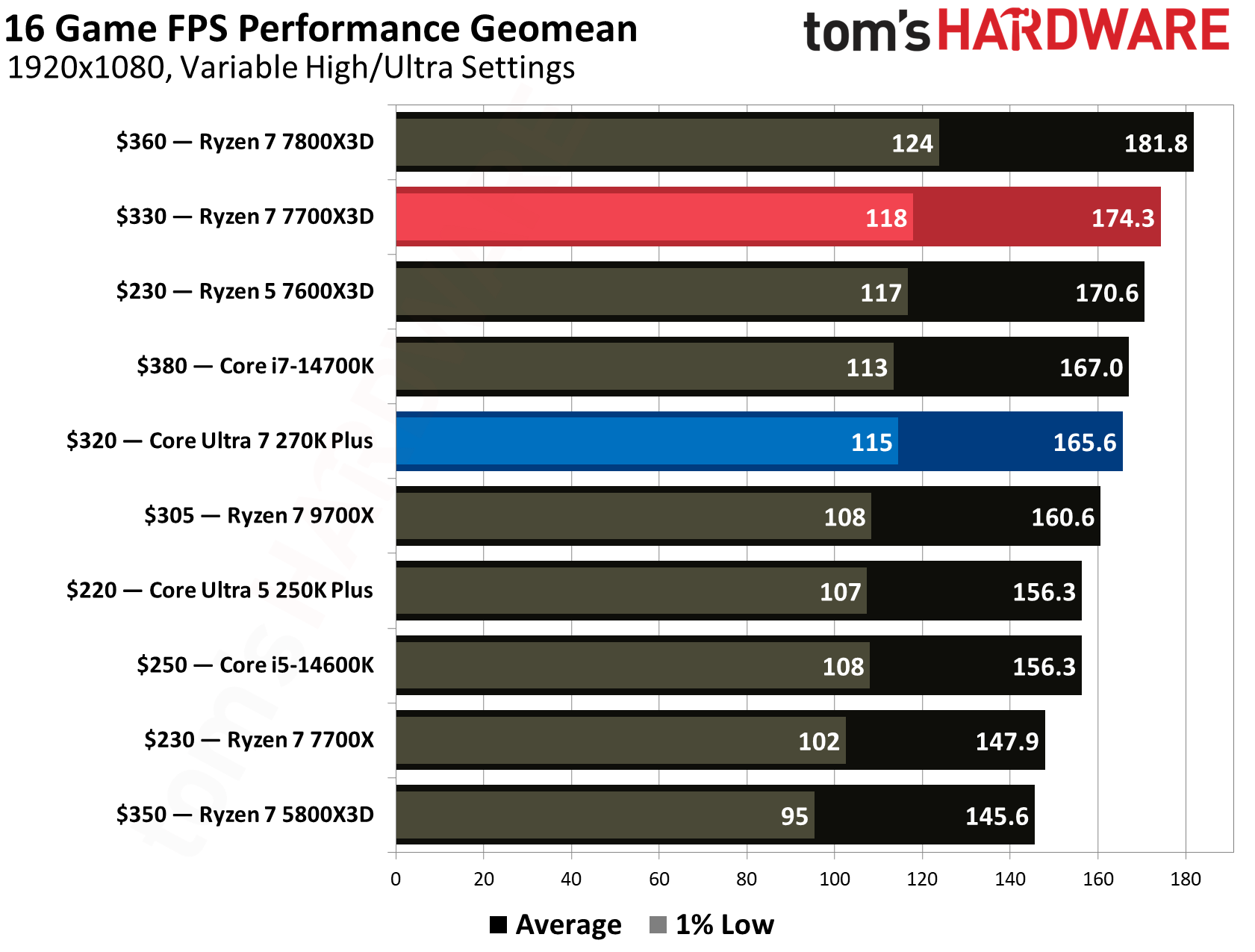
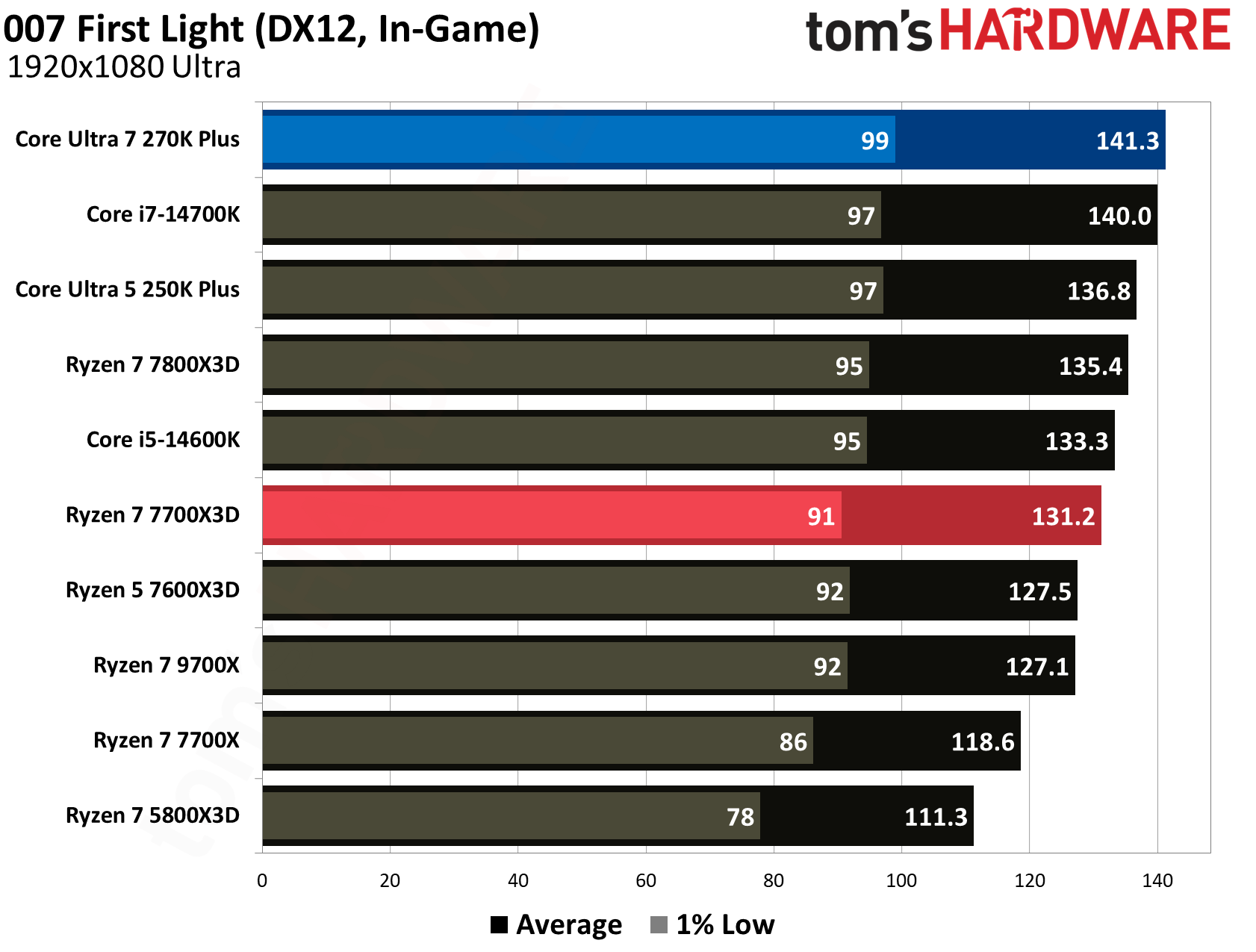
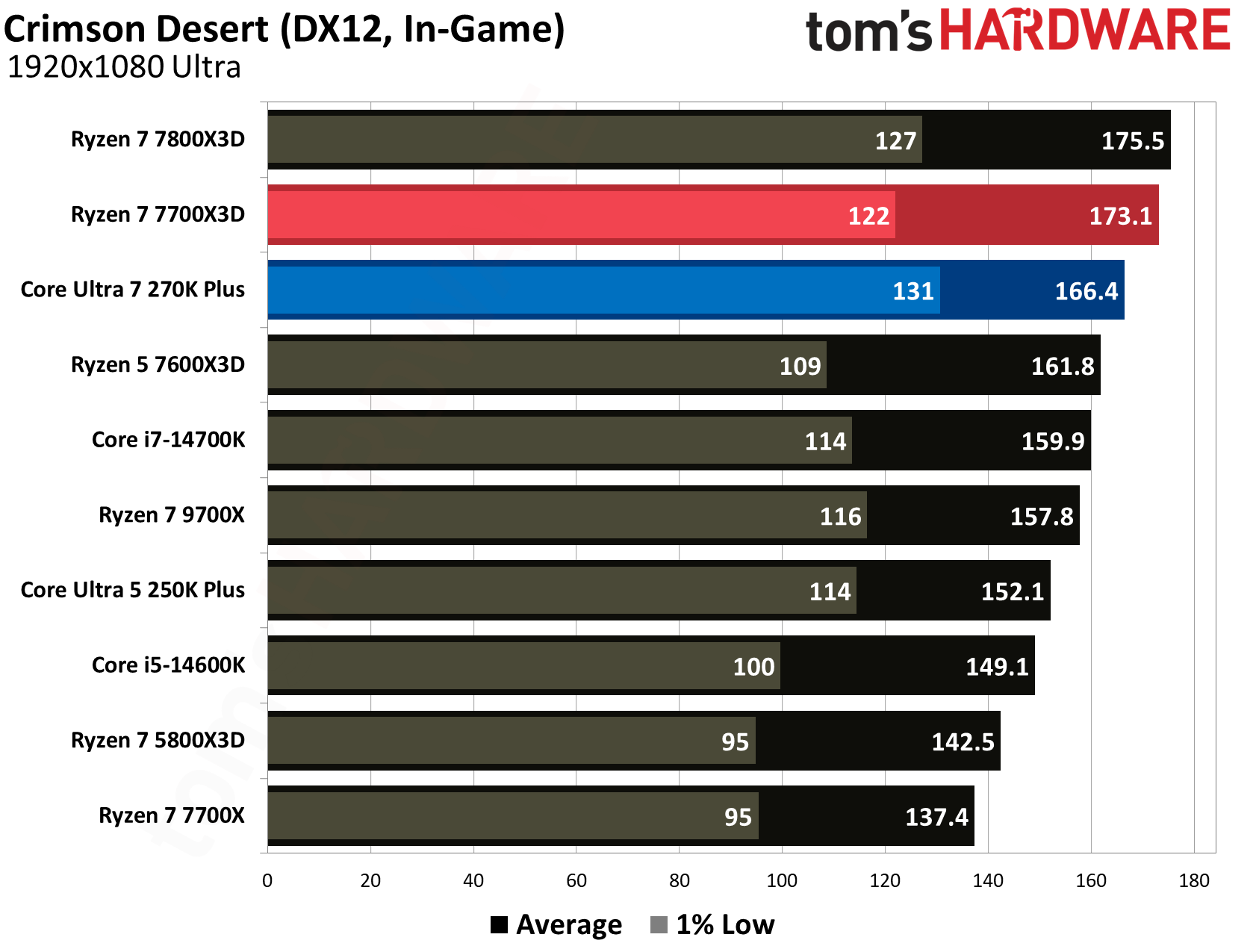
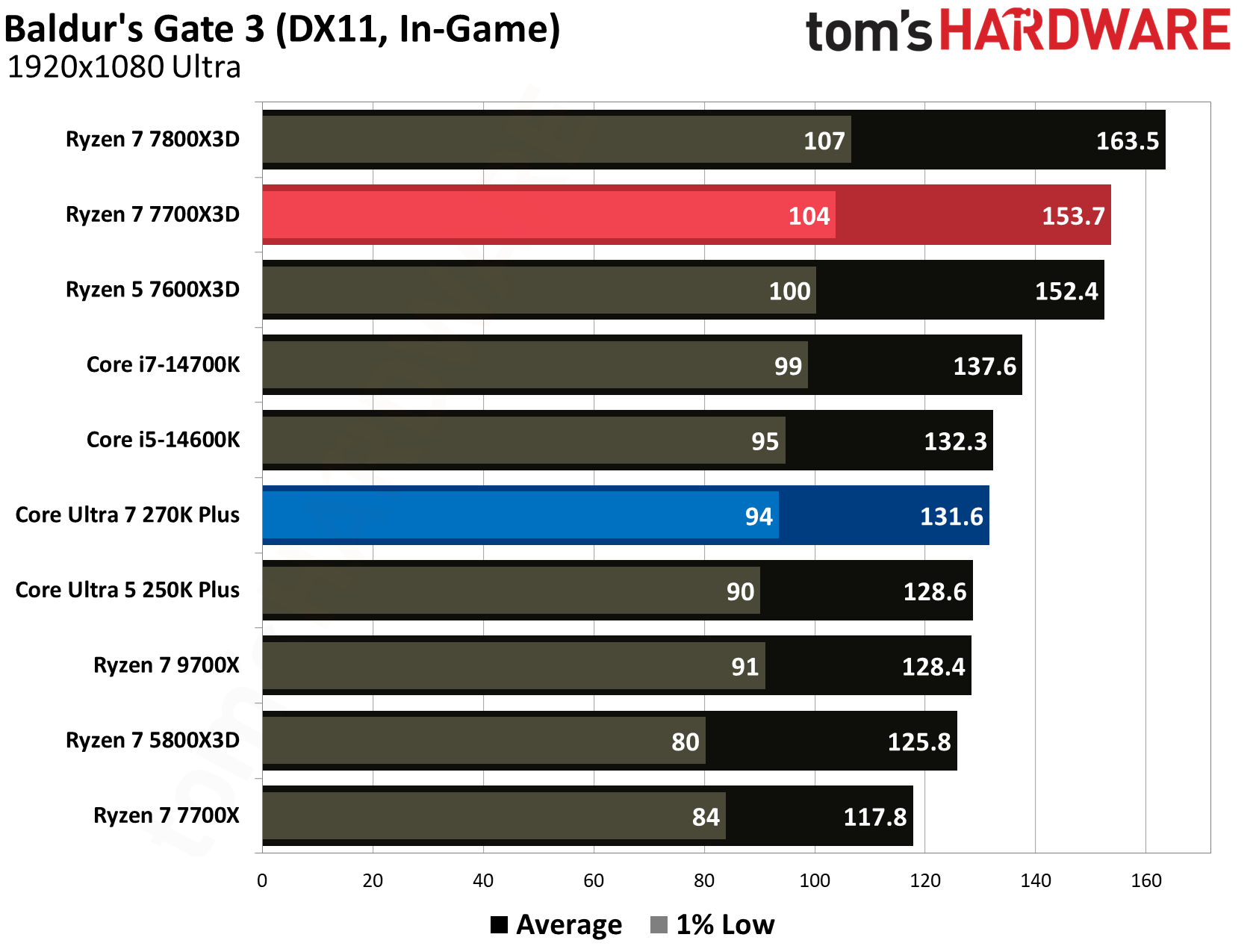
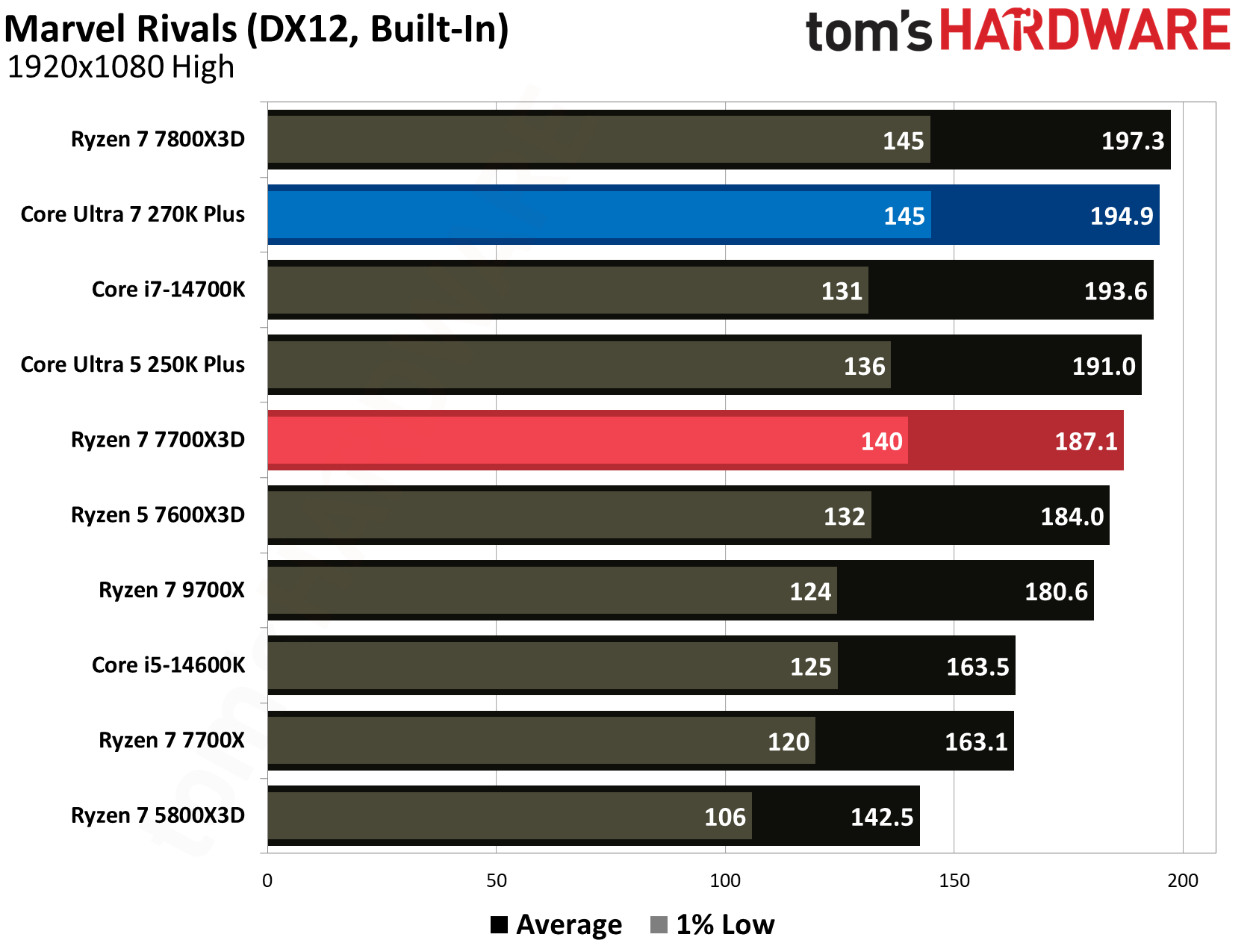
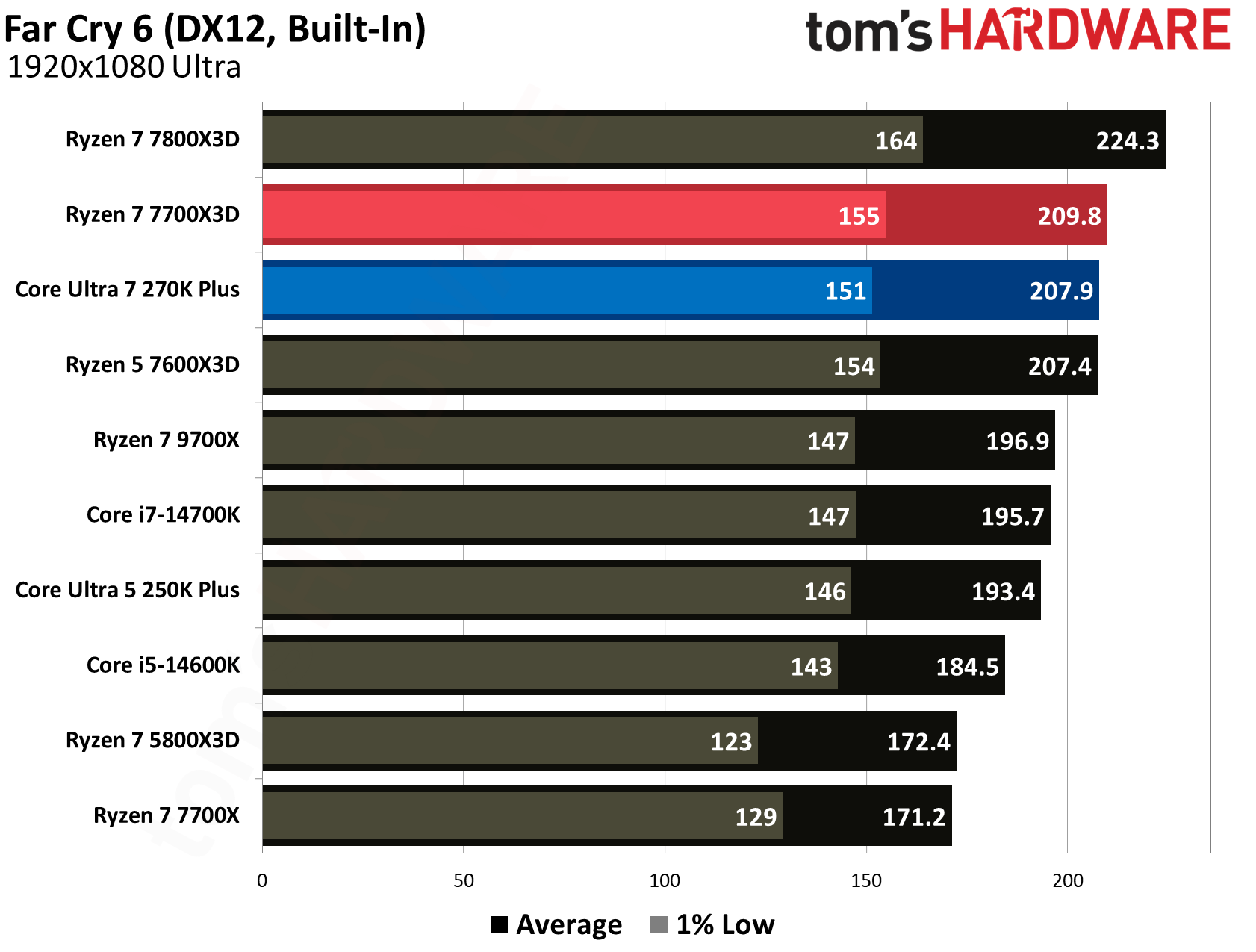
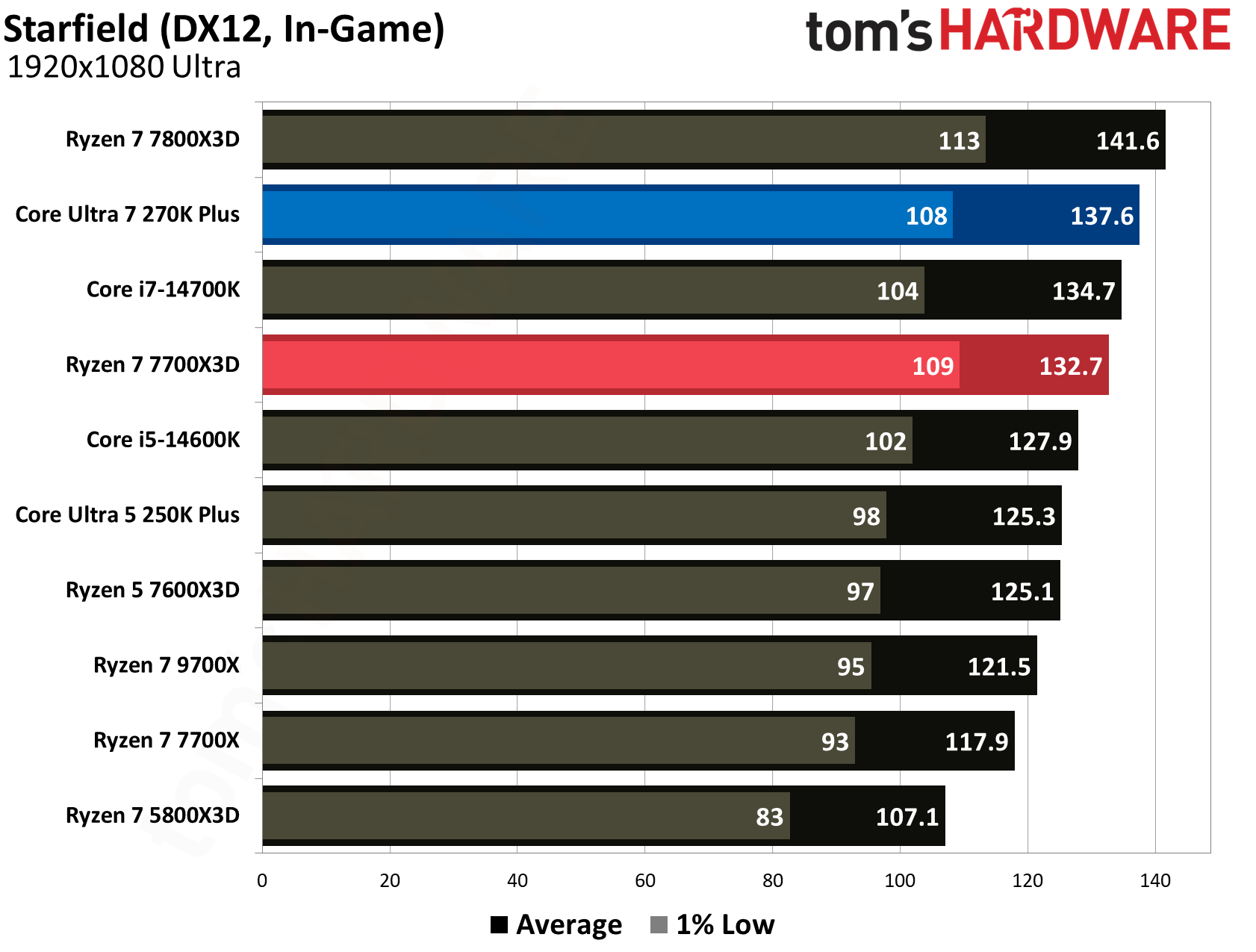
Across a comprehensive 16-game geomean, the AMD Ryzen 7 7700X3D holds its position as the superior gaming chip, delivering a 174.3 FPS average. This represents a 5.3% performance lead over the 270K Plus, which produced a 165.6 FPS average. While Intel's latest flagship has significantly narrowed the gap compared to the original Arrow Lake silicon, AMD’s 3D V-cache architecture continues to provide a higher performance in the majority of tested titles.
Even when examining the 1% low frame rates, which is the perceived smoothness while gaming, the 7700X3D maintains a slight edge with a 118 FPS average compared to the 115 FPS from the 270K Plus.
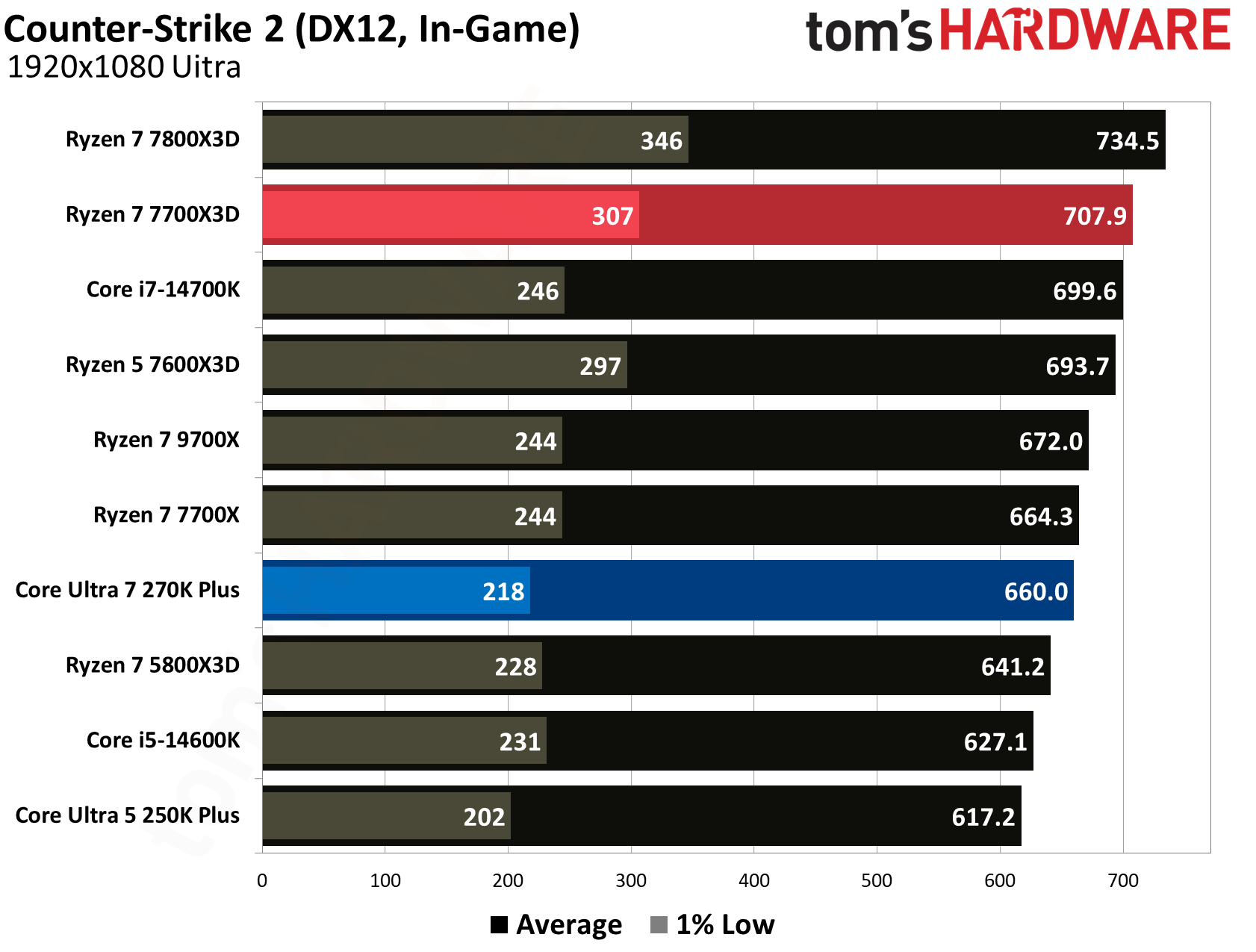
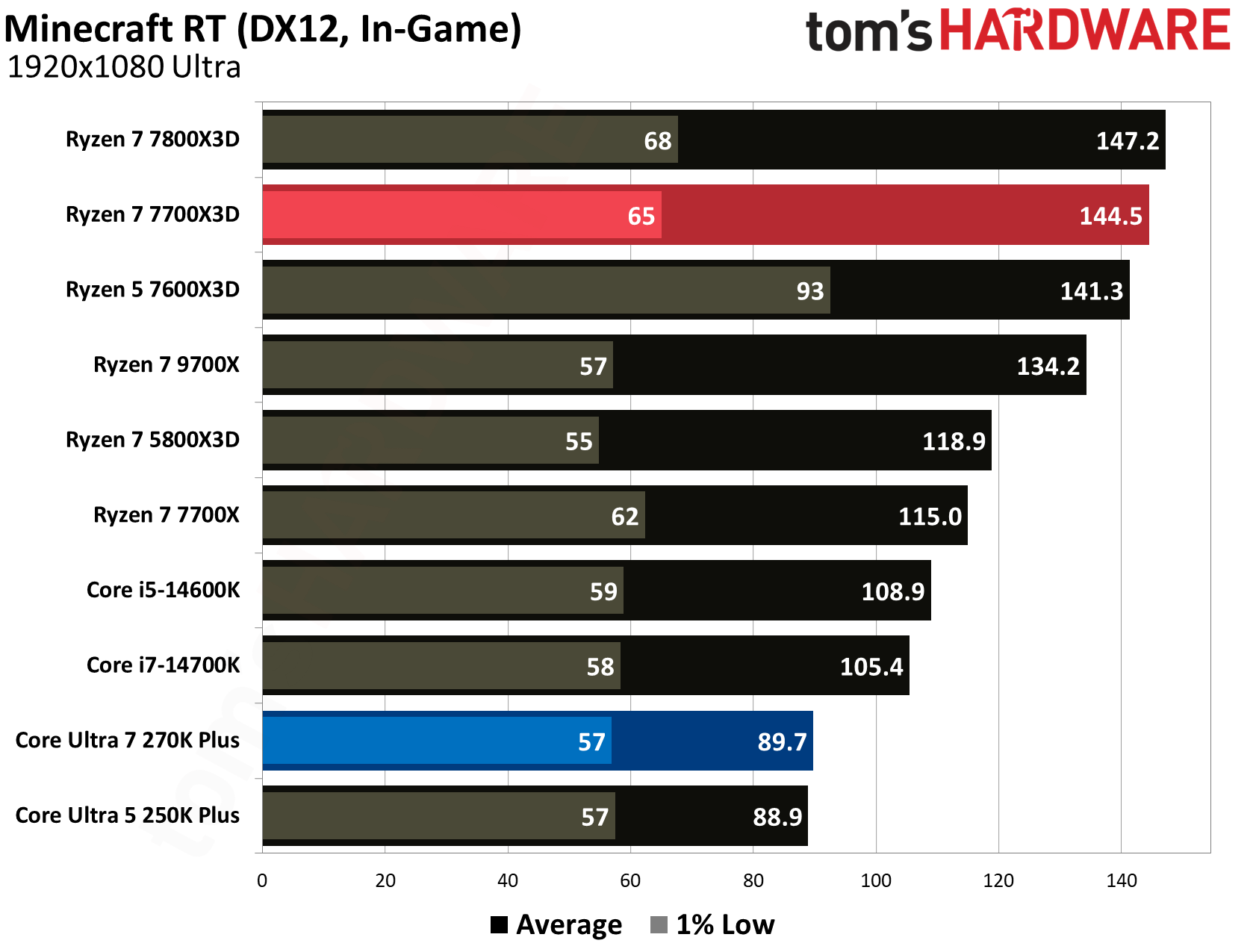
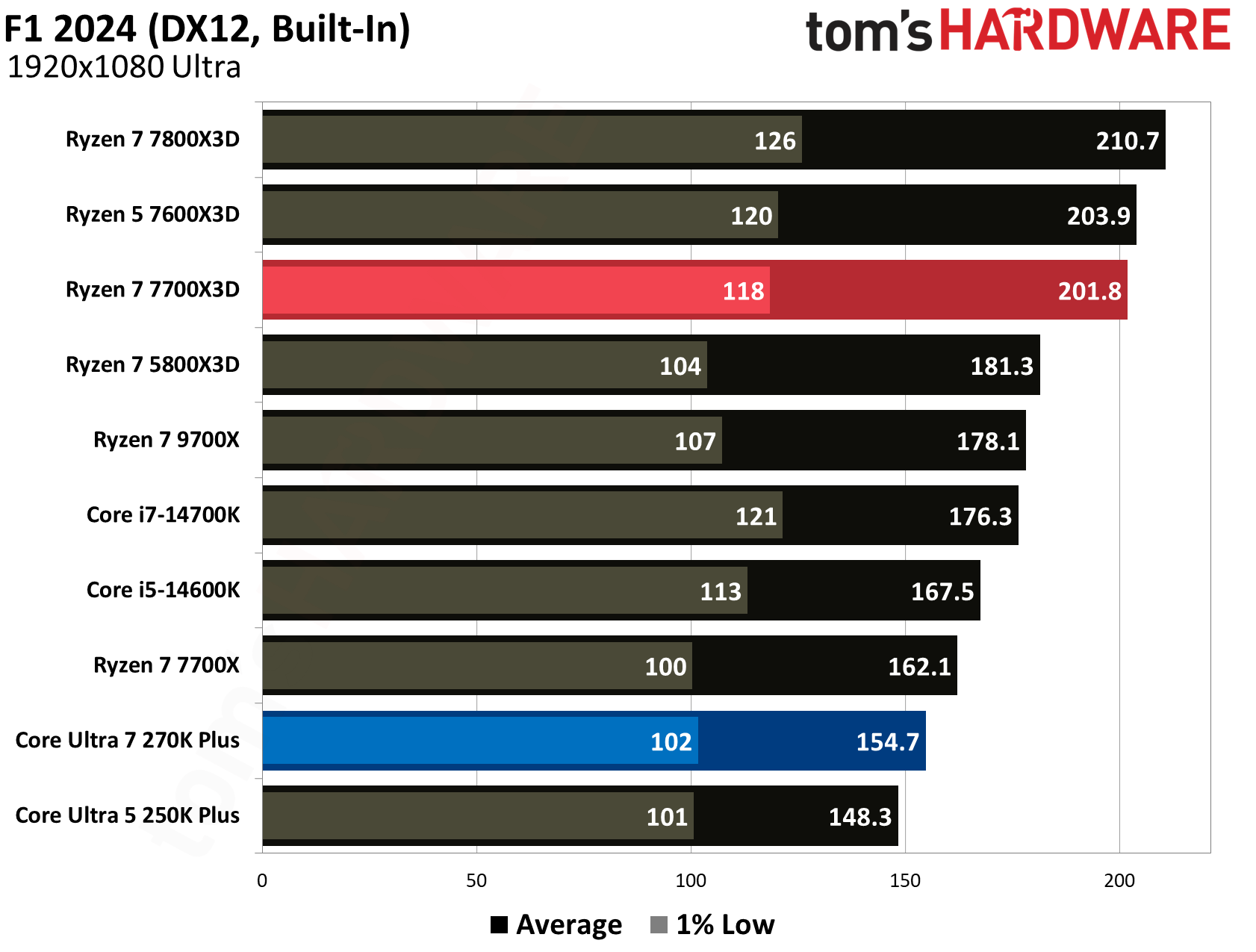
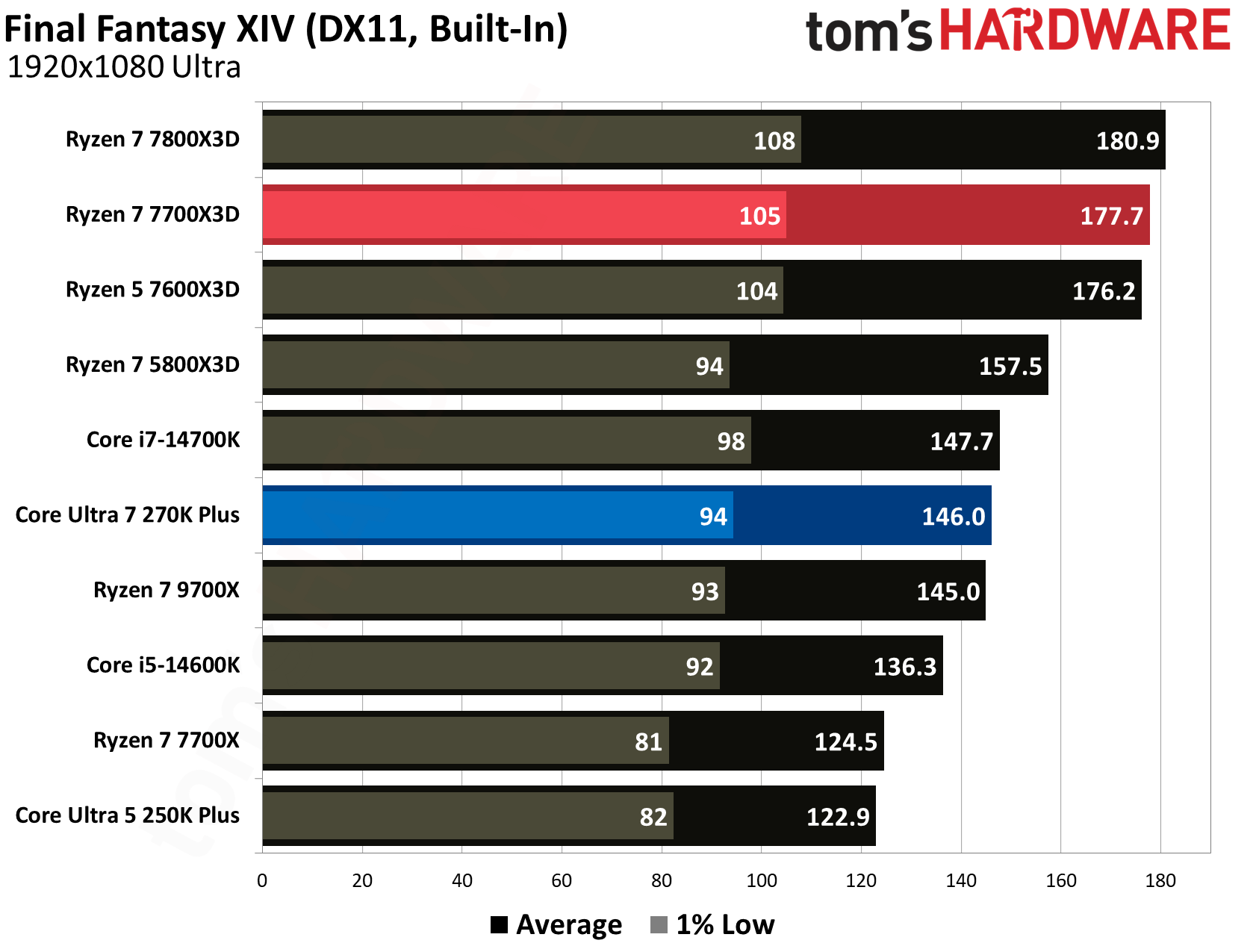
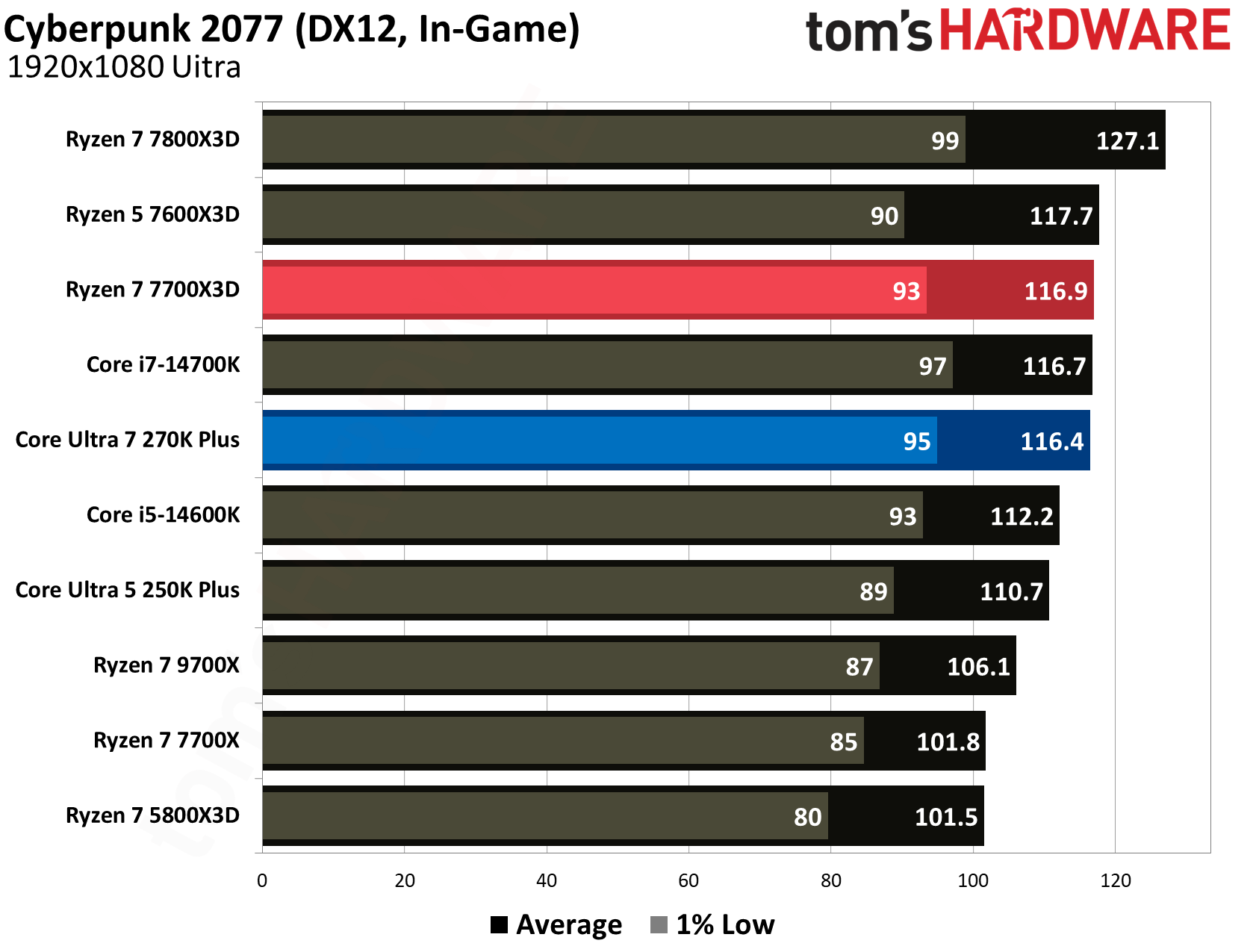
AMD's stacked cache gives the 7700X3D a clear edge in games that are sensitive to memory latency. For instance, in Minecraft RT, the 7700X3D delivered 144.5 FPS average, dwarfing the 89.7 FPS produced by the 270K Plus for a massive 61.1% performance advantage. We see similarly dominant leads for AMD in F1 2024, where it leads by 30.4% (201.8 vs. 154.7 FPS), and in Final Fantasy XIV, where it holds a 21.7% lead (177.7 vs. 146.0 FPS). Even in esports titles like Counter-Strike 2, the 7700X3D maintains a comfortable 7.3% lead with 707.9 FPS over Intel’s 660.0 FPS.
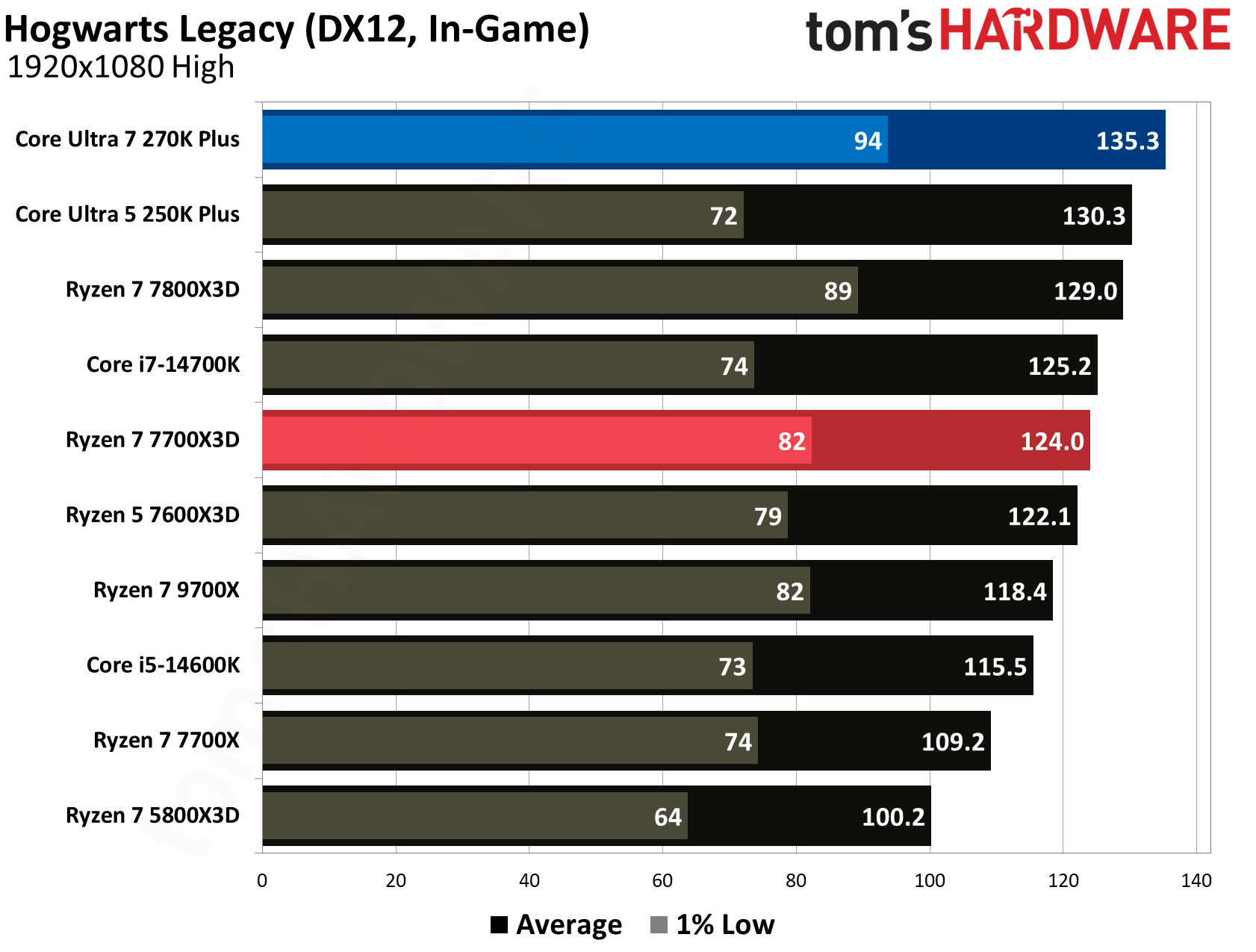
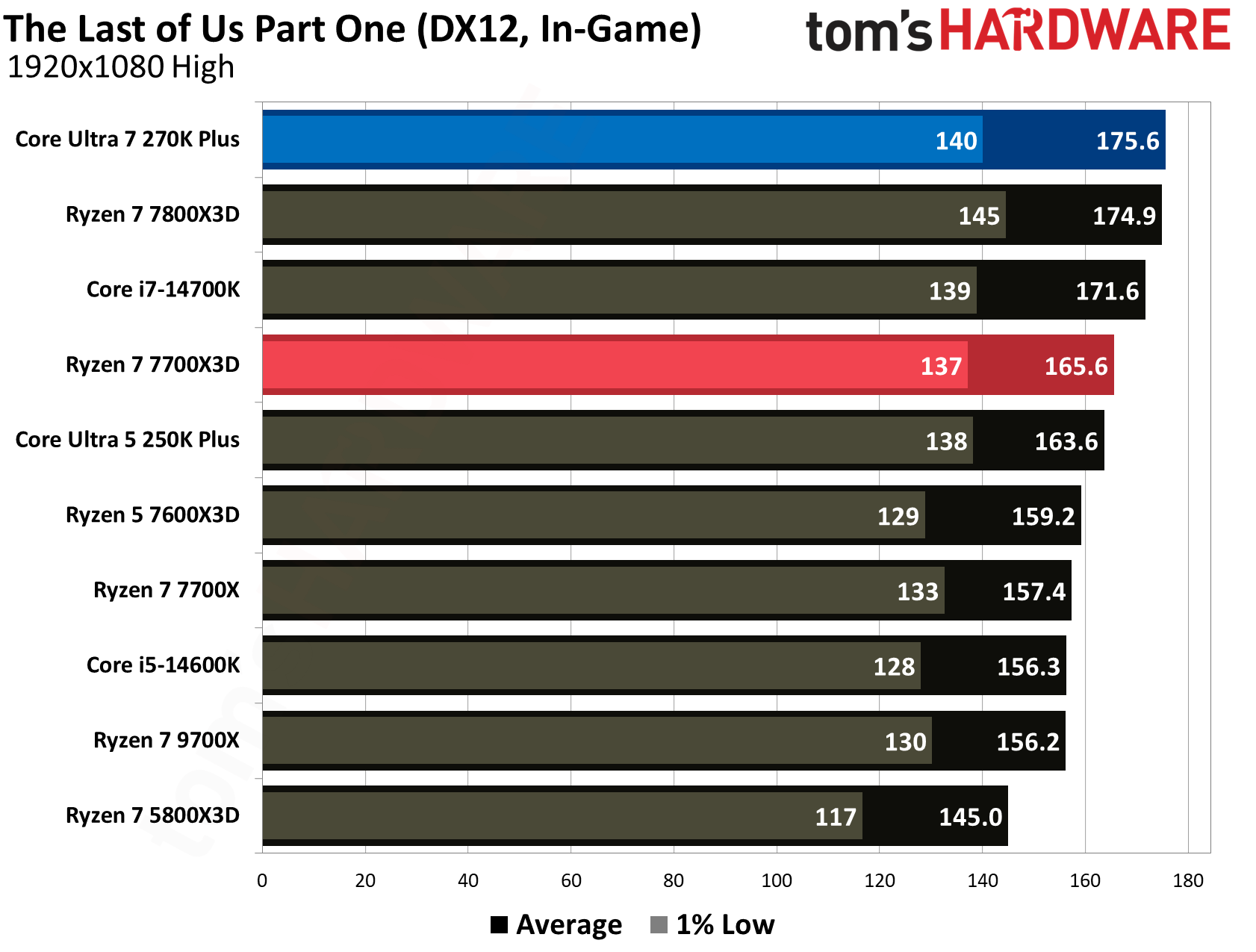
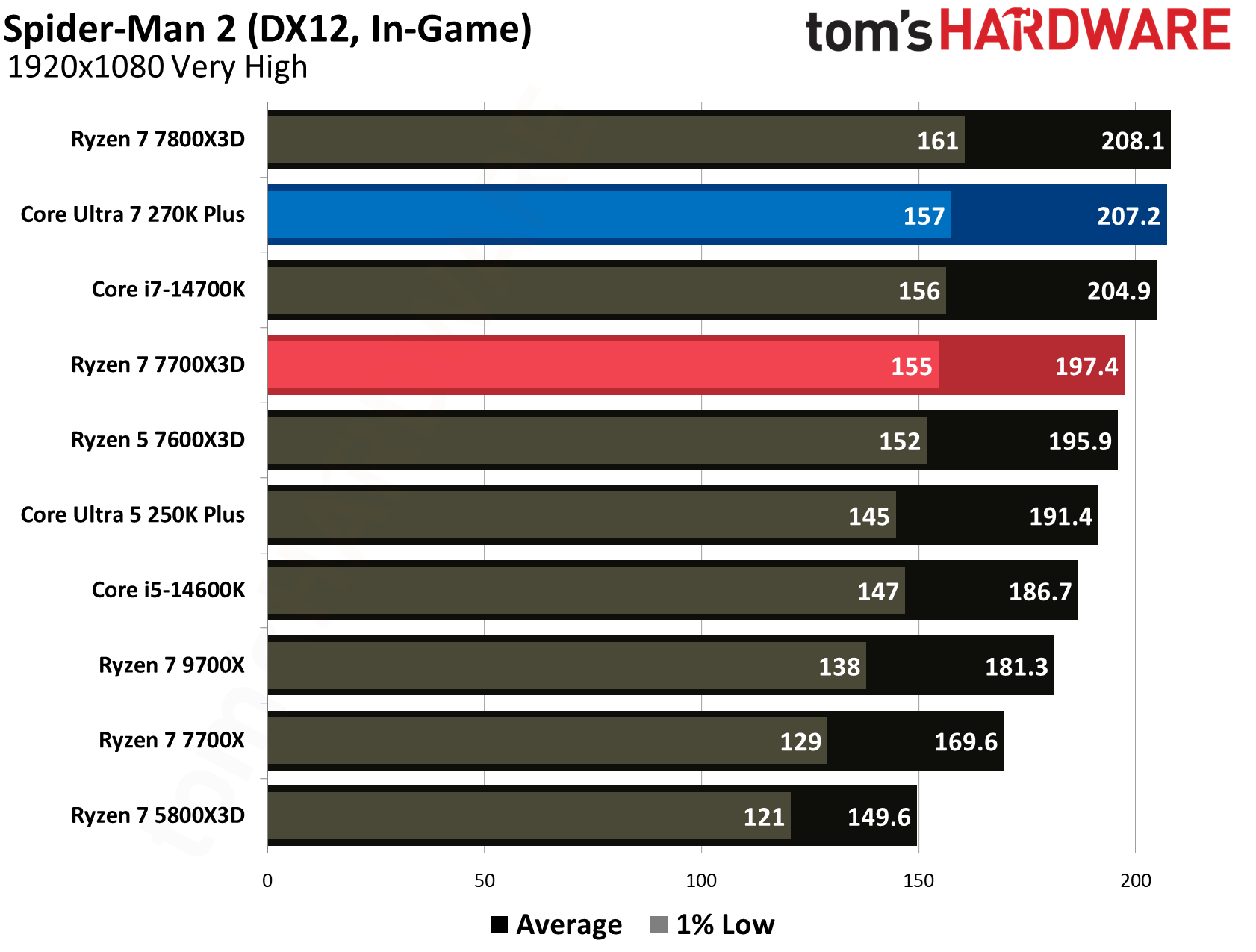
Intel’s Core Ultra 7 270K Plus is no slouch, however, as it leverages its higher boost frequencies and the new iBOT runtime translation layer to take the lead in several games. Intel manages a win in Hogwarts Legacy, producing 135.3 FPS for a 9.1% advantage over AMD’s 124.0 FPS, a result directly attributed to iBOT. Team Blue also edges out victories in The Last of Us Part 1 with 175.6 FPS (6% lead) and Spider-Man 2 with 207.2 FPS (5% lead).
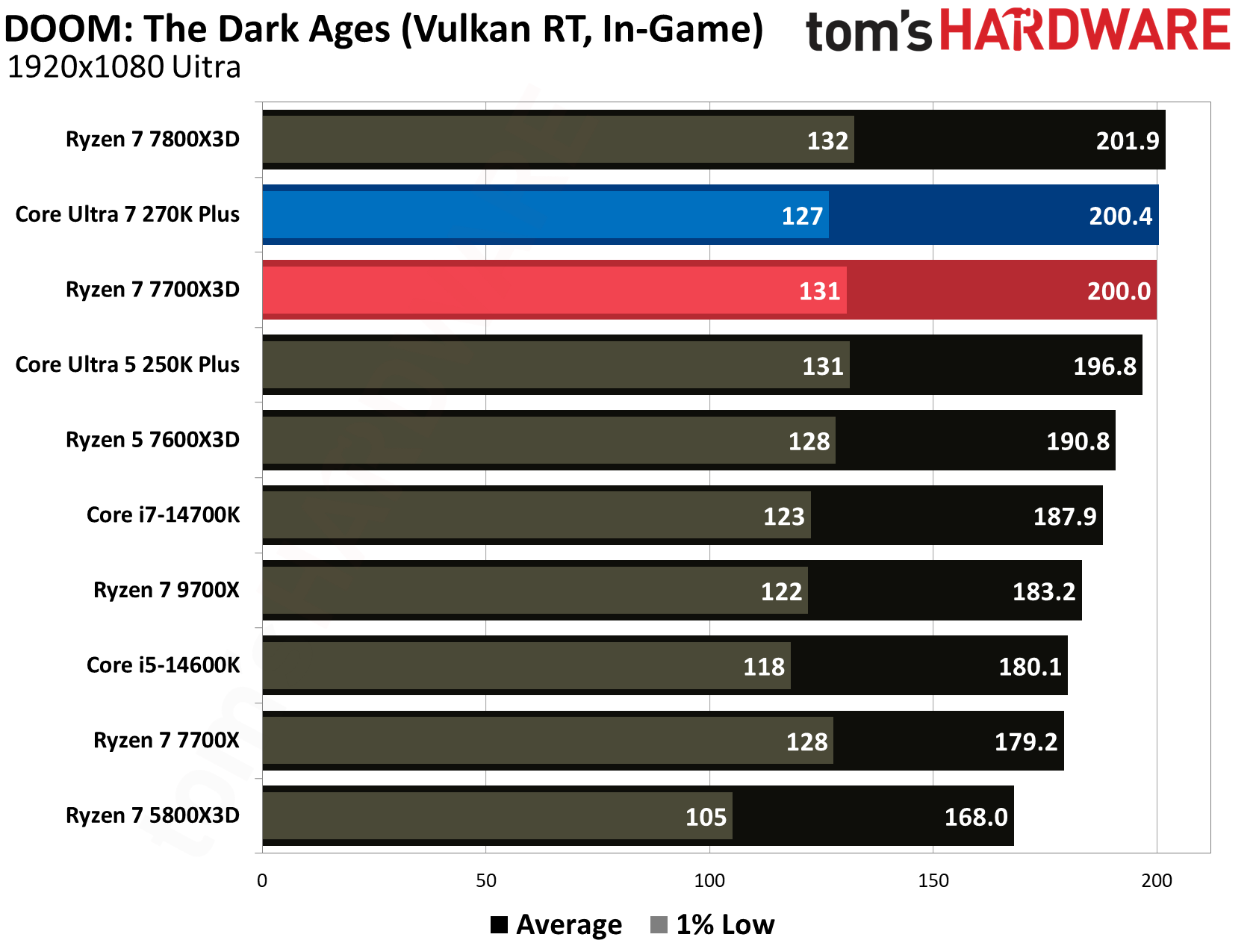
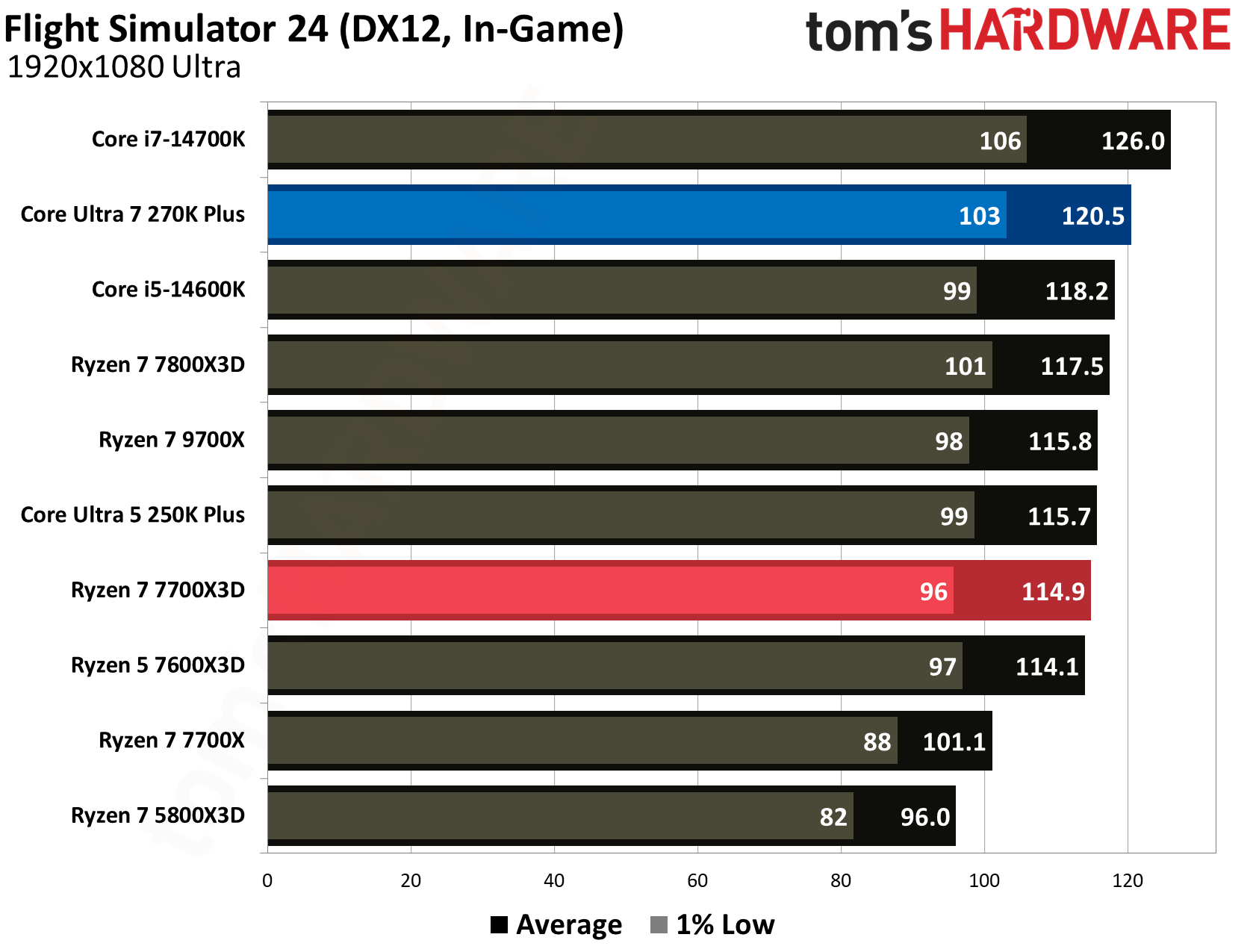
In many other modern titles, the two processors are essentially locked in a dead heat. For example, in DOOM: The Dark Ages, the 270K Plus delivers 200.4 FPS while the 7700X3D is right beside it at 200.0 FPS. The story is similar in Flight Simulator 24, where Intel's 120.5 FPS and AMD's 114.9 FPS result in a negligible difference during actual gameplay. These results indicate that while the 7700X3D is the more consistent gaming choice, especially in cache-heavy titles, the 270K Plus is a highly competitive gaming chip that delivers impressive results for its $300 price tag.
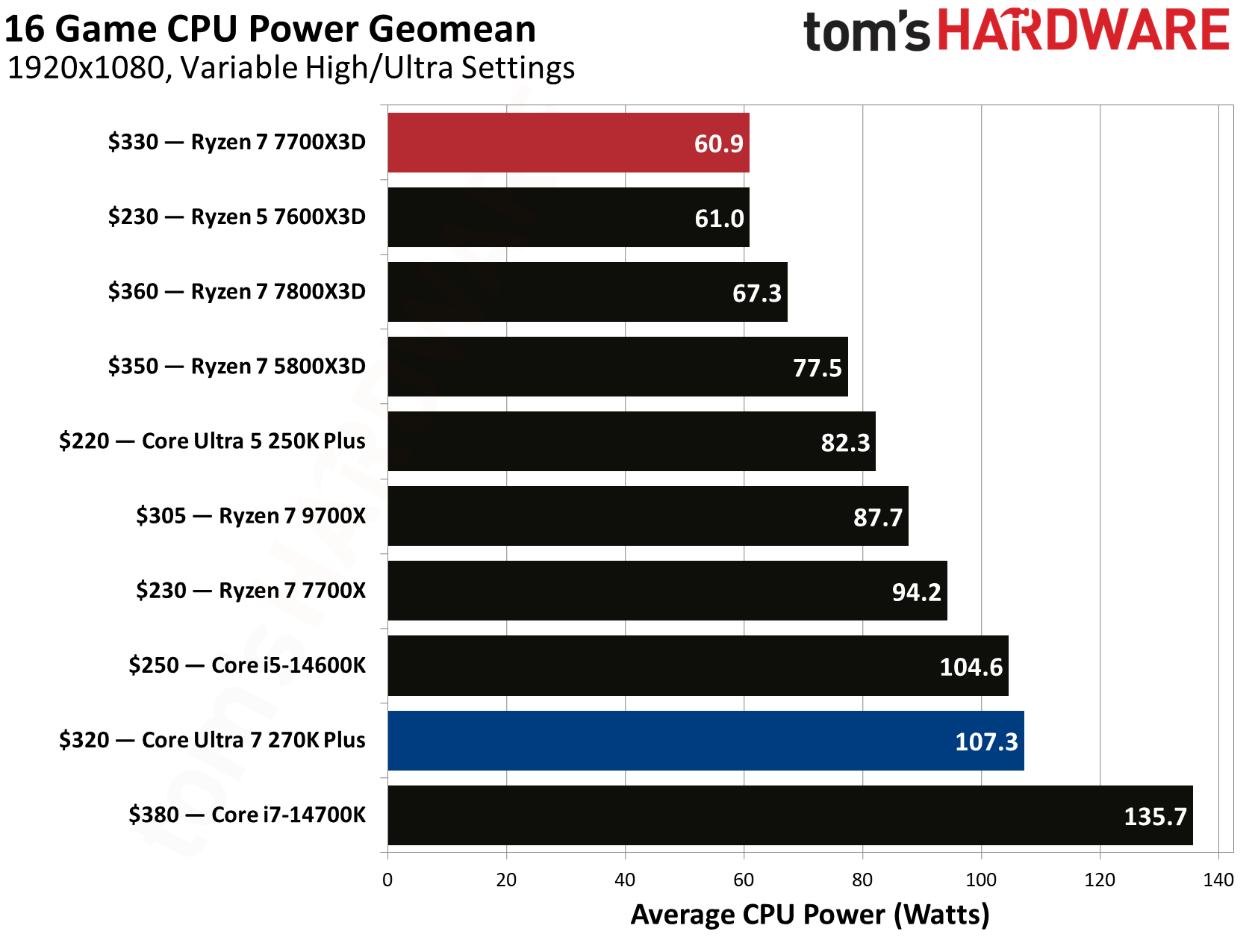
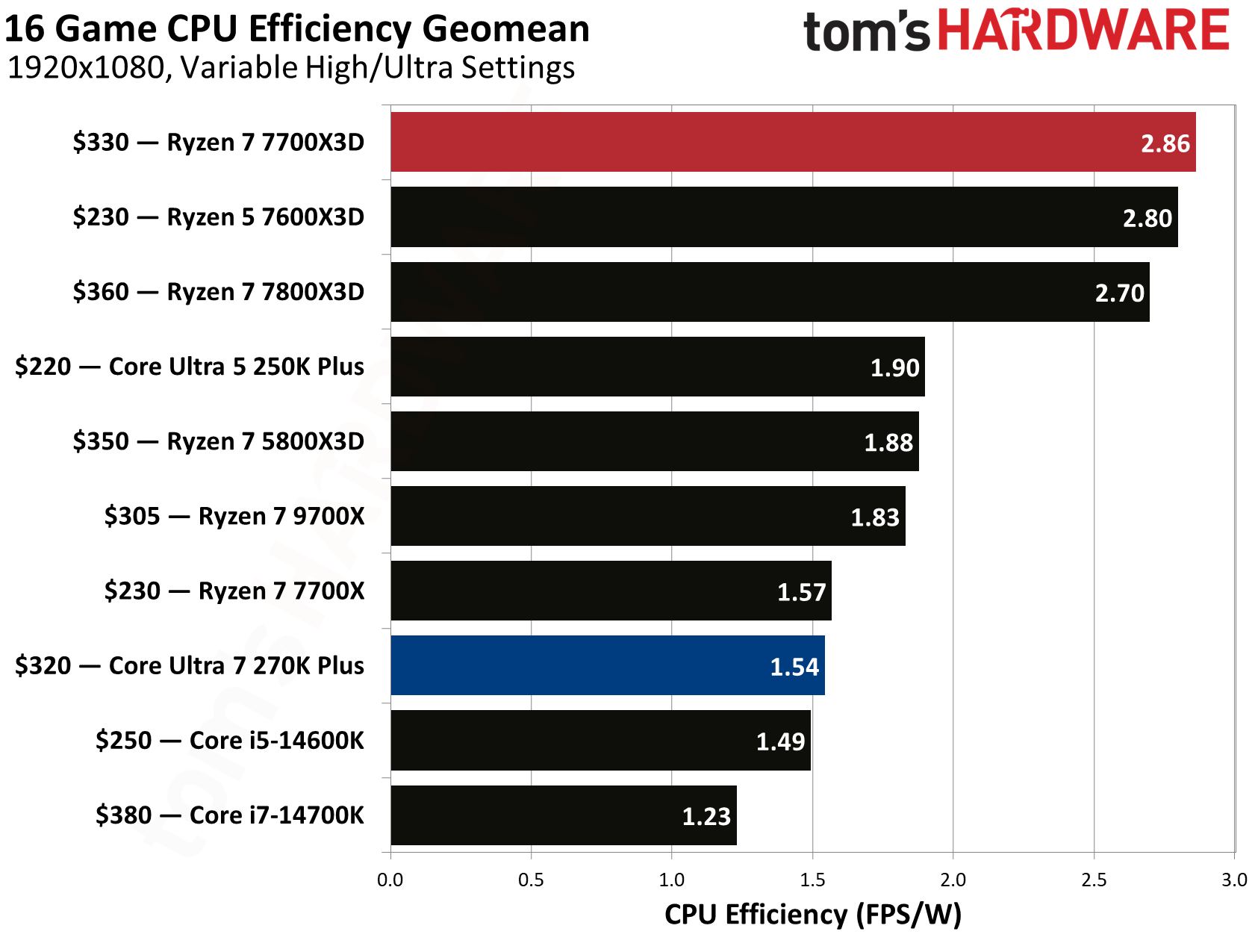
The biggest difference between these two architectures is noticeable when analyzing power consumption and efficiency metrics. Based on our 16-game CPU power geomean, the 7700X3D is clearly way more efficient, drawing an average of just 60.9 watts while gaming. In comparison, the 270K Plus consumed 107.3 watts on average, which is a significant 76.2% increase in power. This results in a massive gap in gaming efficiency where the 7700X3D delivers 2.86 FPS per watt, making it roughly 85.7% more efficient than the 270K Plus, which trails at 1.54 FPS per watt.
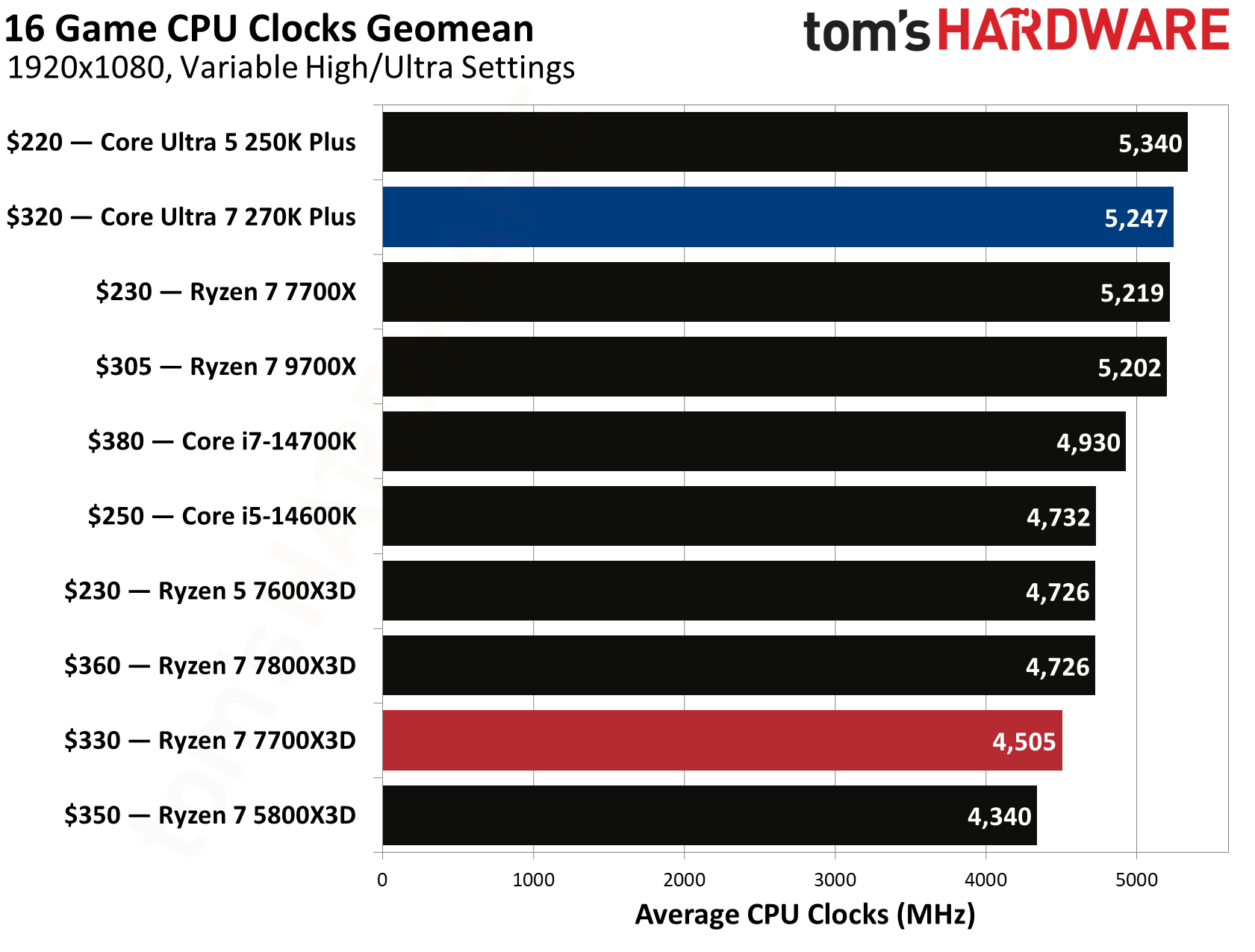
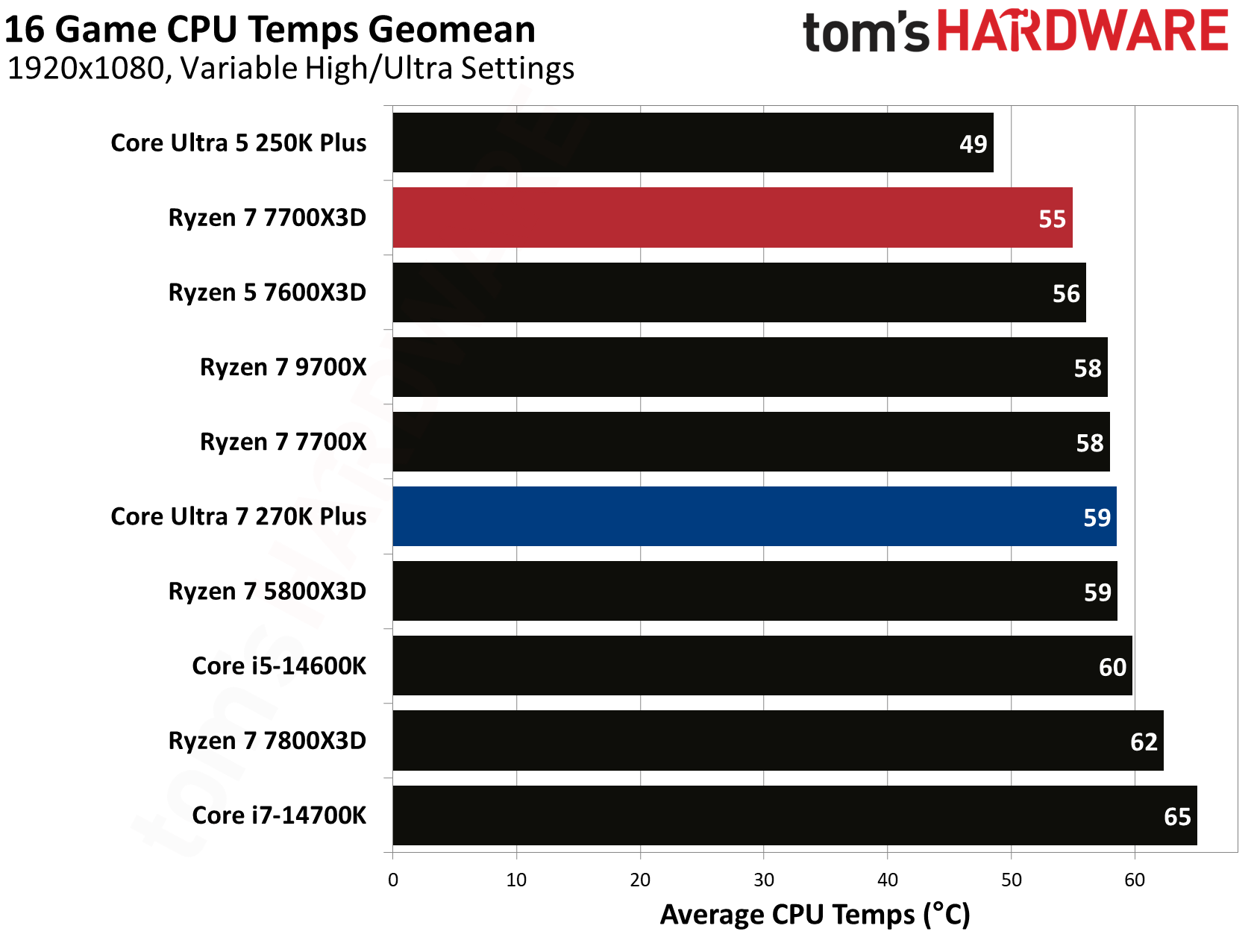
Intel does take the lead when it comes to raw frequency, with the 270K Plus maintaining an impressive 5,247 MHz average clock speed across our gaming suite. This is over 700 MHz faster than the 7700X3D, which averaged 4,505 MHz. Despite the much higher clocks and power draw of the Intel chip, its thermal management remains surprisingly competitive when paired with the right cooling solution. The 270K Plus averaged 59°C during gaming, though it still runs warmer than the 7700X3D, which stays at a cooler 55°C average.
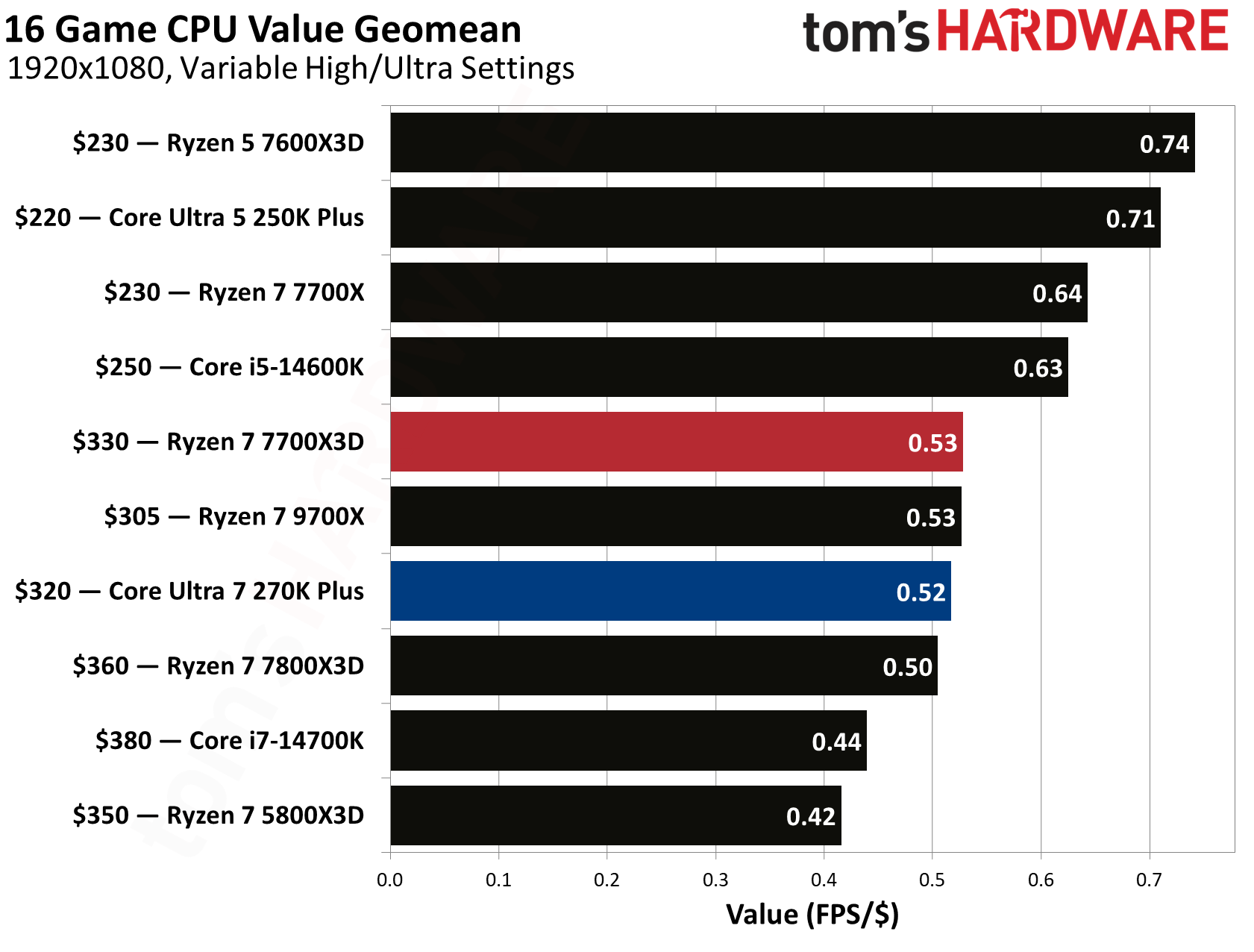
When factoring in the cost of the silicon, the competition for the best bang for your buck is incredibly tight. The Ryzen 7 7700X3D provides a value of 0.53 FPS per dollar, narrowly edging out the Core Ultra 7 270K Plus, which sits at 0.52 FPS per dollar.
⭐Winner: AMD Ryzen 7 7700X3D
The 7700X3D’s overall higher average frame rates and excellent efficiency makes it the more attractive option for a dedicated gaming build. Since raw gaming performance, efficiency, and thermals all favor Team Red in this category, the Ryzen 7 7700X3D takes the win for this round.
Productivity Performance: Intel Core Ultra 7 270K Plus vs AMD Ryzen 7 7700X3D
AMD's X3D processors are widely known for their gaming prowess. However, they have historically struggled to maintain the same level of dominance in productivity performance. The Ryzen 7 7700X3D is no exception, as its cache-focused architecture and lower clock speeds result in relatively weak single- and multi-threaded results.
In contrast, Intel has managed to maintain its standing in the productivity segment even when its gaming performance faced challenges. The 270K Plus is a productivity workhorse that is capable of delivering excellent productivity performance making it a standout choice for users who need a balanced system for both work and play.
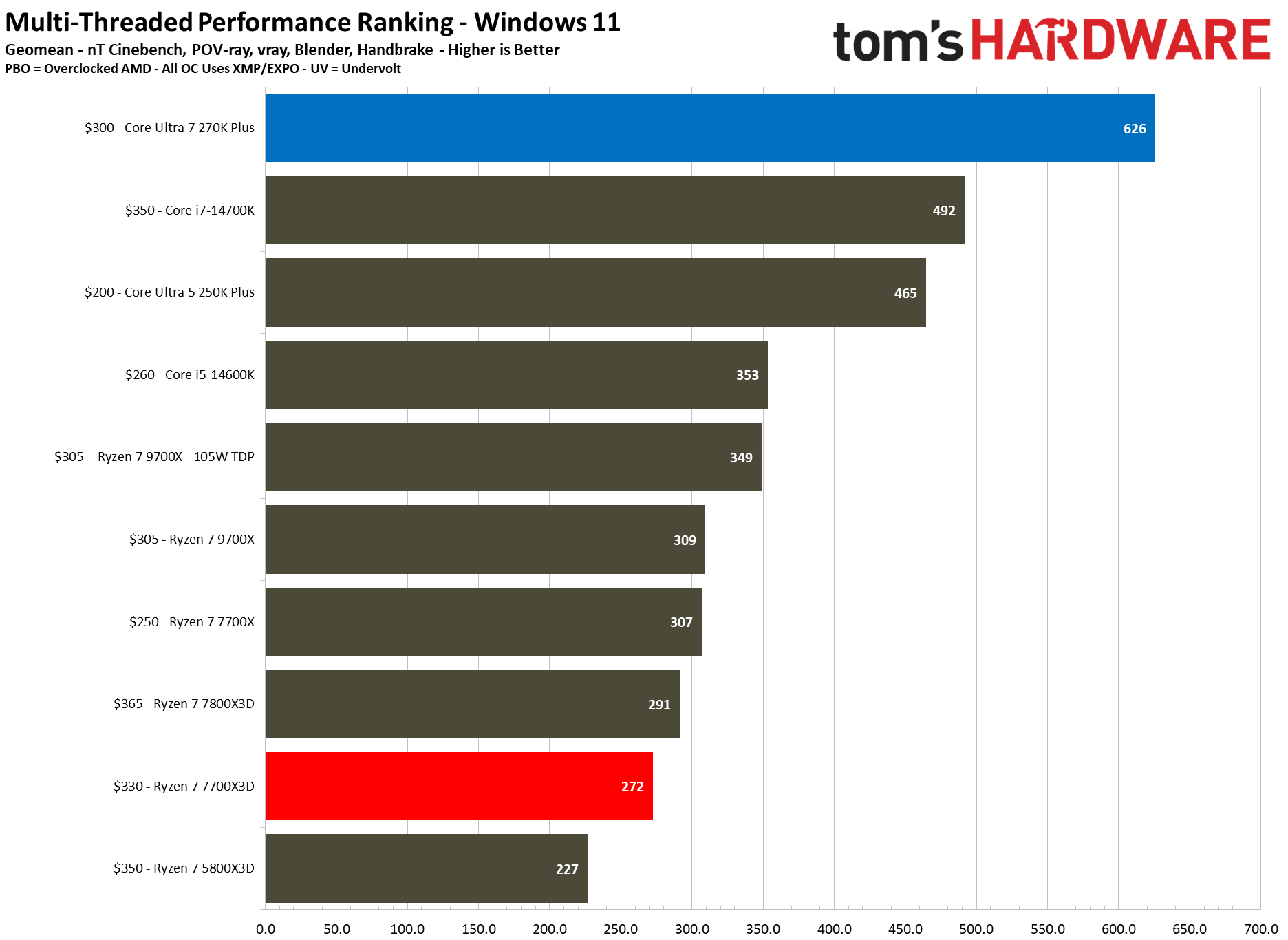
In multi-threaded workloads, the performance gap between these two processors is pretty massive, primarily driven by Intel's higher core count advantage. Across our multi-threaded performance ranking geomean, the Intel chip delivers a score of 626 compared to the 272 produced by the 7700X3D, representing a staggering 130% performance lead for Team Blue. This level of parallel processing power places the 270K Plus in a completely different performance tier, making it more comparable to much more expensive flagship processors.
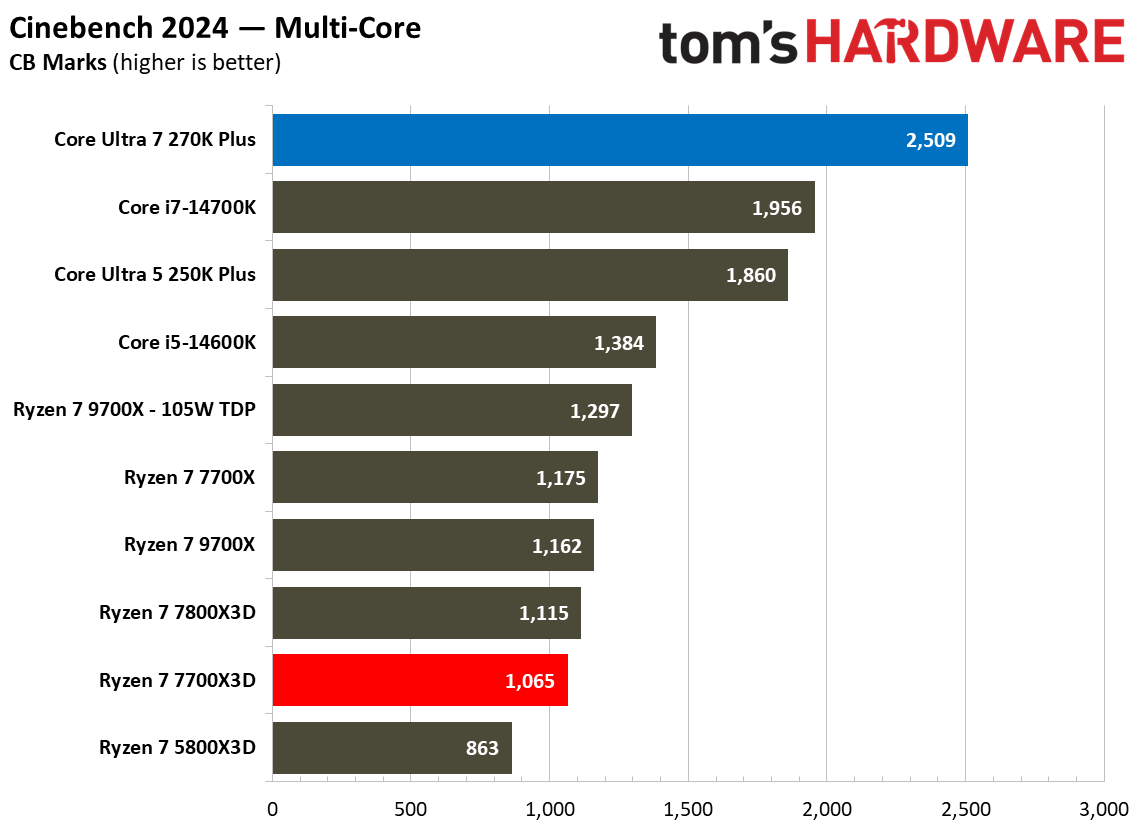
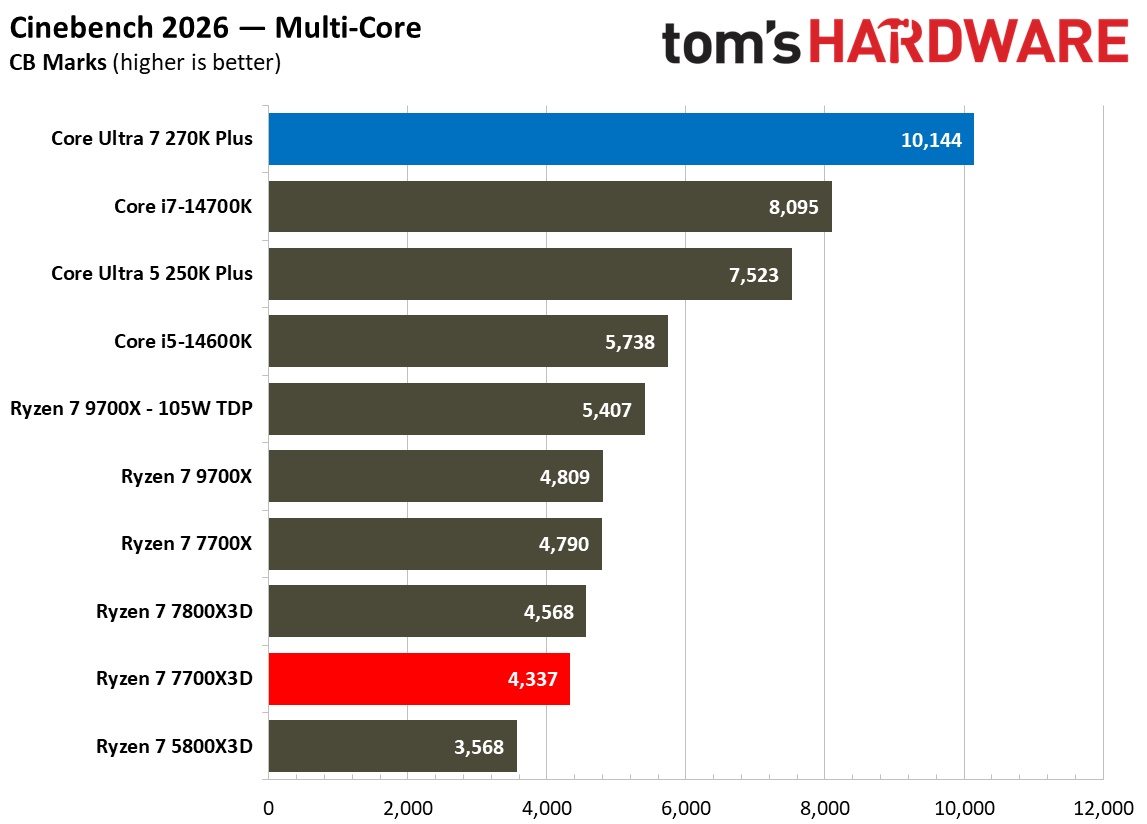
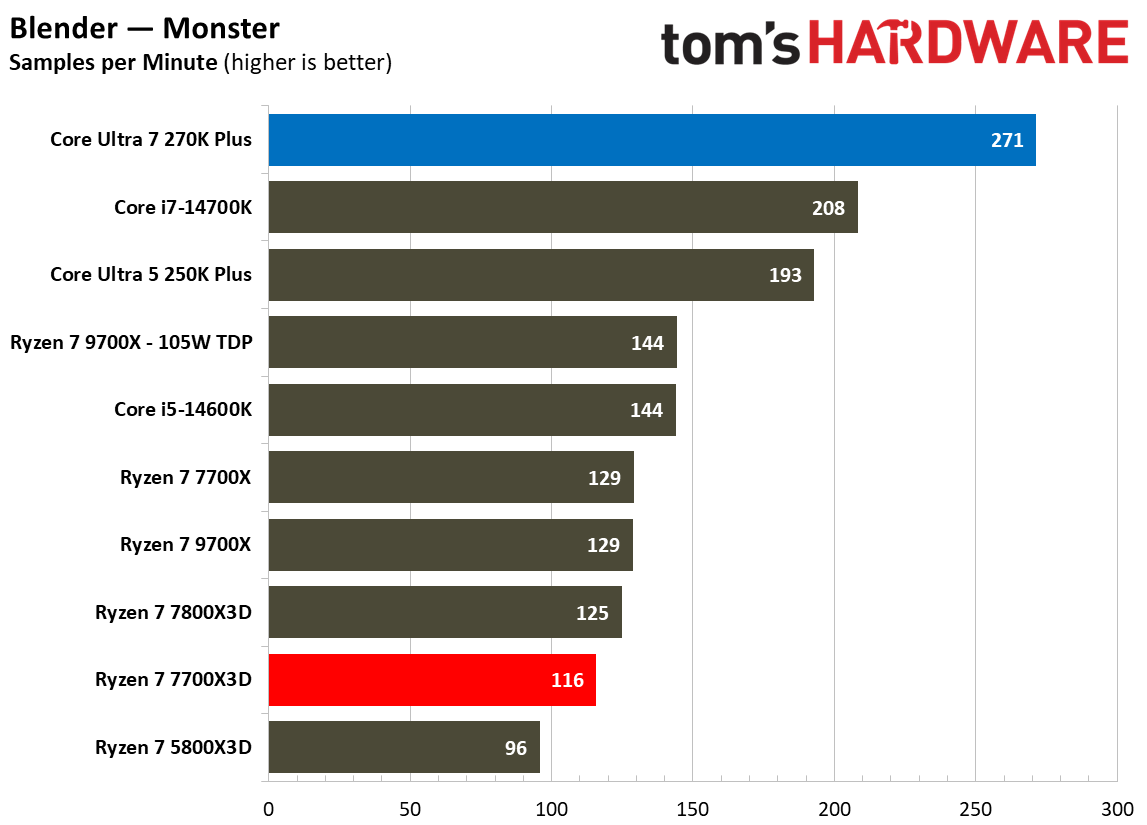
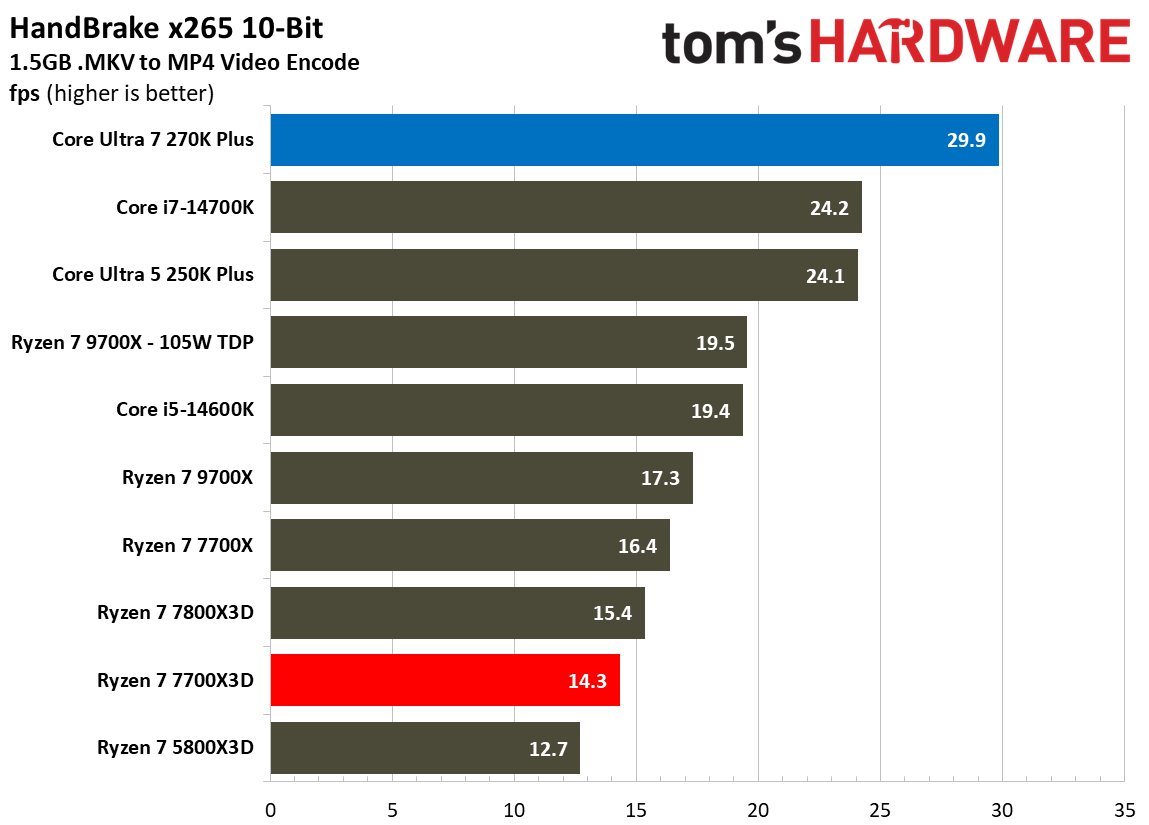
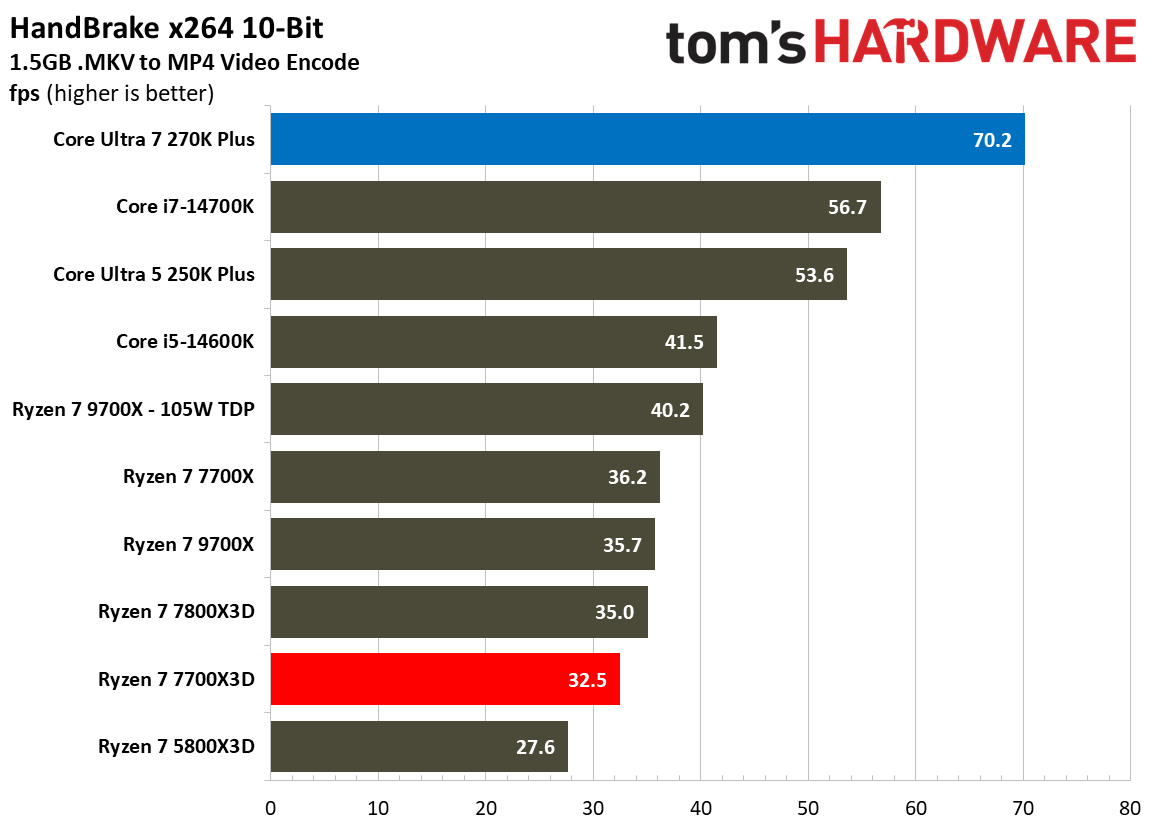
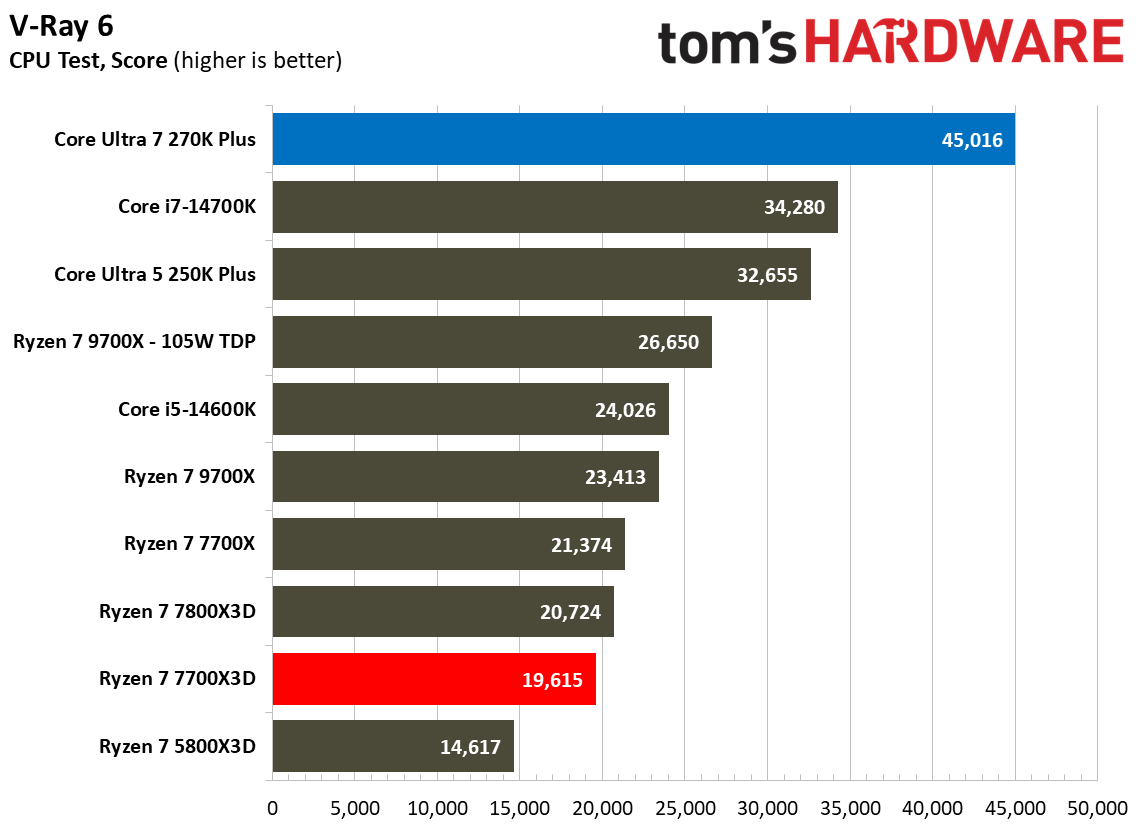
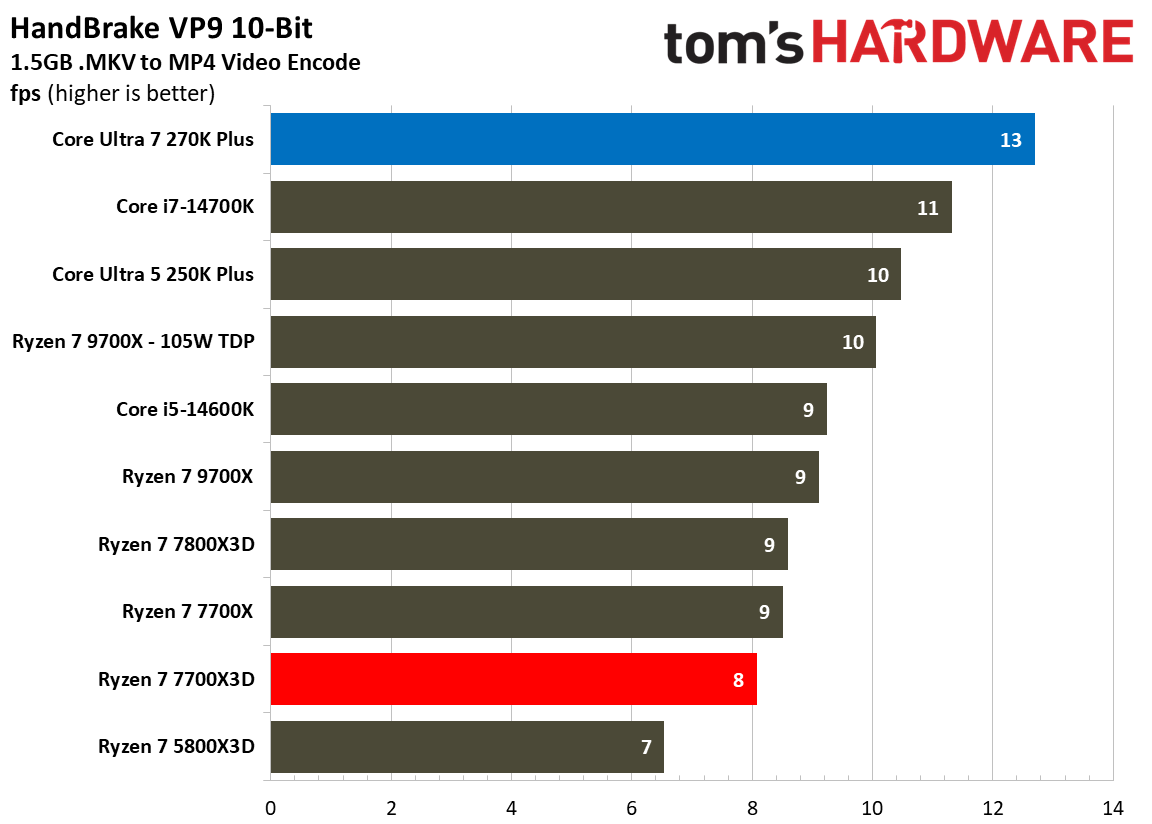
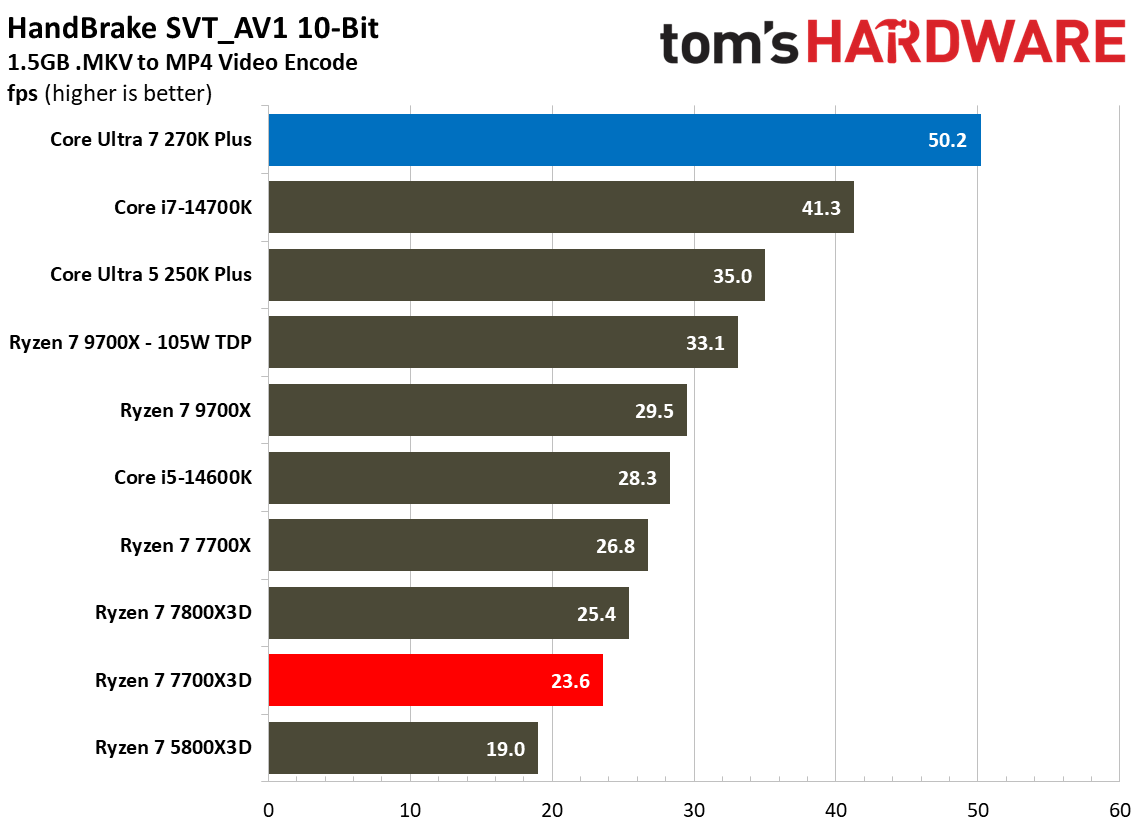
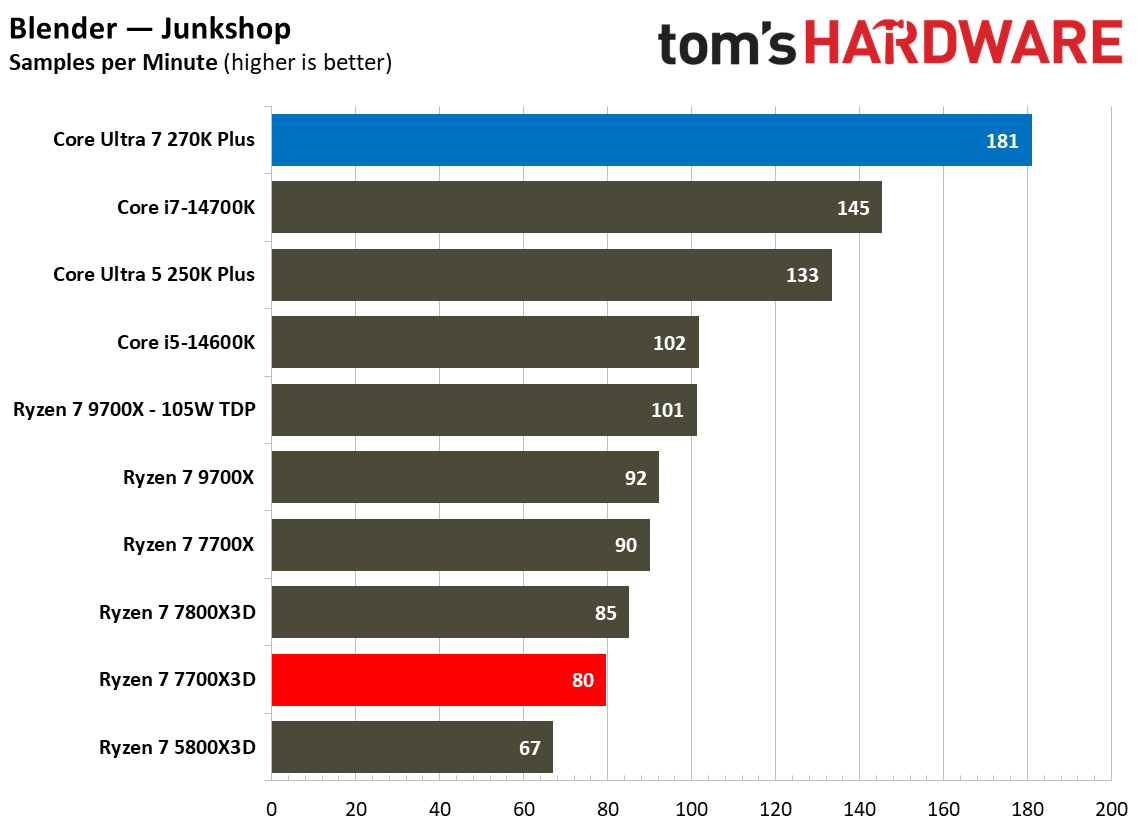
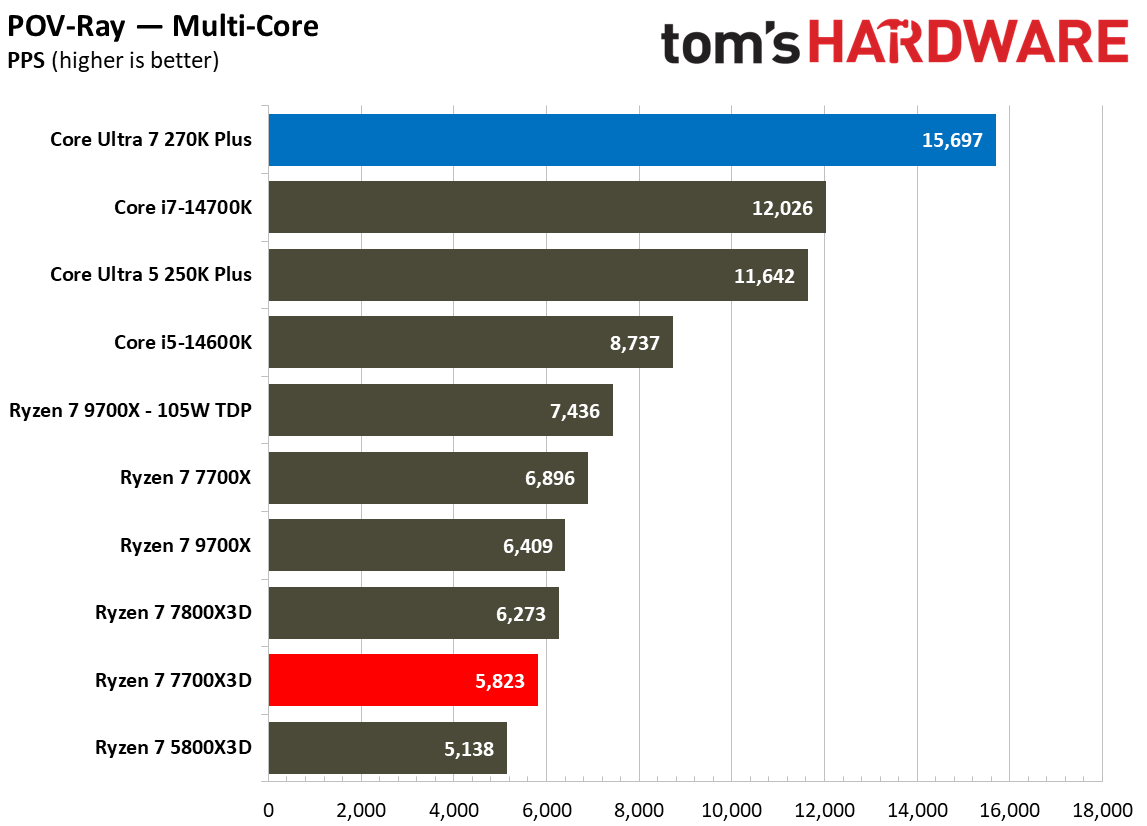
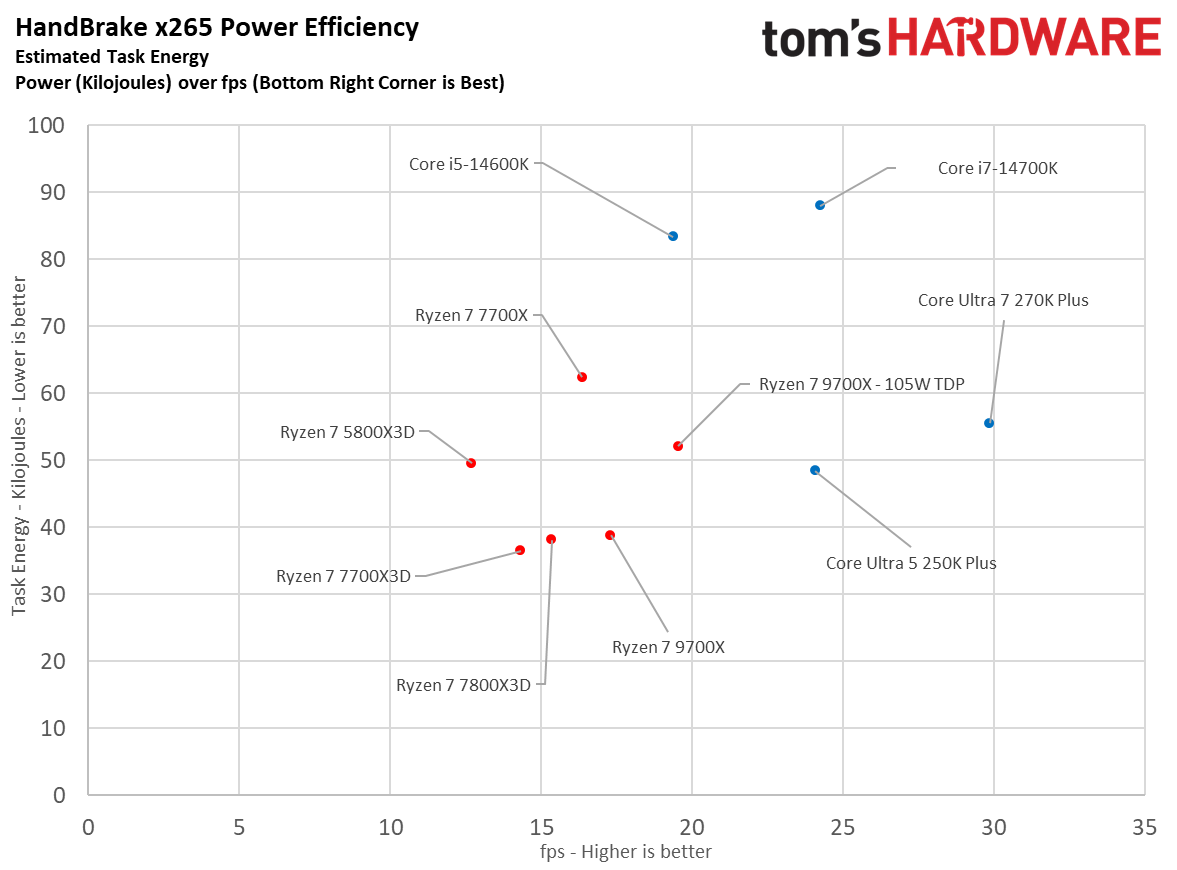
Individual benchmarks further highlight this lopsided victory for Intel across various professional tasks. In Cinebench 2024’s multi-core test, the 270K Plus scores 2,509 points, which is roughly 135.6% faster than the 1,065 points achieved by the 7700X3D. This trend continues in POV-Ray, where Intel leads by approximately 169.5% (15,697 vs. 5,823 PPS), and in V-Ray 6, where it maintains a massive 129.5% advantage (45,016 vs. 19,615). Even in intensive video encoding tasks via HandBrake x265, the Intel chip more than doubles the performance of its AMD rival, delivering 29.9 FPS compared to just 14.3 FPS for the 7700X3D. These results demonstrate that for heavy rendering or data-crunching workloads, Intel is the undisputed leader in this price bracket.
FutureFutureFutureFutureFutureFuture
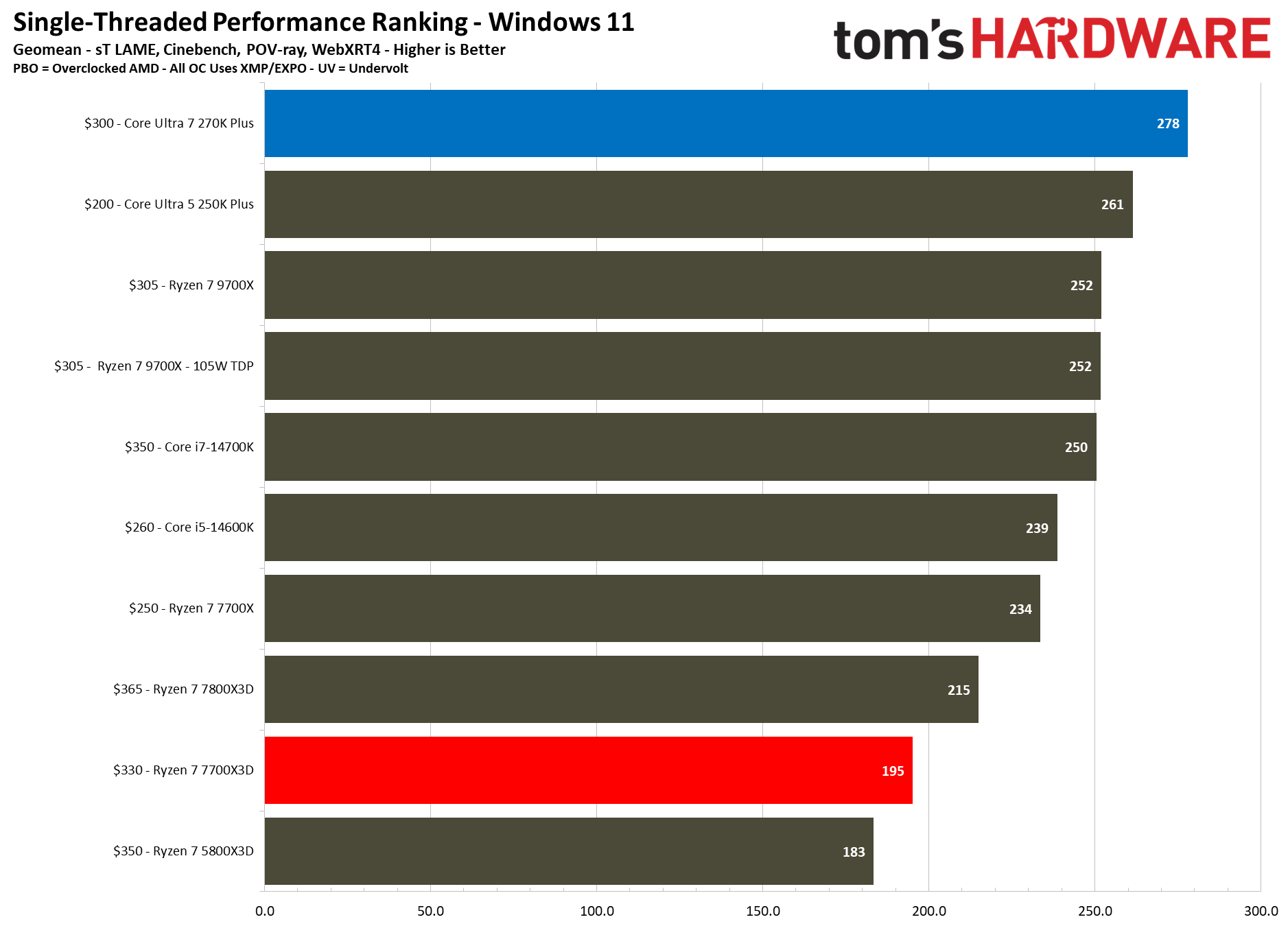
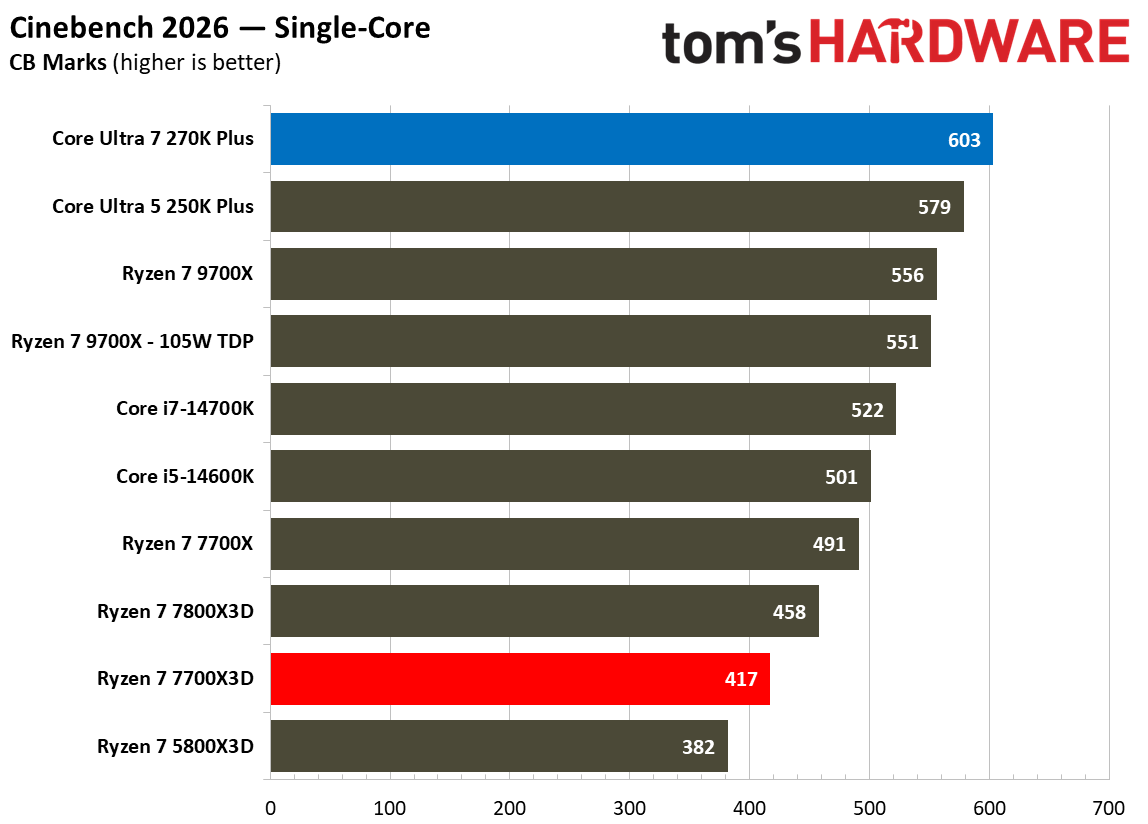
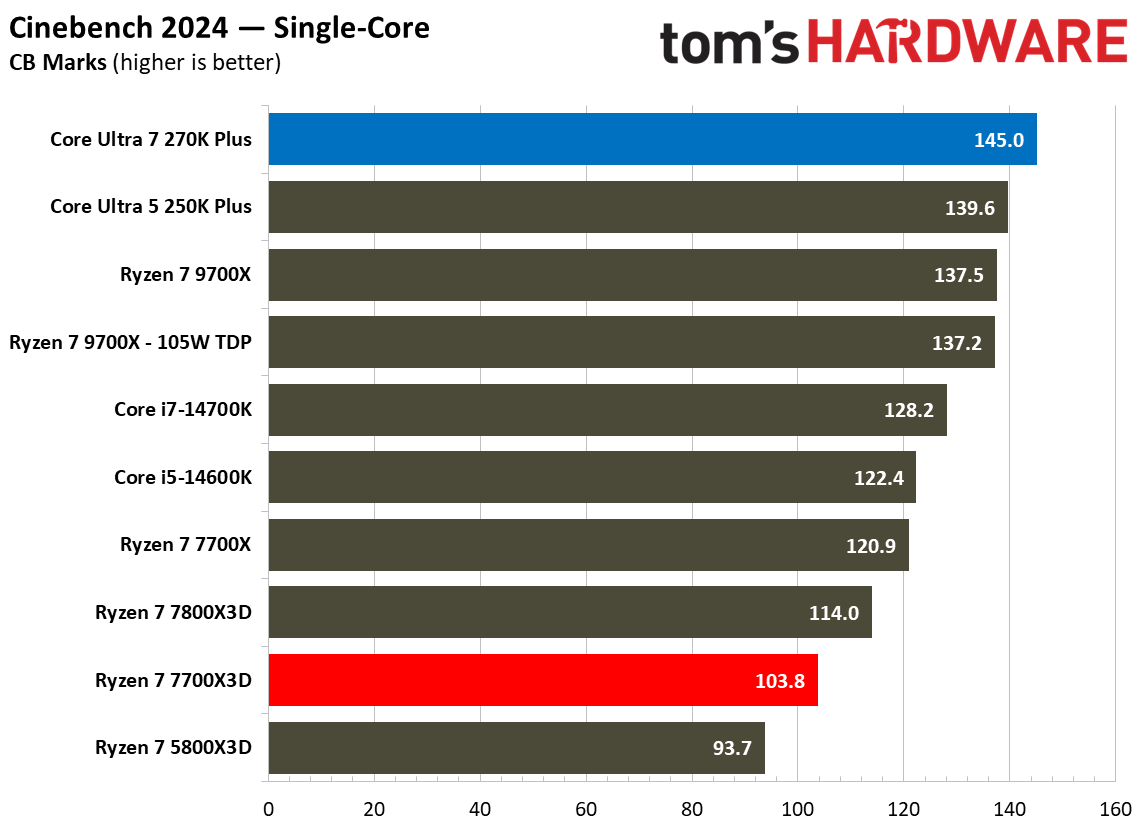
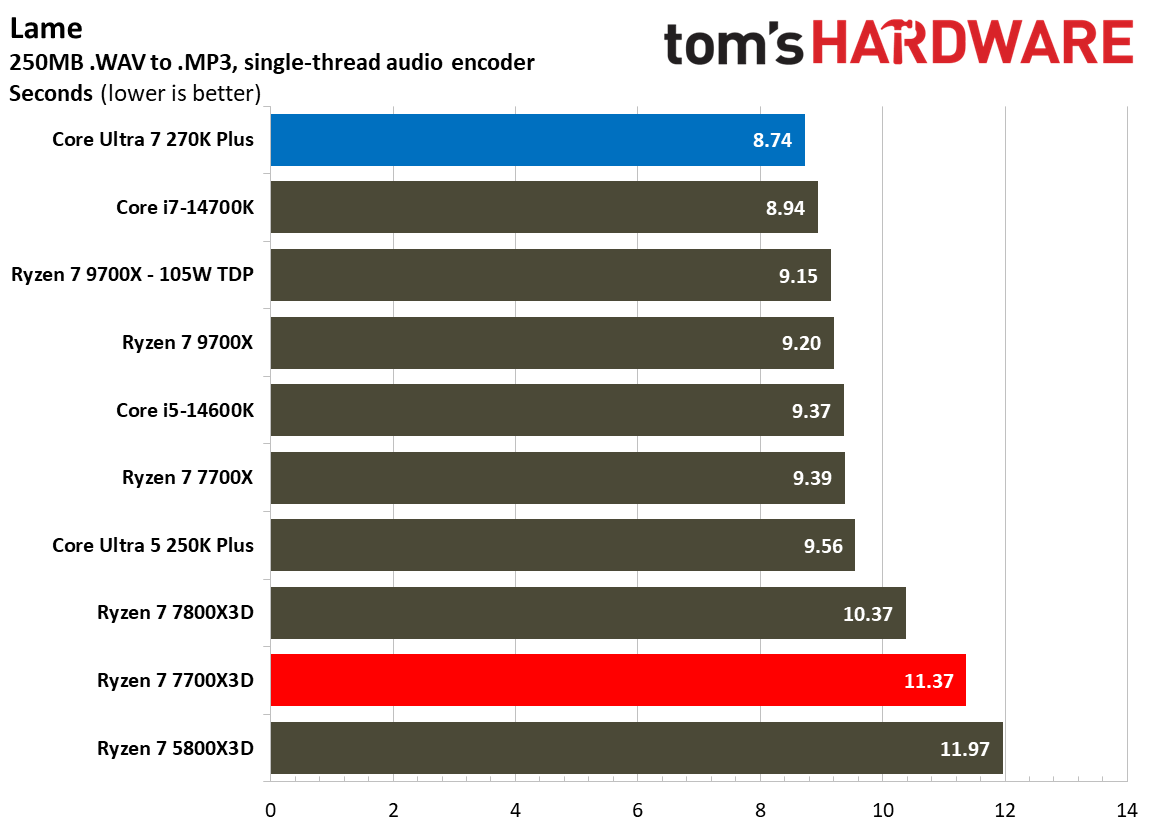
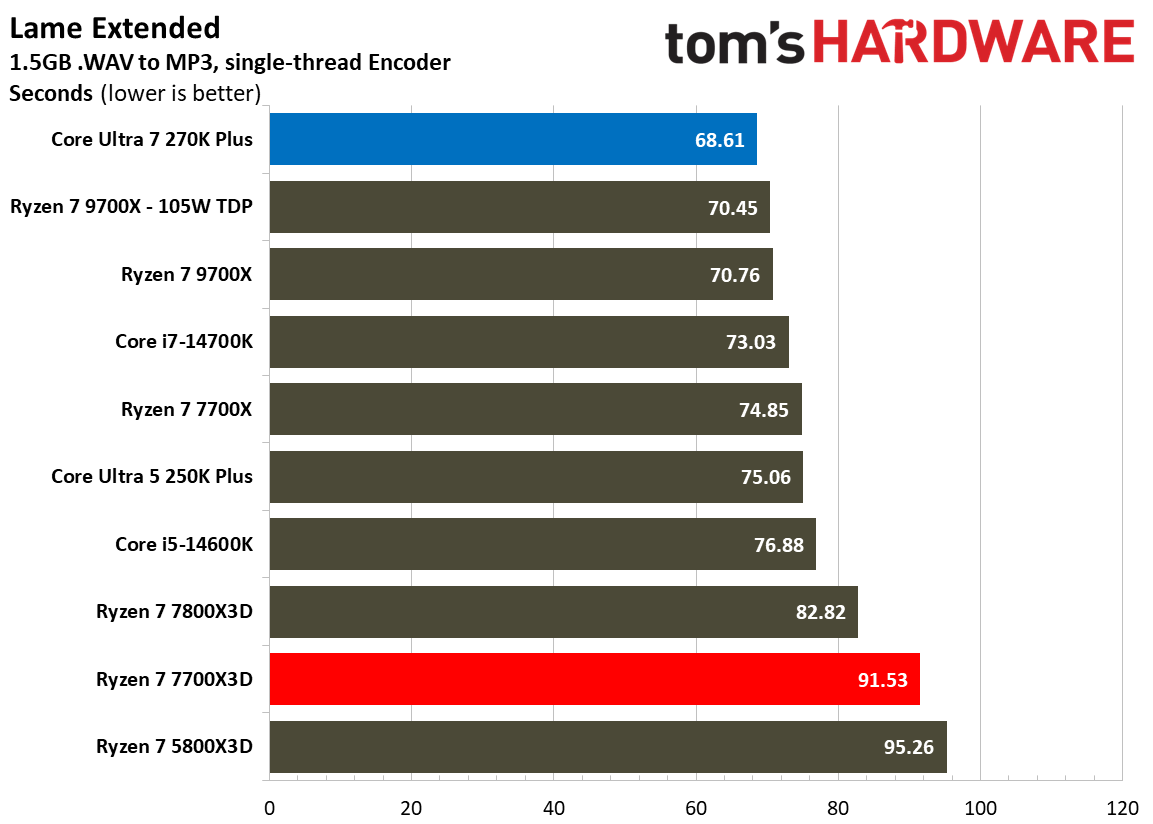
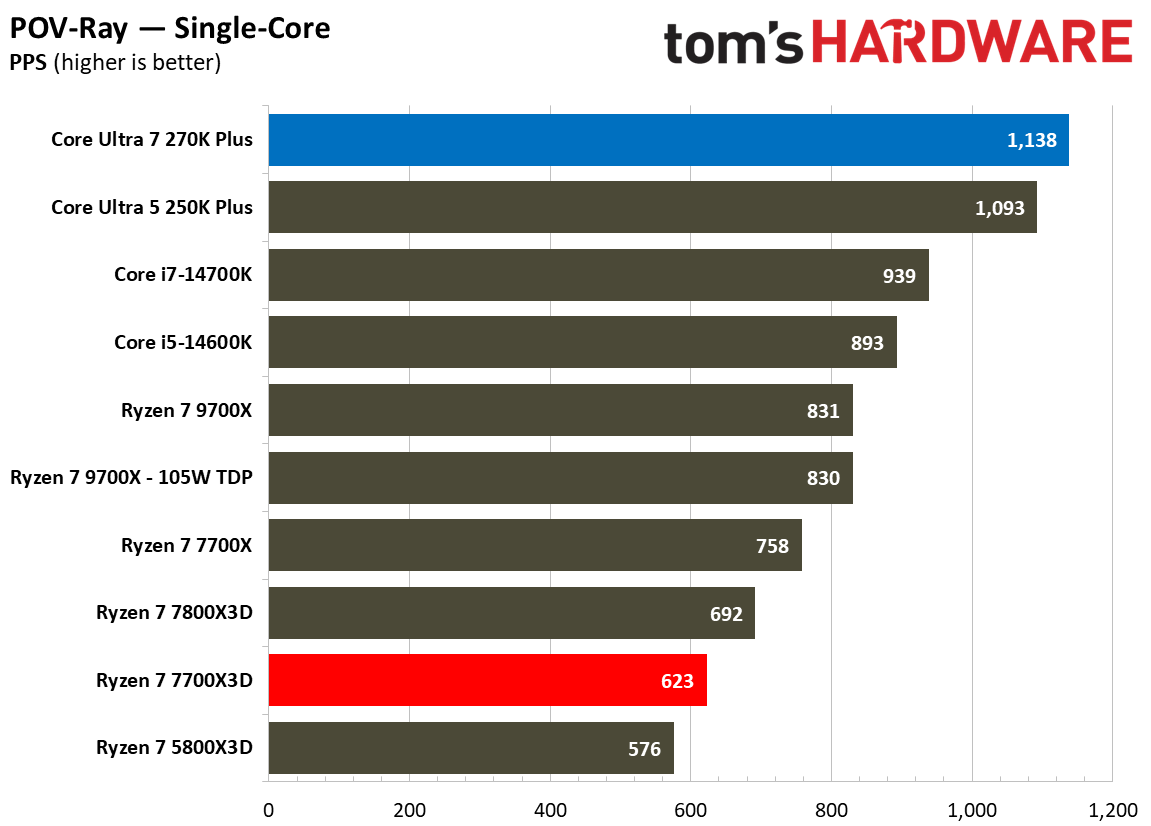
A similar trend can be seen when examining single-threaded performance, a crucial metric for general system responsiveness and applications that do not scale across multiple cores. In our single-threaded geomean, the 270K Plus scores 278 points, which is 42.5% faster than the 195 achieved by the 7700X3D. Specific tests like Cinebench 2024’s single-core benchmark show the 270K Plus maintaining a 39.7% lead over the 7700X3D (145 vs. 103.8 points), while the lead grows to a staggering 82.6% in POV-Ray’s single-core test (1,138 vs. 623 PPS). Even in audio encoding, the Intel chip finishes the Lame Extended task in 68.61 seconds, whereas the 7700X3D trails at 91.53 seconds.
⭐Winner: Intel Core Ultra 7 270K Plus
Ultimately, the 270K Plus simply blows the competition out of the water when it comes to productivity. While the 7700X3D is a highly efficient and specialized CPU for gaming, it cannot match the raw horsepower that Intel offers. For any user whose daily routine involves video editing, 3D rendering, or heavy multitasking, the 270K Plus is the obvious choice and should be the clear favorite for a multi-purpose system.
Overclocking: Intel Core Ultra 7 270K Plus vs AMD Ryzen 7 7700X3D
While both manufacturers provide tools to squeeze extra performance from their silicon, the Intel Core Ultra 7 270K Plus is built as an enthusiast-friendly, fully unlocked processor. The AMD Ryzen 7 7700X3D, on the other hand, is a more restricted processor designed primarily for out-of-the-box gaming efficiency.
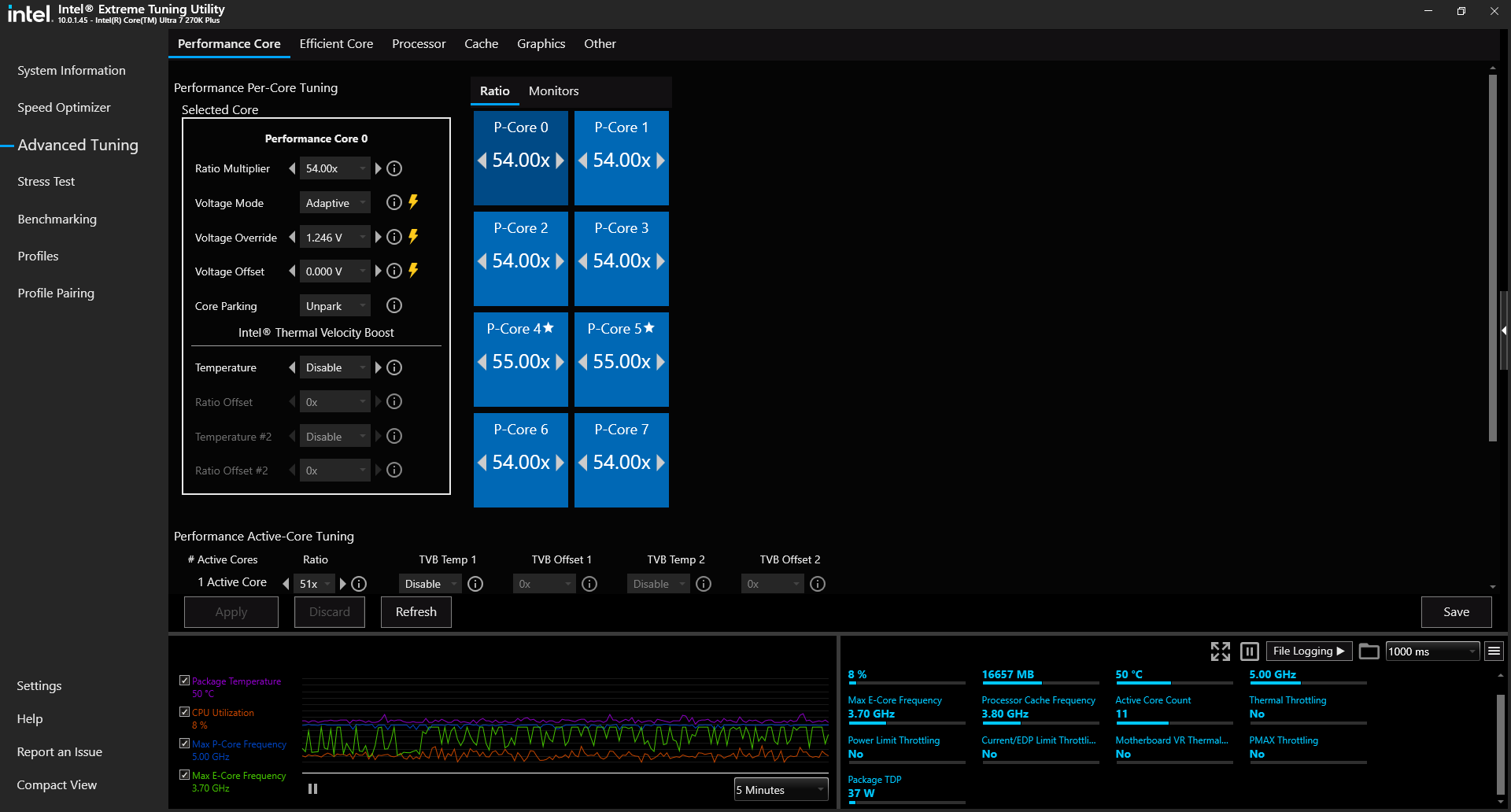
For the Intel Core Ultra 7 270K Plus, overclocking is a centerpiece of the experience. As a fully unlocked K-series SKU, it offers users granular control over per-core voltages, power limits, and clock speeds via an unlocked multiplier. While these changes can be done by entering the BIOS, one can also download the Intel XTU (Extreme Tuning Utility) software to fine tune the CPU.
The Intel Extreme Tuning Utility (Image credit: Future)
One of the most significant changes seen on Arrow Lake Refresh is that Intel has standardized several high-end performance tweaks including the 900MHz die-to-die frequency bump and the 400MHz fabric speed increase. This means users receive enthusiast-level interconnect performance without necessarily needing a premium Z-series motherboard. That said, Z890 boards are still necessary as they offer sophisticated tools for manual tuning and pushing the CPU to its limits.
In contrast, the AMD Ryzen 7 7700X3D follows the same path as previous Zen 4 X3D processors including a locked multiplier, which prevents traditional manual overclocking. Users are instead limited to automated and semi-automated features like Precision Boost Overdrive 2 (PBO2) and Curve Optimizer. PBO2 allows the CPU to dynamically adjust its frequencies based on available power and thermal headroom, while Curve Optimizer enables more advanced fine-tune voltage offsets for each of the eight Zen 4 cores.
While these tools can lead to sustained higher boost clocks, the sensitive nature of the 3D V-Cache stack leads to thermal challenges that limit frequency headroom. Thus, overclocking gains on the 7700X3D are often minimal compared to the flexibility offered by the Intel chip.
⭐Winner: Intel Core Ultra 7 270K Plus
The 270K Plus is a far more overclocking-friendly product. It offers a vast suite of features that AMD simply cannot match due to its architectural restrictions and locked multiplier.
Power Consumption, Efficiency, and Cooling: Intel Core Ultra 7 270K Plus vs AMD Ryzen 7 7700X3D
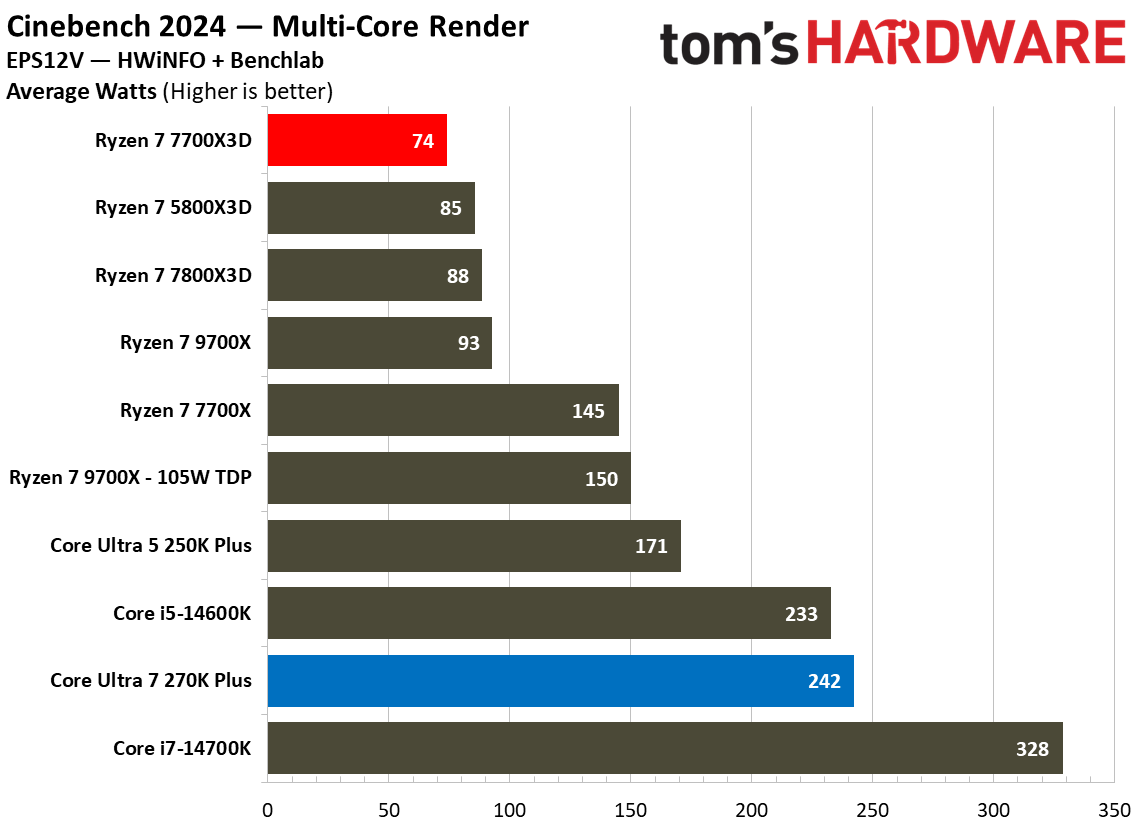
This is a crucial section of the faceoff as it highlights the most significant architectural divide between these two processors. While the 270K Plus prioritizes raw performance throughput, the 7700X3D focuses on extreme efficiency. This is immediately evident in their official power ratings where Intel specifies a 125W TDP with a massive 250W Maximum Turbo Power (MTP), while AMD utilizes a 120W TDP with a 162W Package Power Tracking (PPT) limit.
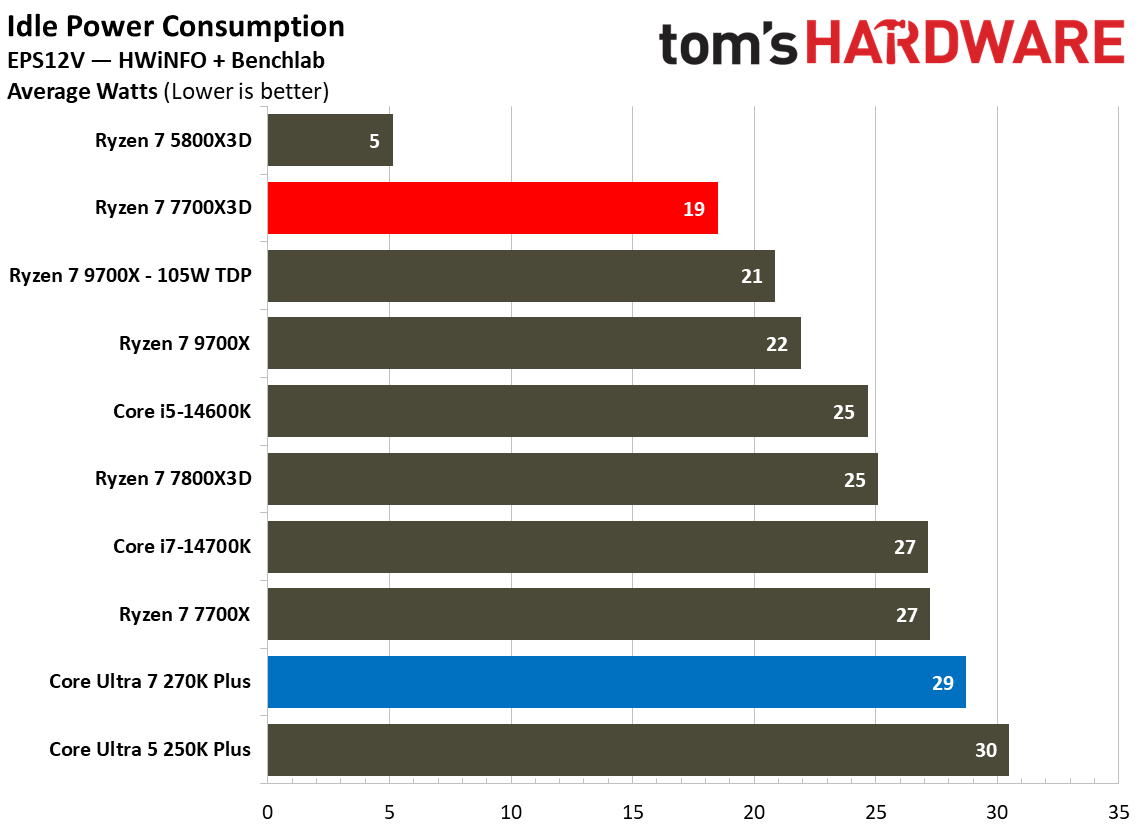
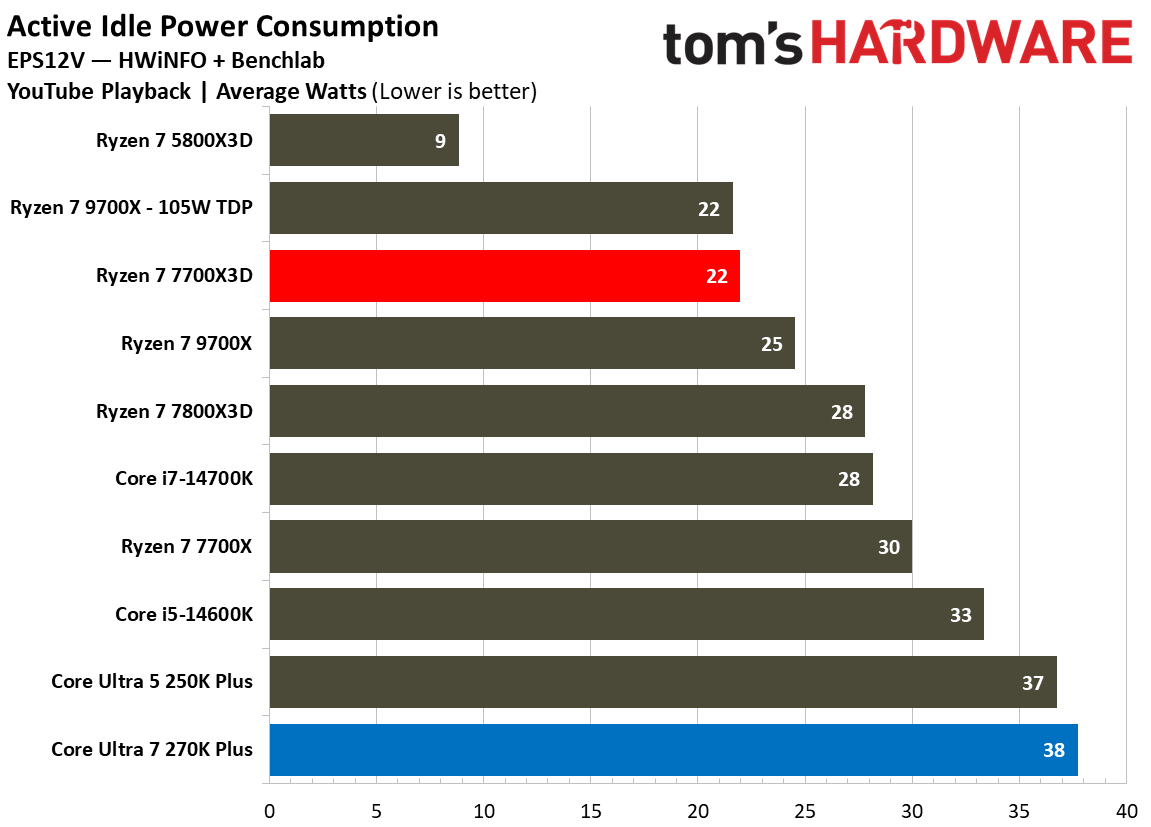
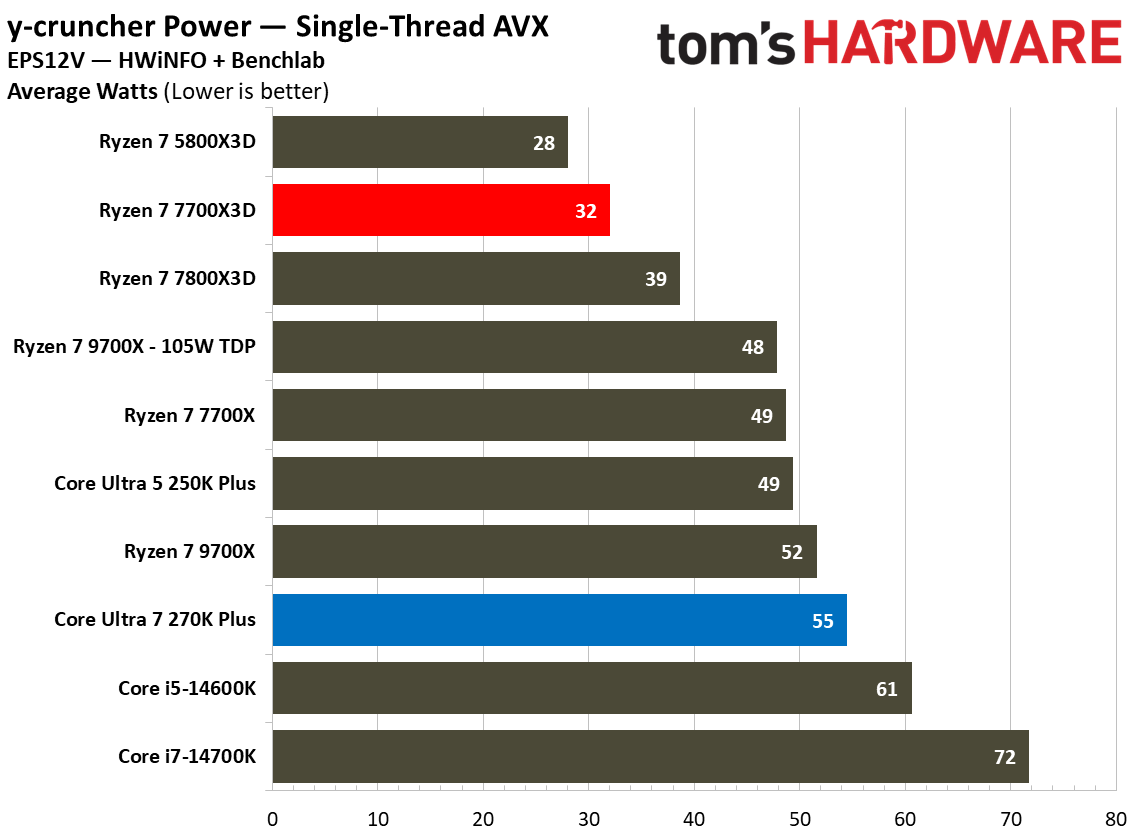
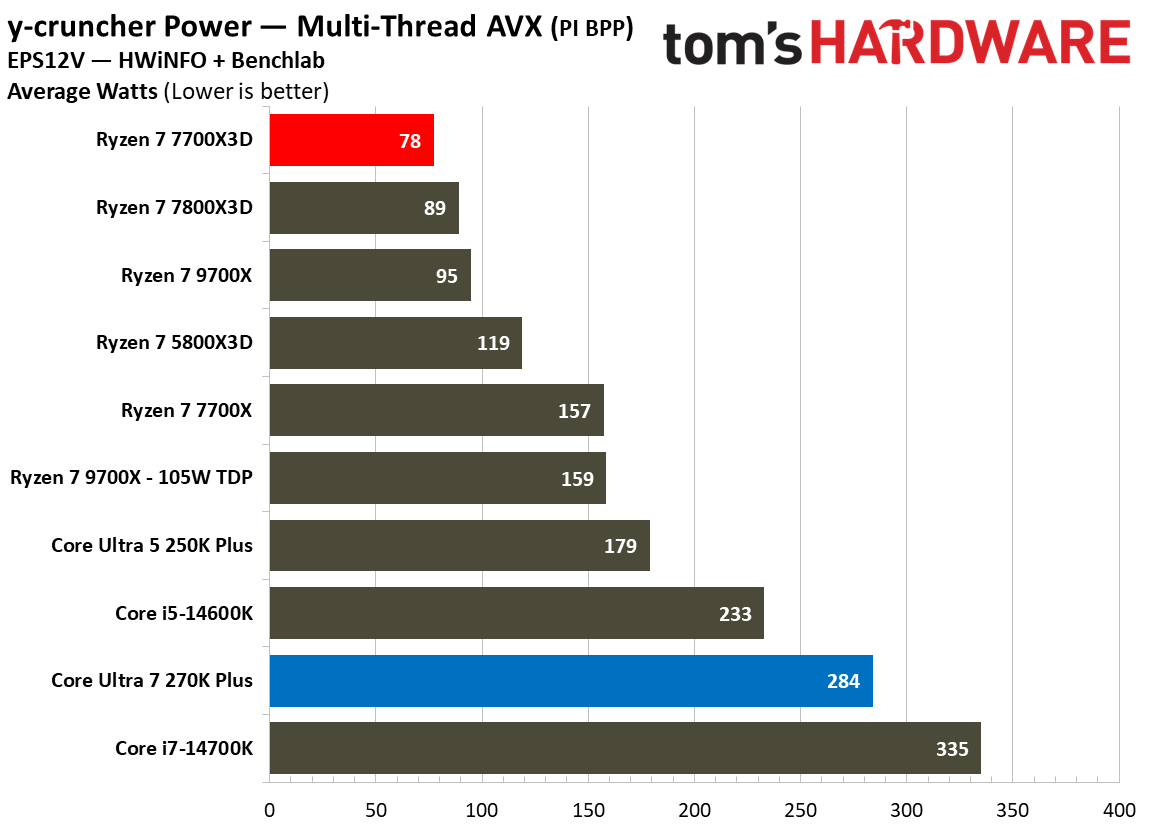
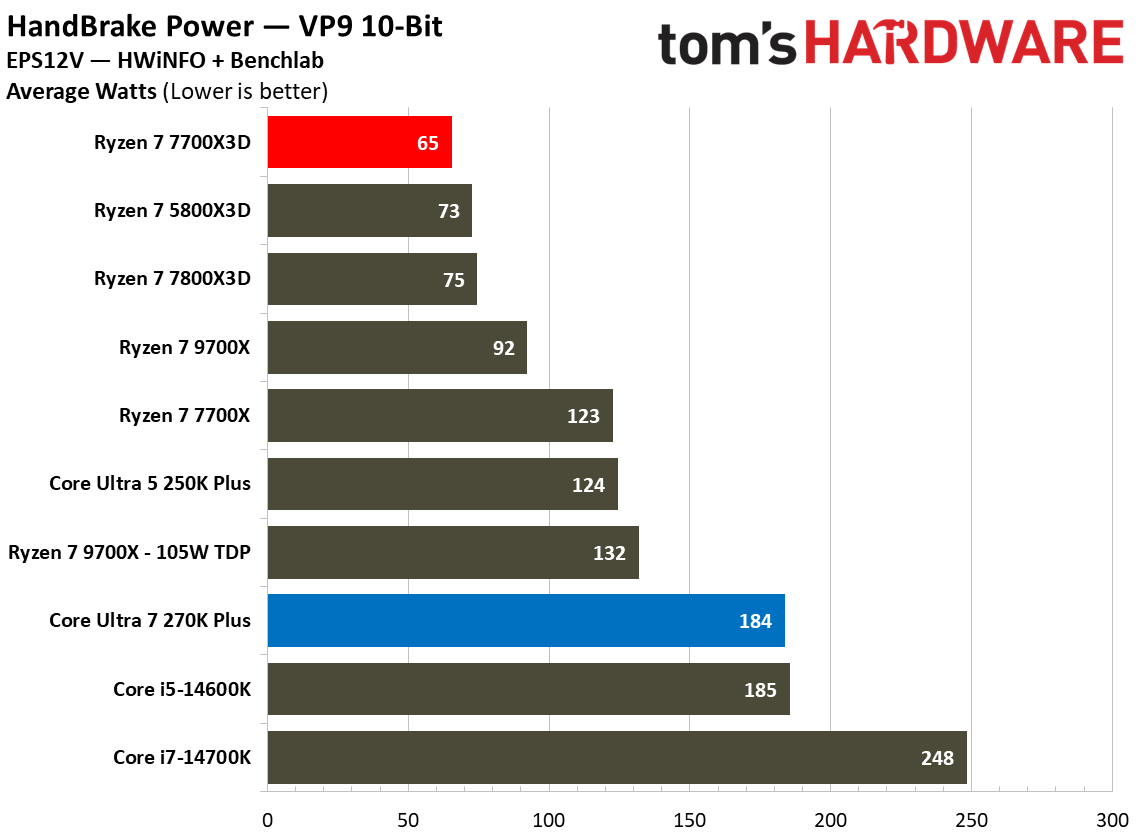
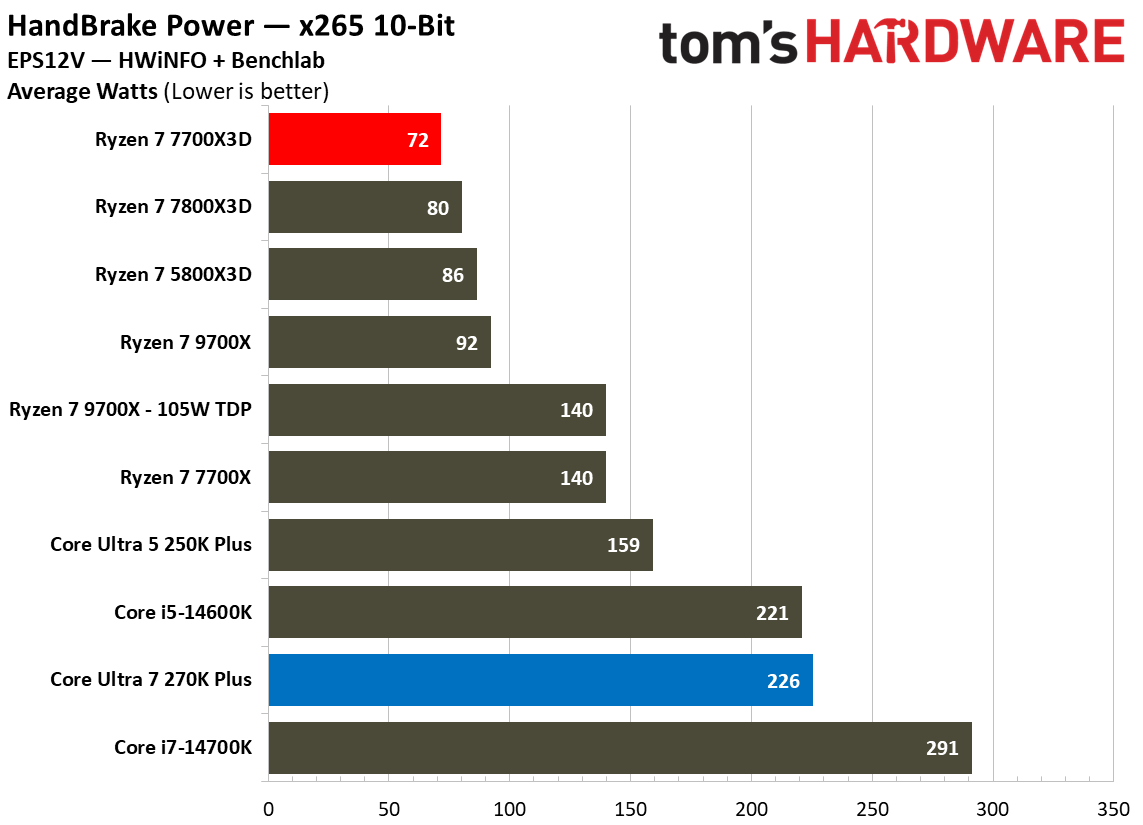
In synthethic multi-threaded workloads, the difference is quite evident. While running HandBrake x265 10-bit encode, the 270K Plus consumes an average of 226W, which is more than triple the 72W required by the Ryzen 7 7700X3D. A similar trend appears in VP9 encoding, where Intel draws 184W compared to AMD’s efficient 65W. Even in lighter tasks like single-threaded y-cruncher AVX workloads, the Intel chip requires 55W while the AMD chip stays at a modest 32W. Idle power consumption also favors Team Red where the 7700X3D idles at 19W and draws 22W during YouTube playback, whereas the 270K Plus sits higher at 29W and 38W, respectively.
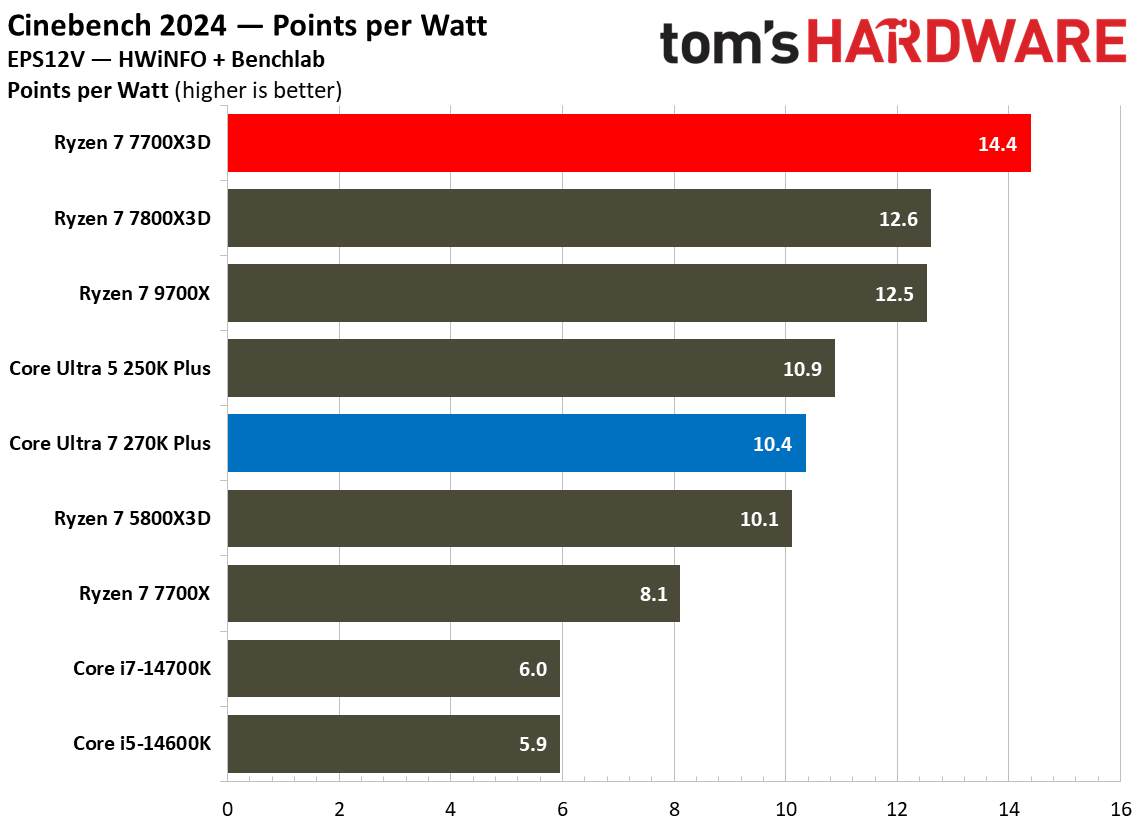
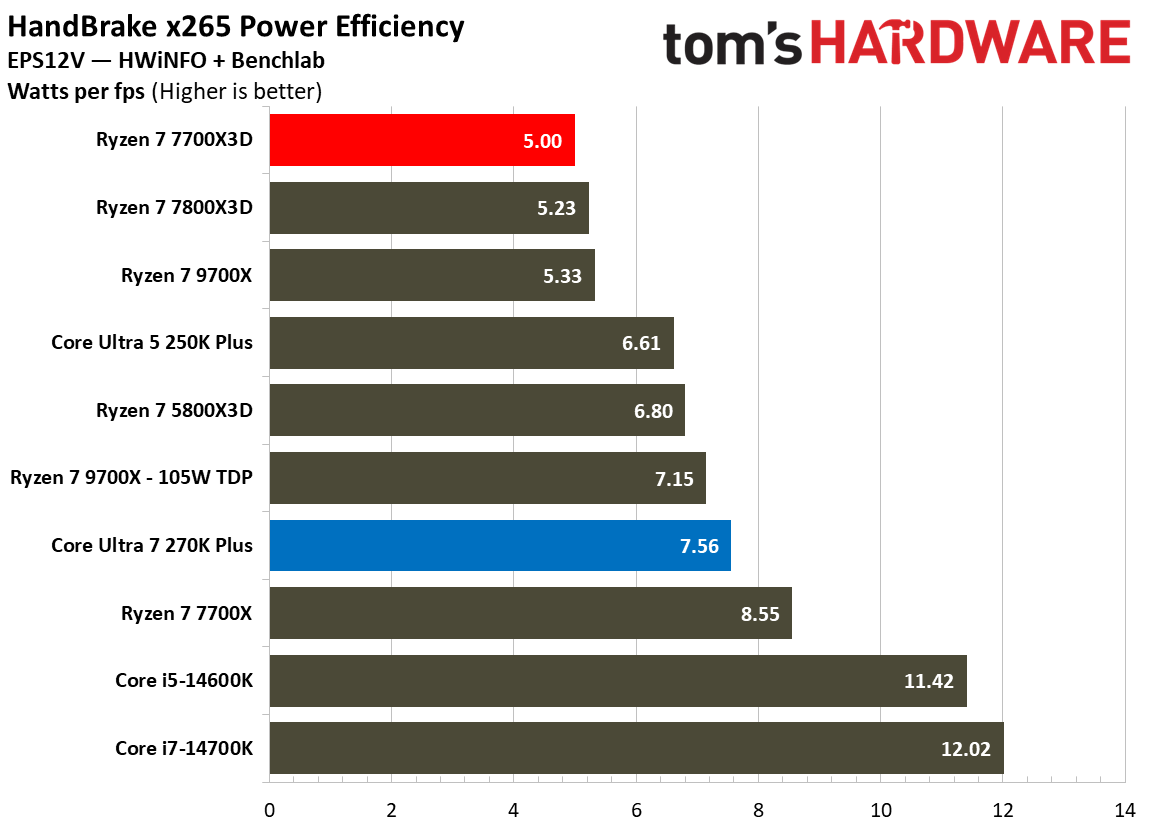
When we translate these power figures into efficiency metrics, AMD’s lead tends to stay ahead in most traditional benchmarks. In Cinebench 2024, the 7700X3D produces 14.4 points per watt, significantly outperforming the 10.4 points per watt from the 270K Plus. In HandBrake x265, AMD achieves a superior efficiency rating of 5W per FPS , while Intel trails at 7.56W per FPS.
FutureFutureFuture
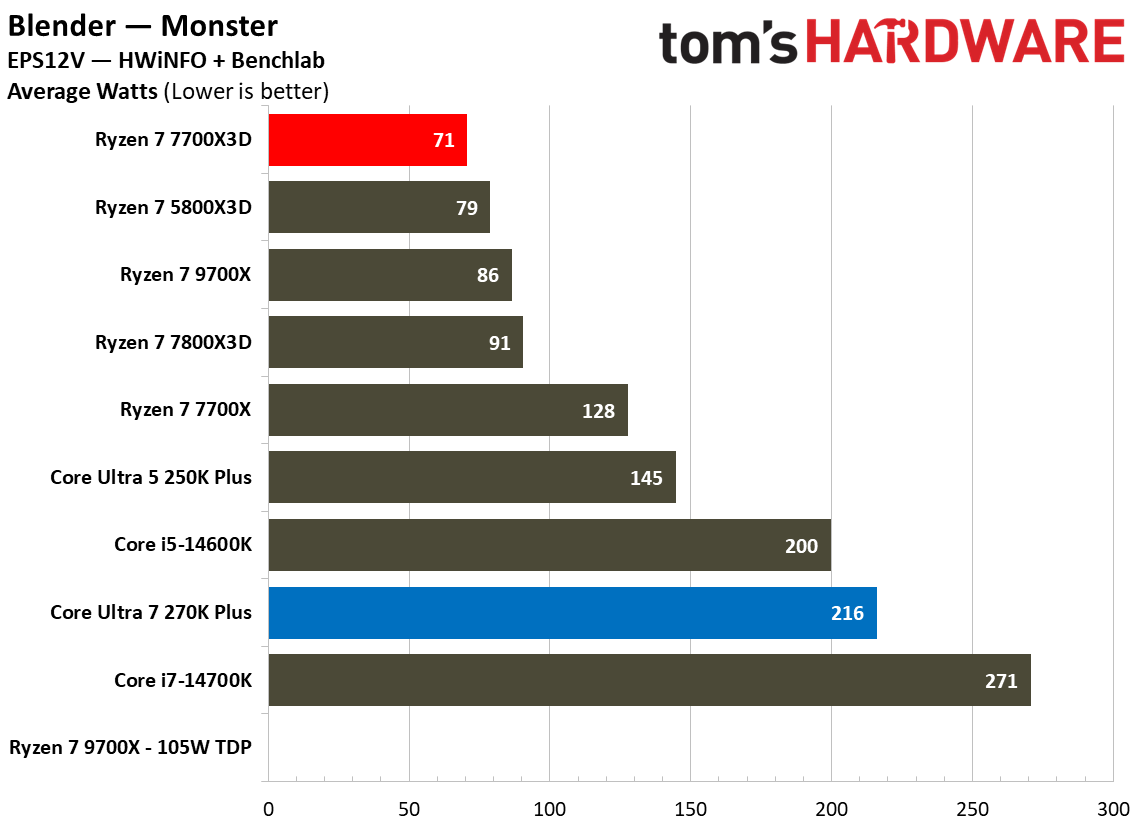
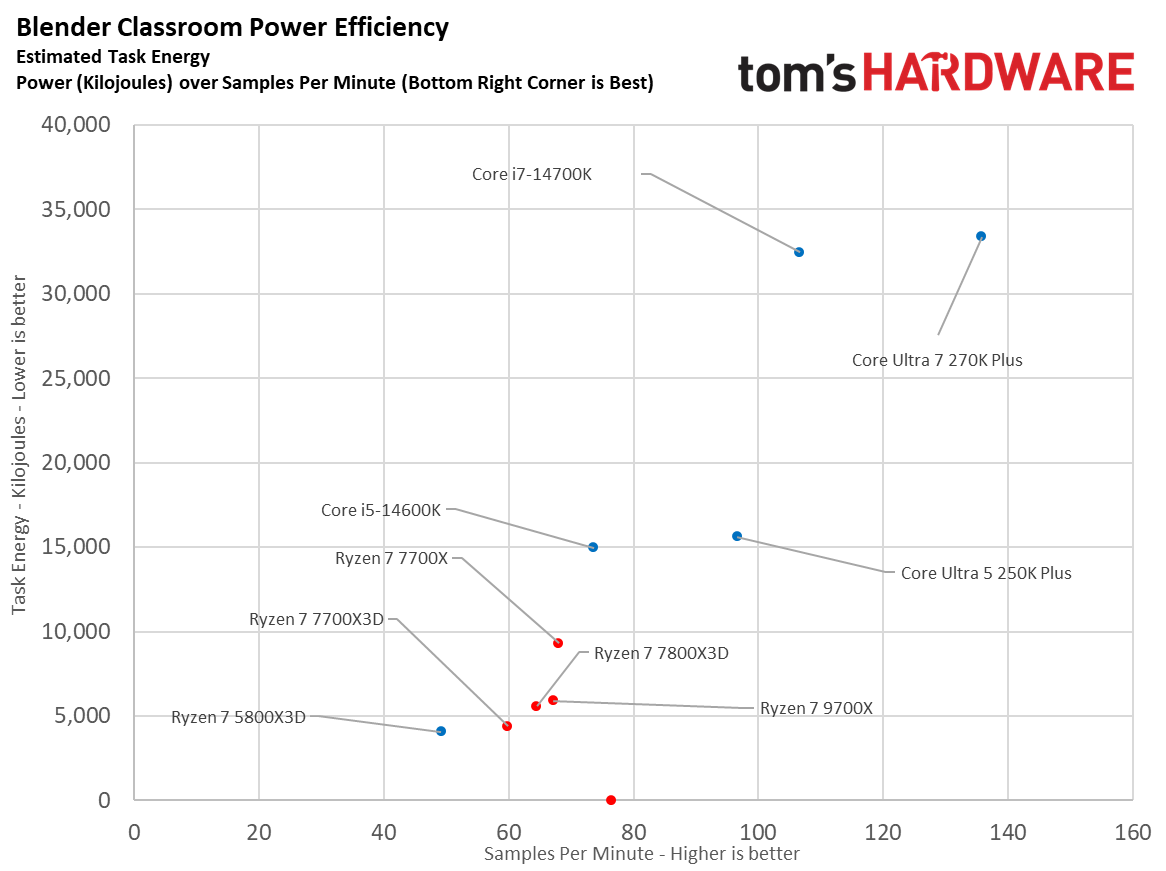
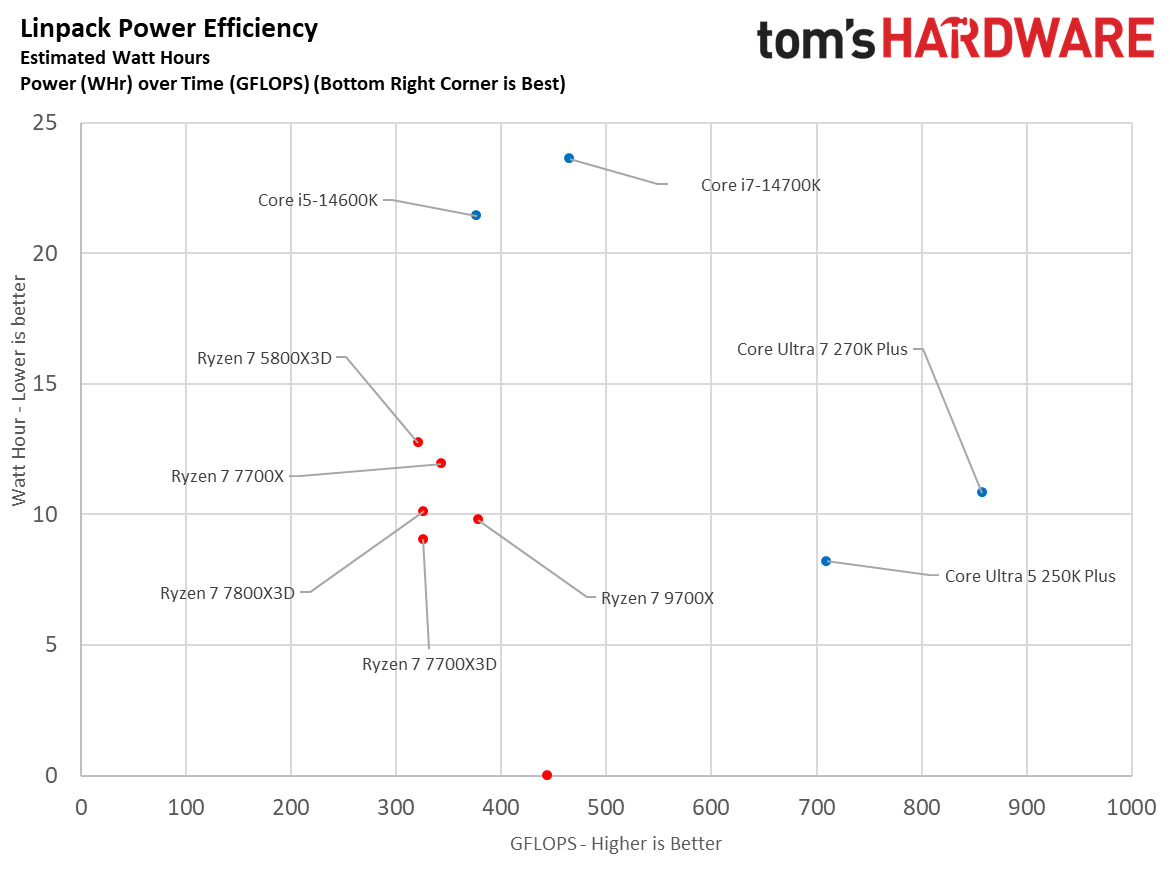
However, the efficiency scatter plots provide a more nuanced look at how performance scaling impacts total energy consumption. In the Blender Classroom scatterplot, the 270K Plus delivers a much higher performance of roughly 135 samples per minute, but it consumes over 33,000 kJ of task energy. In contrast, the 7700X3D finishes with only around 60 samples per minute but uses significantly less total energy at roughly 4,500 kJ.
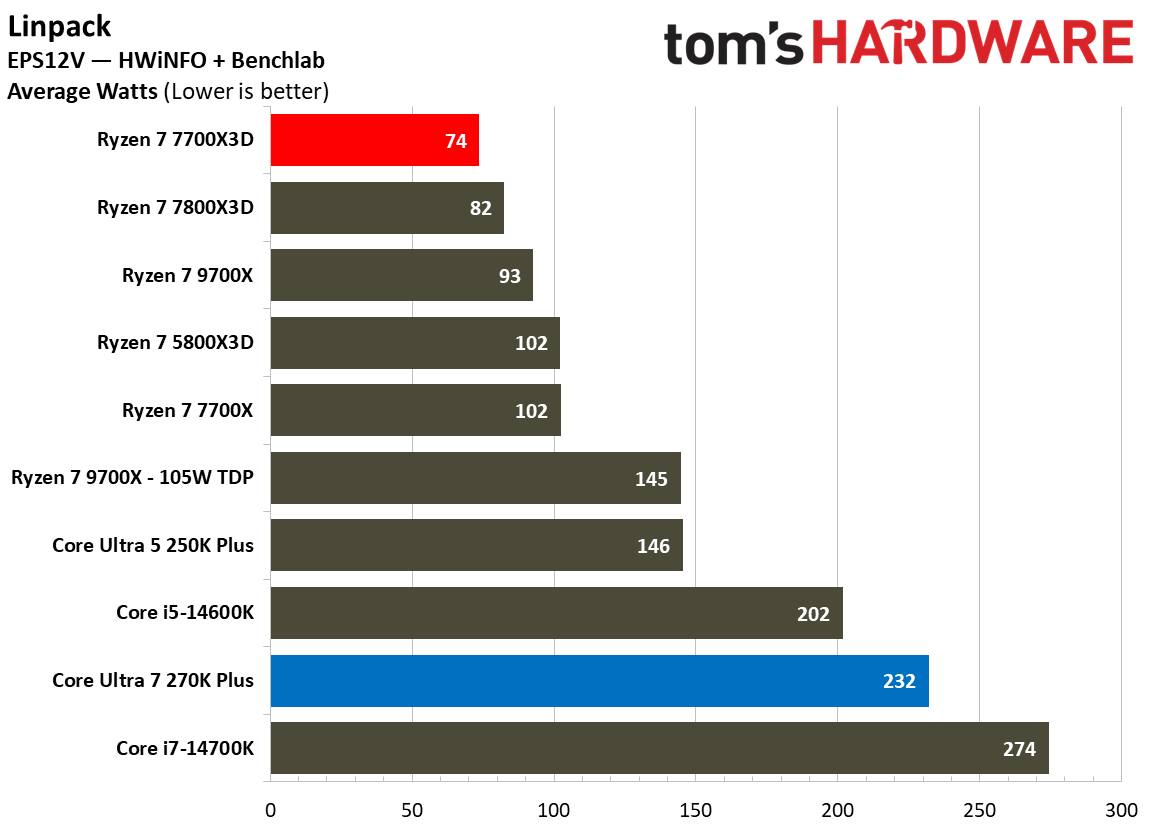
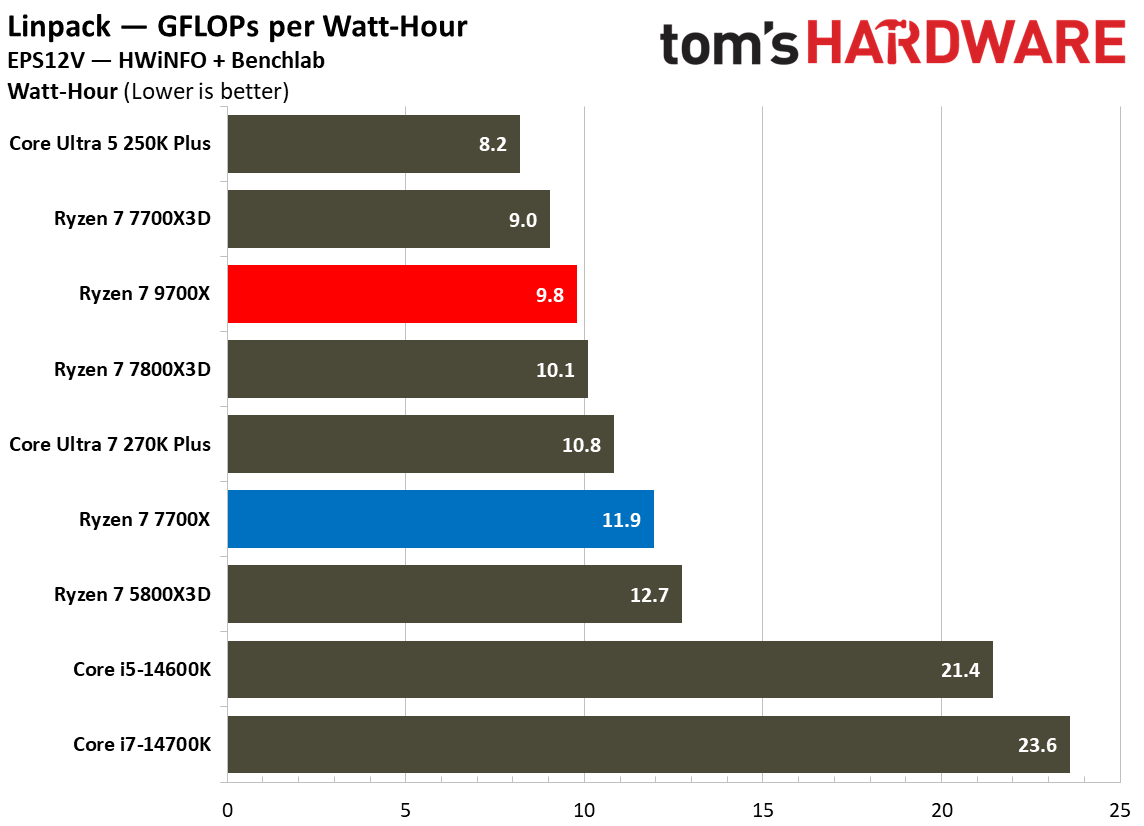
The HandBrake x265 scatterplot shows a similar trade-off where Intel reaches 30 FPS but consumes over 55 kJ, while AMD provides 14 FPS at roughly 36 kJ. Interestingly, the Linpack scatterplot shows the 270K Plus reaching over 850 GFLOPS with roughly 11WHr of energy, making it slightly more efficient in terms of performance-per-energy than the 7700X3D, which delivers roughly 340 GFLOPS for 10Whr.
From a cooling perspective, the 250W MTP on the 270K Plus means that it requires a robust cooling solution, like a 360mm AIO, to avoid thermal throttling during extended all-core loads. The 7700X3D is far easier to manage, remaining remarkably efficient and manageable with a mid-range air cooler. While the 270K Plus delivers class leading performance, it does so by significantly compromising efficiency in heavy workloads compared to AMD.
⭐Winner: AMD Ryzen 7 7700X3D
Pricing: Intel Core Ultra 7 270K Plus vs AMD Ryzen 7 7700X3D
The Intel Core Ultra 7 270K Plus was initially introduced with a justified $300 price tag, but you'll now find it between $300 and $320. The AMD Ryzen 7 7700X3D made its debut just last month and carries a $330 MSRP, placing it right under the 7800X3D. Essentially, there is not a major difference when it comes to the chips themselves, however, the true financial divide becomes apparent when we look at the total platform cost.
The Core Ultra 7 270K Plus demands a more substantial investment to reach its full potential. While one can opt for a B860 motherboard, a compatible Z890 motherboard is necessary in order to access premium overclocking and tuning features. These typically start around $150-$200, and can go as high as $600 packed with premium features. To handle the processor′s 250W Maximum Turbo Power(MTP) during heavy productivity tasks, a high−end 360mm AIO liquid cooler ($100-$150) or a dual-tower air-cooler ($50-$100) is recommended.
In contrast, the AMD Ryzen 7 7700X3D offers a much more budget-friendly entry point. A solid B650 motherboard can be found for around $120-$150 and the chip can be effectively cooled with a modest $50 air cooler.
Unfortunately, both platforms are held back by the ongoing global shortage of memory, which has caused prices to shoot up significantly. Since both CPUs require DDR5 RAM, builders are stuck in a RAMpocalypse where a basic 32GB kit costs over $400. This extra cost is bad news for both sides as it cancels out any price advantage.
Overall, the lower upfront platform cost makes the 7700X3D a slightly more attractive option for users prioritizing their budget. Furthermore, the AM5 socket offers a clear upgrade path through at least 2029, ensuring that your motherboard investment remains viable for future CPU generations. That is not the case with Intel, as the LGA 1851 socket is expected to be replaced once the next-generation of Nova Lake CPUs arrive.
⭐ Winner: AMD Ryzen 7 7700X3D
Ultimately, while both the chips are available at a very similar price range, the AMD Ryzen 7 7700X3D is the smarter financial play for a majority of users. Its significantly lower platform costs, superior gaming efficiency, and guaranteed platform longevity provide a level of value that the more power-hungry Intel refresh cannot quite match.
Bottom Line: Intel Core Ultra 7 270K Plus vs AMD Ryzen 7 7700X3D
Intel Core Ultra 7 270K Plus
AMD Ryzen 7 7700X3D
Features and Specifications
❌
Gaming
❌
Productivity Applications
❌
Overclocking
❌
Power Consumption, Efficiency, and Cooling
❌
Pricing
❌
Total
3
3
The Ryzen 7 7700X3D and Core Ultra 7 270K Plus are designed for very different users, even though they sit in roughly the same price range. Like previous X3D chips, AMD's latest processor is built with gaming in mind, using its large 3D V-Cache to deliver excellent frame rates while keeping power consumption impressively low. Intel, on the other hand, combines a 24-core design with higher clock speeds and platform improvements to create one of the strongest productivity processors in its class without giving up much gaming performance.
The final score is tied at three rounds apiece. AMD comfortably wins gaming performance, power efficiency, and platform value, three factors that matter a lot for buyers shopping in this price segment. The AM5 platform also provides a significantly longer upgrade path, allowing users to drop in future processors without replacing their motherboard.
Intel, however, deserves recognition for what it has accomplished with the 270K Plus. It delivers outstanding single- and multi-threaded performance, offers a fully unlocked overclocking experience, and narrows the gaming gap to just a few percentage points in many modern titles. If your workload includes video editing, software development, 3D rendering, or other heavily threaded applications, the 270K Plus is the obvious choice and justifies its higher power draw.
For everyone else, the Ryzen 7 7700X3D is the more compelling CPU. It offers faster gaming performance, exceptional efficiency, lower platform costs, and a future-proof AM5 ecosystem. Unless your workload regularly extends beyond gaming into demanding productivity applications, AMD's latest X3D chip is the easier processor to recommend.
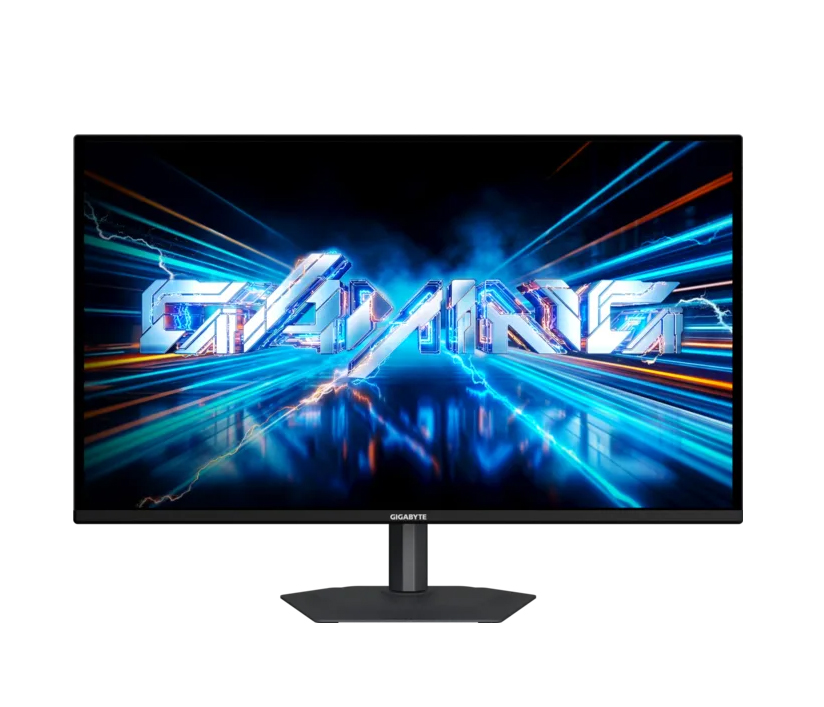
The ongoing global memory crisis has made upgrading an existing PC or building a new one a lot more expensive, with RAM, SSD, and graphics card prices all climbing in recent months. However, gaming monitors have become far more affordable than they were just a couple of years ago, especially when it comes to OLED. If you are looking for a new display for your setup, you could consider the Gigabyte GO27Q24A, a 27-inch QHD 240Hz QD-OLED monitor which is currently down to just $299.99 from its usual listed price of $449.99 on Newegg.
The monitor offers pretty decent specs for the asking price including a third-gen 27-inch QD-OLED panel with a 2560x1440 resolution, which is considered the sweet spot for most gaming setups. It also offers a fast refresh rate of 240 Hz and a response time of just 0.03ms GTG, which makes it perfect for fast-paced games without compromising on the visual fidelity. For esports lovers, the monitor comes with a feature to quickly switch display resolutions or swap to a specific aspect ratio (such as a 4:3 ratio or a dedicated 24-inch custom format size) with a single click using a dedicated physical button.
Gigabyte's 27-inch gaming monitor packs a third-gen QD-OLED panel with a 1440p resolution and support for up to 240 Hz refresh rate, 10-bit color, 99% DCI-P3 coverage, and fast response time of 0.03ms GTG. View Deal
In terms of color, Gigabyte claims up to 99% coverage of the DCI-P3 gamut with support for up to 10-bit color and a factory calibrated Delta E<2 rating. With a peak brightness of 400 nits in HDR, expect lower brightness levels at SDR, though it should be enough for most indoor use cases. Gigabyte has also added Black Equalizer 2.0 which essentially improves visibility in dark scenes by enhancing shadow detail without over-exposing the rest of the image.
As for connectivity, you get two HDMI 2.1 ports and a Displayport 1.4, meaning you can hook this up to your console alongside your PC or laptop. There’s even a standard 3.5mm earphone jack to plug in your headphones or speakers.
For $299.99, the Gigabyte GO27Q24A is one of the most affordable ways to step into OLED gaming without sacrificing key features like a high refresh rate, HDMI 2.1 connectivity, and a 1440p resolution. It may not be the brightest QD-OLED gaming monitor on the market, but at this price, it's hard to complain.
If you were hoping GPU prices would settle down anytime soon, you are in for disappointment. Nvidia’s RTX 5080 and RTX 5090 models from various OEM partners are once again selling well above their launch prices. As per a recent listing noticed by users on Reddit, the Asus ROG Astral RTX 5080 is now priced at $2,099.99 at Best Buy. That's $600 above its official launch MSRP of $1,499.99 and even $100 more than the flagship RTX 5090's launch MSRP of $1,999.
Similarly, pricing for the RTX 5090 has also skyrocketed in recent months. According to a Reddit post, the Asus ROG Astral RTX 5090 is currently listed at $4,329.99 on Amazon, roughly $1,530 above its launch MSRP of $2,799.99. Even the MSI Gaming Trio RTX 5090 has gone up to $4,299.95, a whopping $1,900 more than what it was when it debuted in early 2025.
That said, these hefty prices are primarily limited to premium partner models. Certain mainstream RTX 5080 cards can still be purchased closer to Nvidia's MSRP. For instance, Zotac's RTX 5080 Solid OC is selling for $1,249.99 on Amazon while PNY's RTX 5080 OC is listed at 1,256.99 at Best Buy.
While one cannot ascertain the exact reason behind this price increase, it does take us back to when tech YouTuber der8auer claimed that Nvidia has discontinued its Observed Pricing Program (OPP). This was essentially an incentive scheme that helped board partners to sell certain Nvidia products at or near MSRP. The termination of this program meant that manufacturers such as Asus, MSI, and Gigabyte gained no incentive to keep prices close to Nvidia's suggested retail price. As a result, premium custom cards have become even more expensive, with manufacturers passing higher production costs on to the consumers.
In addition to that, rising DRAM prices thanks to AI-driven demand have led to a massive increase in the cost of GDDR7 memory used in RTX 50-series cards. Nvidia was also said to be prioritizing production of higher-margin products, including the RTX 5080 and AI hardware, which has further tightened supply of certain gaming GPUs.
For potential customers, the latest listings suggest that waiting for premium RTX 50-series cards to return to MSRP may take longer than expected. While Founders Edition models remain the closest option to Nvidia's suggested pricing, they're often low in stock, forcing customers to choose between paying a hefty premium for high-end partner cards or settling for more affordable custom models.

 Login
Login