❌

Reading view

Microsoft Surface event announced for October 7 — here's everything we know so far

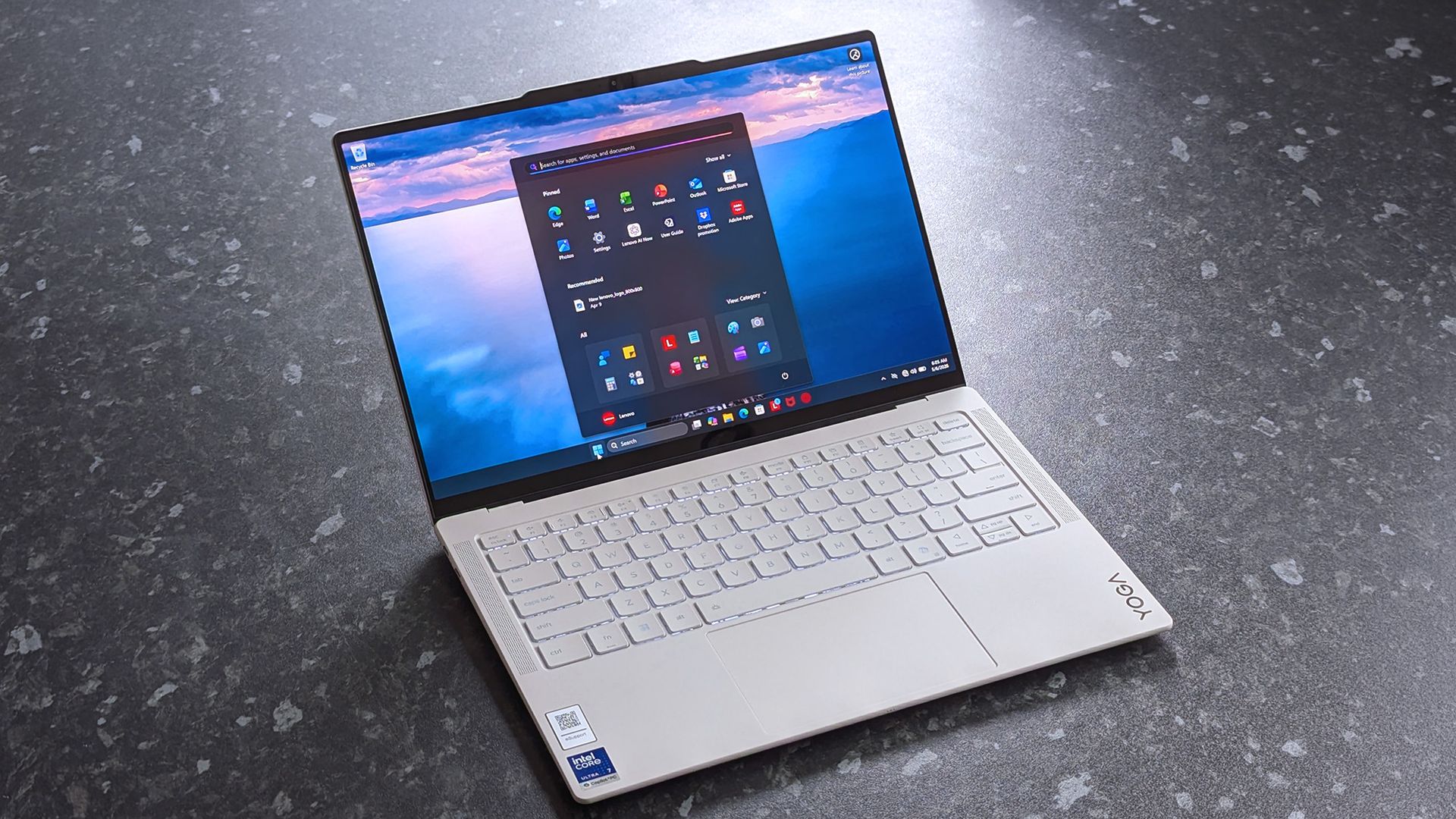
Microsoft just announced a Windows and Surface event for October 7, 2026. The event will be held in San Francisco and will focus on "how local AI will shape the next chapter of the PC." It will start at 10 AM PT / 1 PM ET.

Microsoft CEO Satya Nadella will be at the event, as will Surface chief Pavan Davuluri. NVIDIA CEO Jensen Huang will also be there, so we can expect to see RTX Spark discussed on stage.

RTX Spark is NVIDIA's new superchip. It powers the Surface Laptop Ultra and Surface RTX Spark Dev Box. Microsoft already announced those devices but has not shared key details yet, including pricing and availability. The event in October could be a chance to share more about the devices and the RTX Spark in general.

Blank Pixel

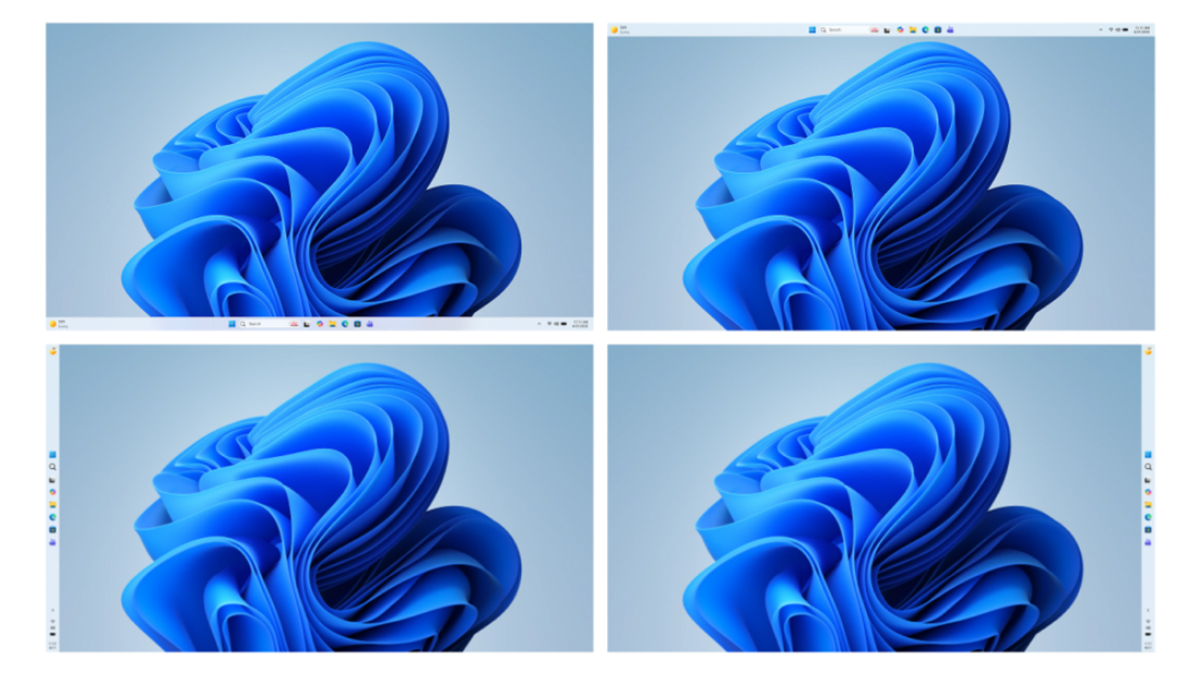
Microsoft is also expected to highlight improvements to Windows 11. The tech giant is deep into its Windows K2 initiative that aims to reduce pain points in the operating system and smooth the overall experience. We've seen some early wins from that initiative, such as the option to resize and move the Taskbar on Windows 11.

But Microsoft still has a long way to go before Windows 11 is redeemed in the eyes of many. Windows updates often ship with bugs and the operating system still has mismatching UI elements. Fixing Windows 11 is a large project that will take time, and Microsoft would be wise to show what it's already done to improve the OS and point to what's on the way.

While Microsoft could always surprise us with more hardware announcements, its quote about "how local AI will shape the next chapter of the PC" aligns well with devices we already know are on the way. The Surface Laptop Ultra and Surface RTX Spark Dev Box are designed to run AI locally.

Based solely on that quote, we could see Microsoft discuss Project Zenith at the event. That's the codename of a new class of devices aimed at developers that want to build apps and local AI experiences.

Click to join us on r/WindowsCentral

Join us on Reddit at r/WindowsCentral to share your insights and discuss our latest news, reviews, and more.

  •  

Microsoft announces Windows and Surface event for October 7th

Windows logo on black background

It's been more than two years since the last major Windows event, so Microsoft is heading to San Francisco next month to outline the future of Windows and Surface devices. At an event on October 7th, the company says it will host a "conversation on how local AI will shape the next chapter of the PC."

Microsoft CEO Satya Nadella will be in attendance, alongside Windows and Surface chief Pavan Davuluri. Even Nvidia CEO Jensen Huang will be appearing at the event, which suggests that RTX Spark PCs could be the main focus of this event. If that's the case, don't be surprised to hear more about the Microsoft Surface Laptop Ultra pricing and avai …

Read the full story at The Verge.

  •  

Windows 11 update breaks copy and paste in Microsoft Excel

Microsoft is having a bit of a rough September when it comes to bugs. Another issue has been discovered in Windows 11. This time, it's Excel's copy and paste feature that's been broken by an OS update.

That bug was discovered shortly after Microsoft confirmed issues with Hyper-V Linux folder shares, Remote Desktop, and USB audio. Those have since been fixed through an out-of-band update, but the Excel bug has not been fixed yet.

Here's what's wrong, according to Microsoft:

"In Microsoft Excel 2024, 2021, 2019, and 2016, the paste operation might fail silently. Although users try to paste content, the source remains selected and the destination is unmodified. When this issue occurs, users receive no indication of the failure, such as a beep or error message. Microsoft is researching the issue and will post more information in this article when the information becomes available."

The September Patch Tuesday update has almost 1,000 security fixes, so it is important to install it on PCs. But it may be worth holding off a bit if your workflow would be hindered by lingering bugs.

Blank Pixel

I don't want to come across as a doomsayer. The sky is not falling because copy and paste in Excel is broken. But it's frustrating to see bugs creep into Windows 11 updates.

Microsoft is aware of negative feelings many users have toward Windows 11. The company has a Windows K2 initiative that aims to reduce pain points and improve the overall Windows 11 experience. Part of that initiative centers around improving Windows updates.

On paper, Microsoft is trying to reduce how many updates people need to install each month. But I've had to install several Windows 11 updates just in September, including the out-of-band update that fixed the audio issue.

Click to join us on r/WindowsCentral

Join us on Reddit at r/WindowsCentral to share your insights and discuss our latest news, reviews, and more.

  •  

Windows 11 just received another emergency update — is this the new normal?

Windows 11 just received an out-of-band update that addresses several issues with the operating system. The September Patch Tuesday update includes almost 1,000 security fixes and other improvements, but it also had bugs that broke folder shares in Hyper-V-based Linux virtual machines, Remote Desktop Services, and certain audio devices.

Microsoft released the out-of-band update shortly after the issues were confirmed. It should download automatically in the background if you're running Windows 11 versions 26H1, 25H2, or 24H2. You can also grab the update through the Microsoft Update Catalog.

For the sake of clarity, Microsoft refers to these types of updates as out-of-band updates, but many people refer to them as emergency updates because installing them is urgent enough to ship the fixes immediately.

Here's a quick summary of the fixes, as outlined by Microsoft:

"Microsoft has identified issues that affect some devices after installing the September 2026 Windows security update, released September 8, 2026. On affected devices, host folder shares might be unavailable in Hyper-V-based Linux virtual machines, Remote Desktop Services might stop responding, which can prevent new sessions from being created and can prevent local and remote sign-in, and some USB Audio Class 1.0 devices might fail in multichannel audio modes."

Blank Pixel

Out-of-band updates have been released more in 2026 than in previous years. Some bugs in Windows 11 have required multiple patches.

When we publish a piece on Windows Central about a Windows 11 update, it's normal to see comments asking what the update will break. When there are inevitably issues with Windows 11, people ask "what do you expect" or something along those lines.

Obviously, if Microsoft finds issues, it needs to patch them. Emergency updates should be used when needed. My question is: why are they needed more frequently this year?

The situation is so bad that people celebrated the option to pause Windows 11 updates forever.

Microsoft is in the middle of an initiative to improve Windows 11 and reduce pain points in the operating system. But no one will care if they can move the Taskbar to the top of the screen or customize the Start menu if their speakers don't work.

Click to join us on r/WindowsCentral

Join us on Reddit at r/WindowsCentral to share your insights and discuss our latest news, reviews, and more.

  •  

Microsoft rolls out emergency update for Windows 11's latest patch — recent update causes crashes on AMD graphics, Explorer hang-ups, and broken third-party integrations

Microsoft has issued an out-of-band update for its recent Windows 11 patch, which has caused a number of bugs and issues. The September 2026 update was just released last Tuesday, and although it packs a number of new features and fixes nearly 1000 security flaws (commonplace in this day and age), there are also a few unfortunate regressions.

The 25H2 update finally reintroduces a movable taskbar, just like we've had since Windows 95, with an option to make the height smaller for compact displays. Likewise, the Start menu now has multiple configurable layouts, and you can toggle each main section on or off. Microsoft also revamped Windows Search — perhaps to finally be useful — and users can now choose to only have it display local results. Explorer got a handy tweak in the form of using KB, MB, GB size indicators, as well.

The update has also surfaced some serious bugs. First off, PCs with AMD Radeon GPUs are crashing, apparently due to the update provoking driver instability. Reinstalling the driver doesn't appear to help, and the reports unfortunately cover most contemporary AMD graphics cards. Microsoft did not mention AMD GPUs specifically in its latest update.

Microsoft noted that it has fixed an issue with Remote Desktop Services where RDS might become unstable, causing connection and sign-in failures.

Microsoft is also aware of an issue with audio output and microphone input going dead. Additionally, there are seemingly reports of audio devices starting up with a botched configuration, like tweaked 3D audio settings or speaker setups. The apparent workaround seems to be putting audio in a standard 2.0 configuration, but Microsoft has now addressed this issue in the emergency patch.

Explorer may display a black screen after logging in, leaving you with a perfectly functioning operating system but no visible UI. The File History backup feature is reportedly not detecting external drives, effectively making it useless. Of particular concern to enterprises, systems administrators, and homelabs, the Remote Desktop Service is also experiencing issues. Last but not least, Microsoft says it has addressed an issue where Claude Cowork is nonfunctional due to the update breaking HC-managed Linux VMs with Plan9 shared folders

Owners of HP and Lenovo systems are also advised to consider holding off on this update. Ever since the August 2026 patch (and now, cumulatively, with the September update), there are reportedly serious issues on both camps. On the HP side, there are instances of the update triggering BIOS corruption, leading to a failed install with no ability to recover the OS — though seemingly the OEM has published a new BIOS revision, so it's hard to say which side is to blame. Meanwhile, Lenovo users might have their machines black-screen or shut down out of the blue, seemingly due to power mismanagement.

While it's heartening to see that Microsoft has significantly increased its Windows development speed and is seemingly listening to customer feedback, a string of bugs after a major feature update are still common.

  •  

Windows 11's latest update broke my speakers, and I'm not alone

The latest Windows 11 update gives you plenty of reasons to upgrade, including hundreds of security fixes. But it also includes some bugs that range from frustrating to workflow-breaking.

Microsoft recently confirmed that a bug in Windows security update KB5124008 can cause some audio devices to fail. Affected systems will see one or more of the following issues:

  • The device displays an error in Device Manager: "This device cannot start (Code 10).” 
  • No audio output.
  • Volume controls are unresponsive or remain at zero. 
  • Sound settings are unresponsive or unavailable. 
  • Some devices might function in standard stereo configurations but fail when using multichannel audio features, including 8-channel or 3D audio modes. Some customers have reported that they're able to restore audio in these cases by switching to 2-channel mode. 

I believe my PC was affected by this bug. After installing the most recent Patch Tuesday updates, my external USB speakers stopped working, and Windows automatically defaulted my audio output back to my docked laptop's built-in speakers.

The problems only affect USB Audio Class 1.0 devices. Just about any operating system or platform that supports USB audio works with USB Audio Class 1.0. That class was the first standard for audio devices and shipped in 1998. There are USB microphones, headsets, speakers, and many other devices that fall into the category.

Because some modern platforms (most notably gaming consoles like the PS5 and Nintendo Switch) do not support newer standards, headsets and other peripherals are often made to be USB Audio Class 1.0 devices so they work everywhere.

The bug affects Windows 11 versions 26H1, 25H2, and 24H2. Microsoft has confirmed the issue but has not released a fix at this time.

You may be able to workaround the bug by switching to 2-channel mode, but that is not a permanent fix. You can also uninstall the KB5124008 update, though it may be better to just wait for an official fix or to find a workaround.

Blank Pixel

Click to join us on r/WindowsCentral

Join us on Reddit at r/WindowsCentral to share your insights and discuss our latest news, reviews, and more.

  •  

Microsoft’s Patch Tuesday updates: Keeping up with the latest fixes

Long before Taco Tuesday became part of the pop-culture vernacular, Tuesdays were synonymous with security — and for anyone in the tech world, they still are.  Patch Tuesday, as you most likely know, refers to the day each month when Microsoft releases security updates and patches for its software products — everything from Windows to Office to SQL Server, developer tools to browsers.

The practice, which happens on the second Tuesday of the month, was initiated to streamline the patch distribution process and make it easier for users and IT system administrators to manage updates. Like tacos, Patch Tuesday is here to stay.

Patch Tuesday coverage has long been a staple of Computerworld’s commitment to provide critical information to the IT industry. That’s why we’ve gathered together this collection of recent patches, a rolling list we’ll keep updated each month.

In case you missed a recent Patch Tuesday announcement, here are the latest six months of updates.

September Patch Tuesday: 963 CVEs, 2 exploited flaws, 1 message

September’s Patch Tuesday is Microsoft’s biggest of 2026, with 963 CVEs, two exploited flaws and a clear message: prioritize Windows, Office and SQL Server.

Two vulnerabilities are already exploited: CVE-2026-81963 in the Windows Update Stack and CVE-2026-85880 in Advanced Local Procedure Call. Nothing in this release was publicly disclosed ahead of the patch. Readiness recommends a Patch Now scheduling for Windows, Office, SQL Server and the developer tooling, and standard patch release for Exchange.

Get more info on the September 2026 Microsoft security updates.

August’s Patch Tuesday is a monster: 751 fixes, with an exploited Windows flaw

Microsoft’s August 2026 Patch Tuesday closes at 751 CVE entries (across all product families), with 108 rated as critical. One flaw is already exploited, CVE-2026-68820, an elevation of privilege in the Windows WinSock driver (afd.sys). Two more were disclosed but not exploited.

This security-only release earns Patch Now for Windows, Office and Exchange; no SQL Server updates this month. Unfortunately, several critical issues affect server roles: Windows DNS Server carries a cluster of critical RCEs; Windows DHCP Server is the most-populated Microsoft product family at 14 entries. Testing should lead with printing and fonts and the Remote Desktop client, then a WinSock smoke test given the exploited afd.sys flaw.

Get more info on the August 2026 Microsoft security updates.

July’s Patch Tuesday sees an end-of-support collision amidst a massive, record-setting patch wave

Microsoft addressed 722 CVEs this month once the 427 Chromium upstream relays are set aside — roughly three times a normal cycle and one of the largest single months in recent memory. Two vulnerabilities arrive under active exploitation: an elevation of privilege in Active Directory Federation Services (CVE-2026-56155), and an elevation of privilege in SharePoint Server (CVE-2026-56164). A third, a BitLocker security feature bypass (CVE-2026-50661) is publicly disclosed but not yet exploited.

The July 2026 Patch Tuesday earns Patch Now recommendations for Windows, Office, Exchange, and SQL Server. SharePoint has two critical RCEs on top of its exploited zero-day, and Exchange Server returns with a critical on-premises spoofing flaw. Adding to our (dear) administrator’s efforts, SharePoint Server 2016/2019 and SQL Server 2016 all reach end of support today.

More info is available here on Microsoft Security updates for July 2026.

For June, Patch Tuesday means an IT scramble

Microsoft this month released 206 updates affecting Windows, Office, Exchange Server, and its developer tools — including three Windows vulnerabilities already publicly disclosed. That trio includes an elevation of privilege in the Collaborative Translation Framework (CVE-2026-45586), a denial of service in HTTP.sys (CVE-2026-49160), and a BitLocker security feature bypass (CVE-2026-50507). At the moment, none appear to be under active exploitation, but all three are rated “Exploitation More Likely.” 

Even without an exploited zero-day, the June 2026 Patch Tuesday release requires Patch Now recommendations for Windows, Office, and Exchange. The latter is back in the patch picture with a consolidated security update that Microsoft recommends installing “as soon as possible.”

More info is available here on Microsoft Security updates for June 2026.

For May, Patch Tuesday means 139 updates — but no zero-days

Microsoft this month released 139 updates affecting Windows, Office, .NET, and SQL Server (though there were no updates for Microsoft Exchange Server). Despite the absence of zero-days, the May Patch Tuesday update still requires Patch Now recommendations for Windows and Office. 

The combination of three unauthenticated network RCEs (Netlogon, DNS Client, and SSO Plugin for Jira and Confluence), four Word Preview Pane RCEs, the large TCP/IP vulnerability cluster, and the carry-over BitLocker recovery condition (still active on Windows 10 and Windows Server) warrants an accelerated deployment release schedule. 

More info is available here on Microsoft Security updates for May 2026.

Microsoft’s Patch Tuesday release for April is a whopper

Windows admins are going to be busy this month, dealing with the largest Patch Tuesday cycle in memory. The April release involves 165 updates and roughly 340 unique CVEs from Microsoft — including two zero-days, one of which is already being actively exploited in the wild. 

The Readiness team recommends “Patch Now” schedules for nearly every major product family: Windows, Office (with a zero-day), Microsoft Edge (Chromium), SQL Server, and Microsoft Developer Tools (.NET). April also brings Phase 2 of Microsoft’s Kerberos RC4 hardening with full enforcement set for July. There is a lot to cover, so here’s a useful infographic mapping the deployment risk for each platform.

More info is available here on Microsoft Security updates for April 2026.

  •  

ClickFix attacks infecting PCs and Macs are going viral

It wasn’t that long ago that ClickFix attacks were exotic. Now the technique has become mainstream as attackers reap its simplicity and effectiveness in infecting users of PCs and Macs alike. All that’s required is a compromised website—a painless enough task—a fake CAPTCHA overlay, and the inclusion of a single terminal command. So many visitors get suckered into pasting and running the command that just about every malware pusher has adopted the technique. Even Kremlin-backed hacking groups are joining in.

“Reddit is becoming post after post after post of people getting their computer infected via ClickFix,” independent researcher Kevin Beaumont observed Thursday. “Legit websites everywhere [are] getting hacked to serve the fake captcha prompts.”

How many of us make things worse

More seasoned Internet users—a fair number who read this site—are quick to dismiss the attack. They typically blame the people who fall for the scams and marvel at their gullibility and lack of attention. The reality is that for more casual users, using computers and the Internet has become so difficult—think impossible-to-close interstitials, CAPTCHAs with an endless series of pictures to analyze, and constantly changing interfaces that bury the features they’re looking for—that they have grown desensitized to instructions that seem ridiculous and burdensome.

Read full article

Comments

© Getty Images

  •  

Windows 11 can now reinstall itself from the cloud — Cloud Rebuild revives dead systems without secondary boot media, wipes broken installation and downloads a fresh copy of the OS

Microsoft has finally solved one of the biggest pain points of Windows with the rollout of Cloud Rebuild. The new recovery feature can reinstall Windows 11 even when an existing Windows installation is corrupt or refuses to boot. Available as a beta through the newly released Windows 11 Insider Beta Preview Build 26220.9343, the feature is essentially a hassle-free alternative to creating a Windows installation USB drive when a PC needs to be recovered.

According to Microsoft, Cloud Rebuild is designed to restore a Windows 11 PC to a “clean, known-good state” by downloading a fresh image of Windows along with the required drivers directly through Windows Update. Unlike the existing Reset this PC functionality, it does not depend on the health of your existing Windows installation, nor does it require users to have a USB drive or custom recovery image available.

The Cloud rebuild feature available in Windows Recovery

(Image credit: Microsoft)

Available via the Windows Recovery Environment (WinRE), users can access it by selecting Troubleshoot > Recovery and uninstall > Cloud rebuild from WinRE. Speaking of which, Microsoft has also improved networking support in WinRE. The recovery environment can now reuse eligible Wi-Fi profiles saved within an existing Windows installation, allowing a PC to connect during recovery without requiring administrators to separately configure Wi-Fi credentials in WinRE. Once the PC is connected, Cloud Rebuild checks Windows Update for the target Windows build and downloads the required files. Users can then confirm the Windows edition, language, and build before starting the reinstall.

The only catch here is that Cloud Rebuild completely wipes the system drive, meaning that the process removes all data stored in your main installation or C: drive, including locally stored files, accounts, applications, and settings, before reinstalling Windows. Thus, it is recommended to back up all your important files either locally or using a cloud-based service before starting the process. Once the installation is complete, the PC boots into the Windows out-of-box experience, similar to a fresh installation of Windows. For admin-managed PCs using Windows Autopilot and Microsoft Intune, the system can automatically reconnect to the organization's management infrastructure and restore assigned applications, policies, and backed-up settings.

Cloud Rebuild could particularly be useful when Windows becomes too corrupted to boot normally. Instead of finding another PC, creating installation media, and manually reinstalling Windows, users can potentially perform the entire recovery process directly from WinRE. The feature is still in preview; however, we can expect a wider release later this year.

  •  

Microsoft adds Bigfoot and Copilot key remapping in latest Windows 11 preview build

Move over iPhone Duo announcement, the real news is here. Windows 11 will soon feature a few more emojis. Microsoft recently shipped Windows 11 Builds 26100.9539 and 26200.9539 to Insiders in the Release Preview Channel. Among other changes, the update adds support for Emoji 17.0.

Since these are Release Preview builds, many of the included changes have already been seen during earlier Insider testing.

Several changes have been made to File Explorer that should make for a smoother experience. Home within File Explorer now preserves the state of sections, so the next time you open the app things will be expanded or collapsed as before. Thumbnail previews for cloud files should appear more consistently as well following this update.

Emoji lovers will be happy to hear that Emoji 17.0 support comes with this build of Windows 11. Emoji 17.0 adds the distorted face, fight cloud, and hairy creature (Bigfoot) emojis.

Blank Pixel

Microsoft continues on its recent push to create more widgets. These Insider builds add a Tips widget that provides guidance about Windows features. Microsoft recently announced a battery widget that's in the works as well.

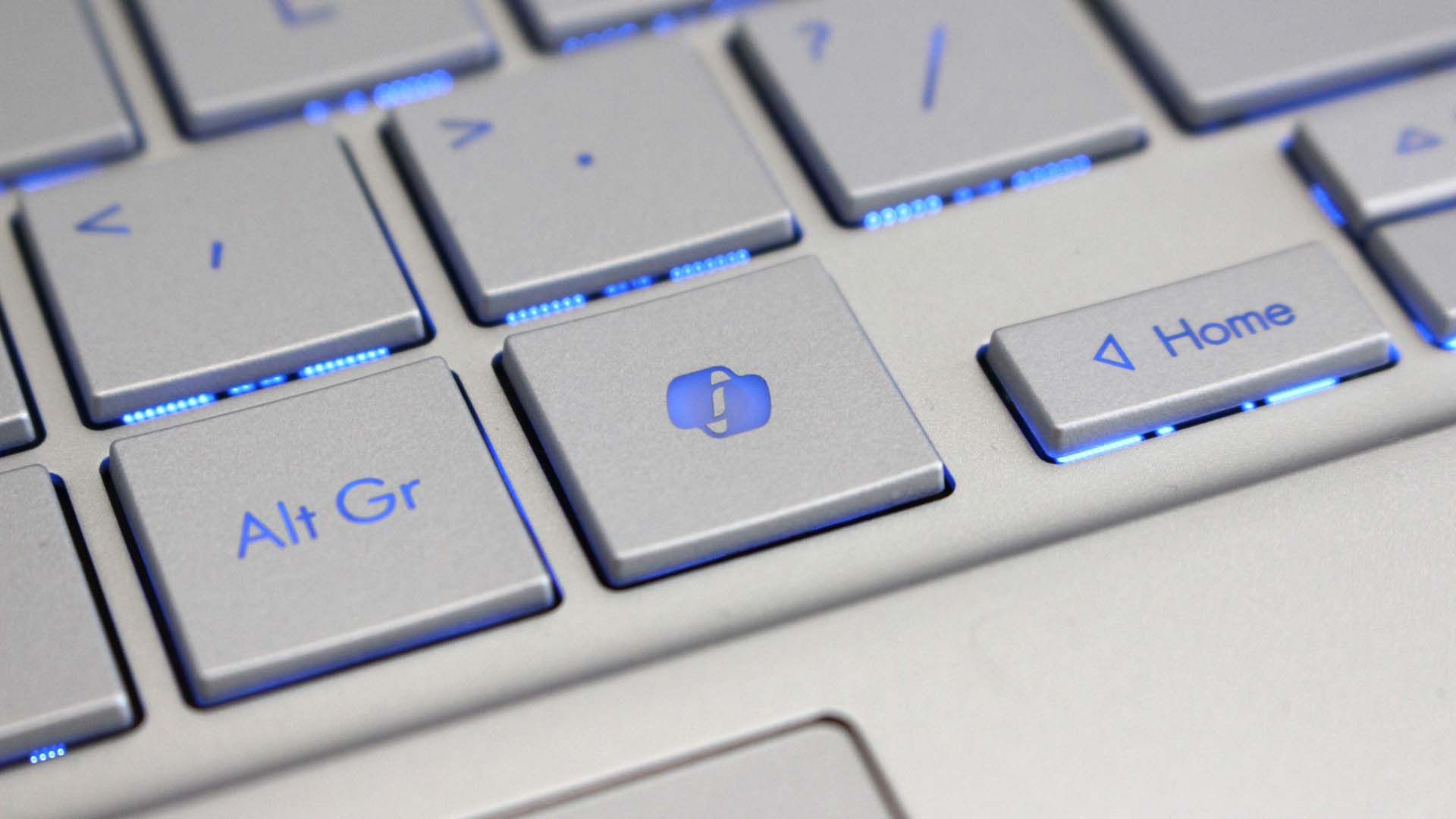
Another welcome change is the update to remap the Copilot key to function as the Right Control key or Context Menu key. Copilot already has a keyboard shortcut (Alt + Space) for those who want to use it, so having a dedicated key for a niche tool felt a bit like overkill.

Microsoft detailed the changes that are gradually rolling out.

Build 26100.9539/26200.9539

File Explorer

  • New! This update adjusts how the preview pane handles files downloaded from the web. For HTML files, a new Preview anyway button lets you acknowledge the warning and preview the file. Non-HTML files, such as PDFs, are now previewed automatically.
  • New! File Explorer Home now preserves the state of sections (expanded or collapsed), so you can pick up where you left off.
  • New! This update improves the reliability of thumbnail previews for cloud files in the Details pane. The pane has also been reorganized so file properties are easier to find and review at a glance.
  • New! This update addresses an issue that could clear the address bar contents when entering edit mode by clicking near the right side of the address bar.

Emoji

  • New! This update adds support for Emoji 17.0, including new emoji such as distorted face, fight cloud, and hairy creature. To insert them, press Windows key + Period (.) to open the emoji panel.
  • New! This update also refines the design of several existing emoji for better consistency across platforms, including saluting face, face with peeking eye, goose, lotus, and kissing cat.

Widgets

  • New! This update introduces the Tips widget, which provides short, helpful guidance about Windows features. To add it to your Widgets board, open the board, select Add widgets, and then choose Tips. To add it to your lock screen, go to Settings > Personalization > Lock screen and add Tips to your lock screen widgets.

Personalization

  • This update includes a variety of improvements to desktop background experiences:
    • This update improves the reliability of the Personalization > Background page in Settings.
    • This update adds support for using DIB image files as desktop backgrounds.
    • This update improves the reliability of desktop slideshow transitions on newly created accounts.
    • This update improves the resolution of previews when selecting a desktop background in Personalization > Background.
    • This update improves the desktop background preview display in Settings for users with portrait mode monitors.
    • This update improves the reliability of processing desktop wallpaper changes when they happen in quick succession.
    • This update adds support for using slideshow wallpapers with multiple desktops, so that it won't automatically switch you back to Picture.

Bluetooth

  • This update contains several enhancements to improve reliability and the experience when connecting to and using Bluetooth devices:
    • During voice calls, the Windows shell volume flyout now appears when adjusting the volume of a Bluetooth Classic Audio accessory using the volume controls on the accessory, providing visual feedback of the new volume level.
    • This update improves the accuracy of the connection state displayed by Windows for accessories that have disconnected from the PC.
    • This update improves the stability of the Bluetooth & devices page in Settings when managing Bluetooth and audio devices.
    • This update resolves an issue where the Bluetooth radio could be turned off, but the radio control toggle on the Bluetooth & devices page in Settings appeared on.
    • This update improves Bluetooth audio stability and compatibility.
    • This update improves microphone compatibility with certain Bluetooth Classic Audio accessories.
    • This update resolves an issue that could result in a crash (error code 0x139) while streaming Bluetooth audio.
    • This update improves reliability and performance with LE Audio accessories.
    • This update improves the reliability of shared audio.

Accessibility

  • New! This update introduces Open apps maximized, an accessibility setting that automatically maximizes app windows as they open. It removes a bit of everyday friction whether you use a screen reader or magnification, work in tablet mode, or simply prefer a consistent, full-screen workspace. To turn it on, go to Settings > Accessibility > Visual effects and turn on Open apps maximized.
  • This update improves navigation of the Bluetooth quick settings page when using keyboard input, gamepad input, or Narrator.

Magnifier

  • New! This update brings a modernized visual refresh to Magnifier on the taskbar:
    • Updated icons: Magnifier's toolbar icons align with the Windows 11 visual design, giving the tool a cleaner, more modern feel.
    • Refined spacing and padding: The padding is adjusted with consistent spacing across the toolbar for a more polished layout.
  • Views, zoom controls, keyboard shortcuts, and Read Aloud all behave exactly as they did in earlier versions.

Settings

  • This update improves the reliability of Settings when interacting with the contents of the Settings > Bluetooth & devices > Printers & scanners page.
  • This update updates Settings > Apps > Installed apps to show the version number at the top level for packaged apps, as it already does for other apps.
  • This update improves the time picker control in Settings so that it reflects your preferred time format when you switch between 12-hour and 24-hour formats. This applies in places such as setting active hours and scheduling night light.
  • This update improves the persistence of the Allow multiple apps to use camera at the same time option in Settings > Bluetooth & devices > Camera.

Touchpad

  • New! Additional gesture controls for precision touchpads are available in Settings > Bluetooth & devices > Touchpad:
    • Single-finger scrolling: Scroll vertically with one finger starting from the left or right side of the touchpad.
    • Automatic scrolling: Keep scrolling without lifting your fingers by moving them near the edge of your touchpad while scrolling.
  • Previously, gesture controls for scroll and zoom speed and accelerated scrolling were released in the July 2026 update (KB5101684).

Copilot key

  • New! This update introduces a new Windows 11 setting that lets you remap the Copilot key to function as the Right Ctrl or Context Menu key, helping preserve familiar keyboard shortcuts and accessibility workflows. For more information, see Understand updates to the Copilot key on Windows devices.

Camera Roll

  • New! This update introduces Camera Roll Backup in Settings, helping eligible users protect their photos with OneDrive. You can turn on the feature from the Settings Home or Accounts page and complete setup on your mobile phone using a QR code.1

Fonts

  • New! This update adds support for the Garay and Beria Erfe scripts to the Ebrima font, the first Microsoft font to support both. Garay was encoded in Unicode 16.0 and Beria Erfe in Unicode 17.0.
  • New! This update also refines the Adlam glyph designs in Ebrima to align with the current Unicode standard and improve consistency.

Windows Recovery Environment (WinRE)

  • New! This update enables WinRE to automatically reuse eligible Wi-Fi profiles already saved in Windows, including supported certificate-based networks. Devices can now get online automatically during recovery scenarios such as quick machine recovery or cloud rebuild, without preconfiguring Wi-Fi credentials in WinRE. This capability is on by default, and IT admins can disable it. For more information, see Windows Recovery Environment (Windows RE).
  • New! This update adds a recovery remote management plug-in for extending WinRE management capabilities for mobile device management (MDM) providers. For more information, see Recovery Remote Management Overview.

Kiosk mode

  • The Windows key + Tab keyboard shortcut is now disabled when using a restricted user experience kiosk.
  • The Windows key + A and Windows key + C keyboard shortcuts are now disabled when using single-app kiosk mode.

Windows Backup

  • PC-to-PC Migration is no longer available. This feature, introduced through a phased rollout, previously allowed you to transfer files and settings directly from your previous PC when setting up a new Windows PC. To back up and restore your files, settings, and other supported items when moving to a new PC, use Windows Backup. For more information, see Back up and restore with Windows Backup.

Click to join us on r/WindowsCentral

Join us on Reddit at r/WindowsCentral to share your insights and discuss our latest news, reviews, and more.

  •  

Developer uses Claude to vibe code a Windows 3.1 shell in an hour — reanimated 12MB retro launcher runs on both Windows 11 and Apple Silicon

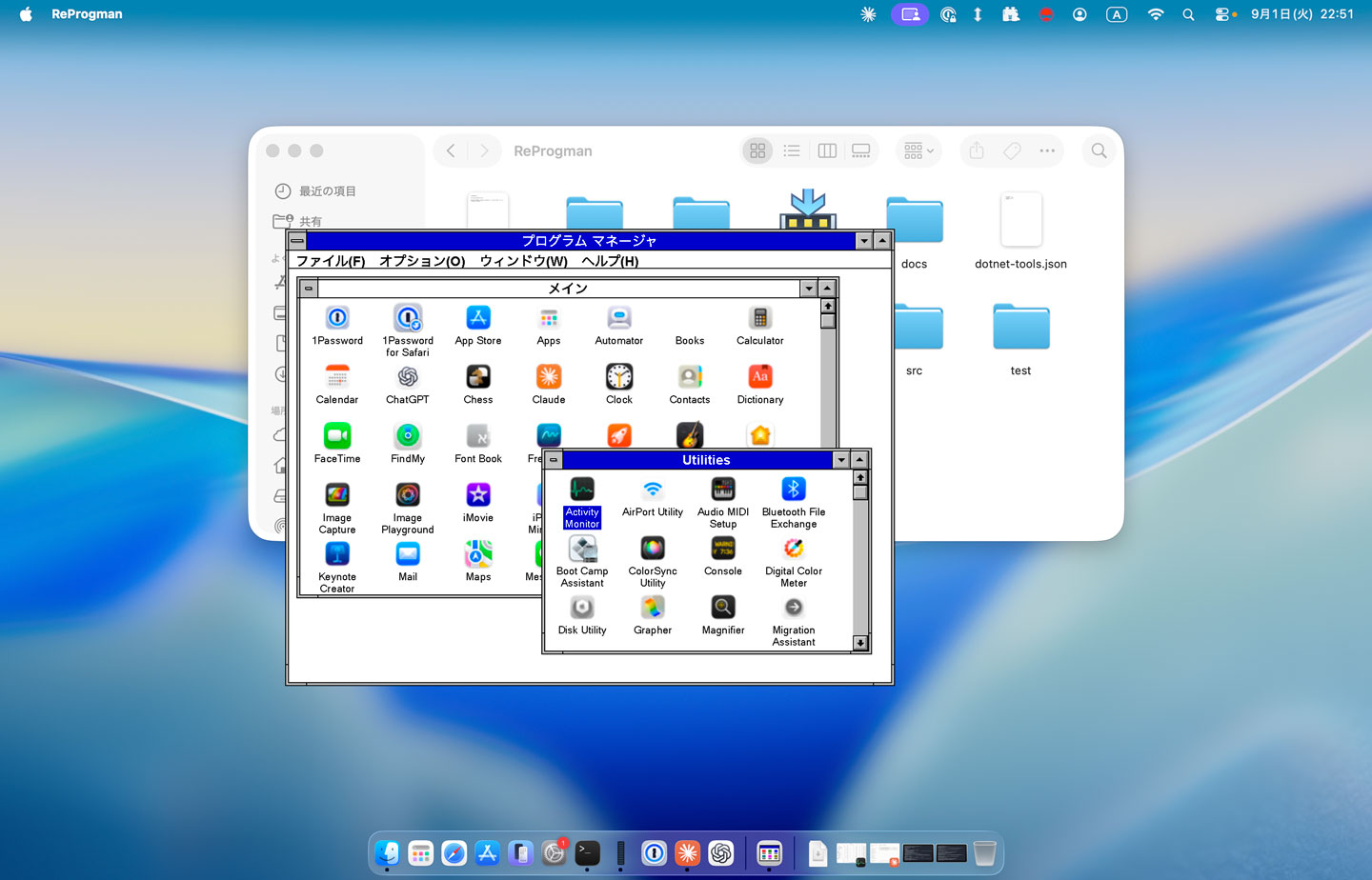
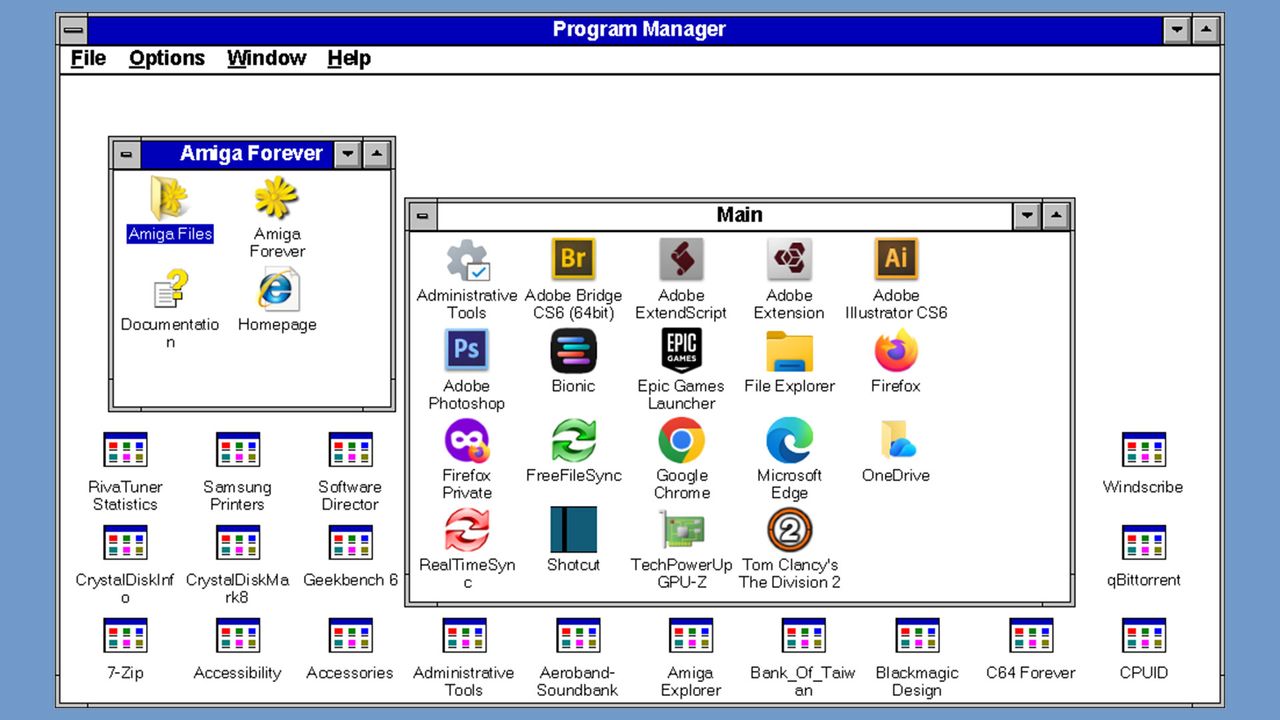
If you are yearning for a quick-shot retro Windows experience on your modern Windows 11 or macOS system, then there’s a new vibe-coded clone of the Windows 3.1 Program Manager that may interest you. Developer Mayuki has released a neat little nostalgia project dubbed ReProgman – named after the ancient Windows 3.1 ‘progman.exe ’, which was the primary shell of the era – until Windows 95 swept it away three decades ago.

ReProgman macOS screenshot

ReProgman macOS screenshot (Image credit: Developer Mayuki on GitHub)

ReProgman looks pretty authentic to my eyes, and it brought back memories of why I wasn’t sad to see it shrivel away from Windows machines. In a social media post about the release of ReProgman, Mayuki seems to agree with my sentiments. “I asked Claude to create a clone of the Windows 3.1 Program Manager,” wrote the developer (machine translation). “I think you'll enjoy reminiscing with it for about 30 seconds.”

Claude Code worked pretty swiftly to churn out this clone of the Windows 3.1 shell. The first version that was precipitated in about an hour was “pretty decent” but needed some effort to iron out the wrinkles. Then Mayuki complains again that actually using ReProgman induced boredom after about half a minute of usage.

The end-user-ready releases of ReProgman weigh in at between 12 and 16MB, so they are quite a trivial download and don’t need installing. Thus, it isn’t very taxing to give them a try for a spot of nostalgia-tinted navigation around your present system’s programs and files. Mayuki says that building and running this application needs the .NET SDK 10.0+. The code has been released on GitHub under the MIT license.

In conclusion, Miyuki’s ReProgman provides an easy trip down personal computing's memory lane, specifically to the Windows 3.X era of the early to mid-1990s. However, some will prefer to get their retro computing kicks by running the actual MS-DOS/Windows 3.1 combo on real hardware. As we discovered recently, that doesn’t limit users to dusting off an old i486 or similar. Back in April, an enthusiast demoed Windows 3.1X on ultra-modern bare metal with a system using a Ryzen 9 9900X and RTX 5060 Ti.

  •  

Four groups caught using the same Chrome and Windows exploit kit

A nearly identical exploit kit that targets critical vulnerabilities in both Chromium-based browsers and older versions of Windows is being actively used by at least four hacking groups, some of which have ties to the Chinese government.

Researchers from security firm Proofpoint said Wednesday that BlueMoon, the name they gave to the kit, chains three vulnerabilities together so the attackers using it can install malware of their choice. BlueMoon exploits two Chromium vulnerabilities and one in the kernel of Windows 10 (Oct. 2018 Update), Windows Server 2019, Windows 10 2004, Windows Server 2022, and the initial release of Windows 11. All three vulnerabilities have received patches in the past 24 hours.

Deployed rapidly, widely shared

The attacks lacked the stealth found in many campaigns. More often, hackers want to exploit newly discovered vulnerabilities sparingly to lengthen their longevity. Proofpoint hypothesized that one reason for the widely used and visible exploit chain was to take advantage of a “patch gap” in the Chromium supply chain, which spans the time a patch is available from developers and the time that patch is incorporated into browsers such as Chrome and Edge. Another likely contributor was the use of AI, which can often spot vulnerabilities faster than discovery performed solely by humans.

Read full article

Comments

© Getty Images

  •  

4 groups caught using the same Chrome and Windows exploit kit

A nearly identical exploit kit that targets critical vulnerabilities in both Chromium-based browsers and older versions of Windows is being actively used by at least four hacking groups, some of which have ties to the Chinese government.

Researchers from security firm Proofpoint said Wednesday that BlueMoon, the name they gave to the kit, chains three vulnerabilities together so the attackers using it can install malware of their choice. BlueMoon exploits two Chromium vulnerabilities and one in the kernel of Windows 10 (Oct 2018 Update), Windows Server 2019, Windows 10 2004, Windows Server 2022, and the initial release of Windows 11. All three vulnerabilities have received patches in the past 24 hours.

Deployed rapidly, widely shared

The attacks lacked the stealth found in many campaigns. More often, hackers want to exploit newly discovered vulnerabilities sparingly to lengthen their longevity. Proofpoint hypothesized that one reason for the widely used and visible exploit chain was to take advantage of a “patch gap” in the Chromium supply chain, which spans the time a patch is available from developers and the time that patch is incorporated into browsers such as Chrome and Edge. Another likely contributor was the use of AI, which can often spot vulnerabilities faster than discovery performed solely by humans.

Read full article

Comments

© Getty Images

  •  

Microsoft speeds up Windows 11 parental approvals and expands age verification across the OS

Windows 11 now includes new family safety features that can reduce how much adult content children are exposed to or able to view. Microsoft has a pair of blog posts on the topic, one that focuses on consumer-facing features and another that covers how APIs and Microsoft accounts are used to make the Windows experience safer.

The first change Microsoft highlighted is not a new feature, but a speed boost to an existing one. Granting parental approval is now faster than before, which allows parents and guardians to quickly approve things like additional screen time, access to specific apps, and purchases.

Speed is important when it comes to family safety. Occasionally children run into blocks when trying to access content that is required for homework or that is otherwise age-appropriate. Delayed approvals leave children sitting around and can cause frustration for kids and parents.

Microsoft has also made it easier for parents to keep track of web activity, app activity, and spending. Managing family groups has been improved as well, including options that make it simpler to add or remove members.

Blank Pixel

The importance of Microsoft accounts

Some people complain about Microsoft accounts being a requirement to use certain services. Microsoft has budged a bit in this area. For example, it's now possible to sign in to Microsoft Edge with a Google account.

But managing family safety settings relies heavily on a Microsoft account, as explained by the company:

"At Microsoft, we believe safety should be easier for families to understand and easier for developers to build into experiences for children to use. On Windows, that starts with the account. Microsoft account is a trusted foundation through which Windows brings age-appropriate protections and parental choices into more of the digital experiences encountered by children and teens every day."

Setting up accounts for children is a requirement to set parental controls for individuals. Microsoft accounts also allow Windows to know if a user is a child, teen, or adult.

Microsoft has introduced a new API to extend age awareness beyond the OS and across the entire Windows ecosystem. The Windows Age APIs can verify a user's age and then send that verification to an app without sharing personal information. It's a bit like Windows Hello but for age verification.

The new Windows Age APIs are available now to Windows Insiders and should ship to all Windows users soon.

Click to join us on r/WindowsCentral

Join us on Reddit at r/WindowsCentral to share your insights and discuss our latest news, reviews, and more.

  •  

La truffa delle "Phantom GPU": 2.000 euro per una RTX 5090 senza VRAM e GPU

Il mitico overclocker DerBauer ha raccontato nel suo ultimo video una nuova truffa che punta dritta al portafoglio degli appassionati di gaming su PC alla ricerca di una scheda video di ultima generazione. I criminali stanno perfezionando tecniche sempre più sofisticate per vendere schede apparentemente autentiche che, in realtà, sono completamente inutilizzabili: insomma, quelle note come “phantom GPU”, o schede video letteralmente vuote.

L’overclocker ha raccontato il caso di un utente che ha acquistato una Palit GeForce RTX 5090 GameRock OC usata per circa 1.800 euro. Il prezzo era molto (troppo!) inferiore rispetto a quello di mercato, attualmente quasi vicino addirittura ai 5.000 euro, almeno in Germania. Nonostante l’acquirente abbia scelto di incontrare il venditore di persona per maggiore sicurezza, non ha avuto modo di testare la scheda sul posto e ha dovuto affidarsi alle dichiarazioni del venditore. La scheda appariva perfettamente integra e intatta, ma una volta installata nel PC non ha dato segni di vita.


Il TOP più piccolo e completo del mercato? Samsung Galaxy S25, compralo al miglior prezzo da Rimediashop.it a 444 euro.

CLICCA QUI PER CONTINUARE A LEGGERE

  •  

Windows 11's September update has arrived — here are the 3 key features that make this a must-install upgrade

  • Windows 11's latest update has arrived
  • The September update brings in the ability to move the taskbar
  • There are also new options for resizing the Start menu, and a really useful tweak for Windows 11's search function

Windows 11's latest update has arrived, and it packs some important new features for the interface of the desktop OS.

Bleeping Computer flagged all the additions in the September 2026 update for Windows 11, and there are three major highlights, which I'll pick out here, before providing a general roundup of some of the other tweaks that Microsoft has brought in this month.

As ever, some of these features are being rolled out in a phased manner, so even if you do install the September update today, you may still have to wait a while for certain pieces of functionality to make their way over to your PC.

1. A movable taskbar

Windows 11 taskbar shown in four positions on the desktop

(Image credit: Microsoft)

Thanks to the September update you'll finally be able to move Windows 11's taskbar away from the bottom of the screen, to the top instead, or the sides if you prefer (an option that people with an ultra-wide monitor often want to use, as it suits that aspect ratio much better).

This is an ability which has always been in Windows 10, but was dropped for Windows 11 because porting it over was a thornier issue than you might think (or so Microsoft told us).

Finally, however, Microsoft has got its act together and the taskbar can now be repositioned in Windows 11 – although I've a feeling this will be one of the features on a slower rollout. Hopefully I'll be wrong on that score and you'll get this ability promptly if you've been keenly awaiting it for the last five years.

It's also worth noting that there's another option introduced here which can make the taskbar smaller, so it takes up less screen real-estate on devices with small displays.

2. The Start menu can now be resized

Windows 11 on a laptop

(Image credit: Unsplash)

Want a more compact Start menu? Your wish is Microsoft's command, as this choice has now been introduced to the Settings app for the Start menu. You can elect to have a standard (large) menu, or a small one, rather than leaving it at the default 'automatic' setting whereby Windows 11 chooses the size itself based on your device. The problem with leaving the OS to decide is that sometimes you get the bigger menu on a laptop screen, where it pretty much eats the whole desktop – and so in these scenarios you can now manually choose the more compact Start menu.

With options to remove sections of the Start menu coming on top of this, you can now trim this part of the interface down so it's truly minimal. This choice will be more important than the movable taskbar for many folks – myself included – and it's great to see it now being rolled out.

3. Windows 11 search improvements

A young woman is working on a laptop in a relaxed office space.

(Image credit: Getty Images)

Another notable boon with the September update is that there are a few changes for Windows 11's core search functionality, and the most important is a new option that lets you turn off web results in search.

When you're searching for a file on your local drive, those web results often get in the way, so it'll be a relief for many to be able to switch them off. As well as web results (which open in Edge, with searches in Bing, of course), you can also turn off Microsoft Store suggestions. Essentially this is a general decluttering of Windows 11 search which is long overdue, frankly.

Other features in Windows 11's September Update

Windows 11 on a laptop

(Image credit: Windows/Unsplash)

There's a performance boost for File Explorer in that the Home page now loads faster, and switching between virtual desktops in Windows 11 is now snappier, too.

Microsoft has made some reliability tweaks as well, including ensuring that the app history information in Task Manager is correct, and also that interacting with the Display panel within Settings is now more stable.

Furthermore, Microsoft informs us that there are some design tweaks here: "This update introduces updated progress indicators across Windows, providing a more consistent and modern experience during startup, sign-in, restart, shutdown, and update installation."

It's also worth noting that the weird mouse bug that affected the preview version of this September update (the optional update released at the end of August) has been resolved.

There's a fair bit happening here, and as one Redditor put it: "What's left for the 26H2 [update] then?"

Well, not a great deal in truth, and if you've been following along with Microsoft's annual updates, you may recall that 26H2 is going to be a very minor upgrade that doesn't do a lot. Indeed, some folks are wondering why Microsoft didn't save these juicy new interface features for 26H2, given that it's out next month.

The reason is likely to be because Microsoft wants to ensure that 26H2 runs as smoothly as possible (with no bigger changes involved). Although to be fair, as noted, due to the rollout process, a lot of folks won't be getting the new Start menu options and taskbar repositioning until October (or possibly later) anyway.

  •  

Windows 11 is finally testing automatic theme switching, a basic feature that's required a third-party app for years

Windows 11 will finally support automatic switching between dark mode and light mode. The most recent Windows Insider build that shipped to the experimental Channel shows strings for the feature, though we still lack key information about the option.

It's been possible to schedule shifts between light and dark mode on Windows 11 for a while, but it has required a third-party application. Auto Dark Mode works well and is a must-have app for Windows 11.

The ever-popular PowerToys can also handle theme switching through its "Light Switch" feature. PowerToys is made by Microsoft but it only recently added the Light Switch utility. It's also not built in to Windows 11.

While both those apps are great, some features need to be built into Windows 11. People shouldn't have to search for an app or install a multi-tool utility to automate theme switching.

The upcoming feature for Windows 11 was spotted by X user "phantomofearth." They shared some of the strings that appear in the latest build, which give us a glimpse of how the feature will work:

  • "Schedule auto mode"
  • "Mode only changes when PC is idle"
  • "This prevents the mode from changing while you're working or in meetings"
  • "Turn on location services to automatically schedule dark mode. When location services are turned off, dark mode is active from [START] to [END]."

Since there are likely many other strings about the feature, we only have a small idea of how auto mode will work. But the snippets we can see now look promising.

It appears that the feature will support shifting between modes based on your location to better match sunrise or sunset. Alternatively, you'll be able to schedule switches for specific times.

The feature also looks like it will have the option to only switch themes when your PC is idle, which should prevent a jarring change from happening in the middle of important work.

Again, this functionality is already available on Windows 11 through apps, but I'll be happy to see it ship to Windows 11. I love tinkering with apps to customize my PC, but general users shouldn't have to do that to get such a straightforward feature.

This app switches the theme of your PC at scheduled times, such as enabling dark mode after sunset. It's always been a bit odd that Windows does not have this as an option by default, but Auto Dark Mode does a great job.View Deal

Light Switch:

Microsoft PowerToys is a collection of utilities that often outshine similar tools on Windows 11. It already includes a utility that lets you schedule switches between light mode and dark mode.View Deal

Click to join us on r/WindowsCentral

Join us on Reddit at r/WindowsCentral to share your insights and discuss our latest news, reviews, and more.

  •  

Windows 11 set to gain upgraded sound settings, cross-device improvements, and new family safety features

Microsoft has just announced a set of new Windows 11 preview builds that are packing some notable improvements and changes that are now in testing with Insiders. This week's preview builds come packing an upgraded set of settings for sound and audio devices on Windows, enhanced cross device features that sync with your phone, and new family safety options.

First up, Microsoft has introduced a new design for the volume sliders that appear in the Sound Settings area of Windows Settings. The sliders now also show audio activity for when music or video is playing in the background while you configure your settings, making it easier to dial in exactly where you want your volume.

Microsoft is also porting over more Control Panel sound settings to Windows Settings, including the ability to set default devices, and the ability to allow hardware acceleration for devices that support it.

New sound settings

The new live audio activity indicator. (Image credit: Microsoft)

Here's a list of the new sound settings coming to Windows 11:

  • We've updated the design of the volume sliders in Sound Settings so that they display audio activity on the side when audio is playing.
  • If your audio device supports hardware acceleration, an option to allow hardware acceleration is now available in the Advanced section of the device's properties.
  • You can now configure exclusive mode for an audio device in the Advanced section of the device's properties, so you don't have to go to Control Panel.
  • You can now configure adaptive communication sound levels, which reduce the volume of other sounds when communications activity is detected, directly in Settings.
  • The option to set an audio device as the default sound device for communication now always appears in Properties. The option is unavailable if the device is already the default instead of being hidden.
  • We've updated the text for allowing audio devices to make it clearer.
  • We've added a new banner when mono audio is enabled to make it clear that some properties don't take effect while mono audio is active.
  • We've updated the All sound devices page:
    • You can now change default devices from this page.
    • We've adjusted the page design so that you can filter whether you're viewing input or output devices.
    • We've added toggles so that you can choose whether to hide or show disabled, disconnected, and unplugged devices.
  • We've also updated the input and output audio properties pages in Settings to include jack information for devices that need it.

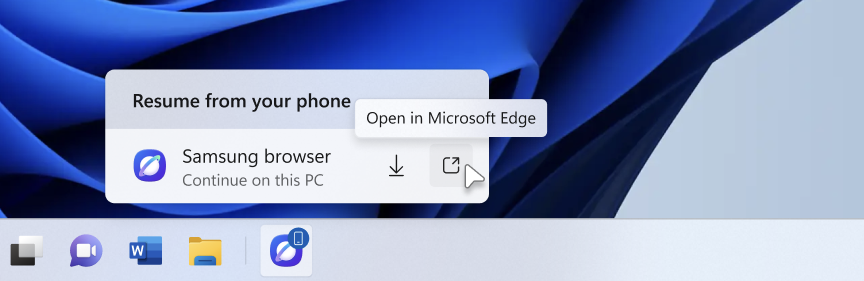
Another new feature in testing is the ability to quickly download the Windows app for a phone app that appears in the Taskbar via Phone Link. If you use the cross-device sync features that comes with Phone Link, hovering over an open app such as your phone's browser on the Taskbar will now let you quickly pick up where you left off without missing a beat.

New cross device features

Quickly resume web browsing activity from your phone from the Taskbar! (Image credit: Microsoft)

In addition to the new sound settings, Microsoft has announced major upgrades to the family safety features in Windows 11. The company says family safety is a top priority for the company, and is addressing key issues and concerns from parents.

Key areas of focus include:

  • Parental approvals for offerings like screen-time extensions, app access, and purchases now happen faster, so kids aren’t left waiting and parents stay in control.
  • We restored clear visibility into web and app activity so parents can trust what they see in their reports.
  • Made spending more transparent, with wallet balances.
  • We also gave adults in a family more control over their own experience, making it far easier to add, manage, or leave a family group 

"Each of these improvements came from a real family experience — from issues parents told us mattered most: speed, accuracy, control, transparency, and peace of mind." Microsoft Distinguished Engineer, Rob Mauceri said. "This is the compounding effect of a team that treats every piece of customer feedback as a commitment to do better."

These improvements are welcome to see, and a sign that Microsoft continues to modernize and improve Windows 11 for the masses. These improvements are part of Microsoft's ongoing Windows K2 effort, which is focused on fixing Windows 11's biggest flaws.

Click to join us on r/WindowsCentral

Join us on Reddit at r/WindowsCentral to share your insights and discuss our latest news, reviews, and more.

  •  
❌