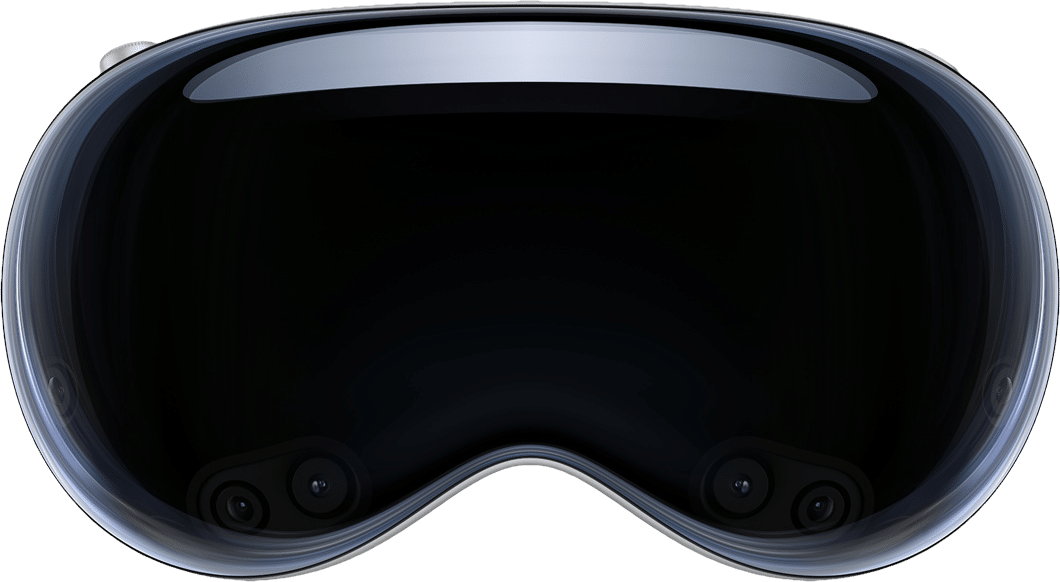
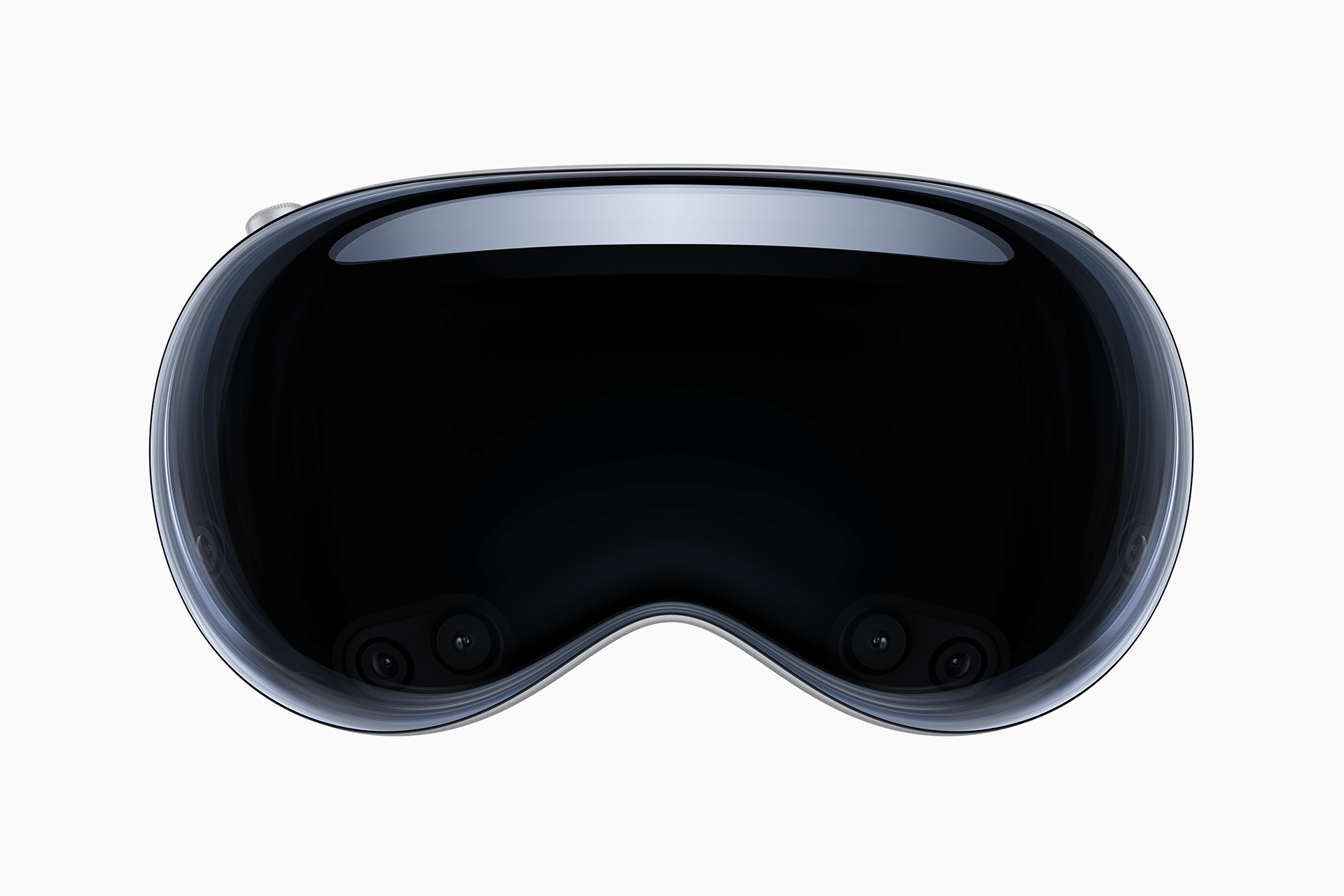
Apple’s recent Vision Pro layoffs reached further across the company than initially disclosed, according to Bloomberg News’ Mark Gurman.
Last month, Gurman reported that Apple cut about 100 jobs from the Vision Products Group, largely by shutting down the headset’s gaming team and shrinking the unit that produces immersive video. Combined with reductions on Siri and related software teams, the changes affected more than 200 people. Apple said it was realigning teams to focus on new devices and AI, while creating some new roles and offering affected employees a chance to apply elsewhere.
Gurman now says the cuts also hit Vision Pro-related staff in other parts of Apple, including device security, audio engineering, Siri integration, testing, and visionOS. Because visionOS is expected to underpin upcoming smart glasses as well as the headset, the broader reductions affect shared software rather than Vision Pro hardware alone.
According to Gurman, the company has told employees that Vision Pro and visionOS are not going away. A redesigned successor, internally known as N224, is still not expected before late 2028. Near-term emphasis has shifted to AI wearables, including smart glasses code-named N50 that remain on track for next year. Those glasses are not expected to support the same immersive video or advanced gaming experiences as the current headset.
The moves follow the June departure of Paul Meade, who led Vision Pro and smart glasses work before leaving for OpenAI. People inside the Vision organization have spent months urging new CEO John Ternus to keep investing in the platform even as sales lag, Gurman reports. Colleagues who have discussed the headset with Ternus say he was skeptical from the start that a bulky, expensive enclosed device could reach a mass market. He is still said to support the glasses project, but Gurman reports he would consider walking away from head-worn devices as a category if they fail to catch on.
Apple has described the changes as limited and tied to evolving product priorities. Vision Pro launched in 2024 as the company’s spatial-computing flagship but never became a high-volume product, constrained by price and form factor. In-house immersive videos can cost millions to produce and have not proven cost-effective given relatively small active use. Apple now plans fewer internal productions and more third-party content.
MacDailyNews Take: Vision Pro should never have shipped in its initial or present form and it never would have shipped under Steve Jobs or, it sounds like, under John Ternus.
[This] is exactly what you’d expect to occur when a product is released too early to average users… Apple Vision Pro is a devkit for developers, not for average users, and should have been released as a devkit for developers. – MacDailyNews, March 26, 2024
There are a lot of people inside and outside of Apple who think the company should have waited on the Vision Pro, but it’s fairly easy today to see why Tim Cook released this beta (alpha?) devkit: He likely knew last year, or had a strong inkling, that Project Titan was a goner and there wasn’t much excitement in Apple’s pipeline. He’d need something to point to as “innovation” while he continued on his seemingly unending quest to iterate and monetize products invented by Steve Jobs’ Apple (a very different place) while continuing Apple’s retail store buildout. He also needed something to energize developers and, who knows, they might come up with a killer visionOS app while Apple toils on the long road to real lightweight spatial computing glasses and beyond.
More importantly, Apple last year had already come to the sad realization that they’d missed the generative artificial intelligence revolution and would need a distraction while they feverishly scrambled to catch up (the fruits of which — alongside what sound like disappointing partnerships which hopefully, somehow, preserve user privacy — we’ll hopefully begin to see at WWDC this June).
You have to feel for Cook. After a decade plus of being able to iterate and monetize Jobs’ inspired products and services and continue adding retail stores around the world to spectacular effect, and being lauded for it, he now finds himself in a place that requires actual vision to be able to see which path to take. And he’s not the guy. Even the guy who put him in the position knew it.
Beyond the fact that Cook can’t even execute a compelling live keynote address, his big send off, the “Apple Car,” [the idea of which was also germinated under Jobs] fizzled in ignominious failure.
So, despite myriad misgivings and protestations inside Apple, Cook pulled the trigger early on the Vision Pro. He had to have something to point to that would buy him some time. Even Apple’s rubber-stamping board of lackeys would wake up and start asking questions otherwise.
While Cook is hemming and hawing when faced with shareholders (virtually, of course, never again in person for as long as Cook remains), Apple is currently in scramble mode trying to catch up to rivals in generative AI, a technology the company seems to have completely missed while focusing instead on the not-ready-for-primetime Apple Vision Pro, visionOS, its now-canceled decade-long multi-billion-dollar electric vehicle boondoggle, replacing leather in iPhone cases and Apple Watch bands with overpriced junk in a quest to “save the planet,” forcing employees to endure a constant barrage of time-wasting zero-productivity DEI sessions, and myriad other various and sundry “initiatives” which Cook deems of import. – MacDailyNews, February 28, 2024
When you lose your visionary CEO and replace him with a caretaker CEO, this is the type of aimless, late, bureaucratic dithering that ensues. – MacDailyNews, November 21, 2017
Thankfully, blessedly, today is finally a Brand New Day for Apple!
Please help support MacDailyNews — and enjoy subscriber-only articles, comments, chat, and more — by subscribing to our Substack: macdailynews.substack.com. Thank you!
In addition to cutting dozens of Vision Pro employees who worked on features like immersive video and gaming, Apple is laying off people who worked on Siri and AI, reports Bloomberg.
Apple is “largely shutting down” the Vision Pro team focused on gaming, and it is paring down the team that makes immersive video content. Approximately 100 employees who were part of the Vision Products Group have been laid off, with Apple also cutting 100 people from its Siri and software groups.
[…]
Despite the cuts to the Vision Products Group, employees were told that the Vision Pro and visionOS operating system are not being eliminated.
Apple told Bloomberg that it was realigning some teams in order to “evolve” the business to provide the best experience for users. “While we will create new roles as part of this change, it will also impact a limited number of existing roles,” Apple said.
The job cuts are tiny in relation to the overall company, which had 166,000 full time employees in September 2025 (the last time Apple disclosed its headcount). But as John Ternus prepares to take the CEO job just over one week from now, the timing seems designed to get some unpleasant work out of the way and let the new boss come in with clean hands.
It’s hard to find good people, Apple has plenty of work that needs doing, and it just reported a record quarter. Maybe they don’t need more immersive video content, but it’s not clear to me why the other employees couldn’t be reassigned. And I’m really wondering what’s going on with the general software group, where they’re getting rid of legends like Keith Stattenfield:
So, I posted yesterday on an another place that I had been just laid off at Apple after 37 years. ( Surprise! I got laid off. It was unexpected. I am still coming to terms with it. Yes, I will be ok. ) And I mentioned some of the things I’d done, and mused that I’d thought I’d finish out my career in a few years having passed along the knowledge to younger engineers. Alas, that’s going to get left unfinished.
I felt much the same way, because I’d also hoped to slowly ease into retirement instead of being given options that led me to retire a few years early.
Laying off anyone working on anything related to Apple Vision Pro is a gross strategic blunder, because it signals a lack of confidence in the product. Put them to work fixing bug backlogs if you don’t want them working on what they were doing, but don’t lay them off and let that show up in the press, that’s fucking amateur hour shit.
[…]
And the same goes for the Software Engineering layoffs, which don’t seem to be reported much upon because the layoffs have been described as “Apple Vision Pro, Siri, and software” where perhaps people don’t get that the latter is how Apple refers to the Software Engineering (SWE) org. There are so many bugs that should be fixed, that users encounter in their everyday lives, just reassign people to work on them. It’s stupid to lay people off when they could do that.
Plus, maybe retaining that institutional knowledge would help forestall future bugs.
Laying off employees who were working on a product that largely “failed” in the market is extremely hurtful to those employees, because the product’s failure is not their fault. They were directed to do that work. Apple should find new places for every single one of the employees who worked on Vision Pro. They owe it to the people who they directed to work toward the goal of making and maintaining Vision Pro. They can afford to do that.
Apple didn’t even work that hard to take care of the iPod employees who were once half the company’s revenue. In the end they basically gave Nest a free engineering team.
Recent layoffs of Apple employees working on the Vision Pro were broader than previously thought, Bloomberg’s Mark Gurman reports.
[…]
Gurman reports that people inside the Vision Pro group have spent months lobbying new CEO John Ternus to stay the course on the platform even as sales continue to underwhelm. Colleagues who have discussed the headset with Ternus say he was skeptical of it from the start, seeing it as too bulky and too costly to reach a mass audience.
Interestingly, since visionOS apparently runs on Apple’s upcoming smart glasses, the wider layoffs impact software shared across both product lines rather than the headset alone.
I was recently informed that I am being laid off from my position at Apple. It was unexpected, especially coming right after WWDC, where several of the projects I led and features I contributed to were announced.
Pela primeira vez, o Friday Night Baseball será transmitido ao vivo no formato Apple Immersive, permitindo que usuários do Apple Vision Pro assistam às partidas em 3D. O primeiro jogo transmitido no formato será entre o Boston Red Sox e o New York Yankees, no dia 28 de agosto (uma sexta-feira).
A Apple informou em um comunicado que as escalações das equipes e as estatísticas aparecerão flutuando na tela e que haverá uma vista do estádio com Áudio Espacial durante as pausas na partida.
Os espectadores com Vision Pro vivenciarão a icônica rivalidade entre Red Sox e Yankees a partir de ângulos de câmera exclusivos que os colocam dentro do jogo, imersos na tensão de cada duelo entre rebatedor e arremessador, nas comemorações no banco de reservas após uma grande rebatida, nas jogadas decisivas junto ao muro do campo externo e muito mais.
Quatro das sete partidas do Friday Night Baseball até setembro serão transmitidas em Apple Immersive; a programação completa pode ser conferida abaixo.
Divulgação/Apple
Naturalmente, o Friday Night Baseball em formato Apple Immersive estará disponível no Apple Vision Pro (M5) e no Vision Pro (M2), nos países onde o headset está disponível, para usuários com uma assinatura ativa do Apple TV.
ComprarApple Vision Prode Apple 🇺🇸Preço: a partir de US$3.699 Armazenamento: 256GB, 512GB ou 1TB
NOTA DE TRANSPARÊNCIA: O MacMagazine recebe uma pequena comissão sobre vendas concluídas por meio de links deste post, mas você, como consumidor, não paga nada mais pelos produtos/serviços usando os nossos links de afiliado.
Existem diversos aplicativos de notas, dos mais variados estilos e para todos os gostos: desde aqueles baseados em bancos de dados ou mapas mentais, até simples processadores de texto. Entre eles, há os apps de notas livres, que procuram simular um caderno ou fichário não só para tornar a interface familiar, como também para alcançar usuários que desejam usufruir de uma ferramenta de escrita à mão.
Esse é o caso de um dos apps mais populares nesse meio: o Notability, sobre o qual trataremos neste artigo. Mais especificamente, exporei minhas experiências utilizando-o com o Apple Pencil (de primeira geração) e um iPad (9ª geração).
Interface e personalização
Um dos aspectos que mais me agradou no aplicativo foi sua interface simples e intuitiva. Ele oferece diversos temas e combinações de cores que agradarão aos cromófilos, mas gostei bastante do visual padrão/básico, tanto no modo claro quanto no escuro.
A página inicial é bem organizada e, após a versão 16, ficou ainda melhor. Antes, a organização era feita por Subjetos (uma tradução bastante infeliz para Subjects) e Divisores. Agora, tudo foi simplificado para pastas e subpastas. A funcionalidade continua exatamente a mesma, mas a nova organização é muito mais intuitiva e fácil de compreender. Além disso, cada pasta recebe uma cor diferente, o que deixa tudo mais organizado e agradável visualmente.
Na barra lateral esquerda ficam as configurações, a busca, todas as suas notas e a Galeria, onde é possível encontrar templates disponibilizados tanto pela comunidade quanto pela própria equipe do Notability.
Na seção Notas, todas ficam reunidas e podem ser filtradas por Recentes, Favoritos e Não arquivados. Tanto ali quanto dentro das pastas, é possível ordenar as notas por data de modificação, data de criação ou nome. Apenas senti falta da possibilidade de reorganizá-las manualmente.
Partindo para o que realmente importa: a nota. Nela, a personalização é ainda maior. Ao criar uma nova nota, você pode começar com a folha em branco ou optar por diferentes cores e layouts. O app sugere alguns: linha, grelha e ponto (isto é, pautado, quadriculado ou pontilhado), mas também é possível escolher alguns dos modelos disponíveis na Galeria ou enviar o seu próprio em Meus Modelos » Importar.
O aplicativo ainda permite definir um modelo padrão para todas as novas notas. Como essa opção não é muito fácil de encontrar, seguem as instruções: na página inicial, vá em configurações (engrenagem no topo) e depois em Editor de Notas » Modelo. Escolha então uma das opções do app — ou crie o seu próprio em Meus Modelos.
O único detalhe é que não existe uma opção para transformar uma nota já existente em modelo. Se quiser, será preciso exportá-la e importá-la como PDF ou imagem — um processo que poderia ser muito mais simples se tivesse uma opção como “Adicionar aos Modelos” (sigo esperançosa de que a equipe implemente isso a qualquer momento).
A barra de ferramentas — que, inicialmente, aparece no topo da nota — também é bastante personalizável. Os itens nela podem ser reorganizados, duplicados ou ocultados, e a própria barra pode ser movida para qualquer canto da tela: esquerda, direita ou parte inferior. Dependendo da forma como você segura o iPad ou escreve, basta arrastá-la para que ela deixe de atrapalhar a visualização da página.
Por fim, há uma pequena barra discreta com comandos para desfazer, refazer e compartilhar, além de acesso às configurações, à visualização das páginas e ao recurso Learn, sobre o qual falarei mais adiante.
No dia a dia, a simplicidade da interface ajuda a manter o foco no conteúdo, sem distrações. Ao mesmo tempo, usuários novos talvez levem algum tempo para descobrir alguns recursos mais avançados, já que certas opções ficam escondidas em menus pouco intuitivos.
Principais recursos
Para quem não é fã do modelo de assinaturas, é fácil torcer o nariz inicialmente. No entanto, desde que comecei a usá-lo, em 2023, o aplicativo evoluiu bastante.
Além de aprimorar ferramentas já existentes, a equipe passou a lançar atualizações frequentes — principalmente na área de inteligência artificial, sinal de que os desenvolvedores se esforçam para entregar uma experiência cada vez melhor. Antes de falar da IA, porém, vale conhecer os recursos que fazem parte da experiência básica.
Ferramentas fundamentais
No básico, o Notability faz muito bem o que se propõe. A escrita é feita por meio de três ferramentas principais: lápis, caneta e marcador. Todas permitem modificar cor e espessura, enquanto as duas últimas também oferecem estilos como linha contínua, tracejada ou pontilhada, além de diferenciação de pressão.
A princípio, o app sugere algumas cores, mas é possível escolher qualquer uma no seletor de cor (com suporte a códigos hexadecimais) e salvá-la para que permaneça na sua paleta.
Naturalmente, você também encontra uma borracha, que pode apagar apenas uma área específica ou remover automaticamente um traço inteiro.
Além da escrita manual, o Notability permite inserir textos digitados em qualquer ponto da página, com opções básicas de formatação, como títulos, negrito, itálico, hiperlinks e listas.
Nos meus testes, copiar e colar textos funcionou bem na maior parte do tempo. Encontrei apenas um comportamento curioso ao importar conteúdos do Canva: a ordem dos elementos foi alterada, o título acabou sendo enviado para o final do texto e as listas perderam seus marcadores; fora isso, funcionou corretamente.
Entre todos os recursos tradicionais do aplicativo, talvez o Zoom seja um dos mais engenhosos. Ao ativá-lo, uma pequena janela delimita a região da página em que você está escrevendo, enquanto uma área ampliada aparece na parte inferior da tela. Isso permite escrever em tamanho reduzido sem perder precisão nem precisar aumentar constantemente o zoom da página.
O bacana é que o recurso acompanha automaticamente a escrita. Conforme você avança, a janela também avança; ao chegar ao final da linha, ela passa para a seguinte sem que seja necessário mover a página manualmente. Para quem precisa de agilidade nas anotações (como em uma aula, por exemplo), isso torna a escrita surpreendentemente fluida.
Além dessas funções, o aplicativo oferece régua, ponteiro laser, fita adesiva, multimídia e gravação de áudio.
A régua funciona exatamente como esperado: basta posicioná-la sobre a página e desenhar próximo dela para que o traço seja automaticamente alinhado. Vale chamar atenção para apenas um detalhe importante: ela serve para criar linhas e formas retas, não como apoio para melhorar a caligrafia.
Já o ponteiro laser foi pensado para apresentações. É possível escolher diferentes cores e decidir se o ponteiro deixa ou não um rastro durante o movimento.
A fita adesiva é outro recurso simples, mas extremamente útil. Ela funciona como um marca-texto que esconde o conteúdo abaixo dele até ser tocado. Na prática, isso pode ser interessante para estudantes testarem seus conhecimentos: ao esconder informações, podem forçar o cérebro a lembrar o que está embaixo da fita e depois verificar se acertaram.
Na ferramenta Multimídia, o Notability permite inserir fotos na hora, imagens da galeria, GIFs, adesivos personalizados (que você pode criar e salvar, ou escolher em uma vasta galeria) e notas adesivas (Post-its). Gostei especialmente da implementação do último: quando você escreve sobre eles, o texto passa a fazer parte da nota adesiva, permitindo redimensioná-la ou movê-la sem deformar o conteúdo.
Embora o aplicativo aceite GIFs animados, ainda não é possível inserir vídeos diretamente nas notas. Como alternativa, ao adicionar uma URL, o Notability oferece o recurso “Criar recorte da Web” (“web clip”), que cria rapidamente uma captura da página vinculada. Assim, uma miniatura da página é adicionada como referência dentro da nota.
Por fim, uma funcionalidade bastante prática é a possibilidade de duplicar (ou remover) ferramentas. Em vez de trocar de cor ou espessura sempre que precisar, manter várias canetas já configuradas na barra de ferramentas traz mais praticidade, então você apenas alterna com um toque. Toda essa barra também pode ser reorganizada conforme sua preferência, escondendo recursos que você utiliza menos.
Gravação e recursos de IA
Desde que comecei a usar o Notability, nenhum aspecto evoluiu tanto quanto seus recursos de inteligência artificial. A gravação de áudio, que já era uma ferramenta excelente, se tornou um conjunto bastante completo de funcionalidades graças à IA.
Inicialmente, o recurso captava o áudio juntamente com a sua escrita. Depois, ao reproduzir a gravação, os manuscritos vão “ganhando cor” conforme aquele trecho do áudio é reproduzido. Na prática, isso facilita muito revisões de aulas ou reuniões, porque fica fácil localizar exatamente o contexto em que determinada anotação foi feita.
Depois, o recurso passou a oferecer também transcrição automática dos áudios. Nos meus testes, ela funcionou bem na maior parte do tempo, embora ainda apresente algumas dificuldades com nomes próprios ou trechos extraídos de vídeos e outras fontes externas.
Com a chegada do Notability Learn, conjunto de recursos de IA do app, as gravações foram levadas a um outro nível. No plano Pro, a transcrição pode acontecer em tempo real (Live Transcript), o que funcionou bem até com mais de um idioma sendo falado. Curiosamente, quando a gravação termina, o aplicativo escolhe apenas um idioma principal para gerar a transcrição final, ignorando os demais. É um detalhe pequeno, mas que pode fazer diferença para quem participa de reuniões ou aulas bilíngues.
Mas a IA vai muito além da transcrição. Com o Learn, o app analisa o conteúdo completo da nota (incluindo áudio, escrita à mão, textos digitados e PDFs importados) para gerar automaticamente resumos, flashcards, questionários, exercícios de preencher lacunas e atividades de associação (Mix & Match). Para quem estuda, isso é extremamente prático; mesmo que dê para fazer algo similar utilizando um chatbot de IA externo, estar tudo integrado nele é um grande diferencial.
Outro recurso interessante são as Smart Notes. Diferentemente dos resumos tradicionais, que são gerados depois da gravação, elas podem ser produzidas em tempo real a partir da transcrição, organizando automaticamente os principais tópicos da conversa. Gostei também da possibilidade de escolher em qual idioma essas notas serão exibidas — algo que pode ser bastante útil para quem estuda outras línguas.
O pacote inclui ainda o recurso Chat with your note (Converse com sua nota), que permite fazer perguntas sobre qualquer conteúdo presente naquela nota. A IA responde utilizando apenas as informações contidas ali, sem recorrer à internet ou a fontes externas.
Nos meus testes, o recurso funcionou muito bem para revisar conteúdos, embora ainda tenha algumas limitações importantes: o histórico das conversas não é sincronizado entre dispositivos e cada conversa fica restrita a uma única nota.
Outro recurso bastante útil são os Action Items. A IA consegue identificar tarefas automaticamente tanto a partir das gravações quanto do conteúdo escrito na nota, reunindo tudo em uma lista organizada. Testei o recurso em português e em inglês, e ele funcionou bem em ambos os idiomas.
Minha principal crítica ao conjunto de ferramentas de IA é a falta de edição. Se a transcrição estiver errada ou se um item de ação não fizer sentido, não há como corrigir. O mesmo vale para resumos, flashcards e questionários gerados automaticamente. Atualmente, a única alternativa é copiar o conteúdo para dentro da nota e editá-lo manualmente.
Por fim, vale mencionar que as gravações podem ser exportadas tanto junto com a nota (em PDF, incluindo os arquivos de áudio) quanto separadamente, no formato M4A.
Menções honrosas (e muito boas)
Há recursos do Notability que raramente aparecem nos reviews, mas que, no dia a dia, acabaram fazendo uma diferença enorme para mim! O primeiro deles foi uma surpresa bastante agradável: a barra lateral “escondida”.
Enquanto você está em uma nota, um gesto simples de arrastar do canto esquerdo para o centro revela uma barra lateral com toda a sua biblioteca de notas — você navega entre elas sem sair da página atual. Mais interessante ainda é que, ao arrastar uma dessas notas para a área principal, o Notability abre automaticamente uma visualização em tela dividida (split view) dentro do próprio aplicativo, sem depender do multitarefa do iPadOS. Isso facilita bastante consultar uma anotação enquanto escreve em outra ou copiar informações entre documentos.
Outro recurso que merece destaque é a busca inteligente. Ela localiza textos digitados, manuscritos e até conteúdo presente em PDFs importados. Os resultados aparecem organizados por nota e, ao abrir qualquer um deles, o aplicativo já destaca automaticamente o trecho encontrado. Mesmo com uma biblioteca grande de documentos, a busca permaneceu rápida durante meus testes.
Para quem deseja utilizar o Notability no iPad como ferramenta de estudos, duas novidades recentes também são maravilhosas. A primeira é o suporte aos sumários de PDFs. Sempre que um documento possui um índice incorporado, o aplicativo passa a exibi-lo automaticamente, facilitando bastante a navegação por materiais mais longos.
A segunda são as Sessões de Estudo, um temporizador inspirado na técnica Pomodoro integrado diretamente ao aplicativo. É um recurso simples, mas que gostei muito de ver incorporado ao fluxo de estudos, já que evita a necessidade de recorrer a aplicativos externos para controlar o tempo de foco.
Por fim, dois pequenos detalhes que talvez passem despercebidos, mas fazem diferença depois de algum tempo de uso. O primeiro é o gesto de desfazer e refazer utilizando dois e três dedos, respectivamente — algo familiar para quem usa aplicativos como o Procreate e do qual sempre sinto falta quando uso o Pencil com o Notas (Notes).
O segundo é a possibilidade de ocultar completamente a barra de status do iPad, removendo relógio, bateria e outros indicadores da tela. Pode parecer um detalhe bobo, mas ajuda a criar uma sensação maior de imersão durante a escrita (e eliminar distrações).
Apple Pencil: experiência real
Utilizei o Notability com um Apple Pencil de primeira geração em um iPad de 9ª geração, então toda a minha experiência parte dessa combinação. Porém, se você tiver um dos modelos mais recentes, como o Pencil de segunda geração ou o modelo Pro, certamente aproveitará ainda mais o app com recursos como o toque duplo, o gesto de apertar, feedback tátil e o Cursor (hover), todos compatíveis com o app. Infelizmente, não tive como testá-los.
No que eu pude testar, o desempenho foi excelente com o lápis da Apple. A resposta é fluida e precisa, com latência baixa o suficiente para a escrita parecer natural. A rejeição de palma funciona muito bem, possibilitando apoiar a mão na tela tranquilamente sem se preocupar com toques acidentais ou interrupções durante a escrita.
A sensibilidade à pressão também merece elogios. Além de funcionar com o modo caneta e marcador, no modo lápis o app reconhece a inclinação do Apple Pencil, simulando o efeito esfumaçado e produzindo sombreados com pressões variadas.
Com isso, mesmo que o foco do aplicativo não seja ilustrações, ele atende muito bem quem precisa fazer pequenos desenhos para complementar as anotações.
“Pencil sobre tela”, uma contribuição do meu marido
Outro recurso bacana é a conversão de escrita à mão. Por padrão, o aplicativo utiliza o idioma definido no dispositivo para reconhecer o texto, mas permite baixar pacotes de outros idiomas e escolhê-los manualmente durante a conversão — o que abre possibilidades interessantes para quem estuda línguas.
Gostei especialmente da forma como o processo foi implementado: antes de substituir a escrita manuscrita, o Notability mostra uma prévia com o texto reconhecido, permitindo revisar o resultado antes de confirmar a alteração. Testei convertendo textos em coreano e reconheceu bem. A única questão que encontrei foi o tamanho da fonte gerada; o app não preservou a escala original e a conversão ficou com um texto pequeno demais, mas é possível aumentar o tamanho depois, se você quiser.
Com as fórmulas matemáticas, o desempenho permaneceu o mesmo, bastante satisfatório. Pode ser uma verdadeira mão na roda para estudantes de exatas.
As funções e recursos do app são notáveis por si só (tanto que a empresa está disponibilizando vários desses gratuitamente na web). Entretanto, não há dúvidas de que a maior parte da experiência positiva vem do uso juntamente com o iPad e um lápis (ou caneta), seja o da Apple ou qualquer outra disponível no mercado.
Importação, exportação e compartilhamento
Embora o Notability seja voltado principalmente para anotações manuscritas, ele também faz um bom trabalho na importação e exportação de arquivos, oferecendo compatibilidade com diversos formatos.
Existem várias maneiras de importar documentos. É possível utilizar o menu de compartilhamento do iPadOS, arrastar arquivos diretamente para o aplicativo ou, em sua tela inicial, pressionar e segurar o botão “+ Nova” para acessar a opção de importação e escolher a origem do arquivo.
O aplicativo aceita imagens, PDFs, apresentações do PowerPoint e Keynote, além de planilhas do Excel. No caso das apresentações e planilhas, o conteúdo é convertido automaticamente em PDF, e funciona como uma espécie de template, permitindo que você faça anotações diretamente sobre ele.
Com imagens, porém, a experiência é um pouco diferente. Quando importadas para servir como modelo de página, elas aparecem pequenas e posicionadas no canto superior esquerdo da nota. Para utilizá-las como fundo, é preciso ajustar manualmente o tamanho usando a opção “Ajustar à página”. Se a intenção for usá-las como plano de fundo da nota, vale usar a opção de bloquear elemento para evitar que ela seja movida acidentalmente durante a escrita.
Quando a imagem é inserida como um elemento dentro de uma nota já existente, o comportamento é melhor: ela pode ser posicionada livremente e redimensionada normalmente, como seria esperado.
Na exportação, o Notability oferece praticamente todas as opções que se espera de um aplicativo desse tipo. As notas podem ser exportadas no formato nativo do aplicativo (NTB), em PDF, PNG ou JPEG. Também é possível incluir as gravações de áudio durante a exportação, que são salvas em arquivos M4A.
Outro recurso proveitoso é o compartilhamento por meio de links públicos — traduzido de maneira esquisita pelo aplicativo como Hiperligação. Ao gerar esse link, qualquer pessoa pode visualizar a nota diretamente pelo navegador, sem precisar ter uma conta no Notability. Expandindo ainda mais esse recurso, o app recentemente também passou a oferecer edição colaborativa em tempo real, ótima notícia para quem gostaria de utilizá-lo em grupo.
Naturalmente, continuam disponíveis as opções tradicionais de compartilhamento do iPadOS, permitindo enviar notas por email ou salvá-las em serviços como iCloud, Google Drive, Dropbox e praticamente qualquer outro aplicativo compatível com a folha de compartilhamento do sistema.
Screenshot
Sincronização e backup
A sincronização entre dispositivos da Apple acontece por meio do iCloud, que é o método recomendado pelo próprio Notability para manter todas as notas atualizadas entre os aparelhos. Vale lembrar que, ao apagar uma nota pelo iCloud, ela também será removida do aplicativo e vice-versa. Por isso, o ideal é sempre gerenciar suas notas diretamente pelo app, para evitar excluir algo acidentalmente.
Falando em iCloud, uma vantagem pouco conhecida é o histórico de versões. Conforme você edita uma nota, versões são salvas periodicamente no iCloud e podem ser restauradas caso algo dê errado.
Para acessá-las, basta tocar nos três pontos para abrir as configurações, pressionar onde aparece o nome da nota e escolher “Histórico de Versões na iCloud”. Obviamente, para tal é preciso que a nota já esteja sincronizada e tenha pelo menos uma versão anterior já salva. Um detalhe importante é que a versão restaurada é salva como uma nota separada, não substituindo a versão mais recente.
Além da sincronização pelo iCloud, o Notability oferece um sistema independente de backup em serviços de terceiros como Google Drive, Dropbox, Box, OneDrive e servidores WebDAV. A diferença é que, enquanto o serviço da Apple mantém todas as alterações sincronizadas entre seus dispositivos, o backup serve apenas como uma cópia de segurança. Ou seja, apagar uma nota no aplicativo não remove automaticamente sua cópia armazenada no Google Drive, Dropbox ou outro serviço — e vice-versa.
Quanto ao formato do backup, também há certa flexibilidade. É possível salvar as notas no formato nativo do Notability, preservando todos os elementos editáveis, incluindo as gravações de áudio, ou optar por PDFs simples ou PDFs acompanhados dos arquivos de áudio em formato M4A, compactados em um arquivo ZIP.
Compatibilidade e preços
Embora o foco deste review tenha sido a experiência no iPad com o Apple Pencil, o Notability também está disponível para iOS, macOS e até visionOS. Há ainda uma versão web (ainda em beta), disponível em notability.com/app, que permite visualizar e editar notas, embora com algumas limitações.
Starter (gratuito): notas ilimitadas, acesso às ferramentas de edição, mas com um limite mensal de alterações (a empresa não divulga exatamente qual é esse limite). Após atingi-lo, ainda é possível visualizar as notas normalmente, e o contador é renovado no mês seguinte. Segundo a empresa, as edições na versão web permanecem ilimitadas.
Lite (R$30/mês ou R$40/ano): inclui edições ilimitadas, backup em serviços de terceiros e acesso a mais de 20 mil templates.
Plus (R$40/mês ou R$80/ano): adiciona recursos de IA, como resumos automáticos, até 400 questionários e flashcards por mês, gravação e transcrição de áudio, além da busca em anotações manuscritas.
Pro (R$100/mês ou R$500/ano): reúne todos os recursos anteriores, e inclui Smart Notes em tempo real, transcrições ilimitadas, geração ilimitada de flashcards e questionários, além do recurso de conversar com suas notas.
Vale a pena?
Mesmo sendo possível utilizar o Notability no iPhone ou navegador, ele brilha mesmo é no iPad, especialmente quando combinado com um Apple Pencil (ou qualquer outra ferramenta de escrita que preferir).
Ao longo dos últimos anos, foram poucas as limitações que encontrei usando o app. Em mais de uma ocasião, inclusive, quando voltava para revisar este próprio review — ele foi criado ao longo de muitos meses —, percebia que alguns dos pontos que eu havia criticado já tinham sido corrigidos. Essa evolução constante transmite a sensação de que vale a pena investir em um app cujos desenvolvedores estão atentos ao feedback dos usuários e buscam sempre lançar melhorias.
Seja para estudos, trabalho ou organização pessoal, o aplicativo com certeza pode atender aqueles que buscam um lar para suas notas, principalmente quem usa o tablet da Maçã como ferramenta de anotações manuscritas. A interface é agradável, a escrita é excelente, os recursos evoluem constantemente e as funcionalidades de IA, embora ainda possam amadurecer, já agregam bastante valor ao aplicativo.
Como existe um plano gratuito (e edições ilimitadas pela web), minha recomendação é simples: experimente. Depois de algum tempo de uso, fica muito mais fácil entender se os recursos adicionais justificam a assinatura para o seu fluxo de trabalho. Então, “se jogue” na versão gratuita e seja feliz; se utilizar com frequência e achar valor, com certeza não se arrependerá do investimento!
iPad Pro de 13″
Cores: preto-espacial ou prateado Armazenamento: 256GB, 512GB, 1TB ou 2TB Vidro: convencional ou nano-texture Conectividade: Wi-Fi ou Wi-Fi + Cellular
NOTA DE TRANSPARÊNCIA: O MacMagazine recebe uma pequena comissão sobre vendas concluídas por meio de links deste post, mas você, como consumidor, não paga nada mais pelos produtos/serviços usando os nossos links de afiliado.
O visionOS é o sistema operacional do Apple Vision Pro, headset de realidade virtual/aumentada da Maçã.
Caso queira utilizar algum recurso específico desse dispositivo — e que exija minimamente uma versão de software —, você pode conferir qual delas está rodando atualmente no aparelho.
Em seguida, selecione “About” para conferir qual versão do visionOS seu Apple Vision Pro está rodando.
ComprarApple Vision Prode Apple 🇺🇸Preço: a partir de US$3.699 Armazenamento: 256GB, 512GB ou 1TB
NOTA DE TRANSPARÊNCIA: O MacMagazine recebe uma pequena comissão sobre vendas concluídas por meio de links deste post, mas você, como consumidor, não paga nada mais pelos produtos/serviços usando os nossos links de afiliado.
“Apple Glasses” concept designed by Martin Hajek for iDrop News
Apple is laying groundwork to turn its long-rumored smart glasses into a health and fitness platform, according to a recent job listing highlighted by Bloomberg News’ Mark Gurman.
In his Power On newsletter, Gurman pointed to an opening in Apple’s Vision Products Group for a “strategic product design leader.” The role is tasked with helping “define the future of health, well-being and fitness experiences across vision products.” The successful candidate would “translate ambiguous opportunities at the intersection of spatial computing, wearables, consumer health, and human behavior into clear first-party product direction.”
The posting, which lists locations in Los Angeles and San Jose, also emphasizes experience with “sensor-driven experiences,” digital health or fitness products, personalization, and multimodal interfaces. Cult of Mac noted that the Los Angeles option may reflect proximity to Apple Fitness+ studios in Santa Monica.
This builds on earlier ambitions for the Vision Pro. Gurman reported that Apple had explored an Apple Fitness+ experience on the headset that would let users follow workout classes while body-tracking cameras analyzed form. Those plans were shelved due to technical challenges and the device’s weight, which made it impractical for exercise.
Smart glasses, expected to be a lighter, more everyday alternative similar in concept to Meta’s Ray-Ban AI glasses, offer a better form factor for such features over time. Sensors, cameras, and accelerometers could eventually support workout tracking, form analysis (for activities like weightlifting or yoga), and other biometric insights.
Gurman and other reports indicate these advanced health capabilities are unlikely to debut with the first-generation glasses, currently anticipated around late 2027 (with a possible earlier reveal). Instead, Apple is expected to follow its pattern with the Apple Watch and AirPods: launch the core hardware platform first, then expand health and fitness features across subsequent generations.
The job listing provides one of the clearest public signals yet of Apple’s longer-term vision for its eyewear and other vision products as potential companions to the Watch and AirPods in the company’s health ecosystem. As always with Apple rumors, timelines and final features remain subject to change.
MacDailyNews Take: We feel like we’ve been waiting for Apple’s AR smart glasses for forever!
The Apple Glasses will be the key as holding up slabs of glass as “windows” is suboptimal. When we’re running in a race, for example, we don’t want to have to hold an iPhone or even glance at an Apple Watch, but with a pair of Apple Glasses constantly overlaying time, pace, splits, etc. it’ll be ideal! — MacDailyNews, September 6, 2019
Please help support MacDailyNews — and enjoy subscriber-only articles, comments, chat, and more — by subscribing to our Substack: macdailynews.substack.com. Thank you!
Apple’s popular MacBook Air is experiencing significant supply shortages, while the company explores turning its upcoming smart glasses and headsets into health and fitness devices, according to reporting from Bloomberg News‘ Mark Gurman in his Power On newsletter.
MacBook Air Hit by Memory Shortage
The global shortage of memory chips, driven by surging demand from AI data centers, has now reached Apple’s highest-volume Mac. Retail sources describe inventory of the MacBook Air as more constrained than they can recall. Online orders through Apple’s site show delivery estimates stretching into late August, with some higher-RAM or customized configurations delayed into September.
The crunch previously affected lower-volume models such as the Mac mini and Mac Studio. Apple has already raised prices on Macs and iPads (including a $200 increase that took the MacBook Air’s starting price to $1,299 in the U.S.) to offset higher component costs. The company is also exploring sourcing memory from Chinese suppliers for devices sold in China and is prioritizing production and sales of the entry-level 14-inch MacBook Pro ahead of an expected M6 refresh later in the fall. Marketing for the back-to-school season has been adjusted, with greater emphasis on the Pro and warnings that the MacBook Air is “subject to availability.” The timing is particularly challenging, as the MacBook Air is typically a strong seller during that period.
Health and Fitness Ambitions for Glasses and Headsets
Separately, Apple is working to position its future smart glasses and headsets as health and fitness devices. The company’s Vision Products Group is hiring a strategic product design leader to “define the future of health, well-being, and fitness experiences across vision products,” seeking candidates experienced in digital health products and sensor-driven features.
Earlier plans to bring similar capabilities to the Vision Pro, including a Fitness+ experience that would use body-tracking technology to analyze movements during workouts, were dropped due to technological hurdles and the headset’s weight. Future lighter glasses could incorporate a range of sensors to track movement, form, posture, and other fitness data without compromising comfort, Gurman reports. These features are not expected in the first-generation smart glasses (anticipated around 2027) but are part of longer-term plans that could complement devices such as the Apple Watch.
These developments highlight ongoing supply-chain pressures in consumer electronics caused by AI infrastructure buildouts, alongside Apple’s continued expansion of its health and wearable ecosystem beyond the Watch and AirPods.
MacDailyNews Take: Lighter Apple smart glasses will enable a huge range of applications. We can’t wait!
The Apple Glasses will be the key as holding up slabs of glass as “windows” is suboptimal. When we’re running in a race, for example, we don’t want to have to hold an iPhone or even glance at an Apple Watch, but with a pair of Apple Glasses constantly overlaying time, pace, splits, etc. it’ll be ideal! — MacDailyNews, September 6, 2019
Please help support MacDailyNews — and enjoy subscriber-only articles, comments, chat, and more — by subscribing to our Substack: macdailynews.substack.com. Thank you!
Apple’s release notes say that visionOS 26.6 includes bug fixes and security improvements in addition to optimizing the Spotlight index for the upcoming visionOS 27 launch.
Siri AI is an entirely new version of Siri deeply integrated into iPhone, iPad, Mac, Apple Watch, and Apple Vision Pro. It can draw on personal context understanding to search across messages, emails, photos, and more, and get things done across apps with even more systemwide app actions. Additionally, Siri AI can answer questions related to the content on a user’s screen or go out to the web to get up-to-date information using broad world knowledge and generate a helpful answer. A dedicated Siri app allows users to revisit a past conversation or kick off a new one — all in one place — and uses iCloud to privately sync conversational history across a user’s products.
Powered by the next generation of Apple Intelligence, Siri AI is a completely reimagined version of Siri that is more helpful, more capable, and more intelligent. With detailed, engaging responses and natural back-and-forth conversation, Siri AI helps users get more done than ever.
[…]
Siri has been rebuilt from the ground up with powerful AI at its core. It takes full advantage of the bold new architecture for Apple Intelligence, including the next generation of Apple Foundation Models that run on device and on servers using Private Cloud Compute. When Private Cloud Compute is handling users’ requests, their personal data is not stored nor made accessible to Apple or anyone else. Outside experts can continue to verify this privacy promise at any time. Additionally, Siri AI uses the system orchestrator to tap into core capabilities like the Spotlight index and App Toolbox, which work entirely on device to keep users in control of their data.
[…]
For products that support Apple’s most advanced on-device model ever, Siri AI offers even more expressive voices, as well as a major boost in accuracy with systemwide dictation. Users have the ability to customize the expressiveness and pace of Siri’s voice so it’s just right for them. Dictation now captures what users say as polished text with greater precision, automatically handling capitalization, punctuation, and formatting as they speak. With improved speech understanding, users can speak naturally and trust that their words will appear clearly, accurately, and as intended.
I remain uninterested in these more advanced Siri features. They matter in that Apple needs to show that they’re not “behind” and that they can actually deliver on what they announce and advertise. But I don’t find the use cases compelling and wouldn’t trust the results.
If you really care about a particular concert, would you believe Siri about how the tickets work and that it will auto-create a reminder at the right time? Why should I believe that it can figure out whether a particular irregularly shaped object can fit inside an irregularly shaped container when said shapes are probably not even published on the Web? Can it really dig into my e-mail to find the right flight info? An answer without being able to see the sources is not useful. And I certainly don’t want it to pick for itself which vacation photos to send out.
I just want the basic features—from a decade or so ago, like music controls, reminders, and access to my purchases—to work quickly, reliably, and offline to the extent possible. I did not hear anything to suggest that this was a focus. Instead, everyone is celebrating how slow the demos were because that proves they weren’t fake.
The other interesting thing to note from the keynote: watching the demos, there is ZERO doubt these are real, recorded demonstrations on live devices. There will be no confusion about what is real or fake like there was at WWDC 2024 and the initial attempt at the new Siri.
And, if your standards are the state of the art in AI circa June 2024, when Apple took their first crack at answering the question, they did quite well.
[…]
What’s fascinating about this specific demo is that it also showed just how far behind Apple is.
[…]
Still, the bubble was strong enough to convince OpenAI to make the exact same mistake Dropbox did: the company somehow convinced itself that it could make enough money selling subscriptions to consumers; Anthropic, meanwhile, realized that it was enterprises who were willing to pay for AI’s massive productivity benefits, even as OpenAI failed to capitalize on their consumer market penetration by refusing to build an advertising product.
This is a long-winded way of saying that I don’t think that Apple’s agentic shortcomings are a big deal, at least for now. Agents help you do work and be more productive, and consumers don’t want to work or care about being productive. What they do want to do is watch short-form video, and an iPhone is simply much better at that than any other device ever will be; in that context, Siri being good enough is enough, and it appears that Apple crossed that bar.
They need to execute, they need to prove this can scale, and most of all, they need to get third-party apps on board with App Intents and App Schemas. But it seems like they’re doing all of that. This is not a done deal but it is very realistic.
Siri doesn’t have access to the filesystem or tool-calling, so it’s completely unable to do the kinds of tasks you might easily do with Codex or Claude. It’s a good start, but the state of the art has already dramatically shifted over the past year. The question is will Siri move in this direction, or stick to providing answers from the web?
Will Apple introduce its own distinct Codex-style agentic programming model that can do all this, and work with Xcode? You would hope so…
The revamped version of Siri that is officially named “Siri AI” will be available to test in the iOS 27, iPadOS 27, macOS 27, and visionOS 27 developer betas starting today, and it is coming to the Apple Watch in a future watchOS 27 beta. “Siri AI” will also be included in the public betas of each platform that are launching in July.
“Siri AI” requires a device that is compatible with Apple Intelligence.
Apple senior vice president of software engineering Craig Federighi has explained why the company launched a standalone Siri app in iOS 27, after previously characterizing a dedicated chatbot as contrary to its Apple Intelligence strategy.
[…]
“We see Siri not as a separate chatbot, just an unintegrated place you go and chit-chat, but rather as an integral, conversational tool that you use in the moment, deeply integrated into your experience.”
…And playlists, contacts, settings and preferences. Peel off the agentic slop bandwagon and focus on core performance, smarter caching, and resilience under adverse network conditions.
Though this is a test conducted on the very first version of Siri A.I. from a fixed point in Calgary, it seems to work quite well. So far, it is better than any version of Siri Apple has released yet and, as you can see above, it is almost as good as the original 2010 demo, before Apple acquired the company.
On the one hand, if Siri has indeed become this reliable at understanding queries like those demoed so far, it’s indeed impressive. On the other hand, I can’t help but ask myself, once again, whether people at Apple even know how regular people actually use their phones and devices.
Apple executives downplay and obfuscate the role of Google in Siri AI. The Siri AI announcement didn’t even mention Google or Gemini once! Does anyone actually believe Apple’s BS? The argument seems to be that since Google made a bespoke implementation for Apple, Google is not really involved, and it’s all Apple. Ridiculous.
It’s really odd to me that Apple is getting so much credit for Google’s work. Siri now “works” to the extent it does because Siri is to a very large extent Gemini, and Apple has wrapped that in a bow.
Apple didn’t “nail” anything. Apple failed at its own internal efforts and was forced to outsource.
This is the advantage of being a platform: you can fail and still win.
Apple’s Siri team, led by Craig Federighi, held a post-WWDC keynote tech talk with members of the press this afternoon to talk through iOS 27 and the new Siri AI.
During the talk, Federighi shared more details about Apple’s collaboration with Google.
Apple looks like it will use some combination of Google Gemini models, combined with Google’s Confidential Inference and Apple’s own Private Cloud Compute for private hosting. These systems will process both your queries and evaluate private data from your devices.
[…]
Apple has since “expanded” PCC to encompass Google’s hardware as well. I will confess that I find the details of the new “expanded” PCC just a bit vague. It sounds a lot like Apple is primarily going to rely on Google’s existing confidential compute (running in Google datacenters) to process this data, but they’re bolting on a new layer of technical security to control which models are actually running. In any case: security experts can argue about whether this is good enough to keep Cozy Bear away from your data. What I will grant is that it’s probably good enough to keep Google and Apple from accessing your stuff, which is what most people are worried about in the first place.
So why am I so nervous?
[…]
So far we’ve discussed two adversaries: the misaligned designers of private agents (such as search operators), and the possibility of remote prompt injection attacks. But of course, in any discussion of technical privacy systems we need to talk about the last elephant in the room: your government.
ARK augmented reality describes a form of spatial interaction in which artificial intelligence does more than place digital objects in the physical world. It uses knowledge from foundation models to understand unfamiliar scenes, generate useful information and adapt its response to the person, task and environment.
The concept comes from a 2023 research paper titled “ArK: Augmented Reality with Knowledge Interactive Emergent Ability.” Its authors proposed a system that transfers knowledge from large foundation models into new physical and virtual environments. Instead of training an AI agent separately for every room, object or activity, ArK uses existing knowledge memory to interpret what it sees and generate appropriate 2D or 3D content.
Traditional augmented reality places information over reality. ARK augmented reality tries to understand reality before deciding what should appear.
That distinction creates a compelling direction for Apple. Vision Pro already blends digital content with physical space. Apple Intelligence adds language, image understanding and personal context. Visual Intelligence lets users look at objects, text and scenes before asking for information. Siri AI adds a conversational layer. ARKit, RealityKit and visionOS provide the spatial foundation.
Apple now has many of the components required to build a knowledge layer over the physical world.
ARK Augmented Reality Goes Beyond Digital Overlays
Most familiar augmented reality experiences are relatively fixed. A furniture app places a digital sofa in a room. A navigation app displays arrows over a street. A museum app identifies an artwork. A repair app shows where a component belongs.
These experiences can be useful, but they usually depend on predefined content and rules. The system recognizes a known object or location, then presents prepared information.
ARK augmented reality proposes something more adaptive. A knowledge-enabled system could enter an unfamiliar environment, interpret what is present and generate assistance based on a broader understanding of objects, relationships and possible actions.
A user looking at a complicated electrical panel would not only see labels. The system could identify the panel type, explain the purpose of each section, compare the arrangement with standard configurations and warn the user not to touch dangerous components.
A student examining a machine could ask how it works and receive a spatial explanation attached to its real parts. A surgeon could review anatomical information positioned around a medical model. A technician could receive repair guidance even when the exact equipment had not been included in a previous training dataset.
The display becomes less like a floating screen and more like an informed interpretation of the environment.
Image Credit: Apple Inc.
Why Apple Is Positioned to Build It
Apple’s advantage would not come from inventing every part of ARK augmented reality. It would come from combining hardware, software, artificial intelligence and personal context into one controlled ecosystem.
Vision Pro already understands rooms, surfaces, hands, eyes and objects well enough to place digital content convincingly in physical space. Its cameras and sensors continuously map the environment while visionOS manages windows, volumes and immersive experiences.
Apple Intelligence provides another layer. Foundation models can interpret language, summarize information, generate content and connect requests with app actions. Visual Intelligence can identify text, images and real-world objects. Siri AI can act as the conversational interface.
The Apple ecosystem also provides personal context that a generic AR platform may not have. Calendar knows the user’s schedule. Maps understands location. Photos contains visual history. Notes and Mail hold project information. Health contains personal trends. Home understands rooms, accessories and automations.
An Apple-built knowledge layer could combine the environment in front of the user with the information already available across trusted devices and apps.
A person preparing for a meeting could look at a conference room and see the agenda, participant names and relevant documents arranged around the table. A traveler could look across a train station and receive directions connected to the correct platform, departure time and digital ticket. A homeowner could examine a room and see live information from temperature, air-quality and energy sensors.
The physical environment becomes the interface.
Vision Pro Is the Laboratory
Vision Pro is the obvious development platform for this idea because it already offers the cameras, displays, sensors and processing required for advanced spatial understanding. Its size and price limit broad adoption, but those same characteristics allow Apple and developers to test experiences that would be harder to build first on lightweight glasses.
ARK augmented reality on Vision Pro could become especially useful in enterprise environments. Apple already promotes the headset for employee training, product design, field service, collaboration and specialized visualization.
A worker could enter an unfamiliar facility and receive contextual instructions attached to real equipment. An engineer could inspect a physical prototype while design changes, performance data and maintenance history appear around it. A new employee could learn a workflow through spatial guidance generated from company manuals and operational knowledge.
The system would not need to display every available fact. It would need to understand which information fits the current task.
That is where AI knowledge becomes more valuable than a traditional AR overlay. Too much information can be as disruptive as too little. A strong system should filter, prioritize and explain rather than cover the room with floating labels.
The iPhone Could Bring ARK to More People
Vision Pro may be the development environment, but iPhone could provide the scale. The iPhone already combines cameras, LiDAR on Pro models, location, motion sensing, Visual Intelligence and Apple Intelligence.
An iPhone-based ARK experience would be less continuous because users would need to hold up the device. It could still deliver useful knowledge interaction without requiring a headset.
A user could point the camera at a plant and receive care guidance based on its species, visible condition, local weather and placement in the room. Someone assembling furniture could receive generated guidance positioned over the actual parts. A shopper could compare products by looking at them rather than manually searching for each model.
The difference from ordinary visual search would be interaction. The user could ask follow-up questions, change the goal and let the system update the visual guidance.
Future glasses could eventually make the experience persistent. The iPhone would help Apple develop the intelligence, privacy controls and app ecosystem before lightweight eyewear becomes ready.
A World That Explains Itself
The most ambitious version of ARK augmented reality is a world in which information is attached to objects, places and situations only when requested or needed.
A city could become understandable without searching through maps, review sites and separate transit apps. Buildings could reveal history. Streets could explain temporary closures. Restaurants could surface reservations, dietary options and accessibility details. Public transport could show the correct entrance and platform.
Inside a home, Apple’s knowledge layer could explain energy use, identify maintenance problems and guide repairs. In a classroom, physical models could become interactive lessons. In healthcare, patients could receive visual instructions for approved home procedures or medication devices.
The experience would depend on context rather than menus. The user looks, asks and receives information positioned where it belongs.
This is the transition from augmented reality as decoration to augmented reality as understanding.
Privacy Will Decide Whether It Works
A knowledge layer capable of understanding the physical world also creates serious privacy questions. The system may see homes, workplaces, documents, faces, screens and private conversations. The more context it receives, the more useful it becomes. The same access can also make it invasive.
Apple’s privacy architecture could become one of its strongest advantages. On-device processing would allow some scene understanding without sending continuous camera feeds to external servers. Private Cloud Compute could handle more complex requests while preserving stricter controls than an ordinary cloud AI service.
Apple would also need visible controls over what is analyzed, remembered and shared. A user should know when the system is interpreting the environment and whether information is temporary or retained. Workplaces and public spaces would need rules for recording, identification and sensitive data.
ARK augmented reality cannot become socially acceptable if people feel that nearby devices are constantly cataloging them.
The successful version would behave less like surveillance and more like intentional assistance. The user asks for understanding. The system processes only what is needed. The knowledge disappears when the task ends unless the user chooses to save it.
Image Credit: Apple Inc.
Developers Could Build Knowledge Worlds
Apple would not need to create every knowledge experience itself. visionOS, ARKit, RealityKit and App Intents could let developers connect specialized knowledge with physical environments.
A medical company could build guidance for approved equipment. A manufacturer could create spatial maintenance systems. A university could attach interactive explanations to laboratories and museums. A retailer could create product comparisons based on inventory and customer preferences.
Apple could provide the shared intelligence layer: scene understanding, object recognition, language interaction, privacy permissions and spatial presentation. Developers would provide the trusted domain knowledge.
This division would be essential. General AI can explain many things, but professional environments require verified information. A generated answer about a historical building has different consequences from an answer about industrial machinery or medical treatment.
Apple’s platform could distinguish between general knowledge and certified domain sources, allowing users to see where information comes from before acting.
From Spatial Computing to Contextual Computing
Apple describes Vision Pro as a spatial computer because digital content can occupy physical space. ARK augmented reality suggests the next progression: contextual computing.
A spatial computer knows where digital content is placed. A contextual computer understands why the content is useful in that location, what the user is trying to accomplish and which knowledge should appear.
That would connect several Apple strategies that currently look separate. Vision Pro supplies spatial awareness. Apple Intelligence supplies reasoning and generation. Siri AI supplies conversation. Visual Intelligence supplies real-world understanding. The ecosystem supplies personal context.
Together, they could create a system that does not wait for users to open the correct app and search through the correct menu. The environment itself becomes the starting point.
Apple’s opportunity is to make that interaction restrained rather than overwhelming. The company does not need to cover reality with digital noise. It can use design, privacy and contextual intelligence to make information appear only when it improves the moment.
ARK augmented reality offers a useful description of that future. Reality remains visible. Knowledge becomes interactive. The computer begins to understand the world in front of the user instead of asking the user to translate everything into a search box.
Summer beta season is in full swing, with a new wave of testers coming aboard via the just-released public OS 27 betas. While visionOS hasn’t ever been included in the public beta program, now is as good a time as any to check in on visionOS 27. What’s it like living with the features Apple highlighted at WWDC, and if you’re jumping on the public betas with your other devices, is it a good time to give the visionOS 27 developer beta a try, too? Let’s dig in and find out.
Siri AI
Given the massive overhaul Siri is receiving this year and the fact that the Vision Pro has always been a little behind when it comes to Apple Intelligence features, I didn’t expect visionOS to get the full Siri AI treatment this year. Thankfully, I was wrong. Not only is Siri AI fully present in visionOS 27, but the experience of interacting with the assistant has even been adapted to fit a spatial context.
For starters, Siri is much more capable in visionOS 27 than ever before. It’s not just for opening apps anymore. With access to your personal context, Siri can handle tasks I would have never imagined prompting it for until now. Questions like, “When was the last time I ate at this restaurant?” or, “How many years in a row have I attended this local event?” used to lead me down time-intensive rabbit holes of scavenging emails, texts, calendar events, photos, and more. Now, Siri can pull all of that information for me and answer the question in just a few seconds.
That “in a few seconds” bit is important. At least this point in the beta cycle, every request I give the assistant takes some time. Even tasks like checking my calendar and opening apps have a bit of lag to them on my M2 Vision Pro. This seems to be a side effect of Siri’s new architecture: it can do more, but parsing input, coordinating resources, and performing tasks takes a little longer than you might expect.
Of course, Siri has access to world knowledge now, too. We’ve all run into the classic, “Here are some web results for you,” response when asking Siri a question it considers too complex to answer itself, but those canned responses are no more. Now, Siri can dive into its (scraped) trove of knowledge to answer questions about pretty much any topic: history, science, pop culture, and more. Siri is the all-knowing bot we’ve always wanted it to be; just be sure to double-check its answers because, as Siri will remind you, AI can get things wrong.
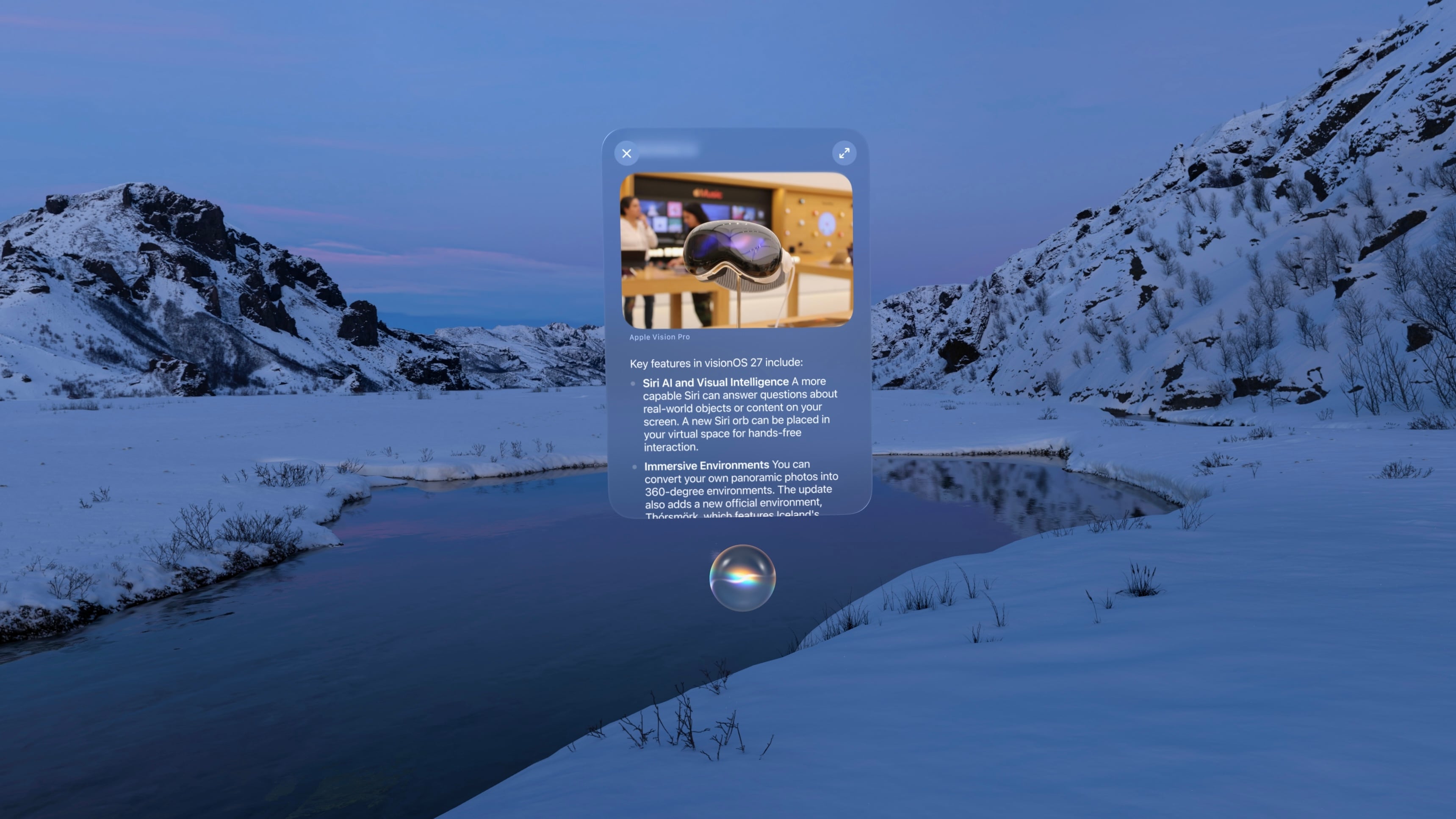
Interacting with Siri in visionOS 27 is a whole new experience. The purple, blue, and green sphere evocative of Siri’s previous era (before all of Apple’s other platforms switched to the rainbow outline UI that never came to visionOS) has been replaced with a semi-translucent glowing white orb matching the Siri aesthetic on iOS, iPadOS, and macOS. The circular “thinking” animation mimics what you see when you interact with Siri on other devices, too, making for a much more cohesive cross-device experience.
When you invoke Siri via voice, the orb appears with a window above it displaying the text of your conversation. You can grab the window and place it anywhere in your environment. To continue the conversation, you simply look at the Siri UI and start speaking again. It all feels very natural, and I appreciate the way you can converse with Siri while interacting with other windows in objects in visionOS, a task that doesn’t translate as well to Apple’s other platforms. For those on the M5 Vision Pro, Siri has a new, more natural voice with customizable speed and expressivity as well, though my M2 model isn’t capable of running the local model necessary to power these changes and the improved dictation system.
visionOS 27 also includes a gesture for activating Siri that’s a little nostalgic. If you hold your palm open and upward then look at it, you’re present with a Home button as before. But if you pinch and hold the Home button, a tiny Siri UI will appear above it, just like in the old days when iPhones had physical Home buttons. You have to hold your fingers together the whole time you’re speaking to Siri, which seems a bit strange to me, but once you’ve made your initial request, the standard Siri UI appears, and you can carry on as usual.
The new version of Siri also brings Visual Intelligence to the Vision Pro for the first time. You can ask Siri about the content of a virtual window or objects in your real-world environment. When Visual Intelligence is activated, the system displays a very cool animation of your environment being scanned, and then, Siri can use what it sees to answer your questions. I’ve used this to ask Siri about webpages, documents I’m working on, and items I see around me, and it’s very cool to have an always-available digital assistant who can see what I see. It did a great job identifying my water bottle and then pulling up the receipt from my email to let me know how old it was, which I found to be a great combination of Visual Intelligence with my personal context.
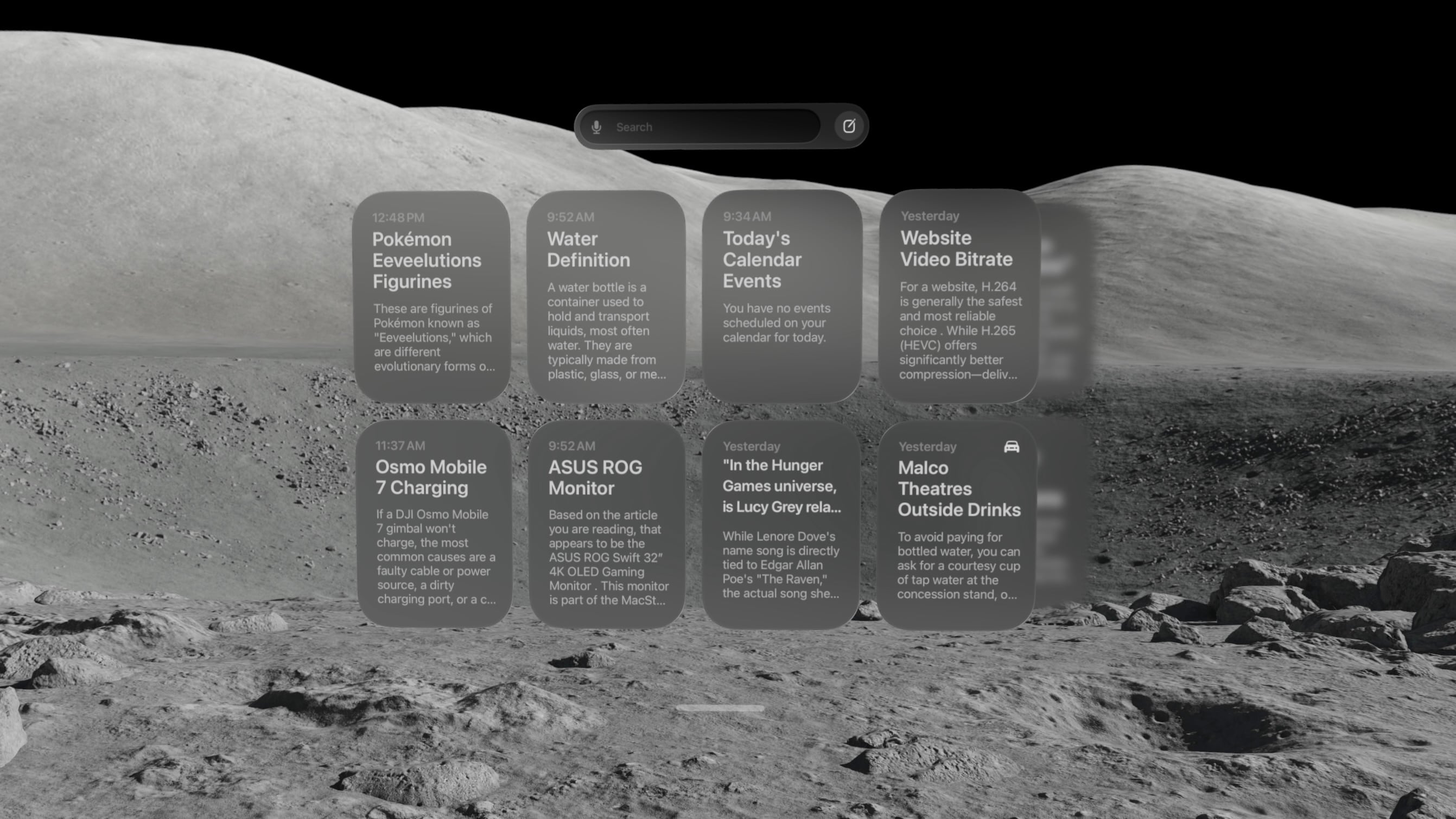
There’s also a new Siri app that contains a history of all your conversations with the assistant, including those synced from other devices. On visionOS, the Siri app is a horizontally-scrolling list of glassy cards that reminds me a lot of the Spatial Gallery app. It’s a handy way to pick back up on conversations started elsewhere, search for a previous answer, or simply interact with Siri via keyboard rather than voice.
At WWDC, Apple showed off a Siri mode where the orb persists in your environment, waiting for you to look at it and start a conversation. I have not been able to get that method to work yet. Once I start a conversation with Siri, I can keep the conversation window open and place it anywhere, but that’s not the same as having a small Siri UI sitting on my desk out of the way until I need it. I’ll keep my eyes peeled for it in future beta releases.
Siri AI is marked for release “later this year” (as opposed to the OS 27 updates listed as coming “this fall”), so there are still some rough edges to work out. Sometimes, conversations simply stop, with Siri telling me an error occurred. The Siri conversation UI will sporadically disappear, and I have to force quit the Siri app to get it to show up again. And Visual Intelligence sometimes struggles to understand what I’m trying to get it to look at, focusing on the wrong window or even the keyboard. But that’s beta life for you; it’s what I signed up for, and I’m trusting it will all be worked out before the public release.
Beta UI bugs aside, Siri AI is a huge upgrade for Apple’s digital assistant, and I’m happy to see visionOS getting the first-class treatment here. It isn’t simply ported over from iOS. It’s been carefully adapted for a spatial UI, and it makes for a powerful overall experience.
There is one other major way Siri differs on visionOS from other platforms: it hasn’t been integrated with Spotlight Search. For now, at least, the search feature on visionOS is dedicated to finding apps, app content, and web results, without even an ‘Ask Siri’ button in sight. With so many other ways to interact with Siri on the platform, it might make sense to keep it separate from search, but it’s certainly an oddity given the way the two features have been merged on every other platform. I’m still trying to figure out if I find this a helpful separation or a missed opportunity for cross-device cohesion.
Panoramas and Environments
There’s a lot more to visionOS 27 than just AI. Big changes are coming to panoramas, including the ability to act as persistent Environments. And, of course, Apple has to throw in a new Environment of its own, too.
Over the past couple of years, Apple has continually pushed the capabilities of its spatial photo conversion technology. Last year, that came in the form of spatial scenes across all of the company’s platforms, and this year, it’s coming to panoramas. In visionOS 27, you can convert panoramas into spatial scenes, adding layers of depth and perspective to the already stunning experience of viewing panoramas on the Vision Pro.
Being immersed in panoramic photos in visionOS was already breathtaking. This takes it to a whole new level. Experiencing memories in deeper ways than I ever thought possible is one of my favorite uses for the Vision Pro, and now, I can use it to revisit places I’ve been and feel like I’m standing there once again.
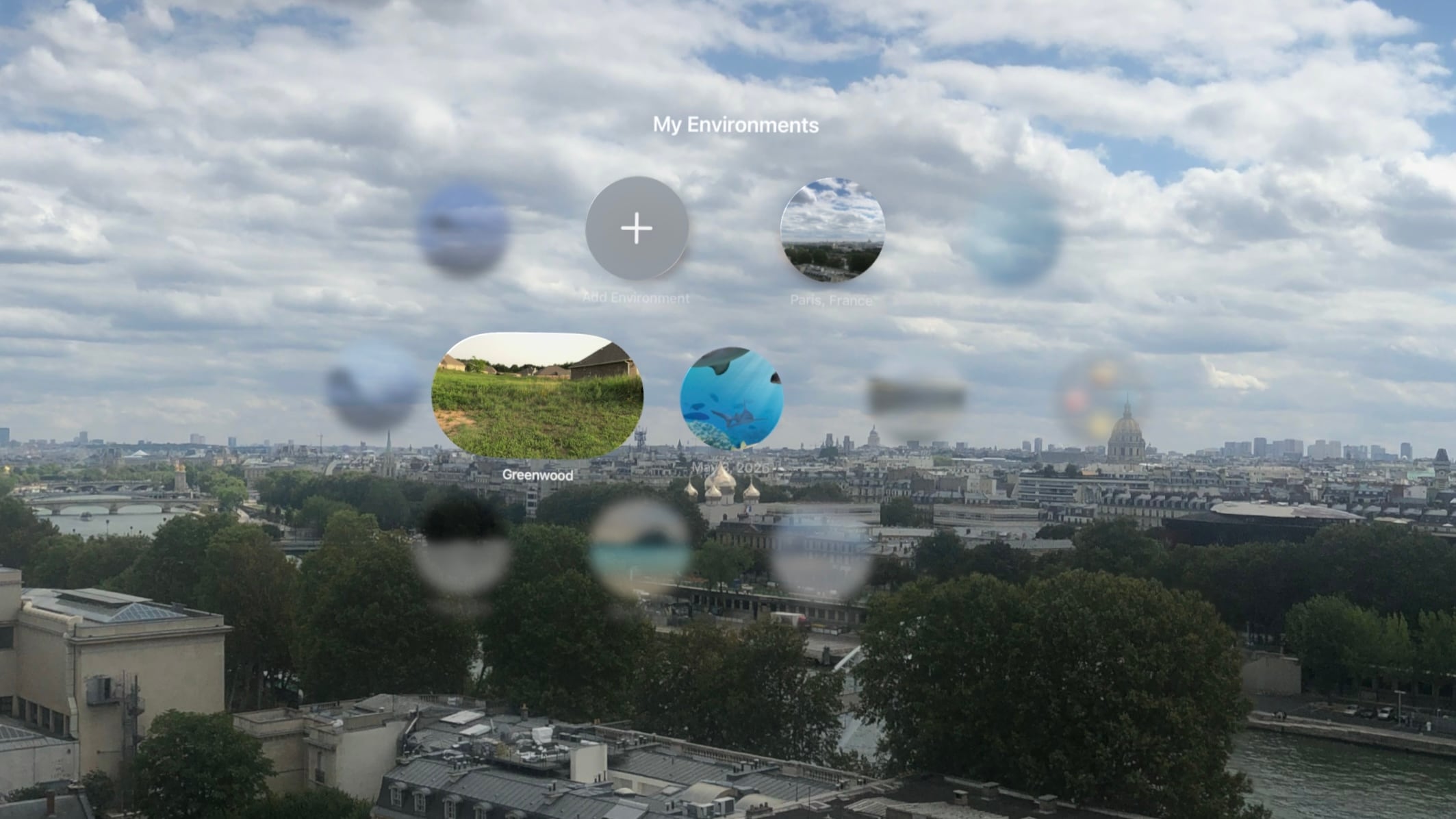
The system takes this experience one step further by allowing you to set panoramic spatial scenes as custom Environments. In the Environments view, there’s a new folder called My Environments where you can add up to 34 panoramas from your photo library and use them as immersive backgrounds for your content. You can even adjust the immersion level to make the photo wrap around you.
I love that we now have the option to use our own photos as Environments, but it does come with some tradeoffs. Panoramic photos are static, so they don’t have the subtle motion elements that make Environments feel alive. They also don’t expand as far vertically as Environments do, which means you’re likely to see your real-world surroundings if you look up or down. Still, this is the first time visionOS users have been able to set their own custom Environments using their own photos or images purchased online, so it’s a win. It’s definitely inspired me to start taking more panoramas than I did before.
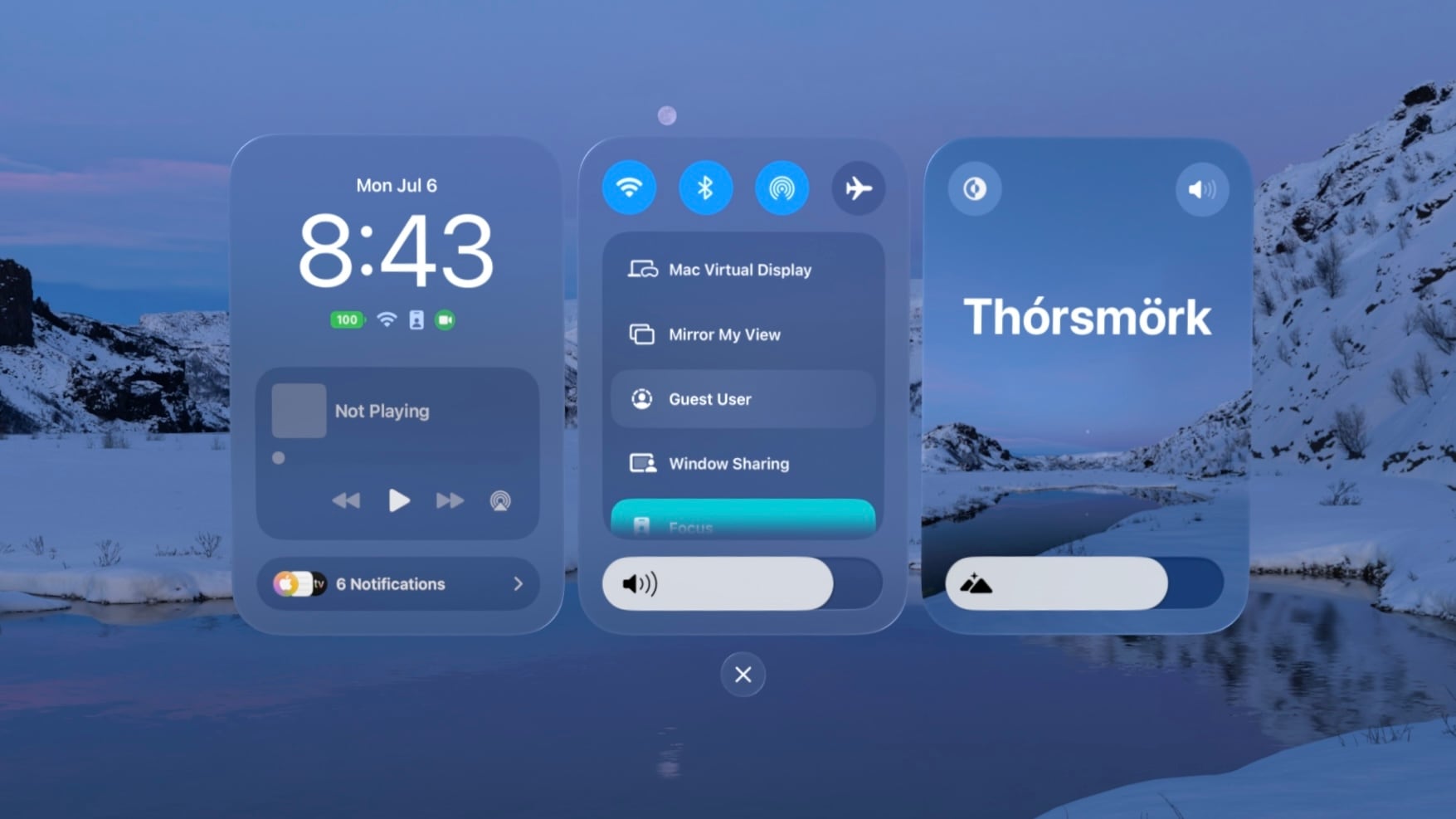
The new built-in Thórsmörk Environment is gorgeous. Apple always knows how to pick the perfect spot. Between the snow, the slow-moving river, and the aurora borealis in the sky at night, it offers a beautiful, peaceful place to relax, watch a movie, or trick your mind into cooling off on a hot summer’s day.
Safari
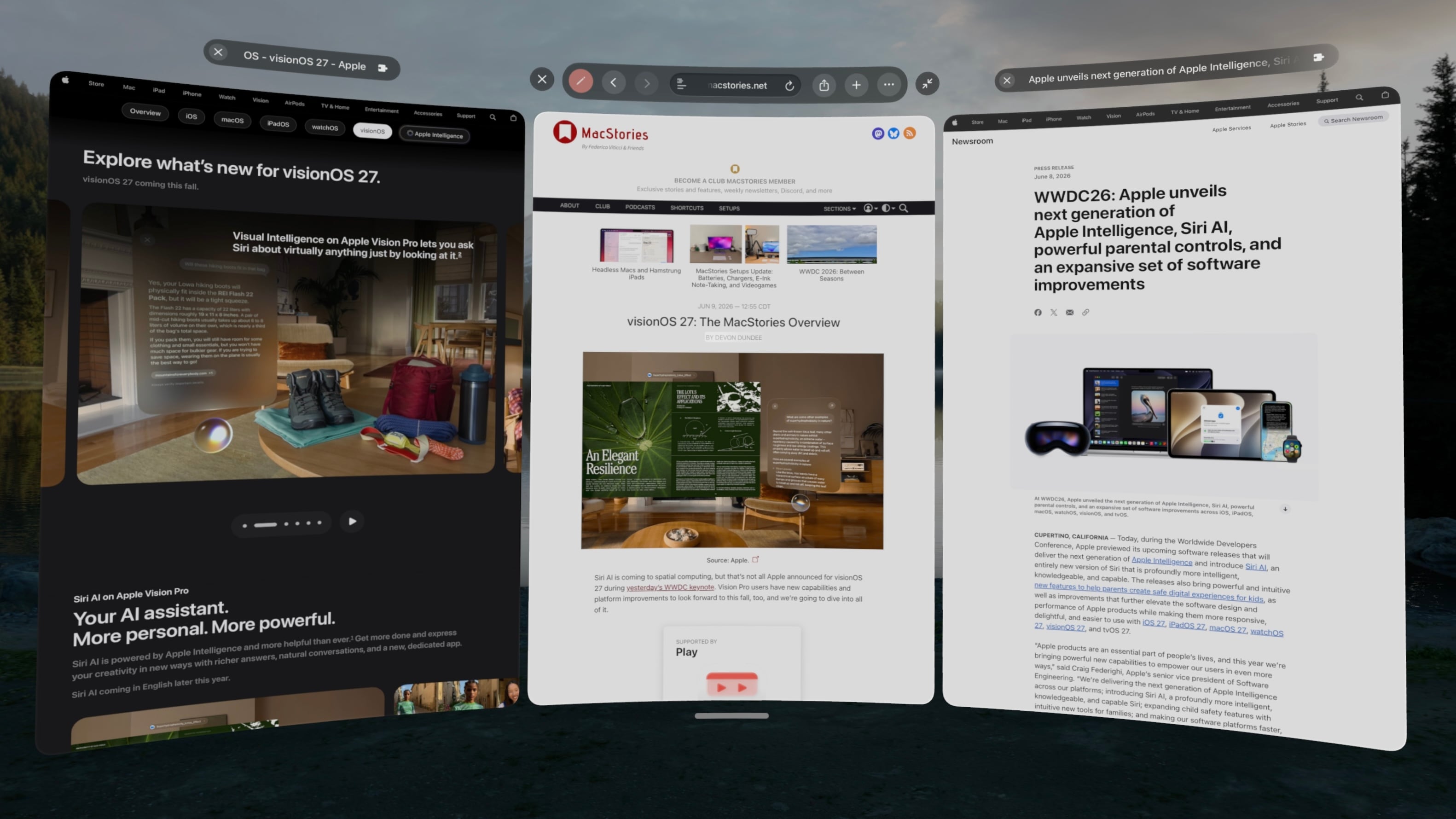
Spatial browsing is continuing to mature in visionOS 27, this time with the help of curved windows. Safari is one of the few built-in apps – Freeform and TV being the others – that are receiving special curved window modes this year, similar to what we’ve seen in the past with Mac Virtual Display. When a window is expanded beyond a comfortable width for side-to-side viewing, it automatically starts to curve, wrapping around the user’s head to make it easier to take in the window’s contents.
To be honest, I’m not sure how useful curved windows will be for browsing normal websites. While some, such as Apple’s OS Overview page are optimized to display content like image galleries at such wide aspect ratios, most sites don’t expand beyond a certain point, displaying blank space on either side of a centered column of content. Perhaps that will change with time, but for now, I don’t foresee these ultra-wide windows catching on for single-tab browsing.
Where the curved Safari window does shine, though, is in the browser’s new multi-tab view. A new button on the right side of the tab bar activates the view, which displays all open tabs side by side in a horizontally-scrolling curved window. These aren’t previews, either. Each tab can be scrolled, navigated, interacted with, and even closed as it if it were an independent browser window.
I’ve already found numerous use cases for this view in my own workflows: editing article previews, comparing product pages, and reviewing multiple research sources at once, just to name a few. Displaying multiple tabs at once in a large, ergonomic window view makes for a fantastic interaction method that I think could apply far beyond Safari webpages and sports multiviews in TV. I imagine this feature will be used far more than last year’s spatial browsing.
Apple Intelligence can sort your bookmarks and Reading List entries based on topic if you like, though the automatic tab sorting feature present on other platforms is curiously missing. Personally, I like managing my own tabs anyway, but add that feature to the long list of strange feature parity omissions on visionOS along with Focus filters, photo editing, and – as of the current beta – Describe a Shortcut.
Platform Improvements
There’s no doubt that this is a refinement year for Apple’s platforms beyond AI. The company is taking the opportunity to revisit and optimize OS features that have long been considered mature, and that’s the case even for visionOS, a relative newcomer.
The time it takes the Vision Pro to connect to Wi-Fi upon power-up has been reduced significantly. Given the device’s short battery life and tendency to go into deep sleep when not in use, this is a quality-of-life change that you’re going to feel. When I turn my M2 Vision Pro on, I can’t log in quickly enough to open Safari or the TV before it’s connected to the Internet. That definitely was not the case before visionOS 27, and I appreciate it.
I’ve long been on the record as a critic of the notification system on visionOS, but it’s taking a big leap forward this year with expanding notifications. When an app icon appears at the top of your view to alert you to a notification, you expand it with your gaze and actually see what you’re being notified about. You can even long-press a Messages notification to reply directly without the need to open the full app, which is so convenient. And with any app, just seeing notifications in full without losing the context of what I’m doing is a major improvement.
Unlike notifications, I was a fan of the redesigned Control Center in visionOS 26. Alas, Control Center has been redesigned again, now featuring a three-column layout instead of a single window. I’m still getting used to the new look, but it does make sense conceptually to split different types of controls into separate columns, so I’m hoping this will make the feature more intuitive once I’ve adapted to it. Regardless of any other efficiency wins, though, this redesign gets my approval simply because it finally brings the AirPlay menu to the top level of Control Center, saving me an extra tap every time I want to switch sound output to my AirPods.
Sharing screenshots and videos from visionOS is going to be much easier thanks to high-quality screen recordings, which can be enabled in the Settings app. Now, the Vision Pro can take unfoveated videos of its screen for up to three minutes, as well as full-quality screenshots. In the past, on-device screen recordings were fuzzy outside of the viewer’s focus, resulting in a poor representation of the visionOS experience and requiring a Developer Strap and Xcode on a Mac as a workaround. This change alone is going to make my review process much simpler, and it’ll make it easier for all Vision Pro users to show others what using the device is like.
visionOS 27 now supports extra-small widgets, which are basically Lock Screen widgets brought to life in the user’s space. Like any other spatial widget, they can be placed on a wall or a horizontal surface such as a desk, and they are entirely customizable. Apple is introducing its own extra-small Mac Virtual Display widget for starting up a virtual connection with a Mac even if it’s asleep. Extra-small widgets take up much less space on a desk than even small ones, and there are already a bunch of them available from iPad apps running on the Vision Pro, so I think they’re going to be very useful.
Finally, there are some other Mac Virtual Display improvements included in visionOS 27. Virtual Display sessions can optionally persist even when you take your Vision Pro off, and macOS can stream spatial previews of 3D objects directly to visionOS with instant updates and two-way editing. I don’t have a Mac running Golden Gate yet, so I haven’t been able to try these features myself, but I plan to soon. If you work with 3D objects on your Mac and Vision Pro, I imagine this will speed up your workflow significantly.
And that’s visionOS 27 – so far, at least. There’s a still a lot more summer left: bugs to be squashed, refinements to be made, and third-party apps to be updated and introduced. My experience with the new version up to this point has been very positive, and I think it’ll make for a great update.
If you want to try out some of these features early, you can enroll in the Developer Beta anytime in the Software Update section of the Settings app. Whether you upgrade now or hold off for the public release, Apple’s got some great things in store with visionOS 27, and I look forward to continuing my testing over the summer in preparation for a full review this fall.

 Login
Login