The term "benefit corporation" is becoming increasingly familiar as a label for companies with a hybrid commitment to the social good and profit-making. Interestingly, the term itself has taken on a hybrid meaning.
The term "benefit corporation" is becoming increasingly familiar as a label for companies with a hybrid commitment to the social good and profit-making. Interestingly, the term itself has taken on a hybrid meaning.
European cities will gain more leeway to curb short-term rentals such as Airbnb under new EU plans that aim to bring down housing costs in tourism hotspots.
Kepler Computing claims a new approach to chip design—and a proprietary material—can help end the supply bottlenecks that have sent memory prices surging.
Kepler Computing claims a new approach to chip design—and a proprietary material—can help end the supply bottlenecks that have sent memory prices surging.
In 2016, when Amazon workers began organizing at a warehouse in Chester, Virginia, the company tracked where employees gathered, posted anti-union messaging in bathroom stalls and held town halls to discourage them. The National Labor Relations Board forced Amazon to admit, in writing, that it had illegally surveilled and threatened workers. The union drive still failed.
The construction of new data centers is shaping up to be a defining issue in the 2026 midterm elections. Politicians in both parties have been distancing themselves from data centers in the face of public discontent around the issue, with public backlash leading to the freezing of dozens of data center projects nationwide this year.
Tracking rent prices may help businesses and policymakers understand where inflation is headed months in advance of government inflation reports, according to researchers at Penn State's Smeal College of Business who developed the Penn State/ACY Alternative Inflation Index. The Penn State index was recently incorporated into the Bloomberg Terminal, a software system that serves financial professionals with real-time market data, news and analytics.
Google will invest at least 13 billion euros in data centers and other digital infrastructure to power its AI ambitions in Finland, in what the U.S. tech giant called Wednesday its biggest single investment in Europe.
Facilities likely to employ 10,400 workers, compared with 40,000 in industry estimates, thinktank says
Datacentres in the UK will create just a quarter of the jobs predicted by the tech sector, while consuming vast amounts of energy, according to new research.
Environmental thinktank Verdant predicts that all the datacentres currently planned are likely to directly employ 10,400 workers – compared with the more than 40,000 cited in projections by the industry lobby group TechUK.
Facilities likely to employ 10,400 workers, compared with 40,000 in industry estimates, thinktank says
Datacentres in the UK will create just a quarter of the jobs predicted by the tech sector, while consuming vast amounts of energy, according to new research.
Environmental thinktank Verdant predicts that all the datacentres currently planned are likely to directly employ 10,400 workers – compared with the more than 40,000 cited in projections by the industry lobby group TechUK.
You may know the feeling. You're supposed to have finished work for the day, but later, during your evening meal, you start mentally preparing for tomorrow's meeting. Or you have a quick check of your emails while you half-watch TV.
Now the UK government plans to introduce new legislation that would see companies face fines and potential criminal liability, and signaled similar plans could extend to Snapchat and Instagram.
The Schiller exit is a bit more notable. Unlike Maestri, he still had a real job: The veteran executive ran the App Store and Apple Events. The App Store portion alone is no joke. It generates an estimated $30 billion a year and can be very challenging to manage. Apple’s app marketplace is loved by many consumers, but often criticized by developers and subjected to increasingly onerous regulations. It was a busy, all-encompassing gig and nowhere near a semiretirement.
[…]
But there’s a bit more to the story, I’m told. Ternus and services chief Eddy Cue want to make even more money from the App Store and figure out ways to raise margins and squeeze additional recurring revenue from the platform. Schiller, on the other hand, seems to believe that such moves will only further irk developers and governments. While there was no internal blowup or anything like that, it’s something he wanted no part of.
“Product guy” dreams about margins, forgets that people buy Apple hardware because of the software.
Apple admitted during its July earnings call that regulatory changes have started to weigh on its Services growth. Apple reported services revenue of $30.7 billion for the June quarter, a record for the period but short of the $31.4 billion that analysts expected.
Firms are more likely to use technology as ‘the intern in the office’ than as a replacement for skilled staff
Professional designers should not feel “threatened” by the rapid growth of generative AI, according to business leaders, despite fears over job losses in the sector.
With design and film production companies and manufacturers all adopting AI at an accelerating pace, industry bodies said the technology would be used to enhance the work of designers rather than replace them.
Gmail is filled with hidden features and add-on possibilities, but one of the service’s most powerful organizational tools is sitting right in the heart of its regular settings.
As you may have guessed by now (especially if you read this story’s headline, you clever little cat), I’m talking about filters — Gmail’s long-standing system for automating your inbox with a series of custom-crafted rules. At a glance, filters can seem complicated. They can seem overwhelming. They can even seem unnecessary.
But don’t let yourself be fooled by the feature’s curiously crusty exterior. Gmail filters have the potential to completely reshape your inbox and the way your incoming messages are handled. They can help you keep your email in order with no ongoing thought or effort.
And, unlike Google’s new AI Inbox option (which notably still doesn’t seem to be available for most people as of this writing), filters (a) don’t require your personal messages to be processed by generative AI systems — and (b) give you complete control over exactly how your email is handled instead of forcing you to rely on inherently unreliable technology to figure out what you want for you (and then likely come up short at least some of the time).
Best of all? All it takes is a teensy touch of one-time planning to get Gmail filters set up to your exact specifications and working for you quietly and automatically from that moment onward.
Follow the filter-centric Gmail tips in this guide, and your inbox will be running like a well-oiled (but not too greasy) machine in no time.
Part 1: Figuring out your Gmail filters
Let’s start by thinking through some Gmail filter possibilities to get an idea for the sorts of setups you might want to consider — then, we’ll go step by step through the process of creating them.
With Gmail filters, you could:
Ensure messages from specific high-priority senders always go into your inbox’s Primary tab, where you’re certain to see them
Ensure specific sorts of lower-priority messages — like invoices, reports, or updates from different services you use — automatically get sorted into an out-of-the-way location and never even show up in your inbox
Keep messages from annoying people out of your hair (but still available in case you need to find them) by automatically archiving them as soon as they arrive
Forward messages from a specific address or with a specific phrase in their subjects to other members of your team or family
Instantly respond to messages to or from a specific address with a prewritten template
Label messages sent to a specific variation of your Gmail address (like youraddress+vip@gmail.com) or written with a specific word or phrase in the subject (like “urgent,” “important,” or “hey jerkwad, pay attention to this”) as “VIP” and then receive notifications only for messages with that designation
Mark specific types of messages from yourself as reminders by giving them a bright yellow “REMINDER” label that makes them stand out in your inbox
Get a snickerdoodle delivered to your desk every time your boss emails you
All right, so that last one isn’t really possible (not yet, anyway) — just wanted to make sure you were still paying attention. Everything else in that list, however, is absolutely doable and actually quite easy to set up with Gmail filters.
Got some ideas of your own? Good deal. Time to make ’em happen.
Part 2: Creating your Gmail filters
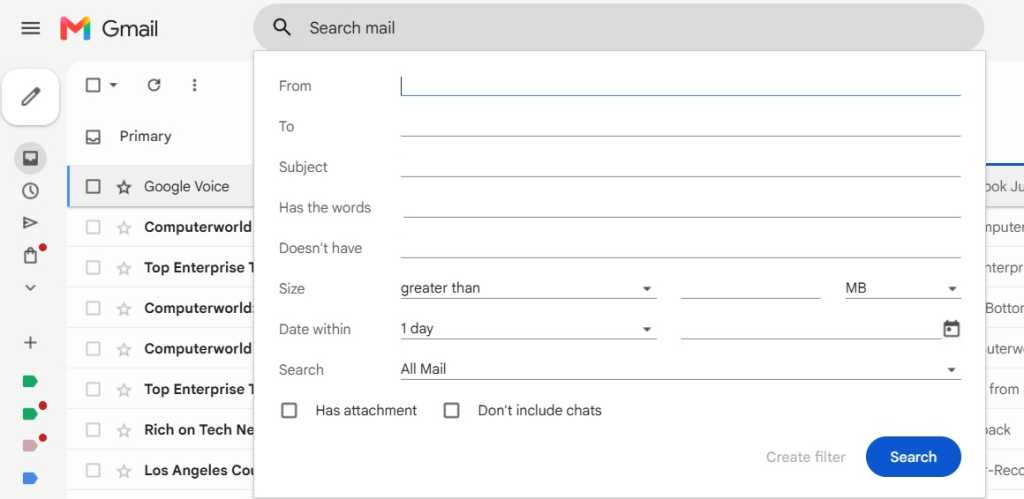
The simplest way to start a new Gmail filter is to click the control panel icon — the symbol showing three horizontal lines stacked on top of each other — within the big search box at the top of the Gmail website. (Filters can’t easily be managed on mobile, unfortunately, so you’ll need to do all of this in a desktop browser.)
That’ll pull up a form where you can fill in whatever you want to use as the basis for your filtering — a word or phase that might appear within an email’s subject or body, an address from which a message could originate, or any other variable or combination of variables you like.
The form for creating a filter is filled with options for controlling email automation.
JR Raphael / Foundry
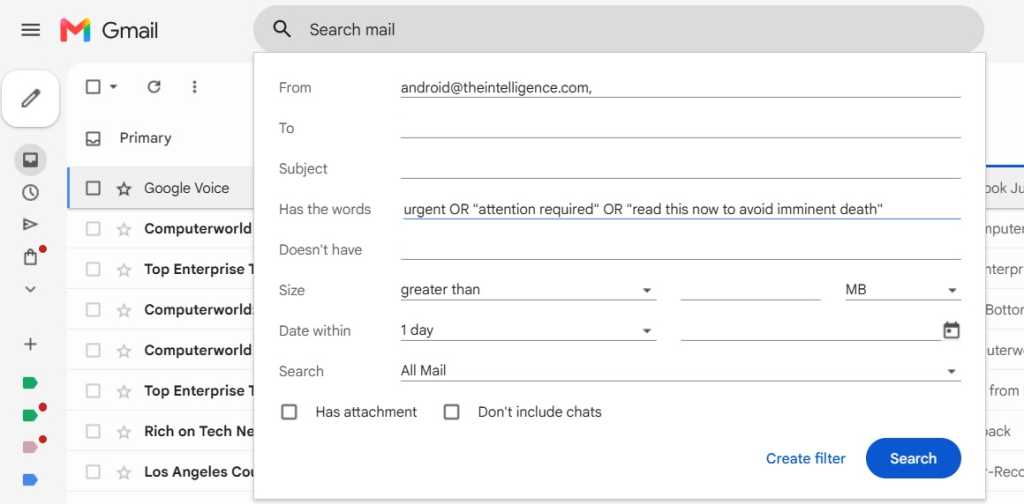
Fill in the fields as appropriate, using however many variables you want — even employing quotation marks around multiword terms along with operators like “AND” and “OR” between terms, if you really want to get fancy — and then click “Create filter” at the bottom of the box.
You can use any combination of variables, even employing operators within a single field, to control when your filter will run.
JR Raphael / Foundry
One quick warning: By default, your filter will apply to any and all incoming messages — hence the “All Mail” setting that shows up next to the “Search” option in the filter creation pop-up. If you change that option to “Inbox,” you’re likely to see an error message informing you that the parameters you chose are not recommended and may not work properly. Leave that “Search” option set to “All Mail” — which is probably what you want, anyway — and you’ll steer clear of any errors and allow things to work the way they should.
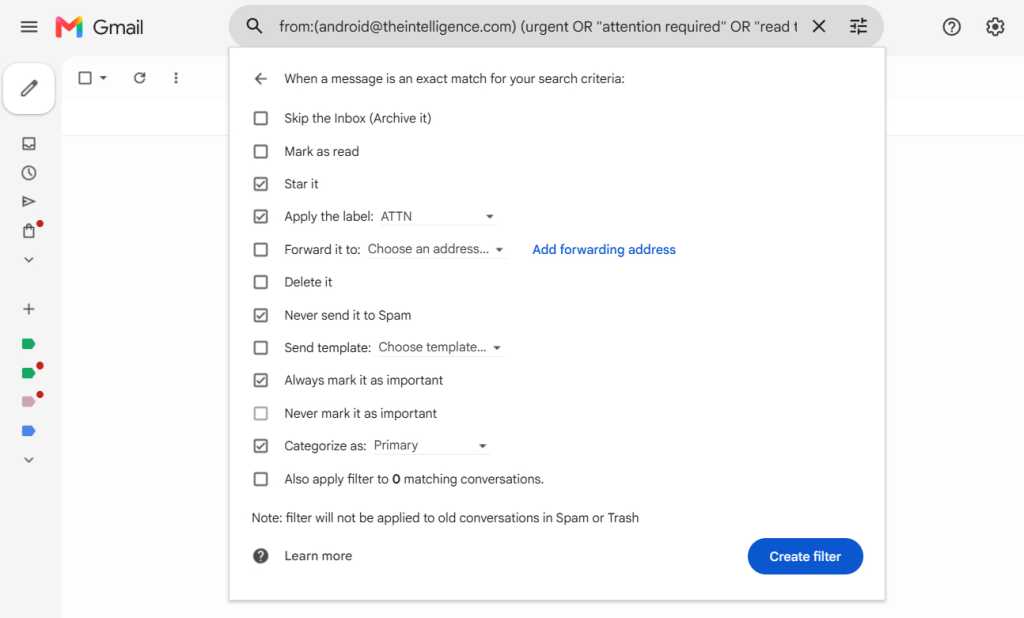
Now it’s time for the fun part — the part where you decide exactly what happens when a message meeting your conditions arrives. You can select any combination of actions from the list and then configure them as needed. You can even tell Gmail to apply your filter retroactively to messages already in your account (as opposed to using it only for new messages that arrive from that point forward) by checking the “Also apply filter to matching conversations” option at the bottom of the box.
Gmail’s filters include a variety of actions that can execute when your conditions are met.
JR Raphael / Foundry
Once you’ve got that finished, click the blue “Create filter” button — and that’s it: Your new Gmail filter is officially in place and active. The next time any message comes in that meets the parameters you outlined, the actions you specified will automatically take place faster than you can say “I embrace Workspace in my workplace cyberspace.”
Part 3: Managing your Gmail filters
Last but not least, make yourself a mental note in case you ever need to adjust your filters in the future: If you want to edit, delete, or even just revisit a filter you created, just click the gear-shaped icon in the upper-right corner of the Gmail website, click “Settings,” then click the “Filters and Blocked Addresses” tab at the top of the settings screen. You’ll see every filter you’ve ever created there and can tweak or remove any of ’em with a couple quick clicks.
Now if only we could find a way to get the filters to deliver those blasted snickerdoodles for us. Hey, Google: Any chance you can make that happen?
This article was originally published in October 2019 and most recently updated in September 2026.
Energy secretary could recommend new North Sea drilling next week, as ministers also consider approval for Rosebank oilfield
Ministers are poised to approve a controversial new gasfield in the North Sea this month, according to government sources, and are considering approving a major oilfield later this year.
Miatta Fahnbulleh, the energy secretary, will give her recommendation to approve the Jackdaw field off the coast of Aberdeen as soon as next week, according to people close to the decision, and the formal approval could follow a week after.
A US federal judge has sided with Google, ruling that the company will not have to sell its online advertising exchange (previously known as AdX). The US Department of Justice (DOJ) sought this remedy in the long-running ad tech antitrust trial, which Google lost in 2025. However, the remedies imposed upon Google for that loss are shaping up to be minimal.
[…]
While divesting the ad exchange would have been the most serious penalty, the government also asked for fines and court-ordered changes to Google’s business practices. It’s likely that the DOJ will get a lot of that, but we don’t know the specifics yet. Judge Leonie Brinkema has sealed the order for 14 days, giving the parties a chance to request redactions.
[…]
After all these years of hearings, appeals, and decisions, Google’s market power will remain largely unchanged going forward.
The settlement between Google and Epic that aimed to put to rest the companies’ long-running antitrust battle is being withdrawn, and that means third-party app stores are coming to the Play Store.
[…]
While Apple suffered little penalty in its Epic case, Google was tripped up by its anti-competitive management of the supposedly open Android ecosystem. Google used its market position to discourage device makers from promoting or pre-loading non-Google app stores and attempted to hide that conduct. The remedies set by Judge James Donato included lower fees, mirroring Google Play apps in other stores, and most vitally, placement of alternative app stores in Google Play.
[…]
Google and Epic were set to return to court on July 16 to argue in favor of the settlement. However, the writing may have been on the wall. In a recent expert analysis provided to the court, MIT economics professor Nancy Rose noted that the settlement was “unlikely to enable Google Play’s potential competitors to overcome their long-standing network-effect disadvantage in a timely manner.”
[…]
Under the terms of Judge Donato’s original injunction, these stores will have access to the full catalog of Google Play apps by default. […] Google will also require approved stores to block malware, respect intellectual property, and include mechanisms to update and uninstall apps.

 Login
Login