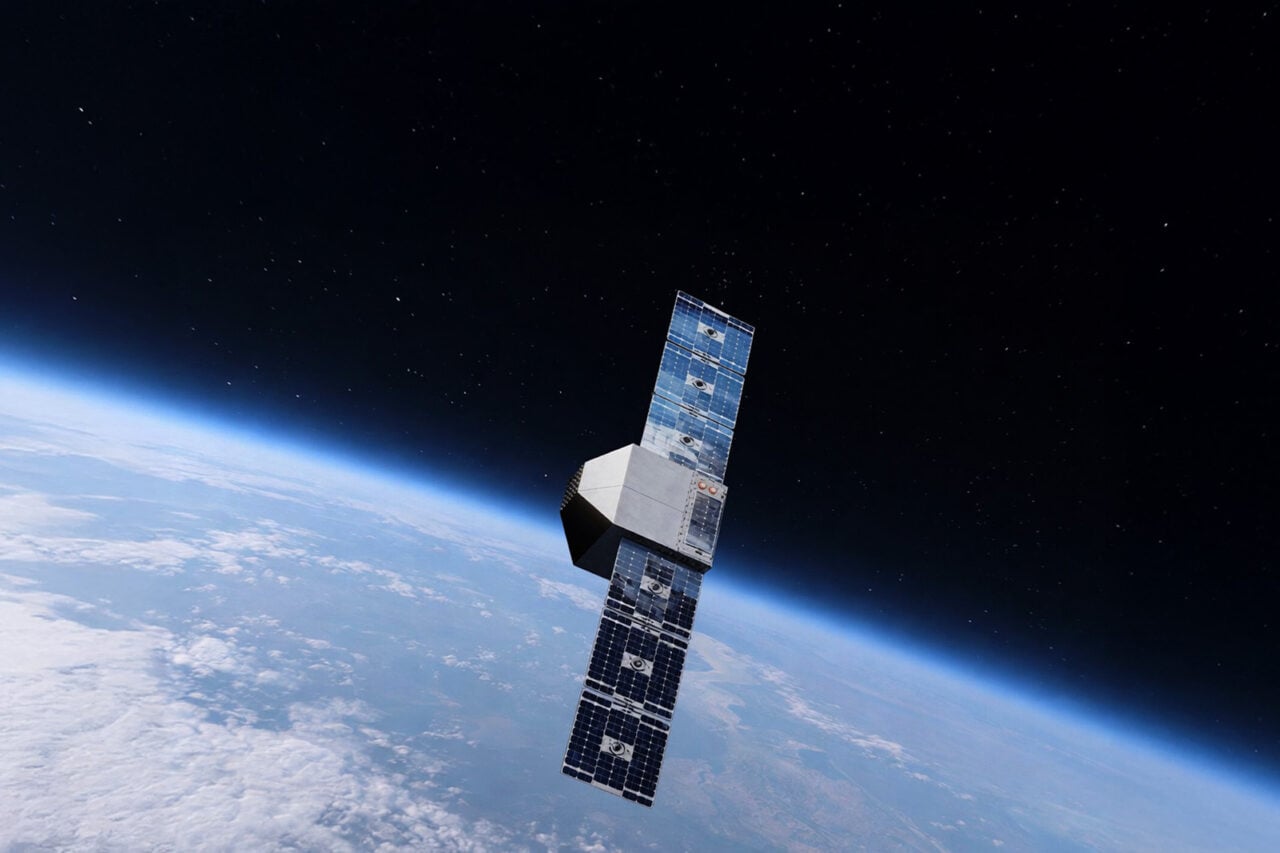
Depois de ganhar o Liquid Glass, a versão do WhatsApp para iPad começará a receber outra novidade de design para parte dos seus usuários: uma nova barra lateral.
A reformulação da interface aproximará a versão de iPad daquilo que é visto no macOS, com a nova versão da barra lateral abrangendo conversas, atualizações, comunidades, chamadas e Meta AI, além da seção “Mais” (que engloba conversas favoritadas, trancadas e arquivadas, bem como os status do mensageiro da Meta).
WhatsApp is rolling out a redesigned navigation interface for iPad!
WhatsApp is bringing the same sidebar from the Mac app to iPad, making it easier for users to navigate the interface on a larger screen. The update is also compatible with Liquid Glass.https://t.co/vVfpctrXulpic.twitter.com/uUYQ8cPak5
O WhatsApp está lançando uma interface de navegação redesenhada para iPad!
O WhatsApp está trazendo a mesma barra lateral do aplicativo para Mac para o iPad, facilitando a navegação dos usuários na interface em uma tela maior. A atualização também é compatível com Liquid Glass.
A quem desejar que a conversa ocupe mais espaço da tela, será possível ocultar a barra lateral por meio de um botão localizado no canto superior direito da interface. Para exibi-la novamente, bastará tocar no botão da barra lateral na barra de guias superior, exibido quando a barra lateral é ocultada.
Por ora, a novidade está sendo testada com os usuários da versão beta do WhatsApp via atualização mais recente do TestFlight, além de alguns usuários da versão mais recente do aplicativo da App Store. É provável que não demore muito para que a funcionalidade chegue a todos os usuários.
Pré-visualização de miniaturas em conversas
Para os usuários de iOS, a Meta também implementou um recurso que já vinha sendo testado na versão de Android: a pré-visualização de mídias e figurinhas em uma miniatura exibida na própria seção de conversas.
Imagem: WABetaInfo
Até o momento, a única forma possível de pré-visualizar mídias e figurinhas no WhatsApp era segurando a conversa, caso contrário o aplicativo só fazia uma menção textual ao material enviado.
Rocket launches this week On Thursday, Sept. 10 at 5:00 a.m. EST, a Long March 2D rocket is set to lift off from Jiuquan Satellite Launch Center in northern China’s Gobi Desert carrying an undisclosed payload, according to tracking from Next Spaceflight. The rocket is operated by the state-owned space contractor China Aerospace Science andContinue reading "SpaceX closes out SES’s O3b mPower constellation"
But when Apple implemented this change, they also changed the sort order of the list of apps you’re registered to test. Starting with this update, the list is sorted in alphabetical order. For as long as I can remember — perhaps dating back to when TestFlight was a third-party utility — the list was ordered by recency. The most recently updated app was at the top; the oldest at the bottom. Sorting by recency is really the only sort order that makes sense when you’re registered for dozens (or more) of apps. For me, trying to see if there is an update to a new app whose name starts with U now requires scrolling through over 100 items.
[…]
Also, if I consider the broader view, this really speaks to how much we’ve lost in terms of UI vocabulary. For decades, any list of items with names and dates could be sorted by name or date, ascending or descending, through the standard use of clickable headers at the top of every list. This was true for almost any such list in any app, on any platform — Mac, Windows, Unix, Amiga, whatever. This was just basic GUI stuff.
[…]
iOS in 2007 introduced a simplified UI vocabulary that omitted many of these baseline GUI features. That seemed like a reasonable trade-off for a device with a 3.5-inch display and fat fingers as the only input device. But then iOS became popular and Apple stopped bringing the richer UI vocabulary of the Mac to iOS[…]
And it starting bringing iOS limitations to the Mac.
It certainly shouldn’t have taken until July 2026 to be able to search in TestFlight, either. And being able to search, and see the results sorted alphabetically, shouldn’t mean you can no longer view the full list sorted by recency.
Whatever is going on with this sort order, it isn’t affecting everyone. John Siracusa, amongst many others, has the same problem I do — his list is now alphabetical, and it’s driving him nuts too. Ryan Booker, amongst many others, still has his list sorted by recency.
Returning to reverse chronological order may seem like a small thing, but it’s made a world of difference in keeping up with the apps I test.
Search was near the top of my list of TestFlight wishes for years, and its addition made a meaningful difference to the app’s usability. But I’ve had a lot of TestFlight wishes over the years that are scattered across multiple articles, so I thought I’d share what else I’d like Apple to tackle with TestFlight[…]
Stoke Space has amassed a substantial sum during its latest round of financing and is revealing exactly where it plans to invest its new stack of cash.
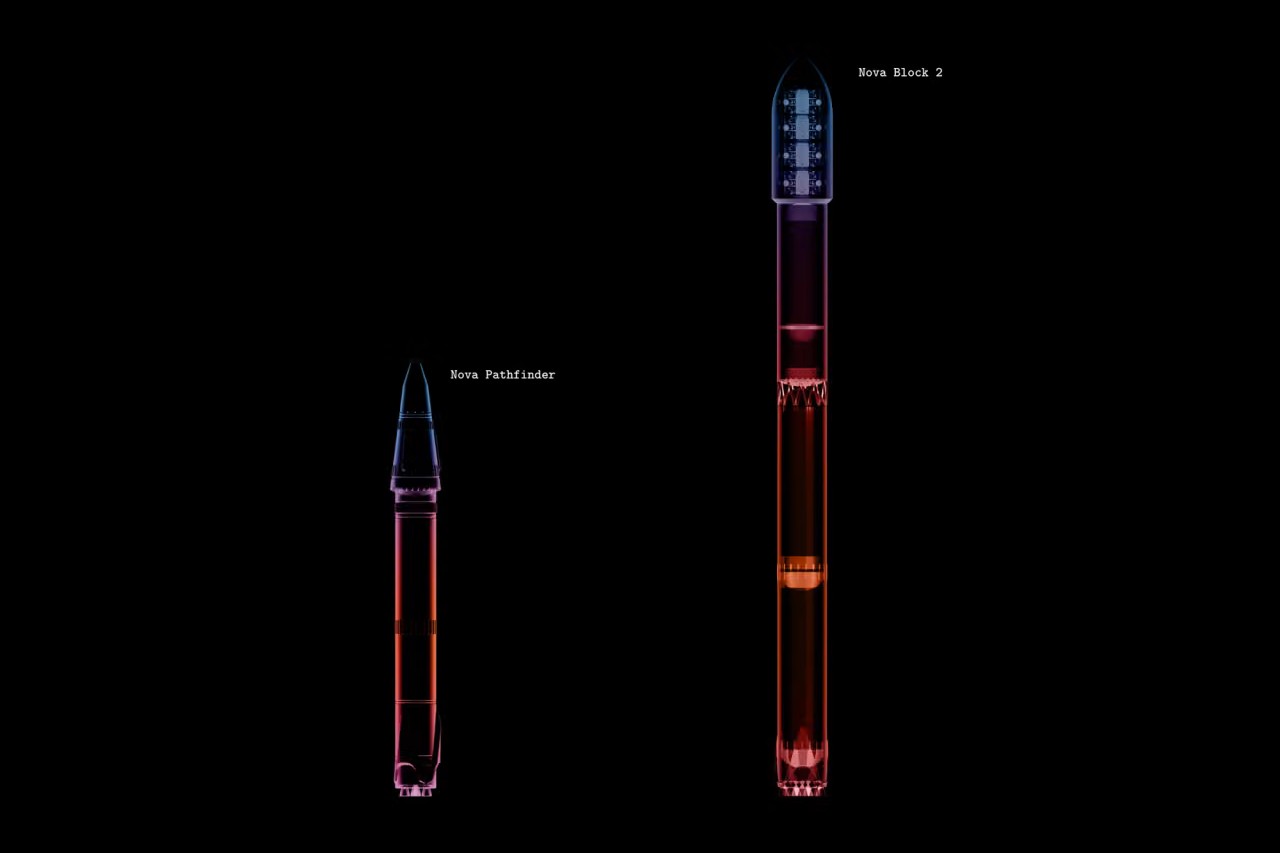
The Kent, Washington-based company just raised $1 billion via its"Series E" capital campaign, bringing Stoke’s total investor haul to $2.3 billion. The Sept. 8 announcement provided a development update for Stoke’s fully reusable Nova Pathfinder launch vehicle and included plans for its never-before-seen Nova Block 2 rocket, a more powerful system designed to be able to deliver up to 15 tons to low Earth orbit (LEO).
“We are humbled by the trust our investors and customers have placed in us in pursuit of this critical generational challenge,” said Andy Lapsa, Stoke CEO and co-founder. “This investment enables us to scale toward delivering the capability and cadence our customers require.”
Nova Pathfinder is Stoke’s first orbital launch vehicle (the largest first rocket ever undertaken by a U.S. launch company, according to Stoke), and is based on the same technologies the company is building into its Block 2 design. Both two-stage vehicles are being manufactured with full and rapid reusability in mind, with Pathfinder serving as the proving ground for that architecture.
Pathfinder's first stage is powered by seven Stoke-designed full-flow, staged-combustion (FFSC) Zenith rocket engines, fueled by liquid oxygen and liquefied natural gas (LNG). The first stage on Nova Block 2 will be equipped with 14 Zeniths. Stoke calls FFSC “perhaps the most difficult rocket engine cycle to develop,” but highlights its advantages; the tech leaves fewer residuals like soot around the engines and reduces the amount of maintenance needed between flights, according to the company.
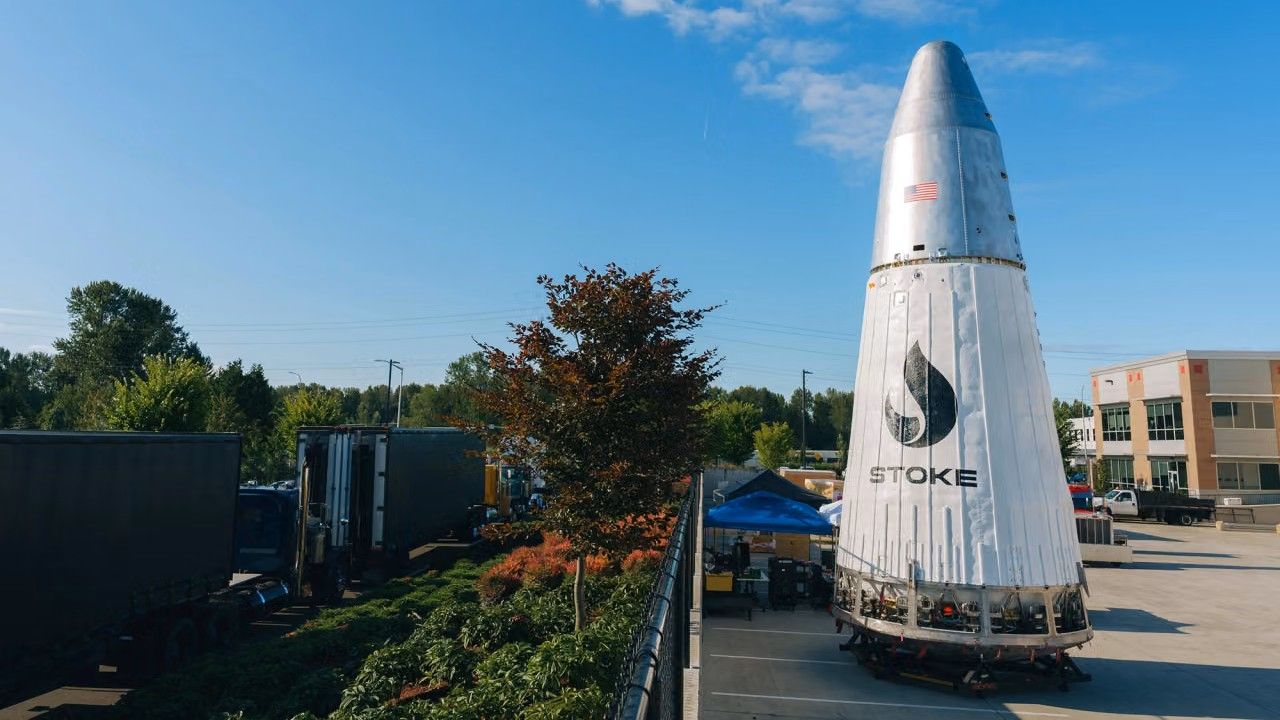
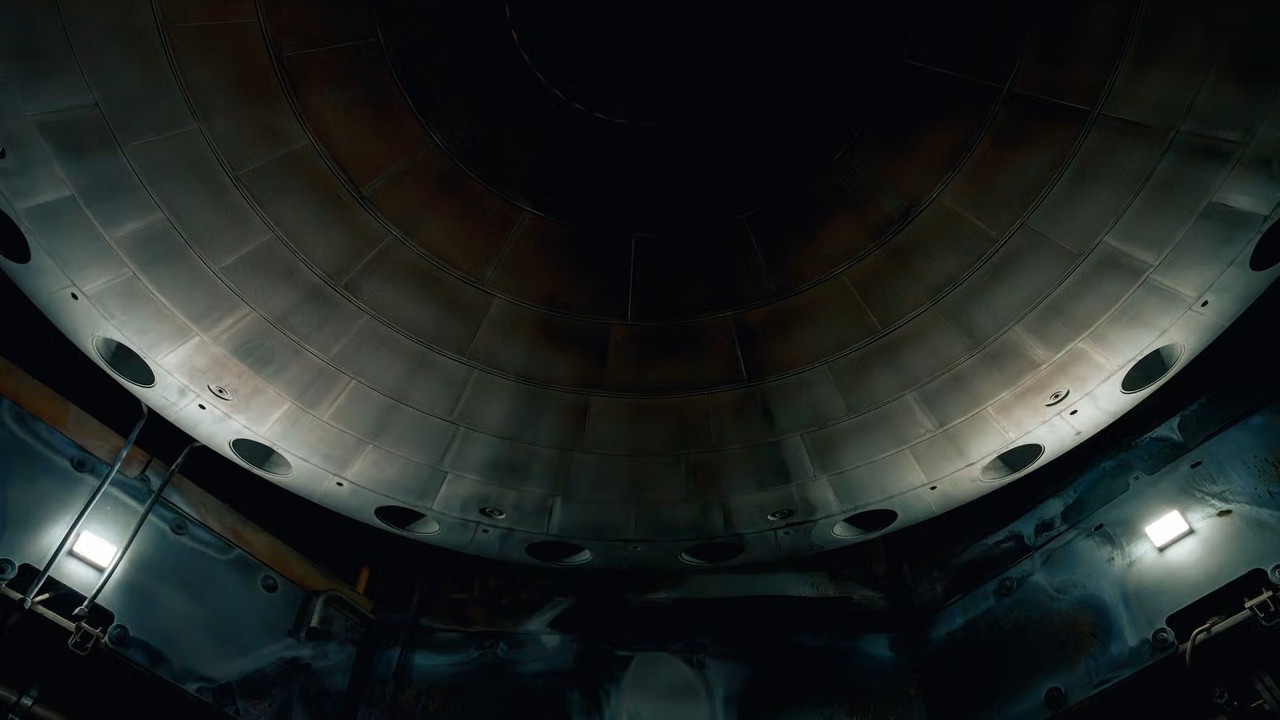
The upper stage of both rockets is the more atypical approach to spacecraft design, compared to other vehicles of the same launch class. The aft end of Nova’s second stage is designed with a heat shield to protect the vehicle during reentry through Earth’s atmosphere. Instead of the ceramic tiles historically used on the heat shields of previous spacecraft, the dome-like structure at the base of Nova’s upper stage is made of metal, which is actively cooled by the liquid hydrogen that fuels the stage’s Andromeda propulsion system.
Rather than a single large, vacuum-optimized engine bell at its center, Nova’s upper stage features 12 small dual-thrust chambers integrated into a circle around the outer edges of the vehicle’s heat shield. Stoke successfully completed a “hopper” test flight of Pathfinder’s upper stage engine system in 2023, flying the vehicle about 30 feet (10 meters) into the air before it safely touched down.
Andromeda upper stage engine and integral re-entry heat shield. (Image credit: Stoke Space)
Scaling up to Block 2, Stoke plans to equip the upper-stage system with independent systems for each of the 12 engines, potentially increasing thrust by over a factor of five, according to the company. Block 2’s upper stage also drops Pathfinder’s tapered design in favor of cylindrical tanks, increasing propellant and payload volume to accommodate a 5-meter-wide (16.4 feet) fairing.
Stoke says the larger Block 2 configuration has been in the works alongside Pathfinder for several years. The company is developing the more powerful rocket to support large commercial and national security satellite constellations, of which there soon may be a high demand.
Nova Block 2’s closest competitors are SpaceX’s Falcon 9 rocket and Rocket Lab’s upcoming Neutron launch vehicle, which is still under development. And Falcon 9 is already being sundowned by SpaceX as the company gets closer to operational flights with its next-generation Starship rocket. While certain Falcon 9 flights for NASA, like crew launches to the International Space Station, are expected to continue until at least 2030, SpaceX CEO Elon Musk has said that Starship’s ultimate success “means winding down Falcon.” The timing should line up with when Stoke hopes to step in with Nova Block 2. Block 2’s first launch is targeted for 2029, with production and flight cadence expected to increase from there.
Nova Pathfinder next to Nova Block 2. (Image credit: Stoke Space)
As Stoke ramps up development for its upgraded launch vehicle, the company’s fresh round of funding will also go toward construction of the physical infrastructure Stoke needs to build, test and eventually operate both vehicles. The company is planning a 475-acre (192 hectares) expansion to its 75-acre (30 hectares) Moses Lake Test Site in Washington to support propulsion and vehicle testing as Pathfinder nears its first launch and Block 2 hardware begins coming online.
Stoke is also expanding its operations at Cape Canaveral Space Force Station (CCSFS) in Florida. The company was selected by the U.S. Space Force in 2023 to manage CCSFS’s Space Launch Complex-14, where it’s now building a new payload processing facility sized to accommodate both vehicles. And to complete its full reusability system, the company is also developing an offshore recovery platform.
Pathfinder has a much shorter timeline to the launch pad. Stoke is targeting early 2027 for Pathfinder’s debut launch, which the company plans to send to orbit with a customer payload. If that’s successful, Stoke hopes to fly multiple Pathfinder missions throughout 2027 and 2028 while Block 2 development and testing continue in parallel.
Once Block 2 does reach the launch pad, Stoke plans to keep Pathfinder in service. “We see value in having more than one way to serve the market, since some missions are particularly well suited to the Pathfinder configuration,” the company said.
On Sept. 8, 2016, the Origins, Spectral Interpretation, Resource Identification, and Security – Regolith Explorer (OSIRIS-REx) mission launched from Cape Canaveral, setting off on its 4.4-billion-mile (2 billion kilometers) journey to asteroid Bennu. About the size of an SUV, the OSIRIS-REx spacecraft carries several cameras, an altimeter used to create maps of Bennu, and anContinue reading "Sept. 8, 2016: OSIRIS-REx launches"
James Van Allen, who was born in Iowa on Sept. 7, 1914, showed talent and interest in science and math from an early age. A major in physics from Wesleyan College in 1935 was followed by a Ph.D. in nuclear physics in 1939. Before and after World War II – during which he developed antiaircraftContinue reading "Sept. 7, 1914: The birth of James Van Allen"
The team, which included researchers from Dartmouth College, said the study builds on earlier theories linking fire and language to the extra hours it added to the day.
However, their findings suggest that the biological changes caused by fire use may have enabled complex language as much as fire-associated behavioral changes, accelerating the evolution of verbal communication away from the ape-like systems still used by modern apes toward more complex, “uniquely human” interactions.
Researchers Wondered if Firelight Reprogrammed the Human Brain
Catherine Hobaiter, a Professor of the School of Psychology and Neuroscience at the University of St Andrews and the lead author of a paper detailing the team’s idea, said she has always been fascinated by the origins of language.
“What was the first word?” the professor asked. “The first story?”
Unfortunately, Professor Hobaiter noted, many questions about the origin of humanity’s complex and diverse forms of verbal communication remain unanswered.
Some earlier research has explored a possible link between the first spoken words and the advent of controlled fire use. However, the team notes that most studies have focused primarily on the extra hours of practical light added to the end of each day.
Curious whether other biological mechanisms also contributed to the evolution of language and complex storytelling behavior, Professor Hobaiter and colleagues examined the effects of sitting around a campfire to see whether the emitted light could reprogram the human brain.
Potential Effects of Red Wavelengths and Flickering Lights
First, the team noted that one potential catalyst emitted by firelight that could help reprogram the human brain for complex language is the color of the light wavelengths emitted by campfires. Specifically, Hobaiter and colleagues noted that campfire light emits almost no blue wavelengths but instead mostly in the visible red spectrum.
Many modern studies have focused on the potentially adverse effects of exposure to blue light wavelengths from modern technology on sleep patterns and overall health. Conversely, the paper’s authors described the red wavelengths emitted from fire as ‘uniquely suited’ for human socializing, “allowing an extension to the day without negatively impacting sleep.”
Another component of firelight the study authors suggest could have reprogrammed the human brain for speech is the way a campfire behaves. Unlike a modern, steady light source, the authors noted that firelight “flickers.”
Hobaiter and colleagues said that neurons in the human brain synchronize firing patterns with external flickering lights. For example, flickering lights in movies and TV shows often come with warnings against possible neurological effects on vulnerable viewers. The research team said this mechanism might also help synchronize the behavior of those seated around the campfire, resulting in a much deeper feeling of connection.
Finally, the researchers noted that firelight emits infrared wavelengths, which may have also contributed to helping firelight reprogram the human brain for complex verbal communication.
Are We the Storytelling Ape?
When discussing the potential impact of their proposal, study co-author Nathaniel Dominy, the Charles Hansen Professor of Anthropology at Dartmouth College, said many of the chemical properties have been well researched. However, Professor Dominy also notes that understanding the properties of light that capture our attention and focus, thereby instilling “harmony and cooperation,” has received far less attention.
“Measuring these features is an exciting part of this project,” the study author added.
Professor Hobaiter agreed, while also noting the conundrum scientists face when explaining why humans speak, when “decades of research with other species has shown us that you don’t need language to learn from each other, to organize where and when to forage, to learn cultural knowledge about tools and songs, to co-ordinate hunting, or navigate social politics.”
“While other species share all these skills, there is a fundamental puzzle: we struggle to find evidence of key differences between human and ape communication,” Professor Hobaiter explained. “And yet, we are surrounded by evidence of human distinctiveness. For all their incredible, rich communication and cultures, no other ape is inventing algebra, writing King Lear, or heading out into interstellar space.”
“So, it’s especially exciting to be able to generate testable predictions, to be able to ask if, at the end of the day, we are the storytelling ape,” the professor added.
Christopher Plain has spent the last six years as Associate News Editor and Head Science Reporter at The Debrief. Follow and connect with him on X, learn about his novels at plainfiction.com, or email him at christopher@thedebrief.org.
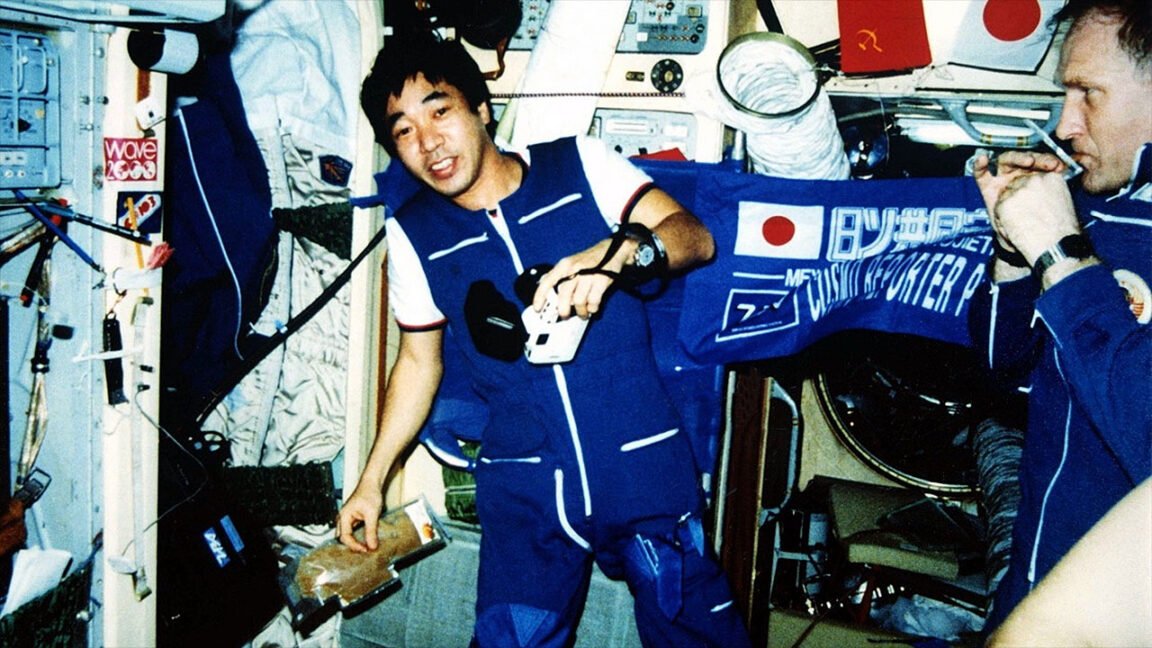
The first Japanese citizen to launch into space, Toyohiro Akiyama was also the first commercially sponsored cosmonaut and the world's first journalist to file reports while on a spaceflight.
Akiyama, 84, died last Wednesday, August 26, of lower gastrointestinal bleeding, news agencies in Japan reported. A funeral was held with his close relatives in attendance.
As a correspondent for the Tokyo Broadcasting System (TBS), Akiyama was chosen out of his 162 fellow employees who applied to fly to space in celebration of the network's 40th anniversary. He trained at the Gagarin Cosmonaut Training Center in Star City, located outside of Moscow, and was assigned to the Soyuz TM-11 crew.
A small piece of material sits nearly motionless in the dark. However, shine lighton it and within seconds it begins to swell at an extraordinary rate. Aim the light differently, and the same material can curl itself into a left-handed helix, reverse into a right-handed one, twist into more complicated shapes, or mimic the vines of a climbing plant.
Then turn the lights off, and the instructions disappear.
Researchers at the University of Science and Technology of China have developed a new photoresponsive hydrogelwhose 3D shape can effectively expand, change, or even be rewritten into an entirely different configuration depending on where light strikes it.
In experiments reported in Nature Communications, the material expanded more than 80,000% within 40 seconds and could be repeatedly programmed into helices, twists, and hybrid structures.
Researchers also used its light-controlled motion to lift objects and drive a miniature rotary system, pointing toward possible applications in smart materials and soft robotics.
“Reconfiguring handedness in synthetic systems with spatiotemporal control and reversible behavior remains a fundamental challenge in bioinspired robotics and materials science,” researchers write. “Here, we demonstrate homogeneous photoactive hydrogels capable of ultrafast, programmable handed shape-morphing, including helices and twists, through spatially controlled light illumination.”
The ability to program the material after it has already been formed makes the breakthrough especially unusual.
Manyshape-changing materialsare manufactured with their future behavior already built into them. Different layers,directional fibers, compositional gradients, and pre-patterned structures determine how they will eventually bend, curl, or twist. Once fabricated, those instructions can be difficult, if not impossible, to change.
The new hydrogel begins as a structurally uniform material, with the asymmetry required for complex motion instead created temporarily by the pattern of incoming light. The key to making that possible is an unusually powerful swelling response.
The researchers incorporated a light-sensitive molecule known as spiropyran into a polymer network. When illuminated, the molecule experiences a chemical change that alters the electrical interactions between portions of the polymer. Attractions that normally help keep the network compact weaken or become repulsive, allowing the chains to spread apart and absorb large amounts of water.
The resulting expansion is dramatic. The researchers measured more than 80,000% volume growth after only 40 seconds of irradiation, a combination of speed and magnitude they say exceeds previously reported photoresponsive hydrogels.
Yet, simply making the hydrogel swell was only part of the experiment.
By controlling where the light hits, the team could make some portions of the material expand faster than others. Illuminating one side of a narrow strip creates a swelling gradient through its thickness. The resulting strain mismatch causes the strip to bend first, then curl into a helix.
Illuminating both sides produces a different internal swelling distribution. Rather than curling in the same manner, the strip buckles and rotates along its length, creating a twisted structure. Those shapes are not locked in place. Once the light is removed, the hydrogel relaxes and can later be programmed again.
The direction of the illumination can even determine the material’s “handedness.” Light arriving from one angle can produce a left-handed helix, while lighting the same strip from the opposite direction produces a right-handed one after the material has relaxed in darkness. Researchers repeatedly switched samples back and forth and found that the material retained its reconfigurability after more than 20 consecutive cycles.
More complicated lighting designs produced even stranger results.
By illuminating separate regions of a longer strip independently, researchers created structures containing multiple forms at once. One section could form a helix while another became a twist. Other patterns produced neighboring helices with opposite handedness or helix-twist-helix combinations, creating shapes reminiscent of the spiraling tendrils plants use to wrap around supports.
That ability to rewrite a material’s geometry also translated into mechanical output.
In one demonstration, a 6 mg strip curled into a spring capable of lifting a 50 mg payload or more than eight times its own weight. Researchers also created a light-controlled underwater switch in which the hydrogel moved two conductors into contact, as well as a tendril-like actuator that encircled another object.
The most elaborate demonstration turned the hydrogel’s twisting motion into locomotion.
Researchers connected a floating propeller to a hydrogel strip that served as a rotating shaft, with a paddle attached below the water. When light caused the hydrogel to twist, the paddle rotated, and the propeller began both spinning and traveling around a circular path. Programming the hydrogel’s handedness allowed the system to produce clockwise or counterclockwise motion.
Potentially, the hydrogel breakthrough could lead to soft robots that change shape or movement depending on the task, light-controlled grippers that wrap around delicate objects, or adaptive components that reconfigure themselves without conventional motors and mechanical parts.
Similar hydrogel materials might eventually serve as tiny switches, valves, pumps, or rotating actuators in conditions where running wires or fitting traditional machinery is difficult. Because the same configuration can be reprogrammed rather than permanently locked into one behavior, it could also open the door to devices that perform several different mechanical functions at different times.
However, for now, the experiments remain laboratory demonstrations. Researchers say the material will need faster response times to compete with some other classes of soft actuators.
Further research might improve the efficiency of its molecular photoswitches and redesign the polymer network so water can move through it more quickly.
Still, the wider concept suggests a different way of thinking about programmable matter. Instead of manufacturing a material with one predetermined set of movements, its instructions could arrive afterward as a pattern of light, then disappear and be replaced whenever a different behavior is needed.
“The core innovation of this work lies in the achievement of precise, reversible regulation of structural handedness in homogeneous hydrogels purely via external optical modulation,” researchers write. “The design principle presented here—reversibly encoding spatiotemporally programmable handedness within a homogeneous network through simple light patterns—establishes a method for creating intelligent, adaptive materials with embedded logic and function.”
The study, “Reconfiguring handed shape-morphing and actuation in hydrogels via light-encoded rapid expansion,” appeared in Nature Communications.
Tim McMillan is a retired law enforcement executive, investigative reporter and co-founder of The Debrief. His writing typically focuses on defense, national security, the Intelligence Community and topics related to psychology. You can follow Tim on Twitter:@LtTimMcMillan. Tim can be reached by email: tim@thedebrief.org or through encrypted email:LtTimMcMillan@protonmail.com
Experiments by Penn State University researchers have shown that enriched white light that includes “invisible” blue and red wavelengths can directly affect a person’s perception of indoor temperature, including making a warm room feel more than one degree Fahrenheit cooler.
In future efforts, the Penn State team said they will explore the effect on different populations and in different environments, including under extreme hot and cold conditions. They also plan to evaluate the potential for incorporating color-enriched white lighting in real-world buildings where it may improve comfort and reduce energy use.
Enriched White Light Theory Builds on Previous Colored Light Discovery
According to a statement announcing the research, some previous studies have demonstrated that colored lighting can influence how hot or cold a room feels. For example, subjects in a previous study rated a room as warmer than it was when exposed to red light. Conversely, subjects described rooms bathed in blue light as feeling cooler.
However, the Penn State team notes, implementing red and blue lighting in most working spaces is impractical. Still, they wondered whether they could use the phenomenon to reduce the perception of heat or cold, thereby lowering energy costs for environmental control systems.
‘‘We wanted to understand whether lighting can widen people’s thermal comfort zone,” explained Penn State professor of architectural engineering and the principal investigator of the published study detailing the team’s findings. Julian Wang. “If it can, even a modest shift in perceived temperature can translate into substantial cumulative energy savings over time.’’
Due to the impracticality of colored lighting, the team explored the possibility of enriching the white light already used in office spaces and classrooms with red or blue wavelengths without affecting visibility
‘‘The novelty of this study is that we used white light that looks identical to the human eye but has a different spectral composition,’’ Wang explained.
Tests Reveal Temperature Perception Effect of Red and Blue Wavelengths
Instead of placing color-enriched white lights in actual offices, the team performed a series of experiments in a controlled indoor environment meant to simulate a typical office cubicle on the Penn State campus.
First, Wang and colleagues recruited five men and five women aged 18 to 35. Next, they placed each participant in the simulated office cubicle at an ambient air temperature of 76°F, then gradually increased and decreased the room’s air temperature in varying cycles.
To evaluate the effect of light on participants’ temperature perception, each subject was exposed to white light enriched with either blue short-wave light or red long-wave light. Critically, the lights appeared identical. Wang said that keeping the light appearance the same “allowed us to evaluate whether the response was driven by the spectral composition of the light, rather than by people’s perception of color.”
Throughout the entire process, the researchers monitored the participants’ thermal sensation and apparent comfort. The researchers also monitored the participants’ behavior.
As in previous studies, the color of the light waves appeared to have an effect even though they were effectively imperceptible to the participants. For example, when the participants were exposed to the blue-enriched white light, the researchers said, “they felt cool enough to tolerate air temperatures about 1.3 F warmer.” Conversely, when the participants were exposed to red-enriched white light, they felt warmer.
When discussing the results, Wang said the most critical point is that subtle color-enrichment differences hidden within ordinary white light can produce effects similar to pure-color lights without adversely affecting the work environment. Such effects could translate into real reductions in energy usage.
From Office Space to Space Habitats
In the future, Wang and colleagues plan to test the effect of color-enriched white light on a more diverse set of volunteers, including across more age groups.
‘‘The next step is to do research in a larger and more diverse population to determine whether these effects extend beyond young adults and could be applied globally,” Wang said.
The Penn State team also plans to investigate the temperature-sensation-altering effects of color-enriched light in combination with other factors, such as sound, window views, and visual patterns. The team said they may also explore the effect of color-enriched light in more extreme conditions to “evaluate how they could be incorporated into real-world buildings to improve comfort while reducing energy use.”
‘‘Our long-term goal is to expand people’s multi-domain interactions, and if successful, this approach could improve comfort and human performance while reducing energy use in buildings, from homes and offices to space habitats,” Wang said, adding that ‘‘this is just one of our starting points.”
Christopher Plain is a Science Fiction and Fantasy novelist and has spent the last six years as Associate News Editor and Head Science Writer at The Debrief. Follow and connect with him on X, learn about his books at plainfiction.com, or email him at christopher@thedebrief.org.
The new version of SuperDuper is a ground-up rewrite, a tip-to-tail reinvention of what SuperDuper looks like, how it works, what it can do, and where I can take it in the future.
[…]
Documents have been retired and replaced with Copy Jobs, which are stored internally and organized by source. If you want to copy Macintosh HD, that’s where you start. Click, and you’re presented with one or more template copy operations, or you can start from scratch.
Configuration is done right inline by clicking bold, underlined link elements and selecting options from pop-ups. The effect of your choices is immediately reflected in What’s going to happen?, ensuring you know what to expect when you click Copy Now.
SuperDuper has been around for 22 years, and I’ve been using it since version 2 in 2006. Shirt Pocket had always been great about keeping the copy engine up-to-date with all the changes in macOS and its increasingly baroque file system structures. But the outward appearance of the app hadn’t changed much, aside from losing the brushed metal, and neither had the feature set. I know all too well how much work it can be as a solo developer just to keep an app working. Ironically, the better you are at adapting to the changing OS, hiding the complexity, and presenting a simple interface, the more it looks like you aren’t doing much. Actually, if you follow Nanian’s blog, you can see a fraction of all the stuff going on under the hood—tricky edge cases, macOS bugs, and undocumented behaviors that must be handled so that you can essentially just press a button and get a proper bootable backup.
Eventually, he found the time to rewrite the app, both the engine (which is faster and more robust) and the user interface (which is greatly expanded). My first reaction was: this is SwiftUI, isn’t it? And it is. You can just tell by the way the text reflows, all the different colored buttons and blobs, the hover effects, and how the design heavily emphasizes scrolling. (Like System Settings, it doesn’t remember scroll positions. Nor does it remember which disclosure triangles are expanded.) The keyboard navigation and focus behavior are off in places. For reasons I don’t understand, SwiftUI gets a lot of this wrong out of the box. In some cases, like the outline view for creating a copy rule, keyboard support was manually added and works as expected. But there are other places where arrow keys and type-selection don’t work. Sometimes I need extra clicks to get the proper focus. Sometimes the arrow keys scroll the window instead of changing the selection.
That said, this is one of the best SwiftUI interfaces I’ve seen. I think it successfully preserves the spirit of the app, making it really easy to configure things and see what’s going to happen, while streamlining the way documents/jobs are managed and expanding what you can do. It’s still essentially one window (plus a Settings with one checkbox), and you can still use it in the old way, but now you can also run multiple jobs at once and inspect their histories.
Click the Preview button and SuperDuper will run the copy without making changes and present you with a report that shows exactly what would have been updated, added, deleted, etc., had this been a real run.
This is great to have. If there are particular folders or files you want to check, you can browse the source tab of the preview to see what’s excluded or find them in the destination tab to see whether they would be added, updated, removed, or kept. The interface to browse this is a sort of columns view with only one column. It’s fast and easy enough to use, but keyboard navigation doesn’t work properly. I longed for it to be an outline view so that I could quickly expand an entire subtree and see at a glance which files would be changed. I also wished that it would show how much data would be copied.
SuperDuper 4 is much faster than before. And I’m not just talking 20% or 30% faster. Smart Updates are between 2x and, with the new Turbo feature, an order of magnitude faster.
It’s hard to benchmark such things, but my general impression is that this is true. The longstanding Smart Update feature copies only the files that have changed. This seems quite a bit faster than before and slightly faster than Carbon Copy Cloner. The new Turbo feature uses the FSEvents log to optimize finding such files. If macOS knows which folders might contain changes, SuperDuper can focus on those and not waste time scanning ones that are identical. When this works, it feels almost impossibly fast. SSD-to-SSD backups of my Mac’s boot drive will take 1–3 minutes instead of more like 20 minutes. This also seems to be faster than Carbon Copy Cloner’s similar Quick Update feature.
Unfortunately, for reasons seemingly out of the app’s control, sometimes Turbo isn’t possible. This can happen if you’ve modified the copy job or if there’s been a huge amount of file system activity since the last backup so that FSEvents doesn’t contain the necessary information. In such cases, SuperDuper will fall back on doing an old-school Smart Update. I found that excluding my destination drive from Spotlight made it much more likely that Turbo would work.
As much as I like Turbo, I don’t end up using it except for the daily scheduled backup of my boot drive to an always-connected SSD. For my other backups, I have multiple destination drives for each source, and I find that the user interface doesn’t scale so well to configuring a separate job for each. That leads to lots of scrolling. So, instead, I use just one job per source and select the destination I want before starting each backup. This counts as editing the job, so it won’t be able to Turbo, but I find that backups to slow spinning hard drives take a long time either way and are dominated by the copying speed rather than the scanning speed.
Successful and failed runs are shown at the bottom of the copy job, with color-coded dots that can be clicked to display details.
This is my favorite bit of interface design in the new version. It very compactly shows you the recent history for that copy job using the same format that’s used for showing the completion status of the most recent run. I can quickly see all the information I usually care about, and you can click a button to see more detailed information if necessary. The downside is that you can’t see as much information at once—or across multiple jobs—as if there were a dedicated log window, and it only shows the most recent 7 runs. But I think this tradeoff is well in keeping with the app’s spirit of making things simple and clear rather than offering every possible option.
The most baffling part of the interface is that after each backup completes or fails it shows an “Apple Intelligence Summary”. Much space is devoted to labeling this and to assuring you that none of your data went into the cloud. I just don’t see what the point of this is. 99+% of the time, my backup either succeeded or failed for a very predictable reason like running out of space. Why do we need AI for this? I trust the AI summary less than I would a hard-coded string from the developer. Perhaps in an obscure situation that the developer didn’t anticipate Apple Intelligence would be able to offer a useful interpretation, but I have yet to see that.
At a technical level, SuperDuper has been split into a “helper” or “server”, which runs the copy, and an interface, which is the part you interact with. That means that, once registered, you can quit the SuperDuper application and your backups will still run. They’ll even run if you log out!
It doesn’t much matter to me that it can back up without launching the app—I like to see its progress—but I appreciate the new architecture for scheduled copies. Schedules are now much better integrated into the app proper rather than being driven through AppleScript.
You can run any number of copies at the same time. If you have four backups you need to do, just click Copy Now for each, and they’ll all run simultaneously.
This is the most important new feature for me. I used to do all my clone backups with SuperDuper. But, over years, my backup needs grew. I now have five main source drives to back up. They are much larger than before, and APFS on spinning hard drives is really slow. Thus, the backups, even with Smart Update, can take a long time. That was a lot to manage with old versions of SuperDuper. Carbon Copy Cloner has long supported multiple simultaneous backups so that I could connect a bunch of destination drives, tell it to start, and when I came back they’d all be done. I didn’t have to be there to wait for each backup to finish and then start the next.
It was just so much easier, so I started using Carbon Copy Cloner for most of my backups. But I still liked SuperDuper and trusted its copy engine, so I continued to use it to do some of the backups of my most important drive (the internal SSD). I think it’s good backup practice to have redundancies, not just in terms of multiple physical drives and storage locations but also for the software creating the backups. Both are quality apps, but it’s possible that there’s a bug or a misconfiguration on my part that might prevent the copying of a file that I need. Why put all my eggs in one basket? Now that SuperDuper also supports multiple simultaneous backups, I’m using it for half the backups of all my drives. On one backup day I’ll do all SuperDuper backups, then the next time I’ll do all Carbon Copy Cloner backups. (I continue to use Time Machine and Arq for additional redundancy.)
If you try this, I strongly recommend writing down which app you used for each destination drive and then doing all future backups to that drive using that same app. And it works better to do the first SuperDuper backup with Erase and Copy rather than trying to Smart Update a Carbon Copy Cloner backup.
There are a variety of reasons for this, but the main one is the different ways that the apps deal with APFS snapshots. Both use snapshots on the source to ensure they’re copying from a consistent state. And both mark completed copies with snapshots on the destination. But the retention of the destination snapshots is very different.
Carbon Copy Cloner can keep them around essentially as long as you have enough free space. It can also prune them out of order, so that you have daily snapshots for the last month and weekly ones going back further. This is managed by the app, though you can also manually delete snapshots yourself using Disk Utility.
SuperDuper’s snapshots are automatically managed by the macOS. I’m personally less fond of this design because in practice the system will choose to clean up old snapshots almost right away. I can’t count on being able to restore from any backup but the most recent. To me, this is a shame because APFS supports multiple snapshots, and there’s plenty of space on the drive to store them, but I can’t use them. It’s just not a design goal of the app.
Again, this ties back to how SuperDuper values simplicity. If it made longer-lived snapshots that weren’t cleaned up automatically, you might get into a situation where you (or another app) wanted to add files to a drive and couldn’t because it seemed to be full. You’d have to understand snapshots or have an app that could delete the SuperDuper snapshots to free up space. Third-party apps aren’t supposed to delete snapshots belonging to other apps, which is why you don’t want to mix SuperDuper and Carbon Copy Cloner on the same destination. If the former needs more space to complete a backup, it won’t be able to purge snapshots created by the latter.
The status information for the backups that are in progress is shown right in the Sources section of the main window. You can see at a glance which drives are being copied and when they’re all estimated to finish. I haven’t found the estimates very accurate, so I’d prefer to see the start time and the percent complete. Flipping between multiple active jobs to check their detailed progress is kind of a chore, but if all you need is the summary information you can close the app and monitor it from the new menu bar icon.
SuperDuper 4 now supports copying to and from any file system the Mac supports. Using a “Photos” drive with both Windows and Mac that’s formatted as exFAT? No problem: you can copy it.
It can also copy individual folders rather than just entire volumes, if you drag them into the sidebar.
I’ve added Shortcuts support, so you can create a shortcut that runs before or after a copy, on success, or on error. Want to send an email on success or failure? Beep when copies are done?
[…]
Not only does SuperDuper let you call a shortcut from a copy—you can create, run, and check on a copy job from a shortcut!
There’s a lot of potential here, and the completion shortcut receives a bunch of JSON describing what happened so that it can make decisions about what to do. On the other hand, I would rather see AppleScript support, as I find Shortcuts confusing and inconvenient. I wish that common completion actions like sending e-mails were built into the app so that they were easier to set up. (You can choose to eject the drive, post a notification, or sleep the Mac without having to write a shortcut.)
In all the years SuperDuper has been on the market, we’ve never charged for updates and never even raised the price. That’s 22 years of free updates.
The Apple Silicon version was a paid upgrade, but you could run SuperDuper 3 in Rosetta with an old license and still get all the features.
Version 4 costs $43.95, with various upgrade discounts based on the purchase date. There’s no discount if you purchased before July 2020, but us old timers got so many years of free updates it was one of the best deals ever in Mac software. Regardless, it’s not a high price for peace of mind. The new version is, I think, a massive improvement, maintaining the spirit of the original while modernizing and expanding it.
I’ve already said that I use both SuperDuper and Carbon Copy Cloner. I think both are excellent—great apps with great customer support. With SuperDuper 4 they’re more similar than in the past, but they remain very different. If you must pick one, I would say that Carbon Copy Cloner is better if you want lots of options and control; if you want persistent snapshots, verification, copying of cloud-only files, or detailed logging; or if you have a very large number of backups. (It does have a Simple Mode, but it’s arguably too simple and limiting.)
SuperDuper is better if you care about bootable backups or want something simple but not too simple. There’s documentation, but you probably won’t need it because so much is explained within the app’s interface. It’s just really easy to set up a backup, see what it’s going to do, see what it’s currently doing, and see what it did before. Pretty much everything happens in a single window, without tabs or separate modes. SuperDuper is all about striking a good balance for most people, doing the right thing with a minimum of fuss.
Update (2026-08-14): The developer wrote in to say that SuperDuper does try to remember the scroll position in the main window, just not across launches. With the current version, 4.0.2, I find that this mostly works but that it gets thrown off if I’ve expanded any of the triangles to see more details about the currently running job. Then my carefully positioned view will be shifted a bit when I come back to it. It’s hard to get this exactly right.
He also had a great tip about a hidden feature that can relieve some of the scrolling issues I encountered: you can click multiple times on a drive in the list of sources to have it jump to the next active job for that drive, scrolling it to exactly the right spot. When the sidebar has keyboard focus, you can also do this by pressing the Spacebar.
For a little while now, Low End Mac has maintained a small freeware/abandonware software repository to share with our readers and help get the most out of your Mac, where it makes the most sense for you. Intro Part of what makes any depreciating computer platform fun to play with (as well as usable) […]
At NAB 2026, Russell Pompea, Account Executive from Topaz Labs, discusses major advances in Topaz Video, including Starlight Precise 2.5 for restoring low-quality footage, SDR-to-HDR conversion, and Apple Silicon optimization. The conversation also covers Topaz’s photography tools, model customization, subscription pricing, local vs. cloud processing, and shared responsibility for cloud security.
From NAB in Las Vegas, Dan May, President of Blackmagic Design, talks about DaVinci Resolve 21, local AI tools, the new photo page, Blackmagic Cloud collaboration, Fairlight Live, and the free Blackmagic Camera app. The conversation highlights Blackmagic Design's focus on accessible professional tools and creator growth paths.
Rocket launches this week On Tuesday, Aug. 18, Chinese aerospace firm LandSpace is targeting 7:35 p.m. EDT for the second flight of its Zhuque-3 rocket from the Jiuquan Satellite Launch Center in China, according to tracking from Next Spaceflight. The launch was scrubbed last week after a Long March 7A rocket exploded hours before Zhuque-3’sContinue reading "More Starlink satellites and two big launches for China"
If a satellite’s velocity increases as it approaches a planet during a slingshot maneuver, why does it not decrease by the same amount when it leaves the planet? How can it experience a net gain in velocity? Robert WaltyStephens City, Virginia Slingshot maneuvers can seem counterintuitive. We know that a spacecraft speeds up as itContinue reading "How do slingshot maneuvers work to propel spacecraft?"
A alternativa permite, por exemplo, checar os status de um determinado contato, ou habilitar que ele veja determinadas informações do seu perfil (como o seu ícone ou o campo de recado) caso a visibilidade esteja restrita à sua lista de contatos — coisas que só eram possíveis antes ao salvar seu número de telefone.
WhatsApp launches a username field for new contacts, compatible with Status Sharing!
On Android and iOS, WhatsApp has introduced a new field for the contact creation screen that lets users save a contact's username alongside their name.https://t.co/5hSI6SUrs0pic.twitter.com/InGkJzgI7W
O WhatsApp lançou um campo de nome de usuário para novos contatos, compatível com o Compartilhamento de Status.
No Android e no iOS, o WhatsApp introduziu um novo campo na tela de criação de contato que permite aos usuários salvar o nome de usuário do contato junto do seu nome.
O novo campo está disponível tanto no iOS quanto no Android na tela já conhecida do público para adicionar novos contatos (ela pode ser acessada tocando no botão “+”, na seção “Conversas”, e depois selecionando a opção “Novo contato”).
Embora ainda não haja uma previsão oficial quanto à disponibilidade geral da novidade, o campo já foi notado por algumas pessoas que instalaram a versão mais recente do WhatsApp na App Store e pelos usuários da versão beta (via TestFlight).
Saudações de boas-vindas em grupos chegando ao iOS
Já presente na versão beta para Android, o mensageiro da Meta está testando no iOS um recurso que permite aos administradores de um grupo enviar uma mensagem automatizada de saudação para cada novo membro que integra a conversa coletiva.
O WhatsApp identifica a mensagem com um balão que inclui o texto “saudação automática”, e ela não poderá ser vista pelo restante do grupo (embora o usuário possa interagir com o recado).
WhatsApp is testing greeting messages for group chats on iOS!
Mesmo que um grupo tenha vários administradores, haverá apenas uma mensagem de boas-vindas para todo o grupo. Todos os administradores compartilharão o mesmo texto e qualquer um deles poderá editá-lo.
Ainda em desenvolvimento, a ferramenta não foi sequer disponibilizada para testadores do app, embora tenha sido notada na versão 26.31.10.73 beta.
Rocket launches this week On Monday, Aug. 10, a Long March 7A rocket carrying an undisclosed payload broke apart roughly one minute and 27 seconds after lifting off from Wenchang Space Launch Site at 8:02 a.m. EST. Footage from online livestreams captured the failure in real time; Chinese state media had not released any informationContinue reading "A Long March 7A failure opens a week of Starlink launches"
 Login
Login