Cameras in airline seatback screens and increasingly sophisticated driver-monitoring systems spark a debate over safety, privacy, data access, and surveillance. The MacVoices Live! panel examines EU vehicle requirements, Tesla interior cameras, dash cams, accident evidence, connected devices, and whether consumers receive enough disclosure and control over technologies designed to watch them. Panel members include: Chuck […]
Several tech stories kick off this session, including RAID software compatibility warnings, Bending Spoons’ IPO, foreign influence campaigns around data centers, and Fox’s reported Roku purchase. Chuck Joiner, David Ginsburg, Jim Rea, Marty Jencius, Web Bixby, Jeff Gamet, and Eric Bolden focus heavily on streaming control, smart TV data collection, Apple TV’s future, Spotify’s removal of fake drug-related podcasts, and the rapid growth of AI majors in higher education.
The MacVoices Live! panel explores Pope Leo’s comments on AI ethics, technology regulation, environmental costs, labor disruption, and the need for moral guardrails without stopping innovation. Chuck Joiner, David Giinsburg, Jeff Gamet, Brian Flanigan-Arthurs, Jim Rea, Eric Bolden, Marty Jencius, and Web Bixby compare today’s AI concerns to earlier industrial upheaval, then shifts to Kansas City’s school technology plan involving MacBook Neo systems and iPads, with debate over deployment, education value, and implementation challenges.
Rivian’s rejection of CarPlay and physical buttons in favor of voice and AI control sees to question safety, convenience, data control, and long-term car software support. Chuck Joiner, David Ginsburg, Jeff Gamet, Guy Serle, Web Bixby, Eric Bolden, Marty Jencius, and Jim Rea question whether Rivian has other motives, and then dive into Tesla updates, AI voice recreation of Stan Lee, Spider-Man ticket promotions, Dashlane concerns, and Andy Ihnatko’s new site.
In the CYME booth at NAB in Las Vegas, Matthieu Kopp, Chief Technology Officer, previews the next Peakto release, highlighting support for much larger media libraries, expanded collaboration, guest sharing, and secure on-premise access without cloud uploads. He also discusses other features such as new culling tools, improved ingest control, subclips for video workflows, and […]
The Met Office has quietly axed its dedicated wind and storms chapter from its annual climate report – just as decades of data show UK wind speeds are falling. Funny that, says the Daily Sceptic's Environment Editor.
Apple Health data can now move between the Health app and Google Health on an iPhone. The connection lets Google Health import supported information recorded by an iPhone, Apple Watch, and compatible apps. The latest Google Health update can also send supported Fitbit information to Apple Health.
This two-way connection is useful for people who wear a Fitbit but prefer Apple’s Health app as the central place for viewing activity, sleep, steps, and other wellness information. It also reduces the need for third-party synchronization apps.
The feature requires a recent version of Google Health. Google began introducing support for sending data back to Apple Health with Google Health version 5.05. Because app updates can roll out gradually, the new sharing options may not appear until the latest version reaches your account.
Update Google Health Before Starting
The Fitbit app became Google Health in 2026. Existing Fitbit users should find that the installed app has changed its name and design after updating. Fitbit accounts must also be moved to an adult Google Account to use the redesigned service.
Google says the Apple Health connection requires iOS 16.4 or later. The iPhone must have internet access while the connection is being created.
To check the iOS version installed on your iPhone:
Settings > General > About > iOS Version
Install the latest compatible iOS update if the phone is running an older release.
To look for an available iPhone software update:
Settings > General > Software Update
Next, confirm that Google Health is current. Version 5.05 or later is required for the newer option that sends supported Google Health and Fitbit information to Apple Health.
To update Google Health from the App Store:
App Store > Profile Picture > Available Updates > Google Health > Update
If Google Health does not appear under Available Updates, search for the app manually. The App Store page may show an Update button if a newer release is available.
To find the app directly:
App Store > Search > Enter Google Health > Google Health (Fitbit)
People who previously used Fitbit should sign in with the Google Account connected to their Fitbit information. Creating a different account may produce an empty Google Health profile.
Image Credit: Google
Connect Apple Health Data to Google Health
Connecting the apps allows Google Health to read supported information from Apple Health. This can include data collected by the iPhone, Apple Watch, and other apps that already share information with Apple Health.
To start the Apple Health connection:
Google Health > Connections > Apps and Services > Apple Health > Get Started
Depending on the Google Health version and interface shown on the iPhone, Connections may appear behind the profile icon.
To find Apple Health through the alternative menu:
Google Health > Profile Icon > Partner Apps > Apple Health
Google Health will display a consent screen explaining the connection. Read the information before continuing.
To approve the initial connection:
Sync Google Health With Apple Health > Agree
The iPhone will then display Apple’s health permission screen. This screen lets you decide which information Google Health can read.
To give Google Health access to every supported category:
Apple Health Permission Screen > Turn All Categories On > Allow
You do not have to share every available category. Selecting individual permissions provides more control over sensitive health information.
To share only selected categories:
Apple Health Permission Screen > Select Each Health Category > Allow
Google Health can import supported information such as steps, distance, active energy, exercise records, routes, sleep sessions, sleep stages, heart rate, resting heart rate, heart rate variability, blood oxygen, respiratory rate, body temperature, weight, body fat percentage, water, nutrition information, and some cycle-tracking data.
Available categories depend on the devices and apps connected to Apple Health. An iPhone may provide steps and walking information, while an Apple Watch can contribute heart rate, workouts, sleep, and other measurements supported by the model.
After the permissions are approved, Google Health should confirm that the connection is complete.
To finish the connection:
Google Health Confirmation Screen > Done
New Apple Health information should begin appearing automatically in Google Health. Google has said that imported data can be used across relevant Google Health metrics, although not every external data type is used for every calculation.
To find imported health information:
Google Health > Health > Select a Metric
Google Health may display information from several connected sources together. Its value for a metric can differ slightly from the number shown by Apple Health because the apps may process available data differently.
Send Fitbit Data to Apple Health
Google Health version 5.05 adds the reverse direction that many iPhone and Fitbit users previously lacked. Supported information recorded through Fitbit can now be written into Apple Health.
Before enabling this option, make sure the Fitbit is properly connected to Google Health. Fitbit devices normally synchronize automatically throughout the day when Bluetooth is available and the wearable is near the iPhone.
To check the connected Fitbit:
Google Health > Profile Icon > Devices > Select Your Fitbit
The device page should show the wearable, its battery level, and its most recent synchronization time. Opening Google Health can also prompt a nearby Fitbit to transfer recently collected information.
Once the wearable is updating Google Health correctly, open the Apple Health connection settings.
To open the sharing controls for Apple Health:
Google Health > Profile Icon > Partner Apps > Apple Health
The interface may use Apps and Services instead of Partner Apps on some versions.
To reach the same connection through Apps and Services:
Google Health > Connections > Apps and Services > Apple Health
Follow the prompts for sharing Google Health information with Apple Health. The iPhone may display separate permissions for data that Google Health can read and data that it can write.
To allow supported Fitbit information to appear in Apple Health:
Apple Health Permission Screen > Allow Google Health to Write > Select Health Categories > Allow
Google says supported information can include exercise records, steps, sleep, vitals, and other health data. The exact selection can vary according to the Fitbit model, region, Google Health version, and information stored in the account.
Selecting every category is convenient, but it can create overlapping sources when an iPhone, Apple Watch, and Fitbit record the same type of activity. Choose only the categories you want Google Health to add.
A person who uses a Fitbit mainly for sleep, for example, can allow sleep information while leaving steps disabled. Someone who wears a Fitbit instead of an Apple Watch may prefer to enable steps, workouts, heart rate, sleep, and other supported categories.
Image Credit: AppleMagazine
Check Google Health Permissions
Apple Health keeps permission controls on the iPhone. You can change them after the first connection without deleting either app.
To review Google Health access from Apple Health:
Health > Profile Picture > Privacy > Apps > Google Health
The page shows the categories Google Health is permitted to read or update. Turn off any category you no longer want to share.
Some iOS versions provide the same controls through the Sharing tab.
To find Google Health through the Sharing tab:
Health > Sharing > Apps and Services > Google Health
Turning off a permission stops future sharing for that category. It does not necessarily remove information that has already been written to Google Health or Apple Health.
The Google Health app also provides controls for the connection.
To review Apple Health inside Google Health:
Google Health > Connections > Apps and Services > Connected > Apple Health
If Google Health displays a message that new data types are available, open the connection and approve the additional categories you want to use. Newly supported information is not automatically shared without permission.
Manage Duplicate Health Information
An iPhone, Apple Watch, and Fitbit can record similar information at the same time. Apple Health keeps each source attached to its data and uses a priority order when presenting combined measurements.
You can inspect the sources contributing to a category and choose which one Apple Health should prefer.
To review the sources used for step information:
Health > Search > Activity > Steps > Data Sources and Access
The screen shows the apps and devices that provide step records. If Google Health, an Apple Watch, and the iPhone all appear, you can adjust their priority.
To change the order of step sources:
Health > Search > Activity > Steps > Data Sources and Access > Edit > Drag Sources Into the Preferred Order > Done
Move the source you trust most toward the top. Apple Health generally gives higher priority to sources placed above others when similar records overlap.
Repeat the same process for other categories if their totals do not look right. Exercise, sleep, active energy, and distance can each have their own sources and permissions.
Image Credit: Google
Fix Missing or Delayed Data
Synchronization is not always immediate. A Fitbit first sends its information to Google Health, and Google Health then writes supported records to Apple Health. Bluetooth availability, Background App Refresh, internet access, and battery-saving behavior can affect this process.
Begin by opening Google Health with the Fitbit close to the iPhone. Wait for the device to complete its normal synchronization before checking Apple Health.
If Apple Health information is missing from Google Health, confirm that the connection remains active.
To check the connection status:
Google Health > Connections > Apps and Services > Apple Health
If Google Health displays an error or a request for new permissions, follow the message shown on the screen.
Background App Refresh can help Google Health update when the app is not open.
To allow Google Health to refresh in the background:
Settings > General > Background App Refresh > Google Health > On
Bluetooth must remain available for a Fitbit to communicate with the iPhone.
To confirm that Bluetooth is enabled:
Settings > Bluetooth > Bluetooth On
If the connection continues to fail, disconnecting and reconnecting Apple Health may restore the permission request.
To disconnect Apple Health from Google Health:
Google Health > Connections > Apps and Services > Apple Health > Disconnect > Confirm Disconnect
Disconnecting the service does not automatically remove every permission already stored by Apple Health. Review the Google Health entry in the Health app if you want to remove those permissions as well.
To remove the remaining Apple Health permissions:
Health > Profile Picture > Privacy > Apps > Google Health > Turn Off All
After reconnecting the apps, allow time for new records to appear. Previously stored information may not transfer in exactly the same way as activity recorded after the connection was enabled.
You can inspect an individual entry to confirm whether it came from Google Health, a Fitbit, an Apple Watch, or the iPhone.
To check the source and time of a synced record:
Health > Search > Select a Health Category > Show All Data > Select the Latest Entry
Apple lawsuit against OpenAI has reached its first major procedural challenge, with the ChatGPT developer asking a US federal judge to dismiss allegations that it acquired or used trade secrets taken by former Apple employees.
OpenAI submitted its 31-page dismissal motion on Wednesday in the US District Court for the Northern District of California. The filing argues that Apple has not adequately identified protectable trade secrets or alleged facts showing that OpenAI misappropriated confidential information.
Apple filed the case on July 10 against OpenAI, its io Products hardware operation, former Apple Vice President Tang Yew Tan, and former electrical engineer Chang Liu. The complaint accuses the defendants of obtaining information connected to Apple’s product development, manufacturing, components, testing, and supply chain operations.
The allegations have not been proven, and OpenAI denies possessing or seeking Apple’s trade secrets. US District Judge Edward Davila must now decide whether Apple’s complaint contains enough factual detail for the litigation to continue.
OpenAI Challenges the Apple Lawsuit
OpenAI’s motion focuses initially on how Apple described the information it claims was stolen. According to OpenAI, the complaint relies on generalized product-development categories without identifying the protected information with enough precision.
Trade secret plaintiffs face a difficult balance at the beginning of litigation. Apple must describe the protected material sufficiently to establish a plausible legal claim, but revealing the material publicly could expose the same information it is trying to protect.
Sensitive details can later be handled under seal or through a protective order. At the dismissal stage, however, Apple must still provide enough information for the court to distinguish genuine trade secrets from general engineering knowledge, employee experience, or skills acquired through years of work.
OpenAI argues that Apple has not crossed that threshold. Its motion says the complaint fails to establish ownership of a protectable trade secret and does not plausibly allege that OpenAI acquired, disclosed, or used such information.
The filing also disputes the commercial premise behind Apple’s accusations. OpenAI says it is developing products that are different from Apple’s hardware and has no need or desire to use the iPhone maker’s confidential material.
That position does not settle whether information was taken. A company can potentially misappropriate trade secrets even when its eventual product has a different design. The court’s immediate task is narrower: determining whether Apple has alleged facts that could support its claims if those facts are later proven.
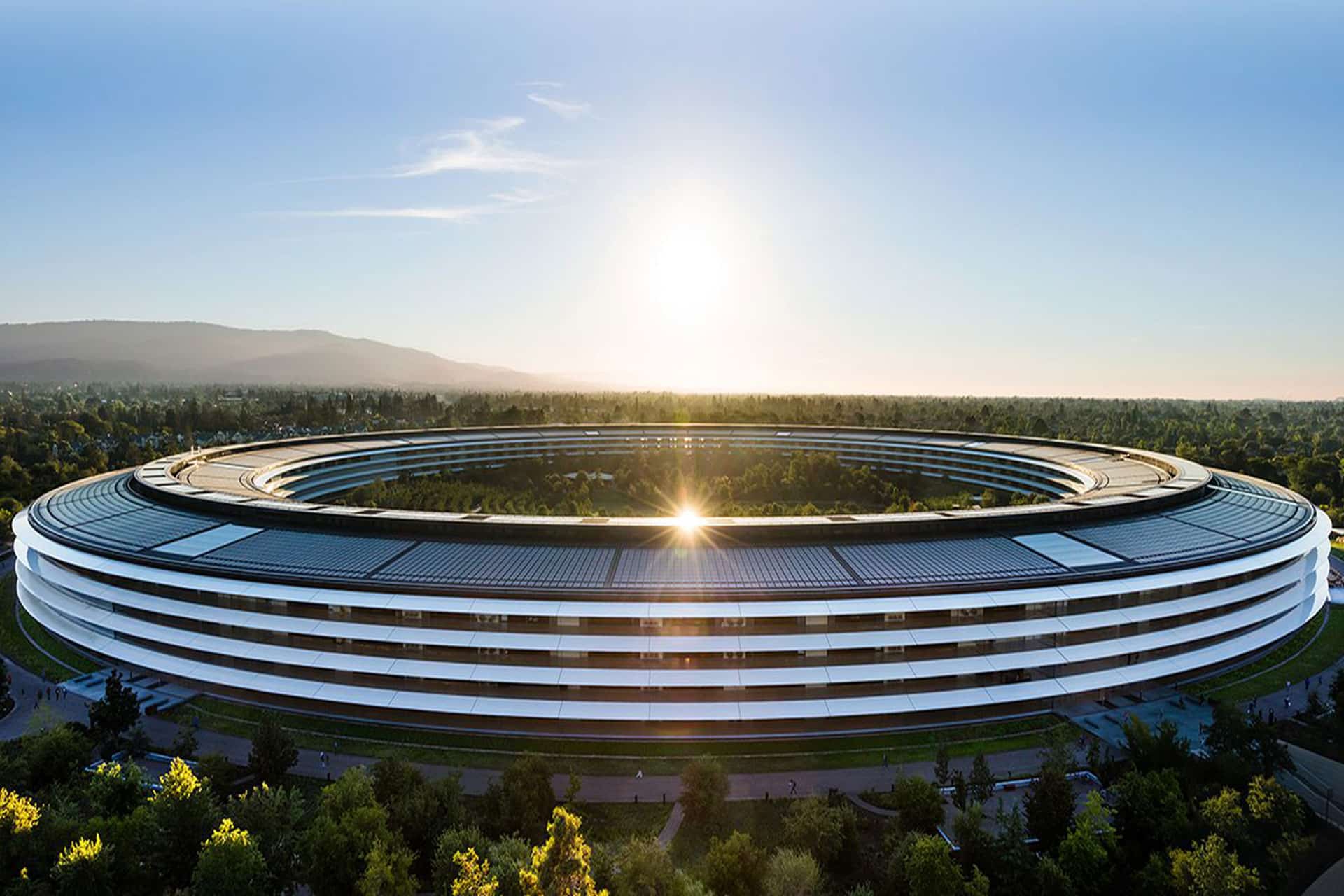
Apple Park | Image Source: Google
Disputed Access to Apple Information
Apple’s complaint centers partly on Chang Liu, who spent eight years working as a senior system electrical engineer at the company before joining OpenAI in January 2026.
Apple alleges that Liu retained an Apple-issued computer and accessed confidential technical information after leaving. It claims he exploited residual authentication access on multiple occasions to obtain internal documents while already working for OpenAI.
OpenAI presents a different explanation. It says Apple employees contacted Liu after his departure and asked him to help locate files needed for ongoing Apple work. The company published redacted messages that it says support this account.
OpenAI argues that Apple’s systems and policies allowed personal and corporate information to become intermingled through iCloud accounts. Former employees, it says, could retain access to Apple files without requesting it or realizing that access remained active.
The motion maintains that Apple cannot treat the foreseeable effects of its own access-management practices as proof that former employees intentionally stole data. Apple, in contrast, alleges that its records document repeated access to restricted information rather than an accidental discovery of lingering permissions.
These competing accounts are likely to become central if the case enters discovery. Authentication logs, downloaded files, device records, internal communications, and employment timelines could establish whether access was deliberate, what information was obtained, and whether it reached anyone working on OpenAI products.
A dismissal motion normally tests whether the complaint states a legally sufficient claim. It is not a trial, and the judge is not expected to resolve every factual disagreement using competing evidence at this point.
Tang Tan and OpenAI’s Hardware Team
Apple separately accuses Tang Tan, OpenAI’s chief hardware officer, of seeking confidential information from Apple employees during recruiting conversations.
Tan spent more than 24 years at Apple and worked on products including the iPhone, Apple Watch, AirPods, and iPod. He later helped establish io Products with former Apple design chief Jony Ive and other collaborators. OpenAI acquired the hardware company as part of its effort to create a family of devices built around artificial intelligence.
Apple alleges that Tan used confidential project names, retained internal materials, and encouraged job candidates to discuss unreleased components or bring physical parts to interviews. OpenAI rejects the claim that these interactions formed a coordinated effort to collect Apple secrets.
OpenAI says Tan repeatedly instructed employees that confidential information from previous employers could not be brought into its organization. It also offers an alternative explanation for an Apple offboarding document found in his possession, arguing that Tan retained it to help incoming employees comply with Apple’s departure procedures.
Apple’s position is that the document and recruiting communications must be examined alongside the other alleged conduct. It describes the events as part of a connected campaign rather than isolated employment or administrative issues.
The dispute comes during intense competition for engineers capable of developing consumer AI hardware. Apple alleges that more than 400 former employees have moved to OpenAI, although hiring people from a competitor does not by itself establish trade secret misappropriation.
A company must generally connect recruitment to the acquisition, disclosure, or use of protected information. OpenAI is relying heavily on that distinction, presenting Apple’s lawsuit as an attempt to respond to employee departures and its difficulties competing for AI talent.
Image Credit: Getty Images
Apple Seeks Immediate Restrictions
OpenAI’s dismissal request arrives shortly after Apple asked the court for a preliminary injunction. Apple wants restrictions imposed while the lawsuit proceeds, arguing that it could suffer harm if its confidential information is used during OpenAI’s hardware development.
The requested relief would prevent OpenAI and the individual defendants from acquiring, accessing, using, or disclosing the alleged trade secrets. Apple has also requested expedited discovery and forensic examination of relevant devices and accounts.
OpenAI says those restrictions are unnecessary because it does not possess or want Apple’s protected information. It has described Apple’s request as based on false information and has offered to cooperate in addressing specific concerns.
The two companies also disagree over their communications before the lawsuit. Apple initially said its concerns had been raised with OpenAI months earlier. OpenAI responded that Apple’s outside lawyers contacted the wrong person after confusing names and incorrectly described a conversation with OpenAI’s general counsel.
OpenAI says Apple did not present the specific accusations before filing the case and that the companies had previously discussed resolving any access issues. Apple has since provided additional information in support of its injunction request, including allegations involving other former employees.
These disputes have moved beyond ordinary court filings. OpenAI published messages and emails on its website to support its version of events, calling Apple’s lawsuit aggressive and poorly investigated. Apple has primarily presented its account through formal legal submissions.
Judge Davila could dismiss some or all of Apple’s claims, deny the motion, or allow Apple to amend its complaint with more specific allegations. Even a dismissal would not necessarily end the case if permission to revise the complaint is granted.
The next scheduled public test is an October 1 hearing covering Apple’s preliminary injunction and request for early discovery. That proceeding may determine whether OpenAI faces immediate limits on its hardware work before the underlying trade secret claims receive a full evidentiary review.
Apple Intelligence files can occupy several gigabytes of Mac storage because locally downloaded models power text generation, summaries, image creation, Siri requests, and other on-device features. Removing these files can recover valuable space when Apple Intelligence is no longer needed.
Apple lists 7GB of available device storage among the requirements for Apple Intelligence, but the amount displayed on a Mac can be higher. Additional languages, image-generation resources, updated models, and temporary assets can increase the total over time.
The files are managed by macOS and do not appear as ordinary documents that can be moved to the Trash. Apple provides a supported removal method through System Settings: turning off Apple Intelligence causes macOS to remove the downloaded on-device models.
This also disables features that depend on Apple Intelligence. Writing Tools, summaries, Image Playground, Genmoji, intelligent Shortcuts actions, and Apple Intelligence functions inside Siri may become unavailable. Regular Mac applications and the rest of macOS continue working normally.
Check Apple Intelligence Files on Your Mac
Recording the available storage before removing the files makes it easier to confirm how much space macOS recovered afterward.
To see the current storage allocation:
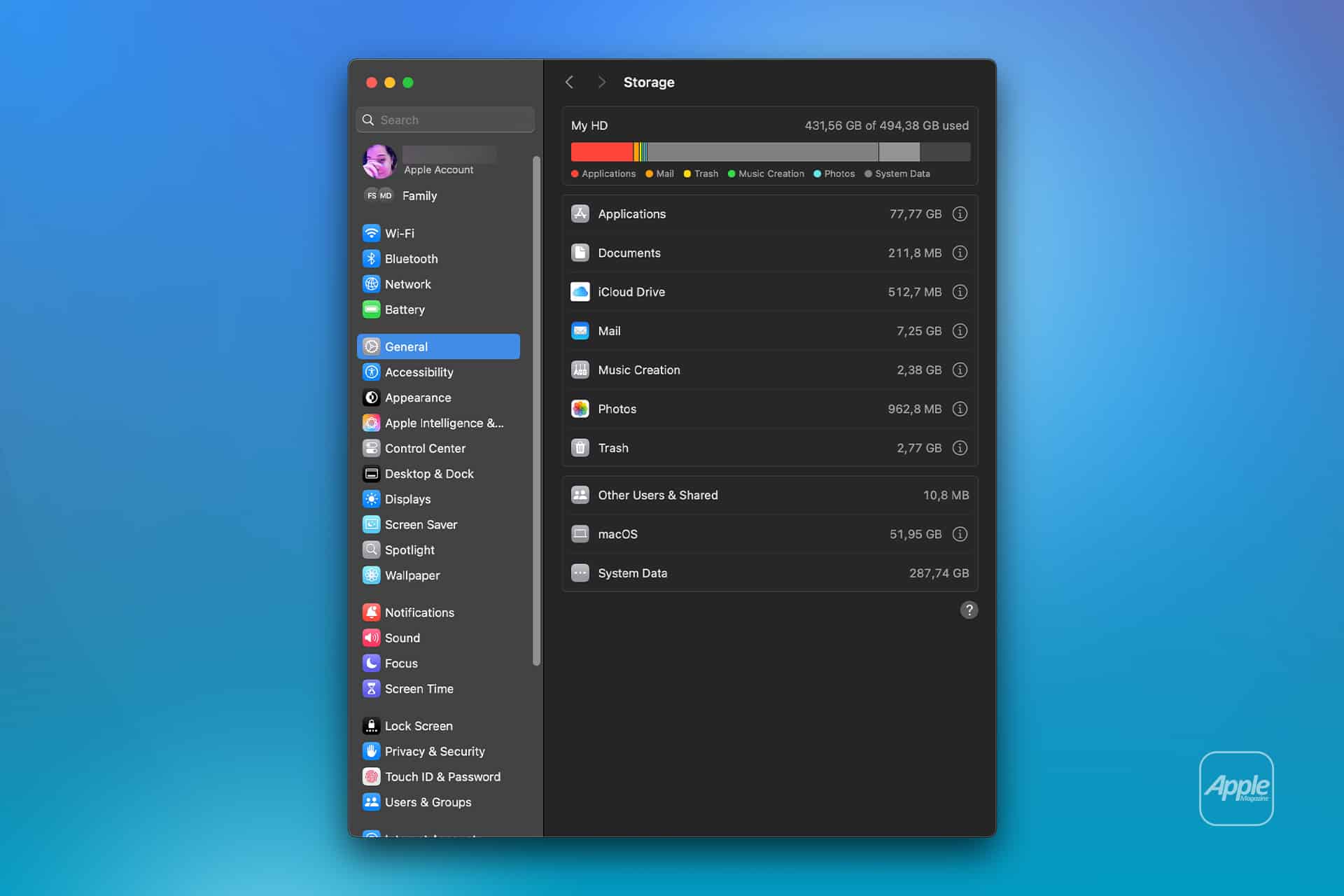
Apple menu > System Settings > General > Storage
Allow the Storage page to finish calculating its categories. The process may take a moment when the Mac contains many applications, local files, connected volumes, or several user accounts.
Apple Intelligence may appear as a separate item within the macOS storage category. Depending on the installed macOS version, some related assets may instead be counted under macOS or System Data.
Note the amount of available storage displayed near the storage graph. Comparing the total free space before and after the procedure is usually more reliable than watching one category because macOS can reclassify system-managed files while deleting them.
To inspect the complete internal storage container:
Apple menu > System Settings > General > Storage > All Volumes
This view is useful when the internal drive contains several APFS volumes sharing the same physical storage. The available capacity belongs to the shared container rather than remaining permanently assigned to one volume.
The storage used by Apple Intelligence is different from the memory, or RAM, used while features are running. Closing applications may reduce RAM consumption, but it does not delete the models stored on the internal SSD.
Image Credit: AppleMagazine
Remove Local Apple Intelligence Files
Apple Intelligence is available on compatible Macs with Apple silicon. Intel-based Macs do not support the complete Apple Intelligence system and should not contain the same downloadable model collection.
To turn off Apple Intelligence and request the removal of its on-device models:
Apple menu > System Settings > Apple Intelligence & Siri > Turn off Apple Intelligence > Turn Off Apple Intelligence
The second Turn Off Apple Intelligence command confirms the change. The exact appearance may vary between macOS versions, with the first control presented as either a switch or a button.
Apple says that turning off Apple Intelligence removes the on-device models. There is no separate model manager, Delete Models button, or supported Finder location from which users must remove the files manually.
Keep the Mac connected to power while macOS completes its background storage work. The Apple Intelligence setting changes immediately, but the Storage page may not display the recovered capacity at once.
macOS manages these models through its system asset service. The operating system must identify the associated packages, release them, and recalculate the storage categories. The process can therefore continue after the Apple Intelligence switch has already moved to the off position.
Turning off only individual features does not remove the complete model collection. Disabling notification summaries, Writing Tools, ChatGPT access, or Siri suggestions leaves Apple Intelligence itself active.
A Screen Time restriction also serves a different purpose. It can prevent access to image generation, Writing Tools, and other functions without turning off the underlying intelligence system. Use the Apple Intelligence control inside Apple Intelligence & Siri when the objective is recovering storage.
Confirm That the Space Was Recovered
After macOS has had time to process the removal, return to the Storage page.
To check the available capacity again:
Apple menu > System Settings > General > Storage
Wait for the storage graph and categories to finish updating. Compare the new amount of available space with the figure recorded before Apple Intelligence was turned off.
The Apple Intelligence entry may disappear completely, display a smaller amount, or become part of an adjusted macOS or System Data category. The increase in total available storage provides the better indication that the local models were removed.
If the figures have not changed, restart the Mac to refresh its system services and storage calculation.
To restart macOS:
Apple menu > Restart > Restart
Sign back in, allow the Mac to remain idle for a while, and open the Storage page again.
Apple menu > System Settings > General > Storage
Restarting does not delete the models by itself. Apple Intelligence must remain disabled while macOS completes the removal.
Emptying the Trash is not part of this procedure because macOS does not place Apple Intelligence models there. The Trash affects only files that a user or application has already marked for deletion.
Image Credit: Apple Inc.
What to Do When the Files Remain
First, verify that the complete Apple Intelligence system is off rather than one related feature.
To confirm its status:
Apple menu > System Settings > Apple Intelligence & Siri > Apple Intelligence
The control should display Apple Intelligence as disabled. If macOS presents another confirmation request, complete it and leave the feature off.
Storage information can take time to settle because macOS also manages caches, local snapshots, temporary update packages, and purgeable files. These categories can change while the Mac is idle, making an immediate before-and-after comparison misleading.
Installing the latest stable macOS update can correct storage reporting or asset-management problems.
To check for an available update:
Apple menu > System Settings > General > Software Update
Save current work before installing an update. The Mac may need to restart, and the installation temporarily requires additional free storage.
Beta versions of macOS require extra caution. Development releases may download experimental models, retain previous model revisions, or temporarily change the Apple Intelligence controls. A procedure confirmed for the public version of macOS may not produce the same storage behavior in a beta.
Avoid following online instructions that require starting in macOS Recovery, disabling System Integrity Protection, mounting protected volumes, and deleting folders with names referring to MobileAsset or generative models.
System Integrity Protection prevents applications and administrator accounts from modifying protected parts of macOS. Disabling it weakens that protection and creates the possibility of deleting the wrong asset, leaving macOS with an incomplete model installation, or causing the system database to disagree with the files present on the drive.
A storage utility can help identify how much space system files occupy, but it should not require disabling macOS security to remove Apple Intelligence. If the documented switch leaves a large allocation after a restart and sufficient processing time, Apple Support can investigate the asset database without exposing the Mac to an unsupported system modification.
Turning Apple Intelligence on again reverses the storage saving.
To restore its features:
Apple menu > System Settings > Apple Intelligence & Siri > Turn On Apple Intelligence
The Mac will download the required local models again. Apple recommends leaving the device connected to Wi-Fi and power while the model download completes.
SAN FRANCISCO – The National Oceanic and Atmospheric Administration will continue to evaluate data from Spire Global’s Hyperspectral Microwave Sounder (HyMS) under a $3 million contract extension announced Aug. 4. […]
De acordo com uma reportagem da Bloomberg, a Apple dará o pontapé inicial nos preparativos para o evento especial de lançamento dos próximos iPhones com um sorteio interno entre funcionários de suas Apple Stores, com o objetivo de selecionar quais deles trabalharão presencialmente lá no Apple Park durante o grande dia.
Como trata-se de um número limitado de vagas (que certamente são bem disputadas), a empresa abriu inscrições para funcionários interessados até o dia 8 de agosto, e notificará os selecionados até o dia 17 do mesmo mês, segundo um memorando ao qual o veículo teve acesso.
Para se inscrever, os candidatos também não podem ter participado da WWDC26 e nem do evento especial de lançamento dos iPhones em setembro do ano passado — o que garante uma maior rotatividade nos funcionários selecionados para esses eventos.
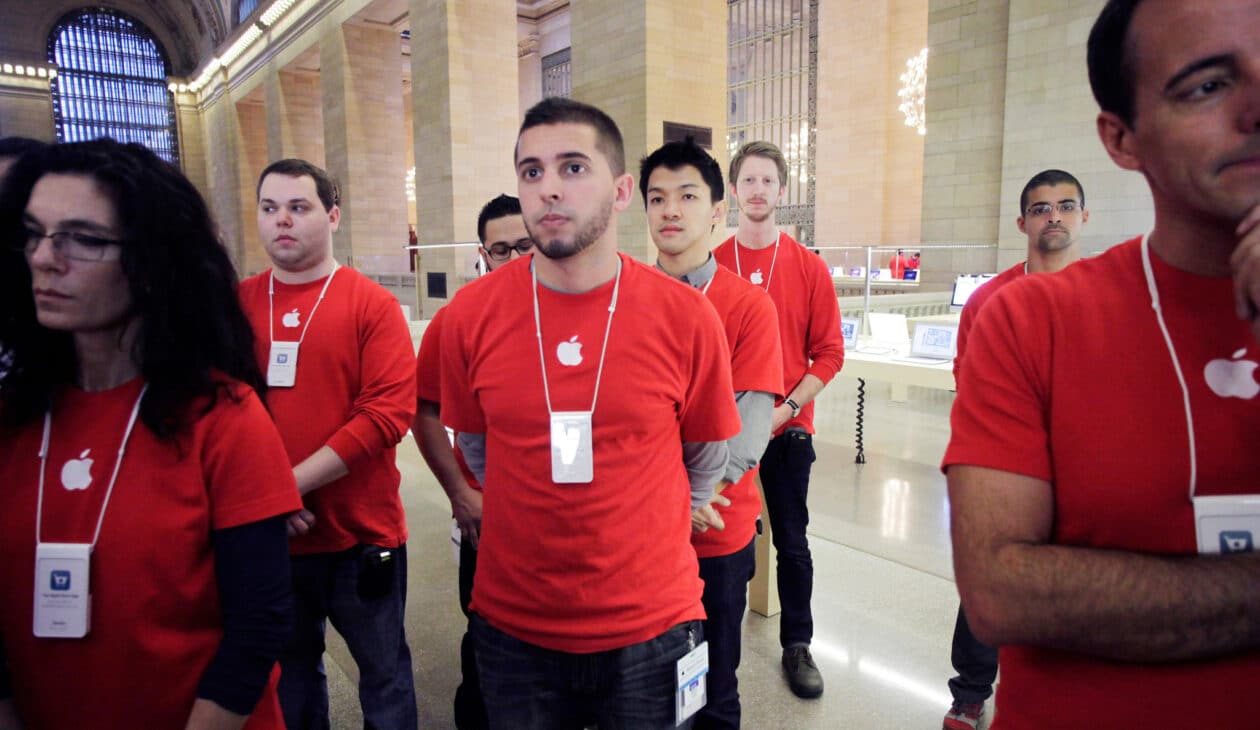
Os funcionários que forem agraciados com o sorteio, segundo o memorando, atuarão em tarefas como organização de filas, check-in dos convidados e recepção aos participantes, bem como fornecerão informações e oferecerão suporte às equipes de segurança envolvidas.
O memorando também diz que o evento ocorrerá na primeira quinzena de setembro. Tradicionalmente, ele ocorre na 2ª terça ou quarta-feira do mês. Como segunda (7/9) será feriado nos Estados Unidos, é provável que o grande evento deste ano aconteça na quarta-feira (9/9).
A new prenatal roadmap could soon help clinicians place endotracheal tubes (ETTs) more precisely in the tiniest preterm newborns. In infants with birth weights under 500 g, even small positioning errors during intubation can increase the risk of life‑threatening complications, including inadequate ventilation or airway trauma. Researchers say their approach uses measurements taken before birth—capturing the baby’s anatomy while it is still developing in utero.
The study focuses on predicting the optimal ETT depth rather than relying solely on standard postnatal formulas. Using prenatal biometry, investigators model how fetal growth and structural proportions relate to the distance from the mouth to the trachea. The goal is to translate ultrasound-derived anatomical signals into a practical estimate that can guide clinicians at the bedside.
Technically, the model links prenatal measurements to the anticipated airway dimensions at delivery. This requires defining which biometric inputs best correlate with the final tube placement target, then training a predictive framework to output a recommended insertion depth for extremely low birth weight infants. By emphasizing prenatal inputs, the method aims to reduce uncertainty that can arise from day-to-day postnatal changes.
Importantly, the research targets a subgroup with particularly high vulnerability. Infants below 500 g are at increased risk because their airway structures are extremely small and intubation margins are narrow. In this context, individualized prediction could improve consistency compared with one-size-fits-all guidelines.
If validated in larger clinical settings, the prenatal model could be integrated into obstetric and neonatal workflows. After routine prenatal ultrasound assessments, clinicians would generate an ETT depth estimate ahead of delivery, supporting more confident planning for immediate respiratory care.
The findings also highlight a broader trend in perinatal medicine: using quantitative prenatal data to optimize invasive procedures. Instead of reacting after intubation placement, the strategy moves decision-making earlier—toward anticipation, personalization, and safety.
Overall, the work suggests that prenatal biometry can carry actionable information for airway management. The team frames the approach as a step toward more precise, data-driven neonatal resuscitation and ventilation strategies for the smallest patients.
The study, published in Journal of Perinatology, is available under DOI: 10.1038/s41372-026-02851-2.
Subject of Research: Prenatal biometry-based prediction of optimal ETT depth Article Title: Prenatal biometry-based prediction of optimal endotracheal tube depth in infants with a birth weight less than 500 g. Article References: Yoo, K., Kim, S.H., Park, J. et al.J Perinatol (2026). https://doi.org/10.1038/s41372-026-02851-2 Image Credits: AI Generated DOI: 10.1038/s41372-026-02851-2 Keywords:
Em seu perfil oficial no X, ele publicou uma imagem que remete ao final da segunda temporada, com a legenda “Voltar ao trabalho é voltar para casa”. O perfil do Apple TV repercutiu a publicação, com a legenda “Por favor, brinquem com moderação” — o que corrobora a tese de que se trata mesmo de um retorno oficial das gravações.
A segunda temporada de “Ruptura” chegou ao Apple TV no início do ano passado, e a expectativa é de que a terceira estreie “já” no ano que vem. Embora ainda seja um intervalo de dois anos entre uma temporada e outra, trata-se de uma espera bem menor que os três anos entre a primeira e a segunda.
O Apple TV está disponível no aplicativo Apple TV em mais de 100 países e regiões, seja em iPhones, iPads, Apple TVs, Macs, dispositivos Android, smart TVs ou online — além de também estar em aparelhos como Roku, Amazon Fire TV, Chromecast com Google TV, consoles PlayStation e Xbox. O serviço custa R$29,90 por mês, com um período de teste gratuito de 7 dias. Por tempo limitado, quem comprar e ativar um novo iPhone, iPad, Apple TV ou Mac ganha 3 meses do Apple TV. Ele também faz parte do pacote de assinaturas da empresa, o Apple One.
NOTA DE TRANSPARÊNCIA: O MacMagazine recebe uma pequena comissão sobre vendas concluídas por meio de links deste post, mas você, como consumidor, não paga nada mais pelos produtos/serviços usando os nossos links de afiliado.
Giovanni Kanter goes to at least one art museum whenever he visits a new city. That’s on top of his regular exploration of galleries in New York, where the 25-year-old ICU nurse lives and studies. He typically discovers new artists and gallery openings through word of mouth, though he has recently started curating his social media feed to serve relevant content (he’s currently in what he terms a “surrealism phase”).
He was raised on visual art; he's the son of painter Marianne Gargour and nephew of mixed-media artist Heather Hutchison and painter-printmaker Mark Thomas Kanter. His “exposure-oriented education” featured childhood visits to galleries and shows in and around Dallas, where he grew up, and in France, where he spent time with his grandparents.
But Kanter is an exception. Many other young people have a less immersive artistic education, perhaps shaped by occasional school trips or family visits to museums. If they haven’t internalized an instinct for what Kanter calls “moving through the art and absorbing it,” the museum experience is central to how they learn about and understand art.
Giovanni Kanter goes to at least one art museum whenever he visits a new city. That’s on top of his regular exploration of galleries in New York, where the 25-year-old ICU nurse lives and studies. He typically discovers new artists and gallery openings through word of mouth, though he has recently started curating his social media feed to serve relevant content (he’s currently in what he terms a “surrealism phase”).
He was raised on visual art; he's the son of painter Marianne Gargour and nephew of mixed-media artist Heather Hutchison and painter-printmaker Mark Thomas Kanter. His “exposure-oriented education” featured childhood visits to galleries and shows in and around Dallas, where he grew up, and in France, where he spent time with his grandparents.
But Kanter is an exception. Many other young people have a less immersive artistic education, perhaps shaped by occasional school trips or family visits to museums. If they haven’t internalized an instinct for what Kanter calls “moving through the art and absorbing it,” the museum experience is central to how they learn about and understand art.
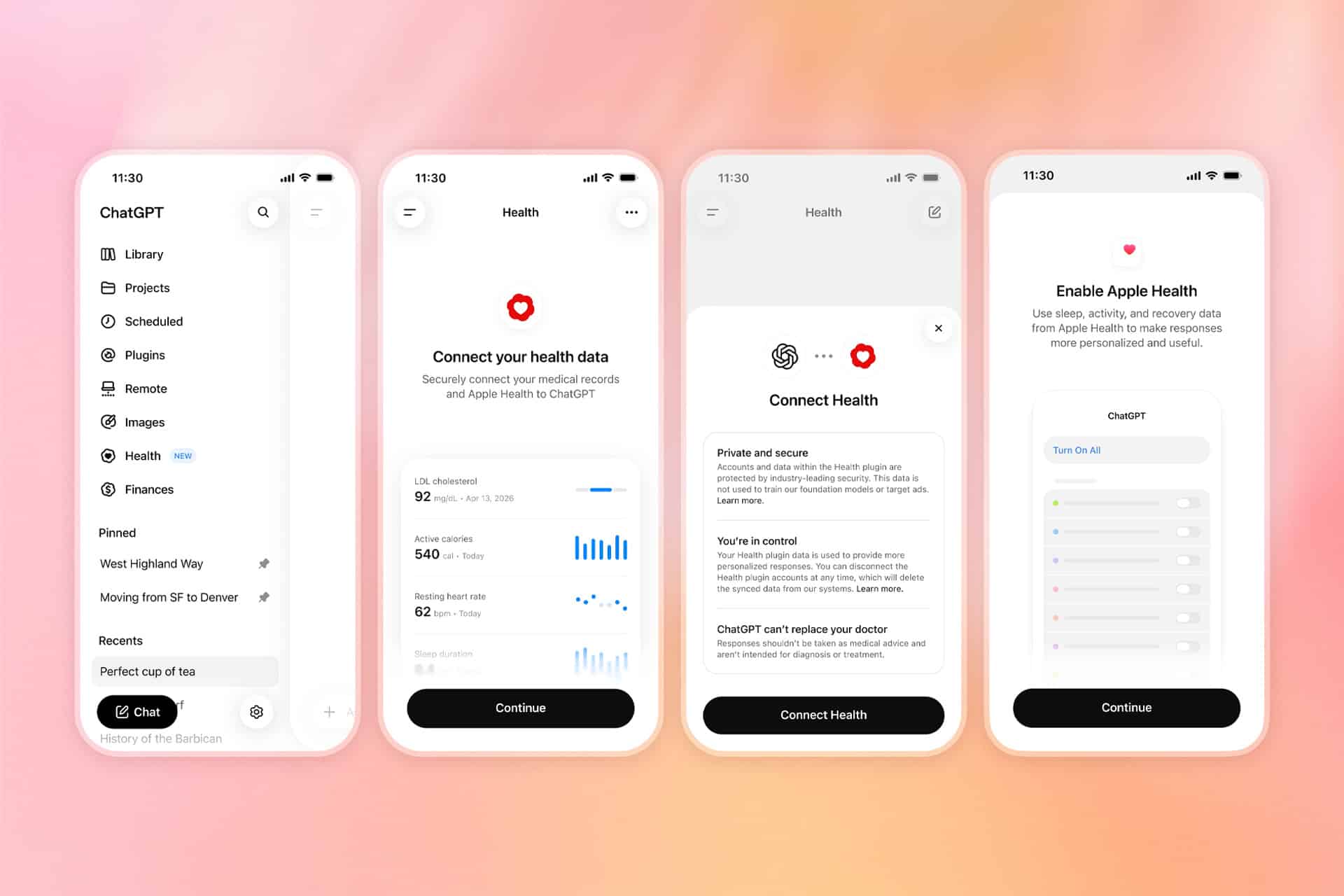
ChatGPT Health is returning with substantially wider access, giving more iPhone users the option to connect information from Apple Health directly to the AI assistant.
The expansion follows a limited test introduced in January. OpenAI is now gradually making the dedicated Health experience available to eligible ChatGPT Free, Go, Plus and Pro users in the United States who are at least 18 years old.
Despite the close Apple connection, this is not a feature created by Apple or built directly into the Health app. OpenAI operates the service through ChatGPT, while Apple Health serves as one of the sources users can voluntarily connect.
Once permission is granted, ChatGPT can examine selected health and fitness information stored on iPhone, including activity, sleep, workouts and other measurements collected by compatible apps and devices. Users can then ask questions about changes over time without manually exporting records or uploading screenshots during every conversation.
Image Credit: OpenAI
ChatGPT Health Reaches More iPhone Users
ChatGPT Health originally appeared as a limited early-access experience for a small group of testers. The expanded rollout replaces that narrow availability with support for eligible adult users across the United States, although OpenAI says access may take several weeks to reach every account.
The feature works on the ChatGPT website and iOS app, but connecting Apple Health requires an iPhone. Users also need a recent version of the ChatGPT app before the Health option appears in the sidebar or More menu.
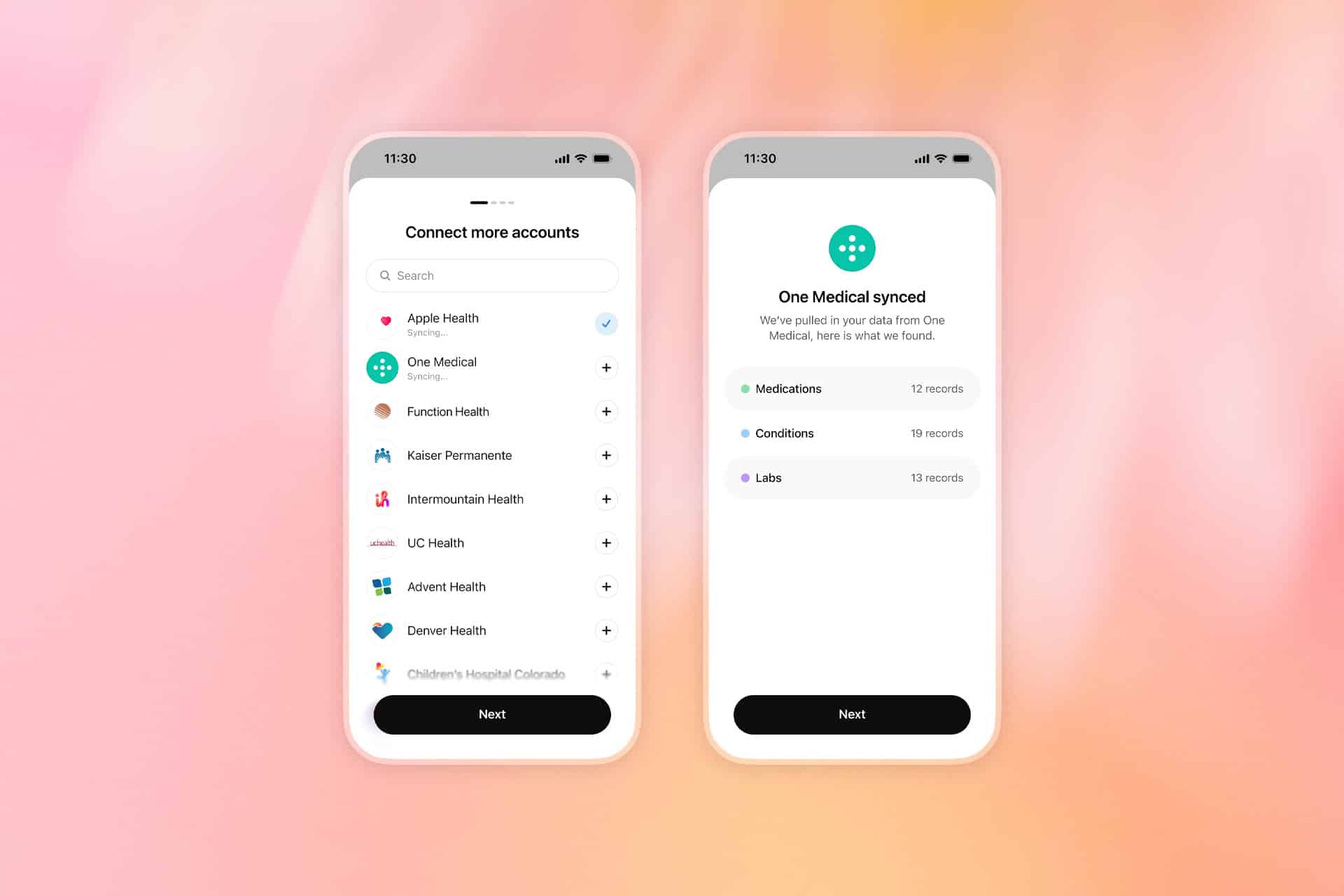
Apple Health is only one part of the system. ChatGPT can also connect to supported medical-record portals, One Medical and Function Health. Bringing those sources together allows the assistant to answer questions using a broader personal context than activity data alone.
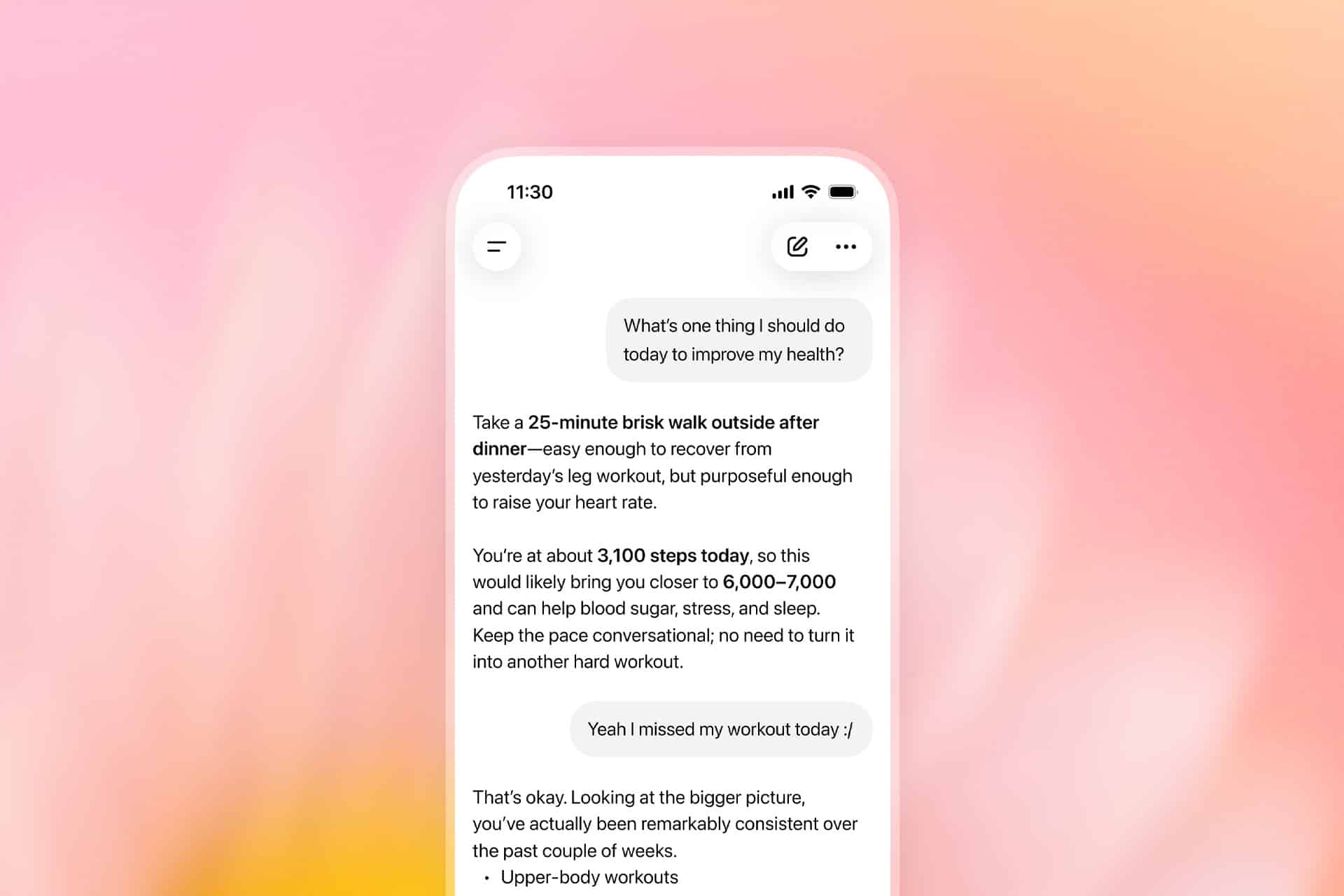
A user could ask how sleep duration has changed across several weeks, whether workout frequency declined after a schedule change or how recent laboratory results compare with earlier tests. ChatGPT can also help organize questions before a medical appointment or summarize changes found across connected records.
Information from third-party fitness services can reach ChatGPT through Apple Health when those apps already share their data with the iPhone database. That may include measurements from platforms such as Garmin, Oura, Whoop, Strava and MyFitnessPal, depending on which categories each service makes available.
Not every proprietary score transfers. An app may calculate its own readiness, recovery or sleep score without writing that exact result into Apple Health. ChatGPT can only use the information made available through the connected source and approved by the user.
After synchronization, health information can inform responses throughout ChatGPT rather than remaining limited to conversations opened from the Health tab. The assistant normally asks for permission before using connected information, and users can also add “@Health” to a prompt when they specifically want a response based on their records.
Image Credit: OpenAI
Apple Health Data Gains a Conversational Layer
The appeal of the integration comes from turning a large collection of measurements into questions expressed in ordinary language.
Apple Health can already organize trends, highlights, medications, laboratory results and activity records. ChatGPT adds a conversational layer capable of comparing those categories or explaining them in a more personalized format.
Someone preparing for an annual physical could ask for a summary of meaningful changes since the previous appointment. A runner might request a comparison between training volume, sleep and resting heart rate. Another user could ask which information deserves discussion with a clinician after receiving new laboratory results.
That does not make ChatGPT a doctor. OpenAI says the feature is intended to support medical care rather than diagnose conditions or recommend treatment. Urgent symptoms and emergencies still require professional assistance.
The distinction is especially important because health data can appear more conclusive than it is. A change in heart rate, sleep or activity may have several explanations that cannot be determined from an iPhone record alone. Wearables can identify patterns, but they do not automatically reveal the medical cause behind them.
ChatGPT may help users notice relationships and prepare better questions. It should not be treated as the final authority on whether a symptom is harmless, whether medication should change or whether professional care is unnecessary.
The service is also read-only. ChatGPT can examine approved Apple Health information but cannot alter the original records stored on iPhone. It cannot add a diagnosis, change a medication list or write new measurements back into the Health app.
Users retain control over which Apple Health categories are shared. Someone may allow access to steps, workouts and sleep while withholding reproductive health, medications or other sensitive information.
That selective approach may be more appropriate than approving every category simply because the option is available. A useful response does not always require a complete health history.
Image Credit: OpenAI
Privacy Becomes the Central Decision
Connecting Apple Health to ChatGPT creates a different privacy relationship from using health features entirely within the Apple ecosystem.
Apple designs the Health app around on-device protections and user-controlled permissions. ChatGPT Health requires selected information to synchronize with OpenAI systems so the company can analyze it and generate personalized responses.
OpenAI says connected Apple Health data, medical records and conversations using that information are not used to train its foundation models or target advertising. The company also applies additional encryption and isolation protections to health information.
Users can disconnect Apple Health at any time. OpenAI says synchronized data from the disconnected source will be deleted from its systems within 30 days.
Previous conversations are handled separately. Information already included in ChatGPT conversation history remains until those chats are deleted, even after the Apple Health connection is removed.
Memory introduces another consideration. Conversations using Health can create memories when ChatGPT memory is enabled, although OpenAI says memories are not generated directly from synchronized health data. Temporary Chat or separate project memory can reduce how much personal context continues across future conversations.
The new Health experience should also not be confused with the existing ChatGPT integration inside Apple Intelligence. Siri and Writing Tools can use ChatGPT for certain requests without requiring the dedicated ChatGPT app or a connected account.
ChatGPT Health is a separate OpenAI service with its own account, permissions, privacy controls and health-data connections. Using ChatGPT through Siri does not automatically give OpenAI access to Apple Health.
That separation gives users a meaningful choice. They can continue keeping health information inside Apple apps, share only selected categories with ChatGPT or connect medical records for a more comprehensive view.
The expanded rollout makes one of the most personal databases on iPhone available to conversational AI. Its usefulness will depend not only on the quality of the answers, but also on whether users understand exactly which information they are sharing and where it goes after leaving the device.

 Login
Login