❌

Reading view

Jerusalem’s 2,800-Year-Old Dam Shows How Judah Managed Drought and Flash Floods

Jerusalem’s ancient water system was not only about finding a spring. It was about controlling what happened when the water came too quickly and when the rain failed to arrive at all. A new study has dated a large dam near the Siloam Pool to roughly 805–795 BCE, during the period when the kingdom of […]

The post Jerusalem’s 2,800-Year-Old Dam Shows How Judah Managed Drought and Flash Floods appeared first on Curiosmos.

  •  

How to Show Hidden Files on Mac With or Without Terminal

You can show hidden files on Mac with a simple keyboard shortcut. You do not need Terminal, an administrator password, or advanced technical knowledge for the most common method.

macOS hides some files because they contain settings, app information, or system resources that people do not normally need to open. These items remain on the Mac, but Finder does not display them during regular use.

You may need to see them when following troubleshooting instructions, opening the hidden Library folder, managing website files, checking app settings, or finding data left behind by an uninstalled application. Once the files are visible, you should avoid deleting anything unless you understand its purpose.

Show Hidden Files Without Terminal

Finder has a built-in shortcut that reveals hidden files and folders instantly. It is the fastest method when you only need temporary access.

To show hidden files in the current Finder folder:

Finder > Open Any Folder > Command + Shift + Period (.)

The period is the regular full-stop key on the keyboard. You must press Command, Shift, and Period at the same time.

The folder will update immediately. Hidden items normally appear lighter or more transparent than regular files. This visual difference helps you recognize files that macOS does not usually display.

The shortcut works in most Finder locations, including the user’s Home folder and some folders on external drives. It can also work inside the Open and Save windows presented by Mac applications.

If you do not see any changes, try the shortcut inside your Home folder. The available hidden items depend on the apps and services used on the Mac.

To open your Home folder:

Finder > Go > Home

After the Home folder opens, use the hidden-file shortcut again. You may see items with names that begin with a period, including configuration folders created by applications.

Files beginning with a period are commonly called dot files. macOS and Unix-based applications use them to store settings and other information without filling normal folders with technical data.

The Finder shortcut acts as a visibility switch. Using it a second time conceals the files again.

To hide the files after you finish:

Finder > Open Any Folder > Command + Shift + Period (.)

Hiding the files does not delete them. Finder simply returns to its normal view.

A dark-themed Mac Finder window displays files and folders in the 76BPPrimary directory, with a blue gradient background and an Apple logo in the bottom right corner. The view also hints at advanced customization options commonly accessed through Mac Terminal commands, such as the ability to show hidden files within the Finder.
Image Credit: AppleMagazine

Open the Hidden Library Folder

The user Library is one of the most frequently accessed hidden folders on a Mac. It stores app preferences, browser information, caches, containers, saved states, Mail resources, and other data connected to the signed-in account.

You can open the Library directly without making every hidden file visible.

To open your personal Library folder:

Finder > Go > Press and Hold Option > Library

The Library option appears in the Go menu while you hold the Option key. Select Library before releasing the key.

This method opens the Library belonging to the current user. Its path is ~/Library, where the tilde represents the user’s Home folder.

The user Library is different from the Library folder located at the top level of the startup disk. The top-level folder contains resources that can be shared by different accounts, while ~/Library primarily contains information for the current account.

Deleting content from the Library can reset an app or remove locally stored information. If troubleshooting instructions tell you to remove a file, confirm its name and location before making any changes.

Open a Specific Hidden Folder

Finder includes a Go to Folder feature for opening locations that are difficult to find manually. It is useful when you know the folder’s exact path and do not want to reveal every hidden item.

To open the Go to Folder field:

Finder > Go > Go to Folder

You can also reach the same field with a keyboard shortcut.

To open Go to Folder from the keyboard:

Finder > Shift + Command + G

A small field will appear. Type or paste the path of the location you want to open, then press Return.

To open your personal Library:

Go to Folder > Enter ~/Library > Press Return

To open the hidden SSH folder in your Home folder:

Go to Folder > Enter ~/.ssh > Press Return

The .ssh folder stores information used by Secure Shell tools. It may not exist if SSH software has never created it on the Mac. Finder displaying an error for this path does not necessarily indicate a problem.

To open the Library shared by all users:

Go to Folder > Enter /Library > Press Return

Pay attention to the beginning of each path. ~/Library opens the Library inside the current user’s Home folder. /Library opens the shared Library at the top level of the startup disk.

You can also paste a longer path supplied by an app developer or support technician. Check the spelling carefully because similarly named folders may contain completely different data.

A dark-themed Mac Finder window on a Mac shows files in a folder called “BGs,” displaying image filenames, their sizes, types, and modification dates, with an Apple logo watermark at the bottom right. If you want to see even more details or show hidden files in this view, you can easily use Mac Terminal commands for extra control.
Image Credit: AppleMagazine

Show Hidden Files With Terminal

Terminal can change Finder’s hidden-file preference so concealed items remain visible until you change the setting again. This option is helpful during longer troubleshooting or development sessions.

Terminal is included with macOS and can be opened from the Utilities folder.

To open Terminal:

Finder > Applications > Utilities > Terminal

A Terminal window will appear with a text prompt. Enter the command exactly as presented and press Return.

To keep hidden files visible in Finder:

defaults write com.apple.finder AppleShowAllFiles -bool true && killall Finder

Finder will close briefly and reopen. This restart allows the new visibility preference to take effect.

The command does not change the files themselves. It tells Finder to display items that macOS normally conceals.

You can reverse the change at any time.

To hide the files in Finder again:

defaults write com.apple.finder AppleShowAllFiles -bool false && killall Finder

Finder will restart once more and return to its regular view.

If Finder does not behave as expected after changing the preference, you can remove the custom value. macOS will then use its default behavior.

To remove the custom hidden-file preference:

defaults delete com.apple.finder AppleShowAllFiles && killall Finder

Terminal may say that the preference does not exist if no custom value is stored. That message simply means there is no setting to remove.

See Hidden Files Only in Terminal

Terminal can list hidden files without making them appear in Finder. This can be helpful when checking whether a file exists while leaving Finder unchanged.

The ls command displays the contents of a folder. Adding -a includes hidden items, while -l displays details such as permissions, ownership, file size, and modification date.

To list visible and hidden items in your Home folder:

ls -la ~

The results appear inside Terminal. Names beginning with a period are hidden during normal Finder use.

To list the contents of the folder currently open in Terminal:

ls -la

These commands only display information. They do not delete or modify the files shown in the results.

Work Safely With Hidden Mac Files

A hidden file is not automatically unnecessary, suspicious, or safe to delete. macOS and installed applications conceal many items to protect settings and reduce clutter.

The .DS_Store file, for example, can store Finder display information for a folder. External drives may include folders such as .Trashes and .Spotlight-V100, which macOS uses for Trash and Spotlight features.

Removing the wrong item can reset an application, delete local information, interrupt syncing, or cause macOS to rebuild a database. Copy an item to a safe location before changing it when troubleshooting instructions require manual file work.

Some system folders remain protected even when Finder displays them. Showing hidden files does not bypass administrator permissions or System Integrity Protection. There is no need to disable Mac security features simply to view a hidden folder.

Applications can also contain internal resources. These files are stored inside an app bundle and are different from standard hidden files.

To view the internal contents of an application:

Finder > Applications > Control-click the App > Show Package Contents

Changing files inside an app bundle can prevent the application from opening. If you need one of its resources, copy that file elsewhere instead of editing the original.

When you finish working, return Finder to its regular view to reduce the chance of accidentally moving or deleting a configuration file.

To hide all revealed files with the Finder shortcut:

Finder > Open Any Folder > Command + Shift + Period (.)


The post How to Show Hidden Files on Mac With or Without Terminal appeared first on AppleMagazine.

  •  

Cloudflare wants to provide the operating system for the AI-first enterprise

Traditional operating systems (OS) were built to manage hardware, files, apps, and users on a device, but Cloudflare says the agentic AI era requires a whole new format.

The company this week announced Cloudflare OS, which connects AI agents, enterprise data and context, internal systems, and workflows together in one secure workspace. It is open source and browser-based, sparing companies the need to build all-new infrastructure.

The OS is launching alongside several other new security, identity, spending, and user insight tools that Cloudflare has built for the AI-based workplace.

“Cloudflare OS isn’t a traditional desktop OS,” said Rita Kozlov, VP of product at Cloudflare. “It reimagines the workplace computing environment for AI.”

Open source OS runs in a browser

Cloudflare OS serves as a secure, AI-equipped workspace that is plugged into internal company systems. Available now through Cloudflare’s open source repository, it is accessible directly in a browser, and runs inside an enterprise’s Cloudflare account.

“It is a browser-based workspace that begins with a conversation,” Kozlov explained. Users can ask an agent to research, create slides, spreadsheets, and documents, build full-stack apps, or automate workflows without the need for a terminal. Those outputs are then shareable, but kept in isolated databases with access controls.

Enterprises will soon be able to access the OS directly through Cloudflare or via a “select group” of partners that will build tailored offerings on Cloudflare’s architecture, the company says. Because it is open source, organizational processes, internal system connections, and context aren’t locked into a vendor product or AI model provider. Customers can use whatever models they choose.

Cloudflare OS is built on Cloudflare Workers, Dynamic Workers, Durable Objects, and Access, the company’s zero trust network access (ZTNA) tool that verifies every user and request. Agents start with zero permissions by default and are only granted access to tools required for a specific task. Organizations configure their own Access policies, models, branding, skills, and integrations, Kozlov explained.

Governed connectors known as gatekeepers give admins control over what AI can see, what it can change, and when the system needs human sign-off. They can also control budgets, set rate limits, and delegate tasks to different models.

“Because agents act on people’s behalf and produce work others can access and modify, they require a new security model,” Kozlov said. Thus, Cloudflare OS tracks the resources an agent requires so the right access controls follow its work when it is shared.

Cloudflare initially built the OS for internal use, and employees “across every team” use it daily. Kozlov estimated that, over the last 30 days, internal users have used it to create more than 4,000 apps, automations, and tools. Over that same period, she claimed, the company’s sales team saved an estimated 10,000 hours by automating previously manual tasks like territory planning and proposal creation.

“We open sourced Cloudflare OS so any organization can build ‘Your Company OS,’” Kozlov said. Open source is critical because “you cannot put your company into software you do not own. Organizations need to be able to inspect the platform, customize it, connect their own systems, and make it their own,” she explained.

A more cohesive bundle

Cloudflare deserves credit for packaging Cloudflare OS as an operating system, noted tech analyst Carmi Levy.

“This very much is not Windows, macOS, or Linux, and it isn’t an operating system by its common definition,” he said. “But Cloudflare’s use of this terminology implies familiarity to enterprise IT buyers.”

This makes for an easier discussion as enterprises struggle to understand how to best incorporate AI-related platforms and workflows into infrastructure that wasn’t initially designed for it.

Microsoft has marketed the combination of its Azure, Entra, Fabric, Windows, and Microsoft 365 offerings as an operating system of sorts, but hasn’t pulled all the pieces into a common brand, Levy said. And Google’s Gemini, Workspace, Vertex AI, and Cloud Run are “circling similar territory.”

But, he noted, Cloudflare OS is “more cohesively bundled” and infrastructure-focused, offering a single pane of glass platform for buyers worried about stitching together otherwise disparate AI-aware networking pieces. The company recognizes that AI introduces new architectural realities such as inference and model routing “over and above” traditional OS core competencies.

“While competing offerings generally leave the infrastructure heavy lifting to enterprise decision-makers, Cloudflare is marketing itself as a single-source vendor, which potentially frees IT planners from having to integrate all the AI pieces on their own,” Levy said.

An infrastructure-first, application-agnostic approach means Cloudflare OS can coexist with whatever AI applications already exist in an enterprise, he said. It will “play nice” with OpenAI, Anthropic, Google, Microsoft, Meta, or open source layers, allowing employees to begin working in familiar workflows after sign-in.

“Its open-source architecture also minimizes the potential for vendor lock-in as enterprises gradually figure out how to evolve their stacks to align with new AI-era realities,” Levy said.

Managing identities and budgets for both humans and AI

As AI agents emerge across the enterprise, tracking their use can be challenging, causing problems from both a security and a spend standpoint. Along with Cloudflare OS, the company has launched a way to address this issue with its new Identity-Aware AI Gateway, now in beta.

Also integrated with Access, the offering gives admins visibility into what users (both human and AI) are requesting from AI models. It allows security teams to set up custom domains in front of their gateways and replace shared API keys by integrating with their identity provider, like Okta or Entra, and ZTNA infrastructure, Cloudflare explained.

Every request is tied to Access-verified identities, and enterprises can filter each user’s logs, analytics, and spend. IT teams can track redundancies, limit usage rates, and apply filters that strip out employee names, passwords, and other sensitive data before requests go to outside model providers.

A companion feature, AI Spend, tracks every user’s behavior over time to create a baseline of normal AI usage. When spending deviates from that pattern, the system alerts the IT team.

A new tab, User Insights, tracks cost and identifies over-spend caused by activities such as low cache-hit rates or oversized context windows. The capability scores sessions and compares them against account history using a 95th percentile session cost over the previous 30 days, Cloudflare product managers Ming Lu, Kenny Johnson, and Ayush Kumar explain in a blog post. Anything above 2x an account’s 95th percentile is a “strong candidate for anomalous behavior.”

For instance, one Cloudflare customer had an employee who left a rogue AI session running, generating a $30K bill. “User Insights helped them identify the problem and shut off access before the problem was further exacerbated,” Kozlov said.

Cloudflare is also building prompt classification functionality that sorts requests into categories such as coding or writing. This can help enterprises understand what AI is being used for.

“Once business traffic is separated from everything else, personal use becomes visible,” the project managers explained. “From the outside, someone running a side hustle on company time and someone quietly moving data out through a model look the same. Telling them apart is central to catching insider risk.”

Looking at the bigger picture

Identity-Aware AI Gateway and AI Spend address the visibility problem that has dogged so many recent AI deployments where enterprises failed to monitor usage, Levy noted. Projects “crashed and burned” as users unwittingly blew through token allocations.

These platforms provide single-point visibility into what is being used, how it’s being used, and where the potential lies for raising the productivity bar, he said. They overlay with existing models; in doing so, they enhance security with more precise control over resource allocations, and via automated anonymization protocols that prevent inadvertent sharing of sensitive data.

Ultimately, he said, vendors who free IT from having to independently assemble the pieces of their own AI implementations, and who assist them with answers to AI-specific questions, “will gain advantage over vendors that aren’t looking at the bigger picture.

This article originally appeared on CIO.com.

  •  

How to Remove Apple Intelligence Files From Your Mac

Apple Intelligence files can occupy several gigabytes of Mac storage because locally downloaded models power text generation, summaries, image creation, Siri requests, and other on-device features. Removing these files can recover valuable space when Apple Intelligence is no longer needed.

Apple lists 7GB of available device storage among the requirements for Apple Intelligence, but the amount displayed on a Mac can be higher. Additional languages, image-generation resources, updated models, and temporary assets can increase the total over time.

The files are managed by macOS and do not appear as ordinary documents that can be moved to the Trash. Apple provides a supported removal method through System Settings: turning off Apple Intelligence causes macOS to remove the downloaded on-device models.

This also disables features that depend on Apple Intelligence. Writing Tools, summaries, Image Playground, Genmoji, intelligent Shortcuts actions, and Apple Intelligence functions inside Siri may become unavailable. Regular Mac applications and the rest of macOS continue working normally.

Check Apple Intelligence Files on Your Mac

Recording the available storage before removing the files makes it easier to confirm how much space macOS recovered afterward.

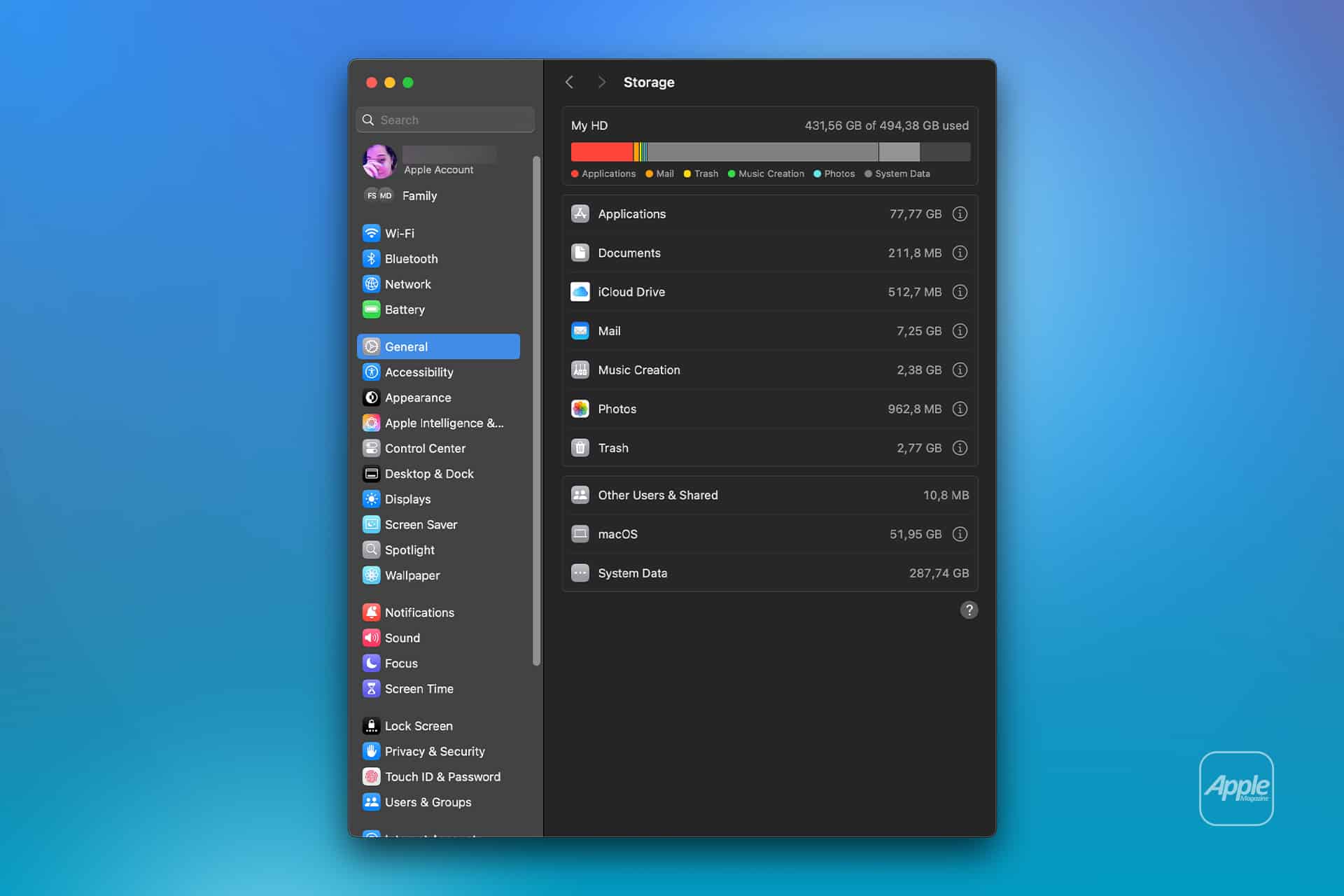
To see the current storage allocation:

Apple menu > System Settings > General > Storage

Allow the Storage page to finish calculating its categories. The process may take a moment when the Mac contains many applications, local files, connected volumes, or several user accounts.

Apple Intelligence may appear as a separate item within the macOS storage category. Depending on the installed macOS version, some related assets may instead be counted under macOS or System Data.

Note the amount of available storage displayed near the storage graph. Comparing the total free space before and after the procedure is usually more reliable than watching one category because macOS can reclassify system-managed files while deleting them.

To inspect the complete internal storage container:

Apple menu > System Settings > General > Storage > All Volumes

This view is useful when the internal drive contains several APFS volumes sharing the same physical storage. The available capacity belongs to the shared container rather than remaining permanently assigned to one volume.

The storage used by Apple Intelligence is different from the memory, or RAM, used while features are running. Closing applications may reduce RAM consumption, but it does not delete the models stored on the internal SSD.

Apple Intelligence files - A MacOS Storage window showing disk space usage by Applications, Documents, iCloud Drive offline, Mail, Music Creation, Photos, Trash, Other Users & Shared, macOS, and System Data on a blue gradient background with an Apple logo.
Image Credit: AppleMagazine

Remove Local Apple Intelligence Files

Apple Intelligence is available on compatible Macs with Apple silicon. Intel-based Macs do not support the complete Apple Intelligence system and should not contain the same downloadable model collection.

To turn off Apple Intelligence and request the removal of its on-device models:

Apple menu > System Settings > Apple Intelligence & Siri > Turn off Apple Intelligence > Turn Off Apple Intelligence

The second Turn Off Apple Intelligence command confirms the change. The exact appearance may vary between macOS versions, with the first control presented as either a switch or a button.

Apple says that turning off Apple Intelligence removes the on-device models. There is no separate model manager, Delete Models button, or supported Finder location from which users must remove the files manually.

Keep the Mac connected to power while macOS completes its background storage work. The Apple Intelligence setting changes immediately, but the Storage page may not display the recovered capacity at once.

macOS manages these models through its system asset service. The operating system must identify the associated packages, release them, and recalculate the storage categories. The process can therefore continue after the Apple Intelligence switch has already moved to the off position.

Turning off only individual features does not remove the complete model collection. Disabling notification summaries, Writing Tools, ChatGPT access, or Siri suggestions leaves Apple Intelligence itself active.

A Screen Time restriction also serves a different purpose. It can prevent access to image generation, Writing Tools, and other functions without turning off the underlying intelligence system. Use the Apple Intelligence control inside Apple Intelligence & Siri when the objective is recovering storage.

Confirm That the Space Was Recovered

After macOS has had time to process the removal, return to the Storage page.

To check the available capacity again:

Apple menu > System Settings > General > Storage

Wait for the storage graph and categories to finish updating. Compare the new amount of available space with the figure recorded before Apple Intelligence was turned off.

The Apple Intelligence entry may disappear completely, display a smaller amount, or become part of an adjusted macOS or System Data category. The increase in total available storage provides the better indication that the local models were removed.

If the figures have not changed, restart the Mac to refresh its system services and storage calculation.

To restart macOS:

Apple menu > Restart > Restart

Sign back in, allow the Mac to remain idle for a while, and open the Storage page again.

Apple menu > System Settings > General > Storage

Restarting does not delete the models by itself. Apple Intelligence must remain disabled while macOS completes the removal.

Emptying the Trash is not part of this procedure because macOS does not place Apple Intelligence models there. The Trash affects only files that a user or application has already marked for deletion.

A silver laptop with a black screen displaying an abstract, curved line pattern in dark gray tones on a white background—designed to be as sleek and portable as its lightweight MacBook weight suggests.
Image Credit: Apple Inc.

What to Do When the Files Remain

First, verify that the complete Apple Intelligence system is off rather than one related feature.

To confirm its status:

Apple menu > System Settings > Apple Intelligence & Siri > Apple Intelligence

The control should display Apple Intelligence as disabled. If macOS presents another confirmation request, complete it and leave the feature off.

Storage information can take time to settle because macOS also manages caches, local snapshots, temporary update packages, and purgeable files. These categories can change while the Mac is idle, making an immediate before-and-after comparison misleading.

Installing the latest stable macOS update can correct storage reporting or asset-management problems.

To check for an available update:

Apple menu > System Settings > General > Software Update

Save current work before installing an update. The Mac may need to restart, and the installation temporarily requires additional free storage.

Beta versions of macOS require extra caution. Development releases may download experimental models, retain previous model revisions, or temporarily change the Apple Intelligence controls. A procedure confirmed for the public version of macOS may not produce the same storage behavior in a beta.

Avoid following online instructions that require starting in macOS Recovery, disabling System Integrity Protection, mounting protected volumes, and deleting folders with names referring to MobileAsset or generative models.

System Integrity Protection prevents applications and administrator accounts from modifying protected parts of macOS. Disabling it weakens that protection and creates the possibility of deleting the wrong asset, leaving macOS with an incomplete model installation, or causing the system database to disagree with the files present on the drive.

A storage utility can help identify how much space system files occupy, but it should not require disabling macOS security to remove Apple Intelligence. If the documented switch leaves a large allocation after a restart and sufficient processing time, Apple Support can investigate the asset database without exposing the Mac to an unsupported system modification.

Turning Apple Intelligence on again reverses the storage saving.

To restore its features:

Apple menu > System Settings > Apple Intelligence & Siri > Turn On Apple Intelligence

The Mac will download the required local models again. Apple recommends leaving the device connected to Wi-Fi and power while the model download completes.

The post How to Remove Apple Intelligence Files From Your Mac appeared first on AppleMagazine.

  •  

Agents are coming for data (just slowly)

Agents have turned up just about everywhere in software this past year, with one conspicuous exception: data. That’s a little odd, because querying data is exactly the kind of structured, checkable task that agents excel at. The likeliest culprit is timing. Large language models have only been reliably good at writing SQL for the last six to nine months, and the field hasn’t caught up to what that unlocks. It’s worth separating two flavors of the idea: agents that do analytics, and agents that help you run the data plumbing. Both turn out to be more useful than they first look.

Data engineering is hard mostly because you’re at the mercy of systems you don’t control. Schemas change without warning. Sources go offline. The API you pull from ships a new version. A column that only ever holds integers starts returning decimals. A field you assumed was unique sprouts duplicates, and the next join detonates into a Cartesian explosion. Records go missing, or come back wrong for an hour and then quietly fix themselves. If nothing ever changed, data engineering would be easy. But as they say, the only constant is change.

The boring work is where agents thrive

Unglamorous maintenance is something agents are genuinely good at. Every data model is a stack of assumptions: this is unique, that’s always populated, these two tables join cleanly. An agent can read those assumptions out of your code and turn them into tests that check whether they still hold. A lot of the fixes are mechanical anyway: a table got renamed, a type got widened, a column moved. An agent can often patch those on its own, and when it can’t, it can still do the legwork, tracing what changed and handing a human a diagnosis and a proposed fix instead of just a 3am stack trace.

Context is the other half of the story, and the context landscape is honestly a mess. Vendors are working hard to convince you that only their semantic modeling language can save you, while it is not entirely clear whether these are necessary or even sufficient. Whether you keep your business logic in a semantic layer like MetricFlow or Malloy, or just in plain Markdown, the goal is the same: get that logic into a form an LLM can use. Context is almost always created by hand, and like all hand-written documentation, it starts drifting the moment it gets written down.

This highlights an opportunity, namely that agents are good at precisely the parts of context that are mechanical and bad at precisely the parts that aren’t. An agent can infer which tables join to which, what values a column tends to hold, what your sales regions are, and which tables people actually query. What it can’t infer is the stuff that was never really a data question: the right way to calculate revenue, what counts as a “customer,” when the fiscal year starts. Those aren’t facts hiding in the warehouse waiting to be found. They’re decisions, often business ones, that a person has to make. What an agent can do is flag the moment one of them quietly stops being true.

Automated agent insights remain a fantasy

The flashier pitch, where agents surface insights you never asked for, is the one I’d bet on last. It sounds wonderful to have hands-free analytics. An agent will keep watch over your data, notice what matters, and drop a dashboard tailored to whatever is happening today. But the bar is high for relevance and false positives can make human users lose confidence.

Deterministic alerting systems have the same problem. People end up turning off alarms because they are too hard to tune. But if humans writing pre-canned triggers have a hard time getting it right, it is going to be hard for agents to do better (at least not before we get some form of super-intelligence). While I’d expect proactive insights to be part of the future, they are still a research prototype at this point.

Here are three concrete things a data team should do to get their stack ready for agents:

  1. Lay the groundwork first. Agent use cases that are compelling sit on top of groundwork most teams haven’t laid yet. You don’t need an agent to curate your context until you’ve decided how your context is going to work in the first place.
  2. Then go after context. Write a handful of evals, automate them, and then wait to see what breaks. Evals are the load-bearing part. They’re what makes it safe to let an agent near your pipeline at all, because they tell you the instant it gets something wrong.
  3. Run on infrastructure that fits how agents behave. An agent goes from zero to a flood of queries in an instant, so you want something that scales up and back down quickly. Agents also fan out, chasing several threads at once, so you need both the headroom and the tenant isolation to absorb a burst. One agent’s curiosity shouldn’t take down everyone else’s ability to run queries.

Latency is a bigger deal than it looks

Latency matters more than you’d expect when you’re using agents. While you might be waiting seconds or minutes for Claude Code to do its thing, it is often running a bunch of tasks. Part of the time that the agent spends is waiting for the LLM, but an increasing amount of time is using other tools, like querying a database. Over time, you can expect LLMs to get a lot faster; you can use smaller models, smarter models, local models, or fancier GPUs. As that happens the tools that an agent uses become the bottleneck.

Picture two engines: one answers in 10 milliseconds, the other in 100. A person won’t notice the difference because both feel near instantaneous, and a person will spend far longer thinking up the next question than either engine spends answering it. What feels instantaneous to an agent is very different, and it doesn’t need to stop and think. When its next query depends on the last result, that 10x gap compounds straight into 10x more work per minute.

One of the ways to make an agent go faster is to take more of their work and run it in parallel. But this also increases load on the systems. You’d want to make sure you have enough parallel capacity and isolation to be able to scale to all of the parallel agent queries at once. Engines tuned for human patience and engines tuned for agent throughput are not the same engines.

The agentic wave is coming whether or not any given team is ready, and the best time to start preparing yourself and your stack is now, before the queries start pouring in. This isn’t just future proofing. The teams that move early are the ones who work out the patterns everyone else ends up copying. A little curiosity now buys a real head start later.

—

New Tech Forum provides a venue for technology leaders—including vendors and other outside contributors—to explore and discuss emerging enterprise technology in unprecedented depth and breadth. The selection is subjective, based on our pick of the technologies we believe to be important and of greatest interest to InfoWorld readers. InfoWorld does not accept marketing collateral for publication and reserves the right to edit all contributed content. Send all inquiries to doug_dineley@foundryco.com.

  •  

Microsoft Web IQ: Ground your AI agents with up-to-date web data

Microsoft has unveiled a suite of IQ products over the last few months. Work IQ, Fabric IQ, and Foundry IQ build on what Microsoft used to call its “Graphs,” the underlying data architecture that underpins its cloud services. These graphs provided a way to query the data your business uses, treating that data as nodes in a graph database and using the GraphQL API model to extract that data — for example, to pull data related to a specific individual held across the various Microsoft 365 applications.

The IQ suite follows a similar approach, using the same data, but treating it as the sparse vector store needed to provide grounding data for LLM-based applications. By treating the data as a set of embedding vectors, and integrating it with Model Context Protocol (MCP) servers, Microsoft is giving you the necessary tools to tie LLM output to your data, reducing the risk of hallucination and improving accuracy. Using your own data is a key part of delivering effective agents, ensuring they work within your constraints.

Extending IQ to the web

Web IQ, the latest member of the IQ suite, was unveiled at Build 2026. A modernization of the retired Bing Search APIs, Web IQ is an agent-focused web search tool that builds on the massive Bing search index to provide up-to-date general information for use in your applications.

It may seem a little odd to be talking about a web-wide source of grounding data in the context of a suite of tools that exist to improve the accuracy of your AI applications by providing access to your Microsoft-hosted data. However, in many cases you want to link your agent not only to your data but also to related information from the wider world. For example, an agent powering an ecommerce service could use Web IQ and web-based data sources to provide product comparisons. An agent managing stock levels for a product that is weather-sensitive could use Web IQ as a source of weather data, using Bing’s multiple weather feeds and forecasts.

Just as Google Gemini drew on Google Search, Microsoft Copilot began by using Bing search data to provide grounding for consumer chatbots. It’s easy to take a service like Bing and use it with a LLM, as the nearest neighbor search algorithms use semantic vector similarity techniques to find results that look like your query, ranking them according to their proximity to your search terms.

Microsoft has been tuning its search vector index and the underlying technology stack to work with agents, as agents operate much differently than humans searching the web or querying a chatbot. Providing web search capabilities to agents means having to deal with persistent queries, as the agent hunts for the information it needs, refining queries and applying reasoning algorithms to develop the response it needs. LLM inferencing requires quick responses that deliver large amounts of data, working with queries that go far beyond the one-word or two-word requests that are typical of humans.

More than the training weights

Using Web IQ gives you access to up-to-date information, beyond the training data used to build and weight an LLM. Bing’s crawler works within the standards developed by the search engine industry, obeying meta tags and using its own algorithms to crawl regularly updated websites more often. Bing’s crawler ensures that data is both fresh and being used appropriately, with a focus on quality rather than quantity.

Providing access to web data is only part of Web IQ. Microsoft is using Web IQ to host its own models to manage embeddings, ranking, and content extraction, all running on the company’s global hyperscale platform. The intent here is to use only a limited number of models, to keep the system performance high while aiming to deliver accurate results. The Web IQ models are different from those used to deliver search results to humans, as they’re designed to deliver responses that are suitable for LLMs to use for reasoning.

The underlying search system is based on the DiskANN algorithm developed by Microsoft Research, which allows fast search without requiring enormous amounts of in-memory data access. This approach has been extended to manage information retrieval at scale, building on Microsoft’s distributed systems architectures, to support the demands Microsoft is seeing from agent-based systems. At the same time, it must respond to the rapidly changing economics of inference, where token costs now demand the best possible output from the fewest tokens.

To meet those economic demands, the Web IQ platform doesn’t deliver whole documents to querying agents. Whole documents can lead to expensive inference further down the chain, as LLMs process results repeatedly to drive the agent workflow. Instead, Web IQ structures the information retrieved from the underlying search engine data, delivering what Microsoft calls “structured evidence objects” as well as passage-level information from unstructured text documents. This should result in a much higher signal-to-noise ratio than simply querying a search engine, with a focus on delivering information that lets agents work using fewer tokens.

Using Web IQ in your agent code

The API for Web IQ is a standard REST call, delivering a request object to the Web IQ endpoint. Along with your API authorization key, you will send a query, a set of parameters that control the number of results returned, the language and region used, and the maximum size of the responses and the format used. Responses can be returned in text, HTML, or markdown formats, as well as extracted passages that are selected for context. All other options return the full document, so can be more expensive to use. Markdown is an interesting alternative, as it can be used as the basis for giving agents semantic memories.

Results include important contextual and citation information, including web page titles and URLs, as well as data about when the site was last crawled and how stale the underlying information is. This can be used to improve grounding and provide more information that can be included in formatted responses — much in the same way as Bing’s Copilot displays context in the form of footnotes in its responses.

Responses to video searches include text descriptions. If these aren’t provided as part of the original web content, they will be generated by an LLM. The same approach is used for image searches, with both offering the same contextual cues as the web search API. If you don’t care about the type of data being returned, you can choose a “classic search,” which will return text, images, video, and news.

Supporting autonomous agents

Microsoft provides LLM-ready documentation for the Web IQ service, with an llms.txt file and an OpenAPI description. These allow AI tools to discover Web IQ capabilities and include them in workflows as part of autonomous operations, so that agents and other AI applications can implement grounding calls to Web IQ whenever user interactions require them. The API descriptions include errors as well as the structure of a standard 200 response.

As Web IQ is designed for use by modern agent frameworks, the Web IQ API is available through an MCP server. The Web IQ MCP server exposes tools that map to API calls: web, videos, news, and images. They also include a browse option, which lets you pull content from a target URL. The service can be configured with a standard JSON file and requires an API key to control access and manage billing. If your account doesn’t have access to a specific tool, then it won’t be available from inside the MCP server.

If you’re building an agent and you want to evaluate the Web IQ MCP server, it can be added to common coding agents, such as the GitHub Copilot CLI. You can then test it out using familiar tools and generate code that can be dropped into applications via your choice of development tooling. Queries sent to the Web IQ MCP server use the same syntax as REST calls, without having to construct the calls yourself. Working with the MCP server allows you to connect Web IQ to your choice of agent framework, relying on its built-in MCP methods to reduce the code and maintenance overhead.

Web IQ is not for human interactions; Microsoft provides an alternative “Grounding with Bing” service for chatbots. Instead, Web IQ is a tool for agents, providing necessary background information that helps keep results fresh and relevant. It’s easy to use, fast, and, above all, cheap, which makes it an ideal tool for modern inference platforms built around Microsoft Azure’s AI tooling.

  •  

Enterprise passkey security under threat from malware

Given the widespread enterprise adoption of passkeys to replace passwords, a Palo Alto Networks Unit 42 report disclosing ways attackers are getting around passkey protections is concerning, analysts say, but they stress that the demonstrated attacks can only happen after a successful intrusion.

They also pointed out that the issues are not strictly caused by holes in passkeys so much as by weaknesses in the procedures surrounding them. 

“The researchers didn’t break the underlying cryptography. They exploited the seams around it: onboarding flows, recovery mechanisms and trust signals that weren’t being validated,” said Justin Greis, CEO of consulting firm Acceligence. “That distinction matters because it tells us where the actual risk lives.”

The Palo Alto report showed attacks that, it said, “demonstrate how malware on a compromised endpoint can misuse onboarding, recovery and device trust workflows to take over passkey-protected accounts,” as well as “how an attacker can authenticate without user interaction, bypass user verification requirements and extract all synced passkey private keys.”

Palo Alto described three categories of attack, collectively dubbed Pass-ta-key: Pass-ta-key, where an attacker takes over an account protected by a Google-synced passkey using malware running on the victim’s device, without requiring privilege escalation, device unlock or user interaction; Silver Pass-ta-key, which involves an attacker tricking Google Cloud Authenticator into believing the victim has unlocked the device with biometrics, leading to full account takeover without using the victim’s device during authentication; and Golden Pass-ta-key, which allows an attacker to extract all synced passkeys in a form that lets them be shared or sold on the credential black market.

Given the complexity of most global enterprise threat surfaces, some CISOs have struggled with adapting passwordless processes to environments with legacy and virtual environments. Passcodes have been recently embraced by enterprise CISOs as the first step in implementing a passwordless strategy.

Analysts and consultants in the main agreed that the flaw Palo Alto reports is significant, despite the fact that it assumes the attacker has already penetrated an environment and successfully installed malware. Sadly, given that such penetration only requires one privileged user anywhere to accidentally click on a poisoned link or attachment, the assumption of prior penetration is likely valid.

Implementation issues are the problem

What the report reveals is less about any flaws within passcodes directly, and more about the lack of attention paid to a wide range of mechanisms surrounding them. 

Greis said CISOs now need to focus on what to do, and what to test, based on the assumption that user behavior is not always as expected. 

In several cases cited in the report, he pointed out, issues occurred “not because the standard is flawed, but because implementations haven’t caught up to it. It mirrors what we’ve seen repeatedly in security: the specification is sound, but the ecosystem implementing it is uneven.”

Consultant Brian Levine, executive director of FormerGov, agreed. 

“On any service where your organization is the relying party, require user verification and actually validate the user-verified flag in the authentication response,” he said. “The researchers found real-world services accepting logins without it, which quietly collapses a multi-factor login back into a single factor.”

Frank Dickson, group VP for security at IDC, added that he would stress to CISOs that this attack assumes a prior successful penetration. 

“This isn’t passkeys getting hacked from across the internet. It’s what [an attacker] does once they’re already inside the house. So the real headline is that ‘phishing resistant’ stops being resistant the moment the endpoint stops being clean,” he said.

“Stop treating verification as optional,” he advised. “Flip it to required, check it server side every single time, and save your hardware bound keys, the YubiKeys of the world, for the accounts that matter most. A key that never leaves a physical device is a key no attacker can ever harvest in bulk.”

Or Finkelstein, head of marketing at Secret Double Octopus, agreed that CISOs have gotten complacent about the way in which systems support passkeys.

“CISOs should probably look at how user verification is enforced, how enrollment and recovery work, have a clear and enforced policy on whether credentials are synced or device-bound, and have some ITDR system to quickly mitigate suspicious endpoints and authenticators,” he said. “In most serious enterprise environments, EDR and device management reduce the likelihood of initial attacks, but do not close every post-compromise attack path.”

Poor support processes weaken passkeys

Some have argued that the lack of sufficiently robust support processes actually weakens passkey capabilities and undermines the whole point of such systems.

J. Wolfgang Goerlich, a member of the faculty of IANS and a longtime cybersecurity consultant, pointed out that the original FIDO2 spec eliminated credential theft by binding the private key to a physical authenticator. Synced passkeys reintroduced credential portability and therefore reintroduced the form of credential theft risk cited in the Palo Alto report.

“A passwordless system is exactly as strong as the flow that re-establishes it,” he said. “Both serious techniques here start by forcing a device to re-enroll. Many security teams have never modeled, never monitored and never rehearsed a response to this.”

Goerlich’s advice to CISOs is to require device-bound authenticators, such as hardware tokens or computers, for all privileged and sensitive access. They may consider allowing wallets for lower risk access, he said, “however, much like passwords in Web browsers have long been at risk, we must now consider passkeys in the browsers an unacceptable risk.”

This article originally appeared on CSOonline.

  •  

AWS updates DynamoDB with native vector search to ease AI application development

AWS is finally adding native vector search to its managed NoSQL database DynamoDB, which is typically used to store high-volume operational and transactional data.

The update, according to analysts, removes complexity for development teams that are trying to maintain separate vector databases for a rapidly growing class of AI and agentic applications that rely on real-time access to operational and transactional data to improve the accuracy and relevance of their responses.

“This collapses a common two-database architecture into one operational data layer. Developers can update an item and its vector representation together, use familiar DynamoDB APIs, and avoid building a separate synchronization pipeline. That should materially shorten time-to-market for AI features built around existing DynamoDB data,” said Stephanie Walter, practice lead of the AI stack at HyperFRAME Research.

Prior to the update, enterprises using DynamoDB typically had to copy data into OpenSearch or another vector database, such as Pinecone and Weaviate, often using DynamoDB Streams or custom pipelines, which meant operating two data layers and managing embedding generation, backfills, retries, schema changes, security policies, and synchronization, Walter noted.

That dependence on two separate data layers, Walter pointed out, added to query latency and increased the risk of the vector index lagging behind the operational record.

Such delays, according to Ashish Chaturvedi, executive research leader at HFS Research, can have real consequences for AI agents: “If an agent is acting on what it retrieves, a synced-five-minutes-ago copy can mean a confident wrong action.”

Beyond improving data freshness, eliminating a separate vector database could also lower cloud and operational costs, Chaturvedi said: “Maintaining a second database meant paying at least $700 a month for a second database regardless of usage.”

For CIOs, those benefits combined could translate into lower total cost of ownership and simpler governance as enterprises scale AI applications, Chaturvedi added.

“It is a real consolidation for CIOs: fewer systems to secure, no pipelines to maintain, fresh data. Add to it usage-based cost, which means no standing minimums for idle infrastructure, even at trillion-vector scale,” Chaturvedi noted.

The architectural simplification could also make AI adoption easier for business leaders by eliminating the need to staff and govern a second data platform, said Michael Leone, principal analyst at Moor Insights & Strategy.

Native vector search capabilities have been gaining popularity over the past few years. Over the last three years, AWS has steadily expanded vector search across its database portfolio, adding support to Aurora PostgreSQL through pgvector, Amazon MemoryDB for Redis and Amazon DocumentDB as enterprise demand for generative AI applications has grown.

Rivals have followed a similar path, with MongoDB, Microsoft, Google Cloud, Oracle and Couchbase integrating native vector search into their databases to support retrieval-augmented generation (RAG), AI agents and other generative AI workloads.

These announcements themselves reflect a broader convergence in the database market since the rise of generative AI. While specialized vector databases have expanded beyond similarity search by adding SQL, NoSQL and operational database capabilities, mainstream operational databases have been embedding vector search and RAG capabilities into their core platforms, allowing enterprises to consolidate AI and transactional workloads on fewer data platforms.

AWS has not shared details on the rollout of DynamoDB’s native vector search capability, including its availability timeline or the AWS Regions where it will initially be offered.

  •  

Five ways to evaluate AI agent orchestration platforms

AI agent orchestration platforms coordinate role-based and task-based AI agents, along with the tools, data, and people they depend on, into multistep workflows. These platforms are highly important for organizations scaling from handfuls to thousands of AI agents running in production.  

Two open standards do the connective work: MCP (Model Context Protocol) gives agents governed access to tools and data, while A2A (Agent2Agent) lets agents discover and delegate to one another, including agents built on other platforms. The orchestration layer sits on top, adding the routing, shared state, guardrails, governance, security, and observability needed to run workflows that range from fully autonomous to human-in-the-loop.

AI orchestration platforms may be the hottest AI technology of the year. In researching this article, I identified more than 60 commercial and open source platforms that businesses can use as a control plane to manage work between AI agents, people, and automations.

Like data fabrics and automation platforms, I suspect enterprises will utilize more than one AI agent orchestration platform. Platforms are being released by hyperscalers and solution providers in enterprise SaaS, process automation, customer experience, data management, AIops, and IT infrastructure. Development-centric platforms include open source, commercial, and no-code integration solution providers.

Here are five considerations when reviewing AI agent orchestration platforms.

1. Observable control, oversight, and trust

AI agent orchestration platforms are non-deterministic and leverage AI capabilities to coordinate responses and actions across AI agents. One area to evaluate is how administrators implement controls and guardrails over which AI agents can coordinate with others and under what circumstances. Additionally, platforms should also have controls on when and where people should be involved before taking action.

“CIOs should focus on how the AI orchestration platform clearly applies controls over autonomous decision-making,” says Heather Richards, global vice president of go-to-market strategy at Verint. “Ideally, the platform makes it easy to define who or what can take actions, how decisions are approved, and where accountability sits when something goes wrong. If orchestration doesn’t have built-in governance, visibility, and human override, it will scale risk faster than it scales value.”

Observable AI agents are primary capabilities for tracing how they interact and where decisions are made. But even more important is to review how platforms govern access to the context layer, which can include retrieval-augmented generation (RAG) for language models, knowledge graphs, and semantic layers.

“When evaluating an AI orchestration platform, organizations should consider whether governance and observability were built into the architecture from day one,” says Caitlin Schuman, director of AI strategy and customer innovation at Presidio. “A strong platform should make it clear what context is being used and should have a control layer that routes work across systems, agents, and humans.”

Deploying trustworthy AI agents is important for gaining employee adoption. Charles Crouchman, chief product officer at Redwood Software, suggests evaluating how an AI agent orchestration platform establishes trustworthy operations with enterprise resources. He recommends asking these five questions:

  • Can it connect to the systems actually running your business?
  • Can it be trusted to execute mission-critical logic across your ERP, supply chain, and finance platforms?
  • Does it provide deterministic guardrails for non-deterministic AI, so agents can’t go rogue in production?
  • Is it model-agnostic, so you’re not locked into a single LLM or agent framework as the landscape shifts?
  • Can you govern at scale with full audit trails, observability, and accountability?

“Validating these answers moves you from disconnected AI  reasoning to real execution, empowering you to take the next step towards an autonomous enterprise,” says Crouchman.

2. Secure and resilient operations

AI agent orchestration platforms centralize a growing number of operational workflows, so it’s important to evaluate whether their security, performance, reliability, and resiliency meet compliance and non-functional requirements.  

“Deploying agents is the easy part; the hard part is ensuring they operate safely, consistently, and in coordination with the people and systems around them,” says Daniel Meyer, CTO at Camunda. “Orchestration platforms should enforce controls between an agent’s decision and its action, handle long-running processes without losing state, and maintain a full audit trail natively.”

Organizations should also consider how platforms support agentic ops practices for identity management, monitoring, AI agent accuracy, and incident management.

“Don’t just seek solutions that coordinate workflow or handle the life cycle of an agent; also seek solutions that get the answers agents need faster, with more accuracy, all while meeting essential security and compliance requirements,” says James Urquhart, field CTO and technology evangelist at Kamiwaza. “A platform that securely coordinates context gathering and result formulation across widely disparate infrastructures and data sources is essential, not only to the performance of AI in the enterprise, but also to its agility.”

3. Integrated testing and feedback

Testing AI agents requires validating changes before deployment, just as with continuous testing for applications and APIs. But it also requires evaluating prompts, responses, and actions in production and ensuring that agents aren’t drifting from expected parameters or going rogue. One area in which AI agent orchestration platforms differ is how they support testing AI agents, monitoring them in production, and providing a centralized source of feedback to support accuracy improvements.

“When selecting an AI orchestration platform, don’t overlook where the software it produces actually gets tested and validated,” says Jean-Philippe LeBlanc, senior vice president of engineering at CircleCI. “AI can accelerate every stage of development, but without rigorous, automated validation integrated into the delivery pipeline, you’re compounding risk at the same rate you’re compounding velocity.”

Armando Franco, senior director of cloud and platform modernization at TEKsystems Global Services, says, “The criterion that actually matters is whether continuous outcome evaluation is a first-class capability of the platform itself, because without it, iteration speed collapses and the program stalls.”

4. Interoperability and open standards

MCP and A2A are two ways AI agent orchestration platforms support open standards and enable connecting to an ecosystem of agents. Many platforms also allow developers to select and replace the underlying AI models and to choose from a range of AI code-generation tools. These flexibilities ensure teams can optimize around performance, accuracy, compliance, costs, and other future considerations.

“When evaluating an AI orchestration platform, we look first at composability and interoperability,” says Rajesh Arora, chief data and analytics officer at Principal. “The real test is not how many features it offers today, but whether it can connect models, data sources, agentic solutions, and workflows in a way that adapts to our AI strategy, tech stack, and changing business needs.”

Other interoperability criteria to review include the platform’s AI agent cataloging capabilities, how permissions are configured dynamically, and whether prebuilt connectors are available for the required integrations.

5. Vendor viability and road map

Leaders recognize that AI is currently reshaping business more than driving transformation. To be successful, organizations require AI governance that keeps up with strategy and doesn’t lag too far behind. The same is true for AI agent orchestration platforms, so it’s important to review their release notes and road maps to see whether providers strike a reasonable balance between innovation and governance.

“The right orchestration platform provides a unified policy layer that follows work across agents, workflows, and AI tools, enabling your teams to build freely while IT and security maintain full visibility at the action and output levels,” says Brandon Sammut, chief people and AI transformation officer at Zapier. “If your governance can’t keep pace with how fast your people are building, you’ll either slow them down or lose sight of what they’re building.”

Since AI agent orchestration platforms are a new category, technology leaders should partner with their financial, legal, and compliance colleagues to assess vendor viability risks. In addition, reviewing customer adoption and support capabilities is important as top solution providers will continue to evolve their platforms.   

“A mature provider offers both a stable platform and the customer support you’ll need, and with a large customer base, they’ve already hit countless edge cases that can smooth your own implementation,” says Hannes Hapke, director of the 575 Lab at Dataiku. “Assess maturity by looking at funding and financial backing, the clarity and consistency of their public road map, and the size and activity of their community. An engaged user base, active forums, and a healthy ecosystem of integrations all signal a provider that will still be standing when you scale.”

Many organizations are still early in adopting AI agents and transitioning proofs of concept into production. But for those deploying a growing number of AI agents across many platforms, selecting an AI agent orchestration platform enables scaling workflows, operations, and governance. 

  •  

SnapLogic introduces agentic assistant for data integration

SnapLogic has introduced its new SnapGPT, an agentic assistant that helps enterprise teams plan, build, understand, and operate integrations through natural language.

Unveiled July 28 and described as the company’s most-significant advancement in SnapGPT since 2023, the new SnapGPT evolves from an AI-powered integration copilot into an agentic assistant for the integration life cycle, combining platform intelligence, integration-specific reasoning, and operational guidance to help teams move from business intent to production faster, according to SnapLogic. SnapGPT combines agentic planning, integration-specific reasoning, pipeline execution validation, and more than 15 years of enterprise integration expertise built into the SnapLogic Agentic Integration Platform, including platform intelligence, operational context, and proven integration patterns, the company said.

SnapGPT now helps teams across the entire integration life cycle:

  • Plan – Plan Mode helps teams validate requirements, explore implementation approaches, refine workflows, and identify potential issues before development begins.
  • Build – Generate high-quality, production-ready integrations through integration-specific reasoning and pipeline execution validation, while accelerating development with multi-pipeline generation, intelligent pipeline refactoring, reusable expression libraries, and natural-language generation of SnapLogic MCP Servers.
  • Understand – Analyze existing integration assets, explain pipeline logic, and surface contextual insights to help teams better understand and improve complex integrations.
  • Operate – SnapGPT Activity Log provides administrators with visibility into AI-assisted development activity, while SnapGPT Monitor Insights extends AI assistance into production operations with diagnostic intelligence and AI-powered troubleshooting.

The new SnapGPT is available as part of the SnapLogic Agent Integration Platform. In June SnapLogic introduced the SnapLogic MCP Builder, a template-based tool that generates Model Context Protocol servers from existing integrations.

  •  

Older Adults’ Views on Managing Chronic Pain in Primary Care

Chronic pain is often treated as a medical problem that can be measured with scales, prescriptions, and clinical guidelines. For older adults, however, the experience of pain is also shaped by mobility, memory, sleep, mood, independence, and the ability to communicate with health professionals. A new study published in BMC Geriatrics places that lived experience at the center of the discussion, examining how older adults perceive chronic pain management in primary care settings.

The article, authored by P. Gopal, A. Kagarmanova, E. Staab and colleagues, focuses on a point where many long-term health decisions are made: the primary care clinic. Primary care clinicians are often the first professionals to evaluate persistent pain and the people most likely to coordinate treatment over months or years. This makes the setting especially important for older patients, who may be managing several chronic diseases and taking multiple medications at the same time.

Chronic pain is generally defined as pain that persists or recurs for longer than the expected period of tissue healing, commonly described as three months or more. It may arise from osteoarthritis, neuropathy, spinal disorders, previous injuries, cancer, or several conditions acting together. Unlike acute pain, which can serve as a warning signal, chronic pain involves complex changes in the nervous system. Repeated signals can increase the sensitivity of pain pathways, a process known as central sensitization, meaning that pain may continue even after the original injury has stabilized.

For older adults, treating this type of pain is rarely a matter of simply choosing a stronger drug. Age-related changes in kidney and liver function can alter how medicines are absorbed, processed, and eliminated. This can increase the risk of side effects from opioids, sedatives, anti-inflammatory drugs, and other treatments. At the same time, many older patients live with hypertension, heart disease, diabetes, dementia, or depression, conditions that can influence both the perception of pain and the safety of available therapies.

The study’s focus on perceptions is scientifically significant because clinical success cannot be judged only by changes in a numerical pain score. Two people who report the same intensity on a ten-point scale may have very different levels of disability, fear, sleep disruption, or confidence in their treatment. Older adults may value the ability to walk to the shops, sleep through the night, remain socially active, or avoid dependence on family members more than achieving complete elimination of pain. Understanding these priorities can help clinicians define treatment goals that are meaningful in everyday life.

Primary care also presents a distinctive communication challenge. Appointments may be brief, while chronic pain is influenced by physical, psychological, and social factors that require time to explain. Some patients may hesitate to report pain because they fear being dismissed, appearing demanding, or being prescribed medications they do not want. Others may assume that pain is an unavoidable part of aging. When these assumptions remain unspoken, clinicians can underestimate the burden of pain or recommend plans that patients cannot realistically follow.

A patient-centered approach attempts to address this gap by combining clinical evidence with the individual’s preferences, circumstances, and goals. In practice, that may involve medication review, physical therapy, exercise adapted to ability, occupational strategies, psychological support, sleep interventions, and education about pain biology. The technical principle is multimodal care: different treatments target different mechanisms and consequences of pain, potentially reducing reliance on any single intervention. For older adults, coordinated care can also help identify harmful drug interactions and prevent avoidable loss of function.

The research is arriving as health systems confront a rapidly aging population and growing demand for long-term pain care. Chronic pain affects quality of life, physical activity, and healthcare use, yet treatment remains inconsistent across communities. Access to physiotherapy, behavioral health services, specialist pain clinics, and transportation can vary sharply. These structural factors matter because a treatment plan may be clinically sound but ineffective if a patient cannot afford it, reach appointments, understand the instructions, or obtain help at home.

By examining older adults’ views, the paper contributes to a broader shift in pain research: away from treating patients as passive recipients of medical decisions and toward recognizing them as experts in their own daily experience. Their perspectives can reveal whether treatment goals are understandable, whether risks are being communicated clearly, and whether care plans fit real lives. Such information may help primary care teams design more responsive conversations about benefits, harms, uncertainty, and acceptable trade-offs.

The publication does not make the patient’s voice a decorative addition to pain medicine; it treats that voice as evidence relevant to clinical quality. As the medical community searches for safer and more individualized ways to manage chronic pain, the central question is increasingly practical: does the treatment help an older person live better, function more safely, and retain control over daily life? The study by Gopal, Kagarmanova, Staab and colleagues brings that question into primary care, where many of the most important decisions about persistent pain are made.

Subject of Research: Older adults’ perceptions of chronic pain management in primary care settings

Article Title: Perceptions of older adults on chronic pain management in primary care settings

Article References: Gopal, P., Kagarmanova, A., Staab, E. et al. “Perceptions of older adults on chronic pain management in primary care settings.” BMC Geriatrics (2026). https://doi.org/10.1186/s12877-026-08000-w

Image Credits: AI Generated

DOI: 10.1186/s12877-026-08000-w

Keywords: Older adults, chronic pain, pain management, primary care, patient perspectives, geriatrics

  •  

What Long-Term Evidence Reveals About Hypoglycemia in Late-Preterm Infants

A common complication of early birth is being thrust into a medical debate that reaches far beyond the neonatal intensive-care unit: how low is too low when a late preterm baby’s blood glucose falls, and what—if anything—does that episode mean years later? A new article in Pediatric Research examines late preterm hypoglycemia through the lens of long-term evidence, highlighting why a seemingly brief metabolic disturbance has become one of neonatology’s most closely watched questions.

Late preterm infants are typically born between 34 weeks and 36 weeks plus six days of gestation. They often appear stronger and more mature than very preterm babies, but their brains, hormone systems and feeding abilities are still developing. After birth, glucose levels can drop as the infant transitions from a constant placental supply to intermittent feeding. Immature glycogen stores, limited fat reserves, difficulty coordinating sucking and swallowing, and illness-related stress can all increase the risk of hypoglycemia.

Glucose is the brain’s primary energy source during early life, making neonatal hypoglycemia biologically concerning. When glucose delivery falls, the brain may initially compensate by using alternative fuels, including lactate and ketone bodies. If the shortage is severe, prolonged or repeatedly missed, however, energy production can become insufficient. This may interfere with neuronal signaling and, in extreme cases, contribute to cellular injury. The challenge is that many affected newborns show no obvious symptoms, while symptomatic infants may display only subtle signs such as jitteriness, poor feeding, lethargy, temperature instability or apnea.

The article by U. Felderhoff-Müser focuses attention on a crucial gap between immediate treatment and long-term certainty. Hospitals commonly screen infants considered vulnerable to hypoglycemia, including late preterm newborns, and intervene with feeding, buccal dextrose gel or intravenous glucose when indicated. These measures are designed to restore glucose quickly and prevent neurological stress. Yet the threshold used to define hypoglycemia is not a universal biological line. It is a clinical value shaped by gestational age, postnatal age, symptoms, measurement method and the balance between avoiding harm and preventing unnecessary intervention.

That uncertainty has made long-term follow-up essential. Researchers have investigated whether neonatal hypoglycemia is associated with later problems involving cognition, executive function, attention, language, motor coordination and school performance. Some studies have reported higher risks after severe, recurrent or prolonged episodes, while others have found limited or inconsistent effects, particularly when low glucose was detected and treated promptly. The differences may reflect more than glucose itself: prematurity, fetal growth restriction, maternal diabetes, infection, respiratory illness and socioeconomic conditions can independently influence neurodevelopment.

This is one reason the evidence remains difficult to interpret. Most long-term studies are observational, meaning researchers cannot randomly assign infants to experience different glucose levels. Instead, they compare children who had hypoglycemia with those who did not, while attempting to account for other medical and social factors. Even sophisticated statistical adjustments may not eliminate hidden confounding. In addition, studies use different definitions of hypoglycemia, different monitoring schedules and different ages or tools for developmental testing, making direct comparisons challenging.

The timing and pattern of low glucose may be as important as the lowest recorded number. A single short episode may carry a different biological significance from repeated episodes or an extended period below a treatment threshold. Continuous glucose monitoring has raised further questions by revealing fluctuations that intermittent heel-stick testing can miss, although sensor accuracy in newborns and the clinical meaning of every detected dip are still being evaluated. The emerging picture is therefore more complex than a simple division between “normal” and “abnormal.”

For clinicians and families, the practical message is not to dismiss hypoglycemia or to assume that every low reading predicts disability. Instead, the long-term evidence supports careful surveillance of infants at risk, rapid confirmation of abnormal results, and treatment strategies that protect the brain without disrupting feeding or exposing babies to unnecessary interventions. Developmental follow-up may be particularly important for infants with severe or recurrent episodes, neurological symptoms, or multiple additional risk factors. Such monitoring can identify difficulties early, when speech, occupational or educational support may have the greatest effect.

The discussion also underscores the need for better research. Future studies will need standardized glucose definitions, precise records of duration and recurrence, improved measurement technologies and follow-up extending into school age and adolescence. Researchers must also distinguish the effects of hypoglycemia from the conditions that caused it and examine outcomes beyond a single global developmental score. Felderhoff-Müser’s review places late preterm hypoglycemia in that broader scientific context: a common neonatal event whose immediate management is well established, but whose long-term consequences still demand careful, nuanced investigation.

Subject of Research: Late preterm hypoglycemia and its long-term neurodevelopmental evidence

Article Title: Late preterm hypoglycemia through the lens of long-term evidence

Article References: Felderhoff-Müser, U. “Late preterm hypoglycemia through the lens of long-term evidence.” Pediatric Research (2026). https://doi.org/10.1038/s41390-026-05316-6

Image Credits: AI Generated

DOI: https://doi.org/10.1038/s41390-026-05316-6

Keywords: late preterm infants, neonatal hypoglycemia, blood glucose, neurodevelopment, brain health, newborn care, long-term outcomes

  •  

Accelerating Earth Solutions (ROSES A.13)

We are seeking virtual panelists and/or external (email) reviewers for Accelerating Earth Solutions (ROSES A.13).

Here are the rules:

  • Use the comments box below to tell us about anything that might be conflict of interest.
  • Other than that just click the buttons.
This field is for validation purposes and should be left unchanged.
Please provide your name:(Required)
Please provide your email address:(Required)
Have you ever served on a NASA panel?(Required)
Are you volunteering to serve as a panelist, an executive secretary, or an external reviewer?(Required)
Please select one or more relevant area(s) of expertise:(Required)

The post Accelerating Earth Solutions (ROSES A.13) appeared first on NASA Science.

  •  

Microsoft almost gave away the keys to everyone’s Azure Cosmos DBs

Microsoft has had a narrow escape from total embarrassment: A security company uncovered a critical vulnerability that could have compromised all Azure Cosmos DB databases — both those of customers and Microsoft’s own.

Google subsidiary Wiz found a flaw in the database’s Gremlin API, usually used for storing and managing property graph data.

If bad actors had discovered it first, they could have exploited it to acquire what Wiz called the Cosmos Master Key, which would have enabled them to use the primary key of any Cosmos database, resulting in read and write access to any account. They would also have had access to a list of every database on the service, with identifiers such as subscription and tenant IDs.

Azure Cosmos DB is a NoSQL database that underpins Microsoft’s cloud services. It can be accessed through SDKs for framework such as Python, Node.js, Java, and .NET.

Wiz described how it discovered the vulnerability in a blog post. It disclosed details of the flaw to Microsoft in November 2025.

Microsoft deployed a hot fix within two days, but it took another eight months to re-engineer the infrastructure, removing the Cosmos Master Key and introducing new guardrails to Cosmos DB to prevent similar attacks.

It is not the first time Cosmos DB customers’ primary keys have been under threat: In 2021, Wiz found a flaw in data exploration tool Jupyter Notebook that could be exploited to access the database keys and other secrets.

This article first appeared on CSO.

  •  

Rules of the road needed for orbital data center constellations

Starcloud

As companies develop large constellations of orbital data center satellites, experts say now is the time to start thinking about some critical space safety topics and rules of the road.

The post Rules of the road needed for orbital data center constellations appeared first on SpaceNews.

  •  

Oracle simplifies migrating legacy databases off IBM mainframes with support for EBCDIC

Oracle on Tuesday described new EBCDIC character set compatibility features in Oracle AI Database for customers transitioning from legacy databases on IBM mainframes.

In its post, Oracle noted that EBCDIC compatibility has historically been one of the top technical challenges for enterprises re-platforming to use newer, ASCII-based databases while continuing to use proven legacy applications.  

“Achieving this goal requires more than simply moving data. It requires preserving the EBCDIC compatibility on which existing applications depend,” wrote Michael Yau, VP for Oracle Database Globalization Engineering. The feature rollout “addresses two fundamental challenges of preserving EBCDIC compatibility: accurate character encoding conversion and preservation of EBCDIC binary ordering.”

He added: “These client character sets implement IBM Character Data Representation Architecture (CDRA) code page definitions, providing source-to-target character mappings that are compatible with IBM’s published standards. This enables accurate and predictable character encoding conversion during data migration and subsequent database client/server communication.”

Yao observed that this is important because these mainframe migrations can be very complex.

“Many legacy EBCDIC applications, such as those written in COBOL, implicitly rely on the EBCDIC binary ordering defined by IBM EBCDIC code pages. SQL predicates that compare character values, perform range searches, or sort query results often assume this ordering,” he wrote. “After migration to an ASCII-based Oracle AI Database character set, these same SQL statements can produce different results, not because the data changed, but because the database’s default binary ordering follows that of the ASCII-based database character set rather than the source EBCDIC code page.” 

Compatibility repair, not modernization

While consultants generally applauded the new features, some questioned whether this will simply shift enterprise dependency on IBM to dependency on Oracle. 

Sanchit Vir Gogia, chief analyst at Greyhound Research, is one of the fans.

“Oracle has repaired one of the oldest silent faults in mainframe migration: EBCDIC ordering, the muscle memory of the legacy estate. Preserve the data and lose the ordering, and a query returns the wrong record while every dashboard stays green,” he said. “The application runs and the query completes. The answer is simply wrong.”

Gogia noted that the new feature is “not a modernization suite. It is a compatibility repair, narrow and genuinely useful, which CIOs who have bled on past migrations will read with equal parts relief and suspicion.”

AJ Thompson, CCO at UK IT consulting firm Northdoor, agreed that the Oracle announcement addresses a genuine technical barrier rather than just being a marketing gimmick, so it is worth taking seriously as a re-platforming enabler. “The two problems it solves, EBCDIC to ASCII character conversion and preserving EBCDIC binary sort ordering, have historically been real blockers for allowing COBOL to move away,” he said.

But, he cautioned, CIOs must also take resiliency challenges seriously. “Mainframes are not chosen primarily for character encoding, they are chosen for benefits like decades of proven uptime, IBM Z’s redundancy architecture, and workload isolation,” he pointed out.

“Oracle’s announcement solves a data compatibility problem, not a resilience or availability one. A client with genuinely mission-critical, zero-downtime workloads will still need convincing on the availability and disaster recovery side before moving [to the cloud], and Oracle’s own resilience claims would need scrutiny on their own merits, quite separate from this EBCDIC work.”

Leverages IT desperation

Mike Wilkes, enterprise CISO at Aikido Security, added that Oracle is leveraging IT desperation to squeeze long-term value from legacy systems. 

“I have always believed that Oracle will own the very last white-knuckle-grip workloads that migrate from on-premises data centers into the cloud,” he said. “This announcement certainly demonstrates that they understand their position in the world of cloud service providers. They are not the biggest, they are not the oldest, and they are not the most technically advanced. But they do own the market share for the trailing edge of cloud adoption.”

He pointed out that the greatest barrier to cloud migration is not containerizing modern applications, it is the decades of business logic buried inside COBOL applications and EBCDIC-encoded data.

“Oracle’s EBCDIC compatibility features acknowledge a practical reality: organizations are not rewriting these systems from scratch,” he said. “If Oracle can reduce the cost, risk, and operational disruption associated with moving those workloads, the announcement represents meaningful value for IT teams that have been delaying modernization because the migration path was simply too complex or too expensive.”

Could cause vendor lock-in

Then again, Wilkes noted, there is the potential for increasing vendor lock-in.

“Compatibility layers almost always increase long-term dependence on the platform providing them,” he said. “Rather than eliminating legacy technology, they abstract it behind Oracle’s database and cloud ecosystem, making future migrations potentially more difficult. Enterprises should view these tools as transition accelerators rather than permanent architecture.”

Thus, he said, if they use the opportunity to gradually modernize applications and data models, there is substantial value, but if they simply relocate technical debt into Oracle Cloud, they may find that they have exchanged one form of legacy lock-in for another.

Easier, but not easy

Matt Kimball, VP and principal analyst with Moor Insights & Strategy, also saw the Oracle move as a good one, but stressed that while it should make things easier for organizations, re-platforming still won’t be easy because EBCDIC migration isn’t just a character-conversion exercise. However, “Oracle’s built-in character-set support and EBCDIC collations move part of that compatibility burden into the database, making it easier to preserve existing application behavior,” he said.

Ishraq Khan, CEO of coding productivity tool vendor Kodezi, agreed. 

“One of the biggest obstacles to leaving mainframes is decades of applications built around EBCDIC encoding and legacy data formats. If these compatibility features reduce the amount of code that needs to be rewritten, they can lower migration risk, cost, and implementation time,” Khan said. But, he added, organizations should also consider whether these features simply make migration easier, or make future moves more difficult.

This article originally appeared on CIO.com.

  •  

Lessons from Tesla’s AI strategy

For years, the public cloud was the default for new workloads because its convenience, elasticity, and breadth of services made sense. However, as AI’s strategic importance grows, its economics and infrastructure are changing. Tesla is one of the clearest examples of a company deciding that AI is too important, too expensive, and too central to its business to leave largely in the hands of a third-party cloud provider.

 At the center of Tesla’s strategy is a simple idea. If AI is key to how you build your products, run your business, and define your future, the infrastructure that powers AI becomes a strategic asset. It is no longer just plumbing but part of the product itself. Tesla’s models, databases, applications, and workflows increasingly rely on infrastructure that is built, hosted, and managed by Tesla. That means the company has direct control over the hardware, the software stack, data movement, performance tuning, and security posture. For a company that depends on AI to support autonomy, robotics, manufacturing intelligence, and future product direction, that control matters.

This is the real heart of the matter. Tesla is not treating AI as a side project or a feature layer added on top of an existing business. AI is central to Tesla now and into the future. It is a force multiplier, but more than that, it is an essential aspect of product development, operational efficiency, automation, and competitive differentiation. Once a company reaches that level of dependence on AI, the conversation around infrastructure changes very quickly.

Public cloud is attractive because it provides a complete AI ecosystem on demand. You can provision compute, storage, training environments, managed services, orchestration tools, and deployment pipelines without building much yourself. That is why I often call public cloud “the easy button” for AI. It is fast, convenient, and feature-rich. But convenience comes with a premium, and for many companies moving deeply into AI, that premium is becoming very hard to justify.

Cost is driving AI out of the cloud

One of the biggest forces driving this shift is price. Many enterprises moving into AI are shocked by what public cloud providers charge for AI infrastructure. Training clusters, inference engines, storage, networking, observability, and support services all add up quickly. What begins as a convenient path to experimentation can become an extremely expensive operating model when AI moves into production at scale.

In my experience during the past 15 years, public cloud is often at least twice as expensive as comparable private infrastructure for sustained workloads. That is not true in every case, and it depends heavily on utilization patterns, architecture, and operational maturity. However, for large, predictable, always-on AI workloads, public cloud economics often become difficult to defend. The markup associated with convenience, elasticity, and managed ecosystems is substantial.

In response, companies are increasingly exploring alternatives. Some are moving toward neoclouds that specialize in AI infrastructure. Others are evaluating sovereign cloud options for control, locality, or compliance reasons. Many are revisiting private cloud infrastructure for the most strategic and cost-intensive workloads. Tesla is becoming the poster child for how successful that approach can be when a company has the scale, the sophistication, and the long-term commitment to execute it well.

Control, governance, and security

Cost is only one part of the equation. Control is the other major driver. When Tesla runs its AI infrastructure on equipment it owns and operates, it gains much tighter control over performance, data handling, workload placement, governance models, and operational priorities. That matters a great deal when the workloads involved are mission-critical and directly connected to the future of the company.

A privately controlled AI environment can provide better security because the organization has direct oversight of the infrastructure stack. It can provide better governance because data, models, and workflows remain inside systems the enterprise fully controls. It can also improve reliability and performance tuning because engineering teams can optimize specifically for their own AI pipelines rather than adapting to the generalized patterns of a shared cloud environment.

Of course, many people are quick to point out that running your own private infrastructure comes with significant labor and cost. They are not wrong. Building and operating private AI infrastructure requires capital, engineering skill, facilities, procurement discipline, operational excellence, and long-term commitment. This is not a shortcut, nor is it easier than public cloud. In many ways, it is harder.

However, the point is that for sophisticated companies with large-scale, steady-state AI needs, it can be worth it. Better control, better governance, better security, and ultimately lower cost can justify the additional operational burden.

The future of AI infrastructure

What makes Tesla so important in this discussion is that the company chose this route because AI is inseparable from its business strategy. Many other enterprises are heading in this same direction. As AI becomes less experimental and more operational, the infrastructure conversation shifts from convenience to economics, control, and differentiation.

Not every company should follow Tesla’s path. Many enterprises are not ready to build, host, and manage their own AI environments. Many lack the scale to justify it. Many still benefit tremendously from the agility of public cloud. But for organizations where AI is becoming central to products, services, and competitive advantage, Tesla’s strategy is increasingly relevant.

There are three things every enterprise should think about when considering ownership of its own AI infrastructure:

  • First, understand the operational burden in full. Private AI infrastructure requires teams, processes, facilities, and discipline that many organizations underestimate.
  • Second, know the economics of your workload patterns. If AI demand is large, steady, and strategic, the cost advantages of ownership may be compelling.
  • Third, think beyond cost alone and focus on control. If AI is core to your future, owning the infrastructure may offer strategic benefits in governance, security, optimization, and long-term independence that public cloud cannot easily match.

Tesla’s strategy is not for everyone, but it is a persuasive example of what happens when a company decides that AI is too important to rent forever. Public cloud remains the easy button, and for many organizations, that will be enough. But for companies that see AI as fundamental to how they will compete, private infrastructure may turn out to be the smarter choice.

  •  

Samsung’s AI-powered glasses could be looking at your data

Now that Samsung has jumped into the crowded AI-powered glasses arena alongside Apple, Google, Meta, and others, CISOs and IT leaders are again having to think through whether it makes sense to establish enterprise restrictions on such devices, given the likely data leakage and privacy and compliance issues.

And even if those tech leaders decide that such policies might make sense, the logistical hurdles to universally enforcing them outside the office are all but insurmountable.

For example, it is up to individual wearers to choose their device’s settings, making it difficult for IT policies around data acquisition and usage to be enforced. Worse, AI devices have a history of ignoring guardrails. That means that a setting that limits how data is used may not necessarily be obeyed. 

One possible mitigating factor is that smart glasses typically have a light on the frame that activates when the device is recording, but there are also many easy ways for workers to defeat or cover up those lights to conceal their activities. 

Enforcement is virtually impossible

However, said independent technology analyst Carmi Levy, “although some organizations have tried to physically ban smart glasses from their in-person and virtual workplaces, the sad reality for corporate technological gatekeepers is there is no way to completely keep any device out of the workplace.”

There is nothing stopping employees from wearing eyewear of any type, smart or not, he noted, “and attempting to do so might put employers on the wrong side of a disability lawsuit launched by a worker who needs prescription smart glasses to accommodate vision issues.”

As well, Jitesh Ubrani, an IDC director focusing on worldwide device trackers, pointed out that the biggest challenge in creating rules around usage of smart glasses is that the data leakage problem with devices is both not new and certainly not limited to glasses. 

“The instinct to ban AI smart glasses outright is understandable, but it misses that the underlying risk isn’t new. A smartphone has been able to record a whiteboard, a screen, or a conversation for close to two decades,” he said. “What’s changed is the friction. Glasses make covert capture nearly effortless and far harder to notice because there’s no phone being visibly raised or pointed. That’s a real escalation in ease of misuse, but it’s a difference of degree rather than a fundamentally new capability.”

In fact, Ubrani argued, “where this gets hard for CISOs is enforcement. A ban on paper is easy to write. Enforcing it inside a corporate office is already difficult, since most current-generation devices, including Meta’s Ray-Bans, are visually indistinguishable from ordinary eyewear.”

And, he added, “enforcing it in a hybrid or work-from-home setting is close to impossible. IT has no practical way to confirm what someone is wearing on a home Zoom call, and even in-office detection options, like scanning for Bluetooth or BLE advertising signals tied to known manufacturer IDs, only catch devices that haven’t been reconfigured or that happen to be broadcasting at the time.”

Additional risk

Connected glasses have a history going back decades, but enterprises didn’t take them seriously until this year.

But Anshel Sag, principal analyst at Moor Insights & Strategy, characterized the problem as more psychological than technological. 

“People want to ban it because they don’t know how to handle it. But that just creates more problems than it solves. It’s a very kneejerk fear reaction,” Sag said. “We live in an era where cameras are everywhere.”

Meghan Hollis, a senior principal analyst for Gartner, agreed that the focus on smart glasses is misplaced, given that even headphones can today capture audio for translation and transcription. The change is not in the data capture, Hollis said, but the fact that it is adding video.

This creates additional risk, with the new capability brought into the corporate environment causing “a potential exposure for corporate intellectual property,” Hollis said.

One other often-overlooked issue is data sovereignty. Even if the glasses manufacturer agrees to store data only in specific countries, it could easily change that policy or simply switch third-party vendors. 

“There could be export control issues, possibly violating regulatory controls in transmitting information,” Hollis noted. 

However, Hollis said, threatening to punish workers if they are caught using unauthorized devices “is your last line of defense,” and that the best initial approach should not be enforcement, but education.

“You need to be educating your end-users, with constant reinforcement, telling them, ‘If you do this, here’s how you can harm the company and our clients/customers.’ Combine that with, ‘And if you do this, we will take action against you.’”

Tiered policies required

Hollis noted that the risk goes beyond an employee initially recording something they shouldn’t. Consider, for example, a technical meeting where an employee asks the rest of the attendees for permission to record the discussion. They agree and he starts to record. 

At the end of the meeting, he leaves to return to his office, fully intending to turn off the recording function when he gets there. But on the way, he has a brief hallway meeting with an SVP who tells him, without warning, “FYI, but the board just decided to greenlight our hostile takeover of Smith Corp. We’ll explore the specifics at a 10 a.m. tomorrow. Have your team there.” The executive then walks off.

With the recording still running, that ultra-sensitive data has just been transmitted to the cloud. 

IDC’s Ubrani pointed out that situations like this make smart glasses governance more challenging. “Enterprise IT and security leaders need to stop framing this as ‘ban versus allow,’ and instead build a tiered policy based on where the actual risk sits,” he said. “Boardrooms, R&D labs, and any space where trade secrets or regulated data are visible or discussed out loud deserve strict no-wearables rules, enforced the same way phone bans already are in those rooms.”

Open floor plans and general office space probably don’t need that level of restriction, he said, but meeting policies should require disclosure when a device capable of recording is present, similar to the way in which some companies already handle personal recording devices in sensitive briefings.

“Companies that try to write one blanket rule for every environment are going to find it’s either unenforceable or so restrictive it interferes with accessibility, since some employees rely on these devices as assistive technology,” he said.

However, Brian Jackson, a principal research director at Info-Tech Research Group, argued that enterprise CISOs and IT Directors need to take a far more strict position.

“Organizations should update their acceptable use policies for personal technology ASAP,” he said. “Look back about 15 years ago at how smartphones moved from consumer life into the workplace, and we may be at the beginning of a redefinition of BYOD here. But it needs to start with an extremely restrictive policy against the use of AI wearables and similar devices.”

He added, “organizations need to hold the line against making personal recordings in the workplace and maintain not only their compliance standards, but their workplace culture. This restriction cannot go as far as an outright ban; look at how Walt Disney World got caught up in a lawsuit after telling an employee she could not use Meta glasses. Still, this exception can be made narrow, and it should be made clear that other employees must be alerted when they are being recorded.”

This article originally appeared on CSOonline.

  •  
❌