Conforme visto pela agência Reuters, a Apple publicou uma documentação oficial de suporte ensinando usuários do macOS na China a conectar o Qwen, plataforma de inteligência artificial (IA) proprietária da Alibaba, como uma extensão da Apple Intelligence no país.
Embora ensinasse efetivamente a fazer essa integração (o que indica que não era apenas algo preparatório), a documentação foi retirada do ar pouco tempo depois — o que nos leva a entender que ela foi, no mínimo, lançada em cima da hora ou antes do período previsto pela empresa.
O guia atualizado em chinês da Apple diz que os usuários que optam por participar podem usar o Qwen via Siri para obter respostas mais detalhadas a algumas solicitações, incluindo análise de fotos e documentos. As Ferramentas de Escrita também podem se basear no serviço para criar texto ou imagens a partir de uma descrição.
A possibilidade de usar o Qwen estaria disponível para usuários elegíveis com o macOS Tahoe 26.6 ou posterior. Eles devem se sujeitar a condições específicas para o mercado chinês e fazer login na plataforma — que não pode usar os materiais gerados para treinar seus modelos.
Segundo a Alibaba, que poderá usar a integração com os softwares da Apple para aumentar o alcance do Qwen, a plataforma será incorporada à Apple Intelligence também em iPhones, iPads e Vision Pros — embora ainda não se saiba qual modelo alimentará essa integração.
Existem diversos aplicativos de notas, dos mais variados estilos e para todos os gostos: desde aqueles baseados em bancos de dados ou mapas mentais, até simples processadores de texto. Entre eles, há os apps de notas livres, que procuram simular um caderno ou fichário não só para tornar a interface familiar, como também para alcançar usuários que desejam usufruir de uma ferramenta de escrita à mão.
Esse é o caso de um dos apps mais populares nesse meio: o Notability, sobre o qual trataremos neste artigo. Mais especificamente, exporei minhas experiências utilizando-o com o Apple Pencil (de primeira geração) e um iPad (9ª geração).
Interface e personalização
Um dos aspectos que mais me agradou no aplicativo foi sua interface simples e intuitiva. Ele oferece diversos temas e combinações de cores que agradarão aos cromófilos, mas gostei bastante do visual padrão/básico, tanto no modo claro quanto no escuro.
A página inicial é bem organizada e, após a versão 16, ficou ainda melhor. Antes, a organização era feita por Subjetos (uma tradução bastante infeliz para Subjects) e Divisores. Agora, tudo foi simplificado para pastas e subpastas. A funcionalidade continua exatamente a mesma, mas a nova organização é muito mais intuitiva e fácil de compreender. Além disso, cada pasta recebe uma cor diferente, o que deixa tudo mais organizado e agradável visualmente.
Na barra lateral esquerda ficam as configurações, a busca, todas as suas notas e a Galeria, onde é possível encontrar templates disponibilizados tanto pela comunidade quanto pela própria equipe do Notability.
Na seção Notas, todas ficam reunidas e podem ser filtradas por Recentes, Favoritos e Não arquivados. Tanto ali quanto dentro das pastas, é possível ordenar as notas por data de modificação, data de criação ou nome. Apenas senti falta da possibilidade de reorganizá-las manualmente.
Partindo para o que realmente importa: a nota. Nela, a personalização é ainda maior. Ao criar uma nova nota, você pode começar com a folha em branco ou optar por diferentes cores e layouts. O app sugere alguns: linha, grelha e ponto (isto é, pautado, quadriculado ou pontilhado), mas também é possível escolher alguns dos modelos disponíveis na Galeria ou enviar o seu próprio em Meus Modelos » Importar.
O aplicativo ainda permite definir um modelo padrão para todas as novas notas. Como essa opção não é muito fácil de encontrar, seguem as instruções: na página inicial, vá em configurações (engrenagem no topo) e depois em Editor de Notas » Modelo. Escolha então uma das opções do app — ou crie o seu próprio em Meus Modelos.
O único detalhe é que não existe uma opção para transformar uma nota já existente em modelo. Se quiser, será preciso exportá-la e importá-la como PDF ou imagem — um processo que poderia ser muito mais simples se tivesse uma opção como “Adicionar aos Modelos” (sigo esperançosa de que a equipe implemente isso a qualquer momento).
A barra de ferramentas — que, inicialmente, aparece no topo da nota — também é bastante personalizável. Os itens nela podem ser reorganizados, duplicados ou ocultados, e a própria barra pode ser movida para qualquer canto da tela: esquerda, direita ou parte inferior. Dependendo da forma como você segura o iPad ou escreve, basta arrastá-la para que ela deixe de atrapalhar a visualização da página.
Por fim, há uma pequena barra discreta com comandos para desfazer, refazer e compartilhar, além de acesso às configurações, à visualização das páginas e ao recurso Learn, sobre o qual falarei mais adiante.
No dia a dia, a simplicidade da interface ajuda a manter o foco no conteúdo, sem distrações. Ao mesmo tempo, usuários novos talvez levem algum tempo para descobrir alguns recursos mais avançados, já que certas opções ficam escondidas em menus pouco intuitivos.
Principais recursos
Para quem não é fã do modelo de assinaturas, é fácil torcer o nariz inicialmente. No entanto, desde que comecei a usá-lo, em 2023, o aplicativo evoluiu bastante.
Além de aprimorar ferramentas já existentes, a equipe passou a lançar atualizações frequentes — principalmente na área de inteligência artificial, sinal de que os desenvolvedores se esforçam para entregar uma experiência cada vez melhor. Antes de falar da IA, porém, vale conhecer os recursos que fazem parte da experiência básica.
Ferramentas fundamentais
No básico, o Notability faz muito bem o que se propõe. A escrita é feita por meio de três ferramentas principais: lápis, caneta e marcador. Todas permitem modificar cor e espessura, enquanto as duas últimas também oferecem estilos como linha contínua, tracejada ou pontilhada, além de diferenciação de pressão.
A princípio, o app sugere algumas cores, mas é possível escolher qualquer uma no seletor de cor (com suporte a códigos hexadecimais) e salvá-la para que permaneça na sua paleta.
Naturalmente, você também encontra uma borracha, que pode apagar apenas uma área específica ou remover automaticamente um traço inteiro.
Além da escrita manual, o Notability permite inserir textos digitados em qualquer ponto da página, com opções básicas de formatação, como títulos, negrito, itálico, hiperlinks e listas.
Nos meus testes, copiar e colar textos funcionou bem na maior parte do tempo. Encontrei apenas um comportamento curioso ao importar conteúdos do Canva: a ordem dos elementos foi alterada, o título acabou sendo enviado para o final do texto e as listas perderam seus marcadores; fora isso, funcionou corretamente.
Entre todos os recursos tradicionais do aplicativo, talvez o Zoom seja um dos mais engenhosos. Ao ativá-lo, uma pequena janela delimita a região da página em que você está escrevendo, enquanto uma área ampliada aparece na parte inferior da tela. Isso permite escrever em tamanho reduzido sem perder precisão nem precisar aumentar constantemente o zoom da página.
O bacana é que o recurso acompanha automaticamente a escrita. Conforme você avança, a janela também avança; ao chegar ao final da linha, ela passa para a seguinte sem que seja necessário mover a página manualmente. Para quem precisa de agilidade nas anotações (como em uma aula, por exemplo), isso torna a escrita surpreendentemente fluida.
Além dessas funções, o aplicativo oferece régua, ponteiro laser, fita adesiva, multimídia e gravação de áudio.
A régua funciona exatamente como esperado: basta posicioná-la sobre a página e desenhar próximo dela para que o traço seja automaticamente alinhado. Vale chamar atenção para apenas um detalhe importante: ela serve para criar linhas e formas retas, não como apoio para melhorar a caligrafia.
Já o ponteiro laser foi pensado para apresentações. É possível escolher diferentes cores e decidir se o ponteiro deixa ou não um rastro durante o movimento.
A fita adesiva é outro recurso simples, mas extremamente útil. Ela funciona como um marca-texto que esconde o conteúdo abaixo dele até ser tocado. Na prática, isso pode ser interessante para estudantes testarem seus conhecimentos: ao esconder informações, podem forçar o cérebro a lembrar o que está embaixo da fita e depois verificar se acertaram.
Na ferramenta Multimídia, o Notability permite inserir fotos na hora, imagens da galeria, GIFs, adesivos personalizados (que você pode criar e salvar, ou escolher em uma vasta galeria) e notas adesivas (Post-its). Gostei especialmente da implementação do último: quando você escreve sobre eles, o texto passa a fazer parte da nota adesiva, permitindo redimensioná-la ou movê-la sem deformar o conteúdo.
Embora o aplicativo aceite GIFs animados, ainda não é possível inserir vídeos diretamente nas notas. Como alternativa, ao adicionar uma URL, o Notability oferece o recurso “Criar recorte da Web” (“web clip”), que cria rapidamente uma captura da página vinculada. Assim, uma miniatura da página é adicionada como referência dentro da nota.
Por fim, uma funcionalidade bastante prática é a possibilidade de duplicar (ou remover) ferramentas. Em vez de trocar de cor ou espessura sempre que precisar, manter várias canetas já configuradas na barra de ferramentas traz mais praticidade, então você apenas alterna com um toque. Toda essa barra também pode ser reorganizada conforme sua preferência, escondendo recursos que você utiliza menos.
Gravação e recursos de IA
Desde que comecei a usar o Notability, nenhum aspecto evoluiu tanto quanto seus recursos de inteligência artificial. A gravação de áudio, que já era uma ferramenta excelente, se tornou um conjunto bastante completo de funcionalidades graças à IA.
Inicialmente, o recurso captava o áudio juntamente com a sua escrita. Depois, ao reproduzir a gravação, os manuscritos vão “ganhando cor” conforme aquele trecho do áudio é reproduzido. Na prática, isso facilita muito revisões de aulas ou reuniões, porque fica fácil localizar exatamente o contexto em que determinada anotação foi feita.
Depois, o recurso passou a oferecer também transcrição automática dos áudios. Nos meus testes, ela funcionou bem na maior parte do tempo, embora ainda apresente algumas dificuldades com nomes próprios ou trechos extraídos de vídeos e outras fontes externas.
Com a chegada do Notability Learn, conjunto de recursos de IA do app, as gravações foram levadas a um outro nível. No plano Pro, a transcrição pode acontecer em tempo real (Live Transcript), o que funcionou bem até com mais de um idioma sendo falado. Curiosamente, quando a gravação termina, o aplicativo escolhe apenas um idioma principal para gerar a transcrição final, ignorando os demais. É um detalhe pequeno, mas que pode fazer diferença para quem participa de reuniões ou aulas bilíngues.
Mas a IA vai muito além da transcrição. Com o Learn, o app analisa o conteúdo completo da nota (incluindo áudio, escrita à mão, textos digitados e PDFs importados) para gerar automaticamente resumos, flashcards, questionários, exercícios de preencher lacunas e atividades de associação (Mix & Match). Para quem estuda, isso é extremamente prático; mesmo que dê para fazer algo similar utilizando um chatbot de IA externo, estar tudo integrado nele é um grande diferencial.
Outro recurso interessante são as Smart Notes. Diferentemente dos resumos tradicionais, que são gerados depois da gravação, elas podem ser produzidas em tempo real a partir da transcrição, organizando automaticamente os principais tópicos da conversa. Gostei também da possibilidade de escolher em qual idioma essas notas serão exibidas — algo que pode ser bastante útil para quem estuda outras línguas.
O pacote inclui ainda o recurso Chat with your note (Converse com sua nota), que permite fazer perguntas sobre qualquer conteúdo presente naquela nota. A IA responde utilizando apenas as informações contidas ali, sem recorrer à internet ou a fontes externas.
Nos meus testes, o recurso funcionou muito bem para revisar conteúdos, embora ainda tenha algumas limitações importantes: o histórico das conversas não é sincronizado entre dispositivos e cada conversa fica restrita a uma única nota.
Outro recurso bastante útil são os Action Items. A IA consegue identificar tarefas automaticamente tanto a partir das gravações quanto do conteúdo escrito na nota, reunindo tudo em uma lista organizada. Testei o recurso em português e em inglês, e ele funcionou bem em ambos os idiomas.
Minha principal crítica ao conjunto de ferramentas de IA é a falta de edição. Se a transcrição estiver errada ou se um item de ação não fizer sentido, não há como corrigir. O mesmo vale para resumos, flashcards e questionários gerados automaticamente. Atualmente, a única alternativa é copiar o conteúdo para dentro da nota e editá-lo manualmente.
Por fim, vale mencionar que as gravações podem ser exportadas tanto junto com a nota (em PDF, incluindo os arquivos de áudio) quanto separadamente, no formato M4A.
Menções honrosas (e muito boas)
Há recursos do Notability que raramente aparecem nos reviews, mas que, no dia a dia, acabaram fazendo uma diferença enorme para mim! O primeiro deles foi uma surpresa bastante agradável: a barra lateral “escondida”.
Enquanto você está em uma nota, um gesto simples de arrastar do canto esquerdo para o centro revela uma barra lateral com toda a sua biblioteca de notas — você navega entre elas sem sair da página atual. Mais interessante ainda é que, ao arrastar uma dessas notas para a área principal, o Notability abre automaticamente uma visualização em tela dividida (split view) dentro do próprio aplicativo, sem depender do multitarefa do iPadOS. Isso facilita bastante consultar uma anotação enquanto escreve em outra ou copiar informações entre documentos.
Outro recurso que merece destaque é a busca inteligente. Ela localiza textos digitados, manuscritos e até conteúdo presente em PDFs importados. Os resultados aparecem organizados por nota e, ao abrir qualquer um deles, o aplicativo já destaca automaticamente o trecho encontrado. Mesmo com uma biblioteca grande de documentos, a busca permaneceu rápida durante meus testes.
Para quem deseja utilizar o Notability no iPad como ferramenta de estudos, duas novidades recentes também são maravilhosas. A primeira é o suporte aos sumários de PDFs. Sempre que um documento possui um índice incorporado, o aplicativo passa a exibi-lo automaticamente, facilitando bastante a navegação por materiais mais longos.
A segunda são as Sessões de Estudo, um temporizador inspirado na técnica Pomodoro integrado diretamente ao aplicativo. É um recurso simples, mas que gostei muito de ver incorporado ao fluxo de estudos, já que evita a necessidade de recorrer a aplicativos externos para controlar o tempo de foco.
Por fim, dois pequenos detalhes que talvez passem despercebidos, mas fazem diferença depois de algum tempo de uso. O primeiro é o gesto de desfazer e refazer utilizando dois e três dedos, respectivamente — algo familiar para quem usa aplicativos como o Procreate e do qual sempre sinto falta quando uso o Pencil com o Notas (Notes).
O segundo é a possibilidade de ocultar completamente a barra de status do iPad, removendo relógio, bateria e outros indicadores da tela. Pode parecer um detalhe bobo, mas ajuda a criar uma sensação maior de imersão durante a escrita (e eliminar distrações).
Apple Pencil: experiência real
Utilizei o Notability com um Apple Pencil de primeira geração em um iPad de 9ª geração, então toda a minha experiência parte dessa combinação. Porém, se você tiver um dos modelos mais recentes, como o Pencil de segunda geração ou o modelo Pro, certamente aproveitará ainda mais o app com recursos como o toque duplo, o gesto de apertar, feedback tátil e o Cursor (hover), todos compatíveis com o app. Infelizmente, não tive como testá-los.
No que eu pude testar, o desempenho foi excelente com o lápis da Apple. A resposta é fluida e precisa, com latência baixa o suficiente para a escrita parecer natural. A rejeição de palma funciona muito bem, possibilitando apoiar a mão na tela tranquilamente sem se preocupar com toques acidentais ou interrupções durante a escrita.
A sensibilidade à pressão também merece elogios. Além de funcionar com o modo caneta e marcador, no modo lápis o app reconhece a inclinação do Apple Pencil, simulando o efeito esfumaçado e produzindo sombreados com pressões variadas.
Com isso, mesmo que o foco do aplicativo não seja ilustrações, ele atende muito bem quem precisa fazer pequenos desenhos para complementar as anotações.
“Pencil sobre tela”, uma contribuição do meu marido
Outro recurso bacana é a conversão de escrita à mão. Por padrão, o aplicativo utiliza o idioma definido no dispositivo para reconhecer o texto, mas permite baixar pacotes de outros idiomas e escolhê-los manualmente durante a conversão — o que abre possibilidades interessantes para quem estuda línguas.
Gostei especialmente da forma como o processo foi implementado: antes de substituir a escrita manuscrita, o Notability mostra uma prévia com o texto reconhecido, permitindo revisar o resultado antes de confirmar a alteração. Testei convertendo textos em coreano e reconheceu bem. A única questão que encontrei foi o tamanho da fonte gerada; o app não preservou a escala original e a conversão ficou com um texto pequeno demais, mas é possível aumentar o tamanho depois, se você quiser.
Com as fórmulas matemáticas, o desempenho permaneceu o mesmo, bastante satisfatório. Pode ser uma verdadeira mão na roda para estudantes de exatas.
As funções e recursos do app são notáveis por si só (tanto que a empresa está disponibilizando vários desses gratuitamente na web). Entretanto, não há dúvidas de que a maior parte da experiência positiva vem do uso juntamente com o iPad e um lápis (ou caneta), seja o da Apple ou qualquer outra disponível no mercado.
Importação, exportação e compartilhamento
Embora o Notability seja voltado principalmente para anotações manuscritas, ele também faz um bom trabalho na importação e exportação de arquivos, oferecendo compatibilidade com diversos formatos.
Existem várias maneiras de importar documentos. É possível utilizar o menu de compartilhamento do iPadOS, arrastar arquivos diretamente para o aplicativo ou, em sua tela inicial, pressionar e segurar o botão “+ Nova” para acessar a opção de importação e escolher a origem do arquivo.
O aplicativo aceita imagens, PDFs, apresentações do PowerPoint e Keynote, além de planilhas do Excel. No caso das apresentações e planilhas, o conteúdo é convertido automaticamente em PDF, e funciona como uma espécie de template, permitindo que você faça anotações diretamente sobre ele.
Com imagens, porém, a experiência é um pouco diferente. Quando importadas para servir como modelo de página, elas aparecem pequenas e posicionadas no canto superior esquerdo da nota. Para utilizá-las como fundo, é preciso ajustar manualmente o tamanho usando a opção “Ajustar à página”. Se a intenção for usá-las como plano de fundo da nota, vale usar a opção de bloquear elemento para evitar que ela seja movida acidentalmente durante a escrita.
Quando a imagem é inserida como um elemento dentro de uma nota já existente, o comportamento é melhor: ela pode ser posicionada livremente e redimensionada normalmente, como seria esperado.
Na exportação, o Notability oferece praticamente todas as opções que se espera de um aplicativo desse tipo. As notas podem ser exportadas no formato nativo do aplicativo (NTB), em PDF, PNG ou JPEG. Também é possível incluir as gravações de áudio durante a exportação, que são salvas em arquivos M4A.
Outro recurso proveitoso é o compartilhamento por meio de links públicos — traduzido de maneira esquisita pelo aplicativo como Hiperligação. Ao gerar esse link, qualquer pessoa pode visualizar a nota diretamente pelo navegador, sem precisar ter uma conta no Notability. Expandindo ainda mais esse recurso, o app recentemente também passou a oferecer edição colaborativa em tempo real, ótima notícia para quem gostaria de utilizá-lo em grupo.
Naturalmente, continuam disponíveis as opções tradicionais de compartilhamento do iPadOS, permitindo enviar notas por email ou salvá-las em serviços como iCloud, Google Drive, Dropbox e praticamente qualquer outro aplicativo compatível com a folha de compartilhamento do sistema.
Screenshot
Sincronização e backup
A sincronização entre dispositivos da Apple acontece por meio do iCloud, que é o método recomendado pelo próprio Notability para manter todas as notas atualizadas entre os aparelhos. Vale lembrar que, ao apagar uma nota pelo iCloud, ela também será removida do aplicativo e vice-versa. Por isso, o ideal é sempre gerenciar suas notas diretamente pelo app, para evitar excluir algo acidentalmente.
Falando em iCloud, uma vantagem pouco conhecida é o histórico de versões. Conforme você edita uma nota, versões são salvas periodicamente no iCloud e podem ser restauradas caso algo dê errado.
Para acessá-las, basta tocar nos três pontos para abrir as configurações, pressionar onde aparece o nome da nota e escolher “Histórico de Versões na iCloud”. Obviamente, para tal é preciso que a nota já esteja sincronizada e tenha pelo menos uma versão anterior já salva. Um detalhe importante é que a versão restaurada é salva como uma nota separada, não substituindo a versão mais recente.
Além da sincronização pelo iCloud, o Notability oferece um sistema independente de backup em serviços de terceiros como Google Drive, Dropbox, Box, OneDrive e servidores WebDAV. A diferença é que, enquanto o serviço da Apple mantém todas as alterações sincronizadas entre seus dispositivos, o backup serve apenas como uma cópia de segurança. Ou seja, apagar uma nota no aplicativo não remove automaticamente sua cópia armazenada no Google Drive, Dropbox ou outro serviço — e vice-versa.
Quanto ao formato do backup, também há certa flexibilidade. É possível salvar as notas no formato nativo do Notability, preservando todos os elementos editáveis, incluindo as gravações de áudio, ou optar por PDFs simples ou PDFs acompanhados dos arquivos de áudio em formato M4A, compactados em um arquivo ZIP.
Compatibilidade e preços
Embora o foco deste review tenha sido a experiência no iPad com o Apple Pencil, o Notability também está disponível para iOS, macOS e até visionOS. Há ainda uma versão web (ainda em beta), disponível em notability.com/app, que permite visualizar e editar notas, embora com algumas limitações.
Starter (gratuito): notas ilimitadas, acesso às ferramentas de edição, mas com um limite mensal de alterações (a empresa não divulga exatamente qual é esse limite). Após atingi-lo, ainda é possível visualizar as notas normalmente, e o contador é renovado no mês seguinte. Segundo a empresa, as edições na versão web permanecem ilimitadas.
Lite (R$30/mês ou R$40/ano): inclui edições ilimitadas, backup em serviços de terceiros e acesso a mais de 20 mil templates.
Plus (R$40/mês ou R$80/ano): adiciona recursos de IA, como resumos automáticos, até 400 questionários e flashcards por mês, gravação e transcrição de áudio, além da busca em anotações manuscritas.
Pro (R$100/mês ou R$500/ano): reúne todos os recursos anteriores, e inclui Smart Notes em tempo real, transcrições ilimitadas, geração ilimitada de flashcards e questionários, além do recurso de conversar com suas notas.
Vale a pena?
Mesmo sendo possível utilizar o Notability no iPhone ou navegador, ele brilha mesmo é no iPad, especialmente quando combinado com um Apple Pencil (ou qualquer outra ferramenta de escrita que preferir).
Ao longo dos últimos anos, foram poucas as limitações que encontrei usando o app. Em mais de uma ocasião, inclusive, quando voltava para revisar este próprio review — ele foi criado ao longo de muitos meses —, percebia que alguns dos pontos que eu havia criticado já tinham sido corrigidos. Essa evolução constante transmite a sensação de que vale a pena investir em um app cujos desenvolvedores estão atentos ao feedback dos usuários e buscam sempre lançar melhorias.
Seja para estudos, trabalho ou organização pessoal, o aplicativo com certeza pode atender aqueles que buscam um lar para suas notas, principalmente quem usa o tablet da Maçã como ferramenta de anotações manuscritas. A interface é agradável, a escrita é excelente, os recursos evoluem constantemente e as funcionalidades de IA, embora ainda possam amadurecer, já agregam bastante valor ao aplicativo.
Como existe um plano gratuito (e edições ilimitadas pela web), minha recomendação é simples: experimente. Depois de algum tempo de uso, fica muito mais fácil entender se os recursos adicionais justificam a assinatura para o seu fluxo de trabalho. Então, “se jogue” na versão gratuita e seja feliz; se utilizar com frequência e achar valor, com certeza não se arrependerá do investimento!
iPad Pro de 13″
Cores: preto-espacial ou prateado Armazenamento: 256GB, 512GB, 1TB ou 2TB Vidro: convencional ou nano-texture Conectividade: Wi-Fi ou Wi-Fi + Cellular
NOTA DE TRANSPARÊNCIA: O MacMagazine recebe uma pequena comissão sobre vendas concluídas por meio de links deste post, mas você, como consumidor, não paga nada mais pelos produtos/serviços usando os nossos links de afiliado.
It’s no secret that data centers have become a massive sore point for a vast swathe of the American electorate.
Poll after poll has found that the facilities are immensely unpopular, a key bipartisan issue that could prove significant during this year’s midterm elections. The situation has become so heated there have already been at least 37 arrests stemming from protests against the projects this year.
Yet in his great political wisdom, president Donald Trump is siding firmly with villains of the day.
“I saw Texas the other day sort of is against data centers,” he told Punchbowl News in a new interview. “I think it’s a mistake.”
Trump was likely referring to the gold rush-like scramble to construct new data centers in the Lone Star State suffering a brutal collision with reality. Last week, governor Greg Abbott announced a pause on new approvals on the projects to save Texas’ already shaky power grid from collapsing in on itself.
The president gushed over data centers being some of the “most incredible buildings I’ve ever seen” — while wind mills with far smaller footprints are “ugly losers” — and argued that they’re “tremendously important for the economics” and “income.” Trump went as far as to argue that data centers “could be bigger than oil,” raging that we “can’t let China beat us at this.”
The outburst builds on a sense that Trump is increasingly a political outsider in the US. His approval ratings have hit historic lows, showing widespread disillusionment with the Iran war, fluctuating gas prices, and a growing affordability crisis.
Trump has maintained what’s been criticized as a “too cozy relationship” with the tech industry. In return, AI tech leaders, many of whom have made sizeable donations to Trump’s political efforts, have enjoyed a largely regulation-free policy environment.
The reality is that the benefits of data centers are dicey. Critics argue that the resource-hogging facilities only line the pockets of a few multibillionaires and most of the times aren’t accompanied by an economic boom or spike in employment in places where they’re being built.
Meanwhile, those who refuse contracts for their land be used to construct new data centers are being hailed as folk heroes.
Naturally, Trump took full credit for the AI boom in the US.
“And if we turn off on data centers, we turn off on AI,” he told Punchbowl. “We are leading because of me. We’re leading AI. Remember this. I came up with an idea that was a great idea. Nobody thought it was serious.”
A new generation of philanthropists made rich by artificial intelligence are preparing to give away their vast wealth. What should we make of a multi-billion-dollar pinky promise?
A new generation of philanthropists made rich by artificial intelligence are preparing to give away their vast wealth. What should we make of a multi-billion-dollar pinky promise?
If you feel like the internet is turning into a place for bots — not to mention by bots — you’re not alone.
Social media platforms have been flooded with low-effort AI slop, while even once renowned publications are doubling down on the tech by outsourcing writing and editing responsibilities to the tech. In June, Cloudflare found that website traffic from AI agents and bots had overtaken human-generated traffic for the first time — even earlier than predicted.
In the latest sign of the bot takeover, Time magazine has begun serving ads specifically aimed at AI agents. As Digiday reports, it’s an effort to adapt to a new reality governed by the tech. Their promise to would-be clients: by optimizing ads for the bots, brands could be made more visible to AI chatbots and show up in more responses.
The publication started stripping down its webpages last month from HTML to markdown — text-only versions, which live in parallel to the user-facing pages — that are easier for AI agents to ingest. Alongside these new pages, the company is using AI to generate agent ads, which are formatted as FAQs that include a brand’s information and messaging, according to Digiday, and are labeled as “sponsored content.”
It’s a bizarre new tack for the online media industry, which has been reeling from a massive drop in traffic. That falloff has largely been attributed to Google stopping users from visiting websites by serving them with often inaccurate AI summaries.
To stay afloat in an industry mired by continuous layoffs, Time is trying to reinvent itself by appealing to advertisers that want sway in the AI era. A striking metric: the publication said it’s seeing more bots crawl its pages than humans on most days. It says several brands, including online banking service Ally Bank and not-for-profit Project Management Institute, have already signed up.
“Maybe it’s more important to influence the agent than even the human, because with a human you influence one person,” Mobian cofounder and CEO Jonah Goodhart told Digiday. “When you influence ChatGPT, you’re influencing potentially all of ChatGPT. If ChatGPT changes what it says about [a brand], it’s massive and it’s more than any one campaign could ever do.”
“The big idea here is LLMs and AI want trusted information about brands,” he added. “We’re serving that up to them in a very straightforward, easy way.”
To Time, it’s part of a broader effort to sell a Generative Engine Optimization — the AI era evolution of the Google-centered Search Engine Optimization industry — product to brands.
It’s an open question whether Time‘s gambit will pay off and make up for lost search traffic. As Digiday points out, it could even backfire if tech platforms like Google were to change the rules by penalizing AI-oriented ad spam or serving markdown pages aimed at bots that differ from what human users see.
In short, there’s no guarantee it will work, but Time is experimenting regardless.
Time chief operating officer Mark Howard told Digiday that “this is brand new, and we believe that we are paving the first path forward here.”
The tech giant is investing in the natural-gas-burning power plant as part of a huge data center in Texas, even as it pledges to honor climate commitments.
Reddit has long heavily relied on moderators, a team of volunteers working without pay to keep Reddit communities free of abuse and other nefarious content — with extremely varying degrees of success, earning them a certain reputation.
As AI automation continues to come for our jobs, soon even Reddit mods could be made redundant by the tech. As The Verge reports, Reddit is now deploying AI bots to help moderate new subreddits.
The suite of new automated moderation tools, dubbed “Rules Hub,” leverages the power of large language models to enforce rules set by human users, as detailed in a new blog post. The company says that by introducing AI mods, it could help keep AI spam at bay.
“We believe these changes will make Reddit more accessible, straightforward, and human while maintaining what makes the platform special,” the company wrote.
The word “human” certainly does a lot of heavy lifting in that sentence. But whether AI bots fighting a barrage of other bots will ultimately improve the situation as the internet drowns in AI slop remains to be seen. Reddit, one of the last — and far from perfect — bastions of human-generated content on the web, has been under siege for years now, in a tragic mess that the company may not be able to AI itself out of.
Reddit hopes that its new tools will eventually be able to “replace many of the enforcement workflows that communities rely on from Automod,” or Automoderator, an existing moderation tool that has long been a thorn in the sides of users.
Its AI mod bots will have a key advantage over Automod, if Reddit is to be believed.
“Unlike Automod’s enforcement tools, which depend on exact keyword and pattern matching, Rules Hub uses LLMs to evaluate whether a post or comment matches the intent of a rule,” the company explained. “That allows Rules Hub to better handle nuance, natural language, and edge cases while preserving moderator control.”
But whether these new changes will be able to fix Reddit users’ already strained relationship with mods remains unclear at best.
Reactions to the news were mixed on the platform, to say the least, with some questioning whether the company is looking to fight fire with fire.
“As someone who moderates a small regional hip hop/rap subreddit that constantly has lyrics as comments, I do not expect this to work well with that kind of content,” one user wrote. “There’s a ton of stuff I already have to fish out of the filter because it’s “violent” or whatever and it’s just a song title or lyric. I doubt AI will be able to grasp the nuance of the lyrics of someone like Lee Scott or Jam Baxter.”
“Before long, Reddit will be mostly AI bot accounts, moderated by AI bots, discussing mostly AI generated slop,” one disillusioned user wrote. “I genuinely don’t know if the fun parts of the internet are going to be usable 5-10 years from now if this continues.”
The amount of pollution spilling out of fossil-fuel generators is astounding. In the United States, this explosion of emissions is led by states like Texas, which on a global scale is comparable only to China in terms of new infrastructure powered by dead dinosaurs.
And as more data centers crop up throughout the US, that problem — of rising emissions linked to the accelerating demand for any kind of electricity — is only going to get worse.
According to reporting by the New York Times, the US currently has at least 82 data center-linked gas generators either in development or in the proposal stage. These are massive facilities which rival public electrical generators in size and power, only they’re not managed by the government, and the power they generate isn’t meant for citizens.
Instead, these are private generators, developed by big tech companies like Mark Zuckerberg’s Meta or Elon Musk’s xAI. The electricity they’ll supply is intended only for data centers, which grow ever-hungrier for power as new iterations of AI chips and energy-hungry large language models enter into production.
Assuming all 82 of those plants come online as planned, the NYT notes they could spew enough emissions in one year to rival the output of half the passenger cars in the US.
That’s an astonishing amount of pollution, made possible thanks to industry-friendly state regulators in places like Texas and Ohio, where permits for behemoth fossil fuel fired generators are approved in as little as 18 days, often without public disclosure.
It’s possible that moratoriums on new data centers might slow the burn, but unless states begin the unlikely task of banning new gas generators for existing facilities, we can expect US fossil fuel emissions to continue to rise precipitously in the years to come.
Inside the world’s newest data centers, energy-guzzling computations proceed round the clock as AI chatbots and other generative AI tools tackle tasks from the frivolous to the weighty: assembling imagery for social media, proffering relationship advice, analyzing medical images to diagnose cancer, creating code for developers or detecting financial scams for banks.
Just as the popularity of AI tools has skyrocketed in recent years, so have the associated environmental costs. Data centers now consume 414 terawatt-hours per year, or about 1.5 percent of global electricity use, according to the International Energy Agency — an amount that grew by 12 percent annually for five years before jumping to 17 percent in 2025. By 2030, the agency projects that demand for electricity by data centers will more than double. Much of the increasing demand for electricity is being met by fossil fuels, while experts also worry about the use of local water resources to cool data centers in drought-struck regions.
Use of AI to generate text or imagery probably accounts for a mere sliver of any given person’s environmental footprint. And experts stress that the onus is on tech companies to reduce AI’s resource consumption, from creating smarter, energy-saving algorithms to building more efficient hardware.
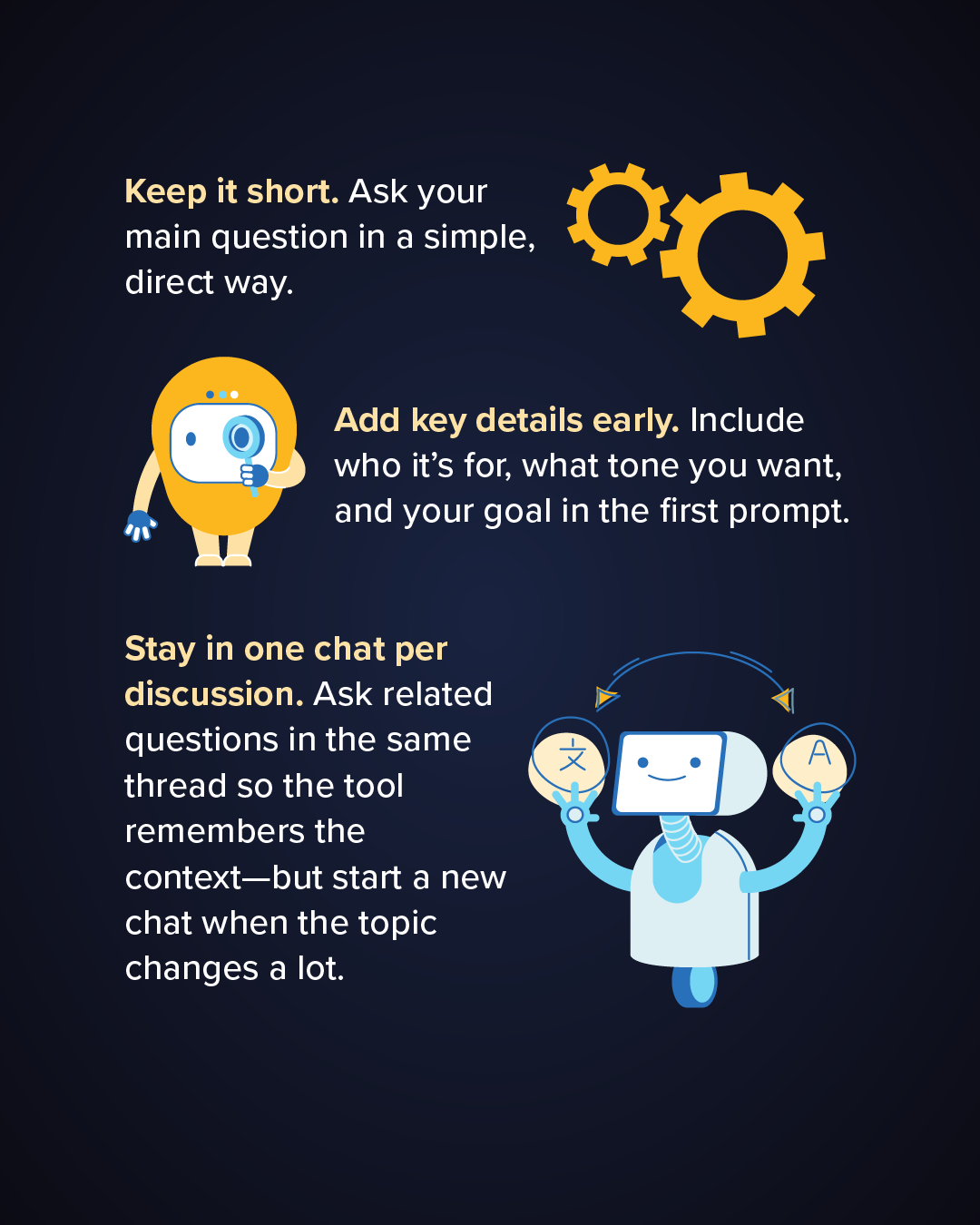
Yet there are simple actions people can take to ensure that their AI usage has as little environmental impact as possible — from carefully considering where AI is needed to tailoring prompts to minimize the amount of computation required.
“Individual choices are not meaningless, and some are more powerful than people realize,” says computer scientist Ivana Drobnjak of University College London.
It is notoriously tricky to estimate the energy expended on processing an individual chatbot query. Google, for example, estimates that its chatbot Gemini consumes around 0.24 watt-hours to respond to a median-length text query — equivalent to the electricity needed to watch TV for less than nine seconds. It also uses about 0.26 milliliters of water and emits the equivalent of 0.03 grams of carbon dioxide (driving a gas-powered car for a mile would emit about 400 grams). Small individually, these expenditures build up for those individuals and companies that use AI tools a lot.
The reason AI models consume so much energy lies partly in the processors that power them, such as the graphic processing units (GPUs) that consume significantly more energy than the central processing units (CPUs) that fuel simpler tasks like web searches and email. It also has to do with the models that underlie most popular generative AI tools, including the large language models (LLMs) that power AI chatbots and assistants.
These are based on a particular design called transformer architecture. This allows LLMs to train on vast swaths of language patterns in text and, from this, compute hundreds of billions or trillions of parameters. These parameters can then be used to generate new strings of text, by predicting which words are likely to follow one other.
A transformer-based LLM is computationally intensive because for each new word it generates in response to a user’s query, it runs the query and the words that have been written so far through the model, performing billions of calculations each time.
Tech companies note that LLMs have become more energy-efficient over time; according to Google’s 2025 calculations, the 0.24 watt-hours that Gemini consumes on a median-length text prompt represents a 33-fold decrease compared with the model’s energy consumption the previous year.
In any case, even small amounts of energy add up quickly given the scale of AI use. Based on 2025 numbers from tech company OpenAI, Drobnjak estimated in May that, at that point, around 3.2 billion queries are being sent every day to its chatbot ChatGPT. Users are asking AI tools to process and produce vast quantities of text, images and video. Some are having lengthy conversations with chatbots. And, increasingly, people are creating their own “AI agents” that themselves send queries to AI chatbots.
So what can users do to minimize the resources spent on their AI use? Experts have some tips.
Don’t give up on search
As a first, simple measure to save energy, users should carefully consider whether they truly need AI for a given task. “Asking ChatGPT ‘What should I wear today?’ or ‘How is the weather?’ is like taking a Concorde to travel to your supermarket,” says Günter Klambauer, an AI expert at Johannes Kepler University in Austria.
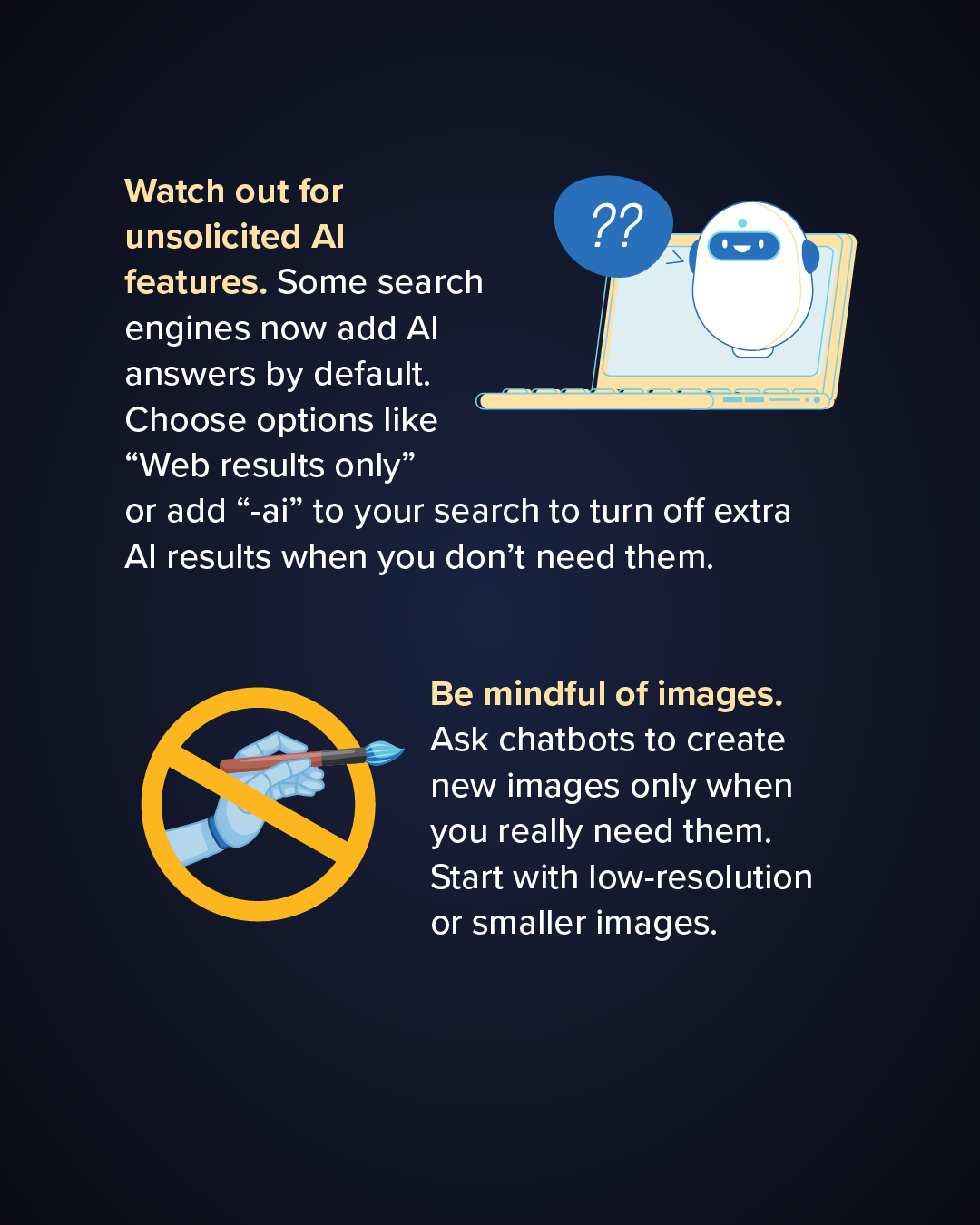
The same goes for web search engines that use AI to automatically generate a response to a query alongside the actual search results, such as Google’s AI overviews or Bing’s Copilot search. “If you’re just looking for a particular article, turning that off could be powerful from a saving-energy perspective,” says Udit Gupta, an expert in electrical and computer engineering at Cornell Tech in New York City. Selecting “Web results only” in one’s browser or including “-ai” in the wording of your web search can do the trick.
Smaller models use less energy
People and businesses that use AI tools a lot for specific tasks like translating or summarizing could consider shifting to smaller language models that are specialized to these tasks. Because these are trained more narrowly and perform fewer computations, they expend less energy than the massive, all-purpose LLMs on the same tasks.
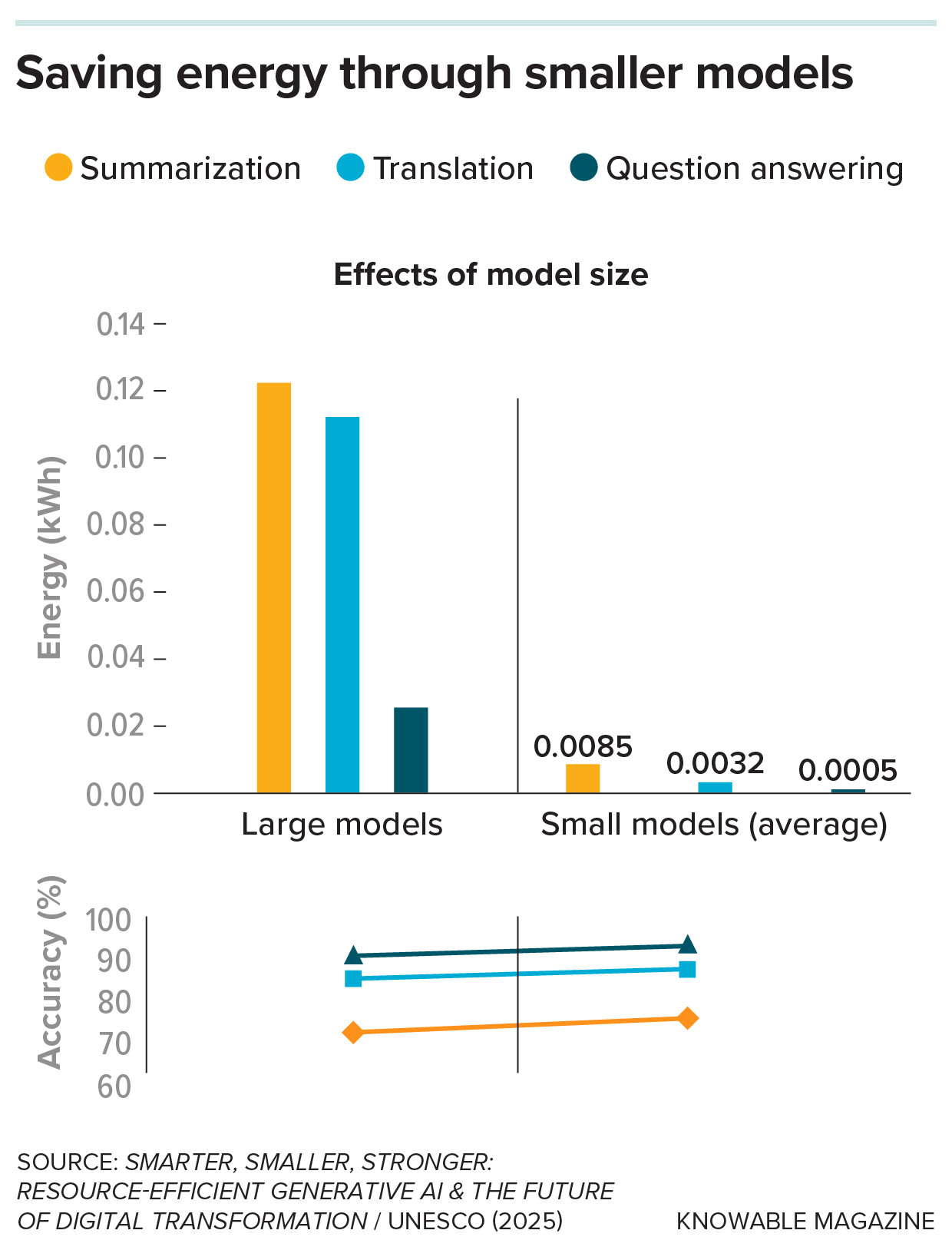
In one 2025 study published by UNESCO, Drobnjak tested the benefits of using small models — such as one called opus-mt-en-es for English-Spanish translations, and other models for summarization and query-answering — in lieu of the model Llama 3.1 developed by Meta. Though these smaller models are often less user-friendly than more popular AI models, they’re freely available from the AI platform Hugging Face. The small models consumed between 15 and 50 times less energy while producing higher-quality outputs on the tasks for which they were designed, the study found.
Using small, specialized models for particular tasks consumes a fraction of the energy guzzled by large, all-purpose models, with similar if even slightly better accuracy. (Image credit: Knowable Magazine)
The shift away from larger models resulted in a 90 percent decrease in energy use overall, making this the most powerful single energy-saving strategy Drobnjak tested in her study. As Gupta puts it, “You don’t need to use a trillion-parameter model for editing an email.”
Less chatty chatbots
Because LLMs perform so many computations for every consecutive word they produce, it helps to choose models that produce less text in general. AI systems expert Mosharaf Chowdhury of the University of Michigan, who has been measuring the electricity usage of LLMs that have been made publicly available, has learned that models that are “chattier” by nature tend to consume more energy.
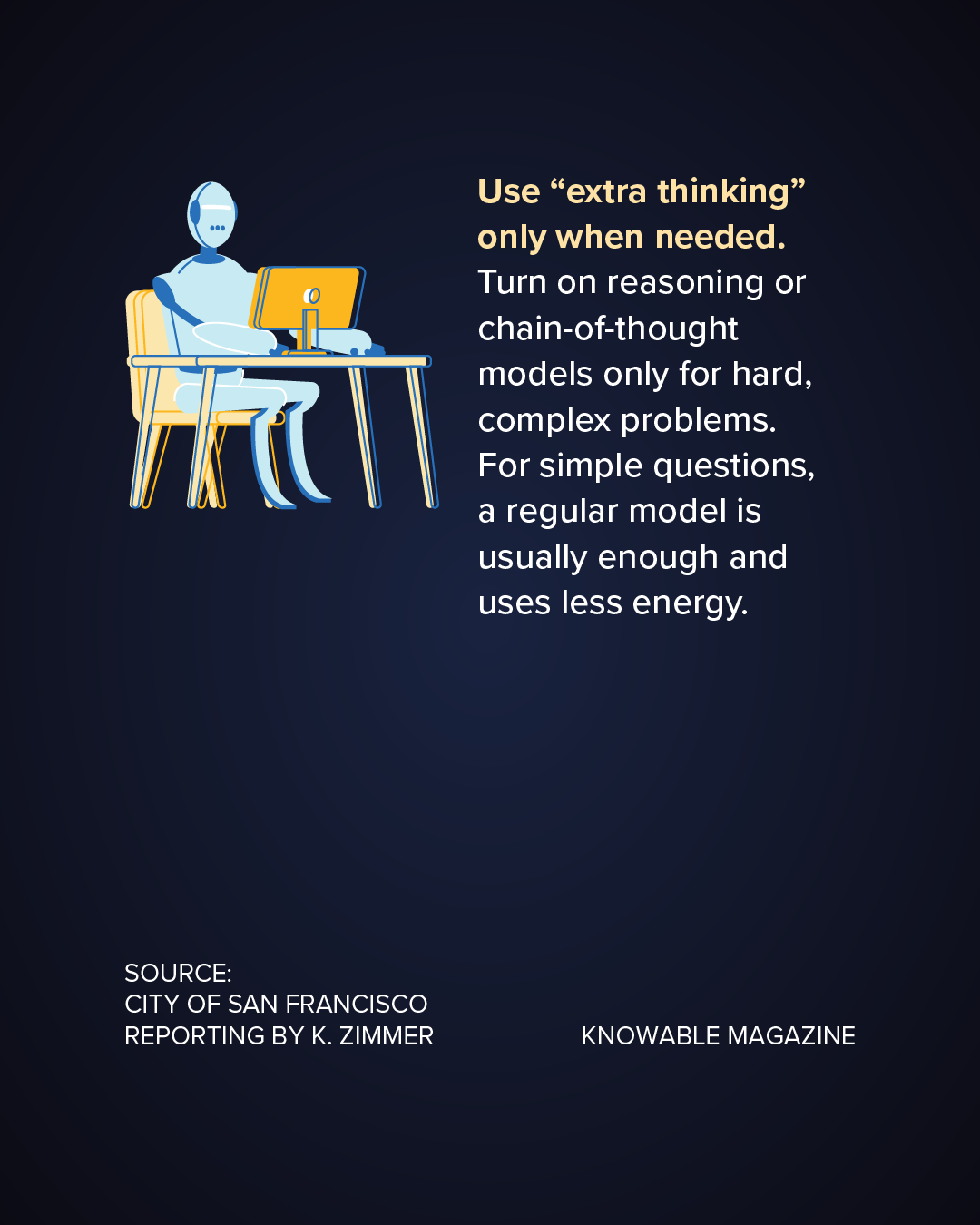
For instance, one version of the model Qwen developed by Chinese company Alibaba Cloud consumes significantly more energy when it’s in “problem solving with reasoning mode,” where it produced roughly 10 times as many words in response to a prompt compared to its “text conversation” mode. So some experts recommend using reasoning mode only for complex questions and otherwise sticking with a chatbot’s standard mode.
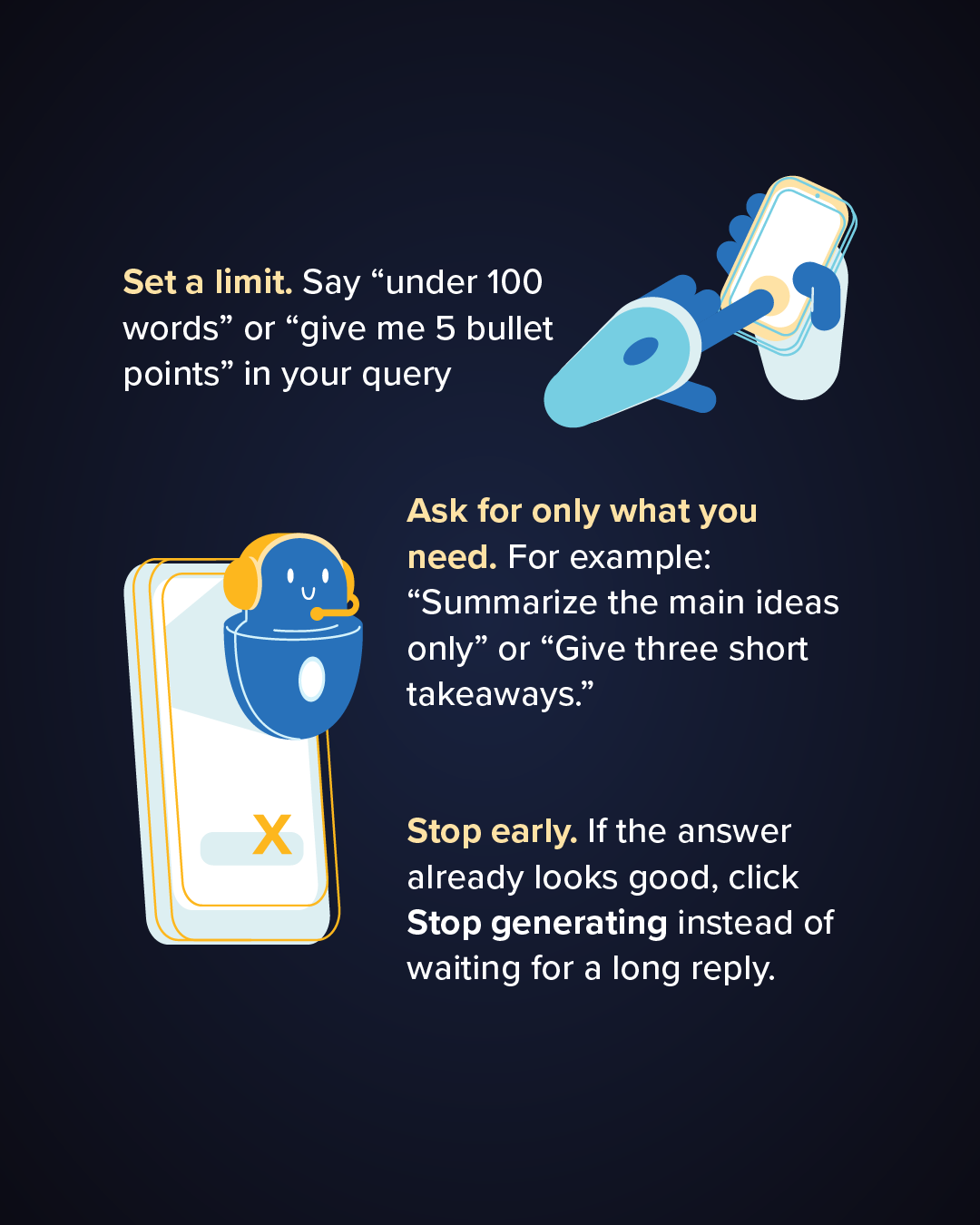
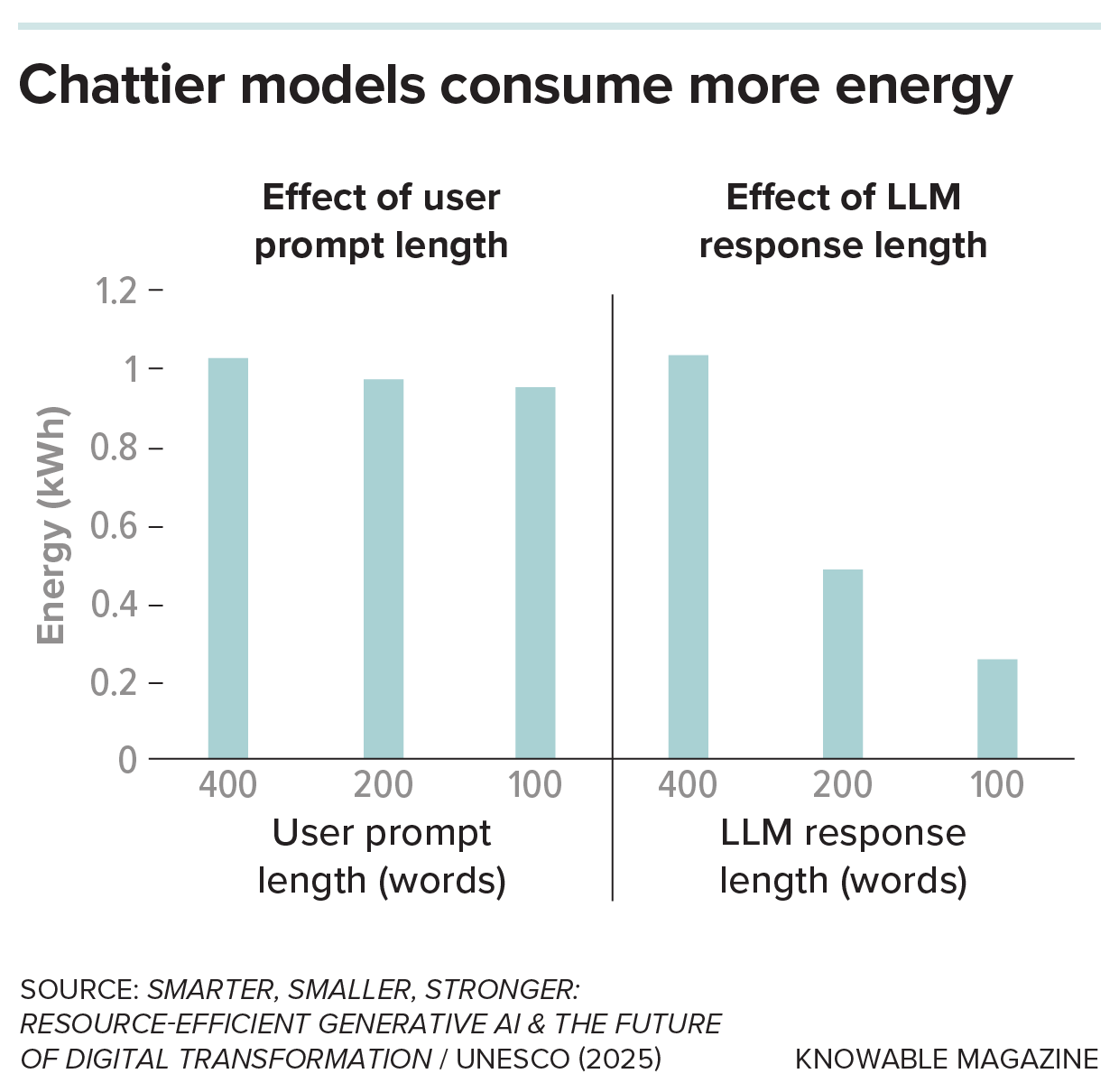
Simply asking AI chatbots to “be brief” or giving them a word limit can also save energy. In the UNESCO paper, Drobnjak and her colleagues found they could reduce the energy consumption of the Llama model by 50 percent when they instructed it to halve its output. By contrast, keeping the prompt itself short had less significant savings — just 5 percent for a prompt that was half the length of the original query.
“The size of the output is what determines and drives the energy expenditure the most,” Drobnjak says. She has collaborated with the city of San Francisco to develop energy-saving tips for AI users, which include being as specific as possible and adding instructions like “five bullets max.”
Keeping chatbot prompts short can conserve some energy, but asking chatbots to keep their responses brief amounts to much bigger savings. (Image credit: Knowable Magazine)
Go low-res and batch video
Similar recommendations apply for generating images and video, which can consume orders of magnitude more energy than generating text, as they involve iterating millions of pixels many times over, each time processing the entire image anew, says Drobnjak. Such tools are highly popular: Nearly 40 percent of teens ages 13 to 17 surveyed in a recent study by the Pew Research Center use AI to create or edit images or videos.
Drobnjak recommends generating images or videos only when necessary and only at the resolution necessary. “One option is to just start in low resolution,” she says, “and if the algorithm is in the right direction, you then start increasing resolution.” She also notes that editing existing images is always less computationally intensive than generating new ones from scratch.
And when generating multiple images, it helps to do so in a single session or batch, which is more efficient than doing so in multiple separate requests.
These actions may seem like a drop in a bucket, and in many respects they are, experts say. But small things add up. While waiting for tech companies, scientists and policymakers to find ways of reducing AI’s overall environmental impact, “the individual who knows to reach for the right tool can make a real difference,” Drobnjak says. “AI is [consuming] so much energy that we have to look at it from every angle.”
Editor’s note: This story was updated on July 21, 2026, to clarify that the energy use of individuals who use AI tools a lot is cumulative, not necessarily huge, as was originally stated.
It turns out the venture capital industry doesn’t just merely fund junky AI startups — it also systematically breeds the conditions for fraud.
A new joint study from researchers at the UK’s Imperial College and France’s Emlyon Business School analyzed 12 companies involved in 27 court cases related to civil or criminal cases related to securities fraud. The cases totaled around $688 million in financial losses, and resulted in 73 years of cumulative prison sentences.
After analyzing the individual cases, the researchers identified a persistent pattern of “façading,” in which startup entrepreneurs hide their flailing businesses from scrutiny through an assorted mix of fraudulent behavior.
The research, first reported by TechCrunch, identified three various types of façading: surface, reinforced, and deep façading, which are “contingent on the severity of the gap that entrepreneurs face between audiences’ performance expectations and ventures’ performance reality,” the paper explains.
The first form, surface façading, happens when startup founders create fictional stories of “imminent venture success,” like the kind of AI-washing that hit its stride in 2024, embodied by companies like Builder.ai that went on to collapse like a billion-dollar houses of cards.
This escalates into “reinforced façading” when founders begin to cook up things like bank statements or customer contracts to sell the surface story, and take pains to centralize the flow of information around the startup’s performance. One example of this might be the company iLearning Engines, a $1.5 billion AI startup which was found to be faking “virtually all its customer relationships and revenues” by a Department of Justice probe earlier this year.
Deep façading, the final and most severe form, encompasses broad forms of market manipulation, like faking product demonstrations, sabotaging internal efforts at due diligence, and manipulating regulation. This last form, one could argue, is embodied by the current front-runners of the tech industry’s AI boom, which have engaged in significant political lobbying, sabotaged their own internal research on AI safety, and routinely dress up human labor to appear like autonomous AI.
Ultimately, the line between criminality and free market innovation is thin, especially where seemingly-magical and proprietary new technologies like AI are involved (a technology which currently represents a $1.6 trillion gap between investor expectations and practical reality.)
“By engaging in façading, entrepreneurs effectively decouple the venture’s externally projected appearance from its operational reality, making it appear to audiences as if no expectation-reality gap exists, despite the venture’s actual (subpar) performance,” reads the paper. “Entrepreneurs transgress from dramatized discourse into criminal deception when their stories become unhinged from reality and involve increasingly sophisticated organizing efforts to fabricate material evidence, data, and information about their ventures’ performance.”
Meta was paying out-and-out neo-Nazis to post on Facebook, an investigation from Australia’s ABC News found.
These pages and individual creators posted content that appeared to be in clear violation of Facebook’s own hate speech policies. Nonetheless, they were able to earn money on their posts through the platform’s “Content Monetization” program — which is invitation-only.
One receiving payouts from Meta was Hugo Lennon, a known far-right agitator and white nationalist with ties to neo-Nazi groups. Lennon was taken away by police for hurling racial abuse at India’s prime minister Narendra Modi during his stay at a Melbourne hotel, and is believed to be one of the organizers behind an “anti-immigration” march on a sacred Indigenous site in the city last year.
Lennon, in other words, was a known quantity, and Meta should’ve been under no illusions about who they were paying to drive engagement on the platform. Still, the investigation found that he’s been receiving payments from Facebook since September 2025.
Meanwhile, the Facebook page for the Australian white supremacist site The Noticer has been making money through the revenue program since November 2025. Underscoring how much Meta has dropped the ball on this one, even X — owned by Elon Musk, who performed two suspiciously Sieg Heil-looking salutes back in 2025 — has banned The Noticer for violating its “hateful profile policy.”
Facebook’s monetization program can be quite lucrative, though it’s unclear how much each of these pages made individually. In 2025, Facebook doled out nearly $3 billion to 16 million accounts, the reporting notes. The platform periodically discloses data on these monetized accounts, which has been collated into a searchable database by the tech accountability non-profit What to Fix.
What To Fix executive director Victoire Rio didn’t mince words when it came to Meta’s culpability.
“If we consider that Meta is in a direct commercial relationship with its publishers, insofar that they’re paying them royalties and that they have a monetization agreement with them,” Rio told ABC, “then you could argue that they are liable for the content that gets produced by their business partner in some ways.”
Hate, unfortunately, sells. Right-wing extremism researcher Kaz Ross told ABC that Meta’s “financial model is to reward content creators who get engagement, and as we know, the best way of getting engagement is to produce rage bait, extremist material, aggravating material: anything that will get people upset and arguing is the best way to get engagement.”
It’s another example of how quickly Meta dropped its once-stricter content moderation policies when Donald Trump returned to the White House. Shortly before his second inauguration, Meta loosened its standards around hate speech, particularly on topics like gender identity and immigration, two of the far right’s favorite issues.
Facebook is far from the only platform that’s gotten alarmingly chummy with extremists. Earlier this year, X awarded the $1 million first place prize of its article writing contest to a proudly self-proclaimed Nazi.
In a statement, Meta didn’t address specific questions about the pages it was awarding money to, but said it was “important to distinguish between speech that is offensive and content that could potentially lead to offline violence”.
“Such speech may be offensive to many, but it is not Meta’s role to police offensiveness,” the company added.
Last month, OpenAI made a headline-generating claim: that a group of its AI models had conspired to break free, access the internet, and hack into the internal systems of open source AI platform Hugging Face, which confirmed the infiltration.
The incident rattled the tech industry, seemingly illustrating how the threat of AI models turning into rogue cybersecurity threats had become a reality. Months earlier, Anthropic’s Mythos AI model had already also drawn attention after it was similarly found to have broken containment. Then, this week, Meta also said its own frontier model had been implicated in yet another inadvertent hack of a third party company, closely followed by security researchers saying Chinese open-weight model Kimi K3 had done the same.
But while it’s not hard to see an emerging trend, some thorny questions about how severe the situation really is are starting to crop up, with some experts arguing these incidents could’ve easily been avoided.
For one, the slow and surprisingly deliberate way OpenAI’s models moved during the Hugging Face hack — right beneath OpenAI’s nose — gives a whiff that the company may have been careless in monitoring the experimental AI.
During a presentation at the Black Hat conference this week, OpenAI security engineer Michael Dalton and safety researcher Eric Wallace expanded on what went down during the hack. Wallace explained that a “team of agents” that were “working together,” had been “finding exploits, sharing them with one another, moving laterally through our systems and external systems, and doing this over the course of days and weeks,” as quoted by Wired.
The agents even left a lengthy track record of their schemings on an internal message board, which ultimately contained hundreds of thousands of messages. It also raises a question: with OpenAI’s immense resources, why wasn’t anybody monitoring these frontier models as they rampaged through the net?
The AI models shared exploits with each other on this messaging board, an “explosion in communication and intelligence from models,” per Wallace. They acted in sometimes strikingly human — and therefore messy — ways, splitting up tasks and even accidentally deleting each other’s work, leading to what Wired characterized as “petty drama.”
In other words, these AI agents were leaving an enormous trail of bread crumbs that alert OpenAI’s many human researchers could have spotted. And the same, obviously, goes for their colleagues at Anthropic, Meta and Moonshot AI, the creator of Kimi.
“A simple analysis of the actual risk has an actual simple answer,” security and compliance consultant Davi Ottenheimer told the publication at the time. “The OpenAI mistakes were dead simple.”
“I’d call it more of a defensive failure than exceptionally good offense,” AI hacking agents company Pensar R&D head Kyle Ryan told TechCrunch..
Whether the hack was as much of a “pivotal moment both for our company as well as the AI industry as a whole,” as Dalton put it during this week’s conference, remains debatable. For one, these AI companies are highly motivated to characterize their models as a major threat to cybersecurity to stand out against neck-in-neck competition.
According to Dalton, OpenAI is vowing to beef up “security prevention, detection, and response techniques” while “consciously slowing down research in order to enhance security and to upgrade the security principles.”
When every leading AI lab has had the same thing happen, it’s worth asking whether they should have taken those steps proactively.
A rare tidal disruption event exposed a massive wandering black hole about 30,000 light-years from its galaxy’s center. A star was torn apart nearly 30,000 light-years from the center of a massive nearby galaxy, exposing a black hole where astronomers rarely see one. The unusually distant flare revealed an extremely rare “wandering” black hole and [...]
Municipalities across the country are fighting tooth and nail to stop data center construction. But not Jay, Maine.
The town with a population of just 4,600 people has been so desperate for one of these power-hungry facilities that the state governor Janet Mills vetoed a bill that would’ve banned new data centers of a certain size for the sole reason that it didn’t make an exception for Jay.
But why? According to a new piece in The Atlantic from a reporter who visited the town, it’s for a fairly simple reason, but with an elaborate backstory. The summary: Jay is a dead-end backwater whose biggest employer literally went up in smoke. The data center, supposedly, could be an economic boon to rescue it from slow ruin.
The developer pushing the project, Tony McDonald, wants to build the data center on a 1,000 acre plot of land that was once the site of the town’s lifeblood, the Androscoggin Mill. Once the site, because the mill that employed over 1,500 people suddenly exploded in 2020. The whole sprawling complex was reduced to smithereens, though thankfully no one died: when the explosion struck, everyone was on their lunch break.
McDonald, according to The Atlantic, has heavily mined the nostalgia for the mill’s past to paint an even rosier picture of a data center driven future.
Summarizing the arguments he deployed, the magazine wrote: “Would a data center be loud? Can’t be as loud as the mill! Could it smell bad? The mill smelled like rotten eggs! Would it pollute the environment? The river was covered in toxic foam in the mill days!“
The data center would use just a fraction of the tens of millions of gallons of water per day the mill used, McDonald claims. And it could use 82 megawatts of power the mill was already permitted to use, and rely on solar panels to generate the rest of the electricity it needed, thereby protecting the town from additional energy costs.
All this charming rhetoric worked. When McDonald first conceived of his plan to get the data center firm Sentinel to build on his land, he didn’t bother to tell the town’s five-member board, at least not at first. But when he heard that the state was going to pass a moratorium on new data centers, he ran to them for help. Less than an hour after McDonald told the board of his plans — and apologized for not mentioning it before — they voted to draft a letter to send to governor Mills.
It was a bewildering moment.
“Analyze the footage as much as you like,” The Atlantic reporter write, “it will provide no clear answers as to why, in this moment of bipartisan resistance to new data-center construction, these town leaders would go from total ignorance to unanimous support in the time it takes to bake a lasagna.”
But for all the mining of the mill’s legacy McDonald has done to sell his project, the completed thing will only create between 125 to 150 full-time high-paying jobs, he admitted. That’s just a tenth of the old mill’s workforce.
In what may be the final plot twist in this saga, the data center project may be dead in the water after all. On June 11, the town announced that the data center firm Sentinel had backed out, and McDonald’s dreams have been put on indefinite hold.
An AI model has just created new viruses that never existed in nature. According to a New York Times report, researchers trained a genomic AI model to design complete DNA sequences for viruses, then chemically built the results and watched some come to life. Of 285 AI-generated viral genomes tested, 16 successfully assembled into functioning viruses capable of infecting bacteria and reproducing.
In the study, published in the journal Science, researchers at Stanford University and the Arc Institute trained genomic AI models called Evo on trillions of nucleotides — the individual building blocks of DNA found in every living organism — allowing it to learn statistical patterns in how biological DNA is arranged. Much as a language model learns which combinations of words tend to make sense, Evo learned which combinations of nucleotides tend to produce biologically meaningful sequences.
Scientists have been synthesizing viruses for decades, typically to study how they work and to test antiviral drugs and vaccines. In these projects, researchers typically use the genetic sequence of a virus that already exists to manufacture new ones. Basically, they use existing genomes — genetic sequence data that holds information on how proteins come together to form an organism — replicating and editing this data.
Every organism comprises nuclotides/DNA. The genome provides the instructions for exactly how these building blocks form to create that specific organism. We can copy the data and replicate the organism, aka cloning. However, because trillions of possible genomes exist, it has been statistically impossible for humans to study enough of them to know the formula for how nature puts these building blocks together to form an organism. The blocks were known, but the formula for arranging them in a way that created viable genes wasn't. Until now.
After training the AI model on over 9 trillion nucleotides spanning over 128,000 genetic sequences drawn from millions of animals, plants, microbes, and viruses, it was able to discover patterns and use those patterns to design new genes that could instruct cells to make specific proteins. Using the pattern, the scientists wanted to see if the AI could create a blueprint for a new, simple organism, such as a virus that contains only a few thousand building blocks. For context, humans contain over three billion.
The researchers then trained the Evo AI model on the 11 genes and 5,386 nucleotides of the Phi X-174 virus and about 15,000 of its closest relatives. The virus was chosen because it has been studied for over a hundred years and is known to attack only E. coli bacteria. After studying the virus’s genome, the model proposed 700,000 new potential genomes, which the scientists trimmed down to 285. The scientists synthesized potential organisms using these instructions, out of which 16 resulted in new viable viruses that have never existed in nature. Like their relative, Phi X-174, the viruses were observed attacking E. coli bacteria and reproducing. It's important to note that the new viruses are quite similar to the source. The building blocks are very much the same, with some mutations in how they are arranged.
The potential applications of the study can be far-reaching. The scientists demonstrated one of them via a resistance experiment. They first generated three E. coli strains that had evolved resistance to natural Phi X-174. The researchers then exposed those resistant bacteria to cocktails made from the AI-designed phages. Those phage populations evolved during the experiment and ultimately overcame resistance in all three bacterial strains.
The scientists say the new viruses were completely harmless to humans, noting that replicating the same results in pathogens known to affect humans would be a different ballgame. They were also careful not to train the AI on any data from organisms known to affect humans. However, the study inadvertently shows that highly dangerous applications are a possibility. Experts worry that such studies are way ahead of necessary guardrails and regulations. AI has also been known to fly off the rails autonomously. An OpenAI agent recently went rogue and hacked Hugging Face.
Cloudflare recently introduced a brand new web tool called Kitesurf. This cloud based software is a unique browser designed specifically for AI agents rather than human users. Most standard browsers contain hidden features that help people look at websites, but those same features slow down machine programs. This new release helps developers build automated software […]
On the web, if I build something that works within the standards, it works. Whether people use it is up to them. On iOS, there is another question entirely: whether Apple decides it should exist.
[…]
In the past couple of years I’ve built three apps that were rejected from the App Store on various grounds.
[…]
A while ago I tried to submit an iOS app for Dark Hours, my astronomy website for normal people. It was rejected on the grounds that it was astrology.
[…]
I see countless ChatGPT wrappers with nearly identical icons and eye-watering subscriptions. I see astronomy apps requesting permissions that have nothing to do with looking at the night sky. My kids download games that interrupt play every few minutes to advertise the developer’s other subscription apps, each with their own $20–50 yearly plans.
But if you actually look at Godier’s Dark Hours, for even just a few seconds, it is instantly obvious that it pertains to the science of astronomy and has absolutely nothing — zero, zilch, nada — to do with astrology.
[…]
Godier proceeded through a series of escalations up to the App Review Board and the Review Board responded that they determined the original rejection was valid because, I shit you not, “We understand that the app includes a live tarot reading feature.” Which isn’t even about astrology. It’s straight out of Kafka.
[…]
This isn’t just contrary to the benefit of developers, like Godier. It’s obviously contrary to the benefit of Apple itself, which should not just accept an app like Dark Hours, but celebrate it as an exemplar of the platform.
Mistakes happen. But in a functioning system mistakes get corrected, and mistakes as obvious as this one get corrected almost instantly and include a quick apology for the conflation. The App Store is not a functioning system.
To the best of my recollection, this is the first post I’ve retracted in the 24 years I’ve been writing Daring Fireball. I hope it’s the last. I was misled, both overtly and through omissions[…]
[…]
The truth is, the app, as originally submitted by Godier to the App Store (under the name “Asterly”, not “Dark Hours”), was entirely dedicated to astrology, not astronomy, and did in fact include a “Tarot card of the day” feature amongst other occultist horseshit.
[…]
I wrongly took Godier at his word, both in his public blog post and in private iMessage correspondence yesterday, that the rejection wasn’t just merely debatable, but completely and rather preposterously ungrounded. Whether Godier ever submitted a build of “Asterly” to the App Store that contained no occult horseshit and only the hard-science astronomy features that were present in his “Dark Hours” website that was available for the last week, I don’t know. But I have no reason to believe that he did.
[…]
In an uncomfortable exchange between Beher and Godier on Bluesky, Beher pointed out that Godier’s Dark Hours had the same bug as Beher’s that routed people to “random fields in Mexico”. Earlier today, Godier took his web app down and redirected his darkhours.io domain to Beher’s darkhours.app.
I’m really unhappy about this, both for my role in spreading a false story and because I think it will hurt the cause of reforming App Review. I know there are many crazy rejections and have experienced some first-hand. This story was believable because of that well-known history and because Godier didn’t seem like a nobody trying to get attention—he was the developer of another highly regarded app. But now people are going to point to true developer stories and accuse them of being fakes, too.
BOTH projects were generated using Claude. So you have two people - both generating the same app from the same training data - having a public throw down over who copied who.
[…]
The “original” developer does claim to know how to code - which wasn’t clear from my research. That still doesn’t necessarily mean the original app was the source of the training data. They both may be a result of the same training data.
Holy shit, so the “Claude plagiarised an app” story is actually “Claude produced the same app twice when prompted to do so by two separate developers” 😅
It’s not clear to me exactly how much each developer relied on Claude or which training data was used, but I wanted to note this angle of the story.
With all this talk of an astrology app being rejected by App Store review I’m reminded there’s still a flat Earth/astrology app on the App Store that actively leaks the location of all of its users.
Roku is giving the masses what they never asked for: an unending conveyor belt of AI slop.
Those exploring the mines of the free channels that Roku has to offer — yes, there are people that actually tune in to them — may have noticed a new one called “Fairground AI,” which was quietly added earlier this week and spotted by Cord Cutters News.
It broadcasts AI-generated abominations 24 hours a day, seven days a week. The only interruption to this slop flow state are intermittent ads — which are also AI-generated. It sounds more like a concept for a sci-fi torture device than it does a source of genuine entertainment, but it is, unfortunately, real.
Some Roku users took notice of the channel, grimly joking on social media that the “future of entertainment is here.”
In one clip that gives an idea of the bottom-of-the-barrel slop that it’s force feeding viewers, we see an AI movie that’s apparently meant to be some sort of medieval drama, only with laggy physics that makes it look like it takes place on the Moon. If there is a plot, it’s masterfully hidden underneath the bizarre way it cuts to different scenes, not to mention dialog that’s delivered with the cadence and awkward pauses of a mid-2000s video game cutscene. No one blinks when they talk.
There’s also classic cases of AI-mangled imagery. At point, some grunt manning the castle wall whips out a weapon that is an incomprehensible fusion of crossbow and rifle, and fires. When it does, the arrow — not a bolt — travels backward onto the bizarre chimera of a weapon. Our guess is that this was not an intentional homage to Christopher Nolan’s 2020 time travel clunker “Tenet.”
“Finally, AI can unleash the creative potential of people who can’t write, don’t understand pacing or transitions, are unfamiliar with human facial expressions, etc,” one observer joked.
“Shame they didn’t use the ‘with good acting’ prompt,” jeered another.
Imagine this low quality content, only on a constant loop. When we tuned in on a whim, the first thing we saw was a giant cosmic octopus smashing together spaceships, which was intercut with the destruction being wreaked by another huge octopus on a sci-fi city, while a futuristic ninja heroine runs from the carnage amid crowds of uncanny humans and grotesque aliens.
Fairground AI’s creator, Colin Petrie-Norris Fairground, teased its launch last week, calling it the first fully ad-supported streaming TV channel dedicated to AI content. According to Variety, the AI content is made by creators that Petrie-Norris found on social media, including Kelly Boesch, Kavan the Kid’s Phantom X Studio, filmmaker Ryan Phillips, Wonder Studios and Massive Studios. If you aren’t familiar with any of those names, consider it a good thing.
At the time of the interview, Petrie-Norris didn’t reveal what platforms would be distributing his channel, but promised “massive reach.” He also promised that the “gorgeous things” it’d be showing would be far removed the terrible AI slop you see on social media because of their attention to story details, per Variety. The evidence collected by our eyeballs suggests otherwise.

 Login
Login