
❌

Reading view

Sparrow Wallet Lawsuit

Joe Rossignol (PDF):

The complaint alleges that Apple violated California’s Consumers Legal Remedies Act and other laws by failing to adequately review and monitor apps distributed through the App Store, despite marketing it as “a safe and trusted place to discover and download apps.” Due to these assurances in Apple’s marketing, the complaint said the plaintiffs trusted that a Sparrow Wallet app they downloaded from the App Store on iOS was legitimate, when in reality it was a fraudulent spoof designed to steal Bitcoin from users.

Sparrow Wallet is only available on Windows, macOS, and Linux. The popular Bitcoin wallet is not available on iOS, but scammers have released fake lookalike apps in the App Store that can trick users into giving up control of their funds.

[…]

Even when victims reported fraud, the lawsuit alleges that Apple often took little to no action, and it says other fake Sparrow apps remain in the App Store.

Sparrow Wallet developer Craig Raw has publicly addressed Apple’s slow response to multiple fake versions of his app appearing in the App Store. In a January 2024 social media post, for example, he said “there is still a scam ‘Sparrow Wallet’ app on the @Apple App Store, despite myself and others having reported it weeks ago.”

Craig Raw:

My attempt to protect users from scam apps on the @AppStore has gotten my Apple Developer account flagged for termination - ironically, for “dishonest activity”.

[…]

I’m the developer of the real Sparrow Wallet, a desktop app, and I hold the registered US trademarks for the name and logo. I have publicly warned @Apple and the community about these fake apps from early 2024, but they keep appearing.

The app @Apple flagged was a placeholder that was never published. Its only purpose was to warn users that Sparrow is desktop-only and that other “Sparrow” apps aren’t mine. This approach may have been misguided, but there was nothing dishonest about it.

Joe Rossignol:

In response to our request for comment, Apple said it has taken swift action to remove any apps impersonating Sparrow Wallet[…] Apple says it takes immediate action against apps that do not comply with its guidelines.

Previously:

Update (2026-07-28): Sarah Perez:

The complaint targets one of Apple’s longtime competitive arguments: that its tight control over its App Store makes its platform safer than those offered by its rivals. The company has used this claim to push back against deregulation of the app ecosystem, including third-party app stores and sideloading.

“As part of a sustained marketing campaign, Apple has positioned itself, its products and services, as offering a level of security and trustworthiness superior to any competing technology company,” the new filing states. “This includes assurances about the safety of applications distributed through its App Store. By retaining exclusive control over which apps are permitted on Apple devices, Apple has structured its platform to ensure that consumers depend entirely on its promise of safety and reliability,” it reads.

With third-party app stores, there would be an incentive to do better vetting than Apple, and with sideloading it would be clear that the app was not being downloaded from sparrowwallet.com.

Update (2026-07-29): Jeff Johnson:

What struck me about Apple’s response is that it places the burden of curating the App Store on developers and users rather than taking responsibility for it. After all, Apple reviews every version of every app before it can be published to the App Store. If Apple is curating the App Store, then why do scams have to be reported and removed? One wonders how the scams get past Apple review in the first place, and even if Apple review “is not perfect” (a gross euphemism), how the second line of defense, Apple employees patrolling the App Store for scams that the review team missed, also fails. The burden of App Store curation should not fall to me, a lone indie developer.

Apple’s response also ignores that the indie developer did report the scams, multiple times.

Previously:
  •  

The EnshAIttification of Day One

Aleem Shaun:

I’ve used Day One for more than a decade. It was an excellent journalling app. Private, minimal, easy to use, with excellent features such as geolocation, weather, ‘On this Day’, and book printing. Features that got out of the way and either worked quietly in the background or appeared only when you summoned them. That’s changed.

Now there are new subscription tiers. Previously, the tiers were Free and Premium. Simple. Premium included sync and a few other things that I can’t remember, but it was compelling enough that I’ve been a Premium subscriber from the beginning. Now, without consultation, I’m Silver (not Premium), and there’s a new, more expensive AI-driven tier, Gold. I don’t object solely on that basis. You would think I could just choose to remain on ‘Silver’ and all would be well. But no. Even with these features turned off in settings, I’m visually prompted in the app to upgrade to Gold and use the Daily Chat (with AI), which I’ve turned off and can only use if I upgrade. And yet, there it is, taunting me.

Via Eric Schwarz:

Even Apple is guilty of doing this in the Settings app and the former iWork apps.

Previously:

  •  

San Francisco Demands Removal of Nudify Apps

Matt Burgess (MacRumors, ArsTechnica):

On Thursday, San Francisco city attorney David Chiu sent legal notices to Apple and Google demanding that they remove from their app stores 13 face-swapping apps, which allow users to create AI-generated nonconsensual nude images. The letters say the Silicon Valley giants should stop “aiding and abetting” the sale of explicit deepfake images and “sever” business relationships with the app developers.

[…]

Researchers have repeatedly found and reported apps in Apple’s App Store and Google’s Play Store that allow people to generate sexual images using AI—including some apps being rated as suitable for use by children. While new laws and bans aim to tackle the scourge of explicit deepfakes online, technology and social media companies consistently direct millions of people toward the harmful tech.

Both Apple and Google have developer policies that prohibit pornography, abuse, and harassment on their platforms.

Burgess gives the impression, which is my base assumption, that these 13 apps were clear about what they do, so App Review has no excuse for missing them. But I’m sure it’s keeping us all safe in other regards.

Meanwhile, in a preprint research paper published in May, researchers from Cornell University and Georgetown University identified 420 apps offering general face-swapping capabilities on Google’s and Apple’s app stores. They tested 155 to see if they could be used to create face swaps with nude images; in 70 percent of cases, it was possible, with the apps not including safety measures to prevent this.

Previously:

Update (2026-07-21): Danny Bradbury:

Chiu isn’t arguing that hosting an app automatically makes a platform liable for what it does. Platform operators already won that battle with Section 230 of the Communications Decency Act. That 30-year-old law says websites generally aren’t responsible for content posted by users, allowing platforms to host user-generated content without getting sued every time someone defames someone in a comment thread.

Courts have often extended those protections to cover app stores too. Apple and Google are treated as distributors of whatever a third-party developer uploads, rather than publishers.

Chiu is attempting to sidestep that argument by focusing on the companies’ payment systems, noting that Apple and Google collect a cut of every in-app purchase. According to the Tech Transparency Project (TTP), that means they profit from apps that generate revenue by creating non-consensual intimate imagery.

  •  

Flickr 5.0

Phil Gyford:

Flickr recently updated their iOS/iPadOS app to version 5 (App Store link) and, while it’s not radically new, for a service whose changes have been incremental over recent years it contains a lot of differences. However I’ve yet to find any official changelog or update information.

[…]

When displaying multiple grouped photos from a person you’re following, it is no longer possible to view all the subsequent ones, other than the three or four initially displayed.

In the list of your Followers’ photos, their name now appears under their photos, so you must scroll down beyond the photos to see who took them.

[…]

When zooming into a photo the app no longer loads a higher resolution version, so now the zoomed-in version will be very pixellated.

He has a long list of missing features that may or may not be coming back. And there’s what seems like a major change: tags can no longer use capital letters.

The main changes I noticed were:

  • In the Home/Discover view, when there’s a large group of new photos, you can only go into the group and view them individually, swiping to see each one. There’s no longer a way to see the whole group at once and scroll through it. (And tapping on the group icon or number of photos doesn’t do anything.)

  • Double-tapping to favorite doesn’t work in some situations.

  • The interface is more busy, showing more interaction chrome like other social media sites, rather than focusing on the photos.

  • Swiping/navigation seems more clear than before, though without the old app side-by-side I can’t be exactly sure what’s changed.

Update (2026-07-16): Wesley Moore:

The Android version has been updated too:

“Flickr is back and better than ever — rebuilt from the ground up with a fresh new look and feel.”

I would guess it’s been built with cross-platform technology as it looks the same and came out the same time as iOS. The performance is terrible on Android. Scrolling my Photostream is juddery on my Pixel 9a (120 Hz display). It’s worse on my Android tablet.

Scrolling between photos swipes the whole UI (not just the photo), there’s also a flash of white loading the new photo. Needs some serious iteration.

See also: Reddit.

Update (2026-07-27): A. Lee Bennett Jr.:

Hooray! #Flickr restored a thumbnail view of all items from a specific post.

It turns out that Flickr 5.0.3 reverts back to the 4.x codebase.

Flickr (Reddit):

We know the new app hasn’t met the bar you expect from Flickr. Since launch, we’ve heard your feedback about bugs, missing features, and rough edges, and we want to acknowledge that directly. Here is where we currently stand:

iOS: We’re in the process of rolling back the iOS app to the previous version while we address these issues. You should see this reflected in the App Store shortly.

Android: The Android app will remain on the updated version. Due to technical limitations and the risks involved in reverting, a rollback isn’t possible on this platform. Instead, expect frequent updates as we fix bugs and restore preexisting features.

Across both platforms, this app refresh represents a significant, long-term investment in the Flickr app. The app was long overdue for an update and getting it right matters to us. Thank you for your patience, and for continuing to share what’s missing and not working. It’s shaping exactly what we address next.

  •  

Weathergraph 1.0.358

Tomas Kafka:

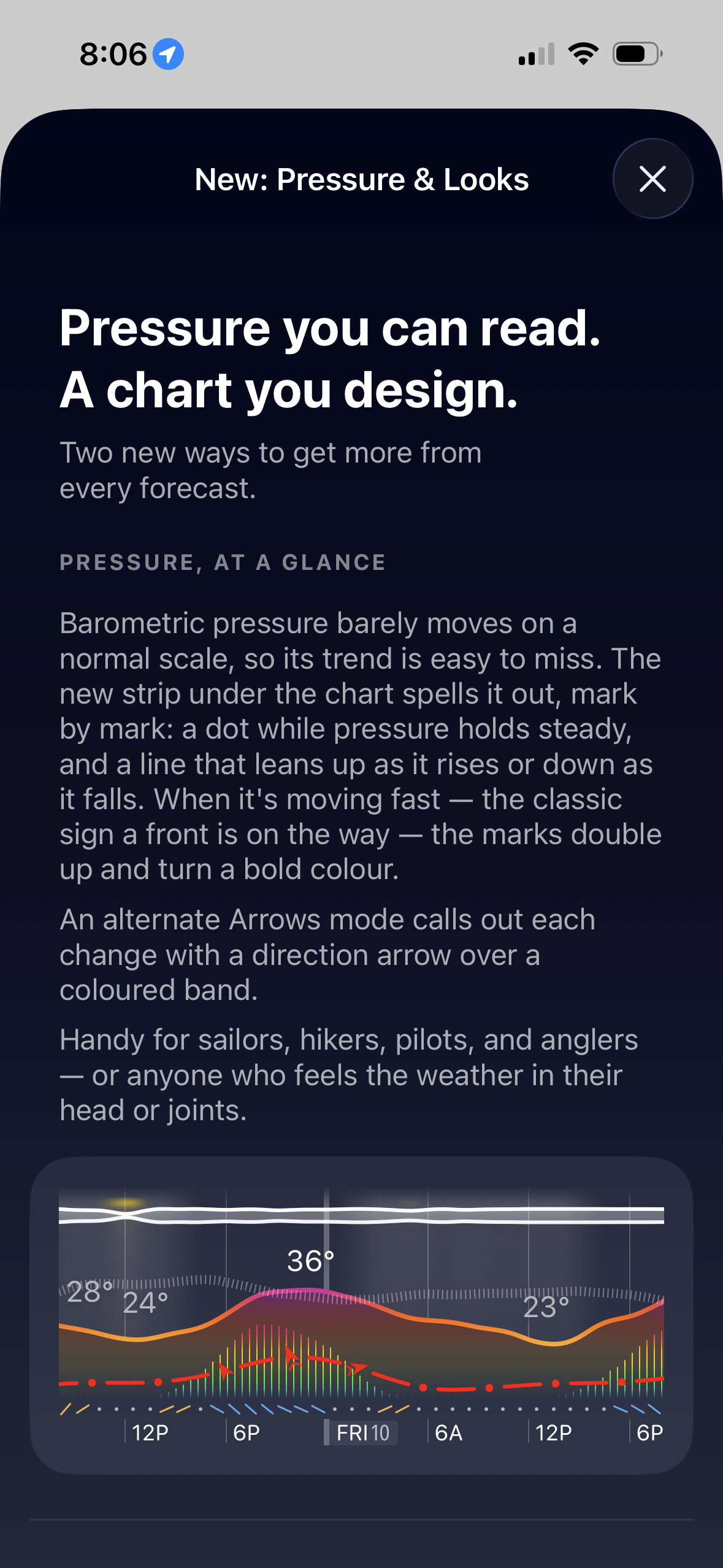
Pressure is now much easier to read. A new Pro trend strip under the chart shows whether pressure is holding steady, rising, or falling. Fast changes stand out with stronger marks and colour, so you can spot a front moving in sooner - useful for hiking, sailing, flying, fishing, or weather-sensitive heads and joints.

You can now also design the chart more freely with the new theme editor. Mix palette, style, sky detail, and accent colour, or start from a preset, to make Weathergraph fit your style.

This is an example of what it looks like:

Weathergraph: Pressure

Previously:

  •  

Castro’s Customer Support Lessons

Dustin Bluck (archive link, Hacker News):

I had an idea when I bought Castro that human support based around actual user experience was an easy differentiator. I’ve rarely gotten useful answers from support from services I use. I thought if I used my own product every day, read every email and answered it thoughtfully, people would appreciate this, and it would build some degree of loyalty and appreciation.

[…]

However, what I found is this whole thing didn’t work as I thought it would. Sure sometimes we were able to wow customers, particularly when we responded right away with an exact fix for them. But the vast majority of our honest, thoughtful answers were deeply unsatisfactory to users, and it often annoyed them more than anything else.

[…]

Customers email us with confusion about how podcasts work, how the App Store works, how their Mac works, and any number of tangential issues. What tends to happen is the same users do this over and over, and once they find out we answer, the requests get more frequent and more burdensome.

[…]

To the user, any response aside from “Okay, we’re going to build that right now” is meh-to-negative. Various honest responses, such as “I thought about this or tried it in the past and it unfortunately didn’t work very well” are not going to knock their socks off. These just don’t do much in terms of loyalty and rapport.

[…]

Avoiding explanations and specifics tends to get a neutral response and doesn’t suck anyone in or waste too much time. In other words, the best approach for us is what most companies do. Because building loyalty or rapport at the moment something isn’t working and the user is frustrated hasn’t worked. The real positive experience comes when you actually improve the product, so that’s where we’re spending our time.

I have definitely seen all these categories of customer interactions, but I don’t agree with the conclusion. Yes, in the end you want to be improving the product, but I don’t think that’s fully separable from interacting with customers as humans. I’ve found spending time on customer support incredibly valuable for making my products better. Even a lone report of an issue can often lead to a fix and learning something important that has wider implications. It’s also enjoyable and motivational to hear about real people making use of what I’ve built or to turn around someone who started with a negative view. And it seems to help with marketing, too.

I also see a correlation with the apps that I use—the better ones tend to also have good support. That said, I use a podcast app that famously doesn’t offer support. There are different situations, and there’s more than one way to a good product and a successful business.

I do think there’s an art to all this. Not everything can be measured, and there’s more to it than just committing to answering e-mails thoughtfully. You need to set boundaries and steer the interactions to make them productive, efficient, and satisfying for both sides. I’m still learning.

Previously:

Update (2026-07-07): Jeff Johnson:

This is what you get from the free with IAP business model: most of your support emails are from freeloaders!

My apps are upfront paid, thus most of my support emails are from customers. I don’t get overloaded with emails, and paid customers are more incentivized to solve issues with you, because they’ve invested money into the app.

Vitor:

I find myself agreeing with you that customer support is valuable and we should do it. But over the years I have also realised that, in a way, being good at support is punishing. I’ll explain[…]

  •  
❌