❌

Reading view

Case Solved: The London Files desafia-o a pensar como um detetive para desvendar uma série de mistérios

Fã de jogos de mistério e aventuras "point and click"? Case Solved: The London Files coloca os jogadores no papel de um detetive que tem como missão investigar uma série de crimes, num título que promete pôr à prova as suas capacidades de observação e dedução.  

The post Case Solved: The London Files desafia-o a pensar como um detetive para desvendar uma série de mistérios appeared first on Tek Notícias.

  •  

Sun Surveyor Lite: saiba onde vai estar o Sol para não falhar o eclipse solar de 12 de agosto

Estamos a poucos dias do eclipse solar mais aguardado das últimas décadas em Portugal, e a Sun Surveyor, uma excelente ferramenta para fotógrafos, poderá ser a ferramenta perfeita para prever a posição exata do Sol e a escolher o melhor local para observar o fenómeno em segurança.

The post Sun Surveyor Lite: saiba onde vai estar o Sol para não falhar o eclipse solar de 12 de agosto appeared first on Tek Notícias.

  •  

Your iPhone Has Been Hacked Pop-Up: What It Means & How to Stay Safe

Apple has built a reputation for robust security features, so understandably, seeing an urgent pop-up saying your iPhone has been hacked can feel nerve-wracking. This deceptive tactic, often disguised as a security alert, is designed to trick users into taking harmful actions. It’s highly unlikely that your iPhone has already been compromised. However, carelessly interacting […]

The post Your iPhone Has Been Hacked Pop-Up: What It Means & How to Stay Safe appeared first on The Mac Observer.

  •  

La supergigante roja Betelgeuse no está sola en Orión: captan la imagen más clara de la estrella que la acompaña

Una señal diminuta, oculta al lado de uno de los astros más deslumbrantes del cielo, puede resolver un enigma de décadas y abrir otra vía para estudiar cómo viven y mueren las estrellas gigantes.
  •  

iOS 27: Diese Features hat Apple noch nicht angekündigt

Auf der WWDC 2026 hat Apple zwar iOS 27 und seine wesentlichen Funktionen vorgestellt, doch in der Gerüchteküche rumorte es bereits vor, aber auch nach der WWDC-Keynote. Insbesondere der gut vernetzte Bloomberg-Journalist Mark Gurman berichtete regelmäßig über iOS-Features, von denen Apple selbst nicht gesprochen hat und die auch in den Beta-Versionen noch nicht zu sehen sind.

Grundsätzlich ist das nicht ungewöhnlich: Manche Funktionen hält Apple bis zum Schluss zurück, um nicht zu viel zu verraten. Ein klares Beispiel ist dieses Jahr das faltbare iPhone Ultra, das Apple angeblich zusammen mit dem iPhone 18 Pro und Pro Max vorstellen soll: Das neue Format benötigt zweifelsohne Anpassungen an iOS, die bisher aber nicht an der Oberfläche zu sehen sind. Lediglich einige versteckte Textschnipsel deuten auf ein etwaiges faltbares iPhone hin.

Wir zeigen, über welche Features Apple noch nicht geredet hat, die mit iOS 27 im September oder vielleicht sogar noch später, mit iOS 27.1 oder 27.2 kommen könnten.

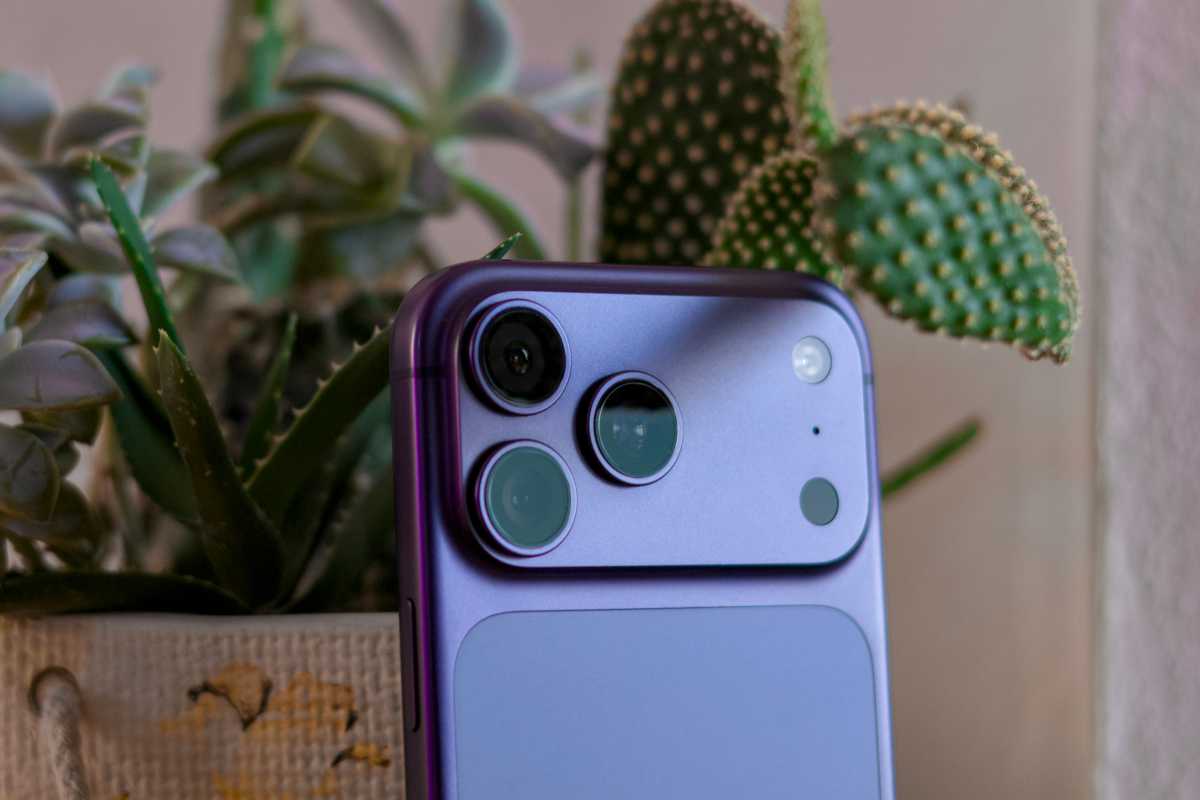
iPhone 17 Pro Max rear camera system

Foundry

Anpassbare Kameraoberfläche

Während sich die allermeisten iPhone-Besitzer mit der normalen Kamera-App zufrieden geben – auch nach der Überarbeitung in iOS 26 vergangenes Jahr –, wünschen sich Hobbyfotografen, die mehr aus der iPhone-Kamera herausholen möchten, schon lange mehr Anpassbarkeit. Im Mai berichtete Gurman, dass Apple genau das in iOS 27 einführen wolle: einen erweiterten Modus, in dem Sie die verschiedenen Bedienelemente selbst festlegen können.

Noch ist von den Neuerungen allerdings nichts zu sehen. Möglicherweise hebt sie sich Apple für die iPhone-Keynote auf, da es sich nicht um eine Funktion handelt, die in erster Linie Endverbraucher anspricht und nicht Entwickler auf der WWDC.

Erweiterung von Apple Health

Anfang Juni, kurz vor der WWDC 2026, schrieb Gurman, dass Apple Health eine Reihe von KI-Funktionen erhalten würde, die ursprünglich für das Projekt „Mulberry“ gedacht waren. Da nichts davon bei der WWDC angekündigt worden und auch in der Beta von iOS 27 zu sehen ist, geht Gurman davon aus, dass die Neuerungen erst in einem späteren Update erscheinen. Uns würde es nicht wundern, wenn Apple eine so wichtige Neuerung ganz auf iOS 28 verschiebt.

Split-Screen für iPhone Ultra

Die wohl offensichtlichste Lücke haben wir bereits eingangs erwähnt: Mit dem Erscheinen des iPhone Ultra im September – zumindest haben sich die Anzeichen inzwischen so sehr verdichtet, dass es unwahrscheinlich ist, dass es doch nicht kommt – benötigt iOS einen Split-Screen-Modus, um von dem zusätzlichen Bildschirmplatz Gebrauch machen zu können. Selbiges gilt für andere Funktionen, die von der neuen Hardware abhängen. Spätestens zur Veröffentlichung des iPhone Ultra müssen diese Funktionen da sein, also Mitte September.

Zusätzliche Chatbots für Siri

Und zu guter Letzt wäre da noch eine Funktion, die streng genommen existiert, allerdings ohne die entsprechenden Optionen: Ebenfalls Anfang Juni hat Gurman behauptet, dass Siri sich mit mehr Chatbots als nur ChatGPT verstehen würde. Apple habe angeblich schon mit Gemini und Claude experimentiert. Doch auch in der Beta von iOS 27 ist nichts davon zu sehen, obwohl es sich um eine Funktion handelt, die definitiv getestet werden sollte, bevor sie der Öffentlichkeit freigegeben wird.

Wir haben Zweifel daran, dass zusätzliche Chatbots für Siri bereits zur Erstveröffentlichung von iOS 27 im September erscheinen, geben die Hoffnung aber nicht auf. Wahrscheinlicher ist für uns eine Veröffentlichung später im Herbst.

  •  

Fire Emissions Watch usa satélites para mostrar a evolução dos incêndios e poluição do ar em tempo real

À medida que os incêndios florestais continuam a afetar várias regiões da Europa, um nova ferramenta, que usa dados dos satélites Copernicus, permite acompanhar, em tempo real, a evolução dos fogos, a propagação do fumo e as emissões de carbono.

The post Fire Emissions Watch usa satélites para mostrar a evolução dos incêndios e poluição do ar em tempo real appeared first on Tek Notícias.

  •  

China ameaça retaliação “resoluta” após proibição norte-americana de robots humanoides. Terras raras são o trunfo de Pequim

Dois dias depois de Washington ter proibido a importação de novos modelos de robots humanoides e quadrúpedes, Pequim respondeu com uma declaração do Ministério do Comércio acusando os EUA de discriminação e prometendo contramedidas se a decisão não for revertida. O anúncio surge semanas antes de Trump receber Xi Jinping.

The post China ameaça retaliação “resoluta” após proibição norte-americana de robots humanoides. Terras raras são o trunfo de Pequim appeared first on Tek Notícias.

  •  

Corrida às infraestruturas de IA dispara e Gartner alerta que 2026 é o maior salto tecnológico da história

A construção da capacidade computacional necessária para a IA é o maior projeto de infraestrutura alguma vez tentado pela humanidade. Os investimentos em datacenters devem crescer 62,5% este ano.

The post Corrida às infraestruturas de IA dispara e Gartner alerta que 2026 é o maior salto tecnológico da história appeared first on Tek Notícias.

  •  

Lumines Remastered Finally Brings Classic Puzzle Action to Mobile

Fans of rhythmic puzzle games have a major reason to celebrate today. Enhance has officially brought Lumines Remastered to mobile platforms, allowing players to experience its iconic title on their modern smartphones and tablets. The beloved PlayStation Portable classic is now available to download. It offers that perfect blend of block-dropping action and electronic beats […]

The post Lumines Remastered Finally Brings Classic Puzzle Action to Mobile appeared first on The Mac Observer.

  •  

Yahoo Weather Overhauls App With New Radar And Forecast Narrative

Yahoo recently updated its weather application with a complete redesign and several new tools. The company launched this major update to give users more detailed information about daily conditions. If you rely on your phone to check the forecast, this overhaul changes how the application on iOS presents data. The interface now puts a heavy […]

The post Yahoo Weather Overhauls App With New Radar And Forecast Narrative appeared first on The Mac Observer.

  •  

iOS 27 finally lets you hide the Audio button in Messages—here’s how

Macworld

We’ve all done it. Some more than others (just ask Justin Bieber). That annoying microphone button on the text entry line in the Messages app that kicks off dictation. It could be a button to start recording an Audio Message, depending on context.

Either way, it’s not something you want to tap when you’re trying to type text. And for far too many people, that’s exactly what happens.

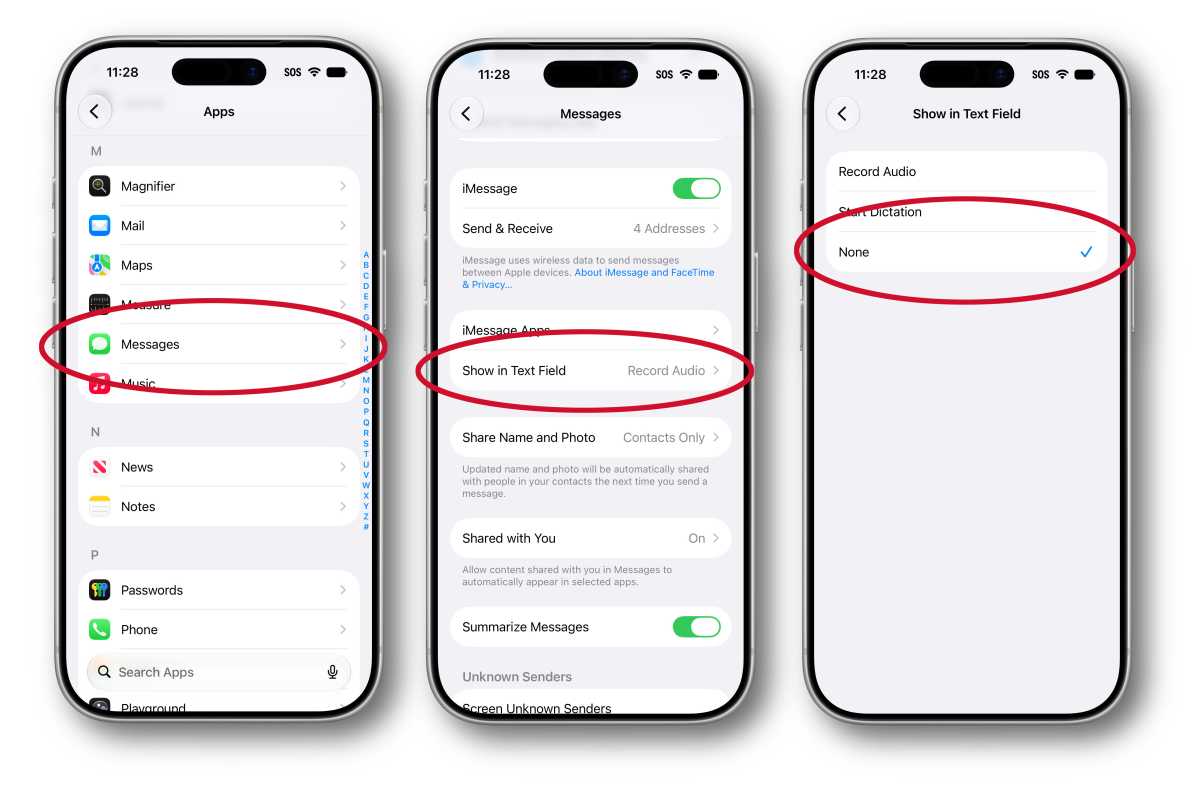
Good news! In iOS 27, Apple allows you to decide whether that button activates Dictation or Audio Messages, or turn it off entirely. Here’s how you do it.

  1. Open Settings
  2. Scroll down and tap Apps
  3. Tap Messages
  4. Scroll down and tap on the Show in Text Field setting
  5. Select either Record Audio, Start Dictation, or None.
iOS 27 messages button

Foundry

If you turn off this button, you can still use Dictation by tapping the microphone button on the keyboard. If you want to send an Audio message, tap the (+) button on the left of the text entry field and select Audio. (And remember, you can tap-and-hold then drag to reorder that list!)

  •  

How to Downgrade from iOS 27 Beta to iOS 26

The iOS 27 beta has overall been a very positive experience for many beta testers, but if you have installed iOS 26 beta onto your iPhone or iPad and decided that it’s no longer for you, perhaps due to some incompatibility, critical bug, or other issue, then you can downgrade your iPhone from iOS 27 ... Read More

The post How to Downgrade from iOS 27 Beta to iOS 26 appeared first on OS X Daily.

  •  

Hidden Gambling Apps in Brazilian App Store

Marcus Mendes:

Last April, Brazilian officials notified Apple and Google over an alleged lack of age controls in betting apps on their respective app stores.

9to5Mac:

Brazilian users browsing the App Store rankings in categories such as Navigation, Travel, and Weather have noticed a growing number of poorly made games appearing among the top results, many of them featuring AI-generated illustrations of animals as their app icons. Many carry an AL age rating, making them available to users of all ages, including children.

As it turns out, these are so-called jacket apps, which are just a front for hidden betting and gambling apps.

[…]

The repository also includes explicit instructions intended to prevent the apps from being flagged as suspicious during App Store review. These include giving each app uniquely named startup and remote-configuration codes, making it harder for reviewers to identify them as part of the same group.

Ironically, the App Store’s own recommendation system appears to have little trouble grouping the apps together, as the “You Might Also Like” section on several of these apps points users toward other suspicious apps more frequently than they point to genuine apps.

John Gruber (Mastodon):

Obviously the main problem is that these apps disguise themselves Trojan Horse-style, and slip through App Store review undetected. I don’t think it’s reasonable to think App Store review could catch every attempt at this sort of thing though — if the horses are disguised well-enough, some of them are going to slip through. That’s actually fine.

I agree that it’s unreasonable to expect App Review to catch all those, but then Apple should not be pretending that it can. This was all obvious from day one. The public perception of App Review is completely at odds with what it actually can and does do.

But the first example 9to5Mac cites isn’t well disguised at all. What sense does it make that “PotatoPlot Puzzle” — a game featuring a rabbit potato farmer — is a weather app? How is that not a red flag right there?

[…]

I always mention that the point of such a squad shouldn’t be to make the App Store 100 percent scammer-free — which I believe is an impossible goal that would set the team up for failure. The point should be only to make the App Store free of successful scams. Focus on the most popular apps and the most lucrative apps.

The App Store is more than 18 years old. The idea of patrolling the top charts probably occurred to Apple before it even shipped. They just don’t want to do it.

Nick Lockwood:

Apple only took 24 hours to approve my iOS app update that crashed instantly on launch. Such a blessing to have that extra level of reliability and security that only a manual review process can provide 🙏

Incidentally, the crash was due to a missing dylib - something that could easily have been detected by the automated scan process, if only that scan were designed to protect users’ and developers’ interests instead of Apple’s.

Kyle Hughes:

There is simply no other way to maintain a modern, healthy software ecosystem without making sure that apps that have been around for 7 years and 20 major versions can’t get a build looked at within 48 hours. There’s no other way. Probably needs to be longer, honestly.

I had to file an Expedited Review Request because this update is a legitimate emergency. Four hours later, App Review rejected the build because they didn’t follow the first sentence of the testing instructions (which haven’t changed in 7 years). Back to Waiting for Review! There’s no other way.

Previously:

Update (2026-07-30): Kyle Hughes:

We got rejected in the Expedited Review again, this time for not having an account deletion feature. Except we do, and it’s one button press away from the screen that the reviewer was on. And it has always existed. Is this how the expedited review works? Malicious incompetence?

Update (2026-07-31): Kyle Hughes:

If you were wondering how long one of the “you can ask us to approve this build and can fix this issue in the next release” App Review errors takes to resolve when you’re in the Expedited Review Queue… me too! So far, 18 hours. (Ignoring the fact that we have the feature the rejection was for.)

Kyle Hughes:

Certainly it means “within a week,” right? “Within a month,” please? “In your lifetime,” I can only hope.

  •  

Apple preps for a wearable AI revolution

This fall, with watchOS 27, Apple Watch will finally get access to Siri AI with a software update that turns your wrist into the most widely-used wearable AI platform on Earth.

That’s not hyperbole. Siri AI on Apple Watch is arguably the most important feature to this year’s watchOS update. Though it didn’t get much attention at WWDC, the update also offers a preview into how Apple will wrap AI into its future smart glasses.

What to expect

One important caveat is to observe that Siri AI on Apple Watch still requires your Apple Intelligence-enabled iPhone to do the heavy lifting. The interaction is easy: tap the Digital Crown and Apple’s new glowing icon appears on screen (you’ll also find this in the App viewer). The experience looks identical across every Apple device — iPhone, iPad, Mac, Apple Watch, and Vision Pro — making the assistant feel like one consistent product rather than a different experience per device.

The Siri app lets you access all your past Siri conversations (unless you turn that feature off) and pick up an old conversation right where you left off. Conversation history syncs privately through iCloud, so you can start an exchange on your iPhone and continue it later from your wrist. You can also pin a conversation you expect to revisit.

You can also use Siri on the Apple Watch to ask questions, launch apps, or even get more complex responses, such as step counts on a specific day. It can also answer difficult and specific queries with detailed answers and can summon real-time information from the web.

Personal context is the real story

That’s key, of course, as it means the smartwatch on your wrist can help you access specific details from all your contextual information; it can get details from messages, emails, and notes, for instance. Or you might use it to find a number and call it, access your door code, or look up customer information for business — all without touching your phone.

One of Apple’s own examples demonstrates this well: Saying, “Show me photos from when I went to Spain,” results in precisely that. You can also ask follow-up questions and keep the conversational going naturally, rather than being confined to single, isolated commands.

Beyond personal data, the watch can also act in apps — get directions home, send an email, play a playlist, or even more specifically, “Play the song that Brandon sent me.”

Context runs deep. A new Call Context tool can proactively surface relevant information from across your apps when phoning a business or help locate a confirmation code from Mail while calling an airline. This arguably challenges a real pain point when speaking with providers and is a good illustration of Apple’s broader AI strategy: to use on-device intelligence to remove everyday friction without asking you to track down the information yourself.

Where we are, where it’s going

It’s frustrating that you still can’t use the Watch to remotely run applications on your Mac, iPhone, or iPad. What you can do is trigger Shortcuts that run on your iPhone: enable this first on your phone by selecting the Shortcut you want and switching on “Show on Apple Watch.” Once that’s done, you can run the Shortcut from your wrist, even by voice.

That’s useful now, but as more complex apps add Shortcuts support and App Intents become more widely adopted by developers, it should be easy to trigger genuinely complex, multi-stage tasks on your iPhone from your wrist.

It’s worth noting: early hands-on testing of the watchOS 27 beta has found Siri AI genuinely impressive on personal-context queries, but still buggy in places. This is very much a first-generation feature — promising, but not yet fully reliable.

Watch the developers

Developers are already beginning to experiment with the potential for wearable AI. One of the best current examples is Granola, which just launched a Watch app built specifically to take notes during in-person meetings away from a laptop. The idea is that you tap your wrist, the screen turns green and makes a sound to alert your companion(s) that it is recording and then you carry on as normal. Once the meeting stops, switch the app off and you’ll get polished notes with meeting summaries and action items provided to you.

The only reservation I have with Granola is the lack of documentation on privacy and data retention on the developer site. Tools like these will almost certainly become more private, more secure, and more prevalent once Apple’s on-device dictation APIs extend fully to watchOS.

That last thing is perhaps the most important as wearable AI emerges: the decisions Apple makes around watchOS and SiriAI will be foundational to its future wearable AI glasses products.

You can follow me on social media! Join me on BlueSky,  LinkedIn, Mastodon and subscribe to The Core.

  •  

Apple Upgrade

Apple (Hacker News):

Apple today announced Apple Upgrade, a new product leasing program provided by Klarna for iPhone, Apple Watch, Mac, and iPad available on the Apple Store online, in the Apple Store app, and at Apple Store locations in the United States.

[…]

Apple Upgrade offers 12- and 24-month leasing options for iPhone and Apple Watch, and 24- and 36-month leasing options for Mac and iPad. Leasing prices start as low as $17.99 per month for iPhone, $11.99 for Apple Watch, $24.99 for Mac, and $11.99 for iPad.

The $17.99/month gets you a base model iPhone 17e for 24 months. This is a total of $431.76 vs. $599 for buying a new one today, but then you have to make a decision:

At the end of the lease term, customers can upgrade their device to the latest generation, purchase it with a one-time payment, or simply return it and exit the program.

I used to get a new phone every other year, but I kept my iPhone 12 mini for three years and will likely keep my 15 Pro for four years. In addition to making it easier to buy phones without the up-front payment, Apple is probably hoping this will encourage more customers to get back on the two-year cycle. Given the choice between continuing a small monthly payment and getting a new phone or making a larger payment to keep their old phone, many may opt to upgrade.

Juli Clover:

The payoff amount is the difference between what was paid during the leasing period and the retail price of the device, minus any remaining trade-in credits. Klarna is not charging a fee for the leasing program, so an iPhone that’s $1,099 can be leased and then purchased for $1,099 with no extra cost beyond taxes.

I guess this means that, for a bit of hassle, you can essentially buy the device for the list price at 0% interest.

Lease participants can opt to end a lease early and return a device, but Apple says there may be “substantial fees” for terminating a lease before the end of the term.

[…]

Customers must upgrade, end the lease, or purchase the device at the end of the lease term. If that doesn’t happen, the lease converts to a month-to-month lease for up to six months.

[…]

Damage to an iPhone, losing an iPhone, or having an iPhone stolen could incur fees.

Aisha Malik:

The rollout of the program comes as Apple has been struggling with supply chain issues related to “RAMageddon,” which refers to the industry-wide shortage of memory chips that is driving up the price of hardware. As a result, Apple recently announced price hikes for its Mac and iPad lineups, sparing the iPhone for now. The new Upgrade program seems to be Apple’s answer to making those higher prices more manageable for consumers.

Customers can manage their lease directly in the Klarna app, where they can view their billing schedule and track remaining payments.

With the launch of the new Upgrade program, Apple is discontinuing its existing in-house financing and installment programs in the U.S., which include the iPhone Upgrade Program and iPhone Payments.

John Voorhees:

For iPhones, you have to have a carrier and can’t use a prepaid plan.

[…]

For iPads, the starting prices range from $12.99/month to $24.99/month, Macs range from starting prices of $24.99/month to $48.99/month, and the Apple Watch ranges from starting prices of $11.99/month to $47.03/month. But again, these are just starting prices. You can configure a fully loaded 16-inch MacBook Pro that is just under $230/month, and it won’t include AppleCare.

As a point of comparison, under the current program that is being discontinued, I pay $69.50/month for an iPhone 17 Pro Max, but I have a 512GB model, so my lease price for the same phone would be $40.83/month, significantly lower, but keep in mind that doesn’t include AppleCare+, which would add $13.99/month or $139/year for that iPhone. On a monthly basis, that puts a new iPhone 17 Pro Max with 512GB of storage and AppleCare+ at just under $55/month. Still a superior deal, but not nearly as good as the landing page might initially lead you to believe.

[…]

If you lease accessories for your device, those don’t have to be returned. Why? Presumably because they have no value to Apple or Klarna.

Marcus Mendes:

9to5Mac can now confirm that code found in the iOS 27 beta appears to reveal a broader system for managing a financed iPhone, including the ability to restrict apps and services when payments are missed.

The code describes a system called App Managed Features, which allows an authorized financing or provider app to enroll an iPhone and perform ongoing status checks.

If the contract is no longer in good standing, Apple’s system services can place the iPhone in “Restricted Mode,” which blocks access to most apps until the payment or contract issue is resolved, while keeping a small set of apps available.

I bet there are some governments that would love to commandeer that for their own purposes.

Finally, the new framework also introduces a new type of activation lock called “Partner Finance Lock,” which is meant to prevent users from erasing, reselling, or stripping a restricted device for parts.

Previously:

Update (2026-07-29): Emma Roth:

Apple says it won’t limit the capabilities of devices leased through its new Upgrade program if you miss a payment. In an emailed statement to The Verge, Apple spokesperson Brian Bumbery says, “There will be no restricted mode and/or there will be no limitations put on device functionality due to missed payments or default with the Apple Upgrade program.”

So then what is the code that 9to5Mac found for?

Marcus Mendes:

One possibility is that it was developed for financing programs offered by carriers, retailers, or other partners outside Apple Upgrade, potentially including markets where device restrictions are already used to enforce installment agreements.

See also: Mac Power Users, TidBITS, MacRumors, Slashdot.

Update (2026-07-30): Ryan Christoffel:

Here’s what every eligible product costs with Apple Upgrade.

Emma Roth:

Here’s a breakdown of how much you’d pay for the devices included in the Apple Upgrade program, as well as how much more you’d pay to purchase the devices outright at the end of your lease[…]

[…]

Klarna doesn’t say what will happen if you don’t pay the outstanding balance.

[…]

During the lease, Klarna owns your device. You’re responsible for any damage, and will get charged a fee if you don’t return the device in “good condition.” That’s why Apple is encouraging customers to sign up for an AppleCare subscription that could drive up the cost of your lease even more.

[…]

Apple also notes that you’ll have to pay an early termination fee if you want to return the device before your lease ends or if you want to upgrade early.

Eyes:

If you lose the leased phone you have to pay Klarna for the phone plus early lease cancellation fees.

D. Griffin Jones:

The Apple Card Monthly Installments aren’t going away, so I’ll keep using that.

[…]

When you finance using the Apple Card Monthly Installments, you pay a fixed amount to own your device. There are no savings here — aside from the 3% cashback — the monthly payment is the purchase price divided by either 12 or 24 months.

John Gruber:

When you lease an iPhone through Apple Upgrade, you need a cellular account on one of the big three U.S. carriers: AT&T, T-Mobile, or Verizon. That kind of stinks, and I’m not quite sure I understand why.

Eyes:

The iPhone upgrade program always required it. For a time you could do Apple Card installments without a carrier if you bought it online but never in store. I assume there is carrier pressure to tie the phones to the carriers. Activating iPhones on carriers was a key metric at the Apple Store.

Previously:

Update (2026-08-03): John Gruber (Mastodon):

Credit-risk assessment is seemingly part of it. There’s a lot of fraud in iPhone purchases specifically and cell phone service generally. The big three carriers do a significant amount of risk assessment before letting you open a new postpaid account; that you have an active account with one of them is a signal that you’re not trying to lease an iPhone using phony credentials in order to sell it.

But the bigger reason is the complex nature of the contracts between Apple and each of the big three carriers.

  •  
❌