With Firefly Graph, users can connect multiple tools in visual workflow, with each “node” performing a specific task before passing its output to the next node. This gives creative professionals more control over generated outputs, according to Adobe, and makes it easier to try out ideas by swapping, adjusting or adding components.
For example, a user could start with a text prompt box that connects to a node that generates an image using an AI model from Adobe or third-parties such as Google and OpenAI. Further along the chain, the user could add nodes to remove a background or upscale an image, for instance, before producing an image, video or other asset ready for use.
Changing one aspect, such as adding a reference image or adapting the text prompt, would change the final output.
With so many AI tools available to creative professionals, workflows can get complex and hard to replicate, said Elliot Sedegah, director for strategy and product marketing at Adobe. Firefly Graph provides access to more than 300 different node types, including images, video editing and AI generation tools across Adobe’s portfolio and third-party tools.
“Whether you’re working at a mom-and-pop shop or a larger enterprise, you’re looking for consistency and then bringing that into a workflow so that you’re not hopping in and out of different tools,” he said. “Putting all that together takes massive amount of time, and sometimes it’s very difficult to even know what you did.”
Once created, workflows can be shared across an organization as repeatable processes for other individuals or teams to use. “Think of that rock star creative that you have and the recipes they create: those are now canonized as workflows, as assets, that the rest of the organization can take and reuse over and over again,” said Sedegah.
In addition, while creative professionals are needed to created high quality assets, reusable workflows can be put into the hands of broader teams to create content for large audiences, said Sedegah.
Firefly Graph addresses a challenge that most large creative organizations face, said Lisa Gately, principal analyst at Forrester — namely that their best creative workflows “live inside the heads of a few experts.
“Teams can generate images and video with AI, but reproducing the exact sequences of creative decisions, model selections, edits, and refinements that lead to a high-quality result is difficult and inconsistent. Firefly Graph turns those workflows into reusable assets,” she said.
While other node-based workflows aim to address similar problems, Adobe’s pitch is that Firefly Graph provides customers with the benefit of integration into its product suite.
“Firefly is a full, broader AI creative studio, not just a node-based tool, so [Firefly Graph] is a part of a bigger picture,” said Sedegah. “The strength is having everything in one place with the tools that people know.”
“Where Adobe differentiates is in enterprise integration,” said Gately, with Adobe connecting Firefly Graph to a range of other Adobe tools. Those include Creative Cloud applications; Firefly Boards for ideation; and Firefly Creative Production.
“The workflow becomes part of a broader content supply chain instead of a standalone creation tool,” she said. ”Organizations committed to other tools are unlikely to migrate for a node-based canvas — making a change is about the broader content supply chain.”
Firefly Graph is available now to Adobe Creative Cloud for Enterprise subscribers. Creative Cloud for Enterprise is licensed by seat, requiring custom, volume-based enterprise agreements. Creative Cloud for Enterprise customers receive credits for Firefly Graph. Creative Cloud for teams customers can sign up for a public beta online. Creative Cloud pricing starts at $99.99 per license each month.
This article was updated on June 19 with pricing information from Adobe.
Microsoft unveiled Copilot Cowork in March, pitching it as an AI agent that’s capable of independently performing long-running, multi-step tasks — even when a user’s computer is off.
It’s built on the same technology that underpins Anthropic’s Claude Cowork. Unlike Claude Cowork, which can interact directly with files and applications on a user’s computer, Copilot Cowork runs in Microsoft’s cloud environment and acts on documents held in a customer’s Microsoft 365 tenant.
On Tuesday, Microsoft unveiled pricing details for Copilot Cowork, which involves usage-based billing in addition to a Microsoft 365 Copilot license ($30 per user each month for large enterprises before discounts, and $20 for Microsoft 365 Copilot for Business).
The usage-based pricing is calculated from four components, according to Microsoft: “model use, context retrieval, tool calls, and runtime.”
In practice, this means more intensive tasks that draw on multiple sources, use “deep reasoning” and generate two or more outputs will lead to higher costs — denoted in Copilot Credits.
There are two payment options: pay as you go — priced at 1 cent per credit — and P3, where customers commit to usage volume in advance and receive a discount.
Cowork is turned off by default; IT admins can decide when to make it available and which employees get access. Admins can also impose spending limits at the tenant, group, and user level, and receive notifications when spending reaches a certain level.
Users will also be able to see how much each tasks costs in credits (available “soon after” the general availability launch, Microsoft said).
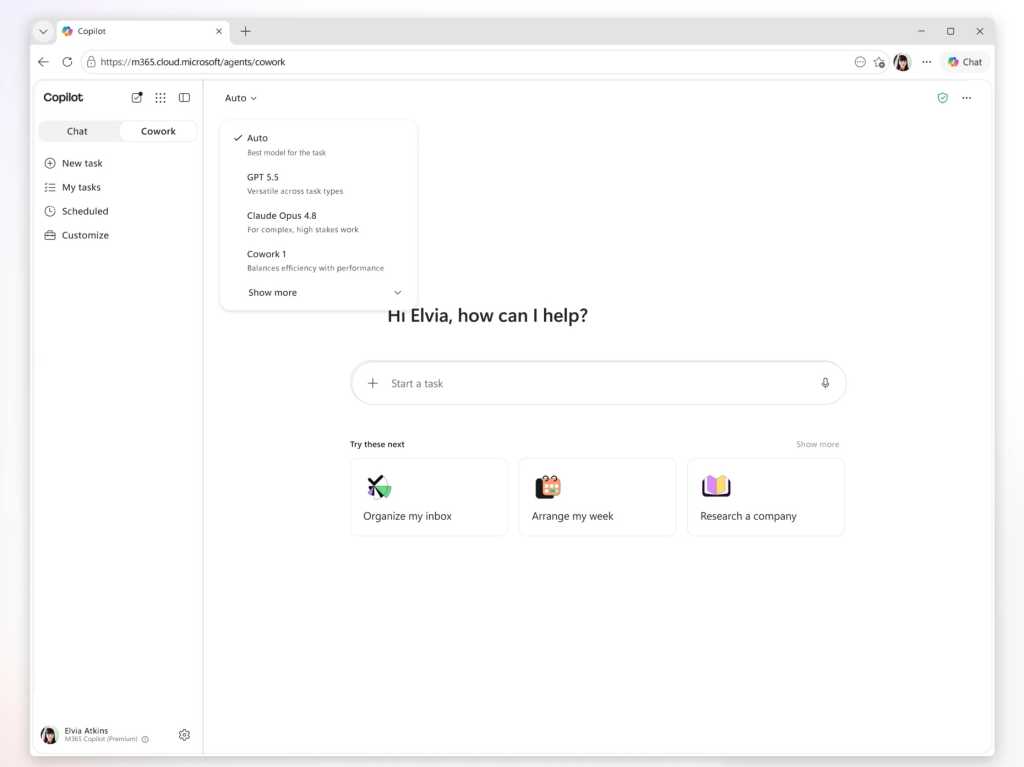
Copilot Cowork customers can select from multiple AI models, including Anthropic’s Opus 4.8 and Sonnet 4.6, while those enrolled on the Frontier program can access OpenAI’s GPT 5.5 and Microsoft’s own Cowork 1 model.
Microsoft is considering hosting a version of DeepSeek’s open source models. “We are actively exploring a range of options that meet those requirements, and DeepSeek is one of several models under consideration. We’ll share more specifics on the underlying model closer to release,” said a Microsoft spokesperson.
Microsoft also announced new integrations with third-party apps such as Miro and Monday.com, with more — such as Adobe, Box, and Canva — coming soon.
This article was updated on June 19 to add Microsoft’s comment on DeepSeek.
Most generative AI tools know less about R than languages like JavaScript and Python, thanks to how much training data is available for each. However, with a little extra setup, you can give a large language model (LLM) the knowledge it needs to improve its R skills.
Here are 10 ways to help generative AI write R code like a pro.
Use a coding agent
AI coding agents have more power, flexibility, and coding-focused tools than general-purpose chatbots.
Anthropic’s Claude Code and OpenAI’s Codex agents have versions that run in a terminal, IDE extensions, desktop and mobile apps, and other integrations.
R users may also be interested in Posit’s Posit Assistant, which is designed for data analysis in both R and Python. It needs less setup for R than general-purpose coding agents, and it has more built-in knowledge about data science, R package development, and Shiny apps. Plus, it can read objects in your R and Python environments by default, which can be useful in some situations (although perhaps not if you’re working with sensitive data). There are versions of Posit Assistant for RStudio, the Positron IDE, and the terminal. Setup info is here.
Note: Posit Assistant is not the same as the older Positron Assistant that was demo’d at last year’s posit::conf(). The older assistant will eventually be superceded by Posit Assistant. Posit Assistant comes pre-installed with RStudio but not pre-activated, so you don’t need to use it unless you want to.
Google’s original entry in this space, Gemini CLI, is being retired in favor of a new “Antigravity CLI” starting June 18.
There are other IDE platforms with built-in agents, including Cursor and Windsurf, and terminal + subscription coding agents such as Warp, which was open-sourced in April. However, I won’t be covering those here.
You may be limited at work by what your employer allows you to use, but you can still experiment on your own with public data — and then lobby for a new agent if a different one better meets your needs. Whatever you choose, though, moving to one of these from a web-based chatbot should produce better code.
“The shift from chatbot to agent is the most important change in how people use AI since ChatGPT launched,” says Ethan Mollick, co-director of the Wharton School’s Generative AI Labs at the University of Pennsylvania.
Set up CLAUDE.md, AGENTS.md, or GEMINI.md knowledge files
All the major coding agents look for knowledge files to load each time you start a session, and you can easily edit those files. The files can include things like your proficiency in various languages and how you like to document projects. For example, I tell my LLMs that I’d like a README.md in every project with info on how to use the project and technical info on how the project was coded.
Most coding tools let you have both an overarching main file that’s loaded into every session, and an additional file per project.
If you’re adding Claude or Codex to an existing code base, the /init slash command will create one of those .md project files after scanning and analyzing the code. You can also ask an LLM to interview you to create or add to one of those files.
Claude Code looks for a user-level main CLAUDE.md file at ~/.claude/CLAUDE.md and then a project-level file at ./CLAUDE.md or ./.claude/CLAUDE.md. The /memory slash command shows where those files are located. Codex uses AGENTS.md files. Antigravity docs say it looks for a main GEMINI.md file plus GEMINI.md and/or AGENTS.md files in your working directory.
Positron Assistant is set up to read AGENT.md, AGENTS.md, POSITRON.md, CLAUDE.md, GEMINI.md, and LLMS.txt in a workspace root directory, according to the docs. See the Positron docs for more on custom instructions.
Use agent skills
Agent skills can turn an LLM with questionable R knowledge into an expert that understand how you want it to write code. You can develop your own skills, work with your LLM to create skills, or download skills written by others. Claude even has a skill to help you build skills. This is one of the best ways to stop having to repeat the same instructions over and over. Instead, the LLM will “remember” what’s in your skills files by loading them when they’re needed.
What’s the difference between the knowledge .md files mentioned above and a skill? I like to think of CLAUDE.md or AGENTS.md files as important background info that’s always available, while skills are more specific instructions that are useful at certain times. Or, as Claude Opus 4.7 put it: “Skills are for triggered workflows (‘when user asks X, do Y’). A standing rule that applies to every project isn’t trigger-based; it’s a directive I should always follow.” Standing rules should go in CLAUDE.md.
“Create a skill when you keep pasting the same instructions, checklist, or multi-step procedure into chat, or when a section of CLAUDE.md has grown into a procedure rather than a fact,” according to Anthropic’s Claude Code docs. “Unlike CLAUDE.md content, a skill’s body loads only when it’s used, so long reference material costs almost nothing until you need it.” Only skill descriptions are loaded at the start of each session, so the LLM knows what skills are available.
Anthropic originally created skills for Claude in October 2025 and then published the concept as an open standard a couple of months later. Most coding agents now use them.
Anthropic has an easy-to-folllow guide to creating custom skills here if you want to try your hand at building your own.
Posit Assistant comes with several R-related skills built in and allows users to add more. You’ll find them here.
If you’re not using Posit Assistant, you can add Posit-developed skills to another coding agent. Posit published a GitHub repository with skills for creating R packages, Shiny apps, and Quarto documents; for creating and resolving GitHub pull requests; for open-source R and Python package releases; for code reviews (R, Python, JavaScript/TypeScript, SQL); and for creating architectural documentation for a codebase. Browse them all here.
Read and edit the skills you download
Skills are just a folder with one or more markdown text files that have a structured YAML header. That folder can include optional resources and scripts, too. Skill instruction files are easy to read and edit, so you can make sure they do what you want. Tweak them as desired.
For example, Claude helped me write my own customized R skill. Claude leans toward tidyverse packages, but there are other packages I like a lot, too, such data.table. I made sure the R skill knows my package preferences, and under what circumstances I prefer each.
If one of your preferred procedures changes, remember to update the associated skills. Or, ask an LLM to update it for you. Keeping skills up to date will make your coding agent more useful.
Keep your CLAUDE.md or AGENTS.md files updated, too. Maybe you started off with a CLAUDE.md file that said you’re an experienced Python programmer who is just learning R. Three months from now, you might want to update your R skill level. Or, perhaps you told an AGENTS.md file that you like thoroughly documented code, but now you’d prefer a lighter touch. You may want to have your coding agent go over those files with you from time to time and ask you about the main points and whether they need updating.
Use the btw R package and its MCP server
It’s frustrating when an LLM writes code based on an ancient R package version in its training data, or when it doesn’t know about a relatively recent package at all. btw solves this problem by letting your coding agent access info about all the R packages installed on your system. That means it can write code based on your specific R environment. Plus, btw lets an LLM access variables in your current R environment via a Model Context Protocol (MCP) server.
MCP servers are a standardized way for LLMs to access external data — in this case, your running R session (external doesn’t have to mean cloud). Like skills, MCP was created by Anthropic as an open standard and has since been adopted by most major AI platforms. The btw R package includes an MCP server, which you can install for Claude Code by running the following code in a terminal window (not R console).
claude mcp add -s "user" r-btw -- Rscript -e "btw::btw_mcp_server()"
btw comes with a lot of tools. It’s not a great idea to overload your LLM with tools it may never use. If you just want to register btw tools for accessing your R session and looking up package documentation, you can run a command like this instead:
To connect Claude Code to your open R session, you also need to run btw::btw_mcp_session()in every new R session. (I sometimes forget this part until I’m puzzled why Claude can’t read my R variables or even see what packages I have installed.)
You can see a demo of btw in this Posit video that compares Claude Code and Posit Assistant.
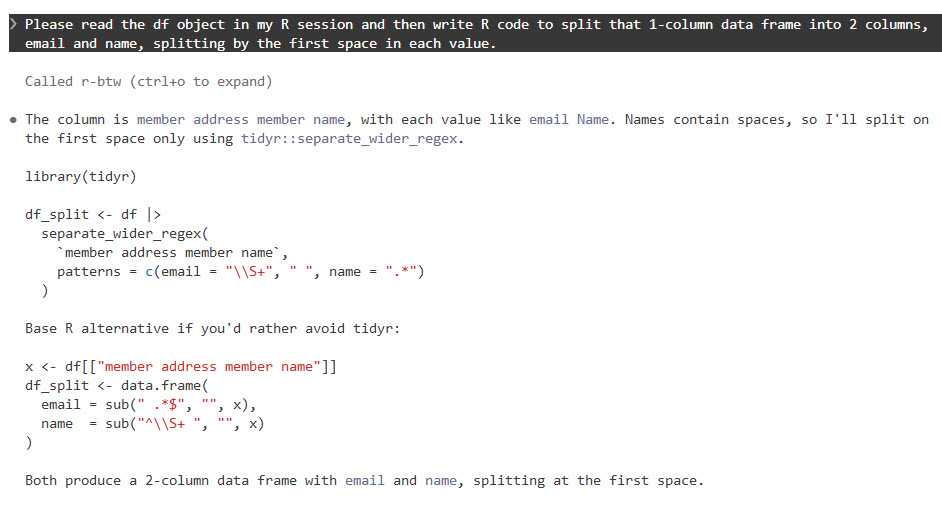
The btw R package lets Claude Code and other agents read objects in your R session.
Foundry
You don’t need to do this setup for Posit Assistant, since tools for accessing your R session and variables are built in.
Use plan mode for your projects
I cannot stress this enough. Just as humans benefit from having a plan before starting to implement a project, LLMs benefit from working through a plan before beginning to generate code. Plus, it can be useful at times to “brainstorm” with an LLM about structures and features, ask it for alternatives, or even have another LLM review a plan before implementing it.
Anthropic advises starting with plan mode. “Letting Claude jump straight to coding can produce code that solves the wrong problem. Use plan mode to separate exploration from execution,” they wrote in a best practices doc.
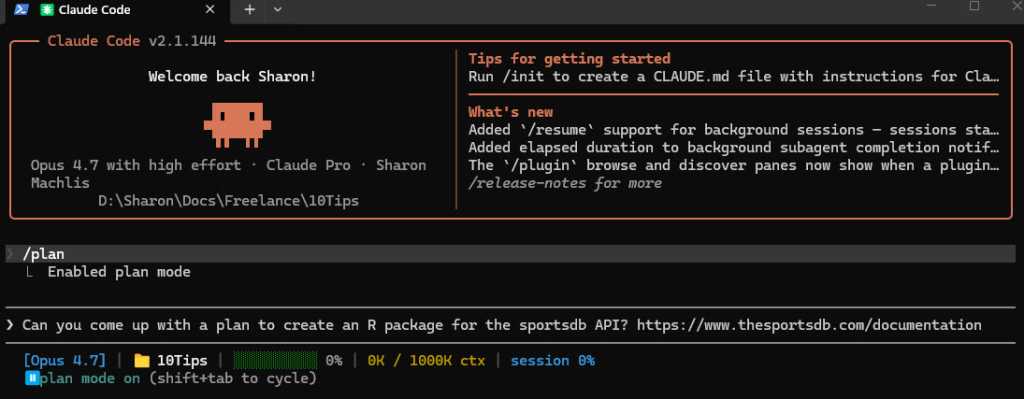
Claude, Codex, Gemini, and Posit Assistant all have a plan mode in their CLI versions that can be activated with the /plan slash command.
Foundry
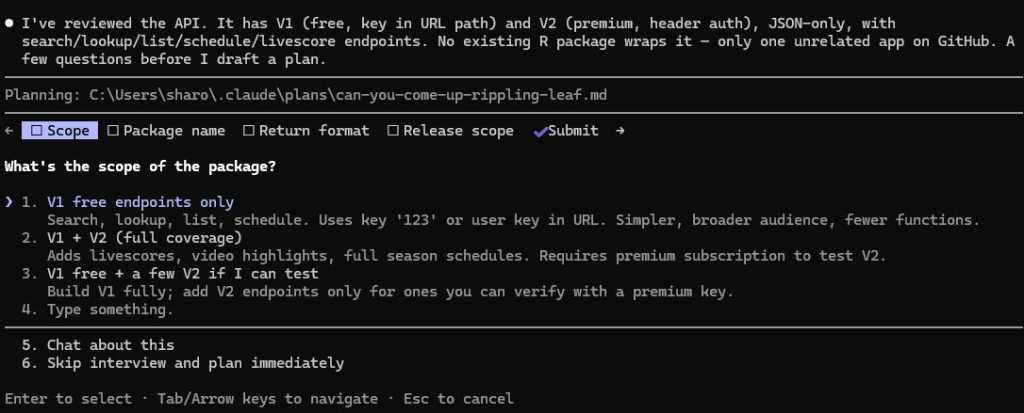
When in plan mode activated with /plan, Claude will often ask questions before coming up with its plan.
Foundry
Make sure your coding agent learns from its mistakes
This is one of the best tips I read first from Joe Amditis, associate director of operations at the Center for Cooperative Media at Montclair State University: If your coding agent makes a mistake and you work together to fix it, make sure to save that memory so it doesn’t make the same error again.
Your agent may have an auto memory system that’s supposed to do some of this (I’ve used Claude Code’s), but you can instruct any coding agent to keep a separate lessons learned file for each project, too, or ask it what’s the best way to ensure it doesn’t make the same error again. This isn’t a guarantee, any more than you can be assured an LLM will follow all the rules in a CLAUDE.md or AGENTS.md file or all the steps in a skill. But it has definitely cut down on my agents making the same errors over and over.
Have your agent write tests and do code reviews
Tests and code reviews done by a coding agent aren’t a substitute for a human checking that software works. Review an LLM’s results yourself any time a task is important! However, agent-generated tests are still a good way to head off some problems and cut down the time you spend as your LLM’s debugging partner. If you don’t know where to start to help your agent know how to test and review code, see Posit’s testing-r-packages and critical-code-reviewer skills. Your agent may also have built-in code review skills, such as Claude Code’s /code-review slash command.
Code review skills are available from many sources. For example, Sentry has a code review skill in its repository. Aimed specifically at its project’s needs, it can be a useful sample for similar skills. And superpowers is a popular set of general-purpose programming skills that’s billed as “a complete software development methodology for your coding agents, built on top of a set of composable skills and some initial instructions that make sure your agent uses them.” I don’t use superpowers, but a lot of other people clearly do given its more than 227,000 GitHub stars and 20,000 forks.
Another tip: Several experts suggest using a different LLM — maybe even from a different provider — to conduct a code review, since each model has its own strengths and weaknesses.
Don’t forget general prompting good habits
Whatever programming language you’re using, being clear will improve your outputs. Keep your requests targeted, and don’t expect the LLM to read your mind.
“Codex handles complex work better when you break it into smaller, focused steps,” OpenAI says in its developer docs. “Smaller tasks are easier for Codex to test and for you to review. If you’re not sure how to split a task up, ask Codex to propose a plan.”
“Take time to make your prompts as relevant as possible, just as you would when helping a new teammate scope a task,” Google advises in its Five Best Practices for Using AI Coding Assistants. “Consider what details you need to share for a person to succeed, and provide all those details to your AI tool.”
And, don’t load up your context window to the LLM’s published limit. Performance often degrades as you get close to the maximum token limit.
Take advantage of open LLMs, particularly if you have budget and token limits
Open-weight models — especially ones small enough to run on a desktop computer — may never rival frontier LLMs like Claude, GPT, or Gemini. But for a lot of R coding, they don’t need to.
To see how well an LLM can write R code, it should have the same kind of harness that Claude Code, Codex, or Posit Assistant gives larger LLMs. “The harness is the product,” argues Mallory Mejias at Sidecar, an AI education company. “The model is the engine inside it — important, but increasingly interchangeable.” I wouldn’t go that far, since I still find the LLM to be a critical piece of this equation, and models differ. But the same LLM will perform differently depending on the tools and context it has.
Posit recently added Google’s open-source Gemma 4 26B to Assistant’s existing options of larger, closed-source LLMs. “Up until this point, models of this size — small enough to run comfortably on high-end consumer laptops — were on our radar but not yet capable enough to drive an agent harness like Posit Assistant,” Posit senior software engineer Simon Couch wrote on the Posit blog. “This has changed in the last few months with releases like Gemma 4.” However, to use it in Posit Assistant in RStudio, you still need to run it through a Posit AI subscription, not locally. It uses 1/10 the budget that the same session with Claude Sonnet would consume.
Several projects can use Claude Code to run local LLMs. Ollama, open-source software for running LLMs locally, does this with the terminal command ollama launch claude --model , such as:
ollama launch claude --model gemma4:26b
The makers of Unsloth, an open-source framework for running and training models, say running local LLMs inside Claude Code can be very slow due to a cache invalidation issue. They say this can be fixed by adding "CLAUDE_CODE_ATTRIBUTION_HEADER" : "0" to ~/.claude/settings.json under “env”.
Unsloth can also use Claude Code to run local models, but it’s somewhat more involved to install and set up than Ollama. See this Unsloth tutorial.
Open-source coding agent Open Code runs LLMs from OpenAI, Anthropic, Google, Kimi, Alibaba’s Qwen, and others. I haven’t warmed up to it yet compared with commercially backed CLI tools I’ve tried, but it has 174,000 GitHub stars so clearly a lot of fans.
AI consultant Thomas Wiegold, who switched from Claude to Open Code, said “OpenCode covers everything I need for my daily workflow. It’s fast, the provider flexibility is genuinely useful rather than theoretical, and the TUI is better for extended sessions…. That said, I’m not going to pretend it’s all smooth sailing.” He noted some stability issues and a remote code execution vulnerability earlier this year.
Large language models remain imperfect and unpredictable tools, but they’re improving rapidly — as are the harnesses around them. Even frontier LLMs in commercial coding agents can ignore instructions at times and otherwise behave in unpleasantly surprising ways. However, you’ll vastly improve your chances of generating quality code if you use coding agents, take time to set them up with quality instructions, and remember good prompting techniques. Good luck!
—
Coding agent info
Claude Code – Anthropic’s coding agent is available in the terminal and as an IDE extension, a desktop app, mobile apps, Slack app, and a cloud version that can work directly in your repos on GitHub. Arguably the first breakthrough coding agent, it now includes an elegant remote-control option where you can start a session on your desktop and then continue it on a phone or tablet. While designed for Claude LLMs, you can use it to run local LLMs via tools like Ollama or Unsloth Studio. When using Claude models, it tends to offer less usage than other vendors’ options. Anthropic has posted the terminal version’s code on GitHub, with usage governed by Anthropic’s commercial terms of service. You can use Claude Code via API pay per use or as part of a Claude subscription.
Codex – OpenAI’s answer to Claude Code is available via terminal, app, IDE extension, or cloud, with integrations for GitHub, Slack, and Linear. The CLI tool is open source under an Apache license, available on GitHub, and works via API pay per use or as part of a ChatGPT subscription.
Posit Assistant – The Posit (formerly RStudio) coding agent is designed for data work in R and Python, although Posit senior software engineer Simon Couch told me it would do fine for programming work for other uses and in other languages. It is available for the RStudio IDE (via a Posit AI subscription in RStudio), Positron IDE, and as a stand-alone CLI terminal app, although the CLI tool currently doesn’t feel as full-featured as the IDE integrations (that may change). As of this writing, you can also use API keys from Anthropic, OpenAI, and Snowflake Cortex and a GitHub Copilot account in Positron. Posit Assistant is being updated quite frequenty, Couch told me. If you tested it a month or two ago, it has more capabilities now.
Antigravity CLI – Google’s terminal-based tool will be replacing the Gemini CLI for unpaid and Google One users this month. There’s also an Antigravity IDE, SDK, and platform for orchestrating multiple agents. One advantage of Antigravity: Google offers a free plan with access to Gemini 3.5 Flash, Gemini 3.1 Pro, Gemini 3 Flash, Claude Sonnet 4.6, Claude Opus 4.6, and gpt-oss-120b, and what it describes as “generous” but undefined weekly rate limits based on “the degree we have capacity.”
OpenAI has signed a partnership agreement with Visa that allows the company’s AI agents to use the payment card for e-commerce transactions. The agreements lets users shop for everything from groceries and diapers to airline tickets without having to manually enter a lot of information.
“As AI agents become active participants in the economy, Visa’s focus is on ensuring that transactions are reliable, secure, and seamless,” Visa Chief Product and Strategy Officer Jack Forestell said in a statement, according to AP.
The pact means AI agents can complete purchases on a user’s behalf at virtually any merchant that accepts Visa. Details about the financial terms of the agreement, or whether specific transaction fees will apply, were not immediately detailed.
The US Department of Defense has a lot of congressionally mandated homework to do every year involving hundreds of required reports on various national security topics. But Pentagon officials have been proudly describing a new shortcut—using generative AI tools to write such reports for Congress.
Pentagon Chief Technology Officer Emil Michael highlighted AI-generated reports to Congress as a key example of how the Department of Defense—stylized as the Department of War under the Trump administration—has adopted generative AI during an event hosted by the Hudson Institute think tank in Washington, DC, on June 12. The Pentagon has made AI tools, starting with Google Cloud’s Gemini for Government, widely available to members of all six military branches through the department’s bespoke GenAI.mil platform since December 2025.
“I have to report to Congress every year on this thing,” Michael said. “Let me load all the papers onto it and have it draft me a congressional report that would otherwise take 200 hours of staffing time and do it in five hours.”
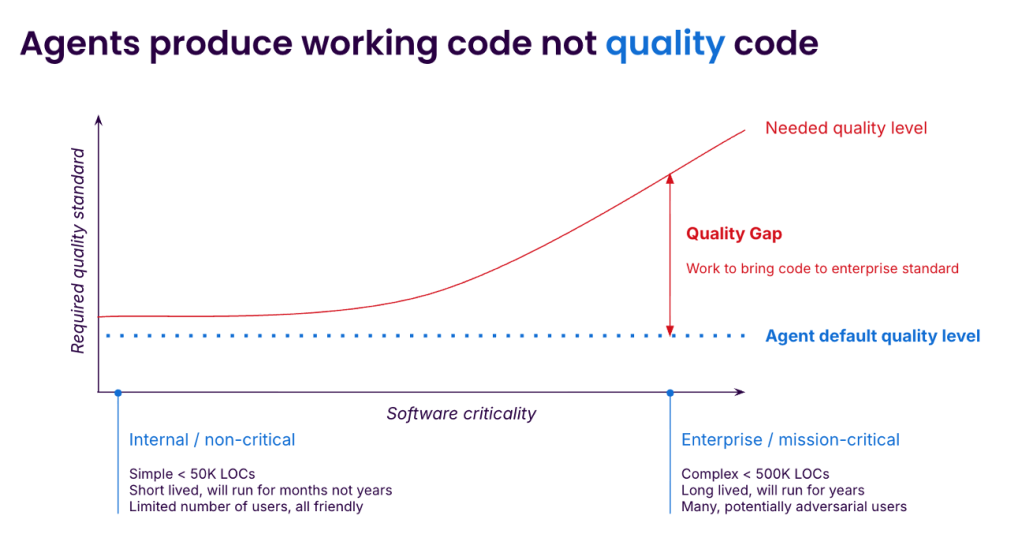
Developers are caught between the joy — or pressure — of using agents to ship 10x faster today and the dread of how they will maintain that code tomorrow. The gap between “vibe” code and code that can be deployed to millions of users is vast and easy to underestimate. Closing the gap requires care, expertise, and effort, with the payoff coming later. Agents are able to complete increasingly complex programming tasks but without the quality we need. What’s missing, and how can we fill the gap?
Sonar
Why agent-generated code degrades: the bloat problem
Enterprise code has to clear three bars: it must be maintainable, reliable, and secure. Out-of-the-box AI agents can miss all three. Let’s focus on the biggest and most visible maintainability issue, which is bloat: redundant validation, defensive checks that cannot fire, near-duplicate functions, dead code that nothing removes. A None check on a parameter typed as dict. A try/except around a call that never throws. Two functions, identical except for the negation in their return statement.
Bloat varies dramatically by model. Sonar’s LLM Leaderboard runs every frontier model through 4,400+ Java tasks and analyses the code generated. To complete the benchmark, GPT-5.4 High generated 1,159,000 lines of code at an 81.05% pass rate, while Claude Opus 4.7 Thinking generated only 336,000 lines of code to return a better than 82.52% pass rate. Different models generate dramatically different code to achieve similar outcomes.
Bloat is not just messy. Carnegie Mellon researchers studied 807 open-source projects that had adopted Cursor, matched against 1,380 controls, measured by SonarQube. A short-term velocity gain disappeared by month three, while static analysis warnings rose 30% and code complexity rose 41% — both persistent. The harder it became to change the codebase and the more bugs it contained, the more the velocity was dragged down. Any experienced developer will know how this goes: quality problems compound until the code feels impossible to change and the only option is the dreaded rewrite.
Three forces produce bloat once a model is in use:
Agents do not feel the maintenance burden. Armin Ronacher, the creator of Flask, made the point on the Pragmatic Engineer podcast in late April. Humans feel the cost of bad code over time, and as Ronacher put it, “if the pain gets too big, you as a human are incentivized to fix the cause of your pain” — so we refactor. Agents do not. They obliviously extend bad structure indefinitely. A senior engineer’s job is to say no to unnecessary abstraction. The agent has no equivalent reflex.
Training rewards apparent completeness. Pretraining corpora are full of explanatory material — Stack Overflow answers, tutorials, README snippets — deliberately self-contained and verbose. Post-training compounds the effect: human raters prefer outputs that look thorough, so models learn that “comprehensive” reads as better. When uncertain which edge case matters, the safe move is to handle all of them. Each guard is locally defensible. The aggregate is bloat.
Iterative generation has no deletion pressure. Agents add but rarely delete. Removing dead code does not make any test go green, so superseded functions accumulate alongside their replacements. SlopCodeBench, a March 2026 benchmark across 11 coding models, found rising structural complexity in 80% of trajectories and rising verbosity in 89.8%. Agents continue to patch bad code, treating every task as if it’s their last.
AC/DC: the loop that compensates
What closes the gap is a loop around each iteration of agent work. The agent does what it is good at — generating code — and our job is to wrap that with three steps the agent cannot reliably do on its own. At Sonar we call this the Agent Centric Development Cycle, or AC/DC: guide, verify, solve.
Guide
Many teams overcorrect on context. They paste the style guide, three years of architectural decisions, and the entire onboarding doc into the agent’s instructions and expect output to improve. ETH Zurich researchers tested this and found the opposite: large context files often reduced task success against no context at all, and added 20% or more to inference cost.
Keep agent-facing context short — under 200 lines is a useful heuristic — and restrict it to fundamentals that can’t easily be inferred from the code: naming conventions, architectural invariants, what has been tried and failed. However, this will only get you so far, so make sure to provide specific context for each task. If you have architectural expectations, don’t expect the agent to guess them. Software architecture tools can be used to provide additional context in the guide phase.
Task shape matters too. Break the work into steps and agree on a plan; ask the agent to provide three solutions and evaluate the impact on quality of each. There is no perfect software architecture, and you understand the trade-offs in your codebase best, so think critically about the changes before they happen. Without this, the agent will confidently pick an option, seemingly at random, and the further it goes the harder it is to “unpick.” If you want to test this, ask three instances of your preferred agent to complete a task that involves some polymorphism and watch each one confidently suggest a different solution.
Verify
The most expensive verification mistake is doing it last. Reviewing 200-line pull requests (PRs) after the agent is done is the dynamic behind the Faros/DORA figures Addy Osmani highlighted: 98% more PRs merged in high-adoption teams, review times up 91%. Verification inside the loop is different. Unit test runs, static analysis, and security scanners produce output the agent can act on. This is where AI-native tooling belongs: purpose-built for the agent to invoke, not just for humans to consult through a UI.
Human reviewers cannot keep up. When agents merge twice as many PRs per week and each one takes nearly twice as long to review, doubling the review staff still leaves you behind. Automated verification is the only response that scales. Fast feedback has always been a fundamental tenet of good software engineering. Feeding it directly back to the agent protects the developer from simple mistakes and leaves them headroom to work on the harder ones.
Solve
If verification happens within the agentic loop, the agent can fix any issues whilst the code is being generated without expensive remediation steps. Static analysis tools can guide the agent on how to resolve the issue quickly. Some cases need human judgment — a None check at a system boundary may document a real precondition. But most of the work is mechanical. Automate the obvious fixes and let engineers spend their attention on the cases that are not.
The investment that compounds
Better models will keep arriving. They may not change the mechanism of bloat or the dynamics of compounding decay. The loop is what does — bounded tasks, sharp context, in-loop verification, and a deliberate “solve” step to clear bloat before it accumulates.
The same logic governs how autonomy should expand. Reduce human interventions only when the agent’s guide, verify, and solve cycle is making them redundant. Our biases can sting us here: an agent’s ability to write code can lead us to agree with it more than we should. Don’t trust blindly; wait for the evidence.
The teams that will be shipping enterprise-quality code with AI agents in 18 months are not the ones running the “best model.” They are the ones treating workflow as the engineering investment, with the seriousness once given to build systems and CI. The model is the tool, the workflow is the discipline. That is where the durable advantage compounds.
—
New Tech Forum provides a venue for technology leaders—including vendors and other outside contributors—to explore and discuss emerging enterprise technology in unprecedented depth and breadth. The selection is subjective, based on our pick of the technologies we believe to be important and of greatest interest to InfoWorld readers. InfoWorld does not accept marketing collateral for publication and reserves the right to edit all contributed content. Send all inquiries to doug_dineley@foundryco.com.
FDEs, in case you haven’t heard, are hired by companies looking (hoping?) to successfully deploy AI tools and services. It’s one of the hotter professions in a world still trying to understand the impact of AI on careers.
So, what exactly are FDEs — are they techy lone rangers like the ones OpenAI, Google and Microsoft are hiring? Turns out it’s not so much about individual engineers who swoop in to design and roll out AI deployments; it’s more about a team of engineers working together at customer sites.
At least, that’s the view at Amazon Web Services (AWS).
In fact, according to Taimur Rashid, managing director of the AWS Generative AI Innovation Center, the FDE concept pre-dates the current generative AI (genAI) gold rush. The same kinds of engineering teams were needed for the earlier machine-learning and cloud eras to help companies with deployments.
Taimur Rashid, managing director of the AWS Generative AI Innovation Center,
AWS
Rashid recently talked about how AWS sees FDEs as a profession in a conversation with Computerworld. And he weighed in on the desired job skills the company seeks in this increasingly AI-centric era.
What is an FDE? “We view it as a team. It’s a cross-functional team that has engineers, scientists, strategists, and folks that can piece technology and business together. In some cases, we do have to have security engineers in there, too.
“I see them as anesthesiologists. They have to prep so many things, monitor things throughout. We see ourselves as a frontier deployment team helping customers adopt all forms of AI, whether it’s genAI, agentic AI, even emerging trends like physical AI. We’re helping these companies become frontier themselves.”
How does an FDE engagement begin, and how is it structured? “Where we see the forward deployed model is when customers come in — for example, we have our executive briefing center in Seattle and in Arlington, VA. When customers share what they’re trying to do, very quickly a customer’s like, “What’s the quickest way I can go and build something with you?”
“We’ll forward deploy our people in, we’ll embed them in your business and we’ll go through these 45-day sprints that we typically design. Through those successive sprints, we’re building stuff together, we’re proving value, and then they can expand that to a much broader engagement.
Where do FDEs actually sit? Client side, internally, or in-between? “It’s mixed, and it largely depends on what the customer’s preference is. We’ve seen models where the customer has been very adamant that, ‘We want your teams with us in our business.’ In those cases, we forward deploy the majority of the teams on site.
“We have models where customers are fine with you being wherever you’re based, as long as you’re still embedded virtually. And then there’s a hybrid. We deploy anywhere from five to seven people. Sometimes, the baseline is actually three.”
Will cost savings be the job of an FDE, or someone else on the team? “I expect these teams to be able to architect systems that have those cost requirements in mind, whether it’s use a different model for a different use case that doesn’t increase the per-token cost…or think about ways where you can use semantic caching. I personally think you may have a high spend in token consumption, but if you’re generating revenue, as long as the economics work out, then you’re at peace.”
What challenges have you gone through deploying FDEs in the real world? “One of the challenges worth highlighting is when customers get really excited about us forward deploying resources, what they end up realizing is [that] they’re not set up to absorb that right away. They realize they have to go through … process-related things, security access — all those operational things.
“One very good example is the Commonwealth Bank of Australia. They said: “Prioritization’s a big thing, and if you forward deploy and you’re 100% dedicated, how do we ensure that our teams are also equally 100% dedicated?’ When you’re sitting in your office, you’re distracted by your day-to-day. So they said, ‘Why don’t we create a neutral ground in Seattle? You fly your people, we’ll fly our people. We’ll give them three weeks of dedicated time so they have no distractions.’”
Have you gone into projects where they want AI but have no security or governance ready? “I’ve been through this before, certainly. We do see customers that have security processes and capabilities, but it’s not as tight as it should be in the age of AI. Governance is the biggest area where customers right now have the biggest gap. I’m talking governance around agents. In the past two months, almost 100% of the conversation around agents is not about capability. It’s all about governance.
“That is a big area right now where forward deploy teams are helping with governance education, and building the scaffolding for that.”
How does software engineering fit into the FDE model? “One of the greatest learnings is that as we forward deploy resources and get customers to take AI and integrate it into their systems, the knowledge of software engineering is so important. Today, a customer can use one of the Claude models and scan their code base and look at vulnerabilities.
“The tough part is not assessing those vulnerabilities, it’s remediating [them]. Remediating [them] requires software engineering experience, because you have got to merge code, test it, deploy it. We largely see that the frontier software development teams are smaller and they’re managing agents that are doing various tasks across the software development lifecycle.”
AWS has many models at your scale, open source, closed — it’s more complex than what other AI vendors offer. How do you nail down the talent? “It’s massive, and when you look at not only scale, it’s the complexity of the stack. We take an approach where we fundamentally do three important things: No. 1, we want to ensure people understand concepts; they have to understand pre-training, post-training, reinforcement, fine-tuning.
“Secondly, we make sure that our teams are well versed in their first-party services. The third thing is that by design, AWS has always been about choice. We say, ‘Let’s do 80-20 here. What is 20% of those specialties that we need to have, which can cover 80% of what most customers are trying to do?’”
What skills should software developers learn to move into FDE work — the top three or four things? “We look at three categories. First category is entirely functional. Are they more engineering specific? Are they science specific? Are they security specific? Our litmus test is not only knowledge of the function, but the actual hands-on work that they can do with it. Secondly is around domain. I focus on what is their domain understanding across the whole AI lifecycle? The third thing is cultural. We are looking for folks that are okay at dealing with ambiguity, being good at stakeholder management, and having that startup mindset.
“This AI transformation’s not for the faint of heart.”
There’s a rush for FDEs from OpenAI, Google, and others. What’s different about what you look for? “I don’t know entirely what the others are looking for, but I’ll tell you what we have been looking for in the past. When we hired solution architects, it was about systems level understanding. But what I see more and more is hands-on experience, cultural mindset, all these things are very important. If I had to pick one thing that is going to be very important in the talent that we either upskill or future talent that we hire, it has to be the application of AI towards software engineering and system integration tasks.
You’re upskilling AWS talent as well? “We do. You will see some publications coming out in the next couple of weeks around how do we do this across our software teams and how does that translate to customer-facing roles.”
Meta announced Monday that it's rolling out a wave of new AI features on Facebook, the latest sign of the company's effort to catch up in the AI race and keep users more engaged on the platform.
We’ve all heard the mantra from the quants in the business community: you can’t manage what you can’t measure. And if that’s true for human intelligence, it should be true for the artificial kind too.
How do we measure agents and large language models (LLMs)? We’re just beginning to come up with statistical metrics. Here are several of the most common metrics that designers and users toss about when they’re evaluating a model.
How long does it take to generate the first token? For real-time applications with time constraints, faster responses can be essential. It’s well-known that people hate waiting even a few milliseconds. The teams that develop user interfaces learned decades ago that it’s important for the software to respond quickly when a human is waiting for an answer. Even a few seconds of delay mean that the human will wander off to another window to check some email or place some bet on a prediction market. Time to first token is a good measure for models that will be working directly with the fickle human intelligences and their latent attention deficit disorder.
Time per output token
Take the total time it takes to respond and divide by the total number of tokens. The time to first token measures how long it takes to start a response and this measures the average speed as the model through all of the tokens. In basic LLMs, this value is generally fairly constant. Once the prefill is done and the LLM enters the decode phase, the output tokens usually appear at a constant stream. When the output is long enough, the startup time to first token is amortized away. In some of the more complicated architectures with loops for planning or gathering data from various tools, the average speed can vary as the model shifts in and out of making agentic decisions.
Tokens per second
This is just the reciprocal of the average time per token. Sometimes it is reported separately for different stages in the pipeline.
Throughput (requests per minute)
If a system supports more than a single user, tracking the number of different requests makes sense. These throughput numbers can be quite useful for measuring the power of some of the newer pipelines that are more efficient when they’re answering multiple prompts at the same time.
Error rate
Not every request gets an answer. The error rate tracks how often rate limits, timeouts, or model “refusals” get in the way. Better accounting tracks each independently because the number of failures in each category can be very different.
Token efficiency
Not all work tokens are visible and not all tokens are part of the final outcome. This measures how much work is done to produce the final result. As models become more complex or agentic and the pipelines become more sophisticated, the efficiency tends to drop. Agentic reasoning and strategic planning typically require more tokens that don’t appear in the final answer. This is generally a measure of how expensive a model might be to run.
Tail latency
It’s all well and good to measure the average time to answer, but in some cases a few very slow responses can really color people’s judgement. Some applications require good performance all of the time. Would you want to ride in an autonomous car that gets steering instructions very quickly “on average” instead of always? What if that’s only 99% of the time? Tail latency uses a mixture of queuing theory and detailed measurements to track the worst moments in the long tail of the latency graph. It’s useful when even occasional delays are problematic.
Total cost of ownership
Projects that use an API or buy output from providers just look at the cost per 1M tokens. They’re effectively renters. The groups that are buying GPUs and paying for electricity, though, will add up these costs and other indirect costs like depreciation and maintenance to come up with a number that estimates how much the tokens really cost to produce. This value will depend upon demand and utilization rates—that is, on how many users are sending in prompts and how efficiently the model fits in a particular GPU and its RAM.
Parameters
Many models have numbers in their name followed by a B. This is meant to roughly capture the number of parameters, or the number of variables the model uses to generate outputs from inputs. The number “70B” means that there are about 70 billion parameters in the model. This is a good estimate for the complexity of the model and the size of the training set that has been stuffed into it. Generally bigger numbers mean a larger amount of information is hiding inside the model. It often means that it will take a bigger GPU with more RAM to generate an answer with it. It’s not a very precise number, though, because there are many other areas of the architecture that can influence whether the model can generate the answer you want inside your budget. There continue to be advances and it’s not uncommon for someone to claim that a new model with X parameters is better than an old model with 2X or 3X parameters.
Hallucination rate
While everyone wants LLMs to generate accurate output, measuring it can be difficult because deciding what’s accurate is sometimes complicated. One approach is to ask the LLM to summarize a document. Then another model evaluates how well the summary matches the original. While this may not catch all subtle slips, it will capture enough of the worst departures from reality. Some researchers have built complex test sets with curated answers. The LLMs that deliver the expected answers get the highest scores. Some common benchmarks are TruthfulQA, HaluEval, QAFactEval, and Vectara’s Hallucination Evaluation Model (HHEM).
Toxicity and bias scores
If measuring accuracy is difficult, building a metric to detect toxic or biased output is even more challenging because the definitions can be so protean. Still, some teams have built LLMs that key on particular concepts or word choices. They can detect some of the most obvious red flags that could generate political trouble. Some well-known versions include Granica Screen and Perspective API.
PII leakage
One of the biggest fears is that LLMs will somehow absorb information that may be considered personal and private. Some of the simplest measures can be as simple as regular expressions that look for the sixteen digit numbers used for credit card transactions. Many of the model builders work on eliminating personally identifiable information (PII) from the training set before beginning.
Tool-calling accuracy
As models grow more complex and agentic, they often gain access to various tools or Model Context Protocol (MCP) gateways that can help them find the best answers. Not all models take advantage of this help. The tool-calling accuracy scores count how often the models choose the best tool for the job. One particular example of this measurement is BFCL (Berkeley Function Calling Leaderboard).
Prompt sensitivity
The value captures how small changes in the language of the prompt induces the model to produce different results. It’s like a derivative from calculus class, although it’s generally computed experimentally using some collection of test prompts. There are a number of different approaches that depend upon different types of changes. Some test sets are built with small rephrasing of the request that are semantically the same. Others mix together different ways of specifying the problem, some with examples, say, and some without. Some specific examples include PromptSE and ProSA.
Semantic similarity and conciseness
Some metrics evaluate the answers by comparing them to a set of gold standard answers. This often involves feeding them to a vector embedding model and searching a retrieval-augmented generation (RAG) database for similar answers. This can track how concise or fluffy the answers might be as well as looking for how much variability might be introduced through changing parameters like the temperature. One common example is the BERTScore.
Grounding score
Many systems that combine an LLM with a vector search tool for RAG measure the effectiveness of the combination with a benchmark like the grounding score. The LLM is presented with extra data from the vector search and the benchmark measures how closely it follows this extra information. That is, how much of the answer comes from the provided source documents and how much is synthesized using the data in its training set. Some examples include RAGAS, TruLens, ARES (Automated RAG Evaluation System), RGB (Retrieval-Augmented Generation Benchmark), HaluEval, and HalluHard. A similar concept is called “context adherence,” “context precision,” “context recall,” or “faithfulness.”
Model variability
Most LLMs fold in a certain amount of random entropy, and this amount is often controlled by a parameter called the “temperature.” The model variability is a measure of how much the answers will change between runs. Some applications like chatbots require a certain amount of variability because the randomness adds a bit of “life” to the answers. Other applications like those in mission-critical areas like law or medicine will undermine confidence if the answers vary.
Format compliance rate
In some roles, LLMs are asked to produce data in strict formats like JSON or CSV. This is often important if the data will be fed into some pipeline for further processing or storage. The format compliance rate tests a number of common formats and measures how often the LLM returns semantically correct data. Agentic systems that glue together multiple LLMs and other tools rely heavily on LLMs with good scores on this benchmark.
Instruction following
Some prompts include very specific instructions and the adherence can be measured empirically. For example, some prompts will ask the LLM to produce exactly 300 words or a poem in rhyming couplets. These tests use a collection of sample prompts that ask for answers that can be easily measured. Some specific examples include IFEval, FollowBench, and the BFCL (Berkeley Function Calling Leaderboard), a value that is mentioned above in the section on tool usage.
Subgoal success rate
As agentic models become more common, it’s helpful to track how well the model performs on each of the various parts of the agent’s strategic plan. All of the metrics here can be broken down and tracked for each of the subgoals.
Plan stability
Agentic models start with a plan. Some of them are smart enough to abandon the plan or at least adjust it as the work evolves. Plan stability measures how often the plans are adjusted. A high rate of adjustment could mean that the agent is a bad planner or just flexible or maybe both.
Self-correction score
Some agents are able to dive deeper and recognize their mistakes. The self-correction score measures how often the model will make a mistake and then recognize it, either on its own or after being prompted with the question, “Are you really sure?”
Jailbreak resistance
Some users try to find clever ways to lure the LLM into tossing aside any restrictions on topics or answers. In the past, some LLMs could be fooled by being told the answer was part of a play or a work of fiction. So discussing forbidden subjects wasn’t a problem because it was all pretend. Newer models have more elaborate defenses. Measures of the ability to resist deception include JailbreakBench, AgentHarm, and Tele-AI-Safety.
Prompt injection vulnerability
Sometimes untrusted data from extra sources or skills may include malicious instructions that can exploit the LLM. Benchmarks such as Skill-Inject and SPIKEE (Simple Prompt Injection Kit for Evaluation and Exploitation) work with known attack vectors and measure how susceptible a model is to targeted prompt injection attacks.
Copyright infringement score
Some LLMs can regurgitate the data in their training corpus in a way that seems like plagiarism or copyright infringement. This can be an issue when the training material wasn’t carefully licensed. The copyright infringement score measures how often the LLM may parrot the training material a bit too closely. Tools for defending against this include CopyrightCatcher and DE-COP.
RULER
How well can a model extract information from the entire context? NIAH (needle-in-a haystack) benchmarks measure how well a model can retrieve small, crucial bits of information from long contexts. RULER takes NIAH tests further with the ability to vary the types and quantities of needles, the size of the haystack, and the complexity of the task.
GSM8K
The developers of GSM8K (Grade School Math 8K) set out to benchmark an LLM’s ability to tackle multistep mathematical problems, so they gathered 8,500 problems that are common in grade school math classes. While the focus is explicitly on solving math homework problems, the benchmark also measures the ability to construct reasoning chains.
GPQA
The Graduate-Level Google-Proof Q&A is composed of hundreds of hard questions that might normally be answered by humans in graduate school, generally in science. To make the benchmark harder, the researchers focused on questions that non-experts often get wrong. The term “Google-proof” means that the benchmark includes questions that can’t be easily answered by asking a search engine.
MMLU-Pro
The MMLU-Pro benchmark builds on the Massive Multitask Language Understanding dataset to test a model’s understanding of a broad set of scientific knowledge. It includes more than 12,000 questions about general scientific fields like biology, chemistry, economics, and law.
MBPP
Google created MBPP (Mostly Basic Python Problems) to evaluate how well a model was solving coding questions. Each problem comes with a statement, a gold standard solution, and several similar test cases. The number of accurate answers to these questions is a good measure of how well the model will solve many of the simpler Python coding problems presented by users.
SWE-bench
This collection of several thousand software engineering challenges evaluates how well a model solves programming problems. The developers created it by selecting a number of issues and corresponding pull-requests from a dozen or so Python projects. After some limitations appeared, the creators expanded the set by creating SWE-Bench+, SWE Bench Verified, and SWE-Bench Pro.
LMSYS Chatbot Arena
Instead of creating a fixed set of test prompts, the Large Model Systems Organization’s Chatbot Arena is a dynamic system that feeds the same prompt to different models and then asks humans to pick the best results. These head-to-head contests produce an Elo-like rating that is similar to the one used to score chess players.
Price
The rest of these metrics are useful, but as the real estate agents say, the three most important numbers on a property listing are price, price, and price. The cost is a bit less important for measuring AIs, but only a bit. Price can make a huge difference between a project being profitable and a moneysink. When the cost for each inference is a tad too high, it’s impossible to make it up with volume.
The key caveat is that a cheaper model isn’t a good idea if it generates answers that are filled with hallucinations or worse. The quality of the answers can differ greatly, and saving a few pennies can be a mistake. To make matters more complicated, there’s an explosion in different styles and approaches. Sometimes it makes sense to pay a bit more for a model that delivers answers with the right vibe.
When it comes to AI deployments, IT leaders are often caught in an awkward middle space, trying to reconcile conflicting directives from senior management with constantly changing AI models, capabilities, and costs; data governance and security needs; and the limitations of their own team.
“Very few real benefits can be attained by simply purchasing an AI product and giving it to employees. Vendors have been overselling that fallacy for the past three years,” said Nader Henein, a Gartner VP analyst.
“The reality is that strong AI value and consistent ROI are almost always a result of deep and intentional integration of AI capabilities into existing workflows. For that you need specialized teams, which do not come cheap, and organizations have been recruiting those teams in a variety of ways,” Heinen said.
Among the options available to IT leaders looking for help with AI deployments are traditional IT consultancies, AI-specific consultancies, and independent contractors. Large enterprises with deep pockets can consider acquiring an AI firm and integrating its technology and expert staff. The use of open source to reduce vendor lock-in is a strategy that can sit on top of those others, an approach that Capital One has used.
But the option that has been getting the most attention recently is bringing in forward-deployed engineers (FDEs), teams of experts from AI vendors that embed with a customer’s in-house engineers to oversee AI rollouts within the enterprise environment. Both OpenAI and Anthropic have recently announced FDE offerings, for example, and Microsoft is partnering with consulting giant EY in a new FDE program for agentic AI deployments.
Engineering teams employed by AI vendors have key strengths, such as understanding their models better than anyone else, having experience integrating those models into different types of enterprise environments, and knowing about upcoming model capabilities before they’re announced. But they also have the obvious drawback of vendor lock-in. Even if future rollouts are not within their contracted deliverables, those vendor employees could subtly influence a client’s future AI efforts.
Flavio Villanustre, CISO for LexisNexis Risk Solutions, cautions IT executives to move into FDE programs carefully.
FDEs “are financially incentivized to grow customers’ use of a vendor’s AI products and to create stickiness with that vendor’s services,” he said. “While FDEs may be a reasonable value-added service by the AI vendor, customers should always find other unbiased expert opinions that can evaluate competitive solutions across multiple vendors.”
This is particularly important at a time when “investor-subsidized AI token business models are starting to show cracks,” Villanustre said. “Also, in the current rapid pace of innovation in this field where AI vendors are constantly leapfrogging each other, retaining the agility to move from one vendor to the next could create significant competitive advantages.”
Analysts, consultants, and other industry experts who spoke with Computerworld about FDEs echoed Villanustre’s caution, citing concerns around hidden costs, confidentiality, observability, and vendor lock-in.
Long-term costs and vendor lock-in
A key issue that IT executives need to consider is how long the FDE teams will be needed. The enterprise will likely need an ongoing series of AI deployments synced with the current AI model(s). If help is needed today, why would that change tomorrow?
Enterprises tend to overlook those longer-term costs, said John Sangyeob Kim, an AI engineer at software development vendor Solidroad.
“Deployment is maybe 20% of the total cost. The other 80% is keeping the system running through model upgrades, data drift, and edge cases that only appear after months in production,” Kim said. “Most contracts price the first part and assume the rest. Deployment isn’t the hard part of enterprise AI anymore. The next eighteen months are.”
And whether it’s intentional or not, FDEs will naturally favor their own product portfolio — it’s what they know best.
“FDEs from model labs are good at making their own models work in your environment. They are less suited for multi-model systems, because their incentive is to keep you inside their ecosystem,” Kim said.
Sanchit Vir Gogia, chief analyst at Greyhound Research, said IT leaders should look at the FDE model as a strategy involving ongoing operational power.
“Whoever shapes the deployment pattern shapes the enterprise’s future muscle memory. Whoever owns the evaluation layer owns the truth layer. Whoever controls the integration logic controls the dependency map,” Gogia said. “This is why the FDE model matters. It is not just another delivery option. It is the frontier AI vendor moving closer to the customer’s workflow, operating model, and decision architecture.”
That proximity cuts both ways, Gogia noted. “FDEs are embedded inside the customer’s [environment], but they are also connected to the vendor’s commercial center of gravity. Their instinct will be to build around the model family, tooling assumptions, deployment patterns, and product roadmap they know best. This is perfectly natural. It is also precisely why CIOs must be cautious,” he said.
Allowing AI vendor employees an outsized say in enterprise deployment decisions could lock in model vendor dependency, which in turn will fuel high prices that can’t be fought effectively.
“FDEs can accelerate deployment and deepen dependency at the same time,” Gogia said. “Frontier AI vendors are no longer content to sell access to models. They increasingly want to shape how enterprises deploy intelligence. That is a larger prize.”
What happens when the FDE team leaves?
FDE post-departure risks are severe and often underappreciated, according to Justin Greis, CEO of consulting firm Acceligence and former head of the North American cybersecurity practice at McKinsey.
For one thing, the FDE team learns a massive number of operational details from the enterprise deployment. Although NDAs and confidentiality contracts protect any data accessed, they often don’t regulate observed processes and procedures.
“The learnings are absolutely going to be taken from client to client,” Greis said. “Whoever helps deploy AI will learn far more than what appears in the statement of work. They will learn the real workflows, the undocumented exceptions, the data-quality gaps, the approval bottlenecks, the security workarounds, and the places where the business depends on a few people knowing what to do when the process breaks. That knowledge may be as sensitive and precious as the data itself.”
Another critical but often overlooked issue is how much meaningful control will IT have over the project if and when the FDE team leaves.
“The danger is not using outside help. Most companies will need outside help,” Greis said. “The danger is using outside help in a way that leaves the enterprise less capable and more dependent when the engagement is over.”
It is precisely those operational decisions that IT often neglects, said Solidroad’s Kim.
“The best predictor of success is not the vendor. It is whether one internal engineer truly understands the system before the implementer leaves. What matters is who owns the evaluation loop after the demo,” Kim said.
“What happens to our prompts, scorers, and guardrails when the model version changes? If we paused this engagement tomorrow, what would actually stop working, by design or by accident?” Kim asked. “Where do you want the enterprise’s AI learning, control, and dependency to live after the engagement is over?”
Kim argues that observability — the ability to understand and manage all elements of a complex enterprise environment — is a critical function to which IT often gives insufficient attention. Determining whether the project uses the enterprise’s observability stack or the vendor’s observability stack is crucial.
“If the implementer is using their observability stack, that is fine during the build, but you need a plan to migrate it to something you own before they leave; otherwise the visibility walks out of the door with them,” Kim said. “If they are using yours, that is the best case. It means they are working inside the system your team will operate long-term.”
A major problem crops up when they are using neither the enterprise’s nor the vendor’s observability stack. “Neither means they are building the system without any production observability layer at all, and you inherit a system you cannot see into. The first time something breaks in production, you have no traces, no failure history, and no way to tell whether the issue is a model regression, a data problem, or a code bug,” Kim said.
“If observability was not a priority during the build, evals and regression testing usually weren’t either, so you are inheriting a system you cannot measure and cannot safely change. That’s the worst possible handoff position,” he said.
Weighing the alternatives
While the FDE approach is not new, it is just now beginning a surge in popularity, and there are a finite number of such specialists available. That means not all companies even have the option of using FDEs.
This availability disconnect is especially prominent for non-US deployments, where on-site FDEs are rarer, said Gartner’s Henein. “Where is the development happening? There may not be FDEs available in that region,” he said.
There are plenty of other places enterprises can turn to for AI help. Ishraq Khan, CEO of coding productivity tool vendor Kodezi, encourages IT executives to consider a wide range of options but notes that all approaches have major drawbacks.
“Traditional consultancies are usually stronger at governance, process, compliance, and organizational coordination. They know how large enterprises operate politically and structurally. The downside is that many move slower and often lack deep frontier AI specialization,” Khan said.
Gogia from Greyhound Research put it more colorfully: Traditional IT consulting firms “know how to get legal, risk, security, finance, HR, and business units into the same room without anybody setting fire to the carpet. For regulated enterprises, that matters,” he said.
Specialized AI consultancies have a different set of strengths, Khan said. “AI-native consultancies move much faster and are often more technically current, but many are still immature operationally. Some can build impressive demos without fully understanding long-term maintainability, governance, or production reliability.”
Greis from Acceligence commented on two other options for bringing in outside AI help. Using an independent contractor “can be great for eval design, architecture reviews, red teaming, agent design, or getting a stalled team unstuck,” he said, but it can increase the risk of “key-person dependency,” where a single external person is the only one who understands the system.
As for purchasing an AI firm and onboarding its employees, a practice known as “acquihiring,” Greis said it can work well when the AI capability and expertise being brought in are truly strategic for the acquiring enterprise. But there is a risk that the acquired team will be smothered by the parent company’s bureaucracy: “You buy a speedboat, bolt it to an aircraft carrier, and then wonder why it stopped moving,” he said.
Finally, an open-source strategy can give companies flexibility and reduce vendor dependence, but “many companies underestimate the operational burden that comes with it,” Kodezi’s Khan said. “Open source only helps if the organization has the internal talent and discipline to maintain it properly.”
Bottom line: enterprises need to define their true objectives before deciding on an approach. Khan offered several key questions for CIOs to consider: “Who owns the deployment after implementation? Can we move providers later without rebuilding everything? What happens if the vendor relationship changes or disappears? Are we optimizing for short-term deployment speed or long-term operational resilience?”
In any scenario where outside firms have direct access to enterprise systems, IT needs to be kept fully in the loop. “The worst outcome is when an enterprise successfully deploys AI but no longer fully understands how its own systems operate underneath,” Khan said.
External help for AI deployments: 6 options
Pros
Cons
AI vendor FDEs
+ Best expertise on the main model being used
– Vendor lock-in
– Operational detail leaks
Traditional IT consultancies
+ Best understanding of change management, legacy integration, global rollout, governance, and operating-model redesign
– Can be too slow, too expensive, or too generic
AI consulting firms
+ More practical AI deployment experience than traditional consultants
+ Less vendor lock-in than model-provider FDEs
– May not sufficiently understand enterprise-grade requirements: security, identity, auditability, compliance, incident response, cost controls, and long-term maintainability
Independent contractors
+ Useful for precision tasks: eval design, architecture reviews, red teaming, agent design, or getting a stalled team unstuck
– Risk of ‘key-person dependency’
‘Acquihiring’ an AI firm
+ Works when the acquired capability is truly strategic
– Acquired team can be smothered inside existing bureaucracy
Deploying open-source products
+ Reduces dependency on one model vendor
+ Attractive for data sovereignty, control over enterprise systems, cost efficiencies, and regulated environments
– Enterprise takes on full responsibility for security, patching, evaluation, deployment, monitoring, and lifecycle management
Heads-up, my fellow Android-appreciating animals: Google’s in the midst of rolling out a subtle change to its privacy settings that’s well worth your while to notice.
The change includes a new clause that says the company can use images, files, video, and audio from your interactions with Google Lens, Search, and Gemini Live to train and improve its AI models.
By default, that switch will soon be on and active for your account.
But with about 20 seconds of one-time effort, you can opt out and flip it off (both literally and metaphorically, if you’re so inclined) once and for all.
Lemme show ya how.
[Get level-headed knowledge in your inbox with my free Android Intelligence newsletter. Something new and useful every Friday — from my keyboard to your email.]
Google’s new AI training privacy default
First things first — the nature of the change: According to Google, starting in the next few days, a new “Search Services History” section within the general Google account settings will lead to a significant-seeming policy shift. As per an email the company sent out to users this week:
Your media [will now be] saved when Search Services History is on. Saved media includes your images, files, audio, and video from your interactions with Search services to help improve your experience. … Your saved media is also used to develop and improve Google services and technologies, including AI models and safety measures.
Riiiiiiiiiiight.
Now, to its credit, Google does say the data will never be associated with your account or identity once it’s used for these purposes, and it’ll rely on “filters” to “automatically remove a broad range of identifying info or sensitive personal information.” But still, whether you’re working with important corporate info or simply put off by the idea of your personal media being fed into the AI training machine, this may be news you aren’t exactly thrilled to hear.
If you’re finding AI increasingly creepy or you’re just not so keen on knowing whatever media you submit to search-related services will be used to train and develop AI for the future, now’s the time to proactively speak up and change your Google account settings to shut down this setup before it begins.
That, unfortunately, is where things get slightly complicated — ’cause for most of us, this new Search Services History section doesn’t seem to be present and available just yet.
But that doesn’t mean you’re plum out of luck.
Your 20-second opt-out roadmap
To start on your AI training opt-out adventure, make sure you’re signed into whatever Google account you rely on for work and/or personal purposes, then head to the Google Activity Controls page and see if you see a section there called “Search Services History.”
If you do, this is especially easy for you: Just use the option right then and there to disable the “Save Media” setting within that section, which will stop any media files from being saved and used without eliminating the entire history of things you’ve searched. (If you’d rather eliminate all of your Google Search history from being saved and used even for your own future discovery and recommendations, you can also opt to turn that entire section off. Just be aware that it may have some wide-reaching effects on the personalization you see across a lot of Google services.)
If you don’t see that section — and, again, that appears to be the case for most of us at this point — you’ve got two options for the moment:
You can completely disable all of “Web & App Activity.” Google says if you do this, once your account transitions over to the new approach, all of those “Search Services History” settings will stay off as well. Just be aware that doing so will prevent any and all search history from being saved for you from here on out — which, again, means you won’t be able to revisit your search history yourself and won’t see suggestions and personalization based on past searches throughout Google apps in the future.
If you want to avoid entirely eliminating all of your search history, you can for now uncheck the boxes only for “Include voice and audio activity” and “Include Visual Search History.” That’ll stop search-related media from being saved to your Google account for the time being — though I’d also suggest setting yourself a reminder to look back at that same page once a week or so until you see “Search Services History” appear and can confirm that “Save Media” is unchecked as a result of that previous preference. Right now, Google isn’t explicitly saying that such a preference will carry over, so I’d put it on yourself to double-check and make sure (and then make the needed adjustment in the new interface, if not).
The choice is ultimately 100% yours — but in this case, it’s up to you to take action and opt yourself out if you aren’t comfortable with the default. It’s an unfortunate position to be put in, but now you at least know what’s happening and how you can make your own decision to take back control.
Find the tips and tools that’ll *actually* help you with my free Android Intelligence newsletter. No hype, no nonsense — just useful new stuff in your inbox every Friday, from one (alleged) human to another.
Modern AI systems have evolved beyond the simple chatbots that quickly became popular. Now they use semantic tools to manage workflows and link machines to machines, providing a flexible and effective framework for the next generation of business automation. What you used to build in Microsoft’s Power Platform or construct inside Biztalk is now an agent, built around large language models (LLMs) that can parse both your data and the APIs that you want to use your data with, orchestrating workflows with a level of autonomy that traditional tooling can’t match.
That shift has offered new opportunities, much like those that came with business platforms like Microsoft Dynamics and Salesforce. Here, tools built to solve one set of business problems could be turned into applications that could be sold to other companies. What worked for you to solve one of your problems could now be an added revenue stream, sold through platform marketplaces that helped customers manage installations and customizations.
Agents are business applications now
Modern agents are much like those business applications. Often developed to solve a specific need, but quicky adopted by organizations and refactored to apply enterprise standards (using tools like the Agent Governance Toolkit and frameworks like Microsoft’s Agent Framework), they’re rapidly maturing and are ready to be shared more widely. The process of sharing needs to be curated and controlled, and, if possible, tied to a revenue stream.
There’s certainly some urgency here. Until recently, subsidized tokens have kept costs artificially low. Now companies like GitHub and Anthropic are moving to a more sustainable (for them) pricing model, increasing the cost of inferencing and squeezing companies’ AI budgets. As a result, switching AI projects away from a cost to a revenue source is high on CIOs’ agendas. If those tuned and trained agents can be sold on a marketplace, then that token budget can be justified.
Microsoft has always been a company built on partner relationships, starting with individual developers and working all the way up to the largest software companies and consultancies. That reach is key to helping partners extract as much value as possible from their agents, as it allows Microsoft to integrate its partner sales tools into its own products and services, as well as into other platforms.
Extending the Microsoft Marketplace for AI developers
We’re already familiar with many of Microsoft’s marketplaces, built into individual tools like Teams, into platforms like Microsoft 365 or Visual Studio, or into the Windows Store. Now the company is doing the same for AI developers, extending Microsoft Marketplace to software agents. Announced at Build 2026, the updated Microsoft Marketplace provides ways to publish code—apps and agents—developed across all of Microsoft’s development platforms, including Copilot Studio, opening the marketplace up to traditional and non-traditional developers alike.
Perhaps the most important aspect of this new Marketplace is its own intelligence, using context to expose your code to the right audience. If you’ve developed an agent for use with Microsoft 365, it will be exposed inside the Microsoft 365 Copilot Agent Store; for Visual Studio, in the Visual Studio Marketplace; or for Teams, in the Microsoft Marketplace. All of these are different views on the same back end, using AI to ensure that the relevant agents are displayed.
Replacing search with Intelligent Discovery
This is extended by another new service, Intelligent Discovery, which adds natural language support to search, using AI to infer user intent and highlight the most relevant tools. Building on the familiar metaphor of the search bar, the initial smart search model offers a freeform way to explore the Marketplace. While there are suggested prompts, they’re not necessary. The search tooling allows you to generate comparisons between tools using your own criteria, with the Marketplace AI generating views based on your requirements.
Microsoft’s aim here is to shift discovery from keywords to use cases, so that buyers can quickly get the tools they need without having to evaluate different solutions, before completing a purchase. By handing that aspect of the buying process over to Marketplace’s AIs, customers can go straight to trials or even to buying agents and applications.
For a tool like this to be successful it needs to be trustworthy. By building it on top of the same development frameworks as your agents, Microsoft can take advantage of the AI guardrails built into Microsoft Foundry as well as low-level tooling like the Agent Governance Framework. Restricting the intelligent search to the Marketplace catalogue reduces the risk of hallucination, as output is grounded in Marketplace data and metadata.
A developer-friendly marketplace
Microsoft is providing tooling to help developers get their listings right. According to Cyril Belikoff, Microsoft’s vice president of Commercial Cloud and AI, “We actually have a separate AI tool that we give to software companies to optimize their listings, called a listing optimizer, funny enough, and that listing optimizer reviews their listing and then provides them with particular guidance on how to best improve it, so that it can be best discoverable in today’s search world.”
You can expect the listing optimizer to be tuned to work with the new Marketplace tooling, but for now it still focuses on traditional search. As Marketplace is a B2B platform, there’s a lower risk of spam applications, but even so, Microsoft remains aware of the possibility of a new system being gamed, and will be rolling out Intelligent Discovery carefully, monitoring its performance as more customers get access over time.
Having a new discovery method is one thing; getting quality AI applications in the Marketplace is another. Microsoft is validating all code submitted, though the criteria will differ between target platforms. An agent built for Teams will be treated differently than one built on Microsoft 365’s WorkIQ. It’s an approach that allows Microsoft to support new standards as they become available.
Alongside its agent development tooling, Microsoft is rolling out a new set of guidelines and processes to help developers get ready to sell their agents. Hosted on GitHub, these offer code templates as well as a link to the App Advisor guidance tools.
Still gaps to fill
This first release of Intelligent Discovery is promising, but some key features are missing. With agent token costs an increasing problem for businesses, it would be nice to see tools that help predict costs, integrating with finops tooling. We’re living in an age of shadow AI, and putting the AI we used to buy with credit cards in Microsoft Marketplace is one way to shine a light on those shadows — bringing the necessary control and governance to AI purchases, and maybe even providing support for site licensing.
Microsoft Marketplace is becoming a useful resource for AI application developers. It encompasses the entire development life cycle: offering tools that can help you build agents, the models that you need to power your agents, and finally a way to monetize your work. There’s a longer-term opportunity here, for both the Marketplace and Intelligent Discovery to offer Model Context Protocol (MCP) interfaces, ensuring that tooling and tool discovery become part of the developer workflow, and making developers aware of new tools that might help solve a problem or simplify a task.
But the time has come for me to leave it behind for my personal use. It’s become abundantly clear that for those tasks, Google Gemini is better. Here’s why.
Copilot is inept at solving a tech problem
Like many people who know something about technology, I’m the IT staff for friends and family. I’ve often used Copilot to help solve issues I can’t fix myself. Sometimes Copilot helps. And other times…, well, the last time I turned to it for troubleshooting advice is when I realized it was time to abandon Copilot.
My wife had bought a new iPhone, and I noticed she was receiving texts sent to her email address but hadn’t received any sent to her phone number. I asked Copilot for help.
I won’t go into the details of the wild goose chase Copilot sent me on — I’ll just offer a few lowlights. It first told me, with absolute authority, that there are “only two real explanations” for the problem and asked me to look at several settings to confirm which explanation would fix the issue.
It turned out that neither of the “two real explanations” were the cause. Undeterred, Copilot assured me, again with complete confidence, that it was going to send me “straight to the switch” that would immediately solve the problem.
I tried it. The switch didn’t work. Neither did the “final fix” it promised me. Nor did any of the other many “solutions” if offered after that so-called final fix. For more than an hour, it flailed with utter confidence and utter futility trying to diagnose and fix the problem.
And then came the final indignity: After doing some digging, I realized Copilot was trying to solve the problem based on an old version of iOS, not the current one on my wife’s phone. When I confronted Copilot about that, it briefly apologized and promised it knew the solution: I had to call the cellphone carrier.
That was it for me. I’d had enough. I turned to Gemini for help.
Thirty seconds later, Gemini diagnosed the problem and recommended a simple fix, which didn’t require a call to my phone carrier. It worked like a charm. Gemini had solved a tech problem in 30 seconds that Copilot couldn’t resolve after an hour.
Copilot whiffs on personal research
I often used Copilot for personal research projects. A recent one involved Parisian neighborhoods in the 1870s. I was looking for information about the area around the Saint-Lazare train station. When I asked Copilot, it told me the area was dangerous and poverty-ridden back then, with poor housing whose exteriors were heavily stained by coal smoke from arriving and departing trains.
That didn’t sit right with me. I recalled a well-known painting Paris Street; Rainy Day by the Impressionist painter Gustave Caillebotte, which depicted the neighborhood in the 1870s as wealthy and fashionable, filled with elegant Hausmann-style apartment buildings. I asked both Gemini and Claude about the neighborhood in the 1870s. They both told me it was expensive, fashionable and sought after by the well-off. I confirmed that with my own follow-up research.
Once again, Copilot had whiffed.
Copilot gives bad scheduling advice
I swim for exercise three or four times a week at my health club’s indoor pool. The club closed the pool for several months, so I decided to swim at the pool of an elementary school a short walk from my house. I hadn’t exercised there before and wanted to find the times on Monday through Friday when the pool would be least crowded. I asked Copilot for help.
As always, Copilot spoke with a solid air of authority. And once again, it was wrong. It told me that the least crowded time for public swimming on weekdays was between 11:30 a.m. and 12:30 p.m. or between 12:00 p.m. and 1:00 p.m.
On one count it was right: the pool would certainly not be crowded with public swimmers at those times. Because the pool doesn’t open to the public until 3 p.m.
I turned to Gemini, which told me that 3 p.m., when the pool opened, would be the least-crowded time. Claude was no help. It demurred and said it didn’t know the answer – a rare, refreshing admittance of ignorance from a chatbot.
Gemini was on target again — 3 p.m. did indeed turn out to be the least-crowded time to swim. I often get a lane to myself, and at worst have to split a lane with one other swimmer. I asked several lifeguards if 3 p.m. was the least-crowded time on weekdays; they all confirmed it was.
Bye-bye, Copilot
For all those reasons, when it comes to personal research and advice, I’ve abandoned Copilot. I typically use Gemini now, although on occasion, I ask for a second opinion from Claude.
For my Computerworld work, I’ll keep using Copilot, and continue to write reviews of it, offer advice on how to use it and keep you informed about the latest news about it.
But other than that, for my personal use, Copilot is dead to me.

 Login
Login