❌

Reading view

Why Europe’s demands on Apple AI put your data at risk

Europe’s evangelistic approach to insisting Apple open up personal data to competing AI services is hurting Apple users in the region. More than that, it also places its entire business sector at risk, and a newly-published Jamf survey suggests why.

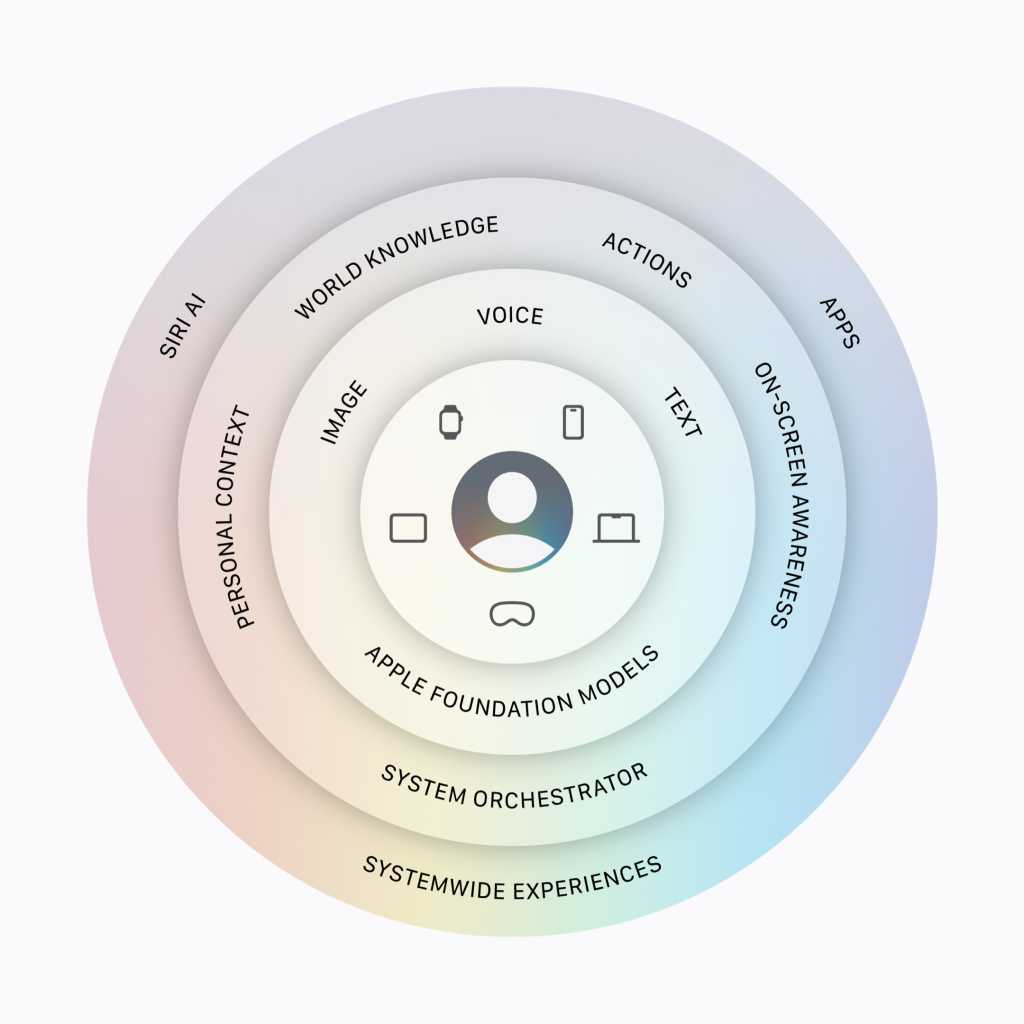
Announced at WWDC 2026, Apple Intelligence/Siri AI relies on personal, contextual data to run. Europe wants that same information to be made available to third-party services for competing apps, but has not worked with Apple to protect user confidentiality. It’s an approach that places your data at risk of exfiltration using those apps because Europe is insisting Apple share personal information with the developers of other apps.

The desire to protect that data is why Apple won’t distribute Siri AI in the EU for a while.

Jamf survey exposes the IT risks of AI

It’s not as if Europe doesn’t understand the risk of data leaks in an era of AI. Just look at the bloc’s focus on things that do matter, such as sovereign AI or managed AI services like Orange Live Intelligence. These locally-produced AI services, alongside Europe’s attitude toward them, tell me the confederation understands the risks.

How real are these risks? Very. Jamf on Monday published survey results confirming the scale of that risk, telling us that one-in-five IT and security leaders in the enterprise sector has already experienced an AI-related incident involving unexpected costs, a security issue, or both.  The survey also found that:

  • 72.9% of organizations have already deployed AI in some form.
  • 59.7% see an AI-related incident as a near-term risk.
  • Organizations with deeply integrated AI are 40% more likely to report an AI-related incident than organizations still in the exploratory stage. 

The implication is that AI governance is becoming an operational requirement and — as Apple has told us umpteen times in the past — the best way to maintain operational confidentiality is not to collect or share any data at all. That’s the whole point of its approach: the data doesn’t need to be shared, it just needs to be turned into another signal that promotes utility while protecting confidentiality. 

Crafting trust in a crowded market

There’s another challenge to emerge. There are now multiple brands of AI, with more coming on stream all the time. That’s great in terms of finding a model that suits your needs, but challenging when it comes to ensuring all the services you or your employees use of are equally secure. You don’t want your business to become deeply reliant on any service only for that vendor to subsequently get bought out and/or shut down, nor do you want a service to be hacked or otherwise exploited to your detriment.

“AI isn’t arriving as a single application that IT can approve and move on from,” said Jamf CEO Beth Tschida. “It’s showing up in developer tools, productivity apps, autonomous agents, and other software they already run. The challenge is maintaining visibility and control as that footprint expands.” 

The survey described the challenges IT faces with AI deployment: shadow IT, vendor sprawl, and the need to grapple with highly unpredictable use-based pricing models. And that’s even before considering the governance challenges of agentic and developer AI.

AI and the emerging governance nightmare

“What our survey shows is that governance must keep pace with adoption,” Tschida said. “For organizations built on Apple, the foundation is already an advantage. Apple’s privacy model and the management controls built into the platform give IT teams a strong foundation to build on and … that advantage depends on using tools built for Apple from the start.”

That’s the point of the curated, private and secured service offered by Siri AI, of course. It’s also part of what Apple is building toward with its wider ambitions toward AI on its platform. Bloomberg’s Mark Gurman discussed elements of this in his weekend newsletter, in which he suggested Apple might introduce some subscription services using AI, and that it is building an App Store for Siri Extensions, which would allow third-party chatbots to work with Siri. 

There is a need for curation and management in AI

What makes that model work is the curation with which Apple surrounds it, and its determination to extend Private Cloud Compute so it can protect your data even when using third-party servers (in this case, Google’s server clusters). It makes sense to think Apple intends to use that system to protect all approved third-parry AI interactions provided across its platforms by its own routes. That’s true, even if users access services free of those safeguards using a web browser, which they currently can.

But the key thing is that if Apple can get this right, offering up a managed, curated, and controllable ecosystem for AI agents and services, it will be going a long way toward building the kind of managed AI ecosystem the Jamf survey shows our modern digital enterprises increasingly need. 

You can follow me on social media! Join me on BlueSky,  LinkedIn, Mastodon and subscribe to The Core.

  •  

Google unveils DiffusionGemma, an AI model that breaks free of left-to-right processing

Extremely powerful large language models (LLMs) still operate as though they’re typing on a keyboard, processing workloads in a simple left-to-right fashion. But in locally-run, single-user scenarios, this sequential processing can leave graphics processing units (GPUs) and tensor processing units (TPUs) underutilized.

Google is betting that DiffusionGemma can get around this bottleneck. The new experimental open model generates text “exceptionally fast,” creating entire blocks of text simultaneously through diffusion techniques rather than through token-by-token processing. The company says this technique results in 4x faster inference compared to auto-regressive models that rely on sequential processing.

It can also save users money. Technology analyst Carmi Levy noted that existing pay-per-token monetization models “penalize the use of less than optimally efficient AI solutions.”

But DiffusionGemma “could herald a new generation of task-defined, efficient solutions that can enable expanded compute capacity without draining the operations budget,” he said.

A contrast to left-to-right processing

Built on Google’s Gemma 4 family and its Gemini Diffusion research, DiffusionGemma is a 26B mixture-of-experts (MoE) model designed to maximize text output generation.

It essentially shifts how models use hardware, giving processors a larger hunk of work each cycle so it can draft full 256-token paragraphs in sequence. This allows the model to generate text up to 4x faster on GPUs, Google claims. It activates only 3.8B parameters during inference, and, when quantized, can fit within 18GB VRAM on high-end consumer GPUs like Nvidia RTX 5090.

“It upgrades your model inference from a single, sequential typewriter to a massive printing press that stamps the entire block of text simultaneously,” Google research scientists Brendan O’Donoghue and Sebastian Flennerhag wrote in a blog post.

AI image generators begin with pure, random ‘visual noise’ and iteratively refine that into a finalized picture (what’s known as ‘diffusion’); DiffusionGemma applies this same process to text. It does not generate tokens in order, but begins with a “canvas of random placeholder tokens” that it processes in multiple passes, identifying the context tokens it feels are most relevant and using those to refine the rest.

The model has the ability to self-correct, using confidence scoring to re-evaluate tokens in the next pass. “The model iteratively refines its own output, allowing it to evaluate the entire text block at once to fix mistakes in real-time,” O’Donoghue and Flennerhag explained.

DiffusionGemma also has bidirectional attention, they wrote. “Generating 256 tokens in parallel with each forward pass allows every token to attend to all others.” This can be particularly helpful in domains that are non-linear in nature, such as mathematical graphs, code infilling, and in-line editing, they said.

DiffusionGemma is optimized across Nvidia’s hardware stack, making it compatible with consumer setups as well as with high-performance enterprise systems like Hopper and Blackwell.

Because it is released under the Apache 2.0 license, developers can freely use, modify, distribute, and commercialize the software using their preferred tools. It can be run on GPUs or in the cloud through Google Cloud Model Garden or Nvidia NIM, and is available on Hugging Face, GitHub, and vLLM, with support for the open-source library llama.cpp coming soon.

Key use cases

The model is particularly useful in local workflows that are “speed critical,” such as generation of non-linear text structures, and unlocks what Google calls “new patterns of model behavior” like multimodal understanding and generating and rendering code in near real-time.

Levy explained, “DiffusionGemma is particularly well suited for interactive coding and editing where its efficiency allows rapid processing and iterations,” noting that its ability to fit within 18GB of VRAM and its deployability on commonly available local GPUs can potentially benefit customer service-related workloads that lean heavily on real-time interaction and local processing.

“DiffusionGemma also incorporates a thinking mode that is especially adept at problem solving,” he said. For instance, the model was fine-tuned to play Sudoku, a typically challenging task for autoregressive models because each token depends on future tokens. This “rather handily” illustrates the model’s capability to solve more complex problems, Levy noted.

Limitations

Google freely admits that DiffusionGemma is geared to specific workflows, and there are “key trade-offs.”

The model is engineered for small batch size inferencing and low-latency, high-speed generation low-to-medium batch sizes on a “single capable accelerator.”

In high-QPS cloud serving environments, (where infrastructure is designed to handle tens or hundreds of thousands of requests per second with ultra-low latency), DiffusionGemma’s parallel coding “offers diminishing returns,” and can even result in higher serving costs, Google conceded. In addition, its overall output quality is lower than that of standard Gemma 4, which is built for apps demanding maximum quality.

However, Levy noted that while DiffusionGemma “can be less precise than other models in certain workloads,” subsequent refinement cycles could overcome this limitation.

While Google isn’t sharing runtime costs, it’s clear that this is an efficiency play, he added. “When deployed across the kinds of workloads that would optimally benefit from its architecture, DiffusionGemma seems to have the potential to reduce processing overhead and related costs,” he said.

This article originally appeared on InfoWorld.

  •  

Microsoft’s Patch Tuesday updates: Keeping up with the latest fixes

Long before Taco Tuesday became part of the pop-culture vernacular, Tuesdays were synonymous with security — and for anyone in the tech world, they still are.  Patch Tuesday, as you most likely know, refers to the day each month when Microsoft releases security updates and patches for its software products — everything from Windows to Office to SQL Server, developer tools to browsers.

The practice, which happens on the second Tuesday of the month, was initiated to streamline the patch distribution process and make it easier for users and IT system administrators to manage updates.  Like tacos, Patch Tuesday is here to stay.

In a blog post celebrating the 20th anniversary of Patch Tuesday, the Microsoft Security Response Center wrote: “The concept of Patch Tuesday was conceived and implemented in 2003. Before this unified approach, our security updates were sporadic, posing significant challenges for IT professionals and organizations in deploying critical patches in a timely manner.”

Patch Tuesday will continue to be an “important part of our strategy to keep users secure,” Microsoft said, adding that it’s now an important part of the cybersecurity industry.  As a case in point, Adobe, among others, follows a similar patch cadence.

Patch Tuesday coverage has also long been a staple of Computerworld’s commitment to provide critical information to the IT industry. That’s why we’ve gathered together this collection of recent patches, a rolling list we’ll keep updated each month.

In case you missed a recent Patch Tuesday announcement, here are the latest six months of updates.

For June, Patch Tuesday means an IT scramble

Microsoft this month released 206 updates affecting Windows, Office, Exchange Server, and its developer tools — including three Windows vulnerabilities already publicly disclosed. That trio includes an elevation of privilege in the Collaborative Translation Framework (CVE-2026-45586), a denial of service in HTTP.sys (CVE-2026-49160), and a BitLocker security feature bypass (CVE-2026-50507). At the moment, none appear to be under active exploitation, but all three are rated “Exploitation More Likely.” 

Even without an exploited zero-day, the June 2026 Patch Tuesday release requires Patch Now recommendations for Windows, Office, and Exchange. The latter is back in the patch picture with a consolidated security update that Microsoft recommends installing “as soon as possible.”

More info is available here on Microsoft Security updates for June 2026.

For May, Patch Tuesday means 139 updates — but no zero-days

Microsoft this month released 139 updates affecting Windows, Office, .NET, and SQL Server (though there were no updates for Microsoft Exchange Server). Despite the absence of zero-days, the May Patch Tuesday update still requires Patch Now recommendations for Windows and Office. 

The combination of three unauthenticated network RCEs (Netlogon, DNS Client, and SSO Plugin for Jira and Confluence), four Word Preview Pane RCEs, the large TCP/IP vulnerability cluster, and the carry-over BitLocker recovery condition (still active on Windows 10 and Windows Server) warrants an accelerated deployment release schedule. 

More info is available here on Microsoft Security updates for May 2026.

Microsoft’s Patch Tuesday release for April is a whopper

Windows admins are going to be busy this month, dealing with the largest Patch Tuesday cycle in memory. The April release involves 165 updates and roughly 340 unique CVEs from Microsoft — including two zero-days, one of which is already being actively exploited in the wild. 

The Readiness team recommends “Patch Now” schedules for nearly every major product family: Windows, Office (with a zero-day), Microsoft Edge (Chromium), SQL Server, and Microsoft Developer Tools (.NET). April also brings Phase 2 of Microsoft’s Kerberos RC4 hardening with full enforcement set for July. There is a lot to cover, so here’s a useful infographic mapping the deployment risk for each platform.

More info is available here on Microsoft Security updates for April 2026.

For March, Patch Tuesday delivers fixes for 83 vulnerabilities

Microsoft’s March Patch Tuesday release addresses 83 vulnerabilities across Windows, Office, SQL Server, Azure, and .NET — with two publicly disclosed zero-days affecting SQL Server and .NET (though neither is being actively exploited in the wild.) Six additional vulnerabilities spanning the Windows Kernel, Graphics Component, SMB Server, Accessibility Infrastructure, and Winlogon are flagged as “Exploitation More Likely.”

The most significant change this month is the introduction of Common Log File System (CLFS) hardening with signature verification, which will affect how Windows handles log files across the operating system. More info on Microsoft Security updates for March 2026.

February’s Patch Tuesday release fixes 59 flaws, including 6 being exploited

The company’s Patch Tuesday release for February addresses 59 CVEs across the company’s product family — roughly half the volume of January’s 159 patches. Six vulnerabilities, affecting Windows Shell, MSHTML, Desktop Window Manager, Remote Desktop, Remote Access, and Microsoft Word, are already being actively exploited. (All five Critical-rated CVEs target Azureservices rather than Windows, however.) 

Both Windows and Office get a “Patch Now” recommendation, with CISA setting a March 3 enforcement deadline for all six exploited vulnerabilities. Two new enforcement timelines also take effect in April: Kerberos RC4 deprecation (CVE-2026-20833) and Windows Deployment Services hardening (CVE-2026-0386). More info on Microsoft Security updates for February 2026.

For January, Patch Tuesday starts off with a bang

The first Patch Tuesday release of 2026 addresses 112 CVEs across Microsoft’s product portfolio, including eight rated critical and three zero-day vulnerabilities. One zero-day (CVE-2026-20805), an information disclosure flaw in the Desktop Window Manager, is already under active exploitation, prompting CISA to add it to the Known Exploited Vulnerabilities catalog with a remediation deadline of Feb. 3, 2026. (Note: 95 of the vulnerabilities affect Windows.) More info on Microsoft Security updates for January 2026.

  •  

For June, Patch Tuesday means an IT scramble

Microsoft this week released 206 updates affecting Windows, Office, Exchange Server, and its developer tools —  including three Windows vulnerabilities already publicly disclosed. That trio includes an elevation of privilege in the Collaborative Translation Framework (CVE-2026-45586), a denial of service in HTTP.sys (CVE-2026-49160), and a BitLocker security feature bypass (CVE-2026-50507). At the moment, none appear to be under active exploitation, but all three are rated “Exploitation More Likely.” 

Even without an exploited zero-day, the June 2026 Patch Tuesday release requires Patch Now recommendations for Windows, Office, and Exchange. The latter is back in the patch picture with a consolidated security update that Microsoft recommends installing “as soon as possible.” 

The Readiness team suggests testing start with domain controllers, Hyper-V hosts, anything self-hosting on HTTP.sys, and Outlook-heavy desktops —  in that order. To help navigate these changes, here’s a useful infographic detailing the risks of deploying the updates to each platform.

(More information about recent Patch Tuesday releases is available here.)

Known issues

This June release note from Microsoft flags known issues with three updates:

  • KB5094128 — BitLocker recovery prompt on first restart (Windows Server 2022). The PCR7 condition we have tracked since April is still live on the platforms that did not receive May’s Boot Manager servicing fix. Devices with BitLocker enabled on the OS drive, the Group Policy “Configure TPM platform validation profile for native UEFI firmware configurations” set with PCR7 included, and System Information reporting Secure Boot State PCR7 Binding as “Not Possible” may prompt for the recovery key on the first restart after installing this update.
  • KB5094127 — Windows 10 21H2/22H2. The release note carries a known-issue flag, too, with Windows 10 in the same boat as Server 2022: it has not received the Boot Manager servicing improvement that closed the BitLocker/PCR7 recovery condition on Windows 11. So, that same Group Policy configuration remains the trigger to check before deployment.
  • KB5094125/KB5094128 — WSUS synchronization error details suppressed (Windows Server 2025 and 2022). WSUS no longer displays synchronization error details in its reporting. This is deliberate: the functionality was “temporarily removed to address the Remote Code Execution Vulnerability, CVE-2025-59287.” Microsoft offered no workaround.

One continuing advisory from May remains in effect: Windows Update can still replace manually installed graphics drivers with older OEM versions from the Windows Update catalogue.

Major revisions and mitigations

Unlike last month, this patch cycle delivered two genuine revisions and a cluster of out-of-band fixes that require action:

  • Microsoft Teams Spoofing (CVE-2026-32185) — revised to version 3.0 on May 21. Microsoft announced the availability of the security update for Teams for Android; customers running affected versions should install it. If your mobile fleet runs Android, this is the action item.
  • Microsoft Defender out-of-band cluster (May 19–21) — a Critical remote code execution flaw (CVE-2026-45584), plus an elevation of privilege (CVE-2026-41091) and a denial of service (CVE-2026-45498).
  • SharePoint RCE (CVE-2026-45659) — a separate out-of-band fix also posted on May 21. SharePoint admins had three distinct security notices in a fortnight. The recommendation: deploy these clustered but separate patches as a single unit.

Interestingly, there were two omissions from last month’s list:

  • SharePoint Server RCE (CVE-2026-47294) — published May 29 with the note that it “was addressed by updates that were released in May 2026, but the CVE was inadvertently omitted from the May 2026 Security Updates.”
  • Windows DWM Core Library Information Disclosure (CVE-2026-48566) — also fixed in May, also left off the May list.

That makes two months running: the Patch Tuesday list is never final. The June release itself also carried a substantive revision:

  • Remote Desktop cluster re-issued for Windows 11 26H1 — five RDP/RDS CVEs from 2024–2025, including two Critical RCEs (CVE-2024-49123, CVE-2024-49132) and the RDP Server RCE (CVE-2024-43582). If you are running 26H1, the June cumulative closes these older CVEs.

Windows lifecycle and enforcement updates

Given the month SharePoint just had, SharePoint 2016/2019 require some of the cycle’s most active patching on a platform with one update left. If migration is not already in progress, July’s final update is the deadline. Here are the other key dates:

  • The 2011 KEK CA expires on June 24, and the UEFI CA for third-party boot loaders follows three days later, with the Windows Production PCA for the boot manager coming up October. 19. Devices that have not taken the Windows UEFI CA 2023 key updates under CVE-2023-24932 lose the ability to receive updated boot components once the certificates lapse. This is a big deal.
  • With just one Patch Tuesday to go, SharePoint Server 2016 and 2019, Project Server 2016 and 2019, SQL Server 2016, and SQL Server 2014 ESU Year 2 all reach end of support on July 14. (InfoPath 2013, SharePoint Designer 2013, and Visual Studio 2022 17.12 LTSC go with them.)
  • Kerberos RC4 hardening (CVE-2026-20833) moves from default-hardening to its enforcement phase next month. Accounts still depending on RC4 service tickets have weeks, not months.
  • The graphics-driver targeting change (four-part to two-part Hardware IDs) pilots to September 2026, with broader enforcement planned for Q4 2026 to Q1 2027; until then, Windows Update can still downgrade manually installed display drivers.

This month’s release is a security-only release with a clear feature focus: the Remote Desktop client. The Remote Desktop ActiveX control (mstscax.dll) is the most patched component this cycle with five separate updates (see below). 

The secondary theme is Windows authentication, with three updates to the NTLM security package. Every Windows binary this month reports no functional changes, so the work is pure regression validation. Lower-risk patches reach DHCP, telephony, Hyper-V, UDF and Projected File System storage, and the graphics stack.

Remote Desktop client

The Remote Desktop client (mstscax.dll) draws a high-risk flag that lands specifically on printer redirection — the path that maps a client’s local printers into a remote session. A regression here typically shows as missing redirected printers, failed print jobs, or a hang on connect or reconnect. The wider Remote Desktop stack is also updated, including RemoteApp and clipboard redirection (rdpclip.exe, RdpCoreTS.dll) and Remote Desktop Licensing (lserver.dll). So, be sure to validate connection, session, and licensing together.

A passing run is a remote session that connects, redirects printers, prints, and survives a reconnect with no crashes or missing devices.

  • Connect with Remote Desktop Connection (mstsc.exe) to a test host, enable printer redirection in Local Resources, and confirm redirected printers appear in the session.
  • Print a test page from an app in the session to a redirected printer; repeat with two or more client printers installed.
  • Disconnect and reconnect the session, then confirm the redirected printers are still present and usable.
  • Repeat the printer test in both a full desktop session and a RemoteApp session.
  • Exercise general remote access: connect through a Remote Desktop Gateway, use VMConnect to reach a VM, and verify clipboard and device redirection.
  • On a Remote Desktop Licensing server, confirm clients connect with licensing enabled, across Per User and Per Device modes.

Windows authentication (NTLM)

Three updates touch the NTLM security support provider (msv1\_0.dll), the module behind network authentication when Kerberos is not used. Authentication changes are regression-sensitive: the failure modes are logon failures, broken file-share or RDP access, and application sign-in problems. Validate across domain-joined and workgroup machines.

  • Sign in to domain-joined and standalone machines with domain, local, and cached credentials after a reboot.
  • Access SMB file shares by host name and IP, including paths that fall back to NTLM, and confirm authenticated reads and writes.
  • Authenticate to a Remote Desktop host and to line-of-business applications that rely on integrated Windows authentication.
  • Watch the Security event log for new logon-failure or audit anomalies during the test window.

Other Windows components

The remaining updates carry no functional changes, so cover them with routine regression by area.

  • Networking: exercise DHCP lease, renewal, and release on IPv4 and IPv6 (dhcpcore), sustained socket traffic over the WinSock driver (afd.sys, two updates), HTTP.sys request handling under IIS, and TAPI telephony integrations (tapisrv.dll).
  • Virtualization: boot Generation 1 and Generation 2 VMs, including nested virtualization, to cover the Hyper-V hypervisor (hvix64/hvax64), and connect a VM through an external virtual switch (toggling NIC RSS) to cover vmswitch.sys.
  • Storage and filesystems: read and write UDF-formatted media (udfs.sys), exercise the Projected File System minifilter (prjflt.sys), and validate cloud files hydration and Work Folders sync (cldflt.sys, workfolders.exe), including a ReFS volume with BitLocker enabled.
  • Graphics and shell: run GPU-accelerated and 2D rendering workloads to cover Direct2D (d2d1.dll), GDI+ (gdiplus.dll), the Desktop Window Manager (dwmcore.dll), the Windows Imaging Component (windowscodecs.dll), and UI Automation (UiaManager.dll); watch for artifacts and accessibility regressions.
  • Notifications and input: open apps that raise toast and push notifications (wpnapps.dll, wpncore.dll) and verify Text Services Framework input across keyboard layouts and IMEs (msctf.dll).

Microsoft Office & SharePoint

June’s Office updates are MSI editions only: Excel 2016 (KB5002877), Word 2016 (KB5002879), Office 2016 shared components (KB5002878, KB5002852, and the rich-edit control KB5002578), and Office Online Server 2019 (KB5002875). The shared Office 2016 component updates also apply to the SharePoint Server 2016, 2019, and Subscription Edition baselines. No Critical non-security client release ships this cycle, and Click-to-Run estates are unaffected.

  • Open complex Excel workbooks with formulas, macros, and external data connections; save and reopen to verify integrity.
  • Edit Word documents with embedded objects, tracked changes, and rich formatting that exercises the rich-edit control.
  • On the SharePoint Server baselines (2016, 2019, Subscription Edition) and Office Online Server, validate document library operations, co-authoring, and browser-based viewing and editing.
  • Confirm that Office add-ins and line-of-business integrations continue to operate.

Developer tools and databases

June’s fixes update the .NET SDK across the 8.0, 9.0, and 10.0 servicing lines (8.0.422, 9.0.315, 10.0.301), and ships SQL Server GDR security updates spanning SQL Server 2016 SP3 through SQL Server 2025, in both RTM+GDR and cumulative-update+GDR branches.

  • After installing the .NET SDK update, build and run representative applications and confirm existing projects compile and execute normally.
  • For SQL Server, install the GDR update onto the matching baseline or cumulative-update branch, then restart the service and run standard transactions.
  • Verify a backup and restore, confirm Always On availability groups stay healthy, and test patch install and removal on each servicing branch.

The Readiness team suggests that this month’s testing lead with Remote Desktop. The client is both the most-patched component and the sole High Risk item, so give it a focused regression pass centered on printer redirection, then broaden to general connectivity, RemoteApp, clipboard and device redirection, gateway access, and licensing. 

The NTLM authentication updates are the second priority: validate domain and standalone logon, file-share access, and application sign-in. Everything else is a no-functional-change security update, so cover networking, Hyper-V, storage, and graphics with routine regression. Office is MSI-only, with Click-to-Run untouched, and the .NET and SQL Server updates round out the developer and database estate.

Each month, we break down the update cycle into product families (as defined by Microsoft) with the following basic groupings:

Browsers

Microsoft Edge released the stable version (149.0.4022.52) on June 4, per the Edge security release notes. Nothing ships for Internet Explorer, which remains retired. This cycle is unusually lopsided: just one Edge-engineered CVE against a very large Chromium upstream flow:

  • CVE-2026-47644 — Copilot Chat (Microsoft Edge) — Information disclosure (CVSS 6.5, rated critical). For the second month running, Copilot Chat in Edge supplies the headline browser issue (May’s was CVE-2026-33111); Microsoft addresses the Copilot service component, with the browser update completing the fix.
  • Chromium upstream — 407 CVEs relayed through MSRC this cycle, spanning the weekly Chrome release cadence since the May report: use-after-free, out-of-bounds read/write, type confusion, and policy bypass across V8, Blink, PDFium, WebRTC, ANGLE, and DevTools. The same fixes ship in the Chrome Stable channel; see the Chrome release blog for the upstream notes.

The Chromium volume looks alarming but is routine plumbing —  it flows to Edge through its own auto-update channel. Add these updates to your standard release schedule for Edge-managed environments.

Windows

Microsoft addressed 119 vulnerabilities in Windows this month, 22 rated critical and 97, important —  nearly double May’s count. Elevation of privilege again dominates by volume (49 entries), followed by remote code execution (28), information disclosure (16), security feature bypass (15), denial of service (6), and a handful of spoofing and tampering entries. All three of June’s publicly disclosed zero-days land here:

  • CVE-2026-45586 — Collaborative Translation Framework (CTFMON) — Elevation of privilege (CVSS 7.8, publicly disclosed).
  • CVE-2026-49160 — HTTP.sys — Denial of service (CVSS 7.5, publicly disclosed).
  • CVE-2026-50507 — BitLocker — Security feature bypass (CVSS 6.8, publicly disclosed) —  BitLocker’s third entry this month, keeping it on the radar alongside the PCR7 known issue.

At the feature level, the critical risks are concentrated in nine areas:

  • Remote Desktop Client — the largest single cluster: 11 CVEs, 7 rated critical, led by CVE-2026-47289 and CVE-2026-42985 (both CVSS 8.8, the latter “Exploitation More Likely”).
  • Windows Kernel — CVE-2026-45657, remote code execution at CVSS 9.8, the joint-highest Windows score this cycle.
  • HTTP.sys — CVE-2026-47291, unauthenticated remote code execution (CVSS 9.8, “Exploitation More Likely”) in the kernel-mode web server underpinning IIS, WinRM, and anything self-hosting on http.sys — paired with the disclosed DoS above.
  • DHCP Client — CVE-2026-44815, remote code execution at CVSS 9.8.
  • Active Directory Domain Services — CVE-2026-45648, remote code execution (CVSS 8.8) on the directory itself, with the Kerberos KDC adding a separate critical RCE (CVE-2026-47288).
  • Hyper-V — three critical RCEs (CVE-2026-45607, CVE-2026-45641, CVE-2026-47652, up to CVSS 8.4) — guest-to-host risk on virtualization hosts.
  • Windows Graphics Component — two critical RCEs (CVE-2026-44803, CVE-2026-44812, CVSS 7.8), both “Exploitation More Likely” vulnerabilities reachable through Office rendering paths.
  • Windows Deployment Services — CVE-2026-42987, remote code execution (CVSS 8.1).
  • Cryptographic Services and Device Health Attestation — critical elevation-of-privilege entries (CVE-2026-44810, CVSS 8.4; CVE-2026-33828, CVSS 7.8) in trust-anchor components.

Given the publicly disclosed vulnerabilities this month, add this Windows update to your Patch Now schedule.

Office

Microsoft released 53 Office CVEs this month — 10 critical, 43 important. Remote code execution again leads (24 entries), but the surprise is spoofing at 20 entries, almost all of it SharePoint. (SharePoint Server appears in 30 of the 53 CVEs this cycle.) The rest split across information disclosure (6), elevation of privilege (2), and a security feature bypass.

Add these Office updates to your Patch Now deployment, prioritizing Outlook-heavy desktops and SharePoint farms.

Microsoft Exchange and SQL Server

The pattern inverts from May: SQL Server receives nothing (no patches at all), while Exchange Server — absent in May — returns with a consolidated security update carrying seven CVEs for on-premises builds (Exchange Server 2016 CU23 and Exchange Server 2019), plus one cloud-side critical:

  • CVE-2026-45504 — Exchange Server — Elevation of privilege (CVSS 8.8). The headline on-premises entry.
  • CVE-2026-45503 and CVE-2026-47631 — Exchange Server — Information disclosure and spoofing, each CVSS 8.1.
  • CVE-2026-45583 — Exchange Server — Remote code execution (CVSS 7.5), with three further spoofing/information-disclosure entries (CVE-2026-45500, CVE-2026-45501, CVE-2026-45502) rounding out the set.
  • CVE-2026-48579 — Exchange Online — Information disclosure (CVSS 9.1, rated critical) —  addressed service-side, no customer action.

Microsoft also revised the May Exchange spoofing entry (CVE-2026-42897) to point at this same June security update, with the recommendation to install “as soon as possible.” Add the June Exchange SU to your Patch Now schedule.

Developer tools

Microsoft released 10 CVEs across its developer tooling this month, all rated important —  though the top score outranks most of this cycle’s criticals, and the concentration in Visual Studio Code (seven of 10 entries) continues last month’s pattern:

  • Visual Studio Code — seven entries led by CVE-2026-47281, an elevation of privilege at CVSS 9.6 —  the highest developer-tools score in months. Behind it: CVE-2026-45482, a security feature bypass in the GitHub Copilot Chat extension (CVSS 8.4); CVE-2026-47292, remote code execution in the MSSQL extension (CVSS 7.8); a second elevation of privilege (CVE-2026-40376, CVSS 7.5); and security-feature-bypass, tampering, and information-disclosure entries (CVE-2026-48569, CVE-2026-47287, CVE-2026-47284).
  • Microsoft .NET on Windows has three entries: CVE-2026-45490, a .NET SDK elevation of privilege (CVSS 7.8) across .NET 8.0, 9.0, and 10.0; CVE-2026-45591, an ASP.NET Core denial of service (CVSS 7.5); and CVE-2026-45491, a .NET tampering issue (CVSS 6.2).

Add these Microsoft updates to your standard developer update release plan.

Adobe (and third-party updates)

Adobe released APSB26-63 for Acrobat and Reader this cycle, fixing critical code-execution flaws; Adobe reports no exploitation in the wild. Add it to your standard third-party schedule. This is a big (fat) Windows update this month (and yes, I think that AI has something to do with the number of these patches). 

Good luck with your deployments.

  •  

Siri AI is all Apple; it just needed Google to get there

Apple’s executives have been taking questions, hosting seminars, seemingly working around the clock to stress one very important thing: Apple is not using a white label version of Google Gemini to make Siri AI happen. They just pooled resources to get there. 

The new Siri AI is faster, more accurate, offers powerful contextual capabilities and shows how Apple has leap-frogged into a good peer position in an AI race critics felt it had already lost. Its market scale — even without the EU — is huge. For most consumers, Apple Intelligence and Siri will continue to be their primary/first engagement with artificial intelligence on a device.

Getting there took a lot of work, and Apple needed Google to get it done. Though there is still some confusion about what that means, Apple’s software chief tried to explain it this week. “We use none of the models that Google deploys to their customers, nor do we use the infrastructure and means by which they employ models to their customers,” Craig Federighi said in a presentation at WWDC.

Apple is not even using Google Search as the foundation of its system, he said. “This is the amount of Google Assistant we use,” Federighi said, pointing at an empty chart. “Nothing.”

Apple not Gemini, Siri AI is not Google’s

What makes this hard to understand is that we all know Apple partnered with Google to build Siri AI; back in January, we were told the next generation of Apple Foundation Models would be based on Gemini models and cloud technology. So, how can we have moved from partnership hero to usage zero?

The answer is, we didn’t. What happened is that Apple built its new Apple Frontier Models (AFMs) (the AI inside Siri AI) by training them using proprietary Apple data and reinforcement learning and then refined those models using “outputs from Google’s Gemini Frontier models.”

In other words, Apple used Google Gemini to help improve its own models, which means the models themselves, the AI in Siri AI, are Apple’s — but they were trained with help from Gemini. They are not white label iterations of those Google models. 

Apple also hit a second snag. Its very best model (AFM 3 Cloud Pro) requires more processor power to run than Apple could deliver using its own cloud-hosted Private Cloud Compute servers. Now, we know Apple doesn’t like using other people’s stuff. But it’s a realistic company that understands it sometimes must, and just as it uses AWS to support some of its services, it moved to adopt Google cloud services and Nvidia processors to drive the most demanding requests.

A question of trust

Apple also developed a technological solution that means it can claim the interaction remains just as private as if it were run on your device. Apple has made it possible for independent security experts to confirm this and says it is the only company that can deploy software on those servers, with strong security to ensure your device only interacts with those servers when you want it to. So far, no one has broken this protection. 

I came across an interesting report in which Tekonyx Founder and Chief Research Officer Sid Nag explained the significance of Apple finding a way to expand its Private cloud Compute infrastructure beyond its own data centers.

“Apple is effectively arguing that trust in AI systems should come from cryptographic and architectural guarantees rather than trust in the cloud provider itself,” he told Fierce. Where enterprises have faced a choice between access to powerful AI or privacy, Apple has introduced a new solution he called “portable trust.” This could conceivably become a new IaaS offering from the companies involved over time.

Working together for the benefit of all

So, while Apple’s models were built with Google’s help, and while its most advanced models run with support from Google and Nvidia, the models are Apple’s alone. 

It’s good for Google, of course. Apple is paying for this use, which helps the search giant claw back some of the value of its massive, muti-billion-dollar AI infrastructure investment. It’s not clear how much Apple is paying; earlier this year, the $1 billion figure was bandied around. But Apple’s decision to tie usage to iCloud subscriptions in some hitherto undisclosed way hints that the deal may also see some token-based usage charges on top of the basic Apple fee. I’ve not come across any details, but that’s what I surmise based on the size of Apple’s ecosystem and the growing realization of how quickly users can consume AI capacity.

What AI models is Apple running?

AFM 3 Cloud Pro is one of five Apple Frontier Models driving Siri AI.  Here’s how Apple describes those five models:

On-device models

  • AFM 3 Core, the next generation of Apple’s 3-billion-parameter dense model. You’ll use this for basic text generation, summaries, conversational replies, all the standard uses. It can also handle indexing, search, App Intents, basic dictation and contextual awareness.
  • AFM 3 Core Advanced, the most powerful on-device model. This is what makes Siri’s voice match mood or context, does all the high-accuracy dictation, and can process various data to handle tasks across different apps. It’s the AI driving your more involved Siri conversations. 

AFM Core Advanced is impressive in its own right, because Apple has managed to cram a 20-billion-parameter model onto a smartphone. It has done this by using a sparse architecture, which means it activates just 1 to 4 billion parameters at a time depending on the request. It is, however, only available to Apple’s most powerful systems — iPhone 17 Pro, iPhone 17 Pro Max, iPhone Air, M4 or later iPad, M3 or later Mac with 12GB+ memory.

Server-based models

  • AFM 3 Cloud, which Apple calls its server-side workhorse, optimized for speed, efficiency, and performance.
  • ADM 3 Cloud (Image), for image generation and editing, which unlocks advanced photo-editing tools, the all-new Image Playground, and more.
  • AFM 3 Cloud Pro, the most capable server-based model, which powers the most demanding use cases, like agentic tool use and complex reasoning.

All five were built using the same common foundation, which was then specialized to reflect the proposed use of that model. It’s interesting to look at the human evaluation tests Apple ran to test how well these models performed; they demonstrate impressive improvement on the company’s original models, effectively justifying the decision to work with Gemini.

You can follow me on social media! Join me on BlueSky,  LinkedIn, Mastodon and subscribe to The Core.

  •  

WWDC: What IT admins need to know

Under-the-hood AI changes and efficiency improvements at the OS layer across Apple’s platforms are certainly the highlights at WWDC 2026. But there have also been significant changes IT admins will need to prepare for, particularly around Declarative Device Management (DDM). 

The Intel age is over

Apple warned us this was coming, but macOS 27 will not support Intel at all. The company will deliver three more years of security updates for those devices, and you will still be able to use Rosetta to get Intel app binaries to run legacy apps on Apple Silicon. But if you still rely on any Intel apps or Macs, it really is time to plan your upgrade.

DDM becomes the present

It was the future once, but when it comes to Declarative Device Management (DDM) that future is now. Apple is removing all its legacy MDM mechanisms to replace them with DDM. “For IT admins, WWDC 2026 is a migration year,” wrote Fleet. “Apple is removing legacy MDM mechanisms and replacing them with Declarative Device Management (DDM). Some of it is urgent. Some of it just needs a plan.”

It’s a great step, though IT admins will need to ensure they aren’t relying on legacy MDM to handle any of their device fleets. That’s a particular issue around software and security update management. In most cases, your MDM provider has probably already introduced DDM support. But if you aren’t certain, now is the time to find out before your systems fail.

Apple has also added new DDM tools across various systems, apps, identities and more. Some of the highlights include:

  • VPN and Network configurations can be provisioned using DDM; they also become credential-reliant, which should make management more streamlined.
  • Apple Intelligence, Siri, and keyboard settings can also be configured via DDM, and admins can manage individual Apple Intelligence tools. 
  • Web content filter and content caching both become controllable with DDM.
  • A new privacy key lets IT manage things like camera or microphone access.
  • Apple has added a device system health reporting function to verify that hardware components on iPhone and iPad are genuine.
  • IT will be able to detect whether a device is in Lockdown Mode.

“One of the new features I’m most excited about is the ability to set permission defaults for managed apps and websites viewed in Safari,” said Adam Henry, senior product manager at Iru. “While the user is still prompted to allow these permissions, we can now present those requests as a unified prompt immediately upon app launch, along with a custom explanation as to why those permissions are important — think a teleconferencing app or website that always needs access to camera and microphone.

“Overall, I think this is a much more user-friendly solution that will likely increase permission compliance.”

Siri and AI

Although, Apple has introduced new management tools for AI, it’s important to remember some advice from Joel Rennich, senior vice president for product management at JumpCloud: “Traditional IAM models assume users directly interact with applications, but agentic systems change that assumption. AI intermediaries can now retrieve data, execute workflows, and make decisions across systems. Enterprises will need identity frameworks that govern both human and non-human actors consistently.”

He also noted: “The separation between where data lives and where it is used becomes increasingly invisible to the user. Intent becomes the primary input, not app selection.”

At the same time, the evolution of AI on Apple’s devices promises a lot for enterprise users. Matt Vlasach, Jamf senior vice president, enterprise products and solutions engineering, told me: “Most notable for me was Siri AI and the push towards on-device and more capable models that can do more with user context. While obvious for consumer use cases as illustrated in the keynote, the opportunity to evolve this to the work context using a more advanced Apple Intelligence framework is an exciting evolution.”

Farewell AFP

Apple has finally eradicated Apple Filing Protocol (AFP) in macOS. This will be an issue for any business that uses legacy Time Capsule or NAS storage devices, though in most cases those products are already obsolete and should be replaced. This is unlikely to be a huge challenge for most, given that Apple began using SMB as its primary file sharing protocol back in 2013 and support for AFP server disappeared in 2020. (Time Capsule fans might want to take a look at the TimeCapsuleSMB open-source project.)

Hello AppleCare log collection

Apple will introduce a new remote log collection capability that integrates directly with the company’s support infrastructure. So, when AppleCare support engages with an organization’s IT team, they can provide an enhanced logging token which can be shared to get the device to collect diagnostic logs to upload to AppleCare. You just know this will expedite remedy.

Single Sign-On improvements

As I noted here, there are some significant Single Sign-On (SSO) updates; two that caught my eye include:

  • IT can now insist on biometric as well as password ID on managed devices.
  • Authenticated Guest Mode with Platform SSO allows users to quickly and securely login to a shared Mac in a temporary session.
  • Platform SSO on macOS 27 adds web-based authentication.

Network and more

Another change affects the system processes used in device management at a network level. Apple now requires that you use TLS 1.2 or later. If you or your MDM systems are not doing so, get ready for things to break. (Apple has published a support article to help IT test their network environments in preparation for this change.)

Apple also announced that IT admins will be able to purchase and manage app subscriptions directly in Apple School Manager and Apple Business Manager. And it introduced a managed migration feature that should help migrate data, while preserving device management enrollment and settings. 

More information

I’ve really only offered a flavor of some of the IT improvements introduced at WWDC. To find out more, watch the Apple sessions on “What’s new in managing Apple devices” and take a look at the Apple Platform Deployment guide; it should be updated before the new operating systems ship this fall 

You can follow me on social media! Join me on BlueSky,  LinkedIn, Mastodon and subscribe to The Core.

  •  

Apple Silicon boosts the TCO benefit of Macs — report

Apple Silicon Macs fail at less than half the rate of Intel Macs, dramatically reducing the platform’s already industry-leading total cost of ownership (TCO), according to data revealed by London, UK-based Apple reseller Hoxton Macs.

While it’s true the data is based on a relatively small sample group, it does seem to reflect what the industry in general sees.

Apple’s chip design transforms Mac reliability

The success of Apple Silicon hardware is attributed to its simpler design, which integrates multiple components into a single chip, reducing the number of potential failure points. Additionally, Apple Silicon Macs run cooler, leading to less wear and tear on components such as batteries and USB-C ports, the report says. Across the wider laptop market, most studies show hardware faults affect one in five non-Apple machines over their first three years in use.

This builds on Apple’s enduring record for making good hardware as independent reliability surveys consistently rank the company as the most reliable laptop brand. To some extent, the data reflects the anecdotal experience most Mac users have — their computers seem to last much longer than other systems do, which helps them retain value on the second-user market.

Apple already had a good story to tell in terms of tech support before it introduced Apple Silicon machines. More than a decade ago, Fletcher Previn, then vice president of Workplace-as-a-Service at IBM, told the Jamf Nation User Conference that just 5% of IBM’s Mac-using employees needed to call the help desk; in contrast, an astonishing 40% of PC-using staff had to do so. That difference is significant because it translates into serious differences in cost; each tech support call made by those working on your ailing PC fleet has a price.

That TCO difference prompted Previn to say, “I can confidently say every Mac that we buy is making and saving IBM money.” Years later, as CIO at Cisco, he said the company’s tens of thousands of Mac users experienced five times fewer cyberthreats and nine times fewer virus issues than PCs, and that Cisco needed 33% fewer engineers to manage the Macs.

Those impressive real-world data points reflected Macs in the pre-Apple Silicon world. Those Intel Macs already worked better for longer and required less tech support. This month’s Hoxton Macs data, while based on a much smaller sample group, suggests that this particular advantage has grown even greater now. And it’s not just down to the silicon.

Fewer parts, less heat, fewer failures

Apple has designed its processors to deliver excellent performance per watt. Because these are SoCs (System on Chips) the power requirement to drive all the system components is that much lower, and it means whole categories of component failure are removed. The design also means they use less energy and generate less heat to run, dramatically reducing thermal wear and tear. 

“Fewer parts, less heat, simpler construction: the result is a machine with markedly fewer ways to break,” Hoxton Mac said in an extensive article explaining its data.

>Failure rates are consequential to everyone. Even a small failure rate means some people will end up with Macs that have hardware issues, which is always a problem for those affected. But the low fail rate should be reassuring to the millions of people switching to Apple’s  href="https://www.computerworld.com/article/4180406/after-a-quick-1-1m-sales-macbook-neo-set-to-reshape-the-pc-industry.html">even cooler-running MacBook Neos>. 

Those users might now justifiably look forward to lower running costs from their new computers, combined with good resale rates once they’re ready to upgrade. It doesn’t hurt Apple’s platform loyalty either — making it even more likely those millions of users will stay with the Mac rather than going back to where they were before.

You can follow me on social media! Join me on BlueSky,  LinkedIn, Mastodon and The Core.

  •  

Why I’m leaving Copilot for Gemini

I’ve been using and writing about Microsoft Copilot since it was publicly released in 2023. I’ve reviewed it, written articles about using it more effectively, explained how to curb hallucinations in it and other similar tools, and detailed how to use it in concert with Microsoft 365. It’s also been my go-to generative AI (genAI) tool for personal projects and advice.

But the time has come for me to leave it behind for my personal use. It’s become abundantly clear that for those tasks, Google Gemini is better. Here’s why.

Copilot is inept at solving a tech problem

Like many people who know something about technology, I’m the IT staff for friends and family. I’ve often used Copilot to help solve issues I can’t fix myself. Sometimes Copilot helps. And other times…, well, the last time I turned to it for troubleshooting advice is when I realized it was time to abandon Copilot.

My wife had bought a new iPhone, and I noticed she was receiving texts sent to her email address but hadn’t received any sent to her phone number. I asked Copilot for help.

I won’t go into the details of the wild goose chase Copilot sent me on — I’ll just offer a few lowlights. It first told me, with absolute authority, that there are “only two real explanations” for the problem and asked me to look at several settings to confirm which explanation would fix the issue.

It turned out that neither of the “two real explanations” were the cause. Undeterred, Copilot assured me, again with complete confidence, that it was going to send me “straight to the switch” that would immediately solve the problem.

I tried it. The switch didn’t work. Neither did the “final fix” it promised me. Nor did any of the other many “solutions” if offered after that so-called final fix. For more than an hour, it flailed with utter confidence and utter futility trying to diagnose and fix the problem. 

And then came the final indignity: After doing some digging, I realized Copilot was trying to solve the problem based on an old version of iOS, not the current one on my wife’s phone. When I confronted Copilot about that, it briefly apologized and promised it knew the solution: I had to call the cellphone carrier.

That was it for me. I’d had enough. I turned to Gemini for help. 

Thirty seconds later, Gemini diagnosed the problem and recommended a simple fix, which didn’t require a call to my phone carrier. It worked like a charm. Gemini had solved a tech problem in 30 seconds that Copilot couldn’t resolve after an hour. 

Copilot whiffs on personal research 

I often used Copilot for personal research projects. A recent one involved Parisian neighborhoods in the 1870s. I was looking for information about the area around the Saint-Lazare train station. When I asked Copilot, it told me the area was dangerous and poverty-ridden back then, with poor housing whose exteriors were heavily stained by coal smoke from arriving and departing trains.

That didn’t sit right with me. I recalled a well-known painting Paris Street; Rainy Day by the Impressionist painter Gustave Caillebotte, which depicted the neighborhood in the 1870s as wealthy and fashionable, filled with elegant Hausmann-style apartment buildings. I asked both Gemini and Claude about the neighborhood in the 1870s. They both told me it was expensive, fashionable and sought after by the well-off. I confirmed that with my own follow-up research.

Once again, Copilot had whiffed.

Copilot gives bad scheduling advice

I swim for exercise three or four times a week at my health club’s indoor pool. The club closed the pool for several months, so I decided to swim at the pool of an elementary school a short walk from my house. I hadn’t exercised there before and wanted to find the times on Monday through Friday when the pool would be least crowded. I asked Copilot for help.

As always, Copilot spoke with a solid air of authority. And once again, it was wrong. It told me that the least crowded time for public swimming on weekdays was between 11:30 a.m. and 12:30 p.m. or between 12:00 p.m. and 1:00 p.m.

On one count it was right: the pool would certainly not be crowded with public swimmers at those times. Because the pool doesn’t open to the public until 3 p.m. 

I turned to Gemini, which told me that 3 p.m., when the pool opened, would be the least-crowded time. Claude was no help. It demurred and said it didn’t know the answer – a rare, refreshing admittance of ignorance from a chatbot.

Gemini was on target again — 3 p.m. did indeed turn out to be the least-crowded time to swim. I often get a lane to myself, and at worst have to split a lane with one other swimmer. I asked several lifeguards if 3 p.m. was the least-crowded time on weekdays; they all confirmed it was.

Bye-bye, Copilot

For all those reasons, when it comes to personal research and advice, I’ve abandoned Copilot. I typically use Gemini now, although on occasion, I ask for a second opinion from Claude.

For my Computerworld work, I’ll keep using Copilot, and continue to write reviews of it, offer advice on how to use it and keep you informed about the latest news about it.

But other than that, for my personal use, Copilot is dead to me.

  •  

Apple’s AI plans show promise, but proof of success still to come — analysts

WWDC26 felt like a defining platform moment. Apple is no longer simply promising that AI will arrive eventually; it is arguing that Apple Intelligence and Siri AI should become central to the future of its ecosystem. If that works, the company will have turned AI from a perceived weakness into a new reason to stay inside Apple’s world.

Still, the bigger question is execution. Apple did not present AI as a lab experiment; it presented a polished, consumer-ready experience. That raises expectations. 

Apple must deliver this time

Users will not judge Apple Intelligence by model architecture or parameter counts. They will judge it by whether Siri understands them, whether actions work reliably, whether personal context feels useful rather than intrusive, and whether the experience is consistent across devices.

Since Monday’s announcements, we’ve learned that some features will not work on all devices — and there’s speculation Siri AI may not fully escape beta until 2027. “Until Apple puts a stake in the ground and says when the new Siri features will be available, the debate remains: Does Apple actually have the chops in personalized AI? The demo suggests yes. The lack of timing suggests maybe,” wrote analyst Gene Munster.

Optimists argue that Apple has regained momentum by presenting a coherent AI story, one built around privacy, integration and everyday utility rather than spectacle. Skeptics counter that many of the features resemble capabilities already available elsewhere, and say the company still needs to prove it can ship them at scale and make them a meaningful reason for consumers to upgrade.

What the analysts say

That balance is visible in analyst reaction. In a client note seen by Computerworld, Erik Woodring of Morgan Stanley described the keynote as clear progress on Apple’s AI roadmap and said it suggested monetization opportunities could arrive earlier than expected — even if the overall journey will be “a marathon, not a sprint.”

UBS, in contrast, said the privacy-focused AI additions are useful but unlikely to be a material driver of iPhone demand in the near term, while Barclays called the changes interesting but incremental, and not enough to drive an upgrade cycle.

Ben Wood, chief analyst at CCS Insight, argued that Apple had to answer concerns about its AI shortcomings and now has to prove that its privacy-led, integration-first approach translates into a meaningfully better everyday experience. “Consumers will not judge Apple Intelligence by model sizes, partnerships or technical architecture,” Wood told me. “They will judge it by whether Siri understands them, whether actions work, whether personal context feels useful rather than intrusive, and whether the experience is consistent across devices.”

Dipanjan Chatterjee, vice president principal analyst at Forrester, said Apple’s strength lies in shifting the focus from the underlying technology to outcomes such as usefulness, simplicity and trust, while warning that the company still has skeptics to win over after its stop-start AI rollout. “The lesson for brands is clear: market the value, not the ingredients,” said Chatterjee. “After stumbling with the Apple Intelligence roll-out, Apple’s success will hinge on delivering the new Siri experience quickly, and ensuring it works as promised for iPhone users at scale.”

What about Apple developers?

While many are infuriated about Europe’s inability to build compromise, Apple’s developer army otherwise seems positive about what the company has accomplished. 

“On the AI front, it never made sense to me for Apple to develop their own LLM, so focusing on powerful, fast and private for implementation of Apple Intelligence seems to be an effort that is progressing rather nicely.  In all, a pretty good Keynote, I’d say,” Rich Siegel, founder and CEO of Bare Bones Software, said in an interview.

“It’s great to see Apple continue to pursue a vision of AI that leverages local systems, preserves privacy, and integrates with third party tools,” said Ken Case, CEO of the Omni Group. “A lot of our work around the Apple Foundation Models and automation, App Intents, and adopting Swift look to be fruitful investments, but it’s clear there’s more to do starting this summer. It’s also welcome to see them refine Liquid Glass, giving customers more control and listening to feedback they’ve heard over the past year.”

“I expected that this year’s Siri revamp would be the biggest personal assistant update Apple has ever done, and that’s exactly what we got,” said Sergii Kryvoblotskyi, director of AI and research at MacPaw. “Since Apple acquired Siri back in 2010, it has lacked one thing: real intelligence. Behind the great speech recognition service it provided, the tech was not ready to provide real value to users.”

“Most notable for me was Siri AI and the push towards on-device and more capable models that can do more with user context,” Matt Vlasach, Jamf senior vice president, enterprise products and solutions engineering,” said in an interview. “While obvious for consumer use cases, as illustrated in the keynote, the opportunity to evolve this to the work context using a more advanced Apple Intelligence framework is an exciting evolution.”

“OS 27 feels like a deliberate reset, less about new features and more about polish and quality-of-life improvements, which most users will welcome,” said John Richards, general manager, IT products, at Iru. “The new capabilities are focused entirely on Apple Intelligence and Siri AI, and what’s encouraging is how much Apple leaned into privacy with the Gemini partnership. That combination of capability and privacy-first design is the right instinct.”

“The single biggest request I made at Apple’s Foundation Models workshop in Madrid was opening Private Cloud Compute to third-party developers,” said Serhii Popov, senior software Eengineer at CleanMyMac. “It’s here and free for apps under 2 million users. That’s a real breakthrough and a huge opportunity for a lot of great apps.”

How will integrated AI change things?

Joel Rennich, senior vice president for product management at JumpCloud, looked ay how on-device AI will transform other paradigms. For starters, it shifts identity from simple authentication to governing what actions an AI agent is allowed to take.v“Enterprises will need identity frameworks that govern both human and non-human actors consistently,” he said.

“iOS 27 and Apple Intelligence point toward an operating system that does not just launch apps, it executes intent,” Rennich said. “Instead of users navigating between tools, the OS increasingly mediates outcomes directly through AI. This changes how work is initiated and completed on devices.

“With Apple Intelligence integrated across core experiences like Siri, Safari, and system services, AI is no longer an overlay but infrastructure. The separation between where data lives and where it is used becomes increasingly invisible to the user. Intent becomes the primary input, not app selection.”

I also spoke with Hexnode CEO Apu Pavithran, who pointed to some of the concerns enterprise users might have following WWDC: “The keynote didn’t speak much to admins,” he said. “The features that matter most at the management layer, such as how Apple exposes Siri AI through MDM APIs, whether IT gets granular per-app controls for Apple Intelligence, how shared device deployments handle the new assistant — these will be answered in the developer documentation. This week, that’s where IT teams should be looking.”

“Admins should dig in immediately and see what’s changed. Watch the developer docs, audit how Apple Intelligence interacts with existing device policies, and remember that the keynote is only a part of the story for enterprises,” he said.

Making AI great again

“Rebuilt from the ground up, Apple is trying to make AI feel native, useful and invisible across the devices people already use every day,” Francisco Jeronimo, vice president for client devices at IDC, said in an interview. “This matters, because the winning AI experience for consumers will not be the loudest or most technically complex. It will be the one that understands context, respects privacy, works reliably across apps, and reduces friction without forcing users to change behavior.”

“[Apple] is also clearly seeking to differentiate through its privacy promises,” said CCS Insight’s Wood. “This looks like a step in the right direction, but there is no room for complacency, and Apple still has a long AI journey ahead.”

Pavithran reflected on something more. “Overall, it’s hard not to think of this year as a deliberately measured keynote, one that’s intentionally playing it safe and seeking to rewrite the AI narrative,” he said. “I won’t be surprised if this ends up setting the stage for a much bigger installment next year with incoming CEO John Ternus hitting the ground running with some ‘wow’ features like new hardware or agentic AI at scale.”

That we can now seriously consider that possibility shows the extent to which Apple has regained momentum in AI on its platforms.

You can follow me on social media! Join me on BlueSky,  LinkedIn, Mastodon and The Core.

  •  

WWDC: Did Apple make the AI grade this year?

There were several key components to emerge from Apple’s developer conference Monday as the company sought to reassure users (and investors) that it has met the existential challenge represented by AI. Aside from a serious focus on Siri AI and embedded Apple Intelligence across its varied platforms, officials also hailed a slew of performance/usability tweaks, described new child safety tools, gave macOS 27 a real name, “Golden Gate” — and offered a standing ovation in farewell to outgoing CEO Tim Cook.

Before the Worldwide Developer Conference (WWDC), analysts seemed optimistic about the company’s plans, most of which had already leaked. Analysts didn’t expect Apple to announce anything that would transform the AI industry (it didn’t), but they did hope the company would introduce tools to keep it competitive with rivals (it did). That’s assuming all the demos at the event were live, actual feature demos, rather than faked set-ups as seen before.

Hard, hard work

Apple’s teams have evidently worked incredibly hard to come this far, and execs did introduce truly impressive new AI features focused on what customers and developers actually need. The company also played to its strengths, particularly around vision intelligence; private-by-design (large language models) LLMs; highly useful contextual awareness; and Siri AI, which works as an app and lets you carry on conversational quests securely across all your Apple devices.

As anticipated, Apple also introduced APIs developers will be able to use to provide new AI features in their apps.

Among the many individual tools most of us can expect to use this fall, are:

  • Siri AI, which can help users search for information across their messages, emails, photos, and more; answer questions about virtually any topic; and take action in apps. 
  • Apple Passwords, which now automatically fix weak and compromised passwords with agentic AI.
  • Spatial reframing, which lets users recompose a photo after it’s been taken by dragging to shift perspective, as if repositioning the camera in the original scene.
  • A new Extend Tool, which expands the edges of an image to add breathing room, fix a crooked horizon, or change aspect ratio without losing the original subject.
  • A Notify Me tool that monitors web pages for changes such as price drops or restocks and sends a notification when something changes.
  • Photorealistic image generation, which supports the creation of high-quality photo-realistic images via a new generative model running on Private Cloud Compute.
  • One-tap contextual suggestions in Messages, which surface actions such as creating reminders and notes, or finding relevant photos based on conversation context.
  • And Describe a Shortcut, which means users can describe an automation they want in plain language and Shortcuts assembles the required steps automatically.

All about you, not AI

Apple did not seek to introduce AI features for their own sake; instead, it remains deeply focused on how to make its devices more useful to customers. As Craig Federighi, Apple’s senior vice president of software engineering, said: 

“Truly helpful AI must be centered on our users’ needs, deeply integrated into the products they rely on every day, grounded in personal context, and built with privacy at every step. That is our vision for Apple Intelligence. With useful features for browsing the web, expressing creativity, editing photos, and so much more, today marks a big step forward on our journey to integrate powerful AI into the core of our platforms and make our products even more personal and useful.”

Apple is not Gemini

Apple confirmed that it worked with Google Gemini to create some of the AI models highlighted today. This led some analysts before the event to say: “For Apple, the bull case is that a working Siri reframes it as an AI winner; the bear case is that paying a rival for core intelligence caps the premium investors assign to the stock.”

Perhaps they need not worry, as what we now seem to have is a far more solid base from which to continue to develop AI services and tools that compete against others in the space. Not only that, but Apple is not using rebranded Gemini — it simply worked with Google to build its own models, as Federighi insisted. In meetings at the show, Apple explained the full extent of the work it did with Google, stressing that none of the new features should be considered white label versions of Google’s LLMs. 

(Even Apple’s new search tools are based on its own search database, rather than anybody else’s. And when advanced searches are shared with Google-hosted Nvidia processors, Apple puts privacy protection in place.)

In the end, the most important consideration — for customers and developers — is that Apple seems to have succeeded in bringing dozens and dozens of powerful new on-device AI tools to its customers, giving it a firmer, more impressive peer position in the business. (It’s also true that investors were disappointed that the new AI features won’t be made available in Europe or China due to regulatory challenges, putting developers in both nations at a disadvantage.) Developers elsewhere will be able to explore Apple’s Foundation Models and its new Core AI APIs to their heart’s content. 

First reactions to Apple’s news

While Apple’s stock value dipped as investors sold on the news and invested into the speculation, I do think Apple successfully turned this corner — though it will need to continue to invest heavily in AI across its platforms. The work is far from over.

“It is great to see Apple continue to pursue a vision of AI that leverages local systems, preserves privacy, and integrates with third party tools,” Ken Case, CEO of the Omni Group, told me. “A lot of our work around the Apple Foundation Models and automation, App Intents, and adopting Swift look to be fruitful investments, but it’s clear there’s more to do starting this summer.”

Creative Strategies President and Principal Analyst Carolina Milanesi explained why it matters Apple is deploying these capabilities across its ecosystem, as it gives the company a unique market position. “Where Apple Intelligence is today is different than what Claude or ChatGPT are because is it really embedded in the devices, and we need to remember that Apple sells devices,” she said.

Apple did also note that the new Siri AI will be available in beta this year. “Investors wanted it in September. That means the real version is likely early to mid 2027,” said Gene Munster at Deepwater Asset Management. “Funny that the stock actually ticked up 0.5% on the “beta later this year” update given [that] while it’s later than what they wanted, it is at least a date that investors can focus on.”

It is also true that what Apple did achieve this year at WWDC is to offer up a set of new AI features that investors already see as having significant value.

You can follow me on social media! Join me on BlueSky,  LinkedIn, Mastodon and The Core.

  •  

WWDC: Apple’s AI moment of truth arrives

Everybody is watching to see what comes from Apple at its annual Worldwide Developer Conference (WWDC) today. There’s a great deal at stake, as when it comes to artificial intelligence (AI) today’s event represents an existentially important moment for the company. 

Apple execs absolutely must convince developers, industry watchers, users — all of us — that it has learned from its well-publicized mistakes of the past two years and put together a serious proposition for AI across its platforms.

What we think we know

Right now, we think Apple intends to offer a hybrid of its own self-developed AI tools and services combined with others made with Google Gemini — all supported by an open approach to using AI services from third-party providers such as Anthropic or OpenAI. 

When it comes to implementation, this should mean a contextually sensitive Siri that can respond to what you have on the screen of your device, or in the viewfinder of your camera app. The idea here is that you’ll be able to do contextual tasks like book restaurants or send a message to your granny, translate a sign, or even navigate around a room. More than this, you should also be able to combine tasks giving Siri complex — agentic AI — tasks it can then transact on your behalf.

Many of these functions will take place on device. Some will rely on Apple’s own fleet of Private Cloud Compute servers, supported by additional capacity from Google and Nvidia. When Apple Intelligence/Google Gemini can’t accomplish a task, you’ll be able to request that another service handle it on your behalf outside Apple’s managed garden. Siri itself will also gain a brand new interface.

What developers expect and how we got here

As discussed here, developers expect Apple will make access to many of its new Apple Intelligence APIs available to them.  This will let them deploy useful functionality in their apps at no charge, in part because the intelligence takes place on the device. 

It will also be possible for developers to permit their apps to run without being opened, which means a user should be able to ask Siri to do complex tasks that also include functionality from their apps. During this past weekend, we were warned that some or all of the new Siri functionality might be introduced on a staggered basis using a waiting list.

Apple has come a long way since that tense meeting in early 2025 when the company’s senior leadership established a new approach to AI. With Apple CEO Tim Cook taking an uncharacteristic interest in driving his teams to pull their act together, Apple developed a new, partnership-based approach to try to recapture lost ground.

Has Apple achieved it? That’s the test

Has Apple finally regained the initiative?

To a great extent, that will be the big focus across the industry once the company tells us what it’s done. Cook’s final WWDC as CEO sees a company at the absolute top of its game in so many ways, including soaring Mac sales. But to some extent he will be judged on how successfully Apple’s AI pivot comes across.

Weekend analyst notes summed it up, with bears and bulls tossing insights along. In one camp, you’ll find the true believers who argue that if Apple does come to us with something convincing, it has a chance to absolutely dominate consumer AI. “Siri/Apple Intelligence 2.0 has the potential to become the ultimate AI resource offload and deliver a form of Agentic AI to the consumer at a lower cost than incumbents,” said Morgan Stanley analyst Eric Woodring.

Cynics, however, warn that Apple really must demonstrate the kind of contextual, agentic AI it first announced (and failed to ship) two years ago; they want a chatbot with muscle, and will see right through any attempt to place a PR veneer over something weaker than what others already provide. If Apple fails to deliver on this, it can expect its stock to be utterly savaged over the next few days, though some analysts believe that Apple’s previous missteps mean the damage is already priced in.

A chance to shine, but can it?

Ultimately, of course, in addition to convincing industry watchers, Apple will need to find a way to deliver the kind of AI power consumers have been told to expect — while also protecting privacy. If it does get that right, particularly if it truly exploits its powerful hardware to ensure the most common tasks take place directly on the device, it has a major opportunity to deliver a form of Agentic AI at a lower cost than incumbents can. And it can do so while leaving the core AI bubble to burst as and when it will.

Will Apple succeed? We’ll know in a few hours, when you should check back for first takeaways on what Apple has to share. Join me on the Core for the headline summaries.

You can follow me on social media! Join me on BlueSky,  LinkedIn, Mastodon and The Core.

  •  

Why Apple may be winning again

As we lean into WWDC, three strategically brilliant Apple moves have been exposed in the last couple of weeks, two of which will have immense consequences in the coming year, while one sets the scene for essential future growth.

In each case, Apple’s leadership has found counter-intuitive gambits that actually secure the company’s future. Let’s start with Vision Pro.

It came from the future

News this week is that incoming CEO John Ternus has made some tough decisions around Apple’s approach to spatial computing, terminating development of Vision Pro (even as leaked images of a black model emerge) while focusing R&D on two smart glasses projects to compete with Meta. 

The intention is to introduce XR and AR glasses priced at around $300 to $500 each. While not as richly-featured as the Vision Pro, they will be within the reach of more people and draw deeply on the huge R&D effort that went into the original Apple AR visors. Apple hopes a focus on trust and privacy will be enough to push Meta aside, helping Cupertino dominate this part of the category. If that plan succeeds, don’t be at all surprised to see plans for Vision Pro 2 return to the table, though that’s not the focus now.

Apple frequently described the Vision Pro as a product “pulled from the future,” a device for enterprise users and early adopters. For many such users, the existing product will be useful in their work for time to come. 

What’s strategically solid about this is that Apple has now defined a good future for spatial computing and is bringing components of that future to the mass market on the basis of a provable technology you can already try for yourself in any Apple Store. This is a long game, and while it will take time to play out, it’s a game the company has proved it can join.

Privacy as a standard

Apple has apparently chosen to use Nvidia and Google technologies to support at least some of the Apple Intelligence/Siri improvements to be announced at WWDC next week. This seems to fly against the company’s general approach to privacy on its platforms, with the silicon, operating system and — thanks to Private Cloud Compute — the cloud all in its control.

How, you might ask, can Apple ensure privacy when using third-party infrastructure to manage some AI transactions? How can it do so without damaging its trusted brand?

One direction that makes sense is to consider that Apple and its partners have reached consensus on what privacy should be and how it should be delivered. That’s a very important consensus, as it suggests Apple is building an approach that makes privacy an attestable standard.

The company has been pushing governments for years to agree to such standards, but all it seems to have had in return are continued government attempts to erode personal privacy. That’s particularly evident in the UK government’s egregious move to undermine encryption to the detriment of all. (The UK isn’t really alone in preferring surveillance above liberty.)

Android developer Google has had the same experience, and while its approach to privacy differs from Apple, both companies understand the need for encryption. As such, any form of consensus on some form of privacy standards is welcome — and while I’d very much prefer an enforceable, verifiable approach, some industry agreement has to be better than nothing at all. 

While I don’t believe Apple’s approach to privacy in the new breed Siri/Apple Intelligence will be introduced in this way at WWDC, it will be interesting to see what does emerge from the new tech triptych (Apple, Google, Nvidia) in the coming months. Certainly, all three have a great interest in guarding encryption against Quantum attacks for which hidden backdoors would be easy pickings.

Winning the PC War

Apple has won the PC war.

That last point needs explanation: Apple’s entry-level MacBook Neo also has just 8GB RAM, but it also has custom-designed Apple processors and an operating system optimized to run on the hardware. That means those Macs use memory far more efficiently than their competitors. 

So, you can pick up some mass market Windows laptops for $800 that hold just 8GB memory, or spend $699 for a MacBook Neo with double amount and that can also run Windows in VM extremely well. 

Component prices are not going to shrink back for a while, any more than further magical thinking is going to end the war in Iran. At this point in the cycle, Apple has the PC market advantage. Millions are purchasing its entry-level Mac and the vast majority of those new users will love the platform, as new users usually do. That’s going to lead to a spike in Apple services sign-ups, and prompt solid future upgrade and accessory sales cycles.

Apple accomplished this by selling a low-cost Mac at a time when competitors face existential problems maintaining their grip on the mid-range market. The longer Apple holds prices on the device, the greater the advantage it builds, while applying huge pressure on PC competitors.

Summing up the goods

With the Mac hitting its iPod moment as it achieves mass market sales, Apple finally seeing something like progress in its attempt to secure privacy in a digital age, and a strong position from which to grow in the wearables market, the company has played a fine hand. 

That’s even before it introduces us to its improved Apple Intelligence, and an era of AI access in which many everyday tasks take place token free directly on the device. Indeed, when it comes to AI, if it gets things right at WWDC, Apple appears to be making money, while AI competitors are bleeding financial oxygen as their inflated bubble heads to its inevitable demise. What about the enterprise? Take a look at this chart.

You can follow me on social media! Join me on BlueSky,  LinkedIn, Mastodon, and follow The Core.

  •  

Microsoft makes Linux developers feel more at home in Windows with Coreutils release

Microsoft has announced Coreutils, a new Windows 11 feature that allows developers to run many popular Linux command line utilities natively on Windows from a single binary.

Revealed at this week’s Build 2026 developer conference in Seattle, Coreutils is about reducing what Microsoft terms the “cognitive load” faced by developers when moving between Windows and other platforms.

Currently, accessing the Linux command line utilities that are considered essential in many CI/CD development environments on Windows requires a kludge that involves either opening an emulation such as Git Bash, or a virtualized Windows Linux Subsystem (WSL) terminal.

Both are time-consuming and inefficient. As Microsoft’s announcement puts it: “Developers constantly move between platforms, but familiar commands don’t work consistently, forcing workarounds, lost speed and context switching.”

Coreutils removes the need for this back and forth, allowing developers to run most Linux commands straight from the Windows CMD command prompt, PowerShell, or Windows Terminal.

“Whether you’re moving between Linux, macOS, WSL, containers or cloud environments, the commands and workflows you’ve built over years just work in your Windows environment,” Microsoft said.

Most utilities, but not all

Installed as a single executable (via WinGet: install Microsoft.Coreutils), Coreutils for Windows itself is a Rust rewrite of the GNU uutils/coreutils project that provides commands that are universal across Linux distros.

Fundamental to making Coreutils efficient to manage is the fact that individual Linux commands run from a multi-call executable which maps via NTFS hardlinks pointing to each command. The advantage of this approach is that there’s only one binary to install, one binary to sign, and one binary to patch or update.

Microsoft lists 75 Linux utilities supported by Coreutils, including commonly-used commands such as ls, cp, find, grep, find, rm, du, hostname, and uptime.

However, some Coreutils commands clash with existing CMD or Powershell commands, or are otherwise not possible to execute; Microsoft provides a compatibility table listing conflicts. This means that some commands are not available, specifically: dir, expand, kill, more, timeout, and whoami.

There are also some commands omitted from Coreutils because a command relies on a POSIX Unix/Linux feature that Windows doesn’t implement in a compatible way; some examples are chmod, chown, id, stty, and chroot.

In other cases, the command will execute in one context, CMD, but not in PowerShell. Microsoft explained the complex order of precedence:  “Whether the Coreutils version runs depends on the shell, the PATH order, and (for PowerShell) the alias table.”

As well as Coreutils, the Build 2026 developer conference also saw Microsoft announce WSL containers CLI and API to deploy Linux containers on Windows, a new framework for autonomous agents with open source governance tools, and Microsoft Scout, an AI agent designed to automate tasks in Microsoft 365.

This article originally appeared on InfoWorld.

  •  

Apple to open its first developer center in Europe

Apple in recent years has opened Apple Developer Centers in Cupertino, CA, Shanghai, Singapore, and Bengaluru to allow developers to meet, exchange ideas or get help from trained staffers.

It is now clear a new developer center will open in Europe, specifically in the German capital of Berlin, later this year. “Europe is home to an extraordinary community of developers who build apps that connect people, encourage creativity, and drive innovation,” says Susan Prescott, Apple’s vice president of Worldwide Developer Relations, said in a statement.

Developers will be able to receive support for their apps, regardless of whether they are built for iOS, iPadOS, macOS, tvOS, macOS, or watchOS.

The announcement comes just a few days before the company’s big Worldwide Developer Conference (WWDC) gets under way.

  •  

What Safari reveals about Apple’s AI strategy ahead of WWDC

Apple’s latest Safari privacy campaign is more than pre-WWDC marketing. It is an early signal of how the company plans to frame artificial intelligence (AI): as something that only works if users trust the platform behind it.

The week before WWDC is often significant, as Apple tends to make announcements it simply can’t fit into the keynote itself. This year’s first pre-show reveal is a new campaign focused on privacy that shows how much more private Safari is than rival browsers; there’s even a highly entertaining video that makes the point.

Privacy on Safari

Apple has been building privacy protections into Safari for years. The browser protects you from malicious scripts that might attempt to access passwords or credit card information. Safari also tells you what data an extension wants to access and can restrict access to match your settings. It blocks third-party cookies by default, detects and removes trackers, and has measures in place to prevent data companies from identifying — and following — you through device characteristics. 

That’s even before Apple’s powerful Private Browsing mode, which includes meaningful protections. The company has put together a page packed with resources to explain the privacy protections it has in place across its platforms.

Privacy is critical to Apple — not only because the company regards it as a human right, but because it correctly recognizes that to make new generations of sensor-laden technologies it must ensure privacy is protected. Without privacy and trust, people won’t use the technology.

Trust is the product, not you

The truth is that people are becoming increasingly concerned about how the digital devices we depend on for convenience are now being used for different kinds of surveillance, and we need to be convinced that our personal data is protected. We do not want every aspect of our life to become fodder to feed a digital dystopia, even as we still want the positive solutions technology promises.

Think about the Apple Watch. Consider the data it gathers: distance walked, calories burned, and more — it’s a rich trove of personally identifiable data that no one really wants to share with others without consent. Apple Watch is not the only Apple device that is gathering information, even your web browser captures a great deal of it. Hence, the focus on Safari in Apple’s new campaign.

Privacy will become an even greater concern as AI spreads. Data brokering services already make extensive use of AI to analyze and identify patterns in the online data they harvest. AI deployed without strong privacy protections poses serious risks to the way we live, while the consolidation of AI ownership in the hands of a few companies risks creating dangerous imbalances of power. That’s the context in which private data needs to be protected, making privacy an essential component of a positive tech-augmented future. 

Why the AI era raises the stakes

Apple’s focus on privacy is far from new; it has been consistent in this work for many years. Competitors often accuse Apple of hypocrisy, but the company has been arguing for privacy’s importance for more than a decade. Others have adopted some of the same principles, though not all of them — and while Apple may sometimes use privacy as a moat for its own products and services, that does not diminish its value.

It’s with all this in mind that I consider Apple’s latest privacy ad campaign and its rollout just before WWDC, where it is expected to introduce new AI services. That Apple’s new privacy campaign seems not to have made the final cut for the show tells me the company has much more to discuss on the topic, particularly around Apple Intelligence.

What Safari’s signals suggest

When Apple introduces its new AI features at WWDC it will do so while celebrating the privacy built into them. The current privacy ad campaign will be part of an overall push as the company explains that its ecosystem can run third-party AI services while also offering its own bespoke Apple Intelligence AI to do really useful things in complete privacy.

This isn’t just a competitive moat, it’s a realistic assessment in practice. It shows that Apple understands that in the age of AI, privacy matters more than ever. As AI becomes central to everyday digital experiences, privacy is no longer optional — and Apple is prepared to make the case to support it.

You can follow me on social media! Join me on BlueSky,  LinkedIn, Mastodon, and follow The Core.

  •  

After a quick 1.1M sales, MacBook Neo set to reshape the PC industry

Apple’s MacBook Neo appears to be a triumph of strategic disruption that has already cast shock waves across the industry — and that energy is still playing out.

Approximately 55,000 MacBook Neo computers have been sold every day since it was introduced in March, according to IDC data (as first noted by TechCrunch). In fact, it looks as if Apple sold 1.1 million of these Macs in the first 20 days of sale, the analysts said.

There’s no real reason to imagine that level of demand has declined very much.

MacBook Neo: Millions sold

After all, not only do these Macs continue to dominate Amazon’s US laptop charts, but supply chain rumors claim Apple has doubled its manufacturing orders. “MacBook Neo shipments have come in better than expected, with the 2026 shipment forecast raised from 5 million to 10 million units,” Apple analyst Ming-Chi Kuo said recently. 

IDC’s March data may not capture the larger extent of the demand, as IDC analyst Navkendar Singh pointed out that MacBook Neo shipments “began to spike from early April”, which suggests demand has accelerated since then.

MacBook Neo demand exceeded expectations across multiple nations, including in India, where the company shifted 18,000 of them in the opening weeks.

Doing the business

Apple has also instructed processor maker TSMC to manufacture additional A18 processors specifically for its affordable laptop, while earlier speculation has claimed the company has been using ongoing memory price increases as a strategic competitive tool.  (The Neo starts at $599, with a pricier model set at $699.)

By expanding the potential customer base for Macs with a lower cost Neo, Apple is aiming a claim at the biggest-selling part of the PC market. And it is doing so even as rapidly increasing component prices force others to choose between higher product prices and profitability, or much-reduced margins in to compete at the same price. levels

That’s a losing battle; competitors for the most part can’t hope to match Apple’s bargaining position when it comes to the cost of components like memory because they don’t have the same scale. That means that even when component costs increase for everybody, Apple pays less, because it orders more. 

That scale means that for many component suppliers, it’s Apple’s business that keeps the meat on the table while other customers merely contribute the gravy. So, suppliers are happy to make deals with Apple to secure that main course — to continue the analogy — but are less likely to match those deals for dessert. As such, Apple is expected to be the only laptop vendor to see growth this year.

Apple’s great game

IDC’s figures confirm Apple’s strategy is working, with strong demand for the Neo, and, indeed, all Apple’s new laptops. At the same time, the researcher predicts overall global PC shipments will decline 11.3% this year, with a painful 20% sales drop envisioned for Q4. 

“We’re not seeing any relief to the memory shortage situation before the end of 2027, which means prices will continue to rise and PC manufacturers will struggle to maintain full product portfolios for the foreseeable future,” Jean Philippe Bouchard, vice president of devices and consumers at IDC said in a statement.

“The introduction of the MacBook Neo is putting real pressure on the entire PC ecosystem,” added Jitesh Ubrani, research manager for IDC’s Consumer Devices Trackers. 

Competitors are already responding with new devices equipped with ARM-based processors and aggressive promotional pricing. But none truly match what Apple has with MacBook Neo, and all must reach profitable scale to compete long-term. 

None have yet done so.

The strategy makes sense

“The MacBook Neo launch stands out as one of Apple’s most strategically important recent Mac releases,” Counterpoint analyst David Naranjo said. 

Apple is directly targeting customers that previously saw its products as too expensive. That allows it is also to aggressively build business in parts of the market such as education that tend to be more resilient to economic headwinds. MacBook Neo is also enjoying strong demand across the enterprise.

Both these parts of the market give Apple’s competitors their lunch. “The competitive pressure from the Neo is providing a partial offset to broader price increases, keeping some low-cost notebook options alive,” Ubrani said. “But the overall trajectory for average selling prices (ASPs) is firmly upward. IDC forecasts ASP growth of 17% in 2026, and even as memory capacity expands over the next two years, pricing is unlikely to return to 2025 levels.” 

Apple’s control over its processors, along with its strategic approach to component purchasing, means it should be able to maintain its existing Mac price points for a while. “Apple’s vertical integration (own silicon, own OS) gives it more levers than competitors reliant on third-party chips and Microsoft licensing,” Hexnode CEO Apu Pavithran told me recently.

So, while PC makers either exit the market or raise prices in pursuit of profits, MacBook Neo will continue racing off the shelves, particularly to large enterprise and education customers. 

The endgame? 

The Neo is more than a lower-cost Apple notebook. It’s a hugely disruptive product that is already driving noteworthy change across the PC industry; it’s forcing competitors to make difficult choices between cost and price — even as they grapple with the existential challenges of memory shortages, component price hikes, and raw materials costs. 

That’s not bad for a product that costs your local school just $499.

Just a reminder: the original $399 iPod cost only slightly less when it was first introduced, before subsequently disrupting the music industry.

You can follow me on social media! Join me on BlueSky,  LinkedIn, Mastodon, and follow The Core.

  •  

Microsoft unveils Scout, an autonomous AI agent built on OpenClaw

Microsoft has developed a new AI agent that can run autonomously around the clock to complete tasks across Microsoft 365 applications.

Microsoft Scout, unveiled at the company’s Build event Tuesday, is a new type of always-on agent based on the OpenClaw agent framework that Microsoft calls “autopilots.”

These act on a user’s behalf with their own governed Entra identity, Omar Shahine, corporate vice president at Microsoft, said in a blog post.

“Autopilots stay active in the background, understand how work gets done across your apps and systems, and take action without needing to be prompted each time,” said Shahine, a Microsoft veteran who recently announced he is leading a new team to bring OpenClaw-based personal assistants to Microsoft 365 apps.

Microsoft Scout connects to apps such as Teams, Outlook, OneDrive, and SharePoint, and accesses data from chat, email, calendar, and contacts. Accessed via Teams, it can also interact with a user’s browser and with external apps via model context protocol (MCP). The tool functions across cloud, desktop, and the web.

Shahine said Scout can reduce mundane tasks that office workers face, such as coordinating and scheduling meeting times with colleagues, or blocking times in a user’s calendar based on upcoming work commitments. “It can also spot risks, like stalled decisions, so you can address them before they become blockers,” he said.

It’s available as an “experimental release” to customers of the company’s Frontier program, Microsoft said, and will require Intune policy configuration and “opt-in attestation.”

Scout is the latest in a range of agentic tools available in Microsoft 365 apps, including Agent Mode, where users can interact with Microsoft 365 Copilot inside apps such as Word and Excel to create content, and Copilot Cowork — Microsoft’s version of Anthropic’s Claude Cowork agent that can complete tasks independently.

Despite the company’s big AI push, Microsoft has struggled to convince businesses that Microsoft 365 Copilot is worth the additional cost; it’s advertised at $30 per user each month for large businesses. Around 3% of Microsoft 365 customers pay for the add-on subscription, the company said in January, with 15 million paid users. (Microsoft announced last month that that figure has now risen to 20 million.)

It’s not clear whether Scout will be included in Microsoft 365 Copilot subscriptions or charged separately. Microsoft did not immediately provide additional details about pricing.

The launch follows Google’s recent announcement of Spark, an autonomous agent that runs within the Google Workspace application suite. Spark can also be considered a response to the launch of OpenClaw last year, initially under the name “Clawdbot.”

OpenClaw has drawn scrutiny due to apparent security flaws, but Microsoft promises Scout is built with “enterprise-grade security and controls, so it can be trusted in your organization from day one.”

For organizations that have already deployed Microsoft 365 Copilot, Scout doesn’t introduce entirely new data risks, said Jeff Pollard, vice president and principal analyst at Forrester. But it “amplifies whatever data governance problems already exist. The difference this time: instead of surfacing sensitive data to users, it can potentially act on it.

“That makes it an active risk in terms of day to day operations,” Pollard said.

Potential security concerns echo those for AI agents and are exacerbated with personal agents such as Scout: amplified data exposure (since agents can interact with data and use tools autonomously); agent manipulation or prompt injection; unexpected actions, such as using tools or acting in ways that aren’t supposed to be allowed; and observability gaps related to understanding user and agent intent and the explainability of actions.

“However, these tools exist because they make AI far more useful for individuals, so security leaders can’t draw a line in the sand and say “no.” They have to adapt and figure out how to secure them,” said Pollard.

As with most new workplace technologies, Pollard expects adoption to start with “power users” who design and develop the use cases for the agent that can then expand more widely across users.

He warned that the accuracy of tools such as Microsoft Scout can fall short of user expectations. “LLM agents still struggle with goal alignment, multi-step reasoning drifts, and tool misuse,” he said. “Users aren’t always great at explaining what they want and LLM agents aren’t always great at providing what was requested. That’s a continuing problem.”

  •  

Apple’s M1 MacBook Air refuses to die

Apple surprised everyone with the power and performance of the M1 MacBook Air when it launched the laptop in late 2020. And more than five years later, those Macs show no sign of slowing down, handling everything users care to throw at them.

The Mac still boots almost instantly, races through daily tasks, offers battery life that puts even some newer Windows laptops to shame and, perhaps most importantly, still gives millions of users no compelling reason to upgrade. 

Why the MacBook Air is still going strong

The M1 wasn’t merely better than the Intel Macs it replaced. It delivered a dramatic step forward. Silent, fast, and with remarkable energy efficiency, these laptops have proved themselves to be more reliable and longer-lasting than almost any other notebook.

Apple has continued to deliver impressive improvements ever since the M1 Macs first appeared. The recently introduced M5 MacBook Air delivers double the multi-core and 50% better single-core performance than M1; that means it provides similar performance to the MacBook Pro of around three years ago. 

Apple Silicon has improved every single year and is now extremely powerful — so much so that Apple is about to sell 10 million units of the A-series MacBook Neo, a $599 machine with an iPhone-derived chip that delivers more performance than many mainstream users need.

Meanwhile, even when using a nearly-six-year-old MacBook Air, you still experience a fast browser, responsive Office apps, great battery life and powerful photo editing capabilities. 

To the Moon and back

At the high end of Apple’s range, you’ll find Macs so accomplished they can handle almost every imaginable professional task. It means that right now, today, Apple’s product range extends from good enough to simply amazing. 

Despite heavy marketing hype from competitors who boast of their own ARM-based competitors in similar price brackets, those PCs remain compromised in comparison, if only by their use of Windows, build quality, and overall higher running costs.

Think about it: All things being equal, if you gave a typical office worker an M1 MacBook Air and an M5 MacBook Air and asked them which models they were using, how long would it take them to figure it out? 

Sure, a highly experienced Mac user would likely know. But for a lot of people, the difference would be hard to spot because what they do on their computers just isn’t particularly demanding. 

Making people happy is good for business

Surely that’s bad for Apple’s business, right? I think not. It means Apple has created a huge population of happy Mac users who are still having a good time with the Mac they acquired in 2020. Those people tell other people about their experience, which helps evangelize the platform and can’t have hurt MacBook Neo sales this year. 

They also become more interested in other Apple products, which they can afford to invest in instead of investing in the standard PC “upgrade’”cycle. After all, if you have a platform that doesn’t need an upgrade every three years, you can spend your money on something else instead. For consumers, that might be AirPods and Apple services, while for enterprise professionals that investment might become an iPad or iPhone Pro. 

Apple doesn’t mind. It still makes bank.

The company generally finds that giving people what they want is good for business. It boosts customer satisfaction scores, reduces maintenance costs, and builds repeat customers.

That long replacement cycle delivers a second benefit, too. Apple talks extensively about sustainability. With the M-series Macs, it has achieved it. 

Sustainable technology

People use these laptops longer and get more value later when they sell them on. And when they eventually get returned for recycling, Apple can tear the machines down for parts as it works toward establishing circular manufacturing within the next four years.

The M1 MacBook Air might eventually be remembered not just as the first Apple Silicon Mac, but as representing the moment when ordinary people didn’t have to worry about performance anymore. That’s why the product refuses to die — not because it’s immortal, but because for millions of users it still does everything they need. And all the M- and A-series Macs that follow it do exactly the same thing.

One more thing, however: Intel Macs will no longer be supported by macOS 27 when it ships this year. Apple typically ends support for products around 6-7 years after it removes them from sale, so when will it end support for the M1? Potentially, not too soon.

Apple only stopped selling the M1 MacBook Air in 2024, which suggests support could continue until 2030 or 2031. So, if you bought an M1 MacBook Air in 2020, you’ve actually invested in something designed to work for you for a decade. Which PCs can truly deliver that?

No wonder the M1 MacBook Air refuses to die.

You can follow me on social media! Join me on BlueSky,  LinkedIn, Mastodon, and read The Core.

  •  

WWDC: What can developers expect?

Apple will open the doors to developers at its Worldwide Developer Conference (WWDC) next week. Beyond a big push on AI and new OSes focused on stability and performance, what should developers expect? Mostly it’s about new APIs, Foundation Models, and App Intents; here’s what I’ve been able to figure out so far.

Foundation Models

Apple has been building new Apple Intelligence APIs. One way it is achieving this is to take models made with Google Gemini, then distill and shrink them to fit inside (and run on) its devices. The progression will be to introduce these as a new crop of Foundation models developers can use in their apps. There’s more:

  • New APIs mean developers will be able to run Apple Intelligence tools such as summarization directly on the customer device, all offline, all private.
  • Developers that use Apple’s standard text editing/entry views will gain access to improved Apple-developed tools inside their apps without custom-coding.
  • Because intelligence takes place on the user’s device, neither developers nor users will need to pay for those AI tokens. This is a distinct cost and privacy-saving advantage for customers and developers.

App Intents: The next generation

Apple continues on its quest to convince developers to make features of their apps available for use via Siri with App Intents. Doing so requires developers to wrap their apps into semantic structures, enabling speech/text-based interaction. To help them achieve this, Apple is expected to introduce a complete redesign of its App Intents framework.

Speak as you wish

While users must say “Hey Siri” to invoke its attention today, the assistant will respond more dynamically to natural language. Combined with App Intents, that means users should be able to ask Siri to use a combination of apps to make things happen on the device.

A developer might build a travel app that can take an itinerary and hand it across to a budgeting tool, for example. The idea is that with a spoken or typed command, a person will be able to call on a collection of apps to identify the destination, create an itinerary, put together a to-do list, prepare relevant letters or emails, and assemble a budget — all invoked by the original command.

What about context?

We’re expecting Siri to become better at using the content of your screen, location, and other personal data as it seeks to provide more contextualized responses. We don’t yet know the extent or form in which Apple will make that information available to third-party developers to help contextualize their own apps. Apple’s focus on privacy matters a great deal, as does its relationship with regulators, some of whom will demand that data made available to Apple’s own apps be made available to third-party apps. These are important matters for Apple, app developers, and customers who want the convenience of AI without loss of privacy.

More consistent UI tools on Swift

Swift should get better at migrating legacy code, but the big speculation around it concerns Liquid Glass. Will Swift make it easier for developers to build consistent user interfaces that work properly across all Apple’s platforms? If it does, then it will help overcome one of the big criticisms of Apple’s liquid-inspired UI. Swift will also usher in the tools developers need to support agentic application coding.

Better vibes for Xcode

Vibe coding is everywhere, including within Xcode, which is expected to gain improved contextual and predictive understanding to help boost developer productivity. Xcode could also  introduce improved real-time architectural debugging hints, aiming to make it easier for developers to build bug-free apps.

A Mac you can wear: Vision OS

All the AI enhancements made available across Apple’s other products will also be offered to visionOS. That access takes the headset another step closer to becoming the Mac you wear like sunglasses.

Elsewhere

  • A new Camera API means developers can build specialized, interactive buttons that users can deploy directly within the native iOS Camera interface. This should be a great way to use more sophisticated camera apps more naturally.
  • Wallet Pass means apps will be able to ingest things like barcodes or gym passes for use within Wallet.
  • Icon Composer might offer more tools designed to promote consistency.

Intel finally retires

Apple will abandon Intel support in macOS 27, which means developers will likely end support for legacy Intel applications in response.

After the gold rush

Once the lights go down on WWDC, Apple’s real test will be to see if its announcements help make AI useful, private, and affordable to developers and their customers. After all, if Apple gets AI right on a platform basis, it should be able to offer the kind of on-device intelligence no one else can match, at no charge to developers or users — a move that might yet kick-start AI innovation across its platforms. This will provide a moat around the Apple ecosystem, inside which developers can explore new potentials for AI to give customers the tools they need at costs they can afford.

You can follow me on social media! Join me on BlueSky,  LinkedIn, Mastodon, and MeWe. 

  •  

Intel stakes new claim in physical AI with robotics chips

Intel is invading the physical AI space with a reentry into the robotics market it quit many years ago amid financial struggles.

The robotics strategy is part of the company’s larger plan to establish AI on the “edge,” in which devices have the computing capability to run AI locally. Many devices lack AI capabilities and have to offload processing to the cloud.

The chipmaker said its Intel Series 3 processors are now in 130 edge AI and robotics designs. It also had a design win with SensoryAI, which provides technology for robots that include Ella, a robotic barista made by Crown Digital.

The company’s Core Ultra Series 3 processors are derivatives of chip designs intended for laptops. But Intel has achieved a level of power efficiency for long battery life that allows those chips to be adapted for handheld devices and laptops.

Intel also said it can build advanced robotics chips thanks to its latest manufacturing technologies.

For example, many robotic functions, such as computer vision and real-time controls, can be integrated into a single chip. Previously, functions like graphics and movement and control were distributed among different cores in a chip.

SensoryAI, for example, has a chip architecture that provides the robotic barista — which is more like a robotic arm — with AI capabilities, Intel said.

The main “Avatar” agent handles customers as the main “Ella” agent reasons and executes the task. If Ella encounters errors, it passes on the issue to a Guardian agent, which helps with the recovery. Some issues could include making sense of an order, or cups that might be stuck. 

The three agents are embedded in a single piece of Core Ultra Series 3 silicon.

Intel is displaying some of those robots at the Computex trade show in Taiwan. The company shared a video of a humanoid-style robot from the floor in a X.com post  

This is not Intel’s first attempt at the robotics market. Intel sold robotics chips and kits when it was a dominant chip player in the field, but curtailed efforts in 2021 after Pat Gelsinger took over as CEO and restructured the company to focus on manufacturing.

Robotics is now back on the menu under new Intel CEO Lip-Bu Tan, who replaced Gelsinger last year. He has restructured to company to focus on high-growth areas that can generate high returns.

A Morgan Stanley study last year indicated the robotics market could be worth $5 trillion by 2050 — and more than 1 billion humanoid robots could be in operation. 

Robots are seen to improve human productivity and manufacturing output. For example, they could help factories that are facing labor shortages or be used to complete tasks that are dangerous. 

However, challenges remain. There isn’t yet enough real-world data to train robots to do targeted work. And the AI models — generally called world models — they will need are still under development. 

Training robots to do a specific job requires a sequence of events to happen in succession without any errors. Companies are still training robots to spot and understand errors, analyze possible resolutions, and take the right corrective action.

  •  
❌