 Login
Login
German Court Rules Google Liable for False Claims in AI Overviews
When Google’s AI Overviews labeled two Munich publishers as scam operations, the companies did what anyone falsely accused

O próximo processador de IA da Google terá uma arquitetura de fabrico dividida. A TSMC deverá produzir o núcleo computacional, cabendo à Samsung o fabrico do componente de interligação à memória. A Intel poderá também entrar na equação com a produção da TPU.
The post Google quer reduzir dependência da TSMC e negoceia a produção de um novo chip de IA com a Samsung e Intel appeared first on Tek Notícias.

Heads-up, my fellow Android-appreciating animals: Google’s in the midst of rolling out a subtle change to its privacy settings that’s well worth your while to notice.
The change includes a new clause that says the company can use images, files, video, and audio from your interactions with Google Lens, Search, and Gemini Live to train and improve its AI models.
By default, that switch will soon be on and active for your account.
But with about 20 seconds of one-time effort, you can opt out and flip it off (both literally and metaphorically, if you’re so inclined) once and for all.
Lemme show ya how.
[Get level-headed knowledge in your inbox with my free Android Intelligence newsletter. Something new and useful every Friday — from my keyboard to your email.]
First things first — the nature of the change: According to Google, starting in the next few days, a new “Search Services History” section within the general Google account settings will lead to a significant-seeming policy shift. As per an email the company sent out to users this week:
Your media [will now be] saved when Search Services History is on. Saved media includes your images, files, audio, and video from your interactions with Search services to help improve your experience. … Your saved media is also used to develop and improve Google services and technologies, including AI models and safety measures.
Riiiiiiiiiiight.
Now, to its credit, Google does say the data will never be associated with your account or identity once it’s used for these purposes, and it’ll rely on “filters” to “automatically remove a broad range of identifying info or sensitive personal information.” But still, whether you’re working with important corporate info or simply put off by the idea of your personal media being fed into the AI training machine, this may be news you aren’t exactly thrilled to hear.
If you’re finding AI increasingly creepy or you’re just not so keen on knowing whatever media you submit to search-related services will be used to train and develop AI for the future, now’s the time to proactively speak up and change your Google account settings to shut down this setup before it begins.
That, unfortunately, is where things get slightly complicated — ’cause for most of us, this new Search Services History section doesn’t seem to be present and available just yet.
But that doesn’t mean you’re plum out of luck.
To start on your AI training opt-out adventure, make sure you’re signed into whatever Google account you rely on for work and/or personal purposes, then head to the Google Activity Controls page and see if you see a section there called “Search Services History.”
If you do, this is especially easy for you: Just use the option right then and there to disable the “Save Media” setting within that section, which will stop any media files from being saved and used without eliminating the entire history of things you’ve searched. (If you’d rather eliminate all of your Google Search history from being saved and used even for your own future discovery and recommendations, you can also opt to turn that entire section off. Just be aware that it may have some wide-reaching effects on the personalization you see across a lot of Google services.)
If you don’t see that section — and, again, that appears to be the case for most of us at this point — you’ve got two options for the moment:
The choice is ultimately 100% yours — but in this case, it’s up to you to take action and opt yourself out if you aren’t comfortable with the default. It’s an unfortunate position to be put in, but now you at least know what’s happening and how you can make your own decision to take back control.
Find the tips and tools that’ll *actually* help you with my free Android Intelligence newsletter. No hype, no nonsense — just useful new stuff in your inbox every Friday, from one (alleged) human to another.


If you've uploaded a song to YouTube, Google almost certainly considers your video fair game for training its Lyria music AI, it just won't admit it right now.
A group of independent musicians is suing Google, claiming that it illegally used songs they uploaded to YouTube to train its Lyria 3 model. Google has filed a motion to dismiss the case, saying:
Their lawsuit is based on the unsupported hypothesis that Google trained on their specific works. Even accepting their untested allegations as fact, the Complaint cannot stand. Plaintiffs each granted YouTube, and Google - which provides the service-a broad license to use the uploaded con …

Google is making some changes to how it saves your interactions with Search. In an email sent to users, Google says it will save the images, files, audio, and video you use to search under a new "Search Services History" setting.
That includes the images you search for with Google Lens, recordings from its real-time Search Live tool, voice searches, and phrases spoken into Translate, according to an update on the company's website. You can switch off the Search Services History setting and disable the "Save Media" option if you don't want Google to save these interactions.
Google says it will use your Search Services History to "provide, d …

I’ve been using and writing about Microsoft Copilot since it was publicly released in 2023. I’ve reviewed it, written articles about using it more effectively, explained how to curb hallucinations in it and other similar tools, and detailed how to use it in concert with Microsoft 365. It’s also been my go-to generative AI (genAI) tool for personal projects and advice.
But the time has come for me to leave it behind for my personal use. It’s become abundantly clear that for those tasks, Google Gemini is better. Here’s why.
Like many people who know something about technology, I’m the IT staff for friends and family. I’ve often used Copilot to help solve issues I can’t fix myself. Sometimes Copilot helps. And other times…, well, the last time I turned to it for troubleshooting advice is when I realized it was time to abandon Copilot.
My wife had bought a new iPhone, and I noticed she was receiving texts sent to her email address but hadn’t received any sent to her phone number. I asked Copilot for help.
I won’t go into the details of the wild goose chase Copilot sent me on — I’ll just offer a few lowlights. It first told me, with absolute authority, that there are “only two real explanations” for the problem and asked me to look at several settings to confirm which explanation would fix the issue.
It turned out that neither of the “two real explanations” were the cause. Undeterred, Copilot assured me, again with complete confidence, that it was going to send me “straight to the switch” that would immediately solve the problem.
I tried it. The switch didn’t work. Neither did the “final fix” it promised me. Nor did any of the other many “solutions” if offered after that so-called final fix. For more than an hour, it flailed with utter confidence and utter futility trying to diagnose and fix the problem.
And then came the final indignity: After doing some digging, I realized Copilot was trying to solve the problem based on an old version of iOS, not the current one on my wife’s phone. When I confronted Copilot about that, it briefly apologized and promised it knew the solution: I had to call the cellphone carrier.
That was it for me. I’d had enough. I turned to Gemini for help.
Thirty seconds later, Gemini diagnosed the problem and recommended a simple fix, which didn’t require a call to my phone carrier. It worked like a charm. Gemini had solved a tech problem in 30 seconds that Copilot couldn’t resolve after an hour.
I often used Copilot for personal research projects. A recent one involved Parisian neighborhoods in the 1870s. I was looking for information about the area around the Saint-Lazare train station. When I asked Copilot, it told me the area was dangerous and poverty-ridden back then, with poor housing whose exteriors were heavily stained by coal smoke from arriving and departing trains.
That didn’t sit right with me. I recalled a well-known painting Paris Street; Rainy Day by the Impressionist painter Gustave Caillebotte, which depicted the neighborhood in the 1870s as wealthy and fashionable, filled with elegant Hausmann-style apartment buildings. I asked both Gemini and Claude about the neighborhood in the 1870s. They both told me it was expensive, fashionable and sought after by the well-off. I confirmed that with my own follow-up research.
Once again, Copilot had whiffed.
I swim for exercise three or four times a week at my health club’s indoor pool. The club closed the pool for several months, so I decided to swim at the pool of an elementary school a short walk from my house. I hadn’t exercised there before and wanted to find the times on Monday through Friday when the pool would be least crowded. I asked Copilot for help.
As always, Copilot spoke with a solid air of authority. And once again, it was wrong. It told me that the least crowded time for public swimming on weekdays was between 11:30 a.m. and 12:30 p.m. or between 12:00 p.m. and 1:00 p.m.
On one count it was right: the pool would certainly not be crowded with public swimmers at those times. Because the pool doesn’t open to the public until 3 p.m.
I turned to Gemini, which told me that 3 p.m., when the pool opened, would be the least-crowded time. Claude was no help. It demurred and said it didn’t know the answer – a rare, refreshing admittance of ignorance from a chatbot.
Gemini was on target again — 3 p.m. did indeed turn out to be the least-crowded time to swim. I often get a lane to myself, and at worst have to split a lane with one other swimmer. I asked several lifeguards if 3 p.m. was the least-crowded time on weekdays; they all confirmed it was.
For all those reasons, when it comes to personal research and advice, I’ve abandoned Copilot. I typically use Gemini now, although on occasion, I ask for a second opinion from Claude.
For my Computerworld work, I’ll keep using Copilot, and continue to write reviews of it, offer advice on how to use it and keep you informed about the latest news about it.
But other than that, for my personal use, Copilot is dead to me.

For the past few days, I’ve been immersed in Google’s latest vision of the future — an AI-infused dashboard that taps into info from all of your Google app activity and then uses that data to cook up a series of daily “stories” designed to “connect you with what matters.”
And — believe me, I don’t say this lightly — the experience of interacting with this system has me longing more than ever for the past.
The app is called Dreambeans. Google launched it as an experiment last Wednesday, and I was offered the opportunity to skip the standard waitlist and get immediate access to explore it.
I won’t beat around the bush: Using the app really has been an eye-opening, enlightening experience for me. Just not in the way that Google had presumably wanted.
[Get level-headed knowledge in your inbox with my free Android Intelligence newsletter. Something new and useful every Friday — from my keyboard to your email.]
In many ways, Dreambeans feels like the ultimate example of everything Google’s been gunning for — and AI in general has been building up to — over the past several years.
With your permission, the app accesses your ongoing activity data from Google Workspace (including such services as Gmail, Google Calendar, and Google Drive) along with Google Search, Google Photos, and YouTube to create an evolving profile of your life and interests. That means everything from who you email to what’s on your agenda, what you’re writing or saving files about, and what sorts of subjects you’re searching for, videos you’re watching, and activities you and your friends, family, and other associates are appearing in throughout photos (and even how you all look in those photos) gets constantly analyzed and processed and used as fodder for a personalized feed that updates a few times a day.
On the surface, it sounds a little like Google Now — the excellent and all-too-short-lived proactive intelligence feature Google added into Android for a while back around 2012.
In practice, though, lemme tell ya: It feels dramatically different. Whereas Google Now felt almost magical in its ability to anticipate what you needed before you ever asked for it — with proactive cards on things like flight statuses based on itineraries in your inbox or flight-related searches you’d performed, traffic alerts based on your typical daily routes or appointments in your agenda, and links to maps for businesses you’d been researching — Dreambeans takes those same basic concepts to a whole other level that ends up feeling creepy and invasive, both in the info it’s offering and in the way it’s presenting it.
And, more broadly, it feels indicative of the way AI is heading in general — not just with this one app or with Google but across the industry and in a style that I think most people are increasingly finding off-putting and will only find ever more intrusive in time.
Now, let’s be clear: I’m no technophobe. Far from it: I love clever tech creations and thoughtful new touches that make our lives easier. Heck, I’ve spent much of my life searching for and writing about such feats. And that’s precisely why my reaction to Dreambeans strikes me as so significant: If I’m this put off by this concept, how will average tech users — most of whom are far less tuned into tech trends and intrigued by interesting new options then I am — react?
I’ll tell you more about what I’ve heard so far in a second. First, let me show you exactly what I’ve been seeing, so you can assess this thing for yourself and see how it comes across to your spidey senses.
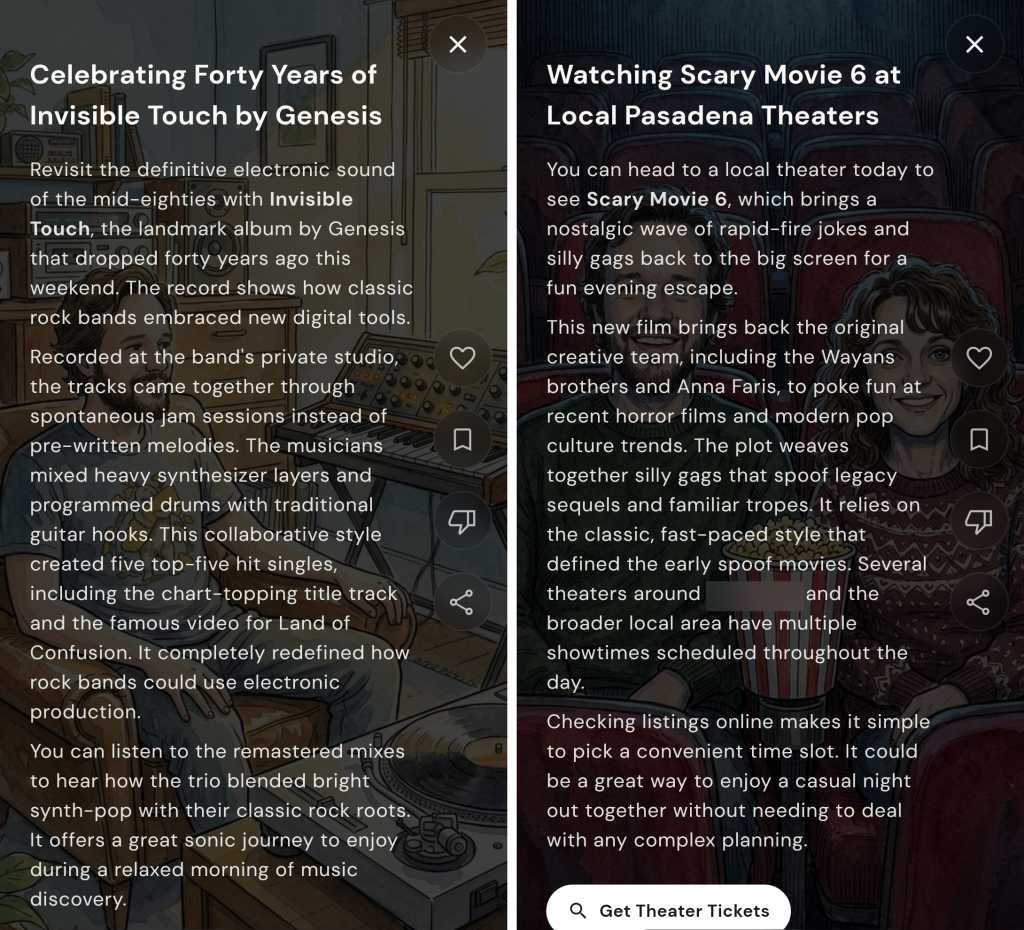
Here’s a handful of the Dreambeans “story” suggestions that appeared in the app upon its first day working for me, with a few names and personal details blurred for privacy purposes:

JR Raphael, Foundry
I’m honestly not even sure where all of these suggestions came from, but what jumped at me right away were the (occasionally flattering) caricatures of me and my wife and the general sense of invasion from all the slightly too personal stuff and too familiar integration of family members’ names and interests integrated into the material.
For the record: I had been looking into speaker stuff at some point in the not-too-distant past; I’ve never once typed, uttered, or even considered the phrase “hand-loomed textiles” until just now; we had been looking at the arts festival it mentioned; I’ve never specifically searched for or expressed any interest in Scary Movie 6; and I am not into the band Genesis — though, to be fair, I can’t dance.
I showed all this same material to my wife as well as to several other friends and family members I’d categorize more as typical tech users — not tech professionals or card-carrying geeks but just regular people who own and use a variety of devices, as we all do, and rely on ’em for both personal and professional purposes with varying levels of dread, excitement, and/or indifference. Without exception and without any prompting or personal opinions presented to sway them, every single one of ’em responded the same basic way: “Oh. That’s creepy.” And: “I do not like that.” Without fail.
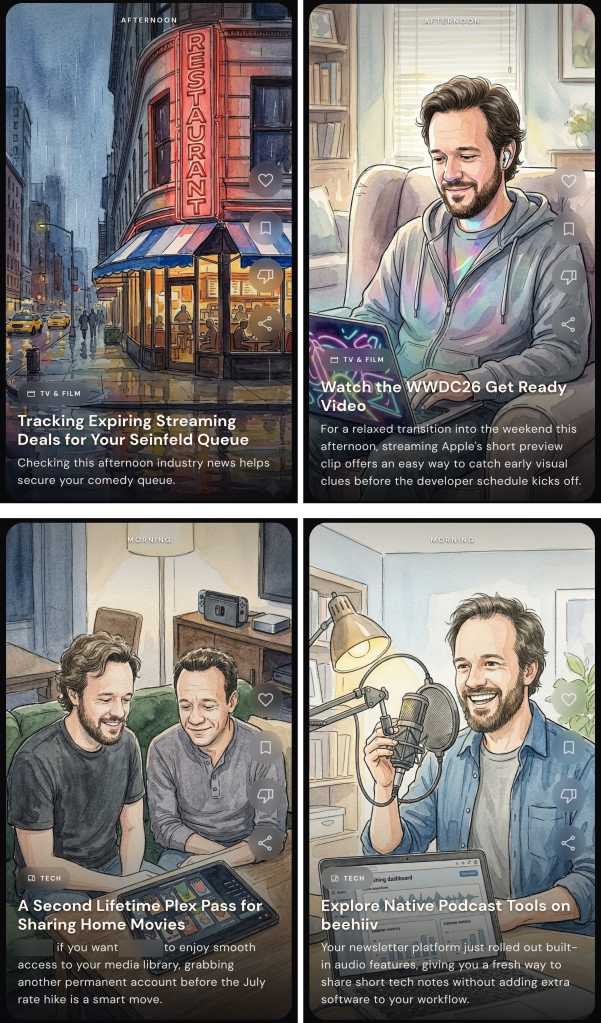
It doesn’t get much better from here, either. Most of the app’s subsequent suggestions have continued to veer just a touch too far onto the “ick” side of the spectrum, as well as occasionally being off-base in some pretty perplexing ways. For instance:
JR Raphael, Foundry
For the record on this set: I do love the show Seinfeld — SERENITY NOW! more than ever — though it’s been some time since I’ve actively watched it; I somewhat famously am allergic to Apple products and avoid ’em whenever possible (notice the name of this column, anyone?); I don’t live in the same city as my brother but do find it creepy to have him pictured in ghoulish caricature form and brought randomly into a discussion about Plex (something he wouldn’t even remotely be interested in hearing from me about); and my various editorial newsletters are all powered by a service called Kit — not Beehiiv — which is mentioned in plenty of places both on my websites and throughout my emails.
Also, while my hairline may not be what it once was, I’m (ahem) not that bald yet — thankyouverymuch, Dreambeans.
Another example that I won’t show here was an item that pictured me in overalls working on installing some “coated stainless steel wire for [my] gallery canvases” — a reference to a community art gallery (with all sorts of details wrong and in some cases flat-out fabricated) connected to my mother’s recent passing. It casually mentioned her by name, too, alongside that eerie illustration of me performing a skill I definitely don’t have in my nonexistent home workshop. I don’t think I have to elaborate on how unsettling, unappreciated, and — again — invasive it felt to have that pop up in this feed.
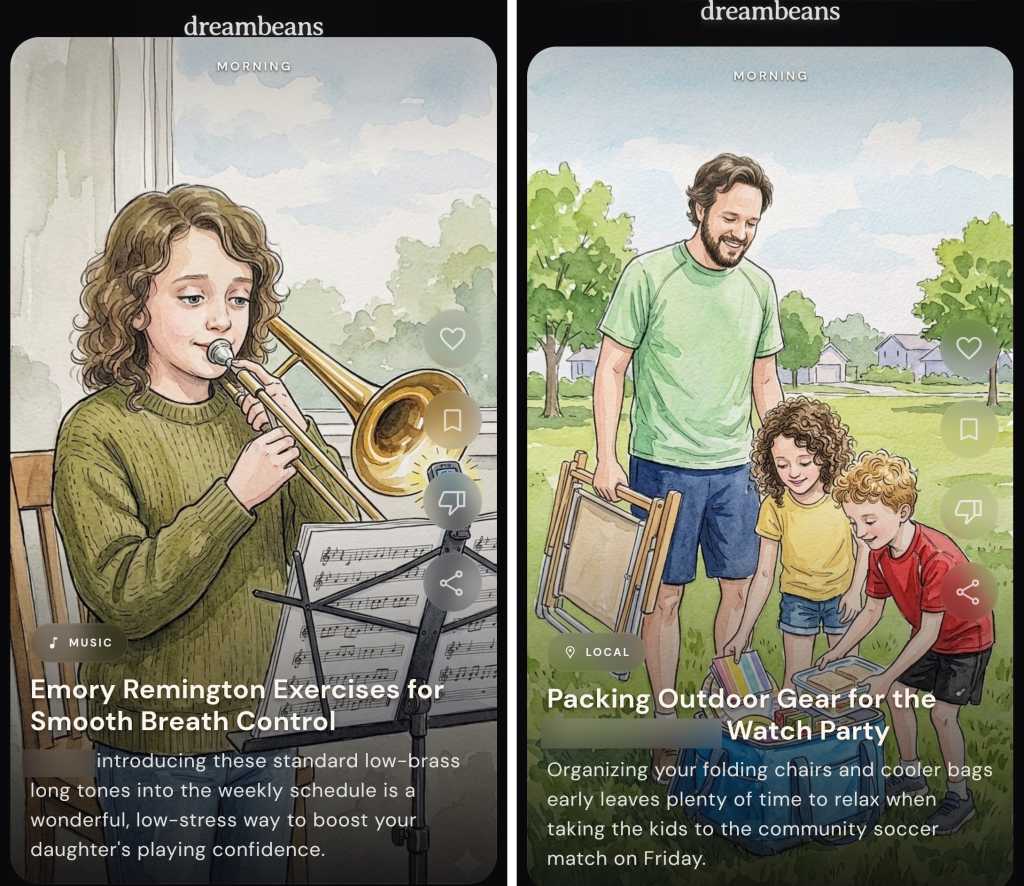
More than anything, what I’ve been feeling while seeing all of this is a combination of (a) egad, it knows too much — especially when it casually name-drops and caricature-pics my wife, kids, and other family members — and (b) at the same time, the info it’s giving me isn’t especially helpful or insightful. It’s mostly just flat, generic, and — well, more or less exactly what you’d expect from something AI-generated.
JR Raphael, Foundry
More than anything, in other words, it’s a combination of creepy and not particularly useful.
JR Raphael, Foundry
And it’s the “creepy” part that really sticks with me the most.
Maybe if the info I’m being served up here were exceptionally useful, this could be a tradeoff I’d be at least a little more likely to accept. Maybe. But in this scenario, it just feels odd and a little too invasive — which I’ve come to realize is a common theme surrounding much of what seems to be the next level of our forced-upon-us AI future.
Take Google’s Gemini Spark, for instance — the “agentic” AI assistant announced at Google I/O that’s meant to be a “proactive” helper tackling tasks on your behalf. David Pierce from The Verge got an early look at the tool in action and called it “the most impressive and terrifying AI experience” he’s had to date, also bringing that “creepy” word into the equation:
I can’t shake the deeply creepy feeling I get from the whole thing. What Spark did feels sort of magical, and very invasive. It’s weird that Spark is so casually telling me the names and ages of my children, reminding me that it knows where I live, and finding information I know for a fact I’ve never volunteered to Google. Intellectually, I know that Google knows an incredible amount about me — add up my emails, my calendar, my photos, and my search history, and you’ve pretty much got me pegged. But seeing Spark treat all that data not as something to be protected, but as something to be mined, just feels bad.
And that, I think, mirrors the exact reaction I’ve been experiencing with Dreambeans. We’ve all always known that Google knows a lot about us, but we’ve also — at least intellectually — understood how all of that data is and isn’t being used. And it’s never been rubbed in our faces just how much the company can figure out about us by putting all the various pieces together and creating an awkward sense of robotic intimacy.
I remember years ago, being in a Google press briefing where someone from the company talked about how much more their systems and services could accomplish but how they deliberately held back on going that far and overdoing the personalization — ’cause even though they had all that info and could make all those connections, they knew (at the time) that people wouldn’t respond well to seeing all their personal activity put together in such shocking ways. They knew (at the time) that most of us weren’t looking for an artificial BFF who knew too much about us. They knew (at the time) that giving us that sensation would cross the line into being creepy.
Well, this just in: That line’s officially been decimated. We’re in AI’s creepy era. And seemingly no one is worrying anymore if it’s actually something any of us want or will appreciate.
It kinda feels now like tech companies are actively rubbing in our faces how much they know about us — and even if there’s nothing truly nefarious going on with what they’re doing, it sure doesn’t feel good. It feels creepy. And at a time when trust in tech titans is shockingly low and most folks outside of the Silicon Valley bubble are feeling more and more frustrated with AI and all of the effects it’s foisting upon us, that isn’t a great look to be giving off.
Put those sensations alongside the sigh-inducing explosion of AI “content creators,” the proliferation of lifeless AI-generated “writing” (been on LinkedIn much lately?), and the troublingly blurry line between photorealistic AI-generated images and actual real-world photographs — not to mention the maddening experience of interacting with an AI bot support agent or encountering the ever-expanding array of AI-powered scams and security threats and AI-generated job cuts, just to name a few other problematic consequences this movement is imposing — and it’s hard not to question if all this purported progress is ultimately more helpful or harmful for us, as living, breathing humans in the real world.
A few months ago, at the three-year mark of Gemini’s launch, I posed the question: Did anyone actually ask for this? And, more pressingly: Is this the future we wanted? As we’re moving now into yet another era of AI innovation and seeing how it’s affecting our lives, it gets tougher every day to imagine many folks outside of the tech industry who’d answer with an emphatic yes.
And, unfortunately, you don’t need any fancy-schmancy AI chatbots to tell you that things are only gonna get more extreme — and, yes, more creepy — from here.
Find the tips and tools that’ll *actually* help you with my free Android Intelligence newsletter. No hype, no nonsense — just useful new stuff in your inbox every Friday, from one (alleged) human to another.

Procura guardar os seus ficheiros fora do alcance das Big Tech americanas? O pCloud é uma alternativa suíça ao Google Drive com uma proposta difícil de ignorar, o de pagar uma vez e ter garantido armazenamento para sempre.
The post pCloud: O armazenamento na nuvem suíço que desafia o domínio das Big Tech americanas appeared first on Tek Notícias.
