Un œil sombre, parfaitement circulaire, cerné par une spirale nuageuse d’une régularité troublante : le supertyphon Champi offre aux satellites une image presque irréelle. Derrière cette beauté se cache une machine atmosphérique d’une efficacité redoutable et une évolution rapide que les...
Canicules à répétition, glaciers en déroute, températures hors norme… Après une année 2026 déjà éprouvante, on pourrait croire que le climat nous a montré le pire. Pourtant, les scientifiques regardent désormais vers 2027 avec une inquiétude grandissante.
Le puits canadien utilise la température stable du sol pour rafraîchir l'air neuf d'une maison en été et le préchauffer en hiver. Ce n'est ni un chauffage ni une climatisation, mais un dispositif de ventilation qui allège le travail des équipements existants. Ses performances dépendent d'une...
In hot weather, trees “sweat” to cool down by releasing water from their leaves or needles and then replacing it with water from the soil. But during long periods of high temperatures, trees may release more water than they can replace. To strengthen forests against heat stress and other environmental hazards, scientists have suggested adding fungi to the soil.
Soil fungi living on tree roots are called ectomycorrhizal fungi. They help trees absorb water by expanding their root networks, and trees help the fungi by providing them with sugars for energy. This beneficial partnership is known as symbiosis. Scientists at Fujian Agriculture and Forestry University in China tested whether symbiosis with ectomycorrhizal fungi could help the pine trees Pinus massoniana survive warmer temperatures.
For their experiment, the researchers grew pine seedlings with and without ectomycorrhizal fungi in a greenhouse under different temperature conditions. First, they grew fungi called Cenococcum geophilum for 45 days on a gel-like substance called agar. At the same time, they grew the pine seedlings for 30 days, then transferred them into pots with natural soil.
After 15 days in the pots, the researchers spread the gel-like agar containing the fungi over small 1 x 1 centimeter (cm) areas of the pine root tips to introduce the fungi to the seedlings, a process called inoculation. They assumed that the fungal network would expand from the starting area to colonize new root tips as the seedlings grew. The team’s inoculations included 6 different C. geophilum strains and 1 fungi-free control. To simulate heat stress, the researchers replicated each of the 7 inoculations at 25°C (77°F) and 35°C (95°F). They repeated each inoculation condition in 3 pots with 3 seedlings, for a total of 126 seedlings.
After 60 days, the researchers harvested the pine seedlings and used a microscope to count how many of their root tips had fungi. They divided the number of root tips with fungi by the total number of root tips to calculate a colonization rate. They considered seedlings with a colonization rate of 80% or higher to have successfully formed a symbiotic relationship with the fungi. Then, the researchers analyzed seedlings with an 80% colonization rate to investigate their symbiotic partnerships.
The team observed that pine seedlings grown under heat stress at 35°C were 24% to 59% smaller than those grown at 25°C, and their needles were yellow instead of a healthy green. However, the seedlings that formed a symbiotic relationship with the ectomycorrhizal fungi were greener and 80% heavier than the control seedlings.
Investigating the trees further, the team measured 3 chemical compounds related to plant stress, including malondialdehyde (MDA), proline, and nitric oxide. Plants release MDA when damaged, so high MDA levels mean a plant is struggling. In contrast, plants release proline and nitric oxide to repair cells or hold water, so high amounts of these compounds mean a plant is healing.
To measure MDA and proline levels in the pine needles, the researchers mixed them with different acids that change color depending on the sample’s MDA or proline content. To measure nitric oxide, the researchers mixed the needles with a protein that converts the compound into a chemical that changes color. They found that inoculated seedlings at 35°C had about 30% to 40% less MDA, 15% to 30% more proline, and 150% more nitric oxide in their roots than the control seedlings.
Finally, the researchers measured changes in gene activity in the inoculated pine seedlings. They identified active genes by analyzing RNA molecules from the pine seedling roots with a process called RNA sequencing or transcriptomics. They found that inoculating the seedlings with ectomycorrhizal fungi activated more genes related to root strength, water retention, cell defense, and general plant protection than were activated in the control seedlings.
By combining chemical analyses with growth measurements, the team concluded that a symbiotic partnership with the ectomycorrhizal fungi helped the pine seedlings survive heat stress. They demonstrated that through prolonged heat, inoculated seedlings maintained greener needles and lower levels of stress chemicals. They suggested that ectomycorrhizal fungi could be an ecological tool to help trees stay hydrated in a warming world. They recommended that future researchers conduct field trials with inoculated trees to translate these findings into forest management strategies.
Alors que l’équinoxe vient tout juste de sonner le basculement officiel vers l’automne, un étrange décalage s’opère sous nos yeux dans la nature. Et si les repères traditionnels de la faune et de la flore étaient en train de se brouiller sous l’effet du réchauffement climatique ? Plongée au cœur...
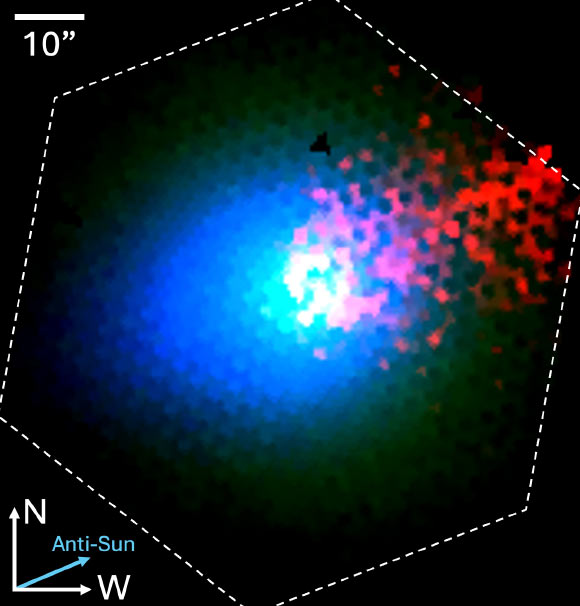
Astronomers have found new evidence that 3I/ATLAS, only the third confirmed interstellar object ever detected entering the Solar System from beyond, formed in an extremely cold environment far from any star.
Ceiling lights are usually one of those home products that disappear into the background once they are installed. BlitzWill BW-CLT2, however, takes a different approach by combining a conventional main ceiling light with a separate RGB ambient-lighting effect.
The result is a fixture designed to handle two different jobs: providing practical illumination for everyday activities while also giving a room a more customizable atmosphere when bright white lighting is not what you want. The BlitzWill BW-CLT2 is designed to replace a conventional ceiling fixture with a more flexible smart home lightingsetup.
The 40cm BlitzWill BW-CLT2 supports adjustable color temperature from 2700K to 6500K and can be controlled through an app, voice commands, or a remote control. It also supports DIY scene settings, giving users more control than a basic on/off ceiling lamp.
One Ceiling Light, Two Different Lighting Roles
The combination of adjustable white light and RGB effects also makes the BW-CLT2 more versatile than a basic smart LED ceiling light.
For normal use, the primary light can provide the room’s everyday illumination. The adjustable 2700K–6500K range gives users the flexibility to move between warmer and cooler-looking white light depending on the time of day or the atmosphere they want.
The RGB section serves a different purpose. Instead of replacing the main light, it can be used to add color around the room and create a softer background effect.
That separation makes the design more practical than an RGB-only lamp. You can keep the main light focused on visibility while using the colored lighting to change the mood.
2700K to 6500K Gives More Control Over the Room
A fixed-color ceiling lamp can work perfectly well, but it gives you little flexibility once the fixture is installed.
The BW-CLT2 takes a more adaptable approach with a 2700K–6500K adjustable color-temperature range. Warmer settings can suit relaxed evening use, while cooler white light can be more appropriate when you need a brighter, more functional environment.
This makes the light suitable for spaces that serve multiple purposes. A bedroom, study, living room, or gaming area can all require different lighting at different times.
Rather than buying separate lights for different situations, the BW-CLT2 puts those adjustments into one ceiling fixture.
Smart Controls Make Daily Adjustments Easier
Another advantage is that the BW-CLT2 is not limited to a physical wall switch.
The product supports app control, voice control and a dedicated remote, giving users several ways to change the lighting.
App-based control is particularly useful for people who prefer adjusting lighting from a phone, while the remote provides a more traditional option for quick changes.
The combination also means the light does not have to be treated as a purely decorative smart-home gadget. It can still be operated in a straightforward way when you simply want to change the lighting without opening an app.
DIY Scenes Are More Useful Than They Sound
The BW-CLT2 also includes a DIY scene mode, which is one of the features that separates it from a basic adjustable LED ceiling lamp.
Instead of repeatedly changing brightness, color temperature, or RGB effects manually, users can create lighting combinations suited to particular situations.
For example, one setup could prioritize a brighter white light for working, while another could use warmer illumination with RGB ambience for watching movies or relaxing.
The important point is not simply that the lamp has RGB lighting. It is that the different lighting elements can be used as part of a more personalized room setup.
Is the 40cm Size a Good Fit?
At 40cm, the BW-CLT2 occupies a middle ground between small decorative fixtures and larger ceiling panels.
That makes it potentially suitable for bedrooms, smaller living spaces, studies, gaming rooms, and other areas where a large ceiling fixture may look excessive.
However, buyers should consider the dimensions of their room before choosing it. A 40cm fixture may be a sensible fit for a compact or medium-sized space, while a much larger room could require additional lighting.
What Buyers Should Consider
The BW-CLT2 makes the most sense for people who want more than basic ceiling illumination.
Its strongest feature is arguably the combination of practical white lighting and RGB ambience. The adjustable 2700K–6500K range handles everyday lighting needs, while the RGB system and DIY scenes add a more decorative element.
It is also worth remembering that smart-lighting features are most valuable when you actually plan to use them. If you only need a simple ceiling lamp that stays at one brightness and color, a conventional LED fixture may be enough.
For users who want to experiment with room lighting, however, the BW-CLT2 offers considerably more flexibility in a single fixture.
BlitzWill BW-CLT2: A Flexible Upgrade for a Smart Home
BlitzWill BW-CLT2 Smart Ceiling Light is less about adding another colorful gadget to a room and more about combining several lighting functions into one ceiling fixture.
Its 40cm form factor, adjustable 2700K–6500K white lighting, RGB ambience, multiple control methods, and DIY scene support give it a broader role than a standard ceiling lamp.
Banggood’s EU-direct listing currently shows the BW-CLT2 at around $52.99, although the final price can change with promotions, region, taxes, and availability.
For shoppers looking to make a room more adaptable without filling the ceiling with multiple lighting fixtures, the BW-CLT2 is an interesting option worth considering.
For the first time, astronomers combined Hubble and Webb space telescopes to hunt down some of the smallest, faintest objects ever spotted in the outer Solar System.
L’été 2026 est l’été de tous les records. Derrière ces chiffres, un bilan humain lourd et une menace largement sous-estimée, selon des chercheurs. Celle de températures qui pourraient devenir invivables pour toute une tranche de la population.
Le temps change radicalement cette semaine, mais cette parenthèse fraîche pourrait ne pas durer : le mois de septembre va sans doute nous réserver de nouvelles surprises.
Futura fête ses 25 ans en 2026, et au cours des 25 dernières années, la science climatique a fait un bond spectaculaire. La compréhension du climat a changé, notamment grâce aux relevés météo, mais aussi avec le développement des outils satellites. Une bascule s'est opérée au cours de l'année...
La 5e canicule de 2026 se confirme la semaine prochaine et celle-ci devrait toucher la quasi-totalité de la France. Les températures atteindront à nouveau les 40 °C, voire plus, et dans certains départements, les fortes chaleurs s'annoncent interminables.
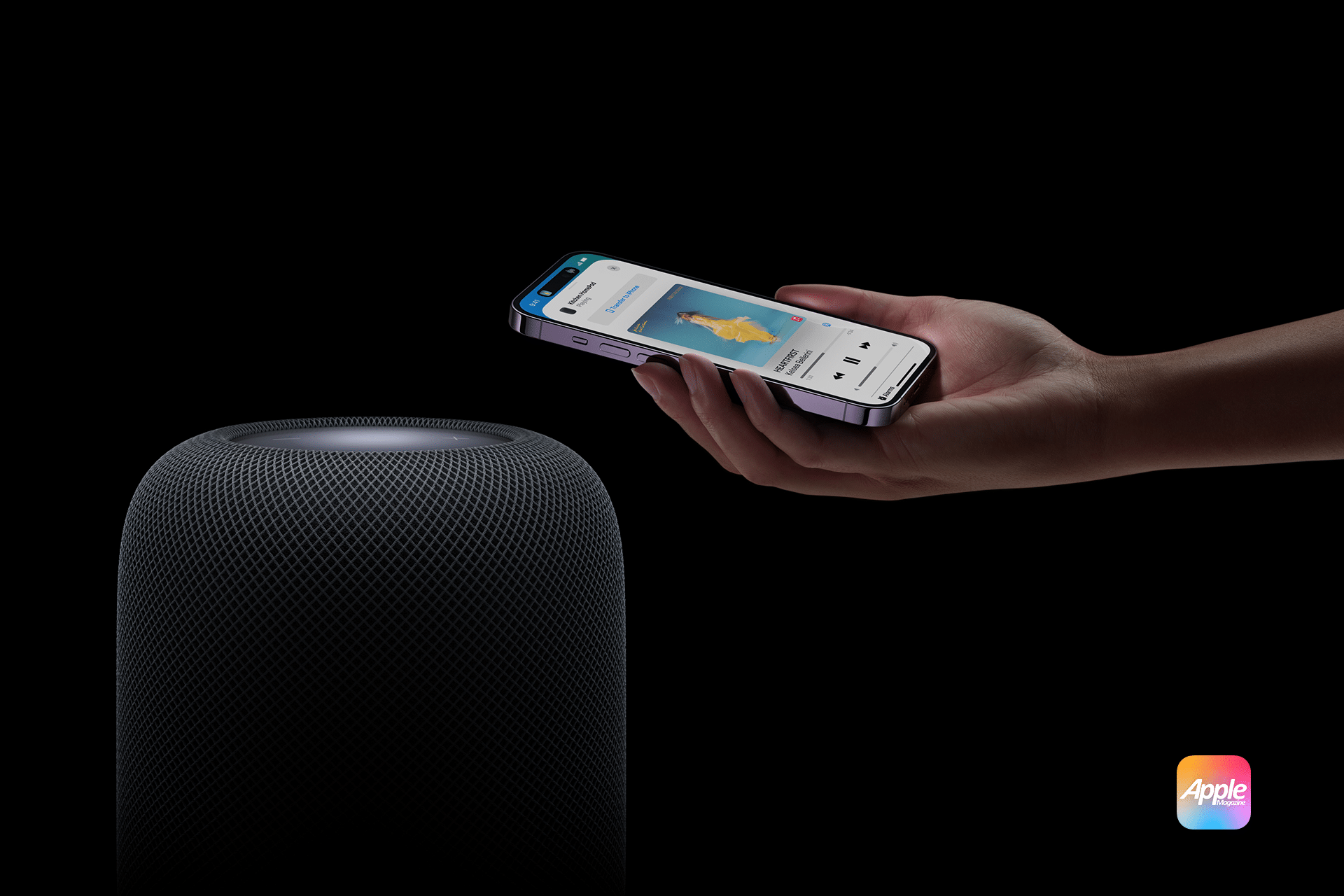
HomePod room temperature automations turn Apple’s smart speaker into more than a source of music and Siri responses. Its built-in climate sensor can trigger fans, thermostats, smart plugs, shades and other compatible accessories when a room becomes warmer or cooler than a selected temperature.
The automation runs through Apple’s Home app. Once configured, it does not require someone to ask Siri for the current reading or leave an iPhone inside the room. HomePod measures the local conditions while the home hub evaluates the rule and controls the selected accessories.
A bedroom fan could start when the room rises above 24°C, for example. A compatible thermostat could activate heating when an office falls below 18°C, while motorized shades could close before afternoon heat makes a living room uncomfortable.
The same system works with humidity. HomePod can trigger a compatible humidifier, dehumidifier or ventilation accessory when relative humidity crosses a chosen level.
Which HomePod Models Measure Room Temperature
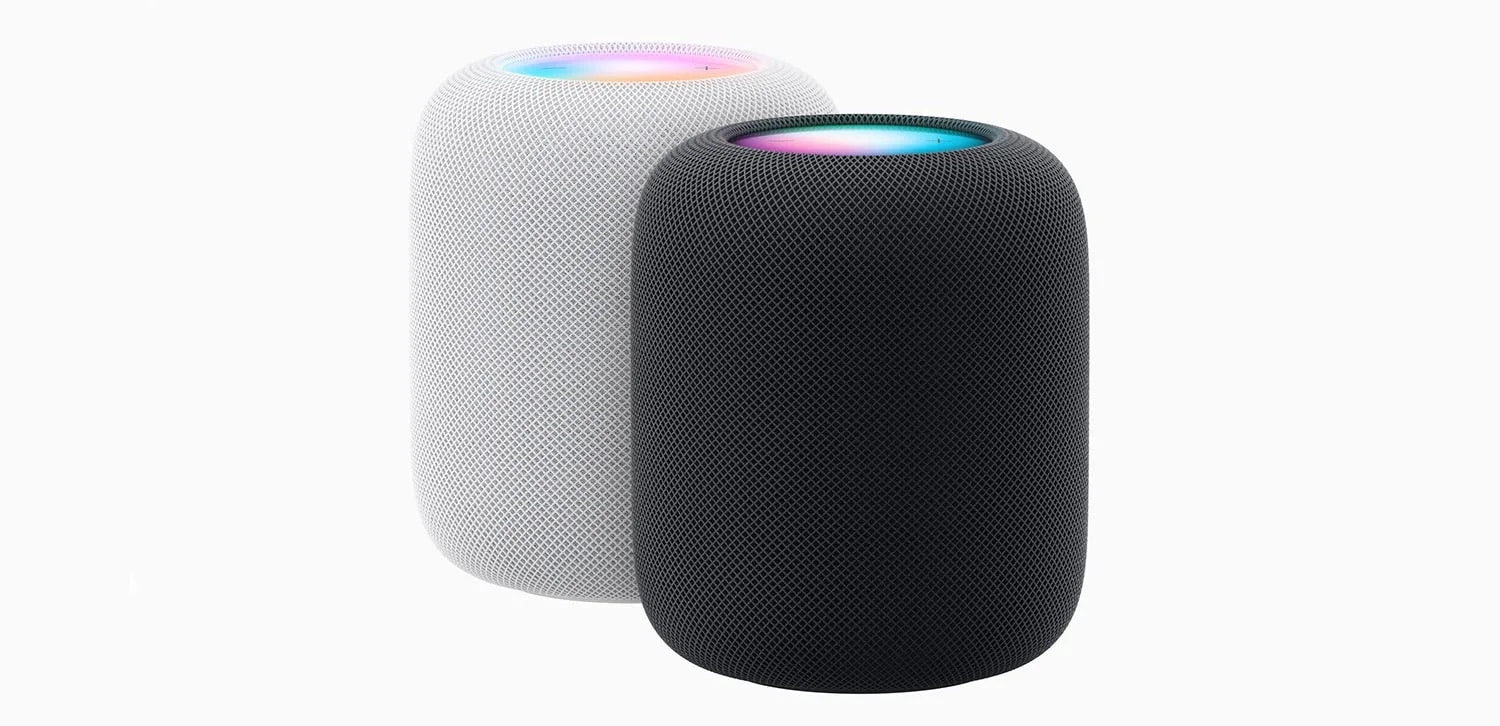
Temperature and humidity sensing is available on HomePod mini and HomePod (2nd generation).
The original full-size HomePod does not contain the supported climate sensor. It can act as a home hub and participate in scenes, but it cannot supply the temperature reading used to start this type of automation.
HomePod mini is sometimes overlooked because Apple did not activate its temperature and humidity sensor when the speaker originally launched in 2020. A later software update enabled the component, allowing existing HomePod mini units to report climate information without a hardware upgrade.
Both supported models should run the latest available HomePod software. The iPhone or iPad used to configure the home should also be updated because older software may not display every sensor or automation option correctly.
HomePod normally updates automatically. Its version can be checked in the Home app by opening the HomePod, selecting its settings and scrolling to the software information.
Image Credit: AppleMagazine
The Speaker Must Be Assigned to the Correct Room
The room assigned to HomePod determines how its readings appear in the Home app and how Siri interprets questions about local conditions.
A HomePod physically located in the bedroom but assigned to Living Room will report its sensor as part of the living-room climate group. This becomes especially confusing when several HomePods are installed throughout the home.
To verify the room, open the Home app, touch and hold the HomePod tile, open Accessory Settings and check the Room field. Assign a descriptive name to the HomePod as well, particularly when two supported speakers occupy nearby spaces.
The sensor does not measure an entire home. It reports conditions near the HomePod, so the assigned room should correspond to its physical location.
How to Check the HomePod Temperature
The current reading is available through Siri or the Home app.
A person can ask Siri, “What is the temperature in here?” when speaking to the HomePod inside that room. Questions can also identify a different room, such as “What is the temperature in the bedroom?” or “What is the humidity in the basement?”
In the Home app, open the Home tab and select Climate near the top of the screen. Choose Temperature to see readings from available climate sensors. Opening an individual room can make it easier to identify the relevant HomePod when several sensors are installed.
The Home app may display a range rather than one number when multiple temperature sensors belong to the same room or home. Opening the temperature category reveals the individual readings behind that range.
A newly restarted or updated HomePod may not show a result immediately. Apple says the sensor requires time to calibrate after startup.
How to Create a HomePod Room Temperature Automation
The temperature sensor appears as an automation trigger rather than an accessory that can be turned on or off. The user defines a threshold and then selects what another compatible accessory should do when the reading crosses it.
To create the automation:
Open the Home app on an iPhone or iPad
Select the Automation tab or tap the Add button and choose Add Automation
Choose A Sensor Detects Something
Select the temperature sensor assigned to the appropriate HomePod and room
Choose Rises Above or Drops Below
Set the desired temperature threshold
Add optional time and occupancy conditions
Select the accessories or scene that should run
Configure the desired state of each accessory
Test the automation and tap Done
The selected action could turn on a fan, change a compatible thermostat, close shades or activate an existing scene containing several accessories.
HomePod does not produce cool or warm air itself. It supplies the measurement and functions as a home hub, while the automation controls other equipment connected to Apple Home.
Choosing Rises Above or Drops Below
The direction of the trigger is important.
Rises Above starts the automation when the measured temperature moves from below the selected value to above it. This is the usual option for starting a fan, lowering compatible shades or changing a thermostat to a cooler setting.
Drops Below works in the opposite direction. It can start heating, turn off a fan or activate another accessory when the room becomes colder than the selected level.
These are threshold-crossing events, not continuous questions asking whether the room is currently above or below a value. If the room is already warmer than 24°C when a new Rises Above 24°C automation is saved, the rule may not run immediately. The reading generally needs to fall below the threshold and then rise across it again.
This behavior also explains why an automation may not repeatedly react while the room remains on the same side of the threshold. Another transition must occur before the trigger fires again.
Use Time and Occupancy Conditions
The Home app can restrict a temperature automation to particular times or household conditions.
A bedroom fan may only need to run overnight. Heating in a home office could remain inactive on weekends. A cooling automation might operate only when someone is home, while another rule protects temperature-sensitive equipment regardless of occupancy.
The People condition can limit an automation to when somebody is home, when nobody is home or when selected household members are present or absent. These conditions depend on location access and the devices associated with members of the Apple Home.
Time restrictions should match the behavior of the controlled accessory. Closing shades during the hottest afternoon hours may be useful, but the same action would provide little benefit after sunset.
An automation can also activate a scene instead of controlling one product. A Hot Afternoon scene could close the west-facing shades, start a fan and turn off heat-producing decorative lights with one sensor trigger.
Useful HomePod Temperature Automations
A smart fan is one of the simplest accessories to control. When the temperature rises above a comfortable level, the Home app can turn on a HomeKit or Matter-compatible fan. A second automation can stop it after the room cools.
A thermostat offers more direct climate control, but the available actions depend on the thermostat manufacturer. Apple Home may expose power, heating, cooling and target-temperature controls, while more advanced scheduling remains inside the manufacturer’s app.
Motorized shades can reduce solar heating before an air conditioner needs to work harder. A temperature trigger can close selected shades when a sun-facing room becomes warm, particularly when the automation is limited to daytime hours.
A ceiling fan or portable fan connected through a smart switch or smart plug can also respond to the HomePod sensor. The connected controller must be rated for the appliance, and the appliance must safely resume operation when power is restored. Products with electronic controls may remain off after a smart plug turns them back on.
Portable heaters and air conditioners require greater caution. Many smart plugs are not designed for their electrical load, and some appliance manufacturers prohibit external switching. A compatible thermostat or manufacturer-supported controller is safer than treating high-power climate equipment like a lamp.
Image Credit: Apple Inc.
Humidity Can Use the Same Automation System
HomePod exposes temperature and relative humidity as separate sensors.
A bathroom or laundry-room HomePod could trigger ventilation when humidity rises above a chosen level. A dehumidifier with a compatible control could operate in a damp basement, while a humidifier could respond when heated winter air becomes too dry.
The setup process is almost identical to a temperature automation. Select A Sensor Detects Something, choose the HomePod’s humidity sensor, set Rises Above or Drops Below and assign the action.
Humidity automations also benefit from separate starting and stopping thresholds. Turning a dehumidifier on above 65 percent and off below 55 percent creates a useful operating range instead of responding repeatedly around one value.
HomePod Sensor Placement Affects the Reading
HomePod measures the conditions around the speaker, not at the center of the room or inside an air-conditioning return.
Placing it beside a sunny window, heater, fireplace, kitchen appliance or air vent can produce readings that do not represent the space where people spend time. An enclosed shelf may also trap warmer air around the device.
The speaker needs airflow and a stable surface. It should not be covered or placed where condensation, cooking steam or direct moisture can reach it.
Extended audio playback at high volume can reduce sensor accuracy because heat generated by the speaker may influence the local reading. This matters when an automation uses a narrow threshold and the HomePod frequently plays loud music.
Apple says temperature sensing is optimized for indoor domestic environments between approximately 15°C and 30°C. Humidity sensing is optimized between about 30 and 70 percent relative humidity. Readings outside those ranges may be less accurate.
HomePod is therefore useful for comfort-oriented home automation, but it should not replace specialized monitoring required for medicine, food storage, animals, greenhouses or other temperature-sensitive environments.
Why a Temperature Automation May Not Work
Begin by confirming that the temperature reading itself appears in the Home app. If it is missing, verify the HomePod model, install current software and allow time for calibration after restarting.
Check that the correct temperature sensor was selected. Homes containing multiple HomePods may present several sensors with similar names, particularly when the speakers were never given descriptive room assignments.
Open the automation and confirm that it is enabled. Review its time and People conditions, because a functioning temperature trigger will still do nothing when an additional condition is not satisfied.
Use the Test This Automation control to confirm that the destination accessory responds. If the test fails, the problem is more likely to involve the accessory, its network connection or the selected action than the HomePod sensor.
If the test succeeds but the rule does not run naturally, remember that the temperature must cross the threshold in the selected direction. Temporarily choosing a value closer to the current room temperature can make testing easier.
Home hubs and accessories should remain connected to the same Apple Home. Thread-based accessories also need a supported Thread-enabled home hub or border router, such as HomePod mini, HomePod (2nd generation) or a compatible Apple TV 4K.
Build Two Automations for Stable Climate Control
A single automation can start a device but may not provide the best way to stop it.
Using the same threshold in opposite directions can cause frequent switching when the measured temperature fluctuates around that value. A room hovering near 24°C, for example, could repeatedly move just above and below the boundary.
A more stable arrangement uses two thresholds. One automation turns the fan on when the temperature rises above 24°C. A separate automation turns it off when the temperature drops below 22°C.
The gap creates a controlled operating range. Once the fan starts, it can continue working until the room has cooled meaningfully rather than stopping after a minor change.
Heating can follow the reverse pattern. One automation activates heat below 18°C, while another stops it above 20°C. Humidifiers and dehumidifiers can use the same paired-rule structure.
This separation also makes troubleshooting easier because every automation performs one clear action in response to one specific sensor transition. Instead of asking one complicated rule to manage the complete climate cycle, HomePod supplies the measurements while two predictable Home app automations define when the connected equipment starts and stops.
Nous venons d’entrer dans la quatrième canicule de l’année, alors que le mois d’août n’a pas encore débuté. Les 10 premiers jours d’août sont statistiquement les plus chauds de l’année en France et certains modèles météo entrevoient déjà la possibilité d’une nouvelle période anormalement chaude....
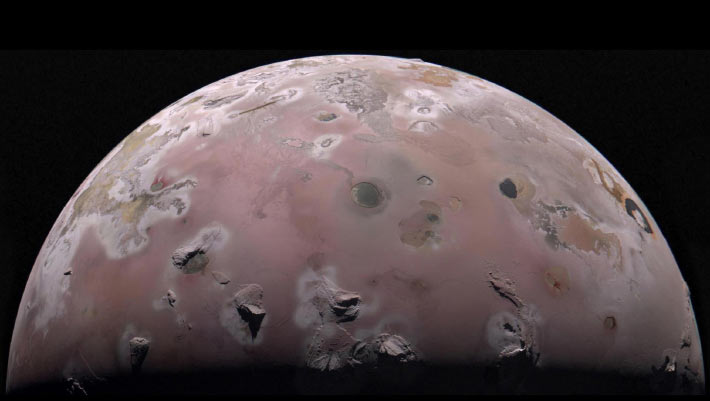
New data from NASA’s Juno spacecraft show temperatures spike more than 20 degrees Celsius just a few meters under Io’s surface, providing the first look at what’s happening below the crust of the Solar System’s most volcanic world.
La saison des incendies 2026 est d’ores et déjà l'une des plus intenses des dernières années, juste derrière celle de 2022. Les départs de feux se sont multipliés ces derniers jours et tout indique que le risque pourrait exploser dans les prochains jours et les prochaines semaines.
Un écart de plus de 136 °C entre les endroits les plus chauds et les plus froids de la Terre a de quoi sidérer. Mais derrière ce chiffre record, il y a surtout une leçon très utile : comprendre pourquoi certains lieux basculent dans l’extrême et ce que cela change pour nous.
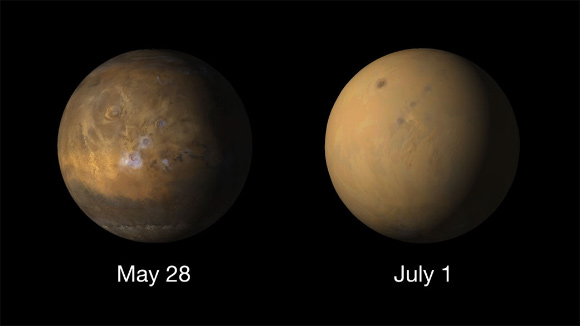
Planetary researchers have found the first evidence that bursts of energetic particles from the Sun could warm the lower atmosphere of Mars during massive dust storms, hinting at an unexpected link between space weather and Martian climate.

 Login
Login