❌

Reading view

Xiaomi Smart Humidity and Temperature Meter 3 Pro Adds CO₂ Monitoring, Starts at 114 Yuan

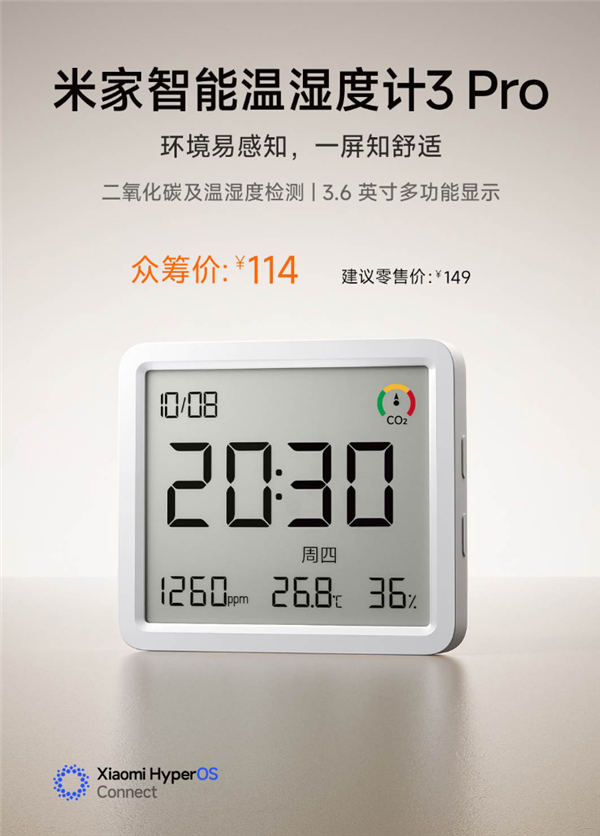
Xiaomi has introduced the Mijia Smart Humidity and Temperature Meter 3 Pro, a new indoor monitoring device that expands beyond basic temperature and humidity tracking by adding carbon dioxide (CO₂) detection.

The device is now listed through Xiaomi’s retail channels, with crowdfunding scheduled to begin on September 21 at 10:00 AM, positioning it as a compact smart home monitoring device for everyday indoor use. Its regular suggested retail price is 149 yuan, while early crowdfunding backers can purchase it for 114 yuan.

CO₂ Monitoring Is the Major Upgrade

The biggest change compared with the previous generation is the addition of real-time CO₂ concentration monitoring.

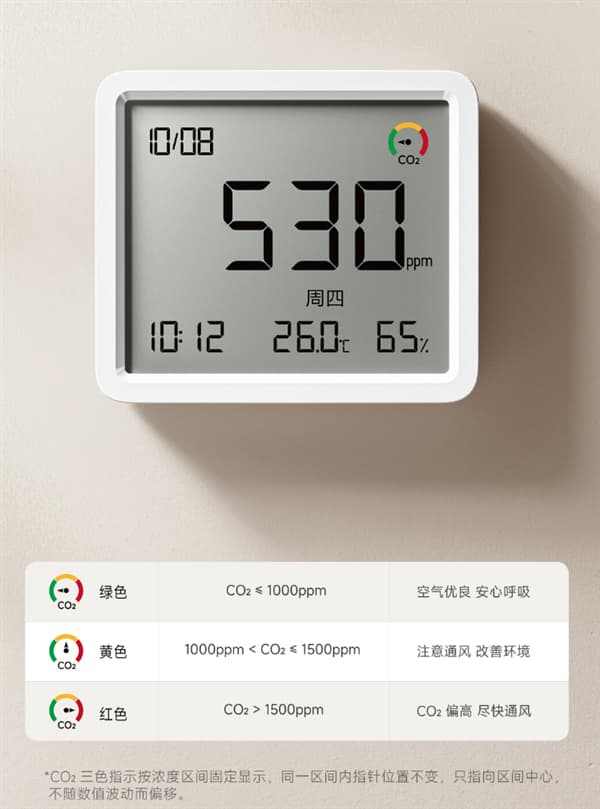
Xiaomi says the new meter uses a next-generation low-power thermal-conductivity CO₂ sensor from Sensirion. It can continuously measure indoor carbon dioxide levels and communicate the current air-quality status through a three-color indicator.

This gives the device a more practical role in everyday indoor monitoring. Instead of simply showing whether a room is hot, cold, dry or humid, it can also help users notice when ventilation may need attention.

Larger 3.6-Inch Display Shows More Information

The Mi Home Smart Humidity and Temperature Meter 3 Pro features a 3.6-inch LCD display, along with a slimmer-bezel design compared with the previous model.

The screen can show several types of information, including:

  • CO₂ concentration
  • Temperature
  • Humidity
  • Date
  • Day of the week
  • Time

Users can switch between different display layouts with a single action, allowing the screen to be configured around the information they want to see most often.

Works With Xiaomi’s Smart Home Ecosystem

The new meter is also designed to work as part of a connected smart home rather than operating as an isolated sensor.

It supports Xiaomi mijia smart-home integration and can connect with other compatible devices through a Bluetooth Mesh gateway. Temperature, humidity and CO₂ readings can be used as triggers for automated actions.

For example, users can configure a CO₂ threshold in the Mi Home App. When the measured level reaches the configured limit, a compatible smart speaker can automatically issue a voice reminder.

This makes the sensor more useful in rooms where users want automatic notifications instead of having to check the display manually.

Historical Data Can Be Viewed in the App

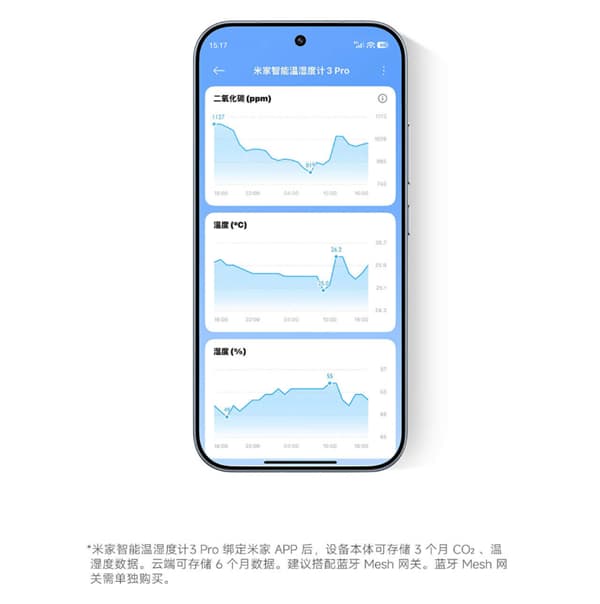
After pairing the meter with the Mi Home App and a compatible Bluetooth Mesh gateway, measurement data can be synchronized to the cloud.

The app can then generate historical curves showing changes in temperature and humidity, as well as CO₂ concentration, making it easier to track indoor environmental trends over time. This allows users to look beyond a single reading and identify longer-term changes in indoor conditions.

For example, a user could compare CO₂ levels at different times of day or observe how ventilation affects the readings over several days.

Flexible Placement and Long Battery Life

The Mi Home Smart Humidity and Temperature Meter 3 Pro supports both desktop placement and magnetic mounting, giving users more flexibility when deciding where to install it.

Despite the larger display and additional sensing capability, Xiaomi has retained a low-power design. The device uses a single CR2450 coin-cell battery and is rated for approximately one year of battery life.

A More Capable Indoor Environment Monitor

The new model is essentially an expansion of the traditional temperature-and-humidity meter concept. Its most important addition is not the larger display, but the ability to monitor CO₂ alongside temperature and humidity.

At 114 yuan during crowdfunding, the Mi Home Smart Humidity and Temperature Meter 3 Pro combines environmental monitoring, historical data tracking and smart-home automation in a compact device. Whether that extra functionality is useful will largely depend on whether users want CO₂ data and automated ventilation-related reminders in their homes.

The post Xiaomi Smart Humidity and Temperature Meter 3 Pro Adds CO₂ Monitoring, Starts at 114 Yuan appeared first on IGeeKphone China Phone, Tablet PC, VR, RC Drone News, Reviews.

  •  

Hybrid graphene–MXene–WS₂ terahertz metasurface detects chikungunya virus via machine learning

Scientists have unveiled a computational design for a terahertz metasurface biosensor that combines five distinct materials—graphene, MXene, tungsten disulfide, gold, and copper—into a single multilayer architecture capable of detecting refractive-index changes associated with chikungunya virus infection. The study, published in Results in Optics by G. Arunachalam, A.R. Kalaiarasi, Giri.G. Hallur, and V. Parthasarathy, reports a numerically predicted sensitivity of 907 GHz per refractive-index unit, among the highest values reported for hybrid-material terahertz biosensors, and couples the electromagnetic design to an XGBoost machine-learning surrogate model that predicts sensor behavior with accuracies exceeding 99.8 percent.

Chikungunya virus is an enveloped, positive-sense single-stranded RNA alphavirus transmitted primarily by Aedes aegypti and Aedes albopictus mosquitoes. While mortality remains low, generally below 0.1 percent, the broader public health burden arises from severe polyarthralgia that can persist for months or even years in a substantial fraction of patients across tropical and subtropical regions. With no approved antiviral therapy or licensed vaccine currently available, diagnostic accuracy sits at the center of clinical management and transmission control. Yet existing diagnostic tools face significant practical constraints, particularly in point-of-care and field settings.

Serological methods such as enzyme-linked immunosorbent assay suffer from cross-reactivity with related alphaviruses, including Ross River and O’nyong-nyong viruses, reducing diagnostic specificity. Real-time reverse transcription polymerase chain reaction offers high sensitivity during the acute phase but depends on laboratory infrastructure, trained personnel, and controlled sample handling. Virus isolation in cell culture provides confirmatory results but requires biosafety level-3 facilities and extended processing time. These limitations have motivated the search for rapid, label-free sensing approaches capable of operating at clinically relevant concentrations in decentralized environments.

The new work turns to the terahertz band, spanning roughly 0.1 to 10 THz, which lies between microwave and infrared regions of the electromagnetic spectrum. Terahertz radiation is non-ionising, with photon energies in the millielectronvolt range, allowing interaction with biological samples without causing ionising damage. Crucially, terahertz waves couple to low-frequency vibrational and rotational modes of biomolecules such as proteins, nucleic acids, and polysaccharides, producing measurable spectral features that support label-free detection. Because biological media including blood plasma and viral suspensions exhibit refractive-index variations in this domain, differences on the order of 0.01 to 0.02 refractive-index units can shift resonance frequency and field distribution when coupled to resonant sensing structures.

The proposed sensor is built around a periodically repeated square unit cell containing two identical square resonators, 2000 nanometers on a side, coated with tungsten disulfide—a two-dimensional transition metal dichalcogenide with strong light–matter interaction, high carrier mobility, and excellent dielectric confinement. This layer localizes the electric field in the sensing region and increases the interaction volume between the resonant field and the surrounding analyte. A pair of concentric circular rings, 3200 and 3800 nanometers in diameter and functionalized with MXene, surrounds the resonators, enhancing electromagnetic coupling, promoting efficient charge transport, and strengthening plasmonic interactions between resonator elements. An outer gold ring, 6000 nanometers in diameter, serves as the main plasmonic resonator supporting strong localized surface plasmon resonances with low optical loss. The entire multi-resonant assembly is embedded within a monolayer graphene sheet measuring 14,000 by 14,000 nanometers, which acts as a broadband absorber and a high-mobility charge transport medium whose electrically tunable chemical potential allows dynamic, active control of the resonance characteristics. Copper elements woven into the architecture provide supplementary conductive pathways that reinforce current distribution and coupling among the hybrid resonators. The structure rests on a silicon dioxide substrate, chosen for its low dielectric loss and mechanical robustness, which preserves the resonance quality factor.

The authors stress that the multilayer design is compatible with established microfabrication techniques. Fabrication would begin with a cleaned silicon dioxide substrate, followed by polymer-assisted transfer of monolayer graphene and thermal annealing. Gold and copper resonators can be deposited through electron-beam evaporation or magnetron sputtering with lift-off patterning, MXene rings through solution-based deposition, and the tungsten disulfide layer through chemical vapor deposition or thin-film transfer. With a unit-cell dimension of approximately 14 micrometers, the required feature sizes fall comfortably within conventional photolithography capabilities, and because fabrication imperfections remain far smaller than the operating terahertz wavelength, moderate tolerances are expected to have only limited influence on the electromagnetic response. For biosensing, the graphene surface could subsequently be functionalized with chikungunya-specific antibodies or aptamers using EDC/NHS or pyrene-based linker chemistries.

The electromagnetic modeling, performed in COMSOL Multiphysics, reveals a pronounced resonance at 0.355 THz, where electric-field simulations show the strongest and most spatially extensive enhancement. Varying the graphene chemical potential from 0.1 to 0.9 electronvolts produced dramatic modulation of the transmission contrast, which increased roughly 36-fold at the highest bias, from less than one percentage point to more than 27 percentage points, while peak transmission remained essentially unchanged above 98.6 percent. This asymmetric response—stable maxima paired with strongly modulated minima—arises because increasing chemical potential enhances graphene’s intraband conductivity, deepening resonant absorption through stronger light–matter interaction. The sensor also demonstrated remarkable angular robustness, maintaining peak transmittance above 97.8 percent across incident angles from 0 to 80 degrees, an important tolerance for realistic deployment where normal incidence cannot always be guaranteed.

Geometric optimization identified an outer circular resonator radius of 2500 nanometers and a square resonator side length of 2500 nanometers as the dimensions that maximize resonance strength, driving minimum transmittance down to approximately 65 to 67 percent and signifying optimal electromagnetic confinement within the active sensing region. When evaluated across refractive indices from 1.33 to 1.39, a range encompassing reported values for healthy plasma (approximately 1.35 RIU), healthy platelets (1.39 RIU), chikungunya-infected plasma (1.33 RIU), and infected platelets (1.38 RIU), the optimized configuration achieved a maximum sensitivity of 907 GHz/RIU, a figure of merit of 18.519 RIU⁻¹, a minimum detection limit of 0.061 RIU, a sensor resolution of 55.178, and a refractive-index resolution of 0.001 RIU. In comparative benchmarks against recently reported graphene- and hybrid-material-based terahertz biosensors—including graphene/copper/aluminum, graphene/silicon dioxide, MXene–graphene–black phosphorus, and graphene-integrated copper–silver designs—the proposed architecture’s sensitivity exceeded most published values, reflecting the synergistic field confinement produced by the five-material stack.

The machine-learning component addresses one of the central bottlenecks in metasurface development: the computational cost of repeated full-wave finite-element simulations during structural optimization. The team trained an XGBoost regressor, an ensemble method based on gradient-boosted decision trees, on simulation data covering incidence-angle variation and circular-ring dimension variation, using stratified sampling with 80 percent of data for training and 20 percent held out for independent testing, alongside five-fold cross-validation and grid-search hyperparameter optimization. The model captured more than 99.7 percent of response variance on unseen data, with mean absolute percentage errors below 0.162 percent and prediction accuracies from 99.838 to 99.959 percent. Acting as a computational surrogate, the trained model enables rapid interpolation across the design space without sacrificing the fidelity of the underlying electromagnetic model.

The authors are careful to frame the work as a computational proof-of-concept rather than an experimentally validated diagnostic. The sensor detects changes in the local dielectric environment surrounding the resonators, not viral particles or nucleic acids directly, and refractive-index sensing alone cannot intrinsically distinguish chikungunya from other viruses with similar dielectric properties. Analytical specificity in practice will depend on surface biofunctionalization with chikungunya-specific recognition molecules immobilized on the graphene or gold sensing surface. Future work will focus on device fabrication, biofunctionalization, calibration with reference refractive-index standards, experimental validation with clinically relevant plasma and platelet samples, and systematic evaluation of selectivity against related arboviruses—steps that would transform this numerically validated platform into a practical tool for rapid, label-free infectious disease diagnostics in the field.

Subject of Research: Label-free terahertz metasurface biosensing for chikungunya virus detection using a hybrid graphene–MXene–WS₂–Au–Cu architecture with machine-learning-assisted optimization

Article Title: Hybrid graphene–MXene–WS₂ terahertz metasurface detects chikungunya virus via machine learning

Article References: Arunachalam, G., Kalaiarasi, A., Hallur, G., & Parthasarathy, V. (2026). Machine learning-assisted hybrid graphene–MXene–WS₂ terahertz metasurface biosensor for highly sensitive label-free chikungunya virus detection. Results in Optics, 25, Article 101149. https://doi.org/10.1016/j.rio.2026.101149

Image Credits: AI Generated

DOI: 10.1016/j.rio.2026.101149

Keywords: chikungunya virus detection, computational biosensor design, high sensitivity biosensors, hybrid graphene MXene WS₂, machine learning in biosensing, multilayer architecture, nanomaterial-based sensors, public health diagnostics, refractive index sensing, terahertz metasurface biosensor, virus diagnosis in field settings, XGBoost surrogate model

  •  

Imagem de Referência da Apple: recurso dos iPhones 18 Pro comprova a autenticidade de fotos

Com o lançamento dos iPhones 18 Pro/18 Pro Max, a Apple oficializou e deu mais detalhes sobre um novo recurso opcional — o qual havia dado as caras na quinta beta do iOS 27 — que ajuda os usuários a comprovar que uma foto não foi alterada após ter sido tirada.

Chamado Imagem de Referência da Apple (Apple Reference Image), o recurso utiliza um novo sensor na câmera principal que assina os dados do sensor em nível de pixel, no momento da captura. Quando uma foto é tirada em um novo modo chamado Referência (Reference), esses dados são enviados para o Private Cloud Compute, que os processa para criar o que a Apple chama de “imagem de referência inalterável” (algo como um “negativo digital”).

Agora, você pode provar a autenticidade de uma foto tirada no iPhone. A assinatura segura dos dados da imagem no nível do pixel acontece no momento da foto, registrando tudo que o sensor da câmera viu.

As imagens de referência aparecem no aplicativo Fotos (Photos) ao lado da foto correspondente, permitindo que os usuários comparem visualmente as duas para verificar se houve alguma edição. A Apple também está disponibilizando APIs 1Application programming interfaces, ou interfaces de programação de aplicações. no iOS 27, iPadOS 27 e macOS Golden Gate 27 para que aplicativos de terceiros possam exibir essas imagens de referência.

Divulgação/Apple

A Apple apresentou o recurso como parte de uma iniciativa mais ampla voltada para a autenticidade de imagens, complementando os metadados de imagem já existentes e o futuro suporte ao padrão SynthID, que ajudará a identificar imagens geradas ou editadas com IA.

Entretanto, o novo recurso não estará disponível — a princípio — na China, devido a exigências regulatórias. Na União Europeia, a captura de imagens com o Apple Reference Image também não estará disponível já no lançamento dos novos iPhones; no entanto, usuários que estão rodando o iOS 27, iPadOS 27 e macOS 27 ainda poderão processar e visualizar imagens de referência.

Notas de rodapé

  • 1
    Application programming interfaces, ou interfaces de programação de aplicações.

  •  

iScooter EB8 Review: A Torque-Sensor Fat-Tire E-Bike With Long Range

iScooter EB8 scooter takes a different approach from lightweight urban e-bikes that are designed mainly around portability. Its priorities are easier to understand once you look beyond the motor rating: a large 48V battery, 20-inch fat tires, front suspension, torque sensing, a folding frame, and a high maximum load are combined into one practical package.

The result is an electric bike aimed at riders who want more stability and range than a small commuter bike can provide. The EB8 is particularly interesting for longer daily trips, mixed road surfaces, leisure riding, and routes where comfort matters as much as outright speed.
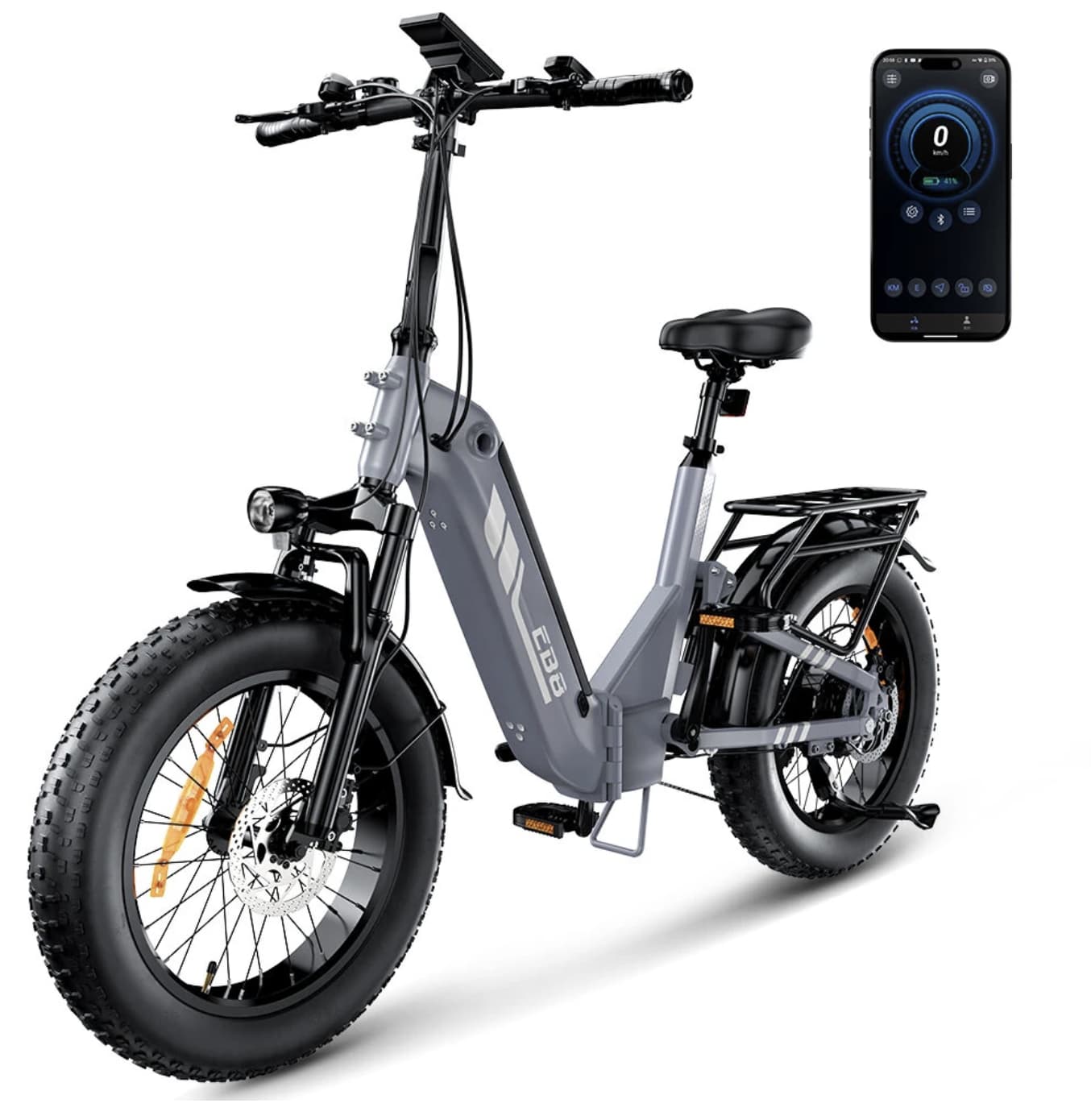
According to the current Banggood listing, the EB8 uses a 48V 15Ah battery, a 250W motor with up to 1000W peak output, a torque sensor, 20×4.0-inch tires, and a claimed range of 90–144 km. Its listed maximum speed is 25 km/h, while the maximum load is 150 kg.

The Torque Sensor Is One of the EB8’s Most Important Features

Many entry-level electric bikes rely mainly on cadence sensing. In simple terms, the motor detects that the pedals are turning and then provides assistance.

The EB8 torque sensor electric bike uses a torque sensor instead.

That distinction matters because a torque sensor can respond to how much force the rider is putting through the pedals. Light pedaling can result in a more restrained assistance response, while stronger input can request more support.

For everyday riding, this can make the bike feel more connected to the rider. Instead of feeling like the motor simply switches on when the pedals rotate, the assistance can feel more natural and predictable.
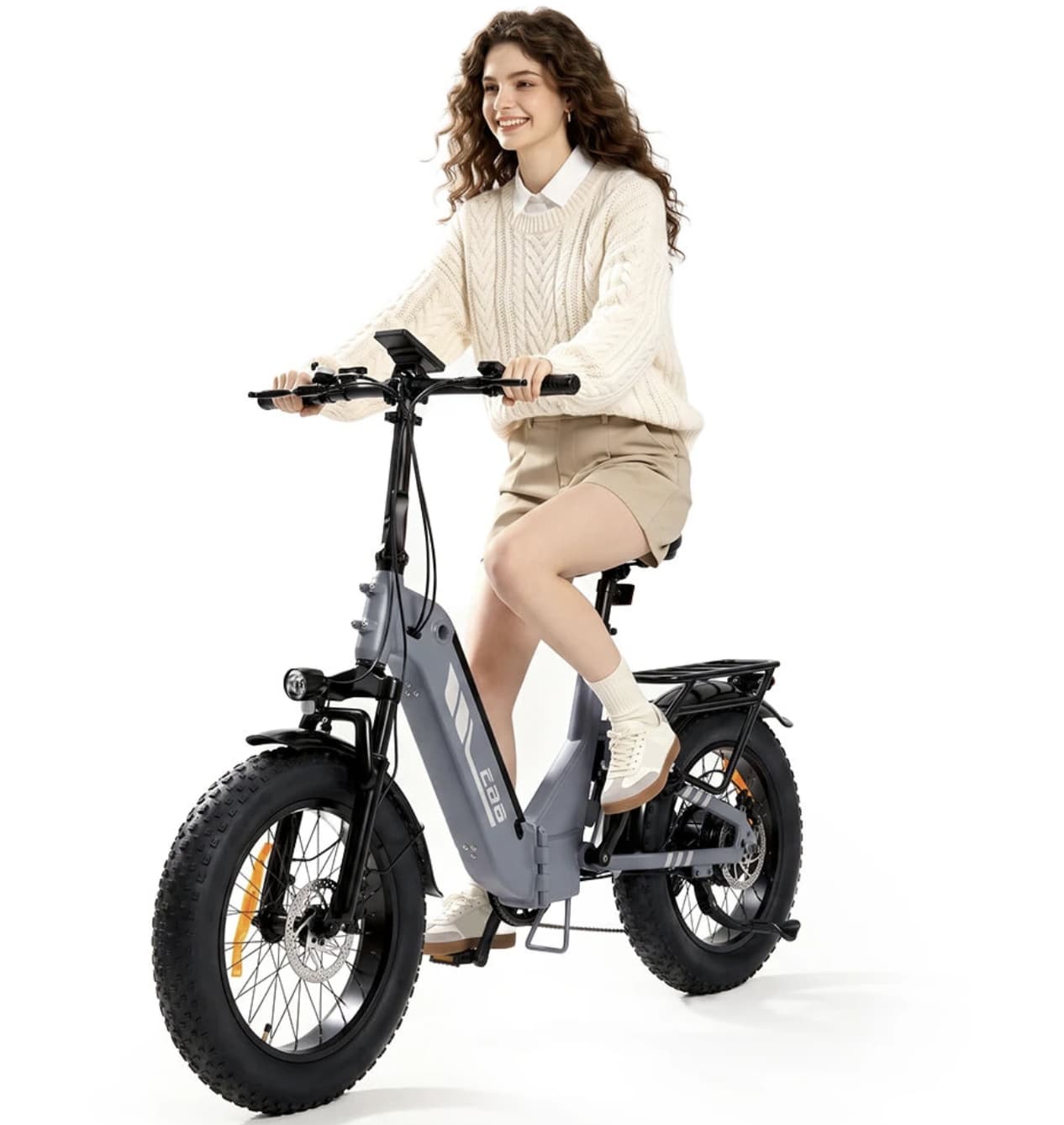
This is particularly useful when starting from a stop, climbing a gradual hill, or adjusting your effort during a longer ride.

The torque sensor therefore gives the EB8 a more sophisticated riding character than its basic 250W rating might suggest.

48V 15Ah: The Battery Is Designed for Distance

Battery capacity is one of the biggest reasons to consider the EB8.

The bike combines a 48V electrical bike battery with a 15Ah battery, giving it considerably more energy capacity than many compact commuter e-bikes. Banggood lists a claimed range of approximately 90–144 km, although actual distance will depend heavily on rider weight, terrain, temperature, assist level, tire pressure, wind, and riding style.

That range figure should therefore be treated as a manufacturer’s claim rather than a guarantee for every ride.

More importantly, the larger battery gives the EB8 room to work as a genuine long-distance commuter. A rider who does not want to recharge after every short trip can benefit from having more battery capacity available.

The listed charging time is approximately 5–6 hours, so the most sensible approach is to recharge overnight or during another period when the bike is not being used.

Why the 20×4.0-Inch Fat Tires Matter

The EB8’s 20×4.0-inch fat tires are not simply a visual design choice.

Wide tires create a much larger contact area with the riding surface, which can help the bike feel more planted on loose or uneven ground. The combination of wide tires and front suspension is particularly relevant when moving between smooth pavement and less predictable surfaces.

For city riding, the setup can help absorb some of the harshness created by broken pavement, rough sidewalks, or uneven streets.

For recreational riding, the wider tires also make the EB8 better suited to surfaces where a narrow commuter tire might feel less confident.
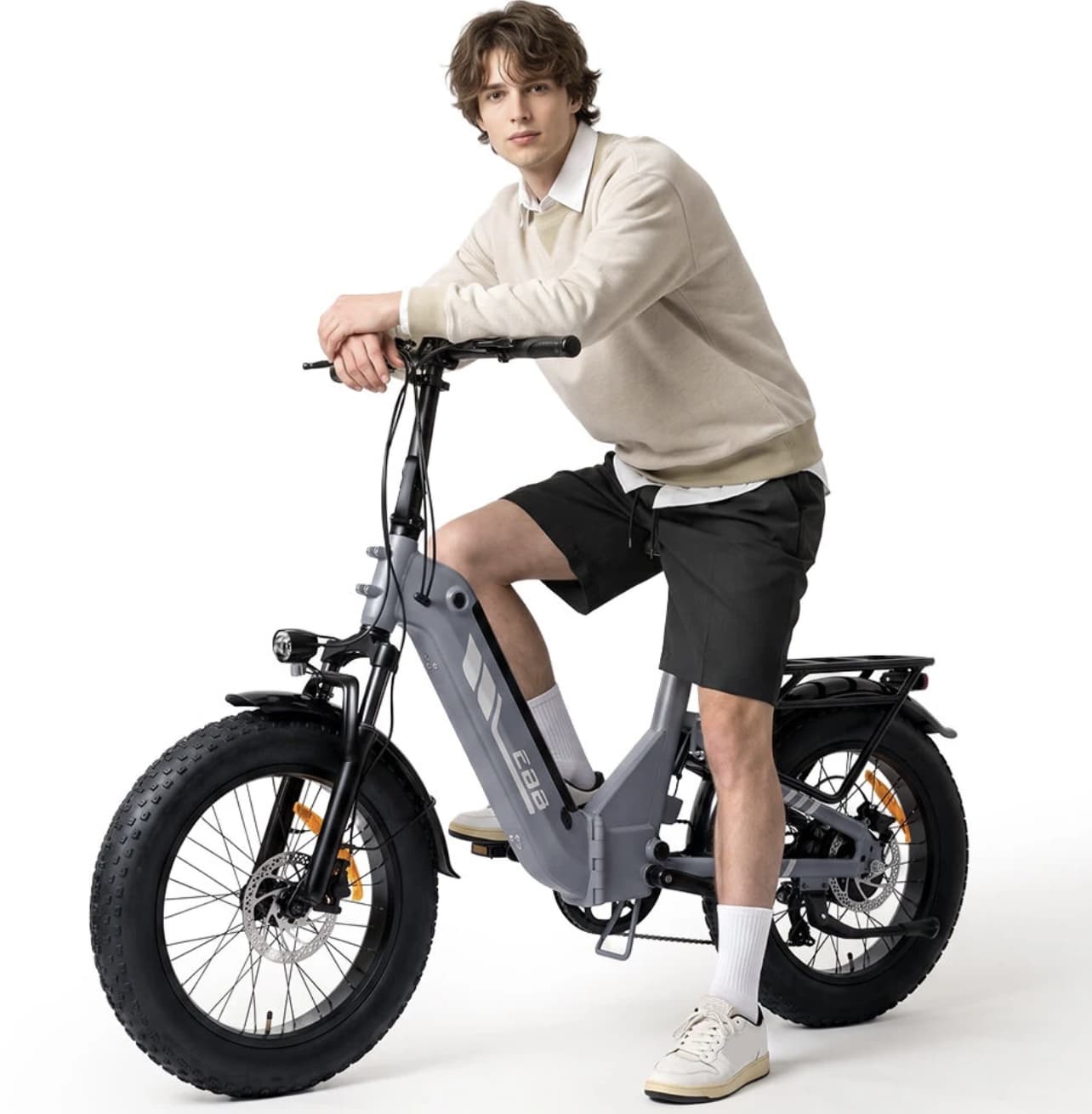
However, fat tires also add weight and rolling resistance. This is not a lightweight bicycle designed primarily for carrying upstairs or accelerating like a road-oriented e-bike. The EB8 is better understood as a stability-focused electric bike.

Front Suspension Adds Another Layer of Comfort

The front fork suspension works together with the wide tires rather than replacing them.

The tires provide the first layer of cushioning, while the suspension helps manage larger impacts reaching the front of the bike. This combination should be useful for riders who regularly encounter cracked pavement, gravel paths, cobblestones, or other imperfect surfaces.

Banggood lists the EB8 with front fork suspension and dual oil-disc brakes.

That brake setup is especially relevant on a heavier fat-tire e-bike. When the bike is carrying a rider and additional cargo, predictable braking becomes more important than simply having a high motor output.
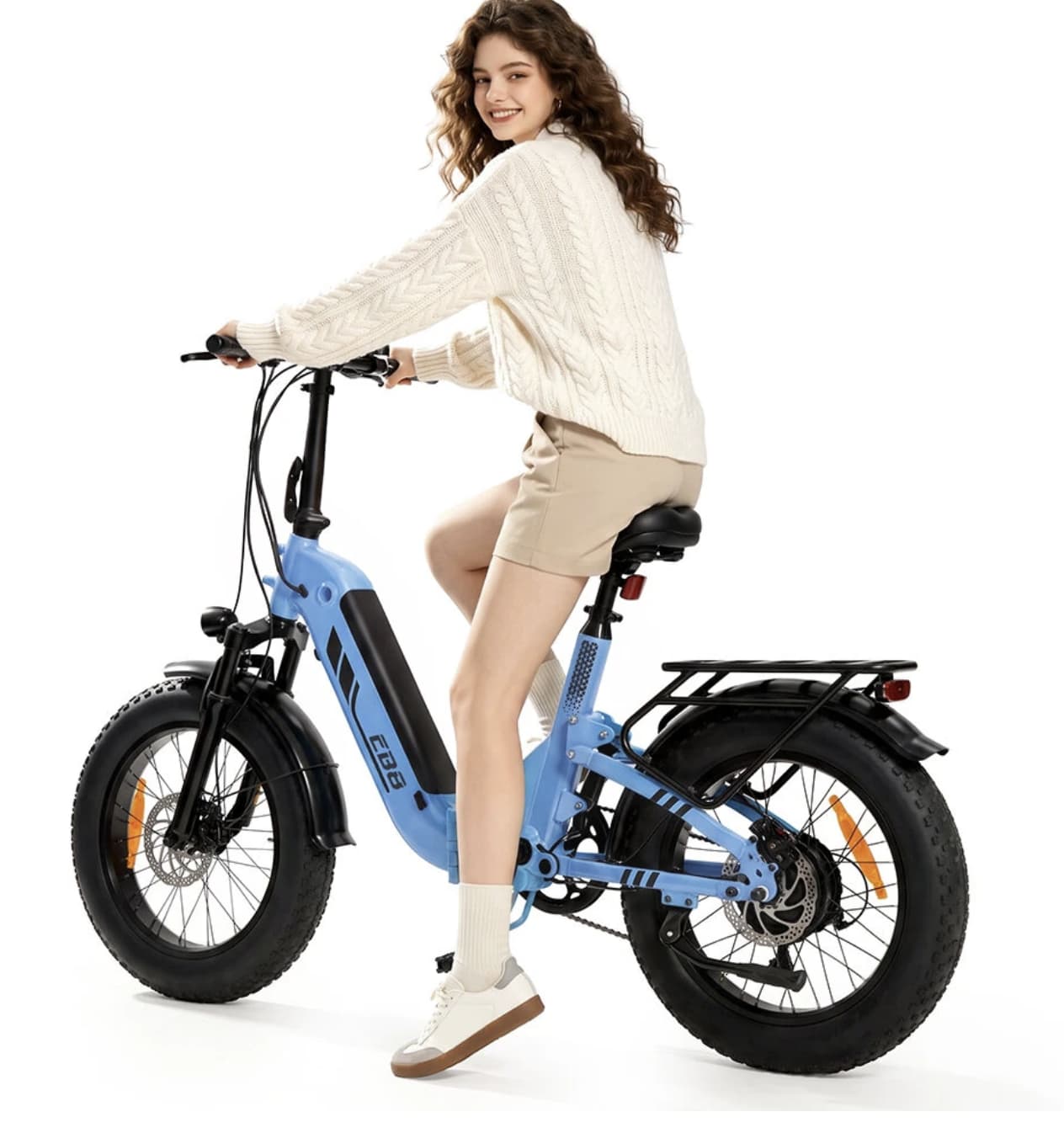
The 250W Motor Has More to the Story

At first glance, a 250W motor may not sound particularly aggressive compared with some high-powered e-bikes.

The EB8’s specifications, however, list a peak output of up to 1000W.

The important point is that rated power and peak power describe different parts of the motor’s behavior. The 250W figure represents the rated motor power, while the higher peak figure describes short-duration output under demanding conditions.

That extra headroom can be useful when accelerating, climbing, or dealing with changing terrain.

The EB8 is also listed with a maximum incline of 15 degrees. Real-world hill performance will depend on rider weight, battery level, surface conditions, and riding mode, so the specification should not be interpreted as a universal guarantee for every hill.

Folding Design Without Pretending It Is a Lightweight Bike

The EB8 folds, but portability is not its main selling point.

Banggood lists the bike at approximately 32.3 kg, with unfolded dimensions of 174.5 × 68.5 × 131 cm and folded dimensions of 107 × 56 × 78.5 cm.

That weight is important to understand before buying.

The folding mechanism is useful for reducing the bike’s footprint when storing it at home, in an office, or in a suitable vehicle. It does not turn the EB8 into something most people will want to carry for long distances.

In other words, the folding frame is primarily a storage and transportation advantage, not a lightweight-cycling advantage.

That distinction makes the product positioning clearer.

A 150 kg Maximum Load Opens Up More Practical Use Cases

The EB8 is rated for a maximum load of 150 kg.

A higher load rating can make an e-bike more practical for riders who are not well served by smaller commuter models. It also provides additional flexibility when carrying everyday items.

The bike comes with a rear rack, according to the listing, making it possible to use panniers, bags, or other compatible cargo accessories for commuting and errands.

For someone using an e-bike as transportation rather than simply recreation, this can be more valuable than another increase in top speed.

App Connectivity Makes the EB8 More Modern

The EB8 is listed with Volotix app support.

The app connection is designed to add functions such as smart unlocking and access to riding information.

This gives the bike a more connected experience than a traditional bicycle. Smartphone integration can also be useful for riders who want to keep track of basic ride information rather than relying only on the bike’s display.

The central horizontal LCD display provides another way to monitor the bike while riding, keeping key information visible without requiring a phone to be mounted on the handlebars.

A Better Match for Commuters Than Speed Seekers

The listed 25 km/h maximum speed tells you quite a lot about the EB8’s intended character.

This is not primarily an e-bike for riders chasing high top speeds.

Instead, the design puts more emphasis on:

  • stable handling
  • long-distance battery capacity
  • comfortable riding
  • hill assistance
  • cargo practicality
  • fat-tire traction
  • controlled acceleration
  • everyday usability

That makes the EB8 more interesting as a transportation tool than as a performance machine.

For commuting, grocery trips, recreational rides, and mixed-surface routes, those priorities make sense.

Where the iScooter EB8 Makes the Most Sense

The EB8’s specification sheet becomes more convincing when viewed as a complete system.

A large battery alone does not create a good long-distance e-bike. The rider also needs a comfortable chassis, stable tires, usable braking, sensible motor assistance, and enough carrying capacity.

The EB8 brings these elements together.

Its strongest use cases are likely to be:

Long commutes: The 48V 15Ah battery provides substantial energy capacity for riders who regularly cover longer distances.

Mixed surfaces: The 20×4.0-inch fat tires and front suspension make the bike better suited to rougher surfaces than a narrow-tire city bicycle.

Errands and utility riding: The rear rack and 150 kg maximum load make it more practical for carrying everyday items.

Leisure riding: The combination of fat tires, suspension, and electric assistance creates a comfortable setup for casual exploration.

Storage-conscious owners: The folding frame can reduce the bike’s footprint when it is parked or transported.

What You Should Consider Before Buying

The EB8 is not perfect for every rider.

Its approximately 32.3 kg weight is significant. If your main requirement is carrying an e-bike up several flights of stairs, a smaller and lighter model would be easier to live with.

The fat tires also make more sense for stability and comfort than for maximum efficiency on smooth roads.

The advertised 90–144 km range should be interpreted carefully as well. Maximum range figures are normally achieved under favorable conditions. A heavier rider, frequent hills, high assistance levels, cold weather, low tire pressure, or strong wind can reduce actual range.

There is also an important product-listing detail worth checking before ordering: the current Banggood page states that the EB8 is manufactured by iScooter but that the shipped bike may not carry the iScooter logo. Buyers who care about the branding should verify this point before purchase.

iScooter EB8 Specifications

Specification iScooter EB8
Bike Type Folding fat-tire electric bike
Battery 48V 15Ah
Rated Motor Power 250W
Peak Motor Power Up to 1000W
Sensor Torque sensor
Maximum Listed Speed 25 km/h
Claimed Range 90–144 km
Tires 20 × 4.0 inches
Suspension Front fork suspension
Brakes Dual oil-disc brakes
Maximum Load 150 kg
Maximum Incline 15°
Weight Approx. 32.3 kg
Charging Time About 5–6 hours
Display Central horizontal LCD
App Volotix
Unfolded Size 174.5 × 68.5 × 131 cm
Folded Size 107 × 56 × 78.5 cm

Specifications are based on the current Banggood product listing and may vary with market, configuration, or future listing updates.

Final Verdict

iScooter EB8 is most interesting when viewed as a long-range utility e-bike rather than a lightweight city bicycle.

Its combination of a 48V 15Ah battery, torque sensor, 20×4.0-inch fat tires, front suspension, dual oil-disc brakes, folding frame, rear rack, and 150 kg load rating gives it a clear purpose.

The torque sensor is arguably one of its most meaningful features because it changes how the motor assistance interacts with the rider. Meanwhile, the large battery and wide tires address two of the biggest concerns for longer recreational and commuting rides: range and comfort.

The trade-off is size and weight. At around 32.3 kg, this is a substantial e-bike, and the folding mechanism should be viewed as a storage convenience rather than a promise of easy carrying.

For riders who prioritize range, stability, comfort and practical carrying ability, the EB8 has a much more convincing proposition than a specification list alone might suggest.

The post iScooter EB8 Review: A Torque-Sensor Fat-Tire E-Bike With Long Range appeared first on IGeeKphone China Phone, Tablet PC, VR, RC Drone News, Reviews.

  •  

This Fingertip Patch Tracks Parkinson’s Medication Using Sweat

Fingertip View of Wearable Levodopa Monitoring DeviceA battery-free sweat sensor could make levodopa monitoring faster and more personalized for people with Parkinson’s disease. For people with Parkinson’s disease, the effect of a levodopa dose can fade abruptly, allowing movement problems to return before the next scheduled dose. Engineers and neuroscientists at the University of California San Diego have developed a soft [...]
  •  

HomePod Room Temperature Automations in the Home App

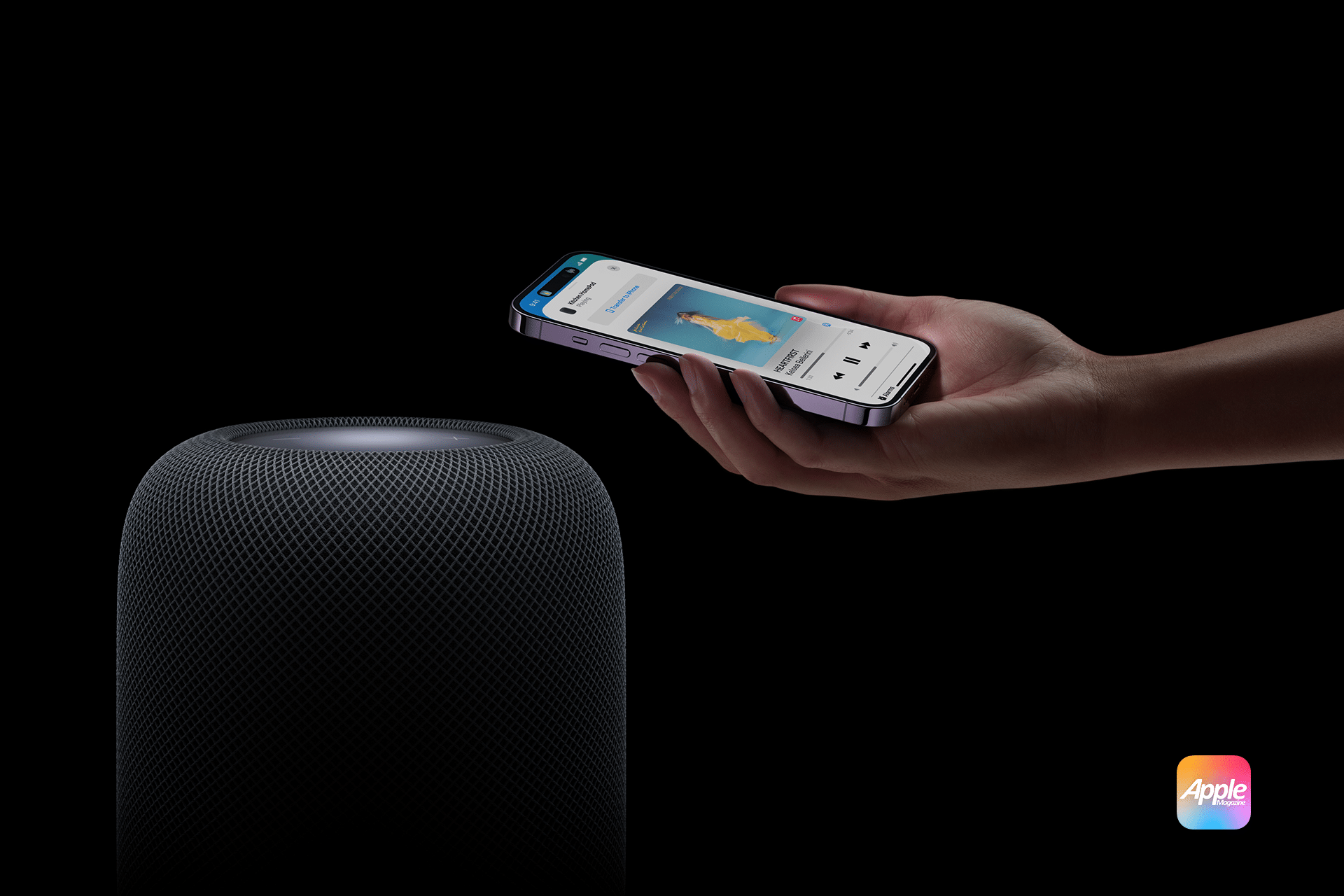
HomePod room temperature automations turn Apple’s smart speaker into more than a source of music and Siri responses. Its built-in climate sensor can trigger fans, thermostats, smart plugs, shades and other compatible accessories when a room becomes warmer or cooler than a selected temperature.

The automation runs through Apple’s Home app. Once configured, it does not require someone to ask Siri for the current reading or leave an iPhone inside the room. HomePod measures the local conditions while the home hub evaluates the rule and controls the selected accessories.

A bedroom fan could start when the room rises above 24°C, for example. A compatible thermostat could activate heating when an office falls below 18°C, while motorized shades could close before afternoon heat makes a living room uncomfortable.

The same system works with humidity. HomePod can trigger a compatible humidifier, dehumidifier or ventilation accessory when relative humidity crosses a chosen level.

Which HomePod Models Measure Room Temperature

Temperature and humidity sensing is available on HomePod mini and HomePod (2nd generation).

The original full-size HomePod does not contain the supported climate sensor. It can act as a home hub and participate in scenes, but it cannot supply the temperature reading used to start this type of automation.

HomePod mini is sometimes overlooked because Apple did not activate its temperature and humidity sensor when the speaker originally launched in 2020. A later software update enabled the component, allowing existing HomePod mini units to report climate information without a hardware upgrade.

Both supported models should run the latest available HomePod software. The iPhone or iPad used to configure the home should also be updated because older software may not display every sensor or automation option correctly.

HomePod normally updates automatically. Its version can be checked in the Home app by opening the HomePod, selecting its settings and scrolling to the software information.

Close-up of a white mesh Apple HomePod smart speaker with its colorful touch surface glowing, and a smaller black HomePod mini speaker—perfect for those considering an Apple HomePod mini upgrade—placed on top.
Image Credit: AppleMagazine

The Speaker Must Be Assigned to the Correct Room

The room assigned to HomePod determines how its readings appear in the Home app and how Siri interprets questions about local conditions.

A HomePod physically located in the bedroom but assigned to Living Room will report its sensor as part of the living-room climate group. This becomes especially confusing when several HomePods are installed throughout the home.

To verify the room, open the Home app, touch and hold the HomePod tile, open Accessory Settings and check the Room field. Assign a descriptive name to the HomePod as well, particularly when two supported speakers occupy nearby spaces.

The sensor does not measure an entire home. It reports conditions near the HomePod, so the assigned room should correspond to its physical location.

How to Check the HomePod Temperature

The current reading is available through Siri or the Home app.

A person can ask Siri, “What is the temperature in here?” when speaking to the HomePod inside that room. Questions can also identify a different room, such as “What is the temperature in the bedroom?” or “What is the humidity in the basement?”

In the Home app, open the Home tab and select Climate near the top of the screen. Choose Temperature to see readings from available climate sensors. Opening an individual room can make it easier to identify the relevant HomePod when several sensors are installed.

The Home app may display a range rather than one number when multiple temperature sensors belong to the same room or home. Opening the temperature category reveals the individual readings behind that range.

A newly restarted or updated HomePod may not show a result immediately. Apple says the sensor requires time to calibrate after startup.

How to Create a HomePod Room Temperature Automation

The temperature sensor appears as an automation trigger rather than an accessory that can be turned on or off. The user defines a threshold and then selects what another compatible accessory should do when the reading crosses it.

To create the automation:

  1. Open the Home app on an iPhone or iPad
  2. Select the Automation tab or tap the Add button and choose Add Automation
  3. Choose A Sensor Detects Something
  4. Select the temperature sensor assigned to the appropriate HomePod and room
  5. Choose Rises Above or Drops Below
  6. Set the desired temperature threshold
  7. Add optional time and occupancy conditions
  8. Select the accessories or scene that should run
  9. Configure the desired state of each accessory
  10. Test the automation and tap Done

The selected action could turn on a fan, change a compatible thermostat, close shades or activate an existing scene containing several accessories.

HomePod does not produce cool or warm air itself. It supplies the measurement and functions as a home hub, while the automation controls other equipment connected to Apple Home.

Apple-HomePod-2

Choosing Rises Above or Drops Below

The direction of the trigger is important.

Rises Above starts the automation when the measured temperature moves from below the selected value to above it. This is the usual option for starting a fan, lowering compatible shades or changing a thermostat to a cooler setting.

Drops Below works in the opposite direction. It can start heating, turn off a fan or activate another accessory when the room becomes colder than the selected level.

These are threshold-crossing events, not continuous questions asking whether the room is currently above or below a value. If the room is already warmer than 24°C when a new Rises Above 24°C automation is saved, the rule may not run immediately. The reading generally needs to fall below the threshold and then rise across it again.

This behavior also explains why an automation may not repeatedly react while the room remains on the same side of the threshold. Another transition must occur before the trigger fires again.

Use Time and Occupancy Conditions

The Home app can restrict a temperature automation to particular times or household conditions.

A bedroom fan may only need to run overnight. Heating in a home office could remain inactive on weekends. A cooling automation might operate only when someone is home, while another rule protects temperature-sensitive equipment regardless of occupancy.

The People condition can limit an automation to when somebody is home, when nobody is home or when selected household members are present or absent. These conditions depend on location access and the devices associated with members of the Apple Home.

Time restrictions should match the behavior of the controlled accessory. Closing shades during the hottest afternoon hours may be useful, but the same action would provide little benefit after sunset.

An automation can also activate a scene instead of controlling one product. A Hot Afternoon scene could close the west-facing shades, start a fan and turn off heat-producing decorative lights with one sensor trigger.

Useful HomePod Temperature Automations

A smart fan is one of the simplest accessories to control. When the temperature rises above a comfortable level, the Home app can turn on a HomeKit or Matter-compatible fan. A second automation can stop it after the room cools.

A thermostat offers more direct climate control, but the available actions depend on the thermostat manufacturer. Apple Home may expose power, heating, cooling and target-temperature controls, while more advanced scheduling remains inside the manufacturer’s app.

Motorized shades can reduce solar heating before an air conditioner needs to work harder. A temperature trigger can close selected shades when a sun-facing room becomes warm, particularly when the automation is limited to daytime hours.

A ceiling fan or portable fan connected through a smart switch or smart plug can also respond to the HomePod sensor. The connected controller must be rated for the appliance, and the appliance must safely resume operation when power is restored. Products with electronic controls may remain off after a smart plug turns them back on.

Portable heaters and air conditioners require greater caution. Many smart plugs are not designed for their electrical load, and some appliance manufacturers prohibit external switching. A compatible thermostat or manufacturer-supported controller is safer than treating high-power climate equipment like a lamp.

HomePod room temperature - Concept render of the Apple HomePod 2025 with a 6-7 inch screen displaying a smart home control interface, featuring an A18 chip-powered design on a modern kitchen counter.
Image Credit: Apple Inc.

Humidity Can Use the Same Automation System

HomePod exposes temperature and relative humidity as separate sensors.

A bathroom or laundry-room HomePod could trigger ventilation when humidity rises above a chosen level. A dehumidifier with a compatible control could operate in a damp basement, while a humidifier could respond when heated winter air becomes too dry.

The setup process is almost identical to a temperature automation. Select A Sensor Detects Something, choose the HomePod’s humidity sensor, set Rises Above or Drops Below and assign the action.

Humidity automations also benefit from separate starting and stopping thresholds. Turning a dehumidifier on above 65 percent and off below 55 percent creates a useful operating range instead of responding repeatedly around one value.

HomePod Sensor Placement Affects the Reading

HomePod measures the conditions around the speaker, not at the center of the room or inside an air-conditioning return.

Placing it beside a sunny window, heater, fireplace, kitchen appliance or air vent can produce readings that do not represent the space where people spend time. An enclosed shelf may also trap warmer air around the device.

The speaker needs airflow and a stable surface. It should not be covered or placed where condensation, cooking steam or direct moisture can reach it.

Extended audio playback at high volume can reduce sensor accuracy because heat generated by the speaker may influence the local reading. This matters when an automation uses a narrow threshold and the HomePod frequently plays loud music.

Apple says temperature sensing is optimized for indoor domestic environments between approximately 15°C and 30°C. Humidity sensing is optimized between about 30 and 70 percent relative humidity. Readings outside those ranges may be less accurate.

HomePod is therefore useful for comfort-oriented home automation, but it should not replace specialized monitoring required for medicine, food storage, animals, greenhouses or other temperature-sensitive environments.

Why a Temperature Automation May Not Work

Begin by confirming that the temperature reading itself appears in the Home app. If it is missing, verify the HomePod model, install current software and allow time for calibration after restarting.

Check that the correct temperature sensor was selected. Homes containing multiple HomePods may present several sensors with similar names, particularly when the speakers were never given descriptive room assignments.

Open the automation and confirm that it is enabled. Review its time and People conditions, because a functioning temperature trigger will still do nothing when an additional condition is not satisfied.

Use the Test This Automation control to confirm that the destination accessory responds. If the test fails, the problem is more likely to involve the accessory, its network connection or the selected action than the HomePod sensor.

If the test succeeds but the rule does not run naturally, remember that the temperature must cross the threshold in the selected direction. Temporarily choosing a value closer to the current room temperature can make testing easier.

Home hubs and accessories should remain connected to the same Apple Home. Thread-based accessories also need a supported Thread-enabled home hub or border router, such as HomePod mini, HomePod (2nd generation) or a compatible Apple TV 4K.

Build Two Automations for Stable Climate Control

A single automation can start a device but may not provide the best way to stop it.

Using the same threshold in opposite directions can cause frequent switching when the measured temperature fluctuates around that value. A room hovering near 24°C, for example, could repeatedly move just above and below the boundary.

A more stable arrangement uses two thresholds. One automation turns the fan on when the temperature rises above 24°C. A separate automation turns it off when the temperature drops below 22°C.

The gap creates a controlled operating range. Once the fan starts, it can continue working until the room has cooled meaningfully rather than stopping after a minor change.

Heating can follow the reverse pattern. One automation activates heat below 18°C, while another stops it above 20°C. Humidifiers and dehumidifiers can use the same paired-rule structure.

This separation also makes troubleshooting easier because every automation performs one clear action in response to one specific sensor transition. Instead of asking one complicated rule to manage the complete climate cycle, HomePod supplies the measurements while two predictable Home app automations define when the connected equipment starts and stops.

The post HomePod Room Temperature Automations in the Home App appeared first on AppleMagazine.

  •  

This Color-Changing Material Could Give Robots a New Way to Detect Touch

Engineers at Queen Mary University of London have created a tactile sensor, described in a study published in Science Advances, that allows robots to detect touch using a simple camera.  

The sensor converts mechanical forces into visible color patterns, reducing the need for dense arrays of embedded sensors. Giacomo Sasso, a postdoctoral researcher at Queen Mary’s School of Engineering and Materials Science, led the team that developed this new sensor. Rather than relying on embedded electronic sensors, they created a soft material that changes color when pressed or bent.

This effect, known as structural color, is the same reason butterfly wings look iridescent without pigment. Pressure causes microscopic structures within the material to shift, altering how light reflects and creating a real-time visual indicator of force.

Touch Without the Computation

Most vision-based tactile sensors can map contact and force in detail, but only at the cost of heavy computation that slows them down. Simpler systems are faster, but sacrifice detail. The new material developed by Sasso’s team sidesteps this problem by building the sensing function into the material itself. With just a standard USB camera, researchers can track color changes on the surface and immediately infer pressure, strain, and contact shape without complex data reconstruction.

“You won’t guess how much information is generated when your finger presses a light switch. A human hand contains more than 10,000 mechanoreceptors to do the job, yet touch sensing remains one of the major challenges in robotics,” Sasso said. “We were happy to capture the finger ridges, as no existing technology can reproduce such sensor density at [a] comparable scale and simplicity. The key idea behind this project was to think outside the box: instead of embedding dense and overengineered sensor arrays, sensing is moved into the material itself, where mechanical cues are directly transformed into colour fields and captured using a simple low-cost USB camera.”

Professor James Busfield, one of the paper’s co-authors, described the advantage more simply: “What is particularly powerful is that the information is already in the light signal. You are no longer reconstructing touch – you are observing it directly.”

From Precision Manufacturing to the Operating Room

Reducing the computational demands of touch sensing opens up new possibilities. A robotic gripper made with this material could handle tiny parts more gently, since changes in force are immediately detectable. Prosthetic limbs equipped with similar sensors could also provide users with more detailed tactile feedback.

The researchers also see potential applications in surgery, where detecting subtle pressure differences could help clinicians interpret tissue properties.

A Decade of Groundwork Behind One Material

Professor Federico Carpi from the University of Florence and Professor James Busfield from Queen Mary worked together on this project, merging years of separate work on stretchable sensors and polymer behavior into one material system. This allowed the team to use a mechanochromic material as the sensor itself, not just as a base for electronics.

Many approaches to robotic touch have relied on increasingly complex sensor arrays, wiring, and computing systems. Rather than adding more electronics, Sasso’s team’s approach allows the material itself to encode touch into visible color. It remains unclear whether this color-based method can be scaled for use in commercial robotic hands, but this work suggests that the future of robotic touch might rely as much on smart materials as on advanced electronics.

Austin Burgess is a writer and researcher with a background in sales, marketing, and data analytics. He holds an MBA, a Bachelor of Science in Business Administration, and a data analytics certification. His work focuses on breaking scientific developments, with an emphasis on emerging biology, cognitive neuroscience, and archaeological discoveries.

  •  

Scientists create a self-powered sensor that stretches nearly seven times its length

Imagine wearing a lightweight patch that can monitor your heartbeat, breathing and movements for long periods without ever needing a battery. Or imagine robots with soft, flexible skins that can feel pressure and movement much like human skin. These ideas may be closer to becoming reality thanks to a new self-powered sensor developed by researchers […]

The post Scientists create a self-powered sensor that stretches nearly seven times its length appeared first on Knowridge Science Report.

  •  

Swallowable ‘blueberry’ sensor could transform how we monitor body temperature

A tiny electronic sensor that can be swallowed like a pill may soon provide one of the most accurate ways to measure body temperature. Engineers at the Massachusetts Institute of Technology (MIT) have developed a miniature device that continuously monitors temperature from inside the digestive tract, potentially helping doctors detect infections earlier and better manage […]

The post Swallowable ‘blueberry’ sensor could transform how we monitor body temperature appeared first on Knowridge Science Report.

  •  

Scientists create a tiny sensor that can detect invisible gas leaks with extraordinary precision

Researchers in Germany have developed a new gas-sensing technology that could make it much easier and less expensive to detect tiny amounts of gases in the environment, industrial facilities, and energy networks. The breakthrough builds on a scientific phenomenon known as the photoacoustic effect, which was first discovered more than 150 years ago. When certain […]

The post Scientists create a tiny sensor that can detect invisible gas leaks with extraordinary precision appeared first on Knowridge Science Report.

  •  
❌