❌

Reading view

Satechi USB-C Snap Hub: Der ideale Hub für das Macbook Neo

Editors' Choice

Auf den ersten Blick

Unsere Wertung

Pro

  • Sechs Anschlüsse für das Macbook Neo über seine zwei Ports
  • Perfekt farblich abgestimmtes Zubehör
  • Kompakt und leicht
  • 4K/60 Hz HDMI
  • Kartenleser
  • USB-A (veraltet)
  • Stromdurchleitung

Kontra

  • Kartenleser sind langsam

Fazit

Der Satechi USB-C Snap Hub ist für die meisten Besitzer eines Macbook Neo der beste Hub, da er ein farblich perfekt abgestimmtes, bündig sitzendes Design mit den unverzichtbaren Anschlüssen kombiniert, die dem Neo fehlen – und das zu einem erschwinglichen Preis.

Er ist in den Farben Zitrus, Rosa, Indigo und Silber erhältlich und wirkt wie eine natürliche Erweiterung des Laptops, während er gleichzeitig Ladefunktion, USB-Erweiterung, HDMI sowie SD-Kartenunterstützung in einem kompakten, kabellosen Design bietet.

Preis zum Zeitpunkt der Bewertung

This value will show the geolocated pricing text for product undefined

Aktueller Bestpreis

Aktuell bester Preis: Satechi USB-C Snap Hub

Shop
Preis
Satechi
$44.99
Preisvergleich (über 24.000 Shops weltweit)
Produkt
Preis
Preisvergleich von Backmarket

Was ist das? Ein Hub mit sechs Anschlüssen, der über die seitlichen USB-C-Anschlüsse an ein Macbook angeschlossen wird.

Für wen ist es geeignet? Die Farben passen zu denen des Macbook Neo und bieten diesen Nutzern eine Vielzahl von Erweiterungsmöglichkeiten, darunter Stromversorgung, Geräteanschlüsse, Speicher und Bildschirmunterstützung. Kaufen Sie den Hub, wenn Sie eine elegante Erweiterung für den Alltag wünschen.

Für wen ist es nicht geeignet? Zwar funktioniert es mit allen Macbooks, die über zwei nebeneinander liegende USB-C- oder Thunderbolt-Anschlüsse verfügen, doch ist es langsamer als Thunderbolt mit 40 Gbit/s und sogar langsamer als USB-C mit 10 Gbit/s. Mit Desktop-Macs ist es inkompatibel. Wählen Sie für professionelle Arbeitsabläufe oder den Einsatz mehrerer Bildschirme einen schnelleren Thunderbolt– oder DisplayLink-Hub.

Der niedrige Preis des Apple Macbook Neo bedeutet, dass Sie gewisse Kompromisse in Kauf nehmen müssen. Wie wir jedoch in unserem Test des Macbook Neo hervorheben, handelt es sich hierbei um Abwägungen zwischen Ausstattung und Preis, die von der Zielgruppe oder sogar einigen professionellen Mac-Nutzern, die nach einem erschwinglichen Laptop suchen, kaum bemerkt werden.

Das offensichtlichste Zugeständnis an den Preis ist die begrenzte Anzahl an Anschlüssen des Neo. Es gibt nur zwei USB-C-Anschlüsse, und selbst diese sind nicht identisch. Der vordere bzw. rechte Anschluss ist mehr als 20-mal langsamer als der hintere/linke USB-C-Anschluss mit 10 Gbit/s, da er mit den USB-2.0-Geschwindigkeiten (480 Mbit/s) arbeitet. Er eignet sich zum Aufladen, und das war’s auch schon. Die Geschwindigkeit entspricht in etwa der eines USB-Sticks aus dem Jahr 2010.

Keiner der Anschlüsse unterstützt Thunderbolt, Apples Standard und den überlegenen Anschluss, der bei allen anderen Macs und sogar einigen iPads zum Einsatz kommt.

Die Lösung besteht darin, am hinteren/linken Anschluss einen Hub anzuschließen, der zusätzliche Ports bietet, die dann für den Neo verfügbar werden. Wir haben die besten USB-C-Hubs und -Adapter getestet, doch es gibt einen Aspekt, der Neo-Besitzer abschrecken dürfte: Sie sind alle entweder silberfarben oder in Space Grau gehalten, passend zu den teureren Macbooks. Während dies Besitzer des silbernen Neo vielleicht nicht stört, fühlen sich diejenigen, die sich bewusst für ein Neo in den Farben “Zitrus“, „Rosa“ oder „Indigo“ entschieden haben, ein wenig fehl am Platz.

Zur Macbook-Neo-Kollektion von Satechi gehören zwei zum Neo passende Hubs: der neue USB-C-Snap-Hub und farbige Varianten des Satechi OntheGo 5-in-1-Multiport-Adapters, den wir bereits in seiner ausschließlich schwarzen 7-Port-Ausführung getestet haben.
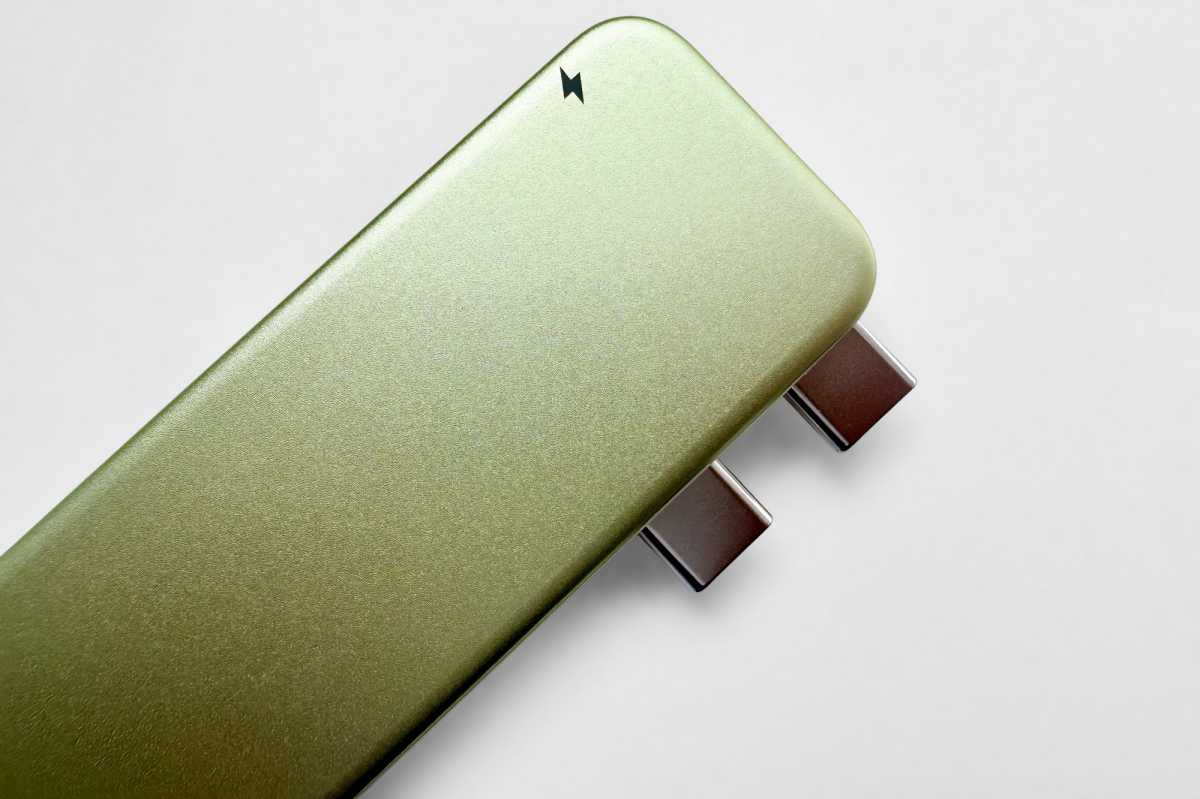
Satechi USB C Snap Hub Citrus dual USB C

Simon Jary

Der USB-C Snap Hub (49,99 Euro) wurde speziell für das asymmetrische USB-C-Anschlussdesign des Macbook Neo entwickelt. Er funktioniert auch mit anderen Macbooks mit zwei nebeneinander liegenden Thunderbolt-Anschlüssen und misst 100 × 29 × 10 mm bei einem geringen Gewicht von 32 Gramm.
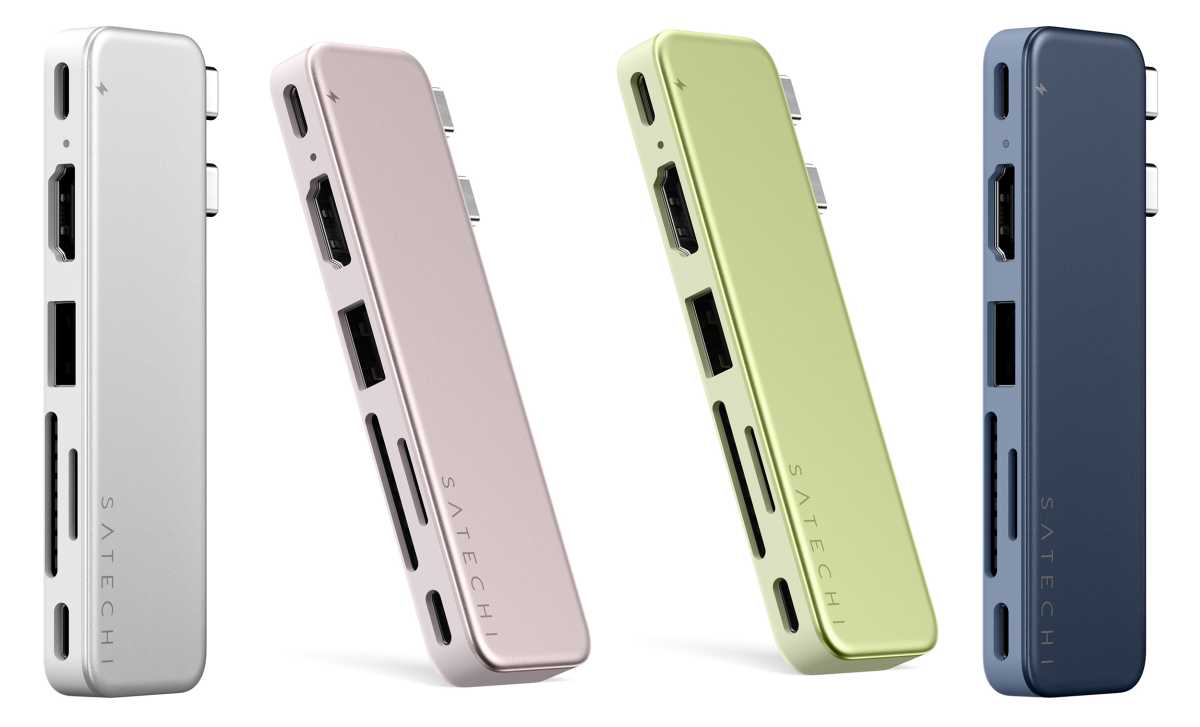
Satechi USB-C Snap Hub MacBook Neo colors

Satechi

Welche Anschlüsse stehen zur Verfügung?

Der farblich abgestimmte Aluminium-Hub verfügt über ein bündiges Design mit zwei Anschlüssen, das die beiden USB-C-Anschlüsse des Neo auf sechs praktische Anschlüsse erweitert:

  • Zwei USB-C-Anschlüsse für die Verbindung zum Macbook
  • Ein USB-C-Anschluss (5 Gbit/s)
  • Ein USB-C-Anschluss (45 W Power Delivery)
  • Ein USB-A-Anschluss (5 Gbit/s)
  • Ein HDMI-Anschluss (4K/60 Hz)
  • Ein SD-Kartenleser (UHS-I, 104 MB/s)
  • Ein MicroSD-Kartenleser (UHS-I, 104 MB/s)

Der Snap Hub belegt zwar beide Anschlüsse des Neo, stellt Ihnen jedoch sechs Ports zur Verfügung.

Satechi USB C Snap Hub ports
Anschlüsse von links: USB-C (45 W Passthrough Power Delivery); HDMI (4K/60 Hz); USB-A (5 Gbit/s); MicroSD- und SD-Kartenleser (104 MB/s); USB-C (5 Gbit/s).

Simon Jary

Der USB-C-Anschluss ganz links übernimmt die Ladefunktion und liefert dem Neo potenziell 45 Watt Leistung – was völlig ausreicht, da der Laptop im Lieferumfang lediglich ein 20-Watt-Ladegerät enthält (oder gar keines, wenn Sie ihn in Großbritannien oder der EU kaufen). Apple erwähnt in den technischen Daten des Neo zwar kein Schnellladen, doch der Ladevorgang verläuft schneller, wenn Sie ein Ladegerät mit 30 Watt oder mehr anschließen, da das Gerät 30 Watt aufnimmt, sofern diese Leistung bereitgestellt wird – mit 30 Watt sollten Sie das Neo in 90 Minuten von 0 auf 100 Prozent aufladen können, verglichen mit 140 Minuten bei 20 Watt.

Der andere USB-C-Anschluss des Snap Hubs bietet eine Datenübertragungsrate von 5 Gbit/s – das ist halb so schnell wie der eigene Datenanschluss des Neo, aber eine Geschwindigkeit, die für die meisten akzeptabel sein dürfte. Ich würde ihn zwar nicht in einem professionellen Videostudio verwenden, aber für die meisten alltäglichen Aufgaben sollte er ausreichen. Die verbleibende Bandbreite von 5 Gbit/s könnte vom herkömmlichen USB-A-Anschluss oder vom HDMI-Anschluss genutzt werden.

Satechi USB C Snap Hub Indigo

Satechi

Lässt sich ein externes Display anschließen?

Von Haus aus unterstützt das Macbook Neo nur einen externen Bildschirm. Dies liegt an den Anzeigeeinschränkungen von Apple, von denen auch die früheren Macbook-Modelle mit den Basis-Chips M1 und M2 betroffen sind. Sie benötigen ein DisplayLink-Dock oder einen Hub, wenn Sie mehr als einen Bildschirm an das Macbook Neo anschließen möchten.

Der Satechi Snap Hub ist zwar nicht DisplayLink-fähig, doch über seinen HDMI-Anschluss können Sie einen 4K-UHD-Monitor (3840 × 2160 Pixel) mit einer ordentlichen Bildwiederholfrequenz von 60 Hz anschließen – dem Standard für die meisten Hubs und Docks, sogar für einige der besten Thunderbolt-Dockingstationen. Der Monitor muss selbst über einen HDMI-Anschluss verfügen, doch es ist selten, dass ein Bildschirm keinen HDMI-Anschluss hat.
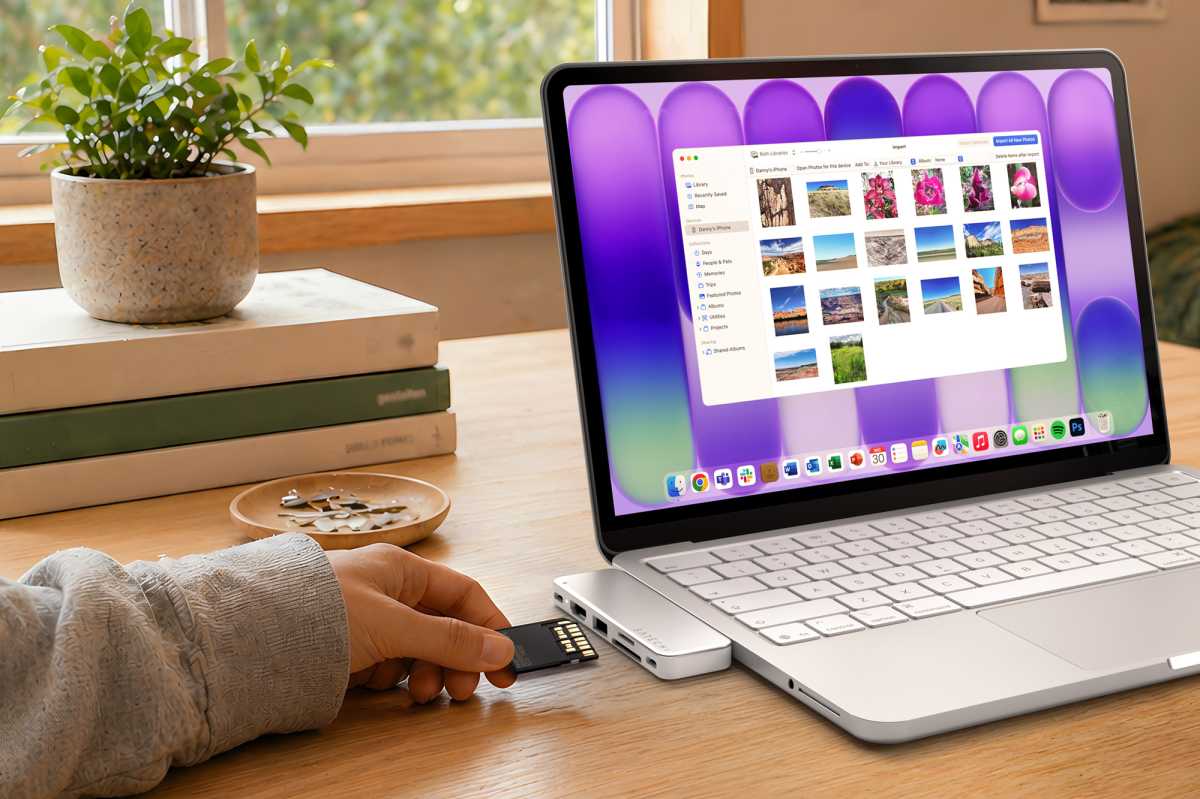
Satechi USB C Snap hub Silver

Satechi

Lässt sich der Speicher des Macbook Neo erweitern?

SD- und MicroSD-Kartenleser sind nützlich, um kostengünstigen und äußerst tragbaren Speicher hinzuzufügen. Der maximale interne Speicher des Neo beträgt beim Touch-ID-Modell 512 GB. Das Neo-Einstiegsmodell verfügt lediglich über 256 GB internen Speicher.

Obwohl die Preise für Speichermedien derzeit Schwankungen unterliegen, können Sie eine SD- oder MicroSD-Karte erwerben, um die Kapazität Ihres Neo zu erhöhen, ohne Ihr Budget zu sprengen. Sie können den 256-GB-Speicher des Basis-Neo um das 1,5-Fache auf 374 GB erweitern, indem Sie eine 128-GB-MicroSD-Karte für 38 Euro von Amazon hinzufügen, oder ihn mit einer 256-GB-MicroSD-Karte (38 Euro) auf 512 GB verdoppeln.

Die Kartenslots des Snap Hub gehören nicht zu den schnellsten – ihre Lesegeschwindigkeit von 104 MB/s ist spürbar langsamer als bei schnelleren Slots mit 312 MB/s –, doch für Backups und alltägliche Aufgaben sollten sie für Neo-Nutzer akzeptabel sein.

Satechi USB C Snap Hub Blush

Satechi

Wie schneidet das Gerät im Vergleich zu den Alternativen ab?

Der Satechi Snap Hub ist in den Farben Zitrus, Rosa, Indigo und Silver erhältlich und kostet 49,99 Euro, entweder direkt bei Satechi oder bei Amazon.

Das ist etwas günstiger als der Anker 11-in-1 USB-C-Hub, der zwar über mehr Anschlüsse verfügt, aber nur bedingt zum silbernen Neo passt. Er wird über ein Kabel angeschlossen und ist daher nicht so kompakt wie der Snap Hub. Sie erhalten dieselben grundlegenden Anschlüsse, mit Ausnahme von drei USB-A-Anschlüssen, die Sie vermutlich nicht benötigen werden. Er bietet eine Passthrough-Ladefunktion mit 100 Watt, doch da der Neo nur 30 Watt aufnehmen kann, ist dies für Apples farbenfrohen Laptop überdimensioniert. Was ihn jedoch attraktiv machen könnte, ist ein Gigabit-Ethernet-Anschluss für den kabelgebundenen Netzwerkzugang.

Satechi OntheGo 5 in 1 Multiport Adapter Citrus
Satechi hat zudem seinen magnetischen OntheGo 5-in-1-Multiport-Adapter in den Neo-Farben herausgebracht.

Satechi

Satechi hat zudem seinen OntheGo-Multiport-Adapter (44,99 $) farblich an die Neo-Reihe angepasst. Dieser Hub mit fünf Anschlüssen unterscheidet sich vom Standard-OntheGo-Multiport-Adapter für 59,99 Euro, der über sieben Anschlüsse verfügt. Beide werden über ein 10-Gbit/s-Host-Kabel an den Mac angeschlossen, doch die mögliche Durchleitungsleistung zum Laptop liegt beim 5-Port-Modell bei nur 60 Watt, verglichen mit 80 Watt beim 7-Port-Modell. Dies hat für Neo-Nutzer jedoch keine Auswirkungen, da das Macbook der Einstiegsklasse ohnehin maximal 30 Watt aufnehmen kann.

Beim 5-Port-Neo-Modell fehlen der Gigabit-Ethernet-Anschluss, der Micro-SD-Kartenleser und einer der USB-A-Anschlüsse. Dafür verfügt es über einen 5-Gbit/s-USB-C-Datenanschluss, der den vom Hub selbst belegten Anschluss ersetzt – was umso notwendiger ist, da das Neo nur über einen einzigen Datenanschluss verfügt.

Dank seiner runden Form und der magnetischen Soft-Touch-Basis lässt er sich mithilfe des mitgelieferten 3M-Kleberings bündig am Deckel des Neo befestigen. Sie können ihn auch an ein iPhone mit USB-C-Anschluss (ab Modell 15) andocken, falls Sie ihn sowohl an Ihrem Smartphone als auch an Ihrem Neo-Laptop benötigen.

Als Teil seiner Neo-Kollektion hat Satechi zudem eine farblich abgestimmte, flache und elegante „Slim EX Wireless Mouse“ (29,99 $) auf den Markt gebracht, die zwei Bluetooth-Kanäle sowie eine 2,4-GHz-Funkverbindung unterstützt und über leise Klick-Tasten sowie ein präzisionsgefertigtes Scrollrad verfügt.

Satechi MacBook Neo Collection

Satechi

Sollten Sie den Satechi USB-C Snap Hub kaufen?

Das schlanke Gehäuse des Satechi Snap Hubs aus eloxiertem Aluminium schließt bündig am Macbook Neo an, ohne dass Kabel herunterhängen – bis Sie die Kabel anschließen, die Sie für die Stromversorgung, Erweiterungen, Speicher und die Bildschirmunterstützung benötigen. Es gibt zwar ähnliche USB-C-Hubs mit zahlreichen Anschlüssen, doch nur wenige passen so perfekt zu den Farben „Zitrus“, „Rosa“, „Indigo“ und „Silber“ des Neo.

  •  

Sub-$400 Thunderbolt 5 dock roundup — Keychron and Plugable offer dual HDMI, but UGREEN takes top spot with an M.2 NVMe slot

Thunderbolt docks are an easy way to expand the number of available external ports for a laptop and have become quite popular in recent years. They are particularly beneficial with the best ultrabooks, which can sometimes be equipped with as few as just two Thunderbolt ports and no additional external ports for connectivity.

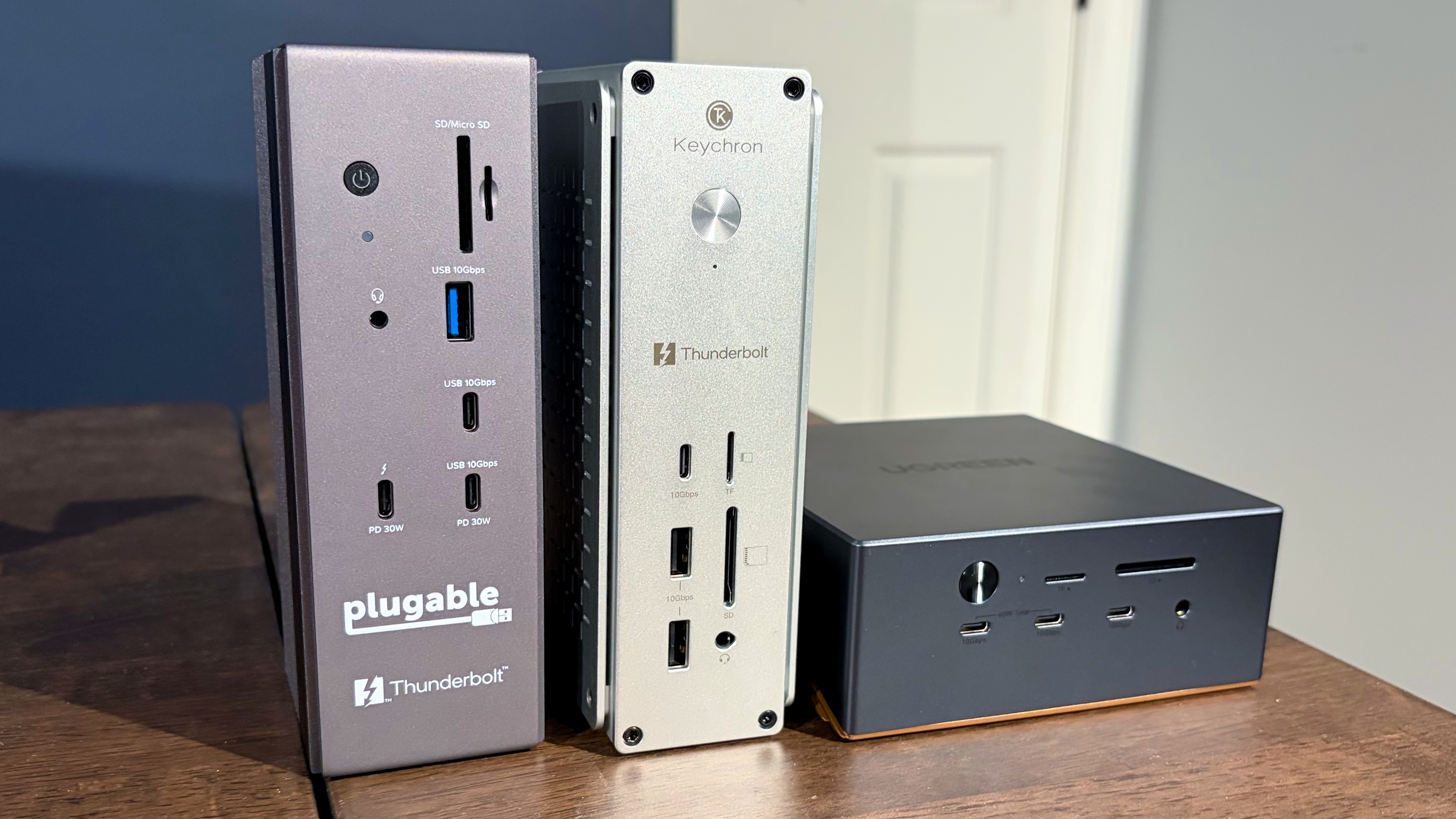
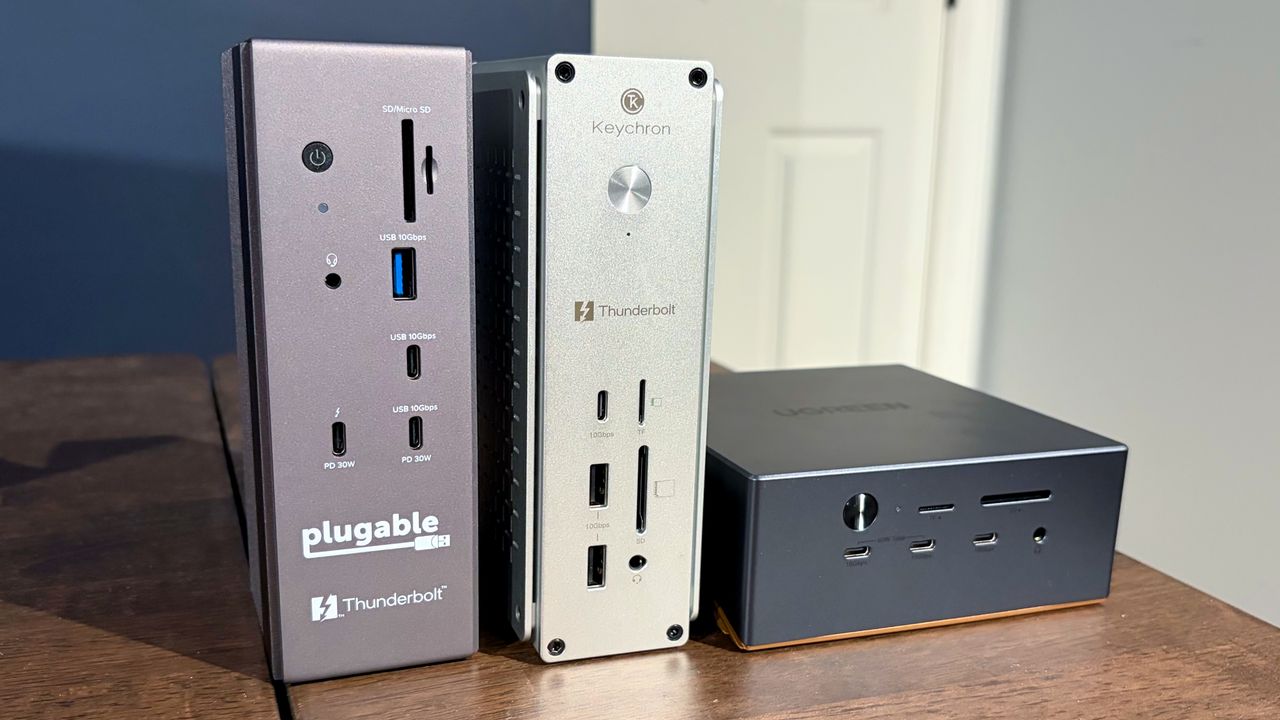
We’ve previously taken a look at some popular Thunderbolt 5 docks, with some costing as much as $650. This time around, we’re looking at some more affordable solutions, with all three of these units carrying a street price of less than $400. The UGREEN Revodok Maxidok has a street price of $389.99 after coupon, while the Plugable TBT-UDH2 and Keychron TB5D-1 are both available for around $350.

Plugable TBT-UDH2

Cost

$349.95

Front Ports

1x USB-C 10 Gbps (30W PD)

1x USB-A 10 Gbps

1x Thunderbolt 5 downstream (30W PD)

1x microSD UHS-II slot

1x SD UHS-II slot

1x audio combo jack

Back Ports

1x Thunderbolt 5 upstream (140W charging to host)

3x USB-C 5 Gbps

2x USB-A 5 Gbps

2x HDMI 2.1

1x 2.5 GbE

The Plugable TBT-UDH2 is a relatively compact Thunderbolt 5 dock that feels absolutely solid with its weighty aluminum chassis. The BT-UDH2 is designed to stand vertically (confirmed by the rubber feet at the base of the unit). However, there’s no reason why you wouldn’t be able to lay the unit on its side if you wanted to.

Thunderbolt 5 Docking Station Testing

(Image credit: Tom's Hardware)

As for actual ports, the TBT-UDH2 has two USB-C ports up front (one of which supports 30W PD), a single USB-A port, microSD and SD card slots, a 3.5 mm headphone jack, and a single downstream Thunderbolt 5 port (30W PD).

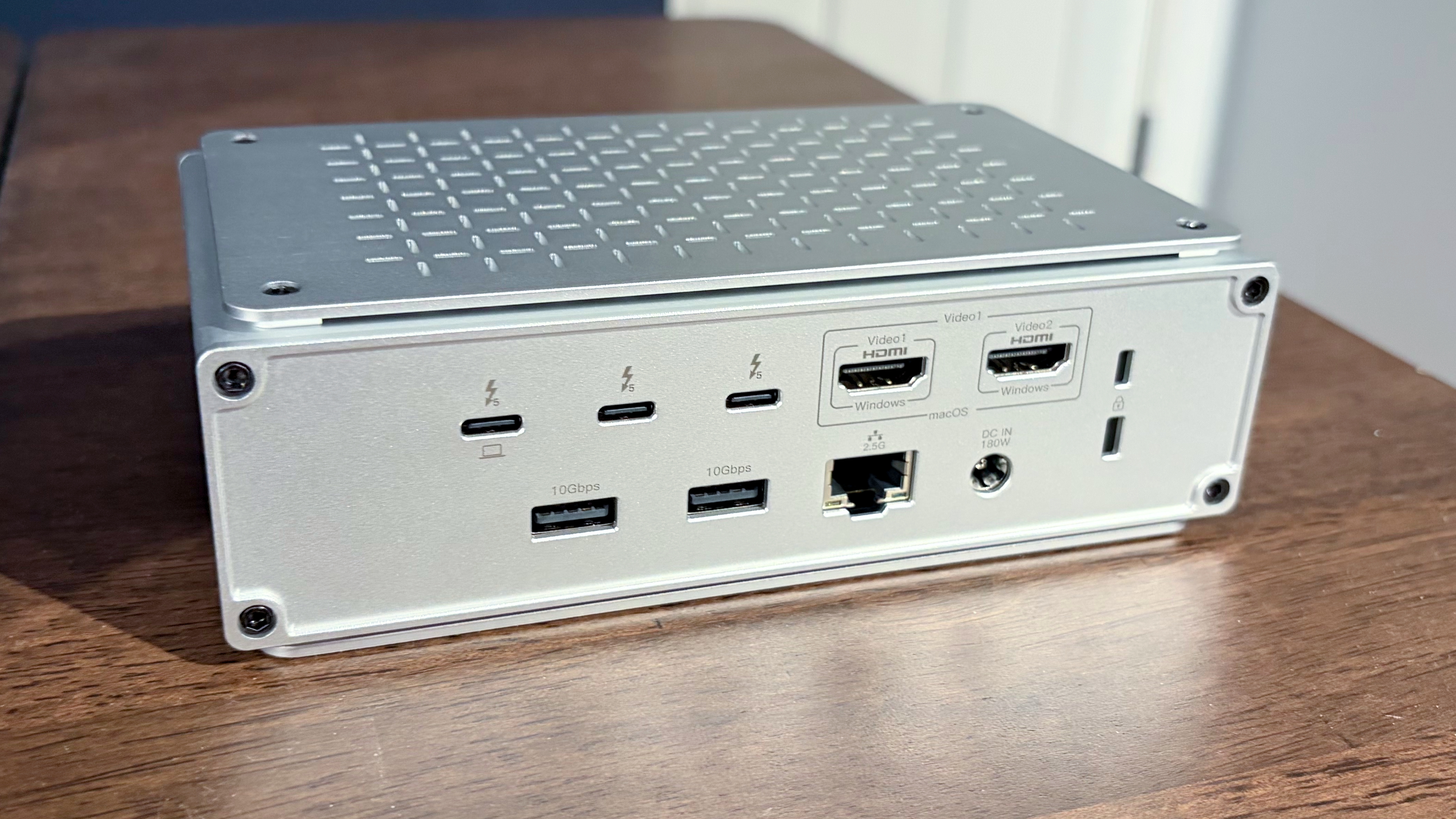
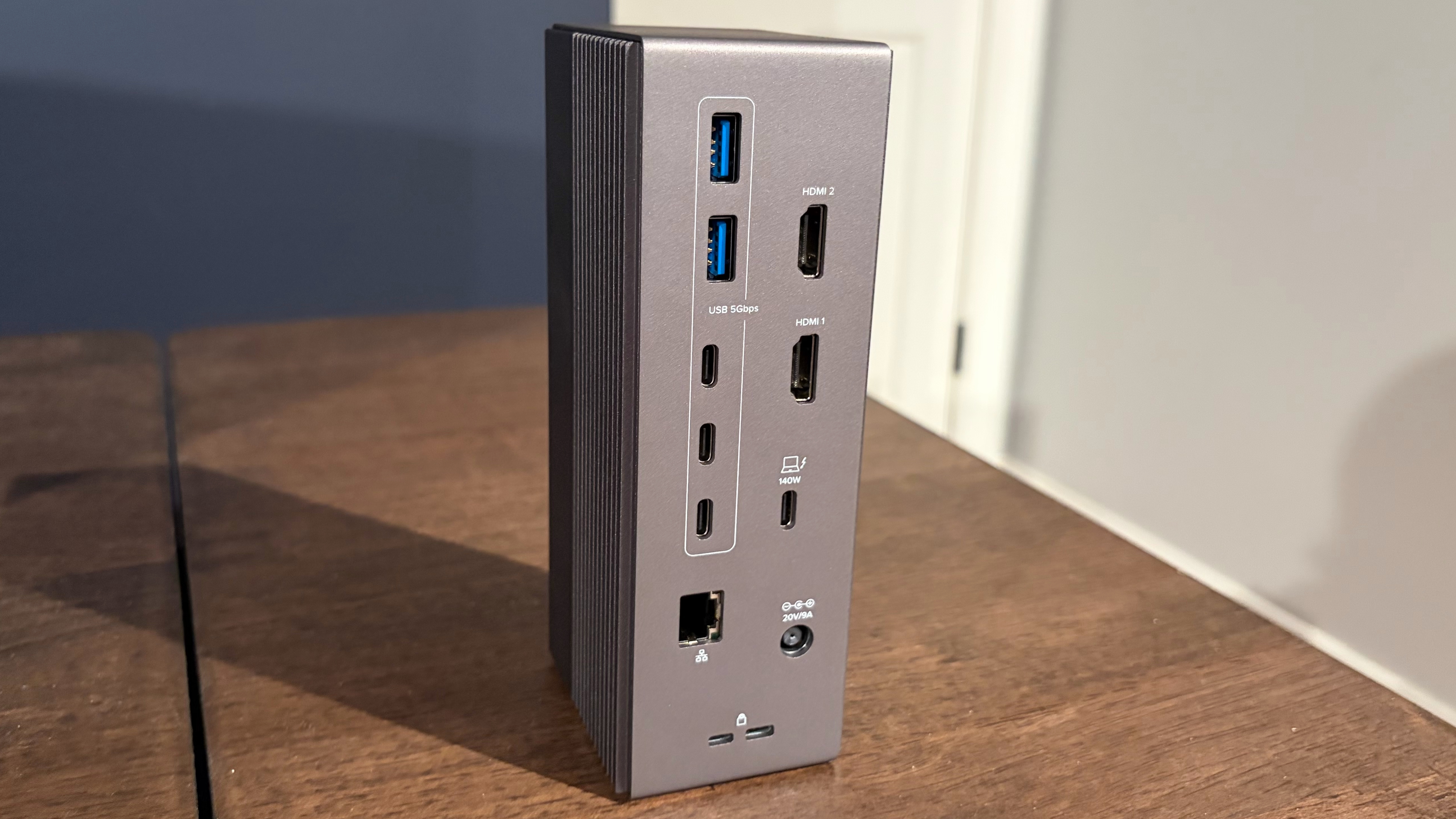
Moving to the rear of the unit, there are two more USB-A ports, three additional USB-C ports, two HDMI 2.1 ports, a 2.5 GbE port, and a Thunderbolt 5 upstream port for your laptop. And here lies my main complaint with the TBT-UDH2: it only has one downstream Thunderbolt 5 port, and it’s on the front. I would have liked to have seen at least two, with one on the front and one on the back. At this price point, having just one downstream Thunderbolt 5 port seems like a big miss.

Keychron TB5D-1

Cost

$349.99

Front Ports

1x USB-C 10 Gbps

2x USB-A 10 Gbps

1x microSD UHS-II slot

1x SD UHS-II slot

1x audio combo jack

Back Ports

1x Thunderbolt 5 upstream (140W charging to host)

2x Thunderbolt 5 downstream

2x USB-A 10 Gbps (15W PD)

2x HDMI 2.1

1x 2.5 GbE

The Keychron TB5D-1 is the other $350 Thunderbolt 5 dock assembled here today. It is similar in size to the Plugable dock, but is finished in natural aluminum. Keychron includes rubber feet on the bottom and one side of the dock, encouraging you to operate in either a vertical or horizontal orientation.

Thunderbolt 5 Docking Station Testing

(Image credit: Tom's Hardware)

You’ll find two USB-A and one USB-C port on the front, along with microSD/SD slots and a 3.5 mm headphone jack. Moving to the back, you’ll find two additional USB-A ports, two HDMI 2.1 ports, two downstream Thunderbolt 5 ports, and a Thunderbolt 5 upstream port for the host PC. For networking, there’s also a 2.5 GbE port.

UGREEN Revodok Maxidok

Thunderbolt 5 Docking Station Testing

(Image credit: Tom's Hardware)

Cost

$499.99

Front Ports

2x USB-C 10 Gbps (30W PD)

1x USB-C 10 Gbps

1x microSD UHS-II slot

1x SD UHS-II slot

1x audio combo jack

Back Ports

1x Thunderbolt 5 upstream (140W charging to host)

2x Thunderbolt 5 downstream

3x USB-A 10 Gbps

1x DisplayPort 2.1

1x 2.5 GbE

2x audio combo jack

Internal

1x M.2 NVMe PCIe 4.0 slot (supports up to 8TB)

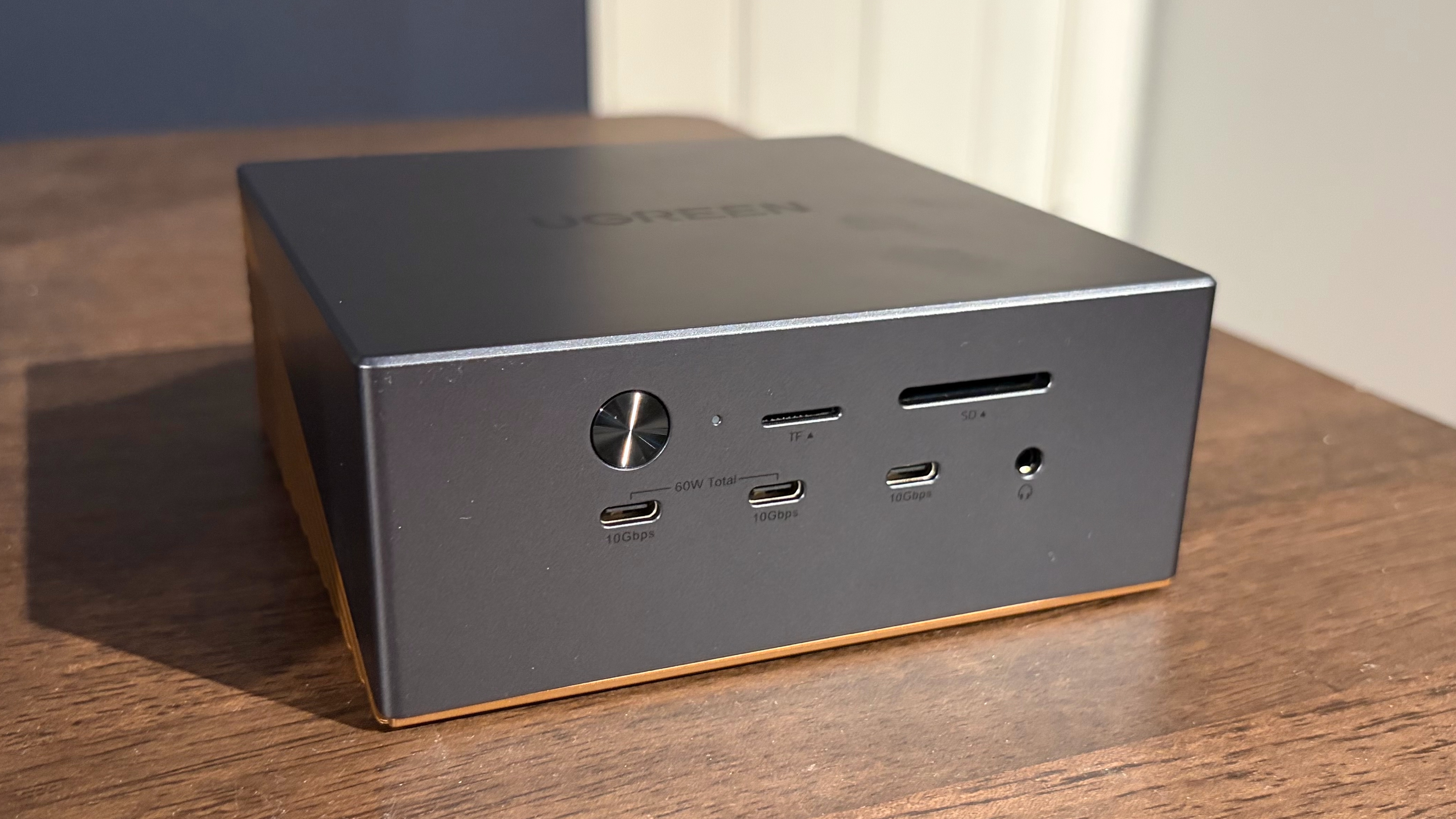
The UGREEN Revodok Maxidok is the most expensive Thunderbolt 5 dock here, with a street price of around $390. However, you do get some added functionality for the $40 price difference. At first glance, the Revodok Maxidok looks like a Mini PC with its square-ish form factor. The aluminum body is finished in a combination of dark grey (upper half) and copper (bottom half).

Thunderbolt 5 Docking Station Testing

(Image credit: Tom's Hardware)

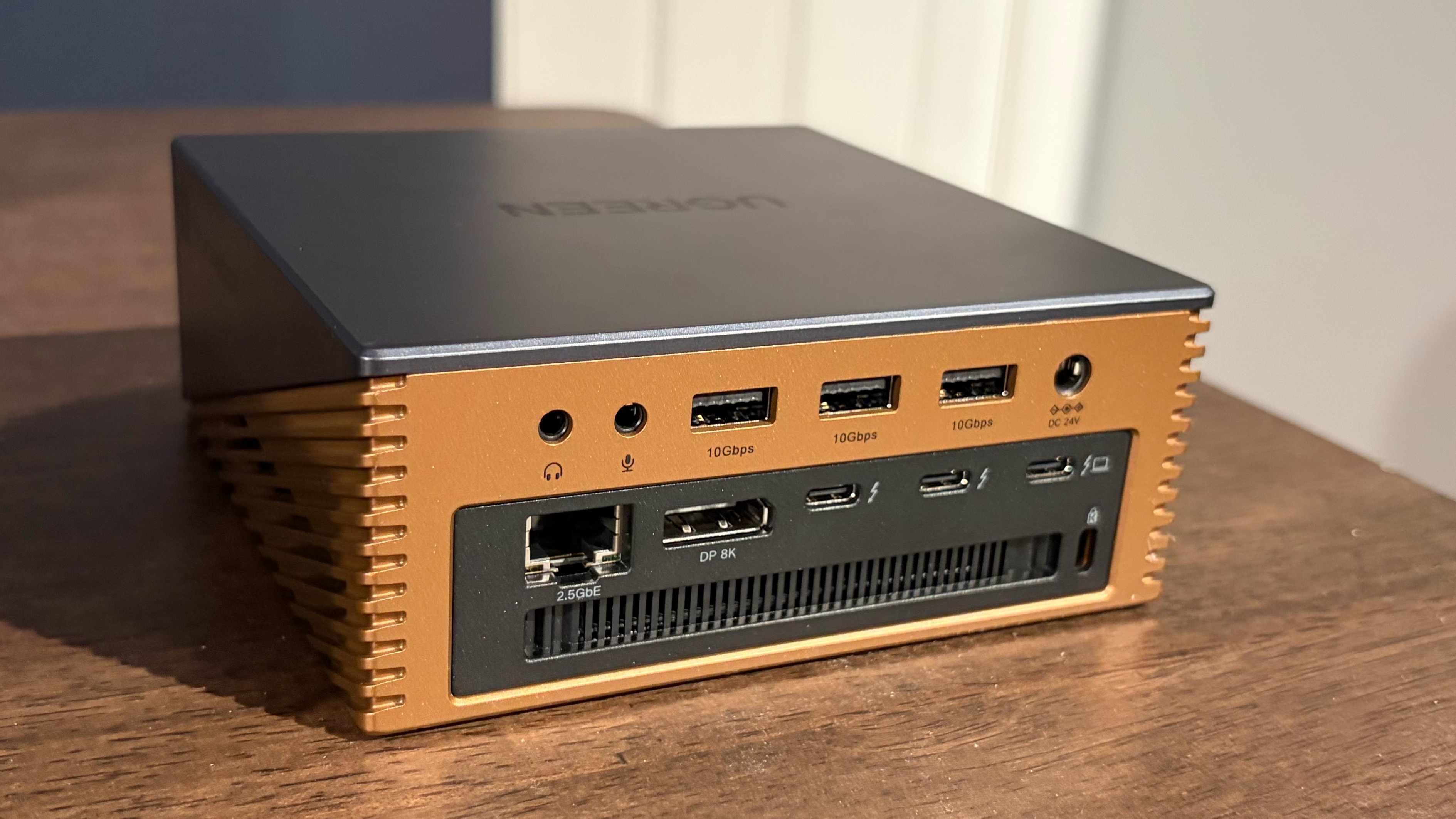
Unlike the other two docks, the Revodok Maxidok has an internal cooling fan mounted inside to help keep the electronics cool (Thunderbolt docks are notorious for their heat output). During normal operation, I couldn’t hear the fan running. I could only just barely hear it if I stuck my ear to the side of the docking station (which is, of course, not a typical usage scenario).

The front of the docking station houses microSD/SD slots, three USB-C ports (two of which support a total of 60W PD), and a 3.5 mm headphone jack. On the back, you'll find three USB-A ports, two more 3.5 mm audio ports, a DisplayPort 2.1 connector, two Thunderbolt 5 downstream ports, and one Thunderbolt 5 upstream port.

Thunderbolt 5 Docking Station Testing

(Image credit: Tom's Hardware)

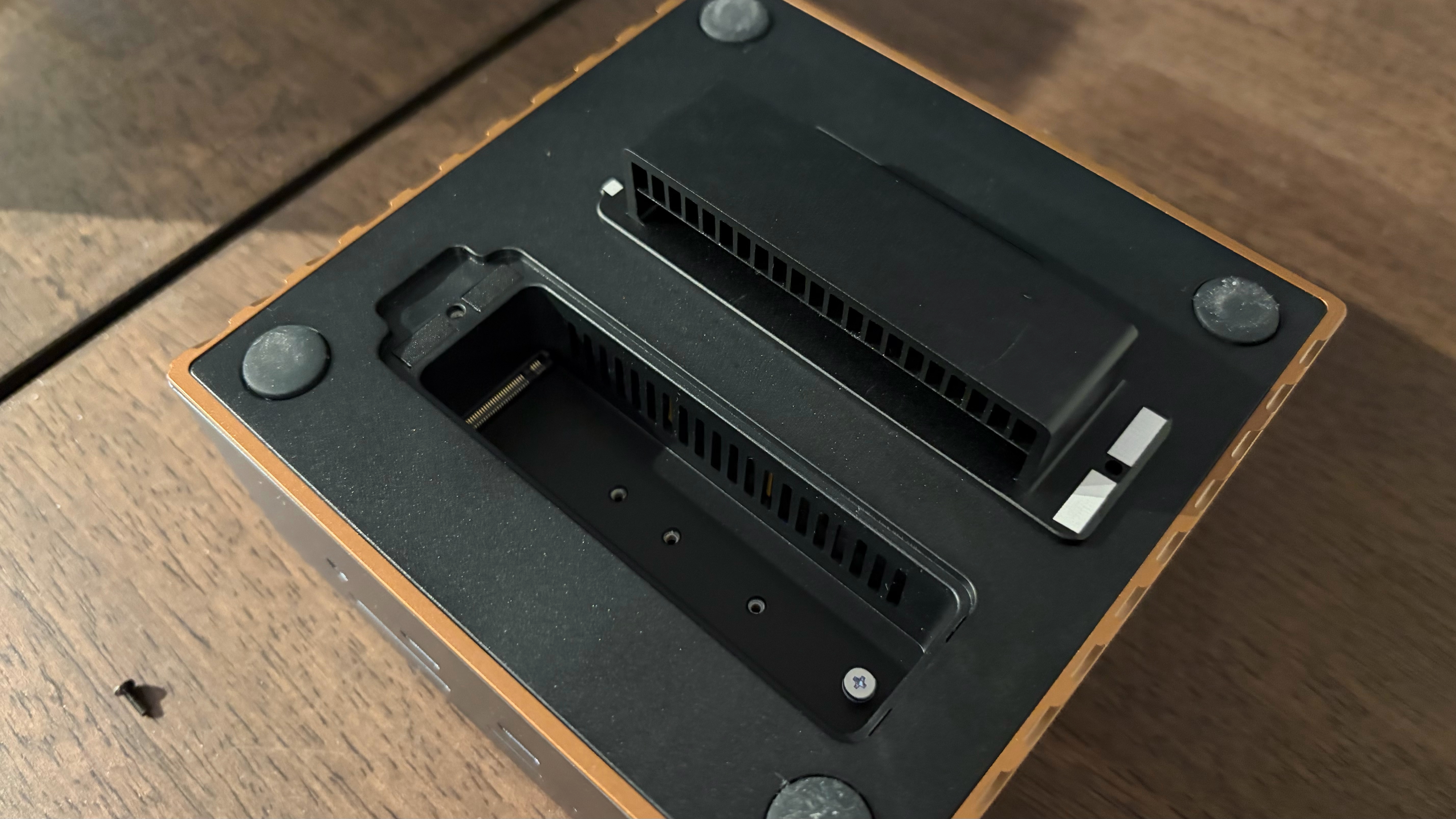
The Revodok Maxidok also has one hidden feature. If you flip the dock over, it has a cover that's held in with one screw. Remove the screw, and you'll find an M.2 slot for adding an internal SSD (up to 8TB in capacity).

Thunderbolt 5 Dock Specs Comparison

Thunderbolt 5 Ports (Downstream)

USB-C Ports (Downstream)

Downstream USB-A Ports (Downstream)

HDMI

DisplayPort

microSD/SD slot

Ethernet

PCie 4.0 M.2 slot

UGREEN Revodok Maxidok

2

3

3

N/A

Yes

Yes

2.5 GbE

Yes

Keychron TB5D-1

2

2

4

Yes

N/A

Yes

2.5 GbE

N/A

Plugable TBT-UDH2

1

5

3

Yes

N/A

Yes

2.5 GbE

N/A

Thunderbolt 5 Dock SSD Performance Testing

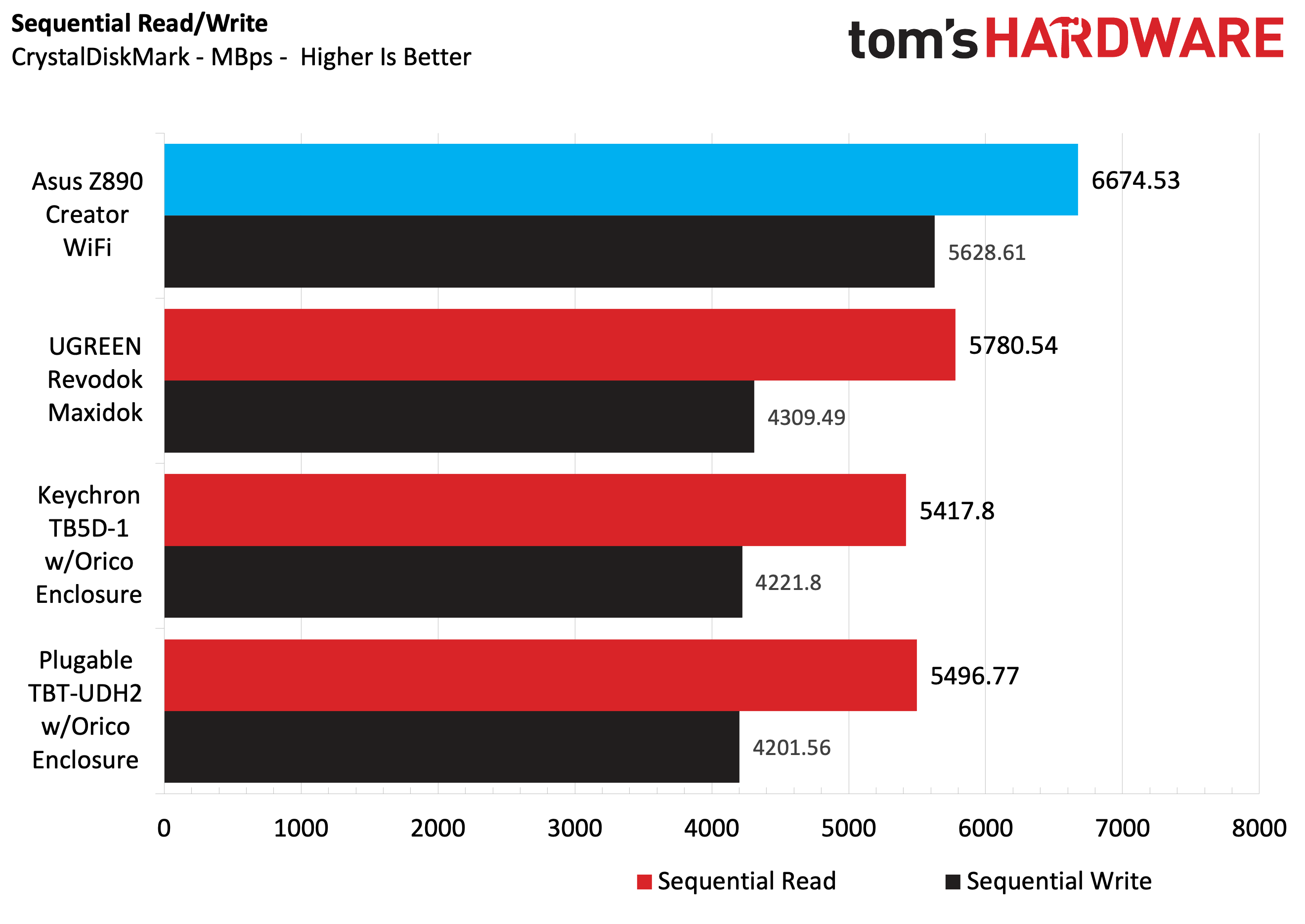
We tested SSD performance of the three docks using a 1TB Micron 2500 Series PCIe 4.0 SSD (MTFDKBA1T0QGN-1BN1AABYY). The SSD is rated for sequential read speeds up to 7,100 MBps and sequential writes up to 5,800 MBps.

For baseline performance numbers, I tested the Micron 2500 using the onboard PCIe 5.0 M.2 slot on an Asus Z890 Creator WiFi motherboard. For testing with the Keychron TB5D-1 and the Plugable TBT-UDH2, I used an Orico Thunderbolt80G enclosure with the Micron 2500 – it supports up to M.2 (PCIe Gen4x4) SSDs. The enclosure was plugged into one of the Z890 Creator WiFi’s two Thunderbolt 5 ports. For the UGREEN Revodok Maxidok, I used the native M.2 PCIe 4.0 slot with the Micron 2400.

Thunderbolt 5 Docking Station Testing

(Image credit: Tom's Hardware)

Using the Micron 2500 SSD and Asus Z890 Creator WiFi motherboard as a baseline, we saw 6,674.53 MBps reads and 5,628.61 MBps writes. Of the three docks we tested with the Micron 2500, the Revodok Maxidok was the fastest with its native M.2 PCIe 4.0 slot. It achieved 5,780.54 MBps reads, roughly 300 MBps ahead of the other two.

The Keychron TB5D-1 and the Plugable TBT-UDH2 put up nearly identical numbers using the Orico Thunderbolt80G enclosure, with around 5,400 MBps reads and 4,200 MBps writes.

All three docks had no trouble maxing out the 2.5 GbE port using iPerf3, and I didn't run into any compatibility problems running my 49-inch 240 Hz DQHD monitor using the docks via HDMI or DisplayPort connections.

While all of the docks were warm to the touch, the Revodok Maxidok was noticeably cooler thanks to its internal cooling fan.

Bottom Line

Of the three docks that we tested, the one that I felt was the most versatile and worthy of a place on my desk is the UGREEN Revodok Maxidok. It’s the only one of the docks with a native DisplayPort 2.1 connector and the only one with an internal M.2 SSD slot. In addition, it offered ever so slightly faster storage performance than using an SSD with a Thunderbolt 5 enclosure. And with a street price of $390, you’re only paying a $40 premium over the other two docks.

Thunderbolt 5 Docking Station Testing

(Image credit: Tom's Hardware)

If you prefer having two additional HDMI 2.1 ports at your disposal, the Keychron TB5D-1 is a good option as well. All of the Keychron’s USB-A and USB-C ports are 10 Gbps, while the Plugable TBT-UDH2 gives you a mix of 10 Gbps and 5 Gbps USB ports. In addition, the Keychron dock features two downstream Thunderbolt 5 ports, while the Plugable only has one.

Additional Thunderbolt 5 Docks to Consider

Although we plan to keep this guide updated as we test additional Thunderbolt 5 docks, here are some additional units to consider:

  •  

Bruxelas investe 5,8 milhões de euros nos primeiros hubs regionais de cabos submarinos. Portugal fica de fora

Além do investimento de 5,8 milhões nos dois primeiros hubs regionais, a Comissão Europeia avança agora com um novo concurso para reforçar a capacidade de reparação de cabos submarinos. As duas iniciativas fazem parte do plano de ação para a segurança dos cabos, apresentado no ano passado.

The post Bruxelas investe 5,8 milhões de euros nos primeiros hubs regionais de cabos submarinos. Portugal fica de fora appeared first on Tek Notícias.

  •  

Warming Turns Western Arctic Ocean into Drifting Hub

As the Arctic Ocean undergoes unprecedented warming due to climate change, scientists have identified a striking transformation in the western sector of this fragile marine ecosystem. Recent research published in Nature Communications reveals that this region is evolving into a dynamic hub of drifting matter, reshaping the physical and biological landscape in ways previously unanticipated. This phenomenon holds profound implications for our understanding of Arctic oceanography, the cycling of organic material, and the broader impacts of a warming planet.

For decades, the Arctic Ocean has been recognized as a critical component of Earth’s climate system, but warming temperatures have accelerated ice melt and altered circulation patterns at an alarming pace. The study by Wang, Liu, Shu, et al., delves deeply into how these changes manifest in the transport of particulate and dissolved matter. The western Arctic Ocean, once characterized by more stable, ice-influenced conditions, is increasingly influenced by warmer water masses that mobilize large quantities of drifting organic and inorganic material.

The researchers combined extensive observational data with advanced modeling techniques to investigate these transformations. Their findings paint a complex picture: as sea ice retreats, the dynamics of water flow shift, creating conduits that concentrate drifting matter in specific zones. Unlike the traditional view of the Arctic as a static ice-dominated environment, this new approach highlights its emerging role as a corridor and collector of chemical and biological detritus, redistributing materials across vast distances.

One of the most surprising discoveries is the emergence of the western Arctic Ocean as a hotspot for organic matter transport. Previously, particulate organic carbon was thought to be sequestered primarily near ice margins or continental shelves, but warming has altered circulation patterns, enhancing lateral movement. This has significant implications for nutrient cycles, as carbon and other elements hitch rides on ocean currents or floating debris, influencing biological productivity far beyond their origin points.

This drifting matter includes microplastics, phytoplankton remains, and detrital fragments, all contributing to the changing ecological fabric. The research underscores the intricate coupling between warming temperatures, ice dynamics, and biogeochemical fluxes. As warming continues, the region transitions from a repository of static ice-bound materials into an active zone of dispersal, affecting phytoplankton blooms and food web dynamics in the Arctic basin.

Moreover, the western Arctic’s role as a hub for drifting matter modifies the interactions between marine organisms and their environment. Nutrient distribution patterns affect microbial communities, which in turn regulate carbon cycling through respiration and remineralization processes. Thus, the ecological consequences ripple outward, influencing Arctic biodiversity and potentially feedback loops relevant to global climate regulation.

The authors point out that these changes could impact the delivery of terrestrial and marine-derived nutrients and pollutants. Melting permafrost and coastal erosion, exacerbated by warming, release terrestrial organic material and contaminants that then enter ocean currents. The western Arctic Ocean collects and transports these materials, serving as a conveyor belt to downstream environments, including the North Atlantic.

In terms of physical oceanographic features, the study reveals intensified flow regimes and modified eddy formation that promote retention and accumulation zones for drifting matter. This revises previous assumptions about particle dispersal and suggests that dynamic physical processes are integral to understanding carbon sequestration pathways and pollutant transport in the Arctic.

The findings also raise concerns about the fate of microplastics and other anthropogenic debris in the Arctic environment. As the region warms, increased shipping traffic and resource extraction activities add to the influx of pollutants. The western Arctic Ocean’s role as a collector of drifting matter raises the stakes for environmental monitoring and contamination assessments.

Further complicating this picture, seasonal changes in ice cover alter the timing and magnitude of drift events. Snow and ice melt can trigger pulses of organic and inorganic material movement, influencing the timing of biological productivity and ecosystem responses. These seasonal dynamics are critical to forecasting future Arctic productivity under continued climate change scenarios.

From a methodological perspective, the integration of satellite data, in situ observations, and sophisticated hydrodynamic models enabled the discovery of these patterns over spatial and temporal scales previously unattainable. This multi-disciplinary approach sets a new standard for studying complex polar systems under rapid environmental change.

The implications of this research extend beyond the Arctic itself. By altering carbon cycling and material transport, the western Arctic Ocean may influence global biogeochemical cycles and climate feedbacks. These shifts underscore the interconnectedness of Earth systems and the need for comprehensive monitoring of polar regions.

Looking forward, the study calls for increased international cooperation to monitor drifting matter and its ecological consequences. Understanding how warming reshapes Arctic oceanography will be crucial for predicting future ecosystem services, including fisheries and climate regulation.

In summary, this breakthrough research reveals the western Arctic Ocean’s emerging identity as a hub of drifting matter—a dynamic and shifting landscape shaped by warming temperatures and retreating ice. This transformation represents a paradigm shift in our understanding of Arctic ocean processes, with broad implications for carbon cycling, pollution transport, and ecosystem health in a rapidly changing world.


Subject of Research: Arctic Oceanography and Biogeochemical Cycles

Article Title: Warming transforms the western Arctic Ocean into a hub of drifting matter

Article References:
Wang, K., Liu, C., Shu, Q. et al. Warming transforms the western Arctic Ocean into a hub of drifting matter. Nat Commun 17, 5317 (2026). https://doi.org/10.1038/s41467-026-74439-5

Image Credits: AI Generated

DOI: https://doi.org/10.1038/s41467-026-74439-5

  •  
❌