❌

Reading view

Microsoft rolls out emergency update for Windows 11's latest patch — recent update causes crashes on AMD graphics, Explorer hang-ups, and broken third-party integrations

Microsoft has issued an out-of-band update for its recent Windows 11 patch, which has caused a number of bugs and issues. The September 2026 update was just released last Tuesday, and although it packs a number of new features and fixes nearly 1000 security flaws (commonplace in this day and age), there are also a few unfortunate regressions.

The 25H2 update finally reintroduces a movable taskbar, just like we've had since Windows 95, with an option to make the height smaller for compact displays. Likewise, the Start menu now has multiple configurable layouts, and you can toggle each main section on or off. Microsoft also revamped Windows Search — perhaps to finally be useful — and users can now choose to only have it display local results. Explorer got a handy tweak in the form of using KB, MB, GB size indicators, as well.

The update has also surfaced some serious bugs. First off, PCs with AMD Radeon GPUs are crashing, apparently due to the update provoking driver instability. Reinstalling the driver doesn't appear to help, and the reports unfortunately cover most contemporary AMD graphics cards. Microsoft did not mention AMD GPUs specifically in its latest update.

Microsoft noted that it has fixed an issue with Remote Desktop Services where RDS might become unstable, causing connection and sign-in failures.

Microsoft is also aware of an issue with audio output and microphone input going dead. Additionally, there are seemingly reports of audio devices starting up with a botched configuration, like tweaked 3D audio settings or speaker setups. The apparent workaround seems to be putting audio in a standard 2.0 configuration, but Microsoft has now addressed this issue in the emergency patch.

Explorer may display a black screen after logging in, leaving you with a perfectly functioning operating system but no visible UI. The File History backup feature is reportedly not detecting external drives, effectively making it useless. Of particular concern to enterprises, systems administrators, and homelabs, the Remote Desktop Service is also experiencing issues. Last but not least, Microsoft says it has addressed an issue where Claude Cowork is nonfunctional due to the update breaking HC-managed Linux VMs with Plan9 shared folders

Owners of HP and Lenovo systems are also advised to consider holding off on this update. Ever since the August 2026 patch (and now, cumulatively, with the September update), there are reportedly serious issues on both camps. On the HP side, there are instances of the update triggering BIOS corruption, leading to a failed install with no ability to recover the OS — though seemingly the OEM has published a new BIOS revision, so it's hard to say which side is to blame. Meanwhile, Lenovo users might have their machines black-screen or shut down out of the blue, seemingly due to power mismanagement.

While it's heartening to see that Microsoft has significantly increased its Windows development speed and is seemingly listening to customer feedback, a string of bugs after a major feature update are still common.

  •  

12+ reasons to update to iOS 27 today

While we wait to see if Apple really is experiencing huge demand for its newly introduced iPhones, today’s the day every iPhone user gets a completely new device experience, with iOS 27 rolling out internationally, along with the other members of Apple’s 27 series OS family. If you’re on the fence about installing the new release, here are 12 reasons you should upgrade today.

Speed and performance

Apple seems to have worked hard to improve speed and performance in this release. Everything feels much zippier, but where it seems most noticeable is when launching apps. Apple says these now open up to 30% faster, while AirDrop transfers are almost twice as fast as before.

Liquid Glass looks nicer

With the 20th anniversary glass iPhone waiting in the wings, Apple isn’t going to get rid of Liquid Glass. But the company is prepared to iterate the look, and iterate it has, with sharper icons, improved contrast, and a new slider control that lets you set the UI’s transparency.

Use two iPhones

iPhone Handoff lets you use one eSIM across two devices on supporting carriers. Once set up it’s remarkably easy to use — your SIM activates the moment you unlock one of your iPhones. Better still, if you use two lines on one device, you’ll find these both transfer across too.

Siri AI

We’ve been talking so much about Apple’s improved Siri that I demoted it to fourth place; that’s not a reflection on what it does, but on how often you’ll have seen how it has become so much better at understanding context. It now has a Chat GPT-like interface, a standalone app, and powerful on-screen awareness to help get things done. Sadly, many of these features aren’t available in the EU.

Notes, Calendar, Reminders

AI is everywhere, including in Reminders Smart Suggestions, which can read your Messages chats and prompt you to set reminders for agreed tasks. Notes also gains Markdown copying.

Shortcuts to imagination

You can now create a shortcut just by describing what actions you want it to take. Apple Intelligence will string a shortcut together for you, which you can then use across all your systems.

Notify Me

Safari can watch a web page and automatically let you know when it changes. That’s not the only improvement; Apple Intelligence automatically groups your open tabs into topics so related pages are easier to find.

DIY: Safari extensions

I feel like this feature hasn’t had the attention it deserved, but you can now get Apple Intelligence to build you extensions in Safari. Just tap the three-line menu on the left of the address bar, choose Describe Extension, and let the fun begin.

Smarter Photos tools

Spatial Reframing is amazing; it lets you extend backgrounds and reframe subjects using AI. The upgraded Clean Up tool removes distractions even more easily than before. 

Passwords auto-fix

Apple’s Passwords app now does an even better job of keeping your online world safe, as it can now automatically visit a website to sign in and swap a weak or compromised password for a stronger one. 

Parental control improvements

Apple has really thought about child protection. Parental controls have had a huge overhaul, including the introduction of new Ask to Browse, Ask to Buy, contact calling approval and settings to protect minors against nudity, gore, and violence. These arrive alongside new scheduling function which manages which apps kids can use during school hours, meals, or bedtime.

Maps is amazing

Maps now uses aerial imagery and vision intelligence models when you use Flyover. It makes for much more detail, and a real sense of immersion.

Mail is better

While you’ll have to wait for search indexing to complete, Mail has become faster to load with better search results and more accurate unread counts. (Though that’s a little moot for this writer, who currently has 4,719 unread emails.) Spotlight has also been improved with smarter, more relevant suggestions. 

The new operating systems are expected to be made available at around 10am PDT. One more thing? They are bound to include security updates, which you likely need. 

Please subscribe to my daily, human-curated Apple-related news headline feed at The Core, or follow me on Bluesky, LinkedIn, or Mastodon.

  •  

September Patch Tuesday: 963 CVEs, 2 exploited flaws, 1 message

Microsoft’s September 2026 Patch Tuesday is the year’s largest release, with 963 CVEs requiring customer action, 106 rated critical. Two are already exploited: CVE-2026-81963 in the Windows Update Stack and CVE-2026-85880 in Advanced Local Procedure Call. Nothing in this release was publicly disclosed ahead of the patch. Readiness recommends a Patch Now scheduling for Windows, Office, SQL Server and the developer tooling, and standard patch release for Exchange. The Readiness team has published an infographic summarising deployment risk by product family.

Known issues

Three client issues are carried in from August close with this update, covering:

  • Microsoft Teams and the new Outlook failing to launch on ARM devices, such as the Surface Pro 11 and Surface Laptop 7, is resolved by KB5124008. The issue originated in August’s KB5121003 and was most likely on freshly imaged machines that had not yet taken Microsoft Store updates.
  • The same update resolved both desktop backgrounds reverting to solid black and mouse cursor customisation resetting on non-English installations. Both originated in the 27 August preview, KB5120998.

And Microsoft has left open a Microsoft Defender Antivirus notification defect, confirmed on 28 August, in which devices report that Defender is turned off while it is running correctly.

Major revisions and mitigations

The quietest revision window of recent months arrived alongside the largest release. Between the August and September Patch Tuesdays, from 12 August to 7 September, the MSRC Security Update Guide touched 324 CVEs. Of those, 307 were routine Microsoft Edge and Chromium republications requiring no customer action.

That leaves 17 entries affecting Microsoft’s own products, and only one of those is a genuine revision. CVE-2026-59133, an elevation of privilege in the High-Performance Computing Pack, moved to version 1.1, and its own revision note records the change as informational. For comparison, August’s window carried 76 revisions to Microsoft’s own products, 60 of them flagged as requiring customer action.

The Readiness team has reviewed all 963 published updates. Microsoft has published no mitigations and no workarounds anywhere in this release.

Windows lifecycle and enforcement updates

Microsoft has published no new service or enforcement deadlines for September. The lifecycle picture is different, with multiple end-of-support notices for this coming October:

  • The retail Office 2021 family retires in full, including Access, Excel, Outlook, PowerPoint, Project, Publisher, Visio and Word.
  • Office LTSC 2021 reaches end of support, and that includes Skype for Business LTSC 2021.
  • Windows 10 2016 LTSB and Windows 10 IoT Enterprise LTSB 2016 reach the end of extended support.
  • Windows Server 2012 and 2012 R2 reach the end of Extended Security Update Year 3. This is the final ESU year for both, not a step to a fourth.
  • Windows 11 Home and Pro version 24H2 reaches the end of updates.
  • Windows Server 2022 moves from mainstream to extended support, where it stays until 14 October 2031.

A second wave follows on 10 November 2026, and it is the one most likely to catch development teams rather than infrastructure teams. .NET 8 reaches the end of its long-term support branch, PowerShell 7.4 does the same, and Windows 11 Enterprise and Education 23H2 ends servicing alongside Windows 11 IoT Enterprise 23H2.

Microsoft’s test guidance for this release runs to 466 Windows entries, 55 of them flagged as high risk, against 109 and four in August. Given the large number of updates this month (who would have thought that we would be here at 963 CVEs), the Readiness team recommends the following testing priorities:

  • Printing. Print from 32-bit and 64-bit applications to physical and virtual printers, exercise XPS and PDF output, share a printer from a print server and print from a separate client, cancel a job mid-queue, and confirm the queue reflects every state change. This is 20 of the 55 high risk flags, and it is the single most likely source of a visible regression.
  • Fonts, graphics and imaging. Render varied fonts, sizes and styles across browsers, Office, PDF viewers and Notepad, confirm Print Preview matches the printed page, and open JPEG, TIFF, HEIF and raw images across Explorer, Photos and Office. Watch for clipping, distortion and missing glyphs.
  • USB Devices. Exercise device attachment and removal. Attach and remove USB audio, video and mass storage devices repeatedly, including through a hub, pair and unpair a wireless device, and confirm each enumerates and releases cleanly. Device Association carries seven high risk flags, and these drivers load whenever hardware is attached.
  • Remote Desktop. Open several concurrent sessions, enable printer, clipboard, audio, drive and smart card redirection together, disconnect and reconnect, and confirm redirected devices reattach.
  • Storage (ntfs.sys, spaceport.sys). This is a real hotspot for updates this month, but no high-risk changes. Test on hardware you can recover, because the storage changes reach the boot path, potentially resulting in a dead (test) machine.

Each month, we break down the update cycle into product families, as defined by Microsoft, with the following groupings.

Browsers

Microsoft has not released any updates for their browser products for the second month in a row. September’s Security Update Guide carries no Edge-specific CVEs at all, and the 307 Chromium republications in the revision window required no customer action. The nine Edge CVEs that did appear arrived mid-cycle on 28 August and were serviced through the browser’s own update channel rather than this release.

Estates on a managed Edge channel have nothing to do here beyond confirming the channel is current. It is the one quiet corner of an otherwise heavy month.

Microsoft Windows

Windows carries 726 CVEs, 77 of them critical, which is three-quarters of the entire release. Elevation of privilege dominates by volume at 406 entries, with remote code execution second at 156, information disclosure at 94 and denial of service at 47. The pattern is the reverse of the severity picture: the bulk is local elevation, while the critical-rated entries cluster in the network-facing roles.

  • Biometrics is a real focus this month as the Windows Biometric Service takes 64 fixes, the largest single-component count of the year. Most of the security issues are heap overflows that give a local attacker SYSTEM. Windows Hello adds nine, all critical. Patch it promptly on any estate using fingerprint or facial sign-in.
  • Windows DHCP Server leads at 36 entries and is topped by remote code execution at CVSS 9.8. Windows DNS Server takes 10 more, also reaching 9.8. Critical remote code execution also lands on Message Queuing, RRAS, Services for NFS, the HTTP Print Provider, Windows Shell, Netlogon, Internet Connection Sharing, SSTP and Failover Cluster, all at 9.8. Patch the resolvers, the DHCP servers and the domain controllers first.
  • Storage is the heaviest it has been this year. NTFS takes 29 fixes, Spaceport.sys behind Storage Spaces takes 17, and the Overlay Filter takes seven, with the Volume Manager, VHD miniport, iSCSI and Storage Port drivers behind them. These reach the boot path, so stage them on recoverable hardware.
  • The rest of the most-patched tally runs Win32k at 19, Microsoft Standard XPS at 18, Windows Error Reporting at 12, and the Windows Kernel, Windows Search, the Print Spooler and the Device Association Service at 11 each.

Add this Windows update to your Patch Now schedule, with DHCP and DNS servers first and the biometric stack close behind.

Microsoft Office

Microsoft released 137 Office CVEs this month, 24 of them critical, with remote code execution the through-line at 69 entries and information disclosure close behind at 52. September breaks the recent pattern in a way that matters for deployment: this wave is not MSI-only.

  • Click-to-Run estates are squarely in scope. Roughly 105 of the Office CVEs reach Click-to-Run, so Microsoft 365 Apps, Office 2019, LTSC 2021 and LTSC 2024 all update, on Windows and on Mac. Word takes 35 fixes, Excel 32, PowerPoint 10 and Outlook seven. The heaviest client entries are CVE-2026-78510 in Word and CVE-2026-78509 in Outlook, both critical remote code execution at CVSS 9.8, in document-rendering paths that fire on preview or open.
  • SharePoint Server Subscription Edition takes 16 entries and is the only SharePoint baseline with a package this month. Server updates cannot be uninstalled and always require a reboot, so validate in a maintenance window.
  • Skype for Business Server takes 10 entries, led by CVE-2026-66302, a critical remote code execution at CVSS 9.8. Patch it and note that the LTSC 2021 edition leaves support on 13 October 2026.

Nothing in Office is exploited this month. With 24 critical-rated entries and the Click-to-Run channel carrying most of the exposure, the September Office updates belong on the Patch Now schedule regardless.

Microsoft Exchange and SQL Server

Exchange is quiet and SQL Server is not, which inverts the usual relationship between the two.

  • Exchange Server takes nine CVEs across 2016 CU23, 2019 CU14 and CU15, and Subscription Edition. None is critical and none is exploited, though the highest reaches CVSS 9.3. The mix runs to two remote code execution entries, two elevations of privilege, two spoofing, and one each of tampering, denial of service and information disclosure. Apply the update from an elevated command prompt, because an un-elevated run leaves Exchange services partially patched and broken, then confirm mail flow, Autodiscover and any hybrid connection before returning the server to service.
  • SQL Server takes 62 CVEs, four of them critical, across the 2017, 2019, 2022 and 2025 branches. There is no 2016 package this month. Remote code execution leads at 24 entries, with information disclosure at 22. The critical entries are CVE-2026-67631 and CVE-2026-67643 at CVSS 8.8, and CVE-2026-67378 and CVE-2026-67636 at 8.5.
  • Eight SQL packages ship, a CU+GDR and an RTM+GDR for each branch: 2025 (KB5122769, KB5122770), 2022 (KB5122768, KB5122771), 2019 (KB5122772, KB5122773) and 2017 (KB5122774, KB5122775). Microsoft’s guidance is explicit that the baseline or RTM version must be installed first and the GDR patch applied on top; test the install and the removal on every servicing branch you run, then restart the service and confirm Always On availability groups stay healthy.

Exchange goes on the Schedule list, and SQL Server goes on the Patch Now list. That is an unusual split, and it is driven by the four critical remote code execution entries on the database estate.

Microsoft Developer Tools

Microsoft released 24 CVEs across its developer tooling this month, 23 rated important and one critical. Security feature bypasses are the main focus with eight CVE entries, with remote code execution and information disclosure at four each.

  • The single critical entry is CVE-2026-34182 at CVSS 9.1, a flaw in CMS AuthEnvelopedData processing that allows forged messages to be accepted. It reaches Visual Studio 2017 through 2022.
  • The highest-scoring entry in this family is not the critical one. CVE-2026-81376, a Visual Studio Code security feature bypass, reaches CVSS 9.6 while carrying an important rating. It is a useful reminder that severity labels and CVSS scores answer different questions.
  • Visual Studio Code and its Copilot extensions take 10 entries, mostly security feature bypasses. Update the editor and confirm workspace trust prompts, extension installation and remote sessions behave as configured.
  • .NET ships SDK updates on all three supported lines, x64 and x86: 8.0.131 and 8.0.425, 9.0.121 and 9.0.318, and 10.0.112 and 10.0.401. Install them, then build and run a representative project to check for regressions. Keep the 10 November date for .NET 8 in view while you are in there.
  • The .NET Framework ships monthly rollups per operating system: Windows Server 2012 (KB5126147), Server 2012 R2 (KB5126148), Windows 10 1809 (KB5126144), 21H2 (KB5126145), 22H2 (KB5126146) and Server 2022 (KB5126149). One gap worth noting: the 4.7.2 package for Windows 10 1607 is listed as pending and will follow, so estates still on 1607 will not complete their Framework patching this cycle.

Add these to your standard release schedule, behind this month’s Windows, Office and SQL Server priorities. Keep the 10 November date for .NET 8 and PowerShell 7.4 in view while you are in the developer estate, because a patch this month does not extend either branch.

Adobe (and third-party updates)

September is the largest release of the year, and this (crazy, super high) volume is the least interesting thing about it. The 963 CVEs matter less than the 55 entries Microsoft flags as high risk, and those sit in printing and fonts. Adobe shipped two Acrobat builds one digit apart and only the second is a security update (nothing to worry about here). Of the CVEs Microsoft republished, 25 are not Microsoft’s. A version number tells you very little about the work in front of you. So, given my (super-secret knowledge) of how Microsoft operates over the summer, here is my prediction for next month (October). It won’t be as big as this month – but just you wait – November is going to be big. Let’s up those numbers (or not).

  •  

Microsoft’s Patch Tuesday updates: Keeping up with the latest fixes

Long before Taco Tuesday became part of the pop-culture vernacular, Tuesdays were synonymous with security — and for anyone in the tech world, they still are.  Patch Tuesday, as you most likely know, refers to the day each month when Microsoft releases security updates and patches for its software products — everything from Windows to Office to SQL Server, developer tools to browsers.

The practice, which happens on the second Tuesday of the month, was initiated to streamline the patch distribution process and make it easier for users and IT system administrators to manage updates. Like tacos, Patch Tuesday is here to stay.

Patch Tuesday coverage has long been a staple of Computerworld’s commitment to provide critical information to the IT industry. That’s why we’ve gathered together this collection of recent patches, a rolling list we’ll keep updated each month.

In case you missed a recent Patch Tuesday announcement, here are the latest six months of updates.

September Patch Tuesday: 963 CVEs, 2 exploited flaws, 1 message

September’s Patch Tuesday is Microsoft’s biggest of 2026, with 963 CVEs, two exploited flaws and a clear message: prioritize Windows, Office and SQL Server.

Two vulnerabilities are already exploited: CVE-2026-81963 in the Windows Update Stack and CVE-2026-85880 in Advanced Local Procedure Call. Nothing in this release was publicly disclosed ahead of the patch. Readiness recommends a Patch Now scheduling for Windows, Office, SQL Server and the developer tooling, and standard patch release for Exchange.

Get more info on the September 2026 Microsoft security updates.

August’s Patch Tuesday is a monster: 751 fixes, with an exploited Windows flaw

Microsoft’s August 2026 Patch Tuesday closes at 751 CVE entries (across all product families), with 108 rated as critical. One flaw is already exploited, CVE-2026-68820, an elevation of privilege in the Windows WinSock driver (afd.sys). Two more were disclosed but not exploited.

This security-only release earns Patch Now for Windows, Office and Exchange; no SQL Server updates this month. Unfortunately, several critical issues affect server roles: Windows DNS Server carries a cluster of critical RCEs; Windows DHCP Server is the most-populated Microsoft product family at 14 entries. Testing should lead with printing and fonts and the Remote Desktop client, then a WinSock smoke test given the exploited afd.sys flaw.

Get more info on the August 2026 Microsoft security updates.

July’s Patch Tuesday sees an end-of-support collision amidst a massive, record-setting patch wave

Microsoft addressed 722 CVEs this month once the 427 Chromium upstream relays are set aside — roughly three times a normal cycle and one of the largest single months in recent memory. Two vulnerabilities arrive under active exploitation: an elevation of privilege in Active Directory Federation Services (CVE-2026-56155), and an elevation of privilege in SharePoint Server (CVE-2026-56164). A third, a BitLocker security feature bypass (CVE-2026-50661) is publicly disclosed but not yet exploited.

The July 2026 Patch Tuesday earns Patch Now recommendations for Windows, Office, Exchange, and SQL Server. SharePoint has two critical RCEs on top of its exploited zero-day, and Exchange Server returns with a critical on-premises spoofing flaw. Adding to our (dear) administrator’s efforts, SharePoint Server 2016/2019 and SQL Server 2016 all reach end of support today.

More info is available here on Microsoft Security updates for July 2026.

For June, Patch Tuesday means an IT scramble

Microsoft this month released 206 updates affecting Windows, Office, Exchange Server, and its developer tools — including three Windows vulnerabilities already publicly disclosed. That trio includes an elevation of privilege in the Collaborative Translation Framework (CVE-2026-45586), a denial of service in HTTP.sys (CVE-2026-49160), and a BitLocker security feature bypass (CVE-2026-50507). At the moment, none appear to be under active exploitation, but all three are rated “Exploitation More Likely.” 

Even without an exploited zero-day, the June 2026 Patch Tuesday release requires Patch Now recommendations for Windows, Office, and Exchange. The latter is back in the patch picture with a consolidated security update that Microsoft recommends installing “as soon as possible.”

More info is available here on Microsoft Security updates for June 2026.

For May, Patch Tuesday means 139 updates — but no zero-days

Microsoft this month released 139 updates affecting Windows, Office, .NET, and SQL Server (though there were no updates for Microsoft Exchange Server). Despite the absence of zero-days, the May Patch Tuesday update still requires Patch Now recommendations for Windows and Office. 

The combination of three unauthenticated network RCEs (Netlogon, DNS Client, and SSO Plugin for Jira and Confluence), four Word Preview Pane RCEs, the large TCP/IP vulnerability cluster, and the carry-over BitLocker recovery condition (still active on Windows 10 and Windows Server) warrants an accelerated deployment release schedule. 

More info is available here on Microsoft Security updates for May 2026.

Microsoft’s Patch Tuesday release for April is a whopper

Windows admins are going to be busy this month, dealing with the largest Patch Tuesday cycle in memory. The April release involves 165 updates and roughly 340 unique CVEs from Microsoft — including two zero-days, one of which is already being actively exploited in the wild. 

The Readiness team recommends “Patch Now” schedules for nearly every major product family: Windows, Office (with a zero-day), Microsoft Edge (Chromium), SQL Server, and Microsoft Developer Tools (.NET). April also brings Phase 2 of Microsoft’s Kerberos RC4 hardening with full enforcement set for July. There is a lot to cover, so here’s a useful infographic mapping the deployment risk for each platform.

More info is available here on Microsoft Security updates for April 2026.

  •  

Windows 11 can now reinstall itself from the cloud — Cloud Rebuild revives dead systems without secondary boot media, wipes broken installation and downloads a fresh copy of the OS

Microsoft has finally solved one of the biggest pain points of Windows with the rollout of Cloud Rebuild. The new recovery feature can reinstall Windows 11 even when an existing Windows installation is corrupt or refuses to boot. Available as a beta through the newly released Windows 11 Insider Beta Preview Build 26220.9343, the feature is essentially a hassle-free alternative to creating a Windows installation USB drive when a PC needs to be recovered.

According to Microsoft, Cloud Rebuild is designed to restore a Windows 11 PC to a “clean, known-good state” by downloading a fresh image of Windows along with the required drivers directly through Windows Update. Unlike the existing Reset this PC functionality, it does not depend on the health of your existing Windows installation, nor does it require users to have a USB drive or custom recovery image available.

The Cloud rebuild feature available in Windows Recovery

(Image credit: Microsoft)

Available via the Windows Recovery Environment (WinRE), users can access it by selecting Troubleshoot > Recovery and uninstall > Cloud rebuild from WinRE. Speaking of which, Microsoft has also improved networking support in WinRE. The recovery environment can now reuse eligible Wi-Fi profiles saved within an existing Windows installation, allowing a PC to connect during recovery without requiring administrators to separately configure Wi-Fi credentials in WinRE. Once the PC is connected, Cloud Rebuild checks Windows Update for the target Windows build and downloads the required files. Users can then confirm the Windows edition, language, and build before starting the reinstall.

The only catch here is that Cloud Rebuild completely wipes the system drive, meaning that the process removes all data stored in your main installation or C: drive, including locally stored files, accounts, applications, and settings, before reinstalling Windows. Thus, it is recommended to back up all your important files either locally or using a cloud-based service before starting the process. Once the installation is complete, the PC boots into the Windows out-of-box experience, similar to a fresh installation of Windows. For admin-managed PCs using Windows Autopilot and Microsoft Intune, the system can automatically reconnect to the organization's management infrastructure and restore assigned applications, policies, and backed-up settings.

Cloud Rebuild could particularly be useful when Windows becomes too corrupted to boot normally. Instead of finding another PC, creating installation media, and manually reinstalling Windows, users can potentially perform the entire recovery process directly from WinRE. The feature is still in preview; however, we can expect a wider release later this year.

  •  

Qualcomm’s next Snapdragon mobile chip comes into focus with on-device AI

Qualcomm is taking an unusual approach to the launch of its next-generation premium Snapdragon mobile platform this year. Instead of holding everything for its annual Snapdragon Summit in Maui happening later this month, the company has been methodically disclosing the architecture that will power the next wave of flagship Android phones over the past couple of weeks.

First, the company disclosed its new Oryon CPU architecture, followed by a major overhaul of its Adreno GPU. Today, Qualcomm is detailing the next-generation Hexagon NPU that will serve as the platform’s primary AI engine.

Taken together, the disclosures give us a pretty good picture of where Qualcomm is going before we even know the chip’s official name.

There is obviously a strong performance story here, anchored by a 5GHz CPU, but the more interesting theme running through the architecture is memory locality and specialized AI acceleration. Qualcomm is trying to keep more data close to the compute resources that need it, while distributing AI workloads across the CPU, GPU and NPU.

These architectural changes are important as the company continues to drive on-device AI beyond relatively simple generative features toward more persistent, agentic workloads.

Oryon hits 5GHz, bolstered by FlexCache

Qualcomm disclosed in August that its next Oryon CPU will be the first mobile CPU to reach 5GHz. The eight-core design includes two 5GHz Prime cores and six Performance cores, with Qualcomm attributing the frequency gains to its fully custom Oryon microarchitecture, an in-house Arm-based CPU design that gives the company full control over the cores, cache and memory hierarchy, branch prediction and CPU subsystem.

The 5GHz headline is certainly going to get attention. However, Qualcomm’s new FlexCache architecture may ultimately have a larger impact on sustained performance. FlexCache allows Oryon’s Prime and Performance cores to tap into the same shared cache pool, with capacity dynamically allocated based on the workload. So rather than a demanding core being limited to a fixed slice of cache, it can draw on more of the available pool when needed. This keeps larger working data sets close to the CPU cores and reduces high-latency trips out to system memory.

This approach should benefit everything from gaming and multitasking to content creation, but it also aligns well with agentic AI workloads, where tasks may move through several stages of processing and across different CPU cores. The basic goal is straightforward: keep the CPU fed and avoid expensive trips to external memory.

Qualcomm’s next-gen Adreno GPU adds dedicated AI engines

Qualcomm’s next disclosure focused on graphics, where the company is making one of the more significant changes to its Adreno GPU engine in recent years. The new GPU adds dedicated Adreno Matrix Cores for running AI models directly inside the graphics pipeline. They’re paired with 18MB of Adreno High-Performance Memory, or HPM, which provides low-latency local storage for tile-based rendering, frame buffers and GPU compute.

Qualcomm claims HPM provides a 12% power improvement compared to its previous-gen Snapdragon 8 Elite Gen 5.

The more visible feature for users, however, may be Adreno Neural Fusion, which combines AI super resolution, neural processing and frame generation in a unified graphics pipeline. There are obvious parallels here to what NVIDIA, AMD and others are doing with neural rendering on the PC, though Qualcomm’s next-gen Snapdragon SoC has to operate within a much tighter mobile power envelope.

Qualcomm claims enabling Neural Fusion reduces power consumption by up to 40% in its internal testing using the company’s Dragon Alley graphics demo. That’s an impressive number, though as always, we’ll want to see how the technology behaves across actual shipping games and devices before drawing any definitive conclusions.

Qualcomm has also helped integrate Neural Fusion technology into Unity and Unreal Engine, which may ultimately be just as important as the underlying hardware. Developer adoption determines whether features like this become meaningful platform advantages or just another tick box on a spec sheet.

Qualcomm’s Hexagon NPU is being reworked for agentic AI

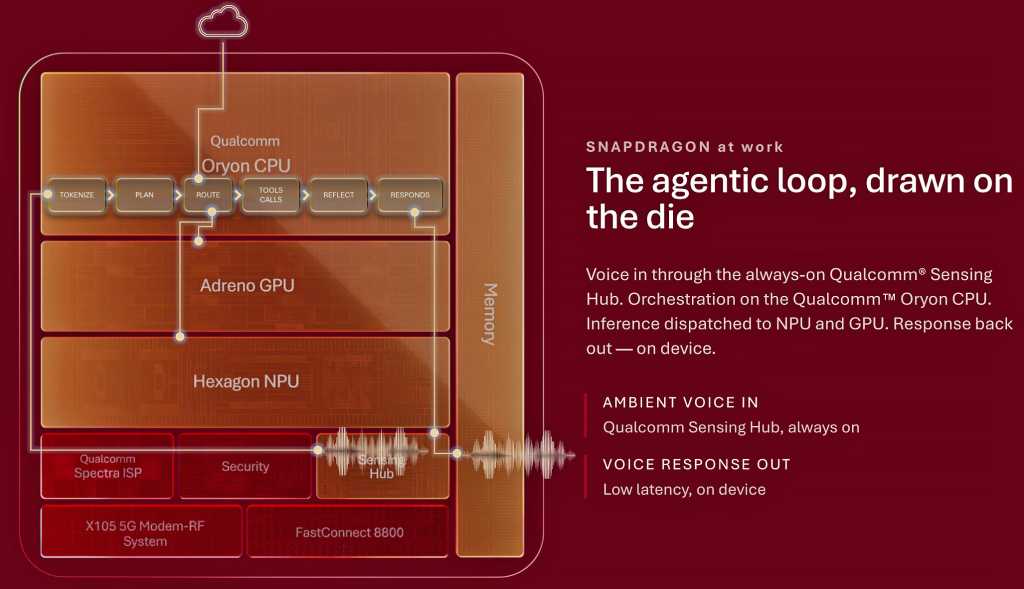
Qualcomm Snapdragon at work: The agentic loop, drawn on the die.

Qualcomm

The most recent disclosure centers on Qualcomm’s Hexagon NPU, where the broader architecture starts to come together. The company’s next-generation Hexagon introduces a new Element Accelerator designed for transformer workloads, alongside its existing vector and scalar processing resources. Qualcomm says the new block is optimized for fast action loops, key-value (KV) cache acceleration and context lengths of up to 32K.

Hexagon is also getting 50% more shared memory, and again, that memory complement is important. Model state, context and KV-cache data can generate substantial memory traffic, particularly with larger language models. Keeping more of that data close to the NPU can reduce latency and power consumption. Qualcomm says the architecture is designed for long-context reasoning, multimodal models, concurrent agents and low-latency action loops.

For INT4 quantized models, the company claims up to a 50% improvement in pre-fill performance versus its previous-generation Snapdragon 8 Elite Gen 5. Qualcomm is also targeting Mixture-of-Experts, or MoE, models as large as 30 billion parameters. In its example, the company points to a 30B model that activates only about 3 billion parameters during a given token-generation step. That selective approach is a natural fit for the tight power and memory constraints of a handset.

Qualcomm isn’t suggesting that a smartphone will simply run a 30B dense model entirely from DRAM, however. By activating only the experts needed for a particular task, MoE architectures can dramatically reduce active compute and memory bandwidth requirements, potentially making much larger classes of AI models practical on mobile hardware.

Qualcomm’s next-gen Snapdragon mobile impact

There is a larger competitive story here as well. For years, flagship smartphone competition largely came down to CPU, GPU, modem performance and power efficiency. AI is now another major area of differentiation, and Qualcomm is clearly designing its next-gen Snapdragon mobile platform around this need.

Apple has the advantage of controlling its silicon, operating system and software stack end-to-end. MediaTek continues to push aggressively into premium Android devices as well. Qualcomm’s response is to make its custom Oryon CPU, Adreno GPU and Hexagon NPU work more like a fully integrated compute platform, tuned for modern AI and agentic workloads.

This is a solid advantage for Android handset OEMs because many don’t have the resources to engineer this level of silicon integration themselves. Qualcomm can effectively provide its Android OEM partners, including Samsung, Xiaomi, Honor and others, with a common hardware foundation for on-device AI, advanced graphics and agentic computing. It also gives Qualcomm another way to defend its premium Snapdragon position.

The company’s custom Oryon architecture now spans smartphones and Windows PCs, and soon servers, while AI acceleration is distributed across its CPU, GPU and NPU. For business users, that could mean more AI processing happens locally, reducing cloud and network dependence, improving response times and keeping more potentially sensitive data on-device. And for IT organizations, Qualcomm now has an opportunity to provide a more consistent AI compute foundation across Windows PCs with Snapdragon X and premium Android handsets.

There is still plenty we don’t know, however. Qualcomm hasn’t disclosed the complete SoC specifications, final performance or power characteristics, or which devices will ship with it initially. Many of these AI experiences will also depend heavily on Android, app developers and the models themselves.

The new 5GHz mobile CPU may generate the biggest headline at Snapdragon Summit, but the more important developments may be what sit around it: more local memory, specialized AI acceleration and tighter integration between the CPU, GPU and NPU.

If Qualcomm can translate this architecture into better sustained performance, enhanced power efficiency and useful on-device AI experiences, it could strengthen its position in premium Android phones while putting more competitive pressure on Apple. For business users, the payoff could be more capable local AI without sacrificing the performance and battery life expected of a flagship device.

That is the part I’ll be watching most closely when the complete silicon picture is unveiled at Snapdragon Summit later this month. And I may even get some hands-on time with it in some benchmarks, as we have in years past, so we shall see.

  •  

Developer uses Claude to vibe code a Windows 3.1 shell in an hour — reanimated 12MB retro launcher runs on both Windows 11 and Apple Silicon

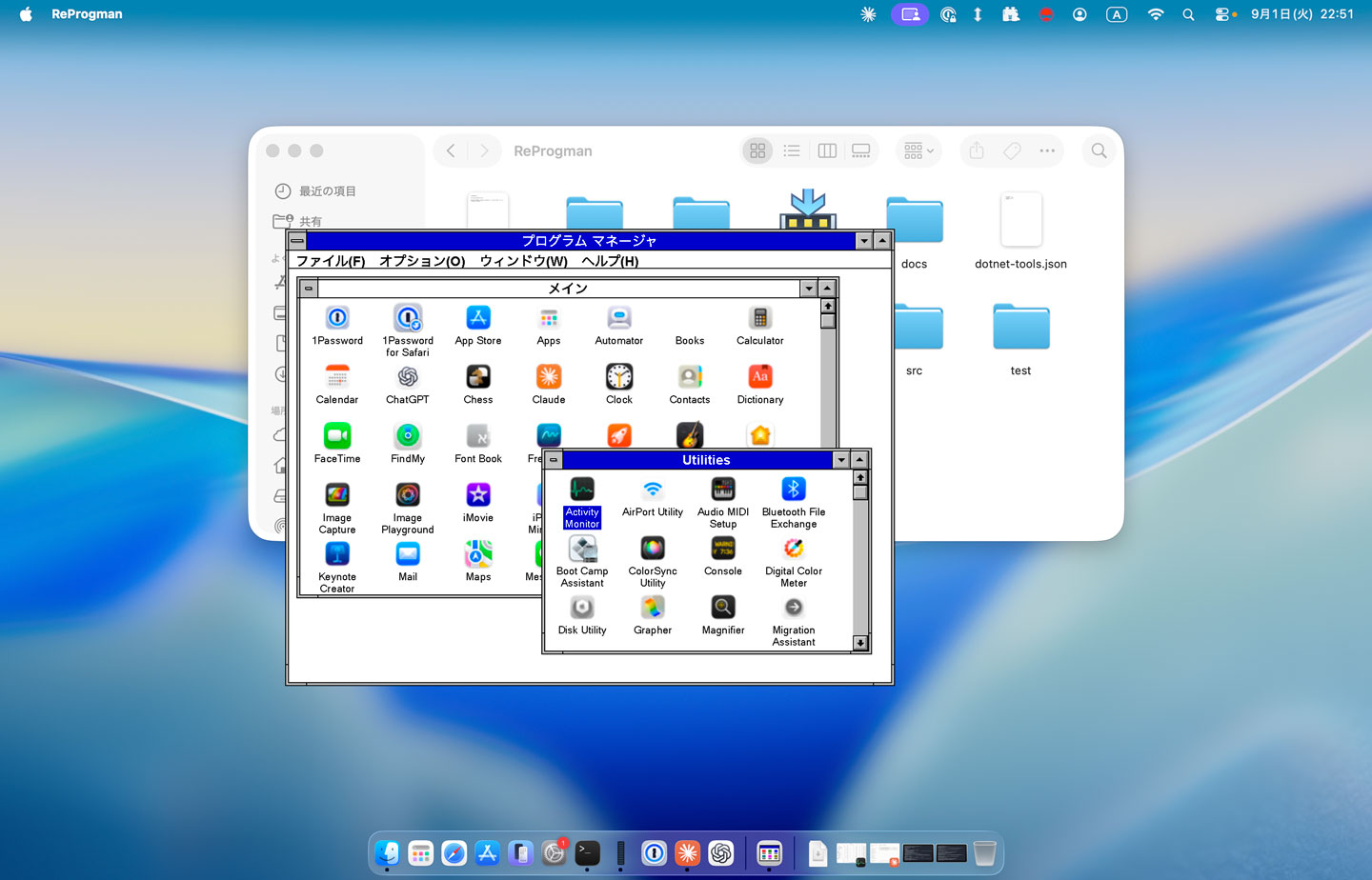
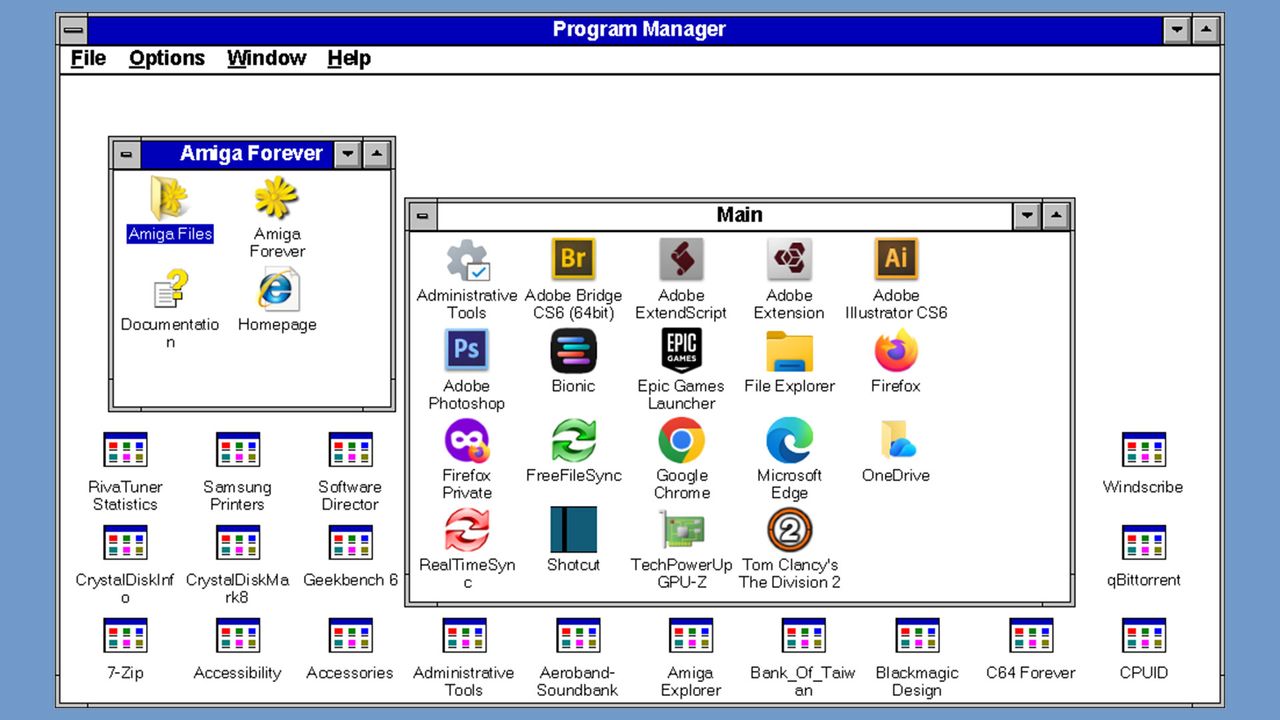
If you are yearning for a quick-shot retro Windows experience on your modern Windows 11 or macOS system, then there’s a new vibe-coded clone of the Windows 3.1 Program Manager that may interest you. Developer Mayuki has released a neat little nostalgia project dubbed ReProgman – named after the ancient Windows 3.1 ‘progman.exe ’, which was the primary shell of the era – until Windows 95 swept it away three decades ago.

ReProgman macOS screenshot

ReProgman macOS screenshot (Image credit: Developer Mayuki on GitHub)

ReProgman looks pretty authentic to my eyes, and it brought back memories of why I wasn’t sad to see it shrivel away from Windows machines. In a social media post about the release of ReProgman, Mayuki seems to agree with my sentiments. “I asked Claude to create a clone of the Windows 3.1 Program Manager,” wrote the developer (machine translation). “I think you'll enjoy reminiscing with it for about 30 seconds.”

Claude Code worked pretty swiftly to churn out this clone of the Windows 3.1 shell. The first version that was precipitated in about an hour was “pretty decent” but needed some effort to iron out the wrinkles. Then Mayuki complains again that actually using ReProgman induced boredom after about half a minute of usage.

The end-user-ready releases of ReProgman weigh in at between 12 and 16MB, so they are quite a trivial download and don’t need installing. Thus, it isn’t very taxing to give them a try for a spot of nostalgia-tinted navigation around your present system’s programs and files. Mayuki says that building and running this application needs the .NET SDK 10.0+. The code has been released on GitHub under the MIT license.

In conclusion, Miyuki’s ReProgman provides an easy trip down personal computing's memory lane, specifically to the Windows 3.X era of the early to mid-1990s. However, some will prefer to get their retro computing kicks by running the actual MS-DOS/Windows 3.1 combo on real hardware. As we discovered recently, that doesn’t limit users to dusting off an old i486 or similar. Back in April, an enthusiast demoed Windows 3.1X on ultra-modern bare metal with a system using a Ryzen 9 9900X and RTX 5060 Ti.

  •  

Xbox PC and Game Pass titles are coming to Linux through 'Xodus' — Heroic Launcher devs embark on new open-source reverse-engineering project

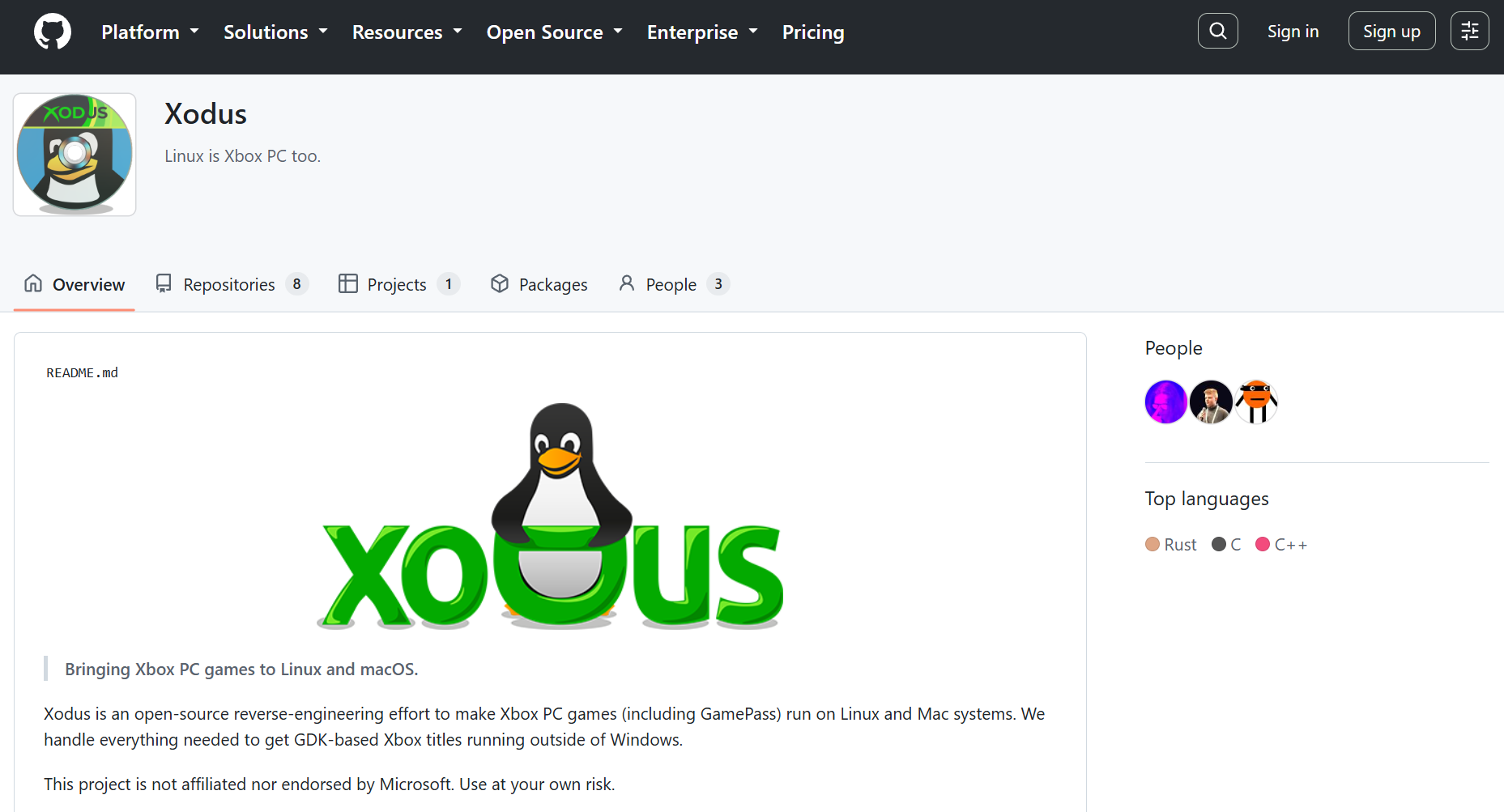
Xbox PC games, distributed through the Xbox app, fail to run on Linux because of Microsoft's proprietary GDK runtime environment. This also breaks Game Pass even though the company supports cloud streaming Game Pass titles. A new open-source project from the developers of Heroic Launcher, called "Xodus," is aiming to fix this by reverse engineering and emulating the necessary components required for Xbox PC games on Linux.

The Xodus GitHub page.

(Image credit: Tom's Hardware)

Xodus primarily targets modern, GDK-based Xbox PC titles and their MSIXVC packages; not older, UWP-based releases like Gears of War 4 and early Forza Horizon games. The problem with those isn't the DirectX API or x86 instructions; Proton and DXVK/VKD3D can already translate those. That's also the reason why you can still run Xbox PC games on Linux if you somehow get your hands on the DRM-free executables.

The real issue is the trifecta of Microsoft's proprietary GDK (Game Development Kit), Xbox identify services, and encrypted MSIXVC packages. This framework is responsible for verifying licenses for the games you own through the Xbox app. Without it running in the background, the games will simply crash right as you try to open them, or not launch at all. This is where Xodus comes into play.

The Xodus team says the project can already log into Xbox services, download game packages and obtain game licenses. It includes its own open-source implementation of the xgameruntime.dll and custom forks of both Wine and Proton, along with xal-rs, which is an Xbox authentication library for Rust. Xodus uses proxy libraries to interface with GDK games and intercepts API calls to transmit valid Xbox Live tokens.

Comment
 from r/linux_gaming

For now, efforts are focused on emulating the Xbox Gaming Runtime from the Xbox GDK through Wine, then the project will move on to actually launching and playing Xbox PC titles locally. Considering they've already solved the Xbox/Microsoft authentication, license check, and package decryption hurdles, it shouldn't be long before we see PC Game Pass running natively on Linux.

BedrockonLinux 2.0, another open-source project that brings Minecraft Bedrock to the platform, already relies on similar reverse-engineering tech to handle these components since Microsoft migrated the game to GDK. This allows the game to talk to Xbox Live in real-time through a secure doorway to authenticate tokens despite the game running in a sandboxed environment like SteamOS (Linux).

Microsoft itself brought four original Xbox titles to PC last month and it says more are coming, along with leaked documents suggesting Xbox 360 titles also releasing on PC next year. These games come with a baked-in Xbox 360 emulator. It's not clear if these games use the same GDK stack as native Xbox PC titles, however.

  •  

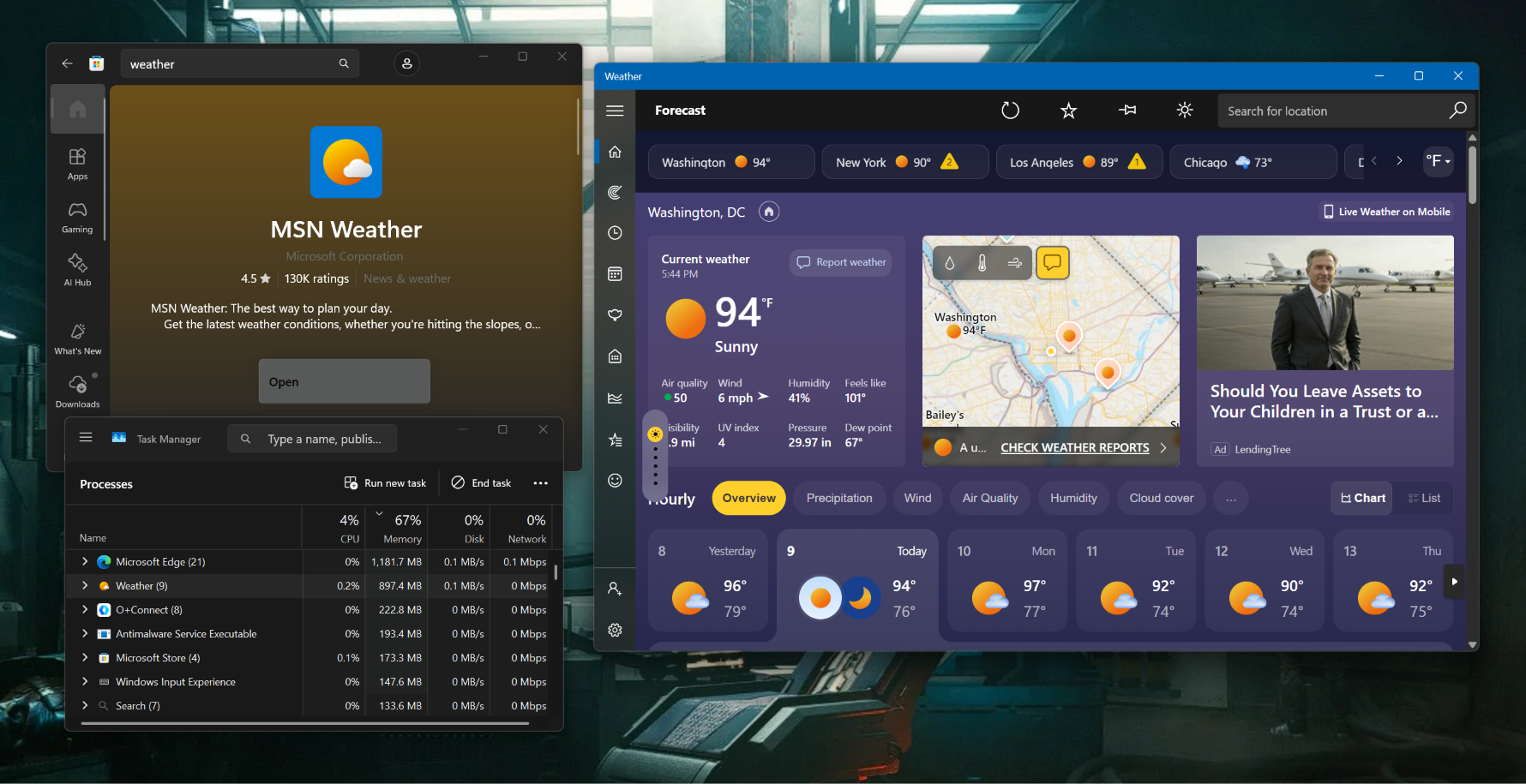
Windows 11's built-in weather app hogs more than 1.2 gigabytes of RAM just to tell the forecast — memory-sucking web wrapper filled with ads masquerades as an actual application

Windows is in a tough spot right now, with years of neglect and stagnation reaching a boiling point with customers. Lack of optimization, bloat, ads, forced AI slop, and persistent tracking have forced Microsoft to admit its missteps and commit to fixing the OS at large. Windows Latest's new testing shows that the built-in weather app is a perfect representation of the state of Windows. The "app" consumes up to 1.2GB of RAM while idling, and it serves up a bunch of ads while you check the temperature.

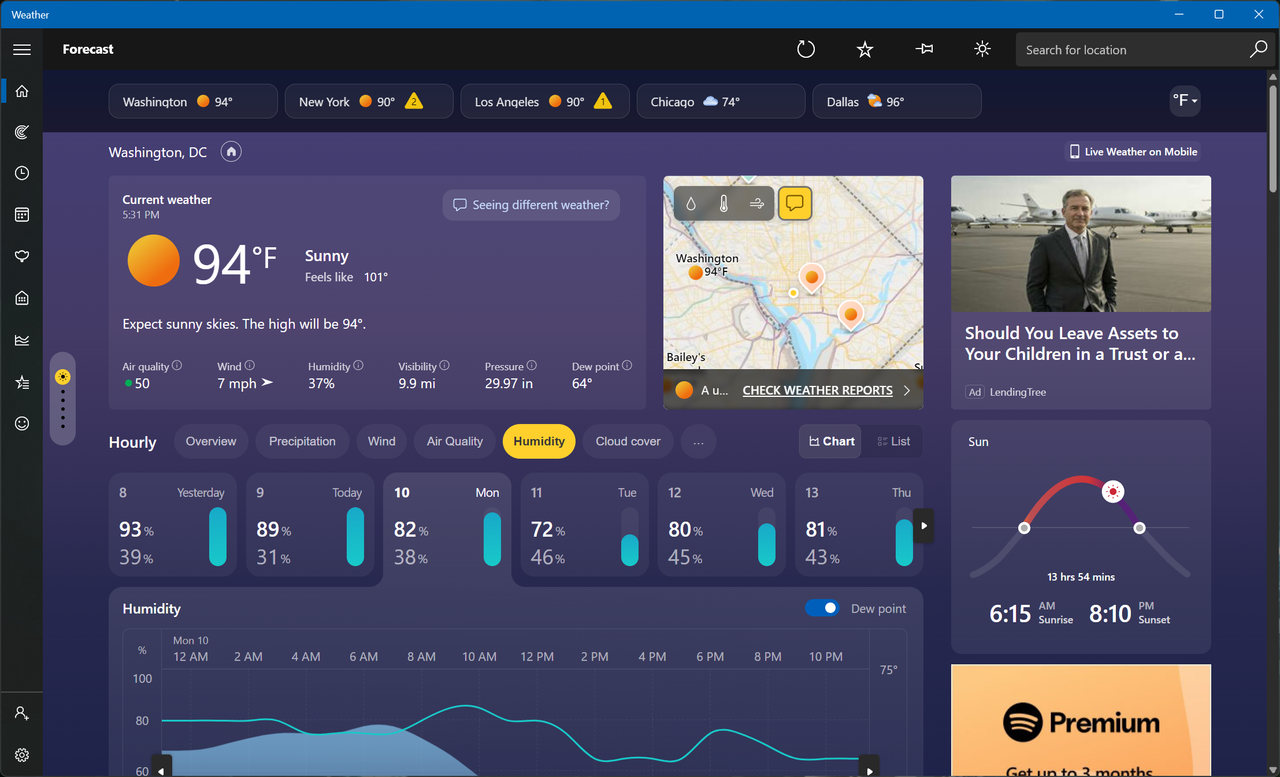
MSN Weather is the default weather app that ships with Windows, which explains why it's filled with promotions throughout, despite being part of a paid OS. To be clear, the app looks very modern and has all the data you could ask for, such as live radar overlays, hourly wind and precipitation breakdowns, air quality index, and moon phases. It's also accurate because the data is sourced from a bunch of different providers across the world, but mostly Foreca.

Windows 11's weather app

(Image credit: Future)

The author explains that getting accurate forecasts is not a cheap endeavor, so it's not like Microsoft is running a charity. But the comparison falls apart when you look at what the competition is offering. Apple's native weather app on macOS is just as beautiful, detailed, and accurate, yet it's free of ads. It also only consumes about 250MB of memory to show all that data, so 5x less than Windows. This is because MSN Weather is technically not even an app to begin with; it's a web wrapper that's pinging a bunch of browser tabs in real-time.

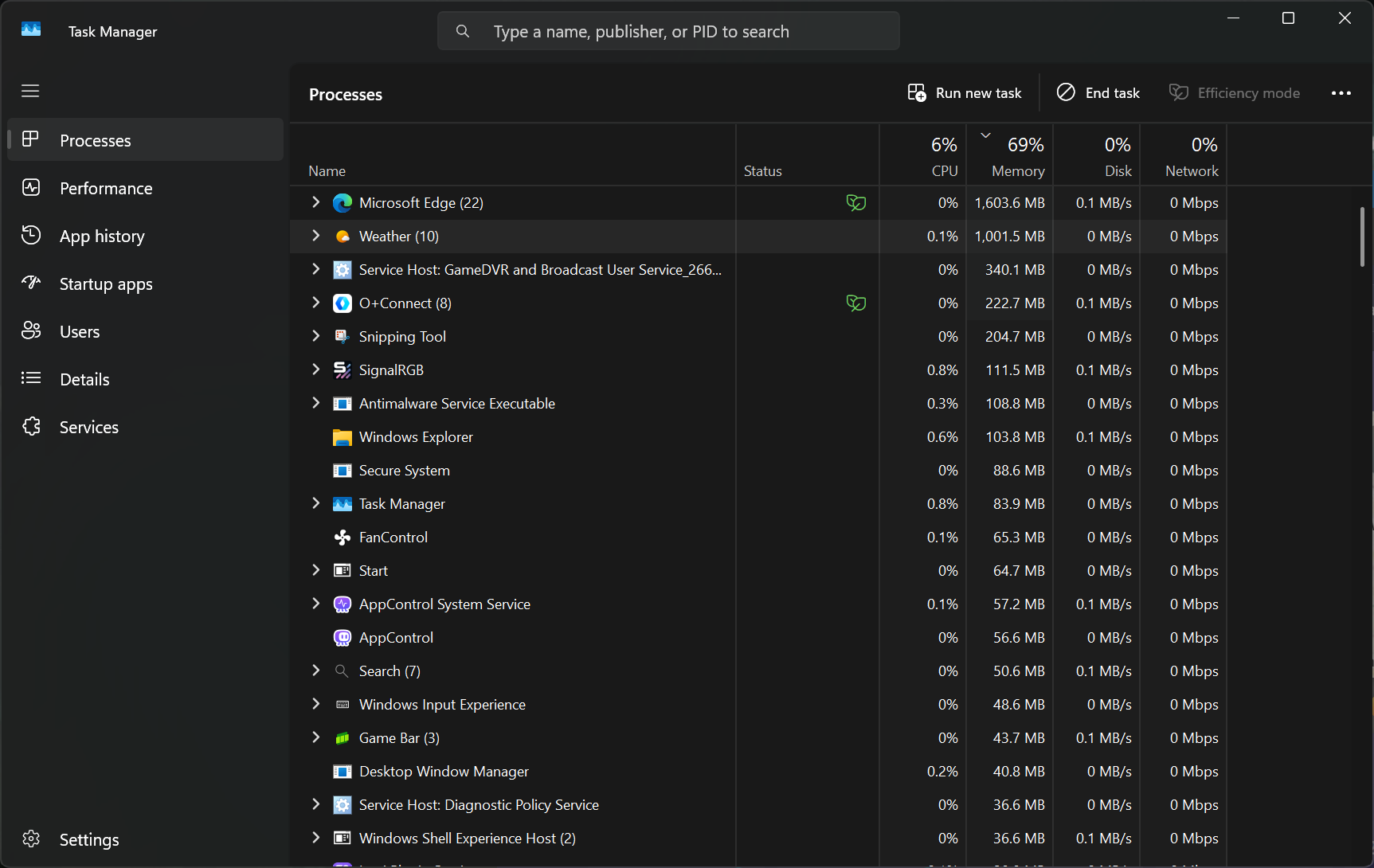
When the author clicked on the Task Manager entry for MSN Weather, they saw 8 Chromium-based subprocesses, confirming that they're just looking at a website being rendered via WebView 2. For context, native Windows apps are supposed to adhere to the WinUI framework, which the company is slowly adopting over Win32 and UWP. Microsoft is committed to updating all the native apps Windows ships with to Win32, which should significantly improve their optimization, but we don't know if the ads will suddenly disappear as well.

Windows 11's weather app

For us, it consumed up to 1GB of RAM (Image credit: Future)

The author saw Adobe Acrobat ads while checking the forecast, and we saw two ads — one for LendingTree and another for Spotify. Apart from that, scrolling around the app and clicking on the different menus and boxes was fast enough. We have to emphasize that the app really is granular and well-built from an aesthetic point of view; Microsoft gets full points for that, or is it MSN? That distinction is another issue that makes the weather app conundrum a bit more confusing.

When Microsoft promised to rebuild all native Windows 11 apps, it didn't explicitly say those would include MSN-branded services too, like MSN Weather and MSN News. Seeing as though they're simply called by their utilitarian names in the OS, there's a strong chance that these memory hoggers will also be eventually upgraded. For now, just stick to your phone, especially if you were among those who immediately Googled how to remove the weather widget from your taskbar that fateful day.

  •  

Cloudflare wants to provide the operating system for the AI-first enterprise

Traditional operating systems (OS) were built to manage hardware, files, apps, and users on a device, but Cloudflare says the agentic AI era requires a whole new format.

The company this week announced Cloudflare OS, which connects AI agents, enterprise data and context, internal systems, and workflows together in one secure workspace. It is open source and browser-based, sparing companies the need to build all-new infrastructure.

The OS is launching alongside several other new security, identity, spending, and user insight tools that Cloudflare has built for the AI-based workplace.

“Cloudflare OS isn’t a traditional desktop OS,” said Rita Kozlov, VP of product at Cloudflare. “It reimagines the workplace computing environment for AI.”

Open source OS runs in a browser

Cloudflare OS serves as a secure, AI-equipped workspace that is plugged into internal company systems. Available now through Cloudflare’s open source repository, it is accessible directly in a browser, and runs inside an enterprise’s Cloudflare account.

“It is a browser-based workspace that begins with a conversation,” Kozlov explained. Users can ask an agent to research, create slides, spreadsheets, and documents, build full-stack apps, or automate workflows without the need for a terminal. Those outputs are then shareable, but kept in isolated databases with access controls.

Enterprises will soon be able to access the OS directly through Cloudflare or via a “select group” of partners that will build tailored offerings on Cloudflare’s architecture, the company says. Because it is open source, organizational processes, internal system connections, and context aren’t locked into a vendor product or AI model provider. Customers can use whatever models they choose.

Cloudflare OS is built on Cloudflare Workers, Dynamic Workers, Durable Objects, and Access, the company’s zero trust network access (ZTNA) tool that verifies every user and request. Agents start with zero permissions by default and are only granted access to tools required for a specific task. Organizations configure their own Access policies, models, branding, skills, and integrations, Kozlov explained.

Governed connectors known as gatekeepers give admins control over what AI can see, what it can change, and when the system needs human sign-off. They can also control budgets, set rate limits, and delegate tasks to different models.

“Because agents act on people’s behalf and produce work others can access and modify, they require a new security model,” Kozlov said. Thus, Cloudflare OS tracks the resources an agent requires so the right access controls follow its work when it is shared.

Cloudflare initially built the OS for internal use, and employees “across every team” use it daily. Kozlov estimated that, over the last 30 days, internal users have used it to create more than 4,000 apps, automations, and tools. Over that same period, she claimed, the company’s sales team saved an estimated 10,000 hours by automating previously manual tasks like territory planning and proposal creation.

“We open sourced Cloudflare OS so any organization can build ‘Your Company OS,’” Kozlov said. Open source is critical because “you cannot put your company into software you do not own. Organizations need to be able to inspect the platform, customize it, connect their own systems, and make it their own,” she explained.

A more cohesive bundle

Cloudflare deserves credit for packaging Cloudflare OS as an operating system, noted tech analyst Carmi Levy.

“This very much is not Windows, macOS, or Linux, and it isn’t an operating system by its common definition,” he said. “But Cloudflare’s use of this terminology implies familiarity to enterprise IT buyers.”

This makes for an easier discussion as enterprises struggle to understand how to best incorporate AI-related platforms and workflows into infrastructure that wasn’t initially designed for it.

Microsoft has marketed the combination of its Azure, Entra, Fabric, Windows, and Microsoft 365 offerings as an operating system of sorts, but hasn’t pulled all the pieces into a common brand, Levy said. And Google’s Gemini, Workspace, Vertex AI, and Cloud Run are “circling similar territory.”

But, he noted, Cloudflare OS is “more cohesively bundled” and infrastructure-focused, offering a single pane of glass platform for buyers worried about stitching together otherwise disparate AI-aware networking pieces. The company recognizes that AI introduces new architectural realities such as inference and model routing “over and above” traditional OS core competencies.

“While competing offerings generally leave the infrastructure heavy lifting to enterprise decision-makers, Cloudflare is marketing itself as a single-source vendor, which potentially frees IT planners from having to integrate all the AI pieces on their own,” Levy said.

An infrastructure-first, application-agnostic approach means Cloudflare OS can coexist with whatever AI applications already exist in an enterprise, he said. It will “play nice” with OpenAI, Anthropic, Google, Microsoft, Meta, or open source layers, allowing employees to begin working in familiar workflows after sign-in.

“Its open-source architecture also minimizes the potential for vendor lock-in as enterprises gradually figure out how to evolve their stacks to align with new AI-era realities,” Levy said.

Managing identities and budgets for both humans and AI

As AI agents emerge across the enterprise, tracking their use can be challenging, causing problems from both a security and a spend standpoint. Along with Cloudflare OS, the company has launched a way to address this issue with its new Identity-Aware AI Gateway, now in beta.

Also integrated with Access, the offering gives admins visibility into what users (both human and AI) are requesting from AI models. It allows security teams to set up custom domains in front of their gateways and replace shared API keys by integrating with their identity provider, like Okta or Entra, and ZTNA infrastructure, Cloudflare explained.

Every request is tied to Access-verified identities, and enterprises can filter each user’s logs, analytics, and spend. IT teams can track redundancies, limit usage rates, and apply filters that strip out employee names, passwords, and other sensitive data before requests go to outside model providers.

A companion feature, AI Spend, tracks every user’s behavior over time to create a baseline of normal AI usage. When spending deviates from that pattern, the system alerts the IT team.

A new tab, User Insights, tracks cost and identifies over-spend caused by activities such as low cache-hit rates or oversized context windows. The capability scores sessions and compares them against account history using a 95th percentile session cost over the previous 30 days, Cloudflare product managers Ming Lu, Kenny Johnson, and Ayush Kumar explain in a blog post. Anything above 2x an account’s 95th percentile is a “strong candidate for anomalous behavior.”

For instance, one Cloudflare customer had an employee who left a rogue AI session running, generating a $30K bill. “User Insights helped them identify the problem and shut off access before the problem was further exacerbated,” Kozlov said.

Cloudflare is also building prompt classification functionality that sorts requests into categories such as coding or writing. This can help enterprises understand what AI is being used for.

“Once business traffic is separated from everything else, personal use becomes visible,” the project managers explained. “From the outside, someone running a side hustle on company time and someone quietly moving data out through a model look the same. Telling them apart is central to catching insider risk.”

Looking at the bigger picture

Identity-Aware AI Gateway and AI Spend address the visibility problem that has dogged so many recent AI deployments where enterprises failed to monitor usage, Levy noted. Projects “crashed and burned” as users unwittingly blew through token allocations.

These platforms provide single-point visibility into what is being used, how it’s being used, and where the potential lies for raising the productivity bar, he said. They overlay with existing models; in doing so, they enhance security with more precise control over resource allocations, and via automated anonymization protocols that prevent inadvertent sharing of sensitive data.

Ultimately, he said, vendors who free IT from having to independently assemble the pieces of their own AI implementations, and who assist them with answers to AI-specific questions, “will gain advantage over vendors that aren’t looking at the bigger picture.

This article originally appeared on CIO.com.

  •  

Microsoft vows to make Windows 11 fly on 8GB RAM amid memory shortage — optimizations to reduce OS memory footprint have begun

Microsoft said that it’s planning to optimize Windows 11 for systems with 8GB of RAM and above as part of its promise to improve Windows 11 in March 2026. The company said in its latest update that the optimization is part of expanding its focus on operating system upgrades, which include a faster out-of-the-box experience, easier parental controls, and improved voice interactions.

While the official minimum specifications for Windows 11 sit at just 4GB of RAM, most PC builders advise getting at least 16GB if you want to have a smooth experience. In fact, Microsoft has previously recommended 32GB of RAM for Windows 11 for gamers, especially if they want a system that can handle games in the near future. Unfortunately, the RAMpocalypse has forced both users and manufacturers to stick with slower DDR4 memory and lower capacities. Some experts predict that the entry-level PC will disappear by 2028, and we’ve even seen some manufacturers, including Apple, reintroduce 8GB laptops just to hit a specific price point.

The resurgence of 8GB systems will likely deliver a bad experience for users who stick with Windows 11, which is the likely reason why Microsoft is pushing for the optimization of its operating system. If Windows 11 performs poorly on these systems, it could draw users towards macOS or Linux alternatives as they blame the operating system for underperforming on limited hardware. In fact, we’ve already seen this happen before — after Microsoft ended support for Windows 10, MacBooks saw an uptick in sales as users migrated towards macOS instead of going for Windows 11. SteamOS is also encouraging some gamers to ditch Windows, and Valve is working on a general release for the OS, which many say contains less bloat and is a bit snappier than what Microsoft offers.

The RAM shortage crisis, alongside increasing competition, is forcing Microsoft to do better with Windows 11. Hopefully, these optimizations arrive sooner and don’t introduce new bugs, allowing both new and existing users to get more out of their systems.

The Windows blog post also gave an update on what improvements the company has made to Windows 11 so far. This includes a better Windows Search experience, more Taskbar and Start customizations, a more responsive and reliable File Explorer, among others. Many of these changes are still in preview, though, so unless you’re part of the Windows Insider Program, you’ll have to wait a few more weeks to months before you can start enjoying these changes.

  •  

Valve funding port of Linux RADV Radeon Vulkan driver to Windows — cross-platform effort already runs 'Counter-Strike 2'

The Steam Machine helped grow the popularity of Linux gaming, including installations of Bazzite and other gaming-oriented Linux distributions. Valve seemingly doesn't want to stop its open-source development efforts anytime soon, and is now working on a port of the Mesa Radeon Vulkan driver (RADV) to Windows; It's already running Counter-Strike 2, according to developers at Collabora.

As cross-platform development is rather tricky, Valve opted to get a port of RADV to Windows going by way of sponsoring contractors at Collabora. In its blog post, Collabora explained the several hoops it had to jump through to accomplish this task.

With Windows 10 and WDDM 2.0, Microsoft improved the split between graphics drivers' userspace code (the vast majority of the driver itself) and the kernel-level portion that actually talks to the graphics card. This presented the opportunity to hook RADV to the AMD kernel card driver. That's easier said than done, however, as communication between those parts often carries non-standardized data that RADV needs to understand. And to understand the "conversation," it needs to be recorded and analyzed.

An earlier 2024 effort by Faith Ekstrand yielded a basic-but-valuable utility for logging WDDM 2.0 calls and reverse-engineering them to produce a basic RADV implementation. Out of both debugging necessity and as a development tool, Collabora built and expanded upon Ekstrand's work, improving the logger to the point where it can now fully analyze any Vulkan application that runs with AMD's official driver and dump all the data passing to the kernel.

After a lot of work getting to grips with how the AMD driver interacts with the kernel driver, including but not limited to reverse-engineering obscure data structures, the team made progress, and Windows RADV is now able to run some games, including Counter-Strike 2.

Despite the ongoing effort, Collabora explains that since user- and kernel-space driver are a matched pair, changes to those aren't guaranteed to be backwards-compatible, meaning that even a fully functional RADV could break at any point. For that reason, Collobora is requesting that AMD, Microsoft, or both provide a documented interface to the kernel driver or an intermediary compatibility layer.

AMD graphics driver development on Linux has coalesced around the Mesa Vulkan stack, with both company and community devs contributing to the RADV project. Over in the Windows world, the only option is AMD's proprietary driver, which can cause a lot of headaches when developing cross-platform games and applications.

AMD's Vulkan driver for Windows has developed a reputation for instability. Meanwhile, Linux RADV is generally praised for its stability and performance, sometimes running faster than the AMD Windows driver, especially on older cards. With a rapid development schedule, it also generally sees fixes and speed upticks often.

If at some point using RADV on Windows becomes viable, you'd be getting an arguably more stable, mature driver with active development. Games' graphical issues could become far easier to debug and patch thanks to the open nature of RADV, and studios developing with Linux in mind can target the one platform instead of two with different behaviors. Any developer or company can contribute to the project, too.

Furthermore, this lets Valve improve Windows compatibility layers, and any optimizations can be carried over to both operating systems. All told, this is likely one of the several moving parts to improve Linux — thus the Steam Deck, Steam Machine, and upcoming hardware — as a viable gaming platform. Even a future notion of gamers installing RADV on Windows to get a performance or stability boost isn't too far-fetched.

Additionally, RADV on Windows would also help keep discontinued cards usable, and given pricing right now, that certainly would be a good thing.

  •  

Windows NT 4.0 brought the Win95 UI to servers 30 years ago today — milestone unifying modern Windows OS hit RTM in the Pentium era

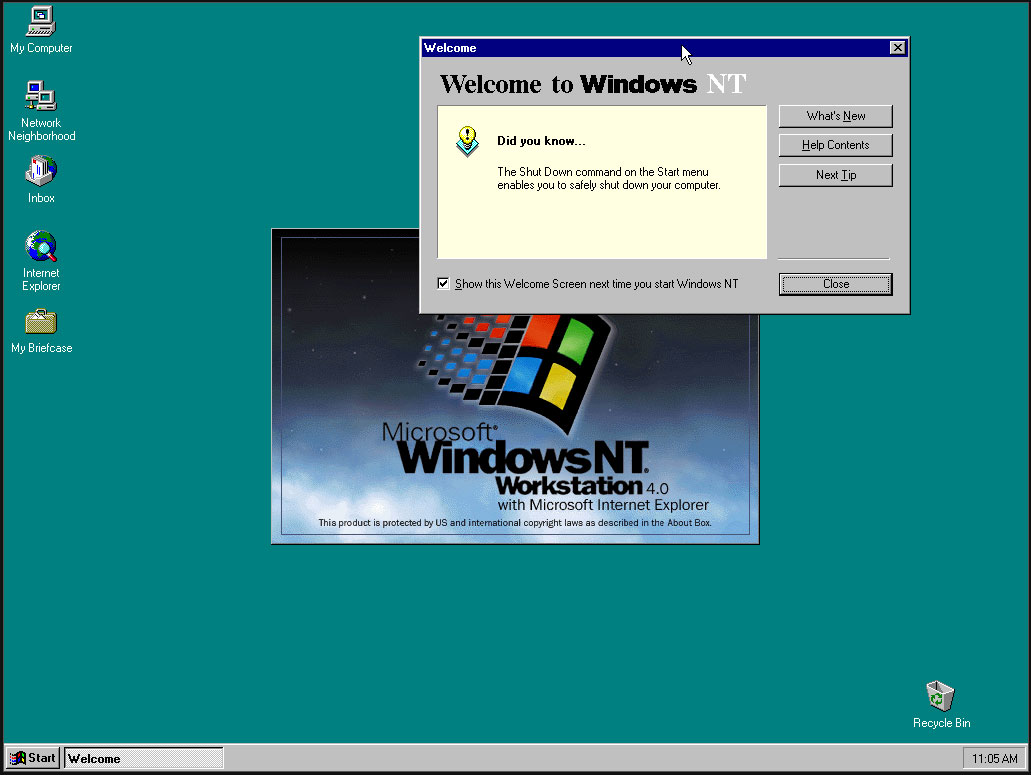
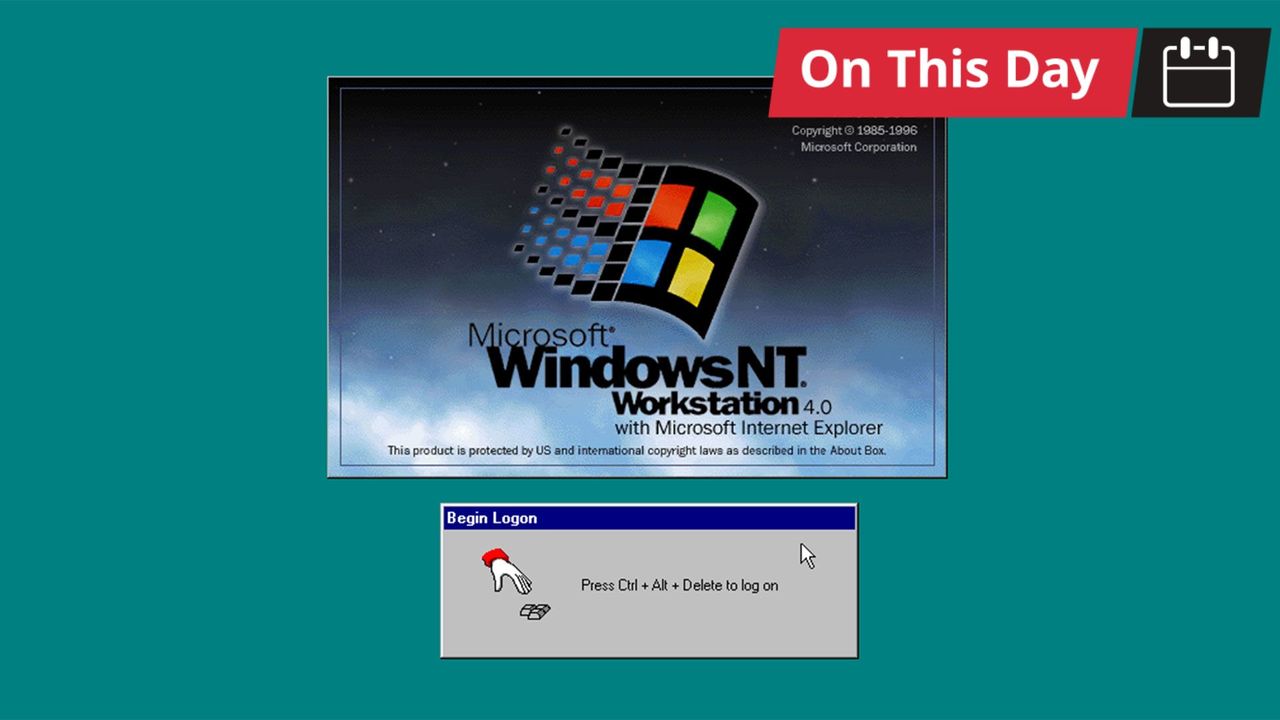
Microsoft released Windows NT 4.0 to manufacturing partners on July 31, 1996. Codename Cairo marked an important milestone in the history of Microsoft’s original server OS and would far outlive Microsoft’s original plans as enthusiasts and administrators clung to it, as older readers will be aware. Headlining features of NT 4.0, which made it a winner, include the melding of the intuitive new Windows 95 UI into the fully 32-bit enterprise OS. It was also notable for being the last version of NT to support Alpha, MIPS, or PowerPC CPU architectures.

Historical Windows NT timeline:

  • Windows NT Server 3.1 – in 1993, the first version of Windows NT also introduced NTFS
  • Windows NT Server 3.5 – in 1994, this update provided integrated support for Winsock and TCP/IP
  • Windows NT Server 3.51 - client/server support added in 1995
  • Windows NT 4.0 – in 1996, NT got the Windows 95 UI and the familiar My Computer, My Documents, and so on
  • Windows 2000 Server – the 5th NT release started a new naming scheme, introduced Active Directory, plus NTFS 3.0 with file system encryption
  • Followed by the more modern Server releases…

Windows NT 4.0

(Image credit: Microsoft)

After the initial Windows NT 4.0 release, Microsoft followed up with a version for embedded systems and its Terminal Server edition.

The Windows NT line was critical to Microsoft as it led the charge against dominant Unix server software ecosystems. Its first public release was in 1993, with version 3.1, but NT 4.0 coupled the underlying data server and personal workstation tooling with Win95 UI elements such as the Start Menu, Taskbar, Task Manager, and so on. It would also support new components like the cryptography API, DCOM, TAPI 2.0, and some DirectX (v2) features.

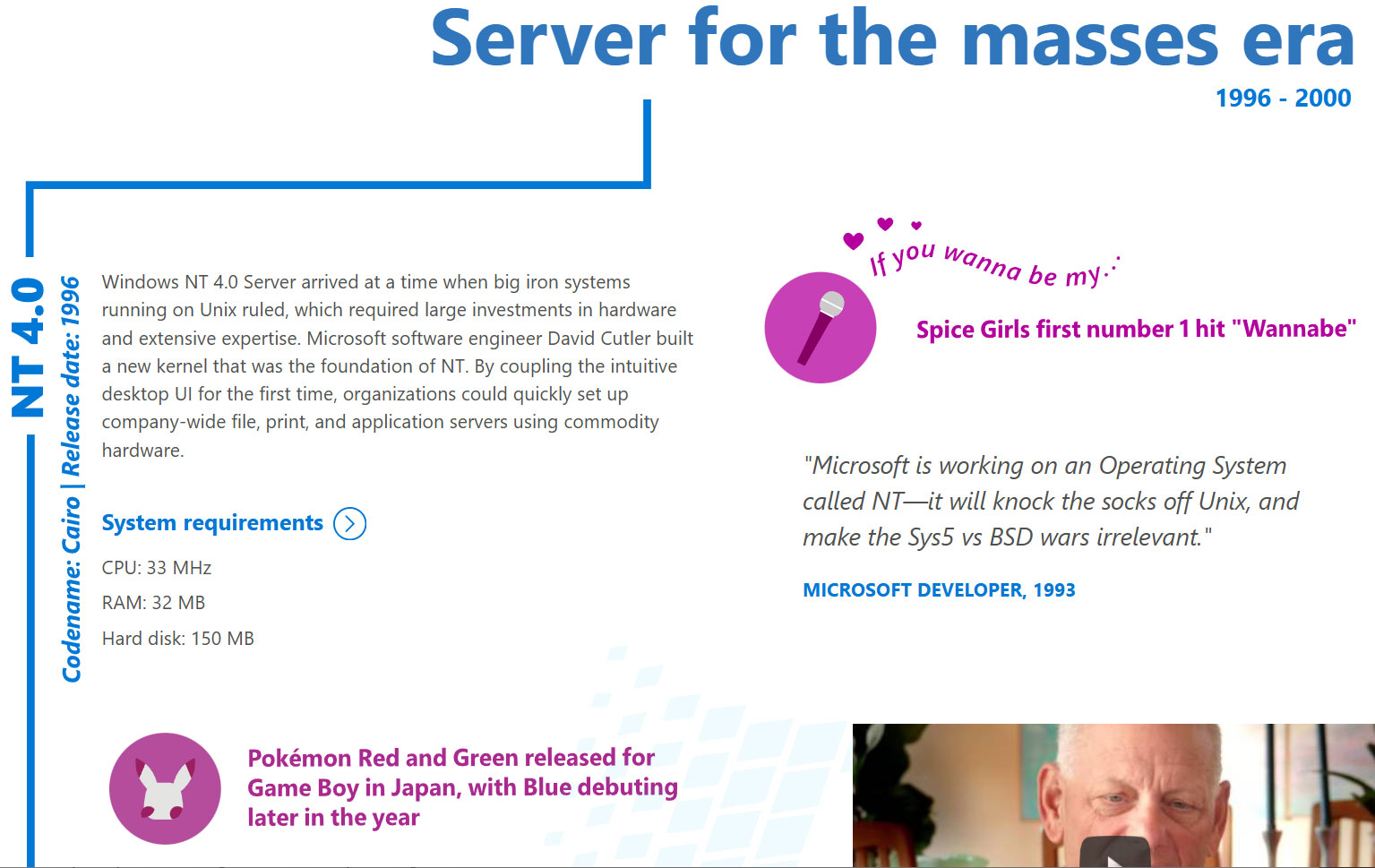
Despite all the new technology under the hood and the frills of the latest UI, Microsoft’s Windows NT 4.0 launched with remarkably low minimum requirements. Would-be users were recommended to install it on a PC with a CPU that ran at 33 MHz or better, had 32MB of RAM, SVGA graphics, and a hard disk with 256 MB capacity. This was in the Pentium / Pentium Pro era. NT 4.0 would become “the server for the masses,” boasted Microsoft on the OS’s 20th anniversary.

Another reason that NT 4.0 was so important is that it formed the foundation for the Windows XP release (2001), leaving the DOS-based 95, 98/SE, and Me versions of the consumer OS behind as archaic hybrids. In the half-decade between the release of NT 4.0 and XP, Microsoft had a lot of work to do, such as implementing Plug and Play, building out gaming tech, adding WDM drivers, and so on. Thankfully, PCs also grew in muscle, specs, and multimedia capabilities to make the larger and more demanding XP a big hit.

Windows XP landed with a core marketing line that it was “Built on NT technology,” which felt uncomfortable to read if you were from the camp that believed ‘NT’ was short for ‘New Technology.’

Windows NT 4.0 screenshots

(Image credit: Tom's Hardware)

It is pretty easy to find an old Cairo release online for retro machine tinkering. Those interested in a more casual poke around in NT 4.0 out of interest, curiosity, or nostalgia will find there are some online installs you can play with via a web browser.

  •  

Apple preps for a wearable AI revolution

This fall, with watchOS 27, Apple Watch will finally get access to Siri AI with a software update that turns your wrist into the most widely-used wearable AI platform on Earth.

That’s not hyperbole. Siri AI on Apple Watch is arguably the most important feature to this year’s watchOS update. Though it didn’t get much attention at WWDC, the update also offers a preview into how Apple will wrap AI into its future smart glasses.

What to expect

One important caveat is to observe that Siri AI on Apple Watch still requires your Apple Intelligence-enabled iPhone to do the heavy lifting. The interaction is easy: tap the Digital Crown and Apple’s new glowing icon appears on screen (you’ll also find this in the App viewer). The experience looks identical across every Apple device — iPhone, iPad, Mac, Apple Watch, and Vision Pro — making the assistant feel like one consistent product rather than a different experience per device.

The Siri app lets you access all your past Siri conversations (unless you turn that feature off) and pick up an old conversation right where you left off. Conversation history syncs privately through iCloud, so you can start an exchange on your iPhone and continue it later from your wrist. You can also pin a conversation you expect to revisit.

You can also use Siri on the Apple Watch to ask questions, launch apps, or even get more complex responses, such as step counts on a specific day. It can also answer difficult and specific queries with detailed answers and can summon real-time information from the web.

Personal context is the real story

That’s key, of course, as it means the smartwatch on your wrist can help you access specific details from all your contextual information; it can get details from messages, emails, and notes, for instance. Or you might use it to find a number and call it, access your door code, or look up customer information for business — all without touching your phone.

One of Apple’s own examples demonstrates this well: Saying, “Show me photos from when I went to Spain,” results in precisely that. You can also ask follow-up questions and keep the conversational going naturally, rather than being confined to single, isolated commands.

Beyond personal data, the watch can also act in apps — get directions home, send an email, play a playlist, or even more specifically, “Play the song that Brandon sent me.”

Context runs deep. A new Call Context tool can proactively surface relevant information from across your apps when phoning a business or help locate a confirmation code from Mail while calling an airline. This arguably challenges a real pain point when speaking with providers and is a good illustration of Apple’s broader AI strategy: to use on-device intelligence to remove everyday friction without asking you to track down the information yourself.

Where we are, where it’s going

It’s frustrating that you still can’t use the Watch to remotely run applications on your Mac, iPhone, or iPad. What you can do is trigger Shortcuts that run on your iPhone: enable this first on your phone by selecting the Shortcut you want and switching on “Show on Apple Watch.” Once that’s done, you can run the Shortcut from your wrist, even by voice.

That’s useful now, but as more complex apps add Shortcuts support and App Intents become more widely adopted by developers, it should be easy to trigger genuinely complex, multi-stage tasks on your iPhone from your wrist.

It’s worth noting: early hands-on testing of the watchOS 27 beta has found Siri AI genuinely impressive on personal-context queries, but still buggy in places. This is very much a first-generation feature — promising, but not yet fully reliable.

Watch the developers

Developers are already beginning to experiment with the potential for wearable AI. One of the best current examples is Granola, which just launched a Watch app built specifically to take notes during in-person meetings away from a laptop. The idea is that you tap your wrist, the screen turns green and makes a sound to alert your companion(s) that it is recording and then you carry on as normal. Once the meeting stops, switch the app off and you’ll get polished notes with meeting summaries and action items provided to you.

The only reservation I have with Granola is the lack of documentation on privacy and data retention on the developer site. Tools like these will almost certainly become more private, more secure, and more prevalent once Apple’s on-device dictation APIs extend fully to watchOS.

That last thing is perhaps the most important as wearable AI emerges: the decisions Apple makes around watchOS and SiriAI will be foundational to its future wearable AI glasses products.

You can follow me on social media! Join me on BlueSky,  LinkedIn, Mastodon and subscribe to The Core.

  •  

Microsoft’s Patch Tuesday updates: Keeping up with the latest fixes

Long before Taco Tuesday became part of the pop-culture vernacular, Tuesdays were synonymous with security — and for anyone in the tech world, they still are.  Patch Tuesday, as you most likely know, refers to the day each month when Microsoft releases security updates and patches for its software products — everything from Windows to Office to SQL Server, developer tools to browsers.

The practice, which happens on the second Tuesday of the month, was initiated to streamline the patch distribution process and make it easier for users and IT system administrators to manage updates.  Like tacos, Patch Tuesday is here to stay.

In a blog post celebrating the 20th anniversary of Patch Tuesday, the Microsoft Security Response Center wrote: “The concept of Patch Tuesday was conceived and implemented in 2003. Before this unified approach, our security updates were sporadic, posing significant challenges for IT professionals and organizations in deploying critical patches in a timely manner.”

Patch Tuesday will continue to be an “important part of our strategy to keep users secure,” Microsoft said, adding that it’s now an important part of the cybersecurity industry.  As a case in point, Adobe, among others, follows a similar patch cadence.

Patch Tuesday coverage has also long been a staple of Computerworld’s commitment to provide critical information to the IT industry. That’s why we’ve gathered together this collection of recent patches, a rolling list we’ll keep updated each month.

In case you missed a recent Patch Tuesday announcement, here are the latest six months of updates.

July’s Patch Tuesday sees an end-of-support collision amidst a massive, record-setting patch wave

Microsoft addressed 722 CVEs this month once the 427 Chromium upstream relays are set aside — roughly three times a normal cycle and one of the largest single months in recent memory. Two vulnerabilities arrive under active exploitation: an elevation of privilege in Active Directory Federation Services (CVE-2026-56155), and an elevation of privilege in SharePoint Server (CVE-2026-56164). A third, a BitLocker security feature bypass (CVE-2026-50661) is publicly disclosed but not yet exploited.

The July 2026 Patch Tuesday earns Patch Now recommendations for Windows, Office, Exchange, and SQL Server. SharePoint has two critical RCEs on top of its exploited zero-day, and Exchange Server returns with a critical on-premises spoofing flaw. Adding to our (dear) administrator’s efforts, SharePoint Server 2016/2019 and SQL Server 2016 all reach end of support today. The Readiness team has provided a handy infographic of the expected risk profile of this month’s Patch Tuesday updates.

More info is available here on Microsoft Security updates for July 2026.

For June, Patch Tuesday means an IT scramble

Microsoft this month released 206 updates affecting Windows, Office, Exchange Server, and its developer tools — including three Windows vulnerabilities already publicly disclosed. That trio includes an elevation of privilege in the Collaborative Translation Framework (CVE-2026-45586), a denial of service in HTTP.sys (CVE-2026-49160), and a BitLocker security feature bypass (CVE-2026-50507). At the moment, none appear to be under active exploitation, but all three are rated “Exploitation More Likely.” 

Even without an exploited zero-day, the June 2026 Patch Tuesday release requires Patch Now recommendations for Windows, Office, and Exchange. The latter is back in the patch picture with a consolidated security update that Microsoft recommends installing “as soon as possible.”

More info is available here on Microsoft Security updates for June 2026.

For May, Patch Tuesday means 139 updates — but no zero-days

Microsoft this month released 139 updates affecting Windows, Office, .NET, and SQL Server (though there were no updates for Microsoft Exchange Server). Despite the absence of zero-days, the May Patch Tuesday update still requires Patch Now recommendations for Windows and Office. 

The combination of three unauthenticated network RCEs (Netlogon, DNS Client, and SSO Plugin for Jira and Confluence), four Word Preview Pane RCEs, the large TCP/IP vulnerability cluster, and the carry-over BitLocker recovery condition (still active on Windows 10 and Windows Server) warrants an accelerated deployment release schedule. 

More info is available here on Microsoft Security updates for May 2026.

Microsoft’s Patch Tuesday release for April is a whopper

Windows admins are going to be busy this month, dealing with the largest Patch Tuesday cycle in memory. The April release involves 165 updates and roughly 340 unique CVEs from Microsoft — including two zero-days, one of which is already being actively exploited in the wild. 

The Readiness team recommends “Patch Now” schedules for nearly every major product family: Windows, Office (with a zero-day), Microsoft Edge (Chromium), SQL Server, and Microsoft Developer Tools (.NET). April also brings Phase 2 of Microsoft’s Kerberos RC4 hardening with full enforcement set for July. There is a lot to cover, so here’s a useful infographic mapping the deployment risk for each platform.

More info is available here on Microsoft Security updates for April 2026.

For March, Patch Tuesday delivers fixes for 83 vulnerabilities

Microsoft’s March Patch Tuesday release addresses 83 vulnerabilities across Windows, Office, SQL Server, Azure, and .NET — with two publicly disclosed zero-days affecting SQL Server and .NET (though neither is being actively exploited in the wild.) Six additional vulnerabilities spanning the Windows Kernel, Graphics Component, SMB Server, Accessibility Infrastructure, and Winlogon are flagged as “Exploitation More Likely.”

The most significant change this month is the introduction of Common Log File System (CLFS) hardening with signature verification, which will affect how Windows handles log files across the operating system. More info on Microsoft Security updates for March 2026.

February’s Patch Tuesday release fixes 59 flaws, including 6 being exploited

The company’s Patch Tuesday release for February addresses 59 CVEs across the company’s product family — roughly half the volume of January’s 159 patches. Six vulnerabilities, affecting Windows Shell, MSHTML, Desktop Window Manager, Remote Desktop, Remote Access, and Microsoft Word, are already being actively exploited. (All five Critical-rated CVEs target Azureservices rather than Windows, however.) 

Both Windows and Office get a “Patch Now” recommendation, with CISA setting a March 3 enforcement deadline for all six exploited vulnerabilities. Two new enforcement timelines also take effect in April: Kerberos RC4 deprecation (CVE-2026-20833) and Windows Deployment Services hardening (CVE-2026-0386). More info on Microsoft Security updates for February 2026.

  •  

July’s Patch Tuesday sees an end-of-support collision amidst a massive, record-setting patch wave

Microsoft addressed 722 CVEs this month once the 427 Chromium upstream relays are set aside — roughly three times a normal cycle and one of the largest single months in recent memory. Two vulnerabilities arrive under active exploitation: an elevation of privilege in Active Directory Federation Services (CVE-2026-56155), and an elevation of privilege in SharePoint Server (CVE-2026-56164). A third, a BitLocker security feature bypass (CVE-2026-50661) is publicly disclosed but not yet exploited.

The July 2026 Patch Tuesday earns Patch Now recommendations for Windows, Office, Exchange, and SQL Server. SharePoint has two critical RCEs on top of its exploited zero-day, and Exchange Server returns with a critical on-premises spoofing flaw. Adding to our (dear) administrator’s efforts, SharePoint Server 2016/2019 and SQL Server 2016 all reach end of support today. The Readiness team has provided a handy infographic of the expected risk profile of this month’s Patch Tuesday updates.

(More information about recent Patch Tuesday releases is available here.)

Known issues

The July release note flags known issues against the following updates:

  • BitLocker recovery prompt on first restart – the PCR7 recovery condition tracked since April remains live on the platforms that did not receive the Boot Manager servicing fix (Windows Server 2022 and Windows 10 22H2). Devices with BitLocker on the OS drive, the Group Policy “Configure TPM platform validation profile for native UEFI firmware configurations” set with PCR7 included, and Secure Boot State PCR7 Binding reported as “Not Possible” may be prompted for the recovery key on the first restart after installing this update. This month’s publicly disclosed BitLocker security feature bypass (CVE-2026-50661) keeps the component in focus.
  • WSUS synchronization error details suppressed (Windows Server 2025 and 2022) – WSUS no longer displays synchronization error details in its error reporting, a deliberate change made to address the Remote Code Execution Vulnerability CVE-2025-59287. Sync still works, but administrators triaging a failed synchronization lose the detail pane and must fall back to the SoftwareDistribution logs.

Windows Update can still replace manually installed graphics drivers with older OEM versions from the catalogue (the four-part Hardware ID ranking issue acknowledged on the Hardware Dev Center). The two-part HWID pilot runs to September 2026.

Major revisions and mitigations

Between the June and July Patch Tuesdays, MSRC Security Update Guide notices updated 651 reported CVEs across six notification dates (15, 19, 26 June and 3, 8, 11 July), 532 of them routine Chromium upstream re-publications. Of the roughly 30 Microsoft revisions, almost all were cross-platform Office catch-up with no bearing on a Windows enterprise estate. No further action required for IT administrators for this Windows update cycle.

Windows lifecycle and enforcement updates

This is the deadline cycle June pointed at. The July end-of-support wave lands today, and it collides with the month’s heaviest patching. SharePoint and SQL Server take some of their most active security updates ever on platforms receiving their last.

  • SharePoint Server 2016 and 2019, Project Server 2016 and 2019, SQL Server 2016 and InfoPath 2013 have all reached end of support. SQL Server 2014 ESU Year 2 reaches end of support today. SharePoint 2016/2019 take an actively exploited zero-day and two RCEs this cycle, and SQL Server 2016 takes a critical RCE, all as their final security update. Now is the time to get moving on updating these platforms.

The 2011 Secure Boot certificate expiries have now passed; devices that never took the Windows UEFI CA 2023 key updates under CVE-2023-24932 can no longer receive updated boot components, with the Windows Production PCA for the boot manager still ahead on 19 October 2026. Kerberos RC4 hardening (CVE-2026-20833) has been in enforcement since April 2026; the July 2026 update removes the RC4DefaultDisablementPhase rollback control that let administrators defer it, making enforcement final.

Microsoft’s July 2026 Patch Tuesday is a security-only release: 180 test-guidance entries, 14 of them high risk (June had one). Printing and graphics are the centre of gravity: win32kfull.sys, the kernel-mode window manager, is the most-patched binary (14 entries), and seven high-risk flags sit alongside it – the Print Spooler, four win32k entries, and two GDI+ metafile entries. NTFS is the second theme, with 10 entries, two high risk. Every entry reports no functional changes – it’s pure regression validation. The packages span Windows 11 26H1 back to Server 2012 ESU.

Printing and graphics (high risk)

The Print Spooler flag centres on shared printers, whose queue status must track jobs accurately; the win32k flags cover 32-bit application printing, font rendering in printed and exported output, on-screen rendering, and window management; the GDI+ flags cover metafiles.

  • Share a printer from a print server, print from a separate client in varied sizes and formats, and cancel a job, confirming the queue reflects every state change
  • Print from your 32-bit applications, and print text-heavy, graphics-heavy, and multi-page documents to physical and virtual (PDF or XPS) printers, repeating after orientation, scaling, and resolution changes
  • Export documents with varied fonts to PDF and confirm fonts and layout survive; render EMF+ files that apply effects to very large images, and convert EMF files to WMF
  • Open and close windows rapidly, drive common dialogs by mouse and keyboard, and close parents with children open – no orphaned windows

Storage and file systems (high risk)

Both NTFS high-risk flags target integrity – extended attributes, and volume recovery after an unexpected shutdown. File History carries its own high-risk flag on clients. A Windows Server 2025-only bundle across boot, BitLocker, and ReFS demands the full Secure Boot/BitLocker matrix. Eight entries hit Server 2025 alone, including WSL, GPU partitioning, and a scripted Windows Server Backup pass repeating recovery after rolling the date 90 days forward.

  • Exercise NTFS extended attributes – older-system EAs, backup workflows that preserve them, concurrent same-file operations where supported – with antivirus, encryption, or storage filters active
  • Simulate an unexpected shutdown during file activity, verify the volume mounts intact, run chkdsk, and confirm indexing, shadow copies, and backup still work
  • Run a full File History pass: back up, modify and back up again, exclude folders, change frequency, move the destination
  • On Server 2025, boot all four Secure Boot/BitLocker combinations, in standard and confidential VMs where supported

Devices, input and networking (high risk)

Three further high-risk flags land here: HID input (hidparse.sys with win32k) – touch, keyboard, mouse, touchpad, through disconnects and restarts; the WinSock bundle (afd.sys plus Bluetooth and multicast drivers); and IrDA. The heaviest ask is not high risk at all: the NetAdapterCx driver (24H2/25H2, Server 2025) wants 500-plus adapter enable-disable cycles under Driver Verifier.

  • Run the connectivity suite: browsing, large downloads, mapped drives, an RDP session idle 30+ minutes, a Teams call, an hour of streaming, and localhost apps such as Docker or WSL
  • Stress Bluetooth: pairing, 10+ minutes of audio, input after idle, and reconnection after sleep
  • Where infrared hardware exists, transfer a file and run at least 100 connect-disconnect cycles
  • Sweep the rest: DNS Server (zone data must stay under its configured database directory), the client resolver (five entries), DHCP Server (five entries), SMB, NFS, Message Queuing (five entries), RRAS administration, client VPN, and WinHTTP/WinINet consumers

Other windows components

Windows Installer itself is patched: testing should include application install, uninstall, repair, and force a rollback. Hyper-V wants virtual-switch traffic as part of its testing exercises with Virtual Filtering Platform policies enforced. Sixteen media-related security entries cover playback, HEVC and MPEG-TS, USB audio, and MIDI 2.0.

Shell hardening and LSA isolation

These two entries are a little different from the rest of the cycle: they ask you to confirm a security behaviour actively works, not just that nothing regressed. A pass here means the protection fired, so treat them as functional checks rather than box-ticking.

  • Shortcut handling (windows.storage.dll; Windows 11 23H2 and earlier, plus Server 2022): drop a shortcut file carrying the Mark of the Web into a folder and confirm the system refuses to extract its icon and leaks no NTLM credential hash – include the zero-click paths, where the icon would otherwise render without you opening anything
  • LSA isolation and KeyGuard (24H2/25H2, Server 2025): run the supplied PowerShell validation script, which turns on Virtualization-based Security if it isn’t already, exercises KeyGuard key operations in both required and best-effort isolation modes, and reports pass or fail – it needs TPM 2.0, UEFI with Secure Boot disabled, and PowerShell 7
  • Run that script on a dedicated test machine, never a shared one: it enables test signing, disables automatic updates, and reboots without asking

Office & SharePoint

July’s Office wave is security-only; everything landed on 14 July, and nothing critical or non-security shipped in the 7 July preview. It’s an MSI-only cycle, so Click-to-Run estates can sit this one out.

  • On MSI Office 2016, apply the client updates – Excel (KB5002886), Word (KB5002890), PowerPoint (KB5002867), and five further Office 2016 security updates (KB5002273, KB5002887, KB5002748, KB5002857, KB5002830) – then exercise macros, external data, embedded objects, and any line-of-business add-ins
  • On SharePoint Server, patch 2016 (KB5002891, plus the KB5002892 language pack) and Subscription Edition (KB5002882), then check browser-based editing; the guidance lists SharePoint 2019 with a baseline but ships no 2019 package, so there is nothing to install there

Mind the rollback rules before you schedule the window: most client updates can be uninstalled, but the server updates cannot and always require a reboot.

Developer tools & databases

The developer estate gets a broad but low-drama sweep this month. Both .NET and SQL Server patch widely, but the ask is representative-application validation rather than anything exotic – install on the matching branch and confirm normal behaviour.

  • .NET: install the SDK updates (8.0.423, 9.0.316, 10.0.302, x64 and x86) and the Framework rollups spanning 3.5 through 4.8.1 – which reach from Windows Server 2012 up to Windows 11 26H1 and Server 2025 – then run a representative set of applications and confirm they function normally
  • SQL Server: the GDR updates span 2016 SP3 through 2025 – install each on its matching branch and test that each removes cleanly
  • Check an encrypted client connection through the separately patched Windows SQL client (dbnetlib.dll), which ships outside the server branches

The Readiness team recommends the following priorities for your larger enterprise deployments:

  • Start with printing and graphics: half the high-risk flags sit in the Print Spooler, win32k, and GDI+, so regress shared printers, 32-bit printing, PDF export, metafiles, and window management before anything else
  • Take NTFS next – extended attributes and crash recovery both touch data integrity – and add a client File History backup-and-restore pass
  • Give Server 2025 its wider matrix – the Secure Boot/BitLocker combinations, WSL, GPU partitioning, and the scripted backup pass – and work through the stress suites
  • Run the scripted KeyGuard validation on any VBS estate, preferably on a dedicated machine.

Each month, we break down the update cycle into product families (as defined by Microsoft) with the following basic groupings:

  • Browsers (Microsoft IE and Edge)
  • Microsoft Windows (both desktop and server)
  • Microsoft Office
  • Microsoft Exchange and SQL Server
  • Microsoft Developer Tools (Visual Studio and .NET)
  • Adobe (if you get this far)

Browsers

Edge has had a busier month than usual. Microsoft addressed 46 Microsoft Edge (Chromium-based) CVEs this cycle. None critical, but heavily weighted to remote code execution (21 entries) and spoofing (13), led by CVE-2026-58289, a remote code execution flaw. A run of further RCEs (CVE-2026-57981, CVE-2026-56645, CVE-2026-57974) follows.

  • Microsoft Edge – the Edge-specific fixes ship in the Edge stable channel (version 150.0.4078.65, released 9 July). The concentration of RCE and spoofing this month is worth a look for managed Edge estates rather than a routine wave-through.
  • Chromium upstream – 427 CVEs relayed through MSRC this cycle, spanning the weekly Chrome release cadence since the June report: use-after-free, out-of-bounds read/write, type confusion, and inappropriate-implementation flaws across V8, Dawn, ANGLE, Skia, and Tint. The same fixes ship in the Chrome Stable channel; see the Chrome releases blog for the upstream notes.

The Chromium volume looks (quite) alarming but is routine plumbing: it flows to Edge through its own auto-update channel. Add these browser (Edge) updates to your standard release schedule for your managed environments.

Microsoft Windows

Windows carries the bulk of this month’s updates: 406 CVEs, 31 rated critical and 374 important. Elevation of privilege dominates by volume (226 entries), followed by remote code execution (70), information disclosure (70), denial of service (23), and a scatter of security-feature-bypass, tampering, and spoofing entries across the following feature groupings:

The Windows Kernel is the most-patched component (28 CVEs, seven “More Likely”), followed by NTFS (21), Windows Runtime (17), Windows Media (14), ReFS (12), and Win32k (15 across its two entries). Add this Windows update to your Patch Now deployment schedule.

Microsoft Office

Microsoft released 96 Office CVEs this month: 19 critical, 76 important. Remote code execution leads (53 entries), ahead of information disclosure (27) and spoofing (10). SharePoint is the centre of gravity: it touches 39 of the 96 CVEs and supplies the family’s one actively exploited flaw.

  • SharePoint Server: has been exploited (who would have guessed) and reaches end of support today. CVE-2026-56164, an elevation of privilege, is under active exploitation. Above it sit two critical remote code execution flaws, both “Exploitation More Likely” (CVE-2026-50522, CVE-2026-58644) and a critical security feature bypass (CVE-2026-55040). SharePoint Server 2016 and 2019 reach end of support on 14 July, so this exploited, critical-heavy set is the final security update those on-premises farms will receive.
  • Office has experienced a long run of critical remote code execution entries across Office, Word, and PowerPoint (among them CVE-2026-55033 and CVE-2026-55127 in Word, CVE-2026-55043 in PowerPoint, and CVE-2026-55018 in Office), topped by CVE-2026-55045.

With an exploited zero-day, two RCEs, and an end-of-support deadline all landing on SharePoint in the same cycle, SharePoint environments are the priority. Add the July Office and SharePoint updates to your Patch Now schedule.

Microsoft Exchange and SQL Server

Both Exchange and SQL Server carry critical-rated security vulnerabilities this month. Exchange Server returns with an on-premises security update for Exchange Server Subscription Edition, the only on-premises release still supported after Exchange Server 2016 and 2019 reached end of support in October 2025; SQL Server takes two critical remote code execution flaws, one of them against SQL Server 2016, which reaches end of support on the same day.

  • Exchange Server (on-premises) – CVE-2026-55008, a spoofing vulnerability rated critical and “Exploitation More Likely,” is the headline. Behind it, a remote code execution entry (CVE-2026-55005) and two elevation-of-privilege flaws (CVE-2026-55006, CVE-2026-55009) round out the on-premises set. A separate Exchange Online elevation of privilege (CVE-2026-54998, critical) is fixed service-side with no customer action.
  • SQL Server – two critical remote code execution flaws: CVE-2026-54117 (SQL Server 2025) and CVE-2026-54118 (which reaches back to SQL Server 2016 SP3), with five further important elevation-of-privilege and information-disclosure entries behind them. The 2016 exposure matters because SQL Server 2016 reaches end of support on 14 July: a critical RCE on a platform taking its final update.

Both belong on the Patch Now schedule this month: the Exchange on-premises update for its critical spoofing flaw, and the SQL Server update for the two critical RCEs.

Microsoft developer tools

Microsoft released 24 CVEs across its developer tooling this month, all rated important. The weighting shifts from last month’s Visual Studio Code concentration toward .NET and ASP.NET Core, where a run of denial-of-service entries dominates the volume:

Add these Microsoft updates to your standard developer update release schedule.

Adobe (and third-party updates)

Outside Microsoft’s own catalogue, July is quiet. Adobe issued no Acrobat or Reader security updates. So, the month belongs to Microsoft, and it is a heavy one: 722 CVEs, roughly three times a normal cycle and one of the largest on record. Worth noting that this lands in the same season Microsoft has been talking up AI-assisted vulnerability management, and the AI stack it is selling as the answer, Copilot and Azure OpenAI among them, sits in the centre of this patch cycle’s own critical-rated updates. The (AI) tooling may be getting smarter, but the patch pile is (definitely) not getting smaller. This may be the beginning of an accelerating curve of ever larger patch cycles. My feeling is that we are in the middle of the beginning of this coming patch surge.

This article is published as part of the Foundry Expert Contributor Network.
Want to join?

  •  

Google must open Android to rival AI agents, EU orders

The European Union is stepping up its actions against US tech giants under the Digital Markets Act, which is intended to ensure fair competition between digital platforms. On Thursday, the European Commission issued two rulings to limit Google’s dominance.

The Commission ordered Google to open up the Android operating system to AI assistants other than its own Gemini, ensuring that they had the same access to applications and operating system services. A second ruling ordered Google to share search data that only it is big enough to collect with other search engines.

Google has hit back at the measures, warning that they could create security issues for users. “Today’s decisions risk undermining vital privacy and security guardrails for millions of Europeans. We have repeatedly offered solutions to safeguard users while satisfying the DMA’s goals, but these rulings discount extensive evidence of user harm,” said Kent Walker, Google’s President of Global Affairs, in a company blog post.

The EU move doesn’t just cause problems for Google but for CISOs as well, warned Roman Stanek, CEO of Good Data AI. “Enterprise security has always leaned on a simple assumption, that apps are boxes, and the OS decides what crosses the box. But once multiple agents get equal system-level reach, access to screen context, cross-app actions, background execution, that assumption breaks.

“CISOs need to stop treating ‘AI assistant’ as a single, well-understood permission and start treating it as a category risk, one they have to govern like they govern app stores and MDM policies today. That requires device policies that name which agents can hold system-level permissions, not just which apps are installed. It means DLP and conditional access rules that account for an agent reading and acting on data, not just an app requesting it.,” he said.

  •  

Siri AI steals the show as the iOS 27 public beta lands

Apple has released the first public betas of its “27” series of operating systems, and feedback so far suggests they’re already very stable builds, even at this early end of the release cycle. 

For most intrepid public beta testers, the big attractions here are Siri AI and the heavily improved Apple Intelligence tools – though Siri AI is not yet available in Europe due to regulatory problems there. Overnight social media commentary has been highly positive, with Siri widely seen as delivering on what we always thought it should be rather than the limited product it became.

Caveat emptor

Once installed, the new operating system is fast and better performing on the iPhone, though there are some limitations anyone considering the beta should consider first:

  • This is beta software; things can and sometimes do go wrong. So don’t install it on your primary device unless you know how to restore your device and its data.
  • Some critical apps such as banking tools, VPNs and some smart home management software are reported to be unstable at times.
  • Once the public beta is first installed, there’s a lengthy period during which your device will rebuild its database; this can take many hours and performance will be affected.
  • As the OS beds in, users might experience sudden battery drain or the device might seem warmer than usual.
  • You’ll need to join a lengthy Siri waitlist before you can install the updated Siri AI.
  • Siri AI requires significant hardware capabilities and only runs on iPhone 15 Pro, iPhone 16 and iPhone 17 models. Alternatively, you must have an M1 or later Mac or an iPad running an M1 chip or later, or A17 Pro (iPad mini).

Siri AI is a big improvement

Siri AI is the big reward here. Joanna Stern called it “significantly better.” It will provide you with much better responses than its predecessor, and its contextual understanding is sophisticated and advanced. 

That’s because Siri can search across your messages, emails, photos and more to help you find what you’re looking for and has some understanding of where you are and what you are doing to help it make even more accurate decisions. It is faster than it’s ever been with a dedicated app (which includes logs of your interactions) and a new glowing design when activated. 

The assistant can now hold an ongoing conversation with you, understands what’s on screen, and take some actions in apps. One way that might be useful is if you are looking at a recipe online, you can ask Siri to write up a shopping list for the recipe ingredients and paste it in a Note. Siri has become much more knowledgeable than in the past thanks to its expanded and updated world knowledge database.

Apple Intelligence has been beefed up, too, with keyboard tools much improved on the last version. Siri can even reflect your personal tone and style based on the person you’re communicating with when sending a Mail or Messages post. 

Apple and the image

The Camera app now has a new Siri mode; it can do things like identify objects and people, or import event details from a leaflet. You can easily search or ask questions about what’s around you, and there are useful new actions you can take, such as getting nutritional insights about a plate of food.

Image Playground wasn’t terribly impressive when it first appeared, and a lot of people did little with it. It seems much better now, capable of generating photo-realistic images in virtually any style from natural language prompts or editing existing images. It’s a useful step up.

Another impressive feature is Spatial Reframing. This lets you shift the composition of a photo after you’ve taken it, using AI to create accurate renditions of what is outside the frame. A new Extend tool lets you expand images, which is useful for adjusting aspect ratios or creating Lock Screen wallpapers.

The future on your wrist

If you use an Apple Watch, you’ll be impressed, as the contextual AI extends to that device. So, you can have context-savvy conversations with your watch and ask it to do tasks on your behalf. It makes it feel like a bona fide computer on your wrist and bodes well for other future wearable products from the company. 

There are lots of other interesting features in the beta. Call Context can automatically surface the information you need, like a confirmation code or reservation number, when calling up a business. And a new Notify Me feature in Safari lets you know when a web page changes, so you can watch for stock availability or ticket sales.

How to install the beta

If you’re interested in installing the new OSes, Apple’s Beta Software Program website should be your first port of call. You’ll need to sign in to access the betas using your Apple Account. Once you’ve done that, open Settings and go to Software Update; there you can select Beta Updates and choose the 27 series Public beta. Tap Update Now and the installation will begin.

You can follow me on social media! Join me on BlueSky, LinkedIn, Mastodon, and subscribe to The Core.

  •  

Windows 11 Insider Previews: What’s in the latest build?

Windows 11 25H2 has been publicly released, but behind the scenes, Microsoft is constantly working to improve the newest version of Windows. The company frequently rolls out preview builds to members of its Windows Insider Program, allowing them to test out — and help shape — upcoming features.

Skip to the latest builds

Our story “How to preview and deploy Windows 10 and 11 updates” details how the Insider program has worked until now. However, Microsoft recently announced sweeping changes to the program that will include the ability to select which new features to test. As the first step, the company is introducing a new channel system and transitioning Insiders like so:

  • Beta Channel > Beta
  • Beta Channel (for devices on Windows 11 version 26H1) > Beta (26H1)
  • Dev Channel > Experimental
  • Canary Channel (28000 series) > Experimental (26H1)
  • Canary Channel (29500 series) > Experimental (Future Platforms)
  • Release Preview Channel > Release Preview 24H2/25H2
  • Release Preview Channel (for devices on Windows 11 version 26H1) > Release Preview (26H1)

This transition is happening over time, starting with the Dev Channel. See Microsoft’s blog post for more information about the transition.

Below you’ll find information about the Windows 11 preview builds that have been announced by Microsoft in the past six months. For each build, we’ve included the date of its release, which Insider channel it was released to, a summary of what’s in the build, and a link to Microsoft’s announcement about it.

Note: If you’re looking for information about updates being rolled out to all Windows 11 users, not preview builds for Windows Insiders, see “Windows 11: A guide to the updates.”

The latest Windows 11 Insider preview builds

Windows 11 Insider Preview Build 26220.8690

Release date: June 19, 2026

Released to: Beta Channel

This update improves the reliability of the Start menu and of Settings > Apps > Startup. It also fixes one virtualization bug that could result in bug checks citing HYPERVISOR_ERROR (0x20001) and KMODE_EXCEPTION_NOT_HANDLED (0x1E) errors after installing the latest flights on some devices during system restarts, virtual machine operations, or while running some gaming applications.

(Get more info about Windows 11 Insider Preview Build 26220.8690.)

Windows 11 Insider Preview Build 28020.2308

Release date: June 19, 2026

Released to: Beta 26H1 Channel

This update, in the words of Microsoft, “includes a small set of general improvements and fixes that improve the overall experience” of running Windows 11 26H1. It also improves the reliability of the inbox HD Audio driver.

(Get more info about Windows 11 Insider Preview Build 28020.2308.)

Windows 11 Insider Preview Build 26300.8697

Release date: June 19, 2026

Released to: Experimental Channel (formerly Dev)

Several minor new features are being rolled out gradually in this build, including improving visual consistency and reliability of the Copy dialog in Dark mode. It also fixes one virtualization bug that could result in bug checks citing HYPERVISOR_ERROR (0x20001) and KMODE_EXCEPTION_NOT_HANDLED (0x1E) errors after installing the latest flights on some devices during system restarts, virtual machine operations, or while running some gaming applications.

(Get more info about Windows 11 Insider Preview Build 26300.8697.)

Windows 11 Insider Preview Build 28120.2315

Release date: June 19, 2026

Released to: Experimental 26H1 Channel (formerly Canary)

This update, in the words of Microsoft, “includes a small set of general improvements and fixes that improve the overall experience” of running Windows 11 26H1. It also improves the reliability of the inbox HD Audio driver and improves caption style responsiveness by redrawing captions immediately for caption style changes.

(Get more info about Windows 11 Insider Preview Build 28120.2315.)

Windows 11 Insider Preview Build 29613.1000

Release date: June 19, 2026

Released to: Experimental Future Platforms Channel (formerly Canary optional 29500)

This build gradually rolls out adjustments to Settings > System > Sounds, by updating the “All sound devices” page with the ability to change default devices from this page and other enhancements.

(Get more info about Windows 11 Insider Preview Build 29613.1000.)

Windows 11 Insider Release Preview Builds 26100.8728 and 26200.8728

Release date: June 12, 2026

Released to: Release Preview 24H2/25H2 Channel

A wide variety of features and enhancements are being gradually rolled out in this build, including increased reliability of the Windows networking stack. It reduces bug checks (blue screen errors) related to Wi-Fi power and improves cellular (WWAN) connectivity, including support for IPv6 VPNs. Compatibility with third-party VPN software and SR-IOV configurations on server hardware is also improved. Network adapter settings and bindings are now preserved across OS upgrades.

Immediately rolling out are several quality improvements, including additional high-confidence device targeting data, increasing coverage of devices eligible to automatically receive new Secure Boot certificates. Devices receive the new certificates only after demonstrating sufficient successful update signals, maintaining a controlled and phased rollout.

(Get more info about Windows 11 Insider Preview Builds 26100.8728 and 26200.8728.)

Windows 11 Insider Preview Build 28000.2333

Released to: Release Preview 26H1 Channel

Release date: June 12, 2026

This build, for Insiders using Windows 11 26H1, gradually rolls out a wide variety of new features, including improved visibility into NPU usage in Task Manager. New optional NPU and NPU Engine columns are available on the Processes, Users, and Details pages, along with NPU Dedicated Memory and NPU Shared Memory optional columns on the Details page. Neural engines that are part of a GPU now appear on the Performance page, providing a more complete view of AI-related activity. A new optional Isolation column on the Processes and Details pages shows which apps are running in an AppContainer. You can add any of the new columns by right-clicking a column header in Task Manager and selecting them from the menu.

Being rolled out immediately is improved Netlogon secure channel connections between domain controllers, enabling successful connections from member servers to domain controllers set up before 2025.

(Get more info about Windows 11 Insider Preview Build 28000.2333.)

Windows 11 Insider Preview Build 26220.8680

Release date: June 12, 2026

Released to: Beta Channel

This update offers a wide variety of changes and improvements, including a new set of default Widget settings designed to reduce unexpected alerts and visual interruptions. They include:

  • Disabling Open on hover by default
  • Turning off Taskbar badging by default
  • Opening to widgets experience on first launch
  • Placing Weather as the only default widget on the lockscreen
  • Restricting the number of Taskbar alerts that can be sent daily
  • Limiting Taskbar alerts until you choose to open and engage with the Widgets experience

(Get more info about Windows 11 Insider Preview Build 26220.8680.)

Windows 11 Insider Preview Build 28020.2298

Release date: June 12, 2026

Released to: Beta 26H1 Channel

This update, in the words of Microsoft, “includes a small set of general improvements and fixes that improve the overall experience” of running Windows 11 26H1. It also introduces the new screen tint accessibility setting. In addition, Task Scheduler will now persist column width adjustments in task list view across sessions.

(Get more info about Windows 11 Insider Preview Build 28020.2298.)

Windows 11 Insider Preview Build 26300.8687

Release date: June 12, 2026

Released to: Experimental Channel (formerly Dev)

Several minor new features and enhancements are being rolled out gradually in this build, including improved reliability of loading the system tray area of the taskbar and a new recovery remote management plug-in for extending WinRE management capabilities for MDM providers.

(Get more info about Windows 11 Insider Preview Build 26300.8687.)

Windows 11 Insider Preview Build 28120.2302

Release date: June 12, 2026

Released to: Experimental 26H1 Channel (formerly Canary)

This update, in the words of Microsoft, “includes a small set of general improvements and fixes that improve the overall experience” of running Windows 11 26H1. It also accelerates app launch and core shell experiences such as Start menu, Search, and Action Center.

(Get more info about Windows 11 Insider Preview Build 28120.2302.)

Windows 11 Insider Preview Build 29599.1000

Release date: June 12, 2026

Released to: Experimental Future Platforms Channel (formerly Canary optional 29500)

This build gradually rolls out several minor changes and improvements, including improved performance when navigating to see storage on large volumes via Settings > System > Storage > Advanced Storage Settings > Disks & Volumes.

(Get more info about Windows 11 Insider Preview Build 29610.1000.)

Windows 11 Insider Preview Build 26220.8575

Release date: June 8, 2026

Released to: Beta Channel

This update adds the ability to extend Windows Update as many times as you need. It also fixes three bugs: one that caused audio not to work, another that impacted the reliability of Settings > Apps > Installed Apps, and a third that caused freezes with search, Notepad, and other parts of Windows.

(Get more info about Windows 11 Insider Preview Build 26220.8575.)

Windows 11 Insider Preview Build 28020.2236

Release date: June 8, 2026

Released to: Beta 26H1 Channel

This update, in the words of Microsoft, “includes a small set of general improvements and fixes that improve the overall experience” of running Windows 11 version 26H1.

(Get more info about Windows 11 Insider Preview Build 28020.2236.)

Windows 11 Insider Preview Build 28120.2242

Release date: June 8, 2026

Released to: Experimental 26H1 Channel (formerly Canary)

This update, in the words of Microsoft, “includes a small set of general improvements and fixes that improve the overall experience” of running Windows 11 version 26H1.

(Get more info about Windows 11 Insider Preview Build 28120.2242.)

Windows 11 Insider Preview Build 26220.8544

Release date: May 29, 2026

Released to: Beta Channel

Several minor new improvements and fixes are being rolled out in this build, including consistent solid (donut) spinners across key Windows scenarios including Boot, Logon, Restart, Shutdown, and Update. This update replaces legacy spinner visuals to deliver a more cohesive experience aligned with Windows design standards. Users will now see a unified spinner behavior with corresponding status text (e.g., “Restarting”, “Working on updates”, “Welcome”).

(Get more info about Windows 11 Insider Preview Build 26220.8544.)

Windows 11 Insider Preview Build 26300.8553

Release date: May 29, 2026

Released to: Experimental Channel (formerly Dev)

Several minor new features are being rolled out gradually in this build, including a number of changes to the Start menu. These were first outlined in the May 15 Insider blog post Making Taskbar and Start more personal. They include:

  • “Recommended” section renamed to “Recent” in Start and Settings page
  • Section-level toggles to independently show or hide Pinned, Recommended, and All
  • Choose between a small and large Start menu, in addition to already available “Automatic (default)” setting
  • Option to hide your name and profile picture in Start
  • Redesigned Start menu settings page

One known issue, in which resetting your PC may have gotten stuck when using “Reset this PC,” has been fixed.

(Get more info about Windows 11 Insider Preview Build 26300.8553.)

Windows 11 Insider Preview Build 28020.2207

Release date: May 29, 2026

Released to: Experimental 26H1 Channel (formerly Canary)

This update, in Microsoft’s words, “includes a small number of minor bug fixes and improvements.”

(Get more info about Windows 11 Insider Preview Build 28020.2207.)

Windows 11 Insider Preview Build 29599.1000

Release date: May 29, 2026

Released to: Experimental Future Platforms Channel (formerly Canary optional 29500)

This build gradually rolls out several minor changes and improvements that, in the words of Microsoft, include “platform changes in moving to a new active development build.” The update also gradually rolls out a fix for a bug in which some Insiders unexpectedly saw an erroneous message saying they weren’t connected to internet (when they actually were) when signing into their Microsoft account in certain apps. It also improves CPU speed display on the Performance page of Task Manager for VMs, so it doesn’t show higher than unexpected numbers after resuming from hibernate.

There is one known issue that causes crashes with AMD machines supporting System Guard, so these devices in Windows Information Protection will not be offered the build.

(Get more info about Windows 11 Insider Preview Build 29599.1000.)

Windows 11 Insider Preview Build 26220.8491

Release date: May 22, 2026

Released to: Beta Channel

This update, in Microsoft’s words, “includes a small number of minor bug fixes and improvements.” It introduces Voice Isolation, a new option in Voice Access that helps the tool focus on your voice, even when others are speaking nearby, by filtering out other voices and background noise.

Microsoft says the single known issue with this release, in which your PC could have gotten stuck when using “Reset this PC,” has been fixed.

(Get more info about Windows 11 Insider Preview Build 26220.8491.)

Windows 11 Insider Preview Build 26300.8497

Release date: May 22, 2026

Released to: Experimental Channel (formerly Dev)

A variety of new features are being rolled out gradually in this build, including several to improve accessibility. Among them are making it easier to connect the Braille display to Narrator by using the HID open industry standard for Braille displays. If your display supports HID, connect it via USB, with no additional setup required. For Bluetooth, pair your HID Braille display in Settings > Bluetooth & devices just like any other accessory. Another new feature is Voice Isolation in Voice Access, as detailed for Beta Channel Build 26220.8491 above.

The build has one known issue, in which your PC may get stuck when using “Reset this PC.” To complete the reset successfully, choose the cloud download option (Cloud PBR) instead of local.

(Get more info about Windows 11 Insider Preview Build 26300.8497.)

Windows 11 Insider Preview Build 28020.2149

Released to: Experimental 26H1 Channel (formerly Canary)

Release date: May 22, 2026

This build, for Insiders using Windows 11 26H1, gradually rolls out a wide variety of new features, including one that improves the reliability of explorer.exe when closing the input switcher, and when switching between multiple desktops.

Microsoft says the single known issue with this release, in which your PC could have gotten stuck when using “Reset this PC,” has been fixed.

(Get more info about Windows 11 Insider Preview Build 28020.2149.)

Windows 11 Insider Preview Build 29595.1000

Release date: May 22, 2026

Released to: Experimental Future Platforms Channel (formerly Canary optional 29500)

This build, in the words of Microsoft, “includes platform changes in moving to a new active development build.”

(Get more info about Windows 11 Insider Preview Build 29595.1000.)

Windows 11 Insider Preview Build 26220.8474

Release date: May 15, 2026

Released to: Beta Channel

Several minor new improvements are being rolled out in this build, including one that improves the reliability of Simple Service Discovery Protocol (SSDP) notifications to help prevent the service from becoming unresponsive.

It has one known issue in which your PC may get stuck when using “Reset this PC.” To complete the reset successfully, choose the cloud download option (Cloud PBR) instead of local.

(Get more info about Windows 11 Insider Preview Build 26220.8474.)

Windows 11 Insider Preview Build 26300.8493

Release date: May 15, 2026

Released to: Experimental Channel (formerly Dev)

A variety of new features are being rolled out gradually in this build, including the ability to change the position of taskbar on your screen. In Settings > Personalization > Taskbar > Taskbar Behaviors, you can select the side of the screen you want your taskbar on: bottom, top, left, or right. In these other positions, tooltips, flyouts, and animations will still come from the taskbar, and most customization settings like “small taskbar” and “never combine taskbar icons” will work with all locations.

It has one known issue in which your PC may get stuck when using “Reset this PC.” To complete the reset successfully, choose the cloud download option (Cloud PBR) instead of local.

(Get more info about Windows 11 Insider Preview Build 26300.8493.)

Windows 11 Insider Preview Build 28020.2134

Release date: May 15, 2026

Released to: Experimental 26H1 Channel (formerly Canary)

This build gradually rolls out an improvement in the reliability of Simple Service Discovery Protocol (SSDP) notifications to help prevent the service from becoming unresponsive. It also rolls out gradual changes to updating Windows, including the ability to skip updates immediately during the out of box experience (OOBE) and to extend update pauses as many times as you need.

It has one known issue in which your PC may get stuck when using “Reset this PC.” To complete the reset successfully, choose the cloud download option (Cloud PBR) instead of local.

(Get more info about Windows 11 Insider Preview Build 28020.2134.)

Windows 11 Insider Preview Build 29591.1000

Release date: May 15, 2026

Released to: Experimental Future Platforms Channel (formerly Canary optional 29500)

This build introduces new features for Windows Update, including the ability to skip updates immediately during the out of box experience (OOBE) and to extend update pauses as many times as you need. New Windows update features also include having always available options to shut down and restart with updating, and additional insight about available updates to make more informed installation decisions.

(Get more info about Windows 11 Insider Preview Build 29591.1000.)

Windows 11 Insider Preview Builds 26200.8514/26200.8514

Release date: May 14, 2026

Released to: Release Preview 24H2/25H2 Channel

A wide variety of features and enhancements are being gradually rolled out in this build, including a new shared audio feature that allows two people to listen to the same audio from a single Windows 11 PC at the same time. In addition, Task Manager now offers improved visibility into NPU usage on PCs with an NPU. New optional NPU and NPU Engine columns are available on the Processes, Users, and Details pages, along with NPU Dedicated Memory and NPU Shared Memory optional columns on the Details page. 

One new feature is being rolled out immediately, in which Windows quality updates now include additional high-confidence device targeting data, increasing coverage of devices eligible to automatically receive new Secure Boot certificates. Devices receive the new certificates only after demonstrating sufficient successful update signals, maintaining a controlled and phased rollout.

(Get more info about Windows 11 Insider Preview Builds 26200.8514/26220.8514.)

Windows 11 Insider Preview Build 28000.2173

Released to: Release Preview 26H1 Channel

Release date: May 14, 2026

This build, for Insiders using Windows 11 26H1, gradually rolls out a wide variety of new features, including one that expands the list of archive formats that can be used in File Explorer to include uu, cpio, xar, and NuGet Packages (nupkg). Also being gradually rolled out is a new way to monitor your agents from the taskbar. It supports agents across first- and third-party apps, with Researcher in the Microsoft 365 Copilot app as the first adopter.

One new feature is being rolled out immediately, in which Windows quality updates now include additional high-confidence device targeting data, increasing coverage of devices eligible to automatically receive new Secure Boot certificates. Devices receive the new certificates only after demonstrating sufficient successful update signals, maintaining a controlled and phased rollout.

(Get more info about Windows 11 Insider Preview Build 28000.2173.)

Windows 11 Insider Preview Build 26220.8370

Release date: May 8, 2026

Released to: Beta Channel

Several minor new improvements are being gradually rolled out in this build, including improved reliability of Japanese IME usage when Administrator Protection is enabled. In addition, the build fixes a single bug, in which there were notification issues and certain apps hung on launch.

(Get more info about Windows 11 Insider Preview Build 26220.8370.)

Windows 11 Insider Preview Build 26300.8376

Release date: May 8, 2026

Released to: Experimental Channel (formerly Dev)

A variety of new features are being rolled out gradually in this build, including new File Explorer address bar support for paths containing double backslashes and quotation marks (for example, C:\Users\user or “C:\Users\user”), improving compatibility with a wider range of inputs.

(Get more info about Windows 11 Insider Preview Build 26300.8376.)

Windows 11 Insider Preview Build 28020.2075

Release date: May 8, 2026

Released to: Experimental 26H1 Channel (formerly Canary)

This build gradually rolls out, in Microsoft’s words, “a small set of general improvements and fixes that improve the overall experience” of running Windows 26H1. It also improves performance when opening clipboard history.

(Get more info about Windows 11 Insider Preview Build 28020.2075.)

Windows 11 Insider Preview Build 29585.1000

Release date: May 6, 2026

Released to: Experimental Future Platforms Channel (formerly Canary optional 29500)

This build gradually rolls out, in Microsoft’s words, “platform changes in moving to a new active development build.”

It also updates the experience when you use voice typing with the touch keyboard. To reduce distractions, the new design removes the previous full‑screen overlay and instead shows voice typing animations directly on the dictation key.

(Get more info about Windows 11 Insider Preview Build 29585.1000.)

Windows 11 Insider Preview Build 26220.8340

Release date: May 1, 2026

Released to: Beta Channel

Several minor new improvements are being gradually rolled out in this build, including making Windows ShareSheet more intelligent for Azure Active Directory (AAD) users, with a simple setting to turn promotional app recommendations on or off. Previously, that capability was only available to Windows users with Managed Service Accounts (MSA).

(Get more info about Windows 11 Insider Preview Build 26220.8340.)

Windows 11 Insider Preview Build 26300.8346

Release date: May 1, 2026

Released to: Experimental Channel (formerly Dev)

A variety of new features are being rolled out gradually in this build, including making Windows ShareSheet more intelligent for Azure Active Directory (AAD) users, with a simple setting to turn promotional app recommendations on or off. Previously, that capability was only available to Windows users with Managed Service Accounts (MSA). Another change “quiets” the default behavior for Widgets, with the goal of making them feel less distracting and overwhelming.

There are several known issues in this build, including one in which Insiders who use Feature flags to enable the new WIP experience may see the feature state incorrectly marked as current; however, changing state and applying changes will work as expected.

(Get more info about Windows 11 Insider Preview Build 26300.8346.)

Windows 11 Insider Preview Build 28020.1921

Release date: May 1, 2026

Released to: Experimental 26H1 Channel (formerly Canary)

This build gradually rolls out several improvements to Task Manager, including one that provides better insight into NPU usage for PCs that include an NPU. Optional NPU and NPU Engine columns are now available on the Processes, Users, and Details pages, with optional NPU Dedicated Memory and NPU Shared Memory columns on the Details page to give you deeper visibility into how workloads are using NPU resources. Additionally, if there are neural engines that are part of a GPU, they will now appear on the Performance page, providing a more complete view of AI‑related system activity.

(Get more info about Windows 11 Insider Preview Build 28020.1921.)

Windows 11 Insider Preview Build 29580.1000

Release date: May 1, 2026

Released to: Experimental Future Platforms Channel (formerly Canary optional 29500)

This build gradually rolls out, in Microsoft’s words, “a small set of general improvements and fixes that improve the overall experience for Insiders running this build on their PCs.”

(Get more info about Windows 11 Insider Preview Build 29580.1000.)

Windows 11 Insider Preview Build 26220.8283

Release date: April 24, 2026

Released to: Beta Channel

Several minor new improvements and fixes are being gradually rolled out in this build, including improved detection of clicks at the leftmost edge of the taskbar to invoke the Start menu when the taskbar icons are left-aligned.

(Get more info about Windows 11 Insider Preview Build 26220.8283.)

Windows 11 Insider Preview Build 26300.8289

Release date: April 24, 2026

Released to: Experimental Channel (formerly Dev)

In a phased rollout, Insiders in the Dev Channel are being moved to the new Experimental channel. Insiders who do not see the new experience on their device can enable it under Settings > Windows Update > Windows Insider Program > Feature flags.

Several minor new features are also being rolled out gradually in this build, including improved detection of clicks at the leftmost edge of the taskbar to invoke the Start menu when the taskbar icons are left-aligned.

There is one known issue in this build: Insiders who use Feature flags to enable the new Insider experience may see the feature state incorrectly marked as current; however, changing the state and applying changes should work as expected.

(Get more info about Windows 11 Insider Preview Build 26300.8289.)

Windows 11 Insider Preview Build 28200.1873

Release date: April 24, 2026

Released to: Experimental 26H1 Channel (formerly Canary)

This build is gradually rolling out a variety of small improvements, including an updated voice typing experience for the touch keyboard. To reduce distractions, the new design shows voice typing animations directly on the dictation key rather than on a full-screen overlay.

It also fixes a bug in which Settings > Network & Internet > Data Usage showed large, unrealistic values.

(Get more info about Windows 11 Insider Preview Build 28200.1873.)

Windows 11 Insider Preview Build 29576.1000

Release date: April 24, 2026

Released to: Experimental Future Platforms Channel (formerly Canary optional 29500)

This build is gradually rolling out a variety of changes, including Point-in-time restore for Windows, which can quickly roll your device back to a previous state, potentially helping minimize downtime and simplify troubleshooting when disruptions strike. 

(Get more info about Windows 11 Insider Preview Build 29576.1000.)

Windows 11 Builds 26100.8313 and 26200.8313 (KB5083631) 

Release date: April 17, 2026

Released to: Release Preview Channel

This build introduces a wide variety of new features rolled out gradually, including a new way to monitor your agents from the taskbar. It supports agents across first- and third-party apps, with Researcher in the Microsoft 365 Copilot app as the first adopter. When Researcher works on a report, Windows shows progress on the taskbar so you can check updates at a glance.

For IT administrators, the update gradually rolls out support for a dynamic app removal list to the “Remove Default Microsoft Store packages” policy for Windows Enterprise and Education. It also removes default trust for cross‑signed third-party drivers, while drivers from the Windows Hardware Compatibility Program (WHCP) and an allow list of trusted legacy drivers remain allowed. Enterprise State Roaming can now be managed through Windows Backup for Organizations policies.

The update also immediately introduces two minor improvements for everyone. Windows quality updates now include additional high-confidence device targeting data, which increases coverage of devices eligible to automatically receive new Secure Boot certificates. In Windows Security, the name of the affected application is now included in event logging related to CVE‑2024‑30098. This change makes it easier to identify applications that rely on smart card certificates and may need updates following recent security changes.

(Get more info about Windows 11 Builds 26100.8313 and 26200.8313.)

Windows 11 Insider Preview Build 26220.8271

Release date: April 17, 2026

Released to: Beta Channel

Several minor new features were made available in this build for those who have turned the toggle on to receive the latest updates, including improved reliability and performance of Windows Hello fingerprint after your PC wakes from sleep.

(Get more info about Windows 11 Insider Preview Build 26220.8271.)

Windows 11 Insider Preview Build 26300.8276

Release date: April 17, 2026

Released to: Dev Channel

In this build, several minor new features are being gradually rolled for those who have turned the toggle on to receive the latest updates, including improved reliability and performance of Windows Hello fingerprint after your PC wakes from sleep.

(Get more info about Windows 11 Insider Preview Build 26300.8276.)

Windows 11 Insider Preview Build 28020.1863

Release date: April 17, 2026

Released to: Canary Channel

For those who have turned the toggle on to receive the latest updates, this build fixes a bug that prevented some apps from signing in due to a false report of no internet connectivity. The fix is rolling out gradually.

(Get more info about Windows 11 Insider Preview Build 28020.1863.)

Windows 11 Insider Preview Build 29570.1000

Release date: April 17, 2026

Released to: Canary Channel (29500 build series)

For those who have turned the toggle on to receive the latest updates in the Canary Channel on the optional 29500 build series, this build has a variety of minor changes rolling out gradually, including more widget options and support for lock screen widget personalization, a new setting in Settings > Bluetooth & Devices > Touchpad that lets you can choose how large the right-click zone is, and support for a dynamic app removal list to the “Remove Default Microsoft Store packages” policy for Windows Enterprise and Education.

(Get more info about Windows 11 Insider Preview Build 29570.1000.)

Windows 11 Insider Preview Build 26220.8165

Release date: April 10, 2026

Released to: Beta Channel

For those who have turned the toggle on to receive the latest updates, this build gradually rolls out several minor features, including one in which the size limit for formatting FAT32 volumes via the command line has increased from 32GB to 2TB, and another in which the Windows Security app gets new badges and text that reflect your device’s Secure Boot state and certificate status.

It also gradually rolls out a fix for a bug that caused Settings > Network & Internet > Data Usage to show large, unrealistic values.

(Get more info about Windows 11 Insider Preview Build 26220.8165.)

Windows 11 Insider Preview Build 26300.8170

Release date: April 10, 2026

Released to: Dev Channel

For those who have turned the toggle on to receive the latest updates, this build gradually rolls out several minor features, including one in which the size limit for formatting FAT32 volumes via the command line has increased from 32GB to 2TB, and another in which the Windows Security app gets new badges and text that reflect your device’s Secure Boot state and certificate status.

It also gradually rolls out a fix for a bug that caused Settings > Network & Internet > Data Usage to show large, unrealistic values.

(Get more info about Windows 11 Insider Preview Build 26300.8170.)

Windows 11 Insider Preview Build 28020.1812

Release date: April 10, 2026

Released to: Canary Channel

For those who have turned the toggle on to receive the latest updates, this build gradually rolls out general improvements and fixes, including a new setting that lets users choose the size of their touchpad’s right-click zone, as well as new badges and text in the Windows Security app that reflect your device’s Secure Boot state and certificate status.

(Get more info about Windows 11 Insider Preview Build 28020.1812.)

Windows 11 Insider Preview Build 29565.1000

Release date: April 10, 2026

Released to: Canary Channel (29500 build series)

For those who have turned the toggle on to receive the latest updates in the Canary Channel on the optional 29500 build series, this build includes “platform changes in moving to a new active development build,” as well as new badges and text in the Windows Security app that reflect your device’s Secure Boot state and certificate status

(Get more info about Windows 11 Insider Preview Build 29565.1000.)

Windows 11 Insider Preview Build 26220.8148

Release date: April 3, 2026

Released to: Beta Channel

For those who have turned the toggle on to receive the latest updates, this build gradually rolls out several minor features, including a new icon in print settings to indicate when a printer supports Windows Protected Print Mode.

Several bugs are also being fixed, including one in which some apps weren’t able to sign in, citing an internal connection issue when internet was actually connected.

(Get more info about Windows 11 Insider Preview Build 26220.8148.)

Windows 11 Insider Preview Build 26300.8155

Release date: April 3, 2026

Released to: Dev Channel

For those who have turned the toggle on to receive the latest updates, this build gradually rolls out several minor features, including one in which users will be able to feel haptic feedback effects on compatible input devices while performing certain actions, such as aligning objects in PowerPoint, window snapping, resizing, or hovering over the Close button. These haptic effects can be configured in Settings under Bluetooth & devices > Mouse > Haptic signals.

Several bugs have also been fixed, including one in which some apps weren’t able to sign in, citing an internal connection issue when internet was actually connected.

(Get more info about Windows 11 Insider Preview Build 26300.8155.)

Windows 11 Insider Preview Build 28020.1803

Release date: April 3, 2026

Released to: Canary Channel

For those who have turned the toggle on to receive the latest updates in the Canary Channel, this build includes a small set of general improvements and fixes, including improved reliability for configuring the fluid dictation option in voice typing settings.

(Get more info about Windows 11 Insider Preview Build 28020.1803.)

Windows 11 Insider Preview Build 29560.1000

Release date: April 3, 2026

Released to: Canary Channel (29500 build series)

For those who have turned the toggle on to receive the latest updates in the Canary Channel on the optional 29500 build series, this build “includes platform changes in moving to a new active development build,” in the words of Microsoft. Several bugs have also been fixed, including one in which attached USB devices weren’t working for some Insiders.

(Get more info about Windows 11 Insider Preview Build 29560.1000.)

Windows 11 Insider Preview Build 26220.8138

Release date: March 30, 2026

Released to: Beta Channel

For those who have turned the toggle on to receive the latest updates, this build gradually rolls out several new features, including one in which you can enable Administrator Protection in Settings under Privacy & security > Windows Security > Account protection and switching the toggle to on. A restart will be required. 

(Get more info about Windows 11 Insider Preview Build 26220.8138.)

Windows 11 Insider Preview Build 26300.8142

Release date: March 30, 2026

Released to: Dev Channel

For those who have turned the toggle on to receive the latest updates, this build gradually rolls out several new features, including one in which you can enable Administrator Protection in Settings under Privacy & security > Windows Security > Account protection and switching the toggle to on. A restart will be required. 

(Get more info about Windows 11 Insider Preview Build 26300.8142.)

Windows 11 Insider Preview Build 28020.1797

Release date: March 30, 2026

Released to: Canary Channel

This update, in the words of Microsoft, “includes a small set of general improvements and fixes that improve the overall experience” of running Windows 11.

(Get more info about Windows 11 Insider Preview Build 28020.1797.)

Windows 11 Insider Preview Build 29558.1000

Release date: March 30, 2026

Released to: Canary Channel (29500 build series)

For those who have turned the toggle on to receive the latest updates in the Windows 11 Insider Canary Channel on the optional 29500 build series, this build introduces several new features, including a variety of improvements to the Windows Console, many of which were created by open-source contributors. Several bugs have also been fixed, including an authentication error people received when trying to connect to Azure Virtual Desktop.

(Get more info about Windows 11 Insider Preview Build 29558.1000.)

Windows 11 Insider Preview Build 26220.8079

Release date: March 20, 2026

Released to: Beta Channel

For those who have turned the toggle on to receive the latest updates, this build gradually rolls out several bug fixes, including for one in which the Network and Sharing Center incorrectly displayed two active Wi-Fi connections after switching from one Wi-Fi network to another. The Network and Sharing Center now correctly shows a single active Wi-Fi connection when you connect to a new network. 

(Get more info about Windows 11 Insider Preview Build 26220.8079.)

Windows 11 Insider Preview Build 26300.8085

Release date: March 20, 2026

Released to: Dev Channel

For those who have turned the toggle on to receive the latest updates, this build resumes rollout of the Point Indicator Accessibility setting, which enables low-vision users to easily locate and use their cursor. The build also introduces the new Feedback Hub, which offers Insiders simpler navigation and feedback submission flows.

In addition, several bugs were fixed, including one in which the Network and Sharing Center incorrectly displayed two active Wi-Fi connections after switching from one Wi-Fi network to another. The Network and Sharing Center now correctly shows a single active Wi-Fi connection when you connect to a new network.

(Get more info about Windows 11 Insider Preview Build 26300.8085.)

Windows 11 Insider Preview Build 28020.1743

Release date: March 20, 2026

Released to: Canary Channel

For those who have turned the toggle on to receive the latest updates, this build includes several new features being rolled out gradually, including one in which shared audio now provides individual sliders for each listener which adjusts their volume without affecting the other. You can continue to adjust volume for both listeners at the same time through the main volume controls available through Quick Settings or on-device and keyboard controls.

The build also introduces the new Feedback Hub, which offers Insiders simpler navigation and feedback submission flows.

(Get more info about Windows 11 Insider Preview Build 28020.1743.)

Windows 11 Insider Preview Build 29553.1000

Release date: March 20, 2026

Released to: Canary Channel (29500 build series)

For those who have turned the toggle on to receive the latest updates in the Canary Channel’s optional 29500 build series, this build introduces the new Feedback Hub, which offers Insiders simpler navigation and feedback submission flows.

(Get more info about Windows 11 Insider Preview Build 29553.1000.)

Windows 11 Insider Preview Build 26220.8062

Release date: March 13, 2026

Released to: Beta Channel

For those who have turned the toggle on to receive the latest updates, this build includes numerous changes and refinements, including an update to the “Remove Default Microsoft Store packages” policy for Windows Enterprise and Education SKUs that allows IT administrators to remove MSIX/APPX apps by adding their app package family name (PFNs) to a dynamic list.

Starting with this update, the Windows kernel will enforce a new policy removing default trust for cross-signed drivers. The policy allows third-party drivers from the WHCP program by default, with an allow list of trustworthy publishers and drivers from the cross-signing program.

(Get more info about Windows 11 Insider Preview Build 26220.8062.)

Windows 11 Insider Preview Build 26300.8068

Release date: March 13, 2026

Released to: Dev Channel

For those who have turned the toggle on to receive the latest updates, this build includes numerous changes and refinements, including an update to the “Remove Default Microsoft Store packages” policy for Windows Enterprise and Education SKUs that allows IT administrators to remove MSIX/APPX apps by adding their app package family name (PFNs) to a dynamic list.

Starting with this update, the Windows kernel will enforce a new policy removing default trust for cross-signed drivers. The policy allows third-party drivers from the WHCP program by default, with an allow list of trustworthy publishers and drivers from the cross-signing program.

(Get more info about  Windows 11 Insider Preview Build 26300.8068.)

Windows 11 Insider Preview Build 28020.1737

Release date: March 13, 2026

Released to: Canary Channel

For those who have turned the toggle on to receive the latest updates, this build makes refinements to the Pen settings page, including small changes to the options for the pen tail button. A new option, “Same as Copilot key,” enables the pen tail button to launch the same app as the Copilot key.

(Get more info about Windows 11 Insider Preview Build 28020.1737.)

Windows 11 Insider Preview Build 29550.1000

Release date: March 13, 2026

Released to: Canary Channel (29500 build series)

For those  who have turned the toggle on to receive the latest updates in the Canary Channel’s optional 29500 build series, this build has a variety of minor changes, including one in which changes to global power settings (for example, Display, Sleep, Hibernate timeouts, Power/Sleep button, and lid close actions) from Settings are now applied to all power plans. This should help improve persistence of chosen settings.

(Get more info about Windows 11 Insider Preview Build 29550.1000.)

Windows 11 Insider Preview Builds 26100.8106 and 26200.8106

Release date: March 12, 2026

Released to: Release Preview Channel

This build introduces a wide range of minor features being rolled out gradually, including the ability to turn Smart App Control (SAC) on or off without needing a clean install. To make changes, go to Settings > Windows Security > App & Browser Control > Smart App Control settings. When turned on, SAC helps block untrusted or potentially harmful apps.

The update also improves stability in Windows Recovery Environment (Windows RE) when you run x64 apps on ARM64 devices. These apps run more smoothly and respond as expected.

(Get more info about Windows 11 Insider Preview Builds 26100.8106 and 26200.8106.)

Windows 11 Insider Preview Build 26220.7961

Release date: March 6, 2026

Released to: Beta Channel

For those who have turned the toggle on to receive the latest updates, this build re-enables Administrator protection, which aims to protect free-floating admin rights for administrator users, allowing them to still perform all admin functions with just-in-time admin privileges. This feature is off by default and can be enabled via OMA-URI in Intune or via group policy.

Other changes and improvements being gradually rolled out to the same group include the ability to use voice typing (Windows key + H) when renaming files in File Explorer, as well as a smaller peek view in the drag tray.

(Get more info about Windows 11 Insider Build 26220.7961.)

Windows 11 Insider Preview Build 26300.7965

Release date: March 6, 2026

Released to: Dev Channel

For those who have turned the toggle on to receive the latest updates, this build re-enables Administrator protection, which aims to protect free-floating admin rights for administrator users, allowing them to still perform all admin functions with just-in-time admin privileges. This feature is off by default and can be enabled via OMA-URI in Intune or via group policy.

Other changes and improvements being gradually rolled out to the same group include the ability to use voice typing when renaming files in File Explorer, as well as a smaller peek view in the drag tray.

(Get more info about Windows 11 Insider Preview Build 26300.7965.)

Windows 11 Insider Preview Build 28020.1685

Release date: March 6, 2026

Released to: Canary Channel

For those who have turned the toggle on to receive the latest updates, this build lets you use voice typing (Windows key + H) when renaming files in File Explorer. The build also improves the reliability of removing Windows Update files and windows.old files via Settings > System > Storage.

(Get more info about Windows 11 Insider Preview Build 28020.1685.)

Windows 11 Insider Preview Build 26220.7934

Release date: Feb. 27, 2026

Released to: Beta Channel

For those who have turned the toggle on to receive the latest updates, this build gives administrators and Application Control for Business policy authors additional controls over the processing of batch files and CMD scripts. Starting with this release, admins can enable a more secure mode for processing batch files that ensures they do not change during execution by adding a value to the registry key HKEY_LOCAL_MACHINE\Software\Microsoft\Command Processor named LockBatchFilesWhenInUse (DWORD, value 0 or 1). Policy authors can also use the LockBatchFilesWhenInUse application manifest control documented here to enable this mode.

There are a variety of other improvements being rolled out gradually, including one in which a new taskbar indicator displays while you’re sharing, giving a quick reminder that audio is still being shared. Clicking the indicator is a fast path to open sharing settings to change volume or stop sharing.

(Get more info about Windows 11 Insider Preview Build 26220.7934.)

Windows 11 Insider Preview Build 26300.7939

Release date: Feb. 27, 2026

Released to: Dev Channel

For those who opted to receive the latest updates, this build gives administrators and Application Control for Business policy authors additional controls over the processing of batch files and CMD scripts. Starting with this release, admins can enable a more secure mode for processing batch files that ensures they do not change during execution by adding a value to the registry key HKEY_LOCAL_MACHINE\Software\Microsoft\Command Processor named LockBatchFilesWhenInUse (DWORD, value 0 or 1). Policy authors can also use the LockBatchFilesWhenInUse application manifest control documented here to enable this mode.

There are a variety of other improvements being rolled out gradually, including one in which a new taskbar indicator displays while you’re sharing, offering a quick reminder that audio is still being shared. Clicking the indicator is a fast path to open sharing settings to change volume or stop sharing.

(Get more info about Windows 11 Insider Preview Build 26300.7939.)

Windows 11 Insider Preview Build 28020.1673

Release date: Feb. 27, 2026

Released to: Canary Channel

For those who have opted to receive the latest updates, this build gets a variety of new features being rolled out gradually, including one in which Quick Machine Recovery (QMR) now turns on automatically for enterprise managed Windows Professional devices, as well as Windows Professional devices that are not domain-joined. These devices receive the same recovery features available to Windows Home users. For domain-joined devices, QMR stays off unless it is enabled by the organization.

(Get more info about Windows 11 Insider Preview Build 28020.1673.)

Windows 11 Insider Preview Build 26220.7872

Release date: February 20, 2026

Released to: Beta Channel

For those who have turned the toggle on to receive the latest updates, this build offers a variety of new features, including simplified specifications on the ‘Device info’ Card on the Settings Home page and improved mouseover animations for app groups on the taskbar.

(Get more info about Windows 11 Insider Preview Build 26220.7872.)

Windows 11 Insider Preview Build 26300.7877

Release date: February 20, 2026

Released to: Dev Channel

For those who have turned the toggle on to receive the latest updates, this build offers a variety of new features, including simplified specifications on the ‘Device info’ Card on the Settings Home page and improved mouseover animations for app groups on the taskbar.

Several bugs have also been fixed, including one in which all File Explorer open windows and tabs unexpectedly jumped to Desktop or Home.

Get more info about Windows 11 Insider Preview Build 26300.7877.)

Windows 11 Insider Preview Build 28020.1619

Release date: February 20, 2026

Released to: Canary Channel

For those who have turned the toggle on to receive the latest updates, this build offers a variety of new features, including one in which Windows Hello Enhanced Sign-in Security (ESS) supports peripheral fingerprint sensors. Previously, ESS was only available on PCs with built-in biometric sensors, but now it can be used when you plug in a supported ESS fingerprint reader.

(Get more info about Windows 11 Insider Preview Build 28020.1619.)

Optional Windows 11 Insider Preview Build 29531.1000

Release date: February 18, 2026

Released to: Canary Channel

This build is the first in a new Canary Channel optional path with a focus on platform development, which will introduce new features before the existing 28000 Canary Channel series. Microsoft recommends that most people remain on the 28000 build path, but adds that those who want to get the newest platform changes as early as possible may want to switch to this new 29500 path. Note, though, that if you switch to the 29500 path by installing this build, you won’t be able to go back to the 28000 Canary Channel series.

The build itself, in Microsoft’s words, “includes platform changes in moving to a new active development build.”

Microsoft warns, “because of the focus on platform development for this path, you may notice a temporary loss in some features that you have today. These features will return to this new active development build.”

(Get more info about Windows 11 Insider Preview Build 29531.1000.)

Windows 11 Insider Preview Build 26220.7859

Release date: February 17, 2026

Released to: Beta Channel

For those who have turned the toggle on to receive the latest updates, this build displays an option to upgrade to a different Microsoft 365 plan on the Accounts page within the Settings app. It also rolls out fixes for several bugs, including one in which all File Explorer open windows and tabs unexpectedly jumped to Desktop or Home.

(Get more info about Windows 11 Preview Build 26220.7859.)

Windows 11 Insider Preview Builds 26100.7918 and 26200.7918

Release date: February 17, 2026

Released to: Release Preview Channel

This build gradually rolls out a variety of new features, including one in which Quick Machine Recovery (QMR) now turns on automatically for Windows Professional devices that are not domain‑joined and not enrolled in enterprise endpoint management. These devices receive the same recovery features available to Windows Home users. For domain‑joined or enterprise managed devices, QMR stays off unless it is enabled by the organization. The build also improves login screen reliability.

(Get more info about Windows 11 Insider Preview Builds 26100.7918 and 26200.7918.)

Windows 11 Insider Preview Build 28020.1611

Release date: February 12, 2026

Released to: Canary Channel

This build brings Sysmon functionality natively to Windows. Sysmon functionality allows you to capture system events that can help with threat detection, and you can use custom configuration files to filter the events you want to monitor. The captured events are written on the Windows event log, enabling them to be used with security applications and in a wide range of use cases.

(Get more info about Windows 11 Insider Preview Build 28020.1611.)

Windows 11 Insider Preview Build 26220.7755

Release date: February 9, 2026

Released to: Beta Channel

For those who have turned the toggle on to receive the latest updates, this build gradually rolls out several new features, including Emoji 16.0, which contains a new set of emojis, and the ability to directly control pan and tilt for supported cameras in the Settings app.

(Get more info about Windows 11 Insider Preview Build 226220.7755.)

Windows 11 Insider Preview Build 26300.7760

Release date: February 9, 2026

Released to: Dev Channel

For those who have turned the toggle on to receive the latest updates, this build gradually rolls out several new features, including Emoji 16.0, which contains a new set of emojis, and the ability to directly control pan and tilt for supported cameras in the Settings app.

(Get more info about Windows 11 Insider Preview Build 26300.7760.)

Windows 11 Insider Preview Build 28020.1546

Release date: February 4, 2026

Released to: Canary Channel

This update, in the words of Microsoft, “includes a small set of general improvements and fixes that improve the overall experience for Insiders” running Windows.

It also fixes one bug that affected apps working with files stored on OneDrive or Dropbox.

(Get more info about Windows 11 Insider Preview Build 28020.1546.)

Windows 11 Insider Preview Build 26220.7752

Release date: February 3, 2026

Released to: Beta Channel

Those who have turned the toggle on to receive the latest updates get Sysmon functionality natively in Windows. Sysmon functionality allows you to capture system events that can help with threat detection, and you can use custom configuration files to filter the events you want to monitor. The captured events are written on the Windows event log, enabling them to be used with security applications and a wide range of use cases. (This feature is being gradually rolled out.)

The same group also gets a number of bug fixes being gradually rolled out, including for a File Explorer bug in which icons/tooltips for “Add to favorites” were missing.

(Get more info about Insider Preview Build 26220.7752.)

Windows 11 Insider Preview Build 26300.7733

Release date: February 3, 2026

Released to: Dev Channel

Those who have turned the toggle on to receive the latest updates get Sysmon functionality natively in Windows. Sysmon functionality allows you to capture system events that can help with threat detection, and you can use custom configuration files to filter the events you want to monitor. The captured events are written on the Windows event log, enabling them to be used with security applications and a wide range of use cases. (This feature is being gradually rolled out.)

The same group also gets a number of bug fixes being gradually rolled out, including for a File Explorer bug in which icons/tooltips for “Add to favorites” were missing.

(Get more info about Insider Preview Build 26300.7733.)

Windows 11 Insider Preview Build 28020.1495

Release date: January 28, 2025

Released to: Canary Channel

This build, in Microsoft’s words, “includes a small set of general improvements and fixes that improve the overall experience [of Windows 11].” It also fixes a variety of bugs, including one that led to the Windows Update settings page hanging when loading.

The build has two known issues, one that sometimes causes all open File Explorer windows and tabs to unexpectedly jump to Desktop or Home in File Explorer, and another in which the desktop watermark is showing the wrong build number.

(Get more info about Insider Preview Build 28020.1495.)

Windows 11 Insider Preview Builds 26100.7701 and 26200.7701

Release date: January 27, 2026

Released to: Release Preview Channel

This build gradually rolls out a variety of new features for Copilot+ PCs, including one in which Narrator gives you more control over how it announces on‑screen controls. You can choose which details are spoken and adjust their order to match how you navigate apps. These settings apply throughout the app to help reduce extra speech and make Narrator easier to follow.

The build also immediately rolls out a variety of new features for all PCs, including one in Data Protection Application Programming Interface (DPAPI) domain backup key management. Administrators can now set how often keys rotate automatically. This strengthens cryptographic security and reduces reliance on older encryption algorithms.

(Get more info about Insider Preview Builds 26100.7701 and 26200.7701.)

Windows 11 Insider Preview Build 26220.7670

Release date: January 27, 2026

Released to: Beta Channel

For those who have turned the toggle on to receive the latest updates, this build gradually rolls out several bug fixes, including for an issue in which the Search process was showing an icon with an X instead of a magnifying glass.

The build has five known issues, including one in which some Insiders’ apps aren’t showing in the system tray when they should be.

(Get more info about Insider Preview Build 26220.7670.)

Windows 11 Insider Preview Build 26300.7674

Release date: January 27, 2026

Released to: Dev Channel

In this build, the Dev Channel jumps ahead to receive 26300 series builds. This means that the window to switch from the Dev Channel to the Beta Channel is closed once Build 26300.7674is installed on your PC. This build for the Dev Channel is identical to the Windows 11 Build 26220.7653 release (see below).

(Get more info about Insider Preview Build 26300.7674.)

Windows 11 Insider Preview Build 26220.7653

Release date: January 21, 2026

Released to: Dev Channel

This build for the Dev Channel is identical to the January 16th Windows 11 Insider Preview Build 26220.7653 released to the Beta Channel. See the writeup below for details.

(Get more info about Windows 11 Insider Preview Build 26220.7653.)

Windows 11 Insider Preview Build 26220.7653

Release date: January 16, 2026

Released to: Beta Channel

For those who have turned the toggle on to receive the latest updates, this build gradually rolls out several changes, including one in which you can now set .webp images for your desktop background in Settings > Personalization > Desktop Background.

The same group also gets a number of bug fixes being gradually rolled out, including for a bug in which Settings crashed when interacting with audio devices.

The build has four known issues, including one in which some Insiders’ apps aren’t showing in the system tray when they should be.

(Get more info about Windows 11 Insider Preview Build 26220.7653.)

Windows 11 Insider Preview Build 28020.1371 

Release date: January 14, 2026

Released to: Canary Channel

This build gradually rolls out a variety of bug fixes for those who have turned the toggle on to receive the latest updates, including a bug in which File Explorer showed a white flash when navigating between pages.

There is one known issue in this build: The desktop watermark shows the wrong build number.

(Get more info about Windows 11 Insider Preview Build 28020.1371.)

Windows 11 Insider Preview Build 26220.7535

Release date: January 9, 2026

Released to: Dev & Beta Channels

For those who have turned the toggle on to receive the latest updates, this build gradually rolls out Copilot-powered image descriptions to Narrator on Copilot+ PCs, making it possible for blind and low-vision users to hear detailed, AI-generated descriptions of images, charts, and graphs.

The same group also gets a number of bug fixes being gradually rolled out, including for an issue in which File Explorer was causing explorer.exe to crash for some Insiders when invoking the context menu on the desktop.

The build has seven known issues, including one in which Settings crashes when interacting with audio devices.

(Get more info about Windows 11 Insider Preview Build 26220.7535.)

  •  
❌