❌

Reading view

Siri AI arrives with personal context, app actions, and a new privacy architecture

Siri AI is beginning its public rollout as Apple transforms its familiar assistant into a substantially more conversational system built around personal context, onscreen awareness, web knowledge, and the ability to perform actions across apps.

The beta is available first in English on compatible devices running iOS 27, iPadOS 27, macOS 27, watchOS 27, and visionOS 27. French, Japanese, Korean, Portuguese, and Spanish support is scheduled for October. Availability remains more limited in some regions, with Siri AI initially unavailable on iPhone, iPad, and Apple Watch in the European Union and unavailable in China while Apple addresses regulatory requirements.

The release follows several years of gradual Apple Intelligence expansion, but Siri AI represents a more fundamental change. Instead of handling each request largely as an isolated command, the assistant can maintain conversations, find relevant personal information, understand what is displayed on a device, and combine those capabilities to complete multistep tasks.

A smartphone lock screen shows a Safari notification: “The Brian Tran Band Tour. An update was detected on this page.” Flashlight and camera icons are visible at the bottom of the screen, highlighting how personal context and privacy architecture work together to keep your notifications secure and relevant.
Image Credit: Apple Inc.

Siri AI can connect personal context with app actions

Personal context is one of the biggest differences between Siri AI and previous versions of the assistant.

The system can search across a user’s messages, email, photos, notes, and other information when responding to a request. Apple offers an example in which someone asks what a family member suggested doing during an upcoming visit. Siri can locate the relevant conversation, find a recipe previously sent by email, and then place the ingredients into a Reminders grocery list.

That combination of retrieval and action is central to the new design. Siri AI can draft an email, edit and share photos, create calendar events, manage reminders, control media, and perform other supported actions without requiring users to manually move information between applications.

Third-party apps can participate through Apple’s App Intents architecture. Existing integrations include tasks such as messaging through WhatsApp or playing an audiobook in Audible, with Apple also previewing deeper capabilities in applications including Microsoft Outlook, Notability, and Tripsy.

Onscreen awareness adds another layer. Siri can identify information currently visible on a device and act on it. Someone viewing a sports website, for example, can ask Siri to identify upcoming home games and add them to Calendar without manually copying dates.

Apple has also expanded Siri beyond voice. On iPhone, users can invoke the assistant with the side button, voice command, or by swiping down from Dynamic Island. On iPad and Mac, Siri AI is integrated into Spotlight, while systemwide context menus can send selected files, images, or text directly to the assistant.

A tablet screen displays a document titled “Intern Onboarding” with instructions on product photography for a summer intern named Marieke. Thanks to advanced privacy architecture, the onboarding materials are tailored using personal context without compromising confidentiality. The time shown is 9:41 AM, and the date is Wed Apr 1.
Image Credit: Apple Inc.

Siri AI gets its own app and conversation history

Siri AI is no longer confined to a temporary interface that disappears once a request is complete.

Apple has introduced a dedicated Siri app where users can begin new conversations or revisit previous ones. Conversation history can sync privately through iCloud across iPhone, iPad, Mac, Apple Watch, and Apple Vision Pro, allowing a discussion started on one device to continue on another.

Follow-up questions can retain the context of an earlier answer, giving Siri a more conventional conversational interface for longer exchanges.

The assistant also has access to broad web knowledge for questions that cannot be answered through personal information or local device data. Apple says Siri can retrieve current information for topics ranging from sports results to travel planning and nearby businesses.

Visual Intelligence expands alongside the assistant. On iPhone, a dedicated Siri mode inside Camera can identify and respond to objects or information in front of the user. A concert poster, for example, can become the starting point for questions about performance times followed by the creation of Calendar events.

On iPad, Visual Intelligence is integrated with screenshots. Mac users can select content on their displays through a keyboard shortcut, while Vision Pro users can ask Siri about app windows or physical objects simply by looking at them.

Writing Tools are similarly integrated across the system. Siri can generate drafts, revise existing text from natural-language instructions, and provide writing suggestions. In Mail and Messages, Apple says it can take a user’s typical communication style with a particular recipient into account, including tone and punctuation patterns.

An iPhone and Apple Watch display colorful health and fitness data, including activity rings and assessment results, on their screens. Enhanced by Siri AI to provide insights tailored to your personal context, the devices are set against a plain light background.
Image Credit: Apple Inc.

Siri AI runs across on-device and private cloud models

Siri AI is powered by a new generation of Apple Foundation Models developed in collaboration with Google using Gemini technology, marking a notable shift in Apple’s AI infrastructure.

The architecture divides processing between models running directly on the device and larger models operating through Private Cloud Compute. Apple says requests sent to Private Cloud Compute are processed without personal data being stored or made accessible to the company.

Core resources such as the Spotlight index and Apple’s App Toolbox can remain on-device, allowing Siri to retrieve local information and perform supported actions without sending every request to a remote server.

More capable devices can also use AFM Core Advanced, Apple’s highest-performance on-device model. It powers improvements including more expressive Siri voices and advanced systemwide dictation that automatically handles capitalization, punctuation, and formatting.

Compatibility varies by feature. Apple Intelligence supports iPhone 16 models and later, iPhone 15 Pro and Pro Max, M1 or later iPads and Macs, iPad mini with A17 Pro, Apple Vision Pro, and supported Apple Watch models when paired with a nearby Apple Intelligence-enabled iPhone.

AFM Core Advanced requires newer hardware, including iPhone Duo, the iPhone 18 Pro line, iPhone Air, iPhone 17 Pro models, qualifying M4 or later iPads with at least 12GB of unified memory, M3 or later Macs with at least 12GB, and Apple Vision Pro with M5.

A virtual window displays a digital article about lotus leaves in a cozy living room, featuring diagrams and text, with modern furniture and warm lighting in the background. Integrated Siri AI enhances the experience by offering personalized suggestions while maintaining robust privacy architecture.
Image Credit: Apple Inc.

Siri AI arrives with limits as Apple expands access

The initial Siri AI release remains explicitly labeled beta, and some of the surrounding Apple Intelligence features are scheduled for later updates.

Apple also confirms that features relying on server-side models can be subject to daily usage limits. That includes Siri AI, cloud-based photo editing, Image Playground, and AFM 3 Cloud models used through Shortcuts. Limits can vary depending on the feature, request complexity, system demand, and other factors.

Apple says expanded access to server-dependent features will eventually be available for a fee, introducing a future paid layer to parts of Apple Intelligence even as the core system remains integrated into supported devices.

Apple will also expand its intelligence capabilities on Apple Watch later in 2026. Planned Audio Intelligence features on Apple Watch Series 12 and Ultra 4 include Live Rewind, which can display text representing the previous 15 seconds of a conversation, and Siri Recap, which generates high-level summaries that can be reviewed later in the Siri app.

Those functions are designed around a hardware-isolated Secure Exclave on the S11 chip, with Apple saying raw audio is processed in isolation and immediately deleted rather than stored as recordings. Live Rewind and Siri Recap are scheduled to enter beta later in 2026, making the current Siri AI launch the beginning of a staged expansion rather than the final form of Apple’s new assistant.

The post Siri AI arrives with personal context, app actions, and a new privacy architecture appeared first on AppleMagazine.

  •  

Apple confirma limites de uso da Apple Intelligence no iOS 27 e demais sistemas

Durante a WWDC26, em junho, a Apple informou que alguns recursos de inteligência artificial baseados em servidor teriam limites diários — e, às vésperas do lançamento do iOS 27 e demais sistemas, a empresa tratou de confirmar isso.

Um novo artigo de suporte intitulado “Saiba mais sobre os limites de uso do Apple Intelligence” detalha essas limitações, as quais valerão para os próximos sistemas operacionais.

A partir dos lançamentos de software de 2027, os usuários poderão experimentar a próxima geração da Apple Intelligence, com acesso aprimorado a recursos que dependem de modelos baseados em servidor.

Alguns recursos da Apple Intelligence dependem de modelos potentes baseados em servidor e têm limites de uso para garantir uma experiência confiável e de alta qualidade para todos.

Conforme detalhado pela empresa, esses recursos incluem:

  • Siri AI;
  • Ferramentas Inteligentes de edição de fotos, incluindo Limpar, Estender e Reenquadramento Espacial;
  • Image Playground;
  • Modelos AFM 3 Cloud e AFM 3 Cloud Pro em Atalhos;
  • Apps de desenvolvedores que usam os Modelos de Base da Apple no Private Cloud Compute.

Os limites não serão necessariamente iguais para todos os recursos; fatores como a complexidade da solicitação e a demanda do sistema influenciarão a definição de cada um. Caso o limite seja atingido, o recurso ficará indisponível por um período, sendo o acesso restabelecido posteriormente.

De acordo com os termos de uso específicos da Apple Intelligence, usos considerados excessivos, abusivos, automatizados, fraudulentos, ilegais ou desarrazoados também podem sofrer restrições, limitação de velocidade ou suspensão.

A Apple não explicou como a cobrança será feita nem como o acesso expandido variará entre os planos do iCloud+. Em relação aos resumos de vídeo do app Casa (Home), o artigo de suporte indica que o plano de 2TB cobrirá até uma câmera, enquanto o plano de 6TB abrangerá até duas câmeras e o plano de 12TB, até cinco câmeras.

via 9to5Mac

  •  

Apple Notes iOS 27 Upgrade Adds Smarter Organization

Apple Notes in iOS 27 receives a focused collection of upgrades designed to make long documents easier to navigate and information simpler to move between apps.

Section links allow users to jump directly to headings inside a note. Divider lines create clearer visual boundaries, while expanded Markdown support improves workflows involving websites, writing tools and plain-text editors.

Siri AI introduces the most ambitious addition by creating notes, adding information to existing documents and transferring answers from a Siri conversation without requiring manual copying.

Image Playground also becomes more capable inside Notes, gaining additional visual styles and photorealistic image generation through Apple’s new cloud-based model.

Not every feature requires Apple Intelligence. Divider lines, section links, Markdown tools and the updated interface work on every iPhone compatible with iOS 27. Siri AI and advanced Image Playground capabilities need newer hardware and may have additional language or regional restrictions.

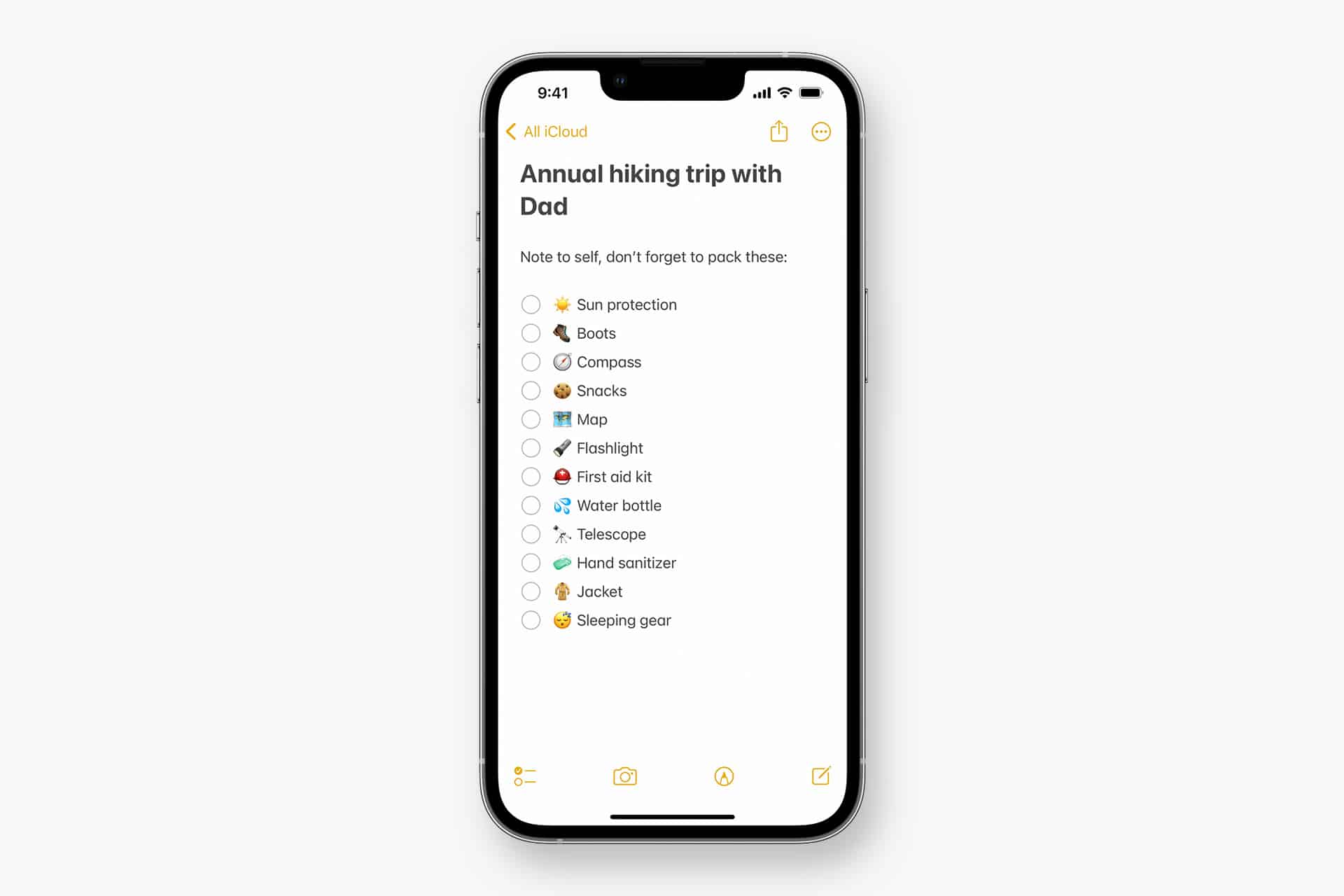
A smartphone displays a checklist titled "Annual hiking trip with Dad," listing essentials like sun protection, snacks, and compass—showcasing Teamwork Across Apple Devices for seamless apple notes collaboration.
Image Credit: Apple Inc.

Apple Notes iOS 27 Adds Section Links

Section links solve one of the largest problems affecting long notes: reaching information located several screens below the beginning.

A user can now select text, choose Add Link and connect it to any heading or subheading inside the current note. Tapping that linked text immediately moves the reader to the selected section.

The feature can turn the opening of a document into a manual table of contents. A project note might contain links to its schedule, budget, participants, research and outstanding tasks without requiring separate documents.

To create a section link:

Select text > Add Link > Link to Section > Choose a heading

Notes displays the headings and subheadings already present in the document. Regular body paragraphs do not appear as destinations, so the note must use Apple’s title or heading formats before links can be created.

To format a destination:

Select the section title > Formatting > Heading or Subheading

The visible link text does not need to match the destination heading. A phrase such as “View the current budget” can link to a section titled “Financial Information.”

Section links differ from the existing ability to connect separate notes. Apple Notes already allows users to create internal links leading from one document to another. The new control moves within the same document instead.

That distinction is useful for meeting records, research files, travel plans and study material that become too long for ordinary scrolling but do not need to be divided into several notes.

Links should continue working when the document is shared through iCloud because they point to structural elements inside the note rather than fixed screen positions.

Renaming or deleting a destination heading may affect its link. Users maintaining complex documents should test their navigation after reorganizing major sections.

Divider Lines Improve Visual Structure

Apple Notes in iOS 27 adds horizontal divider lines as a native formatting element.

The line creates a visible separation across the document without requiring users to type repeated hyphens, underscores or other characters.

To add one:

Place the cursor > Open the edit menu > Insert Divider Line

The divider is inserted at the cursor position and moves with the surrounding content as the note changes.

A horizontal line can separate meeting notes by date, distinguish reference material from personal comments or divide a recipe into ingredients, preparation and serving information.

It also provides structure without making every section a heading. Headings define the hierarchy used by section links, while dividers create a visual break that does not become another navigation destination.

Typing a row of hyphens previously produced an inconsistent substitute. The characters could wrap on a narrow screen, change length after editing or become difficult to select. The native element maintains its appearance as the document moves among iPhone, iPad and Mac.

Divider lines should be used selectively. Adding one between every short paragraph can make the note look more fragmented rather than organized.

The strongest layout combines headings for major subjects, subheadings for smaller divisions and divider lines where one type of content clearly ends before another begins.

Markdown Moves More Easily Into Apple Notes

Apple Notes gained the ability to import and export Markdown files with iOS 26. The iOS 27 upgrade removes additional steps from copying content between Notes and Markdown-based tools.

Markdown uses plain-text characters to represent formatting. A hash symbol can identify a heading, pairs of asterisks can create bold text and square brackets can define a link.

The format is widely used by writers, developers, documentation systems and publishing platforms because it remains readable without requiring a proprietary editor.

When Markdown-formatted text is pasted into Apple Notes in iOS 27, the app automatically converts the syntax into rich text. Headings become formatted headings, links become clickable and emphasis appears as bold or italic text.

A pasted line such as Project Schedule appears as a formatted heading rather than displaying the two hash symbols.

Moving content in the opposite direction is also easier. Apple has added a Copy as Markdown command that converts selected rich text into Markdown syntax before placing it on the clipboard.

To use it:

Select the text > Open the edit menu > Copy as Markdown

The result can be pasted into a content-management system, code editor, Markdown document or another writing application while preserving supported formatting.

Copy as Markdown does not transform Apple Notes into a complete Markdown editor. Users continue writing through the familiar rich-text interface rather than viewing raw syntax throughout the document.

Complex attachments may not translate perfectly. Scanned documents, drawings, audio recordings, embedded files and some tables do not have universal Markdown equivalents.

Basic elements such as headings, links, emphasis and lists provide the most dependable transfer. Users preparing an important publication should review the pasted result before assuming every element survived the conversion.

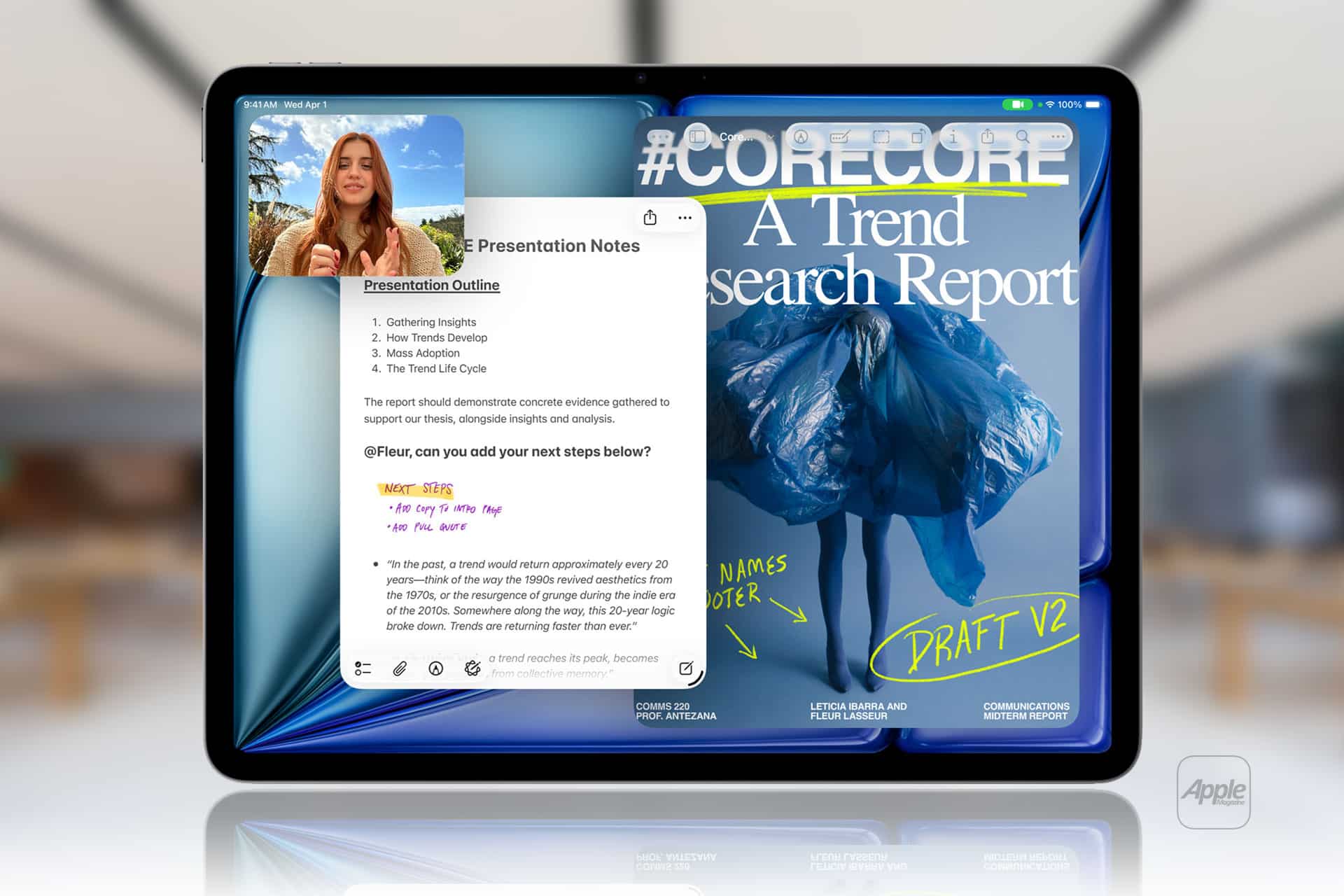
Two iPad screens side by side: the left highlights a video call with a woman and presentation notes, while the right displays a digital report cover titled "#CORECORE: A Trend Research Report," showcasing handwritten notes—demonstrating iPad Air specs in action.
Image Credit: AppleMagazine

Siri AI Can Create and Update Notes

Siri AI gives Apple Notes in iOS 27 a more direct connection with information generated or located through the assistant.

A user can ask Siri a question, refine the answer through conversation and save the result into a new note. The transfer happens without selecting the response, copying it and leaving Siri to open Notes manually.

A request could take the following form:

“Create a note called Kyoto Trip and add this itinerary.”

Siri can also target an existing document when the user identifies it clearly:

“Add these restaurant suggestions to my Kyoto Trip note.”

The integration extends beyond saving complete answers. Siri AI can reorganize poorly formatted information, convert text into a clearer structure and place the revised version inside Notes.

Someone collecting an unorganized group of tasks could ask Siri to separate them by priority before saving the result. A block of research could be converted into headings and shorter paragraphs.

Siri’s personal-context capabilities can help locate an existing note when the precise title is forgotten. The assistant is designed to search information across apps and understand requests using details connected to the user.

These actions remain subject to permissions. Siri should not silently place information into a document without recognizing the requested destination and action.

Users should review AI-generated material before treating it as authoritative. Reformatting supplied text carries less factual risk than asking Siri to generate research, dates, quotations or instructions from general knowledge.

Siri AI Requires Newer iPhone Hardware

The main Apple Notes iOS 27 update runs on iPhone 11 and later, as well as the second-generation iPhone SE and newer models.

Siri AI has a narrower hardware requirement. Apple lists iPhone 15 Pro, iPhone 15 Pro Max and every iPhone 16 or later model as compatible with the new Apple Intelligence architecture.

An iPhone 15, iPhone 15 Plus, iPhone 14 or iPhone 11 can receive section links, dividers, Markdown support and the redesigned Notes interface. Those devices cannot use the Siri AI note-writing actions.

This separation means two iPhones running the same operating system can display different Notes capabilities.

Siri AI is scheduled to reach users as a beta later in 2026, beginning in English. Apple plans to expand language availability, but individual capabilities may not arrive simultaneously in every supported language.

The assistant will not initially be available on iPhone or iPad in the European Union. Apple has also said its new Apple Intelligence features will remain unavailable in China while the company works through regulatory requirements.

Ordinary Siri controls may continue to perform basic actions on unsupported devices, such as creating a simple dictated note. They should not be confused with the new ability to hold a conversation, reorganize information and add the result to a chosen document.

A glowing, multicolored wave and orb on a dark background, resembling Apple’s Siri icon, with a small Apple logo in the bottom right corner.

Image Playground Expands Inside Notes

Image Playground remains integrated with Apple Notes in iOS 27 and receives a substantially more capable generation model.

The upgraded system can produce higher-quality images in a wider range of visual styles, including photorealistic results. Earlier Image Playground versions concentrated on illustration, animation and sketch-like appearances.

Users can describe an image and insert the generated result into the current note. A travel plan might receive a destination image, while a creative project could use generated concept art beside written ideas.

Photorealistic generation runs through Private Cloud Compute rather than entirely on the iPhone. Apple says requests processed through this architecture are not stored or made accessible to the company.

Generated images automatically include a hidden SynthID watermark identifying them as AI-created. The watermark does not appear as a visible label across the picture, but it provides a technical signal that compatible systems can detect.

Image generation may have daily usage limits because it depends on powerful server models. Apple says most iCloud+ plans will provide increased access, although the exact allowance can depend on the subscription and service conditions available at release.

The complete Image Playground experience may not appear in every early iOS 27 beta. Apple can activate or adjust cloud-dependent features separately while testing the operating system.

New Icons Clarify Shared Notes and Folders

Apple Notes adopts the wider iOS 27 design changes through refreshed buttons, menus and Liquid Glass interface elements.

The Notes app icon has been updated while preserving the familiar yellow-and-white paper design. The change keeps the app recognizable without leaving it visually disconnected from the new system icons.

Shared material receives clearer identification. The shared folder displayed near the top of the folder list now uses a blue icon, separating it more clearly from private iCloud and local folders.

Individual shared notes and folders also receive revised symbols. These indicators make it easier to understand whether another person can view or edit material before sensitive information is added.

The distinction matters because a collaborative note can look almost identical to a private document once it is open. A clearer icon in the list provides another warning before the user begins editing.

Liquid Glass changes the appearance of controls and menus but does not alter the underlying note format. Existing notes, scans, checklists, attachments and locked documents remain available after the update.

People using accessibility settings such as increased contrast, reduced transparency or reduced motion may see a modified version of the visual design.

Existing Notes Features Remain Available

The iOS 27 changes build on a much larger set of capabilities introduced during earlier releases.

Apple Notes can already scan documents, attach PDFs, record audio, generate transcripts, solve mathematical expressions, create checklists and collaborate through iCloud.

Users can link one note to another, place notes inside folders, apply tags and create Smart Folders that collect documents according to selected rules.

Locked notes can use a device passcode or separate password, while Face ID provides faster access on supported iPhones.

The app can also identify handwriting, search text inside scanned documents and recognize information contained in images.

None of those existing tools has been replaced by Siri AI or Markdown. The new version concentrates on moving through large notes and transferring information with less manual work.

Section links are particularly effective when combined with audio transcripts or lengthy scanned research. A user can create headings above important material and place navigation links at the beginning of the document.

Markdown support addresses another gap by making Notes more practical as the first stage of a publishing workflow rather than a closed destination for text.

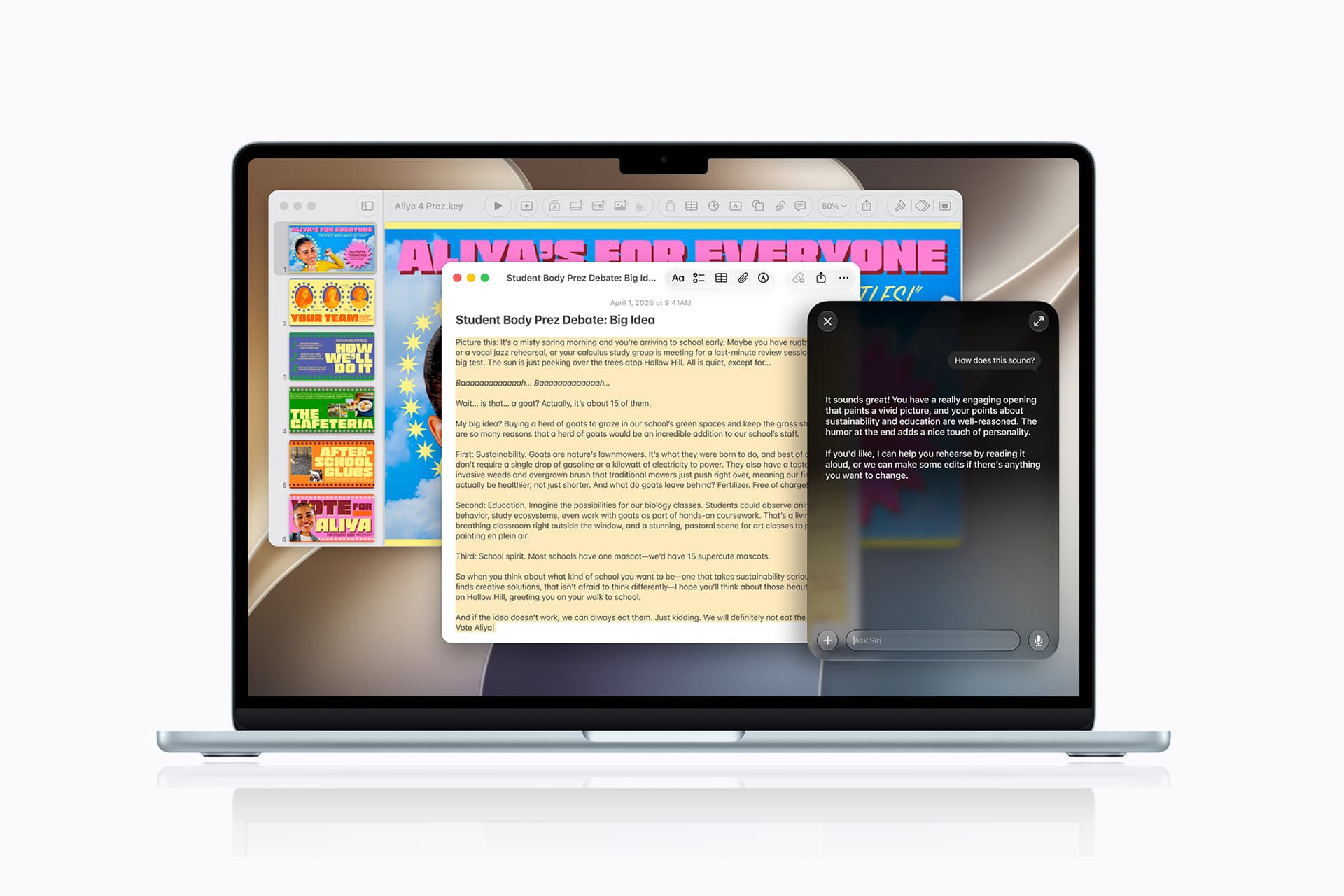
Apple Notes iOS 27 - A laptop running macOS 27 displays a colorful article on student body elections, with a sidebar of posters on the left and a chat window open on the right, where an AI assistant is generating a response.
Image Credit: Apple Inc.

What to Check Before Installing the iOS 27 Beta

Apple Notes in iOS 27 is available for testing through prerelease software, with the complete operating-system release scheduled for the fall.

Beta software can contain synchronization failures, interface problems and changes that Apple has not finished documenting. Notes is especially sensitive because its content may synchronize immediately across every device using the same Apple Account.

Before installing a beta on a primary iPhone, users should confirm that important notes have finished syncing and that another copy of critical information exists outside the beta device.

A Mac, iPad or iCloud.com can be used to verify whether recent documents have reached the server. Exporting especially important notes as PDFs or Markdown files provides an additional copy that does not depend on the Notes database.

Collaborative notes require more caution. People using older operating systems may not see every new formatting element exactly as intended, particularly while iOS 27 remains in testing.

The public release should resolve many compatibility issues, but Siri AI will follow its own beta schedule and regional limitations. Installing iOS 27 alone will not guarantee that every intelligent Notes action appears immediately.

Apple can still modify menu locations, visual elements and cloud-based features before the final version arrives. The safest time to reorganize a large Notes library around section links will be after every frequently used Apple device can install its corresponding fall update.

The post Apple Notes iOS 27 Upgrade Adds Smarter Organization appeared first on AppleMagazine.

  •  

Apple Intelligence in appleOS 27

Apple (MacRumors):

Apple today introduced the next generation of Apple Intelligence, powered by a bold new architecture that integrates the latest Apple Foundation Models deep into Apple’s platforms and is uniquely designed to protect users’ privacy.

[…]

The next generation of Apple Intelligence also helps power Siri AI, an entirely new version of Siri.

[…]

Image Playground offers new powerful ways for users to bring their imagination to life. They can create high-quality images in virtually any style, now including photorealistic, thanks to a new generative model that runs on Private Cloud Compute. This is a major transformation for image generation across platforms. And generated images will automatically include a hidden SynthID watermark to identify them as AI-generated.

[…]

Now Messages offers one-tap suggestions based on the context of users’ conversations, making it easier than ever to get things done, such as creating a reminder or a note.

[…]

Apple Intelligence powers even more enhancements across operating systems. With automatic proofreading, users receive improved suggestions for spelling and grammar as they type across the system.

Damien Petrilli:

Apple WWDC26 “big features”: selling a rebranded gemini.

John Gruber:

What’s confusing about this Apple-Google partnership is that Google pretty much calls all things AI “Gemini”. The models are “Gemini”, the assistant is “Gemini”, and the feature integrations are “Gemini”. So Apple is taking pains to emphasize that they’re building atop the Gemini models, not the Gemini assistant.

Google creating the model, Apple figuring out how to integrate it and make it easy to use. Are we back to Apple and Google each focusing on what they do best?

Dave B.:

This is my favorite Apple event in a long time.

Instead of bombarding you with a million new features that mostly feel half-assed, this feels like it’s actually catered to the user experience instead of to marketing checklists.

Matt Ronge:

All of these AI additions to MacOS/iOS look like nice improvements, but somehow it all feels unambitious given the current state of AI.

But I suppose it’s better for them to underpromise given what happened with Siri last year…

Christina Warren:

As I expected, Apple is going to punt the “on-device” story for Apple Intelligence and push towards the “private cloud compute” story for the models that you’ll actually want to use. I’m glad on-device isn’t going away, but it’s clear a hybrid approach is absolutely necessary

Hartley Charlton:

Apple’s most advanced on-device AI model in iOS 27 requires a minimum of 12GB of unified memory, meaning the standard iPhone 17 is excluded.

Alex Rosenberg:

The 16 Pro was explicitly sold as having Apple Intelligence-capable hardware.

Juli Clover:

Apple today said it is expanding Private Cloud Compute (PCC) beyond its data centers, partnering with Google and NVIDIA to run Apple Intelligence workloads on Google Cloud.

[…]

All server components and software are part of a trusted computing base subject to verifiable transparency and no-privileged-access guarantees, plus Apple has a cryptographically verifiable ledger of all Google Cloud hardware that is part of the PCC fleet to mitigate the risk of supply chain attacks. PCC on Google Cloud also uses many of the same architectural security patterns as PCC on Apple silicon.

John Siracusa:

PSA: Remember that Apple Intelligence is disabled in macOS if you boot from an external drive.

See also: Mac Power Users Talk.

Previously:

Update (2026-06-19): Apple:

As we continue to refine our approach to image generation, the ImageCreator class is being discontinued and will no longer work in iOS 27, iPadOS 27, macOS 27, and visionOS 27 or later.

[…]

Transition to presenting the Image Playground sheet, which provides a consistent, system-managed image generation experience. Alternatively, you can integrate another image generation service of your choice.

  •  

Photos AI in appleOS 27

Apple (MacRumors):

With Spatial Reframing, users can improve the composition of a photo after it’s been taken. Spatial Reframing builds on Apple’s deep understanding of spatial models thanks to Apple Vision Pro, so users can touch and drag a photo and preview in real time how the perspective shifts — as if they’d repositioned the camera in the original scene. Using powerful image models, Spatial Reframing will only generate new content where the perspective has been shifted, ensuring the reframed photo stays consistent with the original scene.

Users can also expand images with the Extend tool to give their subjects more breathing room. For example, they can straighten a crooked horizon without cropping out anything important, or adjust the aspect ratio, and Extend will fill in the missing pieces. Additionally, the popular Clean Up tool gets a major upgrade, so users can remove distractions with better quality and more realistic infill, even when the scene is complex.

These seem like useful features. I think it’s fine for Apple to offer them, but they do seem somewhat at odds with its previous preening about how they believe in the sanctity of photos that actually happened.

Kuba Suder:

“Reframing photos with AI” - I don’t like this at all 👎

Kind of the crosses the line to cheating about reality too much for me… it’s one thing to lighten or darken or colorize pixels, but another thing to reposition them against each other.

Louie Mantia:

“Deep respect for photography” right after a demo on generating images bc they do not respect art.

Jeff Carlson (Mastodon):

Generative AI is a technology that photographers are distancing themselves from (or should be), thanks to all the AI slop being produced everywhere. And yes, that includes creations from Apple’s Image Playground app, the image generator that the company also showed off during the WWDC keynote.

But generative AI doesn’t need to mean full images created from text prompts. When applied to selective areas, like erasing a piece of trash next to a subject’s feet, generative AI can do some of the menial work of replacing pixels that photographers would otherwise spend time retouching in an app like Photoshop. Google’s Pixel phones include a similar Magic Eraser tool.

Spatial Reframing is a great example of how the technology can be used to enhance real photos you capture.

Brian MacDuff:

I can personally confirm that Apple’s Photos “Clean Up” feature is DRASTICALLY improved in iOS 27. 😳

John Siracusa:

This is a bit hyperbolic and unkind, so I hope you can forgive me for venting. And, hey, who knows? Maybe the fancy new AI-powered reframing feature will actually get broad use. (But I doubt it…)

See also: MacRumors.

Previously:

Update (2026-06-18): Ben Lovejoy:

In the two weeks since, my view has been very much reinforced. The Clean Up tool is now significantly more powerful, while the Reframe and Extend tools address similar real-life needs …

  •  

Vídeo: as novidades de IA no Safari, Atalhos e Fotos no macOS Golden Gate 27

Dando continuidade à nossa série de vídeos sobre o macOS Golden Gate 27, desta vez o foco foi em novidades que espalham inteligência artificial por diferentes cantos do sistema: Safari, Atalhos (Shortcuts), Finder, Image Playground e Fotos (Photos).

Neste segundo vídeo, mostramos o agrupamento inteligente de abas no Safari, os recursos de IA no app Atalhos e a sugestão inteligente de nomes para pastas no Finder, feita com base no conteúdo que elas guardam. Fechamos com o Image Playground e as novas ferramentas da Apple Intelligence que chegaram ao app Fotos.

Ainda tem mais pela frente nessa cobertura do macOS 27 — continue acompanhando o canal do MacMagazine para não perder os próximos vídeos! 😀

  •  
❌