❌

Reading view

Materiam Superabat Opus

I wear a bracelet with a Latin phrase on it, which is exactly as insufferable as it sounds. Materiam Superabat Opus. This phrase is so important to me that I had a box of pencils made with it etched on the side so I see it every time I write something down. I also laser engraved it on the inside of my belt so I think about it when I put my pants on in the morning and take them off at night. Today, I want to explain.

Ovid, in Metamorphoses, at the very beginning of Book 2, describes the doors of the Sun God’s palace. The god of the forge, Mulciber (Vulcan), carved the whole world onto them. They held the sea, the land, the rivers, the sky, and all their gods and people. The doors were made of precious silver, and yet, Ovid explains, the workmanship surpassed them. Materiam Superabat Opus means “the work was better than the material.”

The first time I read this phrase, it flattened me.

I like to think of myself as a craftsman. I make things, both with my words and with my hands. Being a craftsman is a core part of my identity. When I’m entrusted with a piece of material (whether it’s an idea or a slab of walnut), my goal is to leave it better than I found it.

But for me, Materiam Superabat Opus runs much deeper. I think about it in terms of my life. Specifically, I don’t think I am a particularly smart or clever person. As I was growing up, there was always somebody smarter, faster, wittier, and certainly better looking than me.

From an early age, I realized that if I was going to make my way in this world, I had to make the best of what I had. I had to cobble together what skills and talent I did have to make the best version of myself. I think it explains why I’ve always been so interested in automation and optimization, a pursuit that pre-dates my first run-in with a computer.

If there is anything that I’ve got going for me, it’s my willingness to do what it takes to make the best out of what I have. My sincere desire is that the sum total of my life exceeds the toolkit I was given. In the end, I want them to say, “With modest material he did good work.”

Materiam Superabat Opus

The post Materiam Superabat Opus appeared first on MacSparky.
  •  

This Week in the Labs — August 28, 2026

We got a lot of news from Apple this week, and I shipped a lot in the labs. Busy week.

Below you’ll find the week’s new videos and podcasts, a few of the conversations happening in the member community, and what’s coming next week. Most of those links lead straight into the Labs community on Circle, so they’ll only open if you’re a member. If you’re a Labs member who hasn’t set up your Circle access yet, send me a note and I’ll get you in. For members, this is your week at a glance. If you’re not one yet, it’s a peek at what you’re missing.


The Week’s Releases

August Deep Dive – Sparky’s Analog Stack

Deep Dive · August 25 · Pathfinder

The recording from this month’s Deep Dive is up: why paper still handles the last mile in an otherwise digital workflow, the daily list scratched onto a Field Notes page or an Ugmonk card, why a wildfire evacuation didn’t change how I think about backup, and the room’s own rabbit holes on Lochby covers, Rhodia paper, and pencil sharpeners.

Pathfinder Link

Design a Cohesive Stream Deck Icon Set with ChatGPT

Video · August 26 · Pathfinder & Insider

A lot of you saw the Stream Deck tour and asked how I make the buttons. This one walks through it. I use a ChatGPT project with a design prompt saved as a resource file, which gets me icons that all look like they belong together, and I show how to pair two of them on a multi-action switch so one button toggles my recording light.

Pathfinder Link | Insider Link

Accurate Backyard Weather with Eve Weather

Video · August 27 · all tiers

Apple Weather gets close, but it has never been quite right for my backyard. So I solved it with money and put an Eve Weather sensor outside the window. Here’s the setup, what it looks like in Apple Home, and the automations I’m building on top of it.

Pathfinder Link | Insider Link | Member Link

The Lab Report for August 28, 2026

Podcast · August 28 · all tiers

Apple shipped new desktop Macs two weeks before the iPhone event. The M6 Mac mini is Apple’s first 2nm chip, the M5 Ultra Mac Studio is its first quad-die design, and both ship September 22 running macOS 27 Golden Gate.

Pathfinder Link

In the Community

Problems with USB-Drives, after Update to macOS 26.6.2 (Labs Discussion Board)

One member spent the week chasing a gnarly macOS 26.6.2 bug with USB Drives.

Meross app (Labs Discussion Board)

A member asked about the Meross app for smart plugs and started a conversation about Meross’s HomeKit-compatible plugs and best practices.

Wispr Flow — editing feature request (Labs Discussion Board)

One member flagged an annoyance with Wispr Flow, which kicked off a discussion of dictation and editing.

If you’re a Labs member and haven’t joined the Circle community yet, let me know and I’ll get you set up.

Coming Up

The calendar is loaded out through the end of the year. Here’s what’s on deck through the middle of October.

iPhone Keynote Day Meetup. September 9. We’ll be doing a meet-up of all labs members on Keynote Day. Details to come.

Labs September Meetup (After Dark) · September 10, 18:00 Pacific · Pathfinder + Insider

September Deep Dive – The Mac Studio Home Server · September 17, 12:00 Pacific · Pathfinder

Labs Jam Session – Browsers · September 24, 12:00 Pacific · Pathfinder + Insider + Member

Q4 Quarter Planning Meetup · October 1, 10:00 Pacific · Pathfinder

Labs October Meetup · October 8, 14:00 Pacific · Pathfinder + Insider

October Deep Dive – Local and Private AI on a Mac · October 15, 12:00 Pacific · Pathfinder

Links of Interest


The videos, podcasts, and live sessions above are inside MacSparky Labs. Join at macsparky.com/join.

The post This Week in the Labs — August 28, 2026 appeared first on MacSparky.

  •  

Things 3’s Repeating Task Feature Restructured

The Things 3 team released a nice update recently, dramatically improving its repeating tasks feature. I first learned of this when we interviewed the Things CEO on Mac Power Users, but I’ve heard from several of you Things users that are really digging it. If this was the feature holding you back from Things in the past, it may be time to take another look.

The post Things 3’s Repeating Task Feature Restructured appeared first on MacSparky.

  •  

A Truce on App Store Fees, Still No Siri AI in Europe

We got news that Apple has settled the App Store fee dispute with the European Union, which is good. If Apple can get out of this mess with a negotiated deal instead of years of litigation and penalties, they should consider themselves ahead of the game.

When I first saw the headline, however, I was hoping it meant a more global agreement with the European Union. I talk to European Apple enthusiasts every day in the MacSparky Labs, and they are all incredibly frustrated that Apple fails to release features in the EU that are available elsewhere.

I’m not going to pretend to know who’s to blame, but European citizens and Apple customers are the ones paying the price.

Back in my days as a lawyer, I was a party to enough ongoing negotiations to know that the people outside the negotiations have no clue what’s actually going on. But I can hope this is merely a first step and that my European Apple-using friends can get access to Siri AI sooner rather than later.

The post A Truce on App Store Fees, Still No Siri AI in Europe appeared first on MacSparky.

  •  

Intentional AI 7: We’re All Developers Now

Intentional AI podcast artwork

On this episode of Intentional AI, Chris and I talk about building your own iPhone app now that the robot writes the code.

Chris built a productivity super app for himself and his assistant, starting with a feature list he wrote on paper.

I talk about my Vestaboard app, which I built after the official one stalled and whose code I have never once looked at. We also get into token budgets, since none of this is free.

Making the perfect app for yourself is a weekend project now, but the app business is still a hard business. We also get into that.

The post Intentional AI 7: We’re All Developers Now appeared first on MacSparky.

  •  

Focused 263: Removing the Roadblocks, with Cat Mulvihill

Focused podcast artwork

On this episode of Focused, Mike and I are joined by Cat Mulvihill to look at a frustrating productivity problem: having a good system and still not doing the work. Cat separates the reasons we get stuck into three categories, logical, biological, and psychological, because each one needs a different answer.

We talk about external accountability, ADHD and task initiation, perfectionism, and the tendency to keep rebuilding the system when the system isn’t the problem. Cat also explains Immunity to Change, a framework for finding the hidden fears and assumptions that can keep one foot on the brake.

Then we get into shiny new objects and what we’re reading. Cat’s Bluetooth home phone may be the best solution I’ve heard for keeping a cell phone out of the bedroom without missing an important family call.

This episode of Focused is sponsored by:

  • Keeper: Get 60% off personal and family plans.

The post Focused 263: Removing the Roadblocks, with Cat Mulvihill appeared first on MacSparky.

  •  

The Vision Pro’s Uncertain Future

For some time now, I’ve believed that while the Vision Pro is on a slow burn at Apple, its future was certain. The incoming CEO, John Ternus, has said several times that he believes this is part of Apple’s future.

We’ve heard lots of rumors about them working on a pair of glasses in addition to the immersive product. Finally, the content for the Vision Pro seems to be flowing pretty steadily. I’m looking forward to the baseball games we’re getting later this month in immersive video.

Last week, we got news of layoffs. And of course that gets you thinking. Right now, Apple’s dealing with a hardware and supply chain crunch where everything is more expensive and harder to get. Vision Pro is the proof-of-concept product that isn’t mainstream.

I’ve never been convinced Apple wanted to sell a lot of these, even when they weren’t dealing with exorbitant prices and supply chain nightmares. Add this to the recent news of layoffs on the Vision Pro team, and I’m starting to wonder if this isn’t a slow-burn product, but instead an on-pause product.

The post The Vision Pro’s Uncertain Future appeared first on MacSparky.

  •  

New M5 Mac Studio and M6 Mac mini

We got a nice surprise from Apple this morning with some new Macs. Those of you waiting for that M5 Ultra Mac Studio are finally going to get your wish. You can get the M5 Ultra with up to 36 CPU cores and up to 80 GPU cores. Interestingly, memory tops out at 512 GB. That’s the same ceiling the M3 Ultra had, and it’s the configuration Apple dropped back in March. There’s no mystery why. The M5 Ultra starts at $5,500, up from the $4,000 entry price for the M3 when it launched. Again, no surprise.

If your needs are more modest, the Mac mini also got updated to M6 and M5 Pro variants. That’s right, we can now buy an M6 Mac.

The mini also took a price hike. The base model is $899 now, up from $599 last fall and $699 since June. I’m glad Apple released these things. I expect the AI gang will buy them like hotcakes.

The post New M5 Mac Studio and M6 Mac mini appeared first on MacSparky.

  •  

Bitrig, An AI Development Assistant from SwiftUl Team Members

Four members of the SwiftUI team at Apple left the company, and now they’ve started a company that writes SwiftUI for you.

The product is Bitrig. You describe an app in plain English, and it generates real Swift and SwiftUI code. What comes out the other end is a project you can open in Xcode, read, and edit by hand. The pipeline runs all the way to TestFlight and the App Store, provisioning profiles and all.

It started as an iPhone-only app last October and now it’s on the Mac. I’ve only poked around the edges so far, but it seems like a good idea if you want some help with native app development.

I’m putting the Mac app on my machine this week to find out.

The post Bitrig, An AI Development Assistant from SwiftUl Team Members appeared first on MacSparky.

  •  

Daylite Puts the Whole Client Relationship in One Place

Daylite Sample Image

This week MacSparky is sponsored by Daylite.

For years I ran a law practice, and the hardest part of client work was never the work. It was keeping track of it. Where that email went, what we agreed to on a phone call, which version of the document was current, who I owed a call back. Some of it lived in Mail, some in a folder somewhere, and too much of it lived only in my head.

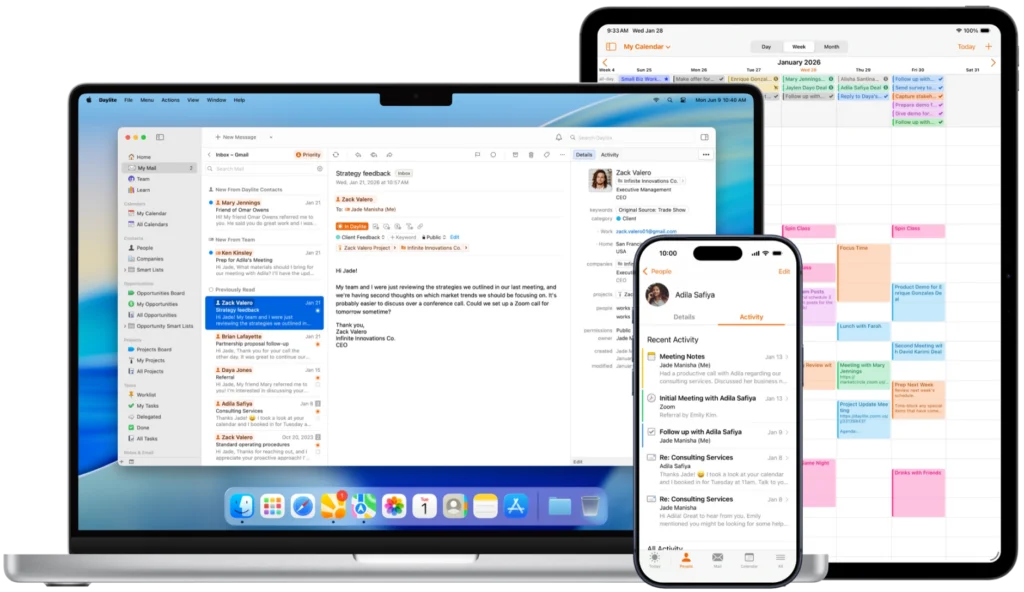
That’s the problem Daylite has been chipping away at for more than twenty years. It pulls your clients, projects, tasks, calendars, and communications into one place, so every email, meeting, note, and follow-up becomes part of an ongoing history of that relationship. Open up a client, and you can see what happened, what’s next, and who is waiting on you.

The newest piece of that is Mail in Daylite, which brings your email inside the app alongside everything else. A message stops being one more thing you have to file. It attaches itself to the person, the deal, and the project it belongs to.

I also like that Daylite is built only for Mac, iPhone, and iPad. It isn’t a web app wearing a Mac costume, and you can feel the difference in how it behaves.

If you run a service business and you’re tired of carrying the whole client history around in your head, take a look at Daylite. There’s a free trial.

The post Daylite Puts the Whole Client Relationship in One Place appeared first on MacSparky.

  •  
❌