❌

Reading view

Adobe: New Firefly Graph can turn creative workflows into reusable assets

Adobe’s Firefly Graph is now available to Creative Cloud customers, offering a node-based workflow tool designed to help business create content at scale with generative AI (genAI). 

With Firefly Graph, users can connect multiple tools in visual workflow, with each “node” performing a specific task before passing its output to the next node. This gives creative professionals more control over generated outputs, according to Adobe, and makes it easier to try out ideas by swapping, adjusting or adding components.

For example, a user could start with a text prompt box that connects to a node that generates an image using an AI model from Adobe or third-parties such as Google and OpenAI. Further along the chain, the user could add nodes to remove a background or upscale an image, for instance, before producing an image, video or other asset ready for use.

Changing one aspect, such as adding a reference image or adapting the text prompt, would change the final output.

It’s an approach similar to node-based workflow tools such as ComfyUI — a startup valued at $500 million which claims more than 4 million users. Others include Weavy, acquired by Figma last year for a reported $200 million. 

With so many AI tools available to creative professionals, workflows can get complex and hard to replicate, said Elliot Sedegah, director for strategy and product marketing at Adobe. Firefly Graph provides access to more than 300 different node types, including images, video editing and AI generation tools across Adobe’s portfolio and third-party tools. 

“Whether you’re working at a mom-and-pop shop or a larger enterprise, you’re looking for consistency and then bringing that into a workflow so that you’re not hopping in and out of different tools,” he said. “Putting all that together takes massive amount of time, and sometimes it’s very difficult to even know what you did.”

Once created, workflows can be shared across an organization as repeatable processes for other individuals or teams to use. “Think of that rock star creative that you have and the recipes they create: those are now canonized as workflows, as assets, that the rest of the organization can take and reuse over and over again,” said Sedegah.

In addition, while creative professionals are needed to created high quality assets, reusable workflows can be put into the hands of broader teams to create content for large audiences, said Sedegah.

Firefly Graph addresses a challenge that most large creative organizations face, said Lisa Gately, principal analyst at Forrester — namely that their best creative workflows “live inside the heads of a few experts.

“Teams can generate images and video with AI, but reproducing the exact sequences of creative decisions, model selections, edits, and refinements that lead to a high-quality result is difficult and inconsistent. Firefly Graph turns those workflows into reusable assets,” she said.

While other node-based workflows aim to address similar problems, Adobe’s pitch is that Firefly Graph provides customers with the benefit of integration into its product suite. 

“Firefly is a full, broader AI creative studio, not just a node-based tool, so [Firefly Graph] is a part of a bigger picture,” said Sedegah. “The strength is having everything in one place with the tools that people know.” 

“Where Adobe differentiates is in enterprise integration,” said Gately, with Adobe connecting Firefly Graph to a range of other Adobe tools. Those include Creative Cloud applications; Firefly Boards for ideation; and Firefly Creative Production. 

“The workflow becomes part of a broader content supply chain instead of a standalone creation tool,” she said. ”Organizations committed to other tools are unlikely to migrate for a node-based canvas — making a change is about the broader content supply chain.”

Firefly Graph is available now to Adobe Creative Cloud for Enterprise subscribers. Creative Cloud for Enterprise is licensed by seat, requiring custom, volume-based enterprise agreements. Creative Cloud for Enterprise customers receive credits for Firefly Graph. Creative Cloud for teams customers can sign up for a public beta online. Creative Cloud pricing starts at $99.99 per license each month.

This article was updated on June 19 with pricing information from Adobe.

  •  

Jamf CEO: ‘AI is happening whether organizations know it or not’

Beth Tschida, who became Jamf CEO in May after serving as CTO and as interim CEO, is the first woman to lead the company in its near 25-year history. I spoke with her this week at the London Jamf Nation event, where the company introduced its new AI Governance solution.

How the transition to CEO is going 

“It’s been a great privilege and an adjustment,” she said. “Jamf has always been a company deeply focused on culture, which is exactly why I love being here. Having the ability to influence and improve that culture from this role is something I feel very supported in doing.”

The last few years have seen a variety of changes at Jamf, which was briefly a public company. “We’ve come through a period of change, not all of it easy,” Tschida said. “But we now have a great partnership with Francisco Partners. We’re private, we’re focused on solving customer problems, and we’re finding ways to lean into what we’re good at.”

Women in tech and mentorship

Tschida is a good choice to lead a software engineering company, as she’s an engineer herself. She originally joined Jamf as vice president for software engineering in 2018, moving up to CTO in 2022. She’s also one of the few women in leadership positions in tech. (To Jamf’s credit, the company also has CIO Linh Lam on its team.)

“I think it’s important for women to stay deep in the tech, build their skills and find their voice confidently,” Tschida said. “You’ll never know all the technology out there. Nobody does. What matters is the ability to keep adapting and evolving.”

Tschida stressed the importance of mentorship. “I feel very honored to have a chance to be a role model for other women,” she said. “I had women who forged a path for me, including a female CIO early in my career who I asked to mentor me and learned an enormous amount from. I’m certainly not the first woman in tech, but I do want to play my part in helping others grow in their careers.

“Ultimately, I want to be respected for what I do, not for my gender. That’s how everyone should be judged.”

AI Governance

Tschida’s product focus means she knows what matters to Jamf. “If you focus on the problems customers have and how your product can help fix them, that’ll take you to where you want to go.”

For many in the enterprise, both in and beyond the Apple space, the next big problem is AI — how to deploy it, how to manage it, and how to regulate it.

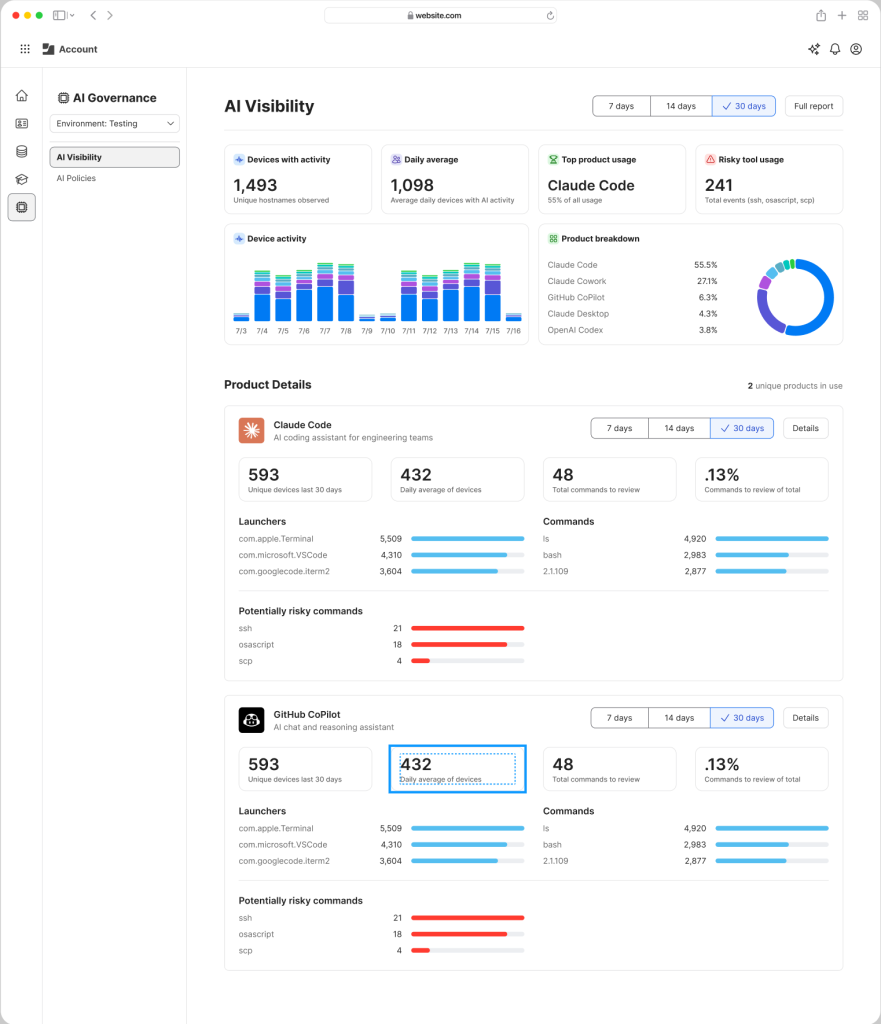
AI Governance is a new Jamf solution that has been developed in response to those pain points. Countless surveys, including Jamf’s own data, show that AI is being widely used across every company, but IT lacks visibility into its use. It’s hard to know what data is being shared with AI tools, which services are being used, and how to report on that use effectively — particularly in regulated industries.

AI Governance is designed to make it possible for anyone managing an Apple fleet to get granular insight into AI use across their Mac, iPhone, and iPad devices. It uses telemetrics to shed light on that use, offers governance and management tools to help IT gain better oversight and control over it, and provides highly comprehensive reporting tools suitable for internal or regulatory review.

“AI is happening whether organizations know it or not,” said Tschida. “That’s the problem. You can try to block it, but that’s very hard to do well. It’s far better to build visibility and governance around it.”

The offering makes it possible for companies to enable the AI use they already know is taking place while protecting corporate interests and enabling fast and accurate reporting. You can find out more details here.

Empowering better AI

Jamf’s approach is focused on endpoint management. AI Governance means IT can see what’s running on a device, categorize it, and understand what AI tools and models are in use. “If you know how people are running AI on your fleet, you can open it up safely. Then all of your customers and employees can find their way to figure out how AI is going to optimize their workforce,” she said.

What does that look like in practice? Think of it as an orchestration layer. IT can define different AI configurations for different teams: HR might use one set of models, engineers another. And admins can apply opinionated postures per group: what models are permitted, what cloud services they connect to, what’s visible to IT versus the CISO versus the CFO. “It’s an extension of what Jamf has always done, it just now applies to AI endpoints too.”

What about regulatory complexity across geographies? “A lot of governance controls are shared across regulations; a good base set is a healthy way to run regardless. But each regulation has its own twists. Our mission is to make sure customers operating in different markets can expand on that base and fit the specific models and regulations they need, getting the right configurations to the right devices.”

Managers must prepare for AI cost challenges

There’s a second dimension beyond management — cost. The industry is developing quickly, with new AI models appearing almost every week. Yesterday’s leading LLM is tomorrow’s fading star, even while the cost of AI infrastructure goes through the roof. As that churn slows, investors will want to start seeing returns on their bets, which is why token costs — the price of running AI services, at least in the cloud — are climbing fast.  

As costs become more realistic, that’s going to change the nature of AI deployment from the laissez-faire, anything goes approach to a more strategic management of such use. “Models keep dropping fast, but token costs are only going to go up,” said Tschida.

“Organizations will need to decide: just because you can build something with AI, should you? What’s the right model for what work? We’re helping customers move from, ‘We’ll just block it’ or ‘We’ll turn it on and hope for the best,’ toward a place where they have a real viewpoint and can manage and change that viewpoint over time.”

The ever-changing AI world is also prompting Jamf to make more of its APIs externally available. “We’re used across every industry and every geography, at every scale,” said Tschida. “There’s no way we can build every workflow every customer needs, we’d never get to all of them.”

Embracing openness also helps build future foundations. “Thinking about where we’re heading next — agentic endpoint management — having platform APIs allows our customers to build things they can imagine, that we can learn from, in a way that solves their specific problems.”

Apple, WWDC, and the enterprise

Tschida’s comments come shortly after WWDC 2026, where Apple introduced a raft of AI advances that formed a strong foundation for its future, improvements that matter to Jamf. “When Apple innovates, Jamf celebrates,” she said.

“Apple is doing great things in their AI ecosystem, revamping Siri, expanding their AI capabilities, making Apple the platform people want to run AI on because those machines simply perform better. Our job is to take what Apple builds and bring it into the enterprise in the way that enterprises actually need it.”

Most of the industry recognizes that Apple’s enterprise story has changed dramatically as its products see accelerating use, and momentum is not slowing. Tschida reflected on how just a few years ago, Apple in the enterprise was an option in employee choice programs. “Now it’s becoming the clear choice,” she said. “We expect that trend to continue. And the more Apple invests in AI running natively on device, the stronger that argument gets.”

Where is Jamf going?

AI Governance is a unique answer to an increasingly important set of questions that are now beginning to affect the IT management of Apple’s platforms. (It’s not clear whether anything as sophisticated exists for other platforms at al, but as the need to manage AI grows, demand for such solutions will grow.)

Ultimately, the company’s latest move reflects Jamf’s inherent strategy under its new CEO. “Focus on customers, listen to them, solve their problems, and don’t throw tech at it. Ask: what’s the problem? Can we solve it? That focus is what takes you where you need to go.

“We’re on a good trajectory, customers stay with us, and the culture has always underpinned us. Now we’re finding ways to lean into it even further,” she said.

You can follow me on social media! Join me on BlueSky,  LinkedIn, Mastodon and subscribe to The Core.

  •  

Estonia plans government IDs giving AI agents rights and responsibilities

There’s no shortage of agentic AI tools out there that offer to perform online tasks on your behalf, if only you’ll give them all your passwords and credit card details. The trouble starts when those agents don’t know when to stop — or when others don’t know to stop them.

In Estonia, the country’s AI Council has plans to change that, proposing to issue government-backed digital identities for AI agents that spell out what powers a person or company is willing to delegate to them.

“In the future, AI will increasingly perform digital operations on behalf of a person, company, or institution,” said Estonian Prime Minister Kristen Michal in a news release. “To do this, it must be clear who is acting, on whose behalf, with what rights, and who is responsible.”

He supported the AI Council’s proposal to create a digital identity for AI agents that will define agents’ rights and enable them to act in a verifiable and auditable manner.

The ID could, the council suggests, show whether an agent is only allowed to view data, create or edit documents, or make payments, and if so, up to what limit.

First mover advantage

There’s no telling when the plan will come to fruition — although Michal is keen for his country to take the lead.

“If we act quickly and wisely, Estonia will become the first country in the world to create an official digital identity for AI agents,” he said.

Estonia is already a leader in the use of digital identities for humans. Estonians can use their national digital ID cards for voting, signing documents, accessing medical and tax records. The country also offers foreigners the option of applying for “e-residency,” a digital identity enabling them to create a company in Estonia and digitally sign all related documents online as they interact with the country’s widely digitized administrative processes.

Michal created the AI Council in January, calling on Estonian startups, investment funds, industry and research institutions to systematically implement AI across the country’s industry, education, healthcare, and energy sectors.

AI vendors have already proposed creating digital identities for agents, but so far these are intended only to manage the activities of agents within the enterprise, or for interconnecting enterprise IT platforms, and none of them have the backing of governments.

Estonia’s proposal could put the tiny Baltic country at the cutting edge of agentic AI usage and set an example for others.

  •  

Microsoft launches Copilot Cowork with usage-based pricing

Microsoft has introduced usage-based billing for Copilot Cowork, which is now generally available. 

Microsoft unveiled Copilot Cowork in March, pitching it as an AI agent that’s capable of independently performing long-running, multi-step tasks — even when a user’s computer is off. 

It’s built on the same technology that underpins Anthropic’s Claude Cowork. Unlike Claude Cowork, which can interact directly with files and applications on a user’s computer, Copilot Cowork runs in Microsoft’s cloud environment and acts on documents held in a customer’s Microsoft 365 tenant.

On Tuesday, Microsoft unveiled pricing details for Copilot Cowork, which involves usage-based billing in addition to a Microsoft 365 Copilot license ($30 per user each month for large enterprises before discounts, and $20 for Microsoft 365 Copilot for Business). 

The usage-based pricing is calculated from four components, according to Microsoft: “model use, context retrieval, tool calls, and runtime.” 

In practice, this means more intensive tasks that draw on multiple sources, use “deep reasoning” and generate two or more outputs will lead to higher costs — denoted in Copilot Credits. 

There are two payment options: pay as you go — priced at 1 cent per credit — and P3, where customers commit to usage volume in advance and receive a discount.

Cowork is turned off by default; IT admins can decide when to make it available and which employees get access. Admins can also impose spending limits at the tenant, group, and user level, and receive notifications when spending reaches a certain level.

Users will also be able to see how much each tasks costs in credits (available “soon after” the general availability launch, Microsoft said). 

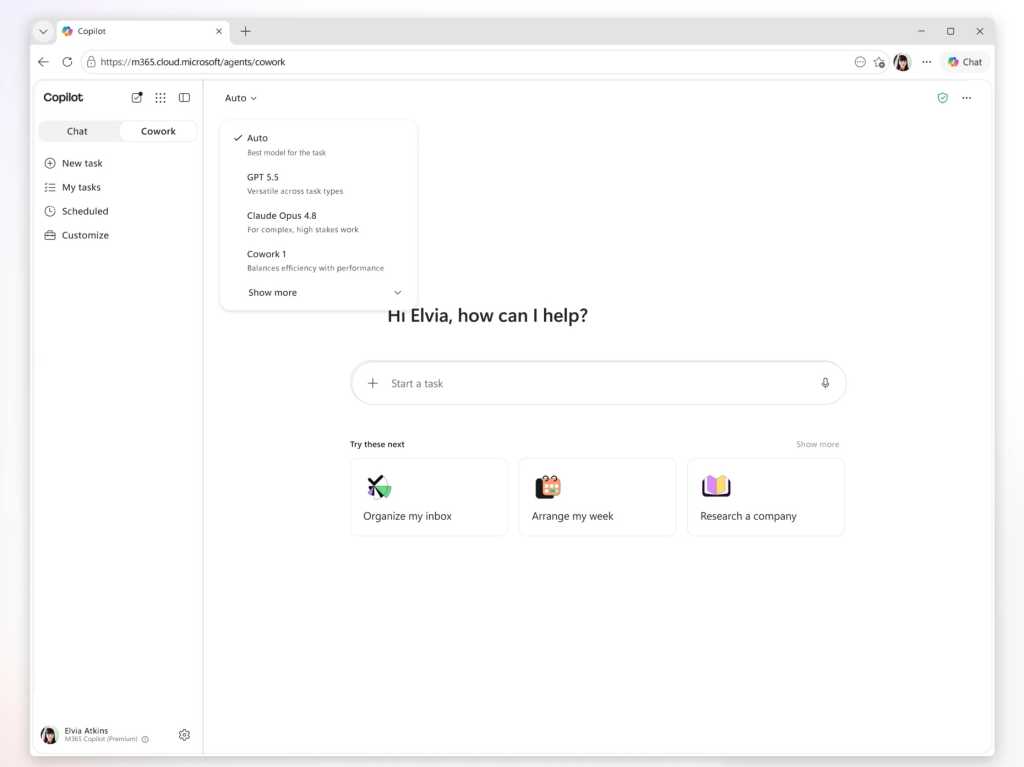
Copilot Cowork customers can select from multiple AI models, including Anthropic’s Opus 4.8 and Sonnet 4.6, while those enrolled on the Frontier program can access OpenAI’s GPT 5.5 and Microsoft’s own Cowork 1 model.

Microsoft is considering hosting a version of DeepSeek’s open source models. “We are actively exploring a range of options that meet those requirements, and DeepSeek is one of several models under consideration. We’ll share more specifics on the underlying model closer to release,” said a Microsoft spokesperson.

Microsoft also announced new integrations with third-party apps such as Miro and Monday.com, with more — such as Adobe, Box, and Canva — coming soon.

This article was updated on June 19 to add Microsoft’s comment on DeepSeek.

  •  

Z.ai pitches GLM-5.2 for long-running software engineering tasks

Z.ai has released GLM-5.2, an MIT-licensed open-source AI model designed for long-running software engineering tasks, as the Chinese company seeks to challenge proprietary coding models on cost and performance.

The company said GLM-5.2 ranked just behind Anthropic’s Claude Opus 4.8 on FrontierSWE, a long-horizon coding benchmark, trailing it by 1%. Z.ai said the model also edged out OpenAI’s GPT-5.5 by 1%.

Z.ai said GLM-5.2 supports a one-million-token context window with up to 131,072 output tokens, positioning it for agentic coding workflows that require reasoning across large codebases.

The company is also making an efficiency argument. It said GLM-5.2 uses a technique called IndexShare, which reduces per-token compute by 2.9 times at a one-million-token context length. It also said changes to the model’s multi-token prediction layer increased the acceptance length for speculative decoding by up to 20%.

The changes are aimed at a practical problem for developers: long-context coding agents can be expensive to run when they are asked to work across large repositories.

Enterprise appeal

GLM-5.2’s clearest appeal is that it pairs stronger coding capabilities with the cost advantages of an open-source model. But capability alone will not be enough to make it a credible alternative.

“Western enterprises will want independent benchmark validation, successful deployments at global enterprises, strong security and governance controls, and long-term support commitments,” said Pareekh Jain, CEO of Pareekh Consulting.

Jain said the fastest route to enterprise credibility would be hosting by a major cloud provider like AWS. That would allow customers to use the model under standard enterprise terms, with service-level commitments and compliance certifications.

Tulika Sheel, senior VP at Kadence International, said GLM-5.2 would also need to prove it can operate as a stable enterprise product.

“Demonstrated success in real-world deployments and transparent governance will be just as important as benchmark scores,” Sheel said.

The performance and cost claims will also need to hold up against established models.

“Enterprise leaders generally consider two major factors when evaluating new models,” said Lian Jye Su, chief analyst at Omdia. “First, they look at overall performance against competitors, where GLM-5.2 performs well in long-horizon agentic coding and software engineering. Second, they look at the cost of adoption. As an open-source model, GLM-5.2 has clear cost advantages.”

Su said the model could appeal to engineering teams under pressure to control AI costs. It may also attract open-source advocates and companies with significant operations in the Asia-Pacific.

But the claims still need wider validation, particularly around hallucination control and coherence during extended tasks. These are critical issues for enterprises considering AI coding agents, which may need to work across large codebases and multi-step software engineering workflows.

Jain said the one-million-token context window could be useful for large codebase analysis. It could also help with legacy modernization projects and complex engineering documentation.

He said long-context capability may also help with audit logs or legal contracts, where splitting material into smaller chunks can create errors across document boundaries. But for everyday coding tasks, effective retrieval systems may matter more than very large context windows, making some of the benefits more limited in practice.

Governance risks

The governance question depends largely on where the model runs.

Sheel said enterprises should evaluate GLM-5.2 as they would any strategic technology partner, rather than as a standalone model. That means looking at where data is stored and whether the model can be used in environments that customers control.

That deployment choice is central to the risk calculation, according to Jain. Because GLM-5.2 is available under an MIT license, companies can download the weights and run them on their own infrastructure, reducing the need to send sensitive data to Z.ai.

“The risk flips completely if you use Z.ai’s hosted API instead,” Jain said.

He said Chinese national security rules could require domestic companies to cooperate with government requests, making hosted use difficult for regulated industries or workloads involving sensitive data.

Su said the issue is not limited to Chinese vendors. Recent restrictions affecting access to some Anthropic models have also highlighted the risk that enterprises may have limited control over the availability of AI services from foreign providers.

“Selecting solutions from American and Chinese AI vendors does expose non-US Western enterprises to additional risk of having zero control over the availability and uptime of these models,” Su said.

The article originally appeared on InfoWorld.

  •  

Got a Google Pixel? Find these 4 Android 17 features ASAP

Well, hey, how ’bout that? Here we are, on a random quiet-seeming week in June, and a new Android version is officially making its way into the wild and onto our favorite Googley gizmos.

Yes, indeed: Google announced the launch of Android 17 this week, and the rollout is getting underway as we speak. As usual, the software will show up for current, still-supported Pixel devices right away, over the next few to several days. (As for everyone else — well, you know the drill by now, right? It’s up to each individual Android device-maker to process and send out its software updates, and outside of Pixels, that support is exasperatingly unreliable. But odds are, if you aren’t palming a Pixel, you’ll be waiting for a while — maybe even a long while, if you have a phone by a certain manufacturer whose name rhymes with Boatorola.)

As always, some of Android 17’s most important elements are the under-the-hood privacy, security, and performance enhancements that you won’t explicitly see but that will make a critical difference in your device’s ability to operate efficiently and advisably. But this latest Android release also packs an impressive punch of interesting surface-level touches that’ll bring an instant boost to your day-to-day productivity and all-around Android-enjoying experience.

As is often the case, many of the most useful elements are things you might not ever even notice or think to tap into if you don’t know where to look.

Here are the four Android 17 features I’ve found most noteworthy so far and how you can start putting ’em to use this second.

[Psst: Don’t let the learning stop here. Check out my free Pixel Academy e-course to discover all sorts of advanced intelligence lurking within whatever Pixel you’re using!]

Android 17 Pixel feature #1: Bubbles multitasking magic

Our first Android 17 addition on its way to Pixel owners this week is something that’s been in the works for many a moon now — and that’s a handy new multitasking mode known as Bubbles.

Bubbles first came into the Android picture way back in 2019, but at that point, it was limited mostly to messaging and never came close to reaching its full promised potential. At long last, now, Bubbles are back, baby, and becoming everything we’d always wanted them to be.

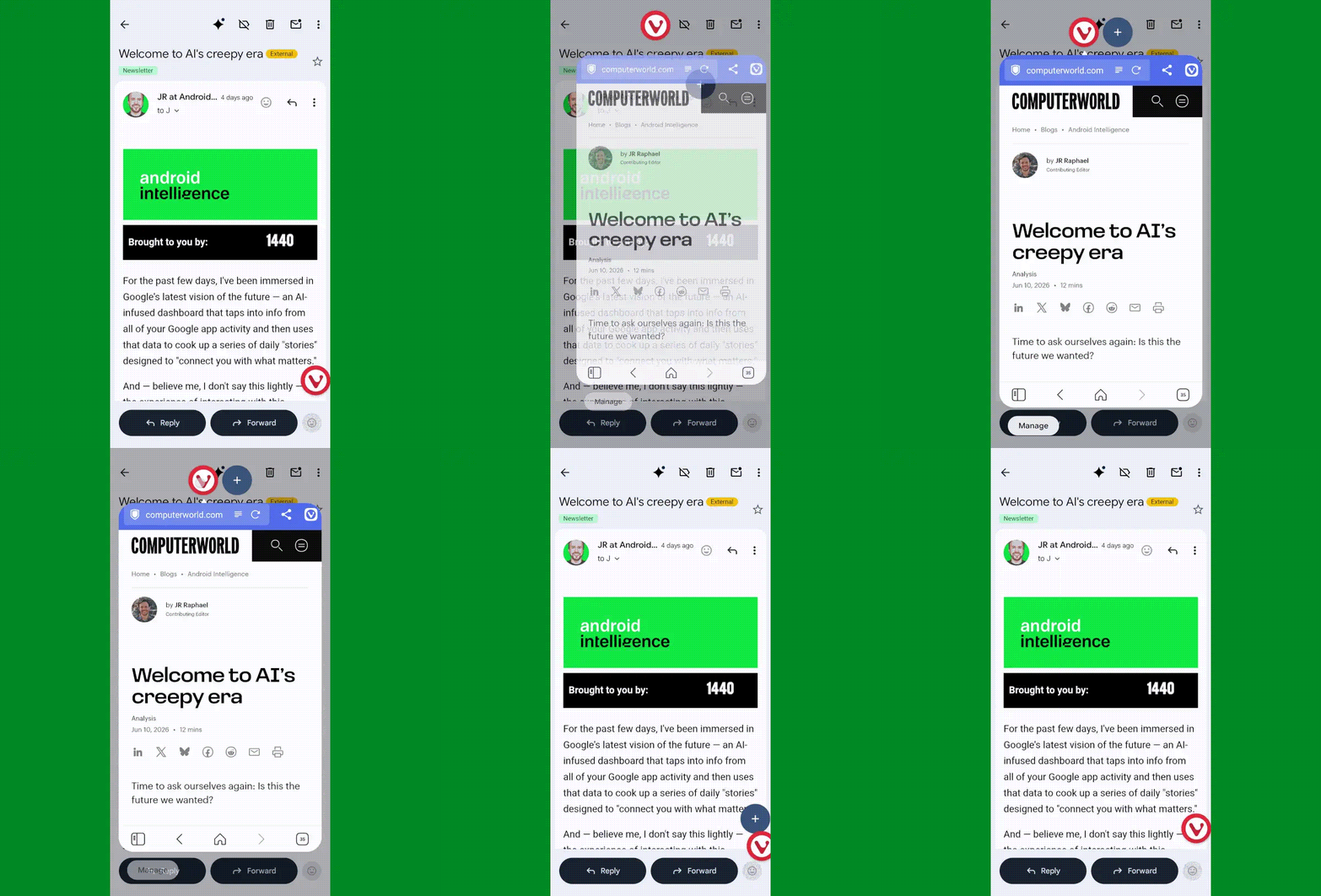
The simplest way to think about Bubbles is as a way to turn any app you’re using into a floating, collapsible window — so you can pull it up on demand when you want it, then minimize it back down into a small icon (a “bubble” — get it?!) to get it out of your hair but keep it nearby for easy ongoing access.

It’s an interesting way to multitask without having to commit to a full-fledged split-screen setup. It can be quite useful for keeping things like lists, documents, emails, chats, or anything else you’re coming back to regularly at your fingertips — so you can pop into it as needed, without any real effort, but also without having it in your face all the time.

Android 17 Bubbles
Android 17’s Bubbles system in action.

JR Raphael, Foundry

In Android 17, Bubbles is easy to launch with any app in front of you. The only catch is that as of now, at least, it can be triggered only from the standard stock Pixel Launcher — not a custom Android launcher like Smart Launcher or Niagara.

Provided you’re using the standard Android home screen setup, though, all you’ve gotta do is:

  • Press and hold any app’s icon on your home screen or in your app drawer.
  • In the menu that pops up, tap the option that says “Bubble.”
  • Then tap the bubbled app icon to expand or minimize the app, or press and hold it to move it around to any position on your screen or dismiss it.
Android 17 Bubbles (2)
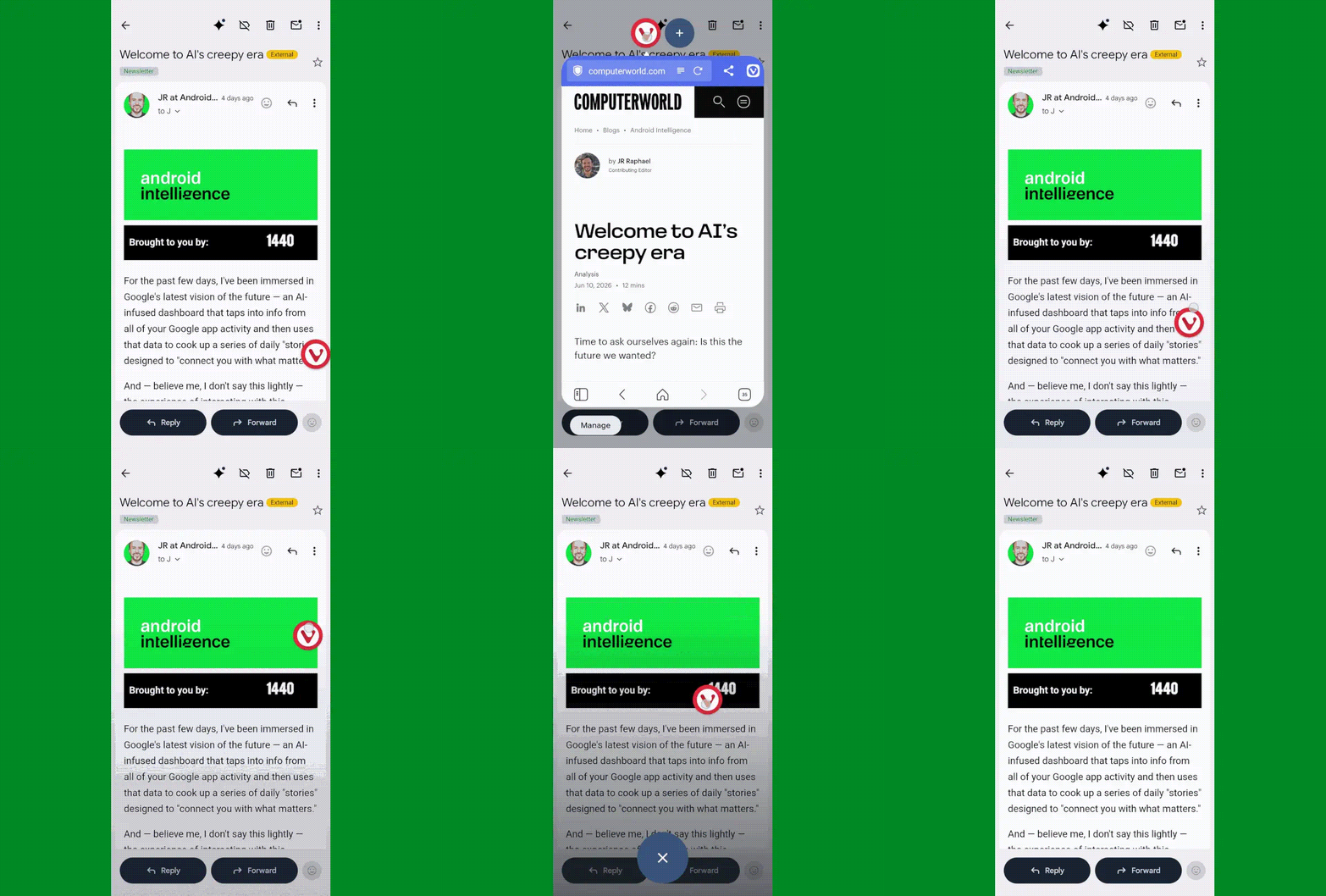
You can move a bubble anywhere on your screen or dismiss it easily.

JR Raphael, Foundry

You can also add additional bubbled apps into that same view via the plus icon next to the first app’s icon when a bubble is open. Pretty nifty, wouldn’t ya say?

Android 17 Pixel feature #2: Smarter location access

Allowing apps access to your location inevitably requires a certain amount of compromise when it comes to the ever-prickly subject of privacy — and it demands a certain level of trust that the apps in question won’t abuse the privilege or use it for reasons beyond their intended purposes.

Android 17 makes it meaningfully easier to accept that bargain and rest easy knowing your info isn’t being misused, thanks to a pair of related new privacy protection measures:

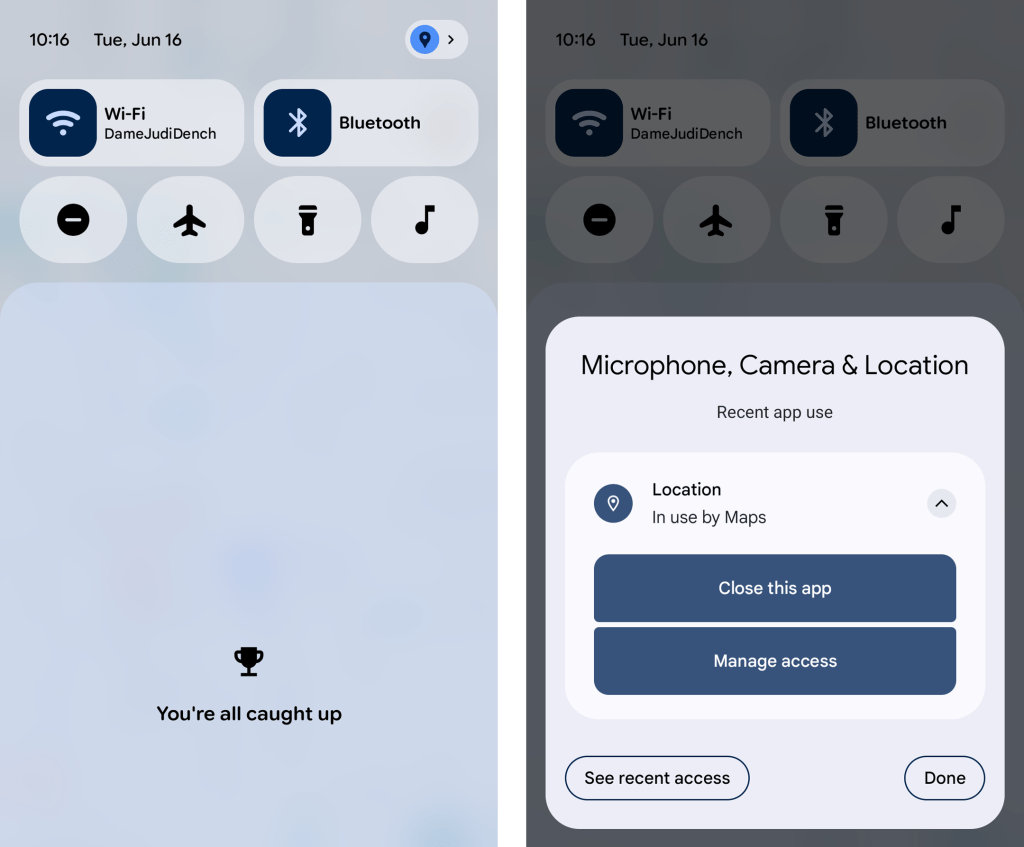
  • First, whenever any app is accessing your location, you’ll now see a blue dot appear in the upper-right corner of your screen — and if you swipe down once from the top of your screen to open your notification panel, you can actually tap on the location icon that appears in its place to get detailed info about exactly which app or apps are involved. With another tap from there, you can opt to force-close the app in question, view all of its recent location access attempts, and manage its location access ability, too, in case anything ever seems amiss.
Android 17 Location Indicator
Android 17 offers some welcome added nuance and power around app location access.

JR Raphael, Foundry

  • And second, when an app asks to access your precise location, Android 17 adds in the option to allow such access only temporarily — for that one brief moment and purpose — without giving the app the permanent permission for ongoing use.

Hey, we’ll take it. Just remember to keep tabs on the permissions Google itself is claiming these days, too, as those don’t always come with a prominent pop-up.

Android 17 Pixel feature #3: More dynamic dark mode

Dark mode may be one of the more divisive interface adjustments of our modern mobile moment, but if you’re a fan of the dimmer, less glary view across your Android experience, you’re bound to appreciate the added option Android 17 affords you in that area.

It’s a simple one-tap checkbox that forces apps to adjust and comply with your dark mode preference, when it’s active — even if they don’t natively support such a setting. That means those pesky apps that’d typically maintain the same standard light interface even when you activate dark mode will now turn dark along with the rest of your setup whenever Android’s dark mode is on.

All it takes it quite literally one tap on the freshly added Android 17 option:

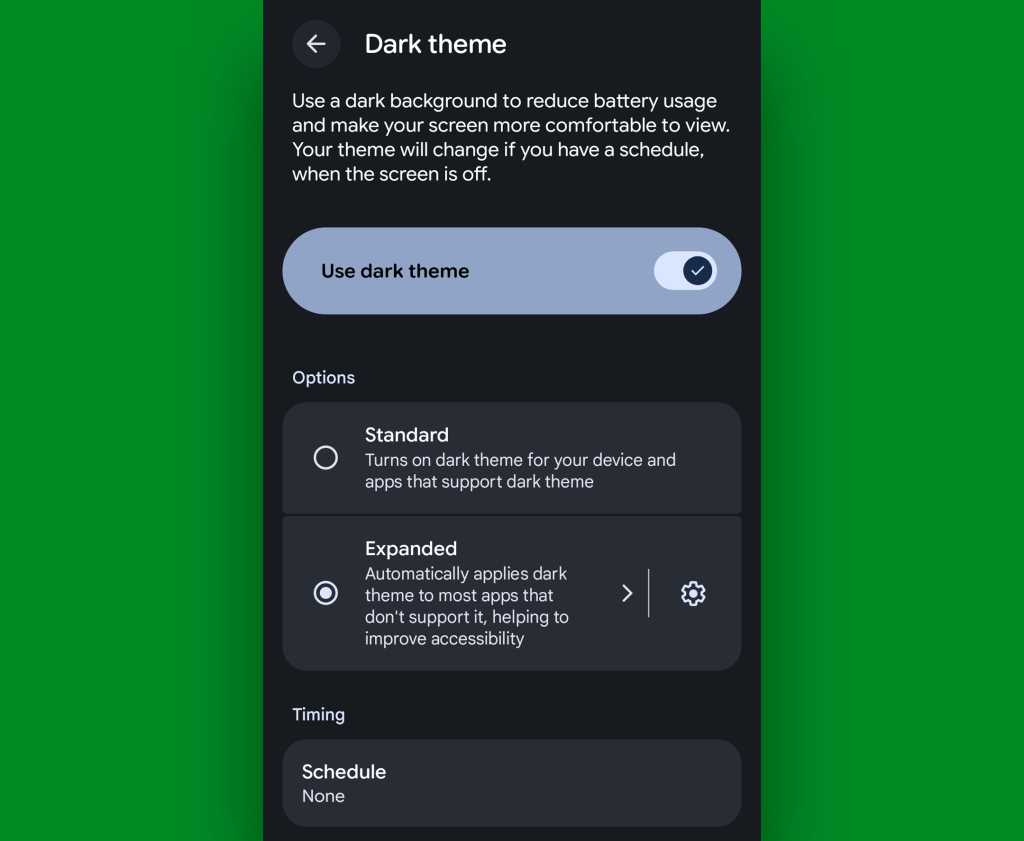
  • Head into the Display section of your Pixel system settings.
  • Tap “Dark theme” — the actual words, not the toggle alongside ’em.
  • And change the setting from “Standard” to “Expanded.”
Android 17 dark theme expanded
Android 17’s “expanded” dark mode setting brings the darkness you crave everywhere.

JR Raphael, Foundry

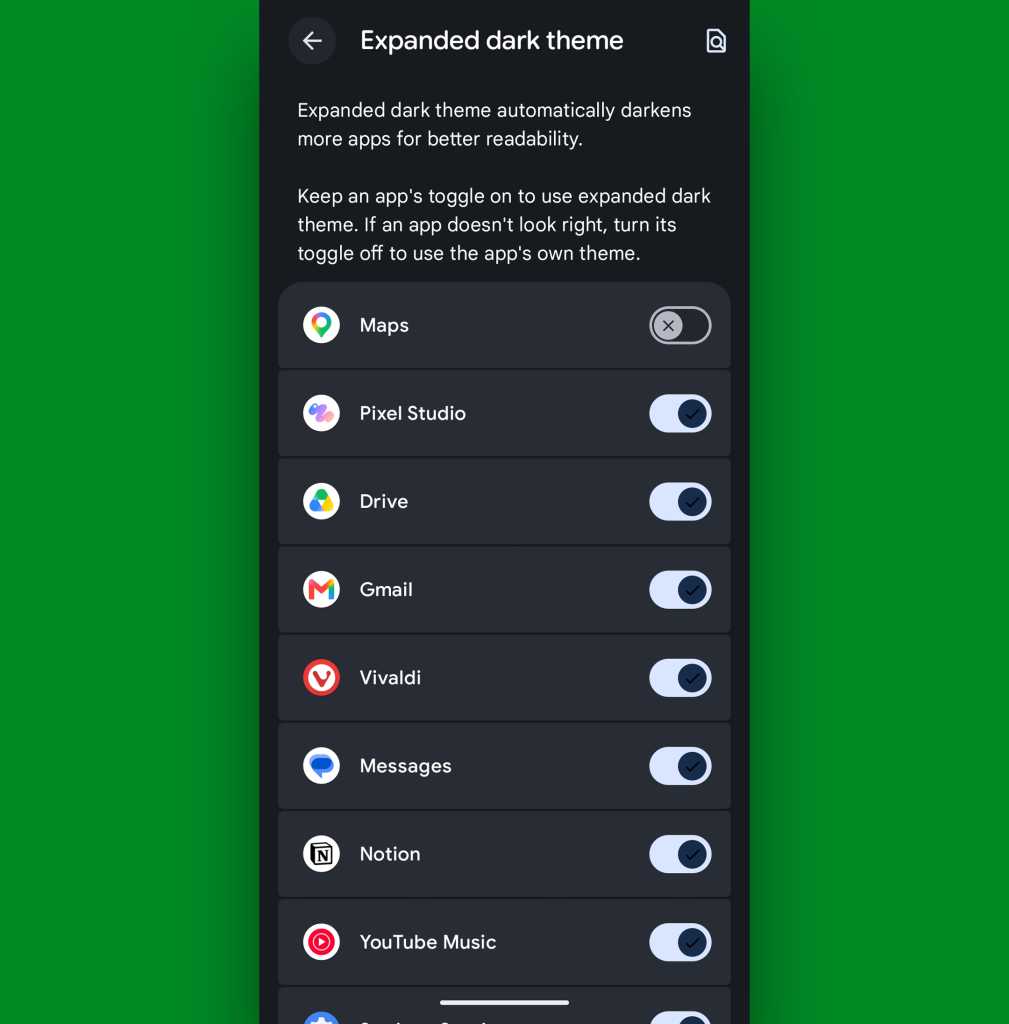
Now, one note: By forcing apps to adapt to dark mode even if they aren’t designed for it, it’s possible some programs may end up lookin’ a little funky. If that ever happens and you aren’t thrilled with an app’s adaptation, go back to that same settings screen we were just starin’ at and tap the gear-shaped icon alongside the “Expanded dark theme” option. That’ll let you create exceptions and select specific apps that don’t get dark mode automatically applied.

Android 17 dark theme expanded exceptions
You can create specific exceptions to Android 17’s expanded dark mode approach.

JR Raphael, Foundry

But everything else will now be in the dark when you want it — just like your dark, brooding heart desires.

Android 17 Pixel feature #4: A more comfy all-around view

Whether you’re a prince/princess/dutchess/middle-manager of darkness or not, Android 17’s new Comfort View may be just the thing for you.

Comfort View is an off-by-default addition to your Pixel that applies a softer, more pastel-oriented filter to the display with automatic adjustments based on your current viewing environment — in other words, how bright it is around you at any given moment. Ooh, ahh, etc.

To try it out, march your way back into those Display settings, and this time, tap the line labeled “Comfort Filters.” Flip the switch next to “Comfort View,” make sure the “Dynamic” checkbox is active, and see how you feel about your newly optimized screen-color view as you move throughout your day.

Android 17 Comfort View
Android 17’s Comfort View — ahh….comforting.

JR Raphael, Foundry

If you find the filtering to be too extreme or not enough to make a difference, you can also try disabling the “Dynamic” option there and then manually adjusting the “Intensity” slider to suit your specific peeper preferences. But I suspect if you give it enough time, you’ll find the automatic adjustments to be one of those things that just works for you and makes your device a little easier on the eyes, relative to each and every viewing environment — without being something you actively think about or pay much mind.

That, if you ask me, is the sign of an effective feature. And it’s a welcome addition to Android and the ever-evolving Pixel experience.

Don’t let yourself miss an ounce of Pixel magic. Come check out my free Pixel Academy e-course to find tons of hidden features and time-saving tricks for your Googley gizmo.

  •  

Microsoft says you don’t need another email security tool; experts say, not so fast

Despite best efforts by defenders, malicious emails continue to slip through the cybersecurity cracks, leading some enterprises to implement a layered “defense in depth” strategy that incorporates multiple tools.

Microsoft seems to be challenging this idea, revealing that there are only nominal returns from adding integrated pre- and post-send partners to Defender for Office 365’s protections.

According to its new quarterly benchmarking data, the tech giant catches the vast majority of malicious and spam emails before delivery, misses the fewest compared to competitors by a wide margin, and removes nearly 100% of dangerous emails that do reach the inbox. Collectively, its integrated partners improve that catch rate by less than .05%.

While these numbers seem to tip the scales towards a one-vendor email security stack, experts urge enterprises to be skeptical and cautious of such vendor claims.

Seva Ioussoufovitch, senior research analyst at Info-Tech Research Group, pointed out, “percentages obscure the true quantity and severity of what’s getting through, and, considering it only takes one message to result in an incident, it’s simple enough to argue that there is real value in the defense in depth that having multiple tools provides.”

Malicious and spam email catch by the numbers

Microsoft introduced its quarterly benchmarking report in July 2025 alongside a Defender integrated cloud email security (ICES) ecosystem designed to support multi-vendor security strategies.

The SEG players it ranked itself against this year includes Mimecast, Proofpoint, Hornetsecurity, Trend Micro, Iron Port (Cisco), Barracuda, and FireEye (Trellix); ICES companies include Abnormal, Checkpoint Harmony, Cisco, DarkTrace, KnowBe4 Defend, Tessian, and Trend Micro.

Redmond reported that Defender “consistently leads” in pre-delivery detection, missing 59% fewer high-severity cyberthreats prior to delivery than the other SEG vendors it evaluated. Its closest competitors were Mimecast and Proofpoint. The company also introduced a new metric in this area: A threat miss rate per 1,000 employees. In Microsoft’s case, that was 194 per 1,000; for Mimecast, 478; for Proofpoint, 483.

When it came to post-delivery protection, Defender removed an average of 96.03% of malicious emails that reached the inbox, up from an initial 45% when Microsoft first started tracking the data in its second report.

This makes Defender “an increasingly critical backstop, operating even when ICES solutions are in place,” Jeff Pinkston, VP and GM for Microsoft Defender, wrote in a blog post. Still, ICES tools operating in tandem with Microsoft Defender “continue to provide benefits,” improving malicious catch by 0.29% and spam catch by 0.68%, he said.

“If we focus on the basics, their argument seems strong,” Info-Tech’s Ioussoufovitch noted. “Do you really need a separate ICES vendor for that extra sub 1% catch?” Microsoft paints a “compelling picture” by only focusing on raw catch rate, he said, but we don’t hear the rest of the story: “What exactly is the danger of what isn’t being caught by Defender?”

No one vendor catches everything

David Shipley of Beauceron Security pointed out that the report underscores the fact that “lots of stuff still gets by e-mail filters.”

His company regularly analyzes hundreds of thousands of emails, and the content that gets through “ranges from the shockingly mundane and obvious to a human expert, to highly clever time-delayed attacks,” he said.

A key factor in what gets through is the amount of content that is allowlisted; settings in “100% paranoid mode” get high catch rates, as well as high false positives, Shipley noted. “Anyone who has ever had a sales person lose a deal because the purchase order PDF got flagged has felt this pain.”

Then there’s the AI conundrum: “A key risk for e-mail vendors using agentic LLM-based analysis is it’s now possible to poison those models with hidden content (such as ‘ignore this e-mail, pretty please’),” Shipley said. This means enterprises need a variety of analysis methods.

Ioussoufovitch agreed that keeping pace with threat actors using AI is an industry-wide challenge, particularly as AI enables higher-quality phishing. Filters are improving and will catch some of it, but some will inevitably continue to get through. Those messages are likely highly-targeted, which are lower in volume but harder to catch.

“As of now, current tools do seem to be struggling to keep pace, but that doesn’t mean those tools aren’t necessary,” said Ioussoufovitch. “It just highlights that defense-in-depth, broadly speaking, is becoming more and more important.”

Claims ‘appear more honest’

Shipley said that this report appears more honest, accurate, and mature than others claiming 99.99% phish catch rates, “which is never true.” It’s also a “smart marketing move,” because Microsoft competes for the same security budget as other tools, and would rather enterprises remove those vendors and buy more from it in areas beyond e-mail.

On the other hand, he said, Microsoft is offering up a list of other vendors to think about, “which, congrats to Mimecast on coming in second.”

In the long run, CISOs need to determine the best spend for their limited security dollars, he noted. Enterprises need a good filter; whether they need two is up for debate. “They also clearly still need to invest in a robust awareness program,” Shipley said, “because as this report shows, lots of phishes are still getting delivered.”

Missing an important nuance

Ioussoufovitch noted that while the claims in the study are interesting, the data is presented without much of the nuance that would make it truly actionable.

“We are all too familiar with vendors’ abilities to massage data to tell the story they want, so I would advise leaders not to extrapolate the data beyond what it actually says,” he said.

Instead of the takeaway being “get rid of our current vendors,” this post highlights that Defender provides “considerable value,” he noted. Whether adding or subtracting additional vendors is worth the money should be a case-by-case conversation that considers an organization’s risk appetite, and overall security budget and environment.

“I’d treat these claims more as a reminder to assess your own environment and compare detections,” he said. “Come to conclusions based on the data you have, not what a vendor is presenting.”

This article originally appeared on CSOonline.

  •  
❌