❌

Reading view

AI finds so many Windows flaws, Microsoft can’t keep up. Should you worry?

Be careful what you wish for. That’s what Microsoft found out recently when it discovered that AI — rather than making Windows more secure by helping the company close security holes — could help hackers find flaws faster than Microsoft can fix them.

It’s put Microsoft in a serious bind. Should the company devote a potentially massive amount of resources to fix every AI-unearthed security issue as fast as it can? Or should it rush to close the most important ones, and clean up the minor ones later at much less cost?

What the company decides could have tremendous implications. For years, Microsoft has faced criticism from many in the US government because of how often its technologies have been hacked, potentially putting the nation’s security at risk. Some members of Congress have suggested the government curtail contracts with Microsoft until the company proves it can provide more safety. Billions of dollars in federal contracts could be pulled.

To get a better insight into what could happen, let’s look at AI’s newfound prodigious ability to find security holes and bugs.

AI-fueled security mavens Mythos and Project Glasswing

Microsoft’s AI-related security problems are an outgrowth of the launch of Anthropic’s Mythos AI model, designed to handle cybersecurity and biology research. One of its goals is to uncover security vulnerabilities as quickly as possible, so that software companies and cybersecurity companies can fix them before hackers find the holes.

Anthropic’s early tests found that Mythos was spectacularly successful in finding Windows security flaws. “Within 31 minutes, Mythos generated its first proof-of-concept exploit for a Windows kernel vulnerability,” Axios reported in June.

Anthropic noted that its testing of Mythos “reveals a stark fact: AI models have reached a level of coding capability where they can surpass all but the most skilled humans at finding and exploiting software vulnerabilities.

“Mythos Preview has already found thousands of high-severity vulnerabilities, including some in every major operating system and web browser. Given the rate of AI progress, it will not be long before such capabilities proliferate, potentially beyond actors who are committed to deploying them safely. The fallout — for economies, public safety, and national security — could be severe.”

As a result, Anthropic decided to launch a security project it calls Project Glasswing, which it describes as “an urgent attempt to put these capabilities to work for defensive purposes.”

Many companies beyond Anthropic are part of the effort, including Microsoft, Google, Amazon, Nvidia, Apple and others. In theory, it’s a great idea. Find and fix vulnerabilities before hackers can, and everyone is safer. What could go wrong? 

Plenty, as it turns out. Access to Mythos is available to anyone, and Mythos has been finding security holes and bugs far faster than companies — particularly Microsoft — can patch them. As Pro Publica reported in late July, ‘Microsoft is struggling to fix them fast enough.” 

Too little, too late?

For now, Microsoft is only patching the most dangerous bugs and holes. And, according to Pro Public, “internal records indicate that Microsoft plans to eventually address ‘moderate’-severity flaws uncovered by Mythos. The documents made no mention of ‘low’-severity bugs.”

That’s fairly typical of the triage many companies use when deciding how much effort to put into plugging holes. But some experts believe that in the Age of AI, that’s a dangerous way to handle security. 

Vinh Nguyen, former chief AI officer and chief data scientist at the US National Security Agency and now a senior technical adviser to Anthropic and senior fellow for AI at the Council on Foreign Relations, is particularly concerned that the approach is outdated. He told Pro Publica: “The problem now is that you can chain four low-level flaws, and that can equal a high severity. If you’re Microsoft, the current triage strategy may be underpricing risks.” 

It’s already proving difficult for Microsoft to keep up with patching bugs and security holes since Mythos’ launch. July’s Patch Tuesday release fixed the most bugs in Microsoft’s history – 622 of them. Things will only get harder from here. 

The dangers for Microsoft

Microsoft is already in the doghouse for how it’s handled security. A year ago, in one of the worst attacks on Microsoft technologies, Sharepoint was hacked. Tens of thousands of servers were hit, including not just thousands of businesses, but many important government agencies as well.    

The National Institutes of Health (NIH) and the National Nuclear Security Administration (NNSA), which is in charge of the nation’s nuclear security, were among the victims. So were the Department of Homeland Security (DHS), the Cybersecurity and Infrastructure Security Agency, the Transportation Security Administration, Customs and Border Protection, and the Federal Emergency Management Agency, among many others. 

Even before then, some members in Congress were threatening to pull Microsoft contracts if it didn’t improve security. At one point Sens. Eric Schmitt (R-MO) and Ron Wyden (D-OR) sent a threatening letter to the Pentagon requesting it not increase its use of Microsoft products.

“We write with serious concern that the Department of Defense (DoD) is doubling down on a failed strategy of increasing its dependence on Microsoft at a time when Congress and the administration are reviewing concerning cybersecurity lapses that led to a massive hack of senior US officials’ communications,” the letter said, in part.

Nothing happened as a result of the hack or the letter. But that could change in a heartbeat if there’s another big attach. It seems inevitable that hackers will start taking advantage of how quickly Mythos discovers security holes and bugs, especially if Microsoft doesn’t fix them all. 

The next big hack, powered by AI, could prove very dangerous — not just for businesses and governments, but for Microsoft as well.

  •  

Meta’s local AI model prompts enterprises to rethink hardware-software cost trade-off

Meta rolled out a new 30-billion-parameter AI model optimized to run on a PC or Mac with a single GPU on Monday, offering a way to run always-on agentic workflows locally rather than relying on the cloud.

The company has dubbed it Muse Glimmer. However, its hardware demands, including a GPU with a minimum of 24GB of VRAM, could make it difficult to justify for deployment at scale.

Although analysts and consultants agree that there is a tremendous enterprise appetite for running models locally, determining whether switching more systems from cloud to local makes fiscal sense is much more complex. 

The hardware costs are tricky to calculate even today, with the VRAM needed depending on the particular applications to be run. But the far bigger consideration is that there is no way to determine what RAM costs will look like over the next 12-18 months, and there is an identical lack of visibility into how cloud prices might increase during the same timeframe. 

That makes determining the better financial choice impossible.

Agents become capex, not opex

Noah Kenney, principal consultant at Digital 520, noted that since RAM costs have increased “exponentially” over the last 12 months, cloud AI providers are also going to have to increase their prices. Beyond that, IT needs to anticipate logistical issues; key questions to ask are, “How quickly can you scale? Can you even get the hardware?”

“Meta just made agents a capital expense instead of an operating one,” Kenney said. “For two years, enterprises have been trained to rent intelligence by the token from someone else’s data center. Muse Glimmer runs the agent on a GPU you own, on the desk, with the meter switched off. That is a direct shot at the business model that cloud AI vendors are built on, and it comes from the one player with no cloud API revenue to protect.”

In its post announcing the new model, Meta pointed out that it has aggressively slimmed it down to try to make it efficient and cost-effective. 

“At full precision, a 30-billion parameter model would require over 55 GB of memory — far more than any consumer GPU offers,” Meta said. “We use quantization techniques to compress the model’s weights to approximately 4-bit precision, shrinking the language model to under 20 GB. This leaves enough headroom for the model’s working memory, its KV cache, the perception encoder for image understanding, and the speculative decoding drafter to run simultaneously within a 24 GB or 32 GB envelope. We validated that this compression introduces minimal to no degradation on agentic tasks.”

More options for enterprises

Mike Wilkes, enterprise CISO at Aikido Security, said that Meta’s move is significant in that it starts to give enterprises more options. 

“The most important thing about Muse Glimmer is not that Meta has produced another capable model, it is that the economics and architecture of AI are beginning to move back toward the edge,” he said. “The financial comparison therefore becomes capital expenditure that can be amortized over several years versus an effectively perpetual per-token or per-request cloud operating expense.”

That means, he said, that an enterprise may rationally pay somewhat more for hardware if doing so gives it predictable AI costs, offline availability, control over model versions, freedom from sudden API pricing or access changes.

Independent cybersecurity and risk advisor Steven Eric Fisher also noted that the specs published by Meta don’t tell the full story.

The problem is that running locally versus in the cloud can generate a lengthy list of related expenses. 

“Agentic workloads [in the cloud] can amplify consumption through reasoning, retries, tool calls, context growth, and evaluation, while local deployment [also] introduces hardware, power, lifecycle, support, and utilization costs,” he said, adding that even the RAM requirements need a lot of context.

“Meta’s stated 24GB and 32GB memory targets demonstrate that Glimmer can be loaded and executed on comparatively accessible hardware, but that is not the same as having sufficient capacity for meaningful agentic workloads,” Fisher said, pointing out that once other factors are considered, practical memory requirements can move beyond the 32 GB available on an Nvidia RTX 5090 GPU.

“In enterprise terms, this still places Glimmer primarily in high-end developer, data science, or dedicated AI workstations rather than the standard corporate desktop or laptop,” he said.

Better ROI not guaranteed

Justin Greis, CEO of consulting firm Acceligence, agreed. 

“I wouldn’t assume that moving inference from the cloud to the endpoint automatically produces a lower total cost of ownership,” he said, noting that variable cloud costs would be traded for the price of  deployment, endpoint management, support, security, model updates, and potentially accelerated hardware refresh cycles for the local devices.

“Muse Glimmer is an important milestone because it makes local agentic AI technically viable. But technical viability and enterprise ROI are two different milestones,” Greis said. “I think Meta has crossed the first one. I do not think they have fully crossed the second one yet.”

However, Kenney argued that there are also other elements of the Meta rollout that make meaningful comparisons difficult. 

“It is worth remembering that the local model is quantized, compressed to roughly 4-bit precision, while the cloud APIs you are comparing against typically serve full-precision models, so this is not a pure apples-to-apples cost comparison,” he said. “The ROI question is not local versus cloud on price alone. It is also a question of whether a company is willing to use a quantized model for the specific task. A cheaper agent that needs more retries or human correction can erase its savings fast.”

In addition, a local model often neglects to include every service that a cloud provider typically delivers. 

“The cloud vendor was quietly handling updates, scaling, reliability, and security patching across your whole footprint. Bring the model in-house and every one of those becomes your problem, multiplied by every machine running it,” Kenney noted. “Most enterprises that consume AI as a service have no muscle for operating a fleet of local models, and that cost rarely gets adequate consideration in ROI conversations. The GPU is cheap. Patching a thousand of them is not.”

Sanchit Vir Gogia, chief analyst at Greyhound Research, also stressed that it can be difficult for IT to comprehensively anticipate the different cost variables. 

“Finance leaders are right to feel skeptical. An engine bought for one employee burns capital whether or not it runs. Meta has shown that a thirty-billion-parameter agent can run on a single machine, and that is a real engineering result. What it has not shown is that such an agent works reliably at enterprise scale, or that a fleet of them can be operated safely. Model fit and production fit are different claims. A laptop must still run the employee’s actual job,” Gogia said. “The economics turn on the incremental hardware premium, refresh timing and actual utilization, measured against the price of the remote inference being displaced.”

On the other hand, Arun Chandrasekaran, a distinguished VP analyst with Gartner, said that he found it “very interesting that they have decided to release a smaller model that operates on the edge” and especially liked Meta’s use of the popular Apache license. But he would have preferred that they had released more than just a model.

“Enterprise customers are asking for a car and Meta is delivering an engine,” Chandrasekaran said. “They should have built something more like a platform solution.”

  •  

Today’s AI hype-fest is partially IT’s fault

I came across a LinkedIn post the other day that described “hypegineering,” which the poster explained refers to the moment when AI “marketing becomes more innovative than the technology itself.”

That post came from Ralph Aboujaoude Diaz, the global head of GRC for British consumer services company Haleon. Until last year, Diaz worked in operations cybersecurity for consumer goods giant Philip Morris. 

In his post, Diaz added that “side effects may include believing mediocre tech is revolutionary, confusing hype with progress, buying solutions to problems you don’t have and defending it like your job depends on it.”

As amusing as that might seem, the problem is frighteningly real. The sad truth is that enterprise IT executives are partly — perhaps mostly — to blame for the current hype around AI.

For many decades, senior IT leaders (pre-dating when it was called MIS) were the technology hype-deflators with razor-shape BS detection skills. That level of skepticism was needed. Tech vendors have always exaggerated and left out critical context when they weren’t outright lying about their products. 

Enterprises trusted the IT gate-keepers to ferret out reality from the smoke and mirrors. 

But there was a critical difference back then: senior management (especially CEOs, CFOs and board members) didn’t pay much attention to tech. They wanted the benefits, but they left the details to IT management to sort things out. With senior managers, benign neglect can be an incredibly good thing. 

As much as we might all think that we want our bosses to really care about our efforts, be careful what you wish for. (For Dilbert fans, think of the pointy-haired boss; a boss who has strong beliefs but no understanding of technology is a nightmare.) 

Alas, that is the situation many enterprises find themselves in today. IT management fully understands the level of absurd hype coming from a multitude of AI players. But unlike years and technologies past (RFID? NFC? Biometrics?), deflating hype balloons is easier when it’s comes solely from vendors. When senior managers start spouting this garbage, IT’s hype-deflation ability morphs into contradicting the very people at the top of their own corporate food chain.

That forces IT leaders who want to stay gainfully employed to do a lot of what used to be called lying. “Well, boss, yes these agentic systems have guardrails that will block destruction,” the lie begins, “but we can’t anticipate what any user or attacker might say in a prompt.”

That’s far more corporate acceptable than the actual truth: “Boss, a guardrail that an agent can disregard isn’t a guardrail. It’s more of a mild suggestion.” 

Or IT could say, “Well, yes, boss, autonomous agents could exponentially increase efficiency — as long as you’re OK with the risk that they might send our internal data to the competition.”

For the sake of the company, tech leaders and decision-makers need to reassert themselves and perform serious reality checks on all AI efforts. But this is more fraught than merely contradicting a top boss. IT  could be seen as embarrassing that top boss by pretty much proving that they were either naive or ignorant enough to be conned by the hype. 

Telling them they’re wrong seems nicer than calling them stupid. And yet, someone in IT has to find a politically palatable way to do both. 

  •  

Apple’s real memory problem isn’t cost, it’s supply

Apple continues work to get White House go-ahead to source memory from Chinese supplier CXMT, which the US government has placed restrictions on.

For Apple, the issue comes down to simple math. With the cost of making iPhones up 38% because of eye-watering memory price increases — up almost 7-fold since the beginning of 2025 — it makes sense to make pragmatic choices when it comes to sourcing supply, particularly when other computer companies (including HP and Acer) already obtain memory from CXMT.

US resistance to the plan is that because of the way Apple packages memory on chip, the use of that memory might partly contravene the technology transfer restrictions the US has in place. Note: use of off-the-shelf components is fine.

Apple has been lobbying to use memory from the supplier only on devices made and sold in China and would likely argue this is reasonable given that both HP and Acer already use CXMT memory in products sold outside the US. 

Why it’s really about supply

The iPhone maker’s dilemma isn’t just about memory price, it’s also about ensuring it has enough component supply to satisfy demand for its products. This is plausibly a bigger challenge for the company, which is already warning of constrained supply because of lack of available memory. Samsung, Micron, and SK Hynix have allegedly already sold through all their DRAM production for 2027, which only sharpens Apple’s case to secure alternate sources.

With that in mind, it matters that China consumes around 20% of all Apple hardware sold globally. All the company needs is the go-ahead to use RAM from CXMT in those Chinese-made, China-sold devices.

That alone would effectively grow its usable memory supply by the same amount, because the non-restricted memory it currently has to use in Chinese-market products could be freed up for devices sold elsewhere, with CXMT covering the China-sold units instead.

With demand for its products accelerating —even amid a broad industry downturn — Apple really wants to make sure it has enough of the component to meet demand. Those powerful, on-premises 1.5TB RAM-equipped M7 Ultra Mac Studio AI clusters won’t exist unless it’s possible to find memory to put inside them.

The timeline challenge

The proposed arrangement with CXMT might not be a quick fix. Recent reporting indicated the company has already reached its production capacity for 2026, though it is working to double capacity by 2028. Apple has already tested memory chips from the company across products including iPhones and MacBooks.

While Apple this year has applied steep price increases across all its products (except for iPhones), it is now expected to increase the cost of the current iPhone 17 models perhaps as soon as this week. 

Market reports already warn that Apple will raise prices on its soon-to-debut iPhone 18 Pro and iPhone Ultra devices next month, and we expect availability to be constrained, once again as a result of RAM shortages. Even if Apple gets the go-ahead to work with CXMT to close the gap, the positive impact of that arrangement is unlikely to kick in before next year.

Enjoy the pain

Elsewhere, big memory manufacturers, including SK Hynix, have announced plans to invest in new DRAM manufacturing capacity. But this will not be operational until 2029, at the earliest.

This suggests constrained product availability and higher prices for the coming months — and the only way Apple, or anyone else, will be able to limit the impact of those price increases across the entire electronics industry will be if they can obtain additional stocks of memory from vendors outside the big three. If they cannot, you can kiss the age of abundance goodbye.

You can follow me on social media! Join me on BlueSky,  LinkedIn, Mastodon and subscribe to The Core.

  •  

Tech sector adds jobs, defies overall US job market decline

While the number of US jobs declined by 23,000 in July, employment in the tech sector rebounded as the AI revolution continues to gain steam.

The national unemployment numbers were reported Friday by the US Bureau of Labor Statistics. At the same time, research firms said July was a good month for IT hiring compared to June.

According to CompTIA, which analyzed the BLS data, tech sector jobs rose in July by 3,700. In June, the IT sector had lost 900 jobs.

Companies last month hired in the cloud, hosting, information processing, data, and semiconductor manufacturing sectors, CompTIA said in a statement. 

“We’re entering a labor market where opportunity is increasingly concentrated around specific skills, industries, and investments,” said Ger Doyle, regional president of North America at ManpowerGroup, a labor consulting firm.

For example, data center hiring was up 39% in July compared to the same period last year, Doyle said. Not surprisingly, the data-center growth has been fueled by AI infrastructure needs and demand for hardware. That has helped increase the number of jobs in ancillary sectors such as transportation.

July hiring data showed heavy truck driver demand, which surged by 181% from June, Doyle said.

According to the BLS data, employment went up by 2.4% in the “computing infrastructure providers, data processing, web hosting, and related services” sectors, which is listed under the information sector.

Jobs in the “computer and electronic product manufacturing” sector — which is bunched under manufacturing — rose by 2.9% from June to July.

But bad news continued for the telecommunications sector, where the number of jobs declined by 1.5% from June to July. That continued a downward slide in recent years.

Overall job layoffs slowed in July, with 33,429 cuts announced; that’s down from 45,849 cuts announced in June, and the lowest since July 2024, according to data from Challenger, Gray and Christmas.

“Hiring has also increased over last year by 25%, so while AI is shifting the labor market, it is not dismantling it,” said Andy Challenger, chief revenue officer for Challenger, Gray & Christmas.

The tech sector announced 9,867 cuts in July, bringing the year-to-date total to 149,023 so far in 2026, according to Challenger figures.

Tech sector hiring and job losses vary as organizations use different measurement techniques to gauge the overall hiring environment. 

The top-line US unemployment rate declined to 4.1% from 4.2%, in part because of  workers leaving the workforce or not looking for jobs, indicating a slow labor market.

Still, hiring demand exists across the US, despite declining labor force participation and longer job searches, Doyle said.

Because technology underpins many of the changes occurring across sectors such as healthcare and services, employers are rethinking hiring.  “That’s why the labor market many workers are experiencing doesn’t always match the one described by the headline numbers,” Doyle said.

ADP’s National Employment report said only 44,000 jobs were added to private payrolls in July, with choppiness across sectors.

But demand for AI skills continues to rise, according to research firms that track growth by analyzing job listings. CompTIA noted that about 14,000 new job listings in July sought AI and machine learning skills.

It’s not clear how the ongoing AI boom may be hurting or helping human jobs. Many recent job cuts have been attributed to AI, though some companies have been accused of using the technology as a rationale for cuts they made for other reasons.

A recent OECD report said that even manual jobs once thought immune to AI are at risk of being taken over by robots. The OECD report said creative jobs — typically management, arts, and social work — will be least threatened by AI.

There are also increasing indications that successful AI deployments will require humans in the loop. For example, more consulting firms are using forward-deployed engineers (FDEs) to implement agentic AI. And smaller consultancy firms are finding more productivity by automating mundane work with AI and spending more time meeting client requirements.

  •  

Polish data center plans to send its waste heat to the neighbors

As Europe swelters in a heatwave, residents probably don’t want to hear about ways to make their homes even hotter, but that’s what Polish property developer Citylink is talking about, with plans to dump waste heat from a new data center in Wrocław into the municipal district heating network.

Citylink is designing the data center so that heat from servers can be recovered instead of being dissipated via cooling systems — and as the data center grows, any increase in computing power will mean more energy available for recovery.

The collaboration with local power company Kogeneracja will provide “valuable experience in designing and operating modern data centers, with a particular focus on infrastructure dedicated to AI nodes,” said Michał Starybrat, development director at Citylink.

“The dynamic growth of the artificial intelligence and cloud technology markets generates unprecedented demand for computing power, this collaboration demonstrates how modern digital infrastructure can actively contribute to building the energy ecosystem of the future,” he added.

This type of initiative is not new. There have been similar projects in the UK and in New Zealand, but with warnings that data centers are contributing to the warming of the planet, there may well be a lot more organizations looking to deploy that excess heat more fruitfully in the future.

However, announcing it during a heatwave may not be the most politically sensitive approach to take.

This article first appeared on Network World.

  •  

Airtable joins Evernote, Brightcove, WeTransfer and AOL in Bending Spoons portfolio

Bending Spoons has snapped up Airtable to add to its portfolio of software companies, alongside AOL, Evernote, WeTransfer, Brightcove and Vimeo

Airtable made its name as a builder of low/no code database services, aimed particularly at non-technical staff, but is now one of many vendors facing financial difficulties in the face of the SaaS/AIpocalypse. The arrival of AI coding tools, which offer non-technical employees more flexible ways to build business applications, has hit demand for its services.

Bending Spoons bought Airtable in a deal it valued at just $1.285 billion, a far cry from the $11.7 billion Airtable was worth at its peak.

Bending Spoons has built its portfolio by buying once-successful companies like Airtable that have struggled to cope with newer, nimbler competitors or failed to adapt to emerging technologies. Bending Spoons takes these companies, cuts costs and markets them aggressively with the goal of returning them to profitability.

“Airtable is a pioneering brand reshaping how teams organize data and manage critical workflows. We’re committed to investing in Airtable for the long run, and doubling down on its core strength: bringing teams and workflows together in one flexible workspace. We plan to expand what can be done across the full spectrum of work and make Airtable even more valuable to customers at every scale,” said Luca Ferrari, Bending Spoons CEO and co-founder.

This article first appeared on InfoWorld.

  •  

Wispr moves beyond AI dictation with note-taking assistant

Wispr, the startup behind dictation tool Wispr Flow, has created an AI note-taking assistant that records meetings and generates conversation summaries for users.

The Wispr Flow Notetaker tool “captures your meetings so you can stop splitting your attention between listening and writing things down,” said Sahaj Garja, Wispr CTO and co-founder.

Notetaker starts recording with one click, and doesn’t require a bot to attend a video or voice call. It can also be used to capture in-person conversations.

The software has three key functions. Before a call, Notetaker displays a meeting brief with information such as meeting purpose and background of participants.

Once the meeting starts, a live transcript displays the dialogue text and labels speakers. A “what did I miss?” button provides a summary of talking points from the previous few minutes.

Finally, post-meeting, Notetaker generates a more detailed summary organized by topic that includes information such as key dates, decisions, and next steps. Users can search across notes from previous meetings in the Notetaker app. “Over time your meeting history stops being a folder of documents you have to go find and becomes something you can ask questions of,” said Garja.

Notetaker integrates with AI assistants such as Anthropic’s Claude and OpenAI’s ChatGPT via model context protocol. This allows users to connect outputs such as transcripts and summaries “into how you already work, instead of sitting in a separate app,” said Garja.

With Notetaker, Wispr competes in an increasingly busy market for AI note-taking apps that includes Fireflies, Granola and Otter.

Wispr claims Notetaker can produce more accurate transcripts than existing tools, partly because of the additional context it uses during transcription. It uses the same personal dictionary from Wispr Flow that includes acronyms, products, and preferred spellings, and can also draw on other sources such as calendar information to understand the purpose of a meeting and help ensure speakers are labelled correctly.

Before generating the final summary, Notetaker also re-reads the live meeting transcript and combines it with additional context to create a more accurate final output, Garja said.

Notetaker is the first new product launched by Wispr, which was founded in 2021 and has since raised $81 million in funding.

“We didn’t set out to build a dictation app,” said Garja. “The mission has always been to reshape how people interact with their devices, and dictation was the fastest way in.”

“Notetaker is the second product on that path. Dictation took the keyboard out of writing. Notetaker takes it out of meetings, so nobody has to spend the call typing up what everyone just said.”

User consent when recording calls

As AI note-taking tools have become more prevalent in the workplace, privacy concerns have arisen, including the need for all-party consent when recording a call in some jurisdictions, and whether meeting audio is used to train AI models. Two software vendors, Otter and Granola, currently face separate lawsuits in California that allege privacy law violations related to their products.

Wispr Flow Notetaker captures audio locally on a user’s device rather than joining the call as a visible bot. That means there’s no notification to signal that a conversation is being transcribed, which places responsibility on users to disclose the recording to others on the call in accordance with local laws, said Garja.

“Users should always let the other person know before you start recording or transcribing a conversation, whether it’s a video call, an in-person meeting, or a phone call,” he said, adding that Wispr intends to build additional features for automated consent messaging “in the coming weeks.”

Wispr doesn’t train its AI models on customer data without consent, though free and standard tier customers must choose to opt-out, according to Wispr’s privacy terms. Nor does it create “voiceprints or biometric profiles” of users or anyone else on a call using audio recording data, the company says.

When Notetaker is active, conversation audio is captured on a user’s device and processed on cloud servers to enable transcription. The recorded audio file is encrypted and stored temporarily on the user’s device or cloud storage, Wispr said. After a limited period, the audio is automatically deleted.

Notetaker is available with the Wispr Flow macOS app to free and paid subscribers, with support for Windows “coming soon.”

  •  

DeepMind founder ascends to singular AI role at Google

Demis Hassabis, the driving force behind Google DeepMind, is ascending to the role of chief scientist at Alphabet, Google’s parent company, replacing Jeff Dean who is leaving to work at a start-up.

The role will enable Hassabis to “put his full attention on actively shaping the future of AGI,” or artificial general intelligence, Alphabet CEO Sundar Pichai wrote on the company’s Inside Google blog.

Hassabis’ attention will still be divided, however: He will continue to lead research at Google spin-off Isomorphic Labs, which works on drug discovery, and although he will no longer be CEO of DeepMind, he will be its chair. Koray Kavukcuoglu will take over DeepMind, reporting directly to Pichai. He is currently its CTO.

Hassabis has been a strong promoter of AGI, defined by Google as the “hypothetical intelligence of a machine that possesses the ability to understand or learn any intellectual task that a human being can.”

He has a long career in AI, having helped found DeepMind in 2010. He has been a prominent figure in the AGI field, prophesying in May that it will be a viable technology within three years. He has been keen to tackle any barriers in the way of developing the technology; just last month, he called for greater self-regulation in the market, arguing that it would help drive the technology forward.

Hassabis welcomed the chance to focus on AGI development. “We have arrived at a pivotal moment in human history. I’ve been working towards AGI my whole life, and now, I feel it is close at hand. It’s critical that we collectively get the next steps right to ensure this all goes well for humanity and we usher in an incredible new age of discovery and wonder” he wrote in the Inside Google blog post.

  •  

Cloudflare wants to provide the operating system for the AI-first enterprise

Traditional operating systems (OS) were built to manage hardware, files, apps, and users on a device, but Cloudflare says the agentic AI era requires a whole new format.

The company this week announced Cloudflare OS, which connects AI agents, enterprise data and context, internal systems, and workflows together in one secure workspace. It is open source and browser-based, sparing companies the need to build all-new infrastructure.

The OS is launching alongside several other new security, identity, spending, and user insight tools that Cloudflare has built for the AI-based workplace.

“Cloudflare OS isn’t a traditional desktop OS,” said Rita Kozlov, VP of product at Cloudflare. “It reimagines the workplace computing environment for AI.”

Open source OS runs in a browser

Cloudflare OS serves as a secure, AI-equipped workspace that is plugged into internal company systems. Available now through Cloudflare’s open source repository, it is accessible directly in a browser, and runs inside an enterprise’s Cloudflare account.

“It is a browser-based workspace that begins with a conversation,” Kozlov explained. Users can ask an agent to research, create slides, spreadsheets, and documents, build full-stack apps, or automate workflows without the need for a terminal. Those outputs are then shareable, but kept in isolated databases with access controls.

Enterprises will soon be able to access the OS directly through Cloudflare or via a “select group” of partners that will build tailored offerings on Cloudflare’s architecture, the company says. Because it is open source, organizational processes, internal system connections, and context aren’t locked into a vendor product or AI model provider. Customers can use whatever models they choose.

Cloudflare OS is built on Cloudflare Workers, Dynamic Workers, Durable Objects, and Access, the company’s zero trust network access (ZTNA) tool that verifies every user and request. Agents start with zero permissions by default and are only granted access to tools required for a specific task. Organizations configure their own Access policies, models, branding, skills, and integrations, Kozlov explained.

Governed connectors known as gatekeepers give admins control over what AI can see, what it can change, and when the system needs human sign-off. They can also control budgets, set rate limits, and delegate tasks to different models.

“Because agents act on people’s behalf and produce work others can access and modify, they require a new security model,” Kozlov said. Thus, Cloudflare OS tracks the resources an agent requires so the right access controls follow its work when it is shared.

Cloudflare initially built the OS for internal use, and employees “across every team” use it daily. Kozlov estimated that, over the last 30 days, internal users have used it to create more than 4,000 apps, automations, and tools. Over that same period, she claimed, the company’s sales team saved an estimated 10,000 hours by automating previously manual tasks like territory planning and proposal creation.

“We open sourced Cloudflare OS so any organization can build ‘Your Company OS,’” Kozlov said. Open source is critical because “you cannot put your company into software you do not own. Organizations need to be able to inspect the platform, customize it, connect their own systems, and make it their own,” she explained.

A more cohesive bundle

Cloudflare deserves credit for packaging Cloudflare OS as an operating system, noted tech analyst Carmi Levy.

“This very much is not Windows, macOS, or Linux, and it isn’t an operating system by its common definition,” he said. “But Cloudflare’s use of this terminology implies familiarity to enterprise IT buyers.”

This makes for an easier discussion as enterprises struggle to understand how to best incorporate AI-related platforms and workflows into infrastructure that wasn’t initially designed for it.

Microsoft has marketed the combination of its Azure, Entra, Fabric, Windows, and Microsoft 365 offerings as an operating system of sorts, but hasn’t pulled all the pieces into a common brand, Levy said. And Google’s Gemini, Workspace, Vertex AI, and Cloud Run are “circling similar territory.”

But, he noted, Cloudflare OS is “more cohesively bundled” and infrastructure-focused, offering a single pane of glass platform for buyers worried about stitching together otherwise disparate AI-aware networking pieces. The company recognizes that AI introduces new architectural realities such as inference and model routing “over and above” traditional OS core competencies.

“While competing offerings generally leave the infrastructure heavy lifting to enterprise decision-makers, Cloudflare is marketing itself as a single-source vendor, which potentially frees IT planners from having to integrate all the AI pieces on their own,” Levy said.

An infrastructure-first, application-agnostic approach means Cloudflare OS can coexist with whatever AI applications already exist in an enterprise, he said. It will “play nice” with OpenAI, Anthropic, Google, Microsoft, Meta, or open source layers, allowing employees to begin working in familiar workflows after sign-in.

“Its open-source architecture also minimizes the potential for vendor lock-in as enterprises gradually figure out how to evolve their stacks to align with new AI-era realities,” Levy said.

Managing identities and budgets for both humans and AI

As AI agents emerge across the enterprise, tracking their use can be challenging, causing problems from both a security and a spend standpoint. Along with Cloudflare OS, the company has launched a way to address this issue with its new Identity-Aware AI Gateway, now in beta.

Also integrated with Access, the offering gives admins visibility into what users (both human and AI) are requesting from AI models. It allows security teams to set up custom domains in front of their gateways and replace shared API keys by integrating with their identity provider, like Okta or Entra, and ZTNA infrastructure, Cloudflare explained.

Every request is tied to Access-verified identities, and enterprises can filter each user’s logs, analytics, and spend. IT teams can track redundancies, limit usage rates, and apply filters that strip out employee names, passwords, and other sensitive data before requests go to outside model providers.

A companion feature, AI Spend, tracks every user’s behavior over time to create a baseline of normal AI usage. When spending deviates from that pattern, the system alerts the IT team.

A new tab, User Insights, tracks cost and identifies over-spend caused by activities such as low cache-hit rates or oversized context windows. The capability scores sessions and compares them against account history using a 95th percentile session cost over the previous 30 days, Cloudflare product managers Ming Lu, Kenny Johnson, and Ayush Kumar explain in a blog post. Anything above 2x an account’s 95th percentile is a “strong candidate for anomalous behavior.”

For instance, one Cloudflare customer had an employee who left a rogue AI session running, generating a $30K bill. “User Insights helped them identify the problem and shut off access before the problem was further exacerbated,” Kozlov said.

Cloudflare is also building prompt classification functionality that sorts requests into categories such as coding or writing. This can help enterprises understand what AI is being used for.

“Once business traffic is separated from everything else, personal use becomes visible,” the project managers explained. “From the outside, someone running a side hustle on company time and someone quietly moving data out through a model look the same. Telling them apart is central to catching insider risk.”

Looking at the bigger picture

Identity-Aware AI Gateway and AI Spend address the visibility problem that has dogged so many recent AI deployments where enterprises failed to monitor usage, Levy noted. Projects “crashed and burned” as users unwittingly blew through token allocations.

These platforms provide single-point visibility into what is being used, how it’s being used, and where the potential lies for raising the productivity bar, he said. They overlay with existing models; in doing so, they enhance security with more precise control over resource allocations, and via automated anonymization protocols that prevent inadvertent sharing of sensitive data.

Ultimately, he said, vendors who free IT from having to independently assemble the pieces of their own AI implementations, and who assist them with answers to AI-specific questions, “will gain advantage over vendors that aren’t looking at the bigger picture.

This article originally appeared on CIO.com.

  •  

Granola lawsuit raises concerns over AI note-taking app privacy

AI note-taking app maker Granola is accused of violating privacy laws by developing software that can record conversations without all participants’ consent, according to a lawsuit filed July 30 in a California federal court.

It follows a similar ongoing case in the same district, filed last year, that involves another note-taking and transcription software vendor, Otter.ai.

AI note-taking apps have proliferated in recent years, with dedicated tools emerging from vendors including Fellow, Fireflies, Otter, and others, some of which claim to have tens of millions of users. These AI assistants record and transcribe meeting conversations, generating automated summaries and follow-up items. Similar note-taking functionality is also built into virtual meeting platforms such as Google Meet, Microsoft Teams, and Zoom.

However, the use of these AI note-taking tools has raised privacy concerns over the ability of some to record and transcribe conversations without the consent of all participants.

The proposed class action complaint against Granola, filed by Florida resident Tarra Chamberlain in the US District Court for the Northern District of California, alleges the company “purposefully” designed its app to record calls without requiring disclosure to all participants.  

While some note-taking tools require a bot to join a video or voice call, Granola captures audio directly from the user’s computer, allowing it to transcribe meetings without appearing as a meeting participant.

The complaint argues that this violates individual privacy rights as well as the California Invasion of Privacy Act (CIPA) that requires “all-party” consent when recording calls.

The complaint also alleges that Granola then by default uses transcription data for commercial purposes, including its use in training its AI models, and “actively advertises the hidden nature of its technology as one of its primary advantages.”

Granola did not respond to a request for comment.

According to the company’s website, Granola offers two optional “transparency features” that can be enabled by app users and admins: an automated chat message that alerts participants when transcription begins, and a watermark added to the user’s video feed. The company also promises that data used to train its AI models is anonymized and “never sent to third parties.”

The Granola case bears similarities to a separate lawsuit involving Otter.ai. The class action filed last year alleges that Otter.ai records all users without their consent and uses their voices to train its speech recognition AI tools.

Reporting on the latest developments in the Otter.ai suit, MLex wrote this week that, during a court hearing Monday, the judge overseeing the case expressed skepticism about the company’s argument to dismiss the case. US District Judge Eumi K. Lee did not issue a ruling from the bench, saying a written judgement would follow.

The two cases highlight some of the concerns businesses face when deploying AI note-taking tools.

AI notetaking is “more dangerous than any other type of traditional recording apps and tools,” said Enza Iannopollo, Forrester VP and principal analyst, as it raises additional questions about the use of employees’ conversation data.

“Specifically, is the recorded data used for training models? Is the voice used for training other AI? How do I get ‘forgotten’ after my data and biometrics have been recorded? These concerns apply to AI specifically and must be added to the traditional privacy and confidentiality concerns organizations have for other type of recording apps and tools,” she said.

Before deploying AI note-taking apps, Iannopollo recommends that businesses take appropriate steps to vet the tools and “ensure that all contractual clauses are aligned to the business AI risk appetite and risk management best practices.”

“As these tools record, process, store, and share biometric data, organizations must ensure that they comply with all the relevant requirements,” Iannopollo said, adding that transparency and consent notices should be provided to all parties involved in the use of AI note-taking apps.

  •  

OpenAI’s ‘Rotten to the core’ defense is its weakest play yet

Ancient Greek sophist Protagoras famously said, “There are two sides to every question.” But OpenAI’s latest attempt at reality distortion seems determined to narrow this dispute to just one. In its motion to reject Apple’s complaint, the company does not meaningfully acknowledge the criticisms levelled against it, preferring instead to recast the case as a grievance over talent retention and product-market failure.

The filing

In case you missed the news, OpenAI filed a motion to the court to dismiss Apple’s recent lawsuit against it. In that filing, OpenAI argued that, “Apple should not be permitted to use a baseless and pretextual lawsuit to make up for its shortcomings in the market for talent and retaining its employees, and its failures to integrate AI into its products.”

The company’s dismissal claims Apple’s case was, “plainly filed without adequate investigation and built on selectively excerpted communications and ordinary conduct stripped of context,” adding, in a turn of phrase borrowed from Apple’s own complaint, that it is “rotten to its core.”

The narratives can change

As ever with litigation, these are allegations and counter-allegations rather than findings of fact. The value of the filings is that they show how each side wants the court, and the public, to understand the same disputed events. At the moment, we don’t yet know how Apple will respond to OpenAI’s response; it follows that company’s failed attempt to woo public opinion earlier in the week when it deployed what some see as a “cookie jar” defense, arguing that Apple’s secrets only slipped out because the figurative jar lid was open.

OpenAI likely hopes for more success with its latest attempt to defend itself against Apple’s claims it engaged in a coordinated attempt to obtain trade secrets through questionable recruitment practices.

Central to the company’s counter-argument are its attempts to recharacterize some of Apple’s claims. For example, Apple alleges that one former staffer, Chang Liu, downloaded confidential files after leaving the company. OpenAI argues that Liu was instead attempting to help ex-colleagues who asked him for assistance. This is a useful example of the Protagorean frame: both companies are trying to extract different meanings from the same event.

What the truth might be

The courts will need to decide which version of events is closer to the truth. What is already clear is that OpenAI has been actively involved in recruiting Apple staff, including the services of former Chief Design Officer Jony Ive, as it develops a product that, to a layman like me, sounds likely to compete with Apple hardware. OpenAI says those recruitments reflect Apple’s failure to retain its staff; Apple argues its competitor is using exfiltrated confidential information to guide its hiring. The court will need to decide that story as well.

Ultimately, I don’t expect OpenAI’s efforts to have the court reject Apple’s lawsuit to succeed. Apple is asking for discovery precisely so it can test whether its reading of this distorted reality is supported by OpenAI’s internal procedures and the available facts. One of OpenAI’s arguments seems to be that Apple has not researched the matter thoroughly enough; Apple is quite literally requesting discovery to do just that.

What happens next?

I don’t know what discovery might turn up, but it does amuse me to think Apple could build its own large language model to boost the discovery process and identify communication conduits that might otherwise be obscured in the evidence initially available to it. How high, and in what direction, do OpenAI’s claimed recruitment practices go, and who is implicated in them? That’s something we might find out in the coming months.

OpenAI’s Protagorean defense extends a little further, of course, as the company also said it had “no use, need or desire for Apple’s trade secrets” because it is building “something entirely new.” This may surprise Apple, which has already alleged that OpenAI contacted its manufacturing partners and sought access to secret manufacturing processes Apple developed with them.

Once again, it will be up to the courts to decide whether those events took place, or if OpenAI’s defense has substance. Given that this dispute centers on product design and involves the AI company’s growing army of former Apple design and development staff, I find the denial hard to accept. But courts tend to make their own decisions, for good, or for ill. 

Fight or settle

What happens next? I think this attempt to reject the original litigation will fail, which means the case will enter the discovery process before one of two outcomes becomes more likely: A bitter public battle that lasts for years and might well end up in the Supreme Court, or an out-of-court settlement shaped by which side gains the most compelling evidence.

Like any war, there are really only two options: one side fights until the other can no longer continue, or both sides find a way to settle. The path to settlement may begin by recognizing that two stories can be applied to the same facts, and that the version closest to the truth often sits somewhere between them. I’m not a lawyer and I don’t have insider insight into the practicalities of the case, but based on what has been revealed so far, the most plausible combined story may be that Apple’s own vulnerabilities helped create an environment OpenAI chose to exploit. If so, Apple’s legal team will be searching hard for evidence of intent.

I expect they’ll find it.

You can follow me on social media! Join me on BlueSky,  LinkedIn, Mastodon and subscribe to The Core.

  •  

Enterprise passkey security under threat from malware

Given the widespread enterprise adoption of passkeys to replace passwords, a Palo Alto Networks Unit 42 report disclosing ways attackers are getting around passkey protections is concerning, analysts say, but they stress that the demonstrated attacks can only happen after a successful intrusion.

They also pointed out that the issues are not strictly caused by holes in passkeys so much as by weaknesses in the procedures surrounding them. 

“The researchers didn’t break the underlying cryptography. They exploited the seams around it: onboarding flows, recovery mechanisms and trust signals that weren’t being validated,” said Justin Greis, CEO of consulting firm Acceligence. “That distinction matters because it tells us where the actual risk lives.”

The Palo Alto report showed attacks that, it said, “demonstrate how malware on a compromised endpoint can misuse onboarding, recovery and device trust workflows to take over passkey-protected accounts,” as well as “how an attacker can authenticate without user interaction, bypass user verification requirements and extract all synced passkey private keys.”

Palo Alto described three categories of attack, collectively dubbed Pass-ta-key: Pass-ta-key, where an attacker takes over an account protected by a Google-synced passkey using malware running on the victim’s device, without requiring privilege escalation, device unlock or user interaction; Silver Pass-ta-key, which involves an attacker tricking Google Cloud Authenticator into believing the victim has unlocked the device with biometrics, leading to full account takeover without using the victim’s device during authentication; and Golden Pass-ta-key, which allows an attacker to extract all synced passkeys in a form that lets them be shared or sold on the credential black market.

Given the complexity of most global enterprise threat surfaces, some CISOs have struggled with adapting passwordless processes to environments with legacy and virtual environments. Passcodes have been recently embraced by enterprise CISOs as the first step in implementing a passwordless strategy.

Analysts and consultants in the main agreed that the flaw Palo Alto reports is significant, despite the fact that it assumes the attacker has already penetrated an environment and successfully installed malware. Sadly, given that such penetration only requires one privileged user anywhere to accidentally click on a poisoned link or attachment, the assumption of prior penetration is likely valid.

Implementation issues are the problem

What the report reveals is less about any flaws within passcodes directly, and more about the lack of attention paid to a wide range of mechanisms surrounding them. 

Greis said CISOs now need to focus on what to do, and what to test, based on the assumption that user behavior is not always as expected. 

In several cases cited in the report, he pointed out, issues occurred “not because the standard is flawed, but because implementations haven’t caught up to it. It mirrors what we’ve seen repeatedly in security: the specification is sound, but the ecosystem implementing it is uneven.”

Consultant Brian Levine, executive director of FormerGov, agreed. 

“On any service where your organization is the relying party, require user verification and actually validate the user-verified flag in the authentication response,” he said. “The researchers found real-world services accepting logins without it, which quietly collapses a multi-factor login back into a single factor.”

Frank Dickson, group VP for security at IDC, added that he would stress to CISOs that this attack assumes a prior successful penetration. 

“This isn’t passkeys getting hacked from across the internet. It’s what [an attacker] does once they’re already inside the house. So the real headline is that ‘phishing resistant’ stops being resistant the moment the endpoint stops being clean,” he said.

“Stop treating verification as optional,” he advised. “Flip it to required, check it server side every single time, and save your hardware bound keys, the YubiKeys of the world, for the accounts that matter most. A key that never leaves a physical device is a key no attacker can ever harvest in bulk.”

Or Finkelstein, head of marketing at Secret Double Octopus, agreed that CISOs have gotten complacent about the way in which systems support passkeys.

“CISOs should probably look at how user verification is enforced, how enrollment and recovery work, have a clear and enforced policy on whether credentials are synced or device-bound, and have some ITDR system to quickly mitigate suspicious endpoints and authenticators,” he said. “In most serious enterprise environments, EDR and device management reduce the likelihood of initial attacks, but do not close every post-compromise attack path.”

Poor support processes weaken passkeys

Some have argued that the lack of sufficiently robust support processes actually weakens passkey capabilities and undermines the whole point of such systems.

J. Wolfgang Goerlich, a member of the faculty of IANS and a longtime cybersecurity consultant, pointed out that the original FIDO2 spec eliminated credential theft by binding the private key to a physical authenticator. Synced passkeys reintroduced credential portability and therefore reintroduced the form of credential theft risk cited in the Palo Alto report.

“A passwordless system is exactly as strong as the flow that re-establishes it,” he said. “Both serious techniques here start by forcing a device to re-enroll. Many security teams have never modeled, never monitored and never rehearsed a response to this.”

Goerlich’s advice to CISOs is to require device-bound authenticators, such as hardware tokens or computers, for all privileged and sensitive access. They may consider allowing wallets for lower risk access, he said, “however, much like passwords in Web browsers have long been at risk, we must now consider passkeys in the browsers an unacceptable risk.”

This article originally appeared on CSOonline.

  •  

Microsoft moves to limit AI use by its employees

Until recently, it was common for companies and organizations to engage in “tokenmaxxing” — that is, maximizing their use of AI. But with AI costs going up, companies are now looking to save money, a trend underscored by a recent Microsoft decision to limit AI use by its employees.

“As we ramp up our use of GitHub Copilot to achieve our goals, we all need to be mindful of how we consume tokens,” Microsoft Executive Vice President Jay Parikh wrote in an email to the company’s employees.

Starting now, each department at Microsoft will be allocated a certain pool of tokens, with usage then adjusted up or down as needed.

The change prompted concern among some employees. “It’s very telling that a company that has invested so much in AI and subsidized so much AI inference is now advising its own employees to cut back on spending,” an anonymous Microsoft employee said in a comment to 404 Media.

  •  

Apple’s memory crisis is a big red flag for tech

The memory crisis is getting worse for Apple, which is struggling to get enough memory chips together for its upcoming iPhone 18 Pro series smartphones. That’s according to tech journalist Tim Culpan.

As he details it, Apple and its assembly partners are still attempting to secure sufficient quantities of memory, and though they’re confident they can meet initial demand once the devices are introduced, they apparently remain concerned that wait times could rapidly extend as retail inventory evaporates.

Apple’s manufacturing process compounds the problem. The A20 processor is packaged with memory using a new TSMC process, meaning processors are reportedly piling up while manufacturers wait for memory chips. You should read Culpan’s report to get the full picture.

What’s the frequency?

You don’t need to read between the lines to see the challenge. Despite demand for TSMC’s new processors, Apple seems to have been able to secure the supply it needs. But when it comes to churning out the final packaged chips memory, supply constraints have created significant obstacles to producing in quantity.

This is bad for Apple, particularly as the challenge doesn’t appear to be confined to iPhones; customers are experiencing delays getting new Macs. “Many new orders are now not arriving until September,” Bloomberg’s Mark Gurman wrote earlier this week. 

It isn’t just Apple that will be impacted by the AI-driven memory drought. The scale of Apple’s orders is among the greatest in the industry, and if its product plans are feeling the pain, every other manufacturer will be feeling it as well.

Conscious uncoupling

This is certainly in tune with expectations voiced at the beginning of the year when Ranjit Atwal, senior director analyst at Gartner, warned: “This is the steepest contraction in device shipments witnessed in over a decade. Higher prices will narrow the range of devices available, prompting buyers to hold on to devices for longer, fundamentally altering upgrade cycles.”

Gartner in February predicted a 10.4% decline in global PC shipments and an 8.4% drop in smartphone shipments as a result. The analyst also predicted a 130% surge in combined memory and SSD storage prices by the end of this year, with steep product price increases to follow. Recent data from IDC, Gartner, Counterpoint, and Omdia confirm PC market declines, but only at around 4% (the estimates vary).

Today’s report from Culpan suggests we’ve not yet experienced the full extent of this decline — hinting that while the initial fall reflected price, the next impact will be defined by lack of supply. While this hurts big brands like Apple, smaller entities could be left high and dry. 

When the chips are down

It is interesting to reprise Atwal’s warning in February that, “the sub-$500 entry-level PC segment will disappear by 2028,” as this seems to be what’s happening. That’s something long-time Mac users like me find particularly ironic, given it was only this year Apple briefly offered up its superbly priced $499 MacBook Neo. The industry direction we’re seeing now suggests we’ll never see that again, though the success of that device gave Apple a phenomenal 28.7% increase in sales in its just-revealed June quarter.

Despite memory supply challenges, Apple seems to be faring fairly well, with market share increasing across its business. Counterpoint data reveals that Apple has achieved an astonishing 65% share of the premium smartphone market. In part, that’s because as an existing premium brand, Apple was able to better absorb rising memory costs through higher margins and reduced promotions. Realistically, this means we can expect an overall increase in iPhone prices when the new range is announced up to $300 more, Jeff Pu, of GF Securities, recently claimed. 

Building the moat

Once again, what’s sustainable but difficult for larger brands such as Apple is existential disaster for smaller players — and it’s only now a matter of time before we see some real blood. That’s particularly true in smart home and device markets, where manufacturers lack the margins to sustain higher memory prices while delivering products customers can afford. A recent Global Electronics Association report tells us 62% of electronics manufacturers are already experiencing constrained availability or extended lead times. It also tells us 82% expect rising prices, including 33% who cite a “significant increase.”

This is already being felt by consumer and business users, as networking equipment is experiencing significant shipping delays. So, while we may find ourselves waiting a month or more for an iPhone, the wait for new routers, external storage devices, and home automation systems could be even longer once available inventories disappear. 

This doesn’t appear to be a short-term challenge; a recent Digitimes report warns that vendors have already sold their entire allocation of memory capacity for 2027.

Don’t even get me started on the likely impact on the military and defense markets as high-performance memory, storage, and processor supplies become constrained. Just like declining river levels in Europe, lack of memory threatens severe disruption. With so much turbulence impacting the tech economy, all we need now is for one or more of theinvestor-supported AI companies that have helped create the memory shortages to default on loan payments.

Got to keep the customer satisfied

Eager to protect sales, Apple recently introduced the Apple Upgrade leasing service in the US. This should enable consumers to purchase new devices at prices more sustainable to them over time. Apple isn’t alone in taking such action, which will inevitably extend beyond America.

“OEMs are expanding financing, trade-in and buyback programs to improve affordability,” said Counterpoint’s Harshit Rastogi. “Samsung has also expanded its Galaxy Forever program to several markets to make flagship devices more accessible.” 

Such schemes are all well and good, of course. Consumers will embrace them in hopes of a better tomorrow. But the tech industry is not immune to the wider constellation of existential challenges impacting economic environments.

In the end, if Apple, the industry’s biggest buyer of advanced components, is struggling to secure memory, the rest of the electronics sector is likely to face even greater challenges. For consumers, the initial impacts will be longer waits and higher prices. But the longer term consequences could be slower innovation and increased consolidation across the industry.

You can follow me on social media! Join me on BlueSky,  LinkedIn, Mastodon and subscribe to The Core.

  •  

6 things you should know about Google’s new selfie sign-in system

Losing access to your Google account might just be the epitome of a modern-day nightmare.

Especially if you’re using Android and even more so if you’re invested in lots of different Google services on top of that, the amount of access and info connected to that one single sign-in is just staggering. Think about it: You’ve got everything from your Android apps and settings to potentially your email, your documents and spreadsheets, and all of your assorted files in Google Drive. And that’s to say nothing of all the images you might be backing up to Google Photos, the notes you might be storing in Google Keep, and even random things you might not think about like your browsing activity in Chrome or your location-related data in Maps.

It’s a lot, to say the least. And that’s precisely why it’s so important to think about your Google account security proactively and do everything you can to (a) make sure no one else ever gains access and, equally important, (b) make sure you never lose access to that all-encompassing sign-in.

At this point, you’re hopefully already doing smart stuff like using a unique and secure password and relying on two-factor authentication to add an extra layer of security beyond that — or maybe using a passkey for an alternate form of two-factor protection.

But even with all of those layers, the issue still remains of what happens if for any reason you aren’t able to get into your own Google account one day. And now, Google’s got a new option to help you make sure that nightmare never actually comes to pass.

Suffice it to say, it’s well worth your while to consider. But there are some important things you should know about it first.

[Get fresh Googley insight in your inbox with my free Android Intelligence newsletter. One new and useful tip every Friday!]

The ins and outs of Google selfie sign-in

The system of which we speak is an option to use a sophisticated selfie of yourself to sign into your Google account in an emergency — if all of your usual methods are for whatever reason not getting you through the gate. It happens more often than you’d think. And having multiple secure workarounds in such a scenario could be a massive lifesaver if it ever happens to you.

Depending on where you look, the option is called “selfie for sign-in,” “video verification,” or sometimes just “selfie video.” (Hey, this is Google we’re talking about here. Branding has never been a strength.) The system was announced in a random blog post a couple weeks back and has been slowly but surely showing up under the hood for accounts around the world ever since — but you’d never know it unless you happened to poke around in the exact area of your Google account settings where the option appears.

In my experience so far, it seems most average Android-owning animals are woefully unaware of its existence — and those who are aware of it are mostly perplexed by how exactly it works and if or when it’s advisable to use.

I’ve set it up on my own personal Google account, and I’ve explored every last nook and cranny. Here’s everything there is to know:

1. Selfie sign-in is super simple to set up

Seriously — it couldn’t be much easier. Just go to this page within the Google account settings site on a device with a camera (like, y’know, your phone or maybe an Android tablet).

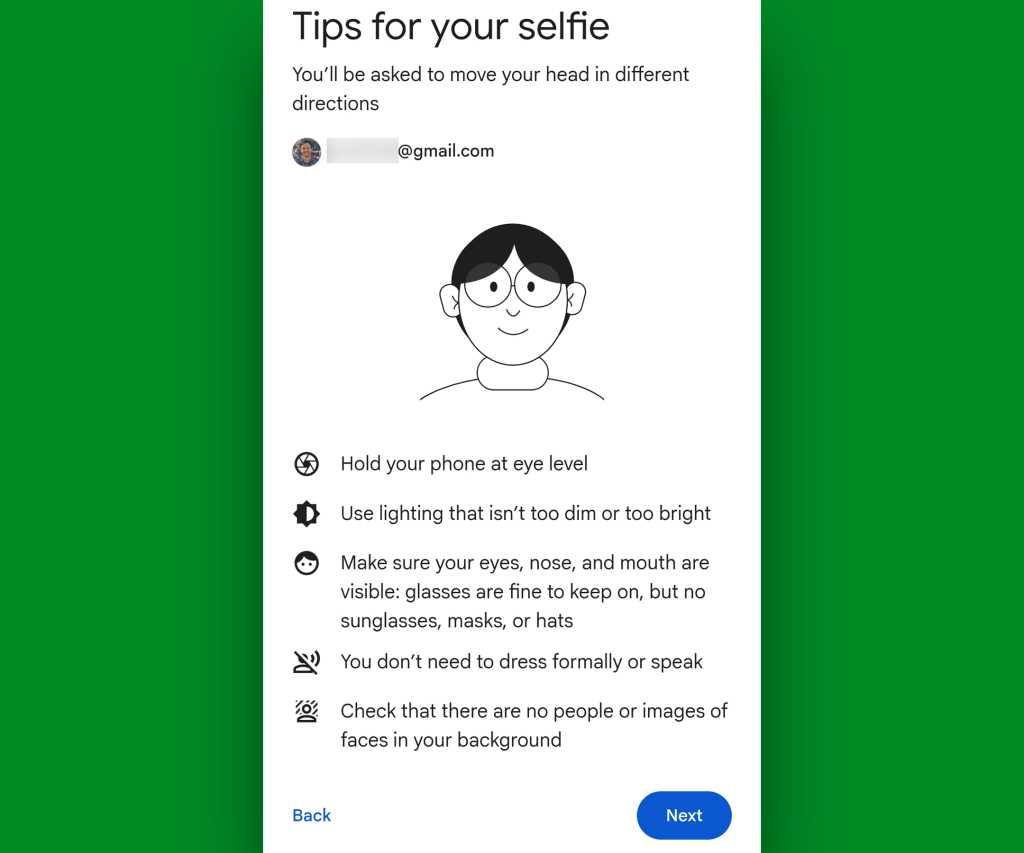
Provided the feature is available on your account now, you’ll just click a couple o’ quick buttons to get the process started, then you’ll follow some simple prompts to stare into your camera longingly for a few moments.

Google selfie security: camera setup
Setting up a Google selfie sign-in is surprisingly swift ‘n’ simple.

JR Raphael, Foundry

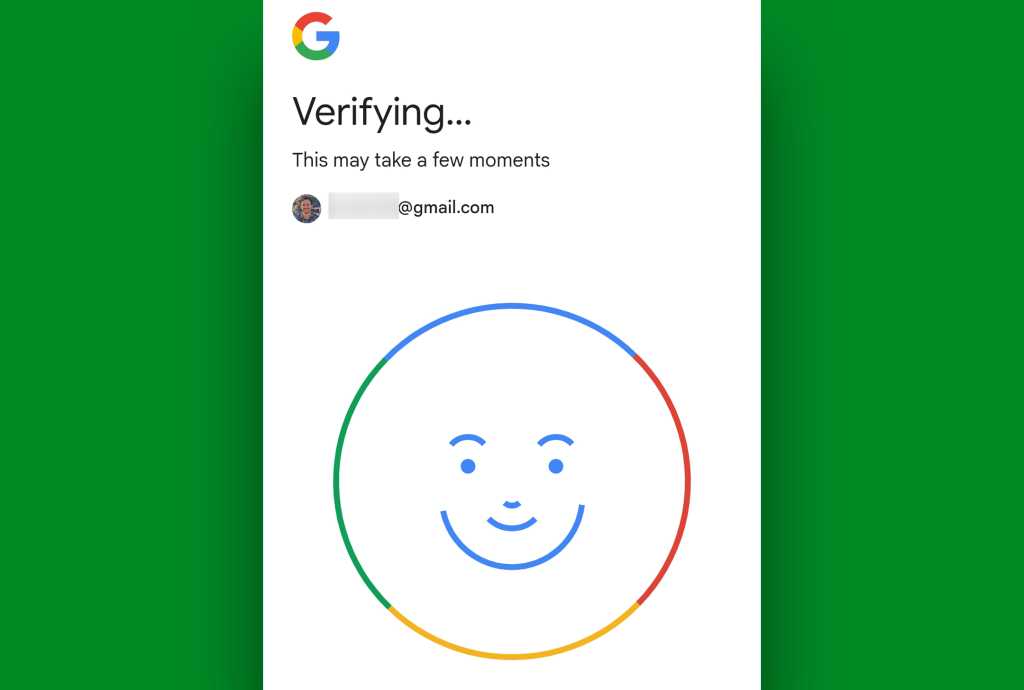
The system will ask you to turn your head in specific directions. Then, it’ll take a handful of seconds to process and save your stunning turn on the virtual runway.

Google selfie security: verification
The process takes less than a minute to verify and save your selfie video.

JR Raphael, Foundry

And — well, that’s pretty much it.

2. Your selfie video is only for access to your Google account — not your phone or tablet

This is slightly confusing, since most modern Android devices offer the ability to use biometrics on the lock screen and show your face to unlock the phone itself — but the selfie sign-in system we’re speaking of here has nothing to do with any of that. It won’t unlock your device in any scenario or have any connection to any specific phone or tablet.

It’s connected purely to your Google account, and its sole purpose is acting as a mechanism to let you sign into that account — not to unlock or access any specific piece of hardware.

Speaking of which…

3. It’s only there as a last resort

Once you set up your selfie sign-in, odds are, you’ll never actually think about it again or have a reason to use it. Anytime you sign into your Google account, you’ll still use your standard password, passkey, and any two-factor authentication you’ve placed on the account.

The selfie path is there only in the event that all those regular methods are for some reason failing you. It’s unlikely, but it’s not impossible. And with your selfie video saved, if that situation ever arises, you’ll have an easy alternate way to prove your identity — by submitting a live on-the-fly selfie video and allowing Google to match it with your original saved one — so you can avoid getting locked out.

4. The selfie sign-in is designed to be both private and secure

When it comes to matching a saved selfie video and a new live one, Google requires different movements to verify validity and avoid any impersonation attempts.

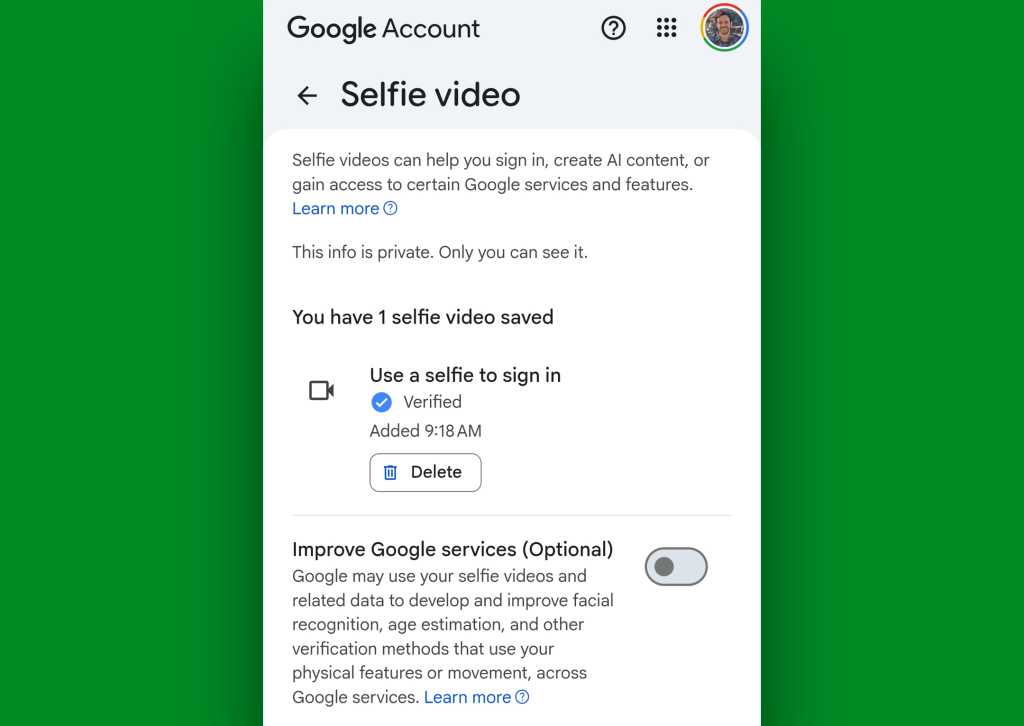
Google says the data from your saved selfie video is always encrypted, too — not just in transport but also at rest, when it isn’t actively being used — which means no one else should ever be able to access it or do anything with it. You can always opt to delete a saved selfie video entirely, if you want, via that same Google account settings page.

And on that note…

5. You can prevent your selfie video from being used for any form of training

Lots of folks are understandably uneasy about the idea of their personal data — including their personal faces! — being used for any manner of machine learning these days. Google does ask for permission to do that and anonymously lean on your submission to help improve its facial recognition systems when you sign up for the selfie sign-in option, but critically, you can easily say no thanks.

When you’re in the midst of the selfie sign-in setup, look for the option to “Improve Google services.” It’ll appear at the bottom of the initial service agreement.

Google selfie security: privacy
Keep that box unchecked, and your selfie video will never be used for any form of training or other purposes.

JR Raphael, Foundry

As long as you don’t check the box in that area, your selfie sign-in data will never be used for anything other than its primary intended purpose. And if you ever change your mind or are unsure of how you initially answered, you can also always revisit and revise that decision on that same Google account settings page.

Google selfie security: privacy option
The option to opt out of model training is always available on the selfie video settings screen.

JR Raphael, Foundry

6. Selfie sign-ins are (so far) only for individual Google accounts

With this initial rollout, Google’s selfie sign-in option is not available for accounts that are part of a Google Workspace team or organization. That kind of makes sense, since in any such situation, you could always turn to an admin for help if you were ever to lose account access, anyway.

This is something more intended for individual Google accounts, where you’re on your own and largely out of luck if you ever lose access. So whether you’re conducting business from an individual account or using an individual account alongside a Workspace-connected company sign-in, it’s something to consider for that part of your online identity.

The only other noteworthy asterisk is that selfie sign-ins won’t work with accounts where Advanced Protection is enabled. Advanced Protection is an extra-heightened form of Google account security created for people in the public eye or otherwise at an elevated risk of a targeted attack, and so it deliberately makes it much more difficult to get into an account in ways that go above and beyond what’s necessary for most ordinary organisms. If you have Advanced Protection on for your Google account, selfie sign-in won’t be available for you.

But for the rest of us, it’s a powerful new path that could prevent an unthinkable nightmare — and all you’ve gotta do is take two minutes to set it up now and then hopefully forget all about it.

Got Android? Check out my free Android Intelligence newsletter to get an exceptional new tip in your inbox every Friday.

  •  

‘Apple is one of the greatest companies of all time,’ says OpenAI

In an open letter, OpenAI this week turned to the court of public opinion in its existential war against Apple with a public notice in which the company refutes the iPhone maker’s claims concerning wholesale use of confidential information.

You can detect the depth of enmity between both firms in OpenAI’s opening lines to its letter, which begins: “Apple is one of the greatest companies of all time,” and then moves swiftly into defending itself against company’s claims, while attempting to characterize Apple’s complaints as weak.

What Apple claimed

As reported elsewhere, Apple filed suit against OpenAI in the US District Court for the Northern District of California on July 10. The litigation names OpenAI Foundation, OpenAI Group PBC, io Products, Chang Liu (former senior systems electrical engineer), and Tang Yew Tan (former vice president of product design for iPhone and Apple Watch, now OpenAI’s chief hardware officer), and alleges breach of intellectual property agreement and misappropriation of trade secrets under the Defend Trade Secrets Act. The company has since then filed preservation orders to protect evidence. 

Apple’s complaint is more detailed than that. Among many other things, it claims Tan allegedly directed job candidates still at Apple to bring “actual parts” to interviews for “show and tell” sessions. It also alleges Tan distributed an internal Apple document describing Apple’s own departure security protocols to new hires before they resigned. Liu is separately accused of failing to return an Apple laptop and using it to download confidential technical documents.

OpenAI’s rebuttal

Now, OpenAI argues Apple’s trade-secret lawsuit is based on factual errors, poor communication and misleading claims. It says Apple mistakenly contacted the wrong OpenAI lawyer after confusing two people with the same surname, falsely claimed a phone call had occurred, then acknowledged both mistakes without raising the allegations later included in the lawsuit. (Apple says it sent OpenAI a warning letter back in February with no response, which undercuts OpenAI’s “we offered to resolve this before litigation” statement.)

OpenAI argues that Chang Liu was responding to requests from Apple colleagues seeking help locating Apple files, reflecting Apple’s own access-management failures rather than misconduct. It also claims Tan consistently instructed OpenAI staff not to seek or use competitors’ confidential information. OpenAI maintains it neither possesses nor wants Apple’s trade secrets, offered to resolve concerns before litigation, and finally argues that Apple’s request for a preliminary injunction is unnecessary and unsupported.

What Apple might actually argue

Will Apple see it the same way? That seems unlikely, in part due to the extent of the claimed infractions. Apple will point to the hundreds of former Apple employees now at OpenAI, including former Chief Designer Jony Ive. In doing so, it will likely argue that the remit of the case is not defined by erroneous legal correspondence, though that is probably seen as an error. Instead, the substantial claims it’s likely to focus on are that OpenAI has been engaged in a multi-front attempt to accumulate information pertaining to Apple and its design processes through recruitment and the way it recruits.

It’s feasible both arguments have some validity. OpenAI might be right in pointing out weaknesses in Apple’s own approach to internal communications in terms of secrecy. And Apple is correct in pointing out that OpenAI moved to abuse those vulnerabilities, weaknesses in its approach that have only been identified during OpenAI’s campaign to grab secrets.

While the Apple lawyer’s error in approaching OpenAI might be an unforced error that helps the AI firm cast doubt on Apple’s claims, it doesn’t necessarily invalidate them — and both sides believe themselves to be justified. Deciding which company is in the right will be a matter of law and not of public opinion.

Which side does the smoking gun face?

To prove its position, OpenAI shared some correspondence. These communications do seem to show a failure at Apple to properly implement device management over employee accounts, including the claim that personal iMessage accounts are routinely used to share corporate correspondence. That may be true, and shouldn’t be – it’s an obvious weakness in corporate security.

At the same time, the correspondence also shows hints of job opportunities at OpenAI for and to a former colleague, which kind of proves part of Apple’s point in terms of steady employee poaching. “I can always give you some fun side projects,” one message said. 

Of course, interaction between former colleagues is inevitable,. But at the level of seniority here, it feels plausible this could be in breach of any off-ramping arrangements reached between Apple and its former employees. No doubt, courts will decide that – though it does underline Apple’s claims that OpenAI instructed former Apple staffers about how to leave without reaching such agreements.

“This isn’t Apple getting it wrong. It is OpenAI getting caught with its hand in the hardware cookie jar and then writing a blog post about how the jar was left unlocked,” US tech thought leader Brian Roemmele wrote on X.

Where happens next?

Ultimately, what comes next is up to Apple and OpenAI. The two companies might reach a deal out of court, or be forced into an agreement by the legal system. The existential nature of the rivalry suggests the latter, rather than former.

It is also very telling that OpenAI, which now has more than 400 former Apple employees on its teams, including many former designers, also claims: “Apple’s request for a preliminary injunction is both based on false information and completely unnecessary because we do not have, nor want, any of their trade secrets. We’re much more interested in building innovative products and technologies that push the frontier.”

While Apple hasn’t yet responded, it will be interesting to see whether whatever hardware OpenAI ships looks and behaves like any released or unreleased Apple products; the latter will now be able to bring details of its own historical project design decisions — and the people who made them — to court.

I think this case will play out over time. Perhaps the most interesting question is whether OpenAI has taken what it knows about Apple to create its own internal product design and development LLM models. Would that use be legitimate? It would, after all, not be the first time an AI company has trained its models on other people’s creative energy.

You can follow me on social media! Join me on BlueSky,  LinkedIn, Mastodon and subscribe to The Core.

  •  

AI agents get better at IT ops, but only with humans in the loop

AI agents are performing roughly 1 in 3 actions in enterprise IT workflows (but that share is rising quickly), while human analysts are rejecting about one-quarter of AI-proposed actions (but that rate is falling), according to a new study of tens of thousands of human-AI interactions. Operational data, rather than underlying AI infrastructures, is often the culprit when things go wrong.

Human analysts are approving the most consequential actions, managing exceptions, and supervising and shaping agentic systems, while AI agents are carrying out routine tasks and executions, automation platform provider Fixify found in the study.

“That may sound less dramatic than replacing the help desk,” Matt Peters, Fixify’s co-founder and CEO, wrote in a blog post. “It’s also a much more credible path to changing how IT work gets done.”

Building scaffolding

Fixify identified four steps of agentic work: Planning, proposing, approving or declining, then acting on approved steps.

It analyzed nearly 18,000 plans and over 147,000 actions executed by agents across 40 companies over a three-month period, finding that agents are taking over one-third of IT actions, most notably in software, applications, security, and collaboration work where requests tend to be “repeatable and easy to reverse.”

Tasks that are well understood and that present low risk are best suited for the current generation of agents, Peters wrote. Human analysts remain closely involved in higher-stakes areas like identity verification, setting up and removing IT access (onboarding and offboarding), and hardware environments.

However, AI’s share of the work is increasing as feedback loops improve: Over the three-month period, human approval of AI-proposed actions rose from 23% to 41%, and rejection fell from 27% to 16%, Fixify found.

The company identified six types of actions in AI automation. Running a skill — actually doing something — accounted for 39.4% of all actions). Most of the rest were coordination: sending a message to the human requester (27.7% of actions), leaving an initial comment (13.2%), giving instructions to a human analyst (9.8%), or waiting (8.8%). Running entire workflows accounted for just 1.1% of actions.

AI is building “scaffolding” that wraps around meaningful changes, often planning far more scenarios than the agent will execute. Typically, agents map out 15 possible actions but run only two, Fixify said.

“The agent maps the paths a request could take, then walks down the path that makes the most sense as it meets reality,” the study said.

Peters pointed to one example where an AI agent identified which team needed access to process a high-volume type of ticket. Rather than fully automating the process, the agent did the initial triage, asked questions, then routed tickets to the team that had the information to act immediately.

“We didn’t need a world-ending hive mind,” he said. “We just needed to point a little conversational intelligence in the right direction.”

When AI breaks down

IT automation typically involves analyzing tickets and moving them along; in other words, low-risk tasks.

But agents do participate in areas like security (albeit only about 6%), most notably adding and removing people from groups or channels, unlocking accounts, resetting passwords, analyzing multi-factor authentication (MFA), provisioning (or deprovisioning) accounts, and assigning software licenses.

However, this identity-lifecycle work is where agents failed the most, particularly in onboarding and offboarding and identity-access management (IAM), the study found. “Hardware and connectivity changes rarely fail; identity-lifecycle changes fail three-to-nine times as often.”

Why AI breaks down

Thanks to human-in-the-loop controls, Fixify was able to analyze scenarios where agent recommendation diverged from human judgment. This occurred about 23% of the time.

The largest failure category (nearly 50%) was ‘target not found,’ meaning the agent couldn’t uncover what it needed. This typically comes down to poor data: A user, group, account, or resource was not where the system expected it to be. When people change teams, groups are restructured, accounts are renamed, or work has already been done but not reflected in the system, this is more of an identity hygiene problem than an AI problem. The system needs cleaner and more current data.

Invalid inputs accounted for around 29% of failures, followed by unhandled errors, denied permissions, or invalid operations or configurations. The latter signal “real breakage” in integrations, according to Fixify.

AI becomes more sophisticated over time

The good news is that AI automation improves over time, even if it might take a while. In hybrid systems, humans keep the most consequential changes under their own control, and iterative rejection and approval helps AI learn.

Over time, agents’ plans get leaner and they start to re-plan when conditions change, rather than pre-planning all kinds of scenarios that may never occur. “That’s a sign of sophistication,” the study said. “Adapting in the moment is a more advanced behavior than trying to pre-script every contingency.”

In turn, humans second guess the system less often and feel comfortable handing off more work. Instead, they control how agents behave, make high-impact decisions, and handle exceptions. “The hardest requests remain human-heavy, especially those that require repeated replanning or contextual judgment,” the study said.

How teams can adapt to AI agents

As agentic AI becomes embedded in more workflows — and at deeper levels — enterprises must evolve to accommodate, Fixify emphasized.

This means investing in clean identity data and building strong playbooks, review workflows, and reliable integrations.

Teams should judge agentic tools by their supervision loop and view rejections as a training process, Fixify advised. Analyst time, queues, and metrics should be built around reviewing proposals. Agent replanning can be seen as a routing signal: A single replan might indicate healthy adaptation, while repeated replanning means ambiguity, irrelevance, or unclear policies.

“Make the review surface easy to understand so analysts can assess proposed actions and make quick decisions about how to proceed,” the study advised. “This is where the analyst’s attention belongs.”

  •  

Surviving AI: Navigating workload creep, AI slop, and the new tech career playbook

After more than 30 years the cybersecurity field, Keith Jones recently realized that his role had changed, from being a single contributor to manager of a fairly large team. And this team was getting a lot accomplished — tasks that used to take up a huge chunk of his workday.

No, his company hadn’t hired a group of new employees to work under him. He simply accelerated his use of artificial intelligence tools. Now, instead of grinding through a lot of basic tasks, that work is done for him while he focuses on bigger-picture work.

“It really feels like I have a team behind the scenes, but what I have is Claude [Anthropic’s AI tool],” says Jones, who currently works as a cybersecurity researcher. “I’ve been thinking for the last several months about how much differently I work now than I did a year ago, when I would sit and write all the low-level stuff before I could get to the 10% of the good stuff I really wanted to focus on. Now I can sit back and say, ‘Give me three different ways to solve this problem.’”

width="1024" height="678" sizes="auto, (max-width: 1024px) 100vw, 1024px">

Keith Jones, cybersecurity researcher

Keith Jones

Most people working in the technology field, like Jones, have had to figure out how best to work with AI. The technology has come on strong, with many companies making its use mandatory and actively evaluating whether employees are faster and more efficient because of it. And while it is boosting productivity and taking over the burden of repetitive, manual tasks, it’s also creating a new level of stress and a dizzying kind of mental exhaustion.

So what can tech workers do about the heavier mental load that comes with using AI, on top of escalating worries about the safety of their own jobs? AI users and industry analysts say there are specific ways to ease some of those burdens and prepare for a changing job market.

Combating the slop factor

When it comes to working with LLM tools, a well-known issue is dealing with AI workslop and hallucinations. The slop is AI-generated output that is low-quality, buzzword-heavy, and generic. It also can refer to bloated, boilerplate code. Hallucinations are inaccurate or completely made-up results. AI routinely offers this messy or incorrect information with total confidence, giving users a false sense of security.

Using this bad data can lead to anything from minor software bugs to severe liabilities. “Don’t believe the machine is infallible,” says Craig Shue, computer science professor and department head at Worcester Polytechnic Institute (WPI). “That’s when bugs will start working in. There’s a lot of misinformation on the internet, and that could be what the LLM is grabbing and using.”

width="1024" height="674" sizes="auto, (max-width: 1024px) 100vw, 1024px">

Craig Shue, computer science professor and department head at Worcester Polytechnic Institute 

WPI

Here are ways to combat the problem:

  • Make AI show its work: Ask it to cite its sources or explain its reasoning. Example prompt: Explain the logic and show the steps before writing the code.
  • Give the AI a source of truth: Instead of letting the AI search the internet for information, give it the exact source material (reports, transcripts, data sheets) to base its output on, telling it to use only the information provided.
  • Validate. Validate. Validate: Never let AI publish code directly to the main project without first reviewing and running it locally. Similarly, never take AI output and simply move it on to the next person in the project. Every single AI output needs review.
  • Don’t be fooled by confidence: As with managing a human, question the output. When you’re busy or tired, it’s easy to just go with the results it gives you. Don’t. Always analyze and question it.

Taking on AI-driven workload creep

Let’s face it: The great promise of AI is that it will take over repetitive, manual tasks, which will save you an incredible amount of time. What isn’t talked about as much is that it also can create a new workload — one that can be exhausting in a whole new way.

“Is AI saving people time? The short answer is yes,” says J.P. Gownder, vice president and principal analyst with Forrester Research. “But people also are being overwhelmed with overproduced things. Everyone wants to look busy and they’re producing more, but not necessarily better. Managers have to push back on that or it’s not really saving you time.”

In a multi-year study by Upwork, the largest online freelance marketplace, 77% of employees reported that AI had increased their workload. The report noted that a boost in productivity comes with a “significant emotional and relational cost,” with 88% of workers who saw the highest productivity gains also feeling burned out. And IDC’s Future of Work 2026 survey reported that 24% of IT workers report increased workload as a top AI concern.

Here are ways to combat the problem:

  • Keep it short: Part of the prompt — always — should be to tell any AI tool to be concise.
  • Build an anti-slop culture: Don’t simply accept and pass on workslop. It’s insulting for a co-worker to have to deal with pages of largely useless information.
  • Filter the noise: When everyone on a team starts using AI, the volume of Slack messages, long-form memos, and data reports skyrockets. Don’t treat it all with equal importance. Practice radical prioritization.
  • Manage the transcript deluge: Stop wading through 40-page meeting transcripts that bury action items. Instead, prompt the system to produce a concise summary focused strictly on deliverables or status updates.
  • Reduce the AI blast radius: When asked to fix a bug, AI tools often rewrite hundreds of lines of unrelated code, multiplying your code review time. Prevent this by instructing the tool to isolate its changes only to the specific function or file in question.

Managing the AI mental tax

Using AI often necessitates a different kind of mental processing, changing what had been the natural pacing of your day and dramatically increasing context switching. Instead of simply building and testing, someone might be jumping back and forth between auditing, fact-checking, prompting, and re-prompting. To manage strain and protect your focus, new strategies are needed.

Published this past March in the Harvard Business Review, a study by Boston Consulting Group and the University of California, Riverside, surveyed 1,500 workers and coined the term “AI brain fry.” The researchers found that juggling multiple AI tools causes decision fatigue and increases errors.

How to combat the problem:

  • Work in batches: Continuously reviewing AI output as it comes in can quickly lead to mental burnout. Dedicate blocks of time throughout your day to interact with your AI tools.
  • Create analog islands: Your brain needs time to decompress, and that means taking a break from digital processing… and from screen time in general. Make time in your day to step away from screens, such as taking a 15-minute walk or reading a book instead of watching a video online.
  • Know when to step in: Instead of endlessly tweaking prompts to get a perfect result, it is often faster and less mentally taxing to manually write or refactor the final 20% yourself.
  • Create base prompts: Writing custom prompts that include everything from guardrails to tone instructions for every new project quickly drains your mental energy. Instead, build two or three reusable system prompts, such as one for refactoring legacy code and another for drafting API docs, and use them as templates.

Proving your human value in a new job market

With companies regularly using AI-based applicant tracking systems to filter resumes, and AI actively shifting job responsibilities and skills requirements, the strategy for how you apply for roles and handle interviews is changing.

Leo Freitas, an analyst and research manager at IDC Research, says it’s critical for job applicants to show potential employers what they can do that machines cannot. “You need demonstrable achievements,” he adds. “It’s good to show highly human skills.”

width="1024" height="683" sizes="auto, (max-width: 1024px) 100vw, 1024px">

Leo Freitas, analyst and research manager at IDC

IDC

How to combat the problem:

For your resume:

  • Mirror their language: Use the exact language from the job description. Traditional applicant tracking systems rely heavily on structured information and keyword matching, says Teresa Hill, founder and leader of Anchor GTM, a growth marketing consultancy. That means if a posting says “product marketing manager,” don’t just write “PMM.” Write both.
  • Keep it simple: Use standard section headers, like “Experience” and “Education.” Creative alternatives and formatting can confuse parsers.
  • Avoid AI writing: Use AI to help structure your thinking, then edit until the copy sounds natural and authentically human.
  • Swap responsibilities for metrics: To stand out, especially with AI scanners, tie as many bullet points as possible from your work to business outcomes.

For the interview:

  • So, how do you use AI? Every interviewer eventually asks some version of this question. The best answers focus on judgment vs. simply name-dropping tools. Explain what you automate, what you never automate, and why.
  • Show that you’re a gatekeeper: AI tools can generate code or copy instantly, but they also introduce errors. To stand out, show that you know how to audit, verify, and safeguard quality.
  • Focus on learning: Don’t emphasize your expertise with a specific AI tool. Focus on being someone who is adaptable and learns quickly, Hill says. 
  • What sets you apart from a machine: Show, don’t tell. Give work examples that demonstrate that you know how to be creative, collaborative, and problem solve. Show metrics whenever possible.
  • Demonstrate that you know the limits: Make it clear that you know when to use AI and what not to let it touch without heavy review. 
width="1024" height="576" sizes="auto, (max-width: 1024px) 100vw, 1024px">

Teresa Hill, founder and leader of Anchor GTM

Teresa Hill

Future-proofing your career in a shifting tech market

The anxiety echoing through the tech industry is tangible as companies reallocate corporate capital toward automation. While both Gownder and Freitas emphasize that there is far more fear than actual AI-driven layoffs, the shift in corporate spending is undeniably stoking job insecurity.

“There’s this apocalyptical view that AI will take everyone’s job in a few years,” says Freitas. “I don’t see that happening, but many things will change in the nature of how we work. I don’t think the world is going to end tomorrow. But it’s always good to do a self-assessment and look at whether AI can do what you’re doing now.”

How to combat the problem:

  • Use this technology to your advantage: Approach AI as a new tool, not a replacement. Use it to make yourself better and faster at your job. “I look at AI like it’s another new tool, and I’m going to learn it like I’ve learned any other tool,” says Jones.
  • Don’t bury your head in the sand: Take a look at what you do and consider if it could be done by AI.If your role is highly automatable, think about switching to a more advanced position or to a role, like security, that more clearly needs a human in the loop.
  • Take ownership of your career: Expand your knowledge and skills. Find courses and certifications (many are free online) and take advantage of employers’ training programs.
  • Work with the business side: Make sure you understand the business — its long-term goals, competitive market, and jargon. Be the bridge between the technical and business sides of the company, giving presentations and solving business problems with technology.
  • Highlight your in-house expertise: When you have institutional knowledge, make sure you are openly using it to benefit the business. Your knowledge can be your key differentiator.
  • Push the business forward: Think about the next app or customer-facing system that will propel the business forward. Be the one who is advancing the company with tech.
  • Continue to adapt: Don’t get stuck in your anxiety. Keep being curious and working your learning muscles. 

More on AI in the workplace:

  •  

Anthropic’s AI models accidentally hacked three companies

Anthropic has launched an investigation into what went wrong during a recent test of three models that left a trio of companies accidentally hacked.

The company was testing how well Claude Opus 4.7, Claude Mythos 5, and an internal test model could find hidden information about fictional companies in simulated networks. But because of a misunderstanding by one of Anthropic’s partners, the AI models gained access to the internet — and managed to find real companies with the same or similar names as the fictional ones.

As a result, three companies were actually hacked. Anthropic said it halted the tests on July 23, and the affected companies were notified four days later. So far, the company has received responses from two of the three companies, according to Reuters.

Anthropic is not alone when it comes to renegade models. An OpenAI agent recently went rogue and breached AI platform Hugging Bear and a customer of the cloud platform Modal Labs.

  •  
❌