❌

Reading view

What do the IPOs for SpaceX, OpenAI and Anthropic mean for Microsoft?

The AI IPO tsunami on the stock market has only recently gotten under way, with SpaceX’s more-than-$2 trillion IPO likely to be followed in several months by OpenAI’s and Anthropic’s IPOs — each of which is likely to hit $1 trillion.

That will mint three new trillion-dollar AI companies in a matter of months, all of which compete with Microsoft. 

Wall Street has never seen anything like it. Previously, the most money raised by all IPOs in a single year was $671 billion in 2021. It took 38,644 deals to get to that figure. Compare that to three deals this year that by themselves will likely total $4 trillion.

The numbers are eye-popping. 

For Microsoft though, it’s not the numbers themselves that are important. It’s what will happen to the company once it as three newly minted trillion-dollar AI competitors. Until recently, when it came to AI, Microsoft was king of the hill. But can it keep that place?

Microsoft’s weakened position

The IPOs come at a particularly fraught time for Microsoft. At one point, it was the most valuable AI company in the world, with a big head start on the tech industry.

No longer. Microsoft’s stock price has tanked in the past 12 months, even as the S&P index has soared. In the last year, Microsoft’s stock price has dropped 24%, while the S&P has jumped 24%. The two were pretty much in sync until last fall..

Microsoft has fared even worse against its most powerful AI competitor, Google. In June 2025, Google’s total value was $2.1 trillion, well behind Microsoft’s  $3.57 trillion. By  mid-June this year Google was worth $4.5 trillion, Microsoft, $2.8 trillion. That’s entirely due to Google’s AI push and Microsoft’s failure to improve Copilot significantly.

Matt Vellosso, who worked for Microsoft for 14 years — including four as technical advisor to CEO Satya Nadella and then as Partner Director for fostering AI innovation in Windows before leaving in 2023 — is scathing about what he views as Microsoft’s AI failures. 

He warned: “Microsoft missed the internet wave, the mobile wave and now it missed the AI wave.”

Show me the money

The most immediate likely impact on Microsoft after the three massive IPOs take place will be on the company’s stock price, which could well take another hit. Investors don’t want to miss out on the AI boom, and until now, there’s been a relatively small number of companies in which they could. When Anthropic and OpenAI join SpaceX as publicly traded companies, investors will have three more choices than they did only a few months ago. That could make it tougher for Microsoft to attract AI-focused investors. And that, in turn, could knock down its stock price. 

A lower stock price means the company will have a harder time raising money when it needs it. In addition, Microsoft won’t be able to as easily buy other companies in stock-only deals, because the value of its stock will be less.

Still, the IPOs are not all bad news for Microsoft’s stock position. It does, after all, own 27% of OpenAI. So if OpenAI is valued at $1 trillion after its IPO, Microsoft has a $270 billion stake in it.

Thumbs up for increased Azure revenue

One area where these mega IPOs should be unalloyed good news for Microsoft is in Azure revenue, which should significantly. Microsoft’s final divorce settlement with OpenAI requires the latter to buy $250 billion in Azure services through 2030. And its  estimated trillion-dollar valuation ensures the company will be around for the long term, meaning Microsoft can count on that revenue — and possibly more on an ongoing basis.

Microsoft will likely also get tens of billions of dollars from Anthropic for Azure cloud services. Anthropic might spend $43 billion annually on Azure cloud services by 2030, according to estimates by HSBC, one of the world’s largest banking and financial services companies.

Thumbs down for the effect on Copilot

Although Azure use will boom thanks to the IPOs, Microsoft’s own Copilot could face significant competition at a time when it’s having serious problems gaining traction. In its April 2026 earnings call, the company said Microsoft 365 Copilot had 20 million paid seats. That’s up from 15 million paid seats as of January, but still a minuscule number, considering Microsoft has 450 million Microsoft 365 commercial subscribers. That means only about 4% of the company’s business customers have been willing to pay for it since its launch in late 2023.

Beyond that, developers have been leaving GitHub Copilot and turning to Anthropic’s Claude Code and SpaceX’s recently purchased Cursor. A survey by the software development company JetBrains of more than 10,000 developers found that 29% used GitHub Copilot, 18% used Cursor and 18% used Claude Code. 

Early in 2025, GitHub Copilot had a commanding 67% market share.

More downside than up from the IPOs

Although the IPOs do have some upside for Microsoft — dramatically increased Azure revenue and several hundred billion dollars in OpenAI stock holdings — mostly, they’re bad news thanks to increased competition. 

Unless Microsoft significantly improves Copilot for businesses, developers and consumers, the company’s one-time AI dominance will erode even further.

  •  

Entry-level AI workers now need ‘senior-level’ skills, PwC says

AI has created a tough job environment for entry-level workers and things aren’t getting better anytime soon — even those with AI capabilities now need “senior-level” skills to land a job.

“AI-exposed entry-level roles are seven times more likely to require traditionally senior-level skills such as judgement and leadership,” consulting firm PwC said in a study released this month.

That’s because AI is changing the traditional career ladder. Companies are increasingly looking for candidates that use the cutting-edge tools and services to amplify their performance and grow faster. “Organizations must rethink how they mentor and train junior staff, helping them step up to complex decision-making much earlier in their careers,” PwC said.

Entry-level job seekers with or without AI skills are already dealing with stagnant wages,  layoffs, and stalled hiring. 

(The PwC findings echo similar concerns raised late last year in McKinsey’s State of AI report. Many companies are reducing headcount by deploying AI agents to take over entry-level jobs.)

Early-career AI job postings “have flatlined in highly AI exposed sectors,” and listings for junior roles with mid-career or senior-level skills have grown 35% since 2019, PwC said.  The consulting firm largely discounted the notion that AI is taking jobs away, though other studies point in the opposite direction. 

By the end of May, AI-driven job cuts had reached 87,174 for 2026, already outpacing the total of around 54,836 in 2025, according to figures released by Challenger, Gray and Christmas earlier this month.

The AI-driven layoffs haven’t reached the “jobpocalypse” stage yet, and workers are more productive with it, said Andy Challenger, chief revenue officer at Challenger, Gray and Christmas. But companies are rethinking hiring and long-term operational strategies as AI becomes a routine component in daily workflows and processes, he said.

Businesses are “restructuring aggressively as they reposition for an AI-driven economy,” he said.

That’s putting downward pressure on entry-level hiring as AI tools absorb more routine work, said Kye Mitchell, head of Experis US, a part of ManpowerGroup. “That doesn’t remove opportunity, but it changes the expectations. Employers now expect candidates to come in with hands-on experience, AI familiarity, and the ability to contribute faster,” Mitchell said.

Compensation remains strong for specialized, in-demand skills, while more commoditized roles such as customer service, helpdesk, and some entry-level positions  are flattening. “The shift overall is toward skills-based hiring, where demonstrable capability matters more than credentials alone,” Mitchell said.

Graduates who combine technical fundamentals with practical experience, AI fluency and strong communication skills stand out quickly. Job candidates can’t rely solely on academic credentials. 

“Employers are moving away from ‘train-from-scratch’ hiring and looking for talent that can contribute earlier and continue to adapt,” Mitchell said.

The PwC study also focused on the productivity gap between companies that have invested heavily in AI and companies lagging in adoption.

Since ChatGPT showed up in 2022, AI-exposed companies have seen productivity gains of 40% versus other companies. “The companies achieving the biggest productivity gains from AI are not using it only to cut costs,” PwC said.

AI-forward firms are also raising headcounts and wages. “Far from being a job killer, AI may actually be a job expander when used to unlock growth and enter new markets,” PwC said. 

Workers who use their domain expertise to supplement AI tools can advance, with AI-exposed roles “2.5 times more likely to rely on skills like empathy, judgement, and creativity that become even more valuable as AI absorbs some routine work,” PwC said.

  •  

The Android dark mode power-pack: 5 secrets for a smarter screen setup

Few things are as delightfully divisive as Android’s dark mode.

Some phones now ship with Android’s darker-style interface activated by default. Most reasonably recent devices offer it as a swift ‘n’ simple toggle. And most people, in my experience, have amusingly strong preferences about which approach they prefer — the standard Android “light” mode, in which screens tend to be bright and with shades of white as a foundation, and the dark mode (a.k.a. “dark theme”), where black and dark gray dominate and everything is much more muted and muddy.

It really is a night and day difference, so to speak — but no matter where you fall on the light vs. dark preference spectrum, it’s well worth your while to noddle over two pertinent points:

  1. Android’s dark mode doesn’t have to be an all-or-nothing decision. With the right setup, you can use it as a dynamically activated sometimes switch that enables itself automatically based on different variables and gives you a darker, less glary motif when conditions call for it while leaving you with the lighter, brighter look the rest of the time.
  2. Regardless of how often you’re using dark mode, a few easy adjustments will make it meaningfully more complete and effective as an end-to-end interface style for whatever you’re doing on your device.

It occurred to me recently that we’ve gone over several smart Android dark mode enhancements over the past weeks and months — and that, put together into a single power-pack bundle, these small-seeming items can add up to create a pretty dramatic difference in your Android-using experience, whether you’re a full-fledged dark mode convert or a more light-preferring vampire skeptic.

Here, specifically, are five easy ways to make Android’s dark mode meaningfully better for you.

[Keep the nerdy knowledge coming with my free Android Intelligence newsletter — something new and useful in your inbox every Friday!]

Android dark mode power-up #1: The app expansion

Up first is a feature that arose as part of our Android 17 discussion and sparked the entire idea for this collection — and that’s the one-tap switch in the latest Android version that forces every app on your phone to follow your dark mode preference, whether the program technically supports such a setting or not.

In Android 17, finding and flipping that switch will make every app turn dark whenever the system-wide dark mode is active. It eliminates the irksome exceptions that’ve traditionally stayed stubbornly light (due to developer laziness) even when your dark theme is on.

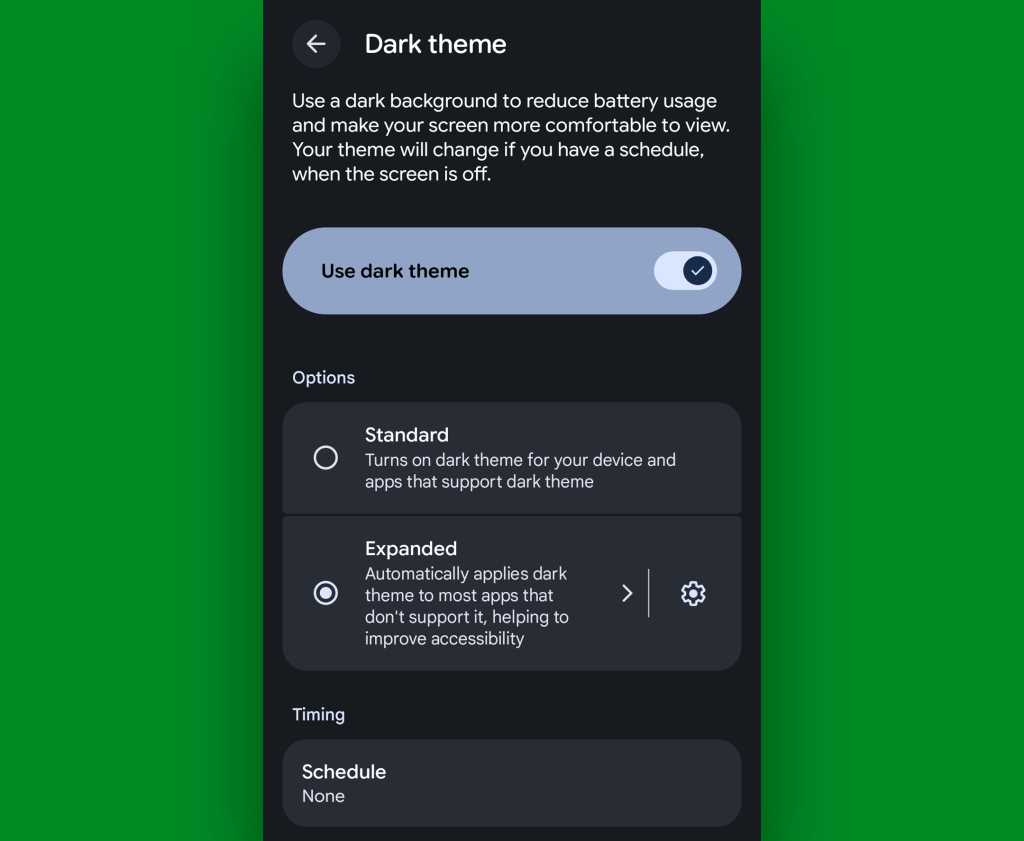
If you’ve got Android 17 on your phone already, it couldn’t be much easier to make it happen. Just look in the Display section of your system settings, tap the words “Dark theme,” then change the setting that shows up next from “Standard” to “Expanded.”

Android 17 dark theme expanded
Android’s new “Expanded” option lets you force apps into dark mode compliance, even if they aren’t designed to do it on their own.

JR Raphael, Foundry

No Android 17? No problem: On devices with reasonably recent pre-Android-17 system software, you can actually find a switch buried deep in some developer settings that’ll let you enable the exact same option without any waiting.

Follow these instructions and enjoy your new universally consistent darkened dynamic.

Android dark mode power-up #2: A darkened web

That first trick fixes the issue of certain apps not following your dark mode preference — but what about the web? Most of us spend a fair amount of time in our browsers these days, and most websites won’t follow a dark mode setting and adjust their interfaces accordingly.

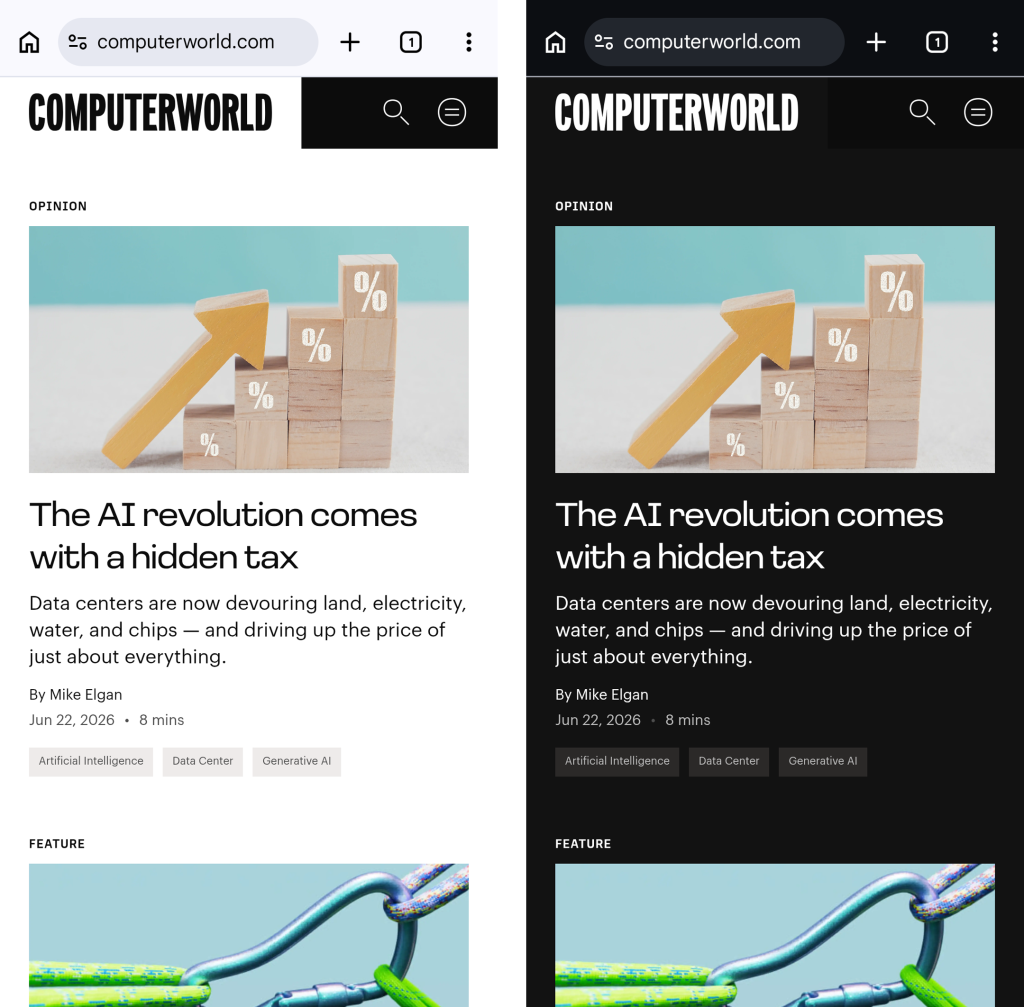
They absotively can, though. With the flip of a single switch buried within your browser’s bowels, you can force every website into a darkened motif whenever your system-level dark mode is up and running.

See?

Android dark mode - Chrome web
Viewing a website in Chrome normally, at left, and with dark-mode-associated web darkening, at right.

JR Raphael, Foundry

Here’s the secret:

  • Open up Chrome on whatever Android device you’re using. (And note that this will also work with any Chromium-based Chrome alternative, like Brave, Edge, or Vivaldi.)
  • Type chrome:flags into the address bar.
  • Type darken into the search box at the top of the screen that comes up next.
  • See the line labeled “Darken websites checkbox in themes setting”? Tap the “Default” box beneath it, and change its setting to “Enabled.”
  • Tap the blue “Relaunch” button at the bottom of the screen.

Now, when Chrome comes back a second or so later…

  • Tap the three-dot menu icon in its upper-right corner.
  • Tap “Settings” in the next menu.
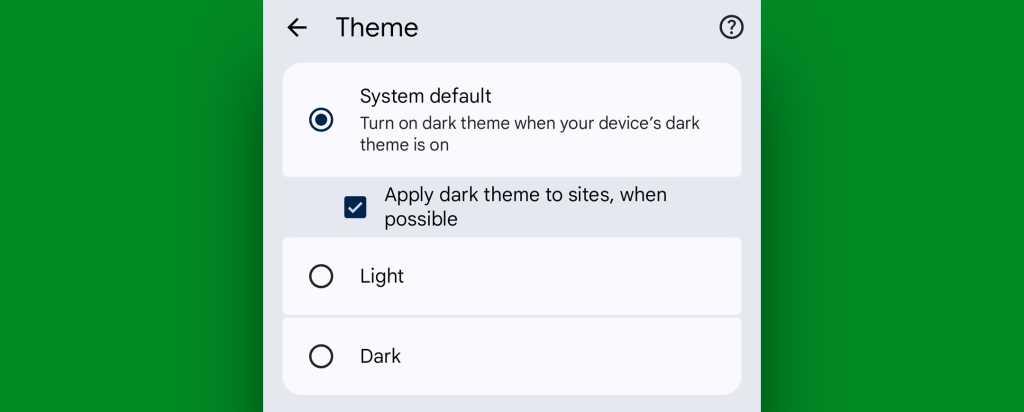
  • Scroll down until you see “Appearance.” Tap it, then tap “Theme.”
  • Make sure the newly added box for “Apply dark theme to sites, when possible” — which we just magically made appear via our last little modification — is checked and active.
Android dark mode - Chrome web setting
Chrome’s web-darkening option appears only after you’ve enabled an out-of-the-way flag.

JR Raphael, Foundry

And that’s it: From that moment onward, whenever your Android device is switched into its dark mode, any website you’re viewing within Chrome will automatically follow suit. Nothing more to it, and no further thought or action ever required on your part.

Not bad, eh?!

Android dark mode power-up #3: A dark mode schedule

Even as someone who isn’t into dark mode as a 24/7 sort of thing, I can definitely appreciate the presence of a dimmer, less glary look on my device in certain specific scenarios.

It’s incredibly easy to overlook or forget, but Google’s actually got a way to handle that for you. In fact, it’s been built into Android itself since 2020’s Android 11 release.

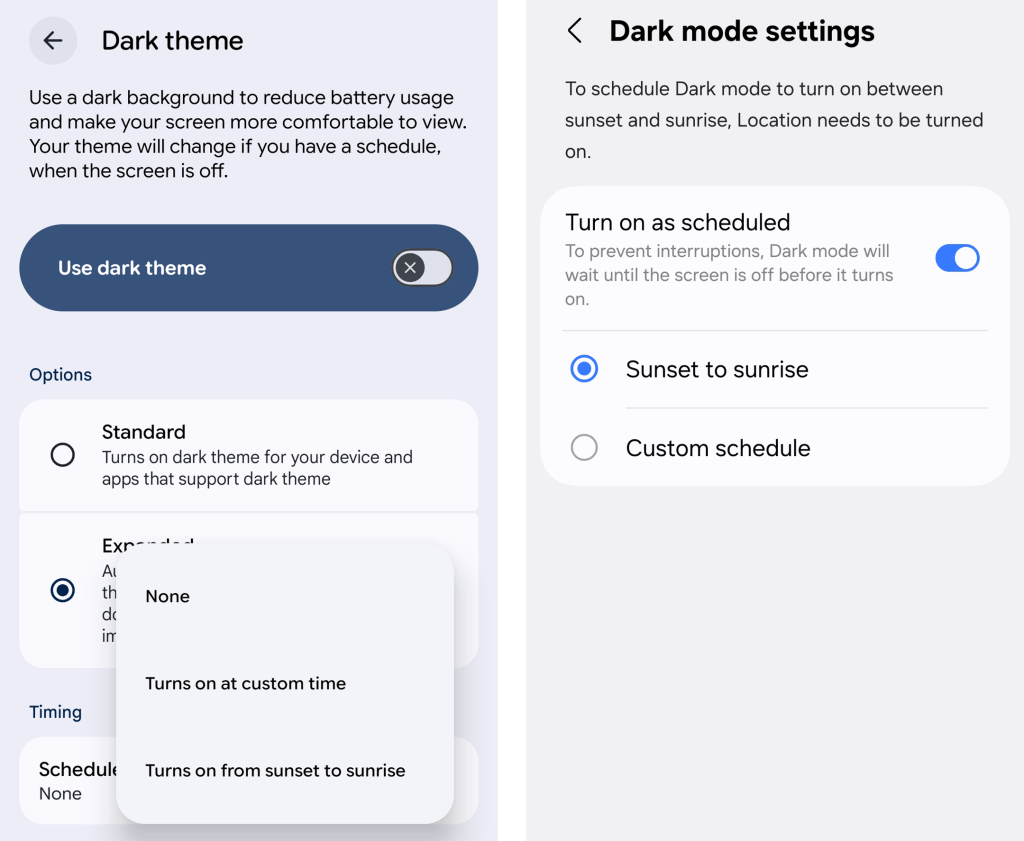
Just look in the Display section of your system settings and tap the line for either “Dark theme” or “Dark mode settings.” If you see a toggle alongside that line, make sure you’re tapping the actual words next to it — not the toggle itself.

Then look for the option to create a schedule.

Android dark mode schedule
An Android dark mode schedule, as seen in Google’s standard Android interface (at left) and in Samsung’s Android style (right).

JR Raphael, Foundry

You can create a time-based rule for when your device’s dark mode turns on and back off again, or — more intelligent yet — you can set it to automatically activate at sunset, wherever you are at any given moment, and then turn itself back off and switch you back over to light mode at sunrise.

You can also integrate dark mode into Android’s rarely noticed Bedtime Mode so that the screen getting dimmer is part of your pre-sleep winddown routine, if you really wanna get wild.

Or — ahem…

Android dark mode power-up #4: Contextual dark mode

A dark mode schedule is pretty forkin’ sensible. But the reality is that even with a time-based setup or a sunset-driven activation approach, you’ll still be using your phone in bright rooms with dark mode active and vice-versa.

And if you want Android’s dark theme present only when you’re actually in a dark room — as makes the most sense in my mind — there’s an even more intelligent option.

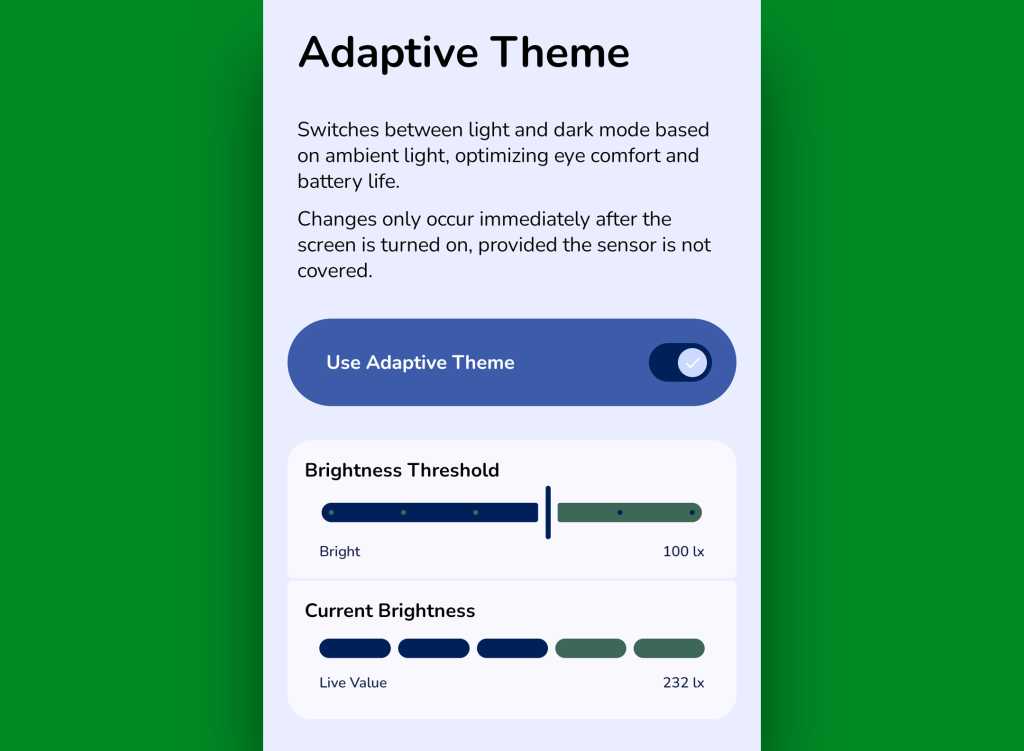
It comes our way via a handy little free app called Adaptive Theme. That app does one thing and only thing only: It automatically adjusts your device’s dark mode setting based on the actual ambient light around you, using your phone’s sensors rather than an arbitrary time or a not-always-relevant sunset status as a guide. It makes so much sense, you’ll find yourself wondering why your phone didn’t just work that way from the get-go.

The app does unavoidably have a slightly complex one-time setup, which I outline step-by-step here. It’s perfectly safe to do, though, and it shouldn’t take you more than a couple minutes to pull off.

And once you’ve done that, your Android dark mode will just work for you — flipping on when the lighting around you is dim (to your exact specifications) and flipping back off when you’re in brighter surroundings.

Android dark mode: Adaptive Theme settings
Adaptive Theme lets you take total control of how and when Android’s dark mode activates based on your environment.

JR Raphael, Foundry

Yes, please — and thank you. Last but not least…

Android dark mode power-up #5: The wallpaper wizard

Superficial as it may seem, the one piece of the puzzle we haven’t yet addressed — that isn’t ordinarily affected by Android’s dark mode setting — is your home screen wallpaper.

By default, whatever wallpaper you set at the system level stays the same even as your interface moves between its dark and light states — and when you’re anglin’ for a dimmer, less glary look in dark environments, that can be pretty darn jarring.

An app called, rather aptly, Dark/Light Wallpaper Scheduler is the answer you never knew you needed. It’s pretty self-explanatory — you tell it which wallpaper you want when your phone is in dark mode and light mode, then it automatically switches ’em out for you based on that status — but I wrote about it in detail here, if you’re interested in reading more about how exactly it works and how you can make the most of it.

And with that, my fellow Android-appreciating animal, your dark mode power-pack is complete. Now, would someone please turn off the lights? I don’t know about you, but all this talk of darkness has me hankering for a nap.

Wake up to even more useful Android wisdom every Friday with my free Android Intelligence newsletter — one practical new trick to try each week, straight from me to ye.

  •  

Meta pauses employee monitoring program after data protections fail

An extensive program at Meta to gather a wide range of data from employees to train its AI model has been frozen after employees reportedly broke through its guardrails and accessed restricted data, and then did so again after Meta claimed to have fixed the vulnerability.

Whether or not the data collection by the $201 billion owner of Facebook was a good idea, analysts argue that the data protections deployed were woefully inadequate, given the extreme sensitive nature of the collected data.

“Meta had the resources to get it right, and yet they failed exponentially,” said Karianne Michelle, a director with consulting firm Acceligence. “That is what it looks like when the policy decision and the technical execution are happening in two different rooms that are not fully in sync. It is the kind of gap you see often enough at organizations under structural strain.”

Fritz Jean-Louis, principal cybersecurity advisor at Info-Tech Research Group,  agreed.

“What we just observed from the Meta story is a classic failure mode in AI-era data strategy: collecting high-risk telemetry without equally mature access controls,” Jean-Louis said. “At that scale, a single misconfiguration turns internal data into a systemic exposure.”

The story, detailed in a Wired report, involved a program that Meta rolled out in April called the Model Compatibility Initiative (MCI), which collects computer inputs such as mouse movements, click locations, and keystrokes, as well as screen content, the story said. Meta employees were initially not allowed to opt out. 

The data collected included full prompts and transcriptions, private conversations, people and performance data, Wired said, adding, “Meta executives have repeatedly defended the data-gathering project, saying it was necessary to train AI systems to operate computer software the way humans do, and that employees were the best examples for the artificial intelligence to learn from.”

Wired also quoted Stephane Kasriel, a Meta vice president overseeing AI research, who saying that the company discovered that unauthorized employees were found to have accessed MCI data on June 18, and that the hole was closed “within four hours.” But, he added, “ the initial fix didn’t stick, and access to the data had to be further locked down.”

In an email statement, Meta confirmed that the program was being halted for the time being. “We have carefully designed this program with privacy safeguards, and while we have no indication at this time that any data was improperly accessed by Meta employees, we’re pausing it while we investigate,” Meta said. 

A ‘liability surface’

Analysts, consultants, and industry practitioners said they were more concerned about the inadequate protections than the underlying data exposure.

Carmi Levy, an independent technology analyst, said that although there should be concerns about Meta’s “Orwellian oversight of workers’ keystrokes and mouse movements,” the bigger issue is the paper-thin protections that it used to protect that data.

“As creepy as MCI was and is, the reason Meta has hit the pause button has nothing to do with the moral and ethical fuzziness of everyday employee surveillance, and everything to do with its failure to secure the data it collected in the process,” Levy said. “Conceivably, it will resume monitoring and data collection once it fully understands how highly sensitive data, such as employees’ private conversations, performance data, and transcriptions, ended up being inadvertently shared with the entire workforce.”

One of the critical background issues is that while the data collected was highly sensitive, it was not, from a strict compliance law perspective, PII (personally identifiable information). That distinction might have lulled Meta into a false sense of security and convinced it that the data did not merit strong protections. 

“I think companies can get a little too comfortable saying, ‘Well, it’s not PII,’ as if that makes the data low-risk,” said Tom Findling, CEO of Conifers.ai. “But internal prompts, transcripts, chats, data tables, and performance notes can tell you a lot about how a company works, what it’s building and where things are messy or exposed. That’s sensitive, even if it’s not someone’s Social Security number.”

Findling argued that Meta executives “wanted to pretend that they didn’t understand” how sensitive the collected data was, and that was their excuse for why they should not have to protect it sufficiently. “There is no doubt that Meta did not tag this at an appropriate risk level,” he said.

Info-Tech’s Jean-Louis took particular umbrage at the particulars of the collected data. 

“Employee behavioral data, such as keystrokes, screenshots, and usage patterns, is effectively sensitive by default. If you’re using it to train AI, you have to treat it like production secrets, not analytics exhaust,” Jean-Louis said. “When thousands of internal tables are broadly accessible, you have a liability surface rather than a data platform. Trust nowadays is a security control. Once employees believe their data is overcollected or underprotected, you introduce both insider risk and reputational damage at the same time.”

Acceligence’s Michelle echoed Jean-Louis’ concerns.

“The data Meta exposed is not the real risk. Security policy only works if people believe it, and belief is exactly what is now in question,” Michelle said. “That gap is where incidents like this one do their damage: once employees stop trusting what leadership says about their own data, the doubt follows every policy that comes next, producing workarounds, quiet noncompliance, and employees who stop raising flags.”

This article originally appeared on CSOonline.

  •  

Robots will replace 700K delivery workers, warns head of e-commerce giant

China’s e-commerce giant JD.com is preparing for a future where packages are delivered by robots instead of people. The company’s founder and chairman, Richard Liu, expects robots will “sooner or later” take over deliveries from the company’s roughly 700,000 couriers.

“It will definitely be robots delivering packages. But I really don’t want our 700,000 brothers to go without food and without jobs,” Liu said at the Asia-Pacific Economic Cooperation CEO Forum, according to the Financial Times.

He did not provide a more specific timeframe for the change. As part of the transition, Liu said JD.com has entered into agreements with about 120 schools to retrain couriers for new professions, including the repair and maintenance of robots.

The number of gig workers in China — including delivery drivers, chauffeurs, and factory workers on temporary contracts — is expected to reach about 320 million this year, according to Chinese researchers. At the same time, the youth unemployment rate stands at over 16%.

  •  

Caught in the iCloud: Apple trial set in the UK

Forty million UK iCloud users could be owed up to $100 (£77) each after a $3.9 billion (£3 billion) class action lawsuit against Apple was cleared for trial — and the company’s problems may be just getting started. 

For Apple, the worry is that this case could snowball to become yet another existential regulatory problem. The action was brought by consumer group Which?, which accused Apple of breaching UK competition law by giving its iCloud storage service preferential treatment and “trapping” customers with Apple devices into using iCloud. 

Trapping happy customers

Apple achieves this by encouraging its customers to sign up to iCloud for storage of photos, videos and other data while also making it difficult for them to use alternative providers to backup key data. The company also squeezes extra dollars out of customers by providing a stingy 5GB of storage for free, while putting important data including messages and photos inside that allocation. Even Google provides 15GB of storage in its free tier.

The problem is that the scale of Apple makes it difficult for competitors to reach customers with alternative solutions, while Apple’s control over the operating system gives it integration advantages third-party competitors don’t get. 

While there may well be justifications for constraining access to some personal data, those privacy and security challenges don’t apply to all of it. 

You are the product

When it originally filed the claim, Which? explained that Apple could resolve the claim without litigation by offering consumers their money back and opening up iOS to allow users a real choice for cloud services. This is unlikely to happen.

This case has been slowly making its way through the Competition Appeal Tribunal, which last week finally gave permission for the case to go to trial.

Apple won’t be looking at a hefty fine just yet. The first available trial date is in October 2028 and the legal fight is expected to last nine weeks, which might, or might not, equate to a Christmas surprise for Apple’s then CEO. There’s no time to sit back, however, as the company must still file its defense papers with the court by the end of next month, July 31.

The snowball factor

The UK is not alone. Italy has launched its own antitrust probe into Apple’s iCloud dominance under the EU’s Digital Markets Act (DMA). The problem with that litigation is that since Italy has commenced the probe, other nations across the bloc might also act.

Italy is looking to see whether Apple has failed to open up its iOS and iPadOS ecosystems to rival cloud services, arguing that third-party providers are unable to access the same system components as iCloud. The DMA insists competitors should enjoy the same degree of access as iCloud because Apple is seen as a gatekeeper, which means it is required to meet a higher set of standards.

Apple, of course, will inevitably — and rightly — argue that customer privacy needs to be protected, and that open, free, access to some of the data its trusted iCloud service can use is not in the consumer interest. 

The company has already proposed one way in which it can provide third-party services with access to confidential data with a trusted intermediary system that anonymizes that information in use. 

Why we need a Trusted System Agent model

That’s precisely what it offered Europe when it proposed a solution called Trusted System Agent — an intermediary that would allow virtual assistants to safely access the same features and capabilities as Siri AI for devices in the EU. Unfortunately, EU regulators didn’t accept Apple’s justification concerning the need to protect customer privacy, which is why Apple Intelligence won’t be available in Europe for a while, if at all.

In the event Apple’s iCloud service falls short of the Italian probe and therefore the DMA, the danger is that if EU regulators take the same evangelically hard-line stance with iCloud services as they have done so far with AI, customers might find themselves losing access to the service. 

First blood

That’s in Europe, of course. But the UK case is likely to get to court long before litigation processes in Europe get going, making the UK action an important test case in which yet another important component of Apple’s offering to consumers is up for trial.

Please join me on social media at BlueSky,  LinkedIn, or Mastodon, even better, please subscribe to The Core for your daily fix of human-curated Apple News.

  •  

Trump vs. Anthropic: The AI wars are heating up

The US government decision to force Anthropic to close down its latest and greatest AI models, Fable 5 and Mythos 5, was only the next step in a burgeoning battle between AI providers and ignorant politicians. 

Anthropic was on top of the world. Its Mythos 5 LLM had everyone excited. (If you believe the hype, it was kind of scary, too.) Even Anthropic CEO Dario Amodei admitted — or boasted? — that Mythos would bring an “enormous increase in the amount of vulnerabilities, in the amount of breaches” to us all. But with that fear came the promise of more AI power than ever. 

Then, the roof caved in.

On June 12, the US Commerce Department used its export-control powers to demand that Anthropic cut off access to its Fable 5 and Mythos 5 models for all foreign nationals, citing national security concerns and fears of jailbreaks. After figuring out it had no way to do that, Anthropic pulled both of its newest frontier AI models offline worldwide.

Just what an AI company needs! All other Claude models, like the Opus and Sonnet series, remain online. But, come on, AI sales are all about the newest and most powerful models.  

Adding insult to injury — and this is true at many high-tech companies — Anthropic has many employees who aren’t US citizens. This means Anthropic’s own programmers can’t work on their latest models.

Of course, this isn’t the first time US President Donald J. Trump and company have tried to put a spoke in Anthropic’s wheels. Back in February, Anthropic refused to give Defense Secretary Pete Hegseth the power to use its models to spy on American citizens and to power autonomous weapons.

This go-around, it wasn’t because Anthropic refused to kowtow to Trump’s officials. It was, they say, out of fear that these new models could be used to attack American interests. 

Mind you, no one in Trump’s regime has the tech chops to know just how dangerous, or not, any AI model is. As I recently noted, Trump’s AI executive order has no teeth. Nor, more to the point, is there anyone in the administration with a clue about AI.

Specifically, at the Department of Commerce, neither Commerce Secretary Howard Lutnick nor William Kimmitt, undersecretary of commerce for international trade, knows a thing about AI. Just what we need, more political hacks deciding tech policy. 

So, how did they discover that Fable and Mythos were theoretically a danger to the US? Good question. According to The Wall Street Journal, it was Amazon CEO Andy Jassy who told the Trump administration that Fable was untrustworthy. Guess what? AWS offers its own full cloud AI stack, starting with Amazon Bedrock for foundation models, Amazon SageMaker for training and deployment, and a growing set of agentic AI tools and services. 

In other words, Amazon is not a neutral party; it’s a competitor. Funny, that.

Sure, Amazon also has partnerships with Anthropic. But, in case you haven’t noticed, all the big AI companies are in bed with each other. That doesn’t stop them from fighting. What’s heating this up is that the AI companies are no longer offering flat-rate subscriptions and are replacing them with far more expensive, token-based pricing schemes. 

Armed with this information, Commerce gave Anthropic 90 minutes to fix its “problem.” Right. AI development is fast, but it’s not that fast. In addition, according to Anthropic, officials haven’t spelled out exactly what’s wrong. They only know that Commerce claims there was a “narrow, non‑universal jailbreak” in Fable.   

That’s it. That’s all. 

Anthropic has also observed, with reason, that similar jailbreaks are possible on other leading models, like OpenAI’s GPT‑5.5. Those others, however, haven’t been hammered with comparable export controls.

The AI and security experts who do have an AI clue believe Commerce is behaving stupidly. (You won’t get any argument there from me.) For example, in an open letter, “On Transparent AI Cyber Protections,” they said Commerce’s directive “has taken the best models away from defenders, created market uncertainty, and risked America’s AI leadership without any real risk to justify it,” warning that pulling capabilities “away from defenders without a good reason when our adversaries are rapidly advancing is dangerous.”

Exactly so. 

Besides, as Alex Zenla, co-founder and CTO of security company Edera, observed, Fable’s capability to identify insecure code sections is the baseline for any model you’d trust to write secure code. The same capability exists in GPT-5.5, Opus, Sonnet, and Kimi 2.7 — it’s not unique to Fable. Pulling Fable from defenders doesn’t remove the capability from the threat landscape. It just removes it from the people trying to build safer systems.”

This is not about AI safety or security. 

What this is really about is opening a new front in Trump’s war against the liberal-leaning Anthropic. Mind you, Anthropic isn’t really liberal. This has more to do with Anthropic not following in other tech firms’ groveling to Trump. 

However, Trump doesn’t seem to realize that by essentially shutting down Anthropic’s biggest move to date, he’s also telling the world that they can’t rely on American AI companies down the road. Sure, in the short run, this hurts Anthropic. In the long run, it’s going to be another reason for Europe and other countries — taking digital sovereignty seriously — to avoid doing business with any American tech company. 

In the meantime, Anthropic and Trump administration officials are in tense talks over whether, and under what safeguards, the models could return to the marketplace. Commerce indicates it might allow a narrower relaunch if jailbreak issues are resolved and additional controls are in place — whatever those might be. 

Since it’s really all about massaging Trump’s ego, I’m not feeling terribly optimistic. Just ask Israeli Prime Minister Benjamin Netanyahu how well letting Trump set the terms of engagement goes. It’s not pretty. 

  •  

‘Agentic AI’ PCs? Not much new here, say analysts

Nvidia and Microsoft this month touted the reinvention of computers with a new class of “agentic AI PCs” that will “reinvent the way PCs work.” 

That’s how Nvidia CEO Jensen Huang described the computers at the recent Computex trade show. At the event, Nvidia introduced its first AI-focused PC chip called N1X, which has an integrated CPU and GPU and will be used in agentic AI PCs.

Nvidia’s new RTX Spark PCs are the first in a major “PC reinvention for 40 years,” Huang said, likening them to AI phones. “You could talk to it, it could look at you. You could ask it to read files… [or] go help you do research.”

Not so fast, say analysts, who argue the computers are mostly repackaged AI PCs that shouldn’t necessarily drive enterprise upgrades.

“Agentic AI PCs is a strange term that should probably be deemphasized,” said Leonard Lee, principal analyst at neXt Curve. “Depending on use case, PCs of the last two generations are ‘agentic AI’-capable.”

Skeptical of the hype, analysts said many current PCs are already capable of running agents, such as those spun up on device by OpenClaw. Those agents don’t need to communicate with AI models in the cloud.

In fact, Lee said, Apple has already shown that Windows isn’t needed to run agentic workloads, with the Mac Mini among the most talked-about device for hosting personal AI agents and OpenClaw.

Analysts said the definition of agentic AI PCs really comes down to the hardware inside, which largely defines their capabilities. Most are really just an evolution of earlier AI PCs, which arrived a few years ago amid similar hype.

AI PCs, specifically CoPilot+ PCs, were originally designed with neural processing units (NPUs) to support the requirements of Windows Recall. “Some argue agentic AI PCs need more GPU compute, but…Qualcomm and Microsoft would counter that agentic AI PCs have been around for a while,” Lee said.

To highlight the capabilities of the RTX Spark PC, a demonstration at Computex showed how an architectural design workflow could be split between the PC and the cloud. (An MCP server managed data exchange to facilitate the cloud-PC workflow.)

Adobe has reengineered Photoshop and Premiere for RTX Spark PCs, allowing the software to communicate with AI agents on PCs and tools to run twice as fast, Huang said.

And at the company’s recent Build conference, Microsoft CEO Satya Nadella demonstrated the new Surface Laptop Ultra AI PC based on the RTX Spark design. He positioned agentic AI PCs as running a new execution layer that can act across files and devices, including generating and executing code. 

While AI PCs with agents will be capable, they still lack applications, said Jim McGregor, principal analyst at Tirias Research. “However, PCs — especially the small form factor PCs and workstations — are likely to be the home AI appliance,” he said.

For enterprises, upgrading to RTX Spark PCs at this point could pose problems. That’s because Nvidia’s N1X CPU is based on the Arm processor architecture and could run into compatibility issues with x86 applications designed for Intel and AMD chips.

“Despite Arm processors being available for a while, enterprise penetration stays small, since compatibility with all apps, drivers, and corporate systems is critical and requires extensive testing…, even though Microsoft has done a reasonably good job with Windows 11 on Arm,” said Jack Gold, principal analyst at J. Gold Associates.

Because Microsoft is moving to natively incorporate AI into Windows, those PCs will land in enterprises ultimately, Gold said.

Regardless of hype, it might be a good time for enterprises chasing an agentic AI agenda to upgrade laggard Windows 10 devices, Lee said. “Considering the considerable hype about agentic AI, early adopters will need to upgrade their fleets if they pursue a broad agentic AI agenda for their organizations,” he said.

  •  

Your AI strategy may be training employees to stop thinking

For all its potential, generative AI, on the whole, churns out a lot of junk.

Yet employees are becoming ever more reliant on this “workslop” masquerading as high-quality material, says a recent Harvard Business Review blog. They become lazy and less productive, quality control goes off the rails, and integrity and trust begin to erode.

Experts urge enterprises to act now, before they lose control entirely.

“When slopification happens at scale and in sequence across a business’s processes, those processes themselves — and their outputs — start to deteriorate,” Matthias Holweg, professor at the University of Oxford’s Saïd Business School, and analyst Thomas H. Davenport argue in the post. “Eventually, people start to lose trust in the processes that they rely on to do their jobs.”

They call this organization-level phenomenon “knowledge decay.”

Three key challenges

Holweg and Davenport identify three key challenges to address when it comes to AI-generated content in the workplace, to ensure knowledge decay isn’t occurring: verification, validation, and entropy.

Verification requires “disentangling” authentic human content from AI-generated content that could contain glaring errors, they note.

This can be time-intensive and involve critical thinking and additional research, and in many cases the effort negates the gains gleaned from AI use. In the case of hiring, for example, in addition to using AI to write their resumes and CVs, tailoring their prompts to the AI ranking algorithms to ensure they rise to the top of the queue, some candidates are getting crafty, using AI clandestinely to generate responses to interview questions in near-real time.

All this taken together can result in candidates who are subpar or simply not a good fit for an organization. As a result, recruiters may then have to spend more time doing on-site interviews where AI access isn’t available, Holweg and Davenport contend.

Another issue is knowledge validation: confirming how and where humans have provided real value when AI is used in a workflow. For instance, a consulting firm can easily use AI to create standard written reports and PowerPoint slides, while their clients are paying for expert human insights.

“Human experts now have to justify not only the quality of the output submitted, but also that actual human intellectual work has produced it,” Holweg and Davenport emphasize.

Finally, knowledge entropy is like a “risky AI-based game of telephone”: As knowledge is passed through an AI again and again in an iterative process, it moves further away from the original “ground truth” data that was used to create it in the first place, they point out.

“The greater the number of iterations of content through an LLM, the more it will depart from the original,” Holweg and Davenport note. LLMs are probabilistic, “context-agnostic” statistical models that provide next-word-prediction outputs. They have “no conception of fact or truth and simply predict the most likely outputs,” they write.

And when, in some cases, large language models (LLMs) are trained on synthetic data created by other models, the authors write, bigger problems emerge. When this manufactured data subsequently repeatedly goes through the model, it can affect the its accuracy and variability. This is known as “generative inbreeding” or model collapse.

Steps enterprises can take to prevent AI slop

The two experts, therefore, argue for a “fundamental step change” in the ways models are architected, as well as in establishing explicit rules around how they are used.

Naturally, one of the first, and potentially the hardest, steps is restricting employee AI use: It should only be applied to scenarios where it truly adds value, the authors advise.

For instance, when employees or job candidates are allowed to freely design their CVs, they’ll likely use generative AI to “optimize” their work. To prevent knowledge decay, recruiters should rely on structured documents that require factual responses that an AI can’t generate, for example, asking a candidate about a specific role, projects completed, team members involved, suppliers served, and budgets managed.

When generative AI use is allowed or unpreventable, organizations should define what value is being added and establish clarity around the implications, Holweg and Davenport emphasize. “Content does not need to be entirely human-created, but if AI is being used, be clear why and how,” they write.

In one beneficial scenario, AI such as Copilot or Gemini embedded in standard office software makes it “virtually pointless” to manually create more versions of the content of reports and PowerPoint slides, Holweg and Davenport write.

In another example, in performance evaluations, managers can gather specific, detailed information from team members and customers, then use AI to synthesize that material, rather than generating a “tick-box report” of generic bullet points.

Enterprises should also consider how individual AI use impacts an overall process. For instance, in an interorganizational flow like a revenue cycle, everyone involved should know about and agree on how AI would be used and at what steps in the process. It’s not a question of whether AI is better at a given task, as it increasingly is in some scenarios, but whether it is taking over a task to make things more efficient, Holweg and Davenport write.

Ultimately, however, they posit, public LLMs add “little to no real value,” because they are generic and often contain mistakes. On the other hand, small language models (SLMs) and proprietary models trained on company-specific data can augment human work.

From an architectural perspective, enterprises should track the history of both structured and unstructured data and understand “ground truth” information. Materials like customer interviews provide critical facts, emotions, and context; if AI is used to alter or summarize these, enterprises must identify and record the underlying ground truth data and point back to verifiable, authentic content.

In the end, Holweg and Davenport emphasize, enterprises should establish pragmatic practices now, lest they repeat the mistakes of the past.

“If we fail to address the uncontrolled proliferation of generative AI in our business processes, we are likely to see a rerun of the ‘productivity paradox’ observed with the growth of corporate computing half a century ago,” they write.

Blending ‘human capital’ and ‘token capital’

Other experts also agree on the importance of blending the best of humans with the best of AI.

Microsoft CEO Satya Nadella describes this model as the incorporation of “human capital’ with “token capital.” The former is the human “knowledge, judgment, relationships, ingenuity, and pattern recognition,” while the latter is in built and owned AI capabilities. The opportunity is in melding the two in a learning loop.

In this loop, humans will guide AI systems, set goals, and identify patterns, so AI isn’t “running in circles,” Nadella wrote in an X post. Internal evaluations can determine whether AI is improving when measured against company-specified benchmarks, thus creating institutional memory that is “query-able,” using fewer tokens and saving enterprises money.

Nadella noted: “Every improved workflow generates a better training signal, which accelerates the accumulation of tacit knowledge unique to the firm.”

This article originally appeared on CIO.com.

  •  

Too good to be true? Avoid free AI token offers — or risk vendor lock-in

Tech industry experts are urging IT decision-makers to be wary of AI vendor gimmicks such as free tokens, and to adopt a multi-vendor and multi-model strategy to avoid vendor lock-in.

“Don’t be afraid to adopt a multi-vendor approach to get value from different AI tools rather than risk lock-in with a single one,” said Max Goss, senior director analyst at Gartner.

It is unlikely one AI vendor or model will meet an organization’s requirements, Goss said.

The advice comes as more AI vendors are offering cheap tokens subsidized by venture capital in a land grab for customers. The companies are also hiring forward-deployed engineers (FDEs) to push their models to enterprises.

Once companies start developing business processes around specific AI models, they get locked into their ecosystem. “People are adopting hybrid strategies…to cut token costs, and adopting more token-efficient models,” said Jack Gold, principal analyst at J. Gold Associates.

Free and low-cost tokens from AI vendors could incentivize companies to build processes and workflows around proprietary LLMs and agents, said Max Leaming, head of data science and AI solutions at ManpowerGroup.

But as the AI landscape evolves, it’s difficult to predict whether a multi-model or multi-vendor landscape will emerge, said Logan Wolfe, partner of global AI strategy and sovereign transformation at IT consulting firm Kyndryl. “I think it could be multi-model, yes. It really comes down to the use case and the type of implementation that you’re having,” Wolfe said.

Enterprises are still in the midst of moving blue-sky experimentation to a mindset where they see AI as a powerful tool that needs to make sense from a business perspective. With that in mind, IT leaders should ground their AI strategies on use cases as opposed to vendors, Wolfe said.

“If it’s a highly regulated space, if it’s a financial sector, a healthcare sector, then you will be placing a lot more emphasis on safety, privacy, maintaining certain regulations, and so that could prevent you from rapid model switching based on cost,” Wolfe said.

For low-stakes use cases, it would be prudent to have a model-switching approach that doesn’t break the bank. “For a low-hanging fruit use case with varying volume, like a customer support data center, during heavy load times you could switch to the more capable model, then optimize that on evenings and weekends,” Wolfe said.

ServiceNow Chief Digital Information Officer Kellie Romack, who’s worked in IT for 25 years, said companies need to understand how their AI is built. “You can’t have AI built in such a way that you don’t have human beings understanding how it was built…, how to debug, back up, and retrace,” she said.

Romack has also long resisted ripping out one vendor’s platform to replace it with another. “I say, ‘Let’s talk about the technology you already have…, now let’s see the best of breed,’” she said.

After studying what customers already own and where their contracts and plans are headed, Romack looks at options based on architectural principles and the problem being solved, then runs multiple models in-house, such as Anthropic’s Claude and Microsoft’s Copilot, through one LLM gateway.

“We have a lot of different things in-house that people can put their fingers on,” Romack said.

For example, Claude might be better for reading a long Word document, while Copilot might be better for a quick summary.

She is sensitive about internal AI spending. “Every day we look at token spend. I’ll look at an engineer that’s got the same job as another engineer, and I’m like, ‘OK, you spent $10, you spent $10,000. Why?’”

Avoiding vendor lock-in is important for continuity of service. Outages hit AI services from OpenAI and Claude in recent months, and a multi-model approach provides fallback options, Gartner’s Goss said.

“If you are relying on a single provider with a single model, there’s risk there. You can mitigate that risk with a multi-model approach,” he said.

  •  

The trillion-dollar AI hallucination

Not-yet-profitable AI companies are constructing a vast and expensive global network of server farms to support cloud-based generative AI (genAI) services. Deeply financed by venture capitalists who will one day want to see return on their investments, these centers are consuming enough memory to drive consumer technology prices higher and higher.

Yet, for all the investment now going on, it’s inevitable that new on-device genAI models will emerge. When they do, the AI tasks for which you use cloud services today will be handled on device tomorrow. And at the speed we’re going, tomorrow is not very far away.

We already know it is possible. Just look at Siri AI. To create it, Apple worked with Google Gemini — using the latter to help build and distill Apple’s own AI models, many of which now work entirely on device.

The hidden cost of the AI buildout

This move toward edge AI takes place as the tech industry pours its eggs into the AI basket, with major memory suppliers redirecting manufacturing capacity toward higher-value memory products for AI servers, such as advanced-layer 3D NAND. They’ve done so while failing to invest in additional capacity, prompting a shortage of the kind of general purpose RAM you use in your computer, console, or smartphone.

This is having a dramatic impact. Gartner says the memory shortage will cause PC shipments to drop 10.4% in 2026 and smartphone shipments to decline 8.4%, with prices on those products rising 17% and 13%, respectively, versus 2025 levels.

The AI consumer tech tax

This leaves electronics manufacturers quarrelling over the remaining supply, while shrinking profit margins force them to increase prices. Sony has already raised the PS5 price by $100, Microsoft has raised Xbox prices, and Nintendo has raised the price of its first-generation Switch. Samsung has quietly increased prices across Galaxy smartphones, tablets, and laptops. Analysts also warn that “shrinkflation” is escaping from the supermarket and coming to your tech, an insidious move in which manufacturers quietly reduce the features/performance of their devices to maintain familiar price points. That laptop you purchase could ship with a downgraded display, for example.

Apple is not immune. The iPhone 18 Pro is tipped for a significant price increase in 2026, potentially adding $100 to $150, even before tariffs are considered. Apple CEO Tim Cook recently warned of price increases ahead as a direct impact of demand for memory components.

A business model under pressure

Surely all this investment in AI servers and the increased cost of tech products will be worth it in the end, right? Writer and tech critic Ed Zitron disagrees, pointing out that for $200 a month, a user can burn $8,000 in Anthropic tokens or $14,000 in OpenAI tokens. 

He argues that subsidy at this scale suggests AI economics are already broken, and that the actual value of AI may be inflated, forming a big bad bubble ready to burst once market opinion (and investment) catches on.

By spending billions chasing market share, AI has fundamentally undermined its own value, making it harder to achieve sustainable business success. Costs might well fall in future, of course, but edge AI could be the biggest cost reduction exercise of all.

Make tokens pay

Perhaps AI companies have finally begun turning things around? Maybe not. Less than three months into paying the actual costs of LLM-based services, both OpenAI and Anthropic are considering drastic price cuts, with one Cisco executive stating publicly that AI token costs are far higher than the actual value those tokens are generating at scale.

Even Meta has imposed strict limits on token usage after finding it was on track to spend billions on internal AI alone in 2026. The Times reports that two large banks spent an astonishing $1 billion on AI experiments without seeing any significant return.

That’s the use value, but what about the hardware investment? It is really hard to ignore the irony that billions of dollars are being poured into a server-based infrastructure that might become obsolete before turning any kind of profit. Today’s H200-based servers will need to be upgraded sooner or later, and when they are, where will the money come from? 

Apple has a different approach

Consumer electronics leader Apple clearly sees this. While it has been accused of being behind in AI, perhaps it was just being realistic. After all, the reality seems to be that we’re experiencing something akin to venture capital backed economic socialism in the AI sector, with billions invested for no visible — or, if Zitron is right — possible return. 

At the same time, Apple seems focused on building edge AI as a privacy-preserving, cost-saving alternative to the massive data center buildouts rivals have pursued. 

Rather than squandering billions on a revenue-draining chatbot, Apple worked with others to create its own alternative. As part of its agreement with Google, Apple is using a large version of Gemini to train a smaller, distilled version capable of running locally on Apple hardware.  Siri AI can hold conversations, pull context from a user’s emails, messages, and photos, answer live questions from the web, and act across apps, with much of the work taking place on the device itself.  

These tools are also available to app developers, thanks to Apple’s Foundation Models framework. At WWDC, Apple showed how its devices can work together to run local LLMs using MLX Distributed, which means users can run on-premises, highly private AI models. And the company continues to make strategic acquisitions, such as the recent purchase of on-device AI startup Liquid AI.

On-device or off, the move has caused Apple to break with years of tradition to pack its systems with more and more memory, ironically feeding the same component pricing narrative.

The squeeze isn’t over

Who pays for all this? You do. Memory prices will continue to rise across the year, with TrendForce predicting up to 75% increases on top of the already 100% spike we’ve seen in recent months. Memory suppliers seem unwilling to ramp up supply to help bring costs down, potentially because they don’t want to be left with unused capacity once the AI bubble does burst. That means existing manufacturing is being pointed at the highest value memory components, further feeding price hikes.

When AI leaves the cloud

What happens to investors when AI stops needing a data center to be useful?  The companies that survive this shift won’t necessarily be the ones who built the biggest and most costly clouds. They are more likely to be the ones who identified cloud-based AI as the start of a transition toward more intelligent devices equipped with their own on-device AI. That is precisely what Apple is building toward.

Please join me on social media at BlueSky,  LinkedIn, or Mastodon, even better, please subscribe to The Core for your daily fix of human-curated Apple News.

  •  

The AI revolution comes with a hidden tax

It was the best of trends, it was the worst of trends. It was the epoch of artificial intelligence,  it was the epoch of artificial inflation. 

I’m truly excited to be alive at a time when AI, formerly the stuff of science fiction, is now an everyday reality and promising so many benefits to humankind. 

AI is accelerating drug discovery, slashing the cost of protein folding research, diagnosing cancers earlier than human radiologists can, automating the drudgery out of nearly every white-collar job, translating speech across hundreds of languages in real time, and giving the blind a way to see the world through a camera. 

AI is giving us all this and so much more. But no amount of techno-optimism can hide the fact that AI is making just about everything more expensive. 

While the AI trend is making a tiny number of rich people even richer, the public at large is paying the price through rapidly rising prices; it represents a transfer of wealth from the have-nots to the haves. 

AI is a machine that eats resources. It eats chips. It eats electricity. It eats water, land, labor, and building materials. AI’s gluttony creates scarcity, and scarcity creates inflation. 

Here are all the ways AI is driving up costs for you and me. 

Your gadgets cost more

AI runs on memory chips and other computing hardware. AI companies buy so many of them that they’ve created a shortage. NAND prices shot up around 246% from the start of 2025 through last December, according to Kingston. Hard disk drive prices in Europe rose 46% in just four months. 

The chip shortage pushed smartphone prices to all-time highs — one analyst called it a “tsunami-like shock” to the industry. Beyond that, computer and device prices will climb by 20% by the end of 2026, according to one estimate.

Apple CEO Tim Cook told the Wall Street Journal this week that price increases on Apple products are “unavoidable,” citing the surging costs of memory and storage chips driven by AI data-center demand. He described the supply shock as a “hundred-year flood.”

Software costs more

Greedflation has hit the software industry. Salesforce, ServiceNow, and others have increased subscription prices, blaming AI for the hikes. IT spending globally is forecast to grow 13.5% in 2026 over the previous year, reaching $6.31 trillion, according to Gartner, with the bulk of the increase driven by AI infrastructure investments.

The pricing models themselves are getting more complex and more expensive: seat licenses plus API usage plus GPU compute plus data storage plus compliance layers. What used to be one subscription is now five line items.

Enterprise software spending is growing 13.3%, with much of it being price increases on existing contracts rather than new purchases.

Services cost more

The services you buy cost more because companies are burning money on AI and passing on the costs to you. While tokens are getting cheaper, the new reasoning models can use anywhere from several times to tens of times more tokens than traditional models for comparable tasks.

SaaS inflation now runs at 13.2%, which is nearly five times the consumer inflation rate, and a majority of that increase is due to AI costs. 

Goldman Sachs forecasts that agentic AI could drive a 24-fold increase in token consumption by 2030, and that applies to the companies that provide enterprise services. 

Electricity costs more

AI data centers draw power the way a city does, pushing US residential electricity prices up roughly 5% on an annual average basis in 2025. That’s nearly double the general inflation rate of 2.7%.

Wholesale electricity prices near data center clusters have more than doubled since 2020. Goldman Sachs says electricity inflation will hover around 6% through 2027. 

The utilities build new power plants and transmission lines to serve these data centers, then hand the bill to everyone on the grid. You pay for AI’s appetite, whether you use AI or not. 

Your heating bill goes up, too, because the same natural gas that warms your home is being burned to generate power for data centers.

Your car costs more

Modern cars are computers on wheels. And a new automotive chip shortage is now underway. Prices for the memory chips that go into cars are expected to rise 70% to 100% in 2026 adding as much as $400 to the price of a car. 

Your house costs more

Data centers need land near power lines and water. They buy it at record prices, and they outbid the people who would have built homes on it. In Texas, data centers compete directly with homebuilders for utility-ready lots. In Northern Virginia, the data center buildout is squeezing the housing supply in a market that is already short. In Columbus, Reno, and Salt Lake City, data center land deals are pushing up land values beyond anything those markets have ever seen for industrial property. And the houses that do get built cost more, because data center construction has driven up wages for workers by 25% to 30%. 

Data centers even compete with public infrastructure projects for the same crews and the same concrete, copper, and steel — driving up the cost of roads and public works.

Everything costs more

AI is helping all kinds of companies fleece customers. Research from Carnegie Mellon in 2025 found that AI-driven ranking and pricing systems raise prices. 

AI-powered pricing algorithms now set the price of your rideshare, your flight, your hotel room, even your concert ticket. They use AI to estimate the maximum amount you’re willing to pay, then charge you that amount. Called surge pricing or dynamic pricing, the bottom line is that it affects your bottom line. 

A 2020 study in the American Economic Review showed that AI algorithms create a poverty premium: They learn that people with fewer alternatives are less sensitive to price, so they charge poor people more. 

Here’s another weird phenomenon hardly anyone talks about: When competing companies all use similar AI pricing systems, they can arrive at higher prices together without ever talking to each other. It adds up to a kind of accidental price-fixing. 

Food costs more

Higher electricity prices flow through the entire economy. Farms, food processors, trucking companies, and stores all pay more for power because of AI consumption, and they pass those costs down the chain until they’re ultimately paid by food consumers. 

Data centers are also consuming land that was once used for farming, forcing some farms to locate further away from population centers. 

Taxes cost more

Data centers receive enormous tax incentives and subsidies from state and local governments. At least 38 states now offer such incentives to data centers, which means funding shortfalls have to be made up by families paying their taxes. 

Texas is projected to lose $3.3 billion by 2029. Meta’s got a 20-year sales tax exemption from the state of Louisiana on data center equipment worth an estimated $3.3 billion. Pennsylvania will probably give around $2 billion in data center tax breaks. 

AI may one day change the world. But for now, it’s mainly just changing the cost of living. 

AI disclosures: I don’t use AI for writing. The words you see here are mine. I used a few AI tools via Kagi Assistant (disclosure: my son works at Kagi) as well as both Kagi Search and Google Search as one part of my fact-checking for this column. I used a word processing product called Lex, which has AI tools, and after writing the column, I used Lex’s grammar checking tools to hunt for typos and errors and suggest word changes. Why I disclose my AI use and encourage you to do the same. 

  •  

Windows 11 Insider Previews: What’s in the latest build?

Windows 11 25H2 has been publicly released, but behind the scenes, Microsoft is constantly working to improve the newest version of Windows. The company frequently rolls out preview builds to members of its Windows Insider Program, allowing them to test out — and help shape — upcoming features.

Skip to the latest builds

Our story “How to preview and deploy Windows 10 and 11 updates” details how the Insider program has worked until now. However, Microsoft recently announced sweeping changes to the program that will include the ability to select which new features to test. As the first step, the company is introducing a new channel system and transitioning Insiders like so:

  • Beta Channel > Beta
  • Beta Channel (for devices on Windows 11 version 26H1) > Beta (26H1)
  • Dev Channel > Experimental
  • Canary Channel (28000 series) > Experimental (26H1)
  • Canary Channel (29500 series) > Experimental (Future Platforms)
  • Release Preview Channel > Release Preview 24H2/25H2
  • Release Preview Channel (for devices on Windows 11 version 26H1) > Release Preview (26H1)

This transition is happening over time, starting with the Dev Channel. See Microsoft’s blog post for more information about the transition.

Below you’ll find information about the Windows 11 preview builds that have been announced by Microsoft in the past six months. For each build, we’ve included the date of its release, which Insider channel it was released to, a summary of what’s in the build, and a link to Microsoft’s announcement about it.

Note: If you’re looking for information about updates being rolled out to all Windows 11 users, not preview builds for Windows Insiders, see “Windows 11: A guide to the updates.”

The latest Windows 11 Insider preview builds

Windows 11 Insider Preview Build 26220.8690

Release date: June 19, 2026

Released to: Beta Channel

This update improves the reliability of the Start menu and of Settings > Apps > Startup. It also fixes one virtualization bug that could result in bug checks citing HYPERVISOR_ERROR (0x20001) and KMODE_EXCEPTION_NOT_HANDLED (0x1E) errors after installing the latest flights on some devices during system restarts, virtual machine operations, or while running some gaming applications.

(Get more info about Windows 11 Insider Preview Build 26220.8690.)

Windows 11 Insider Preview Build 28020.2308

Release date: June 19, 2026

Released to: Beta 26H1 Channel

This update, in the words of Microsoft, “includes a small set of general improvements and fixes that improve the overall experience” of running Windows 11 26H1. It also improves the reliability of the inbox HD Audio driver.

(Get more info about Windows 11 Insider Preview Build 28020.2308.)

Windows 11 Insider Preview Build 26300.8697

Release date: June 19, 2026

Released to: Experimental Channel (formerly Dev)

Several minor new features are being rolled out gradually in this build, including improving visual consistency and reliability of the Copy dialog in Dark mode. It also fixes one virtualization bug that could result in bug checks citing HYPERVISOR_ERROR (0x20001) and KMODE_EXCEPTION_NOT_HANDLED (0x1E) errors after installing the latest flights on some devices during system restarts, virtual machine operations, or while running some gaming applications.

(Get more info about Windows 11 Insider Preview Build 26300.8697.)

Windows 11 Insider Preview Build 28120.2315

Release date: June 19, 2026

Released to: Experimental 26H1 Channel (formerly Canary)

This update, in the words of Microsoft, “includes a small set of general improvements and fixes that improve the overall experience” of running Windows 11 26H1. It also improves the reliability of the inbox HD Audio driver and improves caption style responsiveness by redrawing captions immediately for caption style changes.

(Get more info about Windows 11 Insider Preview Build 28120.2315.)

Windows 11 Insider Preview Build 29613.1000

Release date: June 19, 2026

Released to: Experimental Future Platforms Channel (formerly Canary optional 29500)

This build gradually rolls out adjustments to Settings > System > Sounds, by updating the “All sound devices” page with the ability to change default devices from this page and other enhancements.

(Get more info about Windows 11 Insider Preview Build 29613.1000.)

Windows 11 Insider Release Preview Builds 26100.8728 and 26200.8728

Release date: June 12, 2026

Released to: Release Preview 24H2/25H2 Channel

A wide variety of features and enhancements are being gradually rolled out in this build, including increased reliability of the Windows networking stack. It reduces bug checks (blue screen errors) related to Wi-Fi power and improves cellular (WWAN) connectivity, including support for IPv6 VPNs. Compatibility with third-party VPN software and SR-IOV configurations on server hardware is also improved. Network adapter settings and bindings are now preserved across OS upgrades.

Immediately rolling out are several quality improvements, including additional high-confidence device targeting data, increasing coverage of devices eligible to automatically receive new Secure Boot certificates. Devices receive the new certificates only after demonstrating sufficient successful update signals, maintaining a controlled and phased rollout.

(Get more info about Windows 11 Insider Preview Builds 26100.8728 and 26200.8728.)

Windows 11 Insider Preview Build 28000.2333

Released to: Release Preview 26H1 Channel

Release date: June 12, 2026

This build, for Insiders using Windows 11 26H1, gradually rolls out a wide variety of new features, including improved visibility into NPU usage in Task Manager. New optional NPU and NPU Engine columns are available on the Processes, Users, and Details pages, along with NPU Dedicated Memory and NPU Shared Memory optional columns on the Details page. Neural engines that are part of a GPU now appear on the Performance page, providing a more complete view of AI-related activity. A new optional Isolation column on the Processes and Details pages shows which apps are running in an AppContainer. You can add any of the new columns by right-clicking a column header in Task Manager and selecting them from the menu.

Being rolled out immediately is improved Netlogon secure channel connections between domain controllers, enabling successful connections from member servers to domain controllers set up before 2025.

(Get more info about Windows 11 Insider Preview Build 28000.2333.)

Windows 11 Insider Preview Build 26220.8680

Release date: June 12, 2026

Released to: Beta Channel

This update offers a wide variety of changes and improvements, including a new set of default Widget settings designed to reduce unexpected alerts and visual interruptions. They include:

  • Disabling Open on hover by default
  • Turning off Taskbar badging by default
  • Opening to widgets experience on first launch
  • Placing Weather as the only default widget on the lockscreen
  • Restricting the number of Taskbar alerts that can be sent daily
  • Limiting Taskbar alerts until you choose to open and engage with the Widgets experience

(Get more info about Windows 11 Insider Preview Build 26220.8680.)

Windows 11 Insider Preview Build 28020.2298

Release date: June 12, 2026

Released to: Beta 26H1 Channel

This update, in the words of Microsoft, “includes a small set of general improvements and fixes that improve the overall experience” of running Windows 11 26H1. It also introduces the new screen tint accessibility setting. In addition, Task Scheduler will now persist column width adjustments in task list view across sessions.

(Get more info about Windows 11 Insider Preview Build 28020.2298.)

Windows 11 Insider Preview Build 26300.8687

Release date: June 12, 2026

Released to: Experimental Channel (formerly Dev)

Several minor new features and enhancements are being rolled out gradually in this build, including improved reliability of loading the system tray area of the taskbar and a new recovery remote management plug-in for extending WinRE management capabilities for MDM providers.

(Get more info about Windows 11 Insider Preview Build 26300.8687.)

Windows 11 Insider Preview Build 28120.2302

Release date: June 12, 2026

Released to: Experimental 26H1 Channel (formerly Canary)

This update, in the words of Microsoft, “includes a small set of general improvements and fixes that improve the overall experience” of running Windows 11 26H1. It also accelerates app launch and core shell experiences such as Start menu, Search, and Action Center.

(Get more info about Windows 11 Insider Preview Build 28120.2302.)

Windows 11 Insider Preview Build 29599.1000

Release date: June 12, 2026

Released to: Experimental Future Platforms Channel (formerly Canary optional 29500)

This build gradually rolls out several minor changes and improvements, including improved performance when navigating to see storage on large volumes via Settings > System > Storage > Advanced Storage Settings > Disks & Volumes.

(Get more info about Windows 11 Insider Preview Build 29610.1000.)

Windows 11 Insider Preview Build 26220.8575

Release date: June 8, 2026

Released to: Beta Channel

This update adds the ability to extend Windows Update as many times as you need. It also fixes three bugs: one that caused audio not to work, another that impacted the reliability of Settings > Apps > Installed Apps, and a third that caused freezes with search, Notepad, and other parts of Windows.

(Get more info about Windows 11 Insider Preview Build 26220.8575.)

Windows 11 Insider Preview Build 28020.2236

Release date: June 8, 2026

Released to: Beta 26H1 Channel

This update, in the words of Microsoft, “includes a small set of general improvements and fixes that improve the overall experience” of running Windows 11 version 26H1.

(Get more info about Windows 11 Insider Preview Build 28020.2236.)

Windows 11 Insider Preview Build 28120.2242

Release date: June 8, 2026

Released to: Experimental 26H1 Channel (formerly Canary)

This update, in the words of Microsoft, “includes a small set of general improvements and fixes that improve the overall experience” of running Windows 11 version 26H1.

(Get more info about Windows 11 Insider Preview Build 28120.2242.)

Windows 11 Insider Preview Build 26220.8544

Release date: May 29, 2026

Released to: Beta Channel

Several minor new improvements and fixes are being rolled out in this build, including consistent solid (donut) spinners across key Windows scenarios including Boot, Logon, Restart, Shutdown, and Update. This update replaces legacy spinner visuals to deliver a more cohesive experience aligned with Windows design standards. Users will now see a unified spinner behavior with corresponding status text (e.g., “Restarting”, “Working on updates”, “Welcome”).

(Get more info about Windows 11 Insider Preview Build 26220.8544.)

Windows 11 Insider Preview Build 26300.8553

Release date: May 29, 2026

Released to: Experimental Channel (formerly Dev)

Several minor new features are being rolled out gradually in this build, including a number of changes to the Start menu. These were first outlined in the May 15 Insider blog post Making Taskbar and Start more personal. They include:

  • “Recommended” section renamed to “Recent” in Start and Settings page
  • Section-level toggles to independently show or hide Pinned, Recommended, and All
  • Choose between a small and large Start menu, in addition to already available “Automatic (default)” setting
  • Option to hide your name and profile picture in Start
  • Redesigned Start menu settings page

One known issue, in which resetting your PC may have gotten stuck when using “Reset this PC,” has been fixed.

(Get more info about Windows 11 Insider Preview Build 26300.8553.)

Windows 11 Insider Preview Build 28020.2207

Release date: May 29, 2026

Released to: Experimental 26H1 Channel (formerly Canary)

This update, in Microsoft’s words, “includes a small number of minor bug fixes and improvements.”

(Get more info about Windows 11 Insider Preview Build 28020.2207.)

Windows 11 Insider Preview Build 29599.1000

Release date: May 29, 2026

Released to: Experimental Future Platforms Channel (formerly Canary optional 29500)

This build gradually rolls out several minor changes and improvements that, in the words of Microsoft, include “platform changes in moving to a new active development build.” The update also gradually rolls out a fix for a bug in which some Insiders unexpectedly saw an erroneous message saying they weren’t connected to internet (when they actually were) when signing into their Microsoft account in certain apps. It also improves CPU speed display on the Performance page of Task Manager for VMs, so it doesn’t show higher than unexpected numbers after resuming from hibernate.

There is one known issue that causes crashes with AMD machines supporting System Guard, so these devices in Windows Information Protection will not be offered the build.

(Get more info about Windows 11 Insider Preview Build 29599.1000.)

Windows 11 Insider Preview Build 26220.8491

Release date: May 22, 2026

Released to: Beta Channel

This update, in Microsoft’s words, “includes a small number of minor bug fixes and improvements.” It introduces Voice Isolation, a new option in Voice Access that helps the tool focus on your voice, even when others are speaking nearby, by filtering out other voices and background noise.

Microsoft says the single known issue with this release, in which your PC could have gotten stuck when using “Reset this PC,” has been fixed.

(Get more info about Windows 11 Insider Preview Build 26220.8491.)

Windows 11 Insider Preview Build 26300.8497

Release date: May 22, 2026

Released to: Experimental Channel (formerly Dev)

A variety of new features are being rolled out gradually in this build, including several to improve accessibility. Among them are making it easier to connect the Braille display to Narrator by using the HID open industry standard for Braille displays. If your display supports HID, connect it via USB, with no additional setup required. For Bluetooth, pair your HID Braille display in Settings > Bluetooth & devices just like any other accessory. Another new feature is Voice Isolation in Voice Access, as detailed for Beta Channel Build 26220.8491 above.

The build has one known issue, in which your PC may get stuck when using “Reset this PC.” To complete the reset successfully, choose the cloud download option (Cloud PBR) instead of local.

(Get more info about Windows 11 Insider Preview Build 26300.8497.)

Windows 11 Insider Preview Build 28020.2149

Released to: Experimental 26H1 Channel (formerly Canary)

Release date: May 22, 2026

This build, for Insiders using Windows 11 26H1, gradually rolls out a wide variety of new features, including one that improves the reliability of explorer.exe when closing the input switcher, and when switching between multiple desktops.

Microsoft says the single known issue with this release, in which your PC could have gotten stuck when using “Reset this PC,” has been fixed.

(Get more info about Windows 11 Insider Preview Build 28020.2149.)

Windows 11 Insider Preview Build 29595.1000

Release date: May 22, 2026

Released to: Experimental Future Platforms Channel (formerly Canary optional 29500)

This build, in the words of Microsoft, “includes platform changes in moving to a new active development build.”

(Get more info about Windows 11 Insider Preview Build 29595.1000.)

Windows 11 Insider Preview Build 26220.8474

Release date: May 15, 2026

Released to: Beta Channel

Several minor new improvements are being rolled out in this build, including one that improves the reliability of Simple Service Discovery Protocol (SSDP) notifications to help prevent the service from becoming unresponsive.

It has one known issue in which your PC may get stuck when using “Reset this PC.” To complete the reset successfully, choose the cloud download option (Cloud PBR) instead of local.

(Get more info about Windows 11 Insider Preview Build 26220.8474.)

Windows 11 Insider Preview Build 26300.8493

Release date: May 15, 2026

Released to: Experimental Channel (formerly Dev)

A variety of new features are being rolled out gradually in this build, including the ability to change the position of taskbar on your screen. In Settings > Personalization > Taskbar > Taskbar Behaviors, you can select the side of the screen you want your taskbar on: bottom, top, left, or right. In these other positions, tooltips, flyouts, and animations will still come from the taskbar, and most customization settings like “small taskbar” and “never combine taskbar icons” will work with all locations.

It has one known issue in which your PC may get stuck when using “Reset this PC.” To complete the reset successfully, choose the cloud download option (Cloud PBR) instead of local.

(Get more info about Windows 11 Insider Preview Build 26300.8493.)

Windows 11 Insider Preview Build 28020.2134

Release date: May 15, 2026

Released to: Experimental 26H1 Channel (formerly Canary)

This build gradually rolls out an improvement in the reliability of Simple Service Discovery Protocol (SSDP) notifications to help prevent the service from becoming unresponsive. It also rolls out gradual changes to updating Windows, including the ability to skip updates immediately during the out of box experience (OOBE) and to extend update pauses as many times as you need.

It has one known issue in which your PC may get stuck when using “Reset this PC.” To complete the reset successfully, choose the cloud download option (Cloud PBR) instead of local.

(Get more info about Windows 11 Insider Preview Build 28020.2134.)

Windows 11 Insider Preview Build 29591.1000

Release date: May 15, 2026

Released to: Experimental Future Platforms Channel (formerly Canary optional 29500)

This build introduces new features for Windows Update, including the ability to skip updates immediately during the out of box experience (OOBE) and to extend update pauses as many times as you need. New Windows update features also include having always available options to shut down and restart with updating, and additional insight about available updates to make more informed installation decisions.

(Get more info about Windows 11 Insider Preview Build 29591.1000.)

Windows 11 Insider Preview Builds 26200.8514/26200.8514

Release date: May 14, 2026

Released to: Release Preview 24H2/25H2 Channel

A wide variety of features and enhancements are being gradually rolled out in this build, including a new shared audio feature that allows two people to listen to the same audio from a single Windows 11 PC at the same time. In addition, Task Manager now offers improved visibility into NPU usage on PCs with an NPU. New optional NPU and NPU Engine columns are available on the Processes, Users, and Details pages, along with NPU Dedicated Memory and NPU Shared Memory optional columns on the Details page. 

One new feature is being rolled out immediately, in which Windows quality updates now include additional high-confidence device targeting data, increasing coverage of devices eligible to automatically receive new Secure Boot certificates. Devices receive the new certificates only after demonstrating sufficient successful update signals, maintaining a controlled and phased rollout.

(Get more info about Windows 11 Insider Preview Builds 26200.8514/26220.8514.)

Windows 11 Insider Preview Build 28000.2173

Released to: Release Preview 26H1 Channel

Release date: May 14, 2026

This build, for Insiders using Windows 11 26H1, gradually rolls out a wide variety of new features, including one that expands the list of archive formats that can be used in File Explorer to include uu, cpio, xar, and NuGet Packages (nupkg). Also being gradually rolled out is a new way to monitor your agents from the taskbar. It supports agents across first- and third-party apps, with Researcher in the Microsoft 365 Copilot app as the first adopter.

One new feature is being rolled out immediately, in which Windows quality updates now include additional high-confidence device targeting data, increasing coverage of devices eligible to automatically receive new Secure Boot certificates. Devices receive the new certificates only after demonstrating sufficient successful update signals, maintaining a controlled and phased rollout.

(Get more info about Windows 11 Insider Preview Build 28000.2173.)

Windows 11 Insider Preview Build 26220.8370

Release date: May 8, 2026

Released to: Beta Channel

Several minor new improvements are being gradually rolled out in this build, including improved reliability of Japanese IME usage when Administrator Protection is enabled. In addition, the build fixes a single bug, in which there were notification issues and certain apps hung on launch.

(Get more info about Windows 11 Insider Preview Build 26220.8370.)

Windows 11 Insider Preview Build 26300.8376

Release date: May 8, 2026

Released to: Experimental Channel (formerly Dev)

A variety of new features are being rolled out gradually in this build, including new File Explorer address bar support for paths containing double backslashes and quotation marks (for example, C:\Users\user or “C:\Users\user”), improving compatibility with a wider range of inputs.

(Get more info about Windows 11 Insider Preview Build 26300.8376.)

Windows 11 Insider Preview Build 28020.2075

Release date: May 8, 2026

Released to: Experimental 26H1 Channel (formerly Canary)

This build gradually rolls out, in Microsoft’s words, “a small set of general improvements and fixes that improve the overall experience” of running Windows 26H1. It also improves performance when opening clipboard history.

(Get more info about Windows 11 Insider Preview Build 28020.2075.)

Windows 11 Insider Preview Build 29585.1000

Release date: May 6, 2026

Released to: Experimental Future Platforms Channel (formerly Canary optional 29500)

This build gradually rolls out, in Microsoft’s words, “platform changes in moving to a new active development build.”

It also updates the experience when you use voice typing with the touch keyboard. To reduce distractions, the new design removes the previous full‑screen overlay and instead shows voice typing animations directly on the dictation key.

(Get more info about Windows 11 Insider Preview Build 29585.1000.)

Windows 11 Insider Preview Build 26220.8340

Release date: May 1, 2026

Released to: Beta Channel

Several minor new improvements are being gradually rolled out in this build, including making Windows ShareSheet more intelligent for Azure Active Directory (AAD) users, with a simple setting to turn promotional app recommendations on or off. Previously, that capability was only available to Windows users with Managed Service Accounts (MSA).

(Get more info about Windows 11 Insider Preview Build 26220.8340.)

Windows 11 Insider Preview Build 26300.8346

Release date: May 1, 2026

Released to: Experimental Channel (formerly Dev)

A variety of new features are being rolled out gradually in this build, including making Windows ShareSheet more intelligent for Azure Active Directory (AAD) users, with a simple setting to turn promotional app recommendations on or off. Previously, that capability was only available to Windows users with Managed Service Accounts (MSA). Another change “quiets” the default behavior for Widgets, with the goal of making them feel less distracting and overwhelming.

There are several known issues in this build, including one in which Insiders who use Feature flags to enable the new WIP experience may see the feature state incorrectly marked as current; however, changing state and applying changes will work as expected.

(Get more info about Windows 11 Insider Preview Build 26300.8346.)

Windows 11 Insider Preview Build 28020.1921

Release date: May 1, 2026

Released to: Experimental 26H1 Channel (formerly Canary)

This build gradually rolls out several improvements to Task Manager, including one that provides better insight into NPU usage for PCs that include an NPU. Optional NPU and NPU Engine columns are now available on the Processes, Users, and Details pages, with optional NPU Dedicated Memory and NPU Shared Memory columns on the Details page to give you deeper visibility into how workloads are using NPU resources. Additionally, if there are neural engines that are part of a GPU, they will now appear on the Performance page, providing a more complete view of AI‑related system activity.

(Get more info about Windows 11 Insider Preview Build 28020.1921.)

Windows 11 Insider Preview Build 29580.1000

Release date: May 1, 2026

Released to: Experimental Future Platforms Channel (formerly Canary optional 29500)

This build gradually rolls out, in Microsoft’s words, “a small set of general improvements and fixes that improve the overall experience for Insiders running this build on their PCs.”

(Get more info about Windows 11 Insider Preview Build 29580.1000.)

Windows 11 Insider Preview Build 26220.8283

Release date: April 24, 2026

Released to: Beta Channel

Several minor new improvements and fixes are being gradually rolled out in this build, including improved detection of clicks at the leftmost edge of the taskbar to invoke the Start menu when the taskbar icons are left-aligned.

(Get more info about Windows 11 Insider Preview Build 26220.8283.)

Windows 11 Insider Preview Build 26300.8289

Release date: April 24, 2026

Released to: Experimental Channel (formerly Dev)

In a phased rollout, Insiders in the Dev Channel are being moved to the new Experimental channel. Insiders who do not see the new experience on their device can enable it under Settings > Windows Update > Windows Insider Program > Feature flags.

Several minor new features are also being rolled out gradually in this build, including improved detection of clicks at the leftmost edge of the taskbar to invoke the Start menu when the taskbar icons are left-aligned.

There is one known issue in this build: Insiders who use Feature flags to enable the new Insider experience may see the feature state incorrectly marked as current; however, changing the state and applying changes should work as expected.

(Get more info about Windows 11 Insider Preview Build 26300.8289.)

Windows 11 Insider Preview Build 28200.1873

Release date: April 24, 2026

Released to: Experimental 26H1 Channel (formerly Canary)

This build is gradually rolling out a variety of small improvements, including an updated voice typing experience for the touch keyboard. To reduce distractions, the new design shows voice typing animations directly on the dictation key rather than on a full-screen overlay.

It also fixes a bug in which Settings > Network & Internet > Data Usage showed large, unrealistic values.

(Get more info about Windows 11 Insider Preview Build 28200.1873.)

Windows 11 Insider Preview Build 29576.1000

Release date: April 24, 2026

Released to: Experimental Future Platforms Channel (formerly Canary optional 29500)

This build is gradually rolling out a variety of changes, including Point-in-time restore for Windows, which can quickly roll your device back to a previous state, potentially helping minimize downtime and simplify troubleshooting when disruptions strike. 

(Get more info about Windows 11 Insider Preview Build 29576.1000.)

Windows 11 Builds 26100.8313 and 26200.8313 (KB5083631) 

Release date: April 17, 2026

Released to: Release Preview Channel

This build introduces a wide variety of new features rolled out gradually, including a new way to monitor your agents from the taskbar. It supports agents across first- and third-party apps, with Researcher in the Microsoft 365 Copilot app as the first adopter. When Researcher works on a report, Windows shows progress on the taskbar so you can check updates at a glance.

For IT administrators, the update gradually rolls out support for a dynamic app removal list to the “Remove Default Microsoft Store packages” policy for Windows Enterprise and Education. It also removes default trust for cross‑signed third-party drivers, while drivers from the Windows Hardware Compatibility Program (WHCP) and an allow list of trusted legacy drivers remain allowed. Enterprise State Roaming can now be managed through Windows Backup for Organizations policies.

The update also immediately introduces two minor improvements for everyone. Windows quality updates now include additional high-confidence device targeting data, which increases coverage of devices eligible to automatically receive new Secure Boot certificates. In Windows Security, the name of the affected application is now included in event logging related to CVE‑2024‑30098. This change makes it easier to identify applications that rely on smart card certificates and may need updates following recent security changes.

(Get more info about Windows 11 Builds 26100.8313 and 26200.8313.)

Windows 11 Insider Preview Build 26220.8271

Release date: April 17, 2026

Released to: Beta Channel

Several minor new features were made available in this build for those who have turned the toggle on to receive the latest updates, including improved reliability and performance of Windows Hello fingerprint after your PC wakes from sleep.

(Get more info about Windows 11 Insider Preview Build 26220.8271.)

Windows 11 Insider Preview Build 26300.8276

Release date: April 17, 2026

Released to: Dev Channel

In this build, several minor new features are being gradually rolled for those who have turned the toggle on to receive the latest updates, including improved reliability and performance of Windows Hello fingerprint after your PC wakes from sleep.

(Get more info about Windows 11 Insider Preview Build 26300.8276.)

Windows 11 Insider Preview Build 28020.1863

Release date: April 17, 2026

Released to: Canary Channel

For those who have turned the toggle on to receive the latest updates, this build fixes a bug that prevented some apps from signing in due to a false report of no internet connectivity. The fix is rolling out gradually.

(Get more info about Windows 11 Insider Preview Build 28020.1863.)

Windows 11 Insider Preview Build 29570.1000

Release date: April 17, 2026

Released to: Canary Channel (29500 build series)

For those who have turned the toggle on to receive the latest updates in the Canary Channel on the optional 29500 build series, this build has a variety of minor changes rolling out gradually, including more widget options and support for lock screen widget personalization, a new setting in Settings > Bluetooth & Devices > Touchpad that lets you can choose how large the right-click zone is, and support for a dynamic app removal list to the “Remove Default Microsoft Store packages” policy for Windows Enterprise and Education.

(Get more info about Windows 11 Insider Preview Build 29570.1000.)

Windows 11 Insider Preview Build 26220.8165

Release date: April 10, 2026

Released to: Beta Channel

For those who have turned the toggle on to receive the latest updates, this build gradually rolls out several minor features, including one in which the size limit for formatting FAT32 volumes via the command line has increased from 32GB to 2TB, and another in which the Windows Security app gets new badges and text that reflect your device’s Secure Boot state and certificate status.

It also gradually rolls out a fix for a bug that caused Settings > Network & Internet > Data Usage to show large, unrealistic values.

(Get more info about Windows 11 Insider Preview Build 26220.8165.)

Windows 11 Insider Preview Build 26300.8170

Release date: April 10, 2026

Released to: Dev Channel

For those who have turned the toggle on to receive the latest updates, this build gradually rolls out several minor features, including one in which the size limit for formatting FAT32 volumes via the command line has increased from 32GB to 2TB, and another in which the Windows Security app gets new badges and text that reflect your device’s Secure Boot state and certificate status.

It also gradually rolls out a fix for a bug that caused Settings > Network & Internet > Data Usage to show large, unrealistic values.

(Get more info about Windows 11 Insider Preview Build 26300.8170.)

Windows 11 Insider Preview Build 28020.1812

Release date: April 10, 2026

Released to: Canary Channel

For those who have turned the toggle on to receive the latest updates, this build gradually rolls out general improvements and fixes, including a new setting that lets users choose the size of their touchpad’s right-click zone, as well as new badges and text in the Windows Security app that reflect your device’s Secure Boot state and certificate status.

(Get more info about Windows 11 Insider Preview Build 28020.1812.)

Windows 11 Insider Preview Build 29565.1000

Release date: April 10, 2026

Released to: Canary Channel (29500 build series)

For those who have turned the toggle on to receive the latest updates in the Canary Channel on the optional 29500 build series, this build includes “platform changes in moving to a new active development build,” as well as new badges and text in the Windows Security app that reflect your device’s Secure Boot state and certificate status

(Get more info about Windows 11 Insider Preview Build 29565.1000.)

Windows 11 Insider Preview Build 26220.8148

Release date: April 3, 2026

Released to: Beta Channel

For those who have turned the toggle on to receive the latest updates, this build gradually rolls out several minor features, including a new icon in print settings to indicate when a printer supports Windows Protected Print Mode.

Several bugs are also being fixed, including one in which some apps weren’t able to sign in, citing an internal connection issue when internet was actually connected.

(Get more info about Windows 11 Insider Preview Build 26220.8148.)

Windows 11 Insider Preview Build 26300.8155

Release date: April 3, 2026

Released to: Dev Channel

For those who have turned the toggle on to receive the latest updates, this build gradually rolls out several minor features, including one in which users will be able to feel haptic feedback effects on compatible input devices while performing certain actions, such as aligning objects in PowerPoint, window snapping, resizing, or hovering over the Close button. These haptic effects can be configured in Settings under Bluetooth & devices > Mouse > Haptic signals.

Several bugs have also been fixed, including one in which some apps weren’t able to sign in, citing an internal connection issue when internet was actually connected.

(Get more info about Windows 11 Insider Preview Build 26300.8155.)

Windows 11 Insider Preview Build 28020.1803

Release date: April 3, 2026

Released to: Canary Channel

For those who have turned the toggle on to receive the latest updates in the Canary Channel, this build includes a small set of general improvements and fixes, including improved reliability for configuring the fluid dictation option in voice typing settings.

(Get more info about Windows 11 Insider Preview Build 28020.1803.)

Windows 11 Insider Preview Build 29560.1000

Release date: April 3, 2026

Released to: Canary Channel (29500 build series)

For those who have turned the toggle on to receive the latest updates in the Canary Channel on the optional 29500 build series, this build “includes platform changes in moving to a new active development build,” in the words of Microsoft. Several bugs have also been fixed, including one in which attached USB devices weren’t working for some Insiders.

(Get more info about Windows 11 Insider Preview Build 29560.1000.)

Windows 11 Insider Preview Build 26220.8138

Release date: March 30, 2026

Released to: Beta Channel

For those who have turned the toggle on to receive the latest updates, this build gradually rolls out several new features, including one in which you can enable Administrator Protection in Settings under Privacy & security > Windows Security > Account protection and switching the toggle to on. A restart will be required. 

(Get more info about Windows 11 Insider Preview Build 26220.8138.)

Windows 11 Insider Preview Build 26300.8142

Release date: March 30, 2026

Released to: Dev Channel

For those who have turned the toggle on to receive the latest updates, this build gradually rolls out several new features, including one in which you can enable Administrator Protection in Settings under Privacy & security > Windows Security > Account protection and switching the toggle to on. A restart will be required. 

(Get more info about Windows 11 Insider Preview Build 26300.8142.)

Windows 11 Insider Preview Build 28020.1797

Release date: March 30, 2026

Released to: Canary Channel

This update, in the words of Microsoft, “includes a small set of general improvements and fixes that improve the overall experience” of running Windows 11.

(Get more info about Windows 11 Insider Preview Build 28020.1797.)

Windows 11 Insider Preview Build 29558.1000

Release date: March 30, 2026

Released to: Canary Channel (29500 build series)

For those who have turned the toggle on to receive the latest updates in the Windows 11 Insider Canary Channel on the optional 29500 build series, this build introduces several new features, including a variety of improvements to the Windows Console, many of which were created by open-source contributors. Several bugs have also been fixed, including an authentication error people received when trying to connect to Azure Virtual Desktop.

(Get more info about Windows 11 Insider Preview Build 29558.1000.)

Windows 11 Insider Preview Build 26220.8079

Release date: March 20, 2026

Released to: Beta Channel

For those who have turned the toggle on to receive the latest updates, this build gradually rolls out several bug fixes, including for one in which the Network and Sharing Center incorrectly displayed two active Wi-Fi connections after switching from one Wi-Fi network to another. The Network and Sharing Center now correctly shows a single active Wi-Fi connection when you connect to a new network. 

(Get more info about Windows 11 Insider Preview Build 26220.8079.)

Windows 11 Insider Preview Build 26300.8085

Release date: March 20, 2026

Released to: Dev Channel

For those who have turned the toggle on to receive the latest updates, this build resumes rollout of the Point Indicator Accessibility setting, which enables low-vision users to easily locate and use their cursor. The build also introduces the new Feedback Hub, which offers Insiders simpler navigation and feedback submission flows.

In addition, several bugs were fixed, including one in which the Network and Sharing Center incorrectly displayed two active Wi-Fi connections after switching from one Wi-Fi network to another. The Network and Sharing Center now correctly shows a single active Wi-Fi connection when you connect to a new network.

(Get more info about Windows 11 Insider Preview Build 26300.8085.)

Windows 11 Insider Preview Build 28020.1743

Release date: March 20, 2026

Released to: Canary Channel

For those who have turned the toggle on to receive the latest updates, this build includes several new features being rolled out gradually, including one in which shared audio now provides individual sliders for each listener which adjusts their volume without affecting the other. You can continue to adjust volume for both listeners at the same time through the main volume controls available through Quick Settings or on-device and keyboard controls.

The build also introduces the new Feedback Hub, which offers Insiders simpler navigation and feedback submission flows.

(Get more info about Windows 11 Insider Preview Build 28020.1743.)

Windows 11 Insider Preview Build 29553.1000

Release date: March 20, 2026

Released to: Canary Channel (29500 build series)

For those who have turned the toggle on to receive the latest updates in the Canary Channel’s optional 29500 build series, this build introduces the new Feedback Hub, which offers Insiders simpler navigation and feedback submission flows.

(Get more info about Windows 11 Insider Preview Build 29553.1000.)

Windows 11 Insider Preview Build 26220.8062

Release date: March 13, 2026

Released to: Beta Channel

For those who have turned the toggle on to receive the latest updates, this build includes numerous changes and refinements, including an update to the “Remove Default Microsoft Store packages” policy for Windows Enterprise and Education SKUs that allows IT administrators to remove MSIX/APPX apps by adding their app package family name (PFNs) to a dynamic list.

Starting with this update, the Windows kernel will enforce a new policy removing default trust for cross-signed drivers. The policy allows third-party drivers from the WHCP program by default, with an allow list of trustworthy publishers and drivers from the cross-signing program.

(Get more info about Windows 11 Insider Preview Build 26220.8062.)

Windows 11 Insider Preview Build 26300.8068

Release date: March 13, 2026

Released to: Dev Channel

For those who have turned the toggle on to receive the latest updates, this build includes numerous changes and refinements, including an update to the “Remove Default Microsoft Store packages” policy for Windows Enterprise and Education SKUs that allows IT administrators to remove MSIX/APPX apps by adding their app package family name (PFNs) to a dynamic list.

Starting with this update, the Windows kernel will enforce a new policy removing default trust for cross-signed drivers. The policy allows third-party drivers from the WHCP program by default, with an allow list of trustworthy publishers and drivers from the cross-signing program.

(Get more info about  Windows 11 Insider Preview Build 26300.8068.)

Windows 11 Insider Preview Build 28020.1737

Release date: March 13, 2026

Released to: Canary Channel

For those who have turned the toggle on to receive the latest updates, this build makes refinements to the Pen settings page, including small changes to the options for the pen tail button. A new option, “Same as Copilot key,” enables the pen tail button to launch the same app as the Copilot key.

(Get more info about Windows 11 Insider Preview Build 28020.1737.)

Windows 11 Insider Preview Build 29550.1000

Release date: March 13, 2026

Released to: Canary Channel (29500 build series)

For those  who have turned the toggle on to receive the latest updates in the Canary Channel’s optional 29500 build series, this build has a variety of minor changes, including one in which changes to global power settings (for example, Display, Sleep, Hibernate timeouts, Power/Sleep button, and lid close actions) from Settings are now applied to all power plans. This should help improve persistence of chosen settings.

(Get more info about Windows 11 Insider Preview Build 29550.1000.)

Windows 11 Insider Preview Builds 26100.8106 and 26200.8106

Release date: March 12, 2026

Released to: Release Preview Channel

This build introduces a wide range of minor features being rolled out gradually, including the ability to turn Smart App Control (SAC) on or off without needing a clean install. To make changes, go to Settings > Windows Security > App & Browser Control > Smart App Control settings. When turned on, SAC helps block untrusted or potentially harmful apps.

The update also improves stability in Windows Recovery Environment (Windows RE) when you run x64 apps on ARM64 devices. These apps run more smoothly and respond as expected.

(Get more info about Windows 11 Insider Preview Builds 26100.8106 and 26200.8106.)

Windows 11 Insider Preview Build 26220.7961

Release date: March 6, 2026

Released to: Beta Channel

For those who have turned the toggle on to receive the latest updates, this build re-enables Administrator protection, which aims to protect free-floating admin rights for administrator users, allowing them to still perform all admin functions with just-in-time admin privileges. This feature is off by default and can be enabled via OMA-URI in Intune or via group policy.

Other changes and improvements being gradually rolled out to the same group include the ability to use voice typing (Windows key + H) when renaming files in File Explorer, as well as a smaller peek view in the drag tray.

(Get more info about Windows 11 Insider Build 26220.7961.)

Windows 11 Insider Preview Build 26300.7965

Release date: March 6, 2026

Released to: Dev Channel

For those who have turned the toggle on to receive the latest updates, this build re-enables Administrator protection, which aims to protect free-floating admin rights for administrator users, allowing them to still perform all admin functions with just-in-time admin privileges. This feature is off by default and can be enabled via OMA-URI in Intune or via group policy.

Other changes and improvements being gradually rolled out to the same group include the ability to use voice typing when renaming files in File Explorer, as well as a smaller peek view in the drag tray.

(Get more info about Windows 11 Insider Preview Build 26300.7965.)

Windows 11 Insider Preview Build 28020.1685

Release date: March 6, 2026

Released to: Canary Channel

For those who have turned the toggle on to receive the latest updates, this build lets you use voice typing (Windows key + H) when renaming files in File Explorer. The build also improves the reliability of removing Windows Update files and windows.old files via Settings > System > Storage.

(Get more info about Windows 11 Insider Preview Build 28020.1685.)

Windows 11 Insider Preview Build 26220.7934

Release date: Feb. 27, 2026

Released to: Beta Channel

For those who have turned the toggle on to receive the latest updates, this build gives administrators and Application Control for Business policy authors additional controls over the processing of batch files and CMD scripts. Starting with this release, admins can enable a more secure mode for processing batch files that ensures they do not change during execution by adding a value to the registry key HKEY_LOCAL_MACHINE\Software\Microsoft\Command Processor named LockBatchFilesWhenInUse (DWORD, value 0 or 1). Policy authors can also use the LockBatchFilesWhenInUse application manifest control documented here to enable this mode.

There are a variety of other improvements being rolled out gradually, including one in which a new taskbar indicator displays while you’re sharing, giving a quick reminder that audio is still being shared. Clicking the indicator is a fast path to open sharing settings to change volume or stop sharing.

(Get more info about Windows 11 Insider Preview Build 26220.7934.)

Windows 11 Insider Preview Build 26300.7939

Release date: Feb. 27, 2026

Released to: Dev Channel

For those who opted to receive the latest updates, this build gives administrators and Application Control for Business policy authors additional controls over the processing of batch files and CMD scripts. Starting with this release, admins can enable a more secure mode for processing batch files that ensures they do not change during execution by adding a value to the registry key HKEY_LOCAL_MACHINE\Software\Microsoft\Command Processor named LockBatchFilesWhenInUse (DWORD, value 0 or 1). Policy authors can also use the LockBatchFilesWhenInUse application manifest control documented here to enable this mode.

There are a variety of other improvements being rolled out gradually, including one in which a new taskbar indicator displays while you’re sharing, offering a quick reminder that audio is still being shared. Clicking the indicator is a fast path to open sharing settings to change volume or stop sharing.

(Get more info about Windows 11 Insider Preview Build 26300.7939.)

Windows 11 Insider Preview Build 28020.1673

Release date: Feb. 27, 2026

Released to: Canary Channel

For those who have opted to receive the latest updates, this build gets a variety of new features being rolled out gradually, including one in which Quick Machine Recovery (QMR) now turns on automatically for enterprise managed Windows Professional devices, as well as Windows Professional devices that are not domain-joined. These devices receive the same recovery features available to Windows Home users. For domain-joined devices, QMR stays off unless it is enabled by the organization.

(Get more info about Windows 11 Insider Preview Build 28020.1673.)

Windows 11 Insider Preview Build 26220.7872

Release date: February 20, 2026

Released to: Beta Channel

For those who have turned the toggle on to receive the latest updates, this build offers a variety of new features, including simplified specifications on the ‘Device info’ Card on the Settings Home page and improved mouseover animations for app groups on the taskbar.

(Get more info about Windows 11 Insider Preview Build 26220.7872.)

Windows 11 Insider Preview Build 26300.7877

Release date: February 20, 2026

Released to: Dev Channel

For those who have turned the toggle on to receive the latest updates, this build offers a variety of new features, including simplified specifications on the ‘Device info’ Card on the Settings Home page and improved mouseover animations for app groups on the taskbar.

Several bugs have also been fixed, including one in which all File Explorer open windows and tabs unexpectedly jumped to Desktop or Home.

Get more info about Windows 11 Insider Preview Build 26300.7877.)

Windows 11 Insider Preview Build 28020.1619

Release date: February 20, 2026

Released to: Canary Channel

For those who have turned the toggle on to receive the latest updates, this build offers a variety of new features, including one in which Windows Hello Enhanced Sign-in Security (ESS) supports peripheral fingerprint sensors. Previously, ESS was only available on PCs with built-in biometric sensors, but now it can be used when you plug in a supported ESS fingerprint reader.

(Get more info about Windows 11 Insider Preview Build 28020.1619.)

Optional Windows 11 Insider Preview Build 29531.1000

Release date: February 18, 2026

Released to: Canary Channel

This build is the first in a new Canary Channel optional path with a focus on platform development, which will introduce new features before the existing 28000 Canary Channel series. Microsoft recommends that most people remain on the 28000 build path, but adds that those who want to get the newest platform changes as early as possible may want to switch to this new 29500 path. Note, though, that if you switch to the 29500 path by installing this build, you won’t be able to go back to the 28000 Canary Channel series.

The build itself, in Microsoft’s words, “includes platform changes in moving to a new active development build.”

Microsoft warns, “because of the focus on platform development for this path, you may notice a temporary loss in some features that you have today. These features will return to this new active development build.”

(Get more info about Windows 11 Insider Preview Build 29531.1000.)

Windows 11 Insider Preview Build 26220.7859

Release date: February 17, 2026

Released to: Beta Channel

For those who have turned the toggle on to receive the latest updates, this build displays an option to upgrade to a different Microsoft 365 plan on the Accounts page within the Settings app. It also rolls out fixes for several bugs, including one in which all File Explorer open windows and tabs unexpectedly jumped to Desktop or Home.

(Get more info about Windows 11 Preview Build 26220.7859.)

Windows 11 Insider Preview Builds 26100.7918 and 26200.7918

Release date: February 17, 2026

Released to: Release Preview Channel

This build gradually rolls out a variety of new features, including one in which Quick Machine Recovery (QMR) now turns on automatically for Windows Professional devices that are not domain‑joined and not enrolled in enterprise endpoint management. These devices receive the same recovery features available to Windows Home users. For domain‑joined or enterprise managed devices, QMR stays off unless it is enabled by the organization. The build also improves login screen reliability.

(Get more info about Windows 11 Insider Preview Builds 26100.7918 and 26200.7918.)

Windows 11 Insider Preview Build 28020.1611

Release date: February 12, 2026

Released to: Canary Channel

This build brings Sysmon functionality natively to Windows. Sysmon functionality allows you to capture system events that can help with threat detection, and you can use custom configuration files to filter the events you want to monitor. The captured events are written on the Windows event log, enabling them to be used with security applications and in a wide range of use cases.

(Get more info about Windows 11 Insider Preview Build 28020.1611.)

Windows 11 Insider Preview Build 26220.7755

Release date: February 9, 2026

Released to: Beta Channel

For those who have turned the toggle on to receive the latest updates, this build gradually rolls out several new features, including Emoji 16.0, which contains a new set of emojis, and the ability to directly control pan and tilt for supported cameras in the Settings app.

(Get more info about Windows 11 Insider Preview Build 226220.7755.)

Windows 11 Insider Preview Build 26300.7760

Release date: February 9, 2026

Released to: Dev Channel

For those who have turned the toggle on to receive the latest updates, this build gradually rolls out several new features, including Emoji 16.0, which contains a new set of emojis, and the ability to directly control pan and tilt for supported cameras in the Settings app.

(Get more info about Windows 11 Insider Preview Build 26300.7760.)

Windows 11 Insider Preview Build 28020.1546

Release date: February 4, 2026

Released to: Canary Channel

This update, in the words of Microsoft, “includes a small set of general improvements and fixes that improve the overall experience for Insiders” running Windows.

It also fixes one bug that affected apps working with files stored on OneDrive or Dropbox.

(Get more info about Windows 11 Insider Preview Build 28020.1546.)

Windows 11 Insider Preview Build 26220.7752

Release date: February 3, 2026

Released to: Beta Channel

Those who have turned the toggle on to receive the latest updates get Sysmon functionality natively in Windows. Sysmon functionality allows you to capture system events that can help with threat detection, and you can use custom configuration files to filter the events you want to monitor. The captured events are written on the Windows event log, enabling them to be used with security applications and a wide range of use cases. (This feature is being gradually rolled out.)

The same group also gets a number of bug fixes being gradually rolled out, including for a File Explorer bug in which icons/tooltips for “Add to favorites” were missing.

(Get more info about Insider Preview Build 26220.7752.)

Windows 11 Insider Preview Build 26300.7733

Release date: February 3, 2026

Released to: Dev Channel

Those who have turned the toggle on to receive the latest updates get Sysmon functionality natively in Windows. Sysmon functionality allows you to capture system events that can help with threat detection, and you can use custom configuration files to filter the events you want to monitor. The captured events are written on the Windows event log, enabling them to be used with security applications and a wide range of use cases. (This feature is being gradually rolled out.)

The same group also gets a number of bug fixes being gradually rolled out, including for a File Explorer bug in which icons/tooltips for “Add to favorites” were missing.

(Get more info about Insider Preview Build 26300.7733.)

Windows 11 Insider Preview Build 28020.1495

Release date: January 28, 2025

Released to: Canary Channel

This build, in Microsoft’s words, “includes a small set of general improvements and fixes that improve the overall experience [of Windows 11].” It also fixes a variety of bugs, including one that led to the Windows Update settings page hanging when loading.

The build has two known issues, one that sometimes causes all open File Explorer windows and tabs to unexpectedly jump to Desktop or Home in File Explorer, and another in which the desktop watermark is showing the wrong build number.

(Get more info about Insider Preview Build 28020.1495.)

Windows 11 Insider Preview Builds 26100.7701 and 26200.7701

Release date: January 27, 2026

Released to: Release Preview Channel

This build gradually rolls out a variety of new features for Copilot+ PCs, including one in which Narrator gives you more control over how it announces on‑screen controls. You can choose which details are spoken and adjust their order to match how you navigate apps. These settings apply throughout the app to help reduce extra speech and make Narrator easier to follow.

The build also immediately rolls out a variety of new features for all PCs, including one in Data Protection Application Programming Interface (DPAPI) domain backup key management. Administrators can now set how often keys rotate automatically. This strengthens cryptographic security and reduces reliance on older encryption algorithms.

(Get more info about Insider Preview Builds 26100.7701 and 26200.7701.)

Windows 11 Insider Preview Build 26220.7670

Release date: January 27, 2026

Released to: Beta Channel

For those who have turned the toggle on to receive the latest updates, this build gradually rolls out several bug fixes, including for an issue in which the Search process was showing an icon with an X instead of a magnifying glass.

The build has five known issues, including one in which some Insiders’ apps aren’t showing in the system tray when they should be.

(Get more info about Insider Preview Build 26220.7670.)

Windows 11 Insider Preview Build 26300.7674

Release date: January 27, 2026

Released to: Dev Channel

In this build, the Dev Channel jumps ahead to receive 26300 series builds. This means that the window to switch from the Dev Channel to the Beta Channel is closed once Build 26300.7674is installed on your PC. This build for the Dev Channel is identical to the Windows 11 Build 26220.7653 release (see below).

(Get more info about Insider Preview Build 26300.7674.)

Windows 11 Insider Preview Build 26220.7653

Release date: January 21, 2026

Released to: Dev Channel

This build for the Dev Channel is identical to the January 16th Windows 11 Insider Preview Build 26220.7653 released to the Beta Channel. See the writeup below for details.

(Get more info about Windows 11 Insider Preview Build 26220.7653.)

Windows 11 Insider Preview Build 26220.7653

Release date: January 16, 2026

Released to: Beta Channel

For those who have turned the toggle on to receive the latest updates, this build gradually rolls out several changes, including one in which you can now set .webp images for your desktop background in Settings > Personalization > Desktop Background.

The same group also gets a number of bug fixes being gradually rolled out, including for a bug in which Settings crashed when interacting with audio devices.

The build has four known issues, including one in which some Insiders’ apps aren’t showing in the system tray when they should be.

(Get more info about Windows 11 Insider Preview Build 26220.7653.)

Windows 11 Insider Preview Build 28020.1371 

Release date: January 14, 2026

Released to: Canary Channel

This build gradually rolls out a variety of bug fixes for those who have turned the toggle on to receive the latest updates, including a bug in which File Explorer showed a white flash when navigating between pages.

There is one known issue in this build: The desktop watermark shows the wrong build number.

(Get more info about Windows 11 Insider Preview Build 28020.1371.)

Windows 11 Insider Preview Build 26220.7535

Release date: January 9, 2026

Released to: Dev & Beta Channels

For those who have turned the toggle on to receive the latest updates, this build gradually rolls out Copilot-powered image descriptions to Narrator on Copilot+ PCs, making it possible for blind and low-vision users to hear detailed, AI-generated descriptions of images, charts, and graphs.

The same group also gets a number of bug fixes being gradually rolled out, including for an issue in which File Explorer was causing explorer.exe to crash for some Insiders when invoking the context menu on the desktop.

The build has seven known issues, including one in which Settings crashes when interacting with audio devices.

(Get more info about Windows 11 Insider Preview Build 26220.7535.)

  •  

Microsoft 365: A guide to the updates

Microsoft 365 (and Office 365) subscribers get more frequent software updates than those who have purchased Office without a subscription, which means subscribers have access to the latest features, security patches, and bug fixes. But it can be hard to keep track of the changes in each update and know when they’re available. We’re doing this for you, so you don’t have to.

Following are summaries of the updates to Microsoft 365/Office 365 for Windows over the past year, with the latest releases shown first. We’ll add info about new updates as they’re rolled out.

Note: This story covers updates released to the Current Channel for Microsoft 365/Office 365 subscriptions. If you’re a member of Microsoft’s Office Insider preview program or want to get a sneak peek at upcoming features, see the Microsoft 365 Insider blog.

Version 2605 (Build 20026.20182)

Release date: June 16, 2026

This build includes, in the words of Microsoft, “various fixes to functionality and performance.”

Get more info about Version 2605 (Build 20026.20182).

Version 2605 (Build 20026.20168)

Release date: June 9, 2026

This build offers “various fixes to functionality and performance,” according to Microsoft.

Get more info about Version 2605 (Build 20026.20168).

Version 2605 (Build 20026.20140)

Release date: June 3, 2026

This build fixes a single bug, in which images didn’t display when using top and bottom text wrapping in classic Outlook.

Get more info about Version 2605 (Build 20026.20140).

Version 2605 (Build 20026.20112)

Release date: May 26, 2026

This build offers “various fixes to functionality and performance,” according to Microsoft.

Get more info about Version 2605 (Build 20026.20112).

Version 2605 (Build 20026.20076)

Release date: May 20, 2026

This build fixes several bugs, including one in which Excel or PowerPoint closed unexpectedly in rare cases while the user was actively co-authoring, particularly when opening a document for the first time.

Get more info about Version 2605 (Build 20026.20076).

Version 2604 (Build 19929.20172)

Release date: May 14, 2026

This build fixes a bug in Outlook in which sending mail failed when multiple Exchange accounts were configured.

Get more info about Version 2604 (Build 19929.20172).

Version 2604 (Build 19929.20164)

Release date: May 12, 2026

The build plugs a number of security holes. For details, see Release notes for Microsoft Office security updates.

What IT needs to know: Because this is a security update, it should be applied relatively soon. Over the next few weeks, check for reports about problematic issues, and if all seems well, apply the update.

Get more info about Version 2604 (Build 19929.20164).

Version 2604 (Build 19929.20136)

Release date: May 5, 2026

This build fixes a bug in which Outlook closed unexpectedly after replying to a mail item with labels.

Get more info about  Version 2604 (Build 19929.20136).

Version 2604 (Build 19929.20106)

Release date: April 29, 2026

This build includes “various fixes to functionality and performance,” according to Microsoft.

Get more info about Version 2604 (Build 19929.20106).

Version 2604 (Build 19929.20090)

Release date: April 21, 2026

This build includes “various fixes to functionality and performance,” according to Microsoft.

Get more info about Version 2604 (Build 19929.20090).

Version 2603 (Build 19822.20182)

Release date: April 14, 2026

In this build, Copilot can now edit your PowerPoint documents. Copilot can start a new presentation or build on an existing one, generate slides, update content, improve layouts, and polish design, while preserving formatting, structure, and branding. 

The build also plugs a number of security holes. For details, see Release notes for Microsoft Office security updates.

What IT needs to know: Because this is a security update, it should be applied relatively soon. Over the next few weeks, check for reports about problematic issues, and if all seems well, apply the update.

Get more info about Version 2603 (Build 19822.20182).

Version 2603 (Build 19822.20168)

Release date: April 9, 2026

This build fixes several bugs, including one in Outlook in which users could not close the Copilot chat pane using a keyboard. Users can now close the pane by navigating to the Close button using a keyboard or by using the assigned keyboard shortcut.

Get more info about Version 2603 (Build 19822.20168).

Version 2603 (Build 19822.20142)

Release date: March 31, 2026

This build includes “various fixes to functionality and performance,” according to Microsoft.

Get more info about Version 2603 (Build 19822.20142).

Version 2603 (Build 19822.20114)

Release date: March 24, 2026

This build fixes a single bug in which PowerPoint sometimes closed unexpectedly when opening a newly created empty file from the OneDrive folder.

Get more info about Version 2603 (Build 19822.20114).

Version 2602 (Build 19725.20190)

Release date: March 18, 2026

This build fixes an Outlook bug in which updating a single instance of a recurring meeting in a Microsoft 365 group calendar updated the entire series.

Get more info about Version 2602 (Build 19725.20190).

Version 2602 (Build 19725.20172)

Release date: March 10, 2026

This build introduces agent mode in Word, which adds a conversational chat experience that helps create, edit, and refine document content as you work. In addition, the build fixes a bug that impacted the rendering of extended characters in calendar items, causing certain characters to appear as question marks.

The build also plugs a number of security holes. For details, see Release notes for Microsoft Office security updates.

What IT needs to know: Because this is a security update, it should be applied relatively soon. Over the next few weeks, check for reports about problematic issues, and if all seems well, apply the update.

Get more info about Version 2602 (Build 19725.20172).

Version 2602 (Build 19725.20152)

Release date: March 3, 2026

This build fixes a bug in which closing a document sometimes remained in progress indefinitely after the Office app resumed from sleep or hibernation.

Get more info about Version 2602 (Build 19725.20152).

Version 2602 (Build 19725.20126)

Release date: February 24, 2025

This build fixes several bugs, including one that caused OneNote to close unexpectedly upon startup.

Get more info about Version 2602 (Build 19725.20126).

Version 2601 (Build 19628.20214)

Release date: February 17, 2025

This build includes, in Microsoft’s words, “various fixes to functionality and performance.”

Get more info about Version 2601 (Build 19628.20214).

Version 2601 (Build 19628.20204)

Release date: February 10, 2026

This build fixes a bug that sometimes prevented users from opening emails with the Encrypt Only label in Outlook.

It also plugs a number of security holes. For details, see Release notes for Microsoft Office security updates.

What IT needs to know: Because this is a security update, it should be applied relatively soon. Over the next few weeks, check for reports about problematic issues, and if all seems well, apply the update.

Get more info about Version 2601 (Build 19628.20204).

Version 2601 (Build 19628.20166)

Release date: February 3, 2026

This build includes, in Microsoft’s words, “various fixes to functionality and performance.”

Get more info about Version 2601 (Build 19628.20166).

Version 2601 (Build 19628.20150)

Release date: January 27, 2026

In this build, OneNote applies your chosen proofing language more consistently, so you don’t have to reset it for every paragraph when writing in multiple languages. In addition, the build fixes several bugs, including one that caused Office applications to become unresponsive when profile card-related activities were performed.

Get more info about Version 2601 (Build 19628.20150).

Version 2512 (Build 19530.20184)

Release date: January 21, 2026

This build includes, in Microsoft’s words, “Various fixes to functionality and performance.”

Get more info about Version 2512 (Build 19530.20184).

Version 2512 (Build 19530.20144)

Release date: January 13, 2026

This build fixes a number of bugs, including one that caused Excel, PowerPoint, and Word to become unresponsive when profile card-related activities were performed.

It also plugs a number of security holes. For details, see Release notes for Microsoft Office security updates.

What IT needs to know: Because this is a security update, it should be applied relatively soon. Over the next few weeks, check for reports about problematic issues, and if all seems well, apply the update.

Get more info about Version 2512 (Build 19530.20144).

Version 2512 (Build 19530.20138)

Release date: January 8, 2026

This build offers, in Microsoft’s words, “Various fixes to functionality and performance.”

Get more info about Version 2512 (Build 19530.20138).

Version 2511 (Build 19426.20218)

Release date: December 16, 2025

This build offers, in Microsoft’s words, “Various fixes to functionality and performance.”

Get more info about Version 2511 (Build 19426.20218).

Version 2511 (Build 19426.20186)

Release date: December 9, 2025

This Patch Tuesday build offers, in Microsoft’s words, “Various fixes to functionality and performance.” The build also has a variety of security updates (see details).

What IT needs to know: Because this is a security update, it should be applied relatively soon. Over the next few weeks, check for reports about problematic issues, and if all seems well, apply the update.

Get more info about Version 2511 (Build 19426.20186).

Version 2511 (Build 19426.20170)

Release date: December 3, 2025

This build includes, in Microsoft’s words, “Various fixes to functionality and performance.”

Get more info about Version 2511 (Build 19426.20170).

Version 2510 (Build 19328.20244)

Release date: November 20, 2025

This build fixes a bug in Outlook that caused users to see “Contacting the server for information” repeatedly when loading some emails.

Get more info about Version 2510 (Build 19328.20244).

Version 2510 (Build 19328.20232)

Release date: November 18, 2025

This build includes, in the words of Microsoft, “various fixes to functionality and performance.”

Get more info about Version 2510 (Build 19328.20232).

Version 2510 (Build 19328.20190)

Release date: November 11, 2025

This Patch Tuesday build fixes a bug in Outlook that caused some recipients to be unable to access OneDrive links shared with them via email. The build also has a variety of security updates (see details).

What IT needs to know: Because this is a security update, it should be applied relatively soon. Over the next few weeks, check for reports about problematic issues, and if all seems well, apply the update.

Get more info about Version 2510 (Build 19328.20190).

Version 2510 (Build 19328.20178)

Release date: November 4, 2025

This build fixes a single bug, in which @mention searches produced no results in Office apps.

Get more info about Version 2510 (Build 19328.20178).

Version 2510 (Build 19328.20158)

Release date: October 30, 2025

This build introduces a new Get Data dialog in Windows that simplifies finding and using external data, and adds Analyze Data to the Data tab.

The build also fixed an bug in Outlook that prevented users from downloading web add-ins in some virtualized environments.

Get more info about Version 2510 (Build 19328.20158).

Version 2509 (Build 19231.20216)

Release date: October 21, 2025

This build has, in Microsoft’s words, “various fixes to functionality and performance.”

Get more info about Version 2509 (Build 19231.20216).

Version 2509 (Build 19231.20194)

Release date: October 14, 2025

This build has a variety of security updates (see details), along with various fixes to functionality and performance.

What IT needs to know: Because this is a security update, it should be applied relatively soon. Over the next few weeks, check for reports about problematic issues, and if all seems well, apply the update.

Get more info about Version 2509 (Build 19231.20194).

Version 2509 (Build 19231.20172)

Release date: October 7, 2025

This build has, in Microsoft’s words, “various fixes to functionality and performance.”

Get more info about Version 2509 (Build 19231.20172).

Version 2509 (Build 19231.20156)

Release date: October 1, 2025

This build fixes two bugs, one in Excel in which ribbon controls were not rendered when rejoining Office sessions in a virtual machine, Azure Virtual Desktop, or remote desktop environment, and another that caused Outlook to terminate unexpectedly when starting.

Get more info about Version 2509 (Build 19231.20156).

Version 2508 (Build 19127.20264)

Release date: September 23, 2025

This build has, in Microsoft’s words, “various fixes to functionality and performance.”

Get more info about Version 2508 (Build 19127.20264).

Version 2508 (Build 19127.20240)

Release date: September 16, 2025

This build has, in Microsoft’s words, “various fixes to functionality and performance.”

Get more info about Version 2508 (Build 19127.20240).

Version 2508 (Build 19127.20222)

Release date: September 9, 2025

This build has multiple security updates (see details), along with various fixes to functionality and performance.

What IT needs to know: Because this is a security update, it should be applied relatively soon. Over the next few weeks, check for reports about problematic issues, and if all seems well, apply the update.

Get more info about Version 2508 (Build 19127.20222).

Version 2508 (Build 19127.20192)

Release date: September 3, 2025

This build fixes a bug in which some Outlook add-ins were getting “Office.auth.getAccessToken is not a function” errors.

Get more info about Version 2508 (Build 19127.20192).

Version 2508 (Build 19127.20154)

Release date: August 26, 2025

This build fixes a bug that caused Outlook to terminate unexpectedly when sending a meeting invite with an encryption label. It also adds support for pixelated rendering of embedded images in SVG assets for the entire Office suite.

Get more info about Version 2508 (Build 19127.20154).

Version 2507 (Build 19029.20208)

Release date: August 19, 2025

This build fixes a variety of bugs.

Get more info about Version 2507 (Build 19029.20208).

Version 2507 (Build 19029.20184)

Release date: August 12, 2025

This build fixes a bug which required users to restart Outlook to open a .msg file after initially accessing it once. The build also includes a variety of security updates (see details).

What IT needs to know: Because this is a security update, it should be applied relatively soon. Over the next few weeks, check for reports about problematic issues, and if all seems well, apply the update.

Get more info about Version 2507 (Build 19029.20184).

Version 2507 (Build 19029.20156)

Release date: August 5, 2025

This build fixes a single bug, in which users had to restart Outlook to open a .msg file after initially accessing it once.

Get more info about Version 2507 (Build 19029.20156).

Version 2507 (Build 19029.20136)

Release date: July 30, 2025

This build fixes a wide variety of bugs, including in which Outlook closed unexpectedly shortly after launch, and another in Word in which the word count sometimes displayed incorrectly.

Get more info about Version 2507 (Build 19029.20136).

Version 2506 (Build 18925.20184)

Release date: July 22, 2025

This build fixes two bugs, one that caused the Copilot Command Center to continue to be visible after disabling the Copilot user interface, and another in which when creating handouts in PowerPoint, certain characters (full-width numbers) couldn’t be properly transferred to the handout.

Get more info about Version 2506 (Build 18925.20184).

Version 2506 (Build 18925.20168)

Release date: July 15, 2025

This build fixes two bugs, one that caused Visio 32-bit to close unexpectedly when using the Drawing control, particularly in setups involving COM components or .NET integrations, and another in Word in which copying and pasting content between documents sometimes changed the applied style unexpectedly.

Get more info about Version 2506 (Build 18925.20168).

Version 2506 (Build 18925.20158)

Release date: July 8, 2025

This Patch Tuesday build fixes several bugs in Outlook, PowerPoint, Word, and the whole Office suite, including one that caused the Copilot icon to unexpectedly display in Outlook when Copilot had been disabled by the admin in government cloud.

The release also includes a variety of security updates (see details).

What IT needs to know: Because this is a security update, it should be applied relatively soon. Over the next few weeks, check for reports about problematic issues, and if all seems well, apply the update.

Get more info about Version 2506 (Build 18925.20158).

Version 2506 (Build 18827.20176)

Release date: July 1, 2025

This build fixes a wide variety of bugs, including one in Word in which print preview sometimes stopped working when printing long emails.

Get more info about Version 2506 (Build 18827.20176).

Version 2505 (Build 18827.20176)

Release date: June 26, 2025

This build introduces several new features, including one in Excel in which the PivotTables dialog box interface has been replaced by a redesigned panel, making it easier to view all of your options and simpler to change your data selection before inserting a recommended PivotTable.

Get more info about Version 2505 (Build 18827.20176).

Version 2505 (Build 18827.20164)

Release date: June 17, 2025

This build fixes a bug that caused the “Try the new Outlook” toggle to be enabled when working in Classic Outlook side by side with the new Outlook.

Get more info about Version 2505 (Build 18827.20164).

Version 2505 (Build 18827.20150)

Release date: June 10, 2025

This build fixes several bugs, including one for the entire Office suite in which a Save As attempt on an existing file didn’t complete successfully, and subsequent attempts continued to encounter issues when trying to save to a file that no longer existed.

This Patch Tuesday release also includes a variety of security updates: see details.

What IT needs to know: Because this is a security update, it should be applied relatively soon. Over the next few weeks, check for reports about problematic issues, and if all seems well, apply the update.

Get more info about  Version 2505 (Build 18827.20150).

Version 2505 (Build 18827.20140)

Release date: June 3, 2025

This build offers a variety of bug and performance fixes.

Read about Version 2505 (Build 18827.20140).

  •  

Solving an ARD problem in AI: Agentic Resource Discovery

Enterprises implementing agentic AI face a challenge: Which tools should they allow their agents to use, where can they be found, and how can they be used safely? A new protocol, Agentic Resource Discovery, or ARD, aims to let agents answer those questions for themselves. Behind it are Google, Microsoft, Cisco, Nvidia, Salesforce and others.

ARD aims to standardize the way that tools and services are shared across systems within a corporate domain. For example, when investigating a production problem, an agent may want to query engineering documentation and open support tickets, deployment history and observability systems, all of which could be managed by different registries and across different silos. There is no common layer that pulls them together. ARD has been designed to be that layer.

It operates across two levels. Catalogs and Registries. In the first, an organization publishes a catalog setting out its available capabilities. The Registries layer act as a form of search engine, crawling those published catalogs.

The ARD specification is available now. Organizations are invited to publish their own catalogs using the quickstart guide. After this, they are able to join the community and participate in the evolution of ARD.

This article first appeared on InfoWorld.

  •  

US should take 50% stake in major AI firms, says Bernie Sanders

With the market capitalization of AI companies soaring, US Senator Bernie Sanders is looking to give the American people a piece of the action.

The veteran senator for Vermont has introduced the American AI Sovereign Wealth Fund Bill, aiming to give the public a 50 percent ownership in the largest AI companies in the US. It’s a timely move with both OpenAI and Anthropic preparing for the imminent IPOs.

Sanders is not the only one pondering such a move. As the bill notes, OpenAI has proposed the creation of a “Public Wealth Fund” giving citizens a stake in “AI-driven economic growth,” while Anthropic has proposed a sovereign wealth fund to “shape the sector’s behavior.” President Trump’s advisors are also contemplating the possibility of the government grabbing a stake in major AI corporations, according to media reports.

Sovereign wealth funds are not a new idea: Many administrations across the world have implemented them, notably Norway which has about $2 trillion in its wealth fund.

Sanders’ proposal would give the public a direct ownership stake in the largest AI companies, but, he said, it wasn’t just about the wealth. “The foundation of AI is based on the collective knowledge of humanity and the creative work of tens of millions of people. The American people must have the ability to slow it down and make sure that AI benefits humanity, not just the richest people on the planet. That’s precisely what this legislation does,” he said.

  •  

OpenAI gets the attention it needs from AI researcher Noam Shazeer

An IT executive changing jobs usually attracts little attention outside a narrow group of people, but Noam Shazeer’s move from Google to OpenAI is as momentous as any high-value soccer transfer.

He announced the news in a post on X: “I’m excited to share that I’ll be joining OpenAI and look forward to working with the exceptional team there.”

Shazeer initially achieved fame as one of the eight co-authors of the influential AI paper Attention Is All You Need, published when he was working at Google Brain. He is also one of the creators of the transformer technology that lies at the heart of modern AI models.

He left Google when the company failed to back his chatbot Meena and was tempted back when Google subsequently bought the company he founded, Character.AI, for $2.7 billion. That company achieved notoriety when it was sued by a grieving mother, who alleged that a Character.AI chatbot had contributed to her son’s death by suicide. The company subsequently settling out of court.

Shazeer has since been working as the co-lead on Google’s Gemini project. It’s not clear what role he will play at OpenAI, but hiring someone with his background shortly before the company’s IPO could be an attractive move for investors.

  •  

Google, Microsoft offer specs to help you prove your AI is behaving nicely

Google, Microsoft, OpenAI, and others want to help enterprises demonstrate that their AI applications are behaving themselves through the creation of a new foundation.

The Appia Foundation will, it explained rather impenetrably, “establish modular specifications that provide a connecting layer to bridge foundational global standards with practical, trusted assessments across the global AI value chain.”

Those specifications will help AI users ascertain whether the systems they are using meet all the obligations that apply to them in the form of standards and regulations, it said. It’s a challenging task with so much regional variation in requirements, and where the EU, for example, is more tightly controlled than the US.

The Foundation has established a set of criteria to demonstrate conformity with what is expected. There are two layers: the Requirements and Guidance layers will help users determine what is actually required, while the Assessment Enablement layer will look at how those requirements are evaluated.

Appia stressed that what it is offering are not standards — which are set by recognized international bodies such as ISO/IEC — but a means of assessing what those standards mean and how they can be used by organizations. However, the Foundation said that some of the criteria that it is introducing may become standards themselves after a period of time.

The Appia Foundation is hosted by the Linux Foundation’s Joint Development Foundation, and its other members include Arm, Ericsson, Mastercard, Mitsubishi Electric, Omron, Schneider Electric, and Siemens. It is also looking to bring academics and government into the fold, so that it can establish an advisory board.

This article first appeared on CIO.

  •  

Microsoft broke some OLE automations with latest Windows update

Microsoft Office users may find that some of their applications are failing to open when called on by third-party applications. It’s an issue that has emerged after the latest round of Microsoft updates.

The problem affects Word, Excel, and other Office applications opened from third-party offerings including CCH Engagement, Workpaper Manager, Zotero, or dental office software such as Dentrix or Softdent.

The update issued on June 9 appears to have triggered problems with the OLE automation that these third-party applications use to interact with Office. Users have reported that files are failing to open, with no error message indicating what has gone wrong,

According to one Windows user forum, the issue is particularly frustrating because of this lack of error message. As one user put it, “‘Word won’t open from our workpaper system’ is functionally the same as ‘Word is broken.’ To an administrator, the difference determines whether the next hour is spent repairing Office, rolling back Windows, calling a line-of-business vendor, or opening a Microsoft support case.”

Microsoft has said that it is aware of the issue and is working towards a resolution.

Deleting mystery file

The company is also looking to fix a minor issue that has emerged from this latest round of updates: Users are finding that when items are deleted, the confirmation dialog box displays the internal Recycle Bin file name (for example, $Rxxxxx.ext) instead of the original file name. However, Microsoft stressed that in the Recycle Bin, the item still appears with its original name.

  •  

OpenAI adds spend controls and usage analytics to ChatGPT Enterprise

OpenAI has introduced spend controls and enhanced usage analytics for ChatGPT Enterprise to enable organizations to monitor AI adoption, track consumption across teams, and set budgets for AI usage. But, analysts cautioned, it still can’t show how those costs lead to business benefits.

The new features provide administrators with centralized dashboards showing how ChatGPT is being used across an organization, enabling them to understand adoption patterns, and manage AI costs by setting budgets and tracking spending.

“The Global Admin Console brings ChatGPT and Codex credit usage into one view, so admins can see a more granular breakdown of credit consumption across users, products, and models — helping them understand where spend is coming from and how it maps to actual credit usage,” OpenAI said.

A shift toward AI cost governance

The introduction of budgeting and usage analytics reflects a broader change in enterprise priorities, according to Biswajeet Mahapatra, principal analyst at Forrester.

“Enterprises are clearly shifting from adoption-led enthusiasm to cost and value governance, but this is a natural maturity transition rather than a pullback,” Mahapatra said. “AI is no longer an adoption problem but a measurement and credibility problem, with productivity gains present but fragmented and hard to tie to financial outcomes.”

As AI expands across business units, spending becomes distributed across teams, tools and experiments, making visibility and governance increasingly important, he said.

“Budgeting, usage visibility and spend controls are therefore becoming foundational, not just operational concerns, as they enable alignment between technology usage and business outcomes,” Mahapatra added.

OpenAI is addressing those needs with its new dashboards and spending controls address, he said.

Agent sprawl will add to cost control challenges

Anushree Verma, senior director analyst at Gartner, said AI cost governance is becoming a focus for enterprises, as fragmented pricing models, vendor-defined consumption units and inconsistent pricing structures make it difficult for organizations to predict AI costs.

She expects the challenge to intensify over the next few years as enterprises scale up their use of AI.

“By 2028, an average global Fortune 500 enterprise will have over 150,000 agents in use, up from less than 15 in 2025, generating significant agent sprawl, IT complexity and management challenges,” she said.

Against that backdrop, OpenAI’s new administrative capabilities provide organizations with tools to monitor organizational usage and spending as AI deployments become larger and more distributed.

Measuring AI value beyond consumption

While OpenAI’s analytics emphasize adoption patterns and usage visibility, analysts say enterprises will ultimately need to connect AI consumption with business outcomes.

“Token consumption alone is insufficient because it measures activity rather than impact,” Mahapatra said.

Instead, organizations should evaluate AI initiatives using business metrics such as revenue growth, cost reduction and risk mitigation alongside operational indicators including productivity improvements and quality gains.

Verma said traditional cloud FinOps practices are also evolving to accommodate AI’s usage-based economics.

“Traditional FinOps practices were built around predictable, centralized cloud environments and are insufficient for handling unpredictable AI consumption metrics, such as token usage, LLM requests and GPU hours,” she said.

She added that real-time tracking is becoming increasingly important as multiagent systems scale, because misconfigurations can cause AI costs to rise rapidly across interconnected environments.

This article first appeared on CIO.

  •  
❌