❌

Reading view

Why Europe’s demands on Apple AI put your data at risk

Europe’s evangelistic approach to insisting Apple open up personal data to competing AI services is hurting Apple users in the region. More than that, it also places its entire business sector at risk, and a newly-published Jamf survey suggests why.

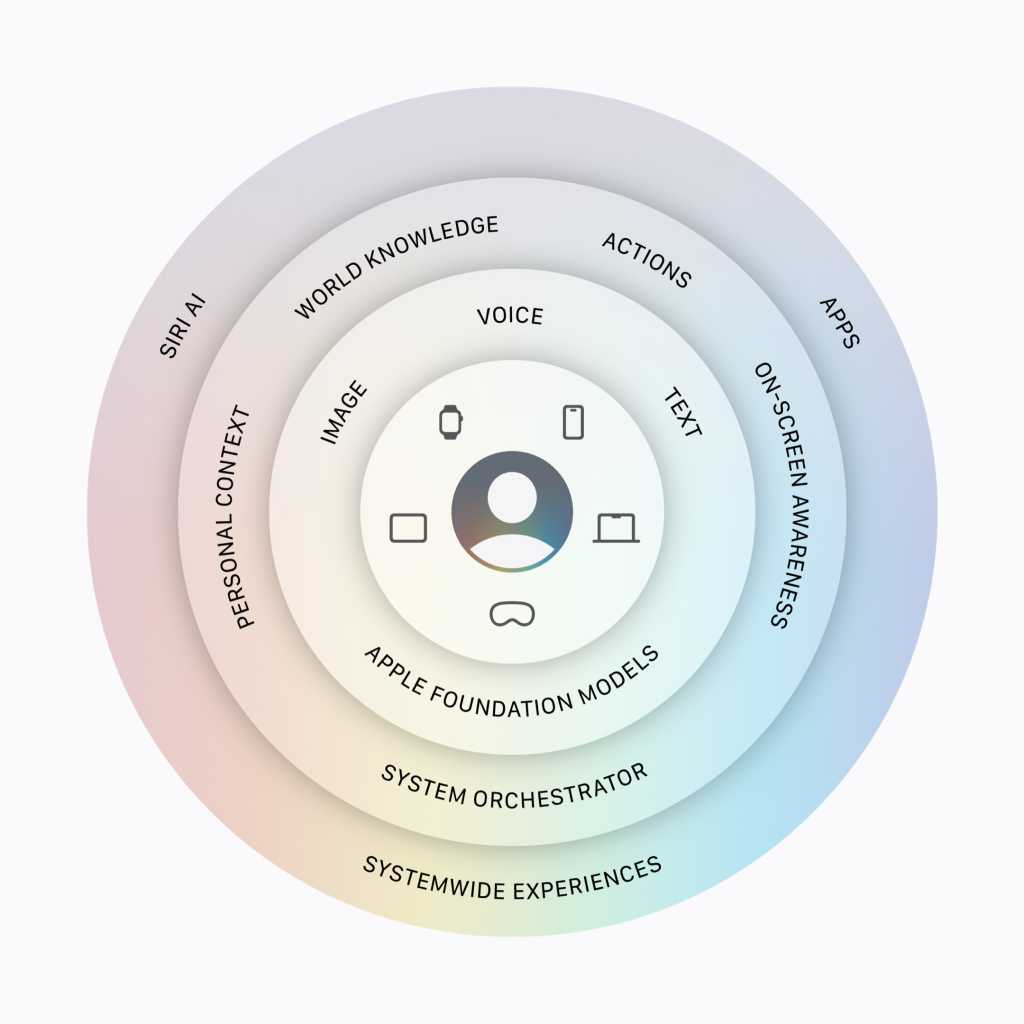
Announced at WWDC 2026, Apple Intelligence/Siri AI relies on personal, contextual data to run. Europe wants that same information to be made available to third-party services for competing apps, but has not worked with Apple to protect user confidentiality. It’s an approach that places your data at risk of exfiltration using those apps because Europe is insisting Apple share personal information with the developers of other apps.

The desire to protect that data is why Apple won’t distribute Siri AI in the EU for a while.

Jamf survey exposes the IT risks of AI

It’s not as if Europe doesn’t understand the risk of data leaks in an era of AI. Just look at the bloc’s focus on things that do matter, such as sovereign AI or managed AI services like Orange Live Intelligence. These locally-produced AI services, alongside Europe’s attitude toward them, tell me the confederation understands the risks.

How real are these risks? Very. Jamf on Monday published survey results confirming the scale of that risk, telling us that one-in-five IT and security leaders in the enterprise sector has already experienced an AI-related incident involving unexpected costs, a security issue, or both.  The survey also found that:

  • 72.9% of organizations have already deployed AI in some form.
  • 59.7% see an AI-related incident as a near-term risk.
  • Organizations with deeply integrated AI are 40% more likely to report an AI-related incident than organizations still in the exploratory stage. 

The implication is that AI governance is becoming an operational requirement and — as Apple has told us umpteen times in the past — the best way to maintain operational confidentiality is not to collect or share any data at all. That’s the whole point of its approach: the data doesn’t need to be shared, it just needs to be turned into another signal that promotes utility while protecting confidentiality. 

Crafting trust in a crowded market

There’s another challenge to emerge. There are now multiple brands of AI, with more coming on stream all the time. That’s great in terms of finding a model that suits your needs, but challenging when it comes to ensuring all the services you or your employees use of are equally secure. You don’t want your business to become deeply reliant on any service only for that vendor to subsequently get bought out and/or shut down, nor do you want a service to be hacked or otherwise exploited to your detriment.

“AI isn’t arriving as a single application that IT can approve and move on from,” said Jamf CEO Beth Tschida. “It’s showing up in developer tools, productivity apps, autonomous agents, and other software they already run. The challenge is maintaining visibility and control as that footprint expands.” 

The survey described the challenges IT faces with AI deployment: shadow IT, vendor sprawl, and the need to grapple with highly unpredictable use-based pricing models. And that’s even before considering the governance challenges of agentic and developer AI.

AI and the emerging governance nightmare

“What our survey shows is that governance must keep pace with adoption,” Tschida said. “For organizations built on Apple, the foundation is already an advantage. Apple’s privacy model and the management controls built into the platform give IT teams a strong foundation to build on and … that advantage depends on using tools built for Apple from the start.”

That’s the point of the curated, private and secured service offered by Siri AI, of course. It’s also part of what Apple is building toward with its wider ambitions toward AI on its platform. Bloomberg’s Mark Gurman discussed elements of this in his weekend newsletter, in which he suggested Apple might introduce some subscription services using AI, and that it is building an App Store for Siri Extensions, which would allow third-party chatbots to work with Siri. 

There is a need for curation and management in AI

What makes that model work is the curation with which Apple surrounds it, and its determination to extend Private Cloud Compute so it can protect your data even when using third-party servers (in this case, Google’s server clusters). It makes sense to think Apple intends to use that system to protect all approved third-parry AI interactions provided across its platforms by its own routes. That’s true, even if users access services free of those safeguards using a web browser, which they currently can.

But the key thing is that if Apple can get this right, offering up a managed, curated, and controllable ecosystem for AI agents and services, it will be going a long way toward building the kind of managed AI ecosystem the Jamf survey shows our modern digital enterprises increasingly need. 

You can follow me on social media! Join me on BlueSky,  LinkedIn, Mastodon and subscribe to The Core.

  •  

Windows 11 Insider Previews: What’s in the latest build?

Windows 11 25H2 has been publicly released, but behind the scenes, Microsoft is constantly working to improve the newest version of Windows. The company frequently rolls out preview builds to members of its Windows Insider Program, allowing them to test out — and help shape — upcoming features.

Skip to the latest builds

Our story “How to preview and deploy Windows 10 and 11 updates” details how the Insider program has worked until now. However, Microsoft recently announced sweeping changes to the program that will include the ability to select which new features to test. As the first step, the company is introducing a new channel system and transitioning Insiders like so:

  • Beta Channel > Beta
  • Beta Channel (for devices on Windows 11 version 26H1) > Beta (26H1)
  • Dev Channel > Experimental
  • Canary Channel (28000 series) > Experimental (26H1)
  • Canary Channel (29500 series) > Experimental (Future Platforms)
  • Release Preview Channel > Release Preview 24H2/25H2
  • Release Preview Channel (for devices on Windows 11 version 26H1) > Release Preview (26H1)

This transition is happening over time, starting with the Dev Channel. See Microsoft’s blog post for more information about the transition.

Below you’ll find information about the Windows 11 preview builds that have been announced by Microsoft in the past six months. For each build, we’ve included the date of its release, which Insider channel it was released to, a summary of what’s in the build, and a link to Microsoft’s announcement about it.

Note: If you’re looking for information about updates being rolled out to all Windows 11 users, not preview builds for Windows Insiders, see “Windows 11: A guide to the updates.”

The latest Windows 11 Insider preview builds

Windows 11 Insider Release Preview Builds 26100.8728 and 26200.8728

Release date: June 12, 2026

Released to: Release Preview 24H2/25H2 Channel

A wide variety of features and enhancements are being gradually rolled out in this build, including increased reliability of the Windows networking stack. It reduces bug checks (blue screen errors) related to Wi-Fi power and improves cellular (WWAN) connectivity, including support for IPv6 VPNs. Compatibility with third-party VPN software and SR-IOV configurations on server hardware is also improved. Network adapter settings and bindings are now preserved across OS upgrades.

Immediately rolling out are several quality improvements, including additional high-confidence device targeting data, increasing coverage of devices eligible to automatically receive new Secure Boot certificates. Devices receive the new certificates only after demonstrating sufficient successful update signals, maintaining a controlled and phased rollout.

(Get more info about Windows 11 Insider Preview Builds 26100.8728 and 26200.8728.)

Windows 11 Insider Preview Build 28000.2333

Released to: Release Preview 26H1 Channel

Release date: June 12, 2026

This build, for Insiders using Windows 11 26H1, gradually rolls out a wide variety of new features, including improved visibility into NPU usage in Task Manager. New optional NPU and NPU Engine columns are available on the Processes, Users, and Details pages, along with NPU Dedicated Memory and NPU Shared Memory optional columns on the Details page. Neural engines that are part of a GPU now appear on the Performance page, providing a more complete view of AI-related activity. A new optional Isolation column on the Processes and Details pages shows which apps are running in an AppContainer. You can add any of the new columns by right-clicking a column header in Task Manager and selecting them from the menu.

Being rolled out immediately is improved Netlogon secure channel connections between domain controllers, enabling successful connections from member servers to domain controllers set up before 2025.

(Get more info about Windows 11 Insider Preview Build 28000.2333.)

Windows 11 Insider Preview Build 26220.8680

Release date: June 12, 2026

Released to: Beta Channel

This update offers a wide variety of changes and improvements, including a new set of default Widget settings designed to reduce unexpected alerts and visual interruptions. They include:

  • Disabling Open on hover by default
  • Turning off Taskbar badging by default
  • Opening to widgets experience on first launch
  • Placing Weather as the only default widget on the lockscreen
  • Restricting the number of Taskbar alerts that can be sent daily
  • Limiting Taskbar alerts until you choose to open and engage with the Widgets experience

(Get more info about Windows 11 Insider Preview Build 26220.8680.)

Windows 11 Insider Preview Build 28020.2298

Release date: June 12, 2026

Released to: Beta 26H1 Channel

This update, in the words of Microsoft, “includes a small set of general improvements and fixes that improve the overall experience” of running Windows 11 26H1. It also introduces the new screen tint accessibility setting. In addition, Task Scheduler will now persist column width adjustments in task list view across sessions.

(Get more info about Windows 11 Insider Preview Build 28020.2298.)

Windows 11 Insider Preview Build 26300.8687

Release date: June 12, 2026

Released to: Experimental Channel (formerly Dev)

Several minor new features and enhancements are being rolled out gradually in this build, including improved reliability of loading the system tray area of the taskbar and a new recovery remote management plug-in for extending WinRE management capabilities for MDM providers.

(Get more info about Windows 11 Insider Preview Build 26300.8687.)

Windows 11 Insider Preview Build 28120.2302

Release date: June 12, 2026

Released to: Experimental 26H1 Channel (formerly Canary)

This update, in the words of Microsoft, “includes a small set of general improvements and fixes that improve the overall experience” of running Windows 11 26H1. It also accelerates app launch and core shell experiences such as Start menu, Search, and Action Center.

(Get more info about Windows 11 Insider Preview Build 28120.2302.)

Windows 11 Insider Preview Build 29599.1000

Release date: June 12, 2026

Released to: Experimental Future Platforms Channel (formerly Canary optional 29500)

This build gradually rolls out several minor changes and improvements, including improved performance when navigating to see storage on large volumes via Settings > System > Storage > Advanced Storage Settings > Disks & Volumes.

(Get more info about Windows 11 Insider Preview Build 29610.1000.)

Windows 11 Insider Preview Build 26220.8575

Release date: June 8, 2026

Released to: Beta Channel

This update adds the ability to extend Windows Update as many times as you need. It also fixes three bugs: one that caused audio not to work, another that impacted the reliability of Settings > Apps > Installed Apps, and a third that caused freezes with search, Notepad, and other parts of Windows.

(Get more info about Windows 11 Insider Preview Build 26220.8575.)

Windows 11 Insider Preview Build 28020.2236

Release date: June 8, 2026

Released to: Beta 26H1 Channel

This update, in the words of Microsoft, “includes a small set of general improvements and fixes that improve the overall experience” of running Windows 11 version 26H1.

(Get more info about Windows 11 Insider Preview Build 28020.2236.)

Windows 11 Insider Preview Build 28120.2242

Release date: June 8, 2026

Released to: Experimental 26H1 Channel (formerly Canary)

This update, in the words of Microsoft, “includes a small set of general improvements and fixes that improve the overall experience” of running Windows 11 version 26H1.

(Get more info about Windows 11 Insider Preview Build 28120.2242.)

Windows 11 Insider Preview Build 26220.8544

Release date: May 29, 2026

Released to: Beta Channel

Several minor new improvements and fixes are being rolled out in this build, including consistent solid (donut) spinners across key Windows scenarios including Boot, Logon, Restart, Shutdown, and Update. This update replaces legacy spinner visuals to deliver a more cohesive experience aligned with Windows design standards. Users will now see a unified spinner behavior with corresponding status text (e.g., “Restarting”, “Working on updates”, “Welcome”).

(Get more info about Windows 11 Insider Preview Build 26220.8544.)

Windows 11 Insider Preview Build 26300.8553

Release date: May 29, 2026

Released to: Experimental Channel (formerly Dev)

Several minor new features are being rolled out gradually in this build, including a number of changes to the Start menu. These were first outlined in the May 15 Insider blog post Making Taskbar and Start more personal. They include:

  • “Recommended” section renamed to “Recent” in Start and Settings page
  • Section-level toggles to independently show or hide Pinned, Recommended, and All
  • Choose between a small and large Start menu, in addition to already available “Automatic (default)” setting
  • Option to hide your name and profile picture in Start
  • Redesigned Start menu settings page

One known issue, in which resetting your PC may have gotten stuck when using “Reset this PC,” has been fixed.

(Get more info about Windows 11 Insider Preview Build 26300.8553.)

Windows 11 Insider Preview Build 28020.2207

Release date: May 29, 2026

Released to: Experimental 26H1 Channel (formerly Canary)

This update, in Microsoft’s words, “includes a small number of minor bug fixes and improvements.”

(Get more info about Windows 11 Insider Preview Build 28020.2207.)

Windows 11 Insider Preview Build 29599.1000

Release date: May 29, 2026

Released to: Experimental Future Platforms Channel (formerly Canary optional 29500)

This build gradually rolls out several minor changes and improvements that, in the words of Microsoft, include “platform changes in moving to a new active development build.” The update also gradually rolls out a fix for a bug in which some Insiders unexpectedly saw an erroneous message saying they weren’t connected to internet (when they actually were) when signing into their Microsoft account in certain apps. It also improves CPU speed display on the Performance page of Task Manager for VMs, so it doesn’t show higher than unexpected numbers after resuming from hibernate.

There is one known issue that causes crashes with AMD machines supporting System Guard, so these devices in Windows Information Protection will not be offered the build.

(Get more info about Windows 11 Insider Preview Build 29599.1000.)

Windows 11 Insider Preview Build 26220.8491

Release date: May 22, 2026

Released to: Beta Channel

This update, in Microsoft’s words, “includes a small number of minor bug fixes and improvements.” It introduces Voice Isolation, a new option in Voice Access that helps the tool focus on your voice, even when others are speaking nearby, by filtering out other voices and background noise.

Microsoft says the single known issue with this release, in which your PC could have gotten stuck when using “Reset this PC,” has been fixed.

(Get more info about Windows 11 Insider Preview Build 26220.8491.)

Windows 11 Insider Preview Build 26300.8497

Release date: May 22, 2026

Released to: Experimental Channel (formerly Dev)

A variety of new features are being rolled out gradually in this build, including several to improve accessibility. Among them are making it easier to connect the Braille display to Narrator by using the HID open industry standard for Braille displays. If your display supports HID, connect it via USB, with no additional setup required. For Bluetooth, pair your HID Braille display in Settings > Bluetooth & devices just like any other accessory. Another new feature is Voice Isolation in Voice Access, as detailed for Beta Channel Build 26220.8491 above.

The build has one known issue, in which your PC may get stuck when using “Reset this PC.” To complete the reset successfully, choose the cloud download option (Cloud PBR) instead of local.

(Get more info about Windows 11 Insider Preview Build 26300.8497.)

Windows 11 Insider Preview Build 28020.2149

Released to: Experimental 26H1 Channel (formerly Canary)

Release date: May 22, 2026

This build, for Insiders using Windows 11 26H1, gradually rolls out a wide variety of new features, including one that improves the reliability of explorer.exe when closing the input switcher, and when switching between multiple desktops.

Microsoft says the single known issue with this release, in which your PC could have gotten stuck when using “Reset this PC,” has been fixed.

(Get more info about Windows 11 Insider Preview Build 28020.2149.)

Windows 11 Insider Preview Build 29595.1000

Release date: May 22, 2026

Released to: Experimental Future Platforms Channel (formerly Canary optional 29500)

This build, in the words of Microsoft, “includes platform changes in moving to a new active development build.”

(Get more info about Windows 11 Insider Preview Build 29595.1000.)

Windows 11 Insider Preview Build 26220.8474

Release date: May 15, 2026

Released to: Beta Channel

Several minor new improvements are being rolled out in this build, including one that improves the reliability of Simple Service Discovery Protocol (SSDP) notifications to help prevent the service from becoming unresponsive.

It has one known issue in which your PC may get stuck when using “Reset this PC.” To complete the reset successfully, choose the cloud download option (Cloud PBR) instead of local.

(Get more info about Windows 11 Insider Preview Build 26220.8474.)

Windows 11 Insider Preview Build 26300.8493

Release date: May 15, 2026

Released to: Experimental Channel (formerly Dev)

A variety of new features are being rolled out gradually in this build, including the ability to change the position of taskbar on your screen. In Settings > Personalization > Taskbar > Taskbar Behaviors, you can select the side of the screen you want your taskbar on: bottom, top, left, or right. In these other positions, tooltips, flyouts, and animations will still come from the taskbar, and most customization settings like “small taskbar” and “never combine taskbar icons” will work with all locations.

It has one known issue in which your PC may get stuck when using “Reset this PC.” To complete the reset successfully, choose the cloud download option (Cloud PBR) instead of local.

(Get more info about Windows 11 Insider Preview Build 26300.8493.)

Windows 11 Insider Preview Build 28020.2134

Release date: May 15, 2026

Released to: Experimental 26H1 Channel (formerly Canary)

This build gradually rolls out an improvement in the reliability of Simple Service Discovery Protocol (SSDP) notifications to help prevent the service from becoming unresponsive. It also rolls out gradual changes to updating Windows, including the ability to skip updates immediately during the out of box experience (OOBE) and to extend update pauses as many times as you need.

It has one known issue in which your PC may get stuck when using “Reset this PC.” To complete the reset successfully, choose the cloud download option (Cloud PBR) instead of local.

(Get more info about Windows 11 Insider Preview Build 28020.2134.)

Windows 11 Insider Preview Build 29591.1000

Release date: May 15, 2026

Released to: Experimental Future Platforms Channel (formerly Canary optional 29500)

This build introduces new features for Windows Update, including the ability to skip updates immediately during the out of box experience (OOBE) and to extend update pauses as many times as you need. New Windows update features also include having always available options to shut down and restart with updating, and additional insight about available updates to make more informed installation decisions.

(Get more info about Windows 11 Insider Preview Build 29591.1000.)

Windows 11 Insider Preview Builds 26200.8514/26200.8514

Release date: May 14, 2026

Released to: Release Preview 24H2/25H2 Channel

A wide variety of features and enhancements are being gradually rolled out in this build, including a new shared audio feature that allows two people to listen to the same audio from a single Windows 11 PC at the same time. In addition, Task Manager now offers improved visibility into NPU usage on PCs with an NPU. New optional NPU and NPU Engine columns are available on the Processes, Users, and Details pages, along with NPU Dedicated Memory and NPU Shared Memory optional columns on the Details page. 

One new feature is being rolled out immediately, in which Windows quality updates now include additional high-confidence device targeting data, increasing coverage of devices eligible to automatically receive new Secure Boot certificates. Devices receive the new certificates only after demonstrating sufficient successful update signals, maintaining a controlled and phased rollout.

(Get more info about Windows 11 Insider Preview Builds 26200.8514/26220.8514.)

Windows 11 Insider Preview Build 28000.2173

Released to: Release Preview 26H1 Channel

Release date: May 14, 2026

This build, for Insiders using Windows 11 26H1, gradually rolls out a wide variety of new features, including one that expands the list of archive formats that can be used in File Explorer to include uu, cpio, xar, and NuGet Packages (nupkg). Also being gradually rolled out is a new way to monitor your agents from the taskbar. It supports agents across first- and third-party apps, with Researcher in the Microsoft 365 Copilot app as the first adopter.

One new feature is being rolled out immediately, in which Windows quality updates now include additional high-confidence device targeting data, increasing coverage of devices eligible to automatically receive new Secure Boot certificates. Devices receive the new certificates only after demonstrating sufficient successful update signals, maintaining a controlled and phased rollout.

(Get more info about Windows 11 Insider Preview Build 28000.2173.)

Windows 11 Insider Preview Build 26220.8370

Release date: May 8, 2026

Released to: Beta Channel

Several minor new improvements are being gradually rolled out in this build, including improved reliability of Japanese IME usage when Administrator Protection is enabled. In addition, the build fixes a single bug, in which there were notification issues and certain apps hung on launch.

(Get more info about Windows 11 Insider Preview Build 26220.8370.)

Windows 11 Insider Preview Build 26300.8376

Release date: May 8, 2026

Released to: Experimental Channel (formerly Dev)

A variety of new features are being rolled out gradually in this build, including new File Explorer address bar support for paths containing double backslashes and quotation marks (for example, C:\Users\user or “C:\Users\user”), improving compatibility with a wider range of inputs.

(Get more info about Windows 11 Insider Preview Build 26300.8376.)

Windows 11 Insider Preview Build 28020.2075

Release date: May 8, 2026

Released to: Experimental 26H1 Channel (formerly Canary)

This build gradually rolls out, in Microsoft’s words, “a small set of general improvements and fixes that improve the overall experience” of running Windows 26H1. It also improves performance when opening clipboard history.

(Get more info about Windows 11 Insider Preview Build 28020.2075.)

Windows 11 Insider Preview Build 29585.1000

Release date: May 6, 2026

Released to: Experimental Future Platforms Channel (formerly Canary optional 29500)

This build gradually rolls out, in Microsoft’s words, “platform changes in moving to a new active development build.”

It also updates the experience when you use voice typing with the touch keyboard. To reduce distractions, the new design removes the previous full‑screen overlay and instead shows voice typing animations directly on the dictation key.

(Get more info about Windows 11 Insider Preview Build 29585.1000.)

Windows 11 Insider Preview Build 26220.8340

Release date: May 1, 2026

Released to: Beta Channel

Several minor new improvements are being gradually rolled out in this build, including making Windows ShareSheet more intelligent for Azure Active Directory (AAD) users, with a simple setting to turn promotional app recommendations on or off. Previously, that capability was only available to Windows users with Managed Service Accounts (MSA).

(Get more info about Windows 11 Insider Preview Build 26220.8340.)

Windows 11 Insider Preview Build 26300.8346

Release date: May 1, 2026

Released to: Experimental Channel (formerly Dev)

A variety of new features are being rolled out gradually in this build, including making Windows ShareSheet more intelligent for Azure Active Directory (AAD) users, with a simple setting to turn promotional app recommendations on or off. Previously, that capability was only available to Windows users with Managed Service Accounts (MSA). Another change “quiets” the default behavior for Widgets, with the goal of making them feel less distracting and overwhelming.

There are several known issues in this build, including one in which Insiders who use Feature flags to enable the new WIP experience may see the feature state incorrectly marked as current; however, changing state and applying changes will work as expected.

(Get more info about Windows 11 Insider Preview Build 26300.8346.)

Windows 11 Insider Preview Build 28020.1921

Release date: May 1, 2026

Released to: Experimental 26H1 Channel (formerly Canary)

This build gradually rolls out several improvements to Task Manager, including one that provides better insight into NPU usage for PCs that include an NPU. Optional NPU and NPU Engine columns are now available on the Processes, Users, and Details pages, with optional NPU Dedicated Memory and NPU Shared Memory columns on the Details page to give you deeper visibility into how workloads are using NPU resources. Additionally, if there are neural engines that are part of a GPU, they will now appear on the Performance page, providing a more complete view of AI‑related system activity.

(Get more info about Windows 11 Insider Preview Build 28020.1921.)

Windows 11 Insider Preview Build 29580.1000

Release date: May 1, 2026

Released to: Experimental Future Platforms Channel (formerly Canary optional 29500)

This build gradually rolls out, in Microsoft’s words, “a small set of general improvements and fixes that improve the overall experience for Insiders running this build on their PCs.”

(Get more info about Windows 11 Insider Preview Build 29580.1000.)

Windows 11 Insider Preview Build 26220.8283

Release date: April 24, 2026

Released to: Beta Channel

Several minor new improvements and fixes are being gradually rolled out in this build, including improved detection of clicks at the leftmost edge of the taskbar to invoke the Start menu when the taskbar icons are left-aligned.

(Get more info about Windows 11 Insider Preview Build 26220.8283.)

Windows 11 Insider Preview Build 26300.8289

Release date: April 24, 2026

Released to: Experimental Channel (formerly Dev)

In a phased rollout, Insiders in the Dev Channel are being moved to the new Experimental channel. Insiders who do not see the new experience on their device can enable it under Settings > Windows Update > Windows Insider Program > Feature flags.

Several minor new features are also being rolled out gradually in this build, including improved detection of clicks at the leftmost edge of the taskbar to invoke the Start menu when the taskbar icons are left-aligned.

There is one known issue in this build: Insiders who use Feature flags to enable the new Insider experience may see the feature state incorrectly marked as current; however, changing the state and applying changes should work as expected.

(Get more info about Windows 11 Insider Preview Build 26300.8289.)

Windows 11 Insider Preview Build 28200.1873

Release date: April 24, 2026

Released to: Experimental 26H1 Channel (formerly Canary)

This build is gradually rolling out a variety of small improvements, including an updated voice typing experience for the touch keyboard. To reduce distractions, the new design shows voice typing animations directly on the dictation key rather than on a full-screen overlay.

It also fixes a bug in which Settings > Network & Internet > Data Usage showed large, unrealistic values.

(Get more info about Windows 11 Insider Preview Build 28200.1873.)

Windows 11 Insider Preview Build 29576.1000

Release date: April 24, 2026

Released to: Experimental Future Platforms Channel (formerly Canary optional 29500)

This build is gradually rolling out a variety of changes, including Point-in-time restore for Windows, which can quickly roll your device back to a previous state, potentially helping minimize downtime and simplify troubleshooting when disruptions strike. 

(Get more info about Windows 11 Insider Preview Build 29576.1000.)

Windows 11 Builds 26100.8313 and 26200.8313 (KB5083631) 

Release date: April 17, 2026

Released to: Release Preview Channel

This build introduces a wide variety of new features rolled out gradually, including a new way to monitor your agents from the taskbar. It supports agents across first- and third-party apps, with Researcher in the Microsoft 365 Copilot app as the first adopter. When Researcher works on a report, Windows shows progress on the taskbar so you can check updates at a glance.

For IT administrators, the update gradually rolls out support for a dynamic app removal list to the “Remove Default Microsoft Store packages” policy for Windows Enterprise and Education. It also removes default trust for cross‑signed third-party drivers, while drivers from the Windows Hardware Compatibility Program (WHCP) and an allow list of trusted legacy drivers remain allowed. Enterprise State Roaming can now be managed through Windows Backup for Organizations policies.

The update also immediately introduces two minor improvements for everyone. Windows quality updates now include additional high-confidence device targeting data, which increases coverage of devices eligible to automatically receive new Secure Boot certificates. In Windows Security, the name of the affected application is now included in event logging related to CVE‑2024‑30098. This change makes it easier to identify applications that rely on smart card certificates and may need updates following recent security changes.

(Get more info about Windows 11 Builds 26100.8313 and 26200.8313.)

Windows 11 Insider Preview Build 26220.8271

Release date: April 17, 2026

Released to: Beta Channel

Several minor new features were made available in this build for those who have turned the toggle on to receive the latest updates, including improved reliability and performance of Windows Hello fingerprint after your PC wakes from sleep.

(Get more info about Windows 11 Insider Preview Build 26220.8271.)

Windows 11 Insider Preview Build 26300.8276

Release date: April 17, 2026

Released to: Dev Channel

In this build, several minor new features are being gradually rolled for those who have turned the toggle on to receive the latest updates, including improved reliability and performance of Windows Hello fingerprint after your PC wakes from sleep.

(Get more info about Windows 11 Insider Preview Build 26300.8276.)

Windows 11 Insider Preview Build 28020.1863

Release date: April 17, 2026

Released to: Canary Channel

For those who have turned the toggle on to receive the latest updates, this build fixes a bug that prevented some apps from signing in due to a false report of no internet connectivity. The fix is rolling out gradually.

(Get more info about Windows 11 Insider Preview Build 28020.1863.)

Windows 11 Insider Preview Build 29570.1000

Release date: April 17, 2026

Released to: Canary Channel (29500 build series)

For those who have turned the toggle on to receive the latest updates in the Canary Channel on the optional 29500 build series, this build has a variety of minor changes rolling out gradually, including more widget options and support for lock screen widget personalization, a new setting in Settings > Bluetooth & Devices > Touchpad that lets you can choose how large the right-click zone is, and support for a dynamic app removal list to the “Remove Default Microsoft Store packages” policy for Windows Enterprise and Education.

(Get more info about Windows 11 Insider Preview Build 29570.1000.)

Windows 11 Insider Preview Build 26220.8165

Release date: April 10, 2026

Released to: Beta Channel

For those who have turned the toggle on to receive the latest updates, this build gradually rolls out several minor features, including one in which the size limit for formatting FAT32 volumes via the command line has increased from 32GB to 2TB, and another in which the Windows Security app gets new badges and text that reflect your device’s Secure Boot state and certificate status.

It also gradually rolls out a fix for a bug that caused Settings > Network & Internet > Data Usage to show large, unrealistic values.

(Get more info about Windows 11 Insider Preview Build 26220.8165.)

Windows 11 Insider Preview Build 26300.8170

Release date: April 10, 2026

Released to: Dev Channel

For those who have turned the toggle on to receive the latest updates, this build gradually rolls out several minor features, including one in which the size limit for formatting FAT32 volumes via the command line has increased from 32GB to 2TB, and another in which the Windows Security app gets new badges and text that reflect your device’s Secure Boot state and certificate status.

It also gradually rolls out a fix for a bug that caused Settings > Network & Internet > Data Usage to show large, unrealistic values.

(Get more info about Windows 11 Insider Preview Build 26300.8170.)

Windows 11 Insider Preview Build 28020.1812

Release date: April 10, 2026

Released to: Canary Channel

For those who have turned the toggle on to receive the latest updates, this build gradually rolls out general improvements and fixes, including a new setting that lets users choose the size of their touchpad’s right-click zone, as well as new badges and text in the Windows Security app that reflect your device’s Secure Boot state and certificate status.

(Get more info about Windows 11 Insider Preview Build 28020.1812.)

Windows 11 Insider Preview Build 29565.1000

Release date: April 10, 2026

Released to: Canary Channel (29500 build series)

For those who have turned the toggle on to receive the latest updates in the Canary Channel on the optional 29500 build series, this build includes “platform changes in moving to a new active development build,” as well as new badges and text in the Windows Security app that reflect your device’s Secure Boot state and certificate status

(Get more info about Windows 11 Insider Preview Build 29565.1000.)

Windows 11 Insider Preview Build 26220.8148

Release date: April 3, 2026

Released to: Beta Channel

For those who have turned the toggle on to receive the latest updates, this build gradually rolls out several minor features, including a new icon in print settings to indicate when a printer supports Windows Protected Print Mode.

Several bugs are also being fixed, including one in which some apps weren’t able to sign in, citing an internal connection issue when internet was actually connected.

(Get more info about Windows 11 Insider Preview Build 26220.8148.)

Windows 11 Insider Preview Build 26300.8155

Release date: April 3, 2026

Released to: Dev Channel

For those who have turned the toggle on to receive the latest updates, this build gradually rolls out several minor features, including one in which users will be able to feel haptic feedback effects on compatible input devices while performing certain actions, such as aligning objects in PowerPoint, window snapping, resizing, or hovering over the Close button. These haptic effects can be configured in Settings under Bluetooth & devices > Mouse > Haptic signals.

Several bugs have also been fixed, including one in which some apps weren’t able to sign in, citing an internal connection issue when internet was actually connected.

(Get more info about Windows 11 Insider Preview Build 26300.8155.)

Windows 11 Insider Preview Build 28020.1803

Release date: April 3, 2026

Released to: Canary Channel

For those who have turned the toggle on to receive the latest updates in the Canary Channel, this build includes a small set of general improvements and fixes, including improved reliability for configuring the fluid dictation option in voice typing settings.

(Get more info about Windows 11 Insider Preview Build 28020.1803.)

Windows 11 Insider Preview Build 29560.1000

Release date: April 3, 2026

Released to: Canary Channel (29500 build series)

For those who have turned the toggle on to receive the latest updates in the Canary Channel on the optional 29500 build series, this build “includes platform changes in moving to a new active development build,” in the words of Microsoft. Several bugs have also been fixed, including one in which attached USB devices weren’t working for some Insiders.

(Get more info about Windows 11 Insider Preview Build 29560.1000.)

Windows 11 Insider Preview Build 26220.8138

Release date: March 30, 2026

Released to: Beta Channel

For those who have turned the toggle on to receive the latest updates, this build gradually rolls out several new features, including one in which you can enable Administrator Protection in Settings under Privacy & security > Windows Security > Account protection and switching the toggle to on. A restart will be required. 

(Get more info about Windows 11 Insider Preview Build 26220.8138.)

Windows 11 Insider Preview Build 26300.8142

Release date: March 30, 2026

Released to: Dev Channel

For those who have turned the toggle on to receive the latest updates, this build gradually rolls out several new features, including one in which you can enable Administrator Protection in Settings under Privacy & security > Windows Security > Account protection and switching the toggle to on. A restart will be required. 

(Get more info about Windows 11 Insider Preview Build 26300.8142.)

Windows 11 Insider Preview Build 28020.1797

Release date: March 30, 2026

Released to: Canary Channel

This update, in the words of Microsoft, “includes a small set of general improvements and fixes that improve the overall experience” of running Windows 11.

(Get more info about Windows 11 Insider Preview Build 28020.1797.)

Windows 11 Insider Preview Build 29558.1000

Release date: March 30, 2026

Released to: Canary Channel (29500 build series)

For those who have turned the toggle on to receive the latest updates in the Windows 11 Insider Canary Channel on the optional 29500 build series, this build introduces several new features, including a variety of improvements to the Windows Console, many of which were created by open-source contributors. Several bugs have also been fixed, including an authentication error people received when trying to connect to Azure Virtual Desktop.

(Get more info about Windows 11 Insider Preview Build 29558.1000.)

Windows 11 Insider Preview Build 26220.8079

Release date: March 20, 2026

Released to: Beta Channel

For those who have turned the toggle on to receive the latest updates, this build gradually rolls out several bug fixes, including for one in which the Network and Sharing Center incorrectly displayed two active Wi-Fi connections after switching from one Wi-Fi network to another. The Network and Sharing Center now correctly shows a single active Wi-Fi connection when you connect to a new network. 

(Get more info about Windows 11 Insider Preview Build 26220.8079.)

Windows 11 Insider Preview Build 26300.8085

Release date: March 20, 2026

Released to: Dev Channel

For those who have turned the toggle on to receive the latest updates, this build resumes rollout of the Point Indicator Accessibility setting, which enables low-vision users to easily locate and use their cursor. The build also introduces the new Feedback Hub, which offers Insiders simpler navigation and feedback submission flows.

In addition, several bugs were fixed, including one in which the Network and Sharing Center incorrectly displayed two active Wi-Fi connections after switching from one Wi-Fi network to another. The Network and Sharing Center now correctly shows a single active Wi-Fi connection when you connect to a new network.

(Get more info about Windows 11 Insider Preview Build 26300.8085.)

Windows 11 Insider Preview Build 28020.1743

Release date: March 20, 2026

Released to: Canary Channel

For those who have turned the toggle on to receive the latest updates, this build includes several new features being rolled out gradually, including one in which shared audio now provides individual sliders for each listener which adjusts their volume without affecting the other. You can continue to adjust volume for both listeners at the same time through the main volume controls available through Quick Settings or on-device and keyboard controls.

The build also introduces the new Feedback Hub, which offers Insiders simpler navigation and feedback submission flows.

(Get more info about Windows 11 Insider Preview Build 28020.1743.)

Windows 11 Insider Preview Build 29553.1000

Release date: March 20, 2026

Released to: Canary Channel (29500 build series)

For those who have turned the toggle on to receive the latest updates in the Canary Channel’s optional 29500 build series, this build introduces the new Feedback Hub, which offers Insiders simpler navigation and feedback submission flows.

(Get more info about Windows 11 Insider Preview Build 29553.1000.)

Windows 11 Insider Preview Build 26220.8062

Release date: March 13, 2026

Released to: Beta Channel

For those who have turned the toggle on to receive the latest updates, this build includes numerous changes and refinements, including an update to the “Remove Default Microsoft Store packages” policy for Windows Enterprise and Education SKUs that allows IT administrators to remove MSIX/APPX apps by adding their app package family name (PFNs) to a dynamic list.

Starting with this update, the Windows kernel will enforce a new policy removing default trust for cross-signed drivers. The policy allows third-party drivers from the WHCP program by default, with an allow list of trustworthy publishers and drivers from the cross-signing program.

(Get more info about Windows 11 Insider Preview Build 26220.8062.)

Windows 11 Insider Preview Build 26300.8068

Release date: March 13, 2026

Released to: Dev Channel

For those who have turned the toggle on to receive the latest updates, this build includes numerous changes and refinements, including an update to the “Remove Default Microsoft Store packages” policy for Windows Enterprise and Education SKUs that allows IT administrators to remove MSIX/APPX apps by adding their app package family name (PFNs) to a dynamic list.

Starting with this update, the Windows kernel will enforce a new policy removing default trust for cross-signed drivers. The policy allows third-party drivers from the WHCP program by default, with an allow list of trustworthy publishers and drivers from the cross-signing program.

(Get more info about  Windows 11 Insider Preview Build 26300.8068.)

Windows 11 Insider Preview Build 28020.1737

Release date: March 13, 2026

Released to: Canary Channel

For those who have turned the toggle on to receive the latest updates, this build makes refinements to the Pen settings page, including small changes to the options for the pen tail button. A new option, “Same as Copilot key,” enables the pen tail button to launch the same app as the Copilot key.

(Get more info about Windows 11 Insider Preview Build 28020.1737.)

Windows 11 Insider Preview Build 29550.1000

Release date: March 13, 2026

Released to: Canary Channel (29500 build series)

For those  who have turned the toggle on to receive the latest updates in the Canary Channel’s optional 29500 build series, this build has a variety of minor changes, including one in which changes to global power settings (for example, Display, Sleep, Hibernate timeouts, Power/Sleep button, and lid close actions) from Settings are now applied to all power plans. This should help improve persistence of chosen settings.

(Get more info about Windows 11 Insider Preview Build 29550.1000.)

Windows 11 Insider Preview Builds 26100.8106 and 26200.8106

Release date: March 12, 2026

Released to: Release Preview Channel

This build introduces a wide range of minor features being rolled out gradually, including the ability to turn Smart App Control (SAC) on or off without needing a clean install. To make changes, go to Settings > Windows Security > App & Browser Control > Smart App Control settings. When turned on, SAC helps block untrusted or potentially harmful apps.

The update also improves stability in Windows Recovery Environment (Windows RE) when you run x64 apps on ARM64 devices. These apps run more smoothly and respond as expected.

(Get more info about Windows 11 Insider Preview Builds 26100.8106 and 26200.8106.)

Windows 11 Insider Preview Build 26220.7961

Release date: March 6, 2026

Released to: Beta Channel

For those who have turned the toggle on to receive the latest updates, this build re-enables Administrator protection, which aims to protect free-floating admin rights for administrator users, allowing them to still perform all admin functions with just-in-time admin privileges. This feature is off by default and can be enabled via OMA-URI in Intune or via group policy.

Other changes and improvements being gradually rolled out to the same group include the ability to use voice typing (Windows key + H) when renaming files in File Explorer, as well as a smaller peek view in the drag tray.

(Get more info about Windows 11 Insider Build 26220.7961.)

Windows 11 Insider Preview Build 26300.7965

Release date: March 6, 2026

Released to: Dev Channel

For those who have turned the toggle on to receive the latest updates, this build re-enables Administrator protection, which aims to protect free-floating admin rights for administrator users, allowing them to still perform all admin functions with just-in-time admin privileges. This feature is off by default and can be enabled via OMA-URI in Intune or via group policy.

Other changes and improvements being gradually rolled out to the same group include the ability to use voice typing when renaming files in File Explorer, as well as a smaller peek view in the drag tray.

(Get more info about Windows 11 Insider Preview Build 26300.7965.)

Windows 11 Insider Preview Build 28020.1685

Release date: March 6, 2026

Released to: Canary Channel

For those who have turned the toggle on to receive the latest updates, this build lets you use voice typing (Windows key + H) when renaming files in File Explorer. The build also improves the reliability of removing Windows Update files and windows.old files via Settings > System > Storage.

(Get more info about Windows 11 Insider Preview Build 28020.1685.)

Windows 11 Insider Preview Build 26220.7934

Release date: Feb. 27, 2026

Released to: Beta Channel

For those who have turned the toggle on to receive the latest updates, this build gives administrators and Application Control for Business policy authors additional controls over the processing of batch files and CMD scripts. Starting with this release, admins can enable a more secure mode for processing batch files that ensures they do not change during execution by adding a value to the registry key HKEY_LOCAL_MACHINE\Software\Microsoft\Command Processor named LockBatchFilesWhenInUse (DWORD, value 0 or 1). Policy authors can also use the LockBatchFilesWhenInUse application manifest control documented here to enable this mode.

There are a variety of other improvements being rolled out gradually, including one in which a new taskbar indicator displays while you’re sharing, giving a quick reminder that audio is still being shared. Clicking the indicator is a fast path to open sharing settings to change volume or stop sharing.

(Get more info about Windows 11 Insider Preview Build 26220.7934.)

Windows 11 Insider Preview Build 26300.7939

Release date: Feb. 27, 2026

Released to: Dev Channel

For those who opted to receive the latest updates, this build gives administrators and Application Control for Business policy authors additional controls over the processing of batch files and CMD scripts. Starting with this release, admins can enable a more secure mode for processing batch files that ensures they do not change during execution by adding a value to the registry key HKEY_LOCAL_MACHINE\Software\Microsoft\Command Processor named LockBatchFilesWhenInUse (DWORD, value 0 or 1). Policy authors can also use the LockBatchFilesWhenInUse application manifest control documented here to enable this mode.

There are a variety of other improvements being rolled out gradually, including one in which a new taskbar indicator displays while you’re sharing, offering a quick reminder that audio is still being shared. Clicking the indicator is a fast path to open sharing settings to change volume or stop sharing.

(Get more info about Windows 11 Insider Preview Build 26300.7939.)

Windows 11 Insider Preview Build 28020.1673

Release date: Feb. 27, 2026

Released to: Canary Channel

For those who have opted to receive the latest updates, this build gets a variety of new features being rolled out gradually, including one in which Quick Machine Recovery (QMR) now turns on automatically for enterprise managed Windows Professional devices, as well as Windows Professional devices that are not domain-joined. These devices receive the same recovery features available to Windows Home users. For domain-joined devices, QMR stays off unless it is enabled by the organization.

(Get more info about Windows 11 Insider Preview Build 28020.1673.)

Windows 11 Insider Preview Build 26220.7872

Release date: February 20, 2026

Released to: Beta Channel

For those who have turned the toggle on to receive the latest updates, this build offers a variety of new features, including simplified specifications on the ‘Device info’ Card on the Settings Home page and improved mouseover animations for app groups on the taskbar.

(Get more info about Windows 11 Insider Preview Build 26220.7872.)

Windows 11 Insider Preview Build 26300.7877

Release date: February 20, 2026

Released to: Dev Channel

For those who have turned the toggle on to receive the latest updates, this build offers a variety of new features, including simplified specifications on the ‘Device info’ Card on the Settings Home page and improved mouseover animations for app groups on the taskbar.

Several bugs have also been fixed, including one in which all File Explorer open windows and tabs unexpectedly jumped to Desktop or Home.

Get more info about Windows 11 Insider Preview Build 26300.7877.)

Windows 11 Insider Preview Build 28020.1619

Release date: February 20, 2026

Released to: Canary Channel

For those who have turned the toggle on to receive the latest updates, this build offers a variety of new features, including one in which Windows Hello Enhanced Sign-in Security (ESS) supports peripheral fingerprint sensors. Previously, ESS was only available on PCs with built-in biometric sensors, but now it can be used when you plug in a supported ESS fingerprint reader.

(Get more info about Windows 11 Insider Preview Build 28020.1619.)

Optional Windows 11 Insider Preview Build 29531.1000

Release date: February 18, 2026

Released to: Canary Channel

This build is the first in a new Canary Channel optional path with a focus on platform development, which will introduce new features before the existing 28000 Canary Channel series. Microsoft recommends that most people remain on the 28000 build path, but adds that those who want to get the newest platform changes as early as possible may want to switch to this new 29500 path. Note, though, that if you switch to the 29500 path by installing this build, you won’t be able to go back to the 28000 Canary Channel series.

The build itself, in Microsoft’s words, “includes platform changes in moving to a new active development build.”

Microsoft warns, “because of the focus on platform development for this path, you may notice a temporary loss in some features that you have today. These features will return to this new active development build.”

(Get more info about Windows 11 Insider Preview Build 29531.1000.)

Windows 11 Insider Preview Build 26220.7859

Release date: February 17, 2026

Released to: Beta Channel

For those who have turned the toggle on to receive the latest updates, this build displays an option to upgrade to a different Microsoft 365 plan on the Accounts page within the Settings app. It also rolls out fixes for several bugs, including one in which all File Explorer open windows and tabs unexpectedly jumped to Desktop or Home.

(Get more info about Windows 11 Preview Build 26220.7859.)

Windows 11 Insider Preview Builds 26100.7918 and 26200.7918

Release date: February 17, 2026

Released to: Release Preview Channel

This build gradually rolls out a variety of new features, including one in which Quick Machine Recovery (QMR) now turns on automatically for Windows Professional devices that are not domain‑joined and not enrolled in enterprise endpoint management. These devices receive the same recovery features available to Windows Home users. For domain‑joined or enterprise managed devices, QMR stays off unless it is enabled by the organization. The build also improves login screen reliability.

(Get more info about Windows 11 Insider Preview Builds 26100.7918 and 26200.7918.)

Windows 11 Insider Preview Build 28020.1611

Release date: February 12, 2026

Released to: Canary Channel

This build brings Sysmon functionality natively to Windows. Sysmon functionality allows you to capture system events that can help with threat detection, and you can use custom configuration files to filter the events you want to monitor. The captured events are written on the Windows event log, enabling them to be used with security applications and in a wide range of use cases.

(Get more info about Windows 11 Insider Preview Build 28020.1611.)

Windows 11 Insider Preview Build 26220.7755

Release date: February 9, 2026

Released to: Beta Channel

For those who have turned the toggle on to receive the latest updates, this build gradually rolls out several new features, including Emoji 16.0, which contains a new set of emojis, and the ability to directly control pan and tilt for supported cameras in the Settings app.

(Get more info about Windows 11 Insider Preview Build 226220.7755.)

Windows 11 Insider Preview Build 26300.7760

Release date: February 9, 2026

Released to: Dev Channel

For those who have turned the toggle on to receive the latest updates, this build gradually rolls out several new features, including Emoji 16.0, which contains a new set of emojis, and the ability to directly control pan and tilt for supported cameras in the Settings app.

(Get more info about Windows 11 Insider Preview Build 26300.7760.)

Windows 11 Insider Preview Build 28020.1546

Release date: February 4, 2026

Released to: Canary Channel

This update, in the words of Microsoft, “includes a small set of general improvements and fixes that improve the overall experience for Insiders” running Windows.

It also fixes one bug that affected apps working with files stored on OneDrive or Dropbox.

(Get more info about Windows 11 Insider Preview Build 28020.1546.)

Windows 11 Insider Preview Build 26220.7752

Release date: February 3, 2026

Released to: Beta Channel

Those who have turned the toggle on to receive the latest updates get Sysmon functionality natively in Windows. Sysmon functionality allows you to capture system events that can help with threat detection, and you can use custom configuration files to filter the events you want to monitor. The captured events are written on the Windows event log, enabling them to be used with security applications and a wide range of use cases. (This feature is being gradually rolled out.)

The same group also gets a number of bug fixes being gradually rolled out, including for a File Explorer bug in which icons/tooltips for “Add to favorites” were missing.

(Get more info about Insider Preview Build 26220.7752.)

Windows 11 Insider Preview Build 26300.7733

Release date: February 3, 2026

Released to: Dev Channel

Those who have turned the toggle on to receive the latest updates get Sysmon functionality natively in Windows. Sysmon functionality allows you to capture system events that can help with threat detection, and you can use custom configuration files to filter the events you want to monitor. The captured events are written on the Windows event log, enabling them to be used with security applications and a wide range of use cases. (This feature is being gradually rolled out.)

The same group also gets a number of bug fixes being gradually rolled out, including for a File Explorer bug in which icons/tooltips for “Add to favorites” were missing.

(Get more info about Insider Preview Build 26300.7733.)

Windows 11 Insider Preview Build 28020.1495

Release date: January 28, 2025

Released to: Canary Channel

This build, in Microsoft’s words, “includes a small set of general improvements and fixes that improve the overall experience [of Windows 11].” It also fixes a variety of bugs, including one that led to the Windows Update settings page hanging when loading.

The build has two known issues, one that sometimes causes all open File Explorer windows and tabs to unexpectedly jump to Desktop or Home in File Explorer, and another in which the desktop watermark is showing the wrong build number.

(Get more info about Insider Preview Build 28020.1495.)

Windows 11 Insider Preview Builds 26100.7701 and 26200.7701

Release date: January 27, 2026

Released to: Release Preview Channel

This build gradually rolls out a variety of new features for Copilot+ PCs, including one in which Narrator gives you more control over how it announces on‑screen controls. You can choose which details are spoken and adjust their order to match how you navigate apps. These settings apply throughout the app to help reduce extra speech and make Narrator easier to follow.

The build also immediately rolls out a variety of new features for all PCs, including one in Data Protection Application Programming Interface (DPAPI) domain backup key management. Administrators can now set how often keys rotate automatically. This strengthens cryptographic security and reduces reliance on older encryption algorithms.

(Get more info about Insider Preview Builds 26100.7701 and 26200.7701.)

Windows 11 Insider Preview Build 26220.7670

Release date: January 27, 2026

Released to: Beta Channel

For those who have turned the toggle on to receive the latest updates, this build gradually rolls out several bug fixes, including for an issue in which the Search process was showing an icon with an X instead of a magnifying glass.

The build has five known issues, including one in which some Insiders’ apps aren’t showing in the system tray when they should be.

(Get more info about Insider Preview Build 26220.7670.)

Windows 11 Insider Preview Build 26300.7674

Release date: January 27, 2026

Released to: Dev Channel

In this build, the Dev Channel jumps ahead to receive 26300 series builds. This means that the window to switch from the Dev Channel to the Beta Channel is closed once Build 26300.7674is installed on your PC. This build for the Dev Channel is identical to the Windows 11 Build 26220.7653 release (see below).

(Get more info about Insider Preview Build 26300.7674.)

Windows 11 Insider Preview Build 26220.7653

Release date: January 21, 2026

Released to: Dev Channel

This build for the Dev Channel is identical to the January 16th Windows 11 Insider Preview Build 26220.7653 released to the Beta Channel. See the writeup below for details.

(Get more info about Windows 11 Insider Preview Build 26220.7653.)

Windows 11 Insider Preview Build 26220.7653

Release date: January 16, 2026

Released to: Beta Channel

For those who have turned the toggle on to receive the latest updates, this build gradually rolls out several changes, including one in which you can now set .webp images for your desktop background in Settings > Personalization > Desktop Background.

The same group also gets a number of bug fixes being gradually rolled out, including for a bug in which Settings crashed when interacting with audio devices.

The build has four known issues, including one in which some Insiders’ apps aren’t showing in the system tray when they should be.

(Get more info about Windows 11 Insider Preview Build 26220.7653.)

Windows 11 Insider Preview Build 28020.1371 

Release date: January 14, 2026

Released to: Canary Channel

This build gradually rolls out a variety of bug fixes for those who have turned the toggle on to receive the latest updates, including a bug in which File Explorer showed a white flash when navigating between pages.

There is one known issue in this build: The desktop watermark shows the wrong build number.

(Get more info about Windows 11 Insider Preview Build 28020.1371.)

Windows 11 Insider Preview Build 26220.7535

Release date: January 9, 2026

Released to: Dev & Beta Channels

For those who have turned the toggle on to receive the latest updates, this build gradually rolls out Copilot-powered image descriptions to Narrator on Copilot+ PCs, making it possible for blind and low-vision users to hear detailed, AI-generated descriptions of images, charts, and graphs.

The same group also gets a number of bug fixes being gradually rolled out, including for an issue in which File Explorer was causing explorer.exe to crash for some Insiders when invoking the context menu on the desktop.

The build has seven known issues, including one in which Settings crashes when interacting with audio devices.

(Get more info about Windows 11 Insider Preview Build 26220.7535.)

Windows 11 Insider Preview Build 26220.7523

Release date: December 19, 2025

Released to: Dev & Beta Channels

For those who have turned the toggle on to receive the latest updates, this build gradually rolls out a version of Copilot on the taskbar tailored for commercial customers. It uses Work IQ as contextual information that they can reference in their Copilot chats and with Microsoft 365 AI agents. In addition, the build introduces Agent Launchers, a new framework that enables Windows apps to register AI agents and make them discoverable across the system.

The same group also gets a number of bug fixes being gradually rolled out, including one that addresses an issue in which File Explorer showed a white flash when navigating between pages.

The build has nine known issues, including one in which opening the context menu is causing explorer.exe to crash for some Insiders.

(Get more info about Windows 11 Insider Preview Build 26220.7523.)

Windows 11 Insider Preview Build 28020.1362

Release date: December 15, 2025

Released to: Canary Channel

This build gradually rolls out several new features for Copilot+ PCs, including a streamlined design for the Click to Do context menu that makes frequently used actions like Copy, Save, Share, and Open easier to access. It also rolls out new features for all PCs, including improvements to the dark mode experience in File Explorer.

A variety of bug fixes are being gradually rolled out, including one for an issue in which Settings became unresponsive when attempting to navigate to the Network & Internet section.

(Get more info about Windows 11 Insider Preview Build 28020.1362.)

Windows 11 Insider Preview Build 28000.1340 

Release date: December 9, 2025

Released to: Canary Channel

This build has, in Microsoft’s words, a “small set of general improvements and fixes” that improve Windows. It also enables more of the new features and improvements originally released with the October non-security preview update for Windows 11.

In addition, the build fixes a bug that caused some Storage Spaces to become inaccessible or Storage Spaces Direct to fail when creating a storage cluster.

(Get more info about Windows 11 Insider Preview Build 28000.1340.)

Windows 11 Insider Preview Build 26220.7344

Release date: December 5, 2025

Released to: Dev & Beta Channels

For those who have turned the toggle on to receive the latest updates, this build offers native support for the Model Context Protocol (MCP), an open standard that gives AI agents a universal way to connect with apps, tools, and services. Agents can discover and connect to these tools and other agents via a secure, manageable Windows on-device registry (ODR). By default, all agent connectors in the Windows ODR will be contained in a secure environment with their own identity and audit trail.

In addition, Quick machine recovery (QMR) will now be turned on automatically for Windows Professional devices that are not domain joined. These devices will get the same recovery features as Windows Home users. For enterprise computers that are domain joined, nothing changes — QMR will stay off unless your organization turns it on.

Those who have turned the toggle on to receive the latest updates also get a number of bug fixes, including addressing a bug in which the search window to unexpectedly started floating above the taskbar.

The build has seven known issues, including one in which File Explorer shows a white flash when navigating between pages.

(Get more info about Windows 11 Insider Preview Build 26220.7344.)

Windows 11 Insider Preview Build 26220.7271

Release date: November 21, 2025

Released to:  Dev & Beta Channels

This build introduces several features being rolled out gradually for those who have turned the toggle on to receive the latest updates. These include point-in-time restore for Windows, which lets you to quickly roll your device back to a previous state to minimize downtime and simplify troubleshooting, and (on NPU devices) fluid dictation in voice typing, which automatically corrects grammar, punctuation, and filler words as you speak.

The build also expands the availability of the Xbox full-screen experience to additional Windows 11 PCs. You can add a controller to your PC for task switching and streamlined gaming on your desktop, laptop, or tablet.

Those who have turned the toggle on to receive the latest updates also get several bug fixes, including one that resolves a hung taskbar after receiving certain notifications.

The build has seven known issues, including one in which File Explorer shows a white flash when navigating between pages.

(Get more info about Windows 11 Insider Preview Build 26220.7271.)

Windows 11 Insider Preview Build 28000.1199

Release date: November 18, 2025

Released to: Canary Channel

This build has, in Microsoft’s words, a “small set of general improvements and fixes” that improve Windows.

(Get more info about Windows 11 Insider Preview Build 28000.1199.)

Windows 11 Insider Preview Builds 26100.7296 and 26200.7296

Release date: November 17, 2025

Released to: Release Preview Channel

This update introduces a wide range of features being rolled out gradually, including several for Copilot+ PCs, such as Windows Studio Effects, which provide AI-powered camera enhancements on an additional, alternative camera such as a USB webcam or your laptop’s built-in rear camera.

All Windows 11 PCs get a variety of new features being gradually rolled out, including Windows Hello Enhanced Sign-in Security (ESS), now supporting peripheral fingerprint sensors. Also, on PCs with the settings “quick machine recovery” and “automatically check for solutions” both enabled, Quick Machine Recovery now runs a one‑time scan by default instead of repeating scans in a loop. If a fix isn’t available right away, QMR will quickly point you to the most appropriate recovery options to get you back up and running.

A bug fix is being immediately rolled out to all PCs to address an issue that affects Local Security Authority Subsystem Service (LSASS), when LSASS could become unstable due to an access violation.

(Get more info about Windows 11 Insider Preview Builds 26100.7296 and 26200.7296.)

Windows 11 Insider Preview Build 26220.7262

Release date: November 17, 2025

Released to: Beta and Dev Channels

In this build, those who have turned the toggle on to receive the latest updates get a variety of features being gradually rolled out, including using high-definition voices for English (US) in Narrator and Magnifier that use generative AI to adjust tone and pacing for more natural, expressive speech. Also rolling out is a new “Experimental agentic features” toggle in the Settings app that enables the creation of AI agent accounts and an agent workspace, and grants agentic apps access to your Documents, Downloads, Desktop, Music, Pictures, and Videos folders. (Find out more about experimental agentic features.)

The same group also gets a variety of bug fixes rolled out gradually, including for a bug in which the Task Manager process wasn’t stopping correctly after Task Manager was closed. As a result, Task Manager might have been unexpectedly open on boot.

There are four known issues in this build, including one in which the scrollbar and footer are missing in File Explorer and when text is scaled in the dark mode version of the copy dialog.

(Get more info about Windows 11 Insider Preview Build 26220.7262.)

Windows 11 Insider Preview Build 26220.7070

Release date: November 7, 2025

Released to: Beta and Dev Channels

In this build, those who have turned the toggle on to receive the latest updates get a variety of features being gradually rolled out, including the ability to choose your default dashboard in an updated Widget Board Settings.

Everyone gets an updated Quick Machine Recovery in Windows, which makes it easier and quicker to get back to a working PC. The experience in both Windows Settings and the Windows Recovery Environment (WinRE) has been streamlined.

A variety of bug fixes are being rolled out gradually to those who have opted to receive the latest updates, including one that fixes a bug in which the “Automatically hide the taskbar” setting unexpectedly turned off after displaying a message saying, “a toolbar is already hidden on this side of your screen.”

There are five known issues in this build, including one in which the scrollbar and footer are missing in File Explorer when text is scaled in the dark mode version of the copy dialog.

(Get more info about Windows 11 Insider Preview Build 26220.7070.)

Windows 11 Insider Preview Build 28000

Release date: November 7, 2025

Released to: Canary Channel

This build has, in Microsoft’s words, a “small set of general improvements and fixes.” There are also a variety of bug fixes, including for a bug in which the credentials window was not accessible when trying to log in to Outlook.

There are two known issues in this build, one in which sleep and shutdown aren’t working correctly for some Insiders, and the other in which the new Start menu unexpectedly scrolls to the top.

(Get more info about Windows 11 Insider Preview Build 28000.)

Windows 11 Insider Preview Build 27982

Release date: November 4, 2025

Released to: Canary Channel

This build gradually rolls out several new features, including one in which you can add, remove, and rearrange lock screen widgets such as Weather, Watchlist, and Sports on the lock screen. Windows also provides suggested widgets on the lock screen. To customize your lock screen widgets, go to Settings > Personalization > Lock screen.

Also new is a “drag tray” that appears at the top of your screen when you drag a local file from File Explorer or your desktop. You can drop the file into one of the displayed apps or select More to open the Windows share window.

A variety of bugs have been fixed, including one in which if you used your PC for a while without rebooting, explorer.exe might start crashing repeatedly.

There are two known issues in this build, one in which sleep and shutdown aren’t working correctly for some Insiders, and the other in which the new Start menu unexpectedly scrolls to the top.

(Get more info about Windows 11 Insider Preview Build 27982.)

Windows 11 Insider Preview Build 26220.7051

Release date: October 31, 2025

Released to: Beta and Dev Channels

In this build, those have turned the toggle on to receive the latest updates get a variety of features being gradually rolled out, including Ask Copilot in the taskbar, which gives  you one-click access to Copilot Vision and Voice, so you can search via Copilot using text, voice, or guided support with Copilot Vision. As you type, results appear and update instantly. Turn it on by going to Settings > Personalization > Taskbar > Ask Copilot.  You can also manage whether the Copilot app launches automatically at sign-in using the “Auto start on log in” toggle in the Copilot app settings.

The same group gets a variety of bug fixes being rolled out gradually, including one to address an issue in which  interacting with a folder or its contents in Start menu could result in the folder becoming invisible.

There are four known issues in this build, including one in which the scrollbar and footer are missing in File Explorer when text is scaled in the dark mode version of the copy dialog.

(Get more info about Windows 11 Insider Preview Build 26220.7051.)

Windows 11 Insider Preview Build 26220.6982

Release date: October 24, 2025

Released to: Dev Channel

In this build, those have turned the toggle on to receive the latest updates get a variety of changes being gradually rolled out, including Copy & Search, which allows you to search the text in your clipboard with a single click. When you copy text anywhere in Windows, a paste gleam will appear in your search box. Click on this gleam and your copied text will appear in the search field, allowing you to search instantly.

The same group gets a variety of bug fixes, including one for a bug in which the search icon in File Explorer sometimes infinitely looped in an animation.

There are five known issues in this build, including one in which the scrollbar and footer are missing in File Explorer when text is scaled in dark mode version of the copy dialog.

(Get more info about Windows 11 Insider Preview Build 26220.6982.)

Windows 11 Insider Preview Build 27975 

Release date: October 23, 2025

Released to: Canary Channel

This build has, in Microsoft’s words, a “small set of general improvements and fixes” that improve Windows.

A variety of bugs have also been fixed, including one in which Settings crashed when accessing drive information under Settings > System > Storage. This also impacted accessing the drive information from the properties when you right-clicked a drive in File Explorer.

There are two known issues in this build, one in which sleep and shutdown aren’t working correctly for some Insiders, and the other in which the new Start menu unexpectedly scrolled to the top.

(Get more info about Windows 11 Insider Preview Build 27975.)

Windows 11 Builds 26100.7015 and 26200.7015

Release date: October 21, 2025

Released to: Release Preview Channel

This update includes a wide variety of new features being rolled out gradually, including a redesigned Start menu that includes a scrollable All section, has new category and grid views, and which adapts to your screen size. The build also includes new features for Click to Do, which can now translate text into other languages. File Explorer now has a recommended files feature that shows content such as files you frequently use, have recently downloaded, or have added to your File Explorer Gallery.

Two bugs are fixed in this build: one that caused an ACCESS_DENIED error when users attempted to change passwords remotely on member servers or workgroup devices, even when they had the required permissions, and another in which protected content playback failed on some machines after installing KB506408.

(Get more info about Windows 11 Insider Preview Builds 26100.7015 and 26200.7015.)

Windows 11 Insider Preview Build 26220.6972

Release date: October 17, 2025

Released to: Dev Channel

In this build, those who have turned the toggle on to receive the latest updates get a new feature being rolled out slowly, which lets you add and manage your mobile devices from Settings by navigating to “Mobile Devices” under the Bluetooth & Devices section. The page allows you to view your mobile devices, add new mobile devices, and manage features such as using your device as a connected camera or accessing your device’s files in File Explorer.

Those who have turned the toggle on to receive the latest updates get two bug fixes being rolled out slowly, one for a bug that caused File Explorer to show a Catastrophic Error (0x8000FFFF) when extracting large (1.5GB+) archive files, and another that sometimes caused an old white toolbar to randomly appear in File Explorer.

There are five known issues in this build, including one in which the scrollbar and footer are missing in File Explorer when text is scaled in the copy dialog in dark mode.

(Get more info about Windows 11 Insider Preview Build 26220.6972.)

Windows 11 Insider Preview Build 27971 

Release date: October 16, 2025

Released to: Canary Channel

In this build, the Notification Center can be used on secondary monitors. You’ll be able to see your calendar on any of your monitors and open Notification Center on any of them by clicking the date and time in the system tray of your taskbar. Note that this functionality will be rolled out gradually.

A variety of bugs have been fixed, including one in which File Explorer crashed when transferring files to a network drive.

There are three known issues in this build, including one in which sleep and shutdown aren’t working correctly for some Insiders.

(Get more info about Windows 11 Insider Preview Build 27971.)

Windows 11 Insider Preview Build 26120.6780 

Release date: October 10, 2025

Released to: Beta Channel

In this build, those with Copilot+ PCs who have turned the toggle on to receive the latest updates get a handful of changes and new features, including one in Settings in which more results appear in the search flyout and let you quickly modify the settings you’re searching for.

Those with any PCs who have turned the toggle on get several changes, including a new OneDrive icon in Accounts and Homepages in Settings, and the return of the ability to enable Administrator Protection via Windows Security under Account protection.

The same group gets a variety of bug fixes, including one for an issue in the previous flight in which File Explorer frequently crashed, and another that was causing the Start menu to unexpectedly scroll to the top when interacting with it.

There are four known issues in this build, including one in which the scrollbar and footer are missing in File Explorer when text is scaled in the copy dialog in dark mode.

(Get more info about Windows 11 Insider Preview Build 26120.6780.)

Windows 11 Insider Preview Build 26220.6780 

Release date: October 10, 2025

Released to: Dev Channel

This update is identical to Build 26120.6780 for the Beta Channel, detailed above.

(Get more info about Windows 11 Insider Preview Build 26220.6780.)

Windows 11 Insider Preview Build 27965

Release date: October 8, 2025

Released to: Canary Channel

This update introduces a new scrollable Start menu, with “All” on the top level, so apps are accessible without having to navigate to a secondary page. There are also new category and grid views to browse and launch your installed apps in the “All” section. The new menu adapts its size based on your device’s screen size.

There are also several bug fixes, including one in which the taskbar was not autohiding correctly.

There are four known issues in this build, including one in which Settings may crash when accessing drive information under Settings > System > Storage. This also impacts accessing the drive information from the properties when you right-click a drive in File Explorer.

(Get more info about Windows 11 Insider Preview Build 27965.)

Windows 11 Insider Preview Build 27959

Release date: October 6, 2025

Released to: Canary Channel

This update introduces the option to move the hardware indicators for brightness, volume, airplane mode, and virtual desktops to different positions on your screen, including the current bottom position and new top-left and top-center positions.

There are also a variety of bug fixes, including for one in which icons and text sometimes overlapped on the desktop when using increased text scaling.

There is one known issue in this build, in which sleep and shutdown aren’t working correctly for some Insiders.

(Get more info about Windows 11 Insider Preview Build 27959.)

Windows 11 Insider Preview Build 26120.6772

Release date: October 6, 2025

Released to: Beta Channel

In this build, those who have turned the toggle on to receive the latest updates get a variety of new features, including Image Object select for Click to Do in Copilot+ PCs, in which you can   hover over your image to preview selectable areas. Once selected, you can copy and paste your object into other apps or use it to kick off a chat with Copilot. Also included are improvements to dark mode for File Explorer for all PCs and the ability to use peripheral fingerprint sensors with Windows Hello. These changes are rolling out gradually.

The same group gets a variety of bugs fixed, including one in which Encrypted File System (EFS) related dialogs in File Explorer weren’t responding to increased text scaling. The bug fixes are rolling out gradually.

There are five known issues in this build, including one in which some searches may show unexpected text instead of the expected results and images.

(Get more info about Windows 11 Insider Preview Build 26120.6772.)

Windows 11 Insider Preview Build 26120.6772 

Release date: October 6, 2025

Released to: Dev Channel

This update is identical to Build 26120.6772, detailed above.

(Get more info about Windows 11 Insider Preview Build 26120.6772.)

Windows 11 Insider Preview Build 26120.6760

Release date: September 29, 2025

Released to: Beta Channel

In this build, those who have turned the toggle on to receive the latest updates get a variety of new features, including the ability to do a network speed test straight from the taskbar. You can launch it via the Wi-Fi and Cellular Quick Settings pages or by right-clicking the network icon in the system tray. The tool opens in your default browser and supports testing Ethernet, Wi-Fi, and cellular connections. It helps in assessing network performance and troubleshooting.

The same group gets a variety of bug fixes, including for an issue in which the battery icon got out of sync with the actual charging state — for example, it would show that you weren’t plugged in when you were.

Everyone in the Beta Channel gets a variety of bug fixes, including one for developers that addresses an issue in which PIX on Windows was unable to play back GPU captures. 

There are six known issues in this build, including one in which some searches may show unexpected text instead of the expected results and images.

(Get more info about Windows 11 Insider Preview Build 26120.6760.)

Windows 11 Insider Preview Build 26220.6760 

Release date: September 29, 2025

Released to: Dev Channel

This build is for those who have already upgraded to Windows 11 version 25H2.

In this build, those who have turned the toggle on to receive the latest updates get a variety of new features, including the ability to do a network speed test straight from the taskbar. You can launch it via the Wi-Fi and Cellular Quick Settings pages or by right-clicking the network icon in the system tray. The tool opens in your default browser and supports testing Ethernet, Wi-Fi, and cellular connections. It helps in assessing network performance and troubleshooting.

The same group gets a variety of bug fixes, including for an issue in which the battery icon got out of sync with the actual charging state — for example, it would show that you weren’t plugged in when you were.

Everyone in the Dev Channel gets a variety of bug fixes, including one for developers that addresses an issue in which PIX on Windows was unable to play back GPU captures. 

There are six known issues in this build, including one in which some searches may show unexpected text instead of the expected results and images.

(Get more info about Windows 11 Insider Preview Build 26220.6760.)

Windows 11 Insider Preview Build 27954

Release date: September 25, 2025

Released to: Canary Channel

This build includes, in Microsoft’s words, “a small set of general improvements and fixes that improve the overall experience for Insiders running” Windows. It also includes fixes one bug in which you might not be able to connect to shared files and folders if you were using the Server Message Block (SMB) v1 protocol on NetBIOS over TCP/IP NetBIOS (NetBT) after the latest updates.

There is one known issue in this build, in which PIX on Windows is unable to play back GPU captures on this OS version. This will be addressed by a new PIX release, estimated to arrive by the end of September. In the meantime, if you are affected, you can use the “Send Feedback” button in PIX or contact Microsoft on the DirectX Discord server and get help via private builds.

(Get more info about Windows 11 Insider Preview Build 27954.)

Windows 11 Insider Preview Build 26120.6690

Release date: September 19, 2025

Released to: Beta Channel

For those who have Copilot+ PCs and have turned on a toggle to receive the latest update, this build gradually rolls out several new features, including one in which Click to Do can let users translate on-screen text with just a few clicks. 

All PCs that have turned a toggle on to receive the latest updates get a variety of bug fixes rolled out gradually, including one in which File Explorer became unresponsive if a UNC server name was directly typed into address bar. There are 10 known issues in this build, including one in which the placeholder text in the Settings search box may appear vertically misaligned.

(Get more info about Windows 11 Insider Preview Build 26120.6690.)

Windows 11 Insider Preview Build 26220.6690

Release date: September 19, 2025

Released to: Dev Channel

This build is for those who have already upgraded to Windows 11 version 25H2. 

For those who have Copilot+ PCs and have turned on a toggle to receive the latest update, this build gradually rolls out several new features, including one in which Click to Do can let you translate on-screen text with just a few clicks. 

All PCs which have turned a toggle on to receive the latest updates get a variety of bug fixes rolled out gradually, including one in which File Explorer became unresponsive if a UNC server name was directly typed into address bar. There are 10 known issues in this build, including one in which the placeholder text in the Settings search box may appear vertically misaligned.

(Get more info about Windows 11 Insider Preview Build 26220.6690.)

Windows 11 Insider Preview Build 27950

Release date: September 19, 2025

Released to: Canary Channel

This build includes, in Microsoft’s words, “a small set of general improvements and fixes that improve the overall experience for Insiders running” Windows. In addition, Advanced Settings will revert to the previous “For Developers” experience after updating to this build. 

There are also a number of bug fixes, including one in which the app preview windows in the taskbar became misaligned (away from the app icon you’d clicked / hovered over) after a display resolution change. 

There are two known issues in this build, including one for developers in which PIX on Windows is unable to play back GPU captures. This will be addressed by a new PIX release, estimated to arrive by the end of September. In the meantime, anyone impacted can use the “Send Feedback” button in PIX or contact Microsoft on the DirectX Discord server and Microsoft can help provide private builds.

(Get more info about Windows 11 Insider Preview Build 27950.)

Windows 11 Insider Preview Builds 26100.6713 and 26200.6713

Release date: September 12, 2025

Released to: Release Preview Channel

Build 26100.6713 is for those on Windows 11 24H2, and 26200.6713 is for those on Windows 25H2.

These builds gradually roll out a large number of new features, including AI actions in File Explorer for editing images or summarizing documents, and the ability to pin favorite apps in the Windows share window to quickly access them when you need them.

The builds fix several bugs immediately, including one that disrupted Windows Update for those using Windows Server Update Services (WSUS). Additionally, several bug fixes are being gradually rolled out, including for a bug in which when Windows Sandbox was enabled, the VmmemCmFirstBoot process may have consumed large amounts of CPU after login, causing your PC to become unresponsive.

(Get more info about Windows 11 Insider Preview Builds 26100.6713 and 26200.6713.)

Windows 11 Insider Preview Build 26120.6682

Release date: September 12, 2025

Released to: Beta Channel

For those who have Copilot+ PCs and have turned the toggle on to receive the latest update, this build gradually rolls out a new Copilot prompt box in Click to Do designed to streamline interaction with Microsoft Copilot.

New emoji from Emoji 16.0 are being gradually rolled out in the emoji panel for those who have turned the toggle on to receive the latest updates.

The same group also gets a variety of bug fixes rolled out gradually, including for one that caused some PCs to bug check (green screen) while hibernating, and another in which the Shared section in File Explorer Home was visible even if there was no content to display.

There are seven known issues in this build, including one in which the placeholder text in the Settings search box may appear vertically misaligned.

(Get more info about Windows 11 Insider Preview Build 26120.6682.)

Windows 11 Insider Preview Build 26220.6682

Release date: September 12, 2025

Released to: Dev Channel

This build is for those who have already upgraded to Windows 11 version 25H2.

For those who have Copilot+ PCs and have turned the toggle on to receive the latest updates, this build gradually rolls out a new Copilot prompt box in Click to Do designed to streamline interaction with Microsoft Copilot. New emoji from Emoji 16.0 are also being gradually rolled out to the same group.

The same group also gets a variety of bug fixes rolled out gradually, including for one that caused some PCs to bug check (green screen) while hibernating, and another in which the Shared section in File Explorer Home was visible even if there was no content to display.

There are seven known issues in this build, including one in which the placeholder text in the Settings search box may appear vertically misaligned.

(Get more info about Windows 11 Insider Preview Build 26220.6682.)

Windows 11 Insider Preview Build 27943

Release date: September 11, 2025

Released to: Canary Channel

This build includes, in Microsoft’s words, “a small set of general improvements and fixes that improve the overall experience for Insiders running” Windows.

There are also a number of bug fixes, including for a bug that caused Settings > System > Storage > Temporary files to get stuck when scanning files. This issue also caused the entry to clean up previous Windows Installations to not show in Storage Settings.

There are five known issues in this build, including one in which audio stops working and Device Manager shows one or more devices with a yellow exclamation mark, including “ACPI Audio Compositor” and others. Selecting Properties on these devices will show “Windows cannot load the device driver for this hardware. The driver may be corrupted or missing.”

(Get more info about Windows 11 Insider Preview Build 27943.)

Windows 11 Insider Preview Build 27938

Release date: September 8, 2025

Released to: Canary Channel

This build introduces AI actions into File Explorer. These offer new capabilities when you right-click a file, such as editing a graphic or summarizing a Word document. For now, there are four of them, all related to image files. You can perform a Bing search based on an image file, blur the background in an image, erase objects in an image, and remove the background in an image.

A number of bugs have been fixed, including one that caused Task Manager to freeze when going to the performance section, and another in which the red color used for a low space drive in This PC was unexpectedly light colored.

The build has five known issues, including one in which audio stops working and Device Manager shows one or more devices with a yellow exclamation mark.

(Get more info about Windows 11 Insider Preview Build 27938.)

Windows 11 Insider Preview Build 26120.5790 

Release date: September 5, 2025

Released to: Beta Channel

For those who have Copilot+ PCs, this build introduces fluid dictation, which makes voice-based dictation easier. It automatically corrects grammar, punctuation, and filler words as you speak, reducing the need for manual editing. In addition, being rolled out on supported Copilot+ PCs is the ability to use Studio Effect’s AI-powered camera enhancements with an additional, alternative camera — such as a USB webcam or your laptop’s built-in rear camera.

Those in the Beta Channel who have turned the toggle on to receive the latest updates get new on-hover actions in File Manager Home for faster file management.

The same group also gets a variety of bug fixes rolled out gradually, including one for a bug in which the right-click context menu in File Explorer sometimes unexpectedly switched back and forth between the normal initial view and “Show more options” with each right-click when certain apps were installed.

There are five known issues in this build, including one in which for some users, the Shared section in File Explorer Home may be visible even if there is no content to display.

(Get more info about Windows 11 Insider Preview Build 26120.5790.)

Windows 11 Insider Preview Build 26220.5790 

Release date: September 5, 2025

Released to: Dev Channel

This build appears to be identical to Build 26120.5790 for the Beta Channel, detailed above.

(Get more info about Windows 11 Insider Preview Build 26220.5790.)

  •  

Nextcloud CEO: Open source moves from ‘a nerdy audience’ to the geopolitical stage

MUNICH — Amid trans-Atlantic political and trade tensions, digital sovereignty — once a relatively niche concern — has jumped to the top of the agenda for European organizations wary of their reliance on US technology suppliers.

For many, including European Union policy makers, increased use of open source software is a key part of the answer, offering an alternative to proprietary platforms from a handful of large US vendors.

That’s the view of Frank Karlitschek, CEO of Nextcloud, the German software vendor that bills itself as an open-source alternative to software suites from the likes of Microsoft and Google. 

Nextcloud CEO Frank Karlitschek

Nextcloud CEO Frank Karlitschek speaking at the German software company’s Nextcloud Summit 2026.

Nextcloud

Karlitschek founded the company in 2016, forking OwnCloud’s open-source file-sharing software. Since then, Nextcloud has expanded its products to include a range of productivity and collaboration tools that organizations can install and run on their own servers or access via cloud providers. 

More recently, Nextcloud helped develop the Euro-Office application suite, which launched last week as an open source alternative to Microsoft Office and others, and continues to build out its Nextcloud Hub with AI assistant and agent features. The company now says revenues are growing at between 50% to 100% year over year.

Computerworld spoke to Karlitschek at Nextcloud Summit about momentum around digital sovereignty, the European Commission’s Tech Sovereignty Package proposals, and how Nextcloud hopes to evolve in the coming years.

The following interview was edited for length and clarity.

When Nextcloud launched, there was a big push in Europe away from on-premise software towards US cloud providers. How have attitudes towards open source and awareness of alternatives providers changed since then? “I’ve been doing open source since the ‘90s; at the time it was mostly for a nerdy audience — a very small group of people who really care about software and being in control. The sovereignty part was always there. It’s the core idea behind open source that you can understand what the software is doing, you can deploy it wherever you want, you can study it and change it, and so on. 

“At the time, it was very niche, and since then it’s really growing and growing. There are certain points in time that really accelerated the growth; something like the Snowden revelations, for example, or the whole discussion about GDPR and certain legislation. And then, of course, the current geopolitical situation.  

“I personally find it interesting that it grew from something that is just interesting for software developers, and now it’s on the geopolitical stage. I have meetings with big politicians who really care about it now, and I personally find it interesting that it’s increasingly understood by — I wouldn’t say the mainstream, but more and more people.

“At the beginning of Nextcloud, we mostly talked with IT managers looking for a solution; they care about how it works, the price and other things. But now we are also talking with the C-level people. It’s part of an overall strategy of a company, to say, ‘Hey, we need to look into the dependencies, we want to have a solution that fits into the strategy of the company.’

“In the past, it was like a commodity – it’s just some software, who cares? Now, it’s really part of the company strategy. That’s really interesting.”

There’s been a lot of interest around digital sovereignty over the past couple of years. To what degree is this translating into action, with organizations migrating away from US cloud providers? “The interest is gigantic. Everybody’s talking about it, we have so many contacts and people coming to us. Not everybody is doing it — a lot of people are just exploring and seeing what the options are. 

“Obviously, we hope that this will translate into actions in a few months. At the moment, it’s a lot of talking and exploring the options. As a company, we are also growing a lot in customer base.  But the interest in this space is even bigger; we see it as the beginning of a funnel.

‘In defense we see a lot of interest, then also everything around education is very important for us, then other regulated markets like the healthcare, for example. Finance is an interesting one.”

A lot of the conversations around digital sovereignty are tied to the current geopolitical situation and even the US administration. Do you see demand for sovereign technology as a structural change or are some organizations holding back to see how the situation improves in the future? “I see it as a long-term trend. If you look at the IT budgets and projects in the ‘90s, it was some something unimportant. It was, of course, important that the printer works and the fax machine works, but it was not definitely not strategic for the company. 

“And then in 2000, the whole cloud trend came up, and there was the big hope that this will save money. It was always the narrative with cloud computing that you can just outsource it and save money and it’s great. 

“Nowadays, people realize that it’s not something that you can just ignore. I wouldn’t say that everything comes back on premise, but people care about it now. They understand it’s not just a commodity, like water, or electricity that comes out of the wall and you don’t care what’s behind it. People realize that it’s something that has an impact on the future of an organization, from a vendor lock-in perspective, from a cost perspective, from an industry espionage perspective, and competitiveness. With open source, you’re more flexible. So, I think the trend that this is all more strategic and important for the future, this will go on.”

The European Commission recently published its Tech Sovereignty Package, including its open source strategy. Are these proposals sufficient to address the concern around digital sovereignty and support the open source ecosystem in Europe?

“It’s great, I really like it. I was actually surprised they listened so well. But now the real challenge is to actually do it; this still needs to happen. The description of the problem and a possible solution, this is all very good. I’m surprised, I’m happy about it, but to put this into actually binding law, this still needs happen.”

Would you like to see any changes to the current proposals before they’re gets passed into legislation? “At the moment, they have these four different risk levels, and the most critical one — No. 4 — is one where they accept only open source and European solutions. This is the highest risk level, but this is only for 1% of the market. I hope that it’s better understood that more than 1% should care about this more.

“If you have something which is completely not critical, maybe doesn’t possess any personal data at all — sure, it’s totally fine [to use non-EU suppliers]. But if you have GDPR requirements, espionage protection, no vendor lock-in, and so on, then there should be more of that [the highest requirement level].”

US firms have attempted to address European customers’ concerns in different ways, with sovereign marketed cloud services and joint ventures with European providers. Microsoft 365 Local is designed to run on premise. Where do you draw the line between what’s actually a sovereign solution and what some call ‘sovereignty washing? “Sovereignty has different dimensions, of course. But if you look at the problem of the CLOUD Act alone, which gives foreign agencies full access to the data here, then the whole idea that it’s enough to have European data centers — that’s not enough. It’s clearly written in the CLOUD Act, that even with [European] data centers, or subsidiaries, it still applies.  

“Microsoft tries to find a solution there with its Delos idea; a company that is owned by SAP — a German company — and Microsoft delivers only the software. But even then, you have this dependency, because software needs updates and software security updates. And if they’re not available, or if someone puts a backdoor into the software, which is possible, then you still have a problem. 

“So, they’re trying really, really hard to find a way around the problem, but it’s not easy for them.”

To look ahead a bit in terms of the product strategy, there were announcements for Nextcloud Hub this week around AI agents, and the program to work with independent software vendors. What do these say about Nextcloud’s future? “The overall product strategy will not change so much; it’s about having state-of-the-art collaboration software — but with a lot more control, security and safety — that’s open source and independent where you host it. So this will always stay, but of course, there’s some additional factors that come into play now, like the AI impact that we see and want to leverage with our agent strategy. 

“We’ve had this for one and a half years already, but we are expanding that. In the future, you might still use an interface in a classic way that you open documents and type in text and so on. But there are also a lot of operations that can be automated in the future with AI. And this is something we really invest a lot into. 

“Another aspect of AI is how easy it is to build custom software around it. The coding models are getting better all the time, which means there will be more and more custom business software. This is what we want to capture with our ISV program. Software development will become easier, but you don’t want to deploy just random software in your company, you want to have something that is tested, certified and secured, and that somebody’s accountable for it. This can be something we can provide at Nextcloud.”

Editor’s note: NextCloud paid for Matthew Finnegan’s travel and hotel costs for NextCloud Summit 2026, but had no editorial role in the creation of this story.

  •  

Google unveils DiffusionGemma, an AI model that breaks free of left-to-right processing

Extremely powerful large language models (LLMs) still operate as though they’re typing on a keyboard, processing workloads in a simple left-to-right fashion. But in locally-run, single-user scenarios, this sequential processing can leave graphics processing units (GPUs) and tensor processing units (TPUs) underutilized.

Google is betting that DiffusionGemma can get around this bottleneck. The new experimental open model generates text “exceptionally fast,” creating entire blocks of text simultaneously through diffusion techniques rather than through token-by-token processing. The company says this technique results in 4x faster inference compared to auto-regressive models that rely on sequential processing.

It can also save users money. Technology analyst Carmi Levy noted that existing pay-per-token monetization models “penalize the use of less than optimally efficient AI solutions.”

But DiffusionGemma “could herald a new generation of task-defined, efficient solutions that can enable expanded compute capacity without draining the operations budget,” he said.

A contrast to left-to-right processing

Built on Google’s Gemma 4 family and its Gemini Diffusion research, DiffusionGemma is a 26B mixture-of-experts (MoE) model designed to maximize text output generation.

It essentially shifts how models use hardware, giving processors a larger hunk of work each cycle so it can draft full 256-token paragraphs in sequence. This allows the model to generate text up to 4x faster on GPUs, Google claims. It activates only 3.8B parameters during inference, and, when quantized, can fit within 18GB VRAM on high-end consumer GPUs like Nvidia RTX 5090.

“It upgrades your model inference from a single, sequential typewriter to a massive printing press that stamps the entire block of text simultaneously,” Google research scientists Brendan O’Donoghue and Sebastian Flennerhag wrote in a blog post.

AI image generators begin with pure, random ‘visual noise’ and iteratively refine that into a finalized picture (what’s known as ‘diffusion’); DiffusionGemma applies this same process to text. It does not generate tokens in order, but begins with a “canvas of random placeholder tokens” that it processes in multiple passes, identifying the context tokens it feels are most relevant and using those to refine the rest.

The model has the ability to self-correct, using confidence scoring to re-evaluate tokens in the next pass. “The model iteratively refines its own output, allowing it to evaluate the entire text block at once to fix mistakes in real-time,” O’Donoghue and Flennerhag explained.

DiffusionGemma also has bidirectional attention, they wrote. “Generating 256 tokens in parallel with each forward pass allows every token to attend to all others.” This can be particularly helpful in domains that are non-linear in nature, such as mathematical graphs, code infilling, and in-line editing, they said.

DiffusionGemma is optimized across Nvidia’s hardware stack, making it compatible with consumer setups as well as with high-performance enterprise systems like Hopper and Blackwell.

Because it is released under the Apache 2.0 license, developers can freely use, modify, distribute, and commercialize the software using their preferred tools. It can be run on GPUs or in the cloud through Google Cloud Model Garden or Nvidia NIM, and is available on Hugging Face, GitHub, and vLLM, with support for the open-source library llama.cpp coming soon.

Key use cases

The model is particularly useful in local workflows that are “speed critical,” such as generation of non-linear text structures, and unlocks what Google calls “new patterns of model behavior” like multimodal understanding and generating and rendering code in near real-time.

Levy explained, “DiffusionGemma is particularly well suited for interactive coding and editing where its efficiency allows rapid processing and iterations,” noting that its ability to fit within 18GB of VRAM and its deployability on commonly available local GPUs can potentially benefit customer service-related workloads that lean heavily on real-time interaction and local processing.

“DiffusionGemma also incorporates a thinking mode that is especially adept at problem solving,” he said. For instance, the model was fine-tuned to play Sudoku, a typically challenging task for autoregressive models because each token depends on future tokens. This “rather handily” illustrates the model’s capability to solve more complex problems, Levy noted.

Limitations

Google freely admits that DiffusionGemma is geared to specific workflows, and there are “key trade-offs.”

The model is engineered for small batch size inferencing and low-latency, high-speed generation low-to-medium batch sizes on a “single capable accelerator.”

In high-QPS cloud serving environments, (where infrastructure is designed to handle tens or hundreds of thousands of requests per second with ultra-low latency), DiffusionGemma’s parallel coding “offers diminishing returns,” and can even result in higher serving costs, Google conceded. In addition, its overall output quality is lower than that of standard Gemma 4, which is built for apps demanding maximum quality.

However, Levy noted that while DiffusionGemma “can be less precise than other models in certain workloads,” subsequent refinement cycles could overcome this limitation.

While Google isn’t sharing runtime costs, it’s clear that this is an efficiency play, he added. “When deployed across the kinds of workloads that would optimally benefit from its architecture, DiffusionGemma seems to have the potential to reduce processing overhead and related costs,” he said.

This article originally appeared on InfoWorld.

  •  

Claude Corps: Charitable work or charity washing?

Anthropic has come up with a neat way to combat those students who are booing AI at their universities.

The company has launched Claude Corps, an endeavor that will pay selected young people to extol the benefits of AI to communities across the US.

Anthropic is looking to recruit 1000 “fellows” and introduce them to selected nonprofits. The vision is that both sides benefit: the nonprofits learn how to use AI tools effectively and the young evangelists develop their own knowledge of AI. The company is committing to spend $150m on the project.

It will work with two partners: CodePath will act as the fellows’ official employer, while investment advisor Social Finance will lead measurement and evaluation.

The fellows will certainly be well rewarded: the companies are paying $85,000 for their yearly commitment, on top of their extensive training. At least 400 nonprofits will be hosting the initial wave of AI enthusiasts.

Of course, it’s easy to be cynical about such a venture given the increasing backlash against AI from students. But perhaps Anthropic has genuinely seen an opportunity to improve AI knowledge and equip a new generation with another set of skills. Time will surely tell.

  •  

Software engineer reportedly wins religious exemption from AI use

When Pope Leo XIV wrote about the effect that AI is having on our world in his encyclical, Magnifica Humanitas, he may not have imagined the document being referenced in an HR environment.

But, according to a report by Business Insider, Erin Maus, a software developer in North Carolina, used the Pope’s message about the need for vigilance in how AI would be deployed to gain a special exemption from her employer about using the technology for coding.

Maus is not even a Catholic but a Unitarian Universalist, according to the report. However, it said, she maintained that the use of AI didn’t align with her religious beliefs.

Business Insider said that to make her case, she consulted an employment lawyer — a move to be expected — and her local chapter’s minister — which probably wasn’t. Her wishes were reportedly granted last month. “I’m writing my code and reviewing my code by hand, which seems crazy to say,” she told the publication.

She’s certainly not alone in wondering whether AI is always the way forward for techies: a journalist at PC World has also been rethinking its use after reading the encyclical.

It remains to be seen whether this will be the spur for a torrent of claims from Catholic workers, asking to be freed from the demands of using AI or whether Business Insider’s report is an outlier.

This article first appeared on InfoWorld.

  •  

Warrantless wiretaps cut off for a week following US Congress vote

Lawmakers have failed to extend a surveillance law that allows US intelligence agencies to monitor targets abroad without a warrant.

Congress rejected a vote to extend Section 702 of the Foreign Intelligence Surveillance Act to July 2, which means, for a few days at least, some surveillance will be put on hold, for the first time since the Act was passed in 2008. The next possible chance for a vote will be June 28.

This has significance for CISOs because they need to be aware of how communication between the US and other countries is being monitored. The Act permits US intelligence agencies to collect texts and emails sent to and from foreigners living outside the US without a warrant — and when those communications are to or from an US citizen, it allows them to scoop them up too.

“For too long, the FBI has been able to piggyback on a major national security tool as an unconstitutional backdoor way of reading Americans’ communications,” Electronic Frontier Foundation Senior Policy Analyst Matthew Guariglia wrote in article about the renewal vote this week.

It is uncertain what will happen next. Some commentators expect things will proceed as if the Act had been extended, possibly through an executive order.  However, the industry may well revolt against this and we could see some tech providers take legal action.

This article first appeared on CSO.

  •  

Microsoft’s Patch Tuesday updates: Keeping up with the latest fixes

Long before Taco Tuesday became part of the pop-culture vernacular, Tuesdays were synonymous with security — and for anyone in the tech world, they still are.  Patch Tuesday, as you most likely know, refers to the day each month when Microsoft releases security updates and patches for its software products — everything from Windows to Office to SQL Server, developer tools to browsers.

The practice, which happens on the second Tuesday of the month, was initiated to streamline the patch distribution process and make it easier for users and IT system administrators to manage updates.  Like tacos, Patch Tuesday is here to stay.

In a blog post celebrating the 20th anniversary of Patch Tuesday, the Microsoft Security Response Center wrote: “The concept of Patch Tuesday was conceived and implemented in 2003. Before this unified approach, our security updates were sporadic, posing significant challenges for IT professionals and organizations in deploying critical patches in a timely manner.”

Patch Tuesday will continue to be an “important part of our strategy to keep users secure,” Microsoft said, adding that it’s now an important part of the cybersecurity industry.  As a case in point, Adobe, among others, follows a similar patch cadence.

Patch Tuesday coverage has also long been a staple of Computerworld’s commitment to provide critical information to the IT industry. That’s why we’ve gathered together this collection of recent patches, a rolling list we’ll keep updated each month.

In case you missed a recent Patch Tuesday announcement, here are the latest six months of updates.

For June, Patch Tuesday means an IT scramble

Microsoft this month released 206 updates affecting Windows, Office, Exchange Server, and its developer tools — including three Windows vulnerabilities already publicly disclosed. That trio includes an elevation of privilege in the Collaborative Translation Framework (CVE-2026-45586), a denial of service in HTTP.sys (CVE-2026-49160), and a BitLocker security feature bypass (CVE-2026-50507). At the moment, none appear to be under active exploitation, but all three are rated “Exploitation More Likely.” 

Even without an exploited zero-day, the June 2026 Patch Tuesday release requires Patch Now recommendations for Windows, Office, and Exchange. The latter is back in the patch picture with a consolidated security update that Microsoft recommends installing “as soon as possible.”

More info is available here on Microsoft Security updates for June 2026.

For May, Patch Tuesday means 139 updates — but no zero-days

Microsoft this month released 139 updates affecting Windows, Office, .NET, and SQL Server (though there were no updates for Microsoft Exchange Server). Despite the absence of zero-days, the May Patch Tuesday update still requires Patch Now recommendations for Windows and Office. 

The combination of three unauthenticated network RCEs (Netlogon, DNS Client, and SSO Plugin for Jira and Confluence), four Word Preview Pane RCEs, the large TCP/IP vulnerability cluster, and the carry-over BitLocker recovery condition (still active on Windows 10 and Windows Server) warrants an accelerated deployment release schedule. 

More info is available here on Microsoft Security updates for May 2026.

Microsoft’s Patch Tuesday release for April is a whopper

Windows admins are going to be busy this month, dealing with the largest Patch Tuesday cycle in memory. The April release involves 165 updates and roughly 340 unique CVEs from Microsoft — including two zero-days, one of which is already being actively exploited in the wild. 

The Readiness team recommends “Patch Now” schedules for nearly every major product family: Windows, Office (with a zero-day), Microsoft Edge (Chromium), SQL Server, and Microsoft Developer Tools (.NET). April also brings Phase 2 of Microsoft’s Kerberos RC4 hardening with full enforcement set for July. There is a lot to cover, so here’s a useful infographic mapping the deployment risk for each platform.

More info is available here on Microsoft Security updates for April 2026.

For March, Patch Tuesday delivers fixes for 83 vulnerabilities

Microsoft’s March Patch Tuesday release addresses 83 vulnerabilities across Windows, Office, SQL Server, Azure, and .NET — with two publicly disclosed zero-days affecting SQL Server and .NET (though neither is being actively exploited in the wild.) Six additional vulnerabilities spanning the Windows Kernel, Graphics Component, SMB Server, Accessibility Infrastructure, and Winlogon are flagged as “Exploitation More Likely.”

The most significant change this month is the introduction of Common Log File System (CLFS) hardening with signature verification, which will affect how Windows handles log files across the operating system. More info on Microsoft Security updates for March 2026.

February’s Patch Tuesday release fixes 59 flaws, including 6 being exploited

The company’s Patch Tuesday release for February addresses 59 CVEs across the company’s product family — roughly half the volume of January’s 159 patches. Six vulnerabilities, affecting Windows Shell, MSHTML, Desktop Window Manager, Remote Desktop, Remote Access, and Microsoft Word, are already being actively exploited. (All five Critical-rated CVEs target Azureservices rather than Windows, however.) 

Both Windows and Office get a “Patch Now” recommendation, with CISA setting a March 3 enforcement deadline for all six exploited vulnerabilities. Two new enforcement timelines also take effect in April: Kerberos RC4 deprecation (CVE-2026-20833) and Windows Deployment Services hardening (CVE-2026-0386). More info on Microsoft Security updates for February 2026.

For January, Patch Tuesday starts off with a bang

The first Patch Tuesday release of 2026 addresses 112 CVEs across Microsoft’s product portfolio, including eight rated critical and three zero-day vulnerabilities. One zero-day (CVE-2026-20805), an information disclosure flaw in the Desktop Window Manager, is already under active exploitation, prompting CISA to add it to the Known Exploited Vulnerabilities catalog with a remediation deadline of Feb. 3, 2026. (Note: 95 of the vulnerabilities affect Windows.) More info on Microsoft Security updates for January 2026.

  •  

For June, Patch Tuesday means an IT scramble

Microsoft this week released 206 updates affecting Windows, Office, Exchange Server, and its developer tools —  including three Windows vulnerabilities already publicly disclosed. That trio includes an elevation of privilege in the Collaborative Translation Framework (CVE-2026-45586), a denial of service in HTTP.sys (CVE-2026-49160), and a BitLocker security feature bypass (CVE-2026-50507). At the moment, none appear to be under active exploitation, but all three are rated “Exploitation More Likely.” 

Even without an exploited zero-day, the June 2026 Patch Tuesday release requires Patch Now recommendations for Windows, Office, and Exchange. The latter is back in the patch picture with a consolidated security update that Microsoft recommends installing “as soon as possible.” 

The Readiness team suggests testing start with domain controllers, Hyper-V hosts, anything self-hosting on HTTP.sys, and Outlook-heavy desktops —  in that order. To help navigate these changes, here’s a useful infographic detailing the risks of deploying the updates to each platform.

(More information about recent Patch Tuesday releases is available here.)

Known issues

This June release note from Microsoft flags known issues with three updates:

  • KB5094128 — BitLocker recovery prompt on first restart (Windows Server 2022). The PCR7 condition we have tracked since April is still live on the platforms that did not receive May’s Boot Manager servicing fix. Devices with BitLocker enabled on the OS drive, the Group Policy “Configure TPM platform validation profile for native UEFI firmware configurations” set with PCR7 included, and System Information reporting Secure Boot State PCR7 Binding as “Not Possible” may prompt for the recovery key on the first restart after installing this update.
  • KB5094127 — Windows 10 21H2/22H2. The release note carries a known-issue flag, too, with Windows 10 in the same boat as Server 2022: it has not received the Boot Manager servicing improvement that closed the BitLocker/PCR7 recovery condition on Windows 11. So, that same Group Policy configuration remains the trigger to check before deployment.
  • KB5094125/KB5094128 — WSUS synchronization error details suppressed (Windows Server 2025 and 2022). WSUS no longer displays synchronization error details in its reporting. This is deliberate: the functionality was “temporarily removed to address the Remote Code Execution Vulnerability, CVE-2025-59287.” Microsoft offered no workaround.

One continuing advisory from May remains in effect: Windows Update can still replace manually installed graphics drivers with older OEM versions from the Windows Update catalogue.

Major revisions and mitigations

Unlike last month, this patch cycle delivered two genuine revisions and a cluster of out-of-band fixes that require action:

  • Microsoft Teams Spoofing (CVE-2026-32185) — revised to version 3.0 on May 21. Microsoft announced the availability of the security update for Teams for Android; customers running affected versions should install it. If your mobile fleet runs Android, this is the action item.
  • Microsoft Defender out-of-band cluster (May 19–21) — a Critical remote code execution flaw (CVE-2026-45584), plus an elevation of privilege (CVE-2026-41091) and a denial of service (CVE-2026-45498).
  • SharePoint RCE (CVE-2026-45659) — a separate out-of-band fix also posted on May 21. SharePoint admins had three distinct security notices in a fortnight. The recommendation: deploy these clustered but separate patches as a single unit.

Interestingly, there were two omissions from last month’s list:

  • SharePoint Server RCE (CVE-2026-47294) — published May 29 with the note that it “was addressed by updates that were released in May 2026, but the CVE was inadvertently omitted from the May 2026 Security Updates.”
  • Windows DWM Core Library Information Disclosure (CVE-2026-48566) — also fixed in May, also left off the May list.

That makes two months running: the Patch Tuesday list is never final. The June release itself also carried a substantive revision:

  • Remote Desktop cluster re-issued for Windows 11 26H1 — five RDP/RDS CVEs from 2024–2025, including two Critical RCEs (CVE-2024-49123, CVE-2024-49132) and the RDP Server RCE (CVE-2024-43582). If you are running 26H1, the June cumulative closes these older CVEs.

Windows lifecycle and enforcement updates

Given the month SharePoint just had, SharePoint 2016/2019 require some of the cycle’s most active patching on a platform with one update left. If migration is not already in progress, July’s final update is the deadline. Here are the other key dates:

  • The 2011 KEK CA expires on June 24, and the UEFI CA for third-party boot loaders follows three days later, with the Windows Production PCA for the boot manager coming up October. 19. Devices that have not taken the Windows UEFI CA 2023 key updates under CVE-2023-24932 lose the ability to receive updated boot components once the certificates lapse. This is a big deal.
  • With just one Patch Tuesday to go, SharePoint Server 2016 and 2019, Project Server 2016 and 2019, SQL Server 2016, and SQL Server 2014 ESU Year 2 all reach end of support on July 14. (InfoPath 2013, SharePoint Designer 2013, and Visual Studio 2022 17.12 LTSC go with them.)
  • Kerberos RC4 hardening (CVE-2026-20833) moves from default-hardening to its enforcement phase next month. Accounts still depending on RC4 service tickets have weeks, not months.
  • The graphics-driver targeting change (four-part to two-part Hardware IDs) pilots to September 2026, with broader enforcement planned for Q4 2026 to Q1 2027; until then, Windows Update can still downgrade manually installed display drivers.

This month’s release is a security-only release with a clear feature focus: the Remote Desktop client. The Remote Desktop ActiveX control (mstscax.dll) is the most patched component this cycle with five separate updates (see below). 

The secondary theme is Windows authentication, with three updates to the NTLM security package. Every Windows binary this month reports no functional changes, so the work is pure regression validation. Lower-risk patches reach DHCP, telephony, Hyper-V, UDF and Projected File System storage, and the graphics stack.

Remote Desktop client

The Remote Desktop client (mstscax.dll) draws a high-risk flag that lands specifically on printer redirection — the path that maps a client’s local printers into a remote session. A regression here typically shows as missing redirected printers, failed print jobs, or a hang on connect or reconnect. The wider Remote Desktop stack is also updated, including RemoteApp and clipboard redirection (rdpclip.exe, RdpCoreTS.dll) and Remote Desktop Licensing (lserver.dll). So, be sure to validate connection, session, and licensing together.

A passing run is a remote session that connects, redirects printers, prints, and survives a reconnect with no crashes or missing devices.

  • Connect with Remote Desktop Connection (mstsc.exe) to a test host, enable printer redirection in Local Resources, and confirm redirected printers appear in the session.
  • Print a test page from an app in the session to a redirected printer; repeat with two or more client printers installed.
  • Disconnect and reconnect the session, then confirm the redirected printers are still present and usable.
  • Repeat the printer test in both a full desktop session and a RemoteApp session.
  • Exercise general remote access: connect through a Remote Desktop Gateway, use VMConnect to reach a VM, and verify clipboard and device redirection.
  • On a Remote Desktop Licensing server, confirm clients connect with licensing enabled, across Per User and Per Device modes.

Windows authentication (NTLM)

Three updates touch the NTLM security support provider (msv1\_0.dll), the module behind network authentication when Kerberos is not used. Authentication changes are regression-sensitive: the failure modes are logon failures, broken file-share or RDP access, and application sign-in problems. Validate across domain-joined and workgroup machines.

  • Sign in to domain-joined and standalone machines with domain, local, and cached credentials after a reboot.
  • Access SMB file shares by host name and IP, including paths that fall back to NTLM, and confirm authenticated reads and writes.
  • Authenticate to a Remote Desktop host and to line-of-business applications that rely on integrated Windows authentication.
  • Watch the Security event log for new logon-failure or audit anomalies during the test window.

Other Windows components

The remaining updates carry no functional changes, so cover them with routine regression by area.

  • Networking: exercise DHCP lease, renewal, and release on IPv4 and IPv6 (dhcpcore), sustained socket traffic over the WinSock driver (afd.sys, two updates), HTTP.sys request handling under IIS, and TAPI telephony integrations (tapisrv.dll).
  • Virtualization: boot Generation 1 and Generation 2 VMs, including nested virtualization, to cover the Hyper-V hypervisor (hvix64/hvax64), and connect a VM through an external virtual switch (toggling NIC RSS) to cover vmswitch.sys.
  • Storage and filesystems: read and write UDF-formatted media (udfs.sys), exercise the Projected File System minifilter (prjflt.sys), and validate cloud files hydration and Work Folders sync (cldflt.sys, workfolders.exe), including a ReFS volume with BitLocker enabled.
  • Graphics and shell: run GPU-accelerated and 2D rendering workloads to cover Direct2D (d2d1.dll), GDI+ (gdiplus.dll), the Desktop Window Manager (dwmcore.dll), the Windows Imaging Component (windowscodecs.dll), and UI Automation (UiaManager.dll); watch for artifacts and accessibility regressions.
  • Notifications and input: open apps that raise toast and push notifications (wpnapps.dll, wpncore.dll) and verify Text Services Framework input across keyboard layouts and IMEs (msctf.dll).

Microsoft Office & SharePoint

June’s Office updates are MSI editions only: Excel 2016 (KB5002877), Word 2016 (KB5002879), Office 2016 shared components (KB5002878, KB5002852, and the rich-edit control KB5002578), and Office Online Server 2019 (KB5002875). The shared Office 2016 component updates also apply to the SharePoint Server 2016, 2019, and Subscription Edition baselines. No Critical non-security client release ships this cycle, and Click-to-Run estates are unaffected.

  • Open complex Excel workbooks with formulas, macros, and external data connections; save and reopen to verify integrity.
  • Edit Word documents with embedded objects, tracked changes, and rich formatting that exercises the rich-edit control.
  • On the SharePoint Server baselines (2016, 2019, Subscription Edition) and Office Online Server, validate document library operations, co-authoring, and browser-based viewing and editing.
  • Confirm that Office add-ins and line-of-business integrations continue to operate.

Developer tools and databases

June’s fixes update the .NET SDK across the 8.0, 9.0, and 10.0 servicing lines (8.0.422, 9.0.315, 10.0.301), and ships SQL Server GDR security updates spanning SQL Server 2016 SP3 through SQL Server 2025, in both RTM+GDR and cumulative-update+GDR branches.

  • After installing the .NET SDK update, build and run representative applications and confirm existing projects compile and execute normally.
  • For SQL Server, install the GDR update onto the matching baseline or cumulative-update branch, then restart the service and run standard transactions.
  • Verify a backup and restore, confirm Always On availability groups stay healthy, and test patch install and removal on each servicing branch.

The Readiness team suggests that this month’s testing lead with Remote Desktop. The client is both the most-patched component and the sole High Risk item, so give it a focused regression pass centered on printer redirection, then broaden to general connectivity, RemoteApp, clipboard and device redirection, gateway access, and licensing. 

The NTLM authentication updates are the second priority: validate domain and standalone logon, file-share access, and application sign-in. Everything else is a no-functional-change security update, so cover networking, Hyper-V, storage, and graphics with routine regression. Office is MSI-only, with Click-to-Run untouched, and the .NET and SQL Server updates round out the developer and database estate.

Each month, we break down the update cycle into product families (as defined by Microsoft) with the following basic groupings:

Browsers

Microsoft Edge released the stable version (149.0.4022.52) on June 4, per the Edge security release notes. Nothing ships for Internet Explorer, which remains retired. This cycle is unusually lopsided: just one Edge-engineered CVE against a very large Chromium upstream flow:

  • CVE-2026-47644 — Copilot Chat (Microsoft Edge) — Information disclosure (CVSS 6.5, rated critical). For the second month running, Copilot Chat in Edge supplies the headline browser issue (May’s was CVE-2026-33111); Microsoft addresses the Copilot service component, with the browser update completing the fix.
  • Chromium upstream — 407 CVEs relayed through MSRC this cycle, spanning the weekly Chrome release cadence since the May report: use-after-free, out-of-bounds read/write, type confusion, and policy bypass across V8, Blink, PDFium, WebRTC, ANGLE, and DevTools. The same fixes ship in the Chrome Stable channel; see the Chrome release blog for the upstream notes.

The Chromium volume looks alarming but is routine plumbing —  it flows to Edge through its own auto-update channel. Add these updates to your standard release schedule for Edge-managed environments.

Windows

Microsoft addressed 119 vulnerabilities in Windows this month, 22 rated critical and 97, important —  nearly double May’s count. Elevation of privilege again dominates by volume (49 entries), followed by remote code execution (28), information disclosure (16), security feature bypass (15), denial of service (6), and a handful of spoofing and tampering entries. All three of June’s publicly disclosed zero-days land here:

  • CVE-2026-45586 — Collaborative Translation Framework (CTFMON) — Elevation of privilege (CVSS 7.8, publicly disclosed).
  • CVE-2026-49160 — HTTP.sys — Denial of service (CVSS 7.5, publicly disclosed).
  • CVE-2026-50507 — BitLocker — Security feature bypass (CVSS 6.8, publicly disclosed) —  BitLocker’s third entry this month, keeping it on the radar alongside the PCR7 known issue.

At the feature level, the critical risks are concentrated in nine areas:

  • Remote Desktop Client — the largest single cluster: 11 CVEs, 7 rated critical, led by CVE-2026-47289 and CVE-2026-42985 (both CVSS 8.8, the latter “Exploitation More Likely”).
  • Windows Kernel — CVE-2026-45657, remote code execution at CVSS 9.8, the joint-highest Windows score this cycle.
  • HTTP.sys — CVE-2026-47291, unauthenticated remote code execution (CVSS 9.8, “Exploitation More Likely”) in the kernel-mode web server underpinning IIS, WinRM, and anything self-hosting on http.sys — paired with the disclosed DoS above.
  • DHCP Client — CVE-2026-44815, remote code execution at CVSS 9.8.
  • Active Directory Domain Services — CVE-2026-45648, remote code execution (CVSS 8.8) on the directory itself, with the Kerberos KDC adding a separate critical RCE (CVE-2026-47288).
  • Hyper-V — three critical RCEs (CVE-2026-45607, CVE-2026-45641, CVE-2026-47652, up to CVSS 8.4) — guest-to-host risk on virtualization hosts.
  • Windows Graphics Component — two critical RCEs (CVE-2026-44803, CVE-2026-44812, CVSS 7.8), both “Exploitation More Likely” vulnerabilities reachable through Office rendering paths.
  • Windows Deployment Services — CVE-2026-42987, remote code execution (CVSS 8.1).
  • Cryptographic Services and Device Health Attestation — critical elevation-of-privilege entries (CVE-2026-44810, CVSS 8.4; CVE-2026-33828, CVSS 7.8) in trust-anchor components.

Given the publicly disclosed vulnerabilities this month, add this Windows update to your Patch Now schedule.

Office

Microsoft released 53 Office CVEs this month — 10 critical, 43 important. Remote code execution again leads (24 entries), but the surprise is spoofing at 20 entries, almost all of it SharePoint. (SharePoint Server appears in 30 of the 53 CVEs this cycle.) The rest split across information disclosure (6), elevation of privilege (2), and a security feature bypass.

Add these Office updates to your Patch Now deployment, prioritizing Outlook-heavy desktops and SharePoint farms.

Microsoft Exchange and SQL Server

The pattern inverts from May: SQL Server receives nothing (no patches at all), while Exchange Server — absent in May — returns with a consolidated security update carrying seven CVEs for on-premises builds (Exchange Server 2016 CU23 and Exchange Server 2019), plus one cloud-side critical:

  • CVE-2026-45504 — Exchange Server — Elevation of privilege (CVSS 8.8). The headline on-premises entry.
  • CVE-2026-45503 and CVE-2026-47631 — Exchange Server — Information disclosure and spoofing, each CVSS 8.1.
  • CVE-2026-45583 — Exchange Server — Remote code execution (CVSS 7.5), with three further spoofing/information-disclosure entries (CVE-2026-45500, CVE-2026-45501, CVE-2026-45502) rounding out the set.
  • CVE-2026-48579 — Exchange Online — Information disclosure (CVSS 9.1, rated critical) —  addressed service-side, no customer action.

Microsoft also revised the May Exchange spoofing entry (CVE-2026-42897) to point at this same June security update, with the recommendation to install “as soon as possible.” Add the June Exchange SU to your Patch Now schedule.

Developer tools

Microsoft released 10 CVEs across its developer tooling this month, all rated important —  though the top score outranks most of this cycle’s criticals, and the concentration in Visual Studio Code (seven of 10 entries) continues last month’s pattern:

  • Visual Studio Code — seven entries led by CVE-2026-47281, an elevation of privilege at CVSS 9.6 —  the highest developer-tools score in months. Behind it: CVE-2026-45482, a security feature bypass in the GitHub Copilot Chat extension (CVSS 8.4); CVE-2026-47292, remote code execution in the MSSQL extension (CVSS 7.8); a second elevation of privilege (CVE-2026-40376, CVSS 7.5); and security-feature-bypass, tampering, and information-disclosure entries (CVE-2026-48569, CVE-2026-47287, CVE-2026-47284).
  • Microsoft .NET on Windows has three entries: CVE-2026-45490, a .NET SDK elevation of privilege (CVSS 7.8) across .NET 8.0, 9.0, and 10.0; CVE-2026-45591, an ASP.NET Core denial of service (CVSS 7.5); and CVE-2026-45491, a .NET tampering issue (CVSS 6.2).

Add these Microsoft updates to your standard developer update release plan.

Adobe (and third-party updates)

Adobe released APSB26-63 for Acrobat and Reader this cycle, fixing critical code-execution flaws; Adobe reports no exploitation in the wild. Add it to your standard third-party schedule. This is a big (fat) Windows update this month (and yes, I think that AI has something to do with the number of these patches). 

Good luck with your deployments.

  •  

French government’s secure messaging system breached

An intruder has breached the French government’s encrypted messaging service, Tchap, showing once again that human error is a weak spot in any security system.

Tchap was developed in France as an example of national sovereignty and was designed to be a more secure option than WhatsApp for communication between government employees.

In this case, it wasn’t the technology that was at fault, but a user: The intruder gained access to the system by taking over their account, according to DINUM, the French government’s interministerial digital directorate.

DINUM said it has blocked the affected user’s access and is investigating how much information has been revealed. While the system’s encryption was not broken, the intruder would have been able to view unencrypted public chat rooms accessible to the account taken over, potentially affecting 73,467 of the system’s 825,000 users, DINUM said.

That matches at least part of a post on X (formerly Twitter) reporting the intruder’s claim to have accessed the account of a Tchap user in the education sector through social engineering, exposing 73,467 user accounts, 643,459 messages, 876 chat rooms with message history, and 59,386 media files totalling 13.51 GB, including references to documents marked “Diffusion Restreinte” (restricted distribution).

DINUM said that it had reminded all Tchap users that public chat rooms are accessible to any user and are not encrypted, so all participants should refrain from any sensitive or confidential information.

This article first appeared on CSO.

  •  

Microsoft president responds to students’ distrust for AI

Microsoft’s president, Brad Smith, has reacted to student discontent with AI, telling today’s graduates that there is still a place for human creativity.

Students across the US have booed speakers who talked up AI at their graduation ceremonies in recent months, including Google’s former CEO Eric Schmidt, the CEO of a record label, and a real estate executive.

Smith hasn’t ventured out onto a podium to share his views, but in a lengthy blog post, AI, Jobs and the Next Generation, acknowledged students’ concerns about their futures.

He said that, just as painting survived the arrival of photography, so will the job market survive the arrival of AI. “While it may feel unfair that the job market is so uncertain, you were made for this moment. Technology is second nature to your generation. Constant change has taught you how to adapt quickly,” he wrote.

He also used the blog to promote a book written by his colleagues Ryan Roslansky and Aneesh Raman on how to get ahead at work in the age of AI.

The corporate world will see massive changes, he said: “This includes AI automation of tasks in current entry-level positions and, especially in the tech sector, corporate pressure to reduce headcount to help pay for AI’s enormous capital expenditures.”

Some of those changes are already here. In the past six months, we have seen massive job losses at Oracle, at Meta and at AWS. There are no signs of any let-up: Last month saw the tech industry shed more than 38,000 jobs. Students contemplating their future will find little comfort in Smith’s optimistic words, particularly as his essay shows that Microsoft is not making any changes to its AI program going forward.

  •  

Siri AI is all Apple; it just needed Google to get there

Apple’s executives have been taking questions, hosting seminars, seemingly working around the clock to stress one very important thing: Apple is not using a white label version of Google Gemini to make Siri AI happen. They just pooled resources to get there. 

The new Siri AI is faster, more accurate, offers powerful contextual capabilities and shows how Apple has leap-frogged into a good peer position in an AI race critics felt it had already lost. Its market scale — even without the EU — is huge. For most consumers, Apple Intelligence and Siri will continue to be their primary/first engagement with artificial intelligence on a device.

Getting there took a lot of work, and Apple needed Google to get it done. Though there is still some confusion about what that means, Apple’s software chief tried to explain it this week. “We use none of the models that Google deploys to their customers, nor do we use the infrastructure and means by which they employ models to their customers,” Craig Federighi said in a presentation at WWDC.

Apple is not even using Google Search as the foundation of its system, he said. “This is the amount of Google Assistant we use,” Federighi said, pointing at an empty chart. “Nothing.”

Apple not Gemini, Siri AI is not Google’s

What makes this hard to understand is that we all know Apple partnered with Google to build Siri AI; back in January, we were told the next generation of Apple Foundation Models would be based on Gemini models and cloud technology. So, how can we have moved from partnership hero to usage zero?

The answer is, we didn’t. What happened is that Apple built its new Apple Frontier Models (AFMs) (the AI inside Siri AI) by training them using proprietary Apple data and reinforcement learning and then refined those models using “outputs from Google’s Gemini Frontier models.”

In other words, Apple used Google Gemini to help improve its own models, which means the models themselves, the AI in Siri AI, are Apple’s — but they were trained with help from Gemini. They are not white label iterations of those Google models. 

Apple also hit a second snag. Its very best model (AFM 3 Cloud Pro) requires more processor power to run than Apple could deliver using its own cloud-hosted Private Cloud Compute servers. Now, we know Apple doesn’t like using other people’s stuff. But it’s a realistic company that understands it sometimes must, and just as it uses AWS to support some of its services, it moved to adopt Google cloud services and Nvidia processors to drive the most demanding requests.

A question of trust

Apple also developed a technological solution that means it can claim the interaction remains just as private as if it were run on your device. Apple has made it possible for independent security experts to confirm this and says it is the only company that can deploy software on those servers, with strong security to ensure your device only interacts with those servers when you want it to. So far, no one has broken this protection. 

I came across an interesting report in which Tekonyx Founder and Chief Research Officer Sid Nag explained the significance of Apple finding a way to expand its Private cloud Compute infrastructure beyond its own data centers.

“Apple is effectively arguing that trust in AI systems should come from cryptographic and architectural guarantees rather than trust in the cloud provider itself,” he told Fierce. Where enterprises have faced a choice between access to powerful AI or privacy, Apple has introduced a new solution he called “portable trust.” This could conceivably become a new IaaS offering from the companies involved over time.

Working together for the benefit of all

So, while Apple’s models were built with Google’s help, and while its most advanced models run with support from Google and Nvidia, the models are Apple’s alone. 

It’s good for Google, of course. Apple is paying for this use, which helps the search giant claw back some of the value of its massive, muti-billion-dollar AI infrastructure investment. It’s not clear how much Apple is paying; earlier this year, the $1 billion figure was bandied around. But Apple’s decision to tie usage to iCloud subscriptions in some hitherto undisclosed way hints that the deal may also see some token-based usage charges on top of the basic Apple fee. I’ve not come across any details, but that’s what I surmise based on the size of Apple’s ecosystem and the growing realization of how quickly users can consume AI capacity.

What AI models is Apple running?

AFM 3 Cloud Pro is one of five Apple Frontier Models driving Siri AI.  Here’s how Apple describes those five models:

On-device models

  • AFM 3 Core, the next generation of Apple’s 3-billion-parameter dense model. You’ll use this for basic text generation, summaries, conversational replies, all the standard uses. It can also handle indexing, search, App Intents, basic dictation and contextual awareness.
  • AFM 3 Core Advanced, the most powerful on-device model. This is what makes Siri’s voice match mood or context, does all the high-accuracy dictation, and can process various data to handle tasks across different apps. It’s the AI driving your more involved Siri conversations. 

AFM Core Advanced is impressive in its own right, because Apple has managed to cram a 20-billion-parameter model onto a smartphone. It has done this by using a sparse architecture, which means it activates just 1 to 4 billion parameters at a time depending on the request. It is, however, only available to Apple’s most powerful systems — iPhone 17 Pro, iPhone 17 Pro Max, iPhone Air, M4 or later iPad, M3 or later Mac with 12GB+ memory.

Server-based models

  • AFM 3 Cloud, which Apple calls its server-side workhorse, optimized for speed, efficiency, and performance.
  • ADM 3 Cloud (Image), for image generation and editing, which unlocks advanced photo-editing tools, the all-new Image Playground, and more.
  • AFM 3 Cloud Pro, the most capable server-based model, which powers the most demanding use cases, like agentic tool use and complex reasoning.

All five were built using the same common foundation, which was then specialized to reflect the proposed use of that model. It’s interesting to look at the human evaluation tests Apple ran to test how well these models performed; they demonstrate impressive improvement on the company’s original models, effectively justifying the decision to work with Gemini.

You can follow me on social media! Join me on BlueSky,  LinkedIn, Mastodon and subscribe to The Core.

  •  

Inside the coming war over face cameras

Several trends are now converging that threaten to pit tech companies against the general public. 

Miniaturization has finally enabled companies to build AI glasses that look and function like normal glasses, but with microphones and cameras. People are increasingly talking to AI, rather than typing. And multimodal input, especially video, is on the rise. 

Put all of these trends together and you get a nascent industry pushing toward all-day, everyday AI glasses with cameras — and a worried public already pushing back at  the idea.

Let’s look at how we got here.

Meta started it with a surprise hit: its second-generation Ray-Ban Meta glasses, which later gained multimodal AI capability. Its Meta Ray-Ban Display glasses add one in-lens screen — but both versions of the glasses have cameras. (The company is working on a third generation that will probably ship next year.)

Google provides the AI and software platform through Android XR and Gemini, partnering with hardware makers to put its AI on other companies’ glasses. At Google I/O last month, Google unveiled frames from Gentle Monster and Warby Parker running Android XR with Gemini AI; they’re scheduled to launch this fall. Google is working on two types of AI glasses, one with screens and one that is audio-focused. Both types have cameras, though. 

Samsung is working to launch AI-powered smart glasses, too, code-named “Jinju.” The company offered up details at Google I/O alongside Google. The glasses feature a 12-megapixel camera with autofocus; run on Android XR with Gemini AI; are co-designed with Gentle Monster and Warby Parker; and are slated to launch in July at the Samsung Unpacked event. 

(As with Meta and Google, Samsung is working on AI glasses with and without screens, but both of its models have cameras.)

Tech giant Apple is also on the glasses train, based on reporting from anonymous insiders. Codenamed N50, the Apple glasses could have two cameras, one for pictures and videos, the other for multimodal AI input and hand-gesture control. (Apple is also working on a pendant and next-gen AirPods, both of which have cameras.) 

There’s Amazon, which is reportedly developing a new line of consumer AI glasses with a camera after its earlier, camera-less Echo Frames and Carrera Smart Glasses lines failed. (My guess is the problem was Alexa, not the lack of cameras.) Although its Echo Frames have been effectively discontinued — displayed as sold out online — the company is already testing AI glasses with cameras for enterprise use on hundreds of US-based Amazon drivers. 

Amazon Smart Delivery Glasses

Amazon Smart Delivery Glasses

Amazon

Huawei in April launched its AI Glasses for the Chinese market — the lightweight glasses sport a dual-engine AI architecture and integration with its HarmonyOS ecosystem. It’s joined there by Xiaomi’s AI Smart Glasses, which are powered by the company’s HyperOS ecosystem and have cameras for photos and videos and for for reading QR codes. 

Beyond those well-known firms, other companies are making daily-wear AI glasses with cameras in them, including XREAL, Rokid, TCL, Solos, and Brilliant Labs.  

A minority of other companies is focused on glasses without cameras, including Even Realities (G1 and G2); MIRA (MIRA glasses); Dymesty (Dymesty AI glasses); Lucyd (Lucyd Lyte); and Huawei (Eyewear 2).

Get the picture?

Clearly, by the end of the year, the market will be flooded with all manner of AI glasses designed for everywhere, everyday wear. They can use prescription lenses or serve as sunglasses — and most of them will have cameras built in for photos, videos and multimodal AI. 

There’s just one problem: The public hates AI glasses with cameras.

Return of the ‘Glassholes’?

As we learned from Google Glass, a lot of people feel uncomfortable with a camera pointed at them while they’re talking to someone. And that backlash is back with the current generation of AI glasses. 

Because Meta is the market leader in the US, its Ray-Ban Meta glasses have borne the brunt of early disaffection. 

Texas Attorney General Ken Paxton recently launched a formal investigation into Meta’s AI glasses, calling them “a privacy nightmare for Texans,” claiming the devices “can easily invade personal privacy by collecting biometric data and recording Texans without their knowledge or consent.” 

Paxton also claimed the LED light on the glasses, which is designed to alert others that the camera is taking pictures or videos, can be easily defeated. In fact, some modders-for-hire charge up to $100 to physically destroy the LED and TikTok videos describe how to disable or cover the light. 

The pushback is happening elsewhere. Philadelphia courts banned smart Meta AI glasses with recording features from city courthouses and a petition is circulating to ban them from New York City bars and restaurants. MSC Cruise Line banned smart glasses in all public areas. And restaurants, gyms, and workplaces have begun banning smart glasses because of the camera. 

Uncertainty drives some of the concern. People don’t know whether they’re being recorded, and if they are, they don’t know who will see the video. It turns out, those  suspicions might be warranted. 

In February, Swedish publications Svenska Dagbladet and Göteborgs-Posten published an investigation that found Meta contractors in Kenya were reviewing footage from Ray-Ban Meta smart glasses — including “bank details, sex and naked people who seem unaware they are being recorded.” 

The New York Times published an internal Meta memo in February describing plans to add facial recognition (“Name Tag”) to Ray-Ban Meta glasses. The memo said the “political tumult in the United States would distract critics from the feature’s release.”

Then earlier this month, WIRED discovered dormant facial-recognition code called “NameTag” hidden inside Meta’s AI companion app. The code would let Ray-Ban Meta glasses identify strangers by face, a feature Meta publicly claimed “does not exist.” Meta quietly erased the code with an update one day after the exposé was published.

A coalition of civil society organizations wrote Congress to demand that Meta abandon its Name Tag facial recognition plans, calling it a “creepy and unacceptable escalation of surveillance.” The letter warned the technology could be adopted by law enforcement to surveil immigrants, people of color, and nonviolent protesters.

Finally, a range of reports involving AI glasses with cameras in them has emerged in recent months involving secret recording, harassment and extortion. 

The coming conflict over face cams

On one hand, all the biggest consumer electronics companies are either shipping AI glasses with cameras in them or planning to do so — and many smaller companies are looking to do the same. The industry expects AI glasses with cameras to go totally mainstream. 

On the other hand, a growing public, legal and legislative backlash has erupted in opposition to AI glasses with cameras in them. 

One possible outcome is that the public disdain for the cameras will fade, overwhelmed by widespread enthusiasm for the benefits they offer. A new social norm might emerge that mirrors the broad acceptance of everybody having cameras in their phones and pointing them in random directions. 

Another possibility is that companies will be forced by consumer disdain and legal action to abandon cameras in glasses and focus instead on AI glasses that can’t take pictures or use video for multimodal AI input. 

Either way, the war is surely coming. 

  •  

Google is held liable for false information from its AI

A German court has sparked a legal controversy by ruling that Google is responsible for defamatory comments generated by its own AI system. The search giant had argued that it couldn’t be blamed for the false results, but a Munich court has deemed that not to be the case and has ruled in favor of the two unnamed plaintiffs, both publishing companies, who the Google AI Overview inaccurately said engaged in shady business practices.

Google is required to remove the comments and ensure that they are not repeated. The case is certainly going to raise some questions globally. Will this mean that other courts are going to rule against AI vendors?

Bernhard Buchner, a partner at Lausen Rechtsanwälte, the legal firm that acted for the plaintiffs, said, “I believe it shows that online providers such as Google cannot hide behind the fact that a statement was generated by AI, but rather that they can be held liable for its output. It is an important step towards ensuring that providers of AI systems have to take responsibility for their outputs.”

So, does this mean that the decision could be replicated in the US or elsewhere? Alex Shahrestani, managing partner at Austin-based Promise Legal, said, “the short answer is ‘yes’:  the Munich ruling travels, because US courts are already making the same move.”

He explained that Section 230 of the US Communications Decency Act, which has been applied to protect online service providers like social media companies from lawsuits based on their decisions to transmit or take down user-generated content, was built for computer bulletin boards, “not for a model that writes its own answers. Once the AI is the author, the company is the publisher.”

This means, he said, “businesses now need named humans at accountability nodes, verification gates before AI output ships, and audit trails that survive discovery, because ‘the model recommended it’ is a legally empty sentence.”

Does the decision mean that other AI providers could find themselves in the same position? Buchner believes it’s possible, although, he said, the situation in this case is unusual; it does not involve a classic chatbot scenario, but one where the AI-generated statements are published as an ‘AI overview’ of a search query.

“Google’s liability here is based not so much on the fact that it operates the underlying AI, but rather on the publication of its output. However, it seems entirely conceivable to me that this could also be applied generally to inaccurate or defamatory AI,” he pointed out.

Nonetheless, said Carolyn Shelby, head of SEO at Yoast, the German ruling should ensure that companies will be more circumspect in how they handle AI in the future, to protect themselves from any legal action. The first thing they should do  is to separate low-risk use of AI from major decision-making.

“Using AI to summarize meeting notes, brainstorm campaign ideas, or create a first draft of something is very different from using it to make decisions about customers, employees, finance, compliance, health, legal claims, competitive positioning, or public communications,” she noted.

She pointed out that the effects of AI use could be devastating for companies. “The consequences could include customer complaints, reputational damage, regulatory attention, legal claims, correction costs, loss of trust, and internal disruption,” she said. “Even when a mistake does not become a lawsuit, the operational cost of correcting bad information can be significant.”

However, she noted, things may not change immediately.  “Many companies will wait until there is a high-profile court case, regulatory action, or major corporate embarrassment before they take this seriously. That is usually how governance catches up with technology. But the better-run organizations will start treating AI governance as part of normal business risk management now.”

And, said Shahrestani, after the Google decision, everything has changed. It will become more important to ensure that employees remain part of the process.

  •  

Microsoft 365: A guide to the updates

Microsoft 365 (and Office 365) subscribers get more frequent software updates than those who have purchased Office without a subscription, which means subscribers have access to the latest features, security patches, and bug fixes. But it can be hard to keep track of the changes in each update and know when they’re available. We’re doing this for you, so you don’t have to.

Following are summaries of the updates to Microsoft 365/Office 365 for Windows over the past year, with the latest releases shown first. We’ll add info about new updates as they’re rolled out.

Note: This story covers updates released to the Current Channel for Microsoft 365/Office 365 subscriptions. If you’re a member of Microsoft’s Office Insider preview program or want to get a sneak peek at upcoming features, see the Microsoft 365 Insider blog.

Version 2605 (Build 20026.20168)

Release date: June 9, 2026

This build offers “various fixes to functionality and performance,” according to Microsoft.

Get more info about Version 2605 (Build 20026.20168).

Version 2605 (Build 20026.20140)

Release date: June 3, 2026

This build fixes a single bug, in which images didn’t display when using top and bottom text wrapping in classic Outlook.

Get more info about Version 2605 (Build 20026.20140).

Version 2605 (Build 20026.20112)

Release date: May 26, 2026

This build offers “various fixes to functionality and performance,” according to Microsoft.

Get more info about Version 2605 (Build 20026.20112).

Version 2605 (Build 20026.20076)

Release date: May 20, 2026

This build fixes several bugs, including one in which Excel or PowerPoint closed unexpectedly in rare cases while the user was actively co-authoring, particularly when opening a document for the first time.

Get more info about Version 2605 (Build 20026.20076).

Version 2604 (Build 19929.20172)

Release date: May 14, 2026

This build fixes a bug in Outlook in which sending mail failed when multiple Exchange accounts were configured.

Get more info about Version 2604 (Build 19929.20172).

Version 2604 (Build 19929.20164)

Release date: May 12, 2026

The build plugs a number of security holes. For details, see Release notes for Microsoft Office security updates.

What IT needs to know: Because this is a security update, it should be applied relatively soon. Over the next few weeks, check for reports about problematic issues, and if all seems well, apply the update.

Get more info about Version 2604 (Build 19929.20164).

Version 2604 (Build 19929.20136)

Release date: May 5, 2026

This build fixes a bug in which Outlook closed unexpectedly after replying to a mail item with labels.

Get more info about  Version 2604 (Build 19929.20136).

Version 2604 (Build 19929.20106)

Release date: April 29, 2026

This build includes “various fixes to functionality and performance,” according to Microsoft.

Get more info about Version 2604 (Build 19929.20106).

Version 2604 (Build 19929.20090)

Release date: April 21, 2026

This build includes “various fixes to functionality and performance,” according to Microsoft.

Get more info about Version 2604 (Build 19929.20090).

Version 2603 (Build 19822.20182)

Release date: April 14, 2026

In this build, Copilot can now edit your PowerPoint documents. Copilot can start a new presentation or build on an existing one, generate slides, update content, improve layouts, and polish design, while preserving formatting, structure, and branding. 

The build also plugs a number of security holes. For details, see Release notes for Microsoft Office security updates.

What IT needs to know: Because this is a security update, it should be applied relatively soon. Over the next few weeks, check for reports about problematic issues, and if all seems well, apply the update.

Get more info about Version 2603 (Build 19822.20182).

Version 2603 (Build 19822.20168)

Release date: April 9, 2026

This build fixes several bugs, including one in Outlook in which users could not close the Copilot chat pane using a keyboard. Users can now close the pane by navigating to the Close button using a keyboard or by using the assigned keyboard shortcut.

Get more info about Version 2603 (Build 19822.20168).

Version 2603 (Build 19822.20142)

Release date: March 31, 2026

This build includes “various fixes to functionality and performance,” according to Microsoft.

Get more info about Version 2603 (Build 19822.20142).

Version 2603 (Build 19822.20114)

Release date: March 24, 2026

This build fixes a single bug in which PowerPoint sometimes closed unexpectedly when opening a newly created empty file from the OneDrive folder.

Get more info about Version 2603 (Build 19822.20114).

Version 2602 (Build 19725.20190)

Release date: March 18, 2026

This build fixes an Outlook bug in which updating a single instance of a recurring meeting in a Microsoft 365 group calendar updated the entire series.

Get more info about Version 2602 (Build 19725.20190).

Version 2602 (Build 19725.20172)

Release date: March 10, 2026

This build introduces agent mode in Word, which adds a conversational chat experience that helps create, edit, and refine document content as you work. In addition, the build fixes a bug that impacted the rendering of extended characters in calendar items, causing certain characters to appear as question marks.

The build also plugs a number of security holes. For details, see Release notes for Microsoft Office security updates.

What IT needs to know: Because this is a security update, it should be applied relatively soon. Over the next few weeks, check for reports about problematic issues, and if all seems well, apply the update.

Get more info about Version 2602 (Build 19725.20172).

Version 2602 (Build 19725.20152)

Release date: March 3, 2026

This build fixes a bug in which closing a document sometimes remained in progress indefinitely after the Office app resumed from sleep or hibernation.

Get more info about Version 2602 (Build 19725.20152).

Version 2602 (Build 19725.20126)

Release date: February 24, 2025

This build fixes several bugs, including one that caused OneNote to close unexpectedly upon startup.

Get more info about Version 2602 (Build 19725.20126).

Version 2601 (Build 19628.20214)

Release date: February 17, 2025

This build includes, in Microsoft’s words, “various fixes to functionality and performance.”

Get more info about Version 2601 (Build 19628.20214).

Version 2601 (Build 19628.20204)

Release date: February 10, 2026

This build fixes a bug that sometimes prevented users from opening emails with the Encrypt Only label in Outlook.

It also plugs a number of security holes. For details, see Release notes for Microsoft Office security updates.

What IT needs to know: Because this is a security update, it should be applied relatively soon. Over the next few weeks, check for reports about problematic issues, and if all seems well, apply the update.

Get more info about Version 2601 (Build 19628.20204).

Version 2601 (Build 19628.20166)

Release date: February 3, 2026

This build includes, in Microsoft’s words, “various fixes to functionality and performance.”

Get more info about Version 2601 (Build 19628.20166).

Version 2601 (Build 19628.20150)

Release date: January 27, 2025

In this build, OneNote applies your chosen proofing language more consistently, so you don’t have to reset it for every paragraph when writing in multiple languages. In addition, the build fixes several bugs, including one that caused Office applications to become unresponsive when profile card-related activities were performed.

Get more info about Version 2601 (Build 19628.20150).

Version 2512 (Build 19530.20184)

Release date: January 21, 2025

This build includes, in Microsoft’s words, “Various fixes to functionality and performance.”

Get more info about Version 2512 (Build 19530.20184).

Version 2512 (Build 19530.20144)

Release date: January 13, 2026

This build fixes a number of bugs, including one that caused Excel, PowerPoint, and Word to become unresponsive when profile card-related activities were performed.

It also plugs a number of security holes. For details, see Release notes for Microsoft Office security updates.

What IT needs to know: Because this is a security update, it should be applied relatively soon. Over the next few weeks, check for reports about problematic issues, and if all seems well, apply the update.

Get more info about Version 2512 (Build 19530.20144).

Version 2512 (Build 19530.20138)

Release date: January 8, 2025

This build offers, in Microsoft’s words, “Various fixes to functionality and performance.”

Get more info about Version 2512 (Build 19530.20138).

Version 2511 (Build 19426.20218)

Release date: December 16, 2025

This build offers, in Microsoft’s words, “Various fixes to functionality and performance.”

Get more info about Version 2511 (Build 19426.20218).

Version 2511 (Build 19426.20186)

Release date: December 9, 2025

This Patch Tuesday build offers, in Microsoft’s words, “Various fixes to functionality and performance.” The build also has a variety of security updates (see details).

What IT needs to know: Because this is a security update, it should be applied relatively soon. Over the next few weeks, check for reports about problematic issues, and if all seems well, apply the update.

Get more info about Version 2511 (Build 19426.20186).

Version 2511 (Build 19426.20170)

Release date: December 3, 2025

This build includes, in Microsoft’s words, “Various fixes to functionality and performance.”

Get more info about Version 2511 (Build 19426.20170).

Version 2510 (Build 19328.20244)

Release date: November 20, 2025

This build fixes a bug in Outlook that caused users to see “Contacting the server for information” repeatedly when loading some emails.

Get more info about Version 2510 (Build 19328.20244).

Version 2510 (Build 19328.20232)

Release date: November 18, 2025

This build includes, in the words of Microsoft, “various fixes to functionality and performance.”

Get more info about Version 2510 (Build 19328.20232).

Version 2510 (Build 19328.20190)

Release date: November 11, 2025

This Patch Tuesday build fixes a bug in Outlook that caused some recipients to be unable to access OneDrive links shared with them via email. The build also has a variety of security updates (see details).

What IT needs to know: Because this is a security update, it should be applied relatively soon. Over the next few weeks, check for reports about problematic issues, and if all seems well, apply the update.

Get more info about Version 2510 (Build 19328.20190).

Version 2510 (Build 19328.20178)

Release date: November 4, 2025

This build fixes a single bug, in which @mention searches produced no results in Office apps.

Get more info about Version 2510 (Build 19328.20178).

Version 2510 (Build 19328.20158)

Release date: October 30, 2025

This build introduces a new Get Data dialog in Windows that simplifies finding and using external data, and adds Analyze Data to the Data tab.

The build also fixed an bug in Outlook that prevented users from downloading web add-ins in some virtualized environments.

Get more info about Version 2510 (Build 19328.20158).

Version 2509 (Build 19231.20216)

Release date: October 21, 2025

This build has, in Microsoft’s words, “various fixes to functionality and performance.”

Get more info about Version 2509 (Build 19231.20216).

Version 2509 (Build 19231.20194)

Release date: October 14, 2025

This build has a variety of security updates (see details), along with various fixes to functionality and performance.

What IT needs to know: Because this is a security update, it should be applied relatively soon. Over the next few weeks, check for reports about problematic issues, and if all seems well, apply the update.

Get more info about Version 2509 (Build 19231.20194).

Version 2509 (Build 19231.20172)

Release date: October 7, 2025

This build has, in Microsoft’s words, “various fixes to functionality and performance.”

Get more info about Version 2509 (Build 19231.20172).

Version 2509 (Build 19231.20156)

Release date: October 1, 2025

This build fixes two bugs, one in Excel in which ribbon controls were not rendered when rejoining Office sessions in a virtual machine, Azure Virtual Desktop, or remote desktop environment, and another that caused Outlook to terminate unexpectedly when starting.

Get more info about Version 2509 (Build 19231.20156).

Version 2508 (Build 19127.20264)

Release date: September 23, 2025

This build has, in Microsoft’s words, “various fixes to functionality and performance.”

Get more info about Version 2508 (Build 19127.20264).

Version 2508 (Build 19127.20240)

Release date: September 16, 2025

This build has, in Microsoft’s words, “various fixes to functionality and performance.”

Get more info about Version 2508 (Build 19127.20240).

Version 2508 (Build 19127.20222)

Release date: September 9, 2025

This build has multiple security updates (see details), along with various fixes to functionality and performance.

What IT needs to know: Because this is a security update, it should be applied relatively soon. Over the next few weeks, check for reports about problematic issues, and if all seems well, apply the update.

Get more info about Version 2508 (Build 19127.20222).

Version 2508 (Build 19127.20192)

Release date: September 3, 2025

This build fixes a bug in which some Outlook add-ins were getting “Office.auth.getAccessToken is not a function” errors.

Get more info about Version 2508 (Build 19127.20192).

Version 2508 (Build 19127.20154)

Release date: August 26, 2025

This build fixes a bug that caused Outlook to terminate unexpectedly when sending a meeting invite with an encryption label. It also adds support for pixelated rendering of embedded images in SVG assets for the entire Office suite.

Get more info about Version 2508 (Build 19127.20154).

Version 2507 (Build 19029.20208)

Release date: August 19, 2025

This build fixes a variety of bugs.

Get more info about Version 2507 (Build 19029.20208).

Version 2507 (Build 19029.20184)

Release date: August 12, 2025

This build fixes a bug which required users to restart Outlook to open a .msg file after initially accessing it once. The build also includes a variety of security updates (see details).

What IT needs to know: Because this is a security update, it should be applied relatively soon. Over the next few weeks, check for reports about problematic issues, and if all seems well, apply the update.

Get more info about Version 2507 (Build 19029.20184).

Version 2507 (Build 19029.20156)

Release date: August 5, 2025

This build fixes a single bug, in which users had to restart Outlook to open a .msg file after initially accessing it once.

Get more info about Version 2507 (Build 19029.20156).

Version 2507 (Build 19029.20136)

Release date: July 30, 2025

This build fixes a wide variety of bugs, including in which Outlook closed unexpectedly shortly after launch, and another in Word in which the word count sometimes displayed incorrectly.

Get more info about Version 2507 (Build 19029.20136).

Version 2506 (Build 18925.20184)

Release date: July 22, 2025

This build fixes two bugs, one that caused the Copilot Command Center to continue to be visible after disabling the Copilot user interface, and another in which when creating handouts in PowerPoint, certain characters (full-width numbers) couldn’t be properly transferred to the handout.

Get more info about Version 2506 (Build 18925.20184).

Version 2506 (Build 18925.20168)

Release date: July 15, 2025

This build fixes two bugs, one that caused Visio 32-bit to close unexpectedly when using the Drawing control, particularly in setups involving COM components or .NET integrations, and another in Word in which copying and pasting content between documents sometimes changed the applied style unexpectedly.

Get more info about Version 2506 (Build 18925.20168).

Version 2506 (Build 18925.20158)

Release date: July 8, 2025

This Patch Tuesday build fixes several bugs in Outlook, PowerPoint, Word, and the whole Office suite, including one that caused the Copilot icon to unexpectedly display in Outlook when Copilot had been disabled by the admin in government cloud.

The release also includes a variety of security updates (see details).

What IT needs to know: Because this is a security update, it should be applied relatively soon. Over the next few weeks, check for reports about problematic issues, and if all seems well, apply the update.

Get more info about Version 2506 (Build 18925.20158).

Version 2506 (Build 18827.20176)

Release date: July 1, 2025

This build fixes a wide variety of bugs, including one in Word in which print preview sometimes stopped working when printing long emails.

Get more info about Version 2506 (Build 18827.20176).

Version 2505 (Build 18827.20176)

Release date: June 26, 2025

This build introduces several new features, including one in Excel in which the PivotTables dialog box interface has been replaced by a redesigned panel, making it easier to view all of your options and simpler to change your data selection before inserting a recommended PivotTable.

Get more info about Version 2505 (Build 18827.20176).

Version 2505 (Build 18827.20164)

Release date: June 17, 2025

This build fixes a bug that caused the “Try the new Outlook” toggle to be enabled when working in Classic Outlook side by side with the new Outlook.

Get more info about Version 2505 (Build 18827.20164).

Version 2505 (Build 18827.20150)

Release date: June 10, 2025

This build fixes several bugs, including one for the entire Office suite in which a Save As attempt on an existing file didn’t complete successfully, and subsequent attempts continued to encounter issues when trying to save to a file that no longer existed.

This Patch Tuesday release also includes a variety of security updates: see details.

What IT needs to know: Because this is a security update, it should be applied relatively soon. Over the next few weeks, check for reports about problematic issues, and if all seems well, apply the update.

Get more info about  Version 2505 (Build 18827.20150).

Version 2505 (Build 18827.20140)

Release date: June 3, 2025

This build offers a variety of bug and performance fixes.

Read about Version 2505 (Build 18827.20140).

Version 2504 (Build 18730.20186)

Release date: May 20, 2025

This build introduces a new PowerPoint feature: Notification emails for mentions, tasks, comments, and replies will now contain context previews even when the source document is encrypted, and the email will inherit the document’s security policies.

Get more info about Version 2504 (Build 18730.20186).

Version 2504 (Build 18730.20168)

Release date: May 13, 2025

This build fixes a bug in which users were seeing high CPU usage when typing in Outlook. It also includes a variety of security updates: see details.

What IT needs to know: Because this is a security update, it should be applied relatively soon. Over the next few weeks, check for reports about problematic issues, and if all seems well, apply the update.

Get more info about Version 2504 (Build 18730.20168).

Version 2504 (Build 18730.20142)

Release date: May 6, 2025

This build includes various bug and performance fixes.

Get more info about Version 2504 (Build 18730.20142).

Version 2504 (Build 18730.20122)

Release date: April 29, 2025

This build fixes a wide variety of bugs, including one in which PowerPoint was unable to open a file from a network mapped drive from File Explore, another in which Word closed unexpectedly when opening .doc files, and another for the entire Office suite in which large 3D files couldn’t be inserted.

Get more info about Version 2504 (Build 18730.20122).

Version 2503 (Build 18623.20208)

Release date: April 17, 2025

This build fixes a bug that could cause Excel to stop responding.

Get more info about Version 2503 (Build 18623.20208).

Version 2503 (Build 18623.20178)

Release date: April 8, 2025

This build fixes a single bug in Word in which users may have encountered an issue with saving, seeing the message “saving…” in the title bar. It  also includes a variety of security updates. Go here for details.

What IT needs to know: Because this is a security update, it should be applied relatively soon. Over the next few weeks, check for reports about problematic issues, and if all seems well, apply the update.

Get more info about Version 2503 (Build 18623.20178).

Version 2503 (Build 18623.20156)

Release date: April 2, 2025

This build lets you use Dark Mode in Excel, which darkens your entire sheet, including cells, and may reduce eye strain. It also fixes several bugs, including one in Word in which opening specific files that contain many tracked changes and comments resulted in poor performance, and one in PowerPoint in which the app was not displaying the icon for an inserted PDF object.

Get more info about Version 2503 (Build 18623.20156).

Version 2502 (Build 18526.20168)

Release date: March 11, 2025

This build fixes several bugs, including one in which some Word files with numerous tracked changes and comments were slow. It also includes a variety of security updates: see details.

What IT needs to know: Because this is a security update, it should be applied relatively soon. Over the next few weeks, check for reports about problematic issues, and if all seems well, apply the update.

Get more info about Version 2502 (Build 18526.20168).

Version 2502 (Build 18526.20144)

Release date: March 5, 2025

This build fixes a wide variety of bugs, including one in Word in which the default font size may not be 12pt as expected, and another in which PowerPoint automatically closed when the system went into hibernate or sleep mode.

Get more info about Version 2502 (Build 18526.20144).

Version 2501 (Build 18429.20158)

Release date: February 11, 2025

This build removes the option to display Track Changes balloons in left margin in Word. It also includes a variety of security updates. See “Release notes for Microsoft Office security updates” for details.

What IT needs to know: Because this is a security update, it should be applied relatively soon. Over the next few weeks, check for reports about problematic issues, and if all seems well, apply the update.

Get more info about Version 2501 (Build 18429.20158).

  •  

WWDC: What IT admins need to know

Under-the-hood AI changes and efficiency improvements at the OS layer across Apple’s platforms are certainly the highlights at WWDC 2026. But there have also been significant changes IT admins will need to prepare for, particularly around Declarative Device Management (DDM). 

The Intel age is over

Apple warned us this was coming, but macOS 27 will not support Intel at all. The company will deliver three more years of security updates for those devices, and you will still be able to use Rosetta to get Intel app binaries to run legacy apps on Apple Silicon. But if you still rely on any Intel apps or Macs, it really is time to plan your upgrade.

DDM becomes the present

It was the future once, but when it comes to Declarative Device Management (DDM) that future is now. Apple is removing all its legacy MDM mechanisms to replace them with DDM. “For IT admins, WWDC 2026 is a migration year,” wrote Fleet. “Apple is removing legacy MDM mechanisms and replacing them with Declarative Device Management (DDM). Some of it is urgent. Some of it just needs a plan.”

It’s a great step, though IT admins will need to ensure they aren’t relying on legacy MDM to handle any of their device fleets. That’s a particular issue around software and security update management. In most cases, your MDM provider has probably already introduced DDM support. But if you aren’t certain, now is the time to find out before your systems fail.

Apple has also added new DDM tools across various systems, apps, identities and more. Some of the highlights include:

  • VPN and Network configurations can be provisioned using DDM; they also become credential-reliant, which should make management more streamlined.
  • Apple Intelligence, Siri, and keyboard settings can also be configured via DDM, and admins can manage individual Apple Intelligence tools. 
  • Web content filter and content caching both become controllable with DDM.
  • A new privacy key lets IT manage things like camera or microphone access.
  • Apple has added a device system health reporting function to verify that hardware components on iPhone and iPad are genuine.
  • IT will be able to detect whether a device is in Lockdown Mode.

“One of the new features I’m most excited about is the ability to set permission defaults for managed apps and websites viewed in Safari,” said Adam Henry, senior product manager at Iru. “While the user is still prompted to allow these permissions, we can now present those requests as a unified prompt immediately upon app launch, along with a custom explanation as to why those permissions are important — think a teleconferencing app or website that always needs access to camera and microphone.

“Overall, I think this is a much more user-friendly solution that will likely increase permission compliance.”

Siri and AI

Although, Apple has introduced new management tools for AI, it’s important to remember some advice from Joel Rennich, senior vice president for product management at JumpCloud: “Traditional IAM models assume users directly interact with applications, but agentic systems change that assumption. AI intermediaries can now retrieve data, execute workflows, and make decisions across systems. Enterprises will need identity frameworks that govern both human and non-human actors consistently.”

He also noted: “The separation between where data lives and where it is used becomes increasingly invisible to the user. Intent becomes the primary input, not app selection.”

At the same time, the evolution of AI on Apple’s devices promises a lot for enterprise users. Matt Vlasach, Jamf senior vice president, enterprise products and solutions engineering, told me: “Most notable for me was Siri AI and the push towards on-device and more capable models that can do more with user context. While obvious for consumer use cases as illustrated in the keynote, the opportunity to evolve this to the work context using a more advanced Apple Intelligence framework is an exciting evolution.”

Farewell AFP

Apple has finally eradicated Apple Filing Protocol (AFP) in macOS. This will be an issue for any business that uses legacy Time Capsule or NAS storage devices, though in most cases those products are already obsolete and should be replaced. This is unlikely to be a huge challenge for most, given that Apple began using SMB as its primary file sharing protocol back in 2013 and support for AFP server disappeared in 2020. (Time Capsule fans might want to take a look at the TimeCapsuleSMB open-source project.)

Hello AppleCare log collection

Apple will introduce a new remote log collection capability that integrates directly with the company’s support infrastructure. So, when AppleCare support engages with an organization’s IT team, they can provide an enhanced logging token which can be shared to get the device to collect diagnostic logs to upload to AppleCare. You just know this will expedite remedy.

Single Sign-On improvements

As I noted here, there are some significant Single Sign-On (SSO) updates; two that caught my eye include:

  • IT can now insist on biometric as well as password ID on managed devices.
  • Authenticated Guest Mode with Platform SSO allows users to quickly and securely login to a shared Mac in a temporary session.
  • Platform SSO on macOS 27 adds web-based authentication.

Network and more

Another change affects the system processes used in device management at a network level. Apple now requires that you use TLS 1.2 or later. If you or your MDM systems are not doing so, get ready for things to break. (Apple has published a support article to help IT test their network environments in preparation for this change.)

Apple also announced that IT admins will be able to purchase and manage app subscriptions directly in Apple School Manager and Apple Business Manager. And it introduced a managed migration feature that should help migrate data, while preserving device management enrollment and settings. 

More information

I’ve really only offered a flavor of some of the IT improvements introduced at WWDC. To find out more, watch the Apple sessions on “What’s new in managing Apple devices” and take a look at the Apple Platform Deployment guide; it should be updated before the new operating systems ship this fall 

You can follow me on social media! Join me on BlueSky,  LinkedIn, Mastodon and subscribe to The Core.

  •  

AI vendor FDEs: Key considerations and concerns

When it comes to AI deployments, IT leaders are often caught in an awkward middle space, trying to reconcile conflicting directives from senior management with constantly changing AI models, capabilities, and costs; data governance and security needs; and the limitations of their own team.

“Very few real benefits can be attained by simply purchasing an AI product and giving it to employees. Vendors have been overselling that fallacy for the past three years,” said Nader Henein, a Gartner VP analyst.

“The reality is that strong AI value and consistent ROI are almost always a result of deep and intentional integration of AI capabilities into existing workflows. For that you need specialized teams, which do not come cheap, and organizations have been recruiting those teams in a variety of ways,” Heinen said.

Among the options available to IT leaders looking for help with AI deployments are traditional IT consultancies, AI-specific consultancies, and independent contractors. Large enterprises with deep pockets can consider acquiring an AI firm and integrating its technology and expert staff. The use of open source to reduce vendor lock-in is a strategy that can sit on top of those others, an approach that Capital One has used. 

But the option that has been getting the most attention recently is bringing in forward-deployed engineers (FDEs), teams of experts from AI vendors that embed with a customer’s in-house engineers to oversee AI rollouts within the enterprise environment. Both OpenAI and Anthropic have recently announced FDE offerings, for example, and Microsoft is partnering with consulting giant EY in a new FDE program for agentic AI deployments.

Engineering teams employed by AI vendors have key strengths, such as understanding their models better than anyone else, having experience integrating those models into different types of enterprise environments, and knowing about upcoming model capabilities before they’re announced. But they also have the obvious drawback of vendor lock-in. Even if future rollouts are not within their contracted deliverables, those vendor employees could subtly influence a client’s future AI efforts. 

Flavio Villanustre, CISO for LexisNexis Risk Solutions, cautions IT executives to move into FDE programs carefully. 

FDEs “are financially incentivized to grow customers’ use of a vendor’s AI products and to create stickiness with that vendor’s services,” he said. “While FDEs may be a reasonable value-added service by the AI vendor, customers should always find other unbiased expert opinions that can evaluate competitive solutions across multiple vendors.”

This is particularly important at a time when “investor-subsidized AI token business models are starting to show cracks,” Villanustre said. “Also, in the current rapid pace of innovation in this field where AI vendors are constantly leapfrogging each other, retaining the agility to move from one vendor to the next could create significant competitive advantages.”

Analysts, consultants, and other industry experts who spoke with Computerworld about FDEs echoed Villanustre’s caution, citing concerns around hidden costs, confidentiality, observability, and vendor lock-in.

Long-term costs and vendor lock-in

A key issue that IT executives need to consider is how long the FDE teams will be needed. The enterprise will likely need an ongoing series of AI deployments synced with the current AI model(s). If help is needed today, why would that change tomorrow?

Enterprises tend to overlook those longer-term costs, said John Sangyeob Kim, an AI engineer at software development vendor Solidroad.

“Deployment is maybe 20% of the total cost. The other 80% is keeping the system running through model upgrades, data drift, and edge cases that only appear after months in production,” Kim said. “Most contracts price the first part and assume the rest. Deployment isn’t the hard part of enterprise AI anymore. The next eighteen months are.”

And whether it’s intentional or not, FDEs will naturally favor their own product portfolio — it’s what they know best.

“FDEs from model labs are good at making their own models work in your environment. They are less suited for multi-model systems, because their incentive is to keep you inside their ecosystem,” Kim said.

Sanchit Vir Gogia, chief analyst at Greyhound Research, said IT leaders should look at the FDE model as a strategy involving ongoing operational power. 

“Whoever shapes the deployment pattern shapes the enterprise’s future muscle memory. Whoever owns the evaluation layer owns the truth layer. Whoever controls the integration logic controls the dependency map,” Gogia said. “This is why the FDE model matters. It is not just another delivery option. It is the frontier AI vendor moving closer to the customer’s workflow, operating model, and decision architecture.”

That proximity cuts both ways, Gogia noted. “FDEs are embedded inside the customer’s [environment], but they are also connected to the vendor’s commercial center of gravity. Their instinct will be to build around the model family, tooling assumptions, deployment patterns, and product roadmap they know best. This is perfectly natural. It is also precisely why CIOs must be cautious,” he said.

Allowing AI vendor employees an outsized say in enterprise deployment decisions could lock in model vendor dependency, which in turn will fuel high prices that can’t be fought effectively.

“FDEs can accelerate deployment and deepen dependency at the same time,” Gogia said. “Frontier AI vendors are no longer content to sell access to models. They increasingly want to shape how enterprises deploy intelligence. That is a larger prize.”

What happens when the FDE team leaves?

FDE post-departure risks are severe and often underappreciated, according to Justin Greis, CEO of consulting firm Acceligence and former head of the North American cybersecurity practice at McKinsey.

For one thing, the FDE team learns a massive number of operational details from the enterprise deployment. Although NDAs and confidentiality contracts protect any data accessed, they often don’t regulate observed processes and procedures. 

“The learnings are absolutely going to be taken from client to client,” Greis said. “Whoever helps deploy AI will learn far more than what appears in the statement of work. They will learn the real workflows, the undocumented exceptions, the data-quality gaps, the approval bottlenecks, the security workarounds, and the places where the business depends on a few people knowing what to do when the process breaks. That knowledge may be as sensitive and precious as the data itself.”

Another critical but often overlooked issue is how much meaningful control will IT have over the project if and when the FDE team leaves.

“The danger is not using outside help. Most companies will need outside help,” Greis said. “The danger is using outside help in a way that leaves the enterprise less capable and more dependent when the engagement is over.”

It is precisely those operational decisions that IT often neglects, said Solidroad’s Kim.

“The best predictor of success is not the vendor. It is whether one internal engineer truly understands the system before the implementer leaves. What matters is who owns the evaluation loop after the demo,” Kim said.

“What happens to our prompts, scorers, and guardrails when the model version changes? If we paused this engagement tomorrow, what would actually stop working, by design or by accident?” Kim asked. “Where do you want the enterprise’s AI learning, control, and dependency to live after the engagement is over?”

Kim argues that observability — the ability to understand and manage all elements of a complex enterprise environment — is a critical function to which IT often gives insufficient attention. Determining whether the project uses the enterprise’s observability stack or the vendor’s observability stack is crucial.

“If the implementer is using their observability stack, that is fine during the build, but you need a plan to migrate it to something you own before they leave; otherwise the visibility walks out of the door with them,” Kim said. “If they are using yours, that is the best case. It means they are working inside the system your team will operate long-term.”

A major problem crops up when they are using neither the enterprise’s nor the vendor’s observability stack. “Neither means they are building the system without any production observability layer at all, and you inherit a system you cannot see into. The first time something breaks in production, you have no traces, no failure history, and no way to tell whether the issue is a model regression, a data problem, or a code bug,” Kim said.

“If observability was not a priority during the build, evals and regression testing usually weren’t either, so you are inheriting a system you cannot measure and cannot safely change. That’s the worst possible handoff position,” he said.

Weighing the alternatives

While the FDE approach is not new, it is just now beginning a surge in popularity, and there are a finite number of such specialists available. That means not all companies even have the option of using FDEs.

This availability disconnect is especially prominent for non-US deployments, where on-site FDEs are rarer, said Gartner’s Henein. “Where is the development happening? There may not be FDEs available in that region,” he said. 

There are plenty of other places enterprises can turn to for AI help. Ishraq Khan, CEO of coding productivity tool vendor Kodezi, encourages IT executives to consider a wide range of options but notes that all approaches have major drawbacks.

“Traditional consultancies are usually stronger at governance, process, compliance, and organizational coordination. They know how large enterprises operate politically and structurally. The downside is that many move slower and often lack deep frontier AI specialization,” Khan said.

Gogia from Greyhound Research put it more colorfully: Traditional IT consulting firms “know how to get legal, risk, security, finance, HR, and business units into the same room without anybody setting fire to the carpet. For regulated enterprises, that matters,” he said.

Specialized AI consultancies have a different set of strengths, Khan said. “AI-native consultancies move much faster and are often more technically current, but many are still immature operationally. Some can build impressive demos without fully understanding long-term maintainability, governance, or production reliability.”

Greis from Acceligence commented on two other options for bringing in outside AI help. Using an independent contractor “can be great for eval design, architecture reviews, red teaming, agent design, or getting a stalled team unstuck,” he said, but it can increase the risk of “key-person dependency,” where a single external person is the only one who understands the system.

As for purchasing an AI firm and onboarding its employees, a practice known as “acquihiring,” Greis said it can work well when the AI capability and expertise being brought in are truly strategic for the acquiring enterprise. But there is a risk that the acquired team will be smothered by the parent company’s bureaucracy: “You buy a speedboat, bolt it to an aircraft carrier, and then wonder why it stopped moving,” he said.

Finally, an open-source strategy can give companies flexibility and reduce vendor dependence, but “many companies underestimate the operational burden that comes with it,” Kodezi’s Khan said. “Open source only helps if the organization has the internal talent and discipline to maintain it properly.”

Bottom line: enterprises need to define their true objectives before deciding on an approach. Khan offered several key questions for CIOs to consider: “Who owns the deployment after implementation? Can we move providers later without rebuilding everything? What happens if the vendor relationship changes or disappears? Are we optimizing for short-term deployment speed or long-term operational resilience?”

In any scenario where outside firms have direct access to enterprise systems, IT needs to be kept fully in the loop. “The worst outcome is when an enterprise successfully deploys AI but no longer fully understands how its own systems operate underneath,” Khan said.

External help for AI deployments: 6 options

ProsCons
AI vendor FDEs+  Best expertise on the main model being used–  Vendor lock-in

–  Operational detail leaks
Traditional IT consultancies+  Best understanding of change management, legacy integration, global rollout, governance, and operating-model redesign–  Can be too slow, too expensive, or too generic
AI consulting firms+  More practical AI deployment experience than traditional consultants

+  Less vendor lock-in than model-provider FDEs
–  May not sufficiently understand enterprise-grade requirements: security, identity, auditability, compliance, incident response, cost controls, and long-term maintainability
Independent contractors+  Useful for precision tasks: eval design, architecture reviews, red teaming, agent design, or getting a stalled team unstuck–  Risk of ‘key-person dependency’
‘Acquihiring’ an AI firm+  Works when the acquired capability is truly strategic–  Acquired team can be smothered inside existing bureaucracy
Deploying open-source products+  Reduces dependency on one model vendor

+  Attractive for data sovereignty, control over enterprise systems, cost efficiencies, and regulated environments
–  Enterprise takes on full responsibility for security, patching, evaluation, deployment, monitoring, and lifecycle management
Source: Acceligence

Related reading:

  •  

How to opt out of Google’s new AI training default

Heads-up, my fellow Android-appreciating animals: Google’s in the midst of rolling out a subtle change to its privacy settings that’s well worth your while to notice.

The change includes a new clause that says the company can use images, files, video, and audio from your interactions with Google Lens, Search, and Gemini Live to train and improve its AI models.

By default, that switch will soon be on and active for your account.

But with about 20 seconds of one-time effort, you can opt out and flip it off (both literally and metaphorically, if you’re so inclined) once and for all.

Lemme show ya how.

[Get level-headed knowledge in your inbox with my free Android Intelligence newsletter. Something new and useful every Friday — from my keyboard to your email.] 

Google’s new AI training privacy default

First things first — the nature of the change: According to Google, starting in the next few days, a new “Search Services History” section within the general Google account settings will lead to a significant-seeming policy shift. As per an email the company sent out to users this week:

Your media [will now be] saved when Search Services History is on. Saved media includes your images, files, audio, and video from your interactions with Search services to help improve your experience. … Your saved media is also used to develop and improve Google services and technologies, including AI models and safety measures.

Riiiiiiiiiiight.

Now, to its credit, Google does say the data will never be associated with your account or identity once it’s used for these purposes, and it’ll rely on “filters” to “automatically remove a broad range of identifying info or sensitive personal information.” But still, whether you’re working with important corporate info or simply put off by the idea of your personal media being fed into the AI training machine, this may be news you aren’t exactly thrilled to hear.

If you’re finding AI increasingly creepy or you’re just not so keen on knowing whatever media you submit to search-related services will be used to train and develop AI for the future, now’s the time to proactively speak up and change your Google account settings to shut down this setup before it begins.

That, unfortunately, is where things get slightly complicated — ’cause for most of us, this new Search Services History section doesn’t seem to be present and available just yet.

But that doesn’t mean you’re plum out of luck.

Your 20-second opt-out roadmap

To start on your AI training opt-out adventure, make sure you’re signed into whatever Google account you rely on for work and/or personal purposes, then head to the Google Activity Controls page and see if you see a section there called “Search Services History.”

If you do, this is especially easy for you: Just use the option right then and there to disable the “Save Media” setting within that section, which will stop any media files from being saved and used without eliminating the entire history of things you’ve searched. (If you’d rather eliminate all of your Google Search history from being saved and used even for your own future discovery and recommendations, you can also opt to turn that entire section off. Just be aware that it may have some wide-reaching effects on the personalization you see across a lot of Google services.)

If you don’t see that section — and, again, that appears to be the case for most of us at this point — you’ve got two options for the moment:

  1. You can completely disable all of “Web & App Activity.” Google says if you do this, once your account transitions over to the new approach, all of those “Search Services History” settings will stay off as well. Just be aware that doing so will prevent any and all search history from being saved for you from here on out — which, again, means you won’t be able to revisit your search history yourself and won’t see suggestions and personalization based on past searches throughout Google apps in the future.
  2. If you want to avoid entirely eliminating all of your search history, you can for now uncheck the boxes only for “Include voice and audio activity” and “Include Visual Search History.” That’ll stop search-related media from being saved to your Google account for the time being — though I’d also suggest setting yourself a reminder to look back at that same page once a week or so until you see “Search Services History” appear and can confirm that “Save Media” is unchecked as a result of that previous preference. Right now, Google isn’t explicitly saying that such a preference will carry over, so I’d put it on yourself to double-check and make sure (and then make the needed adjustment in the new interface, if not).

The choice is ultimately 100% yours — but in this case, it’s up to you to take action and opt yourself out if you aren’t comfortable with the default. It’s an unfortunate position to be put in, but now you at least know what’s happening and how you can make your own decision to take back control.

Find the tips and tools that’ll *actually* help you with my free Android Intelligence newsletter. No hype, no nonsense — just useful new stuff in your inbox every Friday, from one (alleged) human to another. 

  •  

The hidden cost of enterprise AI: 6.4 hours a week babysitting bots

While AI is proliferating across the workplace, it is introducing a new productivity paradox: While the technology makes work feel faster, it actually pushes more burden onto employees to provide context, perform quality checks, then rinse and repeat across numerous disparate tools.

This, according to a new survey of 6,000 full-time digital workers by Glean’s Work AI Institute, results in two emerging behaviors: “botsitting,” all the unrecognized work that goes into making AI actually usable; and “botshitting,” shipping AI-generated work that is unverified, not that well understood, or perhaps not even trustworthy. The survey report was co-authored by experts from Work AI Institute, Emory University, Stanford University, UC Berkeley, UC Santa Barbara, UNC Charlotte, University College London, and University of Notre Dame.

“It’s definitely in many ways a vicious cycle that feeds itself,” said Rebecca Hinds, head of Glean’s research center the Work AI Institute, a research collaborative of AI experts. Enterprises need to begin understanding and addressing the “massive, massive human labor that’s at the core of this.”

Workers are using AI more, getting more frustrated

There’s no doubt that AI is quickly becoming a central teammate in the workplace. Glean’s Work AI Institute found that 87% of digital workers are using AI: It is already automating more than a quarter of their work and saving about 11 hours a week.

Still, only 13% say the use of AI has significantly improved their company’s performance, and their time savings are being eaten up by the same technology that is producing them. Employees lose about one-third of their work week (6.4 hours) botsitting: feeding AI context, supervising outputs, debugging errors, cleaning up AI-generated work, and switching between AI tools.

“We’re seeing high, high rates of multiple tool usage, and often those tools aren’t connected,” said Hinds.

In terms of context-feeding, large language models (LLMs) are trained on the vast corpus of the internet, but not always on enterprise-specific data. Thus, employees often have to provide additional information around their company’s products, customers, services, or other details.

“They’re often feeling frustrated when the tools don’t understand enough about day to day work to be useful,” said Hinds. Also, because employees are using multiple tools, they often have to repeat the same prompt over and over.

“It’s exhausting for workers to not only do this, but to have the work be unrecognized, often unrewarded and unacknowledged within the organization,” she said.

Similarly, workers are having to catch outputs that might look polished and finished on the surface, but could be wrong, incomplete, or missing important context. Debugging is the biggest driver of exhaustion, because it is often conducted by people who didn’t necessarily contribute to the initial output, Hinds noted, so they first have to dig up background information.

However, “not all botsitting is bad,” Hinds emphasized. “Certainly, we want workers to have some level of ownership and oversight.”

But when it is unnecessary, it can lead to botshitting, where users ship AI-generated work they haven’t verified because they’re overwhelmed or time-constrained. Sixty-nine percent of users admit to doing so, and 41% say they sometimes deliver work they could not explain if asked. Another 28% blame AI for mistakes they themselves caused.

“Botshitting is offloading your critical human thinking, judgment, and understanding,” Hinds explained. “You’re offloading that work that absolutely needs to remain with the human.”

Workers using multiple AI agents are significantly more likely to do this, she added, because agents are so scalable, and can spiral out of control if they don’t have the right controls or permissions built around them, causing overwhelmed users to give up on their verification efforts.

“You don’t often see the negative impacts until 3, 4, 5, steps down the line,” said Hinds. “Then it requires all of this cleanup work, detective work, to understand where did the agent go wrong.”

Using AI … but not too much

Interestingly, more than half of the workers surveyed said they get more day-to-day help from AI than they get from their managers, and consider it easier to collaborate with than humans.

Still, they seem to be facing a Goldilocks problem when it comes to sharing their use of AI. Among self-identified high AI achievers, 54% are using unapproved tools or using approved tools in noncompliant ways, and 36% are hiding how much AI helps them.

As Hinds explained, depending on the context and the level of psychological safety an organization has provided, it can be “differentially beneficial or harmful” to show you’re using AI, and, on the flip side, to conceal that you’re using it too much, because that might make you less valuable, or perceived as less valuable, she said.

It’s a complicated balance, because, she noted, “there’s massive pressure in so many organizations to demonstrate AI fluency, to demonstrate you’re a power user.”

What successful organizations are doing differently

In fact, the report said, “The companies pulling ahead are doing something different. They aren’t spending a greater share of their AI time using AI. They’re spending a greater share on the work around it: setting context, defining what ‘good’ looks like, building judgment, and deciding what should never have been handed to a model in the first place.”

The most transformative organizations are addressing AI challenges proactively: Providing training and support, treating AI as an opportunity to redesign work, and formally rewarding AI skills. In addition, it noted, the hardest skill to build is knowing when not to use AI.

It is “not just clicks of the tool, not just tokens used, but real skills, real learning,” said Hinds. In addition to investing in workers, these organizations are clearly stating AI strategy and clarifying the “why” behind it. Governance should also be “living and breathing,” with companies continuously re-evaluating policies.

And it needs to happen at every level, top execs included, said Hinds: “It’s being able to see the executives use the technology, sharing both the success stories and the failures.”

Successful companies are also actively using metrics anchored in existing key performance indicators (KPIs). They are measuring quality, efficiency, and employee engagement in different ways, and putting data in the hands of employees so they can assess their own adoption and success.

“It’s less about surveillance and more about feedback in terms of how we work collectively,” said Hinds.

What’s “fascinating but perhaps not surprising,” she said, is that workers are increasingly using AI itself as a teacher, and prefer it over other learning channels. This speaks to the importance of low-code, no-code tools, with low learning curves and organizational context, that are embedded directly into workflows.

“It is starkly different from what we’ve seen with previous technologies,” she said.

This article originally appeared on CIO.com.

  •  

Apple Silicon boosts the TCO benefit of Macs — report

Apple Silicon Macs fail at less than half the rate of Intel Macs, dramatically reducing the platform’s already industry-leading total cost of ownership (TCO), according to data revealed by London, UK-based Apple reseller Hoxton Macs.

While it’s true the data is based on a relatively small sample group, it does seem to reflect what the industry in general sees.

Apple’s chip design transforms Mac reliability

The success of Apple Silicon hardware is attributed to its simpler design, which integrates multiple components into a single chip, reducing the number of potential failure points. Additionally, Apple Silicon Macs run cooler, leading to less wear and tear on components such as batteries and USB-C ports, the report says. Across the wider laptop market, most studies show hardware faults affect one in five non-Apple machines over their first three years in use.

This builds on Apple’s enduring record for making good hardware as independent reliability surveys consistently rank the company as the most reliable laptop brand. To some extent, the data reflects the anecdotal experience most Mac users have — their computers seem to last much longer than other systems do, which helps them retain value on the second-user market.

Apple already had a good story to tell in terms of tech support before it introduced Apple Silicon machines. More than a decade ago, Fletcher Previn, then vice president of Workplace-as-a-Service at IBM, told the Jamf Nation User Conference that just 5% of IBM’s Mac-using employees needed to call the help desk; in contrast, an astonishing 40% of PC-using staff had to do so. That difference is significant because it translates into serious differences in cost; each tech support call made by those working on your ailing PC fleet has a price.

That TCO difference prompted Previn to say, “I can confidently say every Mac that we buy is making and saving IBM money.” Years later, as CIO at Cisco, he said the company’s tens of thousands of Mac users experienced five times fewer cyberthreats and nine times fewer virus issues than PCs, and that Cisco needed 33% fewer engineers to manage the Macs.

Those impressive real-world data points reflected Macs in the pre-Apple Silicon world. Those Intel Macs already worked better for longer and required less tech support. This month’s Hoxton Macs data, while based on a much smaller sample group, suggests that this particular advantage has grown even greater now. And it’s not just down to the silicon.

Fewer parts, less heat, fewer failures

Apple has designed its processors to deliver excellent performance per watt. Because these are SoCs (System on Chips) the power requirement to drive all the system components is that much lower, and it means whole categories of component failure are removed. The design also means they use less energy and generate less heat to run, dramatically reducing thermal wear and tear. 

“Fewer parts, less heat, simpler construction: the result is a machine with markedly fewer ways to break,” Hoxton Mac said in an extensive article explaining its data.

>Failure rates are consequential to everyone. Even a small failure rate means some people will end up with Macs that have hardware issues, which is always a problem for those affected. But the low fail rate should be reassuring to the millions of people switching to Apple’s  href="https://www.computerworld.com/article/4180406/after-a-quick-1-1m-sales-macbook-neo-set-to-reshape-the-pc-industry.html">even cooler-running MacBook Neos>. 

Those users might now justifiably look forward to lower running costs from their new computers, combined with good resale rates once they’re ready to upgrade. It doesn’t hurt Apple’s platform loyalty either — making it even more likely those millions of users will stay with the Mac rather than going back to where they were before.

You can follow me on social media! Join me on BlueSky,  LinkedIn, Mastodon and The Core.

  •  
❌