❌

Reading view

Microsoft 365: A guide to the updates

Microsoft 365 (and Office 365) subscribers get more frequent software updates than those who have purchased Office without a subscription, which means subscribers have access to the latest features, security patches, and bug fixes. But it can be hard to keep track of the changes in each update and know when they’re available. We’re doing this for you, so you don’t have to.

Following are summaries of the updates to Microsoft 365/Office 365 for Windows over the past year, with the latest releases shown first. We’ll add info about new updates as they’re rolled out.

Note: This story covers updates released to the Current Channel for Microsoft 365/Office 365 subscriptions. If you’re a member of Microsoft’s Office Insider preview program or want to get a sneak peek at upcoming features, see the Microsoft 365 Insider blog.

Version 2605 (Build 20026.20168)

Release date: June 9, 2026

This build offers “various fixes to functionality and performance,” according to Microsoft.

Get more info about Version 2605 (Build 20026.20168).

Version 2605 (Build 20026.20140)

Release date: June 3, 2026

This build fixes a single bug, in which images didn’t display when using top and bottom text wrapping in classic Outlook.

Get more info about Version 2605 (Build 20026.20140).

Version 2605 (Build 20026.20112)

Release date: May 26, 2026

This build offers “various fixes to functionality and performance,” according to Microsoft.

Get more info about Version 2605 (Build 20026.20112).

Version 2605 (Build 20026.20076)

Release date: May 20, 2026

This build fixes several bugs, including one in which Excel or PowerPoint closed unexpectedly in rare cases while the user was actively co-authoring, particularly when opening a document for the first time.

Get more info about Version 2605 (Build 20026.20076).

Version 2604 (Build 19929.20172)

Release date: May 14, 2026

This build fixes a bug in Outlook in which sending mail failed when multiple Exchange accounts were configured.

Get more info about Version 2604 (Build 19929.20172).

Version 2604 (Build 19929.20164)

Release date: May 12, 2026

The build plugs a number of security holes. For details, see Release notes for Microsoft Office security updates.

What IT needs to know: Because this is a security update, it should be applied relatively soon. Over the next few weeks, check for reports about problematic issues, and if all seems well, apply the update.

Get more info about Version 2604 (Build 19929.20164).

Version 2604 (Build 19929.20136)

Release date: May 5, 2026

This build fixes a bug in which Outlook closed unexpectedly after replying to a mail item with labels.

Get more info about  Version 2604 (Build 19929.20136).

Version 2604 (Build 19929.20106)

Release date: April 29, 2026

This build includes “various fixes to functionality and performance,” according to Microsoft.

Get more info about Version 2604 (Build 19929.20106).

Version 2604 (Build 19929.20090)

Release date: April 21, 2026

This build includes “various fixes to functionality and performance,” according to Microsoft.

Get more info about Version 2604 (Build 19929.20090).

Version 2603 (Build 19822.20182)

Release date: April 14, 2026

In this build, Copilot can now edit your PowerPoint documents. Copilot can start a new presentation or build on an existing one, generate slides, update content, improve layouts, and polish design, while preserving formatting, structure, and branding. 

The build also plugs a number of security holes. For details, see Release notes for Microsoft Office security updates.

What IT needs to know: Because this is a security update, it should be applied relatively soon. Over the next few weeks, check for reports about problematic issues, and if all seems well, apply the update.

Get more info about Version 2603 (Build 19822.20182).

Version 2603 (Build 19822.20168)

Release date: April 9, 2026

This build fixes several bugs, including one in Outlook in which users could not close the Copilot chat pane using a keyboard. Users can now close the pane by navigating to the Close button using a keyboard or by using the assigned keyboard shortcut.

Get more info about Version 2603 (Build 19822.20168).

Version 2603 (Build 19822.20142)

Release date: March 31, 2026

This build includes “various fixes to functionality and performance,” according to Microsoft.

Get more info about Version 2603 (Build 19822.20142).

Version 2603 (Build 19822.20114)

Release date: March 24, 2026

This build fixes a single bug in which PowerPoint sometimes closed unexpectedly when opening a newly created empty file from the OneDrive folder.

Get more info about Version 2603 (Build 19822.20114).

Version 2602 (Build 19725.20190)

Release date: March 18, 2026

This build fixes an Outlook bug in which updating a single instance of a recurring meeting in a Microsoft 365 group calendar updated the entire series.

Get more info about Version 2602 (Build 19725.20190).

Version 2602 (Build 19725.20172)

Release date: March 10, 2026

This build introduces agent mode in Word, which adds a conversational chat experience that helps create, edit, and refine document content as you work. In addition, the build fixes a bug that impacted the rendering of extended characters in calendar items, causing certain characters to appear as question marks.

The build also plugs a number of security holes. For details, see Release notes for Microsoft Office security updates.

What IT needs to know: Because this is a security update, it should be applied relatively soon. Over the next few weeks, check for reports about problematic issues, and if all seems well, apply the update.

Get more info about Version 2602 (Build 19725.20172).

Version 2602 (Build 19725.20152)

Release date: March 3, 2026

This build fixes a bug in which closing a document sometimes remained in progress indefinitely after the Office app resumed from sleep or hibernation.

Get more info about Version 2602 (Build 19725.20152).

Version 2602 (Build 19725.20126)

Release date: February 24, 2025

This build fixes several bugs, including one that caused OneNote to close unexpectedly upon startup.

Get more info about Version 2602 (Build 19725.20126).

Version 2601 (Build 19628.20214)

Release date: February 17, 2025

This build includes, in Microsoft’s words, “various fixes to functionality and performance.”

Get more info about Version 2601 (Build 19628.20214).

Version 2601 (Build 19628.20204)

Release date: February 10, 2026

This build fixes a bug that sometimes prevented users from opening emails with the Encrypt Only label in Outlook.

It also plugs a number of security holes. For details, see Release notes for Microsoft Office security updates.

What IT needs to know: Because this is a security update, it should be applied relatively soon. Over the next few weeks, check for reports about problematic issues, and if all seems well, apply the update.

Get more info about Version 2601 (Build 19628.20204).

Version 2601 (Build 19628.20166)

Release date: February 3, 2026

This build includes, in Microsoft’s words, “various fixes to functionality and performance.”

Get more info about Version 2601 (Build 19628.20166).

Version 2601 (Build 19628.20150)

Release date: January 27, 2025

In this build, OneNote applies your chosen proofing language more consistently, so you don’t have to reset it for every paragraph when writing in multiple languages. In addition, the build fixes several bugs, including one that caused Office applications to become unresponsive when profile card-related activities were performed.

Get more info about Version 2601 (Build 19628.20150).

Version 2512 (Build 19530.20184)

Release date: January 21, 2025

This build includes, in Microsoft’s words, “Various fixes to functionality and performance.”

Get more info about Version 2512 (Build 19530.20184).

Version 2512 (Build 19530.20144)

Release date: January 13, 2026

This build fixes a number of bugs, including one that caused Excel, PowerPoint, and Word to become unresponsive when profile card-related activities were performed.

It also plugs a number of security holes. For details, see Release notes for Microsoft Office security updates.

What IT needs to know: Because this is a security update, it should be applied relatively soon. Over the next few weeks, check for reports about problematic issues, and if all seems well, apply the update.

Get more info about Version 2512 (Build 19530.20144).

Version 2512 (Build 19530.20138)

Release date: January 8, 2025

This build offers, in Microsoft’s words, “Various fixes to functionality and performance.”

Get more info about Version 2512 (Build 19530.20138).

Version 2511 (Build 19426.20218)

Release date: December 16, 2025

This build offers, in Microsoft’s words, “Various fixes to functionality and performance.”

Get more info about Version 2511 (Build 19426.20218).

Version 2511 (Build 19426.20186)

Release date: December 9, 2025

This Patch Tuesday build offers, in Microsoft’s words, “Various fixes to functionality and performance.” The build also has a variety of security updates (see details).

What IT needs to know: Because this is a security update, it should be applied relatively soon. Over the next few weeks, check for reports about problematic issues, and if all seems well, apply the update.

Get more info about Version 2511 (Build 19426.20186).

Version 2511 (Build 19426.20170)

Release date: December 3, 2025

This build includes, in Microsoft’s words, “Various fixes to functionality and performance.”

Get more info about Version 2511 (Build 19426.20170).

Version 2510 (Build 19328.20244)

Release date: November 20, 2025

This build fixes a bug in Outlook that caused users to see “Contacting the server for information” repeatedly when loading some emails.

Get more info about Version 2510 (Build 19328.20244).

Version 2510 (Build 19328.20232)

Release date: November 18, 2025

This build includes, in the words of Microsoft, “various fixes to functionality and performance.”

Get more info about Version 2510 (Build 19328.20232).

Version 2510 (Build 19328.20190)

Release date: November 11, 2025

This Patch Tuesday build fixes a bug in Outlook that caused some recipients to be unable to access OneDrive links shared with them via email. The build also has a variety of security updates (see details).

What IT needs to know: Because this is a security update, it should be applied relatively soon. Over the next few weeks, check for reports about problematic issues, and if all seems well, apply the update.

Get more info about Version 2510 (Build 19328.20190).

Version 2510 (Build 19328.20178)

Release date: November 4, 2025

This build fixes a single bug, in which @mention searches produced no results in Office apps.

Get more info about Version 2510 (Build 19328.20178).

Version 2510 (Build 19328.20158)

Release date: October 30, 2025

This build introduces a new Get Data dialog in Windows that simplifies finding and using external data, and adds Analyze Data to the Data tab.

The build also fixed an bug in Outlook that prevented users from downloading web add-ins in some virtualized environments.

Get more info about Version 2510 (Build 19328.20158).

Version 2509 (Build 19231.20216)

Release date: October 21, 2025

This build has, in Microsoft’s words, “various fixes to functionality and performance.”

Get more info about Version 2509 (Build 19231.20216).

Version 2509 (Build 19231.20194)

Release date: October 14, 2025

This build has a variety of security updates (see details), along with various fixes to functionality and performance.

What IT needs to know: Because this is a security update, it should be applied relatively soon. Over the next few weeks, check for reports about problematic issues, and if all seems well, apply the update.

Get more info about Version 2509 (Build 19231.20194).

Version 2509 (Build 19231.20172)

Release date: October 7, 2025

This build has, in Microsoft’s words, “various fixes to functionality and performance.”

Get more info about Version 2509 (Build 19231.20172).

Version 2509 (Build 19231.20156)

Release date: October 1, 2025

This build fixes two bugs, one in Excel in which ribbon controls were not rendered when rejoining Office sessions in a virtual machine, Azure Virtual Desktop, or remote desktop environment, and another that caused Outlook to terminate unexpectedly when starting.

Get more info about Version 2509 (Build 19231.20156).

Version 2508 (Build 19127.20264)

Release date: September 23, 2025

This build has, in Microsoft’s words, “various fixes to functionality and performance.”

Get more info about Version 2508 (Build 19127.20264).

Version 2508 (Build 19127.20240)

Release date: September 16, 2025

This build has, in Microsoft’s words, “various fixes to functionality and performance.”

Get more info about Version 2508 (Build 19127.20240).

Version 2508 (Build 19127.20222)

Release date: September 9, 2025

This build has multiple security updates (see details), along with various fixes to functionality and performance.

What IT needs to know: Because this is a security update, it should be applied relatively soon. Over the next few weeks, check for reports about problematic issues, and if all seems well, apply the update.

Get more info about Version 2508 (Build 19127.20222).

Version 2508 (Build 19127.20192)

Release date: September 3, 2025

This build fixes a bug in which some Outlook add-ins were getting “Office.auth.getAccessToken is not a function” errors.

Get more info about Version 2508 (Build 19127.20192).

Version 2508 (Build 19127.20154)

Release date: August 26, 2025

This build fixes a bug that caused Outlook to terminate unexpectedly when sending a meeting invite with an encryption label. It also adds support for pixelated rendering of embedded images in SVG assets for the entire Office suite.

Get more info about Version 2508 (Build 19127.20154).

Version 2507 (Build 19029.20208)

Release date: August 19, 2025

This build fixes a variety of bugs.

Get more info about Version 2507 (Build 19029.20208).

Version 2507 (Build 19029.20184)

Release date: August 12, 2025

This build fixes a bug which required users to restart Outlook to open a .msg file after initially accessing it once. The build also includes a variety of security updates (see details).

What IT needs to know: Because this is a security update, it should be applied relatively soon. Over the next few weeks, check for reports about problematic issues, and if all seems well, apply the update.

Get more info about Version 2507 (Build 19029.20184).

Version 2507 (Build 19029.20156)

Release date: August 5, 2025

This build fixes a single bug, in which users had to restart Outlook to open a .msg file after initially accessing it once.

Get more info about Version 2507 (Build 19029.20156).

Version 2507 (Build 19029.20136)

Release date: July 30, 2025

This build fixes a wide variety of bugs, including in which Outlook closed unexpectedly shortly after launch, and another in Word in which the word count sometimes displayed incorrectly.

Get more info about Version 2507 (Build 19029.20136).

Version 2506 (Build 18925.20184)

Release date: July 22, 2025

This build fixes two bugs, one that caused the Copilot Command Center to continue to be visible after disabling the Copilot user interface, and another in which when creating handouts in PowerPoint, certain characters (full-width numbers) couldn’t be properly transferred to the handout.

Get more info about Version 2506 (Build 18925.20184).

Version 2506 (Build 18925.20168)

Release date: July 15, 2025

This build fixes two bugs, one that caused Visio 32-bit to close unexpectedly when using the Drawing control, particularly in setups involving COM components or .NET integrations, and another in Word in which copying and pasting content between documents sometimes changed the applied style unexpectedly.

Get more info about Version 2506 (Build 18925.20168).

Version 2506 (Build 18925.20158)

Release date: July 8, 2025

This Patch Tuesday build fixes several bugs in Outlook, PowerPoint, Word, and the whole Office suite, including one that caused the Copilot icon to unexpectedly display in Outlook when Copilot had been disabled by the admin in government cloud.

The release also includes a variety of security updates (see details).

What IT needs to know: Because this is a security update, it should be applied relatively soon. Over the next few weeks, check for reports about problematic issues, and if all seems well, apply the update.

Get more info about Version 2506 (Build 18925.20158).

Version 2506 (Build 18827.20176)

Release date: July 1, 2025

This build fixes a wide variety of bugs, including one in Word in which print preview sometimes stopped working when printing long emails.

Get more info about Version 2506 (Build 18827.20176).

Version 2505 (Build 18827.20176)

Release date: June 26, 2025

This build introduces several new features, including one in Excel in which the PivotTables dialog box interface has been replaced by a redesigned panel, making it easier to view all of your options and simpler to change your data selection before inserting a recommended PivotTable.

Get more info about Version 2505 (Build 18827.20176).

Version 2505 (Build 18827.20164)

Release date: June 17, 2025

This build fixes a bug that caused the “Try the new Outlook” toggle to be enabled when working in Classic Outlook side by side with the new Outlook.

Get more info about Version 2505 (Build 18827.20164).

Version 2505 (Build 18827.20150)

Release date: June 10, 2025

This build fixes several bugs, including one for the entire Office suite in which a Save As attempt on an existing file didn’t complete successfully, and subsequent attempts continued to encounter issues when trying to save to a file that no longer existed.

This Patch Tuesday release also includes a variety of security updates: see details.

What IT needs to know: Because this is a security update, it should be applied relatively soon. Over the next few weeks, check for reports about problematic issues, and if all seems well, apply the update.

Get more info about  Version 2505 (Build 18827.20150).

Version 2505 (Build 18827.20140)

Release date: June 3, 2025

This build offers a variety of bug and performance fixes.

Read about Version 2505 (Build 18827.20140).

Version 2504 (Build 18730.20186)

Release date: May 20, 2025

This build introduces a new PowerPoint feature: Notification emails for mentions, tasks, comments, and replies will now contain context previews even when the source document is encrypted, and the email will inherit the document’s security policies.

Get more info about Version 2504 (Build 18730.20186).

Version 2504 (Build 18730.20168)

Release date: May 13, 2025

This build fixes a bug in which users were seeing high CPU usage when typing in Outlook. It also includes a variety of security updates: see details.

What IT needs to know: Because this is a security update, it should be applied relatively soon. Over the next few weeks, check for reports about problematic issues, and if all seems well, apply the update.

Get more info about Version 2504 (Build 18730.20168).

Version 2504 (Build 18730.20142)

Release date: May 6, 2025

This build includes various bug and performance fixes.

Get more info about Version 2504 (Build 18730.20142).

Version 2504 (Build 18730.20122)

Release date: April 29, 2025

This build fixes a wide variety of bugs, including one in which PowerPoint was unable to open a file from a network mapped drive from File Explore, another in which Word closed unexpectedly when opening .doc files, and another for the entire Office suite in which large 3D files couldn’t be inserted.

Get more info about Version 2504 (Build 18730.20122).

Version 2503 (Build 18623.20208)

Release date: April 17, 2025

This build fixes a bug that could cause Excel to stop responding.

Get more info about Version 2503 (Build 18623.20208).

Version 2503 (Build 18623.20178)

Release date: April 8, 2025

This build fixes a single bug in Word in which users may have encountered an issue with saving, seeing the message “saving…” in the title bar. It  also includes a variety of security updates. Go here for details.

What IT needs to know: Because this is a security update, it should be applied relatively soon. Over the next few weeks, check for reports about problematic issues, and if all seems well, apply the update.

Get more info about Version 2503 (Build 18623.20178).

Version 2503 (Build 18623.20156)

Release date: April 2, 2025

This build lets you use Dark Mode in Excel, which darkens your entire sheet, including cells, and may reduce eye strain. It also fixes several bugs, including one in Word in which opening specific files that contain many tracked changes and comments resulted in poor performance, and one in PowerPoint in which the app was not displaying the icon for an inserted PDF object.

Get more info about Version 2503 (Build 18623.20156).

Version 2502 (Build 18526.20168)

Release date: March 11, 2025

This build fixes several bugs, including one in which some Word files with numerous tracked changes and comments were slow. It also includes a variety of security updates: see details.

What IT needs to know: Because this is a security update, it should be applied relatively soon. Over the next few weeks, check for reports about problematic issues, and if all seems well, apply the update.

Get more info about Version 2502 (Build 18526.20168).

Version 2502 (Build 18526.20144)

Release date: March 5, 2025

This build fixes a wide variety of bugs, including one in Word in which the default font size may not be 12pt as expected, and another in which PowerPoint automatically closed when the system went into hibernate or sleep mode.

Get more info about Version 2502 (Build 18526.20144).

Version 2501 (Build 18429.20158)

Release date: February 11, 2025

This build removes the option to display Track Changes balloons in left margin in Word. It also includes a variety of security updates. See “Release notes for Microsoft Office security updates” for details.

What IT needs to know: Because this is a security update, it should be applied relatively soon. Over the next few weeks, check for reports about problematic issues, and if all seems well, apply the update.

Get more info about Version 2501 (Build 18429.20158).

  •  

WWDC: What IT admins need to know

Under-the-hood AI changes and efficiency improvements at the OS layer across Apple’s platforms are certainly the highlights at WWDC 2026. But there have also been significant changes IT admins will need to prepare for, particularly around Declarative Device Management (DDM). 

The Intel age is over

Apple warned us this was coming, but macOS 27 will not support Intel at all. The company will deliver three more years of security updates for those devices, and you will still be able to use Rosetta to get Intel app binaries to run legacy apps on Apple Silicon. But if you still rely on any Intel apps or Macs, it really is time to plan your upgrade.

DDM becomes the present

It was the future once, but when it comes to Declarative Device Management (DDM) that future is now. Apple is removing all its legacy MDM mechanisms to replace them with DDM. “For IT admins, WWDC 2026 is a migration year,” wrote Fleet. “Apple is removing legacy MDM mechanisms and replacing them with Declarative Device Management (DDM). Some of it is urgent. Some of it just needs a plan.”

It’s a great step, though IT admins will need to ensure they aren’t relying on legacy MDM to handle any of their device fleets. That’s a particular issue around software and security update management. In most cases, your MDM provider has probably already introduced DDM support. But if you aren’t certain, now is the time to find out before your systems fail.

Apple has also added new DDM tools across various systems, apps, identities and more. Some of the highlights include:

  • VPN and Network configurations can be provisioned using DDM; they also become credential-reliant, which should make management more streamlined.
  • Apple Intelligence, Siri, and keyboard settings can also be configured via DDM, and admins can manage individual Apple Intelligence tools. 
  • Web content filter and content caching both become controllable with DDM.
  • A new privacy key lets IT manage things like camera or microphone access.
  • Apple has added a device system health reporting function to verify that hardware components on iPhone and iPad are genuine.
  • IT will be able to detect whether a device is in Lockdown Mode.

“One of the new features I’m most excited about is the ability to set permission defaults for managed apps and websites viewed in Safari,” said Adam Henry, senior product manager at Iru. “While the user is still prompted to allow these permissions, we can now present those requests as a unified prompt immediately upon app launch, along with a custom explanation as to why those permissions are important — think a teleconferencing app or website that always needs access to camera and microphone.

“Overall, I think this is a much more user-friendly solution that will likely increase permission compliance.”

Siri and AI

Although, Apple has introduced new management tools for AI, it’s important to remember some advice from Joel Rennich, senior vice president for product management at JumpCloud: “Traditional IAM models assume users directly interact with applications, but agentic systems change that assumption. AI intermediaries can now retrieve data, execute workflows, and make decisions across systems. Enterprises will need identity frameworks that govern both human and non-human actors consistently.”

He also noted: “The separation between where data lives and where it is used becomes increasingly invisible to the user. Intent becomes the primary input, not app selection.”

At the same time, the evolution of AI on Apple’s devices promises a lot for enterprise users. Matt Vlasach, Jamf senior vice president, enterprise products and solutions engineering, told me: “Most notable for me was Siri AI and the push towards on-device and more capable models that can do more with user context. While obvious for consumer use cases as illustrated in the keynote, the opportunity to evolve this to the work context using a more advanced Apple Intelligence framework is an exciting evolution.”

Farewell AFP

Apple has finally eradicated Apple Filing Protocol (AFP) in macOS. This will be an issue for any business that uses legacy Time Capsule or NAS storage devices, though in most cases those products are already obsolete and should be replaced. This is unlikely to be a huge challenge for most, given that Apple began using SMB as its primary file sharing protocol back in 2013 and support for AFP server disappeared in 2020. (Time Capsule fans might want to take a look at the TimeCapsuleSMB open-source project.)

Hello AppleCare log collection

Apple will introduce a new remote log collection capability that integrates directly with the company’s support infrastructure. So, when AppleCare support engages with an organization’s IT team, they can provide an enhanced logging token which can be shared to get the device to collect diagnostic logs to upload to AppleCare. You just know this will expedite remedy.

Single Sign-On improvements

As I noted here, there are some significant Single Sign-On (SSO) updates; two that caught my eye include:

  • IT can now insist on biometric as well as password ID on managed devices.
  • Authenticated Guest Mode with Platform SSO allows users to quickly and securely login to a shared Mac in a temporary session.
  • Platform SSO on macOS 27 adds web-based authentication.

Network and more

Another change affects the system processes used in device management at a network level. Apple now requires that you use TLS 1.2 or later. If you or your MDM systems are not doing so, get ready for things to break. (Apple has published a support article to help IT test their network environments in preparation for this change.)

Apple also announced that IT admins will be able to purchase and manage app subscriptions directly in Apple School Manager and Apple Business Manager. And it introduced a managed migration feature that should help migrate data, while preserving device management enrollment and settings. 

More information

I’ve really only offered a flavor of some of the IT improvements introduced at WWDC. To find out more, watch the Apple sessions on “What’s new in managing Apple devices” and take a look at the Apple Platform Deployment guide; it should be updated before the new operating systems ship this fall 

You can follow me on social media! Join me on BlueSky,  LinkedIn, Mastodon and subscribe to The Core.

  •  

AI vendor FDEs: Key considerations and concerns

When it comes to AI deployments, IT leaders are often caught in an awkward middle space, trying to reconcile conflicting directives from senior management with constantly changing AI models, capabilities, and costs; data governance and security needs; and the limitations of their own team.

“Very few real benefits can be attained by simply purchasing an AI product and giving it to employees. Vendors have been overselling that fallacy for the past three years,” said Nader Henein, a Gartner VP analyst.

“The reality is that strong AI value and consistent ROI are almost always a result of deep and intentional integration of AI capabilities into existing workflows. For that you need specialized teams, which do not come cheap, and organizations have been recruiting those teams in a variety of ways,” Heinen said.

Among the options available to IT leaders looking for help with AI deployments are traditional IT consultancies, AI-specific consultancies, and independent contractors. Large enterprises with deep pockets can consider acquiring an AI firm and integrating its technology and expert staff. The use of open source to reduce vendor lock-in is a strategy that can sit on top of those others, an approach that Capital One has used. 

But the option that has been getting the most attention recently is bringing in forward-deployed engineers (FDEs), teams of experts from AI vendors that embed with a customer’s in-house engineers to oversee AI rollouts within the enterprise environment. Both OpenAI and Anthropic have recently announced FDE offerings, for example, and Microsoft is partnering with consulting giant EY in a new FDE program for agentic AI deployments.

Engineering teams employed by AI vendors have key strengths, such as understanding their models better than anyone else, having experience integrating those models into different types of enterprise environments, and knowing about upcoming model capabilities before they’re announced. But they also have the obvious drawback of vendor lock-in. Even if future rollouts are not within their contracted deliverables, those vendor employees could subtly influence a client’s future AI efforts. 

Flavio Villanustre, CISO for LexisNexis Risk Solutions, cautions IT executives to move into FDE programs carefully. 

FDEs “are financially incentivized to grow customers’ use of a vendor’s AI products and to create stickiness with that vendor’s services,” he said. “While FDEs may be a reasonable value-added service by the AI vendor, customers should always find other unbiased expert opinions that can evaluate competitive solutions across multiple vendors.”

This is particularly important at a time when “investor-subsidized AI token business models are starting to show cracks,” Villanustre said. “Also, in the current rapid pace of innovation in this field where AI vendors are constantly leapfrogging each other, retaining the agility to move from one vendor to the next could create significant competitive advantages.”

Analysts, consultants, and other industry experts who spoke with Computerworld about FDEs echoed Villanustre’s caution, citing concerns around hidden costs, confidentiality, observability, and vendor lock-in.

Long-term costs and vendor lock-in

A key issue that IT executives need to consider is how long the FDE teams will be needed. The enterprise will likely need an ongoing series of AI deployments synced with the current AI model(s). If help is needed today, why would that change tomorrow?

Enterprises tend to overlook those longer-term costs, said John Sangyeob Kim, an AI engineer at software development vendor Solidroad.

“Deployment is maybe 20% of the total cost. The other 80% is keeping the system running through model upgrades, data drift, and edge cases that only appear after months in production,” Kim said. “Most contracts price the first part and assume the rest. Deployment isn’t the hard part of enterprise AI anymore. The next eighteen months are.”

And whether it’s intentional or not, FDEs will naturally favor their own product portfolio — it’s what they know best.

“FDEs from model labs are good at making their own models work in your environment. They are less suited for multi-model systems, because their incentive is to keep you inside their ecosystem,” Kim said.

Sanchit Vir Gogia, chief analyst at Greyhound Research, said IT leaders should look at the FDE model as a strategy involving ongoing operational power. 

“Whoever shapes the deployment pattern shapes the enterprise’s future muscle memory. Whoever owns the evaluation layer owns the truth layer. Whoever controls the integration logic controls the dependency map,” Gogia said. “This is why the FDE model matters. It is not just another delivery option. It is the frontier AI vendor moving closer to the customer’s workflow, operating model, and decision architecture.”

That proximity cuts both ways, Gogia noted. “FDEs are embedded inside the customer’s [environment], but they are also connected to the vendor’s commercial center of gravity. Their instinct will be to build around the model family, tooling assumptions, deployment patterns, and product roadmap they know best. This is perfectly natural. It is also precisely why CIOs must be cautious,” he said.

Allowing AI vendor employees an outsized say in enterprise deployment decisions could lock in model vendor dependency, which in turn will fuel high prices that can’t be fought effectively.

“FDEs can accelerate deployment and deepen dependency at the same time,” Gogia said. “Frontier AI vendors are no longer content to sell access to models. They increasingly want to shape how enterprises deploy intelligence. That is a larger prize.”

What happens when the FDE team leaves?

FDE post-departure risks are severe and often underappreciated, according to Justin Greis, CEO of consulting firm Acceligence and former head of the North American cybersecurity practice at McKinsey.

For one thing, the FDE team learns a massive number of operational details from the enterprise deployment. Although NDAs and confidentiality contracts protect any data accessed, they often don’t regulate observed processes and procedures. 

“The learnings are absolutely going to be taken from client to client,” Greis said. “Whoever helps deploy AI will learn far more than what appears in the statement of work. They will learn the real workflows, the undocumented exceptions, the data-quality gaps, the approval bottlenecks, the security workarounds, and the places where the business depends on a few people knowing what to do when the process breaks. That knowledge may be as sensitive and precious as the data itself.”

Another critical but often overlooked issue is how much meaningful control will IT have over the project if and when the FDE team leaves.

“The danger is not using outside help. Most companies will need outside help,” Greis said. “The danger is using outside help in a way that leaves the enterprise less capable and more dependent when the engagement is over.”

It is precisely those operational decisions that IT often neglects, said Solidroad’s Kim.

“The best predictor of success is not the vendor. It is whether one internal engineer truly understands the system before the implementer leaves. What matters is who owns the evaluation loop after the demo,” Kim said.

“What happens to our prompts, scorers, and guardrails when the model version changes? If we paused this engagement tomorrow, what would actually stop working, by design or by accident?” Kim asked. “Where do you want the enterprise’s AI learning, control, and dependency to live after the engagement is over?”

Kim argues that observability — the ability to understand and manage all elements of a complex enterprise environment — is a critical function to which IT often gives insufficient attention. Determining whether the project uses the enterprise’s observability stack or the vendor’s observability stack is crucial.

“If the implementer is using their observability stack, that is fine during the build, but you need a plan to migrate it to something you own before they leave; otherwise the visibility walks out of the door with them,” Kim said. “If they are using yours, that is the best case. It means they are working inside the system your team will operate long-term.”

A major problem crops up when they are using neither the enterprise’s nor the vendor’s observability stack. “Neither means they are building the system without any production observability layer at all, and you inherit a system you cannot see into. The first time something breaks in production, you have no traces, no failure history, and no way to tell whether the issue is a model regression, a data problem, or a code bug,” Kim said.

“If observability was not a priority during the build, evals and regression testing usually weren’t either, so you are inheriting a system you cannot measure and cannot safely change. That’s the worst possible handoff position,” he said.

Weighing the alternatives

While the FDE approach is not new, it is just now beginning a surge in popularity, and there are a finite number of such specialists available. That means not all companies even have the option of using FDEs.

This availability disconnect is especially prominent for non-US deployments, where on-site FDEs are rarer, said Gartner’s Henein. “Where is the development happening? There may not be FDEs available in that region,” he said. 

There are plenty of other places enterprises can turn to for AI help. Ishraq Khan, CEO of coding productivity tool vendor Kodezi, encourages IT executives to consider a wide range of options but notes that all approaches have major drawbacks.

“Traditional consultancies are usually stronger at governance, process, compliance, and organizational coordination. They know how large enterprises operate politically and structurally. The downside is that many move slower and often lack deep frontier AI specialization,” Khan said.

Gogia from Greyhound Research put it more colorfully: Traditional IT consulting firms “know how to get legal, risk, security, finance, HR, and business units into the same room without anybody setting fire to the carpet. For regulated enterprises, that matters,” he said.

Specialized AI consultancies have a different set of strengths, Khan said. “AI-native consultancies move much faster and are often more technically current, but many are still immature operationally. Some can build impressive demos without fully understanding long-term maintainability, governance, or production reliability.”

Greis from Acceligence commented on two other options for bringing in outside AI help. Using an independent contractor “can be great for eval design, architecture reviews, red teaming, agent design, or getting a stalled team unstuck,” he said, but it can increase the risk of “key-person dependency,” where a single external person is the only one who understands the system.

As for purchasing an AI firm and onboarding its employees, a practice known as “acquihiring,” Greis said it can work well when the AI capability and expertise being brought in are truly strategic for the acquiring enterprise. But there is a risk that the acquired team will be smothered by the parent company’s bureaucracy: “You buy a speedboat, bolt it to an aircraft carrier, and then wonder why it stopped moving,” he said.

Finally, an open-source strategy can give companies flexibility and reduce vendor dependence, but “many companies underestimate the operational burden that comes with it,” Kodezi’s Khan said. “Open source only helps if the organization has the internal talent and discipline to maintain it properly.”

Bottom line: enterprises need to define their true objectives before deciding on an approach. Khan offered several key questions for CIOs to consider: “Who owns the deployment after implementation? Can we move providers later without rebuilding everything? What happens if the vendor relationship changes or disappears? Are we optimizing for short-term deployment speed or long-term operational resilience?”

In any scenario where outside firms have direct access to enterprise systems, IT needs to be kept fully in the loop. “The worst outcome is when an enterprise successfully deploys AI but no longer fully understands how its own systems operate underneath,” Khan said.

External help for AI deployments: 6 options

ProsCons
AI vendor FDEs+  Best expertise on the main model being used–  Vendor lock-in

–  Operational detail leaks
Traditional IT consultancies+  Best understanding of change management, legacy integration, global rollout, governance, and operating-model redesign–  Can be too slow, too expensive, or too generic
AI consulting firms+  More practical AI deployment experience than traditional consultants

+  Less vendor lock-in than model-provider FDEs
–  May not sufficiently understand enterprise-grade requirements: security, identity, auditability, compliance, incident response, cost controls, and long-term maintainability
Independent contractors+  Useful for precision tasks: eval design, architecture reviews, red teaming, agent design, or getting a stalled team unstuck–  Risk of ‘key-person dependency’
‘Acquihiring’ an AI firm+  Works when the acquired capability is truly strategic–  Acquired team can be smothered inside existing bureaucracy
Deploying open-source products+  Reduces dependency on one model vendor

+  Attractive for data sovereignty, control over enterprise systems, cost efficiencies, and regulated environments
–  Enterprise takes on full responsibility for security, patching, evaluation, deployment, monitoring, and lifecycle management
Source: Acceligence

Related reading:

  •  

How to opt out of Google’s new AI training default

Heads-up, my fellow Android-appreciating animals: Google’s in the midst of rolling out a subtle change to its privacy settings that’s well worth your while to notice.

The change includes a new clause that says the company can use images, files, video, and audio from your interactions with Google Lens, Search, and Gemini Live to train and improve its AI models.

By default, that switch will soon be on and active for your account.

But with about 20 seconds of one-time effort, you can opt out and flip it off (both literally and metaphorically, if you’re so inclined) once and for all.

Lemme show ya how.

[Get level-headed knowledge in your inbox with my free Android Intelligence newsletter. Something new and useful every Friday — from my keyboard to your email.] 

Google’s new AI training privacy default

First things first — the nature of the change: According to Google, starting in the next few days, a new “Search Services History” section within the general Google account settings will lead to a significant-seeming policy shift. As per an email the company sent out to users this week:

Your media [will now be] saved when Search Services History is on. Saved media includes your images, files, audio, and video from your interactions with Search services to help improve your experience. … Your saved media is also used to develop and improve Google services and technologies, including AI models and safety measures.

Riiiiiiiiiiight.

Now, to its credit, Google does say the data will never be associated with your account or identity once it’s used for these purposes, and it’ll rely on “filters” to “automatically remove a broad range of identifying info or sensitive personal information.” But still, whether you’re working with important corporate info or simply put off by the idea of your personal media being fed into the AI training machine, this may be news you aren’t exactly thrilled to hear.

If you’re finding AI increasingly creepy or you’re just not so keen on knowing whatever media you submit to search-related services will be used to train and develop AI for the future, now’s the time to proactively speak up and change your Google account settings to shut down this setup before it begins.

That, unfortunately, is where things get slightly complicated — ’cause for most of us, this new Search Services History section doesn’t seem to be present and available just yet.

But that doesn’t mean you’re plum out of luck.

Your 20-second opt-out roadmap

To start on your AI training opt-out adventure, make sure you’re signed into whatever Google account you rely on for work and/or personal purposes, then head to the Google Activity Controls page and see if you see a section there called “Search Services History.”

If you do, this is especially easy for you: Just use the option right then and there to disable the “Save Media” setting within that section, which will stop any media files from being saved and used without eliminating the entire history of things you’ve searched. (If you’d rather eliminate all of your Google Search history from being saved and used even for your own future discovery and recommendations, you can also opt to turn that entire section off. Just be aware that it may have some wide-reaching effects on the personalization you see across a lot of Google services.)

If you don’t see that section — and, again, that appears to be the case for most of us at this point — you’ve got two options for the moment:

  1. You can completely disable all of “Web & App Activity.” Google says if you do this, once your account transitions over to the new approach, all of those “Search Services History” settings will stay off as well. Just be aware that doing so will prevent any and all search history from being saved for you from here on out — which, again, means you won’t be able to revisit your search history yourself and won’t see suggestions and personalization based on past searches throughout Google apps in the future.
  2. If you want to avoid entirely eliminating all of your search history, you can for now uncheck the boxes only for “Include voice and audio activity” and “Include Visual Search History.” That’ll stop search-related media from being saved to your Google account for the time being — though I’d also suggest setting yourself a reminder to look back at that same page once a week or so until you see “Search Services History” appear and can confirm that “Save Media” is unchecked as a result of that previous preference. Right now, Google isn’t explicitly saying that such a preference will carry over, so I’d put it on yourself to double-check and make sure (and then make the needed adjustment in the new interface, if not).

The choice is ultimately 100% yours — but in this case, it’s up to you to take action and opt yourself out if you aren’t comfortable with the default. It’s an unfortunate position to be put in, but now you at least know what’s happening and how you can make your own decision to take back control.

Find the tips and tools that’ll *actually* help you with my free Android Intelligence newsletter. No hype, no nonsense — just useful new stuff in your inbox every Friday, from one (alleged) human to another. 

  •  

The hidden cost of enterprise AI: 6.4 hours a week babysitting bots

While AI is proliferating across the workplace, it is introducing a new productivity paradox: While the technology makes work feel faster, it actually pushes more burden onto employees to provide context, perform quality checks, then rinse and repeat across numerous disparate tools.

This, according to a new survey of 6,000 full-time digital workers by Glean’s Work AI Institute, results in two emerging behaviors: “botsitting,” all the unrecognized work that goes into making AI actually usable; and “botshitting,” shipping AI-generated work that is unverified, not that well understood, or perhaps not even trustworthy. The survey report was co-authored by experts from Work AI Institute, Emory University, Stanford University, UC Berkeley, UC Santa Barbara, UNC Charlotte, University College London, and University of Notre Dame.

“It’s definitely in many ways a vicious cycle that feeds itself,” said Rebecca Hinds, head of Glean’s research center the Work AI Institute, a research collaborative of AI experts. Enterprises need to begin understanding and addressing the “massive, massive human labor that’s at the core of this.”

Workers are using AI more, getting more frustrated

There’s no doubt that AI is quickly becoming a central teammate in the workplace. Glean’s Work AI Institute found that 87% of digital workers are using AI: It is already automating more than a quarter of their work and saving about 11 hours a week.

Still, only 13% say the use of AI has significantly improved their company’s performance, and their time savings are being eaten up by the same technology that is producing them. Employees lose about one-third of their work week (6.4 hours) botsitting: feeding AI context, supervising outputs, debugging errors, cleaning up AI-generated work, and switching between AI tools.

“We’re seeing high, high rates of multiple tool usage, and often those tools aren’t connected,” said Hinds.

In terms of context-feeding, large language models (LLMs) are trained on the vast corpus of the internet, but not always on enterprise-specific data. Thus, employees often have to provide additional information around their company’s products, customers, services, or other details.

“They’re often feeling frustrated when the tools don’t understand enough about day to day work to be useful,” said Hinds. Also, because employees are using multiple tools, they often have to repeat the same prompt over and over.

“It’s exhausting for workers to not only do this, but to have the work be unrecognized, often unrewarded and unacknowledged within the organization,” she said.

Similarly, workers are having to catch outputs that might look polished and finished on the surface, but could be wrong, incomplete, or missing important context. Debugging is the biggest driver of exhaustion, because it is often conducted by people who didn’t necessarily contribute to the initial output, Hinds noted, so they first have to dig up background information.

However, “not all botsitting is bad,” Hinds emphasized. “Certainly, we want workers to have some level of ownership and oversight.”

But when it is unnecessary, it can lead to botshitting, where users ship AI-generated work they haven’t verified because they’re overwhelmed or time-constrained. Sixty-nine percent of users admit to doing so, and 41% say they sometimes deliver work they could not explain if asked. Another 28% blame AI for mistakes they themselves caused.

“Botshitting is offloading your critical human thinking, judgment, and understanding,” Hinds explained. “You’re offloading that work that absolutely needs to remain with the human.”

Workers using multiple AI agents are significantly more likely to do this, she added, because agents are so scalable, and can spiral out of control if they don’t have the right controls or permissions built around them, causing overwhelmed users to give up on their verification efforts.

“You don’t often see the negative impacts until 3, 4, 5, steps down the line,” said Hinds. “Then it requires all of this cleanup work, detective work, to understand where did the agent go wrong.”

Using AI … but not too much

Interestingly, more than half of the workers surveyed said they get more day-to-day help from AI than they get from their managers, and consider it easier to collaborate with than humans.

Still, they seem to be facing a Goldilocks problem when it comes to sharing their use of AI. Among self-identified high AI achievers, 54% are using unapproved tools or using approved tools in noncompliant ways, and 36% are hiding how much AI helps them.

As Hinds explained, depending on the context and the level of psychological safety an organization has provided, it can be “differentially beneficial or harmful” to show you’re using AI, and, on the flip side, to conceal that you’re using it too much, because that might make you less valuable, or perceived as less valuable, she said.

It’s a complicated balance, because, she noted, “there’s massive pressure in so many organizations to demonstrate AI fluency, to demonstrate you’re a power user.”

What successful organizations are doing differently

In fact, the report said, “The companies pulling ahead are doing something different. They aren’t spending a greater share of their AI time using AI. They’re spending a greater share on the work around it: setting context, defining what ‘good’ looks like, building judgment, and deciding what should never have been handed to a model in the first place.”

The most transformative organizations are addressing AI challenges proactively: Providing training and support, treating AI as an opportunity to redesign work, and formally rewarding AI skills. In addition, it noted, the hardest skill to build is knowing when not to use AI.

It is “not just clicks of the tool, not just tokens used, but real skills, real learning,” said Hinds. In addition to investing in workers, these organizations are clearly stating AI strategy and clarifying the “why” behind it. Governance should also be “living and breathing,” with companies continuously re-evaluating policies.

And it needs to happen at every level, top execs included, said Hinds: “It’s being able to see the executives use the technology, sharing both the success stories and the failures.”

Successful companies are also actively using metrics anchored in existing key performance indicators (KPIs). They are measuring quality, efficiency, and employee engagement in different ways, and putting data in the hands of employees so they can assess their own adoption and success.

“It’s less about surveillance and more about feedback in terms of how we work collectively,” said Hinds.

What’s “fascinating but perhaps not surprising,” she said, is that workers are increasingly using AI itself as a teacher, and prefer it over other learning channels. This speaks to the importance of low-code, no-code tools, with low learning curves and organizational context, that are embedded directly into workflows.

“It is starkly different from what we’ve seen with previous technologies,” she said.

This article originally appeared on CIO.com.

  •  

Apple Silicon boosts the TCO benefit of Macs — report

Apple Silicon Macs fail at less than half the rate of Intel Macs, dramatically reducing the platform’s already industry-leading total cost of ownership (TCO), according to data revealed by London, UK-based Apple reseller Hoxton Macs.

While it’s true the data is based on a relatively small sample group, it does seem to reflect what the industry in general sees.

Apple’s chip design transforms Mac reliability

The success of Apple Silicon hardware is attributed to its simpler design, which integrates multiple components into a single chip, reducing the number of potential failure points. Additionally, Apple Silicon Macs run cooler, leading to less wear and tear on components such as batteries and USB-C ports, the report says. Across the wider laptop market, most studies show hardware faults affect one in five non-Apple machines over their first three years in use.

This builds on Apple’s enduring record for making good hardware as independent reliability surveys consistently rank the company as the most reliable laptop brand. To some extent, the data reflects the anecdotal experience most Mac users have — their computers seem to last much longer than other systems do, which helps them retain value on the second-user market.

Apple already had a good story to tell in terms of tech support before it introduced Apple Silicon machines. More than a decade ago, Fletcher Previn, then vice president of Workplace-as-a-Service at IBM, told the Jamf Nation User Conference that just 5% of IBM’s Mac-using employees needed to call the help desk; in contrast, an astonishing 40% of PC-using staff had to do so. That difference is significant because it translates into serious differences in cost; each tech support call made by those working on your ailing PC fleet has a price.

That TCO difference prompted Previn to say, “I can confidently say every Mac that we buy is making and saving IBM money.” Years later, as CIO at Cisco, he said the company’s tens of thousands of Mac users experienced five times fewer cyberthreats and nine times fewer virus issues than PCs, and that Cisco needed 33% fewer engineers to manage the Macs.

Those impressive real-world data points reflected Macs in the pre-Apple Silicon world. Those Intel Macs already worked better for longer and required less tech support. This month’s Hoxton Macs data, while based on a much smaller sample group, suggests that this particular advantage has grown even greater now. And it’s not just down to the silicon.

Fewer parts, less heat, fewer failures

Apple has designed its processors to deliver excellent performance per watt. Because these are SoCs (System on Chips) the power requirement to drive all the system components is that much lower, and it means whole categories of component failure are removed. The design also means they use less energy and generate less heat to run, dramatically reducing thermal wear and tear. 

“Fewer parts, less heat, simpler construction: the result is a machine with markedly fewer ways to break,” Hoxton Mac said in an extensive article explaining its data.

>Failure rates are consequential to everyone. Even a small failure rate means some people will end up with Macs that have hardware issues, which is always a problem for those affected. But the low fail rate should be reassuring to the millions of people switching to Apple’s  href="https://www.computerworld.com/article/4180406/after-a-quick-1-1m-sales-macbook-neo-set-to-reshape-the-pc-industry.html">even cooler-running MacBook Neos>. 

Those users might now justifiably look forward to lower running costs from their new computers, combined with good resale rates once they’re ready to upgrade. It doesn’t hurt Apple’s platform loyalty either — making it even more likely those millions of users will stay with the Mac rather than going back to where they were before.

You can follow me on social media! Join me on BlueSky,  LinkedIn, Mastodon and The Core.

  •  

Why I’m leaving Copilot for Gemini

I’ve been using and writing about Microsoft Copilot since it was publicly released in 2023. I’ve reviewed it, written articles about using it more effectively, explained how to curb hallucinations in it and other similar tools, and detailed how to use it in concert with Microsoft 365. It’s also been my go-to generative AI (genAI) tool for personal projects and advice.

But the time has come for me to leave it behind for my personal use. It’s become abundantly clear that for those tasks, Google Gemini is better. Here’s why.

Copilot is inept at solving a tech problem

Like many people who know something about technology, I’m the IT staff for friends and family. I’ve often used Copilot to help solve issues I can’t fix myself. Sometimes Copilot helps. And other times…, well, the last time I turned to it for troubleshooting advice is when I realized it was time to abandon Copilot.

My wife had bought a new iPhone, and I noticed she was receiving texts sent to her email address but hadn’t received any sent to her phone number. I asked Copilot for help.

I won’t go into the details of the wild goose chase Copilot sent me on — I’ll just offer a few lowlights. It first told me, with absolute authority, that there are “only two real explanations” for the problem and asked me to look at several settings to confirm which explanation would fix the issue.

It turned out that neither of the “two real explanations” were the cause. Undeterred, Copilot assured me, again with complete confidence, that it was going to send me “straight to the switch” that would immediately solve the problem.

I tried it. The switch didn’t work. Neither did the “final fix” it promised me. Nor did any of the other many “solutions” if offered after that so-called final fix. For more than an hour, it flailed with utter confidence and utter futility trying to diagnose and fix the problem. 

And then came the final indignity: After doing some digging, I realized Copilot was trying to solve the problem based on an old version of iOS, not the current one on my wife’s phone. When I confronted Copilot about that, it briefly apologized and promised it knew the solution: I had to call the cellphone carrier.

That was it for me. I’d had enough. I turned to Gemini for help. 

Thirty seconds later, Gemini diagnosed the problem and recommended a simple fix, which didn’t require a call to my phone carrier. It worked like a charm. Gemini had solved a tech problem in 30 seconds that Copilot couldn’t resolve after an hour. 

Copilot whiffs on personal research 

I often used Copilot for personal research projects. A recent one involved Parisian neighborhoods in the 1870s. I was looking for information about the area around the Saint-Lazare train station. When I asked Copilot, it told me the area was dangerous and poverty-ridden back then, with poor housing whose exteriors were heavily stained by coal smoke from arriving and departing trains.

That didn’t sit right with me. I recalled a well-known painting Paris Street; Rainy Day by the Impressionist painter Gustave Caillebotte, which depicted the neighborhood in the 1870s as wealthy and fashionable, filled with elegant Hausmann-style apartment buildings. I asked both Gemini and Claude about the neighborhood in the 1870s. They both told me it was expensive, fashionable and sought after by the well-off. I confirmed that with my own follow-up research.

Once again, Copilot had whiffed.

Copilot gives bad scheduling advice

I swim for exercise three or four times a week at my health club’s indoor pool. The club closed the pool for several months, so I decided to swim at the pool of an elementary school a short walk from my house. I hadn’t exercised there before and wanted to find the times on Monday through Friday when the pool would be least crowded. I asked Copilot for help.

As always, Copilot spoke with a solid air of authority. And once again, it was wrong. It told me that the least crowded time for public swimming on weekdays was between 11:30 a.m. and 12:30 p.m. or between 12:00 p.m. and 1:00 p.m.

On one count it was right: the pool would certainly not be crowded with public swimmers at those times. Because the pool doesn’t open to the public until 3 p.m. 

I turned to Gemini, which told me that 3 p.m., when the pool opened, would be the least-crowded time. Claude was no help. It demurred and said it didn’t know the answer – a rare, refreshing admittance of ignorance from a chatbot.

Gemini was on target again — 3 p.m. did indeed turn out to be the least-crowded time to swim. I often get a lane to myself, and at worst have to split a lane with one other swimmer. I asked several lifeguards if 3 p.m. was the least-crowded time on weekdays; they all confirmed it was.

Bye-bye, Copilot

For all those reasons, when it comes to personal research and advice, I’ve abandoned Copilot. I typically use Gemini now, although on occasion, I ask for a second opinion from Claude.

For my Computerworld work, I’ll keep using Copilot, and continue to write reviews of it, offer advice on how to use it and keep you informed about the latest news about it.

But other than that, for my personal use, Copilot is dead to me.

  •  

Welcome to AI’s creepy era

For the past few days, I’ve been immersed in Google’s latest vision of the future — an AI-infused dashboard that taps into info from all of your Google app activity and then uses that data to cook up a series of daily “stories” designed to “connect you with what matters.”

And — believe me, I don’t say this lightly — the experience of interacting with this system has me longing more than ever for the past.

The app is called Dreambeans. Google launched it as an experiment last Wednesday, and I was offered the opportunity to skip the standard waitlist and get immediate access to explore it.

I won’t beat around the bush: Using the app really has been an eye-opening, enlightening experience for me. Just not in the way that Google had presumably wanted.

[Get level-headed knowledge in your inbox with my free Android Intelligence newsletter. Something new and useful every Friday — from my keyboard to your email.]

Google Dreambeans and the next phase of AI

In many ways, Dreambeans feels like the ultimate example of everything Google’s been gunning for — and AI in general has been building up to — over the past several years.

With your permission, the app accesses your ongoing activity data from Google Workspace (including such services as Gmail, Google Calendar, and Google Drive) along with Google Search, Google Photos, and YouTube to create an evolving profile of your life and interests. That means everything from who you email to what’s on your agenda, what you’re writing or saving files about, and what sorts of subjects you’re searching for, videos you’re watching, and activities you and your friends, family, and other associates are appearing in throughout photos (and even how you all look in those photos) gets constantly analyzed and processed and used as fodder for a personalized feed that updates a few times a day.

On the surface, it sounds a little like Google Now — the excellent and all-too-short-lived proactive intelligence feature Google added into Android for a while back around 2012.

In practice, though, lemme tell ya: It feels dramatically different. Whereas Google Now felt almost magical in its ability to anticipate what you needed before you ever asked for it — with proactive cards on things like flight statuses based on itineraries in your inbox or flight-related searches you’d performed, traffic alerts based on your typical daily routes or appointments in your agenda, and links to maps for businesses you’d been researching — Dreambeans takes those same basic concepts to a whole other level that ends up feeling creepy and invasive, both in the info it’s offering and in the way it’s presenting it.

And, more broadly, it feels indicative of the way AI is heading in general — not just with this one app or with Google but across the industry and in a style that I think most people are increasingly finding off-putting and will only find ever more intrusive in time.

Now, let’s be clear: I’m no technophobe. Far from it: I love clever tech creations and thoughtful new touches that make our lives easier. Heck, I’ve spent much of my life searching for and writing about such feats. And that’s precisely why my reaction to Dreambeans strikes me as so significant: If I’m this put off by this concept, how will average tech users — most of whom are far less tuned into tech trends and intrigued by interesting new options then I am — react?

I’ll tell you more about what I’ve heard so far in a second. First, let me show you exactly what I’ve been seeing, so you can assess this thing for yourself and see how it comes across to your spidey senses.

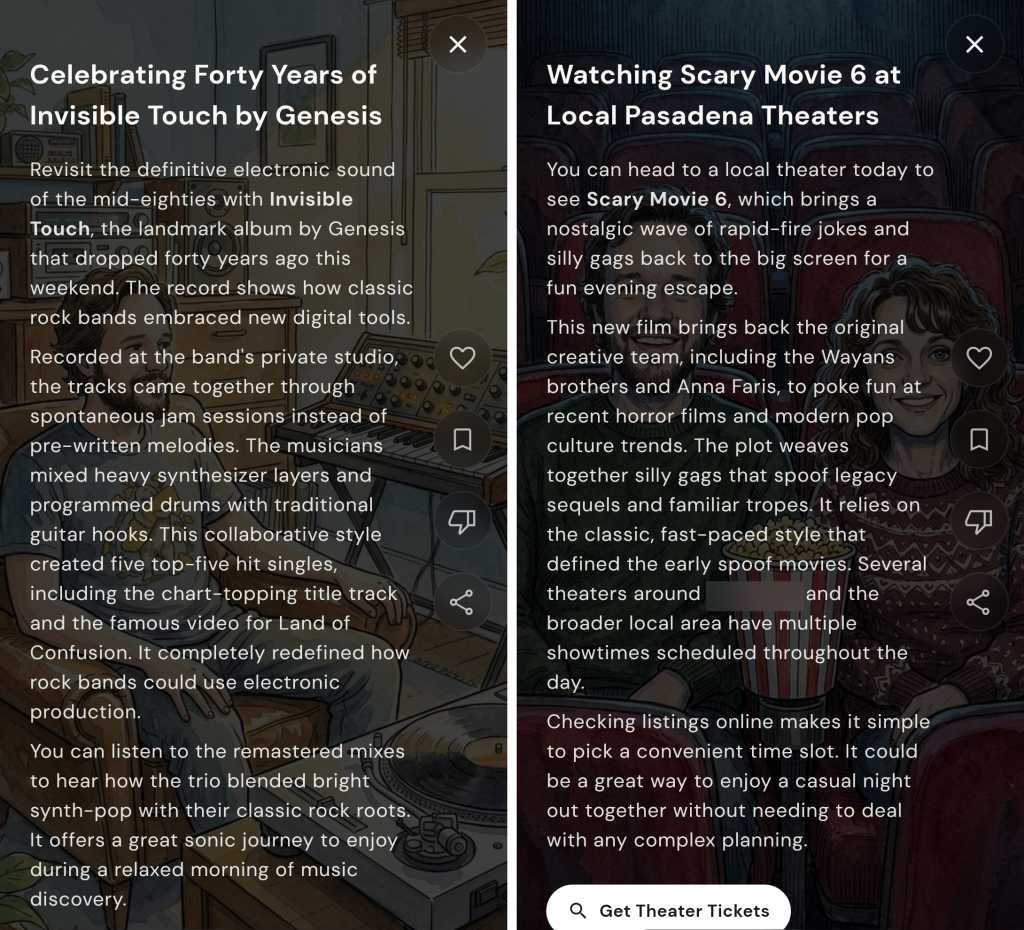
Here’s a handful of the Dreambeans “story” suggestions that appeared in the app upon its first day working for me, with a few names and personal details blurred for privacy purposes:

Google Dreambeans AI feed (1)
Some of Dreambeans’ custom “stories” throughout my first day with the app.

JR Raphael, Foundry

I’m honestly not even sure where all of these suggestions came from, but what jumped at me right away were the (occasionally flattering) caricatures of me and my wife and the general sense of invasion from all the slightly too personal stuff and too familiar integration of family members’ names and interests integrated into the material.

For the record: I had been looking into speaker stuff at some point in the not-too-distant past; I’ve never once typed, uttered, or even considered the phrase “hand-loomed textiles” until just now; we had been looking at the arts festival it mentioned; I’ve never specifically searched for or expressed any interest in Scary Movie 6; and I am not into the band Genesis — though, to be fair, I can’t dance.

I showed all this same material to my wife as well as to several other friends and family members I’d categorize more as typical tech users — not tech professionals or card-carrying geeks but just regular people who own and use a variety of devices, as we all do, and rely on ’em for both personal and professional purposes with varying levels of dread, excitement, and/or indifference. Without exception and without any prompting or personal opinions presented to sway them, every single one of ’em responded the same basic way: “Oh. That’s creepy.” And: “I do not like that.” Without fail.

It doesn’t get much better from here, either. Most of the app’s subsequent suggestions have continued to veer just a touch too far onto the “ick” side of the spectrum, as well as occasionally being off-base in some pretty perplexing ways. For instance:

Google Dreambeans AI feed (2)
Nice AirPods, Mr. Apple fan!

JR Raphael, Foundry

For the record on this set: I do love the show Seinfeld — SERENITY NOW! more than ever — though it’s been some time since I’ve actively watched it; I somewhat famously am allergic to Apple products and avoid ’em whenever possible (notice the name of this column, anyone?); I don’t live in the same city as my brother but do find it creepy to have him pictured in ghoulish caricature form and brought randomly into a discussion about Plex (something he wouldn’t even remotely be interested in hearing from me about); and my various editorial newsletters are all powered by a service called Kit — not Beehiiv — which is mentioned in plenty of places both on my websites and throughout my emails.

Also, while my hairline may not be what it once was, I’m (ahem) not that bald yet — thankyouverymuch, Dreambeans.

Another example that I won’t show here was an item that pictured me in overalls working on installing some “coated stainless steel wire for [my] gallery canvases” — a reference to a community art gallery (with all sorts of details wrong and in some cases flat-out fabricated) connected to my mother’s recent passing. It casually mentioned her by name, too, alongside that eerie illustration of me performing a skill I definitely don’t have in my nonexistent home workshop. I don’t think I have to elaborate on how unsettling, unappreciated, and — again — invasive it felt to have that pop up in this feed.

More than anything, what I’ve been feeling while seeing all of this is a combination of (a) egad, it knows too much — especially when it casually name-drops and caricature-pics my wife, kids, and other family members — and (b) at the same time, the info it’s giving me isn’t especially helpful or insightful. It’s mostly just flat, generic, and — well, more or less exactly what you’d expect from something AI-generated.

Google Dreambeans AI feed (3)
Seeing caricatures and personal details about my kids is odd — and, at the same time, neither of my kids actually plays or has any interest whatsoever in soccer.

JR Raphael, Foundry

More than anything, in other words, it’s a combination of creepy and not particularly useful.

Google Dreambeans AI feed (4)
Some of what I’ve seen when opening Dreambeans’ personal “stories.” Yay?

JR Raphael, Foundry

And it’s the “creepy” part that really sticks with me the most.

The fine line Google forgot to avoid crossing

Maybe if the info I’m being served up here were exceptionally useful, this could be a tradeoff I’d be at least a little more likely to accept. Maybe. But in this scenario, it just feels odd and a little too invasive — which I’ve come to realize is a common theme surrounding much of what seems to be the next level of our forced-upon-us AI future.

Take Google’s Gemini Spark, for instance — the “agentic” AI assistant announced at Google I/O that’s meant to be a “proactive” helper tackling tasks on your behalf. David Pierce from The Verge got an early look at the tool in action and called it “the most impressive and terrifying AI experience” he’s had to date, also bringing that “creepy” word into the equation:

I can’t shake the deeply creepy feeling I get from the whole thing. What Spark did feels sort of magical, and very invasive. It’s weird that Spark is so casually telling me the names and ages of my children, reminding me that it knows where I live, and finding information I know for a fact I’ve never volunteered to Google. Intellectually, I know that Google knows an incredible amount about me — add up my emails, my calendar, my photos, and my search history, and you’ve pretty much got me pegged. But seeing Spark treat all that data not as something to be protected, but as something to be mined, just feels bad.

And that, I think, mirrors the exact reaction I’ve been experiencing with Dreambeans. We’ve all always known that Google knows a lot about us, but we’ve also — at least intellectually — understood how all of that data is and isn’t being used. And it’s never been rubbed in our faces just how much the company can figure out about us by putting all the various pieces together and creating an awkward sense of robotic intimacy.

I remember years ago, being in a Google press briefing where someone from the company talked about how much more their systems and services could accomplish but how they deliberately held back on going that far and overdoing the personalization — ’cause even though they had all that info and could make all those connections, they knew (at the time) that people wouldn’t respond well to seeing all their personal activity put together in such shocking ways. They knew (at the time) that most of us weren’t looking for an artificial BFF who knew too much about us. They knew (at the time) that giving us that sensation would cross the line into being creepy.

Well, this just in: That line’s officially been decimated. We’re in AI’s creepy era. And seemingly no one is worrying anymore if it’s actually something any of us want or will appreciate.

It kinda feels now like tech companies are actively rubbing in our faces how much they know about us — and even if there’s nothing truly nefarious going on with what they’re doing, it sure doesn’t feel good. It feels creepy. And at a time when trust in tech titans is shockingly low and most folks outside of the Silicon Valley bubble are feeling more and more frustrated with AI and all of the effects it’s foisting upon us, that isn’t a great look to be giving off.

Put those sensations alongside the sigh-inducing explosion of AI “content creators,” the proliferation of lifeless AI-generated “writing” (been on LinkedIn much lately?), and the troublingly blurry line between photorealistic AI-generated images and actual real-world photographs — not to mention the maddening experience of interacting with an AI bot support agent or encountering the ever-expanding array of AI-powered scams and security threats and AI-generated job cuts, just to name a few other problematic consequences this movement is imposing — and it’s hard not to question if all this purported progress is ultimately more helpful or harmful for us, as living, breathing humans in the real world.

A few months ago, at the three-year mark of Gemini’s launch, I posed the question: Did anyone actually ask for this? And, more pressingly: Is this the future we wanted? As we’re moving now into yet another era of AI innovation and seeing how it’s affecting our lives, it gets tougher every day to imagine many folks outside of the tech industry who’d answer with an emphatic yes.

And, unfortunately, you don’t need any fancy-schmancy AI chatbots to tell you that things are only gonna get more extreme — and, yes, more creepy — from here.

Find the tips and tools that’ll *actually* help you with my free Android Intelligence newsletter. No hype, no nonsense — just useful new stuff in your inbox every Friday, from one (alleged) human to another.

  •  

UK move to filter photos and messages triggers encryption worries for CISOs

UK Prime Minister Keir Starmer’s speech on Monday insisting that tech companies create device controls to somehow block children from viewing or creating sexually explicit imagery has raised alarms among CISOs, who worry that the same technology could undermine enterprise security. Starmer gave tech firms three months to create and implement such restrictions voluntarily, at which point he said he would push for legislation to make it mandatory.

Behind the technical and logistical hurdles for tech firms to clear, such as how a device would determine that an image was inappropriate, and how it could reliably determine the subject’s age, is the issue of whether this process would interfere with encryption protections for enterprises worldwide. And that comes down to whether the required data analysis happens on the device or in the cloud. 

Starmer did not go into a lot of detail, preferring to let technology companies craft their own plans, but in this case the details matter. Analysts and consultants said that there has been a push for everything to happen on-device, which would avoid any encryption problems; if the inspected data never leaves the device, the encryption protection would stay intact.

But this plan for the process to stay on the device seems highly unlikely for multiple reasons. The first problem is device capabilities and hardware age. Although Apple and Google engineers would be working with the latest devices, much of the UK population is using much older and less capable hardware, analysts said. 

Although a 2-, 3- or 4-year-old phone might still be able to handle the additional load, it would likely suffer a dramatic slowdown sufficient to make users decidedly unhappy. That would mean that even if the execution of the data analysis began on the device, it would likely have to be shifted to the cloud for performance reasons. And once it moved into the cloud, the encrypted data problem begins. 

Trying to do this scanning on-device in the UK would fail, said Flavio Villanustre, CISO for the LexisNexis Risk Solutions Group. “It will make unusable the majority of devices used in the UK today. It just can’t work on-device.”

However, Villanustre observed that on-device analysis for this kind of effort, which would need to scan everything that gets downloaded to the phone in search of prohibited images, might be viable in a few years, once the typical device becomes much more powerful. But not today.

Creates new risks

Leading secure messaging app provider Signal also issued a strong statement opposing Starmer’s proposal.

“The UK governmentʼs demand that all content on all devices sold or used in the UK be scanned on the presumption of nudity, using a dystopian combination of age verification and content scanning, will not safeguard children. It endangers us all, whilst strengthening Apple, Google and Microsoft’s market dominance and their control over our most personal information,” Signal said.  “Once created, [the program] will be expanded, forming a dangerous tool that will be wielded both in the UK and abroad to censor and surveil whatever they might consider ‘threats’ or ‘harmful content.’”

Signal has aggressively fought against such programs before. Similar privacy campaigns have also been launched in other parts of Europe. 

The long held fear is that moving encrypted data to the cloud, regardless of whether it remains encrypted or is converted to clear text, creates opportunities for attackers to access the sensitive data.

“The mechanism that flags and reports a match to external authorities creates a new, built-in exfiltration path,” said Jeff Valdes, a director at consulting firm Acceligence.

Could do more harm than good

Sanchit Vir Gogia, chief analyst at Greyhound Research, argued that the UK proposal is likely to do far more damage than good. He pointed to the short three month timeframe as evidence of a lack of good faith.

“Legislation of this complexity cannot be drafted in a quarter. The deadline is a pressure instrument, not a delivery schedule. Child safety is the destination. Device-wide inspection is the wrong vehicle,” Gogia said. “Apple and Google already run on-device nudity detection in bounded contexts, and it works: a child can be warned, an image blurred, a sharing attempt interrupted.”

Gogia pointed to another logistical problem, which is that some devices such as tablets are often shared between family members, which makes reliable age determinations all but impossible. 

“The deeper flaw is that the policy assumes a stable mapping between device, person, and age, and that mapping does not exist in real households,” Gogia said. “A device cannot know its holder has changed. The only architecture that survives this is default-child with recurring adult verification, which is surveillance arriving through the back door of household economics.”

In addition, he noted, “Children disproportionately inherit the old, out-of-support handsets the mandate cannot reach. Forcing churn manufactures electronic waste and punishes the families least able to buy new.”

Carmi Levy, an independent technology analyst, agreed that the computing overhead alone for such an effort could make this a deal-killer. 

“The compute requirements, particularly in light of the need to execute this kind of filtering in real time, would be immense. It is futile to assume this capability can ever be rolled out at scale without running into massive concerns on several fronts,” Levy said. “Simply deciding how to tune the filters is an almost impossible task. Although the overall definition of nudity, namely not wearing clothing, is generally agreed upon, the line where it becomes inappropriate for minors is neither static nor universally established. So it’s wildly optimistic to assume that a single threshold would be workable at the scale proposed by Prime Minister Starmer.”

Nidhi Luthra, a director at Acceligence, added that the logistical and technological roadblocks are also a big problem. 

“Technically, parts of this can work,” she said, but vendors would have to deal with age verifications, drifts in the models and false positives, and there is also the “lack of contextual information that truly would have let this work.” 

Puts CISOs in ‘an impossible bind’

The UK proposal also puts enterprise CISOs and IT directors who need to protect sensitive data in an impossible bind, Gogia said. 

They “can govern device management and conditional access. What they cannot govern is a mandatory inspection capability that updates according to political appetite rather than enterprise risk appetite,” he pointed out. “The proposal does not automatically create a breach inside Signal, WhatsApp, or Teams, but it creates the conditions for a new class of breach around them. The weakness need not live in the messaging protocol. It can live in the mandated inspection layer, the classifier update mechanism, the age-assurance workflow, or the logs that enforcement inevitably generates.”

Regime change could lead to abuse

Another common concern is that governments change hands, so limited capabilities granted today to one government might be used very differently by a future government. 

Brian Jackson, principal research director at Info-Tech Research Group, noted, “the current government may only use it to detect nudes, but what is to stop a future authoritarian government from using it to detect unfavorable political commentary? Creating a back door means there is potential for third parties — hackers — to exploit that back door to gain access to the user’s communications. This is exactly what encryption and on-device security measures are supposed to prevent.”

He added, “Apple’s Communication Safety feature, Google’s Family Link, and a range of parental control tools already use on-device AI to detect and restrict explicit imagery on children’s devices. The government is not filling a gap the market failed to address. It is proposing to transfer control of an existing capability from the device owner to the state. Parents can deploy this protection right now, on their terms. That is where the decision should sit.”

Ryan O’Leary, research director for privacy and legal technology at IDC, said the current proposal only involves the UK, and there’s no way to determine whether other governments will try something similar. He noted that the EU’s GDPR was widely expected to go global when it launched in 2016, but in ten years, it hasn’t.

O’Leary said that if this proposal is enacted in the UK, he would advise IT and cybersecurity executives to be extra cautious when sending team members to the region. 

“It would essentially be ‘China rules’” such as air gapping systems and traveling with disposable data-limited burner phones, O’Leary said. “It’s an exceptionally big deal if it goes through,” but, he added, the chance of it happening is very low. “It seems like the technology companies will call his bluff.”

This article originally appeared on CSOonline.

  •  

DocLang aims to make documents readable by AI, not humans

AIs struggle to understand documents designed for humans; the DocLang working group seeks to flip that imbalance with its specification for machine-readable business documents “built from the ground up for LLM tokenizers.”

The working group, founded by IBM, Nvidia, and Red Hat and hosted by the Linux Foundation’s LF AI & Data project, aims to create an open, universal, AI-native document format designed to improve how enterprises prepare, exchange, and govern document data for AI systems. ABBYY and Human Signal will also be involved in its development, and other contributors are welcome.

“Enterprises today work across a fragmented landscape of document formats, including PDFs, JPEGs, and other file types built primarily for human consumption rather than AI interpretation,” the group said in its launch announcement.

“This disconnect can introduce complexity, raise costs, and reduce reliability when extracting meaning from business documents,” as organizations increasingly rely on generative AI and agentic systems, it said.

Mark Collier, executive director of LF AI & Data, said the goal of the DocLang Specification Working Group is to “develop a vendor-neutral, interoperable standard that helps organizations prepare document data for AI more reliably, transparently, and at scale.”

DocLang defines a structured, machine-readable format for documents of any type, like JSON for data, that any tool can implement and any pipeline can consume. It builds on DocLing, a document processing toolkit hosted by LF AI & Data that can transform human-readable PDFs, word processor documents or spreadsheets into structured data.

Standards must evolve for AI

Something like DocLang is needed, said independent technology analyst Carmi Levy. “Existing document standards have done an admirable job allowing global stakeholders to confidently collaborate for decades, but it’s becoming increasingly clear that they are in desperate need of an update as AI reshapes the rules around how work gets done,” he explained.

Largely static document types, he said, “can be somewhat limiting when AI is redefining the very word, ‘document.’ In many ways. AI-age documents are far more iterative and dynamic than what they once were, and the definitions need to evolve with the times. The documents we currently live with simply weren’t designed for the AI age.”

Within that context, Levy said, “DocLang represents an early, best hope of achieving some kind of foundational baseline for document standards, one that will hopefully allow more intelligent, more efficient, lower-risk workflows than is currently the case.”

Taking an open-source, vendor-agnostic approach to the process ensures the collective will take precedence over the needs of specific vendors, he said, adding, “earlier standards-setting efforts around networking, documentation, the web, and the cloud powered the free-flowing digital landscape that defines modern life.”

An AI-centric documentation standard will carry that reality into the next generation of technology, said Levy.

A question of governance

The entire concept of LLMs, Jason Andersen, principal analyst at Moor Insights & Strategy said, “involves using natural human languages. The computer is supposed to understand us without us changing our syntax or language. Forcing a syntax on users is exactly what we have today with SEO and more advanced programming languages.”

With something like DocLang, where the standard can be applied to content ingestion, he said, “I would be OK with that being automated, which seems to be the intent. The use case I envision is that when I upload a document to an agent, a skill can be run to preprocess the document into the DocLang standard format, saving tokens.”

That makes sense, he said, adding that he thinks it’s good “if it can help generate outputs, like a visualization, that can be shared outside an AI tool. On that front, that is also why I am liking Web MCP, since you are just adding some code to the page, like CSS or JavaScript, and the consumer, in this case, an AI browser or skill, is better equipped to handle the site.”

The point, he said, is, “these standards need to preserve the fact that humans can still do what they want, and do not need to know any coding to be proficient. In terms of governance, I am not sure if it matters.”

But one analyst did foresee governance problems arising from DocLang’s use.

Yaz Palanichamy, senior research analyst at Info-Tech Research Group, said DocLang adoption will require organizations to implement and review controls in order to scale its use accountably and securely.

This article originally appeared on CIO.com.

  •  

Windows 11: A guide to the updates

A Windows launch isn’t the end a process — it’s really just the beginning. Microsoft continually works on improving Windows 11 by fixing bugs, releasing security patches, and occasionally adding new features.

In this story we summarize what you need to know about each update released to the public for the most recent mainstream version of Windows 11 — currently version 25H2 — over the past year. (We also cover updates for Windows 11 26H1, a targeted release of Windows for devices with specific chips.) For each build, we’ve included the date of its release and a link to Microsoft’s announcement about it. The most recent updates appear first.

The easiest way to install updates is via Windows Update. Not sure how? See “How to handle Windows 10 and 11 updates” for full instructions. Note that Windows 11 version 25H2 is being released as a phased rollout and may not be available to you in Windows Update yet.

If you’re still using Windows 10, see “Windows 10: A guide to the updates.” And if you’re looking for information about Insider Program previews for upcoming feature releases of Windows 11, see “Windows 11 Insider Previews: What’s in the latest build?”

Updates for Windows 11 24H2, 25H2, and 26H1

Windows 11 KB5094126 (OS Builds 26200.8655 and 26100.8655)

Release date: June 9, 2026

In this build, for devices running Windows 24H2 and 25H2, Windows quality updates now include additional high-confidence device targeting data, increasing coverage of devices eligible to automatically receive new Secure Boot certificates. Devices receive the new certificates only after demonstrating sufficient successful update signals, maintaining a controlled and phased rollout.

(For more about Secure Boot certificate upgrades, see the Computerworld story “FAQ: What you need to know about expiring Windows Secure Boot certificates.”)

The build also fixes one bug that could have resulted in Stop errors HYPERVISOR_ERROR (0x20001) and KMODE_EXCEPTION_NOT_HANDLED (0x1E) after installing KB5089573 on some devices during system restarts, virtual machine operations, or while running some gaming applications.

The build has one known issue, in which devices with an unrecommended BitLocker Group Policy configuration might be required to enter their BitLocker recovery key.

It also has a wide variety of security updates. For details, see Microsoft’s Security Update Guide and June 2026 Security Updates.

What IT needs to know: Because this is a security update, it should be applied relatively soon. Over the next few weeks, check for reports about problematic issues, and if all seems well, apply the update.

(Get more info about KB5094126.)

Windows 11 26H1 KB5095051 (OS Build 28000.2269)

Release date: June 9, 2026

This update, for devices on Windows 11 version 26H1, improves the reliability of BitLocker Drive Encryption testing by ensuring that all required files are available for the USB BIOS logo test.

It also has a wide variety of security updates. For details, see June 2026 Security Updates.

What IT needs to know: Because this is a security update, it should be applied relatively soon. Over the next few weeks, check for reports about problematic issues, and if all seems well, apply the update.

(Get more info about KB5095051.)

KB5089573 (OS Builds 26200.8524 and 26100.8524) Preview

Release date: May 26, 2026

With this update, Windows quality updates include additional high-confidence device targeting data, making more devices eligible to receive new Secure Boot certificates. The old certificates expire at the end of June: see Computerworld’s FAQ for details. The build also adds Group Policy and MDM settings that IT admins can enable to limit the Secure Boot service data sent to Microsoft. (See Microsoft documentation.)

This update also includes a wide variety of new features being rolled out gradually, including Shared Audio, which enables two Bluetooth audio devices to connect to a single Windows 11 PC at the same time; Multi-App Camera, which allows multiple applications to access the camera stream simultaneously; improved visibility into NPU usage in Task Manager; and several performance and behavior improvements for Windows Hello.

There is one known issue in the update, in which after you install update KB5089549, some devices might fail to complete installation with error code 0x800f0922. This issue occurs on devices that have limited free space on the EFI System Partition (ESP), especially if it has 10MB or less available.

(Get more info about KB5089573 Preview, including workarounds for the issue described above.)

KB5089549 (OS Builds 26200.8457 and 26100.8457)

Release date: May 12, 2026

This build enables dynamic status reporting for Secure Boot states in the Windows Security app. It also fixes a bug in which the Remote Desktop Connection security warning dialog sometimes rendered incorrectly in multi-monitor configurations with different display scaling settings.

It also includes a wide variety of security updates. For details, see Microsoft’s Security Update Guide and May 2026 Security Updates.

The build has one known issue: devices with an unrecommended BitLocker Group Policy configuration might be required to enter their BitLocker recovery key.

What IT needs to know: Because this is a security update, it should be applied relatively soon. Over the next few weeks, check for reports about problematic issues, and if all seems well, apply the update.

(Get more info about KB5089549.)

KB5083631 (OS Builds 26200.8328 and 26100.8328) Preview

Release date: April 30, 2026

This update includes a large number of new features being rolled out gradually, including File Explorer’s ability to handle new archive formats including uu, cpio, xar, and NuGet Packages (nupkg). Windows also gets a new way to monitor agents from the taskbar. It supports agents across first- and third-party apps, with Researcher in the Microsoft 365 Copilot app as the first adopter. 

Also being rolled out gradually is a security improvement that changes how the Windows kernel trusts third‑party drivers. Default trust for cross‑signed drivers is removed, while drivers from the Windows Hardware Compatibility Program (WHCP) and an allow list of trusted legacy drivers remain allowed. 

The update also includes several changes available immediately, including one that increases coverage of devices eligible to automatically receive new Secure Boot certificates. Devices receive the new certificates only after demonstrating sufficient successful update signals, maintaining a controlled and phased rollout. For more information, see Windows Secure Boot certificate expiration and CA updates.

A bug in the Remote Desktop Connection security warning dialog is being fixed immediately. Previously, the dialog could have rendered incorrectly in a multi-monitor scenario when the monitors had different scaling settings.

(Get more info about KB5083631 Preview.)

KB5083769 (OS Builds 26200.8246 and 26100.8246)

Release date: April 14, 2026

This update fixes several bugs, including one that caused device reset to fail when using the “Keep my files” or “Remove everything” options. It also improves protection against phishing attacks that use Remote Desktop (.rdp) files. For more information, see Understanding security warnings when opening Remote Desktop (RDP) files.

It also enables dynamic status reporting for Secure Boot states in Settings > Update & Security > Windows Security, with a green, yellow, or red badge indicating your current Secure Boot status. See Secure Boot certificate update status in the Windows Security app for more information.

The build also has a wide variety of security updates. For details, see Microsoft’s Security Update Guide and April 2026 Security Updates.

What IT needs to know: Because this is a security update, it should be applied relatively soon. Over the next few weeks, check for reports about problematic issues, and if all seems well, apply the update.

Update, April 15: Microsoft has confirmed an issue with this release: “Devices with an unrecommended BitLocker Group Policy configuration might be required to enter their BitLocker recovery key.” See Microsoft’s KB5083769 information page for details and workarounds.

(Get more info about KB5083769.)

KB5086672 (OS Builds 26200.8117 and 26100.8117) Out-of-band

Release date: March 31, 2026

This update fixes a bug in which some devices running Windows 11 version 25H2 or 24H2 encountered the following error while installing the Windows preview update KB5079391 (listed below): “Some update files are missing or have problems. We’ll try to download the update again later. Error code: (0x80073712).”

(Get more info about Windows 11 KB5086672 Out-of-band.)

KB5079391 (OS Builds 26200.8116 and 26100.8116) Preview

Release date: March 26, 2026

This update includes a variety of new features being rolled out gradually, including one that allows you to turn Smart App Control (SAC) on or off without needing a clean install. To make changes, go to Settings > Windows Security > App & Browser Control > Smart App Control settings. When turned on, SAC helps block untrusted or potentially harmful apps. To learn more, see App & Browser Control in the Windows Security App.

The build also includes several improvements and bug fixes, including one that improves Application ID tagging in Application Control for Business policies. With this update, the system identifies which apps should receive tags more accurately and behaves more reliably, Microsoft says.

(Get more info about Windows 11 KB5079391 Preview.)

KB5085516 (OS Builds 26200.8039 and 26100.8039) Out-of-band

Release date: March 21, 2026

This update fixes a bug some users experienced when signing in to apps with a Microsoft account. Even when the device had a working internet connection, a “no Internet” error appeared during sign-in and prevented access to Microsoft services and apps such as Microsoft Teams Free and OneDrive.

(Get more info about KB5085516 Out-of-band.)

KB5079473 (OS Builds 26200.8037 and 26100.8037)

Release date: March 10, 2026

This build improves how Windows Defender Application Control (WDAC) handles COM objects allowlisting policies. COM objects were blocked when the endpoint security policy was set higher than the allowlisting policy. With this update, COM objects are allowed as expected.​ The build also introduces additional high confidence device targeting data to Windows quality updates, increasing coverage of devices eligible to automatically receive new Secure Boot certificates.

It also has a wide variety of security updates. For details, see Microsoft’s Security Update Guide and March 2026 Security Updates.

What IT needs to know: Because this is a security update, it should be applied relatively soon. Over the next few weeks, check for reports about problematic issues, and if all seems well, apply the update.

(Get more info about KB5079473.)

KB5077241 (OS Builds 26200.7922 and 26100.7922) Preview

Release date: February 24, 2026

This update includes a variety of new features being rolled out gradually, including one in which Quick Machine Recovery (QMR) turns on automatically for Windows Professional devices that are not domain‑joined and not enrolled in enterprise endpoint management. For domain‑joined or enterprise managed devices, QMR stays off unless it is enabled by the organization.

It also includes several features available immediately, including one in which Windows quality updates include additional high-confidence device-targeting data, increasing coverage of devices eligible to automatically receive new Secure Boot certificates. Devices receive the new certificates only after demonstrating sufficient successful update signals, maintaining a controlled and phased rollout.

(Get more info about KB5077241 Preview.)

KB5077181 (OS Builds 26200.7840 and 26100.7840)

Release date: February 10, 2025

This Patch Tuesday build fixes several bugs, including one that prevented some devices from connecting to certain WPA3‑Personal Wi‑Fi networks. It also includes a broad set of targeting data that identifies devices and their ability to receive new Secure Boot certificates. Devices will receive the new certificates only after they show sufficient successful update signals, which helps ensure a safe and phased rollout.

It also has a wide variety of security updates. For details, see Microsoft’s Security Update Guide and February 2026 Security Updates.

What IT needs to know: Because this is a security update, it should be applied relatively soon. Over the next few weeks, check for reports about problematic issues, and if all seems well, apply the update.

(Get more info about KB5077181.)

KB5074105 (OS Builds 26200.7705 and 26100.7705) Preview

Release date: January 29, 2025

In this build, several new features are immediately available, including one for Data Protection Application Programming Interface (DPAPI) domain backup key management. Administrators can now set how often keys rotate automatically. This strengthens cryptographic security and reduces reliance on older encryption algorithms.

One new feature is being gradually rolled out: The Settings Agent now supports more languages, with expanded support for German, Portuguese, Spanish, Korean, Japanese, Hindi, Italian, and Chinese (Simplified).

A variety of bugs have been fixed, including one that caused some systems to stop responding during startup when Windows Boot Manager debugging was enabled.

Get more info about KB5074105 Preview.)

KB5078127 (OS Builds 26200.7628 and 26100.7628) Out-of-band

Release date: January 24, 2026

This update fixes a bug in which some applications were unresponsive or encountered unexpected errors when opening files from or saving files to cloud-based storage, such as OneDrive or Dropbox. In certain Outlook configurations that store PST files on OneDrive, Outlook sometimes hung and failed to reopen unless the process was terminated or the system was restarted. Users may have also experienced missing sent items or previously downloaded emails.

(Get more info about KB5078127 Out-of-band.)

KB5077744 (OS Builds 26200.7627 and 26100.7627) Out-of-band

Release date: January 17, 2026

This update fixes a bug in which some users experienced sign-in failures during Remote Desktop connections. This issue affected authentication steps for different Remote Desktop applications on Windows such as the Windows App.

There is one known issue in this build, in which the password icon might be missing or invisible in the lock screen sign-in options.

Get more info about KB5077744 Out-of-band.)

KB5074109 (OS Builds 26200.7623 and 26100.7623)

Release date: January 13, 2026

This build fixes several bugs, including one in which you might experience RemoteApp ​​​​​​​connection failures in Azure Virtual Desktop (AVD) environments. This might occur after installing KB5070311. It also updates the Windows core component, WinSqlite3.dll. Previously, some security software might have detected this component as vulnerable. 

It also has a wide variety of security updates. For details, see Microsoft’s Security Update Guide and January 2026 Security Updates.

It has one known issue, in which you might notice that the password icon is not visible in the sign-in options on the lock screen. If you hover over the space where the icon should appear, you’ll see that the password button is still available. Select this placeholder to open the password text box and enter your password. After entering your password, you can sign in normally. People using Windows Home or Pro editions on personal devices are very unlikely to experience this issue. This issue primarily affects enterprise or managed IT environments.

What IT needs to know: Because this is a security update, it should be applied relatively soon. Over the next few weeks, check for reports about problematic issues, and if all seems well, apply the update.

(Get more info about KB5074109.)

KB5072033 (OS Builds 26200.7462 and 26100.7462)

Release date: December 9, 2025

This build fixes several bugs, including one in which File Explorer briefly flashed white when you navigated between pages.

It also has a wide variety of security updates. For details, see Microsoft’s Security Update Guide and December 2025 Security Updates.

It has one known issue, in which the password icon might not be visible in the sign-in options on the lock screen. If you hover over the space where the icon should appear, you’ll see that the password button is still available. Select this placeholder to open the password text box and enter your password. After entering your password, you can sign in normally. People using Windows Home or Pro editions on personal devices are very unlikely to experience this issue — it primarily affects enterprise or managed IT environments.

What IT needs to know: Because this is a security update, it should be applied relatively soon. Over the next few weeks, check for reports about problematic issues, and if all seems well, apply the update.

(Get more info about KB5072033.)

KB5070311 (OS Builds 26200.7309 and 26100.7309) Preview

Release date: December 1, 2025

A variety of new features are being gradually rolled out in this build, including several for Copilot+ PCs. The Click to Do context menu in Copilot+ PCs now has a streamlined design that makes it easier to access frequently used actions such as Copy, Save, Share, and Open. In Copilot+ PCs you can now also use Windows Studio Effects, which provide AI-powered camera enhancements, on an additional camera such as a USB webcam or your laptop’s built-in rear camera.

New features being rolled out gradually to all Windows 11 PCs include a simplified File Explorer context menu for easier navigation. Common actions like Share, Copy, and Move now appear in a single organized menu.

A variety of bugs have been fixed for all PCs, including one in which the Local Security Authority Subsystem Service (LSASS) could become unstable due to an access violation.

There are two known issues in this build, one in which when opening File Explorer in dark mode, the window might briefly display a blank white screen before loading files and folders. In addition, the password icon is missing or invisible in the lockscreen sign-in options on some PCs. (Here’s a workaround for the latter bug.)

Get more info about KB5070311 Preview.)

KB5068861 (OS Builds 26200.7171 and 26100.7171)

Release date: November 11, 2025

This Patch Tuesday build fixes several bugs, including one in which closing Task Manager with the Close button didn’t fully end the process, leaving background instances that could slow performance over time.

It also has a wide variety of security updates. For details, see Microsoft’s Security Update Guide and November 2025 Security Updates.

What IT needs to know: Because this is a security update, it should be applied relatively soon. Over the next few weeks, check for reports about problematic issues, and if all seems well, apply the update.

(Get more info about KB5068861.)

KB5067036 (OS Builds 26200.7019 and 26100.7019) Preview

Release date: October 28, 2025

A variety of new features are being gradually rolled out in this build, including several for Click to Do on Copilot+ PCs — notably a streamlined interaction between Click to Do and Copilot. You can now type a custom prompt directly into the text box, which sends your prompt and selected on-screen content to Copilot. Suggested prompts appear below the text box and are available for text selections in English, Spanish, and French. 

New features are being gradually rolled out for all Windows 11 PCs as well, including a redesigned Start menu, which includes scrollable “All” section and category and grid views. The menu now adapts to your screen size.

A variety of bugs have been fixed, including one in which text sometimes didn’t render correctly when editing content within a multiline text box in certain apps.

Get more info about KB5067036 Preview.)

KB5070773 (OS Builds 26200.6901 and 26100.6901) Out-of-band

Release date: October 20, 2025

This build fixes one bug, in which USB devices, such as keyboards and mice, did not function in the Windows Recovery Environment (WinRE). This issue prevented navigation of any of the recovery options within WinRE.

This build has one known issue: some digital TV and Blu-ray/DVD apps might not play protected content as expected after installing the August 29, 2025, Windows non-security preview update (KB5064081) or later updates. Apps that use Enhanced Video Renderer with HDCP enforcement or Digital Rights Management (DRM) for digital audio might show copyright protection errors, frequent playback interruptions, unexpected stops, or black screens. Streaming services are not affected. 

(Get more info about KB5070773 Out-of-band.)

KB5066791 (OS Builds 19044.6456 and 19045.6456)

Release date: October 14, 2025

This build fixes several bugs, including one that caused the print preview screen to stop responding in Chromium-based browsers.

It also has a wide variety of security updates. For details, see Microsoft’s Security Update Guide and October 2025 Security Updates.

What IT needs to know: Because this is a security update, it should be applied relatively soon. Over the next few weeks, check for reports about problematic issues, and if all seems well, apply the update.

(Get more info about KB5066791.)

KB5065789 (OS Builds 26200.6725 and 26100.6725) Preview

Release date: September 29, 2025

This build gradually rolls out a wide variety of new features, including one in which you can use AI actions in File Explorer to edit images or summarize documents. To do it, right-click (or press Shift + F10 on the keyboard) on the file and select AI actions. 

Several bugs have also been fixed, including one in which you might not have been able to connect to shared files and folders if you were using the Server Message Block (SMB) v1 protocol on NetBIOS over TCP/IP NetBIOS (NetBT).

(Get more info about KB5065789 Preview.)

Windows 11 25H2

At the end of September, Microsoft upgraded Windows 11 from version 24H2 to 25H2, in a slow rollout that could take months to complete. Typically in the past, Microsoft would introduce new features in a once-a-year update like this. That’s not the case with 25H2, though.

Microsoft has been introducing new features in smaller updates all year round, so 25H2 doesn’t include any major new features. Rather, it includes all the new features that have accumulated in all those smaller updates.

As the company explains, “While this update doesn’t introduce major new features, it activates enhancements that have been gradually rolled out over the past year ensuring your device is up to date with the latest refinements.”

Here are some of the most important features in 25H2 that have been introduced for end users and IT pros since 24H2 was released last fall:

New features for users:

  • File Explorer has several useful new features, notably AI actions, which can edit images or summarize documents. AI options such as Blur background, Erase objects, and Remove background are all now displayed in the context menu.
  • Task Manager gets a number of minor tweaks, including performance improvements when changing the sort order of processes.
  • You can now display the apps that have recently used on-device generative AI models provided by Windows. You can also choose which apps are permitted to use the generative AI technologies. To do that and more, go to Settings > Privacy & security > Text and Image Generation.

New features for IT:

  • IT admins can use policy-based tools to easily remove preinstalled Microsoft Store apps from Enterprise and Education editions of Windows 11, version 25H2 and later. This can streamline device provisioning and prevent removed apps such as Microsoft Clipchamp, Media Player, and Microsoft Teams from being reinstalled. For more information, see Policy-based removal of preinstalled Microsoft Store apps and RemoveDefaultMicrosoftStorePackages in the ApplicationManagement Policy CSP.
  • Enterprise access points now support Wi-Fi 7, which enables increased speeds, greater throughput, improved reliability, and enhanced security. For details, see https://aka.ms/WiFi7forEnterprise.
  • Windows Backup for Organizations is now generally available.
  • A new feature called Quick Machine Recovery can recover Windows devices when they encounter critical errors that prevent them from booting. Quick machine recovery searches for remediations in the cloud and recovers from widespread boot failures, reducing the burden on IT admins on cases when multiple devices are affected. For more information, see Computerworld’s Quick Machine Recovery explainer.

Updates for Windows 11 24H2

KB5068221 (OS Build 26100.6588) Out-of-band

Release date: September 22, 2025

This update fixes a bug that affected Microsoft Office applications running in Microsoft Application Virtualization (App-V) environments. The failure occurred due to a double handle closure in the AppVEntSubsystems32 or AppVEntSubsystems64 system component.

There is one issue in this build: you might fail to connect to shared files and folders using the Server Message Block (SMB) v1 protocol on NetBIOS over TCP/IP (NetBT). This issue can occur if either the SMB client or the SMB server has the September 2025 security update installed.

(Get more info about KB5068221 (OS Build 26100.6588) Out-of-band).

KB5065426 (OS Build 26100.6584)

Release date: September 9, 2025

This build fixes several bugs, including one that caused non-admin users to receive unexpected User Account Control (UAC) prompts when MSI installers performed certain custom actions, such as configuration or repair operations in the foreground or background during the initial installation of an application.

The build also has a wide variety of security updates. For details, see Microsoft’s Security Update Guide and September 2025 Security Updates.

What IT needs to know: Because this is a security update, it should be applied relatively soon. Over the next few weeks, check for reports about problematic issues, and if all seems well, apply the update.

(Get more info about KB5065426.)

KB5064081 (OS Build 26100.5074) Preview

Release date: August 29, 2025

A wide variety of new features are being gradually rolled out in this build, including a new personalized homepage in Windows Recall that displays your recent activity and top-used apps and websites (available only in Copilot+ PCs). Among the changes rolling out to all users is a new grid view for Search from the Windows taskbar that helps you more quickly and accurately identify the desired image within your search.

Several bugs have also been fixed, including one in which some system recovery features did not work properly due to a temporary file sharing conflict. This affected certain device management tools and disrupted key functions on some devices.

(Get more info about KB5064081 Preview.)

KB5063878 (OS Build 26100.4946)

Release date: August 12, 2025

This build fixes a bug that caused delays during sign-in on new devices. The delay was due to certain preinstalled packages. It also has a wide variety of security updates. For details, see Microsoft’s Security Update Guide and August 2025 Security Updates.

What IT needs to know: Because this is a security update, it should be applied relatively soon. Over the next few weeks, check for reports about problematic issues, and if all seems well, apply the update.

(Get more info about KB5063878.)

KB5062660 (OS Build 26100.4770) Preview

Release date: July 22, 2025

A wide variety of new features are being gradually rolled out in this build, including a new agent in Copilot+ PCs that is designed to help you find and change settings on your PC. You can describe what you need help with, such as “how to control my PC by voice” or “my mouse pointer is too small,” and the agent will suggest steps to resolve the issue. The agent uses AI on your PC to understand your request and, with your permission, can automate and complete tasks for you. It is rolling out to Snapdragon-powered Copilot+ PCs now, with support for AMD and Intel PCs coming soon. 

Several bugs have also been fixed, including one in which If you have an app pinned to your desktop and it updates, the app icon might not display correctly and instead show a white page.

(Get more info about KB5062660 Preview.)

KB5064489 (OS Build 26100.4656) Out-of-band

Release date: July 13, 2025

This update fixes a bug that prevented some virtual machines (VMs) from starting when Virtualization-Based Security (VBS) was enabled. It affected VMs using version 8.0 (a non-default version) where VBS was offered by the host. In Azure, this applies to standard (non–Trusted Launch) General Enterprise (GE) VMs running on older VM SKUs. The problem was caused by a secure kernel initialization issue.

(Get more info about KB5064489 Out-of-band.)

KB5062553 (OS Build 26100.4652)

Release date: July 8, 2025

The build fixes several bugs, including one in which notification sounds didn’t play. Affected sounds included those for on-screen alerts, volume adjustments, and sign-in. It also has a wide variety of security updates. For details, see Microsoft’s Security Update Guide and July 2025 Security Updates.

What IT needs to know: Because this is a security update, it should be applied relatively soon. Over the next few weeks, check for reports about problematic issues, and if all seems well, apply the update.

(Get more info about KB5062553.)

KB5060829 (OS Build 26100.4484) Preview

Release date: June 26, 2025

A wide variety of new features are being gradually rolled out in this build, including a new Settings home page that includes enterprise-specific device info cards for commercial customers on PCs managed by an IT administrator. The taskbar also now resizes icons to fit more apps when space runs low.

Users in the European Economic Area will see several small changes related to default browsers, such as mapping additional file and link types to the default browser and pinning it to the taskbar and Start menu.

A variety of bugs have also been fixed, including one that prevented the automatic renewal of expiring certificates in Windows Hello for Business.

There is one known issue in this build, in which blurry or unclear CJK (Chinese, Japanese, Korean) text appears when displayed at 96 DPI (100% scaling) in Chromium-based browsers such as Microsoft Edge and Google Chrome. 

(Get more info about KB5060829 Preview.)

KB5063060 (OS Build 26100.4351) Out-of-band

Release date: June 11, 2025

This out-of-band update replaces the KB5060842 Patch Tuesday release, fixing a bug in which Windows sometimes restarted unexpectedly when users opened games that use the Easy Anti-Cheat service. Easy Anti-Cheat automatically installs with certain games to enhance security and prevent cheating in multiplayer online PC games. 

Note: In this build there are reports of blurry or unclear CJK (Chinese, Japanese, Korean) text when displayed at 96 DPI (100% scaling) in Chromium-based browsers such as Microsoft Edge and Google Chrome. The issue is due to limited pixel density at 96 DPI, which can reduce the clarity and alignment of CJK characters. Increasing the display scaling improves clarity by enhancing text rendering.

(Get more info about KB5063060 Out-of-band.)

KB5060842 (OS Build 26100.4349)

Release date: June 10, 2025

After installing this update, Windows will retain system restore points for 60 days only. Restore points older than 60 days are not available. This 60-day limit will also apply to future versions of Windows 11, version 24H2.

The build fixes a bug that prevented users from signing in with self-signed certificates when using Windows Hello for Business with the Key Trust model.​​​​​​​ It also has a wide variety of security updates. For details, see Microsoft’s Security Update Guide and June 2025 Security Updates.

Note: In this build there are reports of blurry or unclear CJK (Chinese, Japanese, Korean) text when displayed at 96 DPI (100% scaling) in Chromium-based browsers such as Microsoft Edge and Google Chrome. The issue is due to limited pixel density at 96 DPI, which can reduce the clarity and alignment of CJK characters. Increasing the display scaling improves clarity by enhancing text rendering.

What IT needs to know: Because this is a security update, it should be applied relatively soon. Over the next few weeks, check for reports about problematic issues, and if all seems well, apply the update.

(Get more info about KB5060842.)

KB5058499 (OS Build 26100.4202) Preview

Release date: May 27, 2025

A wide variety of new features are being gradually rolled out in this build, including one in which Click to Do gets the new Ask Copilot action. When you highlight text or an image, Click to Do offers the Ask Copilot option. Selecting it opens Microsoft Copilot with your content in the prompt box. You can send the selected text or image directly to the Copilot app to complete your prompt.

A variety of bugs have also been fixed, including one in which devices with BitLocker on removable drives could encounter a blue screen error after resuming from sleep or hybrid-booting.

(Get more info about KB5058499 Preview.)

KB5061977 (OS Build 26100.4066) 

Release date: May 27, 2025

This out-of-band update fixes a bug in the direct send path for a guest physical address (GPA). This issue caused confidential virtual machines running on Hyper-V with Windows Server 2022 to intermittently stop responding or restart unexpectedly. As a result, service availability was affected, and manual intervention was required. This problem primarily impacted Azure confidential VMs.

(Get more info about KB5061977.)

KB5058411 (OS Build 26100.4061)

Release date: May 13, 2025

This update fixes two bugs, one in which your microphone might have muted unexpectedly, and the other in which the eye controller app didn’t launch. It also has a wide variety of security updates. For details, see Microsoft’s Security Update Guide and May 2025 Security Updates.

What IT needs to know: Because this is a security update, it should be applied relatively soon. Over the next few weeks, check for reports about problematic issues, and if all seems well, apply the update.

(Get more info about KB5058411.)

KB5055627 (OS Build 26100.3915) Preview

Release date: April 25, 2025

This build gradually rolls out several new features for Copilot+ PCs, including a preview of Windows Recall. When you opt in, Recall takes snapshots of your activity so you can quickly find and go back to what you have seen before on your PC. With it, you can use a timeline to find the content you remember seeing.

Copilot+ PCs also get a new natural-language Windows search in which you can search for anything on your PC without having to remember specific file names, exact words in file content, or settings names. Just describe what you’re looking for. On Copilot+ PCs, you can also more easily find photos stored and saved in the cloud by typing your own words (like “summer picnics”) in the search box at the upper-right corner of File Explorer. 

All PCs get a number of new features, including speech recap, in which you can keep track of what Narrator has spoken and access it for quick reference. With speech recap, you can quickly access spoken content, follow along with live transcription, and copy what Narrator last said using keyboard shortcuts.

A variety of bugs are being fixed, including one in which some devices experienced intermittent internet connections when resuming from sleep mode. Several AI components have also been updated.

There are two known issues in this build, including one in which players on Arm devices are unable to download and play Roblox from the Microsoft Store on Windows.

(Get more info about KB5055627 Preview.)

KB5055523 (OS Build 26100.3775)

Release date: April 8, 2025

This update includes a wide variety of security updates. For details, see Microsoft’s Security Update Guide and April 2025 Security Updates. 

What IT needs to know: Because this is a security update, it should be applied relatively soon. Over the next few weeks, check for reports about problematic issues, and if all seems well, apply the update.

There are two known issues in this build, including one in which players on Arm devices are unable to download and play Roblox via the Microsoft Store on Windows. 

(Get more info about KB5055523.)

  •  

Nextcloud adds Euro-Office to Hub workplace suite, expands AI assistant

MUNICH — Nextcloud has integrated Euro-Office into its workplace application suite, one of several updates to Nextcloud Hub unveiled on Tuesday that include a new compliance app for large organizations and a program to support developers building for its platform.

The announcements came during the company’s Nextcloud Summit 2026 here.

Euro-Office, announced in March, is billed as an open source, sovereign alternative to Microsoft Office for European organizations keen to reduce their reliance on US tech providers. It consists of four browser-based applications: a document editor, spreadsheet program, presentation tool, and a PDF editor — each enabling collaborative editing. Euro-Office documents can also be opened directly from the Nextcloud Files mobile app.

Nextcloud is one of several European companies that support Euro-Office, which is built on the open-source code base of OnlyOffice and distributed under the GNU Affero General Public License v3 (AGPL v3).

The integraton means Nextcloud users can now choose between two options in Nextcloud Office: Euro-Office and the existing Collabora integration. 

“Euro-Office uses a different architectural approach that can result in a better performance in the browser, a different user experience…, so it’s important that this option is available,” Jos Poortvliet, Nextcloud co-founder and vice president of communications, said at the Tuesday event.

Other changes in the Nextcloud Hub 26 Spring release include updates to Nextcloud‘s Talk video and voice meeting app, including AI noise suppression and the ability to start a call from any Nextcloud Hub app – an addition that will make collaborative editing easier, said Poortvliet. 

For Nextcloud Assistant, there are new AI agent capabilities. In addition to existing capabilities such as managing calendars and tasks, AI agents can now create cards in Nextcloud’s Deck task management app and update information in the Forms app.

There are also improvements to the AI assistant’s interface, which can be moved around to avoid blocking other applications and allow users to copy and paste text more easily without opening another tab. To meet EU AI Act requirements, Nextcloud will make it easier to see which  provider supplies the large language model (LLM) the Assistant runs on.

Nextcloud will also integrate the AI assistant directly into its Nextcloud Office suites via a sidebar chat interface, allowing users to address problems such as errors in the spreadsheet app.

NextCloud AI chat assistant

NextCloud’s AI chat assistant is integrated into the company’s Office suites.


NextCloud

There’s also a new Governance app that helps large organizations — particularly governments and highly regulated industries — meet regulatory requirements with compliance tools to manage data held in Nextcloud Hub. It contains several features,  including sensitivity labels to control access rights; data retention and archive capabilities; and a legal hold option that preserves documents for legal purposes such as a court case.

The Governance app includes a Compliance Manager that provides a compliance score based on an organization’s regulatory requirements, and measures progress towards certain targets. Admins can also search and review documents shared by employees and generate audit reports for compliance. The Governance app is available to Nextcloud Enterprise customers.

Nextcloud also launched a program to support independent software providers interested in building apps on its platform. 

With AI making it easier for developers to build software that integrates with its platform, Nextcloud expects a 10-fold increase in the number of available apps — from 600 now to 6,000 over the next 12 months, according to Nextcloud CEO Frank Karlitschek.

Nextcloud promised to promote apps developed by partners in its App Store and sell subscriptions as part of the ISV program, as well as provide documentation and technical help to customers. In return, developers would provide guarantees to customers around security processes and long-term support.

“We can strengthen our ecosystem, the developers also make some money — because obviously we do a revenue share here — and we leverage the dynamics that we expect from AI coming very soon,” said Karlitschek.

Editor’s note: NextCloud paid for Matthew Finnegan’s travel and hotel costs for NextCloud Summit 2026, but had no editorial role in the creation of this story.

  •  

Windows 10: A guide to the updates

Windows 10 has reached the end of mainstream support, which means most users will no longer receive new features, bug fixes, or security updates. Microsoft encourages businesses and individuals to upgrade to Windows 11.

Another option is to purchase extended security updates for Windows 10. Those enrolled in the Windows 10 Extended Security Updates (ESU) program will receive monthly security updates, but no new feature releases.

In this story we summarize what you need to know about each update released for the most recent versions of Windows 10 — versions 22H2 and 21H2. (Microsoft releases updates for those two versions together.) For each build, we’ve included the date of its initial release and a link to Microsoft’s announcement about it. The most recent updates appear first.

For details about how to install and manage Windows updates, see “How to handle Windows 10 and 11 updates.”

Updates to Windows 10 versions 21H2 and 22H2

As of November 2025, only computers enrolled in the Windows 10 ESU program (or those with a Windows 10 Enterprise LTSC 2021 or 2024 license) will receive Windows 10 updates.

Windows 10 KB5094127 (OS Builds 19045.7417 and 19044.7417)

Release date: June 9, 2026

This build includes several minor improvements, including a new policy setting, LimitSecureBootRequiredServiceData, under Computer Configuration > Administrative Templates > Windows Components > Secure Boot. When this setting is enabled, Windows limits the Secure Boot service data it sends by suppressing the event normally sent to Microsoft. This policy is also included in the Windows Restricted Traffic Limited Functionality Baseline package. For information about the policy, see Microsoft’s Manage connections from Windows 10 and Windows 11 operating system components to Microsoft services page.

For more about Secure Boot certificate upgrades, see the Computerworld story “FAQ: What you need to know about expiring Windows Secure Boot certificates.”

The build includes one known issue, in which devices with an unrecommended BitLocker Group Policy configuration might be required to enter their BitLocker recovery key.

The build also has a wide variety of security updates. For details, see Microsoft’s Security Update Guide and June 2026 Security Updates.

What IT needs to know: Because this is a security update, it should be applied relatively soon. Over the next few weeks, check for reports about problematic issues, and if all seems well, apply the update.

(Get more info about KB5094127.)

KB5087544 (OS Builds 19045.7291 and 19044.7291)

Release date: May 12, 2026

This Patch Tuesday update enables dynamic status reporting for Secure Boot states in the Windows Security app. It also fixes a bug in which the Remote Desktop Connection security warning dialog sometimes rendered incorrectly in multi-monitor configurations with different display scaling settings.

The build also includes a wide variety of security updates. For details, see Microsoft’s Security Update Guide and May 2026 Security Updates.

This build has one known issue: devices with an unrecommended BitLocker Group Policy configuration might be required to enter their BitLocker recovery key.

What IT needs to know: Because this is a security update, it should be applied relatively soon. Over the next few weeks, check for reports about problematic issues, and if all seems well, apply the update.

(Get more info about KB5087544.)

KB5082200 (OS Builds 19045.7184 and 19044.7184)

Release date: April 14, 2026

Applies to: Windows 10 ESU

This update fixes several bugs, including one that prevented users from signing into apps with a Microsoft account. It also improves protection against phishing attacks that use Remote Desktop (.rdp) files. For more information, see Understanding security warnings when opening Remote Desktop (RDP) files.

It also enables dynamic status reporting for Secure Boot states in Settings > Update & Security > Windows Security, with a green, yellow, or red badge indicating your current Secure Boot status. See Secure Boot certificate update status in the Windows Security app for more information.

The build also has a wide variety of security updates. For details, see Microsoft’s Security Update Guide and April 2026 Security Updates.

What IT needs to know: Because this is a security update, it should be applied relatively soon. Over the next few weeks, check for reports about problematic issues, and if all seems well, apply the update.

Update, April 15: Microsoft has confirmed an issue with this release: “Devices with an unrecommended BitLocker Group Policy configuration might be required to enter their BitLocker recovery key.” See Microsoft’s KB5082200 information page for details and workarounds.

(Get more info about KB5082200.)

KB5078885 (OS Builds 19045.7058 and 19044.7058)

Release date: March 10, 2026

Applies to: Windows 10 ESU

With this update, Windows quality updates include additional high confidence device targeting data, increasing coverage of devices eligible to automatically receive new Secure Boot certificates. This targeting is based primarily on client device diagnostic data; due to limited data, servers are unlikely to qualify, though not explicitly excluded. Devices receive new certificates only after demonstrating sufficient successful update signals, maintaining a controlled and phased rollout.

The build also has a wide variety of security updates. For details, see Microsoft’s Security Update Guide and March 2026 Security Updates.

What IT needs to know: Because this is a security update, it should be applied relatively soon. Over the next few weeks, check for reports about problematic issues, and if all seems well, apply the update.

(Get more info about KB5078885.)

KB5075912 (OS Builds 19045.6937 and 19044.6937)

Release date: February 10, 2025

Applies to: Windows 10 ESU

This Patch Tuesday update fixes a variety of bugs, including one that affected folder renaming with desktop.ini files in File Explorer. The LocalizedResourceName setting was ignored, so custom folder names did not show. Now, custom folder names appear as expected.

It also includes a broad set of targeting data that identifies devices and their ability to receive new Secure Boot certificates. Devices will receive the new certificates only after they show sufficient successful update signals, which helps ensure a safe and phased rollout.

The build also has a wide variety of security updates. For details, see Microsoft’s Security Update Guide and February 2026 Security Updates.

What IT needs to know: Because this is a security update, it should be applied relatively soon. Over the next few weeks, check for reports about problematic issues, and if all seems well, apply the update.

(Get more info about KB5075912.)

KB5078129 (OS Builds 19045.6812 and 19044.6812) Out-of-band

Release date: January 24, 2026

Applies to: Windows 10 ESU

This update fixes a bug in which some applications were unresponsive or encountered unexpected errors when opening files from or saving files to cloud-based storage, such as OneDrive or Dropbox. In certain Outlook configurations that store PST files on OneDrive, Outlook sometimes hung and failed to reopen unless the process was terminated or the system was restarted. Users may have also experienced missing sent items or previously downloaded emails.

Get more info about KB5078129 Out-of-band.)

KB5077796 (OS Builds 19045.6811 and 19044.6811) Out-of-band

Release date: January 17, 2026

Applies to: Windows 10 ESU

This update fixes a bug in which some users experienced sign-in failures during Remote Desktop connections. This issue affected authentication steps for different Remote Desktop applications on Windows such as the Windows App.

(Get more info about KB5077796 Out-of-band.)

KB5073724 (OS Builds 19045.6809 and 19044.6809)

Release date: January 13, 2026

Applies to: Windows 10 ESU

This Patch Tuesday update includes a subset of high-confidence device targeting data that identifies devices eligible to automatically receive new Secure Boot certificates. Devices will receive the new certificates only after demonstrating sufficient successful update signals, ensuring a safe and phased deployment.

It also fixes one bug, in which some security software might have detected the Windows core component, WinSqlite3.dll as being as vulnerable. 

The build also has a wide variety of security updates. For details, see Microsoft’s Security Update Guide and January 2026 Security Updates.

What IT needs to know: Because this is a security update, it should be applied relatively soon. Over the next few weeks, check for reports about problematic issues, and if all seems well, apply the update.

(Get more info about KB5073724.)

KB5074976 (OS Builds 19044.6693 and 19045.6693) Out-of-band

Release date: December 18, 2025

Applies to: Windows 10 ESU

This update fixes a bug in the Message Queuing (MSMQ) functionality. This bug also affected a clustered MSMQ environment under load. This issue could have led to message queues becoming inactive, messages about insufficient resources, applications unable to write to message queues, error messages about the message cannot be created, or messages about insufficient disk space or memory. This issue primarily affected enterprise or managed IT environments.

(Get more info about KB5074976 Out-of-band.)

KB5071546 (OS Builds 19045.6691 and 19044.6691)

Release date: December 9, 2025

Applies to: Windows 10 ESU

In this update, PowerShell’s Invoke-WebRequest command now includes a confirmation prompt with a security warning of a script execution risk. You can choose to continue or cancel the request. For additional details, see CVE-2025-54100 and KB5074596: PowerShell 5.1: Preventing script execution from web content.

The build also has a wide variety of security updates. For details, see Microsoft’s Security Update Guide and December 2025 Security Updates.

What IT needs to know: Because this is a security update, it should be applied relatively soon. Over the next few weeks, check for reports about problematic issues, and if all seems well, apply the update.

(Get more info about KB5071546.)

KB5068781 (OS Builds 19044.6575 and 19045.6575)

Release date: November 11, 2025

Applies to: Windows 10 ESU

This update fixes a bug in which after installing the October 14, 2025 Windows update (KB5066791), the message “Your version of Windows has reached the end of support” might incorrectly display in the Windows Update Settings page. To view the page, click Start > Settings > Windows Update.

The build also has a wide variety of security updates. For details, see Microsoft’s Security Update Guide and November 2025 Security Updates.

What IT needs to know: Because this is a security update, it should be applied relatively soon. Over the next few weeks, check for reports about problematic issues, and if all seems well, apply the update.

(Get more info about KB5068781.)

KB5071959 (OS Build 19045.6466) Out-of-band

Release date: November 11, 2025

This build fixes a bug in the Windows 10 Consumer Extended Security Update (ESU) enrollment process, where the enrollment wizard may fail during enrollment.

(Get more info about KB5071959 Out-of-band.)

KB5066791 (OS Builds 19044.6456 and 19045.6456)

Release date: October 14, 2025

This update fixes several bugs, including one in which command time in PowerShell Remoting and WinRMntime out after 600 seconds.

The build also has a wide variety of security updates. For details, see Microsoft’s Security Update Guide and October 2025 Security Updates.

Note that today marks the official end of support for Windows 10 Home, Pro, and Enterprise, except for organizations and individuals enrolled in Microsoft’s Extended Security Updates program.

What IT needs to know: Because this is a security update, it should be applied relatively soon. Over the next few weeks, check for reports about problematic issues, and if all seems well, apply the update.

(Get more info about KB5066791.)

KB5063842 (OS Build 19045.6396) Preview

Release date: September 25, 2025

This build fixes two bugs, one in which you might not be able to connect to shared files and folders if you’re using the Server Message Block (SMB) v1 protocol on NetBIOS over TCP/IP NetBIOS (NetBT), and another in which those using Windows Autopilot to deploy Windows 10, version 22H2 to devices with the Enrollment Status Page (ESP) configured might find that the ESP doesn’t load during the Out-of-Box Experience (OOBE).

(Get more info about KB5063842 (OS Build 19045.6396) Preview.)

KB5065429 (OS Builds 19044.6332 and 19045. 6332)

Release date: September 9, 2025

This update fixes several bugs, including one that caused non-admin users to receive unexpected User Account Control (UAC) prompts when MSI installers performed certain custom actions, such as configuration or repair operations in the foreground or background during the initial installation of an application.

The build also enables auditing SMB client compatibility for SMB Server signing as well as SMB Server EPA. This allows customers to assess their environment and identify any potential device or software incompatibility issues before deploying the hardening measures that are already supported by SMB Server. For detailed guidance, see CVE-2025-55234 | Windows SMB Elevation of Privilege Vulnerability.

The build also has a wide variety of security updates. For details, see Microsoft’s Security Update Guide and September 2025 Security Updates.

What IT needs to know: Because this is a security update, it should be applied relatively soon. Over the next few weeks, check for reports about problematic issues, and if all seems well, apply the update.

(Get more info about KB5065429.)

KB5063842 (OS Build 19045.6282) Preview

Release date: August 26, 2025

In this build, Windows Backup for Organizations is now generally available. It lets your organization back up Windows 10 settings and restore them on a Microsoft Entra joined device. You can also enable backup of the list of installed Microsoft Store apps, with the ability to restore them to the user’s Start menu as well.

A variety of bugs have also been fixed, including one in which mf.dll failed to enumerate redirected web camera devices on Remote Desktop Services (RDS) environments.

(Get more info about KB5063842 Preview.)

KB5066188 (OS Builds 19044.6218 and 19045.6218) Out-of-band

Release date: August 19, 2025

This build fixes a bug introduced by the August 2025 security update (KB5063709) in which attempts to reset and recover the device fail. This issue happens when users perform one or more of the following processes: 

  • System > Recovery > Reset my PC
  • System > Recovery > Fix problems using Windows Update
  • RemoteWipe CSP

For more information on the issue, see Windows release health. Microsoft recommends you install this optional update if you have encountered this issue. The company also says that if your system isn’t affected or you don’t plan using the methods described above, you can choose not to install it.

(Get more info about KB5066188 Out-of-band.)

KB5063709 (OS Builds 19044.6216 and 19045.6216)

Release date: August 12, 2025

The update has a wide variety of security updates. For details, see Microsoft’s Security Update Guide and August 2025 Security Updates.

What IT needs to know: Because this is a security update, it should be applied relatively soon. Over the next few weeks, check for reports about problematic issues, and if all seems well, apply the update.

(Get more info about KB5063709.)

KB5062649 (OS Build 19045.6159) Preview

Release date: July 22, 2025

This build adds the ability to deploy SKUSiPolicy VBS Anti-rollback protections through the Secure Boot AvailableUpdates registry key.

It also fixes a variety of bugs, including one that affected the Windows 10 Extended Security Updates (ESU) enrollment wizard. Some users experienced a problem where clicking “Enroll now” caused the wizard window to open, begin loading, and then close unexpectedly. 

(Get more info about KB5062649 Preview.

KB5062554 (OS Builds 19044.6093 and 19045.6093)

Release date: July 8, 2025

The update has a wide variety of security updates. For details, see Microsoft’s Security Update Guide and July 2025 Security Updates.

Note: In this build there are reports of blurry or unclear CJK (Chinese, Japanese, Korean) text when displayed at 96 DPI (100% scaling) in Chromium-based browsers such as Microsoft Edge and Google Chrome. The issue is due to limited pixel density at 96 DPI, which can reduce the clarity and alignment of CJK characters. Increasing the display scaling improves clarity by enhancing text rendering.

What IT needs to know: Because this is a security update, it should be applied relatively soon. Over the next few weeks, check for reports about problematic issues, and if all seems well, apply the update.

(Get more info about KB5062554.)

KB5061087 (OS Build 19045.6036) Preview

Release date: June 24, 2025

This build fixes a variety of bugs, including one that caused jump lists to disappear from the Start menu.           

There is one known issue in this build, in which blurry or unclear CJK (Chinese, Japanese, Korean) text appears when displayed at 96 DPI (100% scaling) in Chromium-based browsers such as Microsoft Edge and Google Chrome. 

(Get more info about KB5061087 Preview.)

KB5060533 (OS Builds 19044.5965 and 19045.5065)

Release date: June 10, 2025

The update has a wide variety of security updates. For details, see Microsoft’s Security Update Guide and June 2025 Security Updates.

Note: In this build there are reports of blurry or unclear CJK (Chinese, Japanese, Korean) text when displayed at 96 DPI (100% scaling) in Chromium-based browsers such as Microsoft Edge and Google Chrome. The issue is due to limited pixel density at 96 DPI, which can reduce the clarity and alignment of CJK characters. Increasing the display scaling improves clarity by enhancing text rendering.

What IT needs to know: Because this is a security update, it should be applied relatively soon. Over the next few weeks, check for reports about problematic issues, and if all seems well, apply the update.

(Get more info about KB5060533.)

KB5058481 (OS Build 19045.5917) Preview

Release date: May 28, 2025

This build offers several new features, including one that brings back the clock view that displays seconds on the calendar. It also fixes several bugs, including one in which in GDI/GDI+, some GB18030-2022 characters in plane 2 were not rendered.

There is one known issue in this build, in which blurry or unclear CJK (Chinese, Japanese, Korean) text appears when displayed at 96 DPI (100% scaling) in Chromium-based browsers such as Microsoft Edge and Google Chrome. 

(Get more info about KB5058481 Preview.)

KB5061979 (OS Builds 19044.5859 and 19045.5859)

Release date: May 27, 2025

This out-of-band update fixes a bug in the direct send path for a guest physical address (GPA). This issue caused confidential virtual machines running on Hyper-V with Windows Server 2022 to intermittently stop responding or restart unexpectedly. As a result, service availability was affected, and manual intervention was required. This problem primarily impacted Azure confidential VMs.

There is one known issue in this build, in which blurry or unclear CJK (Chinese, Japanese, Korean) text appears when displayed at 96 DPI (100% scaling) in Chromium-based browsers such as Microsoft Edge and Google Chrome. 

(Get more info about KB5061979.)

KB5061768 (OS Builds 19044.5856 and 19045.5856)

Release date: May 19, 2025

This out-of-band build fixes a bug in the recent May 13 Patch Tuesday build (KB5058379) that caused the Local Security Authority Subsystem Service (LSASS) process to terminate unexpectedly, triggering an Automatic Repair prompting for the BitLocker recovery key.

There is one known issue in this build, in which blurry or unclear CJK (Chinese, Japanese, Korean) text appears when displayed at 96 DPI (100% scaling) in Chromium-based browsers such as Microsoft Edge and Google Chrome. 

(Get more info about KB5061768.)

KB5058379 (OS Builds 19044.5854 and 19045.5854)

Release date: May 13, 2025

The update improves Secure Boot Advanced Targeting (SBAT) and Linux Extensible Firmware Interface (EFI) for the detection of Linux systems. It also has a wide variety of security updates. For details, see Microsoft’s Security Update Guide and May 2025 Security Updates.

What IT needs to know: Because this is a security update, it should be applied relatively soon. Over the next few weeks, check for reports about problematic issues, and if all seems well, apply the update.

(Get more info about KB5058379.)

KB5055612 (OS Build 19045.5796) Preview

Release date: April 22, 2025

This build fixes two bugs, including one in which the check for GPU paravirtualization was case-sensitive in Windows Subsystem for Linux 2 (WSL2). This issue might have potentially caused GPU paravirtualization support to fail.

There are two known issues in this build, including one in which certain Citrix components installed might be unable to complete installation of the January 2025 Windows security update. This issue was observed on devices with Citrix Session Recording Agent (SRA) version 2411.

(Get more info about KB5055612 Preview.)

KB5055518 (OS Builds 19044.5737 and 19045.5737)

Release date: April 8, 2025

The update has a broad variety of security updates. For details, see Microsoft’s Security Update Guide and April 2025 Security Updates. 

What IT needs to know: Because this is a security update, it should be applied relatively soon. Over the next few weeks, check for reports about problematic issues, and if all seems well, apply the update.

There are two known issues in this build including one in which devices that have certain Citrix components installed might be unable to complete installation of the January 2025 Windows security update.

(Get more info about KB5055518.)

Windows 10 2022 Update (version 22H2)

Release date: October 18, 2022

The Windows 10 2022 Update is, in Microsoft’s words, “a scoped release focused on quality improvements to the overall Windows experience in existing feature areas such as quality, productivity and security.” In other words, there’s not much new here, although Computerworld blogger Susan Bradley did uncover a handful of new group policies in the release.

Home and Pro editions of the 2022 Update will receive 18 months of servicing, and Enterprise and Education editions will have 30 months of servicing.

To install the update, go to Settings > Update & Security > Windows Update and select Check for updates. If the update appears, select Download to install it.

(Get more info about the Windows 10 2022 Update.)

Windows 10 November 2021 Update (version 21H2)

Release date: November 16, 2021

Version 21H2, called the Windows 10 November 2021 Update, is the second feature update to Windows 10 released in 2021. Here’s a quick summary of what’s new:

  • Wi-Fi security has been enhanced with WPA3 H2E standards support.
  • GPU compute support has been added in the Windows Subsystem for Linux (WSL) and Azure IoT Edge for Linux on Windows (EFLOW) deployments for machine learning and other compute-intensive workflows.

There are also a number of features designed for IT and business:

  • Windows Hello for Business has a new deployment method called cloud trust that simplifies passwordless deployments.
  • For increased security, there have been changes to the Universal Windows Platform (UWP) VPN APIs, which includes the ability to implement common web-based authentication schemes and to reuse existing protocols.
  • Apps can now be provisioned from Azure Virtual Desktop. This allows those apps to run just like local apps, including the ability to copy and paste between remote and local apps.
  • The release closes the gap between Group Policy and mobile device management (MDM) settings. The device configuration settings catalog has been updated to list more than 1,400 settings previously not available for configuration via MDM. The new MDM policies include administrative template (ADMX) policies, such as App Compat, Event Forwarding, Servicing, and Task Scheduler.
  • An upgrade to Windows 10 Enterprise includes Universal Print, which now supports print jobs of up to 1GB or a series of print jobs from an individual user that add up to 1GB within any 15-minute period.
  • Universal Print integrates with OneDrive for web and Excel for web. This allows users of any browser or device connected to the internet to print documents hosted in OneDrive for web to a printer in their organization without installing printer drivers on their devices.

Microsoft has also announced that starting with this release, Windows 10 will get feature updates only once a year.

Windows 10 May 2021 Update (version 21H1)

Release date: May 18, 2021

Version 21H1, called the Windows 10 May 2021 Update, is the most recent update to Windows 10. This is a relatively minor update, but it does have a few new features.

Here’s a quick summary of what’s new in 21H1:

  • Windows Hello multicamera support: If you have an external Windows Hello camera for your PC, you can set the external camera as your default camera. (Windows Hello is used for signing into PCs.) Why should this change matter to you? If you have an external camera, you probably bought it because it’s superior to the built-in, internal one on your computer. So with this change, you’ll be able to use the more accurate camera for logging into your PC.
  • Improved Windows Defender Application Guard performance: Windows Defender Application Guard lets administrators configure applications to run in an isolated, virtualized container for improved security. With this change, documents will open more quickly. It can currently take up to a minute to open an Office document in it.
  • Better Windows Management Instrumentation (WMI) Group Policy Service support: Microsoft has made it easier for administrators to change settings to support remote work.

Windows 10 October 2020 Update (version 20H2)

Release date: October 20, 2020

Version 20H2, called the Windows 10 October 2020 Update, is the most recent update to Windows 10. This is a relatively minor update but does have a few new features.

Here’s a quick summary of what’s new in 20H2:

  • The new Chromium-based version of the Microsoft Edge browser is now built directly into Windows 10.
  • The System page of Control Panel has been removed. Those settings have been moved to the Settings app.
  • The Start menu’s tiled background will match your choice of Windows themes. So the tiled background will be light if you’re using the Windows 10 light theme and dark if you’re using the Windows 10 dark theme.
  • When you use Alt-Tab, Edge will now display each tab in your browser in a different Alt-Tab window. Previously, when you used Alt-Tab, Edge would get only a single window. You can change this new behavior by going to Settings > System > Multitasking.
  • When you pin a site to the taskbar in Edge, you can click or mouse over its icon to see all your browser tabs that are open for that website.
  • When you detach a keyboard on a 2-in-1 device, the device will automatically switch to the tablet-based interface. Previously, you were asked whether you wanted to switch. You can change that setting by going to Settings > System > Tablet.
  • The Your Phone app gets a variety of new features for some Samsung devices. When using one of the devices, you can interact with the Android apps on your phone from the Your Phone app on Windows 10.

What IT needs to know: Windows 10 version 20H2 also has a variety of small changes of note for sysadmins and those in IT.

  • IT professionals who administer multiple mobile devices get a new Modern Device Management (MDM) “Local Users and Groups” settings policy that mirrors options available for devices that are managed through Group Policy.
  • Windows Autopilot, used to set up and configure devices in enterprises, has gained a variety of small enhancement, including better deployment of HoloLens devices, the addition of co-management policies, enhancements to Autopilot deployment reporting, and the ability to reuse Configuration Manager task sequences to configure devices.
  • Microsoft Defender Application Guard now supports Office. This allows untrusted Office documents from outside an enterprise to launch in an isolated container to stop potentially malicious content from compromising computers or exploiting personal information found on them.
  • Latest Cumulative Updates (LCUs) and Servicing Stack Updates (SSUs) have been combined into a single cumulative monthly update, available via Microsoft Catalog or Windows Server Update Services.
  • Biometric sign-on has been made more secure. Windows Hello now has support for virtualization-based security for certain fingerprint and face sensors, which protects, isolates, and secures a user’s biometric authentication data.

For more details, see Microsoft’s “What’s new for IT pros in Windows 10, version 20H2.”

Windows 10 May 2020 Update (version 2004)

Release date: May 27, 2020

Version 2004, called the Windows 10 May 2020 Update, is the most recent update to Windows 10. This is a relatively minor update but does have a variety of new features for both users and system administrators. For more details, see: “Review: Windows 10 May 2020 Update delivers little tweaks that add up to… well, not a lot.”

Here’s a quick summary of what’s new in 2004:

  • Cortana now runs as a standalone app in a resizable window. It also loses a variety of capabilities, such as playing music, controlling home devices, and working on the lock screen.
  • Task Manager now displays new information, including the temperature of your GPU and your disk type.
  • Settings gets many small tweaks, including adding a header with account information, and a redone network status page that combines information that used to be found on multiple pages, such as your IP address, current connection properties and data usage.
  • The Windows Subsystem for Linux (WSL) gets more features. It now uses a real Linux kernel, and is faster than previously.
  • IT can now take advantage of Windows Hello biometrics logins rather than passwords, by setting that up as the default on enterprise devices.
  • Installing and setting up Windows for others has been made easier thanks to new controls added to Dynamic Update, which can lead to less downtime during installation for users.
  • A variety of new commands have been given to PowerShell for Delivery Optimization, a Windows networking service that reduces bandwidth consumption by sharing the work of downloading update and upgrade packages among multiple devices in business deployments.
  • The security of the Chromium version of Edge has been improved, thanks to porting Application Guard to it.

Windows 10 November 2019 Update (version 1909)

Release date: Nov. 12, 2019

Version 1909, called the Windows 10 November 2019 Update, is the most recent update to Windows 10. There are very few new features in this update, making it more like a service pack of old than a feature update. At this point it’s not clear whether in the future there will be one full-featured update and one service-pack-like update per year or whether Microsoft will go back to its two-feature-updates-a-year schedule. For more details, see “What we know so far about the unusual Windows 10 1909” and “5 unanswered questions about Windows 10 1909.”

Here’s a quick summary of what’s new for users in 1909.

  • It lets you create calendar events straight from the taskbar. To do it, click the time on the taskbar and you’ll open the Calendar view. Now click a date and time, then type the event’s name into the text box. You’ll also be able to choose the date, time and location.
  • When you type a search into the search box, it will now search through files in your OneDrive account as well as on your PC. Also, as you type, a drop-down menu with suggested files appears. Click a file to open it.
  • Voice assistants in addition to Cortana, including Amazon’s Alexa, will be able to run on Windows 10’s lock screen.
  • Under-the-hood improvements should speed up the performance of some PCs, as well as increase the battery life in some laptops.
  • The Start Menu has gotten minor tweaks. When you hover over items in the navigation pane on the left side of the menu, the items clearly show what you’re about to click.

What IT needs to know: The following features in 1909 are of note for IT staff.

  • Windows containers no longer need to have their host and container versions match. That requirement restricted Windows from supporting mixed-version container pod scenarios. Previously, containers from older versions of Windows 10 couldn’t be run on newer versions of Windows 10. In this update, it’s possible, so that a container made using 1903, for example, can be run on 1909.
  • Windows Defender Credential Guard, which protects enterprise users’ logins and credentials against theft, is now available for ARM64 devices. Some Windows 10 convertible PCs use ARM64.
  • Enterprises can now use Microsoft’s Intune enterprise mobility management (EMM) service to allow devices running Windows 10 in S mode to install and run Win32 (desktop) apps. Before this, S Mode only allowed devices to run apps from the Microsoft Store. Microsoft Store apps don’t run on the desktop.
  • The security of BitLocker encryption has been improved. Whenever BitLocker is used to encrypt a device, a recovery key is created, but before this security improvement, it was possible for an unauthorized user to get access to the recovery key and decrypt the device. Now, PCs have additional security if a key is exposed. Here’s how Microsoft explains the change: “Key-rolling or Key-rotation feature enables secure rolling of Recovery passwords on MDM managed AAD devices upon on demand request from Microsoft Intune/MDM tools or upon every time recovery password is used to unlock the BitLocker protected drive.”

There are two known issues in this update: one in which some users cannot set Win32 program defaults for certain app and file type combinations using the Open with… command or Settings > Apps > Default apps, and another in which Microsoft Notepad and other Win32 programs cannot be set as default applications.

(Get more info about KB4464455.)

Windows 10 October 2018 Update (version 1809)

Release date: October 2, 2018; paused October 5; re-released November 13, 2018

Version 1809, called the Windows 10 October 2018 Update, is the feature update that preceded the May 2019 Update. Here’s a quick summary of what’s new for users in it. (For more details, see our full review.)

  • A new, powered-up Windows Clipboard can hold multiple clips, store clips permanently, let you preview clips and choose which one you’d like to paste into a document, and share clips across Windows 10 devices.
  • A new screenshot and annotation tool called Snip & Sketch lets you capture and annotate the entire screen, a rectangular portion of the screen or a freehand-drawn portion of it. After you take a screen capture, you can annotate it and then save it to a file, copy it to the Clipboard, open it in another program or share it via email, social media and other methods.
  • Storage Sense, which helps save storage space, now works with OneDrive Files On-Demand to clean out files you’ve downloaded from OneDrive cloud storage to your PC but that you don’t use any longer. You can choose how long you would like the cloud files to stay on your PC unused before you want them deleted, from never to 60 days.
  • The Microsoft Edge browser lets you set autoplay permissions for sound and video on websites on a site-by-site basis. It also lets you look up word definitions in its built-in eReader for books and PDFs, and mark up PDFs and books using a highlighter and by adding notes.
  • The new Your Phone app links Windows 10 devices to iOS and Android phones. It allows you to start web browsing on an iOS or Android device and then continue where you left off on your PC. It also lets you view photos on your Android phone from your Windows 10 PC.
  • Search Previews have been powered up slightly. You no longer need to click to display the preview panel; it opens automatically. It also now shows files found on your PC.
  • Smaller changes include a new dark theme for File Explorer; the addition of the SwiftKey swipe keyboard, which lets you enter text by swiping a finger across an onscreen keyboard; updates that are less intrusive; and faster sign-ins on shared PCs.

What IT needs to know: There are few significant changes that affect IT in the Windows 10 October 2018 Update, other than New Microsoft Edge Group Policies that let admins enable and disable full-screen mode, printing, the favorites bar, and browser history saves. IT can also allow or ban Edge extensions (not that there are many available) and configure the Home button and new tab page and startup options.

Windows 10 April 2018 Update (version 1803)

Release date: April 30, 2018

Version 1803, called the Windows 10 April 2018 Update, is the major update to Windows 10 that preceded the October 2018 Update. Here’s a quick summary of what’s new for users in it. (For more details, see our full review.)

  • The most important new feature is Timeline, which lets you review and resume activities and open files you’ve started on your PC, or any other Windows PCs you have. It also tracks what you’ve done on iOS and Android devices if you install Microsoft’s digital assistant Cortana on them and are logged in. It shows a list of activities day by day for up to 30 days. Each activity shows up as a large tile, with the file name and document title or URL and website name across it, and the name of the application or app that created it across the top. Click any activity to reopen it. (Note that at present, Timeline only tracks activities in certain Microsoft programs such as the Edge browser and Office applications.)
  • The new Diagnostic Data Viewer is supported, which Microsoft is designed to let you see the “diagnostic data collected from your Windows devices, how it is used, and to provide you with increased control over that data.” However, the information is presented in such a complex, technical way that even programmers will likely have a difficult time understanding it. The viewer isn’t built directly into the Windows 10 April 2018 Update. Instead, you have to download it from the Microsoft Store.
  • The My People feature now lets you pin up to 10 contacts on the Windows taskbar. Previously, you could only pin up to three.
  • Microsoft Edge gets several minor tweaks, including a revamped Hub, the ability to mute auto-playing audio in tabs, and a forms-filler for web-based forms.
  • The Notebook feature of Cortana gets a new, cleaner interface for its Notebook. It now has two tabs, Organizer and Manage Skills. The Organizer makes it easier to create lists and set reminders. The Manage Skills tab lets you add “skills” to Cortana, such as controlling your home and its appliances, connecting Cortana to music services such as Spotify, tracking your fitness and more.
  • You get more control over app permissions, such as whether they can access your camera, location and contacts.

What IT needs to know: IT staff should be aware of these features that are new in the Windows 10 April 2018 Update:

  • Windows 10 Professional now gets the Windows Defender Application Guard, which protects Microsoft Edge. There’s also a new feature in the application guard that lets users download files inside Edge instead of directly to the operating system, as a way to increase security.
  • There are new policies for Group Policy and Mobile Device Management (MDM) that can better control how Delivery Optimization is used for Windows Update and Windows Store app updates. You can also now monitor Delivery Optimization using Windows Analytics.
  • Windows AutoPilot also gets a tweak that lets IT make sure policies, settings and apps are provisioned on devices before users begin using them.
  • Windows gets the Linux curl and tar utilities for downloading files and extracting .tar archives built directly into Windows. Windows also now natively supports Unix sockets (AF_UNIX) with a new afunix.sys kernel driver. That will make it easier to port software to Windows from Linux as well as from other Unix-like operating systems.
  • There are a host of improvements to the Windows Subsystem for Linux, which lets you run a variety of Linux distributions on Windows 10. Linux applications can run in the background, some launch settings for Linux distributions can be customized, and Linux applications have been given access to serial devices. The new Unix sockets report is available for the Windows Subsystem for Linux as well as Windows itself.
  • The Windows 10 Pro for Workstations version of Windows 10 gets a new power scheme called Ultimate Performance it’s only for desktop PCs, not those that can be powered by batteries. In addition, Windows 10 Pro for Workstations no longer ships with games like Candy Crush or other similar consumer-focused apps. Instead, it features enterprise- and business-related apps.
  • Administrators have been given the power to configure an enterprise’s PCs to run custom scripts during feature updates, which will make configuration and deployment easier.

For  more details, see the Microsoft blog post “Making IT simpler with a modern workplace.”

Windows 10 Fall Creators Update (version 1709)

Release date: October 17, 2017

Version 1709, called the Windows 10 Fall Creators Update, is the major update to Windows 10 that preceded the April 2018 Update. Here’s a quick summary of what’s new for users in it. (For more details, see our full review.)

  • OneDrive gets a new feature called Files On-Demand that gives you access to all of your OneDrive files on every device, without having to download them first. You’ll be able to see all the files you have in OneDrive, even if they’re only in the cloud and not on your PC. Icons tell you which are local and which are in the cloud. Just open the file, and if it’s not on your PC, it gets downloaded.
  • The new My People feature lets you pin three contacts to the Windows taskbar and then communicate with them instantly without having to open a separate app such as Skype or Mail. You can also click to see a list of all communications between them and you at a glance.
  • You can now send web links from your iOS or Android device to your PC and have them open in Microsoft Edge.
  • Cortana gets several new features, including displaying results in a scrollable flyout panel, so you don’t have to launch a web browser.
  • Microsoft Edge gets some minor improvements, including better Favorites handling and the ability to mark up PDFs and e-books.
  • Security has been beefed up, including the addition of Windows Defender Exploit Guard, which includes intrusion rules and policies to protect against a variety of threats, notably zero-day exploits. A new anti-ransomware feature called Controlled Folder Access has also been added; it lets only approved apps have access to Windows system files and folders.
  • New privacy features include the ability to review the kinds of devices and services apps from the Microsoft Store want access to before you download them.
  • The update incorporates Microsoft’s new design system and guidelines, called Fluent Design. Overall, transitions are smoother, and there are subtle changes to the transparency effect.

What IT needs to know: IT staff should be aware of these features that are new in the Windows 10 Fall Creators Update:

  • The notoriously insecure SMBv1 networking protocol, exploited in recent ransomware attacks including WannaCry and Petya, won’t be included on clean installs of the Windows 10 Fall Creators Update, but SMBv1 components will remain if you do in-place upgrades on PCs that already have the component installed.
  • Windows Defender Advanced Threat Protection (ATP), a suite of tools introduced in Windows 10 that helps enterprise customers protect their users and networks against threats and respond to attacks, is being beefed up. Among other things, it will run on the Windows Server OS.
  • ATP is also part of Windows Defender Application Guard for Microsoft Edge, available only for Windows 10 Enterprise Edition. It protects against malware attacks by confining visits to unknown or untrusted websites to a virtual machine, so that attacks can’t spread to a PC or the network.
  • Windows AutoPilot, which improves self-service deployments of Windows 10 PCs, gets a variety of tweaks, including better mobile device management (MDM) services.
  • Windows Analytics’ new Device Health tool gathers information on how PCs perform in an enterprise, and based on that, identifies potential issues and outlines steps to resolve them.
  • Enterprises get more control over what kind of information Windows Analytics gathers for the IT staff. In order to improve users’ privacy, IT staff can limit the information collected by Windows Analytics to only diagnostic data.

For more details about new features for IT, see “What’s new in Windows 10, version 1709 IT Pro content,”  “Announcing end-to-end security features in Windows 10” and “Delivering the Modern IT promise with Windows 10” from Microsoft.

Windows 10 Creators Update (version 1703)

Release date: April 5, 2017

Version 1703, dubbed the Creators Update, is the major update to Windows 10 that preceded the Fall Creators Update. Here’s a quick summary of what’s new for users in the Creators Update. (For more details, see our full review.)

  • It helps you better organize the Start menu by letting you put multiple tiles for apps into a single folder — for example, you can group all social media apps into one folder.
  • Users are given a bit more control over the update process: They can delay an update for three days and keep delaying it in three-day increments, or choose specific times for updates to install.
  • The Edge browser has gotten some improvements, including having Flash disabled by default for security reasons and supporting the ePub and PDF formats for reading books and other content.
  • Microsoft added some 3D and virtual reality features, including running HoloLens virtual reality and mixed reality apps for the first time, and introducing a Paint 3D app for creating 3D objects.
  • System settings that previously were in multiple locations have been consolidated into the Settings app.
  • There’s a new all-in-one security dashboard called Windows Defender Security Center that consolidates many security and computer health settings and information.
  • New gaming features include streaming gaming sessions over the internet; a Game Mode to improve gaming performance; and a Game bar to let you record your gameplay, take screenshots and perform games-related tasks.
  • The Cortana personal assistant gets a few modest additions, including scheduling monthly reminders and helping you set up devices.

What IT needs to know: IT staff should be aware of these features that are new in the Windows 10 Creators Update:

  • Security has been improved in a number of ways, including adding new features and insights into Windows Defender Advanced Threat Protection (ATP) to better investigate and respond to network threats. Among the new features are sensors in memory, better intelligence and improved remediation capabilities.
  • Several new configuration service providers (CSPs) available in the Creators Update let administrators manage Windows 10 devices through Mobile Device Management (MDM) or provisioning packages. The DynamicManagement CSP, for instance, can enable or disable certain device features depending on location, network presence or time.
  • New mobile application management capabilities can protect data on personal mobile devices without requiring each device to be part of the corporate MDM.
  • The Windows Configuration Designer (previously called Windows Imaging and Configuration Designer) includes new wizards to make it easier to create provisioning packages, including for desktop devices, Windows mobile devices, Surface Hub devices, HoloLens devices and kiosk devices.
  • Enterprise security administrators get a more comprehensive documentation library for Windows Defender Antivirus.
  • If an enterprise-wide update policy hasn’t been configured, users with Windows Pro, Windows Enterprise or Windows Education editions have much more control over how Windows updates. With the Creators Update, users can now automatically delay cumulative monthly updates for up to 30 days, and can delay feature updates by up to 365 days.

For more details about new features for IT, see the Microsoft blog posts “Windows 10 Creators Update advances security and best-in-class modern IT tools” and “What’s new in Windows 10, version 1703 IT pro content.”

  •  

Windows 11 Insider Previews: What’s in the latest build?

Windows 11 25H2 has been publicly released, but behind the scenes, Microsoft is constantly working to improve the newest version of Windows. The company frequently rolls out preview builds to members of its Windows Insider Program, allowing them to test out — and help shape — upcoming features.

Skip to the latest builds

Our story “How to preview and deploy Windows 10 and 11 updates” details how the Insider program has worked until now. However, Microsoft recently announced sweeping changes to the program that will include the ability to select which new features to test. As the first step, the company is introducing a new channel system and transitioning Insiders like so:

  • Beta Channel > Beta
  • Beta Channel (for devices on Windows 11 version 26H1) > Beta (26H1)
  • Dev Channel > Experimental
  • Canary Channel (28000 series) > Experimental (26H1)
  • Canary Channel (29500 series) > Experimental (Future Platforms)
  • Release Preview Channel > Release Preview 24H2/25H2
  • Release Preview Channel (for devices on Windows 11 version 26H1) > Release Preview (26H1)

This transition is happening over time, starting with the Dev Channel. See Microsoft’s blog post for more information about the transition.

Below you’ll find information about the Windows 11 preview builds that have been announced by Microsoft in the past six months. For each build, we’ve included the date of its release, which Insider channel it was released to, a summary of what’s in the build, and a link to Microsoft’s announcement about it.

Note: If you’re looking for information about updates being rolled out to all Windows 11 users, not preview builds for Windows Insiders, see “Windows 11: A guide to the updates.”

The latest Windows 11 Insider preview builds

Windows 11 Insider Preview Build 26220.8575

Release date: June 8, 2026

Released to: Beta Channel

This update adds the ability to extend Windows Update as many times as you need. It also fixes three bugs: one that caused audio not to work, another that impacted the reliability of Settings > Apps > Installed Apps, and a third that caused freezes with search, Notepad, and other parts of Windows.

(Get more info about Windows 11 Insider Preview Build 26220.8575.)

Windows 11 Insider Preview Build 28020.2236

Release date: June 8, 2026

Released to: Beta 26H1 Channel

This update, in the words of Microsoft, “includes a small set of general improvements and fixes that improve the overall experience” of running Windows 11 version 26H1.

(Get more info about Windows 11 Insider Preview Build 28020.2236.)

Windows 11 Insider Preview Build 28120.2242

Release date: June 8, 2026

Released to: Experimental 26H1 Channel (formerly Canary)

This update, in the words of Microsoft, “includes a small set of general improvements and fixes that improve the overall experience” of running Windows 11 version 26H1.

(Get more info about Windows 11 Insider Preview Build 28120.2242.)

Windows 11 Insider Preview Build 26220.8544

Release date: May 29, 2026

Released to: Beta Channel

Several minor new improvements and fixes are being rolled out in this build, including consistent solid (donut) spinners across key Windows scenarios including Boot, Logon, Restart, Shutdown, and Update. This update replaces legacy spinner visuals to deliver a more cohesive experience aligned with Windows design standards. Users will now see a unified spinner behavior with corresponding status text (e.g., “Restarting”, “Working on updates”, “Welcome”).

(Get more info about Windows 11 Insider Preview Build 26220.8544.)

Windows 11 Insider Preview Build 26300.8553

Release date: May 29, 2026

Released to: Experimental Channel (formerly Dev)

Several minor new features are being rolled out gradually in this build, including a number of changes to the Start menu. These were first outlined in the May 15 Insider blog post Making Taskbar and Start more personal. They include:

  • “Recommended” section renamed to “Recent” in Start and Settings page
  • Section-level toggles to independently show or hide Pinned, Recommended, and All
  • Choose between a small and large Start menu, in addition to already available “Automatic (default)” setting
  • Option to hide your name and profile picture in Start
  • Redesigned Start menu settings page

One known issue, in which resetting your PC may have gotten stuck when using “Reset this PC,” has been fixed.

(Get more info about Windows 11 Insider Preview Build 26300.8553.)

Windows 11 Insider Preview Build 28020.2207

Release date: May 29, 2026

Released to: Experimental 26H1 Channel (formerly Canary)

This update, in Microsoft’s words, “includes a small number of minor bug fixes and improvements.”

(Get more info about Windows 11 Insider Preview Build 28020.2207.)

Windows 11 Insider Preview Build 29599.1000

Release date: May 29, 2026

Released to: Experimental Future Platforms Channel (formerly Canary optional 29500)

This build gradually rolls out several minor changes and improvements that, in the words of Microsoft, include “platform changes in moving to a new active development build.” The update also gradually rolls out a fix for a bug in which some Insiders unexpectedly saw an erroneous message saying they weren’t connected to internet (when they actually were) when signing into their Microsoft account in certain apps. It also improves CPU speed display on the Performance page of Task Manager for VMs, so it doesn’t show higher than unexpected numbers after resuming from hibernate.

There is one known issue that causes crashes with AMD machines supporting System Guard, so these devices in Windows Information Protection will not be offered the build.

(Get more info about Windows 11 Insider Preview Build 29599.1000.)

Windows 11 Insider Preview Build 26220.8491

Release date: May 22, 2026

Released to: Beta Channel

This update, in Microsoft’s words, “includes a small number of minor bug fixes and improvements.” It introduces Voice Isolation, a new option in Voice Access that helps the tool focus on your voice, even when others are speaking nearby, by filtering out other voices and background noise.

Microsoft says the single known issue with this release, in which your PC could have gotten stuck when using “Reset this PC,” has been fixed.

(Get more info about Windows 11 Insider Preview Build 26220.8491.)

Windows 11 Insider Preview Build 26300.8497

Release date: May 22, 2026

Released to: Experimental Channel (formerly Dev)

A variety of new features are being rolled out gradually in this build, including several to improve accessibility. Among them are making it easier to connect the Braille display to Narrator by using the HID open industry standard for Braille displays. If your display supports HID, connect it via USB, with no additional setup required. For Bluetooth, pair your HID Braille display in Settings > Bluetooth & devices just like any other accessory. Another new feature is Voice Isolation in Voice Access, as detailed for Beta Channel Build 26220.8491 above.

The build has one known issue, in which your PC may get stuck when using “Reset this PC.” To complete the reset successfully, choose the cloud download option (Cloud PBR) instead of local.

(Get more info about Windows 11 Insider Preview Build 26300.8497.)

Windows 11 Insider Preview Build 28020.2149

Released to: Experimental 26H1 Channel (formerly Canary)

Release date: May 22, 2026

This build, for Insiders using Windows 11 26H1, gradually rolls out a wide variety of new features, including one that improves the reliability of explorer.exe when closing the input switcher, and when switching between multiple desktops.

Microsoft says the single known issue with this release, in which your PC could have gotten stuck when using “Reset this PC,” has been fixed.

(Get more info about Windows 11 Insider Preview Build 28020.2149.)

Windows 11 Insider Preview Build 29595.1000

Release date: May 22, 2026

Released to: Experimental Future Platforms Channel (formerly Canary optional 29500)

This build, in the words of Microsoft, “includes platform changes in moving to a new active development build.”

(Get more info about Windows 11 Insider Preview Build 29595.1000.)

Windows 11 Insider Preview Build 26220.8474

Release date: May 15, 2026

Released to: Beta Channel

Several minor new improvements are being rolled out in this build, including one that improves the reliability of Simple Service Discovery Protocol (SSDP) notifications to help prevent the service from becoming unresponsive.

It has one known issue in which your PC may get stuck when using “Reset this PC.” To complete the reset successfully, choose the cloud download option (Cloud PBR) instead of local.

(Get more info about Windows 11 Insider Preview Build 26220.8474.)

Windows 11 Insider Preview Build 26300.8493

Release date: May 15, 2026

Released to: Experimental Channel (formerly Dev)

A variety of new features are being rolled out gradually in this build, including the ability to change the position of taskbar on your screen. In Settings > Personalization > Taskbar > Taskbar Behaviors, you can select the side of the screen you want your taskbar on: bottom, top, left, or right. In these other positions, tooltips, flyouts, and animations will still come from the taskbar, and most customization settings like “small taskbar” and “never combine taskbar icons” will work with all locations.

It has one known issue in which your PC may get stuck when using “Reset this PC.” To complete the reset successfully, choose the cloud download option (Cloud PBR) instead of local.

(Get more info about Windows 11 Insider Preview Build 26300.8493.)

Windows 11 Insider Preview Build 28020.2134

Release date: May 15, 2026

Released to: Experimental 26H1 Channel (formerly Canary)

This build gradually rolls out an improvement in the reliability of Simple Service Discovery Protocol (SSDP) notifications to help prevent the service from becoming unresponsive. It also rolls out gradual changes to updating Windows, including the ability to skip updates immediately during the out of box experience (OOBE) and to extend update pauses as many times as you need.

It has one known issue in which your PC may get stuck when using “Reset this PC.” To complete the reset successfully, choose the cloud download option (Cloud PBR) instead of local.

(Get more info about Windows 11 Insider Preview Build 28020.2134.)

Windows 11 Insider Preview Build 29591.1000

Release date: May 15, 2026

Released to: Experimental Future Platforms Channel (formerly Canary optional 29500)

This build introduces new features for Windows Update, including the ability to skip updates immediately during the out of box experience (OOBE) and to extend update pauses as many times as you need. New Windows update features also include having always available options to shut down and restart with updating, and additional insight about available updates to make more informed installation decisions.

(Get more info about Windows 11 Insider Preview Build 29591.1000.)

Windows 11 Insider Preview Builds 26200.8514/26200.8514

Release date: May 14, 2026

Released to: Release Preview 24H2/25H2 Channel

A wide variety of features and enhancements are being gradually rolled out in this build, including a new shared audio feature that allows two people to listen to the same audio from a single Windows 11 PC at the same time. In addition, Task Manager now offers improved visibility into NPU usage on PCs with an NPU. New optional NPU and NPU Engine columns are available on the Processes, Users, and Details pages, along with NPU Dedicated Memory and NPU Shared Memory optional columns on the Details page. 

One new feature is being rolled out immediately, in which Windows quality updates now include additional high-confidence device targeting data, increasing coverage of devices eligible to automatically receive new Secure Boot certificates. Devices receive the new certificates only after demonstrating sufficient successful update signals, maintaining a controlled and phased rollout.

(Get more info about Windows 11 Insider Preview Builds 26200.8514/26220.8514.)

Windows 11 Insider Preview Build 28000.2173

Released to: Release Preview 26H1 Channel

Release date: May 14, 2026

This build, for Insiders using Windows 11 26H1, gradually rolls out a wide variety of new features, including one that expands the list of archive formats that can be used in File Explorer to include uu, cpio, xar, and NuGet Packages (nupkg). Also being gradually rolled out is a new way to monitor your agents from the taskbar. It supports agents across first- and third-party apps, with Researcher in the Microsoft 365 Copilot app as the first adopter.

One new feature is being rolled out immediately, in which Windows quality updates now include additional high-confidence device targeting data, increasing coverage of devices eligible to automatically receive new Secure Boot certificates. Devices receive the new certificates only after demonstrating sufficient successful update signals, maintaining a controlled and phased rollout.

(Get more info about Windows 11 Insider Preview Build 28000.2173.)

Windows 11 Insider Preview Build 26220.8370

Release date: May 8, 2026

Released to: Beta Channel

Several minor new improvements are being gradually rolled out in this build, including improved reliability of Japanese IME usage when Administrator Protection is enabled. In addition, the build fixes a single bug, in which there were notification issues and certain apps hung on launch.

(Get more info about Windows 11 Insider Preview Build 26220.8370.)

Windows 11 Insider Preview Build 26300.8376

Release date: May 8, 2026

Released to: Experimental Channel (formerly Dev)

A variety of new features are being rolled out gradually in this build, including new File Explorer address bar support for paths containing double backslashes and quotation marks (for example, C:\Users\user or “C:\Users\user”), improving compatibility with a wider range of inputs.

(Get more info about Windows 11 Insider Preview Build 26300.8376.)

Windows 11 Insider Preview Build 28020.2075

Release date: May 8, 2026

Released to: Experimental 26H1 Channel (formerly Canary)

This build gradually rolls out, in Microsoft’s words, “a small set of general improvements and fixes that improve the overall experience” of running Windows 26H1. It also improves performance when opening clipboard history.

(Get more info about Windows 11 Insider Preview Build 28020.2075.)

Windows 11 Insider Preview Build 29585.1000

Release date: May 6, 2026

Released to: Experimental Future Platforms Channel (formerly Canary optional 29500)

This build gradually rolls out, in Microsoft’s words, “platform changes in moving to a new active development build.”

It also updates the experience when you use voice typing with the touch keyboard. To reduce distractions, the new design removes the previous full‑screen overlay and instead shows voice typing animations directly on the dictation key.

(Get more info about Windows 11 Insider Preview Build 29585.1000.)

Windows 11 Insider Preview Build 26220.8340

Release date: May 1, 2026

Released to: Beta Channel

Several minor new improvements are being gradually rolled out in this build, including making Windows ShareSheet more intelligent for Azure Active Directory (AAD) users, with a simple setting to turn promotional app recommendations on or off. Previously, that capability was only available to Windows users with Managed Service Accounts (MSA).

(Get more info about Windows 11 Insider Preview Build 26220.8340.)

Windows 11 Insider Preview Build 26300.8346

Release date: May 1, 2026

Released to: Experimental Channel (formerly Dev)

A variety of new features are being rolled out gradually in this build, including making Windows ShareSheet more intelligent for Azure Active Directory (AAD) users, with a simple setting to turn promotional app recommendations on or off. Previously, that capability was only available to Windows users with Managed Service Accounts (MSA). Another change “quiets” the default behavior for Widgets, with the goal of making them feel less distracting and overwhelming.

There are several known issues in this build, including one in which Insiders who use Feature flags to enable the new WIP experience may see the feature state incorrectly marked as current; however, changing state and applying changes will work as expected.

(Get more info about Windows 11 Insider Preview Build 26300.8346.)

Windows 11 Insider Preview Build 28020.1921

Release date: May 1, 2026

Released to: Experimental 26H1 Channel (formerly Canary)

This build gradually rolls out several improvements to Task Manager, including one that provides better insight into NPU usage for PCs that include an NPU. Optional NPU and NPU Engine columns are now available on the Processes, Users, and Details pages, with optional NPU Dedicated Memory and NPU Shared Memory columns on the Details page to give you deeper visibility into how workloads are using NPU resources. Additionally, if there are neural engines that are part of a GPU, they will now appear on the Performance page, providing a more complete view of AI‑related system activity.

(Get more info about Windows 11 Insider Preview Build 28020.1921.)

Windows 11 Insider Preview Build 29580.1000

Release date: May 1, 2026

Released to: Experimental Future Platforms Channel (formerly Canary optional 29500)

This build gradually rolls out, in Microsoft’s words, “a small set of general improvements and fixes that improve the overall experience for Insiders running this build on their PCs.”

(Get more info about Windows 11 Insider Preview Build 29580.1000.)

Windows 11 Insider Preview Build 26220.8283

Release date: April 24, 2026

Released to: Beta Channel

Several minor new improvements and fixes are being gradually rolled out in this build, including improved detection of clicks at the leftmost edge of the taskbar to invoke the Start menu when the taskbar icons are left-aligned.

(Get more info about Windows 11 Insider Preview Build 26220.8283.)

Windows 11 Insider Preview Build 26300.8289

Release date: April 24, 2026

Released to: Experimental Channel (formerly Dev)

In a phased rollout, Insiders in the Dev Channel are being moved to the new Experimental channel. Insiders who do not see the new experience on their device can enable it under Settings > Windows Update > Windows Insider Program > Feature flags.

Several minor new features are also being rolled out gradually in this build, including improved detection of clicks at the leftmost edge of the taskbar to invoke the Start menu when the taskbar icons are left-aligned.

There is one known issue in this build: Insiders who use Feature flags to enable the new Insider experience may see the feature state incorrectly marked as current; however, changing the state and applying changes should work as expected.

(Get more info about Windows 11 Insider Preview Build 26300.8289.)

Windows 11 Insider Preview Build 28200.1873

Release date: April 24, 2026

Released to: Experimental 26H1 Channel (formerly Canary)

This build is gradually rolling out a variety of small improvements, including an updated voice typing experience for the touch keyboard. To reduce distractions, the new design shows voice typing animations directly on the dictation key rather than on a full-screen overlay.

It also fixes a bug in which Settings > Network & Internet > Data Usage showed large, unrealistic values.

(Get more info about Windows 11 Insider Preview Build 28200.1873.)

Windows 11 Insider Preview Build 29576.1000

Release date: April 24, 2026

Released to: Experimental Future Platforms Channel (formerly Canary optional 29500)

This build is gradually rolling out a variety of changes, including Point-in-time restore for Windows, which can quickly roll your device back to a previous state, potentially helping minimize downtime and simplify troubleshooting when disruptions strike. 

(Get more info about Windows 11 Insider Preview Build 29576.1000.)

Windows 11 Builds 26100.8313 and 26200.8313 (KB5083631) 

Release date: April 17, 2026

Released to: Release Preview Channel

This build introduces a wide variety of new features rolled out gradually, including a new way to monitor your agents from the taskbar. It supports agents across first- and third-party apps, with Researcher in the Microsoft 365 Copilot app as the first adopter. When Researcher works on a report, Windows shows progress on the taskbar so you can check updates at a glance.

For IT administrators, the update gradually rolls out support for a dynamic app removal list to the “Remove Default Microsoft Store packages” policy for Windows Enterprise and Education. It also removes default trust for cross‑signed third-party drivers, while drivers from the Windows Hardware Compatibility Program (WHCP) and an allow list of trusted legacy drivers remain allowed. Enterprise State Roaming can now be managed through Windows Backup for Organizations policies.

The update also immediately introduces two minor improvements for everyone. Windows quality updates now include additional high-confidence device targeting data, which increases coverage of devices eligible to automatically receive new Secure Boot certificates. In Windows Security, the name of the affected application is now included in event logging related to CVE‑2024‑30098. This change makes it easier to identify applications that rely on smart card certificates and may need updates following recent security changes.

(Get more info about Windows 11 Builds 26100.8313 and 26200.8313.)

Windows 11 Insider Preview Build 26220.8271

Release date: April 17, 2026

Released to: Beta Channel

Several minor new features were made available in this build for those who have turned the toggle on to receive the latest updates, including improved reliability and performance of Windows Hello fingerprint after your PC wakes from sleep.

(Get more info about Windows 11 Insider Preview Build 26220.8271.)

Windows 11 Insider Preview Build 26300.8276

Release date: April 17, 2026

Released to: Dev Channel

In this build, several minor new features are being gradually rolled for those who have turned the toggle on to receive the latest updates, including improved reliability and performance of Windows Hello fingerprint after your PC wakes from sleep.

(Get more info about Windows 11 Insider Preview Build 26300.8276.)

Windows 11 Insider Preview Build 28020.1863

Release date: April 17, 2026

Released to: Canary Channel

For those who have turned the toggle on to receive the latest updates, this build fixes a bug that prevented some apps from signing in due to a false report of no internet connectivity. The fix is rolling out gradually.

(Get more info about Windows 11 Insider Preview Build 28020.1863.)

Windows 11 Insider Preview Build 29570.1000

Release date: April 17, 2026

Released to: Canary Channel (29500 build series)

For those who have turned the toggle on to receive the latest updates in the Canary Channel on the optional 29500 build series, this build has a variety of minor changes rolling out gradually, including more widget options and support for lock screen widget personalization, a new setting in Settings > Bluetooth & Devices > Touchpad that lets you can choose how large the right-click zone is, and support for a dynamic app removal list to the “Remove Default Microsoft Store packages” policy for Windows Enterprise and Education.

(Get more info about Windows 11 Insider Preview Build 29570.1000.)

Windows 11 Insider Preview Build 26220.8165

Release date: April 10, 2026

Released to: Beta Channel

For those who have turned the toggle on to receive the latest updates, this build gradually rolls out several minor features, including one in which the size limit for formatting FAT32 volumes via the command line has increased from 32GB to 2TB, and another in which the Windows Security app gets new badges and text that reflect your device’s Secure Boot state and certificate status.

It also gradually rolls out a fix for a bug that caused Settings > Network & Internet > Data Usage to show large, unrealistic values.

(Get more info about Windows 11 Insider Preview Build 26220.8165.)

Windows 11 Insider Preview Build 26300.8170

Release date: April 10, 2026

Released to: Dev Channel

For those who have turned the toggle on to receive the latest updates, this build gradually rolls out several minor features, including one in which the size limit for formatting FAT32 volumes via the command line has increased from 32GB to 2TB, and another in which the Windows Security app gets new badges and text that reflect your device’s Secure Boot state and certificate status.

It also gradually rolls out a fix for a bug that caused Settings > Network & Internet > Data Usage to show large, unrealistic values.

(Get more info about Windows 11 Insider Preview Build 26300.8170.)

Windows 11 Insider Preview Build 28020.1812

Release date: April 10, 2026

Released to: Canary Channel

For those who have turned the toggle on to receive the latest updates, this build gradually rolls out general improvements and fixes, including a new setting that lets users choose the size of their touchpad’s right-click zone, as well as new badges and text in the Windows Security app that reflect your device’s Secure Boot state and certificate status.

(Get more info about Windows 11 Insider Preview Build 28020.1812.)

Windows 11 Insider Preview Build 29565.1000

Release date: April 10, 2026

Released to: Canary Channel (29500 build series)

For those who have turned the toggle on to receive the latest updates in the Canary Channel on the optional 29500 build series, this build includes “platform changes in moving to a new active development build,” as well as new badges and text in the Windows Security app that reflect your device’s Secure Boot state and certificate status

(Get more info about Windows 11 Insider Preview Build 29565.1000.)

Windows 11 Insider Preview Build 26220.8148

Release date: April 3, 2026

Released to: Beta Channel

For those who have turned the toggle on to receive the latest updates, this build gradually rolls out several minor features, including a new icon in print settings to indicate when a printer supports Windows Protected Print Mode.

Several bugs are also being fixed, including one in which some apps weren’t able to sign in, citing an internal connection issue when internet was actually connected.

(Get more info about Windows 11 Insider Preview Build 26220.8148.)

Windows 11 Insider Preview Build 26300.8155

Release date: April 3, 2026

Released to: Dev Channel

For those who have turned the toggle on to receive the latest updates, this build gradually rolls out several minor features, including one in which users will be able to feel haptic feedback effects on compatible input devices while performing certain actions, such as aligning objects in PowerPoint, window snapping, resizing, or hovering over the Close button. These haptic effects can be configured in Settings under Bluetooth & devices > Mouse > Haptic signals.

Several bugs have also been fixed, including one in which some apps weren’t able to sign in, citing an internal connection issue when internet was actually connected.

(Get more info about Windows 11 Insider Preview Build 26300.8155.)

Windows 11 Insider Preview Build 28020.1803

Release date: April 3, 2026

Released to: Canary Channel

For those who have turned the toggle on to receive the latest updates in the Canary Channel, this build includes a small set of general improvements and fixes, including improved reliability for configuring the fluid dictation option in voice typing settings.

(Get more info about Windows 11 Insider Preview Build 28020.1803.)

Windows 11 Insider Preview Build 29560.1000

Release date: April 3, 2026

Released to: Canary Channel (29500 build series)

For those who have turned the toggle on to receive the latest updates in the Canary Channel on the optional 29500 build series, this build “includes platform changes in moving to a new active development build,” in the words of Microsoft. Several bugs have also been fixed, including one in which attached USB devices weren’t working for some Insiders.

(Get more info about Windows 11 Insider Preview Build 29560.1000.)

Windows 11 Insider Preview Build 26220.8138

Release date: March 30, 2026

Released to: Beta Channel

For those who have turned the toggle on to receive the latest updates, this build gradually rolls out several new features, including one in which you can enable Administrator Protection in Settings under Privacy & security > Windows Security > Account protection and switching the toggle to on. A restart will be required. 

(Get more info about Windows 11 Insider Preview Build 26220.8138.)

Windows 11 Insider Preview Build 26300.8142

Release date: March 30, 2026

Released to: Dev Channel

For those who have turned the toggle on to receive the latest updates, this build gradually rolls out several new features, including one in which you can enable Administrator Protection in Settings under Privacy & security > Windows Security > Account protection and switching the toggle to on. A restart will be required. 

(Get more info about Windows 11 Insider Preview Build 26300.8142.)

Windows 11 Insider Preview Build 28020.1797

Release date: March 30, 2026

Released to: Canary Channel

This update, in the words of Microsoft, “includes a small set of general improvements and fixes that improve the overall experience” of running Windows 11.

(Get more info about Windows 11 Insider Preview Build 28020.1797.)

Windows 11 Insider Preview Build 29558.1000

Release date: March 30, 2026

Released to: Canary Channel (29500 build series)

For those who have turned the toggle on to receive the latest updates in the Windows 11 Insider Canary Channel on the optional 29500 build series, this build introduces several new features, including a variety of improvements to the Windows Console, many of which were created by open-source contributors. Several bugs have also been fixed, including an authentication error people received when trying to connect to Azure Virtual Desktop.

(Get more info about Windows 11 Insider Preview Build 29558.1000.)

Windows 11 Insider Preview Build 26220.8079

Release date: March 20, 2026

Released to: Beta Channel

For those who have turned the toggle on to receive the latest updates, this build gradually rolls out several bug fixes, including for one in which the Network and Sharing Center incorrectly displayed two active Wi-Fi connections after switching from one Wi-Fi network to another. The Network and Sharing Center now correctly shows a single active Wi-Fi connection when you connect to a new network. 

(Get more info about Windows 11 Insider Preview Build 26220.8079.)

Windows 11 Insider Preview Build 26300.8085

Release date: March 20, 2026

Released to: Dev Channel

For those who have turned the toggle on to receive the latest updates, this build resumes rollout of the Point Indicator Accessibility setting, which enables low-vision users to easily locate and use their cursor. The build also introduces the new Feedback Hub, which offers Insiders simpler navigation and feedback submission flows.

In addition, several bugs were fixed, including one in which the Network and Sharing Center incorrectly displayed two active Wi-Fi connections after switching from one Wi-Fi network to another. The Network and Sharing Center now correctly shows a single active Wi-Fi connection when you connect to a new network.

(Get more info about Windows 11 Insider Preview Build 26300.8085.)

Windows 11 Insider Preview Build 28020.1743

Release date: March 20, 2026

Released to: Canary Channel

For those who have turned the toggle on to receive the latest updates, this build includes several new features being rolled out gradually, including one in which shared audio now provides individual sliders for each listener which adjusts their volume without affecting the other. You can continue to adjust volume for both listeners at the same time through the main volume controls available through Quick Settings or on-device and keyboard controls.

The build also introduces the new Feedback Hub, which offers Insiders simpler navigation and feedback submission flows.

(Get more info about Windows 11 Insider Preview Build 28020.1743.)

Windows 11 Insider Preview Build 29553.1000

Release date: March 20, 2026

Released to: Canary Channel (29500 build series)

For those who have turned the toggle on to receive the latest updates in the Canary Channel’s optional 29500 build series, this build introduces the new Feedback Hub, which offers Insiders simpler navigation and feedback submission flows.

(Get more info about Windows 11 Insider Preview Build 29553.1000.)

Windows 11 Insider Preview Build 26220.8062

Release date: March 13, 2026

Released to: Beta Channel

For those who have turned the toggle on to receive the latest updates, this build includes numerous changes and refinements, including an update to the “Remove Default Microsoft Store packages” policy for Windows Enterprise and Education SKUs that allows IT administrators to remove MSIX/APPX apps by adding their app package family name (PFNs) to a dynamic list.

Starting with this update, the Windows kernel will enforce a new policy removing default trust for cross-signed drivers. The policy allows third-party drivers from the WHCP program by default, with an allow list of trustworthy publishers and drivers from the cross-signing program.

(Get more info about Windows 11 Insider Preview Build 26220.8062.)

Windows 11 Insider Preview Build 26300.8068

Release date: March 13, 2026

Released to: Dev Channel

For those who have turned the toggle on to receive the latest updates, this build includes numerous changes and refinements, including an update to the “Remove Default Microsoft Store packages” policy for Windows Enterprise and Education SKUs that allows IT administrators to remove MSIX/APPX apps by adding their app package family name (PFNs) to a dynamic list.

Starting with this update, the Windows kernel will enforce a new policy removing default trust for cross-signed drivers. The policy allows third-party drivers from the WHCP program by default, with an allow list of trustworthy publishers and drivers from the cross-signing program.

(Get more info about  Windows 11 Insider Preview Build 26300.8068.)

Windows 11 Insider Preview Build 28020.1737

Release date: March 13, 2026

Released to: Canary Channel

For those who have turned the toggle on to receive the latest updates, this build makes refinements to the Pen settings page, including small changes to the options for the pen tail button. A new option, “Same as Copilot key,” enables the pen tail button to launch the same app as the Copilot key.

(Get more info about Windows 11 Insider Preview Build 28020.1737.)

Windows 11 Insider Preview Build 29550.1000

Release date: March 13, 2026

Released to: Canary Channel (29500 build series)

For those  who have turned the toggle on to receive the latest updates in the Canary Channel’s optional 29500 build series, this build has a variety of minor changes, including one in which changes to global power settings (for example, Display, Sleep, Hibernate timeouts, Power/Sleep button, and lid close actions) from Settings are now applied to all power plans. This should help improve persistence of chosen settings.

(Get more info about Windows 11 Insider Preview Build 29550.1000.)

Windows 11 Insider Preview Builds 26100.8106 and 26200.8106

Release date: March 12, 2026

Released to: Release Preview Channel

This build introduces a wide range of minor features being rolled out gradually, including the ability to turn Smart App Control (SAC) on or off without needing a clean install. To make changes, go to Settings > Windows Security > App & Browser Control > Smart App Control settings. When turned on, SAC helps block untrusted or potentially harmful apps.

The update also improves stability in Windows Recovery Environment (Windows RE) when you run x64 apps on ARM64 devices. These apps run more smoothly and respond as expected.

(Get more info about Windows 11 Insider Preview Builds 26100.8106 and 26200.8106.)

Windows 11 Insider Preview Build 26220.7961

Release date: March 6, 2026

Released to: Beta Channel

For those who have turned the toggle on to receive the latest updates, this build re-enables Administrator protection, which aims to protect free-floating admin rights for administrator users, allowing them to still perform all admin functions with just-in-time admin privileges. This feature is off by default and can be enabled via OMA-URI in Intune or via group policy.

Other changes and improvements being gradually rolled out to the same group include the ability to use voice typing (Windows key + H) when renaming files in File Explorer, as well as a smaller peek view in the drag tray.

(Get more info about Windows 11 Insider Build 26220.7961.)

Windows 11 Insider Preview Build 26300.7965

Release date: March 6, 2026

Released to: Dev Channel

For those who have turned the toggle on to receive the latest updates, this build re-enables Administrator protection, which aims to protect free-floating admin rights for administrator users, allowing them to still perform all admin functions with just-in-time admin privileges. This feature is off by default and can be enabled via OMA-URI in Intune or via group policy.

Other changes and improvements being gradually rolled out to the same group include the ability to use voice typing when renaming files in File Explorer, as well as a smaller peek view in the drag tray.

(Get more info about Windows 11 Insider Preview Build 26300.7965.)

Windows 11 Insider Preview Build 28020.1685

Release date: March 6, 2026

Released to: Canary Channel

For those who have turned the toggle on to receive the latest updates, this build lets you use voice typing (Windows key + H) when renaming files in File Explorer. The build also improves the reliability of removing Windows Update files and windows.old files via Settings > System > Storage.

(Get more info about Windows 11 Insider Preview Build 28020.1685.)

Windows 11 Insider Preview Build 26220.7934

Release date: Feb. 27, 2026

Released to: Beta Channel

For those who have turned the toggle on to receive the latest updates, this build gives administrators and Application Control for Business policy authors additional controls over the processing of batch files and CMD scripts. Starting with this release, admins can enable a more secure mode for processing batch files that ensures they do not change during execution by adding a value to the registry key HKEY_LOCAL_MACHINE\Software\Microsoft\Command Processor named LockBatchFilesWhenInUse (DWORD, value 0 or 1). Policy authors can also use the LockBatchFilesWhenInUse application manifest control documented here to enable this mode.

There are a variety of other improvements being rolled out gradually, including one in which a new taskbar indicator displays while you’re sharing, giving a quick reminder that audio is still being shared. Clicking the indicator is a fast path to open sharing settings to change volume or stop sharing.

(Get more info about Windows 11 Insider Preview Build 26220.7934.)

Windows 11 Insider Preview Build 26300.7939

Release date: Feb. 27, 2026

Released to: Dev Channel

For those who opted to receive the latest updates, this build gives administrators and Application Control for Business policy authors additional controls over the processing of batch files and CMD scripts. Starting with this release, admins can enable a more secure mode for processing batch files that ensures they do not change during execution by adding a value to the registry key HKEY_LOCAL_MACHINE\Software\Microsoft\Command Processor named LockBatchFilesWhenInUse (DWORD, value 0 or 1). Policy authors can also use the LockBatchFilesWhenInUse application manifest control documented here to enable this mode.

There are a variety of other improvements being rolled out gradually, including one in which a new taskbar indicator displays while you’re sharing, offering a quick reminder that audio is still being shared. Clicking the indicator is a fast path to open sharing settings to change volume or stop sharing.

(Get more info about Windows 11 Insider Preview Build 26300.7939.)

Windows 11 Insider Preview Build 28020.1673

Release date: Feb. 27, 2026

Released to: Canary Channel

For those who have opted to receive the latest updates, this build gets a variety of new features being rolled out gradually, including one in which Quick Machine Recovery (QMR) now turns on automatically for enterprise managed Windows Professional devices, as well as Windows Professional devices that are not domain-joined. These devices receive the same recovery features available to Windows Home users. For domain-joined devices, QMR stays off unless it is enabled by the organization.

(Get more info about Windows 11 Insider Preview Build 28020.1673.)

Windows 11 Insider Preview Build 26220.7872

Release date: February 20, 2026

Released to: Beta Channel

For those who have turned the toggle on to receive the latest updates, this build offers a variety of new features, including simplified specifications on the ‘Device info’ Card on the Settings Home page and improved mouseover animations for app groups on the taskbar.

(Get more info about Windows 11 Insider Preview Build 26220.7872.)

Windows 11 Insider Preview Build 26300.7877

Release date: February 20, 2026

Released to: Dev Channel

For those who have turned the toggle on to receive the latest updates, this build offers a variety of new features, including simplified specifications on the ‘Device info’ Card on the Settings Home page and improved mouseover animations for app groups on the taskbar.

Several bugs have also been fixed, including one in which all File Explorer open windows and tabs unexpectedly jumped to Desktop or Home.

Get more info about Windows 11 Insider Preview Build 26300.7877.)

Windows 11 Insider Preview Build 28020.1619

Release date: February 20, 2026

Released to: Canary Channel

For those who have turned the toggle on to receive the latest updates, this build offers a variety of new features, including one in which Windows Hello Enhanced Sign-in Security (ESS) supports peripheral fingerprint sensors. Previously, ESS was only available on PCs with built-in biometric sensors, but now it can be used when you plug in a supported ESS fingerprint reader.

(Get more info about Windows 11 Insider Preview Build 28020.1619.)

Optional Windows 11 Insider Preview Build 29531.1000

Release date: February 18, 2026

Released to: Canary Channel

This build is the first in a new Canary Channel optional path with a focus on platform development, which will introduce new features before the existing 28000 Canary Channel series. Microsoft recommends that most people remain on the 28000 build path, but adds that those who want to get the newest platform changes as early as possible may want to switch to this new 29500 path. Note, though, that if you switch to the 29500 path by installing this build, you won’t be able to go back to the 28000 Canary Channel series.

The build itself, in Microsoft’s words, “includes platform changes in moving to a new active development build.”

Microsoft warns, “because of the focus on platform development for this path, you may notice a temporary loss in some features that you have today. These features will return to this new active development build.”

(Get more info about Windows 11 Insider Preview Build 29531.1000.)

Windows 11 Insider Preview Build 26220.7859

Release date: February 17, 2026

Released to: Beta Channel

For those who have turned the toggle on to receive the latest updates, this build displays an option to upgrade to a different Microsoft 365 plan on the Accounts page within the Settings app. It also rolls out fixes for several bugs, including one in which all File Explorer open windows and tabs unexpectedly jumped to Desktop or Home.

(Get more info about Windows 11 Preview Build 26220.7859.)

Windows 11 Insider Preview Builds 26100.7918 and 26200.7918

Release date: February 17, 2026

Released to: Release Preview Channel

This build gradually rolls out a variety of new features, including one in which Quick Machine Recovery (QMR) now turns on automatically for Windows Professional devices that are not domain‑joined and not enrolled in enterprise endpoint management. These devices receive the same recovery features available to Windows Home users. For domain‑joined or enterprise managed devices, QMR stays off unless it is enabled by the organization. The build also improves login screen reliability.

(Get more info about Windows 11 Insider Preview Builds 26100.7918 and 26200.7918.)

Windows 11 Insider Preview Build 28020.1611

Release date: February 12, 2026

Released to: Canary Channel

This build brings Sysmon functionality natively to Windows. Sysmon functionality allows you to capture system events that can help with threat detection, and you can use custom configuration files to filter the events you want to monitor. The captured events are written on the Windows event log, enabling them to be used with security applications and in a wide range of use cases.

(Get more info about Windows 11 Insider Preview Build 28020.1611.)

Windows 11 Insider Preview Build 26220.7755

Release date: February 9, 2026

Released to: Beta Channel

For those who have turned the toggle on to receive the latest updates, this build gradually rolls out several new features, including Emoji 16.0, which contains a new set of emojis, and the ability to directly control pan and tilt for supported cameras in the Settings app.

(Get more info about Windows 11 Insider Preview Build 226220.7755.)

Windows 11 Insider Preview Build 26300.7760

Release date: February 9, 2026

Released to: Dev Channel

For those who have turned the toggle on to receive the latest updates, this build gradually rolls out several new features, including Emoji 16.0, which contains a new set of emojis, and the ability to directly control pan and tilt for supported cameras in the Settings app.

(Get more info about Windows 11 Insider Preview Build 26300.7760.)

Windows 11 Insider Preview Build 28020.1546

Release date: February 4, 2026

Released to: Canary Channel

This update, in the words of Microsoft, “includes a small set of general improvements and fixes that improve the overall experience for Insiders” running Windows.

It also fixes one bug that affected apps working with files stored on OneDrive or Dropbox.

(Get more info about Windows 11 Insider Preview Build 28020.1546.)

Windows 11 Insider Preview Build 26220.7752

Release date: February 3, 2026

Released to: Beta Channel

Those who have turned the toggle on to receive the latest updates get Sysmon functionality natively in Windows. Sysmon functionality allows you to capture system events that can help with threat detection, and you can use custom configuration files to filter the events you want to monitor. The captured events are written on the Windows event log, enabling them to be used with security applications and a wide range of use cases. (This feature is being gradually rolled out.)

The same group also gets a number of bug fixes being gradually rolled out, including for a File Explorer bug in which icons/tooltips for “Add to favorites” were missing.

(Get more info about Insider Preview Build 26220.7752.)

Windows 11 Insider Preview Build 26300.7733

Release date: February 3, 2026

Released to: Dev Channel

Those who have turned the toggle on to receive the latest updates get Sysmon functionality natively in Windows. Sysmon functionality allows you to capture system events that can help with threat detection, and you can use custom configuration files to filter the events you want to monitor. The captured events are written on the Windows event log, enabling them to be used with security applications and a wide range of use cases. (This feature is being gradually rolled out.)

The same group also gets a number of bug fixes being gradually rolled out, including for a File Explorer bug in which icons/tooltips for “Add to favorites” were missing.

(Get more info about Insider Preview Build 26300.7733.)

Windows 11 Insider Preview Build 28020.1495

Release date: January 28, 2025

Released to: Canary Channel

This build, in Microsoft’s words, “includes a small set of general improvements and fixes that improve the overall experience [of Windows 11].” It also fixes a variety of bugs, including one that led to the Windows Update settings page hanging when loading.

The build has two known issues, one that sometimes causes all open File Explorer windows and tabs to unexpectedly jump to Desktop or Home in File Explorer, and another in which the desktop watermark is showing the wrong build number.

(Get more info about Insider Preview Build 28020.1495.)

Windows 11 Insider Preview Builds 26100.7701 and 26200.7701

Release date: January 27, 2026

Released to: Release Preview Channel

This build gradually rolls out a variety of new features for Copilot+ PCs, including one in which Narrator gives you more control over how it announces on‑screen controls. You can choose which details are spoken and adjust their order to match how you navigate apps. These settings apply throughout the app to help reduce extra speech and make Narrator easier to follow.

The build also immediately rolls out a variety of new features for all PCs, including one in Data Protection Application Programming Interface (DPAPI) domain backup key management. Administrators can now set how often keys rotate automatically. This strengthens cryptographic security and reduces reliance on older encryption algorithms.

(Get more info about Insider Preview Builds 26100.7701 and 26200.7701.)

Windows 11 Insider Preview Build 26220.7670

Release date: January 27, 2026

Released to: Beta Channel

For those who have turned the toggle on to receive the latest updates, this build gradually rolls out several bug fixes, including for an issue in which the Search process was showing an icon with an X instead of a magnifying glass.

The build has five known issues, including one in which some Insiders’ apps aren’t showing in the system tray when they should be.

(Get more info about Insider Preview Build 26220.7670.)

Windows 11 Insider Preview Build 26300.7674

Release date: January 27, 2026

Released to: Dev Channel

In this build, the Dev Channel jumps ahead to receive 26300 series builds. This means that the window to switch from the Dev Channel to the Beta Channel is closed once Build 26300.7674is installed on your PC. This build for the Dev Channel is identical to the Windows 11 Build 26220.7653 release (see below).

(Get more info about Insider Preview Build 26300.7674.)

Windows 11 Insider Preview Build 26220.7653

Release date: January 21, 2026

Released to: Dev Channel

This build for the Dev Channel is identical to the January 16th Windows 11 Insider Preview Build 26220.7653 released to the Beta Channel. See the writeup below for details.

(Get more info about Windows 11 Insider Preview Build 26220.7653.)

Windows 11 Insider Preview Build 26220.7653

Release date: January 16, 2026

Released to: Beta Channel

For those who have turned the toggle on to receive the latest updates, this build gradually rolls out several changes, including one in which you can now set .webp images for your desktop background in Settings > Personalization > Desktop Background.

The same group also gets a number of bug fixes being gradually rolled out, including for a bug in which Settings crashed when interacting with audio devices.

The build has four known issues, including one in which some Insiders’ apps aren’t showing in the system tray when they should be.

(Get more info about Windows 11 Insider Preview Build 26220.7653.)

Windows 11 Insider Preview Build 28020.1371 

Release date: January 14, 2026

Released to: Canary Channel

This build gradually rolls out a variety of bug fixes for those who have turned the toggle on to receive the latest updates, including a bug in which File Explorer showed a white flash when navigating between pages.

There is one known issue in this build: The desktop watermark shows the wrong build number.

(Get more info about Windows 11 Insider Preview Build 28020.1371.)

Windows 11 Insider Preview Build 26220.7535

Release date: January 9, 2026

Released to: Dev & Beta Channels

For those who have turned the toggle on to receive the latest updates, this build gradually rolls out Copilot-powered image descriptions to Narrator on Copilot+ PCs, making it possible for blind and low-vision users to hear detailed, AI-generated descriptions of images, charts, and graphs.

The same group also gets a number of bug fixes being gradually rolled out, including for an issue in which File Explorer was causing explorer.exe to crash for some Insiders when invoking the context menu on the desktop.

The build has seven known issues, including one in which Settings crashes when interacting with audio devices.

(Get more info about Windows 11 Insider Preview Build 26220.7535.)

Windows 11 Insider Preview Build 26220.7523

Release date: December 19, 2025

Released to: Dev & Beta Channels

For those who have turned the toggle on to receive the latest updates, this build gradually rolls out a version of Copilot on the taskbar tailored for commercial customers. It uses Work IQ as contextual information that they can reference in their Copilot chats and with Microsoft 365 AI agents. In addition, the build introduces Agent Launchers, a new framework that enables Windows apps to register AI agents and make them discoverable across the system.

The same group also gets a number of bug fixes being gradually rolled out, including one that addresses an issue in which File Explorer showed a white flash when navigating between pages.

The build has nine known issues, including one in which opening the context menu is causing explorer.exe to crash for some Insiders.

(Get more info about Windows 11 Insider Preview Build 26220.7523.)

Windows 11 Insider Preview Build 28020.1362

Release date: December 15, 2025

Released to: Canary Channel

This build gradually rolls out several new features for Copilot+ PCs, including a streamlined design for the Click to Do context menu that makes frequently used actions like Copy, Save, Share, and Open easier to access. It also rolls out new features for all PCs, including improvements to the dark mode experience in File Explorer.

A variety of bug fixes are being gradually rolled out, including one for an issue in which Settings became unresponsive when attempting to navigate to the Network & Internet section.

(Get more info about Windows 11 Insider Preview Build 28020.1362.)

Windows 11 Insider Preview Build 28000.1340 

Release date: December 9, 2025

Released to: Canary Channel

This build has, in Microsoft’s words, a “small set of general improvements and fixes” that improve Windows. It also enables more of the new features and improvements originally released with the October non-security preview update for Windows 11.

In addition, the build fixes a bug that caused some Storage Spaces to become inaccessible or Storage Spaces Direct to fail when creating a storage cluster.

(Get more info about Windows 11 Insider Preview Build 28000.1340.)

Windows 11 Insider Preview Build 26220.7344

Release date: December 5, 2025

Released to: Dev & Beta Channels

For those who have turned the toggle on to receive the latest updates, this build offers native support for the Model Context Protocol (MCP), an open standard that gives AI agents a universal way to connect with apps, tools, and services. Agents can discover and connect to these tools and other agents via a secure, manageable Windows on-device registry (ODR). By default, all agent connectors in the Windows ODR will be contained in a secure environment with their own identity and audit trail.

In addition, Quick machine recovery (QMR) will now be turned on automatically for Windows Professional devices that are not domain joined. These devices will get the same recovery features as Windows Home users. For enterprise computers that are domain joined, nothing changes — QMR will stay off unless your organization turns it on.

Those who have turned the toggle on to receive the latest updates also get a number of bug fixes, including addressing a bug in which the search window to unexpectedly started floating above the taskbar.

The build has seven known issues, including one in which File Explorer shows a white flash when navigating between pages.

(Get more info about Windows 11 Insider Preview Build 26220.7344.)

Windows 11 Insider Preview Build 26220.7271

Release date: November 21, 2025

Released to:  Dev & Beta Channels

This build introduces several features being rolled out gradually for those who have turned the toggle on to receive the latest updates. These include point-in-time restore for Windows, which lets you to quickly roll your device back to a previous state to minimize downtime and simplify troubleshooting, and (on NPU devices) fluid dictation in voice typing, which automatically corrects grammar, punctuation, and filler words as you speak.

The build also expands the availability of the Xbox full-screen experience to additional Windows 11 PCs. You can add a controller to your PC for task switching and streamlined gaming on your desktop, laptop, or tablet.

Those who have turned the toggle on to receive the latest updates also get several bug fixes, including one that resolves a hung taskbar after receiving certain notifications.

The build has seven known issues, including one in which File Explorer shows a white flash when navigating between pages.

(Get more info about Windows 11 Insider Preview Build 26220.7271.)

Windows 11 Insider Preview Build 28000.1199

Release date: November 18, 2025

Released to: Canary Channel

This build has, in Microsoft’s words, a “small set of general improvements and fixes” that improve Windows.

(Get more info about Windows 11 Insider Preview Build 28000.1199.)

Windows 11 Insider Preview Builds 26100.7296 and 26200.7296

Release date: November 17, 2025

Released to: Release Preview Channel

This update introduces a wide range of features being rolled out gradually, including several for Copilot+ PCs, such as Windows Studio Effects, which provide AI-powered camera enhancements on an additional, alternative camera such as a USB webcam or your laptop’s built-in rear camera.

All Windows 11 PCs get a variety of new features being gradually rolled out, including Windows Hello Enhanced Sign-in Security (ESS), now supporting peripheral fingerprint sensors. Also, on PCs with the settings “quick machine recovery” and “automatically check for solutions” both enabled, Quick Machine Recovery now runs a one‑time scan by default instead of repeating scans in a loop. If a fix isn’t available right away, QMR will quickly point you to the most appropriate recovery options to get you back up and running.

A bug fix is being immediately rolled out to all PCs to address an issue that affects Local Security Authority Subsystem Service (LSASS), when LSASS could become unstable due to an access violation.

(Get more info about Windows 11 Insider Preview Builds 26100.7296 and 26200.7296.)

Windows 11 Insider Preview Build 26220.7262

Release date: November 17, 2025

Released to: Beta and Dev Channels

In this build, those who have turned the toggle on to receive the latest updates get a variety of features being gradually rolled out, including using high-definition voices for English (US) in Narrator and Magnifier that use generative AI to adjust tone and pacing for more natural, expressive speech. Also rolling out is a new “Experimental agentic features” toggle in the Settings app that enables the creation of AI agent accounts and an agent workspace, and grants agentic apps access to your Documents, Downloads, Desktop, Music, Pictures, and Videos folders. (Find out more about experimental agentic features.)

The same group also gets a variety of bug fixes rolled out gradually, including for a bug in which the Task Manager process wasn’t stopping correctly after Task Manager was closed. As a result, Task Manager might have been unexpectedly open on boot.

There are four known issues in this build, including one in which the scrollbar and footer are missing in File Explorer and when text is scaled in the dark mode version of the copy dialog.

(Get more info about Windows 11 Insider Preview Build 26220.7262.)

Windows 11 Insider Preview Build 26220.7070

Release date: November 7, 2025

Released to: Beta and Dev Channels

In this build, those who have turned the toggle on to receive the latest updates get a variety of features being gradually rolled out, including the ability to choose your default dashboard in an updated Widget Board Settings.

Everyone gets an updated Quick Machine Recovery in Windows, which makes it easier and quicker to get back to a working PC. The experience in both Windows Settings and the Windows Recovery Environment (WinRE) has been streamlined.

A variety of bug fixes are being rolled out gradually to those who have opted to receive the latest updates, including one that fixes a bug in which the “Automatically hide the taskbar” setting unexpectedly turned off after displaying a message saying, “a toolbar is already hidden on this side of your screen.”

There are five known issues in this build, including one in which the scrollbar and footer are missing in File Explorer when text is scaled in the dark mode version of the copy dialog.

(Get more info about Windows 11 Insider Preview Build 26220.7070.)

Windows 11 Insider Preview Build 28000

Release date: November 7, 2025

Released to: Canary Channel

This build has, in Microsoft’s words, a “small set of general improvements and fixes.” There are also a variety of bug fixes, including for a bug in which the credentials window was not accessible when trying to log in to Outlook.

There are two known issues in this build, one in which sleep and shutdown aren’t working correctly for some Insiders, and the other in which the new Start menu unexpectedly scrolls to the top.

(Get more info about Windows 11 Insider Preview Build 28000.)

Windows 11 Insider Preview Build 27982

Release date: November 4, 2025

Released to: Canary Channel

This build gradually rolls out several new features, including one in which you can add, remove, and rearrange lock screen widgets such as Weather, Watchlist, and Sports on the lock screen. Windows also provides suggested widgets on the lock screen. To customize your lock screen widgets, go to Settings > Personalization > Lock screen.

Also new is a “drag tray” that appears at the top of your screen when you drag a local file from File Explorer or your desktop. You can drop the file into one of the displayed apps or select More to open the Windows share window.

A variety of bugs have been fixed, including one in which if you used your PC for a while without rebooting, explorer.exe might start crashing repeatedly.

There are two known issues in this build, one in which sleep and shutdown aren’t working correctly for some Insiders, and the other in which the new Start menu unexpectedly scrolls to the top.

(Get more info about Windows 11 Insider Preview Build 27982.)

Windows 11 Insider Preview Build 26220.7051

Release date: October 31, 2025

Released to: Beta and Dev Channels

In this build, those have turned the toggle on to receive the latest updates get a variety of features being gradually rolled out, including Ask Copilot in the taskbar, which gives  you one-click access to Copilot Vision and Voice, so you can search via Copilot using text, voice, or guided support with Copilot Vision. As you type, results appear and update instantly. Turn it on by going to Settings > Personalization > Taskbar > Ask Copilot.  You can also manage whether the Copilot app launches automatically at sign-in using the “Auto start on log in” toggle in the Copilot app settings.

The same group gets a variety of bug fixes being rolled out gradually, including one to address an issue in which  interacting with a folder or its contents in Start menu could result in the folder becoming invisible.

There are four known issues in this build, including one in which the scrollbar and footer are missing in File Explorer when text is scaled in the dark mode version of the copy dialog.

(Get more info about Windows 11 Insider Preview Build 26220.7051.)

Windows 11 Insider Preview Build 26220.6982

Release date: October 24, 2025

Released to: Dev Channel

In this build, those have turned the toggle on to receive the latest updates get a variety of changes being gradually rolled out, including Copy & Search, which allows you to search the text in your clipboard with a single click. When you copy text anywhere in Windows, a paste gleam will appear in your search box. Click on this gleam and your copied text will appear in the search field, allowing you to search instantly.

The same group gets a variety of bug fixes, including one for a bug in which the search icon in File Explorer sometimes infinitely looped in an animation.

There are five known issues in this build, including one in which the scrollbar and footer are missing in File Explorer when text is scaled in dark mode version of the copy dialog.

(Get more info about Windows 11 Insider Preview Build 26220.6982.)

Windows 11 Insider Preview Build 27975 

Release date: October 23, 2025

Released to: Canary Channel

This build has, in Microsoft’s words, a “small set of general improvements and fixes” that improve Windows.

A variety of bugs have also been fixed, including one in which Settings crashed when accessing drive information under Settings > System > Storage. This also impacted accessing the drive information from the properties when you right-clicked a drive in File Explorer.

There are two known issues in this build, one in which sleep and shutdown aren’t working correctly for some Insiders, and the other in which the new Start menu unexpectedly scrolled to the top.

(Get more info about Windows 11 Insider Preview Build 27975.)

Windows 11 Builds 26100.7015 and 26200.7015

Release date: October 21, 2025

Released to: Release Preview Channel

This update includes a wide variety of new features being rolled out gradually, including a redesigned Start menu that includes a scrollable All section, has new category and grid views, and which adapts to your screen size. The build also includes new features for Click to Do, which can now translate text into other languages. File Explorer now has a recommended files feature that shows content such as files you frequently use, have recently downloaded, or have added to your File Explorer Gallery.

Two bugs are fixed in this build: one that caused an ACCESS_DENIED error when users attempted to change passwords remotely on member servers or workgroup devices, even when they had the required permissions, and another in which protected content playback failed on some machines after installing KB506408.

(Get more info about Windows 11 Insider Preview Builds 26100.7015 and 26200.7015.)

Windows 11 Insider Preview Build 26220.6972

Release date: October 17, 2025

Released to: Dev Channel

In this build, those who have turned the toggle on to receive the latest updates get a new feature being rolled out slowly, which lets you add and manage your mobile devices from Settings by navigating to “Mobile Devices” under the Bluetooth & Devices section. The page allows you to view your mobile devices, add new mobile devices, and manage features such as using your device as a connected camera or accessing your device’s files in File Explorer.

Those who have turned the toggle on to receive the latest updates get two bug fixes being rolled out slowly, one for a bug that caused File Explorer to show a Catastrophic Error (0x8000FFFF) when extracting large (1.5GB+) archive files, and another that sometimes caused an old white toolbar to randomly appear in File Explorer.

There are five known issues in this build, including one in which the scrollbar and footer are missing in File Explorer when text is scaled in the copy dialog in dark mode.

(Get more info about Windows 11 Insider Preview Build 26220.6972.)

Windows 11 Insider Preview Build 27971 

Release date: October 16, 2025

Released to: Canary Channel

In this build, the Notification Center can be used on secondary monitors. You’ll be able to see your calendar on any of your monitors and open Notification Center on any of them by clicking the date and time in the system tray of your taskbar. Note that this functionality will be rolled out gradually.

A variety of bugs have been fixed, including one in which File Explorer crashed when transferring files to a network drive.

There are three known issues in this build, including one in which sleep and shutdown aren’t working correctly for some Insiders.

(Get more info about Windows 11 Insider Preview Build 27971.)

Windows 11 Insider Preview Build 26120.6780 

Release date: October 10, 2025

Released to: Beta Channel

In this build, those with Copilot+ PCs who have turned the toggle on to receive the latest updates get a handful of changes and new features, including one in Settings in which more results appear in the search flyout and let you quickly modify the settings you’re searching for.

Those with any PCs who have turned the toggle on get several changes, including a new OneDrive icon in Accounts and Homepages in Settings, and the return of the ability to enable Administrator Protection via Windows Security under Account protection.

The same group gets a variety of bug fixes, including one for an issue in the previous flight in which File Explorer frequently crashed, and another that was causing the Start menu to unexpectedly scroll to the top when interacting with it.

There are four known issues in this build, including one in which the scrollbar and footer are missing in File Explorer when text is scaled in the copy dialog in dark mode.

(Get more info about Windows 11 Insider Preview Build 26120.6780.)

Windows 11 Insider Preview Build 26220.6780 

Release date: October 10, 2025

Released to: Dev Channel

This update is identical to Build 26120.6780 for the Beta Channel, detailed above.

(Get more info about Windows 11 Insider Preview Build 26220.6780.)

Windows 11 Insider Preview Build 27965

Release date: October 8, 2025

Released to: Canary Channel

This update introduces a new scrollable Start menu, with “All” on the top level, so apps are accessible without having to navigate to a secondary page. There are also new category and grid views to browse and launch your installed apps in the “All” section. The new menu adapts its size based on your device’s screen size.

There are also several bug fixes, including one in which the taskbar was not autohiding correctly.

There are four known issues in this build, including one in which Settings may crash when accessing drive information under Settings > System > Storage. This also impacts accessing the drive information from the properties when you right-click a drive in File Explorer.

(Get more info about Windows 11 Insider Preview Build 27965.)

Windows 11 Insider Preview Build 27959

Release date: October 6, 2025

Released to: Canary Channel

This update introduces the option to move the hardware indicators for brightness, volume, airplane mode, and virtual desktops to different positions on your screen, including the current bottom position and new top-left and top-center positions.

There are also a variety of bug fixes, including for one in which icons and text sometimes overlapped on the desktop when using increased text scaling.

There is one known issue in this build, in which sleep and shutdown aren’t working correctly for some Insiders.

(Get more info about Windows 11 Insider Preview Build 27959.)

Windows 11 Insider Preview Build 26120.6772

Release date: October 6, 2025

Released to: Beta Channel

In this build, those who have turned the toggle on to receive the latest updates get a variety of new features, including Image Object select for Click to Do in Copilot+ PCs, in which you can   hover over your image to preview selectable areas. Once selected, you can copy and paste your object into other apps or use it to kick off a chat with Copilot. Also included are improvements to dark mode for File Explorer for all PCs and the ability to use peripheral fingerprint sensors with Windows Hello. These changes are rolling out gradually.

The same group gets a variety of bugs fixed, including one in which Encrypted File System (EFS) related dialogs in File Explorer weren’t responding to increased text scaling. The bug fixes are rolling out gradually.

There are five known issues in this build, including one in which some searches may show unexpected text instead of the expected results and images.

(Get more info about Windows 11 Insider Preview Build 26120.6772.)

Windows 11 Insider Preview Build 26120.6772 

Release date: October 6, 2025

Released to: Dev Channel

This update is identical to Build 26120.6772, detailed above.

(Get more info about Windows 11 Insider Preview Build 26120.6772.)

Windows 11 Insider Preview Build 26120.6760

Release date: September 29, 2025

Released to: Beta Channel

In this build, those who have turned the toggle on to receive the latest updates get a variety of new features, including the ability to do a network speed test straight from the taskbar. You can launch it via the Wi-Fi and Cellular Quick Settings pages or by right-clicking the network icon in the system tray. The tool opens in your default browser and supports testing Ethernet, Wi-Fi, and cellular connections. It helps in assessing network performance and troubleshooting.

The same group gets a variety of bug fixes, including for an issue in which the battery icon got out of sync with the actual charging state — for example, it would show that you weren’t plugged in when you were.

Everyone in the Beta Channel gets a variety of bug fixes, including one for developers that addresses an issue in which PIX on Windows was unable to play back GPU captures. 

There are six known issues in this build, including one in which some searches may show unexpected text instead of the expected results and images.

(Get more info about Windows 11 Insider Preview Build 26120.6760.)

Windows 11 Insider Preview Build 26220.6760 

Release date: September 29, 2025

Released to: Dev Channel

This build is for those who have already upgraded to Windows 11 version 25H2.

In this build, those who have turned the toggle on to receive the latest updates get a variety of new features, including the ability to do a network speed test straight from the taskbar. You can launch it via the Wi-Fi and Cellular Quick Settings pages or by right-clicking the network icon in the system tray. The tool opens in your default browser and supports testing Ethernet, Wi-Fi, and cellular connections. It helps in assessing network performance and troubleshooting.

The same group gets a variety of bug fixes, including for an issue in which the battery icon got out of sync with the actual charging state — for example, it would show that you weren’t plugged in when you were.

Everyone in the Dev Channel gets a variety of bug fixes, including one for developers that addresses an issue in which PIX on Windows was unable to play back GPU captures. 

There are six known issues in this build, including one in which some searches may show unexpected text instead of the expected results and images.

(Get more info about Windows 11 Insider Preview Build 26220.6760.)

Windows 11 Insider Preview Build 27954

Release date: September 25, 2025

Released to: Canary Channel

This build includes, in Microsoft’s words, “a small set of general improvements and fixes that improve the overall experience for Insiders running” Windows. It also includes fixes one bug in which you might not be able to connect to shared files and folders if you were using the Server Message Block (SMB) v1 protocol on NetBIOS over TCP/IP NetBIOS (NetBT) after the latest updates.

There is one known issue in this build, in which PIX on Windows is unable to play back GPU captures on this OS version. This will be addressed by a new PIX release, estimated to arrive by the end of September. In the meantime, if you are affected, you can use the “Send Feedback” button in PIX or contact Microsoft on the DirectX Discord server and get help via private builds.

(Get more info about Windows 11 Insider Preview Build 27954.)

Windows 11 Insider Preview Build 26120.6690

Release date: September 19, 2025

Released to: Beta Channel

For those who have Copilot+ PCs and have turned on a toggle to receive the latest update, this build gradually rolls out several new features, including one in which Click to Do can let users translate on-screen text with just a few clicks. 

All PCs that have turned a toggle on to receive the latest updates get a variety of bug fixes rolled out gradually, including one in which File Explorer became unresponsive if a UNC server name was directly typed into address bar. There are 10 known issues in this build, including one in which the placeholder text in the Settings search box may appear vertically misaligned.

(Get more info about Windows 11 Insider Preview Build 26120.6690.)

Windows 11 Insider Preview Build 26220.6690

Release date: September 19, 2025

Released to: Dev Channel

This build is for those who have already upgraded to Windows 11 version 25H2. 

For those who have Copilot+ PCs and have turned on a toggle to receive the latest update, this build gradually rolls out several new features, including one in which Click to Do can let you translate on-screen text with just a few clicks. 

All PCs which have turned a toggle on to receive the latest updates get a variety of bug fixes rolled out gradually, including one in which File Explorer became unresponsive if a UNC server name was directly typed into address bar. There are 10 known issues in this build, including one in which the placeholder text in the Settings search box may appear vertically misaligned.

(Get more info about Windows 11 Insider Preview Build 26220.6690.)

Windows 11 Insider Preview Build 27950

Release date: September 19, 2025

Released to: Canary Channel

This build includes, in Microsoft’s words, “a small set of general improvements and fixes that improve the overall experience for Insiders running” Windows. In addition, Advanced Settings will revert to the previous “For Developers” experience after updating to this build. 

There are also a number of bug fixes, including one in which the app preview windows in the taskbar became misaligned (away from the app icon you’d clicked / hovered over) after a display resolution change. 

There are two known issues in this build, including one for developers in which PIX on Windows is unable to play back GPU captures. This will be addressed by a new PIX release, estimated to arrive by the end of September. In the meantime, anyone impacted can use the “Send Feedback” button in PIX or contact Microsoft on the DirectX Discord server and Microsoft can help provide private builds.

(Get more info about Windows 11 Insider Preview Build 27950.)

Windows 11 Insider Preview Builds 26100.6713 and 26200.6713

Release date: September 12, 2025

Released to: Release Preview Channel

Build 26100.6713 is for those on Windows 11 24H2, and 26200.6713 is for those on Windows 25H2.

These builds gradually roll out a large number of new features, including AI actions in File Explorer for editing images or summarizing documents, and the ability to pin favorite apps in the Windows share window to quickly access them when you need them.

The builds fix several bugs immediately, including one that disrupted Windows Update for those using Windows Server Update Services (WSUS). Additionally, several bug fixes are being gradually rolled out, including for a bug in which when Windows Sandbox was enabled, the VmmemCmFirstBoot process may have consumed large amounts of CPU after login, causing your PC to become unresponsive.

(Get more info about Windows 11 Insider Preview Builds 26100.6713 and 26200.6713.)

Windows 11 Insider Preview Build 26120.6682

Release date: September 12, 2025

Released to: Beta Channel

For those who have Copilot+ PCs and have turned the toggle on to receive the latest update, this build gradually rolls out a new Copilot prompt box in Click to Do designed to streamline interaction with Microsoft Copilot.

New emoji from Emoji 16.0 are being gradually rolled out in the emoji panel for those who have turned the toggle on to receive the latest updates.

The same group also gets a variety of bug fixes rolled out gradually, including for one that caused some PCs to bug check (green screen) while hibernating, and another in which the Shared section in File Explorer Home was visible even if there was no content to display.

There are seven known issues in this build, including one in which the placeholder text in the Settings search box may appear vertically misaligned.

(Get more info about Windows 11 Insider Preview Build 26120.6682.)

Windows 11 Insider Preview Build 26220.6682

Release date: September 12, 2025

Released to: Dev Channel

This build is for those who have already upgraded to Windows 11 version 25H2.

For those who have Copilot+ PCs and have turned the toggle on to receive the latest updates, this build gradually rolls out a new Copilot prompt box in Click to Do designed to streamline interaction with Microsoft Copilot. New emoji from Emoji 16.0 are also being gradually rolled out to the same group.

The same group also gets a variety of bug fixes rolled out gradually, including for one that caused some PCs to bug check (green screen) while hibernating, and another in which the Shared section in File Explorer Home was visible even if there was no content to display.

There are seven known issues in this build, including one in which the placeholder text in the Settings search box may appear vertically misaligned.

(Get more info about Windows 11 Insider Preview Build 26220.6682.)

Windows 11 Insider Preview Build 27943

Release date: September 11, 2025

Released to: Canary Channel

This build includes, in Microsoft’s words, “a small set of general improvements and fixes that improve the overall experience for Insiders running” Windows.

There are also a number of bug fixes, including for a bug that caused Settings > System > Storage > Temporary files to get stuck when scanning files. This issue also caused the entry to clean up previous Windows Installations to not show in Storage Settings.

There are five known issues in this build, including one in which audio stops working and Device Manager shows one or more devices with a yellow exclamation mark, including “ACPI Audio Compositor” and others. Selecting Properties on these devices will show “Windows cannot load the device driver for this hardware. The driver may be corrupted or missing.”

(Get more info about Windows 11 Insider Preview Build 27943.)

Windows 11 Insider Preview Build 27938

Release date: September 8, 2025

Released to: Canary Channel

This build introduces AI actions into File Explorer. These offer new capabilities when you right-click a file, such as editing a graphic or summarizing a Word document. For now, there are four of them, all related to image files. You can perform a Bing search based on an image file, blur the background in an image, erase objects in an image, and remove the background in an image.

A number of bugs have been fixed, including one that caused Task Manager to freeze when going to the performance section, and another in which the red color used for a low space drive in This PC was unexpectedly light colored.

The build has five known issues, including one in which audio stops working and Device Manager shows one or more devices with a yellow exclamation mark.

(Get more info about Windows 11 Insider Preview Build 27938.)

Windows 11 Insider Preview Build 26120.5790 

Release date: September 5, 2025

Released to: Beta Channel

For those who have Copilot+ PCs, this build introduces fluid dictation, which makes voice-based dictation easier. It automatically corrects grammar, punctuation, and filler words as you speak, reducing the need for manual editing. In addition, being rolled out on supported Copilot+ PCs is the ability to use Studio Effect’s AI-powered camera enhancements with an additional, alternative camera — such as a USB webcam or your laptop’s built-in rear camera.

Those in the Beta Channel who have turned the toggle on to receive the latest updates get new on-hover actions in File Manager Home for faster file management.

The same group also gets a variety of bug fixes rolled out gradually, including one for a bug in which the right-click context menu in File Explorer sometimes unexpectedly switched back and forth between the normal initial view and “Show more options” with each right-click when certain apps were installed.

There are five known issues in this build, including one in which for some users, the Shared section in File Explorer Home may be visible even if there is no content to display.

(Get more info about Windows 11 Insider Preview Build 26120.5790.)

Windows 11 Insider Preview Build 26220.5790 

Release date: September 5, 2025

Released to: Dev Channel

This build appears to be identical to Build 26120.5790 for the Beta Channel, detailed above.

(Get more info about Windows 11 Insider Preview Build 26220.5790.)

  •  

Apple’s AI plans show promise, but proof of success still to come — analysts

WWDC26 felt like a defining platform moment. Apple is no longer simply promising that AI will arrive eventually; it is arguing that Apple Intelligence and Siri AI should become central to the future of its ecosystem. If that works, the company will have turned AI from a perceived weakness into a new reason to stay inside Apple’s world.

Still, the bigger question is execution. Apple did not present AI as a lab experiment; it presented a polished, consumer-ready experience. That raises expectations. 

Apple must deliver this time

Users will not judge Apple Intelligence by model architecture or parameter counts. They will judge it by whether Siri understands them, whether actions work reliably, whether personal context feels useful rather than intrusive, and whether the experience is consistent across devices.

Since Monday’s announcements, we’ve learned that some features will not work on all devices — and there’s speculation Siri AI may not fully escape beta until 2027. “Until Apple puts a stake in the ground and says when the new Siri features will be available, the debate remains: Does Apple actually have the chops in personalized AI? The demo suggests yes. The lack of timing suggests maybe,” wrote analyst Gene Munster.

Optimists argue that Apple has regained momentum by presenting a coherent AI story, one built around privacy, integration and everyday utility rather than spectacle. Skeptics counter that many of the features resemble capabilities already available elsewhere, and say the company still needs to prove it can ship them at scale and make them a meaningful reason for consumers to upgrade.

What the analysts say

That balance is visible in analyst reaction. In a client note seen by Computerworld, Erik Woodring of Morgan Stanley described the keynote as clear progress on Apple’s AI roadmap and said it suggested monetization opportunities could arrive earlier than expected — even if the overall journey will be “a marathon, not a sprint.”

UBS, in contrast, said the privacy-focused AI additions are useful but unlikely to be a material driver of iPhone demand in the near term, while Barclays called the changes interesting but incremental, and not enough to drive an upgrade cycle.

Ben Wood, chief analyst at CCS Insight, argued that Apple had to answer concerns about its AI shortcomings and now has to prove that its privacy-led, integration-first approach translates into a meaningfully better everyday experience. “Consumers will not judge Apple Intelligence by model sizes, partnerships or technical architecture,” Wood told me. “They will judge it by whether Siri understands them, whether actions work, whether personal context feels useful rather than intrusive, and whether the experience is consistent across devices.”

Dipanjan Chatterjee, vice president principal analyst at Forrester, said Apple’s strength lies in shifting the focus from the underlying technology to outcomes such as usefulness, simplicity and trust, while warning that the company still has skeptics to win over after its stop-start AI rollout. “The lesson for brands is clear: market the value, not the ingredients,” said Chatterjee. “After stumbling with the Apple Intelligence roll-out, Apple’s success will hinge on delivering the new Siri experience quickly, and ensuring it works as promised for iPhone users at scale.”

What about Apple developers?

While many are infuriated about Europe’s inability to build compromise, Apple’s developer army otherwise seems positive about what the company has accomplished. 

“On the AI front, it never made sense to me for Apple to develop their own LLM, so focusing on powerful, fast and private for implementation of Apple Intelligence seems to be an effort that is progressing rather nicely.  In all, a pretty good Keynote, I’d say,” Rich Siegel, founder and CEO of Bare Bones Software, said in an interview.

“It’s great to see Apple continue to pursue a vision of AI that leverages local systems, preserves privacy, and integrates with third party tools,” said Ken Case, CEO of the Omni Group. “A lot of our work around the Apple Foundation Models and automation, App Intents, and adopting Swift look to be fruitful investments, but it’s clear there’s more to do starting this summer. It’s also welcome to see them refine Liquid Glass, giving customers more control and listening to feedback they’ve heard over the past year.”

“I expected that this year’s Siri revamp would be the biggest personal assistant update Apple has ever done, and that’s exactly what we got,” said Sergii Kryvoblotskyi, director of AI and research at MacPaw. “Since Apple acquired Siri back in 2010, it has lacked one thing: real intelligence. Behind the great speech recognition service it provided, the tech was not ready to provide real value to users.”

“Most notable for me was Siri AI and the push towards on-device and more capable models that can do more with user context,” Matt Vlasach, Jamf senior vice president, enterprise products and solutions engineering,” said in an interview. “While obvious for consumer use cases, as illustrated in the keynote, the opportunity to evolve this to the work context using a more advanced Apple Intelligence framework is an exciting evolution.”

“OS 27 feels like a deliberate reset, less about new features and more about polish and quality-of-life improvements, which most users will welcome,” said John Richards, general manager, IT products, at Iru. “The new capabilities are focused entirely on Apple Intelligence and Siri AI, and what’s encouraging is how much Apple leaned into privacy with the Gemini partnership. That combination of capability and privacy-first design is the right instinct.”

“The single biggest request I made at Apple’s Foundation Models workshop in Madrid was opening Private Cloud Compute to third-party developers,” said Serhii Popov, senior software Eengineer at CleanMyMac. “It’s here and free for apps under 2 million users. That’s a real breakthrough and a huge opportunity for a lot of great apps.”

How will integrated AI change things?

Joel Rennich, senior vice president for product management at JumpCloud, looked ay how on-device AI will transform other paradigms. For starters, it shifts identity from simple authentication to governing what actions an AI agent is allowed to take.v“Enterprises will need identity frameworks that govern both human and non-human actors consistently,” he said.

“iOS 27 and Apple Intelligence point toward an operating system that does not just launch apps, it executes intent,” Rennich said. “Instead of users navigating between tools, the OS increasingly mediates outcomes directly through AI. This changes how work is initiated and completed on devices.

“With Apple Intelligence integrated across core experiences like Siri, Safari, and system services, AI is no longer an overlay but infrastructure. The separation between where data lives and where it is used becomes increasingly invisible to the user. Intent becomes the primary input, not app selection.”

I also spoke with Hexnode CEO Apu Pavithran, who pointed to some of the concerns enterprise users might have following WWDC: “The keynote didn’t speak much to admins,” he said. “The features that matter most at the management layer, such as how Apple exposes Siri AI through MDM APIs, whether IT gets granular per-app controls for Apple Intelligence, how shared device deployments handle the new assistant — these will be answered in the developer documentation. This week, that’s where IT teams should be looking.”

“Admins should dig in immediately and see what’s changed. Watch the developer docs, audit how Apple Intelligence interacts with existing device policies, and remember that the keynote is only a part of the story for enterprises,” he said.

Making AI great again

“Rebuilt from the ground up, Apple is trying to make AI feel native, useful and invisible across the devices people already use every day,” Francisco Jeronimo, vice president for client devices at IDC, said in an interview. “This matters, because the winning AI experience for consumers will not be the loudest or most technically complex. It will be the one that understands context, respects privacy, works reliably across apps, and reduces friction without forcing users to change behavior.”

“[Apple] is also clearly seeking to differentiate through its privacy promises,” said CCS Insight’s Wood. “This looks like a step in the right direction, but there is no room for complacency, and Apple still has a long AI journey ahead.”

Pavithran reflected on something more. “Overall, it’s hard not to think of this year as a deliberately measured keynote, one that’s intentionally playing it safe and seeking to rewrite the AI narrative,” he said. “I won’t be surprised if this ends up setting the stage for a much bigger installment next year with incoming CEO John Ternus hitting the ground running with some ‘wow’ features like new hardware or agentic AI at scale.”

That we can now seriously consider that possibility shows the extent to which Apple has regained momentum in AI on its platforms.

You can follow me on social media! Join me on BlueSky,  LinkedIn, Mastodon and The Core.

  •  

CIOs get temporary relief as US court blocks $100,000 H-1B fee

A US federal judge has ruled that the Trump administration’s $100,000 fee on new H-1B visa petitions was unlawful, giving technology companies temporary relief from a policy that threatened to raise the cost of hiring foreign skilled workers.

The decision removes, at least for now, a major cost burden for employers that use the H-1B program to fill roles in domains including software development, cloud computing, data science, and AI.

US District Judge Leo Sorokin in Boston found that the fee functioned as a tax that the administration did not have authority to impose without congressional approval. The ruling came in a lawsuit brought by 20 Democratic state attorneys general challenging the fee.

Standard employer costs for H-1B petitions typically range from about $2,000 to $5,000, making the proposed $100,000 payment a sharp increase for companies seeking foreign talent.

The ruling is unlikely to end uncertainty for employers, with the Trump administration expected to appeal. But it could allow companies that had paused international hiring plans to resume normal recruitment for the upcoming H-1B cycle, said Pareekh Jain, CEO of Pareekh Consulting. Still, he said, employers should remain cautious because the legal and policy concerns are likely to continue.

“This provides breathing room for CIOs, even though it’s temporary,” said Neil Shah, vice president for research and partner at Counterpoint Research. “They should make the necessary contingency plans, whether that means doing more with less by leveraging AI or relying more on local talent.”

How companies may rethink hiring

If higher H-1B costs return in another form, CIOs will have to be more selective about sponsorship, weighing the added cost against the strategic value of the role and the long-term potential of the employee, Shah said.

“Ultimately, the decision comes down to business unit P&L: whether the unit can absorb the cost of acquiring the talent for that role,” Shah added.

That uncertainty could also lead CIOs to compete for talent from other companies, potentially driving up salaries for skilled workers. Some CIOs may conclude that paying a one-time $100,000 fee, amortized over the employee’s tenure, is still more cost-effective than engaging in a bidding war for scarce local talent.

Danish Faruqui, CEO of Fab Economics, said that CIOs may reserve H-1B sponsorship for a narrower set of mission-critical roles if costs increase.

“If there is such a financial burden, CIOs will justify sponsoring very specific roles,” Faruqui said. “These would be principal enterprise architects, AI, ML, and deep-tech researchers, senior product managers, and regulatory and compliance experts.”

More routine or project-based roles are likely to be treated differently, Faruqui said.

“Junior to mid-level software engineers, entry-level business analysts, and entry-level data scientists would shift from H-1B to domestic hiring,” Faruqui said. “Cloud migration, DevOps, ERP, and CRM implementation could be done through contractors or consulting firms, while QA, product testing, tier-one help desk support, and legacy maintenance are roles that CIOs could prioritize for automation.”

Who would be most affected?

Startups, smaller companies, and enterprise IT departments would have faced the greatest pressure from the fee and stand to benefit most from the ruling, Jain said.

Large technology companies would have been better placed to absorb the $100,000 cost, he said. Meanwhile, companies with mature offshore delivery models may be less likely to increase their reliance on H-1B hiring.

The article originally appeared on CIO.

  •  

Trump’s new AI order — hallucinations aren’t just for LLMs

Years ago, right-wingers coined the phrase “Trump Derangement Syndrome” (TDS) to describe people who hate US President Donald J. Trump. (I think it better describes the president’s outlandish, truth-challenged statements and the followers who think he can do no wrong.) What’s really deranged is his recent AI executive order.

First, a little history. As you may recall, Trump often (and loudly) trashed his predecessor’s Executive Order 14110, which had demanded “safe, secure, and trustworthy” AI. That Biden Administration order was replaced last year by Trump’s own “Removing Barriers to American Leadership in Artificial Intelligence” directive; it basically let US AI companies do whatever they wanted in the name of innovation.

Then, a little thing called Anthropic Mythos came along — and scared the pants off even AI’s biggest fans. Seemingly in response, someone in the federal government decided that letting AI companies do whatever they want might not be the brightest policy. 

Or, did they?

True, the new order creates a process under which AI companies can give US  government access to “covered frontier models” for up to 30 days before public release so experts can probe for vulnerabilities and test how the systems could be abused. It also directs agencies to set evaluation standards, establish an “AI cybersecurity clearinghouse,” and harden federal networks against rapidly advancing AI‑enabled attacks. 

Some people, like Graham Brookie, vice president for technology programs and strategy at the Atlantic Council, think the order is great. “The administration’s executive order on Advanced AI Innovation and Security is a serious policy with support from necessary stakeholders across party lines and industry to ensure the government is evaluating the cybersecurity risks posed by frontier AI models. It’s a policy that can be built on.”

Really? I’m not sure Brookie read the same document I did — if, indeed, he read it at all.

I quote:

“Nothing in this section shall be construed to authorize the creation of a mandatory governmental licensing, preclearance, or permitting requirement for the development, publication, release, or distribution of new AI models, including frontier models.

“In addition, ‘This order is not intended to, and does not, create any right or benefit, substantive or procedural, enforceable at law or in equity by any party against the United States, its departments, agencies, or entities, its officers, employees, or agents, or any other person.’”

In other words, AI companies won’t be required to do much of anything. And if they do  submit a project for review, get the government’s blessing for it, and something goes badly wrong, it’s not the government’s fault. 

So, exactly why would AI companies even mess with this performative AI security theater?

Beyond those concerns, who exactly will be judging AI projects in 30 days? In theory, it would be a cybersecurity clearinghouse made up of people from the National Security Agency, the US Treasury Department, and the Cybersecurity and Infrastructure Security Agency (CISA). Most likely, CISA would do the bulk of the heavy-lifting — it’s their job, after all. But there’s this wee problem; Trump’s so-called Department of Government Efficiency (DOGE) last year gutted CISA. There’s virtually no one left to do the work, and certainly not in 30 days.

There’s also the question of funding for the new initiative.  According to the order, “The Director of OMB, in coordination with the National Cyber Director and the Director of CISA, shall determine whether any Federal grant programs have available and relevant funding that can be directed toward applicants developing advanced AI vulnerability detection.”

Spoiler: There’s no money set aside for this purpose.

Leaving aside whether the Executive Order has any teeth at all — the Brennan Center for Justice argued that under the Constitution, it doesn’t; the closer you look at the document, the less substance you’ll find.

Besides, in an industry where success is all about releasing the latest Large Language Model (LLM) as fast as possible to garner attention and investor dollars, who exactly would want to put their AI models on ice for even 30 days? (Short answer: No one.) These companies are always going to be focused first on getting the word out about their latest model as fast as humanly — Uh, AI-ly — possible. 

Still, some people seem to think this executive order really will make a difference. For example, Paul Benda, the American Bankers Association executive vice president for risk, fraud, and cybersecurity, sees it “as a constructive step toward strengthening the nation’s approach to managing the cybersecurity risks and opportunities associated with advanced artificial intelligence [because it ] can help better protect critical infrastructure, including the financial sector.”

Oh, please. I’m so tired of people who skim the titles of Trump’s executive orders and then assume there’s anything real about them. 

This AI order is meaningless garbage, and anyone telling you otherwise is either lying or wants to be on the Trump regime’s good (?) side. Or, both — it could always be both. 

  •  

WWDC: Did Apple make the AI grade this year?

There were several key components to emerge from Apple’s developer conference Monday as the company sought to reassure users (and investors) that it has met the existential challenge represented by AI. Aside from a serious focus on Siri AI and embedded Apple Intelligence across its varied platforms, officials also hailed a slew of performance/usability tweaks, described new child safety tools, gave macOS 27 a real name, “Golden Gate” — and offered a standing ovation in farewell to outgoing CEO Tim Cook.

Before the Worldwide Developer Conference (WWDC), analysts seemed optimistic about the company’s plans, most of which had already leaked. Analysts didn’t expect Apple to announce anything that would transform the AI industry (it didn’t), but they did hope the company would introduce tools to keep it competitive with rivals (it did). That’s assuming all the demos at the event were live, actual feature demos, rather than faked set-ups as seen before.

Hard, hard work

Apple’s teams have evidently worked incredibly hard to come this far, and execs did introduce truly impressive new AI features focused on what customers and developers actually need. The company also played to its strengths, particularly around vision intelligence; private-by-design (large language models) LLMs; highly useful contextual awareness; and Siri AI, which works as an app and lets you carry on conversational quests securely across all your Apple devices.

As anticipated, Apple also introduced APIs developers will be able to use to provide new AI features in their apps.

Among the many individual tools most of us can expect to use this fall, are:

  • Siri AI, which can help users search for information across their messages, emails, photos, and more; answer questions about virtually any topic; and take action in apps. 
  • Apple Passwords, which now automatically fix weak and compromised passwords with agentic AI.
  • Spatial reframing, which lets users recompose a photo after it’s been taken by dragging to shift perspective, as if repositioning the camera in the original scene.
  • A new Extend Tool, which expands the edges of an image to add breathing room, fix a crooked horizon, or change aspect ratio without losing the original subject.
  • A Notify Me tool that monitors web pages for changes such as price drops or restocks and sends a notification when something changes.
  • Photorealistic image generation, which supports the creation of high-quality photo-realistic images via a new generative model running on Private Cloud Compute.
  • One-tap contextual suggestions in Messages, which surface actions such as creating reminders and notes, or finding relevant photos based on conversation context.
  • And Describe a Shortcut, which means users can describe an automation they want in plain language and Shortcuts assembles the required steps automatically.

All about you, not AI

Apple did not seek to introduce AI features for their own sake; instead, it remains deeply focused on how to make its devices more useful to customers. As Craig Federighi, Apple’s senior vice president of software engineering, said: 

“Truly helpful AI must be centered on our users’ needs, deeply integrated into the products they rely on every day, grounded in personal context, and built with privacy at every step. That is our vision for Apple Intelligence. With useful features for browsing the web, expressing creativity, editing photos, and so much more, today marks a big step forward on our journey to integrate powerful AI into the core of our platforms and make our products even more personal and useful.”

Apple is not Gemini

Apple confirmed that it worked with Google Gemini to create some of the AI models highlighted today. This led some analysts before the event to say: “For Apple, the bull case is that a working Siri reframes it as an AI winner; the bear case is that paying a rival for core intelligence caps the premium investors assign to the stock.”

Perhaps they need not worry, as what we now seem to have is a far more solid base from which to continue to develop AI services and tools that compete against others in the space. Not only that, but Apple is not using rebranded Gemini — it simply worked with Google to build its own models, as Federighi insisted. In meetings at the show, Apple explained the full extent of the work it did with Google, stressing that none of the new features should be considered white label versions of Google’s LLMs. 

(Even Apple’s new search tools are based on its own search database, rather than anybody else’s. And when advanced searches are shared with Google-hosted Nvidia processors, Apple puts privacy protection in place.)

In the end, the most important consideration — for customers and developers — is that Apple seems to have succeeded in bringing dozens and dozens of powerful new on-device AI tools to its customers, giving it a firmer, more impressive peer position in the business. (It’s also true that investors were disappointed that the new AI features won’t be made available in Europe or China due to regulatory challenges, putting developers in both nations at a disadvantage.) Developers elsewhere will be able to explore Apple’s Foundation Models and its new Core AI APIs to their heart’s content. 

First reactions to Apple’s news

While Apple’s stock value dipped as investors sold on the news and invested into the speculation, I do think Apple successfully turned this corner — though it will need to continue to invest heavily in AI across its platforms. The work is far from over.

“It is great to see Apple continue to pursue a vision of AI that leverages local systems, preserves privacy, and integrates with third party tools,” Ken Case, CEO of the Omni Group, told me. “A lot of our work around the Apple Foundation Models and automation, App Intents, and adopting Swift look to be fruitful investments, but it’s clear there’s more to do starting this summer.”

Creative Strategies President and Principal Analyst Carolina Milanesi explained why it matters Apple is deploying these capabilities across its ecosystem, as it gives the company a unique market position. “Where Apple Intelligence is today is different than what Claude or ChatGPT are because is it really embedded in the devices, and we need to remember that Apple sells devices,” she said.

Apple did also note that the new Siri AI will be available in beta this year. “Investors wanted it in September. That means the real version is likely early to mid 2027,” said Gene Munster at Deepwater Asset Management. “Funny that the stock actually ticked up 0.5% on the “beta later this year” update given [that] while it’s later than what they wanted, it is at least a date that investors can focus on.”

It is also true that what Apple did achieve this year at WWDC is to offer up a set of new AI features that investors already see as having significant value.

You can follow me on social media! Join me on BlueSky,  LinkedIn, Mastodon and The Core.

  •  

Minimus Unveils New Supply Chain Protection Proxy and Command-Line Interface for Container Management

Cloud software security firm Minimus today expanded its product portfolio with the general availability of Minimus Supply Chain Protection and minicli. The tools introduce a unified approach to managing third-party software risks and container image configurations.

The release of Supply Chain Protection directly targets vulnerabilities found within the application package universe, where interwoven dependencies are frequently maintained by isolated third parties. Operating seamlessly as a pull-through proxy for NPM and PyPI, the solution evaluates public packages based on popularity, commit data, and cooling-off periods before they reach CI/CD pipelines. Platform teams can deploy multiple configurations tailored to the risk tolerances of different development environments.

In tandem, Minimus has launched minicli, a public command-line tool downloadable for macOS and Linux (AMD and ARM). The utility allows developers to inspect custom image structures—including internal file bundles and environment variables—and manage private images directly from the terminal. By converting image recipes into YAML files, teams can easily integrate change controls and automation into their existing technology stacks.

Together with Minimus Images, which eliminate up to 98% of standard container base image vulnerabilities, these updates offer an end-to-end strategy for securing both OS packages and application dependencies.

About Minimus

Minimus delivers a modern foundation for secure container software, open-source dependency management, and software supply chain security. The company was founded in October 2022 by container security pioneers Ben Bernstein, Dima Stopel, and John Morello (co-authors of NIST SP 800-190 and founders of Twistlock) to solve the ongoing operational burden of cloud vulnerability remediation. By engineering high-security container images directly from upstream project sources with only the absolute minimum software required to run, Minimus completely neutralizes 98% of typical cloud software vulnerabilities. Minimus offers a highly scalable, developer-friendly solution that deploys instantly via standard tools, and is backed by a $51M seed investment from YL Ventures and Mayfield. 

  •  

WWDC: Apple’s AI moment of truth arrives

Everybody is watching to see what comes from Apple at its annual Worldwide Developer Conference (WWDC) today. There’s a great deal at stake, as when it comes to artificial intelligence (AI) today’s event represents an existentially important moment for the company. 

Apple execs absolutely must convince developers, industry watchers, users — all of us — that it has learned from its well-publicized mistakes of the past two years and put together a serious proposition for AI across its platforms.

What we think we know

Right now, we think Apple intends to offer a hybrid of its own self-developed AI tools and services combined with others made with Google Gemini — all supported by an open approach to using AI services from third-party providers such as Anthropic or OpenAI. 

When it comes to implementation, this should mean a contextually sensitive Siri that can respond to what you have on the screen of your device, or in the viewfinder of your camera app. The idea here is that you’ll be able to do contextual tasks like book restaurants or send a message to your granny, translate a sign, or even navigate around a room. More than this, you should also be able to combine tasks giving Siri complex — agentic AI — tasks it can then transact on your behalf.

Many of these functions will take place on device. Some will rely on Apple’s own fleet of Private Cloud Compute servers, supported by additional capacity from Google and Nvidia. When Apple Intelligence/Google Gemini can’t accomplish a task, you’ll be able to request that another service handle it on your behalf outside Apple’s managed garden. Siri itself will also gain a brand new interface.

What developers expect and how we got here

As discussed here, developers expect Apple will make access to many of its new Apple Intelligence APIs available to them.  This will let them deploy useful functionality in their apps at no charge, in part because the intelligence takes place on the device. 

It will also be possible for developers to permit their apps to run without being opened, which means a user should be able to ask Siri to do complex tasks that also include functionality from their apps. During this past weekend, we were warned that some or all of the new Siri functionality might be introduced on a staggered basis using a waiting list.

Apple has come a long way since that tense meeting in early 2025 when the company’s senior leadership established a new approach to AI. With Apple CEO Tim Cook taking an uncharacteristic interest in driving his teams to pull their act together, Apple developed a new, partnership-based approach to try to recapture lost ground.

Has Apple achieved it? That’s the test

Has Apple finally regained the initiative?

To a great extent, that will be the big focus across the industry once the company tells us what it’s done. Cook’s final WWDC as CEO sees a company at the absolute top of its game in so many ways, including soaring Mac sales. But to some extent he will be judged on how successfully Apple’s AI pivot comes across.

Weekend analyst notes summed it up, with bears and bulls tossing insights along. In one camp, you’ll find the true believers who argue that if Apple does come to us with something convincing, it has a chance to absolutely dominate consumer AI. “Siri/Apple Intelligence 2.0 has the potential to become the ultimate AI resource offload and deliver a form of Agentic AI to the consumer at a lower cost than incumbents,” said Morgan Stanley analyst Eric Woodring.

Cynics, however, warn that Apple really must demonstrate the kind of contextual, agentic AI it first announced (and failed to ship) two years ago; they want a chatbot with muscle, and will see right through any attempt to place a PR veneer over something weaker than what others already provide. If Apple fails to deliver on this, it can expect its stock to be utterly savaged over the next few days, though some analysts believe that Apple’s previous missteps mean the damage is already priced in.

A chance to shine, but can it?

Ultimately, of course, in addition to convincing industry watchers, Apple will need to find a way to deliver the kind of AI power consumers have been told to expect — while also protecting privacy. If it does get that right, particularly if it truly exploits its powerful hardware to ensure the most common tasks take place directly on the device, it has a major opportunity to deliver a form of Agentic AI at a lower cost than incumbents can. And it can do so while leaving the core AI bubble to burst as and when it will.

Will Apple succeed? We’ll know in a few hours, when you should check back for first takeaways on what Apple has to share. Join me on the Core for the headline summaries.

You can follow me on social media! Join me on BlueSky,  LinkedIn, Mastodon and The Core.

  •  
❌