Anthropic announced the creation of a new fund that will get at least 5% of its shares and support public-benefit causes such as addressing the employment impact of AI.
The Anthropic Public Benefit Fund could get an additional 2% of the company’s shares on top of the initial 5% commitment, at ...
Microsoft has pulled out of a planned U.K. data center Nscale was building for it, an Nscale spokesperson said, after the cloud provider faced delays accessing power to bring the site online.
The cancellation is likely to weigh on Nscale’s planned public offering this month as investor concerns ...
How many young AI cloud providers can the market, and Nvidia, support?
That’s one of the big questions after a week in which investors worried about the data center buildout and the risks that its unproven participants, known as neoclouds, are taking. Those risks include loading up on debt (CoreWeave) or trying to go public without much of a track record (Firmus and Nscale). Firmus abruptly pulled its public offering last week while shares of CoreWeave and its smaller rivals fell around 20%. The concerns even hit bigger AI cloud providers like Oracle.
Data center and neocloud executives told me there’s a limit to the number of AI cloud providers that can exist, even if Nvidia provides many of them with investment or backstops.
The Trump administration has opened the door for entrepreneurs to start new banks in the U.S., many funded by venture capital. But there’s a catch for fast-growing newcomers.
Upstarts like Palmer Luckey’s Erebor Bank, as well as other new entrants like Openreserve and Augustus, will likely have to keep raising money as they grow to maintain the capital cushion they need to satisfy bank regulatory requirements. That’s a contrast to most startups, which use fresh venture money to pay for operating expenses and expand the business.
Regulators require banks to maintain a capital cushion to absorb potential losses and protect depositors. That cushion is typically measured through a minimum tier 1 leverage ratio, which measures a bank’s capital relative to assets including cash, loans and investments. For instance, a bank subject to a 12% minimum tier 1 leverage ratio needs to maintain at least $12 in capital for every $100 in assets.
As a bank attracts more deposits, its assets, such as loans, typically grow too, increasing the amount of capital it needs to meet that minimum ratio. Established banks can build up their capital through their profits, but newer banks that aren’t yet profitable have to rely instead on raising fresh equity from investors.
Startup banks have already been raising significant funding to get their businesses off the ground or as deposits grow.
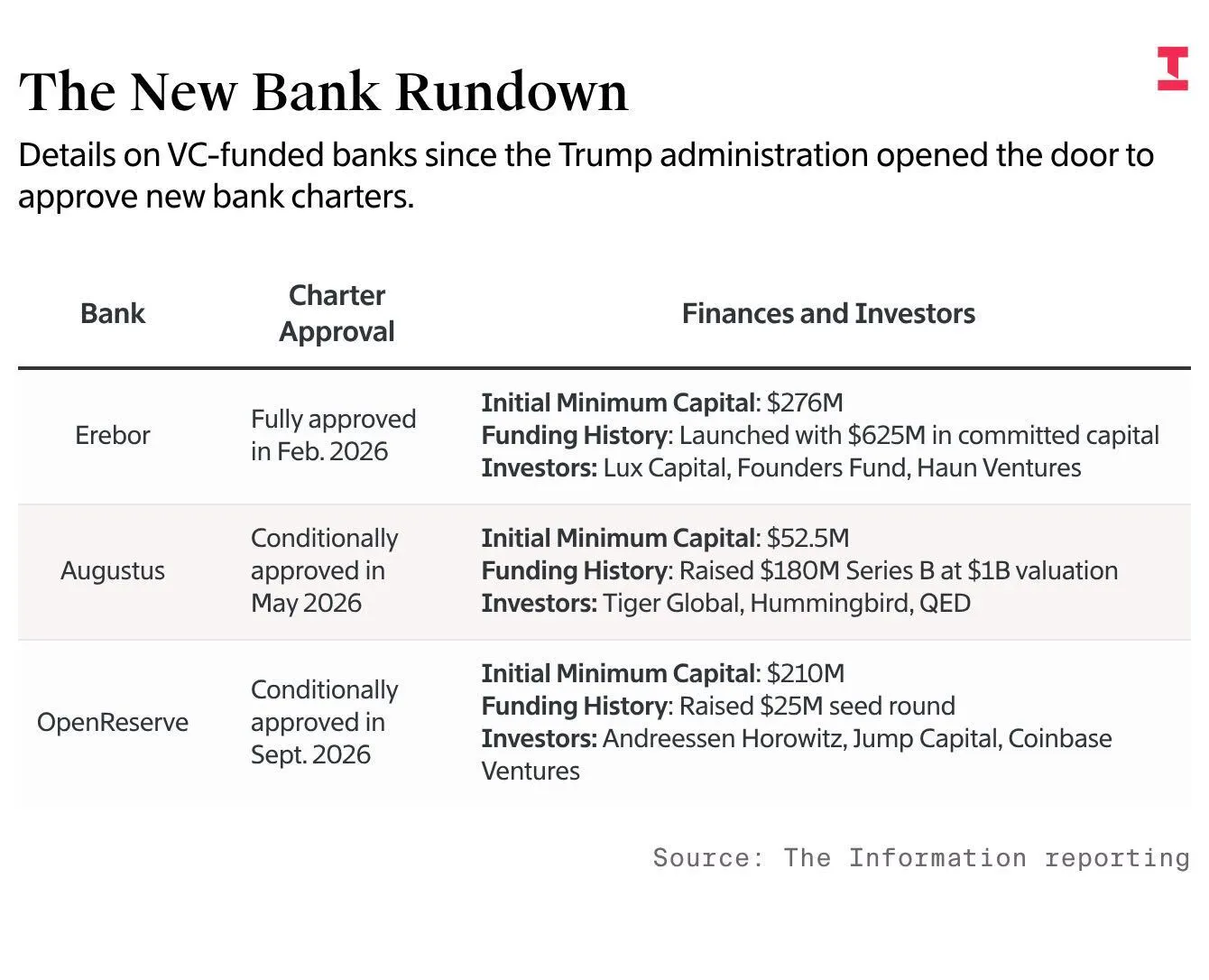
Erebor Bank is set to raise $1.5 billion in a fresh fundraising round at an $8 billion valuation before the investment, after launching with $625 million in committed capital in February. The fundraising comes as the bank has seen its deposits surge to $7 billion as of the end of September, up from $4 billion at the end of the prior quarter.
Meanwhile, Openreserve, an a16z crypto-backed bank that raised $25 million in September, said it expects to announce an additional capital raise to meet its regulatory requirements ahead of its planned opening early next year.
Then there’s Augustus, a startup bank focused on serving fintech companies. It raised $180 million in a Tiger Global Management–led round in July at a $1 billion valuation and expects to open later this year.
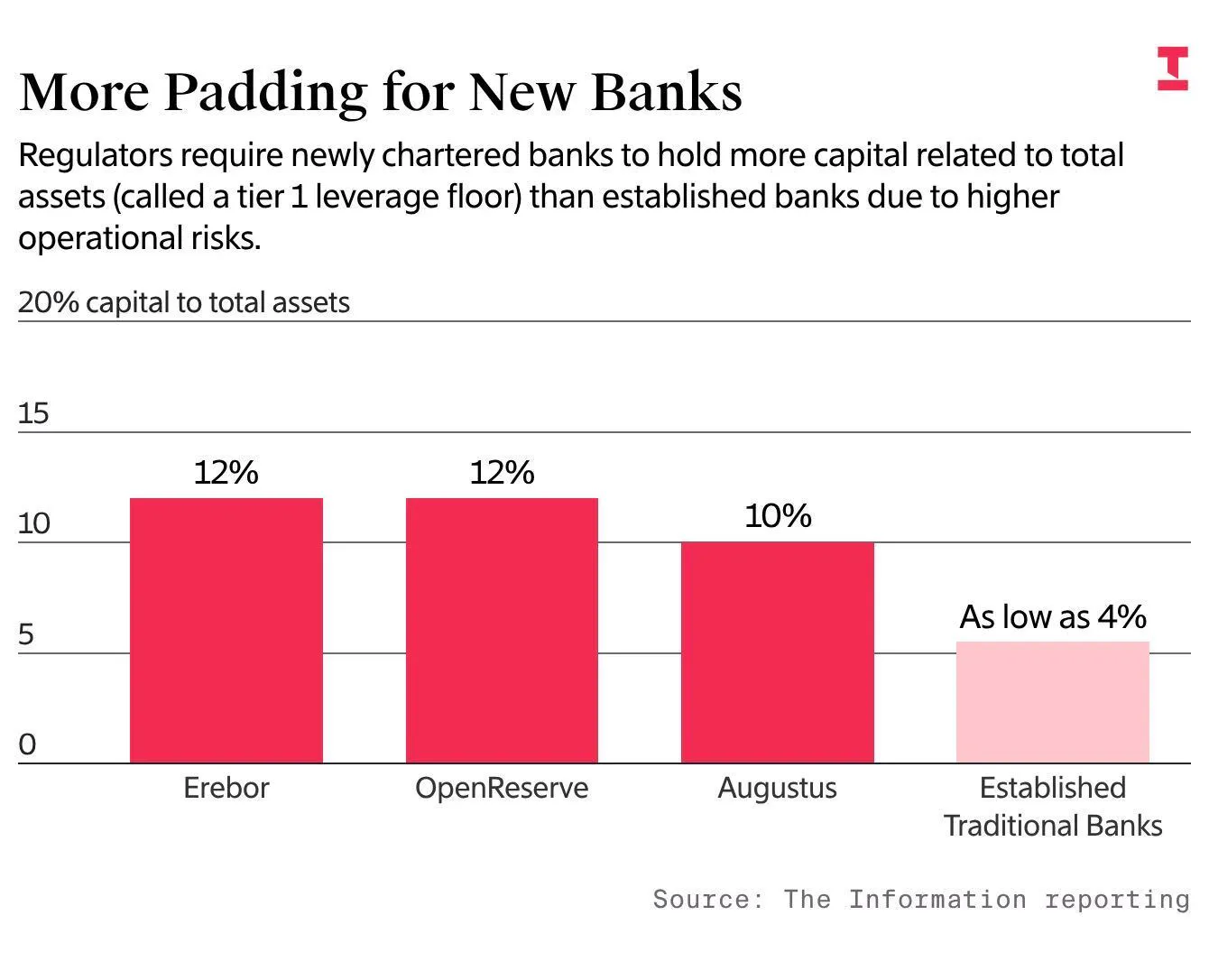
Regulators give capital ratios to each bank based on their assessment of the institution’s business plans and risks. Newly created banks typically face tougher capital requirements than established banks. For the first three years of operation, Erebor and Openreserve must each maintain a minimum tier 1 leverage ratio of 12%, while Augustus faces a 10% minimum. Established banks, by comparison, typically have ratios of between 5% and 6%.
“There’s no question that the regulators treat de novo banks—new banks—differently than they do well-established banks,” according to Brian Graham, a partner and co-founder at consulting firm Klaros Group who advises clients on bank charter applications. Graham noted that the extra capital requirements typically go away after a bank has been operating for three years.
The upstart banks are generally pursuing relatively new business models or focusing on sectors big banks typically avoid. Erebor Bank, for example, has gained traction in areas prioritized by the Trump administration, such as defense startups and crypto firms, and is expanding in geographies traditional banks typically avoid, including Venezuela and Syria.
In addition to making minimum capital requirements, the Federal Deposit Insurance Corp.—a banking regulator—imposed an unusual condition on its approval of Erebor for the deposit insurance program. Under a capital-call provision, Erebor’s investors must contribute additional capital if the bank doesn’t meet its minimum capital requirements, according to a filing. The filing didn’t disclose which investors are required to provide the capital backstop.
In the meantime, upstart banks that are looking to drive revenue growth from lending rather than fees will likely need to tap investors to build their capital.
“To the extent the bank’s business model is reliant materially on the balance sheet for revenue and net income, you’re going to need to raise more capital to drive growth,” Klaros’ Graham said.
Openreserve, for its part, plans to make loans backed by traditional assets and turn them into digital tokens that can trade on blockchain, potentially providing a new source of loans for investors and lenders in the crypto market. For example, it plans to lend businesses money against their trade receivables, turning those assets into digital tokens to make them easier to trade.
“Our ambition is to be the on-chain GSIB,” referring to a globally systemically important bank, said Dee Choubey, founder and CEO of Openreserve. The bank also plans to issue its own stablecoin and to offer tokenized deposits, digital versions of traditional bank accounts that earn interest. Over time, it aims to provide banking and payment services to other digital banks.
Augustus plans to focus on helping fintech, crypto and remittance companies move money across borders using both traditional banking systems and stablecoins. That will put it in competition with existing banks like United Texas Bank, which has become dominant in processing dollar payments for overseas crypto exchanges.
“Whenever someone outside the U.S. touches the dollar through a local bank or local fintech, that always has to be facilitated by a U.S. nationally chartered clearing bank, so we provide that service,” said Augustus CEO Ferdinand Dabitz. In Europe, the bank already counts crypto exchange Kraken among its clients.
Augustus is less focused on activities like lending, however, and has a lower ratio than the other two. The company has raised significantly more than its initial capital requirement, which could lessen the need for more fundraising in the near term. “We are less focused on the credit side as other market participants. We think the clearing side is really where we shine,” Dabitz said.
A song has been stuck on loop in my mind for days now. Yeah, this one.
C’mon, haven’t you heard the big, brassy James Bond theme playing too? We have an honest-to-goodness spy scandal on our hands! That would be the affair over at OpenAI, where the FBI has arrested a former engineer, Abdulrahman Alfozan, for allegedly placing a toilet paper–wrapped recording device in a conference room. Why’d he do it? The Justice Department wasn’t explicit in its press release announcing Alfozan’s arrest, though the statement does make sure to prominently describe him as a “national of the Kingdom of Saudi Arabia,” implying, obviously, that he was hoping to spy on OpenAI for the Saudis.
I expect a not unsizable part of Silicon Valley experienced some schadenfreude when reading about the turn of events at OpenAI. I’d advise against indulging in that feeling, because when I struck up conversations with a few corporate security consultants and surveillance experts over the last few days, they all echoed the same sentiment: Plenty of companies risk ending up in the same situation—especially as they move quickly in today’s era of frenzied, heightened competition. A discomforting thought, eh?
“Organizations can sometimes be moving so fast that they often don’t understand that there’s an issue associated with somebody until that person’s on board and up to no good,” said Bill Priestap, a former head of FBI counterintelligence who now runs his own security consultancy, Trenchcoat Advisors. “Meaning they’re recruiting, and they’re under such pressure to get the right people and get them on board that in many regards, they end up with a minimal understanding of the people they’re bringing on board.” Well, good thing there hasn’t been an enormous, frantic hiring binge lately. Ha ha ha.
If you’re starting to feel a little paranoid, I strongly, strongly advise against talking to someone like David Abbott, a San Francisco private detective, to find out how easy it is to bug an office. Such conversations will only further unnerve you—you might end up holding your next board meeting in your home basement, Tony Soprano style—because according to Abbott, it’s pretty darn easy to install a recording device.
A suitable one can be bought for less than $100. Some of the popular ones resemble phone chargers, which get tucked into a power socket, hidden in plain sight. He’s also seen surveillance devices in fake coffee cups—you know, like the ones that might lie casually around an office—and quite a few in fake smoke alarms.
More bad news: Should you find such a device, it’s like spotting an ant in your kitchen. One ant suggests the presence of more ants. “If I’m doing a bug sweep, just because I find one does not mean there isn’t a second,” said Abbott. “If you find one, there’s going to be two. If you find two, there’s going to be three. You just keep looking.”
What happened at OpenAI underscores Abbott’s warning. There, Alfozan, the alleged spy, did plant two bugs. Well, he tried to do so. Alfozan, not the sort who seems like he would’ve ever earned double 0 status, had placed another bug in a bag that he then mislaid: He reported it missing and had to go pick it up from the company’s lost and found.
OK, if I’ve spooked the heck out of you, I guess I can offer some solace by pointing you in the direction of Eric and Greg Levesque, whose Salt Lake City–based startup, Strider Technologies, has raised $110 million in the last few years to sell AI-powered software to businesses that monitors email and other internal communications, flagging suspicious behavior and possible espionage attempts. (Yes, the company’s name is a reference to Strider from “The Lord of the Rings,” the nom de cloak of Aragorn, the character Viggo Mortensen plays.)
“What we’ve found is that companies are not always dealing with trained intelligence operatives. Like, they’re dealing with scientists or legitimate engineers who have been approached or coerced in some form or fashion and are now working on behalf of someone else,” said Greg Levesque. “They can leave a lot of digital exhaust.”—Abram Brown(abe@theinformation.com)
As the pandemic shut down the world in 2020, Sayre Quevedo, then a producer for The New York Times’ “The Daily” podcast, quit his job and headed out to Los Angeles, hoping for a chance at self-reinvention. To cope with those tumultuous times, he decided to pursue a documentary project, recording every phone call. Had nothing else of import happened in his life, Quevedo might’ve wound up with an intriguing time capsule. But something quite unusual did occur: Just months after moving to LA, he and his twin brother, Connor, happened to finally locate their biological father, whom they’d never before met. He worked as a barber—blocks from where Sayre lived. “Reaching Out,” a new podcast co-produced by NPR station KCRW that won a top prize in the Tribeca Festival’s expanded podcast categories, is a starkly intimate account of their journey to meet him and their reconciliation with each other, their lives and what life might’ve been like if their father hadn’t been a total stranger who happened to be just down the street.—Abram Brown
Chuck Lorre, the indefatigable TV showrunner, writer and producer, has kept the masses laughing for years—and years—and years, with a list of hits that includes “Two and a Half Men,” “The Big Bang Theory” and “Dharma and Greg.” Those are sitcoms, a term Lorre acknowledges once made him practically break out in hives, since it was often used to cheapen what he sees as grueling, high-touch art. With spicy good humor, he reclaims the word in his new memoir about his time in Hollywood, “Sitcom.”
“The truth is, making a live studio audience laugh for twenty-odd minutes every week, for twenty-two weeks, is incredibly hard and unbelievably stressful,” Lorre writes. “If you’re one of those people who insist on labeling all sitcoms as being cheap, juvenile and unsophisticated, well…all I can say is, blow me.”
I’d say “Sitcom” functions as a good primer on managing talent, too, and Lorre attests to having learned the importance of keeping out of the way. “Creativity needs air to breathe,” he writes. To do the opposite risks turning a leader into “one of those plastic bags you get at the dry cleaners that can kill small children.” Lorre also takes the opportunity to set down what he sees as good comedy’s basic tenets and decry the medium’s basest impulse: to write only about stupid people doing stupid things: “A better, perhaps deeper means to achieving laughter involves pain and suffering.”
Such a sentiment is most certainly shared by Larry David of “Seinfeld” and “Curb Your Enthusiasm,” the subject of “Emperor of Nothing,” a biography that won his reluctant cooperation. (When author Blake J. Harris finally wore David down, Harris received a two-line email from him: “Oh Jesus. If we must.”) As with “Sitcom,” “Emperor of Nothing” charts a remarkable rise across Hollywood from an inauspicious start: Lorre was a wannabe musician before his TV run, while David was a little-known stand-up comic with an unremarkable series of TV writing jobs before co-creating “Seinfeld.”
Like Lorre, David describes the process of penning comedy as an arduous affair. And by David’s own telling, the process of sitting down to write a new “Seinfeld” season would bring on full panic. “That always seemed like a daunting prospect,” he recalled. “Especially because all the good ideas were used up the year before.” Fortunately, David had his friendship with the show’s eponymous star, Jerry Seinfeld, one of many people within David’s orbit who gave interviews for “Emperor of Nothing.” “I would always say, ‘All we have to do is write today,’” Seinfeld said. Or as David recalled: “Jerry always talked me off the ledge.”—A.B.
No one does a charming, self-involved cad better than Dominic West, the British character actor who first washed ashore in America as “The Wire”’s Detective McNulty and then again in Showtime’s “The Affair” and in the final two seasons of “The Crown” as Prince Charles. In “War,” HBO’s new high-tension legal drama, he’s tech billionaire Morgan Henderson, a fellow championing a safer, more responsible social media—while embroiled in an increasingly messy divorce from his Hollywood star wife, Carla (Sienna Miller). Much of that mess is Morgan’s own doing: He looks wonderful in his Savile Row trousers—he just has trouble keeping them on. As Morgan and Carla gird for an extended battle, they assemble a posse of cutthroat attorneys, who find their impulsive clients constantly upending their carefully laid strategies. That flock of legal eagles includes a handsome rogue, Johnny (Archie Renaux), a lad from working-class south London who sees a chance to ascend by, uh, redefining zealous representation. Backstabbing and double crosses abound.—A.B.
That's right: If a business uses Meta for any commercial purpose, Meta's new terms say it can do almost anything it wants with content from that business's website, like feeding it to Muse.
YouTube is reportedly planning to launch audiobooks for its Premium subscribers.
Audiobooks could arrive for the platform's ad-free $16 subscription plan in 2027 if this goes without a hitch for Google/YouTube.
YouTube would run into competition with the likes of Spotify (audiobooks arrived in 2023) and Audible.
Audiobook-enjoyers might have something to celebrate on YouTube. There are rumors that the platform is looking to enter a new market for its Premium subscribers.
A post by the Wall Street Journal (paywalled) highlighted rumors that YouTube Premium could soon offer audiobooks in one of its subscription plans (via GSMArena). Supposedly, Google has been "talking with publishers" about bringing audiobooks onto the platform in 2027.
Early reports allege YouTube Premium would offer audiobooks in its ad-free plan, which currently runs consumers $16 a month. What's interesting is that this could solve an issue: piracy. GoodEReader brought this up in its coverage, highlighting data that shows "45% of listeners" consume "audiobooks" on YouTube. The air quotes (and literal quotes) are warranted here, as the publication states these are AI-narrated, not authentic.
Audiobooks in YouTube Premium would give users the best experience possible, away from false creations. However, it's worth remembering that these are rumors, and nothing's been confirmed by YouTube yet.
YouTube's branching out
(Image credit: Chris Wedel/Android Central)
Android Central's Take
This is one of those things where you can associate a product or a feature or a form of entertainment with the name. If I think Spotify, I think music. If I think Audible, I think audiobooks. When I think of YouTube... I do not think about audiobooks (nevermind the fact that I prefer reading over an audiobook). I wonder how large of a market there is for YouTube. But I guess there must be if there's a piracy problem, and they're using AI voices. Crazy.
Many should be well-acquainted with Audible's audiobook offerings. In recent history, Spotify has joined that market, taking the fight directly to Audible with over 200,000 "free" titles. That was how it all started, anyway. When audiobooks launched for Spotify Premium in 2023, the platform gave its subscribers in the U.S. and the U.K. 15 hours of listening per month.
After you exceeded your limit, you could pay an additional $12.99 to get 10 more hours "or buy them a la carte." Spotify's library exceeded that initial 200,000 for Premium subscribers. But if you wanted more, you'd have to buy them individually. Spotify then launched its "Audiobook Access" tier for $9.99, giving users the same 15 hours of listening per month deal.
It goes without saying that YouTube will have its work cut out for it by stepping into this new world.
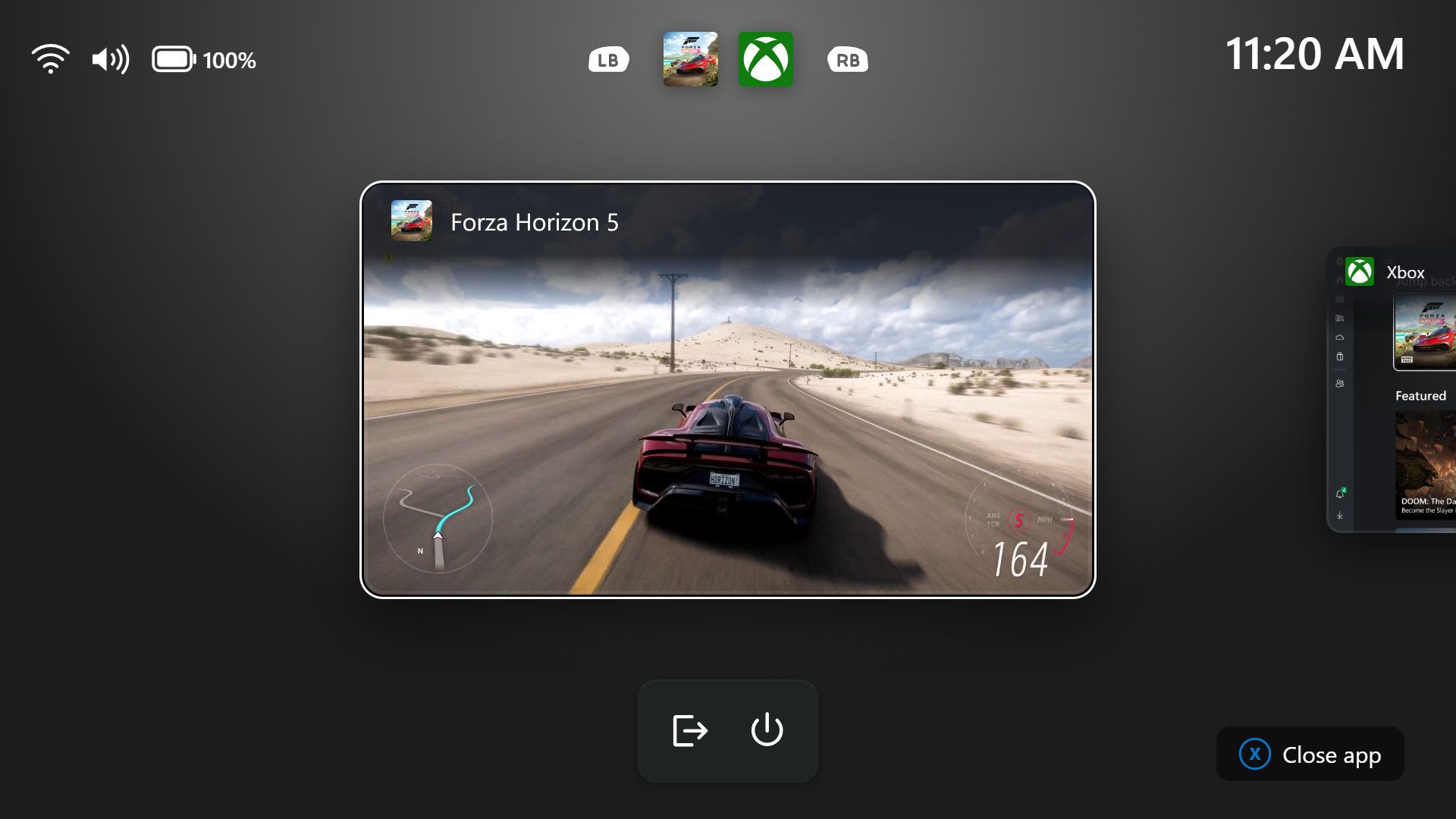
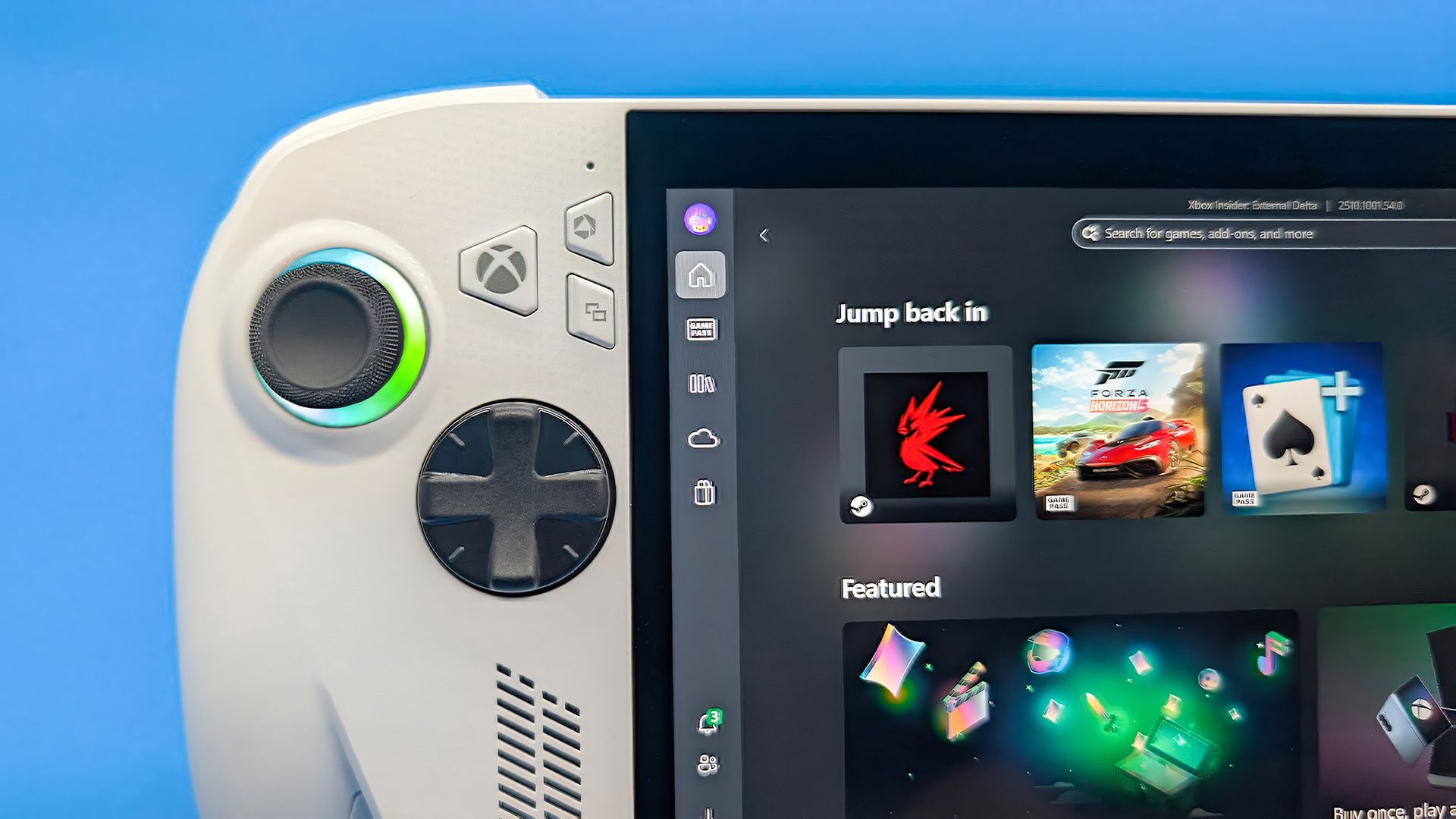
Windows 11 has a new Gaming Task View for XBOX mode that helps users hop back to the desktop or adjust power options for a device. That feature is now in testing among Windows Insiders.
Microsoft released builds in every Windows Insider channel to wrap up the week. I've listed all the changes below except those exclusive to the Release Preview channel since those features have largely been in testing before today.
While the update to XBOX mode is the headline feature of these builds, there are several other welcome changes. For example, Windows Hello can now temporarily brighten your screen to help you sign in when in a dark room.
Gaming (Beta, Experimental)
Gaming Task View has a new navigation bar that makes it easier to exit to desktop and edit power options. (Image credit: Microsoft)
We're introducing a refreshed Gaming Task View experience in XBOX mode, featuring a new navigation bar that provides quick access to Exit to Desktop and Power Options. This update makes key system actions easier to access while gaming.
Magnifier (Beta)
Magnifier now understands each of your displays
More and more of the work people do happens across more than one screen. You draft on one display and keep source material open on another. You fill in a form while a reference document sits beside it. Those extra displays can be more helpful when each one can do its own job, and now Magnifier supports exactly that.
To use this update, set your monitors to Extend in System > Display, not Duplicate, so Windows treats each screen as its own space.
Every screen keeps its own view at its own zoom. In earlier versions of Magnifier, zooming in stretched a single magnified view across all of your displays, so one screen's zoom followed you everywhere and screen edges blurred together. With this update, each monitor's boundary is respected, and each monitor can have its own zoom percentage. Your writing screen can be at 300% while your reference screen stays at 150%, and the magnified view no longer spills from one display into the next. This behavior matters because different tasks and screen resolutions often require different levels of magnification to remain comfortable to read.
Setting the zoom on each screen is easy. Choose whichever method feels natural:
Move your mouse pointer onto the screen you want to adjust, then press Windows key + Plus (+) or Windows key + Minus (-), or hold Ctrl + Alt and rotate your mouse wheel.
Set the percentages directly in Accessibility > Magnifier.
Drag the Magnifier toolbar onto a specific screen to adjust that screen from its on-screen controls.
Per-monitor zoom is turned on by default. If you prefer the classic behavior where a single zoom spans all of your displays, you can turn per-monitor zoom off at any time from either the Magnifier toolbar or Accessibility > Magnifier. You can turn it back on whenever you like.
Keep the view that matters, right where you need it
As you move your mouse from screen to screen, the magnified view naturally follows your pointer. Sometimes this might cause you to lose sight of the content that you're actively working on.
Viewport locking keeps that view in place. For example, you might be drafting an email based on a section of a document open on another display. Position that display so the paragraph you need is in view, press Ctrl + Windows key + K, and the screen holds its view steady while you move your cursor over to write. The locked screen stays fully live and interactive, so you can glance back, click, or copy from it whenever you need to, and its view stays put until you release it.
A message appears on the screen when it's locked, so you always know what's being held. To lock or unlock a screen, point your mouse at that screen and press Ctrl + Windows key + K again. To release everything at once, press Windows key + Esc to dismiss all locks. You can change the lock shortcut to Ctrl + Alt + P in Accessibility > Magnifier.
Settings - Home (Beta)
We're beginning to expand the new Device Info Card experience for Settings Home to additional markets globally. Available for Windows Insiders signed in with their Microsoft account, the Device Info Card provides a quick snapshot of your PC's key specifications and usage. From the card, you can go directly to Settings > System > About to see more detailed information about your PC.
The improved Privacy & security page in Windows Settings helps you find the Camera, Microphone, and Location privacy controls more easily. It groups similar controls across the page and brings usage information from deeper linked pages onto this page.
File Explorer (Beta)
Key file information, such as name, location, and date, now appears in a consistent layout on the File Explorer search results page, making search results easier to scan.
File Explorer (Experimental)
Improved responsiveness of folder views so they update and sort correctly when files and folders are added or renamed.
Family Safety (Beta, Beta (26H1), Experimental (26H1))
Improved family safety messaging when applications are blocked because of age-restricted parental controls.
Other (Beta, Experimental)
Improved shutdown reliability, reducing the chance of a hang on shutdown in certain cases.
The dialog for certain system messages, like low battery and permissions, should use the expected modern design again.
Other (Beta (26H1), Experimental (26H1))
Fixed an issue with msmpeg2ac3dec.dll which was leading to some apps and games crashing recently.
Web sign-in (Experimental)
Web sign-in now works on Microsoft Entra hybrid joined devices. Before this update, it was only available on Microsoft Entra joined devices. You can sign in to Windows at the lock screen with a passwordless credential: a FIDO2 security key, a passkey on your phone, or a Temporary Access Pass (TAP). You don't need a password. Once you're signed in, Windows gets a Kerberos ticket, so on-premises file shares and internal sites keep working. For more information, see Use web sign-in to enable passwordless sign-in in Windows.
Windows Hello (Experimental)
Windows Hello facial recognition can temporarily brighten your screen to help you sign in when you're in a dark or dimly lit room.
To turn on this feature, go to Settings > Accounts > Sign-in options > Facial recognition (Windows Hello) and turn on Automatically adjust screen brightness during face recognition.
Windows Search (Experimental)
Addressed underlying issues that could cause search to appear missing or stop working after the previous update, including if you rapidly clicked the search icon repeatedly.
Search (Experimental (26H1))
Search home has been simplified to reduce visual clutter and make it easier to get back to recent searches quickly.
Search does a better job showing where a result comes from, whether it's an app, setting, file, web result, or Store suggestion, so it's easier to tell what you're looking at and where you'll go before you click.
A new setting in Settings > Privacy & security > Search lets you choose whether web and Microsoft Store suggestions appear alongside local results.
Run (Experimental)
Improved the window position when using an Arabic or Hebrew display language.
Improved performance of the Run dialog when navigating to very large folders.
Fixed an issue where your text might unexpectedly disappear if you started typing too quickly after opening Run.
Made a few other small visual fixes and refinements.
Pointer Indicator (Experimental (26H1))
We're introducing the Pointer Indicator accessibility setting. This feature enables Windows users with low vision to easily locate and use their cursor to increase productivity and efficiency when using a Windows device.
To enable this experience, go to Settings > Accessibility > Mouse pointer and touch, and enable the Pointer indicator setting. You can also search for the setting by name. When the setting is enabled, you can toggle it on or off with the keyboard shortcut, Windows logo key + Ctrl + Shift + X.
Live Captions (Experimental (26H1))
We're improving Live Captions with a new Include Screen Reader audio setting, which is off by default. With the setting off, Live Captions won't transcribe audio from screen readers such as Narrator, JAWS, and NVDA, keeping captions focused on microphone and system audio.
Taskbar
New! This update improves animations of app window previews when you move the mouse across app icons in the taskbar.
This update improves the underlying state persistence of taskbar settings related to multiple monitors across monitor connections and disconnections.
Since revamping the Windows Insider Program earlier this year, Microsoft has sped up its release schedule for builds. As a result, we often end the week with a batch of five or six new builds to check out.
Join us on Reddit at r/WindowsCentral to share your insights and discuss our latest news, reviews, and more.

 Login
Login