❌

Normal view

Forget Sony and Bose — Jabra's Evolve3 85 is my new meeting headset

If you need a headset to use at work, Bose's QuietComfort Ultra Gen II and the Sony WH-1000XM6 are undoubtedly good choices. I prefer the Bose because of its comfort and sound quality, and it is the headset I use while traveling.

But I found out recently that there is a better choice: Jabra's Evolve3 85. It is positioned as a work headset, but it does so much more; I used it for the better part of three months now, and I'm convinced that it is better than what Bose and Sony have to offer. Coming in at $475, it is on the higher end of the scale, but it has meaningful advantages over its immediate rivals.

Jabra Evolve3 85 review on Android Central

(Image credit: Apoorva Bhardwaj / Android Central)

Let's start with the design. The Evolve3 85 is the lightest headset in its category at 220g, and I immediately noticed the difference. Bose and Sony's headsets are at least 30g heavier, and switching between the QC Ultra Gen II and the Evolve3 85, it's clear that Jabra nailed the comfort. The lightweight design ensures you get a fit that doesn't lead to any fatigue even with all-day use.

The ear cushions have a breathable design, and that extends to the headband as well. Build quality is great, and while it is light, you never get a feeling that it is flimsy — it's built to last. Another positive is the case; the headset folds flat and fits snugly into the bundled case, which is significantly smaller than what you get with Bose and Sony. This is a big deal in and of itself, as the Evolve3 85 doesn't take up anywhere as much room in your bag.

Jabra Evolve3 85 review on Android Central
Apoorva Bhardwaj / Android Central
Jabra Evolve3 85 review on Android Central
Apoorva Bhardwaj / Android Central
Jabra Evolve3 85 review on Android Central
Apoorva Bhardwaj / Android Central
Jabra Evolve3 85 review on Android Central
Apoorva Bhardwaj / Android Central

I also like the connectivity on offer. The Evolve3 85 uses Bluetooth 5.3, and I didn't see any issues pairing the headset with my Pixel 11 Pro XL, Find X9 Ultra, X9 Pro, Galaxy Z Fold 8 Ultra, iPhone 17 Pro, or the iPad Pro M4. It has Fast Pair, so it's about as easy to connect it to an Android device. There's also USB-C and 3.5mm connectivity if you want to plug the headset in, and my favorite inclusion is a USB-C receiver that lets me use the headset with my Windows machine.

I don't like using Bluetooth with Windows; my Gigabyte motherboard has a Bluetooth modem that's built clearly as an afterthought, because it is flaky at the best of times. As such, the convenience of being able to use a receiver to connect the headset with Windows is just great, and I like that Jabra went with USB-C. You also get USB-C and 3.5mm cables in the box, and I like the attention to detail that the brand lavished when it comes to connectivity.

Jabra Evolve3 85 review on Android Central
Apoorva Bhardwaj / Android Central
Jabra Evolve3 85 review on Android Central
Apoorva Bhardwaj / Android Central
Jabra Evolve3 85 review on Android Central
Apoorva Bhardwaj / Android Central
Jabra Evolve3 85 review on Android Central
Apoorva Bhardwaj / Android Central

Connectivity is a big part of what makes a work-related headset stand out, and the Evolve3 85 excels in this area. Oh, and you can easily change the battery itself, should you need to down the line. I like tech that's built to last, and given that batteries tend to degrade over time, they're usually the biggest point of failure in a headset, so it's good to see Jabra addressing the issue.

There are other niceties as well; Jabra's ClearVoice does a good job tuning out ambient noises when you're talking, and it holds up astonishingly well. I use NVIDIA Broadcast to do the same, but ClearVoice is a good enough alternative. On that note, it has dedicated ANC as well, and it does an effective job blocking sounds in your surroundings if you're in a meeting or outdoors. The headset pairs with whichever digital assistant you use on your phone, and there are physical controls.

Jabra Evolve3 85 review on Android Central
Apoorva Bhardwaj / Android Central
Jabra Evolve3 85 review on Android Central
Apoorva Bhardwaj / Android Central
Jabra Evolve3 85 review on Android Central
Apoorva Bhardwaj / Android Central
Jabra Evolve3 85 review on Android Central
Apoorva Bhardwaj / Android Central

Sound quality is pretty good, too. Honestly, given how much Jabra positioned this as a work headset, I didn't think it would sound as good as its rivals, but the 32mm drivers do a great job. You get a detailed sound with plenty of bass, clean mids, and a tight treble. It's obviously built for meetings, but the headset is just as effective at extended music listening sessions. In fact, the only problem is that you don't get AptX codecs — it is limited to SBC and AAC.

Another thing Jabra does well is charging tech; the Evolve3 85 includes wireless charging, and I didn't realize just how convenient this is until I used the headset — I now want all of my Bluetooth headsets to have this as standard. There's fast charging too, with a 5-minute charge delivering five hours of power. The headset lasts well over 23 hours of meetings, with regular music listening at 60 hours — double that of Bose and Sony. Basically, you'll only need to charge it once a week even if you use it all day.

Jabra Evolve3 85 review on Android Central

(Image credit: Apoorva Bhardwaj / Android Central)

You get six mics in total, and they use MEMS solid-state tech, delivering better fidelity and low distortion. I attended dozens of meetings with the Evolve3 85 over Google Meet, Zoom, and Microsoft Teams, and the headset did a brilliant job.

While the Evolve3 85 is targeted as a work headset, it is just as great to listen to music or podcasts, and the lightweight design combined with all the extra features gives it a unique advantage you just don't see in this category.

Jabra Evolve3 85 headset render

Jabra
Evolve3 85

With a highly comfortable design, great sound quality, and unique features designed for meetings, the Evolve3 85 is the best work headset around.

Apples Game-Controller werden die Beats-Marke tragen

16 September 2026 at 09:00

Vor einigen Wochen deuteten Hinweise im Code des Release Candidate von macOS 26.7 auf die bevorstehende Markteinführung von zwei Spielecontrollern hin. (Darin fanden sich auch Hinweise auf eine Reihe von Airpods mit Kamera, doch das ist eine andere Geschichte.) Ein neuer Bericht liefert nun weitere Details zu den Markteinführungsplänen für diese Produkte.

In der neuesten Ausgabe seines „Power On“-Newsletters bestätigt der Bloomberg-Reporter Mark Gurman, dass Apple tatsächlich „seit etwas mehr als einem Jahr“ an diesem iPhone-Gaming-Zubehör arbeitet und bestrebt ist, in einen Markt einzusteigen, den das Unternehmen als lukrativ ansieht. Er nennt hierfür keine Quellen, sondern sagt lediglich: „Das ist, was ich weiß.“ Doch Gurmans Quellen sind in der Regel zuverlässig, wie man an der Genauigkeit seiner kurz vor dem Launch-Event in der vergangenen Woche veröffentlichten Informationen zum „iPhone Duo“ erkennen kann.

Der „interessante Teil“ von Gurmans neuem Bericht (seine Worte, nicht unsere) ist, dass die Spielecontroller derzeit entwickelt werden und – sofern sie auf den Markt kommen – wahrscheinlich unter der Marke „Beats“ statt unter der von Apple erscheinen werden.

„Das Unternehmen nutzt Beats zunehmend als Möglichkeit, mit neuen Produktkategorien zu experimentieren und vom Markt für Zubehör von Drittanbietern zu profitieren, ohne bestimmte Produkttypen unter der eher im Premiumsegment angesiedelten Marke Apple zu führen“, erklärt er.

Das, so argumentiert er, sei ein kluger Schachzug bei der Entwicklung von Gaming-Produkten. Ein Game-Controller für das iPhone müsste relativ erschwinglich sein, um ein breites Publikum zu erreichen. Doch wie wir beim „Staunen und Strahlen“-Event letzte Woche gesehen haben, platziert Apple Geräte unter seiner eigenen Marke eher im Premiumsegment.

Ein Blick auf den Beats-Bereich der Apple-Website verdeutlicht diesen Ansatz. Die günstigsten kabellosen Ohrhörer der Marke Apple, die Sie kaufen können, sind die Airpods 5 für 149 Euro, während das günstigste Beats-Pendant die Beats Solo Buds für 90 Euro sind. Ebenso kosten die Airpods Max 2 579 Euro, während die in ihren Funktionen vergleichbaren Beats Studio Pro für 400 Euro erhältlich sind.

Die Entscheidung für die Marke „Beats“ sei auch aus kultureller und Lifestyle-Perspektive sinnvoll, behauptet Gurman. „Beats“ sei eine jüngere und insgesamt angesagtere Marke. Apple hingegen „versteht Gaming anscheinend nicht wirklich“. Beats hat außerdem eine lange Geschichte der Android-Unterstützung und würde so den „Apple-Muff“ vermeiden, der Apple-Geräten außerhalb der Apple-Fanbase häufig nachgesagt wird.

Wir möchten betonen, dass Gurman lediglich behauptet, Apple arbeite derzeit und habe bereits in der Vergangenheit an Controllern für das iPhone gearbeitet, und es gibt keine Garantie dafür, dass diese Produkte jemals auf den Markt kommen werden. Sollte dies jedoch der Fall sein, ist er zuversichtlich, dass sie ein „b“ statt eines angebissenen Apfels tragen werden.

iPhone schneller und akkuschonender laden: Intelligentes Ladegerät bei Amazon zum Tiefstpreis

15 September 2026 at 12:29

-30 %

Smartes 45-Watt-Ladegerät zum Amazon-Tiefstpreis

Nur 27,98 Euro statt 39,99 Euro UVP

Viele Hersteller, auch Apple, legen ihrem Smartphone kein Netzteil mehr bei. Deshalb ist es wichtig, dass Sie das richtige kaufen. Kompakte GaN-Modelle beispielsweise eignen sich dabei nicht nur für Handys, sondern können je nach Leistungsbedarf auch Tablets, Smartwatches und kleinere Notebooks versorgen.

Das Anker Nano USB-C-Ladegerät mit 45 Watt und Smart Display ist bei Amazon aktuell für nur 27,98 Euro erhältlich. Gegenüber der unverbindlichen Preisempfehlung von 39,99 Euro sparen Sie 30 Prozent. Damit liegt das Netzteil auf seinem bisherigen Tiefstpreis. Ähnlich günstig (nur einen Cent teurer), war es zuletzt Mitte August, in der Zwischenseit stieg der Preis auf 34 Euro bis UVP an.

Der Angebotspreis gilt für alle vier Farben: Schwarz, Weiß, Blau und Orange.

Was das Anker Nano USB-C-Ladegerät mit 45 Watt zu bieten hat

Das Ladegerät stellt über seinen einzelnen USB-C-Anschluss bis zu 45 Watt bereit. Ein intelligentes dreistufiges System soll die abgegebene Leistung in Echtzeit an das verbundene Gerät anpassen. Laut Anker lässt sich ein iPhone 17 Pro damit innerhalb von 20 Minuten von 0 auf 50 Prozent laden. Dieser Wert basiert allerdings auf internen Labortests, sodass die tatsächliche Ladezeit unter anderem von Gerät, Temperatur und Nutzung abhängen kann.

Eine Besonderheit ist die automatische Erkennung aktueller Apple‑Geräte. Das Ladegerät erkennt nach Angaben des Herstellers die iPhone-17-, iPhone-16- und iPhone-15-Serie sowie verschiedene iPad-Pro-Modelle. Unterstützt werden das iPad Pro 11 Zoll aus den Jahren 2020–2024, das iPad Pro 12,9 Zoll aus den Jahren 2020-2022 sowie das iPad Pro 13 Zoll von 2024.

Andere Geräte wie Samsung-Smartphones, Macbooks, Apple Watches oder Airpods können Sie grundsätzlich ebenfalls laden. Die intelligente Erkennung und die angepasste Anzeige stehen jedoch nur bei den ausdrücklich kompatiblen Modellen zur Verfügung.

Auf dem integrierten Display können Sie unter anderem die aktuelle Ladeleistung, die Temperatur und den Ladestatus ablesen. Ergänzend zeigt das Netzteil kleine Animationen an. Das Display können Sie passend zur Ausrichtung des Ladegeräts drehen. Dazu muss die entsprechende Bedienfläche laut Anker zwei Sekunden lang gedrückt werden.

Für das Laden über Nacht besitzt das Netzteil einen TÜV-zertifizierten Schonmodus, den Anker als Care Mode bezeichnet. Er wird durch doppeltes Antippen aktiviert und soll die Wärmeentwicklung reduzieren. Anker spricht davon, dass das Ladegerät bis zu 20 Grad Celsius und der Akku des angeschlossenen Geräts bis zu 5 Grad Celsius kühler bleiben können.

Warum sich das Angebot lohnt

Mit 27,99 Euro erreicht das smarte Anker Nano erneut seinen bisherigen Tiefstpreis. Interessant ist das Modell vor allem für Nutzer aktueller iPhones und iPads, die ein kompaktes Ladegerät mit Leistungsanzeige und zusätzlichem Schonmodus suchen. Auch die Auswahl aus vier Farben ist ungewöhnlich, da Netzteile häufig nur in Schwarz oder Weiß angeboten werden.

Bei Amazon kommt das Modell auf 4,7 von 5 Sternen bei über2.000 Bewertungen. Mehr als 1.000 Modelle wurden im vergangenen Monat gekauft, zudem wird das Ladegerät als “Amazons Tipp” geführt. Nutzer loben vor allem die Verarbeitung, das kompakte Gehäuse, die Ladegeschwindigkeit und das gut ablesbare Display. Auch die auf Apple-Geräte zugeschnittenen Funktionen werden positiv bewertet.

Beim Preis gehen die Meinungen dagegen auseinander, was angesichts der regulären UVP von knapp 40 Euro nachvollziehbar ist.

Weniger geeignet ist das Modell für Nutzer, die mehrere Geräte gleichzeitig laden möchten, da nur ein USB-C-Anschluss vorhanden ist. Auch Besitzer älterer Geräte mit Lightning-Anschluss profitieren möglicherweise nicht von der automatischen Erkennung und der Displayanzeige. Hinzu kommt, dass kein Kabel mitgeliefert wird – dies müssen Sie also zusätzlich kaufen.

BMX's GaNsta 140W may just be the 4-port GaN travel charger you need

It was when I started running out of storage boxes that I realized I may have too many GaN chargers. I joke that if you casually throw a GaN charger in my home, you're bound to hit another one. Anyway, I have dozens of these things lying around, and having tested just about every major charger released in the last three years, I know what a good charger needs to offer.

So when I got started with the BMX GaNsta 140W (as puns go, the name gets an 8/10), it was clear that the charger ticked a lot of the right boxes. It has three USB-C ports, a USB-A port, foldable blade pins with EU, UK, and AU converters that make it easy to travel with, and 140W power over USB PD 3.1.

BMX GaNsta 140W GaN charger testing

(Image credit: Apoorva Bhardwaj / Android Central)

Oh, and it gets an LCD panel that shows real-time charging details out of each port, which is a must-have in a GaN charger in 2026. The GaNsta costs $89 as of writing, which is $10 pricier than Anker's charger, and $30 more than the last-gen 160W UGREEN Nexode Pro, both of which also have LCD screens.

The GaNsta is a little smaller than other 4-port chargers, but not enough that you'd notice the difference. Build quality is decent, and I didn't see any issues in the two months I used it. I tested the charger with my Find X9 Ultra, Pixel 11 Pro XL, iPhone 17 Pro, iPad Pro M4, and a dozen or so accessories — including 160W power banks — and it turned out to be reliable in day-to-day use.

BMX GaNsta 140W GaN charger testing
Apoorva Bhardwaj / Android Central
BMX GaNsta 140W GaN charger testing
Apoorva Bhardwaj / Android Central
BMX GaNsta 140W GaN charger testing
Apoorva Bhardwaj / Android Central
BMX GaNsta 140W GaN charger testing
Apoorva Bhardwaj / Android Central

I like that each port's power output is clearly labeled, and it takes a lot of the guesswork out of figuring out which port to use. The USB-C1 and C2 ports individually go up to 140W over the USB PD 3.1 protocol, and I tested this using a standalone power meter (Power-Z KM003C). I also like that the area around the ports has a slotted design to prevent scratches; this is a thoughtful design choice that makes a difference.

BMX GaNsta 140W GaN charger testing
Apoorva Bhardwaj / Android Central
BMX GaNsta 140W GaN charger testing
Apoorva Bhardwaj / Android Central
BMX GaNsta 140W GaN charger testing
Apoorva Bhardwaj / Android Central
BMX GaNsta 140W GaN charger testing
Apoorva Bhardwaj / Android Central
BMX GaNsta 140W GaN charger testing
Apoorva Bhardwaj / Android Central

The LCD screen is the real star of the show. It shows real-time charging details, power going out of each port, and heat levels. The latter isn't quite as useful as you don't normally see thermal issues on a 140W charger, but it's there. And as AI needs to be shoehorned into every product these days, this thermal management feature is assisted by AI (however that works). Anyway, what you need to know is that even with all ports in use, the GaNsta doesn't have any issues with overheating.

You also get emoticons on the panel, and you can easily cycle through the various menus via the button at the bottom.

BMX GaNsta 140W GaN charger testing

(Image credit: Apoorva Bhardwaj / Android Central)

With four ports available, you get the ability to charge four devices at once. Of course, the total power budget is limited when all ports are in use, and with the GaNsta, you get 125W cumulatively: 65W + 45W + 7.5W + 7.5W. I would've liked to see 65W on both the C1 and C2 ports — like the latest Nexode Pro 160W charger — but that isn't the case.

That said, if you're just going to leave four devices to charge overnight, the GaNsta 140W does a decent enough job. The inclusion of a USB-C to USB-C cable along with travel plugs is a good move, and the size of the charger means you can easily throw it into a travel bag. What I'm not too sure about is the pricing; it is costlier than its rivals, and if you're willing to shell out $89, the new Nexode Pro 160W is a better deal at $99 as it has a retractable cable. If you don't need the built-in cable and like the travel-related accessories, the GaNsta 140W is a good choice.

iScreenBar, The First Monitor Light Bar Designed Exclusively for iMac

15 September 2026 at 10:08

Macworld

Better Eye Comfort for iMac Users

iMac light bar saves desk space, illuminating your workspace

If you’ve ever worked at your iMac after dark, you know the frustration of a desk lamp that throws light in the wrong direction—glaring off your screen, leaving your keyboard in shadow, and eating up desk space you don’t have to spare. iMac users deserve better, and now they have it.

In 2017, BenQ created the world’s first monitor light bar with ScreenBar®, establishing an entirely new lighting category built on a simple idea: light your desk, not your screen. Since then, BenQ has led the category through science-backed optical innovation and award-winning design. iScreenBar brings that pedigree to iMac, in a form built specifically—and exclusively—for it.

BenQ iScreenBar iMac Desk Man

BenQ

Designed to match Your iMac

iScreenBar isn’t adapted to fit an iMac; it’s engineered around one. The body is precision-machined from a single block of aluminum and paired with a refined glass touch surface, giving it the same seamless, premium finish as the iMac it sits on.

A magnetic clip—compatible with 2021 and later iMac models—creates a secure, tool-free attachment, while integrated magnetic cable management routes the power cord neatly without ever covering the Apple logo.

The frontless structure keeps the FaceTime camera fully unobstructed, and oval acoustic openings are precisely positioned to preserve the built-in microphones and speakers, so nothing about your iMac’s design or performance is compromised.

The result is innovative design in in three colorways—silver, green, and blue—designed to complement different iMac setups.

BenQ iScreenBar Light Shine

BenQ

Lighting engineered for screens

At the core of iScreenBar is its 3rd-generation ASYM-Light™ optical system, which delivers over 1000 lx of balanced illumination while precisely directing light onto your desk rather than your screen or eyes.

A calibrated cutoff angle minimizes reflections and glare, so your display stays completely clean even at full brightness. Illumination spreads evenly across a generous 85×50 cm area at 500 lux—and up to 115×50 cm at 300 lux—eliminating the dark patches and hot spots typical of a standard lamp.

Color accuracy matters too: with Rf > 96 color fidelity and a spectrum close to natural daylight, iScreenBar reveals true-to-life color on everything from sketches to sticky notes, and stepless brightness control lets you dial in anything from a warm 2700K to a crisp 6500K depending on the task and time of day.

BenQ iScreenBar desk 1

BenQ

Smart features that work automatically

iScreenBar responds to you rather than just lighting your desk. Its 24GHz millimeter-wave radar motion sensor detects your presence with precision, automatically illuminating your workspace the moment you sit down, and switching off after a few minutes of inactivity to save power. A built-in ambient light sensor continuously reads your surroundings, auto-dimming to maintain a comfortable 500 lx no matter how the room’s lighting shifts throughout the day.

For video calls, a dedicated Video Call Mode intelligently dims the center light while softly brightening the sides, producing natural, flattering illumination without harsh lens flare—so you always look your best on camera.

Seamless macOS integration

A dedicated BenQ iScreenBar app puts full control directly on your iMac. Power Sync automatically turns the light on when your iMac wakes, so it’s ready before you are. It automatically switches to Video Call Lighting mode the instant your camera activates and lets you save personalized lighting profiles for different apps and activities—one setting for focused work, another for evening browsing, another for calls.

BenQ iScreenBar RedDot

BenQ

Built exclusively for the way you work

From its magnetic, cable-managed mount to its radar-sensing automation and daylight-accurate optics, iScreenBar represents a light bar built with a single purpose: to work in perfect harmony with your iMac. It’s not a general-purpose accessory—it’s the lighting solution iMac users have been missing, built by the company that invented the category.

The BenQ iScreenBar for iMac is priced at $189.

To celebrate the launch, BenQ is inviting you to share what you consider a Perfect Match in your life for a chance to win an iMac + iScreenBar. Enter now and share your ideas!

Razer Reclusa X Mini 65% review: A surprising $49.99 enthusiast gaming keyboard that nails the basics

Razer is on a tear this year for gaming keyboards ranging from a new Huntsman low-profile to the $499 Huntsman Signature Edition and a few in between like the new-fangled $139 Razer Huntsman V3 HE Magnetic.

But Razer is known for its top-tier and expensive gaming accessories, which makes this new Razer Reclusa X Mini 65% such an intriguing addition, as it's only $49.99.

Even my jaw dropped a bit when I was getting briefed on it, as very few Razer products hit below $50, especially when not on sale.

Of course, the $49.99 question is it any good? To be fair, I'm a bit biased against 65% keyboards (I miss my media keys), but I've spent the last 10 days using it, and let's just say the price wasn't the only surprise.

Let's get into the pros, cons, and who this is for.

Razer had no input, nor did it see the contents of this review, prior to publication.

Razer Reclusa X Mini 65%: Price and specifications

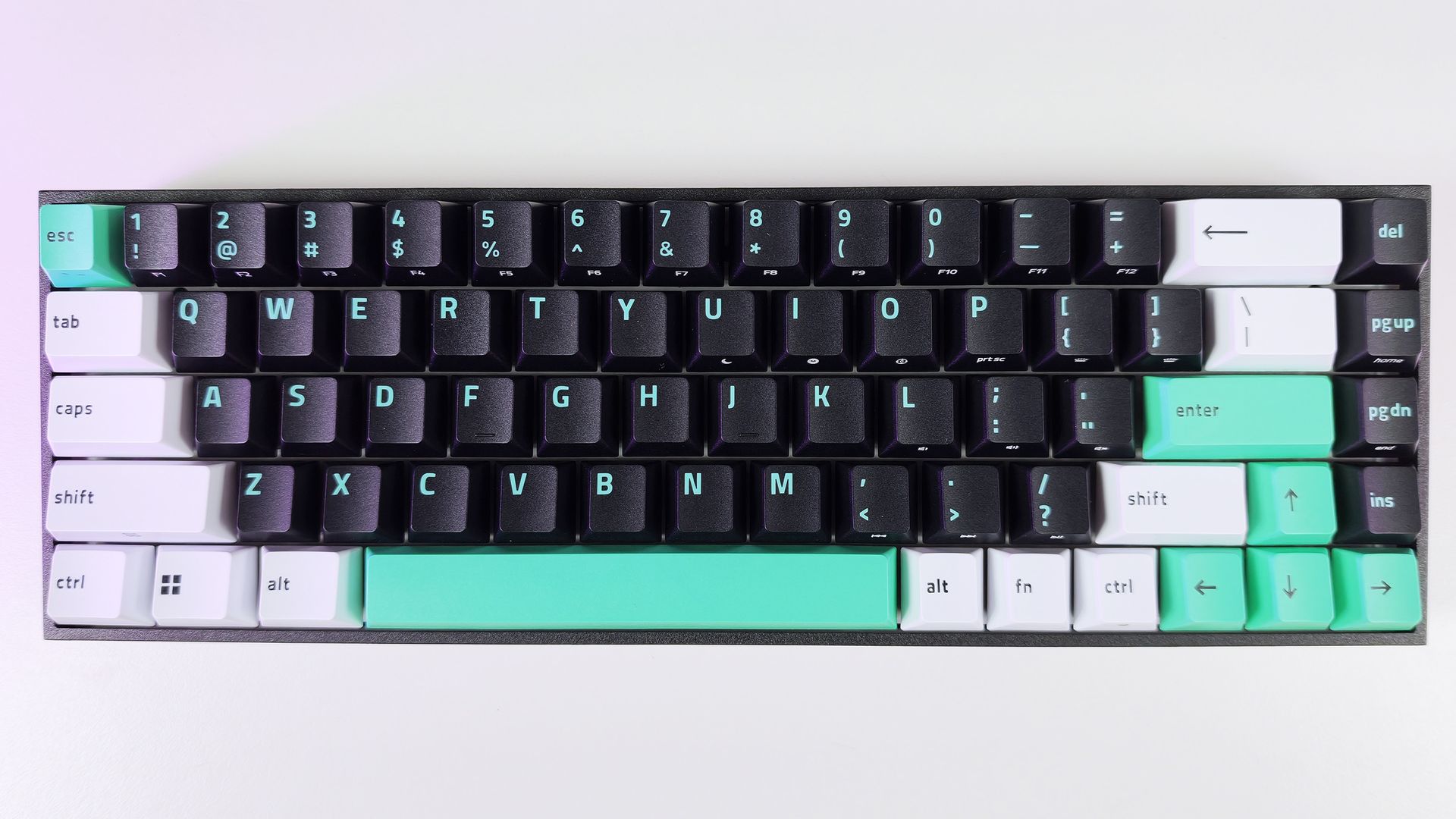
Direct top-down view of the Razer Reclusa X Mini 65% keyboard showing its black, white, and teal keycaps in neutral light.

Direct top-down view of the Razer Reclusa X Mini 65% keyboard showing its black, white, and teal keycaps. (Image credit: Daniel Rubino)

The Reclusa X Mini 65% launches at just $49.99 (Razer.com, Amazon; I expect Best Buy to get it eventually), making it one of the most affordable mechanical keyboards Razer has released in recent memory. That's especially notable when you consider it isn't cutting corners on enthusiast-friendly features such as hot-swappable switches, south-facing LEDs, pre-lubed stabilizers, per-key RGB lighting, and support for Razer's competitive gaming technologies.

Among its highlights are Razer's Gen-3 Orange tactile switches, compatibility with both 3-pin and 5-pin mechanical switches, dual-layer silicone dampening, and a new tri-tone visual design that immediately separates it from the rest of Razer's keyboard portfolio.

Specs

  • Layout: 65%
  • Switches: Razer Gen-3 Orange Tactile
  • Hot Swap: 3-pin and 5-pin compatible
  • RGB: Per-key Razer Chroma RGB
  • Polling Rate: Up to 1,000Hz
  • Sound Dampening: Dual-layer silicone
  • Keycaps: Doubleshot ABS, tri-tone design
  • Features: Snap Tap, Snap Flex, Dual-Keypress Priority
  • Price: $49.99 USD

What I like

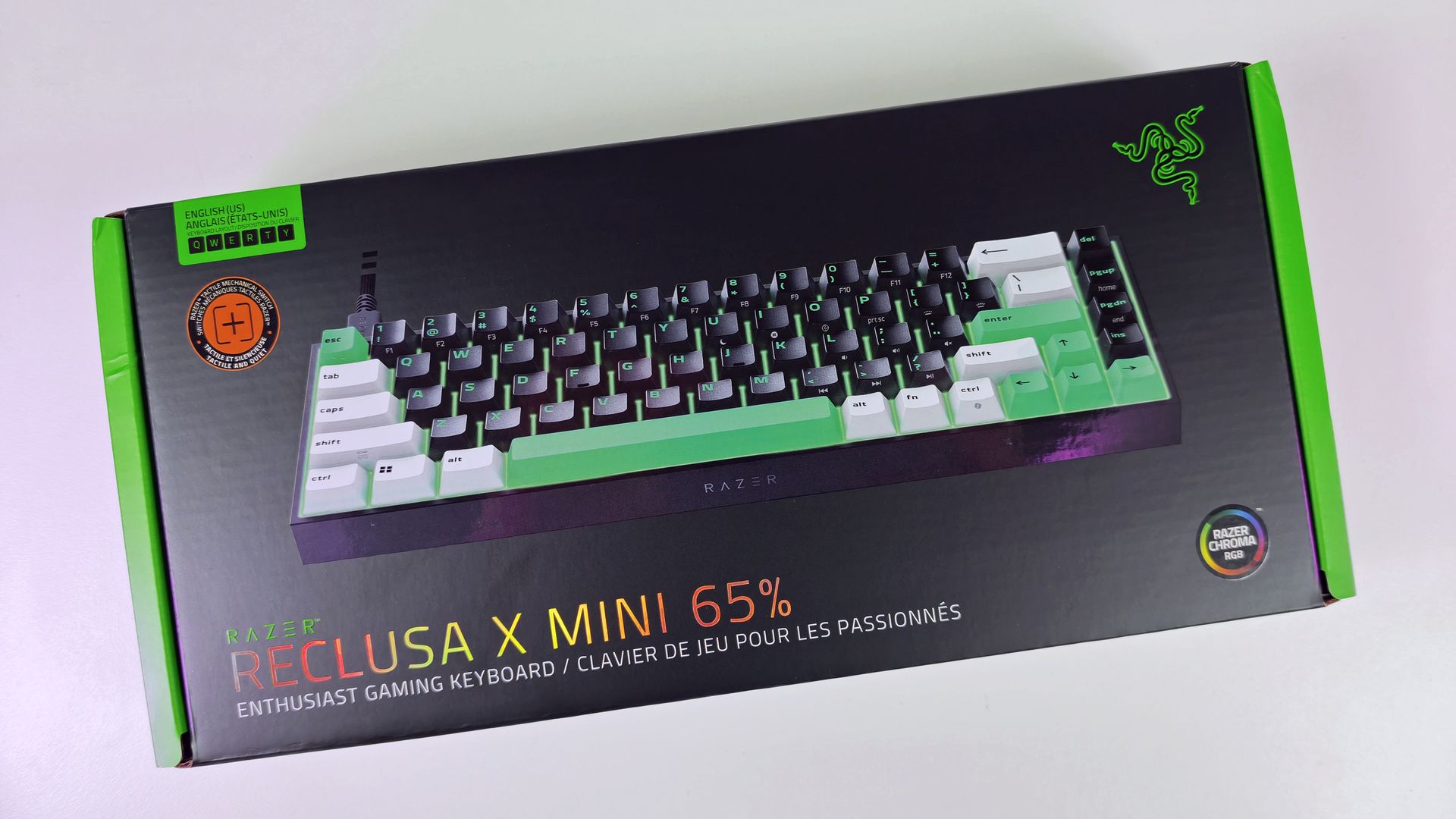
Direct top-down view of the Razer Reclusa X Mini 65% keyboard retail box.

(Image credit: Daniel Rubino)

The biggest surprise with the Reclusa X Mini 65% is just how good it feels to type on.

I'm generally not a huge fan of 65% keyboards. I miss dedicated media controls, and shrinking a layout inevitably introduces compromises. Yet after a few days with the Reclusa, I found myself reaching for it more often than expected.

The Gen-3 Orange tactile switches deserve a lot of the credit.

Razer describes them as delivering a tactile bump with quieter operation and improved consistency, while maintaining a 100-million keystroke lifespan. In practice, they're some of my favorite tactile switches Razer has produced, even compared to the more expensive Huntsman line.

The keys feel snappy, springy, and responsive, with excellent travel and a satisfying bottom-out characteristic that's surprisingly difficult to describe. The closest comparison is that each keystroke feels deliberate, controlled, and rewarding.

Every press feels crisp and energetic, with just enough tactility to make long typing sessions genuinely enjoyable.

The keyboard's dual-layer silicone dampening helps elevate the experience further. Razer specifically tuned the board to reduce resonance and hollow acoustics, and it shows.

The overall sound profile sits somewhere between mid-volume and clacky. Meanwhile, the space bar and backspace produce a deeper, more pronounced thock that adds personality without becoming distracting.

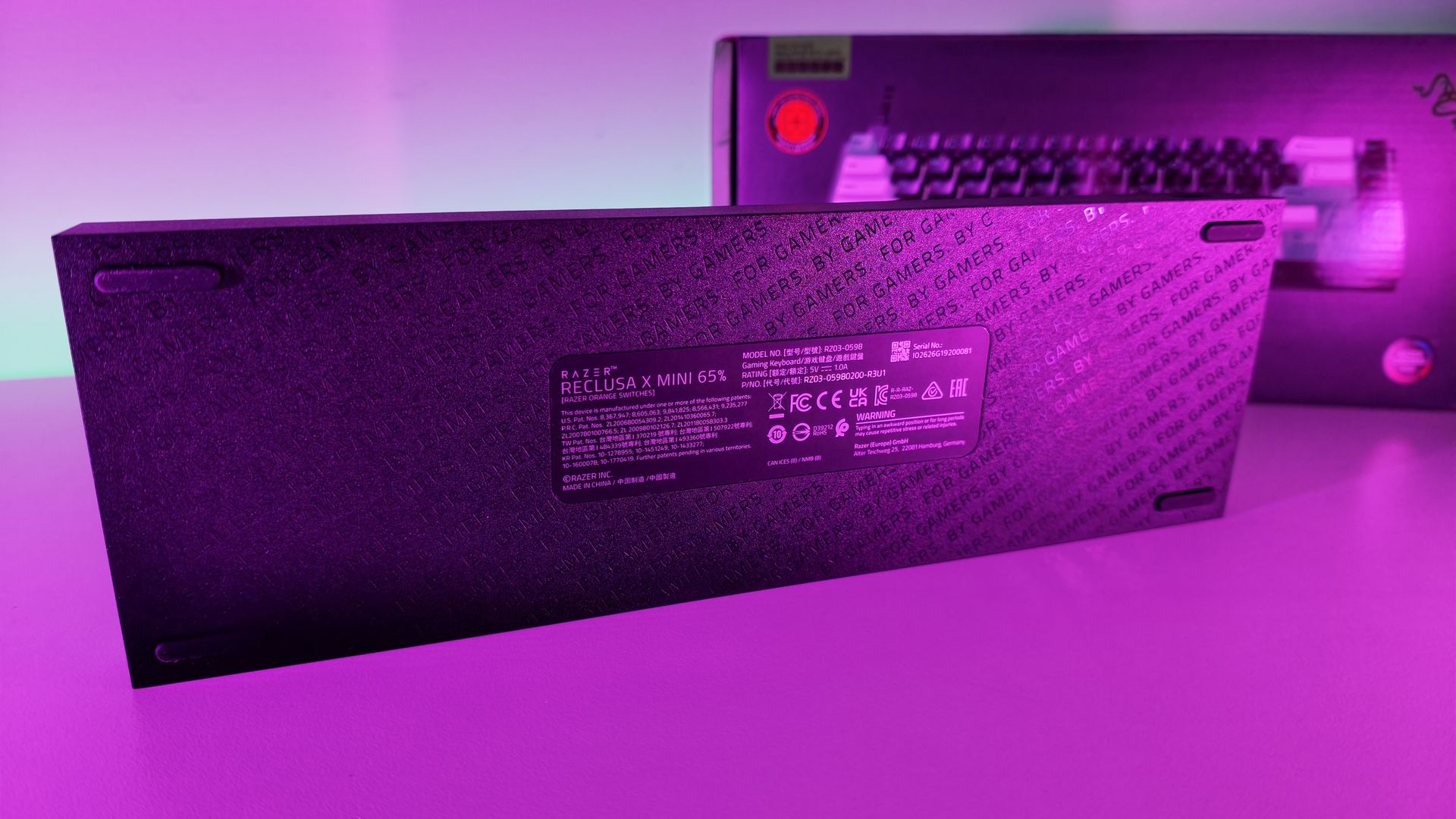
Bottom surface of the Razer Reclusa X Mini 65% keyboard, featuring rubber feet and a center product label with technical details.

Surprisingly, no risers on the bottom of the Reclusa X Mini 65%. (Image credit: Daniel Rubino)

For a $50 keyboard, the construction is also impressive.

My review unit measured roughly 710 grams, giving it enough heft to stay planted on the desk. The chassis doesn't feel flimsy, cheap, or hollow. The matte finish does a great job resisting fingerprints, and the included braided USB-C cable is the same type of quality cable Razer ships with more expensive products.

The hot-swappable design is another major selling point.

Users can install both 3-pin and 5-pin switches without soldering, making the board approachable for newcomers while still appealing to enthusiasts. Razer even notes that the keyboard can be opened through screws in the top plate for additional modifications, although doing so may affect warranty coverage according to the FAQ

Close-up side view of the Razer Reclusa X Mini 65% keyboard showing the recessed USB-C port on its black frame.

The Razer Reclusa X Mini 65% has a very solid body with a single Type-C port on the left-hand side. (Image credit: Daniel Rubino)

I experimented with swapping switches and found the process straightforward. More importantly, I never felt a pressing need to do so. The stock experience is already strong enough that many users will be perfectly happy leaving it untouched.

The new tri-tone keycap design is another win.

Razer says the design is intended to give the keyboard a distinctive visual identity, and it succeeds. Combined with south-facing RGB LEDs, the Reclusa feels like one of Razer's clearest nods yet toward the custom keyboard crowd.

Gaming features that actually matter

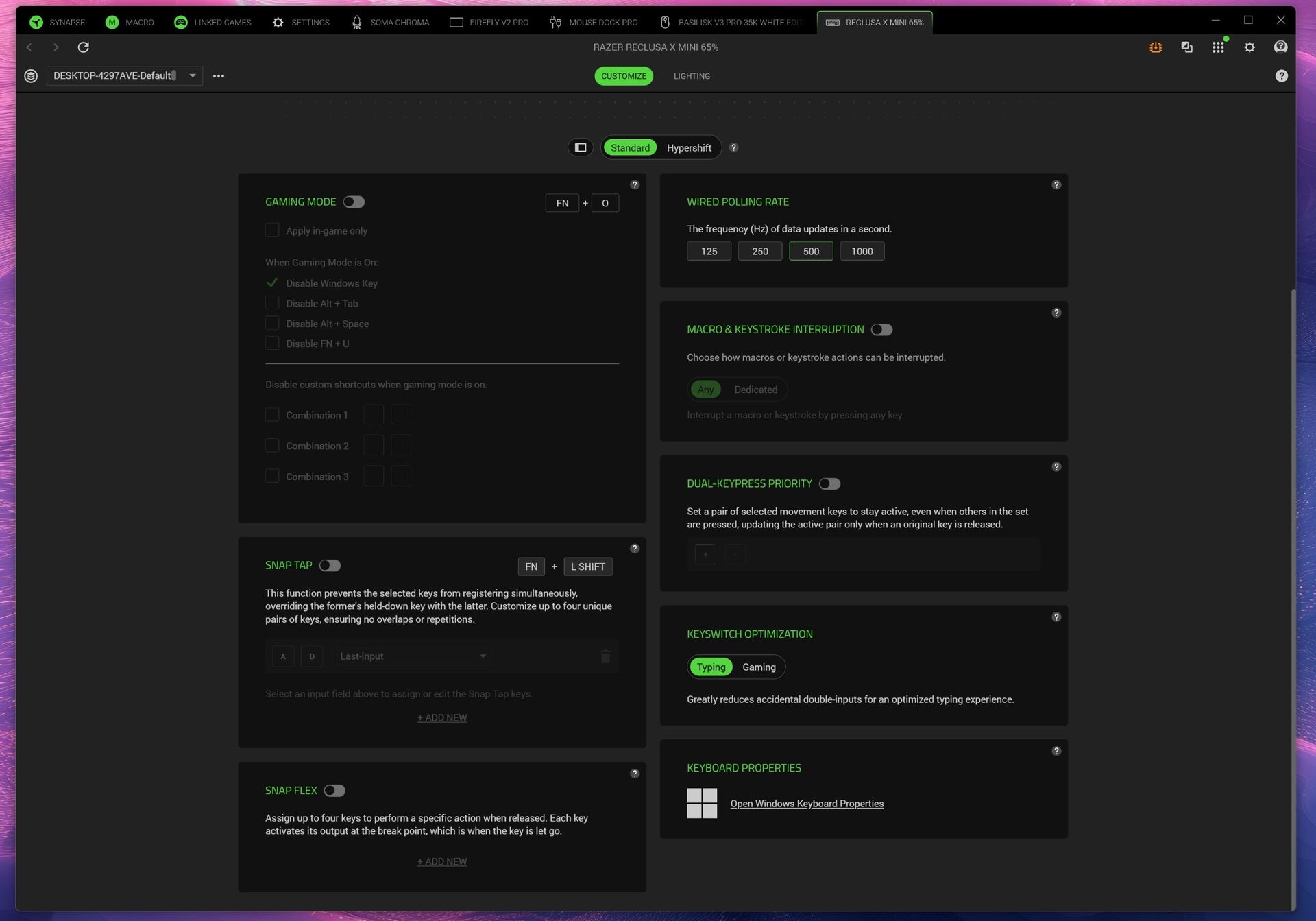
Screenshot of Razer Synapse and the multiple gaming features for the Razer Reclusa X Mini 65% keyboard.

Screenshot of Razer Synapse and the multiple gaming features for the Razer Reclusa X Mini 65% keyboard. (Image credit: Daniel Rubino)

The Reclusa X Mini 65% also includes Snap Tap, Snap Flex, and Dual-Keypress Priority, technologies aimed primarily at competitive players.

Snap Tap helps prioritize directional inputs for cleaner counter-strafing behavior, while Snap Flex can bind two actions to a single keystroke for more consistent multi-input actions. Dual-Keypress Priority is designed to maintain movement consistency when overlapping directional inputs occur.

Extreme close-up of textured black keycaps on the Razer Reclusa X Mini 65% with bright RGB backlighting underneath.

Close-up of the included Doubleshot ABS, tri-tone design keycaps and RGB. (Image credit: Daniel Rubino)

During a few gaming sessions in Call of Duty and DOOM: The Dark Ages, the keyboard behaved exactly as I'd expect from a modern Razer gaming board. The features worked as advertised, though none fundamentally changed my experience during limited testing.

The more important takeaway is that entry-level pricing doesn't mean sacrificing gaming-focused functionality.

What I don't like

Close-up of the retail box highlighting Razer Orange Tactile Mechanical Switches Gen-3 with an exploded layer diagram.

(Image credit: Daniel Rubino)

The 65% form factor itself remains my biggest complaint.

That's more personal preference than a flaw, but users accustomed to dedicated media keys, function rows, or larger layouts may feel constrained. That said, I like typing so much on this; I haven't switched back yet, so that's saying something.

Another drawback is the lack of adjustable feet.

The keyboard sits completely flat, and there are no built-in risers to alter the typing angle. Some users will appreciate the low profile, but I would have liked additional adjustment options.

The Reclusa feels premium where it matters most, but a pair of flip-out feet would have completed the package.

RGB lighting is also merely good rather than exceptional. It gets the job done, but don't expect the depth, diffusion, and visual impact of premium Razer boards like the Huntsman V3 Pro series.

Finally, Synapse remains a potential sticking point. While Razer has been increasingly expanding web-based support options across its ecosystem, some users still prefer products that avoid software requirements entirely.

Should you buy it?

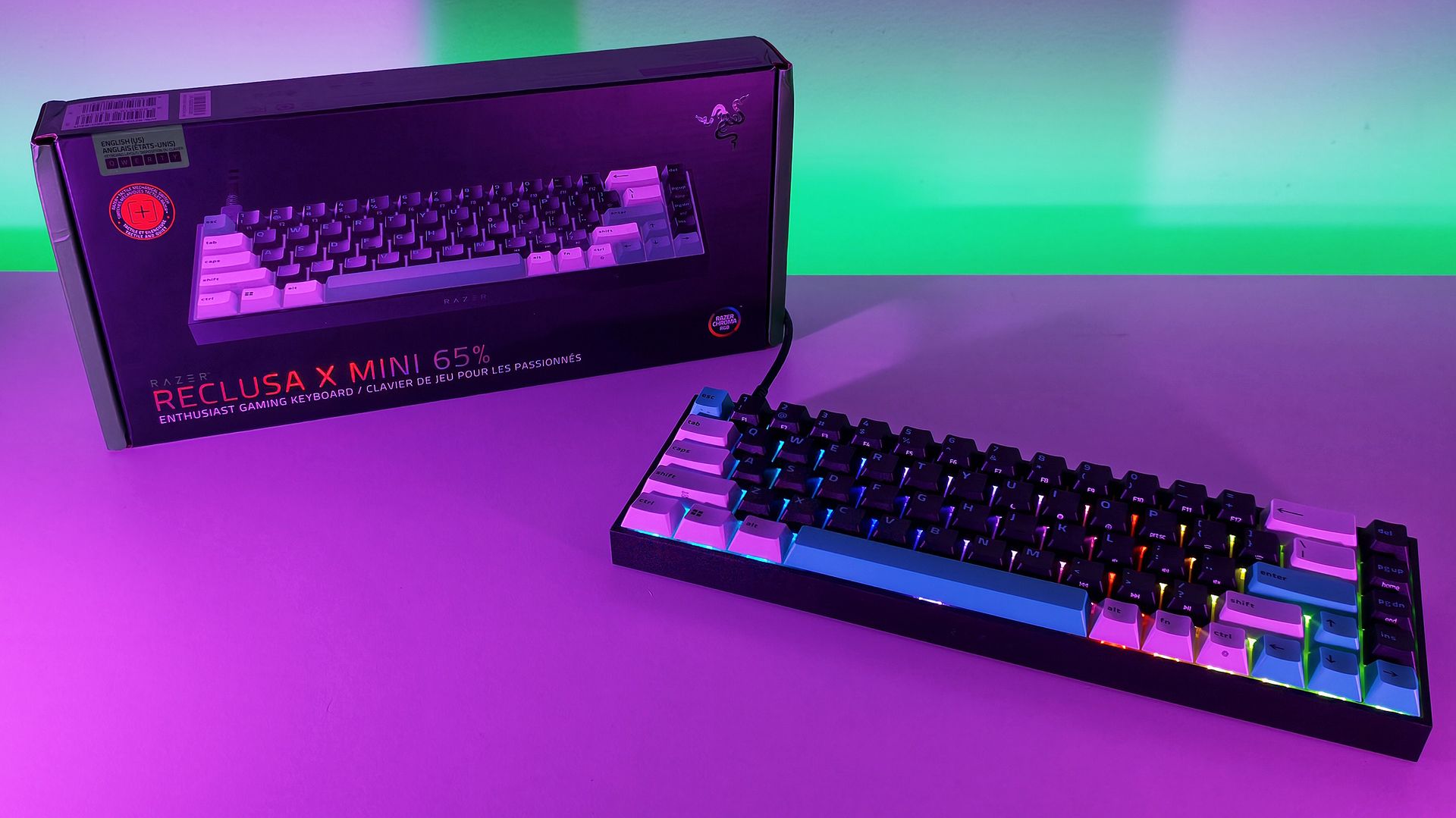
Angled view of the Razer Reclusa X Mini 65% keyboard with active RGB lighting next to its packaging on a purple surface.

(Image credit: Daniel Rubino)

✅You should buy this if...

  • You want a quality mechanical keyboard under $50
  • You want hot-swappable switches without entering the custom keyboard rabbit hole
  • You enjoy tactile switches and satisfying typing acoustics
  • You want enthusiast-friendly features from a major gaming brand

❌You shouldn't buy this if...

  • You need a full-size or TKL layout
  • Dedicated media controls are a must-have
  • Adjustable typing angles are important to you
  • You want flagship-tier RGB lighting

Final thoughts

The Reclusa X Mini 65% feels like the beginning of something larger for Razer.

The company explicitly describes the model as the debut of a new enthusiast-focused Reclusa family and "the first step in the Reclusa journey." While Razer hasn't announced additional models, the messaging strongly suggests the line will expand into other sizes and configurations over time.

If that's the plan, this is an excellent start.

At just $49.99, the Reclusa X Mini 65% delivers a surprisingly refined typing experience, useful gaming features, broad customization potential, and a build quality that belies its budget-friendly price. I still prefer larger layouts, but that's the highest compliment I can give this keyboard: despite my reservations about 65% boards, I genuinely enjoyed using it.

Who should buy it?

The Razer Reclusa X Mini 65% is ideal for gamers and keyboard enthusiasts looking for a genuinely good mechanical keyboard without spending triple digits. If you've been curious about hot-swappable keyboards, custom keycaps, and enthusiast-focused features but don't want to dive headfirst into the custom keyboard rabbit hole, this is one of the easiest and most affordable entry points Razer has offered.

It'll also be a great gift for young aspiring gamers this holiday season.

Razer Reclusa X Mini 65% product image showing the keyboard from a top down perspective.

Razer
Reclusa X Mini 65%

A remarkably affordable enthusiast keyboard that combines hot-swappable switches, excellent tactile feedback, and a premium feel into a package that punches well above its $49.99 asking price.

Click to join us on r/WindowsCentral

Join us on Reddit at r/WindowsCentral to share your insights and discuss our latest news, reviews, and more.

Nothing's Headphone 1 is going Pro? Rumors allege upgrades and a 'premium' feel are possible

What you need to know

  • Rumors now say Nothing is getting closer to a new audio product launch dubbed the "Headphone 1 Pro" late in September.
  • The device could enter a more premium aesthetic for consumers with a $399 price tag, 60 hours battery life, improved ANC, and a triple audio driver setup.
  • The original Headphone 1 were pretty good, and could've arguably been one of the best (if not the best) audio product of 2025.

Nothing's first over-ear headphones made a splash when they debuted. Now, rumors suggest the company wants to make even more noise with a "Pro" model.

Late this week, a post by Dealabs suggests Nothing is developing a "Headphone 1 Pro" model, and a launch could be closer than we think (via 9to5Google). As with any device, especially one marked by "Pro," design changes/improvements are possible. The publication claims the Pro headphones could feature "aluminum and glass" on their body. The idea could be to not only separate the Pro from the base model, but also to solidify a "premium" aesthetic, as the post notes.

White and black colorways are supposedly likely once this (allegedly) hits the market around September 29, 2026. However, rumors claim Nothing plans to make the Pro tag matter with a triple audio driver. Improved bass, sharper audio precision, and improved treble were mentioned.

Whispers allege real-time "adaptive" ANC that could outshine the original's. Battery life is another highlight. The Pro model could offer 60 hours of playback time. What's not clear is whether this is with ANC active or not. The original model could run for 35 hours with ANC on and 80 hours with it off. If this higher number concerns the former, that could be a huge boon to consumers.

There's nothing official, but rumors claim the Headphone 1 Pro could run consumers $399 in the U.S.

The original model was good

Nothing Headphone 1 testing on Android Central

(Image credit: Apoorva Bhardwaj / Android Central)
Android Central's Take

The idea of a Pro headphone from Nothing sounds intriguing. I'm not really a fan of wearing over-ear headphones out or away from my computer. I'm a gamer, so that's usually when I'll ever wear something like this. But there's a huge market for over-ear headphones. Music is probably the best thing for them. You can connect them to your phone, get a workout in, or hop on the bus or train and immerse yourself in sound. That's what I'd like from Nothing. If it's going Pro, go immersive, too.

If you take a quick step back to when the Headphone 1 launched, Nothing stuck them with a $299 price tag in the U.S. The Pro model would ask for ~$100 more, if we're to believe these early rumors. Anyway, Nothing wanted to make a bold statement with these headphones. The device brought back real, physical buttons, rollers, and paddles that make the experience more manageable.

There were pieces of aluminum that accented the Headphone 1. The Pro version could take that up a bit, and with more glass, too. In our experience, the Headphone 1 was a good piece of hardware. In fact, it was arguably one of the best audio products of 2025. Considering the positioning of the controls, the Headphone 1 made it easy to control our music. What's more, since these buttons are physical, we avoided those accidental song skips or pauses.

Nothing equipped the Headphone 1 with "a custom 40mm driver with sound tuned by KEF" that sounded "amazing," per Android Central's Harish Jonnalagadda.

Galaxy SmartTag 3 leaks: Samsung's redesign might not be better than the last

What you need to know

  • Galaxy SmartTag 3 rumors continue, suggesting Samsung could redesign the little tracker into a squircle shape, like the Galaxy Watch 8 and 9.
  • The tracker is reportedly arriving in white and black; however, Samsung has removed the built-in loop, meaning consumers may have to shell out more cash for a case with a loop.
  • Recent rumors suggested the SmartTag 3 could debut with the Galaxy S26 FE, but that never happened as the phone showed up solo late last month.

Samsung's next smart tracker has been long overdue—three years, to be exact. Rumors continue in September, suggesting a reworked design is in the cards.

Alleged renderings obtained by SammyGuru claim Samsung has redesigned the Galaxy SmartTag 3 with a familiar shape (via 9to5Google). The publication mentions this, too: the SmartTag 3 might take on a squircle shape, similar to the Galaxy Watch 8 and 9 series. A thicker, colored outer portion encases a silver (metallic) center. Rumors add that the SmartTag 3 could arrive in white and black. The latter trades in a silvery metallic center for a black, almost brushed metal aesthetic.

The post highlights a few expectations, such as (improved) Bluetooth and UWB (ultra-wideband), like its previous model. What's more, the "NFC-based Lost Mode" is also suspected to continue in this next generation. The tracker's battery specifications are still unknown, but here's hoping that the SmartTag 3's longevity hasn't taken a hit.

There's no dodging the elephant in the room. While the SmartTag 3 appears to take on a squircle shape, the alleged renderings highlight that it's missing a built-in mounting solution. According to the publication, consumers might have to shell out extra cash for a "separate case with an attachment loop."

As far as pricing is concerned, the publication cites alleged "retailer listings." The SmartTag 3 could stay ~$30 in the U.S.; however, consumers in Europe might see a slight price increase of a few bucks (or... euros).

This change is certainly a choice

An alleged rendering of a squircle-shaped Galaxy SmartTag 3 from Samsung in black.
SammyGuru
An alleged rendering of a squircle-shaped Galaxy SmartTag 3 from Samsung in white.
SammyGuru
An alleged rendering of a squircle-shaped Galaxy SmartTag 3 from Samsung in white with an
SammyGuru

We've been playing around and tracking with the Galaxy SmartTag 2 since 2023. What's interesting is that the tracker also reworked its design from the original tag. It brought in a wider attachment loop. Consumers could get a case for it that would provide another loop (more of a keyring-style). But rumors from July finally got us thinking about a SmartTag 3 after three years.

A tipster on social media claimed the next tag could debut sometime in September, alongside the Galaxy S26 FE. That didn't end up happening. The S26 FE debuted late in August. So there's a chance we're looking at a solo launch for the SmartTag 3, or perhaps something closer to the Galaxy Tab S12 debut this year.

I found something better than the Bose QC Ultra Gen II: meet Noble's FoKus Amadeus

There's extensive choice if you want to get a pair of decent earbuds. Bose, Sennheiser, and Sony continue to be heavy-hitters in this category (I use my Bose QuietComfort Ultra Gen II while traveling), and phone brands also a good job with their earbuds — Google's Pixel Buds Pro 2 and Samsung Galaxy Buds 4 Pro deliver a vibrant sound with plenty of useful features.

But if you want the best sound quality, you'll need to turn your attention to Noble Audio. The boutique brand is known for its IEMs, and it has ventured into wireless earbuds in recent years. I've heard plenty of great things about the brand, so I was excited to get my hands on the FoKus Amadeus. Retailing for $320 on Amazon, the Amadeus is in the similar price bracket as the Bose QC Ultra Gen II and Sony WF-1000XM6, but what you're getting here is markedly different.

Noble FoKus Amadeus review on Android Central

(Image credit: Apoorva Bhardwaj / Android Central)

For starters, the design of the FoKus Amadeus is unlike any other earbuds around. Mainstream brands play it pretty safe with their designs, and they're not meant to stand out — that isn't the case here. With a bright red design and a custom shell that's bigger than most earbuds, these are guaranteed to grab attention.

Like the Amadeus name, the red design is an homage to Mozart’s signature tailcoat, says Noble. Build quality is great, and while the size of the shell means the earbuds jut out, I didn't see any issues with comfort. Each bud weighs 7g, and that's in line with other products in this category. The only omission is ingress protection, so I wouldn't suggest using these at the gym. Just like the buds, the case itself is bigger, but the square design makes it easy to take anywhere.

Noble FoKus Amadeus review on Android Central
Apoorva Bhardwaj / Android Central
Noble FoKus Amadeus review on Android Central
Apoorva Bhardwaj / Android Central
Noble FoKus Amadeus review on Android Central
Apoorva Bhardwaj / Android Central
Noble FoKus Amadeus review on Android Central
Apoorva Bhardwaj / Android Central

Coming to connectivity, the Amadeus gets Bluetooth 5.4 via Qualcomm’s QCC3091 modem, and there's SBC, AAC, LDAC, and AptX Adaptive. The buds connect to two devices at once, and I had no problems pairing with my Pixel 11 Pro XL, Find X9 Ultra, and iPad Pro M4. There's good ANC as well, and the buds did a great job tuning out the ambient sounds in my surroundings.

Obviously, sound quality is where the Amadeus excels. The sound signature from the 8.3mm dynamic driver is tuned towards musicality, and you get a good bass rumble with clean mids and a nice treble extension. These are particularly great with vocals, and the soundstage is significantly wider than any other earbuds in this category. There's a level of dynamism to the sound that you just don't get with Bose or Sony, and that ultimately makes the Amadeus enjoyable even in extended listening sessions.

Noble FoKus Amadeus review on Android Central

(Image credit: Apoorva Bhardwaj / Android Central)

Another thing I like is the sheer level of customizability to the sound. Noble uses Audiodo to tune the sound of the Amadeus to your individual preferences. This is done by a listening test that lasts up to three minutes, and then you get a custom EQ that's tailored to your ears. The tech works exceedingly well, and it makes a big difference to the sound. In addition to Audiodo, you get a 10-band EQ and custom modes that let you tweak the sound profile to a granular degree.

Then there's the app; the Noble FoKus app has to be the best of any buds I used. You get a minimal interface without any overt styling (looking at you, Sennheiser), but there's an extensive amount of customizability when it comes to adjusting the sound.

Noble FoKus Amadeus review on Android Central

(Image credit: Apoorva Bhardwaj / Android Central)

I got good battery life as well. The Amadeus lasted close to eight hours between charges, and each bud has a 65mAh battery. The case provides an additional 2.5 times charge via a 500mAh battery, so you get just around 40 hours before you'll need to plug in the case. There is fast charging that gives you two hours of music with a 10-minute charge, and a full charge takes just over 90 minutes.

Noble FoKus Amadeus review on Android Central
Apoorva Bhardwaj / Android Central
Noble FoKus Amadeus review on Android Central
Apoorva Bhardwaj / Android Central
Noble FoKus Amadeus review on Android Central
Apoorva Bhardwaj / Android Central
Noble FoKus Amadeus review on Android Central
Apoorva Bhardwaj / Android Central

I know that's $320 is at the higher end of the scale when it comes to earbuds, and to its credit, Noble Audio didn't omit anything in the FoKus Amadeus. The design stands out quite a bit, but the earbuds are comfortable to wear, and the sound quality is outstanding; if you've used Bose's QC Ultra or any of Sony's earbuds, you will see an immediate difference when switching to these — I did.

Noble FoKus Amadeus render

Noble
FoKus Amadeus

The FoKus Amadeus is designed to stand out, and the sound quality is immersive like no other earbuds in this category.

❌