A modder has taken the innards of a Steam Deck and put them into a Game Boy-style case
The end result is the 'SteamBoy', although it's not quite finished (the screen doesn't yet work)
There's a lot of excitement about this DIY project, and some gamers have even said they'd be keen to buy a retro handheld like this
Ever wished the Steam Deck looked a bit more retro — or indeed a lot more retro? Meet the 'SteamBoy', which takes the innards of Valve's handheld and transplants them into a case styled on the Game Boy.
The SteamBoy uses the motherboard, controller, buttons, speakers, and battery from the Steam Deck, fitting the components into a case which the maker says is the same dimensions as an original Game Boy, with a thickness of 32mm (yes, it's thick).
PhyFawkes explains: "The battery is the original battery, and it basically takes up the whole width of the device on the inside. It's sandwiched between the motherboard and the display. The motherboard and controller boards are completely intact as well."
The only element that isn't functional yet is the screen, so this device is still a work in progress. The Redditor has demonstrated it working on an external monitor, though.
Analysis: next stop Kickstarter?
(Image credit: PhyFawkes on Reddit)
The snag with getting the screen going is that the motherboard firmware reports the display properties directly to SteamOS, and so the firmware details must be updated with the info for the new screen. The Redditor says it hopefully it won't take too long to sort this out.
Another part of the recipe that's missing is the triggers, but PhyFawkes says that they might be able to add them eventually, but that space constraints with the case could make this too tricky a proposition.
Apparently the handheld runs cool enough with some slight under-volting. All in all, this a very smart-looking project, and I'm seriously impressed. The case itself is 3D-printed, with the Redditor noting that they're going to provide the details on how to make one for those who might want to try their hand at this enterprising piece of handheld DIY.
Of course, constructing something like this is well beyond the scope of your average gamer, and there are fans of this concept out there who'd be willing to pay money for a SteamBoy of their own. Plenty of them, in fact, as the reception for this project has been nothing short of glowing.
As someone on Reddit put it: "This is legitimately so cool. I would totally back something like this on Kickstarter."
If you ordered any of Valve's products within Europe, such as its Steam Machine gaming PC or the modern Steam Controller, there's a chance your private information may have been compromised. This morning, an email detailed "a note about a security incident at our shipping partner in Europe" involving a cyberattack on Valve's EU shipping partner, CEVA Logistics, on August 7.
Expect fake messages - email, SMS or phone - that mention your hardware order and appear to come from Steam, Valve or a delivery company.
Valve
I bought the Steam Controller in May, though I skipped the Steam Machine pre-order queue, and still received the notice as a customer in the United Kingdom. Crucially, Valve clarifies that this attack on CEVA and its subsequent data breach does not affect "your payment information, passwords, Steam Guard codes or other information."
Your Steam account should remain safe, and right now, there's no reason to change your password or change any account settings. However, Valve warns that customers could "expect fake messages" from bad actors asking for money or other information. Personal details that "may have been compromised" include:
Your name
Your street address, postal code and city
Your country
Your phone number
Your email address — the same one your Steam account uses
The type and price of the ordered product
How did the CEVA Logistics breach happen?
Steam Machine buyers report receiving the same email, presumably affecting all European hardware shipments. (Image credit: Valve)
Valve says that it is "pressing CEVA for the full scope of what was taken and how, and we are in the process of notifying the data protection authorities in the countries affected", and clarifies that the affected system has been taken offline and isolated from further leaks, but there is currently no confirmation on which customers have been affected or exactly how this happened.
For now, Valve invites anyone with concerns or questions to reach out to its support team at help.steampowered.com or to write to its contact point at Artana Digital GmbH, Alstertwiete 3, 20099 Hamburg, Germany.
Fake messages from convincing impersonators are unfortunately common, and bad actors will go through extreme lengths to make their text messages, emails, and phone calls appear genuine. If you're new to Steam, remain vigilant but remember that Valve only handles account issues via its dedicated support site, and "never by email, Steam Chat, or Discord — Anyone who contacts you elsewhere claiming to be Steam Support is not."
I'd also caution anyone who might be at risk that, while Valve implies that your credit card information is safe, bad actors can use other personal information to attempt various identity fraud and access accounts elsewhere. It's important to stay vigilant as data breaches like this happen, and scrutinize every message you receive from delivery companies asking for money: "Treat all of them as fake", Valve says.
Customers based in the United States and, in turn, anywhere outside CEVA Logistics' operating area in Europe shouldn't be affected by this breach. Nevertheless, it should come as an important lesson in customer privacy and data security. Keep using strong passwords that are unique to each platform, and protect yourself as much as possible.
Join us on Reddit at r/WindowsCentral to share your insights and discuss our latest news, reviews, and more.
Desktop gaming PCs have a reputation for being huge, and, to be honest, a lot of them are. However, if you're confident enough to dive into the twisted world of cable management, then a compact build could be a fantastic challenge that pays off as a space-saving monster rig. When the Cooler Master Qube 340 case appeared at Computex earlier this year, I was immediately intrigued, even if I can't afford the full gamut of parts to build inside of it just yet.
Cooler Master provided a sample but did not see the contents of my article before publishing. I'm also refraining from assigning a traditional review score to this case until I can complete a build with a full set of components.
How much does the Qube 340 cost?
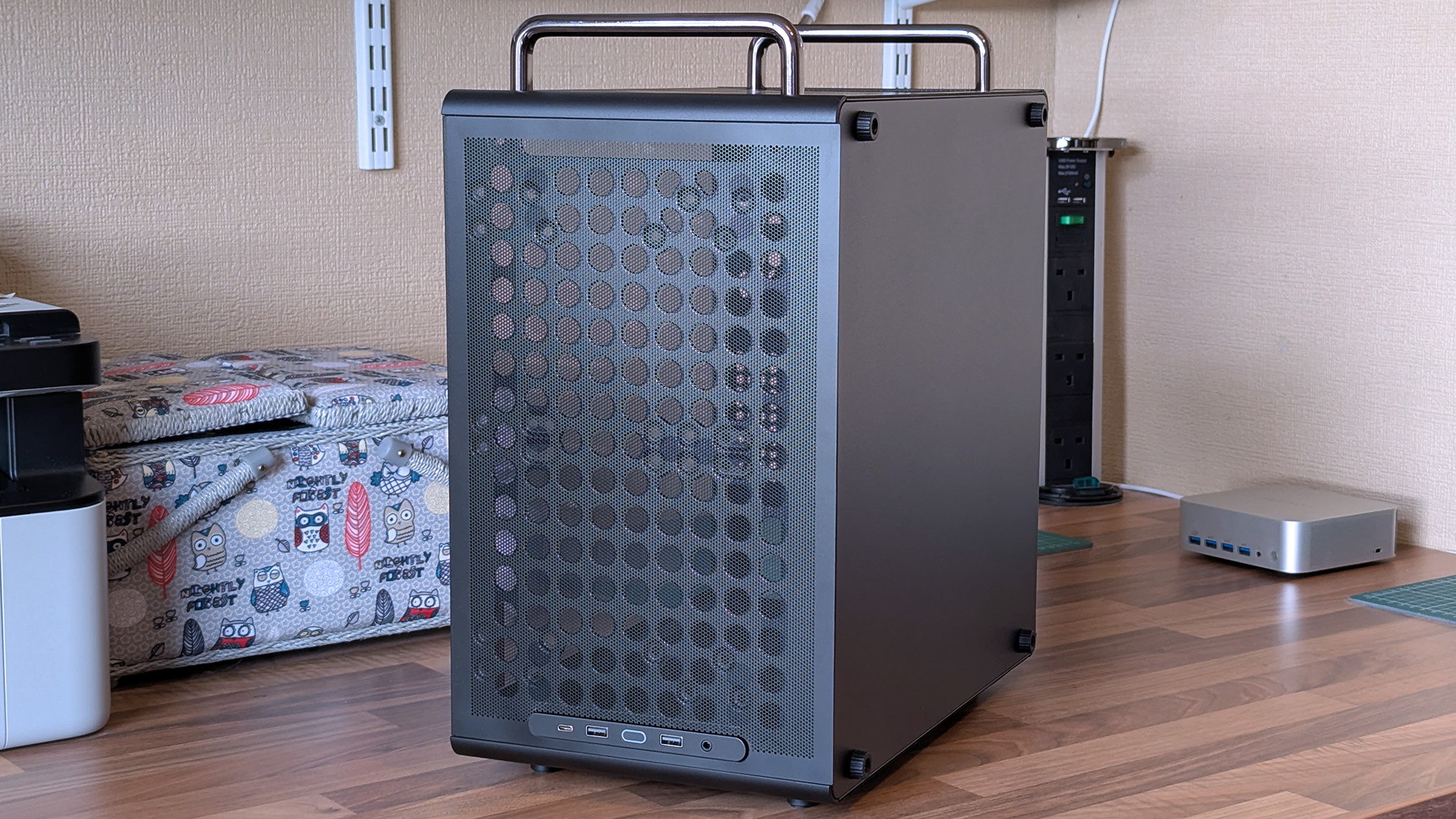
I wouldn't say it looks exactly like that infamous Apple Mac Pro, but there's definitely a resemblance. (Image credit: Ben Wilson | Windows Central)
For now, the best place to buy the Cooler Master Qube 340 is Newegg at $54.99. It's currently listed by Newegg itself, rather than any third-party sellers, and is in stock at the time of writing. A listing for the Qube 340 in black on Amazon US lists "Newegg Business" as a reseller at $59.49, which isn't worth the extra money. At the time of writing, the white variant of this case is "currently unavailable" on Amazon and is outright missing from Newegg.
CPU cooler: 178mm GPU: 365mm (without front fan) PSU: 200mm/100mm (with/without bottom fan)
Dimensions
386.1 x 230 x 429.4 mm (including handles, feet)
The exact model I tested is available on Newegg at its intended price, with good availability and options for free shipping, depending on your location.View Deal
What I like about the Qube 340
Compact and portable, the Qube 340 instantly had me planning a build.Ben Wilson | Windows CentralMicro ATX or Mini ITX, you have enough expansion slots to choose from.Ben Wilson | Windows CentralDust shields cover the whole case, but they can all be removed easily.Ben Wilson | Windows Central
Ever since the RAM crisis ruined any prospect of affording Valve's Steam Machine gaming PC, I've thought about how I could repurpose some of the spare components I have in storage — and even then, it isn't a huge pile. Still, I knew I'd never manage anything quite as purposefully tiny, but I could come close with a mini ITX build, and the Qube 340 looked perfect on paper.
The removable handles (are) ideal for what I've planned: A desktop that I can set up and take away at a moment's notice.
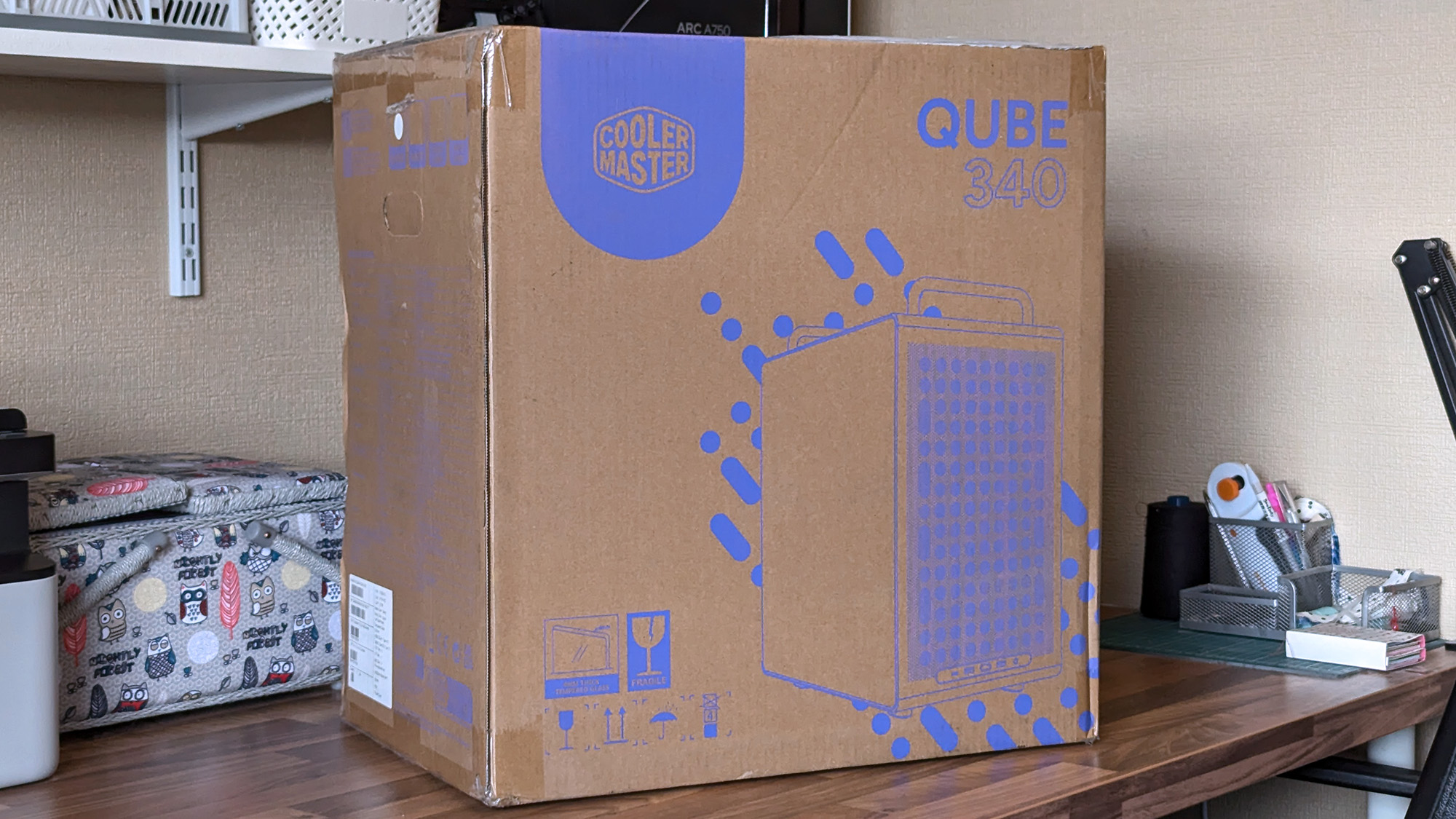
It came in a huge box, but it feels as compact in person as I'd hoped. The removable handles are also ideal for what I've planned: A desktop that I can set up and take away at a moment's notice, rather than leaving something permanently underneath our TV. Sure, I'll need to buy some more niche parts, like a compatible motherboard, but Cooler Master impressed me out of the box.
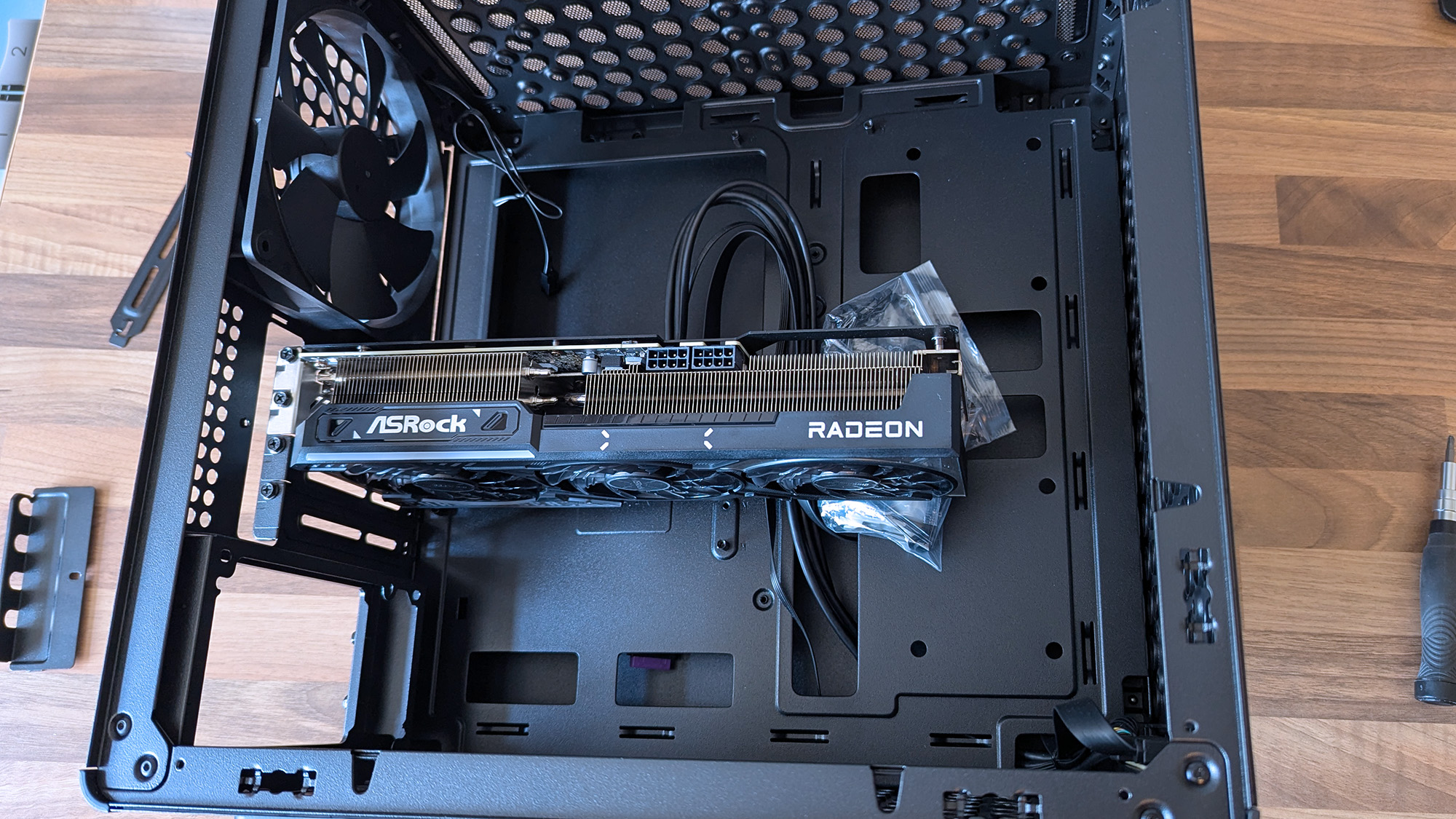
A 290mm ASRock Challenger Radeon RX 9070 XT GPU fits with room to spare for front-mounted fans. (Image credit: Ben Wilson | Windows Central)
My most important consideration was whether the ASRock Challenger Radeon RX 9070 XT graphics card I have would fit, depending on my front-fan decisions. I could also use an AIO radiator, but the cheesegrater-esque design of the Qube 340 feels better suited to a traditional air cooler — even if only in aesthetics — plus there's a 140mm 'DF1402512RFLN' fan pre-installed at the rear.
At a glance, there's nothing to worry about, as the 290mm GPU fits with around 78mm to spare. My immediate idea is to have a single 140mm intake fan mounted at the top, pulling cool air into the case and pushing it through a CPU air cooler before exhausting it out the back. Still, I have options, including adding an even longer card, as long as everything is measured correctly.
Undoubtedly geared towards airflow, the Qube 340 is absolutely covered in holes.Ben Wilson | Windows CentralThe front I/O panel can be moved, which is ideal because I prefer a top-mounted power button.Ben Wilson | Windows Central
Next up are cable management and routing options. Like most hobbyists, I prefer to take my time with my own builds and get everything as clean as possible, which is more of a mandatory requirement in a compact case than a preference. While there aren't any dedicated trunking channels, there are a few mounting points for zip ties, so I just need to plan everything carefully.
The front-mounted I/O plate is also removable, so I can move it to the top of the case for easier access and re-route the attached cables from the start. It all depends on my motherboard of choice and how it determines the shortest route for each component, but it's fantastic to have the option. I'll always prefer my power button and front ports to be at the top of the case.
What I don't like about the Qube 340
Internally, some of the metal is thin and somewhat flexible.Ben Wilson | Windows CentralThe glass side panel is held in place by a protruding tab, which could pose an issue during transit if it were accidentally released.Ben Wilson | Windows Central
The build quality is generally great on the outside, with those sturdy carry handles and rubberized feet keeping it steady in a vertical position and similarly when laid flat for construction and upgrades. However, the metal on the inside — particularly around the motherboard tray — is quite thin with some flex, but I doubt I'd ever accidentally bend it in any permanent way.
Being mostly toolless also raises some concern about the glass side panel, which holds well but is secured only by a single protruding tab.
I found the removable 2.5/3.5-inch drive tray similarly skinny and flexible, but it hardly has to do anything beyond holding my storage in place, and it at least removes with a single thumbscrew. It would likely take a heavy dent from an accidental drop to twist this case out of shape, and though it's well padded in its box, it's still worth checking everything over as soon as you buy one.
Concerns about missing rubber grommets are tempered by the fact that this is a $55 PC case. Not to excuse any internal mishaps that might happen, but again, it feels unlikely given how solid the outer shell is overall. Otherwise, being mostly toolless also raises some concern about the glass side panel, which holds well but is secured only by a single protruding tab.
Should you buy the Qube 340?
Thankfully, the shipping box for the Qube 340 is so huge, it helps protects it against concerns of bent metal. (Image credit: Ben Wilson | Windows Central)
You should buy this if ...
✅ You want to build a portable mini ITX gaming PC
✅ You're prioritizing airflow with dust protection
You should not buy this if ...
❌ This is your first-ever rig; compact builds are tricky
You can go smaller, but for my first planned adventure into a mini-ITX build, the Qube 340 is exactly what I wanted it to be. If, like me, you're toying with the idea of a compact gaming PC that's easier to move around than a full-sized desktop, I think you'll be quite happy with this incredibly affordable case. Some of my opinions might change once I have enough parts to build inside it, but that won't affect the overall praise I have for Cooler Master on this occasion.
Cooler Master
Qube 340
Compact and cool with a design built entirely around airflow, this portable case is a bargain.
As price rises hit everything thanks to the RAMpocalypse, with SSDs, memory, graphics cards, PCs, handhelds, consoles, and literally everything getting more expensive, let's celebrate when someone beats the system.
Sure, it's only one person, but at this point, I'm so utterly depressed with the state of things that I'm ready to buy this person a beer and shake their hand.
Is it the greatest deal of all time? Honestly, even before the price rises, I'd have grabbed this, thrown down a $5 bill, and run out of the store before anyone realized what they'd done putting that price tag on it.
Is the RTX 3050 a particularly good graphics card? I mean, it depends what you want to do with it. It'd be pretty good as a budget video encoding card for streaming; it'll play games at 1080p fairly well, too. Hell, I'd have absolutely put it into a machine and given it to my son.
For five bucks I would have found something to use it for. Maybe slap it inside the home server I've been wanting to build again for years to handle video transcoding. I don't care; I'd have found something to do with it.
That's assuming it works properly, of course. The post does show a Windows boot screen, so it would appear it at least gives video output, so that's a start. With a used, mystery GPU like this, you'd have to test it properly, and most definitely you'd want to strip it down, clean it up, and give it some new thermal paste.
But for $5, who cares? Worth a go, right? It's just nice to see someone have a win right now. If you were to buy a brand new RTX 3050 right now, you're looking at paying at least $250 if you went to somewhere like Best Buy. Nobody should pay $250 for a two-generation-old budget graphics card.
It also gets me thinking: What's the absolute craziest deal you've ever found on a piece of hardware? I think I've only ever been so lucky once, managing to get a Surface Go 2 LTE with a price mistake once and securing it for essentially free with an inexpensive data SIM contract.
It should have been a couple of hundred British pounds, and I got it for £8. And even though it was a mistake, it was still honored, and I got my Surface Go 2.
So jump into the comments below and let me know your personal craziest deal. Meanwhile, I'm definitely raising a glass to this person. Hopefully it all works well, and if so, you've definitely beaten the system right now.
Join us on Reddit at r/WindowsCentral to share your insights and discuss our latest news, reviews, and more.
Lenovo Legion Gogaming handhelds are reportedly being bricked by a BIOS update. According to reports, installing the N3CN42WW update results in a black screen and systems not booting correctly.
It's not clear how widespread this issue is, but I suggest holding off on installing a BIOS update on your Legion Go until Lenovo has clarified the situation.
The problem affects the original Legion Go (often called the Legion Go 1 by fans), including both the Z1 and Z1 Extreme models.
In some cases, the Legion Go failed to boot immediately after the BIOS update was installed. In other cases, the failure occurred later.
Several Legion Go owners have reported issues on Reddit. The mods at the LegionGo subreddit shared the following:
"It has come to our attention that some of the Z1E and Z1 versions are being bricked when updating to the latest BIOS that was released on June 17th, 2026.
Please do not update your devices unless you are willing to assume all risks. We the mod team are trying our best to understand and get help on this."
They also asked people to share if they've run into the same issue.
Reddit user mherold11said they reached out to Lenovo support to have their Legion Go repaired. They were told that fixing the gaming handheld would be a chargeable repair since the device was out of warranty. The quote for repair was €237.16 (roughly $273.81).
Other people in that same Reddit thread said their Legion Go gaming handhelds were repaired at no cost when still in warranty.
One Reddit user had luck performing their own repair, but that fix was complicated and is not recommended for general users.
This is a developing story and we do not know the extent of the issue. If you have a Legion Go and have been affected by the issue (or have upgraded and not run into the problem), please share with us through the comments below and reach out to Lenovo and the mods of the LegionGo subreddit.
Join us on Reddit at r/WindowsCentral to share your insights and discuss our latest news, reviews, and more.

 Login
Login