❌

Normal view

Before you click that suspicious link, run it through this scam detector

16 September 2026 at 14:15
Photo of a woman running IsThisSpam scam detector on a laptop

Secure lifetime access to IsThisSpam, a scam detector withΒ tools that analyze suspicious emails, messages, websites, links and more.

(via Cult of Mac - Your source for the latest Apple news, rumors, analysis, reviews, how-tos and deals.)

Get your teeth into the cutting edge of materials science

16 September 2026 at 14:00
Illustration of three teeth with various textures
Dental work Fitting false teeth, bridges and crowns requires an empirical understanding of how ceramics, metals and other materials interact. (Courtesy: Shutterstock/Ihnatovich Maryia)

My dentist, Dr Albora, told me I needed a new tooth. He made me bite down on a U-shaped tray filled with polyether, an elastomeric material that’s been used in dentistry for decades. I tried not to gag while the gooey stuff set. Albora then waggled it off and sent the imprint to a company on Long Island that makes false teeth. But as my tooth’s colouring was unusual, Dr Albora said I had to go there myself.

A week later I drove to Marotta Dental Studio, where Igor Binshteyn sat me in a chair, lifted my lip and inspected a tooth to the side of my upper jaw. He was helping to fabricate its replacement and needed to get the exact colour.

As Binshteyn finished, I remarked teasingly on the company’s car park, which was chock full. Do you need that many people to make false teeth? What could possibly be involved to make things smaller than the nail on my little finger?

Binshteyn laughed. β€œFollow me”.

Dental workshop with Lenny Marotta and Steven Pigliacelli
Warm welcome Lenny Marotta (left), who founded Marotta Studio in 1981 and his brother-in-law and Marotta’s vice-president, Steven Pigliacelli in the lab. The flags are for the nationalities and national backgrounds of the 50 or so technicians working there. (Courtesy: Robert P Crease)

He opened a door to a huge undivided warehouse-like space about 1200 square metres in size. Some 50 people were working at lines of tables where the steady hum of conversation was punctuated by the noise of ovens, lathes and grinding machines; imagine the sounds of a metalworking shop in a busy train station.

β€œDo you want a tour?” Binshteyn said.

Of course I did.

Open wide

My tour guide was Marotta’s vice-president, Steven Pigliacelli, who teaches prosthodontics at New York University. A prosthodontist is a dental specialist who has completed dental school and, in the US, has had at least three additional years of advanced training to focus on restoring and replacing missing or damaged teeth. As I learned, prosthodontists must practice materials science.

The lab has two paths for making teeth, Pigliacelli explained, each with different materials and methods. The first is known as β€œporcelain-fused-to-metal”, or PFM. It begins with technicians applying gypsum – hydrated calcium sulphate – to create stone replicas of the jaw and teeth from the impressions given to them by dentists such as Albora.

Gypsum has different coefficients of expansion for different dental purposes, and textbook formulas give the amounts of liquid for each kind. But Marotta employees found that tiny amounts of water must be added or subtracted to the gypsum to compensate for things like humidity and temperature before the gypsum is used. β€œIt took us months,” Pigliacelli explained, β€œto realize that how it’s shipped, how it’s stored, what season it is – all these affect the material.”

I watched as a technician sectioned a stone jaw replica to cut out a tooth, turn it into a master model called a die, and test it in an articulator that mimics jaw movements. I saw another wax that die, use a lost wax technique to create a solid gypsum frame, and cast a silver-palladium alloy. That creates the metal inner core for the tooth, called a coping, which is shaped and finished before porcelain is applied. Porcelain is baked onto the coping in another area of the lab.

β€œThe metal and porcelain need closely matched coefficients of thermal expansion or the porcelain can separate from the metal,” Pagliacelli told me. β€œEvery once in a while a company tells us β€˜We’ve got this really cool new alloy!’, but we need to match the coefficients of expansion in the ceramic material. We’re working with sensitive materials for sensitive applications, and we have to experiment with and adapt them. This stuff about materials you don’t learn in school but work out in the lab.”

Smile for the camera

The second path to making a tooth involves scanning the teeth rather than waxing a die. The electronic files are worked on in the computer, printed out, reworked and rescanned, and milled by a CAD machine using materials such as zirconia – nicknamed β€œceramic steel” – and EMAX, a lithium disilicate glass-ceramic. Zirconia is extremely hard and used for teeth that endure heavy grinding forces, while EMAX is more aesthetically pleasing and often used for front teeth.

β€œSo we have two parallel paths, PFM and digital scans”, Pigliacelli said. β€œIt’s usually a personal choice of the dentist”. But external pressures are driving a move away from PFM, he said. Five years ago the price of palladium – a key component of the PFM alloy – soared as it was increasingly used in devices to reduce auto and other emissions. β€œThat’s cut down on the PSM market.”

Igor showing teeth staining
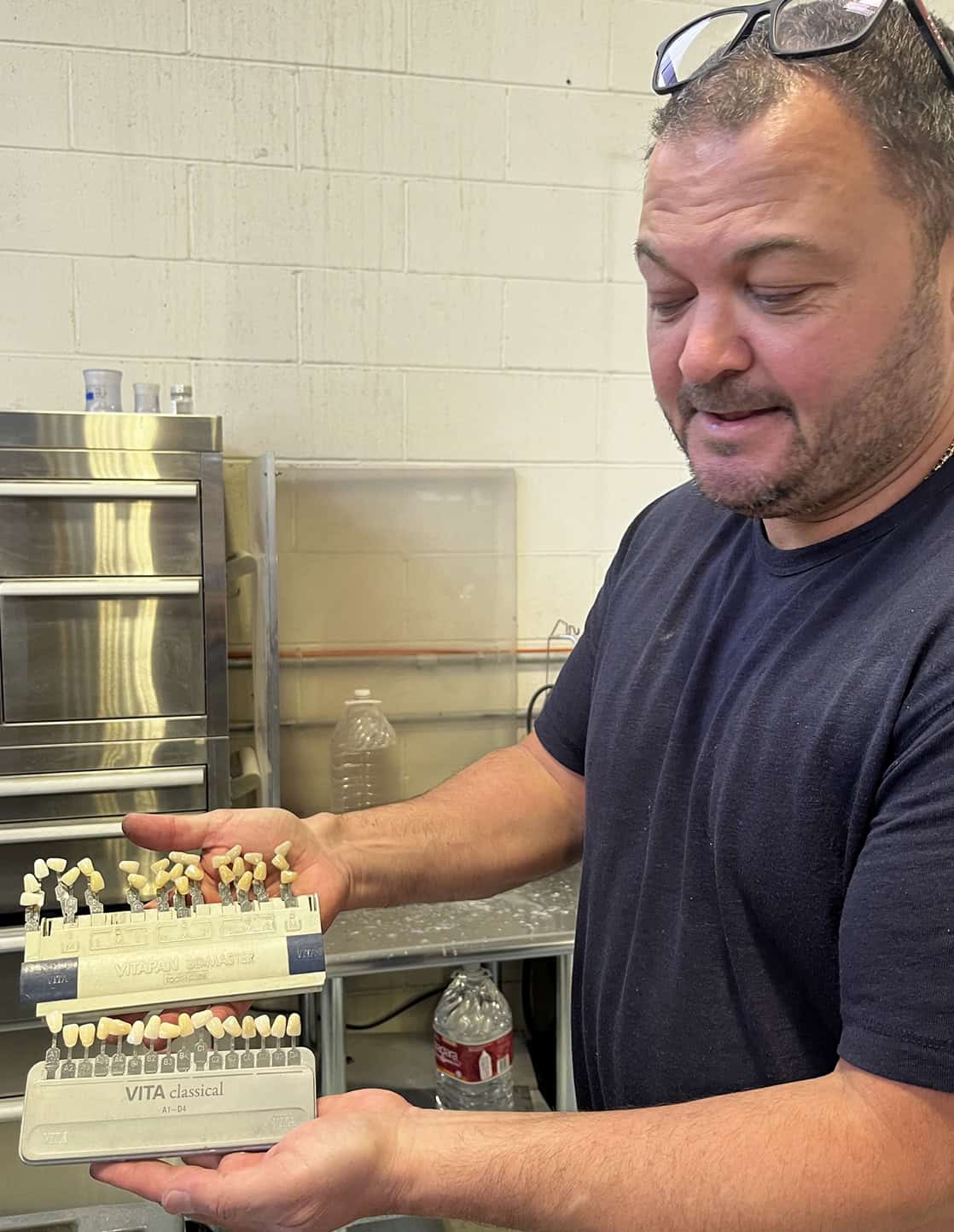
Say cheese Igor Binshteyn shows off his tooth colour guide. (Courtesy: Robert P Crease)

In another corner of the lab I ran into Binshteyn again, who was using different porcelains and ceramic stains to create colours. β€œTeeth are not a solid colour,” he said, β€œbut vary in shade from reddish near the gum line to lighter colours toward the biting edge. They also vary in translucency.” (Check this out yourself.) Furthermore, the colour of a tooth must match not its neighbours but the corresponding tooth on the other side of the mouth. To make a natural-looking tooth, Igor picks out a base colour and then layers in shades of porcelain.

As my lab tour went on, Pigliacelli showed me different materials for different applications. One challenge is making teeth for a person with bulimia, whose acidic oral environment can corrode dental materials. Other challenges arise with people who have had failed implants, or temporomandibular joint – or TMJ – a disorder involving jaw joints and muscles.

On the way out I met Lenny Marotta, Pigliacelli’s brother-in-law, who had founded Marotta Studio in 1981. Marotta is fascinated by the history of dental materials, which include bone, ivory, wood, gold and silver. He showed me his collection of early prosthodontic instruments, including milling machines, furnaces, hammers and air compressors.

Later, Marotta also pointed out a strange-looking oven. β€œThat’s for processing vulcanite, a hardened rubber material widely used for dentures before modern plastics.” But he’s been unable to find a museum interested in old prosthodontic stuff. β€œNobody knows we exist,” he complained.

The critical point

I’d assumed that materials science was required to make prosthetic teeth biocompatible, corrosion resistant, and able to withstand mechanical motions such as crushing, biting and grinding. I also knew that teeth have to be made economically enough to be widely available, aesthetic enough to be desirable, and versatile enough to withstand a variety of oral environments.

But I had no idea how much materials science was required to bring all these properties together.

Back in his office, Dr Albora installed the tooth and handed me a mirror. I had to pull up my lip to see it way on the side of my mouth. β€œI’d have to smile before somebody notices it,” I complained. β€œWell,” he said, β€œthat’s for just in case you do.”

The post Get your teeth into the cutting edge of materials science appeared first on Physics World.

Watch an orca smash into a sunfish hard enough to make it explode

16 September 2026 at 11:30

Orcas have been known to slap around stingrays, punt seals into the air and otherwise play with their food. But orcas, or killer whales, don’t just toy with live prey. Some also seem to enjoy destroying the corpses of their kills like piΓ±atas.

Scientists documentedΒ this brutal activity in the Gulf of California in 2024 and 2025. In both cases, one adult orca held a dead sharp-tail sunfish steady. A second then slammed into it with enough force to smash the sunfish to smithereens.

Killer whales might pulverize sunfish to break them into smaller bites for young orcas. Or they might just find it entertaining.

@sciencenewsofficial

Orcas are known for brutal hunting tactics. A researcher has filmed one using a new strategy. πŸŽ₯ Kathryn Ayres/Getty Images/happywhale/Footage of the World/Waluyo 66/500px #Orca #killerwhale

♬ original sound – Science News – Science News
An adult female orca holds the backside of a sunfish steady in her mouth while an adult male orca speeds toward it. The female lets go right before the male smashes into the fish, blowing its flesh to smithereens. Study coauthor Kathryn Ayres took this video with a GoPro off the coast of San Jose del Cabo on July 29, 2024.

Researchers shared the findings July 23 inΒ Frontiers in Ethology.

β€œI was absolutely gobsmacked,” says Marianne Nyegaard. β€œI thought it was the coolest thing I had ever seen.” Nyegaard is a marine biologist at Auckland Museum in New Zealand who did not take part in the work. She’d seen a coupleΒ videos of orcas battering sunfishΒ on social media. The new paper now does a deep dive into this behavior.

Nyegaard is not surprised that orcas have come up with a creative way to deal with sharp-tail sunfish. Those humungous fish can get up to a few meters (10 feet) long.

β€œOrcas will do all sorts of things,” Nyegaard says. β€œThey are so clever at figuring out how to hunt and deal with a ton of different prey types.” That hunting isΒ often a team sport. Orcas band together to ambush blue whalesΒ and whale sharks. They also team up to make waves to knock penguins off ice.

Orcas most likely smash sunfish into small pieces to help feed their young, says Francesca Pancaldi. After one of the sunfish explosions described in the paper, a young orca fed on the small bits of carnage, she notes. Pancaldi is a marine biologist who also was not involved in the study. She works at the marine science center in La Paz associated with Mexico’s National Polytechnic Institute.

Feeding may not be the only reason orcas play sunfish piΓ±ata, Pancaldi adds. β€œKiller whales are highly social animals.” A single activity, she explains, can provide nutrition, help orcas bond and offer a way for young orcas to learn how to hunt.

In 2025, researchers ground retired wind turbine blades into powder, stirred it into a gel and set it into an insulation composite. The composite combined low density with much greater compressibility than many of the insulating aerogels and composites it was compared with, squashing to a fifth of its thickness without breaking apart.

16 September 2026 at 11:00
Wind turbines under a clear blue sky symbolize clean energy and sustainability.

A wind turbine blade is basically glass fibre set in hardened resin. The fibres give it strength, the resin holds them in place, and the two are bonded so tightly that a blade can surviveΒ wind, rain and stress.

That same toughness is the problem once the blade comes down. Thermoset epoxy does not melt back into a workable liquid, and its stable chemical bonds are difficult to break. So retired blades are typically cut into sections and sent to landfill.

That is the waste a group of researchers decided to work with. In a 2026 study published in ACS Applied Engineering Materials, a team at Xi’an Shiyou University, with collaborators at the Beijing Institute of Technology and Monash University, ground old blade material into powder and turned it into a lightweight, sponge-like insulation.

Here is what came out of the lab, and how it stacks up against the size of the problem.

It squashes to a fifth of its thickness and springs back

The most surprising thing about the material is how far you can crush it without wrecking it. The team reports it took a squeeze of over 80 percent and recovered, meaning you can press it down to roughly a fifth of its height and it bounces back. That matters because conventional silica aerogels are famously fragile. They insulate well but can be brittle. A material that can take a squeeze and spring back is far easier to handle and install.

The trick is in the structure. Instead of a solid block, the composite is a network full of tiny connected pores, with the blade powder stiffening a soft, springy scaffold.Β 

It combined low density with unusually high compressibility

Weight is where the main result sits. The material reached a density of 0.184 grams per cubic centimetre while sustaining more than 80 percent compressive strain. The authors say the composite showed β€œa superior combination of low bulk density (0.184 g cm–3) and high compressive strain (>80%), outperforming a wide range of reported silica-based or organic aerogels and composites.”

A caution is warranted: that line is the researchers describing their own work, not an outside verdict. β€œOutperforming” is their framing, and the comparison is against numbers from other published papers rather than a head-to-head test by a neutral lab. The figures themselves are measurable; whether the material performs as well in practice is the kind of thing other labs and larger-scale testing would need to settle.

It holds heat in about as well as ordinary insulation

Being light and squishy would not count for much if heat poured straight through it. It doesn’t. The composite measured a thermal conductivity of 0.068 watts per metre-kelvin, and lower is better here because it means less heat gets across. For comparison, ordinary glass wool building insulation sits around 0.04. So the blade composite is not a record-setting insulator, but it is in a sensible range for the job while remaining highly compressible.

It self-extinguishes instead of feeding a flame

Insulation lives inside walls and roofs, so how it behaves near fire matters. The team reports enhanced flame self-extinguishing capability, meaning it tended to stop burning once the flame source was removed rather than carrying the fire along. Again, this is one lab result on lab samples, though, and real fire-safety ratings require standardised testing. Read it as promising, not certified.

It turns a landfill problem into the raw material

The reason any of this is interesting is the sheer number of blades headed for the ground. Worldwide, the mass of blades expected to be discarded by 2050 may reach about 43 million tonnes. Right now, around 12,000 blades are retired across Europe and the US each year, and they are typically cut up and sent to landfill. A process that takes that same material and makes something useful flips the equation.

As the authors put it, reusing the blade waste β€œnot only helps to reduce environmental burdens and resource waste but also opens up avenues for generating high-performing, useful materials.”

Where this actually sits

This is one study and one set of lab measurements. The chemistry is clever and the numbers look good, but the gap between a lab composite and a pallet of insulation shipped to a building site is wide. The paper doesn’t answer the questions that fill that gap: cost, batch-to-batch consistency, how the material holds up over years inside a wall, and whether grinding and processing old blades at scale actually makes economic sense.

That last question is the real hinge. Something has to make the recycled route cheaper or required before a lab result becomes a real supply chain.

None of that takes away from what the team built. This is a good answer to a narrow question, which is whether hard-to-recycle blade waste can be turned into a useful, light, tough insulating material at all. The evidence here says yes. The bigger question, whether it can be done by the tonne cheaply enough to matter, is still open.

The post In 2025, researchers ground retired wind turbine blades into powder, stirred it into a gel and set it into an insulation composite. The composite combined low density with much greater compressibility than many of the insulating aerogels and composites it was compared with, squashing to a fifth of its thickness without breaking apart. appeared first on Space Daily.

AYN Thor Review: Why Its Dual-Screen Design Makes This Android Handheld Different

16 September 2026 at 08:08

AYN Thor is not trying to win attention simply by putting a faster processor inside a conventional handheld. Its defining feature is the clamshell design: a large 6-inch AMOLED screen sits above a second display, giving the device a layout that is much closer to a portable dual-screen gaming system than a traditional Android game console.

The Banggood configuration covered here pairs the Snapdragon 8 Gen 2 platform with 8GB of RAM and 128GB of storage, while the wider Thor lineup also includes higher-memory versions. AYN’s own current product information lists the standard Snapdragon 8 Gen 2 configurations alongside a 6-inch AMOLED main display, a 3.92-inch secondary AMOLED screen, Android 13 and a 6000mAh battery.

That makes the Thor interesting for a very specific reason: the second screen can change how certain games and emulators are played, rather than merely adding another display to the specification sheet.

The Second Screen Is the Real Story

Most Android gaming handhelds use a single display and place all controls around it. The Thor takes a different route.

Its upper panel is a 6-inch AMOLED display with a 120Hz refresh rate, while the lower section provides a smaller 3.92-inch AMOLED touchscreen. The primary display runs at 1920 Γ— 1080, while the secondary panel uses a 1080 Γ— 1240 resolution and a 60Hz refresh rate.

The difference in refresh rate is actually useful to understand. The top screen is optimized for the main gaming experience, while the lower screen is better thought of as a companion interface.

That opens up several possibilities. In dual-screen emulation, one display can show the main game while the second handles maps, menus, touch controls or other information. For games designed around two screens, the physical arrangement can also feel considerably more natural than trying to reproduce the same layout on a single panel.

This is where the Thor has a clearer identity than another Android handheld with similar processing hardware.

Snapdragon 8 Gen 2 Gives the Thor Plenty of Headroom

The 8GB/128GB configuration uses Qualcomm’s Snapdragon 8 Gen 2, the same platform used by several other high-performance Android handhelds. AYN’s specifications identify the Snapdragon 8 Gen 2 versions as the Base, Pro and Max models, with RAM and storage increasing depending on configuration.

For the Thor, the processor is less interesting as a headline number than what it enables.

Android gaming, retro emulation and game streaming can all benefit from additional processing headroom, but the dual-screen design is where the hardware becomes more purposeful. The system has to manage two displays and the associated touch input while still maintaining a responsive gaming interface.

The 8GB configuration therefore makes sense as the entry point for users who want the Thor’s unusual hardware without necessarily moving to one of the larger storage variants.

Android 13 Keeps the Platform Flexible

The Thor runs Android 13, which gives it access to the broader Android gaming and emulation ecosystem rather than locking it into a proprietary game library. AYN’s product information also confirms that games are not preinstalled, meaning buyers should think of the device as an Android gaming platform rather than a ready-made retro library.

That distinction matters.

The real value of an Android handheld is often determined by how well its software environment fits the user’s preferred games and emulators. With the Thor, there is an additional consideration: configuring software to take advantage of two physical screens.

For example, a dual-screen setup can be particularly useful for systems and games that were originally designed around separate gameplay and information displays. Retro Game Corps’ setup guide specifically covers the additional considerations involved in configuring dual-screen Android handhelds such as the Thor.

Hall-Effect Sticks Are a Practical Hardware Choice

The Thor also uses Hall-effect joysticks, which detect stick movement magnetically rather than relying on traditional mechanical contact for position sensing. AYN lists Hall sticks among the device’s hardware features.

For an Android gaming handheld, this is more relevant than it might initially appear.

The controls are likely to see much more use than many of the device’s headline specifications. Precise analog input matters for action games, racing titles and 3D emulation, while the absence of conventional contact-based sensing can help reduce one common source of stick-position problems over long-term use.

It also reinforces the idea that the Thor is designed as a serious gaming device rather than simply an Android tablet folded into a portable shell.

A 6,000mAh Battery Balances the Dual-Screen Hardware

A 6,000mAh battery sits inside the Thor, according to AYN’s current specifications. The device also supports 27W charging.

Battery capacity alone does not tell the whole story, especially on a dual-screen handheld.

The actual runtime will depend heavily on brightness, refresh rate, emulator workload, wireless connectivity and how frequently the secondary display is active. More demanding games will naturally place a greater load on the Snapdragon platform than lightweight retro titles.

For this reason, the Thor’s battery should be viewed as part of a larger power-management equation rather than judged only by the 6000mAh figure.

The Flip Design Solves a Portability Problem

There is another advantage to the clamshell construction that has little to do with gaming performance: screen protection.

When the Thor is closed, the two displays face inward. That gives the handheld a natural protective position when it is placed inside a bag or carried between locations.

The closed form also makes the Thor visually distinct from the large number of slab-style Android gaming handhelds now available.

However, the hinge introduces its own design considerations. Users who want the device primarily for traditional single-screen Android gaming may not need a second display or a clamshell mechanism. The dual-screen architecture becomes much more valuable when the software can actually make use of it.

8GB + 128GB Is the More Straightforward Configuration

The Banggood listing specifically covers the 8GB RAM and 128GB storage version.

That capacity should be enough for a focused Android gaming setup, but storage requirements can grow quickly once users begin adding large game files, emulator libraries and multiple applications.

AYN’s wider lineup includes a 12GB/256GB model and higher-end 16GB configurations with substantially more storage.

This makes the 8GB/128GB model easier to understand as an entry configuration rather than the only version of the Thor. Buyers who plan to maintain a large local game library should pay particular attention to storage before choosing between variants.

Who Actually Benefits From Two Screens?

The Thor makes the most sense for users whose gaming habits can take advantage of its unusual layout.

Dual-screen emulation is an obvious example. Systems that originally used two displays can be represented more naturally when the handheld itself physically provides two panels.

The secondary display can also be useful for touch-based controls, menus or supplementary information while the main display remains dedicated to gameplay.

For ordinary Android games that only need one screen, however, the second panel becomes less important. In that situation, the Thor’s main advantage is its unusual form factor rather than a fundamental change in gameplay.

That distinction is worth keeping in mind when comparing it with conventional single-screen Android handhelds.

A Different Kind of Android Gaming Handheld

The AYN Thor gaming handheld β€˜s most interesting feature is not the Snapdragon 8 Gen 2 by itself, nor is it simply the 120Hz AMOLED display.

It is the combination of a 6-inch 120Hz AMOLED main screen, a secondary AMOLED touchscreen, Hall-effect controls, Android 13 and a 6000mAh battery inside a foldable chassis.

That combination gives the Thor a specific purpose.

For users who mainly want a standard Android gaming handheld, its dual-screen construction may be more hardware than they need. But for players interested in DS/3DS-style emulation, dual-screen interfaces or experimenting with different Android gaming layouts, the second display provides a capability that conventional handhelds simply cannot reproduce in the same physical way.

The result is a device that stands apart not because it has the longest specification sheet, but because its hardware is built around a different idea of what a portable gaming console can be.

The post AYN Thor Review: Why Its Dual-Screen Design Makes This Android Handheld Different appeared first on IGeeKphone China Phone, Tablet PC, VR, RC Drone News, Reviews.

ZLL SG616 PRO/MAX Review: A 1:24 4WD RC Car Built for Fast Off-Road Runs

16 September 2026 at 07:53

Small RC cars often have to make a compromise between portability and driving performance. The ZLL SG616 PRO/MAX takes a different approach, packing four-wheel drive, proportional controls and a relatively aggressive power system into a 1:24-scale chassis.

1:24 scale also changes where the car makes the most sense. Rather than requiring a large dedicated driving area, its compact dimensions make it easier to use on driveways, compact outdoor spaces and other locations where a larger 4WD RC car would be inconvenient.

What makes this model particularly interesting is that buyers can choose between a brushed version and a brushless version. The brushed model is rated for up to 30 km/h, while the brushless configuration raises the claimed top speed to 38 km/h.

A Compact RC Car With Serious Speed

At 208 Γ— 113 Γ— 80 mm, the SG616 is small enough to transport easily, but its specifications are closer to what enthusiasts expect from a performance-oriented RC vehicle than a basic toy-grade car.

The 1:24 scale also changes where the car makes the most sense. Rather than requiring a large dedicated driving area, its compact dimensions make it easier to use on driveways, compact outdoor spaces and other locations where a larger RC truck would be inconvenient.

The 12 mm ground clearance is modest, so the SG616 is not designed to behave like a full-size crawler. Its appeal is instead centered on quick acceleration, directional control and short off-road runs.

Brushed or Brushless: The Important Buying Decision

The biggest difference between the SG616 PRO and MAX configurations is the power system.

The brushed version uses an RC180 motor and has a claimed maximum speed of 30 km/h. The brushless version moves to a 2030 4500KV motor and is rated for up to 38 km/h. Both configurations use an integrated 35A ESC.

That distinction matters because the brushless model is not simply a cosmetic upgrade. Its higher claimed speed makes it more suitable for users who want a faster RC driving experience, while the brushed version may make more sense for someone who values a simpler setup.

The brushless configuration also gets an all-metal driveshaft, giving it a mechanical upgrade beyond the motor itself.

Four-Wheel Drive and Independent Suspension

The SG616 uses a 4WD drivetrain with planetary differential gearing and independent suspension. Combined with a 45-degree steering angle, these features are intended to give the small chassis more flexibility when changing direction or dealing with uneven surfaces.

The car also uses ball bearings throughout, while an aluminum motor heatsink helps manage heat around the power system.

This combination is more important than the headline speed. A fast RC car is only enjoyable when the chassis can translate that power into controllable movement. The SG616’s proportional throttle and four-wheel-drive layout are therefore two of its more meaningful features.

Full-Proportional Control Makes a Difference

The included 2.4GHz transmitter provides four control channels and a claimed control distance of around 80 to 100 meters, depending on the configuration or listing specification.

More importantly, the car supports full-proportional control. Instead of limiting the vehicle to simple forward, reverse and steering commands, proportional control allows the driver to vary throttle input more precisely.

That is useful when moving through tighter spaces. It also gives the SG616 a more controllable feel when approaching corners or transitioning between slower technical driving and high-speed runs.

Battery Life Is Designed Around Short Sessions

The SG616 uses a 7.4V Li-ion battery, with the brushed and brushless versions using 500mAh and 800mAh capacities respectively according to the current listing. Charging takes approximately 1.5 hours, while the advertised running time is around 30 to 40 minutes.

These numbers suggest that the car is better suited to several relatively short driving sessions than continuous long-distance running.

The included USB charging cable also keeps the package straightforward. Buyers receive the car, battery, transmitter, charging cable, manual, spare R-clips and screwdriver, so there is no need to assemble a separate basic control system before getting started.

Designed for Outdoor Driving

The SG616 has several details aimed at reducing the limitations of a compact RC chassis.

Its circuit board and steering servo are listed as waterproof, while the front bumper integrates LED lights for a more distinctive appearance during low-light driving. The 47 mm tires and independent suspension also help the car deal with surfaces that are less predictable than a smooth indoor floor.

However, waterproof electronics should not automatically be interpreted as a license for deep-water driving. The practical advantage is better resistance to splashes and wet conditions rather than treating the car as a fully submersible vehicle.

What Kind of RC Driver Is It For?

The ZLL SG616 PRO/MAX occupies an interesting middle ground.

It is substantially more performance-focused than a basic toy RC car, yet its 1:24 scale keeps it much easier to carry and deploy than a larger hobby-grade truck. The brushless version is particularly notable for its claimed 38 km/h maximum speed, while the proportional controls and 4WD system give the driver more control than a simple entry-level model.

For buyers deciding between the two versions, the choice largely comes down to driving priorities. The brushed model provides a lower-speed configuration, while the brushless model targets users who specifically want more speed and the additional mechanical hardware that comes with that configuration.

Final Takeaway

ZLL SG616 PRO/MAX is interesting because it does not rely on one headline specification. Its appeal comes from how several features work together: a compact 1:24 chassis, 4WD, independent suspension, proportional throttle, 2.4GHz control and two different motor configurations.

The brushless version’s 38 km/h claim is certainly the attention-grabbing number, but the proportional controls, drivetrain design and compact dimensions may ultimately have a greater impact on everyday usability.

For shoppers comparing small off-road RC cars, the SG616 is therefore worth looking at as a performance-focused compact model rather than simply another inexpensive remote-control toy.

The post ZLL SG616 PRO/MAX Review: A 1:24 4WD RC Car Built for Fast Off-Road Runs appeared first on IGeeKphone China Phone, Tablet PC, VR, RC Drone News, Reviews.

AULA F75 MAX Review: A 75% Mechanical Keyboard With TFT Screen and Tri-Mode Wireless

16 September 2026 at 07:43

AULA F75 MAX keyboard is designed for users who want more than a basic compact mechanical gaming keyboard. Instead of focusing on a single headline feature, it combines a space-saving 75% layout with a dedicated TFT screen, rotary knob, hot-swappable switches, gasket mounting and three connection modes.

That combination makes the F75 MAX interesting for both gaming and everyday desktop use. Its design also reflects a broader trend in mechanical keyboards: smaller layouts are becoming more feature-rich without completely sacrificing the controls that PC users rely on.

Why the 75% Layout Makes Sense

The F75 MAX uses an 80-key 75% layout, keeping the function row and arrow-key cluster while removing the large gaps and dedicated number pad found on full-size keyboards.

For a gaming setup, this layout can free up more desk space for mouse movement. At the same time, it remains practical for productivity because users do not have to give up the dedicated arrow keys and function row.

The trade-off is the missing number pad. Anyone who regularly enters large amounts of numerical data may still prefer a full-size keyboard, but for gaming, general typing and compact workstations, the 75% format is a useful middle ground.

The TFT Screen Is More Than Decoration

One of the F75 MAX’s most noticeable design elements is its built-in TFT screen. Instead of relying entirely on RGB lighting for visual customization, the keyboard adds a small display that gives the top section a more personalized appearance. Banggood specifically lists a GIF-capable TFT screen interface.

This feature does not fundamentally change typing performance, but it gives the keyboard a distinct identity. For users who enjoy customizing their desktop setup, the screen can make the F75 MAX feel more like a configurable gadget than a conventional mechanical keyboard.

The separate metal knob also adds a practical control point, giving users a physical way to interact with supported functions instead of relying entirely on keyboard shortcuts.

Gasket Mounting Targets a Softer Typing Feel

The keyboard uses a gasket-mounted structure with multiple layers of sound-dampening material. AULA lists five layers of dampening, while the product listing describes a six-layer sound-absorbing structure, so the exact terminology varies between listings.

The important part is what this construction is intended to achieve. A gasket-mounted keyboard isolates the plate from parts of the case, allowing slightly more flex while reducing some of the direct vibration transferred through the chassis.

Combined with the F75 MAX’s foam and silicone layers, the design is aimed at producing a deeper and less harsh typing sound than a basic rigid keyboard.

That makes the keyboard potentially more appealing to people who care about typing acoustics as well as gaming performance.

Hot-Swappable Switches Make Future Upgrades Easier

Another useful feature is the hot-swappable PCB, which supports 3-pin and 5-pin mechanical switches according to AULA’s specifications.

This means owners are not necessarily locked into the factory switch configuration. Users who prefer a lighter linear feel, a different actuation characteristic or another sound profile can experiment with compatible switches without replacing the entire keyboard.

The F75 MAX comes with LEOBOG Reaper linear switches. AULA lists them as factory-lubed, while EPOMAKER’s specifications give the switch a 45Β±3gf trigger force and 3.6Β±0.3mm total travel.

For someone buying a mechanical keyboard as a long-term platform, this upgradeability may be more meaningful than RGB effects alone.

Tri-Mode Connectivity Covers Different Setups

The F75 MAX supports USB-C wired, 2.4GHz wireless and Bluetooth 5.0 connections.

That gives the keyboard three distinct use cases. Wired mode is suitable for a desktop gaming setup, 2.4GHz wireless keeps the desk cleaner while maintaining a low-latency connection, and Bluetooth is convenient when switching between compatible computers or mobile devices.

AULA rates the keyboard at up to 1000Hz polling through USB and 2.4GHz, while Bluetooth is listed at 125Hz. The manufacturer also lists latency of around 3ms over USB, 7ms via 2.4GHz and 18ms through Bluetooth.

For competitive gaming, the wired and 2.4GHz modes are therefore the more relevant choices.

4000mAh Battery Gives Wireless Mode Some Flexibility

The built-in 4000mAh battery is another reason the F75 MAX works well as a wireless desktop keyboard. AULA rates battery life at approximately 30.5 hours with the RGB backlight enabled and up to 80 hours with the lighting switched off.

Actual endurance will depend on lighting brightness, connection mode and usage patterns, so these figures should be treated as manufacturer ratings rather than guaranteed real-world results.

Still, the option to turn off RGB lighting when maximum battery life matters gives users more control over how they use the keyboard.

PBT Keycaps and South-Facing RGB

The F75 MAX uses double-shot PBT keycaps and south-facing per-key RGB lighting.

PBT is commonly chosen for mechanical keyboards because it generally resists the glossy wear that can develop on frequently used ABS keycaps. The south-facing RGB arrangement also works well with the keyboard’s overall enthusiast-oriented design.

AULA lists support for more than 16 million RGB colors and multiple lighting effects, although the visual customization is ultimately secondary to the keyboard’s typing and connectivity features.

A Compact Keyboard With Room to Experiment

AULA F75 MAX is best understood as a feature-rich 75% mechanical keyboard rather than simply another RGB gaming board.

Its strongest combination is the compact layout, gasket construction, hot-swappable PCB and tri-mode connectivity. The TFT display and rotary knob then add a layer of customization that separates it from more conventional 75% keyboards.

For gamers, the 2.4GHz connection and 1000Hz polling rate give the keyboard a performance-oriented side. For enthusiasts, the hot-swap PCB and gasket structure leave room for future customization. And for everyday users, the 75% layout provides a useful balance between desk space and functionality.

The main compromise is straightforward: users who need a dedicated number pad will need a larger keyboard. But for anyone comfortable with the 75% format, the AULA F75 MAX offers a combination of customization, wireless flexibility and enthusiast-style construction that makes it worth considering.

For the latest specifications and software information, buyers should also check the official AULA product page before ordering, since configurations and regional listings can vary.

The post AULA F75 MAX Review: A 75% Mechanical Keyboard With TFT Screen and Tri-Mode Wireless appeared first on IGeeKphone China Phone, Tablet PC, VR, RC Drone News, Reviews.

TRIMUI Brick Pro TG4040 Review: 3.95-Inch Display, Hall Joysticks and 256GB Storage

16 September 2026 at 07:35

TRIMUI Brick Pro TG4040 isΒ aimed at players who want a dedicated retro gaming handheld without carrying a bulky modern console.Its appeal comes from the combination of a compact vertical design, a high-resolution IPS display, physical controls designed for longer sessions, and a Linux-based gaming environment.

The 256GB configuration also targets users who want a large game library available locally. Banggood lists this version with more than 17,000 games, although the actual titles and availability can depend on the included software and storage configuration.

A Small Handheld With a Surprisingly Detailed Display

The Brick Pro uses a 3.95-inch IPS panel with a 1024 Γ— 768 resolution, giving it a 4:3 aspect ratio that suits many classic games particularly well. The official TRIMUI specifications also list a 60Hz refresh rate and full lamination.

That resolution is more important than simply looking at the screen size. Retro games were generally designed around lower-resolution displays and 4:3 layouts, so the Brick Pro’s screen can preserve that traditional presentation without requiring an oversized handheld.

The relatively compact display also keeps the device portable, making it easier to use during travel, commuting or short gaming sessions.

Dual Hall Joysticks Focus on Long-Term Control

One of the more practical hardware choices is the inclusion of dual Hall-effect joysticks. Unlike conventional analog sticks that rely on physical contact for position sensing, Hall-effect controls use magnetic sensing technology.

For a retro handheld, the benefit is less about chasing headline specifications and more about control consistency. Players who frequently switch between arcade titles, platformers and games that require analog input can benefit from having two proper sticks instead of relying entirely on a directional pad.

The official TRIMUI specification lists the Brick Pro with JF15 dual Hall-effect joysticks, along with L3 and R3 click functions.

The 256GB Version Is Built Around a Large Game Library

Storage is another major reason to consider this particular configuration.

The 256GB TRIMUI Brick Pro is advertised with more than 17,000 games, while other Brick Pro configurations are sold with different storage capacities and game counts. Banggood’s product listings show 64GB, 128GB and 256GB versions, giving buyers several ways to configure the handheld around their preferred library size.

For users who mainly want a ready-to-play retro machine, the larger storage option reduces the need to constantly manage space. At the same time, buyers should check exactly what game content is included with their chosen package rather than assuming that every version contains the same library.

The official hardware also supports a TF card, with storage expansion listed up to 1TB.

CNC Metal Construction Gives the Handheld a Different Character

The Banggood 256GB listing highlights a CNC metal body, which gives this configuration a more substantial positioning than lightweight plastic retro consoles.

This matters particularly for a device intended to be used frequently. A metal exterior can provide a more rigid feel in the hands, although it may also add weight compared with an all-plastic design.

It is worth noting that TRIMUI’s official Brick Pro specification describes the standard product body as ABS+PC plastic, so buyers should pay attention to the exact TG4040 variant and listing configuration when comparing materials.

5,000mAh Battery Makes It Better Suited to Portable Play

The Brick Pro carries a 5,000mAh battery, which is substantial for a compact retro handheld. TRIMUI rates battery life at around 5 to 10 hours depending on workload, while charging is handled through USB-C at up to 10W.

Actual endurance will naturally vary according to the emulator, screen brightness, wireless connectivity and other usage conditions. Still, the battery capacity makes the Brick Pro better suited to longer sessions away from a charger than many smaller retro handhelds.

Linux Keeps the Experience Focused on Gaming

The Brick Pro runs TrimUI’s Linux-based software environment rather than Android. The official specifications list Trim-UI Linux and Trimui OSD, along with support for a broad range of classic gaming systems and arcade platforms.

That approach keeps the device closer to the traditional retro-handheld experience. Instead of functioning as a general-purpose Android tablet, the Brick Pro is primarily designed around emulation, physical controls and quick access to games.

Connectivity includes 802.11 b/g/n wireless networking, Bluetooth 4.2 and USB-C, while the system also provides a 3.5mm headphone jack and stereo speakers.

Who Is the TRIMUI Brick Pro TG4040 For?

The Brick Pro makes the most sense for players who want a dedicated retro handheld rather than a general-purpose gaming device.

Its strongest combination is the 3.95-inch 4:3 display, dual Hall-effect controls, 5,000mAh battery and large-storage option. The 256GB model is particularly interesting for users who prefer having a substantial library available without frequently swapping storage.

However, its Linux-based design also tells you what the device is not trying to be. This is primarily an emulation-focused handheld rather than a replacement for a modern Windows gaming PC or high-end console.

For retro enthusiasts, that focused approach can actually be the main attraction: the Brick Pro puts the screen, controls and game library at the center of the experience while keeping the overall device compact enough to take almost anywhere.

Note: Game counts, included software, storage contents and package configurations can vary by seller and version. Buyers should verify the exact 256GB configuration before ordering.

The post TRIMUI Brick Pro TG4040 Review: 3.95-Inch Display, Hall Joysticks and 256GB Storage appeared first on IGeeKphone China Phone, Tablet PC, VR, RC Drone News, Reviews.

❌