A sunken World War II hospital ship off the coast of Albania has attracted both invasive devil firefish and rare Mediterranean monk seals, leading researchers to weigh the risks and benefits of these wrecks for local ecosystems.
The ship, called the Po, sank off Vlora Bay in 1941 after being hit by a torpedo from a British Fairey Swordfish aircraft during the Greco-Italian War, one of the conflicts within World War II. It is now acting as an artificial reef, with over 80% of its surface teeming with marine life, researchers reported July 27 in the journal Frontiers in Ocean Sustainability.
This phenomenon, by which submerged structures attract marine life, is called the artificial reef effect, and it occurs when marine life colonizes a newly introduced solid structure underwater. These structures can provide shelter because crevices and dens serve as hiding places, as well as food from the algae and other organisms that grow on its surface.
While there has been research on Vlora Bay generally, there was no historical biological or quantitative data for the Po wreck itself. The new study sought to find out more about how the ship's structure affected the surrounding seabed and how marine organisms have colonized it.
Devil firefish (Pterois miles) are native to warm coastal waters and coral reefs of the West Indian Ocean and the Red Sea. However, the new study found these fish swimming around the shipwreck off the coast of Albania, around 800 miles (1,300 kilometres) away, between June 2022 and September 2024, with up to seven individuals observed simultaneously. The study authors suggested that shipwrecks like Po could be attracting these invasive animals from their natural habitat toward more temperate waters.
“Unfortunately, I can't call it a true scientific surprise, because the effects of climate change are now sadly well known and predictable," Simone Modugno, a biologist and scientific diver at the University of Ferrara in Italy and co-author of the study, told Live Science. "What's perhaps most surprising is the speed with which these climate changes are occurring, acting as a driver and amplifier for the incursions of tropical and alien organisms. I'm talking about impressive salinity and abnormally high temperatures, with persistent peaks of extreme heat."
The Po, a sunken WWII hospital ship, has been colonized by a range of marine animals and plants. (Image credit: Mauro Pazzi)
The researchers noted that the presence of these fish is part of a wider problem: More invasive species are migrating from the Red Sea through the Suez Canal and into the Adriatic Sea due to warming global temperatures. Modugno said she expects a "serious problem" involving the devil firefish within the next 10 years.
"For at least three years, I've observed a steady and unstoppable increase in fish such as Pterois miles along the Albanian coast, as well as other invasive plant species, mollusks, and shellfish, as well as the spontaneous return of the Mediterranean monk seal," Modugno said. "Now, the Albanian coasts are experiencing constant overgrazing, just like the Greek and sub-Italian coasts, and the lionfish population is literally exploding.”
The study confirmed that this was one of the northernmost reported occurrences of the firefish in the Adriatic Sea.
However, invasive species aren't the only ones attracted to these shipwrecks. The researchers also noted 28 fish species living around the wreck, egg clusters belonging to the Ommastrephidae family of squid, and even sightings of the rare Mediterranean monk seal (Monachus monachus).
Most notably, researchers captured a monk seal resting within the sheltered cavities of the wreck in August 2023, which was the first confirmed sighting of the species in Vlora Bay since 1996.
This monk seal species typically breeds in sheltered sea caves across Mediterranean beaches. However, tourism and other human activities have forced the species into more isolated and dangerous caves. This, along with other threats from fishing entanglement, continue to threaten the seals. The sighting indicates that monk seals are using these artificial reefs as potential resting opportunities when their natural habitats are fragmented, the researchers said in the study.
ⓘWe may earn a commission when you buy through our links. This helps support MacSources and keeps our content free. Thank you!
The ViewSonic VG1457 puts two 14-inch WUXGA displays into a portable 2.6-pound package, giving mobile workers more screen space without carrying two separate monitors.
Traveling and staying productive has become much easier in recent years, largely thanks to portable devices like tablets and laptops. The only issue I end up having is a lack of screen real estate when I’m on-the-go since I’m used to working on a 34-inch wide screen monitor. This is where ViewSonic’s dual-screen portable monitor comes in handy.
About the ViewSonic VG1457
The ViewSonic VG1457 is a dual-screen portable monitor designed to give users additional screen space without requiring two separate displays. It features two 14-inch WUXGA IPS displays with a 1920 × 1200 resolution, connected by a flexible hinge that allows the screens to be positioned in multiple configurations.
The VG1457 supports several viewing modes, including Extend, Mirror, Full-Screen, Share, and Dual Source. It also features USB-C connectivity with up to 65W power delivery, allowing it to connect to compatible laptops and mobile devices while helping reduce the number of cables needed. At approximately 2.6 pounds, the VG1457 is designed for users who want a larger workspace while traveling or working away from their primary desk.
With its flexible design and dual-display functionality, the VG1457 is particularly suited to productivity tasks such as multitasking, presentations, document work, and working with multiple applications simultaneously.
Specs
Screen Size: 14″ (x2)
Viewable Area (in.): 14″ (x2)
Color Space Support: 8 bit (6 bit + FRC)
Viewing Angles: 170º horizontal, 170º vertical
Backlight Life (Hours): 15,000
Display Resolution: WUXGA (1920×1200)
Display Resolution: 1920 x 1200
Dynamic Contrast Ratio: 50,000,000:1
Aspect Ratio: 16:10
Panel Surface: Anti-glare, hard-coating (3H)
Light Source: LED
Brightness: 250 cd/m2
Static Contrast Ratio: 800:1
Panel Type: IPS
Refresh Rate: 60Hz
PC Resolution (max): 1920×1200
Mac® Resolution (max): 1920×1080
USB Type C: 65W x 3
Internal Speakers: 2W (x2)
Consumption (typical): 13W
Consumption (max): 18.5W
Voltage: AC 100-240V (universal), 50-60Hz
Stand-by: 0.5W
Power Supply: External
Cable Organization: No
Physical Controls: Up, Down, Enter, Power
On Screen Display: Input Select, Display Settings, Volume, Color Adjust, Information, All Recall
Temperature: 32-104º F (0 – 40º C)
Humidity (non-condensing): 20-90%
Frequency Horizontal: 15 ~ 82 KHz
Frequency Vertical: 50 ~ 170 Hz
Swivel: 340º
Pivot (Right/Left): Landscape Mode: 0~180 degrees, Portrait Mode: 0~180 degrees, Stand Hinge: up to 90 degrees
Tilt (Forward/Back): 15º / 45º
Regulations: cTUVus, FCC-B, ICES003, Energy Star 8.0, EPEAT Silver, CEC
Net (lbs): 2.6
Net Without Stand (lbs): 2.6
Gross (lbs): 4.4
Net (kg): 1.2
Net Without Stand (kg): 1.2
Gross (kg): 2.0
Packaging (in.): 15.4″ x 11.3″ x 3″
Physical (in.): 16.77″ x 12.35″ x 0.59″
Physical Without Stand (in.): 12.21″ x 8.37″ x 0.98″
Packaging (mm): 391mm x 287mm x 77mm
Physical (mm): 425.9mm x 313.8mm x 15mm
Physical Without Stand (mm): 312.8mm x 212.65mm x 22.5mm
Package Contents: LCD Display, AC/DC Adapter, 2x USB Type C Cable, Protective Case, Quick Start Guide
Recycle/Disposal: Please dispose of in accordance with local, state or federal laws.
Warranty: Three-year limited warranty on parts, labor and backlight
Pricing & Availability
The ViewSonic VG1457 has a list price of $349.99 and is available on Amazon.
Setup & Connectivity
Getting the ViewSonic VG1457 up and running is remarkably simple. I connected both a Microsoft Surface Pro and a MacBook Pro directly to the monitor using USB-C, with each side of the VG1457 having its own USB-C port for controlling its respective display. No software or drivers were required, and both displays worked immediately when connected to their host systems.
One of the more convenient features is that the VG1457 does not necessarily need to be connected to external power. I initially had power connected, but disconnected it to see whether the laptops could power the displays themselves. Both the Surface Pro and MacBook Pro were able to power the VG1457 without issue. I also haven’t experienced any connection dropouts during my testing.
The experience does differ depending on the host computer. When using the MacBook Pro by itself, macOS recognizes the VG1457 as a single external display, with both panels showing the same content. The two panels are essentially mirrored rather than appearing as two independent external displays. I did adjust the resolution on the MacBook-connected display, although the monitor worked without making that adjustment. When I connected the Surface Pro by itself, only one of the VG1457’s displays was active. However, connecting the Surface Pro and MacBook Pro simultaneously allowed each display to operate independently, with one screen dedicated to each computer.
Display & Everyday Use
The VG1457’s displays have been impressive for everyday productivity. Brightness is more than adequate for indoor use and remains usable when positioned near a window. I haven’t tested it in direct sunlight, so I can’t say how well the panels would perform under those conditions, but typical indoor environments haven’t presented any issues.
Colors look good straight out of the box. They are slightly muted compared with the display on my MacBook Pro, but the difference is relatively minor, and I haven’t made any color adjustments. Text is particularly easy to read, which is important for a monitor designed primarily around productivity. I also haven’t noticed any significant glare or reflections during use.
For my testing, I used one display for Slack and the other for Messages. Having those applications visible simultaneously is a good example of where the VG1457 makes sense. Rather than constantly switching between windows, both applications remain visible and accessible. With its 60Hz maximum refresh rate, this isn’t a portable monitor I’d choose specifically for gaming, but that isn’t really where it excels. It is much better suited to expanding your workspace when you need additional screens for productivity.
Portability & Build Quality
Portability is one of the VG1457’s strongest attributes. Despite incorporating two displays into a single unit, it isn’t excessively heavy or cumbersome to carry. The system feels sturdy and robust when being handled, which gives me confidence that it can withstand normal wear and tear of traveling between home, office, and other locations.
The hinge is tight enough to keep the displays securely positioned while still being easy to open and adjust. That balance is important for a portable dual-screen design because a hinge that is too loose would make positioning the displays frustrating, while one that is too stiff would make setup unnecessarily difficult.
ViewSonic also includes a travel pouch, which is a welcome addition and makes transporting the VG1457 easier. The pouch is made from felt, however, so I would have preferred something with a little more structure and protection. A more substantial travel case would provide greater peace of mind when carrying two displays in a laptop bag or backpack.
Overall, the VG1457 has been easy to set up, reliable in my testing, and surprisingly practical to carry. Its biggest limitation so far is not the hardware itself, but how the displays behave depending on the computer they’re connected to. For productivity, however, having two additional panels available in such a portable package can be extremely useful.
Conclusion
The ViewSonic VG1457 solves a problem that anyone who regularly works away from a desktop setup can appreciate: how do you get more screen space without carrying a collection of monitors and cables? By combining two 14-inch displays into a single portable unit, ViewSonic has created a convenient way to expand your workspace while traveling.
Despite its limitations, the VG1457 is an excellent option for people who prioritize productivity and portability. Having two displays available in a single 2.6-pound package is incredibly useful when working away from a traditional desk. If your primary goal is to have more room for applications, messages, documents, and other productivity tasks while traveling, the VG1457 is worth considering.
ⓘWe may earn a commission when you buy through our links. This helps support MacSources and keeps our content free. Thank you!
The SOUNDPEATS UU2 combine a comfortable open-ear design, strong bass, LDAC, Bluetooth 6.0, multipoint connectivity, and up to 42 hours of battery life in an affordable package.
I recently just started a new workout regimen, and while I love my AirPods Pro, they tend to work their way out of my ears when I’m active. There’s nothing quite as distracting as having to stop in the middle of a workout to push an earbud back into place, especially when I’m trying to stay focused on what I’m doing.
That got me looking at open-ear earbuds, particularly the clip-on style that doesn’t rely on an ear tip staying securely inside the ear canal. The SOUNDPEATSU@ UU2 caught my attention because they take that approach while still offering features I typically look for in a pair of wireless earbuds, including Bluetooth 6.0, LDAC support, multipoint connectivity, and a claimed 10 hours of battery life.
I’ve also been curious about how well this style of earbud actually performs in everyday use. Leaving the ear canal open sounds appealing for workouts and other situations where I want to remain aware of my surroundings, but that design also raises some questions. How do they sound? Is there enough bass? How secure are they during exercise? And how much sound actually reaches the people around you?
I’ve spent some time with the SOUNDPEATS UU2 to find out whether these clip-on earbuds can deliver the stability and convenience I’m looking for without sacrificing the audio experience that has kept me coming back to the AirPods Pro.
About the SOUNDPEATS UU2
The SOUNDPEATS UU2 are open-ear clip-on earbuds designed to sit around the ear rather than inside the ear canal. This allows users to listen to music while still hearing some of the sounds around them.
The UU2 feature 12mm dual-magnet dynamic drivers with DynamicEQ technology, Bluetooth 6.0, and support for SBC, AAC, and LDAC codecs. They also offer multipoint connectivity, physical button controls, IPX5 water resistance, and up to 10 hours of playback on a single charge. The included charging case extends total battery life to up to 42 hours.
With their lightweight clip-on design and open-ear construction, the UU2 offer an alternative to traditional in-ear earbuds. The rest of this review focuses on how that design performs in everyday use, including comfort, audio quality, fit, controls, and connectivity.
Specs
Core Specs
Bluetooth: v6.0
Bluetooth Profiles: HSP / HFP / A2DP / AVRCP
Chipset: BT8912F
Bluetooth Codecs: SBC / AAC / LDAC
Battery
Earbud Battery: 50mAh × 2
Charging Case Battery: 500mAh
Earbud Charging Time: 45 minutes
Case Charging Time: 1 hour 36 minutes
Fast Charging: 10 minutes provides up to 2 hours of playback
Getting started with the SOUNDPEATS UU2 is straightforward. Inside the box, you’ll find the earbuds, their charging case, a short USB-C charging cable, and a user guide. There’s also an app quick-start card and a SOUNDPEATS sticker sheet. The earbuds arrive stored in the charging case, so there isn’t much to do before getting started beyond charging them and connecting them to a device.
The first thing I noticed after taking the UU2 out of the case was just how different they feel compared with traditional earbuds. Rather than placing anything inside the ear canal, the UU2 use a clip that sits behind the ear with the speaker positioned just outside it. That design takes a little getting used to, but it also ended up being one of my favorite aspects of using them.
Comfort & Fit
The SOUNDPEATS UU2 took a little getting used to at first. Since the clip sits behind the ear, it feels noticeably different from traditional earbuds. Initially, I was very aware of the clip being there, but after wearing them for a while, that feeling became much less noticeable.
Once I got used to the design, I found the UU2 to be very comfortable. One of my favorite things about the open-ear design is that there isn’t a traditional earbud wedged into my ear canal. Instead, it feels almost like I have two small speakers sitting just outside my ears.
The earbuds have stayed securely in place during normal movement, and so far, I haven’t noticed any significant movement or shifting. They also work well with my glasses, and I haven’t experienced any pressure or irritation around my ears.
Putting them on and taking them off takes a little practice because of the clip design, but once I figured out the proper motion, it became easy to do. Overall, I have been very impressed with how comfortable the UU2 are, particularly for longer listening sessions.
Audio Quality
I was pleasantly surprised by the sound quality of the UU2. They sound great, and the bass response is particularly impressive for an open-ear design. I expected some compromise in the low end because the earbuds don’t create a seal inside the ear canal, but the bass is actually very strong.
Vocals are clear, and the mids and highs are well balanced. I’ve also been impressed with how the UU2 handle different volume levels. Whether I’m listening at a lower volume or turning things up, the audio remains clear and I haven’t noticed any significant distortion at higher volumes.
For an open-ear pair of earbuds, the overall listening experience has been better than I expected. They provide plenty of volume and bass without losing the clarity that I want when listening to music.
Everyday Use
The physical buttons are one area where I think the UU2 could be improved. The buttons themselves work well, but their location makes them a little awkward to press. It isn’t something that prevents me from using the earbuds, but it does take some getting used to.
The controls themselves are intuitive, and I especially like that they can be customized through the SOUNDPEATS app. Being able to change what the different button presses do gives me more control over how I use the earbuds and lets me configure them around my preferences.
Connection speeds have also been good. The UU2 connect to my devices within a few seconds, so I haven’t had to wait around for them to establish a connection.
One of the biggest advantages of an open-ear design is being able to remain aware of what’s happening around me while listening. With the UU2, I can still hear ambient sounds such as my keyboard while I’m typing or my dog barking. However, the music remains the dominant sound, so I wouldn’t describe them as providing complete awareness of my surroundings.
I also haven’t had anyone complain about sound leakage while I’ve been using them. That said, because the speakers sit outside the ear rather than creating a seal, I can see how someone nearby could hear the earbuds if the volume were turned up high enough.
Conclusion
The SOUNDPEATS UU2 have turned out to be a pleasant surprise. I went into this review primarily looking for a solution to a very specific problem: keeping earbuds securely in place while working out. What I found was a pair of earbuds that not only stay in place, but are also comfortable enough that I can see myself using them well beyond my workouts.
At $49.99, the SOUNDPEATS UU2 offer an impressive combination of comfort, sound quality, battery life, and features. For someone looking for an alternative to traditional in-ear earbuds, particularly for workouts or extended listening, the UU2 are easy to recommend.
Ancient painting of a bison from Altamira cave in Spain.luisrphoto
Perhaps the most evocative windows into the minds of our ancient ancestors are the images they painted on the walls of caves – renderings known simply as rock art or cave paintings.
Rock art, which is found across the world, offers snapshots of human history, preserving representations of cultural traditions, symbolic communication and social identity. Common subjects include animals, hunting scenes and hand stencils – thought to have been made by blowing pigment over the artist’s hand.
Scientists have wrestled with basic questions about the origins of rock art such as: what was used to produce it, when was it made, and who made it?
Now, a recent study of cave art from Spain and Portugal has shown that ancient human DNA can be recovered directly from the cave walls. We may therefore be edging closer to answering “who made it?”
Using this technique to link a specific painting to an ancient artist may be a step too far. But there are still important things it can tell us about the past.
Previously, researchers had made considerable progress in answering the “what” and “when” questions. Scientists can analyse what pigments are preserved in rock art using techniques such as X-ray fluorescence spectroscopy, which allows them to identify materials such as red ochre and charcoal.
Scientists can also estimate the age of the art using techniques such as carbon-14 dating, carried out on minute quantities of organic material, to determine when rock art was created.
For example, in 2026, researchers reported that a stencil of a human hand had been found in Southeast Sulawesi, Indonesia. The researchers used a laser to bore a microscopic hole and collect samples from a fine layer of calcium carbonate that had formed over the painting.
The research team then measured the degradation of radioactive uranium contained in these mineral deposits to assign a minimum age to the painting of 67,800 years – making it the world’s oldest known minimum date for cave art.
The age of this art fits within a period when modern humans (Homo sapiens) are thought to have migrated through the area. But the wider Indonesian archipelago was previously home to other human species, such as Homo erectus and Homo floresiensis (nicknamed “the Hobbits”), which complicates matters significantly.
While the stylistic and technical complexity of the art suggests authorship by Homo sapiens, we have no way to be certain who made it.
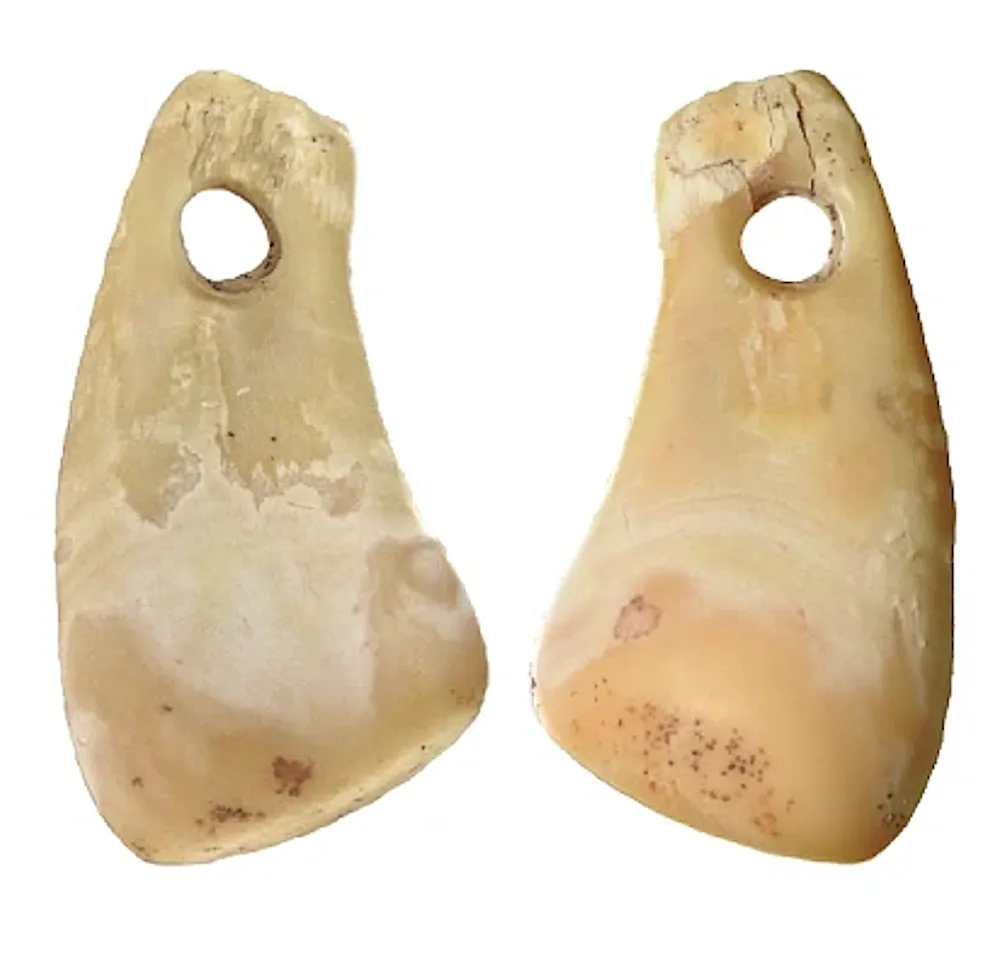
Identifying a human linked to a prehistoric item has an established methodology. For example, in 2023, researchers recovered ancient DNA from a deer-tooth pendant found in Denisova cave, southern Siberia.
Analysis of the genetic sequence showed that the pendant was probably worn by a 25,000-year-old woman belonging to an ancient population known as Ancient North Eurasians, who lived across Siberia in Palaeolithic times.
Such discoveries transform otherwise anonymous objects into evidence of real people, giving us an intriguing glimpse into the lives of our prehistoric ancestors.
In the latest cave art study, scientists systematically sampled both painted and unpainted surfaces of cave walls at 11 sites across Spain and Portugal. Remarkably, they recovered ancient human DNA directly from the walls, demonstrating for the first time that these surfaces can act as reservoirs for genetic information.
Some of these cave wall samples were shown, through both genetic analysis and the archaeological context, to be at least 4,000 years old.
In two of the samples from Covarón cave in northern Spain, human DNA was sufficiently preserved to be identified as belonging to ancient western hunter-gatherers. These were populations that lived across much of Europe during Late Palaeolithic and Mesolithic times.
One of the samples from a pigmented part of a cave wall, in Escoural cave, Portugal, also yielded traces of ancient DNA, but it was not as well preserved as other samples.
Nevertheless, the research establishes a powerful new methodological framework and proof of concept. It raises the tantalising prospect of studying not only the images left behind, but also the communities of people who made them.
However, applying this technique successfully to identify the artist of specific ancient rock art is incredibly unlikely.
Only one of the pigmented samples from the Spanish and Portuguese cave sites yielded ancient DNA. It was retrieved from Escoural cave in Portugal.Bossoms Mesa, et al. (2026), CC BY-NC-SA
This research could, though, potentially resolve one of the most contentious debates in archaeology. This concerns a 66,700-year-old hand stencil discovered within Maltravieso cave in Extremadura, western Spain.
This controversial stencil appears to predate the arrival of modern humans in Europe. Some researchers have therefore argued that Neanderthals, not Homo sapiens, made the art.
Finding DNA from either species in this location, at similar times to the creation of the rock art, could offer a potential route for resolving the debate. But this too is much more difficult than it might seem.
Easy transfer
The presence of human DNA does not prove who created the rock art. DNA is easily transferred – actions as simple as breathing can transfer someone’s genetic material to a location or object. This is why DNA recovered from a knife cannot definitively conclude who committed a stabbing in a forensic case.
DNA establishes the association of someone with an item or location, not the actions they carried out during the deposition of their genetic material. Environmental activities such as rain can also transfer human DNA to these spaces, making it extremely difficult to identify a single person at a location.
Additional DNA can be deposited at very different times to when the painting was produced – by both modern and ancient humans. The potential for contamination is incredibly high, making it difficult to establish who may have been at a given location at a specific time.
Nonetheless, scientists can use this new research to explore important prehistoric questions such as the hominin species, population groups and sexes of those who entered specific cave systems, and their migration routes across landscapes.
In the general sense, we can also begin to connect prehistoric art with the people who created and lived with it.
Behind each rock-art hand stencil or hunting scene is evidence of a real person who, while separated from us by tens of thousands of years, felt the need to communicate their creativity – as we do today. Techniques such as this offer a vital opportunity to understand more thoroughly the human experience via our similarities with ancient people.
The authors do not work for, consult, own shares in or receive funding from any company or organisation that would benefit from this article, and have disclosed no relevant affiliations beyond their academic appointment.
ⓘWe may earn a commission when you buy through our links. This helps support MacSources and keeps our content free. Thank you!
Discover how the UPLIFT Standing Desk V3 4-Leg transformed a traditional home office with exceptional stability, premium craftsmanship, and ergonomic sit-stand functionality.
For many people, a desk is simply a place to put a computer. As long as it holds a monitor, keyboard, and mouse, it gets the job done. That’s exactly how my fiancé’s mother’s husband (Ron) approached his home office for years. Like countless others, he used a traditional manufactured particleboard computer desk that provided a dedicated workspace but little else. It was functional, affordable, and met his needs for everyday productivity.
Over time, however, those hours at the desk began to add up. Whether checking email, browsing the web, managing finances, or simply spending time on the computer, he often remained seated for extended periods. The desk itself wasn’t uncomfortable, but it also wasn’t designed to adapt to the person using it. Sitting in the same position day after day can contribute to stiffness, fatigue, and poor posture, especially when there are few opportunities to change positions throughout the day.
When we had the opportunity to review the UPLIFT Standing Desk V3 4-Leg, we immediately saw it as more than just another piece of office furniture. It was a chance to completely rethink his workspace and replace a traditional fixed-height desk with one designed to promote comfort, flexibility, and long-term ergonomics. The goal wasn’t simply a nicer desk. It was to create a workspace that could better support the amount of time he spends at his computer each day.
The UPLIFT Standing Desk V3 4-Leg is designed for users who want exceptional stability, premium materials, and the freedom to alternate between sitting and standing throughout the day. In this review, we’ll take a closer look at the assembly process, build quality, daily use, and whether upgrading from a conventional computer desk to a premium standing desk is a worthwhile investment.
About the UPLIFT Standing Desk V3 4-Leg
The UPLIFT Standing Desk V3 4-Leg is designed for users who need a spacious, highly stable workstation that can support demanding office or creative setups. As the most robust model in UPLIFT’s standing desk lineup, it features four synchronized lifting columns that provide enhanced stability and a lifting capacity of up to 535 pounds. Whether you’re using multiple monitors, heavy desktop equipment, or a large work surface, the V3 4-Leg is engineered to maintain a solid foundation throughout its height range.
Like the rest of the V3 family, the desk includes UPLIFT’s updated frame design, anti-collision technology, an extensive selection of desktop materials and sizes, and compatibility with the company’s wide range of accessories. Buyers can customize nearly every aspect of the desk, from the desktop finish and frame color to storage options, cable management, and ergonomic add-ons, making it easy to tailor the workstation to individual needs.
Backed by a 15-year warranty, the UPLIFT Standing Desk V3 4-Leg is aimed at professionals, content creators, gamers, and anyone looking for a premium sit-stand desk that combines durability, customization, and long-term reliability.
Features
Four-leg design for exceptional stability
Smooth electric sit-to-stand adjustment
Anti-collision detection system
Programmable memory presets (depending on the selected keypad)
Optional Bluetooth connectivity through the UPLIFT Desk App
FlexMount Cable Management System
Patented 40-point accessory mounting system
Extensive desktop material and finish options
Multiple frame color choices
Wide range of compatible accessories and organizational add-ons
Simplified assembly with pre-installed hardware
Backed by a 15-year warranty
Specifications
Specification
Details
Frame Type
Electric four-leg standing desk
Lift System
Four synchronized motors
Lift Capacity
Up to 535 lb (243 kg)
Height Range
22.6” to 48.7” (with a 1” desktop)
Leg Design
Three-stage telescoping columns
Height Adjustment Travel
26.1 inches
Ergonomic Standard
ANSI/BIFMA G1-2013 compliant
Safety Certification
ANSI/BIFMA X5.5-2021 tested
Included Cable Management
FlexMount Cable Manager and 10 reusable cable wraps
Desktop Sizes
Multiple options ranging from 48” to 80”+ (varies by desktop material)
Desktop Materials
Laminate, bamboo, rubberwood, solid wood, reclaimed wood, and more
Frame Colors
Black, White, Gray, Industrial Gray
Unboxing and Assembly
Having assembled several UPLIFT desks in the past, including the V3 Standing Desk, the assembly process felt immediately familiar. The desk arrived in multiple well-protected boxes, with the solid walnut butcher block desktop and steel frame packaged securely to prevent damage during shipping.
Because of the desk’s weight, I needed assistance bringing the boxes into the house. Once everything was unpacked, however, I completed nearly the entire assembly by myself. The instructions were easy to follow, the hardware was clearly labeled, and many of the components arrived partially assembled to simplify the process.
From start to finish, assembly took approximately one hour and 42 minutes. The only point where I needed another person was flipping the completed desk upright. Between the 1.5-inch solid walnut desktop and the substantial four-leg frame, this is definitely a two-person task.
To make the desk easier to reposition in the future, I also installed the optional Soft Roll Casters. Given the overall weight of the completed desk, this proved to be a worthwhile addition.
Creating a Better Workspace
Once assembled, we moved everything from his previous desk to the new workspace. His setup is relatively straightforward, consisting of a 32-inch monitor, keyboard, mouse, fiber gateway modem, and various everyday office supplies. His desktop tower remains on a stand beside the desk, while the printer sits on a nearby file cabinet.
Although his workstation isn’t particularly elaborate, the larger work surface immediately made the space feel more organized. There was plenty of room for his computer equipment while still leaving open workspace for paperwork and other daily tasks.
To complete the setup, we added several UPLIFT accessories, including the DuoMount monitor arm, Cup Holder & Tumbler, Writing Desk Pad, FlexMount Cable Manager, and a six-outlet mountable surge protector. Together, these accessories created a cleaner and more organized workspace without adding unnecessary clutter.
Everyday Use
The biggest improvement that Ron has seen wasn’t any single feature. It was how much more substantial the entire workstation felt. He thinks it’s extremely well-built and thanks to the casters, it’s very easy to move. He also really likes the cup holder and the extra outlet box. They are both easy to relocate, which Ron appreciates.
The electric motors were equally impressive. Despite the desk’s size and weight, transitions between sitting and standing were smooth and surprisingly quiet. The Advanced Keypad makes it easy to adjust heights with the press of a button.
The desk is remarkably stable. Whether typing, using the mouse, or raising and lowering the desktop, the four-leg frame remained exceptionally solid. Compared to the manufactured desk it replaced, there was very little movement, giving the entire workspace a premium feel.
The solid walnut butcher block desktop also made a noticeable difference. Beyond its attractive appearance, the thicker work surface adds to the desk’s overall feeling of quality and durability.
Cable Management
One area that often gets overlooked during a desk upgrade is cable management. Using the FlexMount Cable Manager together with the mountable surge protector made organizing the various power and monitor cables surprisingly easy. Once everything was connected, the underside of the desk remained neat and organized, helping the finished workspace look much cleaner than the previous setup.
Standing Throughout the Day
Perhaps the biggest change wasn’t the desk itself but the flexibility it introduced into the daily routine. Instead of remaining seated for hours at a time, he now has the option to alternate between sitting and standing whenever he chooses. Because the desk adjusts quickly and quietly, changing positions takes only a few seconds. That convenience encourages movement throughout the day without interrupting whatever task is at hand.
Overall Impressions
Replacing a traditional manufactured desk with the UPLIFT Standing Desk V3 4-Leg transformed the workspace in ways that extend beyond aesthetics. The desk feels exceptionally well built, provides outstanding stability, and offers a level of flexibility that simply wasn’t possible with a fixed-height desk.
It is certainly a premium product, and its weight reflects the quality of its construction. Adding the Soft Roll Casters was a practical decision that makes repositioning the desk much easier whenever necessary.
While the investment is considerably higher than that of a typical computer desk, the combination of premium materials, thoughtful engineering, and the ability to support healthier working habits makes it a meaningful upgrade for anyone who spends long hours at a desk, even if their daily computer use consists primarily of routine productivity tasks.
Conclusion
Upgrading from a traditional manufactured computer desk to the UPLIFT Standing Desk V3 4-Leg proved to be much more than a cosmetic improvement. While the old desk provided a functional place to work, the UPLIFT transformed the workspace into one that is more comfortable, organized, and adaptable to long hours at the computer.
Throughout our time with the desk, its exceptional stability stood out as its defining characteristic. The four-leg frame remained remarkably solid whether typing, adjusting the monitor, or transitioning between sitting and standing. Combined with the premium solid walnut butcher block desktop, quiet motors, and thoughtful accessory ecosystem, the desk consistently delivered a polished user experience.
The UPLIFT Standing Desk V3 4-Leg is undoubtedly a premium investment, but its build quality, customization options, and long-term durability help justify the price. For anyone who spends several hours a day at a desk, whether working remotely, managing a home office, or handling everyday productivity tasks, it offers meaningful improvements that extend well beyond aesthetics.
As a project manager, you focus on delivering projects on time and within budget. But what happens when the unexpected hits? A sudden server outage, a key team member’s medical emergency, or a regional power failure can derail even the most carefully planned project. Real project leadership goes beyond Gantt charts and status reports; it means building resilience so both your project and your team can handle any challenge.
Understanding Continuity Planning
Project continuity planning isn’t just about getting ready for a major disaster. It’s about actively finding potential problems and setting up clear steps to keep essential work going. Think of it as an insurance policy for your project’s timeline and deliverables. The goal is to cut down on downtime and keep things moving. A good plan covers everything from tech failures to staff availability.
To build a strong foundation, it helps to understand the main parts. The University of Texas at Austin describes effective continuity planning as a cycle of analysis, preparation, and recovery. This framework helps you think through possible risks in an organized way. For a more direct approach, there are essential steps for business continuity that any project manager can use, starting with a business impact analysis to figure out your project’s most important functions.
Prioritizing Team Well-being
A project relies on its people. A continuity plan that only looks at systems and processes isn’t complete. Your team’s safety and well-being must be a top priority, especially during a crisis. This means having clear rules for checking on team members, offering support, and making sure they feel safe. This duty of care is especially important for people working in unusual or isolated settings.
For teams with members in remote field locations, on large construction sites, or even working alone from home, it’s crucial to have a quick response in case of a personal emergency. Simple check-in procedures are a good start, but technology can offer a more reliable safety net. For example, tools like Life Assure medical alert systems can give lone workers a direct way to get help, adding an extra layer of security that supports their well-being no matter where they work.
Implementing Reliable Emergency Protocols
When something goes wrong, confusion can be your biggest enemy. Clear, simple, and easy-to-find emergency protocols are essential. Your team shouldn’t have to guess what to do or who to call. Create straightforward action plans for different situations, like a medical incident, a security breach, or suddenly losing access to the main worksite.
Your protocols should include:
A clear communication tree showing who to contact and in what order.
Pre-set ways to communicate (e.g., a dedicated chat channel, a text message group).
A list of key information to share during an emergency.
Designated backup team leads in case primary contacts aren’t available.
Make these documents easy to find. Store them in a shared cloud folder that everyone can access from any device, and make sure every team member knows where they are.
Technology for Uninterrupted Operations
Modern technology is a key part of good continuity planning. The right tools can turn a small problem into a full-blown project crisis. Cloud-based platforms have completely changed how teams can deal with disruptions like office closures or hardware failures. If your project management software, files, and communication tools are all in the cloud, your team can switch to remote work almost instantly.
Make sure your project uses a resilient tech setup. This means using collaborative software like Asana or Trello for tasks, communication platforms like Slack or Microsoft Teams for real-time updates, and strong cloud storage solutions like Google Drive or Dropbox with automatic backups. By spreading out your project’s operational hub, you remove a single point of failure and build in the flexibility needed to keep work flowing.
Reviewing and Adapting Safety Measures
A continuity plan is a living document, not something you do once and forget. Your project, team, and the risks you face will change over time. Schedule regular reviews of your safety and continuity protocols, at least once a quarter or whenever there’s a big change in project scope or personnel.
The best way to test your plan is to practice it. Run tabletop exercises where you guide the team through a made-up scenario. This simple practice can show gaps in your plan, unclear instructions, or outdated contact information. After any real incident, hold a post-mortem to discuss what worked, what didn’t, and how you can improve the protocol for next time. Constant improvement is crucial for creating a truly resilient project environment.
By making continuity and safety part of your project management, you protect not only your timeline and budget but also your most valuable asset: your team.
ⓘWe may earn a commission when you buy through our links. This helps support MacSources and keeps our content free. Thank you!
The UGREEN Nexode Pro 160W combines high-speed GaN charging, a built-in retractable USB-C cable, smart monitoring, and multi-device support into a premium travel-friendly charger.
In the past few years, I’ve really enjoyed using high-powered, advanced power adapters. Many of them come with a display built-in that show you how much power output is occuring while you charge and I really like to monitor that activity. UGREEN has been one of my favorite charging device companies and now they are releasing the Nexode Pro 160W Charger…with a Retractable Cable! That is an accessory that makes the premium charger even more convenient.
About the UGREEN Nexode Pro 160W Charger with Retractable Cable
The UGREEN Nexode Pro 160W Charger with Retractable Cable is a premium GaN charger designed for users who regularly carry multiple high-powered devices. Combining a compact form factor with up to 160W of total output, it can charge everything from laptops and tablets to smartphones and accessories from a single power adapter.
One of its standout features is the integrated retractable USB-C cable, which extends up to 27.6 inches and eliminates the need to carry an extra charging cable for many situations. The charger also includes three USB-C ports and one USB-A port, allowing up to four devices to be charged simultaneously.
Unlike traditional chargers, the Nexode Pro features a built-in smart display that provides real-time information including power output, charging protocols, voltage, current, and temperature. It also supports Bluetooth and Wi-Fi connectivity through the UgreenConnect app, enabling remote power management, safety controls, and over-the-air firmware updates.
Powered by UGREEN’s GaNInfinity™ technology and Thermal Guard™ safety system, the Nexode Pro is designed to deliver efficient, high-speed charging while continuously monitoring temperatures and intelligently distributing power between connected devices.
Built-in smart display with real-time charging information
Displays total output, per-port wattage, voltage, current, charging protocol, temperature, and charger mode
GaNInfinity™ technology for efficient, compact charging
Thermal Guard™ temperature monitoring with checks up to 200 times per second
Intelligent SmartCharge Power Distribution for optimized power allocation
Bluetooth and Wi-Fi connectivity through the UgreenConnect app
Remote power management and safety shutdown controls
Over-the-air (OTA) firmware updates
Designed to charge laptops, tablets, smartphones, handheld gaming devices, and accessories from a single charger
Pricing & Availability
The list price of the UGREEN Nexode Pro 160W Charger is $149.99 from ugreen.com and Amazon.
User Experience
The first thing I noticed when I took the UGREEN Nexode Pro 160W Charger out of the box was just how premium it felt. UGREEN has consistently impressed me with the quality of its charging accessories, and this charger is no exception. Even though it can deliver up to 160W of power and charge multiple devices at once, it wasn’t as large or heavy as I expected. It’s a little heavier than a standard laptop charging brick, but that’s an easy tradeoff when it can replace several chargers in my bag. I wouldn’t hesitate to toss it into my laptop bag for everyday use or when I’m traveling.
The built-in retractable USB-C cable is easily one of my favorite features. It sounds like a small addition, but after using it for a while, I found myself appreciating it more and more. The cable extends smoothly, locks securely into the different length settings, and retracts evenly every time. It also feels sturdy enough that I don’t worry about it wearing out with normal use. While it’s obviously not meant to reach across a room, it’s more than long enough for charging devices on my desk, nightstand, or in a hotel room. Best of all, I never had to ask myself if I remembered to pack a USB-C cable because one is always built into the charger.
For my testing, I used the Nexode Pro with an iPhone 16 Pro, MacBook Pro, iPad Pro, and Microsoft Surface Pro. Across all of them, the charger delivered the performance I expected. To give a more measurable example, I charged my iPhone 16 Pro from 19% to 66% in just 30 minutes, a gain of 47% battery life, averaging about 1.57% per minute. That lines up well with what I’d expect from a high-performance USB-C charger and makes it a great option when you need to top off your battery before heading out.
One of the reasons I enjoy testing chargers like this is the built-in display. I love being able to see exactly what’s happening while my devices are charging. Instead of simply plugging something in and hoping it’s charging at full speed, I can quickly glance at the display to see the current wattage being delivered. The screen is bright, easy to read, and provides useful information without feeling cluttered. For me, this isn’t just a novelty feature. It’s something I actually use every time I charge my devices.
I also connected the charger to the UgreenConnect app to see what it offered. Setup was fairly straightforward, although the touch button used during pairing was a little temperamental and occasionally took a couple of tries. Once connected, though, the Bluetooth and Wi-Fi connection remained reliable. I mainly used the app for monitoring charging information and tracking data. The charger works perfectly well without the app, so it’s definitely not a requirement, but if you’re someone who enjoys keeping an eye on charging statistics or wants access to additional controls, it’s a nice bonus.
Finally, I was impressed with how cool and quiet the charger remained throughout my testing. Even while charging higher-powered devices, it never became excessively warm, and I never heard any fan or electrical noise. That’s exactly what I want from a charger I’m going to leave plugged in on my desk or pack in my travel bag. It simply did its job without drawing attention to itself, and that’s a good thing.
Conclusion
The UGREEN Nexode Pro 160W Charger with Retractable Cable is one of the most versatile charging solutions I have tested. It combines the convenience of a multi-port GaN charger with the added benefit of an integrated retractable USB-C cable, eliminating one more accessory that can be forgotten when traveling. For professionals, frequent travelers, and anyone who regularly carries multiple devices, the UGREEN Nexode Pro 160W Charger with Retractable Cable is an excellent investment. It reduces clutter, delivers reliable charging performance, and provides a level of convenience that traditional chargers cannot match.

 Login
Login