Last week, a researcher outlined what he said was a “novel attack surface” in passkeys, the new authentication paradigm that offers a more secure alternative to password-based methods. In fact, the attacks demonstrated in the post are neither novel nor unique to passkeys. This distinction is important because the research has generated confusion among end users and security professionals as they assess whether this new mechanism is truly safe to use.
The attack is called Pass-ta-key—a blending of the word passkey with the phrase “pass the key” and a nod to a plate of pasta. Arie Olshtein, a researcher at security firm Palo Alto Networks, described in a post last week how Pass-ta-key could obtain all passkeys stored in the Google Password Manager app (GPM) for Windows when it’s running on a machine infected with malware.
This came as a surprise to many people because they believed passkeys are stored exclusively in the trusted platform manager (TPM), the locked-down enclave in a hardened silicon chip that’s reserved for storing cryptographic keys and other highly sensitive information on Windows machines. If passkeys are stored in the TPM, then how was Pass-ta-key able to extract the entire set of passkeys stored by the app, they wanted to know.
Some 1.3 billion years ago, when multicellular organisms were just emerging on Earth and life was still confined to the ocean, two behemoth black holes smashed together in a far-flung galaxy. The collision was so powerful that it jolted the universe, creating a ripple in the fabric of space-time that traveled across the cosmos atContinue reading "How gravitational waves transformed our universe"
Jason Semprini was excited about his research on policies mandating that elementary school students receive the human papillomavirus vaccine. HPV causes most cases of cervical cancer, but counterintuitively, Semprini found that mandates don’t do that much to reduce the overall rate of cervical cancer in a population. That’s odd, but it's also not completely surprising—we know that mandating a vaccine can motivate some people to find ways to avoid it.
Semprini wrote up the study and submitted the manuscript to a journal, where it was sent out for peer review, a long-standing process through which other researchers in the field assess the validity of research and make a recommendation on whether or not it should be published. This is usually done anonymously and on a volunteer basis.
In this case, the reviewer did not share Semprini’s excitement. That may have stemmed from a misunderstanding of the study’s central message: The reviewer mistakenly thought Semprini was questioning whether the HPV vaccine itself prevents cervical cancer rather than studying the effectiveness of a policy meant to increase vaccination rates. “There’s a very big difference there,” said Semprini, who is a health economist at Des Moines University.
Jason Semprini was excited about his research on policies mandating that elementary school students receive the human papillomavirus vaccine. HPV causes most cases of cervical cancer, but counterintuitively, Semprini found that mandates don’t do that much to reduce the overall rate of cervical cancer in a population. That’s odd, but it's also not completely surprising—we know that mandating a vaccine can motivate some people to find ways to avoid it.
Semprini wrote up the study and submitted the manuscript to a journal, where it was sent out for peer review, a long-standing process through which other researchers in the field assess the validity of research and make a recommendation on whether or not it should be published. This is usually done anonymously and on a volunteer basis.
In this case, the reviewer did not share Semprini’s excitement. That may have stemmed from a misunderstanding of the study’s central message: The reviewer mistakenly thought Semprini was questioning whether the HPV vaccine itself prevents cervical cancer rather than studying the effectiveness of a policy meant to increase vaccination rates. “There’s a very big difference there,” said Semprini, who is a health economist at Des Moines University.
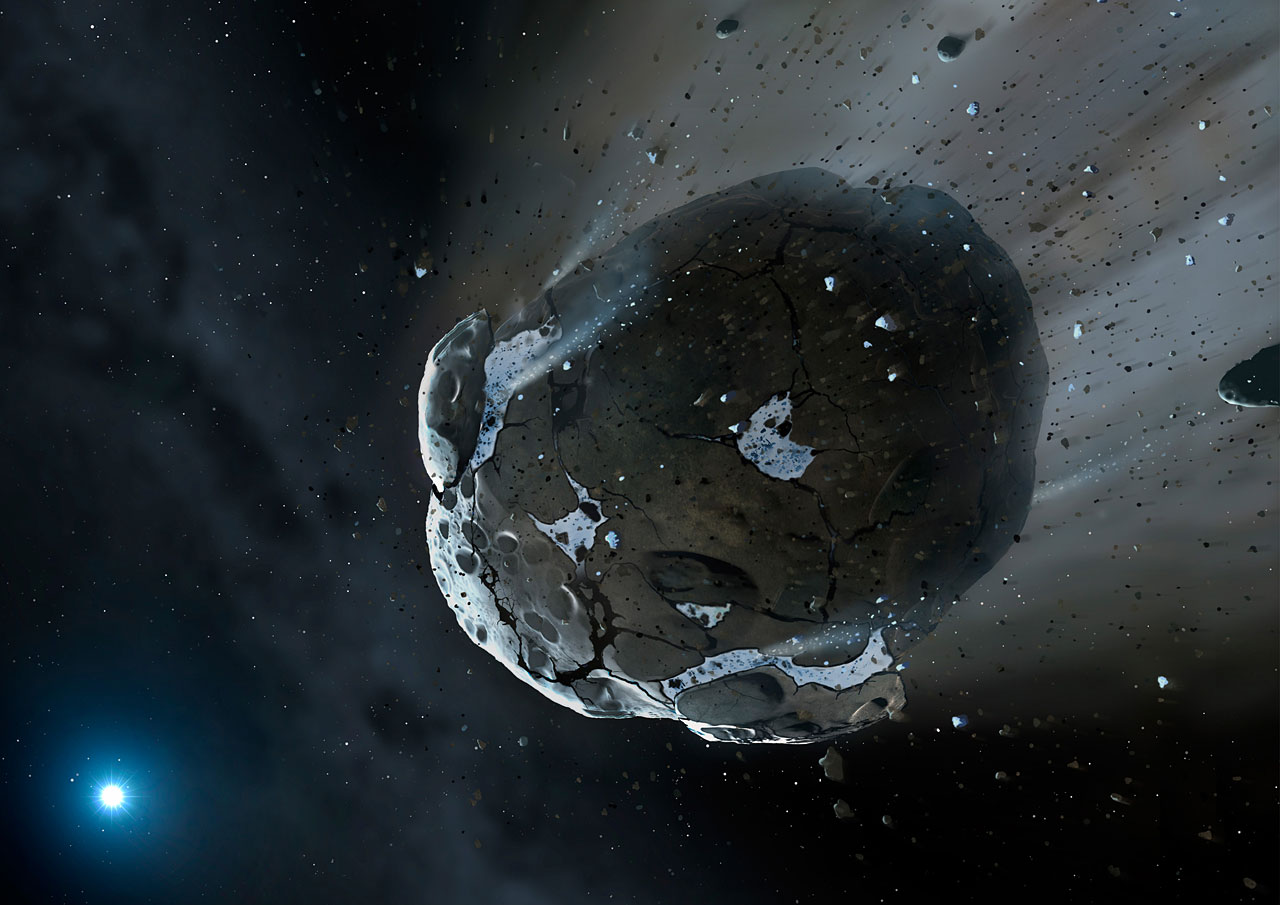
Only one white dwarf star has ever been caught eating an asteroid. Recently, however, astronomers may have found another that just finished its meal.
Eating Asteroids
Although stars like our Sun don’t explode in violent supernovae like their massive counterparts, they don’t slink quietly into a peaceful old age either. When a solar-mass star reaches the end of its main sequence life, it first swells dramatically (the Sun may eventually grow so large that it consumes Earth and the device you’re reading this on), then shrinks down to a tiny but incredibly hot ember known as a white dwarf.
As one might imagine, this process is not kind to any planets or asteroids that were previously circling the star. While some might survive, others are sent spiraling inwards where they break apart and are accreted onto their hosts. Due to the extreme temperatures and surface gravity of white dwarfs, whatever falls on their surfaces is vaporized, sorted by weight, and quickly dragged out of sight. Since heavy elements cannot last long in a white dwarf’s atmosphere, whenever astronomers see their stains in the star’s spectrum, they know that the star must have recently consumed the rocky remains of their former asteroids and planets.
However, although researchers have found these stains in over a quarter of white dwarfs and consequently have reasoned that asteroid snacking must be common, they’ve only ever caught one star mid-meal. Recently, Ben Zuckerman (University of California, Los Angeles) and a team of collaborators may have found another, though it may have just finished dining.
Leftover Crumbs
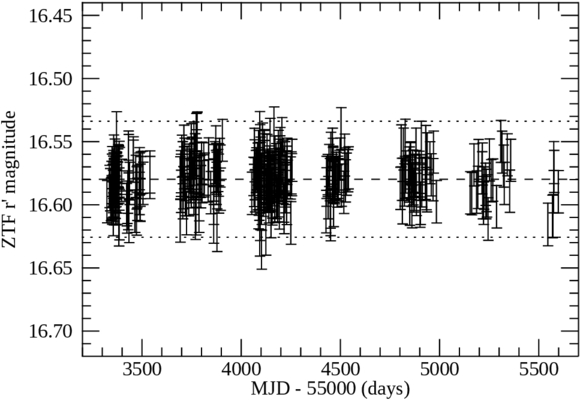
The light curve of WD J0234-0406 measured by the Zwicky Transient Facility. Unlike WD 1145+017, which frequently changes brightness, this white dwarf appears remarkably steady despite the high-velocity gas surrounding it. [B. Zuckerman et al. 2026]
This new star, called WD J0234-0406, shares some characteristics with the “iconic” WD 1145+017 that was first spotted mid-meal, but it also differs in an interesting way. High-resolution spectroscopy reveals that both stars have gaseous material orbiting around them along highly non-circular paths. These have been interpreted as “precessing rings of high velocity gas” that previously belonged to parent asteroids. However, while WD 1145+017 appears to flicker as bits of disintegrating asteroids pass between it and our line of sight, WD J0234-0406 is rock steady. Neither TESS nor the Zwicky Transient Facility have detected any dips in light from the star despite the evidence that solid material must have recently drizzled into the star’s atmosphere.
The researchers suggest that this relative quiet is a matter of timing. While asteroids are actively breaking up around WD 1145+017, the parent bodies that supplied the gas and dust around WD J0234-0406 may have shattered long ago and have already been either vaporized or ground down into smaller particles. All that is left over are the crumbs slowly spiraling toward the star.
Although WD J0234-0406’s meal may not be as dramatic as WD 1145+017’s feast, it’s still exciting to expand the sample of known white dwarf-asteroid interactions. And, with the upcoming release of data from the DESI survey poised to reveal the spectra of tens of thousands of white dwarfs, the sample is likely to grow again soon.
Citation
“High-velocity Circumstellar Gas Orbiting a White Dwarf Star,” B. Zuckerman et al 2026 ApJ 1004 254. doi:10.3847/1538-4357/ae23c4
In the mid-'90s, the web was exploding, but finding anything of actual value on it felt like an elaborate negotiation with whatever proto-search engine happened to be standing closest to the door. Unlike now, when Google is widely seen as both portal and gatekeeper, sites like AltaVista, Lycos, Excite, HotBot, and Ask Jeeves promised to tame the chaos, each with its own suite of quirks, charms, and flaws.
The real story of pre-Google search is not that early engines were inferior. It's that they reflected a different Internet entirely, one where directories mattered, crawling was still an art, ranking was fragile, and the idea of “search” had not yet hardened into a single dominant interface.
A different kind of web
The first thing to remember about the pre-Google Internet is that there was no built-in assumption that you could search for everything. Many users found pages through Yahoo-style directories, bookmarks, newsgroups, email signatures, and links from site to site because the web was still small enough that human organization could compete with machine indexing. It was an era of Wild West-style discoverability. Search engines existed, but they were only one part of a larger ecosystem that blended curation and accident.
In the mid-'90s, the web was exploding, but finding anything of actual value on it felt like an elaborate negotiation with whatever proto-search engine happened to be standing closest to the door. Unlike now, when Google is widely seen as both portal and gatekeeper, sites like AltaVista, Lycos, Excite, HotBot, and Ask Jeeves promised to tame the chaos, each with its own suite of quirks, charms, and flaws.
The real story of pre-Google search is not that early engines were inferior. It's that they reflected a different Internet entirely, one where directories mattered, crawling was still an art, ranking was fragile, and the idea of “search” had not yet hardened into a single dominant interface.
A different kind of web
The first thing to remember about the pre-Google Internet is that there was no built-in assumption that you could search for everything. Many users found pages through Yahoo-style directories, bookmarks, newsgroups, email signatures, and links from site to site because the web was still small enough that human organization could compete with machine indexing. It was an era of Wild West-style discoverability. Search engines existed, but they were only one part of a larger ecosystem that blended curation and accident.
FaceTime Dual Capture is bringing simultaneous front-and-rear camera streaming to video calls in iOS 27, allowing compatible iPhones to show the caller and their surroundings without repeatedly switching between cameras.
The feature expands technology Apple introduced with the iPhone 17 family. Dual Capture already allows the Camera app to record through the Center Stage front camera and a rear camera at the same time. iOS 27 brings a similar capability directly into live FaceTime calls.
During a call, the front camera can continue showing the speaker while the rear camera displays whatever the iPhone is pointing toward. Someone attending a concert can share the performance and remain visible. A parent can show a child playing without disappearing from the conversation. A person asking for technical assistance can remain on screen while directing the rear camera toward the equipment causing the problem.
Dual Capture removes the awkward sequence of switching to the rear camera, showing something, and switching back to continue speaking face to face. Both perspectives remain available inside the same call.
Image Credit: Thomas Trutschel Photothek/Getty Images
FaceTime Dual Capture Changes Camera Switching
The normal FaceTime camera control changes from a simple front-or-rear choice on supported iPhones. When the caller activates the rear camera, iOS 27 keeps the front camera visible by default.
The main view displays the rear camera feed while a smaller window contains the front camera image. This picture-in-picture arrangement gives the other participant a continuous view of the caller’s reaction, commentary, or explanation.
To activate both cameras during a supported FaceTime call:
FaceTime > Start a video call > Tap the Flip button
Tapping the Flip button turns on the rear camera without immediately removing the front view. The other participant begins receiving both perspectives as part of the FaceTime stream.
The caller can disable the front view when it is no longer needed. This provides a conventional rear-camera presentation for situations where the surroundings should occupy the complete image.
To return to a single camera view:
FaceTime > Tap the camera view > Disable the front camera
The exact labels and placement may change before the public release of iOS 27 because the feature is still being tested in beta software. Its basic behavior is already established: the Flip control activates the rear camera while retaining the front camera feed.
Dual Capture does not create two independent FaceTime calls. Both images belong to one video stream, so the caller does not need a second account, device, or invitation.
The feature also differs from screen sharing. FaceTime screen sharing transmits applications and interface activity from the iPhone display. Dual Capture transmits live video from two physical cameras.
Image Source: Google
Which iPhones Support Dual Capture
Apple has limited FaceTime Dual Capture transmission to the iPhone 17, iPhone 17 Pro, iPhone 17 Pro Max, and iPhone Air. Each model includes Apple’s 18MP Center Stage front camera and the Dual Capture capability introduced in the Camera app.
An older iPhone that supports iOS 27 cannot originate a Dual Capture stream. It continues to use the normal option of selecting either the front camera or a rear camera during a call.
Older models can still receive and display a Dual Capture feed when they are running iOS 27. This allows an iPhone 16 or another supported device to see both views transmitted from an iPhone 17, even though it cannot send the same presentation back.
Both participants need iOS 27 for the new FaceTime layout to work as intended. The transmitting device must also be one of the supported iPhone 17-generation models.
This limitation is based on Apple’s official feature support rather than the simple presence of front and rear cameras. Earlier iPhones have camera hardware capable of operating in several multi-camera applications, but Apple has not extended its native Dual Capture implementation to them.
Third-party applications have offered forms of simultaneous multi-camera recording for years through Apple’s developer frameworks. The difference is that iOS 27 integrates the experience into FaceTime, where users can activate it through the familiar camera-switching control.
iPhone 17 Owners Receive a Second Dual Capture Feature
Describing FaceTime Dual Capture as retro-compatible with the iPhone 17 does not fully explain its relationship with the hardware. The iPhone 17 family introduced Apple’s native Dual Capture recording in 2025, and iOS 27 now gives that existing camera system another purpose.
Inside the Camera app, Dual Capture produces a saved video containing front and rear views. Apple lists support for recording at up to 4K Dolby Vision at 30 frames per second on the iPhone 17.
FaceTime uses the camera pairing for live communication instead. Network quality, bandwidth, device temperature, and FaceTime processing can affect the transmitted resolution, so users should not assume that a call will preserve the Camera app’s maximum 4K recording specification.
The Center Stage front camera also contributes more than resolution. Its square sensor gives the iPhone greater freedom to adjust framing without requiring the device to be physically rotated. Center Stage can help keep the caller positioned inside the smaller front-camera view while the rear camera follows the subject being shared.
That combination makes Dual Capture more useful than placing two untreated camera feeds beside each other. FaceTime can preserve the speaker’s presence while directing most of the screen toward the event, object, or location being discussed.
The feature may require more processing power and energy than an ordinary single-camera call. Running two camera sensors while encoding and transmitting live video can increase battery consumption and device temperature, especially during long calls over cellular data.
Apple has not published separate battery estimates for Dual Capture FaceTime calls. Users planning extended sessions may want access to power and a stable Wi-Fi connection.
iOS 27 Prepares FaceTime for iPhone 18
FaceTime Dual Capture arrives shortly before Apple’s expected iPhone 18 generation, making it likely to become part of how the company demonstrates the new phones’ camera and communication abilities.
Apple has not announced the iPhone 18 lineup or confirmed its final camera specifications. Compatibility with FaceTime Dual Capture is therefore expected from the software’s “iPhone 17 and newer” positioning, but individual iPhone 18 models should not be treated as confirmed until Apple presents them.
The software release gives existing iPhone 17 owners access without requiring another hardware purchase. That approach also provides Apple with a working FaceTime feature before the next iPhone launch rather than introducing the camera mode and communication interface at the same moment.
Future hardware could improve the experience through faster processors, stronger image stabilization, upgraded sensors, or more efficient video encoding. None of those additions is required for the supported iPhone 17 family, which already contains the camera system needed to transmit both views.
Dual Capture is only one part of the FaceTime update. Apple is also improving video-call quality when the network connection is weak, addressing a problem that becomes especially relevant when two live camera views require transmission. Traditional Chinese support is joining FaceTime Live Captions as well.
The weak-connection improvement may determine how dependable Dual Capture becomes away from Wi-Fi. A feature designed for travel, events, repairs, and outdoor calls needs to tolerate changes in cellular bandwidth without freezing both views or forcing the session to end.
FaceTime Dual Capture remains part of the iOS 27 beta as Apple prepares the public update for September. Apple can still adjust the interface, performance, device requirements, and picture-in-picture behavior before the completed software reaches iPhone 17 owners.
Even the darkest corners of the universe are not completely empty. A recent study has used fast radio bursts to provide the first estimate of the baryon content in cosmic voids.
What’s in a Void?
Cosmological studies have revealed the large-scale filamentary structure of the universe known as the cosmic web. Chains of galaxies and galaxy clusters fall into spindly strands (or filaments) of matter overdensities, opening up cavernous cosmic voids that comprise the darkest corners of the universe. These seemingly vacant voids serve as critical test beds for cosmology, allowing researchers to constrain things like the nature of dark energy and the matter density of the universe.
Despite their name, voids are not completely empty but are instead underdensities with considerably less matter compared to the bustling filaments they border. The baryon (normal matter) content of cosmic voids has important implications for cosmological models and large-scale galactic feedback processes, but assessing how many baryons actually occupy voids has only recently become observationally accessible.
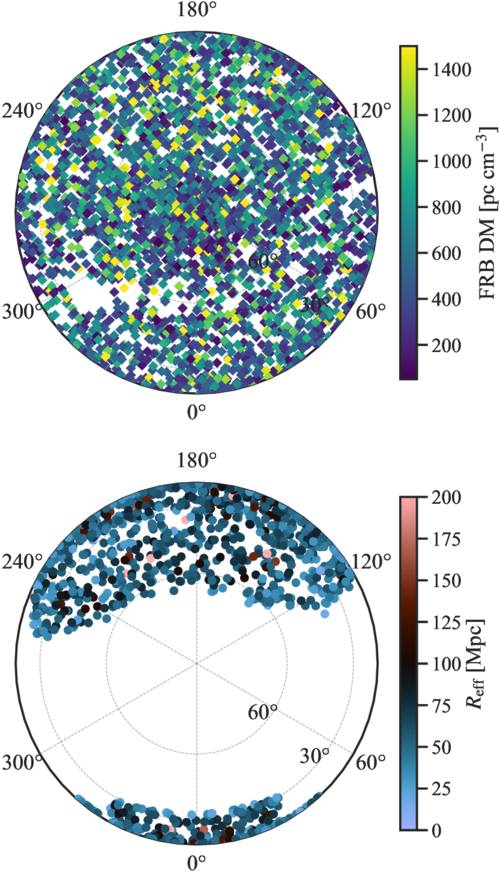
Sky maps centered on the north celestial pole showing the CHIME fast radio burst sample (top) and the SDSS void catalog (bottom). [Sharma et al 2026]
Fast radio bursts — brief, intense flashes of radio waves emitted by compact objects — have proven to be versatile tools for measuring both underdensities and overdensities throughout the universe. The dispersion measure of fast radio bursts, which tells us how many free electrons fall between the radio emitter and observer, can be directly used to map the baryon content along the lines of sight. Fast radio burst sight lines passing through overdensities will produce a dispersion measure excess, and those passing through underdensities will produce a dispersion measure deficit relative to the cosmic mean. Thus far, fast radio bursts have been used extensively to study overdense galaxy and cluster filaments, but their sensitivity to underdense regions like voids has yet to be explored.
Chiming In on the Baryon Search
In concept, directly stacking fast radio burst sight lines that coincide with the positions of known cosmic voids provides a direct measurement of the baryon underdensity inside voids. With no previous observational exploration of this quantity, Kritti Sharma (California Institute of Technology) and collaborators leveraged the second catalog of the Canadian Hydrogen Intensity Mapping Experiment Fast Radio Bursts (CHIME/FRB) sample in conjunction with the Sloan Digital Sky Survey (SDSS) Baryon Oscillation Spectroscopic Survey (BOSS) void catalog to provide the first observational assessment of the baryon underdensity in cosmic voids.
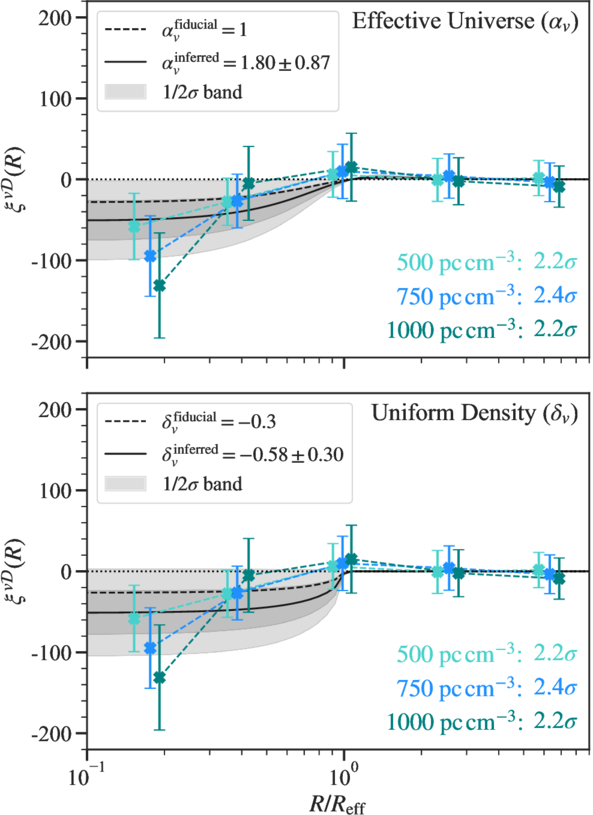
Anticorrelations between fast radio burst dispersion measures and void positions. There is a clear dispersion measure deficit closer to voids centers. [Sharma et al 2026]
Stacking thousands of fast radio burst sight lines that spatially align with thousands of known voids, the authors measured a statistically significant dispersion measure deficit toward void centers. This deficit indicates that, as theory predicts, baryons inhabit cosmic voids at a suppressed level. The team used cosmological models to quantify the electron density contrast between the interior and exterior of voids, finding an approximate baryon underdensity of 60% ± 30% relative to the cosmic mean. Combining this result with existing thermal scattering measurements of the cosmic microwave background, the authors estimated a mean void gas temperature of about 1.1 million kelvin — voids are occupied by a suppressed amount of warm-hot diffuse gas.
This study provides a unique approach to baryon mapping and opens up the door for future investigation of cosmic voids. While not physically containing much, voids hold vast astrophysical and cosmological significance. With the astronomical stage primed with galaxy-mapping powerhouses like the Dark Energy Spectroscopic Instrument, Vera Rubin Observatory, Nancy Grace Roman Space Telescope, and Euclid Space Telescope, cosmic voids will become a cornerstone of cosmological studies.
Citation
“Baryons in the Darkest Sites of the Universe,” Kritti Sharma et al 2026 ApJL 1006 L3. doi:10.3847/2041-8213/ae81ac
Macrobiological features have been cited as irreducibly complex, including animal joints and the trap mechanisms of carnivorous plants, even the cell itself.
Apple Notes in iOS 27 receives a focused collection of upgrades designed to make long documents easier to navigate and information simpler to move between apps.
Section links allow users to jump directly to headings inside a note. Divider lines create clearer visual boundaries, while expanded Markdown support improves workflows involving websites, writing tools and plain-text editors.
Siri AI introduces the most ambitious addition by creating notes, adding information to existing documents and transferring answers from a Siri conversation without requiring manual copying.
Image Playground also becomes more capable inside Notes, gaining additional visual styles and photorealistic image generation through Apple’s new cloud-based model.
Not every feature requires Apple Intelligence. Divider lines, section links, Markdown tools and the updated interface work on every iPhone compatible with iOS 27. Siri AI and advanced Image Playground capabilities need newer hardware and may have additional language or regional restrictions.
Image Credit: Apple Inc.
Apple Notes iOS 27 Adds Section Links
Section links solve one of the largest problems affecting long notes: reaching information located several screens below the beginning.
A user can now select text, choose Add Link and connect it to any heading or subheading inside the current note. Tapping that linked text immediately moves the reader to the selected section.
The feature can turn the opening of a document into a manual table of contents. A project note might contain links to its schedule, budget, participants, research and outstanding tasks without requiring separate documents.
To create a section link:
Select text > Add Link > Link to Section > Choose a heading
Notes displays the headings and subheadings already present in the document. Regular body paragraphs do not appear as destinations, so the note must use Apple’s title or heading formats before links can be created.
To format a destination:
Select the section title > Formatting > Heading or Subheading
The visible link text does not need to match the destination heading. A phrase such as “View the current budget” can link to a section titled “Financial Information.”
Section links differ from the existing ability to connect separate notes. Apple Notes already allows users to create internal links leading from one document to another. The new control moves within the same document instead.
That distinction is useful for meeting records, research files, travel plans and study material that become too long for ordinary scrolling but do not need to be divided into several notes.
Links should continue working when the document is shared through iCloud because they point to structural elements inside the note rather than fixed screen positions.
Renaming or deleting a destination heading may affect its link. Users maintaining complex documents should test their navigation after reorganizing major sections.
Divider Lines Improve Visual Structure
Apple Notes in iOS 27 adds horizontal divider lines as a native formatting element.
The line creates a visible separation across the document without requiring users to type repeated hyphens, underscores or other characters.
To add one:
Place the cursor > Open the edit menu > Insert Divider Line
The divider is inserted at the cursor position and moves with the surrounding content as the note changes.
A horizontal line can separate meeting notes by date, distinguish reference material from personal comments or divide a recipe into ingredients, preparation and serving information.
It also provides structure without making every section a heading. Headings define the hierarchy used by section links, while dividers create a visual break that does not become another navigation destination.
Typing a row of hyphens previously produced an inconsistent substitute. The characters could wrap on a narrow screen, change length after editing or become difficult to select. The native element maintains its appearance as the document moves among iPhone, iPad and Mac.
Divider lines should be used selectively. Adding one between every short paragraph can make the note look more fragmented rather than organized.
The strongest layout combines headings for major subjects, subheadings for smaller divisions and divider lines where one type of content clearly ends before another begins.
Markdown Moves More Easily Into Apple Notes
Apple Notes gained the ability to import and export Markdown files with iOS 26. The iOS 27 upgrade removes additional steps from copying content between Notes and Markdown-based tools.
Markdown uses plain-text characters to represent formatting. A hash symbol can identify a heading, pairs of asterisks can create bold text and square brackets can define a link.
The format is widely used by writers, developers, documentation systems and publishing platforms because it remains readable without requiring a proprietary editor.
When Markdown-formatted text is pasted into Apple Notes in iOS 27, the app automatically converts the syntax into rich text. Headings become formatted headings, links become clickable and emphasis appears as bold or italic text.
A pasted line such as Project Schedule appears as a formatted heading rather than displaying the two hash symbols.
Moving content in the opposite direction is also easier. Apple has added a Copy as Markdown command that converts selected rich text into Markdown syntax before placing it on the clipboard.
To use it:
Select the text > Open the edit menu > Copy as Markdown
The result can be pasted into a content-management system, code editor, Markdown document or another writing application while preserving supported formatting.
Copy as Markdown does not transform Apple Notes into a complete Markdown editor. Users continue writing through the familiar rich-text interface rather than viewing raw syntax throughout the document.
Complex attachments may not translate perfectly. Scanned documents, drawings, audio recordings, embedded files and some tables do not have universal Markdown equivalents.
Basic elements such as headings, links, emphasis and lists provide the most dependable transfer. Users preparing an important publication should review the pasted result before assuming every element survived the conversion.
Image Credit: AppleMagazine
Siri AI Can Create and Update Notes
Siri AI gives Apple Notes in iOS 27 a more direct connection with information generated or located through the assistant.
A user can ask Siri a question, refine the answer through conversation and save the result into a new note. The transfer happens without selecting the response, copying it and leaving Siri to open Notes manually.
A request could take the following form:
“Create a note called Kyoto Trip and add this itinerary.”
Siri can also target an existing document when the user identifies it clearly:
“Add these restaurant suggestions to my Kyoto Trip note.”
The integration extends beyond saving complete answers. Siri AI can reorganize poorly formatted information, convert text into a clearer structure and place the revised version inside Notes.
Someone collecting an unorganized group of tasks could ask Siri to separate them by priority before saving the result. A block of research could be converted into headings and shorter paragraphs.
Siri’s personal-context capabilities can help locate an existing note when the precise title is forgotten. The assistant is designed to search information across apps and understand requests using details connected to the user.
These actions remain subject to permissions. Siri should not silently place information into a document without recognizing the requested destination and action.
Users should review AI-generated material before treating it as authoritative. Reformatting supplied text carries less factual risk than asking Siri to generate research, dates, quotations or instructions from general knowledge.
Siri AI Requires Newer iPhone Hardware
The main Apple Notes iOS 27 update runs on iPhone 11 and later, as well as the second-generation iPhone SE and newer models.
Siri AI has a narrower hardware requirement. Apple lists iPhone 15 Pro, iPhone 15 Pro Max and every iPhone 16 or later model as compatible with the new Apple Intelligence architecture.
An iPhone 15, iPhone 15 Plus, iPhone 14 or iPhone 11 can receive section links, dividers, Markdown support and the redesigned Notes interface. Those devices cannot use the Siri AI note-writing actions.
This separation means two iPhones running the same operating system can display different Notes capabilities.
Siri AI is scheduled to reach users as a beta later in 2026, beginning in English. Apple plans to expand language availability, but individual capabilities may not arrive simultaneously in every supported language.
The assistant will not initially be available on iPhone or iPad in the European Union. Apple has also said its new Apple Intelligence features will remain unavailable in China while the company works through regulatory requirements.
Ordinary Siri controls may continue to perform basic actions on unsupported devices, such as creating a simple dictated note. They should not be confused with the new ability to hold a conversation, reorganize information and add the result to a chosen document.
Image Playground Expands Inside Notes
Image Playground remains integrated with Apple Notes in iOS 27 and receives a substantially more capable generation model.
The upgraded system can produce higher-quality images in a wider range of visual styles, including photorealistic results. Earlier Image Playground versions concentrated on illustration, animation and sketch-like appearances.
Users can describe an image and insert the generated result into the current note. A travel plan might receive a destination image, while a creative project could use generated concept art beside written ideas.
Photorealistic generation runs through Private Cloud Compute rather than entirely on the iPhone. Apple says requests processed through this architecture are not stored or made accessible to the company.
Generated images automatically include a hidden SynthID watermark identifying them as AI-created. The watermark does not appear as a visible label across the picture, but it provides a technical signal that compatible systems can detect.
Image generation may have daily usage limits because it depends on powerful server models. Apple says most iCloud+ plans will provide increased access, although the exact allowance can depend on the subscription and service conditions available at release.
The complete Image Playground experience may not appear in every early iOS 27 beta. Apple can activate or adjust cloud-dependent features separately while testing the operating system.
New Icons Clarify Shared Notes and Folders
Apple Notes adopts the wider iOS 27 design changes through refreshed buttons, menus and Liquid Glass interface elements.
The Notes app icon has been updated while preserving the familiar yellow-and-white paper design. The change keeps the app recognizable without leaving it visually disconnected from the new system icons.
Shared material receives clearer identification. The shared folder displayed near the top of the folder list now uses a blue icon, separating it more clearly from private iCloud and local folders.
Individual shared notes and folders also receive revised symbols. These indicators make it easier to understand whether another person can view or edit material before sensitive information is added.
The distinction matters because a collaborative note can look almost identical to a private document once it is open. A clearer icon in the list provides another warning before the user begins editing.
Liquid Glass changes the appearance of controls and menus but does not alter the underlying note format. Existing notes, scans, checklists, attachments and locked documents remain available after the update.
People using accessibility settings such as increased contrast, reduced transparency or reduced motion may see a modified version of the visual design.
Existing Notes Features Remain Available
The iOS 27 changes build on a much larger set of capabilities introduced during earlier releases.
Apple Notes can already scan documents, attach PDFs, record audio, generate transcripts, solve mathematical expressions, create checklists and collaborate through iCloud.
Users can link one note to another, place notes inside folders, apply tags and create Smart Folders that collect documents according to selected rules.
Locked notes can use a device passcode or separate password, while Face ID provides faster access on supported iPhones.
The app can also identify handwriting, search text inside scanned documents and recognize information contained in images.
None of those existing tools has been replaced by Siri AI or Markdown. The new version concentrates on moving through large notes and transferring information with less manual work.
Section links are particularly effective when combined with audio transcripts or lengthy scanned research. A user can create headings above important material and place navigation links at the beginning of the document.
Markdown support addresses another gap by making Notes more practical as the first stage of a publishing workflow rather than a closed destination for text.
Image Credit: Apple Inc.
What to Check Before Installing the iOS 27 Beta
Apple Notes in iOS 27 is available for testing through prerelease software, with the complete operating-system release scheduled for the fall.
Beta software can contain synchronization failures, interface problems and changes that Apple has not finished documenting. Notes is especially sensitive because its content may synchronize immediately across every device using the same Apple Account.
Before installing a beta on a primary iPhone, users should confirm that important notes have finished syncing and that another copy of critical information exists outside the beta device.
A Mac, iPad or iCloud.com can be used to verify whether recent documents have reached the server. Exporting especially important notes as PDFs or Markdown files provides an additional copy that does not depend on the Notes database.
Collaborative notes require more caution. People using older operating systems may not see every new formatting element exactly as intended, particularly while iOS 27 remains in testing.
The public release should resolve many compatibility issues, but Siri AI will follow its own beta schedule and regional limitations. Installing iOS 27 alone will not guarantee that every intelligent Notes action appears immediately.
Apple can still modify menu locations, visual elements and cloud-based features before the final version arrives. The safest time to reorganize a large Notes library around section links will be after every frequently used Apple device can install its corresponding fall update.
Traversing through the solar system, a comet split in two, and a recent study used six months of observations to investigate when and why.
A Split Comet
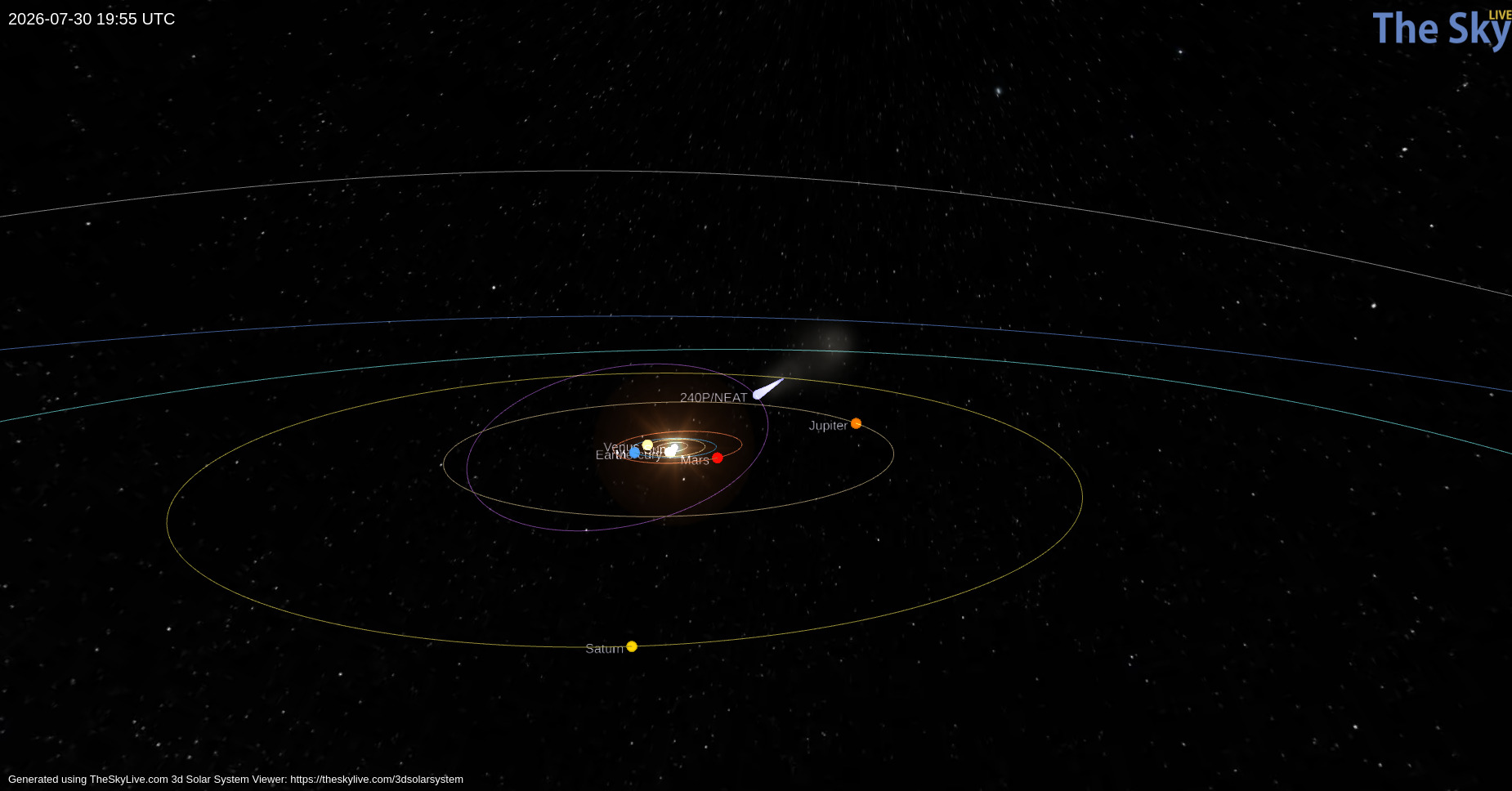
Orbital path of 240P/NEAT (purple) and the position of the comet on 30 July 2026 (light blue teardrop). Click to enlarge. [TheSkyLive]
While we often think of comets as icy remnants of the solar system’s formation that populate the Kuiper Belt and Oort Cloud, some comets make their homes closer to the Sun. One such class, known as Jupiter-family comets, traveled from the Kuiper Belt to short orbital periods (less than 20 years) whose paths through the solar system are shaped by Jupiter’s gravity. Discovered in 2002, 240P/NEAT is a Jupiter-family comet that loops between Jupiter and Mars on a 7.6-year orbit. Making close approaches to Jupiter, 240P experiences frequent, strong interactions with the gas giant that can alter the comet’s orbit and cause sudden bursts in brightness as ice and dust are heated and outgassed from the comet’s surface.
Most recently, 240P swept closest to Jupiter in July 2007, shifting the comet’s perihelion distance (closest approach to the Sun) from 2.5 to 2.1 au, and several long-lived bursts in brightness in 2018/2019 could have been spurred by this orbital shift. Excitingly, a fainter comoving object, 240P-B, was first reported in June 2025 as the comet headed toward perihelion — at some point recently, 240P had split in two!
Over the last century, numerous split comets have been recorded, but detailed physical studies of these objects are rare. With growing evidence suggesting splitting and disintegration are the primary mechanisms of comet destruction, understanding the properties and cause of 240P’s split is imperative.
Observing 240P
With 240P on the move to perihelion, David Jewitt (University of California, Los Angeles) and collaborators monitored the comet from October 2025 to April 2026 to establish the likely cause of its split. Employing the Alhambra Faint Object Spectrograph and Camera on the 2.56-meter Nordic Optical Telescope, the authors obtained detailed imaging of the comet from two months before to four months after perihelion to characterize both components.
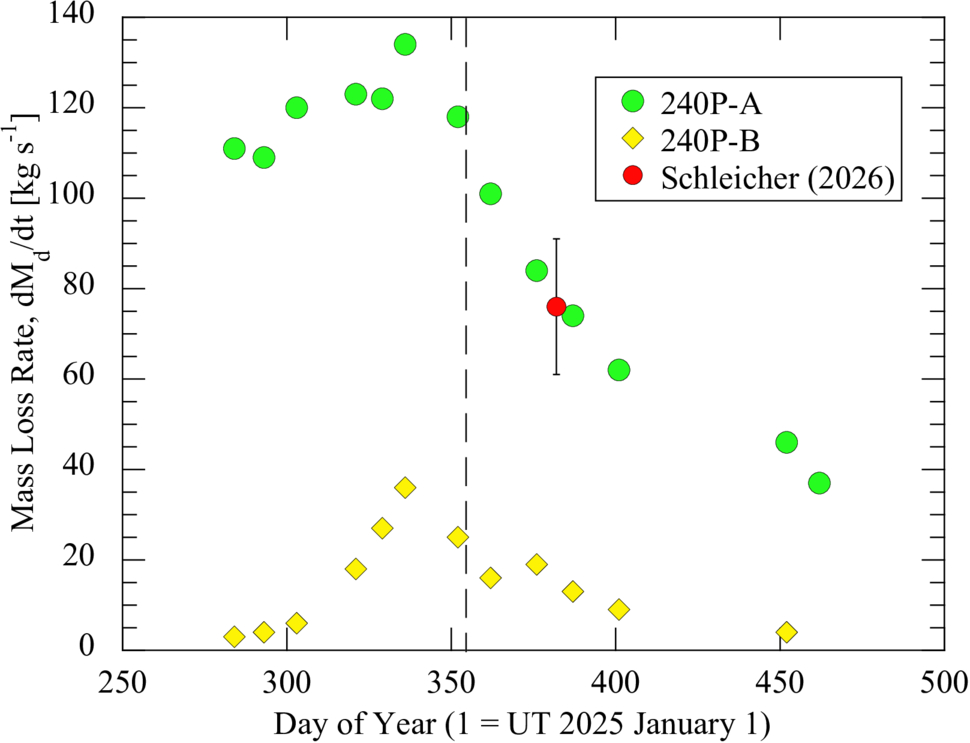
Tracking both photometric and morphological changes across their observations, the authors estimated the dust-loss rates, physical sizes, and separation speed of 240P-A and 240P-B. The brighter component, 240P-A, has an estimated radius between 400 and 600 meters and a dust-loss rate almost four times higher than 240P-B. Because 240P-B is fainter, its radius is harder to constrain observationally. From its lower dust-loss rate and lower brightness, the authors estimated a radius around 300 meters (and no smaller than 50). Based on how the separation of the two comet pieces changes over time, the authors determined that the split of 240P occurred at least three years before their observations.
Dust mass-loss rates for 240P-A (green circles) and 240P-B (yellow diamonds) over the course of the observations. Both components peak shortly before perihelion (dashed vertical line). Click to enlarge. [Jewitt et al 2026]
Source of the Split
How exactly did this fragmented comet get this way? The authors considered a number of comet-splitting mechanisms: tidal forces, asteroid impact, pressure buildup below the comet’s surface, thermal stresses, and rotational instability. Given the comet’s orbit, it has not had close enough encounters with the Sun or other planets for tidal forces to be the culprit, and it traverses well above the asteroid belt, avoiding collisions. Pressure buildup and thermal stresses can fracture comets, but both are unlikely to launch such a large fragment as seen in this system.
This leaves rotational instability as the likely source of 240P’s split. Outgassing torques lead to rotational instability, especially in subkilometer comets like 240P, and 240P has exhibited recent outgassing. In addition, the separation speed between the 240P components is comparable to the escape speed of the primary comet, which is expected for rotational breakup. To confirm this hypothesis, future observations measuring the rotation period of 240P are necessary, but this study adds to the small number of split-comet observations that aid in understanding comet destruction.
A recent Focus Issue of the Astrophysical Journal Letters describes the fourth version of the catalog of gravitational wave events (GWTC-4.0) from the Laser Interferometer Gravitational Wave Observatory (LIGO), the Virgo interferometer, and the Kamioka Gravitational Wave Detector (KAGRA).
This catalog contains transient gravitational wave events recorded through January 2024, during the observatories’ fourth observing run, which concluded in November 2025. GWTC-4.0 displays the results of significant improvements to our suite of gravitational wave detectors, including higher-powered lasers and reduced quantum noise. A fifth catalog of gravitational wave events was released in Spring 2026, with the accompanying scientific articles being submitted to the Astrophysical Journal and the Astrophysical Journal Letters.
This Monthly Roundup consists of short descriptions of each of the currently published research articles in the LIGO–Virgo–KAGRA Gravitational Wave Transient Catalog (GWTC): Release 4 Focus Issue. Each snippet links to the corresponding research article, and the Focus Issue landing page is linked at the bottom of this post. Be sure to revisit the landing page to catch new articles as they’re published!
Introducing GWTC-4.0
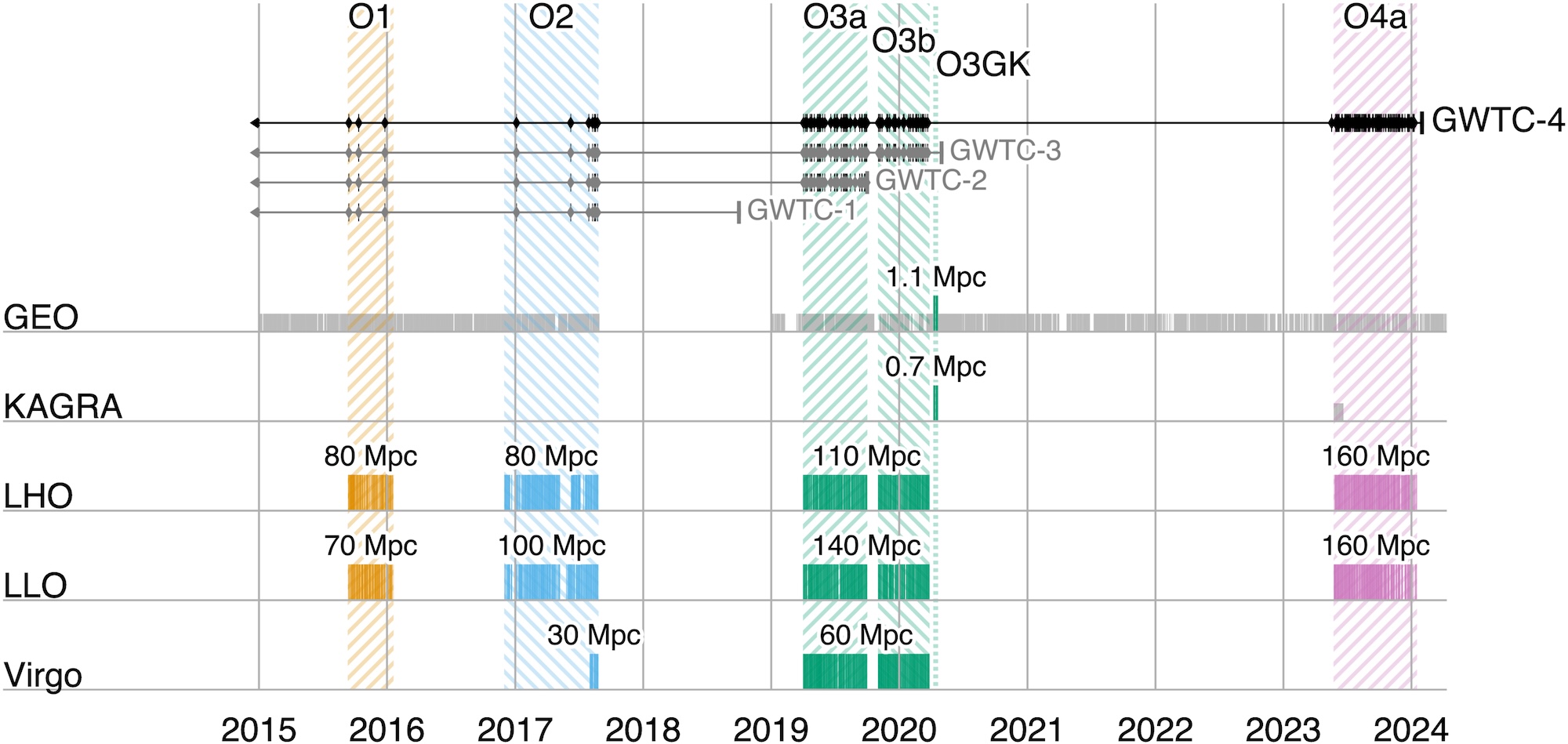
A timeline showing observing runs between 2015 and 2024. Click to enlarge. [LVK Collaboration 2025]
First up, the collaboration orients the reader to many important aspects of the catalog and the articles contained in the Focus Issue. This article describes how four detectors, each with two arms 3–4 kilometers long, monitor gravitational waves from Hanford, Washington; Livingston, Louisiana; Santo Stefano a Macerata, Italy; and Hida, Japan. These detectors work in concert, ready to receive signals from the universe during coordinated observing runs separated by periods of downtime for construction and commissioning. During these pauses, a smaller instrument, the German–British GEO600 gravitational wave detector, has kept an ear out for signals and will continue to do so until the end of 2026.
After these detectors record subtle spacetime squiggles from compact objects colliding millions to billions of light-years away, the collaboration converts the raw signals into the data contained in catalogs like GWTC-4.0. This process involves modeling the gravitational wave signals, filtering them to identify candidate transients, and pinpointing the most significant events.
After collecting and cleaning the signals, the collaboration undertakes a critical step: making their data accessible to researchers and the public. The data are available through the Gravitational Wave Open Science Center, and the Focus Issue article on open data describes how to navigate the online portal, how the datasets archived online are structured, and how the data were calibrated.
Science Results
This fourth version of the gravitational wave transient catalog greatly expands the sample of gravitational wave transients recorded by detectors across the globe. Including events from previous catalogs, GWTC-4.0 brings us to 218 events for which the probability of the source being astrophysical in nature is more than 50% and for which there is little chance of the signal being an instrumental artifact. This represents a more than 100% increase in the number of recorded gravitational wave events fulfilling this criterion, broadening our understanding of colliding compact object pairs. This release also includes some superlative signals, such as the most massive black hole binary with a low false-alarm rate and the highest signal-to-noise ratio for a gravitational wave event thus far.
Detected in November 2023 by both LIGO Hanford and LIGO Livingston, GW231123 is in many ways an exceptional gravitational wave transient. The total mass of the merging components appears to be between 190 and 265 solar masses, and the false-alarm rate for this signal is less than one per year. This makes it the most massive merger event with such a low false-alarm probability. The two components also appear to have high spins, which complicates the interpretation of the signal with existing models. A binary black hole merger in which one or more components lies within the pair-instability mass gap is the likeliest explanation for this signal, but the authors also present alternative scenarios, such as a core-collapse supernova or a gravitationally lensed gravitational wave signal.
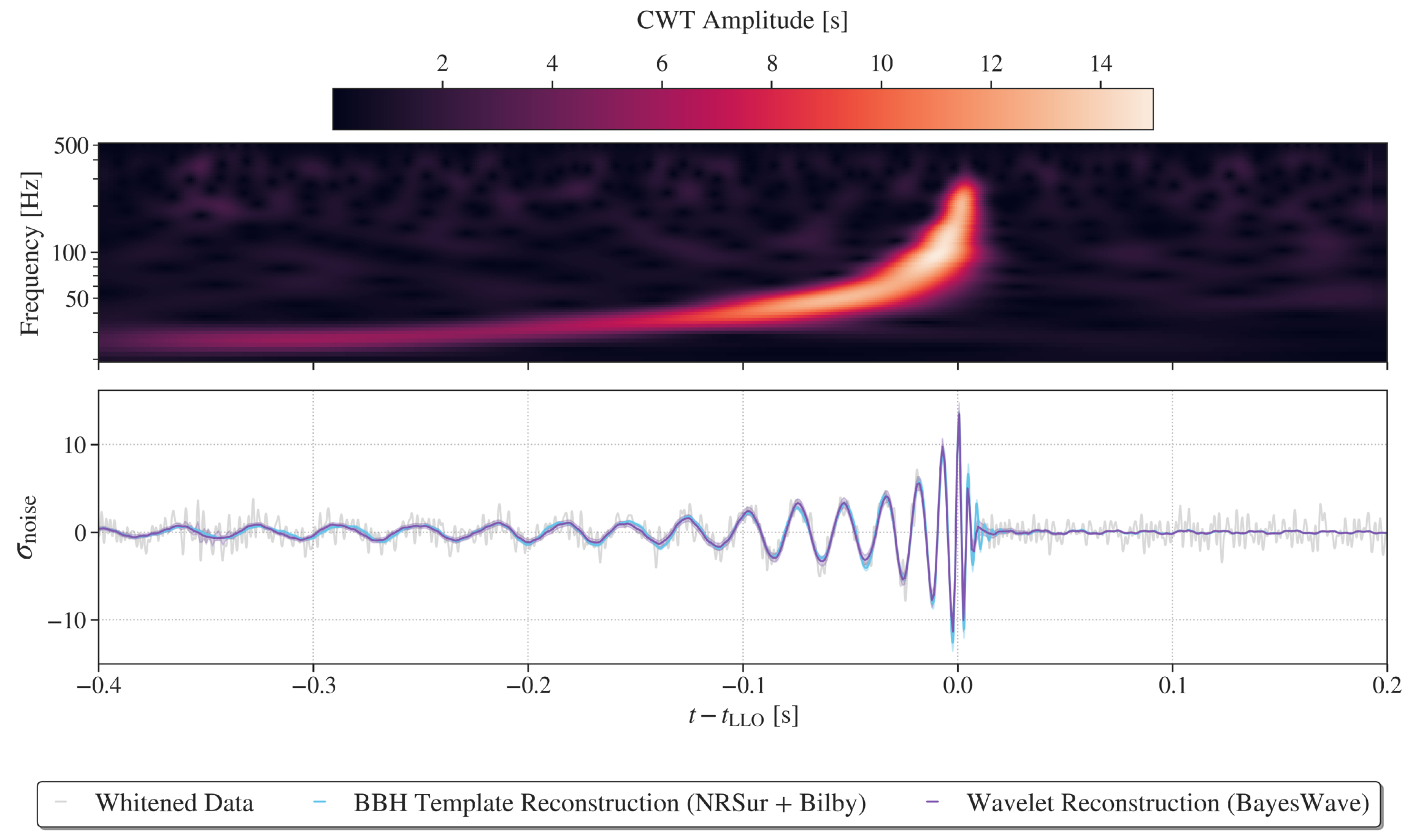
Representations of the GW230814 gravitational wave signal. Click to enlarge. [LVK Collaboration 2026]
GW230814, which was detected only by LIGO Livingston, is the loudest signal in the catalog. This signal is consistent with the collision of two black holes, each of roughly 30 solar masses. During the analysis of this signal, the team discovered potential deviations from the predictions of general relativity in the ringdown phase, when the remnant black hole settles into its final shape. Without a detection from another facility to corroborate this finding, it’s difficult to pinpoint the cause of the deviation, but the team could not rule out statistical noise fluctuations as the source.
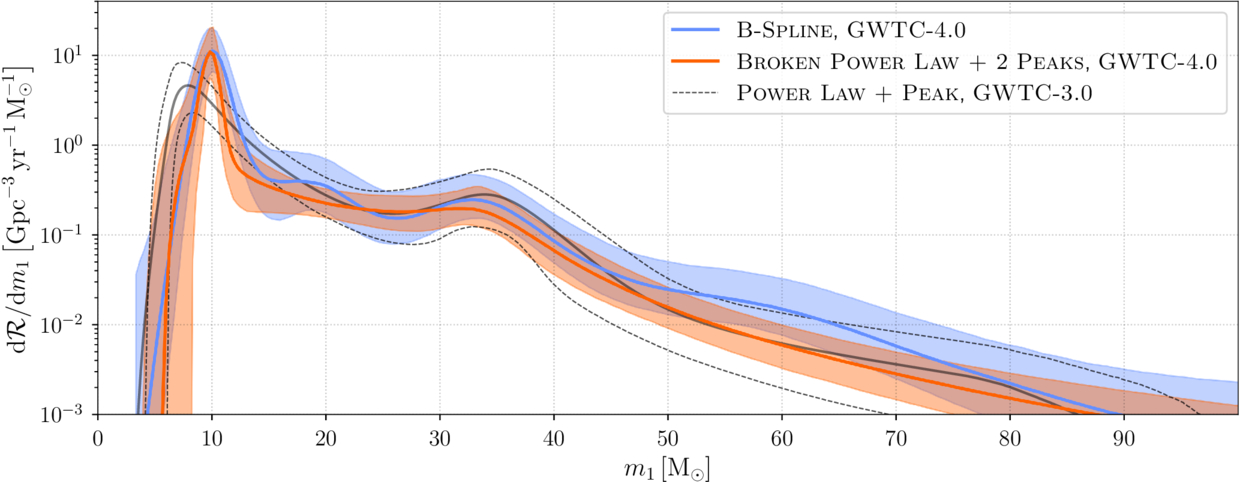
Plot of the differential merger rate as a function of the mass of the more massive of the two merger components. This shows overdensities at 10, 35, and possibly 20 solar masses. Click to enlarge. [LVK Collaboration 2026]
Surveying merging black holes and neutron stars on the population level, the team analyzed 158 gravitational wave signals from the current catalog. This analysis supported findings from previous transient catalogs, including multiple overdensities in the distribution of merging black hole masses, broadly distributed neutron star masses, and an increase in the merger rate with redshift. The new data strengthened certain previously identified trends, such as an increase in the width of the effective spin distribution with redshift, and weakened others.
“GWTC-4.0: An Introduction to Version 4.0 of the Gravitational-Wave Transient Catalog,” A. G. Abac et al 2025 ApJL995 L18. doi:10.3847/2041-8213/ae0c06
“GWTC-4.0: Methods for Identifying and Characterizing Gravitational-Wave Transients,” A. G. Abac et al 2026 ApJL1004 L21. doi:10.3847/2041-8213/ae447b
“Open Data from LIGO, Virgo, and KAGRA Through the First Part of the Fourth Observing Run,” A. G. Abac et al 2026 ApJ1004 232. doi:10.3847/1538-4357/ae211e
“GWTC-4.0: Updating the Gravitational-Wave Transient Catalog with Observations from the First Part of the Fourth LIGO–Virgo–KAGRA Observing Run,” A. G. Abac et al 2026 ApJL1004 L22. doi:10.3847/2041-8213/ae2c74
“GW231123: A Binary Black Hole Merger with Total Mass 190–265 M⊙,” A. G. Abac et al 2025 ApJL993 L25. doi:10.3847/2041-8213/ae0c9c
“GW230814: Investigation of a Loud Gravitational-Wave Signal Observed with a Single Detector,” A. G. Abac et al 2026 ApJL1004 L23. doi:10.3847/2041-8213/ae2ad3
“GWTC-4.0: Population Properties of Merging Compact Binaries,” A. G. Abac et al 2026 ApJL1005 L51. doi:10.3847/2041-8213/ae771e
Apple will not limit the functionality of devices enrolled in its new Upgrade leasing program if customers miss payments or default on the agreement. In an emailed statement to The Verge, Apple spokesperson Brian Bumbery said: “There will be no restricted mode and/or there will be no limitations put on device functionality due to missed payments or default with the Apple Upgrade program.”
The clarification follows reporting from 9to5Mac, which identified code in an iOS 27 beta referring to a new “App Managed Features” system. According to that reporting, the system would have allowed financial partners to perform ongoing status checks on a device and enabled Apple’s system services to place it into “Restricted Mode” if the owner was not in good financial standing. Restricted Mode, as described, would have blocked access to most apps while leaving core functions such as Phone, the App Store, Clock, Settings, and Wallet available.
Apple’s statement to The Verge directly addresses those concerns, stating that no such restrictions will be applied under the Upgrade program. The program itself allows customers to lease new iPhones, Macs, iPads, and other devices with the option to upgrade periodically.
The confirmation provides reassurance that leased devices will retain full functionality even in cases of missed payments, distinguishing the Upgrade program from any potential remote management features that had been observed in early iOS 27 code.
MacDailyNews Take: Apple has not explained to The Verge the intended purpose of Restricted Mode. One possibility is that the feature was built for financing programs run by carriers, retailers, or other partners outside the Apple Upgrade program—particularly in markets where device restrictions are already commonly used to enforce installment plans.
Please help support MacDailyNews — and enjoy subscriber-only articles, comments, chat, and more — by subscribing to our Substack: macdailynews.substack.com. Thank you!
An unusual clump of gas 450 million years after the Big Bang may contain stars hailing from the universe’s elusive first generation of stars. New research examines an alternative explanation involving an accreting black hole.
Meet Hebe
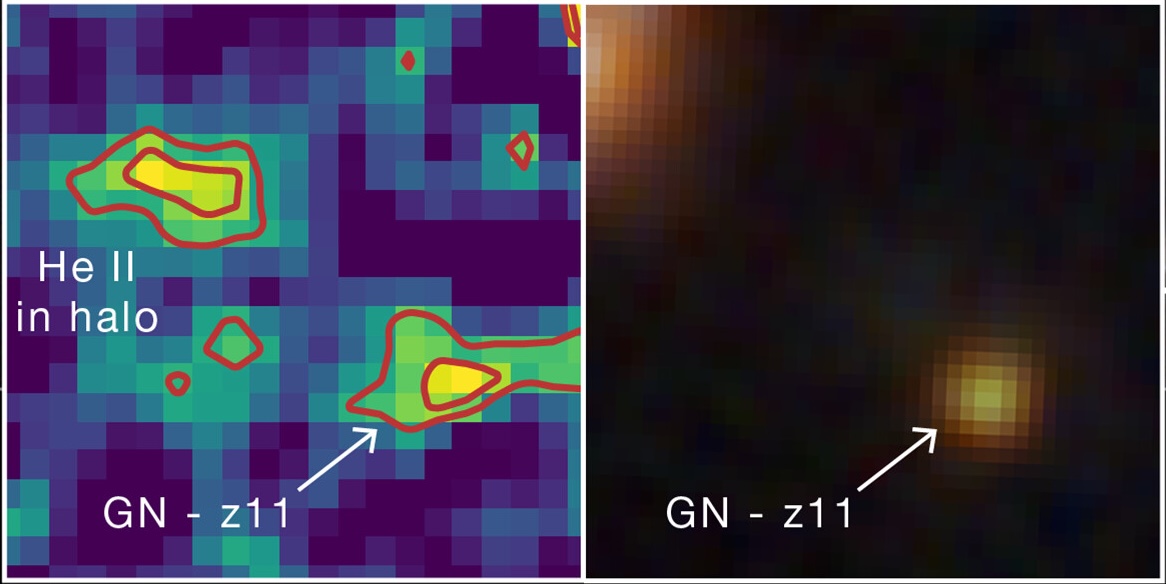
Hebe is visible in the image on the left as a prominent blob of helium emission up and to the left from GN-z11, a luminous galaxy hosting an accreting supermassive black hole. On the right is an infrared image of the same region, in which Hebe is not visible. Click to enlarge. [Adapted from NASA, ESA, CSA, Ralf Crawford (STScI)]
Initially spotted in 2024, an early-universe gas clump nicknamed Hebe has now been identified as a possible hiding place of Population III (Pop III) stars — the universe’s first generation of stars. Pop III stars are thought to be massive and chemically pristine, containing only hydrogen, helium, and a whisper of lithium. This exciting hypothesis was prompted by the detection of recombination lines from helium, which could be ionized by the high-energy radiation of the first stars.
Before the community settles on this exciting explanation, however, the hypothesis must withstand all the tests astronomers can throw at it. In a recent research article, Junehyoung Jeon, Tae Bong Jeong, and Saiyang Zhang (The University of Texas at Austin) along with Volker Bromm (The University of Texas at Austin) attempted to explain Hebe’s properties in another way.
Considering Alternatives
Hebe glows with distinctive helium emission that requires a source of high-energy radiation. This radiation could be provided by a cluster of Pop III stars, but it could also, in theory, arise from an accreting supermassive black hole embedded within the gas clump.
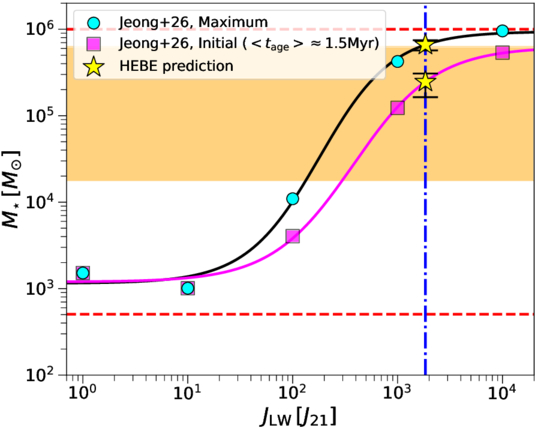
Predicted total mass of Hebe’s Pop III stars as a function of the Lyman–Werner flux from the nearby galaxy GN-z11. Click to enlarge. [Jeon et al. 2026]
The authors used models to explore both possibilities. For the first scenario, in which the telltale helium emission is driven by a cluster of Pop III stars, the team calculated the maximum possible mass of the cluster, which sets how much high-energy radiation is produced. The cluster mass is moderated by high-energy radiation from another source: GN-z11, a starburst galaxy situated about 10,000 light-years from Hebe. For the second scenario, the team modeled the spectral energy distribution arising from a supermassive black hole — either a direct-collapse black hole or a primordial black hole — accreting pristine gas from the surrounding cloud.
Still a Leading Explanation
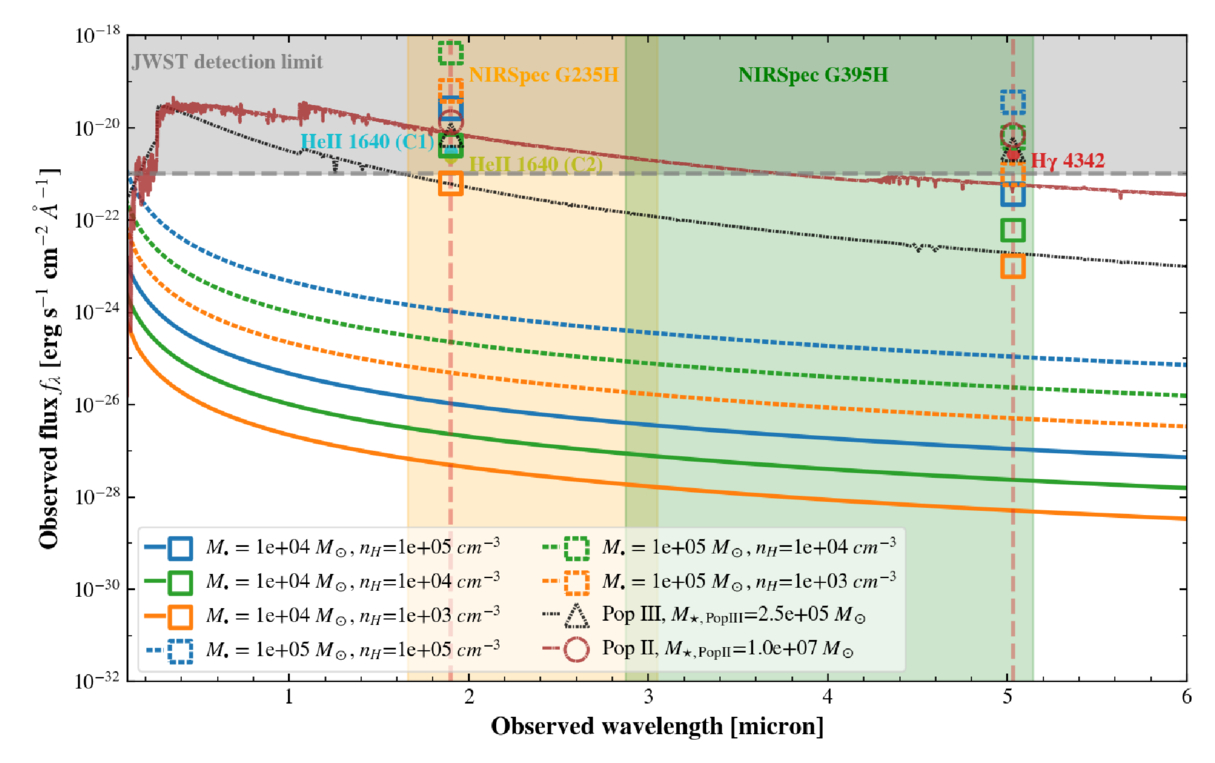
While the black hole scenario could, with reasonable black hole masses, gas densities, and accretion rates, reproduce individual flux measurements drawn from JWST observations, this hypothesis struggled to simultaneously match multiple measurements. The Pop III star cluster scenario, with a cluster mass of a few hundred thousand solar masses, provided the best fit to the JWST data.
Modeled spectral energy distributions (lines) and predicted line flux densities (open symbols) for the accreting black hole, Pop III star, and Pop II (second-generation) star hypotheses. The observed JWST line fluxes are shown as filled circles. Click to enlarge. [Jeon et al. 2026]
As a final test, the team introduced a third possibility involving a population of second-generation stars, which are more chemically enriched than Pop III stars. While this model fit well, the number of stars necessary to match the data — roughly 10 million — would produce a stellar continuum detectable (but so far not seen) by JWST.
While a cluster of Pop III stars is still the leading explanation for Hebe’s properties, the team noted that the Pop III star and black hole hypotheses aren’t mutually exclusive; Hebe could very well harbor a primordial black hole and a smattering of Pop III stars. Regardless of what powers its characteristic helium emission, Hebe offers an enticing glimpse into the early universe, and more work is needed to understand this intriguing object.
Citation
“What Is Powering the Enigmatic He II Emitter Hebe: The First Stars or Black Holes?” Junehyoung Jeon et al 2026 ApJ1006 27. doi:10.3847/1538-4357/ae7bea
I've liked the Framework Laptop 13 since the first time I used it, partly because I just think the idea of a repairable and upgradeable laptop is cool and partly because it's not Yet Another Ultraportable Trying To Be A MacBook Air Clone. But the design has always had real shortcomings—the most noticeable and serious being its mediocre battery life.
Enter the Framework Laptop 13 Pro. While all previous Laptop 13 refreshes have tinkered around the edges with the original design (a tweaked lid design here, new hinges or new speakers there), the Laptop 13 Pro is as close as we've gotten to a second-generation revision for the original design.
This means that it breaks backward compatibility for some (but not all) Laptop 13 components, most notably the bottom case, the keyboard and trackpad, and the original 55 WHr and 61 WHr battery designs. But by allowing itself to make larger changes to the design, Framework has made major strides in battery life and general fit and finish.
For the last 22 years, one of the most bizarre true crime stories ever to grace the program Unsolved Mysteries has confounded amateur investigators and spawned hundreds of pages of online speculation. Who was behind the decade-long torment of Bill and Dorthy Wacker in the 80s and 90s, which included allegations of stalking, robberies, and even assaults?
While any internet true crime enthusiast knows Unsolved Mysteries frequently left out interesting details that can create a rabbit hole of alternative explanations, in this case, the show has been the sole source of information, with no other known period news coverage of the harassment.
That is, until recently, when this author acquired the original police records, spanning almost 100 pages of material, while researching for my podcast, Cease to Exist. The records reveal a wealth of new information, including potential leads on suspects, and answers to questions true crime fans have speculated about for years.
The Wackers claimed to be victims of a long-term harassment campaign. Credit: Film Rise/Unsolved Mysteries
Unsolved Mysteries
In the Unsolved Mysteries season 6 two-hour finale, airing in the spring of 1994, the public met Bill and Dorthy Wacker, an elderly couple from Massillon, Ohio, who claimed to be victims of a bizarre string of harassment stretching back years. Since then, their story has been the subject of considerable speculation, with some believing the whole affair was so unbelievable that the Wackers must have been making it up. On the other hand, Dorothy herself did seem to bear injuries consistent with the couple’s claims. Without any further information, true crime fans dissected every available scrap of evidence, including the accuracy of the reenactments, for possible clues.
“The Wackers are quiet, unassuming people who tend to mind their own business. Hardly the type to draw the wrath of an unseen enemy,” Unsolved Mysteries host Robert Stack said at the beginning of the segment.
The scene then opens with the couple returning to find their home ransacked on January 16, 1985. This was the third claimed incident, but according to the program, the first that was reported.
“After nearly 10 years, Dorothy and Bill Wacker still wonder who and why,” Stock intoned.
The Wacker’s Story
In interview footage with the couple, Bill speculates that someone may be attempting to force the couple to move, although why that would be was unclear, and refers to the perpetrator as “a kook,” which becomes a bit of a meme in online discourse about the case.
Six months after the previous break-in, Dorothy was home alone recovering from heart surgery when she heard a knock at the door. She found a young man who claimed his car had broken down and that he needed to use her telephone. Although she didn’t see a car anywhere, she let the polite stranger in. He made a call, thanked her, and appeared to leave.
Before she knew what had happened, Dorothy awoke tied up on her kitchen floor after having been struck in the head. A neighbor heard her cries through an open window and came to her aid. Although Dorothy’s injury was not serious, there were two strange elements to the crime. First was the graffiti “cheaper, but will do,” shown in the reenactment as having been left on the kitchen wall. Second was the variety of items stolen from the home, including a gun and radio receiver, which were later returned to the Wackers’ porch. Police were baffled by the return of a stolen gun and distributed fliers featuring a sketch of the suspect, but no identification was ever made.
Harassment continued with a series of threatening phone calls that persisted even after the family changed their number, according to Dorothy and her daughter Peggy Hoover. Additionally, nocturnal banging on the outside of the house began, which led the couple to install lights. The only result was a strange note on the front porch reading “your lights are a laugh,” and subsequent notes such as “you scum I’ll get even,” with a backside reading “this time ha ha.” The police never found any fingerprints on the notes and suggested they may have been made by someone using their opposite hand to disguise their handwriting.
The graffiti written on the Wackers’ wall in the Unsolved Mysteries Reenactment (Credit: Filme Rise/Unsolved Mysteries)
Second Attack and Stake Out
The most dramatic events yet occurred in the fall of 1993. Dorothy was walking her dog outside of their home on October 27th when she was attacked again. The segment claimed she suffered “skull lacerations” and was taken to the hospital, but there were no witnesses to the event.
Notably, Sheriff Bruce W Umpleby says that after interviewing neighbors, no one had any information that led them to believe there was a person there. He continued that most crimes have simple motives and there has never been one identified for the strange periodic flurries of activity around the Wackers.
Things reached a climax when the family conducted a stakeout, hoping to finally capture the stalker one November evening. Bill hid inside a trailer in the driveway, while Dorothy and their daughter Cathy stayed inside the home. Across the street, their sons-in-law Dan and Clay sat in a vehicle in a neighbor’s driveway. After almost four hours, they decided to end the stakeout around 10:30 p.m., when they heard a loud bump on the porch. Incredibly, the stalker had apparently evaded the surveillance and thrown a rock onto the Wackers’ front porch with a note reading “get the message.”
At the conclusion of the segment, Bill says he hopes whoever is responsible is caught soon because, if the Wackers were no longer the targets, he feared the individual would simply target someone else.
Unsolved Mysteries Online Speculation
Besides noting that the sheriff’s department had asked Dorothy after the second attack whether Bill could have been the attacker, the series plays the events fairly straight, without directly questioning the couple’s story. The eerie music and Stack’s gravelly voice convey a feeling of serious menace. True crime fans are more divided, with some arguing that the events were too implausible to be real, while others find it unlikely that an elderly couple would fabricate such a wild tale. Notably, another popular Unsolved Mysteries segment, involving the stalking of Cindy James, is also widely believed to have involved a hoax.
Unfortunately, Newspapers.com’s archive of the local paper, The Massillon Independent, has a large gap between the early 1970s and the 2020s. The only other known media appearance by Bill Wacker before his death was in an unrelated citizen-reaction piece about Connie Chung interviewing Newt Gingrich’s mother in the Akron Beacon Journal, although he is wearing an Unsolved Mysteries hat in the picture. The only other items recovered were obituaries stating that Bill had died in 1999 at age 79 and Dorothy in 2020 at age 83. This left armchair sleuths to rely primarily on what appeared in the episode itself, which does raise questions.
One notable detail is that, in the reenactment, Dorothy’s dog doesn’t bark to alert her to the intruder, which seemed uncharacteristic of a small dog. People debated whether this was merely a quirk of the reenactment or reflected how the event actually occurred, with some questioning whether this provided evidence that Bill was behind the assault. Additionally, some found it odd that the stakeout was called off at the relatively early hour of 10:30 p.m. and found the return of stolen items completely unbelievable. Another oddity was the wording of the letters, with phrases like “you scum” and “no junk,” which sounded to some like older adults attempting to mimic the speech of teenagers while using outdated phraseology.
Among those who believe the Wackers, suspicion has frequently fallen on the daughters, who would presumably inherit the home and were not mentioned as suspects in the episode. Particular suspicion has fallen on Peggy, who was not present for the stakeout. Some have also pointed to the phone calls continuing after the Wackers changed their number as possible evidence of an inside job.
One Redditor, sovietbabyy, claimed to be a relative of the Wackers who stumbled upon the case, although they were too young to have ever met Bill and Dorothy themselves. They claimed Bill and his siblings were all dead but asked other family members for more information and were told that the extended family believed the story and that Bill was usually secluded but would help anyone in need. Five years later, a poster using the screen name goawaycommies followed up, claiming to be the same person. In these new posts, the author claimed that Stark County was a high-crime area and that the police were known to be ineffective; therefore, it shouldn’t be surprising that no one was caught.
While it could be debated whether these two posters are actually the same person, the goawaycommies post provided one essential detail that led to a major breakthrough: the Wackers’ address.
Finding the Wackers
In late December, I wrote to the Massillon County Sheriff requesting any files they had on the Wackers. They granted my request in early January, providing 94 pages of documents. Follow-up requests to the North Lawrence Fire Department, who responded to the assaults, as well as inquiries to two of the responding officers and Ricky Lee Pegido, were fruitless. The Sheriff’s office maintains that these documents are all that were found in the file, despite some appearing to be missing, such as a cover sheet without a report and references to a “phone trap” that is not followed up on.
While the officers may not have wanted to talk about these events, what was contained inside was fascinating, providing the names of suspects, neighbors’ opinions on the Wackers, incidents that were not included in the Unsolved Mysteries segment, and another 90s-era “classic” addition: records involving consultation with a psychic about the crimes.
The Wacker home today. Credit: Google Street View
The Reports
Right from the beginning, the documents tell a slightly different story from the television segment. Instead of waiting until the third event, in January 1985, to call police, there was a report concerning the initial August 1984 break-in. This one was different from the others, with gold and diamond jewelry stolen that was not returned and police noting that a credit card may have been used to force the lock.
The police report for the January 1985 break-in contained two notable details: the method of entry and the first-named suspect. Despite having their locked home broken into previously, the Wackers had left a side door unlocked, allowing the burglar to gain entry. Additionally, the report lists a “Randy” as a possible suspect, a young man whose aunt had previously cared for Mrs. Wacker’s elderly mother in the home.
Next, the first assault report appears, which is similar to what was shown in the episode, except that “CHEAPER, BUT WILL DO” was written in a bathroom instead of the kitchen. Additionally, a basement window was cut, through which the perpetrator may have escaped. The man who came to her aid is named here as Jim Pedigo, who says he and his brother had been working in their backyard all morning without seeing or hearing a thing until Dorothy’s cries became evident. In this report, the name is given as “Pedigl,” and it switches back and forth between that and “Pedigo” in the reports (the name “Pedigo” appears in print as a family name in the area in obituaries). When Bill returned, he found items that appeared to have been staged to be taken later from the robbery around the perimeter of the house.
Following this, there is a series of minor reports of items being stolen and returned—oddly, with the Wackers still not locking their doors, despite the first report indicating that had been their former habit.
The Second Assault
The report of the second assault does closely match the program, even down to the controversial dog not barking when the assailant came after Dorothy. Although the Wackers claimed the dog normally ignored its surroundings as it relieved itself, the officer noted on a follow-up visit to the residence that the dog barked when he arrived, which he found suspicious. In the report, Dorothy claimed she had to crawl to the back door to get help from Bill after the attacker fled, which was supported by dirt and scratch marks on her forearms noted by the officer. The officer gave Bill some suggestions, such as installing a light on that side of the house and trimming some trees to remove hiding places.
A lengthy segment of the report regarding the Sheriff’s canvassing of the neighborhood provides some interesting insight into the Wackers’ relationship with their neighbors. This portion notes that:
The neighbors collectively agreed that none of them have had any type of problems. Nor, have they seen or heard any form of disturbance in the area. In fact, several of the neighbors stated that they don’t even lock their doors. Further stated by the neighboring community, most of the neighbors stay to themselves, however, ‘the Wackers bring most of their problems on themselves.’ Apparently the Wackers aren’t the most congenial of persons in the neighborhood, especially with the Shillings and Maddox’s.
The Maddox family is the same household as the Pedigo family, a notable change of relations since Jim Pedigo aided Dorothy. On the other hand, another couple in the neighborhood stated that they regularly played cards with the Wackers, providing a nuanced image of them as people who got along with some but not others.
Suspects Not Named on Unsolved Mysteries
Following this event, both of the daughters began continually contacting the Stark County Sheriff’s office, demanding more attention be paid to their parents’ harassment. One of the items introduced here, but oddly never followed up on, is a “phone trap” put on the Wackers’ phone by their telephone company, Ameritech, to monitor all incoming calls. Although the reports say this is activated, there is no information on whether any claims of harassing calls were ever compared against the phone trap.
There appears to be a missing report explaining where the tip originates from, but officers speak with the son residing at the Maddox/Pedigo residence, Ricky Lee Pedigo, about whether he is aware of an individual by the name of “Shriner” on his mother’s side of the family, which he was not. When they later return to speak with his mother, Barbara Maddox, she claims she is not related to anyone by that name and flippantly remarks that the composite of the suspect in the first attack on Dorothy looks like a young dick Van Dyke, but no one she’s ever seen before.
Next, officers follow up on a tip from daughter Peggy Hoover that a woman named Debbie Shriver’s (not Shriner) ex-husband may be the suspect. After tracing this woman through a former landlord and then her own father, Debbie, now going by Debbie Pedigo, agrees to speak with the Stark County Sheriff’s. She says the composite bears no resemblance to her ex-husband, James Shriver.
Peggy then returns with another tip that a psychic told her the suspect lives within a twelve-mile radius of the Wacker home.
Finally, Peggy provides one last suspect: Barbara Maddox’s stepson, Johnny Lee, whom she says may be because her parents didn’t pay enough attention to him as a boy. At this point, Barbara Maddox has had enough, saying that her stepson hasn’t been to visit in years, and she is going to put up a privacy fence to keep away from the Wackers.
The suspect sketch from the Dorothy Wacker assault. Credit: Film Rise /Unsolved Mysteries
Final Events
From this point on, the banging and rocks being thrown at the home continued. At one point, the Wackers claimed someone had tried to gain entrance to their locked home, but the police report casts suspicion on this. The appraisal was that it appeared as though someone was attempting to make it look like the house was being broken into without causing too much damage, and it was inconsistent with typical burglary techniques.
The final report is from October 1997, when Dorothy heard a loud banging on the house while seated in the living room. An officer responded but could find no damage.
All the reports are bizarre. The daughters appear to be very invested in the case, yet Peggy ultimately seems to be throwing around claims that don’t add up to anything. Was she letting her imagination run away with her, using the events as a cover to harass people she had personal grievances against, or was she really on to something? The “Shriner/Shriver” discrepancy speaks to a minor issue prevalent in the police’s investigations: not confirming the spelling of names, which also occurs with “Pedigl/Pedigo.” Does this indicate the sheriff’s department is generally performing sloppy work, as the Reddit poster implied? While there is room to speculate here, the constantly changing accusations may have undermined Peggy’s credibility with law enforcement.
One possible conclusion is that the very earliest break-in was real, since the stolen items were not returned and the report is consistent with a typical forced entry. Perhaps after that, the Wackers developed a taste for the excitement and attention and hoaxed the rest of it. This would explain the incongruities of items being returned, no one ever seeing anything, their continuing to leave their doors unlocked, and the strange attempt to create the appearance of a forced entry without damaging the home.
But then again, officers reported witnessing injuries to Dorothy after both assaults. Could she have been willing to take things that far? Could the couple have truly been victims? Could one of the children be behind it? Was Bill assaulting her?
None of these questions can clearly be answered from the available evidence; and so, decades after the strange story of the Wackers first came to public attention, the case rests—and another relic of the 1990s remains an unsolved mystery.
Ryan Whalen covers science and technology for The Debrief. He holds an MA in History and a Master of Library and Information Science with a certificate in Data Science. He can be contacted at ryan@thedebrief.org, and follow him on Twitter @mdntwvlf.
Giovanni Kanter goes to at least one art museum whenever he visits a new city. That’s on top of his regular exploration of galleries in New York, where the 25-year-old ICU nurse lives and studies. He typically discovers new artists and gallery openings through word of mouth, though he has recently started curating his social media feed to serve relevant content (he’s currently in what he terms a “surrealism phase”).
He was raised on visual art; he's the son of painter Marianne Gargour and nephew of mixed-media artist Heather Hutchison and painter-printmaker Mark Thomas Kanter. His “exposure-oriented education” featured childhood visits to galleries and shows in and around Dallas, where he grew up, and in France, where he spent time with his grandparents.
But Kanter is an exception. Many other young people have a less immersive artistic education, perhaps shaped by occasional school trips or family visits to museums. If they haven’t internalized an instinct for what Kanter calls “moving through the art and absorbing it,” the museum experience is central to how they learn about and understand art.
Giovanni Kanter goes to at least one art museum whenever he visits a new city. That’s on top of his regular exploration of galleries in New York, where the 25-year-old ICU nurse lives and studies. He typically discovers new artists and gallery openings through word of mouth, though he has recently started curating his social media feed to serve relevant content (he’s currently in what he terms a “surrealism phase”).
He was raised on visual art; he's the son of painter Marianne Gargour and nephew of mixed-media artist Heather Hutchison and painter-printmaker Mark Thomas Kanter. His “exposure-oriented education” featured childhood visits to galleries and shows in and around Dallas, where he grew up, and in France, where he spent time with his grandparents.
But Kanter is an exception. Many other young people have a less immersive artistic education, perhaps shaped by occasional school trips or family visits to museums. If they haven’t internalized an instinct for what Kanter calls “moving through the art and absorbing it,” the museum experience is central to how they learn about and understand art.
Emergency SOS via satellite is now available in Andorra and Iceland, allowing supported iPhone and Apple Watch users to contact emergency services when cellular and Wi-Fi coverage are unavailable.
Apple added both countries to an updated support document, expanding the feature to 20 supported markets. Users in Andorra and Iceland can call or text 112 before choosing the satellite option when an ordinary emergency connection cannot be completed.
The expansion covers every iPhone 14 or later model running iOS 26.4 or newer. Apple Watch access requires Apple Watch Ultra 3 with watchOS 26.4 or later.
Emergency SOS does not turn the devices into conventional satellite phones. The system is designed for short emergency exchanges in locations where normal communication networks cannot be reached. Users must remain outdoors with a sufficiently clear view of the sky and follow onscreen directions while the device establishes and maintains a connection.
Emergency SOS via Satellite Reaches 20 Markets
Emergency SOS via satellite first launched in the United States and Canada in November 2022 with the iPhone 14 lineup. Apple gradually added European countries, Australia, New Zealand, Japan and Mexico as regulatory approval and emergency-service support became available.
Andorra and Iceland now join Australia, Austria, Belgium, Canada, France, Germany, Ireland, Italy, Japan, Luxembourg, Mexico, the Netherlands, New Zealand, Portugal, Spain, Switzerland, the United Kingdom and the United States.
The addition is particularly relevant for travelers and residents exploring mountainous or remote terrain.
Andorra contains extensive hiking, cycling and skiing areas across the Pyrenees, where cellular coverage can become unreliable beyond populated valleys and resorts. Iceland presents a different but equally demanding environment, with large rural areas, volcanic landscapes, glaciers and routes far from conventional infrastructure.
Satellite availability does not guarantee a connection everywhere. Mountains, deep valleys, dense tree cover and tall structures can obstruct the line between the device and a passing satellite. Apple also warns that satellite connectivity may not function in locations above 62 degrees latitude, which can affect some northern regions.
Most of Iceland lies below that threshold, although environmental conditions and the position of surrounding terrain can still influence performance.
International travelers can generally use Emergency SOS while visiting a supported country, even when the feature is not offered in their home market. Exceptions apply to devices purchased in certain countries or regions where Apple satellite connectivity is restricted.
iPhone 14 and Newer Models Gain the Expansion
Every version of iPhone 14 and later contains the hardware required for Apple satellite features. Users in Andorra and Iceland must install iOS 26.4 or a newer release before relying on Emergency SOS.
The system appears only when the iPhone cannot reach cellular service or Wi-Fi. Apple recommends trying the local emergency number first because another carrier network may still be able to complete the call even when the user own provider shows no coverage.
When the call fails, the iPhone offers Emergency Text via Satellite. The user answers a short series of questions describing the emergency, including the type of assistance needed and whether anyone is injured.
The compressed questionnaire reduces the amount of information that must be transmitted through the limited-bandwidth satellite connection. Once connected, the iPhone sends the responses and location to an emergency dispatcher or an Apple-supported relay center capable of contacting local responders.
In Andorra and Iceland, the applicable emergency number is 112.
Users can also choose to notify emergency contacts. When Medical ID and emergency contacts have been configured in the Health app, selected details can be shared during the incident.
The conversation does not operate at the speed of an ordinary text exchange. Under ideal conditions, a message may require approximately 30 seconds to send. Light or moderate foliage can extend that delay beyond one minute, while heavier obstructions may prevent a connection entirely.
The iPhone displays guidance showing which direction to turn or move as satellites pass overhead. The phone can remain connected while the screen is locked, but it should not be placed inside a pocket or backpack during the exchange.
Apple Watch Ultra 3 Works Without an iPhone Nearby
Apple Watch Ultra 3 brings similar protection directly to the wrist, allowing users to contact emergency services even when an iPhone is not available.
Emergency SOS via satellite on Apple Watch Ultra 3 does not require an active carrier plan. Apple includes the service at no additional charge for two years following activation of the watch.
When cellular and Wi-Fi connections are unavailable, users can attempt an emergency call or open Messages and text 112. If the message cannot be delivered through an ordinary network, the watch presents the satellite emergency option.
Apple Watch Ultra 3 also guides the wearer toward the satellite connection. The device can remain in its normal position on the wrist rather than being held above the head, although the user may be instructed to turn or move away from an obstruction.
A wet watch may have more difficulty maintaining satellite communication, an important limitation for swimmers, boaters and users caught in severe weather.
The watch can send the emergency questionnaire, location, elevation, Medical ID information and battery level. Emergency contacts can also receive information about the incident when the user has enabled that option beforehand.
Crash Detection and Fall Detection add another layer. If iPhone 14 or later or Apple Watch Ultra 3 detects a severe crash or hard fall and the user remains unresponsive, the emergency notification may be transmitted over satellite when cellular and Wi-Fi networks are unavailable.
Image Credit: Apple Inc.
Preparation Matters Before Going Off-Grid
Apple provides a connection demonstration that allows users to practice finding a satellite without contacting emergency services.
On iPhone, the demonstration can be opened through the Satellite controls or the Emergency SOS section in Settings. Apple Watch Ultra 3 users can add the Satellite control to Control Center or place a satellite complication on the watch face.
Testing the process before a remote trip helps users understand how quickly conditions can affect the connection. A clear field may establish contact rapidly, while a canyon or heavily wooded trail may require movement toward more open terrain.
Medical ID and emergency contacts should also be completed before leaving network coverage:
Health > Profile > Medical ID
A Medical ID can provide responders with information such as allergies, medical conditions, medications and emergency contacts. Users remain responsible for deciding which personal details they want stored and shared.
Emergency SOS via satellite is included free for two years after activating an iPhone 14 or newer model. Apple provides the same two-year period with Apple Watch Ultra 3, although the company has not established the long-term price that may apply after promotional access ends.
The arrival in Andorra and Iceland gives hikers, drivers, skiers and other travelers another route to help, but the safest preparation still includes checking weather conditions, sharing an itinerary and carrying adequate power before moving beyond ordinary network coverage.

 Login
Login