❌

Normal view

YH Toys YH18001 PRO Review: A 70km/h 1/18 Brushless RC Monster Truck Built for Speed and Off-Road Fun

25 July 2026 at 15:10

YH Toys YH18001 PRO is a compact yet powerful 1/18-scale brushless RC monster truck designed for enthusiasts who want high-speed performance without stepping up to a larger and more expensive platform. Featuring a 4300KV brushless motor, 4WD drivetrain, metal drivetrain components, and a claimed top speed of 70km/h, the YH18001 PRO promises an exciting driving experience on a wide variety of terrains.

Whether you’re new to the RC hobby or looking for a portable off-road basher, the YH18001 PRO packs impressive specifications into a rugged pickup-style body.

Compact Size, Serious Performance

Despite its 1/18 scale, the YH18001 PRO is engineered for performance rather than being a simple toy.

The truck measures 277 × 202 × 120mm and weighs approximately 758g, making it easy to transport while remaining stable at higher speeds. Its aggressive pickup truck body is complemented by LED headlights, realistic wheel arches, and a durable PVC shell that gives it an authentic off-road appearance.

4300KV Brushless Power System

The biggest highlight is its 2435 4300KV brushless motor, paired with a 35A integrated brushless ESC and receiver.

This setup enables the truck to reach speeds of up to 70km/h under ideal conditions, providing rapid acceleration and smooth throttle response. Compared to brushed RC vehicles, the brushless system delivers:

  • Higher efficiency
  • Greater reliability
  • Lower maintenance
  • Stronger acceleration
  • Longer motor lifespan

The truck supports proportional throttle and steering control, allowing drivers to precisely manage speed instead of operating at only full throttle or full brake.

Full-Time 4WD for All Terrains

The YH18001 PRO uses a shaft-driven four-wheel-drive system designed to maintain traction across challenging surfaces.

It performs well on:

  • Dirt trails
  • Gravel roads
  • Sand
  • Grass
  • Hard-packed surfaces

The drivetrain also includes numerous upgraded metal components such as:

  • Metal differentials
  • Metal center driveshaft
  • Metal CVD front driveshafts
  • Metal steering knuckles
  • Metal suspension mounts
  • Metal wheel cups

These upgrades improve durability during aggressive driving and repeated jumps.

Independent Suspension

Handling is enhanced by a double wishbone independent suspension system with front and rear spring shock absorbers.

This setup helps the truck absorb bumps while maintaining tire contact over uneven terrain, improving both stability and cornering performance.

Large off-road tires with deep tread patterns provide strong grip on loose surfaces, making the truck suitable for recreational bashing as well as casual racing.

Ready-to-Run Convenience

The YH18001 PRO arrives in RTR (Ready-to-Run) configuration.

Inside the box you’ll find:

  • YH18001 PRO RC truck
  • 2.4GHz transmitter
  • 7.4V Li-ion battery
  • USB charging cable
  • Wheelie bar
  • Screwdriver
  • Metal body clips
  • User manual

Only three AA batteries for the transmitter need to be purchased separately.

Battery Life

Power comes from a 7.4V 1600mAh 20C Li-ion battery.

Expected performance includes:

  • Approximately 18 minutes of driving time
  • Charging time of around 3–3.5 hours

While runtime is typical for a high-speed brushless RC vehicle, enthusiasts planning extended sessions may wish to purchase an additional battery pack.

2.4GHz Radio System

The included 4-channel 2.4GHz transmitter provides:

  • Full proportional steering
  • Proportional throttle
  • Stable signal
  • Approximately 80 meters of operating range

The 2.4GHz system also minimizes interference when multiple RC vehicles are operated nearby.

Key Specifications

  • Scale: 1/18
  • Drive System: 4WD shaft drive
  • Motor: 2435 4300KV brushless
  • ESC: 35A waterproof integrated ESC/receiver
  • Top Speed: Up to 70km/h
  • Servo: 9g metal gear servo
  • Battery: 7.4V 1600mAh 20C Li-ion
  • Runtime: Around 18 minutes
  • Charging Time: 3–3.5 hours
  • Remote Control: 2.4GHz 4-channel
  • Remote Range: Approximately 80m
  • Suspension: Double wishbone independent suspension
  • LED Headlights: Yes
  • Metal Drivetrain Components: Yes

Pros

  • Powerful 4300KV brushless motor
  • Claimed top speed of 70km/h
  • Durable metal drivetrain components
  • Full 4WD shaft-drive system
  • Independent suspension for better handling
  • LED headlights included
  • Ready-to-run package with battery included
  • Compact size that’s easy to transport

Final Verdict

YH Toys YH18001 PRO delivers an impressive balance of speed, durability, and value in the increasingly competitive 1/18-scale RC market. Its 70km/h brushless powertrain, metal drivetrain upgrades, independent suspension, and full-time 4WD make it a capable off-road performer that is equally enjoyable for beginners looking to step into the hobby and experienced drivers wanting a compact high-speed basher.

For RC enthusiasts seeking a portable monster truck with genuine hobby-grade performance, the YH18001 PRO stands out as an exciting option that offers far more capability than its compact dimensions might suggest.

The post YH Toys YH18001 PRO Review: A 70km/h 1/18 Brushless RC Monster Truck Built for Speed and Off-Road Fun appeared first on IGeeKphone China Phone, Tablet PC, VR, RC Drone News, Reviews.

How to Hide an Update in the Mac App Store

24 July 2026 at 19:07

Jeff Johnson:

Although you can hide and unhide apps in your App Store purchase list, it turns out that hiding an app in the App Store purchase list does not hide the app in the updates list! I honestly can’t figure out the benefit of hiding an app in the App Store. The list of your purchased apps—a misnomer, as the list includes free apps—is practically unusable anyway: you can neither sort nor search the list. Maddeningly, the Mac App Store sorts your purchased apps by date of first install rather than by name, so it’s difficult even to scan the list manually to find a specific app.

[…]

You can clear the Updates list in the Mac App Store by deleting some cache files on disk, but that’s at best a momentary solution. The unwanted update will return eventually, or immediately if you use the Reload Page (⌘R) command.

A more lasting solution is, counterintuitively, to install the update. The trick is that you can keep more than one copy of a Mac App Store app on disk.

I wonder how long you can keep using the old version. You won’t be able to download it again. You can save a backup, but as some point a certificate will expire or you’ll get a new Mac and need a new receipt file. In theory, the store should be able to fetch one for you, but I wouldn’t rely on that long-term.

Previously:

EU Antitrust Fines for Google Search and Play Store

23 July 2026 at 20:47

Tim Hardwick (Wired):

Google was today fined €890 million ($1 billion) by the European Union for breaching antitrust rules with regard to its search and Google Play store services.

The European Commission found that Google had broken the Digital Markets Act (DMA) by using its dominant position in the search market to favour its own services, like shopping and hotel deals, over those of rivals.

The Commission also said that the company had abused its position by preventing developers from directing users to cheaper ways to buy apps and app subscriptions on websites and alternative app stores.

Sergiu Gatlan:

The Commission noted that Google has begun testing changes to how its own services are placed in search results and rolled out changes to its steering terms, which the EU’s main executive body described as substantial progress towards compliance.

“Google has fallen short of effective compliance with the Digital Markets Act, and today we have taken decisive yet balanced enforcement action sanctioning these breaches,” said Teresa Ribera, Executive Vice-President for Clean, Just and Competitive Transition.

“The best products should succeed because they’re better, not because they’re owned by the company running the search engine. And European consumers have a right to be told by app developers where to sign up to the best offers, even when the app store owner does not get a cut.”

John Gruber (Mastodon):

With search, Google is required to share with competitors — search engines and AI chatbots alike — a massive amount of user data from Google Search user interactions. What terms people search for, what they click on in results, what languages and devices they use. It’s all ostensibly anonymized but that’s tricky when it comes to search terms. A lot of the terms people type into web search fields are to some degree personally identifying. The EC seems to be saying it’s Google’s problem to filter out things like passwords and usernames and omit them from the shared datasets. Google can charge money for this access, but only under “fair, reasonable, and non-discriminatory (FRAND)” prices, based on a Commission-defined methodology.

Previously:

Update (2026-07-27): John Gruber:

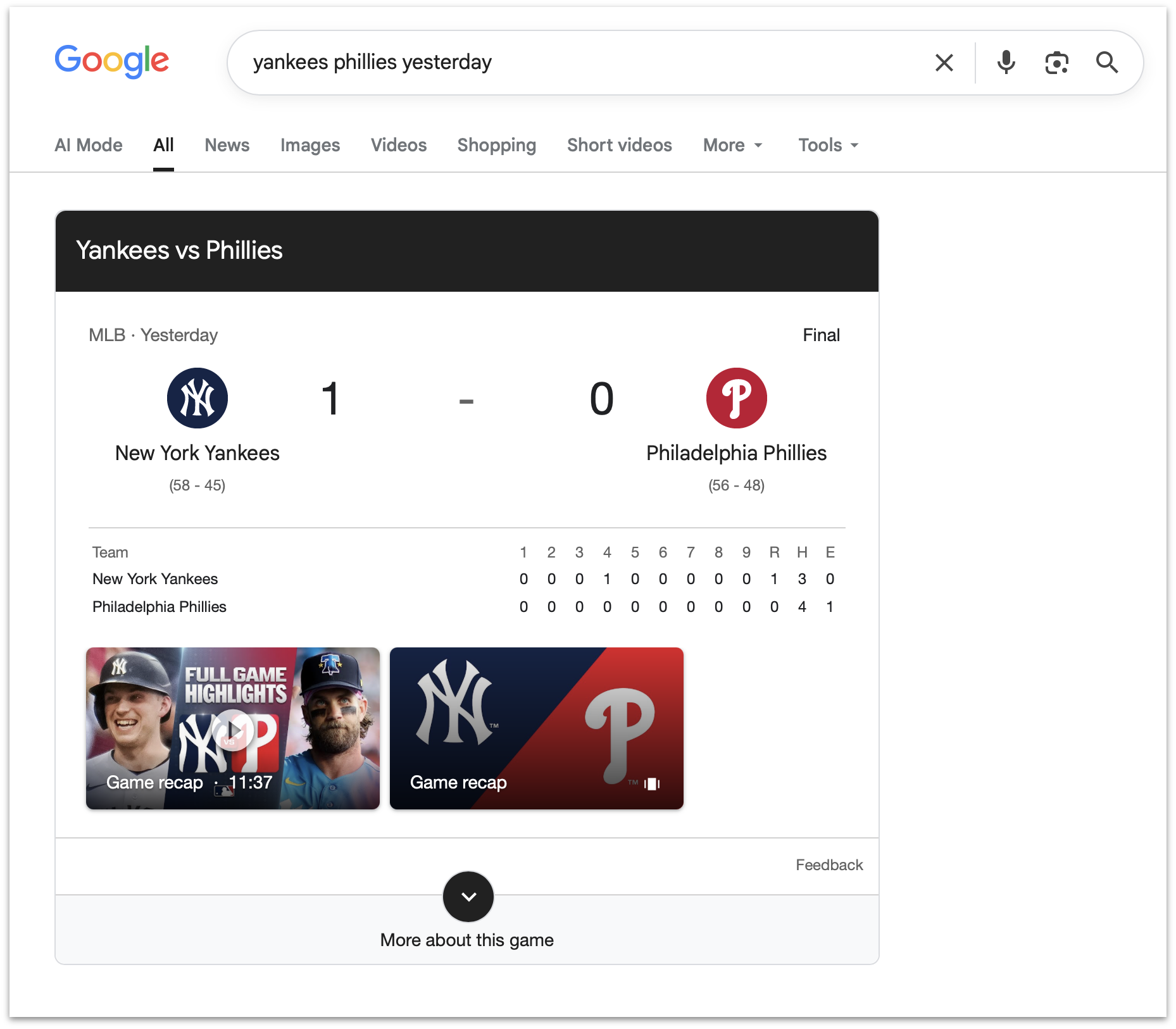
So if you search for the score of a sporting event, it’s illegal in the EU for Google to show you the score, like this search I just tried. What the EC is saying is that because Google Search is so popular, it’s no longer allowed to improve.

plantain:

It drives me insane when in Europe the link between Google Search and Google Maps is broken and I often have to copy paste an address between the two. Thanks EU, what if I like Google’s integrations?

phiresky:

They could have simply added a selector when a user first clicks on the maps preview in the search result, and then remembered it on device or across that user’s account.

But of course, then the user could choose a competitor’s product and Google would have to honor it. That would be horrible, so instead they just made the user experience worse for everyone and elegantly made people blame the EU.

See also: Hacker News.

App Store Chaos

22 July 2026 at 16:54

Kalley Huang, writing for The New York Times about apps written with the help of AI agents that are flooding the App Store:

But as with many things A.I., just because something is easy to build doesn’t mean people will use it. It is not clear if vibecoding is breathing new life into the App Store or just cluttering it.

Last year, the number of new apps released in the App Store grew 30 percent to about 600,000, according to estimates by Sensor Tower, an app analytics firm. In the first half of this year, new apps doubled to about 560,000.

Now, Sensor Tower metrics should always be taken with a grain of salt. They don’t have direct access to Apple’s sales data, so they’re extrapolating from incomplete data that they collect themselves. That said, I think it’s fair to take their numbers as broadly representative of sales trends over time, and the story they tell, as reported by Huang, is interesting.

Based on Sensor Tower’s numbers, the total number of App Store releases peaked in 2016 at 890,000, hit a low of 420,000 in 2022, and this year, is on pace to pass 2016’s peak by a healthy margin. But app releases don’t equate to downloads, let alone sales. According to Huang’s reporting, downloads increased 3% in 2025 and 2% in the first half of 2026, far lower than the growth of new releases.

All of this tracks closely with what we’ve seen at MacStories. One subtle trend I’d add is that whereas for years most developers contacted us before they released an app, a lot of new developers are doing so after their apps are on the App Store. I suspect what I’m seeing is a new generation of developers learning the hard discoverability lessons of the App Store for the first time because when I check out these apps, they rarely have any App Store reviews.

The upshot of all these statistics and trends is App Store chaos of a magnitude that we haven’t seen in a long time. It’s a little like the App Store gold rush of the early days, but without the gold. Discoverability has gone from bad to worse, and the supply of apps is off the charts compared to the demand. With download numbers barely creeping up, the flood of new apps is making selling on the App Store harder for everyone.

Yet, it’s exactly this sort of chaotic disruption that leads to exciting new apps. And, it’s tools like Codex and Claude Code that empower and democratize app development, allowing people who would never have built an app to see their ideas become a reality. Those are things I love to see.

There’s no doubt that the App Store is out of whack thanks to agent-assisted coding, but like any market it will find its equilibrium again. In the meantime, it’s never been a better time to be a fan of apps because while a lot of those record numbers are comprised of mediocre apps, there are hidden gems, and we’re on the hunt for them.

Apple purges AI ‘nudify’ apps from App Store after San Francisco demands crackdown on non-consensual deepfakes

20 July 2026 at 22:00

'nudify' apps

Apple has begun removing AI-powered “nudify” apps from its App Store after San Francisco City Attorney David Chiu issued cease-and-desist letters to both Apple and Google, accusing the platforms of facilitating harmful non-consensual intimate imagery.

The letters targeted approximately 13 face-swapping and image-altering apps that use artificial intelligence to digitally remove clothing from photos, creating fake nude or explicit images without the subject’s consent. Chiu argued that the apps violate consumer-protection laws and enable the spread of deepfake pornography, often targeting women and minors.

In response, Apple in a statement reiterated its longstanding policy prohibiting apps that generate or promote explicit non-consensual content. “Nudification apps are against our App Review Guidelines and we have proactively rejected many of these apps and removed many others,” the company said. It confirmed the removal of three apps identified in the letter, the termination of their developers’ accounts, and ongoing outreach to four additional developers who must address violations or face removal.

This action follows earlier reports highlighting the persistence of such apps despite Apple’s rules. In 2024 and earlier in 2026, investigations revealed that “nudify” tools continued to appear or be advertised in the App Store, prompting criticism over enforcement gaps. Apple has since taken down batches of violating apps after external reports and user flags.

The San Francisco order gives Apple and Google 28 days to respond and fully address the issue, with potential civil penalties for non-compliance. Advocates have praised the move as a step toward curbing AI-enabled abuse, while noting that similar tools can still proliferate on the open web or through sideloaded software.

Apple’s latest enforcement underscores growing pressure on tech platforms to prevent their stores from becoming distribution channels for tools that weaponize AI against privacy and consent.
‎
MacDailyNews Take: Users are encouraged to report suspected violating apps directly through the App Store via Apple’s “Report a Problem” page: https://reportaproblem.apple.com


‎
Please help support MacDailyNews — and enjoy subscriber-only articles, comments, chat, and more — by subscribing to our Substack: macdailynews.substack.com. Thank you!

Support MacDailyNews at no extra cost to you by using this link to shop at Amazon.

The post Apple purges AI ‘nudify’ apps from App Store after San Francisco demands crackdown on non-consensual deepfakes appeared first on MacDailyNews.

San Francisco Demands Removal of Nudify Apps

17 July 2026 at 22:16

Matt Burgess (MacRumors, ArsTechnica):

On Thursday, San Francisco city attorney David Chiu sent legal notices to Apple and Google demanding that they remove from their app stores 13 face-swapping apps, which allow users to create AI-generated nonconsensual nude images. The letters say the Silicon Valley giants should stop “aiding and abetting” the sale of explicit deepfake images and “sever” business relationships with the app developers.

[…]

Researchers have repeatedly found and reported apps in Apple’s App Store and Google’s Play Store that allow people to generate sexual images using AI—including some apps being rated as suitable for use by children. While new laws and bans aim to tackle the scourge of explicit deepfakes online, technology and social media companies consistently direct millions of people toward the harmful tech.

Both Apple and Google have developer policies that prohibit pornography, abuse, and harassment on their platforms.

Burgess gives the impression, which is my base assumption, that these 13 apps were clear about what they do, so App Review has no excuse for missing them. But I’m sure it’s keeping us all safe in other regards.

Meanwhile, in a preprint research paper published in May, researchers from Cornell University and Georgetown University identified 420 apps offering general face-swapping capabilities on Google’s and Apple’s app stores. They tested 155 to see if they could be used to create face swaps with nude images; in 70 percent of cases, it was possible, with the apps not including safety measures to prevent this.

Previously:

Update (2026-07-21): Danny Bradbury:

Chiu isn’t arguing that hosting an app automatically makes a platform liable for what it does. Platform operators already won that battle with Section 230 of the Communications Decency Act. That 30-year-old law says websites generally aren’t responsible for content posted by users, allowing platforms to host user-generated content without getting sued every time someone defames someone in a comment thread.

Courts have often extended those protections to cover app stores too. Apple and Google are treated as distributors of whatever a third-party developer uploads, rather than publishers.

Chiu is attempting to sidestep that argument by focusing on the companies’ payment systems, noting that Apple and Google collect a cut of every in-app purchase. According to the Tech Transparency Project (TTP), that means they profit from apps that generate revenue by creating non-consensual intimate imagery.

Apple Still Designated a Gatekeeper

9 July 2026 at 19:38

Tim Hardwick:

Apple’s challenge against the EU’s designation of its App Stores and iOS platform as “gatekeepers” was dismissed by Europe’s top court on Wednesday, reports Reuters.

[…]

The company also disputed the classification of iMessage as a number-independent interpersonal communications service, or NIICS, which would subject the app to EU telecoms rules. But the General Court said Apple’s actions regarding the iMessage service are inadmissible.

William Gallagher:

Back in 2023, Apple acknowledged that it qualified under the then-new definition of being what the EU called a gatekeeper service. But key to that is the size of the operation, and since 2024, Apple has been claiming it runs five smaller App Stores rather than one large one.

[…]

“Irrespective of the devices in question,” ruled the judges, “those stores have the same purpose, namely to connect app developers with end users in order to facilitate the distribution of software applications.”

Steve Dent:

Apple disagreed with the decision but didn’t say yet if it would appeal. “We firmly believe the DMA’s mandate goes beyond what is lawful and proportionate, threatening to erode decades of privacy and security protections we’ve built and leaving our users vulnerable to new risks,” an Apple spokesperson said in a statement to multiple outlets. “We will continue advocating for the innovation and privacy our European customers deserve.”

Apple still has two cases pending with EU courts. The first is a challenge to the EU Commission’s decision last year forcing Apple to open iOS to third-party developers, and the second is an appeal against the €500 million fine imposed in April last year for anti-steering violations.

Previously:

UK CMA Proposals for External Payments and NFC

3 July 2026 at 19:23

Ben Lovejoy:

The EU required Apple to permit third-party app stores, while a US court ruled that developers have the right to direct iPhone users to third-party payment platforms for app purchases and subscriptions. Britain’s Competition and Markets Authority (CMA) is now proposing to apply this latter rule in the UK.

Tim Hardwick (John Gruber):

The U.K.’s competition regulator has proposed letting app developers direct users to payment options outside Apple’s App Store and Google’s Play Store, in a move aimed at increasing competition and reducing the fees charged by the two companies.

[…]

The regulator said any fees Apple and Google charge developers for enabling such “steering” must be fair and reasonable, remain below existing App Store and Play Store commissions, and allow developers to either pass savings on to consumers or reinvest them in innovation.

John Gruber (Mastodon):

Requiring Apple to allow apps to steer users to the web to make payments is, I’ve long argued, sensible regulation. I’ve also long argued that Apple has been obstinate in disallowing it. If in-app payments — through Apple’s system — can’t compete with out-of-app payments on the web, something is wrong with IAP. But it’s wrong to assume that payments outside IAP will result in lower prices and better policies for users.

Nick Heer:

They may increase prices when costs grow but that does not mean they do the opposite. But who cares? Lower costs permit more flexibility on pricing and, even if that money ends up in the pockets of developers instead of Apple, is that supposed to be a bad thing? Is there a reason why someone should be upset that they might pay the same amount but an indie developer gets to keep more of it?

The proposed policies are pretty straightforward from what I can see. Among other obligations, Apple is not allowed to use or require scare tactics when users are routed to an external payment mechanism and, while it is allowed to charge a steering fee, it is not allowed to count services not used by developers offering third-payments nor double-count for services already accounted for by other developer fees. Also, the CMA calls bullshit on Apple’s claim that third-party payments are particularly risky[…]

Previously:

Update (2026-07-30): Juli Clover:

Apple said new UK App Store rules would give regulators a “highly intrusive” role dictating how it runs its business, reports Reuters. Apple submitted feedback to the UK’s Competition and Markets Authority as it considers forcing Apple to change its App Store rules around steering.

[…]

UK regulators said Apple can charge developers a fee, but it must be fair and reasonable, and below existing App Store commissions, so developers can pass savings to customers or reinvest them in innovation.

According to Apple, the CMA’s proposed rules would undermine innovation and investment, and would amount to price regulation because of the restriction on fees.

App Store Complaint From Chinese Developers

30 June 2026 at 20:48

Hartley Charlton:

A group of 48 China-based iOS developers have filed an antitrust complaint against Apple with the country’s market regulator over the App Store’s commission rates, the South China Morning Post reports.

The developers sent an open letter to China’s State Administration for Market Regulation (SAMR), alleging that Apple failed to deliver on a promise to offer the lowest commission rate to the Chinese market. The group asked the SAMR to investigate and penalize Apple for allegedly abusing its market dominance to impose “unfair and excessively high” costs on local developers.

Apple lowered the fees in March but not as much as it did in Brazil and Japan.

Previously:

Apple Clearing App Store Clutter

19 June 2026 at 20:43

Ed Hardy:

Finding useful software in the App Store is about to get easier. Apple is apparently preparing to remove what it describes as “opportunistic” apps that provide little value to iPhone and iPad users.

It already had a policy of not approving applications that are “indistinguishable from what’s already widely available.” This week, it quietly warned developers that it will start removing low-value software that doesn’t attract attention from users.

App Review Guidelines (News):

4.3 (b) Don’t submit apps that are indistinguishable from what’s already widely available. Opportunistically creating variants of existing app categories or popular apps degrades App Store discovery, reduces overall app quality, and harms both users and developers. Certain kinds of apps, such as dating, flashlight, sound effects, wallpaper, simple timers, and fortune telling, are well established on the App Store and we will not accept new submissions unless they offer a meaningfully different or improved experience. We may remove these apps from the App Store going forward if they are not updated, improved, or do not attract customers. Other kinds of apps, such as drinking games, Kama Sutra, fart, and burp apps, are mediocre, low-quality, or low-effort and do not add value to the App Store. Repeated submissions of this kind may lead to removal from the Apple Developer Program.

Previously:

Update (2026-07-14): Aleksandar Vacić:

Waiting for Review enters day 3. I don’t recall when was the last time this happened for any of the apps I am working for.

[…]

I sent messages to App Review Board and received nothing in response (so far).

It seems that if Apple ever removed your app from App Store for reason of “not sending regular updates” that app is…gone. It’s not deleted but it seems to dwell in some sort of limbo.

Previously:

App Store Personalized Recommendations and Keylogging

12 June 2026 at 20:34

Sarah Perez:

This week, Apple announced a series of discovery features that will personalize app recommendations based on users’ interests and behavior, providing a new way for developers to have their app discovered.

At Apple’s Worldwide Developers Conference (WWDC), the iPhone maker introduced Personalized Collections in the App Store, which will showcase recommendations tailored to the individual. These will also include new “App Notes” that explain why the specific apps were recommended to you. Starting this week, you’ll find these new personalized suggestions in various places in the App Store, including the Apps or Games tab or on the Search tab.

Mysk:

Now Apple is putting the extensive identifiable analytics they collect in the App Store in action. They record every tap and there’s no way to turn it off.

They can even calculate your typing speed.

[…]

If you don’t like Apple Music privacy options, you can stream music from Spotify. But where else can you download apps on the iPhone?

The data is associated with your account and unencrypted.

Previously:

Update (2026-06-17): Mysk:

The screenshot in the sub-post was taken from a CSV file you get when requesting your data from Apple. It’s called “App Store Click Activity.” Every event contains 110 attributes 🤯

In this PDF, Apple describes the data points collected in this category.

I requested my own data yesterday but am still waiting for Apple to prepare it.

Mysk:

There’s an ongoing class action lawsuit against Apple related to this. In iOS 26, Apple added an option to “reset” the identifier associated with “usage statistics,” but we haven’t seen any effect for this option. The analytics are still identifiable and linked to the user.

See also: John Gruber, Thom Holwerda, MacRumors.

Update (2026-06-19): Mysk:

It is not only about recording your typing skills in the search field, the App Store app even reports how much time you spend on every part of an app description as you scroll, hence recording your reading skills 🙃.

Apple also forces iOS to open any App Store link in the App Store app, and that will immediately log a detailed event that user XYZ has viewed that particular app as well as the referrer.

[…]

This data collection is not new. Apple has been doing it at least since iOS 14 when we discovered it. All data collected is NOT anonymous. The data is associated with your Apple ID. This means that given a court order, Apple has to hand this data to law enforcement.

Mysk:

Just for fun, I generated a 1000-character text and pasted it in the search field in the App Store. Well, the analytics captured the entire text, linked it to my ID and sent it to Apple, before even pushing “enter”. Now imagine you accidentally paste something private in there🙃

Update (2026-06-23): I received my own personal data from Apple and can confirm that it does include my timestamped App Store search queries.

Sleep Tracking on Apple Watch Without Chasing Scores

By: Hannah
18 July 2026 at 17:41

Sleep tracking on Apple Watch can make an invisible part of daily health easier to understand. Each morning, the watch may show sleep duration, stages, interruptions, overnight vitals and a score intended to summarize the night.

That information can be useful. It can also create a new habit of judging the entire day before getting out of bed.

One low score may make a person feel tired before noticing how they actually feel. A few minutes less deep sleep can become a source of concern. Going to bed can even start to feel like a test that must be passed rather than a normal biological process.

Apple Watch sleep data works better as a long-term observation tool than as a nightly verdict. The goal is not to collect perfect scores. It is to notice repeatable patterns and make small changes when those patterns match real-life problems.

What Apple Watch Measures During Sleep

Apple Watch estimates sleep using movement and signals collected while it is worn overnight. Depending on the model and available features, the Health and Sleep apps can show total sleep time, awake periods and estimates for core, deep and REM sleep.

The watch may also collect sleeping heart rate, respiratory rate, wrist temperature and other overnight metrics. The Vitals app compares several of these measurements with the user’s established typical range.

A sleep score compresses parts of the night into one number or category. Apple’s score considers factors including sleep duration, consistency and time spent awake. That makes it convenient, but convenience should not be confused with a complete medical interpretation.

The watch cannot know whether a stressful conversation kept someone awake, whether a child interrupted the night or whether the wearer woke feeling unexpectedly refreshed after fewer hours. It estimates physiological and behavioral signals. The person still supplies the context.

Sleep Tracking Apple Watch Data Works Best as a Trend

One night can be distorted by almost anything: travel, alcohol, illness, noise, a late meal, room temperature or a loose watch band. Even the position of the arm can affect sensor collection.

A weekly or monthly view is more useful because it reduces the influence of isolated nights. Patterns begin to emerge around bedtime consistency, total duration and changes in overnight vitals.

To review longer sleep trends on iPhone:

Health > Search > Sleep > select the weekly, monthly or six-month view

Look first at sleep duration and timing. These measurements are generally easier to interpret than small changes in individual sleep stages.

A person who repeatedly sleeps less on work nights may have a scheduling issue. Someone whose sleep becomes more fragmented after late caffeine may have found a useful connection. A consistently irregular bedtime may explain more than whether deep sleep moved by 12 minutes on Tuesday.

The data becomes valuable when it supports an observation that can lead to a realistic adjustment.

Sleep tracking - A close-up of a person’s wrist wearing a smartwatch with a light-colored band displays a sleep score of 84 marked "High" and a vibrant circular graph, highlighting the importance of apple watch screen care for clear, accurate readings.
Image Credit: Apple Inc.

Do Not Treat Sleep Stages as Exact Measurements

Core, deep and REM sleep are presented as distinct colored sections, which can make them appear more precise than they are. Apple Watch estimates these stages from signals available at the wrist. A clinical sleep study uses additional equipment and is designed for medical evaluation.

That does not make the stage information worthless. It means small nightly differences should not be overinterpreted.

A person does not need to increase deep sleep manually or achieve a perfect proportion of REM sleep. Sleep architecture changes naturally across age, stress levels, exercise, illness and different parts of the night.

Use stage data to notice substantial or persistent changes, not to compete with yesterday’s chart. Spending 15 minutes less in one estimated stage is not automatically a health problem.

Start With How You Feel

Before opening the Sleep app, notice how the morning feels.

Was waking difficult? Is concentration normal? Is there unusual daytime sleepiness? Does the body feel recovered after exercise? Was the night interrupted for an obvious reason?

This brief self-check prevents the score from defining the experience. Someone may feel fine after a lower-rated night, while another person may feel exhausted despite receiving a favorable score.

The most useful interpretation combines both sources: subjective experience and device data. When they repeatedly agree, the pattern deserves attention. When they conflict for one night, there may be no reason to react.

Use Vitals as Context, Not a Diagnosis

The Vitals app can show whether overnight measurements such as heart rate, respiratory rate, wrist temperature and sleep duration fall within a typical range. It becomes more useful after the watch has collected enough nights to establish a personal baseline.

An outlier may reflect alcohol, medication, elevation, intense training or the beginning of an illness. It may also be an ordinary variation or imperfect reading.

Several unusual metrics appearing together may provide more context than one isolated number. Even then, Apple Watch data should not be used to diagnose a condition independently.

Persistent symptoms, breathing concerns, extreme daytime sleepiness or major changes in sleep should be discussed with a qualified healthcare professional. Bring the trend data if it helps describe what has been happening, but do not let the watch replace an evaluation.

Build a Routine Around Behavior, Not Scores

The healthiest use of sleep tracking is to connect the data with actions a person can actually control.

A consistent bedtime may improve the pattern. Charging the watch before the evening makes tracking more reliable. Reducing late caffeine, adjusting the bedroom temperature or moving an intense workout earlier may also produce noticeable changes.

To set a sleep schedule:

Health > Search > Sleep > Full Schedule & Options > Add Schedule

A schedule can provide Wind Down reminders and help keep bedtime more regular. It should remain a helpful structure rather than a rigid obligation. Life will occasionally interrupt it.

Choose one adjustment and observe it for a week or two. Changing five habits after one poor night makes it difficult to identify what helped.

A close up of an Apple Watch Ultra, showcasing its sleek design and advanced features.
Image Credit: Apple Inc.

When Sleep Tracking Creates More Stress

Some people become preoccupied with improving sleep data, repeatedly checking results or worrying that a low score guarantees a bad day. The anxiety can itself make falling asleep more difficult.

That is a sign to reduce exposure to the numbers.

Sleep tracking can be turned off temporarily, or the data can be reviewed only once per week. Another option is to avoid checking the score in the morning and examine trends at a neutral time later.

To change sleep tracking settings:

Watch app on iPhone > My Watch > Sleep

A break does not erase the knowledge already gained. A person who has learned that regular timing and less late caffeine improve sleep may no longer need a daily chart to confirm it.

The device should support rest, not supervise it.

A Better Way to Read the Morning Report

A practical morning review can remain simple. Check whether the watch recorded the full night. Notice total duration. Consider whether the bedtime was typical. Look for any major change in overnight vitals, then move on.

There is rarely a need to analyze every stage, compare several apps or search for explanations after one ordinary variation.

Sleep tracking on Apple Watch is most useful when it reveals something that was difficult to see without data: a repeated shortfall in duration, an inconsistent schedule or a pattern linked to habits and recovery.

The score can summarize one night, but it cannot grade the person who slept through it. A healthier measure is whether the information helps create calmer nights, better days and fewer reasons to think about the watch after waking.

The post Sleep Tracking on Apple Watch Without Chasing Scores appeared first on AppleMagazine.

San Francisco orders Apple, Google to remove nudify apps from app stores

17 July 2026 at 17:10

This week, San Francisco’s attorney general, David Chiu, sent cease-and-desist letters, demanding that Apple and Google remove 13 so-called nudification apps from their app stores, Wired reported.

Nudification apps can make it trivially easy to transform ordinary photos of real people into explicit images. The harmful AI tools allow bad actors to remove clothing, change a person’s features, place them in sexualized positions, and swap victims’ faces onto other people’s naked bodies.

Chiu's letter warned that app stores were violating "California’s laws that prohibit supporting services that create deepfake pornography," Wired reported.

Read full article

Comments

© SOPA Images / Contributor | LightRocket

A Month with Logitech’s Innovative Mobi Fold Travel Mouse

8 July 2026 at 17:56

I can’t recall the last time I was truly excited about a mouse. I primarily use a trackpad whether I’m at my desk or using a laptop. The trouble with a trackpad-only setup, though, is that I sometimes wind up with wrist and elbow pain. That’s why I keep a Logitech MX Master 4 mouse on my desk to balance out the stress on my arms.

But that only works if I’m at my desk. More and more, I’ve been turning to a MacBook Pro for working away from my desk at home or elsewhere. Those locations are always less ergonomic than sitting at my desk, causing wrist and elbow pain more quickly. Still, I’ve never made it a habit to bring a mouse with me, especially when I’m away from home, because it’s more than I want to carry – that is, until Logitech’s latest mouse, the Mobi Fold, came along.

The Logitech Mobi Fold is an impossibly small mouse that folds completely in half, reducing its footprint to about ⅓ the size of my iPhone 17 Pro Max and about twice its thickness. Unfolded, it’s close to the length of the MX Master 4 but narrower. The Mobi Fold is impressively full-featured, too, making it an excellent all-around travel mouse worth taking a closer look at.

Folded, the Mobi Fold doesn't look much like a mouse.

Folded, the Mobi Fold doesn’t look much like a mouse.

I’ve been testing the Mobi Fold for about a month, and my favorite thing to do with it is fold it up, show it to someone, and ask them to guess what it is. No one has guessed correctly because a folding mouse just isn’t a thing most people have encountered before. Instead, the most common guess is that the Mobi Fold is a small battery for charging an iPhone, until I unfold it and the shape becomes more familiar.

The Mobi Fold is tiny.

The Mobi Fold is tiny.

Really tiny.

Really tiny.

The Mobi Fold is powered by a rechargeable battery that Logitech says lasts for up to 33 days (and up to 22 hours on a one-minute quick charge). The device also turns itself on and off automatically when unfolded and folded, which I love. Plus, the Mobi Fold can connect to up to three devices, and it supports both Bluetooth connections and Logitech’s Bolt dongle (sold separately).

The Mobi Fold’s surface is a soft-touch plastic that feels comfortable in your hand, and it has three buttons arrayed across the front. The middle button doubles as a trackpad, allowing you to drag a finger across its surface to scroll and perform gestures like a double tap for zooming in and out of a webpage.

The Mobi Fold pairs with up to three devices.

The Mobi Fold pairs with up to three devices.

By default, tapping the front of the middle button navigates forward, while tapping the back navigates back in a browser. However, as with other Logitech mice, you can program the Mobi Fold’s buttons and gestures to:

  • perform different actions depending on the app you’re using,
  • control system settings like brightness and volume,
  • perform macro-like smart actions, and
  • display the Logitech Actions Ring, a customizable set of actions that are overlayed on your work environment.

That’s a lot of customization for a diminutive mouse, which I appreciate. However, because the Mobi Fold is typically my “long work sessions at the coffee shop” mouse, I’ve found that all I really need is its traditional point-and-click functionality.

The Mobi Fold makes a good companion to an iPad.

The Mobi Fold makes a good companion to an iPad.

Ultimately, the Mobi Fold isn’t going to replace the MX Master 4 sitting on my desk, but it’s not meant to. I’ve fallen for the Mobi Fold just the same because its compact size and light weight make it a no-brainer to carry with me. I’ve also been pleasantly surprised at just how comfortable the Mobi Fold is to use, unfolding into a sturdy, angular shape that feels good in hand, unlike, say, Apple’s shallower Magic Mouse.

As a result, I really can’t recommend the Mobi Fold enough for on-the-go use with a Mac laptop or iPad. The combination of features in such a small, portable package sets it apart from every other mouse I’ve used and makes it well worth its $79.99 price tag.

The Mobi Fold is available in Graphite, Lilac, Off White, and Sand colors, both directly from Logitech and from Amazon.

❌