❌

Normal view

Como renomear um atalho no aplicativo Atalhos [iPhone, iPad e Mac]

25 July 2026 at 16:00

O aplicativo Atalhos (Shortcuts) facilita a vida de muita gente que usa iPhones, iPads e Macs diariamente. Com ele, você pode realizar ações e automatizar tarefas com múltiplos passos, bastando apenas um toque ou o uso da Siri.

Caso queira, é possível renomear um atalho que tenha sido criado anteriormente usando esse app — seja para refletir o seu propósito ou para facilitar a busca quando precisar usá-lo.

Veja como fazer isso nos seus dispositivos! 😃

Com o app aberto, toque/clique na aba “Biblioteca” ou “Todos os atalhos”. Mantenha o dedo pressionado em cima do atalho desejado ou clique com o botão direito do mouse. Depois, vá até “Renomear” e digite o novo nome.

Opcionalmente, selecione os três pontinhos ou dê dois cliques em cima do atalho, vá até o nome do atalho e renomeie-o.

Como editar um Memoji pelo iPhone, iPad ou Apple Watch

23 July 2026 at 12:00

Há alguns anos, a Apple oferece a possibilidade de criar Memojis, uma representação visual do seu rosto que pode ser enviada por mensagem, no FaceTime ou até mesmo como um mostrador do Apple Watch.

Caso você tenha criado um e queira adicionar ou remover algum item ou alguma característica facial, você pode editar os Memojis posteriormente nos seus dispositivos da Maçã. Veja como é simples! 😉

Como editar um Memoji pelo iPhone/iPad

  1. Abra o app Mensagens (Messages) e selecione uma conversa ou inicie uma do zero.
  2. Toque no “+”.
  3. Escolha “Memoji”.
  4. Deslize o dedo até encontrar o Memoji que deseja editar.
  1. Vá até os três pontinhos (no canto inferior esquerdo) e toque em “Editar” para alterar as características.
  2. Depois, basta salvar as alterações.

Como editar um Memoji pelo Apple Watch

  1. Abra o app Memoji no seu relógio.
  2. Gire a Digital Crown até encontrar o Memoji desejado.
  3. Toque nele e vá até uma categoria (como pele, penteado, sobrancelhas, etc.) para alterá-lo.
  1. Quando estiver satisfeito, toque no ícone localizado no canto superior direito.

Apple Still Designated a Gatekeeper

9 July 2026 at 19:38

Tim Hardwick:

Apple’s challenge against the EU’s designation of its App Stores and iOS platform as “gatekeepers” was dismissed by Europe’s top court on Wednesday, reports Reuters.

[…]

The company also disputed the classification of iMessage as a number-independent interpersonal communications service, or NIICS, which would subject the app to EU telecoms rules. But the General Court said Apple’s actions regarding the iMessage service are inadmissible.

William Gallagher:

Back in 2023, Apple acknowledged that it qualified under the then-new definition of being what the EU called a gatekeeper service. But key to that is the size of the operation, and since 2024, Apple has been claiming it runs five smaller App Stores rather than one large one.

[…]

“Irrespective of the devices in question,” ruled the judges, “those stores have the same purpose, namely to connect app developers with end users in order to facilitate the distribution of software applications.”

Steve Dent:

Apple disagreed with the decision but didn’t say yet if it would appeal. “We firmly believe the DMA’s mandate goes beyond what is lawful and proportionate, threatening to erode decades of privacy and security protections we’ve built and leaving our users vulnerable to new risks,” an Apple spokesperson said in a statement to multiple outlets. “We will continue advocating for the innovation and privacy our European customers deserve.”

Apple still has two cases pending with EU courts. The first is a challenge to the EU Commission’s decision last year forcing Apple to open iOS to third-party developers, and the second is an appeal against the €500 million fine imposed in April last year for anti-steering violations.

Previously:

iOS 26.5.2 and iPadOS 26.5.2

1 July 2026 at 21:05

Juli Clover (iOS/iPadOS release notes, security, no enterprise, no developer):

Apple told Reuters that it released the updates earlier than planned due to concerns about AI-assisted hacks.

Previously:

WWDC 2026 Links

17 June 2026 at 20:16

General:

Documentation:

Sessions:

Podcasts:

Previously:

No Siri AI in EU

10 June 2026 at 21:00

Apple (MacRumors):

Unfortunately, due to the Digital Markets Act (DMA), Apple will not be able to ship Siri AI in the European Union with the release of iOS 27 and iPadOS 27. Over the past several months, EU regulators did not accept any of Apple’s proposed solutions to bring Siri AI to the EU while safely supporting other virtual assistants.

[…]

EU users will be able to access Siri AI on macOS 27 and visionOS 27. Developers located in the EU will not be able to test or use the new Siri AI features for their apps on iOS 27, iPadOS 27, and watchOS 27.

[…]

According to EU regulators, the DMA requires Apple to give any AI system nearly unlimited access to a user’s device, as well as the ability to act on that access autonomously without a user’s ongoing visibility and control.

[…]

Apple designed a solution called Trusted System Agent — an intermediary that would allow virtual assistants to safely access the same features and capabilities as Siri AI for devices in the EU. Apple also shared a plan to launch Siri AI in the EU while gradually rolling out this new solution over an 18-month period. The European Commission said no. In fact, the European Commission did not agree to any of Apple’s proposals.

This phrasing is not very clear, perhaps intentionally so. Apple is trying to give the impression that it did all this extra work to meet the DMA’s requirements, and yet the EC rejected its proposals, so it’s their fault Siri AI isn’t shipping in the EU. But it looks like the crux is that the Trusted System Agent is currently vaporware. What the EC rejected is that Apple wanted to be able to ship Siri AI now on the promise of future openness. The TSA would actually be built during this 18-month window of exclusivity. It’s not surprising that the EU would reject that proposal. The App Store doesn’t approve apps that flout the guidelines but promise to comply later. It doesn’t even entertain proposals of the form, “If I built this would it be approved?”

European Commission (via Steve Troughton-Smith, Update: John Gruber, Mastodon):

So first, the decision not to roll out Siri AI in the EU is Apple’s and Apple’s only.

Because absolutely nothing in the DMA prohibits Apple from introducing new products in the EU.

What Apple is however not allowed to do, just like any other gatekeeper, is to close the market.

[…]

Apple simply made a request to the European Commission to be exempted from their interoperability obligations under the DA.

And this for at least 18 months on top of it. Guess what? That’s not an option.

Reuters (Hacker News):

Apple said it detailed its plans for Siri AI to EU regulators six months ago, along with a technical proposal to allow secure ​third-party access to that data.

“In essence, a commission that’s asking us to conduct a very risky experiment on many, ​many, many tens of millions of users,” Greg Joswiak, Apple’s marketing chief, told reporters, “and we only want to ship these capabilities when we can do so safely.”

The EU said not to ship it without the TSA, yet Joswiak spins this as the EU asking Apple to be reckless? And if Apple wanted to ship them safely, why did it stop working on them?

William Gallagher:

Apple spoke of having spent hundreds of thousands of engineering hours on changes to comply with the EU. In the new report, though, Apple now says that it no longer knows what to work on.

So currently none of its engineers are working on adapting Siri AI to meet the EU’s demands.

It seems like Apple isn’t taking this very seriously. They’re more interested in trying to score PR points by blaming the delay on the EC rather than on building something compliant. So I guess the EC was prescient not to grant an exemption based on the promise that they’d follow through with the TSA.

Kyle Howells:

However, do I think Apple should be made to open up that level of system access?

Honestly yes. They are worried about protecting my data. But it’s MINE. Me, the user.

Stick a big privacy prompt, maybe a system settings screen and reboot, but I want access to my data!

We can look to BrowserEngineKit to see how well it works out to introduce a trusted intermediate layer that Apple doesn’t itself rely on. And this seems like a much harder problem.

Kyle Howells:

Yeah, that privacy layer is a stupid [non] starter. “Find the place my friend said we should go swimming and give me directions”

The only way that query can work with an intermediary layer is if the AI asks that layer to do the searching for them and only gets the response back.

Except that basically kills the advantage of LLM agents & instead delegate all the ‘smart’ parts to some dumb on device model Apple makes.

Previously:

Update (2026-06-11): Amy Worrall:

I keep seeing people (usually Americans) confused by where the EU is coming from with Apple and the DMA, eg “how can they care about privacy but also demand AI companies can access your data?”

My read is, the EU’s starting point is that a gatekeeper cannot treat itself as inherently more trustworthy than any other company. So if anyone’s AI can access your data, including Apple’s, it’s not up to the gatekeeper to say “we trust ourselves but don’t trust other companies” and force that on users.

The users should get to choose who they trust. And I think Apple is trying to draw a different line than it says. It worries that AI could be hijacked to steal your passwords and photos. But you can already install apps that manage and access that data. You can also install apps that access your calendar and mail data, and these apps can incorporate AI. Such apps actually get more access than what the EC wants because they must communicate with your servers directly. I would rather let an AI search my downloaded e-mails than read/write to my IMAP server, but Apple is blocking that option. The actual line it’s drawing isn’t that AI can’t access your data but that (aside from iMessage) it can only access it via additional engineering work and additional hoops for users to enter credentials. It seems like what Apple really wants is to make it hard for anyone to compete with Siri.

Update (2026-06-12): Cory Birdsong:

I’m skeptical that Siri AI is even capable of being meaningfully private or secure. As far as I know there is no mitigation for prompt injection, as Matthew Green describes here.

If it has access to private information, is exposed to external input and can access the Internet then how can they meaningfully claim it’s private or secure?

John Gruber:

There’s a lot to unpack here, including more background information — and on-the-record statements — from a briefing Apple held Tuesday that I was invited to at Apple Park.

It’s frustrating that Apple has said so little on the record. They want to communicate that their “offers for compromise have been rejected,” but what exactly did they offer? Personally, I don’t think the TSA would be a very good solution because it would lock in both the limitations of Apple’s technology and their role as a gatekeeper. But Apple did not even say that the EC rejected the idea of the TSA, only that it rejected their proposal to violate the law for 18 months while building it.

But the bottom line is that Apple’s public statements regarding the DMA and the European Commission have never been this strident before.

[…]

Now, they’re a bit more on war footing. There’s a massive gulf between what Apple is willing to do with Siri AI in the EU and what the Commission is demanding from Apple for DMA compliance.

Steve Troughton-Smith:

The European Commission isn’t demanding anything, the law is demanding it. The laws have been in place for several years now, Apple is currently in default of the law on several fronts, and is fighting its existing fines.

When the Chinese government wanted access to user data, Apple complied, but when the EU parliament voted for their citizens to be able to choose how to share their own data, that put Apple on a “war footing.”

David Deller (Reddit):

There is some kind of irony in how Apple isn’t allowing Europe access to the new AI stuff; and meanwhile for the US, Apple is removing the setting for us to opt-out of it, effectively forcing it on us.

That’s how it is these days, huh? Either a government or a giant corporation makes our technology choices for us. We don’t get to choose for ourselves.

Previously:

Update (2026-06-17): John Gruber:

What exactly is the motivation for Apple and Google to engineer entirely separate systems for the EU to bring new features into compliance with the Commission’s broad interpretation of the DMA? Because if Apple doesn’t engineer a DMA-compliant version of Siri AI, iOS users in the EU will ... switch to Android, whose system-level AI was deemed noncompliant by the Commission a few months ago?

I briefly hoped that the DMA would lead to a sort of California effect for software, where products are designed for the stricter (more open, in this case) jurisdiction, and everyone else reaps the benefits, too, because that’s easier for companies than making separate versions of their products. But it turns out that Apple finds it well worth it to feature flag away the EU features it doesn’t want us to have, as well as the ones it doesn’t want to adapt for the DMA.

This doesn’t directly hurt Apple. It doesn’t force Apple to design, engineer, and ship a compliant EU-exclusive version of Siri AI that supports plug-and-play LLM back ends. It only hurts iPhone users who live in the EU, who are stuck with the old dumb version of Siri for the foreseeable future.

This demonstrates a market failure or legislative failure, depending on how you look at it. Both halves of the duopoly are in conflict with the law of the second largest economy in the word. Users will get a worse Siri, but this doesn’t bother Apple enough to do anything about it. Maybe the customers in the EU can be used as a bargaining chip. Neither Apple nor Google is worried that a competitor will come along with a compliant phone to challenge their dominance.

John Gruber:

Here we are two years later and I think the answer is more clear than ever which side of the continental divide is more fun.

Simon B. Støvring:

Gotta admit that as an EU citizen, I feel handicapped when it comes to brainstorming ideas to utilize Foundation Models.

Like, if I were to build a new app around them, it’s difficult to gauge if this is something Siri AI does out of the box when it isn’t available to me.

And unlike Apple, I intend to build software for the entire world.

Jack Wellborn:

Apple is acting out of greed and spite (see their hairbrained fee structures for alternative marketplaces as an example), but also yes, the DMA and enforcement thereof seems like a particularly difficult and capricious regulatory dynamic.

[…]

Those arguing that Apple is acting purely out of spite seem to suggest there is some obvious solution for iPhone Mirroring that would satisfy the interoperability mandate, but they never go into what that obvious solution is because they don’t know. They don’t know because I would guess no one does, not even Apple and certainly not the European Commission.

As far as I can tell, the European Commission doesn’t see it as their responsibility to help gatekeepers design features ahead of time in a way that should be compliant with the DMA. What they want instead is to decide whether or not a given feature runs afoul of the DMA after its released in the EU and presumably after they’ve gotten feedback from third parties.

Wojtek Pietrusiewicz:

If a developer emails Apple and asks if an app idea they have will be approved, they will get told to build it, submit it to the App Store, and see. The EU is the App Store here, and Siri AI is the app. I guess Apple don’t like their own policies.

I sympathize, even though Apple is in a better position than the developer, because it has more resources, because it would only potentially be blocked from shipping in one market, and because it can still sell its product in the EU, just with certain features disabled. Building something that might not be accepted is risky, but if you don’t submit anything that you think would be complaint with the rules, you don’t seem very serious. It’s still unclear to me exactly what Apple’s plan is. Its press release says it “will continue working” on bringing the features to the EU, but its SVP of marketing said in an interview that “none of its engineers are currently working on solutions.” Perhaps this implies that it’s banking on a legal or political solution rather than a technical one.

Update (2026-06-25): Jack Wellborn:

While the relationship between the European Commission and Google tells us nothing about playing ball, it tells us exactly how inconsequential support for alternative marketplaces is when it comes to regulatory scrutiny of integrated features. Apple hasn’t played ball with alternative marketplaces and now its new AI-based features are being withheld from the EU lest they get scrutinized for fines by the European Commission. Google hasn’t had to play ball with alternative marketplaces and now its new AI-based features are either being scrutinized for fines by the European Commission or being withheld lest they also get scrutinized. The European Commission is, rightly so in my opinion, regulating both operating systems equally and regardless of their support for alternative marketplaces.

Manton Reece:

It struck me today what a contrast this is with the rest of the AI world, increasingly connected via MCP. Imagine if Gmail was only accessible to AI on Android phones. If Teams was only accessible from a Windows Surface laptop. That is the kind of environment Apple’s policies create, with data locked into silos and monopolies free to leverage their existing strengths into dominance of new technologies too.

No thanks. Just as I should be able to sideload an app onto my own phone, I should be able to choose whether ChatGPT can access my iMessage history. The world is not going to come crashing down by giving users control of their own data.

Update (2026-07-02): Tim Hardwick:

Apple CEO Tim Cook held “constructive” talks with EU tech chief Henna Virkkunen on Tuesday about releasing Siri AI in the bloc while complying with the bloc’s digital rules, reports the Financial Times ($).

[…]

As for Apple’s proposed Trusted System Agent, a Commission official told the publication its contact with Apple on the idea was limited, and that it lacked a concrete proposal or details on how such an agent would work beyond the general concept. The official claimed Apple “focused on obtaining a green light to delay compliance.”

Update (2026-07-03): Nick Heer:

The DMA has been in effect for nearly four years and there is no reason why either party should be having so much difficulty with this proposal stage. Either the Commission is mischaracterizing Apple’s engagement, or Apple’s representatives need to be far better prepared.

It seems like Apple’s strategy is to encourage its customers to pressure the EU into changing the rules.

Previously:

Como usar o Preenchimento Mágico no Numbers [iPhone, iPad e Mac]

21 July 2026 at 12:00

O aplicativo Numbers permite criar planilhas, das mais básicas às mais avançadas, usando o seu iPhone, iPad ou Mac.

Se você for um assinante do Apple Creator Studio, é possível utilizar o Preenchimento Mágico (Magic Fill). Com ele, padrões são reconhecidos e colunas inteiras podem ser preenchidas instantaneamente.

Veja como usar isso na prática! 📊

Abra uma planilha que contenha uma tabela e adicione conteúdo a pelo menos duas células na coluna que deseja preencher. Em seguida, siga um dos dois procedimentos:

  • Selecione as células com um padrão estabelecido e as células que deseja preencher. Escolha “Célula” e “Preenchimento Mágico das Células”;
  • Caso o Numbers reconheça um padrão quando você estiver inserindo dados, um menu aparecerá com as sugestões. Toque/clique em “Preenchimento Mágico da Coluna” para preencher as células da coluna com os resultados sugeridos.

Como gerar imagens para usar no Freeform [iPhone, iPad e Mac]

21 July 2026 at 11:30

Com o aplicativo Freeform e uma assinatura do Apple Creator Studio, usuários de dispositivos da Maçã podem desfrutar de diversos recursos exclusivos.

Com a Geração de Imagem (Image Generation), é possível criar imagens com o recurso de inteligência artificial e também editar aquelas já existentes.

Veja como usar isso na prática! 😉

Como gerar imagens no Freeform pelo iPhone/iPad

  1. Abra um quadro do Freeform e toque no ícone do canto inferior esquerdo.
  2. Escolha “Gerar Imagem” e siga os passos para gerá-la.
  3. Escolha um dos estilos, a forma de visualização e a proporção.

Após a geração, você pode fazer o download da imagem, editá-la de forma mais precisa e, é claro, adicioná-la ao projeto.

Como gerar imagens no Freeform pelo Mac

  1. Abra o quadro e clique no primeiro ícone (da esquerda para a direita) na barra superior.
  2. Clique em “Gerar Imagem”.
  1. Siga os próximos passos a fim de escolher o estilo e demais formas de personalização da imagem a ser gerada.

WhatsApp amplia disponibilidade da interface Liquid Glass no Mac

20 July 2026 at 15:55

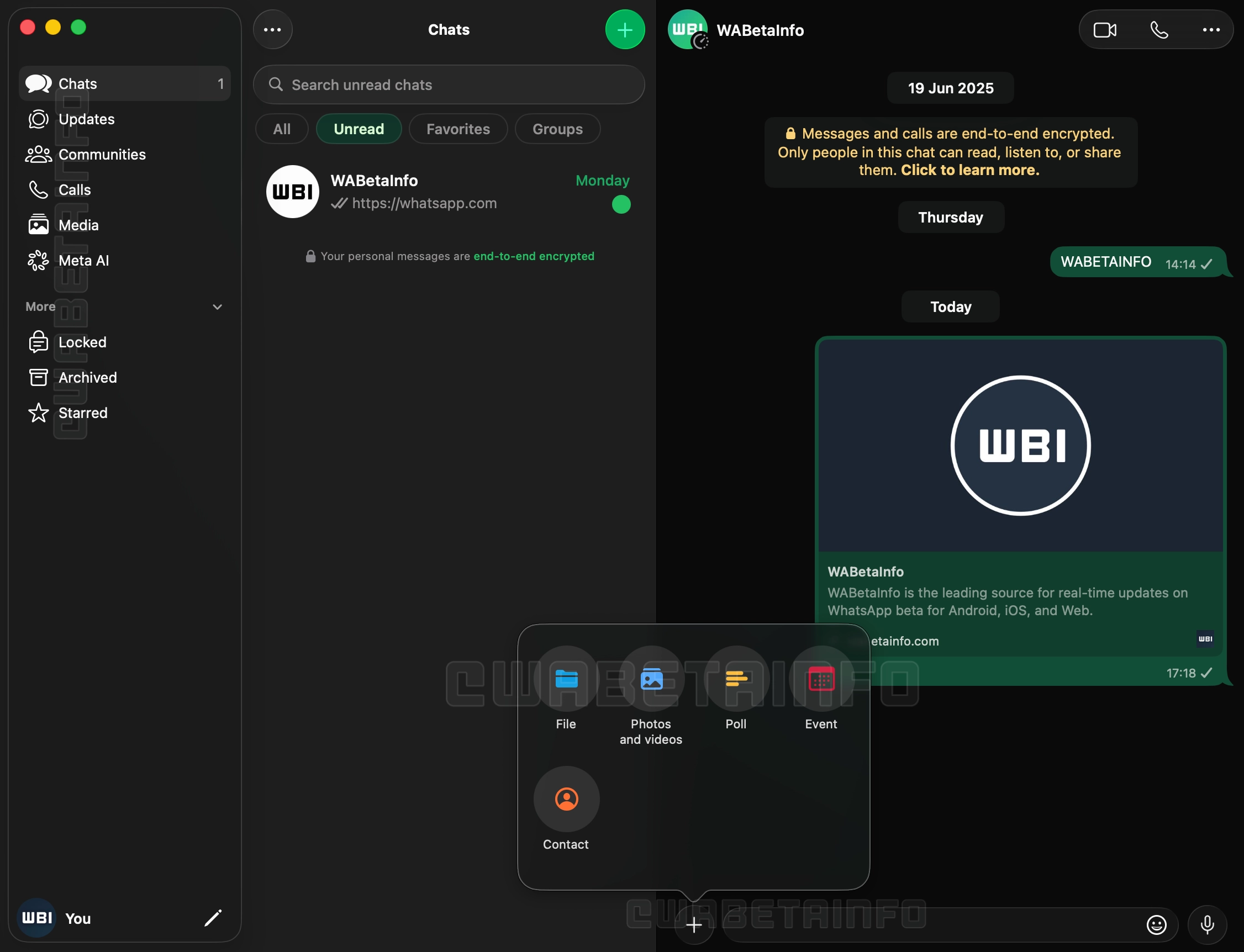
Em teste desde o mês passado, a interface da versão de WhatsApp para Mac pensada para o macOS Tahoe 26, com suporte ao Liquid Glass, parece enfim ter tido sua disponibilidade ampliada.

A nova versão, 26.27.73, além de contar com Liquid Glass, inclui uma nova barra lateral com textos que descrevem os ícones, abandonando a abordagem minimalista encontrada até então na versão de computador do mensageiro da Meta, e uma seção dedicada às Comunidades, que antes ficavam espalhadas pelo histórico de conversas do aplicativo.

Liquid Glass no WhatsApp de macOS
Captura de tela/WABetaInfo

Outra novidade é a adição do suporte às conversas trancadas, atualmente restritas aos iPhones e iPads. O acesso ao recurso no macOS, aos moldes da exigência do Face ID nos dispositivos móveis, também solicitará algum meio de autenticação para garantir a camada adicional de proteção, carro-chefe da funcionalidade.

Com essa atualização chegando para os usuários finais de maneira gradual nas próximas semanas, a disponibilização ampla da versão de Mac do WhatsApp (incluindo a versão da Mac App Store) conclui um trabalho de quase um ano unificando a linguagem visual do app no iOS, iPadOS e macOS.

via WABetaInfo

Como aumentar a resolução de uma foto no Pages, Numbers e Keynote

20 July 2026 at 12:00

Há um tempo, mostramos por aqui como é simples aumentar a resolução de uma imagem contida em um quadro do Freeform, graças à função Super-resolução (Super Resolution) do Apple Creator Studio.

O que muita gente não sabe é que ela também pode ser usada em imagens que tiverem sido anexadas em documentos do Pages, em planilhas do Numbers ou em apresentações do Keynote.

Veja como usar isso no seu iPhone, iPad e Mac! 🪄

Como ativar a Super-resolução pelo iPhone/iPad

  1. Abra, em um dos três apps, um arquivo que contenha uma foto.
  2. Selecione-a (de forma que fique com um contorno azul) e vá até o ícone de um pincel (na parte superior direita).
  3. Na aba “Imagem”, escolha “Super-resolução”.

Se preferir, toque em cima da imagem, toque na seta e em “Super-resolução”.

Como ativar a Super-resolução pelo Mac

  1. Com o documento aberto, clique em cima da imagem para selecioná-la.
  1. Clique no ícone de Super-resolução, na barra de ferramentas.

Como adicionar ou gerar uma forma em documentos do Pages, Numbers e Keynote

20 July 2026 at 11:30

Além de adicionar imagens e vídeos, os aplicativos Pages, Numbers e Keynote também permitem que você coloque formas — das mais simples às mais complexas, como formas geométricas, objetos e animais, por exemplo.

Além delas, o Apple Creator Studio permite que você gere uma forma do zero, com base em uma descrição que tiver adicionado no campo dedicado.

Veja como escolher ou gerar uma forma nesses apps! 😄

Como adicionar uma forma em documentos pelo iPhone/iPad

Acesse o documento desejado, toque no botão roxo (na parte superior) e no quinto ícone, da esquerda para a direita, a fim de abrir a área de formas.

Navegue pelas categorias para encontrar exatamente a que quiser usar no arquivo ou, se for um assinante do Apple Creator Studio, selecione “Gerar Forma” e siga os passos seguintes.

Como adicionar uma forma em documentos pelo Mac

Clique no documento desejado e no quarto ícone (da esquerda para a direita), na parte superior.

Escolha uma das formas mostradas na aba dedicada ou selecione “Gerar Forma” para criar uma do zero, com base numa descrição.

How to Install iOS 27 Public Beta on iPhone

16 July 2026 at 00:05

Now that the public beta for iOS 27 is available, even more iPhone and iPad users are going to be interested in experiencing the new operating systems while they’re under active development. And there’s good reason for this, iOS 27 and iPadOS 27 are both shaping up to be notable improvements to the operating systems, ... Read More

The post How to Install iOS 27 Public Beta on iPhone appeared first on OS X Daily.

iOS 27 Public Beta is Now Available for iPhone

13 July 2026 at 22:37

Apple has launched the public beta program for iOS 27, making the upcoming iPhone operating system available as a beta to all interested users. Beta system software tends to be buggier and less refined than final versions, and is generally best reserved for advanced users, but the public beta is fairly stable, and made available ... Read More

The post iOS 27 Public Beta is Now Available for iPhone appeared first on OS X Daily.

iOS 27 Beta 3 Available to Download

6 July 2026 at 19:58

Apple has released iOS 27 beta 3 for iPhone users who are participating in the beta testing program. iPadOS 27 beta 3 is also available for iPad based beta testers. iOS 27 and iPadOS have an emphasis on performance, with improvements to general system performance, a slider for adjusting Liquid Glass intensity to the appearance, ... Read More

The post iOS 27 Beta 3 Available to Download appeared first on OS X Daily.

Como gerar imagens usando o Creator Studio no Pages, Numbers e Keynote [iPhone, iPad e Mac]

19 July 2026 at 22:00

O Apple Creator Studio desbloqueia vários recursos bacanas de aplicativos já conhecidos pelos usuários de dispositivos da Maçã.

Dentre os exemplos, estão os apps Pages, Numbers e Keynote. Com eles, assinantes do Creator Studio podem gerar imagens e adicioná-las aos seus documentos, planilhas e apresentações de slides.

Veja como fazer isso nos parágrafos a seguir! ✨

Como gerar imagens usando o Pages, Numbers ou Keynote pelo iPhone/iPad

  1. Com um dos apps abertos, abra o arquivo onde deseja anexar a imagem.
  2. Escolha o ícone roxo (na barra superior) e vá em “Gerar Imagem”.
  3. Selecione o estilo, a forma de visualização e a proporção desejadas.
  4. Descreva a imagem no campo da parte inferior da tela.

Após ela ser gerada, você pode fazer outras edições e salvá-la, por exemplo.

Como gerar imagens usando o Pages, Numbers ou Keynote pelo Mac

  1. Com o arquivo aberto, clique no ícone de explorar biblioteca (na barra superior) — ou, na barra de menus, vá até Inserir » Gerar Imagem.
  1. Em seguida, escolha “Gerar Imagem”.
  1. Siga os passos a seguir para gerar, aprimorar e anexar a imagem desejada.

Como gerar uma apresentação do Keynote com o Apple Creator Studio

19 July 2026 at 20:30

Com uma assinatura ativa do Apple Creator Studio, usuários do aplicativo Keynote podem usufruir de benefícios especiais.

Um deles, por exemplo, é o Gerar Apresentação (Generate a Presentation). Como o nome sugere, é possível usar um esboço de texto para criar uma apresentação completa, com títulos, tópicos e um tema consistente.

Veja como utilizar isso na prática! 📱 💻

Como gerar uma apresentação no Keynote pelo iPhone/iPad

  1. Na tela inicial, selecione “Gerar Apresentação”.
  2. Escolha um tema para os slides.
  3. Adicione as informações desejadas no campo “Visão geral” e, no campo “Pontos principais”, insira uma lista ou parágrafos com os detalhes que você quer que apareçam na apresentação.
  1. Toque na setinha do canto superior direito para gerar a apresentação.

Como gerar uma apresentação no Keynote pelo Mac

  1. Com o app aberto, clique em “Novo Documento” e, no canto inferior direito, em “Gerar”.
  1. Adicione as informações e selecione “Gerar” para que os slides sejam gerados com base nos dados fornecidos.

Como gerar notas de apresentação no Keynote com o Apple Creator Studio [iPhone, iPad e Mac]

19 July 2026 at 19:00

Com uma assinatura do Apple Creator Studio, é possível aproveitar diversos recursos extras em aplicativos já conhecidos da empresa, como é o caso do Keynote.

No app dedicado à criação de slides, é possível fazer com que as notas de apresentação sejam geradas de forma automática em um slide — eliminando a necessidade de fazer isso manualmente.

Confira como utilizar isso na prática! ✨

Como gerar notas de apresentação no Keynote pelo iPhone/iPad

Com a apresentação aberta, toque nos três pontinhos (na parte superior), em “Opções de Visualização” e “Mostrar Notas da Apresentação”. Depois, selecione o slide desejado, vá novamente até os três pontinhos e em “Gerar Notas”.

Após fazer isso, é possível alterar o tamanho da fonte ou aplicar formatação de texto às notas do apresentador. Selecione-as, vá até o botão com um pincel (na parte superior) e use os controles de texto.

Como gerar notas de apresentação no Keynote pelo Mac

Com a apresentação sendo mostrada, clique no ícone ao lado do semáforo (no canto superior esquerdo) e escolha “Mostrar Notas da Apresentação”.

Selecione o slide desejado e clique no quarto botão (da esquerda para a direita) na parte superior.

Como corrigir um slide do Keynote com o Apple Creator Studio

19 July 2026 at 17:30

Com uma assinatura do Apple Creator Studio, usuários do aplicativo Keynote podem usufruir de recursos especiais para criar e gerenciar as suas apresentações de slides.

Um deles é o chamado Correção de Slide (Slide Clean Up), que pode corrigir automaticamente o alinhamento dos objetos e outras inconsistências em um slide.

Se for um assinante, veja como utilizar isso na prática no seu iPhone, iPad e Mac! 😉

Como corrigir um slide pelo iPhone/iPad

Com uma apresentação aberta no Keynote, toque em um espaço vazio no slide, na seta “>” e vá em “Correção de Slide”.

Ou navegue até o slide que deseja editar, toque nos três pontinhos (na barra de ferramentas) e vá em “Correção de Slide”.

Como corrigir um slide pelo Mac

Assim como no iPhone e iPad, você pode seguir um dos vários métodos diferentes para corrigir o slide desejado.

O primeiro deles é clicando com o botão direito do mouse em um espaço vazio e escolhendo “Correção de Slide”

Se preferir, navegue até o slide que deseja editar e clique no botão roxo na barra de ferramentas, escolha o slide que deseja editar no navegador de slides e clique em “Correção de Slide”.

Ou, no slide desejado, vá até Slide » Correção de Slide (no menu Slide, na parte superior da tela).

Quais são os limites das funções de inteligência do Apple Creator Studio?

19 July 2026 at 16:00

O Apple Creator Studio chegou recentemente para facilitar a vida de quem usa os aplicativos de criatividade da Maçã. Ele inclui softwares como Final Cut Pro, Logic Pro, Pixelmator Pro e recursos avançados no Pages, Numbers, Keynote e Freeform.

Vale notar que alguns recursos de geração de imagens, de formas, de notas do apresentador e de apresentações estão sujeitos a limitações de uso.

Confira, neste artigo, os limites de uso dos recursos de inteligência do Apple Creator Studio! 🙂

Quais são os limites de uso?

Segundo a Apple, o número exato de imagens, slides e notas do apresentador que podem ser gerados varia com base na complexidade das consultas e na disponibilidade do servidor e da rede.

No mínimo, por mês — se usado de forma exclusiva —, você pode:

  • Gerar 50 imagens;
  • Gerar 250 formas;
  • Gerar 50 apresentações com 8 a 10 slides cada;
  • Gerar notas do apresentador para 700 slides.

Esses limites são redefinidos mensalmente e podem ser conferidos a qualquer momento.

Como visualizar o status de uso

Pelo iPhone/iPad

Abra o Pages, Numbers, Keynote ou Freeform e toque no botão com três pontinhos. Depois, vá até “Recursos de Inteligência” e “Mostrar Status de Uso”.


Pelo Mac

Dependendo do app que estiver usando, selecione “Pages”, “Numbers”, “Keynote” ou “Freeform” na barra de menus. Depois, selecione “Recursos de Inteligência” e “Mostrar Status de Uso”.

Atualização 5.0.2 do app do MacMagazine traz de volta gesto para sair de posts e sincroniza favoritos entre dispositivos

19 July 2026 at 14:30

Nosso aplicativo — disponível para iPhone, iPad, Apple Watch e Mac — acaba de receber uma atualização significativa para a versão 5.0.2, repleta de melhorias e correções pedidas por muitos de vocês. 😉

Atendendo a muitos pedidos, implementamos de volta o gesto de deslizar a partir do canto da tela para sair de um post e retornar à tela inicial do app.

Também corrigimos um comportamento que incomodava bastante: ao tocar em links externos dentro de um post e depois voltar para o app, agora você retorna exatamente para a mesma posição de leitura em que estava — sem perder o lugar.

Os favoritos também passaram por uma revisão importante e agora são devidamente sincronizados entre iPhone, iPad e Mac.

Além disso, esta versão traz:

  • Retoques gerais na interface Liquid Glass;
  • Melhorias na marcação de posts como lidos/não lidos, incluindo o retorno de uma seção “Posts” nos ajustes do app;
  • A possibilidade de adicionar tíquetes ao Carteira (Wallet) diretamente pelo app;
  • Aprimoramentos gerais em acessibilidade.

Agradecimentos

Fica aqui um agradecimento especial ao Cassio Rossi e ao Mozzer pelas colaborações feitas em nosso projeto no GitHub para esta versão.

A atualização já está disponível na App Store — e, como sempre, vale a pena atualizar o quanto antes para aproveitar todas as novidades. Em breve, é claro, voltamos com mais! 😉

❌