 Login
LoginKeynote 15.3, Numbers 15.3, and Pages 15.3
6 July 2026 at 18:07



O Apple Creator Studio desbloqueia vários recursos bacanas de aplicativos já conhecidos pelos usuários de dispositivos da Maçã.
Dentre os exemplos, estão os apps Pages, Numbers e Keynote. Com eles, assinantes do Creator Studio podem gerar imagens e adicioná-las aos seus documentos, planilhas e apresentações de slides.
Veja como fazer isso nos parágrafos a seguir! ✨
Posts relacionados

Após ela ser gerada, você pode fazer outras edições e salvá-la, por exemplo.


Apple Intelligence on-device processing remains Apple’s most convincing argument in artificial intelligence. Rivals may lead in public model rankings, chatbot adoption and the speed of releasing experimental features, but Apple is building AI inside devices people already use for their most personal work.
That distinction changes the definition of winning.
Apple does not need every iPhone owner to open a separate chatbot app. It can place intelligence inside Messages, Mail, Photos, Notes, Shortcuts, Siri and third-party apps. Local models can operate on private information without automatically transferring that information to an external server.
The strategy appeared slow while the AI market measured progress through chatbot launches and model size. It looks more competitive as the industry confronts cloud costs, privacy concerns, unreliable connectivity and the difficulty of turning general-purpose AI into useful daily actions.
In his video “Apple Lost the AI Race,” Marques Brownlee captures the contradiction in one concise line:
“Apple lost the AI race. Actually, Apple won the AI race.”
The apparent reversal describes Apple’s current position well. Apple may have lost the first race for public perception. It is increasingly prepared for the longer contest over where AI runs, how it reaches users and who controls the personal data required to make it useful.
Most popular generative AI products began as cloud services. A user sends a request to a remote model, the provider processes it in a data center and the answer returns through an app or browser.
That structure supports enormous models but creates dependence on internet access, server capacity and continuing infrastructure expense. It also means personal prompts leave the device, even when the provider uses strong security and privacy policies.
Apple Intelligence on-device begins from the opposite direction. The iPhone, iPad or Mac first attempts to handle the request locally using Apple Foundation Models optimized for Apple silicon.
That local model does not need to know everything available on the internet. It needs to understand the user’s request, work with relevant personal context and complete common tasks efficiently.
The difference is similar to owning a capable computer rather than renting every calculation from a distant server. Cloud systems remain useful for difficult workloads, but they no longer need to participate in every interaction.
For Apple, local processing is also a product advantage. The company controls the chip, operating system, model architecture, memory system and apps. Each layer can be designed around the others rather than assembled from unrelated services.
Technology companies frequently describe privacy as a policy. Apple is trying to make it part of the AI architecture.
When a request runs entirely on an iPhone, the associated data does not need to leave the device. A model can work with messages, appointments, photos or app content without uploading that personal context to a conventional cloud account.
That structure is especially relevant to Siri AI. A truly personal assistant needs access to information that users may never place willingly inside an ordinary chatbot: private conversations, travel plans, health-related details, work documents and relationships between people.
An assistant becomes more useful as it gains context. It also becomes more invasive when the same context is stored, analyzed or used for model training outside the device.
Apple Intelligence on-device allows Apple to expand personal context while maintaining a stronger boundary around it. The assistant can understand information locally, perform an action and discard temporary processing data without building a permanent advertising or training profile.
This is difficult for competitors whose businesses depend on cloud services, large-scale data collection or engagement inside separate AI products. Apple’s hardware business gives it different incentives.
Not every AI task can fit within the power and memory limits of an iPhone. Apple uses Private Cloud Compute when a request requires a larger model.
Private Cloud Compute is designed to extend the privacy architecture of Apple devices into the cloud. User information is processed only for the request, is not stored and is not made available to Apple for unrelated purposes.
Independent researchers can inspect software images used by the system, creating an unusual level of outside visibility into the cloud environment. Apple has also expanded the architecture while maintaining control over the software and privacy protections used for processing.
This creates a layered system rather than a simple choice between local and cloud AI.
Apple Intelligence first determines whether the device can handle the request. More complex work can move to Private Cloud Compute. External models may be offered separately when the user chooses to involve them.
The user does not need to understand the technical path behind every answer. The system chooses the smallest and most private environment capable of completing the task.
Apple’s control of its processors has become one of its largest advantages in the AI era.
The Neural Engine first appeared years before generative AI became a consumer obsession. It supported Face ID, photography, speech recognition and other machine-learning tasks. Apple continued expanding that hardware across the iPhone, iPad and Mac.
Those investments now provide a large installed base of devices designed to run machine-learning workloads locally. Recent Apple chips combine CPU, GPU, Neural Engine and unified memory in one architecture that can move information efficiently between different types of processing.
The same design helps foundation models run without requiring the power consumption or separate memory systems associated with conventional data-center hardware.
Apple also controls the operating systems that schedule those workloads. A model can be optimized for the exact processors, memory limits and energy behavior of supported devices.
Competitors can build excellent models, but they often need to support hardware from several manufacturers with inconsistent capabilities. Apple can decide that an AI feature requires a specific generation of silicon and design the complete experience around it.
The Foundation Models framework extends Apple Intelligence on-device beyond Apple’s own apps. Developers can use the system model through native Swift tools rather than shipping a separate large model or paying for every cloud request.
An app can generate structured content, interpret natural language or use tool calling while keeping supported processing on the device. Apple handles model delivery and system integration.
This can reduce operating costs for developers. A cloud-based AI feature creates an ongoing expense each time a user submits a request. Local inference uses hardware the customer already owns.
It can also improve reliability. Features may remain available without an internet connection and respond without waiting for a remote service.
The framework encourages a quieter form of AI adoption. Apps do not need to add a prominent chatbot tab or redesign themselves around a conversational interface. Intelligence can appear inside existing workflows as a useful capability.
That is where Apple’s strategy may reach scale. Millions of apps can incorporate small AI functions that users experience as normal software behavior rather than as visits to an AI destination.
The AI race is often discussed as a contest between models. Consumer adoption also depends on distribution.
Apple can deliver new intelligence features through operating-system updates across the iPhone, iPad, Mac and Vision Pro. Users do not need to create another account, choose a provider or transfer their personal information into a new service.
Siri already occupies the system interface. Apple Intelligence can work across first-party apps. Developers can connect their own features through Apple frameworks.
The scale is difficult to reproduce. A model provider may have stronger benchmark scores but still need users to download an app and consciously open it. Apple can introduce AI during actions people already perform: replying to a message, locating a photo, organizing a note or completing a shortcut.
This does not guarantee success. Apple must make Siri AI reliable, keep feature availability consistent and prove that local models can deliver enough capability to satisfy users accustomed to powerful cloud assistants.
The distribution advantage only becomes meaningful when the experience works.
Apple has made mistakes during its AI transition. Siri improvements arrived later than promised, regional regulations delayed features and competitors established powerful consumer brands before Apple completed its new system.
Those setbacks explain why the claim that Apple lost the AI race became persuasive.
They do not settle the outcome.
The first stage rewarded companies that released chatbots quickly and demonstrated increasingly large models. The next stage may reward systems that can integrate AI into ordinary life without demanding constant cloud access, high subscription costs or broad collection of personal information.
Apple Intelligence on-device is built for that stage. It uses hardware already in the user’s hand, protects more personal context locally and gives developers access to intelligence without requiring every interaction to become a server transaction.
Apple does not need to win every benchmark or release the most talkative assistant. It needs AI to become a reliable part of the devices people already trust.
Brownlee’s title works because both statements can be true. Apple lost the visible sprint that defined the early generative AI market. By concentrating on local processing, silicon, privacy and operating-system integration, it may already be positioning itself to win the race that follows.
The post Apple Intelligence On-Device Is Winning the AI Race appeared first on AppleMagazine.
Call forwarding on iPhone is a simple feature with a specific job: it sends incoming calls from your iPhone number to another phone number. That can be useful when you are traveling, using a temporary phone, separating work and personal calls, covering a business line or making sure important calls reach someone else when you cannot answer.
The feature is built into iOS, but it depends on carrier support. Apple notes that call forwarding can be set up on iPhone if cellular service is through a GSM network. If the service uses a CDMA network, users may need to contact the carrier for setup details. That means the option may not appear for every user, every carrier or every plan.
Settings > Apps > Phone > Call Forwarding
Turn on Call Forwarding, then enter the phone number where calls should be sent. When call forwarding is active, an icon appears in the status bar so the user can see that incoming calls are being routed elsewhere.
Call forwarding on iPhone does not move messages, FaceTime calls, app notifications or voicemail settings by itself. It only redirects standard cellular phone calls. If someone calls your iPhone number, the carrier routes that call to the number you entered.
That distinction is important. If you forward calls to another phone, text messages still arrive on the original iPhone unless other settings or services are involved. FaceTime calls may still ring on Apple devices signed into the same Apple Account. Messaging apps such as WhatsApp, Signal, Telegram or Messenger are unaffected.
Call forwarding is also different from Silence Unknown Callers, Focus modes or Do Not Disturb. Those features control how calls appear or interrupt you. Call forwarding changes where the call goes.
This makes the feature useful in a few common situations. A business owner can send calls to an office line. A traveler can forward calls to a local number. Someone with a damaged iPhone can temporarily send calls to another device. A freelancer can route calls to a partner during time off. A parent can forward calls to a spouse for a short period.
Use the full phone number, including area code. If forwarding to an international number, include the correct country code. After setting it up, test the feature from another phone. Do not assume it works until a test call rings at the forwarded number.
Settings > Apps > Phone > Call Forwarding > Turn off
After turning it off, test again. A quick call from another phone confirms whether incoming calls are back to normal.
If the Call Forwarding menu spins, fails to load or does not save the number, restart the iPhone and check cellular service. If the problem continues, contact the carrier because the setting depends on the carrier network.
Some users look for call forwarding and cannot find it. That usually means one of three things: the carrier does not expose the feature in iPhone settings, the plan does not support it, or the network requires carrier codes or account-level setup.
Apple’s guide says CDMA users should contact their carrier for call forwarding information. Some carriers also use special dialing codes for forwarding all calls, forwarding when busy, forwarding when unanswered or forwarding when unreachable. Those codes vary by carrier and country, so guessing is not a good idea.
The best path is to check the carrier’s support page or app. Many carriers let users manage forwarding from the account dashboard, especially for business lines or multi-line plans.
If the option is missing, the iPhone is not necessarily broken. The carrier may simply handle forwarding differently.
Call forwarding can affect voicemail behavior depending on the carrier and destination number. If the forwarded phone does not answer, the call may go to the voicemail of the forwarded number instead of the original iPhone voicemail. In some cases, carrier rules may still send it back to the original mailbox, but users should not assume that.
This is another reason to test. Call the iPhone from another number, let it ring, and see where the missed call lands. If the goal is to preserve the original iPhone voicemail, carrier support may be needed.
For work numbers, this can be especially important. A forwarded business call going to a personal voicemail greeting can look unprofessional. A personal call going to a shared office voicemail can create privacy problems. Check before relying on it.
iPhone users with Dual SIM or eSIM setups should pay attention to which line is being forwarded. A personal line and business line can have separate carrier settings. Forwarding one does not automatically forward the other.
Settings > Cellular > Select the line you want to manage
Settings > Apps > Phone > Call Forwarding
The available settings may vary by carrier and line. If one line supports call forwarding and the other does not, that is usually a carrier difference, not an iPhone problem.
Dual SIM users should also test both numbers separately. Call the personal number, then call the business number, and confirm each behaves as expected.
Call forwarding works best when the goal is temporary coverage. It is useful during travel, device repairs, vacations, business handoffs, office moves, event coverage or times when another person needs to answer calls.
It can also help people who use a landline or desk phone during work hours. Calls can be forwarded from the iPhone to the office line, then turned off at the end of the day. The reverse can also work if the carrier supports it.
For small businesses, call forwarding can help avoid missed calls without adding a full phone system. A company can route calls to whoever is available. For individuals, it can be a quick fix when an iPhone battery is failing, a device is being repaired, or cellular reception is better on another phone.
The feature is less ideal as a permanent business phone solution. If multiple people need to answer calls, if calls need menus, if calls need recordings, or if voicemail needs to stay organized, a dedicated phone service may be better.
Call forwarding may create charges depending on the carrier, plan and destination number. Forwarding calls to an international number can be expensive. Forwarding to another domestic mobile number is usually simpler, but users should still check the plan.
Privacy also deserves attention. Once calls are forwarded, the person or device receiving them may hear personal, business or sensitive conversations meant for the original number. Do not forward calls to a shared phone unless that is intentional.
Before forwarding a work line to a personal number, check company policy. Some organizations do not allow business calls to be routed to unmanaged personal devices.
If call forwarding does not work, start with the basics. Confirm the iPhone has cellular service. Restart the device. Check that the forwarding number is entered correctly. Turn call forwarding off, wait a few seconds, then turn it on again.
Then test from another phone. A test call is the fastest way to know whether the carrier accepted the setting.
If calls still do not forward, check whether the carrier supports call forwarding through iPhone settings. Some carriers require account-level activation, carrier codes or a business calling feature. If the iPhone setting is missing or stuck, carrier support is usually the right next step.
Also check Focus modes and blocked numbers if the issue is not forwarding but missed calls. A call may fail to ring because of Focus, Silence Unknown Callers, a blocked contact, poor signal or voicemail settings rather than call forwarding.
Call forwarding on iPhone is easy to use when the carrier supports it. Open iPhone settings, turn on Call Forwarding, enter the destination number and test it. Turn it off when the temporary need is over.
The feature is most useful when it is deliberate and short-term. It can keep calls moving during travel, repairs, work coverage or busy periods, but it should be checked carefully because voicemail, costs and privacy can change once calls are routed to another number.
The iPhone makes the setting simple. The carrier decides how far that simplicity goes.
The post Call Forwarding on iPhone: How It Works appeared first on AppleMagazine.
A newly published study in Nature Metabolism reports that brown fat can act as a hub of molecular messaging, using secreted microRNAs to coordinate physiology across the body. Researchers focused on brown adipose tissue—well known for its role in thermogenesis—and asked whether it also participates in long-distance communication via RNA signals.
To visualize and track these messages, the team employed brown-fat–specific RNA labeling in living systems. This strategy allowed them to connect RNA production within adipocytes to downstream effects elsewhere, moving beyond correlations toward a clearer map of inter-organ RNA traffic.
The central finding is the presence of a communication network mediated by microRNAs released from brown fat. These small regulatory RNAs appear to travel beyond the tissue of origin and engage gene-regulatory pathways in other organs, effectively relaying information about metabolic state.
Functionally, the work supports a model in which microRNA “dispatch” from thermogenic fat tunes cellular programs in remote targets. Such programs likely involve post-transcriptional regulation, a process microRNAs are known to influence by pairing with complementary sequences in messenger RNAs.
Importantly, the approach does not treat microRNAs as generic circulating molecules. Instead, the labeling confirms their brown-fat origin and strengthens the link between secretory RNA dynamics and systemic physiological outcomes.
The study also highlights the specificity of the messaging: not all RNAs are equally represented, and the labeled microRNA repertoire points to organized, tissue-defined signaling rather than random leakage.
Beyond mapping pathways, the results carry implications for metabolic disease research. If brown fat microRNAs can reshape gene expression in other organs, manipulating these signals could offer a route to modulate energy balance, insulin sensitivity, or inflammatory tone.
For now, the findings provide a blueprint for how RNA labelling combined with tissue specificity can uncover hidden layers of endocrine-like communication. As techniques improve, the field may move toward a broader “RNA connectome” linking organ behavior through secreted regulatory molecules.
Researchers describe their results as evidence that brown fat is not only a metabolic engine but also an information broadcaster. In the evolving landscape of viral-style science news, this discovery underscores how tiny RNA molecules can orchestrate large-scale biological conversations.
Subject of Research: Inter-organ communication via secreted microRNAs from brown adipose tissue.
Article Title: Brown fat-specific RNA labelling reveals a network of inter-organ communication by secreted microRNAs.
Article References: Lino, M., Palermo-Ruiz, G., Efthymiou, V. et al. Brown fat-specific RNA labelling reveals a network of inter-organ communication by secreted microRNAs. Nat Metab (2026). https://doi.org/10.1038/s42255-026-01558-0
Image Credits: AI Generated
This week in science and technology news we’re covering at The Debrief: For decades, physicists have argued about Richard Feynman’s Sprinkler Problem, involving the question of how a reverse sprinkler would operate. Now we may finally know the answer… elsewhere, new studies reveal how breathwork may trigger psychedelic-like states, emotional breakthroughs, and psychological insights without drugs. Meanwhile, a stone sphere unearthed at an archaeological site in Azerbaijan is reportedly unlike anything previously documented in the South Caucasus.
Also, in an exclusive feature, University of Toronto bioethicist KM Bowman, Ph.D., writes for The Debrief about his firsthand experience with uncontacted indigenous tribes: “Through the haze stood a man. Barely clothed, carrying what appeared to be a weapon of some form, he remained motionless for only a few seconds before silently disappearing back into the forest.” In his essay, Bowman shares his experience and asks whether governments can protect “the uncontacted.”
Finally, here’s a look at more stories The Debrief is tracking right now…
Neuroscientists have long believed that language processing was only found in regions of the brain’s left hemisphere, including the well-known Broca’s area. However, new evidence suggests the brain’s language network is far more widespread than previously thought.
Researchers at the Massachusetts Institute of Technology (MIT) analyzed functional magnetic resonance imaging (fMRI) scans from 772 participants and identified 17 additional brain regions involved in language comprehension. These newly discovered areas are distributed across the brain, including the cerebellum, hippocampus, amygdala, and several regions of the cerebral cortex. In total, this accounts for five percent of the adult brain volume (roughly the size of a large strawberry).
“Even though there are all these distant components, it’s pretty restricted in terms of volume. You don’t need that much of the brain to do language,” says senior author Evelina Fedorenko, an MIT associate professor of brain and cognitive sciences and a member of MIT’s McGovern Institute for Brain Research, in a statement.
To find these hidden language-related regions in the brain, the researchers revisited years of brain imaging data collected since 2013. Additionally, participants completed a standard “language localizer” task, during which they read or listened to meaningful sentences and sequences of meaningless nonwords. By comparing brain activity between these two conditions, the research team identified regions that responded more strongly to language.
“When we initially started looking at language, in the first couple of papers, I tried to be comprehensive and include anything that seemed consistent across participants, and there was a huge amount of resistance,” said Fedorenko. “People would say things like, ‘Well, we know those are not language areas, so please focus on the language areas.’”
The team decided to adopt a more flexible statistical approach to detect weaker signals and identify previously overlooked language-sensitive regions beyond the classical language areas. They then compared these regions’ responses during a spatial working memory task to distinguish language-specific areas from those involved in what would be considered general cognitive functions.
Interestingly, five of the newly identified language regions are located in the cerebellum, a structure traditionally associated with movement and coordination. Some of these cerebellar regions were also active during non-language tasks, suggesting they may help integrate information across different brain systems rather than process language alone.
“It’s a very simple paradigm that lets you identify this core language system in individual brains,” says MIT postdoc Agata Wolna, the lead author of the paper.
Additional language-sensitive regions were identified in the hippocampus and amygdala, areas better known for their roles in memory and emotion. Their involvement suggests that understanding language may rely more on integrating memory, emotional context, and higher-order cognitive functions than previously understood in science.
“We always see this frontal temporal network, but there’s quite a lot of evidence that there are other regions that are also critical for language processing,” said Wolna. “By using a laxer threshold and zooming in on areas with weak MRI signal, we tried to maximize the chances of finding small and weakly responsive regions outside of this left frontal temporal system.”
The findings challenge long-held assumptions about the brain’s organization and can open new avenues for research into how language processing is understood in neuroscience.
The recent study was published in the Journal of Neuroscience.
Chrissy Newton is a PR professional and the founder of VOCAB Communications. She currently appears on The Discovery Channel and Max and hosts the Rebelliously Curious podcast, which can be found on YouTube and on all audio podcast streaming platforms. Follow her on X: @ChrissyNewton, Instagram: @BeingChrissyNewton, and chrissynewton.com. To contact Chrissy with a story, please email chrissy @ thedebrief.org.
3 min read
Following its longest hibernation period ever of nearly a year, NASA’s New Horizons spacecraft has emerged in good health and is ready to begin transmitting science data gathered in the distant Kuiper Belt far beyond Pluto.
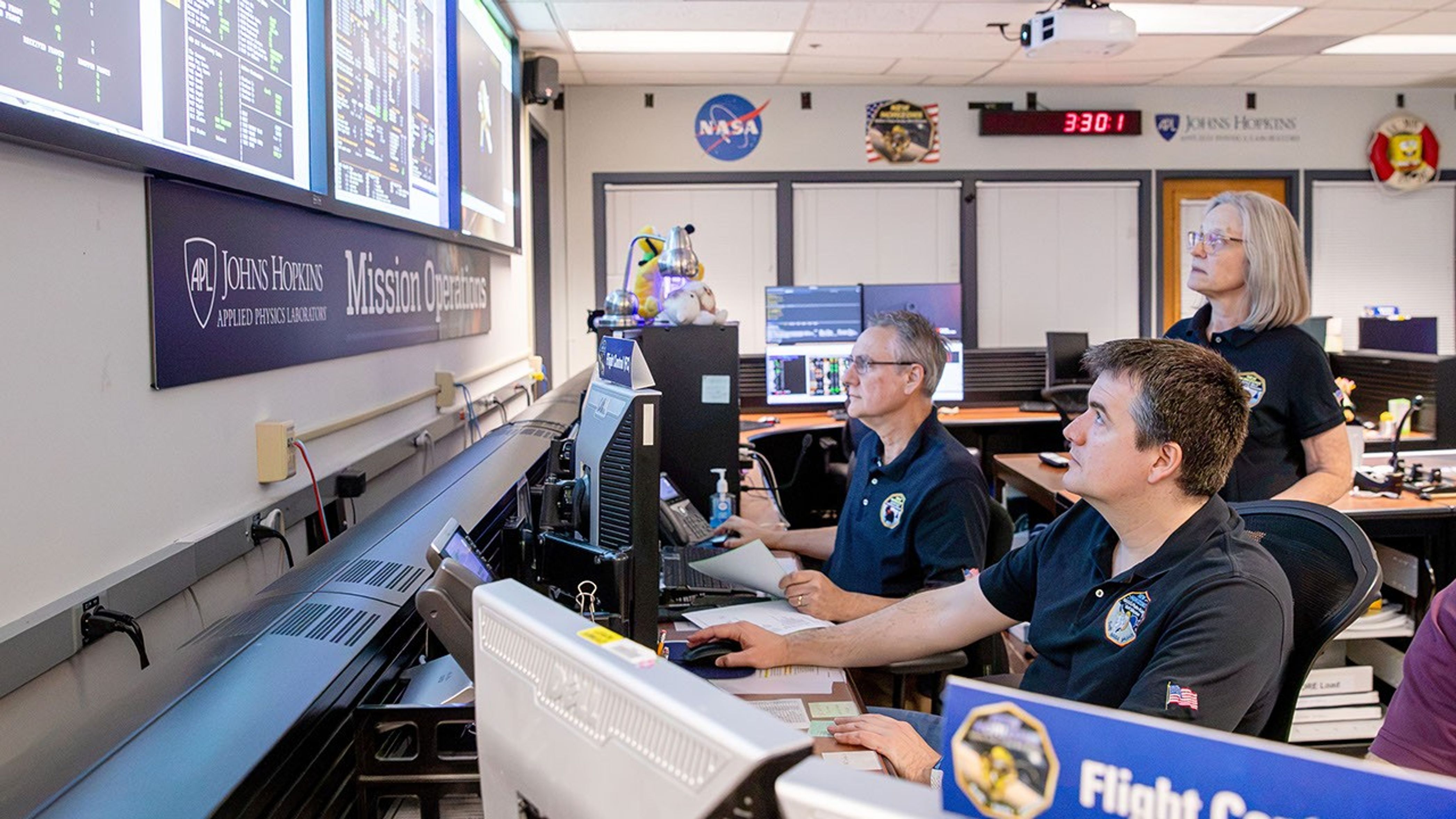
On June 23, flight controllers at the Johns Hopkins Applied Physics Laboratory (APL) in Laurel, Maryland, confirmed New Horizons, acting on stored commands uplinked to its main computer last July, had safely awakened from a 321‑day hibernation period that began Aug. 7. With the spacecraft now approximately 5.9 billion miles (9.5 billion kilometers) from Earth, the radio signals carrying that confirmation took about 8 hours and 52 minutes to reach the APL Mission Operations Center via NASA’s Deep Space Network station near Madrid, Spain.
The mission team typically places New Horizons in resource‑saving hibernation mode during long cruise periods. While the spacecraft is hibernating, operators do not send commands or retrieve data, but the spacecraft continues gathering and storing data around the clock from its heliospheric plasma sensors, Solar Wind at Pluto and the Pluto Energetic Particle Spectrometer Science Investigation, as well as its space dust detector, the Venetia Burney Student Dust Counter.
Alice Bowman, the New Horizons mission operations manager at APL, said the spacecraft reported back to Earth, via the Deep Space Network, with a weekly status beacon. “Every status report through this hibernation period was ‘green,’ meaning all was well aboard New Horizons each and every week,” she said.
As New Horizons resumes active operations, Bowman noted, the team will begin downlinking spacecraft health and safety data, followed by data from the three scientific instruments. In about three weeks, the spacecraft’s onboard Alice ultraviolet spectrograph will look at the hydrogen gas distribution in the outer heliosphere, while the Solar Wind at Pluto, the Pluto Energetic Particle Spectrometer Science Investigation, and the Venetia Burney Student Dust Counter instruments continue their measurements, and the ground team conducts a series of spacecraft and instrument checkouts.
The team also is completing upgrades to the ground‑system software that will make it easier to maintain operations of the spacecraft. Tests are already underway and are expected to continue through the year.
New Horizons is operating on updated autonomy logic designed for operations farther from the Sun and to accommodate the expected reduction in power and the naturally occurring increase in radio‑signal travel time.
The NASA spacecraft’s exploration of this distant region of the solar system marks the latest step in a journey that began in January 2006 with the fastest launch on record; a flyby of Jupiter in February 2007 that included stunning views of the gas giant and its moons; the first exploration through the Pluto system in July 2015; the first exploration of a Kuiper Belt object, Arrokoth, in January 2019, and unique studies of the Sun’s outer heliosphere and dozens of additional Kuiper Belt objects since then.
For more information on NASA’s New Horizons mission, visit:
https://science.nasa.gov/mission/new-horizons/
