Login
Login
Developer vibe codes a tool to let Nvidia RTX 50-series laptop owners crank up their power limits — can juice RTX 5090 mobile GPU to 225W
Folks with Nvidia-based gaming laptops can now use a new tool called NvpwrControl to unlock additional performance from their assuredly power-limited mobile GPU, as long as they're willing to accept the risks of cranking their GPU power limit by as much as 40 watts. The tool, spotted by VideoCardz, is available for download on GitHub, and it is labeled as 'experimental', so you'll want to be very sure you're willing to damage the reliability, if not the lifespan, of your fancy discrete GPU gaming laptop before using it.
If you've ever had a gaming laptop, you will know that the GPU model name can be deeply misleading. Whether it's NVIDIA using wildly different GPU configurations, AMD using confusing suffixes that don't exist in desktop GPUs, or Intel naming integrated graphics like a discrete GPU, all three vendors do things to keep the user guessing why their new gaming laptop isn't as fast as expected based on the name alone.
GPU Name | GPU Power (varies per laptop) | Dynamic Boost Max | Mod Max (Experimental) |
|---|---|---|---|
GeForce RTX 5050 Laptop | 35 - 100W | 15W | 140W |
GeForce RTX 5060 Laptop | 45 - 100W | 15W | 140W |
GeForce RTX 5070 Laptop | 50 - 100W | 15W | 140W |
GeForce RTX 5070 Ti Laptop | 60 - 115W | 25W | 180W |
GeForce RTX 5080 Laptop | 80 - 150W | 25W | 225W |
GeForce RTX 5090 Laptop | 95 - 150W | 25W | 225W |
In Nvidia's case, the GPU models (aside from the RTX 30 Series) don't match at all between laptop and desktop, but even with the smaller size of the laptop GPUs, the chips are still sharply limited in performance by their stringent power limits. These limits top out at 150W, with an extra jolt, usually 25W, available from Dynamic Boost if the CPU isn't heavily loaded. This is, frankly put, not enough power for even the mobile GeForce RTX 5070 Ti to stretch its legs, to say nothing of the GeForce RTX 5080 Laptop or GeForce RTX 5090 Laptop. In high-intensity gaming situations, these GPUs can score pretty similarly due to having the same power limit.
That's what makes this tool attractive. By cranking the power limit, you can give these power-limited GPUs a performance boost. The developer doesn't provide any benchmarks, but I can say from experience that testing power limit adjustments on a power-limited GPU can give nearly linear performance gains, meaning that increasing the power limit from a stock 140W all the way up to 180W could potentially give a GPU performance uplift in the neighborhood of 25% or more, although it is impossible to verify this without testing.
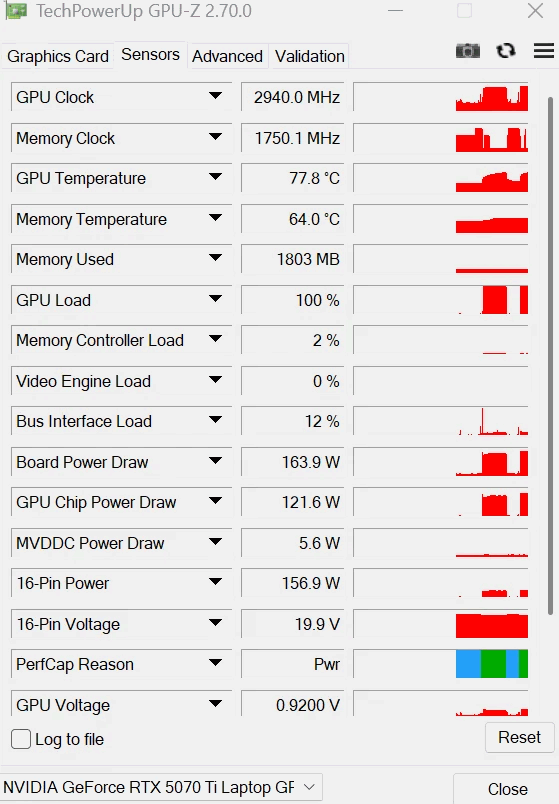
There are quite a few caveats to this utility, though. For one thing, even the author describes it as 'experimental ', and for another thing, it's clearly AI-generated in the largest part. The developer is called "LevinAI", after all, and there are the hallmarks of generative AI all over the GitHub repository. Still, there are a few reports on both GitHub and Reddit suggesting that users have been testing it, and the developer claims that it works on his GeForce RTX 5070 Ti laptop, posting the proof below.
Other notable qualifiers include that it only supports Blackwell GPUs for now, and it only enables power controls when it can recognize the power policy layout and OEM baseline. If your GPU already ships with a wacky power configuration, this tool may not work for you. It's also not verified to work on every brand of laptop nor every model of GeForce RTX 50-series GPU, so we absolutely wouldn't try this unless you're willing to replace your Blackwell-based laptop.
The partially AI-generated project description (likely chosen as the author's native language appears to be Russian) explains that the developer investigated numerous layers of the software stack on top of the GPU to see where the power limit could be modified. The controls that NVIDIA exposes generally won't let the user raise the power limit above the value set by the OEM for fear of potentially damaging the hardware, since the power delivery and cooling mechanisms were likely not designed with the higher power draw and thermal output in mind.
The solution he found was apparently to modify a low-level NVIDIA power policy that isn't normally exposed to end-users. He says, "One of the important findings was that the power-management chain contains internal policy values that are not exposed through the normal consumer power-limit controls. This is the path that eventually led to a working experimental implementation." However, due to the method employed, the tool does require the user to disable Windows driver signature verification, which is yet another 'gotcha' of the mod.

As amusing as it is to see that the developer left his AI assistant's instructions for constructing his GitHub repository (which he didn't follow), it's a reminder both of the reliability concerns around "vibe"-coded software in production as well as of the incredible potential of AI software development. Since we spotted the story on this utility, the developer has already bumped the version from 1.5.0 to 1.8.0 with a new release on GitHub, suggesting that the pace of improvements is extremely rapid.
A few users on Reddit, where the author posted the above screenshot, lambasted the developer for taking ownership of what they claim is "100% AI generated work" and also for not structuring his code repository correctly (since all of the source is packed in a ZIP file, not properly viewable on GitHub). However, the majority of other users seem enthusiastic about his work, and several have already posted proof that it seems to work, with huge gains in 3DMark and other benchmarks.