Meta announces that its neural handwriting is now rolling out in its EAP (Early Access Program) for the Ray-Ban Display.
Users are recommended to write with their index finger on a stable surface, and allow the AI to correct any typos or mistakes.
Meta confirmed this was on the way for the Ray-Ban Display in December.
Meta's neural band is an important part of its smart glasses experience. It brings convenience, and Meta says it's offering a new feature in Early Access for silent AI interactions.
If you've got a pair of Meta smart glasses, the company has announced a silent handwriting feature in Early Access using the Neural Band. In a press release, Meta says users can write "AI queries with their index finger when their display is on." It states users can get answers to questions, play a song, pull up directions, and more without much effort—just a finger. Meta went into more detail about this EAP (Early Access Program) feature.
If you're interested, Meta says users must ensure their Neural Band is paired with their glasses and that everything is updated, as well as enroll in the EAP. To enable neural handwriting, head to Meta AI app > Settings > select your glasses > Early Access > toggle Meta AI with neural handwriting. For the "best results," Meta recommends users write with their index finger. It states you should "anchor your wrist on a hard surface and use your index finger to write." What's more, you should write in print, not cursive.
To ensure the Neural Band and neural handwriting feature captures what you're writing properly, you should write smoothly and at a consistent pace. Meta says users shouldn't worry about typos, nor should they wait for their HUD to catch up to what they've written. Continue regardless, and Meta AI will automatically fix any errors.
Neural handwriting is headed to the Meta Ray-Ban Display in the EAP.
Writing in the air
(Image credit: Android Central)
It was teased in December 2025, and now it's finally here. Meta confirmed late last year that it planned to empower its Ray-Ban Display further with "virtual" handwriting. We've now seen this arrive as neural handwriting. This EMG handwriting feature was confirmed to leverage the Neural Band with the user's drawing and gesture inputs. The company also teased Instagram Reel support for its glasses, too.
The neural band was an object of interest for Android Central's Nicholas Sutrich last year, too. To him, it felt like a true device straight out of a Sci-fi movie. To Meta, the sEMG band (neural band) is a requirement for "true AR smart glasses products." Users wouldn't need to rely on a screen to type their commands. The band captures your muscle movements to act out what you're writing or capture your gestures. It's silent and completely hands-free (technically).
Android Central's Take
The neural band is pretty cool, I have to admit. But bringing this "virtual" or neural handwriting just seems like the next logical step for Meta. It can already capture gesture for scrolling through song lists, why not do more? Why not make it so writing a quick message or asking its AI is effortless with single movements?
Microsoft Edge may soon let you sign in with an Apple account. The latest Canary build of Edge includes flags that, if enabled, let you sign into the browser with your Apple account.
Using your Apple account within Edge will make it easier to keep your bookmarks, history, and other content synced across your phone and your PC. Many people, including myself, use a computer running Windows 11 and an iPhone.
The change was spotted by Leo Varela, who often leaks or highlights features in Edge and other browsers.
In Edge Canary for desktop there are a couple of new flags to enable support for signing in with an Apple account. Microsoft added support for Google accounts some time ago and has now added support for Apple accounts: https://t.co/34BBm0b3Wi pic.twitter.com/BNMrpB8pkOAugust 10, 2026
Microsoft did not initially plan to support non-Microsoft accounts within Edge. Google account support rolled out recently and now support for Apple accounts appears to be on the way.
Of course, you could use Edge without any account at all. The browser works without requiring signing in. But syncing data and some other features require using some sort of account to sign in.
Windows Central take
Microsoft once pushed its apps aggressively on iOS and Android. Since 2015, the company has shut down several apps and left others in maintenance mode. (Image credit: Windows Central)
It's interesting to see how Microsoft's cross-platform app strategy has shifted over the years. Some apps have been available on other platforms for over a decade, but Microsoft increased its efforts to have a presence on iOS and Android after shutting down Windows Phone.
With no phone operating system of its own, Microsoft aimed to provide a premier experience for its services on Android and iOS to meet people where they are. Microsoft bought up popular apps like Wunderlist and SwiftKey to make a Microsoft experience on mobile platforms made by Google and Apple.
These days, several Microsoft apps feel like abandonware and others lag behind the competition. The glory days of the "iPhone Pro" are over.
I do appreciate flexibility when it comes to signing in to Edge, but I can't help but wonder if adding support for Google and Apple accounts is an admission that Microsoft can't even get people to use a Microsoft account in Microsoft Edge.
Rather than trying to force users into the Microsoft umbrella, the company seems to be accepting its mobile reality. It is finally conceding that to keep PC users on Edge, it has to let them live inside Google and Apple's account ecosystems instead.
Join us on Reddit at r/WindowsCentral to share your insights and discuss our latest news, reviews, and more.
Samsung announced that its Hearing Aid feature for the Galaxy Buds 3 Pro and 4 Pro has been FDA-cleared.
It states this will work alongside its Hearing Test, which lets users use "clinical-grade, pure-tone audiometry" to test their hearing and see clear results.
Samsung says Hearing Test and Hearing Aid will arrive on the Buds 3 Pro and 4 Pro in the U.S. and other approved markets in Q4 2026.
Samsung announces that a major accessibility feature for its Galaxy Buds has cleared a key governmental hurdle.
The company announced this morning (Aug 11) that its Hearing Aid feature for the Galaxy Buds 3 Pro and 4 Pro has been FDA-cleared. Samsung says this enables the previously mentioned devices "to serve as an over-the-counter hearing aid for adults (18 or older) with perceived mild to moderate hearing loss."
For users, this means you'll have access to the Galaxy Buds' Hearing Test, alongside this Hearing Aid feature. Hearing Test is self-administered from the Galaxy Buds menu in your Settings. Samsung says it uses "clinical-grade, pure-tone audiometry" to test your hearing in each ear. Hearing Test is also said to highlight any "hearing deficits." Your Galaxy Buds will generate an "audiogram" that Samsung says mirrors what you'd receive from a professional test.
Once completed, your test will categorize your results in one of the following categories: mild, moderate, severe, or profound.
Your Galaxy Buds will then use your Hearing Test results to fine-tune its Hearing Aid feature. It might boost "high frequencies, surrounding whispers, or distant voices." The Galaxy Buds 3 Pro and 4 Pro benefit from familiar true hearing aid features, such as "noise elimination and beamforming." Hearing Test and the Hearing Aid feature for the Buds 3 Pro and 4 Pro will arrive on Galaxy devices in Q4 2026 in the U.S. and other approved markets.
Hear the world around you
(Image credit: Samsung)
Samsung has continued to focus on the user's hearing health ever since its huge Health app update in June. In the spirit of being proactive, Samsung announced Hearing Health. It will leverage your Galaxy Watch, phone, and Buds to monitor the noise level around you. If loud noises are a constant, your Galaxy Watch would let you know and urge you to make changes. The idea is to help users better preserve their hearing for the long term.
This capability was announced for the revamped app, which includes a lot of new health features for current and upcoming Galaxy devices. For example, the Galaxy Watch 9 and Watch Ultra 2 feature this new Hearing Health feature right out of the box. Samsung reiterates that users can keep tabs on their Hearing Health from the Health app, and now these new features are on the way for the Galaxy Buds to take things further.
Android Central's Take
Preserving your hearing is incredibly important. It's one of those things that if you lose it, it's hard to get back. This is even more important, given that we love earbuds. It's easy to pop those in and start listening while working, reading, or walking. But we've got to be conscious about our noise level. You never want those earbuds too loud. That's something we all learned when we were kids, right?
It seems like every time I turn around, there's another round of layoffs affecting video game studios.
In July, Xbox announced its biggest downsizing ever, cutting 3,200 jobs throughout 2026 and 2027. At the same time, Xbox made deals with four major studios to go independent or take on new management.
It's all starting to feel like white noise with the same language. Streamlining. Restructuring. Focusing resources. Adapting to changing markets.
After reading an excellent report from Rest of World about the plight of small game developers in Turkey, I realized that the entire video game industry is likely in more trouble than most people realize.
While Microsoft and other big companies at the apex of the industry have been cutting thousands of jobs at the top, there's something just as disruptive going on at the bottom.
Solo developers are shipping full games with a tiny team, empowered by tools like Claude Code and Cowork, OpenAI Codex, and Copilot. This shift in how games are developed is eating up the entry-level jobs that used to serve as a way to break into the game dev industry. The candle is burning at both ends, as they say.
Turkey's AI game development example doesn't bode well
The game development scene in Turkey should be a warning for the rest of the world. (Image credit: Getty | Sergio Amiti)
Over the last decade, Turkey has become a mobile gaming hotspot with more than 800 studios at its peak. It served as a pipeline for young developers who finished school, applied, got hired, worked in junior roles, and eventually made their way up the ladder.
This pipeline is no longer functioning as it should, and it's largely due to AI. One developer interviewed by Rest of World went from a huge studio pumping out a game per week to founding his own studio.
With Claude Code in his back pocket, the developer realized he needed just two employees to achieve similar productivity.
I’m the only developer in my team. When we started, I had to write all the code myself. I also have to manage game design, social media, investment meetings, and the like. With Claude Code, I can do all that easily. It really sped things up and helped me a lot.
Emirhan Gül, speaking to Rest of World
This shift in Turkey's game development scene is having dire effects. Entry-level jobs are understandably disappearing at smaller studios, and the larger studios are reticent to hire inexperienced developers.
The AI stack designed to make us more productive is killing key jobs
AI tools are making us more productive, but at what cost? (Image credit: Getty Images, Robert Way)
The AI stack negatively affecting one of the largest game development booms in European history is the same AI stack that Microsoft is racing to put in front of every developer, on every platform, including the ones building for Xbox and Windows.
Microsoft has famously spent years telling Windows users that Copilot will make us all more productive. But Turkey's example is likely a preview of what that means when followed to its logical end.
Not a team of developers shipping games faster (OK, maybe a bit faster). One developer doing the job that used to require a team. Set this dilemma on top of a video game industry that just saw Xbox cut thousands of jobs, and the math really starts to hurt.
It's worth noting that Microsoft stated that AI is not being used to replace the most recent batch of laid-off employees at Xbox, but the company's overall massive spending on AI infrastructure and data centers has undoubtedly played a role in cuts to underperforming sectors like Xbox.
With layoffs at the top and an ever-shrinking front door at the bottom, the entire industry is being squeezed for all its juice.
Windows Central's take
Junior video game developers are being hit hard by the rise of AI. (Image credit: Getty Images | Microsoft)
The part that stuck with me the most is the plight of junior developers. A university director in Turkey is warning students not to follow the traditional path of getting hired on in an introductory position and working their way up. Instead, they should be building their own games while in school in order to land a job.
Right now is the worst time to enter the game industry to find a stable job, but it’s the best time to start your own venture, to realize your own idea.
Güven Çatak, Founder and Director of Game Lab, Bahçeşehir University (speaking with Rest of World)
So, yes, AI tools definitely lower the barrier to creating a game. At the same time, however, AI tools do nothing to ensure that a game actually finds an audience.
Key steps in the nurturing and maturing of a video game developer are being skipped, and artists, writers, and programmers aren't necessarily getting the experience needed to compete at the upper levels of the industry.
Turkey's degrading video game development scene seems like a preview of what's to come for the rest of the industry, and I'm not sure I like it.
Are you a developer who uses Copilot, Claude, or any other AI tools in your workflow? Has it made you more ambitious? More productive? Are you more nervous now about who you're competing with? Let me know in the comments section below!
Join us on Reddit at r/WindowsCentral to share your insights and discuss our latest news, reviews, and more.
Motorola has confirmed 50+ devices for the stable Android 17 update.
Newer Razr and Edge models are expected to receive Android 17 before older devices.
Several Moto G models, including the G Stylus 2026, G Power 2026, G87, G86, G77, G67, G57, G47, and G37, are eligible.
Motorola has just announced a massive list of more than 50 devices that will be getting the stable Android 17 update, and the rollout has already started. But before you start clicking the "Check for updates" button, you need to know who gets it first and who’s stuck waiting.
The stable rollout has already begun with the Motorola Edge 2025, with newer premium devices like the Razr 70 series and Edge 70 lineup likely to be given priority, as per the company's announcement on its Spanish website. Motorola says the update will roll out gradually to other eligible models in the coming weeks and months.
Interestingly, this rollout has been in the works for months. Motorola’s Android 17 beta program started just days after Google released Android 17 Beta 1 in February, putting it ahead of a few rival Android brands. This was notable as Motorola was still working on rolling out Android 16, with some eligible phones still waiting months for the last big update.
The confirmed Android 17 roster is a massive one. It includes the Motorola Signature and a long list of Razr models, as follows:
Motorola Razr 70 Ultra
Motorola Razr 70 Plus
Motorola Razr 70
Motorola Razr Ultra 2026
Motorola Razr+ 2026
Motorola Razr 2026
Motorola Razr Fold 2026
Motorola Razr Fold 2025
Motorola Razr 60 Ultra
Motorola Razr 60s
Motorola Razr 60d
Motorola Razr 60
Motorola Razr Ultra 2025
Motorola Razr+ 2025
Motorola Razr 2025
Motorola Razr 50 Ultra
Motorola Razr+ 2024
The Edge series also gets the same treatment, covering the Edge 70 family, Edge 2026, Edge 2025, Edge 60 series, and Edge 50 Ultra.
Motorola Edge 2026
Motorola Edge 70 Pro+
Motorola Edge 70 Pro
Motorola Edge 70 Max
Motorola Edge 70 Neo
Motorola Edge 70 Plus
Motorola Edge 70 Fusion+
Motorola Edge 70 Fusion
Motorola Edge 70
Motorola Edge 2025
Motorola Edge 60 Stylus
Motorola Edge 60 Pro
Motorola Edge 60 Fusion
Motorola Edge 60
Motorola Edge 50 Ultra
Motorola Edge 60
Even the cheaper Moto G phones from Motorola aren’t being left behind. The list also includes:
Moto G Stylus 2026
Moto G Power 2026
Moto G Play 2026
Moto G 2026
Moto G 2025
Moto G Power 2025
Moto G Stylus 2025
Moto G Max
Moto G87
Moto G86
Moto G86 Power
Moto G77
Moto G77 Power
Moto G67
Moto G57
Moto G57 Power
Moto G47
Moto G37
Moto G37 Power
Motorola’s Android 17-based HelloUI update introduces Live Updates in a Dynamic Island style, the Qira Moto AI assistant, lock-screen customization options, resizable Quick Settings tiles, refreshed haptics, tinted icons, and a redesigned volume panel.
Remember, rollouts will differ by region and carrier. If your Motorola is on the list, you should eventually see the update pop up under Settings > System > System updates.
Microsoft PowerToys will soon add on-device support for Phi Silica. Microsoft called that small language model (SLM) "small but mighty" when announcing it in 2024. Now, that model is available for Advanced Paste in the latest PowerToys preview.
Advanced Paste is a utility in PowerToys that formats content from your clipboard. It supports several formats, including plain text, markdown, and JSON. You can also use it to extract text from images using OCR and transcode audio and video files.
When first launched, Advanced Paste required an OpenAI API key, but PowerToys later added support for other models. Azure OpenAI, OpenAI, Gemini, and Mistral are cloud services that work with Advanced Paste. Foundry Local and Ollama both work with the feature locally.
Phi Silica is now available as an option for local AI processing in the latest preview.
While you may not have heard of Phi Silica, you've likely heard of tools it powers if you have a Copilot+ PC. Click to Do and on-device rewriting in Word and Outlook are powered by Phi Silica.
Phi Silica uses the NPU of a device, which helps with efficiency.
The GitHub page for PowerToys lists all the changes in the latest preview. Here are the highlights from the same page:
View the changelog ↴
PowerToys v0.101.2211.0 Highlights
Advanced Paste: Added an on-device Phi Silica provider and more per-action AI customization options.
Command Palette: Improved dialog handling, icon loading, memory cleanup, theme behavior, and dock performance monitoring.
Window management: Improved shutdown behavior across FancyZones, Grab And Move, and Always On Top, and made Always On Top borders render solidly at full opacity.
Keyboard Manager: Fixed the elevated Run Program browse flow in the new editor.
Mouse Jump: Moved Mouse Jump to the newer WinUI app architecture and packaged its new binaries into signed release builds.
Settings: Added an update channel selector and a guided Bug Report flow with progress and a GitHub shortcut.
Quick Accent: Made press-and-hold activation cancel cleanly so the picker appears only when intended.
Preview releases: Added dedicated preview-release versioning and update-channel support so preview builds can be published and tested independently from stable releases.
PowerToys has a growing library of utilities, so there's a lot to look at in the latest preview even if you do not care about AI. Command Palette will perform better and Window management has been improved across FancyZones, Grab And Move, and Always On Top.
This collection of utilities includes a large library of features to enhance the Windows experience. PowerToys is designed with power users in mind, but it has handy features for people who just use their PC for everyday computing too.
Join us on Reddit at r/WindowsCentral to share your insights and discuss our latest news, reviews, and more.
I've been using Razer mice for decades, and have tested dozens upon dozens of iterations of the firm's products. I'm also a dedicated MMORPG and MOBA player on PC, flipping between games like World of Warcraft and Heroes of the Storm as seasons wax and wane.
For the Warcraft-faithful, I play a Demonology Warlock, which has been simplified over the years, but in previous expansions I had anywhere up to 30+ keybinds for playing the class effectively in PvE and PvP. It was a bit like learning a musical instrument back in the day, particularly when you throw in battle potions, trinkets and other additional buttons.
As such, I've tended towards Razer mice with extra inputs to make my gaming life easier. I had no idea how much easier it was going to get until I went palm-on with the new Razer Naga V3 Pro — which is quite easily one of the best mice of 2026.
Razer Naga V3 Pro: Specs and price
MMO player's best friend. (Image credit: Windows Central | Jez Corden)
The Razer Naga V3 Pro builds on its predecessor in a variety of ways, but chief among those is the inclusion of a further three configurable inputs, bringing the maximum total to 23 (and many, many more if you use HyperShift and other modifier keys).
1000 Hz native; upgradeable to true 8000 Hz (Mouse Dock Pro / HyperPolling Dongle); HyperSpeed Wireless (2.4 GHz), Bluetooth LE, USB-C wired
Battery & Lighting
Up to 155 hours (HyperSpeed); 3-zone RGB (logo, wheel, 12-button plate); 5 onboard profiles
Materials & Accessories
100% PTFE feet; USB-A to USB-C cable; HyperSpeed dongle; compatible with Mouse Dock Pro & HyperFlux V2
Dimensions & Weight
119.5 × 75.5 × 43.5 mm; 117 g base weight; Side plates: 12-button (20 g), 6-button (17 g), 2-button (15 g)
Price & Availability
$179.99 USD / £179.99 GBP / €199.99 EUR — Available worldwide Aug 11, 2026
Razer also doubled down on durability with reinforced molding processes for the switches, which the firm says will now last up to and potentially beyond 100 million actuations.
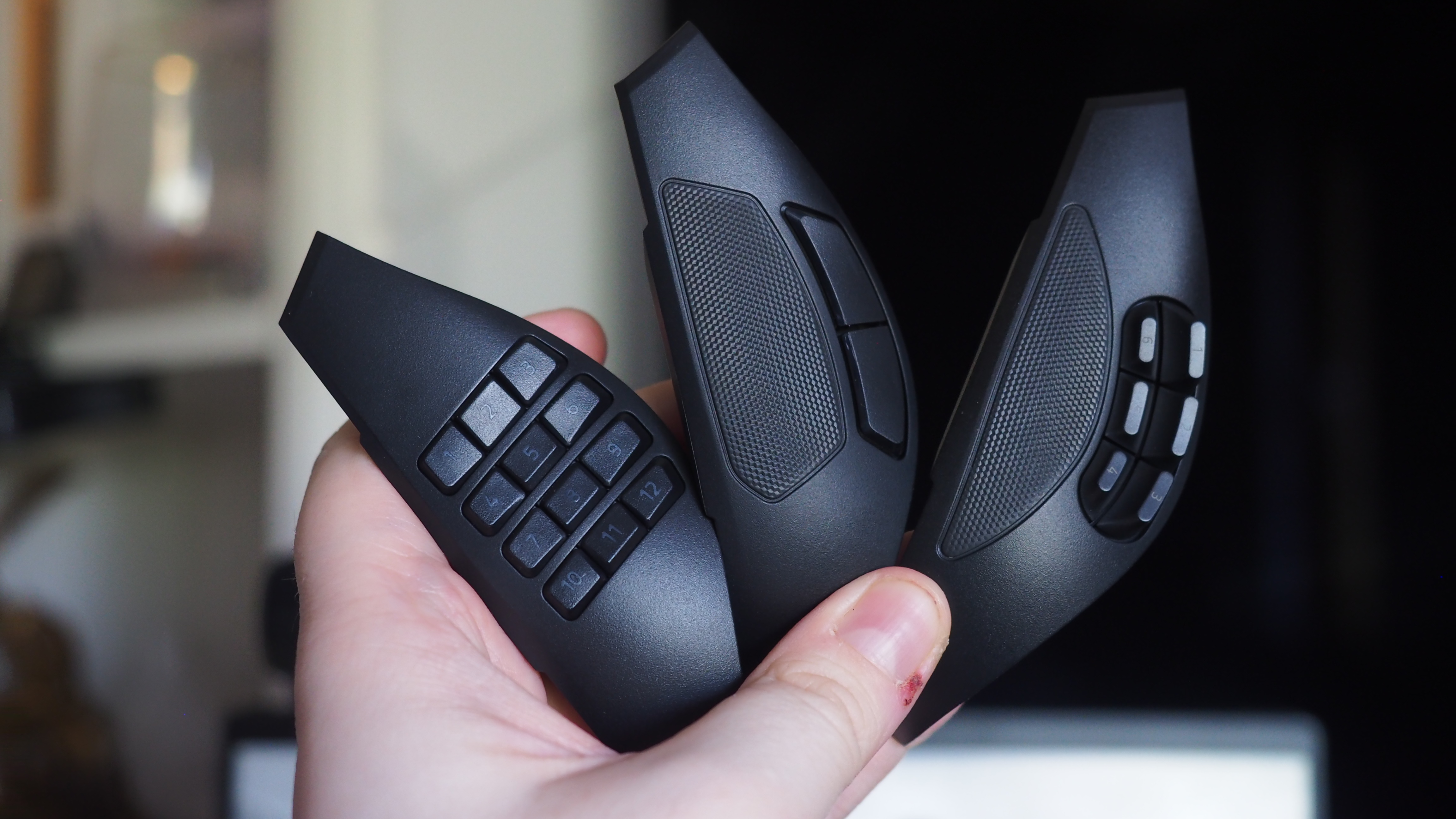
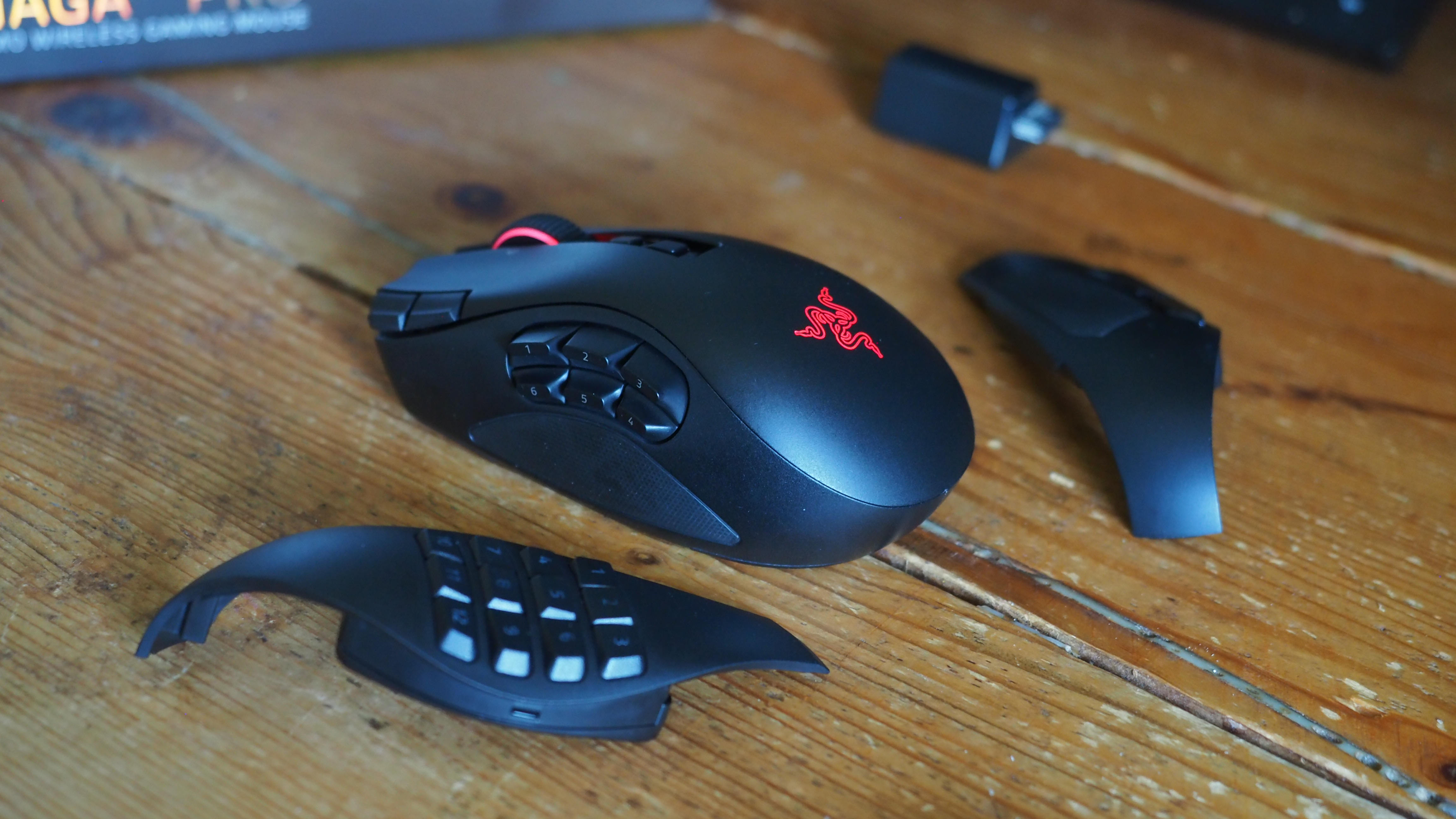
The obvious headline feature is the magnetic button plates that can be customized at will, adding between two, six, and twelve additional buttons. Razer has also included a uniquely configurable scroll wheel that comes with haptic feedback capabilities.
The mouse goes into general availability on August 11, 2026, and will set you back $179.99 from Best Buy in the United States.
Razer Naga V3 Pro: Features
Three's a crowd they say. Not here. (Image credit: Windows Central | Jez Corden)
The Razer Naga range has long been designed with MMO and MOBA gameplay in mind, adding a huge amount of additional inputs via a unique magnetic side plate feature.
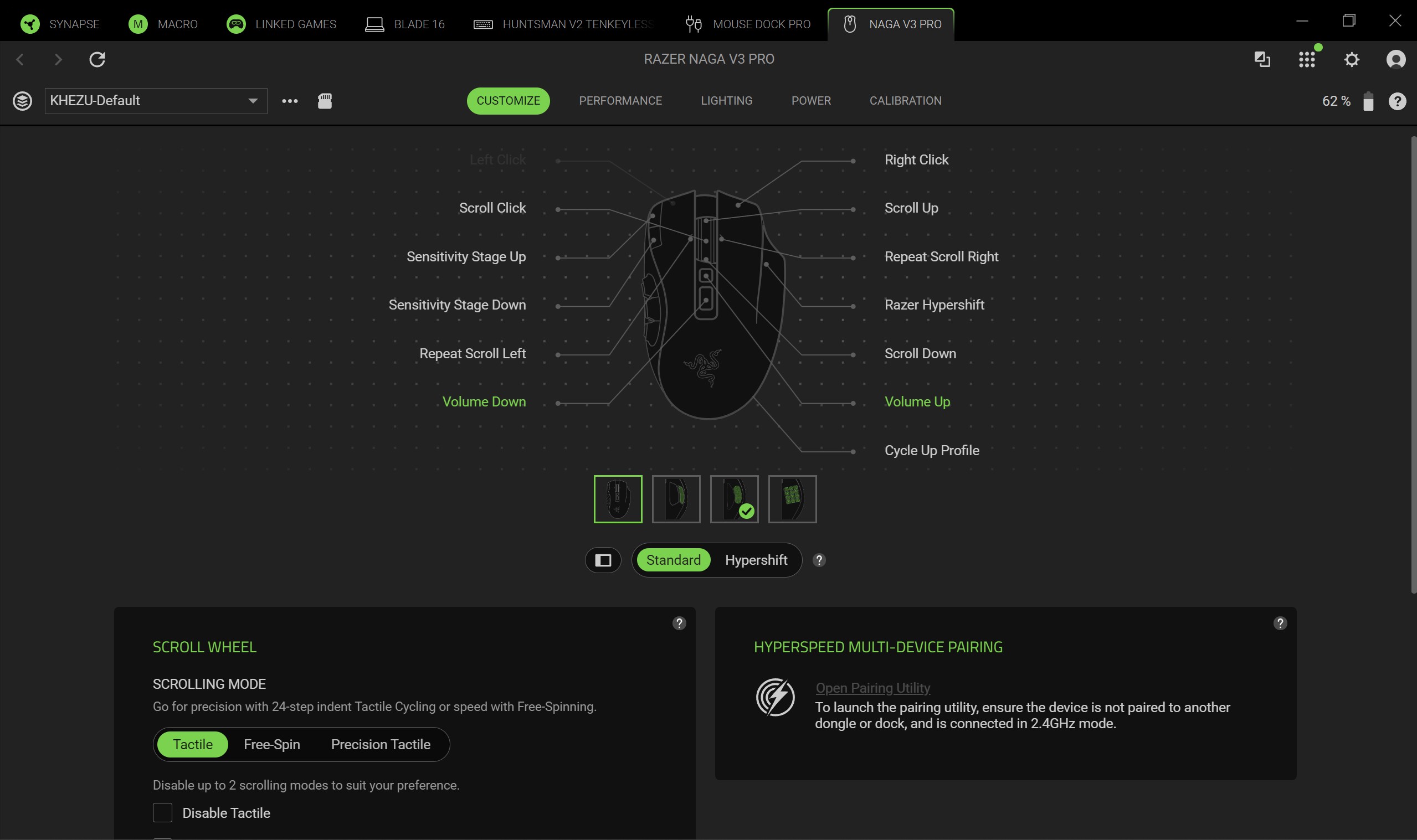
Razer has enhanced the force of the magnets to ensure it feels well and truly part of the mouse when connected, and I can say without doubt that it well and truly does. The buttons can be programmed at will using Synapse, and modified further with a ring-finger button that defaults to Razer's dedicated "Hyper Shift" modifier key. Of course, all of these can be reconfigured too.
What struck me immediately when going palm-on was the new scroll wheel. Razer has included some unique functionality here that I've not experienced previously in other mice. You can set it to free-wheeling mode, which allows it to quite literally spin indefinitely under its own weight. There's also a standard step-stop function that most users will be familiar with, but also a precision-stop feature that adds some haptic feedback and shortens the actuation for rapid hot bar or weapon switching with more forceful control.
There is a parade of other buttons and functions too. The DPI rates have been placed in the top right corner of the mouse out of the way, requiring a little more intent to reach to prevent accidents, I suppose. There are two buttons below the scroll wheel, and the scroll wheel itself can be tilted and clicked for additional inputs too.
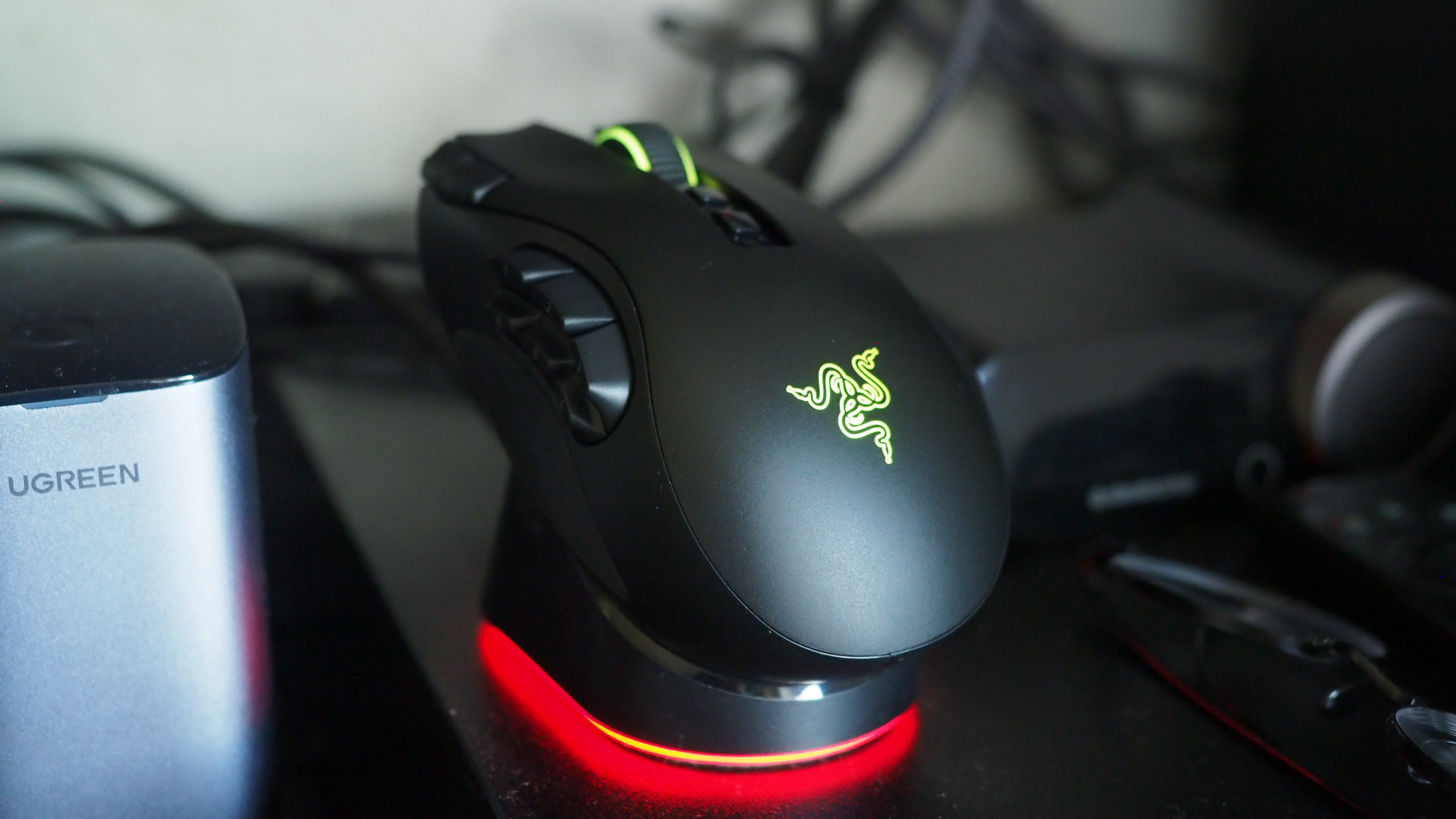
It sports 155 hours of battery life out of the box, and supports Razer's new Mouse Dock as well as its wireless Hyper Flux charging mouse mat. Either plugged in or connected to a compatible Hyper Speed dongle, this bad boy can go all the way up to 8,000 Hz. You will not be left wanting for speed.
Razer Naga V3 Pro: Comfort and usage
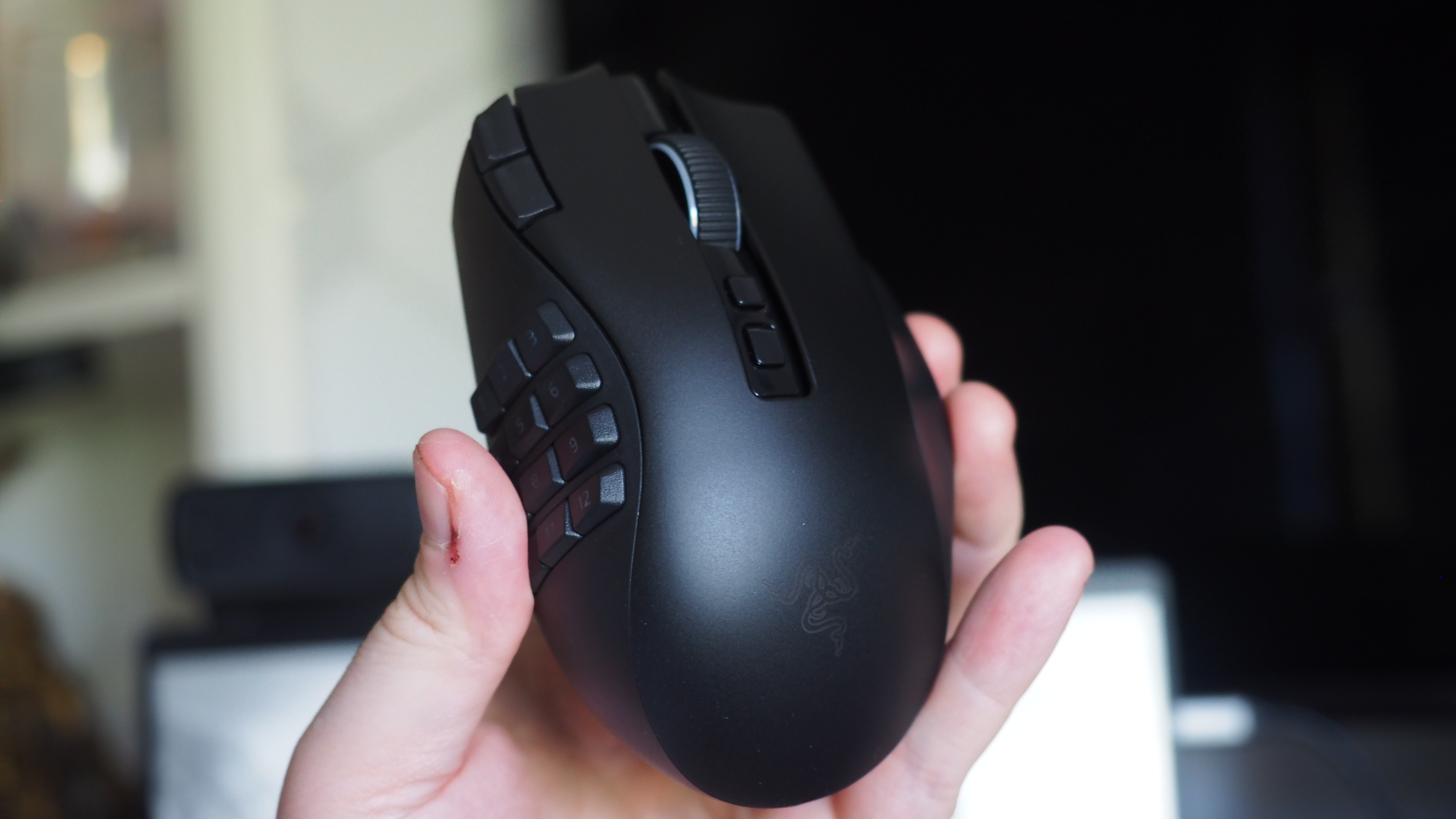
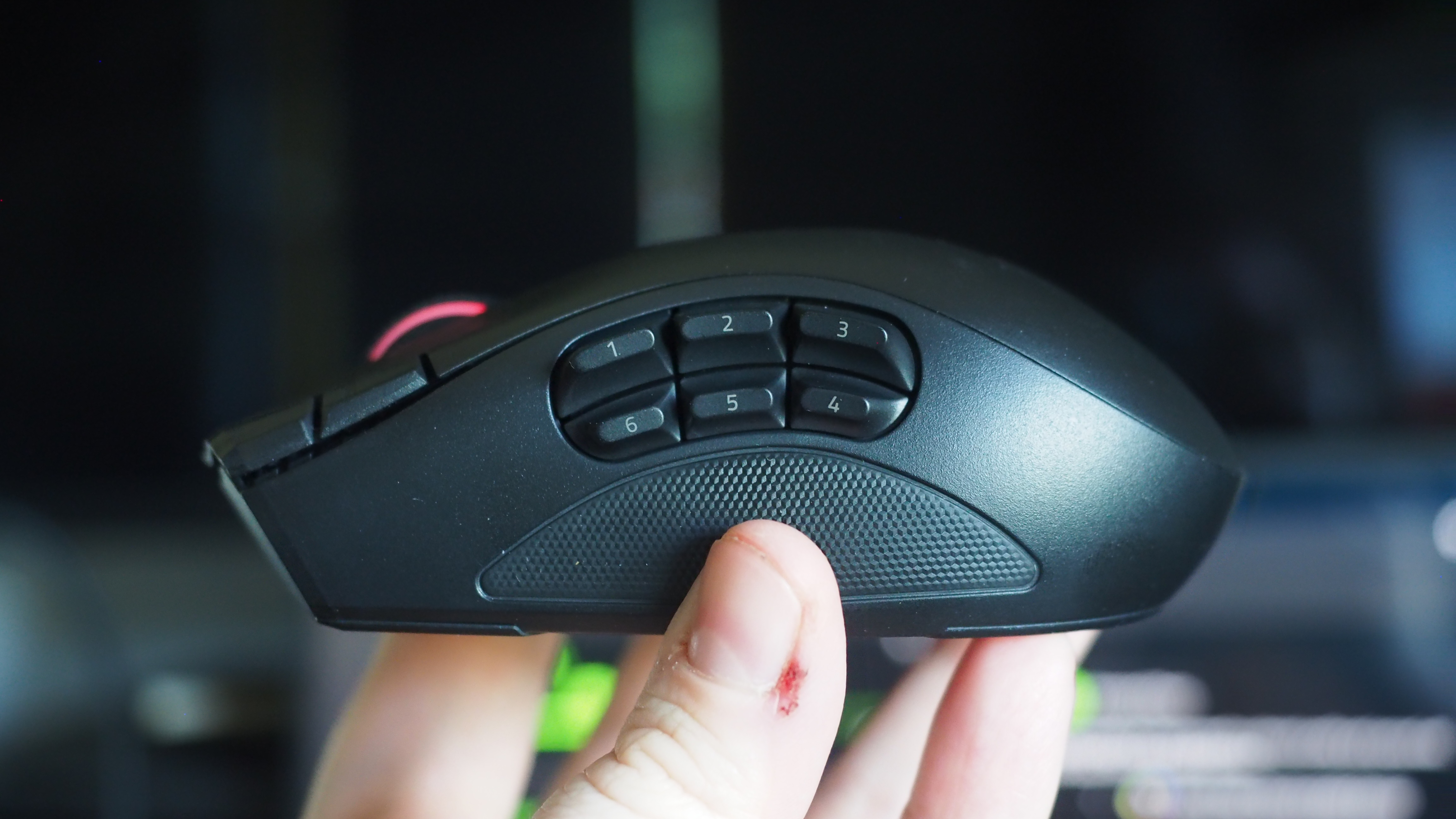
All the buttons. Windows Central | Jez CordenLight weight, maximum function. Windows Central | Jez CordenIt feels good in the hand, although some users may find it a little too high. Windows Central | Jez CordenRazer magnetic charge dock capable, but not included. Windows Central | Jez Corden
How does it feel to actually use, though? I dropped into a couple of World of Warcraft raids and played a few games of Heroes of the Storm to get a feel for it, but it was in games like Age of Empires where it truly felt transformative.
As noted, you can add up to 12 extra buttons with the side plate feature. It does take some getting used to, and I think Razer could've perhaps done a bit more to help differentiate the keys, particularly on the 12-button plate. The six button plate felt like the sweet spot for me, given that the profile of the buttons made them easier to memorize, but also I didn't find it as hard to squeeze my thumb backwards to hit the keys closest to my palm.
Indeed, you might struggle with this mouse if you don't have the most flexible hands. I found its palm hump to be a bit tall for my tastes (small ass hands maybe, or perhaps poor desk ergonomics on my end), but overall it was incredibly comfortable. I suspect most people won't have any issues with it. I also suspect that it was designed quite intentionally to be "palm grippy" to facilitate the fact users will be reaching for buttons on the side more often than on other mice.
Six buttons felt like the sweet spot for me. (Image credit: Windows Central | Jez Corden)
There are probably neuroscientific reasons for this, but it does feel genuinely more intuitive to actuate inputs on the same hand as your movement intentions. Perhaps it stems from my console-oriented history in some ways, but I found it a lot easier to drop Guldan's ult with a mouse swipe and mouse click, as opposed to lining up my mouse with a keyboard press.
For Age of Empires, it was particularly fun binding various quick keys directly to the mouse. Assigning regiments, bypassing certain menus, and being able to select specific units instantly from anywhere won't make up for my lack of skill with RTS, but it did boost the fun factor.
Razer Synapse is a fantastic piece of software that ties everything together. It's still better than solutions from other companies by a country mile. Configure RGB lighting, set up profiles for specific games, configure literally all the things — quick and easy.
Sync all the Razer things. (Image credit: Windows Central)
Some of the less useful features include Razer's macro functionality, which will sadly get you banned in a lot of online games for "automation."
The Naga V3 Pro also comes with an AI assistant key by default, which lets you bind certain Copilot prompts to mouse inputs for some reason. You can turn it off, but it's 2026 so everything has to have some kind of "AI" feature in it apparently, even if it's effectively useless. Perhaps this might become more useful if Microsoft ever ships agents to consumers, but as for right now it feels like boardroom fluff. Thankfully, that's the only "feature" here I could describe as such. Practically everything else is genuinely useful and represents a demonstrable upgrade.
There is a lot of functionality in the Razer Naga V3 Pro, and you won't need all of it all of the time. It is designed primarily for people who want maximum control over their games, and indeed, it is priced as such.
Razer Naga V3 Pro: Conclusion
It ain't cheap! (Image credit: Windows Central | Jez Corden)
The Razer Naga V3 Pro is a tour de force of functionality, with unmatched versatility for practically every genre of game you can throw at it. FPS, RTS, MOBA, MMORPG, and beyond — even the most control-complex games fall before the Naga and its capacity to inject intuitiveness into the least intuitive games and control schemes possible.
But yes, it will require configuring to get there. That's ultimately who it's designed for, though; people who play more complex games to a hardcore level, and want their peripherals to reflect their desire to configure and control their experience.
You should buy this if ...
✅ You play complex input-heavy games like MMORPGs and RTS.
✅ You like to configure your controls to the nth degree.
✅ You prefer your inputs on your mouse, rather than your keyboard.
You should not buy this if ...
❌ You find configuring keybinds exhaustive and annoying.
❌ You have particularly small hands (you might find its height uncomfy).
❌ Price might be a concern.
This will become my default mouse moving forward. Being able to effectively keybind number keys 5, 6, 7, 8, 9, 0, etc. without needing to physically reach away from WASD is a big boost in some games I play.
However, I am cognizant of the fact that I got the review unit here. Almost $200 for a mouse is tough to justify unless you're particularly passionate about the functionality the Razer Naga V3 Pro is going to provide for you. For configuration enthusiasts, there's well and truly nothing better than the Razer Naga V3 Pro right now.
Razer
Naga V3 Pro
"Stay one step ahead—no matter how the game changes."
Join us on Reddit at r/WindowsCentral to share your insights and discuss our latest news, reviews, and more.
Razer, one of my favorite manufacturers that has produced some of the best PC gaming accessories I've ever used, has released a new mouse built to conquer any game you throw at it — the Razer Naga V3 Pro.
This gadget is the long-awaited evolution of the Razer Naga V2 Pro, which takes everything we loved about its predecessor (which we gave a near-perfect review score) and refines it to create the ultimate PC gamer mouse.
Here's what you need to know about the Razer Naga V3 Pro and where you can buy it.
The side plates of the Razer Naga V3 Pro gamer mouseWindows Central | Jez CordenSide view of the Razer Naga V3 Pro MouseWindows Central | Jez CordenTop view of the Razer Naga V3 Pro MouseWindows Central | Jez Corden
The Razer Naga V3 Pro mouse is equipped with cutting-edge tech to improve input detection speeds and swappable button plate configurations so that it can handle a wide variety of game genres.
Its biggest selling points include:
23 programmable buttons and three interchangeable side button plates (a 12-button MMORPG plate, a 6-button MOBA plate, and a 2-button FPS plate).
A Razer HyperScroll Tilt Wheel Gen-2 with new dual tactile, free-spin, and smart-reel modes to adjust its scrolling speeds to a user's preference.
A Razer Optical Mouse Switches Gen-4 to give its buttons an upgraded lifecycle up to 100-million clicks, cleaner and faster input detection, tactile feedback, and a zero-bounce optical design to prevent accidental misclicks.
A Razr Focus Pro 50K Optical Sensor Gen-3 with precise mouse-movement detection and adjustable sensitivity that can go as high as 50,000 DPI.
Polling rates from 1000Hz to 8000Hz to help improve the mouse's input accuracy and detection speed.
A lightweight build of 117g (with the 12-button MMORPG plate attached) so it's not so heavy to move for the wrist while allowing it to be moved more quickly when making sharp turns in first-person action games.
A battery life of 155 hours on HyperSpeed connectivity (2.4GHz).
This mouse is Razer's next amazing premium outing for MMORPGs, MOBAs, FPS titles, and more
The Razer Naga V3 Pro gamer mouse on a base charger (Image credit: Windows Central | Jez Corden)
Our resident PC gaming accessory expert, Jez Corden, reviewed the Razer Naga V3 Pro and found it to be one of the best PC mice he's used so far this year. Jez praised it for possessing dozens of programmable buttons, the best-in-class software solution, and a premium feel that emphasizes tactility.
So, if you generally play input-heavy PC games and you want to get your hands on the Razer Naga V3 Pro, it will cost $179.99/£179.99/€199.99 at select digital retailers including Best Buy, directly from Razer.com, and at physical RazerStores.
Dominate any PC game imaginable with the Razer Naga V3 Pro Wireless mouse, complete with three swappable button plates, a Focus Pro 50K Optical Sensor Gen‑3 with 50,000 max DPI, 23 programmable inputs, and many more rich features.View Deal
Join us on Reddit at r/WindowsCentral to share your insights and discuss our latest news, reviews, and more.
In the age of 4K projectors, dropping a ton of cash on a smart TV no longer seems like the wisest decision. This is particularly true when products like the XGIMI Horizon Ultra are hanging around.
We gave this projector a 4.5/5-star rating when we reviewed it a few years back, highlighting its vibrant and crystal-clear picture quality, stylish design, and Dolby Vision integration. Depending on where you shop, the Horizon Ultra can cost as much as $1,699, but WellBots is currently selling the projector for a reasonable $1,149. Slap on this discount using the code 300SAVE at checkout and you'll drop the device down to only $849.
Get my favorite 4K projector for as little as $849 with this exclusive code
Use the code 300SAVE at WellBots and you'll score a straight $300 off the Horizon Ultra 4K projector by XGIMI. That's on top of the $550 discount already offered by the retailer, no strings attached. View Deal
Even though it initially dropped back in 2023, the XGIMI Horizon Ultra continues to reign as one of the best 4K projectors on the market. The stylish device utilizes a hybrid laser and LED system to produce images that are consistently clear, bright, and vibrant.
The Horizon Ultra is able to dynamically adjust the picture depending on the surface that it's being projected on, while the auto focus feature ensures that your content looks as crisp as possible. You get Dolby Vision and HDR/SDR support, in addition to a Gaming display mode that drops the latency to as low as 18ms. There are also display modes for movies, TV shows, sports, and Custom (which lets you finetune settings to your preference). The smart home device is also equipped with two USB 2.0 ports, two HDMI ports, ethernet, and Bluetooth/Wi-Fi 6 support, so connecting to your favorite streaming devices or consoles should never be an issue.
The projector's built-in speakers aren't exactly mind blowing, so you might want to invest in a soundbar to make the most out of the device. Fortunately, you just saved $300 by using the code above, so adding in some speakers shouldn't be the end of the world. Needless to say, if you want a home theater upgrade without the physical constraints of a smart TV, XGIMI's Horizon Ultra is a great product to consider — especially at this price.
Like millions of other people, I have a Windows 11 PC and an iPhone. I'm envious of some of the ways Macs and iPhones connect, but I still rely on Windows 11 for everyday work and my hobbies.
AirDrop is one of the features I want the most when looking over the digital fence at my friends who are fully in the Apple ecosystem. While you cannot use AirDrop on a PC, there are some great alternatives.
"Does anyone actually have a good way to transfer files between an iPhone and a Windows PC?" asked Reddit user Palunath in the r/Windows11 subreddit. Users responded with several options, but two stood out: Blip and LocalSend.
Reddit delivered with both those recommendations. I downloaded both and have used them over the last week. I'm hardly the first person to highlight these apps, but if people are asking for AirDrop alternatives on Windows 11, they likely haven't heard of Blip and LocalSend.
Top pick: Blip
Transferring files is quicker and easier if both of your devices are on the same network, but Blip works when on different networks as well.
Blip is my top pick. It's easy to use, has an interface that feels familiar, and it's extremely fast. It's similar to AirDrop but without the Apple exclusivity.
Blip supports sending files and folders without any size limits (Blip's website says "99TB? Game on").
Not having to zip folders is a big plus, as is being able to send large photo files.
Blip is free for non-commercial use. If you're a business user or want priority speed, you can subscribe for $25 per user per month.
Signing up for Blip is easy and just requires entering your email and confirming the code you're sent.
Connecting an iPhone and a PC can be awkward unless you have the right apps. (Image credit: Future)
LocalSend works very well, but its structure has some pros and cons. Because it works through your network, it works without the internet. It's also incredibly fast, assuming your Wi-Fi network has quick speeds.
LocalSend doesn't require an account or logging in. Your devices from the network just appear within the app. You can mark devices as favorites to streamline sharing as well.
You can send files to a single recipient or multiple recipients as well, which makes LocalSend feel a bit more like AirDrop.
LocalSend is open-source, fully offline, and peer-to-peer, so it's a great choice for people who value privacy.
The obvious drawback is that LocalSend is for sending files locally. If you just need to send files at home or work when devices are on the same network, LocalSend provides a seamless experience.
OneDrive and iCloud
Blip and LocalSend are made for sharing files on demand. If you want to sync entire folders or all of your files, you can use apps like OneDrive or iCloud.
In my experience, these apps are much slower at syncing and sending files, but they're a great way to back up content.
Join us on Reddit at r/WindowsCentral to share your insights and discuss our latest news, reviews, and more.
I've long been a fan of XCOM, which is why when I heard two of my favorite franchises were about to collide on Xbox and PC, my interest was immediately piqued.
This is Star Wars: Zero Company, an upcoming turn-based tactics game set in the legendary sci-fi universe that needs little introduction.
Developed by Bit Reactor, who themselves are comprised heavily of XCOM and Firaxis vets, I recently was lucky enough to talk to the team behind the game, as well as go hands-on for the first time.
Bit Reactor's Greg Foertsch, art director of XCOM fame, was candid on the game's origin story. It was actually the late great Vince Zampella of Titanfall and Call of Duty fame who offered it up first, and the rest is history: "Star Wars was not on my bingo card, to be quite honest, till Vince brought it up, and frankly, I was a little terrified at first, but I had to say yes."
Terrified they might've been. But from what I've seen, I think they've absolutely nailed it and have nothing to fear whatsoever. Star Wars Zero Company is now a personal game-of-the-year contender, if indeed the full game continues to be as infectious and intriguing as the demo slice I played.
Bit Reactor noted that they felt the turn-based tactics genre still had a big story to tell, even as Take Two essentially wound down the XCOM franchise in favor of focusing on Civilization. What better way to introduce the genre to a new audience than via one of the biggest franchises in the world?
But Bit Reactor has also been keen to modernize every aspect of it for modern sensibilities: photorealistic art, a third-person camera, high-quality story writing and cinematic treatment, and a Mass Effect-like character bonding system that has enormous potential.
Star Wars: Zero Company launches on Xbox and PC on August 27, 2026.
A heaping of XCOM, a dash of Mass Effect?
Lead a rag tag group of survivors on a quest for fame and fortune, and unravel a potentially darker plot along the way. (Image credit: EA | Bit Reactor)
In Star Wars Zero Company, you take command of a "dirty dozen" style mercenary outfit, which immediately gave me Mass Effect 2 vibes.
This ragtag group of rejects, bounty hunters, and warriors of fortune come together under a variety of difficult circumstances. The Clone Wars are in full swing, and the Republic needs mercs willing to undertake missions that are perhaps beyond their remit (and missions that skirt the law ... and perhaps even basic morality.)
As such, you play as Captain Hawks, a fully customizable humanoid and former Republic officer who has gone into business for himself. You can fully tailor Hawks' identity and pick from a variety of iconic Star Wars species to lead your crew.
As you get further in, you'll meet other heroes who join your squad for a variety of their own reasons. There's Tel-Rea, who is a former Jedi Padawan, Trick, a "forcibly retired" clone trooper, and Cly, a Mandalorian driven by vengeance.
The eclectic cast led Bit Reactor to create its "Bond system," which gave me a ton of Mass Effect 2 vibes. As your crew collaborates both in missions and during trips to The Den (your base of operations), they build relationships and synergies that benefit your tactical options and also develop their characters.
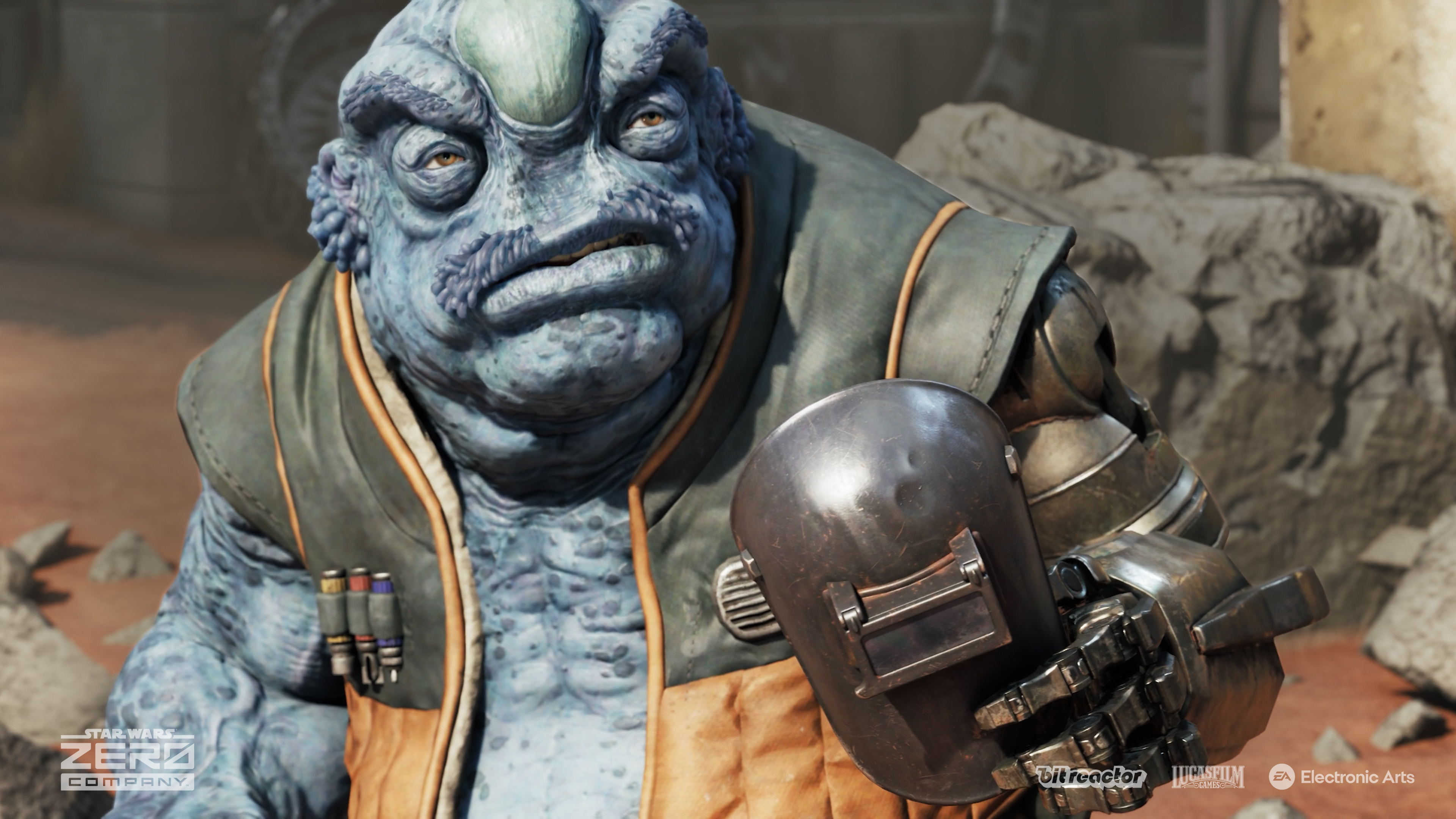
Kabbney "Kabb" Uppercut is a Felshi, a completely new species created for Zero Company. (Image credit: EA | Bit Reactor)
"I wanted that to have a long arc of play over the course of the whole campaign… you’re not just learning to power your characters up, but you’re also having them develop relationships that’s evolving in your head," game directorJames Brawley explained to us. "Characters grow stronger as a result… that’s why they’re able to beat these overwhelming threats, because they know how to work together."
"This is your Star Wars game… how you get there, what you experience, the characters you build, the relationships and bonds you make — they’re all unique to your playthrough."
The team explained that the events of Zero Company take place adjacent to The Clone Wars, in the shadows, using an entire cast of new characters. And indeed, like any good XCOM-like, permadeath is a feature here. If you have two characters that synergize well and unlock powerful abilities as a result, having one of them die not only severs that bond but also deprives you of access to those powerful abilities. The stakes remain incredibly high as a result, in true XCOM-fashion. You'll also lose the resolution of their stories and experiences too, making every playthrough potentially unique (unless you save scum, that is ... but there are auto-saves-only Ironman modes for those who don't want to be enticed into such heretical gameplay styles.)
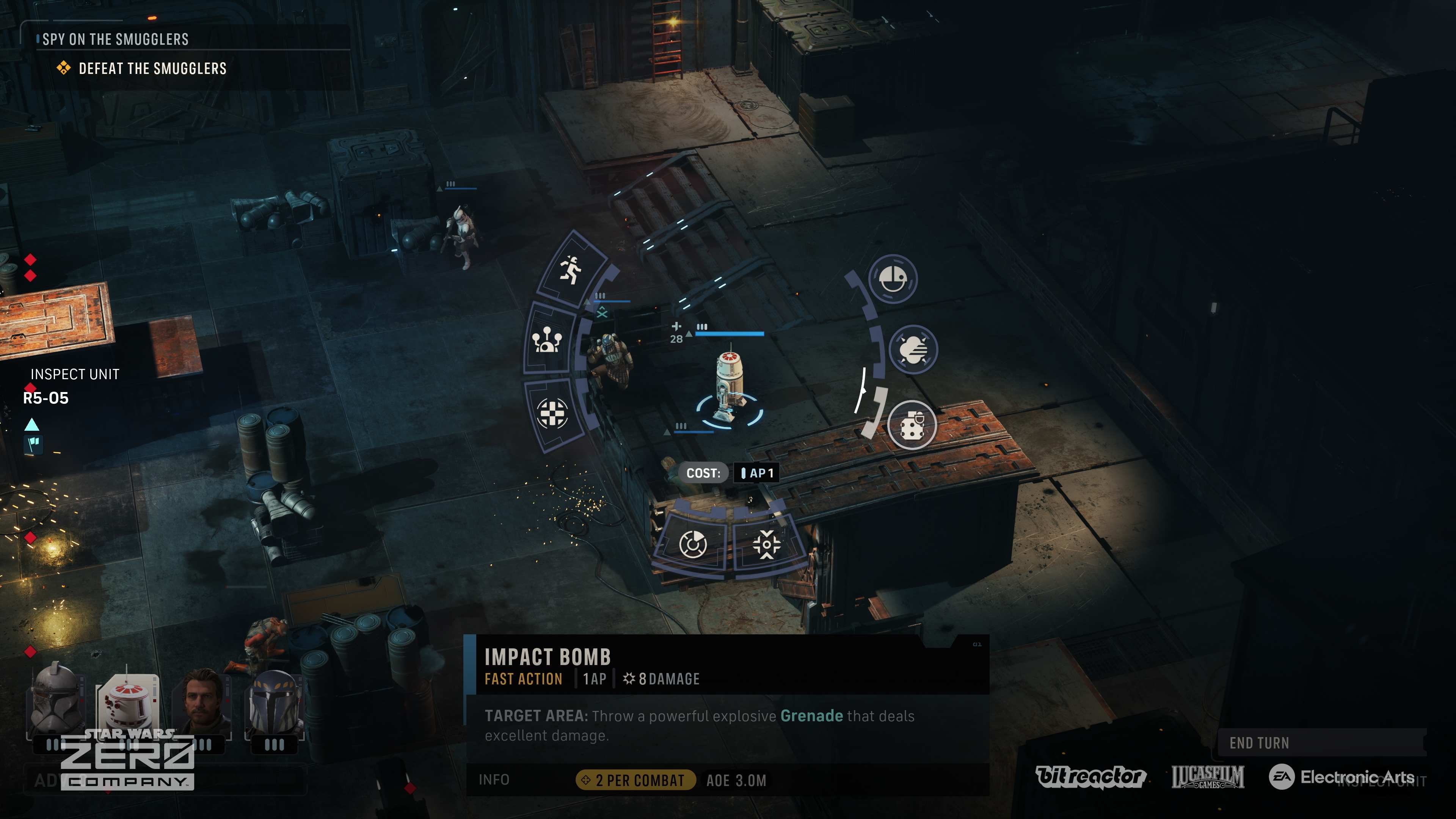
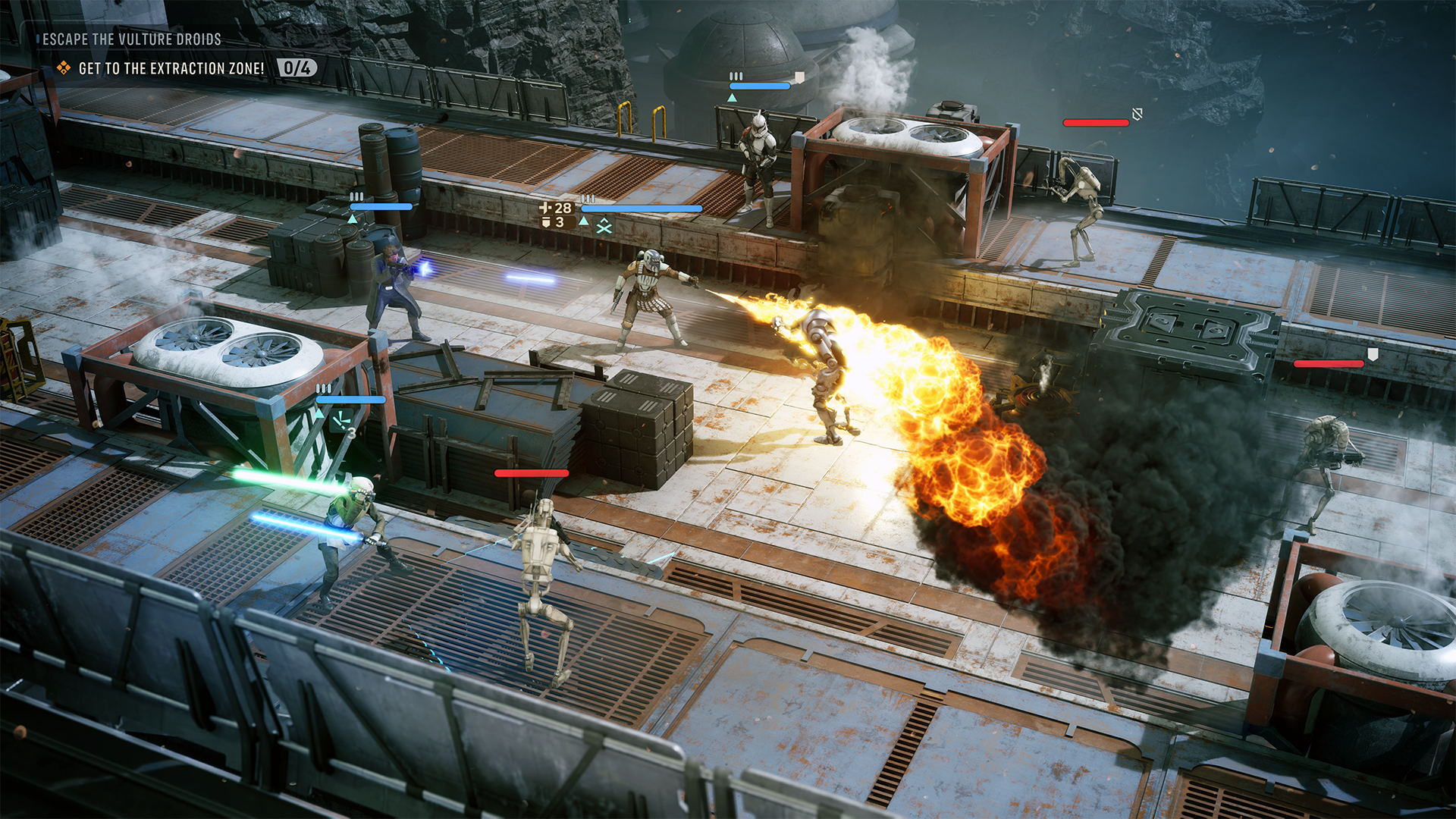
Set up powerful killzones with overwatch commands, and leverage unique Star Wars-inspired abilities to decimate your enemies. (Image credit: EA | Bit Reactor)
I didn't get to experience too much of the combat gameplay, but from what I played, it felt every bit as satisfying and fun as previous official XCOM-style games I've played from the team here. Bit Reactor is comprised of XCOM and Firaxis vets, as noted, and you can feel that pedigree in every aspect of play. The team said Disney was on hand too to verify the Star Wars authenticity but was also incredibly open to Bit Reactor's own agency therein. The team said they "couldn't praise Disney enough," in what sounds like a very productive working relationship.
Disney hasn't always handled the Star Wars IP as well as I would've liked ... but it's hard to deny that they've had some absolute bangers on their hands. Rogue One has been a particular highlight for me, but also the games. Cinematic delivery I'd argue is more important in a Star Wars-adjacent title, which obviously comes with certain expectations. You can expect great characters, a grand adventure across the galaxy, and big cinematic moments sprinkled throughout Zero Company, the developers tell me. But crucially, also dark villains.
The Clone Wars are in full swing in corners of the galaxy, but while bounty hunting, Hawks and his crew get caught up in a uniquely dangerous situation. The separatist-aligned cult known as the Infinite Coil rears its head early on. Its members seem infected with a mysterious space plague that, if I were a betting man, potentially has dark side origins.
"The Clone Wars offered us a place to tell a Star Wars story that touched on canon, but didn’t interfere… it allows people to attach to new characters in a way that hasn’t been done before."
The Jedi Fallen Order franchise has been well-received, and before Vince Zampella's passing, it seemed like EA was on an upward swing with its Star Wars license stewardship. Zero Company looks set to continue that legacy and also maintain the quality bar Jedi Fallen Order established.
In Zero Company, you'll fight separatist forces of all stripes, but the central antagonistic force is a shadowy cult known as the Infinite Coil. (Image credit: EA | Bit Reactor)
Indeed, I was surprised to discover how far Zero Company diverges from the typical XCOM formula from a story perspective, where most of the characters are throwaway soldiers designed to ultimately be expendable. The detailed characterization of the heroes in Zero Company are every bit as cinematic and interesting as any story-heavy action game or big-screen Star Wars experience you might expect.
Zero Company makes heavy use of a traditional third-person over-the-shoulder camera for some of these sequences too, making the game feel almost more like a CRPG in the vein of Baldur's Gate 3 or Wasteland 3, as opposed to a pure tactics game. Tactics games with fixed isometric cameras often come with stylized art given that the camera is zoomed out a lot of the time. Zero Company went deeper on visuals to accommodate its more cinematic delivery, and the results speak for themselves. Zero Company feels painstakingly authentic.
"We should be better looking, not worse. We should be better frame rates, not worse. We should have more stories, more immersion," Bit Reactor explained. "We’re just making a great game — it just happens to be turn‑based.”
If you've never played an XCOM-like before, its RPG systems might be what entices you most
More XCOM-style games please. (Image credit: EA | Bit Reactor)
I was incredibly encouraged by Star Wars: Zero Company's preview cycle. I was immediately drawn to the characters and intrigued by the potential of the game's Bond system. What events and storytelling opportunities would I be able to unlock? What consequences would befall me for mismanaging those bonds and potentially getting some of my heroes killed? What exactly is the Infinite Coil, and what do they want?
Star Wars: Zero Company is a bit of a rarity in 2026, as big publishers chase service games, infinite experience, and microtransaction hellscapes. Take Two itself no longer seems to want to service the XCOM franchise sadly, and other companies that have attempted it have often struggled to broaden their appeal. Truly "AAA"-grade tactics games have become vanishingly rare.
Star Wars is the perfect universe to offer a take on this genre in my view, particularly in the Clone Wars era. But Bit Reactor's clear efforts on the cinematic and story-delivery side give Zero Company broad potential that similar attempts at the turn-based tactics genre have missed in recent years. Baldur's Gate 3-style cinematics and character delivery, atop modern high-quality visuals and focused XCOM-style tactical play? Zero Company has everything I didn't know I needed from this quarter's very busy slate of games.
Star Wars: Zero Company is something every Star Wars and turn-based afficionado should put on their wishlist.
If you have any questions about the game, drop them in the comments and I'll get them answered!
Star Wars Zero Company is a turn-based tactics experience with heavy cinematic leanings. Set in the Clone Wars Star Wars era, lead a merc group across the galaxy seeking fame and fortune, but perhaps finding something darker along the way.
I've spent a lot of time this summer gaming on my Steam Deck. It's hot outside, it's hot inside, and my desktop gaming PC simply creates too much heat.
The only major problem I have with my Steam Deck is that it doesn't play nicely with PC Game Pass, to which I'm a subscriber. Yeah, I could stream games to my handheld, but there's now a better solution in the works.
I'm talking about Xodus, an open-source project that's attempting to build a bridge between PC Game Pass and Linux systems, including the Steam Deck. The project is also attempting to iron out similar issues on macOS. No Windows install needed.
Xodus comes from the developers behind the Heroic Games Launcher, a separate open-source app that brings Epic, GOG, and Amazon Prime titles to Steam Deck (it also works on Windows, macOS, and other Linux systems).
The developers are undoubtedly up against a grind with this project. Xbox PC games that come from the Xbox app rely primarily on a Microsoft Game Development Kit (GDK) runtime, which is a far cry from DirectX and Win32 layers that Valve's Proton already handles quite well.
This Microsoft GDK is really what has kept PC Game Pass from running directly on the Steam Deck (and macOS) for so long.
Is Xodus ready for public release?
Xodus could finally bridge the gap between PC Game Pass and Steam Deck. (Image credit: Rebecca Spear / Windows Centarl)
According to updates shared on the Xodus GitHub page, the developers have cracked Xbox authorization, license checks, and MSIXVC package (the containers that PC games come in) download and decryption.
In a Reddit post, a Xodus developer noted that the team's main focus is now getting the Software Development Kit (SDK) for each title to run through Wine. It appears that Xodus has its own Wine and Proton forks for this purpose, as well as an open-source version of the xgameruntime.dll file that Game Pass games depend on.
Xodus likely won't support all Game Pass games when it launches, either. Older games that eschew GDK and MSIXVC for UWP will likely come later, if at all.
Why I'm so excited to try out Xodus on my Steam Deck
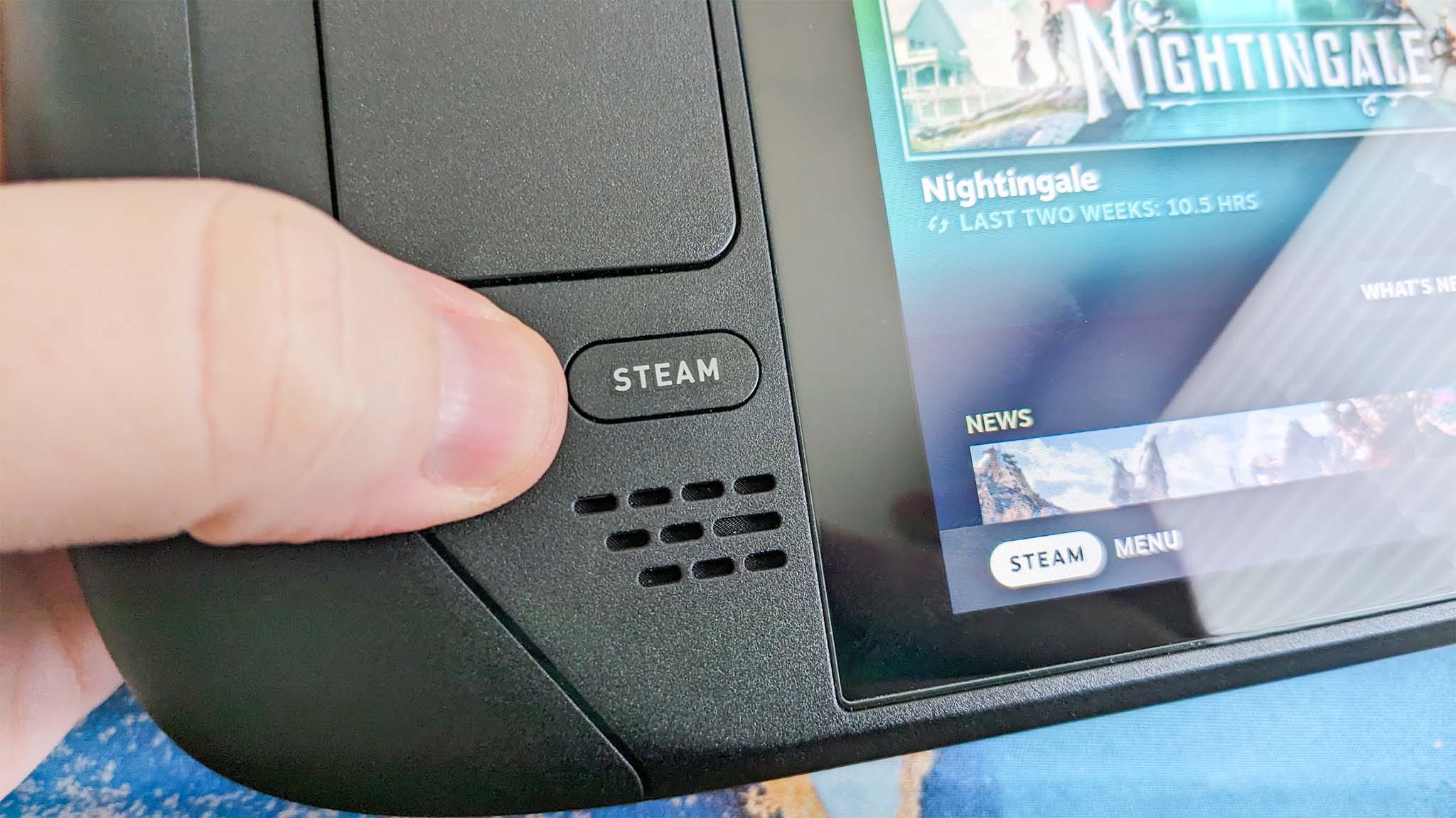
PC Game Pass on Steam would open up a whole lot of new options for gaming on the go. (Image credit: Future)
As mentioned, the biggest drawback to my Steam Deck, aside from its growing age, is its lack of native PC Game Pass support.
Sure, I could upgrade to a newer handheld that natively runs Windows, but it looks like I might not need to quite yet. That's especially exciting considering just how expensive gaming handhelds have become of late.
Then there's the Steam Machine, another Valve device running the Linux-based SteamOS. A whole bunch of gamers recently got their hands on the Steam Machine when it launched in June, and making PC Game Pass an option can only benefit Microsoft.
Here's the rub: Xodus has no affiliation with Microsoft. It's an unofficial community project created by independent developers. Does that mean Microsoft will have a problem with it? Not likely, but you never can tell.
Xodus still doesn't have an official release date, but it's something I'll be keeping my eyes on as it progresses. If you're a Linux gamer who wishes they could use PC Game Pass natively, you'll definitely want to keep watch as well.
What do you think about Xodus as a bridge between Steam Deck/Machine and PC Game Pass? Is it something you'd use regularly? Do you already have an alternative method that works better for you? Let me know in the comments section below!
AI startup Manus said on Tuesday that it will “soon return to operating as an independent company,” implying it is close to finalizing the reversal of its acquisition by Meta Platforms. The Chinese government in April ordered the deal be unwound.
In a blog post, Manus said users need to back up ...
New research finds that by making the fossil fuel industry more productive, AI could help increase carbon emissions by up to nearly 5 percent—vastly outpacing the impact of data centers.
Spotify non impedisce il caricamento della musica IA e non può neanche verificarla automaticamente, ma ha deciso di lasciare fuori dalle raccomandazioni gli artisti IA... Leggi tutto
Le sacaron algunas fotos, se llevaron un par de huesos sueltos y dejaron el resto expuesto al viento y la lluvia polar. Nadie volvió a pensar en ese fósil durante 37 años, hasta que un grupo de geólogos noruegos tropezó con él por pura casualidad. Ni ellos, ni nadie, imaginó en ese momento que estaban por reescribir el árbol genealógico de uno de los grupos de depredadores acuáticos más extraños del Triásico
Durante más de un siglo, los investigadores supieron que el Códice de Dresde contenía una extraordinaria tabla de eclipses, pero no estaba claro cómo los astrónomos mayas conseguían mantenerla precisa durante generaciones. Un nuevo análisis encontró la clave: no reiniciaban sus cálculos desde cero, sino que superponían ciclos lunares estratégicamente.
Australia's growing mountain of solar panel waste could become far more valuable, with University of Newcastle researchers taking a major step toward making solar panel recycling economically sustainable. The team has successfully scaled up a process that recovers valuable silver from end-of-life solar panels, demonstrating almost 100% silver recovery during the world's first continuous pilot-scale flotation trial for solar-panel recycling.

 Login
Login