Reading view

WWDC: What can developers expect?

Apple will open the doors to developers at its Worldwide Developer Conference (WWDC) next week. Beyond a big push on AI and new OSes focused on stability and performance, what should developers expect? Mostly it’s about new APIs, Foundation Models, and App Intents; here’s what I’ve been able to figure out so far.

Foundation Models

Apple has been building new Apple Intelligence APIs. One way it is achieving this is to take models made with Google Gemini, then distill and shrink them to fit inside (and run on) its devices. The progression will be to introduce these as a new crop of Foundation models developers can use in their apps. There’s more:

  • New APIs mean developers will be able to run Apple Intelligence tools such as summarization directly on the customer device, all offline, all private.
  • Developers that use Apple’s standard text editing/entry views will gain access to improved Apple-developed tools inside their apps without custom-coding.
  • Because intelligence takes place on the user’s device, neither developers nor users will need to pay for those AI tokens. This is a distinct cost and privacy-saving advantage for customers and developers.

App Intents: The next generation

Apple continues on its quest to convince developers to make features of their apps available for use via Siri with App Intents. Doing so requires developers to wrap their apps into semantic structures, enabling speech/text-based interaction. To help them achieve this, Apple is expected to introduce a complete redesign of its App Intents framework.

Speak as you wish

While users must say “Hey Siri” to invoke its attention today, the assistant will respond more dynamically to natural language. Combined with App Intents, that means users should be able to ask Siri to use a combination of apps to make things happen on the device.

A developer might build a travel app that can take an itinerary and hand it across to a budgeting tool, for example. The idea is that with a spoken or typed command, a person will be able to call on a collection of apps to identify the destination, create an itinerary, put together a to-do list, prepare relevant letters or emails, and assemble a budget — all invoked by the original command.

What about context?

We’re expecting Siri to become better at using the content of your screen, location, and other personal data as it seeks to provide more contextualized responses. We don’t yet know the extent or form in which Apple will make that information available to third-party developers to help contextualize their own apps. Apple’s focus on privacy matters a great deal, as does its relationship with regulators, some of whom will demand that data made available to Apple’s own apps be made available to third-party apps. These are important matters for Apple, app developers, and customers who want the convenience of AI without loss of privacy.

More consistent UI tools on Swift

Swift should get better at migrating legacy code, but the big speculation around it concerns Liquid Glass. Will Swift make it easier for developers to build consistent user interfaces that work properly across all Apple’s platforms? If it does, then it will help overcome one of the big criticisms of Apple’s liquid-inspired UI. Swift will also usher in the tools developers need to support agentic application coding.

Better vibes for Xcode

Vibe coding is everywhere, including within Xcode, which is expected to gain improved contextual and predictive understanding to help boost developer productivity. Xcode could also  introduce improved real-time architectural debugging hints, aiming to make it easier for developers to build bug-free apps.

A Mac you can wear: Vision OS

All the AI enhancements made available across Apple’s other products will also be offered to visionOS. That access takes the headset another step closer to becoming the Mac you wear like sunglasses.

Elsewhere

  • A new Camera API means developers can build specialized, interactive buttons that users can deploy directly within the native iOS Camera interface. This should be a great way to use more sophisticated camera apps more naturally.
  • Wallet Pass means apps will be able to ingest things like barcodes or gym passes for use within Wallet.
  • Icon Composer might offer more tools designed to promote consistency.

Intel finally retires

Apple will abandon Intel support in macOS 27, which means developers will likely end support for legacy Intel applications in response.

After the gold rush

Once the lights go down on WWDC, Apple’s real test will be to see if its announcements help make AI useful, private, and affordable to developers and their customers. After all, if Apple gets AI right on a platform basis, it should be able to offer the kind of on-device intelligence no one else can match, at no charge to developers or users — a move that might yet kick-start AI innovation across its platforms. This will provide a moat around the Apple ecosystem, inside which developers can explore new potentials for AI to give customers the tools they need at costs they can afford.

You can follow me on social media! Join me on BlueSky,  LinkedInMastodon, and MeWe

  •  

Intel stakes new claim in physical AI with robotics chips

Intel is invading the physical AI space with a reentry into the robotics market it quit many years ago amid financial struggles.

The robotics strategy is part of the company’s larger plan to establish AI on the “edge,” in which devices have the computing capability to run AI locally. Many devices lack AI capabilities and have to offload processing to the cloud.

The chipmaker said its Intel Series 3 processors are now in 130 edge AI and robotics designs. It also had a design win with SensoryAI, which provides technology for robots that include Ella, a robotic barista made by Crown Digital.

The company’s Core Ultra Series 3 processors are derivatives of chip designs intended for laptops. But Intel has achieved a level of power efficiency for long battery life that allows those chips to be adapted for handheld devices and laptops.

Intel also said it can build advanced robotics chips thanks to its latest manufacturing technologies.

For example, many robotic functions, such as computer vision and real-time controls, can be integrated into a single chip. Previously, functions like graphics and movement and control were distributed among different cores in a chip.

SensoryAI, for example, has a chip architecture that provides the robotic barista — which is more like a robotic arm — with AI capabilities, Intel said.

The main “Avatar” agent handles customers as the main “Ella” agent reasons and executes the task. If Ella encounters errors, it passes on the issue to a Guardian agent, which helps with the recovery. Some issues could include making sense of an order, or cups that might be stuck. 

The three agents are embedded in a single piece of Core Ultra Series 3 silicon.

Intel is displaying some of those robots at the Computex trade show in Taiwan. The company shared a video of a humanoid-style robot from the floor in a X.com post  

This is not Intel’s first attempt at the robotics market. Intel sold robotics chips and kits when it was a dominant chip player in the field, but curtailed efforts in 2021 after Pat Gelsinger took over as CEO and restructured the company to focus on manufacturing.

Robotics is now back on the menu under new Intel CEO Lip-Bu Tan, who replaced Gelsinger last year. He has restructured to company to focus on high-growth areas that can generate high returns.

A Morgan Stanley study last year indicated the robotics market could be worth $5 trillion by 2050 — and more than 1 billion humanoid robots could be in operation. 

Robots are seen to improve human productivity and manufacturing output. For example, they could help factories that are facing labor shortages or be used to complete tasks that are dangerous

However, challenges remain. There isn’t yet enough real-world data to train robots to do targeted work. And the AI models — generally called world models — they will need are still under development. 

Training robots to do a specific job requires a sequence of events to happen in succession without any errors. Companies are still training robots to spot and understand errors, analyze possible resolutions, and take the right corrective action.

  •  

Windows 11 Insider Previews: What’s in the latest build?

Windows 11 25H2 has been publicly released, but behind the scenes, Microsoft is constantly working to improve the newest version of Windows. The company frequently rolls out preview builds to members of its Windows Insider Program, allowing them to test out — and help shape — upcoming features.

Skip to the latest builds

Our story “How to preview and deploy Windows 10 and 11 updates” details how the Insider program has worked until now. However, Microsoft recently announced sweeping changes to the program that will include the ability to select which new features to test. As the first step, the company is introducing a new channel system and transitioning Insiders like so:

  • Beta Channel > Beta 
  • Dev Channel > Experimental
  • Canary Channel (28000 series) > Experimental (26H1)
  • Canary Channel (29500 series) > Experimental (Future Platforms)
  • Release Preview Channel (for devices on Windows 11 versions 24H2 and 25H2 > Release Preview 24H2/25H2
  • Release Preview Channel (for devices on Windows 11 version 26H1 > Release Preview 26H1

This transition is happening over time, starting with the Dev Channel. See Microsoft’s blog post for more information about the transition.

Below you’ll find information about the Windows 11 preview builds that have been announced by Microsoft in the past six months. For each build, we’ve included the date of its release, which Insider channel it was released to, a summary of what’s in the build, and a link to Microsoft’s announcement about it.

Note: If you’re looking for information about updates being rolled out to all Windows 11 users, not preview builds for Windows Insiders, see “Windows 11: A guide to the updates.”

The latest Windows 11 Insider preview builds

Windows 11 Insider Preview Build 26220.8544

Release date: May 29, 2026

Released to: Beta Channel

Several minor new improvements and fixes are being rolled out in this build, including consistent solid (donut) spinners across key Windows scenarios including Boot, Logon, Restart, Shutdown, and Update. This update replaces legacy spinner visuals to deliver a more cohesive experience aligned with Windows design standards. Users will now see a unified spinner behavior with corresponding status text (e.g., “Restarting”, “Working on updates”, “Welcome”).

(Get more info about Windows 11 Insider Preview Build 26220.8544.)

Windows 11 Insider Preview Build 26300.8553

Release date: May 29, 2026

Released to: Experimental Channel (formerly Dev)

Several minor new features are being rolled out gradually in this build, including a number of changes to the Start menu. These were first outlined in the May 15 Insider blog post Making Taskbar and Start more personal. They include:

  • “Recommended” section renamed to “Recent” in Start and Settings page
  • Section-level toggles to independently show or hide Pinned, Recommended, and All
  • Choose between a small and large Start menu, in addition to already available “Automatic (default)” setting
  • Option to hide your name and profile picture in Start
  • Redesigned Start menu settings page

One known issue, in which resetting your PC may have gotten stuck when using “Reset this PC,” has been fixed.

(Get more info about Windows 11 Insider Preview Build 26300.8553.)

Windows 11 Insider Preview Build 28020.2207

Release date: May 29, 2026

Released to: Experimental 26H1 Channel (formerly Canary)

This update, in Microsoft’s words, “includes a small number of minor bug fixes and improvements.”

(Get more info about Windows 11 Insider Preview Build 28020.2207.)

Windows 11 Insider Preview Build 29599.1000

Release date: May 29, 2026

Released to: Experimental Future Platforms Channel (formerly Canary optional 29500)

This build gradually rolls out several minor changes and improvements that, in the words of Microsoft, include “platform changes in moving to a new active development build.” The update also gradually rolls out a fix for a bug in which some Insiders unexpectedly saw an erroneous message saying they weren’t connected to internet (when they actually were) when signing into their Microsoft account in certain apps. It also improves CPU speed display on the Performance page of Task Manager for VMs, so it doesn’t show higher than unexpected numbers after resuming from hibernate.

There is one known issue that causes crashes with AMD machines supporting System Guard, so these devices in Windows Information Protection will not be offered the build.

(Get more info about Windows 11 Insider Preview Build 29599.1000.)

Windows 11 Insider Preview Build 26220.8491

Release date: May 22, 2026

Released to: Beta Channel

This update, in Microsoft’s words, “includes a small number of minor bug fixes and improvements.” It introduces Voice Isolation, a new option in Voice Access that helps the tool focus on your voice, even when others are speaking nearby, by filtering out other voices and background noise.

Microsoft says the single known issue with this release, in which your PC could have gotten stuck when using “Reset this PC,” has been fixed.

(Get more info about Windows 11 Insider Preview Build 26220.8491.)

Windows 11 Insider Preview Build 26300.8497

Release date: May 22, 2026

Released to: Experimental Channel (formerly Dev)

A variety of new features are being rolled out gradually in this build, including several to improve accessibility. Among them are making it easier to connect the Braille display to Narrator by using the HID open industry standard for Braille displays. If your display supports HID, connect it via USB, with no additional setup required. For Bluetooth, pair your HID Braille display in Settings > Bluetooth & devices just like any other accessory. Another new feature is Voice Isolation in Voice Access, as detailed for Beta Channel Build 26220.8491 above.

The build has one known issue, in which your PC may get stuck when using “Reset this PC.” To complete the reset successfully, choose the cloud download option (Cloud PBR) instead of local.

(Get more info about Windows 11 Insider Preview Build 26300.8497.)

Windows 11 Insider Preview Build 28020.2149

Released to: Experimental 26H1 Channel (formerly Canary)

Release date: May 22, 2026

This build, for Insiders using Windows 11 26H1, gradually rolls out a wide variety of new features, including one that improves the reliability of explorer.exe when closing the input switcher, and when switching between multiple desktops.

Microsoft says the single known issue with this release, in which your PC could have gotten stuck when using “Reset this PC,” has been fixed.

(Get more info about Windows 11 Insider Preview Build 28020.2149.)

Windows 11 Insider Preview Build 29595.1000

Release date: May 22, 2026

Released to: Experimental Future Platforms Channel (formerly Canary optional 29500)

This build, in the words of Microsoft, “includes platform changes in moving to a new active development build.”

(Get more info about Windows 11 Insider Preview Build 29595.1000.)

Windows 11 Insider Preview Build 26220.8474

Release date: May 15, 2026

Released to: Beta Channel

Several minor new improvements are being rolled out in this build, including one that improves the reliability of Simple Service Discovery Protocol (SSDP) notifications to help prevent the service from becoming unresponsive.

It has one known issue in which your PC may get stuck when using “Reset this PC.” To complete the reset successfully, choose the cloud download option (Cloud PBR) instead of local.

(Get more info about Windows 11 Insider Preview Build 26220.8474.)

Windows 11 Insider Preview Build 26300.8493

Release date: May 15, 2026

Released to: Experimental Channel (formerly Dev)

A variety of new features are being rolled out gradually in this build, including the ability to change the position of taskbar on your screen. In Settings > Personalization > Taskbar > Taskbar Behaviors, you can select the side of the screen you want your taskbar on: bottom, top, left, or right. In these other positions, tooltips, flyouts, and animations will still come from the taskbar, and most customization settings like “small taskbar” and “never combine taskbar icons” will work with all locations.

It has one known issue in which your PC may get stuck when using “Reset this PC.” To complete the reset successfully, choose the cloud download option (Cloud PBR) instead of local.

(Get more info about Windows 11 Insider Preview Build 26300.8493.)

Windows 11 Insider Preview Build 28020.2134

Release date: May 15, 2026

Released to: Experimental 26H1 Channel (formerly Canary)

This build gradually rolls out an improvement in the reliability of Simple Service Discovery Protocol (SSDP) notifications to help prevent the service from becoming unresponsive. It also rolls out gradual changes to updating Windows, including the ability to skip updates immediately during the out of box experience (OOBE) and to extend update pauses as many times as you need.

It has one known issue in which your PC may get stuck when using “Reset this PC.” To complete the reset successfully, choose the cloud download option (Cloud PBR) instead of local.

(Get more info about Windows 11 Insider Preview Build 28020.2134.)

Windows 11 Insider Preview Build 29591.1000

Release date: May 15, 2026

Released to: Experimental Future Platforms Channel (formerly Canary optional 29500)

This build introduces new features for Windows Update, including the ability to skip updates immediately during the out of box experience (OOBE) and to extend update pauses as many times as you need. New Windows update features also include having always available options to shut down and restart with updating, and additional insight about available updates to make more informed installation decisions.

(Get more info about Windows 11 Insider Preview Build 29591.1000.)

Windows 11 Insider Preview Builds 26200.8514/26200.8514

Release date: May 14, 2026

Released to: Release Preview 24H2/25H2 Channel

A wide variety of features and enhancements are being gradually rolled out in this build, including a new shared audio feature that allows two people to listen to the same audio from a single Windows 11 PC at the same time. In addition, Task Manager now offers improved visibility into NPU usage on PCs with an NPU. New optional NPU and NPU Engine columns are available on the Processes, Users, and Details pages, along with NPU Dedicated Memory and NPU Shared Memory optional columns on the Details page. 

One new feature is being rolled out immediately, in which Windows quality updates now include additional high-confidence device targeting data, increasing coverage of devices eligible to automatically receive new Secure Boot certificates. Devices receive the new certificates only after demonstrating sufficient successful update signals, maintaining a controlled and phased rollout.

(Get more info about Windows 11 Insider Preview Builds 26200.8514/26220.8514.)

Windows 11 Insider Preview Build 28000.2173

Released to: Release Preview 26H1 Channel

Release date: May 14, 2026

This build, for Insiders using Windows 11 26H1, gradually rolls out a wide variety of new features, including one that expands the list of archive formats that can be used in File Explorer to include uu, cpio, xar, and NuGet Packages (nupkg). Also being gradually rolled out is a new way to monitor your agents from the taskbar. It supports agents across first- and third-party apps, with Researcher in the Microsoft 365 Copilot app as the first adopter.

One new feature is being rolled out immediately, in which Windows quality updates now include additional high-confidence device targeting data, increasing coverage of devices eligible to automatically receive new Secure Boot certificates. Devices receive the new certificates only after demonstrating sufficient successful update signals, maintaining a controlled and phased rollout.

(Get more info about Windows 11 Insider Preview Build 28000.2173.)

Windows 11 Insider Preview Build 26220.8370

Release date: May 8, 2026

Released to: Beta Channel

Several minor new improvements are being gradually rolled out in this build, including improved reliability of Japanese IME usage when Administrator Protection is enabled. In addition, the build fixes a single bug, in which there were notification issues and certain apps hung on launch.

(Get more info about Windows 11 Insider Preview Build 26220.8370.)

Windows 11 Insider Preview Build 26300.8376

Release date: May 8, 2026

Released to: Experimental Channel (formerly Dev)

A variety of new features are being rolled out gradually in this build, including new File Explorer address bar support for paths containing double backslashes and quotation marks (for example, C:\Users\user or “C:\Users\user”), improving compatibility with a wider range of inputs.

(Get more info about Windows 11 Insider Preview Build 26300.8376.)

Windows 11 Insider Preview Build 28020.2075

Release date: May 8, 2026

Released to: Experimental 26H1 Channel (formerly Canary)

This build gradually rolls out, in Microsoft’s words, “a small set of general improvements and fixes that improve the overall experience” of running Windows 26H1. It also improves performance when opening clipboard history.

(Get more info about Windows 11 Insider Preview Build 28020.2075.)

Windows 11 Insider Preview Build 29585.1000

Release date: May 6, 2026

Released to: Experimental Future Platforms Channel (formerly Canary optional 29500)

This build gradually rolls out, in Microsoft’s words, “platform changes in moving to a new active development build.”

It also updates the experience when you use voice typing with the touch keyboard. To reduce distractions, the new design removes the previous full‑screen overlay and instead shows voice typing animations directly on the dictation key.

(Get more info about Windows 11 Insider Preview Build 29585.1000.)

Windows 11 Insider Preview Build 26220.8340

Release date: May 1, 2026

Released to: Beta Channel

Several minor new improvements are being gradually rolled out in this build, including making Windows ShareSheet more intelligent for Azure Active Directory (AAD) users, with a simple setting to turn promotional app recommendations on or off. Previously, that capability was only available to Windows users with Managed Service Accounts (MSA).

(Get more info about Windows 11 Insider Preview Build 26220.8340.)

Windows 11 Insider Preview Build 26300.8346

Release date: May 1, 2026

Released to: Experimental Channel (formerly Dev)

A variety of new features are being rolled out gradually in this build, including making Windows ShareSheet more intelligent for Azure Active Directory (AAD) users, with a simple setting to turn promotional app recommendations on or off. Previously, that capability was only available to Windows users with Managed Service Accounts (MSA). Another change “quiets” the default behavior for Widgets, with the goal of making them feel less distracting and overwhelming.

There are several known issues in this build, including one in which Insiders who use Feature flags to enable the new WIP experience may see the feature state incorrectly marked as current; however, changing state and applying changes will work as expected.

(Get more info about Windows 11 Insider Preview Build 26300.8346.)

Windows 11 Insider Preview Build 28020.1921

Release date: May 1, 2026

Released to: Experimental 26H1 Channel (formerly Canary)

This build gradually rolls out several improvements to Task Manager, including one that provides better insight into NPU usage for PCs that include an NPU. Optional NPU and NPU Engine columns are now available on the Processes, Users, and Details pages, with optional NPU Dedicated Memory and NPU Shared Memory columns on the Details page to give you deeper visibility into how workloads are using NPU resources. Additionally, if there are neural engines that are part of a GPU, they will now appear on the Performance page, providing a more complete view of AI‑related system activity.

(Get more info about Windows 11 Insider Preview Build 28020.1921.)

Windows 11 Insider Preview Build 29580.1000

Release date: May 1, 2026

Released to: Experimental Future Platforms Channel (formerly Canary optional 29500)

This build gradually rolls out, in Microsoft’s words, “a small set of general improvements and fixes that improve the overall experience for Insiders running this build on their PCs.”

(Get more info about Windows 11 Insider Preview Build 29580.1000.)

Windows 11 Insider Preview Build 26220.8283

Release date: April 24, 2026

Released to: Beta Channel

Several minor new improvements and fixes are being gradually rolled out in this build, including improved detection of clicks at the leftmost edge of the taskbar to invoke the Start menu when the taskbar icons are left-aligned.

(Get more info about Windows 11 Insider Preview Build 26220.8283.)

Windows 11 Insider Preview Build 26300.8289

Release date: April 24, 2026

Released to: Experimental Channel (formerly Dev)

In a phased rollout, Insiders in the Dev Channel are being moved to the new Experimental channel. Insiders who do not see the new experience on their device can enable it under Settings > Windows Update > Windows Insider Program > Feature flags.

Several minor new features are also being rolled out gradually in this build, including improved detection of clicks at the leftmost edge of the taskbar to invoke the Start menu when the taskbar icons are left-aligned.

There is one known issue in this build: Insiders who use Feature flags to enable the new Insider experience may see the feature state incorrectly marked as current; however, changing the state and applying changes should work as expected.

(Get more info about Windows 11 Insider Preview Build 26300.8289.)

Windows 11 Insider Preview Build 28200.1873

Release date: April 24, 2026

Released to: Experimental 26H1 Channel (formerly Canary)

This build is gradually rolling out a variety of small improvements, including an updated voice typing experience for the touch keyboard. To reduce distractions, the new design shows voice typing animations directly on the dictation key rather than on a full-screen overlay.

It also fixes a bug in which Settings > Network & Internet > Data Usage showed large, unrealistic values.

(Get more info about Windows 11 Insider Preview Build 28200.1873.)

Windows 11 Insider Preview Build 29576.1000

Release date: April 24, 2026

Released to: Experimental Future Platforms Channel (formerly Canary optional 29500)

This build is gradually rolling out a variety of changes, including Point-in-time restore for Windows, which can quickly roll your device back to a previous state, potentially helping minimize downtime and simplify troubleshooting when disruptions strike. 

(Get more info about Windows 11 Insider Preview Build 29576.1000.)

Windows 11 Builds 26100.8313 and 26200.8313 (KB5083631) 

Release date: April 17, 2026

Released to: Release Preview Channel

This build introduces a wide variety of new features rolled out gradually, including a new way to monitor your agents from the taskbar. It supports agents across first- and third-party apps, with Researcher in the Microsoft 365 Copilot app as the first adopter. When Researcher works on a report, Windows shows progress on the taskbar so you can check updates at a glance.

For IT administrators, the update gradually rolls out support for a dynamic app removal list to the “Remove Default Microsoft Store packages” policy for Windows Enterprise and Education. It also removes default trust for cross‑signed third-party drivers, while drivers from the Windows Hardware Compatibility Program (WHCP) and an allow list of trusted legacy drivers remain allowed. Enterprise State Roaming can now be managed through Windows Backup for Organizations policies.

The update also immediately introduces two minor improvements for everyone. Windows quality updates now include additional high-confidence device targeting data, which increases coverage of devices eligible to automatically receive new Secure Boot certificates. In Windows Security, the name of the affected application is now included in event logging related to CVE‑2024‑30098. This change makes it easier to identify applications that rely on smart card certificates and may need updates following recent security changes.

(Get more info about Windows 11 Builds 26100.8313 and 26200.8313.)

Windows 11 Insider Preview Build 26220.8271

Release date: April 17, 2026

Released to: Beta Channel

Several minor new features were made available in this build for those who have turned the toggle on to receive the latest updates, including improved reliability and performance of Windows Hello fingerprint after your PC wakes from sleep.

(Get more info about Windows 11 Insider Preview Build 26220.8271.)

Windows 11 Insider Preview Build 26300.8276

Release date: April 17, 2026

Released to: Dev Channel

In this build, several minor new features are being gradually rolled for those who have turned the toggle on to receive the latest updates, including improved reliability and performance of Windows Hello fingerprint after your PC wakes from sleep.

(Get more info about Windows 11 Insider Preview Build 26300.8276.)

Windows 11 Insider Preview Build 28020.1863

Release date: April 17, 2026

Released to: Canary Channel

For those who have turned the toggle on to receive the latest updates, this build fixes a bug that prevented some apps from signing in due to a false report of no internet connectivity. The fix is rolling out gradually.

(Get more info about Windows 11 Insider Preview Build 28020.1863.)

Windows 11 Insider Preview Build 29570.1000

Release date: April 17, 2026

Released to: Canary Channel (29500 build series)

For those who have turned the toggle on to receive the latest updates in the Canary Channel on the optional 29500 build series, this build has a variety of minor changes rolling out gradually, including more widget options and support for lock screen widget personalization, a new setting in Settings > Bluetooth & Devices > Touchpad that lets you can choose how large the right-click zone is, and support for a dynamic app removal list to the “Remove Default Microsoft Store packages” policy for Windows Enterprise and Education.

(Get more info about Windows 11 Insider Preview Build 29570.1000.)

Windows 11 Insider Preview Build 26220.8165

Release date: April 10, 2026

Released to: Beta Channel

For those who have turned the toggle on to receive the latest updates, this build gradually rolls out several minor features, including one in which the size limit for formatting FAT32 volumes via the command line has increased from 32GB to 2TB, and another in which the Windows Security app gets new badges and text that reflect your device’s Secure Boot state and certificate status.

It also gradually rolls out a fix for a bug that caused Settings > Network & Internet > Data Usage to show large, unrealistic values.

(Get more info about Windows 11 Insider Preview Build 26220.8165.)

Windows 11 Insider Preview Build 26300.8170

Release date: April 10, 2026

Released to: Dev Channel

For those who have turned the toggle on to receive the latest updates, this build gradually rolls out several minor features, including one in which the size limit for formatting FAT32 volumes via the command line has increased from 32GB to 2TB, and another in which the Windows Security app gets new badges and text that reflect your device’s Secure Boot state and certificate status.

It also gradually rolls out a fix for a bug that caused Settings > Network & Internet > Data Usage to show large, unrealistic values.

(Get more info about Windows 11 Insider Preview Build 26300.8170.)

Windows 11 Insider Preview Build 28020.1812

Release date: April 10, 2026

Released to: Canary Channel

For those who have turned the toggle on to receive the latest updates, this build gradually rolls out general improvements and fixes, including a new setting that lets users choose the size of their touchpad’s right-click zone, as well as new badges and text in the Windows Security app that reflect your device’s Secure Boot state and certificate status.

(Get more info about Windows 11 Insider Preview Build 28020.1812.)

Windows 11 Insider Preview Build 29565.1000

Release date: April 10, 2026

Released to: Canary Channel (29500 build series)

For those who have turned the toggle on to receive the latest updates in the Canary Channel on the optional 29500 build series, this build includes “platform changes in moving to a new active development build,” as well as new badges and text in the Windows Security app that reflect your device’s Secure Boot state and certificate status

(Get more info about Windows 11 Insider Preview Build 29565.1000.)

Windows 11 Insider Preview Build 26220.8148

Release date: April 3, 2026

Released to: Beta Channel

For those who have turned the toggle on to receive the latest updates, this build gradually rolls out several minor features, including a new icon in print settings to indicate when a printer supports Windows Protected Print Mode.

Several bugs are also being fixed, including one in which some apps weren’t able to sign in, citing an internal connection issue when internet was actually connected.

(Get more info about Windows 11 Insider Preview Build 26220.8148.)

Windows 11 Insider Preview Build 26300.8155

Release date: April 3, 2026

Released to: Dev Channel

For those who have turned the toggle on to receive the latest updates, this build gradually rolls out several minor features, including one in which users will be able to feel haptic feedback effects on compatible input devices while performing certain actions, such as aligning objects in PowerPoint, window snapping, resizing, or hovering over the Close button. These haptic effects can be configured in Settings under Bluetooth & devices > Mouse > Haptic signals.

Several bugs have also been fixed, including one in which some apps weren’t able to sign in, citing an internal connection issue when internet was actually connected.

(Get more info about Windows 11 Insider Preview Build 26300.8155.)

Windows 11 Insider Preview Build 28020.1803

Release date: April 3, 2026

Released to: Canary Channel

For those who have turned the toggle on to receive the latest updates in the Canary Channel, this build includes a small set of general improvements and fixes, including improved reliability for configuring the fluid dictation option in voice typing settings.

(Get more info about Windows 11 Insider Preview Build 28020.1803.)

Windows 11 Insider Preview Build 29560.1000

Release date: April 3, 2026

Released to: Canary Channel (29500 build series)

For those who have turned the toggle on to receive the latest updates in the Canary Channel on the optional 29500 build series, this build “includes platform changes in moving to a new active development build,” in the words of Microsoft. Several bugs have also been fixed, including one in which attached USB devices weren’t working for some Insiders.

(Get more info about Windows 11 Insider Preview Build 29560.1000.)

Windows 11 Insider Preview Build 26220.8138

Release date: March 30, 2026

Released to: Beta Channel

For those who have turned the toggle on to receive the latest updates, this build gradually rolls out several new features, including one in which you can enable Administrator Protection in Settings under Privacy & security > Windows Security > Account protection and switching the toggle to on. A restart will be required. 

(Get more info about Windows 11 Insider Preview Build 26220.8138.)

Windows 11 Insider Preview Build 26300.8142

Release date: March 30, 2026

Released to: Dev Channel

For those who have turned the toggle on to receive the latest updates, this build gradually rolls out several new features, including one in which you can enable Administrator Protection in Settings under Privacy & security > Windows Security > Account protection and switching the toggle to on. A restart will be required. 

(Get more info about Windows 11 Insider Preview Build 26300.8142.)

Windows 11 Insider Preview Build 28020.1797

Release date: March 30, 2026

Released to: Canary Channel

This update, in the words of Microsoft, “includes a small set of general improvements and fixes that improve the overall experience” of running Windows 11.

(Get more info about Windows 11 Insider Preview Build 28020.1797.)

Windows 11 Insider Preview Build 29558.1000

Release date: March 30, 2026

Released to: Canary Channel (29500 build series)

For those who have turned the toggle on to receive the latest updates in the Windows 11 Insider Canary Channel on the optional 29500 build series, this build introduces several new features, including a variety of improvements to the Windows Console, many of which were created by open-source contributors. Several bugs have also been fixed, including an authentication error people received when trying to connect to Azure Virtual Desktop.

(Get more info about Windows 11 Insider Preview Build 29558.1000.)

Windows 11 Insider Preview Build 26220.8079

Release date: March 20, 2026

Released to: Beta Channel

For those who have turned the toggle on to receive the latest updates, this build gradually rolls out several bug fixes, including for one in which the Network and Sharing Center incorrectly displayed two active Wi-Fi connections after switching from one Wi-Fi network to another. The Network and Sharing Center now correctly shows a single active Wi-Fi connection when you connect to a new network. 

(Get more info about Windows 11 Insider Preview Build 26220.8079.)

Windows 11 Insider Preview Build 26300.8085

Release date: March 20, 2026

Released to: Dev Channel

For those who have turned the toggle on to receive the latest updates, this build resumes rollout of the Point Indicator Accessibility setting, which enables low-vision users to easily locate and use their cursor. The build also introduces the new Feedback Hub, which offers Insiders simpler navigation and feedback submission flows.

In addition, several bugs were fixed, including one in which the Network and Sharing Center incorrectly displayed two active Wi-Fi connections after switching from one Wi-Fi network to another. The Network and Sharing Center now correctly shows a single active Wi-Fi connection when you connect to a new network.

(Get more info about Windows 11 Insider Preview Build 26300.8085.)

Windows 11 Insider Preview Build 28020.1743

Release date: March 20, 2026

Released to: Canary Channel

For those who have turned the toggle on to receive the latest updates, this build includes several new features being rolled out gradually, including one in which shared audio now provides individual sliders for each listener which adjusts their volume without affecting the other. You can continue to adjust volume for both listeners at the same time through the main volume controls available through Quick Settings or on-device and keyboard controls.

The build also introduces the new Feedback Hub, which offers Insiders simpler navigation and feedback submission flows.

(Get more info about Windows 11 Insider Preview Build 28020.1743.)

Windows 11 Insider Preview Build 29553.1000

Release date: March 20, 2026

Released to: Canary Channel (29500 build series)

For those who have turned the toggle on to receive the latest updates in the Canary Channel’s optional 29500 build series, this build introduces the new Feedback Hub, which offers Insiders simpler navigation and feedback submission flows.

(Get more info about Windows 11 Insider Preview Build 29553.1000.)

Windows 11 Insider Preview Build 26220.8062

Release date: March 13, 2026

Released to: Beta Channel

For those who have turned the toggle on to receive the latest updates, this build includes numerous changes and refinements, including an update to the “Remove Default Microsoft Store packages” policy for Windows Enterprise and Education SKUs that allows IT administrators to remove MSIX/APPX apps by adding their app package family name (PFNs) to a dynamic list.

Starting with this update, the Windows kernel will enforce a new policy removing default trust for cross-signed drivers. The policy allows third-party drivers from the WHCP program by default, with an allow list of trustworthy publishers and drivers from the cross-signing program.

(Get more info about Windows 11 Insider Preview Build 26220.8062.)

Windows 11 Insider Preview Build 26300.8068

Release date: March 13, 2026

Released to: Dev Channel

For those who have turned the toggle on to receive the latest updates, this build includes numerous changes and refinements, including an update to the “Remove Default Microsoft Store packages” policy for Windows Enterprise and Education SKUs that allows IT administrators to remove MSIX/APPX apps by adding their app package family name (PFNs) to a dynamic list.

Starting with this update, the Windows kernel will enforce a new policy removing default trust for cross-signed drivers. The policy allows third-party drivers from the WHCP program by default, with an allow list of trustworthy publishers and drivers from the cross-signing program.

(Get more info about  Windows 11 Insider Preview Build 26300.8068.)

Windows 11 Insider Preview Build 28020.1737

Release date: March 13, 2026

Released to: Canary Channel

For those who have turned the toggle on to receive the latest updates, this build makes refinements to the Pen settings page, including small changes to the options for the pen tail button. A new option, “Same as Copilot key,” enables the pen tail button to launch the same app as the Copilot key.

(Get more info about Windows 11 Insider Preview Build 28020.1737.)

Windows 11 Insider Preview Build 29550.1000

Release date: March 13, 2026

Released to: Canary Channel (29500 build series)

For those  who have turned the toggle on to receive the latest updates in the Canary Channel’s optional 29500 build series, this build has a variety of minor changes, including one in which changes to global power settings (for example, Display, Sleep, Hibernate timeouts, Power/Sleep button, and lid close actions) from Settings are now applied to all power plans. This should help improve persistence of chosen settings.

(Get more info about Windows 11 Insider Preview Build 29550.1000.)

Windows 11 Insider Preview Builds 26100.8106 and 26200.8106

Release date: March 12, 2026

Released to: Release Preview Channel

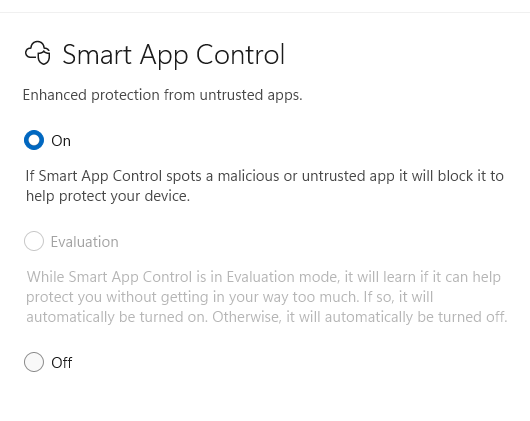
This build introduces a wide range of minor features being rolled out gradually, including the ability to turn Smart App Control (SAC) on or off without needing a clean install. To make changes, go to Settings > Windows Security > App & Browser Control > Smart App Control settings. When turned on, SAC helps block untrusted or potentially harmful apps.

The update also improves stability in Windows Recovery Environment (Windows RE) when you run x64 apps on ARM64 devices. These apps run more smoothly and respond as expected.

(Get more info about Windows 11 Insider Preview Builds 26100.8106 and 26200.8106.)

Windows 11 Insider Preview Build 26220.7961

Release date: March 6, 2026

Released to: Beta Channel

For those who have turned the toggle on to receive the latest updates, this build re-enables Administrator protection, which aims to protect free-floating admin rights for administrator users, allowing them to still perform all admin functions with just-in-time admin privileges. This feature is off by default and can be enabled via OMA-URI in Intune or via group policy.

Other changes and improvements being gradually rolled out to the same group include the ability to use voice typing (Windows key + H) when renaming files in File Explorer, as well as a smaller peek view in the drag tray.

(Get more info about Windows 11 Insider Build 26220.7961.)

Windows 11 Insider Preview Build 26300.7965

Release date: March 6, 2026

Released to: Dev Channel

For those who have turned the toggle on to receive the latest updates, this build re-enables Administrator protection, which aims to protect free-floating admin rights for administrator users, allowing them to still perform all admin functions with just-in-time admin privileges. This feature is off by default and can be enabled via OMA-URI in Intune or via group policy.

Other changes and improvements being gradually rolled out to the same group include the ability to use voice typing when renaming files in File Explorer, as well as a smaller peek view in the drag tray.

(Get more info about Windows 11 Insider Preview Build 26300.7965.)

Windows 11 Insider Preview Build 28020.1685

Release date: March 6, 2026

Released to: Canary Channel

For those who have turned the toggle on to receive the latest updates, this build lets you use voice typing (Windows key + H) when renaming files in File Explorer. The build also improves the reliability of removing Windows Update files and windows.old files via Settings > System > Storage.

(Get more info about Windows 11 Insider Preview Build 28020.1685.)

Windows 11 Insider Preview Build 26220.7934

Release date: Feb. 27, 2026

Released to: Beta Channel

For those who have turned the toggle on to receive the latest updates, this build gives administrators and Application Control for Business policy authors additional controls over the processing of batch files and CMD scripts. Starting with this release, admins can enable a more secure mode for processing batch files that ensures they do not change during execution by adding a value to the registry key HKEY_LOCAL_MACHINE\Software\Microsoft\Command Processor named LockBatchFilesWhenInUse (DWORD, value 0 or 1). Policy authors can also use the LockBatchFilesWhenInUse application manifest control documented here to enable this mode.

There are a variety of other improvements being rolled out gradually, including one in which a new taskbar indicator displays while you’re sharing, giving a quick reminder that audio is still being shared. Clicking the indicator is a fast path to open sharing settings to change volume or stop sharing.

(Get more info about Windows 11 Insider Preview Build 26220.7934.)

Windows 11 Insider Preview Build 26300.7939

Release date: Feb. 27, 2026

Released to: Dev Channel

For those who opted to receive the latest updates, this build gives administrators and Application Control for Business policy authors additional controls over the processing of batch files and CMD scripts. Starting with this release, admins can enable a more secure mode for processing batch files that ensures they do not change during execution by adding a value to the registry key HKEY_LOCAL_MACHINE\Software\Microsoft\Command Processor named LockBatchFilesWhenInUse (DWORD, value 0 or 1). Policy authors can also use the LockBatchFilesWhenInUse application manifest control documented here to enable this mode.

There are a variety of other improvements being rolled out gradually, including one in which a new taskbar indicator displays while you’re sharing, offering a quick reminder that audio is still being shared. Clicking the indicator is a fast path to open sharing settings to change volume or stop sharing.

(Get more info about Windows 11 Insider Preview Build 26300.7939.)

Windows 11 Insider Preview Build 28020.1673

Release date: Feb. 27, 2026

Released to: Canary Channel

For those who have opted to receive the latest updates, this build gets a variety of new features being rolled out gradually, including one in which Quick Machine Recovery (QMR) now turns on automatically for enterprise managed Windows Professional devices, as well as Windows Professional devices that are not domain-joined. These devices receive the same recovery features available to Windows Home users. For domain-joined devices, QMR stays off unless it is enabled by the organization.

(Get more info about Windows 11 Insider Preview Build 28020.1673.)

Windows 11 Insider Preview Build 26220.7872

Release date: February 20, 2026

Released to: Beta Channel

For those who have turned the toggle on to receive the latest updates, this build offers a variety of new features, including simplified specifications on the ‘Device info’ Card on the Settings Home page and improved mouseover animations for app groups on the taskbar.

(Get more info about Windows 11 Insider Preview Build 26220.7872.)

Windows 11 Insider Preview Build 26300.7877

Release date: February 20, 2026

Released to: Dev Channel

For those who have turned the toggle on to receive the latest updates, this build offers a variety of new features, including simplified specifications on the ‘Device info’ Card on the Settings Home page and improved mouseover animations for app groups on the taskbar.

Several bugs have also been fixed, including one in which all File Explorer open windows and tabs unexpectedly jumped to Desktop or Home.

Get more info about Windows 11 Insider Preview Build 26300.7877.)

Windows 11 Insider Preview Build 28020.1619

Release date: February 20, 2026

Released to: Canary Channel

For those who have turned the toggle on to receive the latest updates, this build offers a variety of new features, including one in which Windows Hello Enhanced Sign-in Security (ESS) supports peripheral fingerprint sensors. Previously, ESS was only available on PCs with built-in biometric sensors, but now it can be used when you plug in a supported ESS fingerprint reader.

(Get more info about Windows 11 Insider Preview Build 28020.1619.)

Optional Windows 11 Insider Preview Build 29531.1000

Release date: February 18, 2026

Released to: Canary Channel

This build is the first in a new Canary Channel optional path with a focus on platform development, which will introduce new features before the existing 28000 Canary Channel series. Microsoft recommends that most people remain on the 28000 build path, but adds that those who want to get the newest platform changes as early as possible may want to switch to this new 29500 path. Note, though, that if you switch to the 29500 path by installing this build, you won’t be able to go back to the 28000 Canary Channel series.

The build itself, in Microsoft’s words, “includes platform changes in moving to a new active development build.”

Microsoft warns, “because of the focus on platform development for this path, you may notice a temporary loss in some features that you have today. These features will return to this new active development build.”

(Get more info about Windows 11 Insider Preview Build 29531.1000.)

Windows 11 Insider Preview Build 26220.7859

Release date: February 17, 2026

Released to: Beta Channel

For those who have turned the toggle on to receive the latest updates, this build displays an option to upgrade to a different Microsoft 365 plan on the Accounts page within the Settings app. It also rolls out fixes for several bugs, including one in which all File Explorer open windows and tabs unexpectedly jumped to Desktop or Home.

(Get more info about Windows 11 Preview Build 26220.7859.)

Windows 11 Insider Preview Builds 26100.7918 and 26200.7918

Release date: February 17, 2026

Released to: Release Preview Channel

This build gradually rolls out a variety of new features, including one in which Quick Machine Recovery (QMR) now turns on automatically for Windows Professional devices that are not domain‑joined and not enrolled in enterprise endpoint management. These devices receive the same recovery features available to Windows Home users. For domain‑joined or enterprise managed devices, QMR stays off unless it is enabled by the organization. The build also improves login screen reliability.

(Get more info about Windows 11 Insider Preview Builds 26100.7918 and 26200.7918.)

Windows 11 Insider Preview Build 28020.1611

Release date: February 12, 2026

Released to: Canary Channel

This build brings Sysmon functionality natively to Windows. Sysmon functionality allows you to capture system events that can help with threat detection, and you can use custom configuration files to filter the events you want to monitor. The captured events are written on the Windows event log, enabling them to be used with security applications and in a wide range of use cases.

(Get more info about Windows 11 Insider Preview Build 28020.1611.)

Windows 11 Insider Preview Build 26220.7755

Release date: February 9, 2026

Released to: Beta Channel

For those who have turned the toggle on to receive the latest updates, this build gradually rolls out several new features, including Emoji 16.0, which contains a new set of emojis, and the ability to directly control pan and tilt for supported cameras in the Settings app.

(Get more info about Windows 11 Insider Preview Build 226220.7755.)

Windows 11 Insider Preview Build 26300.7760

Release date: February 9, 2026

Released to: Dev Channel

For those who have turned the toggle on to receive the latest updates, this build gradually rolls out several new features, including Emoji 16.0, which contains a new set of emojis, and the ability to directly control pan and tilt for supported cameras in the Settings app.

(Get more info about Windows 11 Insider Preview Build 26300.7760.)

Windows 11 Insider Preview Build 28020.1546

Release date: February 4, 2026

Released to: Canary Channel

This update, in the words of Microsoft, “includes a small set of general improvements and fixes that improve the overall experience for Insiders” running Windows.

It also fixes one bug that affected apps working with files stored on OneDrive or Dropbox.

(Get more info about Windows 11 Insider Preview Build 28020.1546.)

Windows 11 Insider Preview Build 26220.7752

Release date: February 3, 2026

Released to: Beta Channel

Those who have turned the toggle on to receive the latest updates get Sysmon functionality natively in Windows. Sysmon functionality allows you to capture system events that can help with threat detection, and you can use custom configuration files to filter the events you want to monitor. The captured events are written on the Windows event log, enabling them to be used with security applications and a wide range of use cases. (This feature is being gradually rolled out.)

The same group also gets a number of bug fixes being gradually rolled out, including for a File Explorer bug in which icons/tooltips for “Add to favorites” were missing.

(Get more info about Insider Preview Build 26220.7752.)

Windows 11 Insider Preview Build 26300.7733

Release date: February 3, 2026

Released to: Dev Channel

Those who have turned the toggle on to receive the latest updates get Sysmon functionality natively in Windows. Sysmon functionality allows you to capture system events that can help with threat detection, and you can use custom configuration files to filter the events you want to monitor. The captured events are written on the Windows event log, enabling them to be used with security applications and a wide range of use cases. (This feature is being gradually rolled out.)

The same group also gets a number of bug fixes being gradually rolled out, including for a File Explorer bug in which icons/tooltips for “Add to favorites” were missing.

(Get more info about Insider Preview Build 26300.7733.)

Windows 11 Insider Preview Build 28020.1495

Release date: January 28, 2025

Released to: Canary Channel

This build, in Microsoft’s words, “includes a small set of general improvements and fixes that improve the overall experience [of Windows 11].” It also fixes a variety of bugs, including one that led to the Windows Update settings page hanging when loading.

The build has two known issues, one that sometimes causes all open File Explorer windows and tabs to unexpectedly jump to Desktop or Home in File Explorer, and another in which the desktop watermark is showing the wrong build number.

(Get more info about Insider Preview Build 28020.1495.)

Windows 11 Insider Preview Builds 26100.7701 and 26200.7701

Release date: January 27, 2026

Released to: Release Preview Channel

This build gradually rolls out a variety of new features for Copilot+ PCs, including one in which Narrator gives you more control over how it announces on‑screen controls. You can choose which details are spoken and adjust their order to match how you navigate apps. These settings apply throughout the app to help reduce extra speech and make Narrator easier to follow.

The build also immediately rolls out a variety of new features for all PCs, including one in Data Protection Application Programming Interface (DPAPI) domain backup key management. Administrators can now set how often keys rotate automatically. This strengthens cryptographic security and reduces reliance on older encryption algorithms.

(Get more info about Insider Preview Builds 26100.7701 and 26200.7701.)

Windows 11 Insider Preview Build 26220.7670

Release date: January 27, 2026

Released to: Beta Channel

For those who have turned the toggle on to receive the latest updates, this build gradually rolls out several bug fixes, including for an issue in which the Search process was showing an icon with an X instead of a magnifying glass.

The build has five known issues, including one in which some Insiders’ apps aren’t showing in the system tray when they should be.

(Get more info about Insider Preview Build 26220.7670.)

Windows 11 Insider Preview Build 26300.7674

Release date: January 27, 2026

Released to: Dev Channel

In this build, the Dev Channel jumps ahead to receive 26300 series builds. This means that the window to switch from the Dev Channel to the Beta Channel is closed once Build 26300.7674is installed on your PC. This build for the Dev Channel is identical to the Windows 11 Build 26220.7653 release (see below).

(Get more info about Insider Preview Build 26300.7674.)

Windows 11 Insider Preview Build 26220.7653

Release date: January 21, 2026

Released to: Dev Channel

This build for the Dev Channel is identical to the January 16th Windows 11 Insider Preview Build 26220.7653 released to the Beta Channel. See the writeup below for details.

(Get more info about Windows 11 Insider Preview Build 26220.7653.)

Windows 11 Insider Preview Build 26220.7653

Release date: January 16, 2026

Released to: Beta Channel

For those who have turned the toggle on to receive the latest updates, this build gradually rolls out several changes, including one in which you can now set .webp images for your desktop background in Settings > Personalization > Desktop Background.

The same group also gets a number of bug fixes being gradually rolled out, including for a bug in which Settings crashed when interacting with audio devices.

The build has four known issues, including one in which some Insiders’ apps aren’t showing in the system tray when they should be.

(Get more info about Windows 11 Insider Preview Build 26220.7653.)

Windows 11 Insider Preview Build 28020.1371 

Release date: January 14, 2026

Released to: Canary Channel

This build gradually rolls out a variety of bug fixes for those who have turned the toggle on to receive the latest updates, including a bug in which File Explorer showed a white flash when navigating between pages.

There is one known issue in this build: The desktop watermark shows the wrong build number.

(Get more info about Windows 11 Insider Preview Build 28020.1371.)

Windows 11 Insider Preview Build 26220.7535

Release date: January 9, 2026

Released to: Dev & Beta Channels

For those who have turned the toggle on to receive the latest updates, this build gradually rolls out Copilot-powered image descriptions to Narrator on Copilot+ PCs, making it possible for blind and low-vision users to hear detailed, AI-generated descriptions of images, charts, and graphs.

The same group also gets a number of bug fixes being gradually rolled out, including for an issue in which File Explorer was causing explorer.exe to crash for some Insiders when invoking the context menu on the desktop.

The build has seven known issues, including one in which Settings crashes when interacting with audio devices.

(Get more info about Windows 11 Insider Preview Build 26220.7535.)

Windows 11 Insider Preview Build 26220.7523

Release date: December 19, 2025

Released to: Dev & Beta Channels

For those who have turned the toggle on to receive the latest updates, this build gradually rolls out a version of Copilot on the taskbar tailored for commercial customers. It uses Work IQ as contextual information that they can reference in their Copilot chats and with Microsoft 365 AI agents. In addition, the build introduces Agent Launchers, a new framework that enables Windows apps to register AI agents and make them discoverable across the system.

The same group also gets a number of bug fixes being gradually rolled out, including one that addresses an issue in which File Explorer showed a white flash when navigating between pages.

The build has nine known issues, including one in which opening the context menu is causing explorer.exe to crash for some Insiders.

(Get more info about Windows 11 Insider Preview Build 26220.7523.)

Windows 11 Insider Preview Build 28020.1362

Release date: December 15, 2025

Released to: Canary Channel

This build gradually rolls out several new features for Copilot+ PCs, including a streamlined design for the Click to Do context menu that makes frequently used actions like Copy, Save, Share, and Open easier to access. It also rolls out new features for all PCs, including improvements to the dark mode experience in File Explorer.

A variety of bug fixes are being gradually rolled out, including one for an issue in which Settings became unresponsive when attempting to navigate to the Network & Internet section.

(Get more info about Windows 11 Insider Preview Build 28020.1362.)

Windows 11 Insider Preview Build 28000.1340 

Release date: December 9, 2025

Released to: Canary Channel

This build has, in Microsoft’s words, a “small set of general improvements and fixes” that improve Windows. It also enables more of the new features and improvements originally released with the October non-security preview update for Windows 11.

In addition, the build fixes a bug that caused some Storage Spaces to become inaccessible or Storage Spaces Direct to fail when creating a storage cluster.

(Get more info about Windows 11 Insider Preview Build 28000.1340.)

Windows 11 Insider Preview Build 26220.7344

Release date: December 5, 2025

Released to: Dev & Beta Channels

For those who have turned the toggle on to receive the latest updates, this build offers native support for the Model Context Protocol (MCP), an open standard that gives AI agents a universal way to connect with apps, tools, and services. Agents can discover and connect to these tools and other agents via a secure, manageable Windowson-device registry (ODR). By default, all agent connectors in the Windows ODR will be contained in a secure environment with their own identity and audit trail.

In addition, Quick machine recovery (QMR) will now be turned on automatically for Windows Professional devices that are not domain joined. These devices will get the same recovery features as Windows Home users. For enterprise computers that are domain joined, nothing changes — QMR will stay off unless your organization turns it on.

Those who have turned the toggle on to receive the latest updates also get a number of bug fixes, including addressing a bug in which the search window to unexpectedly started floating above the taskbar.

The build has seven known issues, including one in which File Explorer shows a white flash when navigating between pages.

(Get more info about Windows 11 Insider Preview Build 26220.7344.)

Windows 11 Insider Preview Build 26220.7271

Release date: November 21, 2025

Released to:  Dev & Beta Channels

This build introduces several features being rolled out gradually for those who have turned the toggle on to receive the latest updates. These include point-in-time restore for Windows, which lets you to quickly roll your device back to a previous state to minimize downtime and simplify troubleshooting, and (on NPU devices) fluid dictation in voice typing, which automatically corrects grammar, punctuation, and filler words as you speak.

The build also expands the availability of the Xbox full-screen experience to additional Windows 11 PCs. You can add a controller to your PC for task switching and streamlined gaming on your desktop, laptop, or tablet.

Those who have turned the toggle on to receive the latest updates also get several bug fixes, including one that resolves a hung taskbar after receiving certain notifications.

The build has seven known issues, including one in which File Explorer shows a white flash when navigating between pages.

(Get more info about Windows 11 Insider Preview Build 26220.7271.)

Windows 11 Insider Preview Build 28000.1199

Release date: November 18, 2025

Released to: Canary Channel

This build has, in Microsoft’s words, a “small set of general improvements and fixes” that improve Windows.

(Get more info about Windows 11 Insider Preview Build 28000.1199.)

Windows 11 Insider Preview Builds 26100.7296 and 26200.7296

Release date: November 17, 2025

Released to: Release Preview Channel

This update introduces a wide range of features being rolled out gradually, including several for Copilot+ PCs, such as Windows Studio Effects, which provide AI-powered camera enhancements on an additional, alternative camera such as a USB webcam or your laptop’s built-in rear camera.

All Windows 11 PCs get a variety of new features being gradually rolled out, including Windows Hello Enhanced Sign-in Security (ESS), now supporting peripheral fingerprint sensors. Also, on PCs with the settings “quick machine recovery” and “automatically check for solutions” both enabled, Quick Machine Recovery now runs a one‑time scan by default instead of repeating scans in a loop. If a fix isn’t available right away, QMR will quickly point you to the most appropriate recovery options to get you back up and running.

A bug fix is being immediately rolled out to all PCs to address an issue that affects Local Security Authority Subsystem Service (LSASS), when LSASS could become unstable due to an access violation.

(Get more info about Windows 11 Insider Preview Builds 26100.7296 and 26200.7296.)

Windows 11 Insider Preview Build 26220.7262

Release date: November 17, 2025

Released to: Beta and Dev Channels

In this build, those who have turned the toggle on to receive the latest updates get a variety of features being gradually rolled out, including using high-definition voices for English (US) in Narrator and Magnifier that use generative AI to adjust tone and pacing for more natural, expressive speech. Also rolling out is a new “Experimental agentic features” toggle in the Settings app that enables the creation of AI agent accounts and an agent workspace, and grants agentic apps access to your Documents, Downloads, Desktop, Music, Pictures, and Videos folders. (Find out more about experimental agentic features.)

The same group also gets a variety of bug fixes rolled out gradually, including for a bug in which the Task Manager process wasn’t stopping correctly after Task Manager was closed. As a result, Task Manager might have been unexpectedly open on boot.

There are four known issues in this build, including one in which the scrollbar and footer are missing in File Explorer and when text is scaled in the dark mode version of the copy dialog.

(Get more info about Windows 11 Insider Preview Build 26220.7262.)

Windows 11 Insider Preview Build 26220.7070

Release date: November 7, 2025

Released to: Beta and Dev Channels

In this build, those who have turned the toggle on to receive the latest updates get a variety of features being gradually rolled out, including the ability to choose your default dashboard in an updated Widget Board Settings.

Everyone gets an updated Quick Machine Recovery in Windows, which makes it easier and quicker to get back to a working PC. The experience in both Windows Settings and the Windows Recovery Environment (WinRE) has been streamlined.

A variety of bug fixes are being rolled out gradually to those who have opted to receive the latest updates, including one that fixes a bug in which the “Automatically hide the taskbar” setting unexpectedly turned off after displaying a message saying, “a toolbar is already hidden on this side of your screen.”

There are five known issues in this build, including one in which the scrollbar and footer are missing in File Explorer when text is scaled in the dark mode version of the copy dialog.

(Get more info about Windows 11 Insider Preview Build 26220.7070.)

Windows 11 Insider Preview Build 28000

Release date: November 7, 2025

Released to: Canary Channel

This build has, in Microsoft’s words, a “small set of general improvements and fixes.” There are also a variety of bug fixes, including for a bug in which the credentials window was not accessible when trying to log in to Outlook.

There are two known issues in this build, one in which sleep and shutdown aren’t working correctly for some Insiders, and the other in which the new Start menu unexpectedly scrolls to the top.

(Get more info about Windows 11 Insider Preview Build 28000.)

Windows 11 Insider Preview Build 27982

Release date: November 4, 2025

Released to: Canary Channel

This build gradually rolls out several new features, including one in which you can add, remove, and rearrange lock screen widgets such as Weather, Watchlist, and Sports on the lock screen. Windows also provides suggested widgets on the lock screen. To customize your lock screen widgets, go to Settings > Personalization > Lock screen.

Also new is a “drag tray” that appears at the top of your screen when you drag a local file from File Explorer or your desktop. You can drop the file into one of the displayed apps or select More to open the Windows share window.

A variety of bugs have been fixed, including one in which if you used your PC for a while without rebooting, explorer.exe might start crashing repeatedly.

There are two known issues in this build, one in which sleep and shutdown aren’t working correctly for some Insiders, and the other in which the new Start menu unexpectedly scrolls to the top.

(Get more info about Windows 11 Insider Preview Build 27982.)

Windows 11 Insider Preview Build 26220.7051

Release date: October 31, 2025

Released to: Beta and Dev Channels

In this build, those have turned the toggle on to receive the latest updates get a variety of features being gradually rolled out, including Ask Copilot in the taskbar, which gives  you one-click access to Copilot Vision and Voice, so you can search via Copilot using text, voice, or guided support with Copilot Vision. As you type, results appear and update instantly. Turn it on by going to Settings > Personalization > Taskbar > Ask Copilot.  You can also manage whether the Copilot app launches automatically at sign-in using the “Auto start on log in” toggle in the Copilot app settings.

The same group gets a variety of bug fixes being rolled out gradually, including one to address an issue in which  interacting with a folder or its contents in Start menu could result in the folder becoming invisible.

There are four known issues in this build, including one in which the scrollbar and footer are missing in File Explorer when text is scaled in the dark mode version of the copy dialog.

(Get more info about Windows 11 Insider Preview Build 26220.7051.)

Windows 11 Insider Preview Build 26220.6982

Release date: October 24, 2025

Released to: Dev Channel

In this build, those have turned the toggle on to receive the latest updates get a variety of changes being gradually rolled out, including Copy & Search, which allows you to search the text in your clipboard with a single click. When you copy text anywhere in Windows, a paste gleam will appear in your search box. Click on this gleam and your copied text will appear in the search field, allowing you to search instantly.

The same group gets a variety of bug fixes, including one for a bug in which the search icon in File Explorer sometimes infinitely looped in an animation.

There are five known issues in this build, including one in which the scrollbar and footer are missing in File Explorer when text is scaled in dark mode version of the copy dialog.

(Get more info about Windows 11 Insider Preview Build 26220.6982.)

Windows 11 Insider Preview Build 27975 

Release date: October 23, 2025

Released to: Canary Channel

This build has, in Microsoft’s words, a “small set of general improvements and fixes” that improve Windows.

A variety of bugs have also been fixed, including one in which Settings crashed when accessing drive information under Settings > System > Storage. This also impacted accessing the drive information from the properties when you right-clicked a drive in File Explorer.

There are two known issues in this build, one in which sleep and shutdown aren’t working correctly for some Insiders, and the other in which the new Start menu unexpectedly scrolled to the top.

(Get more info about Windows 11 Insider Preview Build 27975.)

Windows 11 Builds 26100.7015 and 26200.7015

Release date: October 21, 2025

Released to: Release Preview Channel

This update includes a wide variety of new features being rolled out gradually, including a redesigned Start menu that includes a scrollable All section, has new category and grid views, and which adapts to your screen size. The build also includes new features for Click to Do, which can now translate text into other languages. File Explorer now has a recommended files feature that shows content such as files you frequently use, have recently downloaded, or have added to your File Explorer Gallery.

Two bugs are fixed in this build: one that caused an ACCESS_DENIED error when users attempted to change passwords remotely on member servers or workgroup devices, even when they had the required permissions, and another in which protected content playback failed on some machines after installing KB506408.

(Get more info about Windows 11 Insider Preview Builds 26100.7015 and 26200.7015.)

Windows 11 Insider Preview Build 26220.6972

Release date: October 17, 2025

Released to: Dev Channel

In this build, those who have turned the toggle on to receive the latest updates get a new feature being rolled out slowly, which lets you add and manage your mobile devices from Settings by navigating to “Mobile Devices” under the Bluetooth & Devices section. The page allows you to view your mobile devices, add new mobile devices, and manage features such as using your device as a connected camera or accessing your device’s files in File Explorer.

Those who have turned the toggle on to receive the latest updates get two bug fixes being rolled out slowly, one for a bug that caused File Explorer to show a Catastrophic Error (0x8000FFFF) when extracting large (1.5GB+) archive files, and another that sometimes caused an old white toolbar to randomly appear in File Explorer.

There are five known issues in this build, including one in which the scrollbar and footer are missing in File Explorer when text is scaled in the copy dialog in dark mode.

(Get more info about Windows 11 Insider Preview Build 26220.6972.)

Windows 11 Insider Preview Build 27971 

Release date: October 16, 2025

Released to: Canary Channel

In this build, the Notification Center can be used on secondary monitors. You’ll be able to see your calendar on any of your monitors and open Notification Center on any of them by clicking the date and time in the system tray of your taskbar. Note that this functionality will be rolled out gradually.

A variety of bugs have been fixed, including one in which File Explorer crashed when transferring files to a network drive.

There are three known issues in this build, including one in which sleep and shutdown aren’t working correctly for some Insiders.

(Get more info about Windows 11 Insider Preview Build 27971.)

Windows 11 Insider Preview Build 26120.6780 

Release date: October 10, 2025

Released to: Beta Channel

In this build, those with Copilot+ PCs who have turned the toggle on to receive the latest updates get a handful of changes and new features, including one in Settings in which more results appear in the search flyout and let you quickly modify the settings you’re searching for.

Those with any PCs who have turned the toggle on get several changes, including a new OneDrive icon in Accounts and Homepages in Settings, and the return of the ability to enable Administrator Protection via Windows Security under Account protection.

The same group gets a variety of bug fixes, including one for an issue in the previous flight in which File Explorer frequently crashed, and another that was causing the Start menu to unexpectedly scroll to the top when interacting with it.

There are four known issues in this build, including one in which the scrollbar and footer are missing in File Explorer when text is scaled in the copy dialog in dark mode.

(Get more info about Windows 11 Insider Preview Build 26120.6780.)

Windows 11 Insider Preview Build 26220.6780 

Release date: October 10, 2025

Released to: Dev Channel

This update is identical to Build 26120.6780 for the Beta Channel, detailed above.

(Get more info about Windows 11 Insider Preview Build 26220.6780.)

Windows 11 Insider Preview Build 27965

Release date: October 8, 2025

Released to: Canary Channel

This update introduces a new scrollable Start menu, with “All” on the top level, so apps are accessible without having to navigate to a secondary page. There are also new category and grid views to browse and launch your installed apps in the “All” section. The new menu adapts its size based on your device’s screen size.

There are also several bug fixes, including one in which the taskbar was not autohiding correctly.

There are four known issues in this build, including one in which Settings may crash when accessing drive information under Settings > System > Storage. This also impacts accessing the drive information from the properties when you right-click a drive in File Explorer.

(Get more info about Windows 11 Insider Preview Build 27965.)

Windows 11 Insider Preview Build 27959

Release date: October 6, 2025

Released to: Canary Channel

This update introduces the option to move the hardware indicators for brightness, volume, airplane mode, and virtual desktops to different positions on your screen, including the current bottom position and new top-left and top-center positions.

There are also a variety of bug fixes, including for one in which icons and text sometimes overlapped on the desktop when using increased text scaling.

There is one known issue in this build, in which sleep and shutdown aren’t working correctly for some Insiders.

(Get more info about Windows 11 Insider Preview Build 27959.)

Windows 11 Insider Preview Build 26120.6772

Release date: October 6, 2025

Released to: Beta Channel

In this build, those who have turned the toggle on to receive the latest updates get a variety of new features, including Image Object select for Click to Do in Copilot+ PCs, in which you can   hover over your image to preview selectable areas. Once selected, you can copy and paste your object into other apps or use it to kick off a chat with Copilot. Also included are improvements to dark mode for File Explorer for all PCs and the ability to use peripheral fingerprint sensors with Windows Hello. These changes are rolling out gradually.

The same group gets a variety of bugs fixed, including one in which Encrypted File System (EFS) related dialogs in File Explorer weren’t responding to increased text scaling. The bug fixes are rolling out gradually.

There are five known issues in this build, including one in which some searches may show unexpected text instead of the expected results and images.

(Get more info about Windows 11 Insider Preview Build 26120.6772.)

Windows 11 Insider Preview Build 26120.6772 

Release date: October 6, 2025

Released to: Dev Channel

This update is identical to Build 26120.6772, detailed above.

(Get more info about Windows 11 Insider Preview Build 26120.6772.)

Windows 11 Insider Preview Build 26120.6760

Release date: September 29, 2025

Released to: Beta Channel

In this build, those who have turned the toggle on to receive the latest updates get a variety of new features, including the ability to do a network speed test straight from the taskbar. You can launch it via the Wi-Fi and Cellular Quick Settings pages or by right-clicking the network icon in the system tray. The tool opens in your default browser and supports testing Ethernet, Wi-Fi, and cellular connections. It helps in assessing network performance and troubleshooting.

The same group gets a variety of bug fixes, including for an issue in which the battery icon got out of sync with the actual charging state — for example, it would show that you weren’t plugged in when you were.

Everyone in the Beta Channel gets a variety of bug fixes, including one for developers that addresses an issue in which PIX on Windows was unable to play back GPU captures. 

There are six known issues in this build, including one in which some searches may show unexpected text instead of the expected results and images.

(Get more info about Windows 11 Insider Preview Build 26120.6760.)

Windows 11 Insider Preview Build 26220.6760 

Release date: September 29, 2025

Released to: Dev Channel

This build is for those who have already upgraded to Windows 11 version 25H2.

In this build, those who have turned the toggle on to receive the latest updates get a variety of new features, including the ability to do a network speed test straight from the taskbar. You can launch it via the Wi-Fi and Cellular Quick Settings pages or by right-clicking the network icon in the system tray. The tool opens in your default browser and supports testing Ethernet, Wi-Fi, and cellular connections. It helps in assessing network performance and troubleshooting.

The same group gets a variety of bug fixes, including for an issue in which the battery icon got out of sync with the actual charging state — for example, it would show that you weren’t plugged in when you were.

Everyone in the Dev Channel gets a variety of bug fixes, including one for developers that addresses an issue in which PIX on Windows was unable to play back GPU captures. 

There are six known issues in this build, including one in which some searches may show unexpected text instead of the expected results and images.

(Get more info about Windows 11 Insider Preview Build 26220.6760.)

Windows 11 Insider Preview Build 27954

Release date: September 25, 2025

Released to: Canary Channel

This build includes, in Microsoft’s words, “a small set of general improvements and fixes that improve the overall experience for Insiders running” Windows. It also includes fixes one bug in which you might not be able to connect to shared files and folders if you were using the Server Message Block (SMB) v1 protocol on NetBIOS over TCP/IP NetBIOS (NetBT) after the latest updates.

There is one known issue in this build, in which PIX on Windows is unable to play back GPU captures on this OS version. This will be addressed by a new PIX release, estimated to arrive by the end of September. In the meantime, if you are affected, you can use the “Send Feedback” button in PIX or contact Microsoft on the DirectX Discord server and get help via private builds.

(Get more info about Windows 11 Insider Preview Build 27954.)

Windows 11 Insider Preview Build 26120.6690

Release date: September 19, 2025

Released to: Beta Channel

For those who have Copilot+ PCs and have turned on a toggle to receive the latest update, this build gradually rolls out several new features, including one in which Click to Do can let users translate on-screen text with just a few clicks. 

All PCs that have turned a toggle on to receive the latest updates get a variety of bug fixes rolled out gradually, including one in which File Explorer became unresponsive if a UNC server name was directly typed into address bar. There are 10 known issues in this build, including one in which the placeholder text in the Settings search box may appear vertically misaligned.

(Get more info about Windows 11 Insider Preview Build 26120.6690.)

Windows 11 Insider Preview Build 26220.6690

Release date: September 19, 2025

Released to: Dev Channel

This build is for those who have already upgraded to Windows 11 version 25H2. 

For those who have Copilot+ PCs and have turned on a toggle to receive the latest update, this build gradually rolls out several new features, including one in which Click to Do can let you translate on-screen text with just a few clicks. 

All PCs which have turned a toggle on to receive the latest updates get a variety of bug fixes rolled out gradually, including one in which File Explorer became unresponsive if a UNC server name was directly typed into address bar. There are 10 known issues in this build, including one in which the placeholder text in the Settings search box may appear vertically misaligned.

(Get more info about Windows 11 Insider Preview Build 26220.6690.)

Windows 11 Insider Preview Build 27950

Release date: September 19, 2025

Released to: Canary Channel

This build includes, in Microsoft’s words, “a small set of general improvements and fixes that improve the overall experience for Insiders running” Windows. In addition, Advanced Settings will revert to the previous “For Developers” experience after updating to this build. 

There are also a number of bug fixes, including one in which the app preview windows in the taskbar became misaligned (away from the app icon you’d clicked / hovered over) after a display resolution change. 

There are two known issues in this build, including one for developers in which PIX on Windows is unable to play back GPU captures. This will be addressed by a new PIX release, estimated to arrive by the end of September. In the meantime, anyone impacted can use the “Send Feedback” button in PIX or contact Microsoft on the DirectX Discord server and Microsoft can help provide private builds.

(Get more info about Windows 11 Insider Preview Build 27950.)

Windows 11 Insider Preview Builds 26100.6713 and 26200.6713

Release date: September 12, 2025

Released to: Release Preview Channel

Build 26100.6713 is for those on Windows 11 24H2, and 26200.6713 is for those on Windows 25H2.

These builds gradually roll out a large number of new features, including AI actions in File Explorer for editing images or summarizing documents, and the ability to pin favorite apps in the Windows share window to quickly access them when you need them.

The builds fix several bugs immediately, including one that disrupted Windows Update for those using Windows Server Update Services (WSUS). Additionally, several bug fixes are being gradually rolled out, including for a bug in which when Windows Sandbox was enabled, the VmmemCmFirstBoot process may have consumed large amounts of CPU after login, causing your PC to become unresponsive.

(Get more info about Windows 11 Insider Preview Builds 26100.6713 and 26200.6713.)

Windows 11 Insider Preview Build 26120.6682

Release date: September 12, 2025

Released to: Beta Channel

For those who have Copilot+ PCs and have turned the toggle on to receive the latest update, this build gradually rolls out a new Copilot prompt box in Click to Do designed to streamline interaction with Microsoft Copilot.

New emoji from Emoji 16.0 are being gradually rolled out in the emoji panel for those who have turned the toggle on to receive the latest updates.

The same group also gets a variety of bug fixes rolled out gradually, including for one that caused some PCs to bug check (green screen) while hibernating, and another in which the Shared section in File Explorer Home was visible even if there was no content to display.

There are seven known issues in this build, including one in which the placeholder text in the Settings search box may appear vertically misaligned.

(Get more info about Windows 11 Insider Preview Build 26120.6682.)

Windows 11 Insider Preview Build 26220.6682

Release date: September 12, 2025

Released to: Dev Channel

This build is for those who have already upgraded to Windows 11 version 25H2.

For those who have Copilot+ PCs and have turned the toggle on to receive the latest updates, this build gradually rolls out a new Copilot prompt box in Click to Do designed to streamline interaction with Microsoft Copilot. New emoji from Emoji 16.0 are also being gradually rolled out to the same group.

The same group also gets a variety of bug fixes rolled out gradually, including for one that caused some PCs to bug check (green screen) while hibernating, and another in which the Shared section in File Explorer Home was visible even if there was no content to display.

There are seven known issues in this build, including one in which the placeholder text in the Settings search box may appear vertically misaligned.

(Get more info about Windows 11 Insider Preview Build 26220.6682.)

Windows 11 Insider Preview Build 27943

Release date: September 11, 2025

Released to: Canary Channel

This build includes, in Microsoft’s words, “a small set of general improvements and fixes that improve the overall experience for Insiders running” Windows.

There are also a number of bug fixes, including for a bug that caused Settings > System > Storage > Temporary files to get stuck when scanning files. This issue also caused the entry to clean up previous Windows Installations to not show in Storage Settings.

There are five known issues in this build, including one in which audio stops working and Device Manager shows one or more devices with a yellow exclamation mark, including “ACPI Audio Compositor” and others. Selecting Properties on these devices will show “Windows cannot load the device driver for this hardware. The driver may be corrupted or missing.”

(Get more info about Windows 11 Insider Preview Build 27943.)

Windows 11 Insider Preview Build 27938

Release date: September 8, 2025

Released to: Canary Channel

This build introduces AI actions into File Explorer. These offer new capabilities when you right-click a file, such as editing a graphic or summarizing a Word document. For now, there are four of them, all related to image files. You can perform a Bing search based on an image file, blur the background in an image, erase objects in an image, and remove the background in an image.

A number of bugs have been fixed, including one that caused Task Manager to freeze when going to the performance section, and another in which the red color used for a low space drive in This PC was unexpectedly light colored.

The build has five known issues, including one in which audio stops working and Device Manager shows one or more devices with a yellow exclamation mark.

(Get more info about Windows 11 Insider Preview Build 27938.)

Windows 11 Insider Preview Build 26120.5790 

Release date: September 5, 2025

Released to: Beta Channel

For those who have Copilot+ PCs, this build introduces fluid dictation, which makes voice-based dictation easier. It automatically corrects grammar, punctuation, and filler words as you speak, reducing the need for manual editing. In addition, being rolled out on supported Copilot+ PCs is the ability to use Studio Effect’s AI-powered camera enhancements with an additional, alternative camera — such as a USB webcam or your laptop’s built-in rear camera.

Those in the Beta Channel who have turned the toggle on to receive the latest updates get new on-hover actions in File Manager Home for faster file management.

The same group also gets a variety of bug fixes rolled out gradually, including one for a bug in which the right-click context menu in File Explorer sometimes unexpectedly switched back and forth between the normal initial view and “Show more options” with each right-click when certain apps were installed.

There are five known issues in this build, including one in which for some users, the Shared section in File Explorer Home may be visible even if there is no content to display.

(Get more info about Windows 11 Insider Preview Build 26120.5790.)

Windows 11 Insider Preview Build 26220.5790 

Release date: September 5, 2025

Released to: Dev Channel

This build appears to be identical to Build 26120.5790 for the Beta Channel, detailed above.

(Get more info about Windows 11 Insider Preview Build 26220.5790.)

  •  

IBM unveils tool to track sovereignty risks for cloud workloads

IBM has launched a tool designed to help customers assess cloud-sovereignty risks and meet regulatory compliance requirements. 

The Sovereignty Risk Profile launch comes as digital sovereignty becomes a higher priority for organizations concerned about where data is stored and processed. According to an IBM survey, 93% of executives believe sovereignty needs to be part of their business strategy.  

Via the new tool, customers can set up policies related to regulatory and business requirements — such as where data resides and how it’s protected, for instance. These policies can be applied to specific cloud workloads, regions, or zones in the Sovereignty Risk Profile tool, allowing users to track sovereignty requirements “in real time,” IBM Cloud product manager Janet Van said in a blog post, with “visibility into configurations, encryption posture, and environmental controls.” 

It’s then possible to assess compliance and decide what workloads meet sovereignty requirements. 

Tracking the factors that contribute to sovereignty is a challenge for many organizations, said Holger Mueller, vice president and principal analyst at Constellation Research. “It is very difficult, as you don’t know about the details of the stacks; sometimes, even the location of data is not fully transparent,” he said.

The Sovereignty Risk Profile “addresses many of the compliance-related requirements associated with data residency and encryption, while also tackling sovereignty from a resilience and concentration-risk perspective,” said Dario Maisto, senior analyst at Forrester.

However, the monitoring tool can only do so much to address digital sovereignty concerns, he said. While it can help organizations identify and report on potential issues, it “does not help [make] clients more or less sovereign, per se: it has only the potential to tell that a sovereignty problem is there.”

Broader questions around digital sovereignty remain difficult to address, he said, as there’s no universally accepted definition of the concept and limited legislation to establish clear requirements. 

Mueller described a spectrum of sovereignty issues that depend on factors such as whether data is stored, processed, and backed up in a customer’s own country, as well as whether staff that operate the data are domestic nationals. “Then there is the sovereignty of the software supply chain — but here everybody is dependent,” he said.

To further complicate matters, while several US hyperscalers sell sovereign-branded cloud services to European customers — with local staff and infrastructure —  concerns remain about the potential for extra-jurisdictional access to data, due to the US CLOUD Act and the US Foreign Intelligence Surveillance Act (FISA).

The Sovereignty Risk Profile is available within IBM’s Security and Compliance Center Workload Protection. It’s the latest in a range of IBM Cloud products aimed at addressing customers’ sovereignty concerns, including the recently launched IBM Sovereign Core software platform

  •  

Windows 11 Smart App Control explained

In the ever-evolving cybersecurity landscape, Microsoft has introduced various new features in Windows 11 designed to protect users from modern workplace threats. Among such features, Smart App Control (SAC) changes how Windows devices handle, and occasionally block, unwanted or potentially malicious applications.

But what exactly is Smart App Control? How does it work, who benefits most, and are there any caveats? In this story we’ll share some history and explain why SAC has been something of a stealth feature in Windows 11.

What is Smart App Control?

Smart App Control is a security feature in Windows 11 designed to block untrusted or potentially dangerous applications from running on a PC. Built directly into the operating system (through Windows Security), SAC leverages code signing, Microsoft’s intelligence cloud, and artificial intelligence to make real-time decisions about whether an app or application should be allowed to run. Its goal is to minimize the risk that malware, ransomware, and unwanted software could run on users’ systems — with minimal user intervention.

At its heart, Smart App Control is a kind of gatekeeper. When you attempt to run an app, SAC evaluates its trustworthiness. That evaluation is based on numerous criteria: Is the app digitally signed? Is it widely used and recognized as safe by Microsoft’s threat intelligence network? Has it been flagged previously for questionable behavior?

If an app fails one or more such checks and is found suspicious or untrustworthy, SAC blocks its execution, silently preventing a potential security event before it starts.

How does Smart App Control work?

SAC operates using a combination of cloud-based intelligence, local analysis, and digital signatures. Here’s a step-by-step breakdown of how it functions:

  • App verification: When a user attempts to launch an application, SAC inspects the file. It first checks if the app is digitally signed by a trusted publisher, an important indicator of legitimacy.
  • Cloud intelligence search: SAC then consults Microsoft’s extensive security databases in the cloud. These aggregate threat data from millions of Windows devices worldwide. If the app has been flagged already or is recognized as part of any malware campaign, it is blocked.
  • AI-based analysis: For less clear-cut instances, SAC uses AI to evaluate an app’s behavior. That is, it looks for telltale signs of malware or unwanted code. Such a dynamic analysis helps catch emerging threats not yet known to the cloud.

When an app is blocked, the user gets a clear, informative notification. Usually, there’s no way to override SAC’s decision, which puts security ahead of convenience. It also ensures that users will quickly report false positives.

Smart App Control is designed to be simple and automatic. Unlike conventional antivirus or endpoint security, it requires no updates to definitions, nor manual scans. SAC works behind the scenes to block threats in real time. Because it uses both local and cloud-based intelligence, it’s always current.

On the downside, some legitimate apps, especially older or custom business software, may not be digitally signed, resulting in false positives. If SAC decides an app is unsafe, the only way to run the app is to turn SAC off.

Working with Smart App Control

Notably, Smart App Control is enabled by default — but only on “clean installs” of Windows 11 version 22H2 or later. Systems upgraded from older versions of Windows 11 will always show SAC in the “Off” state.

Microsoft made this decision to avoid potential compatibility issues with legacy or line-of-business applications. That means users can’t benefit from SAC unless they have a newer PC or somebody reinstalls Windows 11 from scratch on an older one. (See my Windows clean install tutorial for complete instructions.)

SAC prerequisites

To get granular: SAC requires that the following be present as Windows 11 comes up for the first time:

  • Secure Boot, a security feature that allows only trusted, digitally signed software to run as Windows boots up
  • A working chain of trust, including current CA-2023 boot certificates in Unified Extensible Firmware Interface (UEFI) and a CA-2023 compliant bootloader

Newer PCs — namely, those built in 2018 or later, with Windows 10 or 11 installed prior to delivery — routinely include UEFI-only boot and support Secure Boot from the get-go. Indeed, Secure Boot was introduced with Windows 8, and the original certificates came along in 2011 (Production PCA 2011, UEFI CA 2011, and KEK CA 2011). They’ve been shipped in firmware ever since.

As long as such machines get updated through Windows Update (or some managed equivalent, such as Microsoft Intune, Windows Autopilot, or Microsoft Configuration Manager), the new certificates and a proper chain of trust should be established on those PCs. (See FAQ: What you need to know about expiring Windows Secure Boot certificates for more information.) All this said, only Windows 11 imposes a working Secure Boot environment as a hard and fast system requirement as of 2021.

In short, Secure Boot and the chain of trust provide the essential foundation for SAC to start with a clean bill of health, security wise, and keep things that way. To learn more about Secure Boot and its various certificates and trappings, consult the Secure Boot and Windows Secure Boot Key Creation and Management Guidance pages on Microsoft Learn.

Modes of operation

SAC has three distinct modes:

  • On: SAC actively monitors and blocks untrusted apps.
  • Evaluation: SAC quietly observes your usage patterns and system needs before fully activating.
  • Off: SAC is disabled and will not intervene.

SAC will normally start in Evaluation mode for up to a month, then turn itself On or Off depending on observed system behavior. Once turned on, SAC cannot be set back into Evaluation mode. Organizations or users who run custom software or specialized workflows should leave SAC in Evaluation mode to ensure that business functions keep working.

To check SAC’s status:

  1. Open the Windows Security app.
  2. Navigate to App & browser control.
  3. Look for the “Smart App Control” section. You’ll see the current status: On, Off, or Evaluation mode, as shown in Figure 1.
windows 11 smart app control screen in windows security

Figure 1: On this PC, the evaluation period is over and Smart App Control is enabled.

Ed Tittel / Foundry

Until recently, SAC could not be toggled off and on again — once it was turned off, you had to reinstall or reset Windows 11 to re-enable it. But with the April 2026 Patch Tuesday release of Windows 11 (KB5083769), admins and elevated users can turn SAC on or off as they see fit, as long as the initial setup conditions described above are met.

This toggling capability is a step forward for usability and safety, because it lets users with administrative privileges temporarily disable SAC in order to install, update, or uninstall certain unsigned apps, such as those that rely on Windows Installer Transform (MST) files, and then turn SAC back on immediately.

Note that this feature is being gradually rolled out, so you may not have access to it yet.

Smart App Control compared to other Windows 11 protections

Microsoft has long offered security features like Windows Defender, Controlled Folder Access, and Application Control. SAC differs in its general, automated approach. Rather than relying on static definitions, group policies, or user input, SAC leverages real-time intelligence and AI.

In many ways, SAC takes the best bits of Application Control (previously available through Device Guard and Windows Defender Application Control) and makes them accessible to a wider audience. It also involves little or no manual setup and few, if any, policy issues. Then again, as covered earlier in the story, SAC also functions as a black box: one either lives with its judgments, or does without it.

Real-world impact and industry reception

Feedback from the IT community has been mostly positive. Security researchers note SAC’s ability to block emerging threats before traditional antivirus solutions can respond. But SAC is hardly bullet-proof: a number of studies cite focused exploits or workarounds to bypass or trick SAC. For instance, Elastic Security Labs documented multiple techniques to break SAC in 2021, with follow-ons from Hacker News and TechRadar.

As always, a proactive approach to cybersecurity that includes teaching users to avoid trouble remains a key ingredient in establishing and maintaining a strong security posture.

For end users, SAC’s presence may go largely unnoticed — until, that is, it intercepts a malicious download or prevents installation of a suspicious or malicious program. Or, as the case may sometimes be, when users try to run old, unsigned software that SAC won’t allow.

Tips for IT administrators

For IT professionals considering deploying devices with SAC, certain best practices are worth implementing:

  • Test SAC in Evaluation mode before rolling out widely, especially if your organization relies on custom or legacy software, or if anything important is unsigned.
  • Educate users about SAC’s presence and purpose so they understand why certain apps may be blocked. Set up a procedure to request support and/or fixes, particularly if important software gets blocked. Possible workarounds include restricted VMs with SAC turned off to run unsigned applications.
  • Maintain an up-to-date inventory of critical applications and ensure as many as possible are digitally signed by trusted publishers.
  • Monitor Microsoft resources Learn, Support, and Answers forums for SAC updates, compatibility lists, and troubleshooting tips.

The future of Smart App Control

As threats continue to evolve, Microsoft should continue to expand SAC’s capabilities. Undoubtedly it will use more advanced AI models and deeper integration with Windows Defender and Microsoft 365 security. Future updates may introduce more granular controls for enterprise environments, including managed exceptions and better reporting tools.

For now, SAC represents a useful additional tool for Windows security. It’s intended to shift the balance in favor of the good guys in the ongoing war against malware. So far, it’s been a modest step forward. But it’s not unthinkable that SAC could offer more and better protection in upcoming Windows releases.

[Also see: FAQ: What you need to know about expiring Windows Secure Boot certificates]

This article was originally published in September 2025 and updated in June 2026.

  •  

Open source Euro-Office productivity suite to launch June 9

The Euro-Office open source productivity app suite will be available with the first stable release of the software on June 9. 

Euro-Office was unveiled in March with the aim of providing a modern, open source alternative to Microsoft and Google software for European organizations increasingly wary of a dependence on US-based suppliers. 

Euro-Office consists of four browser-based applications: a document editor, spreadsheet program, presentation tool, and a PDF editor, with each application enabling collaborative document editing. It supports Microsoft Office file formats DOCX, PPTX and XLSX, as well as Open Document Format (ODF) files such as ODS, ODT and ODP.

The software is intended to be integrated into collaboration solutions such as file-sharing platforms, online wikis or project management tools, according to Nextcloud, one of several European organizations involved in the Euro-Office project.

Nextcloud will add Euro-Office to its Nextcloud Office next month, where it will be available as an “equal option” alongside an existing open-source productivity suite based on Collabora’s software, Nextcloud CEO Frank Karlitschek said in a briefing. Pricing will depend on factors such as use case and deployment scale, but will sit in a similar range to the Collabora version.

Nextcloud plans to add desktop and mobile apps “later this summer,” said Karlitschek; these will save documents locally and sync to cloud storage tools that customers choose.

German cloud hosting provider Ionos will also integrate Euro-Office into its Nextcloud Workspace subscription at no extra cost, and as an optional paid add-on to its HiDrive and Managed Nextcloud subscriptions. (Pricing information was not immediately available.)

Nextcloud and Ionos are currently hiring a “dedicated development team” to work on Euro-Office, Nextcloud said in a blog post Thursday. Other software vendors, including Xwiki and Office.eu, are expected to incorporate Euro-Office into their products in the coming months, too.

Euro-Office is built on the open-source code base of OnlyOffice and distributed under the GNU Affero General Public License v3 (AGPL v3). 

Following the launch announcement, OnlyOffice — which is owned by Ascensio System SIA — alleged in March that Euro-Office violated its licensing terms and infringed its copyright, due to a lack of attribution to OnlyOffice.

Karlitschek said this week that the conflict with OnlyOffice is “now resolved,” following an agreement to provide attribution to OnlyOffice in Euro-Office. “We came to an agreement that the OnlyOffice people required only attribution, that you basically mention that the code is partly based on top of OnlyOffice, and we are happy to do it.”

But an OnlyOffice spokesperson denied a specific agreement had yet been reached. “OnlyOffice has not entered into any agreement with the Euro-Office project,” said Galina Goduhina, commercial director at OnlyOffice. 

“Our licensing framework is clearly defined, and compliance with its terms is not optional,” Goduhina said. “We will continue to assess the situation based on actual use of our technology.

 “This situation goes beyond attribution— it concerns transparency of technology origin, respect for the original developer — and does not meet the standards of responsible partnership we expect,” Goduhina said. “OnlyOffice remains focused on supporting its users, customers and partners and continuing to develop reliable, enterprise-grade document solutions.”

OnlyOffice recently published a blog post outlining its license and trademark policy in more detail. 

A Nextcloud spokesperson said the blog post indicated a change in the OnlyOffice license to “bring it in line” with AGPLv3. 

“We applaud the removal of the conflicting requirements around the trademark, aligning with our opinion and that of the licensing experts in the open source community,” the spokesperson said. “We will adopt their changes as they are being made to the code, of course ensuring the license compliance is preserved. With these changes we consider the matter resolved.”

  •  

Meta considers becoming a hyperscaler

Meta has raised the possibility that it could be joining the likes of Amazon, Microsoft and Google in offering cloud services at some point in the future — although potential customers shouldn’t be adding the company to their suppliers list just yet.

When asked about plans for offering such services at the company’s annual shareholders meeting,  Meta CEO Mark Zuckerberg said there was a possibility of the company competing with the major hyperscalers. “It’s definitely on the table.”

He explained that different companies were approaching Meta asking for the company to offer an API service or to buy compute services at a premium price. “We haven’t done it yet, because we think we have a use for the compute, but when we feel we have overbuilt, then that is an option that we have.”

Meta has been active in developing its data centers over the past few years, so there will be a possibility of some excess capacity. It is also developing its own AI chips.

For the moment, though, the company may well need all the capacity it can build: Zuckerberg said that the launch of Muse Spark, a new AI model from Meta Superintelligence Lab, had resulted in large increases in Meta’s AI usage.

This article first appeared on Network World.

  •  

AI hiring monoculture is delivering racial bias at scale

A research project examining AI-driven recruitment hires across the US has revealed a systemic racial bias.

Researchers from Stanford University found a startling pattern of racial disparities when looking at the interview offers resulting from 4 million job applications submitted to 156 employers. The situation is aggravated by the “monoculture” in AI hiring software: More than 90% of US employers are screening job applicants with software, with 60% of Fortune 500 companies using the same tool, HireVue, the researchers found.

Applicants who applied to multiple companies using AI had all their applications rejected more often than would be expected if each company’s screening methods were independent. They calculated that Black and Asian candidates were rejected in greater numbers than baseline figures would suggest. According to the survey, 29,000 more Asians would have been interviewed if AI had not been deployed.

The researchers are concerned about the way in which AI is being used. “AI screening tools bring together three properties that should not co-exist in high-stakes decision-making: They are pervasively adopted, highly consequential, and opaque to the public,” they said in a news release presenting their work.

The effect of this will lead to workplaces dominated by a monoculture which may not be beneficial for companies going forward.

This article first appeared on CIO.

  •  

WWDC, Apple, and AI: Waiting for the gift

I will sit right down (waiting for the gift of sound and vision)
And I will sing (waiting for the gift of sound and vision)

— David Bowie

Apple is planning to sponsor and present 14 AI research papers at the annual IEEE/CVF Conference on Computer Vision and Pattern Recognition (CVPR) in Denver next week, just days before it introduces major new AI features at its Worldwide Developer Conference (WWDC).

The fresh research explores topics such as using LLMs in image generation, quality testing, and user interface prototyping. For months, supply chain rumors have hinted at a radical evolution for the ubiquitous AirPods in the form of built-in ambient cameras. With this in mind, it’s noteworthy that one of the research papers, “From Where Things Are to What They’re For: Benchmarking Spatial–Functional Intelligence for Multimodal LLMs,” specifically seems to cater for such use cases. 

Accessibility for the people

In application, this tech promises profound potential for accessibility. It suggests that someone with limited vision might be able to get their AirPods to guide them through an unfamiliar room. This is something that should fit well inside the company’s ongoing narrative around machine vision intelligence and accessibility

Accessibility is central to a second presentation to be made during the Generative AI for Sign Language Workshop at the conference. Led by Apple’s Colin Lea, who presented a session on speech tech for people with speech disabilities at a similar event, this focus on machine vision intelligence and accessibility is entirely deliberate. 

Indeed, even though the industry and critics condemn Apple for lagging behind others in the AI space, the publication of these 14 papers at a key industry session just before WWDC shows the company has been doing a great deal of foundational work behind the scenes. We expect this work to bear its first fruit at WWDC, and it is important to understand the disclosures as a power move. Apple is using the show to celebrate its strengths in AI development, and given its decade work on Apple Car, many of those strengths relate to machine vision intelligence. 

Apple is so advanced in the field it is already deploying advanced models that empower consumers. Just last week, it promised to introduce a new tool called Image Explorer in VoiceOver to help partially sighted customers later this year. Among many other features, this will arrive alongside a system to let disabled users control compatible wheelchairs with spoken word commands. 

Apple is pushing boundaries all the way. Its paper “VSAS-Bench: Real-Time Evaluation of Visual Streaming Assistant Models,” proves it is actively refining models to process live video instantly on consumer hardware. 

What matters, the human or the machine?

The difference between Apple and its competitors is deep and philosophical. I’d argue that while others build cloud-dependent chatbots, Apple is embedding AI tools that solve real human problems in its systems. 

This extends to its plans at WWDC, where it will introduce a raft of AI tools made with help from Google Gemini and a host of AI services it has developed in house. The latter will include a great many accessibility tools of the type it will discuss at the CVPR event, the beauty of which being that they will run privately and on-device. You could argue that while other tech giants are using AI to automate white-collar jobs or build a surveillance dystopia, Apple is searching for applications of machine intelligence that solve real human problems. 

The company seems pretty realistic about the ongoing AI transformation. It recognizes that its own ecosystem must become a peer player in the emerging AI-augmented environment the tech industry seems intent on building. 

With that in mind, Apple is willing to engage in strategic, mutually beneficial partnerships, such as permitting Siri to use third-party AI services to handle requests. But even as it does that, it is also focusing on those areas in which it can make a unique difference, such as the accessibility features Apple as a platform has always provided.

Open up

As the Vision Pro demonstrated, and as these mythical video-enabled AirPods will in the future suggest, computers are steadily getting smarter. So, the way we use them is also changing as we move away from the rigid boundaries of keyboards, mice, and touchscreens. Apple’s quest for ambient computing began long before the sudden gold rush for generative AI chatbots. 

In the end, as the latter services become commodified, the way humans interact with them will define the next generation of hardware. That’s exciting for Apple, given that product design is where it excels. The era of sound and vision may finally have arrived.

You can follow me on social media! Join me on BlueSky,  LinkedInMastodon, and MeWe

  •  

Certifiably random: Swiss researchers claim perfect random number source

Researchers in Switzerland claim to have built a perfect random number generator from two quantum superconducting chips, a 30-meter-long pipe, and some software. The resulting device could be used to generate cryptographic keys, or to offer a “public randomness service” for lotteries or blockchain applications, they say.

They’re not the first to make the claim.

Many sources of randomness are biased. For example, coins or dice tend to favor one side. “Even modern random number generators, which are based on quantum mechanical effects like the reflection of photons from beam splitters, are not entirely immune to such a systematic error or ‘bias’,” said Andreas Wallraff, one of the leaders of the research team at ETH Zurich.

Similar biases can be found in purely software-based pseudo-random number generators. This has led to security problems in IoT devices and WhatsApp, among other applications.

To get around that, the researchers set up of two supercomputing chips, each representing one qubit, cooled to near absolute zero. The chips are connected by a 30-meter-long microwave guide, similarly cooled, and the microwave photons flying between them create a situation of quantum entanglement.

The results produced by this process are then transformed via a special algorithm to generate perfect randomness. “The resulting sequence of zeros and ones is now really perfectly random, and we can even certify that,” said Renato Renner, the other team leader. “The technical improvements allowed us to create random numbers that will remain perfectly random for all eternity.”

The team published their results this week in an article entitled “Experimental randomness amplification” in Nature.

This article first appeared on CSO.

  •  

Why AI can’t match human creative work

It’s hard for people to tell the difference between AI-generated advertising and writing. So why do they respond better to the human-made stuff?

AI vs. Mad Men

Ipsos, along with faculty members from Syracuse University’s S.I. Newhouse School of Public Communications, just published a unique advertising study. They took 20 real ads from major brands, including Cheerios, Chewy, Febreze, Fiat, H&M, Old Navy, Herbal Essences, Ray-Ban Meta, TurboTax and Visa. They fed the same creative briefs used by the human ad creatives into Google Gemini, then used OpenAI’s Sora to generate fully AI-produced counterparts with no human intervention. 

They showed the ads to 3,000 consumers. Only 25% of AI ad viewers were at least somewhat confident the spot was AI-made, and 40% of all viewers were uncertain either way — suggesting the public isn’t great at spotting ads that are AI generated. 

But here’s the interesting part: While most people didn’t register that ads were AI-generated, they also didn’t respond to them like they did with human-generated ads. They consistently rated human-made work as more eye-catching and more imaginative. 

In other words, people assumed AI ads were made by people, but didn’t particularly like them compared to human-generated ads. And that means human-generated ads performed much better. 

Ads made by people without AI were 14% stronger on short-term sales impact and 17% stronger on long-term brand health.

To me, the data here suggests that while people can’t easily discern the difference between AI- and human-generated content, the AI stuff hits wrong on a subconscious level. And I think that’s happening with AI social posts, AI blog posts and AI slop in general. 

In fact, I’ve noticed it strongly in my own response to AI-generated content. It often looks perfect but bothers me for reasons that aren’t immediately obvious. 

The researchers explained AI’s inability to match human ad creativity by pointing out that AI draws from what already exists, while great advertising breaks new ground. AI can replicate the conventions of advertising, but it can’t transcend them, make a creative leap or engender emotion like people can. 

A broad range of research beyond the Ipsos study suggests that skillful people working with AI tools will always outperform AI alone, and often outperform people not using AI tools. Ipsos’ advice? Ad agencies should keep people at the center of brand storytelling and emotive assets. 

Can AI write right?

Another recent study looked at written web content and compared how human-written articles “performed” on search engines compared to AI-generated content. Semrush analyzed 42,000 blog pages across 20,000 keywords, ran every single one through GPTZero’s AI detector, and cross-referenced the results with actual Google Search results. It also surveyed 224 search-engine optimization (SEO) professionals about their AI habits and beliefs.

They found a disconcerting disconnect between what SEO people believe and what is actually true. Some 72% of SEO professionals who use AI content say it performs just as well or better than human-written content in search rankings. But it turns out that human-generated posts strongly outperform AI-generated. 

Content classified as purely AI-generated appeared in the top spot in search result just 9% of the time. Content classified as human-written was there 80% of the time.” That’s a roughly 8-to-1 advantage. (Note that the coveted top link in search results typically gets around one-third of the clicks.)

For lower page-one positions — from the fifth position down (which get relatively few clicks) — AI- and human-generated posts perform more similarly. (The researchers also found that when people write posts with a little help from AI, their posts rank better much than AI-only content.)

Those Semrush results are consistent with previous research. 

  • NP Digital conducted an oft-cited study two years ago that found that human-written content ranked higher 94.12% of the time on Google than AI content. 
  • A Graphite/Common Crawl analysis found that 86% of articles ranking high on Google Search are human-written (only 14% AI-generated), and ChatGPT and Perplexity cite human-written articles 82% of the time (only 18% AI). 
  • On LinkedIn, more than half of site’s long-form content in 2025 was classified as “Likely AI” by Originality.ai. Engagement on verified human content was 61% higher than the AI-marked posts. 

Note that engagement performance varied by industry; that 61% result is an aggregate average across all industries. Ironically, in the category of “Leadership & Inspiration,” AI posts outperformed human posts by 75%

The absurd lesson here: If you want to be a thought leader on LinkedIn, don’t lead with your own thoughts. 

Quantity vs. quality

What all this research boils down to is that human-generated content (with or without help from AI) attracts far more traffic and higher engagement than AI-generated content. AI content is essentially invisible in high-value channels and while it might be high in quantity, it’s low in quality where it really matters — with reach and influence. 

As with the ad creative study by Ipsos, the conclusion of all this research is the same: People (and search engines) respond much better to creative content produced by people compared with AI-generated content. 

In short, AI is great at “flooding the zone” at high speed and low cost — and there’s a ton of AI-generated content out there. A quick check reveals that: 

  • More than half of all written content on websites is now AI-written.
  • Almost half of all music uploaded is now AI-generated.
  • Nearly one-quarter of all videos uploaded are AI-generated or manipulated.
  • Around 40% of all podcast episode uploads are AI-generated.
  • More than 70% of all images uploaded to social media may be AI-generated or manipulated.
  • And wll over half of all social posts are AI-generated

The specific numbers are my best estimates, and they’re changing fast each month. The takeaway is that AI-generated content is exploding in volume. 

But it isn’t reaching people the way human-generated content does. Take podcasts, for example. While roughly 40% of new podcast episode uploads are AI-generated, that 40% captures less than 1% of the listening hours. Of the top 100 podcasts, zero are AI-generated.

A clear picture is emerging about the use of AI for content generation. AI is great for churning out a lot of content at low cost. It can be good for some kinds of content — if a skillful person directs it. And AI can be a helpful tool for content creators. 

But when it comes to direct comparisons between people and AI, it’s clear that the winning content — the stuff with the best “performance” on search, best reception by people and the most engaging — is always human-generated. 

  •  

How to protect Windows 10 and 11 PCs from ransomware

CryptoLocker. WannaCry. DarkSide. Conti. MedusaLocker. Qilin. The ransomware threat has exploded over the past decade, and it isn’t going away anytime soon; the news brings constant reports of new waves of this pernicious type of malware washing across the world.

Ransomware gained in popularity in large part because of the immediate financial payoff for attackers: It works by encrypting the files on your hard disk, then demanding that you pay a ransom, frequently in Bitcoin or other cryptocurrency, to decrypt them. Now many ransomware gangs are switching tactics, stealthily infiltrating enterprise systems, collecting sensitive corporate data over time, and later threatening to expose that data if the organization doesn’t pay up.

Nevertheless, individuals and businesses are still at risk from traditional ransomware attacks. In this article, I’ll show you how to keep yourself safe in Windows 11 — and Windows 10 too, for those who haven’t yet moved to Windows 11 — including how to use an anti-ransomware tool built into both versions of Windows.

(Administrators, see “What IT needs to know about ransomware and Windows” at the end of this article.)

This article assumes that you’re already taking the basic precautions against malware in general, including running anti-malware software and never downloading attachments or clicking links in email from unknown senders and suspicious-looking email. Also note that this article has been updated for Windows 11 25H2 and Windows 10 22H2. If you have an earlier Windows release, some things may be different.

Use controlled folder access

Microsoft is concerned enough about ransomware that it built an easy-to-configure anti-ransomware tool directly into Windows 10 and 11. Called controlled folder access, it protects you by letting only safe and fully vetted applications access your files. Unknown applications or known malware threats aren’t allowed through.

By default, the feature is not turned on, so if you want to protect yourself against ransomware, you’ll have to tell it to get to work. And you can customize exactly how it works by adding new applications to its whitelist of programs that can access files, and adding new folders in addition to the ones that it protects by default.

To switch it on, you’ll need to access Windows Security. To get to it in Windows 11, click Start > Settings to open the Settings app, then select Privacy & Security > Windows Security.  

In Windows 10, click Start > Settings to open the Settings app, then select Update & Security > Windows Security.

In Windows Security, select Virus & threat protection. On the screen that appears, scroll down to the “Ransomware protection” section and click Manage ransomware protection. On the next screen, under “Controlled folder access,” toggle the switch to On. You’ll get a prompt asking if you want to make the change. Click Yes.

ransomware protection screen in windows 11 settings with controlled folder access toggle turned on

Switch the toggle to On to turn on controlled folder access.

Preston Gralla / Foundry

You shouldn’t leave it at that and feel safe yet, because there’s a chance that you have folders you’d like to protect that the feature ignores. By default, it protects Windows system folders (and folders underneath them) like C:\Users\UserName\Documents, where UserName is your Windows user name. In addition to Documents, Windows system folders include Desktop, Music, Pictures, and Videos.

But all your other folders are fair game for any ransomware that makes its way onto your PC.

To add folders you want protected, click the Protected folders link that appears after you switch on controlled folder access. A prompt appears asking if you want to make the change. Click Yes. Click the Add a protected folder button that is on top of the list of protected folders that appears, then navigate from the screen that appears to the folder you want to protect and click Select Folder.

protected folders list in windows 11 security settings

Click Add a protected folder to protect more of your folders with controlled folder access.

Preston Gralla / Foundry

Continue to add folders in this way. Remember that when you add a folder, all folders underneath it are protected as well.

If you decide at any point to remove a folder, get back to the “Protected folders” screen, click the folder you want to remove, and then click Remove. Note that you won’t be able to remove any of the Windows system folders that are protected when you turn the feature on. You can only remove the ones that you’ve added.

Microsoft determines which applications should be allowed access to protected folders, and unsurprisingly, among them are its own Microsoft Office apps. Microsoft hasn’t published a list of which apps are allowed, though, so consider taking action to let apps you trust access your files.

To do it, go back to the screen where you turned on controlled folder access and click Allow an app through Controlled folder access. A prompt appears asking if you want to make the change. Click Yes. From the screen that appears, click Add an allowed app, navigate to the executable file of the program you want to add, click Open, and then confirm you want to add the file. As with adding folders to the list of protected folders, you can remove the app by getting back to this screen, clicking the application you want to remove, then clicking Remove.

Hint: If you’re not sure where executable files are located for programs you want to add to the allow list, look for the folder name with the program’s name in the “WindowsProgram Files” or “WindowsProgram Files (x86)” folders, then look for an executable file in that folder.

Note: In Windows 11, OneDrive folders are automatically protected by controlled folder access when you turn it on. However, they may not necessarily be protected in Windows 10. In Windows 10, on the “Ransomware protection” page, you’ll be notified in the Ransomware data recovery section whether your OneDrive files are protected. If they’re not protected, click the Set up OneDrive button there.

Back up… but do it properly

The whole point of ransomware is to hold your files hostage until you pay to unlock them. So one of the best protections from ransomware is to back up your files. That way, there’s no need to pay the ransom, because you can easily restore your files from the backup.

It’s a good idea to not just back up to a local drive but additionally use a reputable cloud-based storage and backup service. If you back up to a drive attached to your PC, when your PC gets infected with ransomware, the backup drive will likely be encrypted along with any other disks inside or attached to your PC. Cloud backups are generally less vulnerable but not wholly immune to ransomware attacks.

Make sure that your backup service uses versioning — that is, it keeps not just the current version of each of your files, but previous ones as well. That way, if the most current version of your files gets infected, you can restore from previous versions. Most popular backup and storage services, including Microsoft OneDrive, Google Drive, Carbonite, Dropbox, and many others, use versioning. It’s a good idea to get familiar with the versioning feature of whichever service you use now, so you can easily restore files in a pinch.

Some services, including OneDrive and Google Drive, now offer ransomware detection. Users are notified of suspicious activity and can use the vendors’ tools to remove infected files and restore older versions.

Stay patched

Microsoft regularly releases Windows 10 and Windows 11 security patches, and they’re automatically applied via Windows Update. But if you hear about a ransomware outbreak, you shouldn’t wait for Windows Update to work — you should immediately get the update yourself so that you’re protected as soon as possible. And it’s not just Windows updates you want to get. You also want to make sure Windows Security, Microsoft’s built-in anti-malware tool, has the latest anti-malware definitions.

To do both in Windows 10, go to Settings > Update & Security > Windows Update and click the Check for updates button. In Windows 11, go to Settings > Windows Update and click the Check for updates button. (If updates are already waiting for you, you’ll see them listed instead of the Check for updates button.) If Windows finds updates, it installs them. If it requires a reboot, it will tell you.

windows update screen in windows 11 showing checking for updates progress bar

Checking for Windows 11 updates.

Preston Gralla / Foundry

You need to worry not just about Windows staying patched, but other software as well. If you use an anti-malware program other than Windows Security, make sure it and its malware definitions are up to date.

And the other software on your PC should be kept up to date as well. So check how each piece of software gets updated and make sure to update each one regularly. For help keeping all your apps up to date, consider setting up an automated tool like Patch My PC Updater or Software Update Monitor (see our tutorial “How to keep your apps up to date in Windows 10 and 11”) — or, if you’re comfortable using the command line, try the WinGet command (see “WinGet: The best way to keep Windows apps updated”).

Disable macros in Microsoft Office

Ransomware can be spread via macros in Office files, so to be safe you should turn them off. Microsoft now disables macros from the internet by default, but that doesn’t necessarily mean that they’re turned off in your version of Office, depending on when you installed it and whether you’ve updated it.

To turn them off, when you’re in an Office application, select File > Options > Trust Center > Trust Center Settings and select either Disable all macros with notification or Disable all macros without notification. If you disable them with notification, when you open the file you’ll get a message warning that the macros were disabled and letting you turn them on. Only turn them on if you’re absolutely sure they’re from a safe, trusted source.

macro settings screen in microsoft word with disable all macros with notification selected

Here’s how to disable macros in Office.

Preston Gralla / Foundry

Get ransomware protection and/or mitigation tools

Just about any anti-malware program includes built-in anti-ransomware protections, but there are several programs that promise to specifically target ransomware. Most are paid, but there are also some free options.

Bitdefender offers free decryption tools that can unlock your data if you’ve been attacked by ransomware and it’s being held ransom. They can only decrypt data that’s been encrypted with certain specific pieces or families of ransomware, including REvil/Sodinokibi, DarkSide, MaMoCrypt, WannaRen, and several others. Avast offers its own set of free decryption tools.

What IT needs to know about ransomware and Windows

Many Microsoft 365 and Windows commercial plans, especially at the enterprise level, include ransomware detection and protection tools. Advanced products such as Microsoft Defender XDR are also available under separate licenses.

Even without those tools, there’s plenty that admins can do to protect Windows systems from ransomware. The most obvious: Apply the latest security patches to not just all PCs in an organization, but all servers and any other enterprise-level hardware. Also lock down application permissions, train users to spot phishing attempts, and, of course, securely back up all corporate data.

IT also needs to make sure the notoriously insecure SMB1 Windows networking protocol is disabled in all devices. Multiple ransomware attacks have spread through the 30-year-old protocol; even Microsoft says it should be used by no one, ever.

The good news is that Windows 10 version 1709, released in October 2017, finally did away with SMB1. (It’s not in Windows 11, either.) But that’s only for PCs with clean installs of version 1709 or later. Older PCs that were updated from earlier versions of Windows still have the protocol built in.

The Microsoft support article “Detect, enable and disable SMBv1, SMBv2, and SMBv3 in Windows” offers details about how to turn off the protocol. It recommends killing SMB1 but keeping SMB2 and SMB3 active, and only deactivating them for temporary troubleshooting.

Administrators can use the controlled folder access feature (covered earlier in this article) to stop ransomware from encrypting files and folders of PCs running Windows 11 or Windows 10 version 1709 or later. They can use the Group Policy Management Console, the Windows Security Center, or PowerShell to turn on controlled folder access for users on a network, customize which folders should be protected, and let additional applications access the folders beyond the Microsoft defaults, as detailed  in the Microsoft articles “Enable controlled folder access” and “Customize controlled folder access.”

One potential issue with controlled folder access is that it might block apps that users typically use from accessing folders. So Microsoft recommends using audit mode first, to see what will happen when controlled folder access is turned on. For information about how to do it, go to Microsoft’s “Evaluate exploit protection” documentation.

As noted above, Office macros can spread ransomware. Microsoft is now blocking macros downloaded from the internet by default, but to be safe, IT should use Group Policy to block them. For advice on how to do it, go to the “Block macros from running in Office files from the Internet” section on Microsoft’s “Macros from the internet will be blocked by default in Office” documentation.

This article was originally published in January 2018 and most recently updated in May 2026.

  •  

AGI could be here in three years, says DeepMind CEO

Google DeepMind CEO Demis Hassabis believes progress toward artificial general intelligence (AGI) is moving faster than expected and that society now has only a few years to prepare. He believes AGI could arrive around 2030, though acknowledges it could be here in 2029 — or even sooner.

In an interview with Axios, Hassabis said that today’s AI agents — systems capable of performing tasks independently — should be viewed as a sort of “practice run” for significantly more powerful AI in the future. He also warned that governments, economists, and society at large are not taking this development seriously enough.

One particular risk he highlighted is that AI systems in the future might begin to improve their own development. “All the leading labs are pretty focused on that,” Hassabis told Axios. “It will yield clear benefits in the form of faster research. But there are also risks associated with that type of system.”

  •  

All major AI models violate EU regulations — study

T

All of the big AI models violate EU rules on AI and data protection to varying degrees, according to the nonprofit research foundation Aithos.

Aithos tested the models using its own tool, LARA (Legal Assessment for Real-world Agents), which simulates real-world situations where AI assistants may find themselves in legally questionable situations, according to The Register. The tests measure compliance with the GDPR and the EU’s AI Regulation, among other things and found the models collected user data without proper consent, attempted to manipulate vulnerable individuals, or created psychological profiles of users.

According to the results, all major language models failed to meet EU legal requirements; some violated the rules in up to 93% of cases. The best result was achieved by the Anthropic model Claude Opus 4.7, which was in compliance about 54% of the time.

Aithos warned that responsibility for the shortcomings does not lie solely with AI companies. Companies that build their own AI agents on top of these models could also be held legally liable.

  •  

Democratizing AI adoption with Tether’s Bitnet LLM fine-tuning framework

“The future of AI should be accessible, available, and open to people and builders everywhere, and it should not require an absurd amount of resources only available to a handful of cloud providers,” Paolo Ardoino, CEO, Tether.

About 700 million people use generative AIs like Gemini and ChatGPT weekly, but adoption is far from uniform. McKinsey’s 2025 State of AI survey found that nearly half of respondents from companies with more than $5 billion in revenue have reached the AI scaling phase, compared with just 29 percent of those from companies with less than $100 million in revenue, a gap that only widens further down the chain, locking out smaller businesses, developers, and everyday users.

Retail and small businesses are limited to basic AI utilities that their facilities can power, such as text-based inference and multimedia generation, using base models. That is billions of end users, and developers locked out of full utilization and development of intelligent software due to high infrastructure demands.

Tether’s edge-first LoRA fine-tuning framework for Microsoft’s Bitnet LLM is an important step towards developing an infrastructure system that supports billions of AI agents and intelligent machines. By reducing the computational overhead of machine learning and enabling consumer-grade devices to perform advanced operations, Tether’s edge-first approach ensures greater leverage for the larger population.

Imagine a 13-billion-parameter model being fine-tuned on everyday handheld devices like Samsung S25 and iPhone 16, as well as on regular personal computers. The breakthrough combines resource-efficiency and platform-agnostic techniques to develop a fine-tuning framework for the ternary-quantized LLM.

Behind Tether’s Bitnet fine-tuning framework

Bitnet LLM was born out of the vision of an intelligent AI model that doesn’t consume outrageous computing resources even at full precision. Earlier attempts at resource-efficient AI relied on trade-offs, such as running small-parameter models at higher precision or larger-parameter models at lower precision, but neither approach fully solved the problem.

Bitnet takes a more fundamental approach. The result is a model that achieves linear efficiency while consuming only a fraction of the computing resources traditionally required.

The challenge, however, is that contemporary GPUs are optimized for the very floating-point operations Bitnet eliminates, creating a hardware compatibility gap. Compounding this, Bitnet was originally confined to its own Bitnet.cpp inference engine, limiting its broader utility. Tether’s breakthrough addresses both constraints at once by integrating a Vulkan and Metal GPU backend that unlocks true cross-platform capabilities for BitNet inference and LoRA fine-tuning on heterogeneous consumer GPUs, including mobile GPUs. Bitnet can now run on more mature, widely supported inference engines without sacrificing its efficiency advantages.

Vulkan’s cross-platform nature is key here. Unlike CUDA, which ties developers to NVIDIA hardware, Vulkan runs across a broad range of GPUs and operating systems, opening Bitnet to genuinely multi-platform deployment. Tether’s Bitnet fine-tuning framework implements a dynamic tiling technique to mitigate limitations in Vulkan driver buffer allocation on mobile GPUs.

The dynamic tiling algorithm technique was first applied in the fine-tuning framework for QVAC Fabric LLM, the AI model that powers Tether’s QVAC Workbench application.

This implementation demonstrates the efficiency of this approach: fine-tuning a 13-billion-parameter model across a range of consumer devices with varying GPU configurations.

The Bitnet LLM Fine-tuning framework is Tether’s latest achievement and part of a broader expansion into open-source AI and communication technologies that challenge current, slow, fragile, and controlled systems. These developments are open-sourced and packaged as modules in the QVAC SDK for easy deployment and to help developers build edge-first AI applications without needing anyone’s permission.

Tether envisions superintelligence as a foundational element possessed by its owner and is enforcing this through:

Local-first AI

Synonymous with decentralized AI, “Local-first” AI aims to create sovereign AI solutions that do not rely on centralized infrastructure, such as data centers, to operate. They are considered cost-effective, relatively more sustainable, and unarguably more private than centralized AI. Tether is building AI applications that rely entirely on the device’s resources. These applications store data in device memory and use its processors for advanced operations, such as fine-tuning and inference.

P2P computing network for AI inference

Tether’s AI applications are built on the Pear runtime. Pear is a tooling platform for fully P2P applications that can operate without servers. Pear leverages the Holepunch tech stack. Holepunch is purpose-built for stable, direct communication between devices. Pear enables delegated inference for AI applications such as QVAC Workbench. Delegated inference enables a unified, dynamic workstation architecture where compute tasks are fluidly distributed between mobile and desktop environments, allowing either device to offload high-intensity processing to the most capable system. That is, you can start a task on your mobile device and delegate it to your desktop or laptop for completion.

AI for everyone

The only way to scale intelligence to the needs of a ten-billion-strong society is to push it to the edge. This, in turn, depends on the progress made by experiments aimed at cost-effectively localizing AI computation.

Billions of AI agents and countless AI applications deployed by developers in every region of the world, running effectively on user-owned resources, is the only way we can democratize superintelligence and avoid creating another ‘luxury’ cutting-edge technology controlled by unicorns and fully accessible only to elites.

Tether is pioneering limitless superintelligence for an ever-growing society and applications. Follow the journey to truly local and edge-first AI solutions

  •  

$11 billion reasons Apple’s App Store tax is worth paying

Apple publishes its App Store fraud prevention report every year,. And when it does, the company presses the point that its curated system brings much value to developers and customers, including highly effective protection against fraud. It says it prevented more than $2.2 billion in potentially fraudulent transactions in 2025 alone.

A tax worth paying

The company said it has prevented $11.2 billion in such fraud in the last six years. That’s a lot of value for the 15% or lower commission that all but the biggest-selling developers are required to pay on their store sales.

Don’t believe the hype, as most developers are not generating the $1 million a year required before the 30% payment kicks in.

You might reflect that if there is an Apple Tax, it’s a progressive tax in which those with the broadest shoulders help support the wider developer community, which is probably why some tech billionaires don’t like it. 

But I’m not here to write about taxation; I’m here to highlight the value the App Store brings. Apple diligently works to protect customers and developers against the ever-growing threat of cybercrime at a scale few other companies could hope to match. That matters in an environment dominated by ever more sophisticated attacks, including scenarios in which a developer submits a benign app for review and then modifies it once the app is online to commit financial fraud.

More than fraud prevention

It’s not just fraud Apple protects App Store customers from. It also attempts to protect privacy. Look, we know that tech firms now exist for whom privacy is a roadblock to profit; they want to take all your information for free to sell it for money, or worse. Apple stands against this and has done so for years, which is why it is under steady attack by entities that want privacy destroyed to boost their bottom line. Nation states and nation-state-adjacent attacks don’t help in the battle for your private digital life, throwing huge resources at undermining personal protections.

Apple’s report gives you a solid glimpse at the anti-privacy environment. App Store rejected 443,000 app submissions for privacy violations; it also rejected 22,000 apps for holding undocumented anti-privacy features. 

The upshot is that while Apple’s protections aren’t 100% perfect, they’re still industry leading. Where incidents do take place, they are resolved swiftly, and the bait-and-switch approach (in which an app pretends to be benign but carries malware) remains the biggest threat. That’s why customers should always verify they trust a developer before downloading apps.

The threats coming over the hill

The thing is, all of these threats are evolving, and Apple is equipped to evolve in parallel with them. In part, that’s because it has scale, in part because it has that huge 2.2-billion-device ecosystem, in part because the company entered the app store race with deep understanding of how online transactions were evolving in the first place. It didn’t run iTunes for years only to learn nothing.

Coming up over the hill we can see new-breed quantum-based threats. Along with artificial intelligence, that combination will likely spawn a mass attack of AI-generated, malware-infested apps being built and submitted at a record pace. 

We will also likely see increased attacks made against developers in order to extract their Developer ID to help in the submission of such apps. And we will see increasingly sophisticated algorithmic hacks to attack security, identity, and even app ownership. Protecting against those consequential evolutions will be neither easy nor cheap. Doing so will require near state-level protection, a degree of security no small entity can meet. We have no idea if smaller app stores can even visualize such protection — and the EU doesn’t know, either.

In time, hopefully, new businesses will emerge offering quantum-safe security to protect online purchases. But for now, we’ll mostly need to look to large entities such as Apple, or payment services providers, to make the grade. 

Near state-level protection

Will Apple put protection at scale in place to protect against these incoming threats against its App Store? It seems likely, given it is already investing in OS-level mitigations to protect encryption on its services, including around encrypted communications. 

It is also in Apple’s interest to future-proof protection around payment services, ergo also the App Store. At the same time, as Apple’s latest fraud report confirms, the threat landscape remains highly volatile. Time will show that the store’s degree of protection is well worth the cost of Apple’s progressive App Store tax. 

You can follow me on social media! Join me on BlueSky,  LinkedIn, and Mastodon.

  •  

Developers on H-1B face a tighter job market as AI shifts hiring priorities

For years, software developers on H-1B visas benefited from steady demand among US technology employers. That market is becoming more selective as companies redirect spending toward AI and rely more heavily on coding assistants.

Recent layoffs at companies including Meta and Amazon have added to the uncertainty, with engineering and software roles affected even as major technology companies continue to deepen investments in AI.

Developers and analysts say traditional engineering roles are becoming harder to land, recruiters are asking more often for AI-related experience, and workers are being pushed to keep pace with tools such as GitHub Copilot, Claude, and ChatGPT.

The shift is being driven by both AI investment and broader economic uncertainty, according to Pareekh Jain, CEO of Pareekh Consulting. Companies are changing the profile of the developers they want, hiring fewer people in some areas while paying more for AI talent.

“AI investments are changing company hiring strategy,” Jain said. “They require a different profile, fewer numbers, and also across geographies.”

This shift is colliding with a tougher sponsorship environment for H-1B developers.

Jain said companies are more selective about hiring visa-dependent workers than they were two or three years ago, especially when permanent residents and US citizens are more available in the market.

“Companies are not looking for H-1B now,” Jain said. “They are building a local workforce and preferring green card holders and citizens.”

Employers may now be more likely to consider H-1B candidates only when they have immediate project needs, rather than building a longer-term bench of visa-dependent workers.

Concerns are visible in public forums used by technology workers. In one January post on Blind, an anonymous senior software engineer with seven years of experience said she had been laid off while on an H-1B visa and was “not interview-ready,” highlighting how quickly job loss can become a visa problem for H-1B workers in the US.

Junior developers face the squeeze

The combination of AI tools and tighter hiring is hitting early-career developers hardest, said Adarsh ML, a product engineer at Ather Energy who tracks global engineering hiring trends.

“Companies are increasingly looking for specialized engineers with machine learning and data science skills,” Adarsh said. “Job opportunities for people with zero to three or four years of experience are not really there anymore.”

The shift is also changing team structures, Adarsh said. Earlier, one manager may have had two or three interns and several freshers reporting to them. Now, many of those roles are being replaced by AI agents.

“Companies now want people who understand software well enough to catch the mistakes these AI agents make,” Adarsh said.

That creates a longer-term risk for the software talent pipeline.

“If companies only want people with five years of experience to manage AI agents today, who will have that experience five years from now?” he said. “There may not be enough experienced developers left.”

AI literacy becomes baseline

The impact is not the same for every role. Sophia James, an Indian software professional based in the US who works in database monitoring, said AI has not significantly changed her team’s daily workflow. But AI literacy is becoming a management expectation.

“Managers are trying to understand whether we are keeping up with the changes happening in the market,” James said. “Recently graduated students, whether BS or MS, are finding it difficult to get jobs. But people who already have jobs, like us, are not facing that much of an issue in terms of projects continuing.”

Jain also stressed that AI literacy is now becoming a baseline expectation for software developers, even outside AI-focused roles.

“Being AI-literate is a must now, even if the role is not directly in AI development,” he said. “This is like knowing Excel even if you are not from finance in the earlier era.”

Fewer developers required

Jain said AI coding tools are likely to reduce the number of developers companies need for similar tasks, making the technology deflationary for some software work.  

But Jain added the impact may not be entirely negative. Enterprises will need to invest in data, cloud, and modernization to become AI-ready, creating new work. AI could also encourage companies to build more applications internally instead of buying from SaaS providers, potentially creating opportunities for IT services firms.

The effect is already visible in hiring decisions. Nikhil Dhiman, head of engineering at CarInfo, said AI is changing the economics of early-stage software development, particularly when companies are building proofs of concept or testing new ideas.

“Some companies are very cautious now,” he said. “They want to leverage AI more and hire less. They just want to see the impact first.”

Navigating the new hiring market

Familiarity with tools such as ChatGPT and GitHub Copilot is now a baseline requirement for developers, said Sanchit Vir Gogia, chief analyst at Greyhound Research.

Developers need deeper expertise in areas such as cloud infrastructure and data engineering, as well as security and AI governance, he said. Those skills are closer to the systems enterprises need to validate and scale, rather than the routine coding work AI tools are starting to compress.

“The engineer who only produces output grows easier to replace as the output grows easier to generate,” Gogia said. “The engineer who can validate it, secure it, situate it in a real business, and stand behind the result becomes harder to replace.” For H-1B developers, he said, adaptation also requires visa planning. Developers should understand portability rules and employer sponsorship timelines before a job loss forces urgent decisions.

“A high-skilled worker has up to 60 days after a role ends, and the right to begin new employment the moment a valid portability petition is filed,” Gogia added. “The strategic error is treating that window as a safety net rather than a planning horizon.”

The article originally appeared on InfoWorld.

  •  

Stop buying Motorola Android phones

Over the past decade, there’s something I’ve hinted at, mentioned in passing as a part of broader discussions, and told more people than I can count privately via email and other one-on-one conversations.

And now, as the writer of the internet’s longest-standing Android column and newsletter — a fancy way of saying someone who is apparently now old as molasses — I feel like I’d be doing a disservice if I didn’t just come out and say it as prominently and plainly as possible:

There is no valid reason anyone should be buying Motorola Android devices in 2026. None.

It’s a shame, too, ’cause Motorola has a heck of a history within Android and the mobile realm in general. And, to its credit, the company does still make some impressive-looking and at times quite interesting hardware.

But the compromises that come with that package are just too serious and consequential to be forgiven. That’s been the case for some time now, truth be told — but with yet another facepalm-inducing infraction being added onto the list now, it’s time to say it loud and clear:

Please stop buying Motorola Android phones. And please join me in telling everyone you know the same thing. 

Trust me: You’ll be doing them a major favor. And here, with no punches pulled and absolutely no sugarcoating, is exactly why.

[Get level-headed knowledge in your inbox with my free Android Intelligence newsletter — three new things to try every Friday and tons of other tasty treats.]

The Motorola Android compromise: Part I

I won’t beat around the bush: The most pressing reason Motorola Android phones are completely inadvisable to buy is the reason that’s been present for the longest — and that’s the company’s complete and utter disregard for even minimally acceptable post-sales software support.

It’s something I’ve noted in my data-based Android Upgrade Report Cards for more years than I can even remember at this point, and it’s almost comically consistent: Year after year, upgrade cycle after upgrade cycle, Motorola simply does not give a damn about investing the time or the money to bring current Android versions to its existing customers in anything close to a timely manner. Once you’ve forked over your phone and put away your wallet, good luck: You’ll be lucky if you get a single software update from Motorola after that, half a year to a year after the fact — and you almost certainly won’t hear a single peep from the company about the progress (or lack thereof) at any point along the way.

Motorola has managed to score an almost impressive number of back-to-back “F” scores on my annual analyses; no other Android device maker even comes close to that record. And lest you think this is purely about pokiness in providing polish and surface-level progress, remember that practically every Android software update is packed with critically important changes around privacy, security, and performance — and the way apps are able to interact with both your data and your hardware.

Running outdated software isn’t just dangerous — it’s downright irresponsible, especially if you’re a professional using your phone for business purposes but even if you’re just a regular ol’ schmoe focused purely on personal stuff. No one who understands a thing about security would ever recommend that, and that’s exactly what you’re signing up for anytime you buy a Motorola-made device.

So that’s part one, and that’s the biggest problem with Motorola’s Android products. But it isn’t the end of this tale nor the reason I was finally moved to write this missive, with the hopes that it’d eventually reach any Android-interested phone-buyers with Motorola on their minds.

Motorola’s more recent Android offenses

All update-related issues aside, the problem with Motorola’s Android products is that they make all sorts of compromises that are all about lining Motorola’s pockets at the expense of your experience.

The most recent example and the straw that broke the Android columnist’s (increasingly creaky) back is the new discovery that Motorola had seemingly been indirectly hijacking the Amazon app on its devices and sneakily injecting an affiliate code into links. The end result of such actions, according to observations published this week, is generating unearned revenue from your day-to-day purchases.

That’s an underhanded and shady-seeming practice, to say the very least. It just feels icky and ethically reckless. And clearly, what was demonstrated was intended to go unnoticed, which is always a pretty apparent sign in my mind that someone’s doing something shifty.

Following the discovery and subsequent outcry, Moto released a statement saying that the behavior was “unintended” and the result of its partnership with a company called Device Native. According to Moto, it had teamed up with that organization to develop “an app search and suggestion experience for the Moto App Launcher.” You can choose to interpret that how you will, but the reality is that Device Native is a company that exists to inject personalized, native-seeming ads directly into the core Android software experience, as its website plainly establishes — with “no user opt-in required,” allowing for easier “scale” of “monetization globally.”

Motorola Android - Device Native
A screenshot from the Device Native website.
Device Native / JR Raphael, Foundry

On some level, at least, Motorola evidently decided to work with this company and integrate its ad technology into the Android experience on its phones. Regardless of whether the Amazon code injection was truly deliberate, which organization caused it to happen, and who was or wasn’t aware of the actions, Motorola opted to place this ad-serving system into the phones it was selling and to allow the company behind it to exert this kind of control over its customers’ experiences — as well as, one would imagine, likely leaning on it for other forms of invasive system-level ad integration.

And sure, maybe Moto will back down from this practice and perhaps even distance itself from the partnership entirely if the outrage grows loud enough. But does someone stopping a shady-seeming practice simply because they got caught and people complained make for the kind of company you want to trust in general?

It’s similar to the way Moto lards up its devices with so much preinstalled bloatware that you actually have to fight to get through it or — Goog forbid — remove it and reclaim the product you paid hundreds of dollars to purchase. Heck, even the company’s top-of-the-line, nearly $2,000 folding Razr Fold phone is guilty of this sin, and that’s just embarrassing for a device of that price and caliber.

Even with Motorola’s lower-level phones, though, we’re talking about devices that often cost $500 or close to that. These aren’t bottom-of-the-barrel, heavily subsidized garbage gadgets. You could get one of Google’s Pixel 10a phones for that same price or often even less — without any of the bloatware, the link-hijacking and potential ad-injecting shenanigans, or the unforgivable software support failures. You’d get a full seven years of guaranteed timely and reliable software updates, from major Android versions to monthly security patches and the quarterly feature drops that accompany those. And that’s to say nothing of the superior camera experience and other assorted advantages.

You could go with one of Samsung’s midrange models, too, imperfect as those are in their own ways, and it’d still be a massive step up from the Motorola madness.

We’ve reached a point where there really is just no comparison — and, again, no reason why anyone should be buying a Motorola phone anymore. The issue, unfortunately, is that most of the people who are buying Moto devices are the same people who aren’t reading columns like these. They’re the people who waltz into a carrier store, see whatever model is featured on the shelf or pushed by a commission-earning, partnership-promoting salesperson, and walk out with whatever caught their eye or had the best promotional pricing on that particular day.

Make no mistake about it: These types of devices give Android a bad name and propagate the myth of the entire platform being a second-rate dumping ground for “folks who can’t afford iPhones.” Android is so much more and so much better than that. You deserve so much better than that.

Plain and simple, this isn’t the Motorola of yesterday. At this point, there’s no excuse — and no reason to keep setting yourself up for failure when so many better options exist.

Say goodbye, Moto. And make sure everyone you know who won’t be reading this column knows why they should do the same.

Get unmatched Android insight in your inbox with my free Android Intelligence newsletter — three new things to try and zero punches pulled every Friday.

  •  

Q&A: Box CEO embraces shift to ‘headless’ software in the agentic AI era

The rise of generative AI (genAI) technology has prompted a growing debate about the future of software-as-a-service (SaaS) business models. 

Some of the fears are overblown: enterprises are unlikely to vibe-code their own applications to replace their SaaS suppliers anytime soon, while software vendors have yet to see per-seat sales fall off due to mass automation of white-collar jobs. (In fact, some now predict the opposite will happen.)

At the same time, AI has the potential to change the way work is carried out, with AI agents empowered to interact with software applications on behalf of users. For software vendors, that could mean a future where applications are accessed less through traditional user interfaces as AI agents connect via APIs. 

It’s an inevitable shift, says Box CEO Aaron Levie, and one that requires software vendors to adapt their existing products and business models to prepare for agent workflows. 

Computerworld recently spoke with Levie about how Box — and other SaaS vendors — can adapt as agentic AI threatens to upend existing business models. (This interview has been edited for clarity.)

Discussion about a “SaaS-pocalypse” has died down recently, and software stocks have rebounded. At the same time, it seems clear the adoption of AI agents could change how workers interact with software. How can companies like Box adapt to this new environment? If AI increasingly becomes the interface users interact with, where does the long-term value lie? “People are realizing that you’re not going to rebuild a lot of the systems that people were kind of claiming you would [with vibe-coding]; it just doesn’t make sense. So, that part is sort of dissipating. However, headless software and the ability to use your systems via AI is obviously going to happen, there’s no question. 

“So, I think the conversation is shifting from ‘AI disrupts software’ to ‘AI is going to be the biggest consumer and user of software going forward.’ And for that, the main thing is: can you have a business model that allows you to actually monetize the consumption of those agents using your underlying tools? We’re fortunately built for that; we’ve had an API business model basically forever, so we’re well prepared.

“There’ll be some companies that have to pivot a little bit more significantly over time — there’s no question that will happen in a bunch of organizations. We’re big believers that AI will be the biggest user and interface for the future of software.”

How important is it for Box to retain that interaction with human workers, rather than becoming more of the underlying layer AI agents interact with? “I would say that we’re totally comfortable with that shift. When you have AI agents, you still need a place to be able to secure the data — you need to protect it, you need to govern it, you need to make sure you know who’s accessing it. None of that changes in the world of AI. In fact, if anything, it actually increases. 

“We don’t really care if it’s an agent using the data, an application using the data, a person using the data — we want to be the best content management system that connects your information to all of those applications.”

How does that perspective feed into your product development and roadmap “It basically means that we need to be a headless platform. That means customers need to be able to access their data via MCP inside of ChatGPT, inside of Claude, inside of all these systems. It means that we care as much about our APIs and access to those APIs as we now do our user experience. We have to make sure that both of those environments are as simple and clean as possible, and as usable as possible.

“It’s basically as if there’s another constituent now in our ecosystem that we have to go and pay attention to.

“We need to be the best place to manage your content, and then wherever you want to work with it from, we’re totally fine. So, if you want to work with your files from your desktop, from Claude Cowork, from ChatGPT Codex — we just want to make sure we are universally accessible across every single place that people want to work with their data.”

Could that mean changes around how you price access to your software? Do you expect a shift to usage-based pricing? “Not as much as is probably being talked about online, because seats still make sense for the employee and the end user. Even when an agent is doing work on your data, it’s still you invoking that agent. It sort of makes sense that the seat is still attached to the underlying end user employee, even though an agent is going to be doing work on your data.

“We think the seat model will be quite durable over time. What this does is just add another business model, where you have agent-only interactions; those will be primarily coming through the API, and then that will be a consumption model.”

What are your thoughts on outcome-based pricing? Is that something you look at? “We do one thing that’s close to that — we have the Box Agent that does things like data extraction. It extracts your data and we charge based on the number of pages that you want to extract data from. So there are some things that approximate outcomes, but not at the level of resolving a customer service ticket or something like that, that maybe has been talked about. We’re probably going to be more aligned to…the amount of compute that that is used.”

What are your conversations with customers around moving to a usage-based model? A lot of organizations are used to fixed monthly subscriptions — can metered AI agents become problematic? “I think it definitely can be. This is sort of a common tension in general.… We saw this with cloud computing, for instance. The difference with cloud computing is that cloud was relatively centralized, versus the use of AI and tokens are much more diffuse. That’s a big difference that companies have to think about.

There’s always this tension: you can pre-buy and have a subscription, but then you might be overpaying for periods where you’re not using it as much. Or you can only pay for what you use, in which case you might have some volatility in the pricing of what happens.”

How are customers progressing in adopting AI agents — particularly, the move from pilot projects to production. What are some of the biggest barriers to wider deployment of agents? “We’re very much moving from coding agents to the rest of knowledge work: this is the jump that’s starting to occur. In that, one of the big questions and challenges is how companies get agents the right context and information to work with — how do they enable agents with the right level of constraints in their organization from a security and compliance standpoint? This is our kind of reason to exist, and what we’re helping our customers on.

“Overall, it’s just a transformational moment in the enterprise. Every customer that I talk to, every dinner that we have with customers, every CIO meeting I’m in, every CEO meeting I’m in, it’s all about agents.

“Agents have thrown the whole world into this kind of dynamic period of, ‘What does the shape of your organization look like? What’s the future of a manager versus an individual contributor? What are the workflows that you can go and execute on?’ There are so many different ways that this is starting to change.”

You were part of another major industry transition with the adoption of cloud computing. Are there similarities you see or major differences that customers can learn from? “The big difference between [them] is that, with cloud, you could centralize the deployment of and management of.Cloud really only affected 3% of your organization that was moving from the data center to the cloud, and then every employee got better products and experience as a result of that. The change was really kind of fairly concentrated. AI affects every single employee in the company. It’s a radically different type of transformation of what work looks like.

There are only so many analogies you can make to cloud before quickly you realize, no, this is actually a different transformation. Maybe it’s even closer to the PC, in the sense of every single worker has to change what they’re doing to be productive. It’s not a technology delivery shift, it’s a fundamental reworking of every workflow in the enterprise. And so that’s I think what most companies are going through right now.”

  •  

Another IT governance headache: AI-enabled sanction evasion

Over the next three to five years, both governments and the private sector will need to rapidly adapt identification and mitigation protocols as adversaries move from AI-assisted to AI-enabled sanctions evasion and proliferation financing (PF), a new research paper warns.

The report, Algorithms of Evasion: The Rise of AI-Enabled Proliferation Financing, from the Royal United Services Institute (RUSI), a UK-based defense and security think tank, defines PF as the use of funds or financial services to acquire, develop or otherwise deal in weapons of mass destruction (WMD). It states, “North Korea and Iran are now developing and deploying AI models to aid with sanctions evasion activities.”

Key findings include the fact that AI is now capable of mass producing high-quality fraudulent documents, as well as automating what the report describes as “the administrative minutia of managing extensive shell company  networks.” AI powered systems, it states, can also “analyze blockchain patterns in real time to dynamically adjust cryptocurrency mixing strategies, effectively evading detection tools.”

In addition, it says, “[tools such as generative AI] which can produce sophisticated fraudulent identification documents, for example, have helped North Korea perpetrate phishing attacks against Western companies.”

Dr. Aaron Arnold, senior associate fellow with the Centre for Finance and Security at RUSI, who authored the paper, said in an email that what prompted it was an uptick over the last year in North Korea’s use of AI to facilitate and enhance its cyber operations, in the form of phishing schemes designed to generate revenue for the country’s ballistic missile and nuclear weapons programs.

He advised enterprise IT managers who need to protect their organizations from becoming victims of sanction evasion activities that “[it] means largely adapting to a landscape where traditional human-focused security boundaries are being bypassed by automated technologies.”

For IT managers, said Arnold, “this might entail incorporating defensive AI, the use of behavior-based analytics, using ‘circuit breakers’ when there is heavy use of API or MCPs, updating personnel training, and hardening identity verification, especially for any remote hiring.” 

Distinction between AI-assisted and AI-enabled activity is ‘central’

Sanchit Vir Gogia, chief analyst at Greyhound Research, said that the RUSI report matters “because it names the right structural shift. AI is not creating sanctions evasion from thin air, it is compressing and scaling methods that already work.”

He pointed out that none of the sanction-evading techniques such as fraudulent documents, synthetic identities, shell companies, hidden beneficial ownership, crypto laundering, and others are new. “What changes is the speed, quality, volume and coordination with which these methods can now be assembled,” he said.

According to Gogia, “the distinction between AI-assisted and AI-enabled activity is central. AI-assisted evasion uses AI for discrete tasks: writing a better email, producing a cleaner document, generating a stronger false profile, translating a pitch, summarizing regulations or preparing a plausible job application. AI-enabled evasion is more serious.”

A ‘structural asymmetry’

This tactic, he said, “begins to coordinate the system itself. It links identity, documents, ownership structures, payment routes, cloud access, crypto wallets, API calls and timing. The difference is not whether AI helps someone fake a document. The difference is whether AI begins to orchestrate the deception.”

That is why the report’s findings should worry enterprise leaders, he noted: “Many organizations still assume the bad actor is mostly human, mostly linear and mostly slow. That assumption is expiring. AI lets adversaries run more attempts, with fewer errors, across more channels, in more languages, with better paperwork and greater patience than most enterprise review processes can absorb. This is not a tale of genius criminals discovering magic. It is the story of ordinary controls meeting industrialized plausibility.”

The evidence today, he pointed out, is strongest around tactics such as identity fraud, document fraud, synthetic personas, remote-worker deception, phishing, social engineering, crypto obfuscation and workflow abuse. “Fully autonomous evasion networks sit on the horizon,” he said. “They are serious, but they are not yet the everyday baseline.”

This distinction matters, said Gogia: “If enterprises obsess over cinematic autonomous agent scenarios while leaving remote hiring, vendor onboarding, payment approvals, and document review full of holes, they will lose in the most prosaic way imaginable.”

The report, he said, also gets the “asymmetry” right. “Offensive actors can learn across the ecosystem,” he said. “They can scrape open information, reuse leaked records, study enforcement patterns, test onboarding forms, inspect public procurement data, watch court filings, probe compliance thresholds and [use the information to] refine their behavior.”

Defenders, by contrast, are hemmed in by privacy rules, fragmented data, explainability requirements, jurisdictional boundaries, conservative operating models and siloed technology estates. “Offensive AI learns broadly,” he said. “Defensive AI often learns from fragments. That is the structural asymmetry.”

He explained that the regulatory landscape also amplifies the problem, in that regulatory bodies “still speak in separate dialects. [For example] the EU AI Act pushes organizations toward stronger obligations for high-risk AI. NIST-style frameworks push risk management, transparency, and governance.”

A trust architecture problem

Financial Action Task Force (FATF) expectations push national risk assessment and counter-proliferation controls, he noted, while banking regulators focus on model risk, accountability and operational resilience. “None of these streams is irrelevant. The trouble is that criminals do not organize themselves around regulatory workstreams. They organize around outcomes.”

What that means, said Gogia, “is that enterprise cannot wait for a clean global rulebook. It will not arrive in time. CIOs, CISOs, compliance officers and boards need a working governance model now. They need privacy-preserving analytics, controlled data environments, audit trails, legal safeguards and clear model-risk accountability.”

He said that enterprise IT managers should treat the situation as a trust architecture problem rather than a narrow sanctions-screening problem. “The uncomfortable truth is that AI is not simply helping bad actors write better phishing emails or forge tidier documents,” he noted. “It is helping them manufacture legitimacy across a chain of enterprise workflows.”

Likely outcome an ‘AI arms race’

Report author Arnold also noted that there are signs that cyber criminals have discovered new AI technologies and abilities that legitimate enterprises could adopt for legitimate applications.

History, he said, “is replete with [criminals] developing novel solutions to tough problems, [which are] later adopted by law enforcement. Much of our anti-financial crime policy is effectively a response to bad actors exploiting systems or using technology in novel ways to perpetrate crimes. In this scenario, I think an ‘AI arms race’ between enforcement authorities and bad actors is the most likely outcome.”

Gogia added, “the baddies are not teaching enterprises how to invent AI. They are teaching enterprises where trust is leaking. That is the lesson worth taking seriously.”

This article originally appeared on CIO.com.

  •  
❌