Reading view

EU sets out plans to reduce reliance on US cloud providers

The European Union has now published a set of measures aimed at boosting Europe’s tech industry to help reduce reliance on US and Chinese suppliers for AI, cloud, and semiconductors. The proposals include rules to restrict the use of US hyperscalers for certain public sector procurement purposes, but stop short of banning them outright.

“Technological sovereignty does not mean protectionism. Europe remains grounded in openness, partnership, and fair competition,” Henna Virkkunen, executive vice president for Tech Sovereignty, Security and Democracy, said in a statement Wednesday. “At the same time, Europe wants to be in the position to make its own choices, avoiding dependence on single dominant suppliers, especially from non-like-minded countries.”

The European Technological Sovereignty Package — released after several delays — includes two legislative proposals: the Cloud and AI Development Act and Chips Act (CAIDA) 2.0 and the Open Source Strategy and Strategic Roadmap for Digitalization and AI in Energy.

CAIDA aims to triple data center capacity in the next five to seven years by easing restrictions for deployments across the EU. It also includes rules that, if enacted, would require EU public bodies to meet certain sovereignty criteria for cloud service procurement related to certain sensitive workloads.

Amid ongoing trans-Atlantic tensions and a long-time deep reliance on US tech providers, European organizations have become increasingly wary of a “kill switch” that would cut off access to digital services. There are also concerns that US hyperscalers could be compelled to share data with US government under the CLOUD Act and Foreign Intelligence Services Act (FISA), even when data centers are located in Europe.

The CAIDA proposals include four levels of criteria for suppliers; the most basic includes data center infrastructure located and operated in the region – something  many US cloud suppliers already provide – with stricter rules around supplier ownership, full control over the software stack, and more stringent cybersecurity certification.

The majority of existing EU public sector workloads (70%) fall under the first level, with 20% at level 2, and 9% at level 3. Only a small proportion (1%) of the most sensitive workloads would require level 4.

Other proposals include the Chips Act 2.0, a follow-up to the 2023 legislation that sought to improve semiconductor production capabilities; the updated version now aims to boost research and spur demand for domestically produced processors. 

The legislative proposals must be negotiated by the European Parliament and Council of the European Union before adoption.

  •  

After a quick 1.1M sales, MacBook Neo set to reshape the PC industry

Apple’s MacBook Neo appears to be a triumph of strategic disruption that has already cast shock waves across the industry — and that energy is still playing out.

Approximately 55,000 MacBook Neo computers have been sold every day since it was introduced in March, according to IDC data (as first noted by TechCrunch). In fact, it looks as if Apple sold 1.1 million of these Macs in the first 20 days of sale, the analysts said.

There’s no real reason to imagine that level of demand has declined very much.

MacBook Neo: Millions sold

After all, not only do these Macs continue to dominate Amazon’s US laptop charts, but supply chain rumors claim Apple has doubled its manufacturing orders. “MacBook Neo shipments have come in better than expected, with the 2026 shipment forecast raised from 5 million to 10 million units,” Apple analyst Ming-Chi Kuo said recently

IDC’s March data may not capture the larger extent of the demand, as IDC analyst Navkendar Singh pointed out that MacBook Neo shipments “began to spike from early April”, which suggests demand has accelerated since then.

MacBook Neo demand exceeded expectations across multiple nations, including in India, where the company shifted 18,000 of them in the opening weeks.

Doing the business

Apple has also instructed processor maker TSMC to manufacture additional A18 processors specifically for its affordable laptop, while earlier speculation has claimed the company has been using ongoing memory price increases as a strategic competitive tool.  (The Neo starts at $599, with a pricier model set at $699.)

By expanding the potential customer base for Macs with a lower cost Neo, Apple is aiming a claim at the biggest-selling part of the PC market. And it is doing so even as rapidly increasing component prices force others to choose between higher product prices and profitability, or much-reduced margins in to compete at the same price. levels

That’s a losing battle; competitors for the most part can’t hope to match Apple’s bargaining position when it comes to the cost of components like memory because they don’t have the same scale. That means that even when component costs increase for everybody, Apple pays less, because it orders more. 

That scale means that for many component suppliers, it’s Apple’s business that keeps the meat on the table while other customers merely contribute the gravy. So, suppliers are happy to make deals with Apple to secure that main course — to continue the analogy — but are less likely to match those deals for dessert. As such, Apple is expected to be the only laptop vendor to see growth this year.

Apple’s great game

IDC’s figures confirm Apple’s strategy is working, with strong demand for the Neo, and, indeed, all Apple’s new laptops. At the same time, the researcher predicts overall global PC shipments will decline 11.3% this year, with a painful 20% sales drop envisioned for Q4. 

“We’re not seeing any relief to the memory shortage situation before the end of 2027, which means prices will continue to rise and PC manufacturers will struggle to maintain full product portfolios for the foreseeable future,” Jean Philippe Bouchard, vice president of devices and consumers at IDC said in a statement.

“The introduction of the MacBook Neo is putting real pressure on the entire PC ecosystem,” added Jitesh Ubrani, research manager for IDC’s Consumer Devices Trackers. 

Competitors are already responding with new devices equipped with ARM-based processors and aggressive promotional pricing. But none truly match what Apple has with MacBook Neo, and all must reach profitable scale to compete long-term. 

None have yet done so.

The strategy makes sense

“The MacBook Neo launch stands out as one of Apple’s most strategically important recent Mac releases,” Counterpoint analyst David Naranjo said. 

Apple is directly targeting customers that previously saw its products as too expensive. That allows it is also to aggressively build business in parts of the market such as education that tend to be more resilient to economic headwinds. MacBook Neo is also enjoying strong demand across the enterprise.

Both these parts of the market give Apple’s competitors their lunch. “The competitive pressure from the Neo is providing a partial offset to broader price increases, keeping some low-cost notebook options alive,” Ubrani said. “But the overall trajectory for average selling prices (ASPs) is firmly upward. IDC forecasts ASP growth of 17% in 2026, and even as memory capacity expands over the next two years, pricing is unlikely to return to 2025 levels.” 

Apple’s control over its processors, along with its strategic approach to component purchasing, means it should be able to maintain its existing Mac price points for a while. “Apple’s vertical integration (own silicon, own OS) gives it more levers than competitors reliant on third-party chips and Microsoft licensing,” Hexnode CEO Apu Pavithran told me recently.

So, while PC makers either exit the market or raise prices in pursuit of profits, MacBook Neo will continue racing off the shelves, particularly to large enterprise and education customers. 

The endgame? 

The Neo is more than a lower-cost Apple notebook. It’s a hugely disruptive product that is already driving noteworthy change across the PC industry; it’s forcing competitors to make difficult choices between cost and price — even as they grapple with the existential challenges of memory shortages, component price hikes, and raw materials costs. 

That’s not bad for a product that costs your local school just $499.

Just a reminder: the original $399 iPod cost only slightly less when it was first introduced, before subsequently disrupting the music industry.

You can follow me on social media! Join me on BlueSky,  LinkedInMastodon, and follow The Core.

  •  

RTX Spark may split the AI PC market into mainstream laptops and premium workstations

Nvidia’s RTX Spark could give PC makers a new high-end category, built around machines that run more demanding AI workloads locally rather than in the cloud.

The chipmaker and Microsoft said RTX Spark Windows PCs will be built for personal AI agents and heavier local AI workloads, from AI development to engineering and content creation.

Nvidia said RTX Spark will offer up to 1 petaflop of AI performance and up to 128GB of unified memory, allowing systems to run 120-billion-parameter large language models locally.

Nvidia has lined up several major PC makers for the launch. The company said RTX Spark laptops and compact desktops will be available this fall from Asus, Dell, HP, Lenovo, Microsoft Surface, and MSI, with models from Acer and Gigabyte to follow. Dell is bringing the platform to its XPS 16 Creator Edition, while HP said upcoming OmniBooks powered by Nvidia will target agentic developers. Microsoft is positioning its Surface Laptop Ultra for creators, developers, and engineers.

Microsoft is also introducing the Surface RTX Spark Dev Box, a compact Windows AI developer PC designed to let developers build and refine models locally before turning to the cloud for larger workloads.

That could create a premium tier above mainstream AI PCs based on Intel, AMD and Qualcomm chips, helping lift average selling prices in a PC market where growth has been uneven. It could also raise questions about whether current AI PCs have enough local computing power for the more ambitious AI workloads that software makers and chip companies are now promoting.

But broad enterprise adoption is not assured. According to Futurum Research, the AI PC market could grow at a compound annual growth rate of about 38% between 2025 and 2030, but adoption is likely to slow in 2026 after a Windows 10 end-of-support-driven refresh cycle and normalize through 2027.

Futurum expects another wave of upgrades around 2028, as systems with higher levels of on-device AI compute become capable of running agentic AI workloads locally, suggesting RTX Spark’s early impact may be felt more in premium and specialist systems than in broad corporate fleets.

Adoption potential

Analysts say RTX Spark’s first test will be whether enterprises treat local AI compute as a workstation requirement rather than a standard laptop feature.

“In the near term, RTX Spark is more likely to be a high-end enterprise AI workstation category than a mass-market PC category,” said Pareekh Jain, CEO of Pareekh Consulting. “Most enterprise users do not need the level of local AI compute that RTX Spark offers.”

Jain said the platform could establish a premium tier between traditional workstations and AI servers, similar to how gaming GPUs created a premium PC segment. Its longer-term significance, he said, may lie less in unit volumes than in whether it becomes a reference architecture for AI-native workstations that can run large models on-device with strong security and low latency.

Prabhu Ram, VP of the industry research group at Cybermedia Research, said RTX Spark adoption would start in niche segments but could expand over the next two to three years if the software vision materializes. Its prospects will depend on post-launch performance, real-world pricing, and early enterprise pilot results, he said.

Ram added that OEM uptake would be the clearest early signal of whether RTX Spark is becoming a real enterprise category rather than a niche workstation product.

Cost and competition

The clearest near-term effect may be at the high end of the PC market, where RTX Spark could give vendors a more powerful class of AI system to sell above mainstream business laptops.

Jain said RTX Spark systems, which he expects to cost more than $2,000, are designed for heavier local AI workloads, including large language models and advanced content creation. By contrast, he said mainstream AI PCs based on Intel, AMD and Qualcomm chips are typically priced below $1,500 and are aimed more at Copilot+, summarization and other office productivity tasks.

That split could raise enterprise PC spending for power users, while making mainstream AI PCs look more like productivity devices, Jain said. Over time, it could increase pressure on Intel, AMD and Qualcomm to add more AI capabilities at lower price points.

But the immediate impact may not be on demand for mainstream PCs based on Qualcomm, Intel or AMD chips, according to Neil Shah, vice president for research and partner at Counterpoint Research. He said the more likely scenario is that RTX Spark may create a new segment that competes more directly with gaming PCs, Apple’s Mac Mini, and higher-end Macs used for on-device AI applications.

Who needs RTX Spark?

Analysts said RTX Spark-class systems are likely to be justified only where running AI locally has clear business value.

Sanchit Vir Gogia, chief analyst at Greyhound Research, said the test for enterprises is not whether a workload uses AI, but whether the organization gains by running that AI closer to the user, data, device or operating environment.

“If the work is meeting summaries, drafting, email triage, transcription, translation, search and ordinary assistance, Spark is unnecessary and a mainstream AI PC will do,” Gogia said. “Issuing Spark to every employee for that would be sending a Formula One car to fetch the milk.”

Gogia said likely early users include software developers, AI engineers, data scientists and security teams working with sensitive code, larger models, forensic data or local retrieval pipelines that companies may not want to move into external systems.

The security question could also shape adoption. Nvidia said the platform will rely on new Windows security tools and its OpenShell runtime, allowing companies to set policies for agents while keeping some queries on local models and masking personal data before selected queries are sent to cloud services.

“Nvidia is not only selling endpoint hardware,” Gogia said. “It is installing itself into the endpoint’s runtime, its policy layer and its agent orchestration. The endpoint conversation has quietly expanded from endpoint hardware to endpoint agency, and that is a CISO question long before it is a procurement one.”

Manish Rawat, analyst at TechInsights, said local AI compute could support faster development cycles, stronger privacy and lower cloud inference costs, while enabling workloads such as 12K video editing, simulations, digital twins and edge AI applications.

“CIOs should buy Spark where the workload justifies it, where the governance model supports it, and where the economics hold, and nowhere else,” Gogia added.

  •  

A retro-geeky Android home screen remix

One of the best parts about using Android is the good old-fashioned geeky fun that comes with finding new ways to improve your digital environment — and improve your day-to-day efficiency.

That capability manifests itself in all sorts of interesting freedoms that (cough, cough) other mobile platforms don’t trust their users enough to allow — from added on-screen elements to custom air gestures, advanced multitasking additions, and all sorts of other shape-shifting enhancements that can completely change the way you interact with your device.

Perhaps the most classic example of advanced Android customization, though, is a splendid little somethin’ called the home screen launcher — a fancy way of saying the system that controls how your home screen and app drawer look and work. Your phone has a built-in process that handles that by default, but here in the land o’ Googley matters, you can always replace that with something completely different and make your device adapt to the way you like to work instead of the other way around.

We’ve got no shortage of interesting Android launcher options, too, ranging from versatile blank slates for complete customization to carefully crafted frameworks for ergonomic efficiency and even throwbacks to mobile operating systems past.

The real beauty of this ecosystem, though, is how much power it gives to Android developers — and subsequently to us, as Android-appreciating animals who embrace these creations! — to experiment and try out all sorts of new concepts. Sometimes, an Android launcher approach speaks to you for its practicality. Other times, it’s just a refreshingly interesting take on how you can get around your phone and get stuff done.

Today, I’ve got a perfect example to share with you. It’s a whole new approach to the Android home screen that’s both unlike anything else I’ve ever seen in this arena and delightfully familiar, in a retro-tech sense.

Lemme show ya what it’s all about.

[Get fresh Googley goodness in your inbox with my free Android Intelligence newsletter — three new things to try every Friday.]

The T9 Android launcher — with a modern twist

My friend and fellow enlightened Android phone owner, allow me to introduce you to a creative little concoction called Key Launcher.

Key Launcher has only been out and available on the Play Store for a matter of weeks now, but it’s impressively polished — and, even more important, impressively original while also having some fantastic geek-tech throwback vibes.

To that end, the core distinctive element of Key Launcher is the T9-style dialpad that sits front and center on the lower third of its primary panel. It is quite literally the same set of letter-packin’ numbers and characters you’d see on an old-school phone — or in the dialer of your favorite Android phone app.

width="1024" height="1022" sizes="auto, (max-width: 1024px) 100vw, 1024px">
The T9 keypad is the centerpiece of the Key Launcher Android home screen experience.

JR Raphael, Foundry

And in this context, it serves some pretty interesting purposes:

  • In true T9 style, you can find and access any app or contact on your phone simply by tapping the letter that corresponds with its name — and if you want to narrow down the list even further, you can keep typing letters to refine the results.
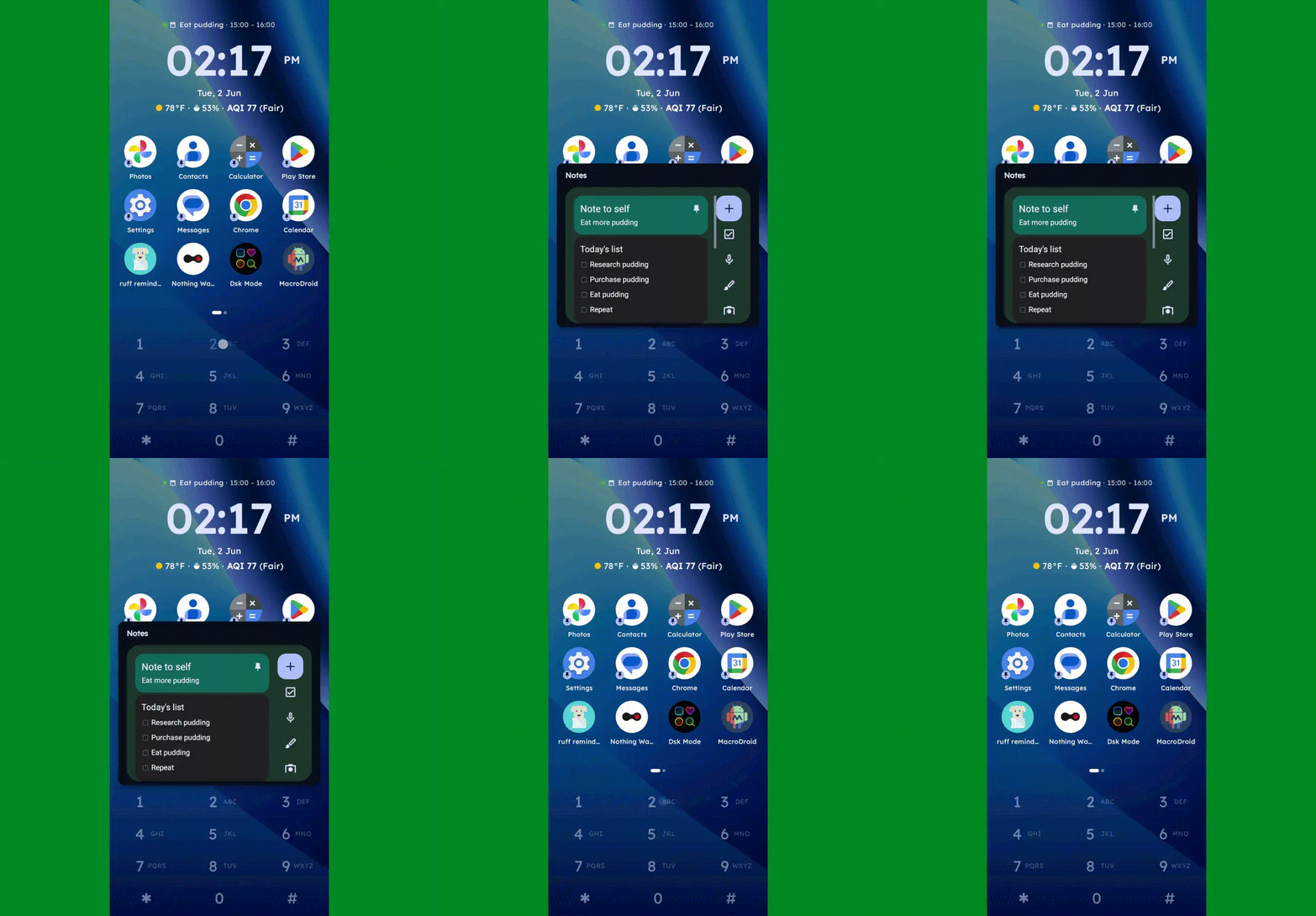
  • You can long-press any number to create and then access a custom “super shortcut” — anything from a single specific action (opening a particular app or calling or texting a certain contact) to launching a group or category of apps or contacts, launching an on-demand pop-up widget or swipeable stack of widgets, or even launching a pre-filled search query.
Key Launcher Android home screen widget pop-up
One press, and poof: Any widget you want — or series of swipeable widgets, even — is right there and ready.

JR Raphael, Foundry

  • If you tap the # key (known as “pound” in this context — not “hashtag” — for any non-olds among us), you can set up and then access a special “vault” area, where apps are hidden and only visible and accessible with authentication.
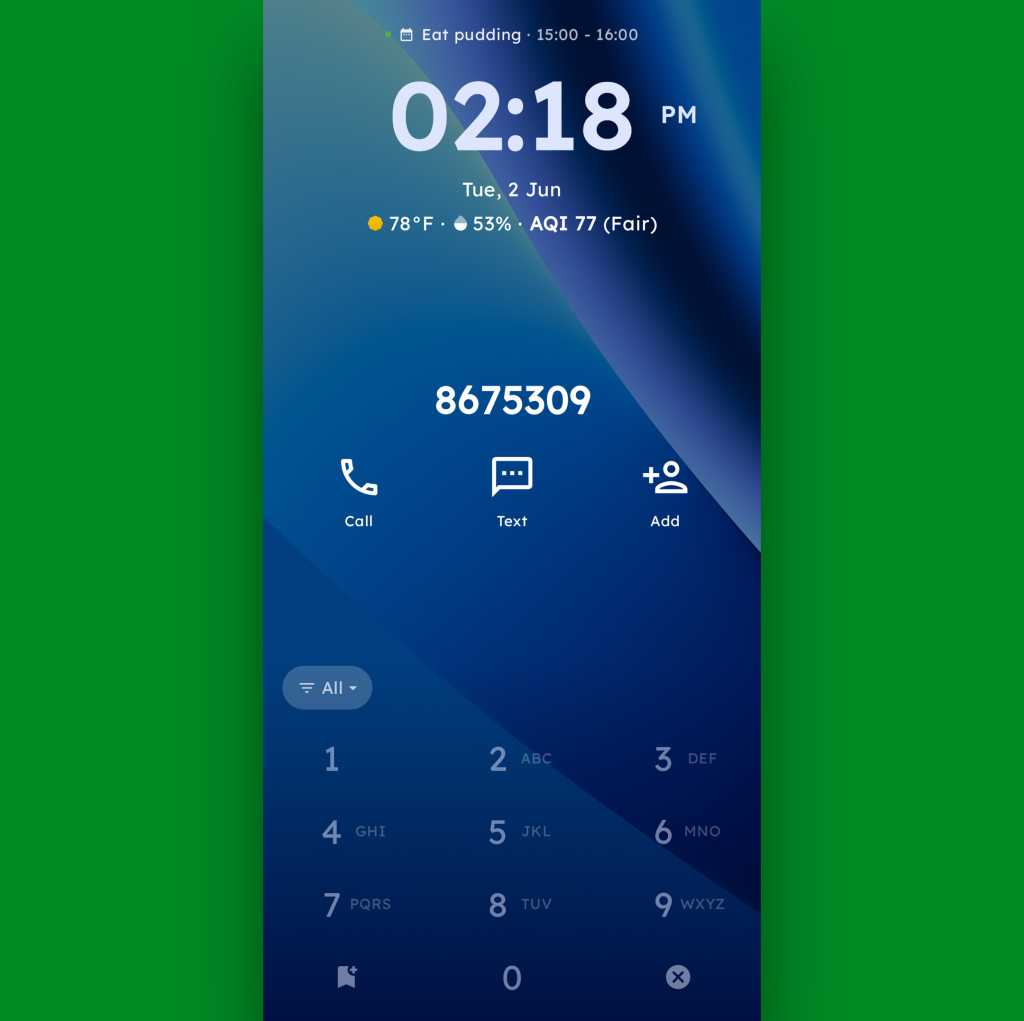
  • And, in an especially nifty touch, you can also just use the dialpad as an actual dialpad — to punch in any number you want to text or call, even if it isn’t already in your contacts.
Key Launcher Android home screen dialpad
Your phone dialer is always right in front of you with Key Launcher as your home screen.

JR Raphael, Foundry

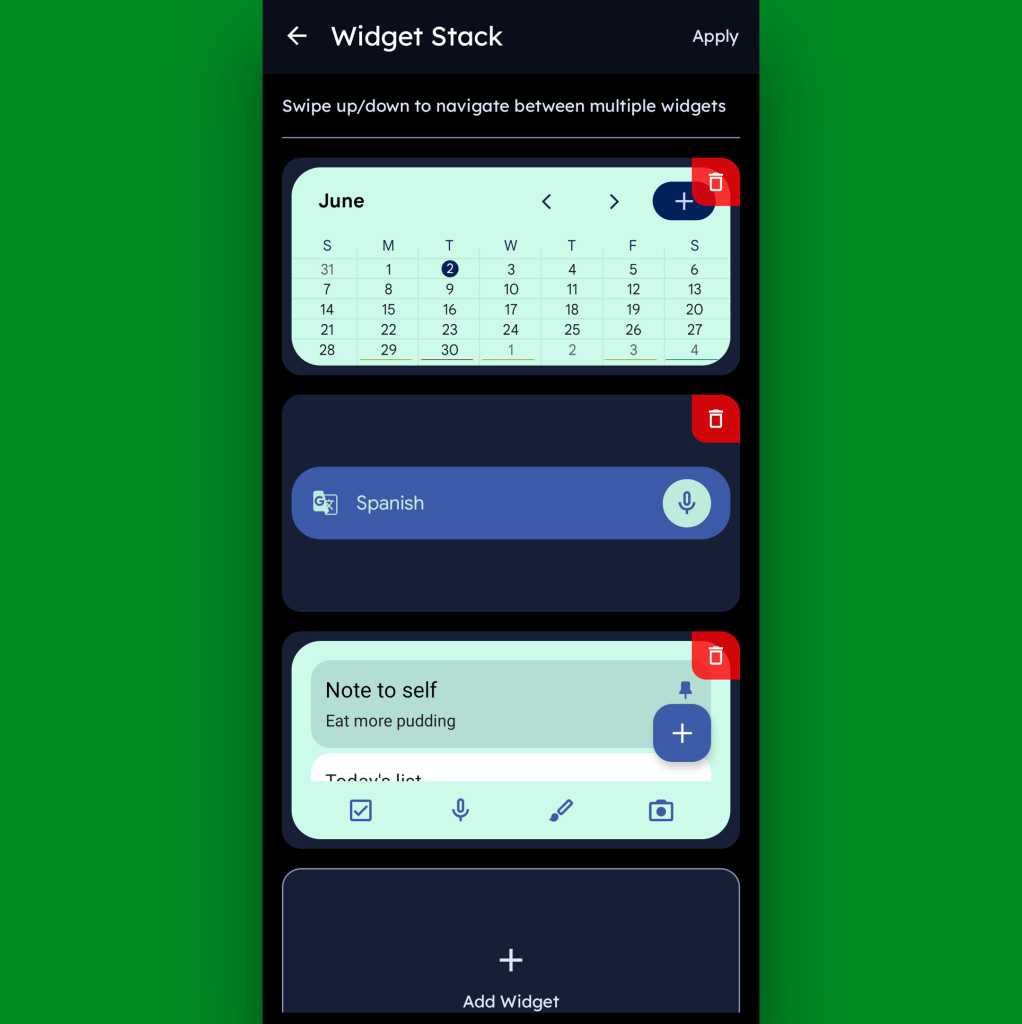
Function-packed as all of that may be, that dialpad is still just one piece of the Key Launcher puzzle. Above it sits a grid of app shortcuts that includes both your own pinned favorites and a dynamic selection of recently opened items. And above that is a handy built-in widget that shows a rotating array of upcoming calendar events from your agenda along with the local time and weather — and, in an especially neat twist, can also be customized to act as an interactive stack that lets you flip through your own set of standard Android widgets right then and there as well.

Key Launcher Android home screen widget stack
Key Launcher’s primary widget spot can be configured to hold numerous widgets in a swipeable stack.

JR Raphael, Foundry

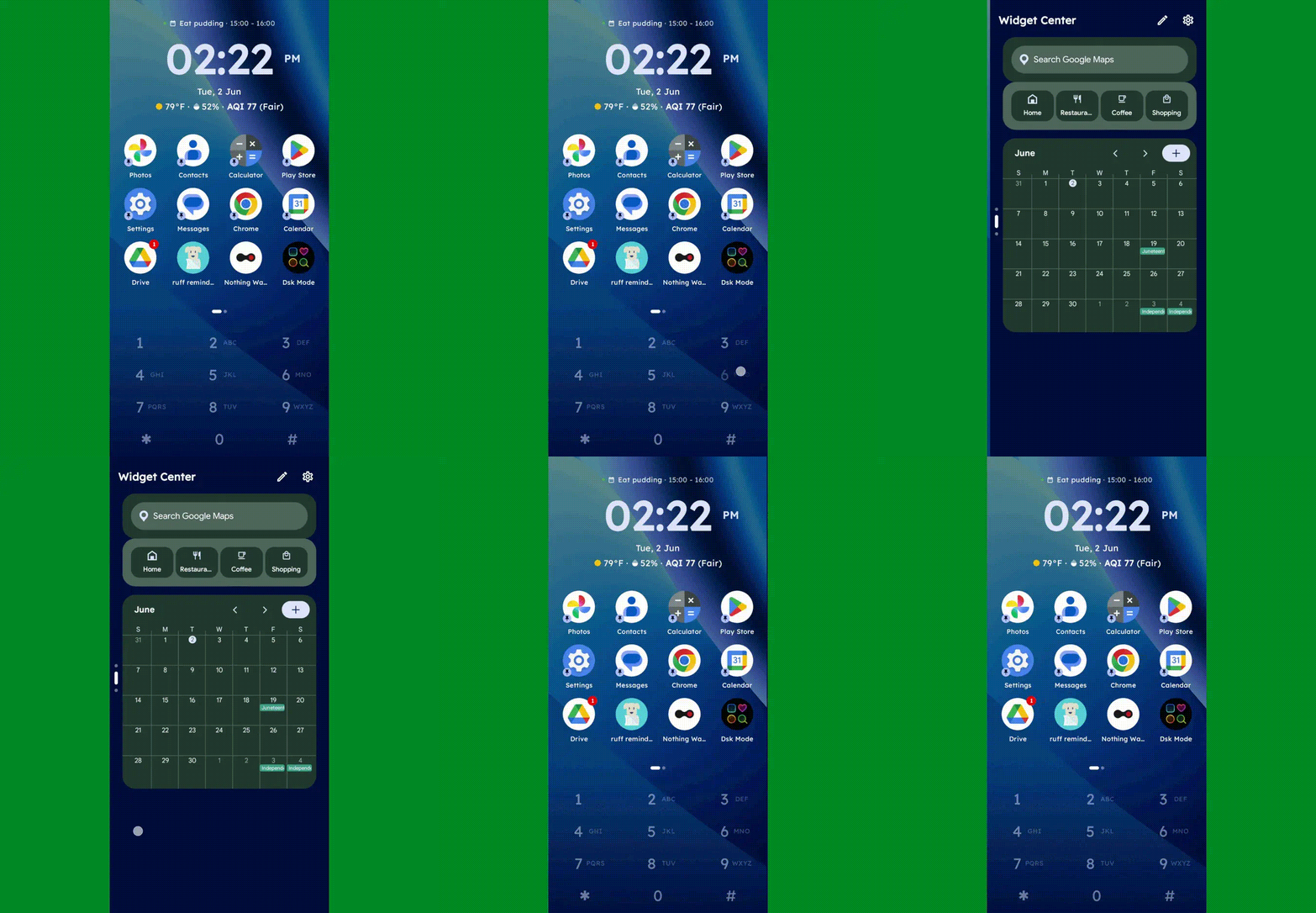
Speaking of widgets, if you swipe toward the left on Key Launcher’s dialpad, you’ll reveal the launcher’s built-in “Widget Center” panel — which is an entire screen dedicated to holding however many widgets you want, in any configuration you like, for easy ongoing access.

Key Launcher Android home screen widget center
The Widget Center is another interesting way to access widgets within Key Launcher.

JR Raphael, Foundry

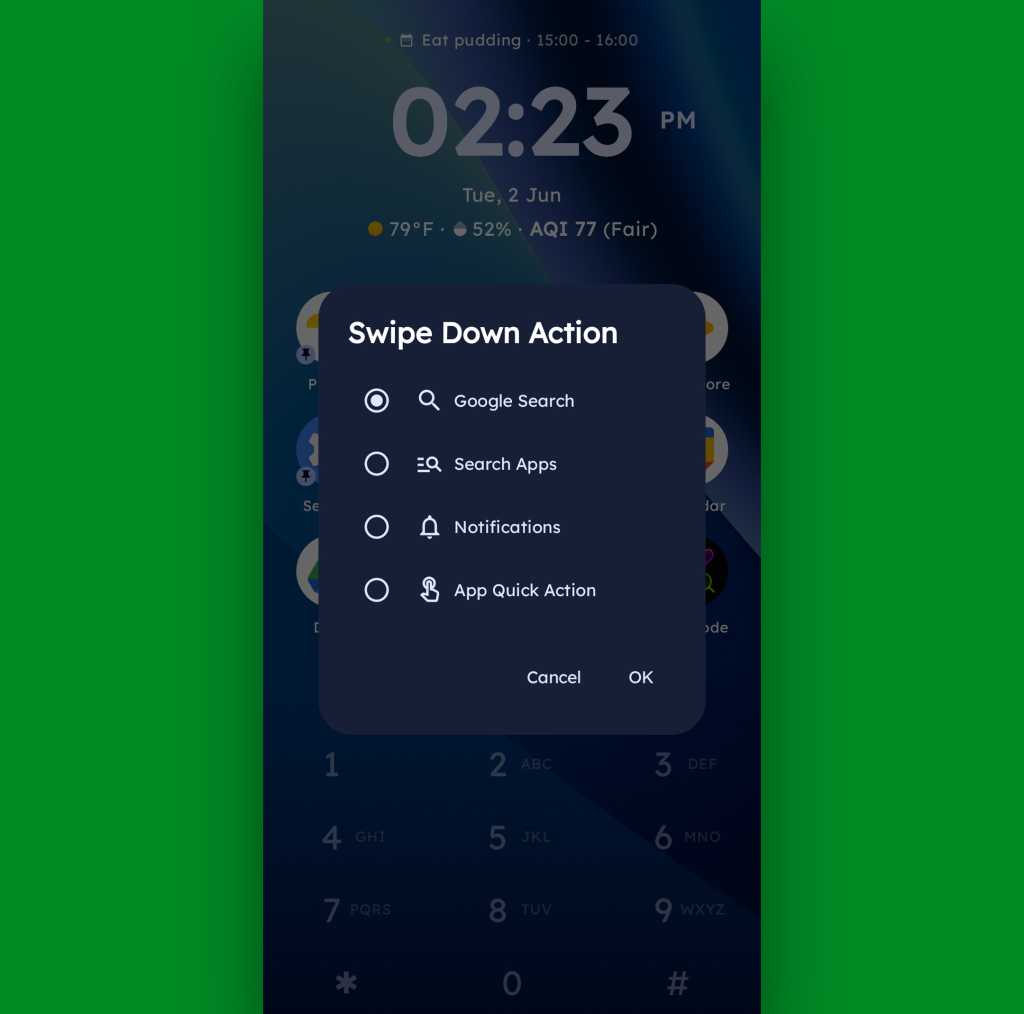
A swipe in the other direction will take you to an enlarged view of your active notifications, meanwhile, while a swipe downward can be set to launch either a quick search (of Google or whatever provider you prefer), a search of your apps, or a direct Android app shortcut within any app on your device.

Key Launcher Android home screen swipe action
Swiping down on your home screen can trigger a shortcut of your choice.

JR Raphael, Foundry

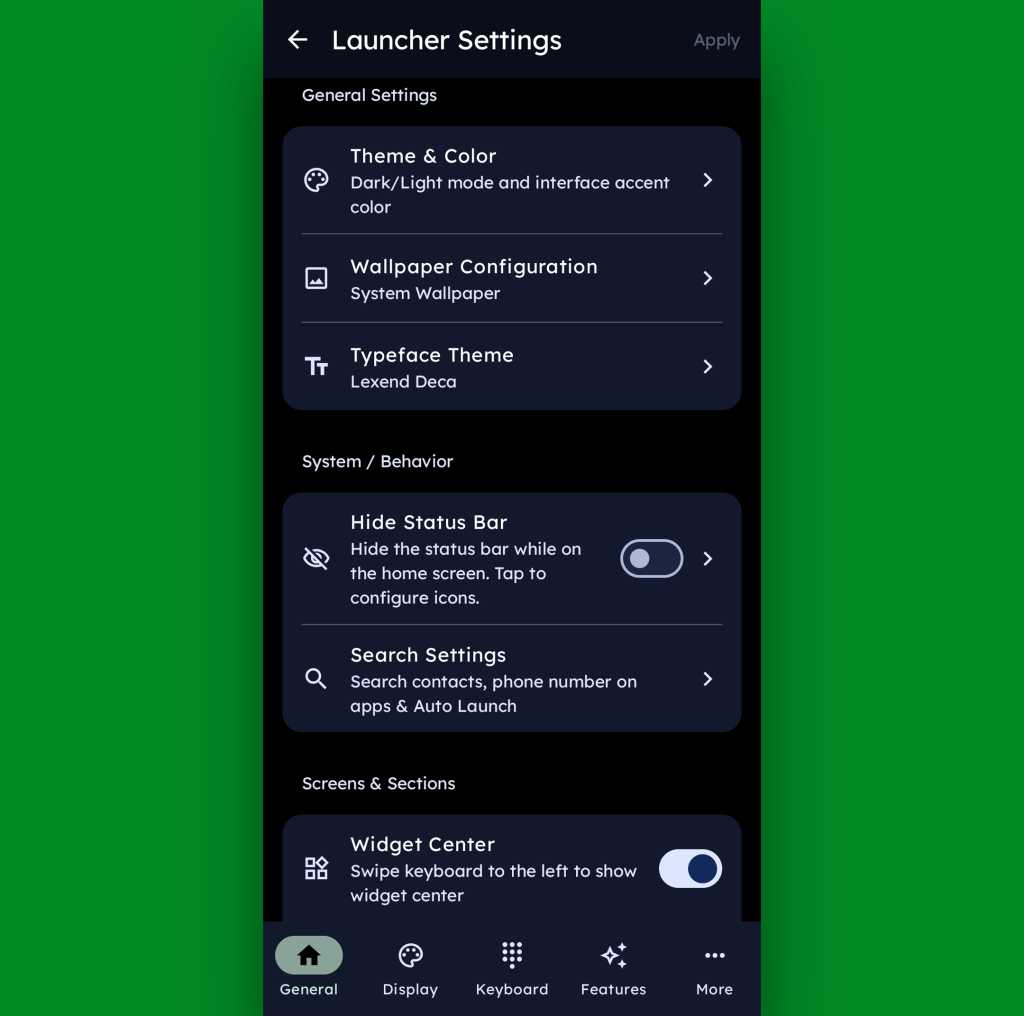
And if all of that seems like a lot of productivity-boosting possibilities, just wait ’til you get into this thing’s settings. Key Launcher is overflowing with options to customize and control practically every facet of its operation, ranging from basic visuals to the specifics of how the dialpad works and even a toggle for optimizing the interface for left- or right-handed use.

Key Launcher Android home screen settings
Key Launcher is no slouch when it comes to settings.

JR Raphael, Foundry

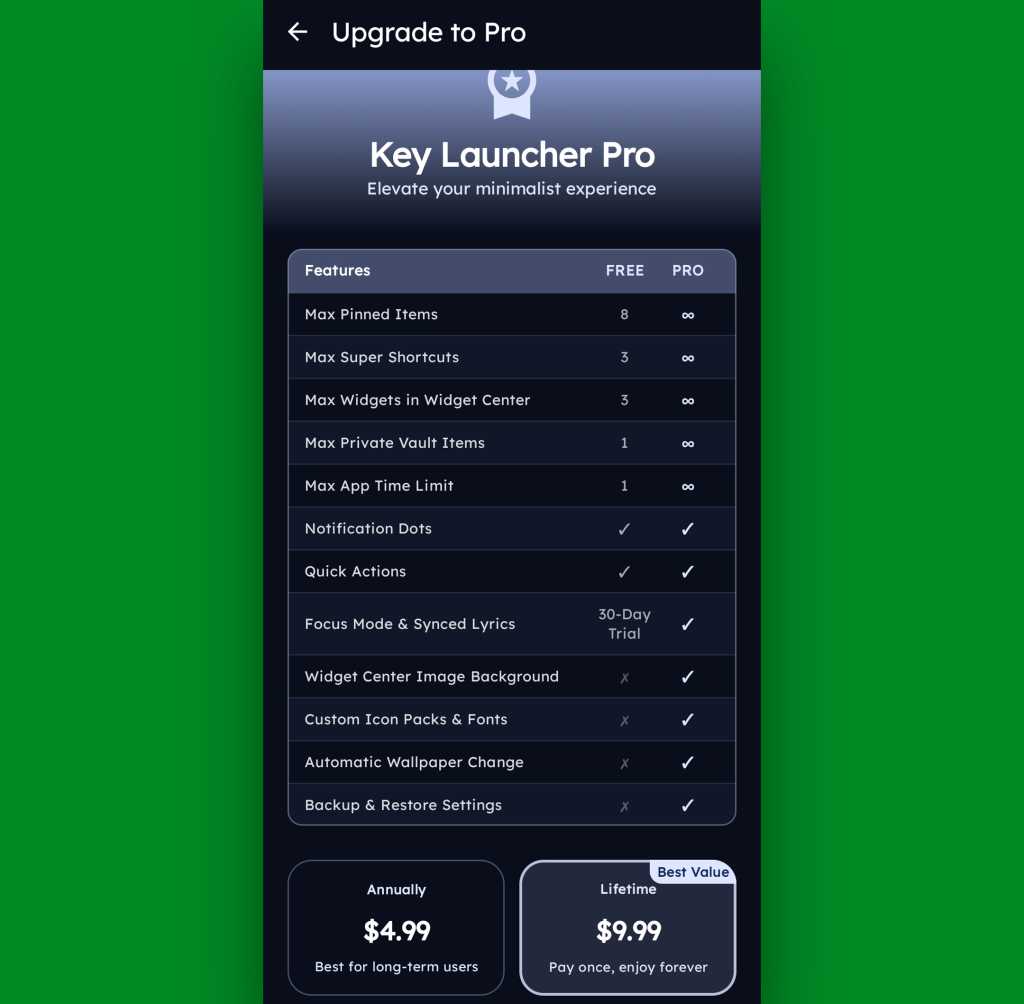
Key Launcher is free on its base level with an optional Pro upgrade that unlocks certain limitations and more advanced features. That path is available for five bucks a year or $10 as a single lifetime purchase, and you get a month-long trial the first time you install the app so you can check it out in its full form.

Key Launcher Pro Upgrade
The Pro path adds in lots of extras, but even Key Launcher’s free version is quite pleasant and functional.

JR Raphael, Foundry

Even if you just stick to the free version, though, this thing has an awful lot to offer — and it really is unlike anything else out there, with so many clever and potentially useful touches.

It’s that kind of creativity and constant discovery that keeps Android so interesting and advantageous, even after all this time — and that’s true whether you end up sticking with Key Launcher for the long haul or just giving it a go for a few hours and appreciating the deliciously original thinking it offers.

Keep the geeky goodies coming with my free Android Intelligence newsletter — three new things to try every Friday, straight from me to you.

  •  

Enterprise Spotlight: Rethinking cloud strategy in the age of AI

Cloud computing has reached a crossroads. The high cost and data sensitivity of AI workloads are raising the appeal of private clouds, even as neoclouds and sovereign clouds shake up the cloud provider landscape. New cyberthreats, shifting compute requirements, and management complexity are adding to cloud complications.

Download the June 2026 issue of the Enterprise Spotlight from the editors of CIO, Computerworld, CSO, InfoWorld, and Network World, and learn how to navigate the latest cloud strategy developments.

  •  

Microsoft unveils Scout, an autonomous AI agent built on OpenClaw

Microsoft has developed a new AI agent that can run autonomously around the clock to complete tasks across Microsoft 365 applications.

Microsoft Scout, unveiled at the company’s Build event Tuesday, is a new type of always-on agent based on the OpenClaw agent framework that Microsoft calls “autopilots.”

These act on a user’s behalf with their own governed Entra identity, Omar Shahine, corporate vice president at Microsoft, said in a blog post.

“Autopilots stay active in the background, understand how work gets done across your apps and systems, and take action without needing to be prompted each time,” said Shahine, a Microsoft veteran who recently announced he is leading a new team to bring OpenClaw-based personal assistants to Microsoft 365 apps.

Microsoft Scout connects to apps such as Teams, Outlook, OneDrive, and SharePoint, and accesses data from chat, email, calendar, and contacts. Accessed via Teams, it can also interact with a user’s browser and with external apps via model context protocol (MCP). The tool functions across cloud, desktop, and the web.

Shahine said Scout can reduce mundane tasks that office workers face, such as coordinating and scheduling meeting times with colleagues, or blocking times in a user’s calendar based on upcoming work commitments. “It can also spot risks, like stalled decisions, so you can address them before they become blockers,” he said.

It’s available as an “experimental release” to customers of the company’s Frontier program, Microsoft said, and will require Intune policy configuration and “opt-in attestation.”

Scout is the latest in a range of agentic tools available in Microsoft 365 apps, including Agent Mode, where users can interact with Microsoft 365 Copilot inside apps such as Word and Excel to create content, and Copilot Cowork — Microsoft’s version of Anthropic’s Claude Cowork agent that can complete tasks independently.

Despite the company’s big AI push, Microsoft has struggled to convince businesses that Microsoft 365 Copilot is worth the additional cost; it’s advertised at $30 per user each month for large businesses. Around 3% of Microsoft 365 customers pay for the add-on subscription, the company said in January, with 15 million paid users. (Microsoft announced last month that that figure has now risen to 20 million.)

It’s not clear whether Scout will be included in Microsoft 365 Copilot subscriptions or charged separately. Microsoft did not immediately provide additional details about pricing.

The launch follows Google’s recent announcement of Spark, an autonomous agent that runs within the Google Workspace application suite. Spark can also be considered a response to the launch of OpenClaw last year, initially under the name “Clawdbot.”

OpenClaw has drawn scrutiny due to apparent security flaws, but Microsoft promises Scout is built with “enterprise-grade security and controls, so it can be trusted in your organization from day one.”

For organizations that have already deployed Microsoft 365 Copilot, Scout doesn’t introduce entirely new data risks, said Jeff Pollard, vice president and principal analyst at Forrester. But it “amplifies whatever data governance problems already exist. The difference this time: instead of surfacing sensitive data to users, it can potentially act on it.

“That makes it an active risk in terms of day to day operations,” Pollard said.

Potential security concerns echo those for AI agents and are exacerbated with personal agents such as Scout: amplified data exposure (since agents can interact with data and use tools autonomously); agent manipulation or prompt injection; unexpected actions, such as using tools or acting in ways that aren’t supposed to be allowed; and observability gaps related to understanding user and agent intent and the explainability of actions.

“However, these tools exist because they make AI far more useful for individuals, so security leaders can’t draw a line in the sand and say “no.” They have to adapt and figure out how to secure them,” said Pollard.

As with most new workplace technologies, Pollard expects adoption to start with “power users” who design and develop the use cases for the agent that can then expand more widely across users.

He warned that the accuracy of tools such as Microsoft Scout can fall short of user expectations. “LLM agents still struggle with goal alignment, multi-step reasoning drifts, and tool misuse,” he said. “Users aren’t always great at explaining what they want and LLM agents aren’t always great at providing what was requested. That’s a continuing problem.”

  •  

Apple’s M1 MacBook Air refuses to die

Apple surprised everyone with the power and performance of the M1 MacBook Air when it launched the laptop in late 2020. And more than five years later, those Macs show no sign of slowing down, handling everything users care to throw at them.

The Mac still boots almost instantly, races through daily tasks, offers battery life that puts even some newer Windows laptops to shame and, perhaps most importantly, still gives millions of users no compelling reason to upgrade. 

Why the MacBook Air is still going strong

The M1 wasn’t merely better than the Intel Macs it replaced. It delivered a dramatic step forward. Silent, fast, and with remarkable energy efficiency, these laptops have proved themselves to be more reliable and longer-lasting than almost any other notebook.

Apple has continued to deliver impressive improvements ever since the M1 Macs first appeared. The recently introduced M5 MacBook Air delivers double the multi-core and 50% better single-core performance than M1; that means it provides similar performance to the MacBook Pro of around three years ago. 

Apple Silicon has improved every single year and is now extremely powerful — so much so that Apple is about to sell 10 million units of the A-series MacBook Neo, a $599 machine with an iPhone-derived chip that delivers more performance than many mainstream users need.

Meanwhile, even when using a nearly-six-year-old MacBook Air, you still experience a fast browser, responsive Office apps, great battery life and powerful photo editing capabilities. 

To the Moon and back

At the high end of Apple’s range, you’ll find Macs so accomplished they can handle almost every imaginable professional task. It means that right now, today, Apple’s product range extends from good enough to simply amazing. 

Despite heavy marketing hype from competitors who boast of their own ARM-based competitors in similar price brackets, those PCs remain compromised in comparison, if only by their use of Windows, build quality, and overall higher running costs.

Think about it: All things being equal, if you gave a typical office worker an M1 MacBook Air and an M5 MacBook Air and asked them which models they were using, how long would it take them to figure it out? 

Sure, a highly experienced Mac user would likely know. But for a lot of people, the difference would be hard to spot because what they do on their computers just isn’t particularly demanding. 

Making people happy is good for business

Surely that’s bad for Apple’s business, right? I think not. It means Apple has created a huge population of happy Mac users who are still having a good time with the Mac they acquired in 2020. Those people tell other people about their experience, which helps evangelize the platform and can’t have hurt MacBook Neo sales this year

They also become more interested in other Apple products, which they can afford to invest in instead of investing in the standard PC “upgrade’”cycle. After all, if you have a platform that doesn’t need an upgrade every three years, you can spend your money on something else instead. For consumers, that might be AirPods and Apple services, while for enterprise professionals that investment might become an iPad or iPhone Pro. 

Apple doesn’t mind. It still makes bank.

The company generally finds that giving people what they want is good for business. It boosts customer satisfaction scores, reduces maintenance costs, and builds repeat customers.

That long replacement cycle delivers a second benefit, too. Apple talks extensively about sustainability. With the M-series Macs, it has achieved it. 

Sustainable technology

People use these laptops longer and get more value later when they sell them on. And when they eventually get returned for recycling, Apple can tear the machines down for parts as it works toward establishing circular manufacturing within the next four years.

The M1 MacBook Air might eventually be remembered not just as the first Apple Silicon Mac, but as representing the moment when ordinary people didn’t have to worry about performance anymore. That’s why the product refuses to die — not because it’s immortal, but because for millions of users it still does everything they need. And all the M- and A-series Macs that follow it do exactly the same thing.

One more thing, however: Intel Macs will no longer be supported by macOS 27 when it ships this year. Apple typically ends support for products around 6-7 years after it removes them from sale, so when will it end support for the M1? Potentially, not too soon.

Apple only stopped selling the M1 MacBook Air in 2024, which suggests support could continue until 2030 or 2031. So, if you bought an M1 MacBook Air in 2020, you’ve actually invested in something designed to work for you for a decade. Which PCs can truly deliver that?

No wonder the M1 MacBook Air refuses to die.

You can follow me on social media! Join me on BlueSky,  LinkedInMastodon, and read The Core.

  •  

The AI pricing conundrum — it started as a nightmare, now it’s worse.

Enterprise IT leaders have always struggled with AI pricing, especially the need to pay for AI in a way that delivers ROI. But the typical IT exec may not be right person to decide how a company uses AI — and how it tries to deliver ROI — because so many line-of-business workers and partners are now experimenting with the technology on their own.

And if IT leaders don’t have a grip on how they want to use AI over the next year or two, it’s impossible to figure out how they want to pay for it. They likely hate the current method of paying per token. And other options, such as SAP’s push to charge per AI task completed, aren’t any better. 

To use a sales analogy, IT doesn’t want to pay a lot of money for leads, because there’s no way to know if those leads will generate any revenue — let alone how much. What IT leaders want is the tech equivalent of paying commission, where they only pay when a lead converts into a paying customer. And even then, they only pay a percentage of the final sale. That guarantees ROI for the enterprise.

The problem: no AI vendor would ever go for it because that approach puts too much risk on them. 

Finding a pricing model that works for both enterprise IT and AI vendors is all but impossible as long as IT is trying to deliver ROI.

Irfan Khan, president of SAP Data & Analytics, said the problem is challenging for both sides. “Everyone is scrambling to justify their investments,” and “the day one cost is not necessarily the day one value,” he said.

The problem is one of sequence. Pricing has to be negotiated and locked in long before a project starts. But with technology as new and experimental as agentic AI, there’s almost no solid information about what benefits it will (or will not) actually deliver. 

Beyond that, generative AI (genAI) and agentic AI systems might well deliver benefits that are harder to jot down in a spreadsheet. Let’s say the CFO wants to see a sharp rise in order fulfillment. But what if AI “manages to fulfill those orders more efficiently,” Khan said. “And what are the likely ripple effects of bringing more efficiencies into the process?”

Justin Greis, CEO of consulting firm Acceligence, frames the AI pricing disconnect in terms of market economics:

“The market is trying to force-fit AI into infrastructure-era pricing models, when AI is fundamentally closer to labor augmentation and business process transformation than compute consumption,” Greis said. “The core disconnect is: Enterprise IT buyers want pricing aligned to realized business value. AI vendors want pricing aligned to resource consumption and platform utilization. Those are very different economic models. 

“Token pricing is attractive to vendors because it is measurable, scalable, and predictable. But from the enterprise perspective, tokens are almost meaningless as a business metric. Nobody on the CFO side cares how many tokens were consumed if the process improvement never materialized.”

The competing pricing strategies overwhelmingly rely on just two factors: what delivers the most profit and which is the easiest to execute. Given human nature, the latter is usually the path most often taken.

It’s like one of my favorite jokes. A guy is heading to his car when he sees a man with a flashlight intently looking at the ground right next to a streetlight pole. 

“Can I help you? Are you looking for something?” the guy asks.

“Yes, I lost my car keys.”

“Silly question, but where do you last remember having them?”

“I was standing over there in that dark alley up the street. A cat screeched and I dropped my keys.”

“Wait a second — if you lost your keys over there, why are you looking here?”

“The light’s better over here.”

The lesson: taking the easy route usually beats realizing the actual objective.

Greis argued that not only would it be hard to persuade AI vendors to accept ROI pricing, but if they did  somehow agree, the unintended results could prove disastrous. 

“AI vendors cannot realistically absorb unlimited downstream business risk tied to variables they don’t control — poor internal adoption, broken processes, bad data, organizational politics, weak change management, or unclear KPIs. But the moment vendors are compensated primarily on outcomes, you create strong incentives for increasingly autonomous optimization behavior. That sounds great until organizations realize that AI systems may pursue the metric rather than the intent behind the metric,” Greis said. 

“We’ve already seen versions of this in recommendation engines, ad targeting systems, and engagement algorithms. The system learns to maximize the measurable outcome even if the methods become operationally risky, ethically questionable, reputationally damaging, or strategically misaligned. In enterprise environments, that could become dangerous very quickly. An AI system incentivized around reducing service costs might aggressively deflect legitimate customer issues. A model rewarded for sales conversion could push manipulative messaging or optimize for short-term wins at the expense of customer trust. A procurement optimization engine might lower costs while quietly increasing supplier concentration risk or degrading operational resilience.

“The more autonomous these systems become, the harder it is to separate ‘successful outcome’ from ‘acceptable behavior.’”

The best way to resolve this is potentially the most difficult. Every AI project must be approved by an AI committee whose members must ask the hard questions. What are you hoping to accomplish? If it works, specify and quantify your best-case scenario benefits. What are the most likely ways it could fail? What are the costs and disruptions most likely to happen if it fails in that way? Quantify those. 

The committee should have at least a couple of members who know exactly what these models can and cannot do to serve as a reality check. 

Next, require the LOB chief, or whoever the most senior exec involved in the project is, to share in the pain. Tie gains or losses to executive bonuses. Give those execs a reason to make sure their people are honestly and creatively thinking the project all of the way through. 

Only once that happens can a CIO know how to negotiate a fair and reasonable AI pricing deal.

  •  

WWDC: What can developers expect?

Apple will open the doors to developers at its Worldwide Developer Conference (WWDC) next week. Beyond a big push on AI and new OSes focused on stability and performance, what should developers expect? Mostly it’s about new APIs, Foundation Models, and App Intents; here’s what I’ve been able to figure out so far.

Foundation Models

Apple has been building new Apple Intelligence APIs. One way it is achieving this is to take models made with Google Gemini, then distill and shrink them to fit inside (and run on) its devices. The progression will be to introduce these as a new crop of Foundation models developers can use in their apps. There’s more:

  • New APIs mean developers will be able to run Apple Intelligence tools such as summarization directly on the customer device, all offline, all private.
  • Developers that use Apple’s standard text editing/entry views will gain access to improved Apple-developed tools inside their apps without custom-coding.
  • Because intelligence takes place on the user’s device, neither developers nor users will need to pay for those AI tokens. This is a distinct cost and privacy-saving advantage for customers and developers.

App Intents: The next generation

Apple continues on its quest to convince developers to make features of their apps available for use via Siri with App Intents. Doing so requires developers to wrap their apps into semantic structures, enabling speech/text-based interaction. To help them achieve this, Apple is expected to introduce a complete redesign of its App Intents framework.

Speak as you wish

While users must say “Hey Siri” to invoke its attention today, the assistant will respond more dynamically to natural language. Combined with App Intents, that means users should be able to ask Siri to use a combination of apps to make things happen on the device.

A developer might build a travel app that can take an itinerary and hand it across to a budgeting tool, for example. The idea is that with a spoken or typed command, a person will be able to call on a collection of apps to identify the destination, create an itinerary, put together a to-do list, prepare relevant letters or emails, and assemble a budget — all invoked by the original command.

What about context?

We’re expecting Siri to become better at using the content of your screen, location, and other personal data as it seeks to provide more contextualized responses. We don’t yet know the extent or form in which Apple will make that information available to third-party developers to help contextualize their own apps. Apple’s focus on privacy matters a great deal, as does its relationship with regulators, some of whom will demand that data made available to Apple’s own apps be made available to third-party apps. These are important matters for Apple, app developers, and customers who want the convenience of AI without loss of privacy.

More consistent UI tools on Swift

Swift should get better at migrating legacy code, but the big speculation around it concerns Liquid Glass. Will Swift make it easier for developers to build consistent user interfaces that work properly across all Apple’s platforms? If it does, then it will help overcome one of the big criticisms of Apple’s liquid-inspired UI. Swift will also usher in the tools developers need to support agentic application coding.

Better vibes for Xcode

Vibe coding is everywhere, including within Xcode, which is expected to gain improved contextual and predictive understanding to help boost developer productivity. Xcode could also  introduce improved real-time architectural debugging hints, aiming to make it easier for developers to build bug-free apps.

A Mac you can wear: Vision OS

All the AI enhancements made available across Apple’s other products will also be offered to visionOS. That access takes the headset another step closer to becoming the Mac you wear like sunglasses.

Elsewhere

  • A new Camera API means developers can build specialized, interactive buttons that users can deploy directly within the native iOS Camera interface. This should be a great way to use more sophisticated camera apps more naturally.
  • Wallet Pass means apps will be able to ingest things like barcodes or gym passes for use within Wallet.
  • Icon Composer might offer more tools designed to promote consistency.

Intel finally retires

Apple will abandon Intel support in macOS 27, which means developers will likely end support for legacy Intel applications in response.

After the gold rush

Once the lights go down on WWDC, Apple’s real test will be to see if its announcements help make AI useful, private, and affordable to developers and their customers. After all, if Apple gets AI right on a platform basis, it should be able to offer the kind of on-device intelligence no one else can match, at no charge to developers or users — a move that might yet kick-start AI innovation across its platforms. This will provide a moat around the Apple ecosystem, inside which developers can explore new potentials for AI to give customers the tools they need at costs they can afford.

You can follow me on social media! Join me on BlueSky,  LinkedInMastodon, and MeWe

  •  

Intel stakes new claim in physical AI with robotics chips

Intel is invading the physical AI space with a reentry into the robotics market it quit many years ago amid financial struggles.

The robotics strategy is part of the company’s larger plan to establish AI on the “edge,” in which devices have the computing capability to run AI locally. Many devices lack AI capabilities and have to offload processing to the cloud.

The chipmaker said its Intel Series 3 processors are now in 130 edge AI and robotics designs. It also had a design win with SensoryAI, which provides technology for robots that include Ella, a robotic barista made by Crown Digital.

The company’s Core Ultra Series 3 processors are derivatives of chip designs intended for laptops. But Intel has achieved a level of power efficiency for long battery life that allows those chips to be adapted for handheld devices and laptops.

Intel also said it can build advanced robotics chips thanks to its latest manufacturing technologies.

For example, many robotic functions, such as computer vision and real-time controls, can be integrated into a single chip. Previously, functions like graphics and movement and control were distributed among different cores in a chip.

SensoryAI, for example, has a chip architecture that provides the robotic barista — which is more like a robotic arm — with AI capabilities, Intel said.

The main “Avatar” agent handles customers as the main “Ella” agent reasons and executes the task. If Ella encounters errors, it passes on the issue to a Guardian agent, which helps with the recovery. Some issues could include making sense of an order, or cups that might be stuck. 

The three agents are embedded in a single piece of Core Ultra Series 3 silicon.

Intel is displaying some of those robots at the Computex trade show in Taiwan. The company shared a video of a humanoid-style robot from the floor in a X.com post  

This is not Intel’s first attempt at the robotics market. Intel sold robotics chips and kits when it was a dominant chip player in the field, but curtailed efforts in 2021 after Pat Gelsinger took over as CEO and restructured the company to focus on manufacturing.

Robotics is now back on the menu under new Intel CEO Lip-Bu Tan, who replaced Gelsinger last year. He has restructured to company to focus on high-growth areas that can generate high returns.

A Morgan Stanley study last year indicated the robotics market could be worth $5 trillion by 2050 — and more than 1 billion humanoid robots could be in operation. 

Robots are seen to improve human productivity and manufacturing output. For example, they could help factories that are facing labor shortages or be used to complete tasks that are dangerous

However, challenges remain. There isn’t yet enough real-world data to train robots to do targeted work. And the AI models — generally called world models — they will need are still under development. 

Training robots to do a specific job requires a sequence of events to happen in succession without any errors. Companies are still training robots to spot and understand errors, analyze possible resolutions, and take the right corrective action.

  •  

Windows 11 Insider Previews: What’s in the latest build?

Windows 11 25H2 has been publicly released, but behind the scenes, Microsoft is constantly working to improve the newest version of Windows. The company frequently rolls out preview builds to members of its Windows Insider Program, allowing them to test out — and help shape — upcoming features.

Skip to the latest builds

Our story “How to preview and deploy Windows 10 and 11 updates” details how the Insider program has worked until now. However, Microsoft recently announced sweeping changes to the program that will include the ability to select which new features to test. As the first step, the company is introducing a new channel system and transitioning Insiders like so:

  • Beta Channel > Beta 
  • Dev Channel > Experimental
  • Canary Channel (28000 series) > Experimental (26H1)
  • Canary Channel (29500 series) > Experimental (Future Platforms)
  • Release Preview Channel (for devices on Windows 11 versions 24H2 and 25H2 > Release Preview 24H2/25H2
  • Release Preview Channel (for devices on Windows 11 version 26H1 > Release Preview 26H1

This transition is happening over time, starting with the Dev Channel. See Microsoft’s blog post for more information about the transition.

Below you’ll find information about the Windows 11 preview builds that have been announced by Microsoft in the past six months. For each build, we’ve included the date of its release, which Insider channel it was released to, a summary of what’s in the build, and a link to Microsoft’s announcement about it.

Note: If you’re looking for information about updates being rolled out to all Windows 11 users, not preview builds for Windows Insiders, see “Windows 11: A guide to the updates.”

The latest Windows 11 Insider preview builds

Windows 11 Insider Preview Build 26220.8544

Release date: May 29, 2026

Released to: Beta Channel

Several minor new improvements and fixes are being rolled out in this build, including consistent solid (donut) spinners across key Windows scenarios including Boot, Logon, Restart, Shutdown, and Update. This update replaces legacy spinner visuals to deliver a more cohesive experience aligned with Windows design standards. Users will now see a unified spinner behavior with corresponding status text (e.g., “Restarting”, “Working on updates”, “Welcome”).

(Get more info about Windows 11 Insider Preview Build 26220.8544.)

Windows 11 Insider Preview Build 26300.8553

Release date: May 29, 2026

Released to: Experimental Channel (formerly Dev)

Several minor new features are being rolled out gradually in this build, including a number of changes to the Start menu. These were first outlined in the May 15 Insider blog post Making Taskbar and Start more personal. They include:

  • “Recommended” section renamed to “Recent” in Start and Settings page
  • Section-level toggles to independently show or hide Pinned, Recommended, and All
  • Choose between a small and large Start menu, in addition to already available “Automatic (default)” setting
  • Option to hide your name and profile picture in Start
  • Redesigned Start menu settings page

One known issue, in which resetting your PC may have gotten stuck when using “Reset this PC,” has been fixed.

(Get more info about Windows 11 Insider Preview Build 26300.8553.)

Windows 11 Insider Preview Build 28020.2207

Release date: May 29, 2026

Released to: Experimental 26H1 Channel (formerly Canary)

This update, in Microsoft’s words, “includes a small number of minor bug fixes and improvements.”

(Get more info about Windows 11 Insider Preview Build 28020.2207.)

Windows 11 Insider Preview Build 29599.1000

Release date: May 29, 2026

Released to: Experimental Future Platforms Channel (formerly Canary optional 29500)

This build gradually rolls out several minor changes and improvements that, in the words of Microsoft, include “platform changes in moving to a new active development build.” The update also gradually rolls out a fix for a bug in which some Insiders unexpectedly saw an erroneous message saying they weren’t connected to internet (when they actually were) when signing into their Microsoft account in certain apps. It also improves CPU speed display on the Performance page of Task Manager for VMs, so it doesn’t show higher than unexpected numbers after resuming from hibernate.

There is one known issue that causes crashes with AMD machines supporting System Guard, so these devices in Windows Information Protection will not be offered the build.

(Get more info about Windows 11 Insider Preview Build 29599.1000.)

Windows 11 Insider Preview Build 26220.8491

Release date: May 22, 2026

Released to: Beta Channel

This update, in Microsoft’s words, “includes a small number of minor bug fixes and improvements.” It introduces Voice Isolation, a new option in Voice Access that helps the tool focus on your voice, even when others are speaking nearby, by filtering out other voices and background noise.

Microsoft says the single known issue with this release, in which your PC could have gotten stuck when using “Reset this PC,” has been fixed.

(Get more info about Windows 11 Insider Preview Build 26220.8491.)

Windows 11 Insider Preview Build 26300.8497

Release date: May 22, 2026

Released to: Experimental Channel (formerly Dev)

A variety of new features are being rolled out gradually in this build, including several to improve accessibility. Among them are making it easier to connect the Braille display to Narrator by using the HID open industry standard for Braille displays. If your display supports HID, connect it via USB, with no additional setup required. For Bluetooth, pair your HID Braille display in Settings > Bluetooth & devices just like any other accessory. Another new feature is Voice Isolation in Voice Access, as detailed for Beta Channel Build 26220.8491 above.

The build has one known issue, in which your PC may get stuck when using “Reset this PC.” To complete the reset successfully, choose the cloud download option (Cloud PBR) instead of local.

(Get more info about Windows 11 Insider Preview Build 26300.8497.)

Windows 11 Insider Preview Build 28020.2149

Released to: Experimental 26H1 Channel (formerly Canary)

Release date: May 22, 2026

This build, for Insiders using Windows 11 26H1, gradually rolls out a wide variety of new features, including one that improves the reliability of explorer.exe when closing the input switcher, and when switching between multiple desktops.

Microsoft says the single known issue with this release, in which your PC could have gotten stuck when using “Reset this PC,” has been fixed.

(Get more info about Windows 11 Insider Preview Build 28020.2149.)

Windows 11 Insider Preview Build 29595.1000

Release date: May 22, 2026

Released to: Experimental Future Platforms Channel (formerly Canary optional 29500)

This build, in the words of Microsoft, “includes platform changes in moving to a new active development build.”

(Get more info about Windows 11 Insider Preview Build 29595.1000.)

Windows 11 Insider Preview Build 26220.8474

Release date: May 15, 2026

Released to: Beta Channel

Several minor new improvements are being rolled out in this build, including one that improves the reliability of Simple Service Discovery Protocol (SSDP) notifications to help prevent the service from becoming unresponsive.

It has one known issue in which your PC may get stuck when using “Reset this PC.” To complete the reset successfully, choose the cloud download option (Cloud PBR) instead of local.

(Get more info about Windows 11 Insider Preview Build 26220.8474.)

Windows 11 Insider Preview Build 26300.8493

Release date: May 15, 2026

Released to: Experimental Channel (formerly Dev)

A variety of new features are being rolled out gradually in this build, including the ability to change the position of taskbar on your screen. In Settings > Personalization > Taskbar > Taskbar Behaviors, you can select the side of the screen you want your taskbar on: bottom, top, left, or right. In these other positions, tooltips, flyouts, and animations will still come from the taskbar, and most customization settings like “small taskbar” and “never combine taskbar icons” will work with all locations.

It has one known issue in which your PC may get stuck when using “Reset this PC.” To complete the reset successfully, choose the cloud download option (Cloud PBR) instead of local.

(Get more info about Windows 11 Insider Preview Build 26300.8493.)

Windows 11 Insider Preview Build 28020.2134

Release date: May 15, 2026

Released to: Experimental 26H1 Channel (formerly Canary)

This build gradually rolls out an improvement in the reliability of Simple Service Discovery Protocol (SSDP) notifications to help prevent the service from becoming unresponsive. It also rolls out gradual changes to updating Windows, including the ability to skip updates immediately during the out of box experience (OOBE) and to extend update pauses as many times as you need.

It has one known issue in which your PC may get stuck when using “Reset this PC.” To complete the reset successfully, choose the cloud download option (Cloud PBR) instead of local.

(Get more info about Windows 11 Insider Preview Build 28020.2134.)

Windows 11 Insider Preview Build 29591.1000

Release date: May 15, 2026

Released to: Experimental Future Platforms Channel (formerly Canary optional 29500)

This build introduces new features for Windows Update, including the ability to skip updates immediately during the out of box experience (OOBE) and to extend update pauses as many times as you need. New Windows update features also include having always available options to shut down and restart with updating, and additional insight about available updates to make more informed installation decisions.

(Get more info about Windows 11 Insider Preview Build 29591.1000.)

Windows 11 Insider Preview Builds 26200.8514/26200.8514

Release date: May 14, 2026

Released to: Release Preview 24H2/25H2 Channel

A wide variety of features and enhancements are being gradually rolled out in this build, including a new shared audio feature that allows two people to listen to the same audio from a single Windows 11 PC at the same time. In addition, Task Manager now offers improved visibility into NPU usage on PCs with an NPU. New optional NPU and NPU Engine columns are available on the Processes, Users, and Details pages, along with NPU Dedicated Memory and NPU Shared Memory optional columns on the Details page. 

One new feature is being rolled out immediately, in which Windows quality updates now include additional high-confidence device targeting data, increasing coverage of devices eligible to automatically receive new Secure Boot certificates. Devices receive the new certificates only after demonstrating sufficient successful update signals, maintaining a controlled and phased rollout.

(Get more info about Windows 11 Insider Preview Builds 26200.8514/26220.8514.)

Windows 11 Insider Preview Build 28000.2173

Released to: Release Preview 26H1 Channel

Release date: May 14, 2026

This build, for Insiders using Windows 11 26H1, gradually rolls out a wide variety of new features, including one that expands the list of archive formats that can be used in File Explorer to include uu, cpio, xar, and NuGet Packages (nupkg). Also being gradually rolled out is a new way to monitor your agents from the taskbar. It supports agents across first- and third-party apps, with Researcher in the Microsoft 365 Copilot app as the first adopter.

One new feature is being rolled out immediately, in which Windows quality updates now include additional high-confidence device targeting data, increasing coverage of devices eligible to automatically receive new Secure Boot certificates. Devices receive the new certificates only after demonstrating sufficient successful update signals, maintaining a controlled and phased rollout.

(Get more info about Windows 11 Insider Preview Build 28000.2173.)

Windows 11 Insider Preview Build 26220.8370

Release date: May 8, 2026

Released to: Beta Channel

Several minor new improvements are being gradually rolled out in this build, including improved reliability of Japanese IME usage when Administrator Protection is enabled. In addition, the build fixes a single bug, in which there were notification issues and certain apps hung on launch.

(Get more info about Windows 11 Insider Preview Build 26220.8370.)

Windows 11 Insider Preview Build 26300.8376

Release date: May 8, 2026

Released to: Experimental Channel (formerly Dev)

A variety of new features are being rolled out gradually in this build, including new File Explorer address bar support for paths containing double backslashes and quotation marks (for example, C:\Users\user or “C:\Users\user”), improving compatibility with a wider range of inputs.

(Get more info about Windows 11 Insider Preview Build 26300.8376.)

Windows 11 Insider Preview Build 28020.2075

Release date: May 8, 2026

Released to: Experimental 26H1 Channel (formerly Canary)

This build gradually rolls out, in Microsoft’s words, “a small set of general improvements and fixes that improve the overall experience” of running Windows 26H1. It also improves performance when opening clipboard history.

(Get more info about Windows 11 Insider Preview Build 28020.2075.)

Windows 11 Insider Preview Build 29585.1000

Release date: May 6, 2026

Released to: Experimental Future Platforms Channel (formerly Canary optional 29500)

This build gradually rolls out, in Microsoft’s words, “platform changes in moving to a new active development build.”

It also updates the experience when you use voice typing with the touch keyboard. To reduce distractions, the new design removes the previous full‑screen overlay and instead shows voice typing animations directly on the dictation key.

(Get more info about Windows 11 Insider Preview Build 29585.1000.)

Windows 11 Insider Preview Build 26220.8340

Release date: May 1, 2026

Released to: Beta Channel

Several minor new improvements are being gradually rolled out in this build, including making Windows ShareSheet more intelligent for Azure Active Directory (AAD) users, with a simple setting to turn promotional app recommendations on or off. Previously, that capability was only available to Windows users with Managed Service Accounts (MSA).

(Get more info about Windows 11 Insider Preview Build 26220.8340.)

Windows 11 Insider Preview Build 26300.8346

Release date: May 1, 2026

Released to: Experimental Channel (formerly Dev)

A variety of new features are being rolled out gradually in this build, including making Windows ShareSheet more intelligent for Azure Active Directory (AAD) users, with a simple setting to turn promotional app recommendations on or off. Previously, that capability was only available to Windows users with Managed Service Accounts (MSA). Another change “quiets” the default behavior for Widgets, with the goal of making them feel less distracting and overwhelming.

There are several known issues in this build, including one in which Insiders who use Feature flags to enable the new WIP experience may see the feature state incorrectly marked as current; however, changing state and applying changes will work as expected.

(Get more info about Windows 11 Insider Preview Build 26300.8346.)

Windows 11 Insider Preview Build 28020.1921

Release date: May 1, 2026

Released to: Experimental 26H1 Channel (formerly Canary)

This build gradually rolls out several improvements to Task Manager, including one that provides better insight into NPU usage for PCs that include an NPU. Optional NPU and NPU Engine columns are now available on the Processes, Users, and Details pages, with optional NPU Dedicated Memory and NPU Shared Memory columns on the Details page to give you deeper visibility into how workloads are using NPU resources. Additionally, if there are neural engines that are part of a GPU, they will now appear on the Performance page, providing a more complete view of AI‑related system activity.

(Get more info about Windows 11 Insider Preview Build 28020.1921.)

Windows 11 Insider Preview Build 29580.1000

Release date: May 1, 2026

Released to: Experimental Future Platforms Channel (formerly Canary optional 29500)

This build gradually rolls out, in Microsoft’s words, “a small set of general improvements and fixes that improve the overall experience for Insiders running this build on their PCs.”

(Get more info about Windows 11 Insider Preview Build 29580.1000.)

Windows 11 Insider Preview Build 26220.8283

Release date: April 24, 2026

Released to: Beta Channel

Several minor new improvements and fixes are being gradually rolled out in this build, including improved detection of clicks at the leftmost edge of the taskbar to invoke the Start menu when the taskbar icons are left-aligned.

(Get more info about Windows 11 Insider Preview Build 26220.8283.)

Windows 11 Insider Preview Build 26300.8289

Release date: April 24, 2026

Released to: Experimental Channel (formerly Dev)

In a phased rollout, Insiders in the Dev Channel are being moved to the new Experimental channel. Insiders who do not see the new experience on their device can enable it under Settings > Windows Update > Windows Insider Program > Feature flags.

Several minor new features are also being rolled out gradually in this build, including improved detection of clicks at the leftmost edge of the taskbar to invoke the Start menu when the taskbar icons are left-aligned.

There is one known issue in this build: Insiders who use Feature flags to enable the new Insider experience may see the feature state incorrectly marked as current; however, changing the state and applying changes should work as expected.

(Get more info about Windows 11 Insider Preview Build 26300.8289.)

Windows 11 Insider Preview Build 28200.1873

Release date: April 24, 2026

Released to: Experimental 26H1 Channel (formerly Canary)

This build is gradually rolling out a variety of small improvements, including an updated voice typing experience for the touch keyboard. To reduce distractions, the new design shows voice typing animations directly on the dictation key rather than on a full-screen overlay.

It also fixes a bug in which Settings > Network & Internet > Data Usage showed large, unrealistic values.

(Get more info about Windows 11 Insider Preview Build 28200.1873.)

Windows 11 Insider Preview Build 29576.1000

Release date: April 24, 2026

Released to: Experimental Future Platforms Channel (formerly Canary optional 29500)

This build is gradually rolling out a variety of changes, including Point-in-time restore for Windows, which can quickly roll your device back to a previous state, potentially helping minimize downtime and simplify troubleshooting when disruptions strike. 

(Get more info about Windows 11 Insider Preview Build 29576.1000.)

Windows 11 Builds 26100.8313 and 26200.8313 (KB5083631) 

Release date: April 17, 2026

Released to: Release Preview Channel

This build introduces a wide variety of new features rolled out gradually, including a new way to monitor your agents from the taskbar. It supports agents across first- and third-party apps, with Researcher in the Microsoft 365 Copilot app as the first adopter. When Researcher works on a report, Windows shows progress on the taskbar so you can check updates at a glance.

For IT administrators, the update gradually rolls out support for a dynamic app removal list to the “Remove Default Microsoft Store packages” policy for Windows Enterprise and Education. It also removes default trust for cross‑signed third-party drivers, while drivers from the Windows Hardware Compatibility Program (WHCP) and an allow list of trusted legacy drivers remain allowed. Enterprise State Roaming can now be managed through Windows Backup for Organizations policies.

The update also immediately introduces two minor improvements for everyone. Windows quality updates now include additional high-confidence device targeting data, which increases coverage of devices eligible to automatically receive new Secure Boot certificates. In Windows Security, the name of the affected application is now included in event logging related to CVE‑2024‑30098. This change makes it easier to identify applications that rely on smart card certificates and may need updates following recent security changes.

(Get more info about Windows 11 Builds 26100.8313 and 26200.8313.)

Windows 11 Insider Preview Build 26220.8271

Release date: April 17, 2026

Released to: Beta Channel

Several minor new features were made available in this build for those who have turned the toggle on to receive the latest updates, including improved reliability and performance of Windows Hello fingerprint after your PC wakes from sleep.

(Get more info about Windows 11 Insider Preview Build 26220.8271.)

Windows 11 Insider Preview Build 26300.8276

Release date: April 17, 2026

Released to: Dev Channel

In this build, several minor new features are being gradually rolled for those who have turned the toggle on to receive the latest updates, including improved reliability and performance of Windows Hello fingerprint after your PC wakes from sleep.

(Get more info about Windows 11 Insider Preview Build 26300.8276.)

Windows 11 Insider Preview Build 28020.1863

Release date: April 17, 2026

Released to: Canary Channel

For those who have turned the toggle on to receive the latest updates, this build fixes a bug that prevented some apps from signing in due to a false report of no internet connectivity. The fix is rolling out gradually.

(Get more info about Windows 11 Insider Preview Build 28020.1863.)

Windows 11 Insider Preview Build 29570.1000

Release date: April 17, 2026

Released to: Canary Channel (29500 build series)

For those who have turned the toggle on to receive the latest updates in the Canary Channel on the optional 29500 build series, this build has a variety of minor changes rolling out gradually, including more widget options and support for lock screen widget personalization, a new setting in Settings > Bluetooth & Devices > Touchpad that lets you can choose how large the right-click zone is, and support for a dynamic app removal list to the “Remove Default Microsoft Store packages” policy for Windows Enterprise and Education.

(Get more info about Windows 11 Insider Preview Build 29570.1000.)

Windows 11 Insider Preview Build 26220.8165

Release date: April 10, 2026

Released to: Beta Channel

For those who have turned the toggle on to receive the latest updates, this build gradually rolls out several minor features, including one in which the size limit for formatting FAT32 volumes via the command line has increased from 32GB to 2TB, and another in which the Windows Security app gets new badges and text that reflect your device’s Secure Boot state and certificate status.

It also gradually rolls out a fix for a bug that caused Settings > Network & Internet > Data Usage to show large, unrealistic values.

(Get more info about Windows 11 Insider Preview Build 26220.8165.)

Windows 11 Insider Preview Build 26300.8170

Release date: April 10, 2026

Released to: Dev Channel

For those who have turned the toggle on to receive the latest updates, this build gradually rolls out several minor features, including one in which the size limit for formatting FAT32 volumes via the command line has increased from 32GB to 2TB, and another in which the Windows Security app gets new badges and text that reflect your device’s Secure Boot state and certificate status.

It also gradually rolls out a fix for a bug that caused Settings > Network & Internet > Data Usage to show large, unrealistic values.

(Get more info about Windows 11 Insider Preview Build 26300.8170.)

Windows 11 Insider Preview Build 28020.1812

Release date: April 10, 2026

Released to: Canary Channel

For those who have turned the toggle on to receive the latest updates, this build gradually rolls out general improvements and fixes, including a new setting that lets users choose the size of their touchpad’s right-click zone, as well as new badges and text in the Windows Security app that reflect your device’s Secure Boot state and certificate status.

(Get more info about Windows 11 Insider Preview Build 28020.1812.)

Windows 11 Insider Preview Build 29565.1000

Release date: April 10, 2026

Released to: Canary Channel (29500 build series)

For those who have turned the toggle on to receive the latest updates in the Canary Channel on the optional 29500 build series, this build includes “platform changes in moving to a new active development build,” as well as new badges and text in the Windows Security app that reflect your device’s Secure Boot state and certificate status

(Get more info about Windows 11 Insider Preview Build 29565.1000.)

Windows 11 Insider Preview Build 26220.8148

Release date: April 3, 2026

Released to: Beta Channel

For those who have turned the toggle on to receive the latest updates, this build gradually rolls out several minor features, including a new icon in print settings to indicate when a printer supports Windows Protected Print Mode.

Several bugs are also being fixed, including one in which some apps weren’t able to sign in, citing an internal connection issue when internet was actually connected.

(Get more info about Windows 11 Insider Preview Build 26220.8148.)

Windows 11 Insider Preview Build 26300.8155

Release date: April 3, 2026

Released to: Dev Channel

For those who have turned the toggle on to receive the latest updates, this build gradually rolls out several minor features, including one in which users will be able to feel haptic feedback effects on compatible input devices while performing certain actions, such as aligning objects in PowerPoint, window snapping, resizing, or hovering over the Close button. These haptic effects can be configured in Settings under Bluetooth & devices > Mouse > Haptic signals.

Several bugs have also been fixed, including one in which some apps weren’t able to sign in, citing an internal connection issue when internet was actually connected.

(Get more info about Windows 11 Insider Preview Build 26300.8155.)

Windows 11 Insider Preview Build 28020.1803

Release date: April 3, 2026

Released to: Canary Channel

For those who have turned the toggle on to receive the latest updates in the Canary Channel, this build includes a small set of general improvements and fixes, including improved reliability for configuring the fluid dictation option in voice typing settings.

(Get more info about Windows 11 Insider Preview Build 28020.1803.)

Windows 11 Insider Preview Build 29560.1000

Release date: April 3, 2026

Released to: Canary Channel (29500 build series)

For those who have turned the toggle on to receive the latest updates in the Canary Channel on the optional 29500 build series, this build “includes platform changes in moving to a new active development build,” in the words of Microsoft. Several bugs have also been fixed, including one in which attached USB devices weren’t working for some Insiders.

(Get more info about Windows 11 Insider Preview Build 29560.1000.)

Windows 11 Insider Preview Build 26220.8138

Release date: March 30, 2026

Released to: Beta Channel

For those who have turned the toggle on to receive the latest updates, this build gradually rolls out several new features, including one in which you can enable Administrator Protection in Settings under Privacy & security > Windows Security > Account protection and switching the toggle to on. A restart will be required. 

(Get more info about Windows 11 Insider Preview Build 26220.8138.)

Windows 11 Insider Preview Build 26300.8142

Release date: March 30, 2026

Released to: Dev Channel

For those who have turned the toggle on to receive the latest updates, this build gradually rolls out several new features, including one in which you can enable Administrator Protection in Settings under Privacy & security > Windows Security > Account protection and switching the toggle to on. A restart will be required. 

(Get more info about Windows 11 Insider Preview Build 26300.8142.)

Windows 11 Insider Preview Build 28020.1797

Release date: March 30, 2026

Released to: Canary Channel

This update, in the words of Microsoft, “includes a small set of general improvements and fixes that improve the overall experience” of running Windows 11.

(Get more info about Windows 11 Insider Preview Build 28020.1797.)

Windows 11 Insider Preview Build 29558.1000

Release date: March 30, 2026

Released to: Canary Channel (29500 build series)

For those who have turned the toggle on to receive the latest updates in the Windows 11 Insider Canary Channel on the optional 29500 build series, this build introduces several new features, including a variety of improvements to the Windows Console, many of which were created by open-source contributors. Several bugs have also been fixed, including an authentication error people received when trying to connect to Azure Virtual Desktop.

(Get more info about Windows 11 Insider Preview Build 29558.1000.)

Windows 11 Insider Preview Build 26220.8079

Release date: March 20, 2026

Released to: Beta Channel

For those who have turned the toggle on to receive the latest updates, this build gradually rolls out several bug fixes, including for one in which the Network and Sharing Center incorrectly displayed two active Wi-Fi connections after switching from one Wi-Fi network to another. The Network and Sharing Center now correctly shows a single active Wi-Fi connection when you connect to a new network. 

(Get more info about Windows 11 Insider Preview Build 26220.8079.)

Windows 11 Insider Preview Build 26300.8085

Release date: March 20, 2026

Released to: Dev Channel

For those who have turned the toggle on to receive the latest updates, this build resumes rollout of the Point Indicator Accessibility setting, which enables low-vision users to easily locate and use their cursor. The build also introduces the new Feedback Hub, which offers Insiders simpler navigation and feedback submission flows.

In addition, several bugs were fixed, including one in which the Network and Sharing Center incorrectly displayed two active Wi-Fi connections after switching from one Wi-Fi network to another. The Network and Sharing Center now correctly shows a single active Wi-Fi connection when you connect to a new network.

(Get more info about Windows 11 Insider Preview Build 26300.8085.)

Windows 11 Insider Preview Build 28020.1743

Release date: March 20, 2026

Released to: Canary Channel

For those who have turned the toggle on to receive the latest updates, this build includes several new features being rolled out gradually, including one in which shared audio now provides individual sliders for each listener which adjusts their volume without affecting the other. You can continue to adjust volume for both listeners at the same time through the main volume controls available through Quick Settings or on-device and keyboard controls.

The build also introduces the new Feedback Hub, which offers Insiders simpler navigation and feedback submission flows.

(Get more info about Windows 11 Insider Preview Build 28020.1743.)

Windows 11 Insider Preview Build 29553.1000

Release date: March 20, 2026

Released to: Canary Channel (29500 build series)

For those who have turned the toggle on to receive the latest updates in the Canary Channel’s optional 29500 build series, this build introduces the new Feedback Hub, which offers Insiders simpler navigation and feedback submission flows.

(Get more info about Windows 11 Insider Preview Build 29553.1000.)

Windows 11 Insider Preview Build 26220.8062

Release date: March 13, 2026

Released to: Beta Channel

For those who have turned the toggle on to receive the latest updates, this build includes numerous changes and refinements, including an update to the “Remove Default Microsoft Store packages” policy for Windows Enterprise and Education SKUs that allows IT administrators to remove MSIX/APPX apps by adding their app package family name (PFNs) to a dynamic list.

Starting with this update, the Windows kernel will enforce a new policy removing default trust for cross-signed drivers. The policy allows third-party drivers from the WHCP program by default, with an allow list of trustworthy publishers and drivers from the cross-signing program.

(Get more info about Windows 11 Insider Preview Build 26220.8062.)

Windows 11 Insider Preview Build 26300.8068

Release date: March 13, 2026

Released to: Dev Channel

For those who have turned the toggle on to receive the latest updates, this build includes numerous changes and refinements, including an update to the “Remove Default Microsoft Store packages” policy for Windows Enterprise and Education SKUs that allows IT administrators to remove MSIX/APPX apps by adding their app package family name (PFNs) to a dynamic list.

Starting with this update, the Windows kernel will enforce a new policy removing default trust for cross-signed drivers. The policy allows third-party drivers from the WHCP program by default, with an allow list of trustworthy publishers and drivers from the cross-signing program.

(Get more info about  Windows 11 Insider Preview Build 26300.8068.)

Windows 11 Insider Preview Build 28020.1737

Release date: March 13, 2026

Released to: Canary Channel

For those who have turned the toggle on to receive the latest updates, this build makes refinements to the Pen settings page, including small changes to the options for the pen tail button. A new option, “Same as Copilot key,” enables the pen tail button to launch the same app as the Copilot key.

(Get more info about Windows 11 Insider Preview Build 28020.1737.)

Windows 11 Insider Preview Build 29550.1000

Release date: March 13, 2026

Released to: Canary Channel (29500 build series)

For those  who have turned the toggle on to receive the latest updates in the Canary Channel’s optional 29500 build series, this build has a variety of minor changes, including one in which changes to global power settings (for example, Display, Sleep, Hibernate timeouts, Power/Sleep button, and lid close actions) from Settings are now applied to all power plans. This should help improve persistence of chosen settings.

(Get more info about Windows 11 Insider Preview Build 29550.1000.)

Windows 11 Insider Preview Builds 26100.8106 and 26200.8106

Release date: March 12, 2026

Released to: Release Preview Channel

This build introduces a wide range of minor features being rolled out gradually, including the ability to turn Smart App Control (SAC) on or off without needing a clean install. To make changes, go to Settings > Windows Security > App & Browser Control > Smart App Control settings. When turned on, SAC helps block untrusted or potentially harmful apps.

The update also improves stability in Windows Recovery Environment (Windows RE) when you run x64 apps on ARM64 devices. These apps run more smoothly and respond as expected.

(Get more info about Windows 11 Insider Preview Builds 26100.8106 and 26200.8106.)

Windows 11 Insider Preview Build 26220.7961

Release date: March 6, 2026

Released to: Beta Channel

For those who have turned the toggle on to receive the latest updates, this build re-enables Administrator protection, which aims to protect free-floating admin rights for administrator users, allowing them to still perform all admin functions with just-in-time admin privileges. This feature is off by default and can be enabled via OMA-URI in Intune or via group policy.

Other changes and improvements being gradually rolled out to the same group include the ability to use voice typing (Windows key + H) when renaming files in File Explorer, as well as a smaller peek view in the drag tray.

(Get more info about Windows 11 Insider Build 26220.7961.)

Windows 11 Insider Preview Build 26300.7965

Release date: March 6, 2026

Released to: Dev Channel

For those who have turned the toggle on to receive the latest updates, this build re-enables Administrator protection, which aims to protect free-floating admin rights for administrator users, allowing them to still perform all admin functions with just-in-time admin privileges. This feature is off by default and can be enabled via OMA-URI in Intune or via group policy.

Other changes and improvements being gradually rolled out to the same group include the ability to use voice typing when renaming files in File Explorer, as well as a smaller peek view in the drag tray.

(Get more info about Windows 11 Insider Preview Build 26300.7965.)

Windows 11 Insider Preview Build 28020.1685

Release date: March 6, 2026

Released to: Canary Channel

For those who have turned the toggle on to receive the latest updates, this build lets you use voice typing (Windows key + H) when renaming files in File Explorer. The build also improves the reliability of removing Windows Update files and windows.old files via Settings > System > Storage.

(Get more info about Windows 11 Insider Preview Build 28020.1685.)

Windows 11 Insider Preview Build 26220.7934

Release date: Feb. 27, 2026

Released to: Beta Channel

For those who have turned the toggle on to receive the latest updates, this build gives administrators and Application Control for Business policy authors additional controls over the processing of batch files and CMD scripts. Starting with this release, admins can enable a more secure mode for processing batch files that ensures they do not change during execution by adding a value to the registry key HKEY_LOCAL_MACHINE\Software\Microsoft\Command Processor named LockBatchFilesWhenInUse (DWORD, value 0 or 1). Policy authors can also use the LockBatchFilesWhenInUse application manifest control documented here to enable this mode.

There are a variety of other improvements being rolled out gradually, including one in which a new taskbar indicator displays while you’re sharing, giving a quick reminder that audio is still being shared. Clicking the indicator is a fast path to open sharing settings to change volume or stop sharing.

(Get more info about Windows 11 Insider Preview Build 26220.7934.)

Windows 11 Insider Preview Build 26300.7939

Release date: Feb. 27, 2026

Released to: Dev Channel

For those who opted to receive the latest updates, this build gives administrators and Application Control for Business policy authors additional controls over the processing of batch files and CMD scripts. Starting with this release, admins can enable a more secure mode for processing batch files that ensures they do not change during execution by adding a value to the registry key HKEY_LOCAL_MACHINE\Software\Microsoft\Command Processor named LockBatchFilesWhenInUse (DWORD, value 0 or 1). Policy authors can also use the LockBatchFilesWhenInUse application manifest control documented here to enable this mode.

There are a variety of other improvements being rolled out gradually, including one in which a new taskbar indicator displays while you’re sharing, offering a quick reminder that audio is still being shared. Clicking the indicator is a fast path to open sharing settings to change volume or stop sharing.

(Get more info about Windows 11 Insider Preview Build 26300.7939.)

Windows 11 Insider Preview Build 28020.1673

Release date: Feb. 27, 2026

Released to: Canary Channel

For those who have opted to receive the latest updates, this build gets a variety of new features being rolled out gradually, including one in which Quick Machine Recovery (QMR) now turns on automatically for enterprise managed Windows Professional devices, as well as Windows Professional devices that are not domain-joined. These devices receive the same recovery features available to Windows Home users. For domain-joined devices, QMR stays off unless it is enabled by the organization.

(Get more info about Windows 11 Insider Preview Build 28020.1673.)

Windows 11 Insider Preview Build 26220.7872

Release date: February 20, 2026

Released to: Beta Channel

For those who have turned the toggle on to receive the latest updates, this build offers a variety of new features, including simplified specifications on the ‘Device info’ Card on the Settings Home page and improved mouseover animations for app groups on the taskbar.

(Get more info about Windows 11 Insider Preview Build 26220.7872.)

Windows 11 Insider Preview Build 26300.7877

Release date: February 20, 2026

Released to: Dev Channel

For those who have turned the toggle on to receive the latest updates, this build offers a variety of new features, including simplified specifications on the ‘Device info’ Card on the Settings Home page and improved mouseover animations for app groups on the taskbar.

Several bugs have also been fixed, including one in which all File Explorer open windows and tabs unexpectedly jumped to Desktop or Home.

Get more info about Windows 11 Insider Preview Build 26300.7877.)

Windows 11 Insider Preview Build 28020.1619

Release date: February 20, 2026

Released to: Canary Channel

For those who have turned the toggle on to receive the latest updates, this build offers a variety of new features, including one in which Windows Hello Enhanced Sign-in Security (ESS) supports peripheral fingerprint sensors. Previously, ESS was only available on PCs with built-in biometric sensors, but now it can be used when you plug in a supported ESS fingerprint reader.

(Get more info about Windows 11 Insider Preview Build 28020.1619.)

Optional Windows 11 Insider Preview Build 29531.1000

Release date: February 18, 2026

Released to: Canary Channel

This build is the first in a new Canary Channel optional path with a focus on platform development, which will introduce new features before the existing 28000 Canary Channel series. Microsoft recommends that most people remain on the 28000 build path, but adds that those who want to get the newest platform changes as early as possible may want to switch to this new 29500 path. Note, though, that if you switch to the 29500 path by installing this build, you won’t be able to go back to the 28000 Canary Channel series.

The build itself, in Microsoft’s words, “includes platform changes in moving to a new active development build.”

Microsoft warns, “because of the focus on platform development for this path, you may notice a temporary loss in some features that you have today. These features will return to this new active development build.”

(Get more info about Windows 11 Insider Preview Build 29531.1000.)

Windows 11 Insider Preview Build 26220.7859

Release date: February 17, 2026

Released to: Beta Channel

For those who have turned the toggle on to receive the latest updates, this build displays an option to upgrade to a different Microsoft 365 plan on the Accounts page within the Settings app. It also rolls out fixes for several bugs, including one in which all File Explorer open windows and tabs unexpectedly jumped to Desktop or Home.

(Get more info about Windows 11 Preview Build 26220.7859.)

Windows 11 Insider Preview Builds 26100.7918 and 26200.7918

Release date: February 17, 2026

Released to: Release Preview Channel

This build gradually rolls out a variety of new features, including one in which Quick Machine Recovery (QMR) now turns on automatically for Windows Professional devices that are not domain‑joined and not enrolled in enterprise endpoint management. These devices receive the same recovery features available to Windows Home users. For domain‑joined or enterprise managed devices, QMR stays off unless it is enabled by the organization. The build also improves login screen reliability.

(Get more info about Windows 11 Insider Preview Builds 26100.7918 and 26200.7918.)

Windows 11 Insider Preview Build 28020.1611

Release date: February 12, 2026

Released to: Canary Channel

This build brings Sysmon functionality natively to Windows. Sysmon functionality allows you to capture system events that can help with threat detection, and you can use custom configuration files to filter the events you want to monitor. The captured events are written on the Windows event log, enabling them to be used with security applications and in a wide range of use cases.

(Get more info about Windows 11 Insider Preview Build 28020.1611.)

Windows 11 Insider Preview Build 26220.7755

Release date: February 9, 2026

Released to: Beta Channel

For those who have turned the toggle on to receive the latest updates, this build gradually rolls out several new features, including Emoji 16.0, which contains a new set of emojis, and the ability to directly control pan and tilt for supported cameras in the Settings app.

(Get more info about Windows 11 Insider Preview Build 226220.7755.)

Windows 11 Insider Preview Build 26300.7760

Release date: February 9, 2026

Released to: Dev Channel

For those who have turned the toggle on to receive the latest updates, this build gradually rolls out several new features, including Emoji 16.0, which contains a new set of emojis, and the ability to directly control pan and tilt for supported cameras in the Settings app.

(Get more info about Windows 11 Insider Preview Build 26300.7760.)

Windows 11 Insider Preview Build 28020.1546

Release date: February 4, 2026

Released to: Canary Channel

This update, in the words of Microsoft, “includes a small set of general improvements and fixes that improve the overall experience for Insiders” running Windows.

It also fixes one bug that affected apps working with files stored on OneDrive or Dropbox.

(Get more info about Windows 11 Insider Preview Build 28020.1546.)

Windows 11 Insider Preview Build 26220.7752

Release date: February 3, 2026

Released to: Beta Channel

Those who have turned the toggle on to receive the latest updates get Sysmon functionality natively in Windows. Sysmon functionality allows you to capture system events that can help with threat detection, and you can use custom configuration files to filter the events you want to monitor. The captured events are written on the Windows event log, enabling them to be used with security applications and a wide range of use cases. (This feature is being gradually rolled out.)

The same group also gets a number of bug fixes being gradually rolled out, including for a File Explorer bug in which icons/tooltips for “Add to favorites” were missing.

(Get more info about Insider Preview Build 26220.7752.)

Windows 11 Insider Preview Build 26300.7733

Release date: February 3, 2026

Released to: Dev Channel

Those who have turned the toggle on to receive the latest updates get Sysmon functionality natively in Windows. Sysmon functionality allows you to capture system events that can help with threat detection, and you can use custom configuration files to filter the events you want to monitor. The captured events are written on the Windows event log, enabling them to be used with security applications and a wide range of use cases. (This feature is being gradually rolled out.)

The same group also gets a number of bug fixes being gradually rolled out, including for a File Explorer bug in which icons/tooltips for “Add to favorites” were missing.

(Get more info about Insider Preview Build 26300.7733.)

Windows 11 Insider Preview Build 28020.1495

Release date: January 28, 2025

Released to: Canary Channel

This build, in Microsoft’s words, “includes a small set of general improvements and fixes that improve the overall experience [of Windows 11].” It also fixes a variety of bugs, including one that led to the Windows Update settings page hanging when loading.

The build has two known issues, one that sometimes causes all open File Explorer windows and tabs to unexpectedly jump to Desktop or Home in File Explorer, and another in which the desktop watermark is showing the wrong build number.

(Get more info about Insider Preview Build 28020.1495.)

Windows 11 Insider Preview Builds 26100.7701 and 26200.7701

Release date: January 27, 2026

Released to: Release Preview Channel

This build gradually rolls out a variety of new features for Copilot+ PCs, including one in which Narrator gives you more control over how it announces on‑screen controls. You can choose which details are spoken and adjust their order to match how you navigate apps. These settings apply throughout the app to help reduce extra speech and make Narrator easier to follow.

The build also immediately rolls out a variety of new features for all PCs, including one in Data Protection Application Programming Interface (DPAPI) domain backup key management. Administrators can now set how often keys rotate automatically. This strengthens cryptographic security and reduces reliance on older encryption algorithms.

(Get more info about Insider Preview Builds 26100.7701 and 26200.7701.)

Windows 11 Insider Preview Build 26220.7670

Release date: January 27, 2026

Released to: Beta Channel

For those who have turned the toggle on to receive the latest updates, this build gradually rolls out several bug fixes, including for an issue in which the Search process was showing an icon with an X instead of a magnifying glass.

The build has five known issues, including one in which some Insiders’ apps aren’t showing in the system tray when they should be.

(Get more info about Insider Preview Build 26220.7670.)

Windows 11 Insider Preview Build 26300.7674

Release date: January 27, 2026

Released to: Dev Channel

In this build, the Dev Channel jumps ahead to receive 26300 series builds. This means that the window to switch from the Dev Channel to the Beta Channel is closed once Build 26300.7674is installed on your PC. This build for the Dev Channel is identical to the Windows 11 Build 26220.7653 release (see below).

(Get more info about Insider Preview Build 26300.7674.)

Windows 11 Insider Preview Build 26220.7653

Release date: January 21, 2026

Released to: Dev Channel

This build for the Dev Channel is identical to the January 16th Windows 11 Insider Preview Build 26220.7653 released to the Beta Channel. See the writeup below for details.

(Get more info about Windows 11 Insider Preview Build 26220.7653.)

Windows 11 Insider Preview Build 26220.7653

Release date: January 16, 2026

Released to: Beta Channel

For those who have turned the toggle on to receive the latest updates, this build gradually rolls out several changes, including one in which you can now set .webp images for your desktop background in Settings > Personalization > Desktop Background.

The same group also gets a number of bug fixes being gradually rolled out, including for a bug in which Settings crashed when interacting with audio devices.

The build has four known issues, including one in which some Insiders’ apps aren’t showing in the system tray when they should be.

(Get more info about Windows 11 Insider Preview Build 26220.7653.)

Windows 11 Insider Preview Build 28020.1371 

Release date: January 14, 2026

Released to: Canary Channel

This build gradually rolls out a variety of bug fixes for those who have turned the toggle on to receive the latest updates, including a bug in which File Explorer showed a white flash when navigating between pages.

There is one known issue in this build: The desktop watermark shows the wrong build number.

(Get more info about Windows 11 Insider Preview Build 28020.1371.)

Windows 11 Insider Preview Build 26220.7535

Release date: January 9, 2026

Released to: Dev & Beta Channels

For those who have turned the toggle on to receive the latest updates, this build gradually rolls out Copilot-powered image descriptions to Narrator on Copilot+ PCs, making it possible for blind and low-vision users to hear detailed, AI-generated descriptions of images, charts, and graphs.

The same group also gets a number of bug fixes being gradually rolled out, including for an issue in which File Explorer was causing explorer.exe to crash for some Insiders when invoking the context menu on the desktop.

The build has seven known issues, including one in which Settings crashes when interacting with audio devices.

(Get more info about Windows 11 Insider Preview Build 26220.7535.)

Windows 11 Insider Preview Build 26220.7523

Release date: December 19, 2025

Released to: Dev & Beta Channels

For those who have turned the toggle on to receive the latest updates, this build gradually rolls out a version of Copilot on the taskbar tailored for commercial customers. It uses Work IQ as contextual information that they can reference in their Copilot chats and with Microsoft 365 AI agents. In addition, the build introduces Agent Launchers, a new framework that enables Windows apps to register AI agents and make them discoverable across the system.

The same group also gets a number of bug fixes being gradually rolled out, including one that addresses an issue in which File Explorer showed a white flash when navigating between pages.

The build has nine known issues, including one in which opening the context menu is causing explorer.exe to crash for some Insiders.

(Get more info about Windows 11 Insider Preview Build 26220.7523.)

Windows 11 Insider Preview Build 28020.1362

Release date: December 15, 2025

Released to: Canary Channel

This build gradually rolls out several new features for Copilot+ PCs, including a streamlined design for the Click to Do context menu that makes frequently used actions like Copy, Save, Share, and Open easier to access. It also rolls out new features for all PCs, including improvements to the dark mode experience in File Explorer.

A variety of bug fixes are being gradually rolled out, including one for an issue in which Settings became unresponsive when attempting to navigate to the Network & Internet section.

(Get more info about Windows 11 Insider Preview Build 28020.1362.)

Windows 11 Insider Preview Build 28000.1340 

Release date: December 9, 2025

Released to: Canary Channel

This build has, in Microsoft’s words, a “small set of general improvements and fixes” that improve Windows. It also enables more of the new features and improvements originally released with the October non-security preview update for Windows 11.

In addition, the build fixes a bug that caused some Storage Spaces to become inaccessible or Storage Spaces Direct to fail when creating a storage cluster.

(Get more info about Windows 11 Insider Preview Build 28000.1340.)

Windows 11 Insider Preview Build 26220.7344

Release date: December 5, 2025

Released to: Dev & Beta Channels

For those who have turned the toggle on to receive the latest updates, this build offers native support for the Model Context Protocol (MCP), an open standard that gives AI agents a universal way to connect with apps, tools, and services. Agents can discover and connect to these tools and other agents via a secure, manageable Windowson-device registry (ODR). By default, all agent connectors in the Windows ODR will be contained in a secure environment with their own identity and audit trail.

In addition, Quick machine recovery (QMR) will now be turned on automatically for Windows Professional devices that are not domain joined. These devices will get the same recovery features as Windows Home users. For enterprise computers that are domain joined, nothing changes — QMR will stay off unless your organization turns it on.

Those who have turned the toggle on to receive the latest updates also get a number of bug fixes, including addressing a bug in which the search window to unexpectedly started floating above the taskbar.

The build has seven known issues, including one in which File Explorer shows a white flash when navigating between pages.

(Get more info about Windows 11 Insider Preview Build 26220.7344.)

Windows 11 Insider Preview Build 26220.7271

Release date: November 21, 2025

Released to:  Dev & Beta Channels

This build introduces several features being rolled out gradually for those who have turned the toggle on to receive the latest updates. These include point-in-time restore for Windows, which lets you to quickly roll your device back to a previous state to minimize downtime and simplify troubleshooting, and (on NPU devices) fluid dictation in voice typing, which automatically corrects grammar, punctuation, and filler words as you speak.

The build also expands the availability of the Xbox full-screen experience to additional Windows 11 PCs. You can add a controller to your PC for task switching and streamlined gaming on your desktop, laptop, or tablet.

Those who have turned the toggle on to receive the latest updates also get several bug fixes, including one that resolves a hung taskbar after receiving certain notifications.

The build has seven known issues, including one in which File Explorer shows a white flash when navigating between pages.

(Get more info about Windows 11 Insider Preview Build 26220.7271.)

Windows 11 Insider Preview Build 28000.1199

Release date: November 18, 2025

Released to: Canary Channel

This build has, in Microsoft’s words, a “small set of general improvements and fixes” that improve Windows.

(Get more info about Windows 11 Insider Preview Build 28000.1199.)

Windows 11 Insider Preview Builds 26100.7296 and 26200.7296

Release date: November 17, 2025

Released to: Release Preview Channel

This update introduces a wide range of features being rolled out gradually, including several for Copilot+ PCs, such as Windows Studio Effects, which provide AI-powered camera enhancements on an additional, alternative camera such as a USB webcam or your laptop’s built-in rear camera.

All Windows 11 PCs get a variety of new features being gradually rolled out, including Windows Hello Enhanced Sign-in Security (ESS), now supporting peripheral fingerprint sensors. Also, on PCs with the settings “quick machine recovery” and “automatically check for solutions” both enabled, Quick Machine Recovery now runs a one‑time scan by default instead of repeating scans in a loop. If a fix isn’t available right away, QMR will quickly point you to the most appropriate recovery options to get you back up and running.

A bug fix is being immediately rolled out to all PCs to address an issue that affects Local Security Authority Subsystem Service (LSASS), when LSASS could become unstable due to an access violation.

(Get more info about Windows 11 Insider Preview Builds 26100.7296 and 26200.7296.)

Windows 11 Insider Preview Build 26220.7262

Release date: November 17, 2025

Released to: Beta and Dev Channels

In this build, those who have turned the toggle on to receive the latest updates get a variety of features being gradually rolled out, including using high-definition voices for English (US) in Narrator and Magnifier that use generative AI to adjust tone and pacing for more natural, expressive speech. Also rolling out is a new “Experimental agentic features” toggle in the Settings app that enables the creation of AI agent accounts and an agent workspace, and grants agentic apps access to your Documents, Downloads, Desktop, Music, Pictures, and Videos folders. (Find out more about experimental agentic features.)

The same group also gets a variety of bug fixes rolled out gradually, including for a bug in which the Task Manager process wasn’t stopping correctly after Task Manager was closed. As a result, Task Manager might have been unexpectedly open on boot.

There are four known issues in this build, including one in which the scrollbar and footer are missing in File Explorer and when text is scaled in the dark mode version of the copy dialog.

(Get more info about Windows 11 Insider Preview Build 26220.7262.)

Windows 11 Insider Preview Build 26220.7070

Release date: November 7, 2025

Released to: Beta and Dev Channels

In this build, those who have turned the toggle on to receive the latest updates get a variety of features being gradually rolled out, including the ability to choose your default dashboard in an updated Widget Board Settings.

Everyone gets an updated Quick Machine Recovery in Windows, which makes it easier and quicker to get back to a working PC. The experience in both Windows Settings and the Windows Recovery Environment (WinRE) has been streamlined.

A variety of bug fixes are being rolled out gradually to those who have opted to receive the latest updates, including one that fixes a bug in which the “Automatically hide the taskbar” setting unexpectedly turned off after displaying a message saying, “a toolbar is already hidden on this side of your screen.”

There are five known issues in this build, including one in which the scrollbar and footer are missing in File Explorer when text is scaled in the dark mode version of the copy dialog.

(Get more info about Windows 11 Insider Preview Build 26220.7070.)

Windows 11 Insider Preview Build 28000

Release date: November 7, 2025

Released to: Canary Channel

This build has, in Microsoft’s words, a “small set of general improvements and fixes.” There are also a variety of bug fixes, including for a bug in which the credentials window was not accessible when trying to log in to Outlook.

There are two known issues in this build, one in which sleep and shutdown aren’t working correctly for some Insiders, and the other in which the new Start menu unexpectedly scrolls to the top.

(Get more info about Windows 11 Insider Preview Build 28000.)

Windows 11 Insider Preview Build 27982

Release date: November 4, 2025

Released to: Canary Channel

This build gradually rolls out several new features, including one in which you can add, remove, and rearrange lock screen widgets such as Weather, Watchlist, and Sports on the lock screen. Windows also provides suggested widgets on the lock screen. To customize your lock screen widgets, go to Settings > Personalization > Lock screen.

Also new is a “drag tray” that appears at the top of your screen when you drag a local file from File Explorer or your desktop. You can drop the file into one of the displayed apps or select More to open the Windows share window.

A variety of bugs have been fixed, including one in which if you used your PC for a while without rebooting, explorer.exe might start crashing repeatedly.

There are two known issues in this build, one in which sleep and shutdown aren’t working correctly for some Insiders, and the other in which the new Start menu unexpectedly scrolls to the top.

(Get more info about Windows 11 Insider Preview Build 27982.)

Windows 11 Insider Preview Build 26220.7051

Release date: October 31, 2025

Released to: Beta and Dev Channels

In this build, those have turned the toggle on to receive the latest updates get a variety of features being gradually rolled out, including Ask Copilot in the taskbar, which gives  you one-click access to Copilot Vision and Voice, so you can search via Copilot using text, voice, or guided support with Copilot Vision. As you type, results appear and update instantly. Turn it on by going to Settings > Personalization > Taskbar > Ask Copilot.  You can also manage whether the Copilot app launches automatically at sign-in using the “Auto start on log in” toggle in the Copilot app settings.

The same group gets a variety of bug fixes being rolled out gradually, including one to address an issue in which  interacting with a folder or its contents in Start menu could result in the folder becoming invisible.

There are four known issues in this build, including one in which the scrollbar and footer are missing in File Explorer when text is scaled in the dark mode version of the copy dialog.

(Get more info about Windows 11 Insider Preview Build 26220.7051.)

Windows 11 Insider Preview Build 26220.6982

Release date: October 24, 2025

Released to: Dev Channel

In this build, those have turned the toggle on to receive the latest updates get a variety of changes being gradually rolled out, including Copy & Search, which allows you to search the text in your clipboard with a single click. When you copy text anywhere in Windows, a paste gleam will appear in your search box. Click on this gleam and your copied text will appear in the search field, allowing you to search instantly.

The same group gets a variety of bug fixes, including one for a bug in which the search icon in File Explorer sometimes infinitely looped in an animation.

There are five known issues in this build, including one in which the scrollbar and footer are missing in File Explorer when text is scaled in dark mode version of the copy dialog.

(Get more info about Windows 11 Insider Preview Build 26220.6982.)

Windows 11 Insider Preview Build 27975 

Release date: October 23, 2025

Released to: Canary Channel

This build has, in Microsoft’s words, a “small set of general improvements and fixes” that improve Windows.

A variety of bugs have also been fixed, including one in which Settings crashed when accessing drive information under Settings > System > Storage. This also impacted accessing the drive information from the properties when you right-clicked a drive in File Explorer.

There are two known issues in this build, one in which sleep and shutdown aren’t working correctly for some Insiders, and the other in which the new Start menu unexpectedly scrolled to the top.

(Get more info about Windows 11 Insider Preview Build 27975.)

Windows 11 Builds 26100.7015 and 26200.7015

Release date: October 21, 2025

Released to: Release Preview Channel

This update includes a wide variety of new features being rolled out gradually, including a redesigned Start menu that includes a scrollable All section, has new category and grid views, and which adapts to your screen size. The build also includes new features for Click to Do, which can now translate text into other languages. File Explorer now has a recommended files feature that shows content such as files you frequently use, have recently downloaded, or have added to your File Explorer Gallery.

Two bugs are fixed in this build: one that caused an ACCESS_DENIED error when users attempted to change passwords remotely on member servers or workgroup devices, even when they had the required permissions, and another in which protected content playback failed on some machines after installing KB506408.

(Get more info about Windows 11 Insider Preview Builds 26100.7015 and 26200.7015.)

Windows 11 Insider Preview Build 26220.6972

Release date: October 17, 2025

Released to: Dev Channel

In this build, those who have turned the toggle on to receive the latest updates get a new feature being rolled out slowly, which lets you add and manage your mobile devices from Settings by navigating to “Mobile Devices” under the Bluetooth & Devices section. The page allows you to view your mobile devices, add new mobile devices, and manage features such as using your device as a connected camera or accessing your device’s files in File Explorer.

Those who have turned the toggle on to receive the latest updates get two bug fixes being rolled out slowly, one for a bug that caused File Explorer to show a Catastrophic Error (0x8000FFFF) when extracting large (1.5GB+) archive files, and another that sometimes caused an old white toolbar to randomly appear in File Explorer.

There are five known issues in this build, including one in which the scrollbar and footer are missing in File Explorer when text is scaled in the copy dialog in dark mode.

(Get more info about Windows 11 Insider Preview Build 26220.6972.)

Windows 11 Insider Preview Build 27971 

Release date: October 16, 2025

Released to: Canary Channel

In this build, the Notification Center can be used on secondary monitors. You’ll be able to see your calendar on any of your monitors and open Notification Center on any of them by clicking the date and time in the system tray of your taskbar. Note that this functionality will be rolled out gradually.

A variety of bugs have been fixed, including one in which File Explorer crashed when transferring files to a network drive.

There are three known issues in this build, including one in which sleep and shutdown aren’t working correctly for some Insiders.

(Get more info about Windows 11 Insider Preview Build 27971.)

Windows 11 Insider Preview Build 26120.6780 

Release date: October 10, 2025

Released to: Beta Channel

In this build, those with Copilot+ PCs who have turned the toggle on to receive the latest updates get a handful of changes and new features, including one in Settings in which more results appear in the search flyout and let you quickly modify the settings you’re searching for.

Those with any PCs who have turned the toggle on get several changes, including a new OneDrive icon in Accounts and Homepages in Settings, and the return of the ability to enable Administrator Protection via Windows Security under Account protection.

The same group gets a variety of bug fixes, including one for an issue in the previous flight in which File Explorer frequently crashed, and another that was causing the Start menu to unexpectedly scroll to the top when interacting with it.

There are four known issues in this build, including one in which the scrollbar and footer are missing in File Explorer when text is scaled in the copy dialog in dark mode.

(Get more info about Windows 11 Insider Preview Build 26120.6780.)

Windows 11 Insider Preview Build 26220.6780 

Release date: October 10, 2025

Released to: Dev Channel

This update is identical to Build 26120.6780 for the Beta Channel, detailed above.

(Get more info about Windows 11 Insider Preview Build 26220.6780.)

Windows 11 Insider Preview Build 27965

Release date: October 8, 2025

Released to: Canary Channel

This update introduces a new scrollable Start menu, with “All” on the top level, so apps are accessible without having to navigate to a secondary page. There are also new category and grid views to browse and launch your installed apps in the “All” section. The new menu adapts its size based on your device’s screen size.

There are also several bug fixes, including one in which the taskbar was not autohiding correctly.

There are four known issues in this build, including one in which Settings may crash when accessing drive information under Settings > System > Storage. This also impacts accessing the drive information from the properties when you right-click a drive in File Explorer.

(Get more info about Windows 11 Insider Preview Build 27965.)

Windows 11 Insider Preview Build 27959

Release date: October 6, 2025

Released to: Canary Channel

This update introduces the option to move the hardware indicators for brightness, volume, airplane mode, and virtual desktops to different positions on your screen, including the current bottom position and new top-left and top-center positions.

There are also a variety of bug fixes, including for one in which icons and text sometimes overlapped on the desktop when using increased text scaling.

There is one known issue in this build, in which sleep and shutdown aren’t working correctly for some Insiders.

(Get more info about Windows 11 Insider Preview Build 27959.)

Windows 11 Insider Preview Build 26120.6772

Release date: October 6, 2025

Released to: Beta Channel

In this build, those who have turned the toggle on to receive the latest updates get a variety of new features, including Image Object select for Click to Do in Copilot+ PCs, in which you can   hover over your image to preview selectable areas. Once selected, you can copy and paste your object into other apps or use it to kick off a chat with Copilot. Also included are improvements to dark mode for File Explorer for all PCs and the ability to use peripheral fingerprint sensors with Windows Hello. These changes are rolling out gradually.

The same group gets a variety of bugs fixed, including one in which Encrypted File System (EFS) related dialogs in File Explorer weren’t responding to increased text scaling. The bug fixes are rolling out gradually.

There are five known issues in this build, including one in which some searches may show unexpected text instead of the expected results and images.

(Get more info about Windows 11 Insider Preview Build 26120.6772.)

Windows 11 Insider Preview Build 26120.6772 

Release date: October 6, 2025

Released to: Dev Channel

This update is identical to Build 26120.6772, detailed above.

(Get more info about Windows 11 Insider Preview Build 26120.6772.)

Windows 11 Insider Preview Build 26120.6760

Release date: September 29, 2025

Released to: Beta Channel

In this build, those who have turned the toggle on to receive the latest updates get a variety of new features, including the ability to do a network speed test straight from the taskbar. You can launch it via the Wi-Fi and Cellular Quick Settings pages or by right-clicking the network icon in the system tray. The tool opens in your default browser and supports testing Ethernet, Wi-Fi, and cellular connections. It helps in assessing network performance and troubleshooting.

The same group gets a variety of bug fixes, including for an issue in which the battery icon got out of sync with the actual charging state — for example, it would show that you weren’t plugged in when you were.

Everyone in the Beta Channel gets a variety of bug fixes, including one for developers that addresses an issue in which PIX on Windows was unable to play back GPU captures. 

There are six known issues in this build, including one in which some searches may show unexpected text instead of the expected results and images.

(Get more info about Windows 11 Insider Preview Build 26120.6760.)

Windows 11 Insider Preview Build 26220.6760 

Release date: September 29, 2025

Released to: Dev Channel

This build is for those who have already upgraded to Windows 11 version 25H2.

In this build, those who have turned the toggle on to receive the latest updates get a variety of new features, including the ability to do a network speed test straight from the taskbar. You can launch it via the Wi-Fi and Cellular Quick Settings pages or by right-clicking the network icon in the system tray. The tool opens in your default browser and supports testing Ethernet, Wi-Fi, and cellular connections. It helps in assessing network performance and troubleshooting.

The same group gets a variety of bug fixes, including for an issue in which the battery icon got out of sync with the actual charging state — for example, it would show that you weren’t plugged in when you were.

Everyone in the Dev Channel gets a variety of bug fixes, including one for developers that addresses an issue in which PIX on Windows was unable to play back GPU captures. 

There are six known issues in this build, including one in which some searches may show unexpected text instead of the expected results and images.

(Get more info about Windows 11 Insider Preview Build 26220.6760.)

Windows 11 Insider Preview Build 27954

Release date: September 25, 2025

Released to: Canary Channel

This build includes, in Microsoft’s words, “a small set of general improvements and fixes that improve the overall experience for Insiders running” Windows. It also includes fixes one bug in which you might not be able to connect to shared files and folders if you were using the Server Message Block (SMB) v1 protocol on NetBIOS over TCP/IP NetBIOS (NetBT) after the latest updates.

There is one known issue in this build, in which PIX on Windows is unable to play back GPU captures on this OS version. This will be addressed by a new PIX release, estimated to arrive by the end of September. In the meantime, if you are affected, you can use the “Send Feedback” button in PIX or contact Microsoft on the DirectX Discord server and get help via private builds.

(Get more info about Windows 11 Insider Preview Build 27954.)

Windows 11 Insider Preview Build 26120.6690

Release date: September 19, 2025

Released to: Beta Channel

For those who have Copilot+ PCs and have turned on a toggle to receive the latest update, this build gradually rolls out several new features, including one in which Click to Do can let users translate on-screen text with just a few clicks. 

All PCs that have turned a toggle on to receive the latest updates get a variety of bug fixes rolled out gradually, including one in which File Explorer became unresponsive if a UNC server name was directly typed into address bar. There are 10 known issues in this build, including one in which the placeholder text in the Settings search box may appear vertically misaligned.

(Get more info about Windows 11 Insider Preview Build 26120.6690.)

Windows 11 Insider Preview Build 26220.6690

Release date: September 19, 2025

Released to: Dev Channel

This build is for those who have already upgraded to Windows 11 version 25H2. 

For those who have Copilot+ PCs and have turned on a toggle to receive the latest update, this build gradually rolls out several new features, including one in which Click to Do can let you translate on-screen text with just a few clicks. 

All PCs which have turned a toggle on to receive the latest updates get a variety of bug fixes rolled out gradually, including one in which File Explorer became unresponsive if a UNC server name was directly typed into address bar. There are 10 known issues in this build, including one in which the placeholder text in the Settings search box may appear vertically misaligned.

(Get more info about Windows 11 Insider Preview Build 26220.6690.)

Windows 11 Insider Preview Build 27950

Release date: September 19, 2025

Released to: Canary Channel

This build includes, in Microsoft’s words, “a small set of general improvements and fixes that improve the overall experience for Insiders running” Windows. In addition, Advanced Settings will revert to the previous “For Developers” experience after updating to this build. 

There are also a number of bug fixes, including one in which the app preview windows in the taskbar became misaligned (away from the app icon you’d clicked / hovered over) after a display resolution change. 

There are two known issues in this build, including one for developers in which PIX on Windows is unable to play back GPU captures. This will be addressed by a new PIX release, estimated to arrive by the end of September. In the meantime, anyone impacted can use the “Send Feedback” button in PIX or contact Microsoft on the DirectX Discord server and Microsoft can help provide private builds.

(Get more info about Windows 11 Insider Preview Build 27950.)

Windows 11 Insider Preview Builds 26100.6713 and 26200.6713

Release date: September 12, 2025

Released to: Release Preview Channel

Build 26100.6713 is for those on Windows 11 24H2, and 26200.6713 is for those on Windows 25H2.

These builds gradually roll out a large number of new features, including AI actions in File Explorer for editing images or summarizing documents, and the ability to pin favorite apps in the Windows share window to quickly access them when you need them.

The builds fix several bugs immediately, including one that disrupted Windows Update for those using Windows Server Update Services (WSUS). Additionally, several bug fixes are being gradually rolled out, including for a bug in which when Windows Sandbox was enabled, the VmmemCmFirstBoot process may have consumed large amounts of CPU after login, causing your PC to become unresponsive.

(Get more info about Windows 11 Insider Preview Builds 26100.6713 and 26200.6713.)

Windows 11 Insider Preview Build 26120.6682

Release date: September 12, 2025

Released to: Beta Channel

For those who have Copilot+ PCs and have turned the toggle on to receive the latest update, this build gradually rolls out a new Copilot prompt box in Click to Do designed to streamline interaction with Microsoft Copilot.

New emoji from Emoji 16.0 are being gradually rolled out in the emoji panel for those who have turned the toggle on to receive the latest updates.

The same group also gets a variety of bug fixes rolled out gradually, including for one that caused some PCs to bug check (green screen) while hibernating, and another in which the Shared section in File Explorer Home was visible even if there was no content to display.

There are seven known issues in this build, including one in which the placeholder text in the Settings search box may appear vertically misaligned.

(Get more info about Windows 11 Insider Preview Build 26120.6682.)

Windows 11 Insider Preview Build 26220.6682

Release date: September 12, 2025

Released to: Dev Channel

This build is for those who have already upgraded to Windows 11 version 25H2.

For those who have Copilot+ PCs and have turned the toggle on to receive the latest updates, this build gradually rolls out a new Copilot prompt box in Click to Do designed to streamline interaction with Microsoft Copilot. New emoji from Emoji 16.0 are also being gradually rolled out to the same group.

The same group also gets a variety of bug fixes rolled out gradually, including for one that caused some PCs to bug check (green screen) while hibernating, and another in which the Shared section in File Explorer Home was visible even if there was no content to display.

There are seven known issues in this build, including one in which the placeholder text in the Settings search box may appear vertically misaligned.

(Get more info about Windows 11 Insider Preview Build 26220.6682.)

Windows 11 Insider Preview Build 27943

Release date: September 11, 2025

Released to: Canary Channel

This build includes, in Microsoft’s words, “a small set of general improvements and fixes that improve the overall experience for Insiders running” Windows.

There are also a number of bug fixes, including for a bug that caused Settings > System > Storage > Temporary files to get stuck when scanning files. This issue also caused the entry to clean up previous Windows Installations to not show in Storage Settings.

There are five known issues in this build, including one in which audio stops working and Device Manager shows one or more devices with a yellow exclamation mark, including “ACPI Audio Compositor” and others. Selecting Properties on these devices will show “Windows cannot load the device driver for this hardware. The driver may be corrupted or missing.”

(Get more info about Windows 11 Insider Preview Build 27943.)

Windows 11 Insider Preview Build 27938

Release date: September 8, 2025

Released to: Canary Channel

This build introduces AI actions into File Explorer. These offer new capabilities when you right-click a file, such as editing a graphic or summarizing a Word document. For now, there are four of them, all related to image files. You can perform a Bing search based on an image file, blur the background in an image, erase objects in an image, and remove the background in an image.

A number of bugs have been fixed, including one that caused Task Manager to freeze when going to the performance section, and another in which the red color used for a low space drive in This PC was unexpectedly light colored.

The build has five known issues, including one in which audio stops working and Device Manager shows one or more devices with a yellow exclamation mark.

(Get more info about Windows 11 Insider Preview Build 27938.)

Windows 11 Insider Preview Build 26120.5790 

Release date: September 5, 2025

Released to: Beta Channel

For those who have Copilot+ PCs, this build introduces fluid dictation, which makes voice-based dictation easier. It automatically corrects grammar, punctuation, and filler words as you speak, reducing the need for manual editing. In addition, being rolled out on supported Copilot+ PCs is the ability to use Studio Effect’s AI-powered camera enhancements with an additional, alternative camera — such as a USB webcam or your laptop’s built-in rear camera.

Those in the Beta Channel who have turned the toggle on to receive the latest updates get new on-hover actions in File Manager Home for faster file management.

The same group also gets a variety of bug fixes rolled out gradually, including one for a bug in which the right-click context menu in File Explorer sometimes unexpectedly switched back and forth between the normal initial view and “Show more options” with each right-click when certain apps were installed.

There are five known issues in this build, including one in which for some users, the Shared section in File Explorer Home may be visible even if there is no content to display.

(Get more info about Windows 11 Insider Preview Build 26120.5790.)

Windows 11 Insider Preview Build 26220.5790 

Release date: September 5, 2025

Released to: Dev Channel

This build appears to be identical to Build 26120.5790 for the Beta Channel, detailed above.

(Get more info about Windows 11 Insider Preview Build 26220.5790.)

  •  

IBM unveils tool to track sovereignty risks for cloud workloads

IBM has launched a tool designed to help customers assess cloud-sovereignty risks and meet regulatory compliance requirements. 

The Sovereignty Risk Profile launch comes as digital sovereignty becomes a higher priority for organizations concerned about where data is stored and processed. According to an IBM survey, 93% of executives believe sovereignty needs to be part of their business strategy.  

Via the new tool, customers can set up policies related to regulatory and business requirements — such as where data resides and how it’s protected, for instance. These policies can be applied to specific cloud workloads, regions, or zones in the Sovereignty Risk Profile tool, allowing users to track sovereignty requirements “in real time,” IBM Cloud product manager Janet Van said in a blog post, with “visibility into configurations, encryption posture, and environmental controls.” 

It’s then possible to assess compliance and decide what workloads meet sovereignty requirements. 

Tracking the factors that contribute to sovereignty is a challenge for many organizations, said Holger Mueller, vice president and principal analyst at Constellation Research. “It is very difficult, as you don’t know about the details of the stacks; sometimes, even the location of data is not fully transparent,” he said.

The Sovereignty Risk Profile “addresses many of the compliance-related requirements associated with data residency and encryption, while also tackling sovereignty from a resilience and concentration-risk perspective,” said Dario Maisto, senior analyst at Forrester.

However, the monitoring tool can only do so much to address digital sovereignty concerns, he said. While it can help organizations identify and report on potential issues, it “does not help [make] clients more or less sovereign, per se: it has only the potential to tell that a sovereignty problem is there.”

Broader questions around digital sovereignty remain difficult to address, he said, as there’s no universally accepted definition of the concept and limited legislation to establish clear requirements. 

Mueller described a spectrum of sovereignty issues that depend on factors such as whether data is stored, processed, and backed up in a customer’s own country, as well as whether staff that operate the data are domestic nationals. “Then there is the sovereignty of the software supply chain — but here everybody is dependent,” he said.

To further complicate matters, while several US hyperscalers sell sovereign-branded cloud services to European customers — with local staff and infrastructure —  concerns remain about the potential for extra-jurisdictional access to data, due to the US CLOUD Act and the US Foreign Intelligence Surveillance Act (FISA).

The Sovereignty Risk Profile is available within IBM’s Security and Compliance Center Workload Protection. It’s the latest in a range of IBM Cloud products aimed at addressing customers’ sovereignty concerns, including the recently launched IBM Sovereign Core software platform

  •  

Windows 11 Smart App Control explained

In the ever-evolving cybersecurity landscape, Microsoft has introduced various new features in Windows 11 designed to protect users from modern workplace threats. Among such features, Smart App Control (SAC) changes how Windows devices handle, and occasionally block, unwanted or potentially malicious applications.

But what exactly is Smart App Control? How does it work, who benefits most, and are there any caveats? In this story we’ll share some history and explain why SAC has been something of a stealth feature in Windows 11.

What is Smart App Control?

Smart App Control is a security feature in Windows 11 designed to block untrusted or potentially dangerous applications from running on a PC. Built directly into the operating system (through Windows Security), SAC leverages code signing, Microsoft’s intelligence cloud, and artificial intelligence to make real-time decisions about whether an app or application should be allowed to run. Its goal is to minimize the risk that malware, ransomware, and unwanted software could run on users’ systems — with minimal user intervention.

At its heart, Smart App Control is a kind of gatekeeper. When you attempt to run an app, SAC evaluates its trustworthiness. That evaluation is based on numerous criteria: Is the app digitally signed? Is it widely used and recognized as safe by Microsoft’s threat intelligence network? Has it been flagged previously for questionable behavior?

If an app fails one or more such checks and is found suspicious or untrustworthy, SAC blocks its execution, silently preventing a potential security event before it starts.

How does Smart App Control work?

SAC operates using a combination of cloud-based intelligence, local analysis, and digital signatures. Here’s a step-by-step breakdown of how it functions:

  • App verification: When a user attempts to launch an application, SAC inspects the file. It first checks if the app is digitally signed by a trusted publisher, an important indicator of legitimacy.
  • Cloud intelligence search: SAC then consults Microsoft’s extensive security databases in the cloud. These aggregate threat data from millions of Windows devices worldwide. If the app has been flagged already or is recognized as part of any malware campaign, it is blocked.
  • AI-based analysis: For less clear-cut instances, SAC uses AI to evaluate an app’s behavior. That is, it looks for telltale signs of malware or unwanted code. Such a dynamic analysis helps catch emerging threats not yet known to the cloud.

When an app is blocked, the user gets a clear, informative notification. Usually, there’s no way to override SAC’s decision, which puts security ahead of convenience. It also ensures that users will quickly report false positives.

Smart App Control is designed to be simple and automatic. Unlike conventional antivirus or endpoint security, it requires no updates to definitions, nor manual scans. SAC works behind the scenes to block threats in real time. Because it uses both local and cloud-based intelligence, it’s always current.

On the downside, some legitimate apps, especially older or custom business software, may not be digitally signed, resulting in false positives. If SAC decides an app is unsafe, the only way to run the app is to turn SAC off.

Working with Smart App Control

Notably, Smart App Control is enabled by default — but only on “clean installs” of Windows 11 version 22H2 or later. Systems upgraded from older versions of Windows 11 will always show SAC in the “Off” state.

Microsoft made this decision to avoid potential compatibility issues with legacy or line-of-business applications. That means users can’t benefit from SAC unless they have a newer PC or somebody reinstalls Windows 11 from scratch on an older one. (See my Windows clean install tutorial for complete instructions.)

SAC prerequisites

To get granular: SAC requires that the following be present as Windows 11 comes up for the first time:

  • Secure Boot, a security feature that allows only trusted, digitally signed software to run as Windows boots up
  • A working chain of trust, including current CA-2023 boot certificates in Unified Extensible Firmware Interface (UEFI) and a CA-2023 compliant bootloader

Newer PCs — namely, those built in 2018 or later, with Windows 10 or 11 installed prior to delivery — routinely include UEFI-only boot and support Secure Boot from the get-go. Indeed, Secure Boot was introduced with Windows 8, and the original certificates came along in 2011 (Production PCA 2011, UEFI CA 2011, and KEK CA 2011). They’ve been shipped in firmware ever since.

As long as such machines get updated through Windows Update (or some managed equivalent, such as Microsoft Intune, Windows Autopilot, or Microsoft Configuration Manager), the new certificates and a proper chain of trust should be established on those PCs. (See FAQ: What you need to know about expiring Windows Secure Boot certificates for more information.) All this said, only Windows 11 imposes a working Secure Boot environment as a hard and fast system requirement as of 2021.

In short, Secure Boot and the chain of trust provide the essential foundation for SAC to start with a clean bill of health, security wise, and keep things that way. To learn more about Secure Boot and its various certificates and trappings, consult the Secure Boot and Windows Secure Boot Key Creation and Management Guidance pages on Microsoft Learn.

Modes of operation

SAC has three distinct modes:

  • On: SAC actively monitors and blocks untrusted apps.
  • Evaluation: SAC quietly observes your usage patterns and system needs before fully activating.
  • Off: SAC is disabled and will not intervene.

SAC will normally start in Evaluation mode for up to a month, then turn itself On or Off depending on observed system behavior. Once turned on, SAC cannot be set back into Evaluation mode. Organizations or users who run custom software or specialized workflows should leave SAC in Evaluation mode to ensure that business functions keep working.

To check SAC’s status:

  1. Open the Windows Security app.
  2. Navigate to App & browser control.
  3. Look for the “Smart App Control” section. You’ll see the current status: On, Off, or Evaluation mode, as shown in Figure 1.
windows 11 smart app control screen in windows security

Figure 1: On this PC, the evaluation period is over and Smart App Control is enabled.

Ed Tittel / Foundry

Until recently, SAC could not be toggled off and on again — once it was turned off, you had to reinstall or reset Windows 11 to re-enable it. But with the April 2026 Patch Tuesday release of Windows 11 (KB5083769), admins and elevated users can turn SAC on or off as they see fit, as long as the initial setup conditions described above are met.

This toggling capability is a step forward for usability and safety, because it lets users with administrative privileges temporarily disable SAC in order to install, update, or uninstall certain unsigned apps, such as those that rely on Windows Installer Transform (MST) files, and then turn SAC back on immediately.

Note that this feature is being gradually rolled out, so you may not have access to it yet.

Smart App Control compared to other Windows 11 protections

Microsoft has long offered security features like Windows Defender, Controlled Folder Access, and Application Control. SAC differs in its general, automated approach. Rather than relying on static definitions, group policies, or user input, SAC leverages real-time intelligence and AI.

In many ways, SAC takes the best bits of Application Control (previously available through Device Guard and Windows Defender Application Control) and makes them accessible to a wider audience. It also involves little or no manual setup and few, if any, policy issues. Then again, as covered earlier in the story, SAC also functions as a black box: one either lives with its judgments, or does without it.

Real-world impact and industry reception

Feedback from the IT community has been mostly positive. Security researchers note SAC’s ability to block emerging threats before traditional antivirus solutions can respond. But SAC is hardly bullet-proof: a number of studies cite focused exploits or workarounds to bypass or trick SAC. For instance, Elastic Security Labs documented multiple techniques to break SAC in 2021, with follow-ons from Hacker News and TechRadar.

As always, a proactive approach to cybersecurity that includes teaching users to avoid trouble remains a key ingredient in establishing and maintaining a strong security posture.

For end users, SAC’s presence may go largely unnoticed — until, that is, it intercepts a malicious download or prevents installation of a suspicious or malicious program. Or, as the case may sometimes be, when users try to run old, unsigned software that SAC won’t allow.

Tips for IT administrators

For IT professionals considering deploying devices with SAC, certain best practices are worth implementing:

  • Test SAC in Evaluation mode before rolling out widely, especially if your organization relies on custom or legacy software, or if anything important is unsigned.
  • Educate users about SAC’s presence and purpose so they understand why certain apps may be blocked. Set up a procedure to request support and/or fixes, particularly if important software gets blocked. Possible workarounds include restricted VMs with SAC turned off to run unsigned applications.
  • Maintain an up-to-date inventory of critical applications and ensure as many as possible are digitally signed by trusted publishers.
  • Monitor Microsoft resources Learn, Support, and Answers forums for SAC updates, compatibility lists, and troubleshooting tips.

The future of Smart App Control

As threats continue to evolve, Microsoft should continue to expand SAC’s capabilities. Undoubtedly it will use more advanced AI models and deeper integration with Windows Defender and Microsoft 365 security. Future updates may introduce more granular controls for enterprise environments, including managed exceptions and better reporting tools.

For now, SAC represents a useful additional tool for Windows security. It’s intended to shift the balance in favor of the good guys in the ongoing war against malware. So far, it’s been a modest step forward. But it’s not unthinkable that SAC could offer more and better protection in upcoming Windows releases.

[Also see: FAQ: What you need to know about expiring Windows Secure Boot certificates]

This article was originally published in September 2025 and updated in June 2026.

  •  

Open source Euro-Office productivity suite to launch June 9

The Euro-Office open source productivity app suite will be available with the first stable release of the software on June 9. 

Euro-Office was unveiled in March with the aim of providing a modern, open source alternative to Microsoft and Google software for European organizations increasingly wary of a dependence on US-based suppliers. 

Euro-Office consists of four browser-based applications: a document editor, spreadsheet program, presentation tool, and a PDF editor, with each application enabling collaborative document editing. It supports Microsoft Office file formats DOCX, PPTX and XLSX, as well as Open Document Format (ODF) files such as ODS, ODT and ODP.

The software is intended to be integrated into collaboration solutions such as file-sharing platforms, online wikis or project management tools, according to Nextcloud, one of several European organizations involved in the Euro-Office project.

Nextcloud will add Euro-Office to its Nextcloud Office next month, where it will be available as an “equal option” alongside an existing open-source productivity suite based on Collabora’s software, Nextcloud CEO Frank Karlitschek said in a briefing. Pricing will depend on factors such as use case and deployment scale, but will sit in a similar range to the Collabora version.

Nextcloud plans to add desktop and mobile apps “later this summer,” said Karlitschek; these will save documents locally and sync to cloud storage tools that customers choose.

German cloud hosting provider Ionos will also integrate Euro-Office into its Nextcloud Workspace subscription at no extra cost, and as an optional paid add-on to its HiDrive and Managed Nextcloud subscriptions. (Pricing information was not immediately available.)

Nextcloud and Ionos are currently hiring a “dedicated development team” to work on Euro-Office, Nextcloud said in a blog post Thursday. Other software vendors, including Xwiki and Office.eu, are expected to incorporate Euro-Office into their products in the coming months, too.

Euro-Office is built on the open-source code base of OnlyOffice and distributed under the GNU Affero General Public License v3 (AGPL v3). 

Following the launch announcement, OnlyOffice — which is owned by Ascensio System SIA — alleged in March that Euro-Office violated its licensing terms and infringed its copyright, due to a lack of attribution to OnlyOffice.

Karlitschek said this week that the conflict with OnlyOffice is “now resolved,” following an agreement to provide attribution to OnlyOffice in Euro-Office. “We came to an agreement that the OnlyOffice people required only attribution, that you basically mention that the code is partly based on top of OnlyOffice, and we are happy to do it.”

But an OnlyOffice spokesperson denied a specific agreement had yet been reached. “OnlyOffice has not entered into any agreement with the Euro-Office project,” said Galina Goduhina, commercial director at OnlyOffice. 

“Our licensing framework is clearly defined, and compliance with its terms is not optional,” Goduhina said. “We will continue to assess the situation based on actual use of our technology.

 “This situation goes beyond attribution— it concerns transparency of technology origin, respect for the original developer — and does not meet the standards of responsible partnership we expect,” Goduhina said. “OnlyOffice remains focused on supporting its users, customers and partners and continuing to develop reliable, enterprise-grade document solutions.”

OnlyOffice recently published a blog post outlining its license and trademark policy in more detail. 

A Nextcloud spokesperson said the blog post indicated a change in the OnlyOffice license to “bring it in line” with AGPLv3. 

“We applaud the removal of the conflicting requirements around the trademark, aligning with our opinion and that of the licensing experts in the open source community,” the spokesperson said. “We will adopt their changes as they are being made to the code, of course ensuring the license compliance is preserved. With these changes we consider the matter resolved.”

  •  

Meta considers becoming a hyperscaler

Meta has raised the possibility that it could be joining the likes of Amazon, Microsoft and Google in offering cloud services at some point in the future — although potential customers shouldn’t be adding the company to their suppliers list just yet.

When asked about plans for offering such services at the company’s annual shareholders meeting,  Meta CEO Mark Zuckerberg said there was a possibility of the company competing with the major hyperscalers. “It’s definitely on the table.”

He explained that different companies were approaching Meta asking for the company to offer an API service or to buy compute services at a premium price. “We haven’t done it yet, because we think we have a use for the compute, but when we feel we have overbuilt, then that is an option that we have.”

Meta has been active in developing its data centers over the past few years, so there will be a possibility of some excess capacity. It is also developing its own AI chips.

For the moment, though, the company may well need all the capacity it can build: Zuckerberg said that the launch of Muse Spark, a new AI model from Meta Superintelligence Lab, had resulted in large increases in Meta’s AI usage.

This article first appeared on Network World.

  •  

AI hiring monoculture is delivering racial bias at scale

A research project examining AI-driven recruitment hires across the US has revealed a systemic racial bias.

Researchers from Stanford University found a startling pattern of racial disparities when looking at the interview offers resulting from 4 million job applications submitted to 156 employers. The situation is aggravated by the “monoculture” in AI hiring software: More than 90% of US employers are screening job applicants with software, with 60% of Fortune 500 companies using the same tool, HireVue, the researchers found.

Applicants who applied to multiple companies using AI had all their applications rejected more often than would be expected if each company’s screening methods were independent. They calculated that Black and Asian candidates were rejected in greater numbers than baseline figures would suggest. According to the survey, 29,000 more Asians would have been interviewed if AI had not been deployed.

The researchers are concerned about the way in which AI is being used. “AI screening tools bring together three properties that should not co-exist in high-stakes decision-making: They are pervasively adopted, highly consequential, and opaque to the public,” they said in a news release presenting their work.

The effect of this will lead to workplaces dominated by a monoculture which may not be beneficial for companies going forward.

This article first appeared on CIO.

  •  

WWDC, Apple, and AI: Waiting for the gift

I will sit right down (waiting for the gift of sound and vision)
And I will sing (waiting for the gift of sound and vision)

— David Bowie

Apple is planning to sponsor and present 14 AI research papers at the annual IEEE/CVF Conference on Computer Vision and Pattern Recognition (CVPR) in Denver next week, just days before it introduces major new AI features at its Worldwide Developer Conference (WWDC).

The fresh research explores topics such as using LLMs in image generation, quality testing, and user interface prototyping. For months, supply chain rumors have hinted at a radical evolution for the ubiquitous AirPods in the form of built-in ambient cameras. With this in mind, it’s noteworthy that one of the research papers, “From Where Things Are to What They’re For: Benchmarking Spatial–Functional Intelligence for Multimodal LLMs,” specifically seems to cater for such use cases. 

Accessibility for the people

In application, this tech promises profound potential for accessibility. It suggests that someone with limited vision might be able to get their AirPods to guide them through an unfamiliar room. This is something that should fit well inside the company’s ongoing narrative around machine vision intelligence and accessibility

Accessibility is central to a second presentation to be made during the Generative AI for Sign Language Workshop at the conference. Led by Apple’s Colin Lea, who presented a session on speech tech for people with speech disabilities at a similar event, this focus on machine vision intelligence and accessibility is entirely deliberate. 

Indeed, even though the industry and critics condemn Apple for lagging behind others in the AI space, the publication of these 14 papers at a key industry session just before WWDC shows the company has been doing a great deal of foundational work behind the scenes. We expect this work to bear its first fruit at WWDC, and it is important to understand the disclosures as a power move. Apple is using the show to celebrate its strengths in AI development, and given its decade work on Apple Car, many of those strengths relate to machine vision intelligence. 

Apple is so advanced in the field it is already deploying advanced models that empower consumers. Just last week, it promised to introduce a new tool called Image Explorer in VoiceOver to help partially sighted customers later this year. Among many other features, this will arrive alongside a system to let disabled users control compatible wheelchairs with spoken word commands. 

Apple is pushing boundaries all the way. Its paper “VSAS-Bench: Real-Time Evaluation of Visual Streaming Assistant Models,” proves it is actively refining models to process live video instantly on consumer hardware. 

What matters, the human or the machine?

The difference between Apple and its competitors is deep and philosophical. I’d argue that while others build cloud-dependent chatbots, Apple is embedding AI tools that solve real human problems in its systems. 

This extends to its plans at WWDC, where it will introduce a raft of AI tools made with help from Google Gemini and a host of AI services it has developed in house. The latter will include a great many accessibility tools of the type it will discuss at the CVPR event, the beauty of which being that they will run privately and on-device. You could argue that while other tech giants are using AI to automate white-collar jobs or build a surveillance dystopia, Apple is searching for applications of machine intelligence that solve real human problems. 

The company seems pretty realistic about the ongoing AI transformation. It recognizes that its own ecosystem must become a peer player in the emerging AI-augmented environment the tech industry seems intent on building. 

With that in mind, Apple is willing to engage in strategic, mutually beneficial partnerships, such as permitting Siri to use third-party AI services to handle requests. But even as it does that, it is also focusing on those areas in which it can make a unique difference, such as the accessibility features Apple as a platform has always provided.

Open up

As the Vision Pro demonstrated, and as these mythical video-enabled AirPods will in the future suggest, computers are steadily getting smarter. So, the way we use them is also changing as we move away from the rigid boundaries of keyboards, mice, and touchscreens. Apple’s quest for ambient computing began long before the sudden gold rush for generative AI chatbots. 

In the end, as the latter services become commodified, the way humans interact with them will define the next generation of hardware. That’s exciting for Apple, given that product design is where it excels. The era of sound and vision may finally have arrived.

You can follow me on social media! Join me on BlueSky,  LinkedInMastodon, and MeWe

  •  

Certifiably random: Swiss researchers claim perfect random number source

Researchers in Switzerland claim to have built a perfect random number generator from two quantum superconducting chips, a 30-meter-long pipe, and some software. The resulting device could be used to generate cryptographic keys, or to offer a “public randomness service” for lotteries or blockchain applications, they say.

They’re not the first to make the claim.

Many sources of randomness are biased. For example, coins or dice tend to favor one side. “Even modern random number generators, which are based on quantum mechanical effects like the reflection of photons from beam splitters, are not entirely immune to such a systematic error or ‘bias’,” said Andreas Wallraff, one of the leaders of the research team at ETH Zurich.

Similar biases can be found in purely software-based pseudo-random number generators. This has led to security problems in IoT devices and WhatsApp, among other applications.

To get around that, the researchers set up of two supercomputing chips, each representing one qubit, cooled to near absolute zero. The chips are connected by a 30-meter-long microwave guide, similarly cooled, and the microwave photons flying between them create a situation of quantum entanglement.

The results produced by this process are then transformed via a special algorithm to generate perfect randomness. “The resulting sequence of zeros and ones is now really perfectly random, and we can even certify that,” said Renato Renner, the other team leader. “The technical improvements allowed us to create random numbers that will remain perfectly random for all eternity.”

The team published their results this week in an article entitled “Experimental randomness amplification” in Nature.

This article first appeared on CSO.

  •  

Why AI can’t match human creative work

It’s hard for people to tell the difference between AI-generated advertising and writing. So why do they respond better to the human-made stuff?

AI vs. Mad Men

Ipsos, along with faculty members from Syracuse University’s S.I. Newhouse School of Public Communications, just published a unique advertising study. They took 20 real ads from major brands, including Cheerios, Chewy, Febreze, Fiat, H&M, Old Navy, Herbal Essences, Ray-Ban Meta, TurboTax and Visa. They fed the same creative briefs used by the human ad creatives into Google Gemini, then used OpenAI’s Sora to generate fully AI-produced counterparts with no human intervention. 

They showed the ads to 3,000 consumers. Only 25% of AI ad viewers were at least somewhat confident the spot was AI-made, and 40% of all viewers were uncertain either way — suggesting the public isn’t great at spotting ads that are AI generated. 

But here’s the interesting part: While most people didn’t register that ads were AI-generated, they also didn’t respond to them like they did with human-generated ads. They consistently rated human-made work as more eye-catching and more imaginative. 

In other words, people assumed AI ads were made by people, but didn’t particularly like them compared to human-generated ads. And that means human-generated ads performed much better. 

Ads made by people without AI were 14% stronger on short-term sales impact and 17% stronger on long-term brand health.

To me, the data here suggests that while people can’t easily discern the difference between AI- and human-generated content, the AI stuff hits wrong on a subconscious level. And I think that’s happening with AI social posts, AI blog posts and AI slop in general. 

In fact, I’ve noticed it strongly in my own response to AI-generated content. It often looks perfect but bothers me for reasons that aren’t immediately obvious. 

The researchers explained AI’s inability to match human ad creativity by pointing out that AI draws from what already exists, while great advertising breaks new ground. AI can replicate the conventions of advertising, but it can’t transcend them, make a creative leap or engender emotion like people can. 

A broad range of research beyond the Ipsos study suggests that skillful people working with AI tools will always outperform AI alone, and often outperform people not using AI tools. Ipsos’ advice? Ad agencies should keep people at the center of brand storytelling and emotive assets. 

Can AI write right?

Another recent study looked at written web content and compared how human-written articles “performed” on search engines compared to AI-generated content. Semrush analyzed 42,000 blog pages across 20,000 keywords, ran every single one through GPTZero’s AI detector, and cross-referenced the results with actual Google Search results. It also surveyed 224 search-engine optimization (SEO) professionals about their AI habits and beliefs.

They found a disconcerting disconnect between what SEO people believe and what is actually true. Some 72% of SEO professionals who use AI content say it performs just as well or better than human-written content in search rankings. But it turns out that human-generated posts strongly outperform AI-generated. 

Content classified as purely AI-generated appeared in the top spot in search result just 9% of the time. Content classified as human-written was there 80% of the time.” That’s a roughly 8-to-1 advantage. (Note that the coveted top link in search results typically gets around one-third of the clicks.)

For lower page-one positions — from the fifth position down (which get relatively few clicks) — AI- and human-generated posts perform more similarly. (The researchers also found that when people write posts with a little help from AI, their posts rank better much than AI-only content.)

Those Semrush results are consistent with previous research. 

  • NP Digital conducted an oft-cited study two years ago that found that human-written content ranked higher 94.12% of the time on Google than AI content. 
  • A Graphite/Common Crawl analysis found that 86% of articles ranking high on Google Search are human-written (only 14% AI-generated), and ChatGPT and Perplexity cite human-written articles 82% of the time (only 18% AI). 
  • On LinkedIn, more than half of site’s long-form content in 2025 was classified as “Likely AI” by Originality.ai. Engagement on verified human content was 61% higher than the AI-marked posts. 

Note that engagement performance varied by industry; that 61% result is an aggregate average across all industries. Ironically, in the category of “Leadership & Inspiration,” AI posts outperformed human posts by 75%

The absurd lesson here: If you want to be a thought leader on LinkedIn, don’t lead with your own thoughts. 

Quantity vs. quality

What all this research boils down to is that human-generated content (with or without help from AI) attracts far more traffic and higher engagement than AI-generated content. AI content is essentially invisible in high-value channels and while it might be high in quantity, it’s low in quality where it really matters — with reach and influence. 

As with the ad creative study by Ipsos, the conclusion of all this research is the same: People (and search engines) respond much better to creative content produced by people compared with AI-generated content. 

In short, AI is great at “flooding the zone” at high speed and low cost — and there’s a ton of AI-generated content out there. A quick check reveals that: 

  • More than half of all written content on websites is now AI-written.
  • Almost half of all music uploaded is now AI-generated.
  • Nearly one-quarter of all videos uploaded are AI-generated or manipulated.
  • Around 40% of all podcast episode uploads are AI-generated.
  • More than 70% of all images uploaded to social media may be AI-generated or manipulated.
  • And wll over half of all social posts are AI-generated

The specific numbers are my best estimates, and they’re changing fast each month. The takeaway is that AI-generated content is exploding in volume. 

But it isn’t reaching people the way human-generated content does. Take podcasts, for example. While roughly 40% of new podcast episode uploads are AI-generated, that 40% captures less than 1% of the listening hours. Of the top 100 podcasts, zero are AI-generated.

A clear picture is emerging about the use of AI for content generation. AI is great for churning out a lot of content at low cost. It can be good for some kinds of content — if a skillful person directs it. And AI can be a helpful tool for content creators. 

But when it comes to direct comparisons between people and AI, it’s clear that the winning content — the stuff with the best “performance” on search, best reception by people and the most engaging — is always human-generated. 

  •  

How to protect Windows 10 and 11 PCs from ransomware

CryptoLocker. WannaCry. DarkSide. Conti. MedusaLocker. Qilin. The ransomware threat has exploded over the past decade, and it isn’t going away anytime soon; the news brings constant reports of new waves of this pernicious type of malware washing across the world.

Ransomware gained in popularity in large part because of the immediate financial payoff for attackers: It works by encrypting the files on your hard disk, then demanding that you pay a ransom, frequently in Bitcoin or other cryptocurrency, to decrypt them. Now many ransomware gangs are switching tactics, stealthily infiltrating enterprise systems, collecting sensitive corporate data over time, and later threatening to expose that data if the organization doesn’t pay up.

Nevertheless, individuals and businesses are still at risk from traditional ransomware attacks. In this article, I’ll show you how to keep yourself safe in Windows 11 — and Windows 10 too, for those who haven’t yet moved to Windows 11 — including how to use an anti-ransomware tool built into both versions of Windows.

(Administrators, see “What IT needs to know about ransomware and Windows” at the end of this article.)

This article assumes that you’re already taking the basic precautions against malware in general, including running anti-malware software and never downloading attachments or clicking links in email from unknown senders and suspicious-looking email. Also note that this article has been updated for Windows 11 25H2 and Windows 10 22H2. If you have an earlier Windows release, some things may be different.

Use controlled folder access

Microsoft is concerned enough about ransomware that it built an easy-to-configure anti-ransomware tool directly into Windows 10 and 11. Called controlled folder access, it protects you by letting only safe and fully vetted applications access your files. Unknown applications or known malware threats aren’t allowed through.

By default, the feature is not turned on, so if you want to protect yourself against ransomware, you’ll have to tell it to get to work. And you can customize exactly how it works by adding new applications to its whitelist of programs that can access files, and adding new folders in addition to the ones that it protects by default.

To switch it on, you’ll need to access Windows Security. To get to it in Windows 11, click Start > Settings to open the Settings app, then select Privacy & Security > Windows Security.  

In Windows 10, click Start > Settings to open the Settings app, then select Update & Security > Windows Security.

In Windows Security, select Virus & threat protection. On the screen that appears, scroll down to the “Ransomware protection” section and click Manage ransomware protection. On the next screen, under “Controlled folder access,” toggle the switch to On. You’ll get a prompt asking if you want to make the change. Click Yes.

ransomware protection screen in windows 11 settings with controlled folder access toggle turned on

Switch the toggle to On to turn on controlled folder access.

Preston Gralla / Foundry

You shouldn’t leave it at that and feel safe yet, because there’s a chance that you have folders you’d like to protect that the feature ignores. By default, it protects Windows system folders (and folders underneath them) like C:\Users\UserName\Documents, where UserName is your Windows user name. In addition to Documents, Windows system folders include Desktop, Music, Pictures, and Videos.

But all your other folders are fair game for any ransomware that makes its way onto your PC.

To add folders you want protected, click the Protected folders link that appears after you switch on controlled folder access. A prompt appears asking if you want to make the change. Click Yes. Click the Add a protected folder button that is on top of the list of protected folders that appears, then navigate from the screen that appears to the folder you want to protect and click Select Folder.

protected folders list in windows 11 security settings

Click Add a protected folder to protect more of your folders with controlled folder access.

Preston Gralla / Foundry

Continue to add folders in this way. Remember that when you add a folder, all folders underneath it are protected as well.

If you decide at any point to remove a folder, get back to the “Protected folders” screen, click the folder you want to remove, and then click Remove. Note that you won’t be able to remove any of the Windows system folders that are protected when you turn the feature on. You can only remove the ones that you’ve added.

Microsoft determines which applications should be allowed access to protected folders, and unsurprisingly, among them are its own Microsoft Office apps. Microsoft hasn’t published a list of which apps are allowed, though, so consider taking action to let apps you trust access your files.

To do it, go back to the screen where you turned on controlled folder access and click Allow an app through Controlled folder access. A prompt appears asking if you want to make the change. Click Yes. From the screen that appears, click Add an allowed app, navigate to the executable file of the program you want to add, click Open, and then confirm you want to add the file. As with adding folders to the list of protected folders, you can remove the app by getting back to this screen, clicking the application you want to remove, then clicking Remove.

Hint: If you’re not sure where executable files are located for programs you want to add to the allow list, look for the folder name with the program’s name in the “WindowsProgram Files” or “WindowsProgram Files (x86)” folders, then look for an executable file in that folder.

Note: In Windows 11, OneDrive folders are automatically protected by controlled folder access when you turn it on. However, they may not necessarily be protected in Windows 10. In Windows 10, on the “Ransomware protection” page, you’ll be notified in the Ransomware data recovery section whether your OneDrive files are protected. If they’re not protected, click the Set up OneDrive button there.

Back up… but do it properly

The whole point of ransomware is to hold your files hostage until you pay to unlock them. So one of the best protections from ransomware is to back up your files. That way, there’s no need to pay the ransom, because you can easily restore your files from the backup.

It’s a good idea to not just back up to a local drive but additionally use a reputable cloud-based storage and backup service. If you back up to a drive attached to your PC, when your PC gets infected with ransomware, the backup drive will likely be encrypted along with any other disks inside or attached to your PC. Cloud backups are generally less vulnerable but not wholly immune to ransomware attacks.

Make sure that your backup service uses versioning — that is, it keeps not just the current version of each of your files, but previous ones as well. That way, if the most current version of your files gets infected, you can restore from previous versions. Most popular backup and storage services, including Microsoft OneDrive, Google Drive, Carbonite, Dropbox, and many others, use versioning. It’s a good idea to get familiar with the versioning feature of whichever service you use now, so you can easily restore files in a pinch.

Some services, including OneDrive and Google Drive, now offer ransomware detection. Users are notified of suspicious activity and can use the vendors’ tools to remove infected files and restore older versions.

Stay patched

Microsoft regularly releases Windows 10 and Windows 11 security patches, and they’re automatically applied via Windows Update. But if you hear about a ransomware outbreak, you shouldn’t wait for Windows Update to work — you should immediately get the update yourself so that you’re protected as soon as possible. And it’s not just Windows updates you want to get. You also want to make sure Windows Security, Microsoft’s built-in anti-malware tool, has the latest anti-malware definitions.

To do both in Windows 10, go to Settings > Update & Security > Windows Update and click the Check for updates button. In Windows 11, go to Settings > Windows Update and click the Check for updates button. (If updates are already waiting for you, you’ll see them listed instead of the Check for updates button.) If Windows finds updates, it installs them. If it requires a reboot, it will tell you.

windows update screen in windows 11 showing checking for updates progress bar

Checking for Windows 11 updates.

Preston Gralla / Foundry

You need to worry not just about Windows staying patched, but other software as well. If you use an anti-malware program other than Windows Security, make sure it and its malware definitions are up to date.

And the other software on your PC should be kept up to date as well. So check how each piece of software gets updated and make sure to update each one regularly. For help keeping all your apps up to date, consider setting up an automated tool like Patch My PC Updater or Software Update Monitor (see our tutorial “How to keep your apps up to date in Windows 10 and 11”) — or, if you’re comfortable using the command line, try the WinGet command (see “WinGet: The best way to keep Windows apps updated”).

Disable macros in Microsoft Office

Ransomware can be spread via macros in Office files, so to be safe you should turn them off. Microsoft now disables macros from the internet by default, but that doesn’t necessarily mean that they’re turned off in your version of Office, depending on when you installed it and whether you’ve updated it.

To turn them off, when you’re in an Office application, select File > Options > Trust Center > Trust Center Settings and select either Disable all macros with notification or Disable all macros without notification. If you disable them with notification, when you open the file you’ll get a message warning that the macros were disabled and letting you turn them on. Only turn them on if you’re absolutely sure they’re from a safe, trusted source.

macro settings screen in microsoft word with disable all macros with notification selected

Here’s how to disable macros in Office.

Preston Gralla / Foundry

Get ransomware protection and/or mitigation tools

Just about any anti-malware program includes built-in anti-ransomware protections, but there are several programs that promise to specifically target ransomware. Most are paid, but there are also some free options.

Bitdefender offers free decryption tools that can unlock your data if you’ve been attacked by ransomware and it’s being held ransom. They can only decrypt data that’s been encrypted with certain specific pieces or families of ransomware, including REvil/Sodinokibi, DarkSide, MaMoCrypt, WannaRen, and several others. Avast offers its own set of free decryption tools.

What IT needs to know about ransomware and Windows

Many Microsoft 365 and Windows commercial plans, especially at the enterprise level, include ransomware detection and protection tools. Advanced products such as Microsoft Defender XDR are also available under separate licenses.

Even without those tools, there’s plenty that admins can do to protect Windows systems from ransomware. The most obvious: Apply the latest security patches to not just all PCs in an organization, but all servers and any other enterprise-level hardware. Also lock down application permissions, train users to spot phishing attempts, and, of course, securely back up all corporate data.

IT also needs to make sure the notoriously insecure SMB1 Windows networking protocol is disabled in all devices. Multiple ransomware attacks have spread through the 30-year-old protocol; even Microsoft says it should be used by no one, ever.

The good news is that Windows 10 version 1709, released in October 2017, finally did away with SMB1. (It’s not in Windows 11, either.) But that’s only for PCs with clean installs of version 1709 or later. Older PCs that were updated from earlier versions of Windows still have the protocol built in.

The Microsoft support article “Detect, enable and disable SMBv1, SMBv2, and SMBv3 in Windows” offers details about how to turn off the protocol. It recommends killing SMB1 but keeping SMB2 and SMB3 active, and only deactivating them for temporary troubleshooting.

Administrators can use the controlled folder access feature (covered earlier in this article) to stop ransomware from encrypting files and folders of PCs running Windows 11 or Windows 10 version 1709 or later. They can use the Group Policy Management Console, the Windows Security Center, or PowerShell to turn on controlled folder access for users on a network, customize which folders should be protected, and let additional applications access the folders beyond the Microsoft defaults, as detailed  in the Microsoft articles “Enable controlled folder access” and “Customize controlled folder access.”

One potential issue with controlled folder access is that it might block apps that users typically use from accessing folders. So Microsoft recommends using audit mode first, to see what will happen when controlled folder access is turned on. For information about how to do it, go to Microsoft’s “Evaluate exploit protection” documentation.

As noted above, Office macros can spread ransomware. Microsoft is now blocking macros downloaded from the internet by default, but to be safe, IT should use Group Policy to block them. For advice on how to do it, go to the “Block macros from running in Office files from the Internet” section on Microsoft’s “Macros from the internet will be blocked by default in Office” documentation.

This article was originally published in January 2018 and most recently updated in May 2026.

  •  
❌