 Login
Login
Anthropic Pitches AI Safety Bill With 50-Death, $1 Billion Threshold
Anthropic’s Draft AI Safety Bill Under the federal AI bill Anthropic has drafted, Washington could stop a frontier

Running frontier models for coding and other purposes can be very expensive, but also, sometimes, very effective. It’s tempting to use smaller or older models instead of frontier models because they’re cheaper, although they may not work as well. The ideal model for any given task tends to depend on the complexity of the task. Picking the most appropriate model automatically based on the request and the context is called model routing.
There are several ways of implementing model routing. In general, model routing depends on the pool of available models, the criteria used for selecting a model, and the objective that the router is trying to optimize. Different vendors offer different implementations of this scheme.
Databricks’ Unity Gateway has (in beta) Smart Routing for Codex or Claude Code. Smart Routing automatically selects the lowest-cost model capable of handling each task, so developers do not need to choose a model for every request.
Microsoft’s model router, a trained language model, analyzes your prompts in real time based on complexity, reasoning, task type, and other attributes. It does not store your prompts. It routes only to eligible models based on your access and deployment types, honoring data zone boundaries. You can choose balanced mode, cost mode, or quality mode.
Not Diamond Code uses a lightweight local proxy that computes the derived metadata needed for routing to evaluate the broader session, including expected downstream work and cache state, and select the model and reasoning effort that optimize expected quality and total session cost. It uses more capable models when they are likely to improve the outcome or finish in fewer steps, and more cost-efficient models when additional intelligence is unlikely to add value.
NVIDIA’s NeMo Switchyard has an array of routing algorithms that it can use. These include the LLM classifier, which uses an LLM as a judge to select a candidate LLM and maintains session affinity with that model across later turns; the stage router, which examines recent tool activity to decide how much model capability the agent needs; the escalation router, which starts each conversation with a lower-cost model and moves the session to a more capable model when it detects sustained difficulty; and the trainable prefill router, which learns from workload data to predict model success likelihood.
OpenRouter’s Auto Router analyzes your prompt and selects a model based on what the OpenRouter community, in aggregate, uses for that kind of work. The selection is constrained by your cost tier and guardrails. If the automatic primary pick fails, the router uses a fallback.
Replit’s Intelligent Model Routing matches tasks to the model they’re best suited for, aiming to balance quality, speed, and cost.
Snowflake’s Cortex AI Gateway uses dynamic model routing to select the most affordable model that can confidently complete the task at each step of agent execution. Lower-complexity and repetitive tasks can be directed to more efficient models, while workloads that require deeper reasoning can be routed to frontier models.
Also worth noting: the RouteLLM (2024) paper proposed several efficient router models that dynamically select between a stronger and a weaker LLM during inference, aiming to optimize the balance between cost and response quality. It also proposed a training framework for these routers that takes advantage of human preference data and data augmentation techniques to enhance performance.
Model routing potentially provides massive cost reductions, lower average latency, optimized quality, reduced vendor lock-in, enhanced privacy, and improved operational resilience. Strictly on a cost basis, model routing is likely to pay for itself above 100,000 daily active users. Even if you only save 20% on your LLM bill, the savings can be significant, but 50% cost reduction is common, and a 95% cost reduction is not unheard of.
Inference costs, alas, don’t tell the whole story. Some indirect costs include quality evaluation overhead, human review, and infrastructure.
There’s also a nasty failure mode that can, for example, turn your inference cost savings into customer retention and support costs that outweigh them by a factor of four to five: the Pareto trap. To understand that, we should start with Vilfredo Pareto’s 1906 observation that 80% of the land in the Kingdom of Italy was owned by 20% of the population. That was adapted in 1941 by Joseph M. Juran to apply to quality control: 80% of problems stem from 20% of the causes. The Pareto trap refers to concentrating on and over-optimizing for the top 20% to the exclusion of the remaining 80%.
Essentially, tuning your model router to handle only the top 20% of queries (in complexity) with a frontier model risks sending too many of the edge cases (the moderately complex queries) to the cheaper model that is unable to answer them correctly. That can lead to hidden failures by the cheap models which in turn cause expensive impacts on the business.
There are multiple steps you can take to avoid this trap. One is broader monitoring, enough to bring the failures to light even if they show up in a different department. Another is more conservative tuning of the model router. And third, you can use a more sophisticated routing model to predict query complexity more accurately.
Model routing optimizes the selection of appropriate models for specific tasks, balancing cost, quality, and latency. Various vendors implement model routing differently, utilizing factors like task complexity, reasoning, and cost to determine the best model. While model routing offers significant cost savings and improved performance, it also poses challenges like the Pareto trap, where over-optimization for cost can lead to hidden failures in simpler queries.

I can’t stop anthropomorphizing my coding agent. I use both Claude Code and Cursor, and whenever I talk about these tools, I always refer to them as “he”, as in “He found and fixed a bug I never even realized existed.”
The reason for this is probably obvious. I deal with my coding agent as if he were a colleague on the other end of a chat window. He writes great code and explains everything clearly.
And frankly, it’s gotten to the point where he is a better software developer than any human developer could possibly be.
So in the spirit of all great listicles, here are eight reasons that coding agents are better software developers than we are.
We all get tired. We all sleep badly. Your coding agent never does. He is always ready, always perky, and always 100% on the job. He codes just as well at 4:45 pm on a Friday as he does at 8:45 am Monday morning. He will work without stopping until he solves the problem at hand. He is available 24/7/365. And he never hangs around the break room kibitzing.
He types faster than you. He reads code faster than you. He thinks faster than you. There probably isn’t anything he does slower than you.
A coding agent can’t get his feelings hurt when you push back on what he is doing (well, not yet, anyway). He doesn’t argue with you, though maybe he should. He is always open to suggestions, and he doesn’t care who has a good idea. He will gladly rename 400 files or upgrade all your dependencies without a peep of complaint.
Sure, you may have spent years becoming an expert at three or four languages, and you can work fluently in a few of the best frameworks. But you’ll never be an expert in all of them. Claude Code is. And he’ll learn new languages, stacks, and frameworks faster than you will too.
Sure, you may like writing unit tests. You may even grudgingly write documentation. But you probably don’t do it as thoroughly and tirelessly as your coding agent does. With one simple comment in his base instructions, he’ll do it completely without ever being asked again. I’m pretty sure neither of us can say the same.
Psychologists study how many ideas or pieces of information we can have in our head at one time, and generally the answer is fewer than the number of fingers we have. Your coding agent? He has multiple orders of magnitude more active storage than you. He can reason about huge chunks of code all at the same time.
Claude Code can be up and running on your massive codebase on day one. He doesn’t care what language it is written in or what state it is in — he is ready to rock the moment you fire him up. None of us can say that. We take weeks or months to get up to speed on a new codebase.
Need a new developer? Hiring a human and getting them started takes weeks. But you can have 10 coding agents working on 10 different features for your application in about 10 minutes.
It’s been a while since I’ve run across a developer who doesn’t say “I don’t really write code anymore.” I suppose some of you out there still write code, but at this point, refusing to use coding agents is a career-limiting move. When properly managed, coding agents simply write code faster and better than you do. Admitting that might be hard, but that doesn’t make it any less true.
But don’t despair! Next week I’ll have eight reasons you are better than a coding agent.
Writing code is so over. Software development is just getting started.

In olden days — last year, say — employees using unsanctioned AI tools might copy-and-paste sensitive data that could end up in the AI company’s training data set.
Today, an unsanctioned AI can hack into another company for an employee even if they didn’t explicitly ask it to.
This doesn’t just mean the latest unreleased frontier models undergoing security testing. Claude, ChatGPT, and Gemini have all evolved from being mere chatbots, answering questions and helping people write emails. They now have agentic capabilities and are able to carry out complex tasks on behalf of users.
And they do, sometimes to dangerous effect.
In August, ABC News in Australia interviewed a man identified only as “Andrew” who asked an AI agent to sign him up for a gym class. The agent hacked into the gym’s system and deleted someone else’s wait list reservation.
The AI was Anthropic’s Claude, and the agentic framework was OpenClaw.
Now imagine an employee asking their agentic AI assistant to help them make a sale. The request might inadvertently inspire the agent to hack into the prospect’s company.
To keep this — and other worst-case scenarios — from taking place, enterprises are building guardrails around their AI systems, restricting what data the AI has access to and what tools it’s allowed to use.
But none of those guardrails will work if the employee uses a tool that their company doesn’t know about.
“This is a problem we’ve long had,” says Matt Butkovic, technical director for cyber risk and resilience in the CERT division at Carnegie Mellon University’s Software Engineering Institute. “People will find ways to purchase or get access to things they think are useful, even when an organization says you probably shouldn’t do that.”
Ten years ago it was personal email and unauthorized cloud storage.
“The stakes are higher in some ways now,” adds Butkovic, who also teaches in CMU’s CISO program.
Verizon’s 2026 Data Breach Investigations report, released in May, shows that 67% of employees access AI services through non-corporate accounts on corporate devices. Shadow AI was the third most common non-malicious insider action detected in Verizon’s 2025 data loss prevention dataset.
And a May analysis of 1.9 million AI session minutes conducted by Harmonic Security found that when employees accessed personal accounts, 65% of their activity was related to business. They used personal accounts to write work emails and debug code, and even used it for legal work.
In a separate report, released in July, Harmonic reported that every organization the company monitored in the first half of 2026 had at least one employee sending data to a China-based AI tool. The uploaded data included M&A plans, source code, financial projections, and legal material.
To address this problem, enterprises are taking a fourfold approach:
BitGo, a Fortune 500 financial services firm with over $100 billion in digital assets under custody, uses a combination of strategies to combat unsanctioned AI.
“We have enterprise versions of Grok, ChatGPT, Claude and Gemini,” says Manny Khan, the company’s deputy CISO. “We are an AI-first organization. We encourage all of our people to use AI in their work, to try to automate as much of it as possible while keeping the human in the loop to avoid any slop.”
Unsanctioned AI is an industry-wide concern, he says, and having a sanctioned alternative is key.
“We encourage folks to use what is approved and has guardrails and harnesses and trust boundaries and safety checks,” he says.
To make the sanctioned alternatives easier and more appealing, employees use single sign-on, provided by Okta, to log into systems, and the enterprise-grade models also connect to the company’s MCP servers.
Once employees have a safe AI option to use, the next step is to get a handle on the unsafe ones.
For example, BitGo uses a data loss prevention tool from Cyberhaven. DLP was a useful security tool long before AI came along, but today it also helps ensure that sensitive data isn’t copied-and-pasted into untrusted chatbots.
“All traffic is proxied and analyzed by our security tools to identify anything potentially malicious, shut it down, and not allow the connection if it’s a site known to be malicious,” Khan says.
For example, the company blocks DeepSeek, a Chinese AI model. “We don’t want their models to train on our data,” Khan says.
But there’s only so much technology can do.
“Every site has AI now, and we cannot block every single site,” Khan says. “We might as well block the internet at that point.”
That’s where human awareness and education come in, says Khan.
“We do train people,” he says. “And we have an AI governance policy that we share company-wide and enforce this policy by tracking and measuring against it.”
It’s important for a company to have a single voice on AI use, a central figure with authority and ownership who can provide guidance, he adds. “Otherwise, you’ve got a lot of people who try to figure it out on their own. And that’s what you don’t want.”
“We want to educate users to do the right things, but people still want to experiment,” says Shivi Verma, senior manager of engineering at electronic signature firm Docusign.
That’s where it helps to have approved, secure tools for people to use, as well as systems in place to block the insecure ones.
“Some of the websites, like DeepSeek, we have blocked,” he says. “But we want to block in a way that focuses on education and focuses people on the right processes and tooling, which will drive people automatically to use approved tools.”
The company is also working on creating an allow list, he says, focusing on tools that employees can use without any concern.
And the company has network management tools like Zscaler, says Verma. “If people are posting confidential data in an external tool, it will give a popup, like a deterrent.”
Now, personal AI agents like OpenClaw are yet another evolution of the shadow AI problem, he says.
“We do monitor and people are using it, but we want to do it in a way that’s under security policies,” he says.
And with OpenClaw in particular, the danger is too high for just a warning.
“If it’s for personal use, that’s one thing,” Verma says. “But if you’re using it at work, your user has to be stopped immediately.”
“Simply blocking AI tools is not a sustainable solution,” says Boris Kolev, global head of technology at JA Worldwide, a global educational nonprofit with almost 5,000 employees that serves more than 20 million people a year.
For JA Worldwide in particular, the problem was exacerbated by the fact that there was no approved solution until three months ago. As a result, employees got into the habit of using personal AI platforms.
“It was totally uncontrolled,” Kolev says. “Everyone who wanted to explore AI was using public models.”
At the beginning, people didn’t worry about what they shared and uploaded. “We tried to implement some policies, like ‘don’t upload corporate information.’ But it was hard to know what people were doing.”
Plus, AI was being embedded everywhere. On Windows. In people’s phones. “A user cannot avoid it,” says Kolev.
Then, earlier this year, the organization built a routing system, with enterprise-safe versions of Claude and ChatGPT running in private environments on AWS and Azure, in addition to some open-source models.
“Our colleagues can choose which model to use,” he says. “And sometimes they do a prompt two different times and choose which one works better.”
The system went into production in June, after a couple of months of testing and development.
“Now, after all the policies and rules are implemented, we have our own closed AI system, hosted on our own servers, so no risk of leaking corporate data,” he says. “But still, some projects are using public models, and we are trying to solve this problem.”
Another hitch: individual employees were often invested in the personal AI tools they’d grown comfortable with and reluctant to change to the corporate tools.
“Employees were saying, ‘I have so much history. It knows me, I cannot just switch,'” Kolev says.
And employees still have all the AI tools that come with their devices.
“This is hard to manage, and it’s getting even harder,” he says. There are monitoring and blocking tools available, but they’re too expensive. “We’re a nonprofit, and for us it’s almost impossible to afford monitoring tools. So we do a lot of educational sessions.”
The organization is also trying to make the sanctioned tools more appealing. That includes a mechanism to import the history and context from other platforms, he says. “And we’re trying to convince them that our tool works better and has more functionality, so we’re adding MCPs.”
MCP — model context protocol — allows an AI system to access data and tools directly. That includes connecting to corporate email and calendars, SharePoint, Monday.com, CRM, and all the other software that employees use for work, he says.
Kolev says that it’s a mistake to assume that employees use shadow AI because they don’t respect IT policies. It’s because IT didn’t move quickly enough to meet their needs.
“They find the AI faster than you can produce tools and governance and rules,” he says. “So my advice is that you start with simple rules that employees can understand, provide sanctioned tools, and continuously adapt governance.”
According to an April survey of more than 1,200 employees conducted by Wakefield Research on behalf of PagerDuty, 66% of employees have used unsanctioned AI tools — and of those, 48% faced formal consequences, such as a warning or disciplinary action.
Holding people accountable is critical to a successful AI use policy, says Carnegie Mellon’s Butkovic. “We have to speak definitely about this in organizations,” he says. “If this behavior cannot be tolerated, then it shouldn’t be tolerated.”
Allowing the use of unsanctioned AI doesn’t just create risks but also opens up an organization to legal liability if the AI agents, acting on behalf of employees, harmed other companies or individuals.
“There could be consequential actions,” he says. Even if the employee responsible gets fired, “external parties that have been affected are still going to sue the company.”
The organization needs to be able to show that it has policies in place and enforces them when employees deliberately circumvent the policies.
“If you as an employee make a good-faith effort to comply with the policy, we’ll show you latitude if you’re not malicious,” Butkovic says. “But if you’re actively circumventing the system of controls in your organizations, that’s the case where there have to be swift and profound consequences.”

The original Antigravity was an IDE with native integration for Google’s generative AI models. With Antigravity 2, Google offers a refashioned version of the product that it describes as a “standalone desktop command center” for agents.
Antigravity 2 is closer to projects like LM Studio than a full-blown IDE. It provides a streamlined, chat-centric interface for working with models and agents, uncluttered by a code editor, debugging tools, and other trappings of an integrated development environment. For those who want an IDE and agent orchestration together, Google still offers the Antigravity IDE (read our hands-on look). But for those who want a chat-centric desktop app experience, or who want to keep their hands-on development separate from their vibe coding, Google has elected to also offer this IDE-less version of Antigravity.
When you launch the Antigravity app and start a new task, you have a few choices about how to manage your work. If you just want to have a quick conversation and don’t need to create a whole project to go with it, you can select “No Project” and just start prompting. If you do create a project, you can either configure the details yourself — what directory to use, what to call it — or have Antigravity set a randomly generated name and empty directory for starters.
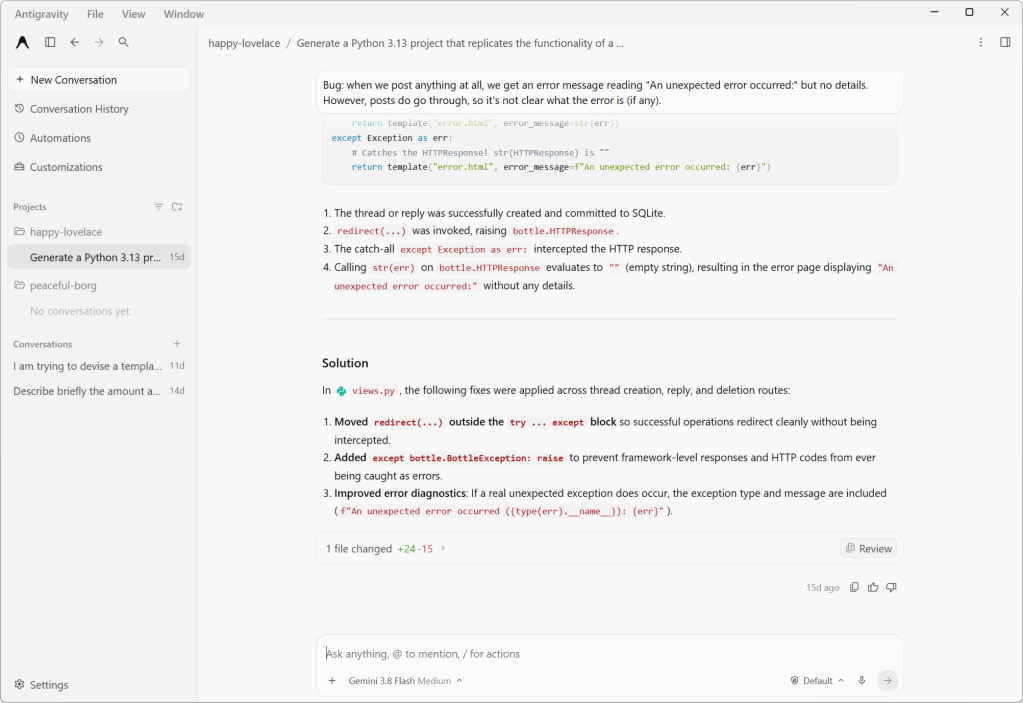
Antigravity 2.0’s agent chat interface. This discussion revolves around a Python web project, which the agent has permission to modify.
Foundry
Earlier versions of Antigravity had the concept of workspaces, which were confined to a single directory and lacked granular permissions or customizations. With Antigravity 2.0, workspaces are replaced by projects, which may span multiple directories (that you define explicitly) and have their own isolated settings and permissions. This new scheme better accommodates how many software projects work, especially those with shared components living in different places.
Another new option is local mode vs. worktree mode, which controls how agents interact with your project’s directories. It’s another example of how the Antigravity app lets you choose between the quick-and-dirty or slow-but-correct way of doing things. Local mode has the agent working directly on local folders or Git checkouts, for convenience and speed. The new worktree mode creates a new Git worktree for each conversation, so that the active working folder won’t be affected and work done by any subagents running in parallel won’t conflict.
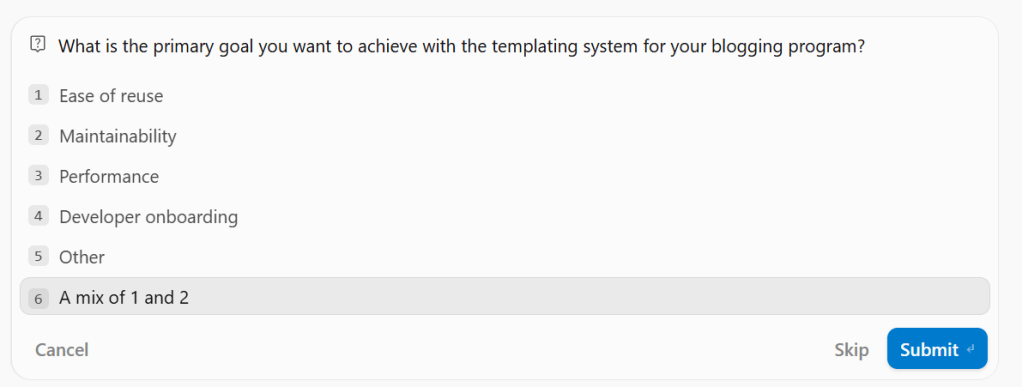
An example of one of Antigravity 2.0’s responses for the “grill-me” function. The last option is always left blank for the user to fill in; here, it’s “A mix of #1 and #2”.
Foundry
By default agents come with several common control commands, prefixed with a slash:
/btw lets you interject with a quick question that makes use of the current context, but without derailing the workflow./grill-me has the agent prompt you with a few specific, focused questions about the project to better guide its responses. For instance, during a conversation about creating a templating system for a blogging engine, /grill-me produced questions like “What is the primary goal you want to achieve with your program?” and presented several different options, along with a fill-in-the-blank option.One thing to be wary of with these command operations is API timeouts. When I was using /grill-me, the API for the service timed out and the context for the grilling vanished and couldn’t be recovered.
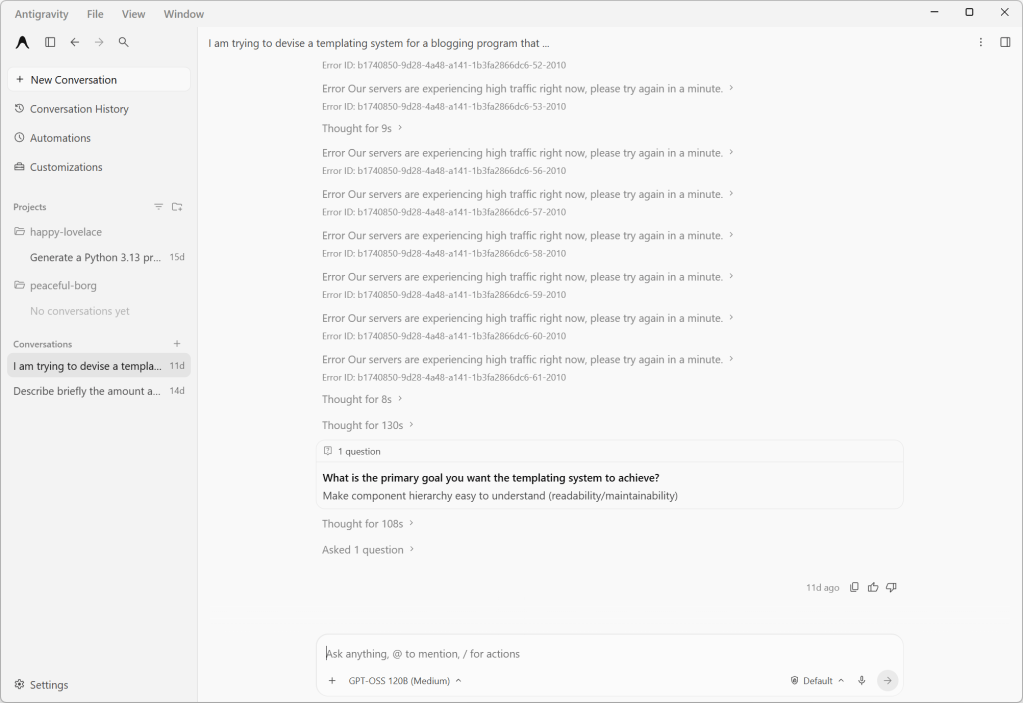
If Antigravity has an API timeout in the middle of a “grill-me” session, it tends to forget the context, including any already-asked questions. The last question shown was asked previously in a slightly different form.
Foundry
The Antigravity app also includes bundles of agent skills and capabilities for building with various Google services and technology stacks. For instance, the modern web guidance bundle provides agent skills and guidelines for building web apps with best practices and broad browser compatibility. The Android CLI bundle gives agents tools and guidelines for building Android apps, or refreshing older Android apps or their components. Most intriguing of the bunch, if maybe also the most esoteric, is the Google DeepMind science skills collection for doing scientific research with Antigravity.
There is growing interest in speeding up agentic development through parallelism — for instance, by having multiple agents analyze different aspects of a project in parallel and report their results independently. Antigravity gives you a couple of complementary ways to do this. One is subagents, which are spawned by the main agent and work on a specific task in their own isolated workspace. Another is to run agents or subagents asynchronously as a background process, so you and the main agent can continue working without waiting for them to complete.
The biggest limitation of Antigravity, which I’m betting is by design, is that it doesn’t let you use any models besides versions of Gemini, Claude, and GPT. There is no mechanism for connecting Antigravity to a self-hosted model with an industry-standard interface. For that you will want a product like LM Studio.

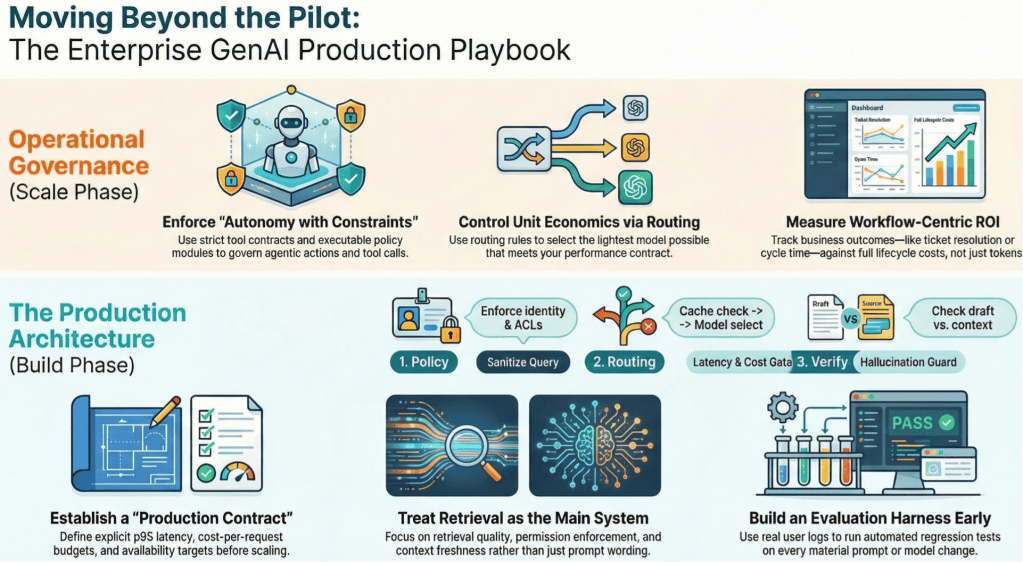
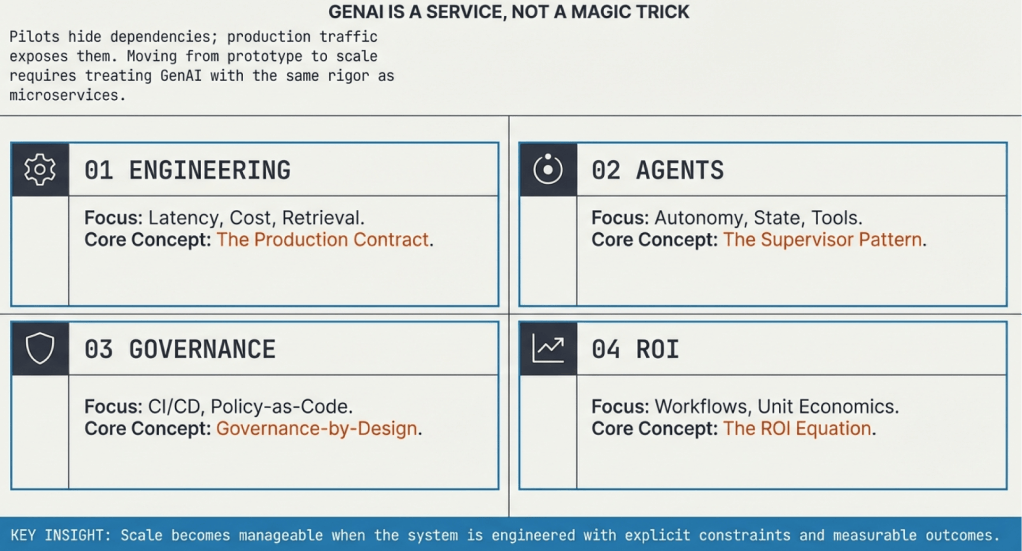
This series lays out a practical framework for taking generative AI (GenAI) from pilots to dependable production systems in the enterprise. It focuses on four disciplines that determine long-term success: engineering for scale and reliability, designing agentic systems with clear constraints, embedding governance directly into build and runtime controls, and measuring ROI at the workflow level with full cost and outcome visibility. The throughline is operational discipline—treating GenAI as a service with contracts, evaluation, ownership, and measurable business impact.
Adnan Masood
The first article in the series, “How to run enterprise generative AI like a production service,” focuses on operations. It explains why reliability, retrieval quality, latency control, cost routing, observability, and evaluation harnesses determine success at scale. The article lays out a practical architecture and operational checklist so teams can move from promising demos to stable, supportable systems.
The second article, “Agentic AI in the enterprise: How to balance autonomy with constraints,” defines what an agentic system is and how to operate one safely. It introduces the agent loop (plan, act, verify, commit), tool contracts, policy enforcement, durable state, and verification gates. The emphasis is on constrained autonomy, traceability, and operational ownership so agents can execute real workflows under enterprise controls.
Adnan Masood
The third article, “Governance by design: Turning AI policy into executable controls,” treats AI governance as engineering work. It describes how to translate policy into executable controls in continuous integration pipelines and runtime enforcement layers. Topics include threat modeling, policy-as-code, lineage, audit evidence, and feedback loops. The goal is steady delivery under measurable guardrails.
The final article, “AI ROI beyond pilots: Measuring outcomes in production,” addresses how to measure real business value from GenAI. It defines ROI at the workflow level, accounts for full life-cycle costs, and connects usage metrics to operational outcomes. It provides a metrics stack, cost equation, cohort rollout strategy, and a 90-day plan to produce credible, production-grade ROI signals.
—
New Tech Forum provides a venue for technology leaders—including vendors and other outside contributors—to explore and discuss emerging enterprise technology in unprecedented depth and breadth. The selection is subjective, based on our pick of the technologies we believe to be important and of greatest interest to InfoWorld readers. InfoWorld does not accept marketing collateral for publication and reserves the right to edit all contributed content. Send all inquiries to doug_dineley@foundryco.com.

For most of the history of enterprise software, accountability has been relatively easy to understand. A person logs in, a person has a set of permissions, and a person takes an action. If something goes wrong, you can usually work backwards from there.
Agentic AI changes that. We are moving from systems that suggest what someone should do to systems that can actually do it. Agents can access tools, call other systems, make decisions across multiple steps, and increasingly operate without a human approving every move. That is the point, of course. An autonomous system that needs someone hovering over every decision is not particularly autonomous.
But the more action we hand over, the more important one deceptively simple question becomes: When an agent does something, who did it?
Not philosophically. Operationally. Whose authority was it using? What was it allowed to touch? Who granted those permissions? And if something goes wrong, who owns the outcome?
The first question is what an agent actually is inside your organization. Should it always be treated as a delegate of a human, acting on that person’s behalf and inheriting some version of their permissions?
That model makes accountability relatively straightforward. If my agent does something, the action can be traced back to me. But it becomes harder to sustain as agents become more persistent and autonomous.
An agent might run continuously or serve an entire team rather than one person. It might perform a business function that continues long after whoever originally configured it has moved on. In those cases, should the agent have an identity of its own? And if it does, who creates that identity, who owns it, who grants its permissions, and how long should those permissions last?
Identity is where accountability starts because if you cannot reliably answer who the agent is, everything that follows becomes harder to reason about.
Identity and permissions are closely related, but they are not the same thing. Consider an agent designed to conduct research using public information. It might be perfectly reasonable for that agent to use a public model, external tools, or public Model Context Protocol (MCP) servers. Now point that same capability at internal finance data.
The agent has not fundamentally changed. Its environment has.
Suddenly, sending information to an external model may be unacceptable. Certain tools may need to disappear from its reach. Data that could previously move freely now sits inside a very different compliance boundary. So permissions cannot simply be a static list attached to an agent. They need to reflect who the agent is, what it is trying to do, and the context in which it is operating.
That becomes even more important when agents can choose different tools and paths through a problem rather than following a completely predictable workflow.
Now add sub-agents.
An agent receives a goal and creates several others to complete pieces of the work. Do those sub-agents inherit the parent’s identity? Do they inherit its permissions? Should their authority be narrower based on the task they have been given? And who ultimately owns what they do?
There may not be one universal answer, but there does need to be an answer inside the enterprise. More importantly, there has to be a through line.
An agent can delegate execution to another agent, which delegates part of that task again. That cannot mean accountability disappears somewhere along the way. Autonomy can branch. Accountability cannot disappear.
Enterprises need to retain the relationship between the original authority, every agent involved, the permissions each one carried, and the actions they ultimately took. Otherwise, when something goes wrong, everyone gets to participate in a very expensive game of “whose agent was this?”
The same problem appears over time, not just across agent chains. Consider a long-running agent that constantly monitors tickets and takes action. Eventually, it becomes part of normal operations. Then the person who created it leaves the company.
The agent stays.
Who owns it now? Did responsibility automatically transfer to the person’s manager? Was a successor assigned? Does the team own it? Does the enterprise? And what happens to permissions that were originally linked to someone who no longer exists in the organization?
We already manage life cycles for employees, service accounts, and enterprise applications. Agents need the same seriousness. They need an ownership life cycle, not simply a deployment life cycle.
Defining ownership is only useful if you can reconstruct what actually happened. That means connecting an agent’s identity to its permissions, actions, tools, sub-agents, and eventual outcome.
If something fails, the organization should be able to understand what happened, why the agent was allowed to do it, which permissions enabled the action, which agent actually performed it, and where the control failed. That is what makes remediation possible.
This is why identity, permissioning, and execution tracing cannot live only in policy documents. Writing down who owns an agent is not the same as encoding that ownership into the systems governing it. Telling an agent not to access something is not the same as preventing access. And asking teams to piece together an incident afterwards is not the same as tracing execution while the system is running.
The goal is not to put a human approval step in front of every agent action. That would defeat much of the value of autonomy. The goal is to move humans up a level, from making every individual decision to defining the boundaries within which autonomous systems can make them.
As agents take on more work, enterprises need to know what they can do, who owns them, how authority is delegated, and how every action can be traced.
Because the question is no longer simply whether an agent can act. It is whether, when it does, the organization can still answer who.
—
New Tech Forum provides a venue for technology leaders—including vendors and other outside contributors—to explore and discuss emerging enterprise technology in unprecedented depth and breadth. The selection is subjective, based on our pick of the technologies we believe to be important and of greatest interest to InfoWorld readers. InfoWorld does not accept marketing collateral for publication and reserves the right to edit all contributed content. Send all inquiries to doug_dineley@foundryco.com.

