❌

Reading view

Why Apple’s new audio AI features aren’t the privacy nightmare you think they are

Macworld

With the Apple Watch Series 12 and Ultra 4, Apple is introducing some neat new audio-based AI features that seem genuinely useful and exciting.

The new S11 processor includes hardware that makes it possible to continually listen and (lightly) process audio without ruining battery life, and Apple is using that to provide four new AI-powered features. It calls these features “Audio Intelligence” because Apple can’t help but brand everything.

  • Full-time Shazam: The watch can detect music playing and automatically identify it using Shazam, displaying it on widget in the Smart Stack. Apple Watches already do this on demand, but the new thing here is that it does it continuously in the background like Pixel phones.
  • Sound recognition: The same feature you can get on HomePods and iPhone now comes to Apple Watch. You can get notified visually when your watch hears sounds such as doorbells, fire alarms, sirens, etc. You used to need your iPhone nearby to use this feature, but the Series 12 and Ultra 4 can do it independently.
  • Live Rewind: Double-tap the digital crown to see a text readout of the last 15 seconds of what was said around you. You can then ask Siri about it or save it to the Siri app.
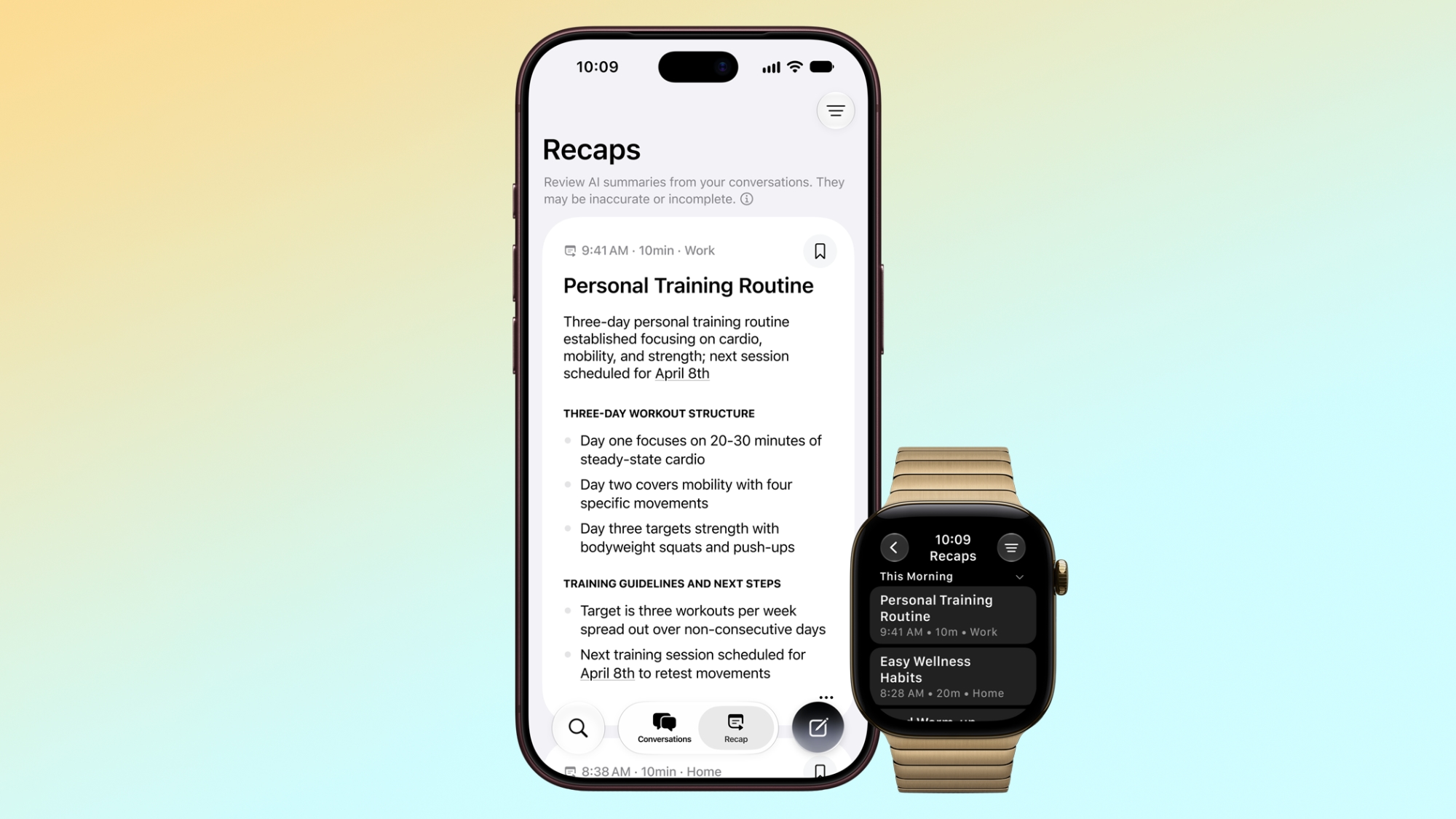
  • Siri Recap: Get a high-level summary of an entire conversation in the Siri app, so you don’t forget specifics or need to take notes.

The first two of those features don’t really bother anyone. Those are existing features, and the only new thing is that the Apple Watch can do them in the background without iPhone intervention. The last two will be available later this year as a beta, and those are the ones that have people freaking out. Are people’s Apple Watches going to be recording you all the time?

Apple has issued a Audio Intelligence Security Overview white paper to help users understand how all this works and how it protects everyone’s privacy. It’s worth a read, but here are the highlights.

How Live Rewind works

On the Apple Watch Series 12 and Ultra 4, audio from the microphone is continuously flowing into a little buffer in the Secure Enclave. This actually happens on lots of Apple products; it’s how they know if you’ve said “Hey Siri” or not. This is a rolling buffer, where new data continuously replaces old data.

The Secure Enclave is a completely separate hardware block that is not accessible to the rest of the operating system, or any apps, or even Apple. It’s where your Face ID and Touch ID data is stored, for example.
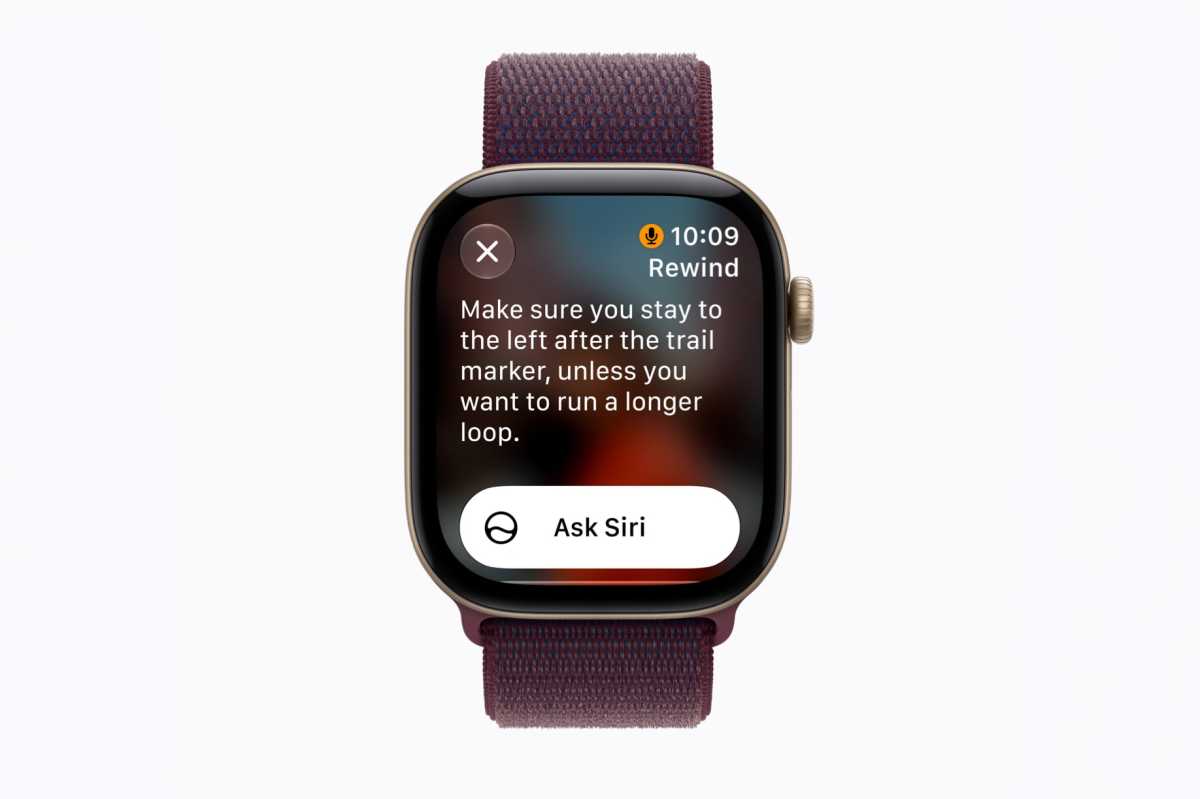
apple watch siri live rewind

Live Rewind will show you what you missed—privately.

Apple

When you double-press the Digital Crown, the last 15 seconds of that buffer is sent via an encrypted secure transfer to your iPhone, where an AI model transcribes it. This happens in the iPhone’s Secure Enclave, so the audio cannot be accessed by the rest of iOS, or any app, or the user, or even Apple. This is just a straight voice-to-text transcription; it doesn’t identify or label people who are speaking. The audio is then immediately discarded.

The text of the translation is then sent back to Apple Watch where it appears on the display. It is not saved unless you ask Siri about it or save it to the Siri app to revisit later. The Siri app’s data is end-to-end encrypted and synced between devices, and users can control whether conversations are automatically deleted after 30 days, 1 year, or saved forever. Apple cannot decrypt this data, even with a court order—only the user has the key.

And one more thing, an audible chime plays from the speaker on your Apple Watch when you implement Live Rewind, even if your Apple Watch is on silent or you have headphones connected.

So that’s how Live Rewind protects your privacy and those around you. Raw audio data can’t ever be accessed by the user, the system, Apple, or any apps. It’s just straight translated to text, which is then optionally saved in the end-to-end encrypted Siri app.

How Siri Recap works

Siri Recap works in a similar way, but there’s more going on. You’ll be able to leave it on all the time, only when you trigger it manually, or specify certain places or times when it can’t operate.

First, a tiny little lightweight model simply detects if a conversation is happening at all.

If it is, that encrypted and secure audio buffer is sent to the iPhone (via an encrypted data transfer) for processing. It is transcribed to condensed text, and the raw audio is then immediately discarded. It is never accessible to the OS, apps, the user, or Apple.

This transcribed text passes through a safety filter than will remove potentially harmful terms. Then it is encrypted and sent to Apple’s Private Cloud Compute servers to be summarized, along with relevent contextual data that can make the summary better (such as what music you might be listening to, a relevant calendar entry, or high-level place information like what city you’re in).
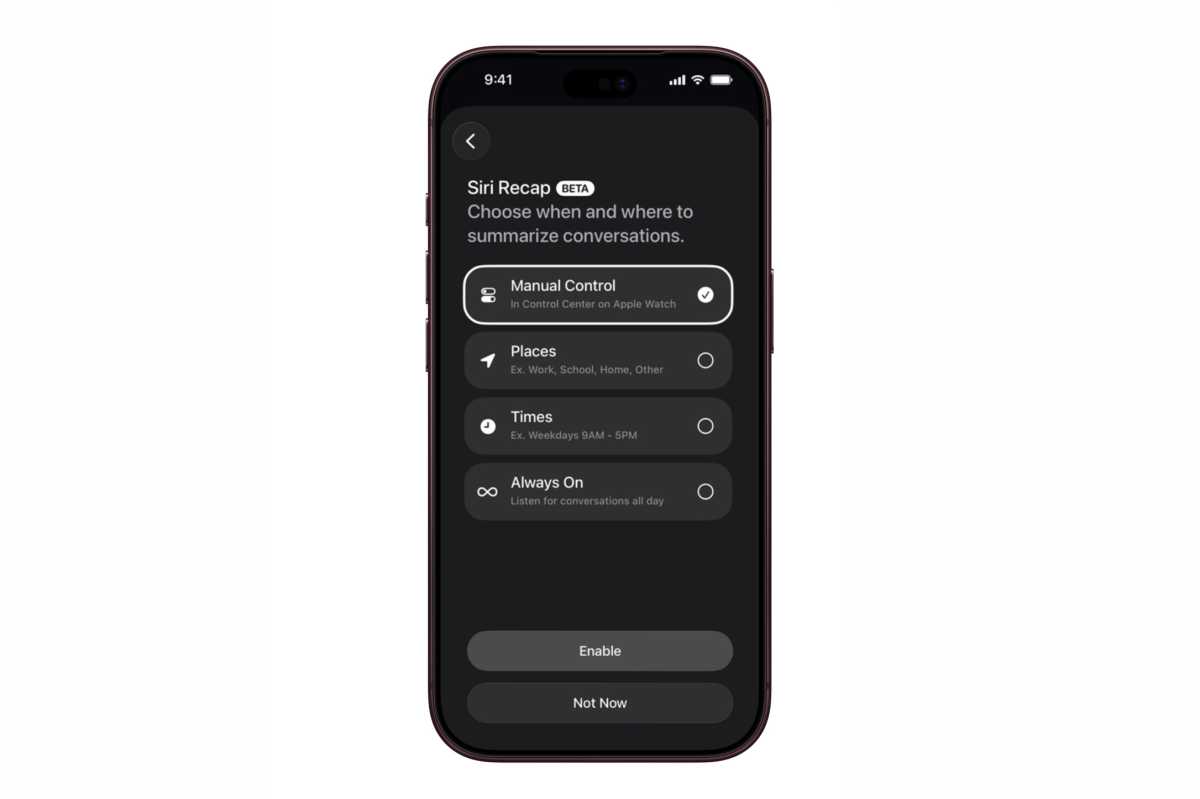
Siri recap

Apple

Private Cloud Compute generates a title and summary with key points. It removes any specific identifiable or sensitive info such as place names or financial data, while leaving generic places names like “park” or “grocery store.” That summary is then sent back to your devices, encrypted, where it is stored in the Siri app in a new Recaps tab. All data on Apple’s Private Cloud Compute servers is always discarded immediately after processing; Apple never saves any of it.

The summaries in the Recaps tab are deleted automatically after seven days unless you choose to save it.

Like Live Rewind, Siri Recap does not create a recording, does not identify speakers, and does not even create a verbatim transcript. No audio is ever accessible at any step of the process by the user, any app, or Apple.

Finally, Live Rewind and Siri Recap are not available for users under the age of 13. For users under 18 on a Child Account, access to Live Rewind and Siri Recap must be turned on by a parent or guardian.


  •  

Apple Watch Series 12 und Ultra 4 haben 4 statt 2 GB RAM

Auf der Keynote am Mittwoch hat Apple zum ersten Mal den genauen Prozessor genannt, auf dem der S11-Chip basiert. Damit konnte man auch ganz gut angeben, denn die Apple Watch Series 12 und Ultra 4 haben eine Architektur erhalten, die Apple vom A20 Pro abgeleitet hat. So gesehen könnte die Apple Watch Series 12 in manchen Aspekten sogar schneller sein als das iPhone 17 Pro Max.

Wie viel RAM haben Series 12 und Ultra 4?

Die Größe des Arbeitsspeichers bleibt bei der Apple Watch ein Geheimnis hinter sieben Siegeln. Nur auf Umwegen kann man herausfinden, über wie viel RAM eine aktuelle Apple Watch verfügt. Für unsere Vergleichstabellen überprüfen wir die Analytics-Logs der Watch, die das iPhone speichert. Registrierte Entwickler können diese Informationen auch in Xcode einsehen. Laut einer neuen Version von Xcode haben die Apple Watch Series 12 und Ultra 4 jeweils 4 GB RAM. Die Series 11, Ultra 3 und SE 3 kommen alle nur auf 2 GB Arbeitsspeicher.

Analytics-Logs der redaktionellen Apple Watch SE 3
Analytics-Logs der redaktionellen Apple Watch SE 3 mit 2 GB RAM.

Halyna Kubiv

Warum braucht die Watch mehr RAM?

Wenn man die Tatsache in Betracht zieht, dass Apple der neuesten Generation seiner Watches einen aktuellen Prozessor spendiert hat, ist die Verdoppelung des Arbeitsspeichers kein Wunder. Apple bereitet seine Smartwatches auf Apple Intelligence und Siri AI vor, und dafür sind nun mal ausreichend RAM und ein schneller Prozessor notwendig. Bereits nach der Ankündigung der ersten Version von Apple Intelligence hat Apple seine Macs nach und nach mit mindestens 16 GB RAM ausgestattet. Noch kurz davor hat der Hersteller behauptet, 8 GB RAM in einem Mac seien für die meisten ausreichend.

Die Kombination aus einem neuen Prozessor, deutlich mehr RAM und möglicherweise einer etwas größeren Batterie macht die Apple Watch Series 12 und Ultra 4 zukunftssicher für kommende KI-Neuerungen. Das gleiche Muster konnte man bei den Apple Watches Series 9 bis Series 11 beobachten: Die vorgestellten Neuerungen der vergangenen Jahre, wie die Handdrehungsgeste oder Warnungen vor zu hohem Blutdruck, kamen nicht nur für die neueste Generation, sondern auch für die Vorgänger mit der notwendigen Hardware. So werden die Series 12 und Ultra 4 voraussichtlich die Software-Neuerungen der kommenden zwei Jahre erhalten.

Apple Watch Series 12 42 mm Space Grau für 449 Euro auf Amazon

Apple Watch Ultra 4 Natur für 899 Euro auf Amazon

  •  

Das Design der Apple Watch geht in die falsche Richtung

Als Apple damals die Apple Watch Series 10 auf den Markt brachte, war die Aufregung um das „verfeinerte Design“, das „fast 10 Prozent dünner als die Apple Watch Series 7, Series 8 und Series 9“ war, groß. Zudem verfügte das Modell über ein größeres Display, wodurch das gesamte Gerät am Handgelenk eleganter und schlanker wirkte.

Nun schlägt Apple einen anderen Weg ein. Wenn Sie eine Apple Watch Series 12 kaufen, erhalten Sie denselben 42-mm- (374 × 446 Pixel) oder 46-mm-Bildschirm (374 × 446 Pixel), doch das Gehäuse ist 1 mm breiter als bei der Series 10 und 11, wodurch der Bildschirm auf Fotos aufgrund der breiteren Ränder kleiner wirkt. Hier sind die technischen Daten:

Apple Watch Series 12

  • 42 mm × 37 mm × 9,7 mm (42 mm)
  • 46 mm × 40 mm × 9,7 mm (46 mm)

Apple Watch Series 10/11

  • 42 mm × 36 mm × 9,7 mm (42 mm)
  • 46 mm × 39 mm × 9,7 mm (46 mm)

Auf dem Papier ist das natürlich kein großer Unterschied, aber es fühlt sich wie ein Rückschritt an. Wie Sie auf dem Bild oben sehen können, sind die Einfassungen der Series 12 (links) deutlich stärker ausgeprägt als bei der Series 11 (Mitte) und der Series 9 (rechts).

Normalerweise wäre eine Änderung von einem Jahr zum nächsten für die meisten Menschen uninteressant. Doch die neuen Uhren verfügen über eine Reihe cooler Funktionen, die ausschließlich den neueren Modellen vorbehalten sind (in Europa aber teilweise nicht verfügbar sind) und die Nutzer der Serien 10 oder 11 zum Umstieg verleiten könnten. Dabei erhalten sie eine Uhr, die älter aussieht als die, die sie gerade noch am Handgelenk hatten.
Es gibt keinen offensichtlichen Grund, warum die neuen Uhren größere Gehäuse haben sollten. Abgesehen von einem neuen Herzfrequenzsensor sind die technischen Daten und die äußeren Merkmale identisch, und der neue Chip dürfte effizienter sein als der des Vorgängermodells.

Seit Jahren kursieren Gerüchte, dass Apple an einer umfassenden Überarbeitung der Apple Watch arbeitet, wobei die jüngsten Gerüchte besagen, dass diese endlich nächstes Jahr erscheinen soll. Hoffen wir es, denn das aktuelle Design geht in die falsche Richtung.

  •  

How to watch Spanish Grand Prix 2026: Live stream F1 race from anywhere

Watch the 2026 Spanish Grand Prix live streams to see F1's newest circuit, Madrid's “Madring,” in action. The Mad-Ring produced 19 red flags across two days of F3 testing last month, with 10 different drivers finding the walls. Why so? Well, the 5.4km circuit has 22 corners – the most on the F1 calendar this season – with plenty of fast, flowing sections, blind spots and walls that leave very little room for error.

And then there's La Monumental. The 270-degree Turn 12 stretches for around 550 meters, its 24% banking the most significant on the F1 calendar. With so many of the track's braking zones at an angle, overtaking is expected to be very difficult – much like at Monaco, qualifying could prove vital.

Kimi Antonelli arrives in Madrid after producing one of the finest drives in F1 history, taking the top step from 19th on the grid to become the first Italian to win at Monza since 1966. George Russell, who started on the front row, finished second, but is now 66 points behind his Mercedes team-mate in the Drivers' Championship.

Elsewhere, Ferrari will be one to watch, particularly after the chaos at Monza. Charles Leclerc pushed Lewis Hamilton wide at Turn 2 on the opening lap before crashing into the barriers at the Parabolica on Lap 2. And despite Ferrari bringing upgrades to its home race, Hamilton could only finish sixth.

Max Verstappen grabbed a podium in Italy but is still waiting for his first win of the season. McLaren, meanwhile, will be hoping to return to the podium as they continue to fight at the top, but reigning champion Lando Norris is 96 points adrift of Antonelli.

Here’s how to watch the Spanish Grand Prix 2026 online from anywhere and potentially for FREE.

Spanish Grand Prix 2026 Schedule

Practice 1: Friday, September 11 | 12:30pm BST / 7:30am ET
Practice 2: Friday, September 11 | 4pm BST / 11am ET
Practice 3: Saturday, September 12 | 11:30am BST / 6:30am ET
Qualifying: Saturday, September 12 | 3pm BST / 10am ET
Spanish Grand Prix: Sunday, September 13 | 2pm BST / 9am ET

How to watch the Spanish Grand Prix 2026 for FREE

The 2026 Spanish Grand Prix isn't available for free in every country. However, in these select destinations lucky F1 fans can catch the practice sessions, qualifying, and the entire race/highlights for FREE.

Traveling abroad during the 2026 Spanish Grand Prix? You can use a VPN to watch all the action free of charge as if you were right at home.

How to watch the Spanish Grand Prix 2026 from anywhere

🌎 ABROAD? The Spanish Grand Prix 2026 is broadcast in many countries around the world but if you're traveling outside your country you should consider using one of the best VPNs to unlock your domestic streaming service provided it does not infringe any terms and conditions.

🟩 NordVPN – 75% off the world's best VPN today

Not having a VPN is like leaving your front door wide open in a busy city – anyone can walk right in and take a peek.

TechRadar regularly reviews all the biggest and best VPN providers and NordVPN is our #1 choice.

✅ 3 Extra Months FREE
✅ Unlocks F1 live streams
✅ 30-day month back guarantee

Get NordVPN and stream the Spanish Grand Prix 2026 from wherever you are.View Deal

How to watch the Spanish Grand Prix 2026 in the US

US flag

Apple TV will show the Spanish Grand Prix in the US.

F1 TV will be bundled with your Apple TV subscription at no additional cost. Subscriptions start at $14.99 per month or $119 per year. Even better, new Apple TV subscribers get a handy 7-day FREE trial.

If you want to catch the F1 Spanish Grand Prix but are traveling outside North America, make sure to use NordVPN to access your usual services securely.View Deal

How to watch the Spanish GP 2026 in the UK

uk flag banner

In the UK, Sky Sports F1 is carrying live coverage of the entire F1 season, including the Spanish Grand Prix.

Sky Sports packages start from £22 per month. Or you can use a more flexible streaming option, Now, (formerly Now TV). NOW Sports passes start at £14.99 with monthly options from £27.99.View Deal

How to watch the Spanish Grand Prix 2026 in Australia

Australian flag

Aussie F1 fans can use Fox Sports via Kayo (free trial) for full HD coverage and multi-screen viewing options to stream the 2026 F1 Spanish Grand Prix.

Kayo offers two plans: Standard and Premium. The Standard plan starts at AU$29.99 per month (just AU$9.99 for your first month).

Australia's 10Play streaming platform will be showing the full highlights of all the weekend events completely free.

Traveling outside Oz? Australian F1 fans can still watch the F1 2026 season on their usual stream by using NordVPN.View Deal

How to watch the Spanish Grand Prix 2026 in Canada

Canada

(Image credit: Other)

Canadian F1 fans can watch the F1 2026 season, including the Spanish Grand Prix, on TSN.

If you’ve ditched the cord, you’ll want to check out TSN Plus, which costs $8/month or $80/year for limited access and $29.99/month for full access. The TSN app will allow you to live stream F1 practice sessions, qualifying and the race from your phone, streaming box or supported device.

Use NordVPN if you're outside the country for the race.View Deal

Drivers' Championship Standings (after Monza)

  1. Kimi Antonelli (Mercedes) — 267
  2. George Russell (Mercedes) — 201
  3. Lewis Hamilton (Ferrari) — 191
  4. Lando Norris (McLaren) — 171
  5. Charles Leclerc (Ferrari) — 155
  6. Max Verstappen (Red Bull) — 127
  7. Oscar Piastri (McLaren) — 116
  8. Isack Hadjar (Red Bull) — 71
  9. Liam Lawson (Racing Bulls) — 51
  10. Pierre Gasly (Alpine) — 41

F1 fans may also enjoy...

We test and review VPN services in the context of legal recreational uses. For example:1. Accessing a service from another country (subject to the terms and conditions of that service).2. Protecting your online security and strengthening your online privacy when abroad.We do not support or condone the illegal or malicious use of VPN services. Consuming pirated content that is paid-for is neither endorsed nor approved by Future Publishing.

  •  

How to watch 2026 Grand Prix Cycliste de Québec & Montréal for FREE: stream cycling online From anywhere

The UCI World Tour heads to Canada for the 15th edition of both the Grand Prix Cycliste de Québec and Grand Prix Cycliste de Montréal which are being held just two weeks before the World Championships arrive in the country. With the Worlds using the Montréal circuit special attention will be being paid to this race and thus it has attracted a stellar field including Remco Evenepoel, Thomas Pidcock, Issac del Toro and Paul Seixas.

Read on and we'll show you how to watch a Grand Prix Cycliste de Québec and Grand Prix Cycliste de Montréal 2026 live stream from anywhere, and potentially for FREE.

How to watch 2026 Grand Prix Cycliste de Québec & Montréal for free

Cycling fans in Canada can watch the Grand Prix Cycliste de Québec and Grand Prix Cycliste de Montréal for FREE for free on CBC Gem and on the French Language channel TVA Plus.

Both races will also be available for free in France on la chaine L'Equipe

If you're a resident of Canada or France and you're abroad right now, don't worry about missing the action – all you need to do is download a VPN to re-connect to your home streaming coverage. You’ll find more details below.

Use a VPN to watch any How to watch 2026 Grand Prix Cycliste de Québec & Montréal live stream

The Grand Prix Cycliste de Québec and Grand Prix Cycliste de Montréal 2026 are streaming on lots of platforms around the world, but what if you're abroad and don't want to take out a new subscription just to watch the race, or you want your familiar, favorite commentary?

This is where a VPN can help. It's a handy piece of software that can make your device appear to be back home, so you can unlock your usual service or subscription from wherever you find yourself.

The best VPN right now? We recommend NordVPN – it does everything you want it to do at great speeds and an even better price.

🟩 NordVPN – get the world's best VPN

Not having a VPN is like leaving your front door wide open in a busy city – anyone can walk right in and take a peek.

TechRadar regularly reviews all the biggest and best VPN providers and NordVPN is our #1 choice.

✅ Over 70% Off Today
✅ 3 Extra Months Free

Get NordVPN and watch 2026 Grand Prix Cycliste de Québec & Montréal from anywhere in the world. View Deal

How to watch 2026 Grand Prix Cycliste de Québec & Montréal in the US

USA flag

(Image credit: Other)

In the US, the 2026 Grand Prix Cycliste de Québec and Grand Prix Cycliste de Montréal will be on HBO Max, which starts at $18.49 USD per month. This is the middle-tier “Standard” subscription that includes live sports.

Abroad? Explore the VPN route set out above, which will help you access your subscriptions from anywhere.

How to watch 22026 Grand Prix Cycliste de Québec & Montréal in the UK

UK flag

The 2026 Grand Prix Cycliste de Québec & Montréal are on TNT Sports in the UK.

TNT coverage in the UK is on the HBO Max platform. It costs £30.99 per month, though there is a better value £25.99 "saver plan" available if you sign up for a 12-month term.

If you're currently traveling overseas, don't worry as you can use NordVPN to watch your usual service from abroad.

How to watch 2026 Grand Prix Cycliste de Québec & Montréal in Canada

Canada flag

(Image credit: Other)

Fans in Canada can watch the 2026 Grand Prix Cycliste de Québec and Grand Prix Cycliste de Montréal for FREE in Canada on CBC Gem and on the French language TVA plus

Not at home right now? Use NordVPN or another VPN service to make your device believe you're still in Canada.

How to watch 2026 Grand Prix Cycliste de Québec & Montréal in Australia

Australian flag

(Image credit: free)

FloBikes will show the 2026 Grand Prix Cycliste de Québec & Montréal in Australia.

Not at home right now? Use NordVPN or another VPN service to trick your device into thinking you're still in Australia.

Grand Prix Cycliste de Québec and Grand Prix Cycliste de Montréal 2026 - Previews

First up of the brace of races is the Grand Prix Cycliste de Québec, which runs over 206 km on the 12 km city-centre circuit that includes the signature short ascent of Côte de la Montagne. The traditionally attritional race was last year won by Julian Alaphilippe, but the Frenchman won’t be back to defend his crown as he has recently retired. The big names on the start list to keep an eye on read like a who’s who of the current cycling elite, with Remco Evenepoel, Thomas Pidcock, Isaac del Toro and Paul Seixas all down to ride. The key big name missing, of course, is Tadej Pogačar after he crashed out of the Vuelta a España.

Two days later, the same stellar cast will take to the streets of Montreal for a dress rehearsal of the World Championships, which will be held on the same roads on September 27. Covering 214 km over 16 laps, the Grand Prix Cycliste de Montréal is the harder of the two races, and each lap features the tough Côte Camilien-Houde. The big names will all want to know the circuit inside out before coming back to fight for the rainbow bands two weeks later, but will they go for the win or keep their cards close to their chest?

Grand Prix Cycliste de Québec Route 2026

Grand Prix Cycliste de Québec route map

(Image credit: Grand Prix Cycliste de Québec)

Grand Prix Cycliste de Montréal 2026 Route

Grand Prix Cycliste de Montréal route map 2026

(Image credit: Grand Prix Cycliste de Montréal)

We test and review VPN services in the context of legal recreational uses. For example:1. Accessing a service from another country (subject to the terms and conditions of that service).2. Protecting your online security and strengthening your online privacy when abroad.We do not support or condone the illegal or malicious use of VPN services. Consuming pirated content that is paid-for is neither endorsed nor approved by Future Publishing.

  •  

How to watch Amazon Prime Video from anywhere

Looking to watch Prime Video from outside your home country? If you're visiting the US, UK, Canada, Australia or anywhere else, you can use a VPN – NordVPN works best – to access your home Prime Video library and stream as normal from any location.

Prime Video has a huge entertainment library packed with movies and TV shows, from classics such as The Green Mile, Goodfellas, Before Sunrise, and Pulp Fiction to newer titles like The Drama, Obsession, and Disclosure Day, alongside Amazon Originals and regional productions.

There's tons of stuff for sports fans as well, with Prime Video carrying Champions League and Premier League football, golf, tennis, cricket, NFL, and UFC, although the exact sports and competitions available depend on your location.

However, Prime Video offers different libraries in different locations due to copyright and licensing agreements, meaning your usual catalogue may not be available when you're overseas. If you're travelling or living abroad and still want to access your home Prime Video library, here's a quick guide on how to watch it from anywhere in the world.

How to watch Amazon Prime Video in your location

Watching Prime Video is simple, whether you're using a phone, tablet, computer or smart TV. Just head to the Prime Video website or open the Prime Video app on your device, then sign in with your Amazon account. If you already have an Amazon Prime membership, Prime Video should be included as part of your subscription.

If you don't have Prime, you can sign up for a membership directly through Amazon. Prices vary depending on where you live: $8.99 per month in the US, £8.99 per month in the UK, AU$9.99 per month in Australia, and CA$9.99 per month in Canada.

However, Prime Video's catalogue varies by region, meaning the library available to you at home may not be accessible when you're overseas. Abroad right now? Here's how to unblock Prime Video...

How to watch Prime Video from anywhere

Amazon Prime Video offers different libraries in different locations, which means your usual catalogue won't be available to stream when you're overseas on business or vacation. However, you can always download a VPN to overcome these regional restrictions and access Prime Video as normal when you're outside your home country. You may be surprised how simple it is to do.

Watch Prime Video from anywhere with one of the best VPNs:

Editors Choice

🟩 NordVPN – get the world's best VPN

Not having a VPN is like leaving your front door wide open in a busy city – anyone can walk right in and take a peek.

TechRadar regularly reviews all the biggest and best VPN providers and NordVPN is our #1 choice. You can find out why with our in-depth NordVPN review.

✅ 75% Off Today
✅ 3 Extra Months Free
✅ Unlocks Amazon Prime Video

Get NordVPN and stream Prime Video live or on-demand today, from anywhere.VIEW DEAL ON

What content does Prime Video have?

Prime Video has a huge entertainment library spanning films, TV shows, and live TV, all covering a wide range of genres and niches, from classic movies and comedies to dramas, horror, thrillers and suspense. It also has a growing selection of Amazon Originals and other exclusive titles.

In the films category, you can find everything from modern blockbusters and critically acclaimed dramas to classic favourites and comedies. These include titles such as The Green Mile, Goodfellas, Pulp Fiction, Before Sunrise, The Hangover, Notting Hill and Rain Man, alongside newer releases such as Weapons, Evil Dead Burn, Obsession, Michael and Disclosure Day. But keep in mind that some of these first arrive as rental options before being included in the Prime library.

TV fans are similarly well catered for, with a mixture of popular series, Amazon Originals and regional productions. Some of the most popular ones right now are Reacher, The Summer I Turned Pretty, Fallout, Off Campus, and Fleabag. You can also add Apple TV to your Prime subscription and watch the likes of Ted Lasso, Pluribus, Shrinking, Severance, and The Studio.

Prime Video also offers live TV and linear channels in select markets, giving viewers another way to watch content beyond its on-demand library. Speaking of select markets, what's available also varies considerably by country, meaning Prime Video's different regional libraries can offer plenty of local and regional movies and TV shows alongside its international selection.

What streaming devices are supported by Prime Video?

  • Amazon Fire TV Sticks and Cubes, Fire TVs and Fire Tablets
  • Android devices
  • Chromecast
  • Comcast X1
  • Roku devices
  • Nvidia Shield
  • Apple TV 4K and Apple TV HD
  • iPhones and iPads
  • Web browsers: Google Chrome, Mozilla Firefox, Microsoft Internet Explorer, Microsoft Edge, Safari, Opera
  • Windows 10, Windows 11 apps
  • macOS app for macOS 11.4 and higher
  • Smart TVs from LG, Panasonic, Samsung, Sony
  • Sony PlayStations including PS5, PS4, PS4 Pro and PS3
  • Microsoft Xbox consoles including Xbox Series X and Series S, Xbox One and Xbox 360

What sports does Amazon Prime Video carry?

Amazon Prime Video's sports offering varies significantly depending on the country you're in. In different markets, it carries sports including tennis, cricket, UFC, NFL, Champions League football, golf, NASCAR and the English Premier League, although the exact competitions and events available will depend on your location.

For example, Prime Video carries tennis in the UK and Ireland, including the US Open and WTA and ATP tours, while also offering cricket in India and Premier League football in the UK.

The platform also offers a range of sports subscriptions and channels in select markets, allowing you to add services such as NBA League Pass, DAZN, Tennis Channel, WNBA League Pass, MLB Network, beIN Sports, WWE, Willow and NBA TV to your account.

There's also plenty of sports-related TV content to watch, even when there isn't a live event on. Its sports documentaries and series include Novak Djokovic: The Wolf in Winter, Eli Manning Presents: The Undercovers, Kyle Larson vs. The Double, Good Sports with Kevin Hart & Kenan Thompson and Rory McIlroy: The Masters Wait.

We test and review VPN services in the context of legal recreational uses. For example:1. Accessing a service from another country (subject to the terms and conditions of that service).2. Protecting your online security and strengthening your online privacy when abroad.We do not support or condone the illegal or malicious use of VPN services. Consuming pirated content that is paid-for is neither endorsed nor approved by Future Publishing.

  •  

Apple Says Apple Watch Live Rewind Can’t Be Used Secretly

Apple says Live Rewind on Apple Watch cannot be used secretly because activation requires a deliberate double press of the Digital Crown, plays a chime, and shows a full-screen animation with a microphone indicator. The chime plays even when the watch is muted or headphones are connected. After activation, Live Rewind shows only a text […]

The post Apple Says Apple Watch Live Rewind Can’t Be Used Secretly appeared first on The Mac Observer.

  •  

Siri Recap Privacy Explained: What Apple Does With Your Conversations

Apple says Siri Recap can listen for conversations on Apple Watch, process the audio, and create a short high-level summary without keeping an audio recording for replay. The feature is opt-in, and users can control it by time, location, or a manual switch. Apple’s Audio Intelligence support document says raw audio is not recorded or […]

The post Siri Recap Privacy Explained: What Apple Does With Your Conversations appeared first on The Mac Observer.

  •  

Apple Watch Ultra 4 Drops GLONASS: What the GPS Change Means

Apple’s Apple Watch Ultra 4 technical specifications list precision dual-frequency GPS with GPS, Galileo, QZSS, and BeiDou, but GLONASS is missing. The older Apple Watch Ultra specification page lists GLONASS alongside those systems. That makes the omission a real change in Apple’s published wording, although Apple does not explain whether it reflects hardware, software, regional […]

The post Apple Watch Ultra 4 Drops GLONASS: What the GPS Change Means appeared first on The Mac Observer.

  •  

How to watch Fremantle vs Geelong for FREE: Live streams & TV channels for AFL 2026 Semi-Final

Watch Fremantle vs Geelong live streams from the Optus Stadium as the minor premiers try to avoid an AFL 2026 exit at the earliest opportunity, against the visiting Cats. The Semi-Final winner goes through to the Preliminary Final next week, the loser is out.

The Dockers had enjoyed a club-record 19 home-and-away wins in the regular season but defeat last weekend by Hawthorn was a stunning first home reverse of the season in Perth. Justin Longmuir's side must now go the long way round to reach a first Preliminary Final since 2015 after the minor premiers lost their third match from four. Josh Treacy endured a bit of a shocker last week – failing to take a mark for just the second time in his 104-game career – but the key forward is determined to prove his elite smarts and bounce back in this crunch clash.

The Cats finished fifth in the ladder and now seek their 12th prelim since coach Chris Scott took the reins in 2011. Geelong are full of experience and last weekend won seven straights games by an average of 35 points. Against the in-form Carlton, last year's runners-up really stepped and they will want to quieten the crowd early in Perth and put pressure on a Fremantle side that seemed to wilt last time out. Captain Patrick Dangerfield is a big-game player, much-needed too as Max Holmes and Jeremy Cameron have fitness concerns.

The winner goes through to face Hawthorn.

Read on as we explain how to watch Fremantle vs Geelong for free in the AFL 2026 Semi-Final.

Can you watch Fremantle vs Geelong for free?

Yes. Fremantle vs Geelong is being shown on free-to-air Channel 7 in Australia, with live streaming available via 7Plus.

Outside of Australia? You can use a VPN to watch Fremantle vs Geelong for free on 7Plus.

How to watch Fremantle vs Geelong from anywhere

A VPN is handy piece of software that can make your device appear as if it's back in your home country, so you can unlock your usual service. The best VPN right now? We recommend NordVPN – it does everything and comes with up to 75% off.

🟩 NordVPN – get the world's best VPN

Not having a VPN is like leaving your front door wide open in a busy city – anyone can walk right in and take a peek.

TechRadar regularly reviews all the biggest and best VPN providers and NordVPN is our #1 choice.

✅ Up to 75% off today
✅ 3 extra months free
✅ Unlocks 7Plus

Get NordVPN and stream Fremantle vs Geelong from anywhere.View Deal

How to watch Fremantle vs Geelong live streams in the US

US flag banner

US viewers can watch live Fremantle vs Geelong coverage on FS2.

If you don't have the channels on cable, FS2 is carried by Fubo, YouTube TV and Hulu + Live TV, each of which offers a free trial to new users.

Traveling away from the US? Use a VPN while you're abroad to unlock your stream.

How to watch Fremantle vs Geelong live streams in the UK

uk flag

Fremantle vs Geelong is being shown on TNT Sports 1 in the UK.

You can add TNT Sports to your Sky, Virgin Media or EE TV package, or get an HBO Max plan that includes TNT Sports. Prices start at £25.99/month if you commit to a year.

If you're out of the UK but still want to watch the game on TNT Sports, explore the VPN route set out above, which will help you access your accounts from anywhere.

How to watch Fremantle vs Geelong live streams in Australia

Australia flag banner

Free-to-air Channel 7 is showing Fremantle vs Geelong in all regions of Australia, with live streaming available via 7Plus.

Just create an account using a valid Australia postcode (e.g. 2042).

Not in Australia right now? You can use a VPN like NordVPN to watch all the action as if you were back home.

How to watch Fremantle vs Geelong live streams in Canada

Canada

(Image credit: Other)

AFL fans in Canada can watch Fremantle vs Geelong on TSN2.

If you don't have cable, the TSN Plus streaming service costs CA$24.99 a month to access what goes out on regular TSN.

If you're out of Canada but still want to tune in, explore the VPN route set out above, which will help you access your accounts from anywhere.

What is the Fremantle vs Geelong start time?

The scheduled Fremantle vs Geelong kick-off time on Friday, September 11, is 6.10pm AWST local time in Perth, which is 6.10am ET / 3.10am PT / 11.10am BST / 8.10pm AEST.

Can I watch Fremantle vs Geelong on my mobile?

Of course, most broadcasters have streaming services that you can access through mobile apps or via your phone's browser. For example, 7Plus has a dedicated app.

We test and review VPN services in the context of legal recreational uses. For example:1. Accessing a service from another country (subject to the terms and conditions of that service).2. Protecting your online security and strengthening your online privacy when abroad.We do not support or condone the illegal or malicious use of VPN services. Consuming pirated content that is paid-for is neither endorsed nor approved by Future Publishing.

  •  

How to watch NRL Qualifying and Elimination Finals 2026: FREE streams, TV channels for Rabbitohs vs Knights

Watch NRL Qualifying and Elimination Finals 2026 as the Finals Series gets underway in the build-up to the Grand Final in October. The teams ranked first to fourth in the ladder (Panthers vs Roosters and Warriors vs Dolphins) meet to decide who advances straight to the Preliminary Finals, while fifth to eighth (Sharks vs Cowboys and Rabbitohs vs Knights) meet in the elimination matches – winners advance to next week's semi-finals, losers are out.

We begin on Friday with the Rabbitohs (6) vs Knights (7) at Sydney's Allianz Stadium. South Sydney are back in the finals for the first time since 2022 and in good form after walloping the Roosters 50-20 with Latrell Mitchell looking good. The Knights have done well to get this far after propping up the ladder last year and Kalyn Ponga, Bradman Best and Fletcher Sharpe have been in fine form.

On Saturday, ladder runners-up the New Zealand Warriors take on the third-place Dolphins in the first Qualifying Final. The Go Media Stadium hosts a first playoffs game since 2023 and Wahs Nation will be all over this.

That's followed by the Sharks (5) vs Cowboys (8) back at Allianz Stadium in an eliminator. Cronulla-Sutherland have lost four of their past five outings, while North Queensland have been inconsistent all season. Braydon Trindall returns as playmaker for the Sharks, while Griffin Neame, Jeremiah Nanai and Zac Laybutt are all fit again for the Cowboys.

On Sunday, we close with minor premiers the Panthers facing the Roosters at CommBank Stadium. Penrith topped the ladder on the final day and welcome back skipper Isaah Yeo to the lineup. The Roosters went down 26-12 to the Dolphins last time out after challenging for the minor title, and lost star man Sam Walker to injury for the rest of the season.

Here's how to watch NRL Qualifying and Elimination Finals 2026 from anywhere in the world.

Can you watch NRL Qualifying and Elimination Finals 2026 for free?

Yes. Every game in the NRL Qualifying and Elimination Finals 2026 is being shown on free-to-air Channel 9 and 9Now in Australia.

Traveling abroad right now? You can use a VPN to watch the NRL Finals Series 2026 for free as if you were right at home.

Use a VPN to watch NRL Qualifying and Elimination Finals 2026 live streams

A VPN is handy piece of software that can make your device appear as if it's back in your home country, so you can unlock your usual service. The best VPN right now? We recommend NordVPN – it does everything and comes with up to 75% off.

🟩 NordVPN – get the world's best VPN

Not having a VPN is like leaving your front door wide open in a busy city – anyone can walk right in and take a peek.

TechRadar regularly reviews all the biggest and best VPN providers and NordVPN is our #1 choice.

✅ Up to 75% off today
✅ 3 extra months free
✅ Unlocks 9Now

Get NordVPN and stream NRL Qualifying and Elimination Finals 2026 from anywhere.View Deal

How to watch NRL Qualifying and Elimination Finals 2026 live streams in the USA

US flag banner

NRL fans in the US can watch NRL Qualifying and Elimination Finals 2026 on either FS2 or Fox One.

Dedicated streaming service Fox One costs $19.99/month after a 3-day FREE trial.

FS2 is also available through Sling, specifically the Blue plan with the Sports Extra add-on, which starts at $56.99/month.

The channel is carried by several other OTT streaming platforms too, including YouTube TV and Fubo, which each offer new customers a free trial.

Outside of the US? Use a VPN whilst you're traveling away from home to unlock your stream.

How to watch NRL Qualifying and Elimination Finals 2026 live streams in the UK

UK flag banner

(Image credit: Future)

NRL Qualifying and Elimination Finals 2026 are being shown on Sky Sports in the UK, via the Sky Sports Action channel.

Sky Sports plans start from £35/month or £20 if you're an existing Sky subscriber. Alternatively, grab a Now Sports subscription from £14.99/day or £34.99/month.

Outside the UK right now? Use NordVPN to access your preferred coverage of the NRL Finals 2026.

How to watch NRL Qualifying and Elimination Finals 2026 live streams in Canada

canada

NRL Qualifying and Elimination Finals 2026 coverage is going out on Sportsnet in Canada.

That means you can also watch online thanks to its Sportsnet+ streaming service (from $29.99 a month / $249.99 a year). And the Watch NRL platform will show the fixture.

If you already subscribe to these services but find yourself outside Canada, download a VPN and watch NRL Finals Series 2026 as if you were back at home.

How to watch NRL Qualifying and Elimination Finals 2026 live streams in Australia

Australian flag

(Image credit: free)

In Australia, NRL Qualifying and Elimination Finals 2026 is free-to-air on Channel 9 and via the 9Now streaming service.

All you need is an account. Sign up here!

You can also watch on Fox League via Foxtel. While Kayo Sports is a much more cost-efficient option, with plans starting from $30 a month after you've taken advantage of its first month for $1 offer or 7-day free trial.

If you're out of Australia but still want to tune in, explore the VPN route set out above, which will help you access your accounts from anywhere.

How to watch NRL Qualifying and Elimination Finals 2026 live streams in New Zealand

New Zealand flag

Sky Sport NZ is the NRL rights holder in New Zealand.

You can access Sky Sport through satellite TV or get a live stream with the Sky Sport Now subscription service starting at $29.99 per day or $54.99 per month.

Overseas? NordVPN will give you access to your home streaming service.

How to watch NRL Qualifying and Elimination Finals 2026 live streams in Rest of World

Every single match of the 2026 NRL Premiership season, including the Qualifying and Elimination Finals, will be shown on the dedicated Watch NRL streaming platform, which is available in all territories except for Australia, New Zealand, the Pacific Islands and other selected sanctioned jurisdictions (e.g. Russia, Belarus, Cuba, Iran, North Korea).

Subscriptions cost $20 per week, $39 per month or $72 for the whole of the Finals Series. Check the website for pricing in your region.

Many countries also show games on TV and online through their domestic broadcasters:

What is the Rabbitohs vs Knights start time?

Rabbitohs vs Knights kicks off at 7.50pm AEST / 10.50am BST / 5.50am ET / 2.50am PT on Friday, September 11.

What are the Rabbitohs vs Knights teams?

Rabbitohs team: 1. Matt Dufty, 2. Alex Johnston, 3. Latrell Mitchell, 4. Jack Wighton, 5. Campbell Graham, 6. Cody Walker, 7. Jayden Sullivan; 8. Tevita Tatola, 9. Brandon Smith, 10. Keaon Koloamatangi, 11. David Fifta, 12. Tallis Duncan, 13. Cameron Murray

Bench: 14. Jye Gray, 15. Lachland Hubner, 16. Sean Keppie, 17. Jamie Humphreys, 18. Adam Elliott, 19. Latrell Siegwalt

Reserves: 20. Liam Le Blanc, 21. Talanoa Penitani, 22. Peter Mamouzelos

Knights team: 1. Kalyn Ponga, 2. Dominic Young, 3. Dane Gagai, 4. Bradman Best, 5. Greg Marzhew, 6. Fletcher Sharpe, 7. Sandon Smith; 8. Tyson Frizell, 9. Phoenix Crossland, 10. Cody Hopwood, 11. Jermaine McEwen, 12. Francis Manuleleua, 13. Mat Croker

Bench: 14. Harrison Graham, 15. Lachlan Crouch, 16. Pasami Saulo, 17. Thomas Cant, 18. Fletcher Hunt, 19. Toby Winter

Reserves: 20. Kyle McCarthy, 21. Elijah Salesa-Leaumoana, 22. Diesel Hagan

We test and review VPN services in the context of legal recreational uses. For example:1. Accessing a service from another country (subject to the terms and conditions of that service).2. Protecting your online security and strengthening your online privacy when abroad.We do not support or condone the illegal or malicious use of VPN services. Consuming pirated content that is paid-for is neither endorsed nor approved by Future Publishing.

  •  

Apple Watch Price History: $399 Since Series 7, $799 for Every Ultra, and $249 for SE

Apple Watch Series 12 starts at $399, which is what Series 7 cost in 2021 and what every Series watch in between has cost at launch. Apple Watch Ultra 4 starts at $799, the same as the first Ultra in 2022, and Apple Watch SE 3 is $249, the same as the SE it replaced. […]

The post Apple Watch Price History: $399 Since Series 7, $799 for Every Ultra, and $249 for SE appeared first on The Mac Observer.

  •  

Apple Watch Battery Life History: 18 Hours for Four Generations, 24 Now, and 50 on Ultra 4

Apple rated the Apple Watch at up to 18 hours of normal use for four straight generations, from Series 7 in 2021 to Series 10 in 2024. Series 11 moved that to 24 hours last year, Series 12 keeps it, and Apple Watch Ultra 4 is now rated at up to 50 hours. The more […]

The post Apple Watch Battery Life History: 18 Hours for Four Generations, 24 Now, and 50 on Ultra 4 appeared first on The Mac Observer.

  •  

Apple Watch Ultra 4 vs Series 12 for Swimming and Diving: 100 m, 40 m Depth and What 50 m Covers

Both new Apple Watches swim. Apple rates Series 12 at 50 meters with a depth gauge that stops at 6 meters, and Ultra 4 at 100 meters with recreational scuba certification to 40 meters, and that single difference is what separates a $399 watch from a $799 one in the water. Everything else in the […]

The post Apple Watch Ultra 4 vs Series 12 for Swimming and Diving: 100 m, 40 m Depth and What 50 m Covers appeared first on The Mac Observer.

  •  

Apple Watch Series 6 or Older: What Upgrading Costs in 2026, and Which Watch to Pick

If you are wearing an Apple Watch Series 6 or older, watchOS 27 will not install on it on Monday, September 14. Apple’s replacement lineup is three watches: SE 3 from $249, Series 12 from $399 and Ultra 4 from $799. Apple’s watchOS 27 compatibility footnote lists SE 3, Series 9, Series 10, Series 11, […]

The post Apple Watch Series 6 or Older: What Upgrading Costs in 2026, and Which Watch to Pick appeared first on The Mac Observer.

  •  

Apple Watch SE 3 vs Apple Watch Series 11: The Same S10 Chip for $150 Less

Apple Watch SE 3 sells for $249 and Apple Watch Series 11 arrived in September 2025 at $399, and Apple lists the same S10 chip in both. What the extra $150 bought was a larger and much brighter display, six more hours of rated battery life and two heart sensors the SE does not have. […]

The post Apple Watch SE 3 vs Apple Watch Series 11: The Same S10 Chip for $150 Less appeared first on The Mac Observer.

  •  

Solheim Cup 2026 live stream: how to watch Europe vs USA anywhere, schedule, preview

Watch Solheim Cup 2026 live streams as Angela Stanford's Team USA attempt to win the title on European soil for the first time in more than a decade, while Anna Nordqvist's Europeans try to wrestle back the trophy they held for three consecutive editions until they were beaten in Gainesville two years ago.

It was beginning to feel like the US may never win a Solheim Cup again until captain Stacy Lewis finally got the job done by a three-point margin at the Robert Trent Jones Golf Club – Lilia Vu holding her nerve and holing a two-foot putt to seal things. She misses out this year after struggling with injuries, but the US team includes the sport's biggest star. World No.1 Nelly Korda has had a season to remember, winning the US Women's Open and Chevron Championship. Lauren Coughlin, Angel Yin and rookie Auston Kim have also shown good form in the lead-up.

Team Europe's charge will be led by two English players in Charley Hull and debutant Lottie Woad, both ranked in the world's top 10. Hull and Spaniard Carlota Ciganda are by far the most experienced players heading to the Bernardus Golf Club, with seven Solheim Cup appearances apiece. Nordqvist will hope that makes up for the relative inexperience of other team members, with four rookies including 21-year-old captain's pick Nastasia Nadaud.

It's a race to 14.5 points to win, 14 is enough for the US to retain the cup. We begin on Friday morning with the foursomes.

Here's where to watch Solheim Cup 2026 live streams online from anywhere, together with a schedule and full team lists.

Can I watch Solheim Cup 2026 for free?

While there aren't any free broadcasters of the Solheim Cup 2026 as such, there are still ways you can watch for without cost in certain territories.

In the United States, the Golf Channel is the exclusive home of Solheim Cup, which can be accessed via 'over the top' streaming providers that offer free trials such as YouTube TV (21 days free) or Hulu + Live TV (3 days).

Similarly, if you're in Australia you can watch all of the action with a trial to Kayo Sports (7 days).

Traveling overseas right now? You can use a VPN to watch Solheim Cup golf for as if you were right at home.

Use a VPN to watch Solheim Cup 2026 from anywhere

A VPN is a handy piece of software that can make your device appear as if it's back in your home country, so you can unlock your usual streaming services. The best VPN right now? We recommend NordVPN – it does everything and comes with up to 75% off.

🟩 NordVPN – get the world's best VPN

Not having a VPN is like leaving your front door wide open in a busy city – anyone can walk right in and take a peek.

TechRadar regularly reviews all the biggest and best VPN providers and NordVPN is our #1 choice.

✅ Up to 75% off today
✅ 3 extra months free
✅ Unlocks All Necessary Streaming Services

Get NordVPN and stream Solheim Cup 2026 from anywhere.View Deal

How to watch Solheim Cup 2026 live streams in the US

US flag banner

Solheim Cup 2026 coverage in the US will be carried by the Golf Channel. You can log in with your TV provider to watch live on golfchannel.com.

Cut the cord? The Golf Channel appears in plans from OTT cable alternatives such as YouTube TV and Hulu + Live TV, both of which offer a limited-time free trial to new users.

If you're traveling outside of the US, you can make use of NordVPN to catch the action on your chosen streaming avenue.

How to watch Solheim Cup 2026 live streams in the UK

uk flag banner

The 2026 Solheim Cup is being shown on Sky Sports in the UK. Coverage will be shown across its Sky Sports Main Event and Golf channels.

Sky Sports packages start from £22 per month for existing users, or £35 if you're new. Or you can use a more flexible Now Sports membership, starting at £14.99 for a day pass, or £34.99 monthly.

Free highlights will be shown via the BBC iPlayer from 8pm on Friday and Saturday, and 7pm on Sunday.

If you're on holiday outside the UK, you can use NordVPN to access your Sky Go or Now account.

How to watch Solheim Cup 2026 live streams in Australia

Australian flag

In Australia, the Solheim Cup 2026 is being televised on Fox Sports via Foxtel, with live streaming available via Kayo Sports.

Kayo Sports starts at AU$30 per month after a 7-day free trial. Or you can get your first month for AU$1.

If you're currently out of Australia but want to watch a Solheim Cup live stream, you'll need to get yourself a VPN, as per the instructions above.

Can I watch Solheim Cup 2026 live streams in Canada?

canada

Unfortunately, it doesn't look like any Canadian broadcaster has picked up the rights to the Solheim Cup. TSN carried the event two years ago, but the 2026 event does not appear in its listings.

Visiting Canada from elsewhere and want to watch your Solheim Cup streams? Simply use a VPN to watch as normal.

Solheim Cup 2026 FAQs

What is the Solheim Cup 2026 schedule?

Day 1 – Friday, September 11
Foursome Matches – From 1.40am ET / 6.40am BST
Fourball Matches – From 7.05am ET / 12.05pm BST

Day 2 – Saturday, September 12
Foursome Matches – From 1.40am ET / 6.40am BST
Fourball Matches – From 7.05am ET / 12.05pm BST

Day 3 – Sunday, September 13
12 Singles Matches – From 5.10am ET / 10.10am BST

What are the Solheim Cup 2026 teams?

Team Europe (captain: Anna Nordqvist)
1. Charley Hull (England)
2. Esther Henseleit (Germany)
3. Lottie Woad (England)
4. Maja Stark (Sweden)
5. Céline Boutier (France)
6. Carlota Ciganda (Spain)
7. Linn Grant (Sweden)
8. Nanna Koerstz Madsen (Denmark)
9. Leona Maguire (Republic of Ireland)
10. Julia López Ramírez (Spain)
11. Nastasia Nadaud (France)
12. Mimi Rhodes (England)

Team USA (captain: Angela Stanford)
1. Nelly Korda
2. Angel Yin
3. Jennifer Kupcho
4. Yealimi Noh
5. Auston Kim
6. Lauren Coughlin
7. Allisen Corpuz
8. Andrea Lee
9. Alison Lee
10. Lindy Duncan
11. Rose Zhang
12. Megan Khang

What is the Solheim Cup location for 2026?

The Solheim Cup will make its debut in the Netherlands in 2026, taking place at the Bernardus Golf Club near Den Bosch.

Can I follow Solheim Cup 2026 on my mobile?

Of course! Each of the major broadcasters has streaming services that you can access through mobile apps or via your phone's browser. So that includes the Golf Channel app and Sky Go in the UK.

You can also stay up-to-date with all of the key Solheim Cup moments on the official social media channels on Instagram (@thesolheimcup) and YouTube (@TheSolheimCup).

We test and review VPN services in the context of legal recreational uses. For example:1. Accessing a service from another country (subject to the terms and conditions of that service).2. Protecting your online security and strengthening your online privacy when abroad.We do not support or condone the illegal or malicious use of VPN services. Consuming pirated content that is paid-for is neither endorsed nor approved by Future Publishing.

  •  

Budget Smartwatch with Bluetooth Calling and 1.50-Inch Display: What to Know

Affordable smartwatch are no longer limited to step counting and basic notifications. The S2 Smartwatch takes a broader approach, combining a 1.50-inch touchscreen, Bluetooth calling, activity tracking, sleep monitoring and several everyday phone-control features in one wearable.

Its specifications are clearly aimed at users who want a smartwatch that can handle common daily tasks without moving into the price range of premium models. Instead of competing with advanced sports watches, the S2 focuses on convenience: seeing notifications, answering calls, checking activity data and keeping basic wellness information on the wrist.

That positioning makes the S2 more interesting to evaluate as an everyday wearable than as a high-end fitness device.

The S2’s 1.50-Inch Screen Is Designed for Everyday Interaction

The S2 uses a 1.50-inch smartwatch display with a 360 × 360 resolution.

Screen size matters more on a smartwatch than the numbers alone suggest. A larger panel gives notifications, menus and activity information more room, which can make the interface easier to read without immediately reaching for a smartphone.

The S2 uses an IPS display rather than AMOLED. That distinction is important for buyers comparing it with more expensive smartwatches. An AMOLED panel generally offers stronger contrast and deeper blacks, while the S2 takes a more cost-conscious approach.

For its intended market, however, the 1.50-inch screen is one of the more practical aspects of the design. Users who mainly want to read notifications, navigate menus and check fitness information may benefit more from the larger viewing area than from having premium display technology.

Bluetooth Calling Makes the S2 More Than a Fitness Tracker

One of the S2’s most useful features is Bluetooth calling.

After connecting the watch to a compatible smartphone, users can handle calls from the wrist instead of taking the phone out every time a call arrives. The watch also supports call reminders and notifications, giving it a more active role in everyday communication.

Bluetooth 5.3 provides the wireless connection, while compatibility with Android and iOS makes the S2 suitable for users across the two major mobile platforms.

The calling function is particularly useful in situations where pulling out a phone is inconvenient. At the same time, buyers should remember that this is Bluetooth-based calling rather than a fully independent cellular smartwatch. The phone remains an important part of the experience.

Health Features Are Better Viewed as Daily Wellness Tools

The S2 includes several health-oriented functions, including heart-rate monitoring, blood-oxygen readings, blood-pressure readings and sleep tracking.

These features give the watch a broader role than a simple activity tracker. Instead of checking only steps and exercise, users can use the watch to observe different aspects of their daily routine.

There is an important limitation, however.

The health measurements should be treated as general wellness information rather than medical results. The product information states that these functions are intended for reference and are not a substitute for professional medical equipment.

That makes the S2 more suitable for users who want to observe general trends over time. Someone who needs clinically accurate measurements should continue to rely on appropriate medical devices and professional advice.

Sleep Tracking Gives the Watch a 24-Hour Role

The S2 also tracks sleep, which changes how the watch can be used outside exercise.

A smartwatch that only records workouts has limited value for people who want to wear it throughout the day. Sleep monitoring, step counting, calorie information and sedentary reminders allow the S2 to collect a wider range of everyday activity data.

The benefit is not necessarily advanced sleep analysis. Instead, the S2 provides a simple way to build a longer-term picture of daily habits.

For casual users, that can be more useful than having a large collection of specialist sports measurements they may never use.

Multiple Sports Modes Focus on General Fitness

The S2 supports multiple sports modes as well as step, distance and calorie tracking.

This gives the watch enough flexibility for common activities and casual workouts. Users can switch between different exercise categories while keeping their activity information connected to the rest of the watch’s health data.

However, the number of sports modes should not be confused with professional sports tracking.

The S2 does not appear to be designed as a replacement for a dedicated training watch with advanced GPS, recovery analysis, detailed performance metrics and specialist workout tools. Its advantage is simplicity.

If the goal is to record basic exercise and stay aware of daily movement, the S2 covers the essentials without adding unnecessary complexity.

FitCloudPro Is an Important Part of the Experience

The S2 works with the FitCloudPro companion application.

The app provides the connection between the watch and smartphone and supports functions such as notifications, watch-face management and related settings.

This is worth considering before buying the watch because some of its smart functions depend on the phone connection. The S2 is not intended to operate as a completely independent device.

For users who are comfortable pairing a smartwatch with a phone, this is a relatively straightforward setup. The connected approach also allows the watch to provide features such as smartphone camera control and music controls.

IP67 Protection Is Useful, But It Does Not Make the S2 a Swimming Watch

The S2 has an IP67 rating.

For everyday use, that provides useful protection against dust and limited water exposure. It can therefore be more reassuring during normal activities where the watch may encounter sweat or occasional splashes.

But IP67 should not be interpreted as a license to use the watch for swimming.

The product information specifically advises against swimming with the S2. Buyers who regularly participate in water sports should therefore look for a smartwatch designed and rated specifically for those conditions.

This is an example of where understanding the actual use case is more important than simply looking at the IP rating.

280mAh Battery: Enough for Several Days of Typical Use

The S2 uses a 280mAh battery and is rated for approximately 3–5 days of use, depending on usage conditions.

That estimate should be viewed as a general guideline rather than a guarantee. Bluetooth calling, frequent notifications, screen brightness and continuous health monitoring can all increase power consumption.

The watch also supports magnetic charging, which avoids having to insert a conventional charging connector directly into the watch.

For someone who wants a smartwatch that can remain on the wrist for several days between charges, the S2’s battery capacity is reasonable for its feature set.

The Design Favors Everyday Wear

The S2 uses a zinc-alloy case with a silicone strap.

Its listed dimensions are approximately 54.2 × 47.3 × 12.8mm, while the strap is around 210mm long with a 22mm band width.

This is not an ultra-thin fitness band. The relatively substantial case gives it a more traditional smartwatch presence, while the silicone strap keeps the design practical for casual exercise and everyday wear.

The result is a watch aimed more at versatility than at minimalist styling.

Where the S2 Makes Sense

The most interesting aspect of the S2 is not any single specification.

Its value comes from how several basic features work together.

A user can receive notifications during the day, answer a Bluetooth call, check steps, review sleep information, record a workout, control music and use the watch as a remote camera controller.

None of those functions is particularly unusual by itself. The appeal is having them combined in one relatively affordable wearable.

This also explains why the S2 should not be judged against premium smartwatches solely on specifications. It does not offer the same level of display technology, sports analysis or ecosystem integration. Instead, it targets people who want a broad set of useful functions without paying for advanced features they may never use.

Who Should Buy the S2 Smartwatch?

The S2 is a reasonable choice for users who prioritize practical everyday functions.

It makes the most sense for someone looking for:

  • A large 1.50-inch smartwatch display
  • Bluetooth calling
  • Smartphone notifications
  • Basic activity tracking
  • Sleep monitoring
  • Heart-rate and SpO2 information
  • General blood-pressure readings
  • Multiple sports modes
  • Music and camera controls
  • Several days of typical battery life
  • Basic protection against dust and everyday water exposure

On the other hand, users who specifically need advanced GPS tracking, professional training analytics, medical-grade measurements, swimming-focused protection or a premium AMOLED display should consider a more specialized smartwatch.

S2 Smartwatch vs. a Typical Budget Fitness Band

The S2’s biggest advantage over a simple fitness band is the communication layer.

A fitness band can be excellent for steps, sleep and basic activity monitoring, but the S2 adds Bluetooth calling, broader notification support, music control and camera control.

That makes it closer to a general-purpose smartwatch than a dedicated fitness tracker.

The trade-off is size. The S2 is a more substantial wearable, so buyers who prefer a lightweight band that disappears on the wrist may prefer a smaller fitness tracker.

Final Verdict

The S2 Smartwatch is best understood as an affordable all-round wearable rather than a specialist sports watch.

Its 1.50-inch display gives everyday interactions plenty of room, while Bluetooth calling adds a feature that can genuinely reduce the need to reach for a smartphone. Health and activity functions cover the basics, and the 280mAh battery is designed to provide several days of typical use.

Its limitations are equally clear. The IPS display is not aimed at competing with premium AMOLED watches, the fitness functions are primarily for everyday tracking, and the health measurements should not be treated as medical results.

For buyers who want a straightforward smartwatch that combines communication, activity tracking and everyday convenience, the S2’s broad feature set is its main selling point. It is less about having the most advanced technology and more about putting a useful collection of smartwatch functions on the wrist at an accessible price.

The post Budget Smartwatch with Bluetooth Calling and 1.50-Inch Display: What to Know appeared first on IGeeKphone China Phone, Tablet PC, VR, RC Drone News, Reviews.

  •  

Should your Apple Watch always be listening?

Person with curly hair in a gray sweatshirt holds a large shell to their face, facing the sea under an overcast sky.
(Anastasiya Badun/Unsplash)

At my gym, all the signs are handwritten and friendly. In one section, a sign asks members not to drop their weights because there are downstairs neighbors.1 In the bathrooms, reminders to flush and wash hands. But throughout the gym, signs say—more directly—no live streaming. Other signs ask people to exercise consideration when recording their routines for themselves or their coaches to ensure nobody else is in their sight lines. Privacy in the gym is paramount to ensure everyone is not self-conscious and is comfortable.

Pictures of iPhone and Apple Watch with Siri Recap features: iPhone shows the recap of a conversation.
Siri Recap requires continuous audio capture, relying on Apple’s privacy protections and with no obvious disclosure to others in the vicinity.

I was thinking of my gym when I heard about Live Rewind and Siri Recap in the just-announced Apple Watch Series 12 and Apple Watch Ultra 4. These are two of the four flagship Audio Intelligence features launching in beta later this year. Both of these tools record audio continuously. Live Rewind lets you double-press the Digital Crown to receive a transcription of the last 15 seconds of conversation. Siri Recap takes notes on what it hears throughout the day and provides Apple Intelligence-generated summaries.

Both features have, understandably, freaked people out, made them angry, or caused them to shrug in resignation. Surely Apple is exaggerating the privacy protections it explains on the same page it describes the features! And if Apple is all in on recording us all the time without our consent or knowledge whenever one of its devices is nearby, the privacy game is over, isn’t it!? Everything becomes fodder for the machine; private conversations are immutable; the future is surveillance!

I’m not one for extremes, and I’ve studied Apple’s privacy and security provisions and mistakes for nearly 30 years. But I have concerns about these features from social, political, safety, and legal standpoints. Let me tackle the privacy and security first.

Hush, now

When Apple announced Private Cloud Compute in 2024, it was interesting, but it felt academic because it didn’t then release a Siri worth worrying about. In 2026, the PCC expansion with Siri AI is much more important, as Siri may send huge amounts of our personal information to the cloud to provide better answers derived from our data.2

After studying Apple’s details on PCC, I felt reassured. This is partly because one of Apple’s five pillars of PCC integrity is transparency. This is unlike many previous claims by Apple that it would be transparent. Here, they’ve stated exactly what will be available to researchers, and one researcher already found a flaw and was awarded the highest Apple bounty—$150,000. The other pillars include end-to-end encryption, barring access by Apple or other parties through cryptographic design, and no way for an external (or internal!) party to determine which PCC server is processing an individual’s data.

Apple’s promises with Audio Intelligence are somewhat different, though I find them a valid approach to minimizing invasions of one’s privacy and an attempt to reduce violations of other people’s personal sphere. Here are the fundamentals for Live Rewind and Siri Recap:

  • The features are opt-in and can be entirely disabled (with a big asterisk, which I discuss in the next section). Live Rewind has to be triggered before it can access a 15-second recording window. Siri Recap must be enabled. This contrasts with Apple Intelligence in the version 27 releases, where, unlike earlier iterations, you cannot disable Apple Intelligence.3
  • Audio isn’t recorded, nor is it stored, nor is a transcript made. As it is captured, the audio is not accessible to you, watchOS or iOS, apps, or Apple. Apple achieves this by using the Secure Exclave to process audio; after processing, the audio is immediately discarded.4

  • All of the audio processing happens on your Apple Watch and iPhone. That prevents leakage. If you engage Siri, however, some portion of the Live Rewind text could be sent to PCC under the same security protections. (Apple says “will.”)

  • Siri Recap uses PCC. The process is complicated, exposing as little information as possible within the already secured PCC environment.

  • iCloud syncing is end-to-end encrypted. You don’t need to enable Advanced Data Protection (ADP).

  • Siri Recap deletes summaries after seven days; Live Rewind’s 15-second text snippets are deleted within 30 seconds after the Apple Watch display dims. You can save Siri Recaps or export them. With Live Rewind, they are retained within the Siri app if you choose to save them or ask Siri about the text.

From a design standpoint, these measures all feel well thought out to prevent all of the egregious use cases one might imagine: Unwanted recordings! Apple analyzing our conversations to sell us stuff (or sell to third parties)! Leakage that would allow friends or strangers to access summaries, snippets, or conversations, including via internet cloud storage!

And yet. I find the above fits into the meme of “My ‘An explanation of how the Apple Watch recording what you are saying is kept private and anonymous’ T-shirt has people asking a lot of questions already answered by my shirt.”

The right to be unheard

When I’m out in public in the United States, courts have found that in most situations, I have little right to privacy. But then you can shave that down. If a neighbor points a camera from their house at my unfenced front lawn, visible from the street?Generally legal, with some exceptions related to harassment or intimidation. But if a camera points into my house through a window or into a fenced area of my property, most jurisdictions find that “not cool” (a legal term).

The audio side of this is very different. My state of Washington, for instance, is an “all-party consent” state; some states are “one-party consent” or have different rules. “One party” means anyone in the conversation (on a phone, in person, via videoconferencing, etc.) can consent, so they can record audio or have a device or system do it for them. In Washington and other all-party states, every person being recorded must consent, or it is illegal and actionable. (Recording across state lines or internationally becomes complicated.)

Screen captures cropped from Apple video introducing Live Rewind feature: server, left, reading specials; customer looking at Live Rewind on Apple Watch, right.
Even in Apple’s promotional video, they show a food worker getting their audio recorded without their knowledge, and then replayed as text once they have left tableside.

The company says it’s not “recording” or “storing” audio. But it is capturing it. Shockingly, I’m not a lawyer, so I can’t provide a legal analysis. (Presumably many privacy-focused organizations are doing deep reads of state-level statutes.) But the gut check is what I’m really going for, anyway: do these two features have the feeling of being recorded without one’s permission, even if Apple is trying to mitigate both the technical reality and the sense of it?

On the technical side, it appears that you have to enable each feature in the Watch app on the paired iPhone. Live Rewind requires enabling Siri: Live Rewind: Double Click Digital Crown. You can schedule Siri Recap by time, trigger it or turn it off using a location, or enable or disable it manually, such as through Control Center.

So let’s do the vibe check.

Live Rewind appears to be buffering audio at all times in anticipation of needing to transcribe the last 15 seconds. Apple says Live Rewind is designed to alert those around you that you’re replaying audio: when you double-click the Digital Crown, a chime sounds (ignoring any of your settings) as the Apple Watch’s entire screen is taken over with an animation that includes a microphone indicator.

However, unless Live Rewind is also a literal Time Machine, this doesn’t feel right. People are being warned 15 seconds after their audio is captured. (If Apple doesn’t mean that, it needs to clarify.) Further, it assumes that people will be keyed in to someone’s smartwatch making sounds and flashing images they should be paying attention to.

Picture of Apple Watch showing a Siri Rewind transcription
Siri Rewind effectively replays the last 15 seconds in transcription form without obtaining consent through time travel.

There’s also no “stop recording” option: if you’re being recorded by Live Rewind, you as an unrelated party—a waiter, a friend, a stranger, someone nearby, a celebrity—have no way to say “no.”

Siri Recap ostensibly is capturing audio whenever it’s active in any of the circumstances above. There’s no indication to other people that it’s running at all, and no one except the user can opt out.

Apple’s mitigations here include that no speaker is attributed, though Siri Recap identifies and anonymously labels different voices.

With Siri Recap, an Apple Watch automatically discards “potentially harmful content.” Apple defines this as content that “promotes self-harm or hateful speech, and sensitive information, such as financial data, government-assigned identifiers, authentication data, and certain personal identifiers.” I’m not sure this list is a strong argument for Siri Recap.

When using a public or private space, there should be a compelling case, even with the protections enumerated. There are already many kinds of assistive technology used by people with many kinds of disabilities to let them function better in a world often hostile to people with no or low vision or hearing.

However, the assistive case isn’t what defines Live Rewind, a useful feature of convenience that has massive privacy implications despite the way data is captured and stored. And it doesn’t help with Siri Recap at all. Siri Recap is just “life recording” without the label attached, since no audio or video is retained, and only 0.01% of a day’s conversation will likely be summarized.

These features feel like they were designed in a lab and passed through to production without enough people wondering, “Will this provoke a tremendous backlash because of the gaps in privacy that are relatively obvious?”

It’s a jungle, Jim

The best way I can conclude my analysis is by quoting Apple:

Be mindful of those around you. While audio is not recorded and stored, and no speakers are attributed, consider those around you where conversations might be private or sensitive.

Given that Apple has to warn of this, it’s the surest sign the features shouldn’t be released in this form. Apple repeats the form of the warning I see regularly at my gym… but apparently it isn’t heeding it.


  1. Improbably, there is a 24-hour recording studio downstairs. This is not a Simpsons bit. ↩
  2. Siri AI uses a combination of local, on-device AI models and cloud-based models. Starting with Siri AI, this can include Apple models trained using Google Gemini running on Google’s private cloud servers. However, as a user, you can’t opt out of using cloud AI, and you don’t know which queries or parts of queries are sent to PCC (let alone which flavor of PCC). (This is distinct from ChatGPT support, from which you can opt out, use quasi-anonymously, or use logged in to your own OpenAI account.) ↩
  3. You can only disable Siri, which also turns off Siri AI, but Apple Intelligence will continue to function in supported apps as far as I can determine. ↩
  4. This is also where Apple Pay data is stored. The Secure Exclave differs from the Secure Enclave, which is a one-way secrets holder for biometric data and device-based encryption keys, among other things. ↩
  •  

Apple Explains What Happens to Conversations Siri Recap Hears

The Apple Watch Series 12 and Ultra 4 have new Audio Intelligence features that include Sound Recognition, Music Recognition, Live Rewind, and Siri Recap. When these features are activated, the new Apple Watches are always listening to what's going on around the wearer.


With ‌Siri‌ Recap, the Apple Watch listens to your conversations throughout the day and takes notes. It uses Apple Intelligence to continually generate summaries that Apple says are meant to "jog your memory" on events so you can stay present in the moment.

Apple anticipated negative reactions to a wearable that's always listening, so it has a detailed explainer on the privacy features that have been added.

  • No speaker attribution - ‌Siri‌ Recap will not identify and attribute speakers. Names can be included if mentioned in the conversation, but nothing is directly attributed to a specific person.

  • Omitted information - ‌Siri‌ Recaps will omit potentially harmful content or sensitive data, which Apple says includes language that promotes self-harm or hateful speech, financial data, government-assigned identifiers, authentication data, and certain personal identifiers.

  • Caveats - Apple warns that ‌Siri‌ Recap summaries can be incomplete or inaccurate, and filtering may not remove all sensitive information.

  • No transcript - Apple says ‌Siri‌ Recap doesn't produce a full transcript of a conversation. It's just a summary, comparable to notes one might jot down after a conversation.

  • Condensed conversations - Encrypted, condensed text versions of a conversation are sent to Private Cloud Compute. The text is less than half the length of the original transcript, and distills the conversation to its core meaning. Conversation tone, non-essential language, filler words, and redundancies are removed.

  • No audio recording - Audio is sent to the Secure Exclave on Apple Watch and iPhone for processing and analysis. It can't be accessed by the operating system, apps, the user, or Apple, and no audio is recorded or stored.

  • Private Cloud Compute - ‌Siri‌ Recap uses Apple Foundation Models running on Private Cloud Compute to summarize and format the final output. Data is not accessible to Apple or anyone else.

  • Opt in, not opt out - ‌Siri‌ Recap can be turned on in the Apple Watch app on iPhone, and set to listen on a schedule. You can have it on only at work, or set it to never listen at night. There will be a quick access toggle in Control Center for turning it on and off.

  • Auto-delete - Summaries auto-delete after seven days if not saved to the ‌Siri‌ app.

  • Siri app - Summaries are saved to the ‌Siri‌ app and can be deleted at any time from all synced devices. Saved summaries can be exported to other apps like Notes.

  • Encryption - Summaries are end-to-end encrypted when synced to your other devices via iCloud so only your trusted devices can access them.


Apple suggests that Apple Watch wearers "be mindful" of the people around them. "While audio is not recorded and stored, and no speakers are attributed, consider those around you where conversations might be private or sensitive," reads Apple's document.

‌Siri‌ Recap requires one of the new Apple Watch models and an iPhone 16 or later (except the iPhone 16e). The feature is launching later this year.
Related Roundup: Apple Watch 12
Tag: Siri
Buyer's Guide: Apple Watch (Buy Now)
Related Forum: Apple Watch

This article, "Apple Explains What Happens to Conversations Siri Recap Hears" first appeared on MacRumors.com

Discuss this article in our forums

  •  
❌