❌

Reading view

What we lose when every engineer can do everything

Four months ago, a front-end engineer on my team looking to make upgrades to a product or feature would have filed a ticket and waited for the infrastructure group to unblock them. They might have lost a day, sometimes a week. Today, that same engineer makes changes themselves. The code is occasionally brittle, but it works, and the end result ships in a fraction of the time it used to take.

That small story is unfolding inside nearly every engineering organization right now. While some celebrate the sudden fact that one person can do the work of five, others are focused entirely on tech industry layoffs. Both perspectives skip the question I find more interesting: What happens to mastery when every engineer can suddenly do everything?

For two decades, we have described strong engineers as T-shaped. The horizontal bar represents breadth, which is a working familiarity across many areas. The vertical bar represents depth, the real command of one domain earned over years. Agent tooling has stretched that horizontal bar wider than ever before. My concern is the vertical bar, which is quietly getting shorter.

Consider what is now possible in a single quarter. With the right agent harness, one engineer can stand up a billing system, a data connector framework, regional and organizational tenancy infrastructure, or a consumption-based pricing implementation. The pull requests pass review. The tests are green. All looks good. But green tests cannot tell you if the person who shipped that work understood why the system needs redundancy in one specific place, where its failure modes are hiding, or which trade-offs the model made silently on their behalf. The pattern recognition that comes from watching systems fail over many years is suddenly weighted differently than it was even 12 months ago. Our industry has not caught up to that shift.

When the interview stops measuring judgment

The first place this surfaces is hiring, a trend that should concern anyone who has built a team. Traditional coding interviews were always an imperfect proxy for engineering judgment, but agent tooling completely obliterates them. If a candidate can produce a working solution in 20 minutes that would have taken two hours a year ago, the exercise no longer measures technical competence. It just measures how well a coder can prompt an agent.

At Thread AI, we have responded by widening what we look at when we interview job candidates. Our process moves across coding exercises, problem decomposition, system architecture, and behavioral components, with the weighting shifting by role. We allow AI assistance only in specific sections because our engineers still need to be able to operate without it. Some of our work happens in secure environments where you cannot lean on an agent to debug for you. What we’re really testing for now is judgment under ambiguity — the ability to notice when an agent’s output is confidently wrong — and the depth to predict where a system will break before it breaks.

Hiring teams that fail to make this shift will fill their rosters with false positives. They will hire people who interview like experts but struggle the first time a system behaves in a way the model did not anticipate. Ultimately, these companies will miss out on top-tier talent, and they won’t discover the misstep until it’s too late.

Confusing velocity with understanding

That brings me to a larger risk: the rise of false expertise as a category of its own. Historically, the reasoning has gone, “I built a proof of concept, therefore I am an expert.” I have watched versions of this appear in technical leadership, in investment decisions, and in policy conversations about AI. It travels well because the artifact looks real. A working demo is highly persuasive, even when the person behind it only half-understands how it functions.

The problem is bigger than one false expert shipping one bad product; an organization can absorb that. The real risk is a generation of consequential decisions being made by people who have confused velocity with understanding. You can already see the cultural scaffolding being built around this with the celebration of the “idea guy,” and the sudden fashion for invoking “taste” as a substitute for knowing how a system actually works. Those of us shaping tooling, hiring norms, and regulations have a narrow window to set better defaults before this pattern hardens into the way the industry operates.

Depth and breadth, held together

This is the path we’ve been walking at Thread AI since before the latest wave of tooling arrived.

To ground this in a specific example: I have spent 15 years building complex systems. I worked at Goldman Sachs through the financial crisis and the early Dodd-Frank infrastructure, moved critical payment systems into the cloud at The New York Times when that ground was still new, and built the system of record for model training and evaluation at Palantir across highly regulated environments in defense, health, and finance. This experience is the superpower that lets me course-correct an agent when it produces confident-but-wrong output.

I felt this sharply not long ago while scoping consumption-based pricing in a single quarter. The agents did an enormous amount of the heavy lifting, and at some point, I realized that my largest contributions to the effort were knowing where the system would fail and steering around it before we got there. I have also seen how organizations have built large teams around efforts like these in the past. Someone earlier in their career or relying purely on AI guidance would not have had that instinct to draw on. That is the part the public conversation keeps missing.

Every engineer at Thread AI, regardless of seniority, is expected to be a builder at heart. Our people own outcomes across compute, data, and the organizational and identity primitives that hold the product together, all without the traditional product-manager and project-manager scaffolding around them. Our model works only because the people in those seats have the depth to know what they do not know, and the breadth to fill the gaps with agents. They use the tooling instead of being used by it.

AI doesn’t replace deep understanding

The core issue facing organizations today is not whether AI will replace engineers. That question has been answered dozens of times this year with varying degrees of nuance, and it has stopped being interesting. The more useful question for anyone running a company is whether we are protecting the people who understand our systems deeply enough to recognize when the machines are wrong.

In our company, the answers have been to move toward explicit end-to-end ownership, and to hire for depth and breadth together rather than treating them as a trade-off. Layoffs dominate the headlines because they are an easy narrative, but they describe a symptom rather than the actual choice in front of us. The real choice is whether we let breadth quietly stand in for mastery, or whether we build organizations that keep human judgment in the loop on purpose.

In an era when software can be generated faster than it can be understood, the companies that hold onto what is human, verifiable, and deeply understood will be the ones still standing when the brittle parts give way.

—

New Tech Forum provides a venue for technology leaders—including vendors and other outside contributors—to explore and discuss emerging enterprise technology in unprecedented depth and breadth. The selection is subjective, based on our pick of the technologies we believe to be important and of greatest interest to InfoWorld readers. InfoWorld does not accept marketing collateral for publication and reserves the right to edit all contributed content. Send all inquiries to doug_dineley@foundryco.com.

  •  

Three concepts cloud architects overlook

After two decades of cloud architecture consulting, I see an unchanging pattern in enterprise deployments. Organizations approach me with unexpectedly high cloud bills, operational chaos, and architectures that look good on paper but cause headaches in production. The common thread is almost always the same. Fundamental concepts that should be foundational to any cloud deployment are treated as optional or ignored altogether.

I’m not talking about exotic requirements, bleeding-edge technologies, or vendor-specific best practices. Basic engineering principles are somehow getting lost amid the excitement of cloud adoption. I wish I could say it’s rare, but after working with organizations across industries and geographies for years, I can confirm that missing these fundamentals is more common than most people realize. The results are predictable. Bills grow faster than business value, architectures require constant firefighting, and teams are stretched too thin to optimize anything.

The good news? You don’t have to start over, but you do have to go back to basics. Here are three concepts most cloud architects overlook that will make your architecture dramatically more valuable and efficient.

Identifying common ground

When deploying heterogeneous architecture, especially in multicloud environments, organizations must aggressively reduce silos. This means establishing common control planes for security, governance, and operations. You won’t get there by relying on whatever proprietary technology each cloud provider offers out of the box. Each provider wants you locked into their way of managing things. That is fine for simple deployments, but when you are running across multiple clouds and on-premises systems, proprietary control planes introduce redundancy, complexity, and cost.

You need a single control layer that spans your entire environment. Instead of managing 10 different security solutions from 10 different providers, you have one. Instead of separate identity management systems for each cloud, you need one that works everywhere. This eliminates the need to change security parameters in five different consoles, maintain five different skill sets for five different operational models, and reconcile five different governance frameworks. The common control plane ties everything together.

This might sound hard, but it’s not as bad as you think. (I will cover the specific patterns in a future article.) The real issue is that most architects have never been trained to think this way. They were taught to select the best services from each provider rather than abstract away the differences. This fundamental gap costs organizations real money every single day.

Cost observability and optimization

Most architects treat cost visibility and optimization as afterthoughts, things that can be bolted on after the architecture is in place. That backward approach shows up in the results. Without cost observability and optimization baked into your architecture from day one, you cannot understand where your money is going, where waste is accumulating, or where you should make changes to align expenses with delivered value.

The more complex and heterogeneous your environment, the more critical this becomes. You need a unified cost observability layer that spans public and private clouds and your own infrastructure. This is about building a layer that aggregates cost data from everywhere, provides a single source of truth for spending, and delivers the insights needed to actively optimize. Without this, you are flying blind, making decisions based on incomplete data and discovering problems only after the invoice arrives.

Too many organizations fail to gain control of their cloud spending because their billing data is scattered across multiple consoles, with no way to correlate usage across providers. They cannot see which teams, projects, or services are driving costs. They miss opportunities to right-size, consolidate, or eliminate waste. You cannot improve what you cannot measure. Without a common cost observability and optimization layer built into your architecture, you will never achieve the efficiency the cloud was supposed to deliver.

Consider the human element

Here is an uncomfortable truth most architects do not want to discuss: The more complex your architecture is, the broader the range of skills you will need to keep it running. Complexity requires expertise, and expertise requires hiring, training, and retention. If your architecture demands 15 different skill sets to operate, you’d better have a plan for finding and retaining the people with those skills.

I have seen beautifully designed architectures fail because the organization could not meet hiring requirements. They compromised by hiring underqualified individuals, which led to operational failures, security gaps, and mounting technical debt. The architecture itself was sound. The human infrastructure around it was not. This is a solvable problem. It starts with acknowledging that you are not designing for yourself. You are designing for the team that will inherit this system after you have moved on to your next assignment or promotion.

The solution isn’t just simplifying architecture, though that should be a goal. The key is to consider human factors in your design. What skills are required? How can you find and train people? What cultural changes are necessary for effective operation? These questions are essential; ignoring them risks failure.

The simple bottom line

I understand why most cloud architects miss these basic principles. No single course or book brings all of this together in one place. Cloud architecture has become a collection of best practices, vendor recommendations, and conference talking points, rather than a disciplined engineering discipline focused on business value.

As a result, architectures end up optimized in the wrong places, if they are optimized at all. They are expensive to run, difficult to secure, and nearly impossible to operate at scale without constant intervention. The cloud promises efficiency, yet we are not delivering it because we have lost sight of the fundamentals.

It’s time to go back to basics. Commonality, human factors, and cost observability and optimization are the three things that separate architectures that create value from those that create cost. Incorporate these concepts into your architecture and you’ll get ahead of most production systems in use today.

  •  

Word wave puzzle no.7

Here’s how the game works:

    1. Enter a word guess – in this game the word has six letters.
    2. After submitting your guess, each letter in the guessed word is coloured to provide feedback:
      • Green: The letter is correct and is in the correct position in the target word.
      • Yellow: The letter is correct but is in the wrong position in the target word.
      • Grey: The letter is not in the target word at all.
    3. Using this colour feedback, refine your next guess.
    4. Continue guessing until you correctly identify the hidden word(s) or run out of attempts.

If you want a clue to the answer, read the article here.

Fancy some more? Check out our puzzles page.

The post Word wave puzzle no.7 appeared first on Physics World.

  •  

Ask me anything: Kristian Dominek Barajas – ‘I’m able to take a really complicated problem and give it my best guess’

Kristian Dominek Barajas is head of quantum theory at the UK-based quantum computing company Oxford Ionics, which merged with the US firm IonQ in 2025. Barajas got his PhD – which was focused on developing analytic methods for high-accuracy models of driven quantum systems beyond the rotating-wave approximation – at the University of California Los Angeles, US, via the American Physical Society’s Bridge Program. The programme provides pathways into research for qualified students who might not otherwise continue their physics education. He now serves as chair of the APS Committee on Minorities (2025–2026), where he helps shape national initiatives that support physicists from historically marginalized backgrounds – particularly people of colour, LGBTQIA+ physicists, and physicists with disabilities.

What skills do you use every day in your job?

Because I’m relatively new to the field, I often have to break difficult questions down into simpler ideas before I can grapple with them. That has trained me to take a really complicated problem and give it my best guess, and that first-pass intuition often gets me surprisingly close to the full solution.

The other thing I’d highlight is leadership skills. I come from an untraditional background – it took me a long time to do my undergraduate degree, and afterwards I worked in a lot of different jobs, including working at a pet store, where I was training to become a team lead. When I went to grad school, I applied through the APS Bridge Program, which is great, and it gave me an opportunity to get into research. But again, my path wasn’t traditional: I did soft condensed matter physics for four years, and then my advisor passed away unexpectedly, so I switched fields to trapped ions because I needed to graduate. I had no background in quantum physics at that point, so it was quite a transition.

Experiences like this added up. By the time I joined Oxford Ionics right before the merger with IonQ, even though I was the “greenest” person in my team in terms of being new to the field, I had the most leadership experience. That meant I went from being an entry-level quantum theorist to a senior quantum theorist in two or three months. A month and a half later, I became the atomic, molecular and optical (AMO) theory manager. The experience I’d gained made it easy to set priorities and get people to go in the correct direction.

What do you like best and least about your job?

My least favourite part of the job is that I don’t get to read much new research. The job is so fast-paced and there’s so many things happening every day that getting the chance to sit down and read an article is quite rare. I use AI tools to help me find and keep up with new research. Part of my workflow involves asking AI to identify relevant papers and give me an initial sense of what I need to know. I still skim the papers themselves as much as I can, but I don’t get the chance as often as I’d like to pick up a manuscript and spend a whole day working through it like I did in academia.

We also don’t always have the time to write papers about what we’re doing. It’s not that we aren’t allowed to – in fact, we’re encouraged to pursue that if we want to do it – but finding time is challenging.

I’m constantly getting to do new and interesting physics, and I absolutely love that about my job

The upside is that the pace at which I get to do research far, far outweighs what I experienced in academia. What we accomplish on our team in four to six weeks is comparable to the amount we would do in six months in academia. It is absurd how fast we get to move. I’m constantly getting to do new and interesting physics, and I absolutely love that about my job.

What do you know now that you wish you’d known at the start of your career?

I wish I’d known that feelings of imposter syndrome don’t always have to be something to fear. For me, they can also be a reminder that there is still so much more to learn, and that can be exciting. That’s why I was so excited for the opportunity to earn my PhD in physics: it gave me the chance to keep learning. Now, whenever that old imposter feeling comes up, I try to see it as an opportunity to learn rather than a reason to hold myself back. I wish I had embraced that earlier in my career and not been so afraid to try things.

The post Ask me anything: Kristian Dominek Barajas – ‘I’m able to take a really complicated problem and give it my best guess’ appeared first on Physics World.

  •  

A trip down shareware lane

I hope you’ll indulge me this week as I take a break from my usual rantings about agentic coding and meander down memory lane.

I learned to code BASIC in the mid-1970s at my progressive junior high school. In math class. We took Fridays to learn about line numbers, loops, statements, and the amazing GOSUB, which was as close as we got to a function call. It strikes me that it was pretty early in the whole tech world to be teaching seventh graders to program, and I feel lucky.

Coding faded into the background for me through high school, but soon afterward the arrival of Windows 3.0 and modems made writing software fun again. You could even earn a little profit. CompuServe, AOL, and bulletin board systems (BBS) created a market for shareware.

I bought a copy of Turbo Pascal for Windows 1.0 from Borland and a copy of Mastering Turbo Pascal 6 by the great Tom Swan, and I learned the Pascal syntax. I remember being delighted to discover that Swan had also written a book specifically for Turbo Pascal for Windows, and I devoured that too. 

In search of SYSBACK

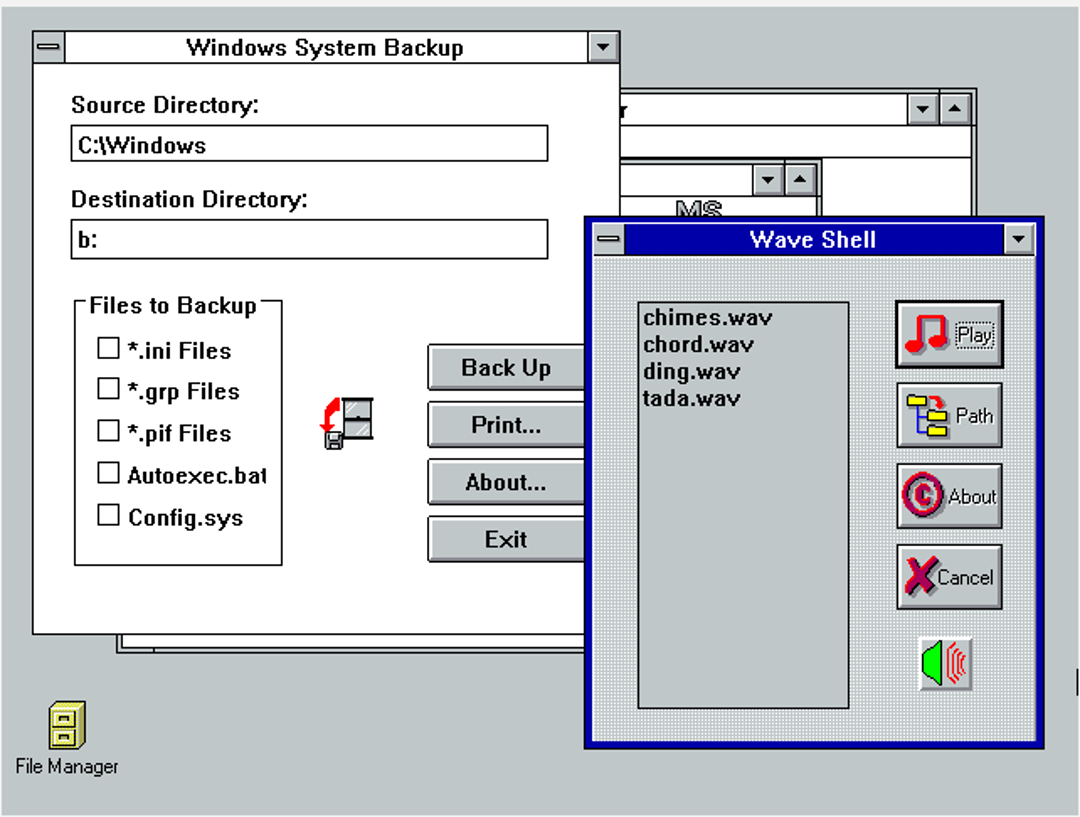
I soon came up with an idea for a shareware project — System Backup. Any of you who can remember back to the DOS and Windows 3.x days will remember that there were four files — AUTOEXEC.BAT, CONFIG.SYS, WIN.INI, and SYSTEM.INI — that were crucial to one’s setup. You’ll also remember that it wasn’t uncommon to twiddle with these files to eke out an extra measure of performance from the system. Backing those files up was critical to the tweaking, so I wrote SYSBACK.EXE to do the job quickly and easily. 

Windows 3.1 introduced the amazing feature of *.wav files — sound through your tinny PC speaker! That led me to write WAVSHELL.EXE, which listed all your sound files and made them easy to play.

I guess I didn’t have much faith in the value of my shareware because I released it into the wild of the pre-internet shareware market for a measly $2. People soon started sending me checks in the mail — my address was in the About Box, with a plea to pay for the software. Soon I added a licensing scheme and a “nag screen” that would go away if the user entered a valid license key. I actually made a bit of money.

Eventually both programs became unnecessary as Windows grew more functional, and I abandoned things. I’m sure all that code is on a hard drive in a landfill somewhere. 

But that doesn’t mean that SYSBACK and WAVSHELL don’t live on!

Last week, on a whim, I went searching to see if I could find any remnants of my glory days. Although it took a while, I was delighted to discover that both programs had clung to life in the dark crevices of the internet. 

I found WAVSHELL.ZIP and SYSBACK.ZIP and downloaded them. Sure enough, there were the files — the 16-bit Windows executables, along with the accompanying READMEs formatted for Windows Write, the simple word processor that came with Windows 3.1.

Return to Windows 3.1

So, what to do? Naturally I fired up Claude and asked how to get all this running. It suggested I give Oracle VirtualBox a try. At first I tried an open-source DOS version, but soon ran into conflict with memory managers and Windows. Tweaking CONFIG.SYS like the old days didn’t seem to make a difference.

This led to downloading a set of *.img files of MS-DOS 6.22. I mounted the first disk in the A: drive of the virtual machine. (For you youngsters, the A: drive was a floppy disk — maybe you remember those?) I had to do a virtual version of the old disk shuffle for the three floppies, and then do the same to install Windows. Everything installed and ran like clockwork, and soon enough, Windows 3.1 was up and running. 

Then, of course, I had to figure out how to get the files from my modern system to this ancient OS. This led me to WinImage, a shareware program (!) that builds floppy disk images for you. I built an image, copied the files onto the “disk,” and mounted it in the A: drive in the VirtualBox machine. I copied the files to the virtual hard drive, and behold!

System Backup and Wave Shell

Foundry

There they are, in all their glory. I have to say, it was quite a thrill. And they actually work!

Anyway, it was fun to remember all those halcyon days of CompuServe, 2400 BAUD modems, and getting checks from strangers in the mail. It seems strange to me that 35 years from now, some software developer will be writing a column about the deep dark past when people used to actually write code, argue about what programming languages were best, and, who knows, even had to type things out by hand.

  •  

Surviving AI: Navigating workload creep, AI slop, and the new tech career playbook

After more than 30 years the cybersecurity field, Keith Jones recently realized that his role had changed, from being a single contributor to manager of a fairly large team. And this team was getting a lot accomplished — tasks that used to take up a huge chunk of his workday.

No, his company hadn’t hired a group of new employees to work under him. He simply accelerated his use of artificial intelligence tools. Now, instead of grinding through a lot of basic tasks, that work is done for him while he focuses on bigger-picture work.

“It really feels like I have a team behind the scenes, but what I have is Claude [Anthropic’s AI tool],” says Jones, who currently works as a cybersecurity researcher. “I’ve been thinking for the last several months about how much differently I work now than I did a year ago, when I would sit and write all the low-level stuff before I could get to the 10% of the good stuff I really wanted to focus on. Now I can sit back and say, ‘Give me three different ways to solve this problem.’”

width="1024" height="678" sizes="auto, (max-width: 1024px) 100vw, 1024px">

Keith Jones, cybersecurity researcher

Keith Jones

Most people working in the technology field, like Jones, have had to figure out how best to work with AI. The technology has come on strong, with many companies making its use mandatory and actively evaluating whether employees are faster and more efficient because of it. And while it is boosting productivity and taking over the burden of repetitive, manual tasks, it’s also creating a new level of stress and a dizzying kind of mental exhaustion.

So what can tech workers do about the heavier mental load that comes with using AI, on top of escalating worries about the safety of their own jobs? AI users and industry analysts say there are specific ways to ease some of those burdens and prepare for a changing job market.

Combating the slop factor

When it comes to working with LLM tools, a well-known issue is dealing with AI workslop and hallucinations. The slop is AI-generated output that is low-quality, buzzword-heavy, and generic. It also can refer to bloated, boilerplate code. Hallucinations are inaccurate or completely made-up results. AI routinely offers this messy or incorrect information with total confidence, giving users a false sense of security.

Using this bad data can lead to anything from minor software bugs to severe liabilities. “Don’t believe the machine is infallible,” says Craig Shue, computer science professor and department head at Worcester Polytechnic Institute (WPI). “That’s when bugs will start working in. There’s a lot of misinformation on the internet, and that could be what the LLM is grabbing and using.”

width="1024" height="674" sizes="auto, (max-width: 1024px) 100vw, 1024px">

Craig Shue, computer science professor and department head at Worcester Polytechnic Institute 

WPI

Here are ways to combat the problem:

  • Make AI show its work: Ask it to cite its sources or explain its reasoning. Example prompt: Explain the logic and show the steps before writing the code.
  • Give the AI a source of truth: Instead of letting the AI search the internet for information, give it the exact source material (reports, transcripts, data sheets) to base its output on, telling it to use only the information provided.
  • Validate. Validate. Validate: Never let AI publish code directly to the main project without first reviewing and running it locally. Similarly, never take AI output and simply move it on to the next person in the project. Every single AI output needs review.
  • Don’t be fooled by confidence: As with managing a human, question the output. When you’re busy or tired, it’s easy to just go with the results it gives you. Don’t. Always analyze and question it.

Taking on AI-driven workload creep

Let’s face it: The great promise of AI is that it will take over repetitive, manual tasks, which will save you an incredible amount of time. What isn’t talked about as much is that it also can create a new workload — one that can be exhausting in a whole new way.

“Is AI saving people time? The short answer is yes,” says J.P. Gownder, vice president and principal analyst with Forrester Research. “But people also are being overwhelmed with overproduced things. Everyone wants to look busy and they’re producing more, but not necessarily better. Managers have to push back on that or it’s not really saving you time.”

In a multi-year study by Upwork, the largest online freelance marketplace, 77% of employees reported that AI had increased their workload. The report noted that a boost in productivity comes with a “significant emotional and relational cost,” with 88% of workers who saw the highest productivity gains also feeling burned out. And IDC’s Future of Work 2026 survey reported that 24% of IT workers report increased workload as a top AI concern.

Here are ways to combat the problem:

  • Keep it short: Part of the prompt — always — should be to tell any AI tool to be concise.
  • Build an anti-slop culture: Don’t simply accept and pass on workslop. It’s insulting for a co-worker to have to deal with pages of largely useless information.
  • Filter the noise: When everyone on a team starts using AI, the volume of Slack messages, long-form memos, and data reports skyrockets. Don’t treat it all with equal importance. Practice radical prioritization.
  • Manage the transcript deluge: Stop wading through 40-page meeting transcripts that bury action items. Instead, prompt the system to produce a concise summary focused strictly on deliverables or status updates.
  • Reduce the AI blast radius: When asked to fix a bug, AI tools often rewrite hundreds of lines of unrelated code, multiplying your code review time. Prevent this by instructing the tool to isolate its changes only to the specific function or file in question.

Managing the AI mental tax

Using AI often necessitates a different kind of mental processing, changing what had been the natural pacing of your day and dramatically increasing context switching. Instead of simply building and testing, someone might be jumping back and forth between auditing, fact-checking, prompting, and re-prompting. To manage strain and protect your focus, new strategies are needed.

Published this past March in the Harvard Business Review, a study by Boston Consulting Group and the University of California, Riverside, surveyed 1,500 workers and coined the term “AI brain fry.” The researchers found that juggling multiple AI tools causes decision fatigue and increases errors.

How to combat the problem:

  • Work in batches: Continuously reviewing AI output as it comes in can quickly lead to mental burnout. Dedicate blocks of time throughout your day to interact with your AI tools.
  • Create analog islands: Your brain needs time to decompress, and that means taking a break from digital processing… and from screen time in general. Make time in your day to step away from screens, such as taking a 15-minute walk or reading a book instead of watching a video online.
  • Know when to step in: Instead of endlessly tweaking prompts to get a perfect result, it is often faster and less mentally taxing to manually write or refactor the final 20% yourself.
  • Create base prompts: Writing custom prompts that include everything from guardrails to tone instructions for every new project quickly drains your mental energy. Instead, build two or three reusable system prompts, such as one for refactoring legacy code and another for drafting API docs, and use them as templates.

Proving your human value in a new job market

With companies regularly using AI-based applicant tracking systems to filter resumes, and AI actively shifting job responsibilities and skills requirements, the strategy for how you apply for roles and handle interviews is changing.

Leo Freitas, an analyst and research manager at IDC Research, says it’s critical for job applicants to show potential employers what they can do that machines cannot. “You need demonstrable achievements,” he adds. “It’s good to show highly human skills.”

width="1024" height="683" sizes="auto, (max-width: 1024px) 100vw, 1024px">

Leo Freitas, analyst and research manager at IDC

IDC

How to combat the problem:

For your resume:

  • Mirror their language: Use the exact language from the job description. Traditional applicant tracking systems rely heavily on structured information and keyword matching, says Teresa Hill, founder and leader of Anchor GTM, a growth marketing consultancy. That means if a posting says “product marketing manager,” don’t just write “PMM.” Write both.
  • Keep it simple: Use standard section headers, like “Experience” and “Education.” Creative alternatives and formatting can confuse parsers.
  • Avoid AI writing: Use AI to help structure your thinking, then edit until the copy sounds natural and authentically human.
  • Swap responsibilities for metrics: To stand out, especially with AI scanners, tie as many bullet points as possible from your work to business outcomes.

For the interview:

  • So, how do you use AI? Every interviewer eventually asks some version of this question. The best answers focus on judgment vs. simply name-dropping tools. Explain what you automate, what you never automate, and why.
  • Show that you’re a gatekeeper: AI tools can generate code or copy instantly, but they also introduce errors. To stand out, show that you know how to audit, verify, and safeguard quality.
  • Focus on learning: Don’t emphasize your expertise with a specific AI tool. Focus on being someone who is adaptable and learns quickly, Hill says. 
  • What sets you apart from a machine: Show, don’t tell. Give work examples that demonstrate that you know how to be creative, collaborative, and problem solve. Show metrics whenever possible.
  • Demonstrate that you know the limits: Make it clear that you know when to use AI and what not to let it touch without heavy review. 
width="1024" height="576" sizes="auto, (max-width: 1024px) 100vw, 1024px">

Teresa Hill, founder and leader of Anchor GTM

Teresa Hill

Future-proofing your career in a shifting tech market

The anxiety echoing through the tech industry is tangible as companies reallocate corporate capital toward automation. While both Gownder and Freitas emphasize that there is far more fear than actual AI-driven layoffs, the shift in corporate spending is undeniably stoking job insecurity.

“There’s this apocalyptical view that AI will take everyone’s job in a few years,” says Freitas. “I don’t see that happening, but many things will change in the nature of how we work. I don’t think the world is going to end tomorrow. But it’s always good to do a self-assessment and look at whether AI can do what you’re doing now.”

How to combat the problem:

  • Use this technology to your advantage: Approach AI as a new tool, not a replacement. Use it to make yourself better and faster at your job. “I look at AI like it’s another new tool, and I’m going to learn it like I’ve learned any other tool,” says Jones.
  • Don’t bury your head in the sand: Take a look at what you do and consider if it could be done by AI.If your role is highly automatable, think about switching to a more advanced position or to a role, like security, that more clearly needs a human in the loop.
  • Take ownership of your career: Expand your knowledge and skills. Find courses and certifications (many are free online) and take advantage of employers’ training programs.
  • Work with the business side: Make sure you understand the business — its long-term goals, competitive market, and jargon. Be the bridge between the technical and business sides of the company, giving presentations and solving business problems with technology.
  • Highlight your in-house expertise: When you have institutional knowledge, make sure you are openly using it to benefit the business. Your knowledge can be your key differentiator.
  • Push the business forward: Think about the next app or customer-facing system that will propel the business forward. Be the one who is advancing the company with tech.
  • Continue to adapt: Don’t get stuck in your anxiety. Keep being curious and working your learning muscles. 

More on AI in the workplace:

  •  
❌