❌

Reading view

MacBook Neo Defies the Global PC Slump

MacBook Neo helped Apple move against the global PC market in the second quarter of 2026, delivering double-digit Mac shipment growth while most leading computer manufacturers sold fewer units than a year earlier.

Preliminary data from IDC estimates that Apple shipped 6.7 million Macs during the quarter, up 10.1% from 6.1 million in Q2 2025. Its worldwide market share rose from 8.5% to 9.9%, placing the company within a fraction of the 10% threshold.

The rest of the industry moved in the opposite direction. Global shipments fell 4.9% year over year to 68.2 million units, ending nine consecutive quarters of growth. A separate Omdia estimate placed the decline at 3.6% and Apple growth at 15.9%, but both research groups identified the same pattern: the Mac gained ground while established Windows PC vendors contracted or remained flat.

IDC directly connected the Apple increase with the arrival of its lowest-priced notebook. MacBook Neo began shipping in March, giving the model its first complete quarter of retail availability between April and June.

MacBook Neo Drives Mac Shipment Growth

MacBook Neo entered the market as an alternative for buyers previously priced out of the Mac lineup.

The 13-inch notebook launched at $599 with an A18 Pro chip, 8GB of unified memory, a Liquid Retina display and up to 16 hours of video playback. It also brought macOS, Apple Intelligence and integration with the iPhone ecosystem into a price range commonly occupied by mainstream Windows laptops and Chromebooks.

That positioning attracted students, families and first-time Mac customers who did not need the performance or display technology of a MacBook Air or MacBook Pro. The four-color aluminum design also gave the entry model a more recognizable identity than the older Mac notebooks that frequently remained on sale through discounts.

IDC had already identified the computer as an unusual source of strength when it revised its notebook forecast earlier in 2026. Demand exceeded initial expectations in several markets, and reported inventory shortages appeared shortly after the March launch.

The effect became much more visible in Q2. MacBook Neo was available for the entire three-month period, allowing Apple to increase production, expand retail distribution and serve customers who could not obtain the computer during its first weeks.

The entry model also widened the Mac lineup without replacing the MacBook Air. Buyers seeking more memory, faster ports, longer wireless web use or additional external-display support could continue moving toward the M5-powered Air, while the less expensive machine handled education, office work, web browsing and communication.

That separation allowed Apple to reach lower price points without reducing the value of its premium notebooks.

A laptop screen displays multiple colorful open windows, including a chemistry diagram, a drawing of an artichoke with a chemical structure, a chat with an AI image generator, and a grapefruit photo, with various app icons along the bottom.
Image Credit: Apple Inc.

Lenovo, HP and Dell Lose Shipments

Apple remained the fourth-largest traditional PC vendor, but its performance contrasted sharply with the companies above it.

Lenovo retained first place with 16.6 million units and 24.4% market share. Its shipments declined 2.1% from the previous year.

HP experienced the steepest drop among the top five, falling 9% to 13 million units. Dell shipped 9.3 million computers, representing a 5% decline. Asus remained nearly flat at 5 million units, up only 0.2%.

Manufacturers outside the five largest brands collectively suffered a 10.5% contraction, indicating that weaker demand and component inflation placed even more pressure on smaller companies.

The figures measure shipments into distribution channels or directly to end users, not confirmed retail purchases by individual consumers. A manufacturer can therefore record shipment growth while some inventory remains unsold in stores or warehouses.

MacBook Neo demand appears to have been strong enough to support Apple production increases rather than simply filling channels. The company reportedly doubled its annual production target after the initial response, although later quarters will reveal how much of Q2 reflected lasting demand rather than launch-period enthusiasm.

Apple also benefits from operating at a scale that provides leverage with memory, storage and semiconductor suppliers. Smaller PC brands face greater difficulty securing components at competitive prices when shortages intensify.

Memory Costs Reverse the PC Recovery

The Q2 contraction arrived after manufacturers and commercial customers accelerated purchases during late 2025 and early 2026.

Buyers expected memory and storage prices to rise, encouraging some businesses to replace computers earlier than planned. Vendors also increased inventories while components remained available.

That activity supported nine quarters of market growth but borrowed demand from later periods. Once the early purchases were completed, the industry faced a more difficult combination of expensive components, cautious consumers and elevated retail prices.

The memory shortage is closely connected to the AI infrastructure boom. Chipmakers are dedicating more production capacity to high-bandwidth memory used by data center accelerators, limiting the supply of conventional DRAM needed for personal computers.

IDC expects little relief before the end of 2027 or early 2028. The research company forecasts an 11.3% decline in worldwide PC shipments across 2026, with the fourth quarter potentially falling 20% from the previous year.

Computer revenue may not decline at the same pace. Manufacturers have raised prices faster than shipments have fallen, allowing them to collect more money from fewer units.

That strategy creates another problem. Retailers and distributors can become trapped with expensive inventory if customers refuse the new prices, forcing promotions or production reductions later.

MacBook Neo initially softened that pressure by giving Apple a new product near the bottom of the notebook market. Its original $599 price made the Mac competitive with midrange Windows machines at the moment many rivals were becoming more expensive.
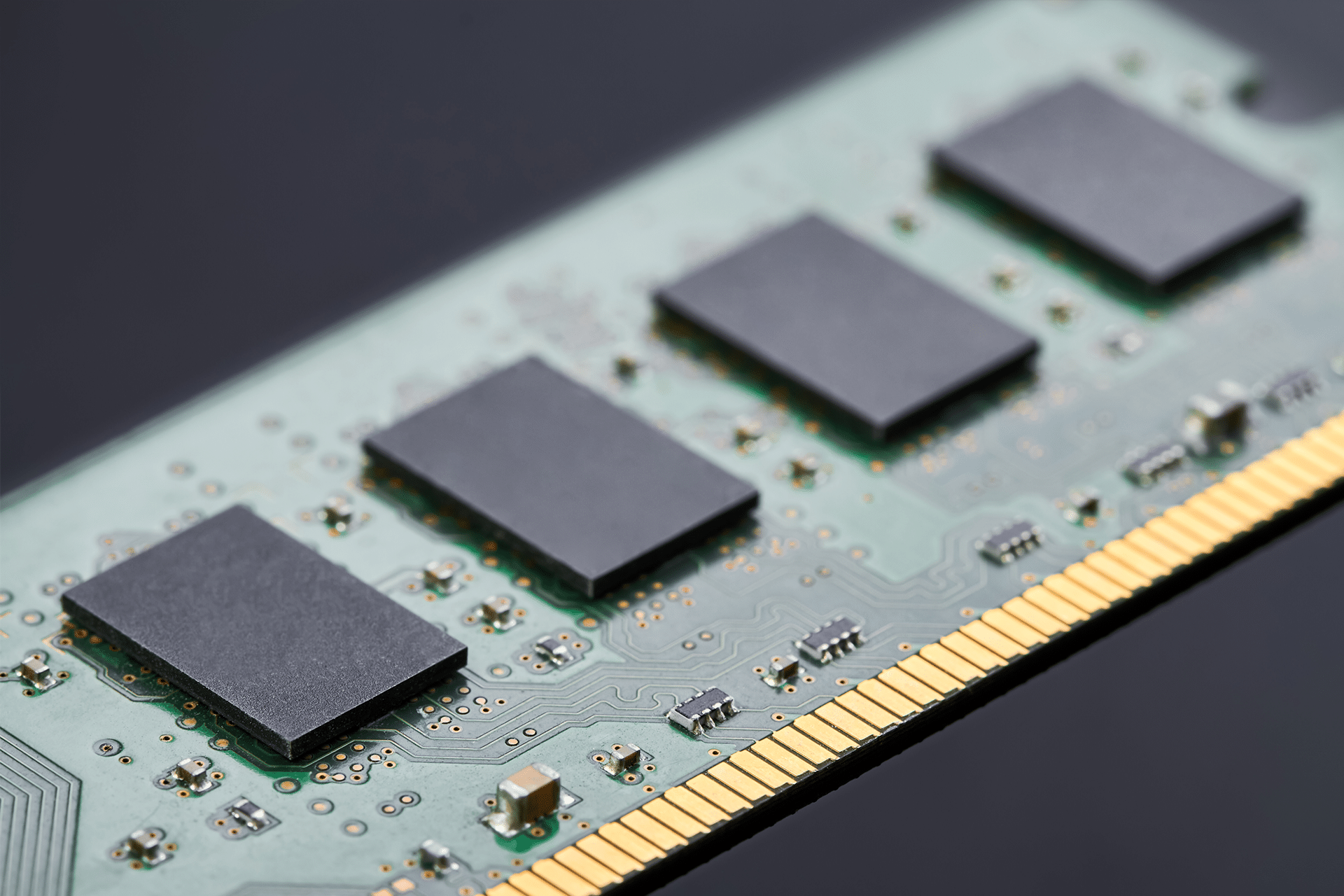
A close-up view of a computer RAM module, highlighting four black memory chips on a green circuit board with gold connector pins—an example of hardware impacted by the recent RAM price surge.
Image Credit: Freepik

The Price Increase Creates the Next Test

The strongest Q2 MacBook Neo shipments were recorded while most customers could still buy the computer at its introductory price.

Apple raised the U.S. starting price to $699 in late June as memory and storage costs affected the Mac and iPad lineups. The education price remained at $599, preserving the original offer for eligible students and educators.

A $100 increase changes the comparison with discounted Windows notebooks and places the entry model closer to older MacBook Air configurations available through third-party retailers.

Apple must now determine whether the appeal came primarily from the low launch price or from the combination of macOS, battery life, design and iPhone integration.

The company remains better positioned than many rivals to absorb supply disruption, negotiate long-term component agreements and promote several notebooks at different prices. MacBook Neo also uses an iPhone-class A18 Pro processor rather than an M-series chip, providing another way to manage silicon costs and production capacity.

IDC expects the full PC market to deteriorate during the second half of 2026. Apple will enter that period with almost 10% worldwide share, but the September quarter will be the first to measure MacBook Neo demand almost entirely at the higher $699 retail price.

The post MacBook Neo Defies the Global PC Slump appeared first on AppleMagazine.
  •  

ChatGPT Health Expands Apple Health Access

ChatGPT Health is returning with substantially wider access, giving more iPhone users the option to connect information from Apple Health directly to the AI assistant.

The expansion follows a limited test introduced in January. OpenAI is now gradually making the dedicated Health experience available to eligible ChatGPT Free, Go, Plus and Pro users in the United States who are at least 18 years old.

Despite the close Apple connection, this is not a feature created by Apple or built directly into the Health app. OpenAI operates the service through ChatGPT, while Apple Health serves as one of the sources users can voluntarily connect.

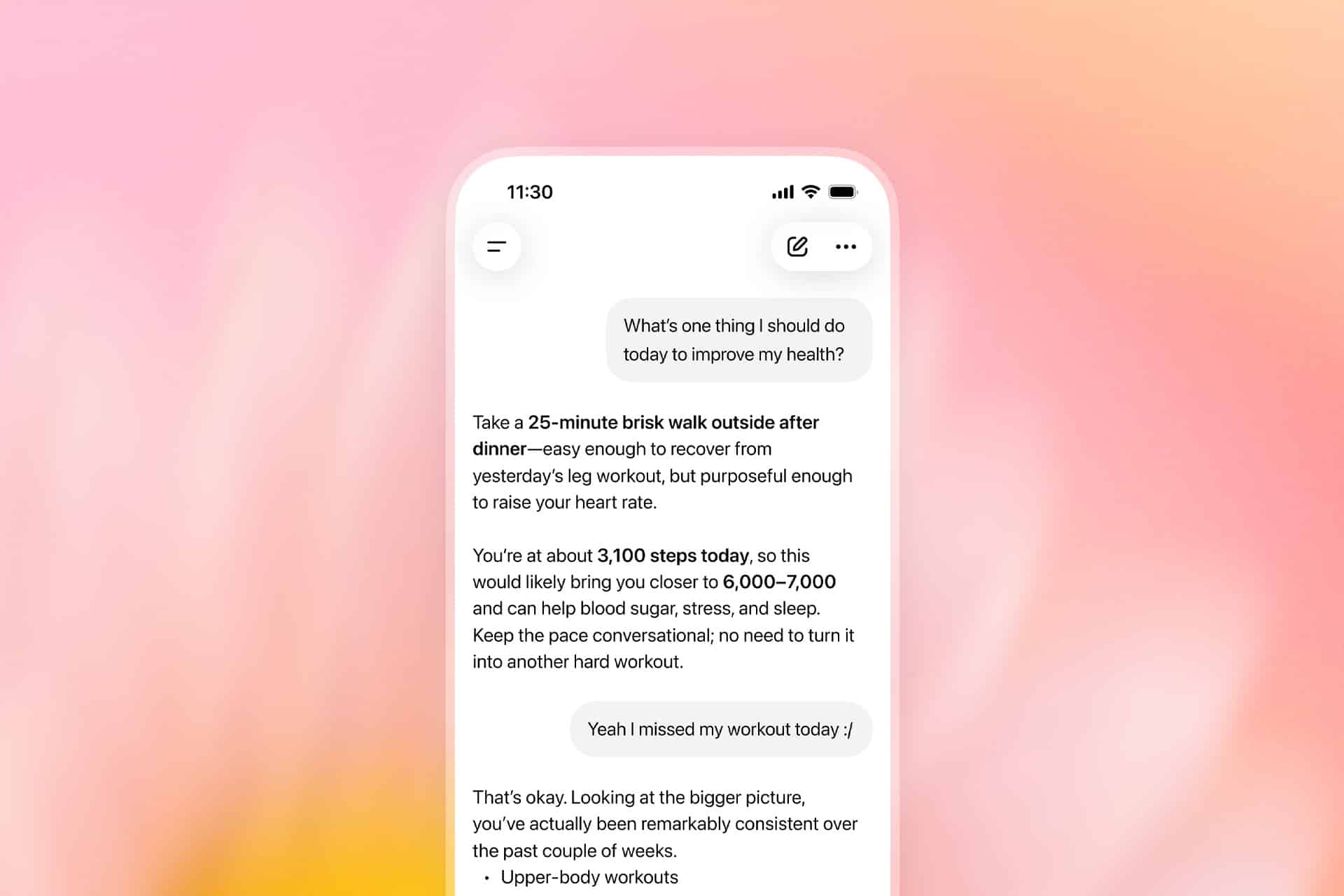
Once permission is granted, ChatGPT can examine selected health and fitness information stored on iPhone, including activity, sleep, workouts and other measurements collected by compatible apps and devices. Users can then ask questions about changes over time without manually exporting records or uploading screenshots during every conversation.

A smartphone screen displays a chat conversation about health, mentioning a 25-minute brisk walk and daily step goals, seamlessly integrated with Apple Health, against a softly blurred pink and yellow background.
Image Credit: OpenAI

ChatGPT Health Reaches More iPhone Users

ChatGPT Health originally appeared as a limited early-access experience for a small group of testers. The expanded rollout replaces that narrow availability with support for eligible adult users across the United States, although OpenAI says access may take several weeks to reach every account.

The feature works on the ChatGPT website and iOS app, but connecting Apple Health requires an iPhone. Users also need a recent version of the ChatGPT app before the Health option appears in the sidebar or More menu.

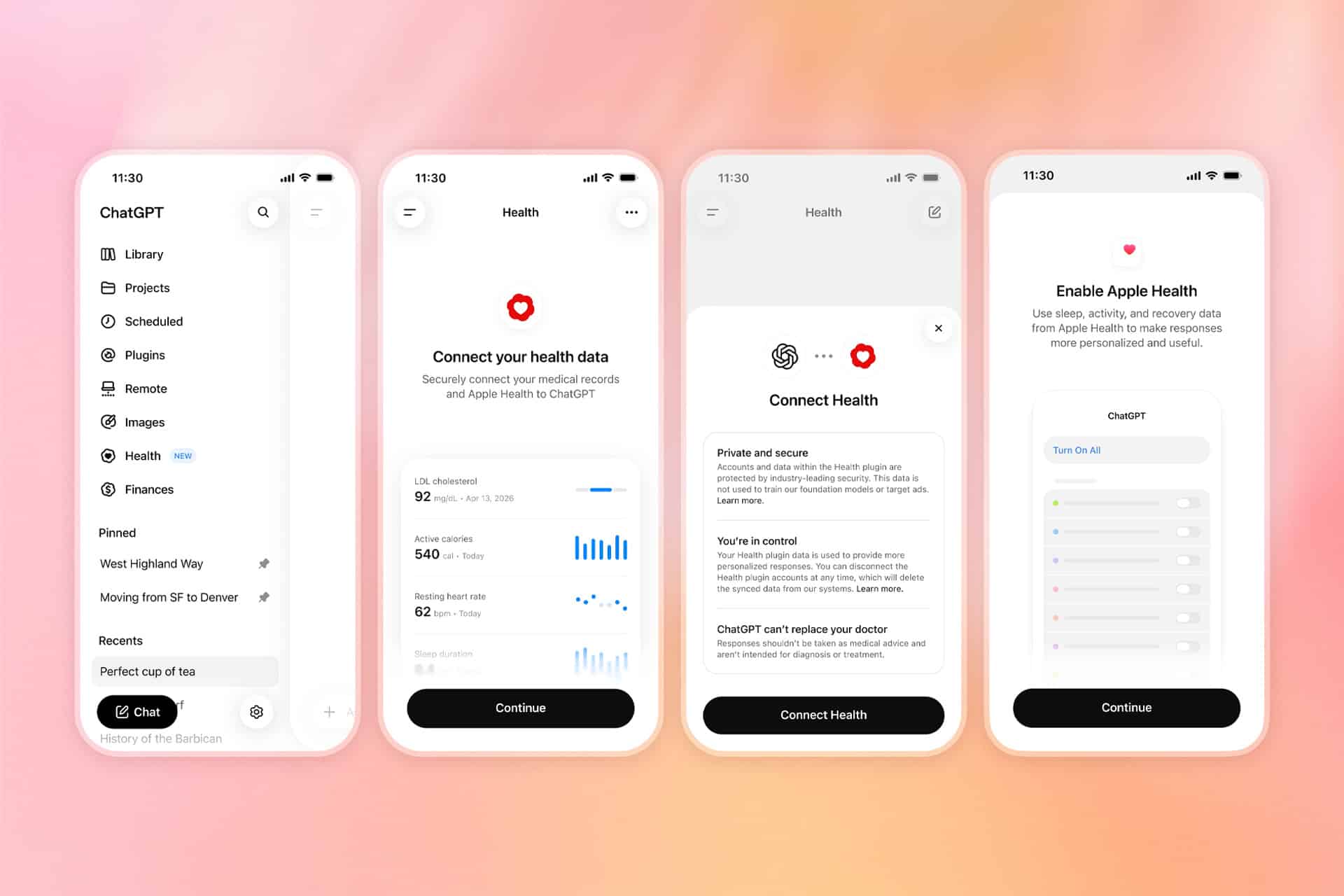
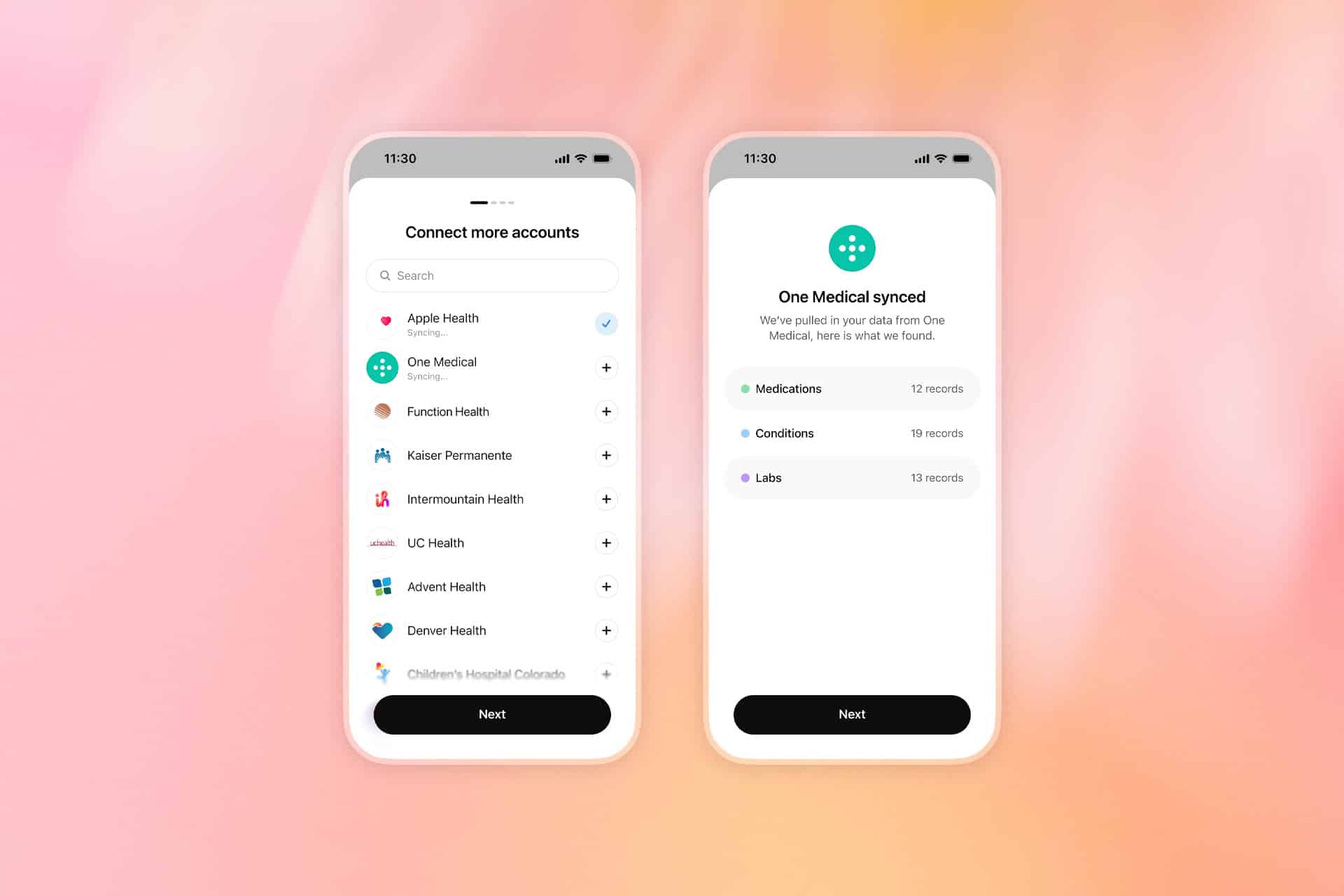
Apple Health is only one part of the system. ChatGPT can also connect to supported medical-record portals, One Medical and Function Health. Bringing those sources together allows the assistant to answer questions using a broader personal context than activity data alone.

A user could ask how sleep duration has changed across several weeks, whether workout frequency declined after a schedule change or how recent laboratory results compare with earlier tests. ChatGPT can also help organize questions before a medical appointment or summarize changes found across connected records.

Information from third-party fitness services can reach ChatGPT through Apple Health when those apps already share their data with the iPhone database. That may include measurements from platforms such as Garmin, Oura, Whoop, Strava and MyFitnessPal, depending on which categories each service makes available.

Not every proprietary score transfers. An app may calculate its own readiness, recovery or sleep score without writing that exact result into Apple Health. ChatGPT can only use the information made available through the connected source and approved by the user.

After synchronization, health information can inform responses throughout ChatGPT rather than remaining limited to conversations opened from the Health tab. The assistant normally asks for permission before using connected information, and users can also add “@Health” to a prompt when they specifically want a response based on their records.

Four smartphone screens show the process of connecting health data to a Health app, displaying menus, health data graphs, privacy info, and Apple Health permissions. Background is a soft pink and orange gradient.
Image Credit: OpenAI

Apple Health Data Gains a Conversational Layer

The appeal of the integration comes from turning a large collection of measurements into questions expressed in ordinary language.

Apple Health can already organize trends, highlights, medications, laboratory results and activity records. ChatGPT adds a conversational layer capable of comparing those categories or explaining them in a more personalized format.

Someone preparing for an annual physical could ask for a summary of meaningful changes since the previous appointment. A runner might request a comparison between training volume, sleep and resting heart rate. Another user could ask which information deserves discussion with a clinician after receiving new laboratory results.

That does not make ChatGPT a doctor. OpenAI says the feature is intended to support medical care rather than diagnose conditions or recommend treatment. Urgent symptoms and emergencies still require professional assistance.

The distinction is especially important because health data can appear more conclusive than it is. A change in heart rate, sleep or activity may have several explanations that cannot be determined from an iPhone record alone. Wearables can identify patterns, but they do not automatically reveal the medical cause behind them.

ChatGPT may help users notice relationships and prepare better questions. It should not be treated as the final authority on whether a symptom is harmless, whether medication should change or whether professional care is unnecessary.

The service is also read-only. ChatGPT can examine approved Apple Health information but cannot alter the original records stored on iPhone. It cannot add a diagnosis, change a medication list or write new measurements back into the Health app.

Users retain control over which Apple Health categories are shared. Someone may allow access to steps, workouts and sleep while withholding reproductive health, medications or other sensitive information.

That selective approach may be more appropriate than approving every category simply because the option is available. A useful response does not always require a complete health history.

Two smartphone screens show a health app: the left screen lists health providers to connect, including Apple Health, while the right screen confirms "One Medical" synced, displaying counts of Medications, Conditions, and Labs. Both screens have a "Next" button.
Image Credit: OpenAI

Privacy Becomes the Central Decision

Connecting Apple Health to ChatGPT creates a different privacy relationship from using health features entirely within the Apple ecosystem.

Apple designs the Health app around on-device protections and user-controlled permissions. ChatGPT Health requires selected information to synchronize with OpenAI systems so the company can analyze it and generate personalized responses.

OpenAI says connected Apple Health data, medical records and conversations using that information are not used to train its foundation models or target advertising. The company also applies additional encryption and isolation protections to health information.

Users can disconnect Apple Health at any time. OpenAI says synchronized data from the disconnected source will be deleted from its systems within 30 days.

Previous conversations are handled separately. Information already included in ChatGPT conversation history remains until those chats are deleted, even after the Apple Health connection is removed.

Memory introduces another consideration. Conversations using Health can create memories when ChatGPT memory is enabled, although OpenAI says memories are not generated directly from synchronized health data. Temporary Chat or separate project memory can reduce how much personal context continues across future conversations.

The new Health experience should also not be confused with the existing ChatGPT integration inside Apple Intelligence. Siri and Writing Tools can use ChatGPT for certain requests without requiring the dedicated ChatGPT app or a connected account.

ChatGPT Health is a separate OpenAI service with its own account, permissions, privacy controls and health-data connections. Using ChatGPT through Siri does not automatically give OpenAI access to Apple Health.

That separation gives users a meaningful choice. They can continue keeping health information inside Apple apps, share only selected categories with ChatGPT or connect medical records for a more comprehensive view.

The expanded rollout makes one of the most personal databases on iPhone available to conversational AI. Its usefulness will depend not only on the quality of the answers, but also on whether users understand exactly which information they are sharing and where it goes after leaving the device.

The post ChatGPT Health Expands Apple Health Access appeared first on AppleMagazine.

  •  

MacBook Air Flexgate Can Become a Costly Screen Failure

MacBook Air Flexgate is an unofficial name increasingly used for screen problems that appear when the laptop lid reaches a particular angle. The display may flicker, lose its backlight, show colored lines or turn completely black even though the computer continues running.

The term can be misleading. The original Flexgate controversy involved certain 13-inch MacBook Pro models from 2016, not MacBook Air. Apple later created a display backlight service program for eligible MacBook Pro units after determining that a small percentage could develop uneven lighting or lose the backlight entirely.

No equivalent MacBook Air repair program currently appears among Apple active service programs. Individual Air models can still experience failures involving display cables, connectors, backlight components or the LCD panel, but that does not establish one confirmed defect affecting every generation.

Owners therefore need to identify the symptom before assuming the screen has the same problem associated with the earlier MacBook Pro.

MacBook Air Flexgate Is Not the Original Flexgate

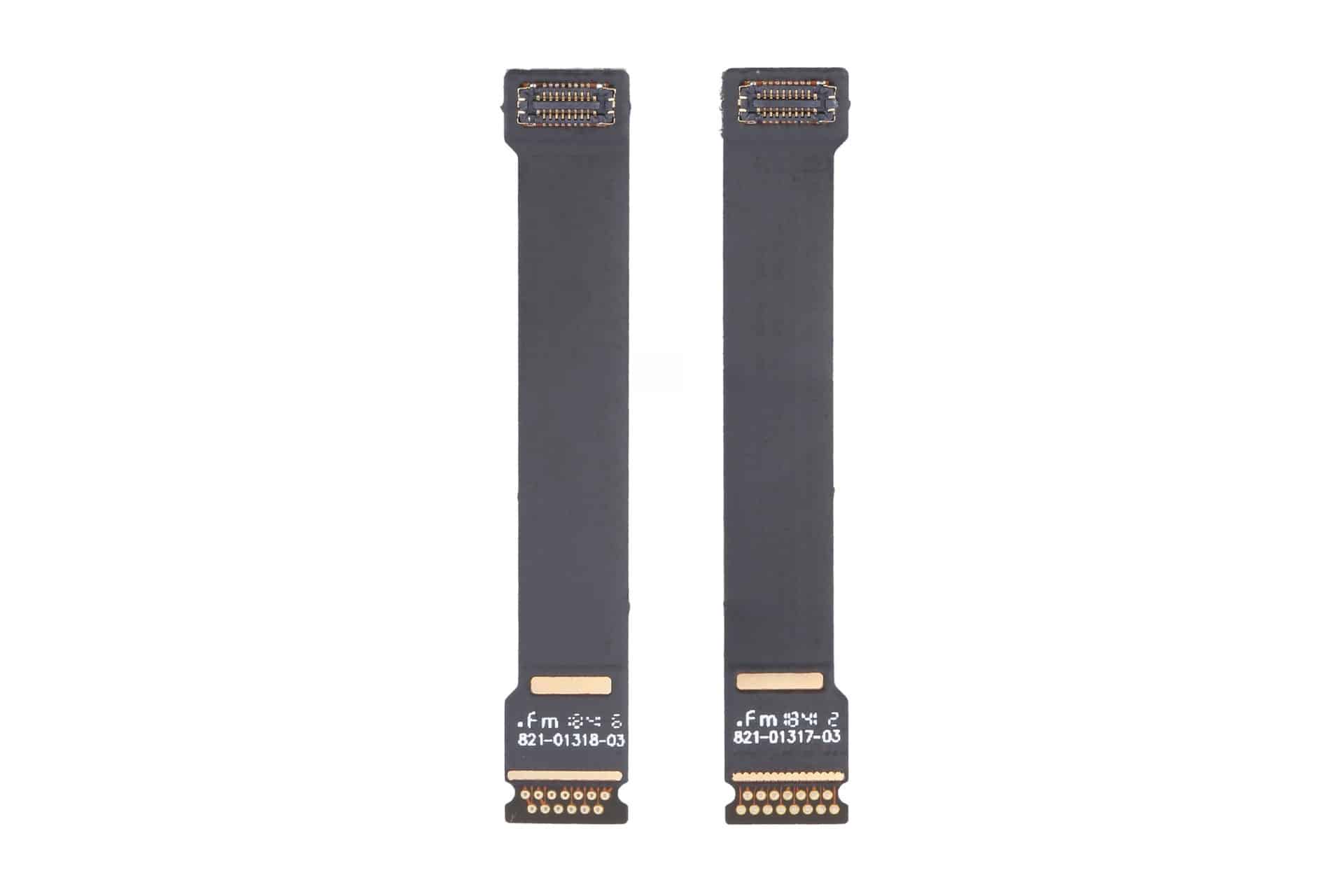
MacBook Air Flexgate usually refers to damage or wear affecting the thin cables carrying display information and power between the computer body and the screen.

These cables must flex every time the lid opens or closes. When a cable, connector or bonded section begins failing, the problem may initially appear only at certain screen angles. Moving the lid can restore the image temporarily, followed by another blackout when the display opens farther.

The original MacBook Pro issue became associated with a short backlight cable integrated into the display assembly. Repeated movement could place stress on the cable, producing a stage-light effect along the bottom of the screen before the backlight eventually stopped working.

MacBook Air designs also use compact display connections routed through the hinge area, but the internal construction differs across generations. A cable-related Air failure should not automatically be treated as evidence that Apple reused the exact defective MacBook Pro component.

The distinction matters during repair. A technician may use “Flexgate” as convenient shorthand, while the written diagnosis may identify a damaged display cable, backlight circuit, panel connection or complete display assembly.

Customers should ask which component has failed and how the conclusion was reached rather than accepting the nickname as the diagnosis.

Two black ribbon cables with gold connectors on each end, positioned vertically side by side against a white background. Often associated with MacBook Air screen repairs and Flexgate issues, each cable has small white text and symbols near the bottom connectors.
Image Source: Google

Which MacBook Air Models Are Mentioned Most

Reports of angle-dependent MacBook Air display failures most commonly involve Retina models introduced from 2018 onward.

The 2018 and 2019 Intel MacBook Air share a thin Retina design with display connections running through the hinge area. The early 2020 Intel version and late 2020 M1 MacBook Air use closely related chassis designs, making symptoms across these machines look similar even when the failed component is not identical.

Owners describe displays that work when opened slightly but flicker, develop lines or turn black when moved toward a normal viewing position. Some units recover after the lid is partly closed, strongly suggesting a physical connection affected by movement.

The M1 MacBook Air receives particular attention because it sold in large numbers and remained available for several years. A greater number of public complaints does not necessarily mean it has a higher failure rate, but many of these computers are now old enough for wear, accidental pressure and repeated hinge movement to become relevant.

The redesigned M2 MacBook Air introduced in 2022 uses a different enclosure and display assembly. M3 and later versions continue that flatter design. Individual screen and cable failures can occur, but there is no established evidence of a single Flexgate defect covering those generations.

Older wedge-shaped MacBook Air models released before the 2018 Retina redesign can also develop display cable problems. They are not normally included in the Flexgate discussion because their screen architecture predates the MacBook Pro controversy and their failures follow different repair patterns.

The exact model can be checked through:

Apple menu > About This Mac

The model year and screen size are more useful than the date the Mac was purchased. Retailers may sell an earlier generation long after its original release.

How to Recognize a Display Cable Failure

A strong Flexgate-style symptom is a display that changes immediately when the lid moves.

The screen may operate normally below a particular angle, then flicker or disappear as it opens farther. Returning the lid to the previous position restores the picture without restarting the Mac.

Uneven illumination along the bottom edge can point toward a backlight connection. Several bright or dark patches resembling stage lights are especially associated with cable or backlight distribution problems.

A completely dark screen may still contain a faint image. Shining a flashlight toward the display in a dark room can sometimes reveal the desktop beneath the failed backlight. This test should be performed gently without pressing against the panel.

Colored vertical lines, black bands or duplicated images can involve the display data connection, but they may also indicate panel damage. Lines that remain unchanged at every lid angle are less characteristic of a flex-related failure.

Cracks do not always appear on the outer glass. Pressure from a webcam cover, keyboard protector, plug, pen or other object left between the keyboard and display can damage the internal LCD while leaving the surface relatively smooth.

Liquid exposure may create lines, discoloration or intermittent operation around the hinge and display connectors. In those cases, repeatedly opening the lid can spread contamination or worsen damaged connections.

An external monitor provides one of the most useful tests. When the external image remains normal while the built-in screen fails, the graphics processor is probably still generating the picture correctly. Attention then moves toward the internal display assembly, cable or connector.

A screenshot can provide another distinction. Capture the screen while the fault is visible, then inspect the file on another device or external monitor. When the screenshot looks normal, the problem is likely occurring after macOS generates the image.

MacBook Air M1

What Owners Should Do Before Paying for Repair

Back up the Mac as soon as an intermittent display problem begins. A screen that works at one angle today may become completely unusable after another cable movement.

Avoid repeatedly opening and closing the lid to demonstrate the fault. Each movement can place further stress on an already damaged connection.

Record a short video showing the display at different angles. Intermittent failures can disappear when a Mac reaches a repair counter, and clear documentation helps the technician reproduce the condition.

Apple Diagnostics may identify some hardware problems, although a clean result does not rule out a damaged display cable. Testing in macOS Recovery or during startup can help exclude an ordinary application problem.

Apple and authorized providers commonly replace the complete display assembly when the cable is integrated with the screen. That approach can make an out-of-warranty repair expensive even when the visible fault involves a small cable.

Independent repair specialists may offer component-level cable work for certain models. The quality and durability of those repairs vary considerably, and newer Air displays can require specialized equipment, adhesives and calibration.

Before authorizing work, request a written estimate identifying the model, suspected component, warranty on the repair and whether the replacement display is new, used, refurbished or genuine.

AppleCare+ may reduce the cost when coverage remains active, particularly if the screen shows accidental damage. Standard warranty coverage depends on the diagnosis and whether Apple determines that impact, liquid or external pressure caused the failure.

The current Apple service-program list should also be checked before paying. A MacBook Air display program could be introduced or changed later, while consumer-protection laws may provide additional rights in some countries even after the limited warranty ends.

Owners using the Mac with an external monitor can often continue working while evaluating repair options. FileVault credentials, backups and any essential recovery codes should be confirmed before service because a technician may need to erase, reset or retain the computer during inspection.

The post MacBook Air Flexgate Can Become a Costly Screen Failure appeared first on AppleMagazine.

  •  
❌