❌

Reading view

App Mail poderá ganhar nova barra de formatação no macOS 27

A Apple está testando uma nova barra de formatação para a seção de texto do Mail no macOS Golden Gate 27, dando maior destaque às Ferramentas de Escrita (Writing Tools) da Apple Intelligence.

A nova versão foi compartilhada pelo usuário mactracker na versão beta do macOS 27 e, como apontado por ele, permite exibir sugestões contextuais de respostas inteligentes geradas pela Siri sem a necessidade de inserir automaticamente no rascunho, semelhante ao funcionamento de outras inteligências artificiais (IA) em apps de email.

As opções da nova barra incluem alternativas de edição, reescrita, correções gramaticais e/ou de escrita e uma opção intitulada “How does this sound?”, além das ferramentas tradicionais de formatação, escanteadas na lateral direita do novo layout.

Na versão atual, essas opções de formatação de texto também estão recolhidas na lateral direita da janela do aplicativo, desaparecendo por completo assim que se seleciona a opção de escrever com a Siri.

O novo layout está oculto por trás de uma feature flag interna, de forma que a maioria dos usuários da versão beta não consegue habilitá-lo. A beta 4 apresenta ainda algumas inconsistências no funcionamento do recurso, como a ausência da barra na escrita de novas mensagens, restringindo o seu funcionamento às réplicas de email.

Não se sabe ao certo se o recurso chegará à versão final do macOS 27 (prevista para aterrissar em setembro), mas ele parece acompanhar as reformulações propostas sobre a integração das ferramentas de IA no cotidiano do ecossistema da Apple nos sistemas 27.

via MacRumors

  •  

WhatsApp começa a liberar novo design para bolhas de mensagens no iOS

Após um período em desenvolvimento, o WhatsApp começou a liberar um novo design para as bolhas de mensagens para testadores e alguns usuários da versão estável do seu aplicativo para iOS.

Como mostra a comparação abaixo, divulgada pelo WABetaInfo, as bolhas agora contam com cantos mais arredondados em relação à interface anterior — o que dá a elas uma aparência bem mais moderna.

Bolhas de mensagens do WhatsApp
Imagem: WABetaInfo

Outra mudança pode ser vista especialmente nas mensagens de mídia trocadas em chats individuais, que deixaram de ter uma borda em volta de seu conteúdo e apresentam exclusivamente a foto ou o vídeo em questão.

Mensagens de mídia encaminhadas ou enviadas em grupo ainda mostram uma borda exclusivamente na parte superior — com o rótulo de encaminhamento ou a identificação de quem as enviou, respectivamente.

Links enviados com pré-visualização, por sua vez, apresentam a borda apenas na parte inferior, para abrigar o indicador de envio/recebimento/leitura.

Apesar de bem simples, essa será mais uma mudança que dará uma maior modernização à interface do app — especialmente nas bolhas das mensagens, que mantêm o mesmo estilo há muito tempo.

  •  

2nd Public Beta of iOS 27, iPadOS 27, & MacOS 27 Golden Gate Available for Testing

Apple has released the second public beta versions of iOS 27, iPadOS 27, and MacOS 27 Golden Gate, to users who are eligible. If you’re interested in installing those betas on your device, you can read instructions for iPhone and iPad here, or for Mac here. MacOS 27, iOS 27, and iPadOS 27 have an ... Read More

The post 2nd Public Beta of iOS 27, iPadOS 27, & MacOS 27 Golden Gate Available for Testing appeared first on OS X Daily.

  •  

How to Install macOS 27 Golden Gate Public Beta on Mac

With the launch of the MacOS 27 Golden Gate public beta program, now even more users can experience MacOS 27 as it’s actively being worked on by Apple. MacOS 27 Golden Gate has a heavy focus on performance improvements, but there’s also refinements other than the Liquid Glass interface look, improvements to Spotlight and Mail ... Read More

The post How to Install macOS 27 Golden Gate Public Beta on Mac appeared first on OS X Daily.

  •  

RC Builds of MacOS Tahoe 26.6, iOS 26.6, iPadOS 26.6 Available for Testers

The Release Candidate builds of MacOS Tahoe 26.6, iOS 26.6, and iPadOS 26.6, are now available for those engaged in beta testing for current generation versions of Apple system software. There are also RC builds for MacOS Sequoia 15.7.8 and MacOS Sonoma 14.8.8, though it’s hard to imagine many people aside from some devs are ... Read More

The post RC Builds of MacOS Tahoe 26.6, iOS 26.6, iPadOS 26.6 Available for Testers appeared first on OS X Daily.

  •  

TestFlight: One Step Forward, Two Steps Back

I test a lot of apps, so I have strong opinions about TestFlight. However I usually keep those opinions to myself because despite the fact that it’s critical to my work, TestFlight wasn’t built for app reviewers. Most people haven’t accumulated hundreds of active and inactive betas in the app like I have, and for them, TestFlight is probably fine. However, for me, TestFlight is a constant source of frustration.

So, you can imagine my excitement when I read a post by Zac Hall at 9to5Mac that a search field had been added to TestFlight. “Finally,” I thought to myself. I stopped what I was doing and updated the app immediately. After all, search was my number one request for TestFlight back in 2024.

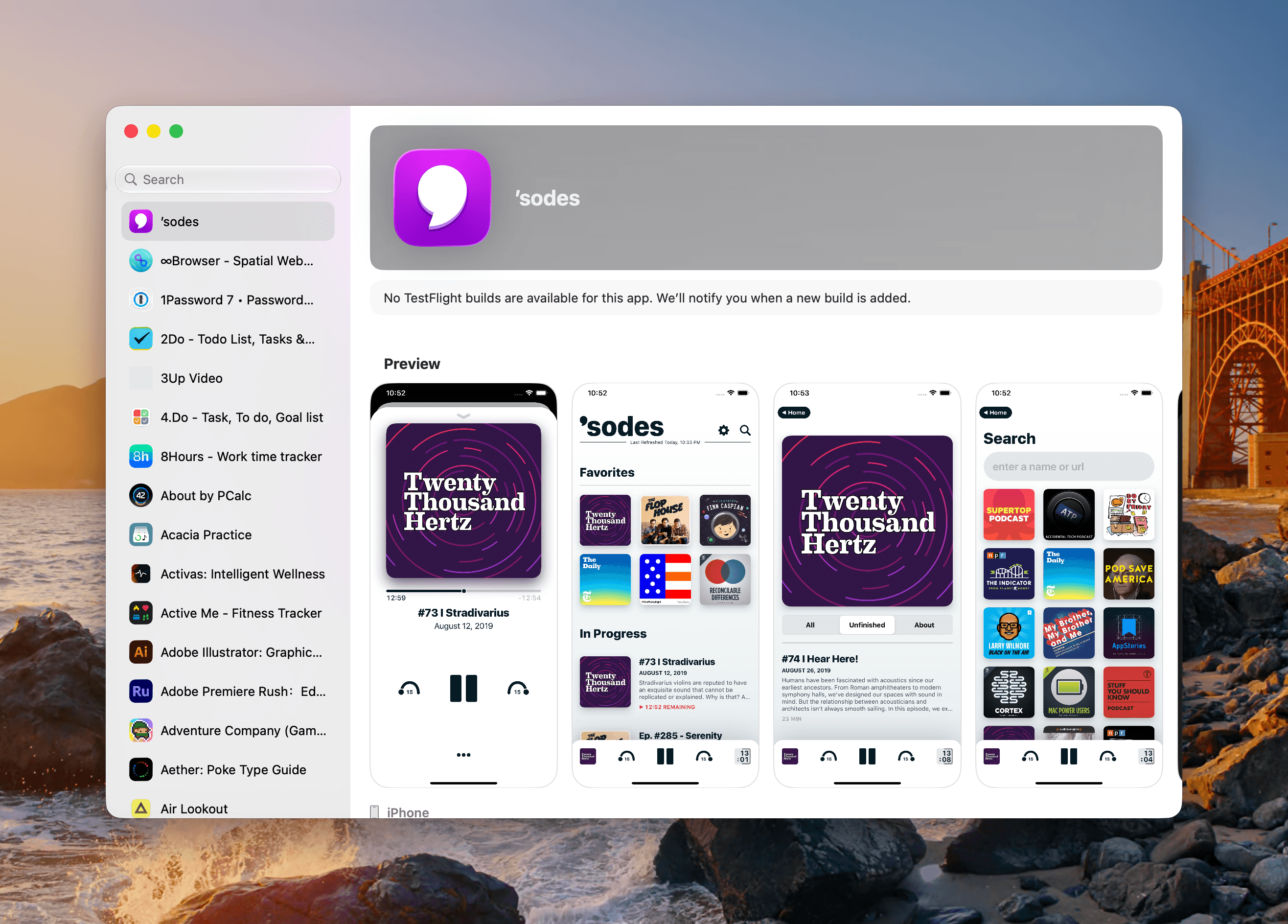
An apostrophe gets you the top spot in Apple's new alphabetical TestFlight list.

An apostrophe gets you the top spot in Apple’s new alphabetical TestFlight list.

That 2024 wishlist was published in the wake of a bad stretch the app had beginning in 2023. At the time, TestFlight was plagued by laggy performance if you were on a lot of betas. To Apple’s credit, they fixed the performance issues, though the issues have begun to creep back into recent releases. Still, the past couple of years as a TestFlight user have been fine despite all the ways the app could be made better for users.

When the TestFlight update finished installing, I eagerly opened it on my Mac and then my iPhone. Sure enough, there was the search field at long last. Lists practically beg for a search field, and finally someone at Apple added one, and to whoever built that feature, a huge thanks from me and the MacStories team.

Unfortunately, this story comes with one very big “but.” Previously, TestFlight betas were listed in reverse chronological order, which I liked. The newer beta releases were at the top of the list and the older ones that were on the verge of being replaced by an App Store release were at the bottom, along with expired betas, a list that I never really understood the purpose of.

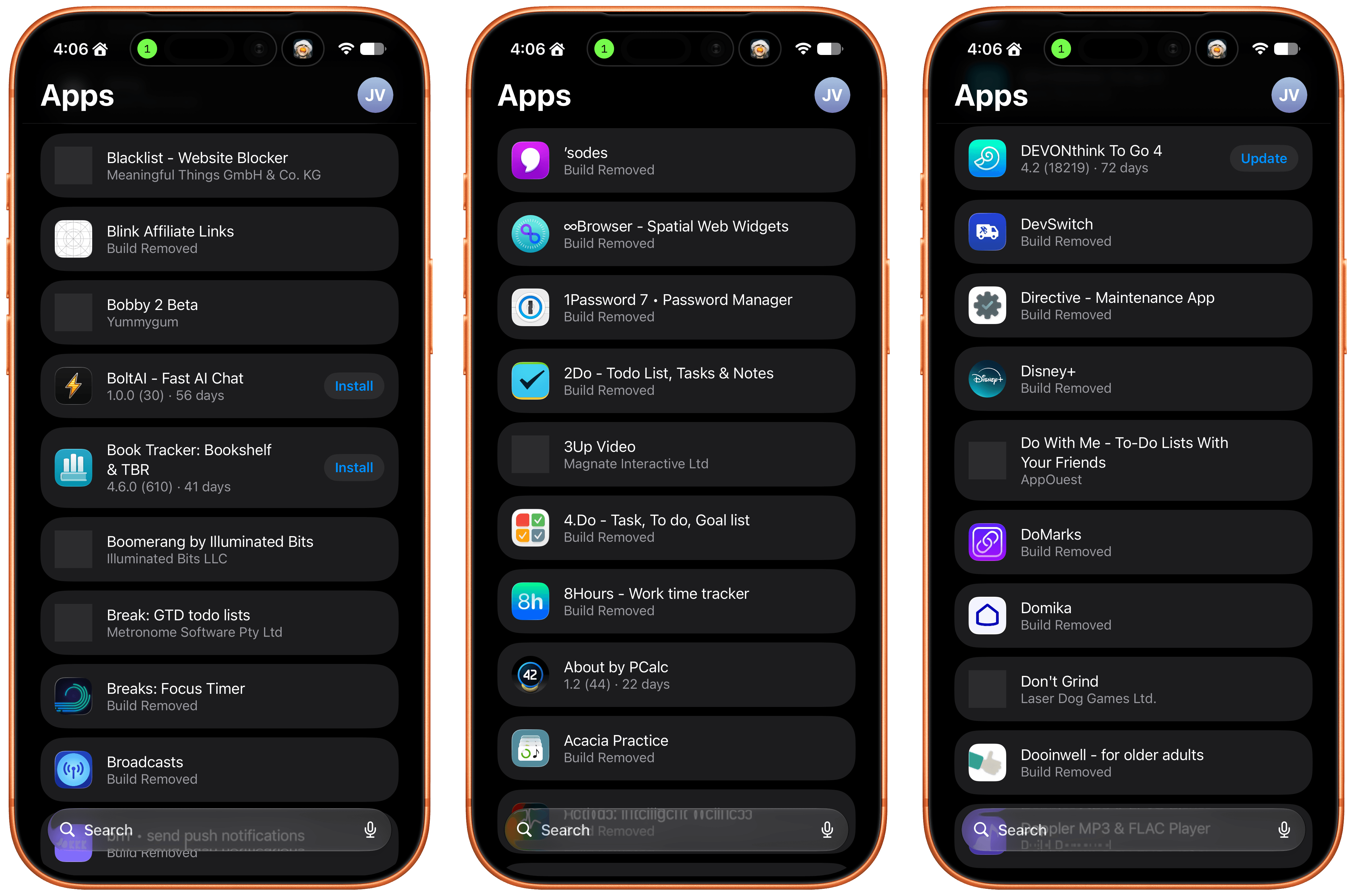
Well, those expired betas are now scattered among the active TestFlight betas in an alphabetical list and it seems that the expired beta list has been expanded to include every single beta I’ve ever been a part of. I did a rough count and for me that’s nearly 800 app listings. As you can imagine, the active betas in that list are few and far between. Search helps, but scrolling is no longer an option.

The live betas are few and far between when mixed with betas gone by.

The live betas are few and far between when mixed with betas gone by.

I get that this is a very “me and a few of my friends” problem, and search does help, but it’s not enough. The active to inactive beta ratio is so bad that few iPhone screens include more than two or three active betas. So here’s my proposal:

  • Add a toggle in TestFlight’s settings that hides inactive betas.

That’s it, that would make all the difference in the world. I’d love to have the reverse chronological ordering back, a performance tune-up, and the other things I wished for back in 2024, but I’ll live with hiding all the noise from my beta list.

  •  

iOS 27 Beta 4 Update Available to Download for iPhone & iPad

iOS 27 beta 4 for iPhone, and iPadOS 27 beta 4 for iPad, have been released for users engaged in the OS 27 developer beta system software testing programs. A concurrent public beta testing program is also now ongoing, though those betas are typically delayed a day or few behind dev betas, but otherwise match ... Read More

The post iOS 27 Beta 4 Update Available to Download for iPhone & iPad appeared first on OS X Daily.

  •  

MacOS 27 Golden Gate Beta 4 Available to Download

For Mac users who are currently running MacOS 27 Golden Gate beta, Apple has released the 4th beta version of MacOS 27 developer beta. The latest beta build is available to download now through Software Update, as an IPSW file, or as the full installer. MacOS 27 Golden Gate has a heavy focus on performance ... Read More

The post MacOS 27 Golden Gate Beta 4 Available to Download appeared first on OS X Daily.

  •  
❌