 Login
Login
Do patent attorneys have to disclose that they used AI? The confidentiality and candour rules explained
By Alius Noreika Key takeaways The question comes up in almost every firm that has started experimenting with

Siri Wolfram Alpha integration helped create one of the defining moments in the early history of consumer artificial intelligence. When Apple introduced Siri with iPhone 4S in October 2011, users were not merely given another form of voice control. They could ask a spoken question and receive a calculated answer rather than a page of search results.
Questions involving mathematics, measurements, dates, nutrition, astronomy and factual comparisons could be routed to Wolfram Alpha, a computational knowledge engine launched in 2009. Siri handled the conversation, while Wolfram Alpha supplied structured information and calculations behind many of the responses.
The experience could feel remarkably advanced for its time. Asking how many days remained before a holiday, comparing the populations of two cities or converting miles into kilometers no longer required opening Safari, entering a query and selecting a website.
That direct path from natural language to a useful answer established an expectation that continues shaping AI products today.
Siri did not begin inside Apple.
Its technological roots extend to research conducted at SRI International, including work associated with the DARPA-funded CALO project. The objective was to develop systems capable of learning, organizing information and helping people complete everyday tasks.
SRI later spun the technology into Siri Inc., founded by a team including Dag Kittlaus, Adam Cheyer and Tom Gruber. The company released a standalone Siri app for iPhone in early 2010.
The original product was designed around actions rather than ordinary web search. A user could ask for a restaurant reservation, request a taxi, check entertainment listings or search for local services. Siri attempted to understand the intent and connect the request with an appropriate online provider.
This approach was ambitious because the assistant needed to coordinate several different systems. Speech had to be converted into text, the request had to be interpreted, context had to be considered and an external service had to return something useful.
Apple acquired Siri in April 2010. Steve Jobs had personally recognized the potential of moving beyond a collection of apps toward a conversational layer capable of reaching them on behalf of the user.
When the assistant returned as an integrated feature of iPhone 4S, Apple had narrowed some aspects of the original startup vision while making the technology accessible to a much larger audience.
Siri could send messages, create reminders, place calls, manage calendar events, check weather conditions and answer questions. Apple initially labeled the feature as a beta, an unusual decision for a prominent part of a new iPhone launch.
The beta label acknowledged that natural-language interaction remained unpredictable. Accents, ambiguous phrasing, network conditions and external data providers could all influence whether a request succeeded.

Siri Wolfram Alpha became especially memorable because it showed the difference between retrieving information and computing an answer.
A conventional search engine could locate pages containing a formula. Wolfram Alpha could apply that formula to the values supplied by the user. It could interpret units, compare quantities, calculate probabilities and organize factual data into a structured response.
That distinction allowed Siri to appear more knowledgeable than a voice interface simply reading search results aloud.
A request such as “What is 15% of $86?” could return the calculation directly. A question about the distance between planets could produce a value without requiring the user to inspect several websites. Wolfram Alpha could also answer unusually specific requests, including information about aircraft flying overhead when the necessary location and aviation data were available.
The system was not a large language model. It did not generate open-ended prose in the way current AI assistants do. Wolfram Alpha relied on curated data, symbolic computation, algorithms and formal representations of knowledge.
That structure provided an advantage that remains relevant: many answers could be calculated and traced through defined information rather than improvised statistically.
Early Siri combined several specialized capabilities instead of depending on one system to do everything. One provider might supply restaurant information, another could handle maps and Wolfram Alpha could process computational questions.
The assistant acted as the conversational coordinator.
This architecture made Siri seem like one intelligence even though the response could come from a network of separate services. Modern AI platforms have returned to a similar idea through tools, agents and external data connections. A language model may manage the conversation while calling a calculator, calendar, search engine or business system when a task requires reliable external action.
Siri demonstrated that model on a consumer smartphone more than a decade earlier.
The Wolfram Alpha partnership influenced how people began judging digital assistants.
Before Siri, voice features on phones were commonly associated with rigid commands such as calling a contact or selecting music. Siri invited users to speak more naturally and attempt questions that would previously have been typed into a browser.
The results were inconsistent, but successful interactions changed perceptions immediately. The iPhone appeared capable of understanding intent, reaching into a knowledge system and returning a concise answer through one conversational interface.
That apparent simplicity concealed substantial infrastructure. Speech recognition, language interpretation, location, personal context and external databases all had to work together quickly enough to preserve the feeling of a conversation.
Wolfram Alpha also gave Apple access to expertise that would have taken years to reproduce internally. Stephen Wolfram had spent decades building Mathematica and computational systems before launching the public knowledge engine.
Following the Siri announcement, Wolfram described the integration as a characteristically direct Steve Jobs decision: users wanted access to knowledge and actions without unnecessary intermediate steps.
That idea became more influential than any individual answer Siri provided.
The assistant did not need to show how many services had participated. It needed to understand the request and return the result.

The first version of Siri could feel futuristic one moment and frustrating the next.
Some questions reached Wolfram Alpha correctly, while similar wording could trigger a web search or an unrelated response. Siri occasionally struggled to determine whether the user wanted a calculation, a local result or an action inside the phone.
Wolfram Alpha responses were also better suited to some subjects than others. Mathematical and scientific questions matched its computational structure, while casual conversation, current events and subjective requests required different sources.
Network dependence created another weakness. Early Siri processing relied heavily on remote servers, so delays or outages could make a basic request fail even when the iPhone itself was functioning normally.
Those limitations foreshadowed the central challenge surrounding modern assistants. A convincing interface encourages people to ask almost anything, but no single technical system performs equally well across every type of request.
Current generative AI can produce more natural language and handle a wider range of topics. It can also create confident errors when factual grounding is weak. The computational approach represented by Wolfram Alpha remains valuable precisely because some questions require verified data and exact calculation rather than fluent speculation.
The story behind the first Siri steps is therefore not only about an old iPhone feature. It shows that a powerful assistant needs more than a conversational personality. It requires access to dependable tools, structured knowledge and the ability to recognize when another system should provide the answer.
Siri Wolfram Alpha offered that lesson in 2011, long before AI assistants became capable of writing essays, interpreting screens and acting across apps.
The post Siri Wolfram Alpha Defined the First AI Assistant appeared first on AppleMagazine.
Google CEO Sundar Pichai has sought to allay concerns over the delayed release of the Gemini 3.5 Pro large language model. He dodged questions about it in Google’s quarterly earnings call on Wednesday by focusing on the company’s next frontier AI model, Gemini 4, and plans to release subsequent LLMs at an almost monthly cadence.
His comments came a day after Google unveiled Gemini 3.6 Flash and 3.5 Flash Cyber but offered no update on the release of Gemini 3.5 Pro, the company’s delayed flagship reasoning model that many developers had expected to arrive weeks earlier.
Google introduced the Gemini 3.5 family at its annual I/O conference, promising to release the Pro model in June. That timeline has since slipped, with Bloomberg suggesting Gemini 3.5 Pro is months late because the model’s coding performance is falling short of internal expectations, especially when compared to better performance by similar models from OpenAI and Anthropic.
Instead of revisiting the Gemini 3.5 Pro timeline, Pichai used the earnings call to shift the discussion toward Gemini 4, when asked about how his company planned to navigate an increasingly competitive race to release frontier AI models by to Barclays Investment Bank analyst Ross Sandler.
“We are creating a baseline on top of which you will see us rapidly iterate on subsequent model releases. And so picking up pace and releasing models almost at a monthly cadence is part of our road map as we are building Gemini 4 as well,” Pichai said during the call.
Sandler’s question followed one from JPMorgan Chase & Co analyst Douglas Anmuth, who asked Pichai if Google was releasing frontier AI models frequently enough to keep pace with rivals OpenAI and Anthropic.
Pichai had responded to Anmuth’s question that Google remained confident of competing at the frontier and was investing heavily in a larger Gemini 4 base model.
Analysts, though, aren’t as confident as Pichai.
While delays to Google’s frontier model roadmap have not triggered an exodus of existing customers, either because of high switching costs or because many enterprises already running multi-model architectures, they have made CIOs evaluating AI platforms more cautious about making new commitments, said Bhupendra Chopra, chief revenue officer at IT consulting firm Kanerika.
A monthly model release cadence could prove to be a double-edged sword for enterprises and their CIOs.
While a monthly release cadence could help enterprises gain faster access to improvements in model performance, cost and capabilities, it will also require CIOs to invest more heavily in testing, governance and version management to safely adopt those updates, said Sanchit Vir Gogia, chief analyst at Greyhound Research.
Similarly, Pareekh Jain, principal analyst at Pareekh Consulting, said enterprises will embrace a faster release cadence only if each successive model delivers measurable improvements in performance, cost or safety, rather than simply changing version number.
The challenge for CIOs, Jain said, is not just keeping up with model releases; it’s deciding whether each new version is worth the cost of validating it.

Leadership wants to scale AI. Budgets are tripling. Adoption is up.
Then the CFO asks the question every board now asks: which of these initiatives is actually profitable?
Most organizations cannot answer that question, not because they lack visibility into cost, but because the cost data they have was never designed to produce that answer.
Applying lessons learned from managing cloud spend won’t be a fix for the AI and ROI quandary. True, cloud taught a generation of CFOs that billing without business context is noise. So to get cloud ROI, they stitched two data sources together: cost data plus business data. AWS reveals which account, which region, which tag, which resource. Merge in customer and product mappings on top and the ROI of the cloud spend comes into focus.
But AI is harder. It requires three data sources: cost, business, and telemetry—the automatic collection of data from disparate sources that helps to clarify the whole picture of what happened and why. An executive or engineering lead can have AI invoices and customer revenue. But they have no way to connect them to business value. The token count on the OpenAI invoice does not specify which customer triggered which call, which feature it served, or whether the prompt produced a business outcome. That data does not exist in the provider’s billing.
The situation is not likely to change anytime soon because AI providers are not in the business of attributing an enterprise’s costs to that enterprise’s customers. Instead, AI providers are in the business of selling tokens. The granularity they expose is the granularity their billing systems require, not the granularity a CFO requires.
Not convinced? Compare what AWS gives you to what an AI provider gives you.
AWS billing exposes resource IDs, account hierarchies, region, SKU, tag metadata, usage by the minute. Every dollar can be attributed to a workload, a team, a customer segment if it was tagged correctly. The data is rich enough that mature FinOps teams built unit economics on top of it years ago.
An AI provider invoice gives you tokens consumed by model, with optional grouping by API key. That is the resolution. No request-level attribution. No customer ID. No feature mapping. No prompt outcome. No retry identification. Multi-step agent workflows collapse into a token count. Imagine a large bank receives a multi-million dollar AI invoice each month. But it has no visibility into what parts of the business were responsible for what parts of the cost so cannot allocate them.
If an enterprise wants to know what AI cost drove which customer or feature, it has to capture that data itself, inside an application, before the call leaves it.
Building AI ROI measurement requires three data sources, stitched together in a single model.
Stitched together, the three sources produce the unit economics every AI investment decision now requires: cost per customer interaction, margin per feature, profitability per agent workflow, ROI per model choice. None of these can be calculated from billing data alone. None can be calculated from telemetry alone. They require all three sources, modeled together in a way that maps cost to outcome.
Single-call inference is the easy case. One request, one cost, one customer, one outcome.
Agentic workflows are different. An agent decomposes a task into multiple steps. Each step calls a model. Some steps fall back to a different model when the first fails. Some steps retry on a poor result. Some steps invoke external tools that themselves cost money. A single user request can produce dozens of inference calls across multiple providers, with the cost compounding in ways the provider invoice cannot disaggregate.
If telemetry does not capture agent-step granularity, no one will know which steps are profitable. Aggregate costs will show up three weeks later in the invoice. By then, the workflow has been running at scale, customers are onboarded, and unprofitable paths have been retried thousands of times.
When agents make the calls, the volume of cost-generating events without business context attached grows by an order of magnitude. The window for instrumenting this before it becomes unmanageable is closing.
Once the three sources are stitched together, the AI investment conversation changes.
Five different ways to build the same AI capability stop looking equivalent. They converge on adoption metrics and diverge by 10x on cost. The team picks the approach that delivers a similar business outcome at one-fifth the cost, because the team can finally see the difference. Product teams design features with margin awareness from the architecture phase, not from the post-launch budget review. Engineering teams choose model architectures with cost-per-outcome data alongside latency and quality. Leadership evaluates AI initiatives the way they evaluate any other capital allocation: on unit economics, not on the engagement chart. Aggregated invoices track the cost per customer interaction. Engagement metrics reveal margin per feature. Gut-instinct model selection is checked against real cost-per-outcome model selection results.
Within seconds, everyone can see which AI features are profitable, which should scale, and which should be killed. This is the insight everyone is looking for and companies that achieve it will optimize the benefits of AI.
AI costs are compounding now. The board is not waiting 18 months for an internal project to reach production.
The temptation to build it anyway has never been sharper. AI coding tools have changed what a small engineering team can ship in a quarter. The instrumentation layer looks tractable. The cost normalization looks like a weekend project. The semantic model feels like something a senior engineer could draft over a sprint.
It is a trap. Three reasons.
Volume is the first. A production AI footprint generates millions of telemetry events per hour, and that volume scales with agentic adoption. Real-time ingestion, correlation, and attribution at that scale is not the same problem as vibe coding a prototype in an afternoon. It is a permanent operational system that has to be right every minute of every day.
The vendor landscape is the second. Cost data arrives in delayed billing windows from providers with non-interoperable schemas. Schemas change without notice. New AI providers enter the landscape monthly, each with its own taxonomy and metering. The system is not built once. It is maintained against a moving target that moves faster than most internal release cycles.
The third is what the first two add up to: this is business-critical infrastructure. The CFO and the board are going to make capital allocation decisions on the data this system produces. When schema drift goes unnoticed for two weeks, when an agent telemetry stream stops correlating to a vendor that quietly changed its billing API, the cost of being wrong is not a sprint of cleanup. It is a quarter of misallocated capital.
The build-vs.-buy question for engineering leaders has changed. It’s not “can we build this?” The honest answer is yes. The real question is whether the marginal hour of your strongest engineers is best spent stitching cost data to telemetry to business outcomes, or building the AI products that produce the revenue the cost data is measuring.
The capability is reproducible in weeks. The choice is whether to spend the next 18 months building it, or the next 18 months acting on it.
—
New Tech Forum provides a venue for technology leaders—including vendors and other outside contributors—to explore and discuss emerging enterprise technology in unprecedented depth and breadth. The selection is subjective, based on our pick of the technologies we believe to be important and of greatest interest to InfoWorld readers. InfoWorld does not accept marketing collateral for publication and reserves the right to edit all contributed content. Send all inquiries to doug_dineley@foundryco.com.

Building a presentation can take lots of time. There are design choices to figure out: the slide layouts, fonts, theme colors, and so on. You can use a template to skip this hassle, but you still have to paste your text and other content into the slides and edit it all so that the results are visually appealing.
In PowerPoint, Microsoft’s Copilot AI assistant can now automate the heavy lifting of presentation creation. It can generate a first-draft presentation in minutes, then help you edit it. You can also prompt Copilot to help you quickly understand the contents of a presentation and glean insights from it. Use the tips in this guide to save oodles of time as you create and work with presentations.
Individuals with a Microsoft 365 Personal, Family, or Premium subscription have access to Copilot from within PowerPoint and other Microsoft 365 apps. Users with a Premium plan have higher Copilot usage allowances and access to advanced AI features.
For business users, it’s more complicated. Organizations with more than 2,000 users must pay for Microsoft 365 Copilot licenses for their users in addition to their regular Microsoft 365 licenses. Users at organizations with fewer than 2,000 users can use Copilot within M365 apps even without the M365 Copilot add-on licenses, but there are limitations in usage, speed, and feature availability.
To see what kind of access you have, log in to Microsoft’s Copilot Chat web hub and look for your name in the lower left corner. If you see “M365 Copilot (Premium)” under your name, you can use Copilot in M365 apps with priority access and advanced features. “M365 Copilot (Basic)” means you can use Copilot in M365 apps with lower-priority access and limited features. If you see “Copilot Chat (Basic)” or nothing below your name, you can’t use Copilot in M365 apps.
(Copilot Chat Basic users do get some Copilot functionality, including the ability to generate presentations, via the Copilot Chat hub. See our Copilot Chat tutorial for details.)
First, let’s quickly go over the notable settings of the Copilot sidebar.
When you have a presentation open in PowerPoint, click the Copilot icon; it may be floating at the lower-right corner of your PowerPoint window or parked at the right end of the Ribbon toolbar. The Copilot sidebar will open along the right of the page. You’ll type your prompts to Copilot inside the chat window in this pane.
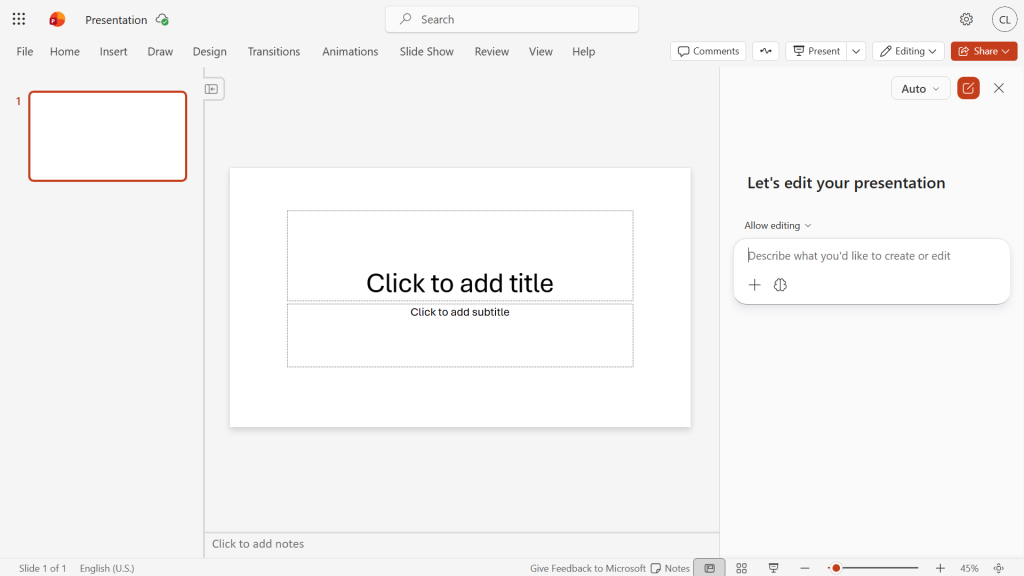
The sidebar on the right is where you interact with Copilot in PowerPOint.
Howard Wen / Foundry
Agent mode: By default, Copilot can build a new presentation or make changes to an existing one in the main PowerPoint window. This is known as “agent mode.” To change this so that Copilot can’t take direct action on a presentation (all its responses appear in the sidebar), click the Allow editing button above the chat window and change it to Chat only.
The tips in this guide require that Copilot be in agent mode, so make sure you see Allow editing above the chat window.
Choice of AI model: Behind the scenes, Copilot has access to various genAI models, including different versions of Anthropic Claude and OpenAI GPT. By default, it decides which model to use based on your prompt. You can set it to use a particular model: click Auto at the upper right of the Copilot pane and select a model from the dropdown that opens.
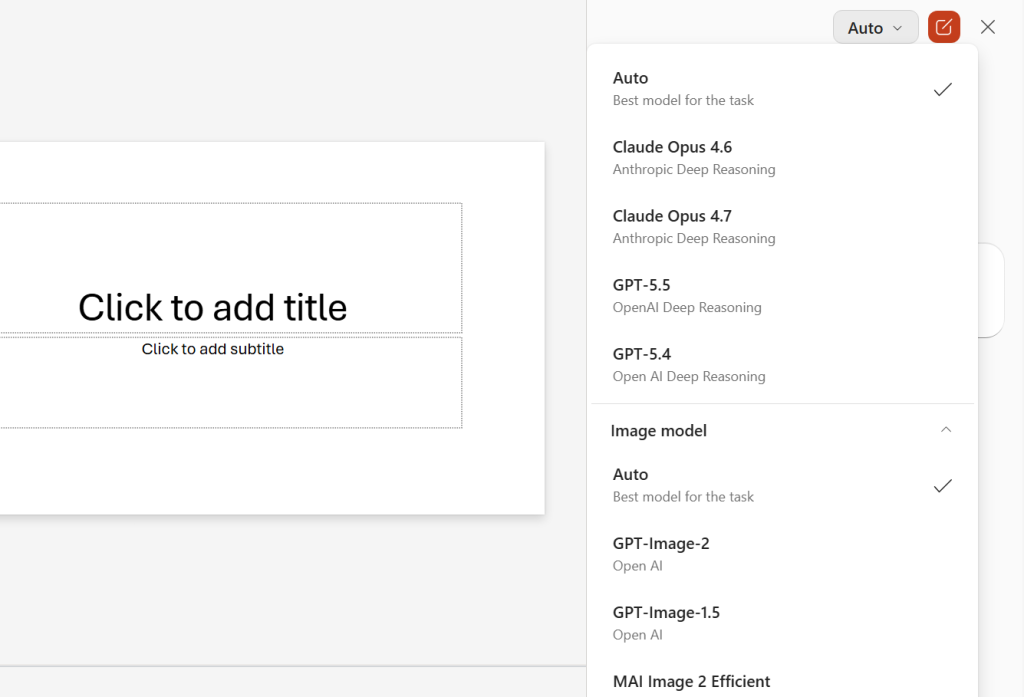
You can choose which AI model you want Copilot to use for a request.
Howard Wen / Foundry
The tips in this guide should work fine on the default Auto setting. But feel free to experiment switching to specific models to see which give you the best results for particular tasks.
Important: Remember that generative AI output often includes errors, so always check Copilot’s output for accuracy. (Also see our tips for reducing hallucinations in Copilot.) You’ll likely want to rewrite it in your own voice as you’re reviewing it.
For many people, the hardest part of creating a presentation is getting started. What types of information should be included on the slides, and in what order? Copilot can give you a leg up by creating the type of presentation you need, with placeholder data that you can later replace with your own.
Start a new presentation, open the Copilot sidebar, and type your prompt into the chat window. It’s best to provide very specific details in your prompt. The more context or details you provide, the more likely Copilot will generate a presentation template that suits your needs.
A good prompt should contain the slide count, subject, audience, and tone. Example:
Copilot may ask a series of follow-up questions, such as your preferred visual style and desired level of detail. Then it will generate a presentation template.
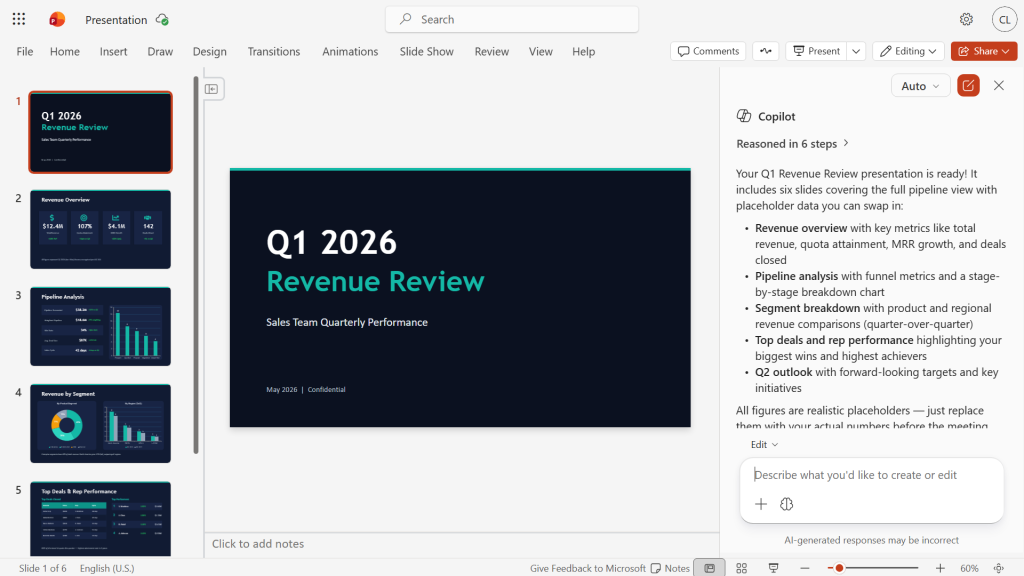
Copilot generates a presentation with placeholder data and explains its elements.
Howard Wen / Foundry
You can optionally prompt Copilot for revisions, and when you’re happy with the template, swap in your own data.
You can attach a document (such as a Word document, Excel spreadsheet, or PDF) and prompt Copilot to generate a presentation based on its contents. This works best with a structured-format document (such as a business plan, project proposal, or summary report) that contains sections with headings.
Copilot can extract the document’s text and structure to generate the slide content for the new presentation. This can especially be useful for quickly turning a long report into a visually appealing presentation.
In the Copilot pane, click the + icon at the bottom of the chat window. A list of documents that you’ve recently accessed appears. Select the one that you want Copilot to use. Alternatively, click the magnifying glass icon and inside its search box, type a few letters of the filename for the document you want. (Business users with an M365 Copilot license can select up to five files for Copilot to pull from when creating a presentation.)
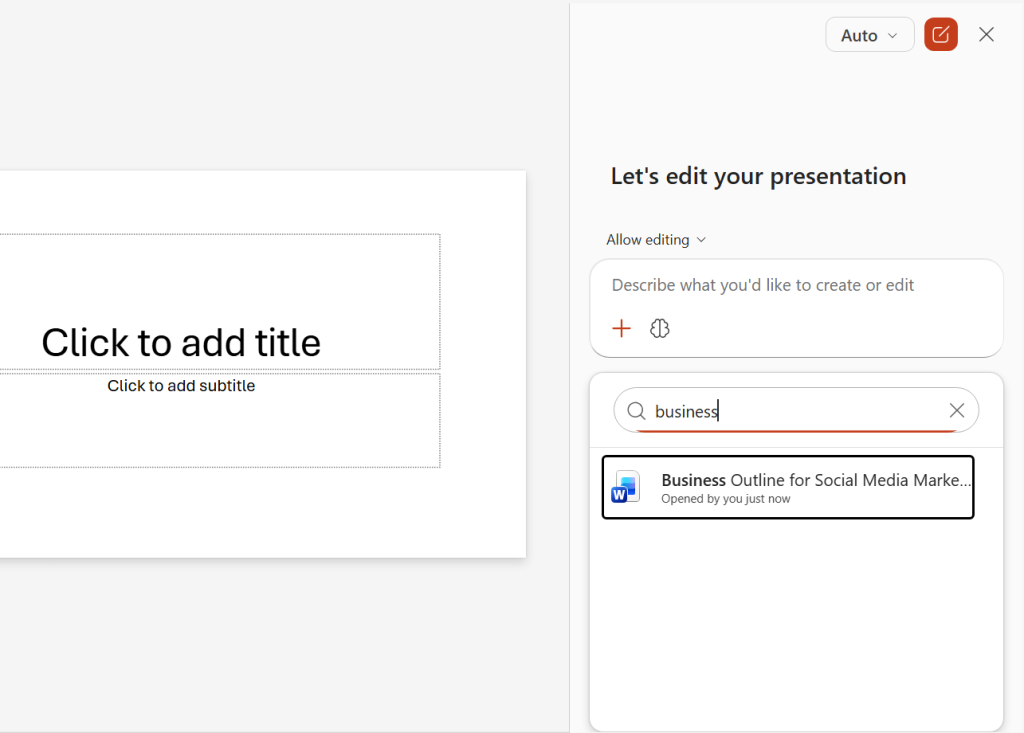
Attaching a document for Copilot to base a presentation on.
Howard Wen / Foundry
Then in the chat window, you can enter a prompt that’s as simple as “Create a presentation,” although as always, providing more details and context is better. This is especially important for corporate users who reference multiple source files. It’s useful to tell Copilot what data to pull from each document.
Answer any follow-up questions that Copilot asks, and it will then generate the presentation.
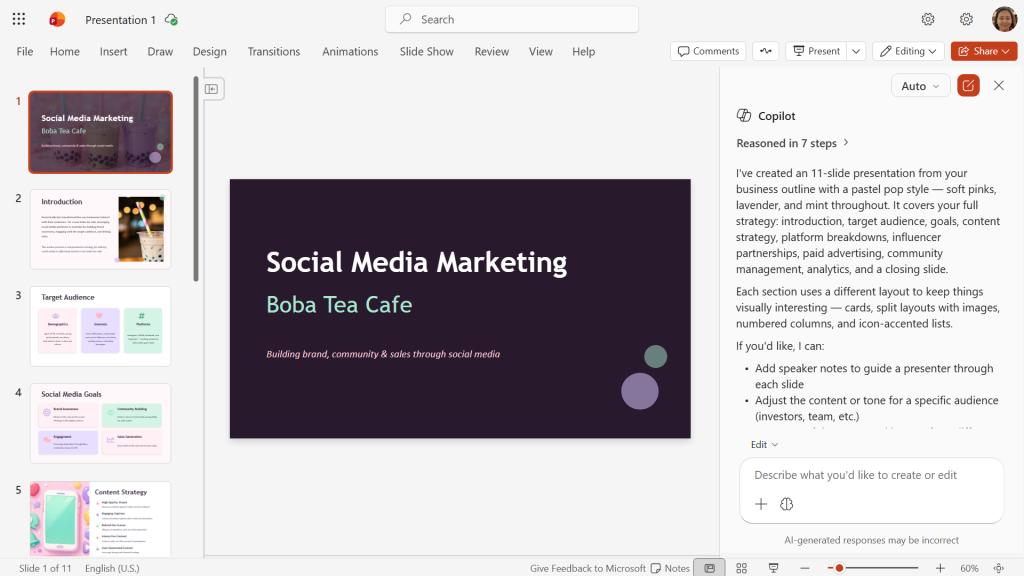
Copilot has generated a professional presentation from a social media marketing campaign document.
Howard Wen / Foundry
Note: Your marketing department may have created one or more branded company templates for Copilot to work from. If that’s the case at your organization, simply open the appropriate company template as your first step. Then you can upload docs and type a prompt as described above. Copilot will create a presentation using the branded template.
Manually copying text or other content from a document and pasting it into a new slide is a chore. Instead, you can prompt Copilot to extract information directly from a Word document, Excel spreadsheet, or PDF to create new slides.
In the Copilot pane, attach the document using the same steps described in tip 2, then tell Copilot to create a slide from the document. As always, it helps to provide details such as the new slide’s focus or what data to include:
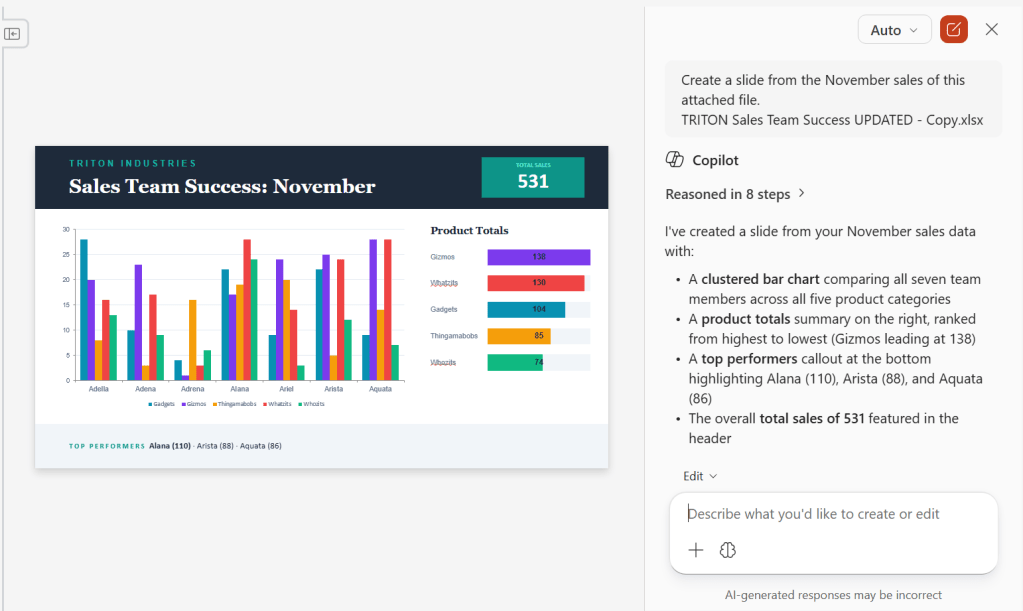
A new Copilot-generated slide based on data from an Excel spreadsheet.
Howard Wen / Foundry
A presentation should be visual and display only the core message. Conciseness and proper writing tone are essential for your slides, so that they don’t lose the attention of your audience.
You can prompt Copilot to refine text on an individual slide in various ways, such as rewriting it in a more professional tone or making it more concise. Highlight the text inside a text box on the slide. On the toolbar that appears over the highlighted text, click Edit with Copilot.
On the menu that opens, you can select a preset prompt to refine the text, such as Condense or Make professional. Or, at the top of this menu, you can type a prompt to rewrite the highlighted text.
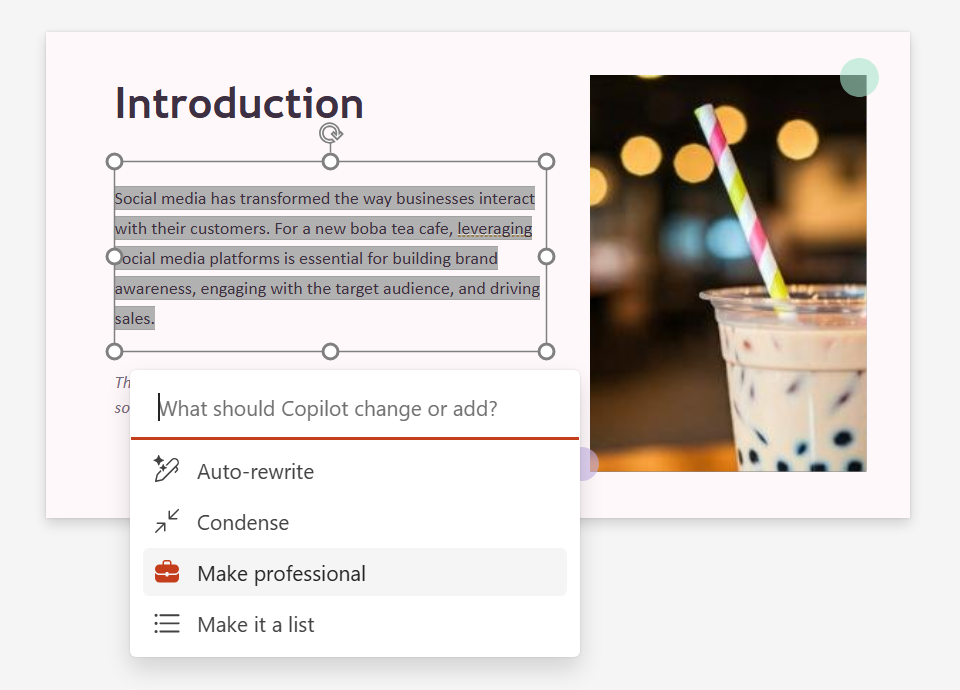
Choose a preset prompt for refining text on a slide or type in your own prompt.
Howard Wen / Foundry
Note that this feature affects all the text inside the text box. To rewrite only a portion of text inside a text box, you must split that portion out into a separate text box.
Alternatively, you can prompt Copilot to analyze your entire presentation and tighten up the wording throughout all of its slides. For example:
If you have Copilot generate a presentation from an existing Word document that contains images, it will incorporate those images into the presentation. If there are no images in the source document, you can ask Copilot to find or create one and add it to a slide.
To add a stock image or an image from your organization’s brand library, tell Copilot what you’re looking for:
To have Copilot create an image using Microsoft’s Designer image generation tool, describe your desired image. As always, specificity is helpful:
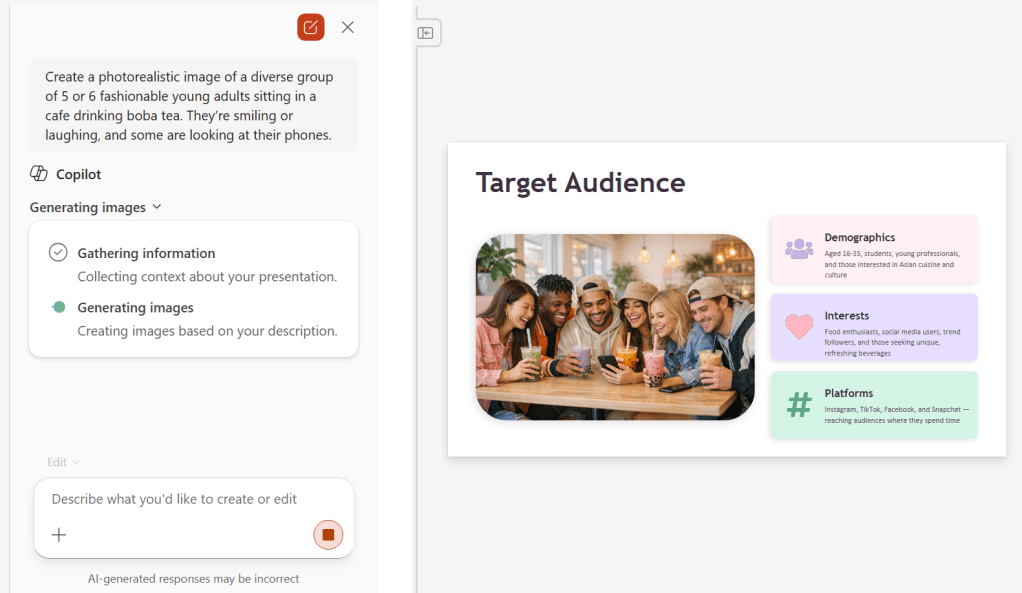
Copilot in PowerPoint hooks into Microsoft’s Designer tool for image generation.
Howard Wen / Foundry
Just as you need to review any text output from Copilot, take a close look at generated images to be sure nothing looks off.
Also note that Copilot image generation isn’t always reliable in PowerPoint. For some time during our testing for this story, Copilot said it couldn’t create an image because “the image generation service is returning a server error on every attempt.” After about a day and a half, the service began working again.
As you’re building your presentation, you may find that it’s become text heavy. Or perhaps it could use more visually oriented slides to break things up and make its progression flow better. Copilot can generate and insert new slides that are based on the content of the slides already in the presentation.
In the Copilot pane, specify exactly where you want the new slide to go. This helps Copilot to analyze the content of the slides before and after where you want the new slide. Then it can generate a slide to bridge between the two slides. Examples:
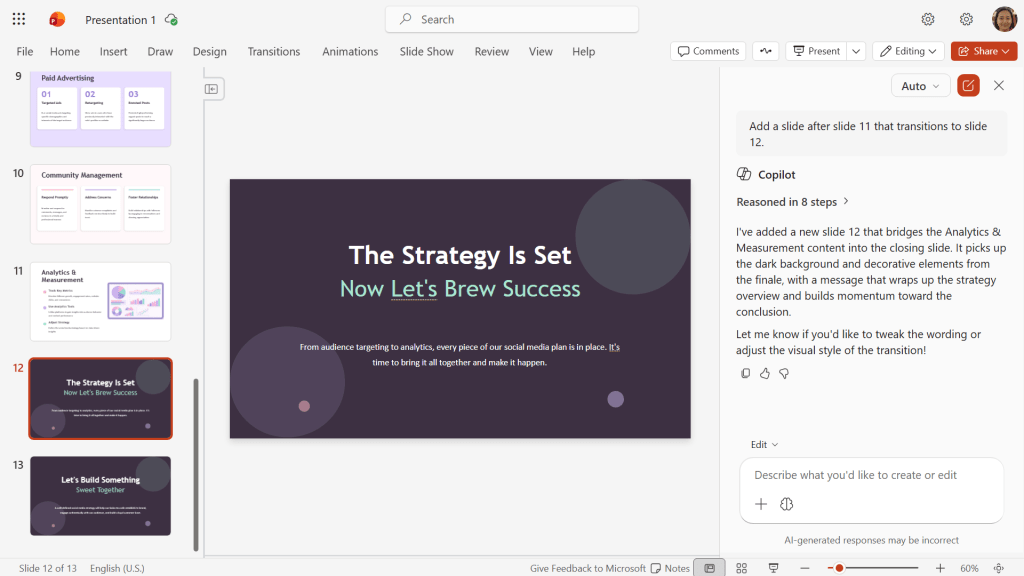
Need a transition slide? Just ask!
Howard Wen / Foundry
Maybe you need a quick refresh of your presentation before an important meeting. Or maybe a co-worker has sent you a presentation that’s packed with lots of slides. You can prompt Copilot to generate a summary of the presentation’s overall messaging.
In the Copilot pane, just type “summarize this presentation.” You can also have Copilot flag key slides that contain important information: “show me key slides.”
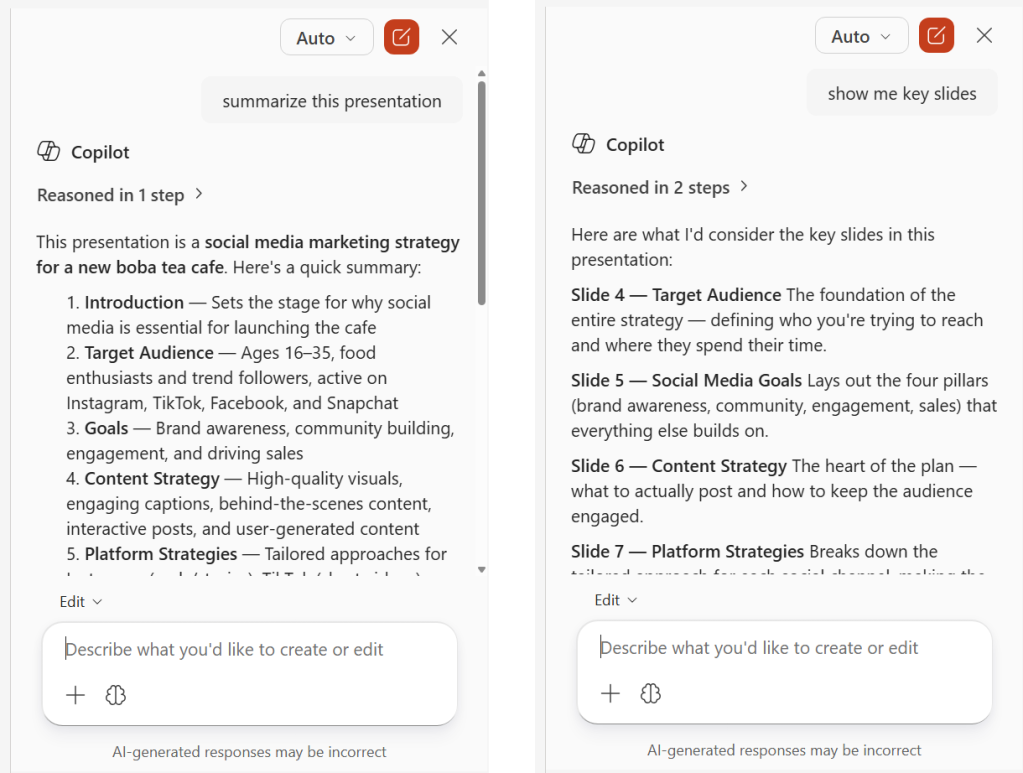
Ask Copilot to summarize a presentation or flag key slides.
Howard Wen / Foundry
As you’re reviewing a presentation, especially one that you didn’t create and are not familiar with, you can get Copilot to pull key data points from its slides.
In the Copilot pane, type specific informational questions. Examples:
If Copilot can’t find the exact answer to the question you ask, it will provide related information from the presentation.
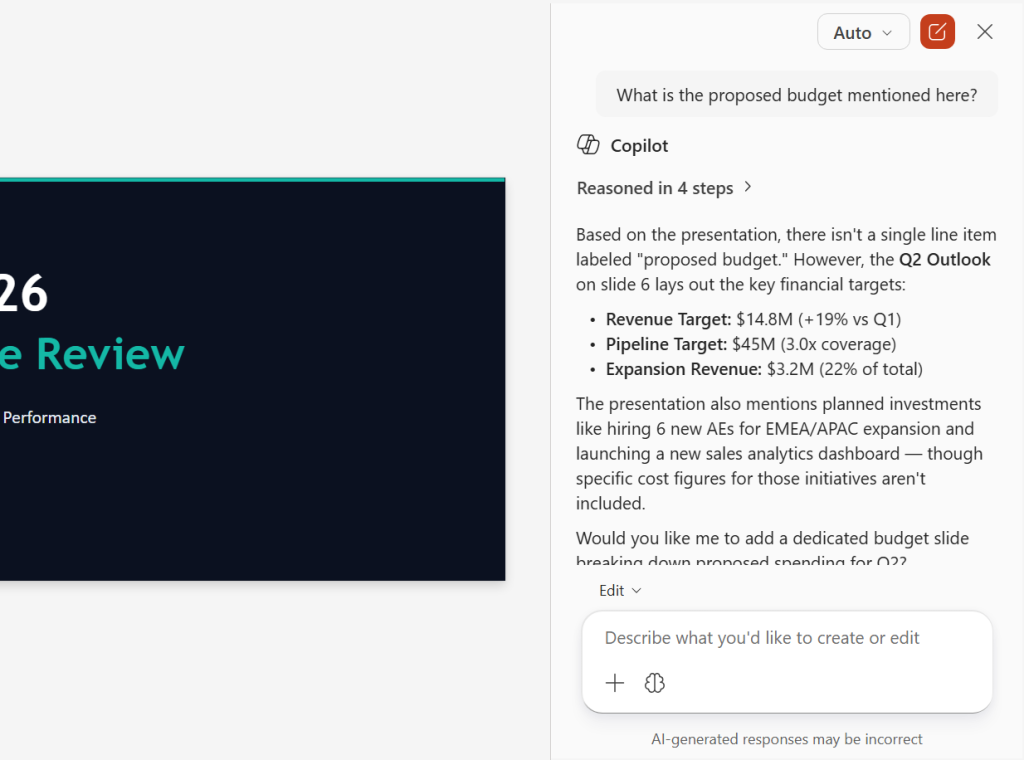
Ask Copilot specific questions about the contents of a presentation.
Howard Wen / Foundry
This method can also help you validate that your presentation includes everything you want it to. If you ask Copilot about the action items in a presentation and it can’t find any, you know you need to add them. (Copilot will likely offer to generate them for you based on the rest of the slides.)
You can even take this tactic a step further and ask Copilot if the presentation is missing any important data, if any slides are weak or confusing, if there are any awkward transitions, if there are key points that should be better emphasized, and so on.
In the business world, presentations with dozens of slides are not uncommon, such as for financial reports or project documentation. Trying to find a specific slide or multiple slides can be tough. Copilot can help you navigate such a presentation.
In the Copilot pane, prompt Copilot to find slides based on specific topics. Example:
Copilot will analyze the presentation and reply with a list of links to the relevant slides. Click one of these to jump directly to that slide.
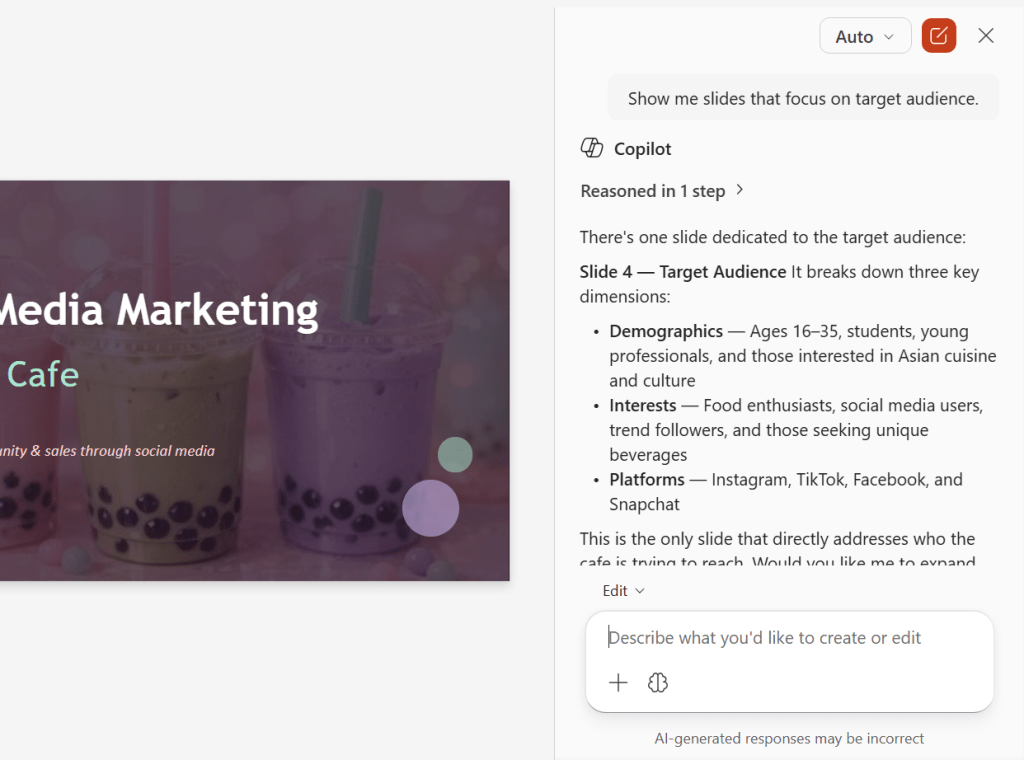
Copilot can help you zoom directly to a slide that covers a particular topic or shows specific data.
Howard Wen / Foundry
Here’s a great timesaver when you’re preparing to show your presentation to an audience: Copilot can automatically generate suggested speaker notes for you, based on the content of your slides. Example prompt:
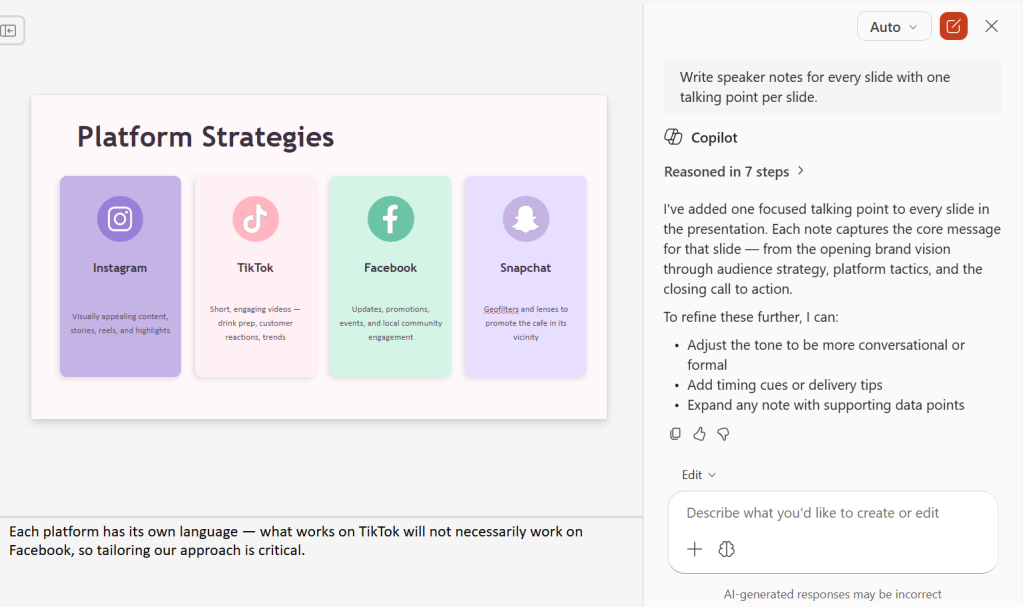
Copilot can create speaker notes in seconds.
Howard Wen / Foundry
In a related feature, Copilot can create a frequently asked questions list (FAQ) for you to consult in your speaker notes or to present as a slide:
Copilot will ask where you want the questions and answers added — as a new slide at the end, integrated into the speaker notes of relevant slides, or somewhere else that you designate. Make a selection, and Copilot will generate the FAQ based on the content of your presentation.
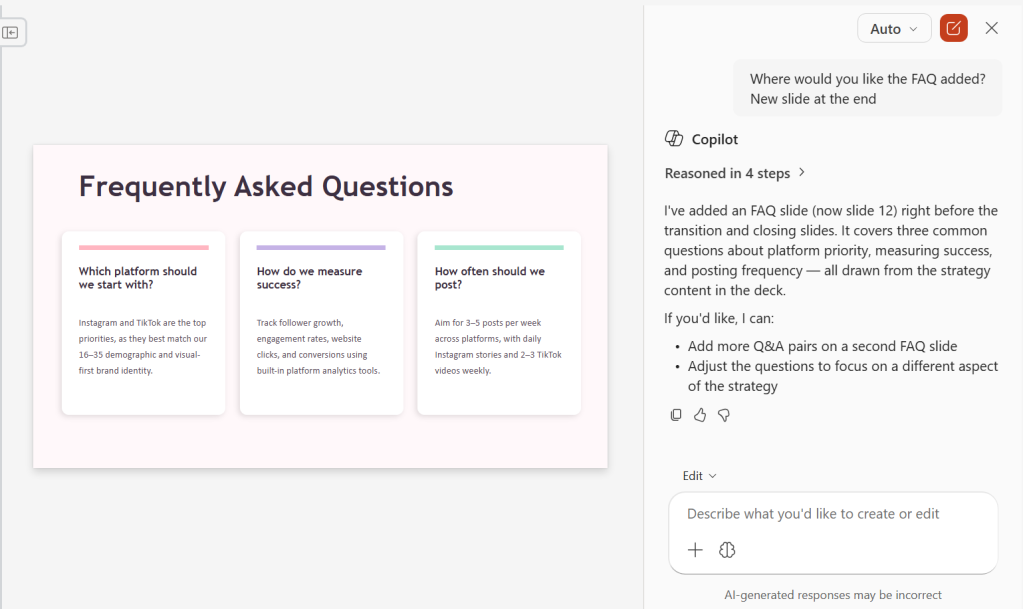
A Copilot-generated FAQ slide.
Howard Wen / Foundry

I use a very cool and relatively new web framework called Astro. The keen insight that the Astro team had was that most websites are made up of static content, so they made it really easy to add content to a website. To add a blog post to my personal website, all I have to do is create a Markdown file with some front matter, deploy it, and the blog post automatically appears. If I need to reach deeper for more dynamic functionality, I can easily do that with TypeScript, React, or almost any other framework. It’s really cool.
And these days, I really don’t write any code. Claude Code does most (all?) of the work. Since Astro is an open-source project and has excellent documentation, Claude knows all about how Astro works. It has no trouble at all managing my site and making the improvements I ask for.
And that got me thinking, how does Astro get built? Is the Astro team building with agentic coding? Astro itself has many dependencies, including big projects like Vite and Node. And of course, Vite and Node have dependencies, too. Are those dependencies being developed by hand, or are those development teams also using AI agents to code?
My curiosity got the best of me, and I asked Claude to dig deeper. It turns out that the Astro repository has an AGENTS.md file, and some of the commits even have commit message trailers indicating that they were at least co-authored by Claude and GitHub Copilot. Further down, there is a .agents/skills directory with skills covering development, merging, triage, and more. I poked around for a look, and someone has done a great job building agentic support.
Now my interest is really piqued, and further investigation reveals quite a bit of interesting stuff. About a year ago, documentation started appearing about how to build Astro sites with coding agents. Around that same time, the docs team released an MCP server that gives developers coding agents deeper, easier access to the Astro documentation.
And there are small steps in the Astro codebase that indicate it is “agentic ready.” For instance, the command-line development server can tell when it is being started by an agent, and the application itself can tell if it is being driven by an agent. Small things, but steps in the direction of embracing Astro developers who use coding agents.
Okay, that was a fun spelunking trip. But so what?
The “so what” is that code is going to be commoditized. As an Astro developer I am using AI agents pretty much all of the time. The Astro development team is starting to use AI agents more and more. The folks building the Astro dependencies are using AI agents. Shoot, the people building Claude Code and the agents themselves are “eating their own dogfood” and using their own tools to build the next frontier model. Before we know it, it will be turtles all the way down.
No one says “who generated that electricity?” or “who wove the fabric in that shirt?” any more. And it won’t be long before no one says “Who wrote the code for that app?” because it won’t matter. Just as we don’t look at the assembly code written by our compilers, we’ll stop looking at the “regular” code written by our agents. I’m not even sure anyone is writing assembly code anymore. Soon we’ll be saying that about TypeScript, Python, and C++.

If you ask us in an official setting, our official position is that software engineering norms still apply. Rigorous CI/CD pipelines, elegant architectural patterns, and an unyielding commitment to maintainable code remain the standard. We will use weighty words like “determinism,” “scalability,” “idempotency,” and “domain-driven design.”
But behind closed doors, late at night, bathed in the glow of a dark-mode IDE, a different and more sordid reality is exposed. Hunched over the console with a manic gleam in the eye, the programmer has become power-drunk on LLMs. Like mad wizards casting spells, we summon the awesome powers of models and agents to satisfy our every programming whim—and commit acts of software engineering that would make Fred Brooks blush.
Let’s just be honest about what is actually happening.
Forget OOP and FP. Forget the CAP theorem, the holy crusade of DRY, and the design patterns. Honestly, you can even forget what frameworks, runtimes, and deployment platforms you are using. The AI will figure out what is best to use and understand what is already in place. We have more mental bandwidth for working on our side project (a novel about AI taking over the world).
Of course, I exaggerate. A little.
We still say RTFM, but the truth is, we haven’t really read a page of vendor documentation since 2023. Stack Overflow, once our Internet Mecca, is a husk. When a package throws a weird exception, we don’t trace the execution path or read the release notes. We highlight the red text, copy the entire 200-line stack trace, dump it into the chat, and wait for the machine to spoon-feed us the solution.
Better yet, we just have the agentic IDE spot the error, divine a solution, and ask us if it’s OK. We might glance at the problem-solution description, if we have gone around the circle on the problem for a few cycles. Maybe. If we don’t have the agent set up for auto-confirm.
We used to buy heavy tomes like “Rust In Action” that were more like masonry blocks than literature. Now? We just ask an AI to transliterate our JavaScript logic into Rust. We are no longer engineers methodically learning a system. We are glorified copy-paste orchestrators hoping that the stochastic parrot behind the prompt guesses the syntax correctly.
We act like we meticulously designed the data flows, carefully crafted the relational constraints, and mindfully mapped the API relationships. The reality is rather more disturbing: We asked the AI to scaffold a modern deployment, hooked it up to a back-end database, and just sort of… ran it.
It created security rules we don’t fully understand. They do seem to work, however, which is nice.
It generated a schema that we skimmed for about four seconds. It looks reasonable.
It wrote infrastructure-as-code scripts that provisioned cloud resources we are hoping don’t blow a hole in the budget. Presumably, whoever is in charge of that will manage it by stuffing the metrics into another chatbot.
We nodded, committed the code, and went to lunch. If management asked us to manually deploy the stack from scratch, configure the environment variables, and wire the API routes without our chat window, we would give them a vacant stare.
We understand that management is also using AI to manage the project.
Test-driven development (TDD) used to be a beautiful dream, ever just beyond reach. It made us feel glorious and despondent at turns. It would burden us with sprawling dependencies if implemented too religiously. (See The Grug Brained Developer in this regard.)
But now we can attain 95% test coverage almost effortlessly. Why not just add them in while we are auto-generating everything else?
We can now wax at length to anyone who will listen about our astounding test coverage and our automated quality assurance. Unit tests, integration tests, smoke tests, you name it. What we conveniently leave out is that the AI wrote the complex application logic, and then we asked the exact same AI to write the test suite to validate the code it just dreamed up.
It is a hermetically sealed loop of algorithmic self-congratulation. The mocks, the edge case, and the assertions are an echo chamber of the model’s original assumptions. The machine is grading its own homework, giving itself an A+.
And we are happy to accept this because, beautifully, when the code has to change, the AI will effortlessly hallucinate new tests to adapt to the churn.
AI can produce astonishing design documents. Truly breathtaking. They are cogent, they’re beautifully formatted, and they seamlessly bridge the gap between high-level business goals and granular technical specs. They even include those auto-generated sequence diagrams that wow management.
When we present these spotless architectural proposals in the Tuesday sprint planning meeting, we lean back, take a long sip of coffee, and humbly wave away the team’s praise.
What we don’t mention is that we spent exactly four seconds generating it.
Are these AI-generated documents just as liable as human ones to hide severe, mortal flaws in scope and alignment? Absolutely. They might contain a foundational logic bomb that will eventually doom the entire project. But the markdown is so crisp, and the bullet points are so persuasive, that the eye just glides right over it. We will never truly know the depth of the disaster until it is far too late. But hey, we’ll burn that bridge when production catches fire. Until then, we are strategic visionaries.
We loudly mock the term on social media. We roll our eyes in Slack channels when the kids on TikTok talk about vibe coding their new startups. We fiercely cling to our identities as hardened, serious developers who understand memory management, garbage collection, and bitwise operators. We are professionals, damn it.
But late at night, when the managers are asleep and no one is looking? We absolutely love it. We love just throwing a chaotic, half-baked thought at the canvas, pouring a drink, and watching the AI magically build a functioning user interface based entirely on our long-deferred whims. I may finally build that working Ultima V clone. The thrill of typing “Create an app that tracks my cryptocurrency portfolio but makes it look like the interface from Neuromancer” and having it appear 30 seconds later is heady stuff.
The more deeply rooted in the hard, old-school realities of programming, the more profound is the joy the developer finds in the possibility of AI coding.
Like Adam Sandler in “Uncut Gems,” we are convinced the next round will fix everything. This is us with prompts. When things are going really off the rails, instead of putting our boots on and wading into the brambles of complexity, we resort to tonal adjustments. These range from the condescending:
This problem is not fixed. Look at it closely. The error is right here.
To the desperate:
We have been working on this same problem for hours now!
To the pathetic:
Can’t you find a different approach to try?!
The astonishing part? It often works.
But there is no poetry left at the bottom of the rabbit hole; it is verbal warfare. When the context window collapses, when the regressions start cascading, and when the AI stubbornly refuses to follow the most basic rules of temporal logic, the mask of professionalism drops away and something far more atavistic makes its appearance. We stop asking nicely, stop trying to understand the why, delete the pleasantries, and capslock our intent.
What we have here is a failure to communicate!
We feed the same failing stack trace back into the prompt over and over and over again, aggressively hammering the constraints, explicitly forbidding certain libraries, and pasting in release notes just to confirm that the AI lacks the latest APIs. We force the model down a narrower and narrower path until the code finally stops throwing errors. We don’t actually debug anymore, trace variables, or step through functions. We just apply relentless, iterative pressure until the machine surrenders. We beat it into submission. And then, we push to production.
In fact, there is a real skill here—a sheer “will to completion” that remains in the act of building software. We invest just as much time, energy, and heart wrestling the bot as we ever did emitting syntax.
The only profession more given over to using AI like a cursed Level 13 artifact than programming is writing. Writing of course is far more open to public scrutiny than code.
And while my tongue has been firmly in my cheek here, my faith in coders as good guys makes me more curious to see what we create than troubled by the dangers.
It was once the case that only other programmers could understand what programmers were doing, what they were producing. Now not even that is true. Only the machine knows what the machine is doing. We just keep it tethered to our aims. Hopefully.

A US federal court has approved Anthropic’s $1.5 billion settlement in a class-action lawsuit in which authors accused the AI company of using their books without permission to train the AI model Claude. This is the largest such settlement to date in a US copyright case, according to Reuters.
The dispute is one of several legal cases in which copyright holders sued AI companies over how large language models (LLMs) were trained, and it is the first major AI-related copyright dispute in the US to be resolved through a settlement.
A judge had previously ruled that the actual training of AI models using books falls under the “fair use” doctrine in US copyright law. But Anthropic was found to have violated the law by storing more than 7 million pirated books in a central library, regardless of whether they were later used for AI training or not.

Jobs involving physical labor are at high risk of disruption from automation, with new technologies such as AI robots becoming more prevalent, according to a recent study by the Organization for Economic Co-operation and Development (OECD). That means workers in construction and extraction, farming, fishing, forestry, production and material transportation could be affected by fast-moving technology changes.
“Routine and low-skilled jobs are at higher risk,” the Paris-based public policy group said, adding that “overall, jobs requiring non-routine cognitive, social and creative skills are less susceptible to automation.”
The kinds of creative and cognitive jobs still thought to be less exposed to automation include social work and community service roles.
OECD also said management jobs — which often require workers to devise creative answers to solve problems — fall within the creative and cognitive category. “While AI has made some high-skill job requirements more susceptible to automation, many critical skills in these roles remain difficult to automate,” OECD said.
The same still holds true for some physical and manual labor jobs – including cleaners, agricultural workers, food-prep assistants, and laborers — which are less exposed to the affects of AI, OECD said.
But people who work in programming, translating and interpretation positions could find their work affected by the quick rise of AI tools and services. According to the organization, global AI uptake rose from 7% in 2021 to 20% in 2025.
“In these occupations, GenAI could perform a significant share of tasks at least twice as fast today or in the near future,” OECD said.
The effects of the AI boom are not always uniform across industries or regions. In a separate 2026 Employment Outlook study released by the group, exposure to disruption from generative AI (genAI) ranges from about 16% in some areas to more than 70% elsewhere, depending on industries and occupations.
Numerous research firms have said in recent years that AI is driving short-term job losses, though tech industry experts and analysts have argued AI will also create new careers and jobs as agentic AI takes over low-skilled work.
AI technology has become so ubiquitous that it’s been compared to electricity — virtually all companies will need it or at least know how to use it. But it’s adoption has been hindered at times as companies struggle to find ROI from its use, and by regulatory and ethical hurdles.
According to a Challenger, Gray & Christmas study released earlier this month, AI was cited as the top reason for job cuts in June. The outplacement firm said employers cut 45,849 job cuts in June, of which 14,029 were attributed to AI, with the tech industry leading the cuts.
“Tech remains the epicenter of this year’s cuts,” Challenger said. “AI is the dominant force as companies are restructuring around it, automating roles, and reallocating budgets toward new capabilities. The sector is being reshaped in real time.”
Overall, AI has been responsible for 173,568 job cuts since 2021, the company said.
AI is hurting jobs in customer service, internal reporting, telecommunications, and hosting automation, said Victor Janulaitis, a staffing consultant who was formerly CEO at Janco Associates Inc.
“C-level executives continue to be focused on eliminating ‘non-essential’ managers, staff, and services,” he said. “Coders and developers have limited opportunities with legacy applications.”
While jobs in the IT sector overall are declining, current hiring tends to skew in the direction of people with AI skills. A report this month by CompTIA put job listings with AI skills at around 500,000, which is close to double the number in January.
“Employers in other industries are accelerating digital transformation initiatives and moving from AI experimentation to implementation,” said Seth Robinson, CompTIA’s vice president for industry research.
That view dovetails with what ManpowerGroup, the recruitment firm, is seeing; demand for AI-related skills has nearly doubled over the past year, said Ger Doyle, regional president of North America at ManpowerGroup.
That growth extends well beyond traditional technology roles as companies move from experimenting to AI deployments at scale, Doyle said. “We’re seeing it influence hiring across occupations ranging from data science and engineering to project management and operational roles,” he said.

Looking ahead just a short time, Apple could hold a powerful position in AI where it most makes sense: deployment.
Not only will the company offer up its own AI models for the kind of tasks millions use ChatGPT to do today, but it will provide more sophisticated on-device agentic models to help users get things done through Siri AI.
Apple also offers limited capacity for more complex tasks through Private Cloud Compute, and, in partnership with the likes of Google in the US and Alibaba in China, the company is giving users a trusted conduit through which to access even more sophisticated AI services.
Critics can say it took Apple a long time to get to this point, but they also seem to think the company has finally got the mix right with its series 27 operating systems. Arriving late to a party doesn’t mean you won’t shine once you get there.
Apple is also coming up the inside lane around frontier AI, with iterative OS and hardware enhancements that mean its devices become increasingly effective for Edge AI use cases, on device — no cloud service required.
The company appears to be digging down into those use cases. Mark Gurman at Bloomberg recently predicted that future M7 Ultra Macs will support as much as 1.5TB RAM, making these systems more than capable of running full weight frontier models in people’s offices, colleges, and homes.
While that does assume the AI-flationary memory market can supply that much RAM at prices humans can afford, it is also true that people are already running AI clusters using off-the-shelf Mac minis networked over Thunderbolt cables. It’s no stretch to believe this will continue to be the case, and that it will even broaden as the power/performance offered at the high end grows.
When combined with open AI stacks, particularly newly emerging varieties, Apple’s platforms should become leading contenders for private AI services and edge AI. Many business users will leap at the chance to offer their workers powerful, self-hosted, private AI services using one or more daisy-chained Mac Studios or Mac minis. The recent craze in deployment of both Macs to support OpenClaw instances shows they already are.
Ultimately, these different slices of momentum mean I agree with investor Jason Calacanis that Apple is in position to apply a great deal of pressure on OpenAI and Claude just by putting models on their devices.
It’s also worth thinking about how people use AI today. How many of the queries made in the world right now constitute relatively simple tasks that could be transacted by on-device AI, such as the emerging new version of Apple Intelligence or even smaller LLM models running on device? You can even run PrismML’s 1-bit, 27-billion parameter Bonsai on an iPad using the Locally app, and that’s in the here and now.
What happens? Pretty soon you’ll find people recognize that they can already run the vast majority of their AI-augmented workflows using services they have on their existing device or can access on their on-prem Mac set-ups. And, of course, as people get used to running small tasks locally and larger tasks on premises, the actual space in which they need to turn to cloud-based frontier models will erode. That’s even as companies like PrismML work towards slimming down full-weight models so they don’t need to run on a server at all.
“It’s going to be wild when people have unlimited tokens on their desks,” said Calacanis in a podcast round table discussion.
The current incarnations of AI felt like they came from nowhere. Most people weren’t aware of the technology until returning to work after the 2022 holiday season. Since then, the industry has proliferated with dozens of competing models, most recently including powerful but affordable frontier models such as Qwen and Kimi.ai.
These models aren’t necessarily all as good as one another, but in many cases for much of what we do, we’ll find them to be good enough. That’s an existential crisis for some, as industry observers now think the inevitable pricing pressure means some services might have over-invested in capacity before finding any way to turn a profit.
Those profit-seeking services are the ones with the most to lose as Apple extends its hardware advantage, democratizing AI access for all while providing platforms suitable for edge AI, on-premises AI, private AI, and even AI access using third-party services. (The need for the latter will shrink as the capabilities of the former get better.)
What does this all mean? While the industry remains young, it is already fragmenting. And striding through the dust of that process comes Apple, equipped with the hardware, software, and approach to build its business even as the enterprise of first mover AI services erodes.
You can follow me on social media! Join me on BlueSky, LinkedIn, Mastodon and subscribe to my daily Apple-related news summaries at The Core.

